LANYA ELECTRONIC BSH557 Bluetooth Headset User Manual

LANYA ELECTRONIC CO., Ltd. Bluetooth Headset

user manual

            Bluetooth stereo headset  Model Name: BSH557  FCC ID: ZG8BSH557
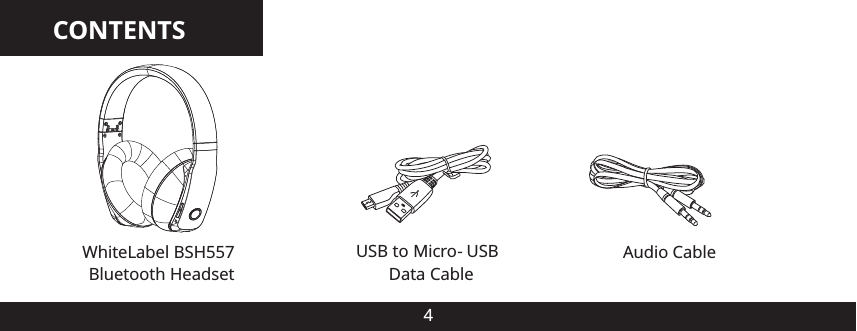
CONTENTS4WhiteLabel BSH557 Bluetooth HeadsetAudio CableUSB to Micro-USB Data Cable
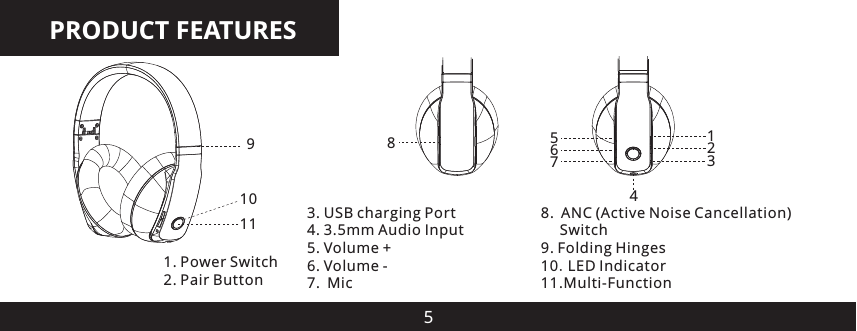
PRODUCT FEATURES5910 3. USB charging Port4. 3.5mm Audio Input5. Volume +6. Volume -7. Mic8. ANC (Active Noise Cancellation)      Switch9. Folding Hinges10.LED Indicator11.Multi-Function 1. Power Switch2. Pair Button1236754811
TURN ON THE HEADPHONES6To turn on the Headphones ON simply slide the Power Switch to the down position. The LED Indicator will flash BLUE times, and you’ll hear a tone through the Headphones.To turn on the Headphones ON simply slide the Power Switch to the down position. The LED Indicator will flash RED times, and you’ll hear a tone through the Headphones.
CONNECTING WITH BLUETOOTH71. Turn ON the Headphones using the Power Switch2. Hold down the Pair Button for a few Seconds and the LED light will flash Red and Blue     The Headphones are ready to connect to the device.3. Go to the Bluetooth option in the settings of your Bluetooth Audio device or Smartphone      and in the list of Devices select BSH5574. The Headphones are now ready to useConnecting with Audio CableTo connect the Headphones to devices that do not support Bluetooth. Plug the provided Audio cable into the Headphone port on the left and connect the other end of the cable into the audio
CONNECTING WITH BLUETOOTH8device.Note:  The audio cable will allow you to listen to music even if the Headphone Battery is out of power. Also allows you to use the Headphones in places where wireless signals are restricted such as Hospitals and Aircraft.
DESCRIPTION OF HEADPHONE FUNCTIONS9Adjust volumePress the  volume +/- key to adjust  the volume. One short press will adjust one level. When the volume reaches max or minimum volume the Headphones will play a chime.Play/Pause musicPress Multifunction Button one time to Play or Pause music.Previous/Next song When playing music you can press “forward” button to play next song and “backward” button to play previous song.
DESCRIPTION OF HEADPHONE FUNCTIONS10Active Noise CancellationTo enable the Active Noise Cancellation feature slide the ANC switch to the down position. The LED indicator will illuminate to show the ANC is active.Active Noise Cancellation is a feature that reduces the background noise and is suitable for listening to music in noisy environments such as Train, Aircraft or walking in the street.Sleep modeIf the Headphones are powered on but no audio is being played the Headphones will enter Power Saving Sleep mode after 10 minutes. To activate the Headphone just push the Multifunction Button and the music will resume.
DESCRIPTION OF HEADPHONE FUNCTIONS11Receive a Phone CallIf you are listening to music when there is incoming Phone call or you are making a Phone call, the Headphones will automatically switch the connection from the music player to the Phone. The Music will be paused temporarily. After you end the call, the music resumes.Note: when you press Multifunction Button to answer or end a call, please just press one time. Do not press and hold.Make a phone Call with the HeadphonesUse the Phone’s keypad to dial the phone number.Press Phones “SEND” or “OK” key. The Phone begins the call and automatically transfers the call from the Phone to the Headphones.
DESCRIPTION OF HEADPHONE FUNCTIONS12Voice dialing (dialing a number by saying a name)It is possible to make a call directly from the Headphones using voice recognition. To use this voice dialing function, your Phone must provide this option.1.Enable voice recognition function of your Phone and set the Phone to hands free mode.2.Double press the Multifunction Button of the Headphones, you will hear a tone.3.Say the name of the person you wish to call loudly.End a CallUse either of the following methods to end a call;• Press Multifunction Button one time to end a call from the Headphones.• End a call from the Phone’s screen.
DESCRIPTION OF HEADPHONE FUNCTIONS13Refuse a callWhen there is incoming call, press and hold Multifunction Button for about 2 seconds until you hear prompt from the Headphones. Release the Button and the call is refused.Redial the last NumberPress and hold volume + Button for 2 second to redial the last dialed number.Microphone muteIn a call mode, press and hold volume - key for 2 seconds until you hear prompt from the Headphones, you can switch to open and close mute function.
DESCRIPTION OF HEADPHONE FUNCTIONS14Switch Phone call between Phone and HeadphonesIn call state press and hold Multifunction Button for 2 seconds until there is prompt from the Headphones. The call will be switched from Headphones to Phone or vice versa.Charging the HeadphonesTo charge the Headphone use the supplied USB cable and insert into any powered USB Port normal charging process takes abort 2-3 hours. The red LED will turn on when charging and will turn off when charging is complete.When the battery is low the Red LED will flash and there is also an audio prompt from the Headphones. Recharge the Headphones this time. Make sure the battery has been fully
DESCRIPTION OF HEADPHONE FUNCTIONS15charged and fully released at the beginning three times of use to ensure the battery the best performance. After charging is complete please remove the cable from the Headphones and the USB Cable from the USB port. Do not keep the Headphones connected to the USB port for a long time when charging complete as this will shorten the lifetime of the Battery.
CAUTION16 Avoid placing this product near extreme temperatures or humidity. Do not use this product while operating a motor vehicle Do not submerse or allow this product to come into contact with water. Use in dry locations     only.• An adult should supervise young children when using this product.• Use of any attachment or accessory with this product not recommended or sold by White     Label may result in risk of fire, electrical shock or injury to persons or product. Do not clean any parts with alcohol, cleaning solutions containing alcohol or strong abrasives.     Use a soft cloth and a little water There are no user serviceable parts within this product. Tampering with this product will     invalidate your White Label warranty.•• .••.•
CONTACT US18Irvine Mobility,Inc.support@whitelabel.cowww.whitelabel.co    IRVINE MOBILITY 2013. The product and packaging are trademarks or registered trademarks of IRVINE MOBILITY, INC. in the United States or other countries. All rights reserved. The Bluetooth   word mark and logos are owned by Bluetooth   SIG, Inc. and any use of such marks is under license. Other trademarks and trade names are registered mark of their respective owners.CRR
Important Regulatory Information  This device complies with part 15 of the FCC rules. Operation is subject to the following two conditions: (1) this device may not cause harmful interference, and (2) this device must accept any interference received, including interference that may cause undesired operation.       Changes or modifications to this unit not expressly approved by the party responsible for compliance could void the user’s authority to operate the equipment.

Navigation menu