LAVA LAVAGRAND Mobile Phone User Manual UserMan

LAVA INTERNATIONAL (H.K) LIMITED Mobile Phone UserMan

UserMan

   i        LAVAINTERNATIONAL(H.K)LIMITEDUserManualGrand
   ii        ContentYour phone&Keyparts.............................................................................................1GettingStarted..........................................................................................................2InsertingtheSIMcardandtheBattery...................................................................2InsertingMicroSDcard...........................................................................................3SwitchOn/Off..........................................................................................................3ConnectiontoNetwork...........................................................................................3ChargingtheBattery...............................................................................................4BasicFunction...................................................................................................4MakeCalls...............................................................................................................4AnswerCalls............................................................................................................5Phone......................................................................................................................5People.....................................................................................................................5Messages.................................................................................................................5Email.......................................................................................................................5Google.....................................................................................................................5Browser...................................................................................................................5Calculator................................................................................................................5Calendar..................................................................................................................5Clock........................................................................................................................6Camera....................................................................................................................6FMRadio.................................................................................................................6Music.......................................................................................................................6SoundRecorder.......................................................................................................6VideoPlayer............................................................................................................6YouTube..................................................................................................................6Gallery.....................................................................................................................6FileManager...........................................................................................................6Maps.......................................................................................................................6PlayStore................................................................................................................6SIMToolkit..............................................................................................................7
   iii        Downloads..............................................................................................................7Backupandrestore.................................................................................................7Settings...................................................................................................................7FrequentlyAskedQuestionsandTroubleshooting.............................................8SafetyInformationandNotices........................................................................10Emergencycall......................................................................................................10Foryoursafety......................................................................................................10ServiceCenterInfo..........................................................................................13
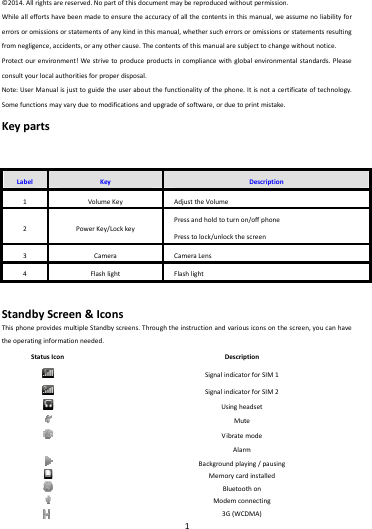
   1        ©2014.Allrightsarereserved.Nopartofthisdocumentmaybereproducedwithoutpermission.Whilealleffortshavebeenmadetoensuretheaccuracyofallthecontentsinthismanual,weassumenoliabilityforerrorsoromissionsorstatementsofanykindinthismanual,whethersucherrorsoromissionsorstatementsresultingfromnegligence,accidents,oranyothercause.Thecontentsofthismanualaresubjecttochangewithoutnotice.Protectourenvironment!Westrivetoproduceproductsincompliancewithglobalenvironmentalstandards.Pleaseconsultyourlocalauthoritiesforproperdisposal.Note:UserManualisjusttoguidetheuseraboutthefunctionalityofthephone.Itisnotacertificateoftechnology.Somefunctionsmayvaryduetomodificationsandupgradeofsoftware,orduetoprintmistake.KeypartsLabelKeyDescription1VolumeKeyAdjusttheVolume2PowerKey/LockkeyPressandholdtoturnon/offphonePresstolock/unlockthescreen3Camera CameraLens4FlashlightFlashlightStandbyScreen&IconsThisphoneprovidesmultipleStandbyscreens.Throughtheinstructionandvariousiconsonthescreen,youcanhavetheoperatinginformationneeded.StatusIconDescriptionSignalindicatorforSIM1SignalindicatorforSIM2UsingheadsetMuteVibratemodeAlarmBackgroundplaying/pausingMemorycardinstalledBluetoothonModemconnecting3G(WCDMA)
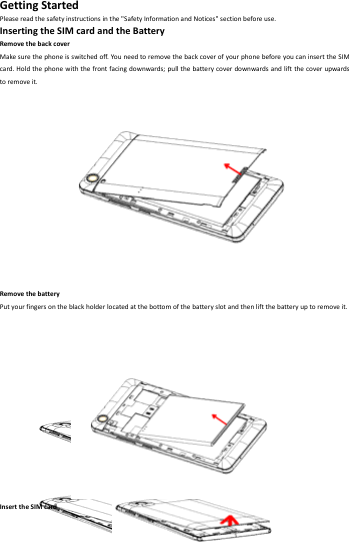
   2        GettingStartedPleasereadthesafetyinstructionsinthe"SafetyInformationandNotices"sectionbeforeuse.InsertingtheSIMcardandtheBatteryRemovethebackcoverMakesurethephoneisswitchedoff.You needtoremovethebackcoverofyourphonebeforeyoucaninserttheSIMcard.Holdthephonewiththefrontfacingdownwards;pullthebatterycoverdownwardsandliftthecoverupwardstoremoveit.RemovethebatteryPutyourfingersontheblackholderlocatedatthebottomofthebatteryslotandthenliftthebatteryuptoremoveit.InserttheSIMcard
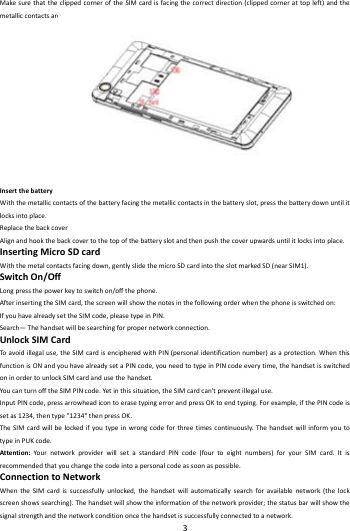
   3        MakesurethattheclippedcorneroftheSIMcardisfacingthecorrectdirection(clippedcornerattopleft)andthemetalliccontactsarefacingdownwards.SlidetheSIMcardintothecardslotuntilitstops.InsertthebatteryWiththemetalliccontactsofthebatteryfacingthemetalliccontactsinthebatteryslot,pressthebatterydownuntilitlocksintoplace.ReplacethebackcoverAlignandhookthebackcovertothetopofthebatteryslotandthenpushthecoverupwardsuntilitlocksintoplace.InsertingMicroSDcardWiththemetalcontactsfacingdown,gentlyslidethemicroSDcardintotheslotmarkedSD(nearSIM1).SwitchOn/OffLongpressthepowerkeytoswitchon/offthephone.AfterinsertingtheSIMcard,thescreenwillshowthenotesinthefollowingorderwhenthephoneisswitchedon:IfyouhavealreadysettheSIMcode,pleasetypeinPIN.Search—Thehandsetwillbesearchingforpropernetworkconnection.UnlockSIMCardToavoidillegaluse,theSIMcardisencipheredwithPIN(personalidentificationnumber)asaprotection.WhenthisfunctionisONandyouhavealreadysetaPINcode,youneedtotypeinPINcodeeverytime,thehandsetisswitchedoninordertounlockSIMcardandusethehandset.YoucanturnofftheSIMPINcode.Yetinthissituation,theSIMcardcan'tpreventillegaluse.InputPINcode,pressarrowheadicontoerasetypingerrorandpressOKtoendtyping.Forexample,ifthePINcodeissetas1234,thentype"1234"thenpressOK.TheSIMcardwillbelockedifyoutypeinwrongcodeforthreetimescontinuously.ThehandsetwillinformyoutotypeinPUKcode.Attention:Your networkproviderwillsetastandardPINcode(fourtoeightnumbers)foryourSIMcard.Itisrecommendedthatyouchangethecodeintoapersonalcodeassoonaspossible.ConnectiontoNetworkWhentheSIMcardissuccessfullyunlocked,thehandsetwillautomaticallysearchforavailablenetwork(thelockscreenshowssearching).Thehandsetwillshowtheinformationofthenetworkprovider;thestatusbarwillshowthesignalstrengthandthenetworkconditiononcethehandsetissuccessfullyconnectedtoanetwork.
   4        Note:Ifthelockscreensshows"Emergency",itmeansthatyou'reoutofnetworkcoverage(servicecoverage)oryourcardisnotvalid,yetyoucanstillhaveemergencycallsbasedonsignalstrength.ChargingtheBatteryEnsurethebatteryinsertedinthehandset.To chargethebattery,pluginthechargerconnectoratthebottomofyo urphone(USBinterface)andthenplugtheotherendintoanACpowersocket.Thebatterysymbolindicatesthechargingstatus.Whilecharging,thechargeindicatorswillscroll.Whenallthescrollbarsaresteady,thebatteryisfullycharged.Disconnectthechargerfromthephone.DisconnectthechargerfromtheACpowersocket.Note:Ifthebatteryispowerless,thebatteryiconwillreappearafterafewminutesofcharging.BasicFunctionMakeCallsWhenthenetworkprovidericonappearsonthestandbyscreen,youcancalloutoranswercalls.Theindicatorontheupperrightpartshallshowthesignalstrength.Qualityofconnectionwillbegreatlyinfluencedbyobstructions.Somovementinasmallrangemayeffectivelyimprovethequalityofconnection.MakeDomesticCallsUsevirtualkey boardtoenterphonenumbersandthenpressDialicontocall.Ifyouneedtochangethephonenumber,pleasepressthedeletekeyonthetouchscreentodelete.Whenthecallisanswered,thescreenshallshowtheconnectionstatus.CallExtensionPhoneSomeoftheextensionphonescan'tbedirectlyconnectedto.Usethevirtualkeybo ard,enterswitchboardnumber,opentheoptionmenuandchoose"Add2‐secpause",andthendialtheextensionphonenumber.Typ einasfollowstocallextensionphone:Zonedescription>switchboardnumber>Add2‐secpause>extensionphonenumber›callMakeInternationalCallsIfyouneedtomakeaninternationalcall,doalongpressonthe0keyonthevirtualkeyboarduntilthereappearsthesign"+"forinternationalcallprefix,whichhelpsyoucallfromanycountryevenifyoudon'tknowtheinternationalcallprefixofthatcountry.Youcanmakeaninternationalcallaccordingtothefollowingtypingorder:+›countrycode›completephonenumber›dialingicon(typeintheprefixcode,andthencontinuetoenterthecountrycodeandcompletephonenumber).Countrycodeusuallyfollowsconventionalpractice:Germanis49,Britain44,Sweden46andsoon.Whenmakinginternationalphonecalls,the"0"inthecitycodeshouldbeemitted.MakeListedCallsEverydialedandreceivedphonenumberisrecordedinthecallhistorylist.Recentlydialed,answeredandmissedphonenumbersarechronologically(newesttooldest)listedinthe"all"log.Youcanalsochooseandcheckmissed,answeredanddialedlistaccordingtoyourneed.Listedphonenumberscanbecalledoutbypressingtherespectivelog.Pressthesmalliconontherightsidetoenterthedetailsinterfaceofthelog.Inthecallhistoryinterface,userscandoalongpresstosaveordeletethenumber.Inthedetailsinterface,thephonenumbersavefunctionispreset.
   5        EmergencyCallsYoucancallforemergencyserviceaslongasyouareinthenetworkcoverage(checkthesignalstrengthindicationbarontheupperrightsideofthehandsetscreen).Ifyournetworkproviderdoesn'tprovideroamingserviceinthisarea,therewillbe"EmergencyCalls"onthelockscreen.Ifyouareinthenetworkcoverage,youcanhaveemergencycallsevenwithoutaSIMcard.AnswerCallsDragtheicontoansweranincomingcall.Ifyourheadphoneisconnectedtothehandset,youcanusetheheadphonekeyontheheadphoneanswercalls.Attention:Ashortpressoftheheadphonekeywillanswerthecallwhilealongonewillrefusetoanswerthephone.PhonePressthekeyboard,enterthephonenumber,andpressDialicon.PeopleEnteringthePeople,youcancheckallthecontacts,searchforcontactsoraddnewcontact.NewcontactmeansanewlyaddedphonenumberthatisrecordedintheSIMcardorthehandset.Whenaddinganewcontact,youcantypeinthename,address,phonenumber,otherphonenumber,workplace,otheremailaddressandsoon.Youcanalsocheckcontactgroupandfavorites.MessagesComposenewmessagePressnewmessagebuttontogetanewtextmessage:Clicktheeditframe,typeinafteravirtualkeyboardpopsout.Pressthenumberframeandenternumber,orpressaddcontacticonandselectstoredcontactnumberfromContacts.Inputcontentsintothetypingframeonthetouchscreen.Afterediting,presssendicontosendthetext.PressclipsicontoAddsubject,pictures,videos,audioandmoreoperations.MessageSettingsIncludestoragesettings,SMSsettings,MMSsettings,notificationsettings,servicemessagesettingandsoon.EmailFirstyouneedtosettheE‐mailaccount.Step1:enteremailaddressandpassword.Step2:selectaccounttype,chooseOKtoconnect.GoogleInputkeywordstosearchintheWeb,Apps,Callhistory,Music,etc.BrowserSelecttheChromebrowsericontoenterthebrowserinterfaceandyoucansearchforwebsites.CalculatorThehandsetisprovidedwithacalculatorwithbasicfunctions.Youcancarryouttheoperationforplus,minus,multiply,anddividebypressingthescreen.Youcanusesomefunctionsintheadvancedpanel.Note:Theaccuracyislimitedandround‐offerrormayoccur.CalendarEnterthecalendarmenuandthereshallappearacalendaronthescreenwiththecurrentdatemarketoutbybackgroundframewithaspecialcolor.Pressthetouchscreentobrowsedateandthecalendarinformationonthescreenshallbecorrespondinglyupdated.
   6        ClockEntertheclockapplication,pressalarmiconandpressAddalarmtoaddanewalarm.Scrollthescrollbartosetalarmtime.Pressalarmoflisttoedittheactivation,Time,Ringtone,vibrateandlabel.Ifyouwanttodeletethealarm,longpressonthelistandchoosethealarmsthatneedstobedeletedandclickinDeleteicon..CameraUnderviewingcondition,pressthetopiconstodothefollowingoperations.1——settingicon.2——Changethemodeofflashlight:automode,offmode,onmode3——Switchthecamerabetweenfrontandback4——optionsicon,suchas:normalmode,facebeautymodeandchangetofacebeautycamera.5——Thumbnailiconshowsthecurrentlycapturedpictureorvideo.6——PresstheCaptureicontocaptureapicture.7——Presstherecordingicontotakeavideo.FMRadioMakesuretheheadset,whichisusedastheantenna,ispluggedinbeforeusingtheFMradio.MusicUsetheMusicplayertoplaymusicfiles.ThesongssavedinyourphonecanbeplayedusingtheMusicPlayerofthedevice.SoundRecorderPressRecordingicontostartrecording.Inthemiddleofthescreenisatimer.PressStopKeytostoprecordingandselect"Save"inthepoppedout"Save/Cancel”optiontosavetherecord.Youcanpressplaykeytolistentotherecordbeforeselecting"Save/Cancel".VideoPlayerToplayvideos,enterthevideolist,scrollthescreentobrowseandchoosethefileyouwanttoplay.YouTubeYouTu beisavideo‐sharingwebsite,itistheleaderinonlinevideo,andthepremierdestinationtowatchandshareoriginalvideosworldwidethroughaWeb.GalleryInthegalleryinterface,therearedifferentfolders.Selectafolderandpresstoenterit.Pressimageorvideotoviewpicturesorvideos.Whenviewingthepicture,ifyoupressthescreen,amenuwith"share,delete"willpopout.Choose"share"tosendthefilethroughBluetoothorviaamessage;Tap menukeyforfurtherfunctionslikeSlideshow,Edit,Print,Rotateleftorright,Crop,SetpictureasandDetails.FileManagerYoucanmanagefile,includingDownload,Music,andReceivedFile.Taptocreateanewfolderorselectfolderstocopy,moveanddelete.MapsThephoneprovidesmapsserviceforyourtravel.ThephonenavigationserviceDonotmanipulatethisapplicationwhiledrivingtrafficdataisnotreal‐timeanddirectionsmaybewrongdangerousprohibitedorinvolveferrieswalkingroutesmaybemissingsidewalksorpedestrianpaths.PlayStore
   7        PlayStoreisin‐builtapplicationstore,youcanalsopickappsanddownloadtoinstall.SIMToolkitThecontentsinthismenuwilldifferaccordingtodifferentnetworkproviders.Fordetailedinformation,pleasecheckinsidethemenu.DownloadsYoucancheckthedownloadedorbeing‐downloadedcontents.BackupandrestoreYoucanbackupthematerialsandrestorethem.SettingsWi‐FiConnecttoawirelessnetworkbyenteringthecorrectpassword.YoucanthenaccessinternetoverWiFiinsteadofMobiledata.BluetoothThroughBluetooth,youcantransferdatabetweenyourphoneandotherBluetoothdevices.YoucanalsotalkorlistentomusiconthephonebyusingaBluetoothheadset.HotKnotTurn on/offthisfeature,youcanexchangealldatawhenthescreentouchesanotherdevice.MoreIncludesAirplanemode,Datausage,DefaultSMSapp,Tethe r i n g&portablehotspot,VPN,MobilenetworksandUSBInternet.StorageIncludetheSDcardstorage,availablestorage,insertSDcard(IfaSDcardhasalreadybeeninserted,thenthisoptionwillbecome"UnmountSDcard"),formatSDcardandallavailablestorageintheinternalstoragespace.BatteryShowbatterydetailsAppsIncludedownloadedapps,runningappsandalloftheappsinthesmartphone.LocationLocateyourpositionthroughtoolslikewirelessnetworkandGPSsatellite.SecurityChangethesettingsofScreensecurity,Encryption,SIMcardlock,Passwords,DeviceadministrationandCredentialstorage.Language&inputIncludeLanguage,Keyboard&Inputmethods,Speech,Mouse/Trackpadandsoon.+AddaccountManagetheaccountsforFacebook,Email,Google,andsoon.SmartFlipYoucanchoseScreenoffwhencloseandDelayscreenafterclose.CustomgestureYoucancreateagestureforthecustomtask.BlackScreenGestureIfyouturnonthisfeature,andyouhavecreatedthecustomgesture,nowyoucandrawthegestureontheblack
   8        screen,ifthegesturematcheswiththecreatedgesture,itwilllaunchtherelatedapp.Date&timeIncludeAutomaticdate&time,Automatictimezone,Setdate,settimeandsoon.Schedulepoweron/offYoucansetthetimeforON/OFF,whichincludesettingtimeandrepeateddate.PrintingConnectprintertorealizeprintfunctionsoundYoucanchangethevolumesandsystemsound,choosetheringtoneandvibrate.DisplayYoucansetthebrightnessoftime,choosetheauto‐rotatingscreen,adjustthedelaybeforethescreenautomaticallyturnsoff,choosethedisplaywhenthescreenlockedandadjustthefrontsize.AboutphoneIncludeSoftwareupdate,Status,Legalinformation,Modelnumber,Androidversion,Basebandversion,Kernelversion,BuildnumberandCustombuildversion.ThroughSoftwareUpdateyoucandownloadandinstallthelatestSoftwareforyourdevice.MoreIncludesBackup$reset,Accessibility,Scheduledpoweron&offandDeveloperoptionsFrequentlyAskedQuestionsandTroubleshootingQuestionsCauseandSolutionUnabletoturnonphonePressthepoweronkeyforover1second.Checkifthebatteryisproperlyconnected.Pleaseremoveandinstallitagain,retrytoturnonCheckifbatteryisappropriatelychargedUnabletoconnecttonetworkWeaksignal.PleaseTry andmovetoalocationwithstrongsignalandtryconnectingtothenetworkagain;Pleaseensurethatyouarenotbeyondthenetworkcoverageofserviceproviders;PleaseensureyouhaveavalidSIMcard.PleasecontactyournetworkproviderforfurtherinformationDisplayinformationwhileturningonCheckiftheSIMcard(inserttheSIMcard)isinstalledcorrectlyHandsetlockpassword:Ifthehandsetlockisactivated,youhavetoinputhandsetpasswordbeforeusing.InputPIN:InputtingPINwhileturningoneachtimeisactivated,youhavetoinputthePINcode.InputPUKcode:HavinginputwrongPINcodefor3timesstraightwilllocktheSIMcard.YouneedtoinputthePUKcodeprovidedbyyournetworkprovider.
   9        PoorqualityofcallingPleasecheckifthesoundvolumeistunedimproperlyInanareawithpoorreceivingcondition,example:basement,thesignalmightbeweak.Tryreachingalocationwithstrongersignalreceptionandcallagain.Whileusingthemobilephoneinthepeakperiodofcommunication,likecommutetime,youmaybeunabletocallbecauseoflinecongestion.StandbydurationshortenedThestandbydurationisrelativetothesystemsettingofnetwork.Whilethemobilephoneisinanareawithpoorsignalstrengthandcannotreceivethesignal,thehandsetwillcontinuouslysearchforabasestation.Thiswillsignificantlyreducebatterycharge.Itisrecommendedthatyouturnoffyourmobileinareawithnosignalreceptiontosavebattery.Needreplacingthebattery.Pleasechangeanewbattery.SIMCardErrorDirtonthemetalsurfaceofanSIMcard.UsecleanclothtowipethemetaltouchpointonanSIMcard.TheSIMcardisnotinstalled.TheSIMcardisdamaged.Pleasecontactyournetworkserviceprovider.UnabletodialoutPleaseconfirmifyoupressedthedialkeyafterdialing.Pleaseconfirmifcallingisforbiddenbecauseofdefaultsettings.PleaseconfirmiftheSIMisvalid.Pleaseconfirmifthecallbarringisset.Pleaseconfirmifthefixeddialfunctionisset.CallersunabletocontactyouPleaseconfirmifthemobilephoneisonandconnectedwiththenetwork.Pleaseconfirmifcallingisforbiddenbecauseofdefaulting.PleaseconfirmiftheSIMcardisvalid.Pleaseconfirmifthecallbarringisset.UnabletochargehandsetPoorcontact.Pleasecheckiftheplugisconnectedwell.Pleaseconfirmiftheenvironmenttemperatureiswithintherangeof0ºC~40ºCwhilecharging.Thebatteryorchargerisdamaged.You needtoreplaceit.UnabletosetsomefunctionsWrongoperation.Thenetworkproviderdoesnotsupportthefunction,oryouhavenotappliedforit.Note:Iftheinstructionabovecannothelpyousolveproblems,pleasenote:MobilephonemodelandserialnumberSpecificcontentofwarrantyClearstatementofproblemsThencontactyourlocaldealeroraLAVAauthorizedservicecenterinyourarea.
   10        SafetyInformationandNoticesEmergencycallIfanyemergencyarises,dial112(orotheremergencycallnumber)foremergencyhelp.Note: Duetothenatureofcellularnetworking,thesuccessofemergencycallisnotguaranteed.Foryoursafety Switchoffthephoneinhospitalsandaircraft.Obeyanyrestrictions.Wirelessdevicescanaffectthemedicaltreatmentandcauseinterferenceinaircraft. Somemedicaldevicessuchashearingaidsandpacemakermaybesensitivetoexternalradiofrequencyemissions.Consultthedevicemanufacturersoryourdoctorbeforeusingthephonearoundthemedicaldevices. Payspecialattentiontotheringtonevolumeandvibrationsettingsifyouhaveaheartproblem. Inareaswithpotentiallyexplosiveatmosphere,suchasgasstations,fuelorchemicaltransferorstoragefacilities,obeyallsignsandinstructions. Yourphonewillemitradiofrequencyeveninthestandbymode.Tur noffyourphonewhensoinstructed. Alwaysobeyallthelocallawsandregulations.Donotuseyourphonewhiledriving.UseHands‐freeoperation,ifavailable,andgivefullattentiontodrivingandtotheroad.Pullofftheroadandparkbeforemakingoransweringacallifdrivingconditionssorequire. Ifyourphoneislostorstolen,notifyyourserviceproviderimmediatelytostoptheSIMcardfrombeingused. Whenyoucontactyourserviceprovider,theywillneedyourIMEInumber.Itisprintedonthebackofyourphoneset(youcanfinditwhenyouremoveyourbattery),orcall*#06#tolookupyourIMEInumber.Copythisnumberandsaveitforfutureneed. Topreventyourphonefrommisuse,lockyourSIMcardorphone,andchangepasswordswhennecessary. Donotremovethebatterywithoutturningoffthephone.Failuretofollowthisinstructionmayresultindataloss. Whenyouleaveyourvehicle,takethephonewithyouorplaceitintheglovecompartmenttoavoidtheft. Keepthephone,batteryorchargeroutofreachofchildren.Notesonphoneusage Yourphonewillgiveoffelectromagneticwaves.Donotplaceitnearstoragemediumsuchasfloppydisk. Usingthephoneneartelevision,landphone,radioandofficeautomaticdevicesmaycauseinterferenceandaffectthefunctionofthemobilephone. Keepthephonedry;allkindsofliquidcanerodeelectroniccircuit. Keepthephoneawayfromextremetemperatures. Keepthephoneawayfromfireoralightedcigarette. Donotpaintthephone. Donotdropthephoneorviolentlycrushorshakethephone. Donotkeepthephonenearmagcardsandotherobjectwithmagnetism.Thephone’smagnetismmaycleartheinformationstoredonfloppydisk,pre‐paidphonecardandcreditcard. Keepthephoneawayfromhotplaceswherethetemperaturemayexceed60C,suchasdashboard,windowsill,orareasexposedtodirectsunlight. Donotdisassembleormodifyyourphone.Thiscandamagethephone,causeleakageandbreaktheinternalcircuit.
   11         Useonlydampclothornon‐staticclothtocleanyourphone. Donotusealcohol,thinner,benzeneorotherchemicalsorabrasivecleanertocleanyourphone. Thephonewillbecomewarmundernormaluseandwhileinbatterycharging. Donotleavethephonewithbatteryuninstalledorwiththebatteryemptyforalongperiodoftime.Thismaycausedataloss. Themetalpartsofthephonemayirritateyourskindependingonyourhealthcondition. Donotputthephoneinthebackpocket.Sittingonitmaydamagethephone.Donotputthephoneatthebottomofabag.Yo umaycrushit. Whenthevibratemodeison,placethephonecarefullytopreventitfrombeingdroppedfromaheightorbeingmovedtoaheatsourceduetothevibrating. Donotpressthetouchscreenwithneedles,penpointorothersharpobjects;itcandamagetheLCDandviolatethetermsandconditionsofthewarranty.Notesonbatteryusage Donotshort‐circuityourbattery.Itcandamagebattery,andcauseleakage,overheat,fireorexplosion. Disposingbatteryinafirecancausefireorexplosion.Oldbatteriesshouldbereturnedtoyourdealerorbedisposedaccordingtolocalregulations.Donottreatthebatteryashouseholdwaste. Keepmetalobjects(suchascoinsorkeyrings)awayfromthebatterytoavoidshortcircuit. Donotremovethebatterywithoutturningoffthephone. Donotholdthebatteryinyourmouth.Theliquidofthebatterycanbetoxic. Embeddedbatteryshallbereplacedbyauthorizeddealers.Useonlybatteriesapprovedbythephonemanufacturer;otherwise,itmaycauseexplosion. Damageresultingfromusingun‐authorizedbatteriesandchargerswillnotbecoveredbythewarranty. Avoidcontactwithanyleakedliquidofthebattery.Ifittouchesyourskin,washyourskinwithfreshwaterandgotothehospitalimmediately.Safetyprecautions: Usecellphonewhenthesignalqualityisgood Peoplehavingactivemedicalimplantsshouldpreferablykeepthecellphoneatleast15cmawayfromtheimplant Useawirelesshands‐freesystem(Headphone,headset)withalowpowerBluetoothemitter MakesurethecellphonehasalowSAR Keepyourcallsshortorsendatextmessage(SMS)instead.Thisadviceappliesespeciallytochildren,adolescentsandpregnantwomen.E‐wasteDisposalMechanism'E‐waste'meanswasteelectricalandelectronicequipment(WEEE).InotherwordsE‐wasteisapopular,informalnameforelectronicproductsnearingtheendoftheir"usefullife".Formoredetailsaboute‐wastepleaserefere‐wasterules,2011www.moef.nic.inDo’sandDon’tsfordisposale‐wasteDo’s: EnsurethatanAuthorizedPersonrepairsyourLavaproducts CallOurLocalAuthorizedCollectionCenterstoDisposeLavaproducts Alwaysdropyourusedelectronicproducts,batteriesoranyaccessoriesthereofaftertheendoftheirlifeatnearestAuthorizedCollectionPointorCollectionCenter.
 12 Separatethepackagingmaterialaccordingtoresponsiblewastedisposaloptionsandsortingforrecycling. Alwaysremovethebatteryfromtheproduct,whenyoudonotintendtousetheproductanymoreitinfuture.Don’ts: DonotDismantleyourLavaProductonyourown Donotgiveyoure‐wastetoKabbadiWala/ScrapDealer/RagPickers. Donotdispose‐offthee‐wasteinlandfills NeverdumpE‐wasteingarbagebins. Donotdisposeofyourproductatmunicipalwastebinsorrooms. Donotthrowusedbatteriesintohouseholdwaste.ConsequencesofimproperhandlinganddisposalofE‐Waste Improperdisposalofwastepreventsnaturalresourcesfrombeingre‐used. Somewastecontainshazardouschemicalsandifnotdisposedofproperlymayreleasetoxinsintothesoilandwater,andalsoreleasesgreenhousegasesintotheenvironment Ife‐wasteisnotproperlydisposedof,itcanbeathreattohealthandwell‐beingofhumansandanimalsanditalsohasadverseeffectontheenvironment. Placingofbatteriesordevicesonorinheatingdevices,suchasmicrowave,ovens,stoves,orradiatorsandimproperdisposalofbatteriesmayleadtoexplosion. Ifthebatteryterminalsareincontactwithmetalobjects,itmaycauseafire.FormoredetailsonhowtodisposeofyourLavaproductsattheendoflife,PleasereferthelistofourServicesCentersonPanIndiabasisonourwebsitewww.lavamobiles.comorpleaseviewthislinkforthedetailsofServiceCentershttp://www.lavamobiles.com/support‐services.ThisdevicecomplieswithPart15oftheFCCrules.Operationissubjecttothefollowingtwoconditions:(1)thisdevicemaynotcauseharmfulinterference,and(2)thisdevicemustacceptanyinterferencereceived,includinginterferencethatmaycauseundesiredoperation.THEMANUFACTURERISNOTRESPONSIBLEFORANYRADIOORTVINTERFERENCECAUSEDBYUNAUTHORIZEDMODIFICATIONSORCHANGETOTHISEQUIPMENT.SUCHMODIFICATIONSORCHANGECOULDVOIDTHEUSER’SAUTHORITYTOOPERATETHEEQUIPMENT.ThisequipmenthasbeentestedandfoundtocomplywiththelimitsforaClassBdigitaldevice,pursuanttopart15oftheFCCRules.Theselimitsaredesignedtoprovidereasonableprotectionagainstharmfulinterferenceinaresidentialinstallation.Thisequipmentgenerates,usesandcanradiateradiofrequencyenergyand,ifnotinstalledandusedinaccordancewiththeinstructions,maycauseharmfulinterferencetoradiocommunications.However,thereisnoguaranteethatinterferencewillnotoccurinaparticularinstallation.Ifthisequipmentdoescauseharmfulinterferencetoradioortelevisionreception,whichcanbedeterminedbyturningtheequipmentoffandon,theuserisencouragedtotrytocorrecttheinterferencebyoneormoreofthefollowingmeasures:‐‐Reorientorrelocatethereceivingantenna.‐‐Increasetheseparationbetweentheequipmentandreceiver.‐‐Connecttheequipmentintoanoutletonacircuitdifferentfromthattowhichthereceiverisconnected.‐‐Consultthedealeroranexperiencedradio/TVtechnicianforhelp.The SAR limit of USA (FCC) is 1.6 W/kg averaged over one gram of tissue. Device types Grand (FCC ID: 2AEE8LAVAGRAND)hasalsobeentestedagainstthisSARlimit.ThehighestreportedSARvaluesforhead,body‐wornaccessory, and product specific (Hotspot) are 0.53 W/kg, 1.25 W/kg , and 1.25 W/kg respectively. This device was
   13        testedfortypicalbody‐wornoperationswiththebackofthehandsetkept10mmfromthebody.TomaintaincompliancewithFCCRFexposurerequirements,useaccessoriesthatmaintaina10mmseparationdistancebetweentheuser'sbodyandthebackofthehandset.Theuseofbeltclips,holstersandsimilaraccessoriesshouldnotcontainmetalliccomponentsinitsassembly.TheuseofaccessoriesthatdonotsatisfytheserequirementsmaynotcomplywithFCCRFexposurerequirements,andshouldbeavoided.ServiceCenterInfoE‐mail:service@lavainternational.com

Navigation menu