UserMan
i
LAVAINTERNATIONAL(H.K)LIMITED
UserManual
Star
ii
Content
Your phone&Keyparts.............................................................................................1
GettingStarted..........................................................................................................2
RemovetheSIMcardandSDcard..........................................................................2
InsertingtheSIMcardandSDcard.........................................................................3
SwitchOn/Off..........................................................................................................3
UnlockSIMCard......................................................................................................3
ConnectiontoNetwork...........................................................................................3
ChargingtheBattery...............................................................................................3
BasicFunction...................................................................................................4
MakeCalls...............................................................................................................4
AnswerCalls............................................................................................................5
Phone......................................................................................................................5
People.....................................................................................................................5
Messages.................................................................................................................5
Email.......................................................................................................................5
Google.....................................................................................................................5
Browser...................................................................................................................5
Calculator................................................................................................................5
Calendar..................................................................................................................5
Clock........................................................................................................................5
Camera....................................................................................................................6
FMRadio.................................................................................................................6
Music.......................................................................................................................6
SoundRecorder.......................................................................................................6
Videos.....................................................................................................................6
YouTube..................................................................................................................6
Gallery.....................................................................................................................6
FileManager...........................................................................................................6
Maps.......................................................................................................................6
PlayStore................................................................................................................6
iii
SIMToolkit..............................................................................................................7
Downloads..............................................................................................................7
Backupandrestore.................................................................................................7
Settings...................................................................................................................7
FrequentlyAskedQuestionsandTroubleshooting.............................................8
SafetyInformationandNotices........................................................................10
Emergencycall......................................................................................................10
Foryoursafety......................................................................................................10
ServiceCenterInfo..........................................................................................13
1
©2014.Allrightsarereserved.Nopartofthisdocumentmaybereproducedwithoutpermission.
Whilealleffortshavebeenmadetoensuretheaccuracyofallthecontentsinthismanual,weassumenoliabilityfor
errorsoromissionsorstatementsofanykindinthismanual,whethersucherrorsoromissionsorstatementsresulting
fromnegligence,accidents,oranyothercause.Thecontentsofthismanualaresubjecttochangewithoutnotice.
Protectourenvironment!Westrivetoproduceproductsincompliancewithglobalenvironmentalstandards.Please
consultyourlocalauthoritiesforproperdisposal.
Note:UserManualisjusttoguidetheuseraboutthefunctionalityofthephone.Itisnotacertificateoftechnology.
Somefunctionsmayvaryduetomodificationsandupgradeofsoftware,orduetoprintmistake.
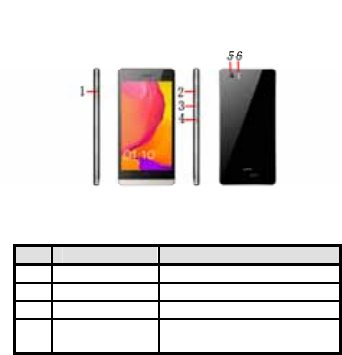
Yourphone&Keyparts
LabelKeyDescription
1SDCardSlotInsertSDCard
2SIMCardSlotInsertSIMCard
3VolumeKeyAdjusttheVolume
4PowerKey/Lockkey
Pressandholdtoturnon/offphone
Presstolock/unlockthescreen
2
5Camera CameraLens
6Flash1lightFlashlight
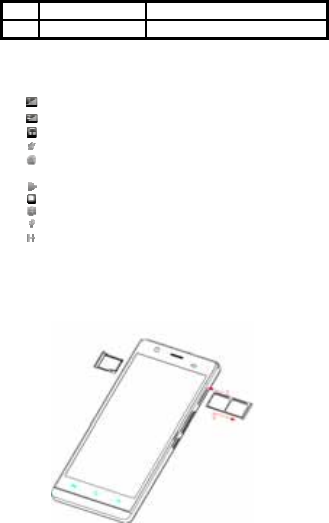
StandbyScreen&Icons
ThisphoneprovidesmultipleStandbyscreens.Throughtheinstructionandvariousiconsonthescreen,youcanhave
theoperatinginformationneeded.
StatusIconDescription
SignalindicatorforSIM1
SignalindicatorforSIM2
Usingheadset
Mute
Vibratemode
Alarm
Backgroundplaying/pausing
Memorycardinstalled
Bluetoothon
Modemconnecting
3G(WCDMA)
GettingStarted
Pleasereadthesafetyinstructionsinthe"SafetyInformationandNotices"sectionbeforeuse.
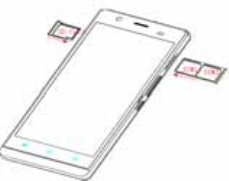
RemovetheSIMcardandSDcard
GentlyuseSIMEjectorPINtoinserttheholenearbytheSIMcardslot,untilitmakesthecardslotpopout.Thentake
outthecardslot.ItisalsoabletotakeouttheSDcardslotwiththismethod.
3
InsertingtheSIMcardandSDcard
MakesurethattheclippedcorneroftheSIMcardisfacingthecorrectdirection,pushtheSIMcardintothecardslot
untilitstops.
SwitchOn/Off
Longpressthepowerkeytoswitchon/offthephone.
AfterinsertingtheSIMcard,thescreenwillshowthenotesinthefollowingorderwhenthephoneisswitchedon:
IfyouhavealreadysettheSIMcode,pleasetypeinPIN.
Search—Thehandsetwillbesearchingforpropernetworkconnection.
UnlockSIMCard
Toavoidillegaluse,theSIMcardisencipheredwithPIN(personalidentificationnumber)asaprotection.Whenthis
functionisONandyouhavealreadysetaPINcode,youneedtotypeinPINcodeeverytime,thehandsetisswitched
oninordertounlockSIMcardandusethehandset.
YoucanturnofftheSIMPINcode.Yetinthissituation,theSIMcardcan'tpreventillegaluse.
InputPINcode,pressarrowheadicontoerasetypingerrorandpressOKtoendtyping.Forexample,ifthePINcodeis
setas1234,thentype"1234"thenpressOK.
TheSIMcardwillbelockedifyoutypeinwrongcodeforthreetimescontinuously.Thehandsetwillinformyouto
typeinPUKcode.
Attention:Your networkproviderwillsetastandardPINcode(fourtoeightnumbers)foryourSIMcard.Itis
recommendedthatyouchangethecodeintoapersonalcodeassoonaspossible.
ConnectiontoNetwork
WhentheSIMcardissuccessfullyunlocked,thehandsetwillautomaticallysearchforavailablenetwork(thelock
screenshowssearching).Thehandsetwillshowtheinformationofthenetworkprovider;thestatusbarwillshowthe
signalstrengthandthenetworkconditiononcethehandsetissuccessfullyconnectedtoanetwork.
Note:Ifthelockscreensshows"Emergency",itmeansthatyou'reoutofnetworkcoverage(servicecoverage)oryour
cardisnotvalid,yetyoucanstillhaveemergencycallsbasedonsignalstrength.
ChargingtheBattery
4
Ensurethebatteryinsertedinthehandset.To chargethebattery,pluginthechargerconnectoratthebottomofyour
phone(USBinterface)andthenplugtheotherendintoanACpowersocket.
Thebatterysymbolindicatesthechargingstatus.Whilecharging,thechargeindicatorswillscroll.Whenallthescroll
barsaresteady,thebatteryisfullycharged.
Disconnectthechargerfromthephone.
DisconnectthechargerfromtheACpowersocket.
Note:Ifthebatteryispowerless,thebatteryiconwillreappearafterafewminutesofcharging.
BasicFunction
MakeCalls
Whenthenetworkprovidericonappearsonthestandbyscreen,youcancalloutoranswercalls.Theindicatoronthe
upperrightpartshallshowthesignalstrength.
Qualityofconnectionwillbegreatlyinfluencedbyobstructions.Somovementinasmallrangemayeffectively
improvethequalityofconnection.
MakeDomesticCalls
Usevirtualkey boardtoenterphonenumbersandthenpressDialicontocall.Ifyouneedtochangethephone
number,pleasepressthedeletekeyonthetouchscreentodelete.Whenthecallisanswered,thescreenshallshow
theconnectionstatus.
CallExtensionPhone
Someoftheextensionphonescan'tbedirectlyconnectedto.Usethevirtualkeybo ard,enterswitchboardnumber,
opentheoptionmenuandchoose"Add2‐secpause",andthendialtheextensionphonenumber.
Typ einasfollowstocallextensionphone:
Zonedescription>switchboardnumber>Add2‐secpause>extensionphonenumber›call
MakeInternationalCalls
Ifyouneedtomakeaninternationalcall,doalongpressonthe0keyonthevirtualkeyboarduntilthereappearsthe
sign"+"forinternationalcallprefix,whichhelpsyoucallfromanycountryevenifyoudon'tknowtheinternationalcall
prefixofthatcountry.
Youcanmakeaninternationalcallaccordingtothefollowingtypingorder:+›countrycode›completephone
number›dialingicon(typeintheprefixcode,andthencontinuetoenterthecountrycodeandcompletephone
number).Countrycodeusuallyfollowsconventionalpractice:Germanis49,Britain44,Sweden46andsoon.
Whenmakinginternationalphonecalls,the"0"inthecitycodeshouldbeemitted.
MakeListedCalls
Everydialedandreceivedphonenumberisrecordedinthecallhistorylist.Recentlydialed,answeredandmissed
phonenumbersarechronologically(newesttooldest)listedinthe"all"log.Youcanalsochooseandcheckmissed,
answeredanddialedlistaccordingtoyourneed.
Listedphonenumberscanbecalledoutbypressingtherespectivelog.
Pressthesmalliconontherightsidetoenterthedetailsinterfaceofthelog.Inthecallhistoryinterface,userscando
alongpresstosaveordeletethenumber.Inthedetailsinterface,thephonenumbersavefunctionispreset.
EmergencyCalls
Youcancallforemergencyserviceaslongasyouareinthenetworkcoverage(checkthesignalstrengthindicationbar
ontheupperrightsideofthehandsetscreen).Ifyournetworkproviderdoesn'tprovideroamingserviceinthisarea,
5
therewillbe"EmergencyCalls"onthelockscreen.Ifyouareinthenetworkcoverage,youcanhaveemergencycalls
evenwithoutaSIMcard.
AnswerCalls
Dragtheicontoansweranincomingcall.Ifyourheadphoneisconnectedtothehandset,youcanusetheheadphone
keyontheheadphoneanswercalls.
Attention:Ashortpressoftheheadphonekeywillanswerthecallwhilealongonewillrefusetoanswerthephone.
Phone
EnteringthePhone,PressthePhoneitemtokeypadscreen,enterthephonenumber,andpressDialicon.Youcanalso
checkthehistorycalllogsbypressmoreoptionsatthetopofrightcorner.
People
EnteringthePeople,youcancheckallthecontacts,searchforcontactsoraddnewcontact.Newcontactmeansa
newlyaddedphonenumberthatisrecordedintheSIMcardorthehandset.
Whenaddinganewcontact,youcantypeinthename,address,phonenumber,otherphonenumber,workplace,
otheremailaddressandsoon.
Youcanalsocheckcontactgroupandfavorites.
Messages
Composenewmessage
Pressnewmessagebuttontogetanewtextmessage:
Clicktheeditframe,typeinafteravirtualkeyboardpopsout.
Pressthenumberframeandenternumber,orpressaddcontacticonandselectstoredcontactnumberfromContacts.
Inputcontentsintothetypingframeonthetouchscreen.Afterediting,presssendicontosendthetext.
PressclipsicontoAddsubject,pictures,videos,audioandmoreoperations.
MessageSettings
Includestoragesettings,SMSsettings,MMSsettings,notificationsettings,servicemessagesettingandsoon.
Email
FirstyouneedtosettheE‐mailaccount.
Step1:enteremailaddressandpassword.
Step2:selectaccounttype,chooseOKtoconnect.
Google
InputkeywordstosearchintheWeb,Apps,Callhistory,Music,etc.
Browser
SelecttheChromebrowsericontoenterthebrowserinterfaceandyoucansearchforwebsites.
Calculator
Thehandsetisprovidedwithacalculatorwithbasicfunctions.Youcancarryouttheoperationforplus,minus,
multiply,anddividebypressingthescreen.Youcanusesomefunctionsintheadvancedpanel.
Note:Theaccuracyislimitedandround‐offerrormayoccur.
Calendar
Enterthecalendarmenuandthereshallappearacalendaronthescreenwiththecurrentdatemarketoutby
backgroundframewithaspecialcolor.Pressthetouchscreentobrowsedateandthecalendarinformationonthe
screenshallbecorrespondinglyupdated.
Clock
Entertheclockapplication,pressalarmiconandpressAddalarmtoaddanewalarm.Scrollthescrollbartosetalarm
6
time.Pressalarmoflisttoedittheactivation,Time,Ringtone,vibrateandlabel.Ifyouwanttodeletethealarm,long
pressonthelistandchoosethealarmsthatneedstobedeletedandclickinDeleteicon..
Camera
Underviewingcondition,pressthetopiconstodothefollowingoperations.
1——facebeautymode.
2——ChangetoFaceBeautyCamera.
3——Changethemodeofflashlight:automode,offmode,onmode
4——Switchthecamerabetweenfrontandback
5——optionsicon,suchas:normalmode,livephotomode,smileshotmode,setting.
5——Thumbnailiconshowsthecurrentlycapturedpictureorvideo.
6——PresstheCaptureicontocaptureapicture.
7——Presstherecordingicontotakeavideo.
FMRadio
Makesuretheheadset,whichisusedastheantenna,ispluggedinbeforeusingtheFMradio.
Music
UsetheMusicplayertoplaymusicfiles.ThesongssavedinyourphonecanbeplayedusingtheMusicPlayerofthe
device.
SoundRecorder
PressRecordingicontostartrecording.Inthemiddleofthescreenisatimer.PressStopKeytostoprecordingand
select"Save"inthepoppedout"Save/Cancel”optiontosavetherecord.Youcanpressplaykeytolistentotherecord
beforeselecting"Save/Cancel".
Videos
Toplayvideos,enterthevideolist,scrollthescreentobrowseandchoosethefileyouwanttoplay.
YouTube
YouTu beisavideo‐sharingwebsite,itistheleaderinonlinevideo,andthepremierdestinationtowatchandshare
originalvideosworldwidethroughaWeb.
Gallery
Inthegalleryinterface,therearedifferentfolders.Selectafolderandpresstoenterit.Pressimageorvideoto
viewpicturesorvideos.
Whenviewingthepicture,ifyoupressthescreen,amenuwith"share,delete"willpopout.Choose"share"tosend
thefilethroughBluetoothorviaamessage;TapmenukeyforfurtherfunctionslikeSlideshow,Edit,Print,Rotateleft
orright,Crop,SetpictureasandDetails.
FileManager
Youcanmanagefile,includingDownload,Music,andReceivedFile.Tapto createanewfolderorselectfolderstocopy,
moveanddelete.
Maps
Thephoneprovidesmapsserviceforyourtravel.
ThephonenavigationserviceDonotmanipulatethisapplicationwhiledrivingtrafficdataisnotreal‐timeand
directionsmaybewrongdangerousprohibitedorinvolveferrieswalkingroutesmaybemissingsidewalksor
pedestrianpaths.
PlayStore
PlayStoreisin‐builtapplicationstore,youcanalsopickappsanddownloadtoinstall.
7
SIMToolkit
Thecontentsinthismenuwilldifferaccordingtodifferentnetworkproviders.Fordetailedinformation,pleasecheck
insidethemenu.
Downloads
Youcancheckthedownloadedorbeing‐downloadedcontents.
Backupandrestore
Youcanbackupthematerialsandrestorethem.
Settings
Wi‐Fi
Connecttoawirelessnetworkbyenteringthecorrectpassword.YoucanthenaccessinternetoverWiFiinsteadof
Mobiledata.
Bluetooth
ThroughBluetooth,youcantransferdatabetweenyourphoneandotherBluetoothdevices.Youcanalsotalkorlisten
tomusiconthephonebyusingaBluetoothheadset.
HotKnot
Turn on/offthisfeature,youcanexchangealldatawhenthescreentouchesanotherdevice.
More
IncludesAirplanemode,Datausage,DefaultSMSapp,Tethe r i n g&portablehotspot,VPN,MobilenetworksandUSB
Internet.
Storage
IncludetheSDcardstorage,availablestorage,insertSDcard(IfaSDcardhasalreadybeeninserted,thenthisoption
willbecome"UnmountSDcard"),formatSDcardandallavailablestorageintheinternalstoragespace.
Battery
Showbatterydetails
Apps
Includedownloadedapps,runningappsandalloftheappsinthesmartphone.
Location
LocateyourpositionthroughtoolslikewirelessnetworkandGPSsatellite.
Security
ChangethesettingsofScreensecurity,Encryption,SIMcardlock,Passwords,DeviceadministrationandCredential
storage.
Language&input
IncludeLanguage,Keyboard&Inputmethods,Speech,Mouse/Trackpadandsoon.
+Addaccount
ManagetheaccountsforFacebook,Email,Google,andsoon.
SmartFlip
YoucanchoseScreenoffwhencloseandDelayscreenafterclose.
Customgesture
Youcancreateagestureforthecustomtask.
BlackScreenGesture
Ifyouturnonthisfeature,andyouhavecreatedthecustomgesture,nowyoucandrawthegestureontheblack
screen,ifthegesturematcheswiththecreatedgesture,itwilllaunchtherelatedapp.

8
Date&time
IncludeAutomaticdate&time,Automatictimezone,Setdate,settimeandsoon.
Schedulepoweron/off
YoucansetthetimeforON/OFF,whichincludesettingtimeandrepeateddate.
Printing
Connectprintertorealizeprintfunction
sound
Youcanchangethevolumesandsystemsound,choosetheringtoneandvibrate.
Display
Youcansetthebrightnessoftime,choosetheauto‐rotatingscreen,adjustthedelaybeforethescreenautomatically
turnsoff,choosethedisplaywhenthescreenlockedandadjustthefrontsize.
Aboutphone
IncludeSoftwareupdate,Status,Legalinformation,Modelnumber,Androidversion,Basebandversion,Kernelversion,
BuildnumberandCustombuildversion.
ThroughSoftwareUpdateyoucandownloadandinstallthelatestSoftwareforyourdevice.
More
IncludesBackup$reset,Accessibility,Scheduledpoweron&offandDeveloperoptions
FrequentlyAskedQuestionsandTroubleshooting
QuestionsCauseandSolution
Unabletoturn
on
phone
Pressthepoweronkeyforover1second.
Checkifthebatteryisproperlyconnected.Pleaseremoveandinstallitagain,retryto
turnon
Checkifbatteryisappropriatelycharged
Unableto
connectto
network
Weaksignal.PleaseTry andmovetoalocationwithstrongsignalandtryconnectingto
thenetworkagain;
Pleaseensurethatyouarenotbeyondthenetworkcoverageofserviceproviders;
PleaseensureyouhaveavalidSIMcard.Pleasecontactyournetworkproviderforfurther
information
Display
information
whileturningon
CheckiftheSIMcard(inserttheSIMcard)isinstalledcorrectly
Handsetlockpassword:Ifthehandsetlockisactivated,youhavetoinputhandset
passwordbeforeusing.
InputPIN:InputtingPINwhileturningoneachtimeisactivated,youhavetoinputthe
PINcode.
InputPUKcode:HavinginputwrongPINcodefor3timesstraightwilllocktheSIMcard.
YouneedtoinputthePUKcodeprovidedbyyournetworkprovider.

9
Poorqualityof
calling
Pleasecheckifthesoundvolumeistunedimproperly
Inanareawithpoorreceivingcondition,example:basement,thesignalmightbeweak.
Tryreachingalocationwithstrongersignalreceptionandcallagain.
Whileusingthemobilephoneinthepeakperiodofcommunication,likecommutetime,
youmaybeunabletocallbecauseoflinecongestion.
Standby
duration
shortened
Thestandbydurationisrelativetothesystemsettingofnetwork.Whilethemobile
phoneisinanareawithpoorsignalstrengthandcannotreceivethesignal,thehandset
willcontinuouslysearchforabasestation.Thiswillsignificantlyreducebatterycharge.It
isrecommendedthatyouturnoffyourmobileinareawithnosignalreceptiontosave
battery.
Needreplacingthebattery.Pleasechangeanewbattery.
SIMCardError
DirtonthemetalsurfaceofanSIMcard.Usecleanclothtowipethemetaltouchpoint
onanSIMcard.
TheSIMcardisnotinstalled.
TheSIMcardisdamaged.Pleasecontactyournetworkserviceprovider.
Unabletodial
out
Pleaseconfirmifyoupressedthedialkeyafterdialing.
Pleaseconfirmifcallingisforbiddenbecauseofdefaultsettings.
PleaseconfirmiftheSIMisvalid.
Pleaseconfirmifthecallbarringisset.
Pleaseconfirmifthefixeddialfunctionisset.
Callersunableto
contactyou
Pleaseconfirmifthemobilephoneisonandconnectedwiththenetwork.
Pleaseconfirmifcallingisforbiddenbecauseofdefaulting.
PleaseconfirmiftheSIMcardisvalid.
Pleaseconfirmifthecallbarringisset.
Unableto
chargehandset
Poorcontact.Pleasecheckiftheplugisconnectedwell.
Pleaseconfirmiftheenvironmenttemperatureiswithintherangeof0ºC~40ºCwhile
charging.
Thebatteryorchargerisdamaged.You needtoreplaceit.
Unabletoset
somefunctions
Wrongoperation.
Thenetworkproviderdoesnotsupportthefunction,oryouhavenotappliedforit.
Forced
Shutdown
Whenyourphonehanged,youcanpressthePowerkeyandVolumeDownKeywithin8
secondstoforcethephonetopoweroff,thenyoucanpressthePowerkey toturnon.
Note:Iftheinstructionabovecannothelpyousolveproblems,pleasenote:
Mobilephonemodelandserialnumber
Specificcontentofwarranty
Clearstatementofproblems
ThencontactyourlocaldealeroraLAVAauthorizedservicecenterinyourarea.
10
SafetyInformationandNotices
Emergencycall
Ifanyemergencyarises,dial112(orotheremergencycallnumber)foremergencyhelp.
Note:
Duetothenatureofcellularnetworking,thesuccessofemergencycallisnotguaranteed.
Foryoursafety
Switchoffthephoneinhospitalsandaircraft.Obeyanyrestrictions.Wirelessdevicescanaffectthemedical
treatmentandcauseinterferenceinaircraft.
Somemedicaldevicessuchashearingaidsandpacemakermaybesensitivetoexternalradiofrequencyemissions.
Consultthedevicemanufacturersoryourdoctorbeforeusingthephonearoundthemedicaldevices.
Payspecialattentiontotheringtonevolumeandvibrationsettingsifyouhaveaheartproblem.
Inareaswithpotentiallyexplosiveatmosphere,suchasgasstations,fuelorchemicaltransferorstoragefacilities,
obeyallsignsandinstructions.
Yourphonewillemitradiofrequencyeveninthestandbymode.Tur noffyourphonewhensoinstructed.
Alwaysobeyallthelocallawsandregulations.Donotuseyourphonewhiledriving.UseHands‐freeoperation,if
available,andgivefullattentiontodrivingandtotheroad.Pullofftheroadandparkbeforemakingoranswering
acallifdrivingconditionssorequire.
Ifyourphoneislostorstolen,notifyyourserviceproviderimmediatelytostoptheSIMcardfrombeingused.
Whenyoucontactyourserviceprovider,theywillneedyourIMEInumber.Itisprintedonthebackofyourphone
set(youcanfinditwhenyouremoveyourbattery),orcall*#06#tolookupyourIMEInumber.Copythisnumber
andsaveitforfutureneed.
Topreventyourphonefrommisuse,lockyourSIMcardorphone,andchangepasswordswhennecessary.
Donotremovethebatterywithoutturningoffthephone.Failuretofollowthisinstructionmayresultindataloss.
Whenyouleaveyourvehicle,takethephonewithyouorplaceitintheglovecompartmenttoavoidtheft.
Keepthephone,batteryorchargeroutofreachofchildren.
Notesonphoneusage
Yourphonewillgiveoffelectromagneticwaves.Donotplaceitnearstoragemediumsuchasfloppydisk.
Usingthephoneneartelevision,landphone,radioandofficeautomaticdevicesmaycauseinterferenceand
affectthefunctionofthemobilephone.
Keepthephonedry;allkindsofliquidcanerodeelectroniccircuit.
Keepthephoneawayfromextremetemperatures.
Keepthephoneawayfromfireoralightedcigarette.
Donotpaintthephone.
Donotdropthephoneorviolentlycrushorshakethephone.
Donotkeepthephonenearmagcardsandotherobjectwithmagnetism.Thephone’smagnetismmayclear
theinformationstoredonfloppydisk,pre‐paidphonecardandcreditcard.
Keepthephoneawayfromhotplaceswherethetemperaturemayexceed60C,suchasdashboard,
windowsill,orareasexposedtodirectsunlight.
Donotdisassembleormodifyyourphone.Thiscandamagethephone,causeleakageandbreaktheinternal
circuit.

11
Useonlydampclothornon‐staticclothtocleanyourphone.
Donotusealcohol,thinner,benzeneorotherchemicalsorabrasivecleanertocleanyourphone.
Thephonewillbecomewarmundernormaluseandwhileinbatterycharging.
Donotleavethephonewithbatteryuninstalledorwiththebatteryemptyforalongperiodoftime.This
maycausedataloss.
Themetalpartsofthephonemayirritateyourskindependingonyourhealthcondition.
Donotputthephoneinthebackpocket.Sittingonitmaydamagethephone.Donotputthephoneatthe
bottomofabag.Yo umaycrushit.
Whenthevibratemodeison,placethephonecarefullytopreventitfrombeingdroppedfromaheightor
beingmovedtoaheatsourceduetothevibrating.
Donotpressthetouchscreenwithneedles,penpointorothersharpobjects;itcandamagetheLCDand
violatethetermsandconditionsofthewarranty.
Notesonbatteryusage
Donotshort‐circuityourbattery.Itcandamagebattery,andcauseleakage,overheat,fireorexplosion.
Disposingbatteryinafirecancausefireorexplosion.Oldbatteriesshouldbereturnedtoyourdealerorbe
disposedaccordingtolocalregulations.Donottreatthebatteryashouseholdwaste.
Keepmetalobjects(suchascoinsorkeyrings)awayfromthebatterytoavoidshortcircuit.
Donotremovethebatterywithoutturningoffthephone.
Donotholdthebatteryinyourmouth.Theliquidofthebatterycanbetoxic.
Embeddedbatteryshallbereplacedbyauthorizeddealers.Useonlybatteriesapprovedbythephone
manufacturer;otherwise,itmaycauseexplosion.
Damageresultingfromusingun‐authorizedbatteriesandchargerswillnotbecoveredbythewarranty.
Avoidcontactwithanyleakedliquidofthebattery.Ifittouchesyourskin,washyourskinwithfreshwater
andgotothehospitalimmediately.
SAR
ThehighestSARvalueforthismobilephoneis<1.6W/Kg,inaccordancewiththerequirementsofthe
ICNIRP,whichrecommendedthelimitforexposuretoradiowavesis1.6watts/kilogram(W/kg)averaged
over1gramoftissue.Formoreinformation,pleasevisitwebsite(www.lavamobiles.com)toquery
Safetyprecautions:
Usecellphonewhenthesignalqualityisgood
Peoplehavingactivemedicalimplantsshouldpreferablykeepthecellphoneatleast15cmawayfromthe
implant
Useawirelesshands‐freesystem(Headphone,headset)withalowpowerBluetoothemitter
MakesurethecellphonehasalowSAR
Keepyourcallsshortorsendatextmessage(SMS)instead.Thisadviceappliesespeciallytochildren,
adolescentsandpregnantwome n.
E‐wasteDisposalMechanism
'E‐waste'meanswasteelectricalandelectronicequipment(WEEE).InotherwordsE‐wasteisapopular,informalname
forelectronicproductsnearingtheendoftheir"usefullife".Formoredetailsaboute‐wastepleaserefere‐wasterules,
2011www.moef.nic.in
Do’sandDon’tsfordisposale‐waste
Do’s:
12
EnsurethatanAuthorizedPersonrepairsyourLavaproducts
CallOurLocalAuthorizedCollectionCenterstoDisposeLavaproducts
Alwaysdropyourusedelectronicproducts,batteriesoranyaccessoriesthereofaftertheendoftheirlifeat
nearestAuthorizedCollectionPointorCollectionCenter.
Separatethepackagingmaterialaccordingtoresponsiblewastedisposaloptionsandsortingforrecycling.
Alwaysremovethebatteryfromtheproduct,whenyoudonotintendtousetheproductanymoreitin
future.
Don’ts:
DonotDismantleyourLavaProductonyourown
Donotgiveyoure‐wastetoKabbadiWala/ScrapDealer/RagPickers.
Donotdispose‐offthee‐wasteinlandfills
NeverdumpE‐wasteingarbagebins.
Donotdisposeofyourproductatmunicipalwastebinsorrooms.
Donotthrowusedbatteriesintohouseholdwaste.
ConsequencesofimproperhandlinganddisposalofE‐Waste
Improperdisposalofwastepreventsnaturalresourcesfrombeingre‐used.
Somewastecontainshazardouschemicalsandifnotdisposedofproperlymayreleasetoxinsintothesoil
andwater,andalsoreleasesgreenhousegasesintotheenvironment
Ife‐wasteisnotproperlydisposedof,itcanbeathreattohealthandwell‐beingofhumansandanimalsand
italsohasadverseeffectontheenvironment.
Placingofbatteriesordevicesonorinheatingdevices,suchasmicrowave,ovens,stoves,orradiatorsand
improperdisposalofbatteriesmayleadtoexplosion.
Ifthebatteryterminalsareincontactwithmetalobjects,itmaycauseafire.
FormoredetailsonhowtodisposeofyourLavaproductsattheendoflife,PleasereferthelistofourServicesCenters
onPanIndiabasisonourwebsitewww.lavamobiles.comorpleaseviewthislinkforthedetailsofServiceCenters
http://www.lavamobiles.com/support‐services.

13
FCCNote:
ThisdevicecomplieswithPart15oftheFCCrulesandIndustryCanadalicense‐exemptRSSstandard(s).Operationis
subjecttothefollowingtwoconditions:(1)thisdevicemaynotcauseharmfulinterference,and(2)thisdevicemust
acceptanyinterferencereceived,includinginterferencethatmaycauseundesiredoperation.
THEMANUFACTURERISNOTRESPONSIBLEFORANYRADIOORTVINTERFERENCECAUSEDBYUNAUTHORIZED
MODIFICATIONSORCHANGETOTHISEQUIPMENT.SUCHMODIFICATIONSORCHANGECOULDVOIDTHEUSER’S
AUTHORITYTOOPERATETHEEQUIPMENT.
ThisequipmenthasbeentestedandfoundtocomplywiththelimitsforaClassBdigitaldevice,pursuanttopart15of
theFCCRules.Theselimitsaredesignedtoprovidereasonableprotectionagainstharmfulinterferenceinaresidential
installation.Thisequipmentgenerates,usesandcanradiateradiofrequencyenergyand,ifnotinstalledandusedin
accordancewiththeinstructions,maycauseharmfulinterferencetoradiocommunications.However,thereisno
guaranteethatinterferencewillnotoccurinaparticularinstallation.Ifthisequipmentdoescauseharmful
interferencetoradioortelevisionreception,whichcanbedeterminedbyturningtheequipmentoffandon,theuser
isencouragedtotrytocorrecttheinterferencebyoneormoreofthefollowingmeasures:
‐‐Reorientorrelocatethereceivingantenna.
‐‐Increasetheseparationbetweentheequipmentandreceiver.
‐‐Connecttheequipmentintoanoutletonacircuitdifferentfromthattowhichthereceiverisconnected.
‐‐Consultthedealeroranexperiencedradio/TVtechnicianforhelp.
TheSARlimitofUSA(FCC)is1.6W/kgaveragedoveronegramoftissue.DevicetypesStar(FCCID:2AEE8LAVASTAR)
hasalsobeentestedagainstthisSARlimit.ThehighestreportedSARvaluesforhead,body‐wornaccessory,and
productspecific(wirelessrouter)are0.29W/kg,0.59W/kg,and0.99W/kgrespectively.Thisdevicewastestedfor
typicalbody‐wornoperationswiththebackofthehandsetkept10mmfromthebody.Tomaintaincompliancewith
FCCRFexposurerequirements,useaccessoriesthatmaintaina10mmseparationdistancebetweentheuser'sbody
andthebackofthehandset.Theuseofbeltclips,holstersandsimilaraccessoriesshouldnotcontainmetallic
componentsinitsassembly.TheuseofaccessoriesthatdonotsatisfytheserequirementsmaynotcomplywithFCC
RFexposurerequirements,andshouldbeavoided.
ServiceCenterInfo
02‐333‐3354
E‐mail:service@lavainternational.com