LG HBS 781 User Manual Owner's UG Web US REV 01 170628;
2017-11-28
User Manual: LG HBS-781 Owner's Manual Most comprehensive of product setup and usage. (English, Spanish)
Open the PDF directly: View PDF  .
.
Page Count: 38
- UG_Web_HBS-781_US_EN_REV_01_170628
- Safety Cautions
- Precautions When Using the Product
- HD Speaker
- Qualcomm® aptX™ Audio
- Product Components
- Product Description
- HBS-781 Pairing and Connecting
- Indicator Lamp
- Mobile Calling Functions
- Playing Music
- Battery Charging and Alerts
- Vibration Alert Settings
- Out of Range
- LG Tone & Talk™
- Troubleshooting
- Specifications and Features
- Declaration of Confirmation
- Additional Information
- Limited Warranty
- Important Safety Information
- UG_Web_HBS-781_US_ESXL_REV_01_170628
- Precauciones de seguridad
- Precauciones al utilizar el producto
- Altavoz en alta definición
- Qualcomm® aptX™ Audio
- Componentes del producto
- Descripción del producto
- Vinculación y conexión de los HBS-781
- Luz indicadora
- Funciones de llamada a través del celular
- Reproducción de música
- Carga de la batería y alertas
- Ajustes de las alertas de vibración
- Fuera de rango
- LG Tone & Talk
- Solución de problemas
- Especificaciones y funciones
- Aviso de conformidad
- Información adicional
- Garantía limitada
- Información importante de seguridad
ENGLISH ESPAÑOL
Please read the Important Safety Information for the proper use of this product.
After reading, store this User Manual in an easily accessible place for all users.
NOTE: Please read all information carefully prior to using the HBS-781 in order to enjoy the best
performance and prevent damage to the product.
WARNING: This product contains chemicals known to the State of California to cause cancer and
birth defects or other reproductive harm. Call (800) 243-0000 for more information.
Wash hands after handling.
HBS-781
Copyright © 2017 LG Electronics Inc. All rights reserved. www.lg.com
Rev 1.0 US
User Manual
Bluetooth® Wireless Stereo Headset
HBS-781
LG TONE PRO™

ENGLISH
Contents
Safety Cautions ............................................................................................................................. 1
Precautions When Using the Product ...............................................................................2
HD Speaker ...................................................................................................................................... 2
Qualcomm® aptX™ Audio .......................................................................................................3
Product Components .................................................................................................................3
Product Description ....................................................................................................................4
HBS-781 Pairing and Connecting ....................................................................................... 5
Indicator Lamp ...............................................................................................................................6
Mobile Calling Functions ...........................................................................................................7
Playing Music .................................................................................................................................. 8
Battery Charging and Alerts ..................................................................................................9
Vibration Alert Settings ............................................................................................................ 9
Out of Range ...................................................................................................................................9
LG Tone & Talk™ .........................................................................................................................10
Troubleshooting .......................................................................................................................... 11
Specications and Features ................................................................................................. 11
Declaration of Conrmation ................................................................................................ 12
Additional Information ............................................................................................................13
Limited Warranty .......................................................................................................................15
Important Safety Information ............................................................................................16

1
ENGLISH
The LG TONE PRO (HBS-781) is a lightweight wireless headset that uses Bluetooth technology.
This product can be used as an audio accessory for devices supporting either the A2DP or
Hands-Free Bluetooth Prole.
Safety Cautions
! CAUTION
Do not disassemble, adjust, or repair the product arbitrarily.
Do not place the product near excessive heat or ammable material.
Do not arbitrarily replace the battery, as it may explode.
The product may be damaged if an incompatible charger is used.
Make sure that an infant or child does not swallow a magnet or a small component of the product.
Make sure that foreign objects do not enter the charger’s connectors (charging port and power plug).
Failure to do so may result in re or electric shock.
If you have a medical device implanted, contact your doctor before using this device.
For your safety, do not remove the battery incorporated in the product.
The lithium-ion polymer battery is a hazardous component that can cause injury.
Battery replacement by an unqualied professional can cause damage to your device.
In order to prevent unnecessary energy consumption, disconnect the device when fully charged.
Always use an easily accessible power-outlet for charging your device.
Recommend the use of charger adapter certied by LG Electronics for safety.
! WARNING
Do not drop the product from a high place.
Make sure there is no water, alcohol, or benzene in contact with the product.
Do not store the product in a wet or dusty place.
Do not place heavy objects on the product.
This product is not waterproof. Avoid humidity and water.
2
ENGLISH
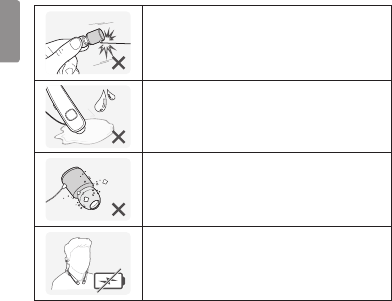
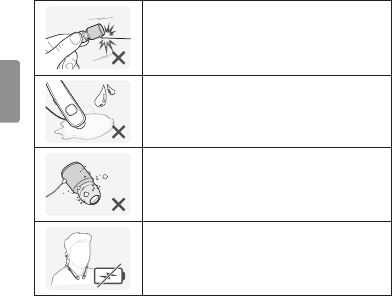
Precautions When Using the Product
Refer to the following to use the product for its normal life span.
Do not pull the earphone cable with excessive force.
If the product is exposed to excessive sweat, clean the product.
Keep the earbuds clean.
For your safety, do not wear the product while it is being charged.
HD Speaker
If the communication network of the device you are connecting to supports HD Voice Calling,
you can enjoy making voice calls and listening to music in high denition.
3
ENGLISH
Qualcomm® aptX™ Audio
LG HBS-781 is powered by Qualcomm aptX audio. Qualcomm aptX audio is Bluetooth wireless
technology that provides clearer audio for listening to music and watching movies.
Qualcomm aptX audio is automatically enabled when a mobile phone or audio device supports it.
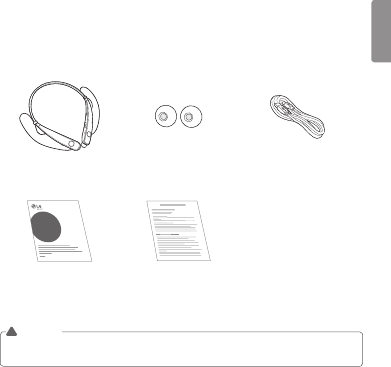
Product Components
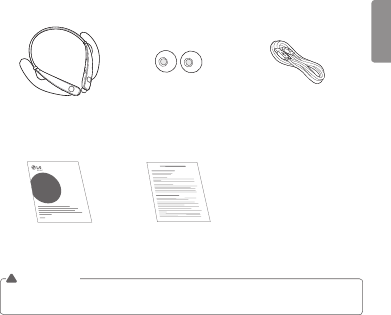
LG TONE PRO HBS-781
(medium ear gels installed)
Extra Ear Gels (small) Micro USB Charging Cable
LG TONE PRO
TM
User Manual Warranty Card
NOTE: Actual product design may differ from images shown in manual.
Make sure authentic LG Electronics components are used. Using a non-authentic component
may damage the product and thus void the warranty.
!CAUTION
4
ENGLISH
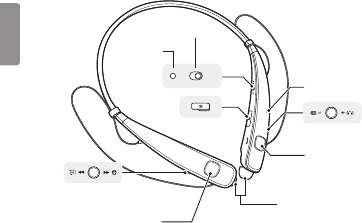
Product Description
ON OFF
NOTE:
You will hear a sound with each press of the Volume jog switch, depending on the volume level:
one beep (lower levels), two beeps (middle levels), or a long tone (higher levels).
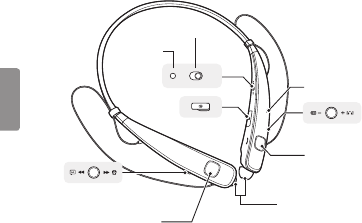
Indicator lamp
Power switch
Volume jog switch
Previous/Next jog switch
Play/Pause button
Earbuds (left/right)
Charging port
Call button
Microphone
5
ENGLISH
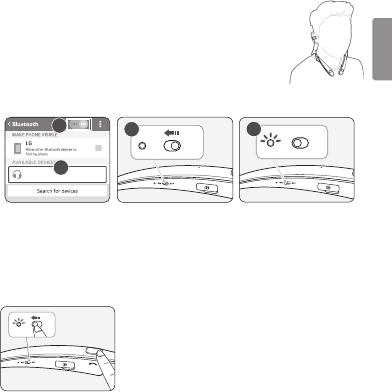
HBS-781 Pairing and Connecting
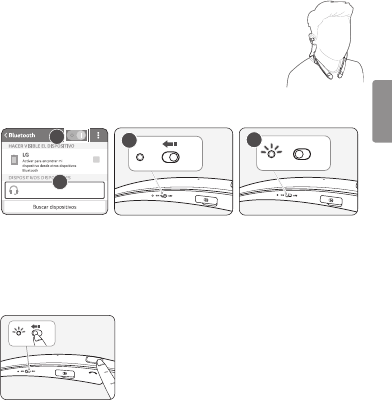
Put in your earbuds to easily pair and connect by following the voice prompts.
NOTE: If you are prompted for the authorization code (PIN code), type 0000.
If you hear that the battery is insufcient, recharge the battery before
proceeding with pairing.
If pairing is not completed within three minutes, the power automatically turns off.
If this happens, slide the Power switch from the OFF to the ON position to
turn the power on.
Connecting Quickly
ON OFF
2
ON OFF
3
LG HBS781
1
4
1 From the mobile phone’s Settings menu, turn on Bluetooth.
2 Slide the Power switch toward the ON position to turn on the power.
3 The blue Indicator lamp turns on, and the HBS-781 enters Search mode.
4 From the mobile phone, select LG HBS781 to connect.
5 A voice message will indicate that the connection is completed.
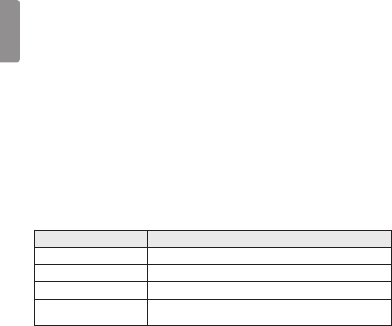
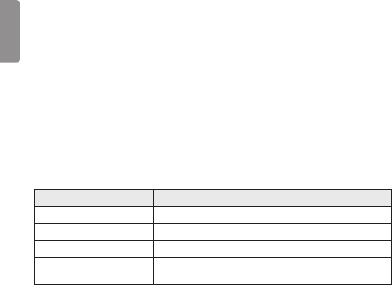
Connecting Manually (pairing with another phone or re-pairing)
ON OFF
1 Press and hold the Call button and slide the Power switch to
the ON position to turn it on.
2 The blue Indicator lamp turns on, and the HBS-781 enters
Search mode.
3 Select LG HBS781 from the device list to connect.
6
ENGLISH
Multiple Connections
The HBS-781 can be connected to two devices, such as a mobile phone and a computer, at the
same time.
NOTE: If the HBS-781 is simultaneously connected to two devices, the main functions work based
on the “Main Connected Device.”
1 Press and hold the Call button and slide the Power switch to the ON position to turn it on.
2 Perform Steps 2 to 4 under “Connecting Quickly.” This device becomes the “Main Connected Device.”
3 Try to connect to HBS-781 using a previously connected device. This device becomes the
“Sub Connected Device.”
Automatic Reconnection
If you turn on the product, it automatically searches for and connects to the “Main Connected
Device” and “Sub Connected Device” to which it was previously connected. (If the product cannot
nd the device to which it was last connected, the product switches to Search mode.)
If the product does not automatically connect to the device you want, search for your product in the
device you want to connect to and connect it manually.
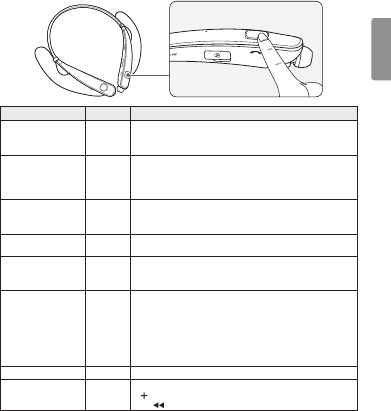
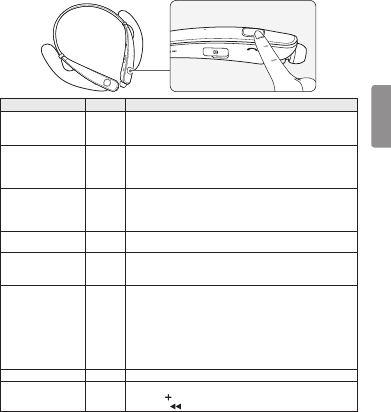
Indicator Lamp
HBS-781 Status Description
Power On The blue Indicator lamp ashes four times.
Power Off The blue Indicator lamp ashes four times.
Search Mode The blue Indicator lamp is on.
Headset/Hands-free Prole
Connected/Call Connected The blue Indicator lamp ashes once every ve seconds.
7
ENGLISH
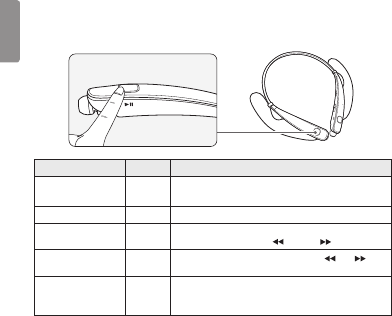
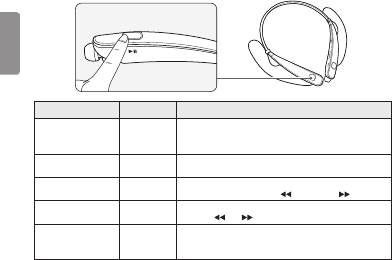
Mobile Calling Functions
Function Status Description
Answering Call Ringing
Briey press the Call button.
NOTE: The HBS-781 will not vibrate if the Vibration function has
been turned off.
Making a Call Idle
If you make a call using a mobile phone, the call is automatically
connected to the HBS-781.
On some mobile phones, you should briey press the Play/Pause
button twice to switch calls.
Switching Calls Talking
Briey press the Play/Pause button twice during a call.
(Every time you press one of these buttons, the call switches to
the mobile phone or the HBS-781.)
Redial Idle Press and hold the Call button for more than one second to place
a call to the last number you called.
Voice Dial Idle
Briey press the Call button.
If the mobile phone does not support the Voice Dial function, you
can use the Redial function.
Receiving a Call
While on the Phone Talking
You can receive another call while on the phone by pressing and
holding the Call button for one second.
The existing call switches to a call waiting status. Press and hold the
Call button again for one second to switch back to the previous call.
Briey press the Call button to end the existing call; briey press it
again to end the second call. (Performance may differ depending on
the mobile phone settings.)
Rejecting a Call Ringing Press and hold the Call button for two seconds.
Enabling/Disabling
Mute Talking
Simultaneously slide and hold the Volume jog switch in the volume up
( ) direction, and slide and hold the Previous/Next jog switch in
the ( ) position for one second.
8
ENGLISH
CAUTION: Do not disable/enable the mute function while driving, as you need to use both hands.
NOTE: The Voice Dial and Redial functions work on the Main Connected Device or on the device
on which you made the last call. (The Voice Dial and Redial functions may work differently
depending on the mobile phone being used.)
Playing Music
Function Status Description
Play Idle Briey press the Play/Pause button.
Music will play from the activated player of the connected device.
Pause Music on Briey press the Play/Pause button.
Play Previous/Next Song Music on To play the next or previous song, briey slide the Previous/Next
jog switch into the Previous ( ) or Next ( ) position.
Fast Rewind/Forward Music on Slide the Previous/Next jog switch into the ( ) or ( )
position until you reach the desired section of the track.
Change Equalizer Mode Music on
Briey press the Play/Pause button twice. The equalizer mode
changes with a beeping sound in the following order:
Bass Boost (default) > Normal > Treble Boost.
Switching Music Players
If you stop in the middle of playback and then play music on either of the two connected devices,
the HBS-781’s music playback and control change to that device.
9
ENGLISH
Battery Charging and Alerts
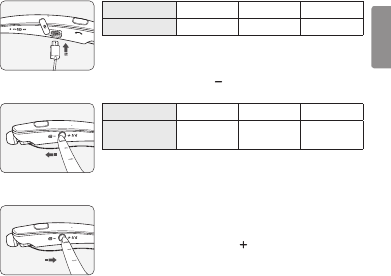
Open the Charging port cover and connect the charger to the Charging port.
Indicator Lamp Red Purple Blue
Battery Status Charging 80% Completed
Slide and hold the Volume jog switch in the volume down ( ) direction for one second to check the
Indicator lamp and battery level by voice.
Battery Status Sufcient Normal Insufcient
Indicator Lamp Blue ashes
three times
Purple ashes
three times
Red ashes
three times
Vibration Alert Settings
2 sec
The vibration alert is automatically set to the ON when you turn on
the power.
To activate or deactivate the vibration setting, slide and hold the
Volume jog switch in the volume up ( ) direction for two seconds.
NOTE: When vibration is turned off, the HBS-781 will not vibrate when
receiving an incoming call.
Out of Range
If the device connected to the product is out of effective communication range (33 feet/10 meters),
the communication signal becomes weak and the communication is lost.
If the device comes back within effective communication range, the product automatically
reconnects to the device. If the device is not automatically reconnected, press the Call button on the
product to connect to it manually.
If a device that is not in use goes out of communication range when multiple devices are connected,
a voice message will indicate that the connection is lost. In this case, the automatic reconnection
function is not supported.
10
ENGLISH
LG Tone & Talk™
Tone & Talk supports various functions, including text and voice directions
and calling. To install Tone & Talk, scan the QR code to the right or go to the
Google Play™ store and search for “LG Tone & Talk.”
NOTE: Tone & Talk can be used on Android™ smartphones.
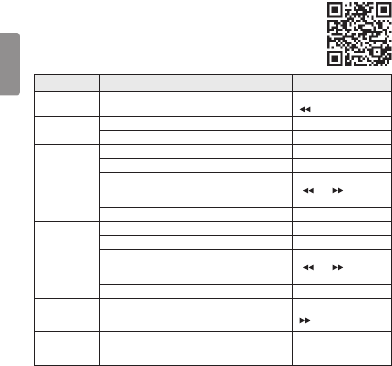
Function Button/Description HBS-781 Action
Reading Recent
Messages Previous/Next jog switch Slide to and hold in the
( ) position for one second.
Using Speed Dial
to Make a Call
Select a speed dial contact in Tone & Talk. -
Call button (Making a call) Briey press twice.
Using Favorites
to Make a Call
Select a favorite contact in Tone & Talk. -
Call button (Bringing up a favorite contact) Briey press twice.
Select a contact with the Previous/Next jog switch.
Slide to and hold in the
( ) or ( ) position for
one second.
Call button (Making a call) Briey press twice.
Making a Call
From Call
History
Select call history in Tone & Talk. -
Call button (Bringing up call history) Briey press twice.
Slide and hold the Previous/Next jog switch to select a
Call History number.
Slide to and hold in the
( ) or ( ) position for
one second.
Call button (Making a call) Briey press twice.
Current Time
Alert/Voice
Memo
Previous/Next jog switch
(This feature may not be supported on some devices.)
Slide to and hold in the
( ) position for one second.
Changing the
Voice Prompt
Language
Select
Headset Setting
>
Voice Prompt Language
in
Tone & Talk. -
NOTE: The Current Time Alert and the Voice Memo features cannot be used at the same time.
You can only use one function at a time when you make selections in the Tone & Talk app.
11
ENGLISH
Troubleshooting
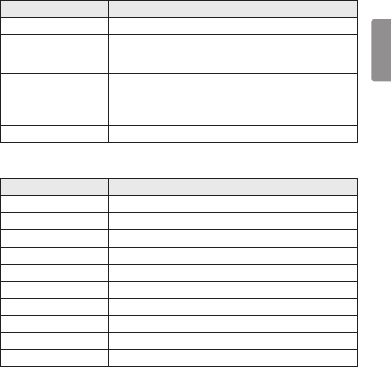
Problem Solution
The power does not turn on Check the battery level and charge it.
Cannot make a call with the
HBS-781
If the mobile phone does not support headset and hands-free functions,
you cannot use the calling features.
Check the battery level and charge it.
Cannot connect the
HBS-781 to mobile phone
Check whether the HBS-781 is turned on.
Check whether the HBS-781 is in Search mode.
- Simultaneously press and hold the Call button and slide the
Power switch to the ON position to put the HBS-781 in Search mode.
The sound is low Control the sound level of the device connected to the HBS-781.
Specications and Features
Item Comments
Bluetooth Specications V 4.1 (Headset/Hands-Free/A2DP/AVRCP)
Battery Battery 3.7 V/210 mAh, lithium-ion polymer
Standby Time Up to 720 hours*
Talk Time Up to 16 hours*
Music Play Time Up to 10.5 hours*
Charging Time Less than 2 hours
Rated Input Voltage DC 4.75 V ~ 5.3 V, 400 mA
Operating Temperature -10°C (+14°F) ~ +50°C (+122°F)
Dimensions/Weight 5.4" (W) X 6.7" (L) X 0.6" (H) / 1.21 oz
Operating Frequency 2402 MHz to 2480 MHz
*Duration of use may vary depending on the connected mobile device, features being used, settings,
signal strength, operating temperature, frequency band, and other methods of use.

12
ENGLISH
Declaration of Conrmation
FCC NOTICE TO USERS:
This device complies with part 15 of the FCC Rules.
Operation is subject to the following two conditions:
(1) This device may not cause harmful interference, and
(2) This device must accept any interference received, including interference that may cause
undesired operation.
Changes or modications not expressly approved by the manufacturer (or party responsible) for
compliance could void the user’s authority to operate the equipment.
FCC Part 15.105 statement
This equipment has been tested and found to comply with the limits for a Class B digital device,
pursuant to Part 15 of the FCC Rules.
These limits are designed to provide reasonable protection against harmful interference in a
residential installation. This equipment generates, uses and can radiate radio frequency energy and,
if not installed and used in accordance with the instructions, may cause harmful interference to radio
communications.
However, there is no guarantee that interference will not occur in a particular installation. If this
equipment does cause harmful interference to radio or television reception, which can be determined
by turning the equipment off and on, the user is encouraged to try to correct the interference by one
or more of the following measures:
- Reorient or relocate the receiving antenna.
- Increase the separation between the equipment and receiver.
- Connect the equipment into an outlet on a circuit different from that to which the receiver is connected.
- Consult the dealer or an experienced radio/TV technician for help.
IMPORTANT NOTE:
To comply with the FCC RF exposure compliance requirements, no change to the antenna or the
device is permitted. Any change to the antenna or the device could result in the device exceeding the
RF exposure requirements and void the user’s authority to operate the device.

13
ENGLISH
Bluetooth® is a registered trademark of Bluetooth SIG, Inc. worldwide.
Qualcomm® aptX™ audio is a product of Qualcomm Technologies International, Ltd.
FCC ID: BEJHBS760
Additional Information
1. Radio frequency exposure
This Bluetooth Wireless Stereo Headset HBS-781 is a radio transmitter and receiver. When in
operation, it communicates with a Bluetooth-equipped mobile device by receiving and transmitting
radio frequency (RF) electromagnetic elds (microwaves) in the frequency range 2.4 to 2.4835 GHz.
Your Bluetooth headset is designed to operate in compliance with the RF exposure guidelines and
limits set by national authorities and international health agencies when used with any compatible
LG Electronics mobile phone.
2.
Bluetooth
connection precautions
The following environments affect the range and reception of Bluetooth signals:
- When walls, metal, human bodies, or other obstacles exist between the Bluetooth device and
the connected device.
- When equipment that uses 2.4 GHz frequency signals (wireless LANs, wireless phones,
microwave ovens, etc.) is placed near the devices being used.
3. Potentially explosive atmosphere
Turn off your electronic device when in any area with a potentially explosive atmosphere. Although
this is uncommon, your electronic device could generate sparks. Sparks in such areas could cause
an explosion or re resulting in bodily injury or even death. Areas with a potentially explosive
atmosphere are often but not always clearly marked.

14
ENGLISH
4. Emergency calls
IMPORTANT!
This Bluetooth headset and the electronic device connected to the headset operate using radio
signals and mobile and landline networks as well as user-programmed functions, which cannot
guarantee connection under all conditions. Therefore, you should never rely solely upon any
electronic device for essential communications (e.g., medical emergencies). Remember, in order
to make or receive calls, the headset and the electronic device connected to the headset must be
switched on and in a service area with adequate mobile signal strength. Emergency calls may not
be possible on all mobile phone networks or when certain network services and/or phone features
are in use. Check with your local service provider.
5. Battery information
A rechargeable battery has a long service life if treated properly. A new battery or one that has not
been used for a long period of time could have reduced capacity the rst few times it is used. Do not
expose the battery to extreme temperatures, never above +50°C (+122°F) or below -10°C (+14°F).
For maximum battery capacity, use the battery at room temperature. If the battery is used in low
temperatures, the battery capacity will be reduced. The battery can only be charged in temperatures
between +10°C (+50°F) and +45°C (+113°F).
6. Recycling the battery in your
Bluetooth
headset
The battery in your Bluetooth headset must be disposed of properly and should never be placed
in municipal waste. The LG Electronics service partner that removes the battery will dispose of it
according to local regulations.
7. Conditions
- The warranty is valid only if the original receipt issued to the original purchaser by the dealer,
specifying the date of purchase and serial number, is presented with the product to be repaired or
replaced. LG Electronics reserves the right to refuse warranty service if this information has been
removed or changed after the original purchase of the product from the dealer.
- If LG Electronics repairs or replaces the product, the repaired or replaced product shall be
warranted for the remaining time of the original warranty period or for ninety (90) days
from the date of repair, whichever is longer. Repair or replacement may involve the use of
functionally equivalent reconditioned units. Replaced parts or components will become the
property of LG Electronics.

15
ENGLISH
- This warranty does not cover any failure of the product due to normal wear and tear, or due
to misuse, including but not limited to use in other than the normal and customary manner, in
accordance with instructions for use and maintenance of the product. Nor does this warranty
cover any failure of the product due to accident, modication or adjustment, acts of God, or
damage resulting from liquid.
- This warranty does not cover product failures due to improper repair installations, modications,
or service performed by a non-LG Electronics authorized person. Tampering with any of the seals
on the product will void the warranty.
- THERE ARE NO EXPRESS WARRANTIES, WHETHER WRITTEN OR ORAL, OTHER THAN THIS
PRINTED INCLUDING WITHOUT LIMITATION THE IMPLIED WARRANTIES OF MERCHANTABILITY
OR FITNESS FOR A PARTICULAR PURPOSE, ARE LIMITED TO THE DURATION OF THIS LIMITED
WARRANTY. IN NO EVENT SHALL LG ELECTRONICS OR ITS VENDORS BE LIABLE FOR
INCIDENTAL OR CONSEQUENTIAL DAMAGES OF ANY NATURE WHATSOEVER, INCLUDING
BUT NOT LIMITED TO LOST PROFITS OR COMMERCIAL LOSS, TO THE FULL EXTENT THOSE
DAMAGES CAN BE DISCLAIMED BY LAW.
- Some countries/states do not allow the exclusion or limitation of incidental or consequential
damages, or limitation of the duration of implied warranties, so the preceding limitations or
exclusions may not apply to you. The warranty provided does not affect the consumer’s statutory rights
under applicable national legislation in force, nor the consumer’s rights against the dealer arising
from their sales/purchase contract.
Limited Warranty
Subject to the conditions of this Limited Warranty, LG Electronics warrants this product to be free
from defects in design, material, and workmanship at the time of its original purchase by a consumer,
and for a subsequent period of one (1) year. Should your product need warranty service, please
return it to the dealer from whom it was purchased or contact your local LG Electronics contact
center to get further information.
16
ENGLISH
Important Safety Information
Avoiding hearing damage
Permanent hearing loss may occur if you use your headset at a high volume.
Set the volume to a safe level. Over time you can become accustomed to a higher volume that may
sound normal but can be damaging to your hearing.
If you experience ringing in your ears or mufed speech, stop listening and have your hearing
checked. The louder the volume, the less time that is required before your hearing could be affected.
Hearing experts suggest that to protect your hearing:
• Limit the amount of time you use the headset at a high volume.
• Avoid turning up the volume to block out noisy surroundings.
• Turn the volume down if you can’t hear people speaking near you.
Using headsets safely
Use of headsets to listen to music while operating a vehicle is not recommended and is illegal in
some areas. Be careful and attentive while driving. Stop using this device if you nd it disruptive or
distracting while operating any type of vehicle or performing any other activity that requires your
full attention.
ESPAÑOL
Lea la Información importante de seguridad para poder utilizar este producto correctamente.
Después de leerla, guarde esta Guía del usuario en un lugar al que todos los usuarios puedan acceder fácilmente.
NOTA: lea toda la información detenidamente antes de utilizar los HBS-781 para obtener el mejor
rendimiento y evitar daños en el producto.
ADVERTENCIA: este producto contiene químicos conocidos en el Estado de California por causar cáncer y
defectos de nacimiento u otros daños reproductivos. Llame al (800) 243-0000 para obtener más información.
Lávese las manos después de manipular.
HBS-781
www.lg.com
Copyright © 2017 LG Electronics Inc. Todos los derechos reservados.
Rev 1.0 US
Manual del usuario
Auriculares estéreo inalámbricos con Bluetooth®
HBS-781
LG TONE PRO™

ESPAÑOL
Contenido
Precauciones de seguridad ....................................................................................................... 1
Precauciones al utilizar el producto .....................................................................................2
Altavoz en alta denición .......................................................................................................... 2
Qualcomm® aptX™ Audio ......................................................................................................... 3
Componentes del producto .....................................................................................................3
Descripción del producto ...........................................................................................................4
Vinculación y conexión de los HBS-781 ...........................................................................5
Luz indicadora..................................................................................................................................6
Funciones de llamada a través del celular ........................................................................7
Reproducción de música ............................................................................................................ 8
Carga de la batería y alertas ....................................................................................................9
Ajustes de las alertas de vibración.......................................................................................9
Fuera de rango ................................................................................................................................ 9
LG Tone & Talk...............................................................................................................................10
Solución de problemas ............................................................................................................. 11
Especicaciones y funciones ................................................................................................ 12
Aviso de conformidad ...............................................................................................................13
Información adicional ...............................................................................................................14
Garantía limitada.........................................................................................................................17
Información importante de seguridad .............................................................................17

ESPAÑOL
1
Los auriculares LG TONE PRO (HBS-781) son unos auriculares inalámbricos ligeros que utilizan la
tecnología Bluetooth.
Este producto puede utilizarse como accesorio de audio en dispositivos compatibles con el perl
A2DP o Bluetooth manos libres.
Precauciones de seguridad
! PRECAUCIÓN
No desmonte, ajuste ni repare el producto arbitrariamente.
No ubique el producto cerca de calor excesivo o materiales inamables.
No sustituya arbitrariamente la batería, ya que podría explotar.
El producto podría sufrir daños si se utiliza un cargador incompatible.
Asegúrese de que los bebés y los niños no se traguen imanes ni otros componentes pequeños del producto.
Asegúrese de que no entren objetos extraños en los conectores del cargador (puerto de carga y enchufe
de alimentación). De lo contrario, podría provocar descargas eléctricas o incendios.
Si tiene un dispositivo médico implantado, póngase en contacto con su doctor o médico antes de utilizar
este producto.
Por su seguridad, no quite la batería que viene incorporada en el producto.
La batería de polímero de iones de litio es un componente peligroso que puede causar lesiones.
Su dispositivo se puede dañar si el reemplazo de la batería lo realiza un profesional no calicado.
Para prevenir un consumo innecesario de energía, desconecte el dispositivo una vez esté totalmente
cargado. Utilice siempre una base de toma de corriente cerca del equipo y fácilmente accessible.
Por motivos de seguridad, se recomienda utilizar exclusivamente adaptador de carga certicados por
LG Electronics.
! ADVERTENCIA
No deje caer el producto desde lugares altos.
Asegúrese de que el producto no entre en contacto con agua, alcohol ni benceno.
No guarde el producto en lugares húmedos o llenos de polvo.
No coloque objetos pesados sobre el producto.
Este producto no es impermeable. Evite la humedad y el agua.
ESPAÑOL
2
Precauciones al utilizar el producto
Consulte la siguiente información al utilizar el producto para que tenga una vida útil normal.
No tire del cable del auricular con excesiva fuerza.
Si el producto está expuesto a sudor excesivo, límpielo.
Mantenga siempre limpia la almohadilla del auricular.
Por su seguridad, no utilice el producto mientras se está cargando.
Altavoz en alta denición
Si la red de comunicación del dispositivo al que se está conectando admite Llamadas de voz en alta
denición, podrá realizar llamadas de voz y escuchar música en alta denición.
ESPAÑOL
3
Qualcomm® aptX™ Audio
LG HBS-781 cuenta con la tecnología Qualcomm aptX audio. Qualcomm aptX audio es una
tecnología inalámbrica Bluetooth que ofrece mayor nitidez de audio para escuchar música y ver
películas.
Qualcomm aptX audio se activa automáticamente con los teléfonos móviles o dispositivos de audio
compatibles.
Componentes del producto
LG TONE PRO HBS-781
(adaptadores para oído de tamaño
medio incluidos)
Adaptadores para oído adicionales
(pequeños)
Cable de carga micro USB
LG TONE PRO
TM
Manual del usuario Tarjeta de garantía
NOTA: el diseño real del producto puede diferir de las imágenes que aparecen en este manual.
Utilice solo componentes LG Electronics genuinos. Si utiliza un componente que no es genuino,
se podría dañar el producto y, por lo tanto, se anularía la garantía.
!PRECAUCIÓN
ESPAÑOL
4
Descripción del producto
ON OFF
NOTA: escuchará un sonido con cada presión del interruptor de volumen, según el nivel de volumen:
un pitido (niveles bajos y medios), dos pitidos (niveles altos) o un tono prolongado (niveles
máximos).
Luz indicadora
Interruptor principal
Selector giratorio de volumen
Selector giratorio anterior/
siguiente
Botón reproducir/pausar
Auriculares (izquierdo/derecho)
Puerto de carga
Botón llamar
Micrófono
ESPAÑOL
5
Vinculación y conexión de los HBS-781
Si inicia el proceso después de colocarse los auriculares, podrá vincular y
conectarlos fácilmente siguiendo las instrucciones de voz.
NOTA: si se le solicita el código de autorización (Código PIN), indique 0000.
Si oye que el nivel de batería es insuciente, recargue la batería antes de
continuar con la vinculación.
Si la vinculación no se completa en 3 minutos, los auriculares se apagarán
automáticamente. Cuando el dispositivo se apague automáticamente, deslice el
Interruptor de encendido de OFF a la posición ON para encender el dispositivo.
Conexión rápida
ON OFF
2
LG HBS781 4
1
ON OFF
3
1 En "Ajustes" del teléfono móvil, active Bluetooth.
2 Deslice el Interruptor principal hacia la posición de encendido para encender el producto.
3 Se encenderá la luz indicadora azul y el HBS-781 cambiará al modo de búsqueda.
4 En el teléfono móvil, seleccione LG HBS781 para conectarse.
5 Un mensaje de voz le indicará cuando se haya realizado la conexión.
Conexión manual (vinculación con otro teléfono o revinculación)
ON OFF
1 Mantenga presionado el Botón llamar y deslice el Interruptor
principal hacia la posición ON para encender el dispositivo.
2 La luz indicadora azul se encenderá y los HBS-781 cambiarán al
modo de Búsqueda.
3 Seleccione LG HBS781 en la lista de dispositivos para realizar
la conexión.
ESPAÑOL
6
Varias conexiones
Los HBS-781 pueden conectarse a un celular y a una PC al mismo tiempo.
NOTA: si se conectan al mismo tiempo a dos dispositivos, las funciones principales funcionarán
según el “Dispositivo conectado principal“.
1 Mantenga presionado el Botón llamar y deslice el Interruptor principal hacia la posición ON
para encender el dispositivo.
2 Realice los pasos del 2 al 4 en “Conexión rápida”. Este dispositivo se convertirá en el
“Dispositivo conectado principal”.
3 Intente conectar los HBS-781 utilizando un dispositivo conectado anteriormente.
Este dispositivo se convertirá en el “Dispositivo conectado secundario”.
Reconexión automática
Si enciende el producto, este busca y se conecta en forma automática a los aparatos (“Dispositivo
conectado principal” y “Dispositivo conectado secundario”) a los que estaba anteriormente
conectado. (Si el producto no puede encontrar el último aparato al que se conectó, el producto
cambia al modo de búsqueda).
Si el producto no se conecta automáticamente al dispositivo que desea, busque su producto en el
dispositivo al que desee conectarse y realice la conexión de forma manual.
Luz indicadora
Estado de los HBS-781 Descripción
Encendido La luz indicadora azul parpadea cuatro veces.
Apagado La luz indicadora azul parpadea cuatro veces.
Modo de búsqueda La luz indicadora azul está encendida.
Perl de auriculares/Manos libres
conectado/Llamada conectada La luz indicadora azul parpadea una vez cada 5 segundos.
ESPAÑOL
7
Funciones de llamada a través del celular
Función Estado Descripción
Responder una llamada Sonando
Presione brevemente el Botón llamar.
NOTA: el HBS-781 no vibrará si la función de vibración está
desactivada.
Realizar una llamada Inactivo
Si realiza una llamada con un celular, la llamada se conectará
automáticamente a los HBS-781.
En algunos celulares, deberá presionar brevemente el
Botón reproducir/pausar dos veces para cambiar de llamada.
Conmutación de
llamadas Hablando
Presione brevemente el Botón reproducir/pausar dos veces durante
una llamada.
(Cada vez que presione uno de estos botones, la llamada cambiará al
celular o a los HBS-781).
Remarcación Inactivo Mantenga presionado el Botón llamar durante más de 1 segundo
para realizar una llamada al último número al que llamó.
Marcación por voz Inactivo
Presione brevemente el Botón llamar.
Si el celular no admite la función de Marcado por voz, puede utilizar
la función de Rellamada.
Recibir una llamada
mientras habla por
teléfono
Hablando
Puede recibir otra llamada mientras habla por teléfono manteniendo
presionado el Botón llamar durante 1 segundo.
La llamada existente cambiará al estado de llamada en espera.
Mantenga presionado el Botón llamar de nuevo durante 1 segundo
para volver a la llamada anterior.
Presione brevemente el Botón llamar para colgar en mitad de una
llamada o para colgar ambas llamadas. (Funcionará de un modo
diferente según la conguración del celular).
Rechazar una llamada Sonando Mantenga presionado el Botón llamar durante 2 segundos.
Activar/desactivar el
volumen Hablando
Deslice simultáneamente el Selector giratorio de volumen en la
dirección ( ), y deslice el Selector giratorio anterior/siguiente hacia
la posición ( ) y manténgalos durante 1 segundo.
ESPAÑOL
8
PRECAUCIÓN: no desactive/active el silencio mientras maneja el carro, ya que deberá utilizar ambas
manos.
NOTA: las funciones de Marcado por voz y Rellamada funcionan en el Dispositivo conectado
principal o en el dispositivo en el que realizó la última llamada. (Las funciones de Marcado
por voz y Rellamada podrían funcionar de una forma diferente en algunos celulares).
Reproducción de música
Función Estado Descripción
Reproducir Inactivo
Presione brevemente el Botón reproducir/pausar.
Se reproducirá la música desde el reproductor activado del
dispositivo conectado.
Pausar Música
encendida Presione brevemente el Botón reproducir/pausar.
Reproducir canción
Anterior/Siguiente
Música
encendida
Para reproducir la canción anterior o siguiente, deslice brevemente
el Selector giratorio anterior ( ) o siguiente ( ).
Rebobinado o avance
rápido
Música
encendida
Deslice el Selector giratorio anterior/siguiente hasta la
posición ( ) o ( ) hasta que llegue a la pista deseada.
Cambiar el modo del
ecualizador
Música
encendida
Presione brevemente el Botón reproducir/pausar dos veces.
Cambia el modo con un pitido en el siguiente orden:
Mejora de graves (predeterminado) > Normal > Mejora de agudos.
Cambio de reproductor de música
Si detiene la reproducción a la mitad y, a continuación, reproduce música en cualquiera de los dos
dispositivos conectados, el control y la reproducción de música de los HBS-781 cambiarán a dicho
dispositivo.
ESPAÑOL
9
Carga de la batería y alertas
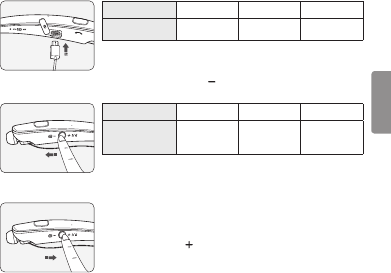
Abra la cubierta del Puerto de carga y conecte el cargador al Puerto de carga.
Luz indicadora Rojo Púrpura Azul
Estado de la
batería Cargando 80 % Completado
Deslice el Selector giratorio de volumen en la dirección ( ) y manténgalo durante 1 segundo para
comprobar el nivel de batería y la luz indicadora a través de la voz.
Estado de la batería Suciente Normal Insuciente
Luz indicadora Parpadea en azul
tres veces
Parpadea en
púrpura
tres veces
Parpadea en rojo
tres veces
Ajustes de las alertas de vibración
2 seg
La alerta de vibración se activa automáticamente al encender el producto.
Para activar o desactivar la conguración de la vibración, deslice y
mantenga presionado el Selector giratorio de volumen en la dirección
para subir el volumen ( ) durante dos segundos.
NOTA: si la vibración está desactivada, HBS-781 no vibrará cuando
reciba una llamada entrante.
Fuera de rango
Si el dispositivo conectado al producto está fuera del rango de comunicación efectiva (10 metros),
la señal de comunicación será más débil y se perderá la comunicación.
Si el dispositivo vuelve a estar dentro del rango de comunicación efectiva, el producto volverá a
conectarse automáticamente al dispositivo. Si el dispositivo no vuelve a conectarse automáticamente,
presione el Botón llamar del producto para conectarlo de forma manual.
Si un dispositivo que no está en uso queda fuera del rango de comunicación mientras está conectado
a varios dispositivos, recibirá un mensaje de voz que le avisará que se perdió la conexión. En este
caso, la función de reconexión automática no es compatible.
ESPAÑOL
10
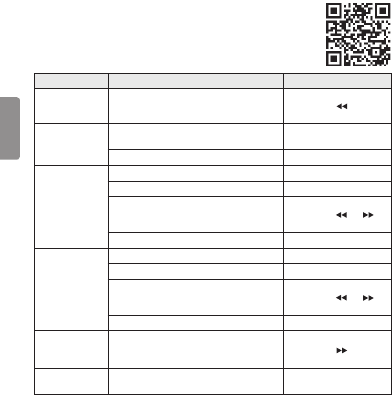
LG Tone & Talk
Tone & Talk admite varias funciones incluidas las indicaciones de texto y voz,
así como llamadas. Vaya a Google Play™ y busque “LG Tone & Talk” o escanee el
código QR de la derecha para instalarlo.
NOTA: Tone & Talk puede utilizarse en teléfonos inteligentes con Android™.
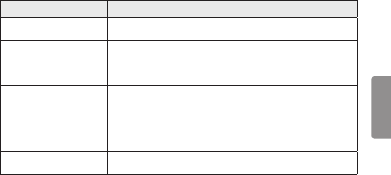
Función Descripción de los botones Acción de HBS-781
Leer mensajes
recientes
Selector giratorio anterior/siguiente
Deslice y mantenga presionada
la posición ( ) durante
un segundo.
Marcación rápida
para realizar una
llamada
Seleccione un contacto de marcación rápida en
Tone & Talk. -
Botón llamar (realizar una llamada)
Presione brevemente dos veces.
Uso de los favoritos
para realizar una
llamada
Seleccione un contacto favorito en Tone & Talk. -
Botón llamar (mostrar un contacto favorito)
Presione brevemente dos veces.
Seleccione un contacto con el
Selector giratorio anterior/siguiente.
Deslice y mantenga presionada
la posición ( ) o ( )
durante un segundo.
Botón llamar (realizar una llamada)
Presione brevemente dos veces.
Realizar una
llamada desde
el historial de
llamadas
Seleccione el historial de llamadas en Tone & Talk. -
Botón llamar
(mostrar el historial de llamadas)
Presione brevemente dos veces.
Deslice y sostenga el Selector giratorio anterior/
siguiente para seleccionar un número del historial
de llamadas.
Deslice y mantenga presionada
la posición ( ) o ( )
durante un segundo.
Botón llamar (realizar una llamada)
Presione brevemente dos veces.
Alerta de hora
actual/Notas
de voz
Selector giratorio anterior/siguiente
(Es posible que esta función no sea compatible con
algunos dispositivos).
Deslice y mantenga presionada
la posición ( ) durante
un segundo.
Cambio del idioma de
la indicación de voz
Seleccione Conguración de auriculares >
Idioma de la indicación de voz en Tone & Talk. -
NOTA: la Alerta de hora actual y las Nota de voz no pueden ser usadas al mismo tiempo.
Solo puede usar una función cada vez al realizar selecciones en la aplicación Tone & Talk.
ESPAÑOL
11
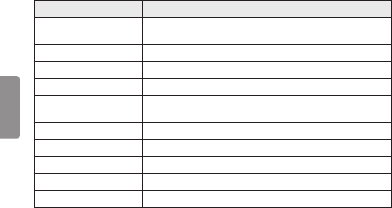
Solución de problemas
Problemas Soluciones
El producto no se enciende Compruebe el nivel de batería y cárguela.
No se puede realizar una
llamada con los HBS-781
Si el celular no admite las funciones manos libres y de los auriculares,
no podrá utilizar las funciones de llamada.
Compruebe el nivel de batería y cárguela.
No se pueden registrar los
HBS-781 en el celular
Compruebe si los HBS-781 están encendidos.
Compruebe si los HBS-781 se encuentran en el modo de Búsqueda.
- Mantenga presionado el Botón llamar, deslizando simultáneamente el
Interruptor principal hacia la posición ON y los HBS-781 cambiarán
al modo de Búsqueda.
El sonido es bajo Controle el nivel de sonido del dispositivo conectado a los HBS-781.
ESPAÑOL
12
Especicaciones y funciones
Ítem Descripción
Especicaciones de la
tecnología Bluetooth V 4.1 (Auriculares/Manos libres/A2DP/AVRCP)
Batería Batería 3,7 V/210 mAh, Polímero de iones de litio
Tiempo en espera Hasta 720 horas*
Tiempo de conversación Hasta 16 horas*
Tiempo de reproducción
de música Hasta 10,5 horas*
Tiempo de carga Menos de 2 horas
Tensión nominal de entrada CC 4,75 V ~ 5,3 V, 400 mA
Temperatura operativa -10 °C (+14 °F) ~ +50 °C (+122 °F)
Dimensiones/Peso 5,4" (ancho) X 6,7" (largo) X 0,6" (alto) / 1,21 oz
Frecuencia operativa De 2402 MHz a 2480 MHz
*El tiempo de uso puede variar dependiendo del dispositivo móvil conectado, las funciones utilizadas,
las conguraciones, la intensidad de la señal, la temperatura operativa, la banda de frecuencia y
otros métodos de uso.

ESPAÑOL
13
Aviso de conformidad
AVISO DE LA FCC PARA LOS USUARIOS
Este dispositivo cumple con el artículo 15 de las Reglas de la FCC.
El funcionamiento está sujeto a las dos condiciones siguientes:
(1) Este dispositivo no puede causar interferencia nociva,
(2) Este dispositivo debe aceptar cualquier interferencia que reciba, incluso la que provoque un
funcionamiento no deseado.
Las modicaciones o los cambios que no estén expresamente aprobados por el fabricante (o la parte
responsable) del cumplimiento podrían anular la autoridad del usuario para utilizar el producto.
Declaración del artículo 15.105
Este equipo ha sido evaluado y se ha comprobado que cumple con los límites para un dispositivo
digital clase B, conforme las secciones 15 de las Reglas de la FCC.
Estos límites han sido diseñados para brindar una protección razonable contra la interferencia nociva
en una instalación residencial. Este equipo genera, utiliza y puede irradiar energía de radiofrecuencia
y, si no se instala y utiliza de acuerdo con las instrucciones, podría causar interferencia nociva para
las comunicaciones radiales.
No obstante, no se garantiza la ausencia de interferencia en una instalación en particular. Si este
equipo causa interferencias con la señal de recepción de la radio o televisión, lo cual se verica
apagando y encendiendo el equipo, el usuario puede intentar corregir la interferencia tomando una o
más de las siguientes medidas:
- Reoriente o reubique la antena receptora.
- Aumente la distancia entre el equipo y el receptor.
- Conecte el equipo en un tomacorriente que no pertenezca al mismo circuito del tomacorriente en
el que está conectado el receptor.
- Consulte al distribuidor o a un técnico de radio/TV experimentado para obtener ayuda.
NOTA IMPORTANTE:
Para satisfacer los requisitos de exposición a la radiofrecuencia estipulados por la FCC, no se
permite alteración alguna de la antena o del dispositivo. Todo cambio realizado en la antena o el
dispositivo podría hacer que el dispositivo supere los requisitos de exposición a la radiofrecuencia; en
consecuencia, los derechos del usuario para utilizar el producto podrían quedar anulados.

ESPAÑOL
14
Bluetooth® es una marca registrada de Bluetooth SIG, Inc., en todo el mundo.
Qualcomm® aptX™ audio es un producto de Qualcomm Technologies International, Ltd.
ID de FCC: BEJHBS760
Información adicional
1. Exposición a la radiofrecuencia
Este auricular estéreo inalámbrico Bluetooth, modelo HBS-781, es un transmisor y receptor
de radio. Cuando está en funcionamiento, se comunica con un dispositivo móvil compatible con
Bluetooth mediante la recepción y la transmisión de campos electromagnéticos (microondas) de
radiofrecuencia (RF) en el rango de 2,4 a 2,4835GHz. El auricular Bluetooth está diseñado para
funcionar conforme a los lineamientos y los límites de exposición a la radiofrecuencia establecidos
por autoridades nacionales y organismos internacionales de la salud pública, cuando se lo utiliza en
conjunto con cualquier dispositivo móvil compatible de LG Electronics.
2. Precauciones para la conexión
Bluetooth
Los siguientes entornos afectan el rango y la recepción de las señales Bluetooth:
- Cuando hay paredes, metales, cuerpos humanos u otros obstáculos entre el dispositivo Bluetooth
y el dispositivo conectado.
- Cuando se colocan equipos que utilizan señales de frecuencia de 2,4 GHz (LAN inalámbricas,
teléfonos inalámbricos, hornos microondas, etc.) cerca de los dispositivos utilizados.

ESPAÑOL
15
3. Atmósferas potencialmente explosivas
Cuando se encuentre en una atmósfera potencialmente explosiva, apague el dispositivo electrónico.
Aunque es poco frecuente, este dispositivo electrónico podría generar chispas. Las chispas en
dichas áreas pueden causar una explosión o un incendio y provocar lesiones personales o incluso
la muerte. Las zonas con riesgo de explosión suelen estar claramente señaladas, aunque no en
todos los casos.
4. Llamadas de emergencia
¡IMPORTANTE!
Este auricular Bluetooth y el dispositivo electrónico conectado a él funcionan con señales de
radio, redes terrestres y móviles, además de funciones programadas por el usuario, que no pueden
garantizar la conexión en todas las situaciones. Por lo tanto, nunca debe depender únicamente de
un dispositivo electrónico para casos de comunicaciones esenciales (por ej. emergencias médicas).
Recuerde que, para realizar o recibir llamadas, el auricular y el dispositivo electrónico conectado
a él deben estar encendidos y en un área de servicio con una señal móvil de buena potencia. Las
llamadas de emergencia no pueden hacerse en todas las redes de telefonía celular ni cuando
están en uso ciertos servicios de red o funciones del teléfono. Compruebe la disponibilidad con su
proveedor de servicio local.
5. Información sobre la batería
Las baterías recargables tienen una vida útil prolongada si reciben el tratamiento adecuado. Las
baterías nuevas o que no se hayan utilizado por mucho tiempo podrían tener una capacidad
reducida las primeras veces que se utilizan. No exponga la batería a temperaturas extremas,
superiores a +50 °C (+122 °F) o inferiores a -10 °C (+14 °F). Para obtener la máxima capacidad
de la batería, úsela a temperatura ambiente. Si se utiliza la batería en condiciones de temperaturas
bajas, la capacidad se verá reducida. La batería solo puede cargarse a temperaturas entre +10 °C
(+50 °F) y +45 °C (+113 °F).
6. Reciclado de la batería del auricular
Bluetooth
La batería del auricular Bluetooth debe desecharse con el procedimiento adecuado y nunca debe
arrojarse al basurero municipal. Los encargados del servicio técnico de LG Electronics que extraigan
baterías las desecharán de acuerdo con las reglamentaciones locales.

ESPAÑOL
16
7. Condiciones
- La garantía tiene validez únicamente si, junto con el producto que se va a reparar o reemplazar,
se presenta la factura original que el distribuidor le emitió al comprador original. LG Electronics
se reserva el derecho de denegar el servicio de garantía si no se presenta dicha información o si
hubiera habido modicaciones luego de la compra original del producto al distribuidor.
- Si LG Electronics repara o reemplaza el producto, el plazo de garantía del producto reemplazado
o reparado equivaldrá al tiempo restante del plazo de la garantía original o noventa (90) días a
partir de la fecha de reparación, el período que sea mayor. La reparación o el reemplazo podrían
implicar el uso de unidades reacondicionadas con funciones equivalentes. Los componentes o las
piezas reemplazadas pasarán a ser propiedad de LG Electronics.
- La presente garantía no cubre fallas por desgaste natural ni uso indebido, entre otros casos, usos
fuera de lo normal y habitual, conforme a las instrucciones de uso y mantenimiento del producto.
La cobertura tampoco abarca fallas del producto que se deban a accidentes, modicaciones o
ajustes, caso fortuito o daño producido por algún líquido.
- La garantía no cubre fallas del producto a causa de instalaciones, reparaciones o modicaciones
incorrectas llevadas a cabo por personas que no estén autorizadas por LG Electronics. Todo indicio
de manipulación en cualquiera de los sellos del producto anulará la garantía.
- NO EXISTEN GARANTÍAS EXPRESAS, NI ORALES NI ESCRITAS, SALVO LAS QUE CONSTAN EN
EL PRESENTE DOCUMENTO, INCLUYENDO, ENTRE OTRAS, LAS GARANTÍAS IMPLÍCITAS DE
COMERCIALIZACIÓN O IDONEIDAD PARA UN FIN DETERMINADO. LA DURACIÓN DE CUALQUIER
GARANTÍA IMPLÍCITA SE LIMITA AL PLAZO DE LA PRESENTE GARANTÍA LIMITADA. ASIMISMO,
LG ELECTRONICS O SUS DISTRIBUIDORES NO SERÁN RESPONSABLES, EN NINGUNA
CIRCUNSTANCIA, POR DAÑOS FORTUITOS O EMERGENTES DE ÍNDOLE ALGUNA, INCLUYENDO,
ENTRE OTROS, PÉRDIDAS COMERCIALES O DE GANANCIAS, HASTA EL MÁXIMO DESCARGO
DE RESPONSABILIDAD PERMITIDO POR LA LEY.
- En algunos estados y países, no se permite la exclusión o la limitación de daños fortuitos y
emergentes, ni la limitación del plazo de las garantías implícitas. Por lo tanto, las exclusiones
o limitaciones de los párrafos anteriores podrían no aplicarse en su caso. La garantía provista
no afecta los derechos del consumidor establecidos por la legislación nacional pertinente en
vigencia ni los derechos del consumidor en relación con el distribuidor que surjan del contrato
de compra-venta.

ESPAÑOL
17
Garantía limitada
Sujeta a las condiciones de la presente garantía limitada, LG Electronics garantiza que este producto
no presenta fallas de diseño, materiales ni mano de obra en el momento en que el consumidor realiza
la compra original, y que no las presentará por un período posterior de un (1) año. En caso de que el
producto requiera servicio técnico de garantía, sírvase llevarlo al establecimiento del distribuidor que
se lo vendió o comuníquese con el centro de contacto de LG Electronics de su región para obtener
más información.
Información importante de seguridad
Reducción de la capacidad auditiva
Si utiliza el auricular con un nivel de volumen alto, podría sufrir hipoacusia permanente.
Congure el volumen en un nivel inocuo. Con el tiempo, podría acostumbrarse a un volumen de
sonido más alto que podría parecer normal, pero que podría dañar su capacidad auditiva.
Si le zumban los oídos o siente que los sonidos le llegan medio apagados, no utilice el dispositivo y
consulte a un otorrinolaringólogo. Cuanto más alto sea el volumen, más rápido podría verse afectada
su audición.
Algunos expertos en audición sugieren que, para proteger la audición, se debe:
• Limitar el tiempo de uso del auricular a volumen alto.
• Evitar subir el volumen para contrarrestar el exceso de ruido ambiental.
• Bajar el volumen si no oye a la gente que habla cerca de usted.
Uso seguro de los auriculares
No se recomienda utilizar auriculares para escuchar música mientras conduce un vehículo y, en
algunas zonas, es ilegal hacerlo. Sea precavido y cauto al conducir. No utilice el dispositivo si le resulta
molesto o lo distrae mientras maneja cualquier tipo de vehículo o realiza alguna otra actividad que
requiera toda su atención.

Any modications or changes to this manual due to typographical errors or inaccuracies of stated
information shall only be made by LG Electronics Inc.
Las modicaciones o cambios de este manual por errores tipográcos o de información serán
realizados exclusivamente por LG Electronics, Inc.
www.lg.com
