LG LS860 User Manual Owner's Boost UG EN Web V1.0 130614
LS860 Owner's Manual File?fileId=KROWM000542742 Owner's Manual is a basic instruction that contains the product installation and usage. (Boost MACH LS860 English)
2013-08-27
User Manual: LG LS860 Owner's Manual Owner's Manual is a basic instruction that contains the product installation and usage. (Boost MACH LS860 English)
Open the PDF directly: View PDF  .
.
Page Count: 105 [warning: Documents this large are best viewed by clicking the View PDF Link!]
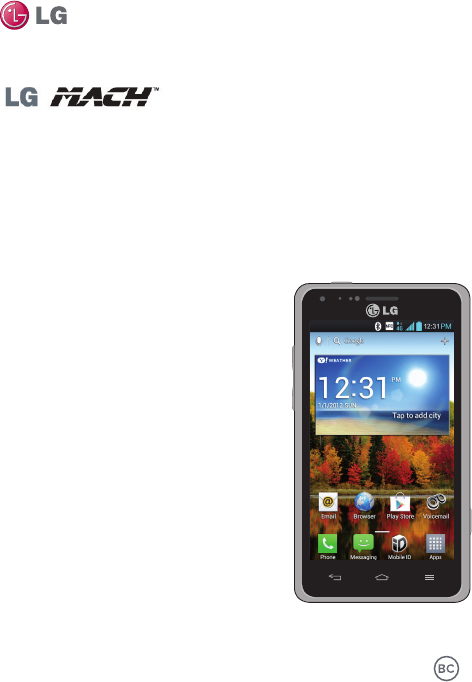
User Guide
This guide helps you to get started using your phone.
ENGLISH
•Someofthecontentsofthismanualmay
notapplytoyourphone,dependingon
thesoftwareandyourserviceprovider.
•Google™,GoogleMaps™,Gmail™,
YouTube™,GoogleTalk™andGoogle
Play™aretrademarksof Google, Inc.
MFL67853601(1.0)

2
•Copyright©2013LGElectronics,Inc.Allrightsreserved.LGandtheLG
logoareregisteredtrademarksofLGGroupanditsrelatedentities.All
othertrademarksarethepropertyoftheirrespectiveowners.

3
Contents
Contents ................................................................................................................ 3
Getting to know your phone ................................................................................ 6
Your Home screen ...............................................................................................16
Google account setup ........................................................................................24
Connecting to Networks and Devices ..............................................................25
Calls .....................................................................................................................29
Contacts ..............................................................................................................32
Messaging ...........................................................................................................34
Email .................................................................................................................... 37
Camera ................................................................................................................ 39
Video camera ......................................................................................................42
Multimedia ..........................................................................................................45
Utilities.................................................................................................................50
The web ...............................................................................................................53
Settings ...............................................................................................................54
Accessories .........................................................................................................62
Troubleshooting ..................................................................................................63
Safety ................................................................................................................... 70
Limited Warranty Statement ............................................................................ 101
4
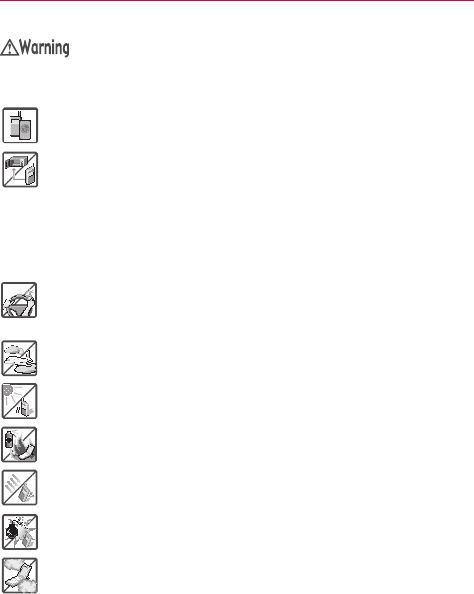
Violationoftheinstructionsmaycauseseriousinjuryordeath.
WARNING:ThisproductcontainschemicalsknowntotheStateofCaliforniatocausecancerand
birthdefectsorotherreproductiveharm.Wash hands after handling.
#
Neveruseanunapprovedbatterysincethiscoulddamagethephoneand/or
batteryandcouldcausethebatterytoexplode.
#
Neverplaceyourphoneinamicrowaveovenasitwillcausethebatteryto
explode.
#
Neverstoreyourphoneintemperatureslessthan-4°Forgreaterthan
122°F.
#
Donotdisposeofyourbatterynearreorwithhazardousorammable
materials.
#
Whenridinginacar,donotleaveyourphoneorsetupthehands-freekit
neartheairbag.Ifwirelessequipmentisimproperlyinstalledandtheair
bagisdeployed,youmaybeseriouslyinjured.
#
Donotusethephoneinareaswhereitsuseisprohibited.(Forexample:
aircraft)
#
Donotexposethebatterychargeroradaptertodirectsunlightoruseitin
placeswithhighhumidity,suchasabathroom.
#
Donotuseharshchemicals(suchasalcohol,benzene,thinners,etc.)or
detergentstocleanyourphone.Thiscouldcauseare.
#
Donotdrop,strike,orshakeyourphoneseverely.Itmayharmtheinternal
circuitboardsofthephone.
#
Donotuseyourphoneinhighexplosiveareasasthephonemaygenerate
sparks.
#
Donotdamagethepowercordbybending,twisting,pulling,orheating.Do
notusetheplugifitislooseasitmaycauseelectricshockorre.
#
Donotplaceanyheavyitemsonthepowercord.Donotallowthepower
cordtobecrimpedasitmaycauseelectricshockorre.
#
Donothandlethephonewithwethandswhileitisbeingcharged.Itmay
causeanelectricshockorseriouslydamageyourphone.
#
Donotdisassemblethephone.
Caution
5
#
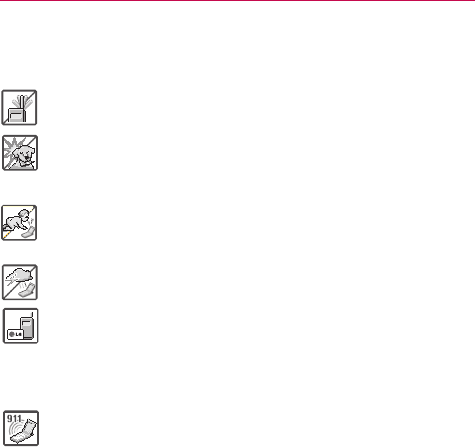
Donotplaceoranswercallswhilechargingthephoneasitmayshort-circuit
thephoneand/orcauseelectricshockorre.
#
Donotholdorlettheantennacomeincontactwithyourbodyduringacall.
#
Makesurethatnosharp-edgeditems,suchasanimal’steethornails,come
intocontactwiththebattery.Thiscouldcauseare.
#
Storethebatteryoutofreachofchildren.
#
Becarefulthatchildrendonotswallowanyparts(suchasearphone,
connectionpartsofthephone,etc.)Thiscouldcauseasphyxiationor
suffocationresultinginseriousinjuryordeath.
#
Unplugthepowercordandchargerduringlightningstormstoavoidelectric
shockorre.
#
OnlyusethebatteriesandchargersprovidedbyLG.Thewarrantywillnot
beappliedtoproductsprovidedbyothersuppliers.
#
Onlyauthorizedpersonnelshouldservicethephoneanditsaccessories.
Faultyinstallationorservicemayresultinaccidentsandconsequently
invalidatethewarranty.
#
Anemergencycallcanbemadeonlywithinaservicearea.Foran
emergencycall,makesurethatyouarewithinaserviceareaandthatthe
phoneisturnedon.
#
Yourphoneisanelectronicdevicethatgeneratesheatduringnormal
operation.Extremelyprolonged,directskincontactintheabsenceof
adequateventilationmayresultindiscomfortorminorburns.Therefore,use
carewhenhandlingyourphoneduringorimmediatelyafteroperation.

6
Before you start using the phone, please read this!
Pleasechecktoseewhetheranyproblemsyouencounteredwithyour
phonearedescribedinthissectionbeforetakingthephoneinforserviceor
callingaservicerepresentative.
1. Phone memory
Whenthereislessthan10%ofspaceavailableinyourphonememory,
yourphonecannotreceivenewmessages.Yo u needtocheckyourphone
memoryanddeletesomedata,suchasapplicationsormessages,tomake
morememoryavailable.
To uninstall applications:
1. OntheHomescreen,touch >Appstab>Settings >Apps
(DEVICEcategory).
2.Onceallapplicationsappear,scrolltoandselecttheapplicationyouwant
touninstall.
3.TouchUninstall>OKtoconrm.
2. Optimizing battery life
Extendyourbattery'slifebetweenchargesbyturningofffeaturesthatyou
don'tneedtohavingrunningconstantlyinthebackground.Yo u canmonitor
howapplicationsandsystemresourcesconsumebatterypower.
Extending your phone's battery life:
# Turnoffradiocommunicationsyouarenotusing.Ifyouarenotusing
Wi-Fi,BluetoothorGPS,turnthemoff.
# Reducescreenbrightnessandsetashorterscreentimeout.
# TurnoffautomaticsyncingforGmail™,Calendar,Contactsandother
applications.
# Someapplicationsyouhavedownloadedmayreducebatterypower.
Getting to know your phone
7
Getting to know your phone
To check the battery power level:
# OntheHomescreen,touch >Appstab>Settings > About
phone(SYSTEMcategory)>Battery.
Thebatterystatus(chargingornotcharging)andlevel(percentagecharged)
isdisplayedatthetopofthescreen.
To monitor and control how battery power is being used:
# OntheHomescreen,touch >Appstab > Settings > Power
saver(DEVICEcategory)>Battery use(BATTERYINFORMATION
category).
Batteryusagetimeisdisplayedatthetopofthescreen.Ittellsyouhow
longithasbeensinceyoulastconnectedyourphonetoapowersource
or,ifcurrentlyconnected,howlongthephonewaslastrunningonbattery
power.Thescreenshowstheapplicationsorservicesusingbatterypower,
listedinorderfromthegreatesttosmallestamountused.
3. Using folders
Yo u cancombineseveralappiconsinafolder.Droponeappiconover
anotheronaHomescreenpanelortheApplicationsscreenandafolderwill
becreatedwiththetwoiconsinit.
NOTE Yo u cancustomizecontentsandpropertiesofeachfolder.To changethefoldernameand
color,touchthefolder,thentouch.To addmoreappstothefolder,simplydragand
droptheiconsintothedesiredfolder.
4. Before installing an open source application and
operating system (OS)
Installinganopensourceoperatingsystemonyourphoneandnotusing
theoperatingsystemprovidedbythemanufacturercancauseyourphone
tomalfunction.
Warning
• Toprotectyourphoneandpersonaldata,downloadapplicationsonlyfromtrusted
sources,suchasPlayStore.Ifsomeapplicationsarenotproperlyinstalledonyour
phone,yourphonemaynotworkproperly-orseriouserrorsmayoccur.Yo u willneedto
uninstallthoseapplicationsandallofitsdataandsettingsfromthephone.

8Getting to know your phone
5. Opening and switching applications
Multi-taskingiseasywithAndroidbecauseyoucankeepmorethanone
applicationrunningatthesametime.There'snoneedtoquitanapplication
beforeopeninganother.Useandswitchbetweenseveralopenapplications.
Androidmanageseachapplication,stoppingandstartingthemasneeded
toensurethatidleapplicationsdon'tconsumeresourcesunnecessarily.
To view a list of recently used applications:
SimplytouchandholdtheHome Key .
To stop applications:
1. OntheHomescreen,touch >Appstab>Settings >Apps
(DEVICEcategory)>Runningtab.
2.ScrollandtouchthedesiredapplicationandtouchStoptostopit.
6. Hold your phone upright
Holdyourmobilephonevertically,asyouwouldaregularphone.Thephone
hasaninternalantenna.Becarefulnottoscratchordamagethebackofthe
phone,asthismayaffectperformance.
Whilemaking/receivingcallsorsending/receivingdata,avoidholdingthe
lowerpartofthephonewheretheantennaislocated.Doingsomayaffect
callquality.

9
Getting to know your phone
7. When the screen freezes
If the screen freezes or the phone does not respond when you try to
operate it:
Removethebattery,reinsertit,thenturnthephoneon.
OR
PressandholdthePower/LockKeyfor10secondstoturnitoff.
Ifitstilldoesnotwork,pleasecontacttheservicecenter.
10 Getting to know your phone
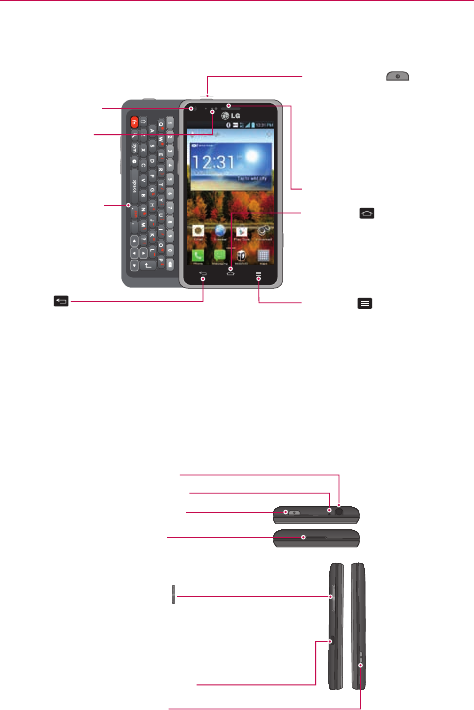
Device components
Earpiece
Proximity Sensor
Front Camera Lens
QWERTY Keyboard Home Key
• ReturntotheHomescreenfrom
anyscreen.
• Pressandholdtoviewalistof
themostrecentlyusedapps.
Back Key
Returntothepreviousscreen.
Power/Lock Key
• Pressandholdtoturnthe
phoneon/off,restart,activate/
deactivateairplanemode,and
changetheringertype.
• Pressbrieytolock/unlockthe
screen.
Menu Key
•Displaysavailableoptions.
NOTE Proximity sensor
Whenreceivingandmakingcalls,theproximitysensorautomaticallyturnsthebacklight
offandlocksthetouchscreenbysensingwhenthephoneisnearyourear.Thisextends
batterylifeandpreventsyoufromunintentionallyactivatingthetouchscreenduringcalls.
WARNING
PlacingaheavyobjectonthephoneorsittingonitcandamagetheLCDandtouch
screenfunctions.DonotcovertheLCDproximitysensorwithprotectivelm.Thiscould
causethesensortomalfunction.
Volume Keys
•IntheHomescreen:Controlringervolume.
•Duringacall:Controlyourearpiecevolume.
• Whenplayingasong:Controlvolume
continuously.
Charger/USB Port
Camera Key
Microphone
2nd Microphone
Earphone Jack
Power/Lock Key
11
Getting to know your phone
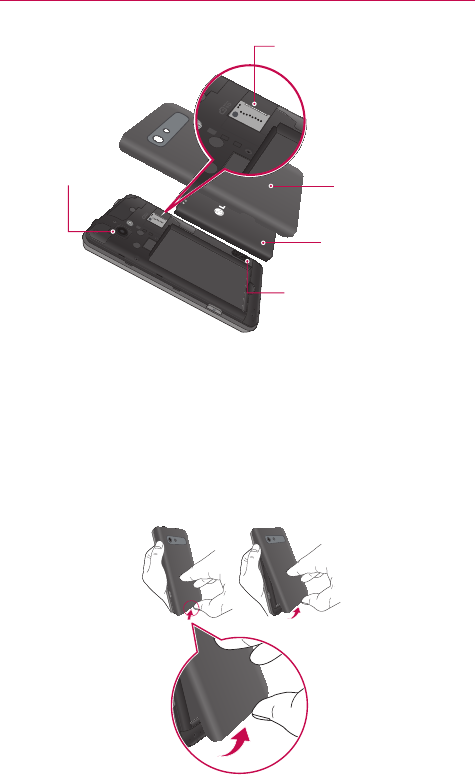
MicroSD Card Slot
Back Camera Lens
Speaker
Battery
Back Cover
NOTICE TheNFCantennaforthismodelisonthebackcover.Thisbackcoveristheonlyonethat
isofferedwiththemodel.
Installing the battery
Beforeyoucanstartexploringyournewphone,you'llneedtosetitup.To
inserttheSIMcardandbattery:
1. Toremovethebackcover,holdthephonermlyinonehand.Withyour
otherhand,liftoffthebackcoverwithyourthumbnailasshowningure
below.
12 Getting to know your phone
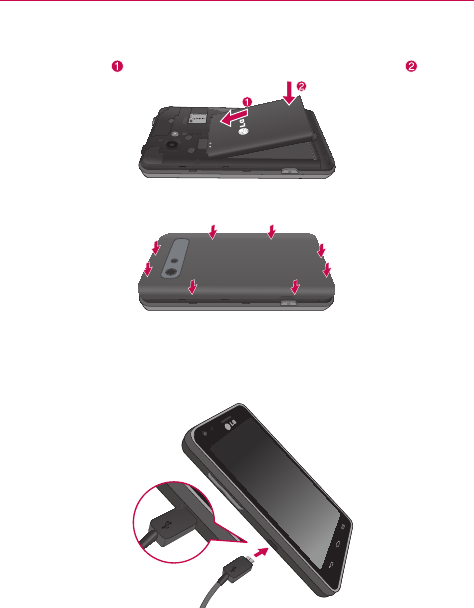
2.Insertthebatteryintoplacebyaligningthegoldcontactsonthebattery
andthephone andpressingitdownuntilitclicksintoplace .
3.Alignthebackcoveroverthebatterycompartmentandpressitdown
untilitclicksintoplace.
Charging your phone
TheCharger/USBPortisatthebottomofthephone.Insertthechargerand
plugitintoanelectricaloutlet.
NOTE Donotopenthebackcoverwhilechargingyourphone.
13
Getting to know your phone
Using the memory card
To insert a memory card:
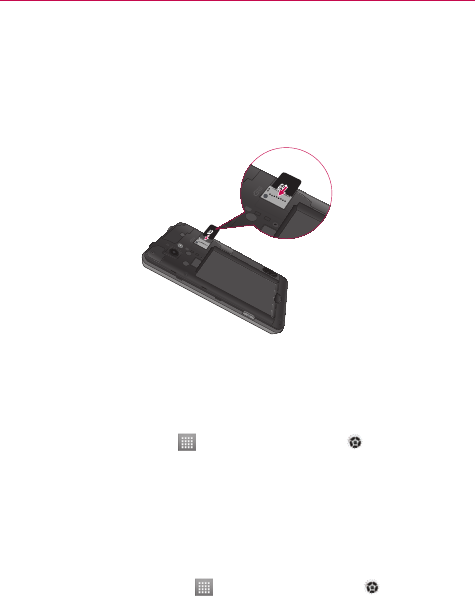
Insertthememorycard(notincluded)intotheslot.Makesurethegold
contactareaisfacingdownwards.
WARNING
Donotinsertorremovethememorycardwhenthephoneison.Doingsomaydamage
thememorycardaswellasyourphone,andthedatastoredonthememorycardmay
getcorrupted.
To remove the memory card safely:
OntheHomescreen,touch >Appstab > Settings >Storage
(DEVICEcategory)>Unmount SD card>OK.
To format the memory card:
Yourmemorycardmayalreadybeformatted.Ifitisn't,youmustformatit
beforeyoucanuseit.
NOTE Alllesonyourmemorycardaredeletedwhenitisformatted.
1. OntheHomescreen,touch >Appstab>Settings >Storage.
2.TouchUnmount SD cardandtouchOKtoconrmit.
3.TouchErase SD cardandthenErase SD cardonemoretimetoconrm
yourchoice.
4.Ifyouhavesetapatternlock,enterthepatternlockandtouchErase
everything.

14 Getting to know your phone
NOTE Ifthereiscontentonyourmemorycard,thefolderstructuremaybedifferentafter
formattingasalltheleswillbedeleted.
Locking and unlocking the screen
Ifyoudonotusethephoneforawhile,thescreenisturnedoffandlocked
automatically.Thishelpstopreventaccidentaltouchesandsavesbattery
power.
Whenyouarenotusingthephone,pressthePower/Lock Keytolock
thescreen.
Ifthereareanyprogramsrunningwhenyousetlockscreen,theymaystill
berunninginLockmode.Itisrecommendedthatyouexitallprograms
beforeenteringLockmodetoavoidunnecessarycharges(e.g.phonecalls,
webaccessanddatacommunications).
Towakeupyourphone,pressthePower/Lock Key.Thelockscreen
willappear.Touchandslidethelockscreeninanydirectiontounlockyour
Homescreen.Thelastscreenyouviewedwillopen.
Secure your lock screen
Yo u canlockyourscreensothatonlyyoucanunlockittoaccessyour
phone.
To a screen lock
# OntheHomescreen,touch >Appstab>Settings > Lock
screen > Select screen lock > Swipe,Face Unlock,Pattern,Pinor
Password
NOTE Precautions to take when using pattern lock.
Itisveryimportanttoremembertheunlockpatternyouset.Yo u willnotbeableto
accessyourphoneifyouuseanincorrectpattern5times.Yo u have5opportunitiesto
enteryourunlockpattern,PINorpassword.Ifyouhaveusedall5opportunities,youcan
enterthebackupPINorpasswordortryagainafter30seconds.

15
Getting to know your phone
When you cannot recall your unlock pattern:
IfyouloggedintoyourGoogleaccountonthephonebutfailedtoenterthe
correctpattern5times,touchForgot pattern?.Yo u arethenrequiredtolog
inwithyourGoogleaccounttounlockyourphoneorenteryourBackupPIN.
IfyouhavenotcreatedaGoogleaccountonthephoneoryouforgotit,you
havetoperformahardreset.
Formoreinformation,refertotheTroubleshootingsectiononpage66.
To adjust the volume
OntheHomescreen,touchtheMenu Key >System settings >
Sound > Sound profile and Volumes.

16 Your Home screen
Touch screen tips
Herearesometipsonhowtonavigatearoundyourphone.
Touch–To chooseamenu/optionoropenanapplication,touchit.
Touch and hold–To openanoptionsmenuorgrabanobjectyouwantto
move,touchandholdit.
Drag–Toscrollthroughalistormoveslowly,dragacrossthetouchscreen.
Flick–Toscrollthroughalistormovequickly,ickacrossthetouchscreen
(dragquicklyandrelease).
NOTE• Toselectanitem,touchthecenteroftheicon.
• Donotpresstoohard;thetouchscreenissensitiveenoughtopickupalight,rm
touch.
• Usethetipofyourngertotouchtheoptionyouwant.Becarefulnottotouchany
otherkeys.
Home screen
SimplyswipeyourngertotheleftorrighttoviewtheavailableHome
screencanvases.Yo u cancustomizeeachcanvaswithapps,downloads,
widgetsandwallpapers.
NOTE Somescreenimagesmaybedifferentdependingonyourphoneprovider.
OnyourHomescreen,youcanaccessquickkeysatthebottomofthe
screen.Quickkeysprovideeasy,one-touchaccesstothefunctionsyouuse
themost.
: TouchthePhoneicontoaccessthetouchscreendialpadtomakea
call.
: TouchtheMessagingicontoaccessthemessagingmenu,where
youcancreateanewmessage.
: TouchtheMobile IDicontodownloadIDpackstopersonalizeyour
phone.
: TouchtheAppsicontoviewallyourinstalledapplications.To open
anyapplication,simplytouchtheiconintheapplicationslist.
NOTE Toaddanicon,touchandholdthedesirediconanddragittotheQuickKeysbar.Release
itatthedesiredlocation.To removeanicon,touchandholdit,thendragitoutofthe
QuickKeysbar.
17
Your Home screen
Customizing the Home screen
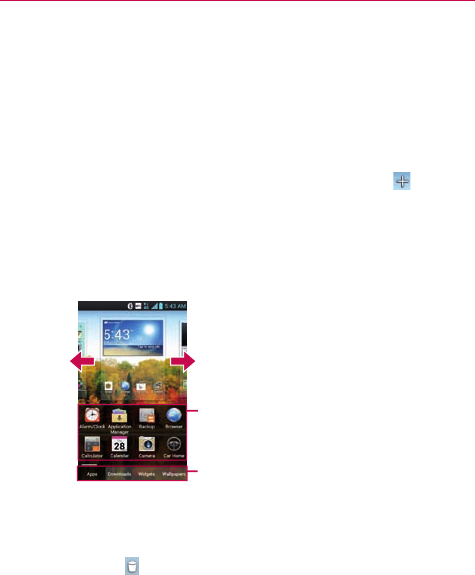
Yo u canpersonalizeyourHomescreenbyaddingapplicationicons,and
widgetstoanyHomescreencanvas.Yo u canalsochangethewallpaper.
To add items on your Home screen:
1. GototheHomescreenpanelwhereyouwanttoaddtheitem.Then
touchandholdtheemptypartoftheHomescreenortouch.
NOTE IfspaceisnotavailableonaparticularHomescreencanvas,youmustdeleteorremove
anitembeforeyoucanaddanotheritem.OrswitchtoanotherHomescreencanvas.
2.Touchthedesiredtabatthebottomofthescreenandselecttheitems
youwanttoadd.Yo u willthenseeaddeditemsontheHomescreen.
3.Dragittothelocationyouwantandliftyournger.
Slidethescreenrightorleftto
viewdifferentcanvases.
Touchandholdtheiconanddrag
atthescreenyouwanttoput.
Touchtoaccesspreloadedanddownloaded
apps,widgets,andwallpapers
To remove an item from the Home screen:
# OntheHomescreen,touchandholdtheiconyouwanttoremove,
thendragitto.
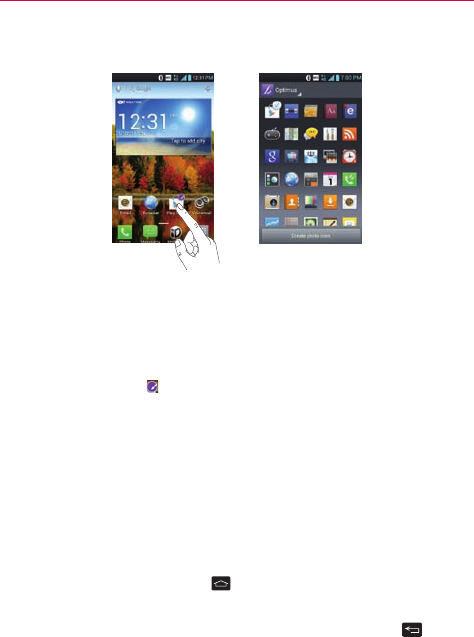
TIP! ToaddanapplicationicontotheHomescreenfromtheApplicationsmenu,touchand
holdtheapplicationyouwanttoadd.TheApplicationsscreenclosesandtheHome
screenwillbedisplayed.
18 Your Home screen
Customizing an application icon from the Home screen
NOTE ThisfeatureallowsyoutomakeanduseaniconwiththepicturesinyourGallery.
Yo u cannowedittheiconsontheQuickKeysbarorHomescreenby
creatingyourowniconswiththecameraorGalleryimages.Thisgivesyou
theabilitytoreplacethegenericiconsandhavepersonalizedimages.
1. Touchandholdaniconuntilthecanvasgridisdisplayed,thenreleasethe
icon.Aneditingiconappearsattheupperrightsideoftheapplication
icon.
2.Touchtheiconandselectthedesiredicondesign.
OR
TouchCreate photo iconandselectTake phototoopentheCamera
applicationandtakeapictureorSelect from Gallerytochooseoneof
theavailablepicturesinyourGallery.
Returning to recently-used applications
1. TouchandholdtheHome Key .Thescreendisplaysapop-upwith
iconsofapplicationsyouusedrecently.
2.Touchanicontoopentheapplication.OrtouchtheBackKey to
returntoyourcurrentapplication.
NOTE Flicktheapplicationpreviewstotherightorlefttoremovethemfromtherecentapps
list.
19
Your Home screen
Status Bar
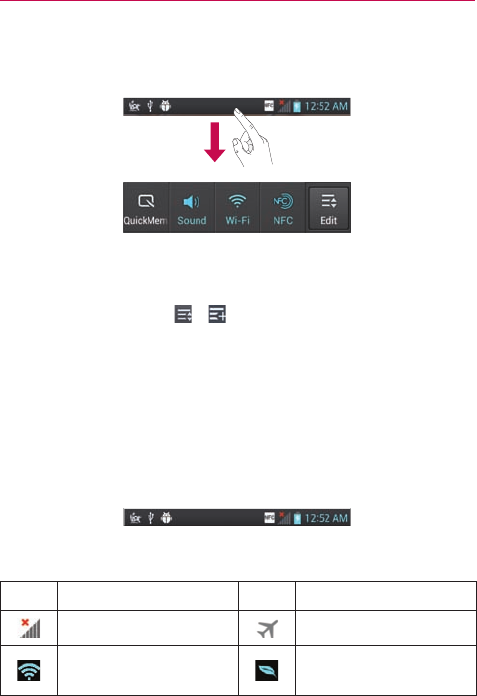
TheStatusBarrunsacrossthetopofyourscreen.
TouchandslidetheStatusBardownwithyourngertodisplaythe
NoticationsPanel.TheNoticationsPaneldisplaysallofyournotications
alongwiththeQuickSettingsatthetop.
Scrolltotherightandtouch> tomanageyourQuickSettings.Yo u can
add,remove,andrearrangeQuickMemo,Wi-Fi,Airplanemode,Bluetooth,
GPS,Soundprole,Dataenabled,NFC,Auto-rotatescreen,Accounts&
sync,andBrightness.
NOTE TouchandholdaniconfromtheQuickSettingstoviewthefunction'ssettingsmenu.
Viewing the Status Bar
TheStatusBarusesdifferenticonstodisplayphoneinformationsuchas
signalstrength,newmessages,batterylife,activeBluetoothanddata
connections.
Belowisatableexplainingthemeaningoficonsyou'relikelytoseeinthe
StatusBar.
Icon Description Icon Description
Nosignal Airplanemode
ConnectedtoaWi-Fi
network Powersaverison
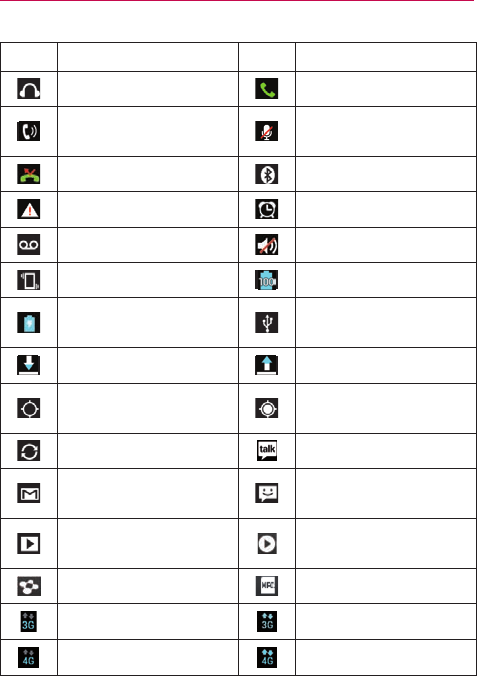
20 Your Home screen
Icon Description Icon Description
Wiredheadset Callinprogress
Speakerphone Phonemicrophoneis
muted
Missedcall Bluetoothison
Systemwarning Alarmisset
Newvoicemail Ringerissilenced
Vibratemode Batteryfullycharged
Batteryischarging PhoneisconnectedtoPC
viaUSBcable
Downloadingdata Uploadingdata
AcquiringGPS Receivinglocationdata
fromGPS
Dataissyncing NewGoogleTalkmessage
NewGmailmessage Newtextormultimedia
message
Songisplaying Songisplayingusing
SmartShare
SmartShareisrunning NFCOn
3GAvailable 3GCommunicating
4GAvailable 4GCommunicating

21
Your Home screen
On-screen keyboard
Yo u canentertextusingtheon-screenkeyboard.Theon-screenkeyboard
appearsautomaticallyonthescreenwhenyouneedtoentertext.To
manuallydisplaythekeyboard,simplytouchatexteldwhereyouwantto
entertext.
Using the keypad & entering text
Taponcetocapitalizethenextletteryoutype.Double-tapforallcaps.
Taptoswitchtothenumbersandsymbolskeyboard.Tapagainto
switchtotheletterskeyboard.
Taptoenteraspace.
Taptocreateanewlineinthemessageeld.
Taptodeletethepreviouscharacter.
Entering special characters
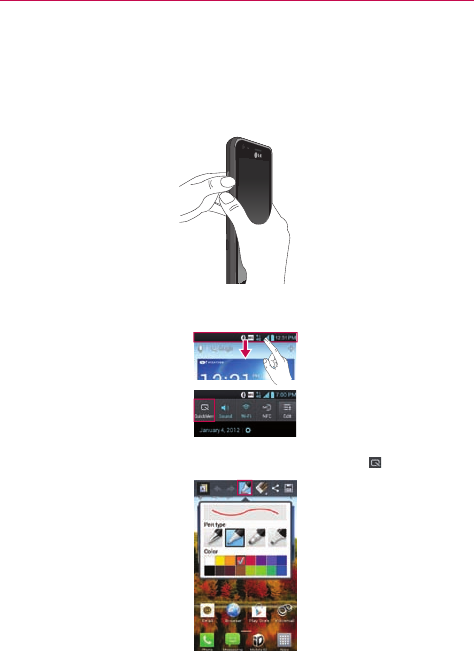
Theon-screenkeyboardallowsyoutoenterspecialcharacters(e.g."á").
Forexample,touchandholdthe"a"keyuntilthedesiredspecialcharacteris
displayed.Thenselectthespecialcharacteryouwant.
22 Your Home screen
QuickMemo
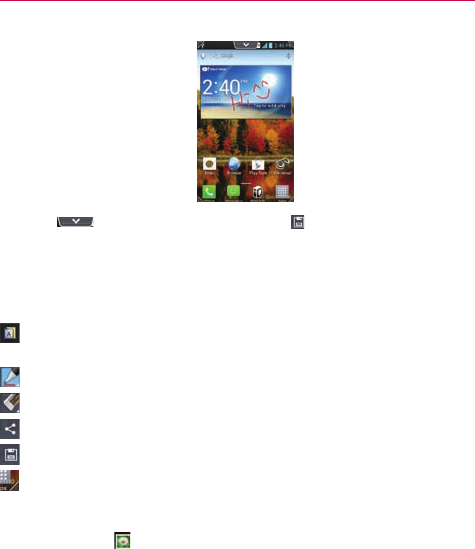
TheQuickMemofeatureallowsyoutocreatememosandcapturescreen
shots.Yo u canuseQuickMemotoeasilyandefcientlycreatememos
duringacall,withasavedpictureoronthecurrentphonescreen.
1. AccesstheQuickMemofeaturebypressingbothVolumeKeysforone
secondonthescreenyouwanttocapture.
OrtouchandslidetheStatusBardownwardsandtouch .
2.SelectthedesiredmenuoptionfromPen type,Color,Eraser.Then
createamemoonthescreen.
23
Your Home screen
3.Touch fromtheEditmenuandselect tosavethememo.
NOTE PleaseuseangertipwhileusingtheQuickMemofeature.Donotuseyourngernail.
QuickMemo Options
WhileusingtheQuickMemofeature,thefollowingoptionsareavailable:
-Selectifyouwanttousethecurrentscreenasthebackgroundscreen
oranoteimage.
-Selectthepentypeandthecolor.
-Erasethememothatyoucreated.
-Sharethememowithothers.
-SavethememotoyourGallery.
-Cropthescreencapturetothedesiredsize.
Viewing the saved QuickMemo
OpentheGallery andtouchtheQuickMemoalbum.

24 Google account setup
Whenyourstturnonyourphone,youhavetheopportunitytoactivatethe
network,tosignintoyourGoogleAccountandhowyouwanttousesome
Googleservices.
To set up your Google account:
# SignintoaGoogleAccountfromthepromptedsetupscreen.
OR
# OntheHomescreen,touch>Appstab>Settings >Accounts
& sync>ADD ACCOUNT>Google>Newtocreateanewaccount.
IfyouhaveaGoogleaccount,touchExisting,enteryouremailaddressand
password,thentouchSign in.
OnceyouhavesetupyourGoogleaccountonyourphone,yourphone
automaticallysynchronizeswithyourGoogleaccountontheweb.
Yourcontacts,Gmailmessages,Calendareventsandotherinformation
fromtheseapplicationsandservicesonthewebaresynchronizedwithyour
phone.(Dependingonyoursynchronizationsettings.)
Aftersigningin,youcanuseGmail™andtakeadvantageofGoogleservices
onyourphone.

25
Connecting to Networks and Devices
Wi-Fi
WithWi-Fi,youcanusehigh-speedInternetaccesswithinthecoverageof
thewirelessaccesspoint(AP).EnjoywirelessInternetusingWi-Fi,without
extracharges.
Connecting to Wi-Fi networks
TouseWi-Fionyourphone,youneedtoaccessawirelessaccesspoint
or"hotspot".Someaccesspointsareopenandyoucansimplyconnectto
them.Othersarehiddenorusesecurityfeatures;youmustcongureyour
phonetobeabletoconnecttothem.
TurnoffWi-Fiwhenyou'renotusingittoextendthelifeofyourbattery.
NOTE IfyouareoutoftheWi-FizoneorturnWi-Fioff,additionalchargesmaybeappliedby
yourmobileoperatorformobiledatause.
Turning Wi-Fi on and connecting to a Wi-Fi network
1. OntheHomescreen,touch >Appstab>Settings >Wi-Fifrom
theWIRELESS&NETWORKScategory.
2.Slidetheswitchtotherighttoturnitonandstartscanningfor
availableWi-Finetworks.
# Securednetworksareindicatedbyalockicon.
3.Touchanetworktoconnecttoit.
# Ifthenetworkisopen,youwillbeconnectedtothatnetworkby
touchingit.
# Ifthenetworkissecured,youarepromptedtoenterapasswordor
othercredentials.(Askyournetworkadministratorfordetails)
4.TheStatusBardisplaysaniconthatindicatestheWi-Fistatus.

26 Connecting to Networks and Devices
Bluetooth
Yo u canuseBluetoothtosenddatabyrunningacorrespondingapplication,
notfromtheBluetoothmenuasonmostothermobilephones.
Turning on Bluetooth and pairing up your phone with a Bluetooth
device
Yo u mustpairyourdevicewithanotherdevicebeforeyouconnecttoit.
1. OntheHomescreen,touch>Appstab>Settings >Bluetooth
fromtheWIRELESS&NETWORKScategory.
2.SlidetheswitchtotherighttoturnBluetoothon.Yourphonewill
scanforanddisplaytheIDsofallavailableBluetoothin-rangedevices.
Ifthedeviceyouwanttopairwithisn’tonthelist,makesurethetarget
deviceissettobediscoverable,thentapSearch for devices.
3.Choosethedeviceyouwanttopairupwithfromthelist.Dependingon
thetypeofdevice,youwillhavetoconrmpairing,enteracode,orit
willautomaticallypair.
4.Oncetheparingissuccessful,yourdevicewillconnecttothedevice.
Sending pictures using Bluetooth
1. OpentheGalleryandtouchapicture,thentouch >Bluetooth
2.CheckifBluetoothison,thenselectSearch for devices.
3.Choosethedeviceyouwanttosenddatatofromthelist.
27
Connecting to Networks and Devices
Using SmartShare
SmartShareusesDLNA(DigitalLivingNetworkAlliance)technologyto
sharedigitalcontentthroughawirelessnetwork.
BothdevicesmustbeDLNAcertiedtosupportthisfeature.
To turn SmartShare on and allow sharing contents
1. OntheHomescreen,touch >SmartShare .
2.TouchtheMenu Key>Settings.
3.TouchDiscoverabletoallowyourdevicetobedetectedbyotherdevices.
# TouchAlways accept requestsifyouwouldliketoautomatically
acceptsharingrequestsfromotherdevices.
# TouchReceive filesifyouwouldliketoallowtheotherdevicesto
uploadmedialestoyourphone.
4.UndertheSHAREDCONTENTSsection,touchtocheckmarkthetypesof
contentyouwouldliketoshare.ChoosefromPhotos,Videosand
Music.
5.SmartShareisnowactivatedandreadytosharecontents.
To control your renderer devices
Letyourrendererdevice(e.g.TV)playmultimediacontentsfromyour
remotecontentlibrary(e.g.PC).
NOTE MakesurethattheDLNAfunctionalityofyourdevicesisproperlycongured(e.g.TVand
PC).
1. OntheHomescreen,touch >SmartShare .
2.TouchtheToiconandselectthedevicefromtherendererdevicelist.
3.TouchtheFromiconandselectthedevicefromtheremotecontent
library.
4.Yo u canbrowsethecontentlibrarytondthecontent(s)youwant.
5.TouchandholdacontentthumbnailortouchtheMenu Key,then
touchPlay.
28 Connecting to Networks and Devices
To share contents from your phone to your renderer device(e.g. TV)
NOTE Makesurethatyourrendererdeviceisproperlycongured.
1. WhilewatchingyourphotosorvideosusingtheGalleryapplication,touch
/ / atthetopofthescreen.
2.Selectthedevicefromtherendererdevicelisttoplaytheles.
NOTE FollowthesimilarstepstousetheVideoplayertosharecontents
:Needtobeconnectedtonetwork.
:Selectthedeviceonthenetwork.
:ContentiscurrentlybeingsharedthroughSmartShare.
Notice CheckthatyourdeviceisconnectedwithyourhomenetworkusingWi-Ficonnectionto
usethisapplicationSomeDLNAenableddevices(e.g.TV)supportonlytheDMPfeature
ofDLNAandwillnotappearintherendererdevicelistYourdevicemightnotbeableto
playsomecontents
To download contents from remote content library
1. OntheHomescreen,touch >SmartShare .
2.TouchtheFromiconandselectthedevicefromtheremotecontent
library.
3.Yo u canbrowsethecontentlibrary.
4.TouchandholdacontentthumbnailandthentouchDownload.
NoticeAfewtypesofcontentsarenotsupported.
To upload contents from my phone to remote content library
NOTE MakesurethatthemicroSDcardiscorrectlymountedandtheReceivelesoptioninthe
Settingsmenuischecked.
1. OntheHomescreen,touch >SmartShare .
2.TouchtheFromiconandselectMy phone.
3.Yo u canbrowsethecontentlibrary.
4.TouchandholdacontentthumbnailandthentouchUpload.
5.Selectthedevicefromtheremotecontentlibrarytobeuploaded.
Notice SomeDLNAenableddevicesdonotsupporttheDMSuploadfunctionalityandwillnot
uploadles.Afewtypesofcontentsarenotsupported.
29
Calls
Making a call
1. OntheHomescreen,touch toopenthekeypad.
2.Enterthenumberusingthekeypad.To deleteadigit,touch.
3.Touchtomakeacall.
4.To endacall,touch.
TIP! Toenter"+"tomakeinternationalcalls,touchandhold.
Calling your contacts
1. OntheHomescreen,touch > toopenyourcontacts.
2.Scrollthroughthecontactlistorentertherstfewlettersofthecontact
youwanttocallbytouchingtheSearch contactseld.Yo u canalso
touchthelettersalongtherightsideofthescreen.
3.Inthelist,touchthecontactyouwanttocall.
4.Touchthephonenumberyouwanttodial.
Answering and rejecting a call
Locked screen
# Swipe inanydirectiontoansweranincomingcall.
# Swipeinanydirectiontodeclineanincomingcall.
Unlocked screen
# Touch toansweranincomingcall.
# Touchtodeclineanincomingcall.
TIP! Quick msg
Yo u cansendamessagequicklyusingthisfunction.Thisisusefulifyouneedtoreplythe
messageduringameeting.
Adjusting call volume
Toadjustthein-callvolumeduringacall,usetheVolumeKeysontheleft
sideofthephone.

30 Calls
In-call options
Onceyouinitiateacall,youwillseetheseon-screenoptions.
Add call-Touchtoinitiatea3-waycall.
End-Touchtoendthecall.
Dialpad-Touchtodisplaythedialpad.
Speaker-Touchtoturnthespeakerphoneonoroff.TheSpeakerbutton
lightsuptoindicatethatthespeakerphoneison.
WARNING Becauseofhighervolumelevels,donotplacethephonenearyourearwhileusing
thespeakerphone.
Mute-Touchtomutethemicrophoneduringacall.TheMutebuttonlights
uptoindicatethemicrophoneismuted.To unmutethemicrophone,touch
itagain.
Bluetooth (Only available when a Bluetooth headset is connected
to your phone)-TouchtoconductthecallviatheBluetoothheadsetfor
hands-freeconversation.
Whenanothercalliscomingwhileyouareinacall,touchSwap callsto
receivethenewcallandputthecurrentcallonhold.
Making a second call
1. Duringyourrstcall,touchAdd callanddialthenumber.Yo u canalsogo
toyourrecentlydialedlistbytouching orsearchcontactsbytouching
andselectthenumberyouwanttocall.
2.Touchtomakethecall.
3.Bothcallsaredisplayedonthecallscreen.Yourinitialcallisputonhold.
4.Tomergethecalls,touch.To endactivecalls,touch .
NOTE Yo u arechargedforeachcallyoumake.

31
Calls
Viewing your call logs
OntheHomescreen,touch andchoosetheCall logstab .
Viewacompletelistofalldialed,receivedandmissedvoicecalls.
TIP! Touchanycalllogentrytoviewthedate,timeanddurationofthecall.
TIP! TouchtheMenu Key,thentouchDeletealltodeletealltherecordeditemsortouch
Deletetoselectindividualitems.
Call settings
Yo u cancongurephonecallsettingssuchascallrejectandotherspecial
featuresofferedbyyourcarrier.
1. OntheHomescreen,touch.
2.TouchtheMenu Key.
3.TouchCall settingsandchoosetheoptionsthatyouwanttoadjust.
Quick messages–Addoreditthemessagesavailabletosendoutwhen
rejectinganincomingcall.
North American dialing–Replace+codeasneededforoutgoingcalls.
International dialing–Allowsyoutosetthedialingcodeforoutgoing
internationalcalls.
TTY mode–AllowsyoutosettheTTYmode.
Proximity Sensor–Allowsyoutoenabletheproximitysensor.
Noise reduction-Reducesthebackgroundnoisewhileusinghands-free
calling.
Voicemail settings–Allowsyoutosetvariousvoicemailsettings.
Save unknown numbers–Addunknownnumberstocontactsafteracall.
32 Contacts
Addcontactstoyourphoneandsynchronizethemwiththecontactsinyour
Googleaccountorotheraccountsthatsupportcontactsyncing.
Searching for a contact
1. OntheHomescreen,touch > toopenyourcontacts.
2.TouchtheSearch contactseldandenterthecontactnameusingthe
keyboardortouchthelettersalongtherightsideofthescreenandscroll
tothecontact.
Adding a new contact
1. OntheHomescreen,touch ,enterthenewcontact'snumber,then
touch Add to Contacts> Create new contact.
2.Ifyouwanttoaddapicturetothenewcontact,touchandchoose
fromTake photoorSelect from Gallery.
3.Touchatthetopofthescreentoselecttheaccountwhereyouwant
tosavethecontact.
4.Touchacategoryofcontactinformationandenterthedetailsaboutyour
contact.
5.TouchSave.
Editing Contacts
1. OpentheContactsapplication.
2.TouchtheContactentryyouwanttoedit.
3.TouchtheEditiconatthetopofthescreen.
4.Makethechangestotheentryasneeded.
5.TouchSave.
NOTE IfyoutouchtheMenu Keyfromthecontactinfoscreen,youcanchoosefrom
Delete, Share, Join, Import, Export, Add to home screenorAll calls to voicemail.
33
Contacts
Favorite contacts
Yo u canclassifyfrequentlycalledcontactsasfavorites.
Adding a contact to your favorites
1. OntheHomescreen,touch > toopenyourcontacts.
2. Touchacontacttoviewtheirdetails.
3. Touchthestartotherightofthecontact'sname.Thestarturnsyellow,
indicatingthatthecontacthasbeenaddedtoyourfavorites.
Removing a contact from your favorites list
1. OntheHomescreen,touch > toopenyourcontacts.
2. TouchtheFavorites tabtabandchooseacontacttoviewitsdetails.
3.Touchtheyellowstartotherightofthecontact'sname.Thestarturns
greyandthecontactisremovedfromyourfavorites.

34 Messaging
Yourphonecombinestext(SMS)andmultimedia(MMS)messagesinto
oneintuitive,easy-to-usemenu.
Sending a message
1. Touch ontheHomescreen,andtouch tocreateanewmessage.
2.EnteracontactnameorcontactnumberintheToeld.Asyouenter
thecontactname,matchingcontactsappear.Yo u cantouchasuggested
recipient.Yo u canaddmultiplecontacts.
NOTE Yo u willbechargedforatextmessageforeverypersonyousendthemessageto.
3.Touchthetexteldandstarttocomposeyourmessage.
4.Touchtoattachanimage,video,audio,contact,oraddanotherslide.
5.TouchtheMenu KeytoopentheOptionsmenu.ChoosefromAdd
subject, Insert smiley, Quick messages, Discard, Set priority,and All
messages.
6.TouchSend(orSend MMS)sendyourmessage.
WARNING
The924-characterlimit(6Segments)mayvaryfromlanguageandhowtheSMSiscoded.
WARNING
Ifanimage,videooraudioleisaddedtoanSMSmessage,itisautomaticallyconverted
intoanMMSmessageandyouarechargedaccordingly.
Coversation view
Messages(SMS,MMS)exchangedwithanotherpartyaredisplayedin
chronologicalordersothatyoucanconvenientlyseeanoverviewofyour
conversation.
Using Smilies
LivenupyourmessagesusingSmilies.
Whenwritinganewmessage,touchtheMenuKey ,thenchooseInsert
smiley.

35
Messaging
Changing your message settings
Yourphone'smessagesettingsarepredened,soyoucansendmessages
immediately.Yo u canchangethesettingsbasedonyourpreferences.
OpentheMessagingapplicationandtouchtheMenu Key>Settings.
Setyoupreferencesasdesired.
STORAGE SETTINGS
Delete old messages:Enablethisoptiontodeleteoldertextmessages
whenthelimitformaximumnumberoftextmessagesisexceeded.
Text message limit:Setsthemaximumnumberoftextmessagesthatcan
bestoredonthephone(perconversation).
Multimedia message limit:Setsthemaximumnumberofmultimedia
messagesthatcanbestoredonthephone(perconversation).
Signature:Tap thistoautomaticallyaddsignature(bluecheckmarkdisplays).
Callback number:Checkthistoautomaticallyaddcallbacknumber(blue
checkmarkdisplays).
TEXT MESSAGE (SMS) SETTINGS
Set priority:SelectNormalorHigh.
Message reassembly:Enablethisoption(bluecheckmarkdisplays)so
thatmulti-segmentmessagescanbereassembledandshownasasingle
message.Eachsegmentwillstillcounttowardyourusage.
Quick messages:Allowsyoutoaddoreditquickmessages.Quick
messageisthespeciedtextmessagetosendoutwhenyouwantto
ignoreanincomingcallandrespondtothecallerwithinstead.
MULTIMEDIA MESSAGE (MMS) SETTINGS
Auto-retrieve:Enablethisoptiontoautomaticallyretrievetheentirecontent
ofyourmultimediamessage.Whenchecked,themultimediamessage
header,messagebody,andanyattachmentswillautomaticallydownloadto
yourphone.

36 Messaging
Roaming auto-retrieve:Disablethisoptionifyouonlydesirethe
multimediamessageheaderstodownloadwhileroaming.Enablethis
optiontoautomaticallydownloadyourcompletemultimediamessages
evenwhileroaming.
Set priority:SelectLow,Normal,orHigh.
NOTIFICATION SETTINGS
Notifications:Enablethisoptionifyouwishtoreceiveanoticationinthe
StatusBarwhenanewtextormultimediamessagearrives.
Select ringtone:Allowsyoutoselectthenoticationringtonefor
messages.
Vibrate:Enablethisoptionifyouwantthephonetovibratewhenanew
textormultimediamessageisreceived.
Vibrate type:Choosewhattypeofvibrationyouwishtoapplytonew
messages.
New message popup:Enablethisoptionifyouwishtoseeanew
messageasapop-up.
EMERGENCY ALERTS SETTINGS
Presidential alert:Enablethisoptionifyouwishpresidentialalertstobe
alwayspresented.Thisissettoenabledbydefault.
Extreme alert:Enablethisoptiontoreceiveextremealerts.
Severe alert:Enablethisoptiontoreceiveseverealerts.
AMBER alert:EnablethisoptiontoreceiveAMBERalertsonchild
abduction.
Test alert:Enablethisoptiontoallowmonthlytestalerts.
Font size:Allowsyoutochoosethefontsizeforemergencyalerts.
37
Email
Yo u canusetheEmailapplicationtoreademailsfromservicesotherthan
Gmail.TheEmailapplicationsupportsthefollowingaccounttypes:POP3,
IMAPandExchange.
Yourserviceproviderorsystemadministratorcanprovidetheaccount
settingsyouneed.
Managing an email account
ThersttimeyouopentheEmailapplication,asetupwizardopenstohelp
youtosetupanemailaccount.
To add another email account:
# OpenEmail andtouchtheMenu Key >Accounts>Menu
Key>Add account.
Aftertheinitialsetup,EmaildisplaysthecontentsofyourInbox.Ifyouhave
addedmorethanoneaccount,youcanswitchamongaccounts.
To change an email account's setting:
# OpenEmail andtouchtheMenu Key >Account settings.
To delete an email account:
# OpenEmail andtouchtheMenu Key >Account settings>
Remove account>Yes .
Email account screen
–Touchthefoldericontoopentheaccountfolders.
-Touchtosearchyouremail.
-Touchtocomposeanewemail.
TouchtheMenu Keytoaccessadditionaloptions.

38 Email
Working with account folders
EachaccounthasanInbox,Outbox,SentandDraftsfolder.Dependingon
thefeaturessupportedbyyouraccount'sserviceprovider,youmayhave
additionalfolders.
Composing and sending email
To compose and send a message
1. OpentheEmailapplicationandtouch .
2.Enteranaddressforthemessage'sintendedrecipient.Asyouenter
text,matchingaddressesareofferedfromyourContacts.Separate
multipleaddresseswithsemicolon.
3.TouchtheMeny KeytoaddCc/Bccandaddattachmentlesif
required.
4.Enterthemessage.
5.Touch tosendthemessage.
Ifyouaren'tconnectedtoanetwork,forexample,ifyou'reworkingin
airplanemode,themessagesthatyousendarestoredinyourOutbox
folderuntilyou'reconnectedtoanetworkagain.Ifitcontainsany
pendingmessages,theOutboxisdisplayedifyoutouch.
TIP! Whenanewemailarrivesintheinbox,youwillreceiveanoticationbysoundor
vibration(dependingonyoursettings).Yo u willalsoreceiveanoticationintheStatus
Bar.
39
Camera
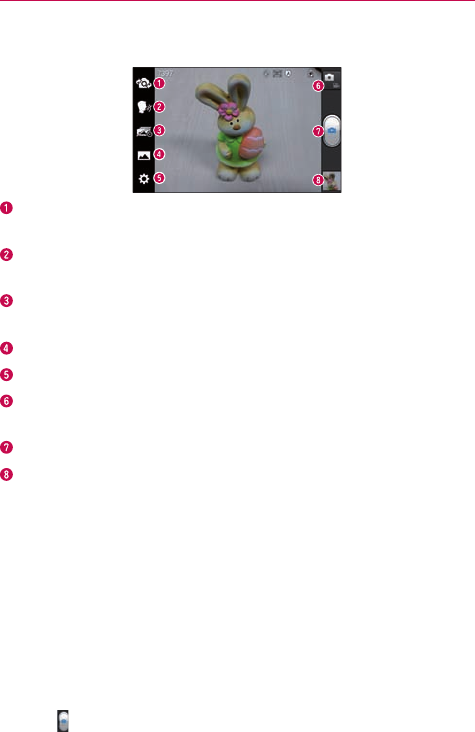
Getting to know the viewfinder
Swap camera–Switchbetweentherear–facingcameralensandthe
front–facingcameralens.
Cheese shutter–Takephotowithvoicecommand(saying"Cheese",
"Smile","Whisky","Kimchi"or"LG").
Time catch shot–Allowsyoutocapturethemissingmomentbytaking
vesequentialpicturesatoncebeforetheshutterkeyistouched.
Shot mode–ChoosefromNormal,HDR,Panorama,Continuousshot.
Settings–AccesstheSettingsmenu.
Mode switch–Allowsyoutoswitchbetweencameramodeandvideo
mode.
Capture–Takesaphoto.
Gallery–Allowsyoutoviewthelastphotoyoucaptured.Thisenables
youtoaccessyourGalleryandviewsavedphotoswithincameramode.
Taking a quick photo
1. OpentheCameraapplication.
2.Holdthephoneandpointthelenstowardsthesubjectyouwantto
photograph.
3.Touchthesubjectandafocusboxwillappearinthecenterofthe
viewnderscreen.
4.Whenthefocusboxturnsgreen,thecamerahasfocusedonyour
subject.
5.Touchtocapturetheimage.
40 Camera
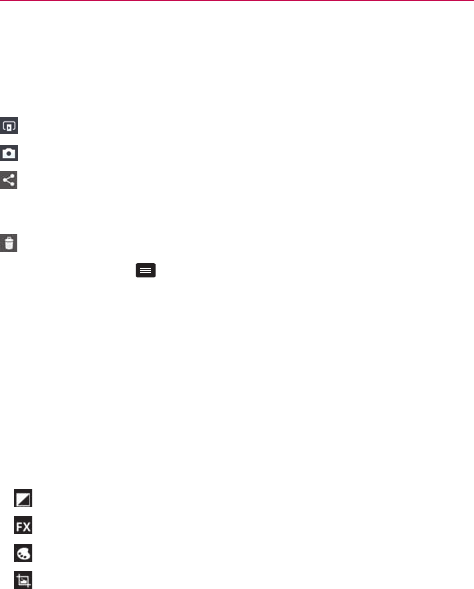
Once you've taken the photo
Touchtheimagepreviewatthebottomofthescreentoviewthelastphoto
youcaptured.
TouchtoshareviaSmartShare.
TouchtoreturntoCameramodetotakeanotherpicture.
Touchtoshareyourphotoviaanysupportedapplications.
TIP! Ifyouhaveasocialnetworkingaccountandsetituponyourphone,youcanshareyour
photowiththesocialnetworkingcommunity.
Touchtodeletetheimage.
TouchtheMenu Key toopenthefollowingoptions.
Set image as–TouchtosettheimageasaContact photo,Home screen
wallpaperorLock screen wallpaper.
Move–Touchtomovetheimagetoanotheralbum.
Rename–Touchtoeditthenameoftheselectedpicture.
Rotate left/right–Touchtorotatetheimagetotheleftorright.
Crop–Cropyourphoto.Moveyourngeracrossthescreentoselectthe
area.
Edit-Viewandeditthepictures.
Improvescolorqualitiesindifferentlightingconditions.
Appliesartisticeffectstothepictures.
Appliescoloreffectstothepictures.
Appliesadditionaloptionstothepictures.
Slideshow–Displaysyourimagesinaslideshow.
Details–Displaysthepictureinformation.
41
Camera
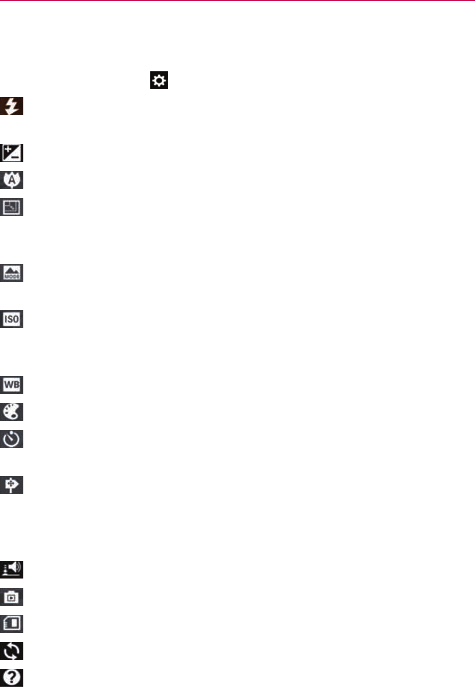
Using the advanced settings
Intheviewnder,touch toopentheadvancedoptions.
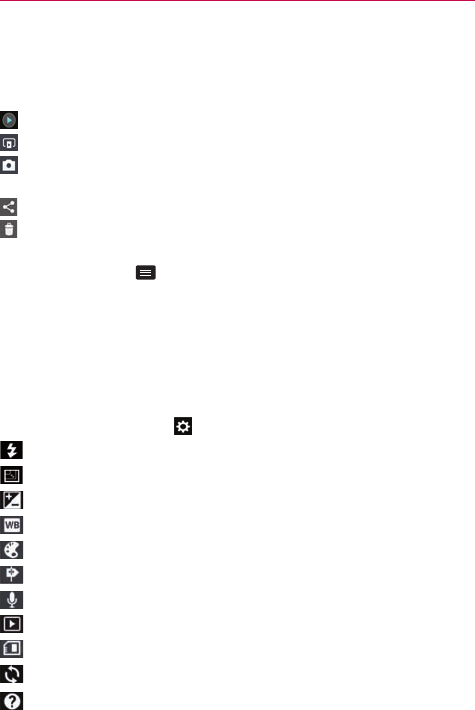
–Allowsyoutoturnontheashwhentakingaphotoindark
conditions.
– Denesandcontrolstheamountofsunlightenteringthephoto.
–Focusesonaspecicspot.
–Selectsphotoresolution.Ifyouchoosehighresolution,lesizewill
increase,whichmeansyouwillbeabletostorefewerphotosinthe
memory.
–Findstheappropriatecolorandlightsettingsforthecurrent
environment.
–TheISOratingdeterminesthesensitivityofthecamera'slightsensor.
ThehighertheISO,themoresensitivethecamera.Thisisusefulin
darkerconditionswhenyoucannotusetheash.
– Improvescolorqualityinvariouslightingconditions.
–Appliesartisticeffectstoyourpictures.
–Setsadelayafterthecapturebuttonispressed.Thisisidealifyou
wanttobeinthephoto.
–Activatethistouseyourphone'slocation-basedservices.Ta ke
pictureswhereveryouareandtagthemwiththelocation.Ifyou
uploadtaggedpicturestoablogthatsupportsgeotagging,youcan
seethepicturesdisplayedonamap.
–Selectsashuttersound.
–Automaticallyshowsyouthepictureyoujusttook.
–Selectthestoragelocationwhereyouwanttosaveimages.
–Restoreallcameradefaultsettings.
–Touchthiswheneveryouwanttoknowhowafunctionworks.This
iconwillprovideyouwithaquickguide.
42 Video camera
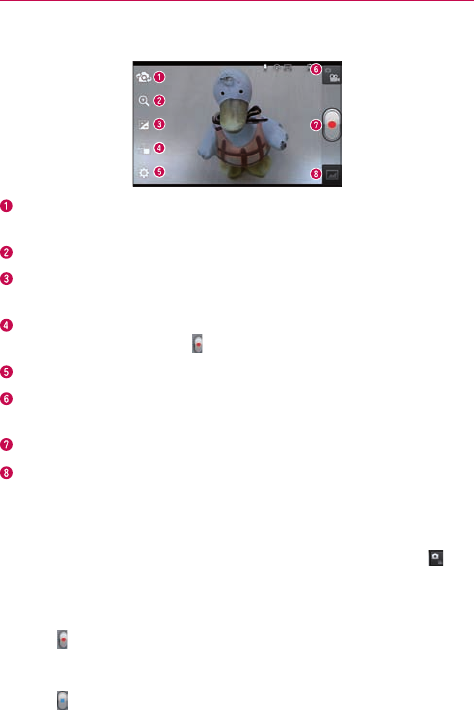
Getting to know the viewfinder
Swap camera–Switchbetweentherear–facingcameralensandthe
front-facingcameralens.
Zoom–Zoominorzoomout.AlternativelyyoucanusetheVolumeKeys.
Brightness–Thisdenesandcontrolstheamountofsunlightentering
thevideo.
Live Effect–Allowsyoutoputvariouseffectswhenrecordingavideo.
Chooseaneffectandtouch.
Settings–AccesstheSettingsmenu.
Mode switch–Allowsyoutoswitchbetweenvideomodeandcamera
mode.
Record–Touchtostartrecordingavideo.
Gallery–Touchtoviewthelastvideoyourecorded.Thisenablesyouto
accessyourGalleryandviewyoursavedvideosfromwithinvideomode.
Recording a quick video
1. OpentheCameraapplicationandtouchtheMode switchbutton .
2.Thevideocameraviewnderappearsonthescreen.
3.Holdingthephone,pointthelenstowardsthesubjectyouwantto
captureinyourvideo.
4.Touchoncetostartrecording.
5.Aredlightappearsatthetopcorneroftheviewnderwithatimer
showingthelengthofthevideo.
6.Touchonthescreentostoprecording.
43
Video camera
After recording a video
Touchtheimagepreviewatthebottomofthescreentoviewthelastvideo
yourecorded.
Touchtoplaythevideo.
TouchtoshareviaSmartShare.
TouchtoreturntoCameramodetotakeanotherpictureorrecorda
video.
Touchtosharethevideoviaanysupportedapplications.
Touchtodeletethevideoyoujustmade.ConrmbytouchingOK.The
viewnderreappears.
TouchtheMenu Key toaccessthefollowingoptions.
Move–Touchtomovethevideotoanotheralbum.
Rename–Touchtoeditthenameoftheselectedvideo.
Details–Touchtoseeadetailedinformation,suchasthename,date,time,
sizeandtype.
Using the advanced settings
Usingtheviewnder,touch toopenthetheadvancedoptions.
–Allowsyoutoturnontheashwhenrecordingavideoinadarkplace.
–Choosevideoresolution.
–Denesandcontrolstheamountofsunlightenteringthevideo.
–Improvescolorqualityinvariouslightingconditions.
–Chooseacolortonetouseforyourvideo.
–Activatethistouseyourphone'slocation-basedservices.
–Recordavideowithorwithoutsound.
–Autoreviewautomaticallyshowsyouthevideoyoujustrecorded.
–Selectthestoragelocationwhereyouwanttosavevideos.
–Restoreallvideocameradefaultsettings.
–Touchthisifyouwanttoknowhowthisfunctionworks.Thisiconwill
provideyouwithaquickguide.

44 Video camera
Adjusting the volume when viewing a video
Toadjustthevolumeofavideowhileitisplaying,usetheVolumeKeyson
theleftsideofthephone.
45
Multimedia
Yo u canstoremultimedialesonamemorycardforeasyaccesstoallyour
imageandvideoles.
Gallery
OntheHomescreen,touch >Appstab>Gallery .Openalistof
albumsthatstoreallyourimageandvideoles.
Playing a video
1. OntheHomescreen,touch >Appstab>Videos .
2.Selectthevideoyouwanttoplay.
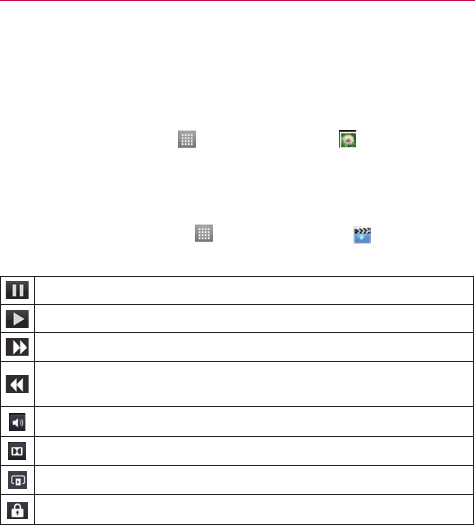
Touchtopauseplayback.
Touchtoresumeplayback.
Touchtoskiptothenexttrackinthealbum,playlistorshufe.
Touchtogobacktothebeginningofthesong.Touchtwicetoreturn
totheprevioussong.
Touchtomanagethevideovolume.
TouchtosetDolbyaudioeffectwhenconnectedwithheadsetjack.
TouchtoshareyourvideoviatheSmartSharefunction.
Touchtolockavideoscreen.
Tochangethevolumewhilewatchingavideo,presstheupanddown
VolumeKeysontheleftsideofthephone.
TouchandholdavideointhelisttoaccessDeleteandDetails.
46 Multimedia
Video Editor
Yo u caneditthephotosorvideosstoredonthephone.
Toaccess,ontheHomescreen,touch>Video Editor .
NOTE VideoEditingfunctionissupportedonlyforphotosorvideoswhichrecordedwiththis
phone.
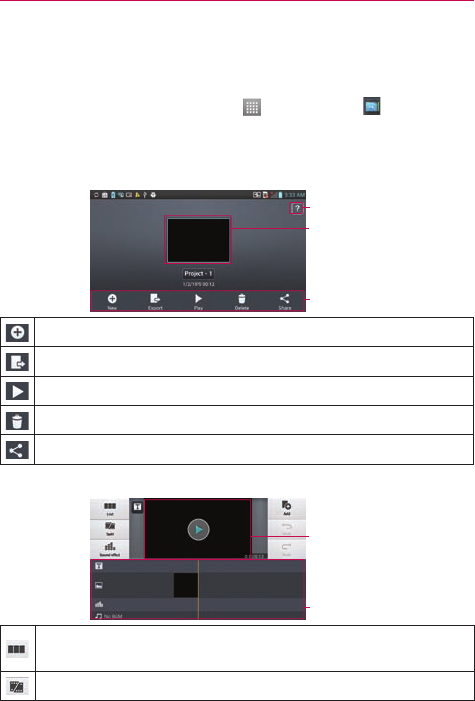
< Project list screen >
Help
Projectlistarea
Options
Createproject.
ProjectsmaybeexportedtoplayinapplicationssuchasVideos.
Playproject.
Deleteproject.
Shareproject.
< Project edit screen >
Previewarea
Timelinearea
Movetothemainprojectlistscreen.Currentlyeditedprojectis
savedautomatically.
Splitvideoclipintotwoportions.
47
Multimedia
Addsoundeffect.
Addvideo,imageoraudioclip.
Undoanaction.
Redoanaction.
Addtexttovideoorimageclip.
Video Wiz
Yo u canmakeyourownmovieusingyourimages/videoandmusic.
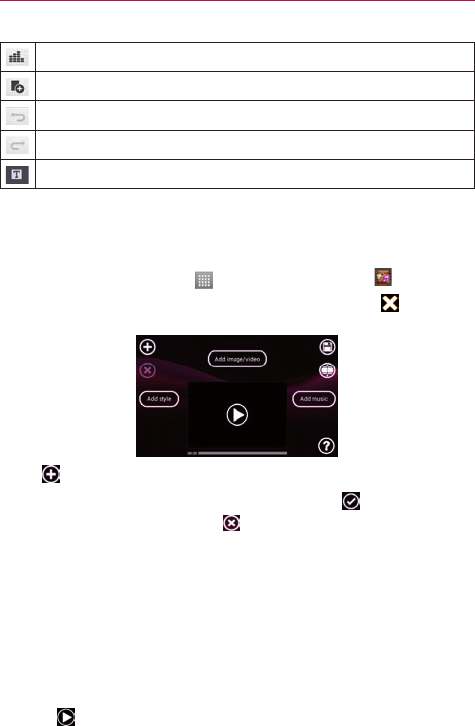
1. OntheHomescreen,touch>Appstab>Video Wiz .
2.AfterseeingthebriefintroductionontheSteps,touchtheinthe
upperrighthandcorneroftheintroductionscreen.
3.Tap toaddimagesand/orvideotoyourmovie.
4.Touchthedesiredimagesand/orvideos,thentouch.
• Toremoveimagesorvideos,tapandselectDelete selected orDelete
all files.
• Torearrangethem,touchandholdanimage/video,draganddropitto
thedesiredposition.
5.TouchAdd styletoselectthedesiredmoviestyle.
• Scrollthroughandselectthestyleyouwant.Asyouscrollthroughthe
styles,apreviewisdisplayed.
6.TouchAdd musictosetthebackgroundmusic.
7. Touchtoplayyourmovie.
48 Multimedia
8.Touch toeditthevideoclipusingOverlayText,OverlayImage,orTrim
Video.
• Aftereditingthevideo,touch.
9.Touchtosavethevideo.
NOTE Touchtoviewthehelpinformationonusingthisfeature.
Music
Yourphonehasamusicplayerthatletsyouplayallyourfavoritetracks.To
accessthemusicplayer,touch>Appstab>Music .
Add music files to your phone
Startbytransferringmusiclestoyourphone:
• TransfermusicusingMediasync(MTP).
• DownloadfromtheWeb.
• Synchronizeyourphonetoacomputer.
• ReceivelesviaBluetooth.
Transfer music using Media sync (MTP)
1. ConnectthephonetoyourPCusingtheUSBcable.
2.SelecttheMedia sync (MTP)option.Yourphonewillappearasanother
harddriveonyourcomputer.Clickonthedrivetoviewit.Copytheles
fromyourPCtothedrivefolder.
Playing a song
1. OntheHomescreen,touch >Appstab>Music .
2.TouchtheSongstab.
3.Selectthesongyouwanttoplay.
Touchtosetshufemode.
49
Multimedia
Touchtoseelyrics.Thisoptionisononlyifthesongincludesthe
lyrics.
Touchtoseethecurrentplaylist.
Touchtosetrepeatmode.
Touchtomanagethemusicvolume.
Touchtopauseplayback.
Touchtoresumeplayback.
Touchtoskiptothenexttrackonthealbumorinthe,playlist.
Touchtogobacktothebeginningofthesong.Touchtwicetoreturn
totheprevioussong.
TouchtosetDolbyaudioeffectwhenconnectedwithaheadsetjack.
Tochangethevolumewhilelisteningtomusic,presstheupanddown
VolumeKeysontheleftsideofthephone.
TouchandholdanysonginthelisttoaccessPlay, Add to playlist, Set as
ringtone, Delete, Share,SearchandDetails.
NOTE • Someleformatsarenotsupported,dependingonthedevicesoftware.
• Ifthelesizeexceedstheavailablememory,anerrorcanoccurwhenyouopenles.
NOTE Musiclecopyrightsmaybeprotectedbyinternationaltreatiesandnationalcopyright
laws.Therefore,itmaybenecessarytoobtainpermissionoralicencetoreproduceor
copymusic.Insomecountries,nationallawsprohibitprivatecopyingofcopyrighted
material.Beforedownloadingorcopyingthele,checkthenationallawsoftherelevant
countryconcerningtheuseofsuchmaterial.
50 Utilities
Setting your alarm
1. OntheHomescreen,touch >Appstab>Alarm/Clock .
2.Touchtoaddanewalarmandenterthedesiredtime.
3.SetRepeat,Snooze duration,Vibration,Alarm sound,Alarm
volume,Application link ,Puzzle lock and Memo.
4.TouchSavetosavethealarm.
Using your calculator
1. OntheHomescreen,touch >Appstab>Calculator .
2.Touchthenumberkeystoenternumbers.
3.Forsimplecalculations,touchthefunctionyouwant( , , or )
followedby .
NOTE Formorecomplexcalculations,touchtheMenu Key ,selectAdvancedpanel,then
choosethedesiredfunction.
Adding an event to your calendar
1. OntheHomescreen,touch >Appstab>Calendar .
2.TouchtoselectfromthefollowingCalendarviews:Day,Week,
Month,Agenda.
3.Touchonthedateyouwanttoaddaneventon.
4.Touchandselecttheaccountwhereyouwanttosavetheevent(if
applicable).
5.TouchtheEvent nameeldandentertheeventname.
6.TouchtheLocationeldandenterthelocation.Checkthedateandenter
thetimeyouwantyoureventtostartandnish.
7. Ifyouwanttoaddanotetoyourevent,touchtheDescriptioneldand
enterthedetails.
8.Ifyouwanttorepeatthealarm,setREPEAT,andsetREMINDERS,if
necessary.
9.TouchSavetosavetheeventinthecalendar.
51
Utilities
Polaris Office
PolarisOfceisaprofessionalmobileofcesolutionthatletsusers
convenientlyviewvarioustypesofofcedocuments,includingWord,Excel
andPowerPointles,anywhere,anytime,usingtheirmobiledevices.
OntheHomescreen,touch>Appstab>Polaris Office .
Managing files
PolarisOfceprovidesmobileuserswithconvenientlemanagement
features,includingcopying,movingandpasting,anddeletinglesand
foldersrightonthedevice.
Viewing files
Mobileuserscannoweasilyviewawidevarietyofletypes,including
MicrosoftOfcedocumentsandAdobePDF,rightontheirmobiledevices.
WhenviewingdocumentsusingPolarisOfce,theobjectsandlayout
remainthesameasintheiroriginaldocuments.
Play Store
PlayStoreallowsyoutobrowseandsearchforfreeandpaidapplications.
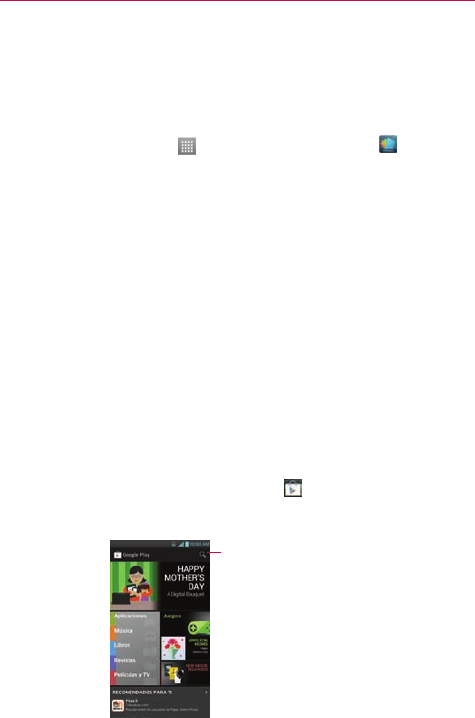
To open the Google Play Store application
# OntheHomescreen,touchPlay Store .WhenyouopenthePlay
Storeapplicationforthersttime,youmustreadandacceptthe
termsofservicetocontinue.
Touchheretosearchforthe
apps.

52 Utilities
To download the applications
NOTE Beforeyoucandownloadapaidapplication,youmustsetupabillingarrangement.
1. Findanapplicationyouwantandopenitsdetailsscreen.
2.TouchtheInstallbutton(freeapps)orPricebutton(paidapps).The
screenwilldisplayiftheapplicationrequiresaccesstoyourdataor
controlofanyfunctionsonyourphone.ThePlayStoreapplicationtells
youwhatitcanaccessifyoucontinuewiththedownload.
3.Ifyouagreetotheapplication’saccessrequirements,touchAccept &
download(forfreeapplications)orAccept & buy(forpaidapplications.).
To get help with Play Store
PlayStoreHelpwebpagesareavailablefromallPlayStorescreens.
TouchtheMenu Key >Help.
TheBrowserapplicationopenstothePlayStoreHelppage,withlinksto
manyhelptopics.
NOTE Afteryouopenanapp,youcanusuallyadjustitssettingsbytouchingtheMenu Key .
53
The web
Browser
TheBrowsergivesyouafast,full-colorworldofgames,music,news,sport,
entertainmentandmuchmore,rightonyourmobilephone.Whereveryou
areandwhateveryouenjoy.
NOTE Additionalchargesapplywhenconnectingtotheseservicesanddownloadingcontent.
Checkdatachargeswithyournetworkprovider.
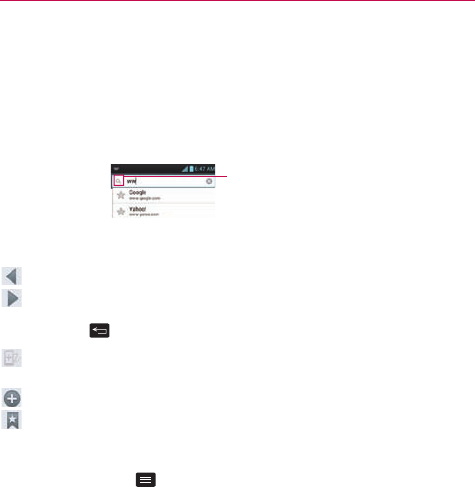
EntertheURLandtouch
heretosearch.
Using the web toolbar
Touchtogobackapage.
Touchtogoforwardsapage,tothepageyouconnectedtoafterthe
currentone.Thisistheoppositeofwhathappenswhenyoupressthe
BackKey ,whichgoestothepreviouspage.
Touchandholdthisiconandtiltthedeviceupanddowntozoominor
out.
Touchtoopenanewwindow.
Touchtoaccessyourbookmarks.
Using options
TouchtheMenu Key toviewthefollowingoptions.
Refresh–Updatethecurrentwebpage.
Save to bookmarks–Addthecurrentwebpageasbookmark.
Go to Homepage-Directsyoutoyourhomepage.
Share page–Allowsyoutosharethewebpagewithothers.
Find on page–Allowsyoutondlettersorwordsonthecurrentwebpage.
Request desktop site–Allowsyoutoviewthewebpageindesktopview.
Save for offline reading–Allowsyoutosavethecurrentpageofineso
youcanreaditlater.
Brightness-Allowsyoutoadjustthebrowser'sbrightnesslevel.
Settings–DisplaysBrowsersettings.
Exit–ExitsthewebpageandclosestheBrowser.
54 Settings
To access your phone's settings
OntheHomescreen,touch >Appstab>Settings .
OR
OntheHomescreen,taptheMenu Key>System settings.
WIRELESS & NETWORKS
HereyoucanmanageWi-FiandBluetooth.Yo u canalsosetupmobile
networksandswitchtoairplanemode.
Wi-Fi
Slide totherighttoturnonWi-Fitoconnecttoavailable
Wi-Finetworks.
TIP! How to obtain the MAC address
TosetupaconnectioninsomewirelessnetworkswithMAClters,youmayneedto
entertheMACaddressofyourphoneintotherouter.
Yo u canndtheMACaddressinthefollowinguserinterface:OntheHomescreen,
touch>Appstab>Settings >Wi-Fi>Menu Key >Advanced>MAC
Address.
Bluetooth
Slide totherighttoturnonBluetoothtoconnecttoBluetooth
devices.
Data usage
Displaysthedatausageandsetmobiledatalimit.
Call
Yo u cancongurephonecallsettingssuchascallforwardingandother
specialfeaturesofferedbyyourcarrier.
More
Airplane mode–Afterswitchingtoairplanemode,allwirelessconnections
aredisabled.
Portable Wi-Fi hotspot–Allowsyoutoshareyourmobilenetworkvia
Wi-Fi.

55
Settings
Bluetooth tethering-Allowsyoutoshareyourphone’sinternetconnection
viaBluetooth.
NFC–Allowread/writeandexchangedatawhenthephonetouchesan
NFC-capabledeviceorNFCTag .
Android Beam–AllowsyoutobeamappcontenttoanotherNFC-capable
devicebyholdingthedevicesclosetogether.
VPN–DisplaysthelistofVirtualPrivateNetworks(VPNs)thatyou've
previouslycongured.AllowsyoutoadddifferenttypesofVPN.
Mobile networks–Allowsyoutoenable/disabledataandConnections
Optimizer.
DEVICE
Sound
Sound profile–Yo u canchooseSound,VibrateonlyorSilent.
Volumes–Yo u canmanagethevolumesforvariousphonesettings.
Phone ringtone–Allowsyoutosetyourdefaultincomingcallringtone.
Notification sound–Allowsyoutosetyourdefaultnoticationringtone.
Ringtone with vibration–Vibrationfeedbackforcallsandnotications.
Vibrate Type–Allowsyoutochoosevibrationtype.
Quiet time–Settimestoturnoffallsoundsexceptalarmandmedia.
Dial pad touch tones–Allowsyoutosetthephonetoplaytoneswhen
usingthedialpadtodialnumbers.
Touch sounds–Allowsyoutosetyourphonetoplayasoundwhenyou
touchbuttons,iconsandotheron-screenitemsthatreacttoyourtouch.
Screen lock sound–Allowsyoutosetyourphonetoplayasoundwhen
lockingandunlockingthescreen.
Emergency tone–Checkmarkifyouwantthephonetovibratewhen
touchingkeys.

56 Settings
Vibrate on touch-Checkmarkifyouwantthephonetovibratewhen
touchingkeys.
Display
Brightness–Adjustthescreenbrightness.
Auto-rotate screen–Settoswitchorientationautomaticallywhenyou
rotatethephone.
Screen timeout–Setthetimeforscreentimeout.
Font size–Changethesizeofthedisplayfont.
Front key light–Setthefrontkeylight.
Motion sensor calibration–Improvetheaccuracyofthetiltandspeedof
thesensor.
Home screen
Theme-Allowsyoutosetthescreenthemeforyourdevice.
Animation-Allowsyoutoselectifyouwantanimationsdisplayedwhen
browsingtheHomescreen.
Screen swipe effect-Allowsyoutoselecttheeffecttousewhenyou
swipetochangescreens.
Wallpaper-AllowsyoutosetthewallpapertouseonyourHomescreen.
Scroll wallpaper-Checkmarksothatthewallpaperscrollswiththescreen.
Scroll screens circularly-CheckmarktosettheHomescreenstoscroll
continuously,eliminatingtheneedtoscrollbackintheoppositedirection
whenyoureachoneend.
Home backup & restore-Allowsyoutobackupandrestoreapp,widget
andthemecongurations.
Lock screen
Select screen lock–Setascreenlocktosecureyourphone.Yo u canset
Swipe,Face Unlock,Pattern,PIN,PasswordorleaveitasNone.

57
Settings
Whenyouturnonyourphoneorwakeupthescreen,you'reaskedtoenter
yourunlocksequencetounlockthescreen.
Wallpaper–Yo u cansetthelockscreenwallpaperfromtheGalleryor
Wallpapergallery.
Clocks & shortcuts–Customizeclocksandshortcutsonthelockscreen.
Owner info–Showownerinformationonthelockscreen.
Lock timer–Selectthelocktimerduration.
Power button instantly locks–CheckmarksothatpressingthePower/
Lock Key instantlylocksthephone.
Gestures
Move home screen items–Ifyoucheckmarkthis,youcanmovetoother
Homescreenpanelsbytiltingthephonewhileyoupressandholdanitem.
Tilt sensitivity–WhentheMovehomescreenitemsoptionis
checkmarked,youcantestandadjustsensitivityoftiltsensorfortheHome
screenandapplications.
Silence incoming calls–Checkmarktosetthephonetosilenceincoming
callsbyjustippingthephone.
Snooze or stop alarm–Checkmarktosetthephonetosnoozeorstopthe
alarmbyjustippingthephone.
Pause video–Checkmarktosetthephonetopausevideosbyjustipping
thephone.
Help–Provideshelpinformationonsomeofthegesturesfeatures
Storage
INTERNAL STORAGE-Displaysinternalstorageavailabilityandthetypes
ofdatathatisusingupinternalstorage.
Power saver
Hereyoucanmanagethebatteryandcheckthepowersavingitems.Yo u
canalsocheckthebatteryuse.

58 Settings
Apps
Usethismenutoviewdetailsabouttheapplicationsinstalledonyour
phone,managetheirdata,andforcethemtostop.
PERSONAL
Accounts & sync
Allowsyoutomanageyouraccountsandtosynchronizedatainthe
background,whetherornotyouareactivelyworkinginthem.Turningthis
settingoffcansavebatterypowerandlowers(butdoesnoteliminate)data
usage.
Location services
Google's location service–Yourphonedeterminesyourapproximate
locationusingWi-Fiandmobilenetworks.Whenyouselectthisoption,
you'reaskedwhetheryouconsenttoallowingGoogletouseyourlocation
whenprovidingtheseservices.
GPS satellites–Yourphonedeterminesyourlocationtostreetlevel
accuracy.
Location & Google search–AllowsGoogletouseyourlocationtoimprove
searchresultsandotherservices.
Security
Encrypt phone–EncryptsyourdeviceandrequiresanumericPINor
passwordtodecryptyourphoneeachtimeyoupoweriton.
Enable storage encryption–Encryptsyouruserdatastoredintheinternal
storageortheSDcardandrequiredanumericPINorpasswordtodecrypt
yourstorageeachtimeyouinsertanSDcard.
Password typing visible–Showpasswordasyoutype.
Phone administrators–Viewordeactivatedeviceadministrators.
Unknown sources–Allowsyoutoinstallnon-PlayStoreapplications.
Trusted credentials–DisplaytrustedCAcerticates.

59
Settings
Install from storage–Choosetoinstallencryptedcerticatesfromyour
SDcard.
Clear credentials–Removeallcerticates.
Language & input
UsetheLanguage&inputsettingstoselectthelanguageforthetexton
yourphoneandforconguringtheon-screenkeyboard,includingwords
you'veaddedtoitsdictionary.
Backup & reset
Changethesettingsformanagingyoursettingsanddata.
Back up my data–Settobackupyoursettingsandapplicationdatatothe
Googleserver.
Backup account–Settheaccountyouwanttobackupinformationto.
Automatic restore–Settorestoreyoursettingsandapplicationdatawhen
theapplicationsarereinstalledonyourdevice.
Factory data reset–Resetyoursettingstothefactorydefaultvaluesand
deleteallyourdata.Ifyouresetthephoneinthisway,youarepromptedto
reenterthesameinformationaswhenyourststartedyourphone.
SYSTEM
Date & time
UseDate×ettingstosethowdatesaredisplayed.
Accessibility
UsetheAccessibilitysettingstocongureaccessibilityplug-insyouhave
installedonyourphone.
NOTE Requiresadditionalplug-ins.

60 Settings
Connectivity
USB connection type–Yo u cansetthedesiredmode(Chargeonly,Media
sync(MTP)orCamera(PTP)).
Ask on connection–AskUSBconnectionmodewhenconnectingtoa
computer.
Help–DisplaysinformationabouttheUSBconnectiontypes.
Developer options
Allowsyoutoselectdeveloperoptions.
Activate this device
Allowsyoutomanuallyactivateyourphoneifthereareanyissueswith
automaticactivation.
System updates
AllowsyoutoupdatethePRL,prole,rmware,andLGsoftware.
About phone
Allowsyoutoviewinformationaboutyourphoneandnetwork.Also
provideslegalinformation.

61
Settings
DivX Mobile
ABOUTDIVXVIDEO:DivX®isadigitalvideoformatcreatedbyDivX,LLC,
asubsidiaryofRoviCorporation.ThisisanofcialDivXCertied®device
thathaspassedrigoroustestingtoverifythatitplaysDivXvideo.Visitdivx.
comformoreinformationandsoftwaretoolstoconvertyourlesintoDivX
videos.
ABOUTDIVXVIDEO-ON-DEMAND:ThisDivXCertied®devicemustbe
registeredinordertoplaypurchasedDivXVideo-on-Demand(VOD)movies.
Toobtainyourregistrationcode,locatetheDivXVODsectioninyourdevice
setupmenu.Gotovod.divx.comformoreinformationonhowtocomplete
yourregistration.
DivXCertied®toplayDivX®videouptoHD720p,includingpremium
content.
DivX®,DivXCertied®andassociatedlogosaretrademarksofRovi
Corporationoritssubsidiariesandareusedunderlicense.
Dolby Digital Plus License notice
ManufacturedunderlicensefromDolbyLaboratories.Dolby
andthedouble-DsymbolaretrademarksofDolby
Laboratories.
62 Accessories
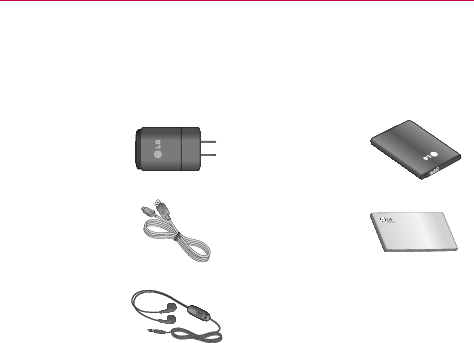
Theseaccessoriesareavailableforusewiththephone.(Items described
below may be optional and sold separately)
Travel adapter Battery
USB data cable
Connectyour
phoneandPC.
User Guide
Learnmore
aboutyour
phone.
Stereo headset
NOTE • AlwaysusegenuineLGaccessoriesFailuretodothismayvoidyour
warranty.
• Accessoriesmayvaryindifferentregions.

63
Troubleshooting
Pleasechecktoseeifanyproblemsyouhaveencounteredwithyourphone
aredescribedinthissectionbeforetakingthephoneinforserviceorcalling
aservicerepresentative.
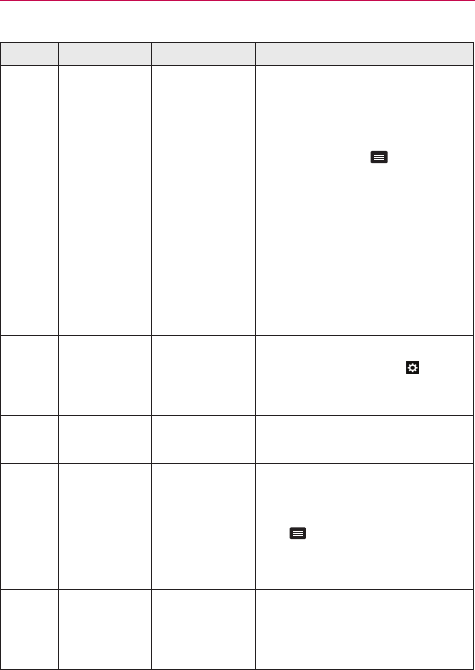
Category Sub-Category Question Answer
Bluetooth Bluetooth
Devices
Whatarethe
functionsavailable
viaBluetooth?
ConnectingtoStereo/MonoHeadset,
CarKit,FTPserverispossible.Whenit’s
connectedtoanotherphoneviaBluetooth,
youcanreceiveContactsdata.
Bluetooth Bluetooth
Headset
IfmyBluetooth
headsetis
connected,canI
listentomymusic
throughmy3.5mm
wiredheadphones?
WhenaBluetoothheadsetisconnected,all
systemsoundsareplayedovertheheadset.
Asaresult,youwillnotbeabletolistento
musicthroughyourwiredheadphones.
Data ContactsBackup HowcanIbackup
Contacts?
TheContactsdatacanbesynchronized
betweenyourphoneandGmail™.
Data Synchronization
Isitpossibletoset
uponeway-sync
withGmail?
Onlytwo-waysynchronizationisavailable.
Data Synchronization
Isitpossibleto
synchronizeallthe
Emailfolders?
TheInboxisautomaticallysynchronized.Yo u
canviewotherfoldersbytouchingand
selectingthedesiredfolder.
Data Synchronization
Isitpossibleto
transferContacts
datafromafeature
phonetoan
Android™phone?
Yes,ifyourcontactscanbeextractedintoa
.CSVle.
Howtotransfer:
1. Create“.CSV”lewiththecontactson
yourcurrentphone.
2.LogintoGmailwithyourPC.
3.ClickContacts.
4.ClickImport.
5.Attachthe“.CSV”le.
6.Yourcontactswillthenbesynchronized
betweenyourAndroidphoneandGmail.

64 Troubleshooting
Category Sub-Category Question Answer
Google™
Service GmailLog-In
ShouldIhaveto
logintoGmail
wheneverIwantto
accessGmail?
OnceyoulogintoGmail,youdon’tneedto
loginGmailagain.
Google
Service GoogleAccount Isitpossibleto
lteremails?
No,emaillteringisnotsupportedviathe
phone.
Phone
Function YouTube™ Isitpossibletoplay
YouTubevideos?
Yes,YouTubevideosaresupportedbutmay
havetobeviewedthroughtheYouTube
application(andnottheBrowser).
Phone
Function Email
Whathappens
whenIexecute
anotherapplication
whilewritingan
email?
Youremailwillautomaticallybesavedasa
draft.
Phone
Function Ringtone
Istherealesize
limitationforwhen
Iwanttousean
.MP3leasa
ringtone?
Thereisnolesizelimitation.
Phone
Function MessageTime
Myphonedoes
notdisplaythe
timeofreceiptfor
messagesolder
than24hours.How
canIchangethis?
Nosettingscanbechangedbutfollowthe
stepsbelowtoviewthetimes.
1. Opentheconversationthatcontainsthe
desiredmessage.
2.Touchandholdthemessage.
3.TouchView message details.
Phone
Function microSDCard
Whatisthe
maximum
supportedsizefora
memorycard?
32GBmemorycardsarecompatible.
Phone
Function Navigation
Isitpossibleto
installanother
navigation
applicationonmy
phone?
AnyapplicationthatisavailableonPlay
Storeandiscompatiblewiththehardware
canbeinstalledandused.

65
Troubleshooting
Category Sub-Category Question Answer
Phone
Function Synchronization
Isitpossibleto
synchronizemy
contactsfrom
allmyemail
accounts?
OnlyGmailandMSExchangeserver
(CompanyEmailServer)contactscanbe
synchronized.
Phone
Function WaitandPause
Isitpossibleto
saveacontactwith
WaitandPausein
thenumbers?
IfyoutransferredacontactwiththeWait
&Pausefunctionssavedintothenumber,
thosefunctionswillnotberecognized.Yo u
willneedtore-saveeachnumber.
How to re-save numbers with Wait and
Pause:
1. OntheHomescreen,touch.
2.Dialthenumber,thentouchtheMenu Key
.
3.TouchAdd 2-sec pauseorAdd wait.
4.Entertheremainingnumber(s)and
continuesavingthenumberasnecessary.
Phone
Function Security
Whatarethe
phone’ssecurity
functions?
Yo u areabletosetthephonetorequirethe
entryofanunlocksequence(Swipe,Face
Unlock,Pattern,PIN,orPassword)before
thephonecanbeaccessedorused.
Phone
Function UnlockPattern
WhatshouldIdoif
IforgetmyUnlock
Pattern?
AfterattemptingtheUnlockPattern5times,
youcantouchForget Pattern?anduseyour
GoogleAccountinformationtounlockyour
phone.Inaddition,ifyouforgottheunlock
pattern,youcanunlockusingtheBackup
Pin.

66 Troubleshooting
Category Sub-Category Question Answer
Phone
Function UnlockPattern
WhatshouldIdoif
IforgottheUnlock
PatternandIdidn’t
createaGoogle
Accountonthe
phone?
WithoutenteringtheUnlockPattern,you
willnotbeabletoaccessyourphone.
Caution:Ifyouperformafactoryreset,
alluserapplicationsanduserdatawillbe
deleted.Pleaseremembertobackupany
importantdatabeforeperformingafactory
reset.
How to perform a factory reset:
1. Turnthephoneoff
2. Atthesametimepressandhold
Volume Down Key +Power/Lock
Key.
3. ReleasethekeyswhentheFACTORY
HARDRESETscreenappears.
4. ReadthewarningandpressthePower/
Lock Key toconrm.Pressthe
Volume Keystocancel.
5. PressthePower/Lock Key to
conrmoncemoreorpresstheVolume
Keystocancel.
6. Yourdevicewillperformahardreset
andwillrebootautomatically.
7. Leaveyourphoneforatleastaminute
whilethehardresetiscarriedout.Your
phonewillrebootautomatically.
Phone
Function UnlockPattern HowdoIcreate
theUnlockPattern?
1. OntheHomescreen,touchtheMenu Key
.
2.TouchLock screensettings.
3.TouchSelect screen lock.
4.TouchPattern.Thersttimeyoudothis,
ashorttutorialaboutcreatinganunlock
patternappears.
5.Setupbydrawingyourpatternonce>
Continue>drawagain>Confirm.
67
Troubleshooting
Category Sub-Category Question Answer
Phone
Function SpeedDial IsSpeedDialing
supported?
Yes.Yo u cansetSpeedDialsaswellassave
acontactdirectlyonyourHomescreen.
To set a Speed Dial:
1.OpentheContactsapplication.
2.TouchtheMenu Key>Speed dial.
3.Touchtheemptyspeeddiallocationand
selectthedesiredcontactandphone
number.
To set a Direct Dial shortcut to your
Home screen:
1. Touchandholdanemptyareaonyour
Homescreen.
2.TouchWidgets > Direct dial.
3.SelectacontactfromyourContactsList.
Phone
Function Memory
Isitpossibleto
saveapicture
totheinternal
memorywhile
takingapicture?
Whileusingthecamera,touch>
Storage>Internal storage.
Phone
Function Memory WillIknowwhen
mymemoryisfull? Yes,youwillreceiveanotication.
Phone
Function
Language
Support
Isitpossible
tochangethe
language?
Thephonehasmulti-lingualcapabilities.
Tochangethelanguage:
1. OntheHomescreen,touchtheMenu
Key>System settings.
2.TouchLanguage & input > Language.
3.Touchthedesiredlanguage.
Phone
Function VPN HowdoIsetupa
VPN?
VPNaccesscongurationisdifferent
accordingtoeachcompany.To congure
VPNaccessfromyourphone,youmust
obtainthedetailsfromyourcompany’s
networkadministrator.
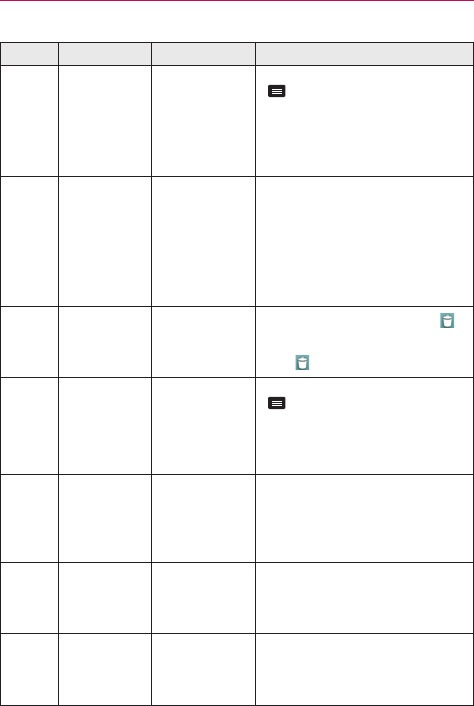
68 Troubleshooting
Category Sub-Category Question Answer
Phone
Function Screentimeout
Myscreenturns
offafteronly15
seconds.HowcanI
changetheamount
oftimeforthe
backlighttoturn
off?
1. OntheHomescreen,touchtheMenu Key
.
2.TouchSystem settings > Display >
Screen timeout.
3.Touchthepreferredscreenbacklight
timeouttime.
Phone
Function Wi-Fi&3G
WhenWi-Fiand3G
arebothavailable,
whichservicewill
myphoneuse?
Whenusingdata,yourphonemaydefault
totheWi-Ficonnection(ifWi-Ficonnectivity
onyourphoneissettoOn).However,there
willbenonoticationwhenyourphone
switchesfromonetotheother.
Toknowwhichdataconnectionisbeing
used,usethe3GorWi-Fiiconatthetopof
yourscreen.
Phone
Function Homescreen
Isitpossible
toremovean
applicationfrom
theHomescreen?
Yes.Justtouchandholdtheiconuntil
appearsatthetop-centerofthescreen.
Then,withoutliftingyournger,dragthe
icontoandreleaseit.
Phone
Function Application
Idownloadedan
applicationand
itcausesalotof
errors.HowdoI
removeit?
1. OntheHomescreen,touchtheMenu Key
.
2.TouchSystem settings > Apps.
3.Touchtheapplicationandthentouch
Uninstall.
Phone
Function Alarm CanIusemusic
lesformyalarm?
Yes.Aftersavingamusicleasaringtone,
youcanuseitforyouralarm.
•Touchandholdasonginalibrarylist.In
theContextmenuthatopens,touchSet
as ringtone.
Phone
Function Alarm
Willmyalarmbe
audibleorwillitgo
offifthephoneis
turnedoff?
No,thisisnotsupported.
Phone
Function Alarm
IfmyRinger
Volumeissetto
OfforVibrate,willI
hearmyalarm?
Youralarmisprogrammedtobeaudible
eveninthesescenarios.

69
Troubleshooting
Category Sub-Category Question Answer
Phone
Spec BatteryTime
Whatisthe
maximumamount
oftimemyphone’s
batterywilllast
beforeIneedto
rechargeit?
Talktime:Approx.450mins
Standby:Approx.12days
Phone
Spec Band
Whichwireless
bandsare
supportedbythe
phone?
Yourphoneisabletooperateonthe
1900MHz(800MHzemergencyonly)bands.
Recovery
Solution FactoryReset HowdoIperforma
factoryreset?
1. OntheHomescreen,touchtheMenu Key
.
2.TouchSystem settings > Backup & reset
> Factory data reset.
NOTE Yo u cantouchthecheckboxto
alsoeraseallcontentsfromyour
microSDcardwhenthephoneis
reset.
3.ReadthewarningandtouchResetphone.
4.TouchErase everything.
Attention:Ifafactoryresetisperformed,all
installedapplicationanduserdatawillbe
erased.Pleaseremembertobackupany
importantdatabeforeperformingafactory
reset.

70 Safety
WARNING:ThisproductcontainschemicalsknowntotheStateof
Californiatocausecancerandbirthdefectsorotherreproductiveharm.
Wash hands after handling.
HAC
Thisphonehasbeentestedandratedforusewithhearingaidsforsomeof
thewirelesstechnologiesthatituses.
However,theremaybesomenewerwirelesstechnologiesusedin
thisphonethathavenotbeentestedyetforusewithhearingaids.Itis
importanttotrythedifferentfeaturesofthisphonethoroughlyandin
differentlocations,usingyourhearingaidorcochlearimplant,todetermine
ifyouhearanyinterferingnoise.Consultyourserviceproviderorthe
manufacturerofthisphoneforinformationonhearingaidcompatibility.If
youhavequestionsaboutreturnorexchangepolicies,consultyourservice
providerorphoneretailer.
FCC Part 15.19 statement
Thisdevicecomplieswithpart15ofFCCrules.Operationissubjecttothe
followingtwoconditions:
(1)Thisdevicemaynotcauseharmfulinterference,and(2)thisdevice
mustacceptanyinterferencereceived,includinginterferencethatcauses
undesiredoperation.
Useofunauthorizedantennas(ormodicationstotheantenna)could
impaircallquality,damagethephone,voidyourwarrantyand/orviolate
FCCregulations.Don’tusethephonewithadamagedantenna.Adamaged
antennacouldcauseaminorskinburn.Contactyourlocaldealerfora
replacementantenna.
FCC RF Exposure Information
WARNING! Read this information before operating the phone.
InAugust1996,theFederalCommunicationsCommission(FCC)ofthe
UnitedStates,withitsactioninReportandOrderFCC96-326,adopted
anupdatedsafetystandardforhumanexposuretoRadioFrequency(RF)
electromagneticenergyemittedbyFCCregulatedtransmitters.Those

71
Safety
guidelinesareconsistentwiththesafetystandardpreviouslysetbybothU.S.
andinternationalstandardsbodies.Thedesignofthisphonecomplieswith
theFCCguidelinesandtheseinternationalstandards.
Bodily Contact During Operation
Thisdevicewastestedfortypicalusewiththebackofthephonekept
0.39inches(1.0cm)fromthebody.To complywithFCCRFexposure
requirements,aminimumseparationdistanceof0.39inches(1.0cm)
mustbemaintainedbetweentheuser’sbodyandthebackofthephone.
Third-partybelt-clips,holsters,andsimilaraccessoriescontainingmetallic
componentsshouldnotbeused.Avoidtheuseofaccessoriesthatcannot
maintain0.39inches(1.0cm)distancebetweentheuser’sbodyandthe
backofthephoneandhavenotbeentestedforcompliancewithFCCRF
exposurelimits.
Vehicle-Mounted External Antenna
(Optional,ifavailable.)To satisfyFCCRFexposurerequirements,keep8
inches(20cm)betweentheuser/bystanderandvehicle-mountedexternal
antenna.FormoreinformationaboutRFexposure,visittheFCCwebsiteat
www.fcc.gov.
Caution
Useonlythesuppliedantenna.Useofunauthorizedantennas(or
modicationstotheantenna)couldimpaircallquality,damagethephone,
voidyourwarrantyand/orviolateFCCregulations.Don'tusethephonewith
adamagedantenna.Adamagedantennacouldcauseaminorskinburn.
Contactyourlocaldealerforareplacementantenna.
Consumer Information About Radio Frequency
Emissions
Your wireless phone, which contains a radio transmitter and receiver,
emits radio frequency energy during use. The following consumer
information addresses commonly asked questions about the health
effects of wireless phones.

72 Safety
Are wireless phones safe?
Scienticresearchonthesubjectofwirelessphonesandradiofrequency
(“RF”)energyhasbeenconductedworldwideformanyyears,and
continues.IntheUnitedStates,theFoodandDrugAdministration(“FDA”)
andtheFederalCommunicationsCommission(“FCC”)setpoliciesand
proceduresforwirelessphones.TheFDAissuedawebsitepublicationon
healthissuesrelatedtocellphoneusagewhereitstates,“Thescientic
communityatlarge…believesthattheweightofscienticevidencedoes
notshowanassociationbetweenexposuretoradiofrequency(RF)fromcell
phonesandadversehealthoutcomes.Stillthescienticcommunitydoes
recommendconductingadditionalresearchtoaddressgapsinknowledge.
ThatresearchisbeingconductedaroundtheworldandFDAcontinues
tomonitordevelopmentsinthiseld.Yo u canaccessthejointFDA/FCC
websiteathttp://www.fda.gov(under“c”inthesubjectindex,selectCell
Phones>Research).Yo u canalsocontacttheFDAtoll-freeat(888)463-
6332or(888)INFO-FDA.InJune2000,theFDAenteredintoacooperative
researchanddevelopmentagreementthroughwhichadditionalscientic
researchisbeingconducted.TheFCCissueditsownwebsitepublication
statingthat“thereisnoscienticevidencethatprovesthatwireless
phoneusagecanleadtocanceroravarietyofotherproblems,including
headaches,dizzinessormemoryloss.”Thispublicationisavailableathttp://
www.fcc.gov/cgb/cellular.htmlorthroughtheFCCat(888)225-5322or(888)
CALL-FCC.
What does “SAR” mean?
In1996,theFCC,workingwiththeFDA,theU.S.EnvironmentalProtection
Agency,andotheragencies,establishedRFexposuresafetyguidelinesfor
wirelessphonesintheUnitedStates.Beforeawirelessphonemodelis
availableforsaletothepublic,itmustbetestedbythemanufacturerand
certiedtotheFCCthatitdoesnotexceedlimitsestablishedbytheFCC.
OneoftheselimitsisexpressedasaSpecicAbsorptionRate,or“SAR.”SAR
isameasureoftherateofabsorptionofRFenergyinthebody.Testsfor
SARareconductedwiththephonetransmittingatitshighestpowerlevelin
alltestedfrequencybands.Since1996,theFCChasrequiredthattheSAR
ofhandheldwirelessphonesnotexceed1. 6 wattsperkilogram,averaged

73
Safety
overonegramoftissue.AlthoughtheSARisdeterminedatthehighest
powerlevel,theactualSARvalueofawirelessphonewhileoperating
canbelessthanthereportedSARvalue.ThisisbecausetheSARvalue
mayvaryfromcalltocall,dependingonfactorssuchasproximitytoacell
site,theproximityofthephonetothebodywhileinuse,andtheuseof
hands-freedevices.FormoreinformationaboutSARs,seetheFCC’sOET
Bulletins56and65athttp://www.fcc.gov/Bureaus/Engineering_Technology/
Documents/bulletinsorvisittheCellularTelecommunicationsIndustry
Associationwebsiteathttp://www.ctia.org/consumer_info/index.cfm/
AID/10371.Yo u mayalsowishtocontactthemanufacturerofyourphone.
Can I minimize my RF exposure?
IfyouareconcernedaboutR F, thereareseveralsimplestepsyoucantake
tominimizeyourRFexposure.Yo u can,ofcourse,reduceyourtalktime.
Yo u canplacemoredistancebetweenyourbodyandthesourceoftheR F,
astheexposureleveldropsoffdramaticallywithdistance.TheFDA/FCC
websitestatesthat“hands-freekitscanbeusedwithwirelessphones
forconvenienceandcomfort.Thesesystemsreducetheabsorptionof
RFenergyintheheadbecausethephone,whichisthesourceoftheRF
emissions,willnotbeplacedagainstthehead.Ontheotherhand,ifthe
phoneismountedagainstthewaistorotherpartofthebodyduringuse,
thenthatpartofthebodywillabsorbmoreRFenergy.Wirelessphones
marketedintheU.S.arerequiredtomeetsafetyrequirementsregardless
ofwhethertheyareusedagainsttheheadoragainstthebody.Either
congurationshouldresultincompliancewiththesafetylimit.”Also,if
youuseyourwirelessphonewhileinacar,youcanuseaphonewithan
antennaontheoutsideofthevehicle.Yo u shouldalsoreadandfollowyour
wirelessphonemanufacturer’sinstructionsforthesafeoperationofyour
phone.
Do wireless phones pose any special risks to children?
TheFDA/FCCwebsitestatesthat“thescienticevidencedoesnotshowa
dangertousersofwirelesscommunicationdevices,includingchildren.”The
FDA/FCCwebsitefurtherstatesthat“somegroupssponsoredbyother
nationalgovernmentshaveadvisedthatchildrenbediscouragedfrom

74 Safety
usingwirelessphonesatall”.Forexample,theStewartReportfromthe
UnitedKingdom[“UK”]madesucharecommendationinDecember2000.
Inthisreportagroupofindependentexpertsnotedthatnoevidence
existsthatusingacellphonecausesbraintumorsorotherilleffects.[The
UK’s]recommendationtolimitcellphoneusebychildrenwasstrictly
precautionary;itwasnotbasedonscienticevidencethatanyhealthhazard
exists.AcopyoftheUK’sleaetisavailableathttp://www.dh.gov.uk(search
“mobile”),oryoucanwriteto:NRPB,Chilton,Didcot,OxonOX11ORQ,
UnitedKingdom.CopiesoftheUK’sannualreportsonmobilephonesand
RFareavailableonlineatwww.iegmp.org.ukandhttp://www.hpa.org.uk/
radiation/(search“mobile”).Parentswhowishtoreducetheirchildren’sRF
exposuremaychoosetorestricttheirchildren’swirelessphoneuse.
Where can I get further information about RF emissions?
Forfurtherinformation,seethefollowingadditionalresources(websites
currentasofApril2005):
U.S. Food and Drug Administration
FDAConsumermagazineNovember-December2000
Telephone:(888)INFO-FDA
http://www.fda.gov(Under“c”inthesubjectindex,selectCellPhones>
Research.)
U.S. Federal Communications Commission
44512thStreet,S.W.Washington,D.C.20554
Telephone:(888)225-5322
http://www.fcc.gov/oet/rfsafety
Independent Expert Group on Mobile Phones
http://www.iegmp.org.uk

75
Safety
Royal Society of Canada Expert Panels on Potential Health Risks
of Radio Frequency Fields from Wireless Telecommunication
Devices
283SparksStreetOttawa,OntarioK1R7X9Canada
Telephone:(613)991-6990
http://www.rsc.ca/index.php?page=Expert_Panels_RF&Lang_id=120
World Health Organization
AvenueAppia201211Geneva27Switzerland
Telephone:01141227912111
http://www.who.int/mediacentre/factsheets/fs193/en/
International Commission on Non-Ionizing
RadiationProtectionc/oBundesamtfurStrahlenschutzIngolstaedter
Landstr.185764OberschleissheimGermany
Telephone:0114918883332156
http://www.icnirp.de
American National Standards Institute
1819LStreet,N.W.,6thFloorWashington,D.C.20036
Telephone:(202)293-8020
http://www.ansi.org
National Council on Radiation Protection and Measurements
7910WoodmontAvenue,Suite800Bethesda,MD20814-3095
Telephone:(301)657-2652http://www.ncrponline.org

76 Safety
Engineering in Medicine and Biology Society, Committee on
Man and Radiation (COMAR) of the Institute of Electrical and
Electronics Engineers
http://ewh.ieee.org/soc/embs/comar/
Consumer Information on SAR
(Specific Absorption Rate)
ThismodelphonemeetstheGovernment’srequirementsforexposure
toradiowaves.Yourwirelessphoneisaradiotransmitterandreceiver.
Itisdesignedandmanufacturednottoexceedtheemissionlimitsfor
exposuretoradiofrequency(RF)energysetbytheFederalCommunications
Commission(FCC)oftheU.S.Government.TheseFCCexposurelimits
arederivedfromtherecommendationsoftwoexpertorganizations,the
NationalCounselonRadiationProtectionandMeasurement(NCRP)andthe
InstituteofElectricalandElectronicsEngineers(IEEE).Inbothcases,the
recommendationsweredevelopedbyscienticandengineeringexperts
drawnfromindustry,government,andacademiaafterextensivereviewsof
thescienticliteraturerelatedtothebiologicaleffectsofRFenergy.
Theexposurelimitforwirelessmobilephonesemploysaunitofmeasurement
knownastheSpecicAbsorptionRate,orSAR.TheSARisameasureofthe
rateofabsorptionofRFenergybythehumanbodyexpressedinunitsofwatts
perkilogram(W/kg).TheFCCrequireswirelessphonestocomplywithasafety
limitof1. 6 wattsperkilogram(1.6W/kg).TheFCCexposurelimitincorporates
asubstantialmarginofsafetytogiveadditionalprotectiontothepublicandto
accountforanyvariationsinmeasurements.
TestsforSARareconductedusingstandardoperatingpositionsspecied
bytheFCCwiththephonetransmittingatitshighestcertiedpowerlevel
inalltestedfrequencybands.AlthoughSARisdeterminedatthehighest
certiedpowerlevel,theactualSARlevelofthephonewhileoperating
canbewellbelowthemaximumvalue.Becausethephoneisdesignedto
operateatmultiplepowerlevelstouseonlythepowerrequiredtoreachthe
network,ingeneral,thecloseryouaretoawirelessbasestationantenna,
thelowerthepoweroutput.

77
Safety
Beforeaphonemodelisavailableforsaletothepublic,itmustbetested
andcertiedtotheFCCthatitdoesnotexceedthelimitestablishedby
thegovernmentadoptedrequirementforsafeexposure.Thetestsare
performedinpositionsandlocations(e.g.,attheearandwornonthebody)
asrequiredbytheFCCforeachmodel.
TheFCChasgrantedanEquipmentAuthorizationforthismodelphone
withallreportedSARlevelsevaluatedasincompliancewiththeFCCRF
emissionguidelines.
ThehighestSARvalueforthismodelphonewhentestedforuseattheear
is1. 19 W/kgandwhenwornonthebody,asdescribedinthisuser’smanual,
is1. 13 W/kg.WhiletheremaybedifferencesbetweenSARlevelsofvarious
phonesandatvariouspositions,theyallmeetthegovernmentrequirement
forsafeexposure.
SARinformationonthismodelphoneisonlewiththeFCCandcanbe
foundundertheDisplayGrantsectionofhttp://www.fcc.gov/oet/ea/fccid/
aftersearchingonFCCID:ZNFLS860.
Tondinformationthatpertainstoaparticularmodelphone,thissiteuses
thephoneFCCIDnumberwhichisusuallyprintedsomewhereonthe
caseofthephone.Sometimesitmaybenecessarytoremovethebattery
packtondthenumber.OnceyouhavetheFCCIDnumberforaparticular
phone,followtheinstructionsonthewebsiteanditshouldprovidevalues
fortypicalormaximumSARforaparticularphone.
AdditionalinformationonSpecicAbsorptionRates(SAR)canbefound
ontheCellularTelecommunicationsIndustryAssociation(CTIA)websiteat
http://www.ctia.org/
*IntheUnitedStatesandCanada,theSARlimitformobilephonesused
bythepublicis1. 6 watts/kg(W/kg)averagedoveronegramoftissue.
Thestandardincorporatesasubstantialmarginofsafetytogiveadditional
protectionforthepublicandtoaccountforanyvariationsinmeasurements.

78 Safety
FCC Hearing-Aid Compatibility (HAC) Regulations
for Wireless Devices
OnJuly10,2003,theU.S.FederalCommunicationsCommission(FCC)
ReportandOrderinWTDocket01-309modiedtheexceptionofwireless
phonesundertheHearingAidCompatibilityActof1988(HACAct)torequire
digitalwirelessphonesbecompatiblewithhearing-aids.Theintentofthe
HACActistoensurereasonableaccesstotelecommunicationsservicesfor
personswithhearingdisabilities.
Whilesomewirelessphonesareusednearsomehearingdevices(hearing
aidsandcochlearimplants),usersmaydetectabuzzing,humming,or
whiningnoise.Somehearingdevicesaremoreimmunethanotherstothis
interferencenoise,andphonesalsovaryintheamountofinterferencethey
generate.
Thewirelesstelephoneindustryhasdevelopedaratingsystemfor
wirelessphones,toassisthearingdeviceuserstondphonesthatmay
becompatiblewiththeirhearingdevices.Notallphoneshavebeenrated.
Phonesthatareratedhavetheratingontheirboxoralabellocatedonthe
box.
Theratingsarenotguarantees.Resultswillvarydependingontheuser’s
hearingdeviceandhearingloss.Ifyourhearingdevicehappenstobe
vulnerabletointerference,youmaynotbeabletousearatedphone
successfully.Tryingoutthephonewithyourhearingdeviceisthebestway
toevaluateitforyourpersonalneeds.
M-Ratings:PhonesratedM3orM4meetFCCrequirementsandarelikely
togeneratelessinterferencetohearingdevicesthanphonesthatarenot
labeled.M4isthebetter/higherofthetworatings.
Hearingdevicesmayalsoberated.Yourhearingdevicemanufactureror
hearinghealthprofessionalmayhelpyoundthisrating.Higherratings
meanthatthehearingdeviceisrelativelyimmunetointerferencenoise.The
hearingaidandwirelessphoneratingvaluesarethenaddedtogether.A
sumof5isconsideredacceptablefornormaluse.Asumof6isconsidered
forbestuse.
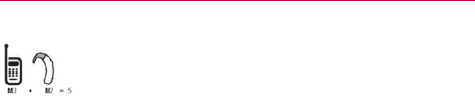
79
Safety
Intheexampletotheleft,ifahearingaidmeetstheM2level
ratingandthewirelessphonemeetstheM3levelrating,the
sumofthetwovaluesequalM5.Thisshouldprovidethe
hearingaiduserwith“normalusage”whileusingtheir
hearingaidwiththeparticularwirelessphone.“Normalusage”inthis
contextisdenedasasignalqualitythat’sacceptablefornormaloperation.
TheMmarkisintendedtobesynonymouswiththeUmark.TheTmark
isintendedtobesynonymouswiththeUTmark.TheMandTmarksare
recommendedbytheAllianceforTelecommunicationsIndustriesSolutions
(ATIS).TheUandUTmarksarereferencedinSection20.19oftheFCC
Rules.TheHACratingandmeasurementprocedurearedescribedinthe
AmericanNationalStandardsInstitute(ANSI)C63.19standard.
Whenyou'retalkingonacellphone,it'srecommendedthatyouturntheBT
(Bluetooth)orWLANmodeoffforHAC
For information about hearing aids and digital wireless phones
Wireless Phones and Hearing Aid Accessibility
http://www.accesswireless.org/Home.aspx
FCC Hearing Aid Compatibility and Volume Control
http://www.fcc.gov/cgb/consumerfacts/hac_wireless.html
Caution: Avoid potential hearing loss.
Prolongedexposuretoloudsounds(includingmusic)isthemostcommon
causeofpreventablehearingloss.Somescienticresearchsuggests
thatusingportableaudiodevices,suchasportablemusicplayersand
cellulartelephones,athighvolumesettingsforlongdurationsmayleadto
permanentnoiseinducedhearingloss.Thisincludestheuseofheadphones
(includingheadsets,earbudsandBluetooth®orotherwirelessdevices).
Exposuretoveryloudsoundhasalsobeenassociatedinsomestudies
withtinnitus(aringingintheear),hypersensitivitytosoundanddistorted
hearing.Individualsusceptibilitytonoise-inducedhearinglossandother
potentialhearingproblemsvaries.

80 Safety
Theamountofsoundproducedbyaportableaudiodevicevariesdepending
onthenatureofthesound,thedevice,thedevicesettingsandthe
headphones.Yo u shouldfollowsomecommonsenserecommendations
whenusinganyportableaudiodevice:
• Setthevolumeinaquietenvironmentandselectthelowestvolumeat
whichyoucanhearadequately.
• Whenusingheadphones,turnthevolumedownifyoucannothearthe
peoplespeakingnearyouorifthepersonsittingnexttoyoucanhear
whatyouarelisteningto.
• Donotturnthevolumeuptoblockoutnoisysurroundings.Ifyouchoose
tolistentoyourportabledeviceinanoisyenvironment,usenoise-
cancellingheadphonestoblockoutbackgroundenvironmentalnoise.
• Limittheamountoftimeyoulisten.Asthevolumeincreases,lesstime
isrequiredbeforeyourhearingcouldbeaffected.
• Avoidusingheadphonesafterexposuretoextremelyloudnoises,such
asrockconcerts,thatmightcausetemporaryhearingloss.Temporary
hearinglossmightcauseunsafevolumestosoundnormal.
• Donotlistenatanyvolumethatcausesyoudiscomfort.Ifyouexperience
ringinginyourears,hearmufedspeechorexperienceanytemporary
hearingdifcultyafterlisteningtoyourportableaudiodevice,discontinue
useandconsultyourdoctor.
TIA Safety Information
ThefollowingisthecompleteTIASafetyInformationforwirelesshandheld
phones.
Exposure to Radio Frequency Signal
Yourwirelesshandheldportablephoneisalowpowerradiotransmitterand
receiver.WhenON,itreceivesandsendsoutRadioFrequency(RF)signals.
InAugust,1996,theFederalCommunicationsCommissions(FCC)adopted
RFexposureguidelineswithsafetylevelsforhandheldwirelessphones.

81
Safety
Thoseguidelinesareconsistentwiththesafetystandardspreviouslysetby
bothU.S.andinternationalstandardsbodies:
1. ANSIC95.1(1992)*
2.NCRPReport86(1986)
3.ICNIRP(1996)
4.*AmericanNationalStandardsInstitute;NationalCouncilonRadiation
ProtectionandMeasurements;InternationalCommissiononNon-
IonizingRadiationProtection
Thosestandardswerebasedoncomprehensiveandperiodicevaluationsof
therelevantscienticliterature.Forexample,over120scientists,engineers,
andphysiciansfromuniversities,governmenthealthagencies,andindustry
reviewedtheavailablebodyofresearchtodeveloptheANSIStandard
(C95.1).
ThedesignofyourphonecomplieswiththeFCCguidelines(andthose
standards).
Antenna Care
Useonlythesuppliedoranapprovedreplacementantenna.Unauthorized
antennas,modications,orattachmentscoulddamagethephoneandmay
violateFCCregulations.
Phone Operation
NORMALPOSITION:Holdthephoneasyouwouldanyothertelephone
withtheantennapointedupandoveryourshoulder.
Tips on Efficient Operation
Foryourphonetooperatemostefciently:
Don’ttouchtheantennaunnecessarilywhenthephoneisinuse.Contact
withtheantennaaffectscallqualityandmaycausethephonetooperateat
ahigherpowerlevelthanotherwiseneeded.
Electronic Devices
MostmodernelectronicequipmentisshieldedfromRFsignals.However,

82 Safety
certainelectronicequipmentmaynotbeshieldedagainsttheRFsignals
fromyourwirelessphone.
Pacemakers
TheHealthIndustryManufacturersAssociationrecommendsthata
minimumseparationofsix(6)inchesbemaintainedbetweenahandheld
wirelessphoneandapacemakertoavoidpotentialinterferencewiththe
pacemaker.Theserecommendationsareconsistentwiththeindependent
researchbyandrecommendationsofWirelessTechnologyResearch.
Personswithpacemakers:
• ShouldA LWAYS keepthephonemorethansix(6)inchesfromtheir
pacemakerwhenthephoneisturnedON;
• Shouldnotcarrythephoneinabreastpocket;
• Shouldusetheearoppositethepacemakertominimizethepotentialfor
interference;
• ShouldturnthephoneOFFimmediatelyifthereisanyreasontosuspect
thatinterferenceistakingplace.
Hearing Aids
Somedigitalwirelessphonesmayinterferewithsomehearingaids.Inthe
eventofsuchinterference,youmaywanttoconsultyourserviceprovider(or
callthecustomerservicelinetodiscussalternatives).
Other Medical Devices
Ifyouuseanyotherpersonalmedicaldevice,consultthemanufacturer
ofyourdevicetodetermineifitisadequatelyshieldedfromexternal
RFenergy.Yourphysicianmaybeabletoassistyouinobtainingthis
information.
Health Care Facilities
TurnyourphoneOFFinhealthcarefacilitieswhenanyregulationspostedin
theseareasinstructyoutodoso.Hospitalsorhealthcarefacilitiesmayuse
equipmentthatcouldbesensitivetoexternalRFenergy.

83
Safety
Vehicles
RFsignalsmayaffectimproperlyinstalledorinadequatelyshielded
electronicsystemsinmotorvehicles.Checkwiththemanufactureror
itsrepresentativeregardingyourvehicle.Yo u shouldalsoconsultthe
manufacturerofanyequipmentthathasbeenaddedtoyourvehicle.
Posted Facilities
TurnyourphoneOFFinanyfacilitywherepostednoticessorequire.
Aircraft
FCCregulationsprohibitusingyourphonewhileintheair.SwitchOFFyour
phonebeforeboardinganaircraft.
Blasting Areas
Toavoidinterferingwithblastingoperations,turnyourphoneOFFwhenin
a“blastingarea”orinareasposted:“Turnofftwo-wayradio”.Obeyallsigns
andinstructions.
Potentially Explosive Atmosphere
TurnyourphoneOFFwheninanyareawithapotentiallyexplosive
atmosphereandobeyallsignsandinstructions.Sparksinsuchareascould
causeanexplosionorreresultinginbodilyinjuryorevendeath.
Areaswithapotentiallyexplosiveatmosphereareoften,butnotalways
markedclearly.Potentialareasmayinclude:fuelingareas(suchasgasoline
stations);belowdeckonboats;fuelorchemicaltransferorstoragefacilities;
vehiclesusingliqueedpetroleumgas(suchaspropaneorbutane);areas
wheretheaircontainschemicalsorparticles(suchasgrain,dust,ormetal
powders);andanyotherareawhereyouwouldnormallybeadvisedtoturn
offyourvehicleengine.
For Vehicles Equipped with an Air Bag
Anairbaginateswithgreatforce.DONOTplaceobjects,includingeither
installedorportablewirelessequipment,intheareaovertheairbagorin
theairbagdeploymentarea.Ifin-vehiclewirelessequipmentisimproperly
installedandtheairbaginates,seriousinjurycouldresult.

84 Safety
Part 15.105 statement
Thisequipmenthasbeentestedandfoundtocomplywiththelimitsfora
classBdigitaldevice,pursuanttoPart15oftheFCCrules.Theselimitsare
designedtoprovidereasonableprotectionagainstharmfulinterferencein
aresidentialinstallation.Thisequipmentgenerates,uses,andcanradiate
radiofrequencyenergyand,ifnotinstalledandusedinaccordancewith
theinstructions,maycauseharmfulinterferencetoradiocommunications.
However,thereisnoguaranteethatinterferencewillnotoccurinaparticular
installation.Ifyouexperienceinterferencewithreception(e.g.,television),
determineifthisequipmentiscausingtheharmfulinterferencebyturning
theequipmentoffandthenbackontoseeiftheinterferenceisaffected.If
necessary,trycorrectingtheinterferencebyoneormoreofthefollowing
measures:
- Reorientorrelocatethereceivingantenna.
-Increasetheseparationbetweentheequipmentandreceiver.
-Connecttheequipmentintoanoutletonacircuitdifferentfromthatto
whichthereceiverisconnected.
-Consultthedealeroranexperiencedradio/TVtechnicianforhelp.
*Informationsubjecttochange.
Part 15.21 statement
Changesormodicationsthatarenotexpresslyapprovedbythe
manufacturercouldvoidtheuser’sauthoritytooperatetheequipment.

85
Safety
Safety Information
Pleasereadandobservethefollowinginformationforsafeandproperuse
ofyourphoneandtopreventdamage.
Caution
Violation of the instructions may cause minor or serious damage
to the product.
• Donotdisassembleoropencrush,bendordeform,punctureorshred.
• Donotmodifyorremanufacture,attempttoinsertforeignobjectsinto
thebattery,immerseorexposetowaterorotherliquids,exposetore,
explosionorotherhazard.Suchconditionsmaypresenttheriskofreor
explosion.
• Onlyusethebatteryforthesystemforwhichitisspecied.
• OnlyusethebatterywithachargingsystemthathasbeenLG-approved
andqualiedwiththesystemperIEEE-Std-1725-2006.Useofan
unqualiedandnon-LG-approvedbatteryorchargermaypresentarisk
ofre,explosion,leakage,orotherhazard.
• Donotshortcircuitabatteryorallowmetallicconductiveobjectsto
contactbatteryterminals.
• ReplacethebatteryonlywithanotherbatterythathasbeenLGCaution
32approvedandqualiedwiththesystemperthisstandard,IEEE-
Std-1725-2006.Useofanunqualiedandnon-LG-approvedbatterymay
presentariskofre,explosion,leakageorotherhazard.
• Promptlydisposeofusedbatteriesinaccordancewithlocalregulations.
• Batteryusagebychildrenshouldbesupervised.
• Avoiddroppingthephone,batteryorexposingthephoneorbatterytoa
liquid.Ifthephoneorbatteryisdropped,especiallyonahardsurface,or
isexposedtoaliquidorcomesintocontactwithasharpobjecttakeitto
aservicecenterforinspection.
• Atleast,oneoftheAuthenticationmethodsmaybeimplemented.(e.g.
H/W,S/W,Mechanical,Hologram,etc.)

86 Safety
• Improperbatteryusemayresultinare,explosionorotherhazard.
Charger and Adapter Safety
• Thechargerandadapterareintendedforindooruseonly.
• Insertthebatterypackchargerverticallyintothewallpowersocket.
• OnlyusetheLG-approvedbatterycharger.Otherwise,youmaycause
seriousdamagetoyourphone.
• Usethecorrectadapterforyourphonewhenusingthebatterypack
chargerabroad.
Battery Information and Care
• Alwaysunplugthechargerfromthewallsocketafterthephoneisfully
chargedtosaveunnecessarypowerconsumptionofthecharger.
• Pleasereadthemanualofproperinstallationandremovalofthebattery.
• Pleasereadthemanualofspeciedchargeraboutchargingmethod.
• Donotdamagethepowercordbybending,twisting,orheating.Donot
usetheplugifitislooseasitmaycauseelectricshockorre.
• Donotplaceanyheavyitemsonthepowercord.Donotallowthepower
cordtobecrimpedasitmaycauseelectricshockorre.
• Unplugthepowercordpriortocleaningyourphone,andcleanthepower
plugpinwhenit’sdirty.Whenusingthepowerplug,ensurethatit’s
rmlyconnected.Ifnot,itmaycauseexcessiveheatorre.Ifyouput
yourphoneinapocketorbagwithoutcoveringthereceptacleofthe
phone(powerplugpin),metallicarticles(suchasacoin,papercliporpen)
mayshort-circuitthephone.Alwayscoverthereceptaclewhennotin
use.
• Rechargethebatteryafterlongperiodsofnon-usetomaximizebattery
life.Batterylifewillvaryduetousagepatternandenvironmental
conditions.
• PleaseuseonlyanLG-approvedchargingaccessoryto35chargeyour
LGphone.Improperhandlingofthechargingport,aswellastheuseof

87
Safety
anincompatiblecharger,maycausedamagetoyourphoneandvoidthe
warranty.
• Neverstoreyourphoneintemperaturelessthan-4°Forgreaterthan
122°F.Chargethebatteryinrangeof0°C~45°C.
• lChargingtemperaturerangeisregulatedbetween0°Cand45°C.Donot
chargethebatteryoutofrecommendedtemperaturerange.Charging
outofrecommendedrangemightcausethegeneratingheatorserious
damageofbattery.Andalso,itmightcausethedeteriorationofbattery's
characteristicsandcyclelife.
• Donotuseorleavethebatteryundertheblazingsunorinheatedcarby
sunshine.Thebatterymaygenerateheat,smokeorame.Andalso,it
mightcausethedeteriorationofbattery’scharacteristicsorcyclelife.
• Thebatterypackhasprotectioncircuittoavoidthedanger.Donotuse
nearbytheplacewheregeneratesstaticelectricitymorethan100V
whichgivesdamagetotheprotectioncircuit.Iftheprotectioncircuit
werebroken,thebatterywouldgeneratesmoke,ruptureorame.
• Whenthebatteryhasrust,badsmellorsomethingabnormalatrst-
time-using,donotusetheequipmentandgotobringthebatterytothe
shopwhichitwasbought.
• Incaseyoungerchildrenusethebattery,theirparentsshouldteachthem
howtousebatteriesaccordingtothemanualwithcare.
• Iftheskinorclothissmearedwithliquidfromthebattery,washwith
freshwater.Itmaycausetheskininammation.Removeanddonotuse
thebattery.
• Donothandlethephonewithwethandswhileitisbeingcharged.Itmay
causeanelectricshockorseriouslydamageyourphone.
• Donotplaceoranswercallswhilechargingthephoneasitmayshort-
circuitthephoneand/orcauseelectricshockorre.
• Thechargerandadapterareintendedforindooruseonly.
• Insertthebatterypackchargerverticallyintothewallpowersocket.

88 Safety
• OnlyusetheLG-approvedbatterycharger.Otherwise,youmaycause
seriousdamagetoyourphoneandriskofoverheating,reorexplosion
mayoccur.
• Usethecorrectadapterforyourphonewhenusingthebatterypack
chargerabroad.
• Talkingonyourphoneforalongperiodoftimemayreducecallquality
duetoheatgeneratedduringuse.
• Donotuseharshchemicals(suchasalcohol,benzene,thinners,etc.)or
detergentstocleanyourphone.Thiscouldcauseare.Donotplaceor
answercallswhilechargingthephoneasitmayshort-circuitthephone
and/orcauseelectricshockorre.Don’tshort-circuitthebattery.Metallic
articlessuchasacoin,papercliporpeninyourpocketorbagmayshort-
circuitthe+and–terminalsofthebattery(metalstripsonthebattery)
uponmoving.Short-circuitoftheterminalmaydamagethebatteryand
causeanexplosion.
• Neveruseandunapprovedbatterysincethiscoulddamagethephone
and/orbatteryandcouldcausethebatterytoexplode.Onlyusethe
batteriesandchargersprovidedbyLG.Thewarrantywillnotbeappliedto
productsprovidedbyothersuppliers.Onlyauthorizedpersonnelshould
servicethephoneanditsaccessories.Faultyinstallationorservicemay
resultinaccidentsandconsequentlyinvalidatethewarranty.
Explosion, Shock, and Fire Hazards
Checkthelawsandregulationsontheuseofwirelessphonesintheareas
whereyoudriveandalwaysobeythem.Also,ifusingyourphonewhile
driving,pleaseobservethefollowing:
• Donotputyourphoneinaplacesubjecttoexcessivedustandkeepthe
minimumrequireddistancebetweenthepowercordandheatsources.
• Unplugthepowercordpriortocleaningyourphone,andcleanthepower
plugpinwhenit’sdirty.
• Whenusingthepowerplug,ensurethatit’srmlyconnected.Ifnot,it
maycauseexcessiveheatorre.

89
Safety
• Ifyouputyourphoneinapocketorbagwithoutcoveringthereceptacle
ofthephone(powerplugpin),metallicarticles(suchasacoin,paperclip
orpen)mayshort-circuitthephoneandmaycausean37explosion.
Alwayscoverthereceptaclewhennotinuse.
• Don’tshort-circuitthebattery.Metallicarticlessuchasacoin,paperclipor
peninyourpocketorbagorcontactwithsharpobjectsincludinganimal
bitesmayshort-circuitthe+and–terminalsofthebattery(metalstrips
onthebattery)uponmoving.Shortcircuitoftheterminalmaydamage
thebatteryandcauseanexplosion.
General Notice
• Usingadamagedbatteryorplacingabatteryinyourmouthoranimal's
mouthmaycauseseriousinjuryincludingareorexplosion.
• Donotplaceitemscontainingmagneticcomponentssuchasacredit
card,phonecard,bankbook,orsubwayticketnearyourphone.The
magnetismofthephonemaydamagethedatastoredinthemagnetic
strip.
• Talkingonyourphoneforalongperiodoftimemayreducecallquality
duetoheatgeneratedduringuse.
• Whenthephoneisnotusedforalongperiodtime,storeitinasafe
placewiththepowercordunplugged.
• Usingthephoneinproximitytoreceivingequipment(i.e.,TVorradio)
maycauseinterferencetothephone.
• Donotusethephoneiftheantennaisdamaged.Ifadamagedantenna
contactsskin,itmaycauseaslightburn.PleasecontactanLGAuthorized
ServiceCentertoreplacethedamagedantenna.
• Donotimmerseyourphoneinwater,liquid,orexposetohighhumidity.
Ifthishappens,turnitoffimmediatelyandremovethebattery.
Immediately,takeittoanLGAuthorizedServiceCenter.
• Donotpaintyourphone.
• Thedatasavedinyourphonemightbedeletedduetocarelessuse,
repairofthephone,orupgradeofthesoftware.Pleasebackupyour

90 Safety
importantphonenumbers.(Ringtones,textmessages,voicemessages,
pictures,andvideoscouldalsobedeleted.)Themanufacturerisnotliable
fordamageduetothelossofdata.
• Whenyouusethephoneinpublicplaces,settheringtonetovibrationso
youdon'tdisturbothers.
• Donotturnyourphoneonoroffwhenputtingittoyourear.
• Useaccessories,suchasearphonesandheadsets,withcaution.
Ensurethatcablesaretuckedawaysafelyanddonottouchtheantenna
unnecessarily.
You can obtain additional information on this subject from the
following sources:
American Academy of Audiology
11730PlazaAmericanDrive,Suite300
Reston,VA20190
Voice:(800)222-2336
Email:info@audiology.org
Internet:www.audiology.org
National Institute on Deafness and Other Communication
Disorders
NationalInstitutesofHealth
31CenterDrive,MSC2320
Bethesda,MDUSA20892-2320
Voice:(301)496-7243
Email:nidcdinfo@nih.gov
Internet:http://www.nidcd.nih.gov/health/hearing
National Institute for Occupational Safety and Health
HubertH.HumphreyBldg.

91
Safety
200IndependenceAve.,SW
Washington,DC20201
Voice:1-800-35-NIOSH(1-800-356-4674)
Internet:http://www.cdc.gov/niosh/topics/noise/default.html
FDA Consumer Update
TheU.S.FoodandDrugAdministration’sCenterforDevicesand
RadiologicalHealthConsumerUpdateonMobilePhones:
1. Do wireless phones pose a health hazard?
Theavailablescienticevidencedoesnotshowthatanyhealthproblemsare
associatedwithusingwirelessphones.Thereisnoproof,however,thatwireless
phonesareabsolutelysafe.WirelessphonesemitlowlevelsofRadioFrequency
(RF)energyinthemicrowaverangewhilebeingused.Theyalsoemitverylow
levelsofRFwheninstandbymode.WhereashighlevelsofRFcanproduce
healtheffects(byheatingtissue),exposuretolowlevelRFthatdoesnot
produceheatingeffectscausesnoknownadversehealtheffects.Manystudies
oflowlevelRFexposureshavenotfoundanybiologicaleffects.Somestudies
havesuggestedthatsomebiologicaleffectsmayoccur,butsuchndingshave
notbeenconrmedbyadditionalresearch.Insomecases,otherresearchers
havehaddifcultyinreproducingthosestudies,orindeterminingthereasons
forinconsistentresults.
2. What is the FDA’s role concerning the safety of wireless phones?
Underthelaw,theFDAdoesnotreviewthesafetyofradiation-emitting
consumerproductssuchaswirelessphonesbeforetheycanbesold,asit
doeswithnewdrugsormedicaldevices.However,theagencyhasauthority
totakeactionifwirelessphonesareshowntoemitRadioFrequency(RF)
energyatalevelthatishazardoustotheuser.Insuchacase,theFDAcould
requirethemanufacturersofwirelessphonestonotifyusersofthehealth
hazardandtorepair,replace,orrecallthephonessothatthehazardno
longerexists.

92 Safety
AlthoughtheexistingscienticdatadoesnotjustifyFDAregulatoryactions,
theFDAhasurgedthewirelessphoneindustrytotakeanumberofsteps,
includingthefollowing:
• SupportneededresearchintopossiblebiologicaleffectsofRFofthe
typeemittedbywirelessphones;
• DesignwirelessphonesinawaythatminimizesanyRFexposuretothe
userthatisnotnecessaryfordevicefunction;and
• Cooperateinprovidingusersofwirelessphoneswiththebestpossible
informationonpossibleeffectsofwirelessphoneuseonhumanhealth.
TheFDAbelongstoaninteragencyworkinggroupofthefederalagencies
thathaveresponsibilityfordifferentaspectsofRFsafetytoensure
coordinatedeffortsatthefederallevel.Thefollowingagenciesbelongtothis
workinggroup:
• NationalInstituteforOccupationalSafetyandHealth
• EnvironmentalProtectionAgency
• OccupationalSafetyandHealthAdministration
• NationalTelecommunicationsandInformationAdministration
TheNationalInstitutesofHealthparticipatesinsomeinteragencyworking
groupactivities,aswell.
TheFDAsharesregulatoryresponsibilitiesforwirelessphoneswiththe
FederalCommunicationsCommission(FCC).Allphonesthataresoldin
theUnitedStatesmustcomplywithFCCsafetyguidelinesthatlimitRF
exposure.TheFCCreliesontheFDAandotherhealthagenciesforsafety
questionsaboutwirelessphones.
TheFCCalsoregulatesthebasestationsthatthewirelessphonenetworks
relyupon.Whilethesebasestationsoperateathigherpowerthandothe
wirelessphonesthemselves,theRFexposuresthatpeoplegetfromthese
basestationsaretypicallythousandsoftimeslowerthanthosetheycanget
fromwirelessphones.Basestationsarethusnotthesubjectofthesafety
questionsdiscussedinthisdocument.

93
Safety
3. What kinds of phones are the subject of this update?
Theterm“wirelessphone”refersheretohandheldwirelessphoneswith
built-inantennas,oftencalled“cell”,“mobile”,or“PCS”phones.Thesetypes
ofwirelessphonescanexposetheusertomeasurableRadioFrequency(RF)
energybecauseoftheshortdistancebetweenthephoneandtheuser’s
head.
TheseRFexposuresarelimitedbyFCCsafetyguidelinesthatwere
developedwiththeadviceoftheFDAandotherfederalhealthandsafety
agencies.Whenthephoneislocatedatgreaterdistancesfromtheuser,
theexposuretoRFisdrasticallylowerbecauseaperson’sRFexposure
decreasesrapidlywithincreasingdistancefromthesource.Theso-called
“cordlessphones,”whichhaveabaseunitconnectedtothetelephone
wiringinahouse,typicallyoperateatfarlowerpowerlevels,andthus
produceRFexposuresfarbelowtheFCCsafetylimits.
4. What are the results of the research done already?
Theresearchdonethusfarhasproducedconictingresults,andmany
studieshavesufferedfromawsintheirresearchmethods.Animal
experimentsinvestigatingtheeffectsofRadioFrequency(RF)energy
exposurescharacteristicofwirelessphoneshaveyieldedconicting
resultsthatoftencannotberepeatedinotherlaboratories.Afewanimal
studies,however,havesuggestedthatlowlevelsofRFcouldaccelerate
thedevelopmentofcancerinlaboratoryanimals.However,manyofthe
studiesthatshowedincreasedtumordevelopmentusedanimalsthathad
beengeneticallyengineeredortreatedwithcancer-causingchemicalsso
astobepre-disposedtodevelopcancerintheabsenceofRFexposure.
OtherstudiesexposedtheanimalstoRFforupto22hoursperday.These
conditionsarenotsimilartotheconditionsunderwhichpeopleusewireless
phones,sowedonotknowwithcertaintywhattheresultsofsuchstudies
meanforhumanhealth.Threelargeepidemiologystudieshavebeen
publishedsinceDecember2000.Betweenthem,thestudiesinvestigated
anypossibleassociationbetweentheuseofwirelessphonesandprimary
braincancer,glioma,meningioma,oracousticneuroma,tumorsofthe
brainorsalivarygland,leukemia,orothercancers.Noneofthestudies
demonstratedtheexistenceofanyharmfulhealtheffectsfromwireless

94 Safety
phoneRFexposures.However,noneofthestudiescananswerquestions
aboutlong-termexposures,sincetheaverageperiodofphoneuseinthese
studieswasaroundthreeyears.
5. What research is needed to decide whether RF exposure from
wireless phones poses a health risk?
Acombinationoflaboratorystudiesandepidemiologicalstudiesofpeople
actuallyusingwirelessphoneswouldprovidesomeofthedatathatare
needed.Lifetimeanimalexposurestudiescouldbecompletedinafew
years.However,verylargenumbersofanimalswouldbeneededtoprovide
reliableproofofacancerpromotingeffect,ifoneexists.Epidemiological
studiescanprovidedatathatisdirectlyapplicabletohumanpopulations,but
tenormoreyearsfollow-upmaybeneededtoprovideanswersaboutsome
healtheffects,suchascancer.Thisisbecausetheintervalbetweenthetime
ofexposuretoacancer-causingagentandthetimetumorsdevelop-ifthey
do-maybemany,manyyears.Theinterpretationofepidemiologicalstudies
ishamperedbydifcultiesinmeasuringactualRFexposureduringday-to-
dayuseofwirelessphones.Manyfactorsaffectthismeasurement,suchas
theangleatwhichthephoneisheld,orwhichmodelofphoneisused.
6. What is the FDA doing to find out more about the possible
health effects of wireless phone RF?
TheFDAisworkingwiththeU.S.NationalToxicologyProgramandwith
groupsofinvestigatorsaroundtheworldtoensurethathighpriorityanimal
studiesareconductedtoaddressimportantquestionsabouttheeffectsof
exposuretoRadioFrequency(RF)energy.
TheFDAhasbeenaleadingparticipantintheWorldHealthOrganization
InternationalElectroMagneticFields(EMF)Projectsinceitsinceptionin
1996.Aninuentialresultofthisworkhasbeenthedevelopmentofa
detailedagendaofresearchneedsthathasdriventheestablishmentofnew
researchprogramsaroundtheworld.Theprojecthasalsohelpeddevelopa
seriesofpublicinformationdocumentsonEMFissues.
TheFDAandtheCellularTelecommunications&InternetAssociation
(CTIA)haveaformalCooperativeResearchAndDevelopmentAgreement
(CRADA)todoresearchonwirelessphonesafety.TheFDAprovidesthe

95
Safety
scienticoversight,obtaininginputfromexpertsingovernment,industry,
andacademicorganizations.CTIA-fundedresearchisconductedthrough
contractswithindependentinvestigators.Theinitialresearchwillinclude
bothlaboratorystudiesandstudiesofwirelessphoneusers.TheCRADA
willalsoincludeabroadassessmentofadditionalresearchneedsinthe
contextofthelatestresearchdevelopmentsaroundtheworld.
7. How can I find out how much Radio Frequency energy exposure
I can get by using my wireless phone?
AllphonessoldintheUnitedStatesmustcomplywithFederal
CommunicationsCommission(FCC)guidelinesthatlimitRadioFrequency
(RF)energyexposures.TheFCCestablishedtheseguidelinesin
consultationwiththeFDAandtheotherfederalhealthandsafetyagencies.
TheFCClimitforRFexposurefromwirelessphonesissetataSpecic
AbsorptionRate(SAR)of1. 6 wattsperkilogram(1.6W/kg).TheFCClimitis
consistentwiththesafetystandardsdevelopedbytheInstituteofElectrical
andElectronicEngineering(IEEE)andtheNationalCouncilonRadiation
ProtectionandMeasurement.Theexposurelimittakesintoconsideration
thebody’sabilitytoremoveheatfromthetissuesthatabsorbenergyfrom
thewirelessphoneandissetwellbelowlevelsknowntohaveeffects.
ManufacturersofwirelessphonesmustreporttheRFexposurelevelfor
eachmodelofphonetotheFCC.TheFCCwebsite(http://www.fcc.gov/
cgb/cellular.html)givesdirectionsforlocatingtheFCCidenticationnumber
onyourphonesoyoucanndyourphone’sRFexposurelevelintheonline
listing.
8. What has the FDA done to measure the Radio Frequency energy
coming from wireless phones?
TheInstituteofElectricalandElectronicEngineers(IEEE)isdeveloping
atechnicalstandardformeasuringtheRadioFrequency(RF)energy
exposurefromwirelessphonesandotherwirelesshandsetswiththe
participationandleadershipofFDAscientistsandengineers.Thestandard,
“RecommendedPracticeforDeterminingtheSpatial-PeakSpecic
AbsorptionRate(SAR)intheHumanBodyDuetoWirelessCommunications
Devices:ExperimentalTechniques”,setsforththerstconsistenttest

96 Safety
methodologyformeasuringtherateatwhichRFisdepositedintheheads
ofwirelessphoneusers.Thetestmethodusesatissue-simulatingmodelof
thehumanhead.StandardizedSARtestmethodologyisexpectedtogreatly
improvetheconsistencyofmeasurementsmadeatdifferentlaboratories
onthesamephone.SARisthemeasurementoftheamountofenergy
absorbedintissue,eitherbythewholebodyorasmallpartofthebody.Itis
measuredinwatts/kg(ormilliwatts/g)ofmatter.Thismeasurementisused
todeterminewhetherawirelessphonecomplieswithsafetyguidelines.
9. What steps can I take to reduce my exposure to Radio Frequency
energy from my wireless phone?
Ifthereisariskfromtheseproducts-andatthispointwedonotknowthat
thereis-itisprobablyverysmall.Butifyouareconcernedaboutavoidingeven
potentialrisks,youcantakeafewsimplestepstominimizeyourexposureto
RadioFrequency(RF)energy.Sincetimeisakeyfactorinhowmuchexposurea
personreceives,reducingtheamountoftimespentusingawirelessphonewill
reduceRFexposure.Ifyoumustconductextendedconversationsbywireless
phoneeveryday,youcouldplacemoredistancebetweenyourbodyandthe
sourceoftheR F, sincetheexposureleveldropsoffdramaticallywithdistance.
Forexample,youcoulduseaheadsetandcarrythewirelessphoneawayfrom
yourbodyoruseawirelessphoneconnectedtoaremoteantenna.Again,the
scienticdatadoesnotdemonstratethatwirelessphonesareharmful.Butif
youareconcernedabouttheRFexposurefromtheseproducts,youcanuse
measureslikethosedescribedabovetoreduceyourRFexposurefromwireless
phoneuse.
10. What about children using wireless phones?
Thescienticevidencedoesnotshowadangertousersofwireless
phones,includingchildrenandteenagers.Ifyouwanttotakestepstolower
exposuretoRadioFrequency(RF)energy,themeasuresdescribedabove
wouldapplytochildrenandteenagersusingwirelessphones.Reducingthe
timeofwirelessphoneuseandincreasingthedistancebetweentheuser
andtheRFsourcewillreduceRFexposure.
Somegroupssponsoredbyothernationalgovernmentshaveadvisedthat
childrenbediscouragedfromusingwirelessphonesatall.Forexample,

97
Safety
thegovernmentintheUnitedKingdomdistributedleaetscontaining
sucharecommendationinDecember2000.Theynotedthatnoevidence
existsthatusingawirelessphonecausesbraintumorsorotherilleffects.
Theirrecommendationtolimitwirelessphoneusebychildrenwasstrictly
precautionary;itwasnotbasedonscienticevidencethatanyhealthhazard
exists.
11. What about wireless phone interference with medical
equipment?
RadioFrequency(RF)energyfromwirelessphonescaninteractwithsome
electronicdevices.Forthisreason,theFDAhelpeddevelopadetailed
testmethodtomeasureElectroMagneticInterference(EMI)ofimplanted
cardiacpacemakersanddebrillatorsfromwirelesstelephones.Thistest
methodisnowpartofastandardsponsoredbytheAssociationforthe
AdvancementofMedicalInstrumentation(AAMI).Thenaldraft,ajoint
effortbytheFDA,medicaldevicemanufacturers,andmanyothergroups,
wascompletedinlate2000.Thisstandardwillallowmanufacturersto
ensurethatcardiacpacemakersanddebrillatorsaresafefromwireless
phoneEMI.
TheFDAhastestedhearingaidsforinterferencefromhandheldwireless
phonesandhelpeddevelopavoluntarystandardsponsoredbytheInstitute
ofElectricalandElectronicEngineers(IEEE).Thisstandardspeciestest
methodsandperformancerequirementsforhearingaidsandwireless
phonessothatnointerferenceoccurswhenapersonusesa“compatible”
phoneanda“compatible”hearingaidatthesametime.Thisstandardwas
approvedbytheIEEEin2000.
TheFDAcontinuestomonitortheuseofwirelessphonesforpossible
interactionswithothermedicaldevices.Shouldharmfulinterferencebe
foundtooccur,theFDAwillconducttestingtoassesstheinterferenceand
worktoresolvetheproblem.
12. Where can I find additional information?
Foradditionalinformation,pleaserefertothefollowingresources:
FDAwebpageonwirelessphones(http://www.fda.gov),under“C”inthe

98 Safety
subjectindex,selectCellPhones>Research.
FederalCommunicationsCommission(FCC)RFSafetyProgram(http://
www.fcc.gov/oet/rfsafety/)
InternationalCommissiononNonlonizingRadiationProtection(http://www.
icnirp.de)
WorldHealthOrganization(WHO)InternationalEMFProject(http://www.
who.int/emf)
HealthProtectionAgency(http://www.hpa.org.uk/)
Driving
Checkthelawsandregulationsontheuseofwirelessphonesintheareas
whereyoudriveandalwaysobeythem.Also,ifusingyourphonewhile
driving,pleaseobservethefollowing:
• Givefullattentiontodriving--drivingsafelyisyourrstresponsibility;
• Usehands-freeoperation,ifavailable;
• Pullofftheroadandparkbeforemakingoransweringacallifdriving
conditionsorthelawrequireit.
10 Driver Safety Tips
Yourwirelessphonegivesyouthepowerfulabilitytocommunicatebyvoice
almostanywhere,anytime.Animportantresponsibilityaccompaniesthe
benetsofwirelessphones,onethateveryusermustuphold.
Whenoperatingacar,drivingisyourrstresponsibility.Whenusingyour
wirelessphonebehindthewheelofacar,practicegoodcommonsense
andrememberthefollowingtips:
1. Gettoknowyourwirelessphoneanditsfeaturessuchasspeeddialand
redial.Carefullyreadyourinstructionmanualandlearntotakeadvantage
ofvaluablefeaturesmostphonesoffer,includingautomaticredialand
memory.Also,worktomemorizethephonekeypadsoyoucanusethe
speeddialfunctionwithouttakingyourattentionofftheroad.

99
Safety
2.Whenavailable,useahands-freedevice.Anumberofhands-free
wirelessphoneaccessoriesarereadilyavailabletoday.Whetheryou
chooseaninstalledmounteddeviceforyourwirelessphoneoraspeaker
phoneaccessory,takeadvantageofthesedevicesifavailabletoyou.
3.Makesureyouplaceyourwirelessphonewithineasyreachandwhere
youcanreachitwithoutremovingyoureyesfromtheroad.Ifyouget
anincomingcallataninconvenienttime,ifpossible,letyourvoicemail
answeritforyou.
4.Suspendconversationsduringhazardousdrivingconditionsorsituations.
Letthepersonyouarespeakingwithknowyouaredriving;ifnecessary,
suspendthecallinheavytrafcorhazardousweatherconditions.Rain,
sleet,snow,andicecanbehazardous,butsoisheavytrafc.Asadriver,
yourrstresponsibilityistopayattentiontotheroad.
5.Don’ttakenotesorlookupphonenumberswhiledriving.Ifyouare
readinganaddressbookorbusinesscard,orwritinga“to-do”listwhile
drivingacar,youarenotwatchingwhereyouaregoing.Itiscommon
sense.Donotgetcaughtinadangeroussituationbecauseyouare
readingorwritingandnotpayingattentiontotheroadornearbyvehicles.
6.Dialsensiblyandassessthetrafc;ifpossible,placecallswhenyouare
notmovingorbeforepullingintotrafc.Tr y toplanyourcallsbeforeyou
beginyourtriporattempttocoincideyourcallswithtimesyoumaybe
stoppedatastopsign,redlight,orotherwisestationary.Butifyouneed
todialwhiledriving,followthissimpletip-dialonlyafewnumbers,
checktheroadandyourmirrors,thencontinue.
7. Donotengageinstressfuloremotionalconversationsthatmaybe
distracting.Stressfuloremotionalconversationsanddrivingdonotmix;
theyaredistractingandevendangerouswhenyouarebehindthewheel
ofacar.Makepeopleyouaretalkingwithawareyouaredrivingandif
necessary,suspendconversationswhichhavethepotentialtodivertyour
attentionfromtheroad.
8.Useyourwirelessphonetocallforhelp.Yourwirelessphoneisoneof
thegreatesttoolsyoucanowntoprotectyourselfandyourfamilyin
dangeroussituations--withyourphoneatyourside,helpisonlythree
numbersaway.Dial911 orotherlocalemergencynumberinthecaseof
re,trafcaccident,roadhazard,ormedicalemergency.Remember,it’s
afreecallonyourwirelessphone!

100 Safety
9.Useyourwirelessphonetohelpothersinemergencies.Yourwireless
phoneprovidesyouaperfectopportunitytobea“GoodSamaritan”in
yourcommunity.Ifyouseeanautoaccident,crimeinprogressorother
seriousemergencywherelivesareindanger,call911orotherlocal
emergencynumber,asyouwouldwantotherstodoforyou.
10.Callroadsideassistanceoraspecialwirelessnon-emergency
assistancenumberwhennecessary.Certainsituationsyouencounter
whiledrivingmayrequireattention,butarenoturgentenoughtomerita
callforemergencyservices.Butyoucanstilluseyourwirelessphoneto
lendahand.Ifyouseeabroken-downvehicleposingnoserioushazard,
abrokentrafcsignal,aminortrafcaccidentwherenooneappears
injuredoravehicleyouknowtobestolen,callroadsideassistanceor
otherspecialnon-emergencywirelessnumber.
11. Theabovetipsaremeantasgeneralguidelines.Beforedecidingtouse
yourmobiledevicewhileoperatingavehicle,itisrecommendedthat
youconsultyourapplicablejurisdiction’slocallawsorotherregulations
regardingsuchuse.Suchlawsorotherregulationsmayprohibitor
otherwiserestrictthemannerinwhichadrivermayusehisorher
phonewhileoperatingavehicle.

101
Limited Warranty Statement
Limited Warranty Statement
1. WHAT THIS WARRANTY COVERS:
LGoffersyoualimitedwarrantythattheenclosedsubscriberunit
anditsenclosedaccessorieswillbefreefromdefectsinmaterialand
workmanship,accordingtothefollowingtermsandconditions:
(1)ThelimitedwarrantyfortheproductextendsforTWELVE(12)MONTHS
beginningonthedateofpurchaseoftheproductwithvalidproofof
purchase,orabsentvalidproofofpurchase,FIFTEEN(15)MONTHSfrom
dateofmanufactureasdeterminedbytheunit'smanufacturedatecode.
(2)Thelimitedwarrantyextendsonlytotheoriginalpurchaseroftheproduct
andisnotassignableortransferabletoanysubsequentpurchaser/end
user.
(3)Thiswarrantyisgoodonlytotheoriginalpurchaseroftheproductduring
thewarrantyperiodaslongasitisintheU.S.,includingAlaska,Hawaii,
U.S.TerritoriesandCanada.
(4)Theexternalhousingandcosmeticpartsshallbefreeofdefectsatthe
timeofshipmentand,therefore,shallnotbecoveredundertheselimited
warrantyterms.
(5)UponrequestfromLG,theconsumermustprovideinformationto
reasonablyprovethedateofpurchase.
(6)Thecustomershallbearthecostofshippingtheproducttothe
CustomerServiceDepartmentofLG.LGshallbearthecostofshipping
theproductbacktotheconsumerafterthecompletionofserviceunder
thislimitedwarranty.
2. WHAT THIS WARRANTY DOES NOT COVER:
(1)Defectsordamagesresultingfromuseoftheproductinotherthanits
normalandcustomarymanner.
(2)Defectsordamagesfromabnormaluse,abnormalconditions,improper
storage,exposuretomoistureordampness,unauthorizedmodications,
unauthorizedconnections,unauthorizedrepair,misuse,neglect,abuse,
accident,alteration,improperinstallation,orotheractswhicharenotthe

102 Limited Warranty Statement
faultofLG,includingdamagecausedbyshipping,blownfuses,spillsof
foodorliquid.
(3)Breakageordamagetoantennasunlesscauseddirectlybydefectsin
materialorworkmanship.
(4)ThattheCustomerServiceDepartmentatLGwasnotnotiedby
consumeroftheallegeddefectormalfunctionoftheproductduringthe
applicablelimitedwarrantyperiod.
(5)Productswhichhavehadtheserialnumberremovedormadeillegible.
(6)Thislimitedwarrantyisinlieuofallotherwarranties,expressorimplied
eitherinfactorbyoperationsoflaw,statutoryorotherwise,including,
butnotlimitedtoanyimpliedwarrantyofmarketabilityortnessfora
particularuse.
(7)DamageresultingfromuseofnonLGapprovedaccessories.
(8)Allplasticsurfacesandallotherexternallyexposedpartsthatare
scratchedordamagedduetonormalcustomeruse.
(9)Productsoperatedoutsidepublishedmaximumratings.
(10)Productsusedorobtainedinarentalprogram.
(11)Consumables(suchasfuses).
3. WHAT LG WILL DO:
LGwill,atitssoleoption,eitherrepair,replaceorrefundthepurchaseprice
ofanyunitthatiscoveredunderthislimitedwarranty.LGmaychoose
atitsoptiontousefunctionallyequivalentre-conditioned,refurbishedor
newunitsorpartsoranyunits.Inaddition,LGwillnotre-installorback-up
anydata,applicationsorsoftwarethatyouhaveaddedtoyourphone.Itis
thereforerecommendedthatyouback-upanysuchdataorinformationprior
tosendingtheunittoLGtoavoidthepermanentlossofsuchinformation.

103
Limited Warranty Statement
4. STATE LAW RIGHTS:
Nootherexpresswarrantyisapplicabletothisproduct.
THEDURATIONOFANYIMPLIEDWARRANTIES,INCLUDINGTHE
IMPLIEDWARRANTYOFMARKETABILITYORMERCHANTABILITYOR
FITNESSFORAPARTICULARPURPOSE,ISLIMITEDTOTHEDURATION
OFTHEEXPRESSWARRANTYHEREIN.LGSHALLNOTBELIABLEFOR
THELOSSOFTHEUSEOFTHEPRODUCT,INCONVENIENCE,LOSSOR
ANYOTHERDAMAGES,DIRECTORCONSEQUENTIAL,ARISINGOUT
OFTHEUSEO F, ORINABILITYTOUSE,THISPRODUCTORFORANY
BREACHOFANYEXPRESSORIMPLIEDWARRANTY,INCLUDINGTHE
IMPLIEDWARRANTYOFMARKETABILITYORMERCHANTABILITYOR
FITNESSFORAPARTICULARPURPOSEAPPLICABLETOTHISPRODUCT.
Somestatesdonotallowtheexclusivelimitationofincidentalor
consequentialdamagesorlimitationsonhowlonganimpliedwarranty
lasts;sotheselimitationsorexclusionsmaynotapplytoyou.Thiswarranty
givesyouspeciclegalrightsandyoumayalsohaveotherrightswhichvary
fromstatetostate.
5. HOW TO GET WARRANTY SERVICE:
Toobtainwarrantyservice,pleasecallorfaxtothefollowingtelephone
numbersfromanywhereinthecontinentalUnitedStates:
Tel. 1-800-793-8896 or Fax. 1-800-448-4026
Orvisithttp://us.lgservice.com.Correspondencemayalsobemailedto:
LGElectronicsService-MobileHandsets,P. O . Box240007,Huntsville,AL
35824DO NOT RETURN YOUR PRODUCT TO THE ABOVE ADDRESS.
PleasecallorwriteforthelocationoftheLGauthorizedservicecenter
nearestyouandfortheproceduresforobtainingwarrantyclaims.