LIUYANG JUMBO COMPANGY FS2012 Fireworks Firing System User Manual
LIUYANG JUMBO TRADING COMPANGY LTD. Fireworks Firing System
Users Manual
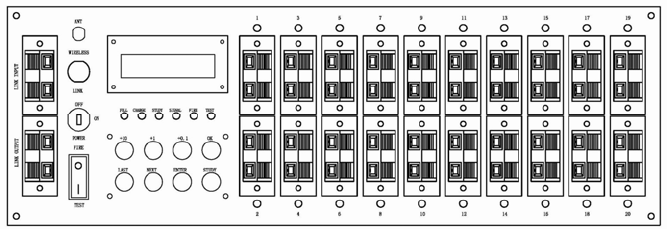
Instruction of FS 2012 type of Igniting Controller
Model: FS2012 Type
System features:
A. circuit ignition owns short circuit protection function, does not damage the chip.
B. Each host can control 20 groups of fireworks ignition
(150-200 meters for wireless remote control, 200-300 meters for wired remote control)
C. Way of Ignition:
1: ALL TIME IS SAME.
2: Each group can be set for different time.
D. Ignition time interval setting: 0.1-99.9 seconds
E. Both stand-alone and multiple machines in series are available.
F. Character type LCD display.
G. Use the rechargeable batteries, battery power can be checked
H. Even if the batteries are used up or removal, program design is still kept the same, must
be re-set for elimination.
System parameters:
Ignition storage battery parameters 12V. 3.2AH (6V X 2PCS)
Ignition instant ignition voltage ≥ 12V
Ignition instant ignition current ≥ 2 AH
Remote Control Battery: 9V battery (9V X 2PCS)
Instructions:
A. Power Supply Selection
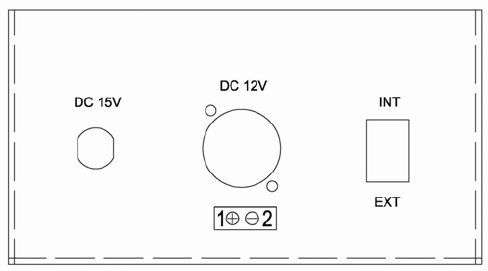
INT. means built-in power supply
EXT. means external power supply
External power supply 12-18V 1.3A-3.2A
B. Power lock is set at ON position, if the button switch is in the FIRE state, shown as
(-SWITCH-)
FATAL ERROR, Please turn off the power. Switch to TEST state after a reboot.
C. Under TEST state, 1 Press the MODE key to show ALL TIME IS SAME, press +10, +1, +0.1
to
process time setting, set your request of ignition time interval, press OK button to confirm
(disappearance of * symbol means confirmation). 2 Press the MODE button again to display
01 TO 02, then you can individually set the ignition time interval for each group, press +10,
+1, +0.1
for time setting, LAST and NEXT button for selecting the firing position, set your required
ignition
time interval, press OK button for confirmation (disappearance of * symbol means
confirmation),
each group for time setting need to press OK for confirmation (disappearance of * symbol
means
confirmation)
D: After completion of setting, check the setoff area, switch to FIRE state and wait for ignition
signal
after withdrawal of all staff.
E. If choose the wireless remote control ignition, set the switch to the WIRELESS position; If you
choose wired remote ignition, set the switch to the LINK position (requires line trigger 5V
above ).
F. Ignition head connection.
1: First, switch to the TEST position to prevent ignition errors in starting up.
2: Install corresponding test light for ignition head (green for light).
3: Switch to FIRE position and wait for the ignition signal.
3: Each ignition connector can be connected to each ignition, shown as following picture:
G: Code checking
1: Set WIRELESS / LINK on WIRELESS position, code checking operation can be processed
when
ignition switch is placed at TEST position, and ignition error in starting up can be prevented.
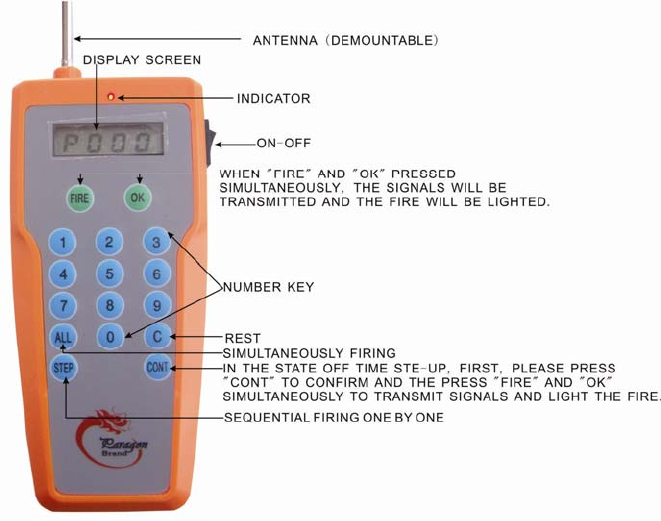
2: Press OK and FIRE button on remote control and STUDY button on ignition, STUDY indicator
lights
means completion of the code checking; (If press OK and FIRE button on remote control, not
press
STUDY on ignition, STUDY lights, means code is accordant, do not need for checking).
Instruction of Remote Control:
FCC Statement
This equipment has been tested and found to comply with the limits for a Class B digital device,
pursuant to part 15 of the FCC rules. These limits are designed to provide reasonable protection
against harmful interference in a residential installation. This equipment generates, uses and can
radiate radio frequency energy and, if not installed and used in accordance with the instructions,
may cause harmful interference to radio communications. However, there is no guarantee that
interference will not occur in a particular installation. If this equipment does cause harmful
interference
to radio or television reception, which can be determined by turning the equipment off and on, the
user is encouraged to try to correct the interference by one or more of the following measures:
-Reorient or relocate the receiving antenna.
-Increase the separation between the equipment and receiver.
-Connect the equipment into an outlet on a circuit different from that to which the receiver is
connected.
-Consult the dealer or an experienced radio/TV technician for help.
To assure continued compliance, any changes or modifications not expressly approved by the
party responsible for compliance could void the user’s authority to operate this equipment.
(Example- use only shielded interface cables when connecting to computer or peripheral devices).
This equipment complies with Part 15 of FCC RF Rules. Operation is subject to the following two
conditions:
1) This device may not cause interference and
2) This device must accept any interference, including interference that may cause undesired
operation of the device.