LIVALL Tech BH100 Sport Helmets User Manual
Shenzhen Qianhai Livall LOT Technology Co., Ltd. Sport Helmets Users Manual
User Manual
User Manual
SPORT HELMETS
Model:BH100
I. Introduction
This smart safe-riding helmet (hereinafter referred to as “bling helmet”) is made of the lightest and
safest materials, which makes it more comfortable and safer. Its fine ventilating structure inside
enables air to flow smoothly through so as to achieve the best cooling effect. It also has Bluetooth
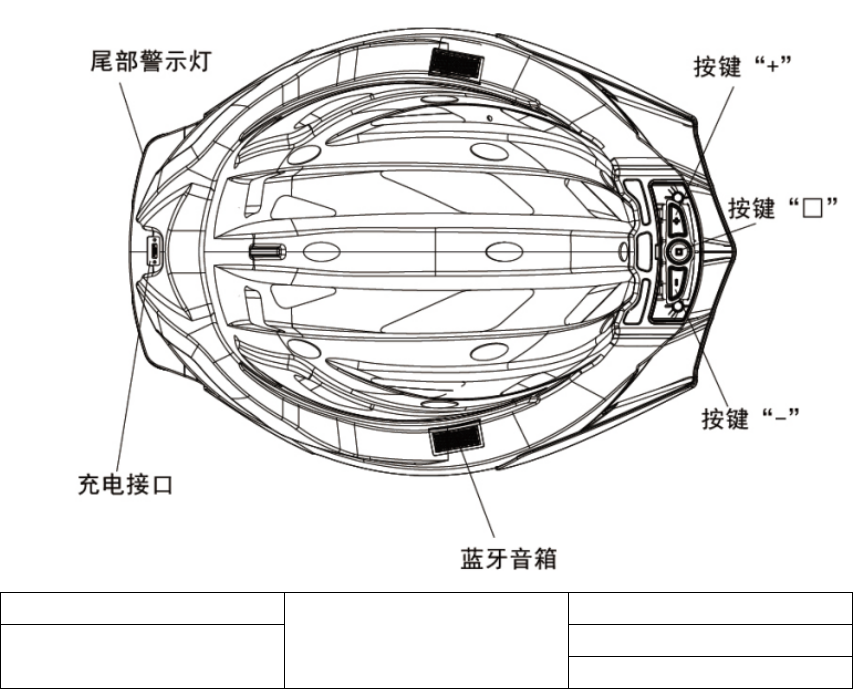
speaker, smart outline lighting and warning tail light.
Warning tail light
Bluetooth speaker
Button “+”
Charging port Button “□”
Button “-”
II. Packing list
One helmet one hag tag
One USB charging cable One warranty card
One product instruction
III. Wearing instruction
Usage:
This safety helmet adopts a fixed setting, easy to operate, putting on or taking off the helmet only
with the buckle. Flatten the drawstrings on both side and make them clinging to your face,
buckle up it when the helmet is tightly putted on. If the drawstrings become loose, please take off
the helmet and adjust them properly. When adjusting the drawstrings, please use one hand to fix
the buckle and then adjust the drawstrings within proper tightness. If you want to strengthen the
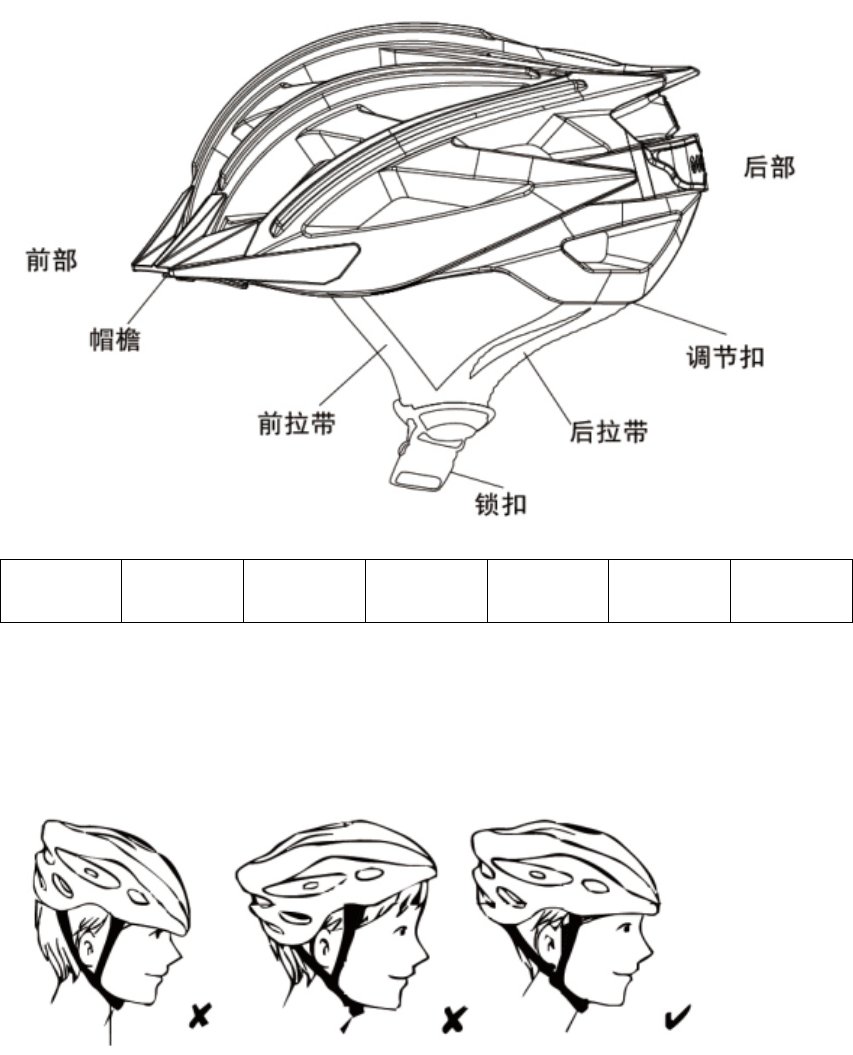
rear drawstring, pull it tight from its back, use one hand to fix the helmet and another one to fix
the drawstring under the chin and adjust the four drawstrings to a most appropriate position.
Front Brim Front
drawstring
Buckle Rear
drawstring
Adjustment
buckle
Back
Proper wearing
The helmet must be worn closely to your head. If you want to lower the front to cover your
forehead, you could make the drawstring close to your chin and loose the rear drawstring; if you
want to heighten the front of the helmet, loose the drawstring and tighten the rear drawstring.
Comfort adjustment:
In order to check the tightness of the helmet, you could put on the helmet and buckle up it, open
your mouth to feel whether the drawstrings are closely attached to you chin, and then move your
helmet forward and backward, if the helmet becomes loose, then the tightness of the drawstring
must be strengthened and make sure that the thickness of the pad is proper. The helmet could not
be able to move forth and back much distance; the helmet could not be taken off if the buckle is
not opened. Note: It is necessary to reaffirm whether the helmet is in a good condition every time
you wear.

Checking
Make sure that the helmet must be put on your head correctly and firmly . Readjust the tightness
of the drawstrings to a proper position if the helmet still shakes. For the best protection effect,
please make sure that the helmet is suitable for you and could be tightly wore. Check the
adjustment again every time you wear to ensure that the helmet could be closely put on your head.
IV. Operating Instruction
Start up:
Long press “□” for 2s till you hear the “start up” sounds, meanwhile the outline light and tail light
will flash twice in orange.
Power off:
When the device is in a state of working, long press “□” till you hear the “power off” sounds,
meanwhile the outline light and tail light would flash once in orange.
Connecting to Bluetooth earphone:
When the device is power off, long press “□” till you hear the “matching” sounds, means the
device starts matching; scan the device with your phone which the Bluetooth is available. and
click it to connect when spotting the equipment of “BH100”. The speakers on both sides will
make the noise of “matching completed” when the connection is completed.
Answer and hang up calls:
When there’s an incoming call, the device would give out notification voice, press “□” to answer
the call and long press for 1S to reject; during calls, press “□” to hang up.
Redial calls:
When the device is powered, quick press “□” twice to dial the last number.
Music player:
When the device is powered, press “□” to play music (need to open the music player APP in your
phone before this operation). Long press “-” to play the previous song and “+” the next song.
Livall Smart Safety Helmet
Volume adjustment:
During music playing or taking calls, press “+” to increase volume while “-” to decrease
Notification voice switches of Bluetooth speaker:
The default setting is English. When the product is powered, first hold “-” and then press “+” to
cycle switch languages, from EnglishÆChineseÆFrenchÆSpanish; when the language is selected,
loose “-”.
Charging:
Use the USB cable to connect the USB port beneath the tail light to the charger with USB (DC 5V)
port. When it’s connected, the two indicator lights in the middle of the tail light would flash red
(no such indicator under normal standby state) and green when the charging is done. The
electricity of the charger is suggested to be > 1A and the charging time about 3.5h.
Factory Reset:
Hold “□” till the outline light shows white, and about 20 seconds later, the white light would
automatically fade away and the product is reset.
V. Precautions
Temperature
The safety helmet would be damaged under over 150 0F (65.6 0C). Under hot weather, if the
helmet is put in dark vehicle or storage bag, its temperature would be even higher. Heat would
incur irregular misshaping to the surface of the helmet, like bubbling or pits. If this happens,
please discard this helmet immediately and replace it with a new one. To insure a proper use of
this helmet, please carefully read this Instruction before use so as to get to know the features,
performance, wearing, maintenance and other aspects of the product.
Safety precautions
This helmet is designed to burden damages and injuries from external impact. Although such
injury may seem minor, it could damage the helmet. If the helmet is damaged from falling or other
causes, please discard the helmet and replace it with a new one. Some accidents are unavoidable
for whatever safety helmet and the damaging degree may differ from the impacting; even at a slow
speed, severe head injuries or life threatening damages may incur. So please make sure that you’ve
completely and carefully read this Instruction and have arranged all possible protections before
riding the bike, scooter or wearing the roller skates.
Speaker usage instructions
This product is equipped with Bluetooth speaker, and taking calls during riding may distract the
user’s attention, so it is suggested that distracting functions like calls and voices be used after the
bike is stopped; listening to music during riding may affect user’s attention to surrounding sounds,
which may bring potential safety hazards, so it is suggested that the volume be lowered.
Warnings
This safety helmet is specially designed for bikes, so please don’t use it on other mobile vehicles,
like motor cars or motor bikes. No safety helmet could completely avoid all unpredicted impacting,
but for the best protection effect, the size of the helmet must be proper and the buckle must be
tightly buckled. Unless advised by the manufacturer, please refrain from modify or remove any
part of the helmet. Children should refrain from using during climbing or other activities, in case
of getting trapped or entangled from wearing this helmet.
Water warnings
This product is only resistant to short period rainfall, so to avoid any malfunctions, please try to
avoid riding during raining.
VI. Trouble-shooting of electronic functions
During use or after impact (without misshaping or cracking), if the following functions go wrong,
please follow the steps to fix them; If failed, please contact the after-sale service center.
Malfunctions
1. Unable to get started up
2. When starting up, only heard the start up notification sound but no indication of flashing outline
lights
3. After start up, it automatically powers off after a short period of use (maybe the battery is low)
4. After unplugging the charging cable, the charging light is still on and rebooting could not fix it.
5. Start up is normal, but the speaker has no notification sound or has just single tone or noises.
Trouble shooting steps
1. Charging for 1 to 2 hours
2. Check the tail light, main control (within the brim) and the inner side of two speakers too see
whether there’re clear cracks, if does, please manually push it in.
3. Factory reset, hold “□” till the outline light shows white, and about 20 seconds later, the white
light would automatically fade away and the product is reset. And then start it up, if the trouble is
not fixed, please contact the after sales center.
VII. Appendix Technical specifications:
Bluetooth:
Bluetooth distance: > 10m if no blocks
Speaker: Stereo 2*0.5W
Mic: -39dB array microphone (double MIC)
Outline light: 80 color LED
Tail light: 8 color LED + high concentrative lens
Buttons: three buttons, start up (play, pause, power off), volume + (next song), volume – (previous
song)
Charging port: MicroUSB
Electricity parameter: DC 5V/1A
Battery capacity: 2600mAH (9.6WH)
Charging time: about 3.5h
Battery life: >30h
Standby duration: >360h
Product size: 335*236*145
Product weight: nearly 0.5 kg
LIVALL Smart Safety Helmet

NOTE: This equipment has been tested and found to comply with the limits for a Class B digital
device, pursuant to part 15 of the FCC Rules. These limits are designed to provide reasonable protection
against harmful interference in a residential installation. This equipment generates, uses and can radiate
radio frequency energy and, if not installed and used in accordance with the instructions, may cause
harmful interference to radio communications. However, there is no guarantee that interference will not
occur in a particular installation. If this equipment does cause harmful interference to radio or television
reception, which can be determined by turning the equipment off and on, the user is encouraged to try to
correct the interference by one or more of the following measures:
—Reorient or relocate the receiving antenna.
—Increase the separation between the equipment and receiver.
—Connect the equipment into an outlet on a circuit different from that to which the receiver is
connected.
—Consult the dealer or an experienced radio/TV technician for help.
Thisdevicecomplieswithpart15oftheFCCrules.Operationissubjecttothefollowingtwo
conditions:
(1)thisdevicemaynotcauseharmfulinterference,and
(2)thisdevicemustacceptanyinterferencereceived,includinginterferencethatmaycause
undesiredoperation.
Changesormodificationstothisunitnotexpresslyapprovedbythepartyresponsiblefor
compliancecouldvoidtheuser'sauthoritytooperatetheequipment.
In order to comply with RF exposure requirements, a minimum
all persons distance of 5mm must be
maintained between the antenna and