LIVALL Tech MTX Bling Helmet User Manual

LIVALL Tech Co., Ltd. Bling Helmet

User Manual

 Quick Start Guide www.livall.com              MTL
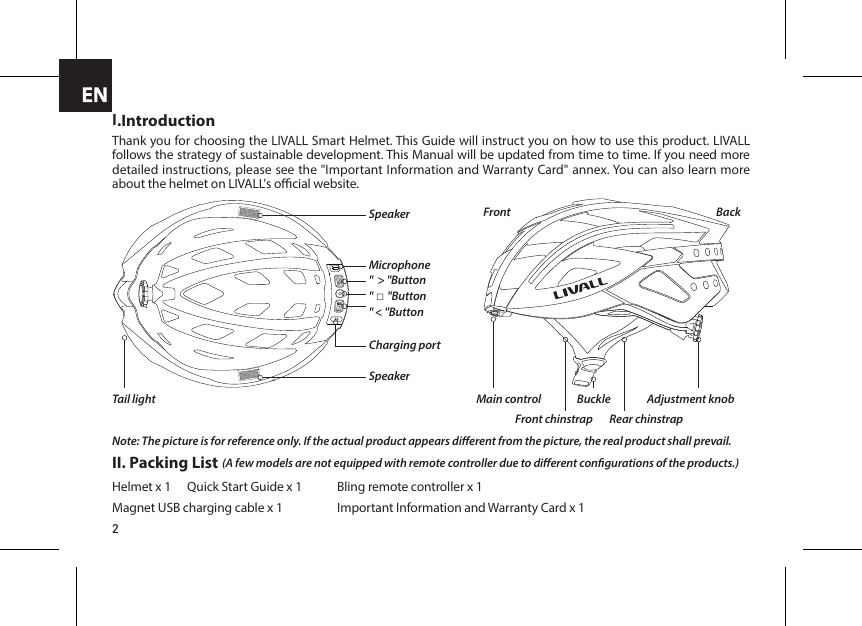
2I.IntroductionThank you for choosing the LIVALL Smart Helmet. This Guide will instruct you on how to use this product. LIVALL follows the strategy of sustainable development. This Manual will be updated from time to time. If you need more detailed instructions, please see the "Important Information and Warranty Card" annex. You can also learn more about the helmet on LIVALL's ocial website.Note: The picture is for reference only. If the actual product appears dierent from the picture, the real product shall prevail.(A few models are not equipped with remote controller due to dierent congurations of the products.)"  > "ButtonMicrophone"□"Button" < "ButtonCharging portSpeakerSpeakerTail lightFrontMain controlFront chinstrap Rear chinstrapAdjustment knobBuckleBackII. Packing ListHelmet x 1   Quick Start Guide x 1  Bling remote controller x 1 Magnet USB charging cable x 1  Important Information and Warranty Card x 1Adjust the length of the chinstrap
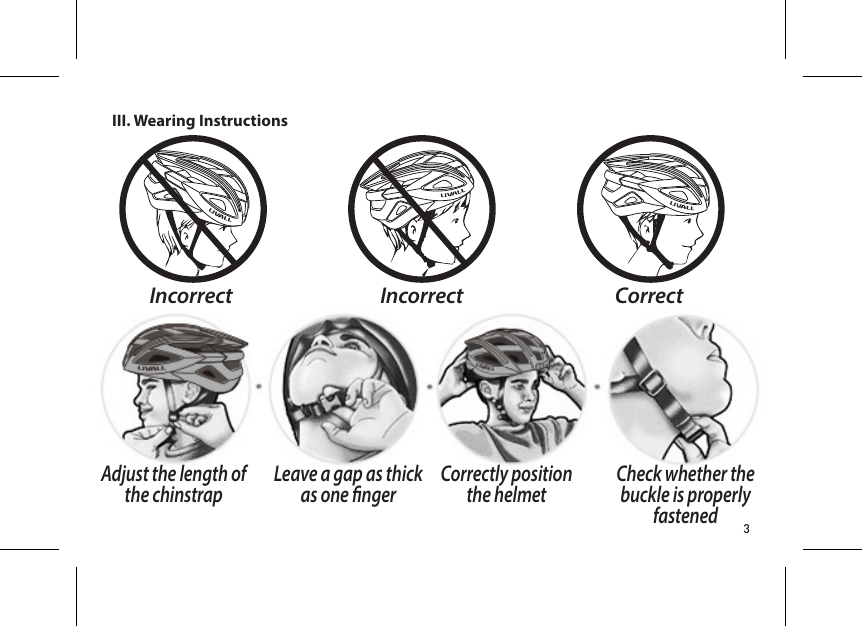
3III. Wearing InstructionsIncorrectIncorrect CorrectAdjust the length of the chinstrap Leave a gap as thick as one nger Correctly position the helmet Check whether the buckle is properly fastened
4IV. Operating Instructions(Please charge the battery before use.Some models of helmets are not equipped with Bluetooth speakers. The helmets without Bluetooth speakers could not take & make calls, listen to music and hear voice prompts.)Start-Up POWER ON"□" function button " < " button " < " button " > " buttonPress the " □" button for 3-to-5 secondsFirst hold the "<" button Then press the ">" button to switch between languages. You will hear a voice saying "POWER ON".The orange tail light will blink twice indicating Start-Up was successful. Change the language of the voice prompt(the default language is English)To switch the language of the voice prompt, follow the procedure below when in normal standby mode and disconnected from a phone(currently only English and Chinese are supported).Orange light
5IV. Operating Instructions(Please charge the battery before use.Some models of helmets are not equipped with Bluetooth speakers. The helmets without Bluetooth speakers could not take & make calls, listen to music and hear voice prompts.)Two "beeps""□" function buttonTurn on the device, which should be within 5 meters of the helmet. It will automatically connect the helmet.Place a device that is already ON near the helmet's main control.After the connection is established, it will be conrmed with two "beeps".(The helmets without Bluetooth speakers could not hear such voice prompts. Please check the taillight to see if the helmet is connected successfully.)When the warming light flashes and the helmet speakers emit two "beeps", it indicates that there is a device nearby requiring connection to the helmet.(The helmets without Bluetooth speakers could not hear such voice prompts.)Connecting for the rst time or switching devices(Please refer to specic functions of the helmet when using the remote controller keys.)≤5m1. Connecting for the rst timeOne helmet can be connected to up to three LIVALL-authorized devices at the same time. After the handlebar remote control is connected, press the "left" or "right" button to control the helmet’s corresponding indicator light. 2. Replacing devicePress the " □" button on the helmet within 10 seconds after you hear the beeps and conrm connection to the device.When pressing the arrow left or right key on the bling jet remote, the right or left turning signal appears.Two "beeps"
6Connect to the phone  (Tip: Once connected, it can control the music player as well as make and receive calls. To ensure the stability of the connection, please try to position your mobile phone in front of you.)Helmet Headset"Click to connect""Pairing...""□" function buttonWhen the device is o, press and hold the " □" button until you hear the "Pairing..." sound.After the connection is completed, you can play music as well as make and answer calls as followsTo Play/Pause Music:   Press the " □" button on the helmet or the handlebar remote control to play/pause music.Adjust Volume:   When calls are made or music is played, press the "</>" buttons on the helmet to adjust the  speaker volume.Previous Song/Next Song:  Press the "up/down" buttons on the handlebar remote control or press and hold "</>" buttons on  the helmet to cycle through the music.Answer/Reject Calls:   When there's an incoming call, press the " □" button to answer the call or press and hold to  hang up.Dial Back:   Two quick presses of the " □" button on the handlebar remote control or helmet to redial   the last outgoing call.Swith on the Bluetooth on your phone and scan for the "Helmet Headset" device.Click to connect. The speakers on both sides will make the "Connected" sound when the connection is completed."Connected"
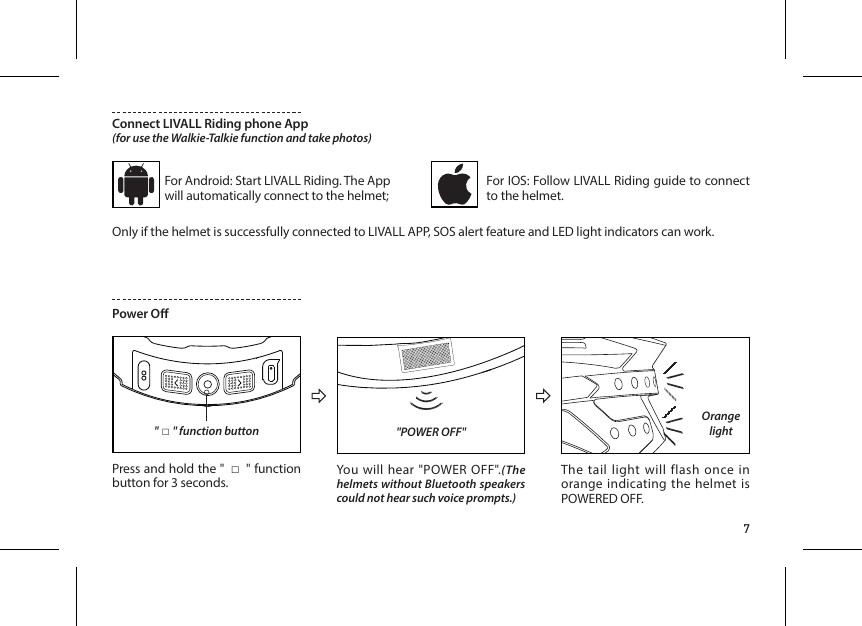
7Connect LIVALL Riding phone App(for use the Walkie-Talkie function and take photos)For Android: Start LIVALL Riding. The App will automatically connect to the helmet;For IOS: Follow LIVALL Riding guide to connect to the helmet.Only if the helmet is successfully connected to LIVALL APP, SOS alert feature and LED light indicators can work.Power O"POWER OFF""□" function button Press and hold the " □" function button for 3 seconds. You will hear "POWER OFF".(The helmets without Bluetooth speakers could not hear such voice prompts.)The tail light will flash once in orange indicating the helmet is POWERED OFF.Orange light
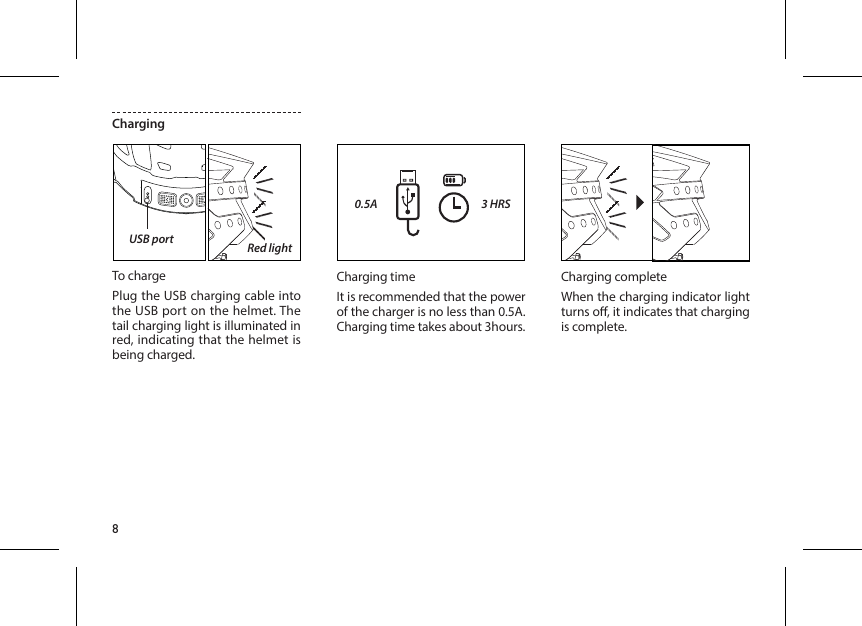
8ChargingTo chargePlug the USB charging cable into the USB port on the helmet. The tail charging light is illuminated in red, indicating that the helmet is being charged.Charging timeIt is recommended that the power of the charger is no less than 0.5A. Charging time takes about 3hours.Charging completeWhen the charging indicator light turns o, it indicates that charging is complete.USB port Red light0.5A 3 HRS
9LIVALL Riding APPLIVALL ON FACEBOOKBluetooth : Bluetooth distance : Charging port : Electricity parameter : Charging time : Battery life : Standby duration: BT 4.1 + HFP/HSP/A2DP + BLE 4.0Max. 10 metersMagnet USB Charging cableDC 5V/0.5A 3 hoursThe max. battery life of the light is 10 hours. Listening time for music  is 3-to-6 hours. Max. 180 daysTemperature :  Temperature for use: 0°C~40°C.  Recommended temperature for storage :   -20~45°CVI. Technical SpecicationsV. Considerations1. The helmet contains electronic parts inside. Please do not take a long ride in the rain although the helmet can prevent the rain from splashing. 2. After the helmet gets wet in the rain, the water droplets might occur in the chimney of tail LED lights. The water droplets will disappear when you put the helmet under the ventilation environment for 1-2 days. 3. The helmet contains the battery of 3.7V/450mAh. The battery capacity varies with temperature change. The battery life can decay when the helmet is used at low temperatures or below Zero degrees Celsius.4. Trying to clean the golden colour contacts of the charging plug sheet with metal or hard tools such as blades or tweezers is strictly forbidden. Please use cotton swabs with clean water or alcohol in case of cleaning. Please make sure the charging plug is clean and try while charging the helmet.5. If the electronic functions do not work, please charge the helmet for 3 hours and then check if it works normally.6. The helmet contains impact detection devices. Only if you connect your helmet with LIVALL APP, start ride mode on the APP and your helmet suers from the heavy impact, SOS alert feature can be triggered. Your emergency contacts set on LIVALL APP can accordingly receive your SOS messages.
10•  That the helmet can only protect if it ts well and that the buyer should try dierent sizes and choose the size which feels secure and comfortable on the head.•  That the helmet should be adjusted to t the user e.g. the straps positioned so that they do not cover the ears, the buckle positioned away from the jawbone and the straps and buckle adjusted to be both comfortable and rm.•  How the helmet should be position on the head to ensure the intended protection is provided (e.g. that it should be placed so as to protect the forehead and not be pushed too far over the back of the head.•  That a helmet cannot always protect against injury.•  That a helmet subjected to a severe impact should be discarded and destroyed.•  A statement of the danger of modifying or removing any of the original component parts of the helmet other than as recommended by the manufacturer, and that helmets should not be adapted for the purpose of tting accessories in a way not recommended by the manufacturerLIVALL's website :   www.livall.comPerformance standards: •  USA:  CPSC1203:1998, FCC Part 15 Rules•  Europe:  EN 62479:2010, EN 301 489-1 V1.9.2 (2011-09), EN 301 489-17 V2.2.1 (2012-09),  EN 300 328 V1.8.1 2012-06, EN 60950-1:2006+A11:2009+A1:2010+A12:2011 •  Australia:  AS/NZS 2063:2008+A1:2009, AS/NZS CISPR 22:2009+A1:2010, AS/NZS 4268:  2012+A1:2013, Radiation Protection Series Publication No. 3

Navigation menu