LYNX INNOVATION 888-700-213 10.1 inches Tablet User Manual
LYNX INNOVATION LTD 10.1 inches Tablet Users Manual
Contents
- 1. User manual
- 2. Users Manual
Users Manual

User’sGuide
‐10.1inchestablet
Thishandbookcontainsimportantsecuritymeasuresandthecorrectuseoftheproduct
information.Inordertoavoidaccident,pleasemakesuretoreadingthemanualcarefully
beforeusethedevice.

1
Attention:
Thisinstructioncontainsthecorrectuseoftheproductinformation,inordertoavoid
accidents.Pleasemakesuretoreadingthemanualcarefullybeforeusethedevice.
Donotusealcohol,diluentsoranyotherchemicalstocleanthesurface,
otherwise,itwillbecorrodedandevendamaged.
Pleasedon’tbeinhightemperature,moistureorverydustplace.
Pleasechoosetheappropriatevolume.Useheadphonesshouldnotbetoobig
volume,iffeeltinnitus,lowerthevolumeorstopusingit.
Pleasechargethefollowingcondition,
A. ThebatterypowerICONSshowshavenopower.
B. Thesystemautomaticallyshutoff,startupafterpoweroffsoon.
C. Operationbuttonsnoresponse.
D. Themachinethatthetoprightcornershowredicons.
Whenthedeviceintheformatorongoinguploadanddownloadfile,please
don’tsuddenlydisconnect,thiscouldcauseapplicationerror.
USBjustonlybeusedfordatatransmission.
Performanceandfunctionalityoftheproductmaybedifferentiftheversionof
softwareandhardwareisdifferent.Anychangewillbewithoutnotice.Our
companyreservestherighttoimprovetheproducts.
Ifyouhaveanyquestionsaboutthetablet,pleasecontactwithus.Attemptto
disassembletheproductmaydamageitandavoidyourwarranty.Userswillbe
responsibleforalltheconsequencescausedbydisassembling.
MainFunctions:
10.1”1920*1200capacitivetouchscreen.
BasedontheAndroid5.1.1operatingsystemandsupportsWiFiandBTfunction.
SupportsMP3/AAC/OGG/WAVforaudio.
SupportsautomaticbrowseforpictureinJPG/BMP/JPEG/GIF.
SupportsAVI/3GP/MP4/MKV/MOV/TS/FLVandupto2160Pforvideo.
SupportsOTGfunction,externalmouseandkeyboard.
OperationalDescription:
Description

2
Theproductisa10.1inchestablet‐PCbasedonRockchips3288processorchipset
platformwithAndroidOS5.1.1.ThemajorityofthetabletPCcircuitryconsistsoffifteen
devicechipsets,andthesechipsetsatedividedintodifferentfunctionsub‐systemor
units.
RK3288processorisbasedonquad‐coreCortex‐A17withseparatelyNEON
coprocessor.
Manyembeddedpowerfulhardwareenginesprovideoptimizedperformanceforhigh‐
endapplication.RK3288supportsalmostfull‐format;includeH.265decoderby
2160p@60fps,H.264decoderby2160p@24fps,alsosupportH.264/MVC/VP8encoder
by1080p@30fps,high‐qualityJPEGencoder/decoder,andspecialimagepreprocessor
andpostprocessor.
RK3288hashigh‐performancedualchannelexternalmemoryinterface(DDR3/DDR3L
/LPDDR2/LPDDR3)capableofsustainingdemandingmemorybandwidth,alsoprovidesa
completesetofperipheralinterfacetosupportveryflexibleapplications.
ForWLANandBluetooth:CPUsenduplinkdataoverUSB‐bustoAP6335,AP6335
modulateittogenerateRFsignalsoverafrequencyrangeof2.400GHz~2.497GHzand
4.9GHz~5.845GHz,andamplifyRFsignalisbyinteramplifier,thensendittotheWIFI/BT
antennathroughtheFIRfilter.Intheotherway,antennareceiversignalsfromtheair,
sendthemtotheAP6335,AP6335demodulatesignalsandtransferusefuldatabackto
theCPU.Use40MHzclock.
PortfunctionDescription
DCPort:+12VDCPowerSocket.2.5mmbarreltype.
OpticalPort:YoucanuseitconnecttoSPDIFaudioproducts.
AudioPort:Youcanuseitconnectto3.5mmsocketaudiodevices.
HDMIPort:YoucanuseitconnecttoHDvideodisplay.
USBPort:justonlybeusedfordatatransmission.
MicroCardSocket:Addsadditionalstoragetotablet.
EthernetSocket:Ethernetnetworkport.
OTGPort:UseitconnecttoPCdebug.
RecPort:Youcanuseitupdatefirmware.
BasicOperations
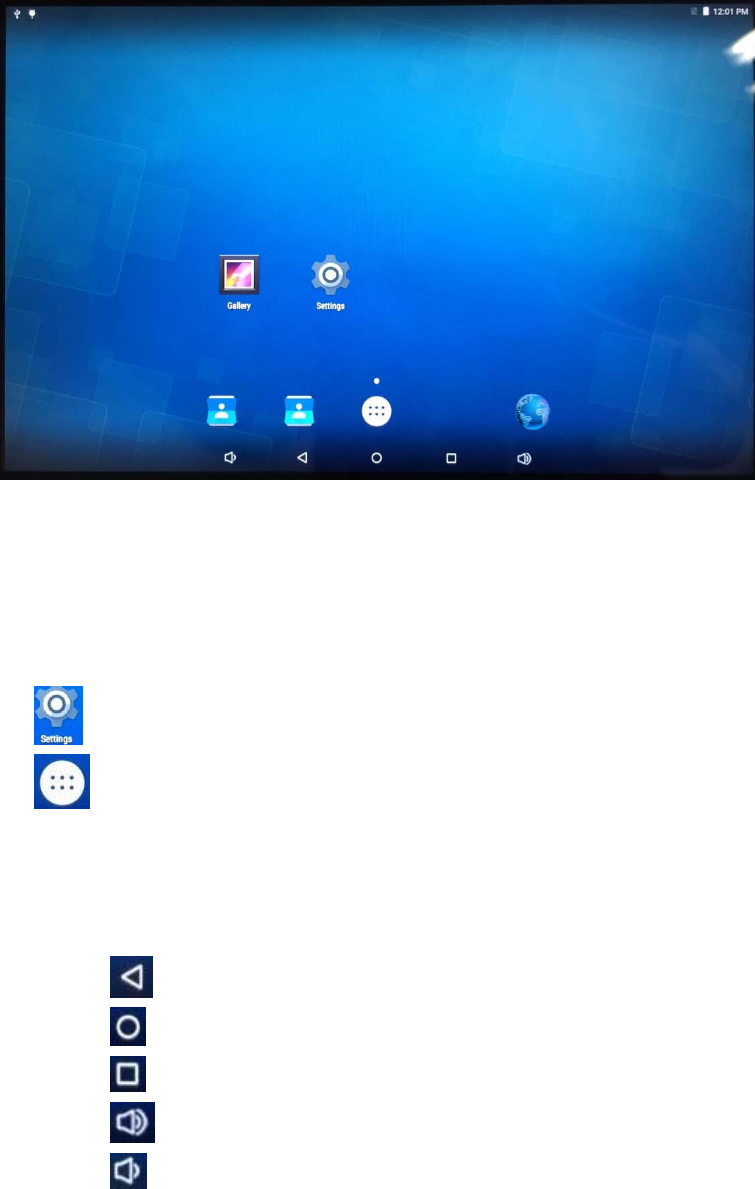
HomeScreen:Afterstartup,willenterthemaininterface.
3
Inthemaininterface,youcan:
ManagementthemaininterfacesoftwareICONS:longpresstheiconsfor3
second,aftertheiconswillbigger,thenyoucandraganywhereintheinterface.
Deleteicons:longpresstheiconsfor3second,dragtheiconstotheRemove
Binicon,onceitbecomered,removeyourhand,afterthatyoucandeleteicon.
Clicktheiconandenterthesettinginterface.
Clicktheiconandentertheapplicationprograminterface.Inthe
applicationprograminterface,thetabletwilldisplayallappsscreen.Touchany
applicationiconandentertherelevantapplicationprograminterface.
Statusbardescribe,
Clicktheiconandreturntotheupperinterface.
Clicktheiconandreturntothemainscreen.
Clicktheiconandopenthelistofapplicationwhichrecentlyused.
Clicktheiconandincreasesoundvolume.
Clicktheiconanddecreasesoundvolume.
4
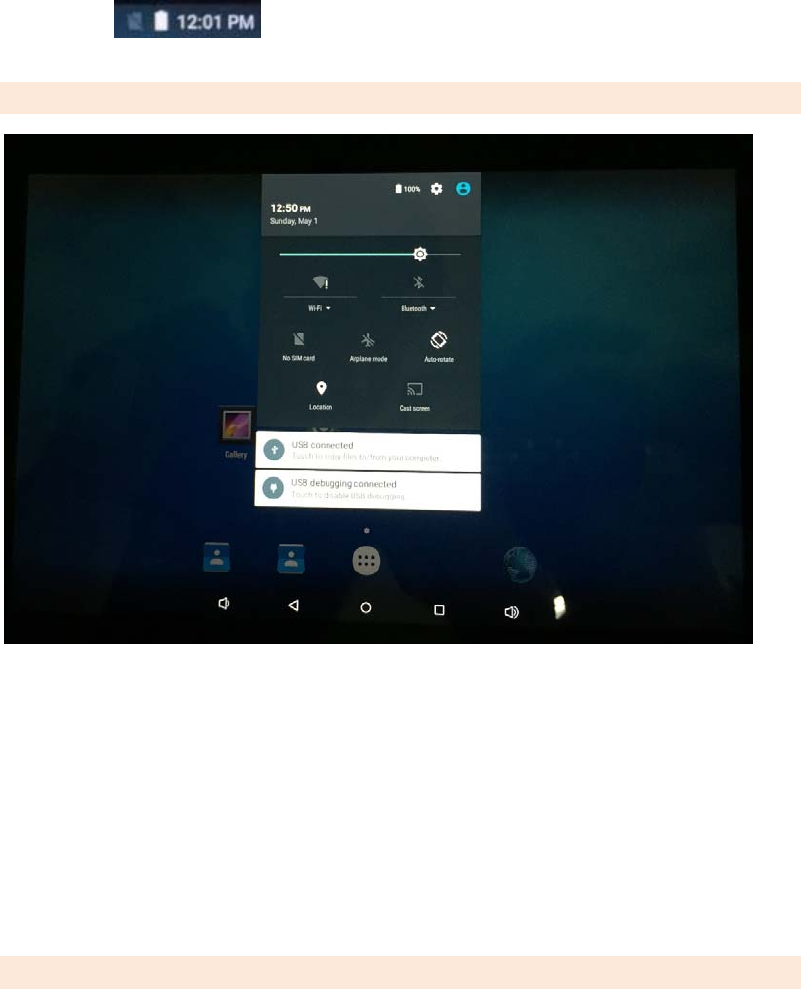
Statusbar,Itisusedtoshowthecurrentstatusof
networkconnectionandwificonnection,batterylifeandsystemtime.
Drop‐downMenu
Youcanslideyourfingerfromthetopofthescreentothebottom,thenitshowsthe
Drop‐downMenu.Inthisinterface,youcanadjustthebrightnessofthescreen,turn
on/offWifi,Bluetooth,AirplaneMode,Auto‐rotateandsoon.
Youcanslideyourfingerfromthebottomofthescreentothetoptoclosethedrop‐
downmenu.
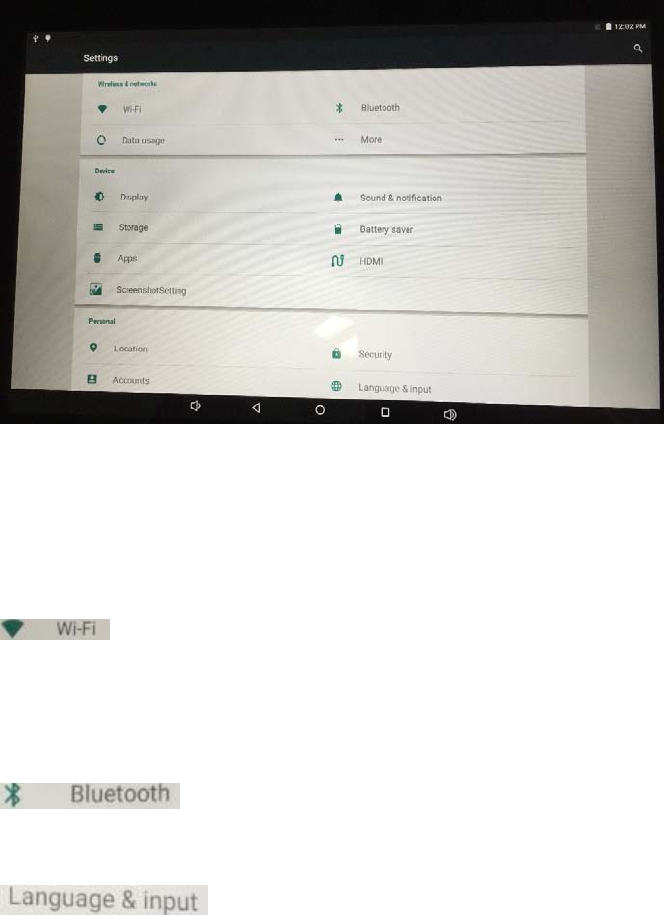
Setting
5
Inthisinterface,youcansearchWiFiinternet,Bluetooth,Sound,Display,Storage,
Battery,App,Security,Date&Time,Language&Input,Accounts,abouttablet
andsoon.
WiFiInternetSettings:
Thefirststep:openWi‐Fiandthesystemautomaticallyscanthe
availablenetwork.
Thesecondstep:selecttargetnetworkandinputthecorrectnetwork
password.Select“Connect”.
BluetoothSetting:
Clickthisicon,youcanopenyourBluetoothaccounttomatchothers
accountthenyoucantransferorreceivedocument.
Language&inputsetting:
Clickthisicon,youcanchangedifferentlanguage&input.
6
FCCStatement
Thisdeviceanditsantennamustnotbelocatedoroperatinginconjunctionwithany
otherantennaandtransmitter.
Thisdevicecomplieswithpart15oftheFCCrules.Operationissubjecttothefollowing
twoconditions:(1)thisdevicemaynotcauseharmfulinterference,and(2)thisdevice
mustacceptanyinterferencereceived,includinginterferencethatmaycauseundesired
operation.
NOTE:ThemanufacturerisnotresponsibleforanyradioorTVinterferencecausedby
unauthorizedmodificationstothisequipment.Suchmodificationscouldvoidtheuser’s
authoritytooperatetheequipment.
NOTE:ThisequipmenthasbeentestedandfoundtocomplywiththelimitsforaClassB
digitaldevice,pursuanttopart15oftheFCCRules.Theselimitsaredesignedtoprovide
reasonableprotectionagainstharmfulinterferenceinaresidentialinstallation.This
equipmentgeneratesusesandcanradiateradiofrequencyenergyand,ifnotinstalled
andusedinaccordancewiththeinstructions,maycauseharmfulinterferencetoradio
communications.However,thereisnoguaranteethatinterferencewillnotoccurina
particularinstallation.Ifthisequipmentdoescauseharmfulinterferencetoradioor
televisionreception,whichcanbedeterminedbyturningtheequipmentoffandon,the
userisencouragedtotrytocorrecttheinterferencebyoneormoreofthefollowing
measures:
‐Reorientorrelocatethereceivingantenna.
‐Increasetheseparationbetweentheequipmentandreceiver.
‐Connecttheequipmentintoanoutletonacircuitdifferentfromthattowhich
thereceiverisconnected.
RFexposureinformation:ThisequipmentcomplieswithFCCradiationexposure
limitssetforthforanuncontrolledenvironment.Thisequipmentshouldbe
installedandoperatedwithminimumdistance20cmbetweentheradiator&
yourbody.
Changesormodificationsnotexpresslyapprovedbythepartyresponsiblefor
compliancecouldvoidtheuser’sauthoritytooperatetheequipment.
7
SafetyPrecautions
Readthesesimpleguidelinesbeforeusingyourdevice.Notfollowingthemmaybe
dangerousorillegal.
Aircraft
Switchoffinaircraftandfollowanyrestrictions.Wirelessdevicescancauseinterference
inaircraft.
Vehicles
Neveruseyourdevicewhiledriving.Placeitinasafeplace.Positionyourdevicewithin
easyreach.Beabletoaccessyourdevicewithoutremovingyoureyesfromtheroad.
Electronicdevices
Insomecircumstancesyourdevicemaycauseinterferencewithotherdevices.
Potentiallyexplosiveenvironments
Switchoffyourdevicewheninanyareawithapotentiallyexplosiveatmosphere,and
obeyallsignsandinstructions.Sparksinsuchareascouldcauseanexplosionorfire
resultinginbodilyinjuryorevendeath.
Pacemakersandothermedicaldevices
Pacemakermanufacturersrecommendthataminimumseparationof8inchesbe
maintainedbetweenawirelessdeviceandapacemakertoavoidpotentialinterference
withthepacemaker.
Operationofanyradiotransmittingequipment,includingwirelessphonesmay
interferencewiththefunctionalityofinadequatelyprotectedmedicaldevices.Consulta
physicianorthemanufacturerofthemedicaldeviceto18determinesiftheyare
adequatelyshieldedfromexternalRFenergyorifyouhaveanyquestions.Switchoff
yourdeviceinhealthcarefacilitieswhenanyregulationspostedintheseareasinstruct
youtodoso.
Operatingenvironment
Whenconnectingtootherdevice,readitsuserguidefordetailedsafetyinstructions.Do
notconnectincompatibleproducts.Donotplaceyourdeviceintheairbagdeployment
8
area.Usethedeviceonlyinitsnormaloperatingpositionsasexplainedintheproduct
documentation.Alwaysswitchoffyourdevicewhenitsuseisprohibitedorwhenitmay
causeinterferenceanddanger.
RFExposureInformation(SAR)
Thisdeviceisdesignedandmanufacturednottobeexceededtheemissionlimitsfor
exposuretoradiofrequencyRFenergysetbytheFederalCommunicationsCommission
oftheUnitedStates.Theexposurestandardforwirelessdevicesemployingaunitof
measurementisknownastheSpecificAbsorptionRate(SAR),andtheSARlimitsetby
FCCis1.6W/kg.ThisdeviceiscompliedwithSARforgeneralpopulation/uncontrolled
exposurelimitsinANSI/IEEEC95.1‐1992,andhasbeentestedinaccordancewiththe
measurementmethodsandproceduresspecifiedinOETBulletin65SupplementC.This
devicehasbeentested,andmeetstheFCCRFexposureguidelineswhentestedwiththe
devicedirectlycontactedtothebody.
RFexposurecompliancewithanybody‐wornaccessory,whichcontainsmetal,wasnot
testedandcertified,andusesuchbody‐wornaccessoryshouldbeavoided.
Areaswithpostedregulations
Switchoffyourdevicewhenanyregulationspostedintheseareasinstructyoutodoso.
10.1 inches tablet
9
Clarification
We, Jiaxing Lynx Displays Co., Ltd,
hereby clarify that this User Manual of
Jiaxing Lynx Displays Co., Ltd
Date: Jan 13th, 2014