Lee s High Tech Enterprise Co 9309F24 Industrial Radio Remote Controller User Manual F24 1028

Lee's High-Tech Enterprise Co Ltd Industrial Radio Remote Controller F24 1028

User Manual

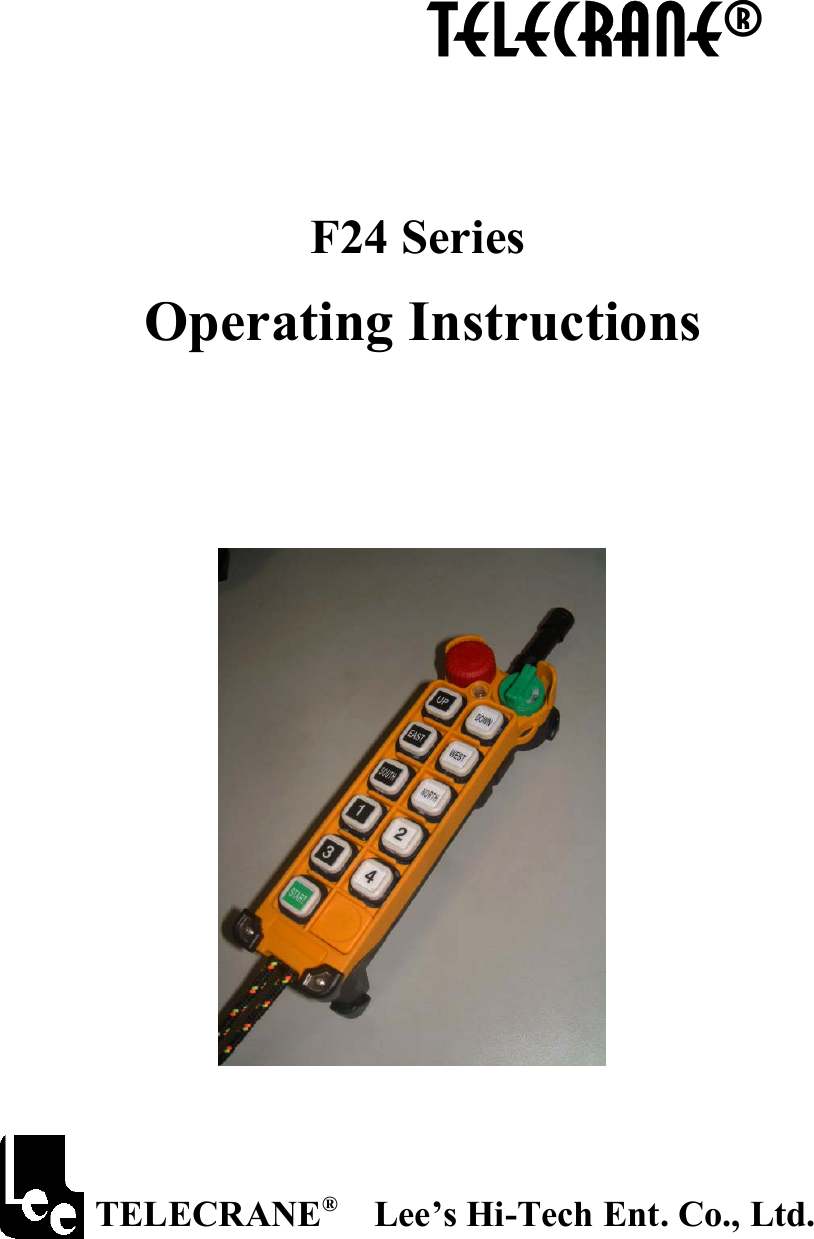
           TELECRANE®    F24 Series  Operating Instructions                                                TELECRANE®  Lee’s Hi-Tech Ent. Co., Ltd.
 1   Table of Contents                                   !  Warranty & Precautions of Operation..………….………..2                           !  !  Appendix I: Definition of Function Terminology…………6
 2   FCC Caution: "Changes or modifications not expressly approved by the party responsible for compliance could void the user's authority to operate the equipment."  Warranty Lee’s Hi-Tech Enterprises Co., Ltd. guarantees that this product meets its published specifications at the time of shipment from the factory. Under proper installation it should work as expected.  Warranty Period   This equipment is warranted against defects in material and manufacturing for a period of one year from the date of shipment. During the warranty period, TELECRANE is responsible for necessary repairs as long as the product can be proved to be defective. For warranty service or repair this product must be returned to a service facility designated by TELECRANE. Buyer will pay shipping charges to TELECRANE while TELECRANE will pay return shipping charges.    Excluded Items             This warranty does not include consumptive parts such as batteries, fuses, buttons, relays. Also this warranty does not cover defects caused by improper installation, improper or insufficient maintenance, unauthorized modification, improper operation, ignorance of environmental specifications, or improper software or interfacing. Remarks No other warranty is expressed or implied, except for the above mentioned.◎ The remedies provided herein are the buyer’s sole and exclusive remedies. TELECRANE shall not be liable for any ◎direct, indirect, special, incidental or consequential damages.   Attention  ◎ Never dismantle the equipment by any unauthorized personnel, or equipment may be damaged. ◎ After finishing operation of TELECRANE radio controller shut off main power to the crane, power to receiver, and remove transmitter key. If transmitter’s power is controlled by “rotary key switch”, then need turn the key to “OFF” position and remove it. ◎ The crane should be equipped with main power relay, limit switch and other safety devices.   Precautions ( I )   To avoid any interference, the receiver must be placed as far as possible from frequency inverter and   power cable as possible.  Precaution ( II ) The receiver should be installed on the top of the electrical control box. Do not mount the receiver inside the electrical control box.  Emergency In case of Emergency, please follow the procedure below and contact the distributor for service immediately.  1.  Press EMS button of transmitter. 2.  Remove the key from transmitter. 3.  Switch off the main power of crane. 4.  Contact distributor nearest you immediately.  F24 Warranty & Precautions of Operation
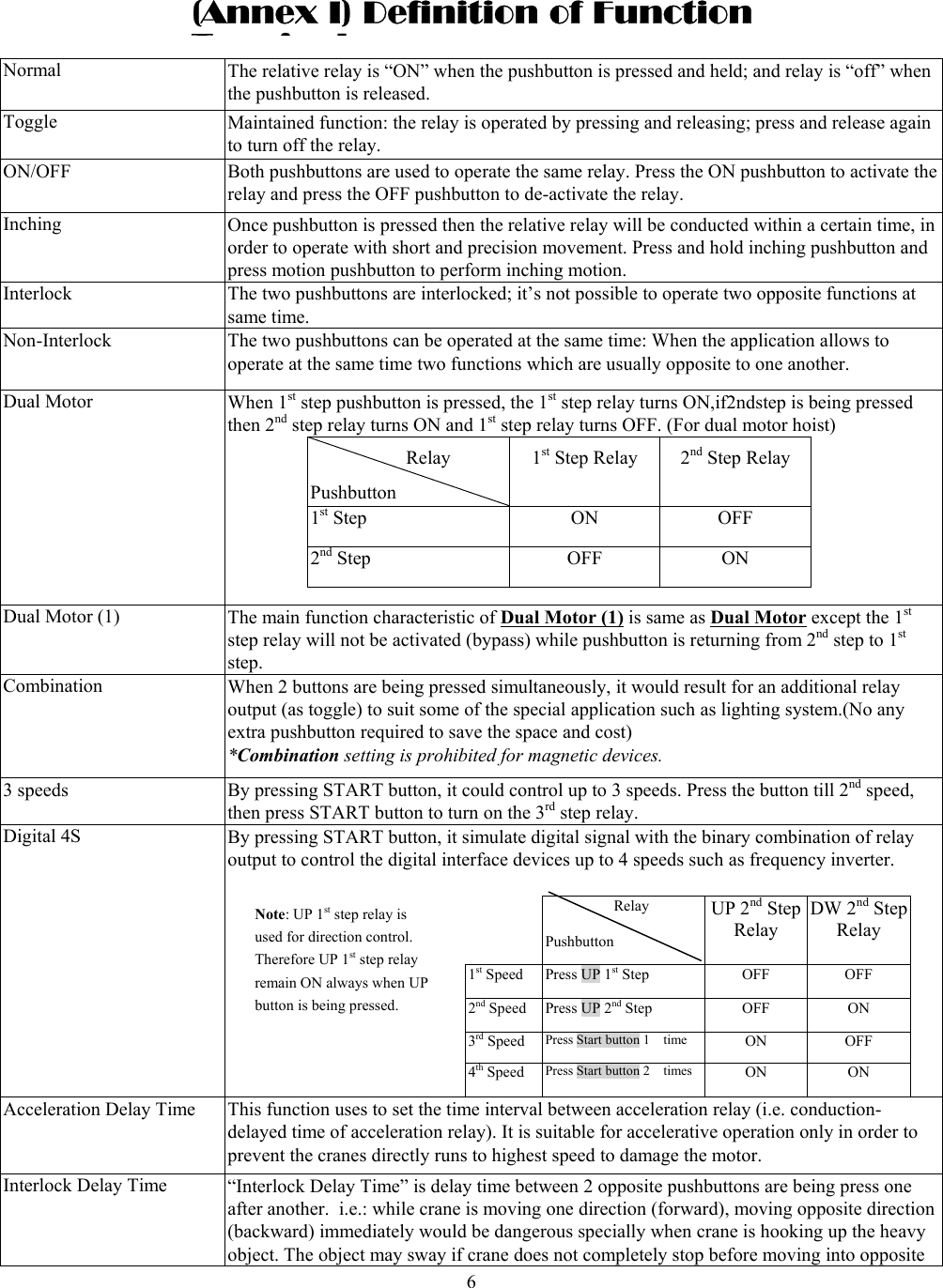
 6  Normal The relative relay is “ON” when the pushbutton is pressed and held; and relay is “off” when the pushbutton is released. Toggle Maintained function: the relay is operated by pressing and releasing; press and release again to turn off the relay. ON/OFF  Both pushbuttons are used to operate the same relay. Press the ON pushbutton to activate the relay and press the OFF pushbutton to de-activate the relay. Inching  Once pushbutton is pressed then the relative relay will be conducted within a certain time, in order to operate with short and precision movement. Press and hold inching pushbutton and press motion pushbutton to perform inching motion. Interlock  The two pushbuttons are interlocked; it’s not possible to operate two opposite functions at same time. Non-Interlock  The two pushbuttons can be operated at the same time: When the application allows to operate at the same time two functions which are usually opposite to one another. Dual Motor  When 1st step pushbutton is pressed, the 1st step relay turns ON,if2ndstep is being pressed then 2nd step relay turns ON and 1st step relay turns OFF. (For dual motor hoist)           Relay Pushbutton 1st Step Relay  2nd Step Relay  1st Step  ON  OFF 2nd Step  OFF  ON  Dual Motor (1)  The main function characteristic of Dual Motor (1) is same as Dual Motor except the 1st step relay will not be activated (bypass) while pushbutton is returning from 2nd step to 1st step. Combination  When 2 buttons are being pressed simultaneously, it would result for an additional relay output (as toggle) to suit some of the special application such as lighting system.(No any extra pushbutton required to save the space and cost)     *Combination setting is prohibited for magnetic devices. 3 speeds By pressing START button, it could control up to 3 speeds. Press the button till 2nd speed, then press START button to turn on the 3rd step relay. Digital 4S By pressing START button, it simulate digital signal with the binary combination of relay output to control the digital interface devices up to 4 speeds such as frequency inverter.      Relay   Pushbutton          UP 2nd Step Relay DW 2ndStep Relay 1st Speed  Press UP 1st Step  OFF  OFF 2nd Speed  Press UP 2nd Step OFF ON 3rd Speed  Press Start button 1    time  ON OFF 4th Speed  Press Start button 2    times ON ON Acceleration Delay Time  This function uses to set the time interval between acceleration relay (i.e. conduction-delayed time of acceleration relay). It is suitable for accelerative operation only in order to prevent the cranes directly runs to highest speed to damage the motor. Interlock Delay Time  “Interlock Delay Time” is delay time between 2 opposite pushbuttons are being press one   after another. i.e.: while crane is moving one direction (forward), moving opposite direction(backward) immediately would be dangerous specially when crane is hooking up the heavy object. The object may sway if crane does not completely stop before moving into opposite (Annex I) Definition of Function Til Note: UP 1st step relay is used for direction control. Therefore UP 1st step relay remain ON always when UP button is being pressed.
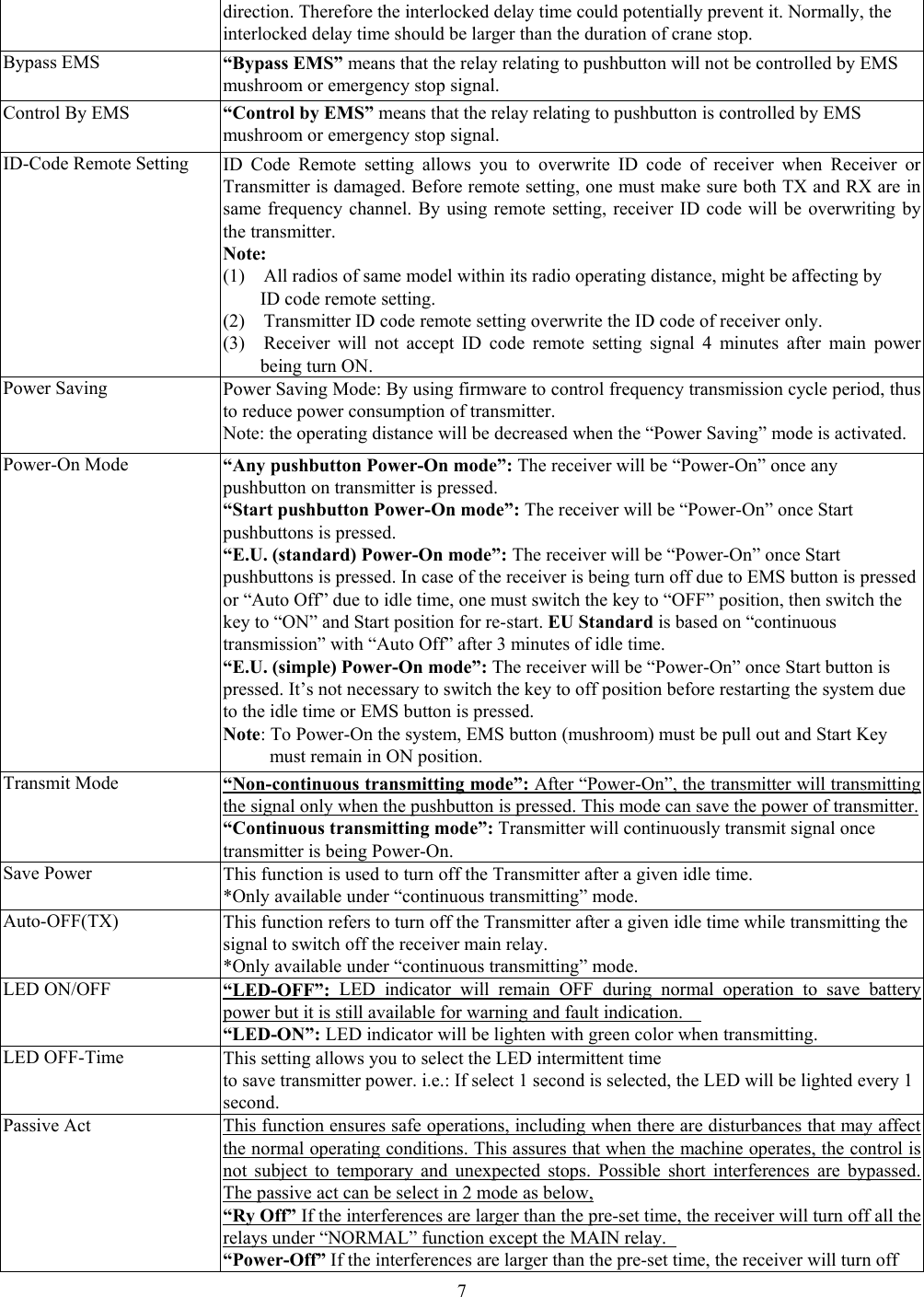
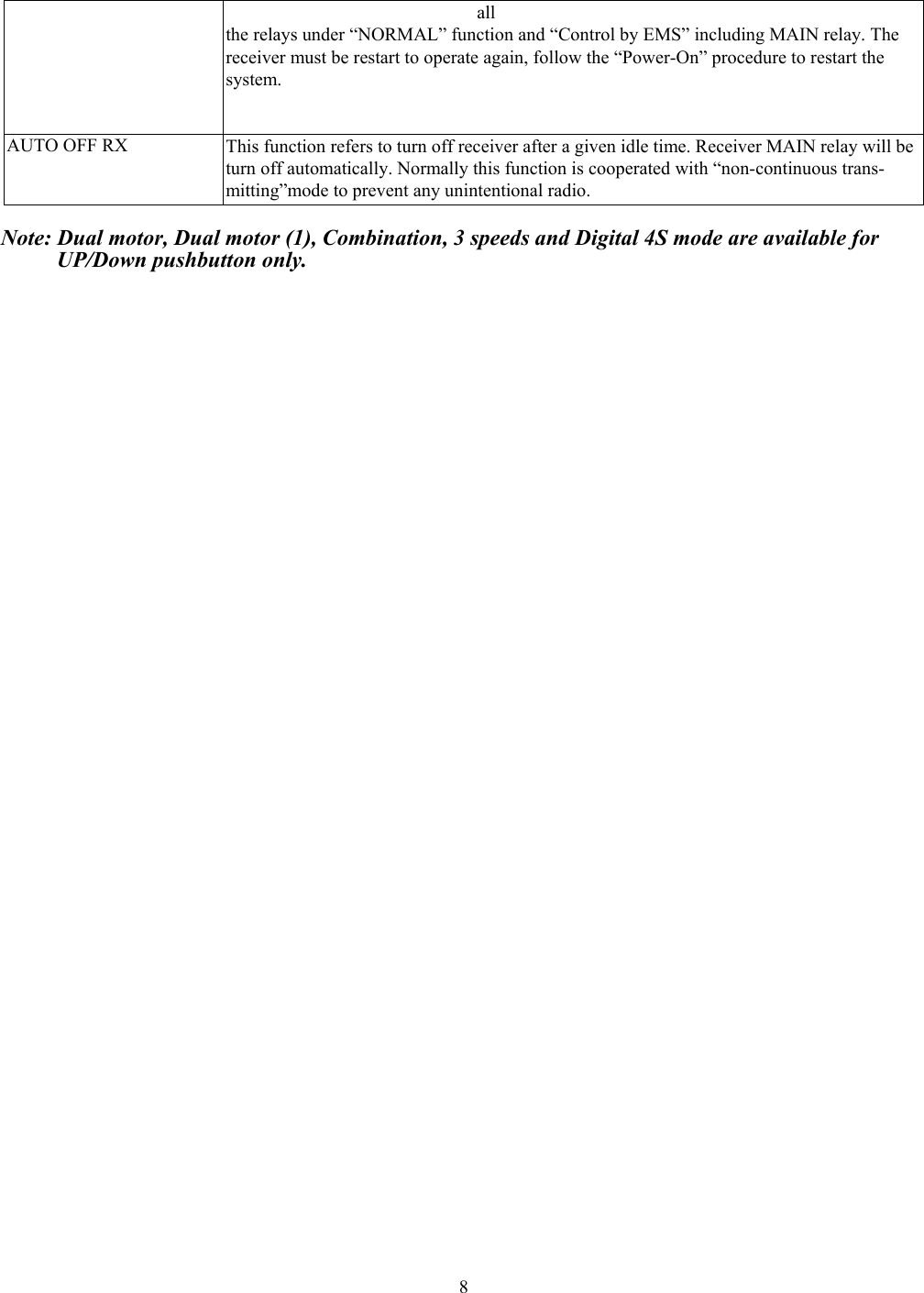
 7direction. Therefore the interlocked delay time could potentially prevent it. Normally, the   interlocked delay time should be larger than the duration of crane stop. Bypass EMS  “Bypass EMS” means that the relay relating to pushbutton will not be controlled by EMS mushroom or emergency stop signal. Control By EMS  “Control by EMS” means that the relay relating to pushbutton is controlled by EMS mushroom or emergency stop signal. ID-Code Remote Setting ID Code Remote setting allows you to overwrite ID code of receiver when Receiver or Transmitter is damaged. Before remote setting, one must make sure both TX and RX are insame frequency channel. By using remote setting, receiver ID code will be overwriting by the transmitter. Note:  (1)    All radios of same model within its radio operating distance, might be affecting by   ID code remote setting. (2)    Transmitter ID code remote setting overwrite the ID code of receiver only.   (3)  Receiver will not accept ID code remote setting signal 4 minutes after main power being turn ON. Power Saving  Power Saving Mode: By using firmware to control frequency transmission cycle period, thus to reduce power consumption of transmitter.   Note: the operating distance will be decreased when the “Power Saving” mode is activated. Power-On Mode  “Any pushbutton Power-On mode”: The receiver will be “Power-On” once any pushbutton on transmitter is pressed. “Start pushbutton Power-On mode”: The receiver will be “Power-On” once Start pushbuttons is pressed. “E.U. (standard) Power-On mode”: The receiver will be “Power-On” once Start pushbuttons is pressed. In case of the receiver is being turn off due to EMS button is pressed or “Auto Off” due to idle time, one must switch the key to “OFF” position, then switch the key to “ON” and Start position for re-start. EU Standard is based on “continuous transmission” with “Auto Off” after 3 minutes of idle time.     “E.U. (simple) Power-On mode”: The receiver will be “Power-On” once Start button is pressed. It’s not necessary to switch the key to off position before restarting the system due to the idle time or EMS button is pressed. Note: To Power-On the system, EMS button (mushroom) must be pull out and Start Key must remain in ON position. Transmit Mode  “Non-continuous transmitting mode”: After “Power-On”, the transmitter will transmitting the signal only when the pushbutton is pressed. This mode can save the power of transmitter.“Continuous transmitting mode”: Transmitter will continuously transmit signal once   transmitter is being Power-On. Save Power    This function is used to turn off the Transmitter after a given idle time. *Only available under “continuous transmitting” mode. Auto-OFF(TX)  This function refers to turn off the Transmitter after a given idle time while transmitting the signal to switch off the receiver main relay. *Only available under “continuous transmitting” mode. LED ON/OFF  “LED-OFF”: LED indicator will remain OFF during normal operation to save battery power but it is still available for warning and fault indication.     “LED-ON”: LED indicator will be lighten with green color when transmitting.   LED OFF-Time This setting allows you to select the LED intermittent time   to save transmitter power. i.e.: If select 1 second is selected, the LED will be lighted every 1 second. Passive Act  This function ensures safe operations, including when there are disturbances that may affect the normal operating conditions. This assures that when the machine operates, the control is not subject to temporary and unexpected stops. Possible short interferences are bypassed. The passive act can be select in 2 mode as below, “Ry Off” If the interferences are larger than the pre-set time, the receiver will turn off all the relays under “NORMAL” function except the MAIN relay.   “Power-Off” If the interferences are larger than the pre-set time, the receiver will turn off
 8all  the relays under “NORMAL” function and “Control by EMS” including MAIN relay. The receiver must be restart to operate again, follow the “Power-On” procedure to restart the   system. AUTO OFF RX  This function refers to turn off receiver after a given idle time. Receiver MAIN relay will be turn off automatically. Normally this function is cooperated with “non-continuous trans-   mitting”mode to prevent any unintentional radio.  Note: Dual motor, Dual motor (1), Combination, 3 speeds and Digital 4S mode are available for        UP/Down pushbutton only.

Navigation menu