Lee s High Tech Enterprise Co 9311F2212 Industrial Radio Control Transmitter User Manual 260e 300 313F22 12D manual

Lee's High-Tech Enterprise Co Ltd Industrial Radio Control Transmitter 260e 300 313F22 12D manual

User Manual

  1 Installation & Operation Manual  F22-12D Industrial Radio Remote Controller                       Lee’s Hi-tech Ent. Co., Ltd.
  2 Table Of Contents  Safety Considerations ------------------------------------------------------------ 3    Part. 1      Operator’s Manual              Chapter 1      Warranty -----------------------------------------------------4         Chapter 2      Precautions Of Operation ----------------------------------5         Chapter 3      Standard Accessories ---------------------------------------8         Chapter 4      Operation -----------------------------------------------------9         Chapter 5      Inspection and Maintenance -------------------------------14    Part. 2      Technician’s Manual            Chapter 1      General Characteristics -------------------------------------15         Chapter 2      System Configuration ---------------------------------------16         Chapter 3      Installation and Function Setting --------------------------19         Chapter 4      Troubleshooting ----------------------------------------------25
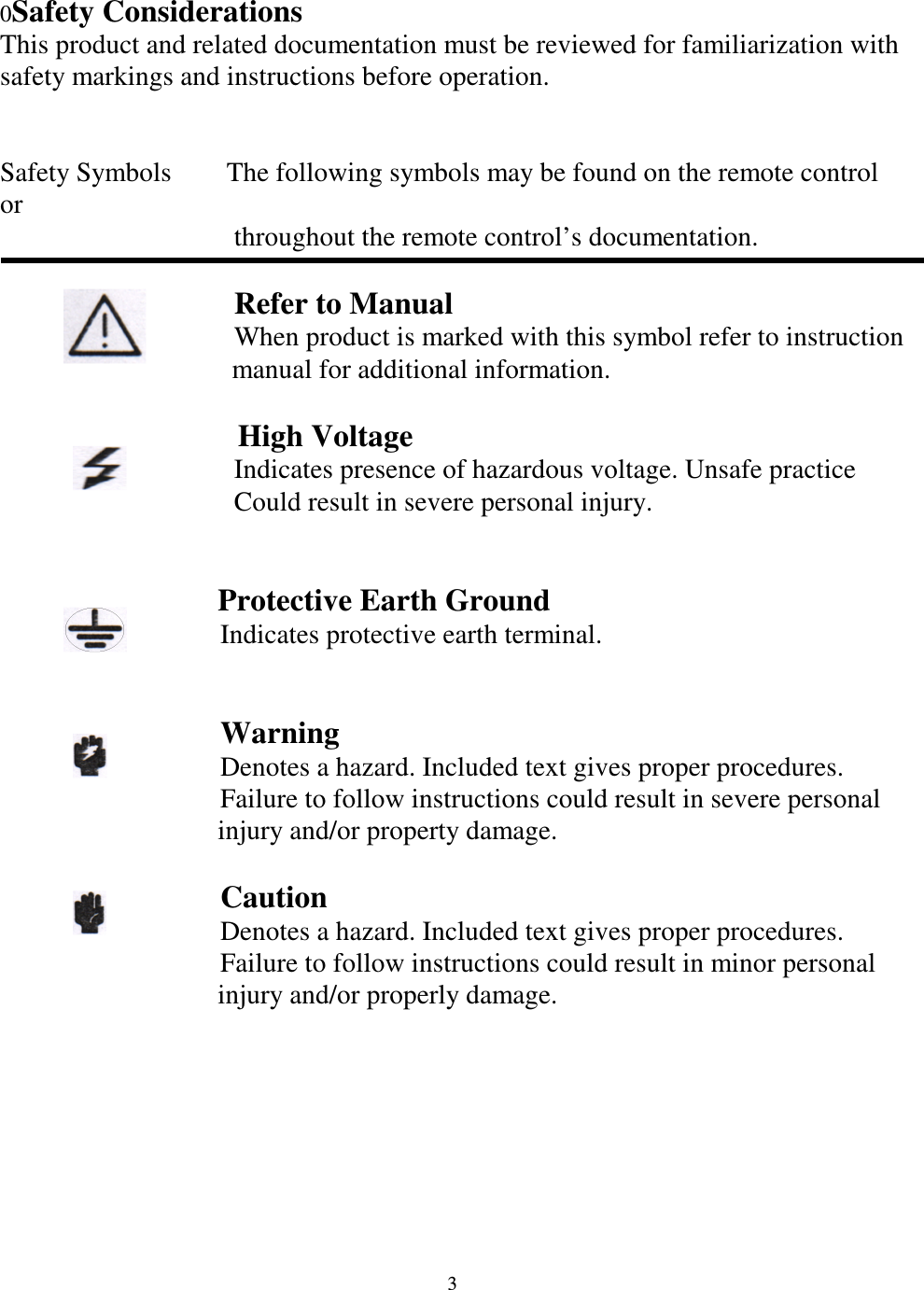
  3 0Safety Considerations This product and related documentation must be reviewed for familiarization with safety markings and instructions before operation.   Safety Symbols        The following symbols may be found on the remote control or                                     throughout the remote control’s documentation.                       Refer to Manual                                     When product is marked with this symbol refer to instruction       manual for additional information.                   High Voltage                                   Indicates presence of hazardous voltage. Unsafe practice                                     Could result in severe personal injury.                   Protective Earth Ground                                 Indicates protective earth terminal.                                     Warning                                 Denotes a hazard. Included text gives proper procedures.                                 Failure to follow instructions could result in severe personal injury and/or property damage.                    Caution                                 Denotes a hazard. Included text gives proper procedures.                                 Failure to follow instructions could result in minor personal injury and/or properly damage.
  4  Part 1. Operator’s Manual Chapter 1    Warranty  1-1 Warranty   Lee’s Hi-Tech Enterprises Co., Ltd. guarantees that this product meets its published specifications at the time of shipment from the factory. Under proper installation it should work as expected. 1-2 Warranty Period    This equipment is warranted against defects in material and manufacturing for a period of one year from the date of shipment. During the warranty period, TELECRANE is responsible for necessary repairs as long as the product can be proved to be defective. For warranty service or repair this product must be returned to a service facility designated by TELECRANE. Buyer will pay shipping charges to TELECRANE while TELECRANE will pay return shipping charges.   1-3 Excluded Items   This warranty does not include consumptive parts such as batteries, fuses, buttons, relays.  Also  this  warranty  does  not  cover  defects  caused  by  improper installation, improper or insufficient maintenance, unauthorized modification, improper  operation,  ignorance  of  environmental  specifications,  or  improper software or interfacing. 1-4 Remarks No other warranty is expressed or implied, except for the above mentioned. The remedies provided herein are the buyer’s sole and exclusive remedies.       TELECRANE shall not be liable for any direct, indirect, special, incidental or         Consequential damages.
  5  Chapter 2    Precautions of Operation  2-1 Attention  Please carefully read the manual before installing and operating this device. Due to the complex nature of this equipment it is necessary to read the entire manual before installation. Never dismantle the equipment by any unauthorized personnel, or equipment may be damaged. This manual is for reference only. Pleases consult your distributor for further assistance. The equipment has been strictly tested for quality before delivery from our plant. However, this equipment must not be used in dangerous situations or where damage may result. After finishing operation of TELECRANE shut off main power to the crane, power to receiver, and remove transmitter key. If transmitter’s power is controlled by “rotary key switch”, then need turn the key to “OFF” position and remove it. Transmitter should be placed in a safe area when not in use to avoid accidental pressing of buttons. The crane should be equipped with main power relay, limit switch and other safety devices. The GND (ground) of the receiver must be in contact with the metal part of the crane or electrical shock may occur. Don’t use equipment during lightening or high electrical interference conditions. Make sure that the batteries are in good condition and power for receiver is correct. Installation and maintenance should only be done while the crane’s main power is off to prevent electrical shock. The contents of this manual may be amended by the manufacturer without notice. The manufacturer may introduce new functions to the equipment as necessary, therefore, the descriptions may change. The patent and related documents for the equipment belong to LEE’S HI-TECH   CO., LTD. and they aren’t allowed to be used by others without permission. F22 systems adopt many of patents belong to LEE’S HI-TECH CO., LTD. and its associated companies.
  6    2-2 Precautions  Operating in an industrial facility is highly dangerous, therefore, operator must have adequate training in using TELECRANE with this in mind. Those who operate the machine should be healthy and have good judgment in regards to safety. Although the F22 transmitter is very durable and weather resistant care should be taken not to expose it to severe impact or pressure. During operation, if the power supplied from transmitter’s batteries is insufficient, the transmitter will send out EMS signal first to de-energize all of motion relays inside the receiver to stop crane’s moving (Notice: the motions which are set as ”Bypass EMS” will continuously move.), and then the LED indicator and buzzer on transmitter will light and sound continuously. At this time, need to be replaced with AA size alkaline batteries. All four batteries should be replaced at the same time. Don’t use manganese-zinc batteries because of their corrosive properties. If the severe interference occurred you should stop using the equipment at once. The standard voltage of rechargeable nickel-cadmium battery is 1.2 volts with capacity 500-800 mAH. When they are used in F22 system, the operating time will be shorter. Please take the battery out when the equipment will not be used for a long time. Be sure to know the “Procedures of emergency” in case of emergency.
  7  2-3 Procedures of emergency  The F22 system has various protections to guard against different emergencies including strict security code checking and automatic monitoring of parts failure. The F22 system has isolation circuitry to protect from outside voltage surges and interference. In the event of sensing an emergency situation the F22 will perform an emergency stop of the equipment. It is important to properly install the F22 system so it can perform the emergency shutdown properly.   In case of an Emergency, please follow the steps below and ask the distributor for service immediately.  1. Press EMS button. 2. Pull the magnetic key out of the transmitter. If transmitter’s power is controlled by “rotary key switch”, then need turn the key to “OFF” position and remove it. 3. Switch off the main power of crane. 4. Advise the distributor to find out the reason.
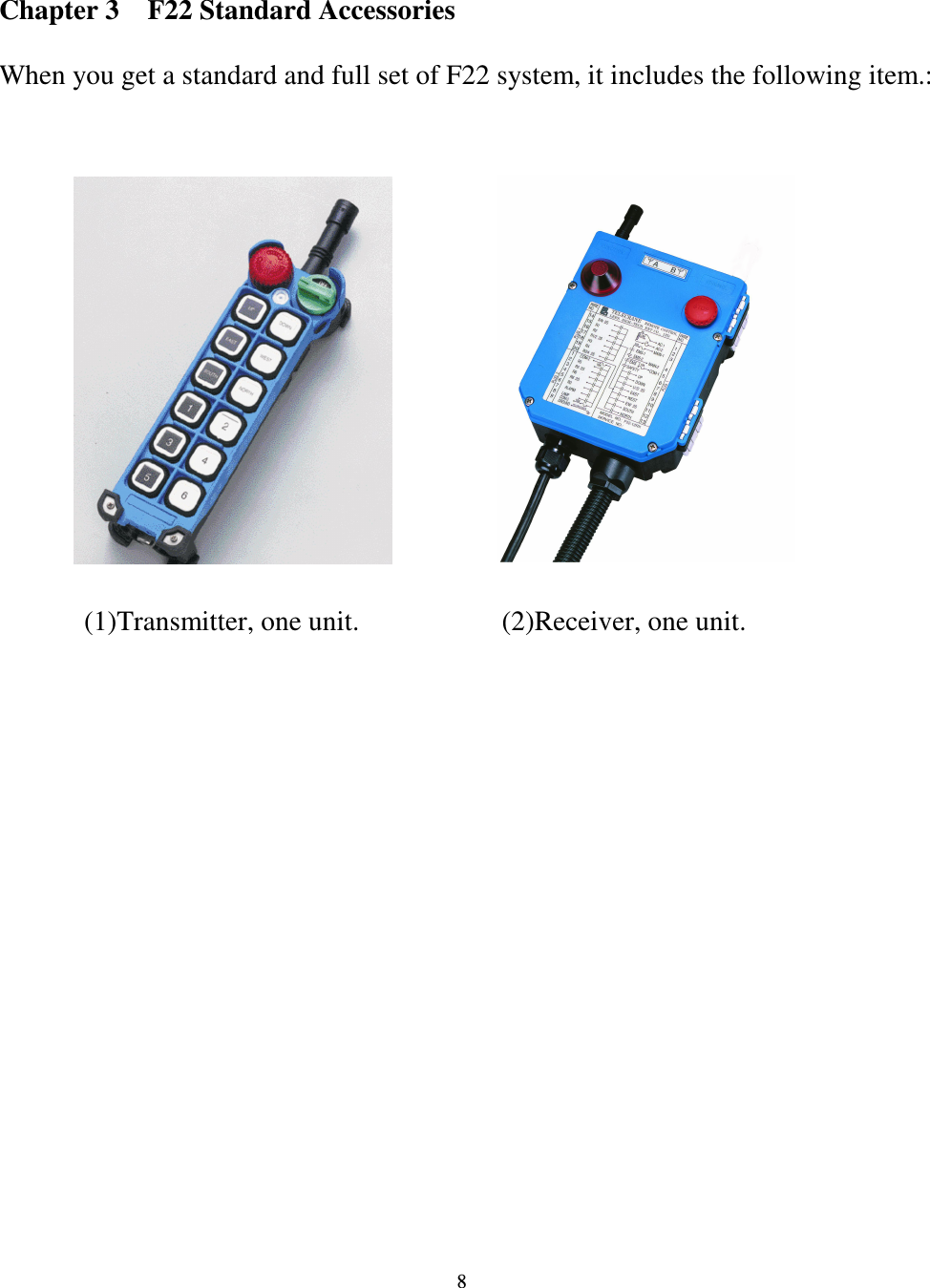
  8  Chapter 3    F22 Standard Accessories  When you get a standard and full set of F22 system, it includes the following item.:                                   (1)Transmitter, one unit. (2)Receiver, one unit.
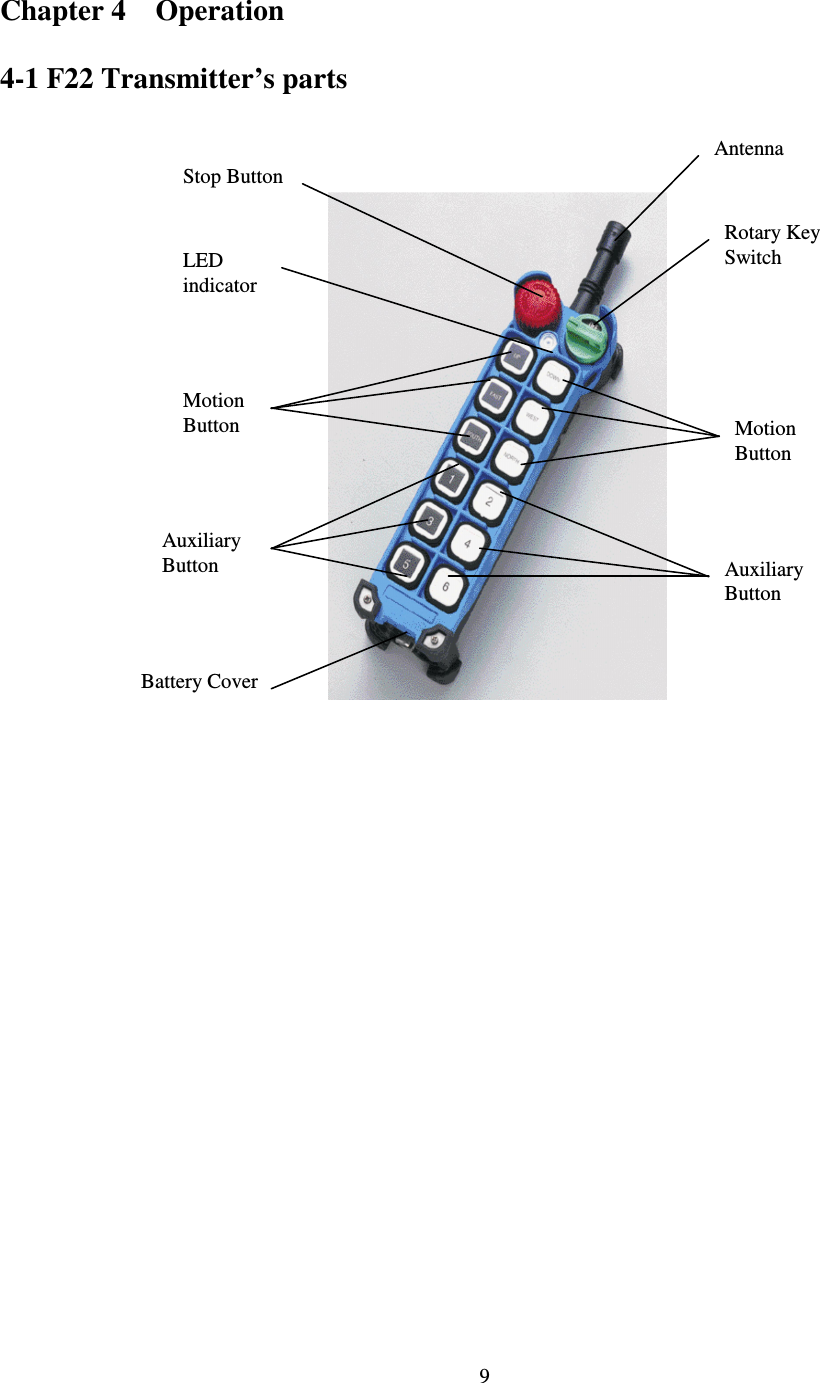
  9 Chapter 4    Operation  4-1 F22 Transmitter’s parts                          Antenna Rotary Key Switch Stop Button LED   indicator Motion  Button  Motion  Button Auxiliary  Button Auxiliary Button Battery Cover
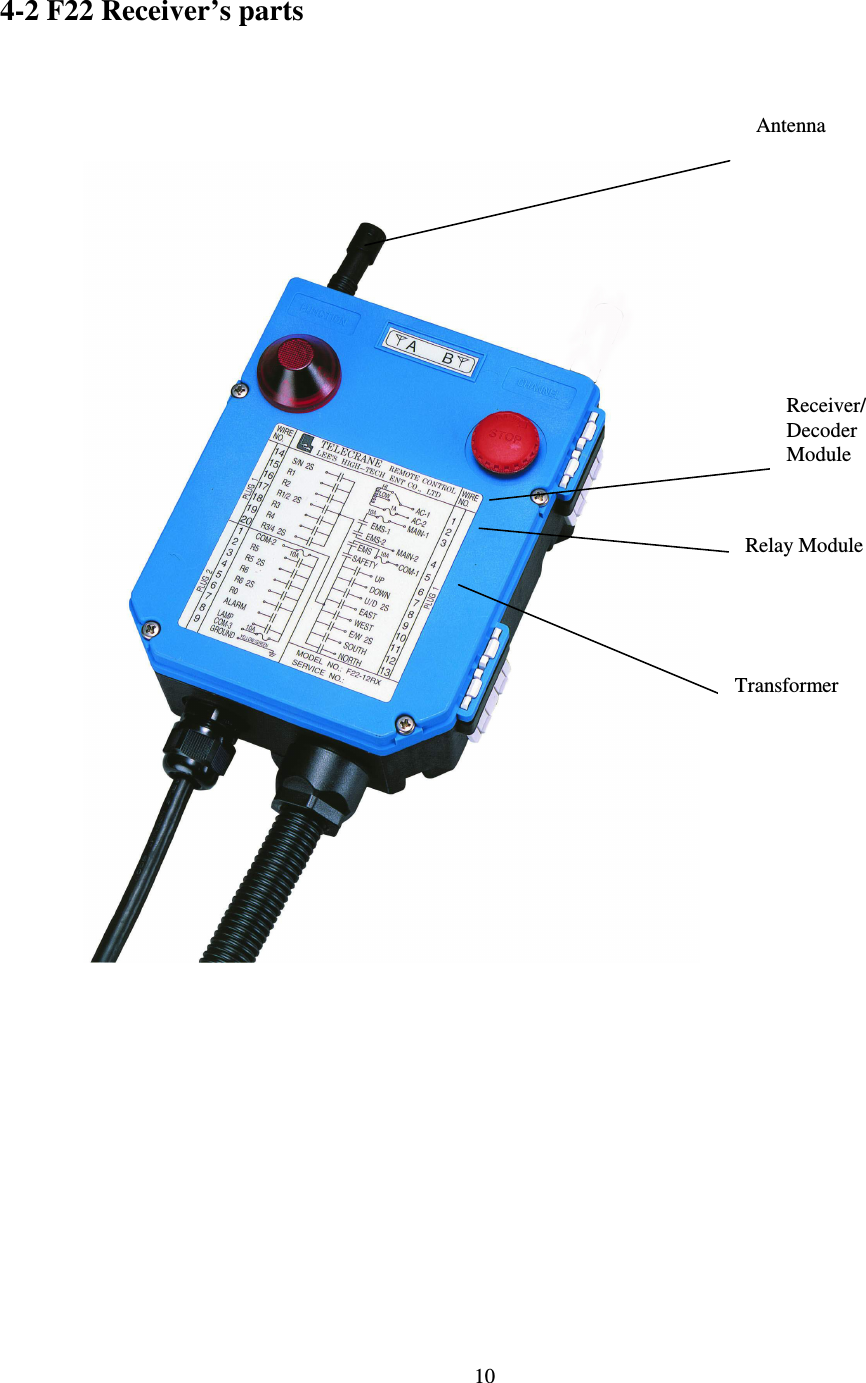
  10 4-2 F22 Receiver’s parts                                    Antenna Receiver/Decoder Module   Relay Module Transformer
  11 4 – 3    General Operation  1. Remove the cover of battery box. 2. Install 4 Fresh AA-size batteries in the battery box. Make sure the “+” and “-” directions are correct. 3. Attach back the battery cover. Note:  Transmitter  will  sound  two-long  sound  to  indicate  the  correct installation. 4. Turn on the power according to the “Power-On Modes” (please refer to 4-4-1). Note: LED indicator will flash with red color if proper procedures are not followed. 5. Operate transmitter by pressing each pushbutton.   6. After  operation,  perform  the  following  procedures  in  sequence:  (1)  Press EMS mushroom, (2) rotate  key counter-clock-wise to the “OFF” position, (3) remove key and keep it in a safe place, (4) remove batteries if not used for a long period. Note: Transmitter has power indicating functions with LED display. ← “Green color”: Sufficient power to operate transmitter. (In order to save power, one can program to turn off LED display when power is sufficient.) ↑  “Yellow  color”:  Power  is  depleting,  warring  sound  occurs  every  4 seconds  (can  be switched  off  and  sound  interval  can  be  set  by  software). Operation  must  be  stopped  immediately  (for  example:  down  the  goods  to ground) to replace batteries. → “Red color”: Insufficient power. In addition to red LED, warring sound will  continue  and  transmitter  is  no  longer  functionable.  Transmitter  will send out an emergency stop signal to the receiver due to insufficient power. Operator  should  avoid  this  situation  in  order  to  maintain  the  safety  of operation.
  12 4 – 4    Special Functions Operation      4-4-1 Power-On operation   Power-on  means  that  the  Main-Relay  on  receiver  will  energize  as  soon  as receiving the control data from transmitter and then receiver keep in condition of  standby  for  continuous  control.  There  are  4  different  ways  of  “Power-On mode” could be setting.  A. Any pushbutton Power-On Mode 1. Rotate “EMS” mushroom clockwise 45º and pull out. 2. Turn security key clockwise to “ON” position. 3. Press any pushbutton on the transmitter (or A, B switch). This will turn on the power as well as execute the function of pushbutton.  B. “Start” pushbutton Power-On Mode 1. Rotate “EMS” mushroom clockwise 45º and pull out. 2. Turn security key clockwise to “ON” position. 3. Press “Start” pushbutton on the transmitter to turn on power.    Note: When setting is on “Any pushbutton power-on” or “Start pushbutton power-on”, the transmitter is in the “non-continuous” mode (i.e. pushbutton must be pressed to operate the function), it can save power.  C. E.U. standard Power-On Mode 1. Rotate “EMS” mushroom clockwise 45º and pull out. 2. Turn security key clockwise to “ON” position. 3. Press “Start” pushbutton on the transmitter to turn on power. 4. After 3 minutes of non-operation, transmitter will send out an emergency stop signal to the receiver. When this occurs, one must turn the magnetic key  counter-clockwise  to  the  “OFF”  position,  then  turn  the  key clockwise to the “ON” position, and press “Start” pushbutton to turn on the power.   D. Software Power-On Mode This  “Power-On”  mode  is  controlled  by  the  software.  It  consists  of  (1) Whether  the  receiver  Power-Off  automatically  when  no  operation  for  a
  13 period  of  time.  (2)  Whether  a  password  is  required  to  turn  on  power.  (3) Whether an “emergency stop” signal will be sent out… etc.       4-4-2 Acceleration / Deceleration Operation 1. “R5” pushbutton is the acceleration pushbutton; “R6” pushbutton is the deceleration pushbutton. 2. When  a  motion  is  in  the  second  speed,  quick  touch  of  acceleration pushbutton  will  double  the  speed.  Repeated  touch  of  acceleration pushbutton will increase the speed up to 6 times. 3. To reduce the speed, touch the deceleration pushbutton. Repeated touch of deceleration pushbutton will reduce to the second speed. Note: (1) When  accelerate/decelerate,  the  motion  pushbutton  must  be depressed  and  held  in  the  second  speed.  If  motion  pushbutton  is released,  there  will be no  acceleration/deceleration  and  speed  will return to zero. (2) Press  “R6”  pushbutton  will  perform  the  “Alarm”  function  if  the speed is reduced to the second speed.        4-4-3 Inching Operation 1. “R5” pushbutton is set for “inching” pushbutton. 2. Press and hold inching pushbutton. 3. Press any motion pushbutton to perform the inching motion. Note: The other pushbutton of transmitter must be released before press inching pushbutton.
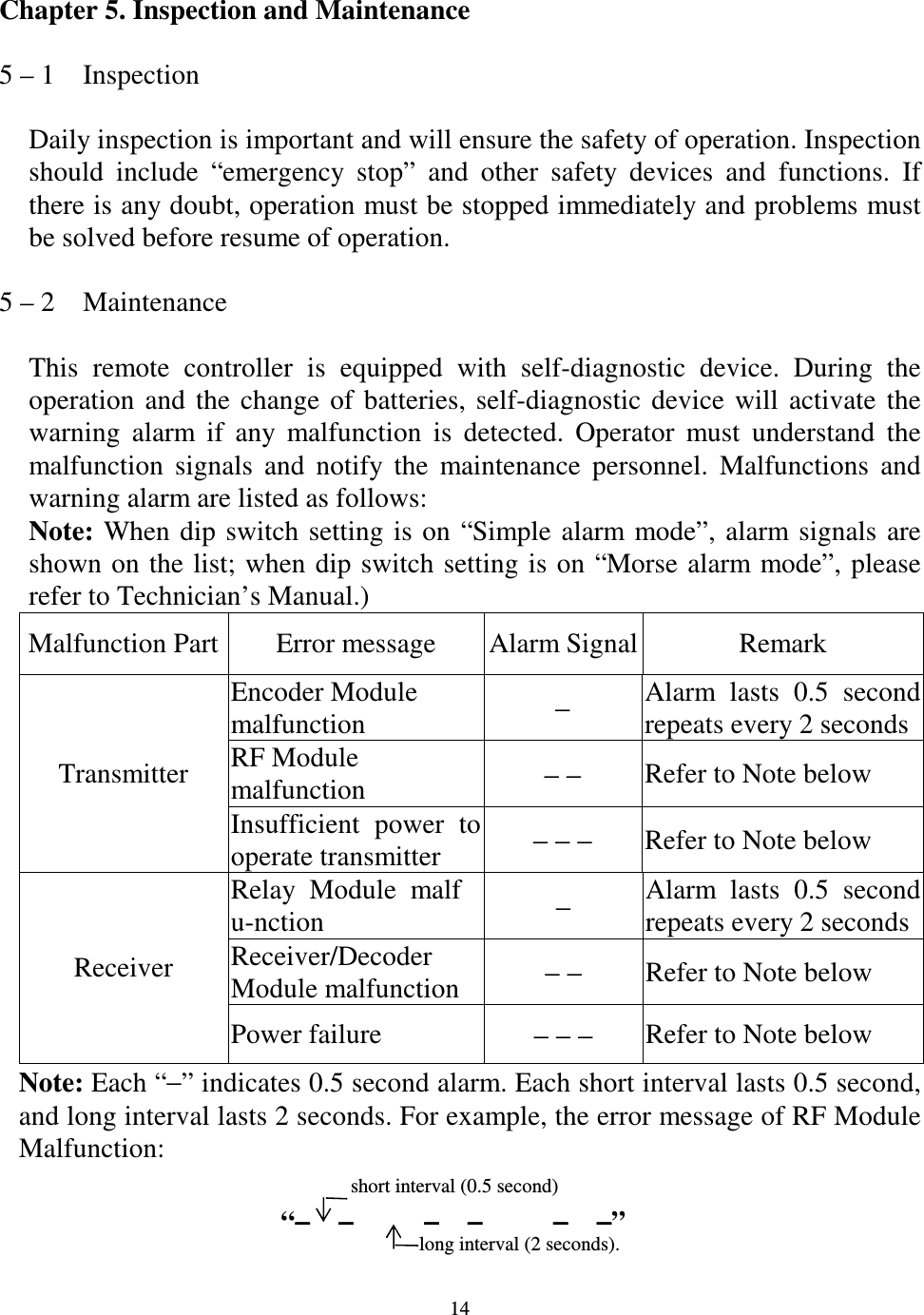
  14 Chapter 5. Inspection and Maintenance  5 – 1    Inspection  Daily inspection is important and will ensure the safety of operation. Inspection should  include  “emergency  stop”  and  other  safety  devices  and  functions.  If there is any doubt, operation must be stopped immediately and problems must be solved before resume of operation.  5 – 2    Maintenance  This  remote  controller  is  equipped  with  self-diagnostic  device.  During  the operation  and  the  change  of  batteries,  self-diagnostic  device  will  activate  the warning  alarm  if  any  malfunction  is  detected.  Operator  must  understand  the malfunction  signals  and  notify  the  maintenance  personnel.  Malfunctions  and warning alarm are listed as follows: Note: When dip  switch  setting is  on  “Simple alarm mode”,  alarm signals  are shown  on the list;  when dip switch setting is on “Morse alarm mode”, please refer to Technician’s Manual.) Malfunction Part Error message  Alarm Signal Remark Encoder Module   malfunction  − Alarm  lasts  0.5  second repeats every 2 seconds RF Module malfunction  − − Refer to Note below Transmitter Insufficient  power  to operate transmitter    − − − Refer to Note below Relay  Module  malfu-nction  − Alarm  lasts  0.5  second repeats every 2 seconds Receiver/Decoder Module malfunction  − − Refer to Note below Receiver Power failure  − − − Refer to Note below Note: Each “−” indicates 0.5 second alarm. Each short interval lasts 0.5 second, and long interval lasts 2 seconds. For example, the error message of RF Module Malfunction:   short interval (0.5 second) “−−−−   −−−−     −−−−   −−−−     −−−−   −−−−”    long interval (2 seconds).
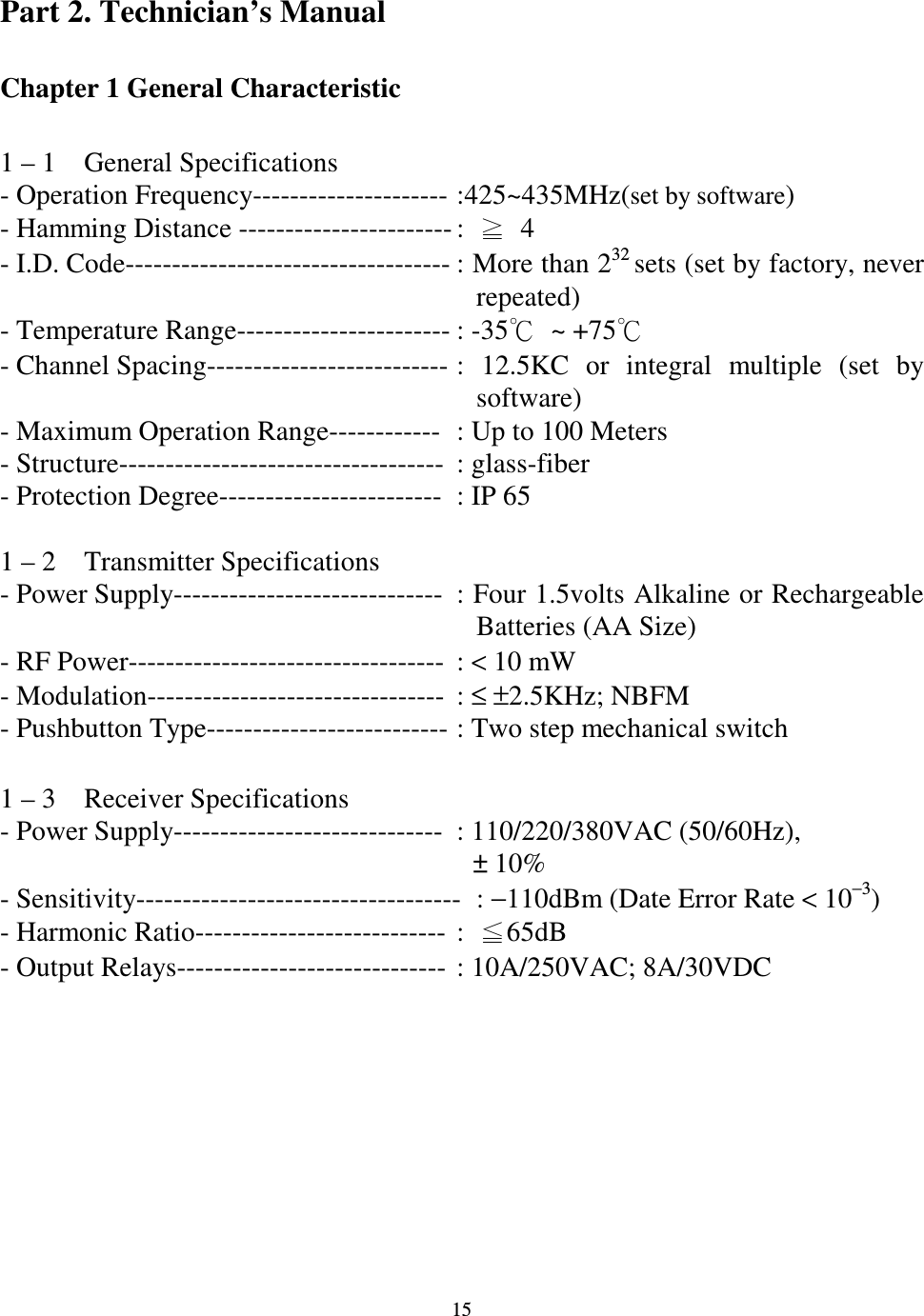
  15 Part 2. Technician’s Manual  Chapter 1 General Characteristic    1 – 1    General Specifications - Operation Frequency--------------------- :425~435MHz(set by software) - Hamming Distance ----------------------- :    4 - I.D. Code----------------------------------- : More than 232 sets (set by factory, never   repeated) - Temperature Range----------------------- : -35  ~ +75- Channel Spacing-------------------------- :  12.5KC  or  integral  multiple  (set  by software) - Maximum Operation Range------------  : Up to 100 Meters - Structure-----------------------------------  : glass-fiber   - Protection Degree------------------------  : IP 65  1 – 2    Transmitter Specifications - Power Supply-----------------------------  : Four 1.5volts Alkaline or Rechargeable Batteries (AA Size) - RF Power----------------------------------  : < 10 mW - Modulation--------------------------------  : ≤ ±2.5KHz; NBFM - Pushbutton Type-------------------------- : Two step mechanical switch    1 – 3    Receiver Specifications - Power Supply-----------------------------  : 110/220/380VAC (50/60Hz), ± 10% - Sensitivity-----------------------------------  : −110dBm (Date Error Rate < 10−3) - Harmonic Ratio---------------------------  :  65dB - Output Relays-----------------------------  : 10A/250VAC; 8A/30VDC
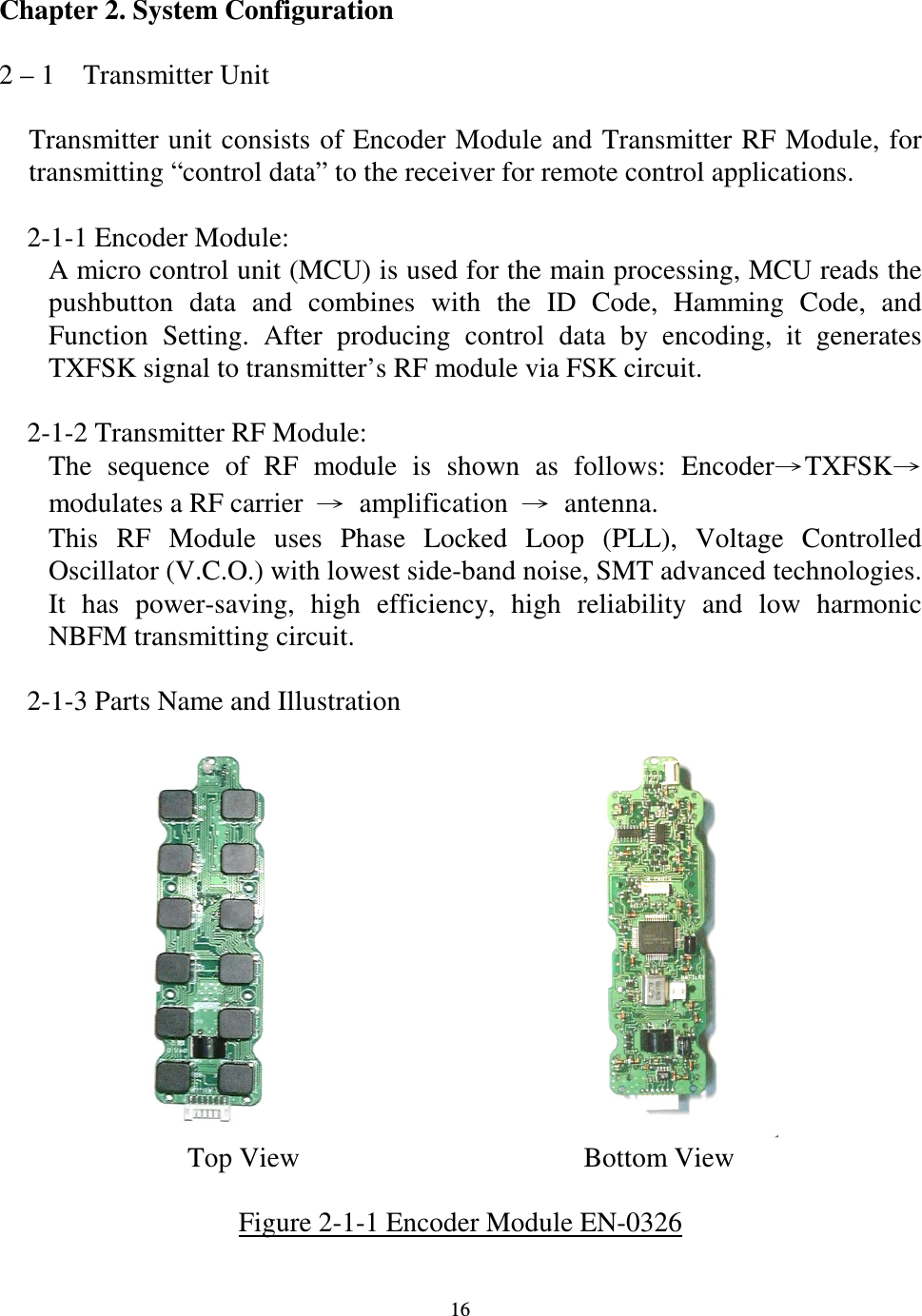
  16 Chapter 2. System Configuration  2 – 1    Transmitter Unit  Transmitter unit consists of Encoder Module and Transmitter RF Module,  for transmitting “control data” to the receiver for remote control applications.      2-1-1 Encoder Module: A micro control unit (MCU) is used for the main processing, MCU reads the pushbutton  data  and  combines  with  the  ID  Code,  Hamming  Code,  and Function  Setting.  After  producing  control  data  by  encoding,  it  generates TXFSK signal to transmitter’s RF module via FSK circuit.      2-1-2 Transmitter RF Module: The  sequence  of  RF  module  is  shown  as  follows:  EncoderTXFSKmodulates a RF carrier  amplification  antenna. This  RF  Module  uses  Phase  Locked  Loop  (PLL),  Voltage  Controlled Oscillator (V.C.O.) with lowest side-band noise, SMT advanced technologies. It  has  power-saving,  high  efficiency,  high  reliability  and  low  harmonic NBFM transmitting circuit.      2-1-3 Parts Name and Illustration                                  Top View    Bottom View  Figure 2-1-1 Encoder Module EN-0326
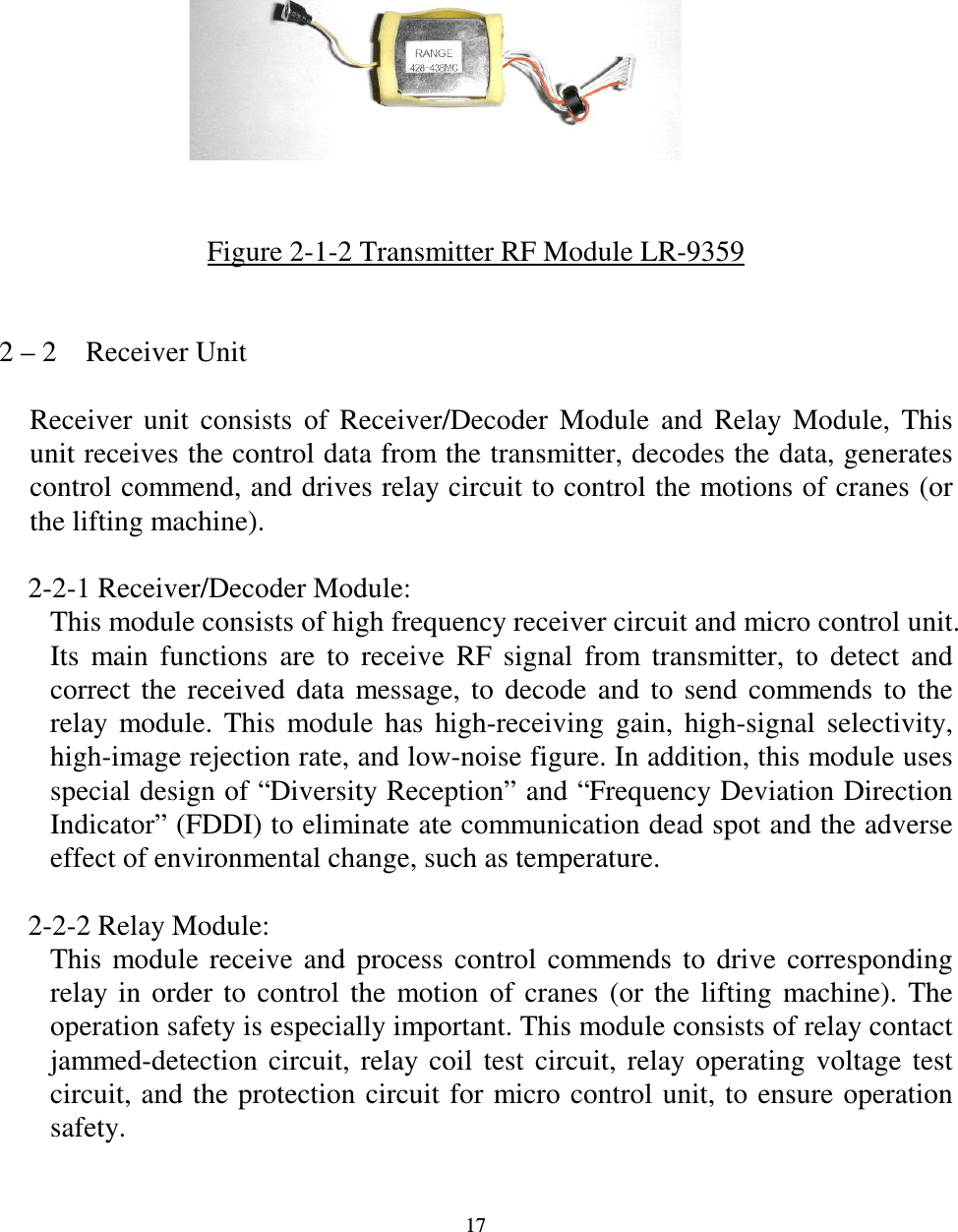
  17            Figure 2-1-2 Transmitter RF Module LR-9359   2 – 2    Receiver Unit  Receiver  unit  consists  of  Receiver/Decoder  Module  and  Relay  Module,  This unit receives the control data from the transmitter, decodes the data, generates control commend, and drives relay circuit to control the motions of cranes (or the lifting machine).      2-2-1 Receiver/Decoder Module: This module consists of high frequency receiver circuit and micro control unit. Its  main  functions  are  to  receive  RF  signal  from  transmitter,  to  detect  and correct  the  received  data  message,  to  decode  and  to  send  commends  to  the relay  module.  This  module  has  high-receiving  gain,  high-signal  selectivity, high-image rejection rate, and low-noise figure. In addition, this module uses special design of “Diversity Reception” and “Frequency Deviation Direction Indicator” (FDDI) to eliminate ate communication dead spot and the adverse effect of environmental change, such as temperature.      2-2-2 Relay Module: This  module  receive  and  process  control  commends  to  drive  corresponding relay  in  order  to  control  the  motion  of  cranes  (or  the  lifting  machine).  The operation safety is especially important. This module consists of relay contact jammed-detection  circuit,  relay  coil  test  circuit,  relay  operating  voltage  test circuit, and the protection  circuit for micro control  unit, to ensure operation safety.
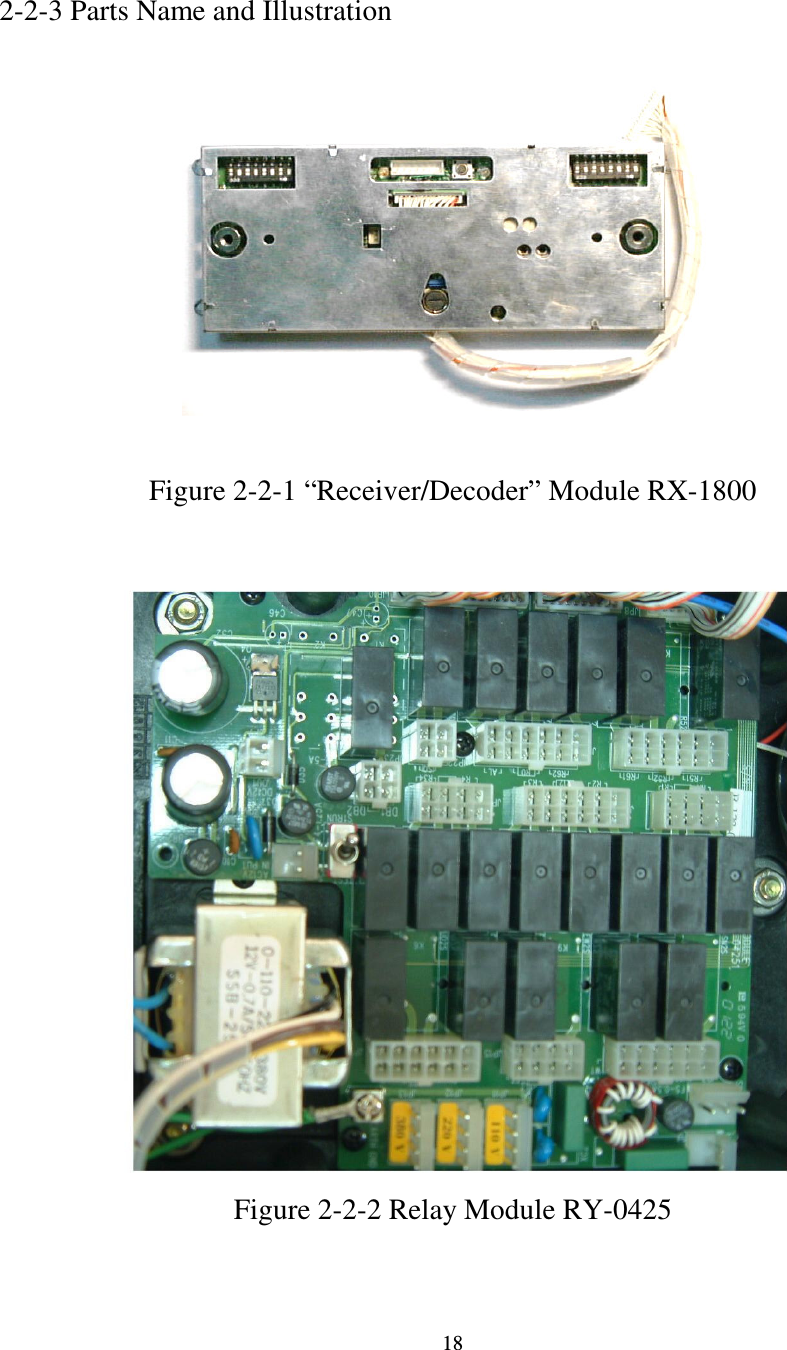
  18  2-2-3 Parts Name and Illustration              Figure 2-2-1 “Receiver/Decoder” Module RX-1800                     Figure 2-2-2 Relay Module RY-0425
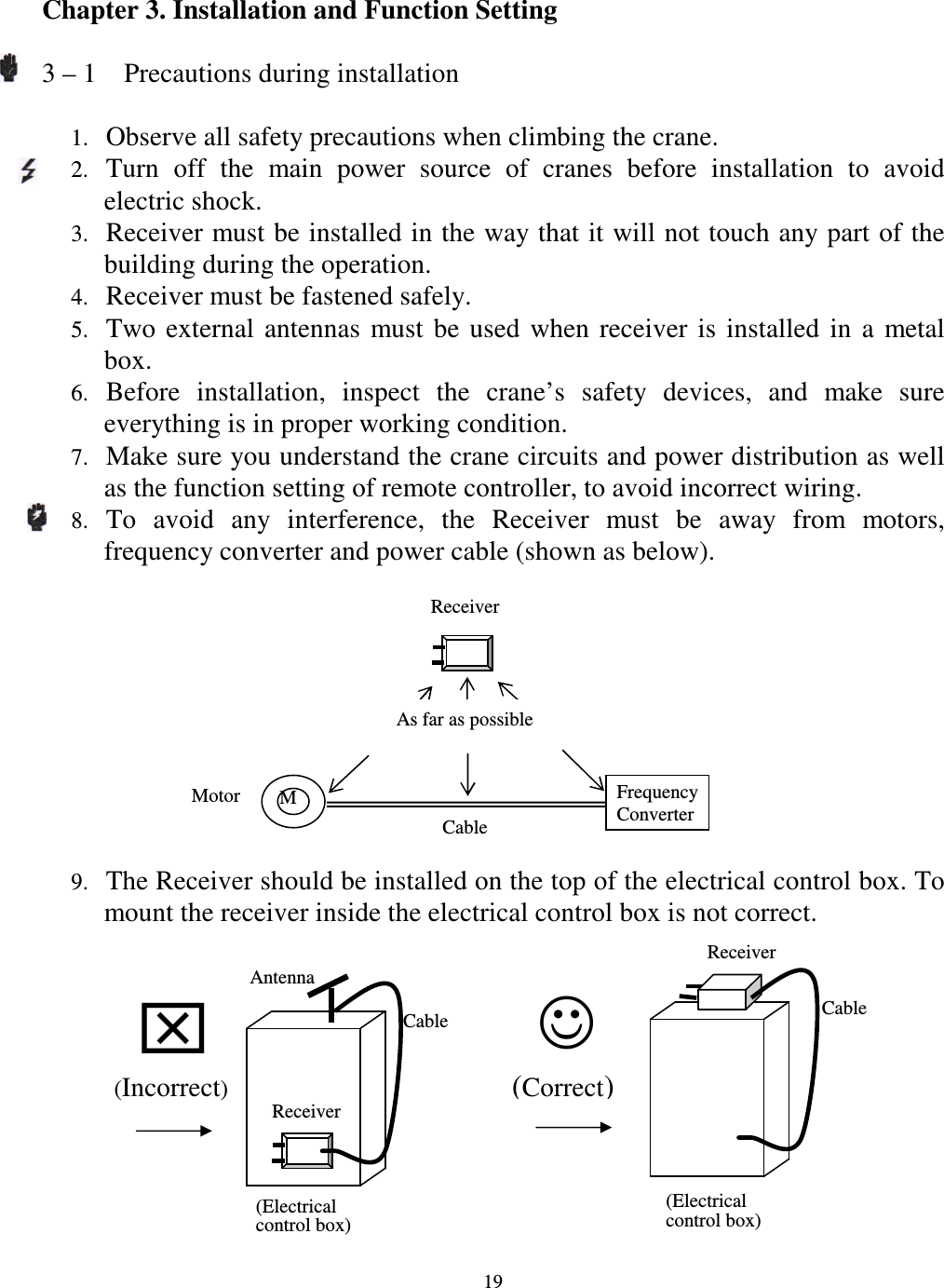
  19 Chapter 3. Installation and Function Setting    3 – 1    Precautions during installation  1. Observe all safety precautions when climbing the crane. 2. Turn  off  the  main  power  source  of  cranes  before  installation  to  avoid electric shock. 3. Receiver must be installed in the way that it will not touch any part of the building during the operation. 4. Receiver must be fastened safely. 5. Two  external  antennas  must  be  used  when  receiver  is  installed  in  a  metal box. 6. Before  installation,  inspect  the  crane’s  safety  devices,  and  make  sure everything is in proper working condition. 7. Make sure you understand the crane circuits and power distribution as well as the function setting of remote controller, to avoid incorrect wiring. 8. To  avoid  any  interference,  the  Receiver  must  be  away  from  motors, frequency converter and power cable (shown as below). 9. The Receiver should be installed on the top of the electrical control box. To mount the receiver inside the electrical control box is not correct.    Receiver    M Motor Cable Frequency Converter (Correct) Antenna Cable Receiver  (Incorrect) (Electrical control box) Receiver Cable  (Electrical control box) As far as possible
  20 3 – 2    Transmitter Installation Instructions      3-2-1 Installation of batteries in the transmitter: Insert batteries in proper direction into battery cover. Insert the battery cover into transmitter. Transmitter will sound two long sound (“− −”: “−”indicates 0.5  second sound and  the  short  interval  lasts  0.5  second)  to  indicate  proper installation.  3-2-2 Installation of function setting software in the transmitter: When  change  a  new  transmitter  or  change  remote  controller’s  function settings  (such  as  change  receiver’s  function  settings,  or  channel  dip  switch settings), one must follow the procedures below (please refer to section 3-4) to install the function setting software in the transmitter, in order to pair the transmitter and receiver.  3 – 3    Receiver Installation Instructions      3-3-1 Preparation for Installation 1. Provide all necessary tools. 2. Select a proper location.     a. Select a stable place.     b. Select a place where you can see the Receiver or Antenna.     c.  Select  a  place  where  there  is  no  spark,  e.g.  keep  away  from  motors, relays, magnetic switch and power cables.     d. Keep away from high-voltage wiring and device.     e.  The  Receiver’s  box  must  be  at  least  3  cm  away  from  the  other obstacles. 3. Installation of proper power source       The input power source for receiver can be 110VAC, 50/60 Hz or 220VAC, 50/60  Hz.  After  power  source  is  confirmed,  one  must  connect  the connector of initial coil of transformer to the relay module properly.      3-3-2 Installation Sequence 1. Turn off the main power for crane. 2. Attach the template (provided) for the receiver to a proper place. 3. Drill  the  holes  for  screws, install  receiver  and  then  fix  the  receiver  with 6mm    screw nut on vibration- Resistant. 4. Attach 2 sets of cable-assembly (provided) to the receiver and tighten the cables.
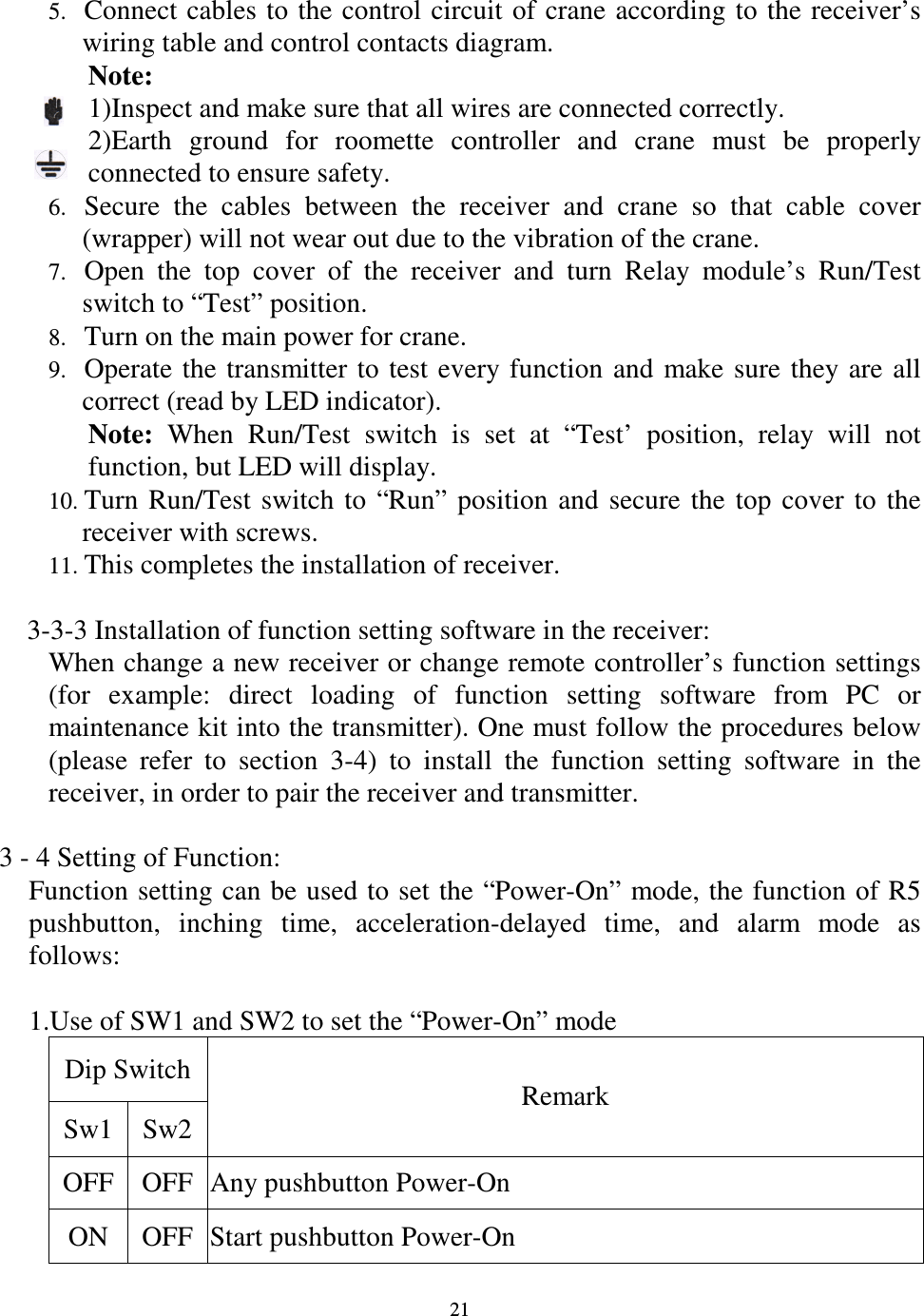
  21 5. Connect cables to the control circuit  of crane according to the receiver’s wiring table and control contacts diagram. Note:   1)Inspect and make sure that all wires are connected correctly. 2)Earth  ground  for  roomette  controller  and  crane  must  be  properly connected to ensure safety. 6. Secure  the  cables  between  the  receiver  and  crane  so  that  cable  cover (wrapper) will not wear out due to the vibration of the crane. 7. Open  the  top  cover  of  the  receiver  and  turn  Relay  module’s  Run/Test switch to “Test” position. 8. Turn on the main power for crane. 9. Operate  the  transmitter to  test  every function  and  make sure  they are  all correct (read by LED indicator). Note:  When  Run/Test  switch  is  set  at  “Test’  position,  relay  will  not function, but LED will display. 10. Turn  Run/Test  switch  to  “Run”  position  and  secure  the  top  cover  to  the receiver with screws. 11. This completes the installation of receiver.        3-3-3 Installation of function setting software in the receiver: When change a new receiver or change remote controller’s function settings (for  example:  direct  loading  of  function  setting  software  from  PC  or maintenance kit into the transmitter). One must follow the procedures below (please  refer  to  section  3-4)  to  install  the  function  setting  software  in  the receiver, in order to pair the receiver and transmitter.  3 - 4 Setting of Function:   Function setting can be used to set the “Power-On” mode, the function of R5 pushbutton,  inching  time,  acceleration-delayed  time,  and  alarm  mode  as follows:  1.Use of SW1 and SW2 to set the “Power-On” mode Dip Switch Sw1 Sw2 Remark OFF OFF Any pushbutton Power-On ON  OFF Start pushbutton Power-On
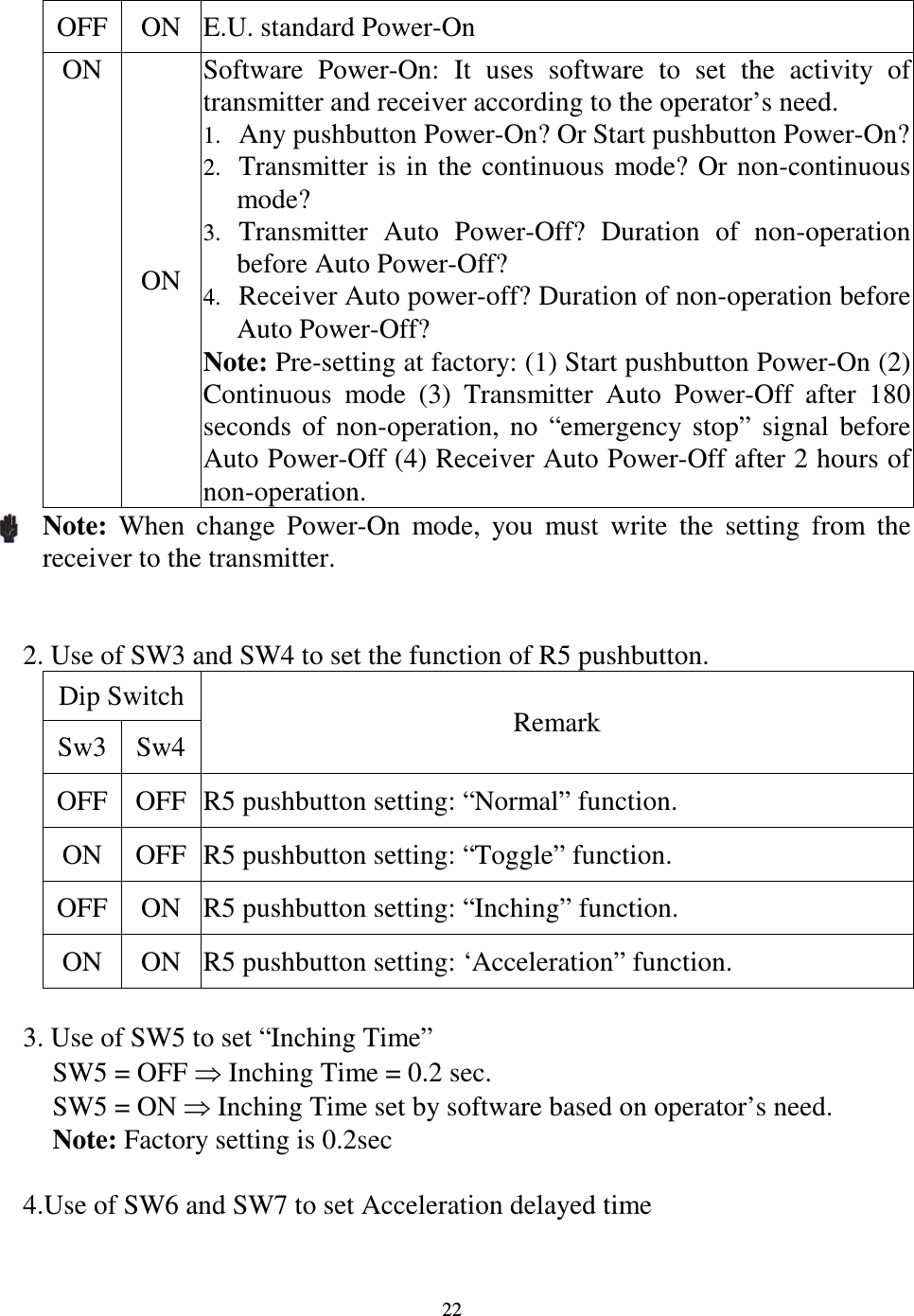
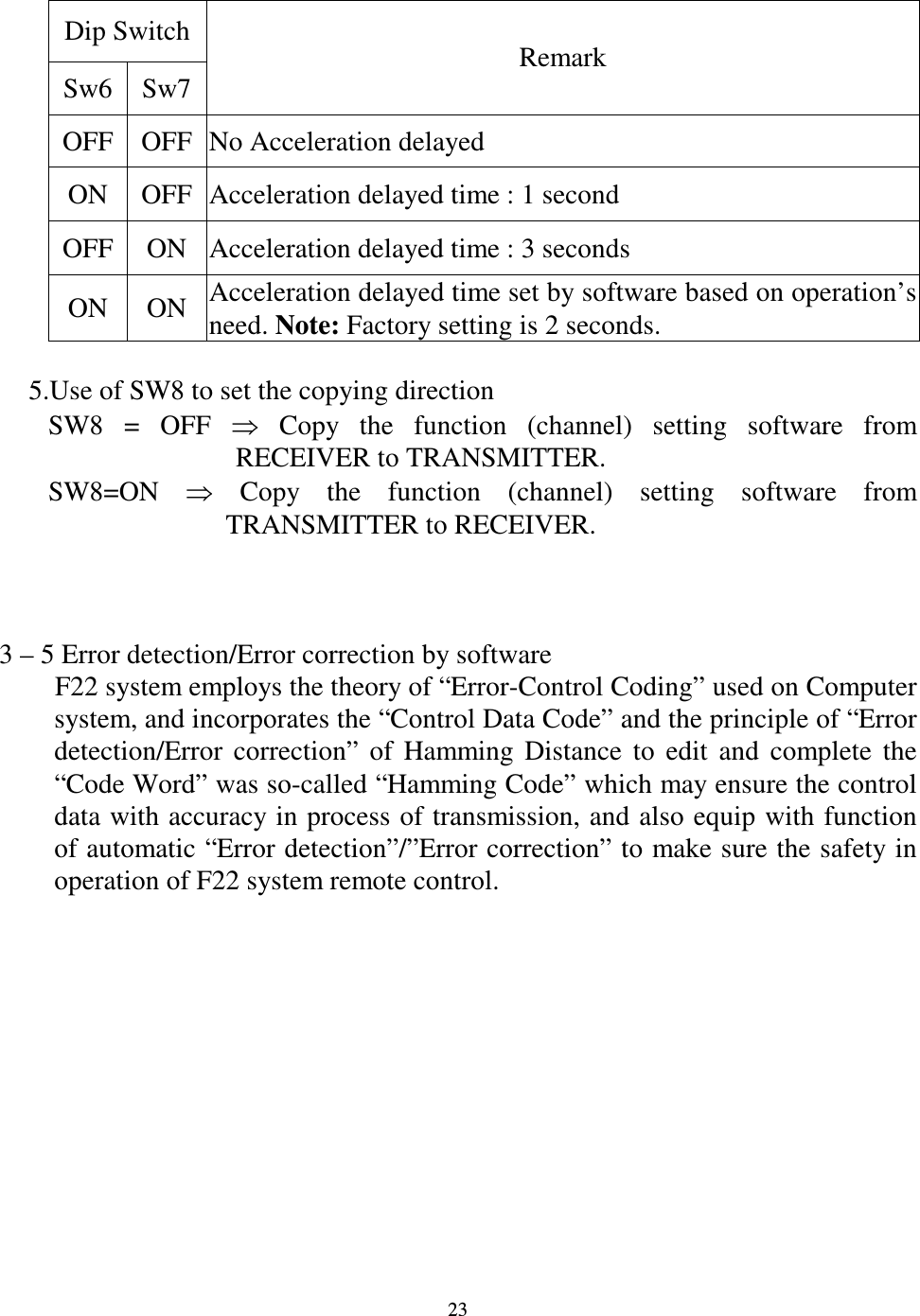
  22 OFF ON  E.U. standard Power-On ON ON Software  Power-On:  It  uses  software  to  set  the  activity  of transmitter and receiver according to the operator’s need. 1. Any pushbutton Power-On? Or Start pushbutton Power-On? 2. Transmitter is in  the  continuous  mode?  Or non-continuous mode? 3. Transmitter  Auto  Power-Off?  Duration  of  non-operation before Auto Power-Off? 4. Receiver Auto power-off? Duration of non-operation before Auto Power-Off? Note: Pre-setting at factory: (1) Start pushbutton Power-On (2) Continuous  mode  (3)  Transmitter  Auto  Power-Off  after  180 seconds  of  non-operation,  no  “emergency  stop”  signal  before Auto Power-Off (4) Receiver Auto Power-Off after 2 hours of non-operation. Note:  When  change  Power-On  mode,  you  must  write  the  setting  from  the receiver to the transmitter.   2. Use of SW3 and SW4 to set the function of R5 pushbutton.     Dip Switch Sw3 Sw4 Remark OFF OFF R5 pushbutton setting: “Normal” function. ON  OFF R5 pushbutton setting: “Toggle” function. OFF ON  R5 pushbutton setting: “Inching” function. ON  ON  R5 pushbutton setting: ‘Acceleration” function.  3. Use of SW5 to set “Inching Time” SW5 = OFF  Inching Time = 0.2 sec. SW5 = ON  Inching Time set by software based on operator’s need. Note: Factory setting is 0.2sec  4.Use of SW6 and SW7 to set Acceleration delayed time
  23 Dip Switch Sw6 Sw7 Remark OFF OFF No Acceleration delayed ON  OFF Acceleration delayed time : 1 second OFF ON  Acceleration delayed time : 3 seconds ON  ON Acceleration delayed time set by software based on operation’s need. Note: Factory setting is 2 seconds.       5.Use of SW8 to set the copying direction SW8  =  OFF    Copy  the  function  (channel)  setting  software  from RECEIVER to TRANSMITTER. SW8=ON    Copy  the  function  (channel)  setting  software  from TRANSMITTER to RECEIVER.    3 – 5 Error detection/Error correction by software         F22 system employs the theory of “Error-Control Coding” used on Computer system, and incorporates the “Control Data Code” and the principle of “Error detection/Error  correction”  of  Hamming  Distance  to  edit  and  complete  the “Code Word” was so-called “Hamming Code” which may ensure the control data with accuracy in process of transmission, and also equip with function of automatic “Error detection”/”Error correction” to make sure the safety in operation of F22 system remote control.
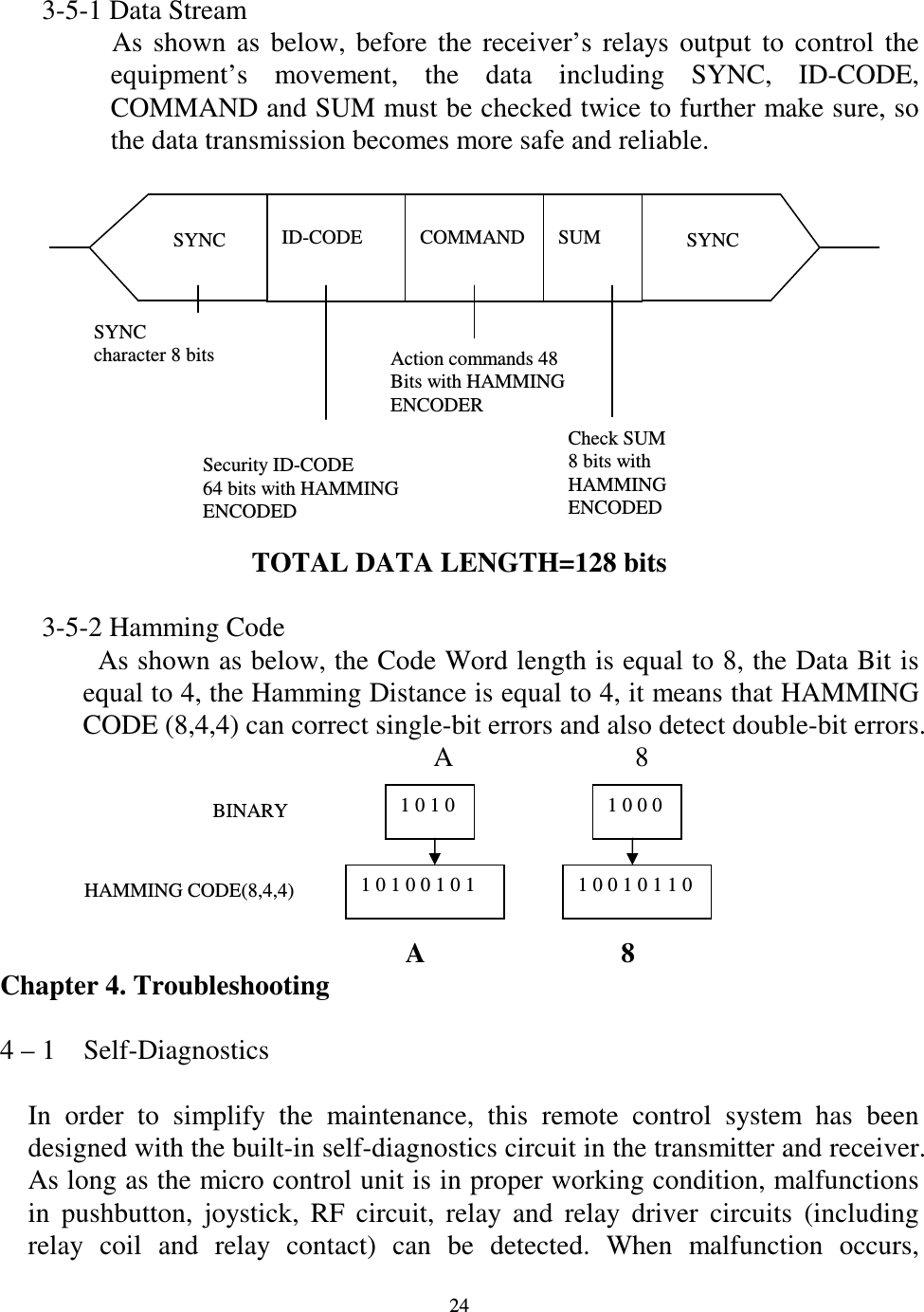
  24       3-5-1 Data Stream                 As  shown  as  below,  before  the  receiver’s  relays  output  to  control  the equipment’s  movement,  the  data  including  SYNC,  ID-CODE, COMMAND and SUM must be checked twice to further make sure, so     the data transmission becomes more safe and reliable.                                                                   TOTAL DATA LENGTH=128 bits     3-5-2 Hamming Code               As shown as below, the Code Word length is equal to 8, the Data Bit is equal to 4, the Hamming Distance is equal to 4, it means that HAMMING CODE (8,4,4) can correct single-bit errors and also detect double-bit errors.                                    A             8                                   A              8 Chapter 4. Troubleshooting  4 – 1    Self-Diagnostics  In  order  to  simplify  the  maintenance,  this  remote  control  system  has  been designed with the built-in self-diagnostics circuit in the transmitter and receiver. As long as the micro control unit is in proper working condition, malfunctions in  pushbutton,  joystick,  RF  circuit,  relay  and  relay  driver  circuits  (including relay  coil  and  relay  contact)  can  be  detected.  When  malfunction  occurs,  ID-CODE  COMMAND  SUM SYNC  SYNC SYNC   character 8 bits Security ID-CODE   64 bits with HAMMING ENCODED Action commands 48 Bits with HAMMING ENCODER Check SUM 8 bits with HAMMING ENCODED 1 0 1 0 1 0 0 0 BINARY HAMMING CODE(8,4,4) 1 0 1 0 0 1 0 1  1 0 0 1 0 1 1 0
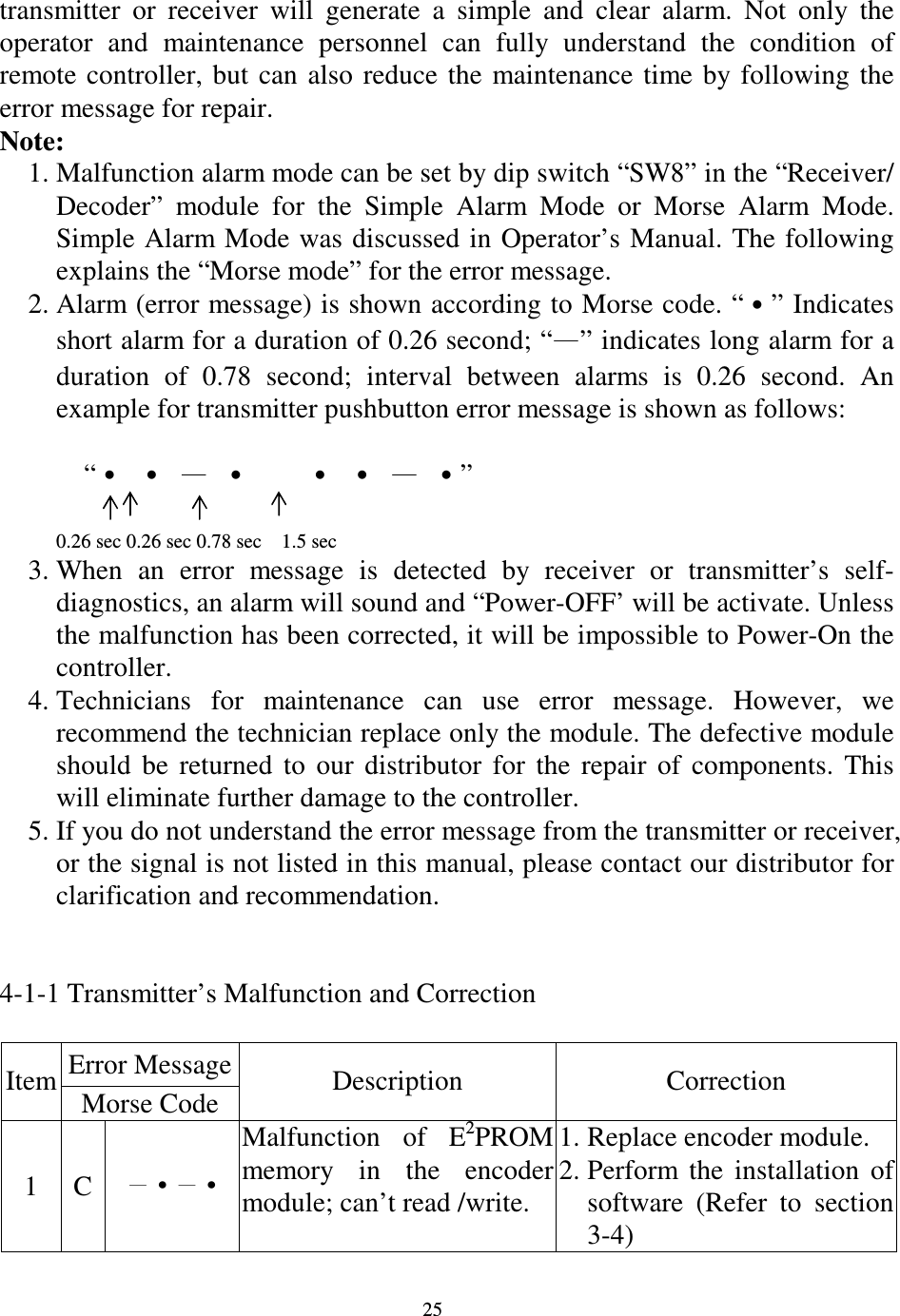
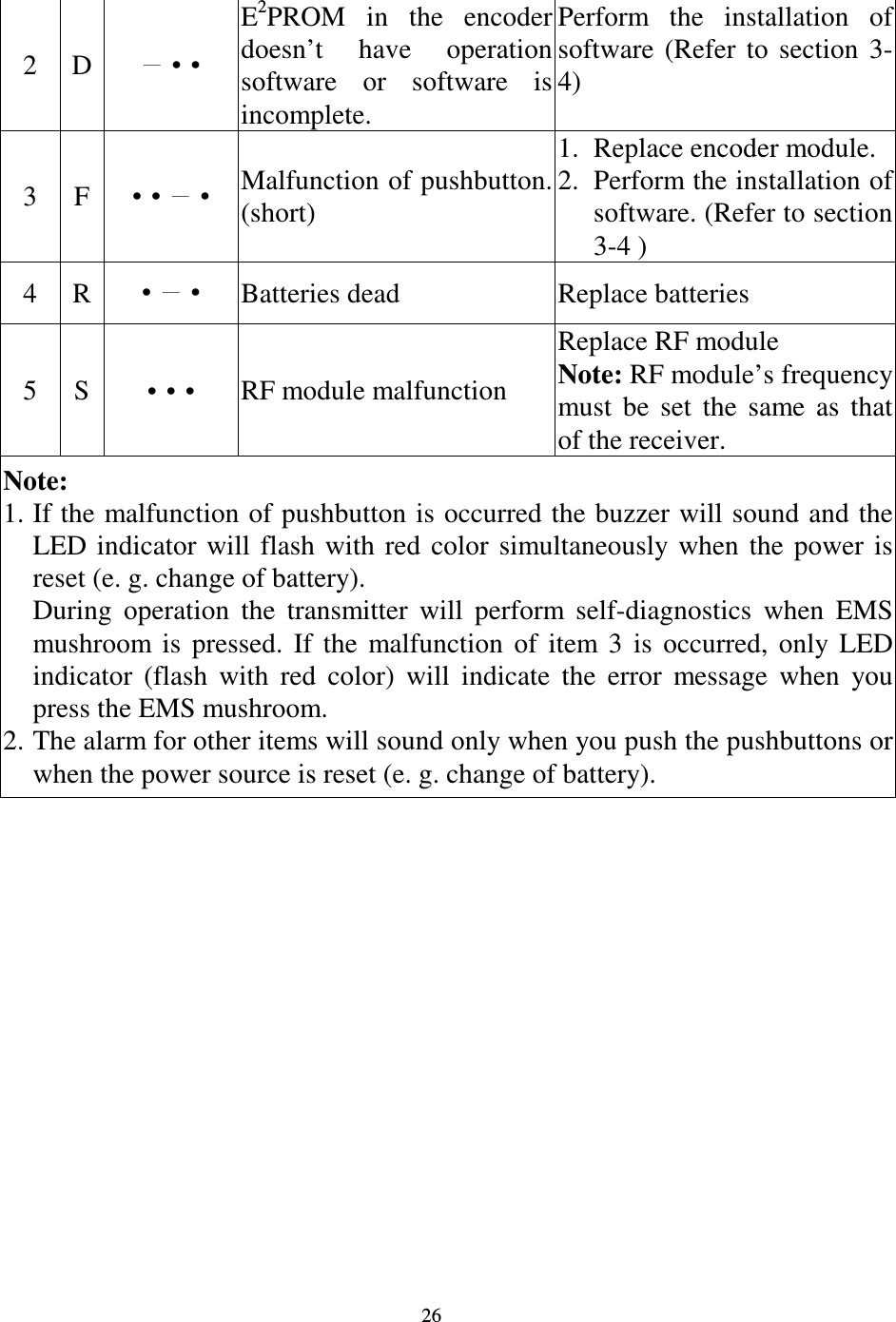
  25 transmitter  or  receiver  will  generate  a  simple  and  clear  alarm.  Not  only  the operator  and  maintenance  personnel  can  fully  understand  the  condition  of remote controller,  but  can also  reduce  the  maintenance  time  by  following  the error message for repair.     Note: 1. Malfunction alarm mode can be set by dip switch “SW8” in the “Receiver/ Decoder”  module  for  the  Simple  Alarm  Mode  or  Morse  Alarm  Mode. Simple Alarm Mode was discussed in Operator’s Manual. The  following explains the “Morse mode” for the error message. 2. Alarm (error message) is shown according to Morse code. “” Indicates short alarm for a duration of 0.26 second; “” indicates long alarm for a duration  of  0.78  second;  interval  between  alarms  is  0.26  second.  An example for transmitter pushbutton error message is shown as follows:                    “” 0.26 sec 0.26 sec 0.78 sec    1.5 sec 3. When  an  error  message  is  detected  by  receiver  or  transmitter’s  self-diagnostics, an alarm will sound and “Power-OFF’ will be activate. Unless the malfunction has been corrected, it will be impossible to Power-On the controller. 4. Technicians  for  maintenance  can  use  error  message.  However,  we recommend the technician replace only the module. The defective module should  be  returned  to  our  distributor  for  the  repair  of  components.  This will eliminate further damage to the controller. 5. If you do not understand the error message from the transmitter or receiver, or the signal is not listed in this manual, please contact our distributor for clarification and recommendation.       4-1-1 Transmitter’s Malfunction and Correction  Error Message Item Morse Code  Description  Correction 1  C •• Malfunction  of  E2PROM memory  in  the  encoder module; can’t read /write. 1. Replace encoder module. 2. Perform  the  installation  of software  (Refer  to  section 3-4)
  26 2  D •• E2PROM  in  the  encoder doesn’t  have  operation software  or  software  is incomplete. Perform  the  installation  of software  (Refer  to  section  3-4) 3  F ••• Malfunction of pushbutton. (short) 1. Replace encoder module. 2. Perform the installation of software. (Refer to section 3-4 ) 4  R •• Batteries dead  Replace batteries 5  S ••• RF module malfunction Replace RF module   Note: RF module’s frequency must  be  set  the  same  as  that of the receiver. Note:   1. If the malfunction of pushbutton is occurred the buzzer will sound and the LED indicator  will  flash  with  red  color  simultaneously  when  the  power  is reset (e. g. change of battery).   During  operation  the  transmitter  will  perform  self-diagnostics  when  EMS mushroom  is  pressed.  If  the  malfunction  of  item  3  is  occurred,  only  LED indicator  (flash  with  red  color)  will  indicate  the  error  message  when  you press the EMS mushroom. 2. The alarm for other items will sound only when you push the pushbuttons or when the power source is reset (e. g. change of battery).
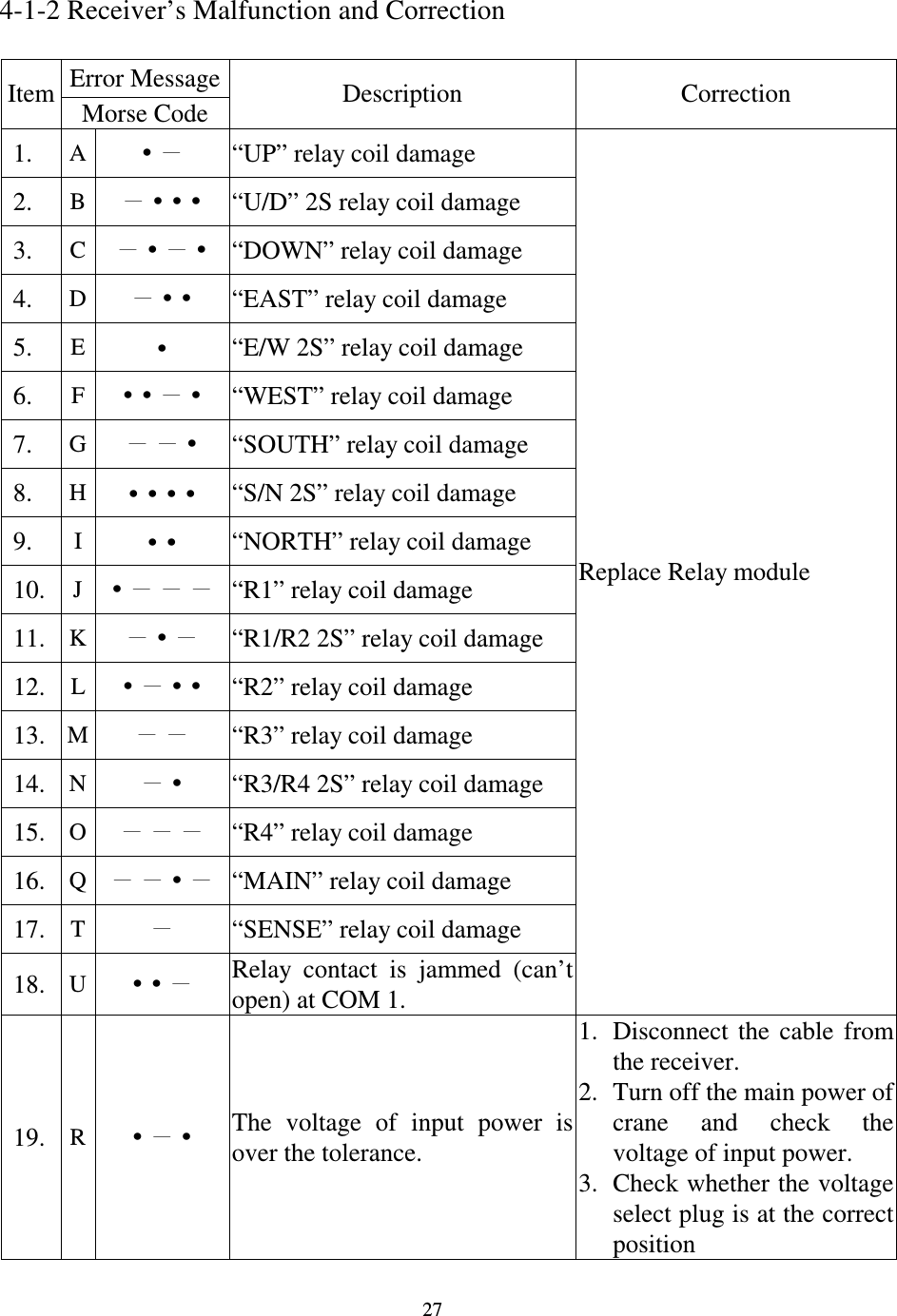
  27     4-1-2 Receiver’s Malfunction and Correction  Error Message Item Morse Code  Description  Correction 1.  A • “UP” relay coil damage 2.  B ••• “U/D” 2S relay coil damage 3.  C •• “DOWN” relay coil damage 4.  D •• “EAST” relay coil damage 5.  E • “E/W 2S” relay coil damage 6.  F ••• “WEST” relay coil damage 7.  G • “SOUTH” relay coil damage 8.  H •••• “S/N 2S” relay coil damage 9.  I •• “NORTH” relay coil damage 10.  J • “R1” relay coil damage 11.  K • “R1/R2 2S” relay coil damage 12.  L ••• “R2” relay coil damage 13.  M  “R3” relay coil damage 14.  N • “R3/R4 2S” relay coil damage 15.  O  “R4” relay coil damage 16.  Q • “MAIN” relay coil damage 17.  T  “SENSE” relay coil damage 18.  U •• Relay  contact  is  jammed  (can’t open) at COM 1.   Replace Relay module 19.  R •• The  voltage  of  input  power  is over the tolerance. 1. Disconnect  the  cable  from the receiver. 2. Turn off the main power of crane  and  check  the voltage of input power. 3. Check whether the voltage select plug is at the correct position
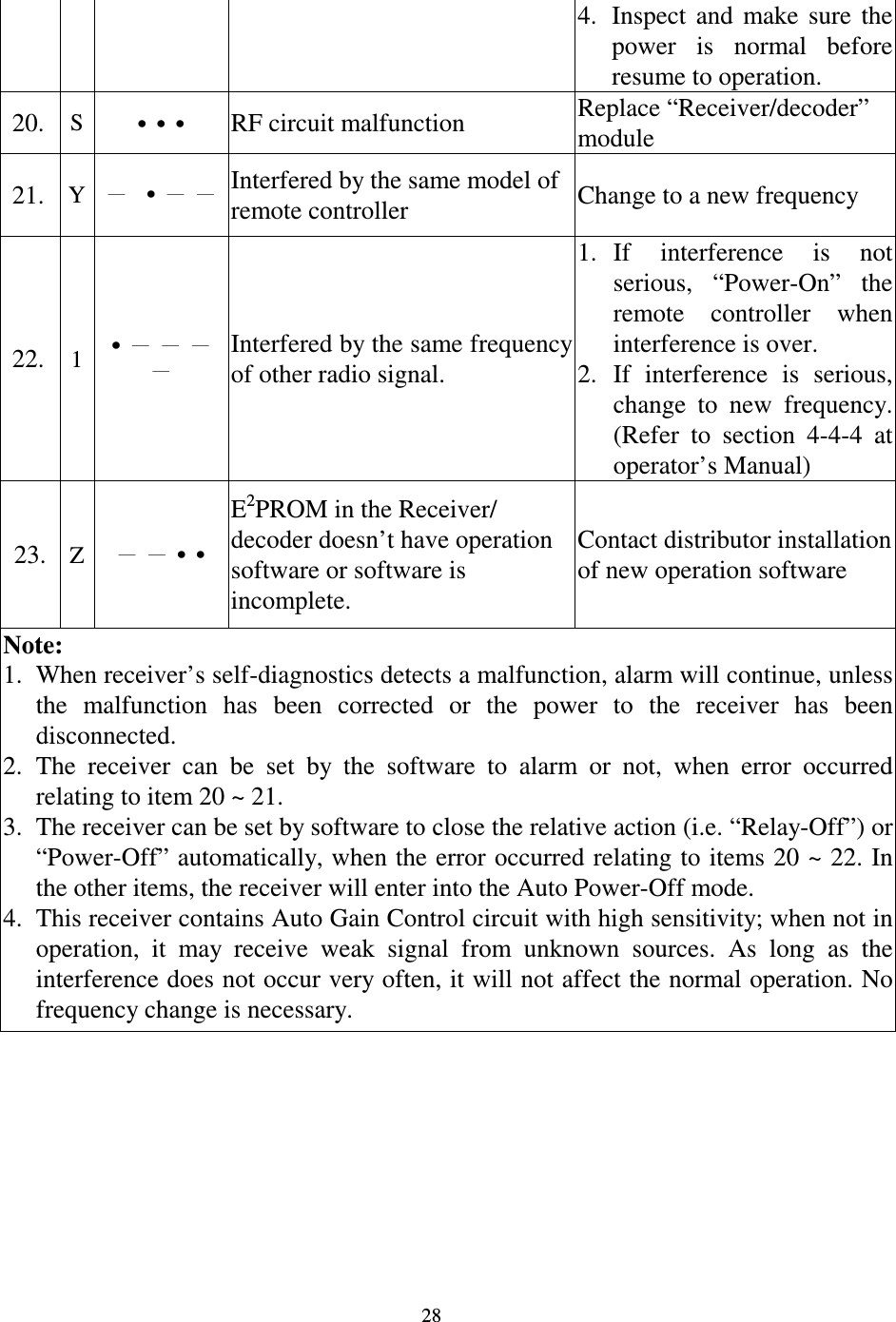
  28 4. Inspect  and  make  sure  the power  is  normal  before resume to operation. 20.  S ••• RF circuit malfunction  Replace “Receiver/decoder” module 21.  Y • Interfered by the same model of remote controller  Change to a new frequency   22.  1 • Interfered by the same frequency of other radio signal. 1. If  interference  is  not serious,  “Power-On”  the remote  controller  when interference is over. 2. If  interference  is  serious, change  to  new  frequency. (Refer  to  section  4-4-4  at operator’s Manual) 23. Z •• E2PROM in the Receiver/ decoder doesn’t have operation software or software is incomplete. Contact distributor installation of new operation software Note:   1. When receiver’s self-diagnostics detects a malfunction, alarm will continue, unless the  malfunction  has  been  corrected  or  the  power  to  the  receiver  has  been disconnected. 2. The  receiver  can  be  set  by  the  software  to  alarm  or  not,  when  error  occurred relating to item 20 ~ 21.   3. The receiver can be set by software to close the relative action (i.e. “Relay-Off”) or “Power-Off” automatically, when the error occurred relating to items 20 ~ 22. In the other items, the receiver will enter into the Auto Power-Off mode. 4. This receiver contains Auto Gain Control circuit with high sensitivity; when not in operation,  it  may  receive  weak  signal  from  unknown  sources.  As  long  as  the interference does not occur very often, it will not affect the normal operation. No frequency change is necessary.
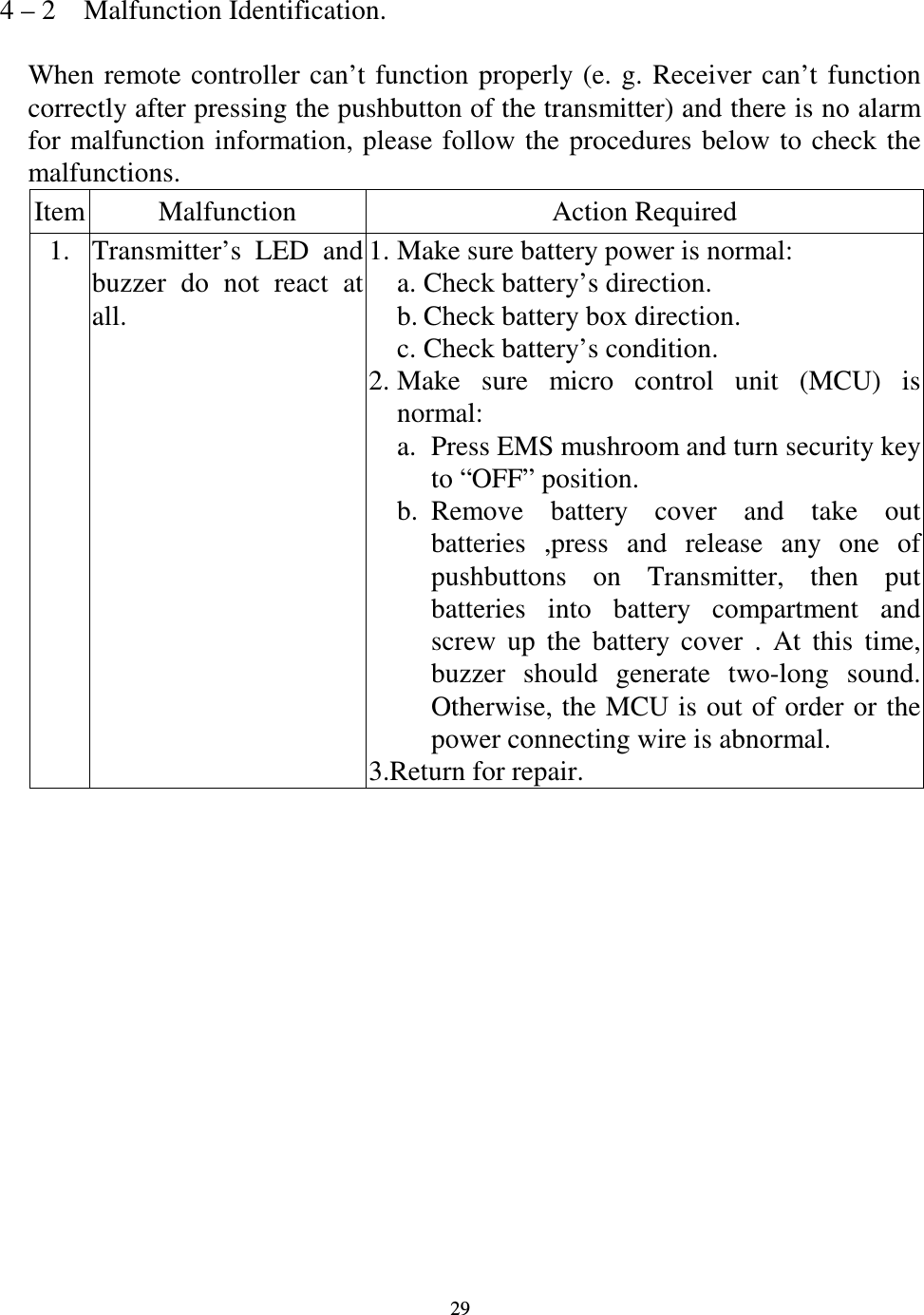
  29 4 – 2    Malfunction Identification.  When remote  controller  can’t  function  properly (e.  g.  Receiver  can’t function correctly after pressing the pushbutton of the transmitter) and there is no alarm for malfunction information, please follow  the  procedures  below to  check  the malfunctions. Item Malfunction  Action Required 1. Transmitter’s  LED  and buzzer  do  not  react  at all. 1. Make sure battery power is normal: a. Check battery’s direction. b. Check battery box direction. c. Check battery’s condition. 2. Make  sure  micro  control  unit  (MCU)  is normal: a. Press EMS mushroom and turn security key to “OFF” position. b. Remove  battery  cover  and  take  out batteries  ,press  and  release  any  one  of pushbuttons  on  Transmitter,  then  put batteries  into  battery  compartment  and screw  up  the  battery  cover  .  At  this  time, buzzer  should  generate  two-long  sound. Otherwise, the MCU is out of order or  the power connecting wire is abnormal. 3.Return for repair.
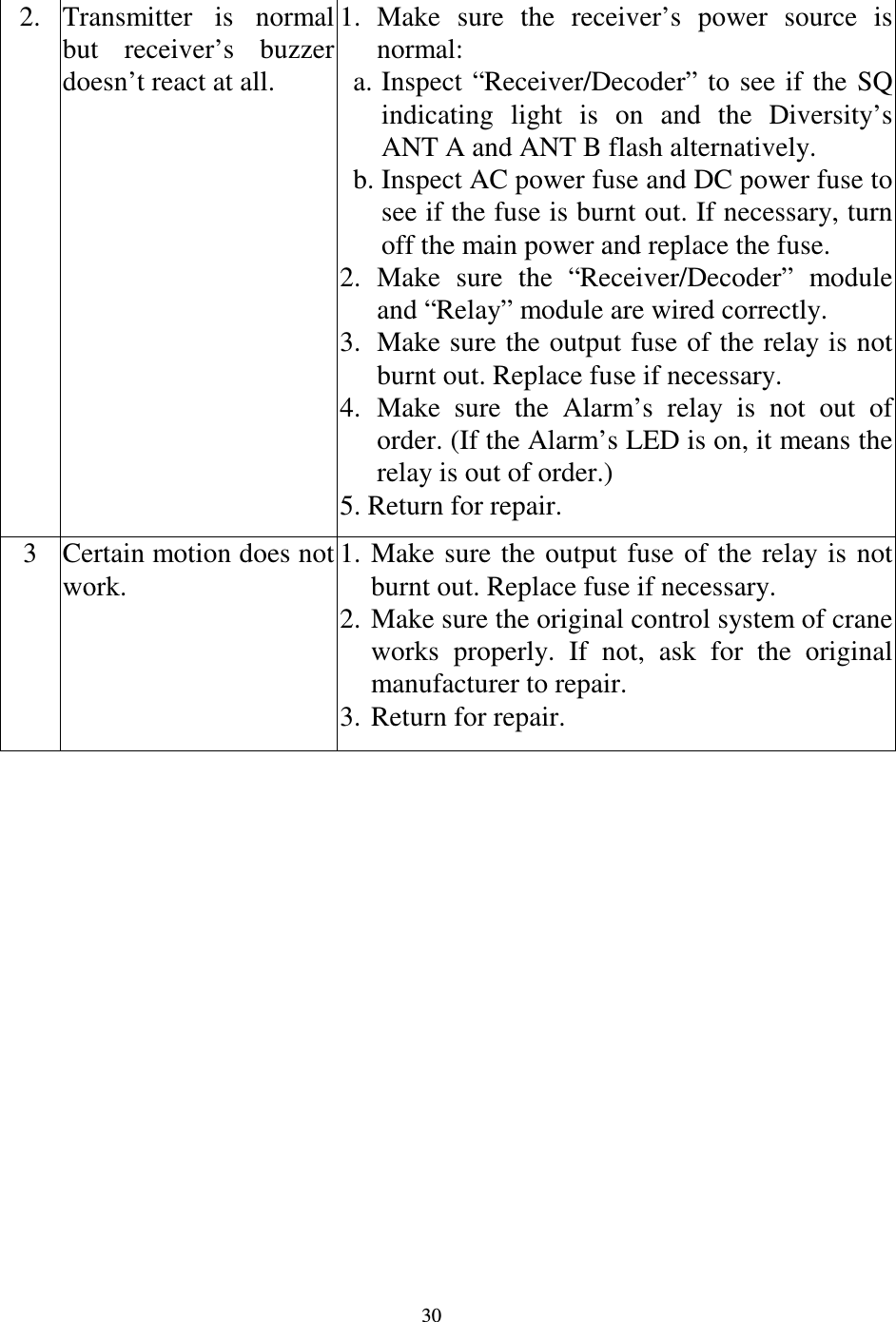
  30 2. Transmitter  is  normal but  receiver’s  buzzer doesn’t react at all. 1. Make  sure  the  receiver’s  power  source  is normal: a. Inspect “Receiver/Decoder” to  see  if  the  SQ indicating  light  is  on  and  the  Diversity’s ANT A and ANT B flash alternatively. b. Inspect AC power fuse and DC power fuse to see if the fuse is burnt out. If necessary, turn off the main power and replace the fuse. 2. Make  sure  the  “Receiver/Decoder”  module and “Relay” module are wired correctly. 3. Make sure the output fuse of the relay is not burnt out. Replace fuse if necessary. 4. Make  sure  the  Alarm’s  relay  is  not  out  of order. (If the Alarm’s LED is on, it means the relay is out of order.) 5. Return for repair. 3 Certain motion does not work. 1. Make  sure  the  output  fuse  of  the  relay  is  not burnt out. Replace fuse if necessary. 2. Make sure the original control system of crane works  properly.  If  not,  ask  for  the  original manufacturer to repair. 3. Return for repair.
FCC Caution:    1. This device complies with Part 15 of the FCC rules. Operation is subject to the    following two conditions:  (1)  This device may not cause harmful interference, and  (2) This device must accept any interference received, including interference   that may cause undesired operation.    2. This device and its antenna(s) must not be co-located or operating in conjunction      with any other antenna or transmitter.    3. Changes or modifications to this unit not expressly approved by the party   responsible for compliance could void the user authority to operate the equipment.

Navigation menu