Legacy Direct BGC Game Controller User Manual

Legacy Direct Game Controller Users Manual

User Manual

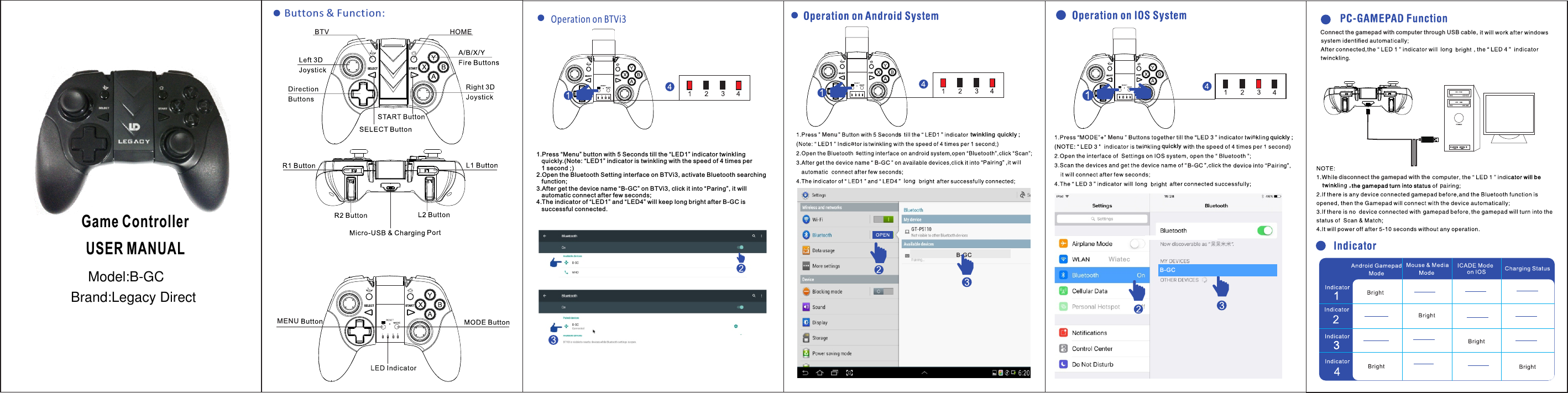
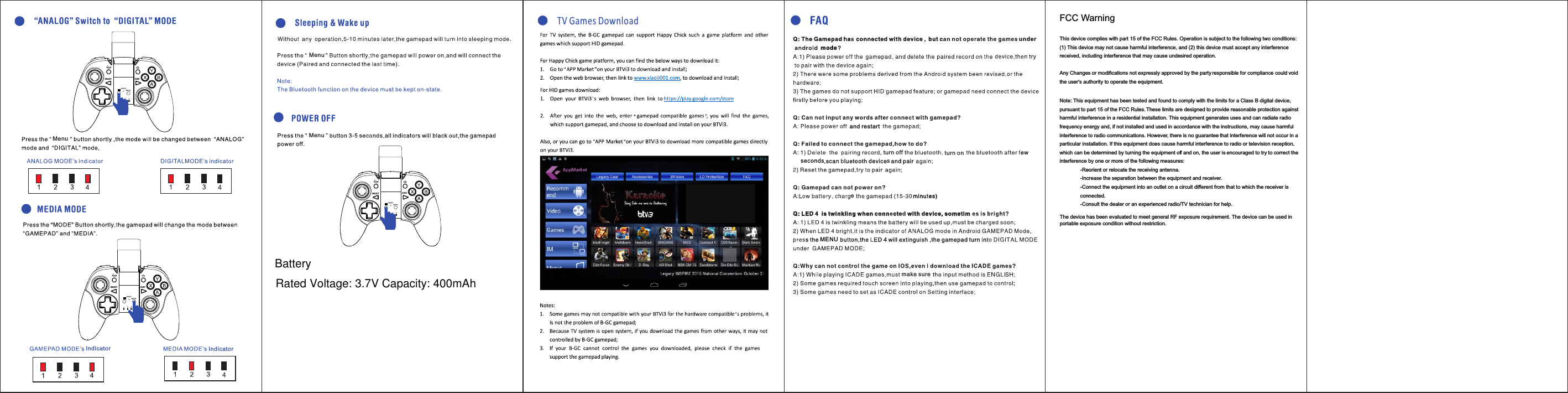
SEL ECT S TARTSEL ECT S TARTButtons & Function:BTV HOMEMENUGame ControllerUSER MANUALMenu twinklingnsB-GCB-GCSELE CT STARTaSELE CT STARTMenu nnB-GCWiatecB-GCConnect the gamepad with computer through USB cable,disconnect the gamepad with thepSELE CT START1. Press “Menu” button with 5 Seconds till the “LED1” indicator twinkling    quickly.(Note: “LED1” indicator is twinkling with the speed of 4 times per   1 second ;)2. Open the Bluetooth Setting interface on BTVi3, activate Bluetooth searching   function;3. After get the device name “B-GC” on BTVi3, click it into “Paring”, it will    automatic connect after few seconds;4. The indicator of “LED1” and “LED4” will keep long bright after B-GC is    successful connected.Operation on BTVi3quickly ;squickly ;quicklyModel:B-GCBrand:Legacy Direct
FCC Warning This device complies with part 15 of the FCC Rules. Operation is subject to the following two conditions: (1) This device may not cause harmful interference, and (2) this device must accept any interference received, including interference that may cause undesired operation.  Any Changes or modifications not expressly approved by the party responsible for compliance could void the user's authority to operate the equipment.  Note: This equipment has been tested and found to comply with the limits for a Class B digital device, pursuant to part 15 of the FCC Rules. These limits are designed to provide reasonable protection against harmful interference in a residential installation. This equipment generates uses and can radiate radio frequency energy and, if not installed and used in accordance with the instructions, may cause harmful interference to radio communications. However, there is no guarantee that interference will not occur in a particular installation. If this equipment does cause harmful interference to radio or television reception, which can be determined by turning the equipment off and on, the user is encouraged to try to correct the interference by one or more of the following measures:  }  -Reorient or relocate the receiving antenna.  }  -Increase the separation between the equipment and receiver.  }  -Connect the equipment into an outlet on a circuit different from that to which the receiver is connected.  }  -Consult the dealer or an experienced radio/TV technician for help.  The device has been evaluated to meet general RF exposure requirement. The device can be used inportable exposure condition without restriction. SELE CT STARTMenuSELE CT STARTIndicator IndicatorMenuMenuSELE CT STARTturn off turn onemake suresmod eand restartMENU’und er’TV Games DownloadRated Voltage: 3.7V Capacity: 400mAhBattery

Navigation menu