Legacy Direct BKSOUND Bluetooth Soundbar User Manual

Legacy Direct Bluetooth Soundbar

User Manual

   1             User Manual        Bluetooth SoundbarModel:B-KSOUND,KSOUND,KARASOUNDBAR,K-BARBrand:Legacy Direct
   2        FEATURES B-KSOUND   B-KSOUND soundbar lets you listen to audio from your TV, BTVi3 via a Bluetooth connection and lets you control the sound.  HDMI   HDMI transmits video and audio signals simultaneously, and provides a clearer picture. The unit is also equipped with the ARC function which lets you listen to sound from your TV through the Soundbar via an HDMI cable. This function is only available if you connect the unit to an ARC compliant TV.  Wireless Subwoofer The subwoofer connects and communicates with the Soundbar automatically.  Wireless Microphones 2pcs wireless handheld microphones are designed for B-KSOUND, automatic connection with B-KSOUND after the devices are turned on.  Multi-function Remote Control You can use the supplied remote control to control various operations on B-KSOUND and BTVi3 with the simple press of a button.    Bluetooth Function You can connect your BTVi3 or other Bluetooth devices to the Soundbar and enjoy music with high quality stereo sound, without any wire!  WHAT’S INCLUDED Check for the supplied accessories shown below Bluetooth Soundbar * 1 Wireless Subwoofer * 1 Wireless Microphones * 2 Remote Control * 1 User Manual * 1   1 to 1 AUX cable *1   Power Cord for Subwoofer * 1 Wired Microphones * 2
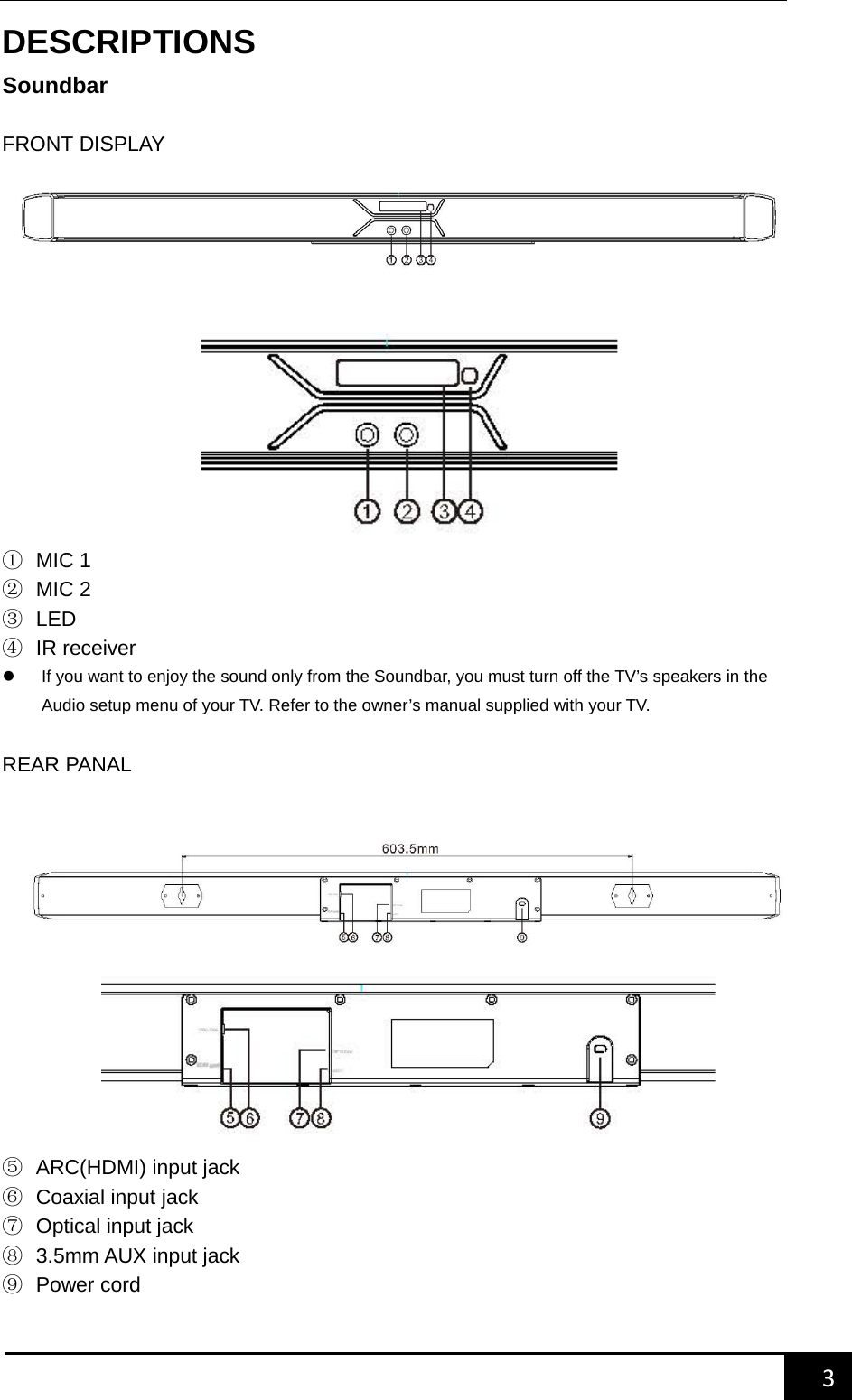
   3        DESCRIPTIONS Soundbar  FRONT DISPLAY          ① MIC 1 ② MIC 2 ③ LED ④ IR receiver  If you want to enjoy the sound only from the Soundbar, you must turn off the TV’s speakers in the Audio setup menu of your TV. Refer to the owner’s manual supplied with your TV.  REAR PANAL        ⑤ ARC(HDMI) input jack ⑥ Coaxial input jack ⑦ Optical input jack ⑧ 3.5mm AUX input jack ⑨ Power cord
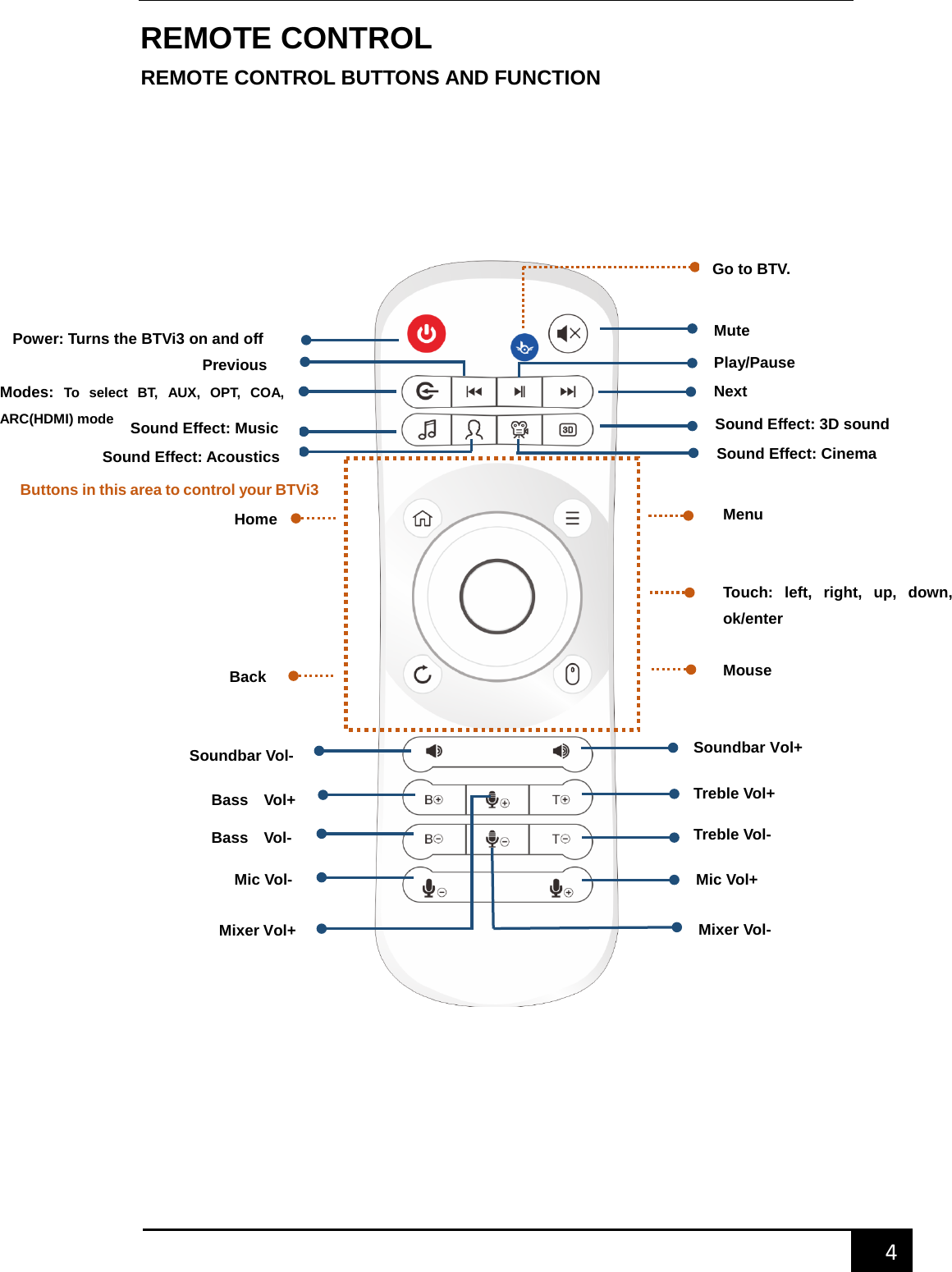
   4        REMOTE CONTROL REMOTE CONTROL BUTTONS AND FUNCTION     Power: Turns the BTVi3 on and off Modes:  To select BT, AUX, OPT, COA, ARC(HDMI) mode Previous Next Play/Pause Sound Effect: Music Sound Effect: Acoustics Sound Effect: 3D sound Sound Effect: Cinema Go to BTV. Mute Buttons in this area to control your BTVi3 Setting Menu Soundbar Vol-  Soundbar Vol+ Bass    Vol+ Bass    Vol- Treble Vol+ Treble Vol- Mic Vol-  Mic Vol+ Mixer Vol+  Mixer Vol- Mouse Home Back Touch: left, right, up, down, ok/enter
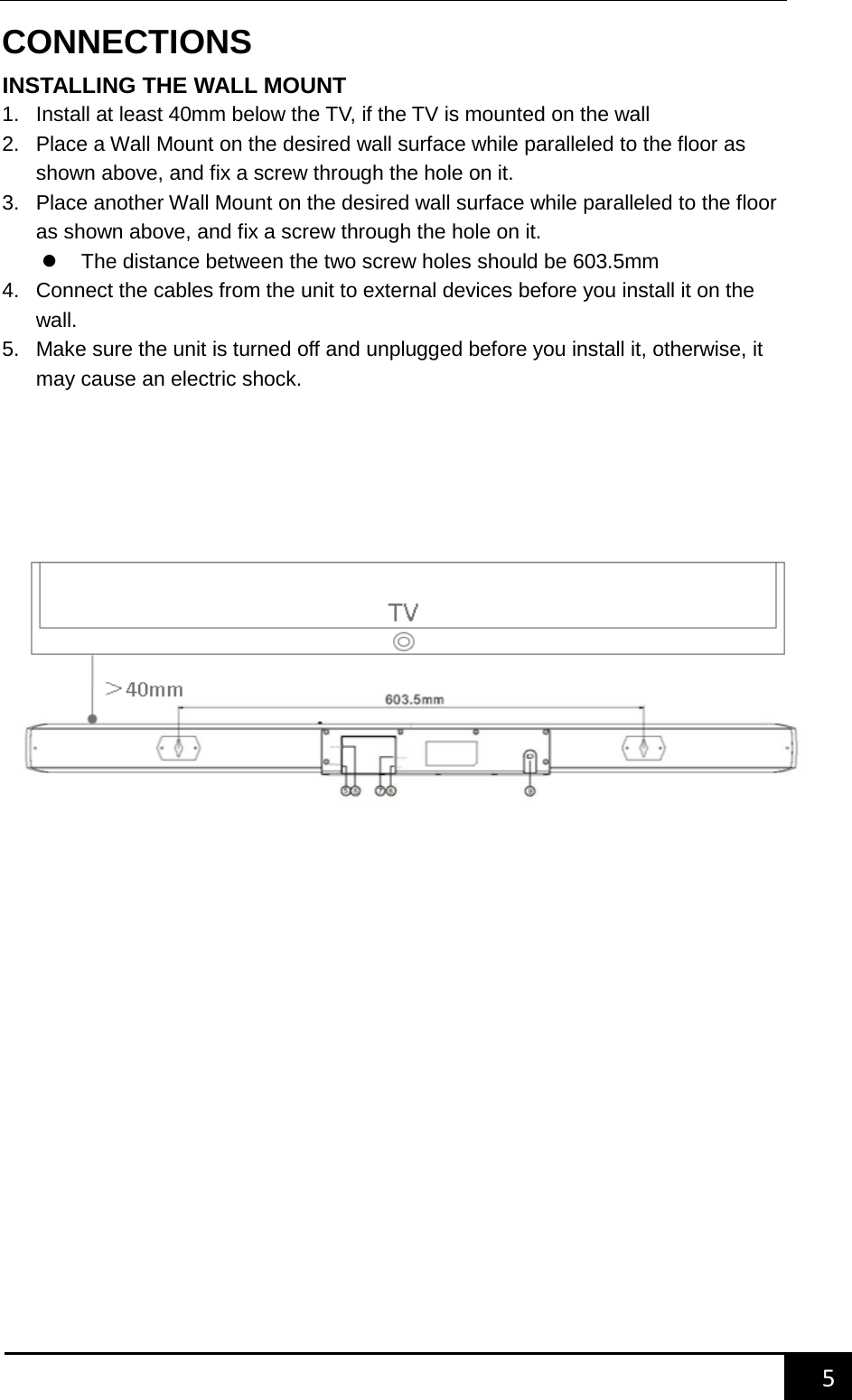
   5        CONNECTIONS INSTALLING THE WALL MOUNT 1. Install at least 40mm below the TV, if the TV is mounted on the wall 2. Place a Wall Mount on the desired wall surface while paralleled to the floor as shown above, and fix a screw through the hole on it. 3. Place another Wall Mount on the desired wall surface while paralleled to the floor as shown above, and fix a screw through the hole on it.  The distance between the two screw holes should be 603.5mm 4. Connect the cables from the unit to external devices before you install it on the wall. 5. Make sure the unit is turned off and unplugged before you install it, otherwise, it may cause an electric shock.
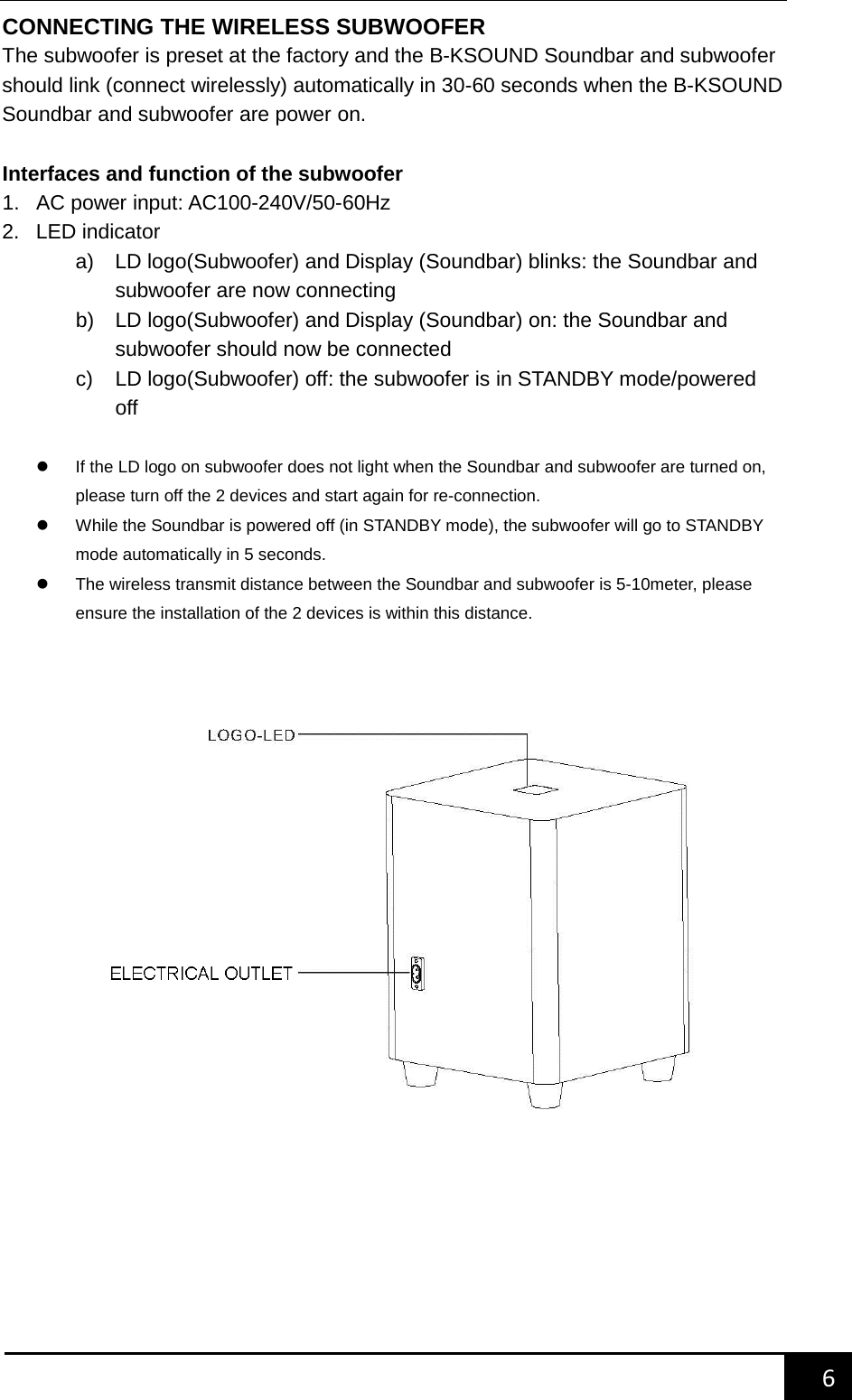
   6        CONNECTING THE WIRELESS SUBWOOFER The subwoofer is preset at the factory and the B-KSOUND Soundbar and subwoofer should link (connect wirelessly) automatically in 30-60 seconds when the B-KSOUND Soundbar and subwoofer are power on.    Interfaces and function of the subwoofer 1. AC power input: AC100-240V/50-60Hz 2. LED indicator a) LD logo(Subwoofer) and Display (Soundbar) blinks: the Soundbar and subwoofer are now connecting b) LD logo(Subwoofer) and Display (Soundbar) on: the Soundbar and subwoofer should now be connected c)  LD logo(Subwoofer) off: the subwoofer is in STANDBY mode/powered off     If the LD logo on subwoofer does not light when the Soundbar and subwoofer are turned on, please turn off the 2 devices and start again for re-connection.  While the Soundbar is powered off (in STANDBY mode), the subwoofer will go to STANDBY mode automatically in 5 seconds.  The wireless transmit distance between the Soundbar and subwoofer is 5-10meter, please ensure the installation of the 2 devices is within this distance.
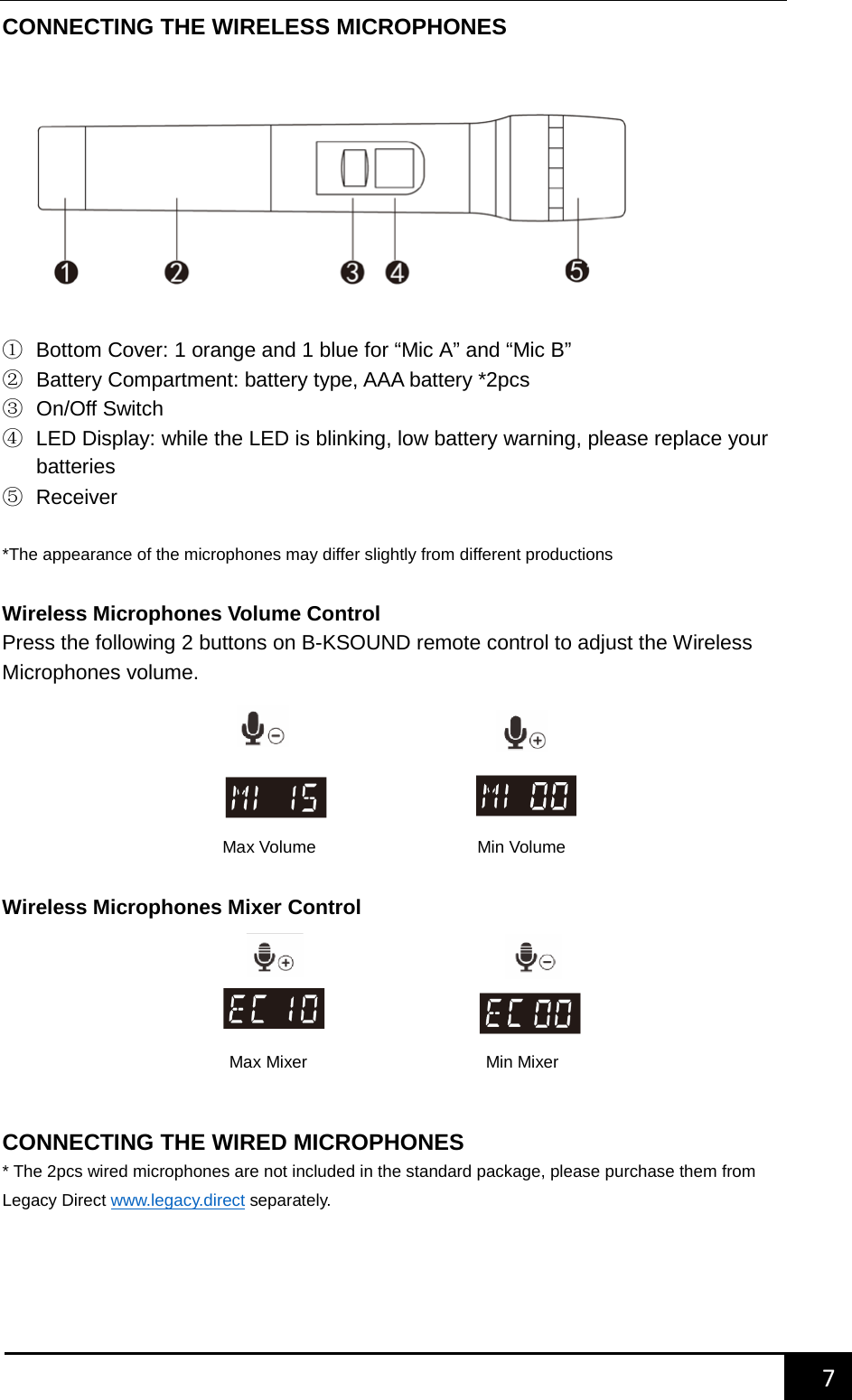
   7        CONNECTING THE WIRELESS MICROPHONES   ① Bottom Cover: 1 orange and 1 blue for “Mic A” and “Mic B” ② Battery Compartment: battery type, AAA battery *2pcs ③ On/Off Switch ④ LED Display: while the LED is blinking, low battery warning, please replace your batteries   ⑤ Receiver  *The appearance of the microphones may differ slightly from different productions  Wireless Microphones Volume Control Press the following 2 buttons on B-KSOUND remote control to adjust the Wireless Microphones volume.        Wireless Microphones Mixer Control        CONNECTING THE WIRED MICROPHONES * The 2pcs wired microphones are not included in the standard package, please purchase them from Legacy Direct www.legacy.direct separately.    Max Volume                   Min Volume  Max Mixer                     Min Mixer
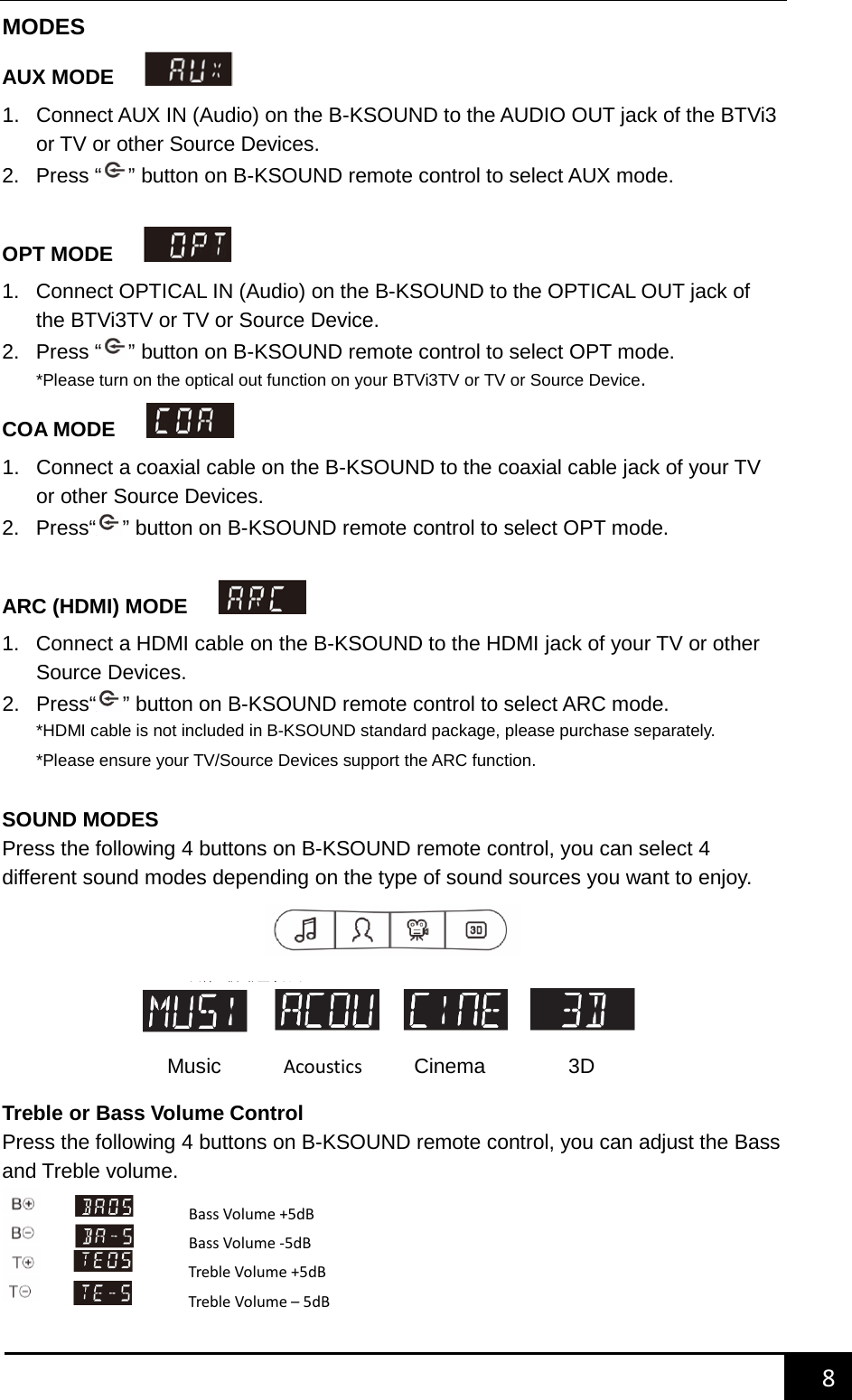
   8        MODES AUX MODE     1. Connect AUX IN (Audio) on the B-KSOUND to the AUDIO OUT jack of the BTVi3 or TV or other Source Devices.   2.  Press “ ” button on B-KSOUND remote control to select AUX mode.  OPT MODE     1. Connect OPTICAL IN (Audio) on the B-KSOUND to the OPTICAL OUT jack of the BTVi3TV or TV or Source Device. 2.  Press “ ” button on B-KSOUND remote control to select OPT mode. *Please turn on the optical out function on your BTVi3TV or TV or Source Device. COA MODE     1. Connect a coaxial cable on the B-KSOUND to the coaxial cable jack of your TV or other Source Devices.   2. Press“ ” button on B-KSOUND remote control to select OPT mode.  ARC (HDMI) MODE     1. Connect a HDMI cable on the B-KSOUND to the HDMI jack of your TV or other Source Devices.   2. Press“ ” button on B-KSOUND remote control to select ARC mode. *HDMI cable is not included in B-KSOUND standard package, please purchase separately. *Please ensure your TV/Source Devices support the ARC function.  SOUND MODES Press the following 4 buttons on B-KSOUND remote control, you can select 4 different sound modes depending on the type of sound sources you want to enjoy.        Treble or Bass Volume Control Press the following 4 buttons on B-KSOUND remote control, you can adjust the Bass and Treble volume.     Music      Acoustics       Cinema        3D Bass Volume +5dB Bass Volume -5dB Treble Volume +5dB Treble Volume – 5dB
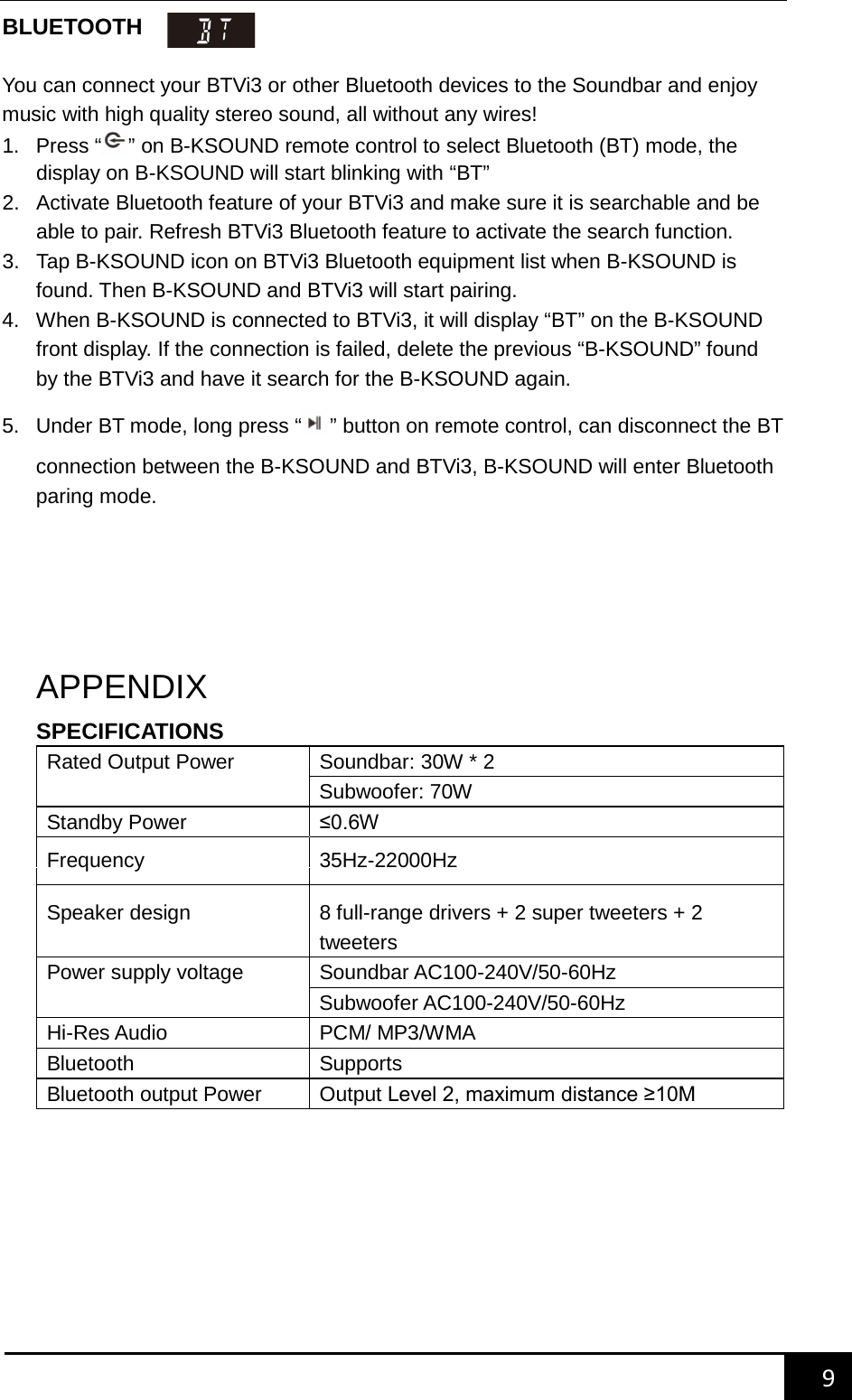
   9        BLUETOOTH   You can connect your BTVi3 or other Bluetooth devices to the Soundbar and enjoy music with high quality stereo sound, all without any wires! 1.  Press “ ” on B-KSOUND remote control to select Bluetooth (BT) mode, the display on B-KSOUND will start blinking with “BT” 2. Activate Bluetooth feature of your BTVi3 and make sure it is searchable and be able to pair. Refresh BTVi3 Bluetooth feature to activate the search function. 3. Tap B-KSOUND icon on BTVi3 Bluetooth equipment list when B-KSOUND is found. Then B-KSOUND and BTVi3 will start pairing. 4. When B-KSOUND is connected to BTVi3, it will display “BT” on the B-KSOUND front display. If the connection is failed, delete the previous “B-KSOUND” found by the BTVi3 and have it search for the B-KSOUND again. 5. Under BT mode, long press “” button on remote control, can disconnect the BT connection between the B-KSOUND and BTVi3, B-KSOUND will enter Bluetooth paring mode.      APPENDIX SPECIFICATIONS Rated Output Power Soundbar: 30W * 2 Subwoofer: 70W Standby Power ≤0.6W  Frequency 35Hz-22000Hz Speaker design 8 full-range drivers + 2 super tweeters + 2 tweeters Power supply voltage Soundbar AC100-240V/50-60Hz Subwoofer AC100-240V/50-60Hz Hi-Res Audio PCM/ MP3/WMA Bluetooth   Supports Bluetooth output Power Output Level 2, maximum distance ≥10M
   10        TROUBLE SHOOTING 1. Discontinuities appears on Soundbar when playing. Disconnect the Soundbar and connect it again. 2. Sound is not produced. Check if the input mode is correct. (AUX/OPT/COA/ARC (HDMI)/BT)   3. Low bass or subwoofer is not producing sound.(Blue LED blinks or Red LED on) Disconnect and connect your subwoofer again. 4. Too much noise while turn the Soundbar to Maximum volume. Bass overload, turn down the volume 5. Discontinuities appears or too much noise on subwoofer when playing. Adjust the subwoofer volume on B-KSOUND remote control  Need More Help? We’re here for you online or on the phoneanswers, guided help, contact info, and more. You can also find us on social media for the latest in entertainment, special promotions, product news and customer support.    facebook.com/ legacydirectinc  twitter.com/legacydirectinc  vimeo.com/legacydirectinc  B-KSOUND & BTVi3 Tech Solutions B-KSOUND system and BTVi3 Tech Solutions is your personal technology concierge, available Monday-Friday from 9am-6pm PST for support, training, and advice. We are here to help you get the most out of your B-KSOUND KARAOKE system and BTVi3 Media Player including:  • Real-Time diagnoses and resolutions • Technology education and training • Troubleshooting
   11        FCC Caution.    This device complies with part 15 of the FCC Rules. Operation is subject to the following two conditions: (1) This device may not cause harmful interference, and (2) this device must accept any interference received, including interference that may cause undesired operation.    Any Changes or modifications not expressly approved by the party responsible for compliance could void the user's authority to operate the equipment.    Note: This equipment has been tested and found to comply with the limits for a Class B digital device, pursuant to part 15 of the FCC Rules. These limits are designed to provide reasonable protection against harmful interference in a residential installation. This equipment generates uses and can radiate radio frequency energy and, if not installed and used in accordance with the instructions, may cause harmful interference to radio communications. However, there is no guarantee that interference will not occur in a particular installation. If this equipment does cause harmful interference to radio or television reception, which can be determined by turning the equipment off and on, the user is encouraged to try to correct the interference by one or more of the following measures:   -Reorient or relocate the receiving antenna.   -Increase the separation between the equipment and receiver.   -Connect the equipment into an outlet on a circuit different from that to which the receiver is connected.   -Consult the dealer or an experienced radio/TV technician for help.   The device has been evaluated to meet general RF exposure requirement. The device can be used in portable exposure condition without restriction.

Navigation menu