Lelux Electronics LELUX218WR Wireless Slim Door/Window Sensor User Manual 615pr

Lelux Electronics Ltd Wireless Slim Door/Window Sensor 615pr

users manual

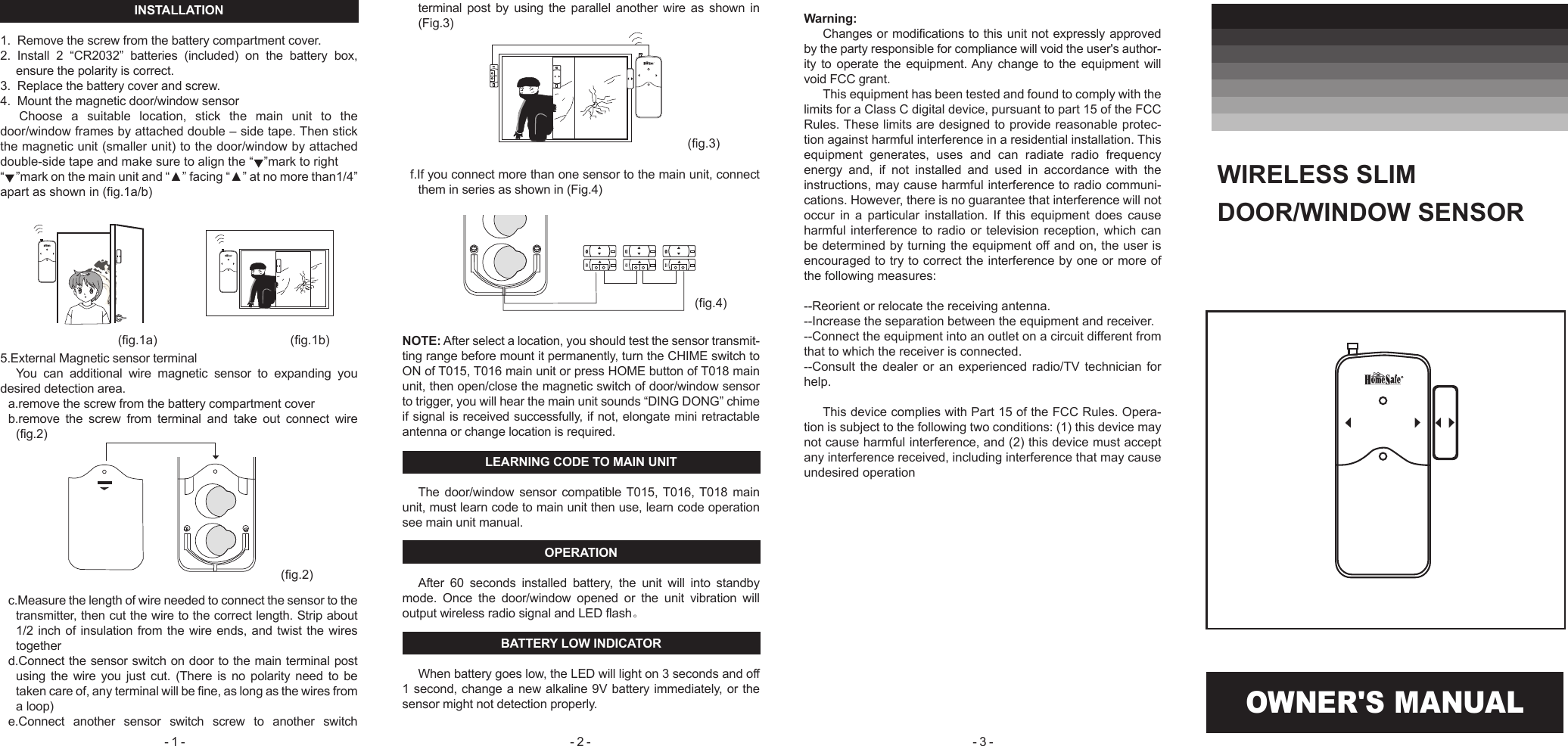
OWNER'S MANUALINSTALLATION1.  Remove the screw from the battery compartment cover. 2.  Install  2  “CR2032”  batteries  (included)  on  the  battery  box, ensure the polarity is correct.3.  Replace the battery cover and screw.4.  Mount the magnetic door/window sensor Choose  a  suitable  location,  stick  the  main  unit  to  the door/window frames by attached double – side tape. Then stick the magnetic unit (smaller unit) to the door/window by attached double-side tape and make sure to align the “   ”mark to right“    ”mark on the main unit and “▲” facing “▲” at no more than1/4” apart as shown in (fig.1a/b)  5.External Magnetic sensor terminalYou  can  additional  wire  magnetic  sensor  to  expanding  you desired detection area.a.remove the screw from the battery compartment coverb.remove  the  screw  from  terminal  and  take  out  connect  wire (fig.2) c.Measure the length of wire needed to connect the sensor to the transmitter, then cut the wire to the correct length. Strip about 1/2 inch of insulation from the wire ends, and twist the wires togetherd.Connect the sensor switch on door to the main terminal post using  the wire you  just  cut. (There  is  no polarity  need  to  be taken care of, any terminal will be fine, as long as the wires from a loop)e.Connect  another  sensor  switch  screw  to  another  switch terminal  post  by  using  the  parallel  another  wire  as  shown  in (Fig.3)f.If you connect more than one sensor to the main unit, connect them in series as shown in (Fig.4)NOTE: After select a location, you should test the sensor transmit-ting range before mount it permanently, turn the CHIME switch to ON of T015, T016 main unit or press HOME button of T018 main unit, then open/close the magnetic switch of door/window sensor to trigger, you will hear the main unit sounds “DING DONG” chime if signal is received successfully, if not, elongate mini retractable antenna or change location is required.LEARNING CODE TO MAIN UNITThe door/window  sensor compatible T015, T016, T018  main unit, must learn code to main unit then use, learn code operation see main unit manual.OPERATIONAfter  60  seconds  installed  battery,  the  unit  will  into  standby mode.  Once  the  door/window  opened  or  the  unit  vibration  will output wireless radio signal and LED flash。BATTERY LOW INDICATORWhen battery goes low, the LED will light on 3 seconds and off 1 second, change a new alkaline 9V battery immediately, or the sensor might not detection properly.WIRELESS SLIM DOOR/WINDOW SENSOR Warning:Changes or modifications to this unit not expressly approved by the party responsible for compliance will void the user's author-ity to  operate  the  equipment. Any  change to  the equipment  will void FCC grant.This equipment has been tested and found to comply with the limits for a Class C digital device, pursuant to part 15 of the FCC Rules. These limits are designed to provide reasonable protec-tion against harmful interference in a residential installation. This equipment  generates,  uses  and  can  radiate  radio  frequency energy  and,  if  not  installed  and  used  in  accordance  with  the instructions, may cause harmful interference to radio communi-cations. However, there is no guarantee that interference will not occur  in  a  particular  installation.  If  this  equipment  does  cause harmful interference to  radio or television  reception, which can be determined by turning the equipment off and on, the user is encouraged to try to correct the interference by one or more of the following measures:--Reorient or relocate the receiving antenna.--Increase the separation between the equipment and receiver.--Connect the equipment into an outlet on a circuit different from that to which the receiver is connected.--Consult  the  dealer  or  an  experienced  radio/TV  technician  for help.This device complies with Part 15 of the FCC Rules. Opera-tion is subject to the following two conditions: (1) this device may not cause harmful interference, and (2) this device must accept any interference received, including interference that may cause undesired operation(fig.1a) (fig.1b)(fig.3)(fig.2)(fig.4)- 1 -  - 2 -  - 3 -

Navigation menu