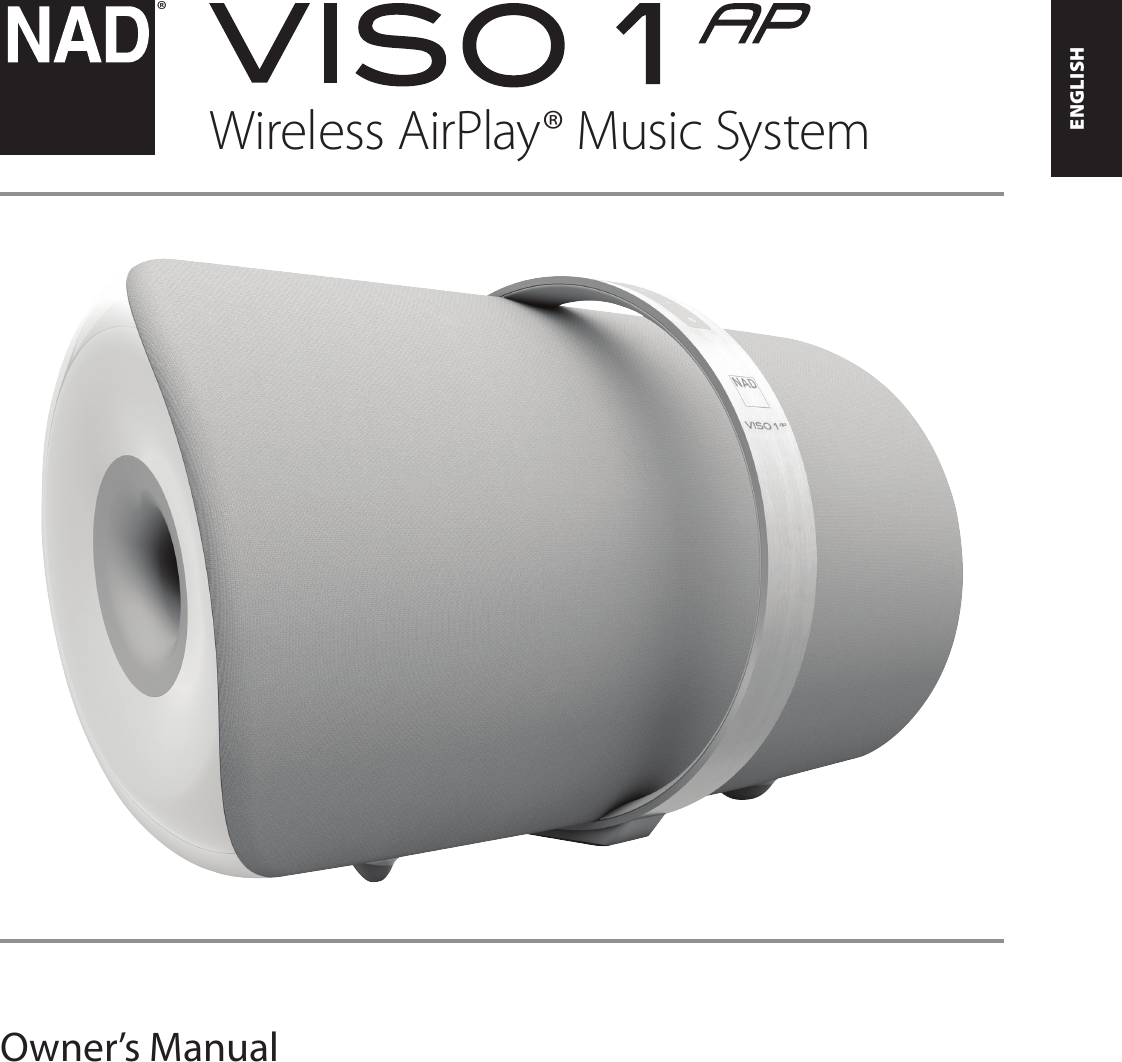
Lenbrook VISO1AP Wireless Airplay Music System User Manual

Lenbrook Industries Limited Wireless Airplay Music System

User Manual

ENGLISHFRANÇAISESPAÑOLITALIANODEUTSCHNEDERLANDSSVENSKAРУССКИЙ®Owner’s ManualWireless AirPlay® Music System
SAVE THESE INSTRUCTIONS FOR LATER USEFOLLOW ALL WARNINGS AND INSTRUCTIONS MARKED ON THE AUDIO EQUIPMENT.1.  Read instructions - All the safety and operating instructions should be read before the product is operated.2.  Retain instructions - The safety and operating instructions should be retained for future reference.3.  Heed Warnings - All warnings on the product and in the operating instructions should be adhered to.4.  Follow Instructions - All operating and use instructions should be followed.5. Cleaning - Unplug this product from the wall outlet before cleaning. Do not use liquid cleaners or aerosol cleaners. Clean only with dry cloth.6. Attachments - Do not use attachments not recommended by the product manufacturer as they may cause hazards.7.  Water and Moisture - Do not use this product near water-for example, near a bath tub, wash bowl, kitchen sink, or laundry tub; in a wet basement; or near a swimming pool; and the like. 8. Accessories - Do not place this product on an unstable cart, stand, tripod, bracket, or table. The product may fall, causing serious injury to a child or adult, and serious damage to the product. Use only with a cart, stand, tripod, bracket, or table recommended by the manufacturer, or sold with the product. Any mounting of the product should follow the manufacturer’s instructions, and should use a mounting accessory recommended by the manufacturer.9.  A product and cart combination should be moved with care. Quick stops, excessive force, and uneven surfaces may cause the product and cart combination to overturn.10. Ventilation - Slots and openings in the cabinet are provided for ventilation and to ensure reliable operation of the product and to protect it from overheating, and these openings must not be blocked or covered. The openings should never be blocked by placing the product on a bed, sofa, rug, or other similar surface. This product should not be placed in a built-in installation such as a bookcase or rack unless proper ventilation is provided or the manufacturer’s instructions have been adhered to.11.  Power Sources - This product should be operated only from the type of power source indicated on the marking label. If you are not sure of the type of power supply to your home, consult your product dealer or local power company.  The primary method of isolating the amplier from the mains supply is to disconnect the mains plug. Ensure that the mains plug remains accessible at all times. Unplug the AC power cord from the AC outlet if the unit will not be used for several months or more.  The socket-outlet shall be installed near the equipment and shall be easily accessible. 12.  Grounding or Polarization - This product may be equipped with a polarized alternating-current line plug (a plug having one blade wider than the other). This plug will t into the power outlet only one way. This is a safety feature. If you are unable to insert the plug fully into the outlet, try reversing the plug. If the plug should still fail to t, contact your electrician to replace your obsolete outlet. Do not defeat the safety purpose of the polarized plug.13.  Power Cord Protection - Power-supply cords should be routed so that they are not likely to be walked on or pinched by items placed upon or against them, paying particular attention to cords at plugs, convenience receptacles, and the point where they exit from the product. 14.  Outdoor Antenna Grounding - If an outside antenna or cable system is connected to the product, be sure the antenna or cable system is grounded so as to provide some protection against voltage surges and built-up static charges. Article 810 of the National Electrical Code, ANSI/NFPA 70, provides information with regard to proper grounding of the mast and supporting structure, grounding of the lead-in wire to an antenna discharge unit, size of grounding conductors, location of antenna discharge unit, connection to grounding electrodes, and requirements for the grounding electrode.15. Lightning - For added protection for this product during a lightning storm, or when it is left unattended and unused for long periods of time, unplug it from the wall outlet and disconnect the antenna or cable system. This will prevent damage to the product due to lightning and power line surges.16.  Power Lines - An outside antenna system should not be located in the vicinity of overhead power lines or other electric light or power circuits, or where it can fall into such power lines or circuits. When installing an outside antenna system, extreme care should be taken to keep from touching such power lines or circuits as contact with them might be fatal.17. Overloading - Do not overload wall outlets, extension cords, or integral convenience receptacles as this can result in a risk of re or electric shock. 18.  Object and Liquid Entry - Never push objects of any kind into this product through openings as they may touch dangerous voltage points or short out parts that could result in a re or electric shock. Never spill liquid of any kind on the product. WARNING: THE APPARATUS SHOULD NOT BE EXPOSED TO DRIPPING OR SPLASHING, AND OBJECTS FILLED WITH LIQUIDS, SUCH AS VASES, SHOULD NOT BE PLACED ON THE APPARATUS. AS WITH ANY ELECTRONIC PRODUCTS, USE CARE NOT TO SPILL LIQUIDS INTO ANY PART OF THE SYSTEM. LIQUIDS CAN CAUSE A FAILURE AND/OR A FIRE HAZARD.19.  Damage Requiring Service - Unplug this product from the wall outlet and refer servicing to qualied service personnel under the following conditions: a  When the power supply cord or plug is damaged. b  If liquid has been spilled, or objects have fallen into the product.c  If the product has been exposed to rain or water. d  If the product does not operate normally by following the operating instructions. Adjust only those controls that are covered by the operating instructions as an improper adjustment of other controls may result in damage and will often require extensive work by a qualied technician to restore the product to its normal operation.e  If the product has been dropped or damaged in any way. f  When the product exhibits a distinct change in performance-this indicates a need for service.20.  Replacement Parts - When replacement parts are required, be sure the service technician has used replacement parts specied by the manufacturer or have the same characteristics as the original part. Unauthorized substitutions may result in re, electric shock, or other hazards. 21.  Safety Check - Upon completion of any service or repairs to this product, ask the service technician to perform safety checks to determine that the product is in proper operating condition. 22. Heat - The product should be situated away from heat sources such as radiators, heat registers, stoves or other products (including ampliers) that produce heat.Battery shall not be exposed to excessive heat such as sunshine, re or the like.WARNINGTO REDUCE THE RISK OF FIRE OR ELECTRIC SHOCK, DO NOT EXPOSE THIS PRODUCT TO RAIN OR MOISTURE.CAUTIONTO PREVENT ELECTRIC SHOCK, MATCH WIDE BLADE OF PLUG TO WIDE SLOT, FULLY INSERT.RESPONSIBLE PARTYLENBROOK AMERICA6 Merchant StreetSharon, MA 02067USATelephone: 800 263 4641781 784 8586Facsimile: 781 784 8386WARNINGChanges or modications to this unit not expressly approved by the party responsible for compliance could void the user’s authority to operate the equipment.NOTEShielded cables must be used with this unit to ensure compliance with the Class B FCC limits.Under the inuence of electrostatic phenomenon, the product may malfunction and require user to reset.Under environment with radio frequency interference, the product may malfunction and require user to reset.Under the environment with electrical fast transient, the product may malfunction and require user to reset.IMPORTANT SAFETY INSTRUCTIONSENGLISH FRANÇAIS ESPAÑOL ITALIANO DEUTSCH NEDERLANDS SVENSKA РУССКИЙ
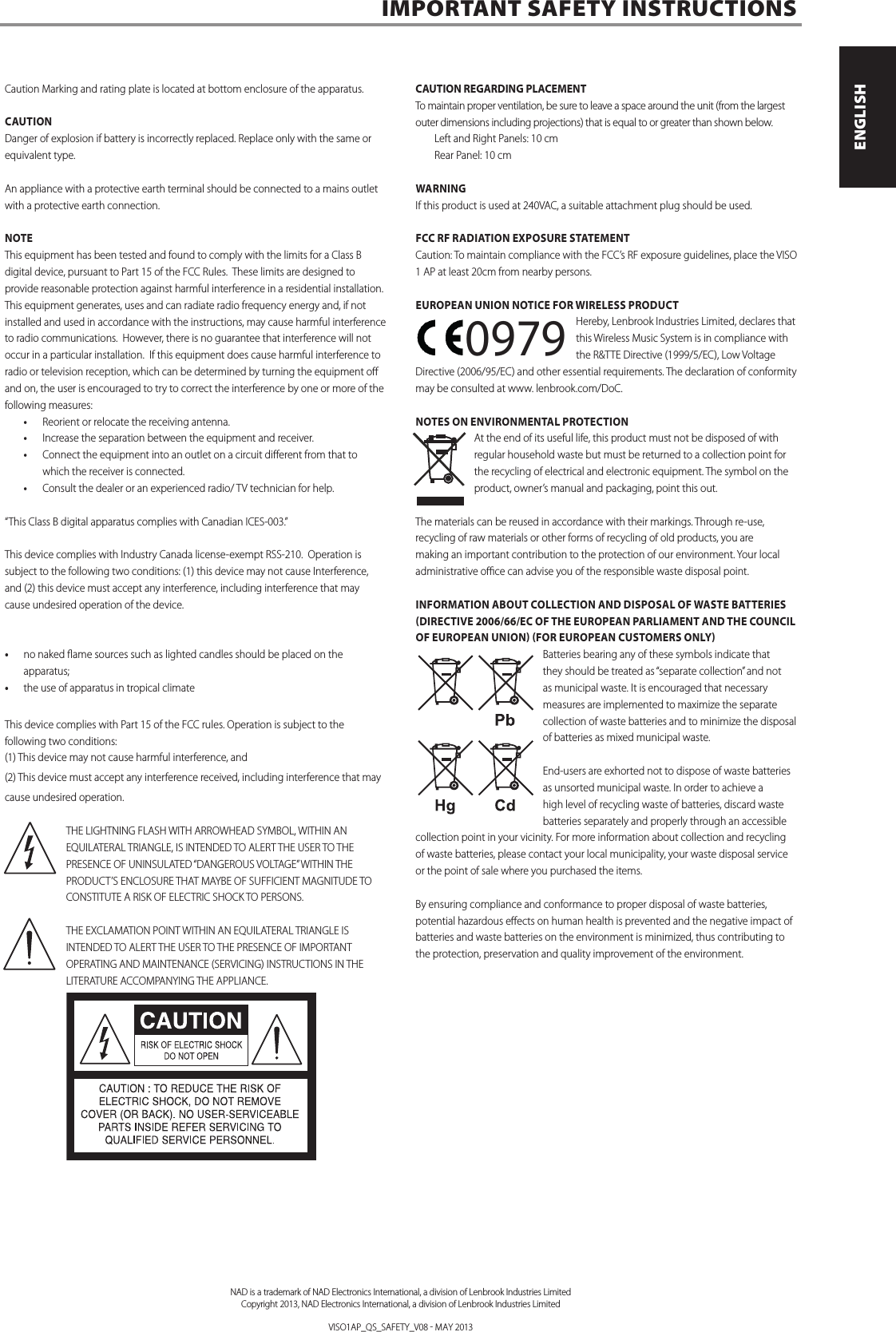
Caution Marking and rating plate is located at bottom enclosure of the apparatus.CAUTION Danger of explosion if battery is incorrectly replaced. Replace only with the same or equivalent type. An appliance with a protective earth terminal should be connected to a mains outlet with a protective earth connection.NOTEThis equipment has been tested and found to comply with the limits for a Class B digital device, pursuant to Part 15 of the FCC Rules. These limits are designed to provide reasonable protection against harmful interference in a residential installation. This equipment generates, uses and can radiate radio frequency energy and, if not installed and used in accordance with the instructions, may cause harmful interference to radio communications. However, there is no guarantee that interference will not occur in a particular installation. If this equipment does cause harmful interference to radio or television reception, which can be determined by turning the equipment o and on, the user is encouraged to try to correct the interference by one or more of the following measures:• Reorient or relocate the receiving antenna.• Increase the separation between the equipment and receiver.• Connect the equipment into an outlet on a circuit dierent from that to which the receiver is connected.• Consult the dealer or an experienced radio/ TV technician for help. “This Class B digital apparatus complies with Canadian ICES-003.”This device complies with Industry Canada license-exempt RSS-210.  Operation is subject to the following two conditions: (1) this device may not cause Interference, and (2) this device must accept any interference, including interference that may cause undesired operation of the device.• no naked ame sources such as lighted candles should be placed on the apparatus;• the use of apparatus in tropical climateThis device complies with Part 15 of the FCC rules. Operation is subject to the following two conditions:(1) This device may not cause harmful interference, and(2) This device must accept any interference received, including interference that may cause undesired operation.THE LIGHTNING FLASH WITH ARROWHEAD SYMBOL, WITHIN AN EQUILATERAL TRIANGLE, IS INTENDED TO ALERT THE USER TO THE PRESENCE OF UNINSULATED “DANGEROUS VOLTAGE” WITHIN THE PRODUCT’S ENCLOSURE THAT MAYBE OF SUFFICIENT MAGNITUDE TO CONSTITUTE A RISK OF ELECTRIC SHOCK TO PERSONS.THE EXCLAMATION POINT WITHIN AN EQUILATERAL TRIANGLE IS INTENDED TO ALERT THE USER TO THE PRESENCE OF IMPORTANT OPERATING AND MAINTENANCE (SERVICING) INSTRUCTIONS IN THE LITERATURE ACCOMPANYING THE APPLIANCE.CAUTION REGARDING PLACEMENTTo maintain proper ventilation, be sure to leave a space around the unit (from the largest outer dimensions including projections) that is equal to or greater than shown below. Left and Right Panels: 10 cm Rear Panel: 10 cmWARNINGIf this product is used at 240VAC, a suitable attachment plug should be used.FCC RF RADIATION EXPOSURE STATEMENTCaution: To maintain compliance with the FCC’s RF exposure guidelines, place the VISO 1 AP at least 20cm from nearby persons.EUROPEAN UNION NOTICE FOR WIRELESS PRODUCTHereby, Lenbrook Industries Limited, declares that this Wireless Music System is in compliance with the R&TTE Directive (1999/5/EC), Low Voltage Directive (2006/95/EC) and other essential requirements. The declaration of conformity may be consulted at www. lenbrook.com/DoC.NOTES ON ENVIRONMENTAL PROTECTIONAt the end of its useful life, this product must not be disposed of with regular household waste but must be returned to a collection point for the recycling of electrical and electronic equipment. The symbol on the product, owner’s manual and packaging, point this out. The materials can be reused in accordance with their markings. Through re-use, recycling of raw materials or other forms of recycling of old products, you are making an important contribution to the protection of our environment. Your local administrative oce can advise you of the responsible waste disposal point.INFORMATION ABOUT COLLECTION AND DISPOSAL OF WASTE BATTERIES (DIRECTIVE 2006/66/EC OF THE EUROPEAN PARLIAMENT AND THE COUNCIL OF EUROPEAN UNION) (FOR EUROPEAN CUSTOMERS ONLY)Batteries bearing any of these symbols indicate that they should be treated as “separate collection” and not as municipal waste. It is encouraged that necessary measures are implemented to maximize the separate collection of waste batteries and to minimize the disposal of batteries as mixed municipal waste.End-users are exhorted not to dispose of waste batteries as unsorted municipal waste. In order to achieve a high level of recycling waste of batteries, discard waste batteries separately and properly through an accessible collection point in your vicinity. For more information about collection and recycling of waste batteries, please contact your local municipality, your waste disposal service or the point of sale where you purchased the items.By ensuring compliance and conformance to proper disposal of waste batteries, potential hazardous eects on human health is prevented and the negative impact of batteries and waste batteries on the environment is minimized, thus contributing to the protection, preservation and quality improvement of the environment.IMPORTANT SAFETY INSTRUCTIONS      23. Battery Disposal - When disposing of used batteries, please comply with governmental regulations or environmental public instruction’s rules that apply in your country or area. Batteries (battery pack or batteries installed) must not be exposed to excessive heat such as sunshine, re or the like.  24. Safety Check - Upon completion of any service or repairs to this product, ask the service technician to perform safety checks to determine that the product is in proper operating condition. 25. Wall or Ceiling Mounting - The product should be mounted to a wall or ceiling only as recommended by the manufacturer.WARNINGThe lightning ash with arrowhead symbol, within an equilateral triangle, is intended to alert the user to the presence of uninsulated “dangerous voltage” within the product’s enclosure that may be of sucient magnitude to constitute a risk of electric shock to personsThe exclamation point within an equilateral triangle is intended to alert the user to the presence of important operating and maintenance (servicing) instructions in the literature accompanying the appliance.WARNING: TO REDUCE THE RISK OF FIRE OR ELECTRIC SHOCK, DO NOT EXPOSE THIS APPARATUS TO RAIN OR MOISTURE AND OBJECTS FILLED WITH LIQUIDS, SUCH AS VASES, SHOULD NOT BE PLACED ON THIS APPARATUS. CAUTION REGARDING PLACEMENT To maintain proper ventilation, be sure to leave a space around the unit (from the largest outer dimensions including projections) than is equal to, or greater than shown below.  Left and Right Panels: 10 cm  Rear Panel: 10 cm  Top Panel: 50 cm IMPORTANT INFORMATION TO UK CUSTOMERSDO NOT cut o the mains plug from this equipment. If the plug tted is not suitable for the power points in your home or the cable is too short to reach a power point, then obtain an appropriate safety approved extension lead or consult your dealer. If nonetheless, the mains plug is cut o, REMOVE THE FUSE and dispose of the PLUG immediately, to avoid possible shock hazard by inadvertent connection to the mains supply. If this product is not provided with a mains plug, or one has to be tted, then follow the instructions given below: IMPORTANT DO NOT make any connection to the larger terminal which is marked with the letter ‘E’ or by the safety earth symbol or colored GREEN or GREEN AND YELLOW. The wires in the mains lead on this product are colored in accordance with the following code:  BLUE - NEUTRAL  BROWN - LIVE As these colors may not correspond with the colored markings identifying the terminals in your plug, proceed as follows: • The BLUE wire must be connected to the terminal marked with the letter ‘N’ or colored BLACK. • The BROWN wire must be connected to the terminal marked with the letter ‘L’ or colored RED • When replacing the fuse, only a correctly rated and approved type should be used, and be sure to re-t the fuse cover.  IF IN DOUBT CONSULT A COMPETENT ELECTRICIAN.This product is manufactured to comply with the radio interference requirements of EEC DIRECTIVE 2004/108/EC.NOTES ON ENVIRONMENTAL PROTECTIONAt the end of its useful life, this product must not be disposed of with regular household waste but must be returned to a collection point for the recycling of electrical and electronic equipment. The symbol on the product, user’s manual and packaging point this out. The materials can be reused in accordance with their markings. Through re-use, recycling of raw materials, or other forms of recycling of old products, you are making an important contribution to the protection of our environment. Your local administrative oce can advise you of the responsible waste disposal point. RECORD YOUR MODEL NUMBER (NOW, WHILE YOU CAN SEE IT) The model and serial number of your new C 355BEE are located on the back of the cabinet. For your future convenience, we suggest that you record these numbers here:   Model number : . . . . . . . . . . . . . . . . . . . . . . . . . . . . . . . . . . . . . .  Serial number : ......................................IMPORTANT SAFETY INSTRUCTIONS   NAD is a trademark of NAD Electronics International, a division of Lenbrook Industries LimitedCopyright 2008, NAD Electronics International, a division of Lenbrook Industries Limited 3ENGLISHFRANÇAISESPAÑOLITALIANODEUTSCHNEDERLANDSSVENSKAРУССКИЙ0979NAD is a trademark of NAD Electronics International, a division of Lenbrook Industries LimitedCopyright 2013, NAD Electronics International, a division of Lenbrook Industries LimitedVISO1AP_QS_SAFETY_V08  MAY 2013ENGLISHFRANÇAISESPAÑOLITALIANODEUTSCHNEDERLANDSSVENSKAРУССКИЙ
Thank you for choosing NAD.The NAD VISO 1 AP is the latest evolution of the VISO 1 Wireless Digital Music System.  NAD VISO 1 AP takes the award-winning audio performance of the original NAD VISO 1 and adds the versatility of Wi-Fi and Apple AirPlay. A USB port at the rear is also added to allow direct connection and charging of Apple’s iPhone, iPad or iPod touch.Using NAD’s Direct Digital technology to eliminate all analog stages along with their inherent noise and distortion, the NAD VISO 1 AP is a complete digital device.   NAD uses a sophisticated closed loop DAC technology to directly power the speakers.  Acoustic design is provided by NAD’s sister company, PSB Speakers, and the amplication and acoustic design is fully integrated to create very impressive synergies.  The result is a shelf system with enough acoustic power to ll a large room, guaranteed lowest distortion and widest frequency response.As with all our products, NAD’s “Music First” design philosophy guided the VISO 1 AP design that it can condently promise you both state-of-the-art technology and audiophile-quality music listening for years to come. We encourage you to take a few minutes now to read right through this manual. Investing a little time here at the outset might save you a good deal of time later, and is by far the best way to ensure that you make the most of your investment in the VISO 1 AP.One more thing: We urge you to register your VISO 1 AP ownership on the NAD Worldwide Web site:http://NADelectronics.com/salonFor warranty information contact your local distributor.NAD SHALL NOT BE HELD LIABLE FOR ANY TECHNICAL OR USER INTERFACE DISCREPANCIES IN THIS MANUAL.THE VISO 1 AP OWNER’S MANUAL MAY BE SUBJECT TO CHANGE WITHOUT PRIOR NOTICE. CHECK OUT THE NAD WEBSITE FOR THE LATEST VERSION OF THE VISO 1 AP OWNER’S MANUAL.WHAT’S IN THE BOXPacked with your VISO 1 AP you will ndVISO 1 AP accessories box containing the following• Two detachable mains power cord • The VISO 1 AP remote control with 3V CR2025 battery• Cleaning cloth• VISO 1 AP Quick Setup GuideSAVE THE PACKAGINGPlease save the box and all of the packaging in which your VISO 1 AP arrived. Should you move or otherwise need to transport your VISO 1 AP, this is by far the safest container in which to do so. We’ve seen too many otherwise perfect components damaged in transit for lack of a proper shipping carton, so please:  Save that box!CHOOSING A LOCATIONProvide enough space (at least10 cm) around the VISO 1 AP port to allow air ow freely.  Ensure that there is a clear line of sight, within 25 feet/8 meters, between the VISO 1 AP’s front view and your primary listening/viewing position - this will allow reliable infrared remote control communications.  INTRODUCTIONNAD is a trademark of NAD Electronics International, a division of Lenbrook Industries LimitedCopyright 2013, NAD Electronics International, a division of Lenbrook Industries Limited4ENGLISH FRANÇAIS ESPAÑOL ITALIANO DEUTSCH NEDERLANDS SVENSKA РУССКИЙ
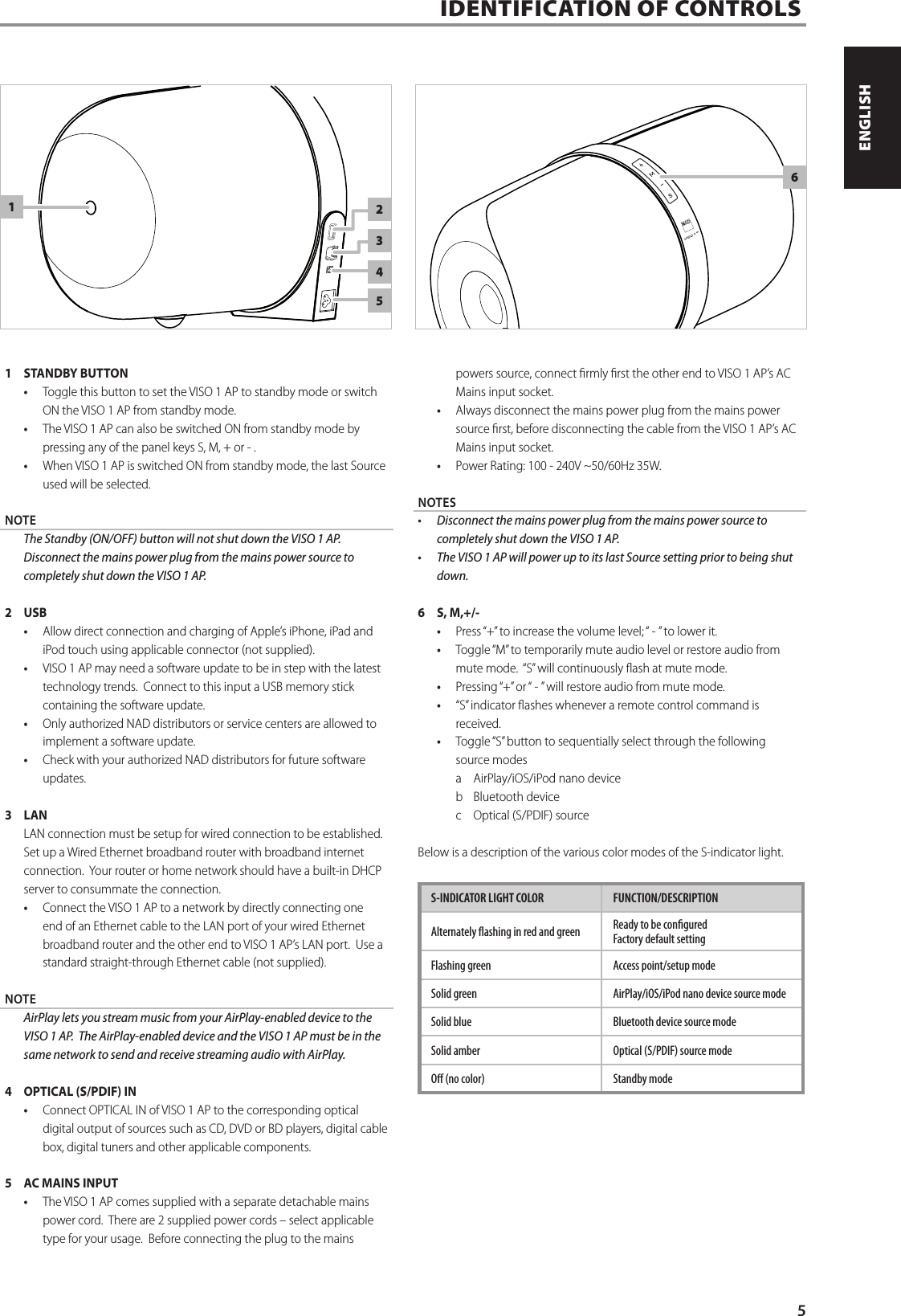
IDENTIFICATION OF CONTROLS1  STANDBY BUTTON• Toggle this button to set the VISO 1 AP to standby mode or switch ON the VISO 1 AP from standby mode. • The VISO 1 AP can also be switched ON from standby mode by pressing any of the panel keys S, M, + or - . • When VISO 1 AP is switched ON from standby mode, the last Source used will be selected.NOTE  The Standby (ON/OFF) button will not shut down the VISO 1 AP.  Disconnect the mains power plug from the mains power source to completely shut down the VISO 1 AP.2 USB• Allow direct connection and charging of Apple’s iPhone, iPad and iPod touch using applicable connector (not supplied).• VISO 1 AP may need a software update to be in step with the latest technology trends.  Connect to this input a USB memory stick containing the software update. • Only authorized NAD distributors or service centers are allowed to implement a software update. • Check with your authorized NAD distributors for future software updates. 3 LANLAN connection must be setup for wired connection to be established. Set up a Wired Ethernet broadband router with broadband internet connection.  Your router or home network should have a built-in DHCP server to consummate the connection. • Connect the VISO 1 AP to a network by directly connecting one end of an Ethernet cable to the LAN port of your wired Ethernet broadband router and the other end to VISO 1 AP’s LAN port.  Use a standard straight-through Ethernet cable (not supplied).NOTE  AirPlay lets you stream music from your AirPlay-enabled device to the VISO 1 AP.  The AirPlay-enabled device and the VISO 1 AP must be in the same network to send and receive streaming audio with AirPlay. 4  OPTICAL (S/PDIF) IN• Connect OPTICAL IN of VISO 1 AP to the corresponding optical digital output of sources such as CD, DVD or BD players, digital cable box, digital tuners and other applicable components.5  AC MAINS INPUT• The VISO 1 AP comes supplied with a separate detachable mains power cord.  There are 2 supplied power cords – select applicable type for your usage.  Before connecting the plug to the mains powers source, connect rmly rst the other end to VISO 1 AP’s AC Mains input socket.• Always disconnect the mains power plug from the mains power source rst, before disconnecting the cable from the VISO 1 AP’s AC Mains input socket.• Power Rating: 100 - 240V ~50/60Hz 35W.NOTES• Disconnectthemainspowerplugfromthemainspowersourcetocompletely shut down the VISO 1 AP.• TheVISO1APwillpoweruptoitslastSourcesettingpriortobeingshutdown. 6  S, M,+/-• Press “+” to increase the volume level; “ - ” to lower it.• Toggle “M” to temporarily mute audio level or restore audio from mute mode.  “S” will continuously ash at mute mode. • Pressing “+” or “ - ” will restore audio from mute mode.• “S” indicator ashes whenever a remote control command is received.• Toggle “S” button to sequentially select through the following source modesa  AirPlay/iOS/iPod nano deviceb  Bluetooth devicec  Optical (S/PDIF) sourceBelow is a description of the various color modes of the S-indicator light.S-INDICATOR LIGHT COLOR FUNCTION/DESCRIPTION Alternately ashing in red and green Ready to be congured Factory default settingFlashing green Access point/setup modeSolid green AirPlay/iOS/iPod nano device source modeSolid blue Bluetooth device source modeSolid amber Optical (S/PDIF) source modeO (no color) Standby mode1263455ENGLISHFRANÇAISESPAÑOLITALIANODEUTSCHNEDERLANDSSVENSKAРУССКИЙ
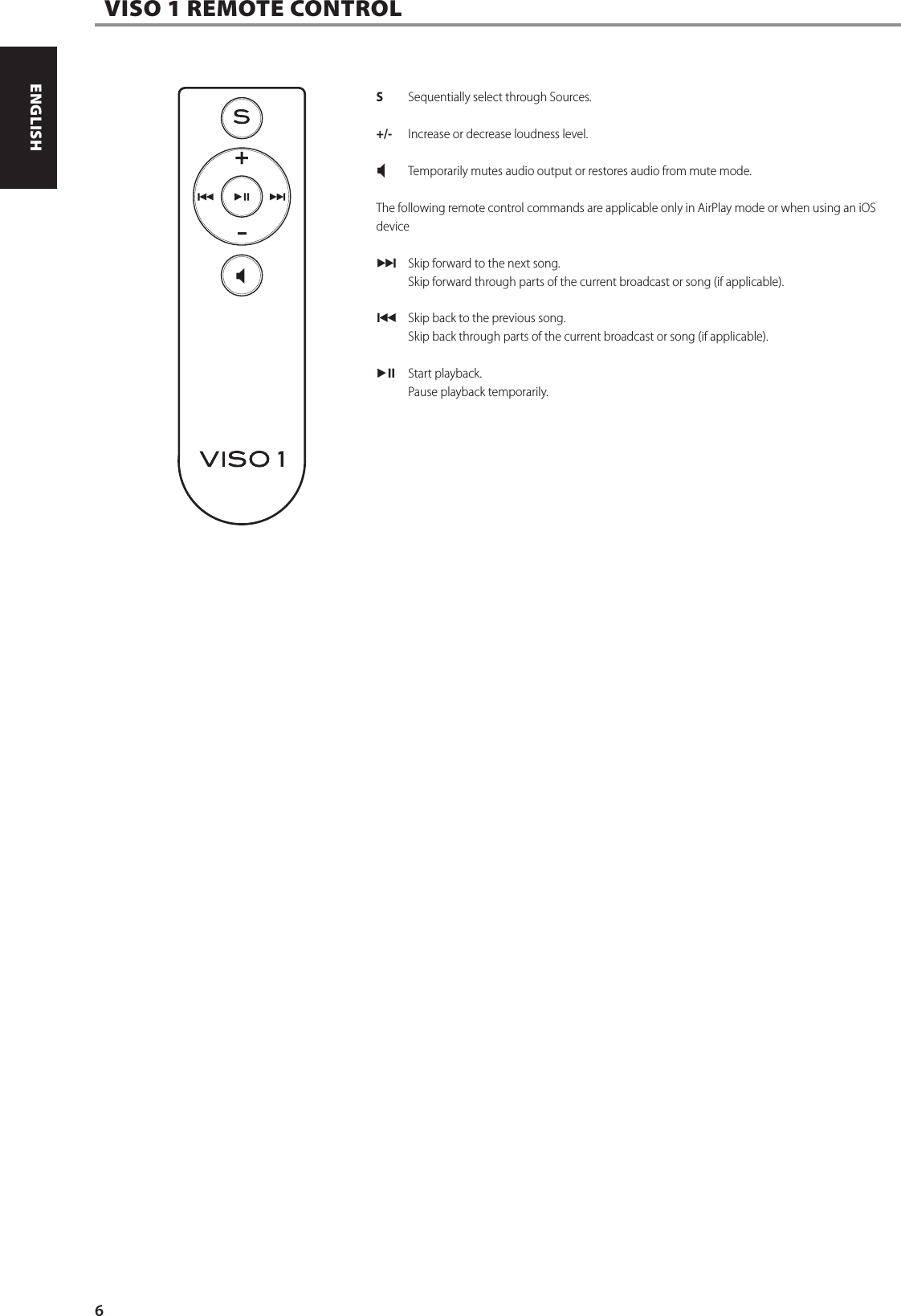
 VISO 1 REMOTE CONTROLS  Sequentially select through Sources.+/-  Increase or decrease loudness level. X Temporarily mutes audio output or restores audio from mute mode.The following remote control commands are applicable only in AirPlay mode or when using an iOS device0 Skip forward to the next song.  Skip forward through parts of the current broadcast or song (if applicable).9 Skip back to the previous song.   Skip back through parts of the current broadcast or song (if applicable).uj Start playback.   Pause playback temporarily.6ENGLISH FRANÇAIS ESPAÑOL ITALIANO DEUTSCH NEDERLANDS SVENSKA РУССКИЙ
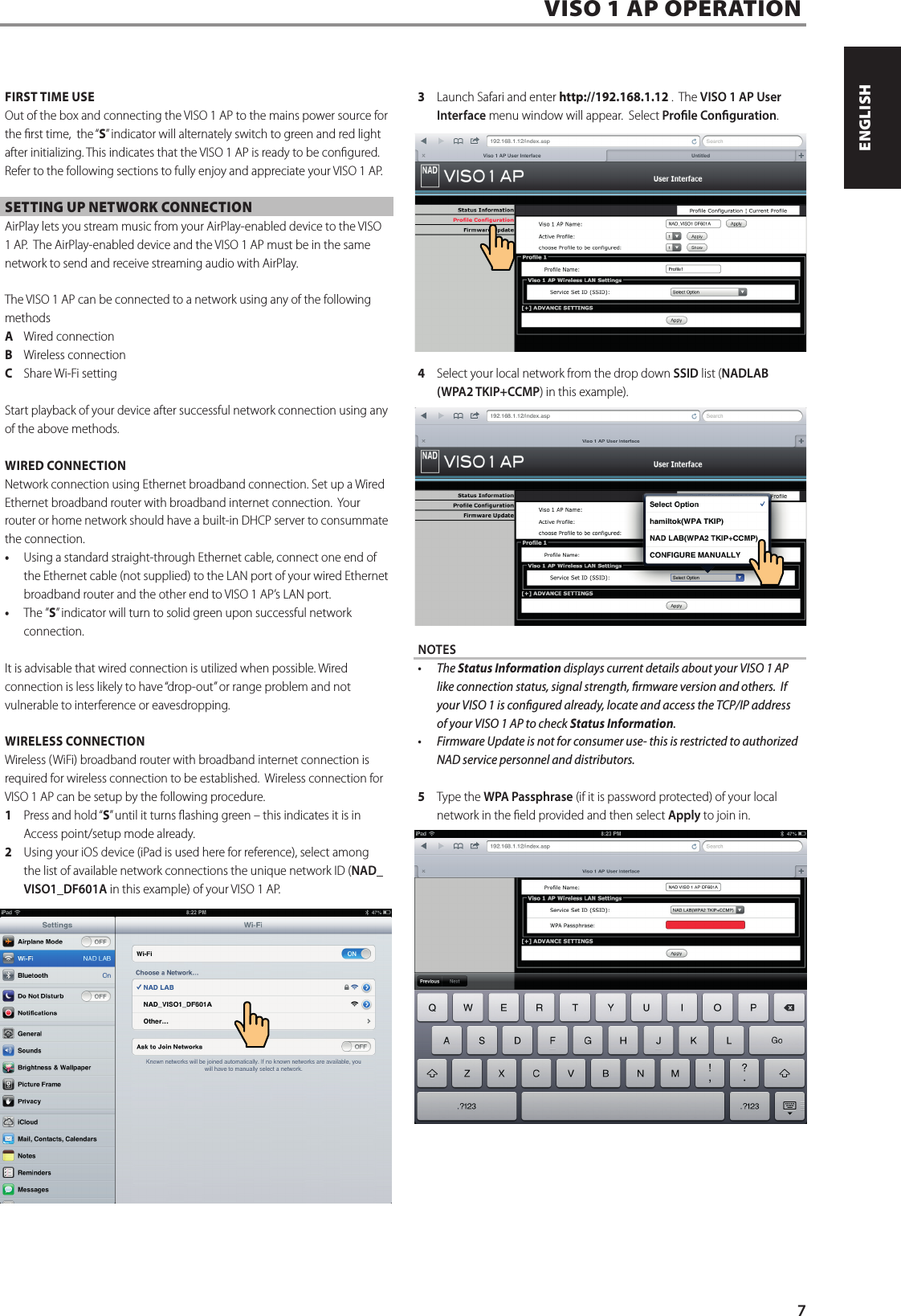
FIRST TIME USEOut of the box and connecting the VISO 1 AP to the mains power source for the rst time,  the “S” indicator will alternately switch to green and red light after initializing. This indicates that the VISO 1 AP is ready to be congured.  Refer to the following sections to fully enjoy and appreciate your VISO 1 AP.SETTING UP NETWORK CONNECTIONAirPlay lets you stream music from your AirPlay-enabled device to the VISO 1 AP.  The AirPlay-enabled device and the VISO 1 AP must be in the same network to send and receive streaming audio with AirPlay.   The VISO 1 AP can be connected to a network using any of the following methodsA  Wired connectionB  Wireless connectionC  Share Wi-Fi settingStart playback of your device after successful network connection using any of the above methods.  WIRED CONNECTIONNetwork connection using Ethernet broadband connection. Set up a Wired Ethernet broadband router with broadband internet connection.  Your router or home network should have a built-in DHCP server to consummate the connection. • Using a standard straight-through Ethernet cable, connect one end of the Ethernet cable (not supplied) to the LAN port of your wired Ethernet broadband router and the other end to VISO 1 AP’s LAN port. • The ”S” indicator will turn to solid green upon successful network connection.It is advisable that wired connection is utilized when possible. Wired connection is less likely to have “drop-out” or range problem and not vulnerable to interference or eavesdropping.WIRELESS CONNECTIONWireless (WiFi) broadband router with broadband internet connection is required for wireless connection to be established.  Wireless connection for VISO 1 AP can be setup by the following procedure.1  Press and hold “S” until it turns ashing green – this indicates it is in Access point/setup mode already. 2  Using your iOS device (iPad is used here for reference), select among the list of available network connections the unique network ID (NAD_VISO1_DF601A in this example) of your VISO 1 AP. 3  Launch Safari and enter http://192.168.1.12 .  The VISO 1 AP User Interface menu window will appear.  Select Prole Conguration.4  Select your local network from the drop down SSID list (NADLAB (WPA2 TKIP+CCMP) in this example). NOTES• TheStatus Information displays current details about your VISO 1 AP like connection status, signal strength, rmware version and others.  If your VISO 1 is congured already, locate and access the TCP/IP address of your VISO 1 AP to check Status Information.• FirmwareUpdateisnotforconsumeruse-thisisrestrictedtoauthorizedNAD service personnel and distributors.5  Type the WPA Passphrase (if it is password protected) of your local network in the eld provided and then select Apply to join in.  VISO 1 AP OPERATION7ENGLISHFRANÇAISESPAÑOLITALIANODEUTSCHNEDERLANDSSVENSKAРУССКИЙ
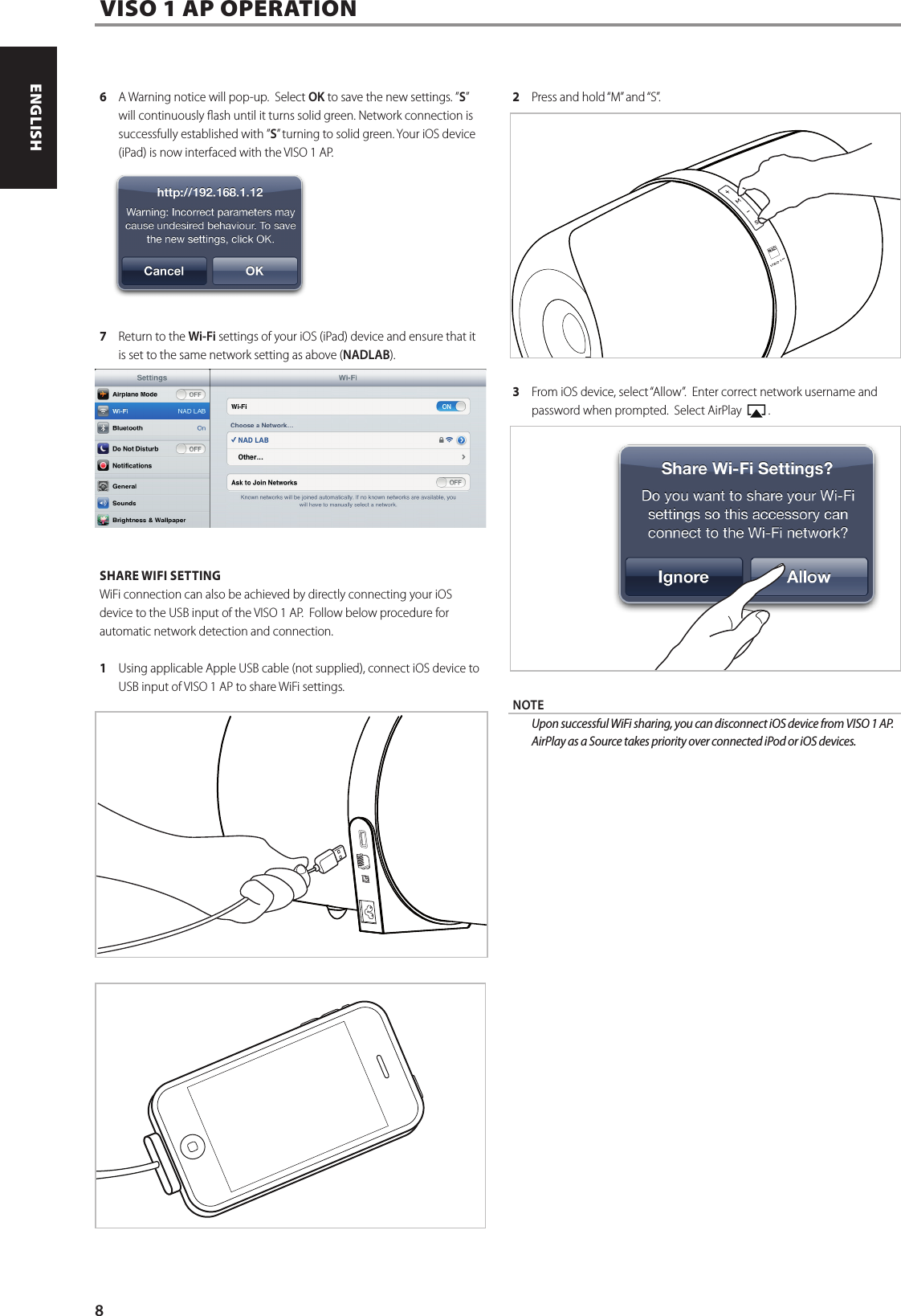
6  A Warning notice will pop-up.  Select OK to save the new settings. ”S” will continuously ash until it turns solid green. Network connection is successfully established with ”S” turning to solid green. Your iOS device (iPad) is now interfaced with the VISO 1 AP.  7  Return to the Wi-Fi settings of your iOS (iPad) device and ensure that it is set to the same network setting as above (NADLAB).SHARE WIFI SETTINGWiFi connection can also be achieved by directly connecting your iOS device to the USB input of the VISO 1 AP.  Follow below procedure for automatic network detection and connection.1    Using applicable Apple USB cable (not supplied), connect iOS device to USB input of VISO 1 AP to share WiFi settings. 2  Press and hold “M” and “S”.3  From iOS device, select “Allow”.  Enter correct network username and password when prompted.  Select AirPlay    .NOTE UponsuccessfulWiFisharing,youcandisconnectiOSdevicefromVISO1AP.AirPlay as a Source takes priority over connected iPod or iOS devices.VISO 1 AP OPERATION8ENGLISH FRANÇAIS ESPAÑOL ITALIANO DEUTSCH NEDERLANDS SVENSKA РУССКИЙ
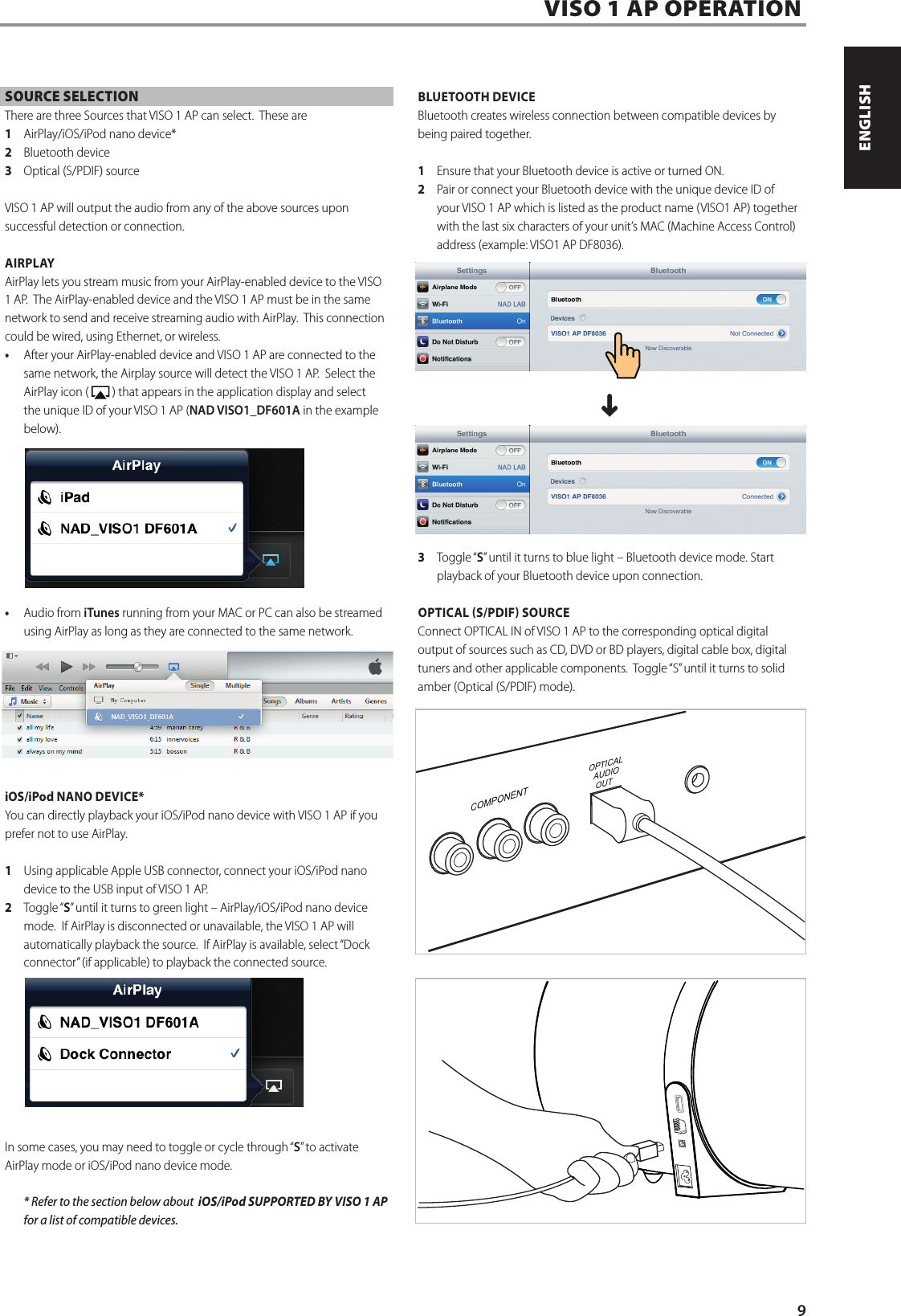
SOURCE SELECTIONThere are three Sources that VISO 1 AP can select.  These are 1  AirPlay/iOS/iPod nano device*2  Bluetooth device3  Optical (S/PDIF) sourceVISO 1 AP will output the audio from any of the above sources upon successful detection or connection.AIRPLAYAirPlay lets you stream music from your AirPlay-enabled device to the VISO 1 AP.  The AirPlay-enabled device and the VISO 1 AP must be in the same network to send and receive streaming audio with AirPlay.  This connection could be wired, using Ethernet, or wireless.• After your AirPlay-enabled device and VISO 1 AP are connected to the same network, the Airplay source will detect the VISO 1 AP.  Select the AirPlay icon (   ) that appears in the application display and select the unique ID of your VISO 1 AP (NAD VISO1_DF601A in the example below).• Audio from iTunes running from your MAC or PC can also be streamed using AirPlay as long as they are connected to the same network.iOS/iPod NANO DEVICE*You can directly playback your iOS/iPod nano device with VISO 1 AP if you prefer not to use AirPlay.  1  Using applicable Apple USB connector, connect your iOS/iPod nano device to the USB input of VISO 1 AP.  2  Toggle “S” until it turns to green light – AirPlay/iOS/iPod nano device mode.  If AirPlay is disconnected or unavailable, the VISO 1 AP will automatically playback the source.  If AirPlay is available, select “Dock connector” (if applicable) to playback the connected source.  In some cases, you may need to toggle or cycle through “S” to activate AirPlay mode or iOS/iPod nano device mode.  * Refer to the section below about  iOS/iPod SUPPORTED BY VISO 1 AP for a list of compatible devices.  BLUETOOTH DEVICEBluetooth creates wireless connection between compatible devices by being paired together.   1  Ensure that your Bluetooth device is active or turned ON.2  Pair or connect your Bluetooth device with the unique device ID of your VISO 1 AP which is listed as the product name (VISO1 AP) together with the last six characters of your unit’s MAC (Machine Access Control) address (example: VISO1 AP DF8036).  ^3  Toggle “S” until it turns to blue light – Bluetooth device mode. Start playback of your Bluetooth device upon connection.OPTICAL S/PDIF SOURCE Connect OPTICAL IN of VISO 1 AP to the corresponding optical digital output of sources such as CD, DVD or BD players, digital cable box, digital tuners and other applicable components.  Toggle “S” until it turns to solid amber (Optical (S/PDIF) mode).  VISO 1 AP OPERATION9ENGLISHFRANÇAISESPAÑOLITALIANODEUTSCHNEDERLANDSSVENSKAРУССКИЙ
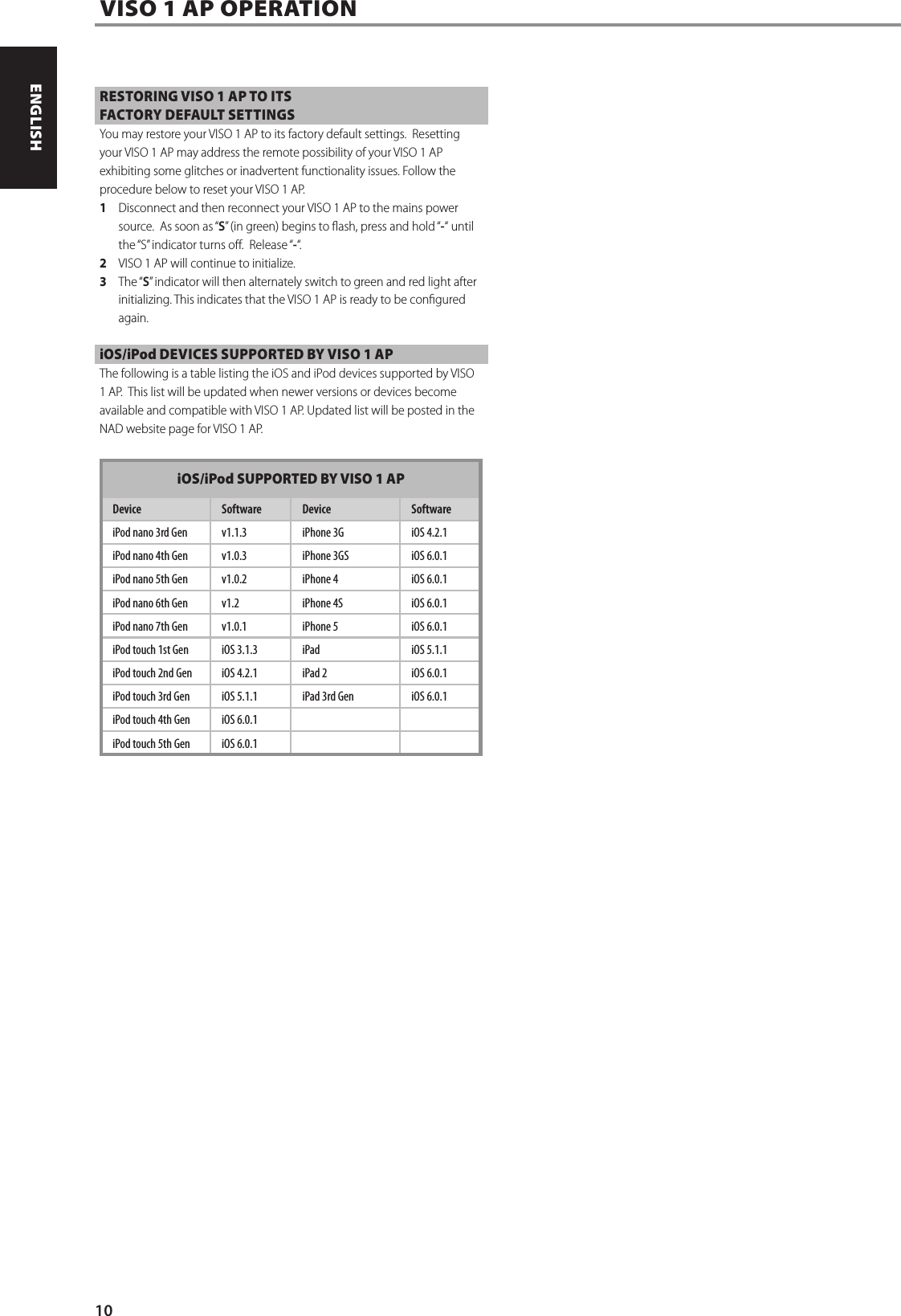
RESTORING VISO 1 AP TO ITS FACTORY DEFAULT SETTINGSYou may restore your VISO 1 AP to its factory default settings.  Resetting your VISO 1 AP may address the remote possibility of your VISO 1 AP exhibiting some glitches or inadvertent functionality issues. Follow the procedure below to reset your VISO 1 AP.1  Disconnect and then reconnect your VISO 1 AP to the mains power source.  As soon as “S” (in green) begins to ash, press and hold “-“ until the “S” indicator turns o.  Release “-“.2  VISO 1 AP will continue to initialize.  3  The “S” indicator will then alternately switch to green and red light after initializing. This indicates that the VISO 1 AP is ready to be congured again.iOS/iPod DEVICES SUPPORTED BY VISO 1 APThe following is a table listing the iOS and iPod devices supported by VISO 1 AP.  This list will be updated when newer versions or devices become available and compatible with VISO 1 AP. Updated list will be posted in the NAD website page for VISO 1 AP.iOS/iPod SUPPORTED BY VISO 1 APDevice Software Device SoftwareiPod nano 3rd Gen v1.1.3 iPhone 3G iOS 4.2.1iPod nano 4th Gen v1.0.3 iPhone 3GS iOS 6.0.1iPod nano 5th Gen v1.0.2 iPhone 4 iOS 6.0.1iPod nano 6th Gen v1.2 iPhone 4S iOS 6.0.1iPod nano 7th Gen v1.0.1 iPhone 5 iOS 6.0.1iPod touch 1st Gen iOS 3.1.3 iPad iOS 5.1.1iPod touch 2nd Gen iOS 4.2.1 iPad 2 iOS 6.0.1iPod touch 3rd Gen iOS 5.1.1 iPad 3rd Gen iOS 6.0.1iPod touch 4th Gen iOS 6.0.1iPod touch 5th Gen iOS 6.0.1VISO 1 AP OPERATION10ENGLISH FRANÇAIS ESPAÑOL ITALIANO DEUTSCH NEDERLANDS SVENSKA РУССКИЙ
11ENGLISHFRANÇAISESPAÑOLITALIANODEUTSCHNEDERLANDSSVENSKAРУССКИЙ
www.NADelectronics.com©2013 NAD ELECTRONICS INTERNATIONALA DIVISION OF LENBROOK INDUSTRIES LIMITEDAll rights reserved. NAD and the NAD logo are trademarks of NAD Electronics International, a division of Lenbrook Industries Limited.No part of this publication may be reproduced, stored or transmitted in any form without the written permission of NAD Electronics International.While every effort has been made to ensure the contents are accurate at the time of publication, features and specifications may be subject to change without prior notice.VISO1AP_ENG_OM_V03  MAR 2013

Navigation menu