Lenovo 0B03457 User Manual Hardware Maintenance (HMM) For Think Centre M71z All In One (Think Centre) Type 1664
2012-04-25
User Manual: Lenovo 0B03457 Hardware Maintenance Manual (HMM) for ThinkCentre M71z M71z All-in-One (ThinkCentre) - Type 1664 ThinkCentre M71z, 1664
Open the PDF directly: View PDF  .
.
Page Count: 326 [warning: Documents this large are best viewed by clicking the View PDF Link!]
- Chapter 1. About this manual
- Chapter 2. Safety information
- Chapter 3. General information
- Chapter 4. General Checkout
- Chapter 5. Troubleshooting and diagnostics
- Chapter 6. Using the Setup Utility program
- Chapter 7. Symptom-to-FRU Index
- Chapter 8. Replacing FRUs
- Locating connectors, controls, and indicators on the front of your computer
- Locating connectors on the rear of your computer
- FRU locations
- System board parts and connectors
- Removing and reinstalling the system stand hinge cover
- Removing and reinstalling the system stand
- Removing and reinstalling the frame stand
- Removing the computer cover
- Replacing the hard disk drive
- Replacing the optical drive
- Removing the VESA mount bracket
- Replacing the rear I/O assembly
- Removing and reinstalling the system board shield
- Replacing the power supply
- Replacing the microprocessor fan
- Replacing the heat sink assembly
- Replacing the microprocessor
- Replacing the card reader
- Opening the system board shield window
- Replacing the battery
- Replacing the inverter
- Installing or replacing a memory module
- Replacing the internal speakers
- Replacing the integrated camera
- Replacing the system board
- Replacing the LCD panel
- Replacing the WI-FI card
- Completing the parts replacement
- Chapter 9. FRU lists
- Overall: MT 1654, 1664, 1677, 1738, 1739, and 1938
- Mechanical FRUs
- Keyboard and Mouse
- Adapters and miscellaneous FRUs
- Power Cords
- Recovery discs
- Windows 7 Starter 32 SP1 Recovery CD
- Windows 7 Home Basic 32 SP1 Recovery CD
- Windows 7 Home Premium 32 SP1 Recovery CD
- Windows 7 Home Premium 64 SP1 Recovery CD
- Windows 7 Professional 32 SP1 Recovery CD
- Windows 7 Professional 64 SP1 Recovery CD
- Windows 7 Ultimate 32 SP1 Recovery CD
- Windows 7 Ultimate 64 SP1 Recovery CD
- Windows XP Professional 32 Recovery CD
- Overall: MT 1741, 1761, 1762, 1782, 1837, and 1962
- Mechanical FRUs
- Keyboard and Mouse
- Adapters and miscellaneous FRUs
- Power Cords
- Recovery discs
- Chapter 10. Additional Service Information
- Appendix A. Notices
- Index

ThinkCentre
HardwareMaintenanceManual
MachineTypes:1654,1664,1665,1677,1738,1739,1741,1761,
1762,1763,1782,1837,1938,1942,1962,and1966.

ThinkCentre
HardwareMaintenanceManual
MachineTypes:1654,1664,1665,1677,1738,1739,1741,1761,
1762,1763,1782,1837,1938,1942,1962,and1966.

Note:Beforeusingthisinformationandtheproductitsupports,besuretoreadandunderstandthe
ThinkCentreSafetyandWarrantyGuideandAppendixA“Notices”onpage315.
ThirdEdition(April2012)
©CopyrightLenovo2011,2012.
nLIMITEDANDRESTRICTEDRIGHTSNOTICE:IfdataorsoftwarearedeliveredpursuantaGeneralServices
Administration“GSA”contract,use,reproduction,ordisclosureissubjecttorestrictionssetforthinContractNo.
GS-35F-05925.

Contents
Chapter1.Aboutthismanual......1
ImportantSafetyInformation..........1
Chapter2.Safetyinformation......3
Generalsafety................3
Electricalsafety...............3
Safetyinspectionguide............5
Handlingelectrostaticdischarge-sensitive
devices..................5
Groundingrequirements............6
Safetynotices(multi-lingualtranslations).....6
Chapter3.Generalinformation....29
LenovoThinkVantageTools.........29
LenovoWelcome..............29
LenovoThinkVantageToolbox........29
LenovoSolutionCenter...........29
SimpleTap................30
Additionalinformationresources.......30
Specications...............31
Chapter4.GeneralCheckout.....33
Problemdeterminationtips..........33
Chapter5.Troubleshootingand
diagnostics..............35
Basictroubleshooting............35
Troubleshootingprocedure..........36
Troubleshooting..............37
Audioproblems............37
CDproblems.............38
DVDproblems.............39
Intermittentproblems..........41
Keyboard,mouse,orpointingdevice
problems...............41
Monitorproblems............43
Networkingproblems..........44
Optionproblems............47
Performanceandlockupproblems.....48
Printerproblems............49
Serialportproblems...........49
Softwareproblems...........50
USBproblems.............51
Diagnostics................51
LenovoThinkVantageToolbox.......51
LenovoSolutionCenter.........52
PC-DoctorforDOS...........52
Chapter6.UsingtheSetupUtility
program................57
StartingtheSetupUtilityprogram.......57
Viewingandchangingsettings........57
Usingpasswords..............57
Passwordconsiderations.........58
Power-OnPassword..........58
HardDiskPassword...........58
AdministratorPassword.........58
Setting,changing,anddeletingapassword.58
Enablingordisablingadevice........59
Selectingastartupdevice..........59
Selectingatemporarystartupdevice....59
Selectingorchangingthestartupdevice
sequence...............59
ExitingtheSetupUtilityprogram.......60
Chapter7.Symptom-to-FRUIndex..61
Harddiskdrivebooterror..........61
PowerSupplyProblems...........61
Diagnosticerrorcodes...........62
Beepsymptoms..............79
POSTerrorcodes.............79
Miscellaneouserrorconditions........80
Undeterminedproblems...........82
Chapter8.ReplacingFRUs......83
Locatingconnectors,controls,andindicatorson
thefrontofyourcomputer..........84
Locatingconnectorsontherearofyour
computer.................85
FRUlocations...............86
Systemboardpartsandconnectors......88
Removingandreinstallingthesystemstandhinge
cover..................88
Removingandreinstallingthesystemstand...90
Removingandreinstallingtheframestand....92
Removingthecomputercover........94
Replacingtheharddiskdrive.........94
Replacingtheopticaldrive..........97
RemovingtheVESAmountbracket......98
ReplacingtherearI/Oassembly........99
Removingandreinstallingthesystemboard
shield..................101
Replacingthepowersupply.........102
Replacingthemicroprocessorfan.......103
Replacingtheheatsinkassembly.......104
Replacingthemicroprocessor........106
©CopyrightLenovo2011,2012iii

Replacingthecardreader..........109
Openingthesystemboardshieldwindow....110
Replacingthebattery............111
Replacingtheinverter............112
Installingorreplacingamemorymodule....113
Replacingtheinternalspeakers........115
Replacingtheintegratedcamera.......116
Replacingthesystemboard.........117
ReplacingtheLCDpanel...........119
ReplacingtheWI-FIcard...........123
Completingthepartsreplacement.......124
Chapter9.FRUlists.........127
Overall:MT1654,1664,1677,1738,1739,and
1938..................127
MechanicalFRUs.............138
KeyboardandMouse............141
AdaptersandmiscellaneousFRUs.......190
PowerCords...............190
Recoverydiscs..............197
Windows7Starter32SP1RecoveryCD...197
Windows7HomeBasic32SP1Recovery
CD.................199
Windows7HomePremium32SP1Recovery
CD.................201
Windows7HomePremium64SP1Recovery
CD.................204
Windows7Professional32SP1Recovery
CD.................205
Windows7Professional64SP1Recovery
CD.................211
Windows7Ultimate32SP1RecoveryCD..216
Windows7Ultimate64SP1RecoveryCD..216
WindowsXPProfessional32RecoveryCD..216
Overall:MT1741,1761,1762,1782,1837,and
1962..................218
MechanicalFRUs.............231
KeyboardandMouse............233
AdaptersandmiscellaneousFRUs.......283
PowerCords...............283
Recoverydiscs..............290
Windows7StarterSP1RecoveryCD....290
Windows7HomeBasic32SP1Recovery
CD.................292
Windows7HomePremium32SP1Recovery
CD.................294
Windows7HomePremium64SP1Recovery
CD.................297
Windows7Professional32SP1Recovery
CD.................298
Windows7Professional64SP1Recovery
CD.................304
Chapter10.AdditionalService
Information.............311
Securityfeatures..............311
HardwarecontrolledPasswords......311
Operatingsystempassword.......311
Vitalproductdata............311
BIOSlevels................311
Flashupdateprocedures..........311
Updating(ashing)theBIOSfromadisc....311
Updating(ashing)theBIOSfromyouroperating
system..................312
RecoveringfromaPOST/BIOSupdatefailure..312
Powermanagement............313
Automaticcongurationandpowerinterface
(ACPI)BIOS..............313
AutomaticPower-Onfeatures.......313
AppendixA.Notices.........315
Televisionoutputnotice...........316
EuropeanconformanceCEmark.......316
Trademarks................316
Index.................317
ivThinkCentreHardwareMaintenanceManual
Chapter1.Aboutthismanual
ThismanualcontainsserviceandreferenceinformationforThinkCentre®computerslistedonthecover.Itis
intendedonlyfortrainedservicerswhoarefamiliarwithLenovo®computerproducts.
BeforeservicingaLenovoproduct,besuretoreadtheSafetyInformationinChapter2“Safetyinformation”
onpage3.
TheSymptom-to-FRUIndexandAdditionalServiceInformationchaptersarenotspecictoanymachine
typeandareapplicabletoallThinkCentrecomputers.
ThismanualincludesacompleteFRUpartnumberlistingforeachmachinetypeandmodellistedonthe
cover.IfyouhaveInternetaccess,FRUpartnumbersarealsoavailableat:
http:/www.lenovo.com/support
ImportantSafetyInformation
Besuretoreadallcautionanddangerstatementsinthisbookbeforeperforminganyoftheinstructions.
VeuillezliretouteslesconsignesdetypeDANGERetATTENTIONduprésentdocumentavantd'exécuter
lesinstructions.
LesenSieunbedingtalleHinweisevomTyp"ACHTUNG"oder"VORSICHT"indieserDokumentation,bevor
SieirgendwelcheVorgängedurchführen
LeggereleistruzioniintrodottedaATTENZIONEePERICOLOpresentinelmanualeprimadieseguireuna
qualsiasidelleistruzioni
Certique-sedelertodasasinstruçõesdecuidadoeperigonestemanualantesdeexecutarqualquer
umadasinstruções
Esimportantequeleatodaslasdeclaracionesdeprecauciónydepeligrodeestemanualantesdeseguir
lasinstrucciones.
©CopyrightLenovo2011,20121

2ThinkCentreHardwareMaintenanceManual
Chapter2.Safetyinformation
Thischaptercontainsthesafetyinformationthatyouneedtobefamiliarwithbeforeservicingacomputer.
Generalsafety
Followtheserulestoensuregeneralsafety:
•Observegoodhousekeepingintheareaofthemachinesduringandaftermaintenance.
•Whenliftinganyheavyobject:
1.Ensureyoucanstandsafelywithoutslipping.
2.Distributetheweightoftheobjectequallybetweenyourfeet.
3.Useaslowliftingforce.Nevermovesuddenlyortwistwhenyouattempttolift.
4.Liftbystandingorbypushingupwithyourlegmuscles;thisactionremovesthestrainfromthe
musclesinyourback.
Donotattempttoliftanyobjectsthatweighmorethan16kg(35lb)orobjectsthatyouthinkare
tooheavyforyou.
•Donotperformanyactionthatcauseshazardstothecustomer,orthatmakestheequipmentunsafe.
•Beforeyoustartthemachine,ensurethatotherservicerepresentativesandthecustomer'spersonnelare
notinahazardousposition.
•Placeremovedcoversandotherpartsinasafeplace,awayfromallpersonnel,whileyouareservicing
themachine.
•Keepyourtoolcaseawayfromwalkareassothatotherpeoplewillnottripoverit.
•Donotwearlooseclothingthatcanbetrappedinthemovingpartsofamachine.Ensurethatyoursleeves
arefastenedorrolledupaboveyourelbows.Ifyourhairislong,fastenit.
•Inserttheendsofyournecktieorscarfinsideclothingorfastenitwithanonconductiveclip,approximately
8centimeters(3inches)fromtheend.
•Donotwearjewelry,chains,metal-frameeyeglasses,ormetalfastenersforyourclothing.
Remember:Metalobjectsaregoodelectricalconductors.
•Wearsafetyglasseswhenyouare:hammering,drilling,soldering,cuttingwire,attachingsprings,using
solvents,orworkinginanyotherconditionsthatmightbehazardoustoyoureyes.
•Afterservice,reinstallallsafetyshields,guards,labels,andgroundwires.Replaceanysafetydevice
thatiswornordefective.
•Reinstallallcoverscorrectlybeforereturningthemachinetothecustomer.
Electricalsafety
CAUTION:
Electricalcurrentfrompower,telephone,andcommunicationcablescanbehazardous.Toavoid
personalinjuryorequipmentdamage,disconnecttheattachedpowercords,telecommunication
systems,networks,andmodemsbeforeyouopenthecomputercovers,unlessinstructedotherwise
intheinstallationandcongurationprocedures.
Observethefollowingruleswhenworkingonelectricalequipment.
©CopyrightLenovo2011,20123

Important:Useonlyapprovedtoolsandtestequipment.Somehandtoolshavehandlescoveredwithasoft
materialthatdoesnotinsulateyouwhenworkingwithliveelectricalcurrents.Manycustomershave,near
theirequipment,rubberoormatsthatcontainsmallconductiveberstodecreaseelectrostaticdischarges.
Donotusethistypeofmattoprotectyourselffromelectricalshock.
•Findtheroomemergencypower-off(EPO)switch,disconnectingswitch,orelectricaloutlet.Ifanelectrical
accidentoccurs,youcanthenoperatetheswitchorunplugthepowercordquickly.
•Donotworkaloneunderhazardousconditionsornearequipmentthathashazardousvoltages.
•Disconnectallpowerbefore:
–Performingamechanicalinspection
–Workingnearpowersupplies
–RemovingorinstallingFieldReplaceableUnits(FRUs)
•Beforeyoustarttoworkonthemachine,unplugthepowercord.Ifyoucannotunplugit,askthecustomer
topower-offthewallboxthatsuppliespowertothemachineandtolockthewallboxintheoffposition.
•Ifyouneedtoworkonamachinethathasexposedelectricalcircuits,observethefollowingprecautions:
–Ensurethatanotherperson,familiarwiththepower-offcontrols,isnearyou.
Remember:Anotherpersonmustbetheretoswitchoffthepower,ifnecessary.
–Useonlyonehandwhenworkingwithpowered-onelectricalequipment;keeptheotherhandinyour
pocketorbehindyourback.
Remember:Theremustbeacompletecircuittocauseelectricalshock.Byobservingtheaboverule,
youmaypreventacurrentfrompassingthroughyourbody.
–Whenusingatester,setthecontrolscorrectlyandusetheapprovedprobeleadsandaccessoriesfor
thattester.
–Standonsuitablerubbermats(obtainedlocally,ifnecessary)toinsulateyoufromgroundssuchas
metaloorstripsandmachineframes.
Observethespecialsafetyprecautionswhenyouworkwithveryhighvoltages;theseinstructionsarein
thesafetysectionsofmaintenanceinformation.Useextremecarewhenmeasuringhighvoltages.
•Regularlyinspectandmaintainyourelectricalhandtoolsforsafeoperationalcondition.
•Donotusewornorbrokentoolsandtesters.
•Neverassumethatpowerhasbeendisconnectedfromacircuit.First,checkthatithasbeenpowered-off.
•Alwayslookcarefullyforpossiblehazardsinyourworkarea.Examplesofthesehazardsaremoistoors,
nongroundedpowerextensioncables,powersurges,andmissingsafetygrounds.
•Donottouchliveelectricalcircuitswiththereectivesurfaceofaplasticdentalmirror.Thesurfaceis
conductive;suchtouchingcancausepersonalinjuryandmachinedamage.
•Donotservicethefollowingpartswiththepoweronwhentheyareremovedfromtheirnormaloperating
placesinamachine:
–Powersupplyunits
–Pumps
–Blowersandfans
–Motorgenerators
andsimilarunits.(Thispracticeensurescorrectgroundingoftheunits.)
•Ifanelectricalaccidentoccurs:
–Usecaution;donotbecomeavictimyourself.
–Switchoffpower.
–Sendanotherpersontogetmedicalaid.
4ThinkCentreHardwareMaintenanceManual

Safetyinspectionguide
Theintentofthisinspectionguideistoassistyouinidentifyingpotentiallyunsafeconditionsonthese
products.Eachmachine,asitwasdesignedandbuilt,hadrequiredsafetyitemsinstalledtoprotectusers
andservicepersonnelfrominjury.Thisguideaddressesonlythoseitems.However,goodjudgmentshould
beusedtoidentifypotentialsafetyhazardsduetoattachmentoffeaturesoroptionsnotcoveredbythis
inspectionguide.
Ifanyunsafeconditionsarepresent,youmustdeterminehowserioustheapparenthazardcouldbeand
whetheryoucancontinuewithoutrstcorrectingtheproblem.
Considertheseconditionsandthesafetyhazardstheypresent:
•Electricalhazards,especiallyprimarypower(primaryvoltageontheframecancauseseriousorfatal
electricalshock).
•Explosivehazards,suchasadamagedCRTfaceorbulgingcapacitor
•Mechanicalhazards,suchaslooseormissinghardware
Theguideconsistsofaseriesofstepspresentedinachecklist.Beginthecheckswiththepoweroff,and
thepowercorddisconnected.
Checklist:
1.Checkexteriorcoversfordamage(loose,broken,orsharpedges).
2.Power-offthecomputer.Disconnectthepowercord.
3.Checkthepowercordfor:
a.Athird-wiregroundconnectoringoodcondition.Useametertomeasurethird-wireground
continuityfor0.1ohmorlessbetweentheexternalgroundpinandframeground.
b.Thepowercordshouldbetheappropriatetypeasspeciedinthepartslistings.
c.Insulationmustnotbefrayedorworn.
4.Removethecover.
5.Checkforanyobviousalterations.Usegoodjudgmentastothesafetyofanyalterations.
6.Checkinsidetheunitforanyobviousunsafeconditions,suchasmetallings,contamination,wateror
otherliquids,orsignsofreorsmokedamage.
7.Checkforworn,frayed,orpinchedcables.
8.Checkthatthepower-supplycoverfasteners(screwsorrivets)havenotbeenremovedortamperedwith.
Handlingelectrostaticdischarge-sensitivedevices
Anycomputerpartcontainingtransistorsorintegratedcircuits(ICs)shouldbeconsideredsensitiveto
electrostaticdischarge(ESD).ESDdamagecanoccurwhenthereisadifferenceinchargebetweenobjects.
ProtectagainstESDdamagebyequalizingthechargesothatthemachine,thepart,theworkmat,andthe
personhandlingthepartareallatthesamecharge.
Notes:
1.Useproduct-specicESDprocedureswhentheyexceedtherequirementsnotedhere.
2.MakesurethattheESDprotectivedevicesyouusehavebeencertied(ISO9000)asfullyeffective.
WhenhandlingESD-sensitiveparts:
•Keepthepartsinprotectivepackagesuntiltheyareinsertedintotheproduct.
•Avoidcontactwithotherpeoplewhilehandlingthepart.
Chapter2.Safetyinformation5
•Wearagroundedwriststrapagainstyourskintoeliminatestaticonyourbody.
•Preventthepartfromtouchingyourclothing.Mostclothingisinsulativeandretainsachargeevenwhen
youarewearingawriststrap.
•Usetheblacksideofagroundedworkmattoprovideastatic-freeworksurface.Thematisespecially
usefulwhenhandlingESD-sensitivedevices.
•Selectagroundingsystem,suchasthoselistedbelow,toprovideprotectionthatmeetsthespecic
servicerequirement.
Note:TheuseofagroundingsystemisdesirablebutnotrequiredtoprotectagainstESDdamage.
–AttachtheESDgroundcliptoanyframeground,groundbraid,orgreen-wireground.
–UseanESDcommongroundorreferencepointwhenworkingonadouble-insulatedor
battery-operatedsystem.Youcanusecoaxorconnector-outsideshellsonthesesystems.
–Usetheroundground-prongoftheacplugonac-operatedcomputers.
Groundingrequirements
Electricalgroundingofthecomputerisrequiredforoperatorsafetyandcorrectsystemfunction.Proper
groundingoftheelectricaloutletcanbeveriedbyacertiedelectrician.
Safetynotices(multi-lingualtranslations)
Thecautionanddangersafetynoticesinthissectionareprovidedinthefollowinglanguages:
•English
•Arabic
•Brazilian/Portuguese
•Chinese(simplied)
•Chinese(traditional)
•French
•German
•Hebrew
•Italian
•Korean
•Spanish
DANGER
Electricalcurrentfrompower,telephoneandcommunicationcablesishazardous.
Toavoidashockhazard:
•Donotconnectordisconnectanycablesorperforminstallation,maintenance,orreconguration
ofthisproductduringanelectricalstorm.
•Connectallpowercordstoaproperlywiredandgroundedelectricaloutlet.
•Connecttoproperlywiredoutletsanyequipmentthatwillbeattachedtothisproduct.
6ThinkCentreHardwareMaintenanceManual
•Whenpossible,useonehandonlytoconnectordisconnectsignalcables.
•Neverturnonanyequipmentwhenthereisevidenceofre,water,orstructuraldamage.
•Disconnecttheattachedpowercords,telecommunicationssystems,networks,andmodems
beforeyouopenthedevicecovers,unlessinstructedotherwiseintheinstallationandconguration
procedures.
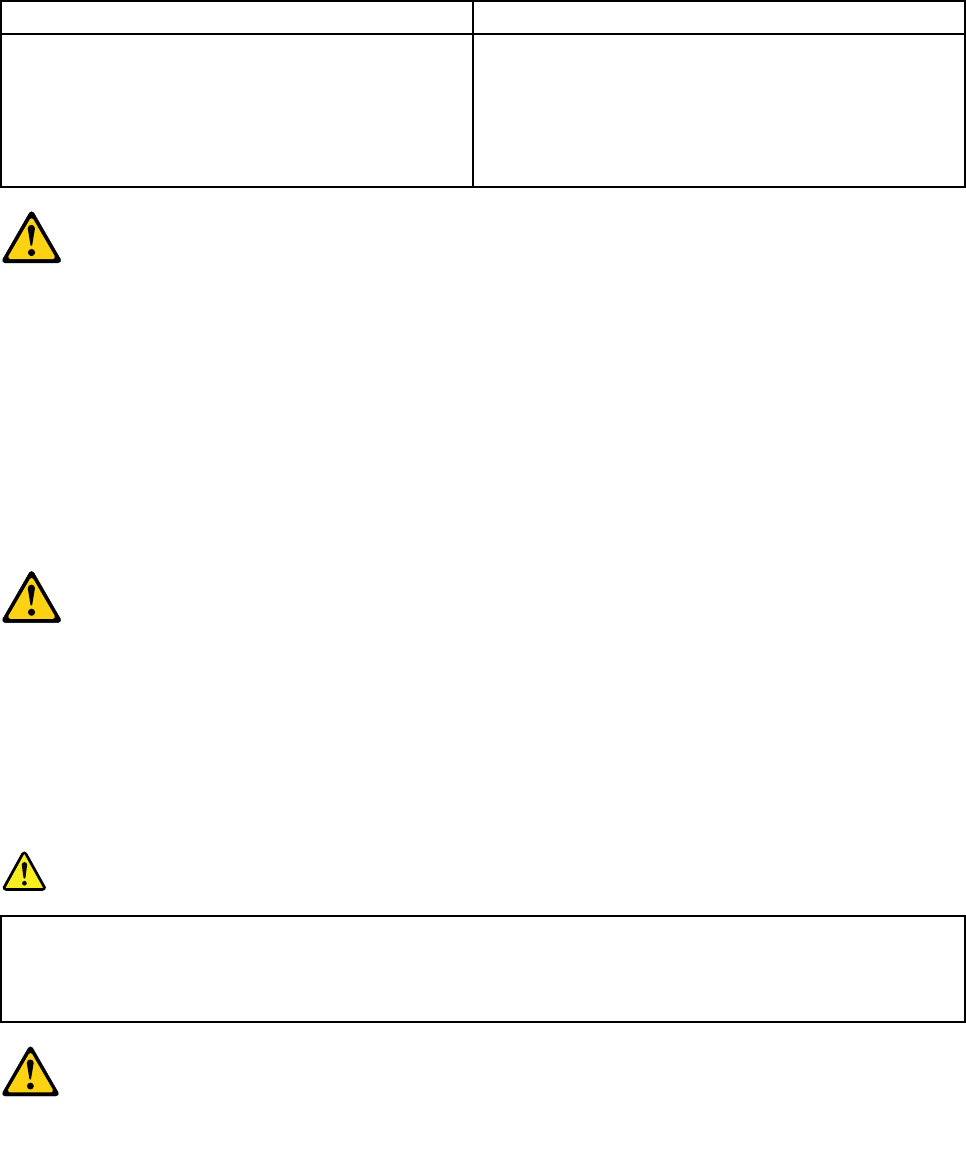
•Connectanddisconnectcablesasdescribedinthefollowingtableswheninstalling,moving,or
openingcoversonthisproductorattacheddevices.
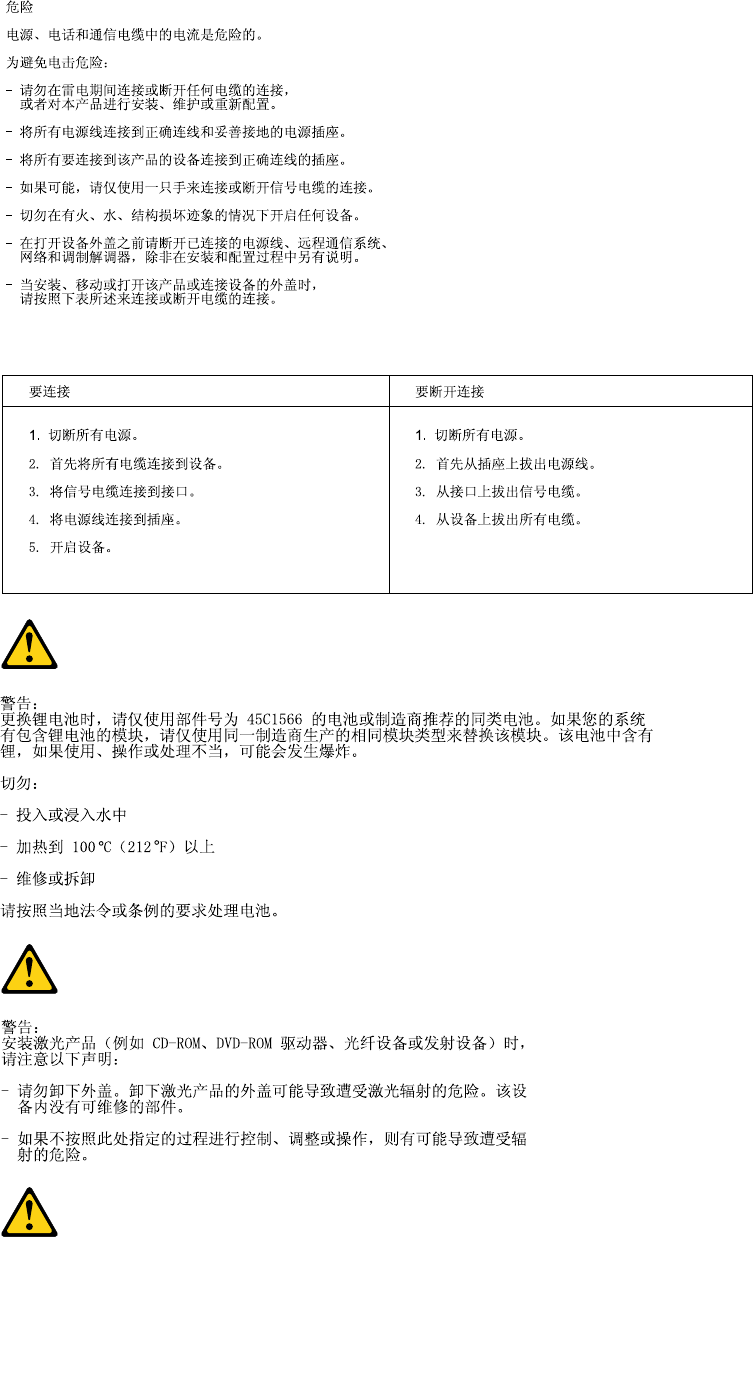
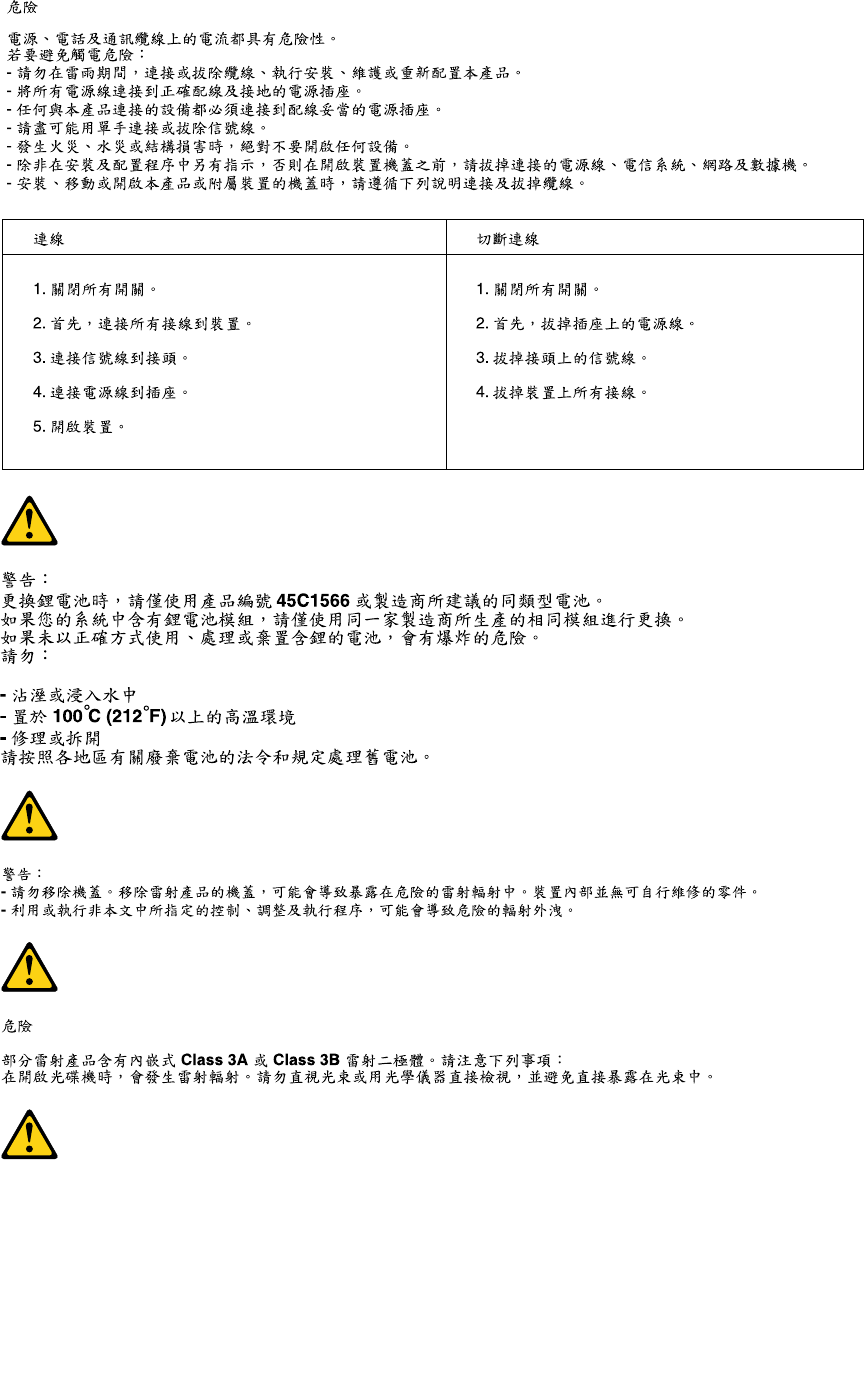
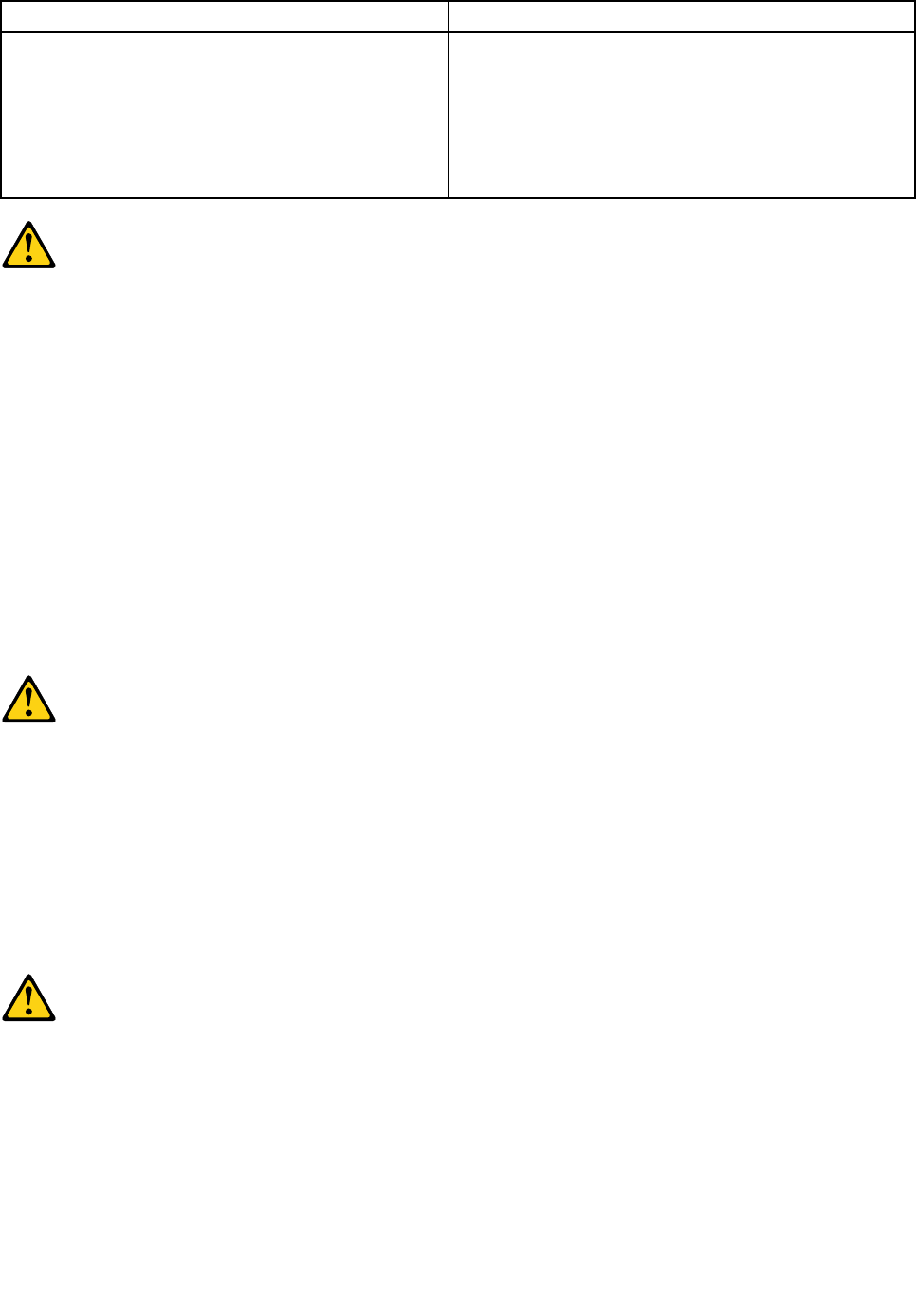
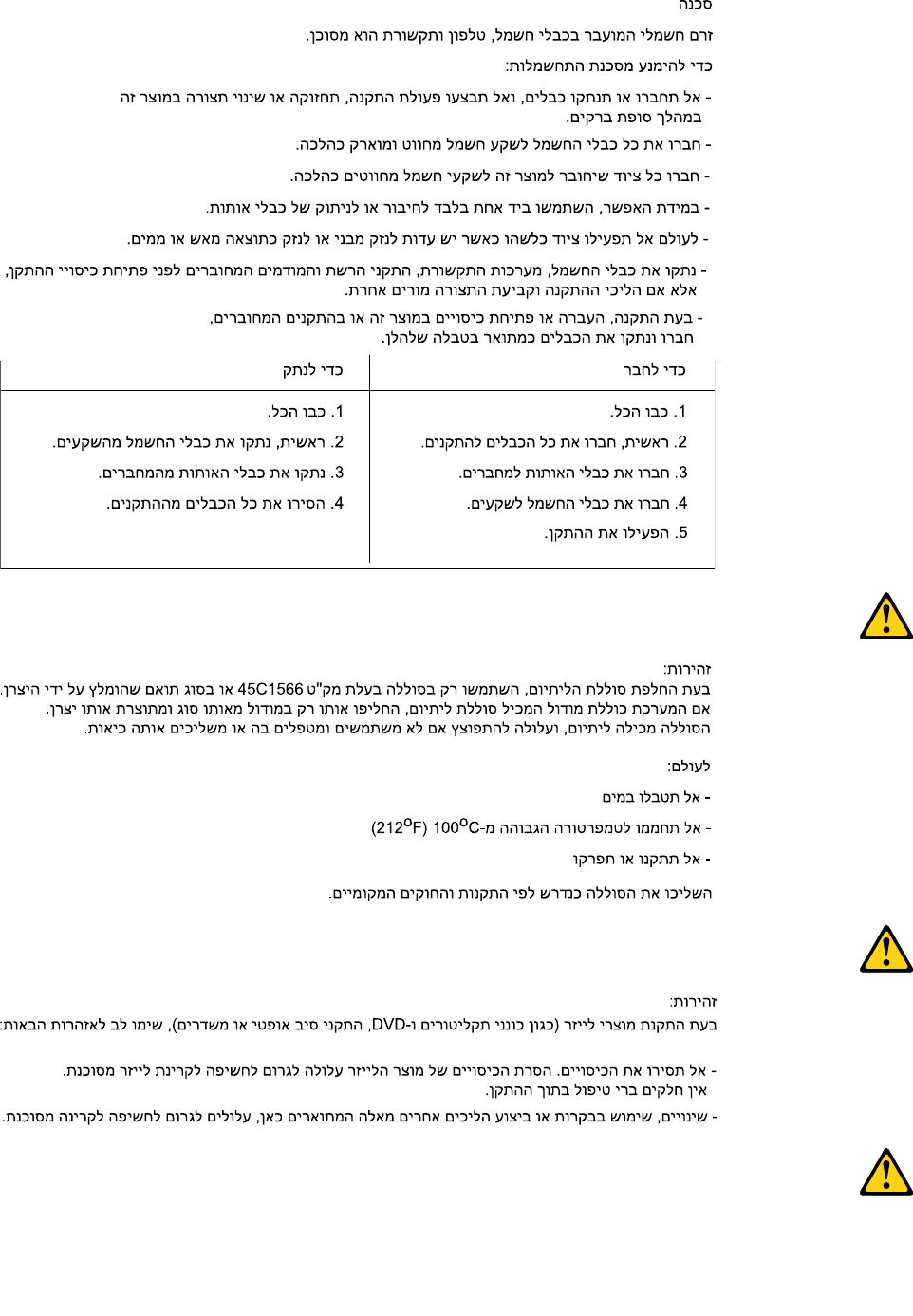
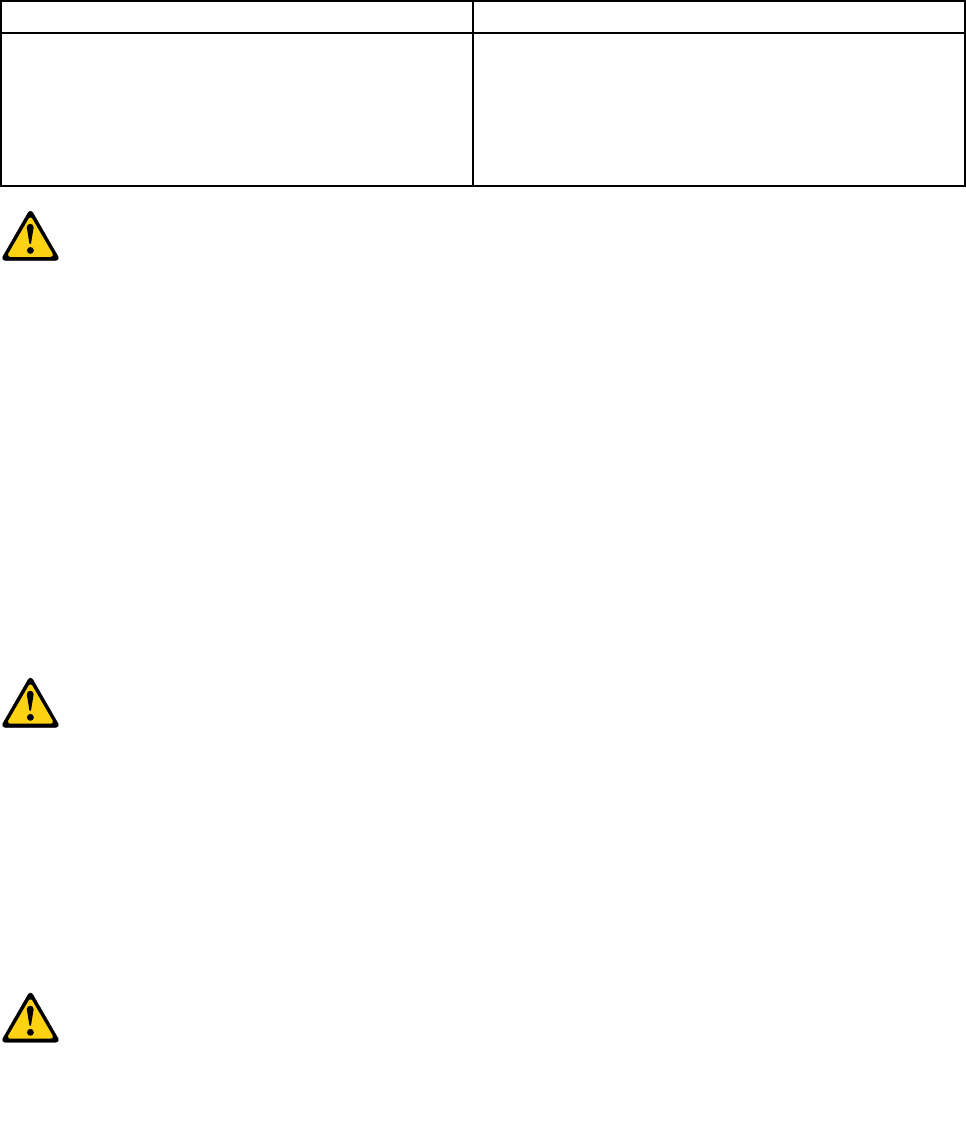
ToConnectToDisconnect
1.TurneverythingOFF.
2.First,attachallcablestodevices.
3.Attachsignalcablestoconnectors.
4.Attachpowercordstooutlet.
5.TurndeviceON.
1.TurneverythingOFF.
2.First,removepowercordsfromoutlet.
3.Removesignalcablesfromconnectors.
4.Removeallcablesfromdevices.
CAUTION:
Whenreplacingthelithiumbattery,useonlyPartNumber45C1566oranequivalenttypebattery
recommendedbythemanufacturer.Ifyoursystemhasamodulecontainingalithiumbattery,replace
itonlywiththesamemoduletypemadebythesamemanufacturer.Thebatterycontainslithiumand
canexplodeifnotproperlyused,handled,ordisposedof.Donot:
•Throworimmerseintowater
•Heattomorethan100°C(212°F)
•Repairordisassemble
Disposeofthebatteryasrequiredbylocalordinancesorregulations.
CAUTION:
Whenlaserproducts(suchasCD-ROMs,DVD-ROMdrives,beropticdevices,ortransmitters)are
installed,notethefollowing:
•Donotremovethecovers.Removingthecoversofthelaserproductcouldresultinexposureto
hazardouslaserradiation.Therearenoserviceablepartsinsidethedevice.
•Useofcontrolsoradjustmentsorperformanceofproceduresotherthanthosespeciedherein
mightresultinhazardousradiationexposure.
DANGER
SomelaserproductscontainanembeddedClass3AorClass3Blaserdiode.Notethefollowing:
Laserradiationwhenopen.Donotstareintothebeam,donotviewdirectlywithoptical
instruments,andavoiddirectexposuretothebeam.
Chapter2.Safetyinformation7
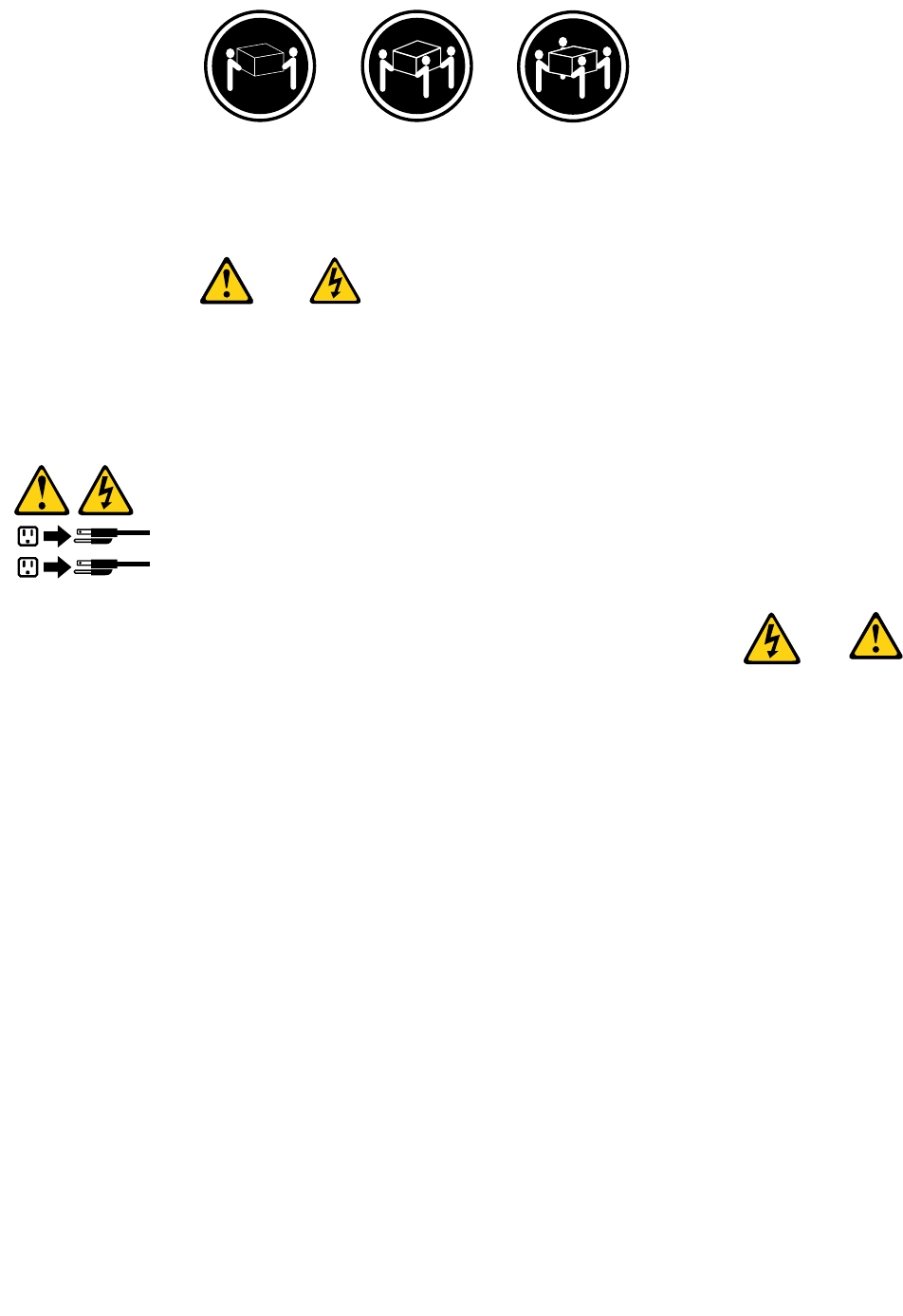
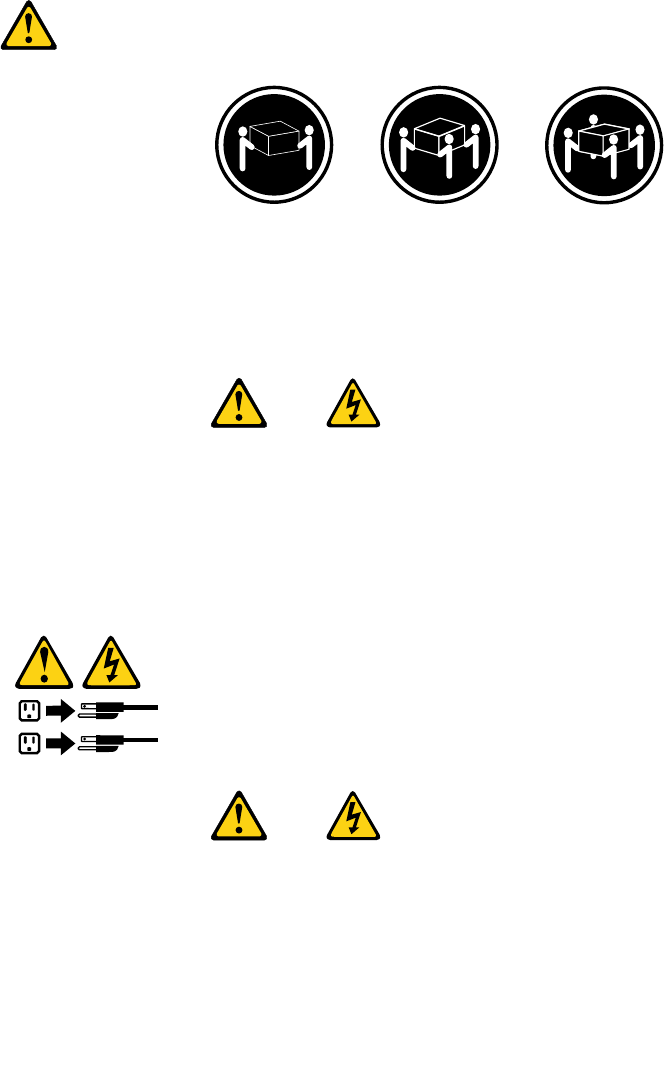
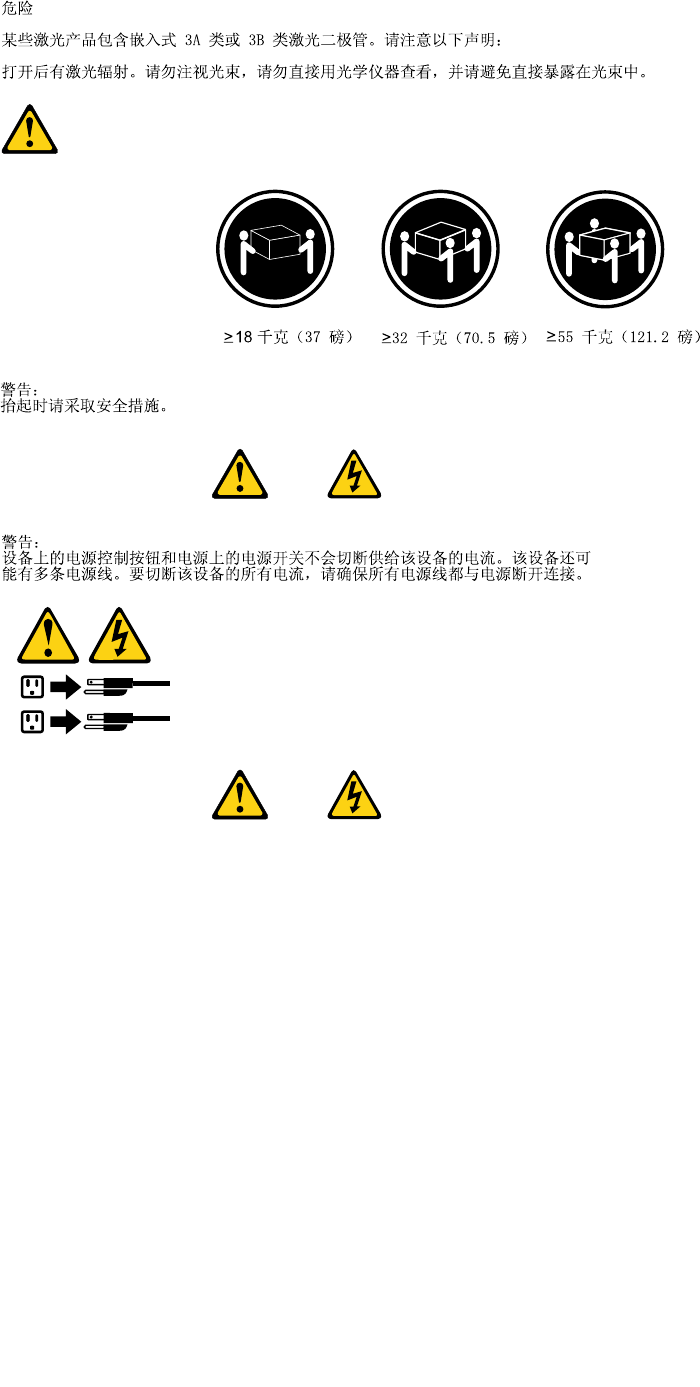
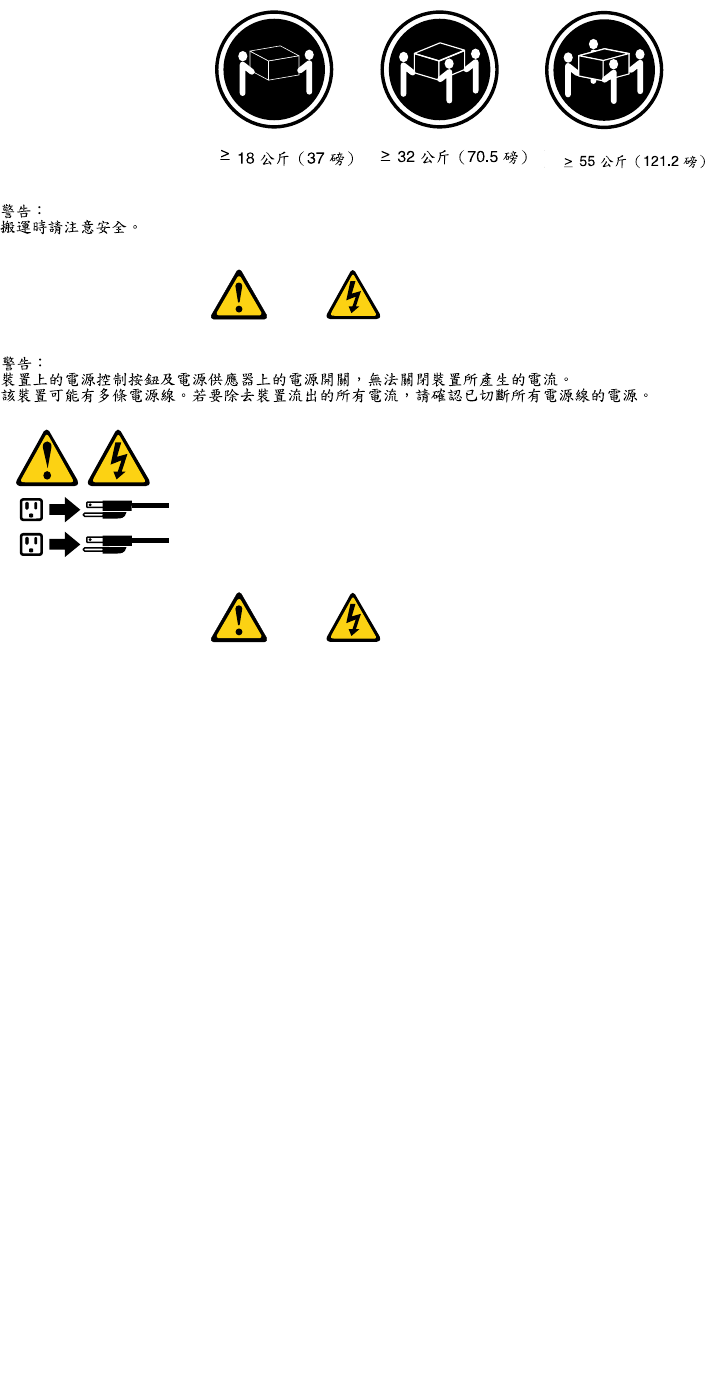
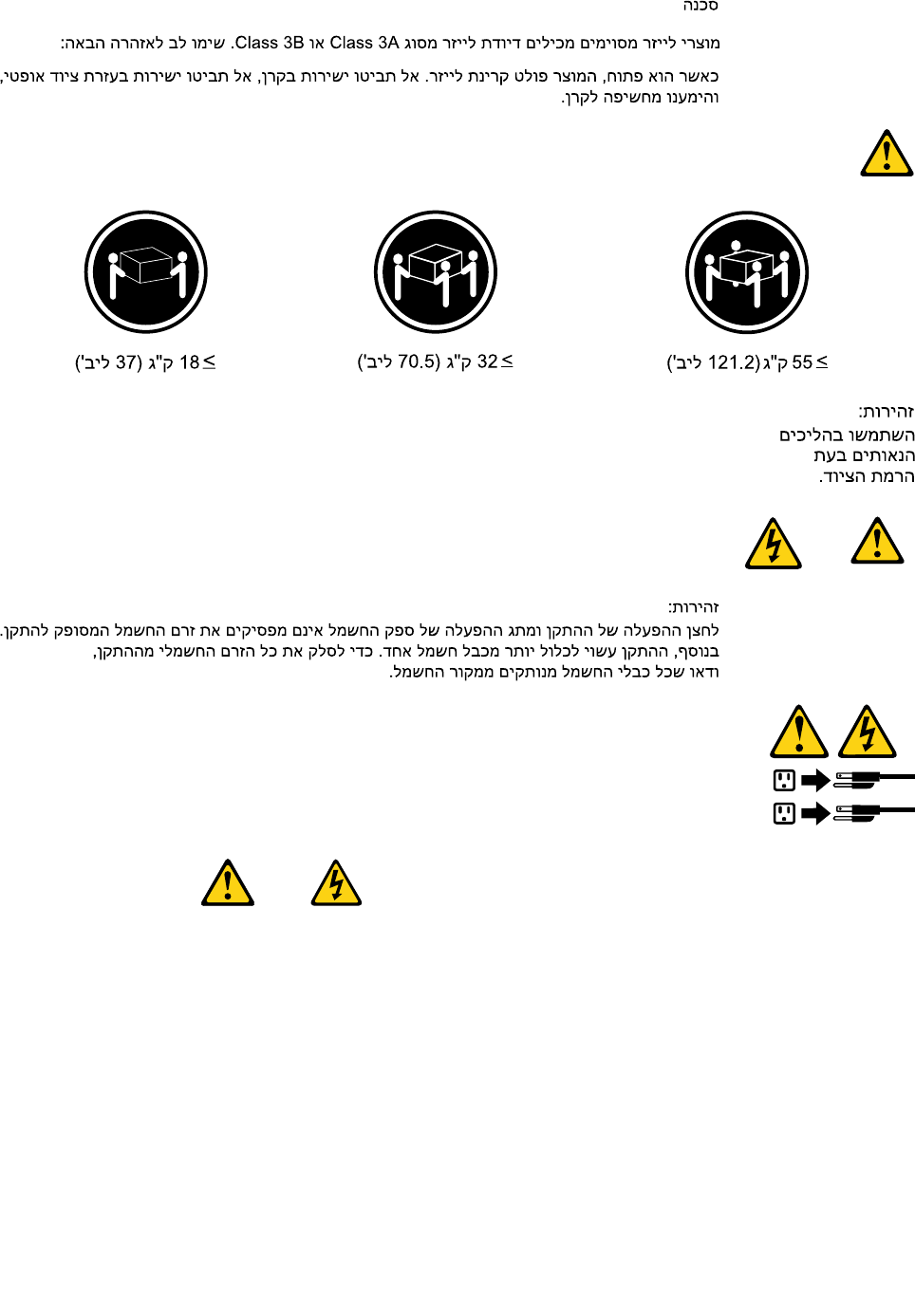
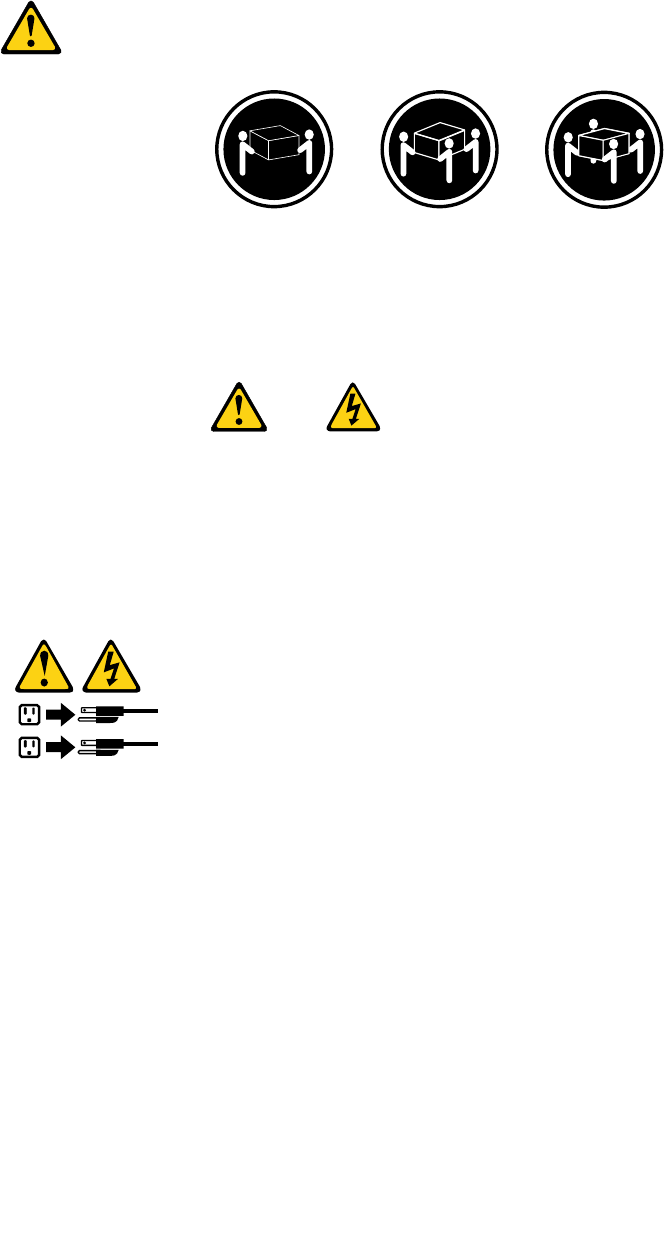
≥18kg(37lbs)≥32kg(70.5lbs)≥55kg(121.2lbs)
CAUTION:
Usesafepracticeswhenlifting.
CAUTION:
Thepowercontrolbuttononthedeviceandthepowerswitchonthepowersupplydonotturnoff
theelectricalcurrentsuppliedtothedevice.Thedevicealsomighthavemorethanonepower
cord.Toremoveallelectricalcurrentfromthedevice,ensurethatallpowercordsaredisconnected
fromthepowersource.
1
2
8ThinkCentreHardwareMaintenanceManual
Chapter2.Safetyinformation9
≥18kg(37lbs)≥32kg(70.5lbs)≥55kg(121.2lbs)
1
2
PERIGO
10ThinkCentreHardwareMaintenanceManual
Acorrenteelétricaprovenientedecabosdealimentação,detelefoneedecomunicaçõeséperigosa.
Paraevitarriscodechoqueelétrico:
•Nãoconectenemdesconectenenhumcaboouexecuteinstalação,manutençãooureconguração
desteprodutoduranteumatempestadecomraios.
•Conectetodososcabosdealimentaçãoatomadaselétricascorretamenteinstaladaseaterradas.
•Todoequipamentoqueforconectadoaesteprodutodeveserconectadoatomadascorretamente
instaladas.
•Quandopossível,utilizeapenasumadasmãosparaconectaroudesconectarcabosdesinal.
•Nuncaliguenenhumequipamentoquandohouverevidênciadefogo,águaoudanosestruturais.
•Antesdeabrirtampasdedispositivos,desconectecabosdealimentação,sistemasdetelecomunicação,
redesemodemsconectados,amenosqueespecicadodemaneiradiferentenosprocedimentosde
instalaçãoeconguração.
•Conecteedesconecteoscabosconformedescritonatabelaapresentadaaseguiraoinstalar,moverou
abrirtampasdesteprodutooudedispositivosconectados.
ParaConectar:ParaDesconectar:
1.DESLIGUETudo.
2.Primeiramente,conectetodososcabosaos
dispositivos.
3.Conecteoscabosdesinalaosconectores.
4.Conecteoscabosdealimentaçãoàstomadas.
5.LIGUEosdispositivos.
1.DESLIGUETudo.
2.Primeiramente,removaoscabosdealimentaçãodas
tomadas.
3.Removaoscabosdesinaldosconectores.
4.Removatodososcabosdosdispositivos.
CUIDADO:
Aosubstituirabateriadelítio,utilizeapenasumabateriacomNúmerodePeça45C1566ouumtipo
debateriaequivalenterecomendadopeloSeoseusistemapossuiummódulocomumabateriade
lítio,substitua-oapenasporummódulodomesmotipoedomesmofabricante.Abateriacontémlítio
epodeexplodirsenãoforutilizada,manuseadaoudescartadademaneiracorreta.
Não:
•Jogueoucoloquenaágua
•Aqueçaamaisde100°C(212°F)
•Consertenemdesmonte
Descarteabateriaconformerequeridopelasleisouregulamentoslocais.
PRECAUCIÓN:
Quandoprodutosalaser(comounidadesdeCD-ROMs,unidadesdeDVD-ROM,dispositivosdebraótica
outransmissores)estivereminstalados,observeoseguinte:
Chapter2.Safetyinformation11
•Nãoremovaastampas.Aremoçãodastampasdeumprodutoalaserpoderesultaremexposição
prejudicialàradiaçãodelaser.Nãoexistempeçasquepodemserconsertadasnointeriordodispositivo.
•Autilizaçãodecontrolesouajustesouaexecuçãodeprocedimentosdiferentesdosespecicadosaqui
poderesultaremexposiçãoprejudicialàradiação.
PERIGO
AlgunsprodutosalasercontêmdiododelaserintegradodaClasse3AoudaClasse3B.Observeoseguinte:
Radiaçãoalaserquandoaberto.Nãoolhediretamenteparaofeixeaolhonuoucominstrumentosópticose
eviteexposiçãodiretaaofeixe.
≥18kg(37lbs)≥32kg(70.5lbs)≥55kg(121.2lbs)
CUIDADO:
Utilizeprocedimentosdesegurançaparalevantarequipamentos.
CUIDADO:
Obotãodecontroledealimentaçãododispositivoeobotãoparaligar/desligardafontedealimentação
nãodesligamacorrenteelétricafornecidaaodispositivo.Odispositivotambémpodetermaisdeumcabo
dealimentação.Pararemovertodaacorrenteelétricadodispositivo,assegurequetodososcabosde
alimentaçãoestejamdesconectadosdafontedealimentação.
1
2
12ThinkCentreHardwareMaintenanceManual
Chapter2.Safetyinformation13
1
2
14ThinkCentreHardwareMaintenanceManual
Chapter2.Safetyinformation15
1
2
DANGER
Lecourantélectriqueprovenantdel'alimentation,dutéléphoneetdescâblesdetransmissionpeutprésenter
undanger.
Pourévitertoutrisquedechocélectrique:
•Nemanipulezaucuncâbleetn'effectuezaucuneopérationd'installation,d'entretienoudereconguration
deceproduitaucoursd'unorage.
•Brancheztouslescordonsd'alimentationsurunsocledeprisedecourantcorrectementcâbléetmisàla
terre.
•Branchezsurdessoclesdeprisedecourantcorrectementcâbléstoutéquipementconnectéàceproduit.
•Lorsquecelaestpossible,n'utilisezqu'uneseulemainpourconnecteroudéconnecterlescâbles
d'interface.
•Nemettezjamaisunéquipementsoustensionencasd'incendieoud'inondation,ouenprésencede
dommagesmatériels.
•Avantderetirerlescartersdel'unité,mettezcelle-cihorstensionetdéconnectezsescordons
d'alimentation,ainsiquelescâblesquilarelientauxréseaux,auxsystèmesdetélécommunicationetaux
modems(saufinstructioncontrairementionnéedanslesprocéduresd'installationetdeconguration).
•Lorsquevousinstallez,quevousdéplacez,ouquevousmanipulezleprésentproduitoudespériphériques
quiluisontraccordés,reportez-vousauxinstructionsci-dessouspourconnecteretdéconnecterles
différentscordons.
16ThinkCentreHardwareMaintenanceManual
ConnexionDéconnexion
1.MettezlesunitésHORSTENSION.
2.Commencezparbranchertouslescordonssurles
unités.
3.Branchezlescâblesd'interfacesurdesconnecteurs.
4.Branchezlescordonsd'alimentationsurdesprises.
5.MettezlesunitésSOUSTENSION.
1.MettezlesunitésHORSTENSION.
2.Débranchezlescordonsd'alimentationdesprises.
3.Débranchezlescâblesd'interfacedesconnecteurs.
4.Débrancheztouslescâblesdesunités.
ATTENTION:
Remplacerlapileaulithiumusagéeparunepilederéférenceidentiqueexclusivement,(référence
45C1566),ousuivrelesinstructionsdufabricantquiendénitleséquivalences.Sivotresystèmeest
dotéd'unmodulecontenantunepileaulithium,vousdevezleremplaceruniquementparunmodule
identique,produitparlemêmefabricant.Lapilecontientdulithiumetpeutexploserencasde
mauvaiseutilisation,demauvaisemanipulationoudemiseaurebutinappropriée.
Nepas:
•lajeteràl'eau,
•l'exposeràdestempératuressupérieuresà100°C,
•chercheràlaréparerouàladémonter.
Nepasmettrelapileàlapoubelle.Pourlamiseaurebut,sereporteràlaréglementationenvigueur.
ATTENTION:
Sidesproduitsàlaser(telsquedesunitésdeCD-ROM,deDVD-ROM,desunitésàbresoptiques,ou
desémetteurs)sontinstallés,prenezconnaissancedesinformationssuivantes:
•Neretirezpaslecarter.Enouvrantl'unitédeCD-ROMoudeDVD-ROM,vousvousexposezau
rayonnementdangereuxdulaser.Aucunepiècedel'unitén'estréparable.
•Pourévitertoutrisqued'expositionaurayonlaser,respectezlesconsignesderéglageet
d'utilisationdescommandes,ainsiquelesprocéduresdécritesdansleprésentmanuel.
DANGER
Certainsproduitsàlasercontiennentunediodeàlaserintégréedeclasse3Aou3B.Prenez
connaissancedesinformationssuivantes:
Rayonnementlaserlorsquelecarterestouvert.Eviteztouteexpositiondirecteaurayonlaser.Evitez
deregarderxementlefaisceauoudel'observeràl'aided'instrumentsoptiques.
Chapter2.Safetyinformation17
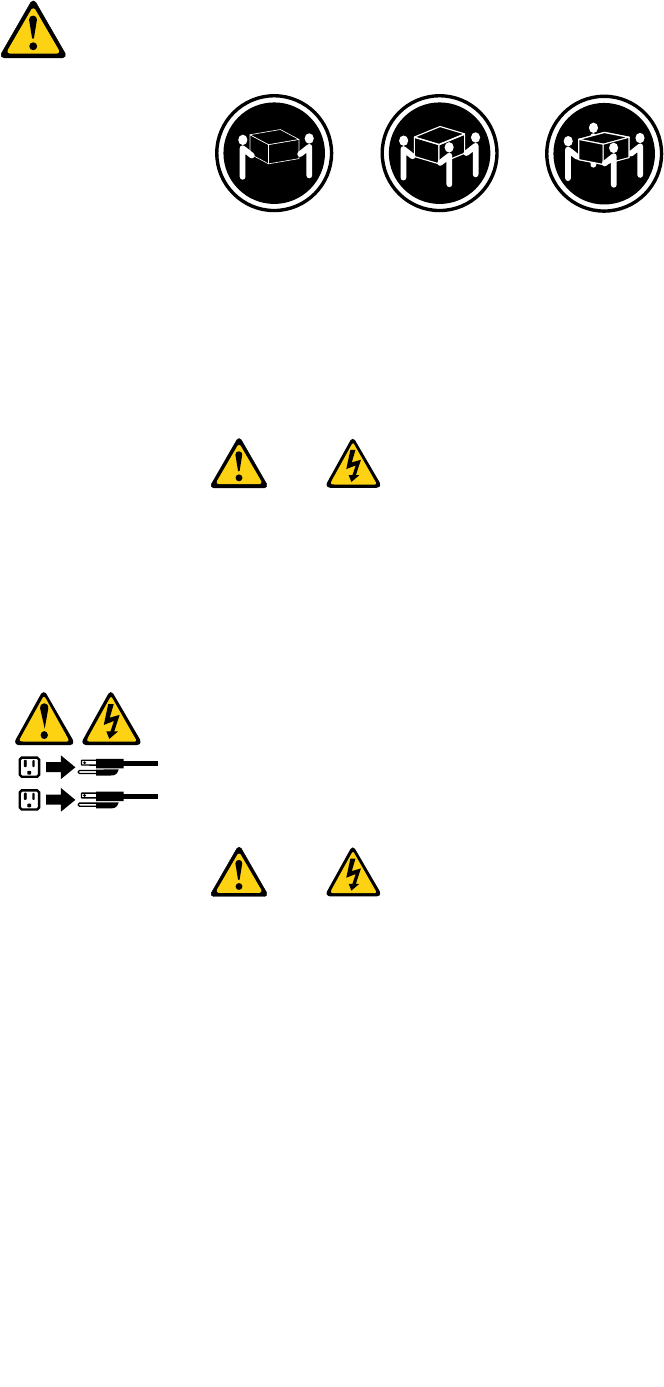
≥18kg(37lbs)≥32kg(70.5lbs)≥55kg(121.2lbs)
ATTENTION:
Soulevezlamachineavecprécaution.
ATTENTION:
L'interrupteurdecontrôled'alimentationdel'unitéetl'interrupteurdublocd'alimentationnecoupent
paslecourantélectriquealimentantl'unité.Enoutre,lesystèmepeutêtreéquipédeplusieurs
cordonsd'alimentation.Pourmettrel'unitéhorstension,vousdevezdéconnectertouslescordons
delasourced'alimentation.
1
2
VORSICHT
AnNetz-,Telefon-undDatenleitungenkönnengefährlicheSpannungenanliegen.
AusSicherheitsgründen:
•BeiGewitterandiesemGerätkeineKabelanschließenoderlösen.FernerkeineInstallations-,
Wartungs-oderRekongurationsarbeitendurchführen.
•GerätnuraneineSchutzkontaktsteckdosemitordnungsgemäßgeerdetemSchutzkontakt
anschließen.
•AlleangeschlossenenGeräteebenfallsanSchutzkontaktsteckdosenmitordnungsgemäß
geerdetemSchutzkontaktanschließen.
•DieSignalkabelnachMöglichkeiteinhändiganschließenoderlösen,umeinenStromschlagdurch
BerührenvonOberächenmitunterschiedlichemelektrischemPotenzialzuvermeiden.
•Geräteniemalseinschalten,wennHinweiseaufFeuer,WasseroderGebäudeschädenvorliegen.
18ThinkCentreHardwareMaintenanceManual
•DieVerbindungzudenangeschlossenenNetzkabeln,Telekommunikationssystemen,Netzwerken
undModemsistvordemÖffnendesGehäuseszuunterbrechen,sofernindenInstallations-und
KongurationsprozedurenkeineanderslautendenAnweisungenenthaltensind.
•ZumInstallieren,TransportierenundÖffnenderAbdeckungendesComputersoderder
angeschlossenenEinheitendieKabelgemäßderfolgendenTabelleanschließenundabziehen.
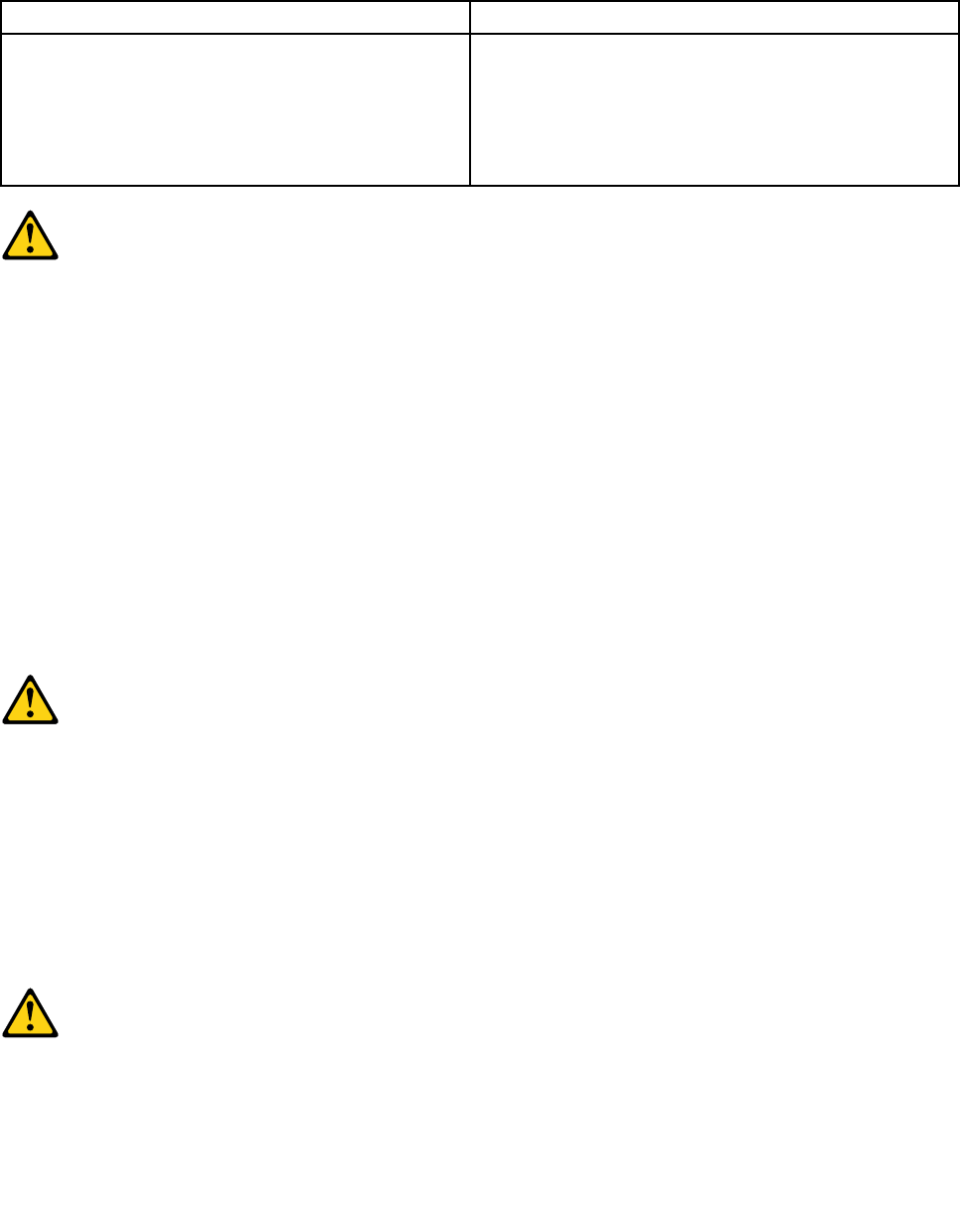
ZumAnschließenderKabelgehenSiewiefolgtvorZumAbziehenderKabelgehenSiewiefolgtvor
1.SchaltenSiealleEinheitenAUS.
2.SchließenSieerstalleKabelandieEinheitenan.
3.SchließenSiedieSignalkabelandieBuchsenan.
4.SchließenSiedieNetzkabelandieSteckdosean.
5.SchaltenSiedieEinheitEIN.
1.SchaltenSiealleEinheitenAUS.
2.ZiehenSiezuerstalleNetzkabelausden
Netzsteckdosen.
3.ZiehenSiedieSignalkabelausdenBuchsen.
4.ZiehenSiealleKabelvondenEinheitenab.
CAUTION:
EineverbrauchteLithiumbatterienurdurcheineBatteriemitderTeilenummer45C1566odereine
gleichwertige,vomHerstellerempfohleneBatterieersetzen.EnthältdasSystemeinModulmiteiner
Lithiumbatterie,diesesnurdurcheinModuldesselbenTypsundvondemselbenHerstellerersetzen.
DieBatterieenthältLithiumundkannbeiunsachgemäßerVerwendung,HandhabungoderEntsorgung
explodieren.
DieBatterienicht:
•mitWasserinBerührungbringen.
•über100Cerhitzen.
•reparierenoderzerlegen.
DieörtlichenBestimmungenfürdieEntsorgungvonSondermüllbeachten.
ACHTUNG:
BeiderInstallationvonLasergeräten(wieCD-ROM-Laufwerken,DVD-aufwerken,Einheitenmit
LichtwellenleitertechnikoderSendern)Folgendesbeachten:
•DieAbdeckungennichtentfernen.DurchEntfernenderAbdeckungendesLasergerätskönnen
gefährlicheLaserstrahlungenfreigesetztwerden.DasGerätenthältkeinezuwartendenTeile.
•WerdenSteuerelemente,EinstellungenoderDurchführungenvonProzedurenandersalshier
angegebenverwendet,kanngefährlicheLaserstrahlungauftreten.
VORSICHT
EinigeLasergeräteenthalteneineLaserdiodederKlasse3Aoder3B.BeachtenSieFolgendes:
Chapter2.Safetyinformation19
LaserstrahlungbeigeöffneterVerkleidung.NichtindenStrahlblicken.KeineLupenoderSpiegel
verwenden.Strahlungsbereichmeiden.
≥18kg≥32kg≥55kg
ACHTUNG:
ArbeitsschutzrichtlinienbeimAnhebenderMaschinebeachten.
ACHTUNG:
MitdemNetzschalteranderEinheitundamNetzteilwirddieStromversorgungfürdieEinheit
nichtunterbrochen.DieEinheitkannauchmitmehrerenNetzkabelnausgestattetsein.Umdie
StromversorgungfürdieEinheitvollständigzuunterbrechen,müssenallezumGerätführenden
NetzkabelvomNetzgetrenntwerden.
1
2
20ThinkCentreHardwareMaintenanceManual
Chapter2.Safetyinformation21
1
2
PERICOLO
Lacorrenteelettricaprovenientedaicavidialimentazione,deltelefonoedicomunicazionepuòessere
pericolosa.
Perevitareilrischiodiscosseelettriche:
•Noncollegareoscollegarequalsiasicavooppureeffettuarel'installazione,lamanutenzioneola
ricongurazionedelprodottoduranteuntemporale.
•Collegaretuttiilielettriciaunapresadialimentazionecorrettamentecablataedotatadimessaa
terra.
•Collegareallepreseelettricheappropriatetutteleapparecchiaturecheverrannoutilizzateper
questoprodotto.
22ThinkCentreHardwareMaintenanceManual
•Sepossibile,utilizzaresolounamanopercollegareoscollegareicavidisegnale.
•Nonaccendereassolutamenteapparecchiatureinpresenzadiincendi,perdited'acquaodanno
strutturale.
•Scollegareicavidialimentazione,isistemiditelecomunicazione,leretieilmodemprimadi
aprireicoperchideldispositivo,salvoistruzionicontrarierelativealleprocedurediinstallazionee
congurazione.
•Collegareescollegareicavicomedescrittonellaseguentetabellaquandovengonoeffettuate
operazionidiinstallazione,spostamentooaperturadeicoperchidiquestoprodottoodelleunità
collegate.
PercollegarsiPerscollegarsi
1.SPEGNEREleapparecchiature.
2.Innanzitutto,collegaretuttiicavialleunità.
3.Collegareicavidisegnaleaiconnettori.
4.Collegareicavidialimentazioneallapresa.
5.Accenderel'unità.
1.SPEGNEREleapparecchiature.
2.Innanzitutto,rimuovereicavidialimentazionedalla
presa.
3.Rimuovereicavidisegnaledaiconnettori.
4.Rimuoveretuttiicavidalleunità.
ATTENZIONE:
Quandosisostituiscelabatteriaallitio,utilizzaresoloilNumeroparte45C1566ountipodibatteria
equivalenteconsigliatodalproduttore.Sesulsistemaèpresenteunmodulochecontieneunabatteria
allitio,sostituirlosoloconuntipodimodulodellostessotipodellastessacasadiproduzione.La
batteriacontienelitioepuòesplodereseusata,maneggiataosmaltitainmodononcorretto.
Non:
•Gettareoimmergerelabatterianell'acqua
•Riscaldarlaadunatemperaturasuperioreai100gradiC(212gradiF)
•Smontarla,ricaricarlaotentarediripararla
Lebatterieusatevannosmaltiteinaccordoallanormativainvigore(DPR915/82esuccessive
disposizioniedisposizionilocali).
ATTENZIONE:
Quandovengonoinstallatiprodottilaser(qualiCD-ROM,unitàDVD-ROM,unitàabreotticheo
trasmittenti),tenerpresentequantosegue:
•Nonrimuovereglisportelli.L'aperturadiun'unitàlaserpuòdeterminarel'esposizionearadiazioni
laserpericolose.All'internodell'unitànonvisonopartisucuieffettuarel'assistenzatecnica.
•L'utilizzodicontrolli,regolazioniol'esecuzionediprocedurenondescrittinelpresentemanuale
possonoprovocarel'esposizionearadiazionipericolose.
Chapter2.Safetyinformation23
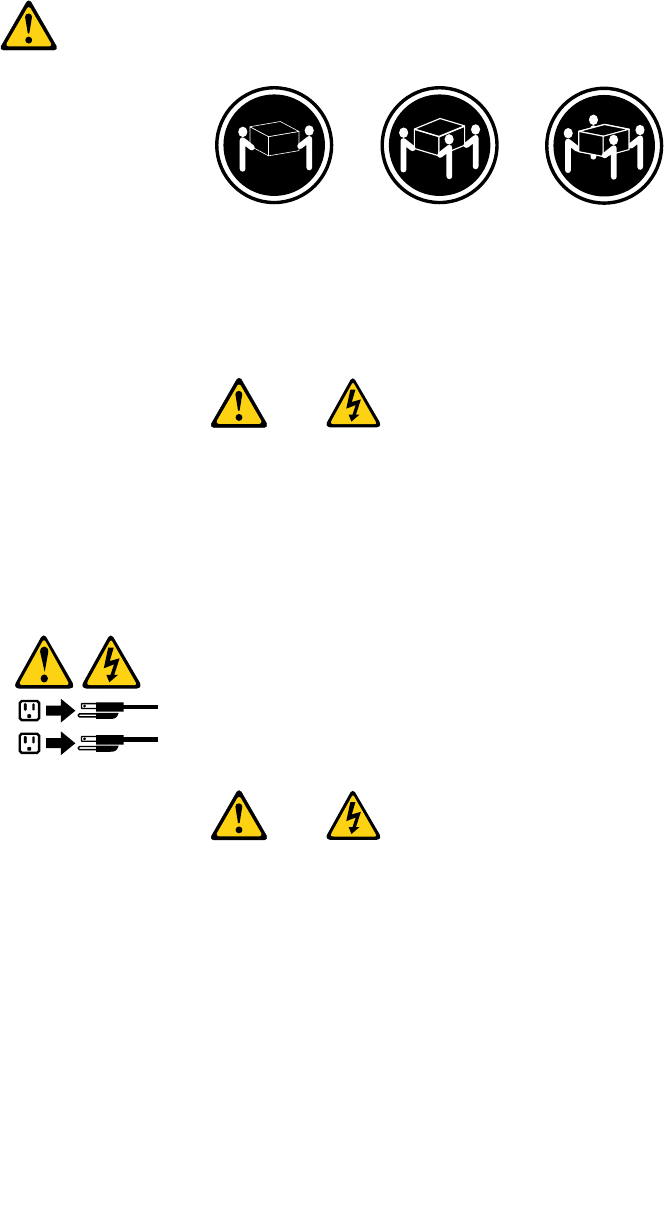
PERICOLO
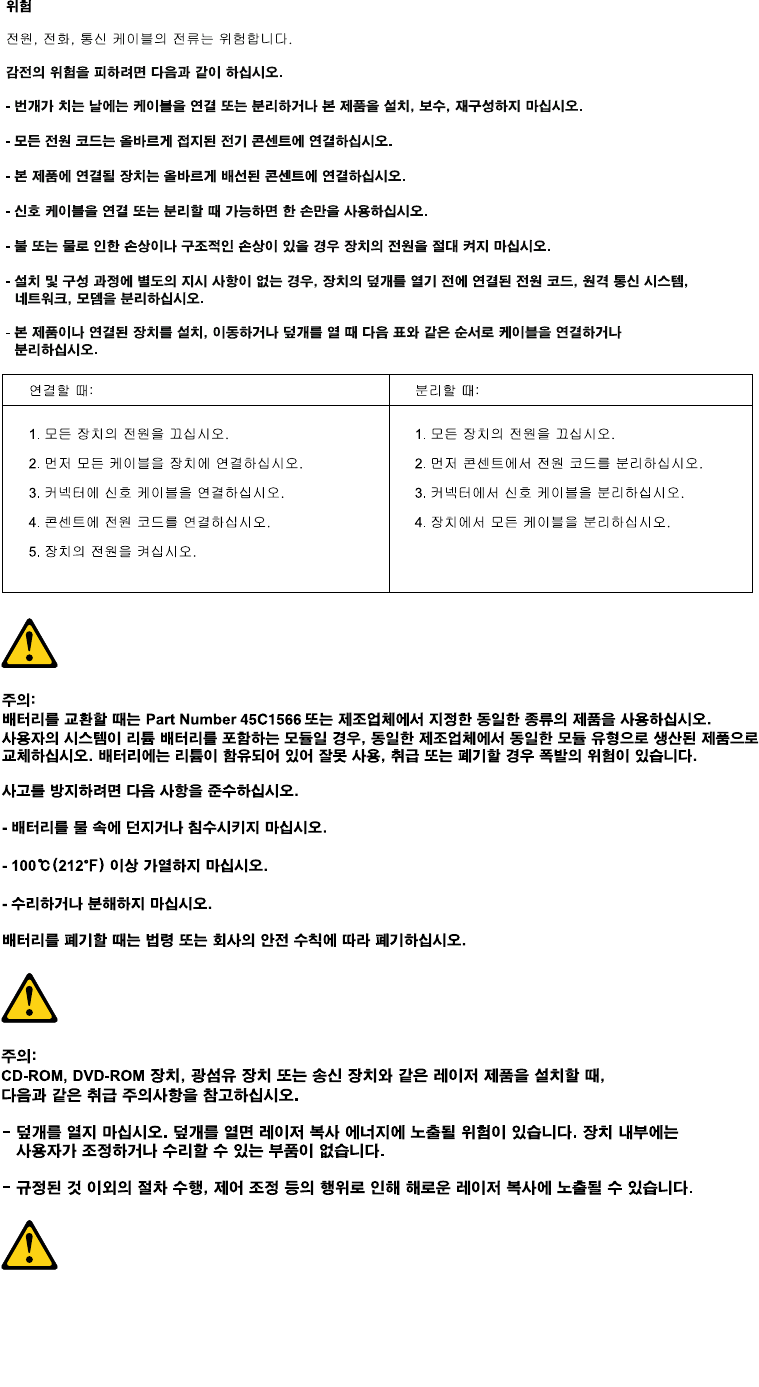
AlcuneunitàlasercontengonoundiodolaserdiClasse3AoClasse3B.Tenerpresentequantosegue:
Aprendol'unitàvengonoemesseradiazionilaser.Nonssareilfascio,nonguardarlodirettamente
construmentiotticiedevitarel'esposizionealfascio.
≥18kg≥32kg≥55kg
ATTENZIONE:
Prestareattenzionenelsollevarel'apparecchiatura.
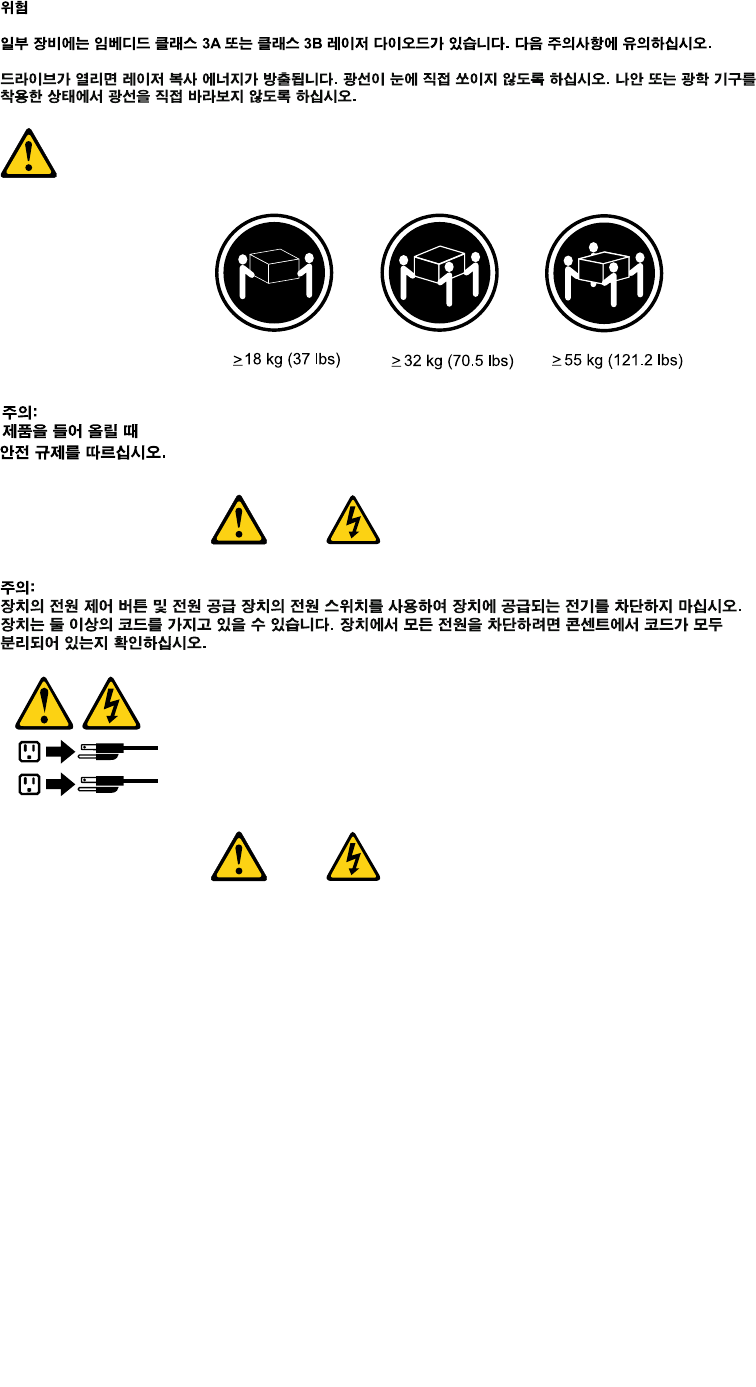
ATTENZIONE:
Ilpulsantedicontrollodell'alimentazionepresentesull'unitàel'interruttoredell'alimentatorenon
disattivanol'alimentazionecorrentefornitaall'unità.E'possibilechel'unitàdispongadipiùcavidi
alimentazione.Perdisattivarel'alimentazionedall'unità,accertarsichetuttiicavidialimentazione
sianoscollegatidallafontedialimentazione.
1
2
24ThinkCentreHardwareMaintenanceManual
Chapter2.Safetyinformation25
1
2
PELIGRO
Lacorrienteeléctricaprocedentedecablesdealimentación,teléfonosycablesdecomunicaciónpuede
serpeligrosa.
Paraevitarelriesgodedescargaeléctrica:
•Noconectenidesconecteloscablesnirealiceningunatareadeinstalación,mantenimientoo
reconguracióndeesteproductoduranteunatormentaeléctrica.
•Conectetodosloscablesdealimentaciónatomasdecorrientedebidamentecableadasy
conectadasatierra.
•Cualquierequipoqueseconecteaesteproductotambiéndebeconectarseatomasdecorriente
debidamentecableadas.
•Siemprequeseaposible,utiliceunasolamanoparaconectarodesconectarloscablesdeseñal.
•Noenciendanuncaunequipocuandohayseñalesdefuego,aguaodañosestructurales.
26ThinkCentreHardwareMaintenanceManual
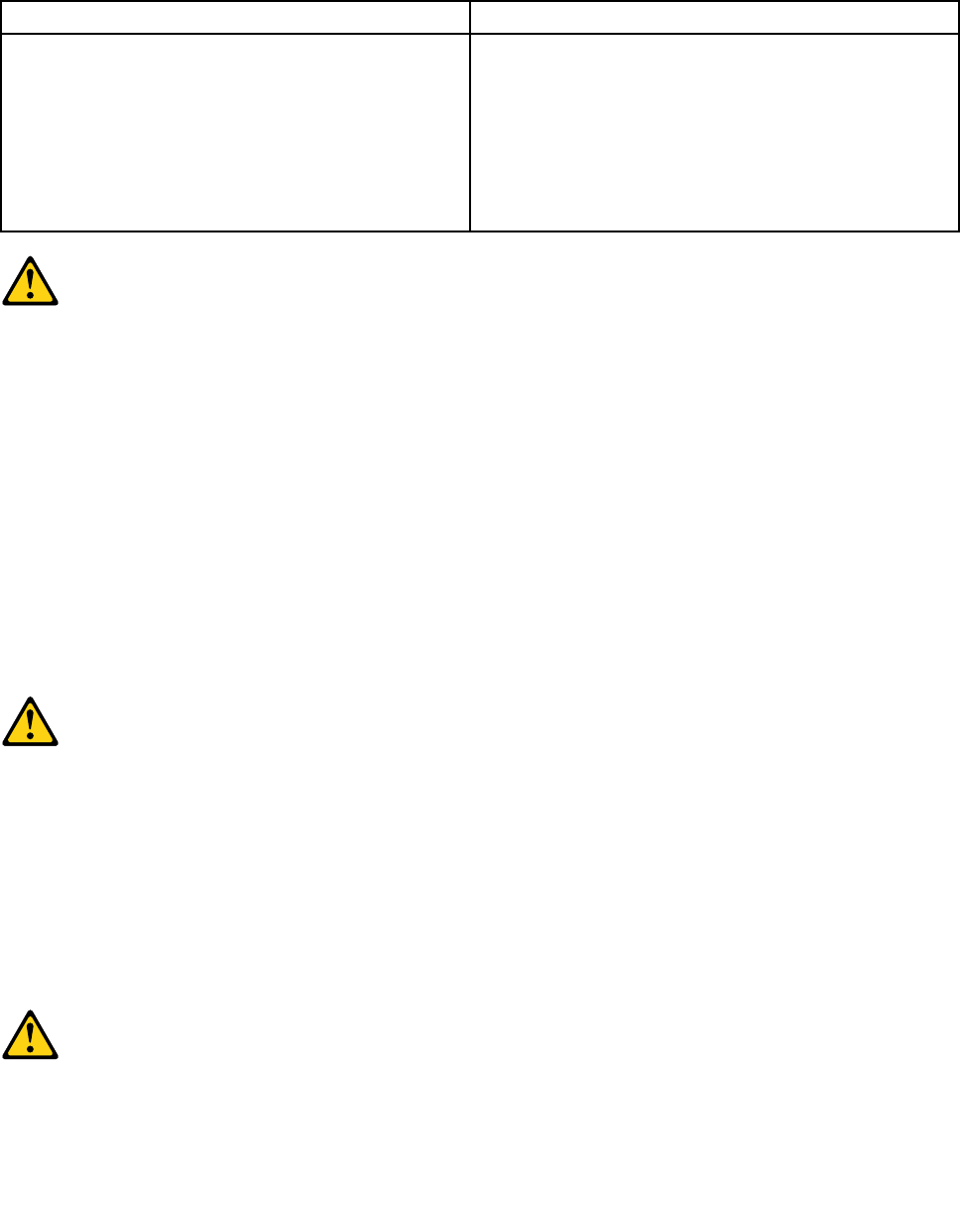
•Desconecteloscablesdealimentación,lossistemasdetelecomunicaciones,lasredesylos
módemsconectadosantesdeabrirlascubiertasdelosdispositivos,amenosqueseindiquelo
contrarioenlosprocedimientosdeinstalaciónyconguración.
•Conecteydesconecteloscables,comosedescribeenlatablasiguiente,cuandoinstale,muevao
abralascubiertasdeesteproductoodelosdispositivosconectados.
ParaconectarParadesconectar
1.APÁGUELOtodo.
2.Enprimerlugar,conectetodosloscablesalos
dispositivos.
3.Conecteloscablesdeseñalalosconectores.
4.Enchufeloscablesdealimentaciónalastomasde
corriente.
5.Enciendaeldispositivo.
1.APÁGUELOtodo.
2.Enprimerlugar,desenchufeloscablesdealimentación
delastomasdecorriente.
3.Desconecteloscablesdeseñaldelosconectores.
4.Desconectetodosloscablesdelosdispositivos.
PRECAUCIÓN:
Cuandosustituyaunabateríadelitio,utilicesolamenteunabateríanúmerodepieza45C1566uotra
detipoequivalenterecomendadaporelfabricante.Sisusistemadisponedeunmóduloquecontiene
unabateríadelitio,reemplácelosóloconelmismotipodemódulo,delmismofabricante.Labatería
contienelitioypuedeexplotarsinoseutiliza,manipulaodesechacorrectamente.
Nodebe:
•Arrojarlaalaguaosumergirlaenella
•Exponerlaatemperaturassuperioresa100°C(212°F)
•Repararlaodesmontarla
Deshágasedelabateríasegúnespeciquenlasleyesonormaslocales.
PRECAUCIÓN:
Cuandohayaproductosláser(comounidadesdeCD-ROM,unidadesdeDVD,dispositivosdebra
ópticaotransmisores)instalados,tengaencuentalosiguiente:
•Noquitelascubiertas.Siquitalascubiertasdelproductoláser,podríaquedarexpuestoaradiación
láserpeligrosa.Dentrodeldispositivonoexisteningunapiezaquerequieraserviciotécnico.
•Siusacontrolesoajustesorealizaprocedimientosquenoseanlosespecicadosaquí,podría
exponersearadiacionespeligrosas.
PELIGRO
Chapter2.Safetyinformation27
Algunosproductoslásertienenincorporadoundiodoláserdeclase3Aoclase3B.Tengaencuentalo
siguiente:
Cuandoseabre,quedaexpuestoaradiaciónláser.Nomiredirectamentealrayoláser,nisiquieracon
instrumentosópticos,yeviteexponersedirectamentealrayoláser.
≥18kg≥32kg≥55kg
PRECAUCIÓN:
Adopteprocedimientossegurosallevantarelequipo.
PRECAUCIÓN:
Elbotóndecontroldealimentacióndeldispositivoyelinterruptordealimentacióndelafuentede
alimentaciónnodesconectanlacorrienteeléctricasuministradaaldispositivo.Además,eldispositivo
podríatenermásdeuncabledealimentación.Parasuprimirtodalacorrienteeléctricadeldispositivo,
asegúresedequetodosloscablesdealimentaciónesténdesconectadosdelatomadecorriente.
1
2
28ThinkCentreHardwareMaintenanceManual
Chapter3.Generalinformation
Thischapterprovidesgeneralinformationthatappliestoallmachinetypessupportedbythispublication.
LenovoThinkVantageTools
TheLenovoThinkVantage®Toolsprogramguidesyoutoahostofinformationsourcesandprovideseasy
accesstovarioustoolstohelpyouworkmoreeasilyandsecurely.
ToaccesstheLenovoThinkVantageToolsprogram,clickStart➙AllPrograms➙LenovoThinkVantage
Tools.
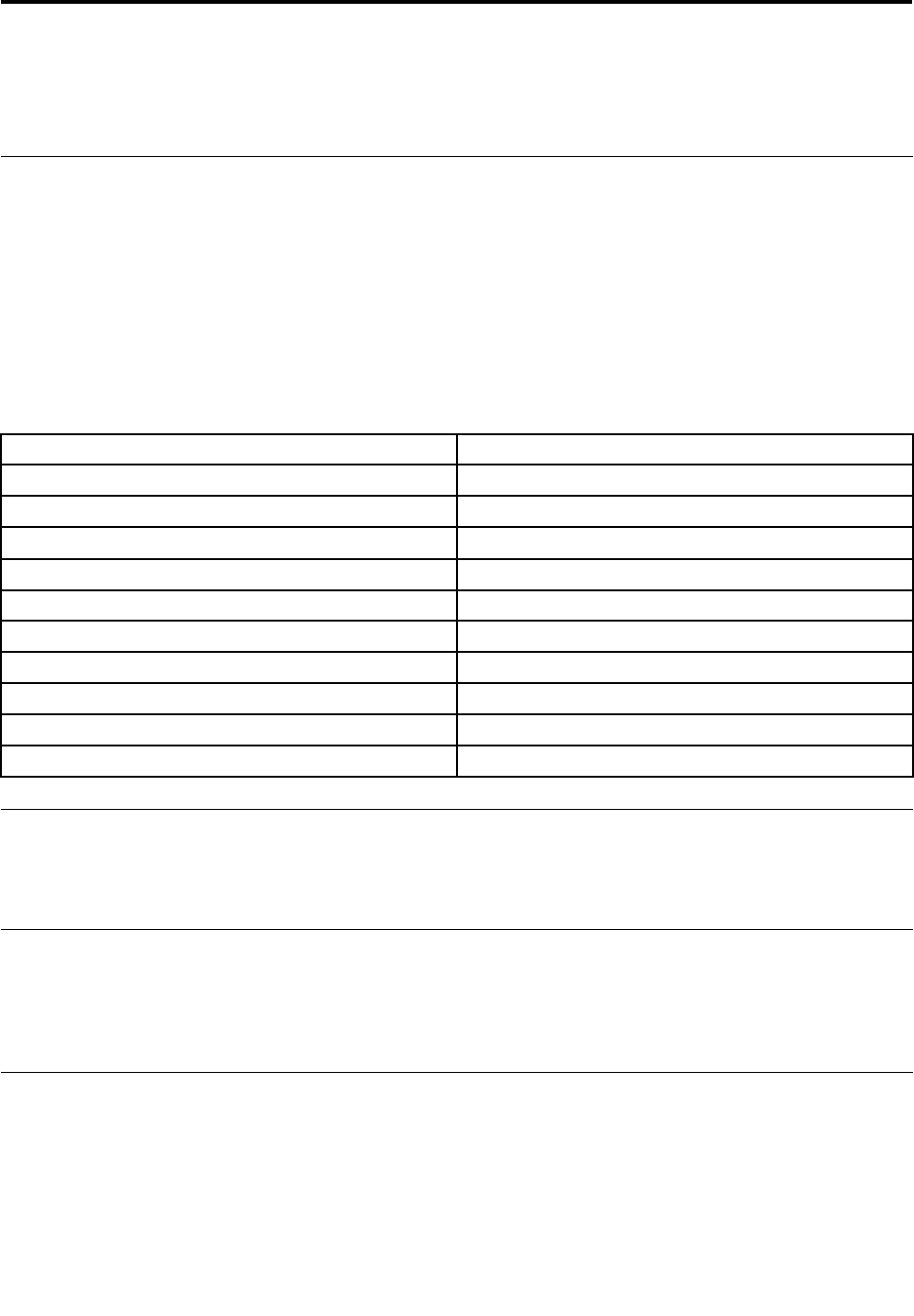
ThefollowingtableliststheprogramsthatyoucanaccessfromtheLenovoThinkVantageToolsprogram.To
accessaprogram,double-clickthecorrespondingicon.
Table1.ProgramiconnamesinLenovoThinkVantageTools
ProgramnameIconnameinLenovoThinkVantageTools
CreateRecoveryMediaFactoryRecoveryDisks
FingerprintSoftwareFingerprintReader
LenovoThinkVantageToolbox/LenovoSolutionCenterSystemHealthandDiagnostics
SimpleTapSimpleTap
ThinkVantagePasswordManagerPasswordVault
ThinkVantagePowerManagerPowerControls
ThinkVantageRescueandRecovery®EnhancedBackupandRestore
ThinkVantageSystemUpdateUpdateandDrives
CommunicationsUtilityWebConferencing
ViewManagementUtilityScreenLayout
LenovoWelcome
TheLenovoWelcomeprogramintroducesyoutosomeinnovativebuilt-infeaturesofLenovoandguidesyou
throughafewimportantsetuptaskstohelpyoumakethemostofyourcomputer.
LenovoThinkVantageToolbox
TheLenovoThinkVantageToolboxprogramhelpsyoumaintainyourcomputer,improvecomputingsecurity,
diagnosecomputerproblems,getfamiliarwiththeinnovativetechnologiesprovidedbyLenovo,andgetmore
informationaboutyourcomputer.See“LenovoThinkVantageToolbox”onpage51fordetailedinformation.
LenovoSolutionCenter
TheLenovoSolutionCenterprogramenablesyoutotroubleshootandresolvecomputerproblems.It
combinesdiagnostictests,systeminformationcollection,securitystatus,andsupportinformation,along
withhintsandtipsformaximumsystemperformance.See“LenovoSolutionCenter”onpage52fordetailed
information.
©CopyrightLenovo2011,201229

SimpleTap
TheSimpleTapprogramprovidesyouwithaquickwaytocustomizesomebasiccomputersettingssuchas
mutingthespeakers,adjustingthevolume,lockingthecomputeroperatingsystem,launchingaprogram,
openingaWebpage,openingale,andsoon.YoualsocanusetheSimpleTapprogramtoaccessthe
LenovoAppShop,fromwhichyoucandownloadvariousapplicationsandcomputersoftware.
TostarttheSimpleTapprograminaquickway,doanyofthefollowing:
•ClicktheredSimpleTaplaunchpointonthedesktop.Theredlaunchpointisavailableonthedesktop
afteryouhavelaunchedtheSimpleTapprogramforthersttime.
•PresstheblueThinkVantagebuttonifyourkeyboardhasone.
Note:TheSimpleTapprogramisonlyavailableoncertainmodelspreinstalledwiththeWindows7operating
system.IfyourWindows7modelisnotpreinstalledwiththeSimpleTapprogram,youcandownloadit
fromhttp://www.lenovo.com/support.
Additionalinformationresources
IfyouhaveInternetaccess,themostup-to-dateinformationforyourcomputerisavailablefromtheWorld
WideWeb.
Youcanndthefollowinginformation:
•CRUremovalandinstallationinstructions
•Publications
•Troubleshootinginformation
•Partsinformation
•Downloadsanddrivers
•Linkstootherusefulsourcesofinformation
Toaccessthisinformation,goto:
http://www.lenovo.com/support
30ThinkCentreHardwareMaintenanceManual

Specications
Thissectionliststhephysicalspecicationsforyourcomputer.
Dimensions
Width:506.8mm(19.95inches)
Height:411.0mm(16.18inches)
Depth:71.5mm(2.81inches)fornon-touchmodel;78.0mm(3.07inches)fortouchmodel
Weight
Maximumcongurationasshipped:7.54kg(16.62lb)fornon-touchmodel;8.85kg(19.51lb)fortouchmodel
Environment
•Airtemperature:
Operating:10°Cto35°C(50°Fto95°F)
Storage:-20°Cto60°C(-4°Fto140°F)
Storage:-10°Cto60°C(14°Fto140°F)(withoutpackage)
•Humidity:
Operating:20%to80%(non-condensing)
Storage:20%to90%(non-condensing)
•Altitude:
Operating:-50to10000ft(-15.2to3048m)
Storage:-50to35000ft(-15.2to10668m)
Electricalinput
•Inputvoltage:
–Lowrange:
Minimum:100Vac
Maximum:127Vac
Inputfrequencyrange:50to60Hz
–Highrange:
Minimum:200Vac
Maximum:240Vac
Inputfrequencyrange:50to60Hz
Chapter3.Generalinformation31

32ThinkCentreHardwareMaintenanceManual

Chapter4.GeneralCheckout
Attention
Thedrivesinthecomputeryouareservicingmighthavebeenrearrangedorthedrivestartupsequence
changed.Beextremelycarefulduringwriteoperationssuchascopying,saving,orformatting.Dataor
programscanbeoverwrittenifyouselectanincorrectdrive.
Generalerrormessagesappearifaproblemorconictisfoundbyanapplicationprogram,theoperating
system,orboth.Foranexplanationofthesemessages,refertotheinformationsuppliedwiththatsoftware
package.
BeforereplacinganyFRUs,ensurethatthelatestlevelofBIOSisinstalledonthesystem.Adown-levelBIOS
mightcausefalseerrorsandunnecessaryreplacementofthesystemboard.Formoreinformationonhowto
determineandobtainthelatestlevelBIOS,see“BIOSlevels”onpage311.
Usethefollowingproceduretohelpdeterminethecauseoftheproblem:
1.Power-offthecomputerandallexternaldevices.
2.Checkallcablesandpowercords.
3.Setalldisplaycontrolstothemiddleposition.
4.Power-onallexternaldevices.
5.Power-onthecomputer.
•Lookfordisplayederrorcodes
•Listenforbeepcodes
•Lookforreadableinstructionsoramainmenuonthedisplay.
Ifyoudidnotreceivethecorrectresponse,proceedtostep6onpage33.
Ifyoudoreceivethecorrectresponse,proceedtostep7onpage33.
6.Lookatthefollowingconditionsandfollowtheinstructions:
•IfyouhearbeepcodesduringPOST,goto“Beepsymptoms”onpage79.
•IfthecomputerdisplaysaPOSTerror,goto“POSTerrorcodes”onpage79.
•Ifthecomputerhangsandnoerrorisdisplayed,continueatstep7onpage33.
7.RuntheDiagnosticprograms.See“Diagnostics”onpage51.
•Ifyoureceiveanerror,replacethepartthatthediagnosticprogramcallsoutorgoto“Diagnostic
errorcodes”onpage62.
•Iftheteststopsandyoucannotcontinue,replacethelastdevicetested.
Problemdeterminationtips
Duetothevarietyofhardwareandsoftwarecombinationsthatcanbeencountered,usethefollowing
informationtoassistyouinproblemdetermination.Ifpossible,havethisinformationavailablewhen
requestingassistancefromServiceSupportandEngineeringfunctions.
•Machinetypeandmodel
•Processororharddiskdriveupgrades
•Failuresymptom
–Dodiagnosticsindicateafailure?
–What,when,where,single,ormultiplesystems?
–Isthefailurerepeatable?
©CopyrightLenovo2011,201233

–Hasthiscongurationeverworked?
–Ifithasbeenworking,whatchangesweremadepriortoitfailing?
–Isthistheoriginalreportedfailure?
•Diagnosticsversion
–Typeandversionlevel
•Hardwareconguration
–Print(printscreen)congurationcurrentlyinuse
–BIOSlevel
•Operatingsystemsoftware
–Typeandversionlevel
Notes:Toeliminateconfusion,identicalsystemsareconsideredidenticalonlyifthey:
1.Aretheexactmachinetypeandmodels
2.HavethesameBIOSlevel
3.Havethesameadapters/attachmentsinthesamelocations
4.Havethesameaddressjumpers/terminators/cabling
5.Havethesamesoftwareversionsandlevels
6.HavethesameDiagnosticDiskettes(version)
7.Havethesamecongurationoptionssetinthesystem
8.Havethesamesetupfortheoperatingsystemcontrolles
Comparingthecongurationandsoftwareset-upbetween“workingandnon-working”systemswilloften
leadtoproblemresolution.
34ThinkCentreHardwareMaintenanceManual
Chapter5.Troubleshootinganddiagnostics
Thischapterdescribessomebasictroubleshootinganddiagnosticprograms.Ifyourcomputerproblemis
notdescribedhere,see“Diagnostics”onpage51foradditionaltroubleshootingresources.
Basictroubleshooting
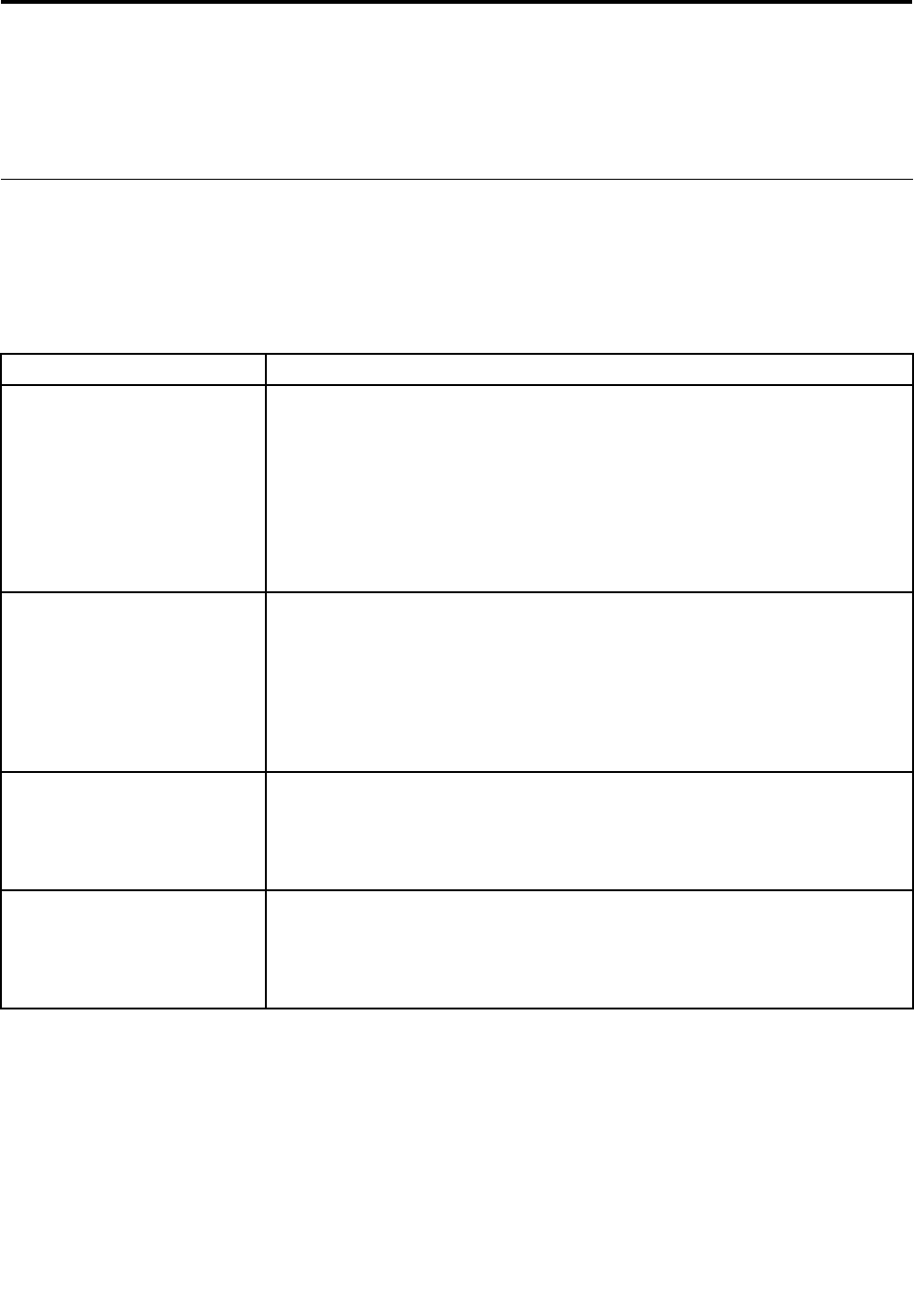
Thefollowingtableprovidesinformationtohelpyoutroubleshootyourcomputerproblems.
Note:Ifyoucannotcorrecttheproblem,havethecomputerserviced.Foralistofserviceandsupport
telephonenumbers,refertotheThinkCentreSafetyandWarrantyGuidethatcomeswithyourcomputeror
gototheLenovoSupportWebsiteathttp://www.lenovo.com/support/phone.
SymptomAction
Thecomputerdoesnotstart
whenyoupressthepower
switch.
Verifythat:
•Thepowercordiscorrectlyconnectedtotherearofthecomputerandtoa
workingelectricaloutlet.
•Ifyourcomputerhasasecondarypowerswitchontherearofthecomputer,
makesurethatitisswitchedon.
•Thepowerindicatoronthefrontofthecomputerison.
•Thecomputervoltagematchesthevoltageavailableattheelectricaloutletfor
yourcountryorregion.
Themonitorscreenisblank.Verifythat:
•Themonitorpowercordiscorrectlyconnectedtothemonitorandtoaworking
electricaloutlet.
•Themonitoristurnedonandthebrightnessandcontrastcontrolsareset
correctly.
•Thecomputervoltagematchesthevoltageavailableattheelectricaloutletfor
yourcountryorregion.
Thekeyboarddoesnotwork.Verifythat:
•Thecomputeristurnedon.
•ThekeyboardissecurelyconnectedtoaUSBconnectoronthecomputer.
•Nokeysarestuck.
Themousedoesnotwork.Verifythat:
•Thecomputeristurnedon.
•ThemouseissecurelyconnectedtoaUSBconnectoronthecomputer.
•Themouseisclean.
©CopyrightLenovo2011,201235
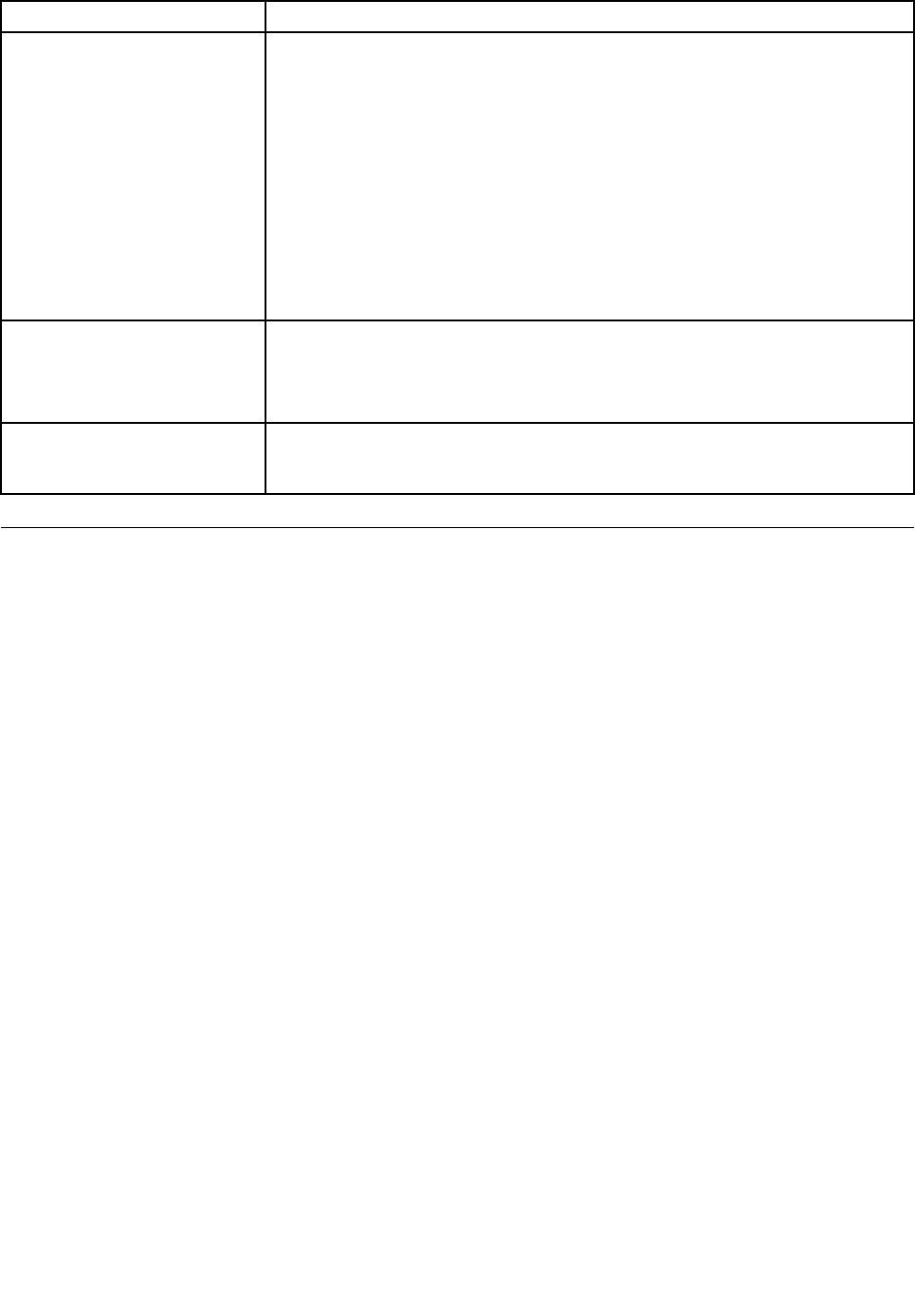
SymptomAction
Thewirelesskeyboardormouse
doesnotwork.
Verifythat:
•Thecomputeristurnedon.
•Thebatteryorbatteriesinstalledinthewirelesskeyboardormouseareingood
condition.
•Thewirelesscongurationsareallsetcorrectly.Youmightneedtoreferto
thedocumentationthatcomewiththewirelesskeyboardormouse,orrefer
toyourWindowsHelpandSupportinformationsystemforwirelessrelated
instructions.Ifyourwirelessmousehasadongle,makesurethedongleis
correctlyconnectedtooneoftheUSBconnectorsonthecomputer.
•Forthewirelesskeyboard,nokeysarestuck.
•Thewirelessmouseisclean.
Theoperatingsystemdoesnot
start.
Verifythat:
•Thestartupsequenceincludesthedevicewheretheoperatingsystemresides.
Usually,theoperatingsystemisontheharddiskdrive.Formoreinformation,
see“Selectingastartupdevice”onpage59.
Thecomputerbeepsmultiple
timesbeforetheoperating
systemstarts.
Verifythatnokeysarestuck.
Troubleshootingprocedure
Usethefollowingprocedureasastartingpointfordiagnosingproblemsyouareexperiencingwithyour
computer:
1.Verifythatthecablesforallattacheddevicesareconnectedcorrectlyandsecurely.
2.Verifythatallattacheddevicesthatrequireacpowerareconnectedtoproperlygrounded,functioning
electricaloutlets.
3.VerifythatallattacheddevicesareenabledintheBIOSsettingsofyourcomputer.Formoreinformation
aboutaccessingandchangingtheBIOSsettings,refertoyourChapter6“UsingtheSetupUtility
program”onpage57.
4.Gotothe“Troubleshooting”onpage37andfollowtheinstructionsforthetypeofproblemyouare
experiencing.IftheTroubleshootinginformationdoesnothelpyouresolveaproblem,continuewiththe
nextstep.
5.Tryusingapreviouslycapturedcongurationtoseeifarecentchangetohardwareorsoftwaresettings
hascausedaproblem.Beforerestoringapreviousconguration,captureyourcurrentcongurationin
casetheoldercongurationsettingsdonotsolvetheproblemorhaveadverseaffects.Torestorea
capturedconguration,clickStart➙ControlPanel➙SystemandSecurity➙System➙System
Protection➙SystemRestore.Ifthisdoesnotcorrecttheproblem,continuewiththenextstep.
6.Runthediagnosticprograms.See“Diagnostics”onpage51formoreinformation.
•Ifthediagnosticprogramsdetectahardwarefailure,contacttheLenovoCustomerSupportCenter.
See“Additionalinformationresources”onpage30formoreinformation.
•Ifyouareunabletorunthediagnosticprograms,contacttheLenovoCustomerSupportCenter.See
“Additionalinformationresources”onpage30formoreinformation.
•Ifthediagnosticprogramsdonotdetectahardwarefailure,continuewiththenextstep.
7.Useanantivirusprogramtoseeifyourcomputerhasbeeninfectedbyavirus.Iftheprogramdetectsa
virus,removethevirus.
8.Ifnoneoftheseactionssolvetheproblem,seektechnicalassistance.See“Additionalinformation
resources”onpage30formoreinformation.
36ThinkCentreHardwareMaintenanceManual

Troubleshooting
Usethetroubleshootinginformationtondsolutionstoproblemsthathavedenitesymptoms.
Ifthesymptomyourcomputerisexperiencingoccurredimmediatelyafteranewhardwareoptionornew
softwareinstalled,dothefollowingbeforereferringtothetroubleshootinginformation:
1.Removethenewhardwareoptionorsoftware.Ifyoumustremovethecomputercovertoremovea
hardwareoption,havethecomputerserviced.Foryoursafety,donotoperatethecomputerwiththe
coverremoved.
2.Runthediagnosticprogramstoensureyourcomputerisoperatingcorrectly.
3.Reinstallthenewhardwareoptionorsoftware.
Selecttheproblemyourcomputerisexperiencingfromthefollowinglist:
•“Audioproblems”onpage37
•“CDproblems”onpage38
•“DVDproblems”onpage39
•“Intermittentproblems”onpage41
•“Keyboard,mouse,orpointingdeviceproblems”onpage41
•“Monitorproblems”onpage43
•“Networkingproblems”onpage44
•“Optionproblems”onpage47
•“Performanceandlockupproblems”onpage48
•“Printerproblems”onpage49
•“Serialportproblems”onpage49
•“Softwareproblems”onpage50
•“USBproblems”onpage51
Audioproblems
Selectyoursymptomfromthefollowinglist:
•“NoaudioinWindows”onpage37
•“AnaudiodiscorAutoPlay-enableddiscdoesnotautomaticallyplaywhenitisinsertedintoadrive”
onpage38
•“Soundcomesfromoneexternalspeakeronly”onpage38
•“NoaudioinDOSapplicationsorgames”onpage38
NoaudioinWindows
Symptom:NoaudioinWindows
Actions:
•IfyouareusingpoweredexternalspeakersthathaveanOn/Offcontrol,verifythattheOn/Offcontrolis
settotheOnpositionandthespeakerpowercableisconnectedtoaproperlygrounded,functionalac
electricaloutlet.
•Ifyourexternalspeakershaveavolumecontrol,verifythatthevolumecontrolisnotsettoolow.
•Double-clickthespeakericonintheWindowsnoticationarea.Amastervolume-controlwindowopens.
VerifythattheMutesettingsarenotcheckedandnoneofthevolumesettingsissettoolow.
Chapter5.Troubleshootinganddiagnostics37

•Somemodelshaveafrontaudiopanelyoucanusetoadjustvolume.Ifyouhaveafrontaudiopanel,
verifythatthevolumeisnotsettoolow.
•Verifythatyourexternalspeakers(andheadphones,ifused)areconnectedtothecorrectaudioconnector
onthecomputer.Mostspeakercablesarecolor-codedtomatchtheconnector.
Note:Whenexternal-speakerorheadphonecablesareattachedtotheaudioconnector,theinternal
speaker,ifpresent,isdisabled.Inmostcases,ifanaudioadapterisinstalledinoneoftheexpansionslots,
theaudiofunctionbuiltintothesystemboardisdisabled;usetheaudiojacksontheadapter.
•MakesurethattheprogramyouarerunningisdesignedforuseintheMicrosoftWindowsoperating
system.IftheprogramisdesignedtoruninDOS,theprogramdoesnotusetheWindowssoundfeature
andmustbeconguredtouseSoundBlasterProorSoundBlasteremulation.
•Verifythattheaudiodevicedriversarecorrectlyinstalled.SeeMicrosoftWindowshelpsystemformore
information.
Iftheseactionsdonotcorrecttheproblem,runthediagnosticprograms(see“Diagnostics”onpage51for
instructions).Ifyouneedtechnicalassistance,see“Additionalinformationresources”onpage30.
AnaudiodiscorAutoPlay-enableddiscdoesnotautomaticallyplaywhenitis
insertedintoadrive
Symptom:AnaudiodiscorAutoPlay-enableddiscdoesnotautomaticallyplaywhenitisinsertedintoadrive
Action:See“CDproblems”onpage38.
Soundcomesfromoneexternalspeakeronly
Symptom:Soundcomesfromoneexternalspeakeronly.
Actions:
•Ensurethatthespeakercableisinsertedcompletelyintotheconnectoronthecomputer.
•Makesurethecablethatattachestheleftspeakertotherightspeakerissecurelyconnected.
•Double-clickthespeakericonintheWindowsnoticationarea.Amastervolume-controlwindowopens.
VerifythattheBalancesettingsaresetcorrectly.
Iftheseactionsdonotcorrecttheproblem,youmighthaveafailingspeaker.Havethespeakerserviced.If
youneedtechnicalassistance,see“Additionalinformationresources”onpage30.
NoaudioinDOSapplicationsorgames
Symptom:NoaudioinDOSapplicationsorgames
Actions:
•MakesuretheDOSapplicationorgameisconguredtouseSoundBlasterProorSoundBlaster
emulation.Refertothedocumentationthatcomeswiththeapplicationorgameforinstructionson
settingsound-cardsettings.
•Iftheseactionsdonotcorrecttheproblem,runthediagnosticprograms(see“Diagnostics”onpage51
forinstructions).Ifyouneedtechnicalassistance,see“Additionalinformationresources”onpage30.
CDproblems
Selectyoursymptomfromthefollowinglist:
•“AnaudiodiscorAutoPlay-enableddiscdoesnotautomaticallyplaywhenitisinsertedintoaCD
drive”onpage39
38ThinkCentreHardwareMaintenanceManual

•“ACDorDVDdoesnotwork”onpage39
•“Unabletouseastartable(bootable)recoverymedium,suchastheProductRecoveryCD,tostart
yourcomputer”onpage39
AnaudiodiscorAutoPlay-enableddiscdoesnotautomaticallyplaywhenitis
insertedintoaCDdrive
Symptom:AnaudiodiscorAutoPlay-enableddiscdoesnotautomaticallyplaywhenitisinsertedinto
aCDdrive.
Actions:
•IfyouhavemultipleCDorDVDdrivesinstalled(oracombinationofCDandDVDdrives),tryinsertingthe
discintotheotherdrive.Insomecases,onlyoneofthedrivesisconnectedtotheaudiosubsystem.
•IfyouareusingtheWindows7operatingsystem,followtheactionfor“ACDorDVDdoesnotwork”
onpage39.
Ifthisdoesnotcorrecttheproblem,followtheactionfor“ACDorDVDdoesnotwork”onpage39.
ACDorDVDdoesnotwork
Symptom:ACDorDVDdoesnotwork.
Actions:
•Verifythatthediscisinsertedcorrectly,withitslabelup.
•Makesurethatthediscyouareusingisclean.Toremovedustorngerprints,wipethedisccleanwitha
softclothfromthecentertotheoutside.Wipingadiscinacircularmotionmightcauselossofdata.
•Verifythatthediscyouareusingisnotscratchedordamaged.Tryinsertinganotherdiscthatyouknow
isgood.Ifyoucannotreadfromaknown-gooddisc,youmighthaveaproblemwithyourCDorDVD
driveorthecablingtoyourCDorDVDdrive.Makesurethatthepowercableandsignalcableare
securelyconnectedtothedrive.
Unabletouseastartable(bootable)recoverymedium,suchastheProductRecovery
CD,tostartyourcomputer
Symptom:Unabletouseastartable(bootable)recoverymedium,suchastheProductRecoveryCD,
tostartyourcomputer.
Action:MakesurethattheCDorDVDdriveisinthestartupsequencebeforetheharddiskdrive.Refer
toyour“Selectingorchangingthestartupdevicesequence”onpage59forinformationonviewingand
changingthestartupsequence.Notethatonsomemodelsthestartupsequenceispermanentlysetand
cannotbechanged.
Iftheseactionsdonotcorrecttheproblem,runthediagnosticprograms(see“Diagnostics”onpage51for
instructions).Ifyouneedtechnicalassistance,see“Additionalinformationresources”onpage30.
DVDproblems
Selectyoursymptomfromthefollowinglist:
•“BlackscreeninsteadofDVDvideo”onpage40
•“DVDmoviewillnotplay”onpage40
•“NoaudioorintermittentaudiowhileplayingDVDmovie”onpage40
•“Playbackisverysloworchoppy”onpage40
•“Invaliddiscornodiscfoundmessage”onpage40
Chapter5.Troubleshootinganddiagnostics39

BlackscreeninsteadofDVDvideo
Symptom:BlackscreeninsteadofDVDvideo
Actions:
•RestarttheDVDplayerprogram.
•Closeanyopenles,turnoffthecomputer,andthenrestartthecomputer.
•Tryalowerscreenresolutionorcolordepth.
Iftheseactionsdonotcorrecttheproblem,runthediagnosticprograms(see“Diagnostics”onpage51for
instructions).Ifyouneedtechnicalassistance,see“Additionalinformationresources”onpage30.
DVDmoviewillnotplay
Symptom:DVDmoviewillnotplay.
Actions:
•Makesurethatthediscsurfaceiscleanandnotscratched.
•Checkthediscorpackageforregionalcoding.Youmightneedtopurchaseadiscwithcodingfor
theregionwhereyouareusingyourcomputer.
Iftheseactionsdonotcorrecttheproblem,runthediagnosticprograms(see“Diagnostics”onpage51for
instructions).Ifyouneedtechnicalassistance,see“Additionalinformationresources”onpage30.
NoaudioorintermittentaudiowhileplayingDVDmovie
Symptom:NoaudioorintermittentaudiowhileplayingDVDmovie.
Actions:
•Checkthevolumecontrolsettingsonyourcomputerandonyourspeakers.
•Makesurethatthediscsurfaceiscleanandnotscratched.
•Checkallcableconnectionstoandfromthespeakers.
•UsetheDVDmenuforthevideotoselectadifferentaudiotrack.
Iftheseactionsdonotcorrecttheproblem,runthediagnosticprograms(see“Diagnostics”onpage51for
instructions).Ifyouneedtechnicalassistance,see“Additionalinformationresources”onpage30.
Playbackisverysloworchoppy
Symptom:Playbackisverysloworchoppy.
Actions:
•Disableanybackgroundprograms,suchasAntiVirusorDesktopThemes.
•Ensurethatvideoresolutionissettolessthan1152x864.
Iftheseactionsdonotcorrecttheproblem,runthediagnosticprograms(see“Diagnostics”onpage51for
instructions).Ifyouneedtechnicalassistance,see“Additionalinformationresources”onpage30.
Invaliddiscornodiscfoundmessage
Symptom:Invaliddiscornodiscfoundmessage
Actions:
40ThinkCentreHardwareMaintenanceManual

•EnsurethataDVDdiscisinthedrivewiththeshinysideofthediscfacingdown.
•Ensurethatvideoresolutionissettolessthan1152x864.
•OncomputersthathaveaCD-ROMorCD-RWdriveinadditiontoaDVD-ROMdrive,makesurethatthe
DVDdiscisinthedrivelabeled“DVD”.
Iftheseactionsdonotcorrecttheproblem,runthediagnosticprograms(see“Diagnostics”onpage51for
instructions).Ifyouneedtechnicalassistance,see“Additionalinformationresources”onpage30.
Intermittentproblems
Symptom:Aproblemoccursonlyoccasionallyandisdifculttorepeat.
Actions:
•Verifythatallcablesandcordsaresecurelyconnectedtothecomputerandattacheddevices.
•Verifythatwhenthecomputerison,thefanisnotblocked(thereisairowaroundthefan),andthefanis
working.Ifairowisblockedorthefanisnotworking,thecomputermightoverheat.
•IfSCSIdevicesareinstalled,verifythatthelastexternaldeviceineachSCSIchainisterminatedcorrectly.
(SeeyourSCSIdocumentation.)
Iftheseactionsdonotcorrecttheproblem,runthediagnosticprograms(see“Diagnostics”onpage51for
instructions).Ifyouneedtechnicalassistance,see“Additionalinformationresources”onpage30.
Keyboard,mouse,orpointingdeviceproblems
Selectyoursymptomfromthefollowinglist:
•“Allorsomekeysonthekeyboarddonotwork”onpage41
•“Themouseorpointingdevicedoesnotwork”onpage42
•“Thepointeronthescreendoesnotmovesmoothlywiththemouse”onpage42
•“Thengerprintreaderdoesnotwork”onpage42
•“Thewirelesskeyboarddoesnotwork”onpage42
Allorsomekeysonthekeyboarddonotwork
Symptom:Allorsomekeysonthekeyboarddonotwork.
Actions:
•Verifythatthekeyboardcableissecurelyconnectedtothecorrectconnectoronthecomputer.
•IfyouareusinganEnhancedPerformanceUSBkeyboardandoneormoreoftheRapidAccessbuttons
aretheonlykeysthatarenotworking,thesebuttonsmighthavebeendisabledorhavenotbeenassigned
toafunction.UsethehelpsystemintheEnhancedPerformanceCustomizationKeyboardprogramto
helpdiagnoseproblemswiththeRapidAccessbuttons.
•OntheWindows7operatingsystem,dothefollowing:
1.ClickStart➙ControlPanel.
2.ClickHardwareandSound.
3.ClickDevicesandPrinters.
4.Double-clickUSBEnhancedPerformanceKeyboard.TheUSBEnhancedPerformanceKeyboard
Customizationprogramstarts.
Chapter5.Troubleshootinganddiagnostics41

Iftheseactionsdonotcorrecttheproblem,havethecomputerandkeyboardserviced.See“Additional
informationresources”onpage30fordetails.
Themouseorpointingdevicedoesnotwork
Symptom:Themouseorpointingdevicedoesnotwork.
Actions:
•Verifythatthemouseorpointing-devicecableissecurelyattachedtothecorrectconnectoronthe
computer.Dependingonthetypeofmouseyouhave,themousecablewillconnecttoeitherthe
mouse,serial,orUSBconnector.SomekeyboardshaveintegratedUSBconnectorsthatcanbeused
foraUSBmouseorpointingdevice.
•Verifythatthedevicedriversforthemouseorpointingdeviceareinstalledcorrectly.
•IfyouareusingaUSBkeyboardormouse,verifythattheUSBconnectorsareenabledintheBIOS
settings.See“Enablingordisablingadevice”onpage59.
Iftheseactionsdonotcorrecttheproblem,runthediagnosticprograms(see“Diagnostics”onpage51for
instructions).Ifyouneedtechnicalassistance,see“Additionalinformationresources”onpage30.
Thepointeronthescreendoesnotmovesmoothlywiththemouse
Symptom:Thepointeronthescreendoesnotmovesmoothlywiththemouse.
Action:Erraticmovementofthemousepointerisgenerallycausedbyabuildupofdirt,oils,andother
contaminantsontheballinsidethemouse.Cleanthemouse.
Thengerprintreaderdoesnotwork
Symptom:Thengerprintreaderdoesnotwork.
Action:Thefollowingcouldcausethengerprintreadernottooperateproperly:
•Notenrollingyourngerprintcorrectly.
•Scratchingthesurfaceofthereaderwithahard,pointedobject.
•Scrapingthesurfaceofthereaderwithyournailoranythinghard.
•Usingortouchingthereaderwithadirtynger.
•Thesurfaceofyourngerisverydifferentfromwhenyouenrolledyourngerprint.
Thewirelesskeyboarddoesnotwork
Symptom:Thewirelesskeyboarddoesnotwork.
Action:IftheTransceiverCommunicationsLEDisonandthewirelessKeyboarddoesnotwork,restartyour
computer.Ifrestartingyourcomputerdoesnotsolvetheproblem,verifythatthefollowingconditionsaremet:
•Thebatteriesareproperlyinstalled.
•Thebatteriesstillretaintheircurrent.
•Thewirelesskeyboardislocatedlessthantenmetersawayfromthetransceiver.
•Thetransceiverisfullyinstalled.
Action:IfthetransceivercommunicationsLEDisnoton,reconnectthetransceiverandthekeyboard.
42ThinkCentreHardwareMaintenanceManual

Monitorproblems
Note:Manymonitorshavestatus-indicatorlightsandbuilt-incontrolsforadjustingbrightness,contrast,
width,height,andotherpictureadjustments.However,thecontrolsvaryfrommonitortypetomonitortype.
Selectyoursymptomfromthefollowinglist:
•“Wrongcharactersappearonthescreen”onpage43
•“Themonitorworkswhenyouturnonthecomputer,butgoesblankaftersomeperiodofcomputer
inactivity”onpage43
•“Themonitorworkswhenyouturnonthecomputer,butgoesblankwhenyoustartsomeapplication
programs”onpage43
•“Theimageappearstobeickering”onpage43
•“Theimageisdiscolored”onpage44
Wrongcharactersappearonthescreen
Symptom:Wrongcharactersappearonthescreen.
Action:Havethecomputerserviced.Fordetails,see“Additionalinformationresources”onpage30.
Themonitorworkswhenyouturnonthecomputer,butgoesblankaftersomeperiod
ofcomputerinactivity
Symptom:Themonitorworkswhenyouturnonthecomputer,butgoesblankaftersomeperiodofcomputer
inactivity.
Action:Thecomputerisprobablysetforenergysavingswiththepower-managementfeature.Ifthe
power-managementfeatureisenabled,disablingitorchangingthesettingsmightsolvetheproblem.
Iftheseactionsdonotcorrecttheproblem,runthediagnosticprograms(see“Diagnostics”onpage51for
instructions).Ifyouneedtechnicalassistance,see“Additionalinformationresources”onpage30.
Themonitorworkswhenyouturnonthecomputer,butgoesblankwhenyoustart
someapplicationprograms
Symptom:Themonitorworkswhenyouturnonthecomputer,butgoesblankwhenyoustartsome
applicationprograms.
Action:
Verifythatthenecessarydevicedriversfortheapplicationprogramsareinstalled.Refertothedocumentation
fortheaffectedapplicationprogramtoseeifdevicedriversarerequired.
Iftheseactionsdonotcorrecttheproblem,runthediagnosticprograms(see“Diagnostics”onpage51for
instructions).Ifyouneedtechnicalassistance,see“Additionalinformationresources”onpage30.
Theimageappearstobeickering
Symptom:Theimageappearstobeickering.
Actions:
•Themonitormightbeoperatinginalow-refreshratedisplaymode.Setthemonitortothehighest,
noninterlacedrefreshratesupportedbyyourmonitorandthevideocontrollerinyourcomputer.
•Themonitormightbeaffectedbyinterferencefromnearbyequipment.Magneticeldsaroundother
devices,suchastransformers,appliances,uorescentlights,andothermonitorsmightbecausingthe
Chapter5.Troubleshootinganddiagnostics43

problem.Moveuorescentdesklightingoranyequipmentthatproducesmagneticeldsfartheraway
fromthemonitor.Ifthisdoesnotcorrecttheproblem,dothefollowing:
1.Turnoffthemonitor.(Movingacolormonitorwhileitisturnedonmightcausescreendiscoloration.)
2.Adjusttheplacementofthemonitorandotherdevicessothattheyareatleast305mm(12inches)
apart.
3.Turnonthemonitor.
•YoucanresettherefreshratethroughyouroperatingsystemControlPanel:
OntheWindows7operatingsystem,clickStart➙ControlPanel➙HardwareandSound➙Adjust
screenresolution➙AdvancedSettings.ThenclicktheMonitortabandselectanewrefreshrate.
•Seeyouroperatingsystemdocumentationorhelpforfurtherinformationonmonitorsettings.
Iftheseactionsdonotcorrecttheproblem,yourmonitormightneedservice.See“Additionalinformation
resources”onpage30fordetails.
Theimageisdiscolored
Symptom:Theimageisdiscolored.
Action:Themonitormightbeaffectedbyinterferencefromnearbyequipment.Magneticeldsaroundother
devices,suchastransformers,appliances,uorescentlights,andothermonitorsmightbecausingthe
problem.Moveuorescentdesklightingoranyequipmentthatproducesmagneticeldsfurtherawayfrom
themonitor.Ifthisdoesnotcorrecttheproblem,dothefollowing:
1.Turnoffthemonitor.(Movingacolormonitorwhileitisturnedonmightcausescreendiscoloration.)
2.Adjusttheplacementofthemonitorandotherdevicessothattheyareatleast305mm(12inches)apart.
3.Turnonthemonitor.
Iftheseactionsdonotcorrecttheproblem,yourmonitormightneedservice.See“Additionalinformation
resources”onpage30fordetails.
Networkingproblems
Thefollowingarethemostcommonnetworkingproblems.Selectyournetworkingproblemfromthe
followinglist:
•“Ethernetproblems”onpage44
•“AwirelessLANproblem”onpage46
•“AwirelessWANproblem”onpage46
•“Bluetoothproblems”onpage46
Ethernetproblems
ForEthernetproblems,selectyoursymptomfromthefollowinglist:
•“Yourcomputercannotconnecttothenetwork”onpage44
•“Theadapterstopsworkingfornoapparentreason”onpage45
•“IfyourcomputerisaGigabitEthernetmodelandyouuseaspeedof1000Mbps,theconnectionfails
orerrorsoccur”onpage45
•“IfyourcomputerisaGigabitEthernetmodel,itcannotconnecttothenetworkat1000Mbps.Instead,
itconnectsat100Mbps”onpage46
Yourcomputercannotconnecttothenetwork
Symptom:Yourcomputercannotconnecttothenetwork.
44ThinkCentreHardwareMaintenanceManual

Actions:Makesurethat:
•Thecableisinstalledproperly.
ThenetworkcablemustbesecurelyconnectedtoboththeEthernetconnectorofyourcomputerand
theRJ45connectorofthehub.Themaximumallowabledistancefromthecomputertohubis100
meters.Ifthecableisconnectedandthedistanceiswithinacceptablelimitsbuttheproblempersists,try
adifferentcable.
•Thecableisinstalledproperly.
•Youareusingthecorrectdevicedriver.
OntheWindows7operatingsystem,dothefollowing:
1.ClickStart➙ControlPanel.
2.ClickHardwareandSound.
3.ClickDeviceManager.Ifyouarepromptedforanadministratorpasswordorconrmation,typethe
passwordorprovideconrmation.
4.IfanexclamationmarkisdisplayednexttoanadapternameunderNetworkadapters,youmightnot
usethecorrectdriverorthedriverisnotenabled.Toupdatethedriver,right-clickthehighlighted
adapter.
5.ClickUpdateDriverSoftware,andthenfollowtheinstructionsonthescreen.
•Theswitchportandtheadapterhavethesameduplexsetting.
Ifyouconguredtheadapterforfullduplex,makesuretheswitchportisalsoconguredforfullduplex.
Settingthewrongduplexmodecandegradeperformance,causedataloss,orresultinlostconnections.
•Youhaveinstalledallnetworkingsoftwarethatisnecessaryforyournetworkenvironment.
CheckwithyourLANadministratorforthenecessarynetworkingsoftware.
Theadapterstopsworkingfornoapparentreason
Symptom:Theadapterstopsworkingfornoapparentreason.
Action:Thenetworkdriverlesmaybecorruptormissing.Updatethedriverbyreferringtothe“Solution”
descriptionfortheproceduretomakesurethatthecorrectdevicedriverisinstalled.
TheWakeonLANfeatureisnotworking
Symptom:TheWakeonLAN(WOL)featureisnotworking.
Actions:
•MakesurethatWOLisenabledintheBIOSSetupUtilityprogram.
•Ifitis,checkwithyourLANadministratorforthenecessarysettings.
IfyourcomputerisaGigabitEthernetmodelandyouuseaspeedof1000Mbps,theconnection
failsorerrorsoccur
Symptom:IfyourcomputerisaGigabitEthernetmodelandyouuseaspeedof1000Mbps,theconnection
failsorerrorsoccur.
Actions:
•UseCategory5wiringandmakesurethatthenetworkcableissecurelyconnected.
•Connecttoa1000BASE-Thub/switch(not1000BASE-X).
Chapter5.Troubleshootinganddiagnostics45

IfyourcomputerisaGigabitEthernetmodel,itcannotconnecttothenetworkat1000Mbps.Instead,
itconnectsat100Mbps
Symptom:IfyourcomputerisaGigabitEthernetmodel,itcannotconnecttothenetworkat1000Mbps.
Instead,itconnectsat100Mbps.
Actions:
•Tryanothercable.
•Makesurethatthelinkpartnerissettoauto-negotiate.
•Makesurethattheswitchis802.3ab-compliant(gigabitovercopper).
AwirelessLANproblem
Symptom:Youcannotconnectusingthebuilt-inwirelessnetworkingcard.
Actions:
•MakesurethatyourwirelessLANdriveristhelatestversion.ChecktheWebsiteandverifythedriver
versionsupportedbyAccessConnectionsisthelatestdocumentedinthereadmele.
•Makesurethatyourcomputeriswithinrangeofawirelessaccesspoint.
•Makesurethatthewirelessradioisenabledbydouble-clickingtheAccessConnectionsiconinthe
Windowsnoticationarea.
Note:IfyourcomputerispreinstalledwiththeWindows7operatingsystem,clickShowhiddeniconsin
theWindowsnoticationarea.TheAccessConnectionsiconisdisplayed.Formoreinformationabout
theicon,seetheHelpinAccessConnections.
•CheckNetworkName(SSID),andyourencryptioninformation.UseAccessConnectionstoverifythis
case-sensitiveinformation.
AwirelessWANproblem
Message:UnauthorizedWANcardispluggedin-PoweroffandremovetheWANcard.
Action:SeektechnicalassistanceforhelptoremovetheunauthorizedWANcard.See“Additional
informationresources”onpage30formoreinformation.
Note:SomecomputermodelsdonothaveawirelessWAN.
Bluetoothproblems
Bluetoothisavailablewithsomecertaincomputermodels.
ForBluetoothproblems,selectyoursymptomfromthefollowinglist:
•“SounddoesnotcomefromtheBluetoothheadphone”onpage46
•“PIMitemssentfromtheWindows7operatingsystemcannotbereceivedcorrectly”onpage47
SounddoesnotcomefromtheBluetoothheadphone
Symptom:SounddoesnotcomefromtheBluetoothheadset/headphonebutcomesfromthelocalspeaker
eventhoughtheheadset/headphoneisconnectedusingHeadsetproleorAVprole.
Action:Dothefollowing:
1.Exittheapplicationthatusesthesounddevice(forexample,WindowsMediaPlayer).
2.OpentheControlPanelbyclickingStart➙ControlPanel.
3.ClickHardwareandSound➙Sound.
46ThinkCentreHardwareMaintenanceManual

4.SelectthePlaybacktab.
5.IfyouareusingHeadsetprole,selectBluetoothHands-freeAudioandclicktheSetDefaultbutton.If
youareusingAVprole,selectStereoAudioandclicktheSetDefaultbutton.
6.ClickOKtoclosetheSoundwindow.
PIMitemssentfromtheWindows7operatingsystemcannotbereceivedcorrectly
Symptom:PersonalInformationManager(PIM)itemssentfromtheWindows7operatingsystemcannotbe
receivedcorrectlyintotheaddressbookofanyotherBluetooth-enableddevice.
Action:TheWindows7operatingsystemsendsPIMitemsinXMLformat,butmostBluetooth-enabled
deviceshandlePIMitemsinvCardformat.IfanotherBluetooth-enableddevicecanreceivealethrough
Bluetooth,aPIMitemsentfromtheWindows7operatingsystemsystemmightbesavedasalewith
theextensioncontact.
Optionproblems
UsethisinformationtodiagnoseproblemswithLenovohardwareoptionsthatdonothavetheirown
troubleshootinginformation.
Selectyoursymptomfromthefollowinglist:
•“Anoptionthatwasjustinstalleddoesnotwork”onpage47
•“Anoptionthatpreviouslyworkeddoesnotworknow”onpage47
Anoptionthatwasjustinstalleddoesnotwork
Symptom:Anoptionthatwasjustinstalleddoesnotwork.
Action:Verifythat:
•Theoptionisdesignedforyourcomputer.
•Youfollowedtheinstallationinstructionssuppliedwiththeoptionandtheinstallationinstructionsprovided
withyourcomputer,andalloptionles(suchasdevicedrivers,ifrequired)areinstalledcorrectly.
•Youhavenotloosenedotherinstalledoptionsorcables.
•Iftheoptionisanadapter,youhaveprovidedenoughhardwareresourcesfortheadaptertofunction
correctly.Seethedocumentationsuppliedwiththeadapter(aswellasthedocumentationforanyother
installedadapters)todeterminetheresourcesrequiredforeachadapter.
Iftheseactionsdonotcorrecttheproblem,runthediagnosticprograms(see“Diagnostics”onpage51for
instructions).Ifyouneedtechnicalassistance,see“Additionalinformationresources”onpage30.
Anoptionthatpreviouslyworkeddoesnotworknow
Symptom:Anoptionthatpreviouslyworkeddoesnotworknow.
Actions:
•Verifythatalloptionhardwareandcableconnectionsaresecure.
•Iftheoptioncomeswithitsowntestinstructions,usethoseinstructionstotesttheoption.
•IfthefailingoptionisaSCSIoption,verifythat:
–ThecablesforallexternalSCSIoptionsareconnectedcorrectly.
–ThelastoptionineachSCSIchain,ortheendoftheSCSIcable,isterminatedcorrectly.
–AllexternalSCSIoptionsareturnedon.ExternalSCSIoptionsmustbeturnedonbeforethecomputer
isturnedon.Formoreinformation,seeyourSCSIdocumentation.
Chapter5.Troubleshootinganddiagnostics47

•Verifythattheoptionandanyrequireddevicedriversareinstalledcorrectly.
Iftheseactionsdonotcorrecttheproblem,runthediagnosticprograms(see“Diagnostics”onpage51for
instructions).Ifyouneedtechnicalassistance,see“Additionalinformationresources”onpage30.
Performanceandlockupproblems
Poorperformanceandlockupproblemscanbearesultofanyofthefollowing:
•“Insufcientfreeharddiskdrivespace”onpage48
•“Excessivenumberoffragmentedles”onpage49
Makeaselectionfromtheabovelisttondoutmoreaboutthecorrectiveactionsyoucantake.
Insufcientfreeharddiskdrivespace
Symptom:Insufcientfreeharddiskdrivespace
TheWindowsoperatingsystemwillslowdownandmightproduceerrorsiftheharddiskdrivegetstoofull.
TochecktheamountoffreespaceontheWindows7operatingsystem,dothefollowing:
1.ClickStart➙Computer.
2.Right-clickyourCdriveentryandthenclickProperties.Theamountoffreediskspaceisdisplayed.
Actionstofreeupdiskspace:
•OntheWindows7operatingsystem,dooneorallofthefollowing:
–
1.ClickStart➙Computer.
2.Right-clickyourCdriveentryandthenclickProperties.
3.ClickDiskCleanup.
4.Alistofunnecessarylecategoriesisdisplayed.Selecteachlecategoryyouwanttodelete,and
thenclickOK.
–
1.ClickStart➙ControlPanel.
2.ClickPrograms.
3.ClickTurnWindowsfeaturesonoroff.
4.AlistofoptionalWindowscomponentsisdisplayed.Followtheinstructionsonthescreen.
–
1.ClickStart➙Computer.
2.Right-clickyourCdriveentryandthenclickProperties.
3.ClickDiskCleanup.
4.ClickCleanupsystemles.
5.ClicktheMoreOptionstab.
6.IntheProgramsandFeaturesarea,clicktheCleanupbutton.
7.Alistofinstalledapplicationsisdisplayed.Selecttheapplicationyouwanttoremove.Click
Uninstall/Change.
48ThinkCentreHardwareMaintenanceManual

•CleanoutyourInbox,SentItems,andDeletedItemsfoldersfromyoure-mailapplication.Thefolder
namesandproceduresvarydependingonyoure-mailapplication.Ifyouneedassistance,seethe
helpsystemforyoure-mailapplication.
Excessivenumberoffragmentedles
Symptom:Excessivenumberoffragmentedles
Action:RuntheWindowsDiskDefragmenterprogram.
Note:Dependingonthesizeoftheharddiskdriveandamountofdatacurrentlystoredontheharddisk
drive,thediskdefragmentationprocessmighttakeuptoseveralhourstocomplete.
OntheWindows7operatingsystem,dothefollowing:
1.Closeanyprogramsthatarecurrentlyrunningandcloseanyopenwindows.
2.ClickStart➙Computer.
3.Right-clickyourCdriveentryandthenclickProperties.
4.ClicktheToolstab.
5.ClickDefragmentNow,thenclickContinue.
6.ClickDefragmentNowagaintostartadisk-defragmentationprocess.
Printerproblems
Printerissupportedbysomecertaincomputermodels.
Symptom:Theprinterdoesnotwork.
Actions:Verifythat:
1.Theprinteristurnedonandisonline.
2.Paperisloadedcorrectly.
3.Theprintersignalcableissecurelyconnectedtothecorrectparallel,serial,orUSBconnectoronthe
computer.
Note:Non-IEEE-approvedprintersignalcablesmightcauseunpredictableproblems.
1.Anydevicedriversandothersoftwarethatcamewiththeprinterarecorrectlyinstalled.
2.Youhaveassignedtheprinterportcorrectlyinyouroperatingsystem,applicationprogram,orBIOS
settings.FormoreinformationaboutBIOSsettings,seeChapter6“UsingtheSetupUtilityprogram”
onpage57.
Iftheproblempersists,runthetestsdescribedinthedocumentationthatcomeswithyourprinter.Ifyou
cannotcorrecttheproblem,havethecomputerserviced.See“Additionalinformationresources”onpage30.
Serialportproblems
Serialportisavailablewithsomecertaincomputermodels.
Usethisinformationtotroubleshoottheserialportanddevicesattachedtotheserialport.
Symptom:Serialportcannotbeaccessed.
Actions:
•Makesuretheserialcableissecurelyconnectedtotheserialportonthecomputerandtotheserialdevice.
Iftheserialdevicehasitsownpowercord,makesureitisattachedtoaproperlygroundedelectricaloutlet.
Chapter5.Troubleshootinganddiagnostics49

•IftheserialdevicehasitsownOn/Offswitch,makesureitisintheOnposition.
•IftheserialdevicehasanOnlineswitch,makesureitisintheOnlineposition.
•Iftheserialdeviceisaprinter,makesurepaperisloadedcorrectly.
•Verifythatanysoftwaresuppliedwiththeserialdeviceiscorrectlyinstalled.Refertothedocumentation
fortheserial-deviceoption.
•Makesurethattheserial-portadapter,ifyouaddedone,isproperlyinstalledandrmlyseated.
Iftheseactionsdonotcorrecttheproblem,runthediagnosticprograms(see“Diagnostics”onpage51for
instructions).Ifyouneedtechnicalassistance,see“Additionalinformationresources”onpage30.
Softwareproblems
Selectyoursymptomfromthefollowinglist:
•“Whenusingasortfeature,datesdonotsortinthecorrectorder”onpage50
•“Softwaredoesnotworkasexpected”onpage50
Whenusingasortfeature,datesdonotsortinthecorrectorder
Symptom:Whenusingasortfeature,datesdonotsortinthecorrectorder.
Action:Somesoftwaredevelopedbeforetheyear2000usedonlythelasttwodigitsofayeartosort
dates,alwaysassumingthersttwodigitswere19.Consequently,theseprogramssortdatesoutoforder.
Checkwithyoursoftwaremanufacturertoseeifanyupdatesareavailable.Manysoftwaremanufacturers
makeupdatesavailablefromtheWorldWideWeb.
Softwaredoesnotworkasexpected
Symptom:Softwaredoesnotworkasexpected.
Actions:
•Mostsoftwareprogramshavebuilt-inhelpsystemsthatprovideinstructionsformosttasks.Ifyouare
havingdifcultyperformingaspecictaskwithinasoftwareprogram,refertothehelpsystemforthat
program.Helpsystemsaretypicallyaccessiblefromamenuorbuttonintheprogram,andfrequently
fromtheF1key.
•IfyouarehavingdifcultywiththeWindowsoperatingsystemoroneofitscomponents,refertothe
Windowshelpsystem.ItisaccessiblefromtheWindowsStartmenu.
•Todetermineifproblemsarecausedbynewlyinstalledsoftware,verifythat:
–Yourcomputerhastheminimummemoryrequirementsneededtousethesoftware.Seethe
informationsuppliedwiththesoftwaretoverifymemoryrequirements.(Ifyoujustinstalledanadapter
ormemory,youmighthaveamemory-addressconict.)
–Thesoftwareisdesignedtooperateonyourcomputer.
–Othersoftwareworksonyourcomputer.
–Thesoftwareyouareusingworkscorrectlyonanothercomputer.
•Ifyoureceivedanyerrormessageswhileusingthesoftwareprogram,seetheprinteddocumentation
suppliedwiththesoftwareorthehelpsystemforthatsoftwareforadescriptionofthemessagesand
solutionstotheproblem.
•Checkwithyoursoftwaremanufacturertoseeifanyupdatesareavailable.Manysoftwaremanufacturers
makeupdatesavailablefromtheWorldWideWeb.
50ThinkCentreHardwareMaintenanceManual

•Ifthesoftwareprogramusedtoworkcorrectly,butdoesnotworkcorrectlynow,dothefollowing:
OntheWindows7operatingsystem,clickStart➙ControlPanel➙SystemandSecurity➙System➙
SystemProtection➙SystemRestore.
•Ifyouareunabletoresolvetheproblemthroughothermethods,uninstallthesoftwareprogramand
reinstallit.
Iftheseactionsdonotcorrecttheproblem,youmightneedtechnicalassistance.Contactyoursoftware
manufacturerorsee“Additionalinformationresources”onpage30fordetails.
USBproblems
Symptom:TheUSBconnectorscannotbeaccessed.
Actions:
•MakesuretheUSBcableissecurelyconnectedtotheUSBconnectorandtotheUSBdevice.IftheUSB
devicehasitsownpowercord,makesureitisattachedtoaproperlygroundedelectricaloutlet.
•IftheUSBdevicehasitsownOn/Offswitch,makesureitisintheOnposition.
•IftheUSBdevicehasanOnlineswitch,makesureitisintheOnlineposition.
•IftheUSBdeviceisaprinter,makesurepaperisloadedcorrectly.
•MakesureanydevicedriversorothersoftwaresuppliedwiththeUSBdeviceiscorrectlyinstalled.
RefertothedocumentationfortheUSBdevice.
•ResetthedevicebydetachingandreattachingtheUSBconnector.
Iftheseactionsdonotcorrecttheproblem,runthediagnosticprogramstotesttheUSBconnector(see
“Diagnostics”onpage51forinstructions).IftheUSBdevicecamewithitsowndiagnostics,runthose
diagnosticsagainsttheUSBdevice.Ifyouneedtechnicalassistance,see“Additionalinformationresources”
onpage30.
Diagnostics
Diagnosticprogramsareusedtotesthardwarecomponentsofyourcomputer.Diagnosticprogramscan
alsoreportoperating-system-controlledsettingsthatinterferewiththecorrectoperationofyoursystem.
Youcanusethepreinstalleddiagnosticprogramtodiagnosecomputerproblems,ifyourcomputeris
runningintheWindows®operatingsystem.
Notes:
1.Dependingonthedatewhenyourcomputerwasmanufactured,yourcomputerispreinstalledwith
eithertheLenovoSolutionCenterprogramortheLenovoThinkVantageToolboxprogramfordiagnostic
purposes.FormoreinformationabouttheLenovoThinkVantageToolboxprogram,see“Lenovo
ThinkVantageToolbox”onpage51.FormoreinformationabouttheLenovoSolutionCenterprogram,
see“LenovoSolutionCenter”onpage52.
2.YoucanalsodownloadthePC-DoctorforDOSdiagnosticprogramfromhttp://www.lenovo.com/support.
See“PC-DoctorforDOS”onpage52fordetailedinformation.
3.Ifyouareunabletoisolateandrepairtheproblemyourselfafterrunningtheprograms,saveandprint
theloglescreatedbytheprograms.YouwillneedthelogleswhenyouspeaktoaLenovotechnical
supportrepresentative.
LenovoThinkVantageToolbox
TheLenovoThinkVantageToolboxprogramhelpsyoumaintainyourcomputer,improvecomputingsecurity,
diagnosecomputerproblems,getfamiliarwiththeinnovativetechnologiesprovidedbyLenovo,andget
Chapter5.Troubleshootinganddiagnostics51

moreinformationaboutyourcomputer.YoucanusethediagnosticsfeatureoftheLenovoThinkVantage
Toolboxprogramtotestdevices,diagnosecomputerproblems,createbootablediagnosticmedia,update
systemdrivers,andviewsysteminformation.
ToruntheLenovoThinkVantageToolboxprogramontheWindows7operatingsystem,clickStart➙All
Programs➙LenovoThinkVantageTools➙SystemHealthandDiagnostics.Followtheinstructionson
thescreen.
Followtheinstructionsonthescreen.Foradditionalinformation,refertotheLenovoThinkVantageToolbox
helpsystem.
LenovoSolutionCenter
TheLenovoSolutionCenterprogramenablesyoutotroubleshootandresolvecomputerproblems.It
combinesdiagnostictests,systeminformationcollection,securitystatus,andsupportinformation,along
withhintsandtipsformaximumsystemperformance.
Notes:
•TheLenovoSolutionCenterprogramisavailableonlyonmodelspreinstalledwiththeWindows7
operatingsystem.IfyourWindows7modelisnotpreinstalledwiththeprogram,youcandownloadit
fromhttp://www.lenovo.com/diagnose.
•IfyouareusingtheWindowsVistaorWindowsXPoperatingsystem,goto
http://www.lenovo.com/diagnoseforthelatestinformationondiagnosticsforyour
computer.
ToruntheLenovoSolutionCenterprogramontheWindows7operatingsystem,clickStart➙AllPrograms
➙LenovoThinkVantageTools➙SystemHealthandDiagnostics.Followtheinstructionsonthescreen.
Foradditionalinformation,refertotheLenovoSolutionCenterhelpsystem.
Note:Ifyouareunabletoisolateandrepairtheproblemyourselfafterrunningtheprogram,saveandprint
theloglescreatedbytheprogram.YouwillneedthelogleswhenyouspeaktoaLenovotechnical
supportrepresentative.
PC-DoctorforDOS
YoucanalsodownloadthelatestversionofthePC-DoctorforDOSdiagnosticprogramfrom
http://www.lenovo.com/support.ThePC-DoctorforDOSdiagnosticprogramrunsindependentlyofthe
Windowsoperatingsystem.UsethePC-DoctorforDOSdiagnosticprogramifyouareunabletostartthe
Windowsoperatingsystemorifthetwodiagnosticprogramspreinstalledonyourcomputerhavenot
beensuccessfulinisolatingapossibleproblem.YoucanrunthePC-DoctorforDOSdiagnosticprogram
fromadiagnosticdiscthatyoucreated.
Creatingadiagnosticdisc
Thissectionprovidesinstructionsonhowtocreateadiagnosticdisc.
Tocreateadiagnosticdisc,dothefollowing:
1.Downloadaself-startingbootableCD/DVDimage(knownasanISOimage)ofthediagnosticprogram
from:
http://www.lenovo.com/support
2.UseanyCD/DVDburningsoftwaretocreateadiagnosticdiscwiththeISOimage.
52ThinkCentreHardwareMaintenanceManual

Runningthediagnosticprogramfromadiagnosticdisc
Thissectionprovidesinstructionsonhowtorunthediagnosticprogramfromadiagnosticdiscthatyou
created.
Torunthediagnosticprogramfromadiagnosticdiscthatyoucreated,dothefollowing:
1.Makesuretheopticaldriveyouwanttouseissetastherstbootdeviceinthestartupdevicesequence.
See“Selectingorchangingthestartupdevicesequence”onpage59.
2.Makesurethecomputeristurnedonandtheninsertthediscintotheopticaldrive.Thediagnostic
programopens.
Note:Youcaninsertthediscintotheopticaldrivewhenyouaresettingthestartupdevicesequence.
However,ifyouinsertthediscintotheopticaldrivewhenyouhavealreadyenteredtheoperating
system,youneedtorestartthecomputertoaccessthediagnosticprogram.
3.Followtheinstructionsonthescreentoselectthediagnostictestyouwanttorun.
Note:Foradditionalhelp,presstheF1key.
4.Removethediagnosticdiscfromtheopticaldrivewhenyoucompletethediagnosticprocess.
Navigatingthroughthediagnosticsprograms
Usethecursormovementkeystonavigatewithinthemenus.
•TheEnterkeyisusedtoselectamenuitem.
•TheEsckeyisusedtobackuptothepreviousmenu.
•Foronlinehelp,selectF1.
Runningtests
Therearefourwaystorunthediagnostictests.
•Usingthecursormovementkeys,highlightRunNormalTestorRunQuickTestfromtheDiagnostics
menuandthenpressEnter.Thisautomaticallyrunsapre-denedgroupoftestsfromeachtestcategory.
RunNormalTestrunsamoreextensivesetofteststhandoesRunQuickTestandtakeslongerto
complete.
•PressF5toautomaticallyrunallselectedtestsinallcategories.
•Fromwithinatestcategory,pressCtrl-Entertoautomaticallyrunonlytheselectedtestsinthatcategory.
•Usingthecursormovementkeys,highlightasingletestwithinatestcategory,andthenpressEnter.
Thisrunsonlythattest.
PressEscatanytimetostopthetestingprocess.
Testresults(N/A,PASSED,FAILED,ABORTED)aredisplayedintheeldbesidethetestdescriptionandin
thetestlog.See“Viewingthetestlog”onpage54.
Toselectoneormoretests,usethefollowingprocedure.
1.Openthecorrespondingtestcategory.
2.Usingthecursormovementkeys,highlightthedesiredtest.
3.Pressthespacebar.Aselectedtestismarkedby>>.Pressingthespacebaragainde-selectsatest
andremovesthe>>.
4.Repeatsteps2and3abovetoselectalldesiredtests.
Testresults
Diagnosticstestresultsproducethefollowingerrorcodeformat:
Chapter5.Troubleshootinganddiagnostics53

FunctionCodeFailureTypeDeviceIDDateChkDigitsText
•FunctionCode:
RepresentsthefeatureorfunctionwithinthePC.
•FailureType:
Representsthetypeoferrorencountered.
•DeviceID:
Containsthecomponent'sunit-IDthatcorrespondstoeitheraxeddiskdrive,removablemediadrive,
serialorparallelport,processor,specicRIMM,oradeviceonthePCIbus.
•Date:
Containsthedatewhenthediagnostictestwasrun.ThedateisretrievedfromCMOSanddisplayed
usingtheYYYYMMDDformat.
•ChkDigits:
Containsa2-digitcheck-digitvaluetoensurethefollowing:
–Diagnosticswererunonthespecieddate.
–Diagnosticswererunonthespeciedcomputer.
–Thediagnosticerrorcodeisrecordedcorrectly.
•Text:
Descriptionoftheerror.
Note:See“Diagnosticerrorcodes”onpage62forerrorcodelistings.
QuickandFullerase-harddrive
Thediagnosticsprogramofferstwoharddriveformatutilities:
•QuickEraseHardDrive
•FullEraseHardDrive
QuickEraseHardDriveprovidesaDOSutilitythatperformsthefollowing:
•DestroystheMasterBootRecord(MBR)ontheharddrive.
•DestroysallcopiesoftheFATTableonallpartitions(boththemasterandbackup).
•Destroysthepartitiontable.
•Providesmessagesthatwarntheuserthatthisisanon-recoverableprocess.
FullEraseHardDriveprovidesaDOSutilitythatperformsthefollowing:
•PerformsallthestepsinQuickErase.
•ProvidesaDOSutilitythatwritesrandomdatatoallsectorsoftheharddrive.
•Providesanestimateoftimetocompletionalongwithavisualrepresentationofcompletionstatus.
•Providesmessagesthatwarntheuseraboutnon-recoverableprocess.
Important:MakesurethatalldataisbackedupbeforeusingtheQuickorFullErasefunctions.
ToselecttheQuickEraseorFullEraseHardDriveutility.Dothefollowing:
1.SelecttheUTILITYoptiononthetoolbarandpressEnter.
2.SelecteithertheQUICKERASEorFULLERASEHARDDISKoptionandfollowtheinstructions.
Viewingthetestlog
Errorsreportedbythediagnostictestwillbedisplayedbytheprogramasafailedtest.
54ThinkCentreHardwareMaintenanceManual

Toviewdetailsofafailureortoviewalistoftestresults,usethefollowingprocedurefromanytestcategory
screen:
1.PressF3toactivatethelogle.
2.PressF3againtosavetheletodisketteorpressF2toprintthele.
Chapter5.Troubleshootinganddiagnostics55

56ThinkCentreHardwareMaintenanceManual

Chapter6.UsingtheSetupUtilityprogram
TheSetupUtilityprogramisusedtoviewandchangethecongurationsettingsofyourcomputer,regardless
ofwhichoperatingsystemyouareusing.However,theoperatingsystemsettingsmightoverrideanysimilar
settingsintheSetupUtilityprogram.
StartingtheSetupUtilityprogram
TostarttheSetupUtilityprogram,dothefollowing:
1.Makesureyourcomputeristurnedoff.
2.RepeatedlypressandreleasetheF1keywhenturningonthecomputer.Whenyouhearmultiple
beepsorseealogoscreen,releasetheF1key.
Note:IfaPower-OnPasswordoranAdministratorPasswordhasbeenset,theSetupUtilityprogram
menuwillnotbedisplayeduntilyoutypethecorrectpassword.Formoreinformation,see“Using
passwords”onpage57.
WhenthePOSTdetectsthattheharddiskdrivehasbeenremovedfromyourcomputerorthememory
modulesizehasdecreased,anerrormessagewillbedisplayedwhenyoustartthecomputerandyouwillbe
promptedtodooneofthefollowing:
•PressF1toentertheSetupUtilityprogram.
Note:AfteryouentertheSetupUtilityprogram,selectSaveChangesandExitatthebottomofthe
screen.Theerrormessagewillnotbedisplayedagain.
•PressF2tobypasstheerrormessageandlogintotheoperatingsystem.
Viewingandchangingsettings
TheSetupUtilityprogrammenulistsvariousitemsaboutthesystemconguration.Tovieworchange
settings,starttheSetupUtilityprogram.See“StartingtheSetupUtilityprogram”onpage57.Then,follow
theinstructionsonthescreen.
YoucanusethekeyboardtonavigatethroughBIOSmenuchoices.Thekeysusedtoperformvarious
tasksaredisplayedatthebottomofeachscreen.
Usingpasswords
ByusingtheSetupUtilityprogram,youcansetpasswordstopreventunauthorizedaccesstoyourcomputer
anddata.Thefollowingtypesofpasswordsareavailable:
•Power-OnPassword
•AdministratorPassword
•HardDiskPassword
Youdonothavetosetanypasswordstouseyourcomputer.However,usingpasswordsimproves
computingsecurity.Ifyoudecidetosetanypasswords,readthefollowingsections.
©CopyrightLenovo2011,201257

Passwordconsiderations
Apasswordcanbeanycombinationofupto64alphabeticandnumericcharacters.Forsecurityreasons,it
isrecommendedtouseastrongpasswordthatcannotbeeasilycompromised.Tosetastrongpassword,
usethefollowingguidelines:
•Haveatleasteightcharactersinlength
•Containatleastonealphabeticcharacterandonenumericcharacter
•SetupUtilityprogramisnotcasesensitive
•Notbeyournameoryourusername
•Notbeacommonwordoracommonname
•Besignicantlydifferentfromyourpreviouspasswords
Power-OnPassword
WhenaPower-OnPasswordisset,youarepromptedtotypeavalidpasswordeachtimethecomputeris
turnedon.Thecomputercannotbeuseduntilthevalidpasswordistypedin.
HardDiskPassword
SettingaHardDiskPasswordpreventsunauthorizedaccesstothedataontheharddiskdrive.Whena
HardDiskPasswordisset,youarepromptedtotypeavalidpasswordeachtimeyoutrytoaccessthe
harddiskdrive.
Notes:
•AfteryousetaHardDiskPassword,yourdataontheharddiskdriveisprotectedeveniftheharddisk
driveisremovedfromonecomputerandinstalledinanother.
•IftheHardDiskPasswordisforgotten,thereisnowaytoresetthepasswordorrecoverdatafromthe
harddiskdrive.
AdministratorPassword
SettinganAdministratorPassworddetersunauthorizedusersfromchangingcongurationsettings.Ifyou
areresponsibleformaintainingthecongurationsettingsofseveralcomputers,youmightwanttosetan
AdministratorPassword.
WhenanAdministratorPasswordisset,youarepromptedtotypeavalidpasswordeachtimeyoutryto
accesstheSetupUtilityprogram.TheSetupUtilityprogramcannotbeaccesseduntilavalidpassword
istypedin.
IfboththePower-OnPasswordandAdministratorPasswordareset,youcantypeeitherpassword.However,
youmustuseyourAdministratorPasswordtochangeanycongurationsettings.
Setting,changing,anddeletingapassword
Toset,change,ordeleteapassword,dothefollowing:
1.StarttheSetupUtilityprogram.See“StartingtheSetupUtilityprogram”onpage57.
2.FromtheSetupUtilityprogrammainmenu,selectSecurity.
3.Dependingonthepasswordtype,selectSetPower-OnPassword,SetAdministratorPassword,or
HardDiskPassword.
4.Followtheinstructionsontherightsideofthescreentoset,change,ordeleteapassword.
58ThinkCentreHardwareMaintenanceManual

Note:Apasswordcanbeanycombinationofupto64alphabeticandnumericcharacters.Formore
information,see“Passwordconsiderations”onpage58.
Enablingordisablingadevice
Thissectionprovidesinformationonhowtoenableordisableuseraccesstothefollowingdevices:
USBSetupUsethisoptiontoenableordisableaUSBconnector.WhenaUSBconnectoris
disabled,thedeviceconnectedtotheUSBconnectorcannotbeused.
SATAControllerWhenthisfeatureissettoDisable,alldevicesconnectedtotheSATAconnectors
(suchasharddiskdrivesortheopticaldrive)aredisabledandcannotbeaccessed.
Toenableordisableadevice,dothefollowing:
1.StarttheSetupUtilityprogram.See“StartingtheSetupUtilityprogram”onpage57.
2.FromtheSetupUtilityprogrammainmenu,selectDevices.
3.Dependingonthedeviceyouwanttoenableordisable,dooneofthefollowing:
•SelectUSBSetuptoenableordisableaUSBdevice.
•SelectATADriveSetuptoenableordisableaninternalorexternalSATAdevice.
4.SelectthedesiredsettingsandpressEnter.
5.PressF10tosavechangesandexittheSetupUtilityprogram.See“ExitingtheSetupUtilityprogram”
onpage60.
Selectingastartupdevice
Ifyourcomputerdoesnotstartupfromadevicesuchasthediscorharddiskdriveasexpected,dooneof
thefollowingtoselectthestartupdeviceyouwant.
Selectingatemporarystartupdevice
Usethisproceduretoselectatemporarystartupdevice.
Note:Notalldiscsandharddiskdrivesarebootable.
1.Turnoffyourcomputer.
2.RepeatedlypressandreleasetheF12keywhenturningonthecomputer.WhentheStartupDevice
Menuwindowdisplays,releasetheF12key.
3.SelectthedesiredstartupdeviceandpressEnter.Thecomputerwillstartupfromthedeviceyou
selected.
Note:SelectingastartupdevicefromtheStartupDeviceMenuwindowdoesnotpermanentlychange
thestartupsequence.
Selectingorchangingthestartupdevicesequence
Tovieworpermanentlychangetheconguredstartupdevicesequence,dothefollowing:
1.StarttheSetupUtilityprogram.See“StartingtheSetupUtilityprogram”onpage57.
2.FromtheSetupUtilityprogrammainmenu,selectStartup.
3.SelectthedevicesforthePrimaryStartupSequence,theAutomaticStartupSequence,andtheError
StartupSequence.Readtheinformationdisplayedontherightsideofthescreen.
4.PressF10tosavechangesandexittheSetupUtilityprogram.See“ExitingtheSetupUtilityprogram”
onpage60.
Chapter6.UsingtheSetupUtilityprogram59

ExitingtheSetupUtilityprogram
Afteryounishviewingorchangingsettings,pressEsctoreturntotheSetupUtilityprogrammainmenu.
YoumighthavetopressEscseveraltimes.Dooneofthefollowing:
•Ifyouwanttosavethenewsettings,pressF10tosavechangesandexittheSetupUtilityprogram.
•Ifyoudonotwanttosavethesettings,selectExit➙DiscardChangesandExit,andthenpressEnter.
WhentheResetWithoutSavingwindowshows,selectYes,andthenpressEntertoexittheSetup
Utilityprogram.
•Ifyouwanttoreturntothedefaultsettings,pressF9toloadthedefaultsettings,andthenpressF10to
saveandexittheSetupUtilityprogram.
60ThinkCentreHardwareMaintenanceManual
Chapter7.Symptom-to-FRUIndex
TheSymptom-to-FRUindexlistserrorsymptomsandpossiblecauses.Themostlikelycauseislistedrst.
AlwaysbeginwithChapter4“GeneralCheckout”onpage33.Thisindexcanalsobeusedtohelpyou
decidewhichFRUstohaveavailablewhenservicingacomputer.Ifyouareunabletocorrecttheproblem
usingthisindex,goto“Undeterminedproblems”onpage82.
Notes:
•Ifyouhavebothanerrormessageandanincorrectaudioresponse,diagnosetheerrormessagerst.
•Ifyoucannotrunthediagnostictestsoryougetadiagnosticerrorcodewhenrunningatest,butdidreceivea
POSTerrormessage,diagnosethePOSTerrormessagerst.
•Ifyoudidnotreceiveanyerrormessage,lookforadescriptionofyourerrorsymptomsintherstpartofthisindex.
Harddiskdrivebooterror
Aharddiskdrivebooterrorcanhavethefollowingcauses.
ErrorFRU/Action
Thestart-updriveisnotinthebootsequencein
conguration.
Checkthecongurationandensurethestart-updriveis
inthebootsequence.
Nooperatingsysteminstalledonthebootdrive.Installanoperatingsystemonthebootdrive.
Thebootsectoronthestartupdriveiscorrupted.Thedrivemustbeformatted.Dothefollowing:
1.Attempttobackupthedataonthefailingharddisk
drive.
2.Usingtheoperatingsystemprograms,formatthe
harddiskdrive.
Thedriveisdefective.Replacetheharddiskdrive.
PowerSupplyProblems
Ifyoususpectapowerproblem,usethefollowingprocedures.
Check/VerifyFRU/Action
Checkthefollowingforproperinstallation.
•Powercord
•On/Offswitchconnector
•On/Offswitchpowersupplyconnector
•Systemboardpowersupplyconnectors
•Microprocessor(s)connection
Reseatconnectors
Checkthepowercordforcontinuity.Powercord
Checkthepower-onswitchforcontinuity.Power-onswitch
©CopyrightLenovo2011,201261
Diagnosticerrorcodes
Refertothefollowingdiagnosticerrorcodeswhenusingthediagnostictests.See“Runningtests”onpage
53forthespecictypeforinformationaboutthediagnosticprograms.
Inthefollowingindex,Xcanrepresentanynumber.
DiagnosticErrorCodeFRU/Action
000-000-XXXBIOSTestPassedNoaction
000-002-XXXBIOSTimeout1.Flashthesystem.See“Flashupdateprocedures”
onpage311.
2.Systemboard
000-024-XXXBIOSAddressingtestfailure1.Flashthesystem.See“Flashupdateprocedures”
onpage311.
2.Systemboard
000-025-XXXBIOSChecksumValueerror1.Flashthesystem.See“Flashupdateprocedures”
onpage311.
2.Systemboard
000-026-XXXFLASHdataerror1.Flashthesystem.See“Flashupdateprocedures”
onpage311.
2.Systemboard
000-027-XXXBIOSConguration/Setuperror1.RuntheSetupUtilityprogram.
2.Flashthesystem.See“Flashupdateprocedures”
onpage311.
3.Systemboard
000-034-XXXBIOSBufferAllocationfailure1.Rebootthesystem.
2.Flashthesystem.See“Flashupdateprocedures”
onpage311.
3.Runmemorytest
4.Systemboard
000-035-XXXBIOSResetConditiondetected1.Flashthesystem.See“Flashupdateprocedures”
onpage311.
2.Systemboard
000-036-XXXBIOSRegistererror1.Flashthesystem.See“Flashupdateprocedures”
onpage311.
2.Systemboard
000-038-XXXBIOSExtensionfailure1.Flashthesystem.See“Flashupdateprocedures”
onpage311.
2.Adaptercard
3.Systemboard
000-039-XXXBIOSDMIdataerror1.Flashthesystem.See“Flashupdateprocedures”
onpage311.
2.Systemboard
000-195-XXXBIOSTestabortedbyuserInformationonlyRestartthetest,ifnecessary
000-196-XXXBIOStesthalt,errorthresholdexceeded1.PressF3toreviewthelogle.
2.Restartthetesttoresetthelogle.
62ThinkCentreHardwareMaintenanceManual
DiagnosticErrorCodeFRU/Action
000-197-XXXBIOStestwarning1.Makesurethecomponentthatiscalledoutis
connectedand/orenabled.SeeChapter6“Using
theSetupUtilityprogram”onpage57.
2.Re-runtest.
3.Replacethecomponentthatiscalledoutinwarning
statement
4.Replacethecomponentundertest.
000-198-XXXBIOStestaborted1.Makesurethecomponentthatiscalledoutis
connectedand/orenabled.SeeChapter6“Using
theSetupUtilityprogram”onpage57.
2.Flashthesystemandretest.See“Flashupdate
procedures”onpage311.
3.Goto“Undeterminedproblems”onpage82.
000-199-XXXBIOStestfailed,causeunknown1.Goto“Undeterminedproblems”onpage82.
2.Flashthesystemandre-test.
3.Replacecomponentunderfunctiontest.
000-250-XXXBIOSAPMfailure1.Flashthesystem.See“Flashupdateprocedures”
onpage311.
2.Systemboard
000-270-XXXBIOSACPIfailure1.Flashthesystem.See“Flashupdateprocedures”
onpage311.
2.Systemboard
001-000-XXXSystemTestPassedNoaction
001-00X-XXXSystemErrorSystemboard
001-01X-XXXSystemErrorSystemboard
001-024-XXXSystemAddressingtestfailureSystemboard
001-025-XXXSystemChecksumValueerror1.Flashthesystem.See“Flashupdateprocedures”
onpage311.
2.Systemboard
001-026-XXXSystemFLASHdataerror1.Flashthesystem.See“Flashupdateprocedures”
onpage311.
2.Systemboard
001-027-XXXSystemConguration/Setuperror1.RuntheSetupUtilityprogram.
2.Flashthesystem.See“Flashupdateprocedures”
onpage311.
3.Systemboard
001-032-XXXSystemDeviceControllerfailureSystemboard
001-034-XXXSystemDeviceBufferAllocationfailure1.Rebootthesystem.
2.Flashthesystem.See“Flashupdateprocedures”
onpage311.
3.Runmemorytest.
4.Systemboard
001-035-XXXSystemDeviceResetconditiondetectedSystemboard
001-036-XXXSystemRegistererrorSystemboard
Chapter7.Symptom-to-FRUIndex63
DiagnosticErrorCodeFRU/Action
001-038-XXXSystemExtensionfailure1.Adaptercard
2.Systemboard
001-039-XXXSystemDMIdatastructureerror1.Flashthesystem.See“Flashupdateprocedures”
onpage311.
2.Systemboard
001-040-XXXSystemIRQfailure1.Power-off/onsystemandre-test.
2.Systemboard
001-041-XXXSystemDMAfailure1.Power-off/onsystemandre-test.
2.Systemboard
001-195-XXXSystemTestabortedbyuserInformationonlyRestartthetest,ifnecessary
001-196-XXXSystemtesthalt,errorthresholdexceeded1.PressF3toreviewthelogle
2.Restartthetesttoresetthelogle
001-197-XXXSystemtestwarning1.Makesurethecomponentthatiscalledoutis
connectedand/orenabled.SeeChapter6“Using
theSetupUtilityprogram”onpage57.
2.Re-runtest.
3.Replacethecomponentthatiscalledoutinwarning
statement.
4.Replacethecomponentundertest.
001-198-XXXSystemtestaborted1.Ifacomponentiscalledout,makesureitis
connectedand/orenabled.SeeChapter6“Using
theSetupUtilityprogram”onpage57.
2.Flashthesystemandretest.See“Flashupdate
procedures”onpage311.
3.Goto“Undeterminedproblems”onpage82.
001-199-XXXSystemtestfailed,causeunknown1.Goto“Undeterminedproblems”onpage82.
2.Flashthesystemandre-test.
3.Replacecomponentunderfunctiontest.
001-250-XXXSystemECCerrorSystemboard
001-254-XXX001-255-XXX001-256-XXX001-257-XXX
SystemDMAerror
Systemboard
001-260-XXX001-264-XXXSystemIRQerrorSystemboard
001-268-XXXSystemIRQ1failure1.DeviceonIRQ1
2.Systemboard
001-269-XXXSystemIRQ2failure1.DeviceonIRQ2
2.Systemboard
001-270-XXXSystemIRQ3failure1.DeviceonIRQ3
2.Systemboard
001-271-XXXSystemIRQ4failure1.DeviceonIRQ4
2.Systemboard
001-272-XXXSystemIRQ5failure1.DeviceonIRQ5
2.Systemboard
64ThinkCentreHardwareMaintenanceManual
DiagnosticErrorCodeFRU/Action
001-273-XXXSystemIRQ6(diskettedrive)failure1.DisketteCable
2.Diskettedrive
3.Systemboard
001-274-XXXSystemIRQ7failure1.DeviceonIRQ7
2.Systemboard
001-275-XXXSystemIRQ8failure1.DeviceonIRQ8
2.Systemboard
001-276-XXXSystemIRQ9failure1.DeviceonIRQ9
2.Systemboard
001-277-XXXSystemIRQ10failure1.DeviceonIRQ10
2.Systemboard
001-278-XXXSystemIRQ11failure1.DeviceonIRQ11
2.Systemboard
001-279-XXXSystemIRQ12failure1.DeviceonIRQ12
2.Systemboard
001-280-XXXSystemIRQ13failure1.DeviceonIRQ13
2.Systemboard
001-281-XXXSystemIRQ14(harddiskdrive)failure1.Harddiskdrivecable
2.Harddiskdrive
3.Systemboard
001-282-XXXSystemIRQ15failure1.DeviceonIRQ15
2.Systemboard
001-286-XXX001-287-XXX001-288-XXXSystemTimer
failure
Systemboard
001-292-XXXSystemCMOSRAMerror1.RuntheSetupUtilityprogramandre-test.
2.Systemboard
001-293-XXXSystemCMOSBattery1.CMOSBattery
2.Systemboard
001-298-XXXSystemRTCdate/timeupdatefailure1.Flashthesystem.See“Flashupdateprocedures”
onpage311.
2.Systemboard
001-299-XXXSystemRTCperiodicinterruptfailureSystemboard
001-300-XXXSystemRTCAlarmfailureSystemboard
001-301-XXXSystemRTCCenturybyteerror1.Flashthesystem.See“Flashupdateprocedures”
onpage311.
2.Systemboard
005-000-XXXVideoTestPassedNoaction
005-00X-XXXVideoerror1.Videocard,ifinstalled
2.Systemboard
005-010-XXX005-011-XXX005-012-XXX005-013-XXX
VideoSignalfailure
1.Videocard,ifinstalled
2.Systemboard
Chapter7.Symptom-to-FRUIndex65
DiagnosticErrorCodeFRU/Action
005-016-XXXVideoSimplePatterntestfailure1.VideoRam
2.Videocard,ifinstalled
3.Systemboard
005-024-XXXVideoAddressingtestfailure1.Videocard,ifinstalled
2.Systemboard
005-025-XXXVideoChecksumValueerror1.Videocard,ifinstalled
2.Systemboard
005-027-XXXVideoConguration/Setuperror1.RuntheSetupUtilityprogram.
2.Videodriversupdate
3.Videocard,ifinstalled
4.Systemboard
005-031-XXXVideoDeviceCablefailure1.Videocable
2.Monitor
3.Videocard,ifinstalled
4.Systemboard
005-032-XXXVideoDeviceControllerfailure1.Videocard,ifinstalled
2.Systemboard
005-036-XXXVideoRegistererror1.Videocard,ifinstalled
2.Systemboard
005-038-XXXSystemBIOSextensionfailure1.Videocard,ifinstalled
2.Systemboard
005-040-XXXVideoIRQfailure1.Videocard,ifinstalled
2.Systemboard
005-195-XXXVideoTestabortedbyuserInformationonlyRestartthetest,ifnecessary
005-196-XXXVideotesthalt,errorthresholdexceeded1.PressF3toreviewthelogle.
2.Restartthetesttoresetthelogle.
005-197-XXXVideotestwarning1.Makesurethecomponentthatiscalledoutis
connectedand/orenabled.SeeChapter6“Using
theSetupUtilityprogram”onpage57.
2.Re-runtest
3.Replacethecomponentcalledoutinwarning
statement.
4.Replacethecomponentundertest.
005-198-XXXVideotestaborted1.Ifacomponentiscalledout,makesureitis
connectedand/orenabled.SeeChapter6“Using
theSetupUtilityprogram”onpage57.
2.Flashthesystemandre-test.See“Flashupdate
procedures”onpage311.
3.Goto“Undeterminedproblems”onpage82.
005-199-XXXVideotestfailed,causeunknown1.Goto“Undeterminedproblems”onpage82.
2.Flashthesystemandre-test.See“Flashupdate
procedures”onpage311.
3.Replacecomponentunderfunctiontest.
66ThinkCentreHardwareMaintenanceManual
DiagnosticErrorCodeFRU/Action
005-2XX-XXX005-3XX-XXXVideosubsystemerror1.Videocard,ifinstalled
2.Systemboard
006-000-XXXDisketteinterfaceTestPassedNoaction
006-0XX-XXXDisketteinterfaceerror1.DiskettedriveCable
2.Diskettedrive
3.Systemboard
006-195-XXXDisketteinterfaceTestabortedbyuserInformationonlyRestartthetest,ifnecessary
006-196-XXXDisketteinterfacetesthalt,errorthreshold
exceeded
1.PressF3toreviewthelogle.
2.Restartthetesttoresetthelogle.
006-197-XXXDisketteinterfacetestwarning1.Ifacomponentiscalledout,makesureitis
connectedand/orenabled.
2.Re-runtest.
3.Replacethecomponentthatiscalledoutinwarning
statement.
4.Replacethecomponentundertest.
006-198-XXXDisketteinterfacetestaborted1.Ifacomponentiscalledout,makesureitis
connectedand/orenabled.
2.Flashthesystemandre-test.See“Flashupdate
procedures”onpage311.
3.Goto“Undeterminedproblems”onpage82.
006-199-XXXDisketteinterfacetestfailed,causeunknown1.Goto“Undeterminedproblems”onpage82.
2.Flashthesystemandre-test.
3.Replacecomponentunderfunctiontest.
006-25X-XXXDisketteinterfaceError1.Diskettedrivecable
2.Diskettedrive
3.Systemboard
011-000-XXXSerialportInterfaceTestPassedNoaction
011-001-XXXSerialportPresence1.Removeexternalserialdevice,ifpresent.
2.RuntheSetupUtilityprogram,enableport.
3.Systemboard
011-002-XXX011-003-XXXSerialportTimeout/Parity
error
Systemboard
011-013-XXX011-014-XXXSerialportControl
Signal/Loopbacktestfailure
Systemboard
011-015-XXXSerialportExternalLoopbackfailure1.Wrapplug
2.Systemboard
011-027-XXXSerialportConguration/Setuperror1.runtheSetupUtilityprogram,enableport
2.Flashthesystem.See“Flashupdateprocedures”
onpage311.
3.Systemboard
011-03X-XXX011-04X-XXXSerialportfailureSystemboard
011-195-XXXSerialportTestabortedbyuserInformationonlyRestartthetest,ifnecessary.
Chapter7.Symptom-to-FRUIndex67
DiagnosticErrorCodeFRU/Action
011-196-XXXSerialporttesthalt,errorthresholdexceeded1.PressF3toreviewthelogle.
2.Restartthetesttoresetthelogle.
011-197-XXXSerialporttestwarning1.Makesurethecomponentthatiscalledoutis
connectedand/orenabled.SeeChapter6“Using
theSetupUtilityprogram”onpage57.
2.Re-runtest
3.Replacethecomponentthatiscalledoutinwarning
statement.
4.Replacethecomponentundertest.
011-198-XXXSerialporttestaborted1.Ifacomponentiscalledout,makesureitis
connectedand/orenabled.SeeChapter6“Using
theSetupUtilityprogram”onpage57.
2.Flashthesystemandre-test.See“Flashupdate
procedures”onpage311.
3.Goto“Undeterminedproblems”onpage82.
011-199-XXXSerialporttestfailed,causeunknown1.Goto“Undeterminedproblems”onpage82.
2.Flashthesystemandre-test.See“Flashupdate
procedures”onpage311.
3.Replacecomponentunderfunctiontest.
011-2XX-XXXSerialportsignalfailure1.Externalserialdevice
2.Systemboard
014-000-XXXParallelportInterfaceTestPassedNoaction
014-001-XXXParallelportPresence1.Removeexternalparalleldevice,ifpresent.
2.RuntheSetupUtilityprogram,enableport
3.Systemboard
014-002-XXX014-003-XXXParallelportTimeout/Parity
error
Systemboard
014-013-XXX014-014-XXXParallelportControl
Signal/Loopbacktestfailure
Systemboard
014-015-XXXParallelportExternalLoopbackfailure1.Wrapplug
2.Systemboard
014-027-XXXParallelportConguration/Setuperror1.RuntheSetupUtilityprogram,enableport
2.Flashthesystem.See“Flashupdateprocedures”
onpage311.
3.Systemboard
014-03X-XXX014-04X-XXXParallelportfailureSystemboard
014-195-XXXParallelportTestabortedbyuserInformationonlyRestartthetest,ifnecessary.
014-196-XXXParallelporttesthalt,errorthreshold
exceeded
1.PressF3toreviewthelogle.
2.Restartthetesttoresetthelogle.
68ThinkCentreHardwareMaintenanceManual
DiagnosticErrorCodeFRU/Action
014-197-XXXParallelporttestwarning1.Makesurethecomponentthatiscalledoutis
connectedand/orenabled.SeeChapter6“Using
theSetupUtilityprogram”onpage57.
2.Re-runtest.
3.Replacethecomponentthatiscalledoutinwarning
statement.
4.Replacethecomponentundertest.
014-198-XXXParallelporttestaborted1.Ifacomponentiscalledout,makesureitis
connectedand/orenabled.
2.Flashthesystemandre-test.See“Flashupdate
procedures”onpage311.
3.Goto“Undeterminedproblems”onpage82.
014-199-XXXParallelporttestfailed,causeunknown1.Goto“Undeterminedproblems”onpage82.
2.Flashthesystemandre-test.See“Flashupdate
procedures”onpage311.
3.Replacecomponentunderfunctiontest.
014-2XX-XXX014-3XX-XXXParallelportfailure1.Externalparalleldevice
2.Systemboard
015-000-XXXUSBportInterfaceTestPassedNoaction
015-001-XXXUSBportPresence1.RemoveUSBdevice(s)andre-test.
2.Systemboard
015-002-XXXUSBportTimeout1.RemoveUSBdevice(s)andre-test.
2.Systemboard
015-015-XXXUSBportExternalLoopbackfailure1.RemoveUSBdevice(s)andre-test.
2.Systemboard
015-027-XXXUSBportConguration/Setuperror1.Flashthesystem.See“Flashupdateprocedures”
onpage311.
2.Systemboard
015-032-XXXUSBportDeviceControllerfailureSystemboard
015-034-XXXUSBportbufferallocationfailure1.Rebootthesystem
2.Flashthesystemandre-test.See“Flashupdate
procedures”onpage311.
3.Runmemorytest.
4.Systemboard
015-035-XXXUSBportResetconditiondetected1.RemoveUSBdevice(s)andre-test.
2.Systemboard
015-036-XXXUSBportRegistererrorSystemboard
015-040-XXXUSBportIRQfailure1.RuntheSetupUtilityprogramandcheckfor
conicts.
2.Flashthesystem.See“Flashupdateprocedures”
onpage311.
3.Systemboard
015-195-XXXUSBportTestabortedbyuserInformationonlyRestartthetest,ifnecessary.
Chapter7.Symptom-to-FRUIndex69

DiagnosticErrorCodeFRU/Action
015-196-XXXUSBporttesthalt,errorthresholdexceeded1.PressF3toreviewthelogle.
2.Restartthetesttoresetthelogle.
015-197-XXXUSBporttestwarning1.Makesurethecomponentthatiscalledoutis
connectedand/orenabled.SeeChapter6“Using
theSetupUtilityprogram”onpage57.
2.Re-runtest.
3.Replacethecomponentthatiscalledoutinwarning
statement.
4.Replacethecomponentundertest.
015-198-XXXUSBporttestaborted1.Ifacomponentiscalledout,makesureitis
connectedand/orenabled.SeeChapter6“Using
theSetupUtilityprogram”onpage57.
2.Flashthesystemandre-test.See“Flashupdate
procedures”onpage311.
3.Goto“Undeterminedproblems”onpage82.
015-199-XXXUSBporttestfailed,causeunknown1.Goto“Undeterminedproblems”onpage82.
2.Flashthesystemandre-test.See“Flashupdate
procedures”onpage311.
3.Replacecomponentunderfunctiontest.
018-000-XXXPCICardTestPassedNoaction
018-0XX-XXXPCICardFailure1.Risercard,ifinstalled.
2.Systemboard
018-195-XXXPCICardTestabortedbyuser1.PCIcard
2.InformationonlyRestartthetest,ifnecessary
018-196-XXXPCICardtesthalt,errorthresholdexceeded1.PressF3toreviewthelogle
2.Restartthetesttoresetthelogle
018-197-XXXPCICardtestwarning1.Makesurethecomponentthatiscalledoutis
connectedand/orenabled.SeeChapter6“Using
theSetupUtilityprogram”onpage57.
2.Re-runtest.
3.Replacethecomponentthatiscalledoutinwarning
statement.
4.Replacethecomponentundertest.
018-198-XXXPCICardtestaborted1.Ifacomponentiscalledout,makesureitis
connectedand/orenabled.SeeChapter6“Using
theSetupUtilityprogram”onpage57.
2.Flashthesystemandre-test.See“Flashupdate
procedures”onpage311.
3.Goto“Undeterminedproblems”onpage82.
018-199-XXXPCICardtestfailed,causeunknown1.Goto“Undeterminedproblems”onpage82.
2.Flashthesystemandre-test.See“Flashupdate
procedures”onpage311.
3.Replacecomponentunderfunctiontest.
70ThinkCentreHardwareMaintenanceManual

DiagnosticErrorCodeFRU/Action
018-250-XXXPCICardServiceserror1.PCIcard
2.Risercard,ifinstalled.
3.Systemboard
020-000-XXXPCIInterfaceTestPassedNoaction
020-0XX-XXXPCIInterfaceerror1.PCIcard
2.Risercard,ifinstalled.
3.Systemboard
020-195-XXXPCITestabortedbyuserInformationonlyRestartthetest,ifnecessary
020-196-XXXPCItesthalt,errorthresholdexceeded1.PressF3toreviewthelogle.
2.Restartthetesttoresetthelogle.
020-197-XXXPCItestwarning1.Makesurethecomponentthatiscalledoutis
connectedand/orenabled.SeeChapter6“Using
theSetupUtilityprogram”onpage57.
2.Re-runtest.
3.Replacethecomponentthatiscalledoutinwarning
statement.
4.Replacethecomponentundertest.
020-198-XXXPCItestaborted1.Ifacomponentiscalledout,makesureitis
connectedand/orenabled.SeeChapter6“Using
theSetupUtilityprogram”onpage57.
2.Flashthesystemandre-test.See“Flashupdate
procedures”onpage311.
3.Goto“Undeterminedproblems”onpage82.
020-199-XXXPCItestfailed,causeunknown1.Goto“Undeterminedproblems”onpage82.
2.Flashthesystemandre-test.See“Flashupdate
procedures”onpage311.
3.Replacecomponentunderfunctiontest.
020-262-XXXPCIsystemerror1.PCIcard
2.Risercard,ifinstalled.
3.Systemboard
025-000-XXXIDEinterfaceTestPassedNoaction
025-00X-XXX025-01X-XXXIDEinterfacefailure1.IDEsignalcable
2.Checkpowersupplyvoltages.
3.ReseatIDEsignalcable.
4.IDEdevice
5.Systemboard
025-027-XXXIDEinterfaceConguration/Setuperror1.IDEsignalcable
2.Flashthesystem.See“Flashupdateprocedures”
onpage311.
3.ReseatIDEsignalcable.
4.IDEdevice
5.Systemboard
Chapter7.Symptom-to-FRUIndex71
DiagnosticErrorCodeFRU/Action
025-02X-XXX025-03X-XXX025-04X-XXXIDEInterface
failure
1.IDEsignalcable
2.Checkpowersupply.
3.ReseatIDEsignalcable.
4.IDEdevice
5.Systemboard
025-195-XXXIDEinterfaceTestabortedbyuserInformationonlyRestartthetest,ifnecessary.
025-196-XXXIDEinterfacetesthalt,errorthreshold
exceeded
1.PressF3toreviewthelogle.
2.Restartthetesttoresetthelogle.
025-197-XXXIDEinterfacetestwarning1.Makesurethecomponentthatiscalledoutis
connectedand/orenabled.SeeChapter6“Using
theSetupUtilityprogram”onpage57.
2.Re-runtest.
3.Replacethecomponentthatiscalledoutinwarning
statement.
4.Replacethecomponentundertest.
025-198-XXXIDEinterfacetestaborted1.Ifacomponentiscalledout,makesureitis
connectedand/orenabled.SeeChapter6“Using
theSetupUtilityprogram”onpage57.
2.Flashthesystemandre-test.See“Flashupdate
procedures”onpage311.
3.Goto“Undeterminedproblems”onpage82.
025-199-XXXIDEinterfacetestfailed,causeunknown1.Goto“Undeterminedproblems”onpage82.
2.Flashthesystemandre-test.See“Flashupdate
procedures”onpage311.
3.Replacecomponentunderfunctiontest.
030-000-XXXSCSIinterfaceTestPassedNoaction
030-00X-XXX030-01X-XXXSCSIinterfacefailure1.SCSIsignalcable
2.Checkpowersupply
3.SCSIdevice
4.SCSIadaptercard,ifinstalled.
5.Systemboard
030-027-XXXSCSIinterfaceConguration/Setuperror1.SCSIsignalcable
2.Flashthesystem.See“Flashupdateprocedures”
onpage311.
3.SCSIdevice
4.SCSIadaptercard,ifinstalled.
5.Systemboard
030-03X-XXX030-04X-XXXSCSIinterfaceerror1.SCSIsignalcable
2.Checkpowersupply
3.SCSIdevice
4.SCSIadaptercard,ifinstalled.
5.Systemboard
030-195-XXXSCSIinterfaceTestabortedbyuserInformationonlyRestartthetest,ifnecessary.
72ThinkCentreHardwareMaintenanceManual
DiagnosticErrorCodeFRU/Action
030-196-XXXSCSIinterfacetesthalt,errorthreshold
exceeded
1.PressF3toreviewthelogle.
2.Restartthetesttoresetthelogle.
030-197-XXXSCSIinterfacetestwarning1.Makesurethecomponentthatiscalledoutis
connectedand/orenabled.SeeChapter6“Using
theSetupUtilityprogram”onpage57.
2.Re-runtest.
3.Replacethecomponentthatiscalledoutinwarning
statement.
4.Replacethecomponentundertest.
030-198-XXXSCSIinterfacetestaborted1.Ifacomponentiscalledout,makesureitis
connectedand/orenabled.SeeChapter6“Using
theSetupUtilityprogram”onpage57.
2.Flashthesystemandre-test.See“Flashupdate
procedures”onpage311.
3.Goto“Undeterminedproblems”onpage82.
030-199-XXXSCSIinterfacetestfailed,causeunknown1.Goto“Undeterminedproblems”onpage82.
2.Flashthesystemandre-test.See“Flashupdate
procedures”onpage311.
3.Replacecomponentunderfunctiontest.
035-000-XXXRAIDinterfaceTestPassedNoaction
035-0XX-XXXRAIDinterfaceFailure1.RAIDsignalcable
2.RAIDdevice
3.RAIDadaptercard,ifinstalled
4.Systemboard
035-195-XXXRAIDinterfaceTestabortedbyuserInformationonlyRestartthetest,ifnecessary.
035-196-XXXRAIDinterfacetesthalt,errorthreshold
exceeded
1.PressF3toreviewthelogle.
2.Restartthetesttoresetthelogle.
035-197-XXXRAIDinterfacetestwarning1.Makesurethecomponentthatiscalledoutis
connectedand/orenabled.SeeChapter6“Using
theSetupUtilityprogram”onpage57.
2.Re-runtest.
3.Replacethecomponentthatiscalledoutinwarning
statement.
4.Replacethecomponentundertest.
035-198-XXXRAIDinterfacetestaborted1.Ifacomponentiscalledout,makesureitis
connectedand/orenabled.SeeChapter6“Using
theSetupUtilityprogram”onpage57.
2.Flashthesystemandre-test.See“Flashupdate
procedures”onpage311.
3.Goto“Undeterminedproblems”onpage82.
035-199-XXXRAIDinterfacetestfailed,causeunknown1.See“Undeterminedproblems”onpage82.
2.Flashthesystemandre-test.See“Flashupdate
procedures”onpage311.
3.Replacecomponentunderfunctiontest.
071-000-XXXAudioportInterfaceTestPassedNoaction
Chapter7.Symptom-to-FRUIndex73
DiagnosticErrorCodeFRU/Action
071-00X-XXX071-01X-XXX071-02X-XXXAudioporterror1.RuntheSetupUtilityprogram.
2.Flashthesystem.See“Flashupdateprocedures”
onpage311.
3.Systemboard
071-03X-XXXAudioportfailure1.Speakers
2.Microphone
3.Audiocard,ifinstalled.
4.Systemboard
071-04X-XXXAudioportfailure1.RuntheSetupUtilityprogram.
2.Audiocard,ifinstalled.
3.Systemboard
071-195-XXXAudioportTestabortedbyuserInformationonlyRestartthetest,ifnecessary.
071-196-XXXAudioporttesthalt,errorthresholdexceeded1.PressF3toreviewthelogle.
2.Restartthetesttoresetthelogle.
071-197-XXXAudioporttestwarning1.Makesurethecomponentthatiscalledoutis
connectedand/orenabled.SeeChapter6“Using
theSetupUtilityprogram”onpage57.
2.Re-runtest.
3.Replacethecomponentthatiscalledoutinwarning
statement.
4.Replacethecomponentundertest.
071-198-XXXAudioporttestaborted1.Ifacomponentiscalledout,makesureitis
connectedand/orenabled.SeeChapter6“Using
theSetupUtilityprogram”onpage57.
2.Flashthesystemandre-test.See“Flashupdate
procedures”onpage311.
3.Goto“Undeterminedproblems”onpage82.
071-199-XXXAudioporttestfailed,causeunknown1.See“Undeterminedproblems”onpage82.
2.Flashthesystemandre-test.See“Flashupdate
procedures”onpage311.
3.Replacecomponentunderfunctiontest.
071-25X-XXXAudioportfailure1.Speakers
2.Audiocard,ifinstalled
3.Systemboard
080-000-XXXGamePortinterfaceTestPassedNoaction
080-XXX-XXXGamePortinterfaceError1.Removethegameportdeviceandre-testthe
system.
080-195-XXXGamePortinterfaceTestabortedbyuserInformationonlyRestartthetest,ifnecessary.
080-196-XXXGamePortinterfacetesthalt,errorthreshold
exceeded
1.PressF3toreviewthelogle.
2.Restartthetesttoresetthelogle.
74ThinkCentreHardwareMaintenanceManual
DiagnosticErrorCodeFRU/Action
080-197-XXXGamePortinterfacetestwarning1.Makesurethecomponentthatiscalledoutis
connectedand/orenabled.SeeChapter6“Using
theSetupUtilityprogram”onpage57.
2.Re-runtest.
3.Replacethecomponentthatiscalledoutinwarning
statement.
4.Replacethecomponentundertest.
080-198-XXXGamePortinterfacetestaborted1.Ifacomponentiscalledout,makesureitis
connectedand/orenabled.SeeChapter6“Using
theSetupUtilityprogram”onpage57
2.Flashthesystemandre-test.See“Flashupdate
procedures”onpage311.
3.Goto“Undeterminedproblems”onpage82.
080-199-XXXGamePortinterfacetestfailed,cause
unknown
1.See“Undeterminedproblems”onpage82.
2.Flashthesystemandre-test.See“Flashupdate
procedures”onpage311.
3.Replacecomponentunderfunctiontest.
086-000-XXXMousePortinterfaceTestPassedNoaction
086-001-XXXMousePortinterfacePresence1.Mouse
2.Systemboard
086-032-XXXMousePortinterfaceDevicecontrollerfailure1.Mouse
2.Systemboard
086-035-XXXMousePortinterfaceReset1.Mouse
2.Systemboard
086-040-XXXMousePortinterfaceIRQfailure1.RuntheSetupUtilityprogram.
2.Mouse
3.Systemboard
086-195-XXXMousePortinterfaceTestabortedbyuserInformationonlyRestartthetest,ifnecessary.
086-196-XXXMousePortinterfacetesthalt,error
thresholdexceeded
1.PressF3toreviewthelogle.
2.Restartthetesttoresetthelogle.
086-197-XXXMousePortinterfacetestwarning1.Makesurethecomponentthatiscalledoutis
connectedand/orenabled.SeeChapter6“Using
theSetupUtilityprogram”onpage57.
2.Re-runtest.
3.Replacethecomponentthatiscalledoutinwarning
statement.
4.Replacethecomponentundertest.
086-198-XXXMousePortinterfacetestaborted1.Ifacomponentiscalledout,makesureitis
connectedand/orenabled.SeeChapter6“Using
theSetupUtilityprogram”onpage57.
2.Flashthesystemandre-test.See“Flashupdate
procedures”onpage311.
3.Goto“Undeterminedproblems”onpage82.
Chapter7.Symptom-to-FRUIndex75
DiagnosticErrorCodeFRU/Action
086-199-XXXMousePortinterfacetestfailed,cause
unknown
1.See“Undeterminedproblems”onpage82.
2.Flashthesystemandre-test.See“Flashupdate
procedures”onpage311.
3.Replacecomponentunderfunctiontest.
089-000-XXXMicroprocessorTestPassedNoaction
089-XXX-XXXMicroprocessorfailure1.Microprocessor(s)
2.Systemboard
089-195-XXXMicroprocessorTestabortedbyuserInformationonlyRestartthetest,ifnecessary.
089-196-XXXMicroprocessortesthalt,errorthreshold
exceeded
1.PressF3toreviewthelogle.
2.Restartthetesttoresetthelogle.
089-197-XXXMicroprocessortestwarning1.Makesurethecomponentthatiscalledoutis
connectedand/orenabled.SeeChapter6“Using
theSetupUtilityprogram”onpage57.
2.Re-runtest.
3.Replacethecomponentthatiscalledoutinwarning
statement.
4.Replacethecomponentundertest.
089-198-XXXMicroprocessortestaborted1.Flashthesystem.See“Flashupdateprocedures”
onpage311.
2.Goto“Undeterminedproblems”onpage82.
089-199-XXXMicroprocessortestfailed,causeunknown1.See“Undeterminedproblems”onpage82.
2.Flashthesystemandre-test.See“Flashupdate
procedures”onpage311.
3.Replacecomponentunderfunctiontest.
170-000-XXXVoltageSensor(s)TestPassedNoaction
170-0XX-XXXVoltageSensor(s)failure1.Flashsystem
2.Systemboard
170-195-XXXVoltageSensor(s)TestabortedbyuserInformationonlyRestartthetest,ifnecessary.
170-196-XXXVoltageSensor(s)testhalt,errorthreshold
exceeded
1.PressF3toreviewthelogle.
2.Restartthetesttoresetthelogle.
170-197-XXXVoltageSensor(s)testwarning1.Makesurethecomponentthatiscalledoutis
connectedand/orenabled.SeeChapter6“Using
theSetupUtilityprogram”onpage57.
2.Re-runtest.
3.Replacethecomponentthatiscalledoutinwarning
statement.
4.Replacethecomponentundertest.
170-198-XXXVoltageSensor(s)testaborted1.Ifacomponentiscalledout,makesureitis
connectedand/orenabled.SeeChapter6“Using
theSetupUtilityprogram”onpage57.
2.Flashthesystemandre-test.See“Flashupdate
procedures”onpage311.
3.Goto“Undeterminedproblems”onpage82.
76ThinkCentreHardwareMaintenanceManual

DiagnosticErrorCodeFRU/Action
170-199-XXXVoltageSensor(s)testfailed,causeunknown1.See“Undeterminedproblems”onpage82.
2.Flashthesystemandre-test.See“Flashupdate
procedures”onpage311.
3.Replacecomponentunderfunctiontest.
170-250-XXX170-251-XXXVoltageSensor(s)Voltage
limiterror
1.Powersupply
2.Systemboard
170-254-XXXVoltageSensor(s)VoltageRegulatorModule
error
1.VoltageRegulatorModule(VRM)
2.Microprocessor
3.Systemboard
175-000-XXXThermalSensor(s)TestPassedNoaction
175-0XX-XXXThermalSensor(s)failure1.Flashsystem
2.Systemboard
175-195-XXXThermalSensor(s)TestabortedbyuserInformationonlyRestartthetest,ifnecessary.
175-196-XXXThermalSensor(s)testhalt,errorthreshold
exceeded
1.PressF3toreviewthelogle.
2.Restartthetesttoresetthelogle.
175-197-XXXThermalSensor(s)testwarning1.Makesurethecomponentthatiscalledoutis
connectedand/orenabled.SeeChapter6“Using
theSetupUtilityprogram”onpage57.
2.Re-runtest.
3.Replacethecomponentthatiscalledoutinwarning
statement.
4.Replacethecomponentundertest.
175-198-XXXThermalSensor(s)testaborted1.Ifacomponentiscalledout,makesureitis
connectedand/orenabled.
2.Flashthesystemandre-test.See“Flashupdate
procedures”onpage311.
3.Goto“Undeterminedproblems”onpage82.
175-199-XXXThermalSensor(s)testfailed,cause
unknown
1.See“Undeterminedproblems”onpage82.
2.Flashthesystemandre-test.See“Flashupdate
procedures”onpage311.
3.Replacecomponentunderfunctiontest.
175-250-XXX175-251-XXXThermalSensor(s)limiterror1.Checkfans
2.Checkpowersupplyvoltages.
3.Microprocessor
4.Systemboard
185-000-XXXAssetSecurityTestPassedNoaction
185-XXX-XXXAssetSecurityfailure1.Flashsystem
2.Systemboard
185-278-XXXAssetSecurityChassisIntrusion1.AssureAssetSecurityEnabled
2.C2CoverSwitch
3.Systemboard
201-000-XXXSystemMemoryTestPassedNoaction
Chapter7.Symptom-to-FRUIndex77
DiagnosticErrorCodeFRU/Action
201-XXX-XXXSystemMemoryerror1.Replacethememorymodulecalledoutbythetest.
2.Systemboard
202-000-XXXSystemCacheTestPassedNoaction
202-XXX-XXXSystemCacheerror1.Cache,ifremovable
2.Systemboard
3.Microprocessor
206-000-XXXDisketteDriveTestPassedNoaction
206-XXX-XXXDisketteDriveerror1.DisketteDriveCable
2.Checkpowersupplyvoltages
3.Diskettedrive
4.Systemboard
215-000-XXXCD-ROMDriveTestPassedNoaction
215-XXX-XXXCD-ROMDriveerror1.CD-ROMDriveCable
2.Checkpowersupplyvoltages
3.CD-ROMdrive
4.Systemboard
217-000-XXXHardDiskDriveTestPassedNoaction
217-25X-XXX217-26X-XXXHardDiskDrive(IDE)error1.HardDiskDriveCable
2.Checkpowersupplyvoltages
3.Reseattheharddiskdrivecable
4.HardDiskdrive(IDE)
5.Systemboard
217-28X-XXX217-29X-XXXHardDiskDrive(SCSI)error1.HardDiskDriveCable
2.Checkpowersupplyvoltages
3.Reseattheharddiskdrivecable
4.HardDiskdrive(SCSI)
5.SCSIadaptercard
6.Systemboard
220-000-XXXHi-CapacityCartridgeDriveTestPassedNoaction
220-XXX-XXXHi-CapacityCartridgeDriveerror1.RemovetheHi-CapacityCartridgeDriveandre-test
thesystem.
301-XXX-XXXKeyboarderror1.Keyboard
2.Checkandtestmouse.
3.Systemboard
301-000-XXXKeyboardTestPassedNoaction
302-000-XXXMouseTestPassedNoaction
302-XXX-XXXMouseerror1.Mouse
2.CheckandtestKeyboard.
3.Systemboard
303-000-XXXJoystickTestPassedNoaction
303-XXX-XXXJoystickerrorRemovetheJoystickandre-testthesystem.
78ThinkCentreHardwareMaintenanceManual
DiagnosticErrorCodeFRU/Action
305-000-XXXMonitorDDCTestPassedNoaction
305-250-XXXMonitorDDCselftestfailure1.RuntheSetupUtilityprogramtoenableDDC.
2.Cable
3.Monitor
4.Videocard
5.Systemboard
415-000-XXXModemTestPassedNoaction
415-XXX-XXXModemerrorRemovetheModemandre-testthesystem.
Beepsymptoms
Beepsymptomsaretonesoraseriesoftonesseparatedbypauses(intervalswithoutsound)duringPOST.
Thefollowingtablesdescribesbeepsymptoms.
BeepSymptomFRU/Action
2shortbeepsCMOSsettingerrorCommonerrorcode,seethedetailfailureinformationin
“POSTerrorcodes”onpage79.
3shortand1longbeepsDRAMmemoryerrorPerformthefollowingactionsinorder.
1.Makesurethememorymodule(s)areproperlyseated
intheconnector(s).
2.Replacethememorymodule(s).
3.Replacethesystemboard.
POSTerrorcodes
Eachtimeyoupower-onthesystem,itperformsaseriesofteststhatchecktheoperationofthesystem
andsomeoptions.ThisseriesoftestsiscalledthePower-OnSelf-Test,orPOST.POSTdoesthefollowing
operations.
•Checkssomebasicsystem-boardoperations
•Checksthememoryoperation
•Startsthevideooperation
•Veriesthatthebootdriveisworking
IfthePOSTdetectsaproblem,anerrormessageappearsonthescreen.Asingleproblemcancauseseveral
errormessagestoappear.Whenyoucorrectthecauseofthersterrormessage,theothererrormessages
probablywillnotappearonthescreenthenexttimeyouturnonthesystem.
Chapter7.Symptom-to-FRUIndex79
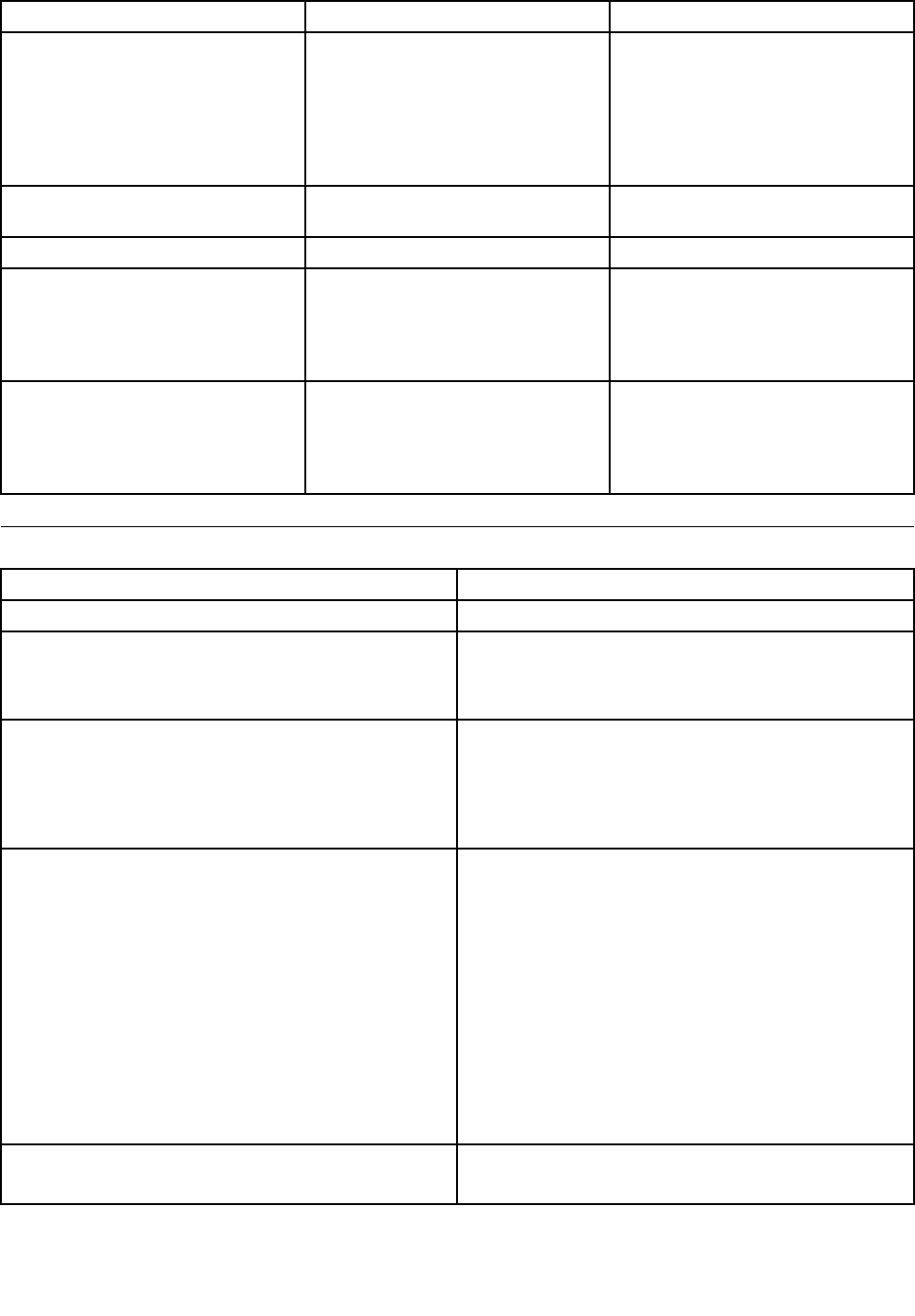
ErrorcodePOSTErrorMessageDescription/Action
0135FanfailureThesystemmightbeoverheating.
PressF1toenterSetup,F2toresume.
Note:Iftheproblemiscausedbythe
microprocessorfan,pressF10will
notsolvetheproblem.
0211KeyboardnotfoundWhenthereisnokeyboarddetected,
theerrormessagewillbedisplayed.
0164MemorysizedecreasedPressF1toenterSetup,F2toresume.
1762CongurationchangehasoccurredThiserrormessageisdisplayedwhen
aharddiskdriveoropticaldrive
changehasbeenmade.
PressF1toenterSetup,F2toresume.
1962Nooperatingsystemfound.Press
anykeytorepeatbootsequence.
ThiserroroccursonlyafterthePOST
iscompleted.
Pressanykeytorepeatboot
sequence.
Miscellaneouserrorconditions
Message/SymptomFRU/Action
ChangingdisplaycolorsDisplay/Monitor
Computerwillnotpower-off.See“Harddiskdriveboot
error”onpage61.
1.PowerSwitch
2.SystemBoard
3.Risercard,ifinstalled.
ComputerwillnotRPLfromserver1.Ensurethatnetworkisinstartupsequenceasrst
deviceorrstdeviceafterdiskette.
2.EnsurethatnetworkadapterisenabledforRPL.
3.Networkadapter(Advisenetworkadministratorof
newMACaddress)
ComputerwillnotperformaWakeOnLAN®(ifapplicable)1.Checkpowersupplyandsignalcableconnections
tonetworkadapter.
2.Ensurethattheoperatingsystemsettingsaresetto
enableWakeonLAN.
3.EnsureWakeOnLANfeatureisenabledin
Setup/Conguration(see“StartingtheSetupUtility
program”onpage57)
4.EnsurenetworkadministratorisusingcorrectMAC
address.
5.EnsurenointerruptorI/Oaddressconicts.
6.Networkadapter(advisenetworkadministratorof
newMACaddress)
Deadcomputer.See“Harddiskdrivebooterror”onpage
61.
1.PowerSupply
2.SystemBoard
80ThinkCentreHardwareMaintenanceManual

Message/SymptomFRU/Action
Diskettedrivein-uselightremainsonordoesnotlight
whendriveisactive.
1.DisketteDrive
2.SystemBoard
3.DisketteDriveCable
Blankscreenexceptforashingcursor.1.SystemBoard
2.PrimaryHardDiskDrive
3.HardDiskDriveCable
IncorrectmemorysizeduringPOST1.RuntheMemorytests.
2.MemoryModule
3.SystemBoard
"InsertaDiskette"iconappearswithaknown-good
diagnosticsdisketteintherst3.5-inchdiskettedrive.
1.SystemBoard
2.DisketteDriveCable
3.NetworkAdapter
Intensityorcolorvariesfromlefttorightofcharacters
andcolorbars
1.Display
2.Videoadapter(ifpresent)
3.SystemBoard
Nopowerorfannotrunning1.See“Harddiskdrivebooterror”onpage61.
Non-systemdiskordiskerror-typemessagewitha
known-gooddiagnosticdiskette.
1.DisketteDrive
2.SystemBoard
3.DisketteDriveCable
Otherdisplaysymptomsnotlistedabove(includingblank
orillegibledisplay)
1.Display
2.SystemBoard
Power-onindicatororharddiskdrivein-uselightnoton,
butcomputerworkscorrectly
1.Powerswitch/LEDassembly
2.SystemBoard
Printerproblems1.Printer
2.SystemBoard
Programloadsfromtheharddiskwithaknown-good
diagnosticsdisketteintherst3.5-inchdiskettedrive
1.RuntheSetupUtilityprogramandcheckStartup
sequence.
2.DisketteDrive
3.DisketteDriveCable
4.SystemBoard
5.PowerSupply
RPLcomputercannotaccessprogramsfromitsownhard
disk.
1.IfnetworkadministratorisusingLCCMHybridRPL,
checkstartupsequence:
a.Firstdevice-network
b.Seconddevice-harddisk
2.Harddiskdrive
RPLcomputerdoesnotRPLfromserver1.Checkstartupsequence.
2.CheckthenetworkadapterLEDstatus.
Serialorparallelportdevicefailure(systemboardport)1.ExternalDeviceSelf-TestOK?
2.ExternalDevice
3.Cable
4.SystemBoard
Chapter7.Symptom-to-FRUIndex81

Message/SymptomFRU/Action
Serialorparallelportdevicefailure(adapterport)1.ExternalDeviceSelf-TestOK?
2.ExternalDevice
3.Cable
4.AlternateAdapter
5.SystemBoard
Someorallkeysonthekeyboarddonotwork1.Keyboard
2.KeyboardCable
3.SystemBoard
Undeterminedproblems
Thissectionprovidesinstructionsonhowtondoutthefailingdevicesoradapters.
1.Power-offthecomputer.
2.Removeordisconnectthefollowingcomponents(ifinstalled)oneatatime.
a.Externaldevices(modem,printer,ormouse)
b.Anyadapters
c.Memorymodules
d.Extendedvideomemory
e.ExternalCache
f.ExternalCacheRAM
g.Harddiskdrive
h.Diskettedrive
3.Power-onthecomputertore-testthesystem.
4.Repeatsteps1through3untilyoundthefailingdeviceoradapter.
Ifalldevicesandadaptershavebeenremoved,andtheproblemcontinues,replacethesystemboard.
82ThinkCentreHardwareMaintenanceManual

Chapter8.ReplacingFRUs
ThischapterprovidesremovalorreplacementproceduresformajorFRUs.NotallFRUsaredocumented.
Important
BeforeyoureplaceanyFRU,readChapter2“Safetyinformation”onpage3.Theseprecautionsand
guidelineswillhelpyouworksafely.
FRUreplacementsaretobedonebytrainedservicetechniciansonly.
©CopyrightLenovo2011,201283
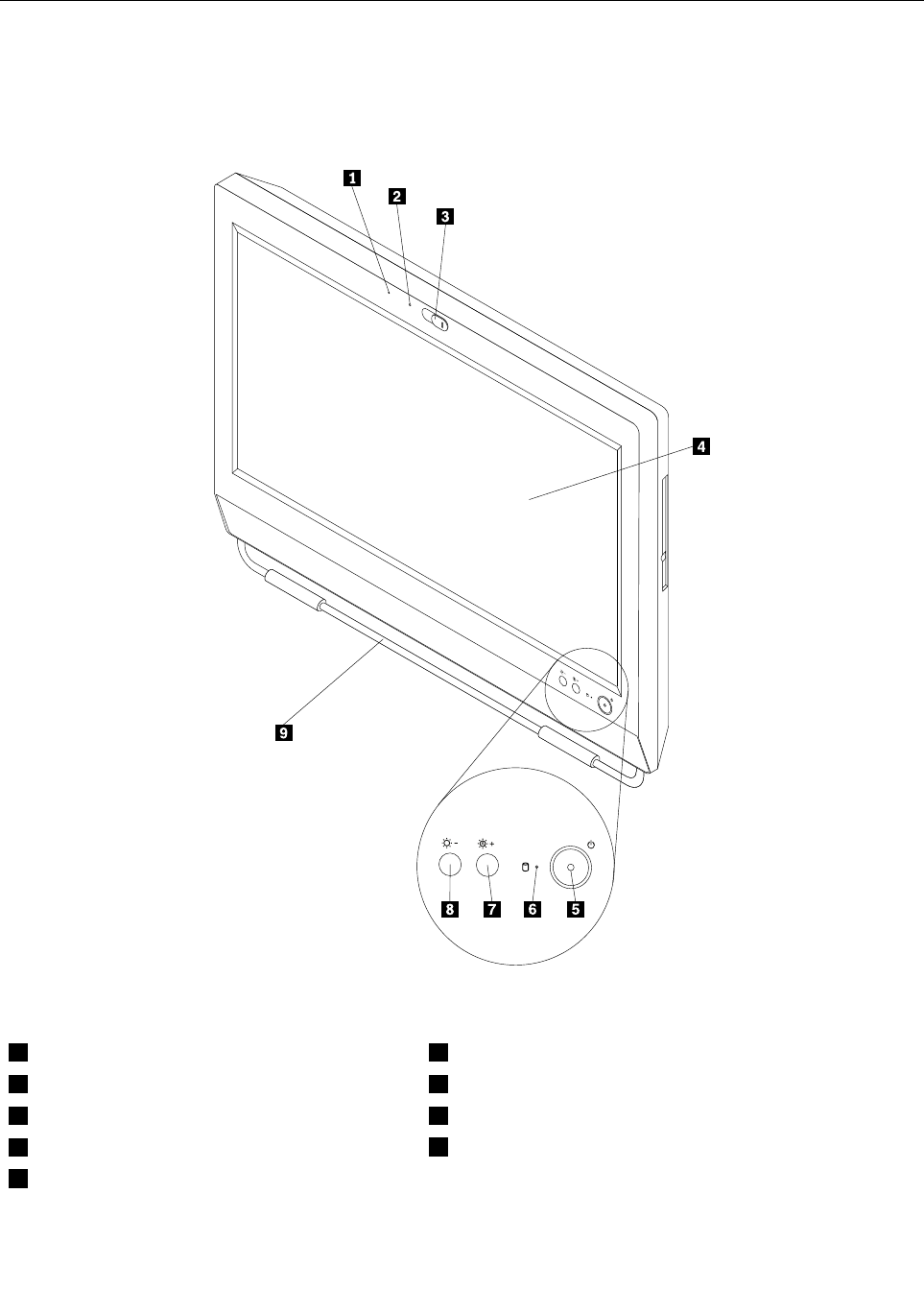
Locatingconnectors,controls,andindicatorsonthefrontofyour
computer
Figure1“Frontconnector,control,andindicatorlocations”onpage84showsthelocationsofthe
connectors,controls,andindicatorsonthefrontofyourcomputer.
Figure1.Frontconnector,control,andindicatorlocations
1IntegratedMicrophone6Harddiskdriveactivityindictor
2Integratedcameraindicator7Brightness-up/Auto-adjustingcontrol1
3Integratedcamerablockshield8Brightness-downcontrol
4Liquidcrystaldisplay(LCD)panel9Footstand
5Powerswitch
84ThinkCentreHardwareMaintenanceManual
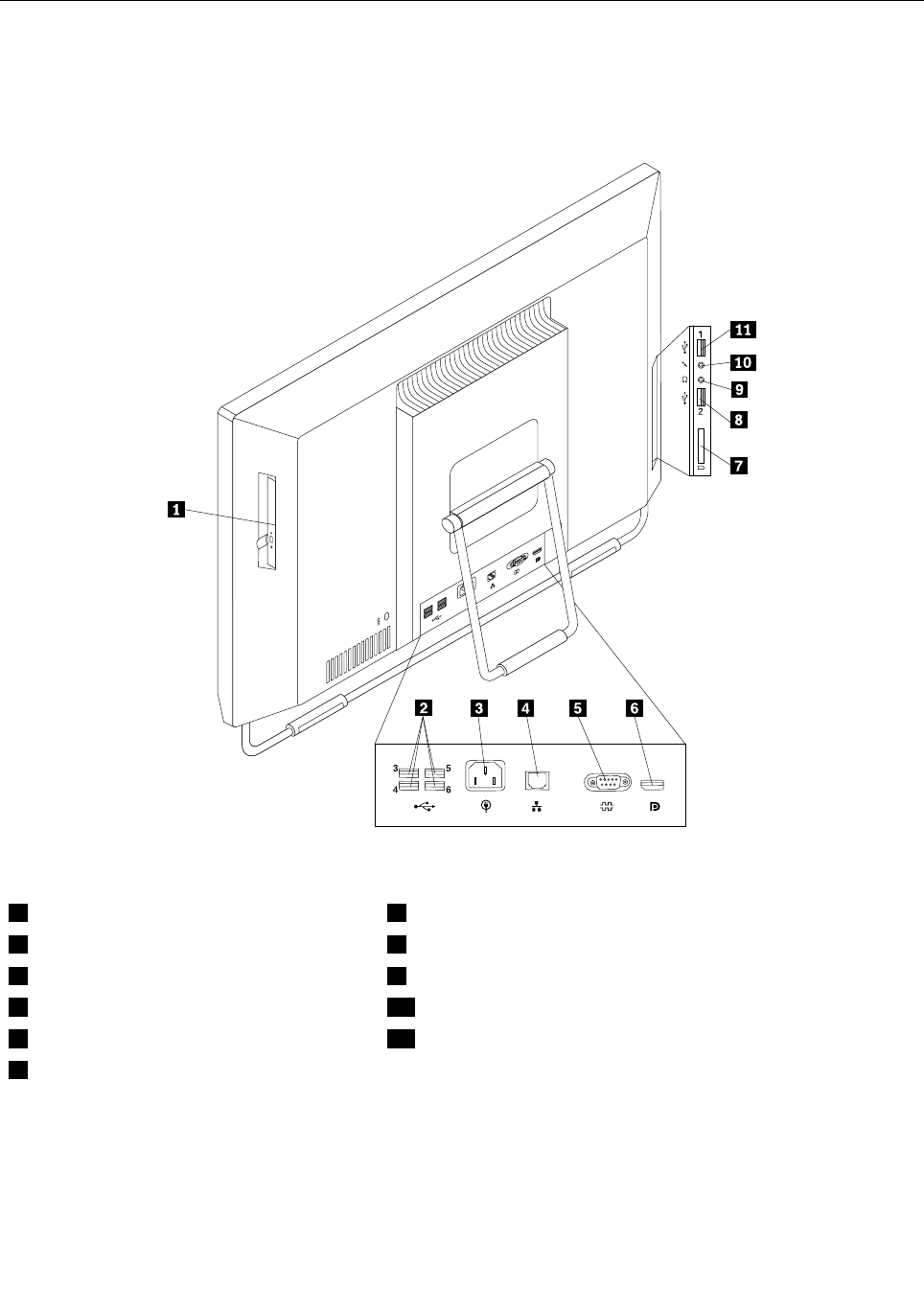
Locatingconnectorsontherearofyourcomputer
Figure2“Rearconnectorlocations”onpage85showsthelocationsoftheconnectorsontherearofyour
computer.Someconnectorsontherearofyourcomputerarecolor-codedtohelpyoudeterminewhereto
connectthecablesonyourcomputer.
Figure2.Rearconnectorlocations
1Opticaldrive7Cardreader
2USBconnector(4)8USBconnector
3Powercordconnector9Headphoneconnector
4Ethernetconnector10Microphoneconnector
5Serialport11USBconnector
6DisplayPortconnector
Chapter8.ReplacingFRUs85
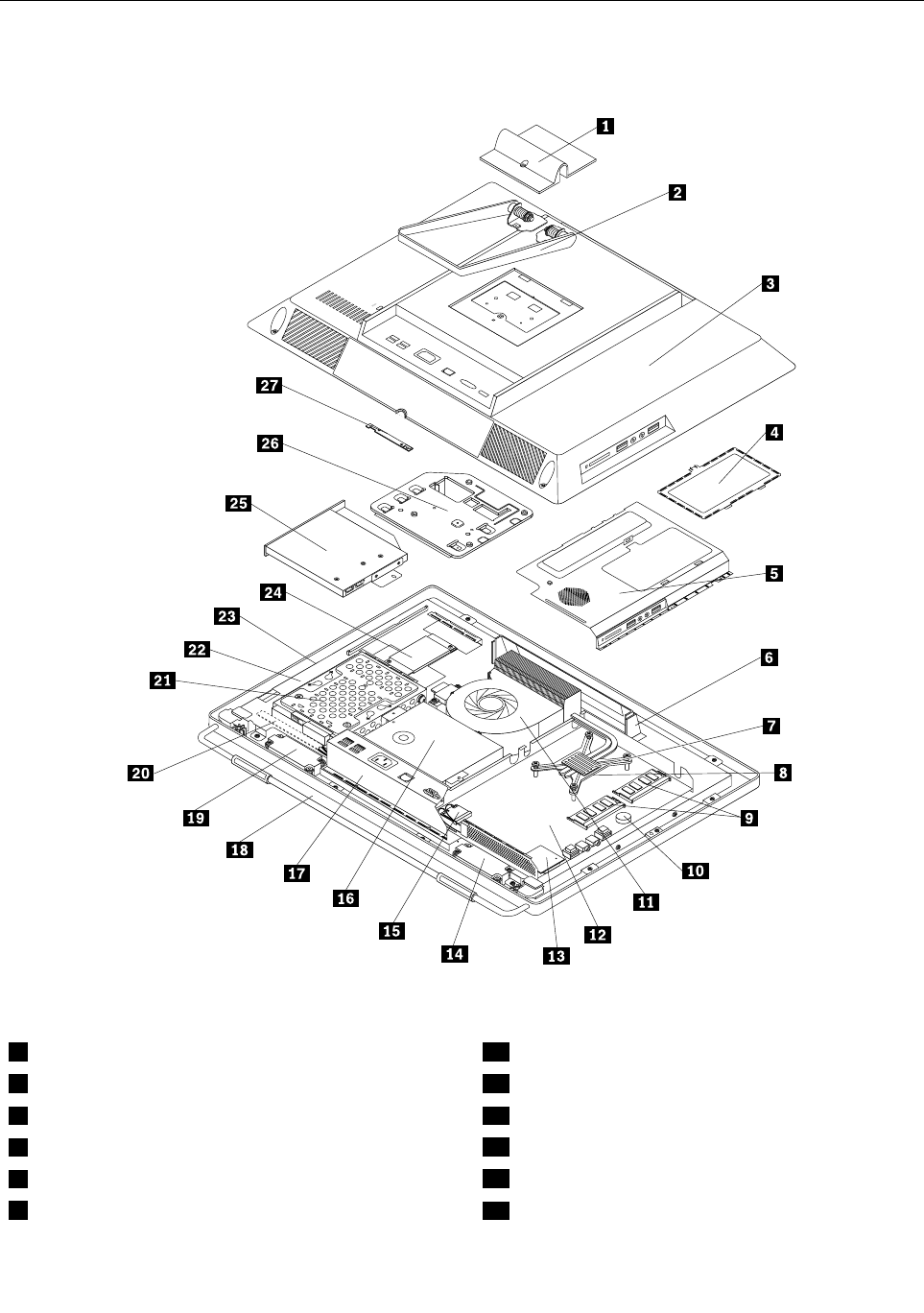
FRUlocations
ThefollowingillustrationshowsthelocationsoftheFRUs.
Figure3.FRUlocations
1Systemstandhingecover15WI-FIconnector
2Systemstand16Powersupply
3Computercover17RearI/Oconnector
4Systemboardshieldwindow18Framestand
5Systemboardshield19Internalspeaker
6Handlebar20Controlbuttonboard
86ThinkCentreHardwareMaintenanceManual

7Heatsinkassembly21Harddiskdrive
8Microprocessor22LCDbracket
9Memorymodule23LCDpanel
10Battery24Inverter
11Microprocessorfan25Opticaldrive
12Systemboard26VESAmountbracket
13Cardreader27Integratedcamera
14Internalspeaker
Chapter8.ReplacingFRUs87
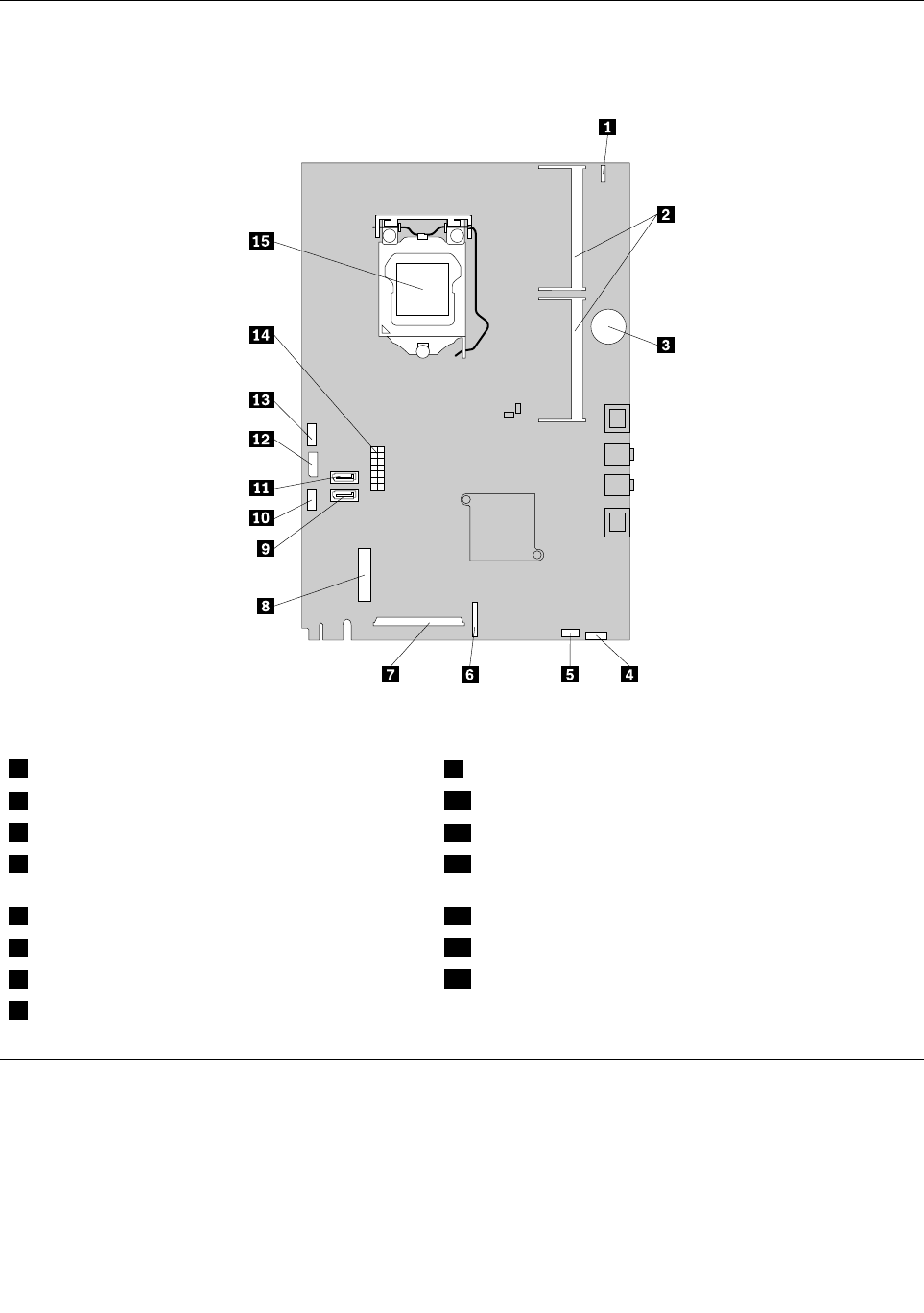
Systemboardpartsandconnectors
Thefollowingillustrationshowsthelocationsofthesystemboardpartsandconnectors.
Figure4.Systemboardpartandconnectorlocations
1Integratedcameracableconnector9SATAconnector
2Memoryslots(2)10Microprocessorfanconnector
3Battery11SATAconnector
4Cardreaderconnector12Opticaldrivepowerconnector/Harddiskdrivepower
connector
5Internalspeakercableconnector13Inverterconnector
6Controlbuttonconnector14Powersupplyconnector
7LCDpanelconnector15Microprocessor
8WI-FIconnector
Removingandreinstallingthesystemstandhingecover
Attention
Donotopenyourcomputerorattemptanyrepairbeforereadingandunderstandingthe“Importantsafety
information”intheThinkCentreSafetyandWarrantyGuidethatcamewithyourcomputer.Toobtainacopy
oftheThinkCentreSafetyandWarrantyGuide,goto:
http://www.lenovo.com/support
88ThinkCentreHardwareMaintenanceManual
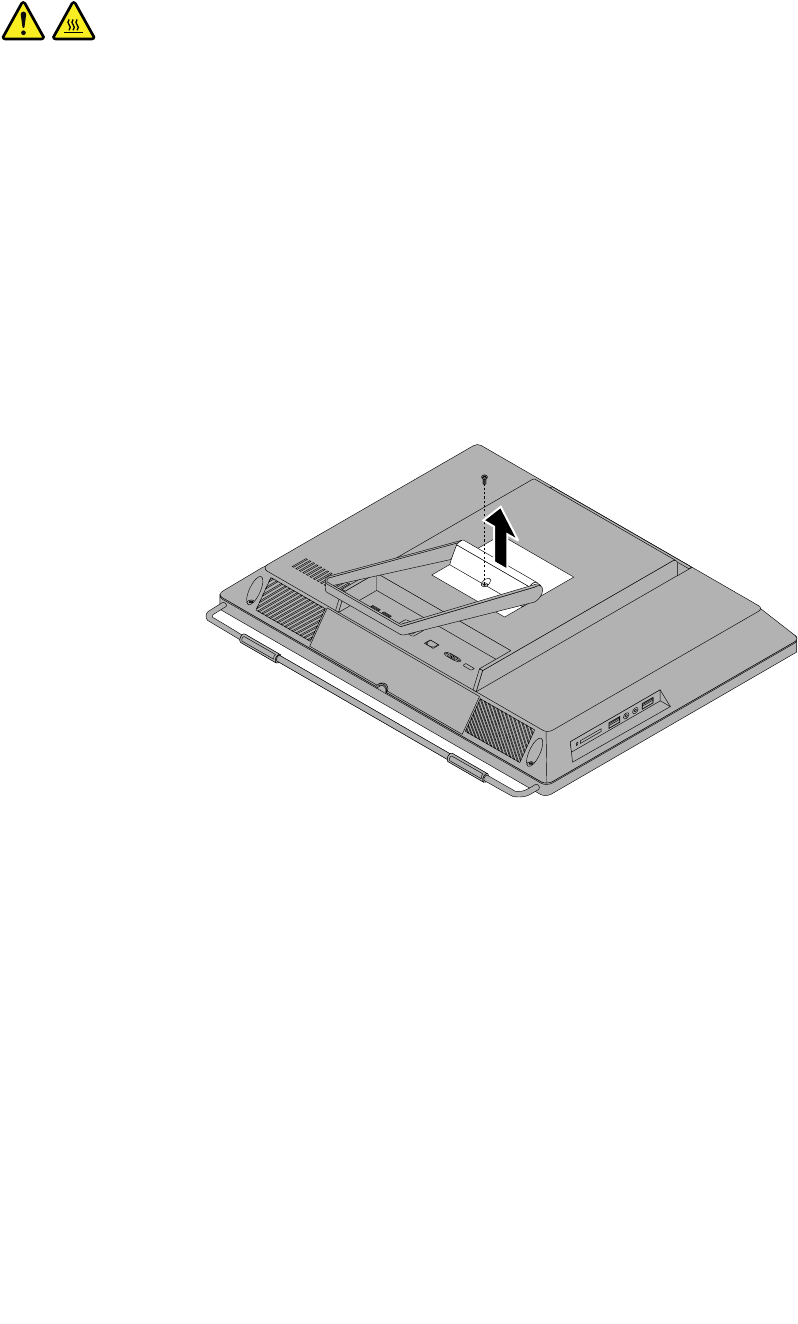
Thissectionprovidesinstructionsonhowtoremoveandreinstallthesystemstandhingecover.
CAUTION:
Turnoffthecomputerandwaitthreetoveminutestoletthecomputercoolbeforeremovingthe
systemstandhingecover.
Toremoveandreinstallthesystemstandhingecover,dothefollowing:
1.Removeanymediafromthedrivesandturnoffallattacheddevicesandthecomputer.
2.Disconnectallpowercordsfromelectricaloutlets.
3.Disconnectthepowercords,Input/Outputcables,andanyothercablesthatareconnectedtothe
computer.See“Locatingconnectors,controls,andindicatorsonthefrontofyourcomputer”onpage
84and“Locatingconnectorsontherearofyourcomputer”onpage85.
4.Placeasoft,cleantowelorclothonthedeskorsurface.Holdthesidesofyourcomputerandgentlylay
itdownsothatthescreenisagainstthesurfaceandthecoverisfacingup.
5.Removethescrewthatsecuresthesystemstandhingecover,andthenliftthesystemstandhingecover
upandremoveitfromthecomputer.
Figure5.Removingthesystemstandhingecover
Chapter8.ReplacingFRUs89
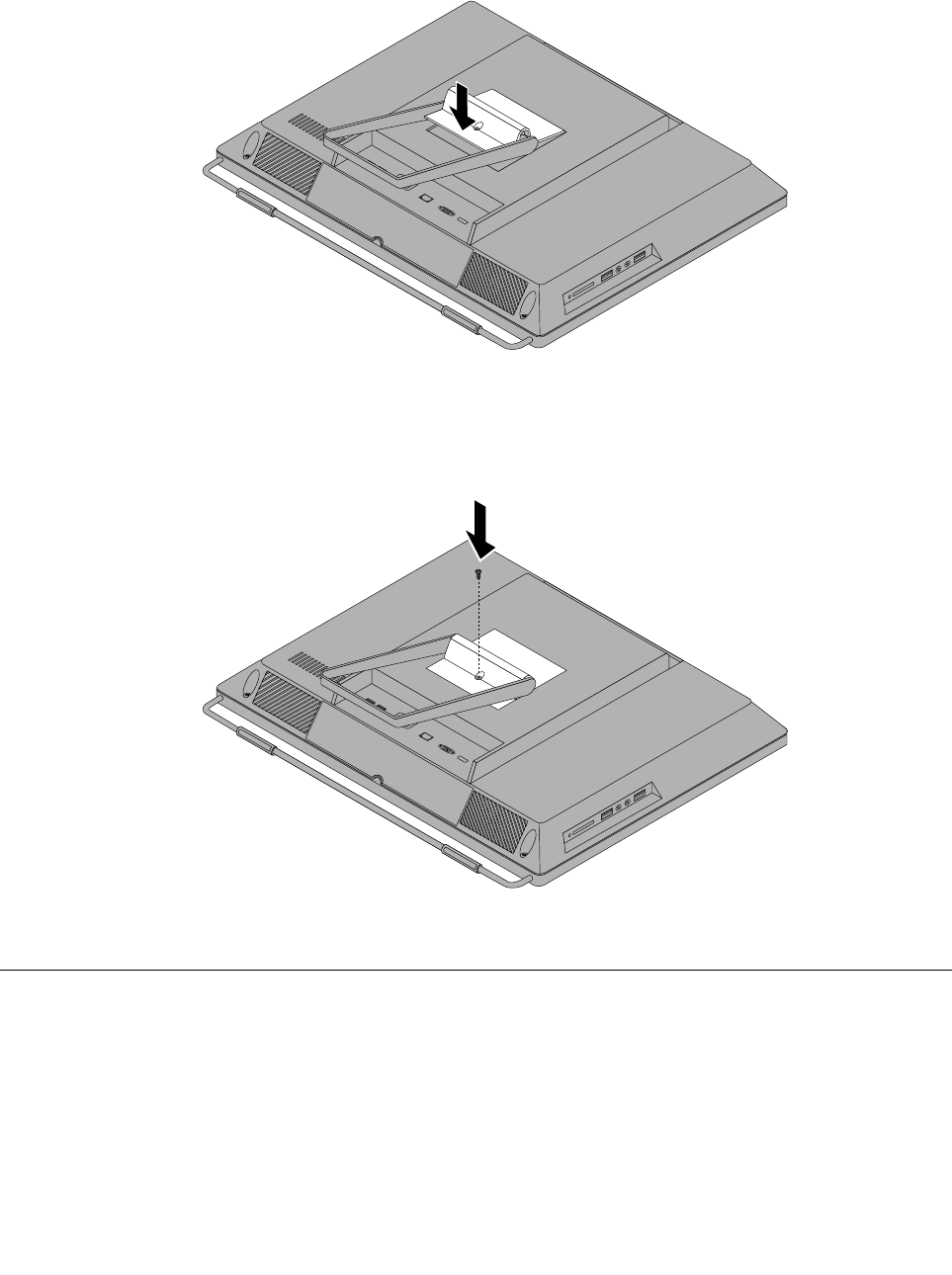
6.Toreinstallthesystemstandhingecover,placethesystemstandhingecoveronthecomputersothat
thetwoplastictabsonthehingecoveralignwiththecorrespondingholesinthecomputer.
Figure6.Reinstallingthesystemstandhingecover
7.Reinstallthescrewtosecurethesystemstandhingecovertothecomputer.
Figure7.Reinstallingthescrewtosecurethesystemstandhingecovertothecomputer
Removingandreinstallingthesystemstand
Attention
Donotopenyourcomputerorattemptanyrepairbeforereadingandunderstandingthe“Importantsafety
information”intheThinkCentreSafetyandWarrantyGuidethatcamewithyourcomputer.Toobtainacopy
oftheThinkCentreSafetyandWarrantyGuide,goto:
http://www.lenovo.com/support
Thissectionprovidesinstructionsonhowtoremoveandreinstallthesystemstand.
90ThinkCentreHardwareMaintenanceManual
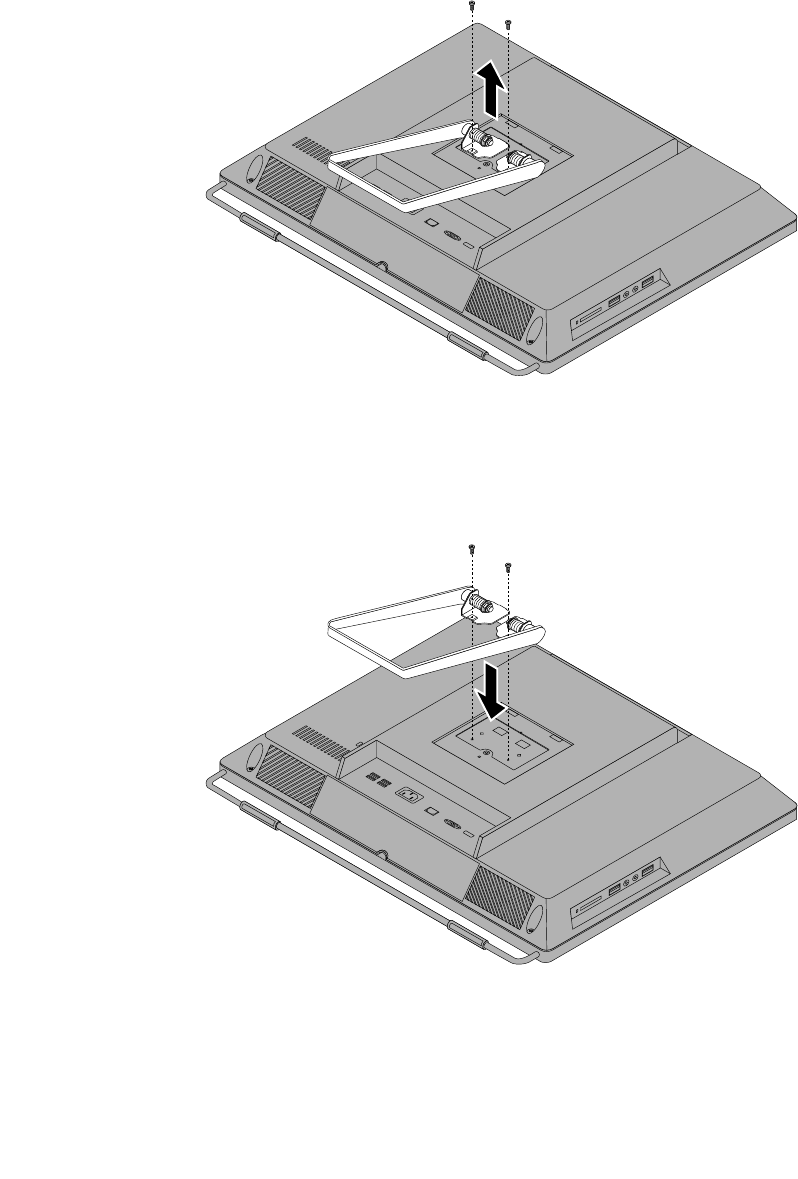
Toremoveandreinstallthesystemstand,dothefollowing:
1.Turnoffthecomputeranddisconnectallpowercordsfromelectricaloutlets.
2.Removethesystemstandhingecover.See“Removingandreinstallingthesystemstandhingecover”
onpage88.
3.Removethetwoscrewsthatsecurethesystemstand,andthenliftthesystemstandupandremove
itfromthecomputer.
Figure8.Removingthesystemstand
4.Toreinstallthesystemstand,alignthetwoscrewholeswiththecorrespondingholesinthechassis,and
theninstallthetwoscrewstosecurethesystemstandtothecomputer.
Figure9.Reinstallingthesystemstand
5.Reinstallthesystemstandhingecover.See“Removingandreinstallingthesystemstandhingecover”
onpage88.
Chapter8.ReplacingFRUs91
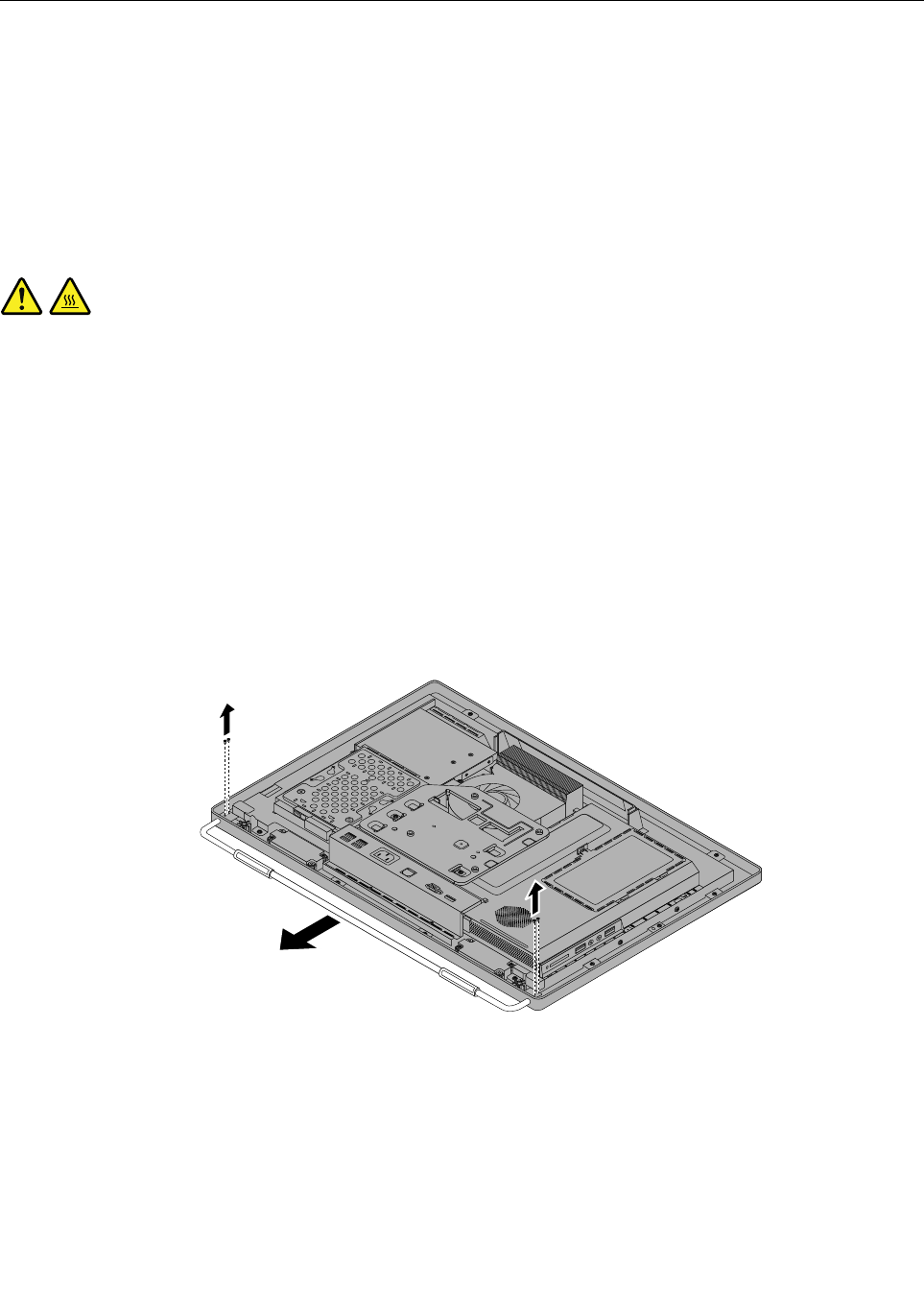
Removingandreinstallingtheframestand
Attention
Donotopenyourcomputerorattemptanyrepairbeforereadingandunderstandingthe“Importantsafety
information”intheThinkCentreSafetyandWarrantyGuidethatcamewithyourcomputer.Toobtainacopy
oftheThinkCentreSafetyandWarrantyGuide,goto:
http://www.lenovo.com/support
Thissectionprovidesinstructionsonhowtoremoveandreinstalltheframestand.
CAUTION:
Turnoffthecomputerandwaitthreetoveminutestoletthecomputercoolbeforeremovingthe
framestand.
Toremoveandreinstalltheframestand,dothefollowing:
1.Removeanymediafromthedrivesandturnoffallattacheddevicesandthecomputer.
2.Disconnectallpowercordsfromelectricaloutlets.
3.Disconnectthepowercords,Input/Outputcables,andanyothercablesthatareconnectedtothe
computer.See“Locatingconnectors,controls,andindicatorsonthefrontofyourcomputer”onpage
84and“Locatingconnectorsontherearofyourcomputer”onpage85.
4.Placeasoft,cleantowelorclothonthedeskorthesurface.Holdthesidesofyourcomputerandgently
layitdownsothatthescreenisagainstthesurfaceandthecoverisfacingup.
5.Removethefourscrewsthatsecuretheframestand,andthenpulltheframestandoutofthecomputer.
Figure10.Removingtheframestand
92ThinkCentreHardwareMaintenanceManual
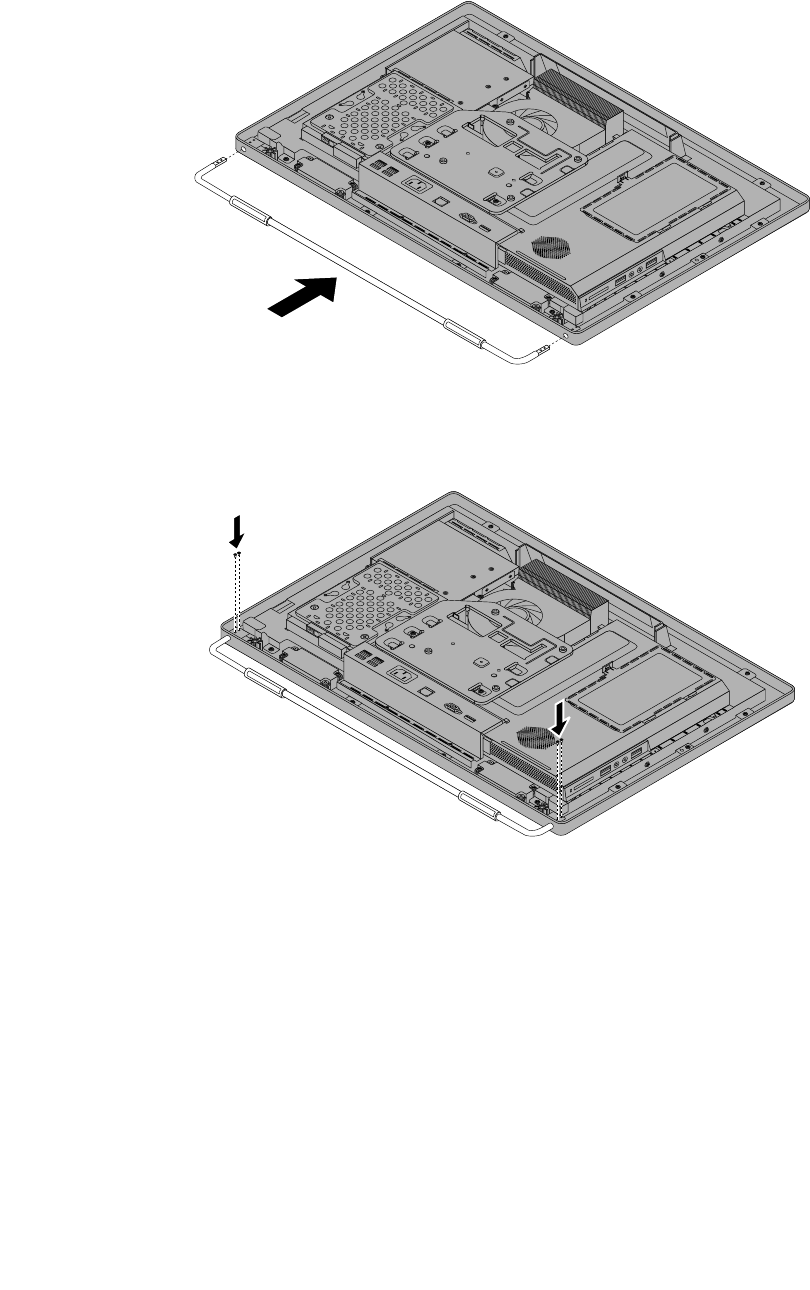
6.Toreinstalltheframestand,placetheframestandonthecomputersothatthescrewholealignswith
thecorrespondingholeinthecomputer.
Figure11.Reinstallingtheframestandtothecomputer
7.Reinstallthefourscrewstosecuretheframestandtothecomputer.
Chapter8.ReplacingFRUs93
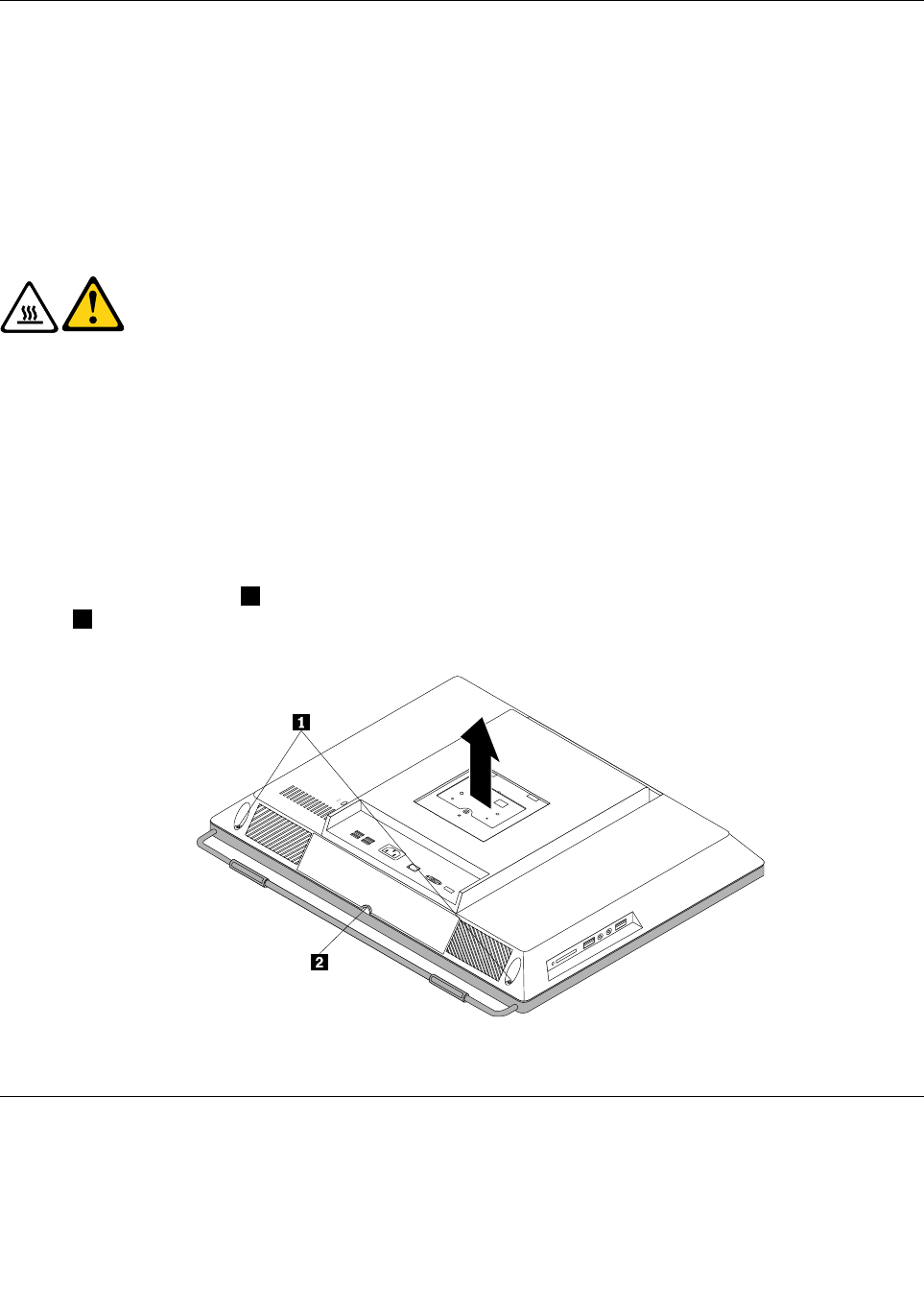
Removingthecomputercover
Attention
Donotopenyourcomputerorattemptanyrepairbeforereadingandunderstandingthe“Importantsafety
information”intheThinkCentreSafetyandWarrantyGuidethatcamewithyourcomputer.Toobtainacopy
oftheThinkCentreSafetyandWarrantyGuide,goto:
http://www.lenovo.com/support
Thissectionprovidesinstructionsonhowtoremovethecomputercover.
CAUTION:
Turnoffthecomputerandwaitthreetoveminutestoletthecomputercoolbefore
removingthecomputercover.
Toremovethecomputercover,dothefollowing:
1.Removeallmediafromthedrivesandturnoffallattacheddevicesandthecomputer.Then,disconnect
allpowercordsfromelectricaloutletsanddisconnectallcablesthatareconnectedtothecomputer.
2.Placeasoft,cleantowelorclothonthedeskorotheratsurface.Holdthesidesofyourcomputerand
gentlylayitdownsothatthescreenisagainstthesurfaceandthecoverisfacingup.
3.Removeanylockingdevicethatsecuresthecomputercover,suchasanintegratedcablelock.
4.Removethesystemstand.See“Removingandreinstallingthesystemstand”onpage90.
5.Loosenthetwoscrews1atthebottomofthecomputer.Putyourindexngerorthumbinthenger
slot2,andthenliftthecomputercoveruptoremoveitfromthecomputer.
Figure12.Removingthecomputercover
Replacingtheharddiskdrive
Attention
Donotopenyourcomputerorattemptanyrepairbeforereadingandunderstandingthe“Importantsafety
information”intheThinkCentreSafetyandWarrantyGuidethatcamewithyourcomputer.Toobtainacopy
94ThinkCentreHardwareMaintenanceManual
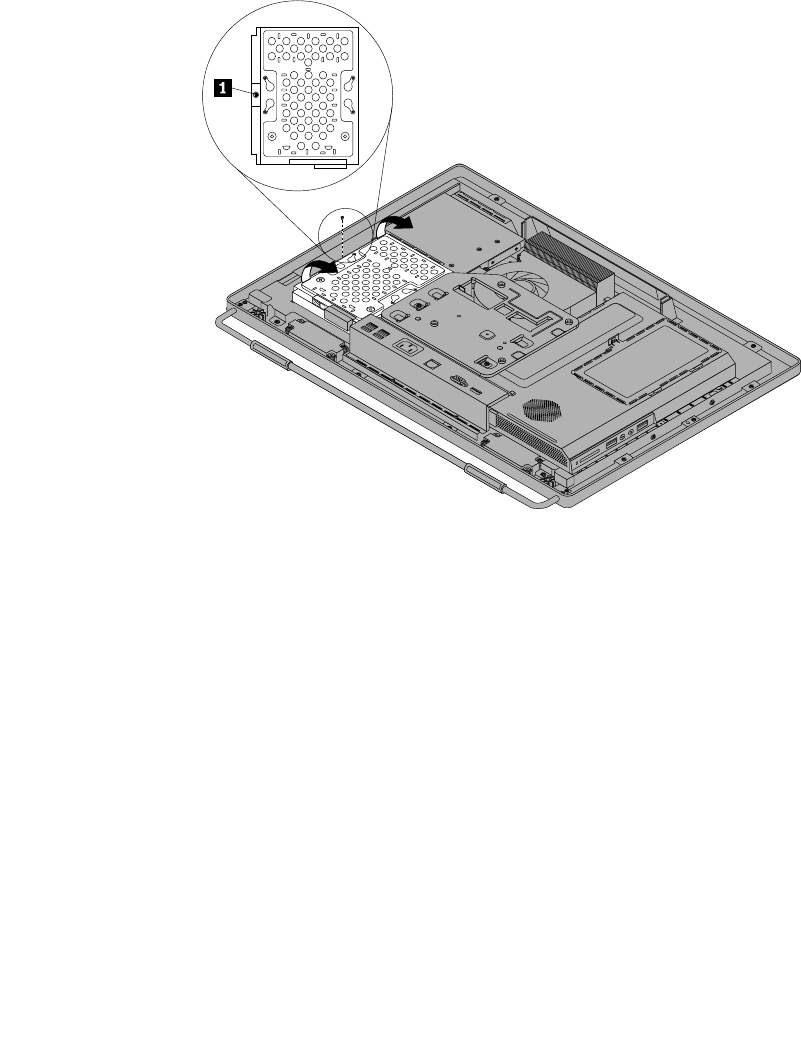
oftheThinkCentreSafetyandWarrantyGuide,goto:
http://www.lenovo.com/support
Thissectionprovidesinstructionsonhowtoreplacetheharddiskdrive.
Toreplacetheharddiskdrive,dothefollowing:
1.Removeallmediafromthedrivesandturnoffallattacheddevicesandthecomputer.Then,disconnect
allpowercordsfromelectricaloutletsanddisconnectallcablesthatareconnectedtothecomputer.
2.Removethecomputercover.See“Removingthecomputercover”onpage94.
3.Locatetheharddiskdriveinthecomputer.See“FRUlocations”onpage86.
4.Removethescrewthatsecurestheharddiskdrive.
Figure13.Removingthescrewthatsecurestheharddiskdrive
5.Disconnecttheharddiskdrivecableandslidetheharddiskdriveoutofthechassis.
Chapter8.ReplacingFRUs95
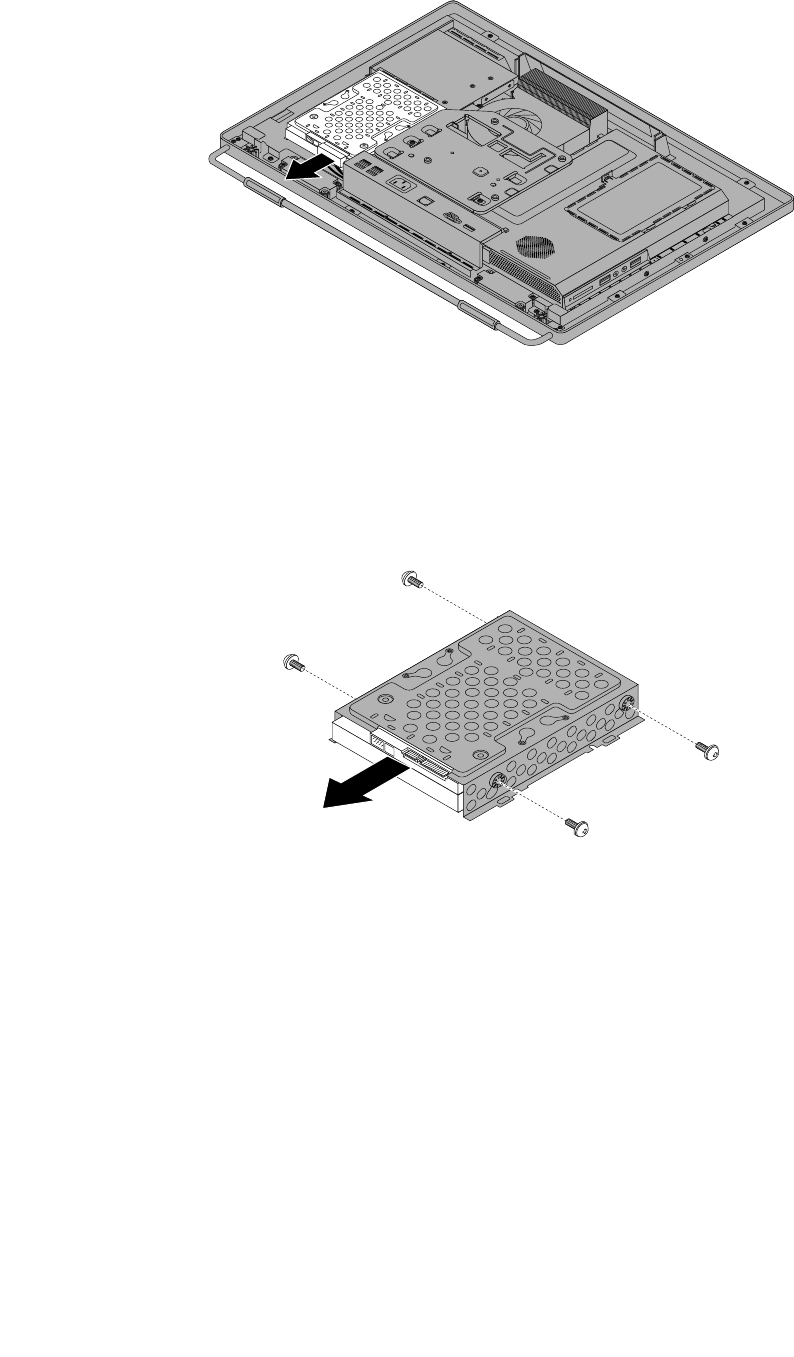
Figure14.Removingtheharddiskdrive
6.Removethefourscrewsontheharddiskdrivebracket,thenremovetheharddiskdriveoutofthe
bracket.Donottouchthecircuitboardonthebottomoftheharddiskdrive.
Figure15.Removingtheharddiskdriveoutofthebracket
7.Toinstallthenewharddiskdriveintothebracket,positiontheharddiskdrivesothatthefourscrew
holesalignwiththoseinthebracket.
8.Installthefourscrewsthatsecuretheharddiskdrivetotheharddiskdrivebracket.
9.Connecttheharddiskdrivecable.
10.Slidethenewharddiskdrivewiththebracketintotheharddiskdrivebay.Alignthescrewholeinthe
harddiskdrivewiththatinthechassis.
11.Installthescrewtosecuretheharddiskdrivebrackettothechassis.
12.Goto“Completingthepartsreplacement”onpage124.
96ThinkCentreHardwareMaintenanceManual
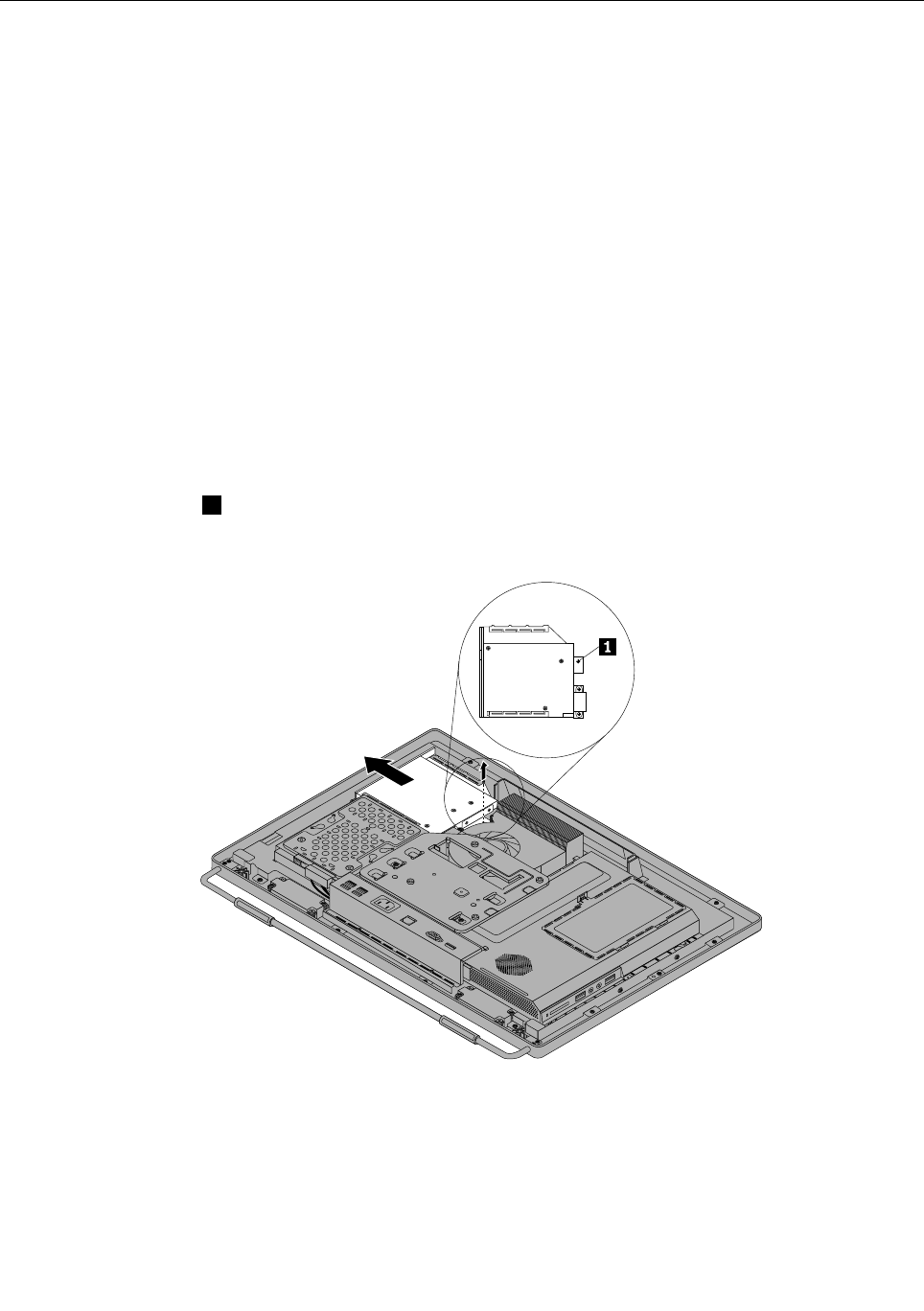
Replacingtheopticaldrive
Attention
Donotopenyourcomputerorattemptanyrepairbeforereadingandunderstandingthe“Importantsafety
information”intheThinkCentreSafetyandWarrantyGuidethatcamewithyourcomputer.Toobtainacopy
oftheThinkCentreSafetyandWarrantyGuide,goto:
http://www.lenovo.com/support
Thissectionprovidesinstructionsonhowtoreplacetheopticaldrive.
Note:Theopticaldriveisavailableonlyinsomemodels.
Toreplacetheopticaldrive,dothefollowing:
1.Removeallmediafromthedrivesandturnoffallattacheddevicesandthecomputer.Then,disconnect
allpowercordsfromelectricaloutletsanddisconnectallcablesthatareconnectedtothecomputer.
2.Placeasoft,cleantowelorclothonthedeskorotheratsurface.Holdthesidesofyourcomputerand
gentlylayitdownsothatthescreenisagainstthesurfaceandthecoverisfacingup.
3.Removethecomputercover.See“Removingthecomputercover”onpage94.
4.Locatetheopticaldrive.See“FRUlocations”onpage86.
5.Removethescrew1thatsecurestheopticaldrive,andthenslidetheopticaldrivetodisconnectthe
opticaldrivefromtheopticaldrivecable.Removetheopticaldriveoutoftheopticaldrivebay.
Figure16.Removingtheopticaldrive
6.Toinstallanewopticaldrive,slidethenewopticaldriveintotheopticaldrivebaytoconnectthecableto
theopticaldrive.
Chapter8.ReplacingFRUs97
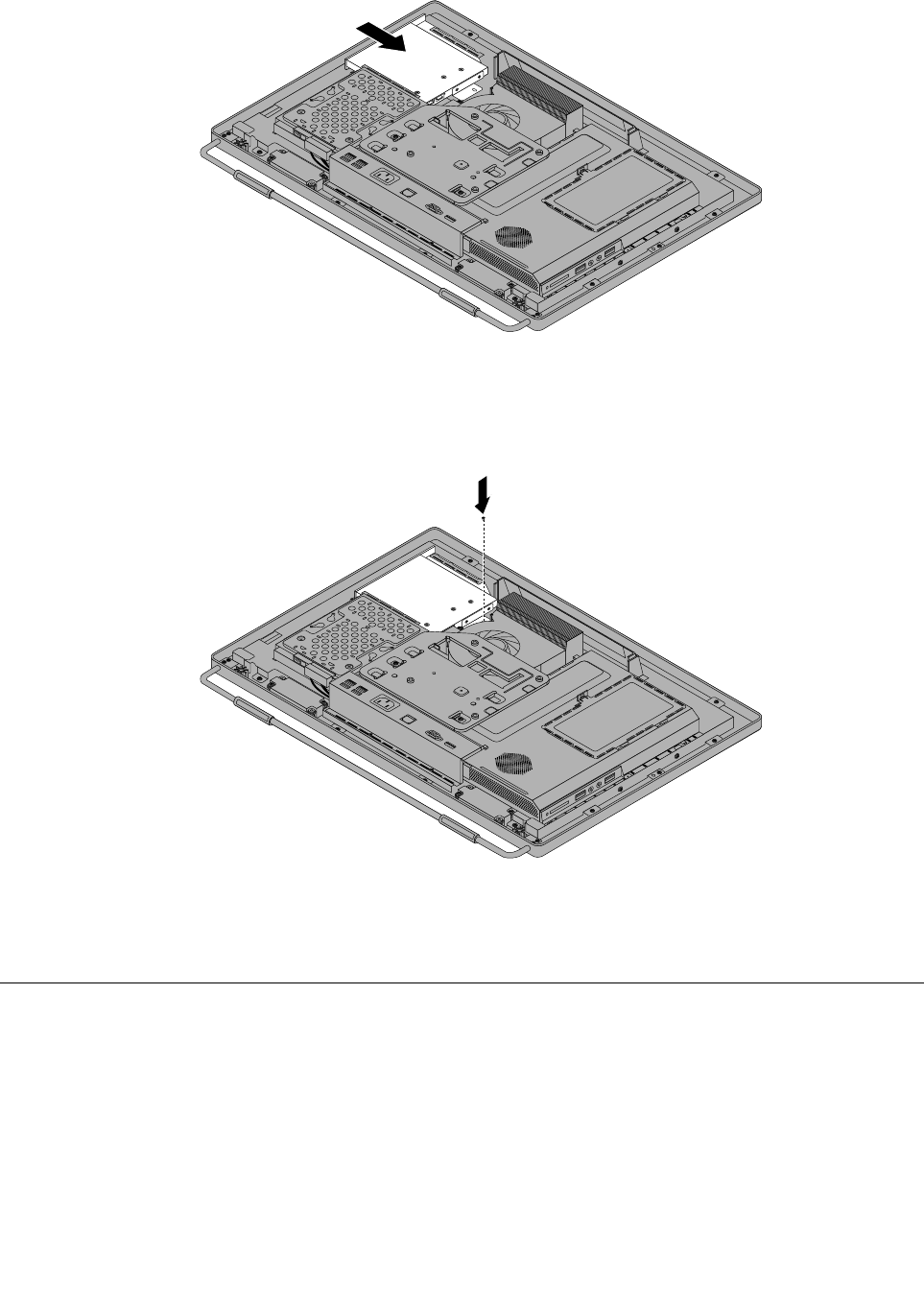
Figure17.Installingtheopticaldrive
7.Installthescrewtosecuretheopticaldrive.
Figure18.Installingthescrewtosecuretheopticaldrive
8.Goto“Completingthepartsreplacement”onpage124.
RemovingtheVESAmountbracket
Attention
Donotopenyourcomputerorattemptanyrepairbeforereadingandunderstandingthe“Importantsafety
information”intheThinkCentreSafetyandWarrantyGuidethatcamewithyourcomputer.Toobtainacopy
oftheThinkCentreSafetyandWarrantyGuide,goto:
http://www.lenovo.com/support
ThissectionprovidesinstructionsonhowtoremovetheVESAmountbracket.
98ThinkCentreHardwareMaintenanceManual
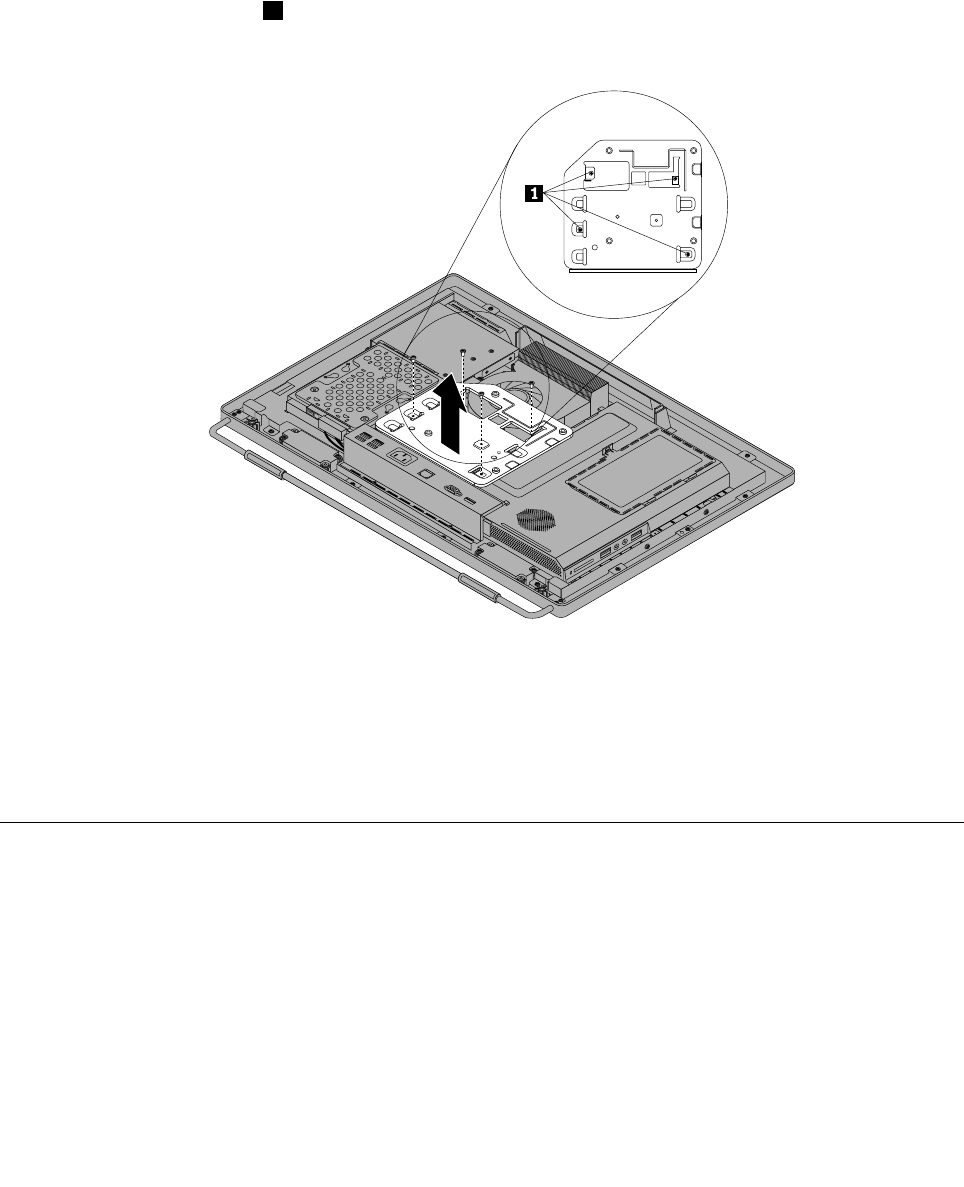
ToremovetheVESAmountbracket,dothefollowing:
1.Removeallmediafromthedrivesandturnoffallattacheddevicesandthecomputer.Then,disconnect
allpowercordsfromelectricaloutletsanddisconnectallcablesthatareconnectedtothecomputer.
2.Placeasoft,cleantowelorclothonthedeskorotheratsurface.Holdthesidesofyourcomputerand
gentlylayitdownsothatthescreenisagainstthesurfaceandthecoverisfacingup.
3.Removethecomputercover.See“Removingthecomputercover”onpage94.
4.LocatetheVESAmountbracket.See“FRUlocations”onpage86.
5.Removethefourscrews1thatsecuretheVESAmountbracketandlifttheVESAmountbracket
outofthecomputer.
Figure19.RemovingtheVESAmountbracket
6.ToreinstalltheVESAmountbracket,positiontheVESAmountbracketintothecomputersothatthe
screwholesalignwiththoseinthecomputer.ReinstallthefourscrewstosecuretheVESAmount
bracket.
7.Goto“Completingthepartsreplacement”onpage124.
ReplacingtherearI/Oassembly
Attention
Donotopenyourcomputerorattemptanyrepairbeforereadingandunderstandingthe“Importantsafety
information”intheThinkCentreSafetyandWarrantyGuidethatcamewithyourcomputer.Toobtainacopy
oftheThinkCentreSafetyandWarrantyGuide,goto:
http://www.lenovo.com/support
ThissectionprovidesinstructionsonhowtoreplacetherearI/Oassembly.
ToreplacetherearI/Oassembly,dothefollowing:
Chapter8.ReplacingFRUs99
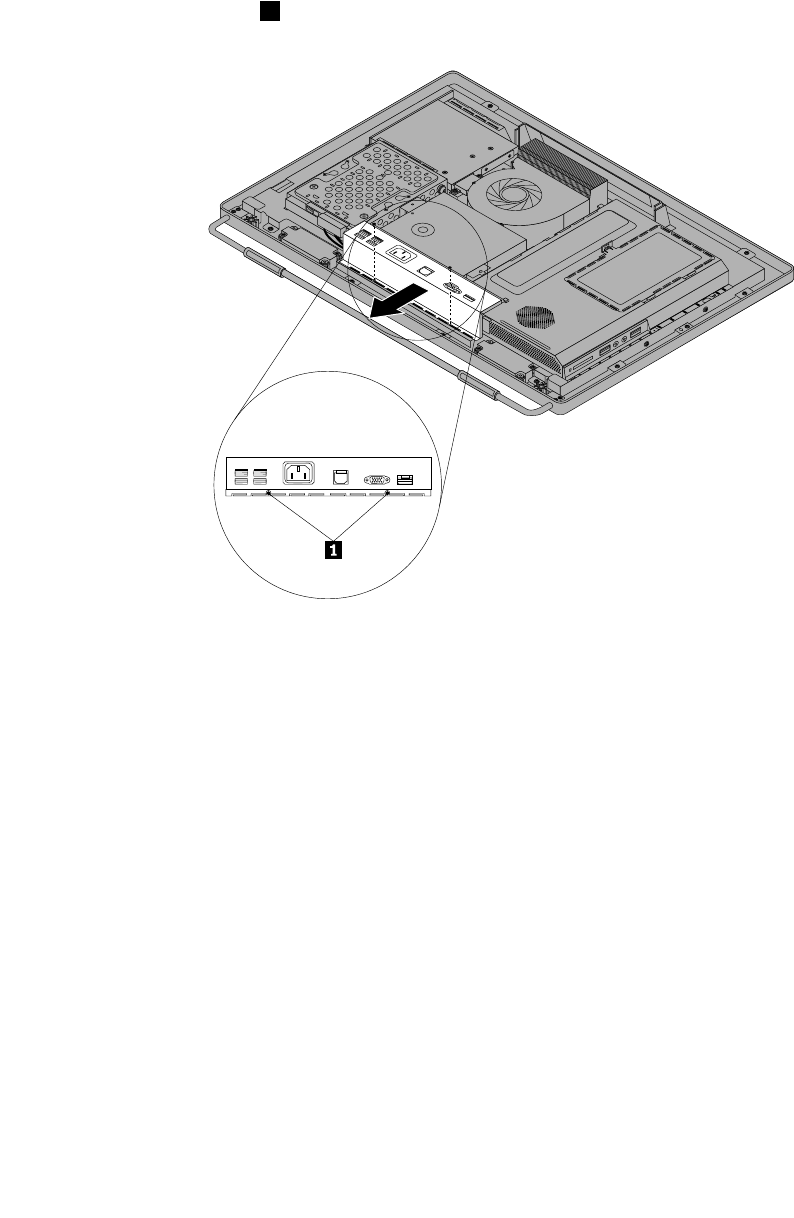
1.Removeallmediafromthedrivesandturnoffallattacheddevicesandthecomputer.Then,disconnect
allpowercordsfromelectricaloutletsanddisconnectallcablesthatareconnectedtothecomputer.
2.Placeasoft,cleantowelorclothonthedeskorotheratsurface.Holdthesidesofyourcomputerand
gentlylayitdownsothatthescreenisagainstthesurfaceandthecoverisfacingup.
3.Removethecomputercover.See“Removingthecomputercover”onpage94.
4.LocatetherearI/Oassembly.See“FRUlocations”onpage86.
5.Removethetwoscrews1thatsecuretherearI/Oassembly.
Figure20.RemovingthetwoscrewsthatsecuretherearI/Oassembly
100ThinkCentreHardwareMaintenanceManual
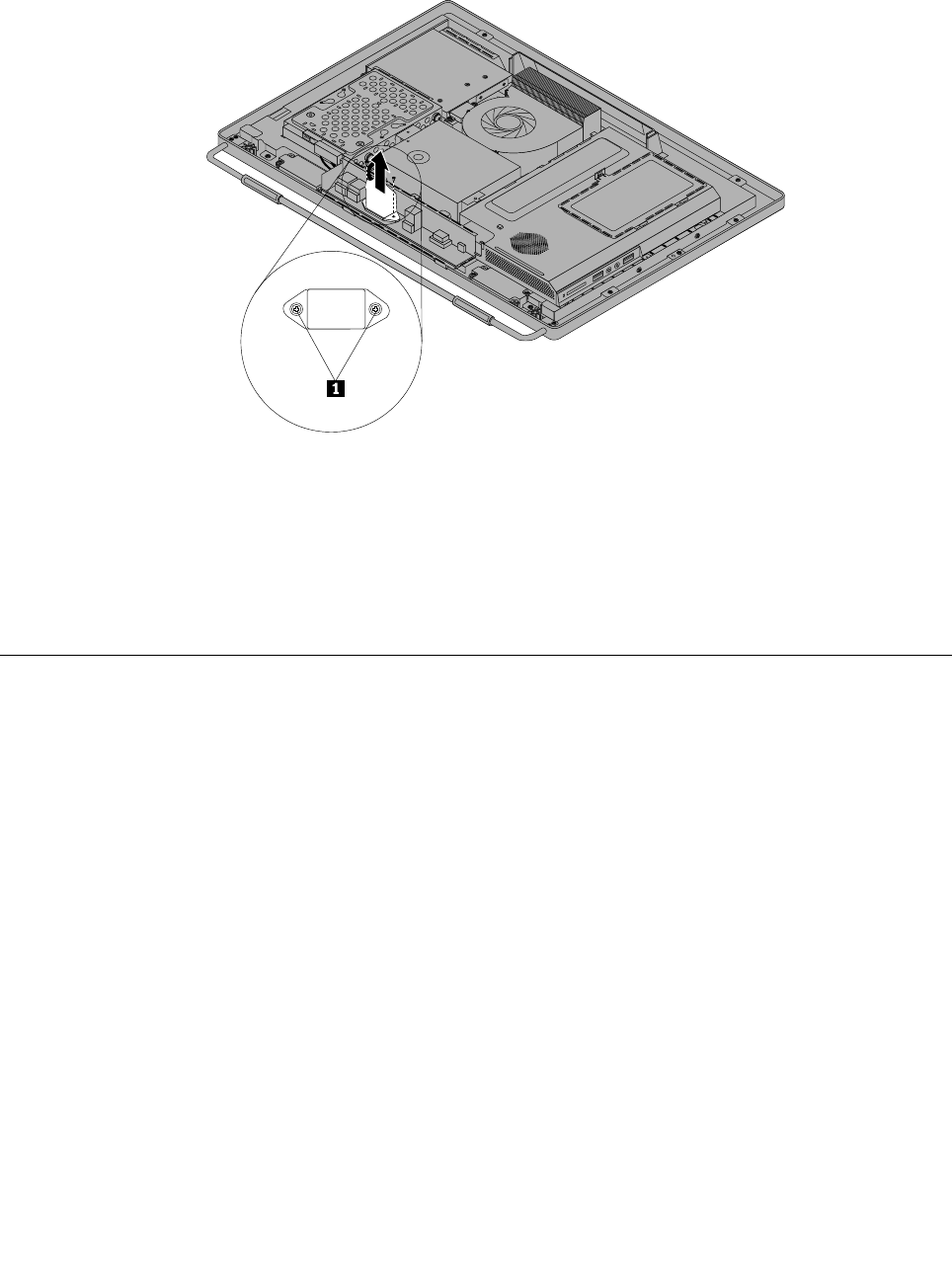
6.TurntherearI/Oassemblyupsidedown,andthenremovethetwoscrewsthatsecurethepowercord
connectortothepowercordconnectorbracket.RemovetherearI/Oassemblyfromthecomputer.
Figure21.Removingthepowercordconnector
7.ToreinstalltherearI/Oassembly,reinstallthetwoscrewsthatsecurethepowercordconnectortothe
powercordconnectorbracket.PositionthenewrearI/Oassemblyintoplace,andthenalignthe
screwholeswiththecorrespondingholesinthecomputermainbracket.Installthetwoscrewsto
securetherearI/Oassembly.
8.Goto“Completingthepartsreplacement”onpage124.
Removingandreinstallingthesystemboardshield
Attention
Donotopenyourcomputerorattemptanyrepairbeforereadingandunderstandingthe“Importantsafety
information”intheThinkCentreSafetyandWarrantyGuidethatcamewithyourcomputer.Toobtainacopy
oftheThinkCentreSafetyandWarrantyGuide,goto:
http://www.lenovo.com/support
Thissectionprovidesinstructionsonhowtoremoveandreinstallthesystemboardshield.
Toremoveandreinstallthesystemboardshield,dothefollowing:
1.Removeallmediafromthedrivesandturnoffallattacheddevicesandthecomputer.Then,disconnect
allpowercordsfromelectricaloutletsanddisconnectallcablesthatareconnectedtothecomputer.
2.Placeasoft,cleantowelorclothonthedeskorotheratsurface.Holdthesidesofyourcomputerand
gentlylayitdownsothatthescreenisagainstthesurfaceandthecoverisfacingup.
3.Removethecomputercover.See“Removingthecomputercover”onpage94.
4.Locatethesystemboardshieldinthecomputer.See“FRUlocations”onpage86.
Chapter8.ReplacingFRUs101
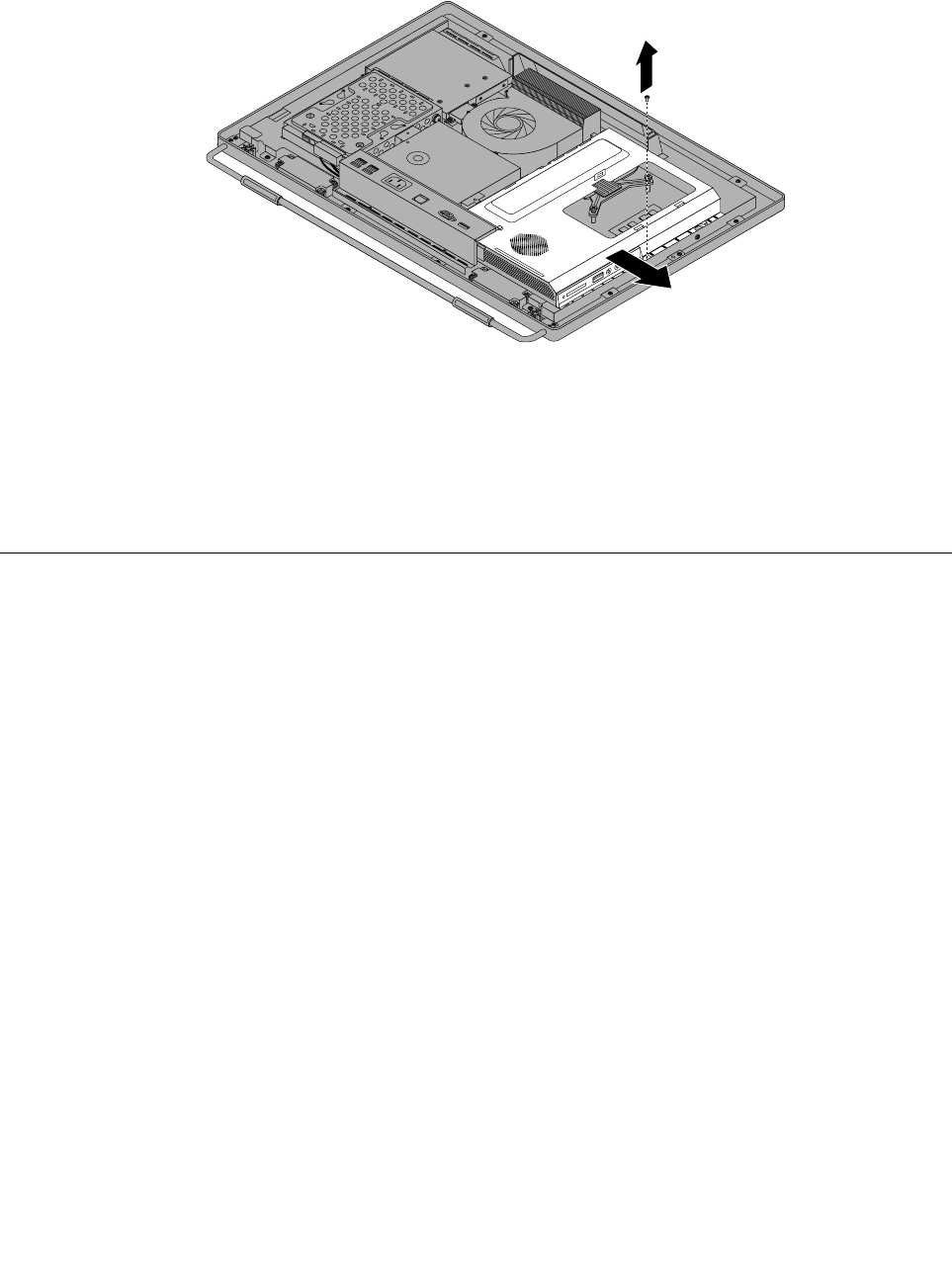
5.Removethescrewthatsecuresthesystemboardshield,andthenslidethesystemboardshieldout
ofthecomputer.
Figure22.Removingthesystemboardshield
6.Toreinstallthesystemboardshield,slidethesystemboardshieldintothesystemboardshieldslotso
thatthescrewholealignswiththatinthecomputer.
7.Reinstallthescrewtosecurethesystemboardshieldtothecomputer.
8.Goto“Completingthepartsreplacement”onpage124.
Replacingthepowersupply
Attention
Donotopenyourcomputerorattemptanyrepairbeforereadingandunderstandingthe“Importantsafety
information”intheThinkCentreSafetyandWarrantyGuidethatcamewithyourcomputer.Toobtainacopy
oftheThinkCentreSafetyandWarrantyGuide,goto:
http://www.lenovo.com/support
Thissectionprovidesinstructionsonhowtoreplacethepowersupply.
Toreplacethepowersupply,dothefollowing:
1.Removeallmediafromthedrivesandturnoffallattacheddevicesandthecomputer.Then,disconnect
allpowercordsfromelectricaloutletsanddisconnectallcablesthatareconnectedtothecomputer.
2.Placeasoft,cleantowelorclothonthedeskorotheratsurface.Holdthesidesofyourcomputerand
gentlylayitdownsothatthescreenisagainstthesurfaceandthecoverisfacingup.
3.Removethecomputercover.See“Removingthecomputercover”onpage94.
4.RemovetheVESAmountbracket.See“RemovingtheVESAmountbracket”onpage98.
5.Locatethepowersupply.See“FRUlocations”onpage86.
6.Removethesystemboardshield.See“Removingandreinstallingthesystemboardshield”onpage101.
7.Disconnectthepowersupplycablesfromthesystemboard.See“Systemboardpartsandconnectors”
onpage88.
8.RemovetherearI/Oassembly,andthenremovethepowercordconnectorfromthepowercord
connectorbracket.See“ReplacingtherearI/Oassembly”onpage99.
102ThinkCentreHardwareMaintenanceManual
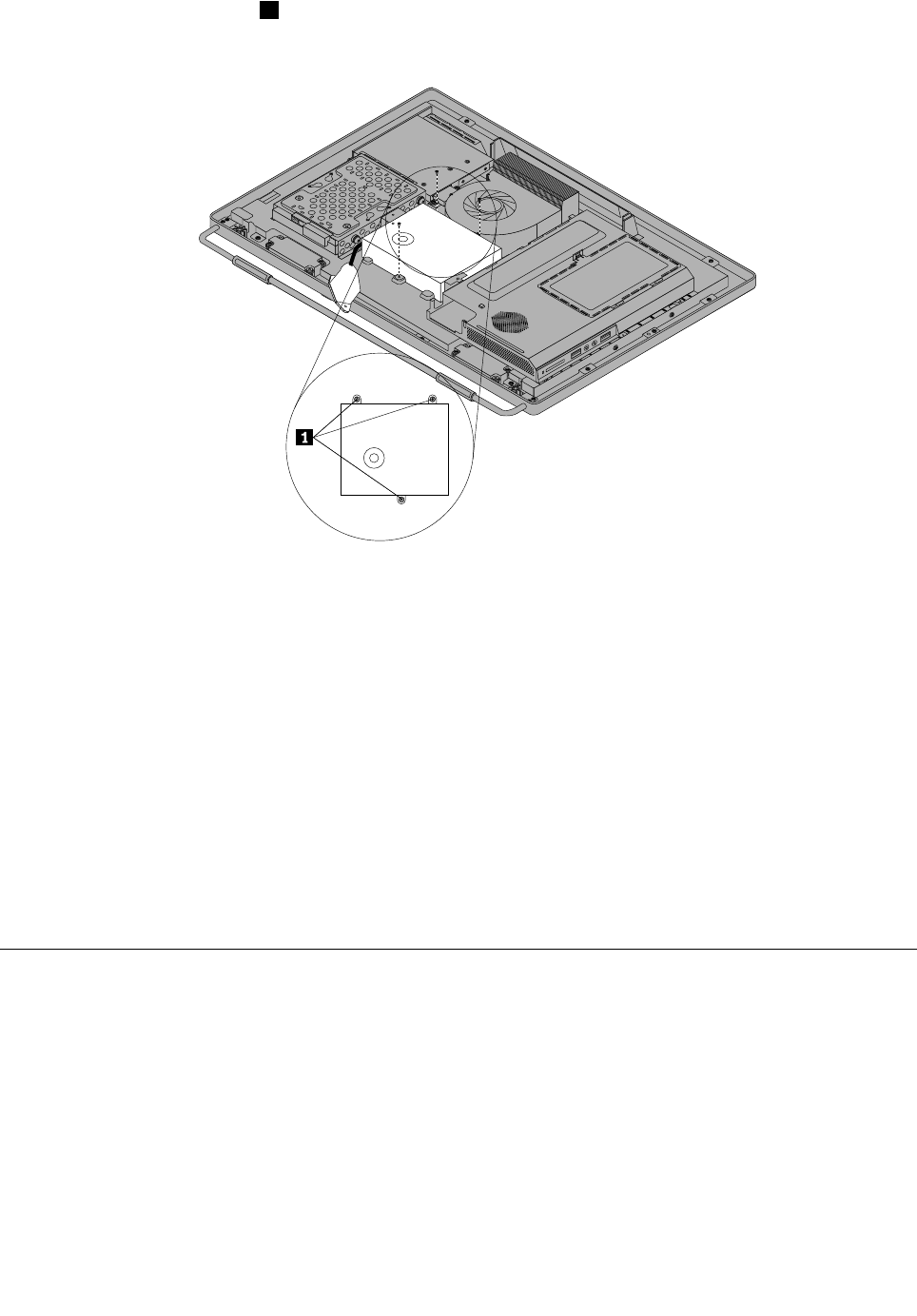
9.Removethethreescrews1thatsecurethepowersupply,andthenremovethepowersupplyout
ofthecomputer.
Figure23.Removingthethreescrewsthatsecurethepowersupply
10.Toreinstallthepowersupply,reinstallthetwoscrewsthatsecurethepowercordconnectortothe
powerconnectorbracket.See“ReplacingtherearI/Oassembly”onpage99.
11.Positionthenewpowersupplyinthecomputerandalignthethreescrewholesinthenewpowersupply
withthoseinthecomputermainbracket.Installthethreescrewstosecurethenewpowersupply.
12.Routethenewpowercordconnectorcable,andthenreinstalltherearI/Oassembly.See“Replacing
therearI/Oassembly”onpage99.
13.Connectthenewpowersupplycablestothepowersupplyconnectorsonthesystemboard.See
“Systemboardpartsandconnectors”onpage88.
14.Reinstallthesystemboardshield.See“Removingandreinstallingthesystemboardshield”onpage101.
15.ReinstalltheVESAmountbracket.See“RemovingtheVESAmountbracket”onpage98.
16.Reinstallthecomputercover.See“Removingthecomputercover”onpage94.
17.Goto“Completingthepartsreplacement”onpage124.
Replacingthemicroprocessorfan
Attention
Donotopenyourcomputerorattemptanyrepairbeforereadingandunderstandingthe“Importantsafety
information”intheThinkCentreSafetyandWarrantyGuidethatcamewithyourcomputer.Toobtainacopy
oftheThinkCentreSafetyandWarrantyGuide,goto:
http://www.lenovo.com/support
Thissectionprovidesinstructionsonhowtoreplacethemicroprocessorfan.
Toreplacethemicroprocessorfan,dothefollowing:
Chapter8.ReplacingFRUs103
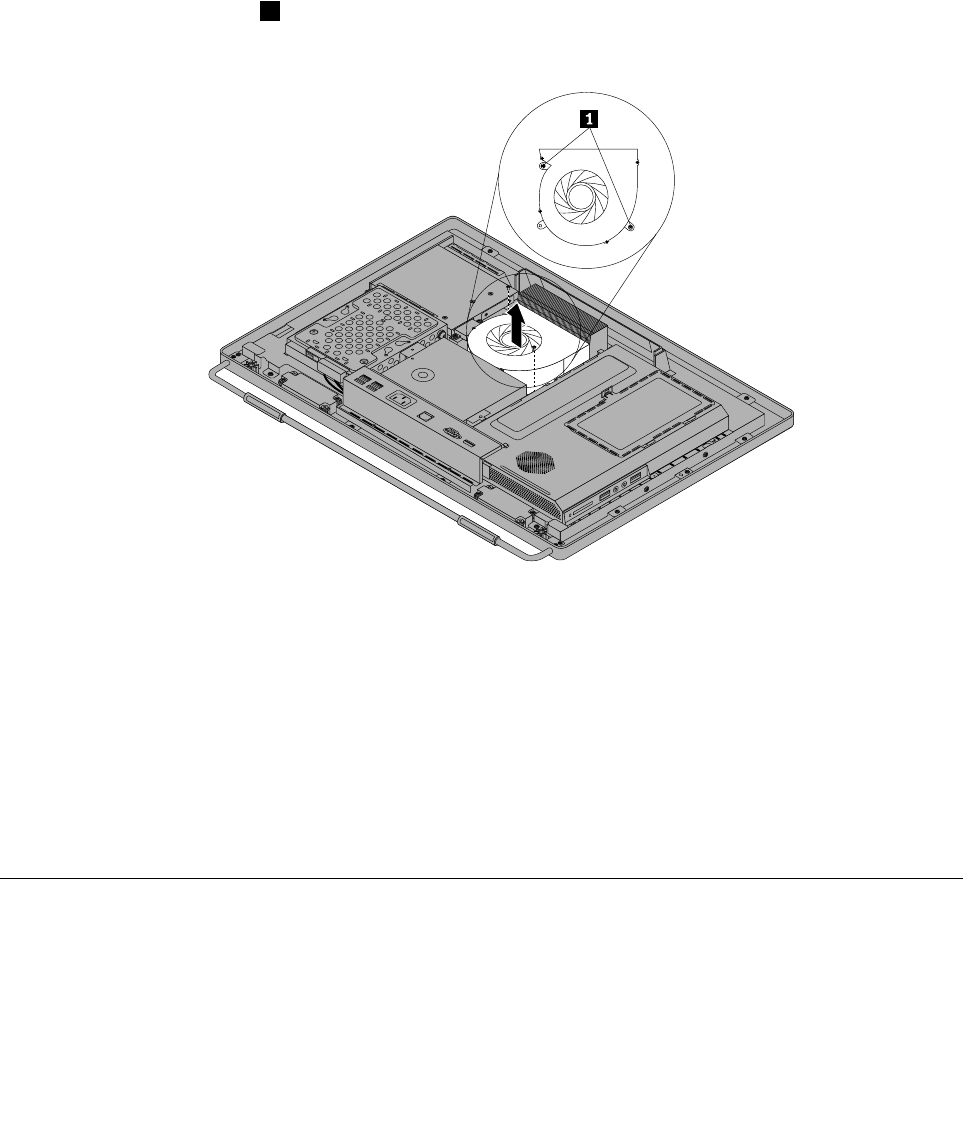
1.Removeallmediafromthedrivesandturnoffallattacheddevicesandthecomputer.Then,disconnect
allpowercordsfromelectricaloutletsanddisconnectallcablesthatareconnectedtothecomputer.
2.Placeasoft,cleantowelorclothonthedeskorotheratsurface.Holdthesidesofyourcomputerand
gentlylayitdownsothatthescreenisagainstthesurfaceandthecoverisfacingup.
3.Removethecomputercover.See“Removingthecomputercover”onpage94.
4.Locatethemicroprocessorfaninthecomputer.See“FRUlocations”onpage86.
5.Removethesystemboardshield.See“Removingandreinstallingthesystemboardshield”onpage101.
6.Notetheroutingofthemicroprocessorfancable,andthendisconnectthemicroprocessorfancable
fromthesystemboard.See“Systemboardpartsandconnectors”onpage88.
7.Removethetwoscrews1thatsecurethemicroprocessorfantothemainbracket.Then,liftthe
microprocessorfanoffthemainbracket.
Figure24.Removingthemicroprocessorfan
8.Toreinstallthemicroprocessorfan,positionthenewmicroprocessorfanonthemainbracketandalign
thescrewholesinthenewmicroprocessorfanwiththoseinthemainbracket.Reinstallthetwoscrews
thatsecurethemicroprocessorfantothemainbracket.
9.Connectthenewmicroprocessorfancabletothesystemboard.See“Systemboardpartsand
connectors”onpage88.
10.Reinstallthesystemboardshield.See“Removingandreinstallingthesystemboardshield”onpage101.
11.Reinstallthecomputercover.See“Removingthecomputercover”onpage94.
12.Goto“Completingthepartsreplacement”onpage124.
Replacingtheheatsinkassembly
Attention
Donotopenyourcomputerorattemptanyrepairbeforereadingandunderstandingthe“Importantsafety
information”intheThinkCentreSafetyandWarrantyGuidethatcamewithyourcomputer.Toobtainacopy
104ThinkCentreHardwareMaintenanceManual
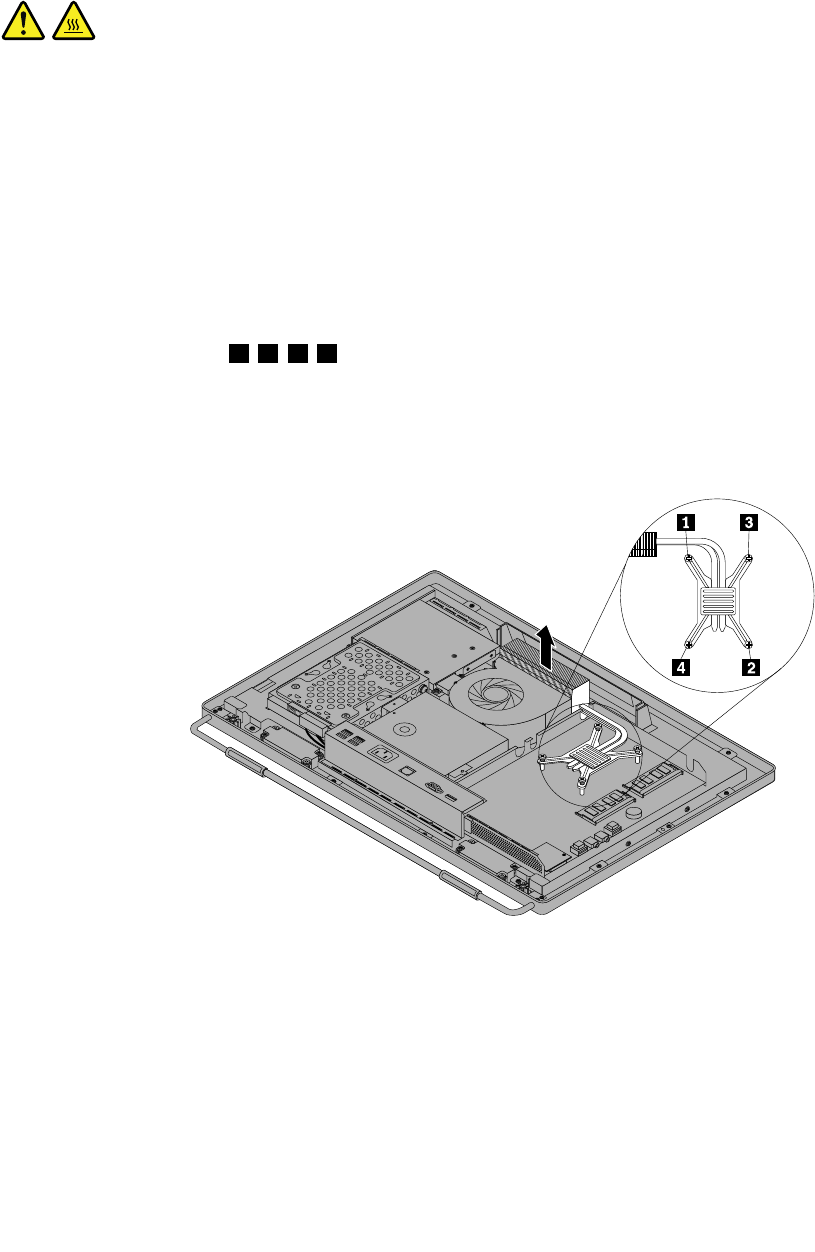
oftheThinkCentreSafetyandWarrantyGuide,goto:
http://www.lenovo.com/support
Thissectionprovidesinstructionsonhowtoreplacetheheatsinkassembly.
CAUTION:
Theheatsinkandfanassemblymightbeveryhot.Turnoffthecomputerandwaitthreetove
minutestoletthecomputercoolbeforeremovingthecomputercover.
Toreplacetheheatsinkassembly,dothefollowing:
1.Removeallmediafromthedrivesandturnoffallattacheddevicesandthecomputer.Then,disconnect
allpowercordsfromelectricaloutletsanddisconnectallcablesthatareconnectedtothecomputer.
2.Placeasoft,cleantowelorclothonthedeskorotheratsurface.Holdthesidesofyourcomputerand
gentlylayitdownsothatthescreenisagainstthesurfaceandthecoverisfacingup.
3.Removethecomputercover.See“Removingthecomputercover”onpage94.
4.Locatetheheatsinkassemblyonthesystemboard.See“FRUlocations”onpage86.
5.Removethesystemboardshield.See“Removingandreinstallingthesystemboardshield”onpage101.
6.Followthesequence1,2,3,4ontheheatsinkassemblytoloosethefourscrewsthatsecurethe
heatsinkassemblytothesystemboard.
Note:Carefullyloosethefourscrewsfromthesystemboardtoavoidanypossibledamagetothe
systemboard.Thefourscrewscannotberemovedfromtheheatsinkassembly.
Figure25.Loosingthefourscrewsthatsecuretheheatsinkassemblytothesystemboard
7.Liftthefailingheatsinkassemblyoffthesystemboard.
Notes:
a.Youmighthavetogentlytwisttheheatsinkassemblytofreeitfromthemicroprocessor.
b.Donottouchthethermalgreasewhilehandlingtheheatsinkassembly.
8.Toreinstalltheheatsinkassembly,positionthenewheatsinkassemblyonthesystemboardsothatthe
fourscrewsarealignedwiththecorrespondingholesinthesystemboard.
Chapter8.ReplacingFRUs105
9.Followthesequence1,2,3,4ontheheatsinkassemblytotightenthefourscrewstosecuretheheat
sinkassemblytothesystemboard,asshowninFigure25“Loosingthefourscrewsthatsecuretheheat
sinkassemblytothesystemboard”onpage105.
10.Reinstallthesystemboardshield.See“Removingandreinstallingthesystemboardshield”onpage101.
11.Goto“Completingthepartsreplacement”onpage124.
Replacingthemicroprocessor
Attention
Donotopenyourcomputerorattemptanyrepairbeforereadingandunderstandingthe“Importantsafety
information”intheThinkCentreSafetyandWarrantyGuidethatcamewithyourcomputer.Toobtainacopy
oftheThinkCentreSafetyandWarrantyGuide,goto:
http://www.lenovo.com/support
Thissectionprovidesinstructionsonhowtoreplacethemicroprocessor.
CAUTION:
Theheatsinkandfanassemblymightbeveryhot.Turnoffthecomputerandwaitthreetove
minutestoletthecomputercoolbeforeremovingthecomputercover.
Toreplacethemicroprocessor,dothefollowing:
1.Removeallmediafromthedrivesandturnoffallattacheddevicesandthecomputer.Then,disconnect
allpowercordsfromelectricaloutletsanddisconnectallcablesthatareconnectedtothecomputer.
2.Placeasoft,cleantowelorclothonthedeskorotheratsurface.Holdthesidesofyourcomputerand
gentlylayitdownsothatthescreenisagainstthesurfaceandthecoverisfacingup.
3.Removethecomputercover.See“Removingthecomputercover”onpage94.
4.Locatethemicroprocessoronthesystemboard.See“FRUlocations”onpage86.
5.Removethesystemboardshield.See“Removingandreinstallingthesystemboardshield”onpage101.
6.Removetheheatsinkassemblytogainaccesstothemicroprocessor.See“Replacingtheheatsink
assembly”onpage104.
7.Pressthesmallhandle1toopentheretainer2toaccessthemicroprocessor3.
106ThinkCentreHardwareMaintenanceManual
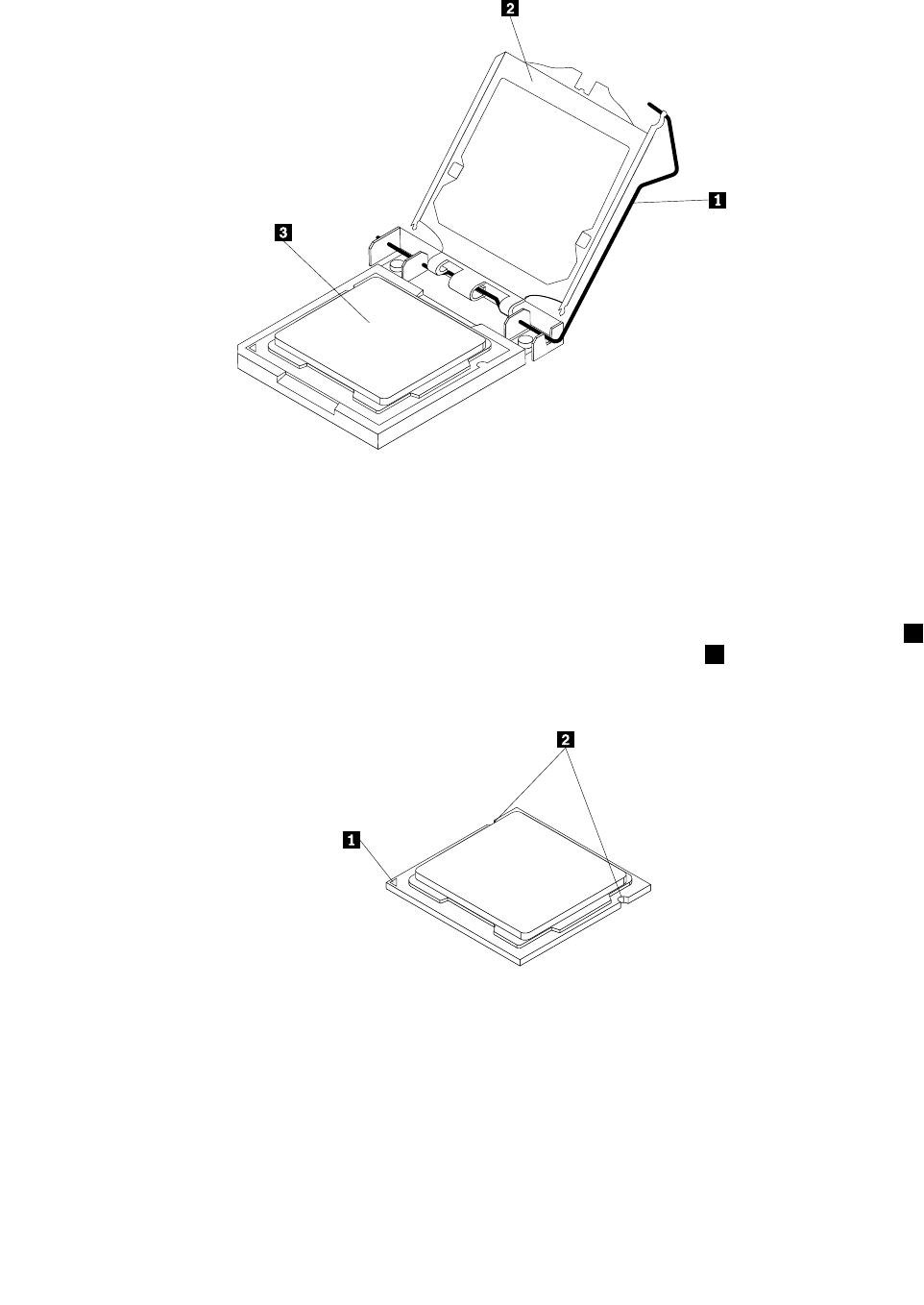
Figure26.Openingtheretainertoaccessthemicroprocessor
8.Liftthemicroprocessorstraightupandoutofthesocket.
Notes:
a.Yourmicroprocessorandsocketmightlookdifferentfromtheoneillustrated.
b.Notetheorientationofthemicroprocessorinthesocket.Youcaneitherlookforthesmalltriangle1
ononecornerofthemicroprocessorornotetheorientationofthenotches2onthemicroprocessor.
Thisisimportantwheninstallinganewmicroprocessoronthesystemboard.
Figure27.Notingtheorientationofthemicroprocessorinthesocket
c.Touchonlythesidesofthemicroprocessor.Donottouchthegoldcontactsonthebottom.
d.Donotdropanythingontothemicroprocessorsocketwhileitisexposed.Thesocketpinsmustbe
keptascleanaspossible.
Chapter8.ReplacingFRUs107
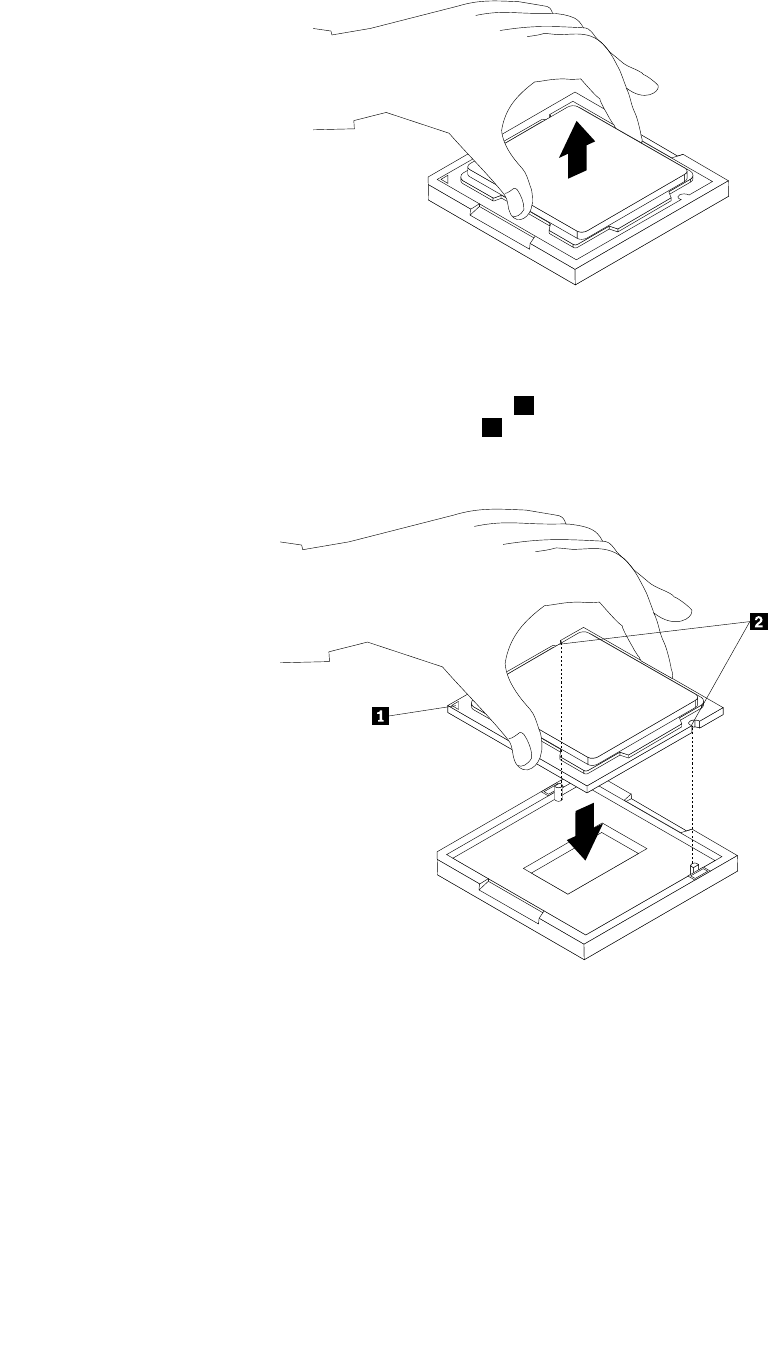
Figure28.Removingthemicroprocessor
9.Makesurethatthesmallhandleisintheraisedpositionandthemicroprocessorretainerisfullyopen.
10.Holdthenewmicroprocessorandalignthenotches2onitwiththealignmentkeysinthe
microprocessorsocket,oralignthesmalltriangle1ononecornerofthenewmicroprocessorwiththe
correspondingbeveledcornerofthemicroprocessorsocket.
Figure29.Installingthemicroprocessor
11.Lowerthenewmicroprocessorstraightdownintothemicroprocessorsocketonthesystemboard.
12.Closethemicroprocessorretainerandlockitintopositionwiththesmallhandletosecurethenew
microprocessorinthesocket.
13.Reinstalltheheatsinkassembly.See“Replacingtheheatsinkassembly”onpage104.
14.Reinstallthesystemboardshield.See“Removingandreinstallingthesystemboardshield”onpage101.
15.Goto“Completingthepartsreplacement”onpage124.
108ThinkCentreHardwareMaintenanceManual
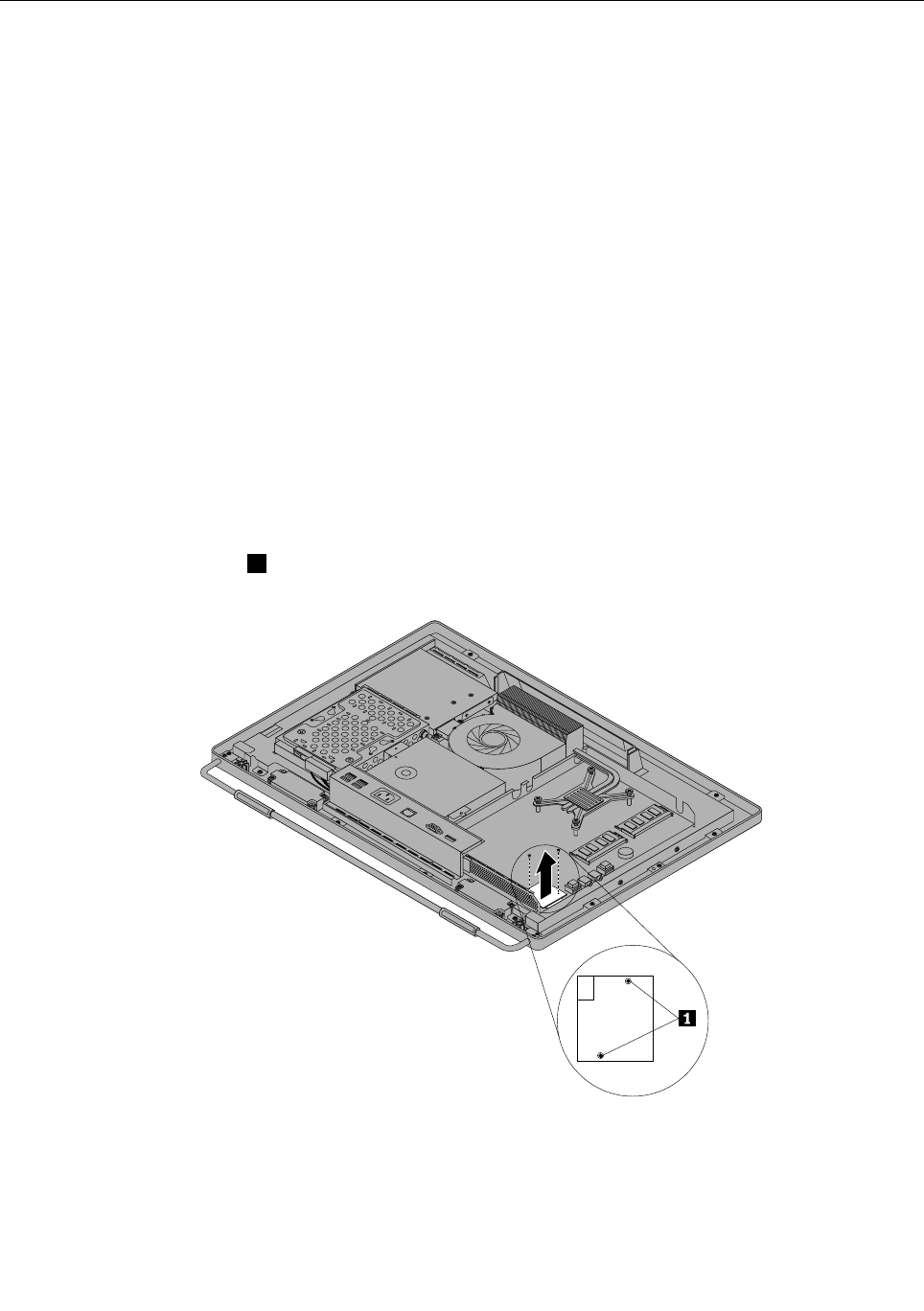
Replacingthecardreader
Attention
Donotopenyourcomputerorattemptanyrepairbeforereadingandunderstandingthe“Importantsafety
information”intheThinkCentreSafetyandWarrantyGuidethatcamewithyourcomputer.Toobtainacopy
oftheThinkCentreSafetyandWarrantyGuide,goto:
http://www.lenovo.com/support
Thissectionprovidesinstructionsonhowtoreplacethecardreader.
Note:Thecardreaderisavailableonlyinsomemodels.
Toreplacethecardreader,dothefollowing:
1.Removeallmediafromthedrivesandturnoffallattacheddevicesandthecomputer.Then,disconnect
allpowercordsfromelectricaloutletsanddisconnectallcablesthatareconnectedtothecomputer.
2.Placeasoft,cleantowelorclothonthedeskorotheratsurface.Holdthesidesofyourcomputerand
gentlylayitdownsothatthescreenisagainstthesurfaceandthecoverisfacingup.
3.Removethecomputercover.See“Removingthecomputercover”onpage94.
4.Locatethecardreaderinthecomputer.See“FRUlocations”onpage86.
5.Removethesystemboardshield.See“Removingandreinstallingthesystemboardshield”onpage101.
6.Disconnectthecardreadercablefromthecardreader.
7.Removethetwoscrews1thatsecurethecardreader,andthenliftthecardreaderoutofthecomputer.
Figure30.Removingthecardreader
8.Toreinstallthecardreader,alignthescrewholesinthenewcardreaderwiththoseinthecomputer,and
theninstallthetwoscrewstosecurethecardreader.
9.Connectthecardreadercabletothenewcardreader.
Chapter8.ReplacingFRUs109
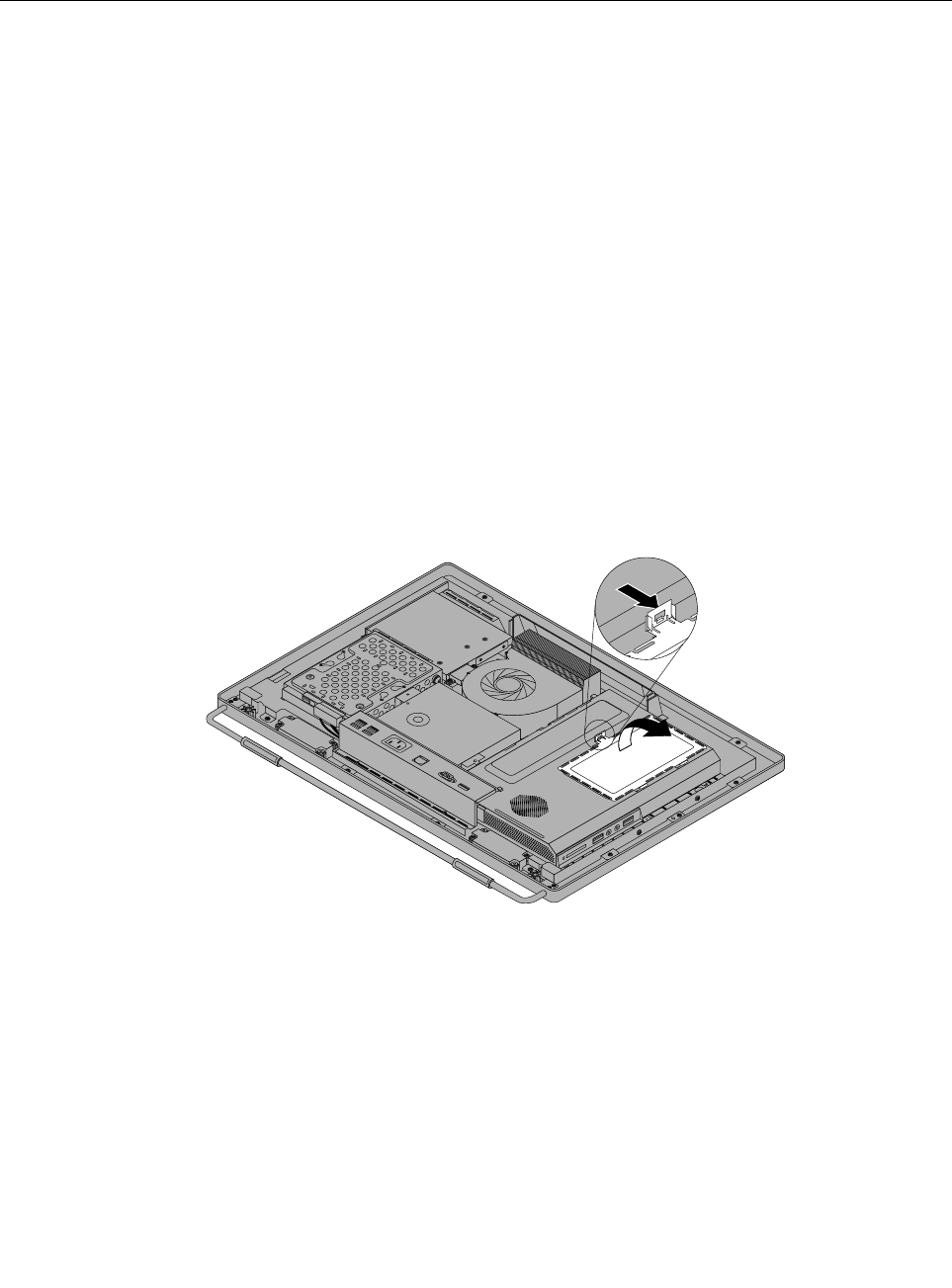
10.Reinstallthesystemboardshield.See“Removingandreinstallingthesystemboardshield”onpage101.
11.Goto“Completingthepartsreplacement”onpage124.
Openingthesystemboardshieldwindow
Attention
Donotopenyourcomputerorattemptanyrepairbeforereadingandunderstandingthe“Importantsafety
information”intheThinkCentreSafetyandWarrantyGuidethatcamewithyourcomputer.Toobtainacopy
oftheThinkCentreSafetyandWarrantyGuide,goto:
http://www.lenovo.com/support
Thissectionprovidesinstructionsonhowtoopenandclosethesystemboardshieldwindow.
Toopenandclosethesystemboardshieldwindow,dothefollowing:
1.Removeallmediafromthedrivesandturnoffallattacheddevicesandthecomputer.Then,disconnect
allpowercordsfromelectricaloutletsanddisconnectallcablesthatareconnectedtothecomputer.
2.Placeasoft,cleantowelorclothonthedeskorotheratsurface.Holdthesidesofyourcomputerand
gentlylayitdownsothatthescreenisagainstthesurfaceandthecoverisfacingup.
3.Removethecomputercover.See“Removingthecomputercover”onpage94.
4.Locatethesystemboardshieldwindow.See“FRUlocations”onpage86.
5.Presstheuppermetaltabofthesystemboardshieldwindow,andthenpivotthesystemboardshield
windowtoopenit.
Figure31.Openingthesystemboardshieldwindow
6.Toclosethesystemboardshieldwindow,placethesystemboardshieldwindowonthesystemboard
shield.Pivotthesystemboardshieldwindowuntilthetwometaltabsalignwitheachother,andthen
presstheuppermetaltabtosnapitintotheposition.
7.Goto“Removingthecomputercover”onpage94.
110ThinkCentreHardwareMaintenanceManual
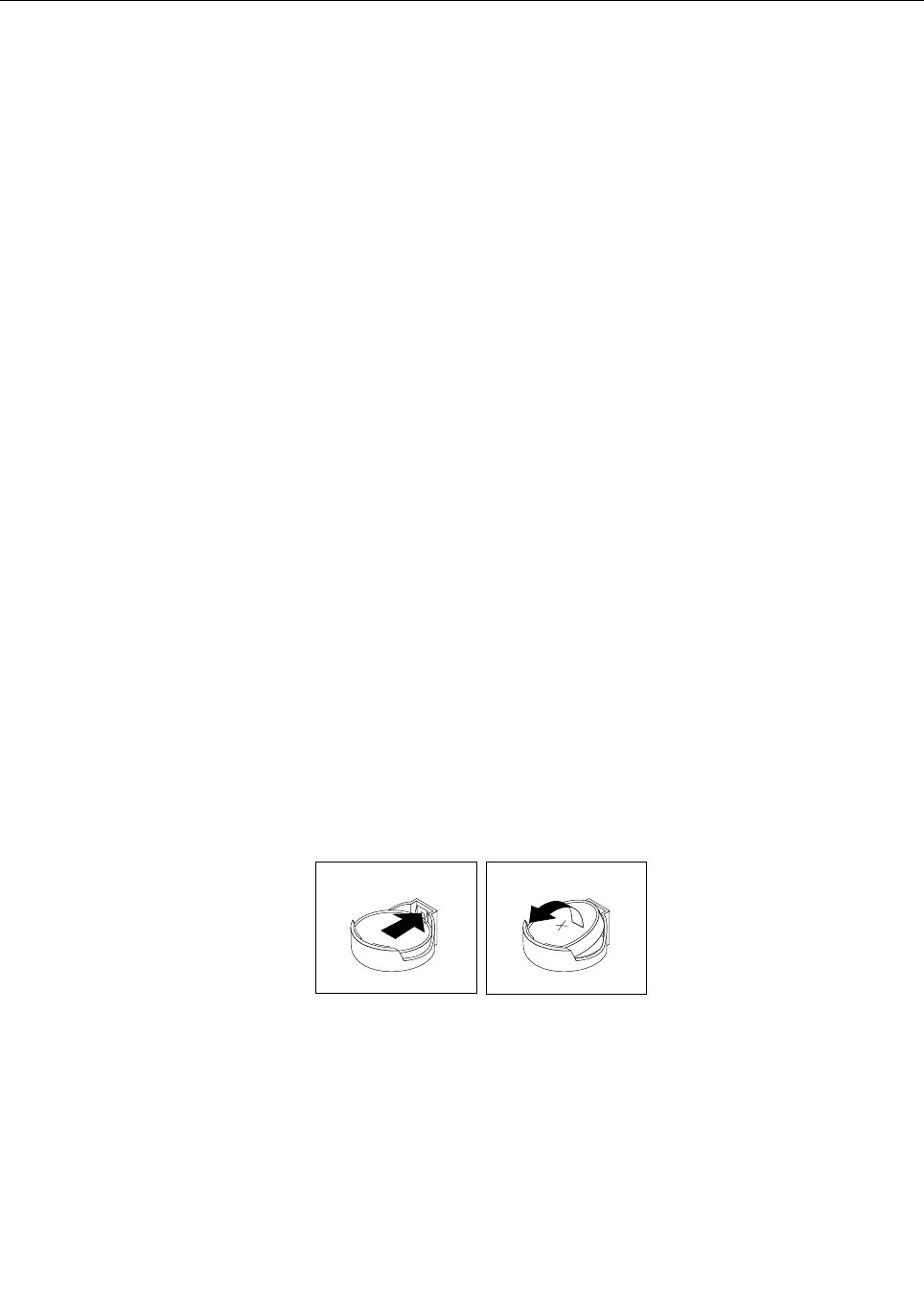
Replacingthebattery
Attention
Donotopenyourcomputerorattemptanyrepairbeforereadingandunderstandingthe“Importantsafety
information”intheThinkCentreSafetyandWarrantyGuidethatcamewithyourcomputer.Toobtainacopy
oftheThinkCentreSafetyandWarrantyGuide,goto:
http://www.lenovo.com/support
Thissectionprovidesinstructionsonhowtoreplacethebattery.
Yourcomputerhasaspecialtypeofmemorythatmaintainsthedate,time,andsettingsforbuilt-infeatures,
suchasparallel-portassignments(conguration).Abatterykeepstheinformationactivewhenyouturn
offthecomputer.
Thebatterynormallyrequiresnochargingormaintenancethroughoutitslife.However,ifthebatteryfails,
thedate,time,andcongurationinformation(includingpasswords)arelost.Anerrormessagewillbe
displayedwhenyouturnonthecomputer.
Referto“Lithiumbatterynotice”intheThinkCentreSafetyandWarrantyGuideforinformationabout
replacinganddisposingofthebattery.
Toreplacethebattery,dothefollowing:
1.Removeallmediafromthedrivesandturnoffallattacheddevicesandthecomputer.Then,disconnect
allpowercordsfromelectricaloutletsanddisconnectallcablesthatareconnectedtothecomputer.
2.Placeasoft,cleantowelorclothonthedeskorotheratsurface.Holdthesidesofyourcomputerand
gentlylayitdownsothatthescreenisagainstthesurfaceandthecoverisfacingup.
3.Removethecomputercover.See“Removingthecomputercover”onpage94.
4.Locatethebatteryonthesystemboard.See“FRUlocations”onpage86.
5.Removethesystemboardshieldoropenthesystemboardshieldwindowtogetaccesstothebattery.
See“Removingandreinstallingthesystemboardshield”onpage101or“Openingthesystemboard
shieldwindow”onpage110.
6.Removethebattery.
Figure32.Removingthebattery
7.Installanewbattery.
Chapter8.ReplacingFRUs111
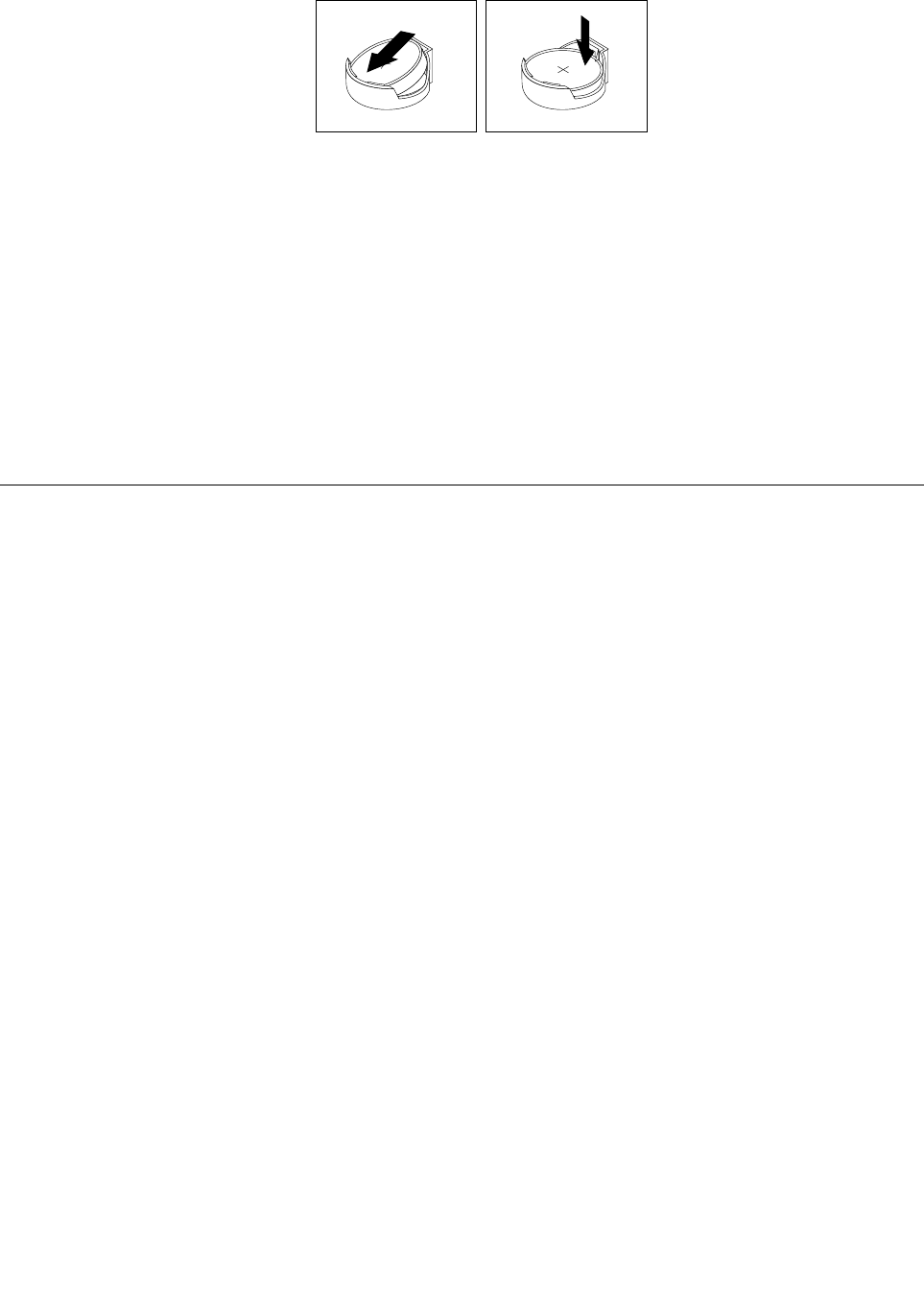
Figure33.Installinganewbattery
8.Reinstallthesystemboardshieldorclosethesystemboardshieldwindow.See“Removingand
reinstallingthesystemboardshield”onpage101or“Openingthesystemboardshieldwindow”on
page110.
9.Reinstallthecomputercover.See“Completingthepartsreplacement”onpage124.
10.Turnonthecomputerandallattacheddevices.
Note:Whenyouturnthecomputerforthersttimeafterreplacingthebattery,anerrormessagemight
bedisplayed.Thisisnormalafterreplacingthebattery.
11.UsetheSetupUtilityprogramtosetthedate,time,andanypasswords.SeeChapter6“UsingtheSetup
Utilityprogram”onpage57.
Replacingtheinverter
Attention
Donotopenyourcomputerorattemptanyrepairbeforereadingandunderstandingthe“Importantsafety
information”intheThinkCentreSafetyandWarrantyGuidethatcamewithyourcomputer.Toobtainacopy
oftheThinkCentreSafetyandWarrantyGuide,goto:
http://www.lenovo.com/support
Thissectionprovidesinstructionsonhowtoreplacetheinverter.
Toreplacetheinverter,dothefollowing:
1.Removeallmediafromthedrivesandturnoffallattacheddevicesandthecomputer.Then,disconnect
allpowercordsfromelectricaloutletsanddisconnectallcablesthatareconnectedtothecomputer.
2.Placeasoft,cleantowelorclothonthedeskorsurface.Holdthesidesofyourcomputerandgentlylay
itdownsothatthescreenisagainstthesurfaceandthecoverisfacingup.
3.Removethecomputercover.See“Removingthecomputercover”onpage94.
4.Removetheopticaldrive.See“Replacingtheopticaldrive”onpage97.
5.Locatetheinverterinthecomputer.See“FRUlocations”onpage86.
6.Removethetwoscrewsthatsecuretheinvertertothemainbracket.
112ThinkCentreHardwareMaintenanceManual
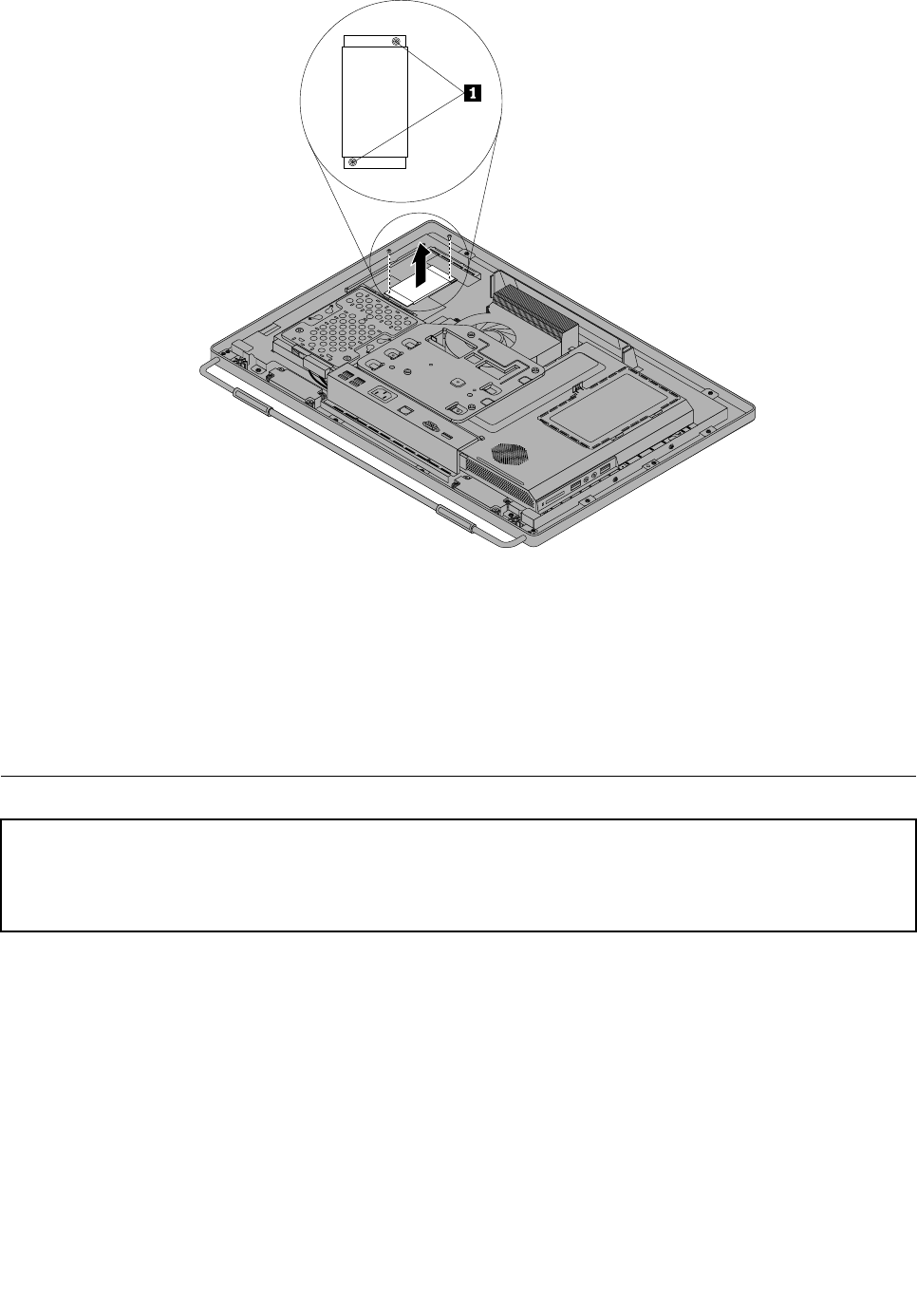
7.Disconnectthethreecablesfromtheinverter.
8.Lifttheinverteroffthecomputer.
9.Toreinstallthenewinverter,connectthethreecablestothenewinverter.Positionthenewinverterand
alignthetwoscrewholesinthenewinverterwiththoseinthecomputer.
10.Installthetwoscrewstosecurethenewinvertertothemainbracket.
11.Reinstalltheopticaldrive.See“Replacingtheopticaldrive”onpage97.
12.Goto“Completingthepartsreplacement”onpage124.
Installingorreplacingamemorymodule
Attention:
Donotopenyourcomputerorattemptanyrepairbeforereadingandunderstandingthe“Importantsafetyinformation”
intheThinkCentreSafetyandWarrantyGuidethatcamewithyourcomputer.ToobtainacopyoftheThinkCentre
SafetyandWarrantyGuide,goto:
http://www.lenovo.com/support
Thissectionprovidesinstructionsonhowtoinstallorreplaceamemorymodule.
YourcomputerhastwomemoryslotsforinstallingorreplacingDDR3SODIMMs(smalloutlinedualinline
memorymodules).Wheninstallingorreplacingamemorymodule,use1GB,2GBor4GBDDR3SODIMMs
inanycombinationuptoamaximumof8GBofsystemmemory.
Toinstallorreplaceamemorymodule,dothefollowing:
1.Removeallmediafromthedrivesandturnoffallattacheddevicesandthecomputer.Then,disconnect
allpowercordsfromelectricaloutletsanddisconnectallcablesthatareconnectedtothecomputer.
2.Placeasoft,cleantowelorclothonthedeskorotheratsurface.Holdthesidesofyourcomputerand
gentlylayitdownsothatthescreenisagainstthesurfaceandthecoverisfacingup.
3.Removethecomputercover.See“Removingthecomputercover”onpage94.
Chapter8.ReplacingFRUs113
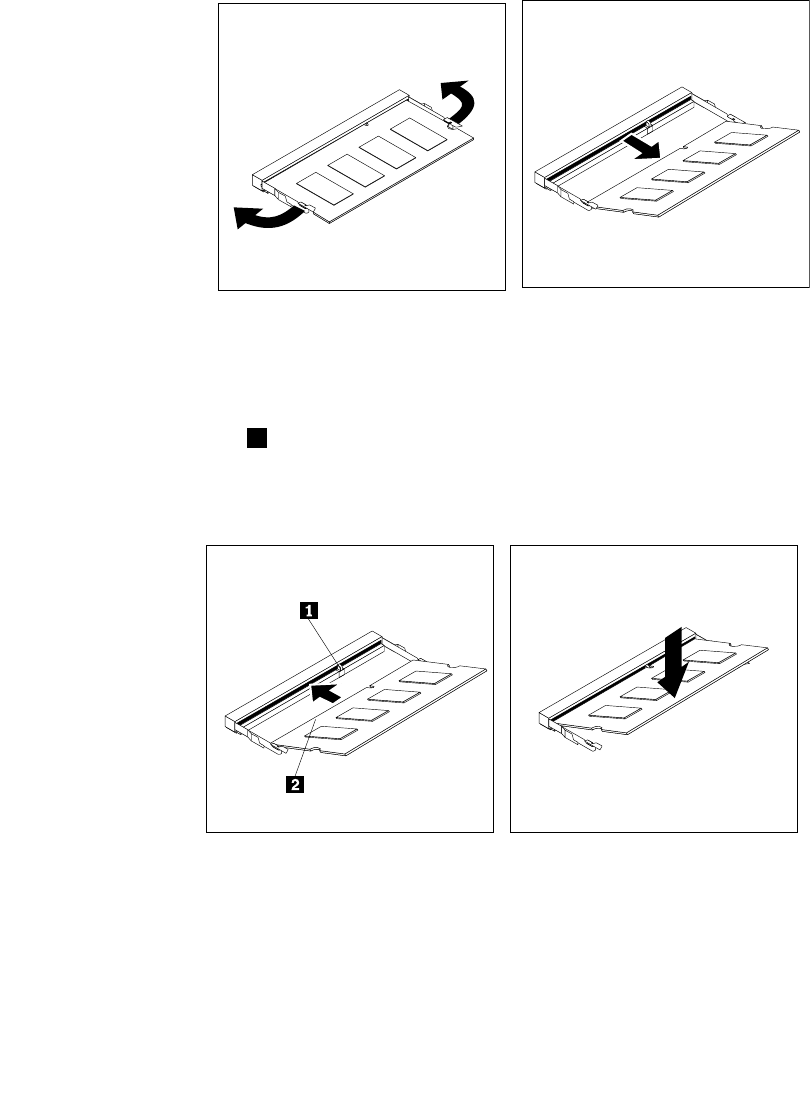
4.Locatethememoryslotsonthesystemboard.See“FRUlocations”onpage86.
5.Removethesystemboardshieldoropenthesystemboardshieldwindowtogetaccesstothebattery.
See“Removingandreinstallingthesystemboardshield”onpage101or“Openingthesystemboard
shieldwindow”onpage110.
6.Removeanypartsanddisconnectanycablesthatmightpreventyouraccesstothememoryslots.
7.Dooneofthefollowing:
•Ifyouarereplacingamemorymodule,opentheretainingclipsandremovetheoldmemorymodule
thatiscurrentlyinstalled.
Figure34.Removingamemorymodule
•Ifyouareinstallingamemorymodule,opentheretainingclipsofthememoryslotintowhichyou
wanttoinstallthememorymodule.
8.Insertthenotchedend1ofthenewmemorymoduleintotheslot.Pressthememorymodulermly
andpivotthememorymoduleuntilitsnapsintoplace.Makesurethatthememorymoduleissecured
intheslotanddoesnotmoveeasily.
Figure35.Installingamemorymodule
9.Reinstallthesystemboardshieldorclosethesystemboardshieldwindow.See“Removingand
reinstallingthesystemboardshield”onpage101or“Openingthesystemboardshieldwindow”on
page110.
10.Goto“Completingthepartsreplacement”onpage124.
114ThinkCentreHardwareMaintenanceManual
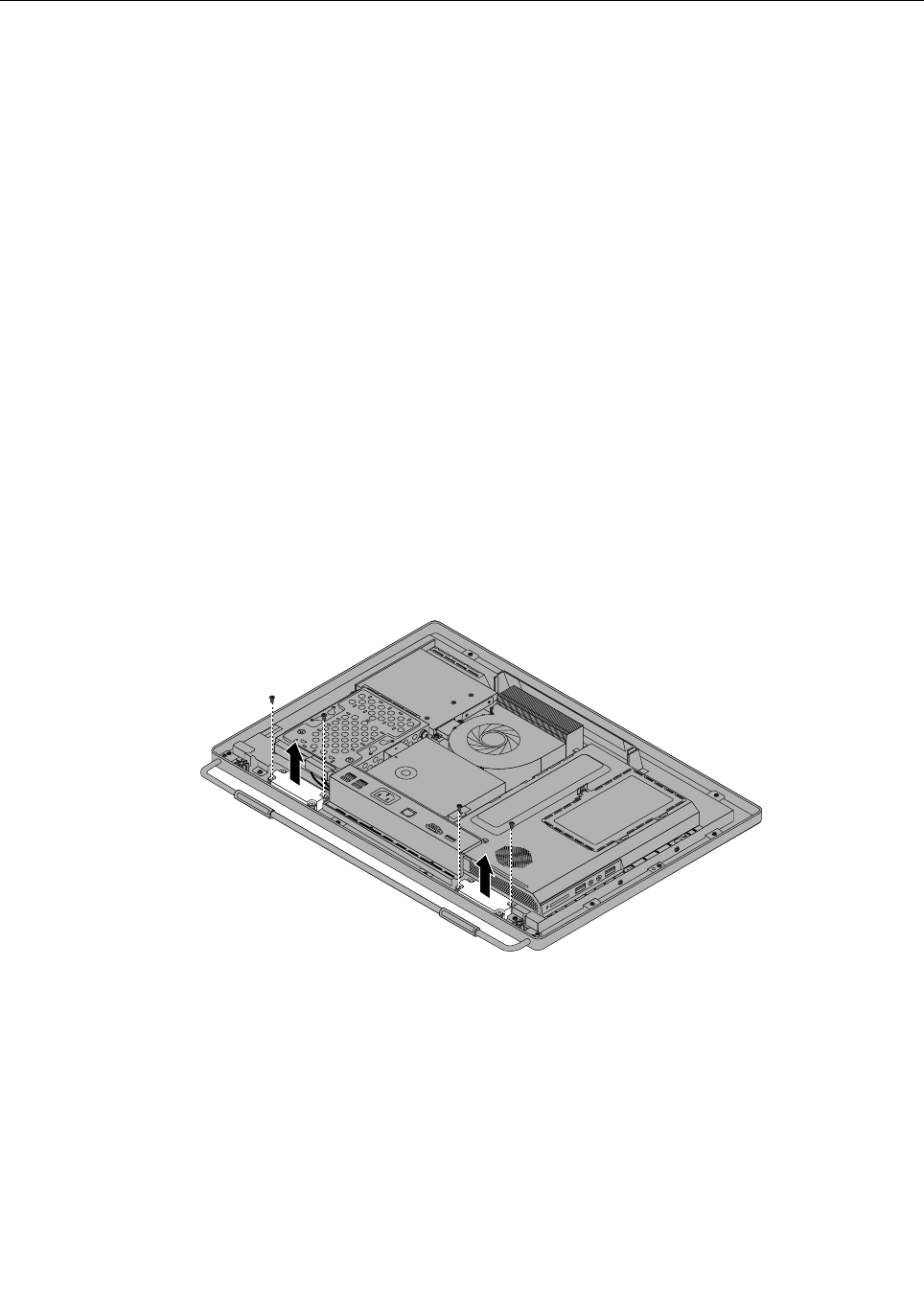
Replacingtheinternalspeakers
Attention
Donotopenyourcomputerorattemptanyrepairbeforereadingandunderstandingthe“Importantsafety
information”intheThinkCentreSafetyandWarrantyGuidethatcamewithyourcomputer.Toobtainacopy
oftheThinkCentreSafetyandWarrantyGuide,goto:
http://www.lenovo.com/support
Thissectionprovidesinstructionsonhowtoreplacetheinternalspeakers.
Toreplacetheinternalspeakers,dothefollowing:
1.Removeallmediafromthedrivesandturnoffallattacheddevicesandthecomputer.Then,disconnect
allpowercordsfromelectricaloutletsanddisconnectallcablesthatareconnectedtothecomputer.
2.Placeasoft,cleantowelorclothonthedeskorotheratsurface.Holdthesidesofyourcomputerand
gentlylayitdownsothatthescreenisagainstthesurfaceandthecoverisfacingup.
3.Removethecomputercover.See“Removingthecomputercover”onpage94.
4.Locatetheinternalspeakersinthecomputer.See“FRUlocations”onpage86.
5.Removethesystemboardshield.See“Removingandreinstallingthesystemboardshield”onpage101.
6.Notethelocationoftheinternalspeakercableconnectionandtheroutingoftheinternalspeakercables.
Disconnecttheinternalspeakercablesfromthesystemboard.
7.Removethetwoscrewsthatsecureeachinternalspeakertothefrontbezel,andthenremovethe
internalspeakersfromthecomputer.
Figure36.Removingtheinternalspeakers
8.Routethenewinternalspeakercables,andthenpositionthenewinternalspeakersonthefrontbezelso
thatthetwoscrewholesineachinternalspeakeralignwiththoseinthefrontbezel.
9.Reinstallthetwoscrewstosecureeachoftheinternalspeakerstothefrontbezel.
10.Connecttheinternalspeakercablestothesystemboard.See“Systemboardpartsandconnectors”
onpage88.
11.Reinstallthesystemboardshield.See“Removingandreinstallingthesystemboardshield”onpage101.
12.Goto“Completingthepartsreplacement”onpage124.
Chapter8.ReplacingFRUs115
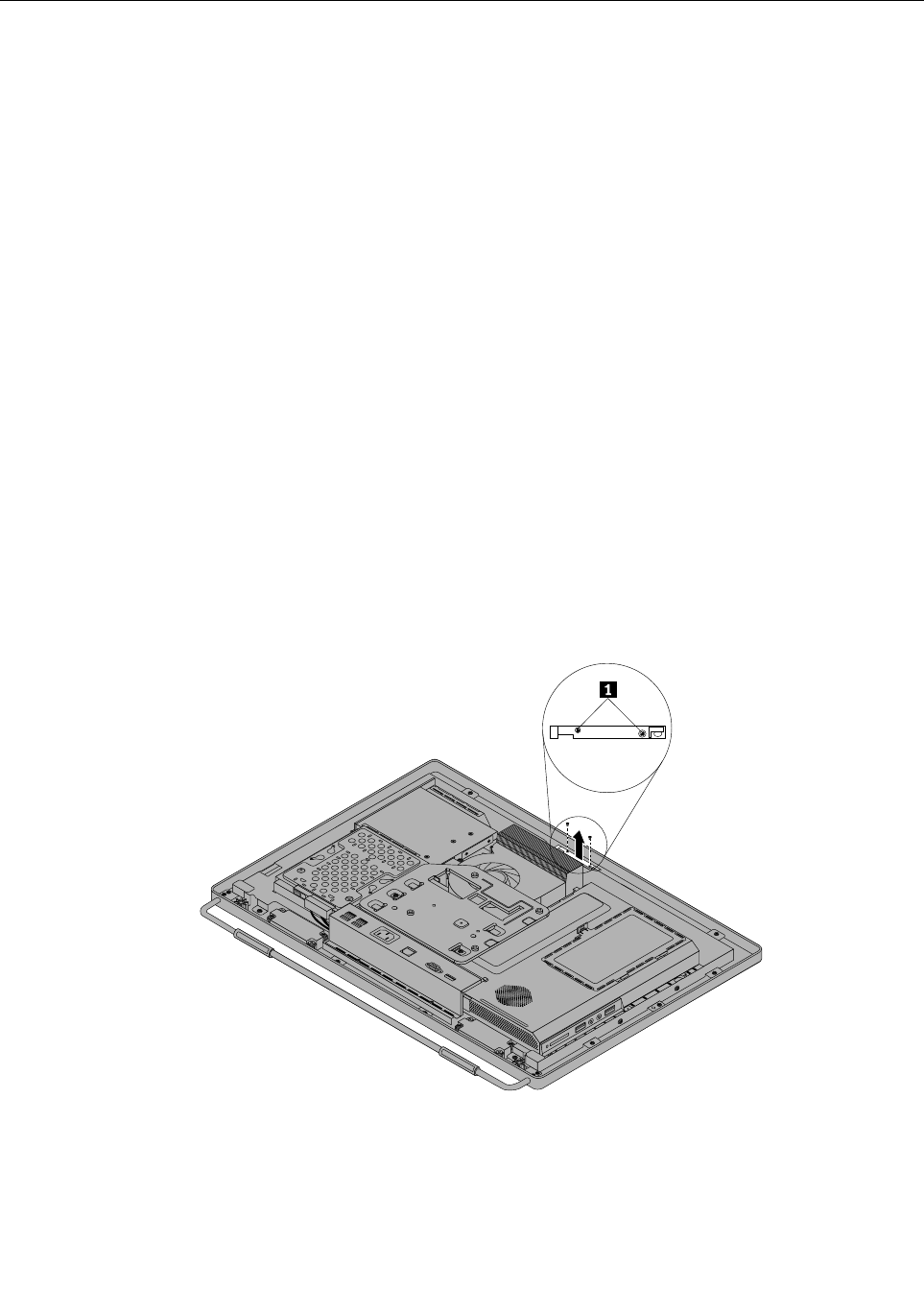
Replacingtheintegratedcamera
Attention
Donotopenyourcomputerorattemptanyrepairbeforereadingandunderstandingthe“Importantsafety
information”intheThinkCentreSafetyandWarrantyGuidethatcamewithyourcomputer.Toobtainacopy
oftheThinkCentreSafetyandWarrantyGuide,goto:
http://www.lenovo.com/support
Thissectionprovidesinstructionsonhowtoreplacetheintegratedcamera.
Note:Theintegratedcameraisavailableonlyinsomemodels.
Toreplacetheintegratedcamera,dothefollowing:
1.Removeallmediafromthedrivesandturnoffallattacheddevicesandthecomputer.Then,disconnect
allpowercordsfromelectricaloutletsanddisconnectallcablesthatareconnectedtothecomputer.
2.Placeasoft,cleantowelorclothonthedeskorotheratsurface.Holdthesidesofyourcomputerand
gentlylayitdownsothatthescreenisagainstthesurfaceandthecoverisfacingup.
3.Removethecomputercover.See“Removingthecomputercover”onpage94.
4.Locatetheintegratedcamerainthecomputer.See“FRUlocations”onpage86.
5.Removethesystemboardshield.See“Removingandreinstallingthesystemboardshield”onpage101.
6.Notetheroutingoftheintegratedcameracable,andthendisconnectthecablefromthesystemboard.
See“Systemboardpartsandconnectors”onpage88.
7.Removethetwoscrewsthatsecuretheintegratedcameratothefrontbezeltoremovetheintegrated
camerafromthecomputer.
Figure37.Removingtheintegratedcamera
8.Toreinstalltheintegratedcamera,positionthenewintegratedcameraandalignthetwoscrewholesin
thenewintegratedcamerawiththoseinthefrontbezel.
9.Installthetwoscrewstosecurethenewintegratedcameratothefrontbezel.
116ThinkCentreHardwareMaintenanceManual

10.Routethenewintegratedcameracable,andthenconnecttheintegratedcameracabletothesystem
board.See“Systemboardpartsandconnectors”onpage88.
11.Reinstallthesystemboardshield.See“Removingandreinstallingthesystemboardshield”onpage101.
12.Goto“Completingthepartsreplacement”onpage124.
Replacingthesystemboard
Attention
Donotopenyourcomputerorattemptanyrepairbeforereadingandunderstandingthe“Importantsafety
information”intheThinkCentreSafetyandWarrantyGuidethatcamewithyourcomputer.Toobtainacopy
oftheThinkCentreSafetyandWarrantyGuide,goto:
http://www.lenovo.com/support
Thissectionprovidesinstructionsonhowtoreplacethesystemboard.
Toreplacethesystemboard,dothefollowing:
1.Removeallmediafromthedrivesandturnoffallattacheddevicesandthecomputer.Then,disconnect
allpowercordsfromelectricaloutletsanddisconnectallcablesthatareconnectedtothecomputer.
2.Placeasoft,cleantowelorclothonthedeskorotheratsurface.Holdthesidesofyourcomputerand
gentlylayitdownsothatthescreenisagainstthesurfaceandthecoverisfacingup.
3.Removethecomputercover.See“Removingthecomputercover”onpage94.
4.Removethesystemboardshield.See“Removingandreinstallingthesystemboardshield”onpage101.
5.Locatethesystemboardinthecomputer.See“FRUlocations”onpage86.
6.Removetheheatsinkassembly.See“Replacingtheheatsinkassembly”onpage104.
7.Removethemicroprocessor.See“Replacingthemicroprocessor”onpage106.
8.Removethememorymodules.See“Installingorreplacingamemorymodule”onpage113.
9.Removethebattery.See“Replacingthebattery”onpage111.
10.RemovetherearI/Oassemblytogainaccesstothesystemboard.See“ReplacingtherearI/O
assembly”onpage99.
11.Notethelocationsofallcableconnectionsonthesystemboardanddisconnectallcables.See“System
boardpartsandconnectors”onpage88.
12.Removethesevenscrewsthatsecurethesystemboardtothemainbracket.Carefullyliftthesystem
boardoutofthechassis.
Chapter8.ReplacingFRUs117
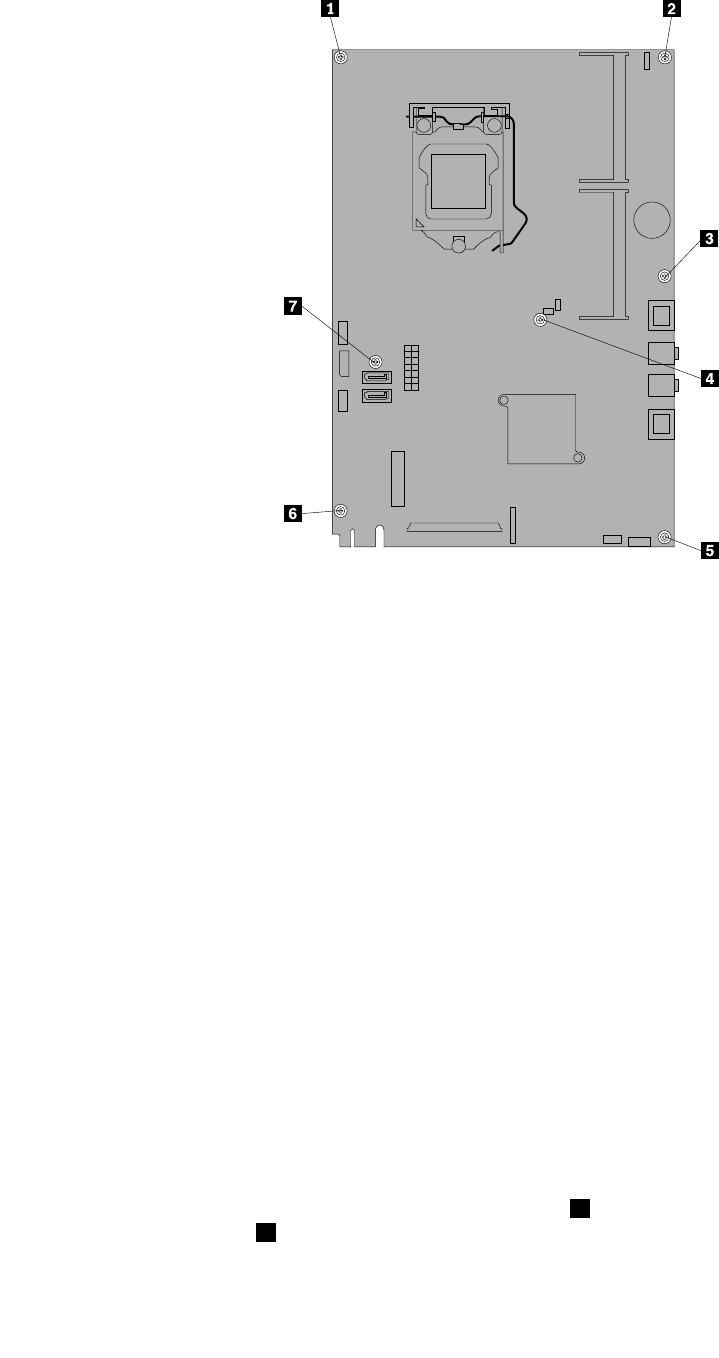
Figure38.Removingthesevenscrewsthatsecurethesystemboardtothemainbracket
13.Placethenewsystemboardintothechassisandalignthescrewholeswiththoseinthechassis.
14.Reinstallthesevenscrewsthatsecurethesystemboardtothemainbracket.
15.ReinstalltherearI/Oassembly.See“ReplacingtherearI/Oassembly”onpage99.
16.Reinstallthebattery.See“Replacingthebattery”onpage111.
17.Reinstallthememorymodules.See“Installingorreplacingamemorymodule”onpage113.
18.Reinstallthemicroprocessor.See“Replacingthemicroprocessor”onpage106.
19.Reinstalltheheatsinkassembly.See“Replacingtheheatsinkassembly”onpage104.
20.Reinstallthesystemboardshield.See“Removingandreinstallingthesystemboardshield”onpage101.
21.Reconnectallcablesthatweredisconnectedfromthesystemboard.See“Systemboardpartsand
connectors”onpage88.
22.Goto“Completingthepartsreplacement”onpage124.
Thefailingsystemboardmustbereturnedwithamicroprocessorsocketcovertoprotectthepinsduring
shippingandhandling.
Toinstallthemicroprocessorsocketcover,dothefollowing:
1.Releasetheleversecuringthemicroprocessorretainerandopentheretainertoaccessthe
microprocessor.
2.Graspthemicroprocessoronthesidesandliftitstraightupandoutofthesocket.Donottouchthe
contactsonthemicroprocessorsocket.
3.Notetheorientationofthesocketcover.Alignthenotches1onthemicroprocessorsocketcover
withthealignmentkeys2onthemicroprocessorsocket.Installonesideofthesocketcoverinto
themicroprocessorsocket.
118ThinkCentreHardwareMaintenanceManual
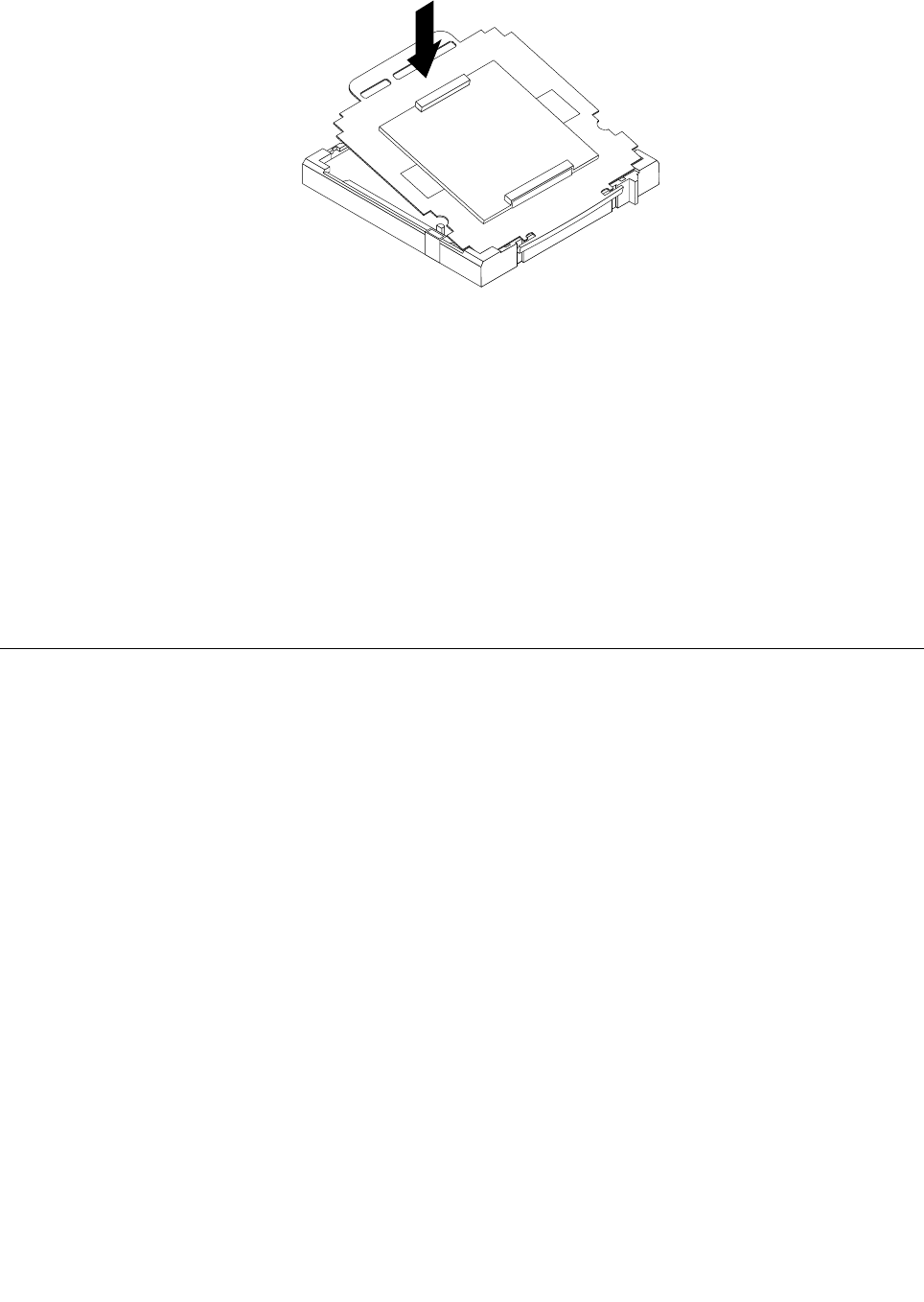
Figure39.Installingonesideofthesocketcoverintothemicroprocessorsocket
Note:Yourmicroprocessorsocketandcovermightlookslightlydifferentfromtheillustration.
4.Carefullypresstheothersideofthesocketcoverdownwardsuntilthesocketcoversnapsintoplace.
5.Carefullycheckthefourcornersofthesocketcovertomakesurethatthecoverissecuredinthe
microprocessorsocket.
6.Lowerthemicroprocessorretainer,andthenlowerthelevertosecuretheretainer.Makesurethe
leverislockedintoposition.
7.Followanyadditionalinstructionsincludedwiththereplacementpartyoureceived.
Note:Ifyoursystemboardhastwomicroprocessorsockets,besuretoinstallasocketcoverforeach
microprocessorsocket.
ReplacingtheLCDpanel
Attention
Donotopenyourcomputerorattemptanyrepairbeforereadingandunderstandingthe“Importantsafety
information”intheThinkCentreSafetyandWarrantyGuidethatcamewithyourcomputer.Toobtainacopy
oftheThinkCentreSafetyandWarrantyGuide,goto:
http://www.lenovo.com/support
ThissectionprovidesinstructionsonhowtoreplacetheLCDpanel.
ToreplacetheLCDpanel,dothefollowing:
1.Removeallmediafromthedrivesandturnoffallattacheddevicesandthecomputer.Then,disconnect
allpowercordsfromelectricaloutletsanddisconnectallcablesthatareconnectedtothecomputer.
2.Placeasoft,cleantowelorclothonthedeskorotheratsurface.Holdthesidesofyourcomputerand
gentlylayitdownsothatthescreenisagainstthesurfaceandthecoverisfacingup.
3.Removethecomputercover.See“Removingthecomputercover”onpage94.
4.Removethefootstands.See“Removingandreinstallingtheframestand”onpage92.
Chapter8.ReplacingFRUs119
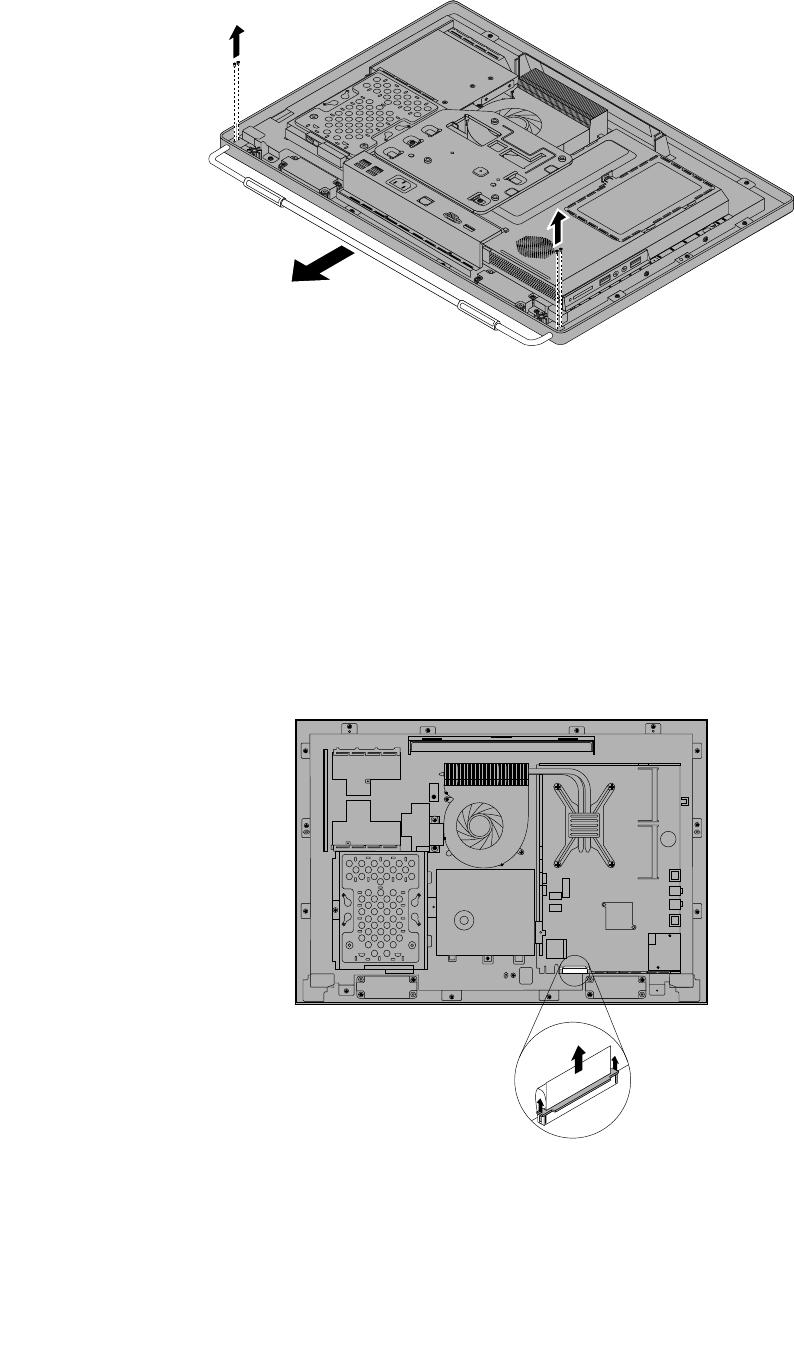
Figure40.Removingtheframestand
5.LocatetheLCDpanelinthecomputer.See“FRUlocations”onpage86.
6.Removetheopticaldrive.See“Replacingtheopticaldrive”onpage97.
7.Removetheinverter.See“Replacingtheinverter”onpage112.
8.RemovetherearI/Oassembly.See“ReplacingtherearI/Oassembly”onpage99.
9.Removethesystemboardshield.See“Removingandreinstallingthesystemboardshield”onpage101.
10.DisconnecttheLCDpanelcablefromthesystemboard.See“Systemboardpartsandconnectors”
onpage88.
Figure41.DisconnecttheLCDpanelcablefromthesystemboard
120ThinkCentreHardwareMaintenanceManual
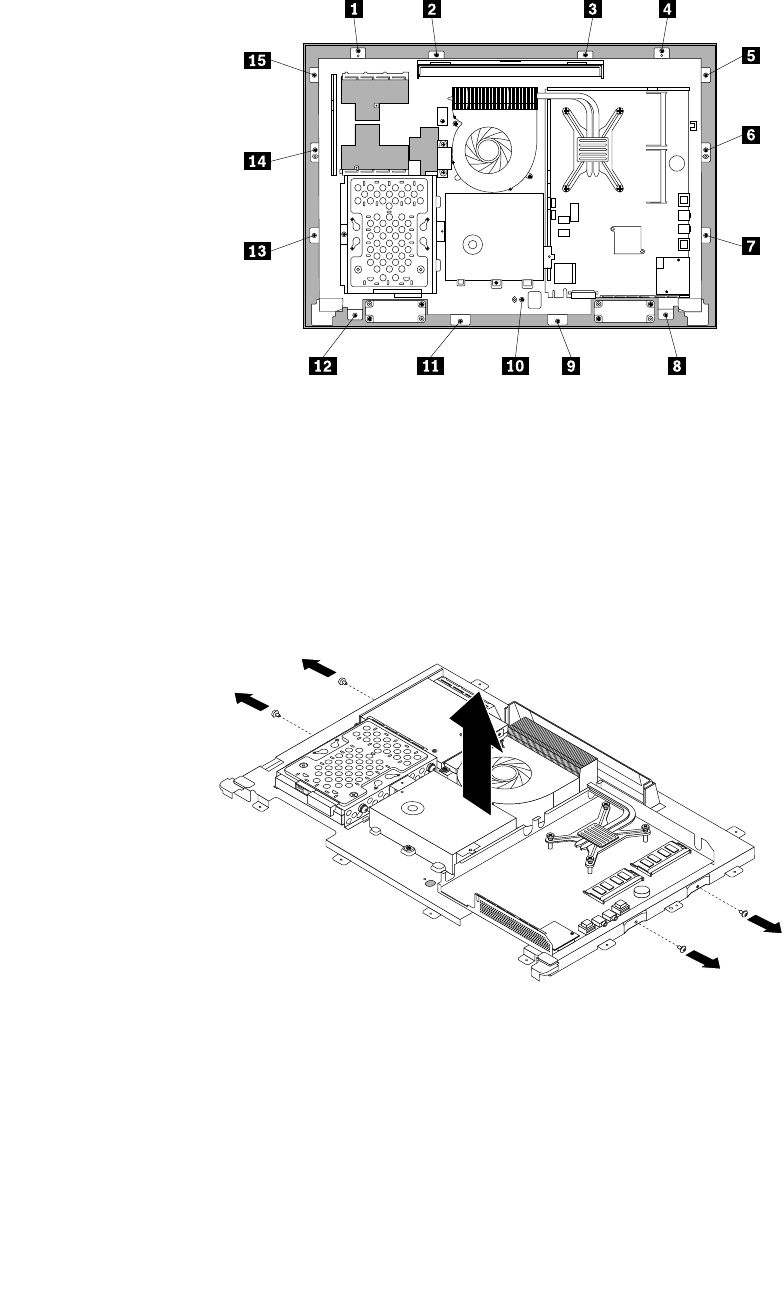
11.Removeallthe15screwsthatsecurethecomputermainbrackettothefrontbezel.
Figure42.Removingallthe15screwsthatsecurethecomputermainbrackettothefrontbezel
12.Notethelocationsofallcableconnectionsthatpreventyoufromliftingthecomputermainbracket,and
disconnectallcables.See“Systemboardpartsandconnectors”onpage88.
13.Removetheintegratedcamera.See“Replacingtheintegratedcamera”onpage116.
14.Liftthecomputermainbracketoffthefrontbezel.
15.RemovethefourscrewsthatsecurethechassistotheLCDpanel,andthenliftthechassisoutof
thecomputertogetassesstotheLCDpanel.
Figure43.RemovingthefourscrewsthatsecuretheLCDpanel
16.PlacethecomputerchassisoverthenewLCDpanelsothatthefourscrewholesalignwiththoseinthe
chassis.ReinstallthefourscrewstosecuretheLCDpaneltothechassis.
17.PositionthecomputermainbracketovertheLCDpanel.Makesurethescrewholesinthecomputer
mainbracketalignwiththoseinthefrontbezel.
18.Reinstallallthe15screwsthatsecurethecomputermainbrackettothefrontbezel.
Chapter8.ReplacingFRUs121
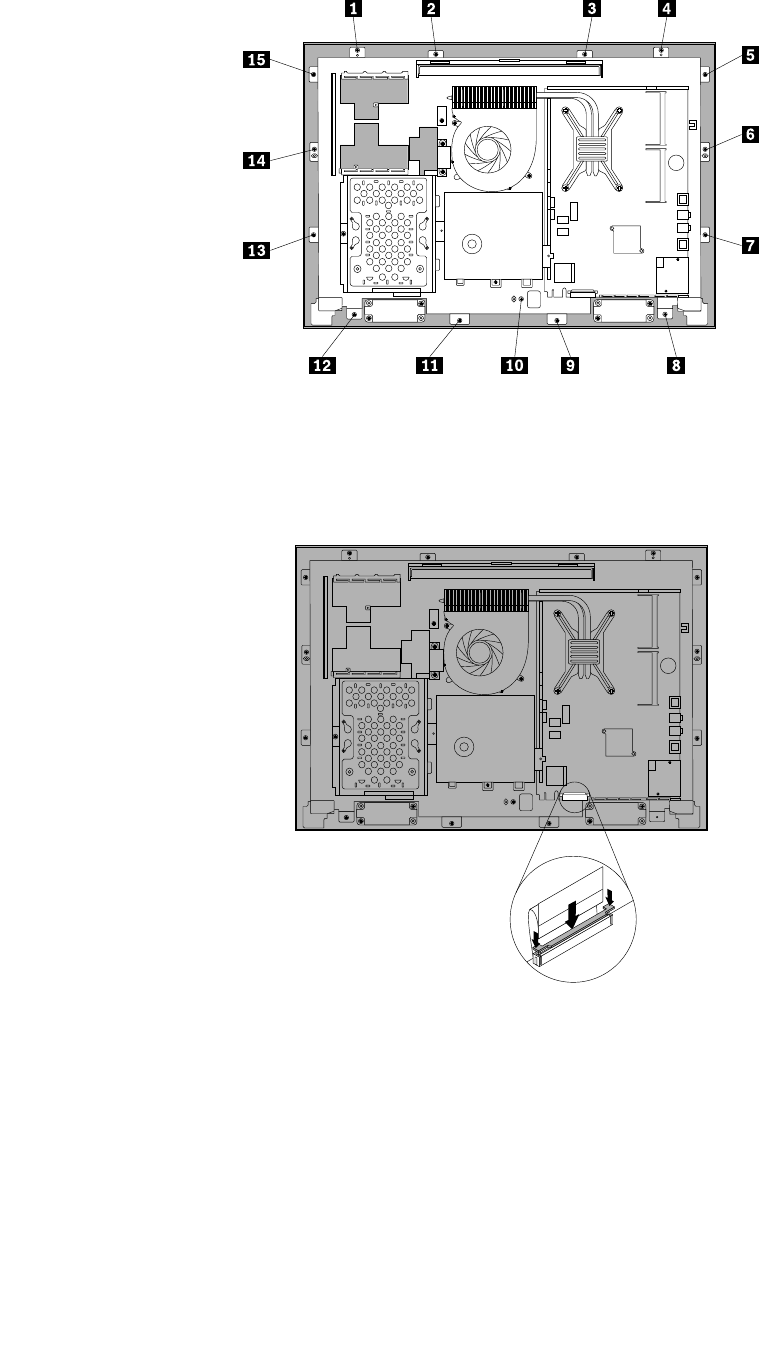
Figure44.Reinstallingallthe15screwsthatsecurethecomputermainbrackettothefrontbezel
19.ReconnecttheLCDpanelcablefromthesystemboard.See“Systemboardpartsandconnectors”
onpage88.
Figure45.ReconnecttheLCDpanelcabletothesystemboard
20.Reinstalltheintegratedcamera.See“Replacingtheintegratedcamera”onpage116.
21.ReinstalltherearI/Oassembly.See“ReplacingtherearI/Oassembly”onpage99.
22.Reinstallthesystemboardshield.See“Removingandreinstallingthesystemboardshield”onpage101.
23.Reinstallthefootstands.See“Removingandreinstallingtheframestand”onpage92.
24.Connectallthecablesthatweredisconnected.See“Systemboardpartsandconnectors”onpage88.
25.Goto“Completingthepartsreplacement”onpage124.
122ThinkCentreHardwareMaintenanceManual
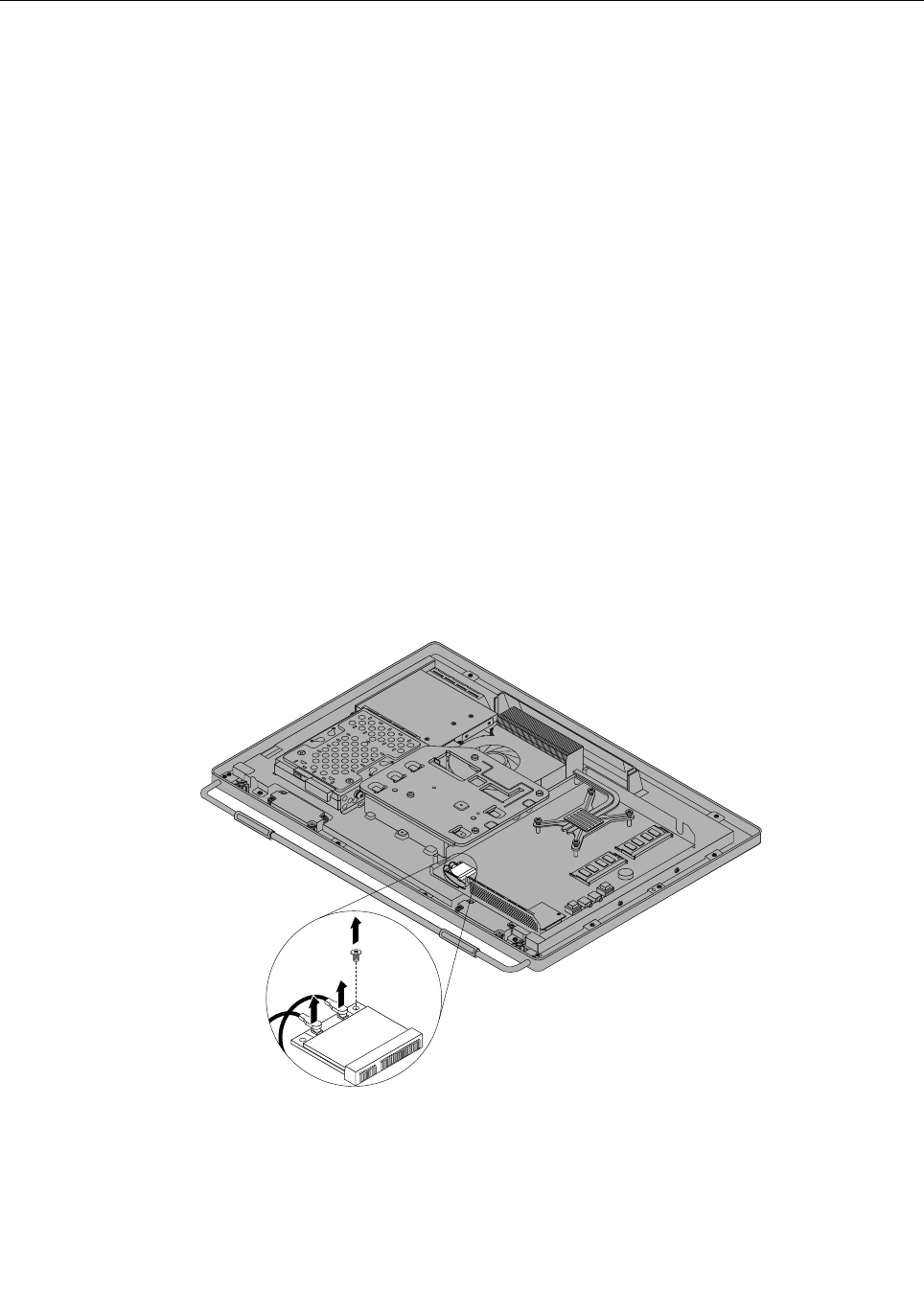
ReplacingtheWI-FIcard
Attention
Donotopenyourcomputerorattemptanyrepairbeforereadingandunderstandingthe“Importantsafety
information”intheThinkCentreSafetyandWarrantyGuidethatcamewithyourcomputer.Toobtainacopy
oftheThinkCentreSafetyandWarrantyGuide,goto:
http://www.lenovo.com/support
ThissectionprovidesinstructionsonhowtoreplacetheWI-FIcard.
Note:TheWI-FIcardisavailableonlyinsomemodels.
ToreplacetheWI-FIcard,dothefollowing:
1.Removeallmediafromthedrivesandturnoffallattacheddevicesandthecomputer.Then,disconnect
allpowercordsfromelectricaloutletsanddisconnectallcablesthatareconnectedtothecomputer.
2.Placeasoft,cleantowelorclothonthedeskorotheratsurface.Holdthesidesofyourcomputerand
gentlylayitdownsothatthescreenisagainstthesurfaceandthecoverisfacingup.
3.Removethecomputercover.See“Removingthecomputercover”onpage94.
4.Removethesystemboardshield.See“Removingandreinstallingthesystemboardshield”onpage101.
5.LocatetheWI-FIcardonthesystemboard.See“FRUlocations”onpage86.
6.RemovetherearI/Oassembly.See“ReplacingtherearI/Oassembly”onpage99.
7.DisconnectthetwocablesfromtheWI-FIcard,andthencarefullyremovethescrewthatsecures
theWI-FIcardtothesystemboard.
Figure46.RemovingthescrewthatsecurestheWI-FIcardtothesystemboard
8.PivottheWI-FIcardupwardandlifttheWI-FIcardoutoftheminiPCIExpressslot.
Chapter8.ReplacingFRUs123
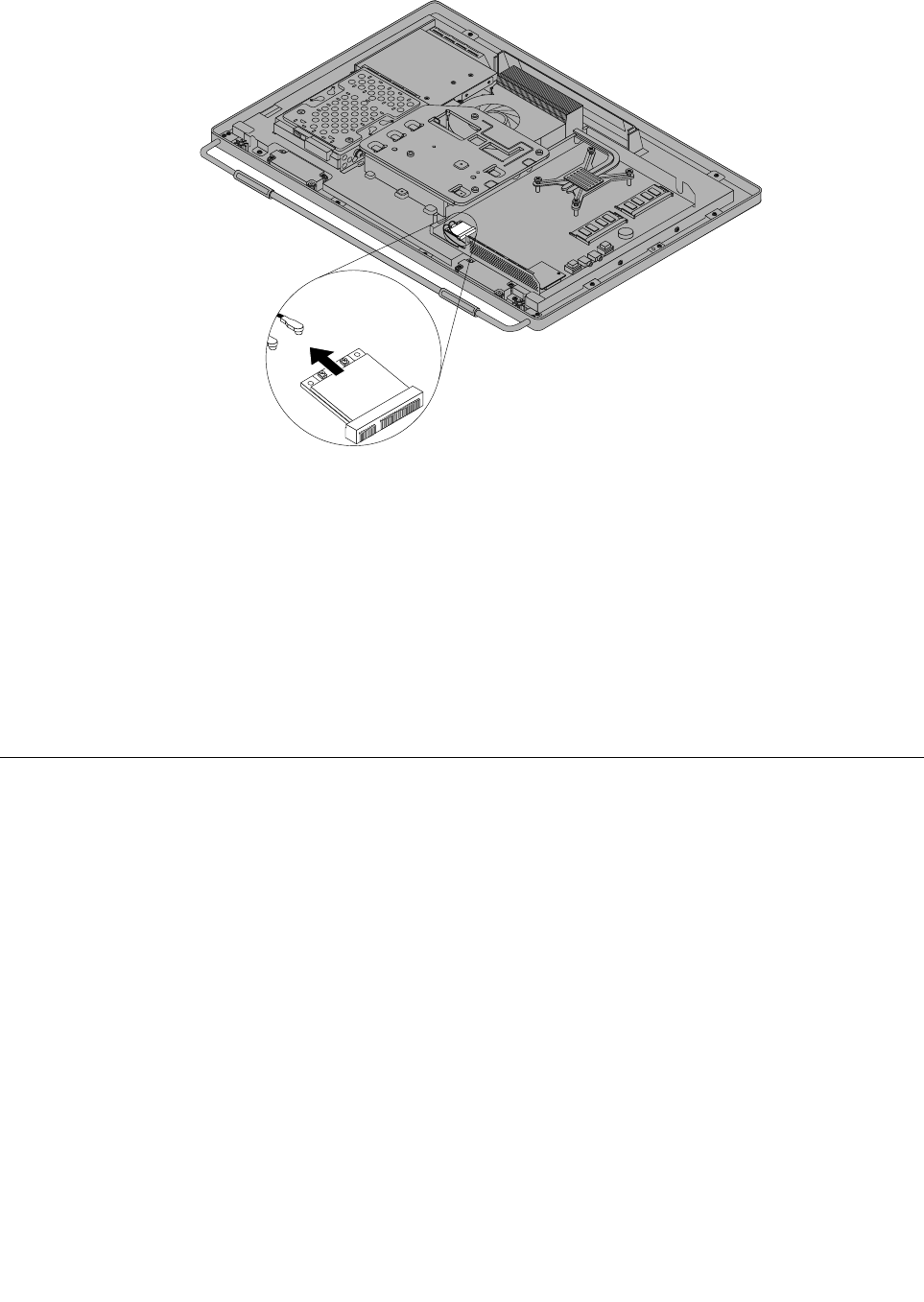
Figure47.RemovingtheWI-FIcard
9.InsertthenotchedendofthenewWI-FIcardintotheminiPCIExpressslot.PressthenewWI-FI
cardrmly,andthenpivottheWI-FIcardtoalignthescrewholeinthenewWI-FIcardwiththat
inthesystemboard.
10.InstallthescrewtosecurethenewWI-FIcardtothesystemboard.
11.ConnectthetwocablestothenewWI-FIcard.
12.ReinstalltherearI/Oassembly.See“ReplacingtherearI/Oassembly”onpage99.
13.Reinstallthesystemboardshield.See“Removingandreinstallingthesystemboardshield”onpage101.
14.Goto“Completingthepartsreplacement”onpage124.
Completingthepartsreplacement
Aftercompletingtheinstallationorreplacementforallparts,youneedtoreinstallthecomputercover
andreconnectcables.
Toreinstallthecomputercoverandreconnectcables,dothefollowing:
1.Makesurethatallcomponentshavebeenreassembledcorrectlyandthatnotoolsorloosescrewsare
leftinsideyourcomputer.See“FRUlocations”onpage86forthelocationsofvariouscomponentsin
yourcomputer.
2.Makesurethatthecablesareroutedcorrectlybeforereinstallingthecomputercover.Keepcablesclear
ofthehingesandsidesofthecomputerchassistoavoidinterferencewithreinstallingthecomputer
cover.
124ThinkCentreHardwareMaintenanceManual
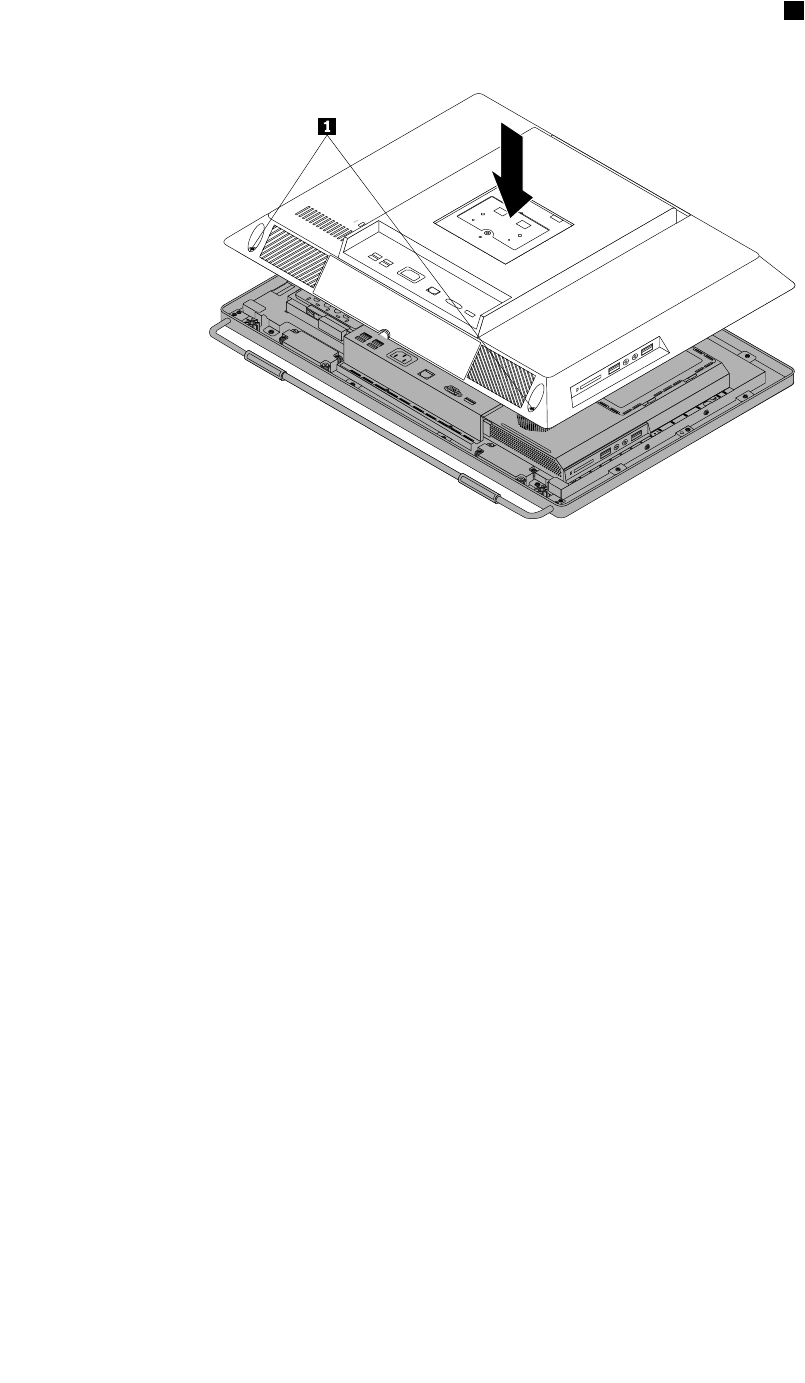
3.Lowerandpositionthecomputercoverintoplaceandthentightenthetwoscrews1tosecurethe
computercover.
Figure48.Installingthecomputercover
4.Reinstallthesystemstandandsystemstandhingecover.See“Removingandreinstallingthesystem
stand”onpage90and“Removingandreinstallingthesystemstandhingecover”onpage88.
5.Lockthecomputercoverifyouhaveanintegratedcablelock.
6.Reconnecttheexternalcablesandpowercordtothecomputer.
7.Dependingonthepartsyouinstalledorreplaced,youmightneedtoconrmtheupdatedinformationin
theSetupUtilityprogram.RefertoChapter6“UsingtheSetupUtilityprogram”onpage57.
Note:Inmostareasoftheworld,LenovorequiresthereturnofthedefectiveCustomerReplaceableUnit
(CRU).InformationaboutthiswillcomewiththeCRUorwillcomeafewdaysaftertheCRUarrives.
Chapter8.ReplacingFRUs125

126ThinkCentreHardwareMaintenanceManual
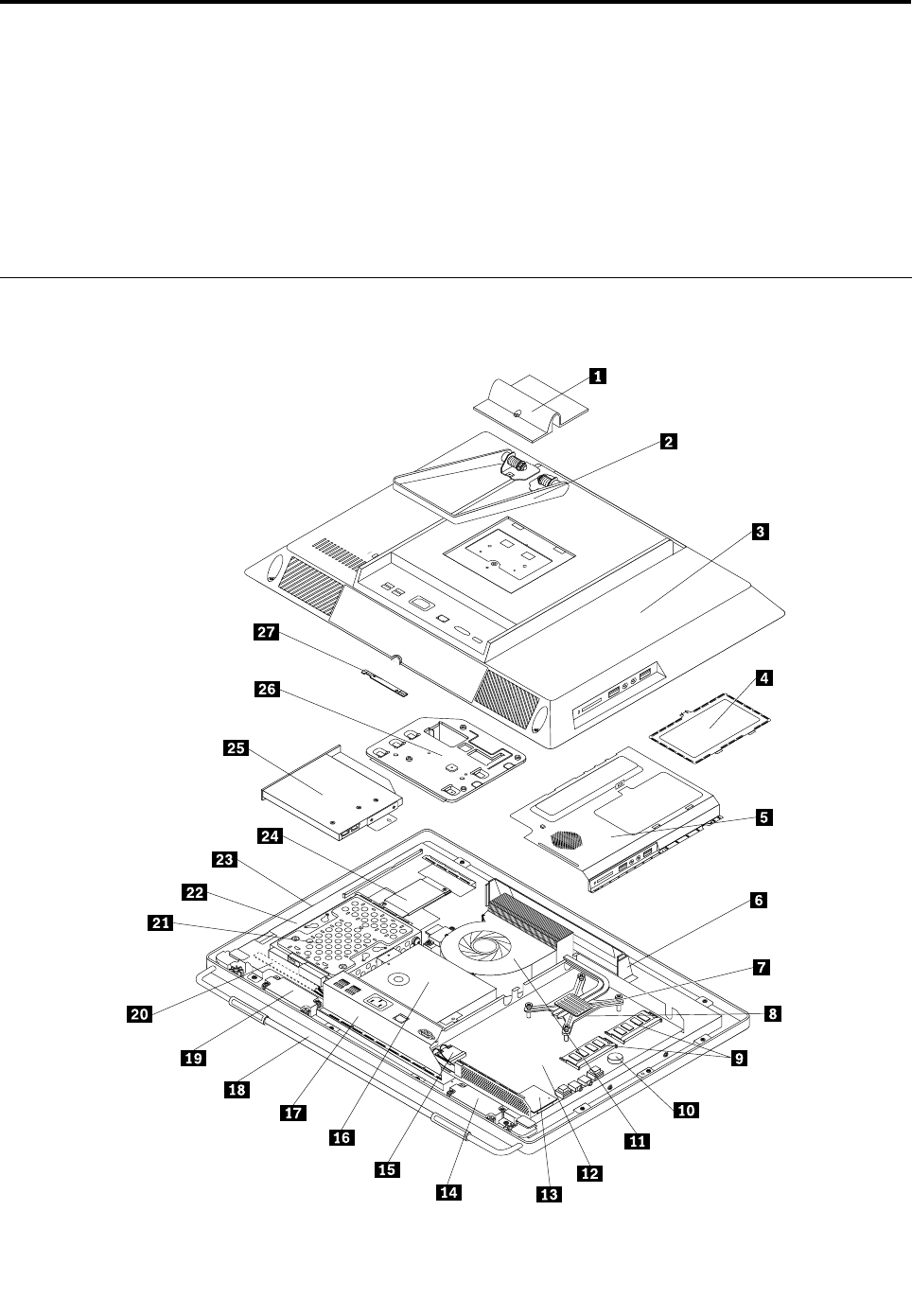
Chapter9.FRUlists
Thischapterliststheinformationontheeldreplaceableunits(FRUs).
Attention:BesuretoreadandunderstandallthesafetyinformationbeforereplacinganyFRUs.
Note:Inthefollowingtables,acustomerreplaceableunit(CRU)isidentiedas“1,”“2,”or“N”intheCRU
column.“N”meansthatthepartisnotaCRU,“1”meansthatthepartisaSelf-serviceCRU,and“2”
meansthatthepartisanOptional-serviceCRU.
Overall:MT1654,1664,1677,1738,1739,and1938
TheFRUlistbelowisforMTs:1654,1664,1677,1738,1739,and1938
©CopyrightLenovo2011,2012127

Item#FRUsFRU#CRU
1,2,18
Assemblyframestand,touchandnon-touch
•MT1654:allmodels
•MT1664:allmodels
•MT1677:allmodels
•MT1738:allmodels
•MT1739:allmodels
•MT1938:allmodels
03T9685N
3
Assemblyrearcover,touch&non-touch
•MT1654:allmodels
•MT1664:allmodels
•MT1677:allmodels
•MT1738:allmodels
•MT1739:allmodels
•MT1938:allmodels
03T9670N
7
Microprocessorcooler
•MT1654:allmodels
•MT1664:allmodels
•MT1677:allmodels
•MT1738:allmodels
•MT1739:allmodels
•MT1938:allmodels
03T9619N
8
Microprocessor,Ci32100SandyBridge3MB2cFCLGA3.1GHZ65W
•MT1654:CTOA1G
•MT1664:CTOA1UA1F
•MT1677:CTOA6AA6TA7GA7AA7TA1UA1SA1DA1YA5S
A5DA5YB1GB3GB7VD3JD4J
•MT1738:CTOA1GA2G
•MT1739:CTO
•MT1938:CTOA1UA1FA1SA1PA1LA1DA1YA1GA1MA1AA1Q
A1TA1CA1BA1HA1VA1KA1RA1EA1J
03T8011N
8
Microprocessor,Ci32120SandyBridge3MB2cFCLGA3.3GHz65W
•MT1654:CTO
•MT1664:CTOA6UA6FA6S
•MT1677:CTOC1BD5GD7GE1JE2J
•MT1738:CTO
•MT1739:CTOA1G
•MT1938:CTO
03T8010N
128ThinkCentreHardwareMaintenanceManual

Item#FRUsFRU#CRU
8
Microprocessor,Ci52400SSandyBridge6MB4cFCLGA2.5GHZ65W
•MT1654:CTO
•MT1664:CTOA2JA3UA3FA3SA8UA8FA8SA9J
•MT1677:CTOA8AA8TA9AA9TA3SA3DA3YB6UB6FB8HB8V
D1JD2JE3JE4J
•MT1738:CTO
•MT1739:CTO
•MT1938:CTO
03T8017N
8
Microprocessor,Ci52500SSandyBridge8MB4cFCLGA2.7GHZ65W
•MT1654:CTO
•MT1664:CTOA4UA4FA4SA7UA7FA7S
•MT1677:CTOA4SA4DA4YB4GB5GB4BD6G
•MT1738:CTOA3G
•MT1739:CTO
•MT1938:CTO
03T8016N
8
Microprocessor,G620SandyBridge3MB2cFCLGA2.6GHZ65W
HDGRAPHICS
•MT1654:CTO
•MT1664:CTO
•MT1677:CTOA2SA2DA2YB2G
•MT1738:CTO
•MT1739:CTO
•MT1938:CTO
03T6226N
8
Microprocessor,G840SandyBridge3MB2cFCLGA2.8GHZ65W
HDGRAPHICS
•MT1654:CTO
•MT1664:CTO
•MT1677:CTO
•MT1738:CTO
•MT1739:CTO
•MT1938:CTO
03T6225N
8
Microprocessor,G850SandyBridge3MB2cFCLGA2.9GHz65W
HDGRAPHICS
•MT1654:CTO
•MT1664:CTO
•MT1677:CTO
•MT1738:CTO
•MT1739:CTO
•MT1938:CTO
03T6224N
Chapter9.FRUlists129

Item#FRUsFRU#CRU
8
Microprocessor,Ci72600SSandyBridge8MB4cFCLGA2.8GHZ
65WvPro
•MT1654:CTO
•MT1664:CTOA5UA5FA5S
•MT1677:CTO
•MT1738:CTO
•MT1739:CTO
•MT1938:CTO
03T8015N
8
Microprocessor,Ci3-2130,3.40GHz/3M/65W,dualcore
•MT1654:CTO
•MT1664:CTO
•MT1677:CTO
•MT1738:CTO
•MT1739:CTO
•MT1938:CTO
03T8358N
8
Microprocessor,PentiumG860,3.0GHz/3M/65W,2C
•MT1654:CTO
•MT1664:CTO
•MT1677:CTO
•MT1738:CTO
•MT1739:CTO
•MT1938:CTO
03T8361N
8
Microprocessor,PentiumG630,2.70GHz/3M/65W,2C
•MT1654:CTO
•MT1664:CTO
•MT1677:CTO
•MT1738:CTO
•MT1739:CTO
•MT1938:CTO
03T8360N
8
Microprocessor,G540SandyBridge2MB2cFCLGA2.5GHZ65W
•MT1654:CTO
•MT1664:CTO
•MT1677:CTO
•MT1738:CTO
•MT1739:CTO
•MT1938:CTO
03T8354N
130ThinkCentreHardwareMaintenanceManual

Item#FRUsFRU#CRU
8
Microprocessor,G530SandyBridge2MB2cFCLGA2.4GHZ65W
•MT1654:CTOA2UA2FA2S
•MT1664:CTO
•MT1677:CTO
•MT1738:CTO
•MT1739:CTO
•MT1938:CTO
03T8356N
8
Microprocessor,G440SandyBridge1MB2cFCLGA1.6GHZ35W
•MT1654:CTO
•MT1664:CTO
•MT1677:CTO
•MT1738:CTO
•MT1739:CTO
•MT1938:CTO
03T8355N
9
Memorymodules,1GBPC3-106001333MHzDDR3SoDIMM
•MT1654:CTO
•MT1664:CTO
•MT1677:CTO
•MT1738:CTO
•MT1739:CTO
•MT1938:CTO
64Y6650N
9
Memorymodules,2GBPC3-106001333MHzDDR3SoDIMM
•MT1654:CTOA2UA2FA2S
•MT1664:CTOA2JA9J
•MT1677:CTOC1BA6AA6TA7GA7AA7TA8AA8TA9AA9TA1U
A1SA1DA1YA2SA2DA2YA3SA3DA3YA4SA4DA4YA5SA5D
A5YB2GB5GB7VB8HB8VD1JD2JD3JD4JD5GD7GE1JE2J
E3JE4J
•MT1738:CTOA2G
•MT1739:CTOA1G
•MT1938:CTO
64Y6651N
9
Memorymodules,4GBPC3-106001333MHzDDR3SoDIMM
•MT1654:CTOA1G
•MT1664:CTOA1UA1FA3UA3FA3SA4UA4FA4SA5UA5FA5S
A6UA6FA6SA7UA7FA7SA8UA8FA8S
•MT1677:CTOB6UB6FB1GB3GB4GB4BD6G
•MT1738:CTOA1GA3G
•MT1739:CTO
•MT1938:CTOA1UA1FA1SA1PA1LA1DA1YA1GA1MA1AA1Q
A1TA1CA1BA1HA1VA1KA1RA1EA1J
89Y9225N
Chapter9.FRUlists131

Item#FRUsFRU#CRU
11
110x110x25mmmicroprocessorfan
•MT1654:allmodels
•MT1664:allmodels
•MT1677:allmodels
•MT1738:allmodels
•MT1739:allmodels
•MT1938:allmodels
03T9620N
11
110x110x25mmmicroprocessorfan
•MT1654:allmodels
•MT1664:allmodels
•MT1677:allmodels
•MT1738:allmodels
•MT1739:allmodels
•MT1938:allmodels
03T9684N
12
Systemboard,withTPMcard
•MT1654:CTOA1GA2UA2FA2S
•MT1664:CTOA1UA1FA2JA3UA3FA3SA4UA4FA4SA5UA5F
A5SA6UA6FA6SA7UA7FA7SA8UA8FA8SA9J
•MT1677:CTOC1BA6AA6TA7GA7AA7TA8AA8TA9AA9TA1U
A1SA1DA1YA2SA2DA2YA3SA3DA3YA4SA4DA4YA5SA5D
A5YB6UB6FB1GB2GB3GB4GB5GB7VB8HB8VD1JD2JD3J
D4JB4BD5GD6GD7GE1JE2JE3JE4J
•MT1738:CTOA1GA2GA3G
•MT1739:CTOA1G
•MT1938:CTOA1UA1FA1SA1PA1LA1DA1YA1GA1MA1AA1Q
A1TA1CA1BA1HA1VA1KA1RA1EA1J
03T6422N
12
Systemboard,withoutTPMcard
•MT1654:
•MT1664:CTO
•MT1677:CTOD5GB1GB2GB3GB4GB5GD6GD7G
•MT1738:CTO
•MT1739:CTO
•MT1938:CTO
03T6441N
13
7in1cardreader
•MT1654:CTO
•MT1664:CTO
•MT1677:CTO
•MT1738:CTO
•MT1739:CTO
•MT1938:CTO
03T9016N
132ThinkCentreHardwareMaintenanceManual

Item#FRUsFRU#CRU
14,19
Internalspeaker,rightandleft
•MT1654:CTO
•MT1664:CTO
•MT1677:CTO
•MT1738:CTO
•MT1739:CTO
•MT1938:CTO
03T9566N
15
Intel-1000wirelessCondorPeak
•MT1654:CTO
•MT1664:CTO
•MT1677:CTO
•MT1738:CTO
•MT1739:CTO
•MT1938:CTO
60Y3241N
16
Powersupplyassembly,150w85+AIOPSU
•MT1654:CTOA1GA2UA2FA2S
•MT1664:CTOA1UA1FA2JA3UA3FA3SA4UA4FA4SA5UA5F
A5SA6UA6FA6SA7UA7FA7SA8UA8FA8SA9J
•MT1677:CTOC1BA6AA6TA7GA7AA7TA8AA8TA9AA9TA1U
A1SA1DA1YA2SA2DA2YA3SA3DA3YA4SA4DA4YA5SA5D
A5YB6UB6FB1GB2GB3GB4GB5GB7VB8HB8VD1JD2JD3J
D4JB4BD5GD6GD7GE1JE2JE3JE4J
•MT1738:CTOA1GA2GA3G
•MT1739:CTOA1G
•MT1938:CTOA1UA1FA1SA1PA1LA1DA1YA1GA1MA1AA1Q
A1TA1CA1BA1HA1VA1KA1RA1EA1J
03T9022N
17
RearI/OkitwithDP
•MT1654:allmodels
•MT1664:allmodels
•MT1677:allmodels
•MT1738:allmodels
•MT1739:allmodels
•MT1938:allmodels
03T6424N
17
RearI/OwithDP+Com
•MT1654:allmodels
•MT1664:allmodels
•MT1677:allmodels
•MT1738:allmodels
•MT1739:allmodels
•MT1938:allmodels
03T9031N
Chapter9.FRUlists133

Item#FRUsFRU#CRU
17
Assembly_rear_I/O_bracket_without_Com
•MT1654:allmodels
•MT1664:allmodels
•MT1677:allmodels
•MT1738:allmodels
•MT1739:allmodels
•MT1938:allmodels
03T9667N
17
Assembly_rear_I/O_bracket_with_Com
•MT1654:allmodels
•MT1664:allmodels
•MT1677:allmodels
•MT1738:allmodels
•MT1739:allmodels
•MT1938:allmodels
03T9666N
1,2,18
Assemblyframestand,touchandnon-touch
•MT1654:allmodels
•MT1664:allmodels
•MT1677:allmodels
•MT1738:allmodels
•MT1739:allmodels
•MT1938:allmodels
03T9685N
21
Harddiskdrive,SATA250GB7200RPM/3Gb/8M
•MT1654:CTO
•MT1664:CTOA8UA8FA8S
•MT1677:CTOA6AA6TD3JD4JE1JE2JE3JE4J
•MT1738:CTO
•MT1739:CTO
•MT1938:CTOA1UA1FA1SA1PA1LA1DA1YA1GA1MA1AA1Q
A1TA1CA1BA1HA1VA1KA1RA1EA1J
40Y9036N
21
Harddiskdrive,SATA250GB7200RPM/3Gb/8M
•MT1654:CTO
•MT1664:CTOA8UA8FA8S
•MT1677:CTOA6AA6TD3JD4JE1JE2JE3JE4J
•MT1738:CTO
•MT1739:CTO
•MT1938:CTOA1UA1FA1SA1PA1LA1DA1YA1GA1MA1AA1Q
A1TA1CA1BA1HA1VA1KA1RA1EA1J
45K0408N
134ThinkCentreHardwareMaintenanceManual

Item#FRUsFRU#CRU
21
Harddiskdrive,SATA320GB7200RPM/3Gb
•MT1654:CTOA2UA2FA2S
•MT1664:CTOA2JA7UA7FA7S
•MT1677:CTOA7GA7AA7TA8AA8TA9AA9TB2GB5GD1J
D2JD5G
•MT1738:CTO
•MT1739:CTO
•MT1938:CTO
87H4891N
21
Harddiskdrive,SATA320GB7200RPM/3Gb
•MT1654:CTOA2UA2FA2S
•MT1664:CTOA2JA7UA7FA7S
•MT1677:CTOA7GA7AA7TA8AA8TA9AA9TB2GB5GD1J
D2JD5G
•MT1738:CTO
•MT1739:CTO
•MT1938:CTO
45K0409N
21
Harddiskdrive,SATA500GB7200RPM/3Gb/16M
•MT1654:CTOA1G
•MT1664:CTOA1UA1FA3UA3FA3SA4UA4FA4SA5UA5F
A5SA6UA6FA6SA9J
•MT1677:CTOC1BA1UA1SA1DA1YA2SA2DA2YA3SA3D
A3YA4SA4DA4YA5SA5DA5YB6UB6FB1GB3GB4GB7V
B8HB8VB4BD6GD7G
•MT1738:CTOA1GA2GA3G
•MT1739:CTOA1G
•MT1938:CTO
45K0410N
21
Harddiskdrive,SeagatePharaohSATA6.0Gb/s500G
•MT1654:CTOA1G
•MT1664:CTOA1UA1FA3UA3FA3SA4UA4FA4SA5UA5F
A5SA6UA6FA6S
•MT1677:CTOC1BA1UA1SA1DA1YA2SA2DA2YA3SA3D
A3YA4SA4DA4YA5SA5DA5YB6UB6FB1GB3GB4GB7V
B8HB8VB4BD6GD7G
•MT1738:CTOA1GA2GA3G
•MT1739:CTOA1G
•MT1938:CTO
03T7041N
21
Harddiskdrive,SATA1TB7200RPM/3Gb/32M
•MT1654:CTO
•MT1664:CTO
•MT1677:CTO
•MT1738:CTO
•MT1739:CTO
•MT1938:CTO
45K0412N
Chapter9.FRUlists135

Item#FRUsFRU#CRU
21
Harddiskdrive,SeagatePharaohSATA6.0Gb/s1000G
•MT1654:CTO
•MT1664:CTO
•MT1677:CTO
•MT1738:CTO
•MT1739:CTO
•MT1938:CTO
03T7042N
21
Harddiskdrive,160G2.5"SATA
•MT1654:CTO
•MT1664:CTO
•MT1677:CTO
•MT1738:CTO
•MT1739:CTO
•MT1938:CTO
45K0616N
21
Harddiskdrive,SeagatePharaohSATA6.0Gb/s250G
•MT1654:CTO
•MT1664:CTO
•MT1677:CTOE1JE2J
•MT1738:CTO
•MT1739:CTO
•MT1938:CTO
03T7039N
21
Harddiskdrive,SeagatePharaohSATA6.0Gb/s320G
•MT1654:CTO
•MT1664:CTO
•MT1677:CTOD5G
•MT1738:CTO
•MT1739:CTO
•MT1938:CTO
03T7040N
22
Assembly_panel_bracket_SS
•MT1654:allmodels
•MT1664:allmodels
•MT1677:allmodels
•MT1738:allmodels
•MT1739:allmodels
•MT1938:allmodels
03T9682N
136ThinkCentreHardwareMaintenanceManual

Item#FRUsFRU#CRU
22
Assembly_panel_bracket_Chimei
•MT1654:allmodels
•MT1664:allmodels
•MT1677:allmodels
•MT1738:allmodels
•MT1739:allmodels
•MT1938:allmodels
03T9681N
23
20-inch1600x900CCFLpanel
•MT1654:allmodels
•MT1664:allmodels
•MT1677:allmodels
•MT1738:allmodels
•MT1739:allmodels
•MT1938:allmodels
03T6429N
23
20-inch1600x900CCFLpanel
•MT1654:allmodels
•MT1664:allmodels
•MT1677:allmodels
•MT1738:allmodels
•MT1739:allmodels
•MT1938:allmodels
03T6431N
24
YECinverter
•MT1654:allmodels
•MT1664:allmodels
•MT1677:allmodels
•MT1738:allmodels
•MT1739:allmodels
•MT1938:allmodels
03T6434N
25
Opticaldrive,SATAslimDVD-ROM
•MT1654:CTO
•MT1664:CTO
•MT1677:CTOB7VD2JD4JE2JE3J
•MT1738:CTO
•MT1739:CTO
•MT1938:CTO
71Y5848N
Chapter9.FRUlists137
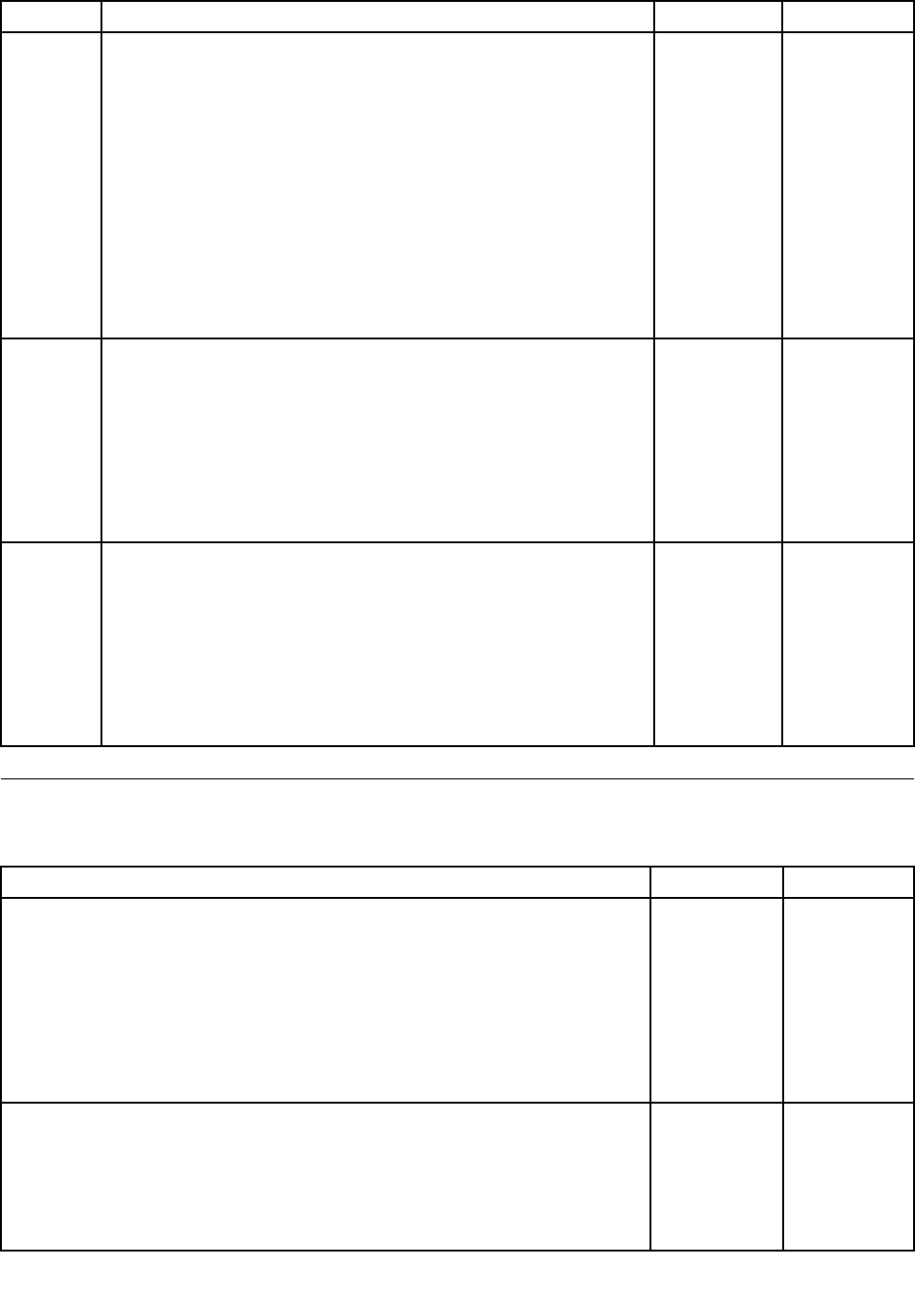
Item#FRUsFRU#CRU
25
Opticaldrive,SATAslimRambo
•MT1654:CTOA1GA2UA2FA2S
•MT1664:CTOA1UA1FA2JA3UA3FA3SA4UA4FA4SA5UA5F
A5SA7UA7FA7SA8UA8FA8SA9J
•MT1677:CTOC1BA6AA6TA7GA7AA7TA8AA8TA9AA9TA1U
A1SA1DA1YA2SA2DA2YA3SA3DA3YA4SA4DA4YA5SA5D
A5YB6UB6FB1GB2GB3GB4GB5GB8HB8VD1JD3JB4B
D5GD6GD7GE1JE4J
•MT1738:CTOA1GA2GA3G
•MT1739:CTOA1G
•MT1938:CTOA1UA1FA1SA1PA1LA1DA1YA1GA1MA1AA1Q
A1TA1CA1BA1HA1VA1KA1RA1EA1J
45K0433N
27
Assembly-camera-kit
•MT1654:allmodels
•MT1664:allmodels
•MT1677:allmodels
•MT1738:allmodels
•MT1739:allmodels
•MT1938:allmodels
03T9690N
27
Assembly_non_camera_kit
•MT1654:allmodels
•MT1664:allmodels
•MT1677:allmodels
•MT1738:allmodels
•MT1739:allmodels
•MT1938:allmodels
03T9691N
MechanicalFRUs
TheFRUslistedinthefollowingtablesarenotillustrated.
FRUsFRU#CRU
Cables.
•MT1654:allmodels
•MT1664:allmodels
•MT1677:allmodels
•MT1738:allmodels
•MT1739:allmodels
•MT1938:allmodels
03T9643N
Cardreaderbezel
•MT1654:allmodels
•MT1664:allmodels
•MT1677:allmodels
•MT1738:allmodels
03T9645N
138ThinkCentreHardwareMaintenanceManual

FRUsFRU#CRU
•MT1739:allmodels
•MT1938:allmodels
Cardreaderblankbezel
•MT1654:allmodels
•MT1664:allmodels
•MT1677:allmodels
•MT1738:allmodels
•MT1739:allmodels
•MT1938:allmodels
03T9646N
Harddiskdrivebracketkit
•MT1654:allmodels
•MT1664:allmodels
•MT1677:allmodels
•MT1738:allmodels
•MT1739:allmodels
•MT1938:allmodels
03T9653N
Assemblyfrontbezel;touch
•MT1654:allmodels
•MT1664:allmodels
•MT1677:allmodels
•MT1738:allmodels
•MT1739:allmodels
•MT1938:allmodels
03T9669N
Assemblytouchpanel
•MT1654:allmodels
•MT1664:allmodels
•MT1677:allmodels
•MT1738:allmodels
•MT1739:allmodels
•MT1938:allmodels
03T9687N
Cardreaderbezelassembly
•MT1654:allmodels
•MT1664:allmodels
•MT1677:allmodels
•MT1738:allmodels
•MT1739:allmodels
•MT1938:allmodels
03T9693N
Chapter9.FRUlists139

FRUsFRU#CRU
Noncardreaderblankbezel
•MT1654:allmodels
•MT1664:allmodels
•MT1677:allmodels
•MT1738:allmodels
•MT1739:allmodels
•MT1938:allmodels
03T9694N
Tapkit
•MT1654:allmodels
•MT1664:allmodels
•MT1677:allmodels
•MT1738:allmodels
•MT1739:allmodels
•MT1938:allmodels
03T9692N
Assemblyfrontbezel;touch
•MT1654:allmodels
•MT1664:allmodels
•MT1677:allmodels
•MT1738:allmodels
•MT1739:allmodels
•MT1938:allmodels
03T9669N
Assemblymonitorstand,touchandnon-touch
•MT1654:allmodels
•MT1664:allmodels
•MT1677:allmodels
•MT1738:allmodels
•MT1739:allmodels
•MT1938:allmodels
03T9686N
Intrusionswitchcable
•MT1654:allmodels
•MT1664:allmodels
•MT1677:allmodels
•MT1738:allmodels
•MT1739:allmodels
•MT1938:allmodels
03T6423N
140ThinkCentreHardwareMaintenanceManual

KeyboardandMouse
Keyboard(preferredprofullsize)FRU#CRU
SlimUSB--USEnglishChina
•MT1654:CTOA2U
•MT1664:CTOA1UA3UA4UA5UA6UA7UA8U
•MT1677:CTOA6AA7AA8AA1UB6U
•MT1738:CTO
•MT1739:CTO
•MT1938:CTOA1UA1LA1MA1AA1QA1CA1HA1RA1E
41A52891
SlimUSB--Arabic
•MT1654:CTO
•MT1664:CTO
•MT1677:CTOA7GB3GB5GD5GD6GD7G
•MT1738:CTOA1G
•MT1739:CTOA1G
•MT1938:CTOA1G
41A52901
SlimUSB--A/F
•MT1654:CTO
•MT1664:CTO
•MT1677:CTO
•MT1738:CTO
•MT1739:CTO
•MT1938:CTO
41A52911
SlimUSB--B/F
•MT1654:CTO
•MT1664:CTO
•MT1677:CTOA7GB3GB5GD5GD6GD7G
•MT1738:CTOA1G
•MT1739:CTOA1G
•MT1938:CTOA1G
41A52921
SlimUSB--BelgiumEnglish
•MT1654:CTO
•MT1664:CTO
•MT1677:CTOA7GB3GB5GD5GD6GD7G
•MT1738:CTOA1G
•MT1739:CTOA1G
•MT1938:CTOA1G
41A52931
Chapter9.FRUlists141

Keyboard(preferredprofullsize)FRU#CRU
SlimUSB--BrazilianPortuguese
•MT1654:CTO
•MT1664:CTO
•MT1677:CTO
•MT1738:CTO
•MT1739:CTO
•MT1938:CTOA1P
41A52941
SlimUSB--Bulgarian
•MT1654:CTO
•MT1664:CTO
•MT1677:CTOA7GB3GB5GD5GD6GD7G
•MT1738:CTOA1G
•MT1739:CTOA1G
•MT1938:CTOA1G
41A52951
SlimUSB--TraditionalChinese
•MT1654:CTO
•MT1664:CTO
•MT1677:CTOC1BB7V
•MT1738:CTO
•MT1739:CTO
•MT1938:CTOA1BA1V
41A52961
SlimUSB--Czech(QWERTYorABB)
•MT1654:CTO
•MT1664:CTO
•MT1677:CTOA7GB3GB5GD5GD6GD7G
•MT1738:CTOA1G
•MT1739:CTOA1G
•MT1938:CTOA1G
41A52971
SlimUSB--Danish
•MT1654:CTO
•MT1664:CTO
•MT1677:CTOA7GB3GB5GD5GD6GD7G
•MT1738:CTOA1G
•MT1739:CTOA1G
•MT1938:CTOA1G
41A52981
142ThinkCentreHardwareMaintenanceManual

Keyboard(preferredprofullsize)FRU#CRU
SlimUSB--Dutch
•MT1654:CTO
•MT1664:CTO
•MT1677:CTOA7GB3GB5GD5GD6GD7G
•MT1738:CTOA1G
•MT1739:CTOA1G
•MT1938:CTOA1G
41A52991
SlimUSB--French
•MT1654:CTO
•MT1664:CTO
•MT1677:CTOA7GB3GB5GD5GD6GD7G
•MT1738:CTOA1G
•MT1739:CTOA1G
•MT1938:CTOA1G
41A53001
SlimUSB--FrenchCanadian
•MT1654:CTOA2F
•MT1664:CTOA1FA3FA4FA5FA6FA7UA8U
•MT1677:CTOB6F
•MT1738:CTO
•MT1739:CTO
•MT1938:CTOA1F
41A53011
SlimUSB--FrenchCanadian
•MT1654:CTOA2F
•MT1664:CTOA1FA3FA4FA5FA6FA7UA8U
•MT1677:CTOB6F
•MT1738:CTO
•MT1739:CTO
•MT1938:CTOA1F
41A53021
SlimUSB--German
•MT1654:CTO
•MT1664:CTO
•MT1677:CTOA7GB3GB5GD5GD6GD7G
•MT1738:CTOA1G
•MT1739:CTOA1G
•MT1938:CTOA1G
41A53031
Chapter9.FRUlists143

Keyboard(preferredprofullsize)FRU#CRU
SlimUSB--Greek
•MT1654:CTO
•MT1664:CTO
•MT1677:CTOA7GB3GB5GD5GD6GD7G
•MT1738:CTOA1G
•MT1739:CTOA1G
•MT1938:CTOA1G
41A53041
SlimUSB--Greek/US
•MT1654:CTO
•MT1664:CTO
•MT1677:CTOA7GB3GB5GD5GD6GD7G
•MT1738:CTOA1G
•MT1739:CTOA1G
•MT1938:CTOA1G
41A53051
SlimUSB--Hebrew
•MT1654:CTO
•MT1664:CTO
•MT1677:CTOA7GB3GB5GD5GD6GD7G
•MT1738:CTOA1G
•MT1739:CTOA1G
•MT1938:CTOA1G
41A53061
SlimUSB--Hungarian
•MT1654:CTO
•MT1664:CTO
•MT1677:CTOA7GB3GB5GD5GD6GD7G
•MT1738:CTOA1G
•MT1739:CTOA1G
•MT1938:CTOA1G
41A53071
SlimUSB--Iceland
•MT1654:CTO
•MT1664:CTO
•MT1677:CTOA7GB3GB5GD5GD6GD7G
•MT1738:CTOA1G
•MT1739:CTOA1G
•MT1938:CTOA1G
41A53081
144ThinkCentreHardwareMaintenanceManual

Keyboard(preferredprofullsize)FRU#CRU
SlimUSB--Italy
•MT1654:CTO
•MT1664:CTO
•MT1677:CTOA7GB3GB5GD5GD6GD7G
•MT1738:CTOA1G
•MT1739:CTOA1G
•MT1938:CTOA1G
41A53091
SlimUSB--Japanese
•MT1654:CTO
•MT1664:CTOA9J
•MT1677:CTOD1JD2JD3JD4JE1JE2JE3JE4J
•MT1738:CTO
•MT1739:CTO
•MT1938:CTOA1J
41A53101
SlimUSB--Korean
•MT1654:CTO
•MT1664:CTO
•MT1677:CTO
•MT1738:CTO
•MT1739:CTO
•MT1938:CTOA1K
41A53111
SlimUSB--LASpanish
•MT1654:CTOA2S
•MT1664:CTOA3SA4SA5SA6SA7SA8S
•MT1677:CTOA1SA1DA1YA2SA2DA2YA3SA3DA3YA4SA4DA4YA5S
A5DA5Y
•MT1738:CTO
•MT1739:CTO
•MT1938:CTOA1SA1DA1Y
41A53121
SlimUSB--Norwegian
•MT1654:CTO
•MT1664:CTO
•MT1677:CTOA7GB3GB5GD5GD6GD7G
•MT1738:CTOA1G
•MT1739:CTO
•MT1938:CTOA1G
41A53131
Chapter9.FRUlists145

Keyboard(preferredprofullsize)FRU#CRU
SlimUSB--Polish
•MT1654:CTO
•MT1664:CTO
•MT1677:CTOA7GB3GB5GD5GD6GD7G
•MT1738:CTOA1G
•MT1739:CTOA1G
•MT1938:CTOA1G
41A53141
SlimUSB--Portuguese
•MT1654:CTO
•MT1664:CTO
•MT1677:CTOA7GB3GB5GD5GD6GD7G
•MT1738:CTOA1G
•MT1739:CTOA1G
•MT1938:CTOA1G
41A53151
SlimUSB--Romanian
•MT1654:CTO
•MT1664:CTO
•MT1677:CTOA7GB3GB5GD5GD6GD7G
•MT1738:CTOA1G
•MT1739:CTOA1G
•MT1938:CTOA1G
41A53161
SlimUSB--Romanian
•MT1654:CTO
•MT1664:CTO
•MT1677:CTOA7GB3GB5GD5GD6GD7G
•MT1738:CTOA1G
•MT1739:CTOA1G
•MT1938:CTOA1G
41A53171
SlimUSB--Russian/Cyrillic
•MT1654:CTO
•MT1664:CTO
•MT1677:CTOA7GB3GB5GD5GD6GD7G
•MT1738:CTOA1G
•MT1739:CTOA1G
•MT1938:CTOA1G
41A53181
146ThinkCentreHardwareMaintenanceManual

Keyboard(preferredprofullsize)FRU#CRU
SlimUSB--Serbian/Cyrillic
•MT1654:CTO
•MT1664:CTO
•MT1677:CTOA7GB3GB5GD5GD6GD7G
•MT1738:CTOA1G
•MT1739:CTOA1G
•MT1938:CTOA1G
41A53191
SlimUSB--Slovak
•MT1654:CTO
•MT1664:CTO
•MT1677:CTOA7GB3GB5GD5GD6GD7G
•MT1738:CTOA1G
•MT1739:CTOA1G
•MT1938:CTOA1G
41A53201
SlimUSB--Spanish
•MT1654:CTO
•MT1664:CTO
•MT1677:CTOA7GB3GB5GD5GD6GD7G
•MT1738:CTOA1G
•MT1739:CTOA1G
•MT1938:CTOA1G
41A53211
SlimUSB--Swedish/Finnish
•MT1654:CTO
•MT1664:CTO
•MT1677:CTOA7GB3GB5GD5GD6GD7G
•MT1738:CTOA1G
•MT1739:CTOA1G
•MT1938:CTOA1G
41A53221
SlimUSB--SF/G
•MT1654:CTO
•MT1664:CTO
•MT1677:CTOA7GB3GB5GD5GD6GD7G
•MT1738:CTOA1G
•MT1739:CTOA1G
•MT1938:CTOA1G
41A53231
Chapter9.FRUlists147

Keyboard(preferredprofullsize)FRU#CRU
SlimUSB--Thailand
•MT1654:CTO
•MT1664:CTO
•MT1677:CTOA6TA7TA8T
•MT1738:CTO
•MT1739:CTO
•MT1938:CTOA1T
41A53241
SlimUSB--Turkish
•MT1654:CTO
•MT1664:CTO
•MT1677:CTOA7GB3GB5GD5GD6GD7G
•MT1738:CTOA1G
•MT1739:CTOA1G
•MT1938:CTOA1G
41A53251
SlimUSB--Turkish
•MT1654:CTO
•MT1664:CTO
•MT1677:CTOA7GB3GB5GD5GD6GD7G
•MT1738:CTOA1G
•MT1739:CTOA1G
•MT1938:CTOA1G
41A53261
SlimUSB--UKEnglish
•MT1654:CTO
•MT1664:CTO
•MT1677:CTOA7GB3GB5GD5GD6GD7G
•MT1738:CTOA1G
•MT1739:CTOA1G
•MT1938:CTOA1G
41A53271
SlimUSB--USEuropean
•MT1654:CTO
•MT1664:CTO
•MT1677:CTOA7GB3GB5GD5GD6GD7G
•MT1738:CTOA1G
•MT1739:CTOA1G
•MT1938:CTOA1G
41A53281
148ThinkCentreHardwareMaintenanceManual

Keyboard(preferredprofullsize)FRU#CRU
SlimUSB--Slovenian
•MT1654:CTO
•MT1664:CTO
•MT1677:CTOA7GB3GB5GD5GD6GD7G
•MT1738:CTOA1G
•MT1739:CTOA1G
•MT1938:CTOA1G
41A53291
SlimUSB--Arabic(new)
•MT1654:CTO
•MT1664:CTO
•MT1677:CTOA7GB3GB5GD5GD6GD7G
•MT1738:CTOA1G
•MT1739:CTOA1G
•MT1938:CTOA1G
45J48801
SlimUSB--Lithuanian
•MT1654:CTO
•MT1664:CTO
•MT1677:CTOA7GB3GB5GD5GD6GD7G
•MT1738:CTOA1G
•MT1739:CTOA1G
•MT1938:CTOA1G
45J48961
SlimUSB--India
•MT1654:CTO
•MT1664:CTO
•MT1738:CTO
•MT1739:CTO
•MT1938:CTOA1Q
54Y83811
Keyboard(ngerprint(EPEATGOLD))FRU#CRU
Fingerprint--USEnglishChina
•MT1654:CTO
•MT1664:CTO
•MT1677:CTO
•MT1738:CTO
•MT1739:CTO
•MT1938:CTO
03X80011
Fingerprint--Arabic
•MT1654:CTO
•MT1664:CTO
•MT1677:CTO
•MT1738:CTO
•MT1739:CTO
03X80021
Chapter9.FRUlists149

Keyboard(ngerprint(EPEATGOLD))FRU#CRU
•MT1938:CTO
Fingerprint--A/F
•MT1654:CTO
•MT1664:CTO
•MT1677:CTO
•MT1738:CTO
•MT1739:CTO
•MT1938:CTO
03X80031
Fingerprint--B/F
•MT1654:CTO
•MT1664:CTO
•MT1677:CTO
•MT1738:CTO
•MT1739:CTO
•MT1938:CTO
03X80041
Fingerprint--BelgiumEnglish
•MT1654:CTO
•MT1664:CTO
•MT1677:CTO
•MT1738:CTO
•MT1739:CTO
•MT1938:CTO
03X80051
Fingerprint--BrazilianPortuguese
•MT1654:CTO
•MT1664:CTO
•MT1677:CTO
•MT1738:CTO
•MT1739:CTO
•MT1938:CTO
03X80061
Fingerprint--Bulgarian
•MT1654:CTO
•MT1664:CTO
•MT1677:CTO
•MT1738:CTO
•MT1739:CTO
•MT1938:CTO
03X80071
150ThinkCentreHardwareMaintenanceManual

Keyboard(ngerprint(EPEATGOLD))FRU#CRU
Fingerprint--TraditionalChinese
•MT1654:CTO
•MT1664:CTO
•MT1677:CTO
•MT1738:CTO
•MT1739:CTO
•MT1938:CTO
03X80081
Fingerprint--Czech(QWERTYorABB)
•MT1654:CTO
•MT1664:CTO
•MT1677:CTO
•MT1738:CTO
•MT1739:CTO
•MT1938:CTO
03X80091
Fingerprint--Danish
•MT1654:CTO
•MT1664:CTO
•MT1677:CTO
•MT1738:CTO
•MT1739:CTO
•MT1938:CTO
03X80101
Fingerprint--Dutch
•MT1654:CTO
•MT1664:CTO
•MT1677:CTO
•MT1738:CTO
•MT1739:CTO
•MT1938:CTO
03X80111
Fingerprint--French
•MT1654:CTO
•MT1664:CTO
•MT1677:CTO
•MT1738:CTO
•MT1739:CTO
•MT1938:CTO
03X80121
Chapter9.FRUlists151

Keyboard(ngerprint(EPEATGOLD))FRU#CRU
Fingerprint--FrenchCanadian
•MT1654:CTO
•MT1664:CTO
•MT1677:CTO
•MT1738:CTO
•MT1739:CTO
•MT1938:CTO
03X80131
Fingerprint--FrenchCanadian
•MT1654:CTO
•MT1664:CTO
•MT1677:CTO
•MT1738:CTO
•MT1739:CTO
•MT1938:CTO
03X80141
Fingerprint--German
•MT1654:CTO
•MT1664:CTO
•MT1677:CTO
•MT1738:CTO
•MT1739:CTO
•MT1938:CTO
03X80151
Fingerprint--Greek
•MT1654:CTO
•MT1664:CTO
•MT1677:CTO
•MT1738:CTO
•MT1739:CTO
•MT1938:CTO
03X80161
Fingerprint--Greek/US
•MT1654:CTO
•MT1664:CTO
•MT1677:CTO
•MT1738:CTO
•MT1739:CTO
•MT1938:CTO
03X80171
152ThinkCentreHardwareMaintenanceManual

Keyboard(ngerprint(EPEATGOLD))FRU#CRU
Fingerprint--Hebrew
•MT1654:CTO
•MT1664:CTO
•MT1677:CTO
•MT1738:CTO
•MT1739:CTO
•MT1938:CTO
03X80181
Fingerprint--Hungarian
•MT1654:CTO
•MT1664:CTO
•MT1677:CTO
•MT1738:CTO
•MT1739:CTO
•MT1938:CTO
03X80191
Fingerprint--Iceland
•MT1654:CTO
•MT1664:CTO
•MT1677:CTO
•MT1738:CTO
•MT1739:CTO
•MT1938:CTO
03X80201
Fingerprint--Italy
•MT1654:CTO
•MT1664:CTO
•MT1677:CTO
•MT1738:CTO
•MT1739:CTO
•MT1938:CTO
03X80211
Fingerprint--Japanese
•MT1654:CTO
•MT1664:CTO
•MT1677:CTO
•MT1738:CTO
•MT1739:CTO
•MT1938:CTO
03X80221
Chapter9.FRUlists153

Keyboard(ngerprint(EPEATGOLD))FRU#CRU
Fingerprint--Korean
•MT1654:CTO
•MT1664:CTO
•MT1677:CTO
•MT1738:CTO
•MT1739:CTO
•MT1938:CTO
03X80231
Fingerprint--LASpanish
•MT1654:CTO
•MT1664:CTO
•MT1677:CTO
•MT1738:CTO
•MT1739:CTO
•MT1938:CTO
03X80241
Fingerprint--Norwegian
•MT1654:CTO
•MT1664:CTO
•MT1677:CTO
•MT1738:CTO
•MT1739:CTO
•MT1938:CTO
03X80251
Fingerprint--Polish
•MT1654:CTO
•MT1664:CTO
•MT1677:CTO
•MT1738:CTO
•MT1739:CTO
•MT1938:CTO
03X80261
Fingerprint--Portuguese
•MT1654:CTO
•MT1664:CTO
•MT1677:CTO
•MT1738:CTO
•MT1739:CTO
•MT1938:CTO
03X80271
154ThinkCentreHardwareMaintenanceManual

Keyboard(ngerprint(EPEATGOLD))FRU#CRU
Fingerprint--Romanian
•MT1654:CTO
•MT1664:CTO
•MT1677:CTO
•MT1738:CTO
•MT1739:CTO
•MT1938:CTO
03X80391
Fingerprint--Russian/Cyrillic
•MT1654:CTO
•MT1664:CTO
•MT1677:CTO
•MT1738:CTO
•MT1739:CTO
•MT1938:CTO
03X80281
Fingerprint--Serbian/Cyrillic
•MT1654:CTO
•MT1664:CTO
•MT1677:CTO
•MT1738:CTO
•MT1739:CTO
•MT1938:CTO
03X80401
Fingerprint--Slovak
•MT1654:CTO
•MT1664:CTO
•MT1677:CTO
•MT1738:CTO
•MT1739:CTO
•MT1938:CTO
03X80291
Fingerprint--Spanish
•MT1654:CTO
•MT1664:CTO
•MT1677:CTO
•MT1738:CTO
•MT1739:CTO
•MT1938:CTO
03X80301
Chapter9.FRUlists155

Keyboard(ngerprint(EPEATGOLD))FRU#CRU
Fingerprint--Swedish/Finnish
•MT1654:CTO
•MT1664:CTO
•MT1677:CTO
•MT1738:CTO
•MT1739:CTO
•MT1938:CTO
03X80311
Fingerprint--SF/G
•MT1654:CTO
•MT1664:CTO
•MT1677:CTO
•MT1738:CTO
•MT1739:CTO
•MT1938:CTO
03X80321
Fingerprint--Thailand
•MT1654:CTO
•MT1664:CTO
•MT1677:CTO
•MT1738:CTO
•MT1739:CTO
•MT1938:CTO
03X80331
Fingerprint--Turkish
•MT1654:CTO
•MT1664:CTO
•MT1677:CTO
•MT1738:CTO
•MT1739:CTO
•MT1938:CTO
03X80411
Fingerprint--Turkish
•MT1654:CTO
•MT1664:CTO
•MT1677:CTO
•MT1738:CTO
•MT1739:CTO
•MT1938:CTO
03X80341
156ThinkCentreHardwareMaintenanceManual

Keyboard(ngerprint(EPEATGOLD))FRU#CRU
Fingerprint--UKEnglish
•MT1654:CTO
•MT1664:CTO
•MT1677:CTO
•MT1738:CTO
•MT1739:CTO
•MT1938:CTO
03X80351
Fingerprint--USEuropean
•MT1654:CTO
•MT1664:CTO
•MT1677:CTO
•MT1738:CTO
•MT1739:CTO
•MT1938:CTO
03X80361
Fingerprint--Slovenian
•MT1654:CTO
•MT1664:CTO
•MT1677:CTO
•MT1738:CTO
•MT1739:CTO
•MT1938:CTO
03X80371
Keyboard(ngerprint(EPEATGOLD))FRU#CRU
Fingerprint--USEnglishChina
•MT1654:CTO
•MT1664:CTO
•MT1677:CTO
•MT1738:CTO
•MT1739:CTO
•MT1938:CTO
41R00381
Fingerprint--Arabic
•MT1654:CTO
•MT1664:CTO
•MT1677:CTO
•MT1738:CTO
•MT1739:CTO
•MT1938:CTO
41R00391
Chapter9.FRUlists157

Keyboard(ngerprint(EPEATGOLD))FRU#CRU
Fingerprint--A/F
•MT1654:CTO
•MT1664:CTO
•MT1677:CTO
•MT1738:CTO
•MT1739:CTO
•MT1938:CTO
41R00401
Fingerprint--B/F
•MT1654:CTO
•MT1664:CTO
•MT1677:CTO
•MT1738:CTO
•MT1739:CTO
•MT1938:CTO
41R00411
Fingerprint--BelgiumEnglish
•MT1654:CTO
•MT1664:CTO
•MT1677:CTO
•MT1738:CTO
•MT1739:CTO
•MT1938:CTO
41R00421
Fingerprint--BrazilianPortuguese
•MT1654:CTO
•MT1664:CTO
•MT1677:CTO
•MT1738:CTO
•MT1739:CTO
•MT1938:CTO
41R00431
Fingerprint--Bulgarian
•MT1654:CTO
•MT1664:CTO
•MT1677:CTO
•MT1738:CTO
•MT1739:CTO
•MT1938:CTO
41R00441
158ThinkCentreHardwareMaintenanceManual

Keyboard(ngerprint(EPEATGOLD))FRU#CRU
Fingerprint--TraditionalChinese
•MT1654:CTO
•MT1664:CTO
•MT1677:CTO
•MT1738:CTO
•MT1739:CTO
•MT1938:CTO
41R00451
Fingerprint--Czech(QWERTYorABB)
•MT1654:CTO
•MT1664:CTO
•MT1677:CTO
•MT1738:CTO
•MT1739:CTO
•MT1938:CTO
41R00461
Fingerprint--Danish
•MT1654:CTO
•MT1664:CTO
•MT1677:CTO
•MT1738:CTO
•MT1739:CTO
•MT1938:CTO
41R00471
Fingerprint--Dutch
•MT1654:CTO
•MT1664:CTO
•MT1677:CTO
•MT1738:CTO
•MT1739:CTO
•MT1938:CTO
41R00481
Fingerprint--French
•MT1654:CTO
•MT1664:CTO
•MT1677:CTO
•MT1738:CTO
•MT1739:CTO
•MT1938:CTO
41R00491
Chapter9.FRUlists159

Keyboard(ngerprint(EPEATGOLD))FRU#CRU
Fingerprint--FrenchCanadian
•MT1654:CTO
•MT1664:CTO
•MT1677:CTO
•MT1738:CTO
•MT1739:CTO
•MT1938:CTO
41R00501
Fingerprint--FrenchCanadian
•MT1654:CTO
•MT1664:CTO
•MT1677:CTO
•MT1738:CTO
•MT1739:CTO
•MT1938:CTO
41R00511
Fingerprint--German
•MT1654:CTO
•MT1664:CTO
•MT1677:CTO
•MT1738:CTO
•MT1739:CTO
•MT1938:CTO
41R00521
Fingerprint--Greek
•MT1654:CTO
•MT1664:CTO
•MT1677:CTO
•MT1738:CTO
•MT1739:CTO
•MT1938:CTO
41R00531
Fingerprint--Greek/US
•MT1654:CTO
•MT1664:CTO
•MT1677:CTO
•MT1738:CTO
•MT1739:CTO
•MT1938:CTO
41R00541
160ThinkCentreHardwareMaintenanceManual

Keyboard(ngerprint(EPEATGOLD))FRU#CRU
Fingerprint--Hebrew
•MT1654:CTO
•MT1664:CTO
•MT1677:CTO
•MT1738:CTO
•MT1739:CTO
•MT1938:CTO
41R00551
Fingerprint--Hungarian
•MT1654:CTO
•MT1664:CTO
•MT1677:CTO
•MT1738:CTO
•MT1739:CTO
•MT1938:CTO
41R00561
Fingerprint--Iceland
•MT1654:CTO
•MT1664:CTO
•MT1677:CTO
•MT1738:CTO
•MT1739:CTO
•MT1938:CTO
41R00571
Fingerprint--Italy
•MT1654:CTO
•MT1664:CTO
•MT1677:CTO
•MT1738:CTO
•MT1739:CTO
•MT1938:CTO
41R00581
Fingerprint--Japanese
•MT1654:CTO
•MT1664:CTO
•MT1677:CTO
•MT1738:CTO
•MT1739:CTO
•MT1938:CTO
41R00591
Chapter9.FRUlists161

Keyboard(ngerprint(EPEATGOLD))FRU#CRU
Fingerprint--Korean
•MT1654:CTO
•MT1664:CTO
•MT1677:CTO
•MT1738:CTO
•MT1739:CTO
•MT1938:CTO
41R00601
Fingerprint--LASpanish
•MT1654:CTO
•MT1664:CTO
•MT1677:CTO
•MT1738:CTO
•MT1739:CTO
•MT1938:CTO
41R00611
Fingerprint--Norwegian
•MT1654:CTO
•MT1664:CTO
•MT1677:CTO
•MT1738:CTO
•MT1739:CTO
•MT1938:CTO
41R00621
Fingerprint--Polish
•MT1654:CTO
•MT1664:CTO
•MT1677:CTO
•MT1738:CTO
•MT1739:CTO
•MT1938:CTO
41R00631
Fingerprint--Portuguese
•MT1654:CTO
•MT1664:CTO
•MT1677:CTO
•MT1738:CTO
•MT1739:CTO
•MT1938:CTO
41R00641
162ThinkCentreHardwareMaintenanceManual

Keyboard(ngerprint(EPEATGOLD))FRU#CRU
Fingerprint--Romanian
•MT1654:CTO
•MT1664:CTO
•MT1677:CTO
•MT1738:CTO
•MT1739:CTO
•MT1938:CTO
41R00651
Fingerprint--Russian/Cyrillic
•MT1654:CTO
•MT1664:CTO
•MT1677:CTO
•MT1738:CTO
•MT1739:CTO
•MT1938:CTO
41R00671
Fingerprint--Serbian/Cyrillic
•MT1654:CTO
•MT1664:CTO
•MT1677:CTO
•MT1738:CTO
•MT1739:CTO
•MT1938:CTO
41R00681
Fingerprint--Slovak
•MT1654:CTO
•MT1664:CTO
•MT1677:CTO
•MT1738:CTO
•MT1739:CTO
•MT1938:CTO
41R00691
Fingerprint--Spanish
•MT1654:CTO
•MT1664:CTO
•MT1677:CTO
•MT1738:CTO
•MT1739:CTO
•MT1938:CTO
41R00701
Chapter9.FRUlists163

Keyboard(ngerprint(EPEATGOLD))FRU#CRU
Fingerprint--Swedish/Finnish
•MT1654:CTO
•MT1664:CTO
•MT1677:CTO
•MT1738:CTO
•MT1739:CTO
•MT1938:CTO
41R00711
Fingerprint--SF/G
•MT1654:CTO
•MT1664:CTO
•MT1677:CTO
•MT1738:CTO
•MT1739:CTO
•MT1938:CTO
41R00721
Fingerprint--Thailand
•MT1654:CTO
•MT1664:CTO
•MT1677:CTO
•MT1738:CTO
•MT1739:CTO
•MT1938:CTO
41R00731
Fingerprint--Turkish
•MT1654:CTO
•MT1664:CTO
•MT1677:CTO
•MT1738:CTO
•MT1739:CTO
•MT1938:CTO
41R00741
Fingerprint--Turkish
•MT1654:CTO
•MT1664:CTO
•MT1677:CTO
•MT1738:CTO
•MT1739:CTO
•MT1938:CTO
41R00751
164ThinkCentreHardwareMaintenanceManual

Keyboard(ngerprint(EPEATGOLD))FRU#CRU
Fingerprint--UKEnglish
•MT1654:CTO
•MT1664:CTO
•MT1677:CTO
•MT1738:CTO
•MT1739:CTO
•MT1938:CTO
41R00761
Fingerprint--USEuropean
•MT1654:CTO
•MT1664:CTO
•MT1677:CTO
•MT1738:CTO
•MT1739:CTO
•MT1938:CTO
41R00771
Fingerprint--Slovenian
•MT1654:CTO
•MT1664:CTO
•MT1677:CTO
•MT1738:CTO
•MT1739:CTO
•MT1938:CTO
41R00781
Keyboard(Ultraslimwireless)FRU#CRU
Ultraslimwireless--USEnglishChina
•MT1654:CTO
•MT1664:CTO
•MT1677:CTOA8AA8TA9AA9TB8H
•MT1738:CTO
•MT1739:CTO
•MT1938:CTO
57Y47401
Ultraslimwireless--Arabic
•MT1654:CTOA1G
•MT1664:CTO
•MT1677:CTOB1GB2GB4G
•MT1738:CTOA3G
•MT1739:CTO
•MT1938:CTO
57Y47411
Chapter9.FRUlists165

Keyboard(Ultraslimwireless)FRU#CRU
Ultraslimwireless--A/F
•MT1654:CTO
•MT1664:CTO
•MT1677:CTO
•MT1738:CTO
•MT1739:CTO
•MT1938:CTO
57Y47421
Ultraslimwireless--B/F
•MT1654:CTOA1G
•MT1664:CTO
•MT1677:CTOB1GB2GB4G
•MT1738:CTOA3G
•MT1739:CTO
•MT1938:CTO
57Y47431
Ultraslimwireless--BelgiumEnglish
•MT1654:CTOA1G
•MT1664:CTO
•MT1677:CTOB1GB2GB4G
•MT1738:CTOA3G
•MT1739:CTO
•MT1938:CTO
57Y47441
Ultraslimwireless--BrazilianPortuguese
•MT1654:CTO
•MT1664:CTO
•MT1677:CTO
•MT1738:CTO
•MT1739:CTO
•MT1938:CTO
57Y47451
Ultraslimwireless--Bulgarian
•MT1654:CTOA1G
•MT1664:CTO
•MT1677:CTOB1GB2GB4G
•MT1738:CTOA3G
•MT1739:CTO
•MT1938:CTO
57Y47461
166ThinkCentreHardwareMaintenanceManual

Keyboard(Ultraslimwireless)FRU#CRU
Ultraslimwireless--TraditionalChinese
•MT1654:CTO
•MT1664:CTO
•MT1677:CTOB8VB4B
•MT1738:CTO
•MT1739:CTO
•MT1938:CTO
57Y47471
Ultraslimwireless--Czech(QWERTYorABB)
•MT1654:CTOA1G
•MT1664:CTO
•MT1677:CTOB1GB2GB4G
•MT1738:CTOA3G
•MT1739:CTO
•MT1938:CTO
57Y47481
Ultraslimwireless--Danish
•MT1654:CTOA1G
•MT1664:CTO
•MT1677:CTOB1GB2GB4G
•MT1738:CTOA3G
•MT1739:CTO
•MT1938:CTO
57Y47491
Ultraslimwireless--Dutch
•MT1654:CTOA1G
•MT1664:CTO
•MT1677:CTOB1GB2GB4G
•MT1738:CTOA3G
•MT1739:CTO
•MT1938:CTO
57Y47501
Ultraslimwireless--French
•MT1654:CTOA1G
•MT1664:CTO
•MT1677:CTOB1GB2GB4G
•MT1738:CTOA3G
•MT1739:CTO
•MT1938:CTO
57Y47511
Chapter9.FRUlists167

Keyboard(Ultraslimwireless)FRU#CRU
Ultraslimwireless--FrenchCanadian
•MT1654:CTO
•MT1664:CTO
•MT1677:CTO
•MT1738:CTO
•MT1739:CTO
•MT1938:CTO
57Y47521
Ultraslimwireless--FrenchCanadian
•MT1654:CTO
•MT1664:CTO
•MT1677:CTO
•MT1738:CTO
•MT1739:CTO
•MT1938:CTO
57Y47531
Ultraslimwireless--German
•MT1654:CTOA1G
•MT1664:CTO
•MT1677:CTOB1GB2GB4G
•MT1738:CTOA3G
•MT1739:CTO
•MT1938:CTO
57Y47541
Ultraslimwireless--Greek
•MT1654:CTOA1G
•MT1664:CTO
•MT1677:CTOB1GB2GB4G
•MT1738:CTOA3G
•MT1739:CTO
•MT1938:CTO
57Y47551
Ultraslimwireless--Greek/US
•MT1654:CTOA1G
•MT1664:CTO
•MT1677:CTOB1GB2GB4G
•MT1738:CTOA3G
•MT1739:CTO
•MT1938:CTO
57Y47561
168ThinkCentreHardwareMaintenanceManual

Keyboard(Ultraslimwireless)FRU#CRU
Ultraslimwireless--Hebrew
•MT1654:CTOA1G
•MT1664:CTO
•MT1677:CTOB1GB2GB4G
•MT1738:CTOA3G
•MT1739:CTO
•MT1938:CTO
57Y47571
Ultraslimwireless--Hungarian
•MT1654:CTOA1G
•MT1664:CTO
•MT1677:CTOB1GB2GB4G
•MT1738:CTOA3G
•MT1739:CTO
•MT1938:CTO
57Y47581
Ultraslimwireless--Iceland
•MT1654:CTOA1G
•MT1664:CTO
•MT1677:CTOB1GB2GB4G
•MT1738:CTOA3G
•MT1739:CTO
•MT1938:CTO
57Y47591
Ultraslimwireless--Italy
•MT1654:CTOA1G
•MT1664:CTO
•MT1677:CTOB1GB2GB4G
•MT1738:CTOA3G
•MT1739:CTO
•MT1938:CTO
57Y47601
Ultraslimwireless--Japanese
•MT1654:CTO
•MT1664:CTOA2J
•MT1677:CTO
•MT1738:CTO
•MT1739:CTO
•MT1938:CTO
57Y47611
Chapter9.FRUlists169

Keyboard(Ultraslimwireless)FRU#CRU
Ultraslimwireless--Korean
•MT1654:CTO
•MT1664:CTO
•MT1677:CTO
•MT1738:CTO
•MT1739:CTO
•MT1938:CTO
57Y47621
Ultraslimwireless--LASpanish
•MT1654:CTO
•MT1664:CTO
•MT1677:CTO
•MT1738:CTOA3G
•MT1739:CTO
•MT1938:CTO
57Y47631
Ultraslimwireless--Norwegian
•MT1654:CTOA1G
•MT1664:CTO
•MT1677:CTOB1GB2GB4G
•MT1738:CTOA3G
•MT1739:CTO
•MT1938:CTO
57Y47641
Ultraslimwireless--Polish
•MT1654:CTOA1G
•MT1664:CTO
•MT1677:CTOB1GB2GB4G
•MT1738:CTOA3G
•MT1739:CTO
•MT1938:CTO
57Y47651
Ultraslimwireless--Portuguese
•MT1654:CTOA1G
•MT1664:CTO
•MT1677:CTOB1GB2GB4G
•MT1738:CTOA3G
•MT1739:CTO
•MT1938:CTO
57Y47661
170ThinkCentreHardwareMaintenanceManual

Keyboard(Ultraslimwireless)FRU#CRU
Ultraslimwireless--Russian/Cyrillic
•MT1654:CTOA1G
•MT1664:CTO
•MT1677:CTOB1GB2GB4G
•MT1738:CTOA3G
•MT1739:CTO
•MT1938:CTO
57Y47671
Ultraslimwireless--Slovak
•MT1654:CTOA1G
•MT1664:CTO
•MT1677:CTOB1GB2GB4G
•MT1738:CTOA3G
•MT1739:CTO
•MT1938:CTO
57Y47681
Ultraslimwireless--Spanish
•MT1654:CTOA1G
•MT1664:CTO
•MT1677:CTOB1GB2GB4G
•MT1738:CTOA3G
•MT1739:CTO
•MT1938:CTO
57Y47691
Ultraslimwireless--Swedish/Finnish
•MT1654:CTOA1G
•MT1664:CTO
•MT1677:CTOB1GB2GB4G
•MT1738:CTOA3G
•MT1739:CTO
•MT1938:CTO
57Y47701
Ultraslimwireless--SF/G
•MT1654:CTOA1G
•MT1664:CTO
•MT1677:CTOB1GB2GB4G
•MT1738:CTOA3G
•MT1739:CTO
•MT1938:CTO
57Y47711
Chapter9.FRUlists171

Keyboard(Ultraslimwireless)FRU#CRU
Ultraslimwireless--Thailand
•MT1654:CTO
•MT1664:CTO
•MT1677:CTOA9T
•MT1738:CTO
•MT1739:CTO
•MT1938:CTO
57Y47721
Ultraslimwireless--Turkish
•MT1654:CTOA1G
•MT1664:CTO
•MT1677:CTOB1GB2GB4G
•MT1738:CTOA3G
•MT1739:CTO
•MT1938:CTO
57Y47731
Ultraslimwireless--UKEnglish
•MT1654:CTOA1G
•MT1664:CTO
•MT1677:CTOB1GB2GB4G
•MT1738:CTOA3G
•MT1739:CTO
•MT1938:CTO
57Y47741
Ultraslimwireless--USEuropean
•MT1654:CTOA1G
•MT1664:CTO
•MT1677:CTOB1GB2GB4G
•MT1738:CTOA3G
•MT1739:CTO
•MT1938:CTO
57Y47751
Ultraslimwireless--Slovenian
•MT1654:CTOA1G
•MT1664:CTO
•MT1677:CTOB1GB2GB4G
•MT1738:CTOA3G
•MT1739:CTO
•MT1938:CTO
57Y47761
Ultraslimwireless--India
•MT1654:CTO
•MT1664:CTO
•MT1677:CTO
•MT1738:CTO
•MT1739:CTO
•MT1938:CTO
03X82391
172ThinkCentreHardwareMaintenanceManual

Keyboard(LenovoslimnewF5USB)FRU#CRU
SlimnewF5USB-USEnglish
•MT1654:
•MT1664:
•MT1677:
•MT1738:
•MT1739:
•MT1938:
54Y92931
SlimnewF5USB-Arabic
•MT1654:
•MT1664:
•MT1677:
•MT1738:
•MT1739:
•MT1938:
54Y92941
SlimnewF5USB-Arabic/French
•MT1654:
•MT1664:
•MT1677:
•MT1738:
•MT1739:
•MT1938:
54Y92951
SlimnewF5USB-Belgium/French
•MT1654:
•MT1664:
•MT1677:
•MT1738:
•MT1739:
•MT1938:
54Y92961
SlimnewF5USB-Belgium/English
•MT1654:
•MT1664:
•MT1677:
•MT1738:
•MT1739:
•MT1938:
54Y92971
Chapter9.FRUlists173

Keyboard(LenovoslimnewF5USB)FRU#CRU
SlimnewF5USB-Brazil/Portuguese
•MT1654:
•MT1664:
•MT1677:
•MT1738:
•MT1739:
•MT1938:
54Y92981
SlimnewF5USB-Bulgarian
•MT1654:
•MT1664:
•MT1677:
•MT1738:
•MT1739:
•MT1938:
54Y92991
SlimnewF5USB-TraditionalChinese
•MT1654:
•MT1664:
•MT1677:
•MT1738:
•MT1739:
•MT1938:
54Y93001
SlimnewF5USB-Czech(QWERTYorABB)
•MT1654:
•MT1664:
•MT1677:
•MT1738:
•MT1739:
•MT1938:
54Y93011
SlimnewF5USB-Danish
•MT1654:
•MT1664:
•MT1677:
•MT1738:
•MT1739:
•MT1938:
54Y93021
174ThinkCentreHardwareMaintenanceManual

Keyboard(LenovoslimnewF5USB)FRU#CRU
SlimnewF5USB-Dutch
•MT1654:
•MT1664:
•MT1677:
•MT1738:
•MT1739:
•MT1938:
54Y93031
SlimnewF5USB-French
•MT1654:
•MT1664:
•MT1677:
•MT1738:
•MT1739:
•MT1938:
54Y93041
SlimnewF5USB-FrenchCanadian
•MT1654:
•MT1664:
•MT1677:
•MT1738:
•MT1739:
•MT1938:
54Y93051
SlimnewF5USB-FrenchCanadian
•MT1654:
•MT1664:
•MT1677:
•MT1738:
•MT1739:
•MT1938:
54Y93061
SlimnewF5USB-German
•MT1654:
•MT1664:
•MT1677:
•MT1738:
•MT1739:
•MT1938:
54Y93071
Chapter9.FRUlists175

Keyboard(LenovoslimnewF5USB)FRU#CRU
SlimnewF5USB-Greek
•MT1654:
•MT1664:
•MT1677:
•MT1738:
•MT1739:
•MT1938:
54Y93081
SlimnewF5USB-Greek/US
•MT1654:
•MT1664:
•MT1677:
•MT1738:
•MT1739:
•MT1938:
54Y93091
SlimnewF5USB-Hebrew
•MT1654:
•MT1664:
•MT1677:
•MT1738:
•MT1739:
•MT1938:
54Y93101
SlimnewF5USB-Hungarian
•MT1654:
•MT1664:
•MT1677:
•MT1738:
•MT1739:
•MT1938:
54Y93111
SlimnewF5USB-Iceland
•MT1654:
•MT1664:
•MT1677:
•MT1738:
•MT1739:
•MT1938:
54Y93121
176ThinkCentreHardwareMaintenanceManual

Keyboard(LenovoslimnewF5USB)FRU#CRU
SlimnewF5USB-Italy
•MT1654:
•MT1664:
•MT1677:
•MT1738:
•MT1739:
•MT1938:
54Y93131
SlimnewF5USB-Japanese
•MT1654:
•MT1664:
•MT1677:
•MT1738:
•MT1739:
•MT1938:
54Y93141
SlimnewF5USB-Korean
•MT1654:
•MT1664:
•MT1677:
•MT1738:
•MT1739:
•MT1938:
54Y93151
SlimnewF5USB-LASpanish
•MT1654:
•MT1664:
•MT1677:
•MT1738:
•MT1739:
•MT1938:
54Y93161
SlimnewF5USB-Norwegian
•MT1654:
•MT1664:
•MT1677:
•MT1738:
•MT1739:
•MT1938:
54Y93171
Chapter9.FRUlists177

Keyboard(LenovoslimnewF5USB)FRU#CRU
SlimnewF5USB-Polish
•MT1654:
•MT1664:
•MT1677:
•MT1738:
•MT1739:
•MT1938:
54Y93181
SlimnewF5USB-Portuguese
•MT1654:
•MT1664:
•MT1677:
•MT1738:
•MT1739:
•MT1938:
54Y93191
SlimnewF5USB-Romanian
•MT1654:
•MT1664:
•MT1677:
•MT1738:
•MT1739:
•MT1938:
54Y93201
SlimnewF5USB-Russian/Cy
•MT1654:
•MT1664:
•MT1677:
•MT1738:
•MT1739:
•MT1938:
54Y93211
SlimnewF5USB-Serbian/Cyrilic
•MT1654:
•MT1664:
•MT1677:
•MT1738:
•MT1739:
•MT1938:
54Y93221
178ThinkCentreHardwareMaintenanceManual

Keyboard(LenovoslimnewF5USB)FRU#CRU
SlimnewF5USB-Slovak
•MT1654:
•MT1664:
•MT1677:
•MT1738:
•MT1739:
•MT1938:
54Y93231
SlimnewF5USB-Spanish
•MT1654:
•MT1664:
•MT1677:
•MT1738:
•MT1739:
•MT1938:
54Y93241
SlimnewF5USB-Swedish/Finn
•MT1654:
•MT1664:
•MT1677:
•MT1738:
•MT1739:
•MT1938:
54Y93251
SlimnewF5USB-Swiss,F/G
•MT1654:
•MT1664:
•MT1677:
•MT1738:
•MT1739:
•MT1938:
54Y93261
SlimnewF5USB-Thailand
•MT1654:
•MT1664:
•MT1677:
•MT1738:
•MT1739:
•MT1938:
54Y93271
Chapter9.FRUlists179

Keyboard(LenovoslimnewF5USB)FRU#CRU
SlimnewF5USB-Turkish
•MT1654:
•MT1664:
•MT1677:
•MT1738:
•MT1739:
•MT1938:
54Y93281
SlimnewF5USB-Turkish
•MT1654:
•MT1664:
•MT1677:
•MT1738:
•MT1739:
•MT1938:
54Y93291
SlimnewF5USB-UKEnglish
•MT1654:
•MT1664:
•MT1677:
•MT1738:
•MT1739:
•MT1938:
54Y93301
SlimnewF5USB-USEuropean
•MT1654:
•MT1664:
•MT1677:
•MT1738:
•MT1739:
•MT1938:
54Y93311
SlimnewF5USB-Slovenian+++
•MT1654:
•MT1664:
•MT1677:
•MT1738:
•MT1739:
•MT1938:
54Y93321
180ThinkCentreHardwareMaintenanceManual

Keyboard(LenovoslimnewF5USB)FRU#CRU
SlimnewF5USB-Arabic(new)
•MT1654:
•MT1664:
•MT1677:
•MT1738:
•MT1739:
•MT1938:
54Y93331
SlimnewF5USB-Lithuanian
•MT1654:
•MT1664:
•MT1677:
•MT1738:
•MT1739:
•MT1938:
54Y93341
SlimnewF5USB-Estonia
•MT1654:
•MT1664:
•MT1677:
•MT1738:
•MT1739:
•MT1938:
54Y93351
SlimnewF5USB-India
•MT1654:
•MT1664:
•MT1677:
•MT1738:
•MT1739:
•MT1938:
54Y92931
Keyboard(ultraslimplusKB/MS-)FRU#CRU
UltraslimplusKB/MS-USEnglish
•MT1654:
•MT1664:
•MT1677:
•MT1738:
•MT1739:
•MT1938:
03X82011
UltraslimplusKB/MS-Arabic
•MT1654:
•MT1664:
•MT1677:
•MT1738:
03X82021
Chapter9.FRUlists181

Keyboard(ultraslimplusKB/MS-)FRU#CRU
•MT1739:
•MT1938:
UltraslimplusKB/MS-Arabic/French
•MT1654:
•MT1664:
•MT1677:
•MT1738:
•MT1739:
•MT1938:
03X82031
UltraslimplusKB/MS-Belgium/French
•MT1654:
•MT1664:
•MT1677:
•MT1738:
•MT1739:
•MT1938:
03X82041
UltraslimplusKB/MS-Belgium/English
•MT1654:
•MT1664:
•MT1677:
•MT1738:
•MT1739:
•MT1938:
03X82051
UltraslimplusKB/MS-Brazil/Portuguese
•MT1654:
•MT1664:
•MT1677:
•MT1738:
•MT1739:
•MT1938:
03X82061
UltraslimplusKB/MS-Bulgarian
•MT1654:
•MT1664:
•MT1677:
•MT1738:
•MT1739:
•MT1938:
03X82071
182ThinkCentreHardwareMaintenanceManual

Keyboard(ultraslimplusKB/MS-)FRU#CRU
UltraslimplusKB/MS-TraditionalChinese
•MT1654:
•MT1664:
•MT1677:
•MT1738:
•MT1739:
•MT1938:
03X82081
UltraslimplusKB/MS-Czech(QWERTYorABB)
•MT1654:
•MT1664:
•MT1677:
•MT1738:
•MT1739:
•MT1938:
03X82091
UltraslimplusKB/MS-Danish
•MT1654:
•MT1664:
•MT1677:
•MT1738:
•MT1739:
•MT1938:
03X82101
UltraslimplusKB/MS-Dutch
•MT1654:
•MT1664:
•MT1677:
•MT1738:
•MT1739:
•MT1938:
03X82111
UltraslimplusKB/MS-French
•MT1654:
•MT1664:
•MT1677:
•MT1738:
•MT1739:
•MT1938:
03X82121
Chapter9.FRUlists183

Keyboard(ultraslimplusKB/MS-)FRU#CRU
UltraslimplusKB/MS-FrenchCanadian
•MT1654:
•MT1664:
•MT1677:
•MT1738:
•MT1739:
•MT1938:
03X82141
UltraslimplusKB/MS-FrenchCanadian
•MT1654:
•MT1664:
•MT1677:
•MT1738:
•MT1739:
•MT1938:
03X82131
UltraslimplusKB/MS-German
•MT1654:
•MT1664:
•MT1677:
•MT1738:
•MT1739:
•MT1938:
03X82151
UltraslimplusKB/MS-Greek
•MT1654:
•MT1664:
•MT1677:
•MT1738:
•MT1739:
•MT1938:
03X82161
UltraslimplusKB/MS-Greek/US
•MT1654:
•MT1664:
•MT1677:
•MT1738:
•MT1739:
•MT1938:
03X82171
184ThinkCentreHardwareMaintenanceManual

Keyboard(ultraslimplusKB/MS-)FRU#CRU
UltraslimplusKB/MS-Hebrew
•MT1654:
•MT1664:
•MT1677:
•MT1738:
•MT1739:
•MT1938:
03X82181
UltraslimplusKB/MS-Hungarian
•MT1654:
•MT1664:
•MT1677:
•MT1738:
•MT1739:
•MT1938:
03X82191
UltraslimplusKB/MS-Iceland
•MT1654:
•MT1664:
•MT1677:
•MT1738:
•MT1739:
•MT1938:
03X82201
UltraslimplusKB/MS-Italy
•MT1654:
•MT1664:
•MT1677:
•MT1738:
•MT1739:
•MT1938:
03X82211
UltraslimplusKB/MS-Japanese
•MT1654:
•MT1664:
•MT1677:
•MT1738:
•MT1739:
•MT1938:
03X82221
Chapter9.FRUlists185

Keyboard(ultraslimplusKB/MS-)FRU#CRU
UltraslimplusKB/MS-Korean
•MT1654:
•MT1664:
•MT1677:
•MT1738:
•MT1739:
•MT1938:
03X82231
UltraslimplusKB/MS-LASpanish
•MT1654:
•MT1664:
•MT1677:
•MT1738:
•MT1739:
•MT1938:
03X82241
UltraslimplusKB/MS-Norwegian
•MT1654:
•MT1664:
•MT1677:
•MT1738:
•MT1739:
•MT1938:
03X82251
UltraslimplusKB/MS-Polish
•MT1654:
•MT1664:
•MT1677:
•MT1738:
•MT1739:
•MT1938:
03X82261
UltraslimplusKB/MS-Portuguese
•MT1654:
•MT1664:
•MT1677:
•MT1738:
•MT1739:
•MT1938:
03X82271
186ThinkCentreHardwareMaintenanceManual

Keyboard(ultraslimplusKB/MS-)FRU#CRU
UltraslimplusKB/MS-Russian/Cy
•MT1654:
•MT1664:
•MT1677:
•MT1738:
•MT1739:
•MT1938:
03X82281
UltraslimplusKB/MS-Slovak
•MT1654:
•MT1664:
•MT1677:
•MT1738:
•MT1739:
•MT1938:
03X82291
UltraslimplusKB/MS-Spanish
•MT1654:
•MT1664:
•MT1677:
•MT1738:
•MT1739:
•MT1938:
03X82301
UltraslimplusKB/MS-Swedish/Finn
•MT1654:
•MT1664:
•MT1677:
•MT1738:
•MT1739:
•MT1938:
03X82311
UltraslimplusKB/MS-Swiss,F/G
•MT1654:
•MT1664:
•MT1677:
•MT1738:
•MT1739:
•MT1938:
03X82321
Chapter9.FRUlists187

Keyboard(ultraslimplusKB/MS-)FRU#CRU
UltraslimplusKB/MS-Thailand
•MT1654:
•MT1664:
•MT1677:
•MT1738:
•MT1739:
•MT1938:
03X82331
UltraslimplusKB/MS-Turkish
•MT1654:
•MT1664:
•MT1677:
•MT1738:
•MT1739:
•MT1938:
03X82341
UltraslimplusKB/MS-UKEnglish
•MT1654:
•MT1664:
•MT1677:
•MT1738:
•MT1739:
•MT1938:
03X82351
UltraslimplusKB/MS-USEuropean
•MT1654:
•MT1664:
•MT1677:
•MT1738:
•MT1739:
•MT1938:
03X82361
UltraslimplusKB/MS-Slovenian+++
•MT1654:
•MT1664:
•MT1677:
•MT1738:
•MT1739:
•MT1938:
03X82371
188ThinkCentreHardwareMaintenanceManual

Keyboard(ultraslimplusKB/MS-)FRU#CRU
UltraslimplusKB/MS-LASpanish(withoutbattery)
•MT1654:
•MT1664:
•MT1677:
•MT1738:
•MT1739:
•MT1938:
03X82241
UltraslimplusKB/MS-Brazil/Portuguese(withoutbattery)
•MT1654:
•MT1664:
•MT1677:
•MT1738:
•MT1739:
•MT1938:
03X82061
UltraslimplusKB/MS-Nodic
•MT1654:
•MT1664:
•MT1677:
•MT1738:
•MT1739:
•MT1938:
0A343241
UltraslimplusKB/MS-India
•MT1654:
•MT1664:
•MT1677:
•MT1738:
•MT1739:
•MT1938:
03X82391
MiceFRU#CRU
LenovoenhancedopticalUSBmouse
•MT1654:CTO
•MT1664:CTOA1UA1FA3UA3FA3SA4UA4FA4SA5UA5FA5SA6UA6F
A6SA7UA7FA7SA8UA8FA8SA9J
•MT1677:CTOC1BA6AA6TA7GA7AA7TA8AA8TA1UA1SA1DA1YA2S
A2DA2YA3SA3DA3YA4SA4DA4YA5SA5DA5YB6UB6FB3GB5GB7V
D1JD2JD3JD4JD5GD6GD7GE1JE2JE3JE4J
•MT1738:CTOA1G
•MT1739:CTOA1G
•MT1938:CTOA1UA1FA1SA1PA1LA1DA1YA1GA1MA1AA1QA1TA1C
A1BA1HA1VA1KA1RA1EA1J
45J48891
Chapter9.FRUlists189
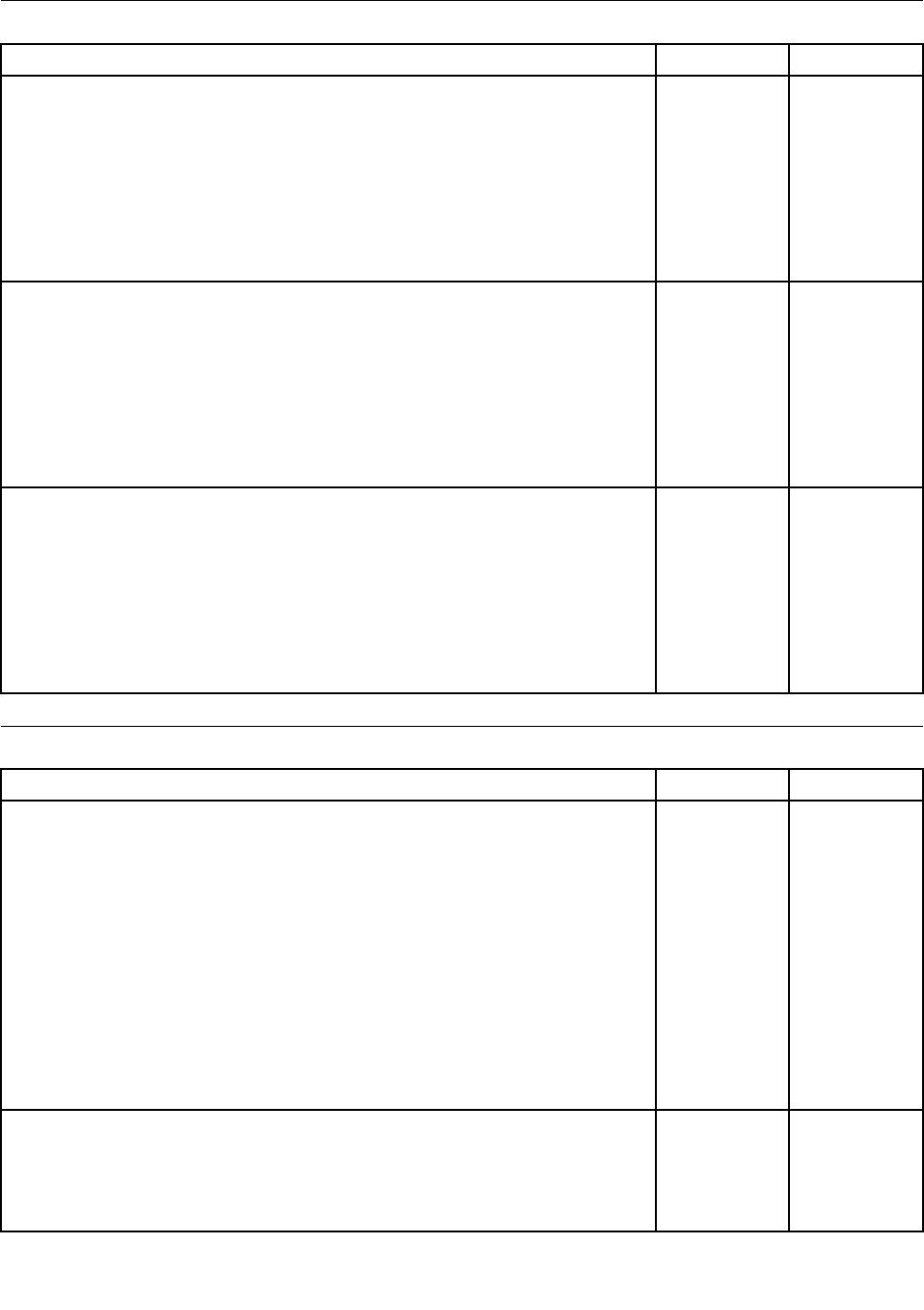
AdaptersandmiscellaneousFRUs
AdaptersandmiscellaneousFRUsFRU#CRU
BCMBCM432272x2MC
•MT1654:CTO
•MT1664:CTO
•MT1677:CTO
•MT1738:CTO
•MT1739:CTO
•MT1938:CTO
03T9015N
DPtoDVIdongle200mm
•MT1654:CTO
•MT1664:CTOA2J
•MT1677:CTOD1JD2JD3JD4J
•MT1738:CTO
•MT1739:CTO
•MT1938:CTO
43N9160N
Intel-6205NwirelessTylarPeak
•MT1654:
•MT1664:
•MT1677:
•MT1738:
•MT1739:
•MT1938:
60Y3253N
PowerCords
PowerCords--primaryFRU#CRU
LineCord-US/Canada/Barbados/Belize/Bolivia/CostaRica/Columbia/
DominicanRepublic/Ecuador/ElSalvador/Guatemala/Haiti/Honduras/Jamaica/
Mexico/NetherlandsAntilles/Nicaragua/Panama/Philippines/Peru/Trinidad&
Tobago/Venezuela/(Thainland)
•MT1654:CTOA2UA2FA2S
•MT1664:CTOA1UA1FA3UA3FA3SA4UA4FA4SA5UA5FA5SA6UA6F
A6SA7UA7FA7SA8UA8FA8S
•MT1677:CTOA6AA6TA7AA7TA8AA8TA9AA9TA1UA1SA1DA2SA2D
A3SA3DA4SA4DA5SA5DB6UB6F
•MT1738:CTO
•MT1739:CTO
•MT1938:CTOA1UA1FA1SA1DA1LA1AA1T
41R31841
LineCord-China
•MT1654:CTO
•MT1664:CTO
•MT1677:CTO
41R3256
190ThinkCentreHardwareMaintenanceManual

PowerCords--primaryFRU#CRU
•MT1738:CTO
•MT1739:CTO
•MT1938:CTOA1C
LineCord-Japan
•MT1654:CTO
•MT1664:CTOA2JA9J
•MT1677:CTOD1JD2JD3JD4JE1JE2JE3JE4J
•MT1738:CTO
•MT1739:CTO
•MT1938:CTOA1EA1J
41R32481
LineCord-Brazil
•MT1654:CTO
•MT1664:CTO
•MT1677:CTO
•MT1738:CTO
•MT1739:CTO
•MT1938:CTOA1P
45J95951
LineCord-LA(HighVoltage)Argentina,Paraguay,Uruguay
•MT1654:CTO
•MT1664:CTO
•MT1677:CTOA1YA2YA3YA4YA5Y
•MT1738:CTO
•MT1739:CTO
•MT1938:CTOA1YA1L
41R31761
LineCord-ANZ.Australia/NewZealand
•MT1654:CTO
•MT1664:CTO
•MT1677:CTO
•MT1738:CTO
•MT1739:CTO
•MT1938:CTOA1M
41R31961
LineCord-Korea
•MT1654:CTO
•MT1664:CTO
•MT1677:CTO
•MT1738:CTO
•MT1739:CTO
•MT1938:CTOA1KA1R
41R32601
Chapter9.FRUlists191

PowerCords--primaryFRU#CRU
LineCord-UK/HongKong/Singapore/Malaysia/Bahrain/Botswana/Burma/
Brunei/Cyprus/Ghana/Ireland/Jordan/Kenya/Kuwait/Malta/Nigeria/Oman/
Qatar/UnitedArabEmirates/TrinidadandTobago/SaudiArabia
•MT1654:CTOA1G
•MT1664:CTO
•MT1677:CTOC1BA6AA7GA7AA8AA9AB1GB2GB3GB4GB5GB8H
B4BD5GD6GD7G
•MT1738:CTOA1GA2GA3G
•MT1739:CTOA1G
•MT1938:CTOA1GA1AA1BA1H
41R32241
LineCord-Taiwan
•MT1654:CTO
•MT1664:CTO
•MT1677:CTOB7VB8V
•MT1738:CTO
•MT1739:CTO
•MT1938:CTOA1V
41R32781
LineCord-Italy/Chile/Libya
•MT1654:CTOA1GA2S
•MT1664:CTOA4SA5SA6S
•MT1677:CTOA7GA1SA1YA2SA2YA3SA3YA4SA4YA5SA5YB1GB2G
B3GB4GB5GD5GD6GD7G
•MT1738:CTOA1GA2GA3G
•MT1739:CTOA1G
•MT1938:CTOA1YA1LA1G
41R32321
LineCord-Denmark
•MT1654:CTOA1G
•MT1664:CTO
•MT1677:CTOA7GB1GB2GB3GB4GB5GD5GD6GD7G
•MT1738:CTOA1GA2GA3G
•MT1739:CTOA1G
•MT1938:CTOA1G
41R32121
LineCord-Switzerland,Liechtenstein
•MT1654:CTOA1G
•MT1664:CTO
•MT1677:CTOA7GB1GB2GB3GB4GB5GD5GD6GD7G
•MT1738:CTOA1GA2GA3G
•MT1739:CTOA1G
•MT1938:CTOA1G
41R32281
192ThinkCentreHardwareMaintenanceManual

PowerCords--primaryFRU#CRU
LineCord-Israel
•MT1654:CTOA1G
•MT1664:CTO
•MT1677:CTOA7GB1GB2GB3GB4GB5GD5GD6GD7G
•MT1738:CTOA1GA2GA3G
•MT1739:CTOA1G
•MT1938:CTOA1G
41R32361
LineCord-SouthAfrica/Bangladesh/Namibia/Nepal/Pakistan/SriLanka./
Swaziland/Uganda
•MT1654:CTOA1G
•MT1664:CTO
•MT1677:CTOA6AA7GA7AA8AA9AB1GB2GB3GB4GB5GD5GD6GD7G
•MT1738:CTOA1GA2GA3G
•MT1739:CTOA1G
•MT1938:CTOA1GA1MA1A
41R32201
LineCord-India
•MT1654:CTO
•MT1664:CTO
•MT1677:CTO
•MT1738:CTO
•MT1739:CTO
•MT1938:CTOA1Q
41R33411
LineCord-Albania/Algeria/Angola/Austria/Belarus/Belgium/Bosnia/Bulgaria/
Croatia/Cambodia/Coted'ivoire/Czech/Estonia/Egypt/Finland/France/Georgia/
Germany/Greece/Herzegovina/Hungary/Indonesia/Iceland/Kazakhstan/
Kyrgyzstan/Laos/Latvia/Lebanon/Lithuania/Luxembourg/Macao/Macedonia/
Mauritius/Moldova/Morocco/Netherlands/Norway/Poland/Portugal/Romania/
Spain/Sweden/Serbia/Slovakia/Slovenia/Vietnam/Tadzhikistan/Turkmenistan/
Turkey/Tunisia/Paraguay/Russia/Ukraine/Uzbekistan/Vietnam
•MT1654:CTO
•MT1664:CTO
•MT1677:CTOA6AA7AA8AA9A
•MT1738:CTO
•MT1739:CTO
•MT1938:CTOA1A
41R32081
Chapter9.FRUlists193

PowerCords--secondaryFRU#CRU
LineCord-US/Canada/Barbados/Belize/Bolivia/CostaRica/Columbia/
DominicanRepublic/Ecuador/ElSalvador/Guatemala/Haiti/Honduras/Jamaica/
Mexico/NetherlandsAntilles/Nicaragua/Panama/Philippines/Peru/Trinidad&
Tobago/Venezuela/(Thainland)
•MT1654:CTOA2UA2FA2S
•MT1664:CTOA1UA1FA3UA3FA3SA4UA4FA4SA5UA5FA5SA6UA6F
A6SA7UA7FA7SA8UA8FA8S
•MT1677:CTOA6AA6TA7AA7TA8AA8TA9AA9TA1UA1SA1DA2SA2D
A3SA3DA4SA4DA5SA5DB6UB6F
•MT1738:CTO
•MT1739:CTO
•MT1938:CTOA1UA1FA1SA1DA1LA1AA1T
41R31851
LineCord-China
•MT1654:CTO
•MT1664:CTO
•MT1677:CTO
•MT1738:CTO
•MT1739:CTO
•MT1938:CTOA1C
41R32571
LineCord-Japan
•MT1654:CTO
•MT1664:CTOA2JA9J
•MT1677:CTOD1JD2JD3JD4JE1JE2JE3JE4J
•MT1738:CTO
•MT1739:CTO
•MT1938:CTOA1EA1J
41R32491
LineCord-Brazil
•MT1654:CTO
•MT1664:CTO
•MT1677:CTO
•MT1738:CTO
•MT1739:CTO
•MT1938:CTOA1P
41R32711
LineCord-LA(HighVoltage)Argentina,Paraguay,Uruguay
•MT1654:CTO
•MT1664:CTO
•MT1677:CTOA1YA2YA3YA4YA5Y
•MT1738:CTO
•MT1739:CTO
•MT1938:CTOA1YA1L
41R31771
194ThinkCentreHardwareMaintenanceManual

PowerCords--secondaryFRU#CRU
LineCord-ANZ.Australia/NewZealand
•MT1654:CTO
•MT1664:CTO
•MT1677:CTO
•MT1738:CTO
•MT1739:CTO
•MT1938:CTOA1M
41R31971
LineCord-Korea
•MT1654:CTO
•MT1664:CTO
•MT1677:CTO
•MT1738:CTO
•MT1739:CTO
•MT1938:CTOA1KA1R
41R32611
LineCord-UK/HongKong/Singapore/Malaysia/Bahrain/Botswana/Burma/
Brunei/Cyprus/Ghana/Ireland/Jordan/Kenya/Kuwait/Malta/Nigeria/Oman/
Qatar/UnitedArabEmirates/TrinidadandTobago/SaudiArabia
•MT1654:CTOA1G
•MT1664:CTO
•MT1677:CTOC1BA6AA7GA7AA8AA9AB1GB2GB3GB4GB5GB8H
B4BD5GD6GD7G
•MT1738:CTOA1GA2GA3G
•MT1739:CTOA1G
•MT1938:CTOA1GA1AA1BA1H
41R32251
LineCord-Taiwan
•MT1654:CTO
•MT1664:CTO
•MT1677:CTOB7VB8V
•MT1738:CTO
•MT1739:CTO
•MT1938:CTOA1V
41R32791
LineCord-Italy/Chile/Libya
•MT1654:CTOA1GA2S
•MT1664:CTOA4SA5SA6S
•MT1677:CTOA7GA1SA1YA2SA2YA3SA3YA4SA4YA5SA5YB1GB2G
B3GB4GB5GD5GD6GD7G
•MT1738:CTOA1GA2GA3G
•MT1739:CTOA1G
•MT1938:CTOA1YA1LA1G
41R32331
Chapter9.FRUlists195

PowerCords--secondaryFRU#CRU
LineCord-Denmark
•MT1654:CTOA1G
•MT1664:CTO
•MT1677:CTOA7GB1GB2GB3GB4GB5GD5GD6GD7G
•MT1738:CTOA1GA2GA3G
•MT1739:CTOA1G
•MT1938:CTOA1G
41R32131
LineCord-Switzerland,Liechtenstein
•MT1654:CTOA1G
•MT1664:CTO
•MT1677:CTOA7GB1GB2GB3GB4GB5GD5GD6GD7G
•MT1738:CTOA1GA2GA3G
•MT1739:CTOA1G
•MT1938:CTOA1G
41R32291
LineCord-Israel
•MT1654:CTOA1G
•MT1664:CTO
•MT1677:CTOA7GB1GB2GB3GB4GB5GD5GD6GD7G
•MT1738:CTOA1GA2GA3G
•MT1739:CTOA1G
•MT1938:CTOA1G
41R32371
LineCord-SouthAfrica/Bangladesh/Namibia/Nepal/Pakistan/SriLanka./
Swaziland/Uganda
•MT1654:CTOA1G
•MT1664:CTO
•MT1677:CTOA6AA7GA7AA8AA9AB1GB2GB3GB4GB5GD5GD6GD7G
•MT1738:CTOA1GA2GA3G
•MT1739:CTOA1G
•MT1938:CTOA1GA1MA1A
41R32211
LineCord-India
•MT1654:CTO
•MT1664:CTO
•MT1677:CTO
•MT1738:CTO
•MT1739:CTO
•MT1938:CTOA1Q
41R31751
LineCord-Albania/Algeria/Angola/Austria/Belarus/Belgium/Bosnia/Bulgaria/
Croatia/Cambodia/Coted'ivoire/Czech/Estonia/Egypt/Finland/France/Georgia/
Germany/Greece/Herzegovina/Hungary/Indonesia/Iceland/Kazakhstan/
Kyrgyzstan/Laos/Latvia/Lebanon/Lithuania/Luxembourg/Macao/Macedonia/
Mauritius/Moldova/Morocco/Netherlands/Norway/Poland/Portugal/Romania/
Spain/Sweden/Serbia/Slovakia/Slovenia/Vietnam/Tadzhikistan/Turkmenistan/
Turkey/Tunisia/Paraguay/Russia/Ukraine/Uzbekistan/Vietnam
•MT1654:CTO
41R32091
196ThinkCentreHardwareMaintenanceManual
PowerCords--secondaryFRU#CRU
•MT1664:CTO
•MT1677:CTOA6AA7AA8AA9A
•MT1738:CTO
•MT1739:CTO
•MT1938:CTOA1A
Recoverydiscs
Windows7Starter32SP1RecoveryCD
Windows7Starter32SP1RecoveryCDFRU#CRU
USEnglish
•MT1654:CTO
•MT1664:CTO
•MT1677:CTO
•MT1738:CTO
•MT1739:CTO
•MT1938:CTO
03T27321
Spanish
•MT1654:CTO
•MT1664:CTO
•MT1677:CTO
•MT1738:CTO
•MT1739:CTO
•MT1938:CTO
03T27301
Arabic/English
•MT1654:CTO
•MT1664:CTO
•MT1677:CTO
•MT1738:CTO
•MT1739:CTO
•MT1938:CTO
03T27241
Russian
•MT1654:CTO
•MT1664:CTO
•MT1677:CTO
•MT1738:CTO
•MT1739:CTO
•MT1938:CTO
03T27291
Chapter9.FRUlists197

Windows7Starter32SP1RecoveryCDFRU#CRU
Turkish/English
•MT1654:CTO
•MT1664:CTO
•MT1677:CTO
•MT1738:CTO
•MT1739:CTO
•MT1938:CTO
03T27311
BrazilianPortuguese
•MT1654:CTO
•MT1664:CTO
•MT1677:CTO
•MT1738:CTO
•MT1739:CTO
•MT1938:CTO
03T27251
IndiaEnglish
•MT1654:CTO
•MT1664:CTO
•MT1677:CTO
•MT1738:CTO
•MT1739:CTO
•MT1938:CTO
03T27261
French
•MT1654:CTO
•MT1664:CTO
•MT1677:CTO
•MT1738:CTO
•MT1739:CTO
•MT1938:CTO
03T27271
Portuguese/English
•MT1654:CTO
•MT1664:CTO
•MT1677:CTO
•MT1738:CTO
•MT1739:CTO
•MT1938:CTO
03T27281
198ThinkCentreHardwareMaintenanceManual

Windows7HomeBasic32SP1RecoveryCD
Windows7HomeBasic32SP1RecoveryCDFRU#CRU
USEnglish
•MT1654:CTO
•MT1664:CTO
•MT1677:CTO
•MT1738:CTO
•MT1739:CTO
•MT1938:CTO
03T27421
Spanish
•MT1654:CTO
•MT1664:CTO
•MT1677:CTO
•MT1738:CTO
•MT1739:CTO
•MT1938:CTO
03T27391
Arabic/English
•MT1654:CTO
•MT1664:CTO
•MT1677:CTO
•MT1738:CTO
•MT1739:CTO
•MT1938:CTO
03T27331
Russian
•MT1654:CTO
•MT1664:CTO
•MT1677:CTO
•MT1738:CTO
•MT1739:CTO
•MT1938:CTO
03T27381
Turkish/English
•MT1654:CTO
•MT1664:CTO
•MT1677:CTO
•MT1738:CTO
•MT1739:CTO
•MT1938:CTO
03T27411
Chapter9.FRUlists199

Windows7HomeBasic32SP1RecoveryCDFRU#CRU
Serbian-Latin/English
•MT1654:CTO
•MT1664:CTO
•MT1677:CTO
•MT1738:CTO
•MT1739:CTO
•MT1938:CTO
03T27401
BrazilianPortuguese
•MT1654:CTO
•MT1664:CTO
•MT1677:CTO
•MT1738:CTO
•MT1739:CTO
•MT1938:CTO
03T27341
IndiaEnglish
•MT1654:CTO
•MT1664:CTO
•MT1677:CTO
•MT1738:CTO
•MT1739:CTO
•MT1938:CTO
03T27351
French
•MT1654:CTO
•MT1664:CTO
•MT1677:CTO
•MT1738:CTO
•MT1739:CTO
•MT1938:CTO
03T27361
Portuguese/English
•MT1654:CTO
•MT1664:CTO
•MT1677:CTO
•MT1738:CTO
•MT1739:CTO
•MT1938:CTO
03T27371
200ThinkCentreHardwareMaintenanceManual

Windows7HomePremium32SP1RecoveryCD
Windows7HomePremium32SP1RecoveryCDFRU#CRU
USEnglish
•MT1654:CTO
•MT1664:CTO
•MT1677:CTO
•MT1738:CTO
•MT1739:CTO
•MT1938:CTO
03T27551
Chinese-Traditional(TaiWan)/English
•MT1654:CTO
•MT1664:CTO
•MT1677:CTO
•MT1738:CTO
•MT1739:CTO
•MT1938:CTO
03T27441
Russian
•MT1654:CTO
•MT1664:CTO
•MT1677:CTO
•MT1738:CTO
•MT1739:CTO
•MT1938:CTO
03T27531
Korean/English
•MT1654:CTO
•MT1664:CTO
•MT1677:CTO
•MT1738:CTO
•MT1739:CTO
•MT1938:CTO
03T27511
Arabic/English
•MT1654:CTO
•MT1664:CTO
•MT1677:CTO
•MT1738:CTO
•MT1739:CTO
•MT1938:CTO
03T27431
Chapter9.FRUlists201

Windows7HomePremium32SP1RecoveryCDFRU#CRU
IndiaEnglish
•MT1654:CTO
•MT1664:CTO
•MT1677:CTO
•MT1738:CTO
•MT1739:CTO
•MT1938:CTO
03T27451
French
•MT1654:CTO
•MT1664:CTO
•MT1677:CTO
•MT1738:CTO
•MT1739:CTO
•MT1938:CTO
03T27461
German
•MT1654:CTO
•MT1664:CTO
•MT1677:CTO
•MT1738:CTO
•MT1739:CTO
•MT1938:CTO
03T27471
Hebrew/English
•MT1654:CTO
•MT1664:CTO
•MT1677:CTO
•MT1738:CTO
•MT1739:CTO
•MT1938:CTO
03T27481
Italian/English
•MT1654:CTO
•MT1664:CTO
•MT1677:CTO
•MT1738:CTO
•MT1739:CTO
•MT1938:CTO
03T27491
202ThinkCentreHardwareMaintenanceManual

Windows7HomePremium32SP1RecoveryCDFRU#CRU
Japanese/English
•MT1654:CTO
•MT1664:CTO
•MT1677:CTO
•MT1738:CTO
•MT1739:CTO
•MT1938:CTO
03T27501
Portuguese/English
•MT1654:CTO
•MT1664:CTO
•MT1677:CTO
•MT1738:CTO
•MT1739:CTO
•MT1938:CTO
03T27521
Spanish
•MT1654:CTO
•MT1664:CTO
•MT1677:CTO
•MT1738:CTO
•MT1739:CTO
•MT1938:CTO
03T27541
C&LNordics(DK/FI/SV/NO/EN)
•MT1654:CTO
•MT1664:CTO
•MT1677:CTO
•MT1738:CTO
•MT1739:CTO
•MT1938:CTO
03T27561
C&LEMEA(NL/FR/GR/IT/EN)
•MT1654:CTO
•MT1664:CTO
•MT1677:CTO
•MT1738:CTO
•MT1739:CTO
•MT1938:CTO
03T27571
C&LHongKong(HKCSEN)
•MT1654:CTO
•MT1664:CTO
•MT1677:CTO
•MT1738:CTO
•MT1739:CTO
•MT1938:CTO
03T27581
Chapter9.FRUlists203

Windows7HomePremium64SP1RecoveryCD
Windows7HomePremium64SP1RecoveryCDFRU#CRU
USEnglish
•MT1654:CTO
•MT1664:CTO
•MT1677:CTO
•MT1677:CTO
•MT1738:CTO
•MT1739:CTO
•MT1938:CTO
03T27921
Chinese-traditional/English
•MT1654:CTO
•MT1664:CTO
•MT1677:CTO
•MT1738:CTO
•MT1739:CTO
•MT1938:CTO
03T27881
IndiaEnglish
•MT1654:CTO
•MT1664:CTO
•MT1677:CTO
•MT1738:CTO
•MT1739:CTO
•MT1938:CTO
03T27891
French
•MT1654:CTO
•MT1664:CTO
•MT1677:CTO
•MT1738:CTO
•MT1739:CTO
•MT1938:CTO
03T27901
Korean/English
•MT1654:CTO
•MT1664:CTO
•MT1677:CTO
•MT1738:CTO
•MT1739:CTO
•MT1938:CTO
03T27911
CHongKong(HKCSEN)
•MT1654:CTO
•MT1664:CTO
•MT1677:CTO
•MT1738:CTO
03T27931
204ThinkCentreHardwareMaintenanceManual
Windows7HomePremium64SP1RecoveryCDFRU#CRU
•MT1739:CTO
•MT1938:CTO
Windows7Professional32SP1RecoveryCD
Windows7Professional32SP1RecoveryCDFRU#CRU
USEnglish
•MT1654:CTO
•MT1664:CTO
•MT1677:CTOA7GA7AA7TA8AA8TA9AA9TA1UB5GB8H
•MT1738:CTO
•MT1739:CTOA1G
•MT1938:CTO
03T27811
Spanish
•MT1654:CTO
•MT1664:CTO
•MT1677:CTOA7GB5GD5G
•MT1738:CTO
•MT1739:CTO
•MT1938:CTO
03T27781
Chinese-Simplied
•MT1654:CTO
•MT1664:CTO
•MT1677:CTO
•MT1738:CTO
•MT1739:CTO
•MT1938:CTO
03T27611
Chinese-Traditional(Taiwan)
•MT1654:CTO
•MT1664:CTO
•MT1677:CTOA7GB5GD5G
•MT1738:CTO
•MT1739:CTO
•MT1938:CTO
03T27621
Russian
•MT1654:CTO
•MT1664:CTO
•MT1677:CTO
•MT1738:CTO
•MT1739:CTOA1G
•MT1938:CTO
03T27761
Chapter9.FRUlists205

Windows7Professional32SP1RecoveryCDFRU#CRU
Korean/English
•MT1654:CTO
•MT1664:CTO
•MT1677:CTO
•MT1738:CTO
•MT1739:CTO
•MT1938:CTO
03T27721
Arabic/English
•MT1654:CTO
•MT1664:CTO
•MT1677:CTO
•MT1738:CTO
•MT1739:CTOA1G
•MT1938:CTO
03T27591
BrazilianPortuguese
•MT1654:CTO
•MT1664:CTO
•MT1677:CTO
•MT1738:CTO
•MT1739:CTO
•MT1938:CTO
03T27601
Czech/English
•MT1654:CTO
•MT1664:CTO
•MT1677:CTO
•MT1738:CTO
•MT1739:CTOA1G
•MT1938:CTO
03T27631
French
•MT1654:CTO
•MT1664:CTO
•MT1677:CTO
•MT1738:CTO
•MT1739:CTOA1G
•MT1938:CTO
03T27651
206ThinkCentreHardwareMaintenanceManual

Windows7Professional32SP1RecoveryCDFRU#CRU
Greek/English
•MT1654:CTO
•MT1664:CTO
•MT1677:CTO
•MT1738:CTO
•MT1739:CTO
•MT1938:CTO
03T27661
Greek/English
•MT1654:CTO
•MT1664:CTO
•MT1677:CTO
•MT1738:CTO
•MT1739:CTO
•MT1938:CTO
03T27641
Hungarian/English
•MT1654:CTO
•MT1664:CTO
•MT1677:CTO
•MT1738:CTO
•MT1739:CTOA1G
•MT1938:CTO
03T27691
Polish/English
•MT1654:CTO
•MT1664:CTO
•MT1677:CTO
•MT1738:CTO
•MT1739:CTOA1G
•MT1938:CTO
03T27731
German
•MT1654:CTO
•MT1664:CTO
•MT1677:CTO
•MT1738:CTO
•MT1739:CTOA1G
•MT1938:CTO
03T27671
Chapter9.FRUlists207

Windows7Professional32SP1RecoveryCDFRU#CRU
Portuguese/English
•MT1654:CTO
•MT1664:CTO
•MT1677:CTO
•MT1738:CTO
•MT1739:CTOA1G
•MT1938:CTO
03T27741
Romanian/English
•MT1654:CTO
•MT1664:CTO
•MT1677:CTO
•MT1738:CTO
•MT1739:CTOA1G
•MT1938:CTO
03T27751
Italian/English
•MT1654:CTO
•MT1664:CTO
•MT1677:CTO
•MT1738:CTO
•MT1739:CTOA1G
•MT1938:CTO
03T27701
Slovakian/English
•MT1654:CTO
•MT1664:CTO
•MT1677:CTO
•MT1738:CTO
•MT1739:CTOA1G
•MT1938:CTO
03T27771
Turkish/English
•MT1654:CTO
•MT1664:CTO
•MT1677:CTO
•MT1738:CTO
•MT1739:CTOA1G
•MT1938:CTO
03T27801
208ThinkCentreHardwareMaintenanceManual

Windows7Professional32SP1RecoveryCDFRU#CRU
Japanese/English
•MT1654:CTO
•MT1664:CTOA9J
•MT1677:CTOE1JE2JE3JE4J
•MT1738:CTO
•MT1739:CTO
•MT1938:CTO
03T27711
C&LNordics(DK/FI/SV/NO/EN)
•MT1654:CTO
•MT1664:CTO
•MT1677:CTO
•MT1738:CTO
•MT1739:CTOA1G
•MT1938:CTO
03T27821
C&LEMEA(NL/FR/GR/IT/EN)
•MT1654:CTO
•MT1664:CTO
•MT1677:CTO
•MT1738:CTO
•MT1739:CTOA1G
•MT1938:CTO
03T27831
C&LHongKong(HKCSEN)
•MT1654:CTO
•MT1664:CTO
•MT1677:CTO
•MT1738:CTO
•MT1739:CTO
•MT1938:CTO
03T27851
C&LCroatian(EN/SL/CR)
•MT1654:CTO
•MT1664:CTO
•MT1677:CTO
•MT1738:CTO
•MT1739:CTOA1G
•MT1938:CTO
03T27841
Chapter9.FRUlists209

Windows7Professional32SP1RecoveryCDFRU#CRU
Hebrew/English
•MT1654:CTO
•MT1664:CTO
•MT1677:CTO
•MT1738:CTO
•MT1739:CTOA1G
•MT1938:CTO
03T27681
Serbian-Latin/English
•MT1654:CTO
•MT1664:CTO
•MT1677:CTO
•MT1738:CTO
•MT1739:CTOA1G
03T27791
C&LEMEA(NL/FR/GR/IT/EN)
•MT1654:CTOA1G
•MT1664:CTO
•MT1677:CTO
•MT1738:CTOA1GA2GA3G
•MT1739:CTO
•MT1938:CTOA1G
03T28181
C&LHongKong(HKCSEN)
•MT1654:CTO
•MT1664:CTO
•MT1677:CTO
•MT1738:CTO
•MT1739:CTO
•MT1938:CTOA1B
03T28191
C&LCroatian(EN/SL/CR)
•MT1654:CTOA1G
•MT1664:CTO
•MT1677:CTO
•MT1738:CTOA1GA2GA3G
•MT1739:CTO
•MT1938:CTOA1G
03T28201
210ThinkCentreHardwareMaintenanceManual

Windows7Professional64SP1RecoveryCD
Windows7Professionalx64SP1FRU#CRU
USEnglish
•MT1654:CTOA1GA2U
•MT1664:CTOA1UA3UA4UA5UA6UA7UA8U
•MT1677:CTOB6UB1GB2GB3GB4G
•MT1738:CTOA1GA2GA3G
•MT1739:CTO
•MT1938:CTOA1UA1LA1GA1MA1AA1QA1TA1HA1RA1E
03T28161
Arabic
•MT1654:CTOA1G
•MT1664:CTO
•MT1677:CTOB1GB2GB3GB4G
•MT1738:CTOA1GA2GA3G
•MT1739:CTO
•MT1938:CTOA1G
03T27941
Chinese-Traditional(Taiwan)/English
•MT1654:CTO
•MT1664:CTO
•MT1677:CTO
•MT1738:CTO
•MT1739:CTO
•MT1938:CTOA1V
03T27971
Russian
•MT1654:CTOA1G
•MT1664:CTO
•MT1677:CTOB1GB2GB3GB4G
•MT1738:CTOA1GA2GA3G
•MT1739:CTO
•MT1938:CTOA1G
03T28111
Polish
•MT1654:CTOA1G
•MT1664:CTO
•MT1677:CTOB1GB2GB3GB4G
•MT1738:CTOA1GA2GA3G
•MT1739:CTO
•MT1938:CTOA1G
03T28081
Chapter9.FRUlists211

Windows7Professionalx64SP1FRU#CRU
Korean
•MT1654:CTO
•MT1664:CTO
•MT1677:CTO
•MT1738:CTO
•MT1739:CTO
•MT1938:CTOA1K
03T28071
Hebrew/English
•MT1654:CTOA1G
•MT1664:CTO
•MT1677:CTOB1GB2GB3GB4G
•MT1738:CTOA1GA2GA3G
•MT1739:CTO
•MT1938:CTOA1G
03T28031
Greek/English
•MT1654:CTOA1G
•MT1664:CTO
•MT1677:CTOB1GB2GB3GB4G
•MT1738:CTOA1GA2GA3G
•MT1739:CTO
•MT1938:CTOA1G
03T28011
Turkish/English
•MT1654:CTOA1G
•MT1664:CTO
•MT1677:CTOB1GB2GB3GB4G
•MT1738:CTOA1GA2GA3G
•MT1739:CTO
•MT1938:CTOA1G
03T28151
Croatian/Slovenian
•MT1654:CTOA1G
•MT1664:CTO
•MT1677:CTOB1GB2GB3GB4G
•MT1738:CTOA1GA2GA3G
•MT1739:CTO
•MT1938:CTOA1G
03T28201
212ThinkCentreHardwareMaintenanceManual

Windows7Professionalx64SP1FRU#CRU
Romanian/English
•MT1654:CTOA1G
•MT1664:CTO
•MT1677:CTOB1GB2GB3GB4G
•MT1738:CTOA1GA2GA3G
•MT1739:CTO
•MT1938:CTOA1G
03T28101
Hungarian/English
•MT1654:CTOA1G
•MT1664:CTO
•MT1677:CTOB1GB2GB3GB4G
•MT1738:CTOA1GA2GA3G
•MT1739:CTO
•MT1938:CTOA1G
03T28041
Czech/English
•MT1654:CTOA1G
•MT1664:CTO
•MT1677:CTOB1GB2GB3GB4G
•MT1738:CTOA1GA2GA3G
•MT1739:CTO
•MT1938:CTOA1G
03T27981
Slovakian/English
•MT1654:CTOA1G
•MT1664:CTO
•MT1677:CTOB1GB2GB3GB4G
•MT1738:CTOA1GA2GA3G
•MT1739:CTO
•MT1938:CTOA1G
03T28121
Portuguese/English
•MT1654:CTOA1G
•MT1664:CTO
•MT1677:CTOB1GB2GB3GB4G
•MT1738:CTOA1GA2GA3G
•MT1739:CTO
•MT1938:CTOA1G
03T28091
Chapter9.FRUlists213

Windows7Professionalx64SP1FRU#CRU
Serbian-Latin/English
•MT1654:CTOA1G
•MT1664:CTO
•MT1677:CTO
•MT1738:CTOA1GA2GA3G
•MT1739:CTO
•MT1938:CTOA1G
03T28141
BrazilianPortuguese
•MT1654:CTO
•MT1664:CTO
•MT1677:CTO
•MT1738:CTO
•MT1739:CTO
•MT1938:CTOA1P
03T27951
SimpliedChinese
•MT1654:CTO
•MT1664:CTO
•MT1677:CTO
•MT1738:CTO
•MT1739:CTO
•MT1938:CTOA1C
03T27961
IndiaEnglish
•MT1654:CTO
•MT1664:CTO
•MT1677:CTO
•MT1738:CTO
•MT1739:CTO
•MT1938:CTOA1Q
03T27991
Italian/English
•MT1654:CTOA1G
•MT1664:CTO
•MT1677:CTO
•MT1738:CTOA1GA2GA3G
•MT1739:CTO
•MT1938:CTOA1G
03T28051
214ThinkCentreHardwareMaintenanceManual

Windows7Professionalx64SP1FRU#CRU
Japanese/English
•MT1654:CTO
•MT1664:CTO
•MT1677:CTO
•MT1738:CTO
•MT1739:CTO
•MT1938:CTOA1J
03T28061
French
•MT1654:CTOA1G
•MT1664:CTOA4FA5FA6FA7FA8F
•MT1677:CTO
•MT1738:CTOA1GA2GA3G
•MT1739:CTO
•MT1938:CTOA1F
03T28001
C&LNordics(DK/FI/SV/NO/EN)
•MT1654:CTOA1G
•MT1664:CTO
•MT1677:CTO
•MT1738:CTOA1GA2GA3G
•MT1739:CTO
•MT1938:CTOA1G
03T28171
German
•MT1654:CTOA1G
•MT1664:CTO
•MT1677:CTO
•MT1738:CTOA1GA2GA3G
•MT1739:CTO
•MT1938:CTOA1G
03T28021
Spanish
•MT1654:CTOA1G
•MT1664:CTO
•MT1677:CTO
•MT1738:CTOA1GA2GA3G
•MT1739:CTO
•MT1938:CTOA1G
03T28131
Chapter9.FRUlists215
Windows7Ultimate32SP1RecoveryCD
Windows7Ultimate32SP1RecoveryCDFRU#CRU
IndiaEnglish
•MT1654:CTO
•MT1664:CTO
•MT1677:CTO
•MT1738:CTO
•MT1739:CTO
•MT1938:CTO
03T27871
USEnglish
•MT1654:CTO
•MT1664:CTO
•MT1677:CTO
•MT1738:CTO
•MT1739:CTO
•MT1938:CTO
03T27861
Windows7Ultimate64SP1RecoveryCD
Windows7Ultimate64SP1RecoveryCDFRU#CRU
IndiaEnglish
•MT1654:CTO
•MT1664:CTO
•MT1677:CTO
•MT1738:CTO
•MT1739:CTO
•MT1938:CTO
03T28211
USEnglish
•MT1654:CTO
•MT1664:CTO
•MT1677:CTO
•MT1738:CTO
•MT1739:CTO
•MT1938:CTO
03T28221
WindowsXPProfessional32RecoveryCD
Note:TheWindowsXPProfessionalrecoveryDVDsareavailableonlyformodelswithavalidMicrosoft
WindowsXPProfessionalcerticateofauthenticity(COA)afxedtothesystem.DuetoaMicrosoftlicensing
limitation,ifamodelcamewithWindowsXPProfessionalpreinstalledfromthefactory,buthaseithera
Windows7orWindowsVistaCOAafxedtothesystem,thatmodeliseligibleonlyforrecoveryDVDsthat
matchtheoperatingsystemspeciedontheCOA.
216ThinkCentreHardwareMaintenanceManual

WindowsXPProfessional32RecoveryCDFRU#CRU
USEnglish
•MT1654:CTO
•MT1664:CTO
•MT1677:CTO
•MT1738:CTO
•MT1739:CTO
•MT1938:CTO
03W74981
Chinese-Traditional(HongKong)
•MT1654:CTO
•MT1664:CTO
•MT1677:CTO
•MT1738:CTO
•MT1739:CTO
•MT1938:CTO
03W74851
Chinese-Traditional(Taiwan)
•MT1654:CTO
•MT1664:CTO
•MT1677:CTO
•MT1738:CTO
•MT1739:CTO
•MT1938:CTO
03W74781
Russian
•MT1654:CTO
•MT1664:CTO
•MT1677:CTO
•MT1738:CTO
•MT1739:CTO
•MT1938:CTO
03W74941
Polish
•MT1654:CTO
•MT1664:CTO
•MT1677:CTO
•MT1738:CTO
•MT1739:CTO
•MT1938:CTO
03W74921
Chapter9.FRUlists217
WindowsXPProfessional32RecoveryCDFRU#CRU
Turkish
•MT1654:CTO
•MT1664:CTO
•MT1677:CTO
•MT1738:CTO
•MT1739:CTO
•MT1938:CTO
03W74971
Czech
•MT1654:CTO
•MT1664:CTO
•MT1677:CTO
•MT1738:CTO
•MT1739:CTO
•MT1938:CTO
03W74791
Overall:MT1741,1761,1762,1782,1837,and1962
TheFrulistbelowisforMTs:1741,1761,1762,1782,1837,and1962
218ThinkCentreHardwareMaintenanceManual
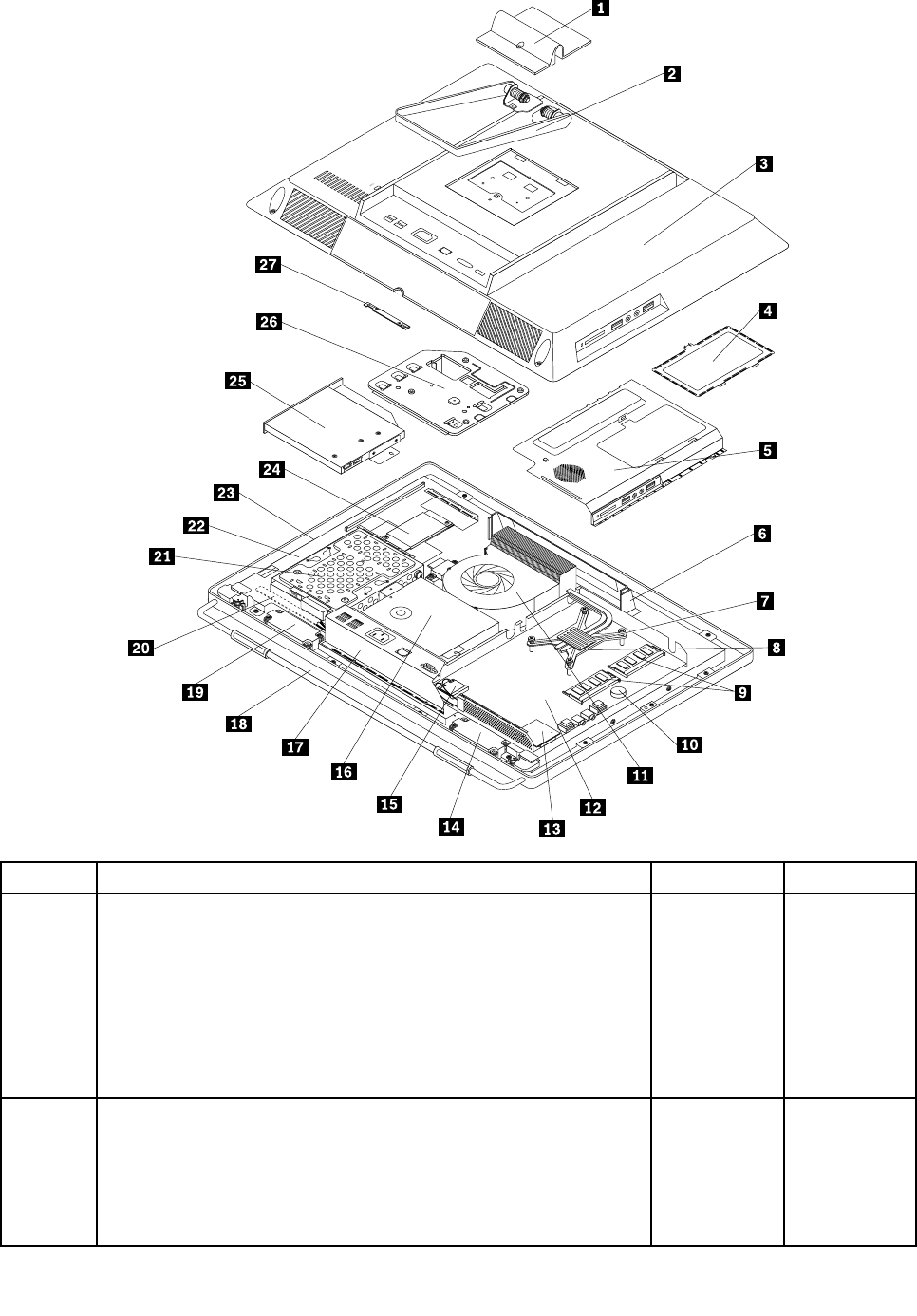
Item#FRUsFRU#CRU
1,2,18
Assemblyframestand,touchandnon-touch
•MT1741:allmodels
•MT1761:allmodels
•MT1762:allmodels
•MT1782:allmodels
•MT1837:allmodels
•MT1962:allmodels
03T9685N
3
Assemblyrearcover,touchandnon-touch
•MT1741:allmodels
•MT1761:allmodels
•MT1762:allmodels
•MT1782:allmodels
03T9670N
Chapter9.FRUlists219

Item#FRUsFRU#CRU
•MT1837:allmodels
•MT1962:allmodels
7
Microprocessorcooler
•MT1741:allmodels
•MT1761:allmodels
•MT1762:allmodels
•MT1782:allmodels
•MT1837:allmodels
•MT1962:allmodels
03T9619N
8
Microprocessor,Ci32100SandyBridge3MB2cFCLGA3.1GHZ65W
•MT1741:CTOA2J
•MT1761:CTOA1UA1FA4JA5JA7JA8J
•MT1762:CTOA8GB2GD1JD2J
•MT1782:CTOA6AA6TA7AA7TA2SA2DA2YA5SA5DA5YC3U
C3FB5GB7GA9GC5VD2BD5JD6JE1JE2JG1V
•MT1837:CTOA1G
•MT1962:CTOA1UA1FA1SA1PA1LA1DA1YA1GA1MA1AA1Q
A1TA1CA1BA1HA1VA1KA1RA1EA1J
03T8011N
8
Microprocessor,Ci32120SandyBridge3MB2cFCLGA3.3GHz65W
•MT1741:CTOA7GB2JB4J
•MT1761:CTOB1UB1FB1SC1JC2JC3JC4JD3JD4JD5JD6J
D9UD9FD9S
•MT1762:CTOE1JE2J
•MT1782:CTOD1BE6AE6TE7AE7TE8AE8TE9GG3GG4GH3S
H3YC6JC8JC9JH1JI3SI3DI3YI4SI4DI4Y
•MT1837:CTO
•MT1962:CTO
03T8010N
8
Microprocessor,Ci52400SSandyBridge6MB4cFCLGA2.5GHZ65W
•MT1741:CTOA3JB3J
•MT1761:CTOA6JA9JC6UC6SC6FD1JD2J
•MT1762:CTOB3BB3HD3JD4JE3JE4J
•MT1782:CTOA8AA8TA3SA3DA3YC4UC4FC7VD7JD8JE3J
E4JH4SH4YI6SI6DI6YI8JI9JK1JK2J
•MT1837:CTO
•MT1962:CTO
03T8017N
8
Microprocessor,Ci52500SSandyBridge8MB4cFCLGA2.7GHZ65W
•MT1741:CTO
•MT1761:CTOB4UB4FB4SC7UC7SC7F
•MT1762:CTO
•MT1782:CTOA4SA4DA4YB9GH2UH2FH2SI7SI7DI7Y
•MT1837:CTO
•MT1962:CTO
03T8016N
220ThinkCentreHardwareMaintenanceManual

Item#FRUsFRU#CRU
8
Microprocessor,G620SandyBridge3MB2cFCLGA2.6GHZ65W
HDgraphics
•MT1741:CTOA1JA5G
•MT1761:CTOA3UA3F
•MT1762:CTOA5G
•MT1782:CTOA1SA1DA1YC1UC1FB6GE5B
•MT1837:CTO
•MT1962:CTO
03T6226N
8
Microprocessor,G840SandyBridge3MB2cFCLGA2.8GHZ65W
HDgraphics
•MT1741:CTOA6G
•MT1761:CTOA2UA2F
•MT1762:CTOA6GA7GD8G
•MT1782:CTOC2UC2F
•MT1837:CTO
•MT1962:CTO
03T6225N
8
Microprocessor,G850SandyBridge3MB2cFCLGA2.9GHz65W
HDgraphics
•MT1741:CTO
•MT1761:CTOB6UB6FB6S
•MT1762:CTO
•MT1782:CTO
•MT1837:CTO
•MT1962:CTO
03T6224N
8
Microprocessor,Ci72600SSandyBridge8MB4cFCLGA2.8GHZ
65WvPro
•MT1741:CTO
•MT1761:CTOC5UC5SC5F
•MT1762:CTO
•MT1782:CTO
•MT1837:CTO
•MT1962:CTO
03T8015N
8
Microprocessor,Ci3-2130,3.40GHz/3M/65W,dualcore
•MT1741:CTO
•MT1761:CTOB5UB5SB5FB7UB7SB7F
•MT1762:CTO
•MT1782:CTO
•MT1837:CTO
•MT1962:CTO
03T8358N
Chapter9.FRUlists221

Item#FRUsFRU#CRU
8
Microprocessor,PentiumG860,3.0GHz/3M/65W,2C
•MT1741:CTO
•MT1761:CTO
•MT1762:CTO
•MT1782:CTO
•MT1837:CTO
•MT1962:CTO
03T8361N
8
Microprocessor,PentiumG630,2.70GHz/3M/65W,2C
•MT1741:CTOB1G
•MT1761:CTOB2FB2SB2UD8UD8FD8S
•MT1762:CTO
•MT1782:CTOG5GG6GF2AF2TF3AF3TI1SI1DI1YI2SI2D
I2YI5SI5DI5Y
•MT1837:CTO
•MT1962:CTO
03T8360N
8
Microprocessor,G540SandyBridge2MB2cFCLGA2.5GHZ65W
•MT1741:CTO
•MT1761:CTO
•MT1762:CTO
•MT1782:CTO
•MT1837:CTO
•MT1962:CTO
03T8354N
8
Microprocessor,G530SandyBridge2MB2cFCLGA2.4GHZ65W
•MT1741:CTOA8JA9J
•MT1761:CTOB3UB3FB3SD7UD7FD7S
•MT1762:CTOD5JD6J
•MT1782:CTOF4JF5J
•MT1837:CTO
•MT1962:CTO
03T8356N
8
Microprocessor,G440SandyBridge1MB2cFCLGA1.6GHZ35W
•MT1741:CTO
•MT1761:CTOB8UB8FB8S
•MT1762:CTO
•MT1782:CTOG2G
•MT1837:CTO
•MT1962:CTO
03T8355N
222ThinkCentreHardwareMaintenanceManual

Item#FRUsFRU#CRU
9
Memorymodules,1GBPC3-106001333MHzDDR3SoDIMM
•MT1741:CTOA9J
•MT1761:CTO
•MT1762:CTO
•MT1782:CTO
•MT1837:CTO
•MT1962:CTO
64Y6650N
9
Memorymodules,2GBPC3-106001333MHzDDR3SoDIMM
•MT1741:CTOA1JA2JA3JA5GA8JB2JB3JB4J
•MT1761:CTOA2UA2FA3UA3FA4JA5JA6JA7JA8JA9JB3U
B3FB3SB6UB6SB6FB8UB8SB8FC1JC2JC3JC4JB2UB2F
B2SD1JD2JD3JD4JD5JD6JD7UD7FD7SD8UD8FD8S
•MT1762:CTOB3BB3HA5GA6GA7GA8GB2GD1JD2JD3J
D4JD5JD6JD8GE1JE2JE3JE4J
•MT1782:CTOD1BA6AA6TA7AA7TA8AA8TA1SA1DA1YA2S
A2DA2YA3SA3DA3YA4SA4DA4YA5SA5DA5YC1UC1FC2U
C2FB6GA9GC5VC7VD2BD5JD6JD7JD8JE5BE6AE6TE1J
E2JE3JE4JE9GG2GG5GG6GF4JF5JC6JC8JC9JH1JF2A
F2TF3AF3TI1SI1DI1YI2SI2DI2YI3SI3DI3YI8JI9JK1JK2J
•MT1837:CTO
•MT1962:CTO
64Y6651N
9
Memorymodules,4GBPC3-106001333MHzDDR3SoDIMM
•MT1741:CTOA6GA7GB1G
•MT1761:CTOA1UA1FB1UB1FB1SB4UB4FB4SB5UB5S
B5FB7UB7SB7FC5UC5SC5FC6UC6FC6SC7UC7FC7S
D9UD9FD9S
•MT1762:CTO
•MT1782:CTOC3UC3FC4UC4FB5GB7GB9GE7AE7TE8AE8T
G1VG3GG4GH3YH3SH4SH4YH2UH2SH2FI4SI4DI4YI5S
I5DI5YI6SI6DI6YI7SI7DI7Y
•MT1837:CTOA1G
•MT1962:CTOA1UA1FA1SA1PA1LA1DA1YA1GA1MA1AA1Q
A1TA1CA1BA1HA1VA1KA1RA1EA1J
89Y9225N
11
110x110x25mmmicroprocessorfan
•MT1741:allmodels
•MT1761:allmodels
•MT1762:allmodels
•MT1782:allmodels
•MT1837:allmodels
•MT1962:allmodels
03T9620N
Chapter9.FRUlists223

Item#FRUsFRU#CRU
11
110x110x25mmmicroprocessorfan
•MT1741:allmodels
•MT1761:allmodels
•MT1762:allmodels
•MT1782:allmodels
•MT1837:allmodels
•MT1962:allmodels
03T9684N
12
Systemboard,withTPMcard
•MT1741:CTOA1JA2JA3JA5GA6GA7GA8JA9JB1GB2JB3J
B4J
•MT1761:CTOA1UA1FA2UA2FA3UA3FA4JA5JA6JB1UB1F
B1SA7JA8JA9JB3UB3FB3SB4UB4FB4SB5UB5SB5FB6U
B6FB6SB7UB7SB7FB8UB8SB8FC5UC5SC5FC6UC6FC6S
C7UC7FC7SC1JC2JC3JC4JB2UB2FB2SD1JD2JD3JD4J
D5JD6JD7UD7FD7SD8UD8FD8SD9UD9FD9S
•MT1762:CTOB3BB3HA5GA6GA7GA8GB2GD1JD2JD3J
D4JD5JD6JD8GE1JE2JE3JE4J
•MT1782:CTOD1BA6AA6TA7AA7TA8AA8TA1SA1DA1YA2S
A2DA2YA3SA3DA3YA4SA4DA4YA5SA5DA5YC1UC1FC2U
C2FC3UC3FC4UC4FB5GB6GB7GB9GA9GC5VC7VD2B
D5JD6JD7JD8JE5BE6AE6TE7AE7TE8AE8TE1JE2JE3JE4J
E9GG1VG2GG3GG4GG5GG6GF4JF5JH3SH3YH4SH4Y
H2UH2SH2FC6JC8JC9JH1JF2AF2TF3AF3TI1SI1DI1Y
I2SI2DI2YI3SI3DI3YI4SI4DI4YI5SI5DI5YI6SI6DI6YI7S
I7DI7YI8JI9JK1JK2J
•MT1837:CTOA1G
•MT1962:CTOA1UA1FA1SA1PA1LA1DA1YA1GA1MA1AA1Q
A1TA1CA1BA1HA1VA1KA1RA1EA1J
03T6422N
12
Systemboard,withoutTPMcard
•MT1741:CTOA5GA6GA7G
•MT1761:CTO
•MT1762:CTOA5GA6GA7GA8GB2GD8G
•MT1782:CTOE9GG2GG3GG4GG5GG6G
•MT1837:CTO
•MT1962:CTO
03T6441N
13
7in1cardreader
•MT1741:CTO
•MT1761:CTO
•MT1762:CTO
•MT1782:CTO
•MT1837:CTO
•MT1962:CTO
03T9016N
224ThinkCentreHardwareMaintenanceManual

Item#FRUsFRU#CRU
14,19
Internalspeaker,rightandleft
•MT1741:CTO
•MT1761:CTO
•MT1762:CTO
•MT1782:CTO
•MT1837:CTO
•MT1962:CTO
03T9566N
15
Intel-1000wirelessCondorPeak
•MT1741:CTO
•MT1761:CTO
•MT1762:CTO
•MT1782:CTO
•MT1837:CTO
•MT1962:CTO
60Y3241N
16
Powersupplyassembly,150w85+AIOPSU
•MT1741:CTOA1JA2JA3JA4JA5GA6GA7GA8GA9GB1G
B2JB3JB4J
•MT1761:CTOA1UA1FA2UA2FA3UA3FA4JA5JA6JB1UB1F
B1SA7JA8JA9JB3UB3FB3SB4UB4FB4SB5UB5SB5FB6U
B6FB6SB7UB7SB7FB8UB8SB8FC5UC5SC5FC6UC6FC6S
C7UC7FC7SC1JC2JC3JC4JB2UB2FB2SD1JD2JD3JD4J
D5JD6JD7UD7FD7SD8UD8FD8SD9UD9FD9S
•MT1762:CTOB3BB3HA5GA6GA7GA8GB2GD1JD2JD3J
D4JD5JD6JD8GE1JE2JE3JE4J
•MT1782:CTOD1BA6AA6TA7AA7TA8AA8TA1SA1DA1YA2S
A2DA2YA3SA3DA3YA4SA4DA4YA5SA5DA5YC1UC1FC2U
C2FC3UC3FC4UC4FB5GB6GB7GB9GA9GC5VC7VD2B
D5JD6JD7JD8JE5BE6AE6TE7AE7TE8AE8TE1JE2JE3JE4J
E9GG1VG2GG3GG4GG5GG6GF4JF5JH3SH3YH4SH4Y
H2UH2SH2FC6JC8JC9JH1JF2AF2TF3AF3TI1SI1DI1Y
I2SI2DI2YI3SI3DI3YI4SI4DI4YI5SI5DI5YI6SI6DI6YI7S
I7DI7YI8JI9JK1JK2J
•MT1837:CTOA1G
•MT1962:CTOA1UA1FA1SA1PA1LA1DA1YA1GA1MA1AA1Q
A1TA1CA1BA1HA1VA1KA1RA1EA1J
03T9022N
17
RearI/OkitwithDP
•MT1741:allmodels
•MT1761:allmodels
•MT1762:allmodels
•MT1782:allmodels
•MT1837:allmodels
•MT1962:allmodels
03T6424N
Chapter9.FRUlists225

Item#FRUsFRU#CRU
17
RearI/OwithDP+COM
•MT1741:allmodels
•MT1761:allmodels
•MT1762:allmodels
•MT1782:allmodels
•MT1837:allmodels
•MT1962:allmodels
03T9031N
17
Assemblyrear_I/O_bracket_without_Com
•MT1741:allmodels
•MT1761:allmodels
•MT1762:allmodels
•MT1782:allmodels
•MT1837:allmodels
•MT1962:allmodels
03T9667N
17
Assemblyrear_I/O_bracket_with_Com
•MT1741:allmodels
•MT1761:allmodels
•MT1762:allmodels
•MT1782:allmodels
•MT1837:allmodels
•MT1962:allmodels
03T9666N
1,2,18
Assemblyframestand,touchandnon-touch
•MT1741:allmodels
•MT1761:allmodels
•MT1762:allmodels
•MT1782:allmodels
•MT1837:allmodels
•MT1962:allmodels
03T9685N
21
Harddiskdrive,SATA250GB7200RPM/3Gb/8M
•MT1741:CTOA1JA8JA9J
•MT1761:CTOD7UD7FD7SD8UD8FD8SD9UD9FD9S
•MT1762:CTOA5GD1JD2JD5JD6JE1JE2JE3JE4J
•MT1782:CTOA6AA6TC1UC1FD5JD6JE1JE2JG2GF4JF5J
C6JC8JC9JH1JF2AF2TF3AF3TI8JI9JK1JK2J
•MT1837:CTO
•MT1962:CTOA1UA1FA1SA1PA1LA1DA1YA1GA1MA1AA1Q
A1TA1CA1BA1HA1VA1KA1RA1EA1J
40Y9036N
226ThinkCentreHardwareMaintenanceManual

Item#FRUsFRU#CRU
21
Harddiskdrive,SATA250GB7200RPM/3Gb/8M
•MT1741:CTOA1JA8JA9J
•MT1761:CTOD7UD7FD7SD8UD8FD8SD9UD9FD9S
•MT1762:CTOA5GD1JD2JD5JD6JE1JE2JE3JE4J
•MT1782:CTOA6AA6TC1UC1FD5JD6JE1JE2JG2GF4JF5J
C6JC8JC9JH1JF2AF2TF3AF3TI8JI9JK1JK2J
•MT1837:CTO
•MT1962:CTOA1UA1FA1SA1PA1LA1DA1YA1GA1MA1AA1Q
A1TA1CA1BA1HA1VA1KA1RA1EA1J
45K0408N
21
Harddiskdrive,SATA320GB7200RPM/3Gb
•MT1741:CTOA2JA3JA5GB2J
•MT1761:CTOA2UA2FA3UA3FA4JA5JA6JA7JA8JA9JB3U
B3FB3SC6UC6FC6SC7UC7FC7SC1JC2JC3JC4JB2UB2F
B2S
•MT1762:CTOA6GA7GA8GB2GD3JD4JD8G
•MT1782:CTOA7AA7TA8AA8TC2UC2FB6GB7GA9GD7JD8J
E3JE4JE9GG1VH2UH2SH2F
•MT1837:CTOA1G
•MT1962:CTO
87H4891N
21
Harddiskdrive,SATA320GB7200RPM/3Gb
•MT1741:CTOA2JA3JA5GB2J
•MT1761:CTOA2UA2FA3UA3FA4JA5JA6JA7JA8JA9JB3U
B3FB3SC6UC6FC6SC7UC7FC7SC1JC2JC3JC4JB2UB2F
B2S
•MT1762:CTOA6GA7GA8GB2GD3JD4JD8G
•MT1782:CTOA7AA7TA8AA8TC2UC2FB6GB7GA9GD7JD8J
E3JE4JE9GG1VH2UH2SH2F
•MT1837:CTOA1G
•MT1962:CTO
45K0409N
21
Harddiskdrive,SATA500GB7200RPM/3Gb/16M
•MT1741:CTOA6GA7GB1GB3JB4J
•MT1761:CTOA1UA1FB1UB1FB1SB4UB4FB4SC5UC5S
C5FD1JD2JD3JD4JD5JD6J
•MT1762:CTOB3BB3H
•MT1782:CTOD1BA1SA1DA1YA2SA2DA2YA3SA3DA3YA4S
A4DA4YA5SA5DA5YC3UC3FC4UC4FB5GB9GC5VC7VD2B
E5BE6AE6TE7AE7TE8AE8TG3GG4GG5GG6GH3SH3YH4S
H4YI1SI1DI1YI2SI2DI2YI3SI3DI3YI4SI4DI4YI5SI4DI4YI5S
I5DI5YI6SI6DI6YI7SI7DI7Y
•MT1837:CTO
•MT1962:CTO
45K0410N
Chapter9.FRUlists227

Item#FRUsFRU#CRU
21
Harddiskdrive,SeagatePharaohSATA6.0Gb/s500G
•MT1741:CTOA6GA7G
•MT1761:CTOA1UA1FB1UB1FB1SB4UB4FB4SC5UC5SC5F
•MT1762:CTOB3BB3H
•MT1782:CTOD1BA1SA1DA1YA2SA2DA2YA3SA3DA3Y
A4SA4DA4YA5SA5DA5YC3UC3FC4UC4FB5GB9GC5V
C7VD2BE5BE6AE6TE7AE7TE8AE8TG3GG4GG5GG6G
H3SH3YH4SH4Y
•MT1837:CTO
•MT1962:CTO
03T7041N
21
Harddiskdrive,SATA1TB7200RPM/3Gb/32M
•MT1741:CTO
•MT1761:CTO
•MT1762:CTO
•MT1782:CTO
•MT1837:CTO
•MT1962:CTO
45K0412N
21
Harddiskdrive,SeagatePharaohSATA6.0Gb/s1000G
•MT1741:CTO
•MT1761:CTO
•MT1762:CTO
•MT1782:CTO
•MT1837:CTO
•MT1962:CTO
03T7042N
21
Harddiskdrive,160G2.5"SATA
•MT1741:CTO
•MT1761:CTO
•MT1762:CTO
•MT1782:CTO
•MT1837:CTO
•MT1962:CTO
45K0616N
21
Harddiskdrive,SeagatePharaohSATA6.0Gb/s250G
•MT1741:CTO
•MT1761:CTO
•MT1762:CTOD1JD2JD5JD6JE1JE2J
•MT1782:CTOE1JE2JG2GF4JF5JC6JC8JC9JH1JF2AF2T
F3AF3T
•MT1837:CTO
•MT1962:CTO
03T7039N
228ThinkCentreHardwareMaintenanceManual

Item#FRUsFRU#CRU
21
Harddiskdrive,SeagatePharaohSATA6.0Gb/s320G
•MT1741:CTOA5G
•MT1761:CTOA7JA8JA9JB3UB3FB3SC6UC6FC6SC7UC7F
C7SC1JC2JC3JC4JB2UB2FB2S
•MT1762:CTOD3JD4JD8G
•MT1782:CTOE3JE4JE9GG1VH2UH2SH2F
•MT1837:CTO
•MT1962:CTO
03T7040N
22
Assemblypanelbracket
•MT1741:allmodels
•MT1761:allmodels
•MT1762:allmodels
•MT1782:allmodels
•MT1837:allmodels
•MT1962:allmodels
03T9682N
22
Assemblypanelbracket
•MT1741:allmodels
•MT1761:allmodels
•MT1762:allmodels
•MT1782:allmodels
•MT1837:allmodels
•MT1962:allmodels
03T9681N
23
20-inch1600x900CCFLpanel
•MT1741:allmodels
•MT1761:allmodels
•MT1762:allmodels
•MT1782:allmodels
•MT1837:allmodels
•MT1962:allmodels
03T6429N
23
20-inch1600x900CCFLpanel
•MT1741:allmodels
•MT1761:allmodels
•MT1762:allmodels
•MT1782:allmodels
•MT1837:allmodels
•MT1962:allmodels
03T6431N
Chapter9.FRUlists229

Item#FRUsFRU#CRU
24
YECinverter
•MT1741:allmodels
•MT1761:allmodels
•MT1762:allmodels
•MT1782:allmodels
•MT1837:allmodels
•MT1962:allmodels
03T6434N
25
Opticaldrive,SATAslimDVD-ROM
•MT1741:CTOA9J
•MT1761:CTO
•MT1762:CTOD1JD3JD5JE1JE3J
•MT1782:CTOD5JD7JE1JE3JG2GF4JC8JH1JI8JK1J
•MT1837:CTO
•MT1962:CTO
71Y5848N
25
Opticaldrive,SATAslimRambo
•MT1741:CTOA1JA2JA3JA5GA6GA7GA8JB1GB2JB3JB4J
•MT1761:CTOA1UA1FA2UA2FA3UA3FA4JA5JA6JB1UB1F
B1SA7JA8JA9JB3UB3FB3SB4UB4FB4SB5UB5SB5FB6U
B6FB6SB7UB7SB7FB8UB8SB8FC5UC5SC5FC6UC6FC6S
C7UC7FC7SC1JC2JC3JC4JB2UB2FB2SD1JD2JD3JD4J
D5JD6JD7UD7FD7SD8UD8FD8SD9UD9S
•MT1762:CTOB3BB3HA5GA6GA7GA8GB2GD2JD4JD6J
D8GE2JE4J
•MT1782:CTOD1BA6AA6TA7AA7TA8AA8TA1SA1DA1YA2S
A2DA2YA3SA3DA3YA4SA4DA4YA5SA5DA5YC1UC1FC2U
C2FC3UC3FC4UC4FB5GB6GB7GB9GA9GC5VC7VD2B
D6JD8JE5BE6AE6TE7AE7TE8AE8TE2JE4JE9GG1VG3G
G4GG5GG6GF5JH3SH3YH4SH4YH2UH2SH2FC6JC9JF2A
F2TF3AF3TI1SI1DI1SYI2SI2DI2YI3SI3DI3YI4SI4DI4YI5S
I5DI5YI6SI6DI6YISI7DI7YI9JK2J
•MT1837:CTOA1G
•MT1962:CTOA1UA1FA1SA1PA1LA1DA1YA1GA1MA1AA1Q
A1TA1CA1BA1HA1VA1KA1RA1EA1J
45K0433N
27
Assemblycamerakit
•MT1741:allmodels
•MT1761:allmodels
•MT1762:allmodels
•MT1782:allmodels
•MT1837:allmodels
•MT1962:allmodels
03T9690N
27
AssemblynonCamerakit
•MT1741:allmodels
•MT1761:allmodels
•MT1762:allmodels
•MT1782:allmodels
03T9691N
230ThinkCentreHardwareMaintenanceManual
Item#FRUsFRU#CRU
•MT1837:allmodels
•MT1962:allmodels
MechanicalFRUs
TheFRUslistedinthefollowingtablesarenotillustrated.
FRUsFRU#CRU
Cables
•MT1741:allmodels
•MT1761:allmodels
•MT1762:allmodels
•MT1782:allmodels
•MT1837:allmodels
•MT1962:allmodels
03T9643N
Cardreaderbezel
•MT1741:allmodels
•MT1761:allmodels
•MT1762:allmodels
•MT1782:allmodels
•MT1837:allmodels
•MT1962:allmodels
03T9645N
Cardreaderblankbezel
•MT1741:allmodels
•MT1761:allmodels
•MT1762:allmodels
•MT1782:allmodels
•MT1837:allmodels
•MT1962:allmodels
03T9646N
Harddiskdrivebracketkit
•MT1741:allmodels
•MT1761:allmodels
•MT1762:allmodels
•MT1782:allmodels
•MT1837:allmodels
•MT1962:allmodels
03T9653N
Chapter9.FRUlists231

FRUsFRU#CRU
Assemblyfrontbezel;non-touch
•MT1741:allmodels
•MT1761:allmodels
•MT1762:allmodels
•MT1782:allmodels
•MT1837:allmodels
•MT1962:allmodels
03T9668N
Assemblytouchpanel
•MT1741:allmodels
•MT1761:allmodels
•MT1762:allmodels
•MT1782:allmodels
•MT1837:allmodels
•MT1962:allmodels
03T9687N
Cardreaderbezelassembly
•MT1741:allmodels
•MT1761:allmodels
•MT1762:allmodels
•MT1782:allmodels
•MT1837:allmodels
•MT1962:allmodels
03T9693N
Noncardreaderblankbezel
•MT1741:allmodels
•MT1761:allmodels
•MT1762:allmodels
•MT1782:allmodels
•MT1837:allmodels
•MT1962:allmodels
03T9694N
Tapkitfor
•MT1741:allmodels
•MT1761:allmodels
•MT1762:allmodels
•MT1782:allmodels
•MT1837:allmodels
•MT1962:allmodels
03T9692N
232ThinkCentreHardwareMaintenanceManual
FRUsFRU#CRU
Assemblyfrontbezel;touch
•MT1741:allmodels
•MT1761:allmodels
•MT1762:allmodels
•MT1782:allmodels
•MT1837:allmodels
•MT1962:allmodels
03T9669N
AssemblypanelbracketChimei,non-touch
•MT1741:allmodels
•MT1761:allmodels
•MT1762:allmodels
•MT1782:allmodels
•MT1837:allmodels
•MT1962:allmodels
03T9701N
Assemblymonitorstand,touchandnon-touch
•MT1741:allmodels
•MT1761:allmodels
•MT1762:allmodels
•MT1782:allmodels
•MT1837:allmodels
•MT1962:allmodels
03T9686N
Intrusionswitchcable
•MT1741:allmodels
•MT1761:allmodels
•MT1762:allmodels
•MT1782:allmodels
•MT1837:allmodels
•MT1962:allmodels
03T6423N
KeyboardandMouse
Keyboard(preferredprofullsize)FRU#CRU
SlimUSB--USEnglishChina
•MT1741:CTO
•MT1761:CTOA1UA2UA3UB1UB3UB4UB5UB6UB7UB8UC5UC6U
C7UB2UD7UD8UD9U
•MT1762:CTOB3H
•MT1782:CTOA6AA7AC1UC2UC3UC4UE6AE7AE8AH2UF2AF3A
•MT1837:CTO
•MT1962:CTOA1UA1LA1MA1AA1QA1CA1HA1RA1E
41A52891
SlimUSB--Arabic
•MT1741:CTOA5GA6GB1G
41A52901
Chapter9.FRUlists233

Keyboard(preferredprofullsize)FRU#CRU
•MT1761:CTO
•MT1762:CTOA5GA6GA7GA8GB2GD8G
•MT1782:CTOB7GA9GE9GG2GG3GG4GG5GG6G
•MT1837:CTOA1G
•MT1962:CTOA1G
SlimUSB--A/F
•MT1741:CTO
•MT1761:CTO
•MT1762:CTO
•MT1782:CTO
•MT1837:CTO
•MT1962:CTO
41A52911
SlimUSB--B/F
•MT1741:CTOA5GA6GB1G
•MT1761:CTO
•MT1762:CTOA5GA6GA7GA8GB2GD8G
•MT1782:CTOB7GA9GE9GG2GG3GG4GG5GG6G
•MT1837:CTOA1G
•MT1962:CTOA1G
41A52921
SlimUSB--BelgiumEnglish
•MT1741:CTOA5GA6GB1G
•MT1761:CTO
•MT1762:CTOA5GA6GA7GA8GB2G
•MT1782:CTOB7GA9GE9GG2GG3GG4GG5GG6G
•MT1837:CTOA1G
•MT1962:CTOA1G
41A52931
SlimUSB--BrazilianPortuguese
•MT1741:CTO
•MT1761:CTO
•MT1762:CTO
•MT1782:CTO
•MT1837:CTO
•MT1962:CTOA1P
41A52941
SlimUSB--Bulgarian
•MT1741:CTOA5GA6GB1G
•MT1761:CTO
•MT1762:CTOA5GA6GA7GA8GB2GD8G
•MT1782:CTOB7GA9GE9GG2GG3GG4GG5GG6G
•MT1837:CTOA1G
•MT1962:CTOA1G
41A52951
234ThinkCentreHardwareMaintenanceManual

Keyboard(preferredprofullsize)FRU#CRU
SlimUSB--TraditionalChinese
•MT1741:CTO
•MT1761:CTO
•MT1762:CTOB3B
•MT1782:CTOD1BC5VC7VD2BE5B
•MT1837:CTO
•MT1962:CTOA1BA1V
41A52961
SlimUSB--Czech(QWERTYorABB)
•MT1741:CTOA5GA6GB1G
•MT1761:CTO
•MT1762:CTOA5GA6GA7GA8GB2GD8G
•MT1782:CTOB7GA9GE9GG2GG3GG4GG5GG6G
•MT1837:CTOA1G
•MT1962:CTOA1G
41A52971
SlimUSB--Danish
•MT1741:CTOA5GA6GB1G
•MT1761:CTO
•MT1762:CTOA5GA6GA7GA8GB2GD8G
•MT1782:CTOB7GA9GE9GG2GG3GG4GG5GG6G
•MT1837:CTOA1G
•MT1962:CTOA1G
41A52981
SlimUSB--Dutch
•MT1741:CTOA5GA6GB1G
•MT1761:CTO
•MT1762:CTOA5GA6GA7GA8GB2GD8G
•MT1782:CTOB7GA9GE9GG2GG3GG4GG5GG6G
•MT1837:CTOA1G
•MT1962:CTOA1G
41A52991
SlimUSB--French
•MT1741:CTOA5GA6GB1G
•MT1761:CTO
•MT1762:CTOA5GA6GA7GA8GB2GD8G
•MT1782:CTOB7GA9GE9GG2GG3GG4GG5GG6G
•MT1837:CTOA1G
•MT1962:CTOA1G
41A53001
Chapter9.FRUlists235

Keyboard(preferredprofullsize)FRU#CRU
SlimUSB--FrenchCanadian
•MT1741:CTO
•MT1761:CTOA1FA2FA3FB1FB3FB4FB5FB6FB7FB8FC5FC6FC7F
D7FD8FD9F
•MT1762:CTO
•MT1782:CTOC1FC2FC3FC4FH2F
•MT1837:CTO
•MT1962:CTOA1F
41A53011
SlimUSB--FrenchCanadian
•MT1741:CTO
•MT1761:CTOA1FA2FA3FB1FB3FB4FB5FB6FB7FB8FC5FC6FC7F
D7FD8FD9F
•MT1762:CTO
•MT1782:CTOC1FC2FC3FC4FH2F
•MT1837:CTO
•MT1962:CTOA1F
41A53021
SlimUSB--German
•MT1741:CTOA5GA6GB1G
•MT1761:CTO
•MT1762:CTOA5GA6GA7GA8GB2GD8G
•MT1782:CTOB7GA9GE9GG2GG3GG4GG5GG6G
•MT1837:CTOA1G
•MT1962:CTOA1G
41A53031
SlimUSB--Greek
•MT1741:CTOA5GA6GB1G
•MT1761:CTO
•MT1762:CTOA5GA6GA7GA8GB2GD8G
•MT1782:CTOB7GA9GE9GG2GG3GG4GG5GG6G
•MT1837:CTOA1G
•MT1962:CTOA1G
41A53041
SlimUSB--Greek/US
•MT1741:CTOA5GA6GB1G
•MT1761:CTO
•MT1762:CTOA5GA6GA7GA8GB2GD8G
•MT1782:CTOB7GA9GE9GG2GG3GG4GG5GG6G
•MT1837:CTOA1G
•MT1962:CTOA1G
41A53051
236ThinkCentreHardwareMaintenanceManual

Keyboard(preferredprofullsize)FRU#CRU
SlimUSB--Hebrew
•MT1741:CTOA5GA6GB1G
•MT1761:CTO
•MT1762:CTOA5GA6GA7GA8GB2GD8G
•MT1782:CTOB7GA9GE9GG2GG3GG4GG5GG6G
•MT1837:CTOA1G
•MT1962:CTOA1G
41A53061
SlimUSB--Hungarian
•MT1741:CTOA5GA6GB1G
•MT1761:CTO
•MT1762:CTOA5GA6GA7GA8GB2GD8G
•MT1782:CTOB7GA9GE9GG2GG3GG4GG5GG6G
•MT1837:CTOA1G
•MT1962:CTOA1G
41A53071
SlimUSB--Iceland
•MT1741:CTOA5GA6GB1G
•MT1761:CTO
•MT1762:CTOA5GA6GA7GA8GB2GD8G
•MT1782:CTOB7GA9GE9GG2GG3GG4GG5GG6G
•MT1837:CTOA1G
•MT1962:CTOA1G
41A53081
SlimUSB--Italy
•MT1741:CTOA5GA6GB1G
•MT1761:CTO
•MT1762:CTOA5GA6GA7GA8GB2GD8G
•MT1782:CTOB7GA9GE9GG2GG3GG4GG5GG6G
•MT1837:CTOA1G
•MT1962:CTOA1G
41A53091
SlimUSB--Japanese
•MT1741:CTOA1JA2JA3JA8JA9JB2JB3JB4J
•MT1761:CTOA4JA5JA6JA7JA8JA9JC1JC2JC3JC4JD1JD2JD3J
D4JD5JD6J
•MT1762:CTOD1JD2JD3JD4JD5JD6JE1JE2JE3JE4J
•MT1782:CTOD5JD6JD7JD8JE1JE2JE3JE4JF4JF5JC6JC8JC9JH1J
I8JI9JK1JK2J
•MT1837:CTO
•MT1962:CTOA1J
41A53101
Chapter9.FRUlists237

Keyboard(preferredprofullsize)FRU#CRU
SlimUSB--Korean
•MT1741:CTO
•MT1761:CTO
•MT1762:CTO
•MT1782:CTO
•MT1837:CTO
•MT1962:CTOA1K
41A53111
SlimUSB--LASpanish
•MT1741:CTO
•MT1761:CTOB1SB3SB4SB5SB6SB7SB8SC5SC6SC7SB2SD7SD8S
D9S
•MT1762:CTO
•MT1782:CTOA1SA1DA1YA2SA2DA2YA3SA3DA3YA4SA4DA4YA5S
A5DA5YH3SH3YH4SH4YH2SI1SI1DI1YI2SI2DI2YI3SI3DI3YI4SI4D
I4YI5SI5DK5YK6SI6DI6YI7SI7DI7Y
•MT1837:CTO
•MT1962:CTOA1SA1DA1Y
41A53121
SlimUSB--Norwegian
•MT1741:CTOA5GA6GB1G
•MT1761:CTO
•MT1762:CTOA5GA6GA7GA8GB2GD8G
•MT1782:CTOB7GA9GE9GG2GG3GG4GG5GG6G
•MT1837:CTOA1G
•MT1962:CTOA1G
41A53131
SlimUSB--Polish
•MT1741:CTOA5GA6GB1G
•MT1761:CTO
•MT1762:CTOA5GA6GA7GA8GB2GD8G
•MT1782:CTOB7GA9GE9GG2GG3GG4GG5GG6G
•MT1837:CTOA1G
•MT1962:CTOA1G
41A53141
SlimUSB--Portuguese
•MT1741:CTOA5GA6GB1G
•MT1761:CTO
•MT1762:CTOA5GA6GA7GA8GB2GD8G
•MT1782:CTOB7GA9GE9GG2GG3GG4GG5GG6G
•MT1837:CTOA1G
•MT1962:CTOA1G
41A53151
238ThinkCentreHardwareMaintenanceManual

Keyboard(preferredprofullsize)FRU#CRU
SlimUSB--Romanian
•MT1741:CTOA5GA6GB1G
•MT1761:CTO
•MT1762:CTOA5GA6GA7GA8GB2GD8G
•MT1782:CTOB7GA9GE9GG2GG3GG4GG5GG6G
•MT1837:CTOA1G
•MT1962:CTOA1G
41A53161
SlimUSB--Romanian
•MT1741:CTOA5GA6GB1G
•MT1761:CTO
•MT1762:CTOA5GA6GA7GA8GB2GD8G
•MT1782:CTOB7GA9GE9GG2GG3GG4GG5GG6G
•MT1837:CTOA1G
•MT1962:CTOA1G
41A53171
SlimUSB--Russian/Cyrillic
•MT1741:CTOA5GA6GB1G
•MT1761:CTO
•MT1762:CTOA5GA6GA7GA8GB2GD8G
•MT1782:CTOB7GA9GE9GG2GG3GG4GG5GG6G
•MT1837:CTOA1G
•MT1962:CTOA1G
41A53181
SlimUSB--Serbian/Cyrillic
•MT1741:CTOA5GA6GB1G
•MT1761:CTO
•MT1762:CTOA5GA6GA7GA8GB2GD8G
•MT1782:CTOB7GA9GE9GG2GG3GG4GG5GG6G
•MT1837:CTOA1G
•MT1962:CTOA1G
41A53191
SlimUSB--Slovak
•MT1741:CTOA5GA6GB1G
•MT1761:CTO
•MT1762:CTOA5GA6GA7GA8GB2GD8G
•MT1782:CTOB7GA9GE9GG2GG3GG4GG5GG6G
•MT1837:CTOA1G
•MT1962:CTOA1G
41A53201
Chapter9.FRUlists239

Keyboard(preferredprofullsize)FRU#CRU
SlimUSB--Spanish
•MT1741:CTOA5GA6GB1G
•MT1761:CTO
•MT1762:CTOA5GA6GA7GA8GB2GD8G
•MT1782:CTOB7GA9GE9GG2GG3GG4GG5GG6G
•MT1837:CTOA1G
•MT1962:CTOA1G
41A53211
SlimUSB--Swedish/Finnish
•MT1741:CTOA5GA6GB1G
•MT1761:CTO
•MT1762:CTOA5GA6GA7GA8GB2GD8G
•MT1782:CTOB7GA9GE9GG2GG3GG4GG5GG6G
•MT1837:CTOA1G
•MT1962:CTOA1G
41A53221
SlimUSB--SF/G
•MT1741:CTOA5GA6GB1G
•MT1761:CTO
•MT1762:CTOA5GA6GA7GA8GB2GD8G
•MT1782:CTOB7GA9GE9GG2GG3GG4GG5GG6G
•MT1837:CTOA1G
•MT1962:CTOA1G
41A53231
SlimUSB--Thailand
•MT1741:CTO
•MT1761:CTO
•MT1762:CTO
•MT1782:CTOA6TA7TE6TE7TE8TF2TF3T
•MT1837:CTO
•MT1962:CTOA1T
41A53241
SlimUSB--Turkish
•MT1741:CTOA5GA6GB1G
•MT1761:CTO
•MT1762:CTOA5GA6GA7GA8GB2GD8G
•MT1782:CTOB7GA9GE9GG2GG3GG4GG5GG6G
•MT1837:CTOA1G
•MT1962:CTOA1G
41A53251
240ThinkCentreHardwareMaintenanceManual

Keyboard(preferredprofullsize)FRU#CRU
SlimUSB--Turkish
•MT1741:CTOA5GA6GB1G
•MT1761:CTO
•MT1762:CTOA5GA6GA7GA8GB2GD8G
•MT1782:CTOB7GA9GE9GG2GG3GG4GG5GG6G
•MT1837:CTOA1G
•MT1962:CTOA1G
41A53261
SlimUSB--UKEnglish
•MT1741:CTOA5GA6GB1G
•MT1761:CTO
•MT1762:CTOA5GA6GA7GA8GB2GD8G
•MT1782:CTOB7GA9GE9GG2GG3GG4GG5GG6G
•MT1837:CTOA1G
•MT1962:CTOA1G
41A53271
SlimUSB--USEuropean
•MT1741:CTOA5GA6GB1G
•MT1761:CTO
•MT1762:CTOA5GA6GA7GA8GB2GD8G
•MT1782:CTOB7GA9GE9GG2GG3GG4GG5GG6G
•MT1837:CTOA1G
•MT1962:CTOA1G
41A53281
SlimUSB--Slovenian
•MT1741:CTOA5GA6GB1G
•MT1761:CTO
•MT1762:CTOA5GA6GA7GA8GB2GD8G
•MT1782:CTOB7GA9GE9GG2GG3GG4GG5GG6G
•MT1837:CTOA1G
•MT1962:CTOA1G
41A53291
SlimUSB--Arabic(new)
•MT1741:CTOA5GA6GB1G
•MT1761:CTO
•MT1762:CTOA5GA6GA7GA8GB2GD8G
•MT1782:CTOB7GA9GE9GG2GG3GG4GG5GG6G
•MT1837:CTOA1G
•MT1962:CTOA1G
45J48801
Chapter9.FRUlists241

Keyboard(preferredprofullsize)FRU#CRU
SlimUSB--Lithuanian
•MT1741:CTOA5GA6GB1G
•MT1761:CTO
•MT1762:CTOA5GA6GA7GA8GB2GD8G
•MT1782:CTOB7GA9GE9GG2GG3GG4GG5GG6G
•MT1837:CTOA1G
•MT1962:CTOA1G
45J48961
SlimUSB--India
•MT1741:CTO
•MT1761:CTO
•MT1762:CTO
•MT1782:CTO
•MT1837:CTO
•MT1962:CTOA1Q
54Y83811
Keyboard(ngerprint(EPEATGOLD))FRU#CRU
Fingerprint--USEnglishChina
•MT1741:CTO
•MT1761:CTO
•MT1762:CTO
•MT1782:CTO
•MT1837:CTO
•MT1962:CTO
41R00381
Fingerprint--Arabic
•MT1741:CTO
•MT1761:CTO
•MT1762:CTO
•MT1782:CTO
•MT1837:CTO
•MT1962:CTO
41R00391
Fingerprint--A/F
•MT1741:CTO
•MT1761:CTO
•MT1762:CTO
•MT1782:CTO
•MT1837:CTO
•MT1962:CTO
41R00401
242ThinkCentreHardwareMaintenanceManual

Keyboard(ngerprint(EPEATGOLD))FRU#CRU
Fingerprint--B/F
•MT1741:CTO
•MT1761:CTO
•MT1762:CTO
•MT1782:CTO
•MT1837:CTO
•MT1962:CTO
41R00411
Fingerprint--BelgiumEnglish
•MT1741:CTO
•MT1761:CTO
•MT1762:CTO
•MT1782:CTO
•MT1837:CTO
•MT1962:CTO
41R00421
Fingerprint--BrazilianPortuguese
•MT1741:CTO
•MT1761:CTO
•MT1762:CTO
•MT1782:CTO
•MT1837:CTO
•MT1962:CTO
41R00431
Fingerprint--Bulgarian
•MT1741:CTO
•MT1761:CTO
•MT1762:CTO
•MT1782:CTO
•MT1837:CTO
•MT1962:CTO
41R00441
Fingerprint--TraditionalChinese
•MT1741:CTO
•MT1761:CTO
•MT1762:CTO
•MT1782:CTO
•MT1837:CTO
•MT1962:CTO
41R00451
Chapter9.FRUlists243

Keyboard(ngerprint(EPEATGOLD))FRU#CRU
Fingerprint--Czech(QWERTYorABB)
•MT1741:CTO
•MT1761:CTO
•MT1762:CTO
•MT1782:CTO
•MT1837:CTO
•MT1962:CTO
41R00461
Fingerprint--Danish
•MT1741:CTO
•MT1761:CTO
•MT1762:CTO
•MT1782:CTO
•MT1837:CTO
•MT1962:CTO
41R00471
Fingerprint--Dutch
•MT1741:CTO
•MT1761:CTO
•MT1762:CTO
•MT1782:CTO
•MT1837:CTO
•MT1962:CTO
41R00481
Fingerprint--French
•MT1741:CTO
•MT1761:CTO
•MT1762:CTO
•MT1782:CTO
•MT1837:CTO
•MT1962:CTO
41R00491
Fingerprint--FrenchCanadian
•MT1741:CTO
•MT1761:CTO
•MT1762:CTO
•MT1782:CTO
•MT1837:CTO
•MT1962:CTO
41R00501
244ThinkCentreHardwareMaintenanceManual

Keyboard(ngerprint(EPEATGOLD))FRU#CRU
Fingerprint--FrenchCanadian
•MT1741:CTO
•MT1761:CTO
•MT1762:CTO
•MT1782:CTO
•MT1837:CTO
•MT1962:CTO
41R00511
Fingerprint--German
•MT1741:CTO
•MT1761:CTO
•MT1762:CTO
•MT1782:CTO
•MT1837:CTO
•MT1962:CTO
41R00521
Fingerprint--Greek
•MT1741:CTO
•MT1761:CTO
•MT1762:CTO
•MT1782:CTO
•MT1837:CTO
•MT1962:CTO
41R00531
Fingerprint--Greek/US
•MT1741:CTO
•MT1761:CTO
•MT1762:CTO
•MT1782:CTO
•MT1837:CTO
•MT1962:CTO
41R00541
Fingerprint--Hebrew
•MT1741:CTO
•MT1761:CTO
•MT1762:CTO
•MT1782:CTO
•MT1837:CTO
•MT1962:CTO
41R00551
Chapter9.FRUlists245

Keyboard(ngerprint(EPEATGOLD))FRU#CRU
Fingerprint--Hungarian
•MT1741:CTO
•MT1761:CTO
•MT1762:CTO
•MT1782:CTO
•MT1837:CTO
•MT1962:CTO
41R00561
Fingerprint--Iceland
•MT1741:CTO
•MT1761:CTO
•MT1762:CTO
•MT1782:CTO
•MT1837:CTO
•MT1962:CTO
41R00571
Fingerprint--Italy
•MT1741:CTO
•MT1761:CTO
•MT1762:CTO
•MT1782:CTO
•MT1837:CTO
•MT1962:CTO
41R00581
Fingerprint--Japanese
•MT1741:CTO
•MT1761:CTO
•MT1762:CTO
•MT1782:CTO
•MT1837:CTO
•MT1962:CTO
41R00591
Fingerprint--Korean
•MT1741:CTO
•MT1761:CTO
•MT1762:CTO
•MT1782:CTO
•MT1837:CTO
•MT1962:CTO
41R00601
246ThinkCentreHardwareMaintenanceManual

Keyboard(ngerprint(EPEATGOLD))FRU#CRU
Fingerprint--LASpanish
•MT1741:CTO
•MT1761:CTO
•MT1762:CTO
•MT1782:CTO
•MT1837:CTO
•MT1962:CTO
41R00611
Fingerprint--Norwegian
•MT1741:CTO
•MT1761:CTO
•MT1762:CTO
•MT1782:CTO
•MT1837:CTO
•MT1962:CTO
41R00621
Fingerprint--Polish
•MT1741:CTO
•MT1761:CTO
•MT1762:CTO
•MT1782:CTO
•MT1837:CTO
•MT1962:CTO
41R00631
Fingerprint--Portuguese
•MT1741:CTO
•MT1761:CTO
•MT1762:CTO
•MT1782:CTO
•MT1837:CTO
•MT1962:CTO
41R00641
Fingerprint--Romanian
•MT1741:CTO
•MT1761:CTO
•MT1762:CTO
•MT1782:CTO
•MT1837:CTO
•MT1962:CTO
41R00651
Chapter9.FRUlists247

Keyboard(ngerprint(EPEATGOLD))FRU#CRU
Fingerprint--Russian/Cyrillic
•MT1741:CTO
•MT1761:CTO
•MT1762:CTO
•MT1782:CTO
•MT1837:CTO
•MT1962:CTO
41R00671
Fingerprint--Serbian/Cyrillic
•MT1741:CTO
•MT1761:CTO
•MT1762:CTO
•MT1782:CTO
•MT1837:CTO
•MT1962:CTO
41R00681
Fingerprint--Slovak
•MT1741:CTO
•MT1761:CTO
•MT1762:CTO
•MT1782:CTO
•MT1837:CTO
•MT1962:CTO
41R00691
Fingerprint--Spanish
•MT1741:CTO
•MT1761:CTO
•MT1762:CTO
•MT1782:CTO
•MT1837:CTO
•MT1962:CTO
41R00701
Fingerprint--Swedish/Finnish
•MT1741:CTO
•MT1761:CTO
•MT1762:CTO
•MT1782:CTO
•MT1837:CTO
•MT1962:CTO
41R00711
248ThinkCentreHardwareMaintenanceManual

Keyboard(ngerprint(EPEATGOLD))FRU#CRU
Fingerprint--SF/G
•MT1741:CTO
•MT1761:CTO
•MT1762:CTO
•MT1782:CTO
•MT1837:CTO
•MT1962:CTO
41R00721
Fingerprint--Thailand
•MT1741:CTO
•MT1761:CTO
•MT1762:CTO
•MT1782:CTO
•MT1837:CTO
•MT1962:CTO
41R00731
Fingerprint--Turkish
•MT1741:CTO
•MT1761:CTO
•MT1762:CTO
•MT1782:CTO
•MT1837:CTO
•MT1962:CTO
41R00741
Fingerprint--Turkish
•MT1741:CTO
•MT1761:CTO
•MT1762:CTO
•MT1782:CTO
•MT1837:CTO
•MT1962:CTO
41R00751
Fingerprint--UKEnglish
•MT1741:CTO
•MT1761:CTO
•MT1762:CTO
•MT1782:CTO
•MT1837:CTO
•MT1962:CTO
41R00761
Chapter9.FRUlists249

Keyboard(ngerprint(EPEATGOLD))FRU#CRU
Fingerprint--USEuropean
•MT1741:CTO
•MT1761:CTO
•MT1762:CTO
•MT1782:CTO
•MT1837:CTO
•MT1962:CTO
41R00771
Fingerprint--Slovenian
•MT1741:CTO
•MT1761:CTO
•MT1762:CTO
•MT1782:CTO
•MT1837:CTO
•MT1962:CTO
41R00781
Keyboard(ngerprint(EPEATGOLD))FRU#CRU
Fingerprint--USEnglishChina
•MT1741:CTO
•MT1761:CTO
•MT1762:CTO
•MT1782:CTO
•MT1837:CTO
•MT1962:CTO
03X80011
Fingerprint--Arabic
•MT1741:CTO
•MT1761:CTO
•MT1762:CTO
•MT1782:CTO
•MT1837:CTO
•MT1962:CTO
03X80021
Fingerprint--A/F
•MT1741:CTO
•MT1761:CTO
•MT1762:CTO
•MT1782:CTO
•MT1837:CTO
•MT1962:CTO
03X80031
250ThinkCentreHardwareMaintenanceManual

Keyboard(ngerprint(EPEATGOLD))FRU#CRU
Fingerprint--B/F
•MT1741:CTO
•MT1761:CTO
•MT1762:CTO
•MT1782:CTO
•MT1837:CTO
•MT1962:CTO
03X80041
Fingerprint--BelgiumEnglish
•MT1741:CTO
•MT1761:CTO
•MT1762:CTO
•MT1782:CTO
•MT1837:CTO
•MT1962:CTO
03X80051
Fingerprint--BrazilianPortuguese
•MT1741:CTO
•MT1761:CTO
•MT1762:CTO
•MT1782:CTO
•MT1837:CTO
•MT1962:CTO
03X80061
Fingerprint--Bulgarian
•MT1741:CTO
•MT1761:CTO
•MT1762:CTO
•MT1782:CTO
•MT1837:CTO
•MT1962:CTO
03X80071
Fingerprint--TraditionalChinese
•MT1741:CTO
•MT1761:CTO
•MT1762:CTO
•MT1782:CTO
•MT1837:CTO
•MT1962:CTO
03X80081
Chapter9.FRUlists251

Keyboard(ngerprint(EPEATGOLD))FRU#CRU
Fingerprint--Czech(QWERTYorABB)
•MT1741:CTO
•MT1761:CTO
•MT1762:CTO
•MT1782:CTO
•MT1837:CTO
•MT1962:CTO
03X80091
Fingerprint--Danish
•MT1741:CTO
•MT1761:CTO
•MT1762:CTO
•MT1782:CTO
•MT1837:CTO
•MT1962:CTO
03X80101
Fingerprint--Dutch
•MT1741:CTO
•MT1761:CTO
•MT1762:CTO
•MT1782:CTO
•MT1837:CTO
•MT1962:CTO
03X80111
Fingerprint--French
•MT1741:CTO
•MT1761:CTO
•MT1762:CTO
•MT1782:CTO
•MT1837:CTO
•MT1962:CTO
03X80121
Fingerprint--FrenchCanadian
•MT1741:CTO
•MT1761:CTO
•MT1762:CTO
•MT1782:CTO
•MT1837:CTO
•MT1962:CTO
03X80131
252ThinkCentreHardwareMaintenanceManual

Keyboard(ngerprint(EPEATGOLD))FRU#CRU
Fingerprint--FrenchCanadian
•MT1741:CTO
•MT1761:CTO
•MT1762:CTO
•MT1782:CTO
•MT1837:CTO
•MT1962:CTO
03X80141
Fingerprint--German
•MT1741:CTO
•MT1761:CTO
•MT1762:CTO
•MT1782:CTO
•MT1837:CTO
•MT1962:CTO
03X80151
Fingerprint--Greek
•MT1741:CTO
•MT1761:CTO
•MT1762:CTO
•MT1782:CTO
•MT1837:CTO
•MT1962:CTO
03X80161
Fingerprint--Greek/US
•MT1741:CTO
•MT1761:CTO
•MT1762:CTO
•MT1782:CTO
•MT1837:CTO
•MT1962:CTO
03X80171
Fingerprint--Hebrew
•MT1741:CTO
•MT1761:CTO
•MT1762:CTO
•MT1782:CTO
•MT1837:CTO
•MT1962:CTO
03X80181
Chapter9.FRUlists253

Keyboard(ngerprint(EPEATGOLD))FRU#CRU
Fingerprint--Hungarian
•MT1741:CTO
•MT1761:CTO
•MT1762:CTO
•MT1782:CTO
•MT1837:CTO
•MT1962:CTO
03X80191
Fingerprint--Iceland
•MT1741:CTO
•MT1761:CTO
•MT1762:CTO
•MT1782:CTO
•MT1837:CTO
•MT1962:CTO
03X80201
Fingerprint--Italy
•MT1741:CTO
•MT1761:CTO
•MT1762:CTO
•MT1782:CTO
•MT1837:CTO
•MT1962:CTO
03X80211
Fingerprint--Japanese
•MT1741:CTO
•MT1761:CTO
•MT1762:CTO
•MT1782:CTO
•MT1837:CTO
•MT1962:CTO
03X80221
Fingerprint--Korean
•MT1741:CTO
•MT1761:CTO
•MT1762:CTO
•MT1782:CTO
•MT1837:CTO
•MT1962:CTO
03X80231
254ThinkCentreHardwareMaintenanceManual

Keyboard(ngerprint(EPEATGOLD))FRU#CRU
Fingerprint--LASpanish
•MT1741:CTO
•MT1761:CTO
•MT1762:CTO
•MT1782:CTO
•MT1837:CTO
•MT1962:CTO
03X80241
Fingerprint--Norwegian
•MT1741:CTO
•MT1761:CTO
•MT1762:CTO
•MT1782:CTO
•MT1837:CTO
•MT1962:CTO
03X80251
Fingerprint--Polish
•MT1741:CTO
•MT1761:CTO
•MT1762:CTO
•MT1782:CTO
•MT1837:CTO
•MT1962:CTO
03X80261
Fingerprint--Portuguese
•MT1741:CTO
•MT1761:CTO
•MT1762:CTO
•MT1782:CTO
•MT1837:CTO
•MT1962:CTO
03X80271
Fingerprint--Romanian
•MT1741:CTO
•MT1761:CTO
•MT1762:CTO
•MT1782:CTO
•MT1837:CTO
•MT1962:CTO
03X80391
Chapter9.FRUlists255

Keyboard(ngerprint(EPEATGOLD))FRU#CRU
Fingerprint--Russian/Cyrillic
•MT1741:CTO
•MT1761:CTO
•MT1762:CTO
•MT1782:CTO
•MT1837:CTO
•MT1962:CTO
03X80281
Fingerprint--Serbian/Cyrillic
•MT1741:CTO
•MT1761:CTO
•MT1762:CTO
•MT1782:CTO
•MT1837:CTO
•MT1962:CTO
03X80401
Fingerprint--Slovak
•MT1741:CTO
•MT1761:CTO
•MT1762:CTO
•MT1782:CTO
•MT1837:CTO
•MT1962:CTO
03X80291
Fingerprint--Spanish
•MT1741:CTO
•MT1761:CTO
•MT1762:CTO
•MT1782:CTO
•MT1837:CTO
•MT1962:CTO
03X80301
Fingerprint--Swedish/Finnish
•MT1741:CTO
•MT1761:CTO
•MT1762:CTO
•MT1782:CTO
•MT1837:CTO
•MT1962:CTO
03X80311
256ThinkCentreHardwareMaintenanceManual

Keyboard(ngerprint(EPEATGOLD))FRU#CRU
Fingerprint--SF/G
•MT1741:CTO
•MT1761:CTO
•MT1762:CTO
•MT1782:CTO
•MT1837:CTO
•MT1962:CTO
03X80321
Fingerprint--Thailand
•MT1741:CTO
•MT1761:CTO
•MT1762:CTO
•MT1782:CTO
•MT1837:CTO
•MT1962:CTO
03X80331
Fingerprint--Turkish
•MT1741:CTO
•MT1761:CTO
•MT1762:CTO
•MT1782:CTO
•MT1837:CTO
•MT1962:CTO
03X80411
Fingerprint--Turkish
•MT1741:CTO
•MT1761:CTO
•MT1762:CTO
•MT1782:CTO
•MT1837:CTO
•MT1962:CTO
03X80341
Fingerprint--UKEnglish
•MT1741:CTO
•MT1761:CTO
•MT1762:CTO
•MT1782:CTO
•MT1837:CTO
•MT1962:CTO
03X80351
Chapter9.FRUlists257

Keyboard(ngerprint(EPEATGOLD))FRU#CRU
Fingerprint--USEuropean
•MT1741:CTO
•MT1761:CTO
•MT1762:CTO
•MT1782:CTO
•MT1837:CTO
•MT1962:CTO
03X80361
Fingerprint--Slovenian
•MT1741:CTO
•MT1761:CTO
•MT1762:CTO
•MT1782:CTO
•MT1837:CTO
•MT1962:CTO
03X80371
Keyboard(ultraslimwireless)FRU#CRU
Ultraslimwireless--USEnglishChina
•MT1741:CTO
•MT1761:CTO
•MT1762:CTO
•MT1782:CTOA8A
•MT1837:CTO
•MT1962:CTO
57Y47401
Ultraslimwireless--Arabic
•MT1741:CTOA7G
•MT1761:CTO
•MT1762:CTO
•MT1782:CTOB5GB6GB9G
•MT1837:CTO
•MT1962:CTO
57Y47411
Ultraslimwireless--A/F
•MT1741:CTO
•MT1761:CTO
•MT1762:CTO
•MT1782:CTO
•MT1837:CTO
•MT1962:CTO
57Y47421
258ThinkCentreHardwareMaintenanceManual

Keyboard(ultraslimwireless)FRU#CRU
Ultraslimwireless--B/F
•MT1741:CTOA7G
•MT1761:CTO
•MT1762:CTO
•MT1782:CTOB5GB6GB9G
•MT1837:CTO
•MT1962:CTO
57Y47431
Ultraslimwireless--BelgiumEnglish
•MT1741:CTOA7G
•MT1761:CTO
•MT1762:CTO
•MT1782:CTOB5GB6GB9G
•MT1837:CTO
•MT1962:CTO
57Y47441
Ultraslimwireless--BrazilianPortuguese
•MT1741:CTO
•MT1761:CTO
•MT1762:CTO
•MT1782:CTO
•MT1837:CTO
•MT1962:CTO
57Y47451
Ultraslimwireless--Bulgarian
•MT1741:CTOA7G
•MT1761:CTO
•MT1762:CTO
•MT1782:CTOB5GB6GB9G
•MT1837:CTO
•MT1962:CTO
57Y47461
Ultraslimwireless--TraditionalChinese
•MT1741:CTO
•MT1761:CTO
•MT1762:CTO
•MT1782:CTO
•MT1837:CTO
•MT1962:CTO
57Y47471
Chapter9.FRUlists259

Keyboard(ultraslimwireless)FRU#CRU
Ultraslimwireless--Czech(QWERTYorABB)
•MT1741:CTOA7G
•MT1761:CTO
•MT1762:CTO
•MT1782:CTOB5GB6GB9G
•MT1837:CTO
•MT1962:CTO
57Y47481
Ultraslimwireless--Danish
•MT1741:CTOA7G
•MT1761:CTO
•MT1762:CTO
•MT1782:CTOB5GB6GB9G
•MT1837:CTO
•MT1962:CTO
57Y47491
Ultraslimwireless--Dutch
•MT1741:CTOA7G
•MT1761:CTO
•MT1762:CTO
•MT1782:CTOB5GB6GB9G
•MT1837:CTO
•MT1962:CTO
57Y47501
Ultraslimwireless--French
•MT1741:CTOA7G
•MT1761:CTO
•MT1762:CTO
•MT1782:CTOB5GB6GB9G
•MT1837:CTO
•MT1962:CTO
57Y47511
Ultraslimwireless--FrenchCanadian
•MT1741:CTO
•MT1761:CTO
•MT1762:CTO
•MT1782:CTO
•MT1837:CTO
•MT1962:CTO
57Y47521
260ThinkCentreHardwareMaintenanceManual

Keyboard(ultraslimwireless)FRU#CRU
Ultraslimwireless--FrenchCanadian
•MT1741:CTO
•MT1761:CTO
•MT1762:CTO
•MT1782:CTO
•MT1837:CTO
•MT1962:CTO
57Y47531
Ultraslimwireless--German
•MT1741:CTOA7G
•MT1761:CTO
•MT1762:CTO
•MT1782:CTOB5GB6GB9G
•MT1837:CTO
•MT1962:CTO
57Y47541
Ultraslimwireless--Greek
•MT1741:CTOA7G
•MT1761:CTO
•MT1762:CTO
•MT1782:CTOB5GB6GB9G
•MT1837:CTO
•MT1962:CTO
57Y47551
Ultraslimwireless--Greek/US
•MT1741:CTOA7G
•MT1761:CTO
•MT1762:CTO
•MT1782:CTOB5GB6GB9G
•MT1837:CTO
•MT1962:CTO
57Y47561
Ultraslimwireless--Hebrew
•MT1741:CTOA7G
•MT1761:CTO
•MT1762:CTO
•MT1782:CTOB5GB6GB9G
•MT1837:CTO
•MT1962:CTO
57Y47571
Chapter9.FRUlists261

Keyboard(ultraslimwireless)FRU#CRU
Ultraslimwireless--Hungarian
•MT1741:CTOA7G
•MT1761:CTO
•MT1762:CTO
•MT1782:CTOB5GB6GB9G
•MT1837:CTO
•MT1962:CTO
57Y47581
Ultraslimwireless--Iceland
•MT1741:CTOA7G
•MT1761:CTO
•MT1762:CTO
•MT1782:CTOB5GB6GB9G
•MT1837:CTO
•MT1962:CTO
57Y47591
Ultraslimwireless--Italy
•MT1741:CTOA7G
•MT1761:CTO
•MT1762:CTO
•MT1782:CTOB5GB6GB9G
•MT1837:CTO
•MT1962:CTO
57Y47601
Ultraslimwireless--Japanese
•MT1741:CTO
•MT1761:CTO
•MT1762:CTO
•MT1782:CTO
•MT1837:CTO
•MT1962:CTO
57Y47611
Ultraslimwireless--Korean
•MT1741:CTO
•MT1761:CTO
•MT1762:CTO
•MT1782:CTO
•MT1837:CTO
•MT1962:CTO
57Y47621
262ThinkCentreHardwareMaintenanceManual

Keyboard(ultraslimwireless)FRU#CRU
Ultraslimwireless--LASpanish
•MT1741:CTO
•MT1761:CTO
•MT1762:CTO
•MT1782:CTO
•MT1837:CTO
•MT1962:CTO
57Y47631
Ultraslimwireless--Norwegian
•MT1741:CTOA7G
•MT1761:CTO
•MT1762:CTO
•MT1782:CTOB5GB6GB9G
•MT1837:CTO
•MT1962:CTO
57Y47641
Ultraslimwireless--Polish
•MT1741:CTOA7G
•MT1761:CTO
•MT1762:CTO
•MT1782:CTOB5GB6GB9G
•MT1837:CTO
•MT1962:CTO
57Y47651
Ultraslimwireless--Portuguese
•MT1741:CTOA7G
•MT1761:CTO
•MT1762:CTO
•MT1782:CTOB5GB6GB9G
•MT1837:CTO
•MT1962:CTO
57Y47661
Ultraslimwireless--Russian/Cyrillic
•MT1741:CTOA7G
•MT1761:CTO
•MT1762:CTO
•MT1782:CTOB5GB6GB9G
•MT1837:CTO
•MT1962:CTO
57Y47671
Chapter9.FRUlists263

Keyboard(ultraslimwireless)FRU#CRU
Ultraslimwireless--Slovak
•MT1741:CTOA7G
•MT1761:CTO
•MT1762:CTO
•MT1782:CTOB5GB6GB9G
•MT1837:CTO
•MT1962:CTO
57Y47681
Ultraslimwireless--Spanish
•MT1741:CTOA7G
•MT1761:CTO
•MT1762:CTO
•MT1782:CTOB5GB6GB9G
•MT1837:CTO
•MT1962:CTO
57Y47691
Ultraslimwireless--Swedish/Finnish
•MT1741:CTOA7G
•MT1761:CTO
•MT1762:CTO
•MT1782:CTOB5GB6GB9G
•MT1837:CTO
•MT1962:CTO
57Y47701
Ultraslimwireless--SF/G
•MT1741:CTOA7G
•MT1761:CTO
•MT1762:CTO
•MT1782:CTOB5GB6GB9G
•MT1837:CTO
•MT1962:CTO
57Y47711
Ultraslimwireless--Thailand
•MT1741:CTO
•MT1761:CTO
•MT1762:CTO
•MT1782:CTOA8T
•MT1837:CTO
•MT1962:CTO
57Y47721
264ThinkCentreHardwareMaintenanceManual

Keyboard(ultraslimwireless)FRU#CRU
Ultraslimwireless--Turkish
•MT1741:CTOA7G
•MT1761:CTO
•MT1762:CTO
•MT1782:CTOB5GB6GB9G
•MT1837:CTO
•MT1962:CTO
57Y47731
Ultraslimwireless--UKEnglish
•MT1741:CTOA7G
•MT1761:CTO
•MT1762:CTO
•MT1782:CTOB5GB6GB9G
•MT1837:CTO
•MT1962:CTO
57Y47741
Ultraslimwireless--USEuropean
•MT1741:CTOA7G
•MT1761:CTO
•MT1762:CTO
•MT1782:CTOB5GB6GB9G
•MT1837:CTO
•MT1962:CTO
57Y47751
Ultraslimwireless--Slovenian
•MT1741:CTOA7G
•MT1761:CTO
•MT1762:CTO
•MT1782:CTOB5GB6GB9G
•MT1837:CTO
•MT1962:CTO
57Y47761
Ultraslimwireless--India
•MT1741:CTO
•MT1761:CTO
•MT1762:CTO
•MT1782:CTO
•MT1837:CTO
•MT1962:CTO
03X82391
Chapter9.FRUlists265

Keyboard(LenovoslimnewF5USB)FRU#CRU
SlimnewF5USB-USEnglish
•MT1741:
•MT1761:
•MT1762:
•MT1782:
•MT1837:
•MT1962:
54Y92931
SlimnewF5USB-Arabic
•MT1741:
•MT1761:
•MT1762:
•MT1782:
•MT1837:
•MT1962:
54Y92941
SlimnewF5USB-Arabic/French
•MT1741:
•MT1761:
•MT1762:
•MT1782:
•MT1837:
•MT1962:
54Y92951
SlimnewF5USB-Belgium/French
•MT1741:
•MT1761:
•MT1762:
•MT1782:
•MT1837:
•MT1962:
54Y92961
SlimnewF5USB-Belgium/English
•MT1741:
•MT1761:
•MT1762:
•MT1782:
•MT1837:
•MT1962:
54Y92971
266ThinkCentreHardwareMaintenanceManual

Keyboard(LenovoslimnewF5USB)FRU#CRU
SlimnewF5USB-Brazil/Portuguese
•MT1741:
•MT1761:
•MT1762:
•MT1782:
•MT1837:
•MT1962:
54Y92981
SlimnewF5USB-Bulgarian
•MT1741:
•MT1761:
•MT1762:
•MT1782:
•MT1837:
•MT1962:
54Y92991
SlimnewF5USB-TraditionalChinese
•MT1741:
•MT1761:
•MT1762:
•MT1782:
•MT1837:
•MT1962:
54Y93001
SlimnewF5USB-Czech(QWERTYorABB)
•MT1741:
•MT1761:
•MT1762:
•MT1782:
•MT1837:
•MT1962:
54Y93011
SlimnewF5USB-Danish
•MT1741:
•MT1761:
•MT1762:
•MT1782:
•MT1837:
•MT1962:
54Y93021
Chapter9.FRUlists267

Keyboard(LenovoslimnewF5USB)FRU#CRU
SlimnewF5USB-Dutch
•MT1741:
•MT1761:
•MT1762:
•MT1782:
•MT1837:
•MT1962:
54Y93031
SlimnewF5USB-French
•MT1741:
•MT1761:
•MT1762:
•MT1782:
•MT1837:
•MT1962:
54Y93041
SlimnewF5USB-FrenchCanadian
•MT1741:
•MT1761:
•MT1762:
•MT1782:
•MT1837:
•MT1962:
54Y93051
SlimnewF5USB-FrenchCanadian
•MT1741:
•MT1761:
•MT1762:
•MT1782:
•MT1837:
•MT1962:
54Y93061
SlimnewF5USB-German
•MT1741:
•MT1761:
•MT1762:
•MT1782:
•MT1837:
•MT1962:
54Y93071
268ThinkCentreHardwareMaintenanceManual

Keyboard(LenovoslimnewF5USB)FRU#CRU
SlimnewF5USB-Greek
•MT1741:
•MT1761:
•MT1762:
•MT1782:
•MT1837:
•MT1962:
54Y93081
SlimnewF5USB-Greek/US
•MT1741:
•MT1761:
•MT1762:
•MT1782:
•MT1837:
•MT1962:
54Y93091
SlimnewF5USB-Hebrew
•MT1741:
•MT1761:
•MT1762:
•MT1782:
•MT1837:
•MT1962:
54Y93101
SlimnewF5USB-Hungarian
•MT1741:
•MT1761:
•MT1762:
•MT1782:
•MT1837:
•MT1962:
54Y93111
SlimnewF5USB-Iceland
•MT1741:
•MT1761:
•MT1762:
•MT1782:
•MT1837:
•MT1962:
54Y93121
Chapter9.FRUlists269

Keyboard(LenovoslimnewF5USB)FRU#CRU
SlimnewF5USB-Italy
•MT1741:
•MT1761:
•MT1762:
•MT1782:
•MT1837:
•MT1962:
54Y93131
SlimnewF5USB-Japanese
•MT1741:
•MT1761:
•MT1762:
•MT1782:
•MT1837:
•MT1962:
54Y93141
SlimnewF5USB-Korean
•MT1741:
•MT1761:
•MT1762:
•MT1782:
•MT1837:
•MT1962:
54Y93151
SlimnewF5USB-LASpanish
•MT1741:
•MT1761:
•MT1762:
•MT1782:
•MT1837:
•MT1962:
54Y93161
SlimnewF5USB-Norwegian
•MT1741:
•MT1761:
•MT1762:
•MT1782:
•MT1837:
•MT1962:
54Y93171
270ThinkCentreHardwareMaintenanceManual

Keyboard(LenovoslimnewF5USB)FRU#CRU
SlimnewF5USB-Polish
•MT1741:
•MT1761:
•MT1762:
•MT1782:
•MT1837:
•MT1962:
54Y93181
SlimnewF5USB-Portuguese
•MT1741:
•MT1761:
•MT1762:
•MT1782:
•MT1837:
•MT1962:
54Y93191
SlimnewF5USB-Romanian
•MT1741:
•MT1761:
•MT1762:
•MT1782:
•MT1837:
•MT1962:
54Y93201
SlimnewF5USB-Russian/Cyrillic
•MT1741:
•MT1761:
•MT1762:
•MT1782:
•MT1837:
•MT1962:
54Y93211
SlimnewF5USB-Serbian/Cyrillic
•MT1741:
•MT1761:
•MT1762:
•MT1782:
•MT1837:
•MT1962:
54Y93221
Chapter9.FRUlists271

Keyboard(LenovoslimnewF5USB)FRU#CRU
SlimnewF5USB-Slovak
•MT1741:
•MT1761:
•MT1762:
•MT1782:
•MT1837:
•MT1962:
54Y93231
SlimnewF5USB-Spanish
•MT1741:
•MT1761:
•MT1762:
•MT1782:
•MT1837:
•MT1962:
54Y93241
SlimnewF5USB-Swedish/Finn
•MT1741:
•MT1761:
•MT1762:
•MT1782:
•MT1837:
•MT1962:
54Y93251
SlimnewF5USB-Swiss,F/G
•MT1741:
•MT1761:
•MT1762:
•MT1782:
•MT1837:
•MT1962:
54Y93261
SlimnewF5USB-Thailand
•MT1741:
•MT1761:
•MT1762:
•MT1782:
•MT1837:
•MT1962:
54Y93271
272ThinkCentreHardwareMaintenanceManual

Keyboard(LenovoslimnewF5USB)FRU#CRU
SlimnewF5USB-Turkish
•MT1741:
•MT1761:
•MT1762:
•MT1782:
•MT1837:
•MT1962:
54Y93281
SlimnewF5USB-Turkish
•MT1741:
•MT1761:
•MT1762:
•MT1782:
•MT1837:
•MT1962:
54Y93291
SlimnewF5USB-UKEnglish
•MT1741:
•MT1761:
•MT1762:
•MT1782:
•MT1837:
•MT1962:
54Y93301
SlimnewF5USB-USEuropean
•MT1741:
•MT1761:
•MT1762:
•MT1782:
•MT1837:
•MT1962:
54Y93311
SlimnewF5USB-Slovenian
•MT1741:
•MT1761:
•MT1762:
•MT1782:
•MT1837:
•MT1962:
54Y93321
Chapter9.FRUlists273

Keyboard(LenovoslimnewF5USB)FRU#CRU
SlimnewF5USB-Arabic(new)
•MT1741:
•MT1761:
•MT1762:
•MT1782:
•MT1837:
•MT1962:
54Y93331
SlimnewF5USB-Lithuanian
•MT1741:
•MT1761:
•MT1762:
•MT1782:
•MT1837:
•MT1962:
54Y93341
SlimnewF5USB-Estonia
•MT1741:
•MT1761:
•MT1762:
•MT1782:
•MT1837:
•MT1962:
54Y93351
SlimnewF5USB-India
•MT1741:
•MT1761:
•MT1762:
•MT1782:
•MT1837:
•MT1962:
54Y92931
Keyboard(ultraslimplusKB/MS-)FRU#CRU
UltraslimplusKB/MS-USEnglish
•MT1741:
•MT1761:
•MT1762:
•MT1782:
•MT1837:
•MT1962:
03X82011
UltraslimplusKB/MS-Arabic
•MT1741:
•MT1761:
•MT1762:
•MT1782:
03X82021
274ThinkCentreHardwareMaintenanceManual

Keyboard(ultraslimplusKB/MS-)FRU#CRU
•MT1837:
•MT1962:
UltraslimplusKB/MS-Arabic/French
•MT1741:
•MT1761:
•MT1762:
•MT1782:
•MT1837:
•MT1962:
03X82031
UltraslimplusKB/MS-Belgium/French
•MT1741:
•MT1761:
•MT1762:
•MT1782:
•MT1837:
•MT1962:
03X82041
UltraslimplusKB/MS-Belgium/English
•MT1741:
•MT1761:
•MT1762:
•MT1782:
•MT1837:
•MT1962:
03X82051
UltraslimplusKB/MS-Brazil/Portuguese
•MT1741:
•MT1761:
•MT1762:
•MT1782:
•MT1837:
•MT1962:
03X82061
UltraslimplusKB/MS-Bulgarian
•MT1741:
•MT1761:
•MT1762:
•MT1782:
•MT1837:
•MT1962:
03X82071
Chapter9.FRUlists275

Keyboard(ultraslimplusKB/MS-)FRU#CRU
UltraslimplusKB/MS-TraditionalChinese
•MT1741:
•MT1761:
•MT1762:
•MT1782:
•MT1837:
•MT1962:
03X82081
UltraslimplusKB/MS-Czech(QWERTYorABB)
•MT1741:
•MT1761:
•MT1762:
•MT1782:
•MT1837:
•MT1962:
03X82091
UltraslimplusKB/MS-Danish
•MT1741:
•MT1761:
•MT1762:
•MT1782:
•MT1837:
•MT1962:
03X82101
UltraslimplusKB/MS-Dutch
•MT1741:
•MT1761:
•MT1762:
•MT1782:
•MT1837:
•MT1962:
03X82111
UltraslimplusKB/MS-French
•MT1741:
•MT1761:
•MT1762:
•MT1782:
•MT1837:
•MT1962:
03X82121
276ThinkCentreHardwareMaintenanceManual

Keyboard(ultraslimplusKB/MS-)FRU#CRU
UltraslimplusKB/MS-FrenchCanadian
•MT1741:
•MT1761:
•MT1762:
•MT1782:
•MT1837:
•MT1962:
03X82141
UltraslimplusKB/MS-FrenchCanadian
•MT1741:
•MT1761:
•MT1762:
•MT1782:
•MT1837:
•MT1962:
03X82131
UltraslimplusKB/MS-German
•MT1741:
•MT1761:
•MT1762:
•MT1782:
•MT1837:
•MT1962:
03X82151
UltraslimplusKB/MS-Greek
•MT1741:
•MT1761:
•MT1762:
•MT1782:
•MT1837:
•MT1962:
03X82161
UltraslimplusKB/MS-Greek/US
•MT1741:
•MT1761:
•MT1762:
•MT1782:
•MT1837:
•MT1962:
03X82171
Chapter9.FRUlists277

Keyboard(ultraslimplusKB/MS-)FRU#CRU
UltraslimplusKB/MS-Hebrew
•MT1741:
•MT1761:
•MT1762:
•MT1782:
•MT1837:
•MT1962:
03X82181
UltraslimplusKB/MS-Hungarian
•MT1741:
•MT1761:
•MT1762:
•MT1782:
•MT1837:
•MT1962:
03X82191
UltraslimplusKB/MS-Iceland
•MT1741:
•MT1761:
•MT1762:
•MT1782:
•MT1837:
•MT1962:
03X82201
UltraslimplusKB/MS-Italy
•MT1741:
•MT1761:
•MT1762:
•MT1782:
•MT1837:
•MT1962:
03X82211
UltraslimplusKB/MS-Japanese
•MT1741:
•MT1761:
•MT1762:
•MT1782:
•MT1837:
•MT1962:
03X82221
278ThinkCentreHardwareMaintenanceManual

Keyboard(ultraslimplusKB/MS-)FRU#CRU
UltraslimplusKB/MS-Korean
•MT1741:
•MT1761:
•MT1762:
•MT1782:
•MT1837:
•MT1962:
03X82231
UltraslimplusKB/MS-LASpanish
•MT1741:
•MT1761:
•MT1762:
•MT1782:
•MT1837:
•MT1962:
03X82241
UltraslimplusKB/MS-Norwegian
•MT1741:
•MT1761:
•MT1762:
•MT1782:
•MT1837:
•MT1962:
03X82251
UltraslimplusKB/MS-Polish
•MT1741:
•MT1761:
•MT1762:
•MT1782:
•MT1837:
•MT1962:
03X82261
UltraslimplusKB/MS-Portuguese
•MT1741:
•MT1761:
•MT1762:
•MT1782:
•MT1837:
•MT1962:
03X82271
Chapter9.FRUlists279

Keyboard(ultraslimplusKB/MS-)FRU#CRU
UltraslimplusKB/MS-Russian/Cy
•MT1741:
•MT1761:
•MT1762:
•MT1782:
•MT1837:
•MT1962:
03X82281
UltraslimplusKB/MS-Slovak
•MT1741:
•MT1761:
•MT1762:
•MT1782:
•MT1837:
•MT1962:
03X82291
UltraslimplusKB/MS-Spanish
•MT1741:
•MT1761:
•MT1762:
•MT1782:
•MT1837:
•MT1962:
03X82301
UltraslimplusKB/MS-Swedish/Finnish
•MT1741:
•MT1761:
•MT1762:
•MT1782:
•MT1837:
•MT1962:
03X82311
UltraslimplusKB/MS-Swiss,F/G
•MT1741:
•MT1761:
•MT1762:
•MT1782:
•MT1837:
•MT1962:
03X82321
280ThinkCentreHardwareMaintenanceManual

Keyboard(ultraslimplusKB/MS-)FRU#CRU
UltraslimplusKB/MS-Thailand
•MT1741:
•MT1761:
•MT1762:
•MT1782:
•MT1837:
•MT1962:
03X82331
UltraslimplusKB/MS-Turkish
•MT1741:
•MT1761:
•MT1762:
•MT1782:
•MT1837:
•MT1962:
03X82341
UltraslimplusKB/MS-UKEnglish
•MT1741:
•MT1761:
•MT1762:
•MT1782:
•MT1837:
•MT1962:
03X82351
UltraslimplusKB/MS-USEuropean
•MT1741:
•MT1761:
•MT1762:
•MT1782:
•MT1837:
•MT1962:
03X82361
UltraslimplusKB/MS-Slovenian
•MT1741:
•MT1761:
•MT1762:
•MT1782:
•MT1837:
•MT1962:
03X82371
Chapter9.FRUlists281

Keyboard(ultraslimplusKB/MS-)FRU#CRU
UltraslimplusKB/MS-LASpanish(withoutbattery)
•MT1741:
•MT1761:
•MT1762:
•MT1782:
•MT1837:
•MT1962:
03X82241
UltraslimplusKB/MS-Brazil/Portuguese(withoutbattery)
•MT1741:
•MT1761:
•MT1762:
•MT1782:
•MT1837:
•MT1962:
03X82061
UltraslimplusKB/MS-Nodic
•MT1741:
•MT1761:
•MT1762:
•MT1782:
•MT1837:
•MT1962:
0A343241
UltraslimplusKB/MS-India
•MT1741:
•MT1761:
•MT1762:
•MT1782:
•MT1837:
•MT1962:
03X82391
MiceFRU#CRU
LenovoenhancedopticalUSBmouse
•MT1741:CTOA1JA2JA3JA5GA6GA8JA9JB1GB2JB33JB4J
•MT1761:CTOA1UA1FA2UA2FA3UA3FA4JA5JA6JB1UB1FB1SA7J
A8JA9JB3UB3FB3SB4UB4FB4SB5UB5SB5FB6UB6FB6SB7UB7S
B7FB8UB8SB8FC5UC5SC5FC6UC6FC6SC7UC7FC7SC1JC2JC3J
C4JB2UB2FB2SD1JD2JD3JD4JD5JD6JD7UD7FD7SD8UD8FD8S
D9UD9FD9S
•MT1762:CTOB3BB3HA5GA6GA7GA8GB2GD1JD2JD3JD4JD5JD6J
D8GE1JE2JE3JE4J
•MT1782:CTOD1BA6AA6TA7AA7TA1SA1DA1YA2SA2DA2YA3SA3D
A3YA4SA4DA4YA5SA5DA5YC1UC1FC2UC2FC3UC3FC4UC4FB7G
A9GC5VC7VD2BD5JD6JD7JD8JE5BE6AE6TE7AE7TE8AE8TE1JE2J
E3JE4JE9GG1VG2GG3GG4GG5GG6GF4JF5JH3SH3YH4SH4YH2U
H2SH2FC6JC8JC9JH1JF2AF2TF3AF3TI1SI1DI1YI2SI2DI2YI3SI3D
I3YI4SI4DI4YI5SI5DI5YI6SI6DI6YI7SI7DI7YI8JI9JK1JK2J
45J48891
282ThinkCentreHardwareMaintenanceManual
MiceFRU#CRU
•MT1837:CTOA1G
•MT1962:CTOA1UA1FA1SA1PA1LA1DA1YA1GA1MA1AA1QA1TA1C
A1BA1HA1VA1KA1RA1EA1J
AdaptersandmiscellaneousFRUs
AdaptersandmiscellaneousFRUsFRU#CRU
BCMBCM432272x2MC
•MT1741:CTO
•MT1761:CTO
•MT1762:CTO
•MT1782:CTO
•MT1837:CTO
•MT1962:CTO
03T9015N
DPtoDVIdongle200mm
•MT1741:CTO
•MT1761:CTOA4JA5JA6J
•MT1762:CTOD1JD2JD3JD4J
•MT1782:CTOD5JD6JD7JD8JE1JE2JE3JE4J
•MT1837:CTO
•MT1962:CTO
43N9160N
Intel-6205NwirelessTylarPeak
•MT1741:
•MT1761:
•MT1762:
•MT1782:
•MT1837:
•MT1962:
60Y3253N
PowerCords
PowerCords--primaryFRU#CRU
LineCord-US/Canada/Barbados/Belize/Bolivia/CostaRica/Columbia/
DominicanRepublic/Ecuador/ElSalvador/Guatemala/Haiti/Honduras/Jamaica/
Mexico/NetherlandsAntilles/Nicaragua/Panama/Philippines/Peru/Trinidad&
Tobago/Venezuela/(Thainland)
•MT1741:CTO
•MT1761:CTOA1UA1FA2UA2FA3UA3FB1UB1FB1SB3UB3FB3SB4U
B4FB4SB5UB5SB5FB6UB6FB6SB7UB7SB7FB8UB8SB8FC5UC5S
C5FC6UC6FC6SC7UC7FC7SB2UB2FB2SD7UD7FD7SD8UD8FD8S
D9UD9FD9S
•MT1762:CTO
•MT1782:CTOA6AA6TA7AA7TA8AA8TA1SA1DA2SA2DA3SA3DA4S
A4DA5SA5DC1UC1FC2UC2FC3UC3FC4UC4FE6AE6TE7AE7TE8A
41R31841
Chapter9.FRUlists283

PowerCords--primaryFRU#CRU
E8TH3SH4SH2UH2SH2FF2AF2TF3AF3TI1SI1DI2SI2DI3SI3DI4S
I4DI5SI5DI6SI6DI7SI7D
•MT1837:CTO
•MT1962:CTOA1UA1FA1SA1DA1LA1AA1T
LineCord-China
•MT1741:CTO
•MT1761:CTO
•MT1762:CTO
•MT1782:CTO
•MT1837:CTO
•MT1962:CTOA1C
41R32561
LineCord-Japan
•MT1741:CTOA1JA2JA3JA8JA9JB2JB3JB4J
•MT1761:CTOA4JA5JA6JA7JA8JA9JC1JC2JC3JC4JD1JD2JD3JD4J
D5JD6J
•MT1762:CTOD1JD2JD3JD4JD5JD6JE1JE2JE3JE4J
•MT1782:CTOD5JD6JD7JD8JE1JE2JE3JE4JF4JF5JC6JC8JC9JH1J
I8JI9JK1JK2J
•MT1837:CTO
•MT1962:CTOA1EA1J
41R32481
LineCord-Brazil
•MT1741:CTO
•MT1761:CTO
•MT1762:CTO
•MT1782:CTO
•MT1837:CTO
•MT1962:CTOA1P
45J95951
LineCord-LA(HighVoltage)Argentina,Paraguay,Uruguay
•MT1741:CTO
•MT1761:CTO
•MT1762:CTO
•MT1782:CTOA1YA2YA3YA4YA5YH3YH4YI1YI2YI3YI4YI5YI6YI7Y
•MT1837:CTO
•MT1962:CTOA1YA1L
41R31761
LineCord-ANZ.Australia/NewZealand
•MT1741:CTO
•MT1761:CTO
•MT1762:CTO
•MT1782:CTO
•MT1837:CTO
•MT1962:CTOA1M
41R31961
284ThinkCentreHardwareMaintenanceManual

PowerCords--primaryFRU#CRU
LineCord-Korea
•MT1741:CTO
•MT1761:CTO
•MT1762:CTO
•MT1782:CTO
•MT1837:CTO
•MT1962:CTOA1KA1R
41R32601
LineCord-UK/HongKong/Singapore/Malaysia/Bahrain/Botswana/Burma/
Brunei/Cyprus/Ghana/Ireland/Jordan/Kenya/Kuwait/Malta/Nigeria/Oman/
Qatar/UnitedArabEmirates/TrinidadandTobago/SaudiArabia
•MT1741:CTOA5GA6GA7GB1G
•MT1761:CTO
•MT1762:CTOB3BB3HA5GA6GA7GA8GB2GD8G
•MT1782:CTOD1BA6AA7AA8AB5GB6GB7GB9GA9GD2BE5BE6AE7A
E8AE9GF2AF3A
•MT1837:CTOA1G
•MT1962:CTOA1GA1AA1BA1H
41R32241
LineCord-Taiwan
•MT1741:CTO
•MT1761:CTO
•MT1762:CTO
•MT1782:CTOC5VC7V
•MT1837:CTO
•MT1962:CTOA1V
41R32781
LineCord-Italy/Chile/Libya
•MT1741:CTOA5GA6GA7GB1G
•MT1761:CTOB1SB3SB4SB5SB6SB7SB8SC5SC6SC7SB2S
•MT1762:CTOA5GA6GA7GA8GB2GD8G
•MT1782:CTOA1SA1YA2SA2YA3SA3YA4SA4YA5SA5YB5GB6GB7G
B9GA9GE9GH3SH3YH4SH4YI1YI2YI3YI4YI5YI6YI7Y
•MT1837:CTOA1G
•MT1962:CTOA1YA1LA1G
41R32321
LineCord-Denmark
•MT1741:CTOA5GA6GA7GB1G
•MT1761:CTO
•MT1762:CTOA5GA6GA7GA8GB2GD8G
•MT1782:CTOB5GB6GB7GB9GA9GE9GG2GG3GG4GG5GG6G
•MT1837:CTOA1G
•MT1962:CTOA1G
41R32121
Chapter9.FRUlists285

PowerCords--primaryFRU#CRU
LineCord-Switzerland,Liechtenstein
•MT1741:CTOA5GA6GA7GB1G
•MT1761:CTO
•MT1762:CTOA5GA6GA7GA8GB2GD8G
•MT1782:CTOB5GB6GB7GB9GA9GE9GG2GG3GG4GG5GG6G
•MT1837:CTOA1G
•MT1962:CTOA1G
41R32281
LineCord-Israel
•MT1741:CTOA5GA6GA7GB1G
•MT1761:CTO
•MT1762:CTOA5GA6GA7GA8GB2GD8G
•MT1782:CTOB5GB6GB7GB9GA9GE9GG2GG3GG4GG5GG6G
•MT1837:CTOA1G
•MT1962:CTOA1G
41R32361
LineCord-SouthAfrica/Bangladesh/Namibia/Nepal/Pakistan/SriLanka./
Swaziland/Uganda
•MT1741:CTOA5GA6GA7GB1G
•MT1761:CTO
•MT1762:CTOA5GA6GA7GA8GB2GD8G
•MT1782:CTOA6AA7AA8AB5GB6GB7GB9GA9GE6AE7AE8AE9GF2A
F3A
•MT1837:CTOA1G
•MT1962:CTOA1GA1MA1A
41R32201
LineCord-India
•MT1741:CTO
•MT1761:CTO
•MT1762:CTO
•MT1782:CTO
•MT1837:CTO
•MT1962:CTOA1Q
41R33411
LineCord-Albania/Algeria/Angola/Austria/Belarus/Belgium/Bosnia/Bulgaria/
Croatia/Cambodia/Coted'ivoire/Czech/Estonia/Egypt/Finland/France/Georgia/
Germany/Greece/Herzegovina/Hungary/Indonesia/Iceland/Kazakhstan/
Kyrgyzstan/Laos/Latvia/Lebanon/Lithuania/Luxembourg/Macao/Macedonia/
Mauritius/Moldova/Morocco/Netherlands/Norway/Poland/Portugal/Romania/
Spain/Sweden/Serbia/Slovakia/Slovenia/Vietnam/Tadzhikistan/Turkmenistan/
Turkey/Tunisia/Paraguay/Russia/Ukraine/Uzbekistan/Vietnam
•MT1741:CTO
•MT1761:CTO
•MT1762:CTO
•MT1782:CTOA6AA7AA8AE6AE7AE8AF2AF3A
•MT1837:CTO
•MT1962:CTOA1A
41R32081
286ThinkCentreHardwareMaintenanceManual

PowerCords--secondaryFRU#CRU
LineCord-US/Canada/Barbados/Belize/Bolivia/CostaRica/Columbia/
DominicanRepublic/Ecuador/ElSalvador/Guatemala/Haiti/Honduras/Jamaica/
Mexico/NetherlandsAntilles/Nicaragua/Panama/Philippines/Peru/Trinidad&
Tobago/Venezuela/(Thainland)
•MT1741:CTO
•MT1761:CTOA1UA1FA2UA2FA3UA3FB1UB1FB1SB3UB3FB3SB4U
B4FB4SB5UB5SB5FB6UB6FB6SB7UB7SB7FB8UB8SB8FC5UC5S
C5FC6UC6FC6SC7UC7FC7SB2UB2FB2SD7UD7FD7SD8UD8FD8S
D9UD9FD9S
•MT1762:CTO
•MT1782:CTOA6AA6TA7AA7TA8AA8TA1SA1DA2SA2DA3SA3DA4S
A4DA5SA5DC1UC1FC2UC2FC3UC3FC4UC4FE6AE6TE7AE7TE8A
E8TH3SH4SH2UH2SH2FF2AF2TF3AF3TI1SI1DI2SI2DI3SI3DI4S
I4DI5SI5DI6SI6DI7SI7D
•MT1837:CTO
•MT1962:CTOA1UA1FA1SA1DA1LA1AA1T
41R31851
LineCord-China
•MT1741:CTO
•MT1761:CTO
•MT1762:CTO
•MT1782:CTO
•MT1837:CTO
•MT1962:CTOA1C
41R32571
LineCord-Japan
•MT1741:CTOA1JA2JA3JA8JA9JB2JB3JB4J
•MT1761:CTOA4JA5JA6JA7JA8JA9JC1JC2JC3JC4JD1JD2JD3JD4J
D5JD6J
•MT1762:CTOD1JD2JD3JD4JD5JD6JE1JE2JE3JE4J
•MT1782:CTOD5JD6JD7JD8JE1JE2JE3JE4JF4JF5JC6JC8JC9JH1J
I8JI9JK1JK2J
•MT1837:CTO
•MT1962:CTOA1EA1J
41R32491
LineCord-Brazil
•MT1741:CTO
•MT1761:CTO
•MT1762:CTO
•MT1782:CTO
•MT1837:CTO
•MT1962:CTOA1P
41R32711
Chapter9.FRUlists287

PowerCords--secondaryFRU#CRU
LineCord-LA(HighVoltage)Argentina,Paraguay,Uruguay
•MT1741:CTO
•MT1761:CTO
•MT1762:CTO
•MT1782:CTOA1YA2YA3YA4YA5YH3YH4YI1YI2YI3YI4YI5YI6YI7Y
•MT1837:CTO
•MT1962:CTOA1YA1L
41R31771
LineCord-ANZ.Australia/NewZealand
•MT1741:CTO
•MT1761:CTO
•MT1762:CTO
•MT1782:CTO
•MT1837:CTO
•MT1962:CTOA1M
41R31971
LineCord-Korea
•MT1741:CTO
•MT1761:CTO
•MT1762:CTO
•MT1782:CTO
•MT1837:CTO
•MT1962:CTOA1KA1R
41R32611
LineCord-UK/HongKong/Singapore/Malaysia/Bahrain/Botswana/Burma/
Brunei/Cyprus/Ghana/Ireland/Jordan/Kenya/Kuwait/Malta/Nigeria/Oman/
Qatar/UnitedArabEmirates/TrinidadandTobago/SaudiArabia
•MT1741:CTOA5GA6GA7GB1G
•MT1761:CTO
•MT1762:CTOB3BB3HA5GA6GA7GA8GB2GD8G
•MT1782:CTOD1BA6AA7AA8AB5GB6GB7GB9GA9GD2BE5BE6AE7A
E8AE9GF2AF3A
•MT1837:CTOA1G
•MT1962:CTOA1GA1AA1BA1H
41R32251
LineCord-Taiwan
•MT1741:CTO
•MT1761:CTO
•MT1762:CTO
•MT1782:CTOC5VC7V
•MT1837:CTO
•MT1962:CTOA1V
41R32791
288ThinkCentreHardwareMaintenanceManual

PowerCords--secondaryFRU#CRU
LineCord-Italy/Chile/Libya
•MT1741:CTOA5GA6GA7GB1G
•MT1761:CTOB1SB3SB4SB5SB6SB7SB8SC5SC6SC7SB2S
•MT1762:CTOA5GA6GA7GA8GB2GD8G
•MT1782:CTOA1SA1YA2SA2YA3SA3YA4SA4YA5SA5YB5GB6GB7G
B9GA9GE9GH3SH3YH4SH4YI1YI2YI3YI4YI5YI6YI7Y
•MT1837:CTOA1G
•MT1962:CTOA1YA1LA1G
41R32331
LineCord-Denmark
•MT1741:CTOA5GA6GA7GB1G
•MT1761:CTO
•MT1762:CTOA5GA6GA7GA8GB2GD8G
•MT1782:CTOB5GB6GB7GB9GA9GE9GG2GG3GG4GG5GG6G
•MT1837:CTOA1G
•MT1962:CTOA1G
41R32131
LineCord-Switzerland,Liechtenstein
•MT1741:CTOA5GA6GA7GB1G
•MT1761:CTO
•MT1762:CTOA5GA6GA7GA8GB2GD8G
•MT1782:CTOB5GB6GB7GB9GA9GE9GG2GG3GG4GG5GG6G
•MT1837:CTOA1G
•MT1962:CTOA1G
41R32291
LineCord-Israel
•MT1741:CTOA5GA6GA7GB1G
•MT1761:CTO
•MT1762:CTOA5GA6GA7GA8GB2GD8G
•MT1782:CTOB5GB6GB7GB9GA9GE9GG2GG3GG4GG5GG6G
•MT1837:CTOA1G
•MT1962:CTOA1G
41R32371
LineCord-SouthAfrica/Bangladesh/Namibia/Nepal/Pakistan/SriLanka./
Swaziland/Uganda
•MT1741:CTOA5GA6GA7GB1G
•MT1761:CTO
•MT1762:CTOA5GA6GA7GA8GB2GD8G
•MT1782:CTOA6AA7AA8AB5GB6GB7GB9GA9GE6AE7AE8AE9GF2A
F3A
•MT1837:CTOA1G
•MT1962:CTOA1GA1MA1A
41R32211
Chapter9.FRUlists289
PowerCords--secondaryFRU#CRU
LineCord-India
•MT1741:CTO
•MT1761:CTO
•MT1762:CTO
•MT1782:CTO
•MT1837:CTO
•MT1962:CTOA1Q
41R31751
LineCord-Albania/Algeria/Angola/Austria/Belarus/Belgium/Bosnia/Bulgaria/
Croatia/Cambodia/Coted'ivoire/Czech/Estonia/Egypt/Finland/France/Georgia/
Germany/Greece/Herzegovina/Hungary/Indonesia/Iceland/Kazakhstan/
Kyrgyzstan/Laos/Latvia/Lebanon/Lithuania/Luxembourg/Macao/Macedonia/
Mauritius/Moldova/Morocco/Netherlands/Norway/Poland/Portugal/Romania/
Spain/Sweden/Serbia/Slovakia/Slovenia/Vietnam/Tadzhikistan/Turkmenistan/
Turkey/Tunisia/Paraguay/Russia/Ukraine/Uzbekistan/Vietnam
•MT1741:CTO
•MT1761:CTO
•MT1762:CTO
•MT1782:CTOA6AA7AA8AE6AE7AE8AF2AF3A
•MT1837:CTO
•MT1962:CTOA1A
41R32091
Recoverydiscs
Windows7StarterSP1RecoveryCD
Windows7StarterSP1RecoveryCDFRU#CRU
USEnglish
•MT1741:CTO
•MT1761:CTO
•MT1762:CTO
•MT1782:CTO
•MT1837:CTO
•MT1962:CTO
03T27321
Spanish
•MT1741:CTO
•MT1761:CTO
•MT1762:CTO
•MT1782:CTO
•MT1837:CTO
•MT1962:CTO
03T27301
290ThinkCentreHardwareMaintenanceManual

Windows7StarterSP1RecoveryCDFRU#CRU
Arabic/English
•MT1741:CTO
•MT1761:CTO
•MT1762:CTO
•MT1782:CTO
•MT1837:CTO
•MT1962:CTO
03T27241
Russian
•MT1741:CTO
•MT1761:CTO
•MT1762:CTO
•MT1782:CTO
•MT1837:CTO
•MT1962:CTO
03T27291
Turkish/English
•MT1741:CTO
•MT1761:CTO
•MT1762:CTO
•MT1782:CTO
•MT1837:CTO
•MT1962:CTO
03T27311
BrazilianPortuguese
•MT1741:CTO
•MT1761:CTO
•MT1762:CTO
•MT1782:CTO
•MT1837:CTO
•MT1962:CTO
03T27251
IndiaEnglish
•MT1741:CTO
•MT1761:CTO
•MT1762:CTO
•MT1782:CTO
•MT1837:CTO
•MT1962:CTO
03T27261
Chapter9.FRUlists291
Windows7StarterSP1RecoveryCDFRU#CRU
French
•MT1741:CTO
•MT1761:CTO
•MT1762:CTO
•MT1782:CTO
•MT1837:CTO
•MT1962:CTO
03T27271
Portuguese/English
•MT1741:CTO
•MT1761:CTO
•MT1762:CTO
•MT1782:CTO
•MT1837:CTO
•MT1962:CTO
03T27281
Windows7HomeBasic32SP1RecoveryCD
Windows7HomeBasic32SP1RecoveryCDFRU#CRU
USEnglish
•MT1741:CTO
•MT1761:CTO
•MT1762:CTO
•MT1782:CTO
•MT1837:CTO
•MT1962:CTO
03T27421
Spanish
•MT1741:CTO
•MT1761:CTO
•MT1762:CTO
•MT1782:CTO
•MT1837:CTO
•MT1962:CTO
03T27391
Arabic/English
•MT1741:CTO
•MT1761:CTO
•MT1762:CTO
•MT1782:CTO
•MT1837:CTO
•MT1962:CTO
03T27331
292ThinkCentreHardwareMaintenanceManual

Windows7HomeBasic32SP1RecoveryCDFRU#CRU
Russian
•MT1741:CTO
•MT1761:CTO
•MT1762:CTO
•MT1782:CTO
•MT1837:CTO
•MT1962:CTO
03T27381
Turkish/English
•MT1741:CTO
•MT1761:CTO
•MT1762:CTO
•MT1782:CTO
•MT1837:CTO
•MT1962:CTO
03T27411
Serbian-Latin/English
•MT1741:CTO
•MT1761:CTO
•MT1762:CTO
•MT1782:CTO
•MT1837:CTO
•MT1962:CTO
03T27401
BrazilianPortuguese
•MT1741:CTO
•MT1761:CTO
•MT1762:CTO
•MT1782:CTO
•MT1837:CTO
•MT1962:CTO
03T27341
IndiaEnglish
•MT1741:CTO
•MT1761:CTO
•MT1762:CTO
•MT1782:CTO
•MT1837:CTO
•MT1962:CTO
03T27351
Chapter9.FRUlists293
Windows7HomeBasic32SP1RecoveryCDFRU#CRU
French
•MT1741:CTO
•MT1761:CTO
•MT1762:CTO
•MT1782:CTO
•MT1837:CTO
•MT1962:CTO
03T27361
Portuguese/English
•MT1741:CTO
•MT1761:CTO
•MT1762:CTO
•MT1782:CTO
•MT1837:CTO
•MT1962:CTO
03T27371
Windows7HomePremium32SP1RecoveryCD
Windows7HomePremium32SP1RecoveryCDFRU#CRU
USEnglish
•MT1741:CTO
•MT1761:CTO
•MT1762:CTO
•MT1782:CTO
•MT1837:CTO
•MT1962:CTO
03T27551
Chinese-Traditional(Taiwan)/English
•MT1741:CTO
•MT1761:CTO
•MT1762:CTO
•MT1782:CTO
•MT1837:CTO
•MT1962:CTO
03T27441
Russian
•MT1741:CTO
•MT1761:CTO
•MT1762:CTO
•MT1782:CTO
•MT1837:CTO
•MT1962:CTO
03T27531
294ThinkCentreHardwareMaintenanceManual

Windows7HomePremium32SP1RecoveryCDFRU#CRU
Korean/English
•MT1741:CTO
•MT1761:CTO
•MT1762:CTO
•MT1782:CTO
•MT1837:CTO
•MT1962:CTO
03T2751
Arabic/English
•MT1741:CTO
•MT1761:CTO
•MT1762:CTO
•MT1782:CTO
•MT1837:CTO
•MT1962:CTO
03T27431
IndiaEnglish
•MT1741:CTO
•MT1761:CTO
•MT1762:CTO
•MT1782:CTO
•MT1837:CTO
•MT1962:CTO
03T27451
French
•MT1741:CTO
•MT1761:CTO
•MT1762:CTO
•MT1782:CTO
•MT1837:CTO
•MT1962:CTO
03T27461
German
•MT1741:CTO
•MT1761:CTO
•MT1762:CTO
•MT1782:CTO
•MT1837:CTO
•MT1962:CTO
03T27471
Chapter9.FRUlists295

Windows7HomePremium32SP1RecoveryCDFRU#CRU
Hebrew/English
•MT1741:CTO
•MT1761:CTO
•MT1762:CTO
•MT1782:CTO
•MT1837:CTO
•MT1962:CTO
03T27481
Italian/English
•MT1741:CTO
•MT1761:CTO
•MT1762:CTO
•MT1782:CTO
•MT1837:CTO
•MT1962:CTO
03T27491
Japanese/English
•MT1741:CTOA8J
•MT1761:CTO
•MT1762:CTO
•MT1782:CTO
•MT1837:CTO
•MT1962:CTO
03T27501
Portuguese/English
•MT1741:CTO
•MT1761:CTO
•MT1762:CTO
•MT1782:CTO
•MT1837:CTO
•MT1962:CTO
03T27521
Spanish
•MT1741:CTO
•MT1761:CTO
•MT1762:CTO
•MT1782:CTO
•MT1837:CTO
•MT1962:CTO
03T27541
296ThinkCentreHardwareMaintenanceManual
Windows7HomePremium32SP1RecoveryCDFRU#CRU
C&LNordics(DK/FI/SV/NO/EN)
•MT1741:CTO
•MT1761:CTO
•MT1762:CTO
•MT1782:CTO
•MT1837:CTO
•MT1962:CTO
03T27561
C&LEMEA(NL/FR/GR/IT/EN)
•MT1741:CTO
•MT1761:CTO
•MT1762:CTO
•MT1782:CTO
•MT1837:CTO
•MT1962:CTO
03T27571
C&LHongKong(HKCSEN)
•MT1741:CTO
•MT1761:CTO
•MT1762:CTO
•MT1782:CTO
•MT1837:CTO
•MT1962:CTO
03T27581
Windows7HomePremium64SP1RecoveryCD
Windows7HomePremium64SP1RecoveryCDFRU#CRU
USEnglish
•MT1741:CTO
•MT1761:CTO
•MT1762:CTO
•MT1782:CTO
•MT1837:CTO
•MT1962:CTO
03T27921
Chinese-traditional/English
•MT1741:CTO
•MT1761:CTO
•MT1762:CTO
•MT1782:CTO
•MT1837:CTO
•MT1962:CTO
03T27881
Chapter9.FRUlists297

Windows7HomePremium64SP1RecoveryCDFRU#CRU
IndiaEnglish
•MT1741:CTO
•MT1761:CTO
•MT1762:CTO
•MT1782:CTO
•MT1837:CTO
•MT1962:CTO
03T27891
French
•MT1741:CTO
•MT1761:CTO
•MT1762:CTO
•MT1782:CTO
•MT1837:CTO
•MT1962:CTO
03T27901
Korean/English
•MT1741:CTO
•MT1761:CTO
•MT1762:CTO
•MT1782:CTO
•MT1837:CTO
•MT1962:CTO
03T27911
C&LHongKong(HKCSEN)
•MT1741:CTO
•MT1761:CTO
•MT1762:CTO
•MT1782:CTO
•MT1837:CTO
•MT1962:CTO
03T27931
Windows7Professional32SP1RecoveryCD
Windows7Professional32SP1RecoveryCDFRU#CRU
USEnglish
•MT1741:CTO
•MT1761:CTO
•MT1762:CTO
•MT1782:CTOA6AA6TA7AA7TA8AA8TC1UC2UC3UC4UA9GE8AE8T
E9GF2AF2TF3AF3T
•MT1837:CTO
•MT1962:CTO
03T27811
Spanish
•MT1741:CTOA5G
•MT1761:CTO
03T27781
298ThinkCentreHardwareMaintenanceManual

Windows7Professional32SP1RecoveryCDFRU#CRU
•MT1762:CTO
•MT1782:CTOA9GE9G
•MT1837:CTO
•MT1962:CTO
Chinese-Simplied
•MT1741:CTO
•MT1761:CTO
•MT1762:CTO
•MT1782:CTO
•MT1837:CTO
•MT1962:CTO
03T27611
Chinese-Traditional(Taiwan)
•MT1741:CTO
•MT1761:CTO
•MT1762:CTO
•MT1782:CTOC5VC7V
•MT1837:CTO
•MT1962:CTO
03T27621
Russian
•MT1741:CTOA5G
•MT1761:CTO
•MT1762:CTO
•MT1782:CTOA9GE9G
•MT1837:CTO
•MT1962:CTO
03T27761
Korean/English
•MT1741:CTO
•MT1761:CTO
•MT1762:CTO
•MT1782:CTO
•MT1837:CTO
•MT1962:CTO
03T27721
Arabic/English
•MT1741:CTO
•MT1761:CTO
•MT1762:CTO
•MT1782:CTO
•MT1837:CTO
•MT1962:CTO
03T27591
Chapter9.FRUlists299

Windows7Professional32SP1RecoveryCDFRU#CRU
BrazilianPortuguese
•MT1741:CTO
•MT1761:CTO
•MT1762:CTO
•MT1782:CTO
•MT1837:CTO
•MT1962:CTO
03T27601
Czech
•MT1741:CTO
•MT1761:CTO
•MT1762:CTO
•MT1782:CTO
•MT1837:CTO
•MT1962:CTO
03T27631
French
•MT1741:CTO
•MT1761:CTO
•MT1762:CTO
•MT1782:CTO
•MT1837:CTO
•MT1962:CTO
03T27651
Greek
•MT1741:CTO
•MT1761:CTO
•MT1762:CTO
•MT1782:CTO
•MT1837:CTO
•MT1962:CTO
03T27661
IndiaEnglish
•MT1741:CTO
•MT1761:CTO
•MT1762:CTO
•MT1782:CTO
•MT1837:CTO
•MT1962:CTO
03T27641
300ThinkCentreHardwareMaintenanceManual

Windows7Professional32SP1RecoveryCDFRU#CRU
Hungarian
•MT1741:CTO
•MT1761:CTO
•MT1762:CTO
•MT1782:CTO
•MT1837:CTO
•MT1962:CTO
03T27691
Polish
•MT1741:CTO
•MT1761:CTO
•MT1762:CTO
•MT1782:CTO
•MT1837:CTO
•MT1962:CTO
03T27731
German
•MT1741:CTO
•MT1761:CTO
•MT1762:CTO
•MT1782:CTO
•MT1837:CTO
•MT1962:CTO
03T27671
Portuguese
•MT1741:CTO
•MT1761:CTO
•MT1762:CTO
•MT1782:CTO
•MT1837:CTO
•MT1962:CTO
03T27741
Romanian
•MT1741:CTO
•MT1761:CTO
•MT1762:CTO
•MT1782:CTO
•MT1837:CTO
•MT1962:CTO
03T27751
Chapter9.FRUlists301

Windows7Professional32SP1RecoveryCDFRU#CRU
Italian
•MT1741:CTO
•MT1761:CTO
•MT1762:CTO
•MT1782:CTO
•MT1837:CTO
•MT1962:CTO
03T27701
Slovakian
•MT1741:CTO
•MT1761:CTO
•MT1762:CTO
•MT1782:CTO
•MT1837:CTO
•MT1962:CTO
03T27771
Turkish
•MT1741:CTO
•MT1761:CTO
•MT1762:CTO
•MT1782:CTO
•MT1837:CTO
•MT1962:CTO
03T27801
Japanese
•MT1741:CTOA9JB2JB3JB4J
•MT1761:CTOC1JC2JC3JC4JD1JD2JD3JD4JD5JD6J
•MT1762:CTOD5JD6JE1JE2JE3JE4J
•MT1782:CTOF4JF5JC6JC8JC9JH1JI8JI9JK1JK2J
•MT1837:CTO
•MT1962:CTO
03T27711
C&LNordics(DK/FI/SV/NO/EN)
•MT1741:CTO
•MT1761:CTO
•MT1762:CTO
•MT1782:CTO
•MT1837:CTO
•MT1962:CTO
03T27821
302ThinkCentreHardwareMaintenanceManual

Windows7Professional32SP1RecoveryCDFRU#CRU
C&LEMEA(NL/FR/GR/IT/EN)
•MT1741:CTO
•MT1761:CTO
•MT1762:CTO
•MT1782:CTO
•MT1837:CTO
•MT1962:CTO
03T27831
C&LHongKong(HKCSEN)
•MT1741:CTO
•MT1761:CTO
•MT1762:CTO
•MT1782:CTO
•MT1837:CTO
•MT1962:CTO
03T27851
C&LCroatian(EN/SL/CR)
•MT1741:CTO
•MT1761:CTO
•MT1762:CTO
•MT1782:CTO
•MT1837:CTO
•MT1962:CTO
03T27841
Hebrew
•MT1741:CTO
•MT1761:CTO
•MT1762:CTO
•MT1782:CTO
•MT1837:CTO
•MT1962:CTO
03T27681
Serbian-Latin/English
•MT1741:CTO
•MT1761:CTO
•MT1762:CTO
•MT1782:CTO
•MT1837:CTO
•MT1962:CTO
03T27791
Chapter9.FRUlists303

Windows7Professional64SP1RecoveryCD
Windows7Professional64SP1RecoveryCDFRU#CRU
USEnglish
•MT1741:CTOB1G
•MT1761:CTOA1UA2UA3UB1UB3UB4UB5UB6UB7UB8UC5UC6U
C7UB2UD7UD8UD9U
•MT1762:CTOB3HA7GA8GB2G
•MT1782:CTOB5GB6GB7GB9GG3GG4GG5GH2U
•MT1837:CTOA1G
•MT1962:CTOA1UA1LA1GA1MA1AA1QA1TA1HA1RA1E
03T28161
Arabic/English
•MT1741:CTOA6GA7GB1G
•MT1761:CTO
•MT1762:CTOA7GA8GB2G
•MT1782:CTOB5GB6GB7GB9GG3GG4GG5G
•MT1837:CTOA1G
•MT1962:CTOA1G
03T27941
Chinese-Traditional(Taiwan)/English
•MT1741:CTO
•MT1761:CTO
•MT1762:CTO
•MT1782:CTO
•MT1837:CTO
•MT1962:CTOA1V
03T27971
Russian
•MT1741:CTOA6GA7GB1G
•MT1761:CTO
•MT1762:CTOA7GA8GB2G
•MT1782:CTOB5GB6GB7GB9GG3GG4GG5G
•MT1837:CTOA1G
•MT1962:CTOA1G
03T28111
Polish
•MT1741:CTOA6GA7GB1G
•MT1761:CTO
•MT1762:CTOA7GA8GB2G
•MT1782:CTOB5GB6GB7GB9GG3GG4GG5G
•MT1837:CTOA1G
•MT1962:CTOA1G
03T28081
304ThinkCentreHardwareMaintenanceManual

Windows7Professional64SP1RecoveryCDFRU#CRU
Korean
•MT1741:CTO
•MT1761:CTO
•MT1762:CTO
•MT1782:CTO
•MT1837:CTO
•MT1962:CTOA1K
03T28071
Hebrew/English
•MT1741:CTOA6GA7GB1G
•MT1761:CTO
•MT1762:CTOA7GA8GB2G
•MT1782:CTOB5GB6GB7GB9GG3GG4GG5G
•MT1837:CTOA1G
•MT1962:CTOA1G
03T28031
Greek/English
•MT1741:CTOA6GA7GB1G
•MT1761:CTO
•MT1762:CTOA7GA8GB2G
•MT1782:CTOB5GB6GB7GB9GG3GG4GG5G
•MT1837:CTOA1G
•MT1962:CTOA1G
03T28011
Turkish/English
•MT1741:CTOA6GA7GB1G
•MT1761:CTO
•MT1762:CTOA7GA8GB2G
•MT1782:CTOB5GB6GB7GB9GG3GG4GG5G
•MT1837:CTOA1G
•MT1962:CTOA1G
03T28151
Croatian/Slovenian
•MT1741:CTOA6GA7GB1G
•MT1761:CTO
•MT1762:CTOA7GA8GB2G
•MT1782:CTOB5GB6GB7GB9GG3GG4GG5G
•MT1837:CTOA1G
•MT1962:CTOA1G
03T28201
Chapter9.FRUlists305

Windows7Professional64SP1RecoveryCDFRU#CRU
Romanian/English
•MT1741:CTOA6GA7GB1G
•MT1761:CTO
•MT1762:CTOA7GA8GB2G
•MT1782:CTOB5GB6GB7GB9GG3GG4GG5G
•MT1837:CTOA1G
•MT1962:CTOA1G
03T28101
Hungarian/English
•MT1741:CTOA6GA7GB1G
•MT1761:CTO
•MT1762:CTOA7GA8GB2G
•MT1782:CTOB5GB6GB7GB9GG3GG4GG5G
•MT1837:CTOA1G
•MT1962:CTOA1G
03T28041
Czech/English
•MT1741:CTOA6GA7GB1G
•MT1761:CTO
•MT1762:CTOA7GA8GB2G
•MT1782:CTOB5GB6GB7GB9GG3GG4GG5G
•MT1837:CTOA1G
•MT1962:CTOA1G
03T27981
Slovakian/English
•MT1741:CTOA6GA7GB1G
•MT1761:CTO
•MT1762:CTOA7GA8GB2G
•MT1782:CTOB5GB6GB7GB9GG3GG4GG5G
•MT1837:CTOA1G
•MT1962:CTOA1G
03T28121
Portuguese/English
•MT1741:CTOA6GA7GB1G
•MT1761:CTO
•MT1762:CTOA7GA8GB2G
•MT1782:CTOB5GB6GB7GB9GG3GG4GG5G
•MT1837:CTOA1G
•MT1962:CTOA1G
03T28091
306ThinkCentreHardwareMaintenanceManual

Windows7Professional64SP1RecoveryCDFRU#CRU
Serbian-Latin/English
•MT1741:CTOA6GA7GB1G
•MT1761:CTO
•MT1762:CTOA7GA8GB2G
•MT1782:CTOG3GG4GG5G
•MT1837:CTOA1G
•MT1962:CTOA1G
03T28141
BrazilianPortuguese
•MT1741:CTO
•MT1761:CTO
•MT1762:CTO
•MT1782:CTO
•MT1837:CTO
•MT1962:CTOA1P
03T27951
SimpliedChinese
•MT1741:CTO
•MT1761:CTO
•MT1762:CTO
•MT1782:CTO
•MT1837:CTO
•MT1962:CTOA1C
03T27961
IndiaEnglish
•MT1741:CTO
•MT1761:CTO
•MT1762:CTO
•MT1782:CTO
•MT1837:CTO
•MT1962:CTOA1Q
03T27991
Italian/English
•MT1741:CTOB1G
•MT1761:CTO
•MT1762:CTO
•MT1782:CTOG3GG4GG5G
•MT1837:CTOA1G
•MT1962:CTOA1G
03T28051
Chapter9.FRUlists307

Windows7Professional64SP1RecoveryCDFRU#CRU
Japanese/English
•MT1741:CTO
•MT1761:CTO
•MT1762:CTO
•MT1782:CTO
•MT1837:CTO
•MT1962:CTOA1J
03T28061
French
•MT1741:CTOB1G
•MT1761:CTOB3FB4FB5FB6FB7FB8FC5FC6FC7FB2FD7FD8FD9F
•MT1762:CTO
•MT1782:CTOG3GG4GG5GH2F
•MT1837:CTOA1G
•MT1962:CTOA1F
03T28001
C&LNordics(DK/FI/SV/NO/EN)
•MT1741:CTOB1G
•MT1761:CTO
•MT1762:CTO
•MT1782:CTOG3GG4GG5G
•MT1837:CTOA1G
•MT1962:CTOA1G
03T28171
German
•MT1741:CTOB1G
•MT1761:CTO
•MT1762:CTO
•MT1782:CTOG3GG4GG5G
•MT1837:CTOA1G
•MT1962:CTOA1G
03T28021
C&LEMEA(NL/FR/GR/IT/EN)
•MT1741:CTOB1G
•MT1761:CTO
•MT1762:CTO
•MT1782:CTOG3GG4GG5G
•MT1837:CTOA1G
•MT1962:CTOA1G
03T28181
308ThinkCentreHardwareMaintenanceManual
Windows7Professional64SP1RecoveryCDFRU#CRU
C&LHongKong(HKCSEN)
•MT1741:CTO
•MT1761:CTO
•MT1762:CTO
•MT1782:CTO
•MT1837:CTO
•MT1962:CTOA1B
03T28191
C&LCroatian(EN/SL/CR)
•MT1741:CTO
•MT1761:CTO
•MT1762:CTO
•MT1782:CTO
•MT1837:CTOA1G
•MT1962:CTOA1G
03T28201
Spanish
•MT1741:CTOB1G
•MT1761:CTO
•MT1762:CTO
•MT1782:CTOG3GG4GG5G
•MT1837:CTOA1G
•MT1962:CTOA1G
03T28131
Chapter9.FRUlists309

310ThinkCentreHardwareMaintenanceManual

Chapter10.AdditionalServiceInformation
Thischapterprovidesadditionalinformationthattheservicerepresentativemightndhelpful.
Securityfeatures
Securityfeaturesinthissectionincludethefollowing:
•Passwords
•VitalProductData
•ManagementInformationFormat(MIF)
HardwarecontrolledPasswords
HardwarecontrolledpasswordsaresetusingtheSetupUtilityprogram.Formoreinformationabout
passwords,see“Usingpasswords”onpage57.
Operatingsystempassword
Anoperatingsystempasswordisverysimilartoapower-onpasswordanddeniesaccesstothecomputer
byanunauthorizeduserwhenthepasswordisactivated.Thecomputerisunusableuntilthepasswordis
enteredandrecognizedbythecomputer.
Vitalproductdata
EachcomputerhasauniqueVitalProductData(VPD)codestoredinthenonvolatilememoryonthesystem
board.Afteryoureplacethesystemboard,theVPDmustbeupdated.ToupdatetheVPD,see“Flash
updateprocedures”onpage311.
BIOSlevels
AnincorrectlevelofBIOScancausefalseerrorsandunnecessaryFRUreplacement.Usethefollowing
informationtodeterminethecurrentlevelofBIOSinstalledinthecomputer,thelatestBIOSavailableforthe
computer,andwheretoobtainthelatestlevelofBIOS.
•TodeterminethecurrentLevelofBIOS:
–StarttheSetupUtility.
–SelectStandardCMOSFeatures.
•SourcesforobtainingthelatestlevelBIOSavailable
1.Lenovosupportwebsite:http://www.lenovo.com/support/
2.LenovoCustomerSupportCenter
3.Levels1and2Support
Toupdate(ash)theBIOS,see“Flashupdateprocedures”onpage311.
Flashupdateprocedures
Thissectiondetailshowtoash(update)theBIOS.
Updating(ashing)theBIOSfromadisc
Thissectionprovidesinstructionsonhowtoupdate(ash)theBIOSfromadisc.
©CopyrightLenovo2011,2012311

Note:Youcandownloadaself-startingbootablediscimage(knownasanISOimage)withthesystem
programupdatestocreateasystem-program-updatedisc.Goto:
http://www.lenovo.com/support
Toupdate(ash)theBIOSfromadisc,dothefollowing:
1.Turnoffyourcomputer.
2.RepeatedlypressandreleasetheF12keywhenturningonthecomputer.WhentheStartupDevice
Menuwindowopens,releasetheF12key.
3.OntheStartupDeviceMenuwindow,selectthedesiredopticaldriveasthestartupdevice.Then,insert
thediscintothisopticaldriveandpressEnter.Theupdatebegins.
4.Whenpromptedtochangetheserialnumber,itissuggestedthatyoudonotmakethischangeby
pressingN.However,ifyoudowanttochangetheserialnumber,pressY,thentypeintheserialnumber
andpressEnter.
5.Whenpromptedtochangethemachinetypeandmodel,itissuggestedthatyoudonotmakethis
changebypressingN.However,ifyoudowanttochangethemachinetypeandmodel,pressY,then
typeinthemachinetypeandmodelandpressEnter.
6.Followtheinstructionsonthescreentocompletetheupdate.Aftertheupdateiscompleted,removethe
discfromtheopticaldrive.
Updating(ashing)theBIOSfromyouroperatingsystem
Note:BecauseLenovomakesconstantimprovementstoitsWebsites,theWebpagecontentsaresubject
tochangewithoutnotice,includingthecontentsreferencedinthefollowingprocedure.
Toupdate(ash)theBIOSfromyouroperatingsystem,dothefollowing:
1.Goto
http://www.lenovo.com/support.
2.Dothefollowingtolocatethedownloadablelesforyourmachinetype:
a.IntheEnteraproductnumbereld,typeyourmachinetypeandclickGo.
b.ClickDownloadsanddrivers.
c.SelectBIOSfromtheReneresultsdrop-downlistboxtoeasilylocatealltheBIOSrelatedlinks.
d.ClicktheBIOSupdatelink.
3.ClicktheTXTlethatcontainstheinstructionsforupdating(ashing)theBIOSfromyouroperating
system.
4.Printtheseinstructions.Thisisveryimportantbecausetheseinstructionswillnotbedisplayedon
thescreenafterthedownloadbegins.
5.Followtheprintedinstructionstodownload,extract,andinstalltheupdate.
RecoveringfromaPOST/BIOSupdatefailure
IfthepowertoyourcomputerisinterruptedwhilethePOST/BIOSisbeingupdated(ashupdate),your
computermightnotrestartcorrectly.Ifthishappens,performthefollowingprocedurecommonlycalled
Boot-blockRecovery.
1.Removeallmediafromthedrivesandturnoffallattacheddevicesandthecomputer.Then,disconnect
allpowercordsfromelectricaloutletsanddisconnectallcablesthatareconnectedtothecomputer.
2.Removethecomputercover.See“Removingthecomputercover”onpage94.
3.LocatetheClearCMOS/Recoveryjumperonthesystemboard.See“Systemboardpartsand
connectors”onpage88.
312ThinkCentreHardwareMaintenanceManual

4.Movethejumperfromthestandardposition(pin1andpin2)tothemaintenanceposition(pin2and
pin3).
5.Installthecomputercoverandreconnectallcablesandpowercordsthatweredisconnected.See
“Completingthepartsreplacement”onpage124.
6.RepeatedlypressandreleasetheF12keywhenturningonthecomputer.WhentheStartupDevice
Menuopens,releasetheF12key.
7.InsertthePOST/BIOSupdate(ash)discintotheopticaldrive.Then,selecttheopticaldriveasthe
startupdeviceandpressEnter.Therecoverysessionbegins.
Note:Therecoverysessionwilltaketwotothreeminutes.Duringthistimeyouwillhearaseries
ofbeeps.
8.Aftertherecoverysessioniscompleted,theseriesofbeepswillend,andthesystemwillautomatically
turnoff.Removethediscfromtheopticaldrivebeforethesystemcompletelyturnsoff.
9.Repeatsteps1through3.
10.MovetheClearCMOS/Recoveryjumperbacktothestandardposition(pin1andpin2).
11.Installthecomputercoverandreconnectallcablesandpowercordsthatweredisconnected.See
“Completingthepartsreplacement”onpage124.
12.Turnonthecomputertorestarttheoperatingsystem.
Powermanagement
Powermanagementreducesthepowerconsumptionofcertaincomponentsofthecomputersuchasthe
systempowersupply,processor,harddiskdrives,andsomemonitors.
Automaticcongurationandpowerinterface(ACPI)BIOS
BeinganACPIBIOSsystem,theoperatingsystemisallowedtocontrolthepowermanagementfeatures
ofthecomputerandthesettingforAdvancedPowerManagement(APM)BIOSmodeisignored.Not
alloperatingsystemssupportACPIBIOSmode.
AutomaticPower-Onfeatures
TheAutomaticPower-OnfeatureswithinthePowerManagementmenuallowyoutoenableanddisable
featuresthatturnonthecomputerautomatically.
•WakeUponAlarm:Youcanspecifyadateandtimeatwhichthecomputerwillbeturnedon
automatically.Thiscanbeeitherasingleeventoradailyevent.
•WakeonLAN:Ifthecomputerhasaproperlyconguredtoken-ringorEthernetLANadaptercardthatis
WakeonLAN-enabledandthereisremotenetworkmanagementsoftware,youcanusetheWakeonLAN
feature.WhenyousetWakeonLANtoEnabled,thecomputerwillturnonwhenitreceivesaspecic
signalfromanothercomputeronthelocalareanetwork(LAN).
Chapter10.AdditionalServiceInformation313

314ThinkCentreHardwareMaintenanceManual

AppendixA.Notices
Lenovomaynotoffertheproducts,services,orfeaturesdiscussedinthisdocumentinallcountries.Consult
yourlocalLenovorepresentativeforinformationontheproductsandservicescurrentlyavailableinyour
area.AnyreferencetoaLenovoproduct,program,orserviceisnotintendedtostateorimplythatonlythat
Lenovoproduct,program,orservicemaybeused.Anyfunctionallyequivalentproduct,program,orservice
thatdoesnotinfringeanyLenovointellectualpropertyrightmaybeusedinstead.However,itistheuser's
responsibilitytoevaluateandverifytheoperationofanyotherproduct,program,orservice.
Lenovomayhavepatentsorpendingpatentapplicationscoveringsubjectmatterdescribedinthis
document.Thefurnishingofthisdocumentdoesnotgiveyouanylicensetothesepatents.Youcansend
licenseinquiries,inwriting,to:
Lenovo(UnitedStates),Inc.
1009ThinkPlace-BuildingOne
Morrisville,NC27560
U.S.A.
Attention:LenovoDirectorofLicensing
LENOVOPROVIDESTHISPUBLICATION“ASIS”WITHOUTWARRANTYOFANYKIND,EITHEREXPRESS
ORIMPLIED,INCLUDING,BUTNOTLIMITEDTO,THEIMPLIEDWARRANTIESOFNON-INFRINGEMENT,
MERCHANTABILITYORFITNESSFORAPARTICULARPURPOSE.Somejurisdictionsdonotallow
disclaimerofexpressorimpliedwarrantiesincertaintransactions,therefore,thisstatementmaynotapply
toyou.
Thisinformationcouldincludetechnicalinaccuraciesortypographicalerrors.Changesareperiodically
madetotheinformationherein;thesechangeswillbeincorporatedinneweditionsofthepublication.
Lenovomaymakeimprovementsand/orchangesintheproduct(s)and/ortheprogram(s)describedinthis
publicationatanytimewithoutnotice.
Theproductsdescribedinthisdocumentarenotintendedforuseinimplantationorotherlifesupport
applicationswheremalfunctionmayresultininjuryordeathtopersons.Theinformationcontainedinthis
documentdoesnotaffectorchangeLenovoproductspecicationsorwarranties.Nothinginthisdocument
shalloperateasanexpressorimpliedlicenseorindemnityundertheintellectualpropertyrightsofLenovo
orthirdparties.Allinformationcontainedinthisdocumentwasobtainedinspecicenvironmentsandis
presentedasanillustration.Theresultobtainedinotheroperatingenvironmentsmayvary.
Lenovomayuseordistributeanyoftheinformationyousupplyinanywayitbelievesappropriatewithout
incurringanyobligationtoyou.
Anyreferencesinthispublicationtonon-LenovoWebsitesareprovidedforconvenienceonlyanddonotin
anymannerserveasanendorsementofthoseWebsites.ThematerialsatthoseWebsitesarenotpartof
thematerialsforthisLenovoproduct,anduseofthoseWebsitesisatyourownrisk.
Anyperformancedatacontainedhereinwasdeterminedinacontrolledenvironment.Therefore,theresult
obtainedinotheroperatingenvironmentsmayvarysignicantly.Somemeasurementsmayhavebeen
madeondevelopment-levelsystemsandthereisnoguaranteethatthesemeasurementswillbethesame
ongenerallyavailablesystems.Furthermore,somemeasurementsmayhavebeenestimatedthrough
extrapolation.Actualresultsmayvary.Usersofthisdocumentshouldverifytheapplicabledatafortheir
specicenvironment.
©CopyrightLenovo2011,2012315

Televisionoutputnotice
Thefollowingnoticeappliestomodelsthathavethefactory-installedtelevision-outputfeature.
ThisproductincorporatescopyrightprotectiontechnologythatisprotectedbymethodclaimsofcertainU.S.
patentsandotherintellectualpropertyrightsownedbyMacrovisionCorporationandotherrightsowners.
UseofthiscopyrightprotectiontechnologymustbeauthorizedbyMacrovisionCorporation,andisintended
forhomeandotherlimitedviewingusesonlyunlessotherwiseauthorizedbyMacrovisionCorporation.
Reverseengineeringordisassemblyisprohibited.
EuropeanconformanceCEmark
Trademarks
ThefollowingtermsaretrademarksofLenovointheUnitedStates,othercountries,orboth:
Lenovo
TheLenovologo
RescueandRecovery
ThinkVantage
MicrosoftandWindowsaretrademarksoftheMicrosoftgroupofcompanies.
IntelisatrademarkofIntelCorporationintheUnitedStates,othercountries,orboth.
LinuxisatrademarkofLinusTorvaldsintheUnitedStates,othercountries,orboth.
Othercompany,product,orservicenamesmaybetrademarksorservicemarksofothers.
316ThinkCentreHardwareMaintenanceManual

Index
A
Administrator,password58
B
basictroubleshooting35
battery,replacing111
boot-blockrecovery312
C
cardreader,replacing109
changing
password58
startupdevicesequence59
computercover
removing94
computercover,reinstalling124
connectors
rear85
connectors,controls,indicators
front84
considerations,passwords58
CRU
completingtheinstallation124
D
deletingapassword58
diagnostics,troubleshooting35
E
environment,operating31
exiting,SetupUtility60
F
ashingtheBIOS311
framestand
reinstalling92
removing92
front
connectors,controls,indicators84
H
harddiskdrive,replacing94
heatsinkassembly,replacing104
I
information
resources30
installing,replacing
memorymodule113
integratedcamera,replacing116
internalspeakers,replacing115
inverter,replacing112
L
LCDpanel,replacing119
LenovoSolutionCenter52
LenovoThinkVantageToolbox51
LenovoWelcome29
M
memorymodule113
installing,replacing113
microprocessorfan,replacing103
N
notice,televisionoutput316
notices315
O
opening
systemboardshieldwindow110
opticaldrive,replacing97
P
partsreplacement,completing124
password
Administrator58
considerations58
Power-OnPassword58
setting,changing,deleting58
passwords,using57
physicalspecications31
powersupply,replacing102
Power-On,Password58
R
rearconnectors85
rearI/Oassembly,replacing99
recovering
aPOST/BIOSupdatefailure312
recovery
boot-block312
removing
systemboardshield101
VESAmountbracket98
removingcomputercover94
©CopyrightLenovo2011,2012317

removingtheframestand92
removingthesystemstandhingecover88
replacing
battery111
cardreader109
harddiskdrive94
heatsinkassembly104
integratedcamera116
internalspeakers115
inverter112
LCDpanel119
microprocessorfan103
powersupply102
rearI/Oassembly99
systemboard117
WI-FIcard123
resources,information30
S
security
enablingordisabling59
selecting
startupdevice59
temporarystartupdevice59
setting
password58
settings
changing57
viewing57
SetupUtility57
SetupUtilityprogram,starting57
SetupUtility,exiting60
startingtheSetupUtilityprogram57
startupdevice59
sequence,changing59
temporary,selecting59
systemboardshieldwindow,Opening110
systemboardshield,removing101
systemboard,replacing117
systemstand
l,removing90
systemstandhingecover
reinstalling88
removing88
systemstand,reinstalling90
T
televisionoutputnotice316
temporarystartupdevice59
theBIOS,updating(ashing)311–312
trademarks316
troubleshooting,basic35
troubleshooting,diagnostics35
U
updating
(ashing)theBIOS311
updating(ashing)theBIOS312
using
passwords57
SetupUtility57
V
VESAmountbracket,removing98
viewingandchangingsettings57
W
WI-FIcard,replacing123
318ThinkCentreHardwareMaintenanceManual

PartNumber:0B03457
PrintedinUSA
(1P)P/N:0B03457
*0B03457*
