Lenovo U31 70 HMM Hardware Maintenance Manual Notebook 330 15IKB (Type 81DE) Laptop (ideapad) Type 81DE 14ikb 81da G2 81dc De 330touch 81dh 81dj 201803
2018-04-02
User Manual: Lenovo Hardware Maintenance Manual - Notebook 330-15IKB (Type 81DE) Laptop (ideapad) - Type 81DE 81DE
Open the PDF directly: View PDF  .
.
Page Count: 102 [warning: Documents this large are best viewed by clicking the View PDF Link!]
- About this manual
- Safety information
- Laser compliance statement
- Grounding requirements
- Handling devices that are sensitive to electrostatic discharge
- Safety inspection guide
- Safety notices: multilingual translations
- Important service information
- General checkout
- Related service information
- Lenovo ideapad 330-14IKB/ideapad 330E-14IKB D/ideapad 330E-14IKB U/ideapad 330-14IKB D/ideapad 330-14IKB U/ideapad 330H-14IKB/ideapad 330L-14IKB/ideapad 330E-14IKB/ideapad 330R-14IKB/ideapad 330-15IKB/ideapad 330E-15IKB D/ideapad 330E-15IKB U/ideapad 330-
- Specifications
- Status indicators
- Hotkeys
- FRU replacement notices
- Removing and replacing an FRU
- 1010 Optical drive
- 1020 Base cover
- 1030 Battery pack
- 1040 PCI Express Mini Card for wireless LAN
- 1050 DIMM
- 1060 Hard disk drive
- 1070 Speakers
- 1080 Fan assembly and Heat Sink assembly
- 1090 ODD transfer board (ideapad 330-15IKB/ideapad 330-15IKB Touch) and backup battery
- 1100 Upper case
- 1110 System board
- 1120 LCD unit
- 1130 Integrated camera and antenna assembly
- Locations
- Parts list
- Notices

Lenovo ideapad 330
ideapad 330-14IKB/ideapad 330E-14IKB D/
ideapad 330E-14IKB U/ideapad 330-14IKB D/
ideapad 330-14IKB U/ideapad 330H-14IKB/
ideapad 330L-14IKB/ideapad 330E-14IKB/
ideapad 330R-14IKB/ideapad 330-15IKB/
ideapad 330E-15IKB D/ideapad 330E-15IKB U/
ideapad 330-15IKB D/ideapad 330-15IKB U/
ideapad 330H-15IKB/ideapad 330L-15IKB/
ideapad 330E-15IKB/ideapad 330R-15IKB/
ideapad 330-15IKB Touch
Hardware
Maintenance
Manual

Note:
• Before using this information and the product it supports, be sure to read the general information under
“Notices” on page 97.
First Edition (March 2018)
© Copyright Lenovo 2018. All rights reserved.
LIMITEDANDRESTRICTEDRIGHTSNOTICE:IfdataorsoftwareisdeliveredpursuantaGeneral
ServicesAdministration“GSA”contract,use,reproduction,ordisclosureissubjecttorestrictionsset
forthinContractNo.GS-35F-05925.
©2018Lenovo

iii
Contents
About this manual ....................................... iv
Safety information ........................................ 1
Generalsafety................................................ 2
Electricalsafety.............................................. 3
Safetyinspectionguide.................................. 5
Handlingdevicesthataresensitiveto
electrostaticdischarge.................................... 6
Groundingrequirements................................. 6
Safetynotices:multilingualtranslations.......... 7
Lasercompliancestatement......................... 14
Important service information ................... 16
StrategyforreplacingFRUs......................... 16
Strategyforreplacingaharddiskdrive............17
Importantnoticeforreplacingasystem
board................................................................17
Importantinformationaboutreplacing
RoHScompliantFRUs................................. 18
General checkout ...................................... 19
Whattodorst............................................. 20
Powersystemcheckout................................ 21
CheckingtheACadapter.................................21
Checkingoperationalcharging.........................21
Checkingthebatterypack................................22
Related service information ...................... 23
Restoringthefactorycontentsbyusing
OneKeyRecovery........................................ 23
Restoreoffactorydefault.................................23
Passwords.................................................... 24
Power-onpassword.......................................... 24
Hard-diskpassword.......................................... 24
Administratorpassword....................................24
Powermanagement..................................... 25
Screenblankstate............................................25
Puttingthecomputertosleeporshuttingit
down.................................................................25
Puttingyourcomputertosleep......................... 25
Shuttingdownthecomputer.............................26
Lenovo ideapad 330-14IKB/ideapad
330E-14IKB D/ideapad 330E-14IKB U/ideapad
330-14IKB D/ideapad 330-14IKB U/ideapad
330H-14IKB/ideapad 330L-14IKB/ideapad
330E-14IKB/ideapad 330R-14IKB/ideapad
330-15IKB/ideapad 330E-15IKB D/ideapad
330E-15IKB U/ideapad 330-15IKB D/ideapad
330-15IKB U/ideapad 330H-15IKB/ideapad
330L-15IKB/ideapad 330E-15IKB/ideapad
330R-15IKB/ideapad 330-15IKB Touch ..... 27
Specications............................................... 27
Statusindicators........................................... 29
Hotkeys......................................................... 30
FRUreplacementnotices............................. 31
Screwnotices..................................................31
RemovingandreplacinganFRU................. 32
1010Opticaldrive.............................................33
1020Basecover...............................................34
1030Batterypack.............................................37
1040PCIExpressMiniCardforwireless
LAN...................................................................39
1050DIMM.......................................................42
1060Harddiskdrive.........................................43
1070Speakers.................................................45
1080FanassemblyandHeatSink
assembly...........................................................46
1090ODDtransferboard(ideapad330-15IKB/
ideapad330-15IKBTouch)andbackup
battery...............................................................52
1100Uppercase...............................................54
1110
Systemboard............................................ 59
1120LCDunit...................................................62
1130Integratedcameraandantenna
assembly...........................................................70
Locations...................................................... 72
Frontviewandright-sideview..........................72
BottomandLeft-sideview...............................74
Partslist........................................................ 75
Overall..............................................................76
LCDFRUs........................................................90
Miscellaneousparts.......................................... 94
ACadapters......................................................95
Screws..............................................................96
Notices......................................................... 97
Trademarks.................................................. 98
iv
About this manual
Thismanualcontainsserviceandreferenceinformation forthefollowing
Lenovoproduct:
Lenovo ideapad 330-14IKB/ideapad 330E-14IKB D/
ideapad 330E-14IKB U/ideapad 330-14IKB D/
ideapad 330-14IKB U/ideapad 330H-14IKB/
ideapad 330L-14IKB/ideapad 330E-14IKB/
ideapad 330R-14IKB/ideapad 330-15IKB/
ideapad 330E-15IKB D/ideapad 330E-15IKB U/
ideapad 330-15IKB D/ideapad 330-15IKB U/
ideapad 330H-15IKB/ideapad 330L-15IKB/
ideapad 330E-15IKB/ideapad 330R-15IKB/ideapad 330-15IKB Touch
Usethismanualtotroubleshootproblems.
Themanualisdividedintothefollowingsections:
• Thecommonsectionsprovidegeneralinformation,guidelines,and safety
informationrequiredforservicingcomputers.
• Theproduct-specicsectionincludesservice,reference,andproduct-specic
partsinformation.
Important:
This manual is intended only for trained servicers who are familiar with Lenovo
products. Use this manual to troubleshoot problems effectively.
Before servicing a Lenovo product, make sure to read all the information under
“Safety information” on page 1 and “Important service information” on page 16.

1
Safety information
Safety information
Thischapterpresentsthefollowingsafetyinformationthatyouneedto
getfamiliarwithbeforeyou serviceaLenovoideapad330-14IKB/ideapad
330E-14IKBD/ideapad330E-14IKBU/ideapad330-14IKBD/ideapad330-
14IKBU/ideapad 330H-14IKB/ideapad330L-14IKB/ideapad 330E-14IKB/
ideapad330R-14IKB/ideapad 330-15IKB/ideapad330E-15IKB D/ideapad
330E-15IKBU/ideapad330-15IKBD/ideapad330-15IKBU/ideapad
330H-15IKB/ideapad330L-15IKB/ideapad 330E-15IKB/ideapad330R-15IKB/
ideapad330-15IKBTouchcomputer:
• “Generalsafety”onpage2
• “Electricalsafety”onpage3
• “Safetyinspectionguide”onpage5
• “Handlingdevicesthataresensitivetoelectrostaticdischarge”onpage6
• “Groundingrequirements”onpage6
• “Safetynotices:multilingualtranslations”onpage7
• “Lasercompliancestatement”onpage14

2
Hardware Maintenance Manual
General safety
Followtheserulesbelowtoensuregeneralsafety:
• Observeagoodhousekeepingintheareawherethemachinesareput
duringandafterthemaintenance.
• Whenliftinganyheavyobject:
1. Makesurethatyoucanstandsafelywithoutslipping.
2. Distributetheweightoftheobjectequallybetweenyourfeet.
3. Useaslowliftingforce.Nevermovesuddenlyortwistwhenyouattempt
toliftit.
4. Liftitbystandingorpushingupwithyourlegmuscles;thisactioncould
avoidthestrainfromthemusclesinyourback.Donotattempttoliftany
objectthatweighsmorethan16kg(35lb)orthatyouthinkistooheavy
foryou.
• Donotperformanyactionthatcauseshazardstothecustomer,or that
makesthemachineunsafe.
• Beforeyou startthemachine,makesurethatotherservicerepresentatives
andthecustomerarenotinahazardousposition.
• Pleaseremovecoversandotherpartsinasafeplace,away fromall
personnel,whileyouareservicingthemachine.
• Keepyourtoolcaseawayfrom walkareassothatotherpeoplewill nottrip
overit.
• Donotwearlooseclothingthatcanbetrappedinthemovingpartsofthe
machine.Makesurethatyoursleevesarefastenedorrolledupaboveyour
elbows.Ifyourhairislong,fastenit.
• Inserttheendsofyour necktieorscarfinsideclothingorfastenitwiththe
nonconductiveclip,about8centimeters(3inches)fromtheend.
• Donotwearjewelry,chains,metal-frameeyeglasses,ormetalfastenersfor
yourclothing.
Attention:Metalobjectsaregoodelectricalconductors.
• Wearsafetyglasses whenyou arehammering, drilling,soldering, cutting
wire,attachingsprings,usingsolvents,orworking inanyotherconditions
thatmaybehazardoustoyoureyes.
• Afterservice, reinstallall safetyshields, guards,labels, andgroundwires.
Replaceanysafetydevicethatiswornordefective.
• Reinstallallcoverscorrectlybeforereturningthemachinetothecustomer.
• Fanlouversonthemachinehelptopreventthe overheatingof internal
components.Donotobstructfanlouversorcoverthem withlabels or
stickers.

3
Safety information
Electrical safety
Observethefollowingruleswhenworkingonelectricalequipments.
Important:
Use only approved tools and test equipments. Some hand tools have handles
covered with a soft material that does not insulate you when working with live
electrical currents.
Many customers have rubber floor mats near their machines that contain small
conductive bers to decrease electrostatic discharges. Do not use such kind of mat
to protect yourself from electrical shock.
• Findtheroomemergencypower-off(EPO)switch,disconnectingswitchor
electricaloutlet.Ifanelectricalaccidentoccurs,youcan thenoperate the
switchorunplugthepowercordquickly.
• Donotworkaloneunderhazardousconditionsorneartheequipmentthat
hashazardousvoltages.
• Disconnectallpowerbefore:
– Performingamechanicalinspection
– Workingnearpowersupplies
– Removingorinstallingmainunits
• Beforeyoustarttowork onthemachine,unplugthe powercord.Ifyou
cannotunplugit,askthe customertopower-off thewallboxthatsupplies
powertothemachine,andtolockthewallboxintheoffposition.
• Ifyouneedtoworkona machinethathasexposedelectricalcircuits,
observethefollowingprecautions:
– Ensurethatanotherperson,familiarwiththepower-offcontrols,isnear
you.
Attention:Anotherperson mustbe thereto switchoffthe power,if
necessary.
– Useonlyonehandwhenworkingwithpowered-onelectricalequipment;
keeptheotherhandinyourpocketorbehindyourback.
Attention:Anelectricalshockcanoccuronlywhenthereisacomplete
circuit.Byobservingtheaboverule,youmaypreventacurrentfrom
passingthroughyourbody.
– Whenusingtesters,setthecontrolscorrectlyandusetheapproved
probeleadsandaccessoriesforthattester.
– Standonsuitablerubbermats(obtainedlocally,ifnecessary)toinsulate
youfromgroundssuchasmetaloorstripsandmachineframes.
Observethespecialsafetyprecautionswhenyouworkwithveryhighvoltages;
instructionsfortheseprecautionsare inthesafetysectionsof maintenance
information.Beextremelycarefulwhenyoumeasurethehighvoltages.
• Regularlyinspectandmaintainyourelectricalhandtoolsforsafeoperational
condition.
• Donotusewornorbrokentoolsandtesters.
• Neverassumethatpowerhasbeendisconnectedfromacircuit.First,check
ittomakesurethatithasbeenpoweredoff.
Safety information

4
Hardware Maintenance Manual
• Alwayslookcarefullyforpossiblehazardsin yourworkarea.Examplesof
thesehazardsaremoistoors,nongroundedpowerextensioncables,power
surges,andmissingsafetygrounds.
• Donottouchliveelectricalcircuitswiththereflective surfaceof aplastic
dentalmirror.Thesurfaceisconductive;suchtouchingcan causepersonal
injuryandmachinedamage.
• Donotservicethefollowingpartswiththepoweronwhentheyareremoved
fromtheirnormaloperatingplacesinamachine:
– Powersupplyunits
– Pumps
– Blowersandfans
– Motorgenerators
andsimilarunits.(Thispracticeensurescorrectgroundingoftheunits.)
• Ifanelectricalaccidentoccurs:
– Caution:donotbecomeavictimyourself.
– Switchoffthepower.
– Sendthevictimtogetmedicalaid.

5
Safety information
Safety inspection guide
Thepurpose ofthisinspectionguideistoassistyouinidentifyingpotential
unsafeconditions.Aseachmachinewasdesignedandbuilt,required safety
itemswereinstalledtoprotectusersand servicepersonnel frominjury.This
guideaddressesonlythoseitems.Youshould usegoodjudgmenttoidentify
potentialsafetyhazardsaccordingtotheattachmentofnon-Lenovofeaturesor
optionsnotcoveredbythisinspectionguide.
Ifanyunsafeconditionsare present,youmustdeterminehow seriousthe
apparenthazardcouldbeandwhetheryoucancontinuewithoutrstcorrecting
theproblem.
Considertheseconditionsandthesafetyhazardstheypresent:
• Electricalhazards,especiallyprimarypower(primaryvoltageontheframe
cancauseseriousorfatalelectricalshock)
• Explosivehazards,suchasadamagedCRTfaceorabulgingcapacitor
• Mechanicalhazards,suchaslooseormissinghardware
Todeterminewhetherthereare anypotentialunsafeconditions,use the
followingchecklistatthebeginningofeveryservicetask.Beginthecheckswith
thepoweroff,andthepowercorddisconnected.
Checklist:
1. Checkexteriorcoversfordamage(loose,broken,orsharpedges).
2. Turnoffthecomputer.Disconnectthepowercord.
3. Checkthepowercordfor:
a. Athird-wiregroundconnectoringoodcondition.Useametertomeasure
third-wiregroundcontinuityfor0.1ohmor lessbetweentheexternal
groundpinandtheframeground.
b. Thepowercordshouldbethetypespeciedinthepartslist.
c. Insulationmustnotbefrayedorworn.
4. Checkforcrackedorbulgingbatteries.
5. Removethecover.
6. Checkforanyobviousnon-Lenovoalterations.Usegoodjudgmentastothe
safetyofanynon-Lenovoalterations.
7. Checkinsidetheunitforany obviousunsafeconditions,suchasmetal
filings,contamination,waterorotherliquids,or signsoffireorsmoke
damage.
8. Checkforworn,frayed,orpinchedcables.
9. Checkthatthepower-supplycoverfasteners(screwsorrivets)havenot
beenremovedortamperedwith.
6
Hardware Maintenance Manual
Handling devices that are sensitive to electrostatic discharge
Anycomputerpartcontainingtransistorsorintegrated circuits(ICs)shouldbe
consideredsensitivetoelectrostaticdischarge(ESD).ESDdamagecanoccur
whenthere isadifferenceincharge betweenobjects. Protectagainst ESD
damagebyequalizingthechargesothatthemachine,thepart,theworkmat,
andthepersonhandlingthepartareallatthesamecharge.
Notes:
1. Use product-specic ESD procedures when they exceed the requirements noted
here.
2. Make sure that the ESD protective devices you use have been certied (ISO
9000) as fully effective.
WhenhandlingESD-sensitiveparts:
• Keepthepartsinprotectivepackagesuntiltheyareinsertedintotheproduct.
• Avoidcontactwithotherpeople.
• Wearagroundedwriststrapagainst yourskintoeliminatestaticonyour
body.
• Preventthepartfromtouchingyourclothing.Mostclothingisinsulativeand
retainsachargeevenwhenyouarewearingawriststrap.
• Usetheblacksideofagroundedworkmattoprovidea static-freework
surface.ThematisespeciallyusefulwhenhandlingESD-sensitivedevices.
• Selectagroundingsystem,suchasthoselistedbelow,toprovideprotection
thatmeetsthespecicservicerequirement.
Note:
The use of a grounding system to guard against ESD damage is desirable but not
necessary.
– AttachtheESDgroundcliptoanyframeground,groundbraid,orgreen-
wireground.
– Whenworkingonadouble-insulatedorbattery-operatedsystem,usean
ESDcommongroundorreferencepoint.Youcanusecoaxorconnector-
outsideshellsonthesesystems.
– Usetheroundgroundprongoftheacplugonac-operatedcomputers.
Grounding requirements
Electricalgroundingofthecomputerisrequiredforoperatorsafetyandcorrect
systemfunction.Propergroundingoftheelectrical outletcanbeveriedbya
certiedelectrician.
7
Safety information
Safety notices: multilingual translations
ThesafetynoticesinthissectionareprovidedinEnglish,French,German,
Hebrew,Italian,Japanese,andSpanish.
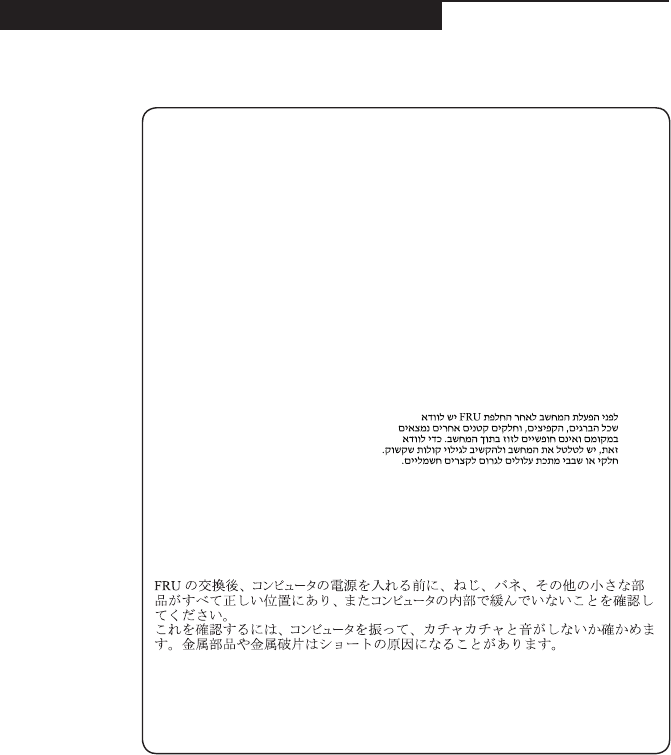
Safety notice 1
Before the computer is powered on after FRU replacement, make sure all screws,
springs, and other small parts are in place and are not left loose inside the computer.
Verify this by shaking the computer and listening for rattling sounds. Metallic parts
or metal akes can cause electrical shorts.
Avant de remettre l’ordinateur sous tension après remplacement d’une unité en
clientèle, vériez que tous les ressorts, vis et autres pièces sont bien en place et
bien xées. Pour ce faire, secouez l’unité et assurez-vous qu’aucun bruit suspect ne
se produit. Des pièces métalliques ou des copeaux de métal pourraient causer un
court-circuit.
Bevor nach einem FRU-Austausch der Computer wieder angeschlossen wird,
muß sichergestellt werden, daß keine Schrauben, Federn oder andere Kleinteile
fehlen oder im Gehäuse vergessen wurden. Der Computer muß geschüttelt und auf
Klappergeräusche geprüft werden. Metallteile oder-splitter können Kurzschlüsse
erzeugen.
Prima di accendere l’elaboratore dopo che é stata effettuata la sostituzione di una
FRU, accertarsi che tutte le viti, le molle e tutte le altri parti di piccole dimensioni
siano nella corretta posizione e non siano sparse all’interno dell’elaboratore.
Vericare ciò scuotendo l’elaboratore e prestando attenzione ad eventuali rumori;
eventuali parti o pezzetti metallici possono provocare cortocircuiti pericolosi.
Antes de encender el sistema despues de sustituir una FRU, compruebe que
todos los tornillos, muelles y demás piezas pequeñas se encuentran en su sitio
y no se encuentran sueltas dentro del sistema. Compruébelo agitando el sistema
y escuchando los posibles ruidos que provocarían. Las piezas metálicas pueden
causar cortocircuitos eléctricos.
8
Hardware Maintenance Manual
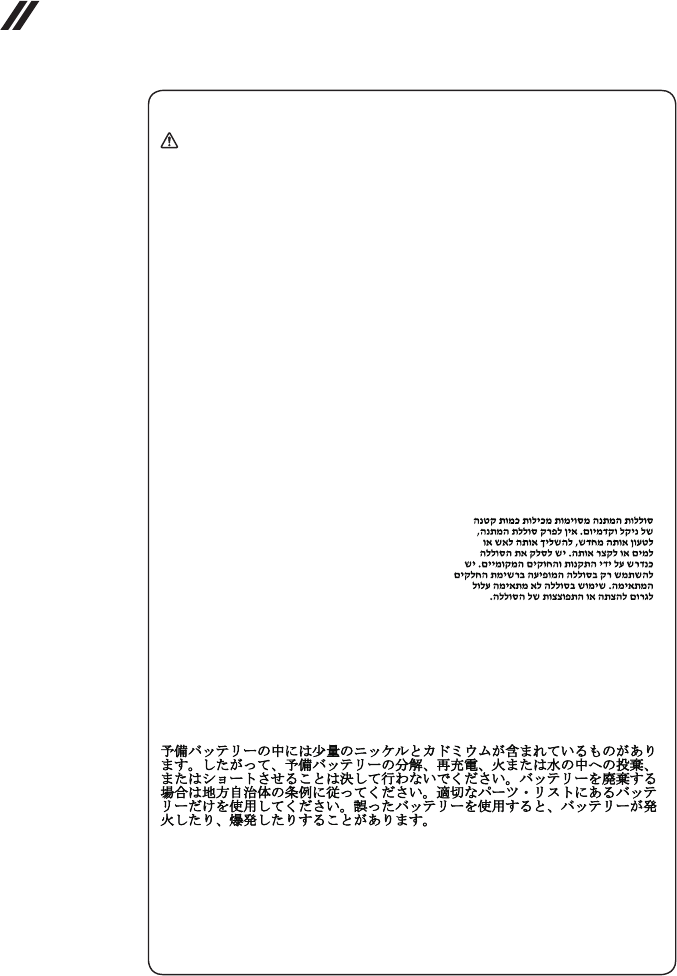
Safety notice 2
DANGER
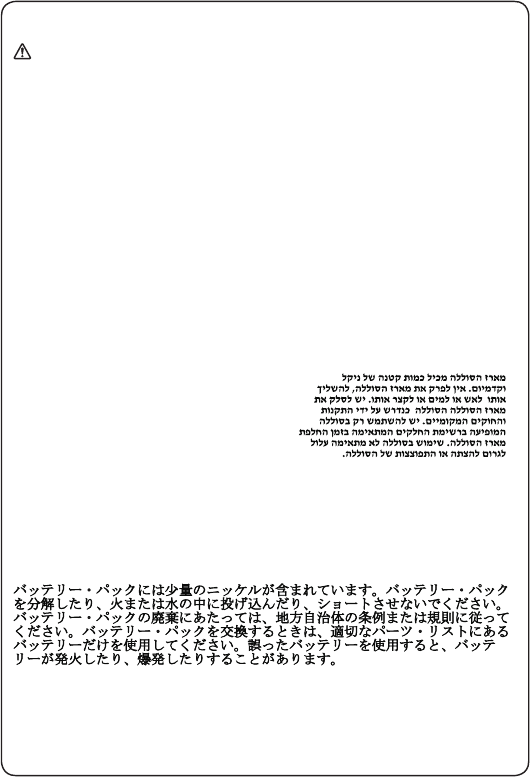
Some standby batteries contain a small amount of nickel and cadmium. Do not
disassemble a standby battery, recharge it, throw it into fire or water, or short-
circuit it. Dispose of the battery as required by local ordinances or regulations.
Use only the battery in the appropriate parts listing. Use of an incorrect battery can
result in ignition or explosion of the battery.
Certaines batteries de secours contiennent du nickel et du cadmium. Ne les
démontez pas, ne les rechargez pas, ne les exposez ni au feu ni à l’eau. Ne
les mettez pas en court-circuit. Pour les mettre au rebut, conformez-vous à la
réglementation en vigueur. Lorsque vous remplacez la pile de sauvegarde ou celle
de l’horloge temps réel, veillez à n’utiliser que les modèles cités dans la liste de
pièces détachées adéquate. Une batterie ou une pile inappropriée risque de prendre
feu ou d’exploser.
Die Bereitschaftsbatterie, die sich unter dem Diskettenlaufwerk befindet,
kann geringe Mengen Nickel und Cadmium enthalten. Sie darf nicht zerlegt,
wiederaufgeladen, kurzgeschlossen, oder Feuer oder Wasser ausgesetzt werden. Bei
der Entsorgung die örtlichen Bestimmungen für Sondermüll beachten. Beim Ersetzen
der Bereitschafts-oder Systembatterie nur Batterien des Typs verwenden, der in der
Ersatzteilliste aufgeführt ist. Der Einsatz falscher Batterien kann zu Entzündung oder
Explosion führen.
Alcune batterie di riserva contengono una piccola quantità di nichel e cadmio. Non
smontarle, ricaricarle, gettarle nel fuoco o nell’acqua né cortocircuitarle. Smaltirle
secondo la normativa in vigore (DPR 915/82, successive disposizioni e disposizioni
locali). Quando si sostituisce la batteria dell’RTC (real time clock) o la batteria di
supporto, utilizzare soltanto i tipi inseriti nell’appropriato Catalogo parti. L’impiego
di una batteria non adatta potrebbe determinare l’incendio o l’esplosione della
batteria stessa.
Algunas baterías de reserva contienen una pequeña cantidad de níquel y cadmio.
No las desmonte, ni recargue, ni las eche al fuego o al agua ni las cortocircuite.
Deséchelas tal como dispone la normativa local. Utilice sólo baterías que se
encuentren en la lista de piezas. La utilización de una batería no apropiada puede
provocar la ignición o explosión de la misma.
9
Safety information
Safety notice 3
DANGER
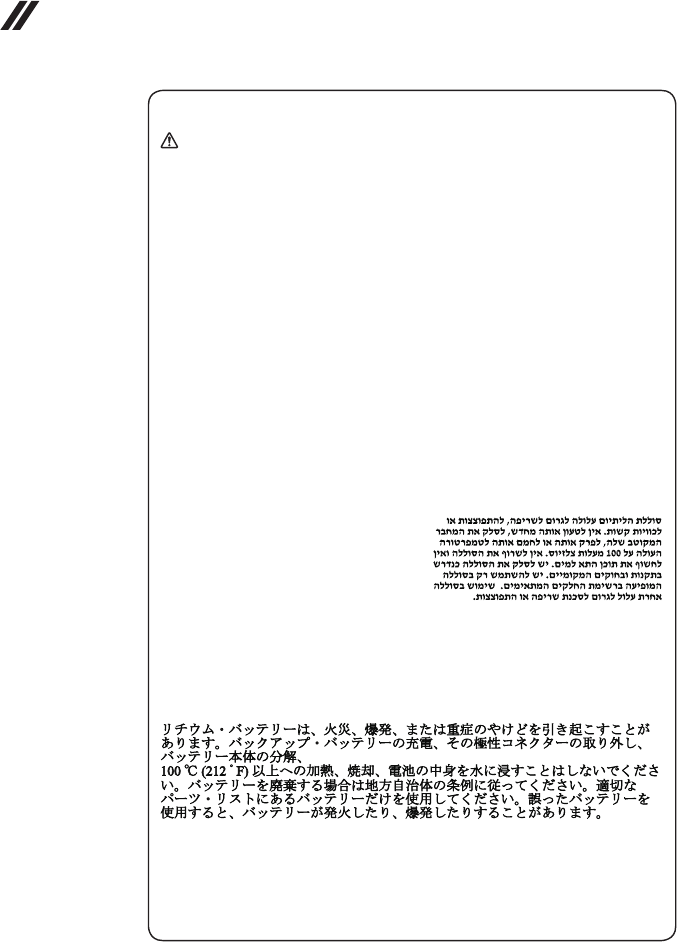
The battery pack contains small amounts of nickel. Do not disassemble it, throw
it into re or water, or short-circuit it. Dispose of the battery pack as required by
local ordinances or regulations. Use only the battery in the appropriate parts listing
when replacing the battery pack. Use of an incorrect battery can result in ignition
or explosion of the battery.
La batterie contient du nickel. Ne la démontez pas, ne l’exposez ni au feu ni à l’eau.
Ne la mettez pas en court-circuit. Pour la mettre au rebut, conformez-vous à la
réglementation en vigueur. Lorsque vous remplacez la batterie, veillez à n’utiliser
que les modèles cités dans la liste de pièces détachées adéquate. En effet, une
batterie inappropriée risque de prendre feu ou d’exploser.
Akkus enthalten geringe Mengen von Nickel. Sie dürfen nicht zerlegt,
wiederaufgeladen, kurzgeschlossen, oder Feuer oder Wasser ausgesetzt werden.
Bei der Entsorgung die örtlichen Bestimmungen für Sondermüll beachten. Beim
Ersetzen der Batterie nur Batterien des Typs verwenden, der in der Ersatzteilliste
aufgeführt ist. Der Einsatz falscher Batterien kann zu Entzündung oder Explosion
führen.
La batteria contiene piccole quantità di nichel. Non smontarla, gettarla nel fuoco
o nell’acqua né cortocircuitarla. Smaltirla secondo la normativa in vigore (DPR
915/82, successive disposizioni e disposizioni locali). Quando si sostituisce la
batteria, utilizzare soltanto i tipi inseriti nell’appropriato Catalogo parti. L’impiego
di una batteria non adatta potrebbe determinare l’incendio o l’esplosione della
batteria stessa.
Las baterías contienen pequeñas cantidades de níquel. No las desmonte, ni
recargue, ni las eche al fuego o al agua ni las cortocircuite. Deséchelas tal como
dispone la normativa local. Utilice sólo baterías que se encuentren en la lista de
piezas al sustituir la batería. La utilización de una batería no apropiada puede
provocar la ignición o explosión de la misma.
10
Hardware Maintenance Manual
Safety notice 4
DANGER
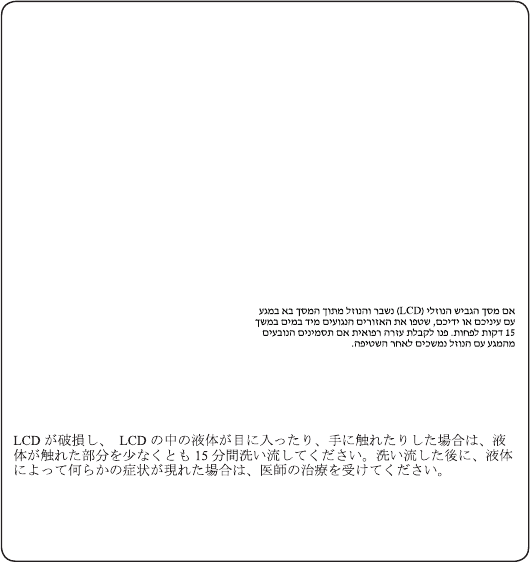
The lithium battery can cause a re, an explosion, or a severe burn. Do not recharge
it, remove its polarized connector, disassemble it, heat it above 100°C (212°F),
incinerate it, or expose its cell contents to water. Dispose of the battery as required
by local ordinances or regulations. Use only the battery in the appropriate parts
listing. Use of an incorrect battery can result in ignition or explosion of the battery.
La pile de sauvegarde contient du lithium. Elle présente des risques d’incendie,
d’explosion ou de brûlures graves. Ne la rechargez pas, ne retirez pas son
connecteur polarisé et ne la démontez pas. Ne l’exposez pas à une temperature
supérieure à 100°C, ne la faites pas brûler et n’en exposez pas le contenu à l’eau.
Mettez la pile au rebut conformément à la réglementation en vigueur. Une pile
inappropriée risque de prendre feu ou d’exploser.
Die Systembatterie ist eine Lithiumbatterie. Sie kann sich entzünden, explodieren
oder schwere Verbrennungen hervorrufen. Batterien dieses Typs dürfen nicht
aufgeladen, zerlegt, über 100 C erhitzt oder verbrannt werden. Auch darf ihr Inhalt
nicht mit Wasser in Verbindung gebracht oder der zur richtigen Polung angebrachte
Verbindungsstecker entfernt werden. Bei der Entsorgung die örtlichen Bestimmungen
für Sondermüll beachten. Beim Ersetzen der Batterie nur Batterien des Typs
verwenden, der in der Ersatzteilliste aufgeführt ist. Der Einsatz falscher Batterien
kann zu Entzündung oder Explosion führen.
La batteria di supporto e una batteria al litio e puo incendiarsi, esplodere o
procurare gravi ustioni. Evitare di ricaricarla, smontarne il connettore polarizzato,
smontarla, riscaldarla ad una temperatura superiore ai 100 gradi centigradi,
incendiarla o gettarla in acqua. Smaltirla secondo la normativa in vigore (DPR
915/82, successive disposizioni e disposizioni locali). L’impiego di una batteria
non adatta potrebbe determinare l’incendio o l’esplosione della batteria stessa.
La batería de repuesto es una batería de litio y puede provocar incendios,
explosiones o quemaduras graves. No la recargue, ni quite el conector polarizado,
ni la desmonte, ni caliente por encima de los 100°C (212°F), ni la incinere ni
exponga el contenido de sus celdas al agua. Deséchela tal como dispone la
normativa local.
11
Safety information
Safety notice 5
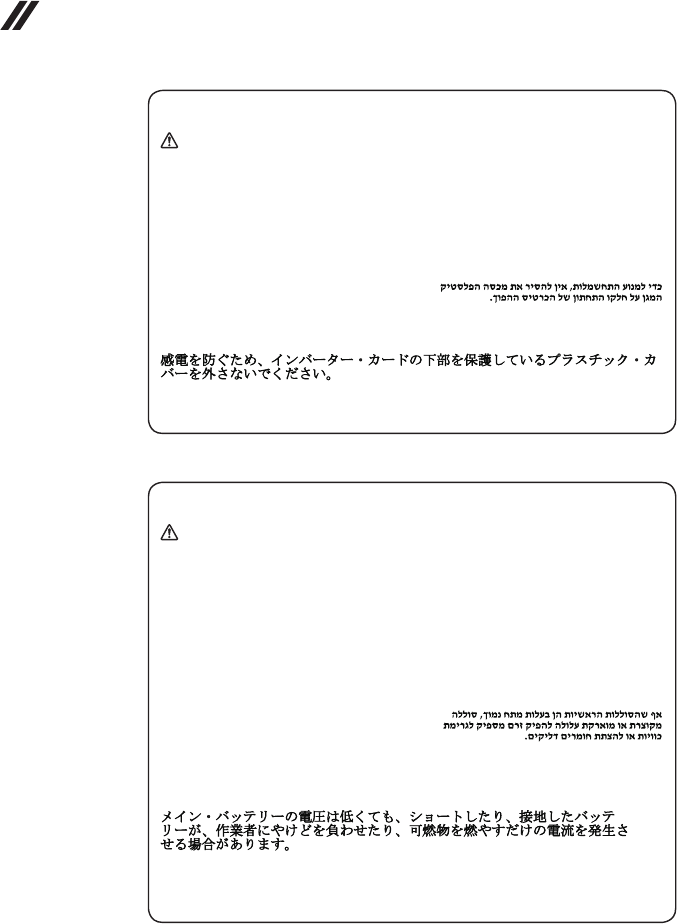
If the LCD breaks and the uid from inside the LCD gets into your eyes or on your
hands, immediately wash the affected areas with water at least for 15 minutes. Seek
medical care if any symptoms caused by the uid are present after washing.
Si le panneau d’afchage à cristaux liquides se brise et que vous recevez dans les
yeux ou sur les mains une partie du fluide, rincez-les abondamment pendant au
moins quinze minutes. Consultez un médecin si des symptômes persistent après le
lavage.
Die Leuchtstoffröhre im LCD-Bildschirm enthält Quecksilber. Bei der Entsorgung
die örtlichen Bestimmungen für Sondermüll beachten. Der LCD-Bildschirm
besteht aus Glas und kann zerbrechen, wenn er unsachgemäß behandelt wird
oder der Computer auf den Boden fällt. Wenn der Bildschirm beschädigt ist und
die darin befindliche Flüssigkeit in Kontakt mit Haut und Augen gerät, sollten
die betroffenen Stellen mindestens 15 Minuten mit Wasser abgespült und bei
Beschwerden anschließend ein Arzt aufgesucht werden.
Nel caso che caso l’LCD si dovesse rompere ed il liquido in esso contenuto
entrasse in contatto con gli occhi o le mani, lavare immediatamente le parti
interessate con acqua corrente per almeno 15 minuti; poi consultare un medico se i
sintomi dovessero permanere.
Si la LCD se rompe y el uido de su interior entra en contacto con sus ojos o sus
manos, lave inmediatamente las áreas afectadas con agua durante 15 minutos como
mínimo. Obtenga atención medica si se presenta algún síntoma del uido despues
de lavarse.
12
Hardware Maintenance Manual
Safety notice 6
DANGER
To avoid shock, do not remove the plastic cover that protects the lower part of the
inverter card.
An d’éviter tout risque de choc électrique, ne retirez pas le cache en plastique
protégeant la partie inférieure de la carte d’alimentation.
Aus Sicherheitsgründen die Kunststoffabdeckung, die den unteren Teil der
Spannungswandlerplatine umgibt, nicht entfernen.
Per evitare scosse elettriche, non rimuovere la copertura in plastica che avvolge la
parte inferiore della scheda invertitore.
Para evitar descargas, no quite la cubierta de plástico que rodea la parte baja de la
tarjeta invertida.
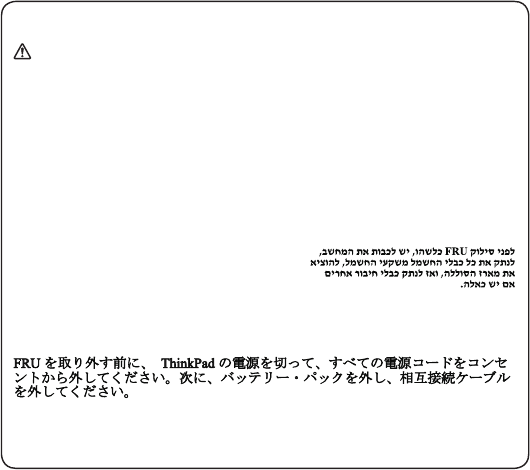
Safety notice 7
DANGER
Though the main batteries have low voltage, a shorted or grounded battery can
produce enough current to burn personnel or combustible materials.
Bien que le voltage des batteries principales soit peu élevé, le court-circuit ou la
mise à la masse d’une batterie peut produire sufsamment de courant pour brûler
des matériaux combustibles ou causer des brûlures corporelles graves.
Obwohl Hauptbatterien eine niedrige Spannung haben, können sie doch bei
Kurzschluß oder Erdung genug Strom abgeben, um brennbare Materialien zu
entzünden oder Verletzungen bei Personen hervorzurufen.
Sebbene le batterie di alimentazione siano a basso voltaggio, una batteria in
corto circuito o a massa può fornire corrente sufficiente da bruciare materiali
combustibili o provocare ustioni ai tecnici di manutenzione.
Aunque las baterías principales tienen un voltaje bajo, una batería cortocircuitada
o con contacto a tierra puede producir la corriente suciente como para quemar
material combustible o provocar quemaduras en el personal.
13
Safety information
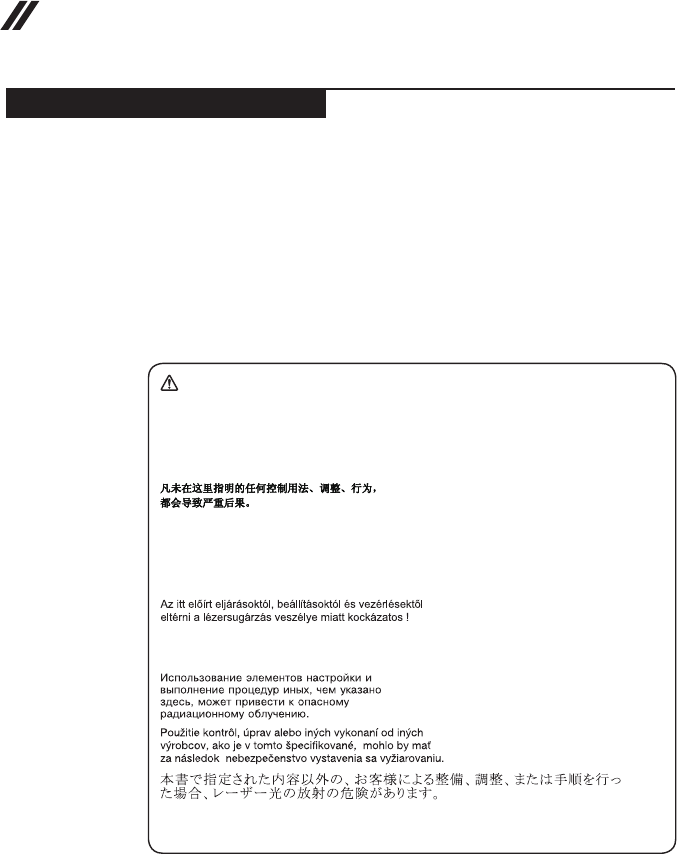
Safety notice 8
DANGER
Before removing any FRU, turn off the computer, unplug all power cords from
electrical outlets, remove the battery pack, and then disconnect any interconnecting
cables.
Avant de retirer une unité remplaçable en clientèle, mettez le système hors tension,
débranchez tous les cordons d’alimentation des socles de prise de courant, retirez la
batterie et déconnectez tous les cordons d’interface.
Die Stromzufuhr muß abgeschaltet, alle Stromkabel aus der Steckdose gezogen,
der Akku entfernt und alle Verbindungskabel abgenommen sein, bevor eine FRU
entfernt wird.
Prima di rimuovere qualsiasi FRU, spegnere il sistema, scollegare dalle prese
elettriche tutti i cavi di alimentazione, rimuovere la batteria e poi scollegare i cavi
di interconnessione.
Antes de quitar una FRU, apague el sistema, desenchufe todos los cables de las
tomas de corriente eléctrica, quite la batería y, a continuación, desconecte cualquier
cable de conexión entre dispositivos.
14
Hardware Maintenance Manual
Laser compliance statement
SomemodelsofLenovocomputerareequippedfromthefactorywithan
opticalstorage devicesuch asa CD-ROMdrive oraDVD-ROMdrive.Such
devicesarealsosoldseparatelyasoptions.Ifoneofthesedrivesisinstalled,
itiscertiedinthe U.S.toconformtothe requirementsoftheDepartmentof
HealthandHumanServices21CodeofFederalRegulations(DHHS21CFR)
SubchapterJforClass1 laserproducts.Elsewhere,thedrive iscertifiedto
conformtotherequirementsoftheInternationalElectrotechnicalCommission
(IEC)825andCENELECEN60825forClass1laserproducts.
IfaCD-ROMdrive,aDVD-ROMdrive,oranotherlaserdeviceisinstalled,note
thefollowing:
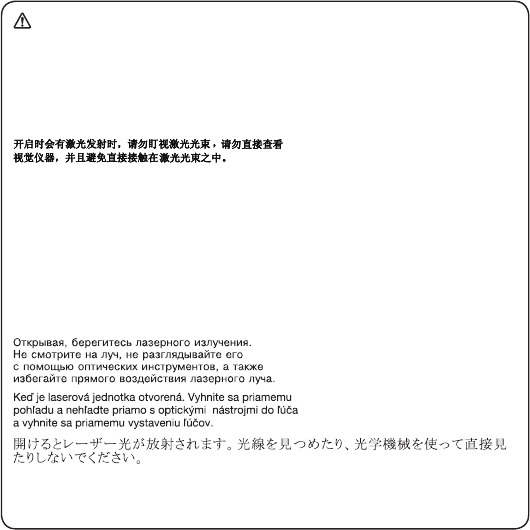
CAUTION
Use of controls or adjustments or performance of procedures other than those
specied herein might result in hazardous radiation exposure.
O uso de controles, ajustes ou desempenho de procedimentos diferentes daqueles
aqui especicados pode resultar em perigosa exposição à radiação.
Pour éviter tout risque d’exposition au rayon laser, respectez les consignes de
réglage et d’utilisation des commandes, ainsi que les procédures décrites.
Werden Steuer- und Einstellelemente anders als hier festgesetzt verwendet, kann
gefährliche Laserstrahlung auftreten.
L’utilizzo di controlli, regolazioni o l’esecuzione di procedure diverse da quelle
specicate possono provocare l’esposizione a.
El uso de controles o ajustes o la ejecución de procedimientos distintos de los aquí
especicados puede provocar la exposición a radiaciones peligrosas.
OpeningtheCD-ROMdrive,theDVD-ROMdrive,oranyotheropticalstorage
devicecouldresultinexposuretohazardouslaserradiation.Thereareno
serviceablepartsinsidethosedrives.Do not open.
15
Safety information
ACD-ROMdrive,aDVD-ROMdrive,oranyotherstoragedeviceinstalledmay
containanembeddedClass3AorClass3Blaserdiode.Notethefollowing:
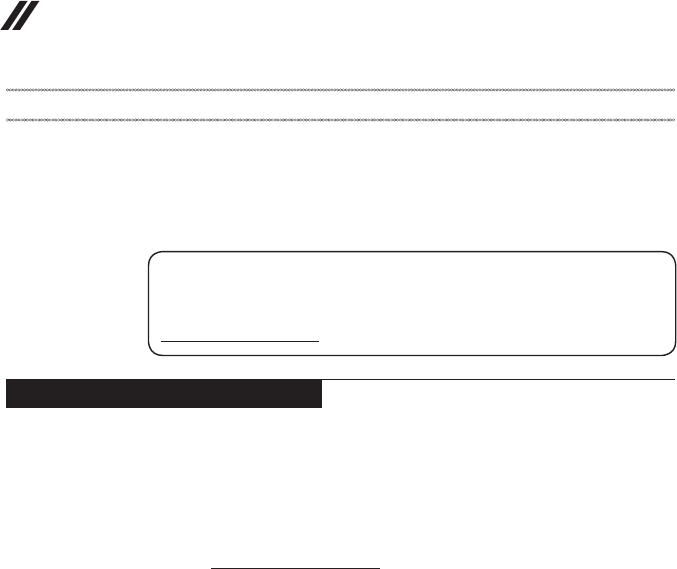
DANGER
Emits visible and invisible laser radiation when open. Do not stare into the beam,
do not view directly with optical instruments, and avoid direct exposure to the
beam.
Radiação por raio laser ao abrir. Não olhe xo no feixe de luz, não olhe diretamente
por meio de instrumentos óticos e evite exposição direta com o feixe de luz.
Rayonnement laser si carter ouvert. Évitez de fixer le faisceau, de le regarder
directement avec des instruments optiques, ou de vous exposer au rayon.
Laserstrahlung bei geöffnetem Gerät. Nicht direkt oder über optische Instrumente
in den Laserstrahl sehen und den Strahlungsbereich meiden.
Kinyitáskor lézersugár ! Ne nézzen bele se szabad szemmel, se optikai
eszközökkel. Kerülje a sugárnyalábbal való érintkezést!
Aprendo l’unità vengono emesse radiazioni laser. Non fissare il fascio, non
guardarlo direttamente con strumenti ottici e evitare l’esposizione diretta al fascio.
Radiación láser al abrir. No mire jamente ni examine con instrumental óptico el
haz de luz. Evite la exposición directa al haz.
16
Hardware Maintenance Manual
Important service information
Thischapterpresentsthefollowingimportantserviceinformation:
• “StrategyforreplacingFRUs”onpage16
– “Strategyforreplacingaharddiskdrive”onpage17
– “Importantnoticeforreplacingasystemboard”onpage17
• “ImportantinformationaboutreplacingRoHScompliantFRUs”onpage18
Important:
BIOS and device driver xes are customer-installable. The BIOS and device
drivers are posted on the customer support site:
http://support.lenovo.com.
Strategy for replacing FRUs
Before replacing parts:
Makesurethatallsoftwarexes,drivers,andBIOSdownloadsareinstalled
beforereplacinganyFRUslistedinthismanual.
Afterasystemboardisreplaced,ensurethatthelatestBIOSisloadedtothe
systemboardbeforecompletingtheserviceaction.
Todownloadsoftwarexes,drivers,andBIOS,followthestepsbelow:
1. Gotohttp://support.lenovo.com.
2. Entertheserialnumberorselecta productoruseLenovosmart
downloading.
3. SelecttheBIOS/Driver/Applicationsanddownload.
4. Followthedirectionsonthescreenandinstallthenecessarysoftware.
17
Important service information
Usethefollowingstrategytopreventunnecessary expenseforreplacingand
servicingFRUs:
• IfyouareinstructedtoreplaceanFRU,butthereplacementdoesnotsolve
theproblem,reinstalltheoriginalFRUbeforeyoucontinue.
• Somecomputers haveboth aprocessor boardand asystem board.If you
areinstructedtoreplaceeitherofthem,andreplacingoneofthemdoesnot
solvetheproblem,reinstallthatboard,andthenreplacetheotherone.
• IfanadapteroradeviceconsistsofmorethanoneFRU,anyoftheFRUs
maybethecauseoftheerror.Beforereplacingtheadapterordevice,
removetheFRUsonebyonetoseeifthesymptomschange.Replaceonly
theFRUthatchangedthesymptoms.
Attention:Thesetup configurationonthecomputeryouareservicingmay
havebeencustomized.RunningAutomatic Configurationmay alterthe
settings.Notethecurrentcongurationsettings(usingtheViewConguration
option);then,whenservicehasbeencompleted,verifythatthosesettings
remainineffect.
Strategy for replacing a hard disk drive
Alwaystrytorunalow-levelformatbeforereplacingaharddiskdrive.This
willcauseallcustomerdata ontheharddiskto belost.Makesurethatthe
customerhasacurrentbackupofthedatabeforeperformingthisaction.
Attention:Thedrivestartupsequenceinthecomputeryouareservicingmay
havebeenchanged.Beextremelycarefulduringwriteoperations suchas
copying,saving,orformatting.Ifyouselectanincorrectdrive,dataorprograms
canbeoverwritten.
Important notice for replacing a system board
Somecomponentsmountedonasystemboardarevery sensitive.Improper
handlingcancausedamagetothosecomponents, andmaycauseasystem
malfunction.
Attention:Whenhandlingasystemboard:
• Donotdropthesystemboardorapplyanyexcessiveforcetoit.
• Avoidroughhandlingofanykind.
• Avoidbendingthe systemboard andhard pushingtopreventcrackingat
eachBGA(BallGridArray)chipset.

18
Hardware Maintenance Manual
Important information about replacing RoHS compliant FRUs
RoHS, The Restriction of Hazardous Substances in Electrical and
Electronic Equipment Directive (2002/95/EC) is a European Union legal
requirement affecting the global electronics industry. RoHS requirements
must be implemented on Lenovo products placed on the market after
June 2006. Products on the market before June 2006 are not required to
have RoHS compliant parts. If the original FRU parts are non-compliant,
replacement parts can also be non-compliant. In all cases if the original
FRU parts are RoHS compliant, the replacement part must also be RoHS
compliant.
Note:RoHSandnon-RoHSFRUpartnumberswiththesametandfunction
areidentiedwithuniqueFRUpartnumbers.
Lenovoplans totransit toRoHScompliancewell beforethe implementation
dateandexpectsitssupplierstobereadytosupportLenovo’srequirements
andscheduleintheEU.Productssold in2005and2006willcontainsome
RoHScompliantFRUs.Thefollowingstatementpertainstotheseproductsand
anyproductLenovoproducescontainingRoHScompliantFRUs.
RoHScompliant FRUshave uniqueFRU partnumbers. Beforeor afterthe
RoHSimplementationdate,failedRoHScompliantparts mustalwaysbe
replacedwithRoHScompliantones,soonlytheFRUsidentiedascompliant
inthesystemHMMordirectsubstitutionsforthoseFRUsmaybeused.
Products marketed before June 2006 Products marketed after June 2006
Current or
original part
Replacement FRU Current or
original part
Replacement FRU
Non-RoHS CanbeNon-RoHS
MustbeRoHS MustbeRoHS
Non-RoHS CanbeRoHS
Non-RoHS CansubtoRoHS
RoHS MustbeRoHS
Note:Adirectsubstitutionis apartwithadifferentFRUpartnumberthatis
automaticallyshippedbythedistributioncenteratthetimeoftheorder.

19
General checkout
General checkout
Thischapterpresentsthefollowinginformation:
• “Whattodorst”onpage20
• “Powersystemcheckout”onpage21
Beforeyougotothecheckout,makesuretoreadthefollowingimportantnotes:
Important notes:
• Onlycertiedtrainedpersonnelcanservicethecomputer.
• BeforereplacinganyFRU,readtheentirepageon removingandreplacing
FRUs.
• CarefullyremovescrewsforreusewhenreplacingFRUs.
• Beextremelycarefulduringsuch writeoperationsascopying,saving,or
formatting. Drives in the computer that you are servicing sequence might
have been altered. If you select an incorrect drive, data or programs might be
overwritten.
• ReplaceanFRUonlywithanotherFRU ofthecorrectmodel. When you
replace an FRU, make sure that the machine model and the FRU part number are
correct by referring to the FRU parts list.
• AnFRUshouldnotbereplacedjustbecauseofasingle,unreproduciblefailure.
Single failures can occur for a variety of reasons that have nothing to do with a
hardware defect, such as cosmic radiation, electrostatic discharge, or software
errors. Consider replacing an FRU only when a problem recurs. If you suspect that
an FRU is defective, clear the error logs and run the test again. If the error does
not recur, do not replace the FRU.
• BecarefulnottoreplaceanondefectiveFRU.

20
Hardware Maintenance Manual
What to do rst
WhenyoudoreturnanFRU,youmustincludethefollowinginformationinthe
partsexchangeformorpartsreturnformthatyouattachtoit:
1. Nameandphonenumberofservicer
2. Dateofservice
3. Dateonwhichthemachinefailed
4. Dateofpurchase
5. ProcedureindexandpagenumberinwhichthefailingFRUwasdetected
6. FailingFRUnameandpartnumber
7. Machinetype,modelnumber,andserialnumber
8. Customer’snameandaddress
Note for warranty:During thewarranty period,the customermay be
responsiblefor repaircostsifthecomputerdamagewascausedbymisuse,
accident,modification,unsuitablephysicaloroperatingenvironment, or
impropermaintenancebythecustomer.
Thefollowingisalistofsomecommonitemsthatare notcovered under
warrantyandsomesymptomsthatmightindicatethatthesystemwas
subjectedtostressbeyondnormaluse.
Beforecheckingproblemswiththecomputer,determinewhetherthedamageis
coveredunderthewarrantybyreferringtothefollowinglist:
The following are not covered under warranty:
• LCDpanelcrackedfromtheapplicationofexcessiveforce orfrombeing
dropped
• Scratched(cosmetic)parts
• Distortion,deformation,ordiscolorationofthecosmeticparts
• Plasticparts,latches,pins,orconnectorsthathavebeencrackedorbroken
byexcessiveforce
• Damagecausedbyliquidspilledintothesystem
• DamagecausedbytheimproperinsertionofaPCCardortheinstallationof
anincompatiblecard
• Improperdiskinsertionoruseofanopticaldrive
• Diskettedrivedamagecausedbypressureonthediskette drivecover,
foreignmaterialinthedrive,ortheinsertionofadiskettewithmultiplelabels
• Damagedorbentdisketteejectbutton
• Fusesblownbyattachmentofanonsupporteddevice
• Forgottencomputerpassword(makingthecomputerunusable)
• Stickykeyscausedbyspillingaliquidontothekeyboard
• UseofanincorrectACadapteronlaptopproducts
The following symptoms might indicate damage caused by nonwarranted
activities:
• Missingpartsmightbeasymptomofunauthorizedserviceormodication.
• Ifthespindleofaharddiskdrivebecomesnoisy,itmayhavebeensubjected
toexcessiveforce,ordropped.
21
General checkout
Power system checkout
Toverifyasymptom,followthestepsbelow:
1. Turnoffthecomputer.
2. Removethebatterypack.
3. ConnecttheACadapter.
4. Makesurethatpowerissuppliedwhenyouturnonthecomputer.
5. Turnoffthecomputer.
6. DisconnecttheACadapterandinstallthechargedbatterypack.
7.
Makesurethatthebatterypacksuppliespowerwhenyouturnonthecomputer.
Ifyoususpectapowerproblem,seetheappropriateoneofthefollowingpower
supplycheckouts:
• “CheckingtheACadapter”onpage21
• “Checkingoperationalcharging”onpage21
• “Checkingthebatterypack”onpage22
Checking the AC adapter
YouareherebecausethecomputerfailsonlywhentheACadapterisused.
• Ifthepower-onindicatordoesnotturnon,checkthepowercordoftheAC
adapterforcorrectcontinuityandinstallation.
• Ifthecomputerdoesnotchargeduringoperation,goto“Checking
operationalcharging”.
TochecktheACadapter,followthestepsbelow:
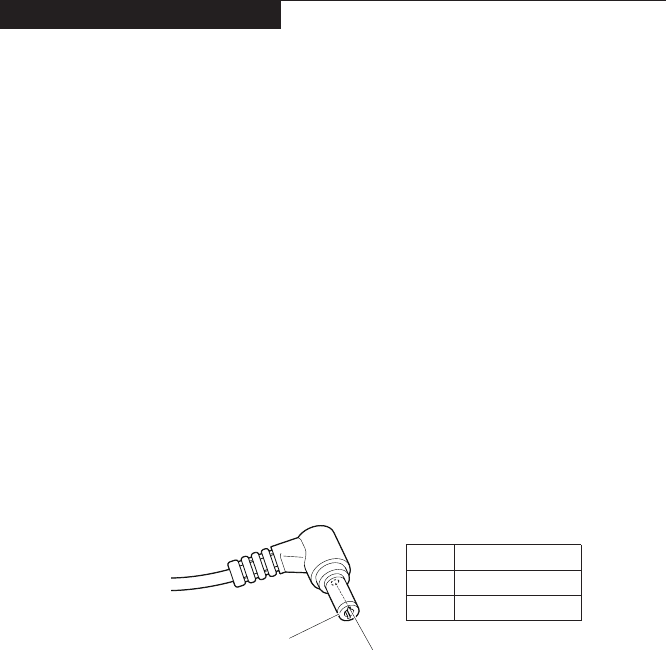
1. UnplugtheACadaptercablefromthecomputer.
2. MeasuretheoutputvoltageattheplugoftheAC adaptercable.Seethe
followinggure:
2
1
Voltage (V DC)
+20
0
Pin
1
2
Note:OutputvoltagefortheACadapterpinNo.2maydifferfromtheoneyou
areservicing.
3. Ifthevoltageisnotcorrect,replacetheACadapter.
4. Ifthevoltageisacceptable,dothefollowing:
• Replacethesystemboard.
• Iftheproblempersists,goto“Lenovoideapad330-14IKB/ideapad330E-14IKB
D/ideapad330E-14IKBU/ideapad330-14IKBD/ideapad330-14IKBU/ideapad
330H-14IKB/ideapad330L-14IKB/ideapad330E-14IKB/ideapad330R-14IKB/
ideapad330-15IKB/ideapad330E-15IKBD/ideapad330E-15IKBU/ideapad330-
15IKBD/ideapad330-15IKBU/ideapad330H-15IKB/ideapad330L-15IKB/ideapad
330E-15IKB/ideapad330R-15IKB/ideapad330-15IKBTouch”onpage27.
Note:NoisefromtheACadapterdoesnotalwaysindicateadefect.
Checking operational charging
Tocheckwhetherthebattery chargesproperlyduringoperation,usea
dischargedbatterypackorabatterypack thathaslessthan50%ofthe total
powerremainingwheninstalledinthecomputer.

22
Hardware Maintenance Manual
Performoperationalcharging.Ifthe batterystatusindicatororicon doesnot
lighton,removethebatterypackandletitreturntoroomtemperature.Reinstall
thebatterypack.Ifthe chargeindicatororiconis stilloff,replacethebattery
pack.
Ifthechargeindicatorstilldoesnotlighton,replacethesystemboard.Then
reinstallthebatterypack.Ifitisstillnotcharged,gotothenextsection.
Checking the battery pack
BatterychargingdoesnotstartuntilthePowerMetershowsthatlessthan95%
ofthetotalpowerremains;underthisconditionthebatterypackcanchargeto
100%ofitscapacity.Thisprotectsthebatterypackfrombeingoverchargedor
fromhavingashortenedlife.
Tocheckyourbattery,moveyourcursortothePowerMetericonintheicon
trayoftheWindows®taskbarandwaitforamoment(butdonotclickit),andthe
percentageofbatterypowerremainingisdisplayed.Togetdetailedinformation
aboutthebattery,double-clickthePowerMetericon.
Note:Ifthebatterypack becomeshot,itmaynotbeable tobecharged.
Removeitfromthecomputerandleaveitatroomtemperatureforawhile.After
itcoolsdown,reinstallandrechargeit.
23
Related service information
Related service information
Thischapterpresentsthefollowinginformation:
• “RestoringthefactorycontentsbyusingOneKeyRecovery”onpage23
• “Passwords”onpage24
• “Powermanagement”onpage25
Restoring the factory contents by using OneKey Recovery
Restore of factory default
TheLenovoideapad330-14IKB/ideapad330E-14IKBD/ideapad330E-14IKB
U/ideapad330-14IKB D/ideapad330-14IKB U/ideapad330H-14IKB/
ideapad330L-14IKB/ideapad 330E-14IKB/ideapad330R-14IKB/ideapad
330-15IKB/ideapad330E-15IKB D/ideapad330E-15IKBU/ideapad330-
15IKBD/ideapad 330-15IKBU/ideapad330H-15IKB/ideapad330L-15IKB/
ideapad330E-15IKB/ideapad330R-15IKB/ideapad330-15IKBTouch
computerscome withpre-installed Push-buttonreset.Inordertosave
applicationfilesandtheinitialbackedupfilesofthe system,theharddisk
inaLenovocomputerincludesahidden partitionwhenitisshipped.If
youneedtorestorethe systemtothepointof yourfirstbootup,pressthe
NovobuttonandrunSystem Recovery. Fordetailsof“Push-buttonreset”,
seethe Recovery system inthe User Guide.
Note: This will delete all the new data on the system partition (C drive), which
is not recoverable. Make sure to back up your critical data before you perform this
action.
Whenyouusetherecoverydiscstobootyourcomputer,thesystemwillenter
theuserinterfaceforsystemrecoveryautomatically.Pleasefollowtheprompt
toinsertthebackupdiscstocompletethewholerecoveryprocess.
Note:The recovery process might take up to 2 hours.

24
Hardware Maintenance Manual
Passwords
Asmany asthreepasswordsmaybeneededforanyLenovocomputer:
thepower-onpassword(POP),theharddiskpassword(HDP),andthe
administratorpassword.
Ifanyofthesepasswordshasbeenset,apromptforitappearsonthescreen
wheneverthecomputeristurnedon.Thecomputer doesnotstartuntilthe
passwordisentered.
Power-on password
Apower-onpassword(POP) protectsthesystemfrombeingpoweredonby
anunauthorized person.Thepasswordmustbeenteredbeforeanoperating
systemcanbebooted.
Hard-disk password
Therearetwohard-diskpasswords(HDPs):
+UserHDP-fortheuser
+MasterHDP-forthesystemadministrator,who canuse ittogetaccessto
theharddiskdriveeveniftheuserhaschangedtheuserHDP
Attention:IftheuserHDPhas beenforgotten,checkwhetheramasterHDP
hasbeenset.Ifithas,itcanbeusedforaccess totheharddiskdrive.If
nomasterHDPisavailable,neitherLenovonorLenovoauthorizedservice
techniciansprovideanyservicestoreseteithertheuserorthemasterHDP,or
torecoverdatafromthe harddiskdrive.Theharddiskdrivecanbereplaced
forascheduledfee.
Administrator password
Administratorpasswordcontrolstheaccess ofthewholesetuputility. Only
aftertheAdministratorpasswordhasbeensetcantheUserpasswordbeset.If
Administratorpasswordwascleared,theUserpasswordwasclearedtoo.

25
Related service information
Power management
Note:PowermanagementmodesarenotsupportedforAPMoperatingsystem.
Toreduce powerconsumption, thecomputer hasthree powermanagement
modes:screenblank,sleep(standby),andhibernation.
Screen blank state
Ifthetimeseton the“Turnoffmonitor”timerintheoperating systemexpires,
theLCDbacklightturnsoff.YoucanalsoturnofftheLCDbacklight by
pressing .
Toendscreenblankstateandresumenormaloperation,pressanykeyonthe
keyboard.
Putting the computer to sleep or shutting it down
Whenyouhavenishedworkingwithyourcomputer,youcanputittosleepor
shutitdown.
Putting your computer to sleep
Ifyouwillbeawayfromyourcomputerforonlyashorttime,putthecomputer
tosleep.
Whenthecomputerisin sleepmode,youcanquicklywakeittoresumeuse,
bypassingthestartupprocess.
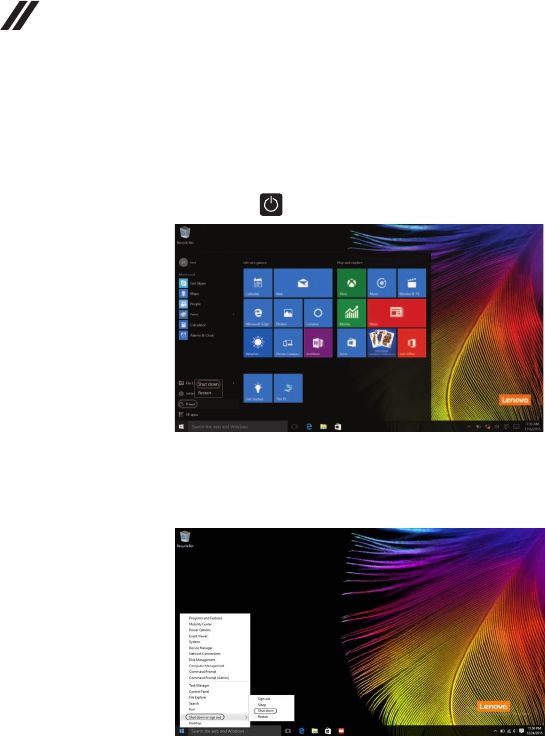
Toputthecomputertosleep,dooneofthefollowing:
• Closethedisplaylid.
• Pressthepowerbutton.
• Move the cursor to the lower-left corner, and then select the Start
button. Select Power → Sleep.
Note:Putyourcomputertosleepbeforeyoumoveit.Movingyourcomputer
whiletheharddiskdriveisspinningcandamagetheharddisk,causing
lossofdata.
Towakeupthecomputer,performthefollowing:
• Pressanykeyonthekeyboard.
• Pressthepowerbutton.
26
Hardware Maintenance Manual
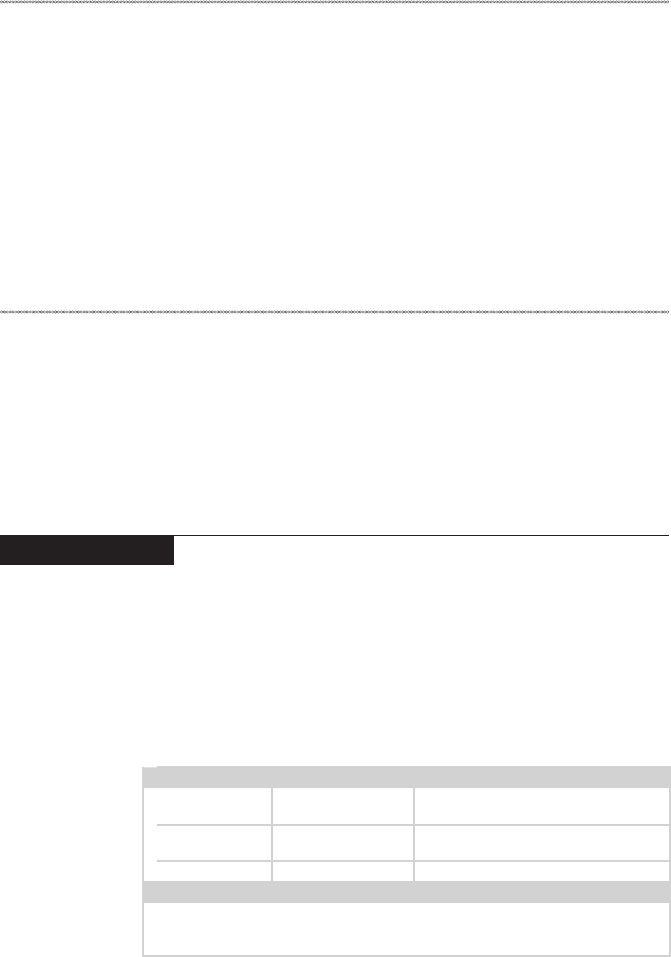
• Right-clicktheStartbuttoninthelower-leftcornerandselectShut down or
sign out→Shut down.
Shutting down the computer
Ifyouarenotgoingtouseyourcomputerforalongtime,shutitdown.
Toshutdownyourcomputer,dooneofthefollowing:
• Movethe cursortothelower-leftcorner,andthenselecttheStartbutton.
Select Power → Shut down.
27
Lenovo ideapad 330-14IKB/ideapad 330E-14IKB D/ideapad 330E-14IKB U/ideapad 330-14IKB D/ideapad 330-
14IKB U/ideapad 330H-14IKB/ideapad 330L-14IKB/ideapad 330E-14IKB/ideapad 330R-14IKB/ideapad 330-
15IKB/ideapad 330E-15IKB D/ideapad 330E-15IKB U/ideapad 330-15IKB D/ideapad 330-15IKB U/ideapad
330H-15IKB/ideapad 330L-15IKB/ideapad 330E-15IKB/ideapad 330R-15IKB/ideapad 330-15IKB Touch
Lenovo ideapad 330-14IKB/ideapad 330E-14IKB D/
ideapad 330E-14IKB U/ideapad 330-14IKB D/ideapad
330-14IKB U/ideapad 330H-14IKB/ideapad 330L-14IKB/
ideapad 330E-14IKB/ideapad 330R-14IKB/ideapad 330-
15IKB/ideapad 330E-15IKB D/ideapad 330E-15IKB U/
ideapad 330-15IKB D/ideapad 330-15IKB U/ideapad
330H-15IKB/ideapad 330L-15IKB/ideapad 330E-15IKB/
ideapad 330R-15IKB/ideapad 330-15IKB Touch
Thischapter presentsthe followingproduct-specific servicereferencesand
product-specicpartsinformation:
• “Specications”onpage27
• “Statusindicators”onpage29
• “Hotkeys”onpage30
• “FRUreplacementnotices”onpage31
• “RemovingandreplacinganFRU”onpage32
• “Locations”onpage72
• “Partslist”onpage75
Specications
Thefollowingtableliststhespecificationsof theLenovoideapad330-
14IKB/ideapad330E-14IKBD/ideapad330E-14IKBU/ideapad330-14IKB
D/ideapad330-14IKBU/ideapad330H-14IKB/ideapad330L-14IKB/ideapad
330E-14IKB/ideapad330R-14IKB/ideapad330-15IKB/ideapad330E-15IKB
D/ideapad330E-15IKBU/ideapad330-15IKBD/ideapad330-15IKBU/
ideapad330H-15IKB/ideapad 330L-15IKB/ideapad330E-15IKB/ideapad
330R-15IKB/ideapad330-15IKBTouch:
Table 1. Specications
Lenovo ideapad
330-14IKB
Lenovo ideapad
330-15IKB
Lenovo ideapad
330-15IKB Touch
Form Factor
Dimensions Appr.338.3mm×
249.9mm×22.7mm Appr.378mm×260mm×22.9mm
Weight Appr.2.1kgwith
battery Appr.2.2kgwithbattery
LCDsize 14.0-inch 15.6-inch
Processor
Seethesystempropertiesofyourcomputer,youcandothisasfollows:
ClickControl Panel,thenclickHardware and Sound,clickDevice Manager
underDevices and PrintersanddoubleclickProcessors.

28
Hardware Maintenance Manual
Table 1. Specications (continued)
Memory
Typeandspeed DDR4-2133MHz
Capacity /
Optane(onselect
models):16GB
(Onlysupporti7+
DIS)
/
Maximum
supported
capacity
16GB
Slots SODIMM×1,Onboard×1
SSD
Interface SATA3 SATA3/PCIE SATA3
Capacity SATA3:128GB/
256GB
PCIE:128GB(on
selectmodels)SATA
3:128GB/256GB
SATA3:128GB/
256GB
Hard disk drive
Formfactor 2.5-inch,7mm
Capacity
500GB/1TB/2TB,5400rpm
SSD+HDD
(onselectmodels)
Interface SATA3/SATA2
Optical Drive (on select models)
Formfactor 9.0mm
Type Writer
Display
Display
resolution(LCD)
1366×768pixelsHD/
1920×1080pixelsFHD
1366×768pixels
HD
LCDbacklight LED
I/O Ports
USB USB3.0×2,Type-C×1
(supportUSB3.0Gen1,Output5VDC,0.9ADC)
Audio Comboaudiojack×1
Video/Audio HDMIslot×1
Ethernet RJ-45×1
Memorycardslot 4in1slot×1(SD/SDHC/SDXC/MMC)
Battery pack
Type Polymer
Cells/Capacity 2Cell,30Wh/35Wh
Note: Thecapacitygivenhereisthetypicaloraveragecapacityasmeasuredina
specictestenvironment.Capacitiesmeasuredinotherenvironmentsmay
differbutarenolowerthantheratedcapacity(seeproductlabel).
AC power adapter
Input 100-240V,50-60HzAC
Outputvoltage 20VDC
Power DIS65W,UMA45W
Miscellaneous
Camera 0.3M/HD
Security Kensingtonslot×1
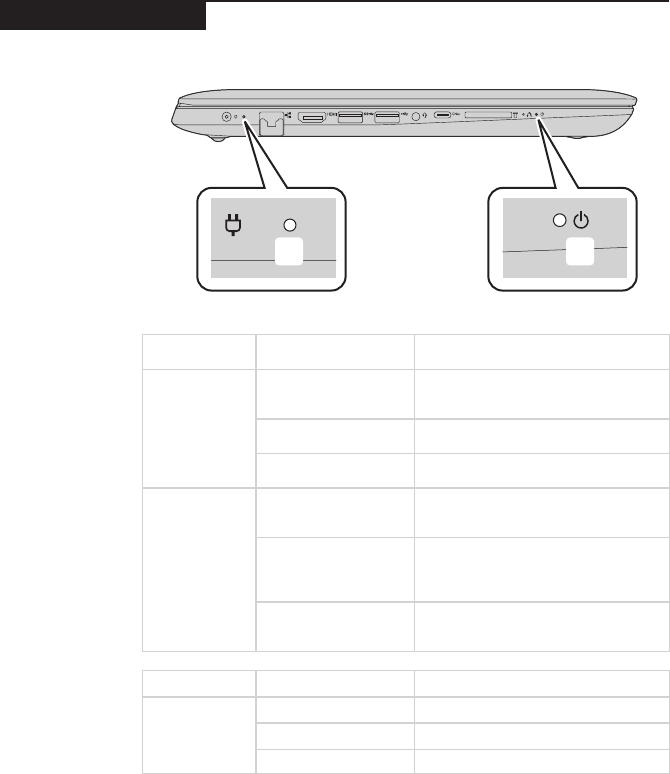
29
Lenovo ideapad 330-14IKB/ideapad 330E-14IKB D/ideapad 330E-14IKB U/ideapad 330-14IKB D/ideapad 330-
14IKB U/ideapad 330H-14IKB/ideapad 330L-14IKB/ideapad 330E-14IKB/ideapad 330R-14IKB/ideapad 330-
15IKB/ideapad 330E-15IKB D/ideapad 330E-15IKB U/ideapad 330-15IKB D/ideapad 330-15IKB U/ideapad
330H-15IKB/ideapad 330L-15IKB/ideapad 330E-15IKB/ideapad 330R-15IKB/ideapad 330-15IKB Touch
Status indicators
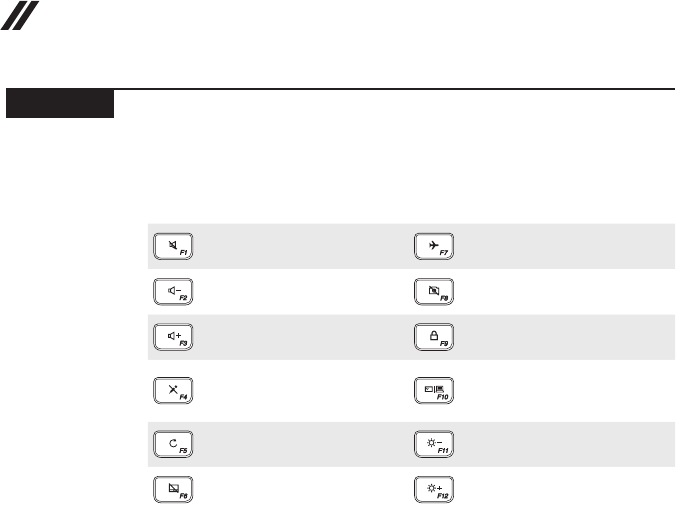
Thesystemstatusindicatorsbelowshowthecomputerstatus:
ba
Table 2. Status indicators
AC power
adapter status
Indicator status Meaning
Disconnected
Off
Thecomputerisinsleepmodeor
turnedoff;Thebatteryhasmorethan
20%charge.
Solidamber Thebatteryhasbetween5%and
20%charge.
Fastblinkingamber Thebatteryhasbetween1%and5%
charge.
Connected
Slowblinkingamber
Thebatteryisbeingcharged.When
batterychargereaches20%,the
blinkingcolorchangestowhite.
Slowblinkingwhite
Thebatteryhasbetween20%and
80%chargeandisstillcharging.
Whenthebatteryreaches80%
chargethelightwillstopblinking.
Solidwhite
Thebatteryhasmorethan80%
charge,chargingwillcontinueuntil
thebatteryisfullycharged.
Indicator Indicator status Meaning
Power status
indicator
On(solidwhite) Thecomputerispoweredon.
Blinking Thecomputerisinsleepmode.
Off Thecomputerispoweredoff.
30
Hardware Maintenance Manual
Hotkeys
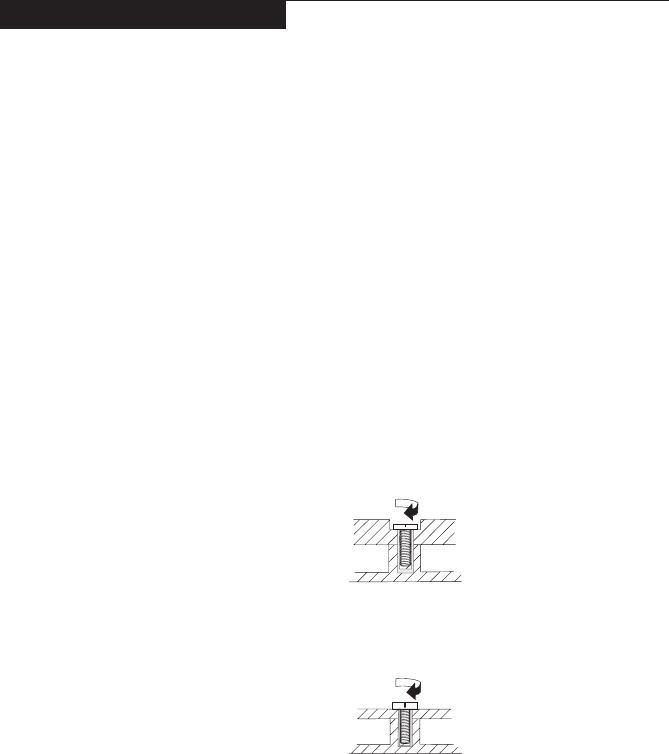
Youcanaccesscertainsystemsettingsquicklybypressingtheappropriate
hotkeys.
Table 3. Hotkeys
:
Mutes/unmutesthesound.
:Enables/disablesairplane
mode.
:
Decreasesthevolumelevel.
: Enables/disablescamera.
:
Increasesthevolumelevel.
:Locks/unlockstheLCD
screen.
:
Enables/disables
microphone.
:
Enablestheexternal
projectorordanglesthe
externaldisplay.
:
Refreshespage.
:Decreasesdisplay
brightness.
:
Enables/disablesthetouch
pad.
:Increasesdisplay
brightness.
31
Lenovo ideapad 330-14IKB/ideapad 330E-14IKB D/ideapad 330E-14IKB U/ideapad 330-14IKB D/ideapad 330-
14IKB U/ideapad 330H-14IKB/ideapad 330L-14IKB/ideapad 330E-14IKB/ideapad 330R-14IKB/ideapad 330-
15IKB/ideapad 330E-15IKB D/ideapad 330E-15IKB U/ideapad 330-15IKB D/ideapad 330-15IKB U/ideapad
330H-15IKB/ideapad 330L-15IKB/ideapad 330E-15IKB/ideapad 330R-15IKB/ideapad 330-15IKB Touch
FRU replacement notices
Thissection presentsnotices relatedto removingand replacingparts. Read
thissectioncarefullybeforereplacinganyFRU.
Screw notices
Loosescrewscancauseareliabilityproblem.IntheLenovocomputer,this
problemisaddressedwithspecialnylon-coatedscrewsthathavethefollowing
characteristics:
• Theymaintaintightconnections.
• Theydonoteasilycomeloose,evenwithshockorvibration.
• Theyarehardertotighten.
• Eachoneshouldbeusedonlyonce.
Dothefollowingwhenyouservicethismachine:
• Keepthescrewkitinyourtoolbag.
• CarefullyremovescrewsforreusewhenreplacingFRUs.
• Useatorquescrewdriverifyouhaveone.
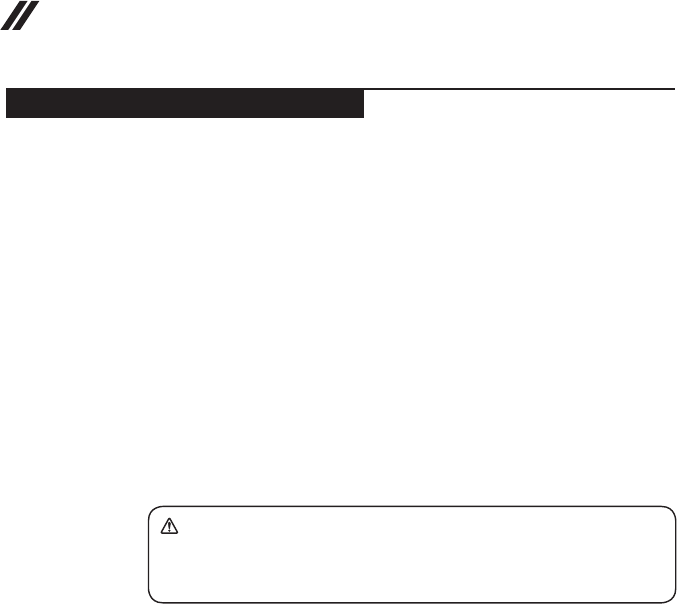
Tightenscrewsasfollows:
• Plastic to plastic
Turn anadditional 90°afterthescrewheadtouchesthe surfaceof the
plasticpart:
more than 90°
(Cross-section)
• Logic card to plastic
Turn anadditional180°afterthescrewheadtouchesthesurfaceofthe
logiccard:
more than 180°
(Cross-section)
• Torque driver
Ifyouhaveatorquescrewdriver,refertothe“Torque”columnforeachstep.
• Makesurethatyouusethecorrectscrews.Ifyouhaveatorquescrewdriver,
tightenallscrewsrmlytothetorqueshowninthetable.Carefully remove
screws for reuse when replacing FRUs. Make sure that all screws are
tightened rmly.
• Ensuretorque screwdriversare calibratedcorrectly followingcountry
specications.
32
Hardware Maintenance Manual
Removing and replacing an FRU
Thissectionpresentsexplodedgureswiththeinstructions toindicatehowto
removeandreplacetheFRU.Makesuretoobservethefollowinggeneralrules:
1. Donotattempttoserviceanycomputerunlessyouhavebeentrainedand
certied.Anuntrainedpersonrunstheriskofdamagingparts.
2. BeforereplacinganyFRU,review“FRUreplacementnotices”onpage31.
3. Beginby removinganyFRUsthathavetobe removedbeforethefailing
FRU.AnyofsuchFRUsarelistedatthetopofthepage.Removethemin
theorderinwhichtheyarelisted.
4. FollowthecorrectsequenceinthestepstoremovetheFRU,asgiveninthe
guresbythenumbersinsquarecallouts.
5. WhenturningascrewtoreplaceanFRU,turnitinthedirectionasgivenby
thearrowinthegure.
6. WhenremovingtheFRU,moveitinthe directionasgivenbythearrowin
thegure.
7. Toputthe newFRUinplace,reverse theremovalproceduresandfollow
anyofthenotesthatpertaintoreplacement.For informationabout
connectingandarranginginternalcables,see“Locations”onpage72.
8. WhenreplacinganFRU,usethecorrectscrewasshownintheprocedures.
DANGER
Before removing any FRU, turn off the computer, unplug all power cords from
electrical outlets, remove the battery pack, and then disconnect any of the
interconnecting cables.
Attention:AfterreplacinganFRU,donotturnonthecomputeruntilyouhave
madesurethatallscrews,springs,andothersmallpartsareinplaceandnone
areloose insidethe computer.Verifythis byshaking thecomputer gentlyand
listeningforrattlingsounds.Metallicpartsormetal akescancauseelectrical
shortcircuits.
Attention:Thesystem boardis sensitiveto, andcan bedamaged by,
electrostaticdischarge. Beforetouching it,establish personalgrounding by
touchingagroundpointwithonehandorusinganelectrostaticdischarge(ESD)
strap(P/N6405959)toremovepotentialshockreasons.
33
Lenovo ideapad 330-14IKB/ideapad 330E-14IKB D/ideapad 330E-14IKB U/ideapad 330-14IKB D/ideapad 330-
14IKB U/ideapad 330H-14IKB/ideapad 330L-14IKB/ideapad 330E-14IKB/ideapad 330R-14IKB/ideapad 330-
15IKB/ideapad 330E-15IKB D/ideapad 330E-15IKB U/ideapad 330-15IKB D/ideapad 330-15IKB U/ideapad
330H-15IKB/ideapad 330L-15IKB/ideapad 330E-15IKB/ideapad 330R-15IKB/ideapad 330-15IKB Touch
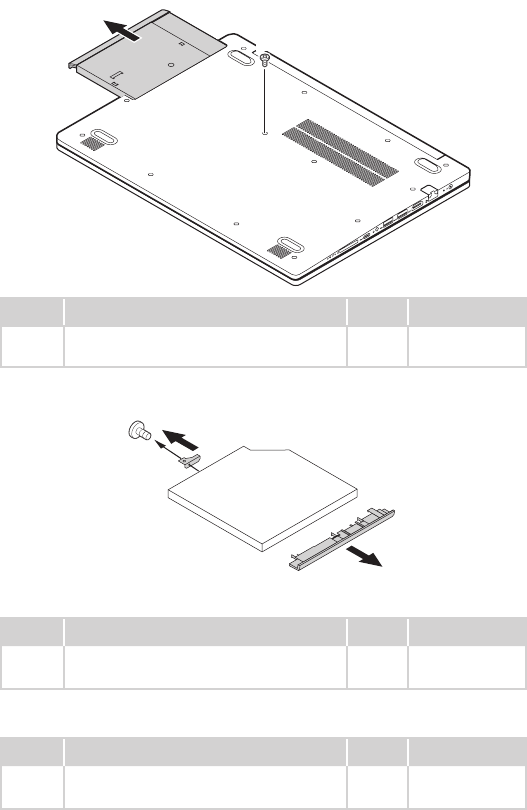
1010 Optical drive
Figure 1. Removal steps of optical drive
Removethescrew1.Thenpulltheopticaldriveoutinthedirectionshownby
arrow2.
a
b
Step Screw (quantity) Color Torque
1M2.5×7mm,Phillipshead,nylok-coated(1) Black/
Silver
3.0+/-0.3kgf/cm
Removethescrew3,thencarefullyremovetheopticaldrivebracketandbezel
inthedirectionsshownbyarrows4and5.
d
c
e
ideapad 330-14IKB
Step Screw (quantity) Color Torque
3M2×3mm,Phillipshead,nylok-coated(1)
ODDBRKTOODDMODULE
Silver 1.85+/-0.15kgf/
cm
ideapad 330-15IKB/ideapad 330-15IKB Touch
Step Screw (quantity) Color Torque
3M2×3mm,Phillipshead,nylok-coated(1)
ODDBRKTOODDMODULE
Black 1.85+/-0.15kgf/
cm
34
Hardware Maintenance Manual
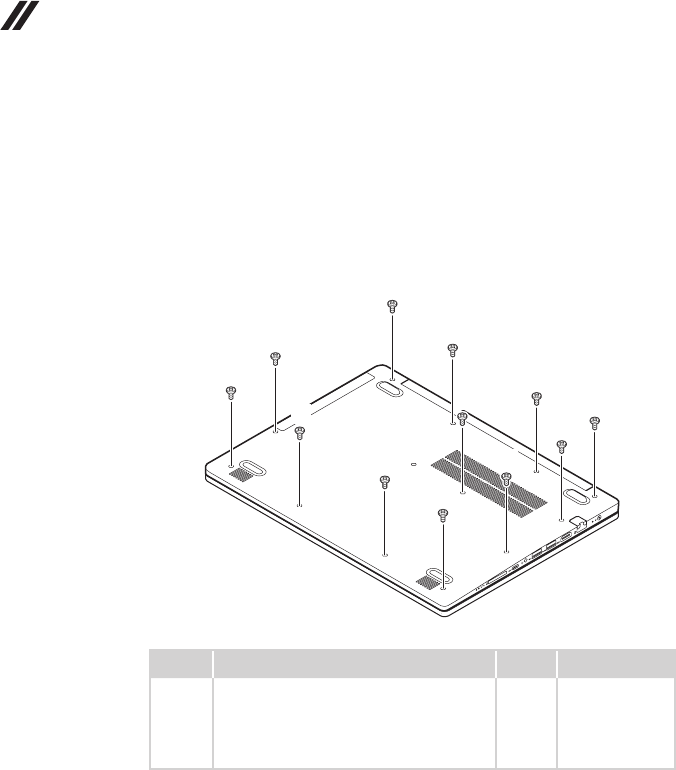
1020 Base cover
Foraccess,removethisFRU:
• “1010Opticaldrive”onpage33
Figure 2. Removal steps of base cover
Removethescrews1.
a
a
a
a
a
a
a
a
a
a
a
a
Step Screw (quantity) Color Torque
1M2.5×7mm,Phillips-head,nylok-coated
(12)loglow---logup&loglow---ioboard---
logup&loglow---mb---logup&loglow---
rightsidehinge---logup&loglow---leftside
hinge---klockbracket---logup
Black/
Silver
3.0+/-0.3kgf/cm
35
Lenovo ideapad 330-14IKB/ideapad 330E-14IKB D/ideapad 330E-14IKB U/ideapad 330-14IKB D/ideapad 330-
14IKB U/ideapad 330H-14IKB/ideapad 330L-14IKB/ideapad 330E-14IKB/ideapad 330R-14IKB/ideapad 330-
15IKB/ideapad 330E-15IKB D/ideapad 330E-15IKB U/ideapad 330-15IKB D/ideapad 330-15IKB U/ideapad
330H-15IKB/ideapad 330L-15IKB/ideapad 330E-15IKB/ideapad 330R-15IKB/ideapad 330-15IKB Touch
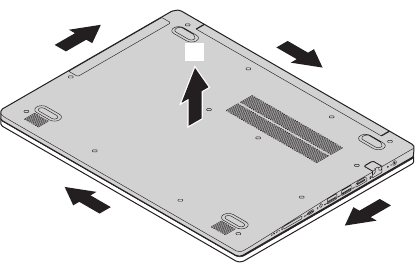
Figure 2. Removal steps of base cover (continued)
Removethebasecoverinthedirectionsshownbyarrows2and3.
b
b
b
b
c
36
Hardware Maintenance Manual
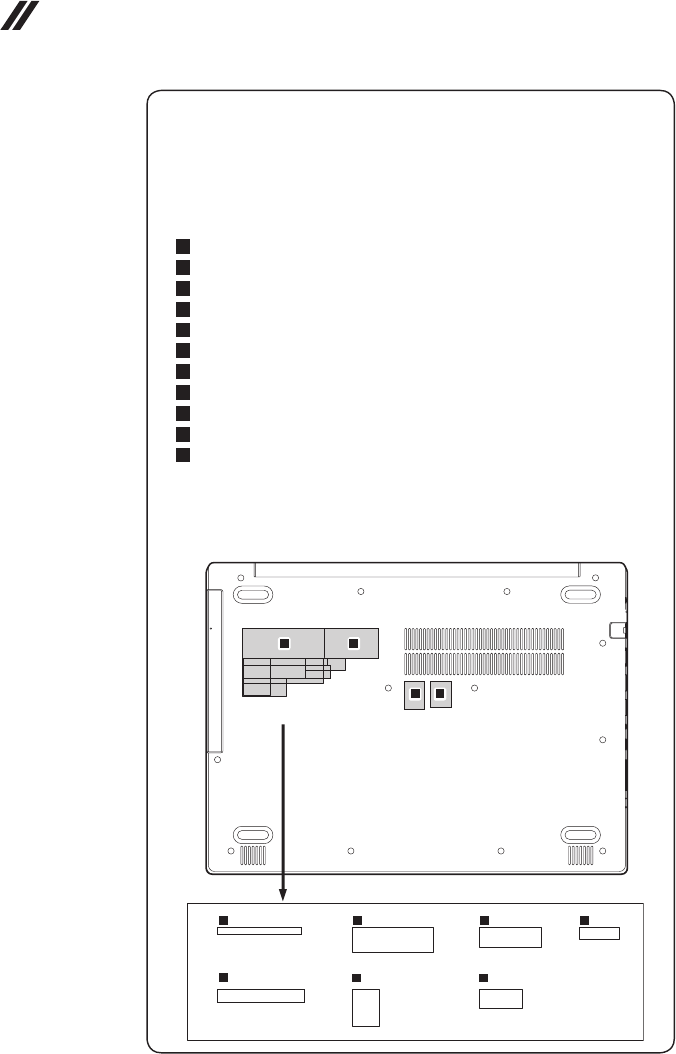
Note: Applying labels to the base cover
ThenewbasecoverFRUisshippedwitha kitcontaininglabelsofseveral
kinds.Whenyoureplacethebasecover,youneedtoapplythefollowing
labels:
Thefollowinglabelsneedtobepeeledofffromtheoldbasecoverandputon
thenewbasecover.
a Ratinglabel
b Ratinglabelforprint
c OSLabel
d Ofcelabel
e Adapterlabel65×20mm
f Argentinalabel68×6mm
g KCClabel50×16mm
h Indonesialabel32×10mm
i TWlabel70×10mm
j BISlabel22×30mm
k WL/BTlabel35×15mm
Forsomemodels,youalsoneedtoapplyoneortwoFCClabels.Checkthe
oldbasecover;ifithasoneortwoFCClabels,ndduplicatesoftheminthe
labelkitandapplythemtothenewbasecover.
Forthelocationofeachlabel,refertothefollowinggures:
efg h
ij k
ab
c d
37
Lenovo ideapad 330-14IKB/ideapad 330E-14IKB D/ideapad 330E-14IKB U/ideapad 330-14IKB D/ideapad 330-
14IKB U/ideapad 330H-14IKB/ideapad 330L-14IKB/ideapad 330E-14IKB/ideapad 330R-14IKB/ideapad 330-
15IKB/ideapad 330E-15IKB D/ideapad 330E-15IKB U/ideapad 330-15IKB D/ideapad 330-15IKB U/ideapad
330H-15IKB/ideapad 330L-15IKB/ideapad 330E-15IKB/ideapad 330R-15IKB/ideapad 330-15IKB Touch
1030 Battery pack
DANGER
Only use the battery specied in the parts list for your computer. Any other battery
could ignite or explode.
Foraccess,removetheseFRUsinorder:
• “1010Opticaldrive”onpage33
• “1020Basecover”onpage34
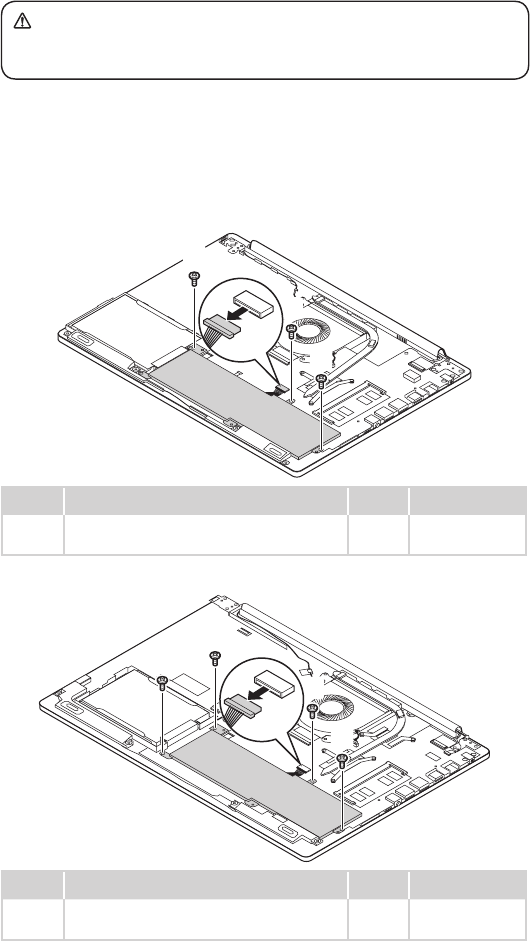
Figure 3. Removal steps of battery pack
Detachthebatterypackconnectorinthedirectionshownbyarrow1,remove
thescrews2.
ideapad 330-14IKB
b
b
b
b
a
Step Screw (quantity) Color Torque
2M2×6mm,Phillips-head,nylok-coated(3)
battery---logup
Black 1.85+/-0.15kgf/
cm
ideapad 330-15IKB/ideapad 330-15IKB Touch
b
b
b
b
b
a
Step Screw (quantity) Color Torque
2M2×6mm,Phillips-head,nylok-coated(4)
battery---logup
Black 1.85+/-0.15kgf/
cm
38
Hardware Maintenance Manual
Figure 3. Removal steps of battery pack (continued)
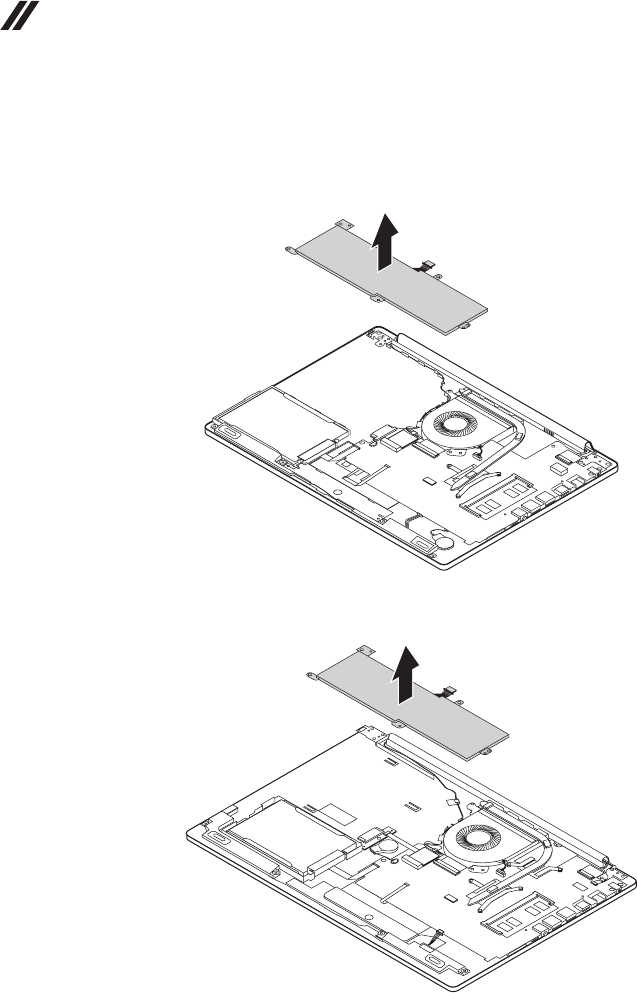
Removethebatterypackinthedirectionshownbyarrow3.
ideapad 330-14IKB
c
ideapad 330-15IKB/ideapad 330-15IKB Touch
c
39
Lenovo ideapad 330-14IKB/ideapad 330E-14IKB D/ideapad 330E-14IKB U/ideapad 330-14IKB D/ideapad 330-
14IKB U/ideapad 330H-14IKB/ideapad 330L-14IKB/ideapad 330E-14IKB/ideapad 330R-14IKB/ideapad 330-
15IKB/ideapad 330E-15IKB D/ideapad 330E-15IKB U/ideapad 330-15IKB D/ideapad 330-15IKB U/ideapad
330H-15IKB/ideapad 330L-15IKB/ideapad 330E-15IKB/ideapad 330R-15IKB/ideapad 330-15IKB Touch
1040 PCI Express Mini Card for wireless LAN
Foraccess,removetheseFRUsinorder:
• “1010Opticaldrive”onpage33
• “1020Basecover”onpage34
• “1030Batterypack”onpage37
Important:
The preinstalled WLAN module may only be replaced with a Lenovo approved
module in order to comply with FCC and IC regulations. Refer to Table 4 “Parts
list—Overall” on page 76 for Lenovo part numbers for the approved modules.
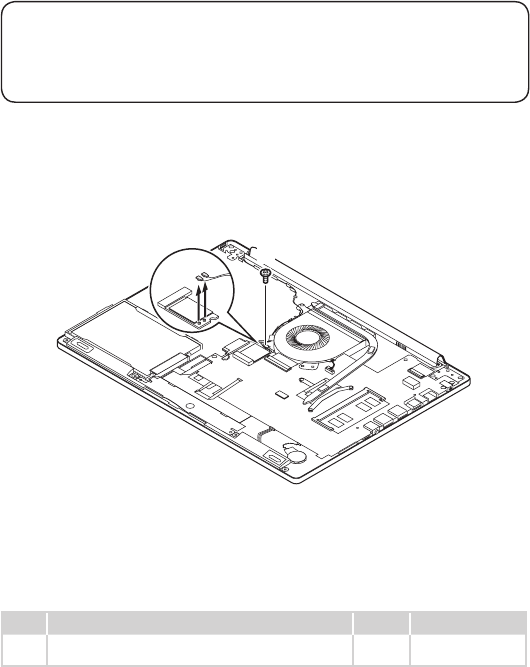
Figure 4. Removal steps of PCI Express Mini Card for wireless LAN
DisconnectthetwowirelessLANcables(black,gray)1,andthenremovethe
screw2.
ideapad 330-14IKB
aa b
Instep 1,unplugthejacksbyusingtheremovaltoolantennaRFconnector
(P/N:08K7159),orpickuptheconnectorswithyourngersandgentlyunplug
theminthedirectionshownbythearrows.
Notes:ThewirelessLANcardhas2cablesinstep1.
ThewirelessLANcardinsomemodelsmighthave3cablesinstep1.
Step Screw (quantity) Color Torque
2M2×3mm,Phillips-head,nylok-coated(1)
wirelesscard---logup
Silver 1.85+/-0.15kgf/
cm
40
Hardware Maintenance Manual
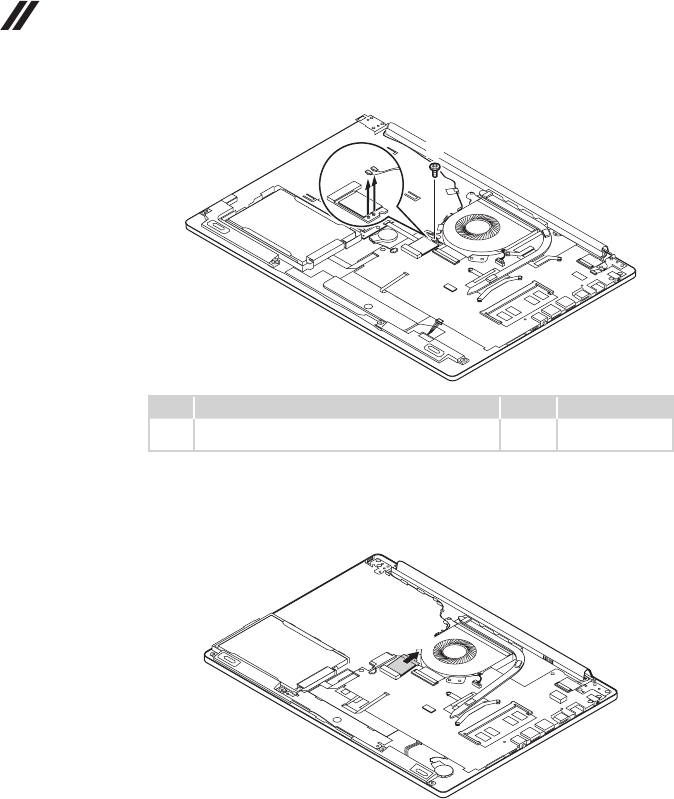
ideapad 330-15IKB/ideapad 330-15IKB Touch
aa b
Step Screw (quantity) Color Torque
2M2×3mm,Phillips-head,nylok-coated(1)
wirelesscard---logup
Black 1.85+/-0.15kgf/
cm
Figure 4. Removal steps of PCI Express Mini Card for wireless LAN (continued)
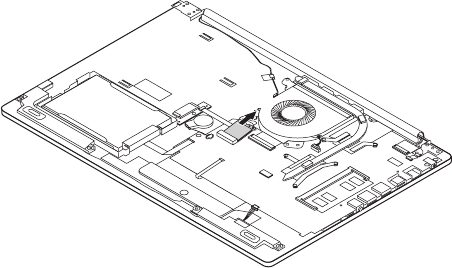
Removethecardinthedirectionshownbyarrow3.
ideapad 330-14IKB
c
41
Lenovo ideapad 330-14IKB/ideapad 330E-14IKB D/ideapad 330E-14IKB U/ideapad 330-14IKB D/ideapad 330-
14IKB U/ideapad 330H-14IKB/ideapad 330L-14IKB/ideapad 330E-14IKB/ideapad 330R-14IKB/ideapad 330-
15IKB/ideapad 330E-15IKB D/ideapad 330E-15IKB U/ideapad 330-15IKB D/ideapad 330-15IKB U/ideapad
330H-15IKB/ideapad 330L-15IKB/ideapad 330E-15IKB/ideapad 330R-15IKB/ideapad 330-15IKB Touch
ideapad 330-15IKB/ideapad 330-15IKB Touch
c
When installing:
• Inmodelswithawireless LANcardthathastwo antennaconnectors,plug
theblackcable(1st)(MAIN)intothejacklabeledMAIN,andthegreycable
(2nd)(AUX)intothejacklabeledAUXonthecard.
• InmodelswithawirelessLANcardthathasthreeantennaconnectors,plug
theblackcable(1st)(MAIN)intothejacklabeled1,thegreycable(3rd)into
thejacklabeled3,andthewhitecable(2nd)(AUX)intothejacklabeled2on
thecard.
42
Hardware Maintenance Manual
1050 DIMM
Foraccess,removetheseFRUsinorder:
• “1010Opticaldrive”onpage33
• “1020Basecover”onpage34
• “1030Batterypack”onpage37
• “1040PCIExpressMiniCardforwirelessLAN”onpage39
Figure 5. Removal steps of DIMM
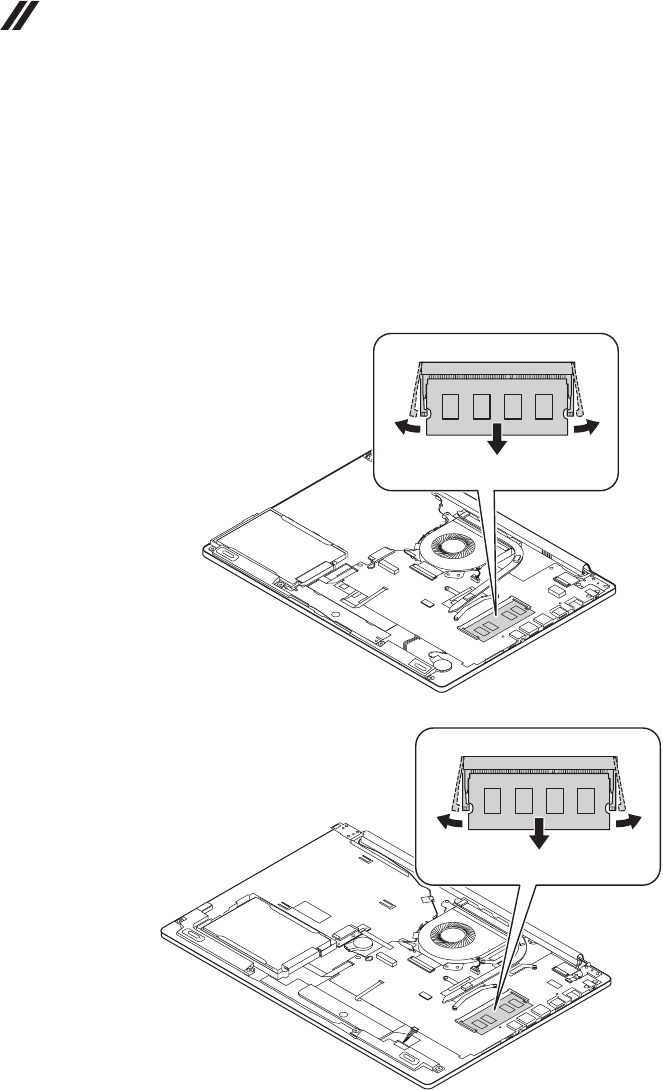
Releasethetwolatcheson bothedgesofthesocketatthesametimeinthe
directionsshownbyarrows1,andthenunplugthe DIMMinthedirection
shownbyarrow2.
ideapad 330-14IKB
a
a
b
ideapad 330-15IKB/ideapad 330-15IKB Touch
a
a
b
43
Lenovo ideapad 330-14IKB/ideapad 330E-14IKB D/ideapad 330E-14IKB U/ideapad 330-14IKB D/ideapad 330-
14IKB U/ideapad 330H-14IKB/ideapad 330L-14IKB/ideapad 330E-14IKB/ideapad 330R-14IKB/ideapad 330-
15IKB/ideapad 330E-15IKB D/ideapad 330E-15IKB U/ideapad 330-15IKB D/ideapad 330-15IKB U/ideapad
330H-15IKB/ideapad 330L-15IKB/ideapad 330E-15IKB/ideapad 330R-15IKB/ideapad 330-15IKB Touch
1060 Hard disk drive
Foraccess,removetheseFRUsinorder:
• “1010Opticaldrive”onpage33
• “1020Basecover”onpage34
• “1030Batterypack”onpage37
• “1040PCIExpressMiniCardforwirelessLAN”onpage39
• “1050DIMM”onpage42
Attention:
• Donotdroptheharddiskdriveorapplyanyphysicalshockto it. The hard
disk drive is sensitive to physical shock. Improper handling can cause damage and
permanent loss of data.
• Before removing the drive, suggest the customer to backup all the information on
it if possible.
• Never remove the drive while the system is operating or in suspend mode.
Figure 6. Removal steps of hard disk drive
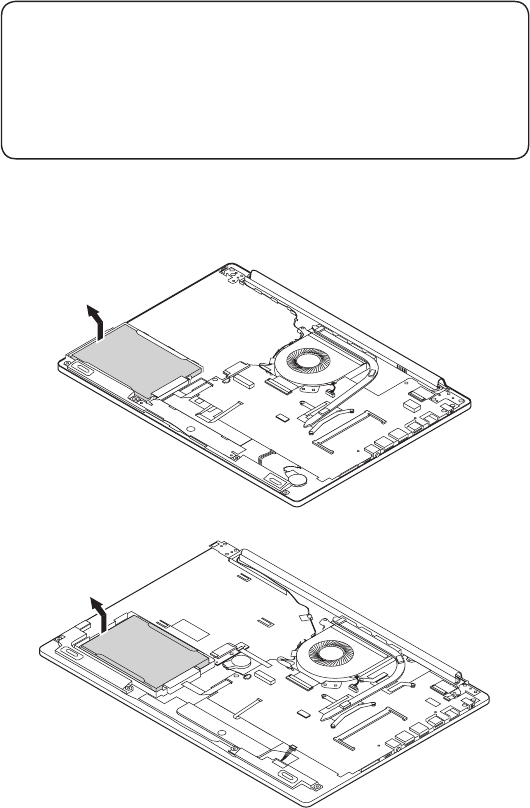
Removetheharddiskdrivefromtheslotinthedirectionshownbyarrow1.
ideapad 330-14IKB
a
ideapad 330-15IKB/ideapad 330-15IKB Touch
a
44
Hardware Maintenance Manual
Figure 6. Removal steps of hard disk drive (continued)
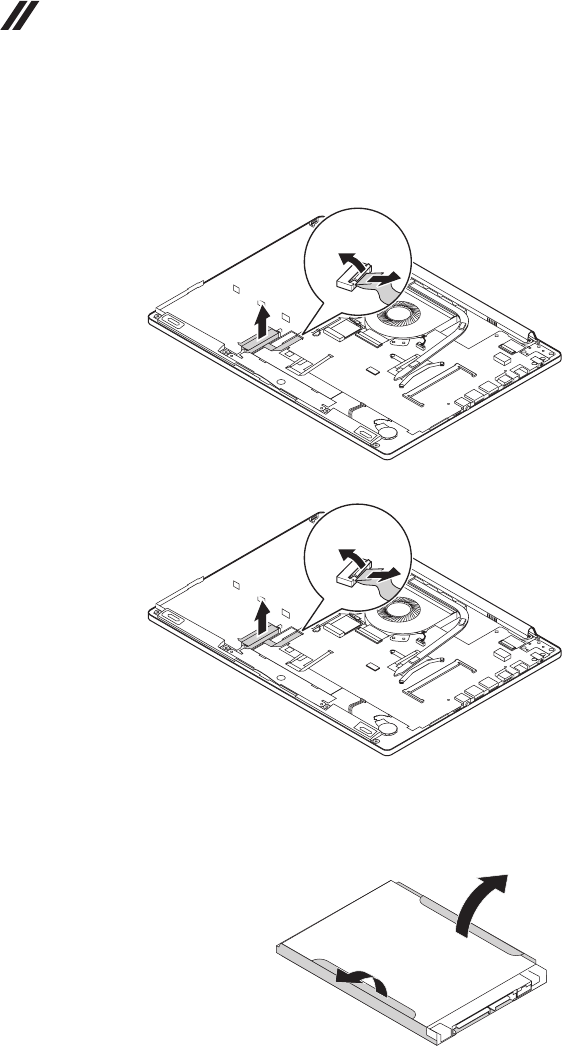
DetachtheHDDboardconnectorinthedirectionshownbyarrows2and3.
RemovetheHDDboard4.
ideapad 330-14IKB
c
b
d
ideapad 330-15IKB/ideapad 330-15IKB Touch
c
b
d
When installing:MakesurethattheHDDconnectorisattachedrmly.
Detachthebracketfromtheharddiskdrive.
e
e
45
Lenovo ideapad 330-14IKB/ideapad 330E-14IKB D/ideapad 330E-14IKB U/ideapad 330-14IKB D/ideapad 330-
14IKB U/ideapad 330H-14IKB/ideapad 330L-14IKB/ideapad 330E-14IKB/ideapad 330R-14IKB/ideapad 330-
15IKB/ideapad 330E-15IKB D/ideapad 330E-15IKB U/ideapad 330-15IKB D/ideapad 330-15IKB U/ideapad
330H-15IKB/ideapad 330L-15IKB/ideapad 330E-15IKB/ideapad 330R-15IKB/ideapad 330-15IKB Touch
1070 Speakers
Foraccess,removetheseFRUsinorder:
• “1010Opticaldrive”onpage33
• “1020Basecover”onpage34
• “1030Batterypack”onpage37
• “1040PCIExpressMiniCardforwirelessLAN”onpage39
• “1050DIMM”onpage42
• “1060Harddiskdrive”onpage43
Figure 7. Removal steps of speakers
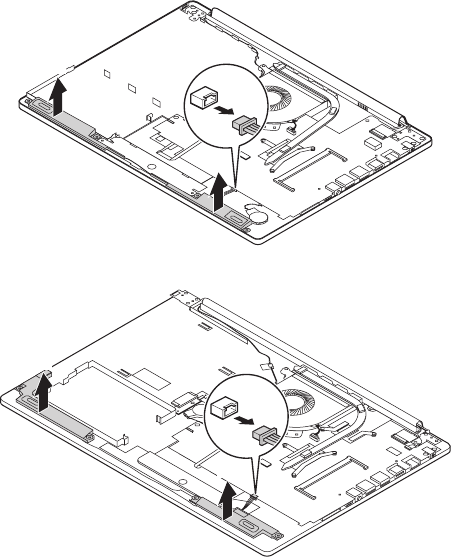
Unplugthespeakerconnector1.Thenremovethespeakers2.
ideapad 330-14IKB
b
b
a
ideapad 330-15IKB/ideapad 330-15IKB Touch
b
b
a
46
Hardware Maintenance Manual
1080 Fan assembly and Heat Sink assembly
Foraccess,removetheseFRUsinorder:
• “1010Opticaldrive”onpage33
• “1020Basecover”onpage34
• “1030Batterypack”onpage37
• “1040PCIExpressMiniCardforwirelessLAN”onpage39
• “1050DIMM”onpage42
• “1060Harddiskdrive”onpage43
• “1070Speakers”onpage45
Figure 8. Removal steps of fan assembly and Heat Sink assembly
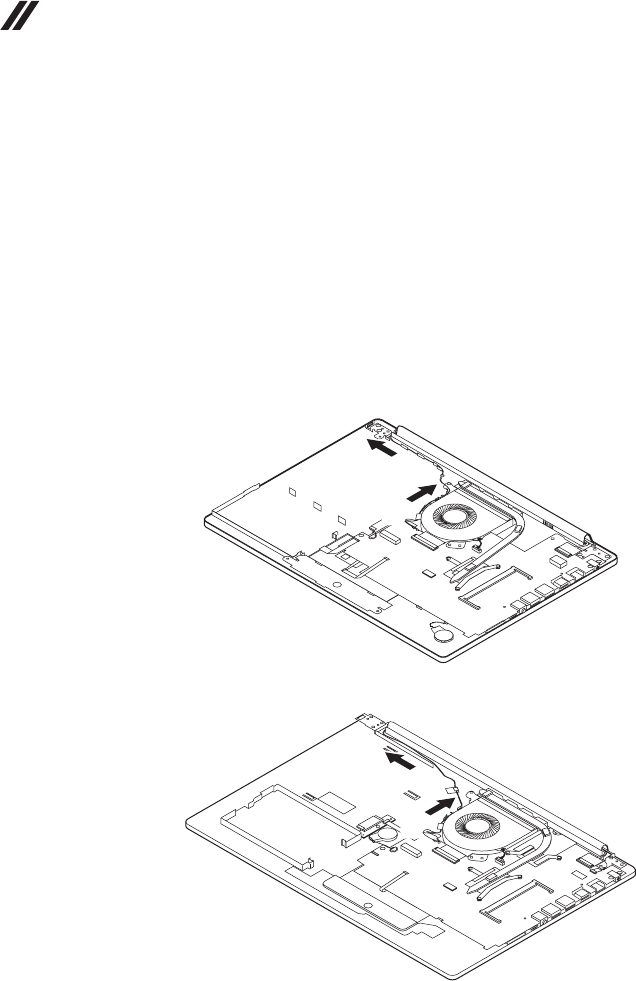
Releasethecablesfromthecableguidesinthedirectionshownbyarrows1.
ideapad 330-14IKB
a
a
ideapad 330-15IKB/ideapad 330-15IKB Touch
a
a
When installing:Route theantenna cablesalong thecable guides.Asyou
routethecables,makesurethattheyarenotsubjectedtoanytension.Tension
couldcausethecablesto bedamagedbythecableguides,or awiretobe
broken.
47
Lenovo ideapad 330-14IKB/ideapad 330E-14IKB D/ideapad 330E-14IKB U/ideapad 330-14IKB D/ideapad 330-
14IKB U/ideapad 330H-14IKB/ideapad 330L-14IKB/ideapad 330E-14IKB/ideapad 330R-14IKB/ideapad 330-
15IKB/ideapad 330E-15IKB D/ideapad 330E-15IKB U/ideapad 330-15IKB D/ideapad 330-15IKB U/ideapad
330H-15IKB/ideapad 330L-15IKB/ideapad 330E-15IKB/ideapad 330R-15IKB/ideapad 330-15IKB Touch
Figure 8. Removal steps of fan assembly and Heat Sink assembly (continued)
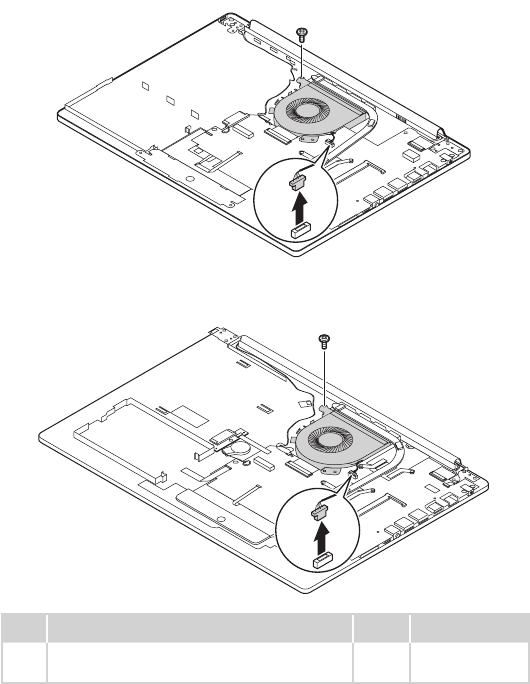
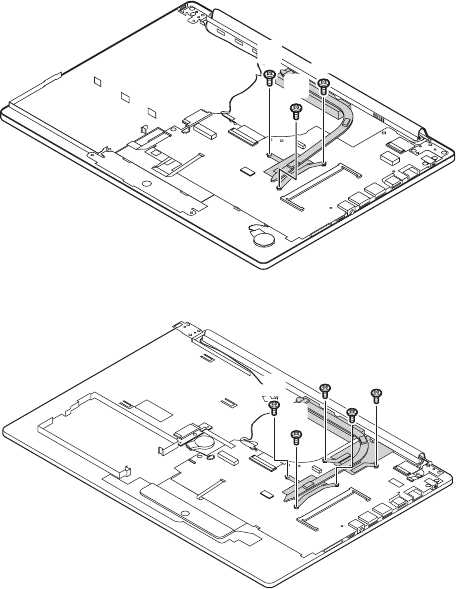
Unplugthefanconnectorinthedirection shownby arrow2.Removethe
screw3.
ideapad 330-14IKB
c
b
ideapad 330-15IKB/ideapad 330-15IKB Touch
c
b
Step Screw (quantity) Color Torque
3M2×6mm,Phillipshead,nylok-coated(1)
fan---mb---logup&fan---logup
Black 1.85+/-0.15kgf/
cm
When installing:Makesurethattheconnectorisattachedrmly.
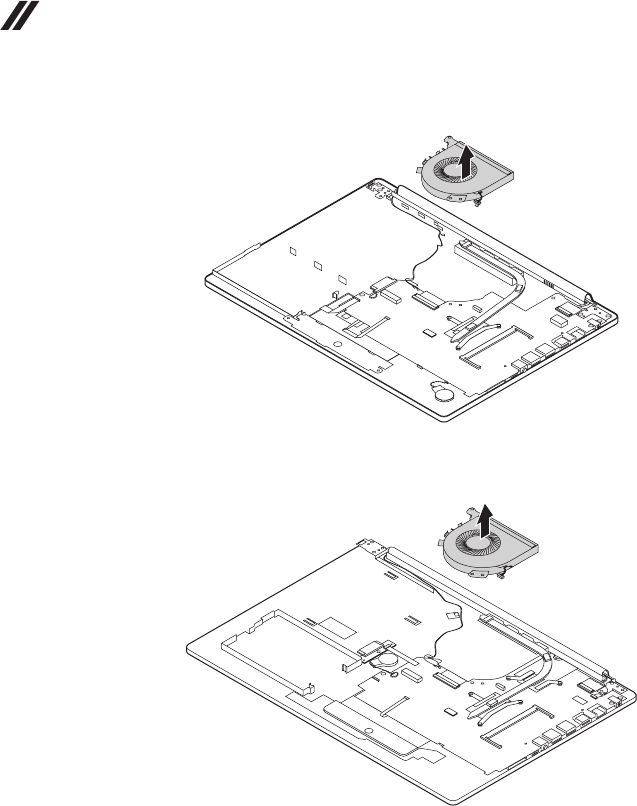
Removethefaninthedirectionshownbyarrow4.Becarefulnottodamage
theconnector.
48
Hardware Maintenance Manual
ideapad 330-14IKB
d
ideapad 330-15IKB/ideapad 330-15IKB Touch
d
49
Lenovo ideapad 330-14IKB/ideapad 330E-14IKB D/ideapad 330E-14IKB U/ideapad 330-14IKB D/ideapad 330-
14IKB U/ideapad 330H-14IKB/ideapad 330L-14IKB/ideapad 330E-14IKB/ideapad 330R-14IKB/ideapad 330-
15IKB/ideapad 330E-15IKB D/ideapad 330E-15IKB U/ideapad 330-15IKB D/ideapad 330-15IKB U/ideapad
330H-15IKB/ideapad 330L-15IKB/ideapad 330E-15IKB/ideapad 330R-15IKB/ideapad 330-15IKB Touch
Figure 8. Removal steps of fan assembly and Heat Sink assembly (continued)
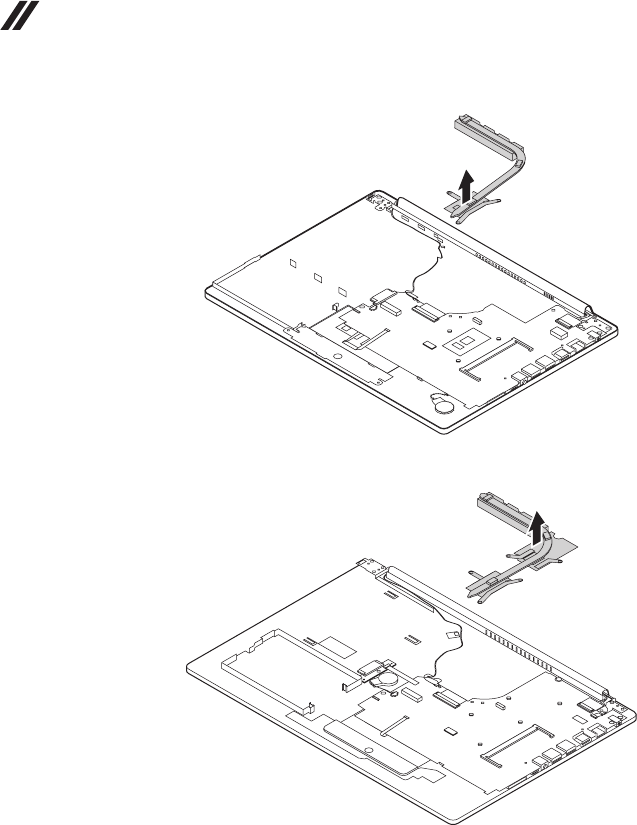
Loosenthescrews5.
ideapad 330-14IKB
e
e
e
ideapad 330-15IKB/ideapad 330-15IKB Touch
e
e
e
e
e
Lifttheheatsinkinthedirectionshownbyarrows6.
50
Hardware Maintenance Manual
ideapad 330-14IKB
f
ideapad 330-15IKB/ideapad 330-15IKB Touch
f
51
Lenovo ideapad 330-14IKB/ideapad 330E-14IKB D/ideapad 330E-14IKB U/ideapad 330-14IKB D/ideapad 330-
14IKB U/ideapad 330H-14IKB/ideapad 330L-14IKB/ideapad 330E-14IKB/ideapad 330R-14IKB/ideapad 330-
15IKB/ideapad 330E-15IKB D/ideapad 330E-15IKB U/ideapad 330-15IKB D/ideapad 330-15IKB U/ideapad
330H-15IKB/ideapad 330L-15IKB/ideapad 330E-15IKB/ideapad 330R-15IKB/ideapad 330-15IKB Touch
Figure 8. Removal steps of fan assembly and Heat Sink assembly (continued)
ideapad 330-14IKB
a
ideapad 330-15IKB/ideapad 330-15IKB Touch
a
b
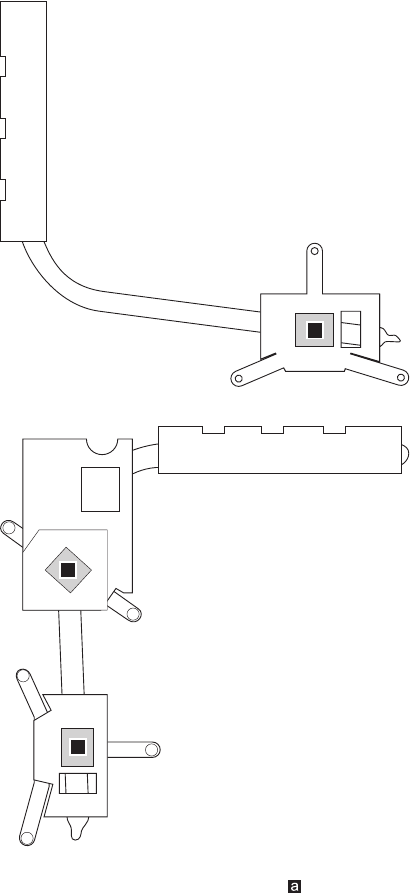
When installing:Beforeyouattachthefanassemblytothecomputer,apply
thermalgrease,atanamountof0.2grams,tothe partshowninthegure
above.Eithertoomuchortoolittle greaseapplicationcancauseathermal
problemduetoimperfectcontactwithacomponent.
52
Hardware Maintenance Manual
1090 ODD transfer board (ideapad 330-15IKB/ideapad 330-
15IKB Touch) and backup battery
Foraccess,removetheseFRUsinorder:
• “1010Opticaldrive”onpage33
• “1020Basecover”onpage34
• “1030Batterypack”onpage37
• “1040PCIExpressMiniCardforwirelessLAN”onpage39
• “1050DIMM”onpage42
• “1060Harddiskdrive”onpage43
• “1070Speakers”onpage45
• “1080FanassemblyandHeatSinkassembly”onpage46
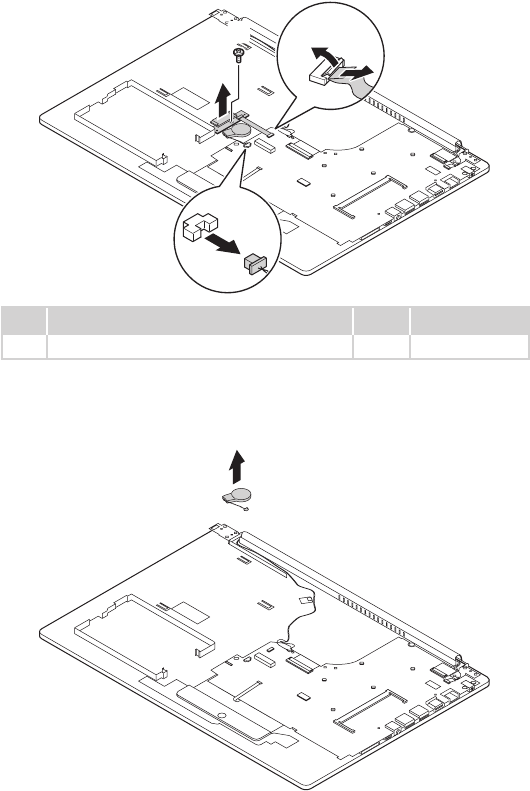
Figure 9. Removal steps of backup battery
ideapad 330-14IKB
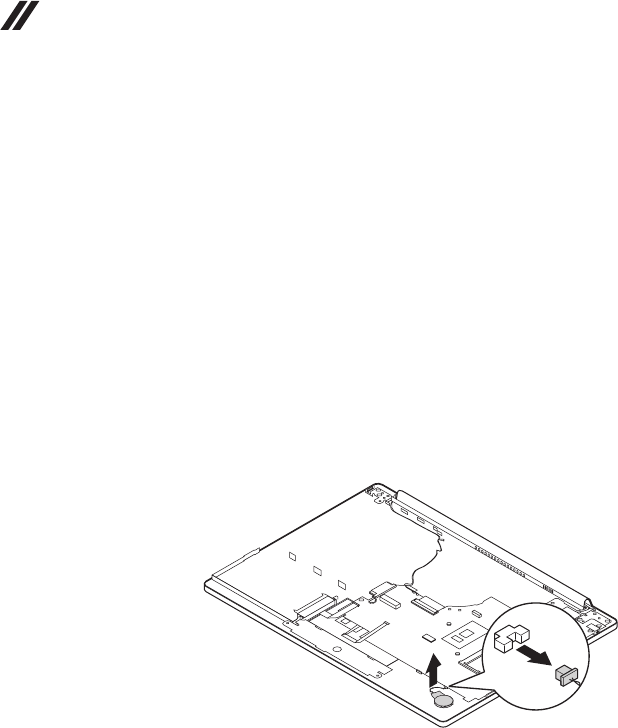
Unplugthebackupbatteryconnectorinthedirectionshownbyarrow1.
Removethebackupbatteryinthedirectionshownbyarrow2.
a
b
When installing:Makesurethattheconnectorisattachedrmly.
53
Lenovo ideapad 330-14IKB/ideapad 330E-14IKB D/ideapad 330E-14IKB U/ideapad 330-14IKB D/ideapad 330-
14IKB U/ideapad 330H-14IKB/ideapad 330L-14IKB/ideapad 330E-14IKB/ideapad 330R-14IKB/ideapad 330-
15IKB/ideapad 330E-15IKB D/ideapad 330E-15IKB U/ideapad 330-15IKB D/ideapad 330-15IKB U/ideapad
330H-15IKB/ideapad 330L-15IKB/ideapad 330E-15IKB/ideapad 330R-15IKB/ideapad 330-15IKB Touch
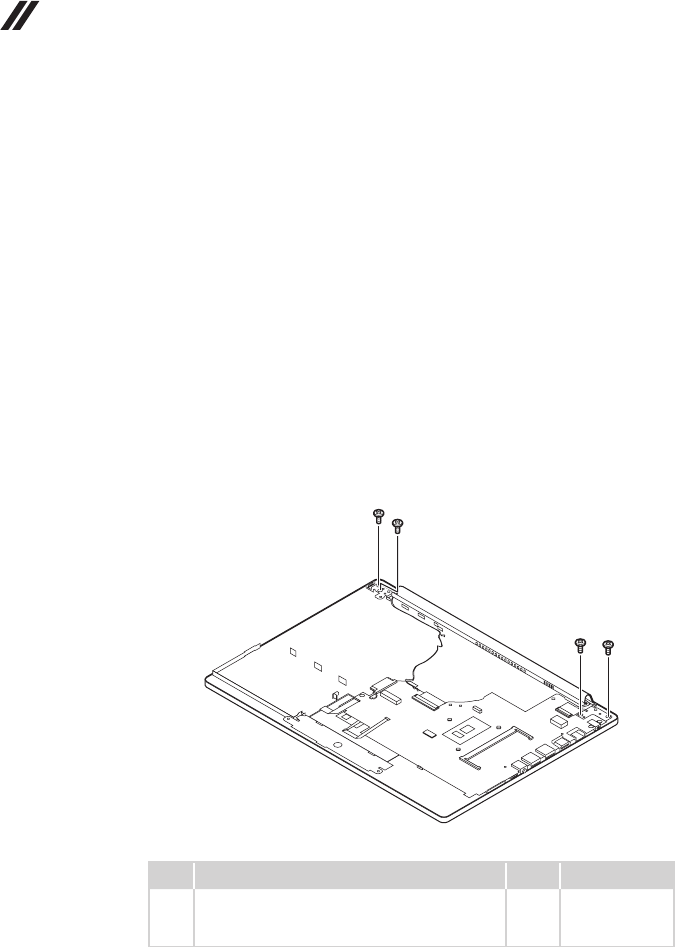
ideapad 330-15IKB/ideapad 330-15IKB Touch
Detachthesystemboardconnectorinthedirectionsshownbyarrows1and2.
Unplugthebackupbatteryconnectorinthedirectionshownbyarrow3.
Removethescrew4.RemovetheODDtransferboardinthedirectionshown
byarrow5.
e
d
b
a
c
Step Screw (quantity) Color Torque
4M2×3mm,Phillips-head,nylok-coated(1) Black 1.85+/-0.15kgf/cm
When installing:Makesurethattheconnectorsareattachedrmly.
Removethebackupbatteryinthedirectionshownbyarrow6.
f
When installing:Makesurethattheconnectorisattachedrmly.
54
Hardware Maintenance Manual
1100 Upper case
Foraccess,removetheseFRUsinorder:
• “1010Opticaldrive”onpage33
• “1020Basecover”onpage34
• “1030Batterypack”onpage37
• “1040PCIExpressMiniCardforwirelessLAN”onpage39
• “1050DIMM”onpage42
• “1060Harddiskdrive”onpage43
• “1070Speakers”onpage45
• “1080FanassemblyandHeatSinkassembly”onpage46
• “1090ODDtransferboard(ideapad330-15IKB/ideapad330-15IKBTouch)
andbackupbattery”onpage52
Figure 10. Removal steps of upper case
Removethescrews1.
ideapad 330-14IKB
aa
aa
Step Screw (quantity) Color Torque
1M2.5×5mm,Phillips-head,nylok-coated(4)
leftsidehinge---logup&rightsidehinge---log
up
Black
3+/-0.3kgf/cm
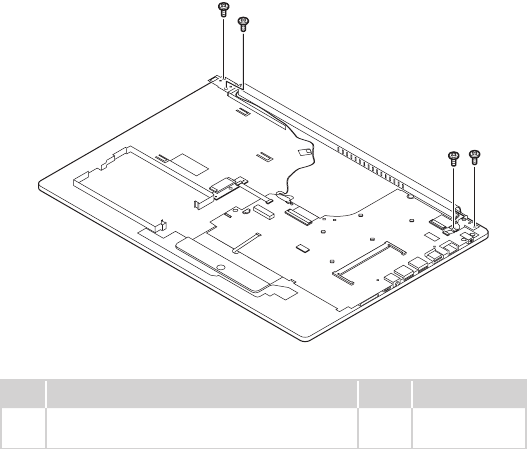
55
Lenovo ideapad 330-14IKB/ideapad 330E-14IKB D/ideapad 330E-14IKB U/ideapad 330-14IKB D/ideapad 330-
14IKB U/ideapad 330H-14IKB/ideapad 330L-14IKB/ideapad 330E-14IKB/ideapad 330R-14IKB/ideapad 330-
15IKB/ideapad 330E-15IKB D/ideapad 330E-15IKB U/ideapad 330-15IKB D/ideapad 330-15IKB U/ideapad
330H-15IKB/ideapad 330L-15IKB/ideapad 330E-15IKB/ideapad 330R-15IKB/ideapad 330-15IKB Touch
ideapad 330-15IKB/ideapad 330-15IKB Touch
aa
aa
Step Screw (quantity) Color Torque
1M2.5×5mm,Phillips-head,nylok-coated(4)
leftsidehinge---logup&rightsidehinge---logup Silver 3+/-0.3kgf/cm
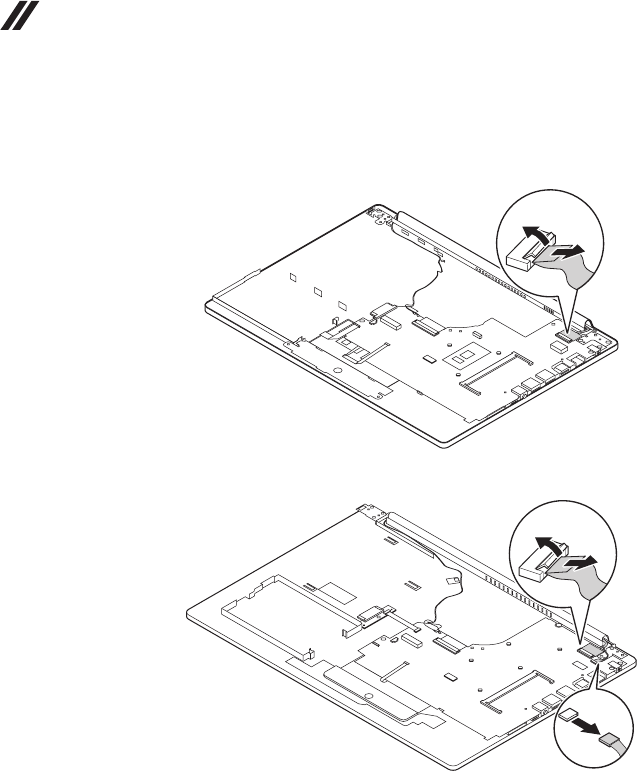
56
Hardware Maintenance Manual
Figure 10. Removal steps of upper case (continued)
DetachtheLCDconnectorinthedirectionshownbyarrows2to4.
ideapad 330-14IKB
c
b
ideapad 330-15IKB/ideapad 330-15IKB Touch
d
c
b
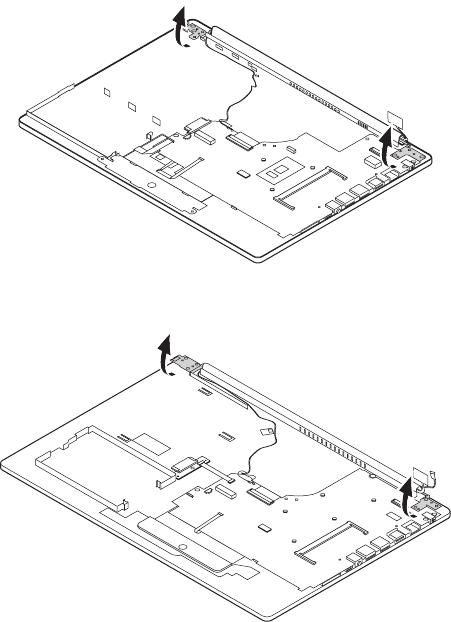
57
Lenovo ideapad 330-14IKB/ideapad 330E-14IKB D/ideapad 330E-14IKB U/ideapad 330-14IKB D/ideapad 330-
14IKB U/ideapad 330H-14IKB/ideapad 330L-14IKB/ideapad 330E-14IKB/ideapad 330R-14IKB/ideapad 330-
15IKB/ideapad 330E-15IKB D/ideapad 330E-15IKB U/ideapad 330-15IKB D/ideapad 330-15IKB U/ideapad
330H-15IKB/ideapad 330L-15IKB/ideapad 330E-15IKB/ideapad 330R-15IKB/ideapad 330-15IKB Touch
Openthehingeinthedirectionshownbyarrows4or5.
ideapad 330-14IKB
d
d
ideapad 330-15IKB/ideapad 330-15IKB Touch
e
e
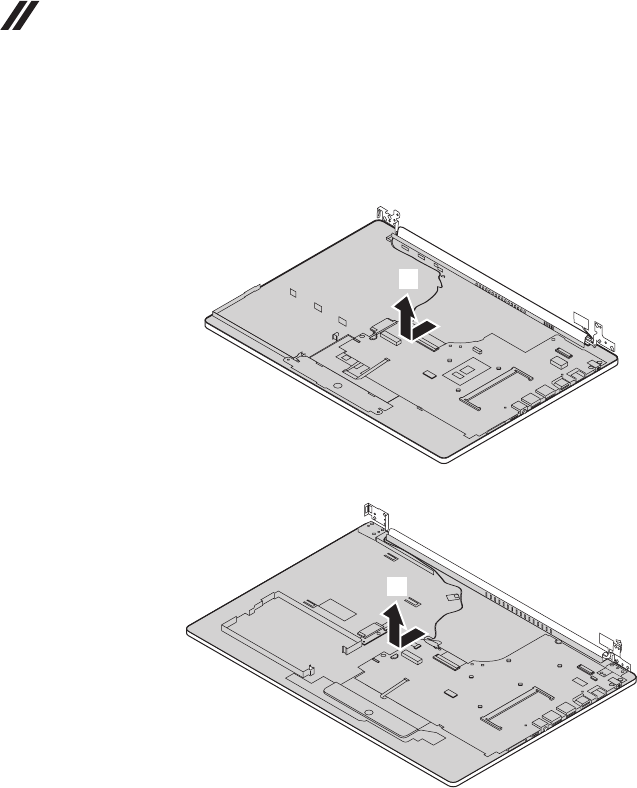
58
Hardware Maintenance Manual
Figure 10. Removal steps of upper case (continued)
RemovetheuppercasefromtheLCDmoduleinthedirectionsshownbyarrow
5or6.
ideapad 330-14IKB
e
ideapad 330-15IKB/ideapad 330-15IKB Touch
f
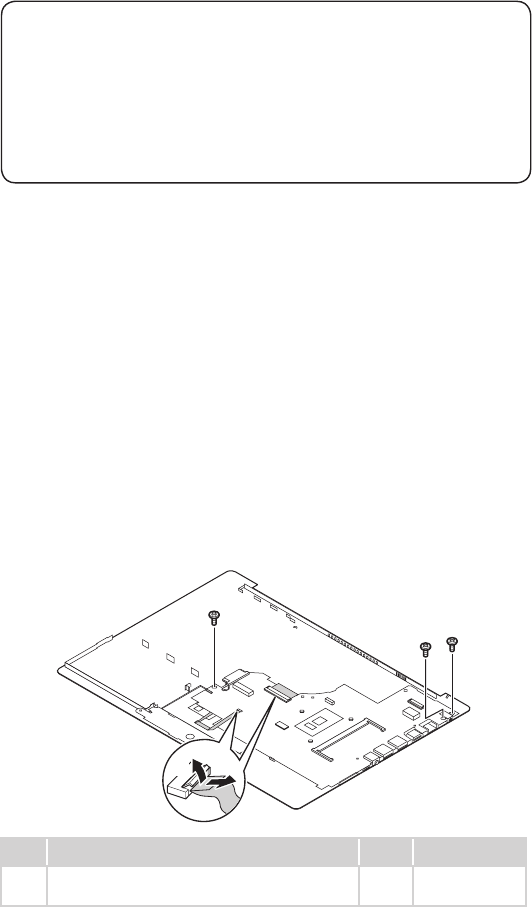
59
Lenovo ideapad 330-14IKB/ideapad 330E-14IKB D/ideapad 330E-14IKB U/ideapad 330-14IKB D/ideapad 330-
14IKB U/ideapad 330H-14IKB/ideapad 330L-14IKB/ideapad 330E-14IKB/ideapad 330R-14IKB/ideapad 330-
15IKB/ideapad 330E-15IKB D/ideapad 330E-15IKB U/ideapad 330-15IKB D/ideapad 330-15IKB U/ideapad
330H-15IKB/ideapad 330L-15IKB/ideapad 330E-15IKB/ideapad 330R-15IKB/ideapad 330-15IKB Touch
1110
System board
Important notices for handling the system board:
When handling the system board, bear the following in mind.
• Be careful not to drop the system board on a bench top that has a hard surface,
such as metal, wood, or composite.
• Avoid rough handling of any kind.
• During the whole process, make sure not to drop or stack the system board.
• If you put a system board down, make sure to put it only on a padded surface such
as an ESD mat or conductive corrugated material.
Foraccess,removetheseFRUsinorder:
• “1010Opticaldrive”onpage33
• “1020Basecover”onpage34
• “1030Batterypack”onpage37
• “1040PCIExpressMiniCardforwirelessLAN”onpage39
• “1050DIMM”onpage42
• “1060Harddiskdrive”onpage43
• “1070Speakers”onpage45
• “1080FanassemblyandHeatSinkassembly”onpage46
• “1090ODDtransferboard(ideapad 330-15IKB/ideapad330-15IKBTouch)
andbackupbattery”onpage52
• “1100Uppercase”onpage54
Figure 11. Removal steps of system board
Disconnecttheconnectorsinthedirectionsshownbyarrows1and2.
Thenremovethescrews3.
ideapad 330-14IKB
b
c
c
c
a
Step Screw (quantity) Color Torque
3M2×3mm,Phillips-head,nylok-coated(3)
M/B---logup
Silver 1.85+/-0.15kgf/
cm
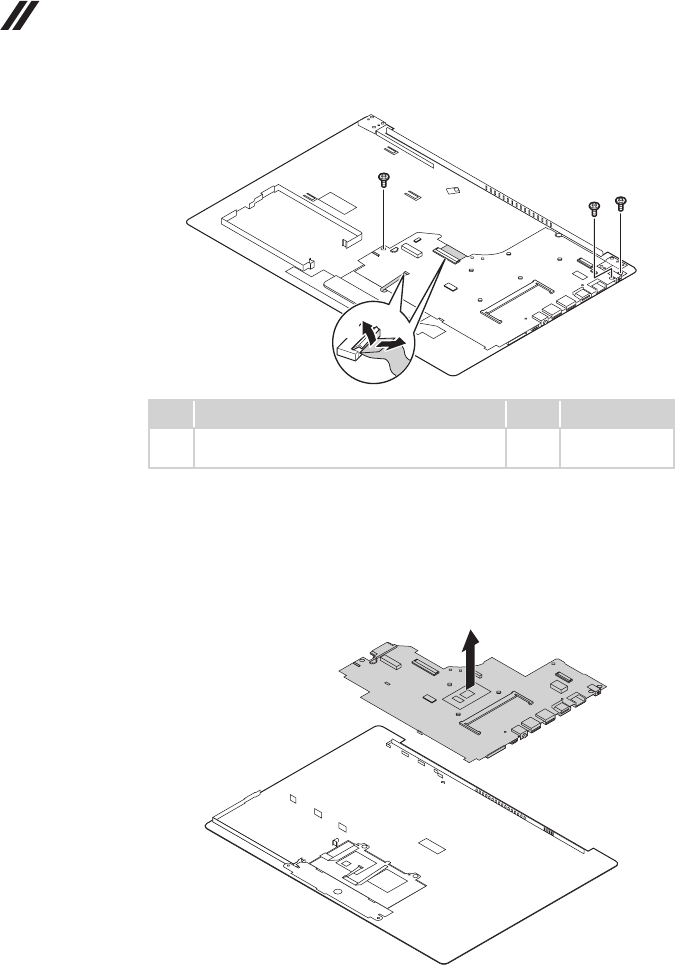
60
Hardware Maintenance Manual
ideapad 330-15IKB/ideapad 330-15IKB Touch
b
c
c
c
a
Step Screw (quantity) Color Torque
3M2×3mm,Phillips-head,nylok-coated(3)
M/B---logup
Black 1.85+/-0.15kgf/
cm
Figure 11. Removal steps of system board (continued)
Removethesystemboardinthedirectionshownbyarrow4.
ideapad 330-14IKB
d
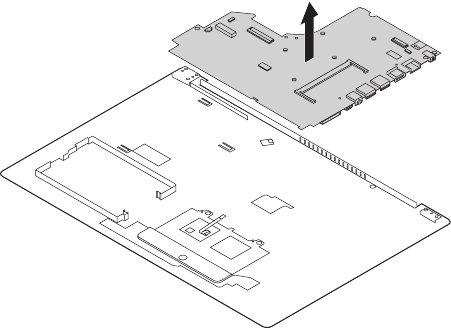
61
Lenovo ideapad 330-14IKB/ideapad 330E-14IKB D/ideapad 330E-14IKB U/ideapad 330-14IKB D/ideapad 330-
14IKB U/ideapad 330H-14IKB/ideapad 330L-14IKB/ideapad 330E-14IKB/ideapad 330R-14IKB/ideapad 330-
15IKB/ideapad 330E-15IKB D/ideapad 330E-15IKB U/ideapad 330-15IKB D/ideapad 330-15IKB U/ideapad
330H-15IKB/ideapad 330L-15IKB/ideapad 330E-15IKB/ideapad 330R-15IKB/ideapad 330-15IKB Touch
ideapad 330-15IKB/ideapad 330-15IKB Touch
d
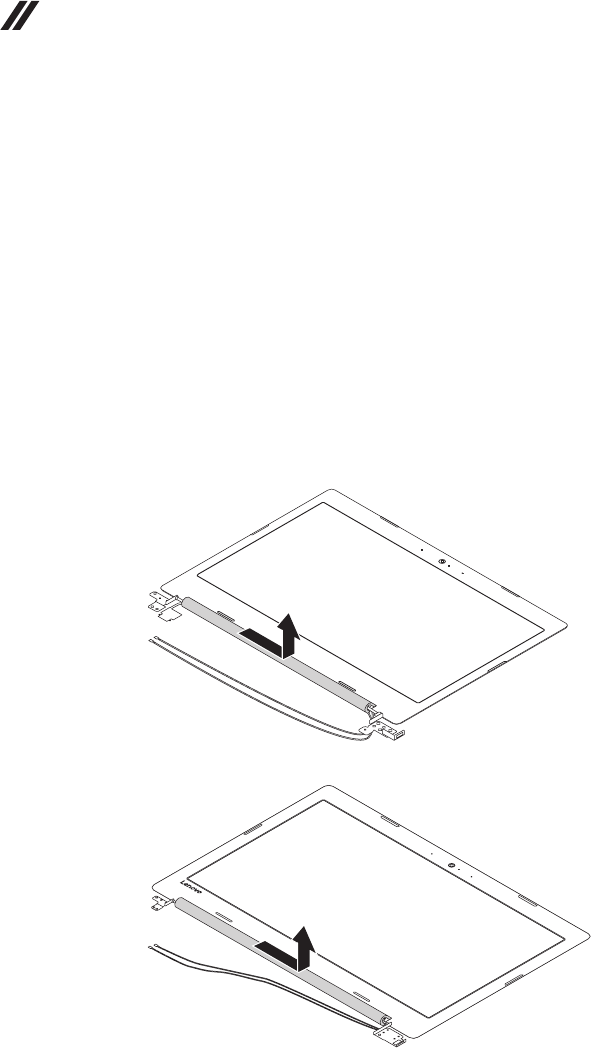
62
Hardware Maintenance Manual
1120 LCD unit
Foraccess,removetheseFRUsinorder:
• “1010Opticaldrive”onpage54
• “1020Basecover”onpage54
• “1030Batterypack”onpage54
• “1040PCIExpressMiniCardforwirelessLAN”onpage54
• “1050DIMM”onpage54
• “1060Harddiskdrive”onpage54
• “1070Speakers”onpage54
• “1080FanassemblyandHeatSinkassembly”onpage54
• “1090ODDtransferboardandbackupbattery”onpage54
• “1100Uppercase”onpage54
• “1110Systemboard”onpage54
Figure 12. Removal steps of LCD unit
Pullthehingecaptotherightsidetoreleasethehooks.
ideapad 330-14IKB
ideapad 330-15IKB/ideapad 330-15IKB Touch
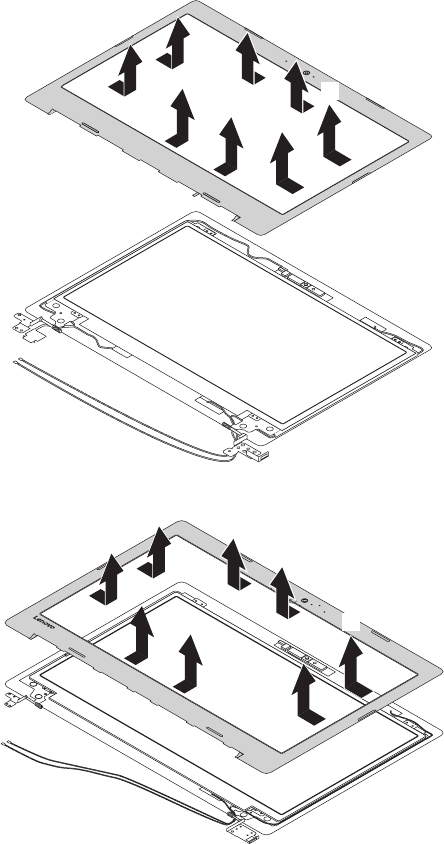
63
Lenovo ideapad 330-14IKB/ideapad 330E-14IKB D/ideapad 330E-14IKB U/ideapad 330-14IKB D/ideapad 330-
14IKB U/ideapad 330H-14IKB/ideapad 330L-14IKB/ideapad 330E-14IKB/ideapad 330R-14IKB/ideapad 330-
15IKB/ideapad 330E-15IKB D/ideapad 330E-15IKB U/ideapad 330-15IKB D/ideapad 330-15IKB U/ideapad
330H-15IKB/ideapad 330L-15IKB/ideapad 330E-15IKB/ideapad 330R-15IKB/ideapad 330-15IKB Touch
Figure 12. Removal steps of LCD unit (continued)
RemovetheLCDfrontbezelinthedirectionshownbyarrows1.
ideapad 330-14IKB
a
a
a
a
a
a
a
a
ideapad 330-15IKB/ideapad 330-15IKB Touch
a
a
a
a
a
a
a
a
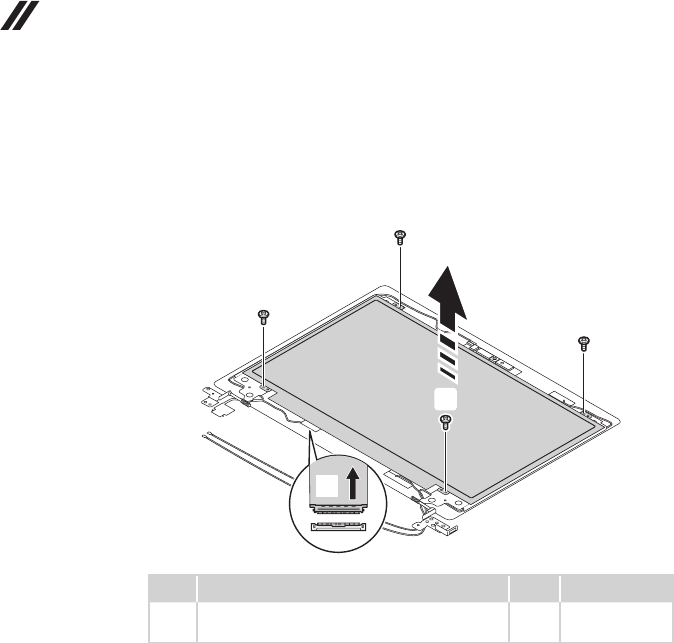
64
Hardware Maintenance Manual
Figure 12. Removal steps of LCD unit (continued)
Removethescrews2.LifttheLCDmoduleslightly3.Disconnecttheconnectorin
thedirectionshownbyarrow4.ThenremovetheLCDmodule.
ideapad 330-14IKB
d
b
b
b
b
c
Step Screw (quantity) Color Torque
2M2×3mm,Phillips-head,nylok-coated(4)
lcdpanel---lcdcover
Silver 1.85+/-0.15kgf/cm
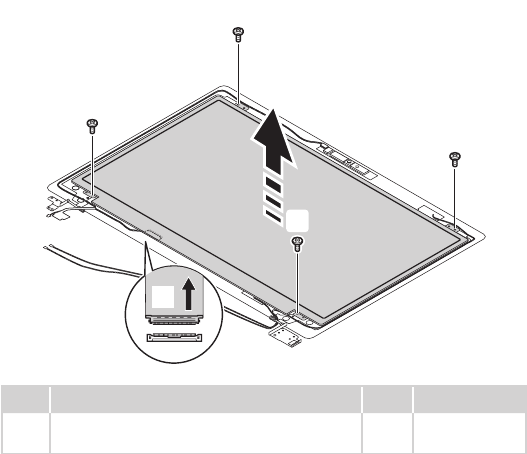
65
Lenovo ideapad 330-14IKB/ideapad 330E-14IKB D/ideapad 330E-14IKB U/ideapad 330-14IKB D/ideapad 330-
14IKB U/ideapad 330H-14IKB/ideapad 330L-14IKB/ideapad 330E-14IKB/ideapad 330R-14IKB/ideapad 330-
15IKB/ideapad 330E-15IKB D/ideapad 330E-15IKB U/ideapad 330-15IKB D/ideapad 330-15IKB U/ideapad
330H-15IKB/ideapad 330L-15IKB/ideapad 330E-15IKB/ideapad 330R-15IKB/ideapad 330-15IKB Touch
ideapad 330-15IKB/ideapad 330-15IKB Touch
c
b
b
b
b
d
Step Screw (quantity) Color Torque
2M2×3mm,Phillips-head,nylok-coated(4)
lcdpanel---lcdcover
Black 1.85+/-0.15kgf/cm
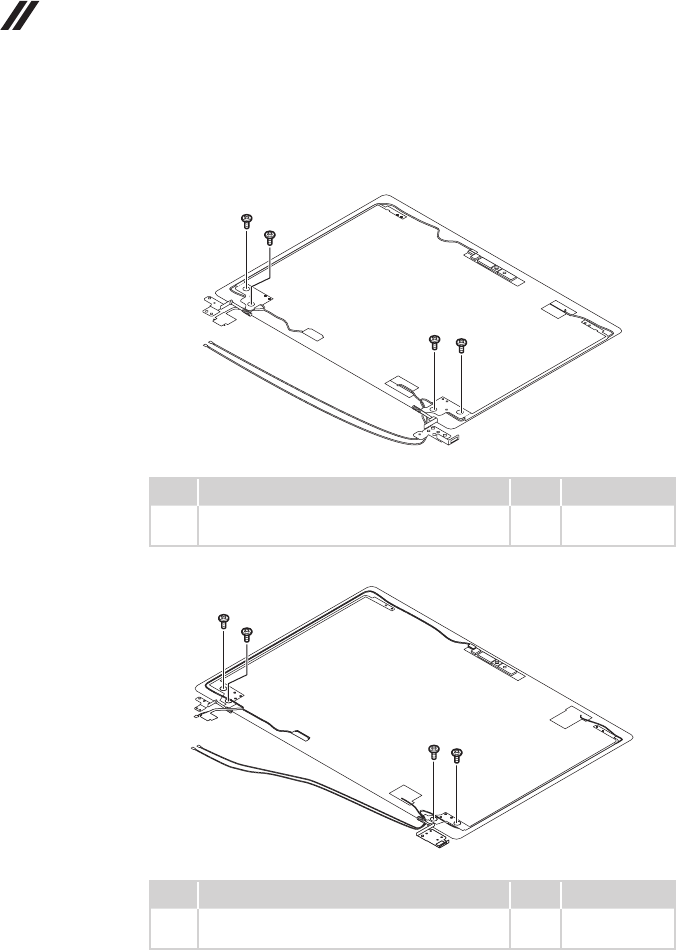
66
Hardware Maintenance Manual
Figure 12. Removal steps of LCD unit (continued)
Removethescrews1.
ideapad 330-14IKB
a
aa
a
Step Screw (quantity) Color Torque
1M2.5×2.5mm,Phillips-head,nylok-coated(4)
lcdbrk---lcdcover
Silver 3+/-0.3kgf/cm
ideapad 330-15IKB/ideapad 330-15IKB Touch
a
a
aa
Step Screw (quantity) Color Torque
1M2.5×2.5mm,Phillips-head,nylok-coated(4)
lcdbrk---lcdcover
Black 3+/-0.3kgf/cm
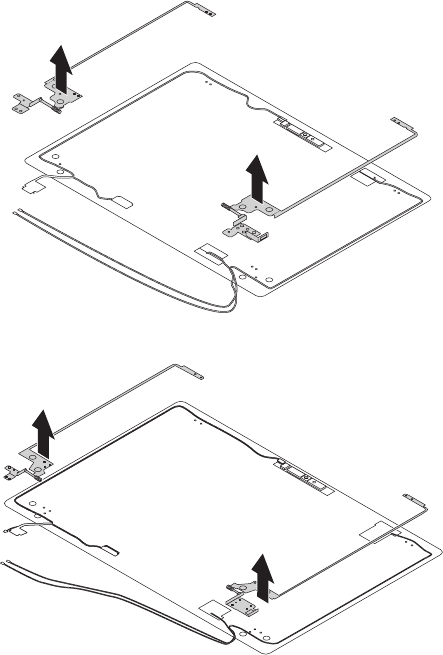
67
Lenovo ideapad 330-14IKB/ideapad 330E-14IKB D/ideapad 330E-14IKB U/ideapad 330-14IKB D/ideapad 330-
14IKB U/ideapad 330H-14IKB/ideapad 330L-14IKB/ideapad 330E-14IKB/ideapad 330R-14IKB/ideapad 330-
15IKB/ideapad 330E-15IKB D/ideapad 330E-15IKB U/ideapad 330-15IKB D/ideapad 330-15IKB U/ideapad
330H-15IKB/ideapad 330L-15IKB/ideapad 330E-15IKB/ideapad 330R-15IKB/ideapad 330-15IKB Touch
RemovetheLCDhingesinthedirectionshownbyarrows2.
ideapad 330-14IKB
b
b
ideapad 330-15IKB/ideapad 330-15IKB Touch
b
b
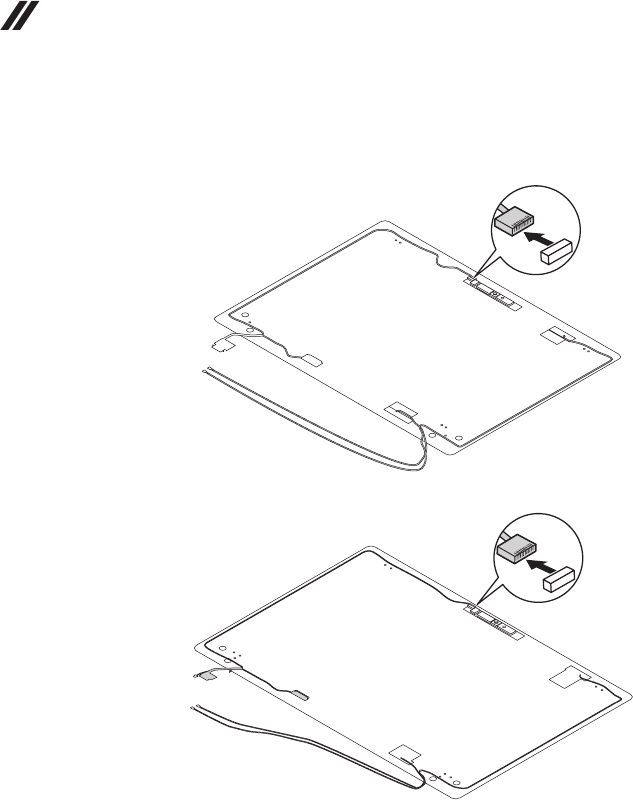
68
Hardware Maintenance Manual
Figure 12. Removal steps of LCD unit (continued)
Detachthecameraconnectorinthedirectionshownbyarrow1.
ideapad 330-14IKB
a
ideapad 330-15IKB/ideapad 330-15IKB Touch
a
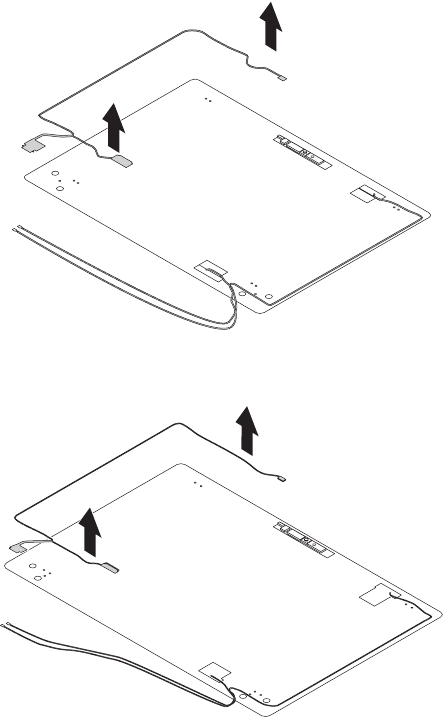
69
Lenovo ideapad 330-14IKB/ideapad 330E-14IKB D/ideapad 330E-14IKB U/ideapad 330-14IKB D/ideapad 330-
14IKB U/ideapad 330H-14IKB/ideapad 330L-14IKB/ideapad 330E-14IKB/ideapad 330R-14IKB/ideapad 330-
15IKB/ideapad 330E-15IKB D/ideapad 330E-15IKB U/ideapad 330-15IKB D/ideapad 330-15IKB U/ideapad
330H-15IKB/ideapad 330L-15IKB/ideapad 330E-15IKB/ideapad 330R-15IKB/ideapad 330-15IKB Touch
RemovetheLCDcableinthedirectionshownbyarrows2.
ideapad 330-14IKB
b
b
ideapad 330-15IKB/ideapad 330-15IKB Touch
b
b
When installing:Makesurethattheconnectorisattachedrmlyandthatyou
donotpinchtheantennacableswhenyouattachtheLCDassembly.Routethe
LCDcablealongthecableguides.
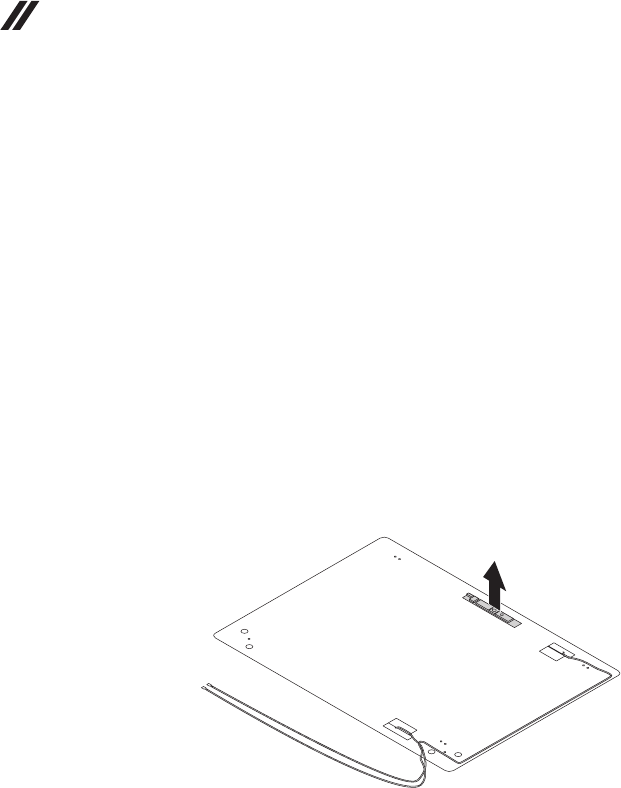
70
Hardware Maintenance Manual
1130 Integrated camera and antenna assembly
Foraccess,removetheseFRUsinorder:
• “1010Opticaldrive”onpage33
• “1020Basecover”onpage34
• “1030Batterypack”onpage37
• “1040PCIExpressMiniCardforwirelessLAN”onpage39
• “1050DIMM”onpage42
• “1060Harddiskdrive”onpage43
• “1070Speakers”onpage45
• “1080FanassemblyandHeatSinkassembly”onpage46
• “1090ODDtransferboard(ideapad 330-15IKB/ideapad330-15IKBTouch)
andbackupbattery”onpage52
• “1100Uppercase”onpage54
• “1110Systemboard”onpage59
• “1120LCDunit”onpage62
Figure 13. Removal steps of integrated camera and antenna assembly
Note:TheintegratedcameraisstuckonthetopcenteroftheLCDcover.
Removetheintegratedcamerainthedirectionshownbyarrow1.
a
When installing:Sticktheintegratedcameratothe topcenteroftheLCD
coverandadjustitsplacementtomakesuretheconnectorisattachedrmly.
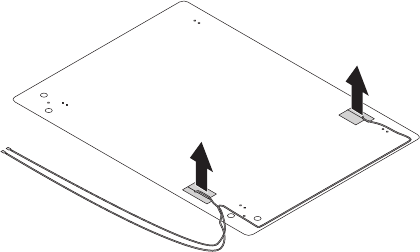
71
Lenovo ideapad 330-14IKB/ideapad 330E-14IKB D/ideapad 330E-14IKB U/ideapad 330-14IKB D/ideapad 330-
14IKB U/ideapad 330H-14IKB/ideapad 330L-14IKB/ideapad 330E-14IKB/ideapad 330R-14IKB/ideapad 330-
15IKB/ideapad 330E-15IKB D/ideapad 330E-15IKB U/ideapad 330-15IKB D/ideapad 330-15IKB U/ideapad
330H-15IKB/ideapad 330L-15IKB/ideapad 330E-15IKB/ideapad 330R-15IKB/ideapad 330-15IKB Touch
Figure 13. Removal steps of integrated camera and antenna assembly
(continued)
Peeloffthe adhesivetapesecuringtheantennaboards,releasethecables
fromthecableguide,andthenremove theantennaassemblyinthedirection
shownbyarrows2.
b
b
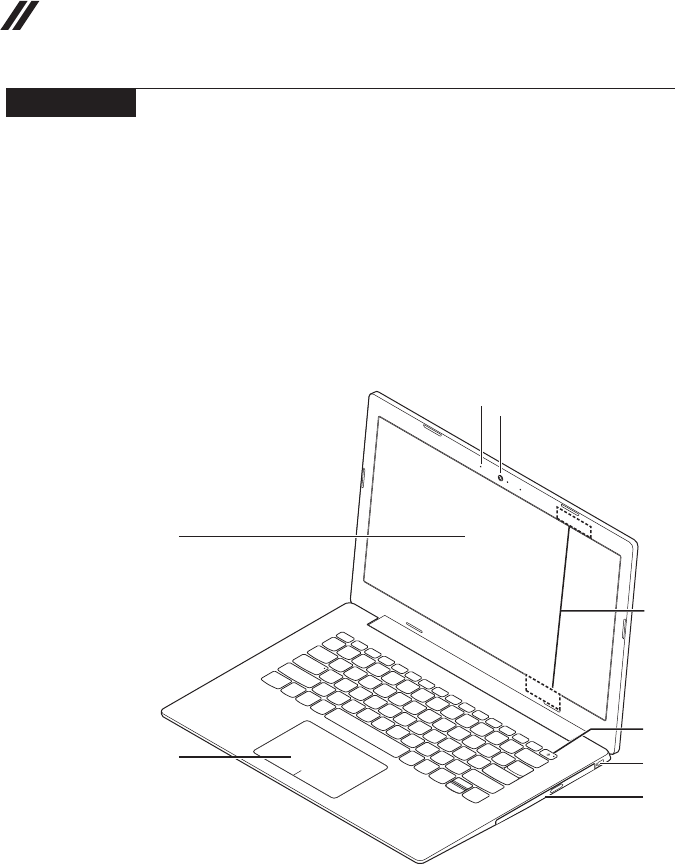
72
Hardware Maintenance Manual
Locations
Front view and right-side view
1 Integratedcamera
2 Built-inmicrophone
3 Computerdisplay
4 WirelessLANantennas
5 PowerKey
6 Touchpad
7 Fingerprintreader(onselectmodels)
8 Opticaldiscdrive
9 KensingtonSecurityslot
ideapad 330-14IKB
f
c
e
i
h
d
a
b
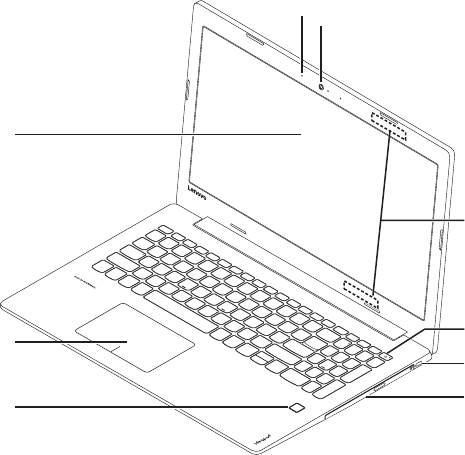
73
Lenovo ideapad 330-14IKB/ideapad 330E-14IKB D/ideapad 330E-14IKB U/ideapad 330-14IKB D/ideapad 330-
14IKB U/ideapad 330H-14IKB/ideapad 330L-14IKB/ideapad 330E-14IKB/ideapad 330R-14IKB/ideapad 330-
15IKB/ideapad 330E-15IKB D/ideapad 330E-15IKB U/ideapad 330-15IKB D/ideapad 330-15IKB U/ideapad
330H-15IKB/ideapad 330L-15IKB/ideapad 330E-15IKB/ideapad 330R-15IKB/ideapad 330-15IKB Touch
ideapad 330-15IKB/ideapad 330-15IKB Touch
f
g
c
e
i
h
d
a
b
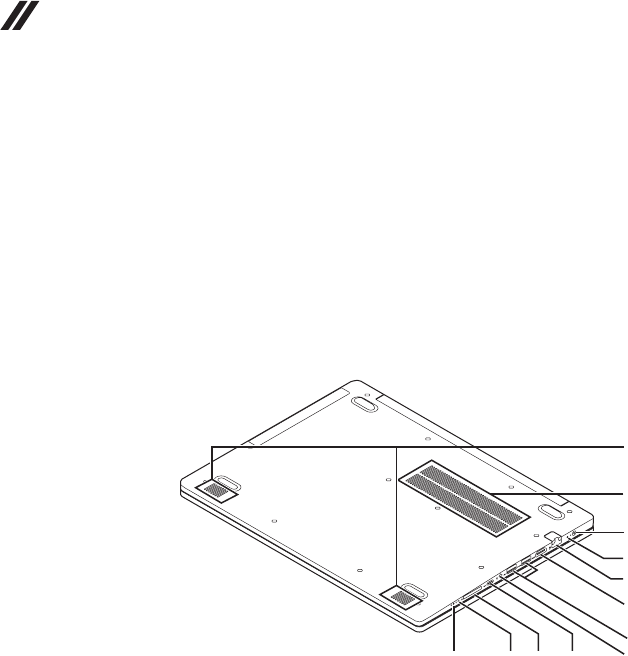
74
Hardware Maintenance Manual
Bottom and Left-side view
1 Speakers
2 Ventilationslots
3 ACpoweradapterjack
4 Battery/Chargingstatusindicator
5 RJ-45port
6 HDMIport
7 USB3.0port
8 Comboaudiojack
9 Type-Cport
0 Memorycardslot
K Novobutton
L Powerstatusindicator
b
c
d
f
e
g
hi
a
jkl
75
Lenovo ideapad 330-14IKB/ideapad 330E-14IKB D/ideapad 330E-14IKB U/ideapad 330-14IKB D/ideapad 330-
14IKB U/ideapad 330H-14IKB/ideapad 330L-14IKB/ideapad 330E-14IKB/ideapad 330R-14IKB/ideapad 330-
15IKB/ideapad 330E-15IKB D/ideapad 330E-15IKB U/ideapad 330-15IKB D/ideapad 330-15IKB U/ideapad
330H-15IKB/ideapad 330L-15IKB/ideapad 330E-15IKB/ideapad 330R-15IKB/ideapad 330-15IKB Touch
Parts list
Thissectionpresentsthefollowingserviceparts:
• “Overall”onpage76
• “LCDFRUs”onpage90
• “Miscellaneousparts”onpage94
• “ACadapters”onpage95
• “Screws”onpage96
Note:
Each FRU is available for all types or models, unless specic types or models are
specied.
Attention:
DonotattempttoreplaceanFRUonyourown.IfanFRUisdamaged,contact
aLenovoauthorizedserviceroramarketing representative forreplacement
orrepair.Onlyqualiedtechnicianscaninspectorrepairthisproduct.
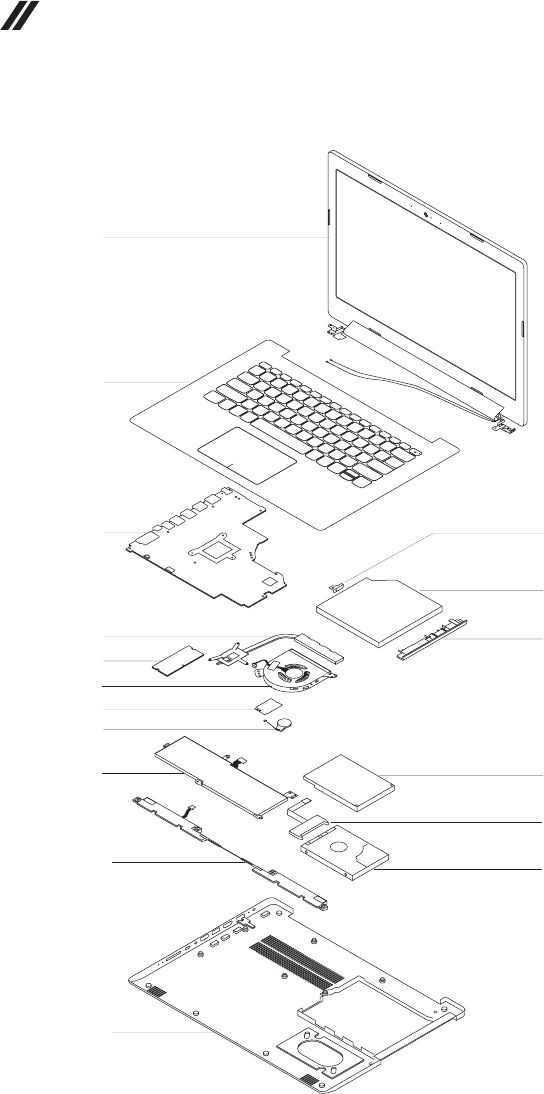
76
Hardware Maintenance Manual
Overall
ideapad 330-14IKB
1
2
3
5
7
11
8
6
9
10
b
a
c
14
13
12
4

77
Lenovo ideapad 330-14IKB/ideapad 330E-14IKB D/ideapad 330E-14IKB U/ideapad 330-14IKB D/ideapad 330-
14IKB U/ideapad 330H-14IKB/ideapad 330L-14IKB/ideapad 330E-14IKB/ideapad 330R-14IKB/ideapad 330-
15IKB/ideapad 330E-15IKB D/ideapad 330E-15IKB U/ideapad 330-15IKB D/ideapad 330-15IKB U/ideapad
330H-15IKB/ideapad 330L-15IKB/ideapad 330E-15IKB/ideapad 330R-15IKB/ideapad 330-15IKB Touch
Table 4. Parts list—Overall
ideapad 330-14IKB
No. FRU FRU no. CRU
ID.
a-c See“Miscellaneousparts”onpage94.
1 LCDunit(see“LCDFRUs”onpage90).
2 UpCaseASMW/KBL81DAPGENG 5CB0R13833
N
2 UpCaseASMW/KBL81DAPGGRE 5CB0R13894
2 UpCaseASMW/KBL81DAPGEUROENG 5CB0R13847
2 UpCaseASMW/KBL81DAPGKOR 5CB0R13855
2 UpCaseASMW/KBL81DAPGTC 5CB0R13848
2 UpCaseASMW/KBL81DAPGRUS 5CB0R13896
2 UpCaseASMW/KBL81DAPGARA 5CB0R13876
2 UpCaseASMW/KBL81DAPGHBW 5CB0R13863
2 UpCaseASMW/KBL81DAPGTHAI 5CB0R13880
2 UpCaseASMW/KBL81DAPGHIN 5CB0R13867
2 UpCaseASMW/KBL81DAPGUKE 5CB0R13827
2 UpCaseASMW/KBL81DAPGITA 5CB0R13842
2 UpCaseASMW/KBL81DAPGSPA 5CB0R13830
2 UpCaseASMW/KBL81DAPGTUR 5CB0R13818
2 UpCaseASMW/KBL81DAPGPOR 5CB0R13895
2 UpCaseASMW/KBL81DAPGLASPA 5CB0R13824
2 UpCaseASMW/KBL81DAPGFRA/ENG 5CB0R13860
2 UpCaseASMW/KBL81DAPGNORDIC 5CB0R13816
2 UpCaseASMW/KBL81DAPGFRA 5CB0R13899
2 UpCaseASMW/KBL81DAPGGER 5CB0R13828
2 UpCaseASMW/KBL81DAPGHUN 5CB0R13850
2 UpCaseASMW/KBL81DAPGBEL 5CB0R13897
2 UpCaseASMW/KBL81DAPGILD 5CB0R13889
2 UpCaseASMW/KBL81DAPGSLV 5CB0R13892
2 UpCaseASMW/KBL81DAPGSWS 5CB0R13886
2 UpCaseASMW/KBL81DAPGBUL 5CB0R13865
2 UpCaseASMW/KBL81DAPGCZE/SLK 5CB0R13837
2 UpCaseASMW/KBL81DAPGBRL 5CB0R13857
2 UpCaseASMW/KBL81DAPGFRA/ARA 5CB0R13901
2 UpCaseASMW/KBL81DAPGJPN 5CB0R13832
2 UpCaseASMW/KBL81DAPGUKR 5CB0R13888
2 UpCaseASMW/KBL81DAMGENG 5CB0R13819
2 UpCaseASMW/KBL81DAMGGRE 5CB0R13904
2 UpCaseASMW/KBL81DAMGEUROENG 5CB0R13852
2 UpCaseASMW/KBL81DAMGKOR 5CB0R13874
2 UpCaseASMW/KBL81DAMGTC 5CB0R13831
2 UpCaseASMW/KBL81DAMGRUS 5CB0R13878
2 UpCaseASMW/KBL81DAMGARA 5CB0R13835
2 UpCaseASMW/KBL81DAMGHBW 5CB0R13849
2 UpCaseASMW/KBL81DAMGTHAI 5CB0R13836
2 UpCaseASMW/KBL81DAMGHIN 5CB0R13829
2 UpCaseASMW/KBL81DAMGUKE 5CB0R13838
2 UpCaseASMW/KBL81DAMGITA 5CB0R13817

78
Hardware Maintenance Manual
Table 4. Parts list—Overall (continued)
No. FRU FRU no. CRU
ID.
2 UpCaseASMW/KBL81DAMGSPA 5CB0R13851
N
2 UpCaseASMW/KBL81DAMGTUR 5CB0R13822
2 UpCaseASMW/KBL81DAMGPOR 5CB0R13882
2 UpCaseASMW/KBL81DAMGLASPA 5CB0R13823
2 UpCaseASMW/KBL81DAMGFRA/ENG 5CB0R13825
2 UpCaseASMW/KBL81DAMGNORDIC 5CB0R13813
2 UpCaseASMW/KBL81DAMGFRA 5CB0R13872
2 UpCaseASMW/KBL81DAMGGER 5CB0R13890
2 UpCaseASMW/KBL81DAMGHUN 5CB0R13856
2 UpCaseASMW/KBL81DAMGBEL 5CB0R13843
2 UpCaseASMW/KBL81DAMGILD 5CB0R13866
2 UpCaseASMW/KBL81DAMGSLV 5CB0R13845
2 UpCaseASMW/KBL81DAMGSWS 5CB0R13858
2 UpCaseASMW/KBL81DAMGBUL 5CB0R13875
2 UpCaseASMW/KBL81DAMGCZE/SLK 5CB0R13861
2 UpCaseASMW/KBL81DAMGBRL 5CB0R13859
2 UpCaseASMW/KBL81DAMGFRA/ARA 5CB0R13820
2 UpCaseASMW/KBL81DAMGJPN 5CB0R13902
2 UpCaseASMW/KBL81DAMGUKR 5CB0R13839
2 UpCaseASMW/KBL81DALBUENG 5CB0R13873
2 UpCaseASMW/KBL81DALBUGRE 5CB0R13900
2 UpCaseASMW/KBL81DALBUEUROENG 5CB0R13891
2 UpCaseASMW/KBL81DALBUKOR 5CB0R13868
2 UpCaseASMW/KBL81DALBUTC 5CB0R13893
2 UpCaseASMW/KBL81DALBURUS 5CB0R13834
2 UpCaseASMW/KBL81DALBUARA 5CB0R13870
2 UpCaseASMW/KBL81DALBUHBW 5CB0R13905
2 UpCaseASMW/KBL81DALBUTHAI 5CB0R13862
2 UpCaseASMW/KBL81DALBUHIN 5CB0R13877
2 UpCaseASMW/KBL81DALBUUKE 5CB0R13871
2 UpCaseASMW/KBL81DALBUITA 5CB0R13815
2 UpCaseASMW/KBL81DALBUSPA 5CB0R13840
2 UpCaseASMW/KBL81DALBUTUR 5CB0R13821
2 UpCaseASMW/KBL81DALBUPOR 5CB0R13885
2 UpCaseASMW/KBL81DALBULASPA 5CB0R13826
2 UpCaseASMW/KBL81DALBUFRA/ENG 5CB0R13846
2 UpCaseASMW/KBL81DALBUNORDIC 5CB0R13903
2 UpCaseASMW/KBL81DALBUFRA 5CB0R13841
2 UpCaseASMW/KBL81DALBUGER 5CB0R13844
2 UpCaseASMW/KBL81DALBUHUN 5CB0R13869
2 UpCaseASMW/KBL81DALBUBEL 5CB0R13884
2 UpCaseASMW/KBL81DALBUILD 5CB0R13864
2 UpCaseASMW/KBL81DALBUSLV 5CB0R13887
2 UpCaseASMW/KBL81DALBUSWS 5CB0R13853
2 UpCaseASMW/KBL81DALBUBUL 5CB0R13854
2 UpCaseASMW/KBL81DALBUCZE/SLK 5CB0R13814

79
Lenovo ideapad 330-14IKB/ideapad 330E-14IKB D/ideapad 330E-14IKB U/ideapad 330-14IKB D/ideapad 330-
14IKB U/ideapad 330H-14IKB/ideapad 330L-14IKB/ideapad 330E-14IKB/ideapad 330R-14IKB/ideapad 330-
15IKB/ideapad 330E-15IKB D/ideapad 330E-15IKB U/ideapad 330-15IKB D/ideapad 330-15IKB U/ideapad
330H-15IKB/ideapad 330L-15IKB/ideapad 330E-15IKB/ideapad 330R-15IKB/ideapad 330-15IKB Touch
No. FRU FRU no. CRU
ID.
2 UpCaseASMW/KBL81DALBUBRL 5CB0R13883
N
2 UpCaseASMW/KBL81DALBUFRA/ARA 5CB0R13879
2 UpCaseASMW/KBL81DALBUJPN 5CB0R13881
2 UpCaseASMW/KBL81DALBUUKR 5CB0R13898
3 MBL81DAI57200UN530V4GD4GNOK 5B20R13355
3 MBL81DAI77500UN530V2GD4GWIN 5B20R13351
3 MBL81DAI77500UN530V2GD4GNOK 5B20R13339
3 MBL81DAI77500UX110V2GWIN 5B20R13350
3 MBL81DAI77500UX110V2GNOK 5B20R13342
3 MBL81DAI77500UX110V2GD4GWIN 5B20R13334
3 MBL81DAI77500UX110V2GD4GNOK 5B20R13349
3 MBL81DAI77500UX130V2GWIN 5B20R13330
3 MBL81DAI77500UX130V2GNOK 5B20R13357
3 MBL81DAI77500UN530V2GWIN 5B20R13333
3 MBL81DAI77500UN530V2GNOK 5B20R13336
3 MBL81DAI77500UUMAD4GWIN 5B20R13343
3 MBL81DAI77500UUMAD4GNOK 5B20R13347
3 MBL81DAI77500UUMAWIN 5B20R13338
3 MBL81DAI77500UUMANOK 5B20R13348
3 MBL81DAI77500UX130V2GD4GWIN 5B20R13340
3 MBL81DAI77500UX130V2GD4GNOK 5B20R13331
3 MBL81DAI77500UN530V4GD4GWIN 5B20R13352
3 MBL81DAI77500UN530V4GD4GNOK 5B20R13345
3 MBL81DAI77500UN530V4GWIN 5B20R13346
3 MBL81DAI77500UN530V4GNOK 5B20R13335
3 MBL81G2I37020UUMAD4GWIN 5B20R18557
3 MBL81G2I37020UUMAD4GNOK 5B20R18556
3 MBL81G2I37020UUMAWIN 5B20R18562
3 MBL81G2I37020UUMANOK 5B20R18561
3 MBL81G2I37020UN530_2GWIN 5B20R18558
3 MBL81G2I37020UN530_2GNOK 5B20R18559
3 MBL81G2I37020UN530_2GD4GWIN 5B20R18560
3 MBL81G2I37020UN530_2GD4GNOK 5B20R18563
3 MBL81G2I78550UUMAD4GWIN 5B20R16827
3 MBL81G2I78550UUMAD4GNOK 5B20R16817
3 MBL81G2I78550UN530_2GD4GWIN 5B20R16824
3 MBL81G2I78550UN530_2GD4GNOK 5B20R16809
3 MBL81G2I78550UN530_2GWIN 5B20R16825
3 MBL81G2I78550UN530_2GNOK 5B20R16815
3 MBL81G2I78550UUMAWIN 5B20R16818
3 MBL81G2I78550UUMANOK 5B20R16819
3 MBL81G2I58250UUMAWIN 5B20R16828
3 MBL81G2I58250UUMANOK 5B20R16807
3 MBL81G2I58250UUMAD4GWIN 5B20R16821
3 MBL81G2I58250UUMAD4GNOK 5B20R16810
3 MBL81G2I58250UN530_2GWIN 5B20R16829
3 MBL81G2I58250UN530_2GNOK 5B20R16808
Table 4. Parts list—Overall (continued)

80
Hardware Maintenance Manual
Table 4. Parts list—Overall (continued)
No. FRU FRU no. CRU
ID.
3 MBL81G2I58250UN530_2GD4GWIN 5B20R16823
N
3 MBL81G2I58250UN530_2GD4GNOK 5B20R16812
4 THERMALMODULEDISL80XK 5H40N82364
4 THERMALMODULEDISL80YD 5H40N91273
4 THERMALMODULEUMAL80XK 5H40N82349
4 THERMALMODULEDISL81BT 5H40Q11186
4 THERMALMODULEUMAL81BJ 5H40Q11452
5 8Gbx16D426CPK4A8G165WC-BCTD SM30N76502
5 H5AN8G6NAFR-UHC SM30L08875
5 MT40A512M16LY-075:E SM30N76490
5 MTA4ATF25664HZ-2G3B1 SM30G16502
5 RMSA3270MB76H8F-2400 SM30G16503
5 HMA425S6BJR6N-UHN0 SM30K25304
5 4GBDDR426SM471A5244CB0-CTD SM30N76487
5 4GBD426SHMA851S6CJR6N-VKN0 SM30K25310
5 4GBD426SMTA4ATF51264HZ-2G6E1 SM30K25318
5 4GBD426SRMSA3270ME86H9F-2666 SM30K25316
5 8GBDDR426SM471A1K43CB1-CTD SM30N76488
5 8GBD426SHMA81GS6CJR8N-VKN0 SM30K25311
5 8GBD426SMTA8ATF1G64HZ-2G6E1 SM30N76493
5 RMSA3260ME78HAF-2666 SM30N76498
5 16GBDDR426SM471A2K43CB1-CTD SM30N76489
5 16GBD426SMTA16ATF2G64HZ-2G6E1 SM30N76494
5 16GBD426SRMSA3300ME78HBF-2666 SM30N76499
5 HMA82GS6CJR8N-VKN0 SM30K25312
6FANDC5VL80XK 5F10N82225
7Intel31651x1AC+BTPCIEM.2WLAN SW10H24486
7RTL8821CE1x1AC+BT4.2ComboM.2BS SW10K97462
7LtnNFA435A1x1AC+BTPCIEM.2WLAN SW10K97461
8 RTCBATTERYL80XK 5B10N82213
9 320SP/AL16M2PB17.5V30Wh2cellbty 5B10M86148
9 320CP/CL16C2PB27.6V30Wh2cellbty 5B10M88058
9 320SP/BL17M2PB77.56V30Wh2cellbty 5B10Q71253
9 330GLGL17L2PF17.56V30Wh2cellbty 5B10Q41213
9 320SP/AL16M2PB27.5V35Wh2cellbty 5B10M86149
9 320CP/CL16C2PB17.6V35Wh2cellbty 5B10M88059
9 320SYL16S2PB17.6V35Wh2cellbty 5B10M90490
9 320LGL16L2PB37.6V35Wh2cellbty 5B10M91443
10 SPEAKERINTL80XKL+RFOR14T 5SB0P38021
11 LOWERCASE81DAGRAPHITEGREY 5CB0R13439
11 LOWERCASE81DALIGHTMINTGREEN 5CB0R13444
11 LOWERCASE81DALIGHTBLUE 5CB0R13438
12 DUMMYODD81DAPG 5M20R13432
12 DUMMYODD81DAMG 5M20R13428
12 DUMMYODD81DAMN-BU 5M20R13442
12 DUMMYODDFor2ndHDD81DAPG 5M20R13443

81
Lenovo ideapad 330-14IKB/ideapad 330E-14IKB D/ideapad 330E-14IKB U/ideapad 330-14IKB D/ideapad 330-
14IKB U/ideapad 330H-14IKB/ideapad 330L-14IKB/ideapad 330E-14IKB/ideapad 330R-14IKB/ideapad 330-
15IKB/ideapad 330E-15IKB D/ideapad 330E-15IKB U/ideapad 330-15IKB D/ideapad 330-15IKB U/ideapad
330H-15IKB/ideapad 330L-15IKB/ideapad 330E-15IKB/ideapad 330R-15IKB/ideapad 330-15IKB Touch
No. FRU FRU no. CRU
ID.
12 DUMMYODDFor2ndHDD81DAMG 5M20R13429
N
12 DUMMYODDFor2ndHDD81DAMN-BU 5M20R13440
12 HLDSGUE0N9.0mmSlimTrayRamboODD 5DX0J46488
12 HLGUE1N9.0mmDVDWriterWOB SDX0K84177
12 PLDSDA-8AESH9.0mmSlimTrayRamboODD 5DX0L08424
13 HDDBOARDFOR2NDHDDL80U7 5B40N82219
14 SeagateST500LM030500GB2.5"SATA7mm5400rpmHDD SH20P18518
14 MQ01ABF0506G7mm5.4K500GHDD 5H20L34560
14 WD5000LPCX-24VHAT07mm5400rpm500GHDD 5H20J35762
14 SeagateST1000LM0351T2.5"7mm5400rpmHDD 5H20L22184
14 WD10SPZX-24Z10T02.5"1THDD SH20P18627
14 MQ04ABF1001TB2.5"SATA7mm5400rpmHDD SHD0P03171
14 STRosewood2D7mm2TBHDD 5H20M37521
—ACadapter(see“ACadapters”onpage95).
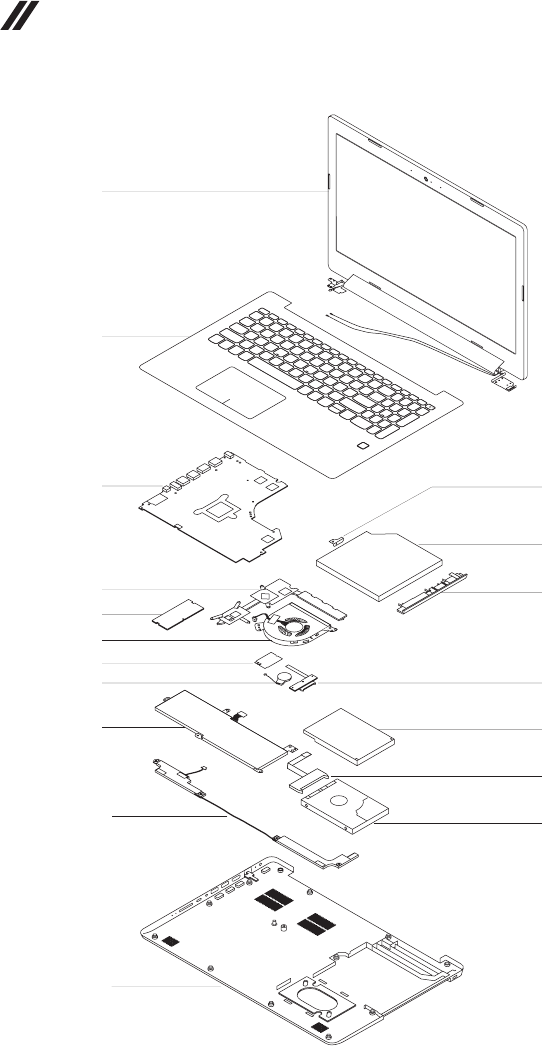
82
Hardware Maintenance Manual
ideapad 330-15IKB/ideapad 330-15IKB Touch
1
2
3
5
7
11
8
6
9
10
13
b
a
c
15
14
12
4

83
Lenovo ideapad 330-14IKB/ideapad 330E-14IKB D/ideapad 330E-14IKB U/ideapad 330-14IKB D/ideapad 330-
14IKB U/ideapad 330H-14IKB/ideapad 330L-14IKB/ideapad 330E-14IKB/ideapad 330R-14IKB/ideapad 330-
15IKB/ideapad 330E-15IKB D/ideapad 330E-15IKB U/ideapad 330-15IKB D/ideapad 330-15IKB U/ideapad
330H-15IKB/ideapad 330L-15IKB/ideapad 330E-15IKB/ideapad 330R-15IKB/ideapad 330-15IKB Touch
Table 5. Parts list—Overall
ideapad 330-15IKB/ideapad 330-15IKB Touch
No. FRU FRU no. CRU
ID.
a-c See“Miscellaneousparts”onpage94.
1 LCDunit(see“LCDFRUs”onpage90).
2 UpCaseASMW/KBL81DCWHENG 5CB0R16732
N
2 UpCaseASMW/KBL81DCWHGRE 5CB0R16693
2 UpCaseASMW/KBL81DCWHEUROENG 5CB0R16547
2 UpCaseASMW/KBL81DCWHKOR 5CB0R16637
2 UpCaseASMW/KBL81DCWHTC 5CB0R16530
2 UpCaseASMW/KBL81DCWHRUS 5CB0R16529
2 UpCaseASMW/KBL81DCWHARA 5CB0R16543
2 UpCaseASMW/KBL81DCWHHBW 5CB0R16629
2 UpCaseASMW/KBL81DCWHTHAI 5CB0R16643
2 UpCaseASMW/KBL81DCWHHIN 5CB0R16606
2 UpCaseASMW/KBL81DCWHUKE 5CB0R16581
2 UpCaseASMW/KBL81DCWHITA 5CB0R16687
2 UpCaseASMW/KBL81DCWHSPA 5CB0R16657
2 UpCaseASMW/KBL81DCWHTUR 5CB0R16634
2 UpCaseASMW/KBL81DCWHPOR 5CB0R16616
2 UpCaseASMW/KBL81DCWHLASPA 5CB0R16591
2 UpCaseASMW/KBL81DCWHFRA/ENG 5CB0R16667
2 UpCaseASMW/KBL81DCWHNORDIC 5CB0R16588
2 UpCaseASMW/KBL81DCWHFRA 5CB0R16648
2 UpCaseASMW/KBL81DCWHGER 5CB0R16574
2 UpCaseASMW/KBL81DCWHHUN 5CB0R16516
2 UpCaseASMW/KBL81DCWHBEL 5CB0R16676
2 UpCaseASMW/KBL81DCWHILD 5CB0R16617
2 UpCaseASMW/KBL81DCWHSLV 5CB0R16652
2 UpCaseASMW/KBL81DCWHSWS 5CB0R16706
2 UpCaseASMW/KBL81DCWHBUL 5CB0R16626
2 UpCaseASMW/KBL81DCWHCZE/SLK 5CB0R16660
2 UpCaseASMW/KBL81DCWHBRL 5CB0R16712
2 UpCaseASMW/KBL81DCWHFRA/ARA 5CB0R16718
2 UpCaseASMW/KBL81DCWHJPN 5CB0R16669
2 UpCaseASMW/KBL81DCWHUKR 5CB0R16710
2 UpCaseASMW/KBL81DCPGENG 5CB0R16703
2 UpCaseASMW/KBL81DCPGGRE 5CB0R16644
2 UpCaseASMW/KBL81DCPGEUROENG 5CB0R16651
2 UpCaseASMW/KBL81DCPGKOR 5CB0R16690
2 UpCaseASMW/KBL81DCPGTC 5CB0R16518
2 UpCaseASMW/KBL81DCPGRUS 5CB0R16655
2 UpCaseASMW/KBL81DCPGARA 5CB0R16531
2 UpCaseASMW/KBL81DCPGHBW 5CB0R16665
2 UpCaseASMW/KBL81DCPGTHAI 5CB0R16609
2 UpCaseASMW/KBL81DCPGHIN 5CB0R16556
2 UpCaseASMW/KBL81DCPGUKE 5CB0R16565
2 UpCaseASMW/KBL81DCPGITA 5CB0R16513

84
Hardware Maintenance Manual
No. FRU FRU no. CRU
ID.
2 UpCaseASMW/KBL81DCPGSPA 5CB0R16661
N
2 UpCaseASMW/KBL81DCPGTUR 5CB0R16631
2 UpCaseASMW/KBL81DCPGPOR 5CB0R16662
2 UpCaseASMW/KBL81DCPGLASPA 5CB0R16659
2 UpCaseASMW/KBL81DCPGFRA/ENG 5CB0R16550
2 UpCaseASMW/KBL81DCPGNORDIC 5CB0R16679
2 UpCaseASMW/KBL81DCPGFRA 5CB0R16645
2 UpCaseASMW/KBL81DCPGGER 5CB0R16524
2 UpCaseASMW/KBL81DCPGHUN 5CB0R16507
2 UpCaseASMW/KBL81DCPGBEL 5CB0R16576
2 UpCaseASMW/KBL81DCPGILD 5CB0R16555
2 UpCaseASMW/KBL81DCPGSLV 5CB0R16649
2 UpCaseASMW/KBL81DCPGSWS 5CB0R16578
2 UpCaseASMW/KBL81DCPGBUL 5CB0R16520
2 UpCaseASMW/KBL81DCPGCZE/SLK 5CB0R16674
2 UpCaseASMW/KBL81DCPGBRL 5CB0R16523
2 UpCaseASMW/KBL81DCPGFRA/ARA 5CB0R16575
2 UpCaseASMW/KBL81DCPGJPN 5CB0R16642
2 UpCaseASMW/KBL81DCPGUKR 5CB0R16595
2 UpCaseASMW/KBL81DCIGENG 5CB0R16726
2 UpCaseASMW/KBL81DCIGGRE 5CB0R16722
2 UpCaseASMW/KBL81DCIGEUROENG 5CB0R16716
2 UpCaseASMW/KBL81DCIGKOR 5CB0R16567
2 UpCaseASMW/KBL81DCIGTC 5CB0R16704
2 UpCaseASMW/KBL81DCIGRUS 5CB0R16685
2 UpCaseASMW/KBL81DCIGARA 5CB0R16590
2 UpCaseASMW/KBL81DCIGHBW 5CB0R16545
2 UpCaseASMW/KBL81DCIGTHAI 5CB0R16713
2 UpCaseASMW/KBL81DCIGHIN 5CB0R16535
2 UpCaseASMW/KBL81DCIGUKE 5CB0R16723
2 UpCaseASMW/KBL81DCIGITA 5CB0R16677
2 UpCaseASMW/KBL81DCIGSPA 5CB0R16509
2 UpCaseASMW/KBL81DCIGTUR 5CB0R16670
2 UpCaseASMW/KBL81DCIGPOR 5CB0R16627
2 UpCaseASMW/KBL81DCIGLASPA 5CB0R16600
2 UpCaseASMW/KBL81DCIGFRA/ENG 5CB0R16587
2 UpCaseASMW/KBL81DCIGNORDIC 5CB0R16697
2 UpCaseASMW/KBL81DCIGFRA 5CB0R16729
2 UpCaseASMW/KBL81DCIGGER 5CB0R16692
2 UpCaseASMW/KBL81DCIGHUN 5CB0R16678
2 UpCaseASMW/KBL81DCIGBEL 5CB0R16582
2 UpCaseASMW/KBL81DCIGILD 5CB0R16512
2 UpCaseASMW/KBL81DCIGSLV 5CB0R16709
2 UpCaseASMW/KBL81DCIGSWS 5CB0R16623
2 UpCaseASMW/KBL81DCIGBUL 5CB0R16734
2 UpCaseASMW/KBL81DCIGCZE/SLK 5CB0R16658
2 UpCaseASMW/KBL81DCIGBRL 5CB0R16510
Table 5. Parts list—Overall (continued)

85
Lenovo ideapad 330-14IKB/ideapad 330E-14IKB D/ideapad 330E-14IKB U/ideapad 330-14IKB D/ideapad 330-
14IKB U/ideapad 330H-14IKB/ideapad 330L-14IKB/ideapad 330E-14IKB/ideapad 330R-14IKB/ideapad 330-
15IKB/ideapad 330E-15IKB D/ideapad 330E-15IKB U/ideapad 330-15IKB D/ideapad 330-15IKB U/ideapad
330H-15IKB/ideapad 330L-15IKB/ideapad 330E-15IKB/ideapad 330R-15IKB/ideapad 330-15IKB Touch
Table 5. Parts list—Overall (continued)
No. FRU FRU no. CRU
ID.
2 UpCaseASMW/KBL81DCIGFRA/ARA 5CB0R16624
N
2 UpCaseASMW/KBL81DCIGJPN 5CB0R16541
2 UpCaseASMW/KBL81DCIGUKR 5CB0R16639
2 UpCaseASMW/KBL81DCLBUENG 5CB0R16728
2 UpCaseASMW/KBL81DCLBUGRE 5CB0R16688
2 UpCaseASMW/KBL81DCLBUEUROENG 5CB0R16646
2 UpCaseASMW/KBL81DCLBUKOR 5CB0R16618
2 UpCaseASMW/KBL81DCLBUTC 5CB0R16694
2 UpCaseASMW/KBL81DCLBURUS 5CB0R16620
2 UpCaseASMW/KBL81DCLBUARA 5CB0R16612
2 UpCaseASMW/KBL81DCLBUHBW 5CB0R16721
2 UpCaseASMW/KBL81DCLBUTHAI 5CB0R16607
2 UpCaseASMW/KBL81DCLBUHIN 5CB0R16700
2 UpCaseASMW/KBL81DCLBUUKE 5CB0R16539
2 UpCaseASMW/KBL81DCLBUITA 5CB0R16511
2 UpCaseASMW/KBL81DCLBUSPA 5CB0R16563
2 UpCaseASMW/KBL81DCLBUTUR 5CB0R16701
2 UpCaseASMW/KBL81DCLBUPOR 5CB0R16635
2 UpCaseASMW/KBL81DCLBULASPA 5CB0R16597
2 UpCaseASMW/KBL81DCLBUFRA/ENG 5CB0R16672
2 UpCaseASMW/KBL81DCLBUNORDIC 5CB0R16640
2 UpCaseASMW/KBL81DCLBUFRA 5CB0R16717
2 UpCaseASMW/KBL81DCLBUGER 5CB0R16656
2 UpCaseASMW/KBL81DCLBUHUN 5CB0R16653
2 UpCaseASMW/KBL81DCLBUBEL 5CB0R16727
2 UpCaseASMW/KBL81DCLBUILD 5CB0R16564
2 UpCaseASMW/KBL81DCLBUSLV 5CB0R16628
2 UpCaseASMW/KBL81DCLBUSWS 5CB0R16619
2 UpCaseASMW/KBL81DCLBUBUL 5CB0R16577
2 UpCaseASMW/KBL81DCLBUCZE/SLK 5CB0R16534
2 UpCaseASMW/KBL81DCLBUBRL 5CB0R16569
2 UpCaseASMW/KBL81DCLBUFRA/ARA 5CB0R16593
2 UpCaseASMW/KBL81DCLBUJPN 5CB0R16521
2 UpCaseASMW/KBL81DCLBUUKR 5CB0R16615
2 UpCaseASMW/KBL81DCCHCOENG 5CB0R16696
2 UpCaseASMW/KBL81DCCHCOGRE 5CB0R16614
2 UpCaseASMW/KBL81DCCHCOEUROENG 5CB0R16705
2 UpCaseASMW/KBL81DCCHCOKOR 5CB0R16537
2 UpCaseASMW/KBL81DCCHCOTC 5CB0R16604
2 UpCaseASMW/KBL81DCCHCORUS 5CB0R16560
2 UpCaseASMW/KBL81DCCHCOARA 5CB0R16558
2 UpCaseASMW/KBL81DCCHCOHBW 5CB0R16647
2 UpCaseASMW/KBL81DCCHCOTHAI 5CB0R16605
2 UpCaseASMW/KBL81DCCHCOHIN 5CB0R16514
2 UpCaseASMW/KBL81DCCHCOUKE 5CB0R16711
2 UpCaseASMW/KBL81DCCHCOITA 5CB0R16601

86
Hardware Maintenance Manual
No. FRU FRU no. CRU
ID.
2 UpCaseASMW/KBL81DCCHCOSPA 5CB0R16622
N
2 UpCaseASMW/KBL81DCCHCOTUR 5CB0R16504
2 UpCaseASMW/KBL81DCCHCOPOR 5CB0R16668
2 UpCaseASMW/KBL81DCCHCOLASPA 5CB0R16519
2 UpCaseASMW/KBL81DCCHCOFRA/ENG 5CB0R16625
2 UpCaseASMW/KBL81DCCHCONORDIC 5CB0R16570
2 UpCaseASMW/KBL81DCCHCOFRA 5CB0R16666
2 UpCaseASMW/KBL81DCCHCOGER 5CB0R16546
2 UpCaseASMW/KBL81DCCHCOHUN 5CB0R16675
2 UpCaseASMW/KBL81DCCHCOBEL 5CB0R16561
2 UpCaseASMW/KBL81DCCHCOILD 5CB0R16633
2 UpCaseASMW/KBL81DCCHCOSLV 5CB0R16551
2 UpCaseASMW/KBL81DCCHCOSWS 5CB0R16583
2 UpCaseASMW/KBL81DCCHCOBUL 5CB0R16572
2 UpCaseASMW/KBL81DCCHCOCZE/SLK 5CB0R16538
2 UpCaseASMW/KBL81DCCHCOBRL 5CB0R16720
2 UpCaseASMW/KBL81DCCHCOFRA/ARA 5CB0R16557
2 UpCaseASMW/KBL81DCCHCOJPN 5CB0R16632
2 UpCaseASMW/KBL81DCCHCOUKR 5CB0R16542
3 MBL81DEI38130UUMAD4GWIN 5B20R19898
3 MBL81DEI38130UUMAD4GNOK 5B20R19917
3 MBL81DEI38130UX150_2GD4GWIN 5B20R19924
3 MBL81DEI38130UX150_2GD4GNOK 5B20R19902
3 MBL81DEI38130UN530_2GD4GWIN 5B20R19904
3 MBL81DEI38130UN530_2GD4GNOK 5B20R19884
3 MBL81DEI37020UN530_2GD4GWIN 5B20R19905
3 MBL81DEI37020UN530_2GD4GNOK 5B20R19865
3 MBL81DEI37020UUMAD4GWIN 5B20R19926
3 MBL81DEI37020UUMAD4GNOK 5B20R19918
3 MBL81DEI37020UX150_2GD4GWIN 5B20R19868
3 MBL81DEI37020UX150_2GD4GNOK 5B20R19881
3 MBL81DEI58250UX150_2GD4GOPWIN 5B20R19921
3 MBL81DEI58250UX150_2GD4GOPNOK 5B20R19890
3 MBL81DEI58250UN530_2GD4GOPWIN 5B20R19891
3 MBL81DEI58250UN530_2GD4GOPNOK 5B20R19912
3 MBL81DEI58250UX150_2GD4GWIN 5B20R19909
3 MBL81DEI58250UX150_2GD4GNOK 5B20R19876
3 MBL81DEI58250UUMAD4GWIN 5B20R19914
3 MBL81DEI58250UUMAD4GNOK 5B20R19867
3 MBL81DEI58250UN530_2GD4GWIN 5B20R19919
3 MBL81DEI58250UN530_2GD4GNOK 5B20R19899
3 MBL81DEI58250UN530_4GD4GOPWIN 5B20R19863
3 MBL81DEI58250UN530_4GD4GOPNOK 5B20R19913
3 MBL81DEI58250UN530_4GD4GWIN 5B20R19860
3 MBL81DEI58250UN530_4GD4GNOK 5B20R19920
3 MBL81DEI58250UUMAD4GOPWIN 5B20R19869
Table 5. Parts list—Overall (continued)

87
Lenovo ideapad 330-14IKB/ideapad 330E-14IKB D/ideapad 330E-14IKB U/ideapad 330-14IKB D/ideapad 330-
14IKB U/ideapad 330H-14IKB/ideapad 330L-14IKB/ideapad 330E-14IKB/ideapad 330R-14IKB/ideapad 330-
15IKB/ideapad 330E-15IKB D/ideapad 330E-15IKB U/ideapad 330-15IKB D/ideapad 330-15IKB U/ideapad
330H-15IKB/ideapad 330L-15IKB/ideapad 330E-15IKB/ideapad 330R-15IKB/ideapad 330-15IKB Touch
Table 5. Parts list—Overall (continued)
No. FRU FRU no. CRU
ID.
3 MBL81DEI58250UUMAD4GOPNOK 5B20R19870
N
3 MBL81DEI58250UX150_4GD4GWIN 5B20R19894
3 MBL81DEI58250UX150_4GD4GNOK 5B20R19866
3 MBL81DEI58250UX150_4GD4GOPWIN 5B20R19911
3 MBL81DEI58250UX150_4GD4GOPNOK 5B20R19903
3 MBL81DEI78550UN530_2GD4GWIN 5B20R19908
3 MBL81DEI78550UN530_2GD4GNOK 5B20R19889
3 MBL81DEI78550UN530_4GD4GOPWIN 5B20R19901
3 MBL81DEI78550UN530_4GD4GOPNOK 5B20R19927
3 MBL81DEI78550UN530_4GNRWIN 5B20R19873
3 MBL81DEI78550UN530_4GNRNOK 5B20R19922
3 MBL81DEI78550UX150_2GNROPWIN 5B20R19877
3 MBL81DEI78550UX150_2GNROPNOK 5B20R19910
3 MBL81DEI78550UN530_2GD4GOPWIN 5B20R19886
3 MBL81DEI78550UN530_2GD4GOPNOK 5B20R19895
3 MBL81DEI78550UUMAD4GWIN 5B20R19864
3 MBL81DEI78550UUMAD4GNOK 5B20R19897
3 MBL81DEI78550UN530_2GNROPWIN 5B20R19916
3 MBL81DEI78550UN530_2GNROPNOK 5B20R19878
3 MBL81DEI78550UN530_4GNROPWIN 5B20R19896
3 MBL81DEI78550UN530_4GNROPNOK 5B20R19906
3 MBL81DEI78550UX150_2GD4GWIN 5B20R19887
3 MBL81DEI78550UX150_2GD4GNOK 5B20R19925
3 MBL81DEI78550UN530_2GNRWIN 5B20R19872
3 MBL81DEI78550UN530_2GNRNOK 5B20R19907
3 MBL81DEI78550UX150_2GD4GOPWIN 5B20R19900
3 MBL81DEI78550UX150_2GD4GOPNOK 5B20R19871
3 MBL81DEI78550UX150_2GNRWIN 5B20R19888
3 MBL81DEI78550UX150_2GNRNOK 5B20R19861
3 MBL81DEI78550UN530_4GD4GWIN 5B20R19885
3 MBL81DEI78550UN530_4GD4GNOK 5B20R19892
3 MBL81DEI78550UUMAD4GOPWIN 5B20R19923
3 MBL81DEI78550UUMAD4GOPNOK 5B20R19879
3 MBL81DEI78550UX150_4GD4GOPWIN 5B20R19874
3 MBL81DEI78550UX150_4GD4GOPNOK 5B20R19893
3 MBL81DEI78550UX150_4GNROPWIN 5B20R19880
3 MBL81DEI78550UX150_4GNROPNOK 5B20R19875
3 MBL81DEI78550UX150_4GNRWIN 5B20R19883
3 MBL81DEI78550UX150_4GNRNOK 5B20R19862
3 MBL81DEI78550UX150_4GD4GWIN 5B20R19882
3 MBL81DEI78550UX150_4GD4GNOK 5B20R19915
3 MBL81DJI38130UUMAD4GWIN 5B20R20241
3 MBL81DJI38130UUMAD4GNOK 5B20R20232
3 MBL81DJI38130UMX150_2GD4GWIN 5B20R20242
3 MBL81DJI38130UMX150_2GD4GNOK 5B20R20244
3 MBL81DJI58250UMX150_4GD4GWIN 5B20R20231

88
Hardware Maintenance Manual
No. FRU FRU no. CRU
ID.
3 MBL81DJI58250UMX150_4GD4GNOK 5B20R20233
N
3 MBL81DJI58250UUMAD4GWIN 5B20R20238
3 MBL81DJI58250UUMAD4GNOK 5B20R20235
3 MBL81DJI58250UMX150_2GD4GWIN 5B20R20246
3 MBL81DJI58250UMX150_2GD4GNOK 5B20R20248
3 MBL81DJI78550UUMAD4GWIN 5B20R20245
3 MBL81DJI78550UUMAD4GNOK 5B20R20247
3 MBL81DJI78550UMX150_2GD4GWIN 5B20R20236
3 MBL81DJI78550UMX150_2GD4GNOK 5B20R20234
3 MBL81DJI78550UMX150_2GNRWIN 5B20R20239
3 MBL81DJI78550UMX150_2GNRNOK 5B20R20249
3 MBL81DJI78550UMX150_4GD4GWIN 5B20R20230
3 MBL81DJI78550UMX150_4GD4GNOK 5B20R20240
3 MBL81DJI78550UMX150_4GNRWIN 5B20R20237
3 MBL81DJI78550UMX150_4GNRNOK 5B20R20243
4 THERMALMODULEDISL81BJ 5H40Q11451
4 THERMALMODULEDISL81BT 5H40Q11186
4 THERMALMODULEUMAL81BJ 5H40Q11452
5 8Gbx16D426CPK4A8G165WC-BCTD SM30N76502
5 H5AN8G6NAFR-UHC SM30L08875
5 MT40A512M16LY-075:E SM30N76490
5 MTA4ATF25664HZ-2G3B1 SM30G16502
5 RMSA3270MB76H8F-2400 SM30G16503
5 HMA425S6BJR6N-UHN0 SM30K25304
5 4GBDDR426SM471A5244CB0-CTD SM30N76487
5 4GBD426SHMA851S6CJR6N-VKN0 SM30K25310
5 4GBD426SMTA4ATF51264HZ-2G6E1 SM30K25318
5 4GBD426SRMSA3270ME86H9F-2666 SM30K25316
5 8GBDDR426SM471A1K43CB1-CTD SM30N76488
5 8GBD426SHMA81GS6CJR8N-VKN0 SM30K25311
5 8GBD426SMTA8ATF1G64HZ-2G6E1 SM30N76493
5 RMSA3260ME78HAF-2666 SM30N76498
5 16GBDDR426SM471A2K43CB1-CTD SM30N76489
5 16GBD426SMTA16ATF2G64HZ-2G6E1 SM30N76494
5 16GBD426SRMSA3300ME78HBF-2666 SM30N76499
5 HMA82GS6CJR8N-VKN0 SM30K25312
5 IntelM.2PCIe2242-S3-B-MOptanememoryStonyBeach216GB SSS0L25101
6FANDC5VL80XK 5F10N82225
7Intel31651x1AC+BTPCIEM.2WLAN SW10H24486
7RTL8821CE1x1AC+BT4.2ComboM.2BS SW10K97462
7LtnNFA435A1x1AC+BTPCIEM.2WLAN SW10K97461
8 RTCBatteryLY700-15ACZ 5B10K26870
9 320SP/AL16M2PB17.5V30Wh2cellbty 5B10M86148
9 320CP/CL16C2PB27.6V30Wh2cellbty 5B10M88058
9 320SP/BL17M2PB77.56V30Wh2cellbty 5B10Q71253
9 330GLGL17L2PF17.56V30Wh2cellbty 5B10Q41213
9 320SP/AL16M2PB27.5V35Wh2cellbty 5B10M86149
Table 5. Parts list—Overall (continued)

89
Lenovo ideapad 330-14IKB/ideapad 330E-14IKB D/ideapad 330E-14IKB U/ideapad 330-14IKB D/ideapad 330-
14IKB U/ideapad 330H-14IKB/ideapad 330L-14IKB/ideapad 330E-14IKB/ideapad 330R-14IKB/ideapad 330-
15IKB/ideapad 330E-15IKB D/ideapad 330E-15IKB U/ideapad 330-15IKB D/ideapad 330-15IKB U/ideapad
330H-15IKB/ideapad 330L-15IKB/ideapad 330E-15IKB/ideapad 330R-15IKB/ideapad 330-15IKB Touch
No. FRU FRU no. CRU
ID.
9 320CP/CL16C2PB17.6V35Wh2cellbty 5B10M88059
N
9 320SYL16S2PB17.6V35Wh2cellbty 5B10M90490
9 320LGL16L2PB37.6V35Wh2cellbty 5B10M91443
10 SPEAKERINTL80XLL+RFOR15T 5SB0P38019
11 LOWERCASEL80XLTEXWH 5CB0N86419
11 LOWERCASEL81DC15TGRAPHITEGREY 5CB0R16586
11 LOWERCASEL81DC15TLIGHTBLUE 5CB0R16549
11 LOWERCASEL81DC15TCHOC 5CB0R16630
12 DUMMYODD81DAPG 5M20R13432
12 DUMMYODDWHL80XK 5M20N82196
12 DUMMYODDL81DCMNBU 5M20R16682
12 DUMMYODDL81DCCHOC 5M20R16715
12 DUMMYODDFor2ndHDD81DAPG 5M20R13443
12 DUMMYODDFor2ndHDDL81DCMNBU 5M20R16522
12 DUMMYODDFor2ndHDDL81DCCHOC 5M20R16515
12 DUMMYODDfor2ndHDDWHL80XK 5M20N82228
12 HLDSGUE0N9.0mmSlimTrayRamboODD 5DX0J46488
12 HLGUE1N9.0mmDVDWriterWOB SDX0K84177
12 PLDSDA-8AESH9.0mmSlimTrayRamboODD 5DX0L08424
13 ODDBOARDNSB241L80XL 5C50N86565
14 HDDBOARDFOR2NDHDDL80U7 5B40N82219
15 SeagateST500LM030500GB2.5"SATA7mm5400rpmHDD SH20P18518
15 MQ01ABF0506G7mm5.4K500GHDD 5H20L34560
15 WD5000LPCX-24VHAT07mm5400rpm500GHDD 5H20J35762
15 SeagateST1000LM0351T2.5"7mm5400rpmHDD 5H20L22184
15 WD10SPZX-24Z10T02.5"1THDD SH20P18627
15 MQ04ABF1001TB2.5"SATA7mm5400rpmHDD SHD0P03171
15 STRosewood2D7mm2TBHDD 5H20M37521
—ACadapter(see“ACadapters”onpage95).
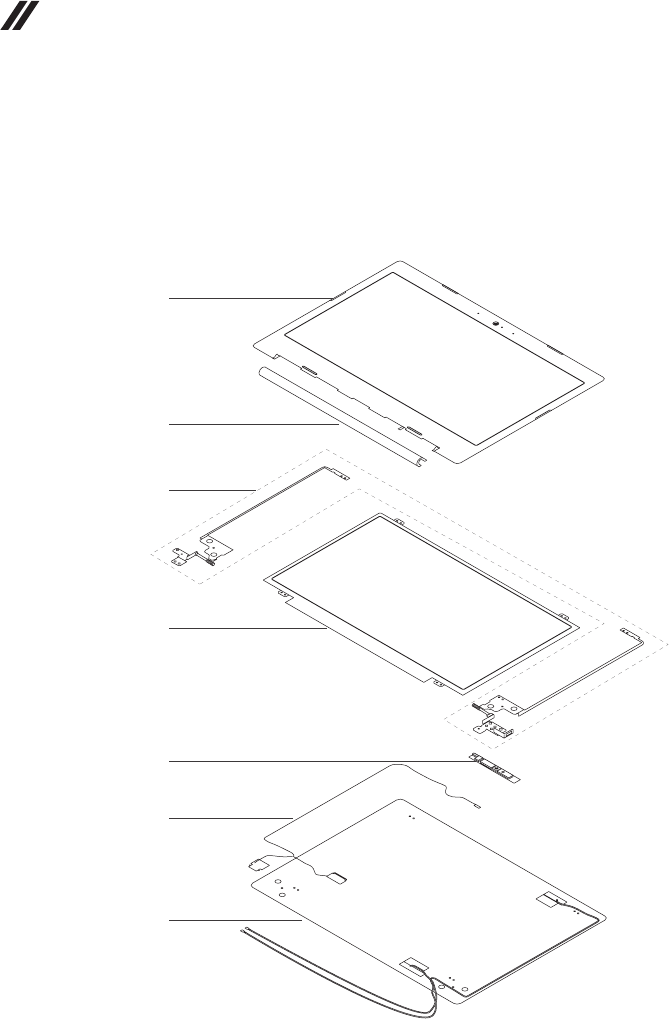
90
Hardware Maintenance Manual
LCD FRUs
ideapad 330-14IKB
InLenovoideapad330-14IKB/ideapad330E-14IKBD/ideapad330E-14IKB
U/ideapad330-14IKBD/ideapad330-14IKBU/ideapad330H-14IKB/ideapad
330L-14IKB/ideapad330E-14IKB/ideapad330R-14IKB,thereis followingtype
ofLCD.
• “14.0-in.HDLED”
1
2
5
4
6
3
7

91
Lenovo ideapad 330-14IKB/ideapad 330E-14IKB D/ideapad 330E-14IKB U/ideapad 330-14IKB D/ideapad 330-
14IKB U/ideapad 330H-14IKB/ideapad 330L-14IKB/ideapad 330E-14IKB/ideapad 330R-14IKB/ideapad 330-
15IKB/ideapad 330E-15IKB D/ideapad 330E-15IKB U/ideapad 330-15IKB D/ideapad 330-15IKB U/ideapad
330H-15IKB/ideapad 330L-15IKB/ideapad 330E-15IKB/ideapad 330R-15IKB/ideapad 330-15IKB Touch
Table 6. Parts list—LCD FRUs
ideapad 330-14IKB
No. FRU FRU no. CRU
ID.
1 LCDBUEZELL80XKTEX14TBKWCAMMYMAGNET 5B30N82311
N
2 HINGECAP81DA14TMG 5CB0R13435
2 HINGECAP81DA14TMN-BU 5CB0R13433
2 HINGECAP14TL80XKPGPT 5CB0N82240
3 HINGELR14TL80XK 5H50N82309
4 AUB140XTN02.EHWCAHDAGSNB 5D10P54235
4 INXN140BGA-EA3C1HDAGSNB 5D10K85755
4 IVM140NWR6R1HDTAGSNB 5D10K81644
4 BONT140WHM-N41HDTAGSNB 5D10K81099
4 AUB140HTN01.E2AFHDTAGSNB 5D10L08701
4 INN140HGE-EAAC4FHDTAGSNB 5D10K93439
4 BONT140FHM-N41FHDTAGSNB 5D10L01874
5 CAMERA81DA720PW/MIC 5C20R13441
5 CAMERAL80XK0.3MW1MIC 5C20N82280
5 BISBNCR1NKSKHDNBcamera SC20M52085
5 CCYCNFGH41HDNBcamera SC20M52089
5 LTN6SF111N2HDNBcamera SC20M52114
5 AVCHAA-8F4A03HDNBcamera SC20M52087
5 BISBNCRVTKTL0.3MNBcamera SC20M52088
5 CCYCNFG0200.3MNBcamera SC20M52082
5 AWAAM-6SF5A020.3MNBcamera SC20M52079
5 AVCHAA-93C5010.3MNBcamera SC20M52080
6EDPCableL80XKFOR14T 5C10P38018
7LCDCOVERL80XK14TPGPTANTEEDP 5CB0N82367
7LCDCover81DA14TMG 5CB0R13430
7LCDCover81DA14TMN-BU 5CB0R13434
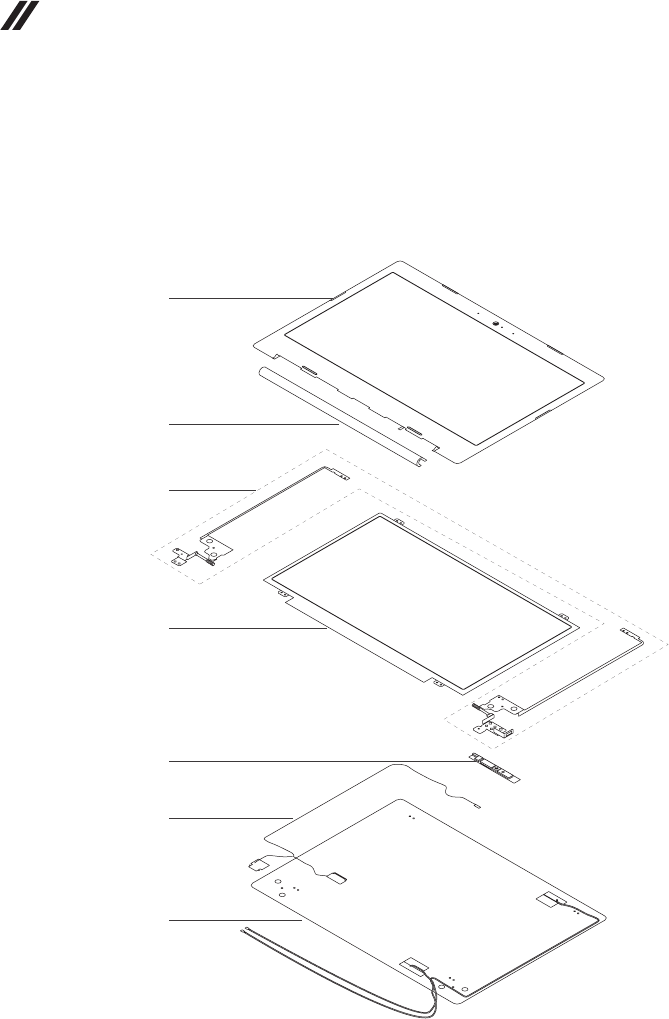
92
Hardware Maintenance Manual
LCD FRUs
ideapad 330-15IKB/ideapad 330-15IKB Touch
Inideapad330-15IKB/ideapad330E-15IKBD/ideapad 330E-15IKBU/ideapad
330-15IKBD/ideapad330-15IKBU/ideapad330H-15IKB/ideapad330L-15IKB/
ideapad330E-15IKB/ideapad330R-15IKB/ideapad330-15IKBTouch,thereis
followingtypeofLCD.
• “15.6-in.HDLED”
1
2
5
4
6
3
7

93
Lenovo ideapad 330-14IKB/ideapad 330E-14IKB D/ideapad 330E-14IKB U/ideapad 330-14IKB D/ideapad 330-
14IKB U/ideapad 330H-14IKB/ideapad 330L-14IKB/ideapad 330E-14IKB/ideapad 330R-14IKB/ideapad 330-
15IKB/ideapad 330E-15IKB D/ideapad 330E-15IKB U/ideapad 330-15IKB D/ideapad 330-15IKB U/ideapad
330H-15IKB/ideapad 330L-15IKB/ideapad 330E-15IKB/ideapad 330R-15IKB/ideapad 330-15IKB Touch
Table 7. Parts list—LCD FRUs
ideapad 330-15IKB/ideapad 330-15IKB Touch
No. FRU FRU no. CRU
ID.
1 LCDBUEZELL80XLTEX15TBKWCAMMYMAGNET 5B30N86341
N
2 HINGECAP15TL80XLBWPT 5CB0N86453
2 HINGECAP15TL80XLPGPT 5CB0N86380
2 HINGECAP15TL80XLOBPT 5CB0N86462
2 HINGECAPL81DC15TMNBU 5CB0R16699
2 HINGECAPL81DC15TCHOC 5CB0R16636
3 HINGELR15TL80XL 5H50N86361
4 AUB156XTN07.13AHDTAGSNB 5D10H52713
4 INXN156BGA-EA2HDTAGSNB 5D10K81086
4 BONT156WHM-N42V8.1HDTAGSNB 5D10R26920
4 AUB156HTN03.80CFHDTAGSNB 5D10L08702
4 INN156HGA-EABFHDTAGSNB 5D10K93435
4 BONT156FHM-N41FHDTAGSNB 5D10K93434
5 CAMERA81DA720PW/MIC 5C20R13441
5 CAMERAL80XK0.3MW1MIC 5C20N82280
5 BISBNCR1NKSKHDNBcamera SC20M52085
5 CCYCNFGH41HDNBcamera SC20M52089
5 LTN6SF111N2HDNBcamera SC20M52114
5 AVCHAA-8F4A03HDNBcamera SC20M52087
5 BISBNCRVTKTL0.3MNBcamera SC20M52088
5 CCYCNFG0200.3MNBcamera SC20M52082
5 AWAAM-6SF5A020.3MNBcamera SC20M52079
5 AVCHAA-93C5010.3MNBcamera SC20M52080
6EDPCableL80XLFOR15T 5C10P38020
6EDPCableL80XNFOR15TTOUCH 5C10P38017
7LCDCOVERL80XL15TBWPTANTEEDP 5CB0N86561
7LCDCOVERL80XL15TPGPTANTEEDP 5CB0N86313
7LCDCOVERL80XL15TOBPTANTEEDP 5CB0N86327
7LCDCoverL81DC15TMNBU 5CB0R16544
7LCDCoverL81DC15TCHOC 5CB0R16599
7LCDCOVERL80XNTOUCHOBPTANTEEDP 5CB0N86888
7LCDCOVERL80XNTOUCHPGPTANTEEDP 5CB0N86847
7LCDCOVERL80XNTOUCHBWPTANTEEDP 5CB0N86850
7LCDCoverL81DH15TMNBUTH 5CB0R19785
7LCDCoverL81DH15TCHOCTH 5CB0R19796

94
Hardware Maintenance Manual
Miscellaneous parts
Table 8. Parts list—Miscellaneous parts
ideapad 330-14IKB
FRU P/N CRU
ID.
Systemmiscellaneousparts:
N
• (a)ODDBRACKETL80SL 5B40L35764
• (b)ODDBezel81DAPG 5B30R13437
• (b)ODDBezel81DAMG 5B30R13431
• (b)ODDBezel81DAMN-BU 5B30R13436
• (c)HDDBRACKETL80XK 5B40N82219
Note:Italicizedlettersinparenthesesare referencestotheexploded viewin
“Overall”onpage76.
Table 9. Parts list—Miscellaneous parts
ideapad 330-15IKB/ideapad 330-15IKB Touch
FRU P/N CRU
ID.
Systemmiscellaneousparts:
N
• (a)ODDBRACKETL80SL 5B40L35764
• (b)ODDBEZELL80XKWH 5B30N82354
• (b)ODDBezel81DAPG 5B30R13437
• (b)ODDBezelL81DCMNBU 5B30R16536
• (b)ODDBezelL81DCCHOC 5B30R16580
• (c)HDDBRACKETL80XK 5B40N82219
Note:Italicizedlettersinparenthesesare referencestotheexploded viewin
“Overall”onpage76.

95
Lenovo ideapad 330-14IKB/ideapad 330E-14IKB D/ideapad 330E-14IKB U/ideapad 330-14IKB D/ideapad 330-
14IKB U/ideapad 330H-14IKB/ideapad 330L-14IKB/ideapad 330E-14IKB/ideapad 330R-14IKB/ideapad 330-
15IKB/ideapad 330E-15IKB D/ideapad 330E-15IKB U/ideapad 330-15IKB D/ideapad 330-15IKB U/ideapad
330H-15IKB/ideapad 330L-15IKB/ideapad 330E-15IKB/ideapad 330R-15IKB/ideapad 330-15IKB Touch
AC adapters
Table 10. Parts list—AC adapters
FRU P/N CRU
ID.
DeltaADP-45DWA20V2.25ACOO SA10M42800
*
DeltaADP-45DWJ20V2.25ACOO SA10M42721
DeltaADP-45DWB20V2.25ACOO SA10M42785
DeltaADP-45DWD20V2.25ACOO SA10M42696
DeltaADP-45DWH20V2.25ACOO SA10M42699
DeltaADP-45DWG20V2.25ACOO SA10M42774
DeltaADP-45DWE20V2.25ACOO SA10M42748
DeltaADP-45DWC20V2.25ACOO SA10M42700
DeltaADP-45DWK20V2.25ACOO SA10M42804
LiteonPA-1450-55LN20V2.25ACOO SA10M42711
LiteonPA-1450-55LG20V2.25ACOO SA10M42709
LiteonPA-1450-55LL20V2.25ACOO SA10M42742
LiteonPA-1450-55LK20V2.25ACOO SA10M42530
LiteonPA-1450-55LI20V2.25ACOO SA10M42734
LiteonPA-1450-55LR20V2.25ACOO SA10M42701
LiteonPA-1450-55LS20V2.25ACOO SA10M42736
*
LiteonPA-1450-55LU20V2.25ACOO SA10M42743
LiteonPA-1450-55LZ20V2.25ACOO SA10M42752
ChiconyADL45WCA20V2.25ACOO SA10M42726
ChiconyADL45WCB20V2.25ACOO SA10M42737
ChiconyADL45WCC20V2.25ACOO SA10M42697
ChiconyADL45WCD20V2.25ACOO SA10M42790
ChiconyADL45WCK20V2.25ACOO SA10M42768
ChiconyADL45WCE20V2.25ACOO SA10M42706
ChiconyADL45WCF20V2.25ACOO SA10M42746
ChiconyADL45WCG20V2.25ACOO SA10M42792
ChiconyADL45WCH20V2.25ACOO SA10M42786
DeltaADLX65CDGC2A20V3.25ACOO SA10M42764
DeltaADLX65CDGG2A20V3.25ACOO SA10M42758
DeltaADLX65CDGU2A20V3.25ACOO SA10M42765
DeltaADLX65CDGK2A20V3.25ACOO SA10M42745
DeltaADLX65CDGI2A20V3.25ACOO SA10M42796
DeltaADLX65CDGR2A20V3.25ACOO SA10M42775
DeltaADLX65CDGA2A20V3.25ACOO SA10M42718
DeltaADLX65CDGE2A20V3.25ACOO SA10M42794
DeltaADLX65CDGB2A20V3.25ACOO SA10M42769
LiteonADLX65CLGC2A20V3.25ACOO SA10M42791
LiteonADLX65CLGG2A20V3.25ACOO SA10M42714
LiteonADLX65CLGU2A20V3.25ACOO SA10M42725
LiteonADLX65CLGK2A20V3.25ACOO SA10M42531
LiteonADLX65CLGI2A20V3.25ACOO SA10M42753
LiteonADLX65CLGR2A20V3.25ACOO SA10M42738
LiteonADLX65CLGA2A20V3.25ACOO SA10M42793
LiteonADLX65CLGE2A20V3.25ACOO SA10M42740
LiteonADLX65CLGB2A20V3.25ACOO SA10M42817

96
Hardware Maintenance Manual
Table 10. Parts list—AC adapters (continued)
FRU P/N CRU
ID.
ChiconyADLX65CCGC2A20V3.25ACOO SA10M42805
*
ChiconyADLX65CCGG2A20V3.25ACOO SA10M42815
ChiconyADLX65CCGU2A20V3.25ACOO SA10M42762
ChiconyADLX65CCGK2A20V3.25ACOO SA10M42735
ChiconyADLX65CCGI2A20V3.25ACOO SA10M42751
ChiconyADLX65CCGR2A20V3.25ACOO SA10M42704
ChiconyADLX65CCGA2A20V3.25ACOO SA10M42766
ChiconyADLX65CCGE2A20V3.25ACOO SA10M42760
ChiconyADLX65CCGB2A20V3.25ACOO SA10M42707
Screws
Table 11. Parts list—screws
ideapad 330-14IKB
FRU P/N CRU
ID.
SCREWL80T6MM2.5D2.5LK8.0DNI 5S10L45749
N
SCREWLMM1.98D3LK4.5DNINL0.4T 5S10K25435
AILZAScrewMM3.0D3.0LK4.9D 90203986
SCREWL80XKMM2.5D7.0LK4.5D0.8TZKNL 5S10N82242
ScrewLY700-15ACZHingebase 5S10K26861
ACLU1ScrewD-C/D-KB/ODD-D-MB-KB/FAN 90205118
Table 12. Parts list—screws
ideapad 330-15IKB/ideapad 330-15IKB Touch
FRU P/N CRU
ID.
SCREWL80T6MM2.5D2.5LK8.0DNI 5S10L45749
N
SCREWLMM1.98D3LK4.5DNINL0.4T 5S10K25435
AILZAScrewMM3.0D3.0LK4.9D 90203986
SCREWL80XKMM2.5D7.0LK4.5D0.8TZKNL 5S10N82242
ScrewLY700-15ACZHingebase 5S10K26861
ACLU1ScrewD-C/D-KB/ODD-D-MB-KB/FAN 90205118
SCREWL80XKMM2.5D7.0LK4.5D0.8TNINL 5S10N82325

97
Notices
Notices
Lenovomaynotoffertheproducts,services,or featuresdiscussedinthis
documentinallcountries.Consultyourlocal Lenovorepresentativefor
informationontheproductsandservicescurrentlyavailableinyourarea.Any
referencetoaLenovoproduct,program,orserviceisnotintendedtostateor
implythatonlythatLenovoproduct,program, orservicemaybeused.Any
functionallyequivalent product,program,orservicethatdoesnotinfringe
anyLenovo intellectualproperty rightmay beused instead.However,itisthe
user’sresponsibilitytoevaluateandverifytheoperationofanyotherproduct,
program,orservice.
Lenovomayhavepatentsorpendingpatentapplicationscoveringsubjectmatter
describedinthisdocument.Thefurnishingofthisdocumentdoesnotgiveyou
anylicensetothesepatents.
LENOVOGROUPLTD.PROVIDESTHISPUBLICATION “ASIS”
WITHOUTWARRANTYOFANYKIND,EITHEREXPRESSORIMPLIED,
INCLUDING,BUTNOTLIMITEDTO,THEIMPLIEDWARRANTIESOFNON-
INFRINGEMENT,MERCHANTABILITYORFITNESSFORAPARTICULAR
PURPOSE.Somejurisdictionsdonot allowdisclaimerofexpressorimplied
warrantiesincertaintransactions,therefore,thisstatementmaynotapplytoyou.
Thisinformation couldinclude technicalinaccuracies ortypographical errors.
Changesareperiodicallymadetotheinformationherein;thesechanges
willbeincorporatedinneweditionsofthepublication.Lenovomay make
improvementsand/or changesintheproduct(s)and/ortheprogram(s)
describedinthispublicationatanytimewithoutnotice.
Theproductsdescribedinthisdocumentarenotintendedforuse in
implantationorotherlifesupport applicationswheremalfunctionmayresult in
injuryordeathtopersons.Theinformationcontainedinthisdocumentdoesnot
affectorchange Lenovoproductspecicationsorwarranties.Nothinginthis
documentshalloperateasanexpressorimpliedlicenseorindemnityunderthe
intellectualpropertyrightsofLenovoorthirdparties.Allinformationcontained
inthisdocumentwasobtainedinspecicenvironmentsandispresentedasan
illustration.Theresultobtainedinotheroperatingenvironmentsmayvary.
Lenovomayuseordistributeanyof theinformationyousupplyinanyway it
believesappropriatewithoutincurringanyobligationtoyou.
Anyreferencesinthispublication tonon-LenovoWebsites areprovidedfor
convenienceonlyanddonotinanymannerserveasanendorsementofthose
Websites.Thematerials atthose Websitesare notpartofthematerialsfor
thisLenovoproduct,anduseofthoseWebsitesisatyourownrisk.

98
Hardware Maintenance Manual
Anyperformance datacontained hereinwas determinedin acontrolled
environment.Therefore,theresultobtainedinotheroperatingenvironments
mayvarysignificantly.Somemeasurementsmayhavebeenmadeon
development-levelsystemsandthereisnoguaranteethatthesemeasurements
willbethesameongenerallyavailablesystems.Furthermore,some
measurementsmayhavebeenestimatedthroughextrapolation.Actualresults
mayvary.Usersofthisdocumentshould verifytheapplicabledatafortheir
specicenvironment.
Trademarks
ThefollowingtermsaretrademarksorregisteredtrademarksofLenovointhe
UnitedStates,othercountries,orboth.
Lenovo
MicrosoftandWindowsaretrademarks ofMicrosoftCorporationintheUnited
States,othercountries,orboth.
Othercompany,products,orservicenamesmaybetrademarks orservice
marksofothers.
