Lenovo 53Y6832 User Manual Hardware Maintenance M58p Desktop (Think Centre) Type 7357
2012-02-29
User Manual: Lenovo 53Y6832 Hardware Maintenance Manual M58p Desktop (ThinkCentre) - Type 7357 7357
Open the PDF directly: View PDF  .
.
Page Count: 290 [warning: Documents this large are best viewed by clicking the View PDF Link!]
- Chapter 1. About this manual
- Chapter 2. Safety information
- Chapter 3. General information
- Chapter 4. General checkout
- Chapter 5. Diagnostic programs
- Chapter 6. Using the Setup Utility program
- Chapter 7. Symptom-to-FRU index
- Chapter 8. Replacing FRUs
- Locations
- Opening the computer cover
- Replacing the battery
- Replacing a memory module
- Replacing the adapter card
- Replacing the front audio and USB assembly
- Replacing the heat sink
- Replacing the microprocessor
- Replacing the system board
- Replacing the system fan
- Replacing the hard disk drive
- Replacing the optical drive
- Replacing the internal speaker
- Completing the FRU replacement
- Chapter 9. FRU lists
- Overall: MT 6136, 6139, 7187, 7345, 7348, 7356, 7359, 7479, 7626, 7629, 7637, 8338, 8820, and 9961
- Mechanical FRUs
- Keyboard and Mouse
- Adapters and miscellaneous FRUs
- Power Cords
- Recovery discs
- Windows XP Professional Recovery CD
- Windows Vista 32 Home Basic Recovery CD
- Windows Vista Home Basic 32 SP2 Recovery CD
- Windows Vista Business 32 Recovery CD
- Windows Vista Business 32 SP2 Recovery CD
- Windows Vista Business 64 Recovery CD
- Windows Vista Ultimate 32 Recovery CD
- Windows Vista Starter SP2 Recovery CD
- Windows 7 Home Basic 32 Recovery CD
- Windows 7 Home Basic 32 SP1 Recovery CD
- Windows 7 Home Premium 32 Recovery CD
- Windows 7 Home Premium 32 SP1 Recovery CD
- Windows 7 Professional 32 Recovery CD
- Windows 7 Professional 32 SP1 Recovery CD
- Windows 7 Professional 64 Recovery CD
- Windows 7 Professional 64 SP1 Recovery CD
- Windows 7 Ultimate 32 SP1 Recovery CD
- Windows 7 Ultimate 64 SP1 Recovery CD
- Windows 7 Starter 32 SP1 Recovery CD
- Chapter 10. Additional service information
- Appendix A. Notices
- Index

ThinkCentre
HardwareMaintenanceManual
MachineTypes:6136,6139,7187,7345,7348,7356,7359,7479,
7626,7629,7637,8338,8820,and9961

ThinkCentre
HardwareMaintenanceManual
MachineTypes:6136,6139,7187,7345,7348,7356,7359,7479,
7626,7629,7637,8338,8820,and9961

Note:Beforeusingthisinformationandtheproductitsupports,besuretoreadandunderstandtheChapter
2“Safetyinformation”onpage3andAppendixA“Notices”onpage279.
EleventhEdition(February2012)
©CopyrightLenovo2008,2012.
LIMITEDANDRESTRICTEDRIGHTSNOTICE:IfdataorsoftwarearedeliveredpursuantaGeneralServices
Administration“GSA”contract,use,reproduction,ordisclosureissubjecttorestrictionssetforthinContractNo.
GS-35F-05925.

Contents
Chapter1.Aboutthismanual......1
Importantsafetyinformation..........1
ImportantinformationaboutreplacingRoHS
compliantFRUs...............1
Chapter2.Safetyinformation......3
Generalsafety................3
Electricalsafety...............3
Voltage-selectionswitch............5
Safetyinspectionguide............5
Handlingelectrostaticdischarge-sensitive
devices..................6
Groundingrequirements............6
Safetynotices(multi-lingualtranslations).....6
Chapter3.Generalinformation....29
OnlineBooksfolder.............29
LenovoThinkVantageTools.........29
LenovoSolutionCenter...........30
SimpleTap................30
ThinkVantageProductivityCenter.......30
AccessHelp...............30
Additionalinformationresources.......31
Specications...............31
Chapter4.Generalcheckout.....33
Checkingforpowerproblems.........33
Problemdeterminationtips..........34
Chapter5.Diagnosticprograms...37
LenovoThinkVantageToolbox........37
LenovoSolutionCenter...........37
LenovoSystemToolbox...........38
PC-DoctorforRescueandRecovery......38
PC-DoctorforDOS.............38
Creatingadiagnosticdisc........39
Runningthediagnosticprogramfromthe
diagnosticdisc.............39
Navigatingthroughthediagnostics
programs...............39
Runningtests.............39
Viewingthetestlog...........41
Chapter6.UsingtheSetupUtility
program................43
StartingtheSetupUtilityprogram.......43
Viewingandchangingsettings........43
Usingpasswords.............43
Passwordconsiderations.........43
Power-OnPassword..........44
AdministratorPassword.........44
HardDiskUserPassword........44
Setting,changing,anddeletingapassword.44
Enablingordisablingadevice........44
Selectingastartupdevice..........45
Selectingatemporarystartupdevice....45
Selectingorchangingthestartupdevice
sequence...............45
ExitingtheSetupUtilityprogram.......45
Chapter7.Symptom-to-FRUindex..47
Harddiskdrivebooterror..........47
Diagnosticerrorcodes...........47
Beepsymptoms..............63
POSTerrorcodes.............63
Miscellaneouserrormessages........64
Undeterminedproblems...........66
Chapter8.ReplacingFRUs......67
Locations.................67
Locatingconnectorsonthefrontofthe
computer...............67
Locatingconnectorsontherearofthe
computer...............68
Locatingcomponents..........69
Locatingpartsonthesystemboard....70
Openingthecomputercover.........71
Replacingthebattery............72
Replacingamemorymodule.........73
Replacingtheadaptercard..........74
ReplacingthefrontaudioandUSBassembly..76
Replacingtheheatsink...........77
Replacingthemicroprocessor........78
Replacingthesystemboard.........80
Replacingthesystemfan..........83
Replacingtheharddiskdrive.........85
Replacingtheopticaldrive..........86
Replacingtheinternalspeaker........88
CompletingtheFRUreplacement.......89
Chapter9.FRUlists..........91
Overall:MT6136,6139,7187,7345,7348,7356,
7359,7479,7626,7629,7637,8338,8820,and
9961..................91
MechanicalFRUs.............113
KeyboardandMouse............123
©CopyrightLenovo2008,2012iii

AdaptersandmiscellaneousFRUs.......153
PowerCords...............156
Recoverydiscs..............162
WindowsXPProfessionalRecoveryCD...162
WindowsVista32HomeBasicRecovery
CD.................172
WindowsVistaHomeBasic32SP2Recovery
CD.................182
WindowsVistaBusiness32RecoveryCD..192
WindowsVistaBusiness32SP2Recovery
CD.................202
WindowsVistaBusiness64RecoveryCD..212
WindowsVistaUltimate32RecoveryCD..215
WindowsVistaStarterSP2RecoveryCD..218
Windows7HomeBasic32RecoveryCD..218
Windows7HomeBasic32SP1Recovery
CD.................221
Windows7HomePremium32Recovery
CD.................225
Windows7HomePremium32SP1Recovery
CD.................230
Windows7Professional32RecoveryCD..236
Windows7Professional32SP1Recovery
CD.................246
Windows7Professional64RecoveryCD..255
Windows7Professional64SP1Recovery
CD.................264
Windows7Ultimate32SP1RecoveryCD..272
Windows7Ultimate64SP1RecoveryCD..273
Windows7Starter32SP1RecoveryCD...273
Chapter10.Additionalservice
information.............275
Securityfeatures..............275
Hardwarecontrolledpasswords......275
Operatingsystempassword.......275
VitalProductData...........275
SecureManagedClient.........275
BIOSlevels................275
Updating(ashing)BIOSfromadisc......276
RecoveringfromaPOST/BIOSupdatefailure..276
Powermanagement............277
Automaticcongurationandpowerinterface
(ACPI)BIOS..............277
AutomaticPower-Onfeatures.......277
AppendixA.Notices.........279
Televisionoutputnotice...........280
Trademarks................280
Index.................281
ivThinkCentreHardwareMaintenanceManual
Chapter1.Aboutthismanual
ThismanualcontainsserviceandreferenceinformationforThinkCentre®computermachinetypeslistedon
thefrontcover.ThismanualisintendedonlyfortrainedServiceProviderswhoarefamiliarwithLenovo®
computerproducts.
Note:BesuretoreadandunderstandtheChapter2“Safetyinformation”onpage3beforeusingthe
informationinthismanual.
The“Symptom-to-FRUIndex”chapterandthe“Additionalserviceinformation”chapterapplytoall
ThinkCentrecomputers.
ThismanualincludesacompleteFRUpartnumberlistforeachmachinetypelistedonthefrontcover.Ifyou
haveinternetaccess,theFRUpartnumbersarealsoavailableat:
http://www.lenovo.com/support
Importantsafetyinformation
Besuretoreadallcautionanddangerstatementsinthismanualbeforeperforminganyoftheinstructions.
VeuillezliretouteslesconsignesdetypeDANGERetATTENTIONduprésentdocumentavantd'exécuter
lesinstructions.
LesenSieunbedingtalleHinweisevomTyp"ACHTUNG"oder"VORSICHT"indieserDokumentation,bevor
SieirgendwelcheVorgängedurchführen
LeggereleistruzioniintrodottedaATTENZIONEePERICOLOpresentinelmanualeprimadieseguireuna
qualsiasidelleistruzioni
Certique-sedelertodasasinstruçõesdecuidadoeperigonestemanualantesdeexecutarqualquer
umadasinstruções
Esimportantequeleatodaslasdeclaracionesdeprecauciónydepeligrodeestemanualantesdeseguir
lasinstrucciones.
ImportantinformationaboutreplacingRoHScompliantFRUs
RoHS,theRestrictionofHazardousSubstancesinElectricalandElectronicEquipmentDirective
(2002/95/EC)isaEuropeanUnionlegalrequirementaffectingtheglobalelectronicsindustry.RoHS
requirementsmustbeimplementedonLenovoproductsplacedonthemarketandsoldinthe
EuropeanUnionafterJune,2006.ProductsonthemarketbeforeJune,2006arenotrequiredto
haveRoHScompliantparts.Ifthepartsarenotcompliantoriginally,replacementpartscanalso
©CopyrightLenovo2008,20121
benoncompliant,butinallcases,ifthepartsarecompliant,thereplacementpartsmustalsobe
compliant.
Note:RoHSandnon-RoHSFRUpartnumberswiththesametandfunctionareidentiedwithunique
FRUpartnumbers.
LenovoplanstotransitiontoRoHScompliancewellbeforetheimplementationdateandexpectsitssuppliers
tobereadytosupportLenovo'srequirementsandscheduleintheEU.Productssoldin2005,willcontain
someRoHScompliantFRUs.ThefollowingstatementpertainstotheseproductsandanyproductLenovo
producescontainingRoHScompliantparts.
RoHScompliantThinkCentrepartshaveuniqueFRUpartnumbers.BeforeorafterJune,2006,failedRoHS
compliantpartsmustalwaysbereplacedusingRoHScompliantFRUs,soonlytheFRUsidentiedas
compliantinthesystemHMMordirectsubstitutionsforthoseFRUscanbeused.
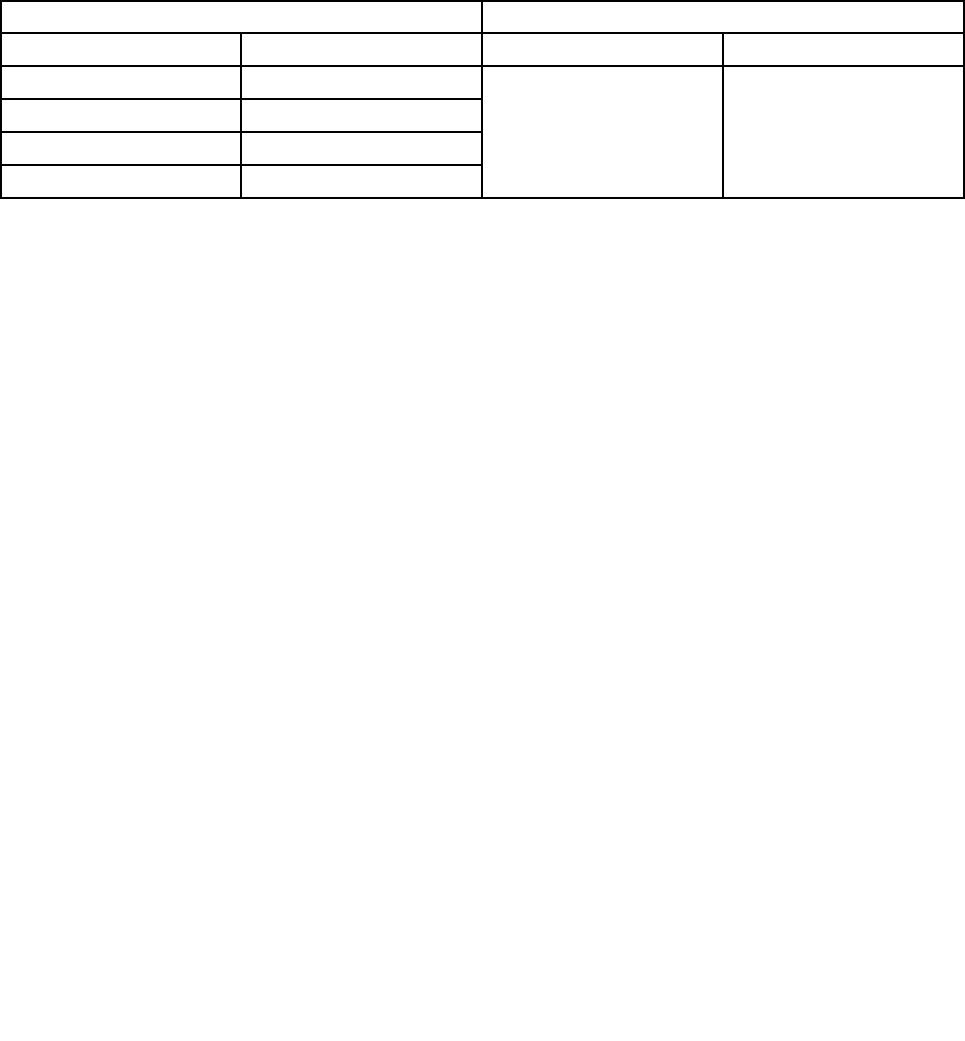
ProductsmarketedbeforeJune2006ProductsmarketedafterJune2006
CurrentororiginalpartReplacementFRUCurrentororiginalpartReplacementFRU
Non-RoHSCanbeNon-RoHS
Non-RoHSCanbeRoHS
Non-RoHSCansubtoRoHS
RoHSMustbeRoHS
MustbeRoHSMustbeRoHS
Note:AdirectsubstitutionisapartwithadifferentFRUpartnumberthatisautomaticallyshippedbythe
distributioncenteratthetimeoforder.
2ThinkCentreHardwareMaintenanceManual

Chapter2.Safetyinformation
Thischaptercontainsthesafetyinformationthatyouneedtobefamiliarwithbeforeservicingacomputer.
Generalsafety
Followtheserulestoensuregeneralsafety:
•Observegoodhousekeepingintheareaofthemachinesduringandaftermaintenance.
•Whenliftinganyheavyobject:
1.Ensureyoucanstandsafelywithoutslipping.
2.Distributetheweightoftheobjectequallybetweenyourfeet.
3.Useaslowliftingforce.Nevermovesuddenlyortwistwhenyouattempttolift.
4.Liftbystandingorbypushingupwithyourlegmuscles;thisactionremovesthestrainfromthe
musclesinyourback.Donotattempttoliftanyobjectsthatweighmorethan16kg(35lb)orobjects
thatyouthinkaretooheavyforyou.
•Donotperformanyactionthatcauseshazardstothecustomer,orthatmakestheequipmentunsafe.
•Beforeyoustartthemachine,ensurethatotherservicerepresentativesandthecustomer'spersonnelare
notinahazardousposition.
•Placeremovedcoversandotherpartsinasafeplace,awayfromallpersonnel,whileyouareservicing
themachine.
•Keepyourtoolcaseawayfromwalkareassothatotherpeoplewillnottripoverit.
•Donotwearlooseclothingthatcanbetrappedinthemovingpartsofamachine.Ensurethatyoursleeves
arefastenedorrolledupaboveyourelbows.Ifyourhairislong,fastenit.
•Inserttheendsofyournecktieorscarfinsideclothingorfastenitwithanonconductiveclip,approximately
8centimeters(3inches)fromtheend.
•Donotwearjewelry,chains,metal-frameeyeglasses,ormetalfastenersforyourclothing.
Remember:Metalobjectsaregoodelectricalconductors.
•Wearsafetyglasseswhenyouare:hammering,drillingsoldering,cuttingwire,attachingsprings,using
solvents,orworkinginanyotherconditionsthatmightbehazardoustoyoureyes.
•Afterservice,reinstallallsafetyshields,guards,labels,andgroundwires.Replaceanysafetydevice
thatiswornordefective.
•Reinstallallcoverscorrectlybeforereturningthemachinetothecustomer.
Electricalsafety
CAUTION:
Electricalcurrentfrompower,telephone,andcommunicationcablescanbehazardous.Toavoid
personalinjuryorequipmentdamage,disconnecttheattachedpowercords,telecommunication
systems,networks,andmodemsbeforeyouopentheserver/workstationcovers,unlessinstructed
otherwiseintheinstallationandcongurationprocedures.
Observethefollowingruleswhenworkingonelectricalequipment.
©CopyrightLenovo2008,20123

Important:Useonlyapprovedtoolsandtestequipment.Somehandtoolshavehandlescoveredwithasoft
materialthatdoesnotinsulateyouwhenworkingwithliveelectricalcurrents.Manycustomershave,near
theirequipment,rubberoormatsthatcontainsmallconductiveberstodecreaseelectrostaticdischarges.
Donotusethistypeofmattoprotectyourselffromelectricalshock.
•Findtheroomemergencypower-off(EPO)switch,disconnectingswitch,orelectricaloutlet.Ifanelectrical
accidentoccurs,youcanthenoperatetheswitchorunplugthepowercordquickly.
•Donotworkaloneunderhazardousconditionsornearequipmentthathashazardousvoltages.
•Disconnectallpowerbefore:
–Performingamechanicalinspection
–Workingnearpowersupplies
–RemovingorinstallingFieldReplaceableUnits
•Beforeyoustarttoworkonthemachine,unplugthepowercord.Ifyoucannotunplugit,askthecustomer
topower-offthewallboxthatsuppliespowertothemachineandtolockthewallboxintheoffposition.
•Ifyouneedtoworkonamachinethathasexposedelectricalcircuits,observethefollowingprecautions:
–Ensurethatanotherperson,familiarwiththepower-offcontrols,isnearyou.
Remember:Anotherpersonmustbetheretoswitchoffthepower,ifnecessary.
–Useonlyonehandwhenworkingwithpowered-onelectricalequipment;keeptheotherhandinyour
pocketorbehindyourback.
Remember:Theremustbeacompletecircuittocauseelectricalshock.Byobservingtheaboverule,
youmaypreventacurrentfrompassingthroughyourbody.
–Whenusingtesters,setthecontrolscorrectlyandusetheapprovedprobeleadsandaccessoriesfor
thattester.
–Standonsuitablerubbermats(obtainedlocally,ifnecessary)toinsulateyoufromgroundssuchas
metaloorstripsandmachineframes.
Observethespecialsafetyprecautionswhenyouworkwithveryhighvoltages;theseinstructionsarein
thesafetysectionsofmaintenanceinformation.Useextremecarewhenmeasuringhighvoltages.
•Regularlyinspectandmaintainyourelectricalhandtoolsforsafeoperationalcondition.
•Donotusewornorbrokentoolsandtesters.
•Neverassumethatpowerhasbeendisconnectedfromacircuit.First,checkthatithasbeenpowered-off.
•Alwayslookcarefullyforpossiblehazardsinyourworkarea.Examplesofthesehazardsaremoistoors,
nongroundedpowerextensioncables,powersurges,andmissingsafetygrounds.
•Donottouchliveelectricalcircuitswiththereectivesurfaceofaplasticdentalmirror.Thesurfaceis
conductive;suchtouchingcancausepersonalinjuryandmachinedamage.
•Donotservicethefollowingpartswiththepoweronwhentheyareremovedfromtheirnormaloperating
placesinamachine:
–Powersupplyunits
–Pumps
–Blowersandfans
–Motorgenerators
andsimilarunits.(Thispracticeensurescorrectgroundingoftheunits.)
•Ifanelectricalaccidentoccurs:
–Usecaution;donotbecomeavictimyourself.
–Switchoffpower.
–Sendanotherpersontogetmedicalaid.
4ThinkCentreHardwareMaintenanceManual

Voltage-selectionswitch
Somecomputersareequippedwithavoltage-selectionswitchlocatednearthepower-cordconnection
pointonthecomputer.Ifyourcomputerhasavoltage-selectionswitch,ensurethatyousettheswitchto
matchthevoltageavailableatyourelectricaloutlet.Settingthevoltage-selectionswitchincorrectlycan
causepermanentdamagetothecomputer.
Ifyourcomputerdoesnothaveavoltage-selectionswitch,yourcomputerisdesignedtooperateonlyatthe
voltageprovidedinthecountryorregionwherethecomputerwasoriginallypurchased.
Ifyourelocateyourcomputertoanothercountry,beawareofthefollowing:
•Ifyourcomputerdoesnothaveavoltage-selectionswitch,donotconnectthecomputertoanelectrical
outletuntilyouhaveveriedthatthevoltageprovidedisthesameasitwasinthecountryorregion
wherethecomputerwasoriginallypurchased.
•Ifyourcomputerhasavoltage-selectionswitch,donotconnectthecomputertoanelectricaloutletuntil
youhaveveriedthatthevoltage-selectionswitchissettomatchthevoltageprovidedinthatcountry
orregion.
Ifyouarenotsureofthevoltageprovidedatyourelectricaloutlet,contactyourlocalelectriccompanyor
refertoofcialWebsitesorotherliteraturefortravelerstothecountryorregionwhereyouarelocated.
Safetyinspectionguide
Theintentofthisinspectionguideistoassistyouinidentifyingpotentiallyunsafeconditionsonthese
products.Eachmachine,asitwasdesignedandbuilt,hadrequiredsafetyitemsinstalledtoprotectusers
andservicepersonnelfrominjury.Thisguideaddressesonlythoseitems.However,goodjudgmentshould
beusedtoidentifypotentialsafetyhazardsduetoattachmentoffeaturesoroptionsnotcoveredbythis
inspectionguide.
Ifanyunsafeconditionsarepresent,youmustdeterminehowserioustheapparenthazardcouldbeand
whetheryoucancontinuewithoutrstcorrectingtheproblem.
Considertheseconditionsandthesafetyhazardstheypresent:
•Electricalhazards,especiallyprimarypower(primaryvoltageontheframecancauseseriousorfatal
electricalshock).
•Explosivehazards,suchasadamagedCRTfaceorbulgingcapacitor
•Mechanicalhazards,suchaslooseormissinghardware
Theguideconsistsofaseriesofstepspresentedinachecklist.Beginthecheckswiththepoweroff,and
thepowercorddisconnected.
Checklist:
1.Checkexteriorcoversfordamage(loose,broken,orsharpedges).
2.Power-offthecomputer.Disconnectthepowercord.
3.Checkthepowercordfor:
a.Athird-wiregroundconnectoringoodcondition.Useametertomeasurethird-wireground
continuityfor0.1ohmorlessbetweentheexternalgroundpinandframeground.
b.Thepowercordshouldbetheappropriatetypeasspeciedinthepartslistings.
c.Insulationmustnotbefrayedorworn.
4.Removethecover.
Chapter2.Safetyinformation5

5.Checkforanyobviousalterations.Usegoodjudgmentastothesafetyofanyalterations.
6.Checkinsidetheunitforanyobviousunsafeconditions,suchasmetallings,contamination,wateror
otherliquids,orsignsofreorsmokedamage.
7.Checkforworn,frayed,orpinchedcables.
8.Checkthatthepower-supplycoverfasteners(screwsorrivets)havenotbeenremovedortamperedwith.
Handlingelectrostaticdischarge-sensitivedevices
Anycomputerpartcontainingtransistorsorintegratedcircuits(ICs)shouldbeconsideredsensitiveto
electrostaticdischarge(ESD).ESDdamagecanoccurwhenthereisadifferenceinchargebetweenobjects.
ProtectagainstESDdamagebyequalizingthechargesothatthemachine,thepart,theworkmat,andthe
personhandlingthepartareallatthesamecharge.
Notes:
1.Useproduct-specicESDprocedureswhentheyexceedtherequirementsnotedhere.
2.MakesurethattheESDprotectivedevicesyouusehavebeencertied(ISO9000)asfullyeffective.
WhenhandlingESD-sensitiveparts:
•Keepthepartsinprotectivepackagesuntiltheyareinsertedintotheproduct.
•Avoidcontactwithotherpeoplewhilehandlingthepart.
•Wearagroundedwriststrapagainstyourskintoeliminatestaticonyourbody.
•Preventthepartfromtouchingyourclothing.Mostclothingisinsulativeandretainsachargeevenwhen
youarewearingawriststrap.
•Usetheblacksideofagroundedworkmattoprovideastatic-freeworksurface.Thematisespecially
usefulwhenhandlingESD-sensitivedevices.
•Selectagroundingsystem,suchasthoselistedbelow,toprovideprotectionthatmeetsthespecic
servicerequirement.
Note:TheuseofagroundingsystemisdesirablebutnotrequiredtoprotectagainstESDdamage.
–AttachtheESDgroundcliptoanyframeground,groundbraid,orgreen-wireground.
–UseanESDcommongroundorreferencepointwhenworkingonadouble-insulatedor
battery-operatedsystem.Youcanusecoaxorconnector-outsideshellsonthesesystems.
–Usetheroundground-prongoftheacplugonac-operatedcomputers.
Groundingrequirements
Electricalgroundingofthecomputerisrequiredforoperatorsafetyandcorrectsystemfunction.Proper
groundingoftheelectricaloutletcanbeveriedbyacertiedelectrician.
Safetynotices(multi-lingualtranslations)
Thecautionanddangersafetynoticesinthissectionareprovidedinthefollowinglanguages:
•English
•Arabic
•Brazilian/Portuguese
•Chinese(simplied)
•Chinese(traditional)
6ThinkCentreHardwareMaintenanceManual
•French
•German
•Hebrew
•Italian
•Korean
•Spanish
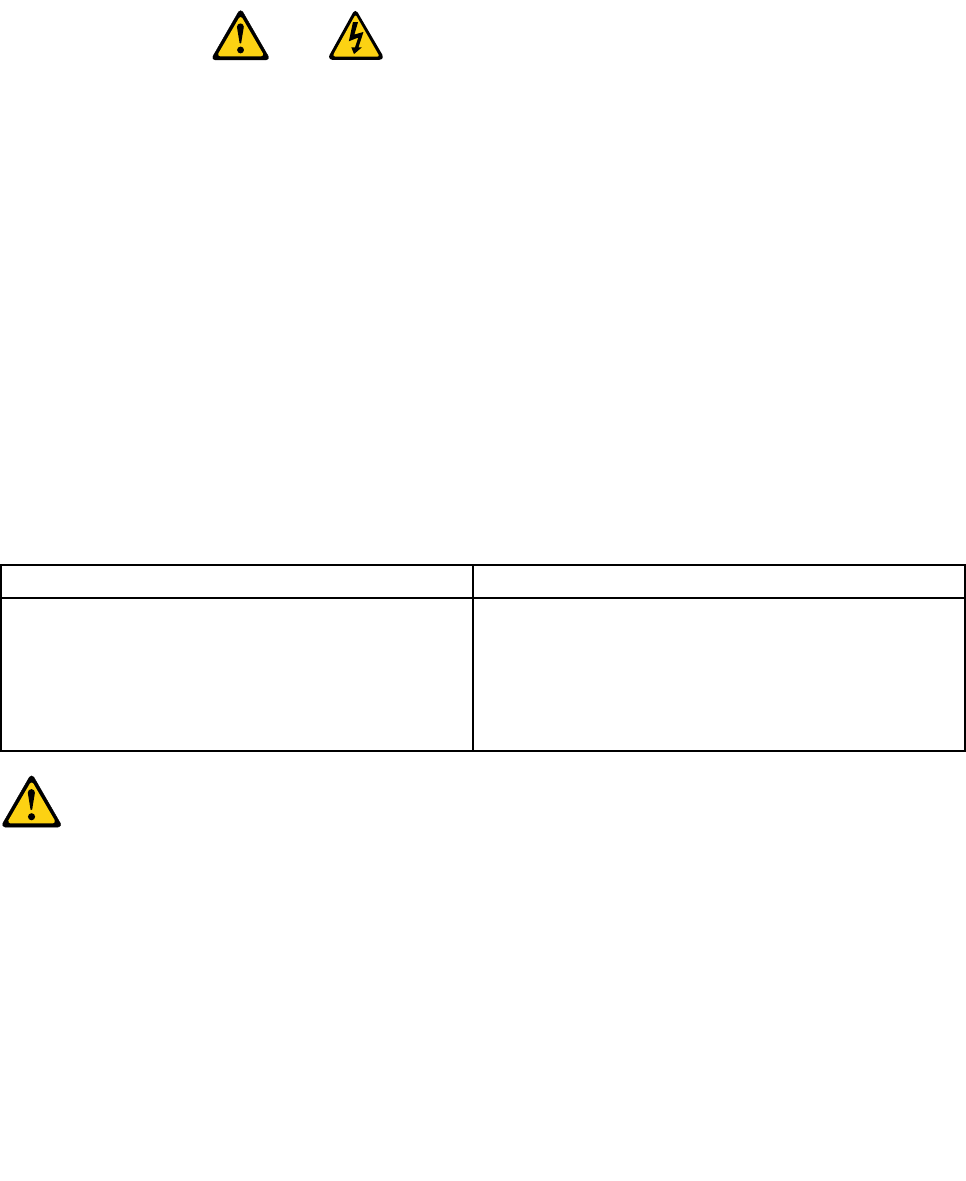
DANGER
Electricalcurrentfrompower,telephoneandcommunicationcablesishazardous.
Toavoidashockhazard:
•Donotconnectordisconnectanycablesorperforminstallation,maintenance,orreconguration
ofthisproductduringanelectricalstorm.
•Connectallpowercordstoaproperlywiredandgroundedelectricaloutlet.
•Connecttoproperlywiredoutletsanyequipmentthatwillbeattachedtothisproduct.
•Whenpossible,useonehandonlytoconnectordisconnectsignalcables.
•Neverturnonanyequipmentwhenthereisevidenceofre,water,orstructuraldamage.
•Disconnecttheattachedpowercords,telecommunicationssystems,networks,andmodems
beforeyouopenthedevicecovers,unlessinstructedotherwiseintheinstallationandconguration
procedures.
•Connectanddisconnectcablesasdescribedinthefollowingtableswheninstalling,moving,or
openingcoversonthisproductorattacheddevices.
ToConnectToDisconnect
1.TurneverythingOFF.
2.First,attachallcablestodevices.
3.Attachsignalcablestoconnectors.
4.Attachpowercordstooutlet.
5.TurndeviceON.
1.TurneverythingOFF.
2.First,removepowercordsfromoutlet.
3.Removesignalcablesfromconnectors.
4.Removeallcablesfromdevices.
CAUTION:
Whenreplacingthelithiumbattery,useonlyPartNumber45C1566oranequivalenttypebattery
recommendedbythemanufacturer.Ifyoursystemhasamodulecontainingalithiumbattery,replace
itonlywiththesamemoduletypemadebythesamemanufacturer.Thebatterycontainslithiumand
canexplodeifnotproperlyused,handled,ordisposedof.Donot:
•Throworimmerseintowater
•Heattomorethan100°C(212°F)
•Repairordisassemble
Disposeofthebatteryasrequiredbylocalordinancesorregulations.
Chapter2.Safetyinformation7
CAUTION:
Whenlaserproducts(suchasCD-ROMs,DVD-ROMdrives,beropticdevices,ortransmitters)are
installed,notethefollowing:
•Donotremovethecovers.Removingthecoversofthelaserproductcouldresultinexposureto
hazardouslaserradiation.Therearenoserviceablepartsinsidethedevice.
•Useofcontrolsoradjustmentsorperformanceofproceduresotherthanthosespeciedherein
mightresultinhazardousradiationexposure.
DANGER
SomelaserproductscontainanembeddedClass3AorClass3Blaserdiode.Notethefollowing:
Laserradiationwhenopen.Donotstareintothebeam,donotviewdirectlywithoptical
instruments,andavoiddirectexposuretothebeam.
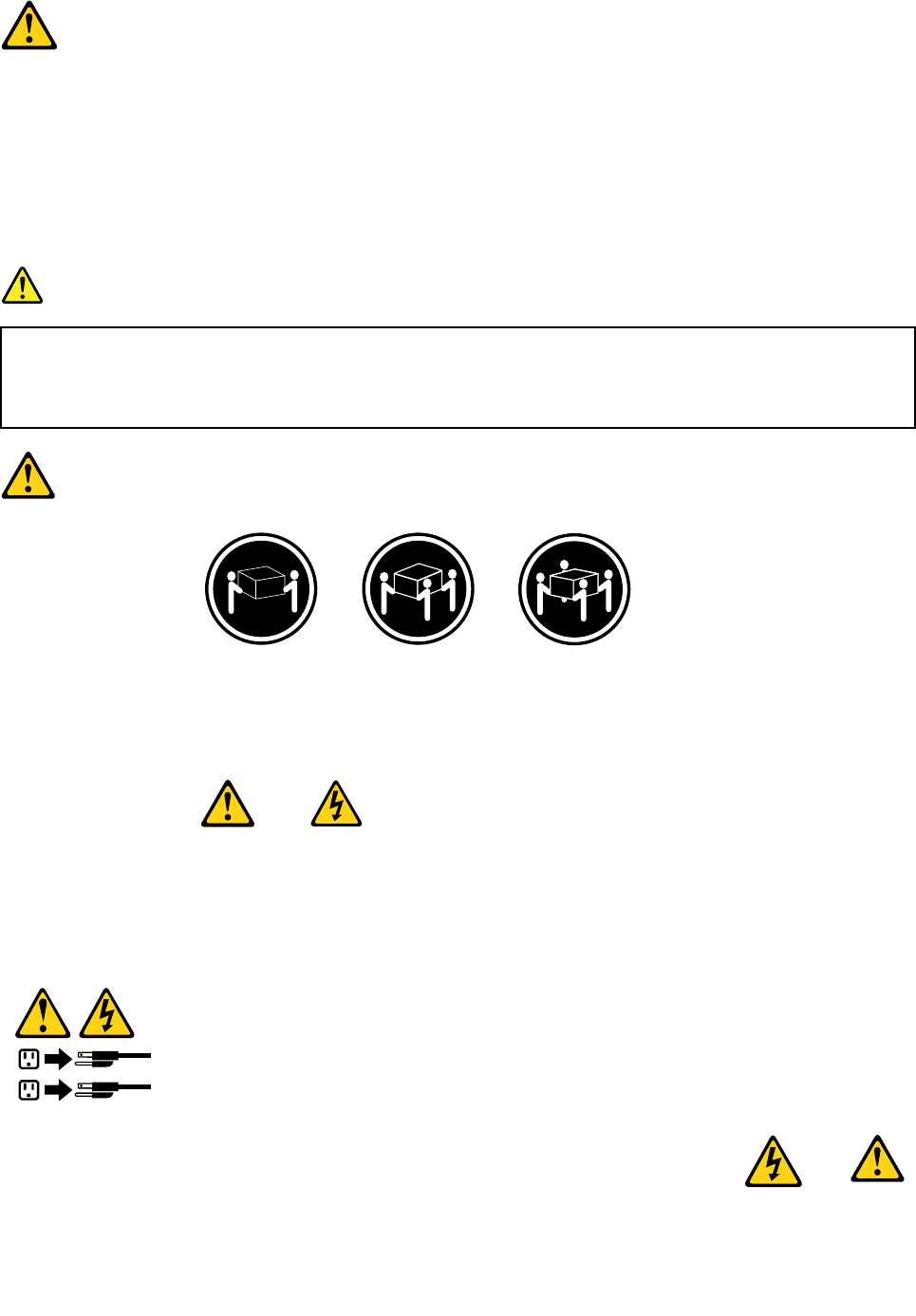
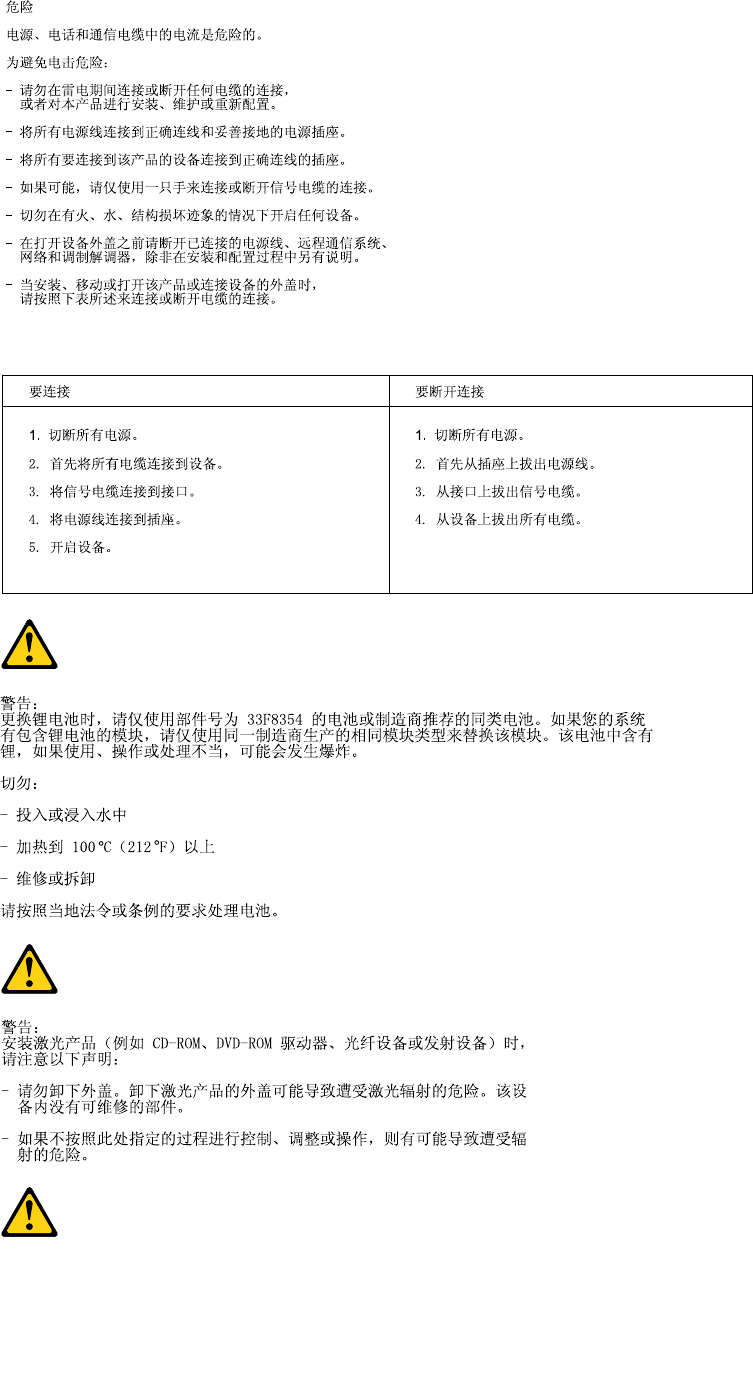
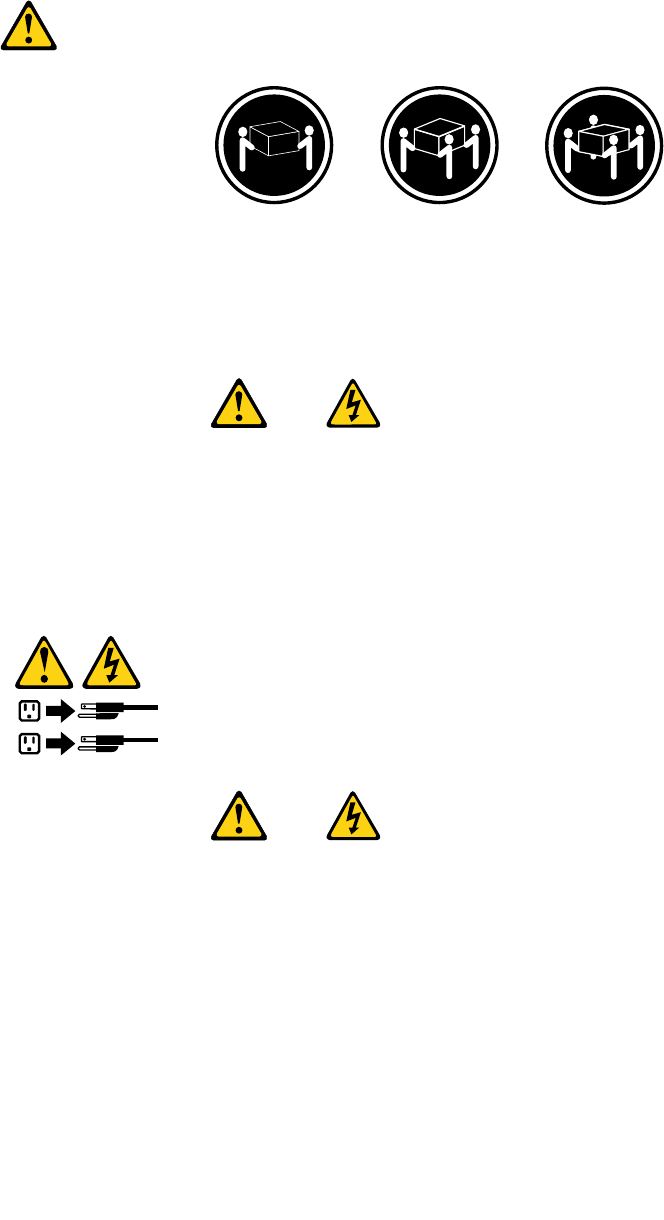
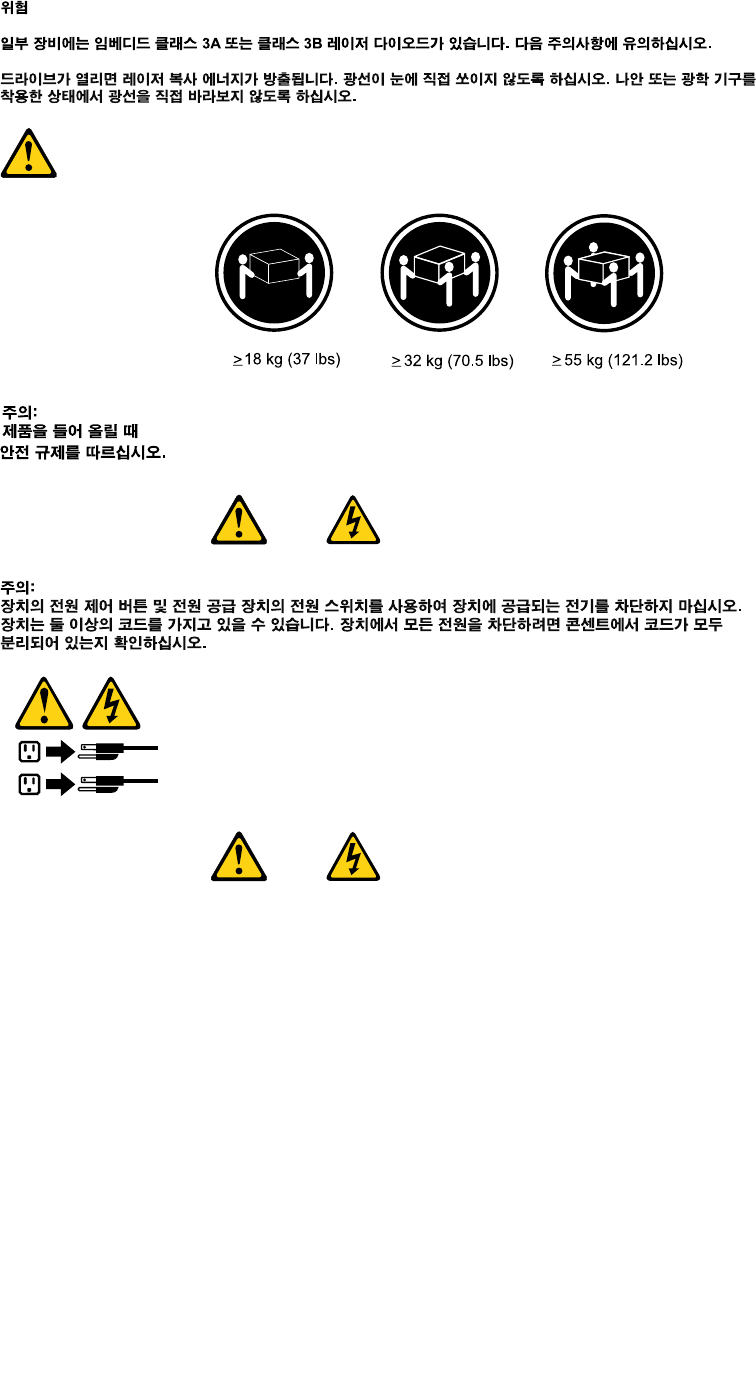
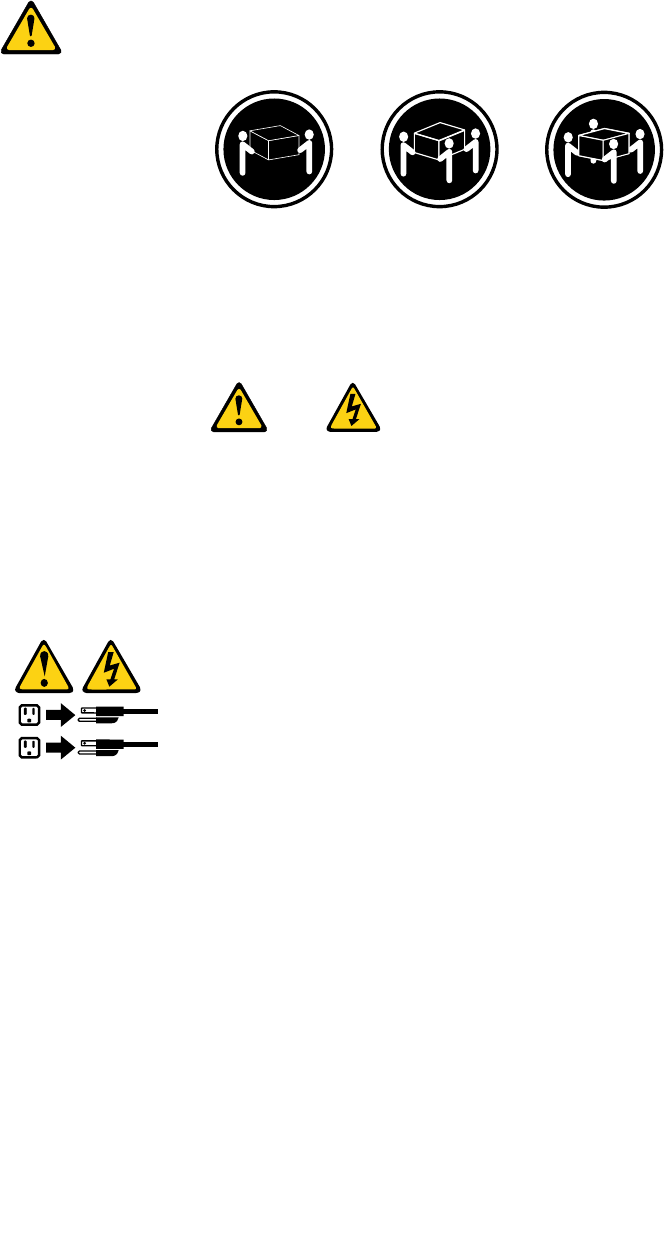
≥18kg(37lbs)≥32kg(70.5lbs)≥55kg(121.2lbs)
CAUTION:
Usesafepracticeswhenlifting.
CAUTION:
Thepowercontrolbuttononthedeviceandthepowerswitchonthepowersupplydonotturnoff
theelectricalcurrentsuppliedtothedevice.Thedevicealsomighthavemorethanonepower
cord.Toremoveallelectricalcurrentfromthedevice,ensurethatallpowercordsaredisconnected
fromthepowersource.
1
2
8ThinkCentreHardwareMaintenanceManual
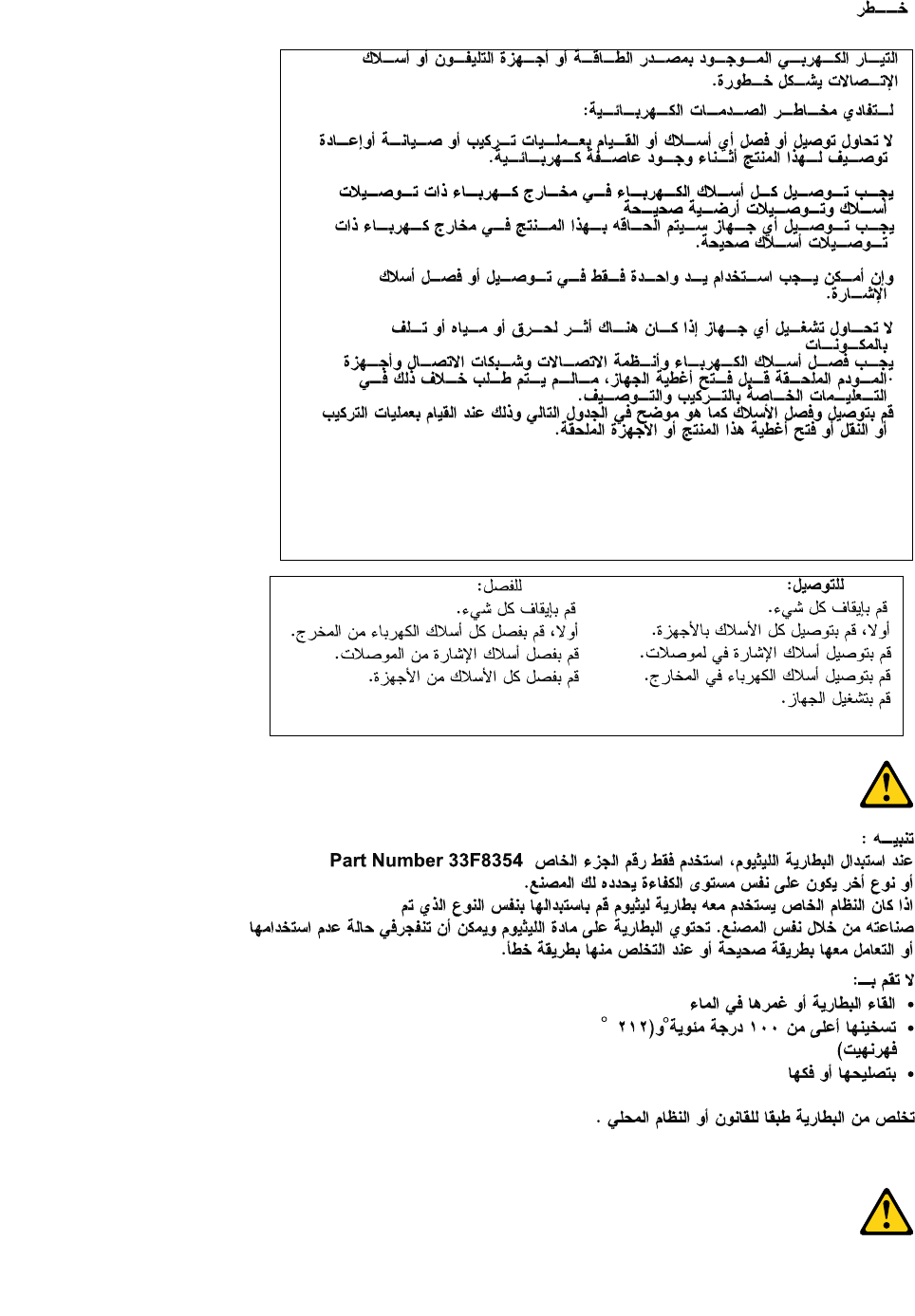
Chapter2.Safetyinformation9
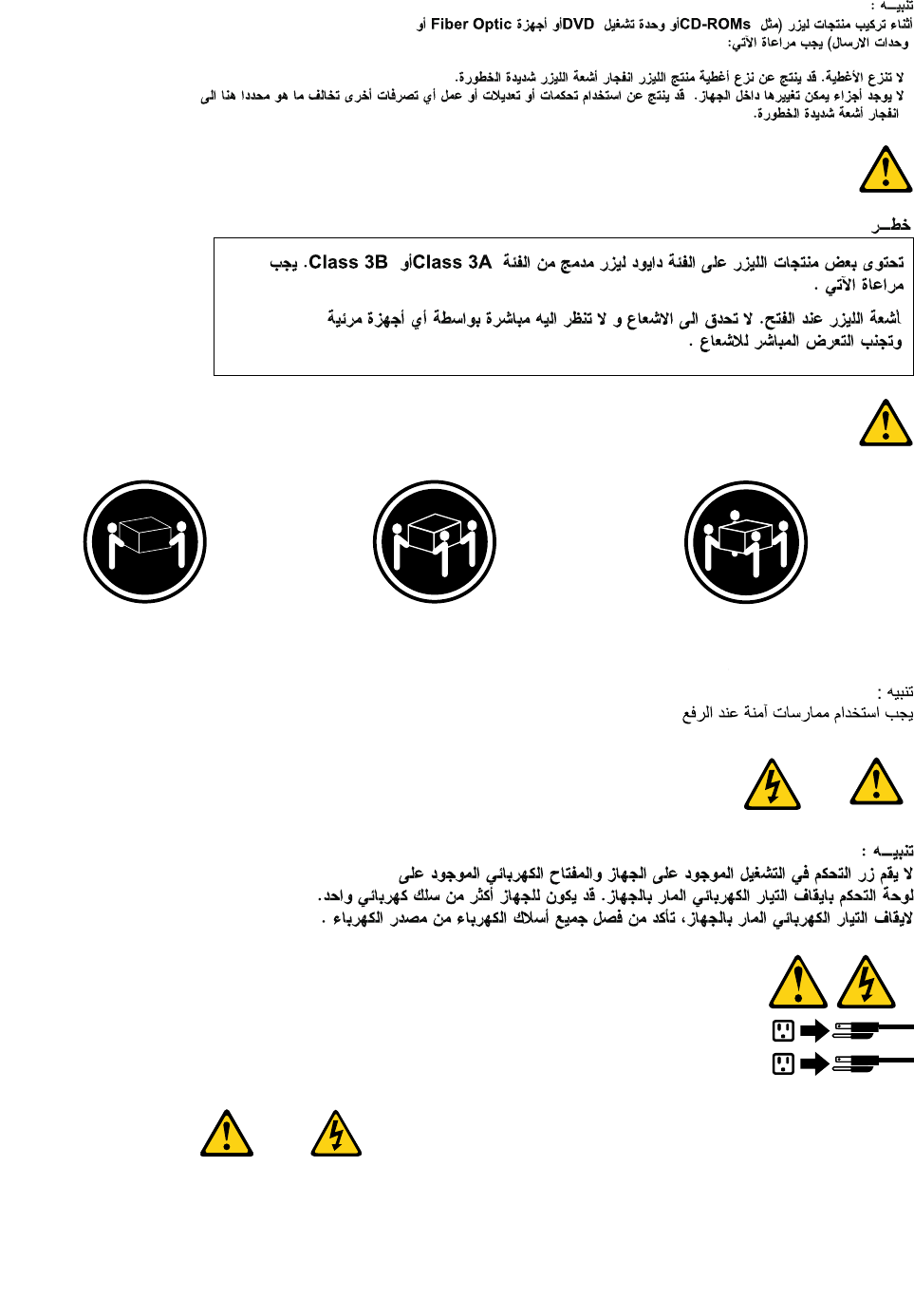
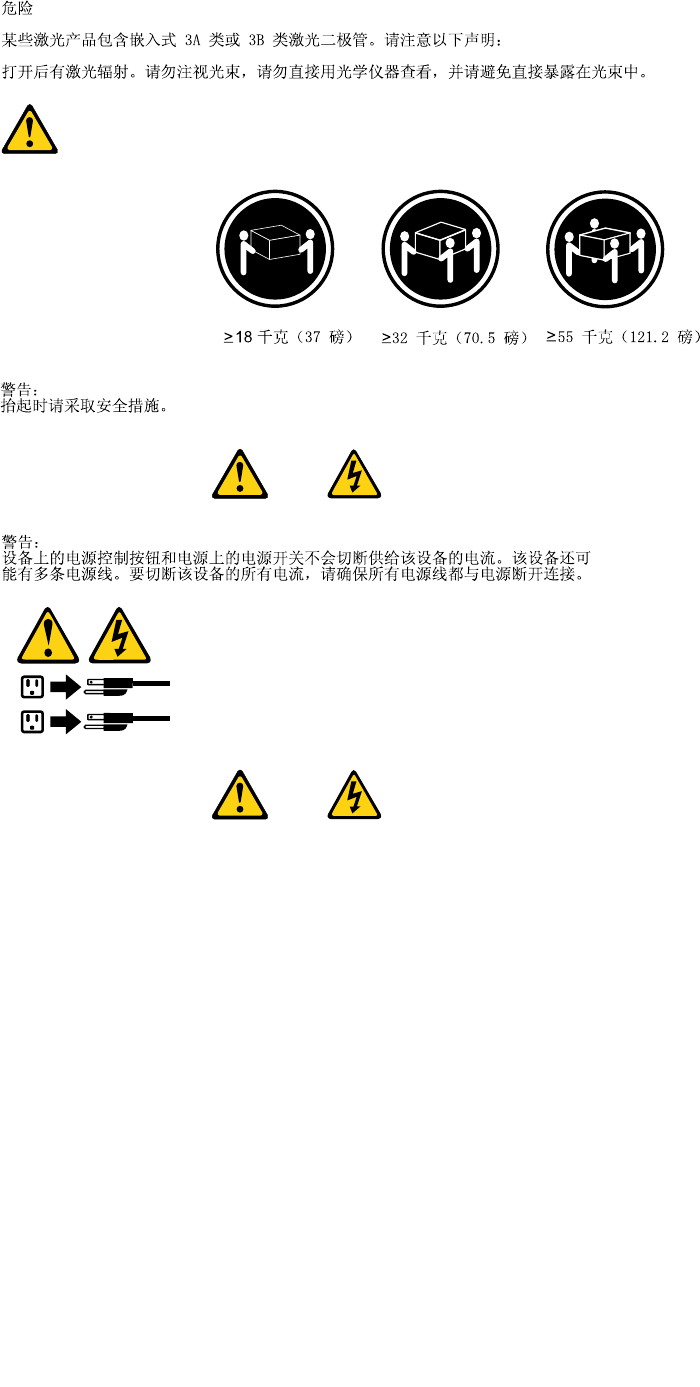
≥18kg(37lbs)≥32kg(70.5lbs)≥55kg(121.2lbs)
1
2
PERIGO
10ThinkCentreHardwareMaintenanceManual
Acorrenteelétricaprovenientedecabosdealimentação,detelefoneedecomunicaçõeséperigosa.
Paraevitarriscodechoqueelétrico:
•Nãoconectenemdesconectenenhumcaboouexecuteinstalação,manutençãooureconguração
desteprodutoduranteumatempestadecomraios.
•Conectetodososcabosdealimentaçãoatomadaselétricascorretamenteinstaladaseaterradas.
•Todoequipamentoqueforconectadoaesteprodutodeveserconectadoatomadascorretamente
instaladas.
•Quandopossível,utilizeapenasumadasmãosparaconectaroudesconectarcabosdesinal.
•Nuncaliguenenhumequipamentoquandohouverevidênciadefogo,águaoudanosestruturais.
•Antesdeabrirtampasdedispositivos,desconectecabosdealimentação,sistemasdetelecomunicação,
redesemodemsconectados,amenosqueespecicadodemaneiradiferentenosprocedimentosde
instalaçãoeconguração.
•Conecteedesconecteoscabosconformedescritonatabelaapresentadaaseguiraoinstalar,moverou
abrirtampasdesteprodutooudedispositivosconectados.
ParaConectar:ParaDesconectar:
1.DESLIGUETudo.
2.Primeiramente,conectetodososcabosaos
dispositivos.
3.Conecteoscabosdesinalaosconectores.
4.Conecteoscabosdealimentaçãoàstomadas.
5.LIGUEosdispositivos.
1.DESLIGUETudo.
2.Primeiramente,removaoscabosdealimentaçãodas
tomadas.
3.Removaoscabosdesinaldosconectores.
4.Removatodososcabosdosdispositivos.
CUIDADO:
Aosubstituirabateriadelítio,utilizeapenasumabateriacomNúmerodePeça45C1566ouumtipo
debateriaequivalenterecomendadopeloSeoseusistemapossuiummódulocomumabateriade
lítio,substitua-oapenasporummódulodomesmotipoedomesmofabricante.Abateriacontémlítio
epodeexplodirsenãoforutilizada,manuseadaoudescartadademaneiracorreta.
Não:
•Jogueoucoloquenaágua
•Aqueçaamaisde100°C(212°F)
•Consertenemdesmonte
Descarteabateriaconformerequeridopelasleisouregulamentoslocais.
PRECAUCIÓN:
Quandoprodutosalaser(comounidadesdeCD-ROMs,unidadesdeDVD-ROM,dispositivosdebraótica
outransmissores)estivereminstalados,observeoseguinte:
Chapter2.Safetyinformation11
•Nãoremovaastampas.Aremoçãodastampasdeumprodutoalaserpoderesultaremexposição
prejudicialàradiaçãodelaser.Nãoexistempeçasquepodemserconsertadasnointeriordodispositivo.
•Autilizaçãodecontrolesouajustesouaexecuçãodeprocedimentosdiferentesdosespecicadosaqui
poderesultaremexposiçãoprejudicialàradiação.
PERIGO
AlgunsprodutosalasercontêmdiododelaserintegradodaClasse3AoudaClasse3B.Observeoseguinte:
Radiaçãoalaserquandoaberto.Nãoolhediretamenteparaofeixeaolhonuoucominstrumentosópticose
eviteexposiçãodiretaaofeixe.
≥18kg(37lbs)≥32kg(70.5lbs)≥55kg(121.2lbs)
CUIDADO:
Utilizeprocedimentosdesegurançaparalevantarequipamentos.
CUIDADO:
Obotãodecontroledealimentaçãododispositivoeobotãoparaligar/desligardafontedealimentação
nãodesligamacorrenteelétricafornecidaaodispositivo.Odispositivotambémpodetermaisdeumcabo
dealimentação.Pararemovertodaacorrenteelétricadodispositivo,assegurequetodososcabosde
alimentaçãoestejamdesconectadosdafontedealimentação.
1
2
12ThinkCentreHardwareMaintenanceManual
Chapter2.Safetyinformation13
1
2
14ThinkCentreHardwareMaintenanceManual

Chapter2.Safetyinformation15
1
2
DANGER
Lecourantélectriqueprovenantdel'alimentation,dutéléphoneetdescâblesdetransmissionpeutprésenter
undanger.
Pourévitertoutrisquedechocélectrique:
•Nemanipulezaucuncâbleetn'effectuezaucuneopérationd'installation,d'entretienoudereconguration
deceproduitaucoursd'unorage.
•Brancheztouslescordonsd'alimentationsurunsocledeprisedecourantcorrectementcâbléetmisàla
terre.
•Branchezsurdessoclesdeprisedecourantcorrectementcâbléstoutéquipementconnectéàceproduit.
•Lorsquecelaestpossible,n'utilisezqu'uneseulemainpourconnecteroudéconnecterlescâbles
d'interface.
•Nemettezjamaisunéquipementsoustensionencasd'incendieoud'inondation,ouenprésencede
dommagesmatériels.
•Avantderetirerlescartersdel'unité,mettezcelle-cihorstensionetdéconnectezsescordons
d'alimentation,ainsiquelescâblesquilarelientauxréseaux,auxsystèmesdetélécommunicationetaux
modems(saufinstructioncontrairementionnéedanslesprocéduresd'installationetdeconguration).
•Lorsquevousinstallez,quevousdéplacez,ouquevousmanipulezleprésentproduitoudespériphériques
quiluisontraccordés,reportez-vousauxinstructionsci-dessouspourconnecteretdéconnecterles
différentscordons.
16ThinkCentreHardwareMaintenanceManual
ConnexionDéconnexion
1.MettezlesunitésHORSTENSION.
2.Commencezparbranchertouslescordonssurles
unités.
3.Branchezlescâblesd'interfacesurdesconnecteurs.
4.Branchezlescordonsd'alimentationsurdesprises.
5.MettezlesunitésSOUSTENSION.
1.MettezlesunitésHORSTENSION.
2.Débranchezlescordonsd'alimentationdesprises.
3.Débranchezlescâblesd'interfacedesconnecteurs.
4.Débrancheztouslescâblesdesunités.
ATTENTION:
Remplacerlapileaulithiumusagéeparunepilederéférenceidentiqueexclusivement,(référence
45C1566),ousuivrelesinstructionsdufabricantquiendénitleséquivalences.Sivotresystèmeest
dotéd'unmodulecontenantunepileaulithium,vousdevezleremplaceruniquementparunmodule
identique,produitparlemêmefabricant.Lapilecontientdulithiumetpeutexploserencasde
mauvaiseutilisation,demauvaisemanipulationoudemiseaurebutinappropriée.
Nepas:
•lajeteràl'eau,
•l'exposeràdestempératuressupérieuresà100°C,
•chercheràlaréparerouàladémonter.
Nepasmettrelapileàlapoubelle.Pourlamiseaurebut,sereporteràlaréglementationenvigueur.
ATTENTION:
Sidesproduitsàlaser(telsquedesunitésdeCD-ROM,deDVD-ROM,desunitésàbresoptiques,ou
desémetteurs)sontinstallés,prenezconnaissancedesinformationssuivantes:
•Neretirezpaslecarter.Enouvrantl'unitédeCD-ROMoudeDVD-ROM,vousvousexposezau
rayonnementdangereuxdulaser.Aucunepiècedel'unitén'estréparable.
•Pourévitertoutrisqued'expositionaurayonlaser,respectezlesconsignesderéglageet
d'utilisationdescommandes,ainsiquelesprocéduresdécritesdansleprésentmanuel.
DANGER
Certainsproduitsàlasercontiennentunediodeàlaserintégréedeclasse3Aou3B.Prenez
connaissancedesinformationssuivantes:
Rayonnementlaserlorsquelecarterestouvert.Eviteztouteexpositiondirecteaurayonlaser.Evitez
deregarderxementlefaisceauoudel'observeràl'aided'instrumentsoptiques.
Chapter2.Safetyinformation17

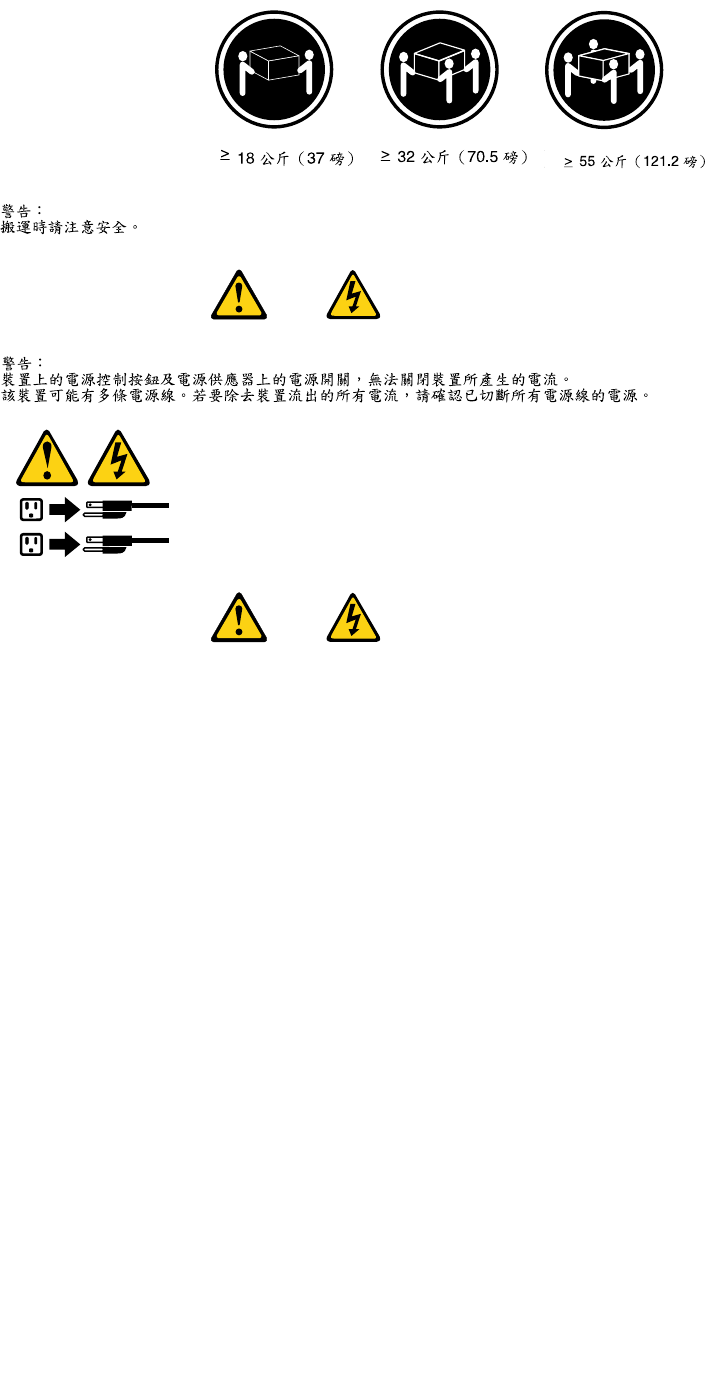
≥18kg(37lbs)≥32kg(70.5lbs)≥55kg(121.2lbs)
ATTENTION:
Soulevezlamachineavecprécaution.
ATTENTION:
L'interrupteurdecontrôled'alimentationdel'unitéetl'interrupteurdublocd'alimentationnecoupent
paslecourantélectriquealimentantl'unité.Enoutre,lesystèmepeutêtreéquipédeplusieurs
cordonsd'alimentation.Pourmettrel'unitéhorstension,vousdevezdéconnectertouslescordons
delasourced'alimentation.
1
2
VORSICHT
AnNetz-,Telefon-undDatenleitungenkönnengefährlicheSpannungenanliegen.
AusSicherheitsgründen:
•BeiGewitterandiesemGerätkeineKabelanschließenoderlösen.FernerkeineInstallations-,
Wartungs-oderRekongurationsarbeitendurchführen.
•GerätnuraneineSchutzkontaktsteckdosemitordnungsgemäßgeerdetemSchutzkontakt
anschließen.
•AlleangeschlossenenGeräteebenfallsanSchutzkontaktsteckdosenmitordnungsgemäß
geerdetemSchutzkontaktanschließen.
•DieSignalkabelnachMöglichkeiteinhändiganschließenoderlösen,umeinenStromschlagdurch
BerührenvonOberächenmitunterschiedlichemelektrischemPotenzialzuvermeiden.
•Geräteniemalseinschalten,wennHinweiseaufFeuer,WasseroderGebäudeschädenvorliegen.
18ThinkCentreHardwareMaintenanceManual
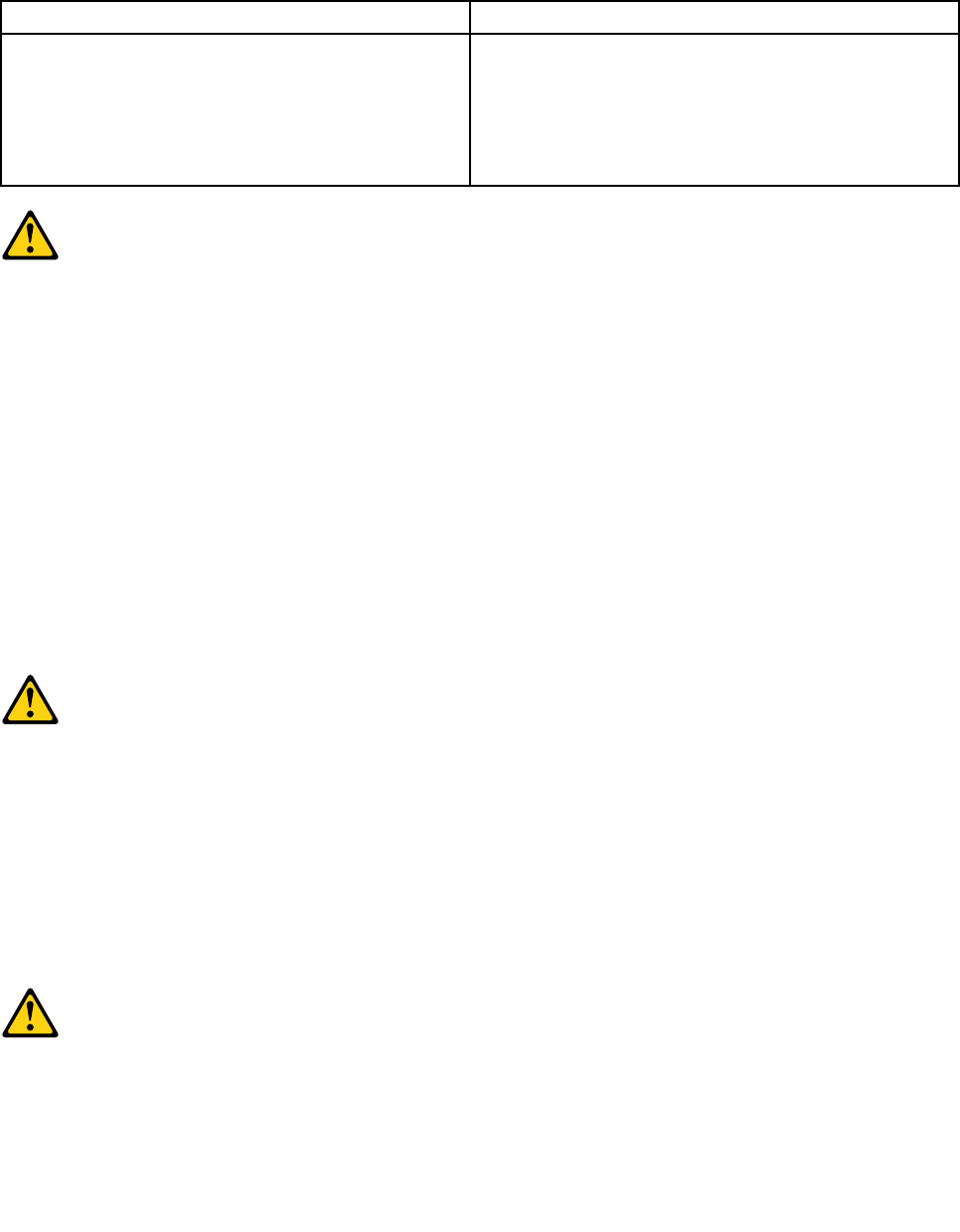
•DieVerbindungzudenangeschlossenenNetzkabeln,Telekommunikationssystemen,Netzwerken
undModemsistvordemÖffnendesGehäuseszuunterbrechen,sofernindenInstallations-und
KongurationsprozedurenkeineanderslautendenAnweisungenenthaltensind.
•ZumInstallieren,TransportierenundÖffnenderAbdeckungendesComputersoderder
angeschlossenenEinheitendieKabelgemäßderfolgendenTabelleanschließenundabziehen.
ZumAnschließenderKabelgehenSiewiefolgtvorZumAbziehenderKabelgehenSiewiefolgtvor
1.SchaltenSiealleEinheitenAUS.
2.SchließenSieerstalleKabelandieEinheitenan.
3.SchließenSiedieSignalkabelandieBuchsenan.
4.SchließenSiedieNetzkabelandieSteckdosean.
5.SchaltenSiedieEinheitEIN.
1.SchaltenSiealleEinheitenAUS.
2.ZiehenSiezuerstalleNetzkabelausden
Netzsteckdosen.
3.ZiehenSiedieSignalkabelausdenBuchsen.
4.ZiehenSiealleKabelvondenEinheitenab.
CAUTION:
EineverbrauchteLithiumbatterienurdurcheineBatteriemitderTeilenummer45C1566odereine
gleichwertige,vomHerstellerempfohleneBatterieersetzen.EnthältdasSystemeinModulmiteiner
Lithiumbatterie,diesesnurdurcheinModuldesselbenTypsundvondemselbenHerstellerersetzen.
DieBatterieenthältLithiumundkannbeiunsachgemäßerVerwendung,HandhabungoderEntsorgung
explodieren.
DieBatterienicht:
•mitWasserinBerührungbringen.
•über100Cerhitzen.
•reparierenoderzerlegen.
DieörtlichenBestimmungenfürdieEntsorgungvonSondermüllbeachten.
ACHTUNG:
BeiderInstallationvonLasergeräten(wieCD-ROM-Laufwerken,DVD-aufwerken,Einheitenmit
LichtwellenleitertechnikoderSendern)Folgendesbeachten:
•DieAbdeckungennichtentfernen.DurchEntfernenderAbdeckungendesLasergerätskönnen
gefährlicheLaserstrahlungenfreigesetztwerden.DasGerätenthältkeinezuwartendenTeile.
•WerdenSteuerelemente,EinstellungenoderDurchführungenvonProzedurenandersalshier
angegebenverwendet,kanngefährlicheLaserstrahlungauftreten.
VORSICHT
EinigeLasergeräteenthalteneineLaserdiodederKlasse3Aoder3B.BeachtenSieFolgendes:
Chapter2.Safetyinformation19
LaserstrahlungbeigeöffneterVerkleidung.NichtindenStrahlblicken.KeineLupenoderSpiegel
verwenden.Strahlungsbereichmeiden.
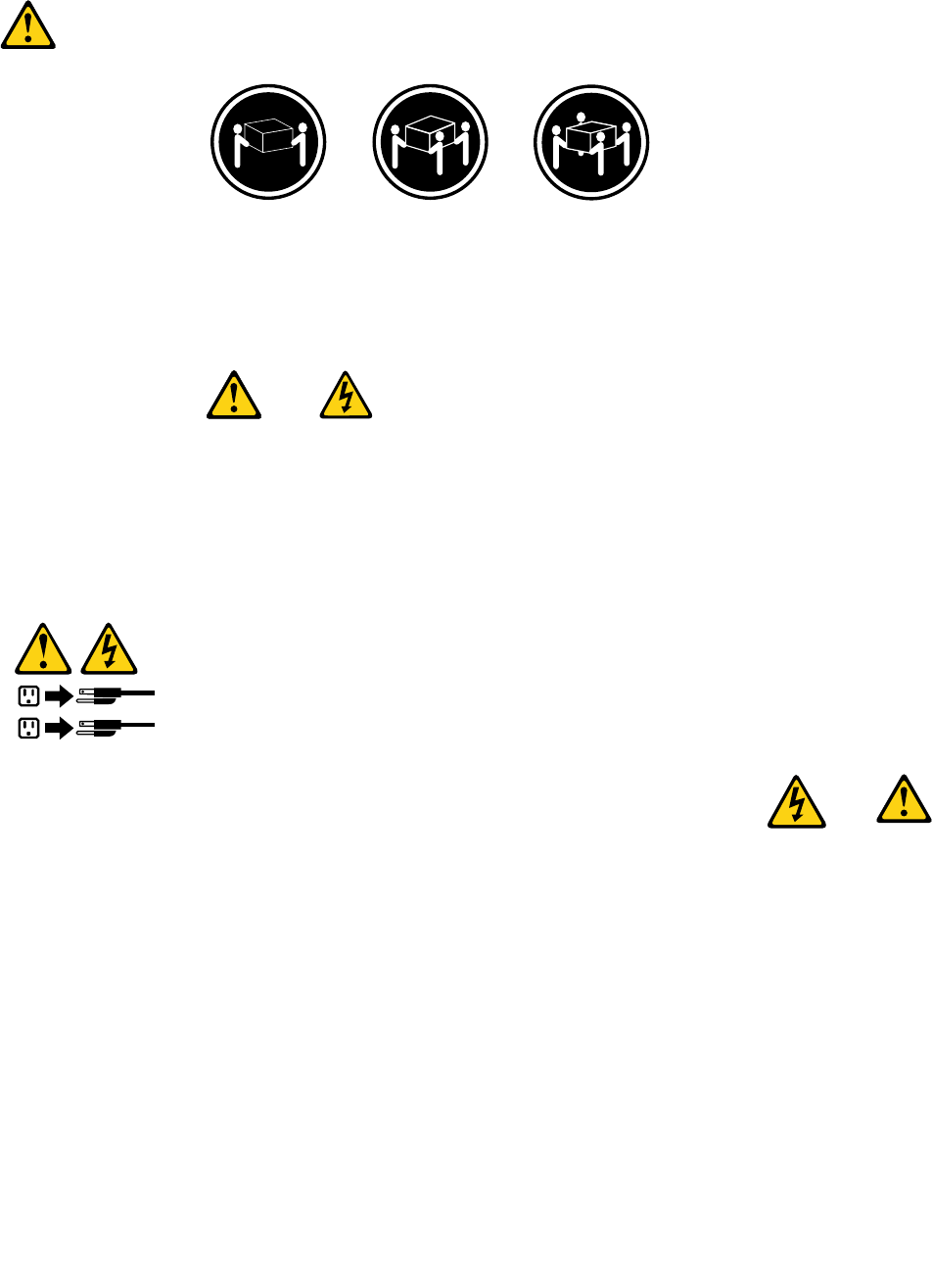
≥18kg(37lbs)≥32kg(70.5lbs)≥55kg(121.2lbs)
ACHTUNG:
ArbeitsschutzrichtlinienbeimAnhebenderMaschinebeachten.
ACHTUNG:
MitdemNetzschalteranderEinheitundamNetzteilwirddieStromversorgungfürdieEinheit
nichtunterbrochen.DieEinheitkannauchmitmehrerenNetzkabelnausgestattetsein.Umdie
StromversorgungfürdieEinheitvollständigzuunterbrechen,müssenallezumGerätführenden
NetzkabelvomNetzgetrenntwerden.
1
2
20ThinkCentreHardwareMaintenanceManual
Chapter2.Safetyinformation21

1
2
PERICOLO
Lacorrenteelettricaprovenientedaicavidialimentazione,deltelefonoedicomunicazionepuòessere
pericolosa.
Perevitareilrischiodiscosseelettriche:
•Noncollegareoscollegarequalsiasicavooppureeffettuarel'installazione,lamanutenzioneola
ricongurazionedelprodottoduranteuntemporale.
•Collegaretuttiilielettriciaunapresadialimentazionecorrettamentecablataedotatadimessaa
terra.
•Collegareallepreseelettricheappropriatetutteleapparecchiaturecheverrannoutilizzateper
questoprodotto.
22ThinkCentreHardwareMaintenanceManual
•Sepossibile,utilizzaresolounamanopercollegareoscollegareicavidisegnale.
•Nonaccendereassolutamenteapparecchiatureinpresenzadiincendi,perdited'acquaodanno
strutturale.
•Scollegareicavidialimentazione,isistemiditelecomunicazione,leretieilmodemprimadi
aprireicoperchideldispositivo,salvoistruzionicontrarierelativealleprocedurediinstallazionee
congurazione.
•Collegareescollegareicavicomedescrittonellaseguentetabellaquandovengonoeffettuate
operazionidiinstallazione,spostamentooaperturadeicoperchidiquestoprodottoodelleunità
collegate.
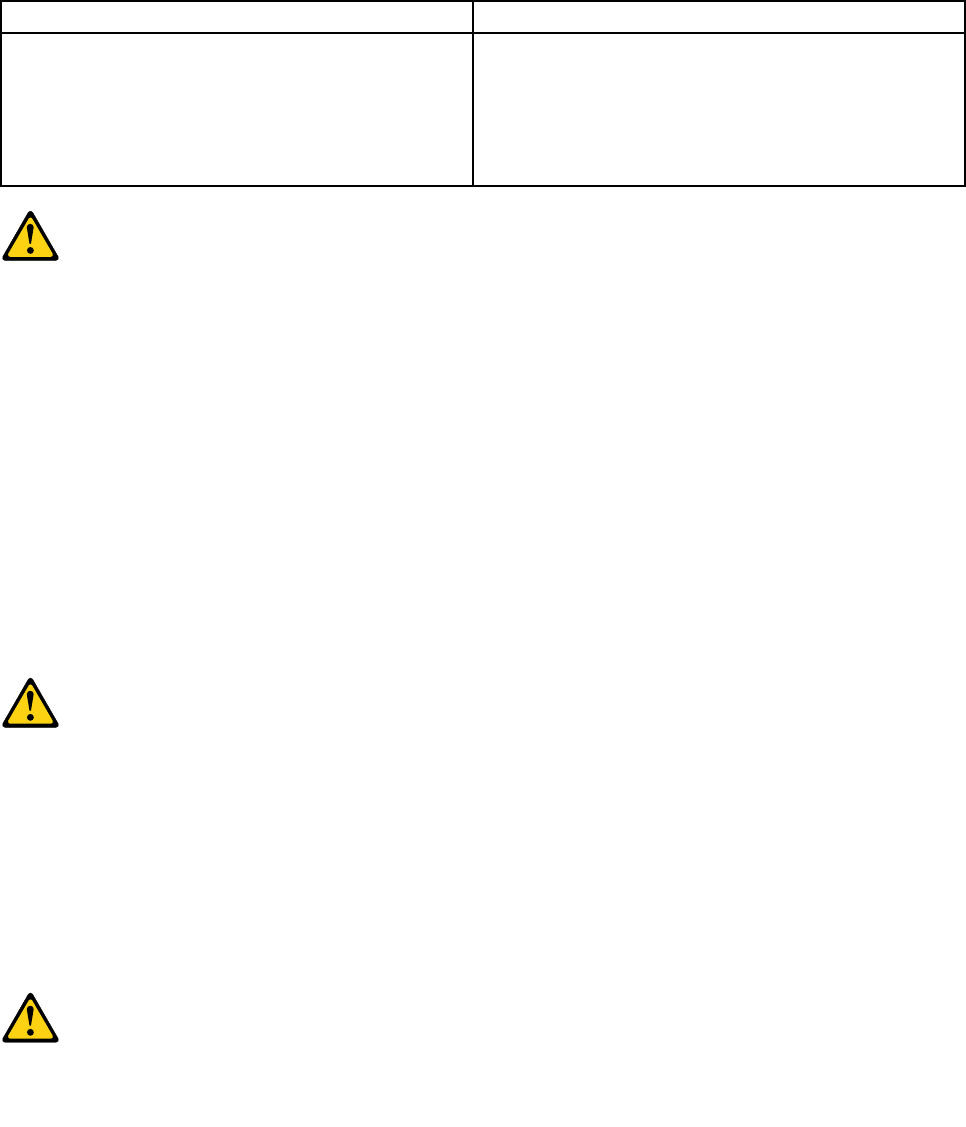
PercollegarsiPerscollegarsi
1.SPEGNEREleapparecchiature.
2.Innanzitutto,collegaretuttiicavialleunità.
3.Collegareicavidisegnaleaiconnettori.
4.Collegareicavidialimentazioneallapresa.
5.Accenderel'unità.
1.SPEGNEREleapparecchiature.
2.Innanzitutto,rimuovereicavidialimentazionedalla
presa.
3.Rimuovereicavidisegnaledaiconnettori.
4.Rimuoveretuttiicavidalleunità.
ATTENZIONE:
Quandosisostituiscelabatteriaallitio,utilizzaresoloilNumeroparte45C1566ountipodibatteria
equivalenteconsigliatodalproduttore.Sesulsistemaèpresenteunmodulochecontieneunabatteria
allitio,sostituirlosoloconuntipodimodulodellostessotipodellastessacasadiproduzione.La
batteriacontienelitioepuòesplodereseusata,maneggiataosmaltitainmodononcorretto.
Non:
•Gettareoimmergerelabatterianell'acqua
•Riscaldarlaadunatemperaturasuperioreai100gradiC(212gradiF)
•Smontarla,ricaricarlaotentarediripararla
Lebatterieusatevannosmaltiteinaccordoallanormativainvigore(DPR915/82esuccessive
disposizioniedisposizionilocali).
ATTENZIONE:
Quandovengonoinstallatiprodottilaser(qualiCD-ROM,unitàDVD-ROM,unitàabreotticheo
trasmittenti),tenerpresentequantosegue:
•Nonrimuovereglisportelli.L'aperturadiun'unitàlaserpuòdeterminarel'esposizionearadiazioni
laserpericolose.All'internodell'unitànonvisonopartisucuieffettuarel'assistenzatecnica.
•L'utilizzodicontrolli,regolazioniol'esecuzionediprocedurenondescrittinelpresentemanuale
possonoprovocarel'esposizionearadiazionipericolose.
Chapter2.Safetyinformation23
PERICOLO
AlcuneunitàlasercontengonoundiodolaserdiClasse3AoClasse3B.Tenerpresentequantosegue:
Aprendol'unitàvengonoemesseradiazionilaser.Nonssareilfascio,nonguardarlodirettamente
construmentiotticiedevitarel'esposizionealfascio.
≥18kg(37lbs)≥32kg(70.5lbs)≥55kg(121.2lbs)
ATTENZIONE:
Prestareattenzionenelsollevarel'apparecchiatura.
ATTENZIONE:
Ilpulsantedicontrollodell'alimentazionepresentesull'unitàel'interruttoredell'alimentatorenon
disattivanol'alimentazionecorrentefornitaall'unità.E'possibilechel'unitàdispongadipiùcavidi
alimentazione.Perdisattivarel'alimentazionedall'unità,accertarsichetuttiicavidialimentazione
sianoscollegatidallafontedialimentazione.
1
2
24ThinkCentreHardwareMaintenanceManual

Chapter2.Safetyinformation25
1
2
PELIGRO
Lacorrienteeléctricaprocedentedecablesdealimentación,teléfonosycablesdecomunicaciónpuede
serpeligrosa.
Paraevitarelriesgodedescargaeléctrica:
•Noconectenidesconecteloscablesnirealiceningunatareadeinstalación,mantenimientoo
reconguracióndeesteproductoduranteunatormentaeléctrica.
•Conectetodosloscablesdealimentaciónatomasdecorrientedebidamentecableadasy
conectadasatierra.
•Cualquierequipoqueseconecteaesteproductotambiéndebeconectarseatomasdecorriente
debidamentecableadas.
•Siemprequeseaposible,utiliceunasolamanoparaconectarodesconectarloscablesdeseñal.
•Noenciendanuncaunequipocuandohayseñalesdefuego,aguaodañosestructurales.
26ThinkCentreHardwareMaintenanceManual
•Desconecteloscablesdealimentación,lossistemasdetelecomunicaciones,lasredesylos
módemsconectadosantesdeabrirlascubiertasdelosdispositivos,amenosqueseindiquelo
contrarioenlosprocedimientosdeinstalaciónyconguración.
•Conecteydesconecteloscables,comosedescribeenlatablasiguiente,cuandoinstale,muevao
abralascubiertasdeesteproductoodelosdispositivosconectados.
ParaconectarParadesconectar
1.APÁGUELOtodo.
2.Enprimerlugar,conectetodosloscablesalos
dispositivos.
3.Conecteloscablesdeseñalalosconectores.
4.Enchufeloscablesdealimentaciónalastomasde
corriente.
5.Enciendaeldispositivo.
1.APÁGUELOtodo.
2.Enprimerlugar,desenchufeloscablesdealimentación
delastomasdecorriente.
3.Desconecteloscablesdeseñaldelosconectores.
4.Desconectetodosloscablesdelosdispositivos.
PRECAUCIÓN:
Cuandosustituyaunabateríadelitio,utilicesolamenteunabateríanúmerodepieza45C1566uotra
detipoequivalenterecomendadaporelfabricante.Sisusistemadisponedeunmóduloquecontiene
unabateríadelitio,reemplácelosóloconelmismotipodemódulo,delmismofabricante.Labatería
contienelitioypuedeexplotarsinoseutiliza,manipulaodesechacorrectamente.
Nodebe:
•Arrojarlaalaguaosumergirlaenella
•Exponerlaatemperaturassuperioresa100°C(212°F)
•Repararlaodesmontarla
Deshágasedelabateríasegúnespeciquenlasleyesonormaslocales.
PRECAUCIÓN:
Cuandohayaproductosláser(comounidadesdeCD-ROM,unidadesdeDVD,dispositivosdebra
ópticaotransmisores)instalados,tengaencuentalosiguiente:
•Noquitelascubiertas.Siquitalascubiertasdelproductoláser,podríaquedarexpuestoaradiación
láserpeligrosa.Dentrodeldispositivonoexisteningunapiezaquerequieraserviciotécnico.
•Siusacontrolesoajustesorealizaprocedimientosquenoseanlosespecicadosaquí,podría
exponersearadiacionespeligrosas.
PELIGRO
Chapter2.Safetyinformation27
Algunosproductoslásertienenincorporadoundiodoláserdeclase3Aoclase3B.Tengaencuentalo
siguiente:
Cuandoseabre,quedaexpuestoaradiaciónláser.Nomiredirectamentealrayoláser,nisiquieracon
instrumentosópticos,yeviteexponersedirectamentealrayoláser.
≥18kg(37lbs)≥32kg(70.5lbs)≥55kg(121.2lbs)
PRECAUCIÓN:
Adopteprocedimientossegurosallevantarelequipo.
PRECAUCIÓN:
Elbotóndecontroldealimentacióndeldispositivoyelinterruptordealimentacióndelafuentede
alimentaciónnodesconectanlacorrienteeléctricasuministradaaldispositivo.Además,eldispositivo
podríatenermásdeuncabledealimentación.Parasuprimirtodalacorrienteeléctricadeldispositivo,
asegúresedequetodosloscablesdealimentaciónesténdesconectadosdelatomadecorriente.
1
2
28ThinkCentreHardwareMaintenanceManual

Chapter3.Generalinformation
Thischapterprovidesgeneralinformationthatappliestoallmachinetypessupportedbythismanual.
OnlineBooksfolder
Note:TheOnlineBooksfolderisonlyavailableoncomputerswithaninternalharddiskdriveandpreinstalled
softwareprogramsfromLenovo.
TheOnlineBooksfolderpreinstalledonyourcomputercontainstheThinkCentreUserGuide,whichprovides
informationaboutyourcomputertohelpyousetup,use,andmaintainyourcomputer.Itrequiresno
Internetaccesstoviewthepublication.
Toviewthepublication,clickStart®AllPrograms®OnlineBooks®OnlineBooks,thendouble-click
thepublicationforyourcomputer.ThepublicationisalsoavailableontheLenovoSupportWebsiteat:
http://www.lenovo.com/support
Notes:
1.ThepublicationisinPortableDocumentFormat(PDF).Toviewthepublication,youneedtohavethe
AdobeReaderprogrampreinstalledonyourcomputer.IftheAdobeReaderprogramhasnotbeen
installedonyourcomputer,amessagewillbedisplayedwhenyouattempttoviewthePDFleandyou
willbeguidedthroughtheAdobeReaderinstallation.
2.ThepublicationisavailableinotherlanguagesontheLenovoSupportWebsiteat:
http://www.lenovo.com/support
3.IfyouwanttoinstalladifferentlanguageversionoftheAdobeReaderprogramratherthantheversion
preinstalledonyourcomputer,downloadthedesiredlanguageversionfromtheAdobeWebsiteat:
http://www.adobe.com
LenovoThinkVantageTools
Note:TheLenovoThinkVantage®Toolsprogramisonlyavailableoncomputerswithaninternalharddisk
drive,theMicrosoft®Windows®7operatingsystem,andpreinstalledsoftwareprogramsfromLenovo.
TheLenovoThinkVantageToolsprogramhelpsyouworkmoreeasilyandsecurelybyprovidingeasyaccess
tovarioustools,suchas:
•LenovoThinkVantageToolbox/LenovoSolutionCenter
•PasswordManager
•PowerManager
•ProductRecovery
•RescueandRecovery®
•ThinkVantageSystemUpdate
•SimpleTap
ToaccesstheLenovoThinkVantageToolsprogram,clickStart®AllPrograms®LenovoThinkVantage
Tools.
©CopyrightLenovo2008,201229

LenovoSolutionCenter
TheLenovoSolutionCenterprogramenablesyoutotroubleshootandresolvecomputerproblems.It
combinesdiagnostictests,systeminformationcollection,securitystatus,andsupportinformation,along
withhintsandtipsformaximumsystemperformance.See“LenovoSolutionCenter”onpage37fordetailed
information.
SimpleTap
TheSimpleTapprogramprovidesyouwithaquickwaytocustomizesomebasiccomputersettingssuchas
mutingthespeakers,adjustingthevolume,lockingthecomputeroperatingsystem,launchingaprogram,
openingaWebpage,openingale,andsoon.YoualsocanusetheSimpleTapprogramtoaccessthe
LenovoAppShop,fromwhichyoucandownloadvariousapplicationsandcomputersoftware.
TostarttheSimpleTapprograminaquickway,doanyofthefollowing:
•ClicktheredSimpleTaplaunchpointonthedesktop.Theredlaunchpointisavailableonthedesktop
afteryouhavelaunchedtheSimpleTapprogramforthersttime.
•PresstheblueThinkVantagebuttonifyourkeyboardhasone.
Note:TheSimpleTapprogramisonlyavailableoncertainmodelspreinstalledwiththeWindows7operating
system.IfyourWindows7modelisnotpreinstalledwiththeSimpleTapprogram,youcandownloadit
fromhttp://www.lenovo.com/support.
ThinkVantageProductivityCenter
Note:TheThinkVantageProductivityCenterprogramisonlyavailableoncomputerswithaninternalhard
diskdrive,thepreinstalledMicrosoftWindowsVista®operatingsystemorthepreinstalledMicrosoft
WindowsXPoperatingsystemfromLenovo.
TheThinkVantageProductivityCenterprogramcontainsinformationsourcesandtoolsdesignedtomake
computingeasyandsecure.Itprovideseasyaccesstovarioustechnologies,suchas:
•ClientSecuritySolutionorPasswordManager
•PowerManager
•ProductRecovery
•RescueandRecovery
ToaccesstheThinkVantageProductivityCenterprogram,clickStart®AllPrograms®ThinkVantage
®ProductivityCenter.
AccessHelp
Note:TheAccessHelpinformationsystemisonlyavailableoncomputerswithaninternalharddiskdrive
andpreinstalledsoftwareprogramsfromLenovo.
TheAccessHelpinformationsystemprovidesinformationaboutgettingstarted,doingbasictasks,
customizingsettingsforyourpersonalpreference,protectingdata,expandingandupgrading,and
troubleshooting.
•ToopentheAccessHelpinformationsystemontheWindows7operatingsystem,clickStart®Help
andSupport®LenovoAccessHelp.
•ToopentheAccessHelpinformationsystemontheWindowsVistaoperatingsystemortheWindowsXP
operatingsystem,clickStart®AllPrograms®ThinkVantage®AccessHelp.
30ThinkCentreHardwareMaintenanceManual

AfteryouhaveopenedtheAccessHelpinformationsystem,usetheleftpaneltomakeaselectionfromthe
ContentstabortheIndextab,orusetheSearchtabtondaparticularwordorphrase.
Additionalinformationresources
IfyouhaveInternetaccess,themostup-to-dateinformationforyourcomputerisavailableat:
http://www.lenovo.com/support
Youcanndthefollowinginformation:
•CustomerReplaceableUnit(CRU)installationorreplacementinstructions
•Downloadsanddrivers
•Partsinformation
•Publications
•Troubleshootinginformation
•Linkstootherusefulsourcesofinformation
Specications
Thissectionliststhephysicalspecicationsforyourcomputer.
Dimensions
Width:275mm(10.83inches)
Height:80mm(3.15inches)
Depth:238mm(9.37inches)
Weight
Note:Theweightdoesnotincludethepowersupplyoranyexternalcables.
Maximumcongurationasshipped:4.18kg(9.22lbs)
Environment
•Airtemperature:
Operating:10°to35°C(50°to95°F)
Non-operating:-40°to60°C(-40°to140°F)
•Humidity:
Operating:10%to80%(10%perhour,noncondensing)
Non-operating:10%to90%(10%perhour)
•Maximumaltitude:
Operating:-50to10,000ft(-15.2to3048m)
Non-operating:-50to35,000ft(-15.2to10,668m)
Electricalinput
•Inputvoltage:
–Lowrange:
Minimum:100VAC
Maximum:127VAC
Inputfrequencyrange:50/60Hz
Voltage-selectionswitchsetting:115VAC
–Highrange:
Minimum:200VAC
Chapter3.Generalinformation31

Maximum:240VAC
Inputfrequencyrange:50/60Hz
Voltage-selectionswitchsetting:230VAC
32ThinkCentreHardwareMaintenanceManual

Chapter4.Generalcheckout
Attention
Thedrivesinthecomputeryouareservicingmighthavebeenrearrangedorthedrivestartupsequence
changed.Beextremelycarefulduringwriteoperationssuchascopying,saving,orformatting.Dataor
programscanbeoverwrittenifyouselectanincorrectdrive.
Generalerrormessagesappearifaproblemorconictisfoundbyanapplicationprogram,theoperating
system,orboth.Fortheexplanationofthesemessages,refertotheinformationsuppliedwiththatsoftware
package.
BeforereplacinganyFRUs,ensurethatthelatestlevelofBIOSisinstalledonthesystem.Adown-levelBIOS
mightcausefalseerrorsandunnecessaryreplacementofthesystemboard.Formoreinformationonhowto
determineandobtainthelatestlevelBIOS,see“BIOSlevels”onpage275.
Notes:Forcomputermodelsthatdonothaveaninternalharddiskdriveandusearemoteharddiskdrive
accessedthroughtheSecureManagedClient-StorageArray(SMC-StorageArray):
•Youmightreceivetheerrormessage“Nooperatingsystemfound.PressF1torepeatbootsequence.”In
thiscase,pressCtrl+Alt+DeleteinsteadofF1toestablishaconnectiontothestorageareanetworkwhere
youroperatingsystemisstored.Verifythattheusernameisnotloggedoninanotherlocation.
•IftheSMCloginpromptdisappearsbeforeyouloginandthenablackscreendisplays,contactyour
administrator.
Usethefollowingproceduretohelpdeterminethecauseoftheproblem:
1.Power-offthecomputerandallexternaldevices.
2.Checkallcablesandpowercords.
3.Setalldisplaycontrolstothemiddleposition.
4.Power-onallexternaldevices.
5.Power-onthecomputer.
•Lookfordisplayederrorcodes
•Listenforbeepcodes
•Lookforreadableinstructionsoramainmenuonthedisplay.
Ifyoudidnotreceivethecorrectresponse,proceedtostep6onpage33.
Ifyoudoreceivethecorrectresponse,runthediagnostics..See“Runningthediagnosticprogram
fromthediagnosticdisc”onpage39.
6.Lookatthefollowingconditionsandfollowtheinstructions:
•IfyouhearbeepcodesduringPOST,goto“Beepsymptoms”onpage63.
•IfthecomputerdisplaysaPOSTerror,goto“POSTerrorcodes”onpage63.
•Ifthecomputerhangsandnoerrorisdisplayed,goto“Powerproblems”onpage33.
Checkingforpowerproblems
Ifthecomputerdoesnotturnonwhenthepowerswitchispressed,usethefollowingproceduretohelp
troubleshoot:
1.Pressthepowerswitchtoturnonthecomputer.CheckthepowerindicatorLEDnexttothepower
switch.
•IftheLEDisilluminated(on),thecomputerpowerisOK.Attempttorunthediagnostics.See
“Runningthediagnosticprogramfromthediagnosticdisc”onpage39.
©CopyrightLenovo2008,201233

•IftheLEDisnotilluminated(off),gotostep2onpage34
2.CheckthestatusofthepowerindicatorLEDontheAC/DCpoweradapter.
•IftheLEDisilluminated(on),gotostep7onpage34.
•IftheLEDisnotilluminated(off),gotothenextstep3onpage34.
3.VerifythatthepowercordisproperlyconnectedtoanACpoweroutlet.
4.VerifythatyouareusingagoodACpoweroutlet.Pluganotherdeviceintotheoutletorcontactthe
powercompanyorsuppliertoverifythattheoutletisworkingcorrectly.
5.Checkthepowercordcontinuity.
6.ReplacetheAC/DCpoweradapter.
7.VerifythatthepowercordfromtheAC/DCpoweradaptertothecomputerisproperlyconnected.See
“Locatingconnectorsontherearofthecomputer”onpage68.
8.Openthecover.See“Openingthecomputercover”onpage71.
9.Checkthepowerswitch/LEDassemblyconnectoronthesystemboard.See“Locatingpartsonthe
systemboard”onpage70.Reseatthecablefromthepowerswitch/LEDassemblytothesystemboard.
10.Replacethepowerswitch/LEDassembly.
11.Replacethesystemboard.See“Replacingthesystemboard”onpage80.
Problemdeterminationtips
Duetothevarietyofhardwareandsoftwarecombinationsthatcanbeencountered,usethefollowing
informationtoassistyouinproblemdetermination.Ifpossible,havethisinformationavailablewhen
requestingassistancefromServiceSupportandEngineeringfunctions.
•Machinetypeandmodel
•Processororharddiskupgrades
•Failuresymptom
–Dodiagnosticsindicateafailure?
–What,when,where,single,ormultiplesystems?
–Isthefailurerepeatable?
–Hasthiscongurationeverworked?
–Ifithasbeenworking,whatchangesweremadepriortoitfailing?
–Isthistheoriginalreportedfailure?
•Diagnosticsversion
–Typeandversionlevel
•Hardwareconguration
–Print(printscreen)congurationcurrentlyinuse
–BIOSlevel
•Operatingsystemsoftware
–Typeandversionlevel
Notes:Toeliminateconfusion,identicalsystemsareconsideredidenticalonlyifthey:
1.Aretheexactmachinetypeandmodels
2.HavethesameBIOSlevel
3.Havethesameadapters/attachmentsinthesamelocations
4.Havethesameaddressjumpers/terminators/cabling
34ThinkCentreHardwareMaintenanceManual

5.Havethesamesoftwareversionsandlevels
6.HavethesameDiagnosticDiskettes(version)
7.Havethesamecongurationoptionssetinthesystem
8.Havethesamesetupfortheoperatingsystemcontrolles
Comparingthecongurationandsoftwaresetupbetween“workingandnon-working”systemswilloften
leadtoproblemresolution.
Chapter4.Generalcheckout35

36ThinkCentreHardwareMaintenanceManual

Chapter5.Diagnosticprograms
Diagnosticprogramsareusedtotesthardwarecomponentsofyourcomputer.Diagnosticprogramscan
alsoreportoperating-system-controlledsettingsthatinterferewiththecorrectoperationofyoursystem.
Youcanusethepreinstalleddiagnosticprogramtodiagnosecomputerproblems,ifyourcomputeris
runningintheWindows®operatingsystem.
Notes:
1.Dependingonthedatewhenyourcomputerwasmanufactured,yourcomputerispreinstalledwith
eithertheLenovoSolutionCenterprogramortheLenovoThinkVantageToolboxprogramfordiagnostic
purposes.FormoreinformationabouttheLenovoThinkVantageToolboxprogram,see“Lenovo
ThinkVantageToolbox”onpage37.FormoreinformationabouttheLenovoSolutionCenterprogram,
see“LenovoSolutionCenter”onpage37.
2.YoucanalsodownloadthePC-DoctorforDOSdiagnosticprogramfromhttp://www.lenovo.com/support.
See“PC-DoctorforDOS”onpage38fordetailedinformation.
3.Ifyouareunabletoisolateandrepairtheproblemyourselfafterrunningtheprograms,saveandprint
theloglescreatedbytheprograms.YouwillneedthelogleswhenyouspeaktoaLenovotechnical
supportrepresentative.
LenovoThinkVantageToolbox
Note:TheLenovoThinkVantageToolboxprogramisonlyavailableoncomputerspreinstalledwiththe
Windows7operatingsystemfromLenovo.
TheLenovoThinkVantageToolboxprogramhelpsyoumaintainyourcomputer,improvecomputingsecurity,
diagnosecomputerproblems,getfamiliarwiththeinnovativetechnologiesprovidedbyLenovo,andget
moreinformationaboutyourcomputer.YoucanusethediagnosticsfeatureoftheLenovoThinkVantage
Toolboxprogramtotestdevices,diagnosecomputerproblems,createbootablediagnosticmedia,update
systemdrivers,andviewsysteminformation.
ToruntheLenovoThinkVantageToolboxprogram,clickStart®AllPrograms®LenovoThinkVantage
Tools®SystemHealthandDiagnostics.Followtheinstructionsonthescreen.
ForadditionalinformationaboutrunningtheLenovoThinkVantageToolboxprogram,refertotheLenovo
ThinkVantageToolboxhelpsystem.
LenovoSolutionCenter
TheLenovoSolutionCenterprogramenablesyoutotroubleshootandresolvecomputerproblems.It
combinesdiagnostictests,systeminformationcollection,securitystatus,andsupportinformation,along
withhintsandtipsformaximumsystemperformance.
Notes:
•TheLenovoSolutionCenterprogramisavailableonlyonmodelspreinstalledwiththeWindows7
operatingsystem.IfyourWindows7modelisnotpreinstalledwiththeprogram,youcandownloadit
fromhttp://www.lenovo.com/diagnose.
•IfyouareusingtheWindowsVistaorWindowsXPoperatingsystem,goto
http://www.lenovo.com/diagnoseforthelatestinformationondiagnosticsforyour
computer.
©CopyrightLenovo2008,201237

ToruntheLenovoSolutionCenterprogramontheWindows7operatingsystem,clickStart➙AllPrograms
➙LenovoThinkVantageTools➙SystemHealthandDiagnostics.Followtheinstructionsonthescreen.
Foradditionalinformation,refertotheLenovoSolutionCenterhelpsystem.
Note:Ifyouareunabletoisolateandrepairtheproblemyourselfafterrunningtheprogram,saveandprint
theloglescreatedbytheprogram.YouwillneedthelogleswhenyouspeaktoaLenovotechnical
supportrepresentative.
LenovoSystemToolbox
Note:TheLenovoSystemToolboxprogramisonlyavailableoncomputerspreinstalledwiththeWindows
VistaoperatingsystemortheWindowsXPoperatingsystemfromLenovo.
TheLenovoSystemToolboxprogramworksthroughtheWindowsoperatingsystemtoenableyoutotest
devices,viewsymptomsandsolutionsforcomputerproblems,updatesystemdrivers,andviewsystem
information.
ToruntheLenovoSystemToolboxprogram,clickStart®AllPrograms®LenovoServices®Lenovo
SystemToolbox.Followtheinstructionsonthescreen.
ForadditionalinformationaboutrunningtheLenovoSystemToolboxprogram,refertotheLenovoSystem
Toolboxhelpsystem.
PC-DoctorforRescueandRecovery
ThePC-DoctorforRescueandRecoverydiagnosticprogramispartoftheRescueandRecoveryworkspace
onyourLenovocomputer.UsethePC-DoctorforRescueandRecoveryprogramifyouareunableto
starttheWindowsoperatingsystem.
TorunthePC-DoctorforRescueandRecoveryprogramfromtheRescueandRecoveryworkspace,do
thefollowing:
1.Turnoffthecomputer.
2.RepeatedlypressandreleasetheF11keywhenturningonthecomputer.Whenyouhearbeepsorsee
alogoscreen,releasetheF11key.TheRescueandRecoveryworkspaceopensafterashortdelay.
3.FromtheRescueandRecoveryworkspace,selectLaunchadvancedRescueandRecovery®
Diagnosehardware.ThePC-DoctorforRescueandRecoveryprogramopens.
4.Selectthedesireddiagnostictest.Then,followtheinstructionsonthescreen.
ForadditionalinformationaboutrunningthePC-DoctorforRescueandRecoveryprogram,refertothe
PC-DoctorforRescueandRecoveryhelpsystem.
Note:IfyouencounterfailuresthatpreventyoufromgainingaccesstotheRescueandRecoveryworkspace,
youcanrunthePC-DoctorforRescueandRecoveryprogramafterusingarescuemediumtorecoverthe
computerfromfailuresandgainingaccesstotheRescueandRecoveryworkspace.Refertothe“Creating
andusingrescuemedia”sectioninyourThinkCentreUserGuideformoreinformation.
PC-DoctorforDOS
YoucanalsodownloadthelatestversionofthePC-DoctorforDOSdiagnosticprogramfrom
http://www.lenovo.com/support.ThePC-DoctorforDOSdiagnosticprogramrunsindependentlyofthe
Windowsoperatingsystem.UsethePC-DoctorforDOSdiagnosticprogramifyouareunabletostartthe
Windowsoperatingsystem.YoucanrunthePC-DoctorforDOSdiagnosticprogramfromadiagnostic
discthatyoucreated.
38ThinkCentreHardwareMaintenanceManual

Creatingadiagnosticdisc
Thissectionprovidesinstructionsonhowtocreateadiagnosticdisc.
Tocreateadiagnosticdisc,dothefollowing:
1.Downloadaself-startingbootablediscimage(knownasanISOimage)ofthediagnosticprogramfrom:
http://www.lenovo.com/support
2.UseanyCD/DVDburningsoftwaretocreateadiagnosticdiscwiththeISOimage.
Runningthediagnosticprogramfromthediagnosticdisc
Thissectionprovidesinstructionsonhowtorunthediagnosticprogramfromthediagnosticdiscthat
youcreated.
Torunthediagnosticprogramfromthediagnosticdiscthatyoucreated,dothefollowing:
1.Makesurethatyourcomputeristurnedoff.
2.RepeatedlypressandreleasetheF12keywhenturningonthecomputer.WhentheStartupDevice
Menuopens,releasetheF12key.
3.Insertthediagnosticdiscintotheopticaldrive.
4.SelecttheopticaldrivewiththediagnosticdiscasthestartupdeviceandpressEnter.Thediagnostic
programopens.
5.Followtheinstructionsonthescreentorunthedesireddiagnostictest.Foradditionalhelp,press
theF1key.
6.Removethediagnosticdiscfromtheopticaldriveaftercompletingthediagnostictest.
Navigatingthroughthediagnosticsprograms
Usethecursormovementkeystonavigatewithinthemenus.
•TheEnterkeyisusedtoselectamenuitem.
•TheEsckeyisusedtobackuptothepreviousmenu.
•ForonlinehelpselectF1.
Runningtests
Therearefourwaystorunthediagnostictests.
•Usingthecursormovementkeys,highlightRunNormalTestorRunQuickTestfromtheDiagnostics
menuandthenpressEnter.Thisautomaticallyrunsapre-denedgroupoftestsfromeachtestcategory.
RunNormalTestrunsamoreextensivesetofteststhandoesRunQuickTestandtakeslongerto
complete.
•PressF5toautomaticallyrunallselectedtestsinallcategories.
•Fromwithinatestcategory,pressCtrl-Entertoautomaticallyrunonlytheselectedtestsinthatcategory.
•Usingthecursormovementkeys,highlightasingletestwithinatestcategory,andthenpressEnter.
Thisrunsonlythattest.
PressEscatanytimetostopthetestingprocess.
Testresults(N/A,PASSED,FAILED,ABORTED)aredisplayedintheeldbesidethetestdescriptionandin
thetestlog.See“Viewingthetestlog”onpage41.
Toselectoneormoretests,usethefollowingprocedure.
Chapter5.Diagnosticprograms39

1.Openthecorrespondingtestcategory.
2.Usingthecursormovementkeys,highlightthedesiredtest.
3.Pressthespacebar.
Aselectedtestismarkedby>>.Pressingthespacebaragainde-selectsatestandremovesthe>>.
4.Repeatsteps2and3abovetoselectalldesiredtests.
Testresults
Diagnosticstestresultsproducethefollowingerrorcodeformat:
FunctionCodeFailureTypeDeviceIDDateChkDigitsText
•FunctionCode:
40ThinkCentreHardwareMaintenanceManual
RepresentsthefeatureorfunctionwithinthePC.
•FailureType:
Representsthetypeoferrorencountered.
•DeviceID:
Containsthecomponent'sunit-IDwhichcorrespondstoeitheraxeddiskdrive,removablemediadrive,
processor,specicRIMM,oradeviceonthePCIbus.
•Date:
Containsthedatewhenthediagnostictestwasrun.ThedateisretrievedfromCMOSanddisplayed
usingtheYYYYMMDDformat.
•ChkDigits:
Containsa2-digitcheck-digitvaluetoensurethefollowing:
–Diagnosticswererunonthespecieddate.
–Diagnosticswererunonthespeciedcomputer.
–Thediagnosticerrorcodeisrecordedcorrectly.
•Text:
Descriptionoftheerror.
Note:See“Diagnosticerrorcodes”onpage47forerrorcodelistings.
QuickandFullerase-harddrive
Thediagnosticsprogramofferstwoharddriveformatutilities:
•QuickEraseHardDrive
•FullEraseHardDrive
TheQuickEraseHardDriveprovidesaDOSutilitythatperformsthefollowing:
•DestroystheMasterBootRecord(MBR)ontheharddrive.
•DestroysallcopiesoftheFATTableonallpartitions(boththemasterandbackup).
•Destroysthepartitiontable.
•Providesmessagesthatwarntheuserthatthisisanon-recoverableprocess.
TheFullEraseHardDriveprovidesaDOSutilitythatperformsthefollowing:
•PerformsallthestepsinQuickErase.
•ProvidesaDOSutilitythatwritesrandomdatatoallsectorsoftheharddrive.
•Providesanestimateoftimetocompletionalongwithavisualrepresentationofcompletionstatus.
•Providesmessagesthatwarntheuseraboutnon-recoverableprocess.
Important:MakesurethatalldataisbackedupbeforeusingtheQuickorFullErasefunctions.
ToselecttheQuickEraseorFullEraseHardDriveutility,usethefollowingprocedure:
1.SelecttheUTILITYoptiononthetoolbarandpressEnter.
2.SelecteithertheQUICKERASEorFULLERASEHARDDISKoptionandfollowtheinstructions.
Viewingthetestlog
Errorsreportedbythediagnostictestwillbedisplayedbytheprogramasafailedtest.
Chapter5.Diagnosticprograms41

Toviewdetailsofafailureortoviewalistoftestresults,usethefollowingprocedurefromanytestcategory
screen:
1.PressF3toactivatethelogle.
2.PressF3againtosavetheletodisketteorpressF2toprintthele.
42ThinkCentreHardwareMaintenanceManual

Chapter6.UsingtheSetupUtilityprogram
TheSetupUtilityprogramisusedtoviewandchangethecongurationsettingsofyourcomputer,regardless
ofwhichoperatingsystemyouareusing.However,theoperating-systemsettingsmightoverrideanysimilar
settingsintheSetupUtilityprogram.
StartingtheSetupUtilityprogram
TostarttheSetupUtilityprogram,dothefollowing:
1.Ifyourcomputerisalreadyonwhenyoustartthisprocedure,shutdowntheoperatingsystemand
turnoffthecomputer.
2.RepeatedlypressandreleasetheF1keywhenturningonthecomputer.Whenyouhearmultiplebeeps,
releasetheF1key.TheSetupUtilityprogramopens.
Note:IfaPower-OnPasswordoranAdministratorPasswordhasbeenset,theSetupUtilityprogram
menuisnotdisplayeduntilyoutypethecorrectpassword.Formoreinformation,see“Usingpasswords
”onpage43.
TheSetupUtilityprogrammightstartautomaticallywhenPOSTdetectsthathardwarehasbeenremovedor
newhardwarehasbeeninstalledinyourcomputer.
Viewingandchangingsettings
TheSetupUtilityprogrammenulistsitemsthatidentifysystemcongurationtopics.Tovieworchange
settings,see“StartingtheSetupUtilityprogram”onpage43.
WhenworkingwiththeSetupUtilityprogrammenu,youmustusethekeyboard.Thekeysusedtoperform
varioustasksaredisplayedatthebottomofeachscreen.
Usingpasswords
ByusingtheSetupUtilityprogram,youcansetpasswordstopreventunauthorizedpersonsfromgaining
accesstoyourcomputeranddata.See“StartingtheSetupUtilityprogram”onpage43.Thefollowing
typesofpasswordsareavailable:
•Power-OnPassword
•AdministratorPassword
•HardDiskUserPassword
Youdonothavetosetanypasswordstouseyourcomputer.However,ifyoudecidetosetanypasswords,
readthefollowingsections.
Passwordconsiderations
Apasswordcanbeanycombinationofupto64(1to64)alphabeticandnumericcharacters.Forsecurity
reasons,itisrecommendedtouseastrongpasswordthatcannotbeeasilycompromised.Astrong
passwordshouldadheretothefollowingrules:
•Haveatleasteightcharactersinlengthandcontainatleastonealphabeticcharacterandonenumeric
character
•SetupUtilityprogramandharddiskdrivepasswordsarenotcasesensitive
©CopyrightLenovo2008,201243

•Notbeyournameoryourusername
•Notbeacommonwordoracommonname
•Besignicantlydifferentfromyourpreviouspassword
Power-OnPassword
WhenaPower-OnPasswordisset,thecomputercannotbeuseduntilavalidpasswordistypedfromthe
keyboard.
AdministratorPassword
WhenanAdministratorPasswordisset,itdetersunauthorizedpersonsfromchangingconguration
settings.Ifyouareresponsibleformaintainingthesettingsofseveralcomputers,youmightwanttosetan
AdministratorPassword.
AfteryousetanAdministratorPassword,apasswordpromptisdisplayedeachtimeyoutrytoaccessthe
SetupUtilityprogram.
IfboththePower-OnPasswordandtheAdministratorPasswordareset,youcantypeeitherpassword.
However,tochangeanycongurationsettings,youmustuseyourAdministratorPassword.
HardDiskUserPassword
WhenaHardDiskUserPasswordisset,itpreventsunauthorizedusersfromaccessingthedataonthe
harddiskdrive.
Forcomputermodelsthatdonothaveaninternalharddiskdriveandusearemoteharddiskdriveaccessed
throughtheSMC-StorageArray,contactyournetworkorstorageadministrator.
Setting,changing,anddeletingapassword
Toset,change,ordeleteapassword,dothefollowing:
Note:Apasswordcanbeanycombinationofupto64(1to64)alphabeticandnumericcharacters.Formore
information,see“Passwordconsiderations”onpage43.
1.StarttheSetupUtilityprogram.SeeChapter6“UsingtheSetupUtilityprogram”onpage43.
2.FromtheSetupUtilityprogram,selectSecurity®SetPasswords.
3.Readtheinformationdisplayedontherightsideofthescreen.
Enablingordisablingadevice
Thissectionprovidesinformationonhowtoenableordisableuseraccesstothefollowingdevices:
SerialATAWhenthisfeatureissettoDisabled,alldevicesconnectedtotheSATAconnectors
(suchasharddiskdrivesortheopticaldrive)aredisabledandwillnotbedisplayedin
thesystemconguration.
ExternalSATAPortWhenthisfeatureissettoDisabled,thedeviceconnectedtotheExternalSATA
connectorcannotbeaccessed.
LegacyDisketteA(some
models)
WhenthisfeatureissettoDisabled,thediskettedrivecannotbeaccessed.
Toenableordisableadevice,dothefollowing:
1.StarttheSetupUtilityprogram.See“StartingtheSetupUtilityprogram”onpage43.
44ThinkCentreHardwareMaintenanceManual

2.FromtheSetupUtilityprogram,selectDevicesorselectDevices®ATADriveSetup.
3.SelectthedesireddevicesandsettingsandpressEnter.
4.ReturntotheSetupUtilityprogrammenuandselectExitandthenSaveSettingsorSaveandexit
theSetupUtility.
Note:Ifyoudonotwanttosavethesettings,selectExittheSetupUtilitywithoutsaving.
Selectingastartupdevice
Ifyourcomputerdoesnotstartupfromadevicesuchasthedisc,diskette,orharddiskdriveasexpected,
useoneofthefollowingprocedurestoselectastartupdevice.
Selectingatemporarystartupdevice
Usethisproceduretostartupfromanystartdevice.
Note:Notalldiscs,harddiskdrives,anddiskettesarebootable.
1.Turnoffyourcomputer.
2.RepeatedlypressandreleasetheF12keywhenturningonthecomputer.WhentheStartupDevice
menuopens,releasetheF12key.
3.SelectthedesiredstartupdevicefromtheStartupDeviceMenuandpressEntertobegin.
Note:SelectingastartupdevicefromtheStartupDevicemenudoesnotpermanentlychangethestartup
sequence.
Selectingorchangingthestartupdevicesequence
Tovieworpermanentlychangetheconguredstartupdevicesequence,dothefollowing:
1.StarttheSetupUtilityprogram.See“StartingtheSetupUtilityprogram”onpage43.
2.SelectStartup®StartupSequence.Seetheinformationdisplayedontherightsideofthescreen.
3.SelectthedevicesforthePrimaryStartupSequence,theAutomaticStartupSequence,andtheError
StartupSequence.
4.SelectExitfromtheSetupUtilitymenuandthenSaveSettingsorSaveandexittheSetupUtility.
Ifyouhavechangedthesesettingsandwanttoreturntothedefaultsettings,selectLoadDefaultSettings
ontheExitmenu.
ExitingtheSetupUtilityprogram
Afteryounishviewingorchangingsettings,pressEsctoreturntotheSetupUtilityprogrammenu(you
mighthavetopressEscseveraltimes).Ifyouwanttosavethenewsettings,selectSaveSettingsorSave
andexittheSetupUtility.Otherwise,yourchangeswillnotbesaved.
Chapter6.UsingtheSetupUtilityprogram45

46ThinkCentreHardwareMaintenanceManual
Chapter7.Symptom-to-FRUindex
TheSymptom-to-FRUindexlistserrorsymptomsandpossiblecauses.Themostlikelycauseislistedrst.
AlwaysbeginwiththeChapter4“Generalcheckout”onpage33.Youcanusethisindextohelpyoudecide
whichFRUsareneededwhenservicingacomputer.Ifyouareunabletocorrecttheproblemusingthis
index,goto“Undeterminedproblems”onpage66.
Notes:
1.Ifyouhavebothanerrormessageandanincorrectaudioresponse,diagnosetheerrormessagerst.
2.Ifyoucannotrunthediagnostictestsoryougetadiagnosticerrorcodewhenrunningatest,butdidreceivea
POSTerrormessage,diagnosethePOSTerrormessagerst.
3.Ifyoudidnotreceiveanyerrormessage,lookforadescriptionofyourerrorsymptomsintherstpartofthisindex.
4.Forcomputermodelsthatdonothaveaninternalharddiskdriveandusearemoteharddiskdriveaccessed
throughtheSMC-StorageArray:
•Youmightreceivetheerrormessage“Nooperatingsystemfound.PressF1torepeatbootsequence.”Inthis
case,pressCtrl+Alt+DeleteinsteadofF1toestablishaconnectiontothestorageareanetworkwhereyour
operatingsystemisstored.Verifythattheusernameisnotloggedoninanotherlocation.
•IftheSMCloginpromptdisappearsbeforeyouloginandthenablackscreendisplays,contactthe
administrator.
Harddiskdrivebooterror
Aharddiskdrivebooterror(errorcodes1962andI999030X)canhavethefollowingcauses.
Note:Forcomputermodelsthatdonothaveaninternalharddiskdriveandusearemoteharddiskdrive
accessedthroughtheSMC-StorageArray,contactthenetworkorstorageadministrator.
ErrorFRU/Action
Thestart-updriveisnotinthebootsequencein
conguration.
Checkthecongurationandensurethestart-updriveis
inthebootsequence.
Nooperatingsysteminstalledonthebootdrive.Installanoperatingsystemonthebootdrive.
Thebootsectoronthestart-updriveiscorrupted.Thedrivemustbeformatted,dothefollowing:
1.Attempttoback-upthedataonthefailingharddisk
drive.
2.Usingtheoperatingsystemsprograms,formatthe
harddiskdrive.
Thedriveisdefective.Replacetheharddiskdrive.
Diagnosticerrorcodes
Refertothefollowingdiagnosticerrorcodeswhenusingthediagnostictests.See“Runningtests”onpage
39forthespecictypeforinformationabouttheDiagnosticprograms.
Inthefollowingindex,Xcanrepresentanynumber.
©CopyrightLenovo2008,201247

DiagnosticErrorCodeFRU/Action
000-000-XXXBIOSTestPassedNoaction
000-002-XXXBIOSTimeout1.Flashthesystem.See“Updating(ashing)BIOS
fromadisc”onpage276
2.Systemboard
000-024-XXXBIOSAddressingtestfailure1.Flashthesystem.See“Updating(ashing)BIOS
fromadisc”onpage276
2.Systemboard
000-025-XXXBIOSChecksumValueerror1.Flashthesystem.See“Updating(ashing)BIOS
fromadisc”onpage276
2.Systemboard
000-026-XXXFLASHdataerror1.Flashthesystem.See“Updating(ashing)BIOS
fromadisc”onpage276
2.Systemboard
000-027-XXXBIOSConguration/Setuperror1.RunSetup
2.Flashthesystem.See“Updating(ashing)BIOS
fromadisc”onpage276
3.Systemboard
000-034-XXXBIOSBufferAllocationfailure1.Rebootthesystem
2.Flashthesystem.See“Updating(ashing)BIOS
fromadisc”onpage276
3.Runmemorytest
4.Systemboard
000-035-XXXBIOSResetConditiondetected1.Flashthesystem.See“Updating(ashing)BIOS
fromadisc”onpage276
2.Systemboard
000-036-XXXBIOSRegistererror1.Flashthesystem.See“Updating(ashing)BIOS
fromadisc”onpage276
2.Systemboard
000-038-XXXBIOSExtensionfailure1.Flashthesystem.See“Updating(ashing)BIOS
fromadisc”onpage276
2.Adaptercard
3.Systemboard
000-039-XXXBIOSDMIdataerror1.Flashthesystem.See“Updating(ashing)BIOS
fromadisc”onpage276
2.Systemboard
000-195-XXXBIOSTestabortedbyuserInformationonlyRe-startthetest,ifnecessary
000-196-XXXBIOStesthalt,errorthresholdexceeded1.PressF3toreviewthelogle
2.Re-startthetesttoresetthelogle
000-197-XXXBIOStestwarning1.Makesurethecomponentthatiscalledoutis
connectedand/orenabled.SeeChapter6“Using
theSetupUtilityprogram”onpage43
2.Re-runtest
3.Replacethecomponentthatiscalledoutinwarning
statement
4.Replacethecomponentundertest
48ThinkCentreHardwareMaintenanceManual

DiagnosticErrorCodeFRU/Action
000-198-XXXBIOStestaborted1.Makesurethecomponentthatiscalledoutis
connectedand/orenabled.SeeChapter6“Using
theSetupUtilityprogram”onpage43
2.Flashthesystemandretest.See“Updating(ashing)
BIOSfromadisc”onpage276
3.Goto“Undeterminedproblems”onpage66
000-199-XXXBIOStestfailed,causeunknown1.Goto“Undeterminedproblems”onpage66
2.Flashthesystemandre-test
3.Replacecomponentunderfunctiontest
000-250-XXXBIOSAPMfailure1.Flashthesystem.See“Updating(ashing)BIOS
fromadisc”onpage276
2.Systemboard
000-270-XXXBIOSACPIfailure1.Flashthesystem.See“Updating(ashing)BIOS
fromadisc”onpage276
2.Systemboard
001-000-XXXSystemTestPassedNoaction
001-00X-XXXSystemErrorSystemboard
001-01X-XXXSystemErrorSystemboard
001-024-XXXSystemAddressingtestfailureSystemboard
001-025-XXXSystemChecksumValueerror1.Flashthesystem.See“Updating(ashing)BIOS
fromadisc”onpage276
2.Systemboard
001-026-XXXSystemFLASHdataerror1.Flashthesystem.See“Updating(ashing)BIOS
fromadisc”onpage276
2.Systemboard
001-027-XXXSystemConguration/Setuperror1.RunSetup
2.Flashthesystem.See“Updating(ashing)BIOS
fromadisc”onpage276
3.Systemboard
001-032-XXXSystemDeviceControllerfailureSystemboard
001-034-XXXSystemDeviceBufferAllocationfailure1.Rebootthesystem
2.Flashthesystem.See“Updating(ashing)BIOS
fromadisc”onpage276
3.Runmemorytest
4.Systemboard
001-035-XXXSystemDeviceResetconditiondetectedSystemboard
001-036-XXXSystemRegistererrorSystemboard
001-038-XXXSystemExtensionfailure1.Adaptercard
2.Systemboard
001-039-XXXSystemDMIdatastructureerror1.Flashthesystem.See“Updating(ashing)BIOS
fromadisc”onpage276
2.Systemboard
001-040-XXXSystemIRQfailure1.Power-off/onsystemandre-test
2.Systemboard
Chapter7.Symptom-to-FRUindex49

DiagnosticErrorCodeFRU/Action
001-041-XXXSystemDMAfailure1.Power-off/onsystemandre-test
2.Systemboard
001-195-XXXSystemTestabortedbyuserInformationonlyRe-startthetest,ifnecessary
001-196-XXXSystemtesthalt,errorthresholdexceeded1.PressF3toreviewthelogle
2.Re-startthetesttoresetthelogle
001-197-XXXSystemtestwarning1.Makesurethecomponentthatiscalledoutis
connectedand/orenabled.SeeChapter6“Using
theSetupUtilityprogram”onpage43
2.Re-runtest
3.Replacethecomponentthatiscalledoutinwarning
statement
4.Replacethecomponentundertest
001-198-XXXSystemtestaborted1.Ifacomponentiscalledout,makesureitis
connectedand/orenabled.SeeChapter6“Using
theSetupUtilityprogram”onpage43
2.Flashthesystemandretest.See“Updating(ashing)
BIOSfromadisc”onpage276
3.Goto“Undeterminedproblems”onpage66
001-199-XXXSystemtestfailed,causeunknown1.Goto“Undeterminedproblems”onpage66
2.Flashthesystemandre-test
3.Replacecomponentunderfunctiontest
001-250-XXXSystemECCerrorSystemboard
001-254-XXX001-255-XXX001-256-XXX001-257-XXX
SystemDMAerror
Systemboard
001-260-XXX001-264-XXXSystemIRQerrorSystemboard
001-268-XXXSystemIRQ1failure1.DeviceonIRQ1
2.Systemboard
001-269-XXXSystemIRQ2failure1.DeviceonIRQ2
2.Systemboard
001-270-XXXSystemIRQ3failure1.DeviceonIRQ3
2.Systemboard
001-271-XXXSystemIRQ4failure1.DeviceonIRQ4
2.Systemboard
001-272-XXXSystemIRQ5failure1.DeviceonIRQ5
2.Systemboard
001-273-XXXSystemIRQ6(diskettedrive)failure1.DisketteCable
2.Diskettedrive
3.Systemboard
001-274-XXXSystemIRQ7failure1.DeviceonIRQ7
2.Systemboard
001-275-XXXSystemIRQ8failure1.DeviceonIRQ8
2.Systemboard
50ThinkCentreHardwareMaintenanceManual

DiagnosticErrorCodeFRU/Action
001-276-XXXSystemIRQ9failure1.DeviceonIRQ9
2.Systemboard
001-277-XXXSystemIRQ10failure1.DeviceonIRQ10
2.Systemboard
001-278-XXXSystemIRQ11failure1.DeviceonIRQ11
2.Systemboard
001-279-XXXSystemIRQ12failure1.DeviceonIRQ12
2.Systemboard
001-280-XXXSystemIRQ13failure1.DeviceonIRQ13
2.Systemboard
001-281-XXXSystemIRQ14(harddiskdrive)failure1.Harddiskdrivecable
2.Harddiskdrive
3.Systemboard
001-282-XXXSystemIRQ15failure1.DeviceonIRQ15
2.Systemboard
001-286-XXX001-287-XXX001-288-XXXSystemTimer
failure
Systemboard
001-292-XXXSystemCMOSRAMerror1.RunSetupandre-test
2.Systemboard
001-293-XXXSystemCMOSBattery1.CMOSBattery
2.Systemboard
001-298-XXXSystemRTCdate/timeupdatefailure1.Flashthesystem.See“Updating(ashing)BIOS
fromadisc”onpage276
2.Systemboard
001-299-XXXSystemRTCperiodicinterruptfailureSystemboard
001-300-XXXSystemRTCAlarmfailureSystemboard
001-301-XXXSystemRTCCenturybyteerror1.Flashthesystem.See“Updating(ashing)BIOS
fromadisc”onpage276
2.Systemboard
005-000-XXXVideoTestPassedNoaction
005-00X-XXXVideoerror1.Videocard,ifinstalled
2.Systemboard
005-010-XXX005-011-XXX005-012-XXX005-013-XXX
VideoSignalfailure
1.Videocard,ifinstalled
2.Systemboard
005-016-XXXVideoSimplePatterntestfailure1.VideoRam
2.Videocard,ifinstalled
3.Systemboard
005-024-XXXVideoAddressingtestfailure1.Videocard,ifinstalled
2.Systemboard
005-025-XXXVideoChecksumValueerror1.Videocard,ifinstalled
2.Systemboard
Chapter7.Symptom-to-FRUindex51

DiagnosticErrorCodeFRU/Action
005-027-XXXVideoConguration/Setuperror1.RunSetup
2.Videodriversupdate
3.Videocard,ifinstalled
4.Systemboard
005-031-XXXVideoDeviceCablefailure1.Videocable
2.Monitor
3.Videocard,ifinstalled
4.Systemboard
005-032-XXXVideoDeviceControllerfailure1.Videocard,ifinstalled
2.Systemboard
005-036-XXXVideoRegistererror1.Videocard,ifinstalled
2.Systemboard
005-038-XXXSystemBIOSextensionfailure1.Videocard,ifinstalled
2.Systemboard
005-040-XXXVideoIRQfailure1.Videocard,ifinstalled
2.Systemboard
005-195-XXXVideoTestabortedbyuserInformationonlyRe-startthetest,ifnecessary
005-196-XXXVideotesthalt,errorthresholdexceeded1.PressF3toreviewthelogle
2.Re-startthetesttoresetthelogle
005-197-XXXVideotestwarning1.Makesurethecomponentthatiscalledoutis
connectedand/orenabled.SeeChapter6“Using
theSetupUtilityprogram”onpage43
2.Re-runtest
3.Replacethecomponentcalledoutinwarning
statement
4.Replacethecomponentundertest
005-198-XXXVideotestaborted1.Ifacomponentiscalledout,makesureitis
connectedand/orenabled.SeeChapter6“Using
theSetupUtilityprogram”onpage43
2.Flashthesystemandre-test.See“Updating
(ashing)BIOSfromadisc”onpage276
3.Goto“Undeterminedproblems”onpage66
005-199-XXXVideotestfailed,causeunknown1.Goto“Undeterminedproblems”onpage66
2.Flashthesystemandre-test.See“Updating
(ashing)BIOSfromadisc”onpage276
3.Replacecomponentunderfunctiontest
005-2XX-XXX005-3XX-XXXVideosubsystemerror1.Videocard,ifinstalled
2.Systemboard
006-000-XXXDisketteinterfaceTestPassedNoaction
006-0XX-XXXDisketteinterfaceerror1.DiskettedriveCable
2.Diskettedrive
3.Systemboard
006-195-XXXDisketteinterfaceTestabortedbyuserInformationonlyRe-startthetest,ifnecessary
52ThinkCentreHardwareMaintenanceManual

DiagnosticErrorCodeFRU/Action
006-196-XXXDisketteinterfacetesthalt,errorthreshold
exceeded
1.PressF3toreviewthelogle
2.Re-startthetesttoresetthelogle
006-197-XXXDisketteinterfacetestwarning1.Ifacomponentiscalledout,makesureitis
connectedand/orenabled
2.Re-runtest
3.Replacethecomponentthatiscalledoutinwarning
statement
4.Replacethecomponentundertest
006-198-XXXDisketteinterfacetestaborted1.Ifacomponentiscalledout,makesureitis
connectedand/orenabled
2.Flashthesystemandre-test.See“Updating
(ashing)BIOSfromadisc”onpage276
3.Goto“Undeterminedproblems”onpage66
006-199-XXXDisketteinterfacetestfailed,cause
unknown
1.Goto“Undeterminedproblems”onpage66
2.Flashthesystemandre-test
3.Replacecomponentunderfunctiontest
006-25X-XXXDisketteinterfaceError1.Diskettedrivecable
2.Diskettedrive
3.Systemboard
015-000-XXXUSBportInterfaceTestPassedNoaction
015-001-XXXUSBportPresence1.RemoveUSBdevice(s)andre-test
2.Systemboard
015-002-XXXUSBportTimeout1.RemoveUSBdevice(s)andre-test
2.Systemboard
015-015-XXXUSBportExternalLoopbackfailure1.RemoveUSBdevice(s)andre-test
2.Systemboard
015-027-XXXUSBportConguration/Setuperror1.Flashthesystem.See“Updating(ashing)BIOS
fromadisc”onpage276
2.Systemboard
015-032-XXXUSBportDeviceControllerfailureSystemboard
015-034-XXXUSBportbufferallocationfailure1.Rebootthesystem
2.Flashthesystemandre-test.See“Updating
(ashing)BIOSfromadisc”onpage276
3.Runmemorytest
4.Systemboard
015-035-XXXUSBportResetconditiondetected1.RemoveUSBdevice(s)andre-test
2.Systemboard
015-036-XXXUSBportRegistererrorSystemboard
015-040-XXXUSBportIRQfailure1.Runsetupandcheckforconicts
2.Flashthesystem.See“Updating(ashing)BIOS
fromadisc”onpage276
3.Systemboard
015-195-XXXUSBportTestabortedbyuserInformationonlyRe-startthetest,ifnecessary
Chapter7.Symptom-to-FRUindex53

DiagnosticErrorCodeFRU/Action
015-196-XXXUSBporttesthalt,errorthresholdexceeded1.PressF3toreviewthelogle
2.Re-startthetesttoresetthelogle
015-197-XXXUSBporttestwarning1.Makesurethecomponentthatiscalledoutis
connectedand/orenabled.SeeChapter6“Using
theSetupUtilityprogram”onpage43
2.Re-runtest
3.Replacethecomponentthatiscalledoutinwarning
statement
4.Replacethecomponentundertest
015-198-XXXUSBporttestaborted1.Ifacomponentiscalledout,makesureitis
connectedand/orenabled.SeeChapter6“Using
theSetupUtilityprogram”onpage43
2.Flashthesystemandre-test.See“Updating
(ashing)BIOSfromadisc”onpage276
3.Goto“Undeterminedproblems”onpage66
015-199-XXXUSBporttestfailed,causeunknown1.Goto“Undeterminedproblems”onpage66
2.Flashthesystemandre-test.See“Updating
(ashing)BIOSfromadisc”onpage276
3.Replacecomponentunderfunctiontest
018-000-XXXPCICardTestPassedNoaction
018-0XX-XXXPCICardFailure1.Risercard,ifinstalled
2.Systemboard
018-195-XXXPCICardTestabortedbyuser1.PCIcard
2.InformationonlyRe-startthetest,ifnecessary
018-196-XXXPCICardtesthalt,errorthresholdexceeded1.PressF3toreviewthelogle
2.Re-startthetesttoresetthelogle
018-197-XXXPCICardtestwarning1.Makesurethecomponentthatiscalledoutis
connectedand/orenabled.SeeChapter6“Using
theSetupUtilityprogram”onpage43
2.Re-runtest
3.Replacethecomponentthatiscalledoutinwarning
statement
4.Replacethecomponentundertest
018-198-XXXPCICardtestaborted1.Ifacomponentiscalledout,makesureitis
connectedand/orenabled.SeeChapter6“Using
theSetupUtilityprogram”onpage43
2.Flashthesystemandre-test.See“Updating
(ashing)BIOSfromadisc”onpage276
3.Goto“Undeterminedproblems”onpage66
018-199-XXXPCICardtestfailed,causeunknown1.Goto“Undeterminedproblems”onpage66
2.Flashthesystemandre-test.See“Updating
(ashing)BIOSfromadisc”onpage276
3.Replacecomponentunderfunctiontest
54ThinkCentreHardwareMaintenanceManual

DiagnosticErrorCodeFRU/Action
018-250-XXXPCICardServiceserror1.PCIcard
2.Risercard,ifinstalled
3.Systemboard
020-000-XXXPCIInterfaceTestPassedNoaction
020-0XX-XXXPCIInterfaceerror1.PCIcard
2.Risercard,ifinstalled
3.Systemboard
020-195-XXXPCITestabortedbyuserInformationonlyRe-startthetest,ifnecessary
020-196-XXXPCItesthalt,errorthresholdexceeded1.PressF3toreviewthelogle
2.Re-startthetesttoresetthelogle
020-197-XXXPCItestwarning1.Makesurethecomponentthatiscalledoutis
connectedand/orenabled.SeeChapter6“Using
theSetupUtilityprogram”onpage43
2.Re-runtest
3.Replacethecomponentthatiscalledoutinwarning
statement
4.Replacethecomponentundertest
020-198-XXXPCItestaborted1.Ifacomponentiscalledout,makesureitis
connectedand/orenabled.SeeChapter6“Using
theSetupUtilityprogram”onpage43
2.Flashthesystemandre-test.See“Updating
(ashing)BIOSfromadisc”onpage276
3.Goto“Undeterminedproblems”onpage66
020-199-XXXPCItestfailed,causeunknown1.Goto“Undeterminedproblems”onpage66
2.Flashthesystemandre-test.See“Updating
(ashing)BIOSfromadisc”onpage276
3.Replacecomponentunderfunctiontest
020-262-XXXPCIsystemerror1.PCIcard
2.Risercard,ifinstalled
3.Systemboard
025-000-XXXIDEinterfaceTestPassedNoaction
025-00X-XXX025-01X-XXXIDEinterfacefailure1.IDEsignalcable
2.Checkpowersupplyvoltages
3.ReseatIDEsignalcable
4.IDEdevice
5.Systemboard
025-027-XXXIDEinterfaceConguration/Setuperror1.IDEsignalcable
2.Flashthesystem.See“Updating(ashing)BIOS
fromadisc”onpage276
3.ReseatIDEsignalcable
4.IDEdevice
5.Systemboard
Chapter7.Symptom-to-FRUindex55

DiagnosticErrorCodeFRU/Action
025-02X-XXX025-03X-XXX025-04X-XXXIDEInterface
failure
1.IDEsignalcable
2.CheckAC/DCpoweradapter
3.ReseatIDEsignalcable
4.IDEdevice
5.Systemboard
025-195-XXXIDEinterfaceTestabortedbyuserInformationonlyRe-startthetest,ifnecessary
025-196-XXXIDEinterfacetesthalt,errorthreshold
exceeded
1.PressF3toreviewthelogle
2.Re-startthetesttoresetthelogle
025-197-XXXIDEinterfacetestwarning1.Makesurethecomponentthatiscalledoutis
connectedand/orenabled.SeeChapter6“Using
theSetupUtilityprogram”onpage43
2.Re-runtest
3.Replacethecomponentthatiscalledoutinwarning
statement
4.Replacethecomponentundertest
025-198-XXXIDEinterfacetestaborted1.Ifacomponentiscalledout,makesureitis
connectedand/orenabled.SeeChapter6“Using
theSetupUtilityprogram”onpage43
2.Flashthesystemandre-test.See“Updating
(ashing)BIOSfromadisc”onpage276
3.Goto“Undeterminedproblems”onpage66
025-199-XXXIDEinterfacetestfailed,causeunknown1.Goto“Undeterminedproblems”onpage66
2.Flashthesystemandre-test.See“Updating
(ashing)BIOSfromadisc”onpage276
3.Replacecomponentunderfunctiontest
030-000-XXXSCSIinterfaceTestPassedNoaction
030-00X-XXX030-01X-XXXSCSIinterfacefailure1.SCSIsignalcable
2.CheckAC/DCpoweradapter
3.SCSIdevice
4.SCSIadaptercard,ifinstalled
5.Systemboard
030-027-XXXSCSIinterfaceConguration/Setuperror1.SCSIsignalcable
2.Flashthesystem.See“Updating(ashing)BIOS
fromadisc”onpage276
3.SCSIdevice
4.SCSIadaptercard,ifinstalled
5.Systemboard
030-03X-XXX030-04X-XXXSCSIinterfaceerror1.SCSIsignalcable
2.CheckAC/DCpoweradapter
3.SCSIdevice
4.SCSIadaptercard,ifinstalled
5.Systemboard
030-195-XXXSCSIinterfaceTestabortedbyuserInformationonlyRe-startthetest,ifnecessary
56ThinkCentreHardwareMaintenanceManual

DiagnosticErrorCodeFRU/Action
030-196-XXXSCSIinterfacetesthalt,errorthreshold
exceeded
1.PressF3toreviewthelogle
2.Re-startthetesttoresetthelogle
030-197-XXXSCSIinterfacetestwarning1.Makesurethecomponentthatiscalledoutis
connectedand/orenabled.SeeChapter6“Using
theSetupUtilityprogram”onpage43
2.Re-runtest
3.Replacethecomponentthatiscalledoutinwarning
statement
4.Replacethecomponentundertest
030-198-XXXSCSIinterfacetestaborted1.Ifacomponentiscalledout,makesureitis
connectedand/orenabled.SeeChapter6“Using
theSetupUtilityprogram”onpage43
2.Flashthesystemandre-test.See“Updating
(ashing)BIOSfromadisc”onpage276
3.Goto“Undeterminedproblems”onpage66
030-199-XXXSCSIinterfacetestfailed,causeunknown1.Goto“Undeterminedproblems”onpage66
2.Flashthesystemandre-test.See“Updating
(ashing)BIOSfromadisc”onpage276
3.Replacecomponentunderfunctiontest
035-000-XXXRAIDinterfaceTestPassedNoaction
035-0XX-XXXRAIDinterfaceFailure1.RAIDsignalcable
2.RAIDdevice
3.RAIDadaptercard,ifinstalled
4.Systemboard
035-195-XXXRAIDinterfaceTestabortedbyuserInformationonlyRe-startthetest,ifnecessary
035-196-XXXRAIDinterfacetesthalt,errorthreshold
exceeded
1.PressF3toreviewthelogle
2.Re-startthetesttoresetthelogle
035-197-XXXRAIDinterfacetestwarning1.Makesurethecomponentthatiscalledoutis
connectedand/orenabled.SeeChapter6“Using
theSetupUtilityprogram”onpage43
2.Re-runtest
3.Replacethecomponentthatiscalledoutinwarning
statement
4.Replacethecomponentundertest
035-198-XXXRAIDinterfacetestaborted1.Ifacomponentiscalledout,makesureitis
connectedand/orenabled.SeeChapter6“Using
theSetupUtilityprogram”onpage43
2.Flashthesystemandre-test.See“Updating
(ashing)BIOSfromadisc”onpage276
3.Goto“Undeterminedproblems”onpage66
035-199-XXXRAIDinterfacetestfailed,causeunknown1.See“Undeterminedproblems”onpage66
2.Flashthesystemandre-test.See“Updating
(ashing)BIOSfromadisc”onpage276
3.Replacecomponentunderfunctiontest
071-000-XXXAudioportInterfaceTestPassedNoaction
Chapter7.Symptom-to-FRUindex57

DiagnosticErrorCodeFRU/Action
071-00X-XXX071-01X-XXX071-02X-XXXAudioport
error
1.RunSetup
2.Flashthesystem.See“Updating(ashing)BIOS
fromadisc”onpage276
3.Systemboard
071-03X-XXXAudioportfailure1.Speakers
2.Microphone
3.Audiocard,ifinstalled
4.Systemboard
071-04X-XXXAudioportfailure1.RunSetup
2.Audiocard,ifinstalled
3.Systemboard
071-195-XXXAudioportTestabortedbyuserInformationonlyRe-startthetest,ifnecessary
071-196-XXXAudioporttesthalt,errorthreshold
exceeded
1.PressF3toreviewthelogle
2.Re-startthetesttoresetthelogle
071-197-XXXAudioporttestwarning1.Makesurethecomponentthatiscalledoutis
connectedand/orenabled.SeeChapter6“Using
theSetupUtilityprogram”onpage43
2.Re-runtest
3.Replacethecomponentthatiscalledoutinwarning
statement
4.Replacethecomponentundertest
071-198-XXXAudioporttestaborted1.Ifacomponentiscalledout,makesureitis
connectedand/orenabled.SeeChapter6“Using
theSetupUtilityprogram”onpage43
2.Flashthesystemandre-test.See“Updating
(ashing)BIOSfromadisc”onpage276
3.Goto“Undeterminedproblems”onpage66
071-199-XXXAudioporttestfailed,causeunknown1.See“Undeterminedproblems”onpage66
2.Flashthesystemandre-test.See“Updating
(ashing)BIOSfromadisc”onpage276
3.Replacecomponentunderfunctiontest
071-25X-XXXAudioportfailure1.Speakers
2.Audiocard,ifinstalled
3.Systemboard
080-000-XXXGamePortinterfaceTestPassedNoaction
080-XXX-XXXGamePortinterfaceError1.Removethegameportdeviceandre-testthe
system
080-195-XXXGamePortinterfaceTestabortedbyuserInformationonlyRe-startthetest,ifnecessary
080-196-XXXGamePortinterfacetesthalt,error
thresholdexceeded
1.PressF3toreviewthelogle
2.Re-startthetesttoresetthelogle
58ThinkCentreHardwareMaintenanceManual

DiagnosticErrorCodeFRU/Action
080-197-XXXGamePortinterfacetestwarning1.Makesurethecomponentthatiscalledoutis
connectedand/orenabled.SeeChapter6“Using
theSetupUtilityprogram”onpage43
2.Re-runtest
3.Replacethecomponentthatiscalledoutinwarning
statement
4.Replacethecomponentundertest
080-198-XXXGamePortinterfacetestaborted1.Ifacomponentiscalledout,makesureitis
connectedand/orenabled.SeeChapter6“Using
theSetupUtilityprogram”onpage43
2.Flashthesystemandre-test.See“Updating
(ashing)BIOSfromadisc”onpage276
3.Goto“Undeterminedproblems”onpage66
080-199-XXXGamePortinterfacetestfailed,cause
unknown
1.See“Undeterminedproblems”onpage66
2.Flashthesystemandre-test.See“Updating
(ashing)BIOSfromadisc”onpage276
3.Replacecomponentunderfunctiontest
086-000-XXXMousePortinterfaceTestPassedNoaction
086-001-XXXMousePortinterfacePresence1.Mouse
2.Systemboard
086-032-XXXMousePortinterfaceDevicecontroller
failure
1.Mouse
2.Systemboard
086-035-XXXMousePortinterfaceReset1.Mouse
2.Systemboard
086-040-XXXMousePortinterfaceIRQfailure1.RunSetup
2.Mouse
3.Systemboard
086-195-XXXMousePortinterfaceTestabortedbyuserInformationonlyRe-startthetest,ifnecessary
086-196-XXXMousePortinterfacetesthalt,error
thresholdexceeded
1.PressF3toreviewthelogle
2.Re-startthetesttoresetthelogle
086-197-XXXMousePortinterfacetestwarning1.Makesurethecomponentthatiscalledoutis
connectedand/orenabled.SeeChapter6“Using
theSetupUtilityprogram”onpage43
2.Re-runtest
3.Replacethecomponentthatiscalledoutinwarning
statement
4.Replacethecomponentundertest
086-198-XXXMousePortinterfacetestaborted1.Ifacomponentiscalledout,makesureitis
connectedand/orenabled.SeeChapter6“Using
theSetupUtilityprogram”onpage43
2.Flashthesystemandre-test.See“Updating
(ashing)BIOSfromadisc”onpage276
3.Goto“Undeterminedproblems”onpage66
Chapter7.Symptom-to-FRUindex59

DiagnosticErrorCodeFRU/Action
086-199-XXXMousePortinterfacetestfailed,cause
unknown
1.See“Undeterminedproblems”onpage66
2.Flashthesystemandre-test.See“Updating
(ashing)BIOSfromadisc”onpage276
3.Replacecomponentunderfunctiontest
089-000-XXXMicroprocessorTestPassedNoaction
089-XXX-XXXMicroprocessorfailure1.Microprocessor(s)
2.Systemboard
089-195-XXXMicroprocessorTestabortedbyuserInformationonlyRe-startthetest,ifnecessary
089-196-XXXMicroprocessortesthalt,errorthreshold
exceeded
1.PressF3toreviewthelogle
2.Re-startthetesttoresetthelogle
089-197-XXXMicroprocessortestwarning1.Makesurethecomponentthatiscalledoutis
connectedand/orenabled.SeeChapter6“Using
theSetupUtilityprogram”onpage43
2.Re-runtest
3.Replacethecomponentthatiscalledoutinwarning
statement
4.Replacethecomponentundertest
089-198-XXXMicroprocessortestaborted1.Flashthesystem.See“Updating(ashing)BIOS
fromadisc”onpage276
2.Goto“Undeterminedproblems”onpage66
089-199-XXXMicroprocessortestfailed,causeunknown1.See“Undeterminedproblems”onpage66
2.Flashthesystemandre-test.See“Updating
(ashing)BIOSfromadisc”onpage276
3.Replacecomponentunderfunctiontest
170-000-XXXVoltageSensor(s)TestPassedNoaction
170-0XX-XXXVoltageSensor(s)failure1.Flashsystem
2.Systemboard
170-195-XXXVoltageSensor(s)TestabortedbyuserInformationonlyRe-startthetest,ifnecessary
170-196-XXXVoltageSensor(s)testhalt,errorthreshold
exceeded
1.PressF3toreviewthelogle
2.Re-startthetesttoresetthelogle
170-197-XXXVoltageSensor(s)testwarning1.Makesurethecomponentthatiscalledoutis
connectedand/orenabled.SeeChapter6“Using
theSetupUtilityprogram”onpage43
2.Re-runtest
3.Replacethecomponentthatiscalledoutinwarning
statement
4.Replacethecomponentundertest
170-198-XXXVoltageSensor(s)testaborted1.Ifacomponentiscalledout,makesureitis
connectedand/orenabled.SeeChapter6“Using
theSetupUtilityprogram”onpage43
2.Flashthesystemandre-test.See“Updating
(ashing)BIOSfromadisc”onpage276
3.Goto“Undeterminedproblems”onpage66
60ThinkCentreHardwareMaintenanceManual

DiagnosticErrorCodeFRU/Action
170-199-XXXVoltageSensor(s)testfailed,cause
unknown
1.See“Undeterminedproblems”onpage66
2.Flashthesystemandre-test.See“Updating
(ashing)BIOSfromadisc”onpage276
3.Replacecomponentunderfunctiontest
170-250-XXX170-251-XXXVoltageSensor(s)Voltage
limiterror
1.AC/DCpoweradapter
2.Systemboard
170-254-XXXVoltageSensor(s)VoltageRegulator
Moduleerror
1.VoltageRegulatorModule(VRM)
2.Microprocessor
3.Systemboard
175-000-XXXThermalSensor(s)TestPassedNoaction
175-0XX-XXXThermalSensor(s)failure1.Flashsystem
2.Systemboard
175-195-XXXThermalSensor(s)TestabortedbyuserInformationonlyRe-startthetest,ifnecessary
175-196-XXXThermalSensor(s)testhalt,errorthreshold
exceeded
1.PressF3toreviewthelogle
2.Re-startthetesttoresetthelogle
175-197-XXXThermalSensor(s)testwarning1.Makesurethecomponentthatiscalledoutis
connectedand/orenabled.SeeChapter6“Using
theSetupUtilityprogram”onpage43
2.Re-runtest
3.Replacethecomponentthatiscalledoutinwarning
statement
4.Replacethecomponentundertest
175-198-XXXThermalSensor(s)testaborted1.Ifacomponentiscalledout,makesureitis
connectedand/orenabled
2.Flashthesystemandre-test.See“Updating
(ashing)BIOSfromadisc”onpage276
3.Goto“Undeterminedproblems”onpage66
175-199-XXXThermalSensor(s)testfailed,cause
unknown
1.See“Undeterminedproblems”onpage66
2.Flashthesystemandre-test.See“Updating
(ashing)BIOSfromadisc”onpage276
3.Replacecomponentunderfunctiontest
175-250-XXX175-251-XXXThermalSensor(s)limiterror1.Checkfans
2.CheckAC/DCpoweradaptervoltages
3.Microprocessor
4.Systemboard
185-000-XXXAssetSecurityTestPassedNoaction
185-XXX-XXXAssetSecurityfailure1.Flashsystem
2.Systemboard
185-278-XXXAssetSecurityChassisIntrusion1.AssureAssetSecurityEnabled
2.C2CoverSwitch
3.Systemboard
201-000-XXXSystemMemoryTestPassedNoaction
Chapter7.Symptom-to-FRUindex61

DiagnosticErrorCodeFRU/Action
201-XXX-XXXSystemMemoryerror1.Replacethememorymodulecalledoutbythetest
2.Systemboard
202-000-XXXSystemCacheTestPassedNoaction
202-XXX-XXXSystemCacheerror1.Cache,ifremovable
2.Systemboard
3.Microprocessor
206-000-XXXDisketteDriveTestPassedNoaction
206-XXX-XXXDisketteDriveerror1.DisketteDriveCable
2.CheckAC/DCpoweradaptervoltages
3.Diskettedrive
4.Systemboard
215-000-XXXCD-ROMDriveTestPassedNoaction
215-XXX-XXXCD-ROMDriveerror1.CD-ROMDriveCable
2.CheckAC/DCpoweradaptervoltages
3.CD-ROMdrive
4.Systemboard
217-000-XXXHardDiskDriveTestPassedNoaction
217-25X-XXX217-26X-XXXHardDiskDrive(IDE)error1.HardDiskDriveCable
2.CheckAC/DCpoweradaptervoltages
3.Reseattheharddiskdrivecable
4.HardDiskdrive(IDE)
5.Systemboard
217-28X-XXX217-29X-XXXHardDiskDrive(SCSI)error1.HardDiskDriveCable
2.CheckAC/DCpoweradaptervoltages
3.Reseattheharddiskdrivecable
4.HardDiskdrive(SCSI)
5.SCSIadaptercard
6.Systemboard
220-000-XXXHi-CapacityCartridgeDriveTestPassedNoaction
220-XXX-XXXHi-CapacityCartridgeDriveerror1.RemovetheHi-CapacityCartridgeDriveand
re-testthesystem
301-XXX-XXXKeyboarderror1.Keyboard
2.Checkandtestmouse
3.Systemboard
301-000-XXXKeyboardTestPassedNoaction
302-000-XXXMouseTestPassedNoaction
302-XXX-XXXMouseerror1.Mouse
2.CheckandtestKeyboard
3.Systemboard
303-000-XXXJoystickTestPassedNoaction
303-XXX-XXXJoystickerrorRemovetheJoystickandre-testthesystem
62ThinkCentreHardwareMaintenanceManual

DiagnosticErrorCodeFRU/Action
305-000-XXXMonitorDDCTestPassedNoaction
305-250-XXXMonitorDDCselftestfailure1.RunSetuptoenableDDC
2.Cable
3.Monitor
4.Videocard
5.Systemboard
415-000-XXXModemTestPassedNoaction
415-XXX-XXXModemerrorRemovetheModemandre-testthesystem
Beepsymptoms
Beepsymptomsaretonesoraseriesoftonesseparatedbypauses(intervalswithoutsound)duringPOST.
Thefollowingtablesdescribesbeepsymptoms.
BeepSymptomFRU/Action
FoursetsofthreebeepsReseatthememorymodules.Iftheerrorpersists,replace
thememorymodulesoneatatimeuntilthefailingmodule
isdetermined.
4,5,6,or7beeps9,10,or11beepsBeforereplacingthesystemboard,removeanyoptional
adapters(Expresscard,Modemcard,Mediareader)and
retry.Iftheproblempersists,replacethesystemboard.
Otherwise,reinstalltheoptionaladaptersoneatatime
untilthefailingadapterisdetermined.
8beepsReplacethesystemboard.
POSTerrorcodes
Eachtimeyoupower-onthesystem,itperformsaseriesofteststhatchecktheoperationofthesystem
andsomeoptions.ThisseriesoftestsiscalledthePower-OnSelf-Test,orPOST.POSTdoesthefollowing
operations.
•Checkssomebasicsystem-boardoperations
•Checksthememoryoperation
•Startsthevideooperation
•Veriesthatthebootdriveisworking
IfthePOSTdetectsaproblem,anerrormessageappearsonthescreen.Asingleproblemcancauseseveral
errormessagestoappear.Whenyoucorrectthecauseofthersterrormessage,theothererrormessages
probablywillnotappearonthescreenthenexttimeyouturnonthesystem.
Chapter7.Symptom-to-FRUindex63

POSTErrorMessageDescription/Action
CMOSbatteryfailedTheCMOSbatteryisnolongerfunctional.
Replacethebattery.
CMOSchecksumerror-defaultsloadedChecksumofCMOSisincorrect.
Thecomputerloadsthedefaultcongurationsettings.
ThiserrormightindicatethatCMOShasbecomecorrupt
duetoaweakCMOSbattery.
CPUatnnnnnnnnistherunningspeedofthemicroprocessor.
PressEsctoskipmemorytestPressingEscskipsthefullmemorytest
HARDDISKINSTALLFAILURECannotndorinitializetheharddiskdrivecontrolleror
thedrive.
Makesuretheharddiskdriveiscorrectlyinstalled.
Ifnoharddiskdrivesareinstalled,makesurethehard
diskdriveselectioninSetupissettoNONE.
KeyboarderrorornokeyboardpresentCannotinitializethekeyboard.
Makesurethekeyboardisproperlyconnectedtothe
computerandthatnokeysareheldpressedduringPOST.
Topurposelycongurethecomputerwithoutakeyboard,
settheerrorhaltconditioninSetuptoHALTONALL,BUT
KEYBOARD.TheBIOSthenignoresthemissingkeyboard
duringPOST.
MemoryTest:Thismessagedisplaysduringafullmemorytest,counting
downthememoryareasbeingtested.
MemorytestfailIfPOSTdetectsanerrorduringmemorytesting,additional
informationappears.Thisinformationgivesspecics
aboutthetypeandlocationofthememoryerror.
PressTABtoshowPOSTscreenPressingtheTABkeypermitstheusertotogglebetween
thedefaultPOSTdisplayscreenandacustomPOST
displayscreen.
Error:Non-SystemdiskordiskerrorReplaceandpress
anykeywhenready
TheBIOSwasunabletondasuitablebootdevice.
Makesurethebootdriveisproperlyconnectedtothe
computer.
Makesureyouhavebootablemedia.
Miscellaneouserrormessages
Message/SymptomFRU/Action
ChangingdisplaycolorsDisplay/Monitor
Computerwillnotpower-off.See“Powerproblems”on
page33.
1.PowerSwitch
2.SystemBoard
3.Risercard,ifinstalled
64ThinkCentreHardwareMaintenanceManual

Message/SymptomFRU/Action
ComputerwillnotPXEfromserver1.Ensurethatnetworkisinstartupsequenceas
rstdeviceorrstdeviceafterdiskette
2.EnsurethatnetworkadapterisenabledforPXE
3.Networkadapter(Advisenetworkadministratorof
newMACaddress)
ComputerwillnotperformaWakeonLAN®(ifapplicable)1.Checkpowersupplyandsignalcableconnections
tonetworkadapter
2.Ensurethattheoperatingsystemsettingsaresetto
enableWakeonLAN
3.EnsureWakeonLANfeatureisenabledin
Setup/Conguration(see“StartingtheSetupUtility
program”onpage43)
4.EnsurenetworkadministratorisusingcorrectMAC
address
5.EnsurenointerruptorI/Oaddressconicts
6.Networkadapter(advisenetworkadministratorof
newMACaddress)
Deadcomputer.See“Powerproblems”onpage33.1.AC/DCPowerAdapter
2.SystemBoard
Diskettedrivein-uselightremainsonordoesnotlight
whendriveisactive.
1.DisketteDrive
2.SystemBoard
3.DisketteDriveCable
Flashingcursorwithanotherwiseblankdisplay.1.SystemBoard
2.PrimaryHardDiskDrive
3.HardDiskDriveCable
IncorrectmemorysizeduringPOST1.RuntheMemorytests
2.MemoryModule
3.SystemBoard
"InsertaDiskette"iconappearswithaknown-good
diagnosticsdisketteintherst3.5-inchdiskettedrive.
1.SystemBoard
2.DisketteDriveCable
3.NetworkAdapter
Intensityorcolorvariesfromlefttorightofcharacters
andcolorbars
1.Display
2.Videoadapter(ifpresent)
3.SystemBoard
Nopowerorfannotrunning1.See“Powerproblems”onpage33.
Non-systemdiskordiskerror-typemessagewitha
known-gooddiagnosticdiskette.
1.DisketteDrive
2.SystemBoard
3.DisketteDriveCable
Otherdisplaysymptomsnotlistedabove(includingblank
orillegibledisplay)
1.Display
2.SystemBoard
Power-onindicatororharddiskdrivein-uselightnoton,
butcomputerworkscorrectly
1.Powerswitch/LEDassembly
2.SystemBoard
Printerproblems1.Printer
2.SystemBoard
Chapter7.Symptom-to-FRUindex65

Message/SymptomFRU/Action
Programloadsfromtheharddiskwithaknown-good
diagnosticsdisketteintherst3.5-inchdiskettedrive
1.RunSetupandcheckStartupsequence.
2.DisketteDrive
3.DisketteDriveCable
4.SystemBoard
5.AC/DCpoweradapter
PXEcomputercannotaccessprogramsfromitsownhard
disk.
Replacetheharddiskdrive
PXEcomputerdoesnotPXEfromserver1.Checkstartupsequence
2.CheckthenetworkadapterLEDstatus
Someorallkeysonthekeyboarddonotwork1.Keyboard
2.KeyboardCable
3.SystemBoard
Undeterminedproblems
Ifyouencounterundeterminedproblems,dothefollowing:
1.Turnoffthecomputerandthepower.
2.Removeordisconnectthefollowingcomponents(ifinstalled)oneatatime.
a.Externaldevices(modem,printer,ormouse)
b.Anyadaptercards
c.Memorymodules
d.Extendedvideomemory
e.ExternalCache
f.ExternalCacheRAM
g.Harddiskdrive
h.Diskettedrive
3.Turnonthepowerandthecomputertore-testthesystem.
4.Repeatsteps1through3untilyoundthefailingdeviceoradaptercards.
Ifalldevicesandadaptercardshavebeenremoved,andtheproblemcontinues,replacethesystemboard.
See“Replacingthesystemboard”onpage80.
66ThinkCentreHardwareMaintenanceManual
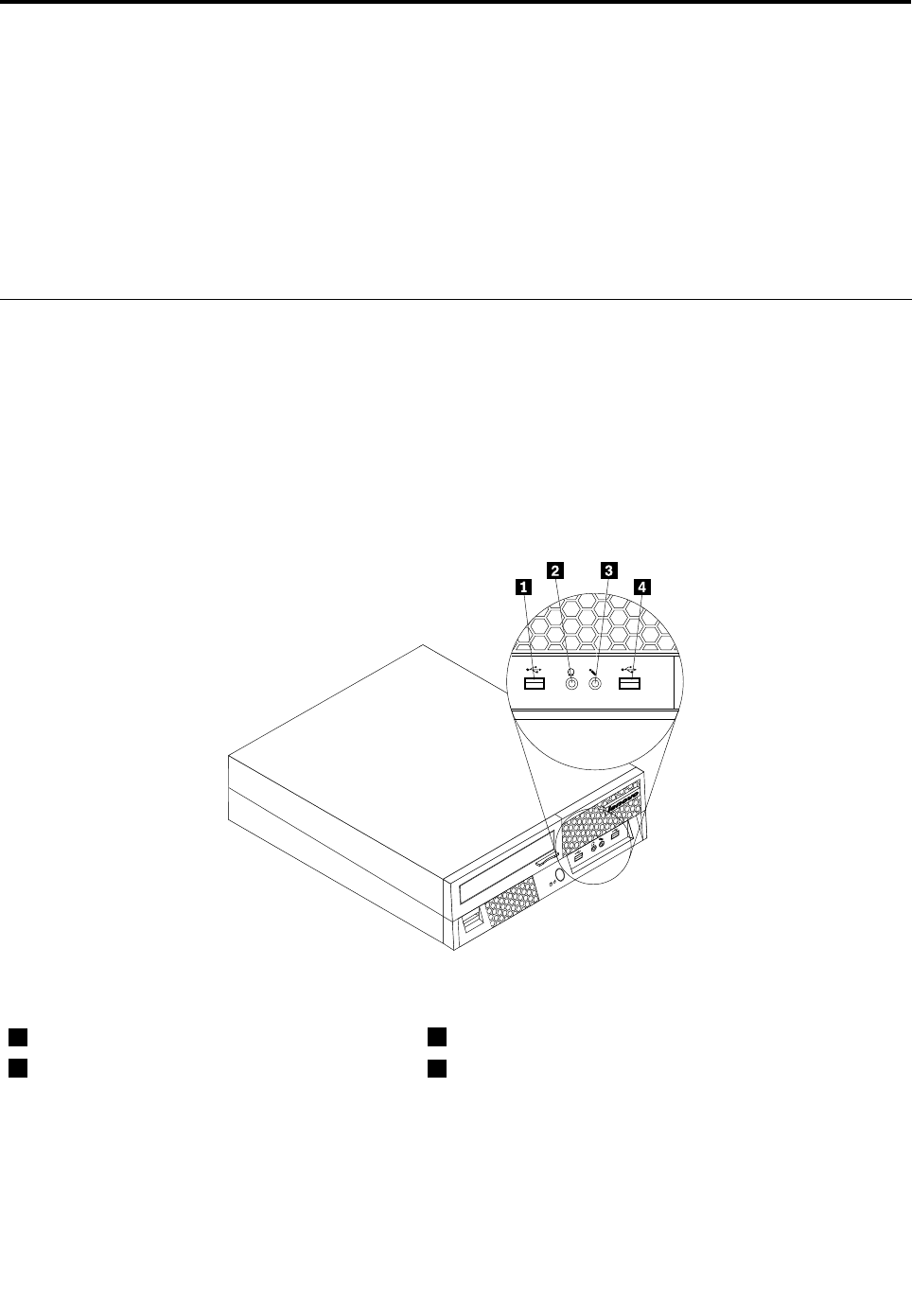
Chapter8.ReplacingFRUs
Thischapterprovidesstep-by-stepinstructionsforreplacingmajorFRUs.
Important
BesuretoreadandunderstandtheChapter2“Safetyinformation”onpage3beforereplacinganyFRU.
Theseprecautionsandguidelineswillhelpyouworksafely.
FRUreplacementsaretobedoneonlybytrainedservicetechnicians.
Locations
Thissectionprovidesillustrationstohelpyoulocatethevariousconnectorsandcomponentsofyour
computer.
Locatingconnectorsonthefrontofthecomputer
Thefollowingillustrationshowsthelocationoftheconnectorsonthefrontofyourcomputer.
Note:Notallcomputermodelshavethefollowingconnectors.
Figure1.Frontconnectorlocations
1USBconnector3Microphoneconnector
2Headphoneconnector4USBconnector
©CopyrightLenovo2008,201267
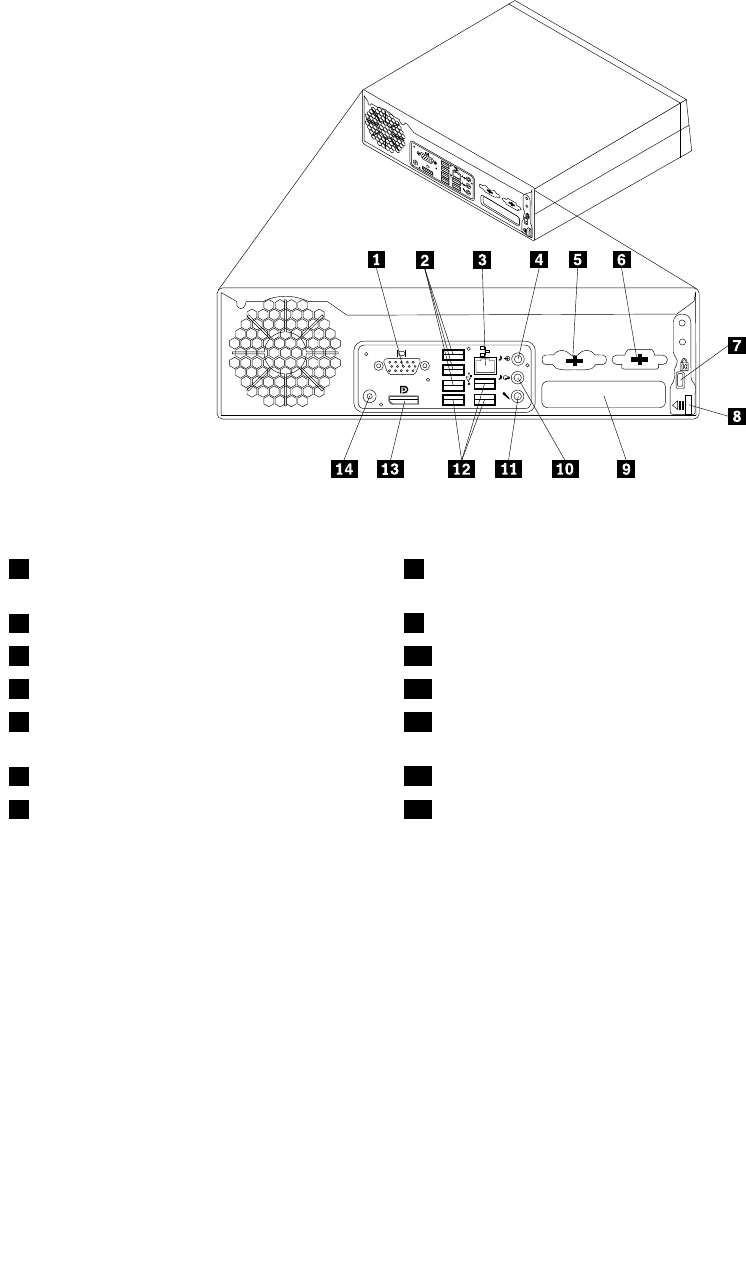
Locatingconnectorsontherearofthecomputer
Thefollowingillustrationshowsthelocationsoftheconnectorsontherearofthecomputer.
Figure2.Rearconnectorlocations
1VGA(VideoGraphicsArray)monitor
connector
8Cover-releasebutton
2USBconnectors(3)9Adaptercardslot
3Ethernetconnector10Audioline-outconnector
4Audioline-inconnector11Microphoneconnector
5Standardmouseandkeyboardconnectors
(somemodels)
12USBconnectors(3)
6Serialport(somemodels)13DisplayPortconnector
7Cablelockconnector14ACpoweradapterconnector
68ThinkCentreHardwareMaintenanceManual
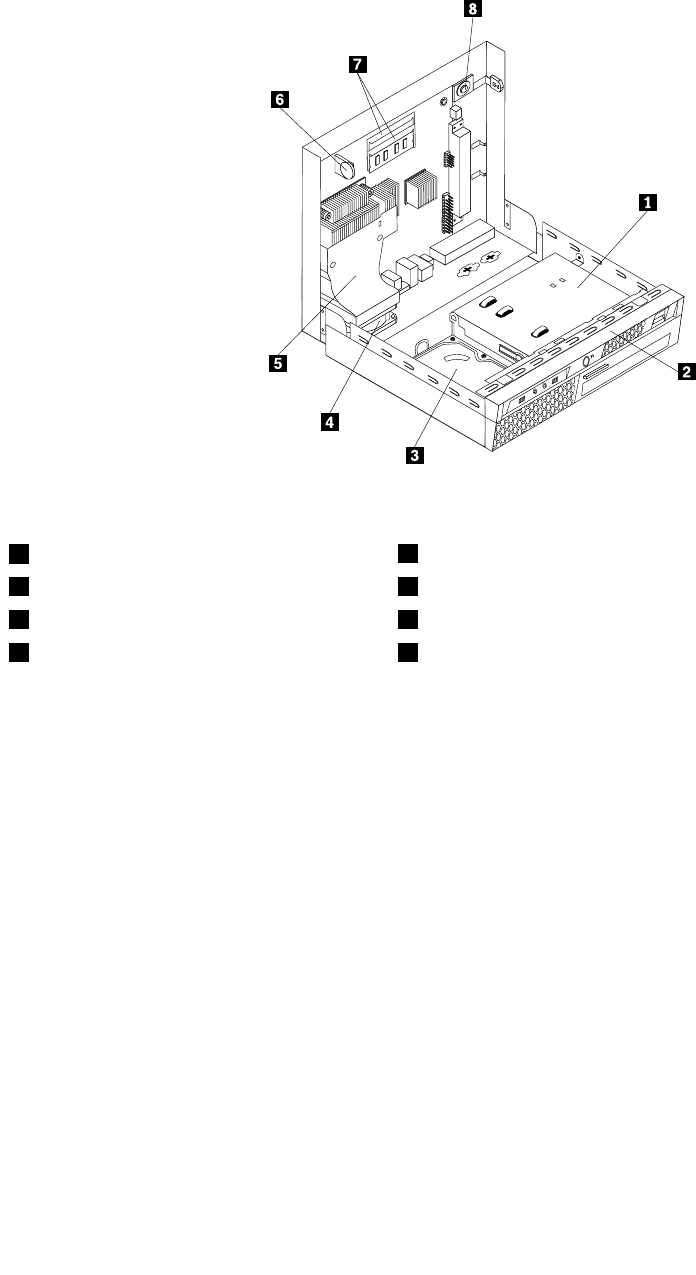
Locatingcomponents
Thefollowingillustrationshowsthelocationsofthevariouscomponentsinthecomputer.
Figure3.Componentlocations
1Opticaldrive5Heatsink
2Frontbezel6Battery
3Harddiskdrive7Memoryslots(2)
4Systemfanassembly8Internalspeaker
Chapter8.ReplacingFRUs69
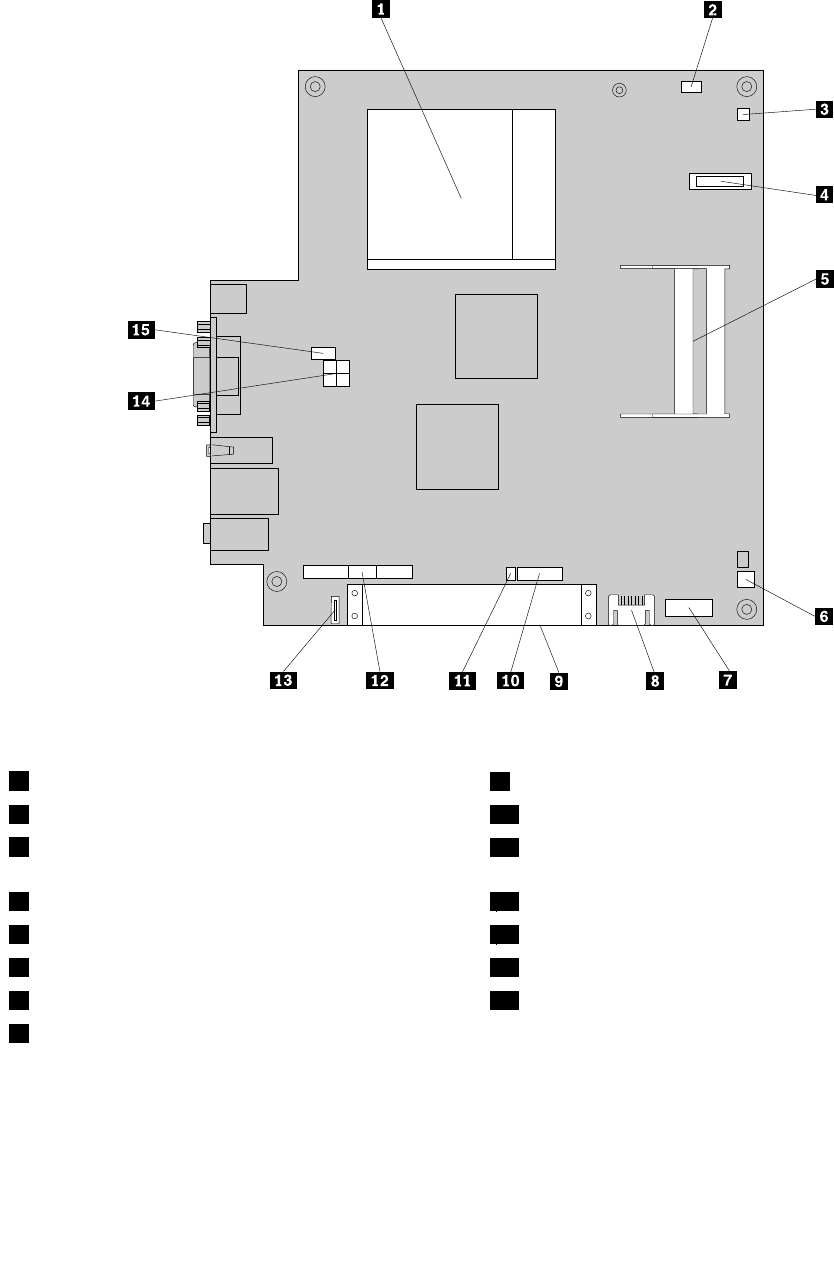
Locatingpartsonthesystemboard
Thefollowingillustrationshowsthelocationsofpartsonthesystemboard.
Figure4.Systemboardpartslocations
1Microprocessor9PCIslot
2ClearCMOS/Recoveryjumper10FrontUSBconnector2
3Thermalsensorconnector11Intrusionswitchconnector/Coverpresenceswitch
connector
4Battery12FrontI/OandLED/Switchheader
5Memoryslots(2)13eSATAconnector
6Internalspeakerconnector14Internalpowerdistributionconnector
7Serial(COM)connector15Systemfanconnector
8SATAconnectors(2)
70ThinkCentreHardwareMaintenanceManual
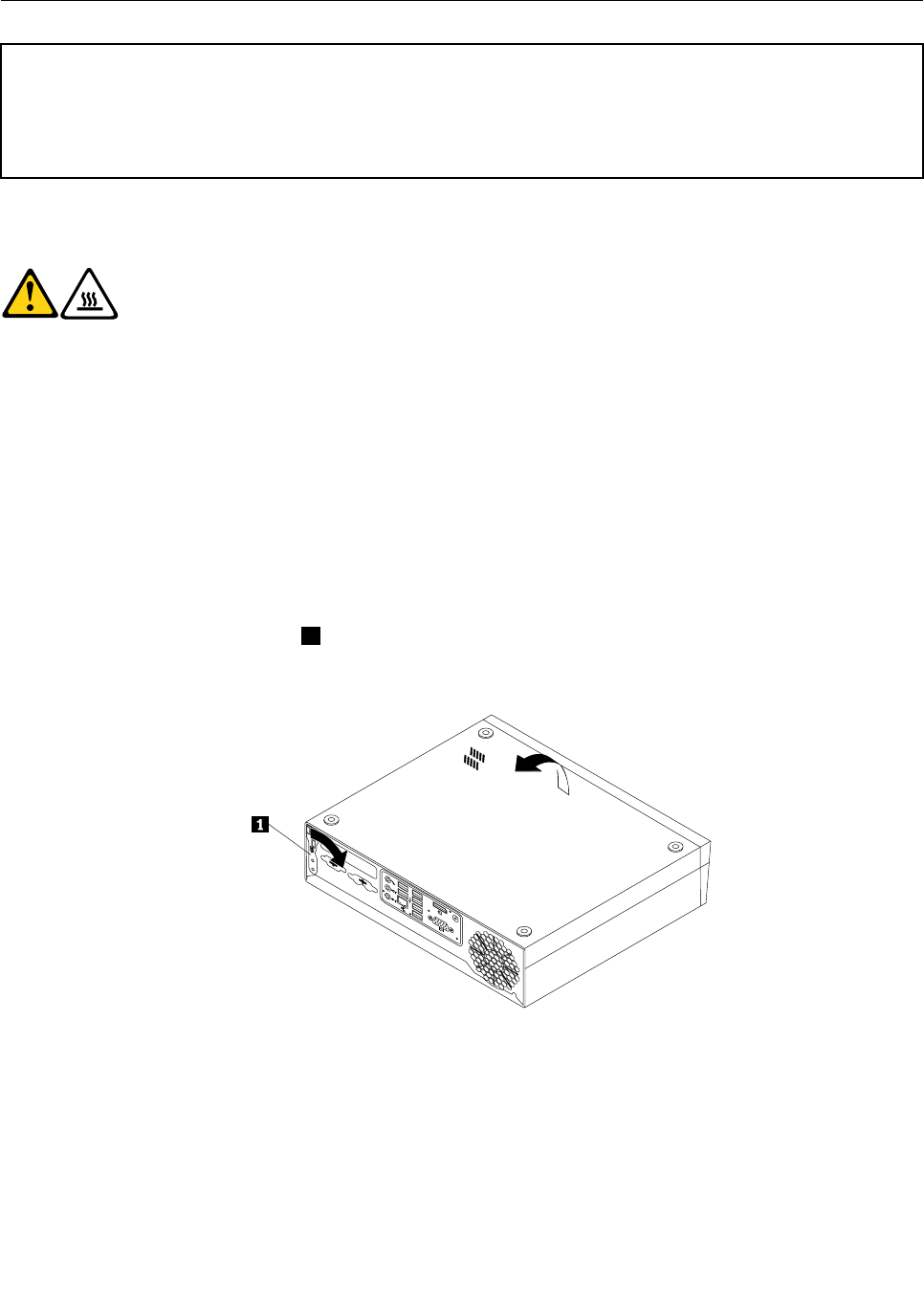
Openingthecomputercover
Attention
Donotopenyourcomputerorattemptanyrepairbeforereadingandunderstandingthe“Importantsafetyinformation”
intheThinkCentreSafetyandWarrantyGuidethatcamewithyourcomputer.ToobtainacopyoftheThinkCentre
SafetyandWarrantyGuide,goto:
http://www.lenovo.com/support
Thissectionprovidesinstructionsonhowtoopenthecomputercover.
CAUTION:
Turnoffthecomputerandwaitthreetoveminutestoletthecomputercoolbefore
openingthecomputercover.
Toopenthecomputercover:
1.Removeanymediafromthedrives,shutdownyouroperatingsystem,andturnoffallattacheddevices
andthecomputer.
2.Unplugallpowercordsfromelectricaloutlets.
3.Disconnectthecablesattachedtothecomputer.Thisincludespowercords,Input/Output(I/O)cables,
andanyothercablesthatareconnectedtothecomputer.See“Locatingconnectorsonthefrontofthe
computer”onpage67and“Locatingconnectorsontherearofthecomputer”onpage68.
4.Removeanylockingdevices,suchasacablelockthatsecuresthecomputercover.
5.Carefullyliftandpositionthecomputerupsidedownasshownin.
6.Pivotthecover-releasebutton1ontherearofthecomputerandthenopenthecomputercoveras
shown.
Figure5.Openingthecomputercover
Chapter8.ReplacingFRUs71
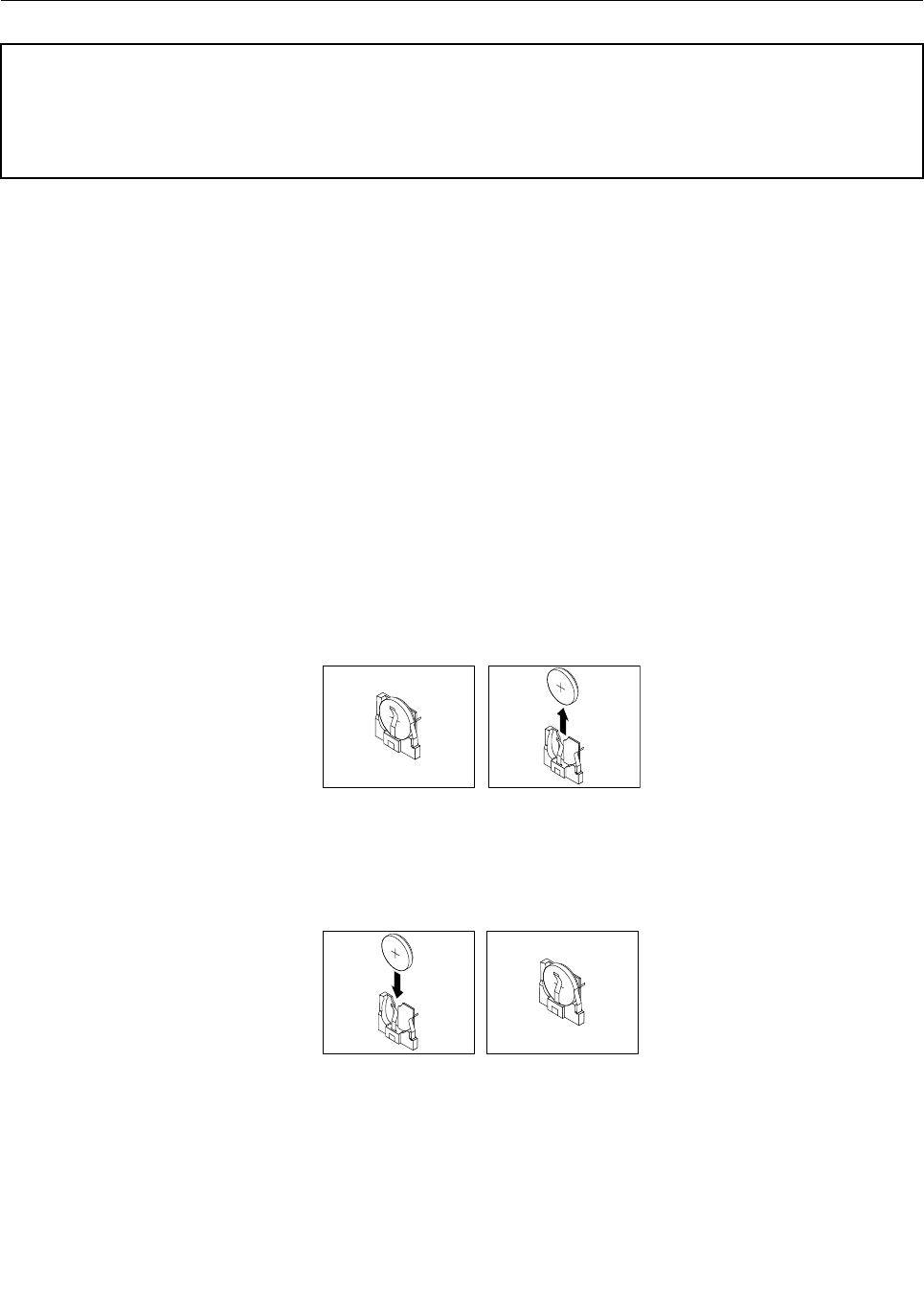
Replacingthebattery
Attention
Donotopenyourcomputerorattemptanyrepairbeforereadingandunderstandingthe“Importantsafetyinformation”
intheThinkCentreSafetyandWarrantyGuidethatcamewithyourcomputer.ToobtainacopyoftheThinkCentre
SafetyandWarrantyGuide,goto:
http://www.lenovo.com/support
Thissectionprovidesinstructionsonhowtoreplacethebattery.
Yourcomputerhasaspecialtypeofmemorythatmaintainsthedate,time,andsettingsforbuilt-infeatures,
suchastheparallel-portassignments(conguration).Abatterykeepstheseinformationactivewhenyou
turnoffthecomputer.
Thebatterynormallyrequiresnochargingormaintenancethroughoutitslife;however,nobatterylasts
forever.Ifthebatteryfails,thedate,time,andcongurationinformation(includingpasswords)arelost.An
errormessageisdisplayedwhenyouturnonthecomputer.
Refertothe“Lithiumbatterynotice”intheThinkCentreSafetyandWarrantyGuideforinformationabout
replacinganddisposingofthebattery.
Toreplacethebattery:
1.Openthecomputercover.See“Openingthecomputercover”onpage71.
2.Locatethebattery.See“Locatingpartsonthesystemboard”onpage70.
3.Removetheoldbattery.
Figure6.Removingtheoldbattery
4.Installanewbatterybypushingthenewbatterystraightdownuntilitsnapsintoposition.
Figure7.Installinganewbattery
5.Reconnectallthecablestothesystemboardandclosethecomputer.See“CompletingtheFRU
replacement”onpage89.
Note:Whenthecomputeristurnedonforthersttimeafterreplacingthebattery,anerrormessage
mightbedisplayed.Thisisnormalafterreplacingthebattery.
72ThinkCentreHardwareMaintenanceManual
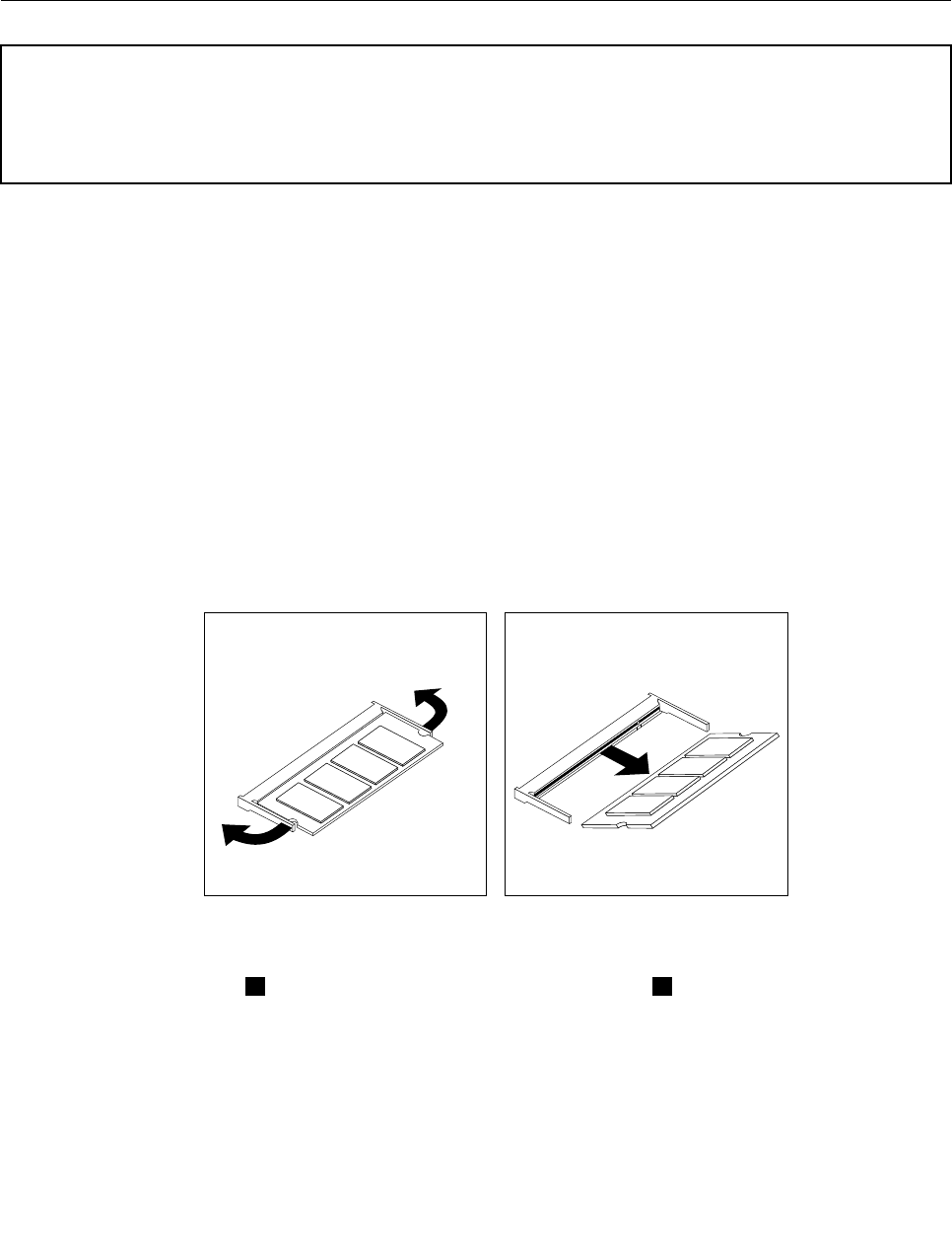
6.Turnonthecomputerandallattacheddevices.
7.UsetheSetupUtilityprogramtosetthedate,time,andanypasswords.SeeChapter6“UsingtheSetup
Utilityprogram”onpage43.
Replacingamemorymodule
Attention
Donotopenyourcomputerorattemptanyrepairbeforereadingandunderstandingthe“Importantsafetyinformation”
intheThinkCentreSafetyandWarrantyGuidethatcamewithyourcomputer.ToobtainacopyoftheThinkCentre
SafetyandWarrantyGuide,goto:
http://www.lenovo.com/support
Thissectionprovidesinstructionsonhowtoreplaceamemorymodule.
YourcomputerhastwoslotsforinstallingorreplacingSODIMMs(smalloutlinedualinlinememorymodules)
thatprovideuptoamaximumof4GBofsystemmemory.
Wheninstallingorreplacingamemorymodule,usethefollowingguidelines:
•Use1.8V,200-pinDDR3SDRAM(doubledatarate3synchronousdynamicrandomaccessmemory).
•Use1GBor2GBmemorymodulesinanycombinationuptoamaximumof4GB.
Toreplaceamemorymodule:
1.Openthecomputercover.See“Openingthecomputercover”onpage71.
2.Locatethememoryslot.See“Locatingpartsonthesystemboard”onpage70.
3.Removethememorymodulebeingreplacedbyopeningtheretainingclipsasshown.
Figure8.Removingthememorymodule
4.Insertthenotchedend2ofthenewmemorymoduleintothesocket1.Pressthememorymodule
rmly,andpivotthememorymoduleuntilitsnapsintoplace.Makesurethatthememorymoduleis
rmlyxedintheslotanddoesnotmoveeasily.
Chapter8.ReplacingFRUs73
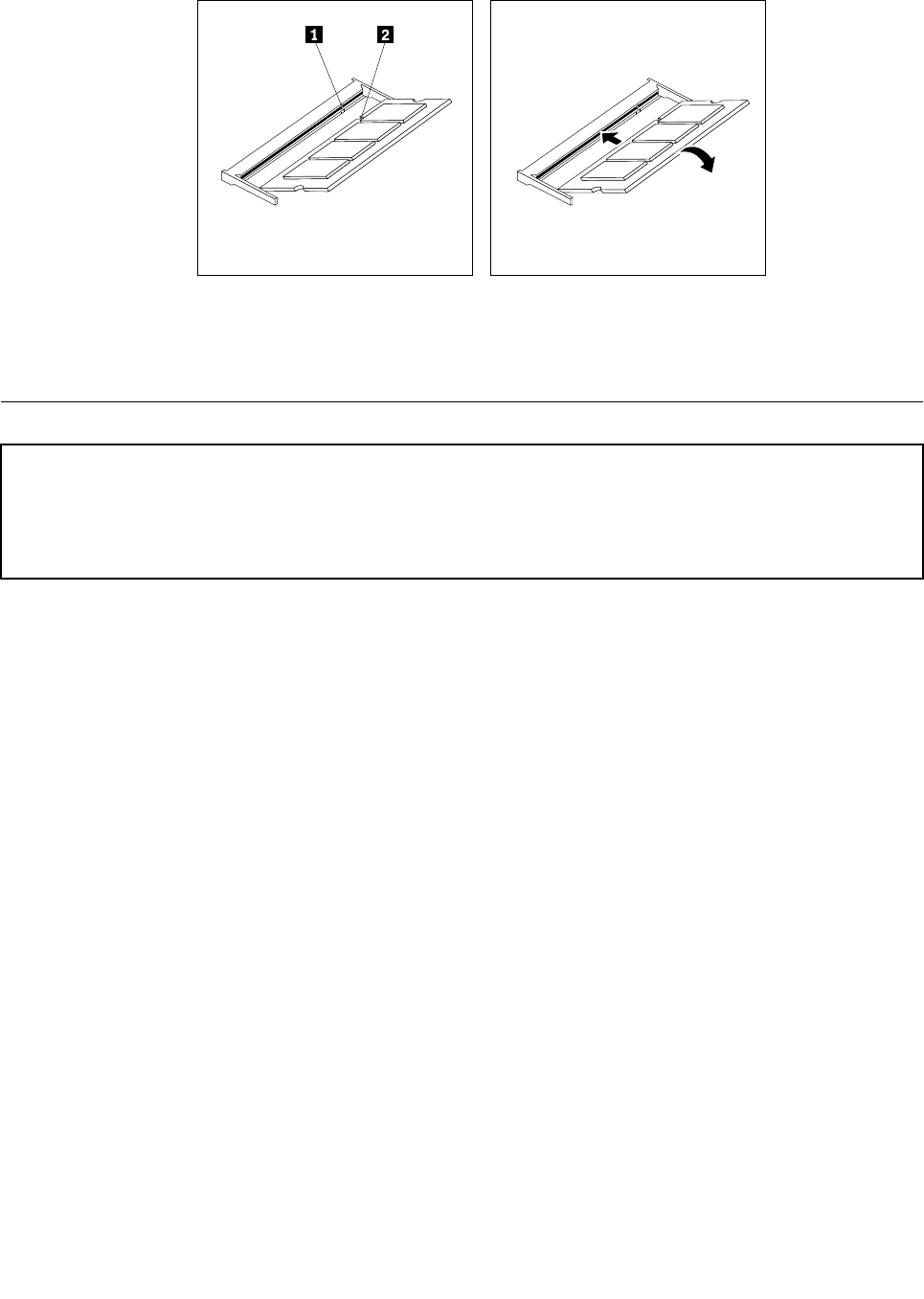
Figure9.Installingthenewmemorymodule
5.Goto“CompletingtheFRUreplacement”onpage89.
Replacingtheadaptercard
Attention
Donotopenyourcomputerorattemptanyrepairbeforereadingandunderstandingthe“Importantsafetyinformation”
intheThinkCentreSafetyandWarrantyGuidethatcamewithyourcomputer.ToobtainacopyoftheThinkCentre
SafetyandWarrantyGuide,goto:
http://www.lenovo.com/support
Thissectionprovidesinstructionsonhowtoreplacetheadaptercard.
Note:Youneedtoremovethesystemboardinordertoreplacetheadaptercard.
Toreplacetheadaptercard:
1.Openthecomputercover.See“Openingthecomputercover”onpage71.
2.Locatethesystemboardanddisconnectallcablesconnectedtothesystemboard.See“Locating
partsonthesystemboard”onpage70.
3.Pressthetwosidetabsinwardandthenpivotthesystemboardasshowntoreleaseitfromthechassis.
74ThinkCentreHardwareMaintenanceManual
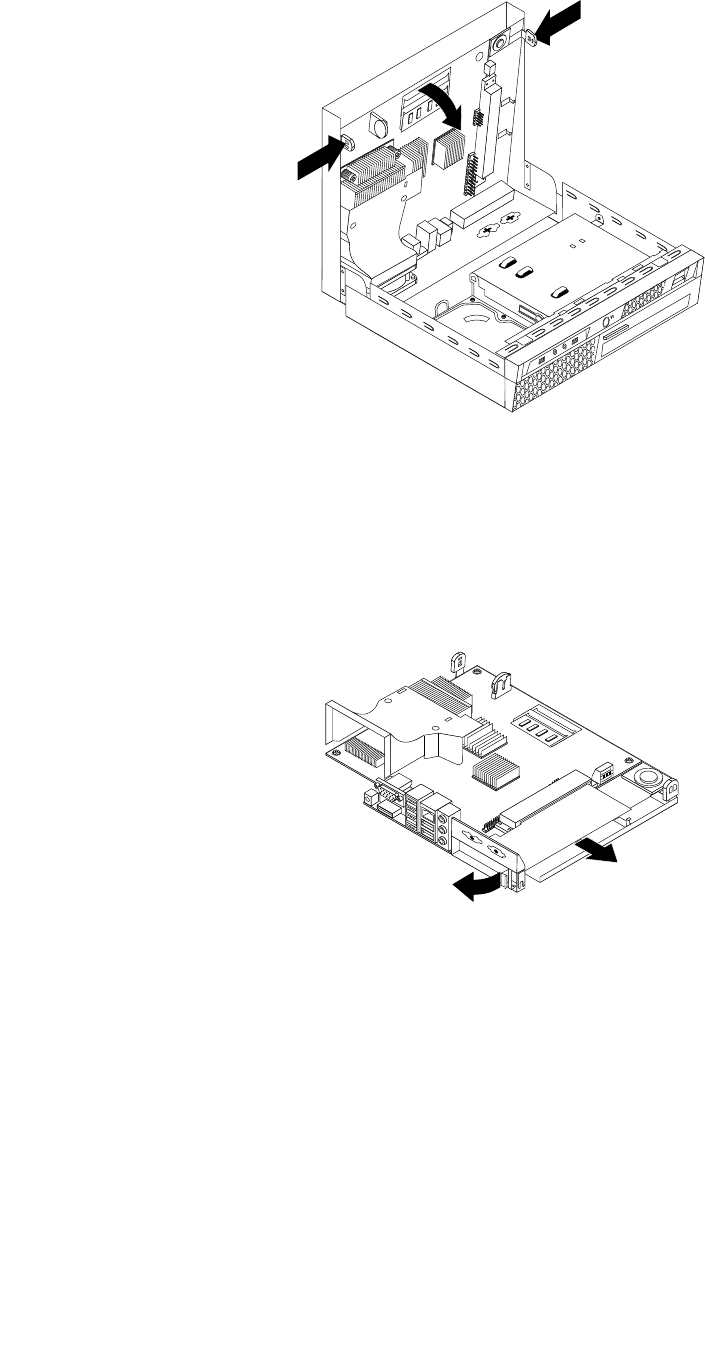
Figure10.Releasingthesystemboard
4.Placethesystemboardonacleanandatsurface.
5.Locatetheadaptercardslot.See“Locatingpartsonthesystemboard”onpage70.
6.Rotatetheadaptercardretainertotheopenpositionandremovetheadaptercardbeingreplacedby
pullingitoutoftheadaptercardslot.
Figure11.Removingtheadaptercard
7.Removethenewadaptercardfromitsstatic-protectivepackage.
8.Installthenewadaptercardintotheadaptercardslot.Makesurethattheadaptercardisrmlyxed
intheslotanddoesnotmoveeasily.
9.Closetheadaptercardretainer.
10.Slidethesystemboardtotherearofthechassisandthenpivotthesystemboarduntilitislocked
bythemountingstudoneachsideofthecover.
11.Reconnectallcablesthatweredisconnectedfromthesystemboard.
12.Goto“CompletingtheFRUreplacement”onpage89.
Chapter8.ReplacingFRUs75
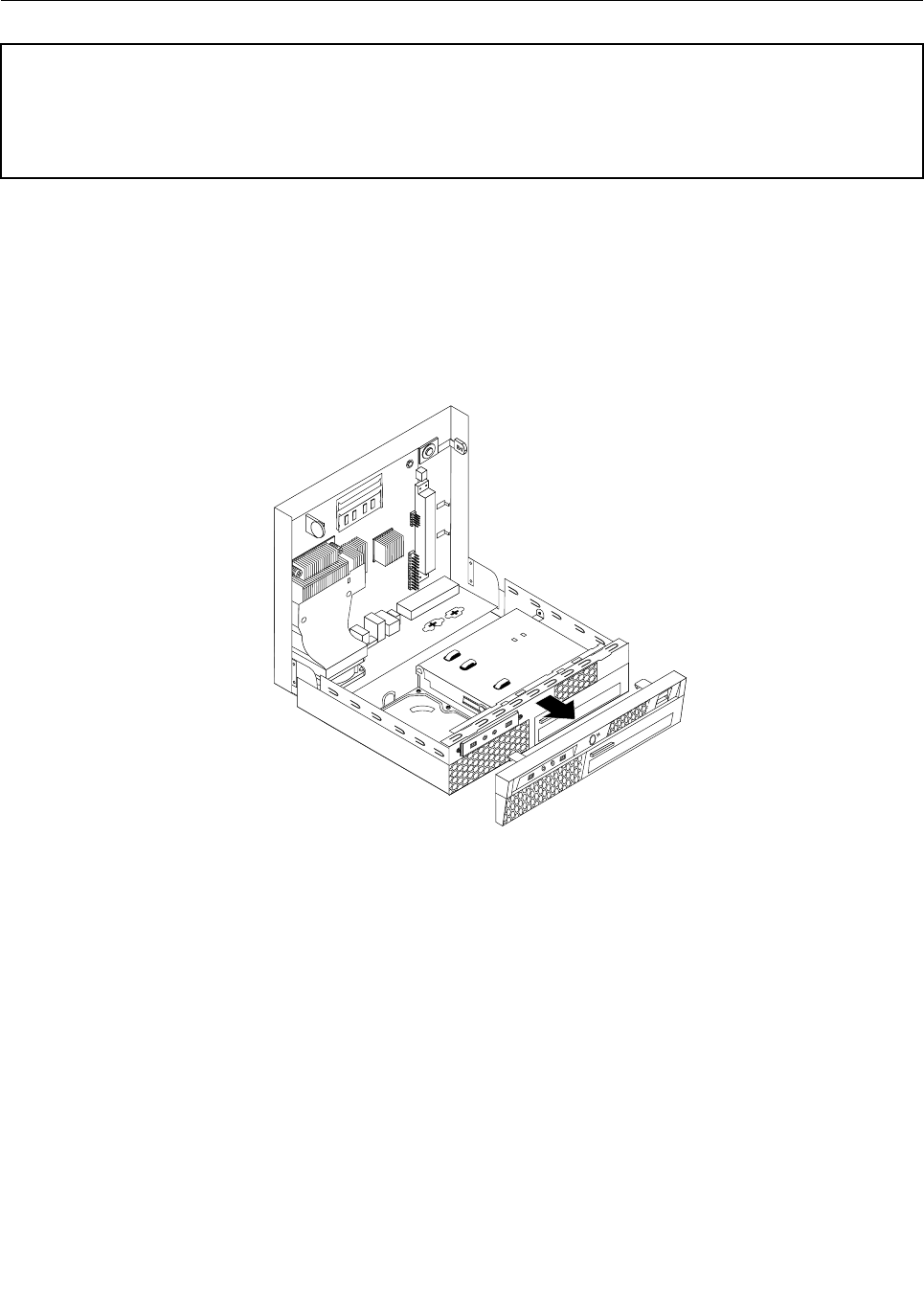
ReplacingthefrontaudioandUSBassembly
Attention
Donotopenyourcomputerorattemptanyrepairbeforereadingandunderstandingthe“Importantsafetyinformation”
intheThinkCentreSafetyandWarrantyGuidethatcamewithyourcomputer.ToobtainacopyoftheThinkCentre
SafetyandWarrantyGuide,goto:
http://www.lenovo.com/support
ThissectionprovidesinstructionsonhowtoreplacethefrontaudioandUSBassembly.
ToreplacethefrontaudioandUSBassembly:
1.Openthecomputercover.See“Openingthecomputercover”onpage71.
2.Removethefrontbezelbyreleasingthetwotabsandpivotingthefrontbezelforwardtoremove
completely.
Figure12.Removingthefrontbezel
3.DisconnectthefrontaudioandUSBassemblycablesfromthesystemboard.See“Locatingpartson
thesystemboard”onpage70.
4.NotethefrontaudioandUSBassemblycablesroutingandremovethescrewthatsecurestheassembly
tothechassis.
76ThinkCentreHardwareMaintenanceManual

Figure13.RemovingthefrontaudioandUSBassembly
5.RemovethefailingfrontaudioandUSBassemblyfromthechassis.
6.InstallthenewfrontaudioandUSBassemblyintothechassisandsecureitwiththescrew.
7.ConnectthefrontaudioandUSBassemblycablestothesystemboard.
8.Toreinstallthefrontbezel,aligntheplastictabsonthebottomofthebezelwiththecorrespondingholes
inthechassis,thenpivotthebezelinwarduntilitsnapsintoposition.
9.Goto“CompletingtheFRUreplacement”onpage89.
Replacingtheheatsink
Attention
Donotopenyourcomputerorattemptanyrepairbeforereadingandunderstandingthe“Importantsafetyinformation”
intheThinkCentreSafetyandWarrantyGuidethatcamewithyourcomputer.ToobtainacopyoftheThinkCentre
SafetyandWarrantyGuide,goto:
http://www.lenovo.com/support
Thissectionprovidesinstructionsonhowtoreplacetheheatsink.
CAUTION:
Theheatsinkmightbeveryhot.Turnoffthecomputerandwaitthreetoveminutesto
letthecomputercoolbeforeopeningthecomputercover.
Toreplacetheheatsink:
1.Openthecomputercover.See“Openingthecomputercover”onpage71.
2.Locatetheheatsink.See“Locatingcomponents”onpage69.
3.Removethefourscrewsthatsecuretheheatsinktothesystemboard.
Note:Carefullyremovethefourscrewsfromthesystemboardtoavoidanypossibledamage.Thefour
screwscannotberemovedfromtheheatsink.
Chapter8.ReplacingFRUs77
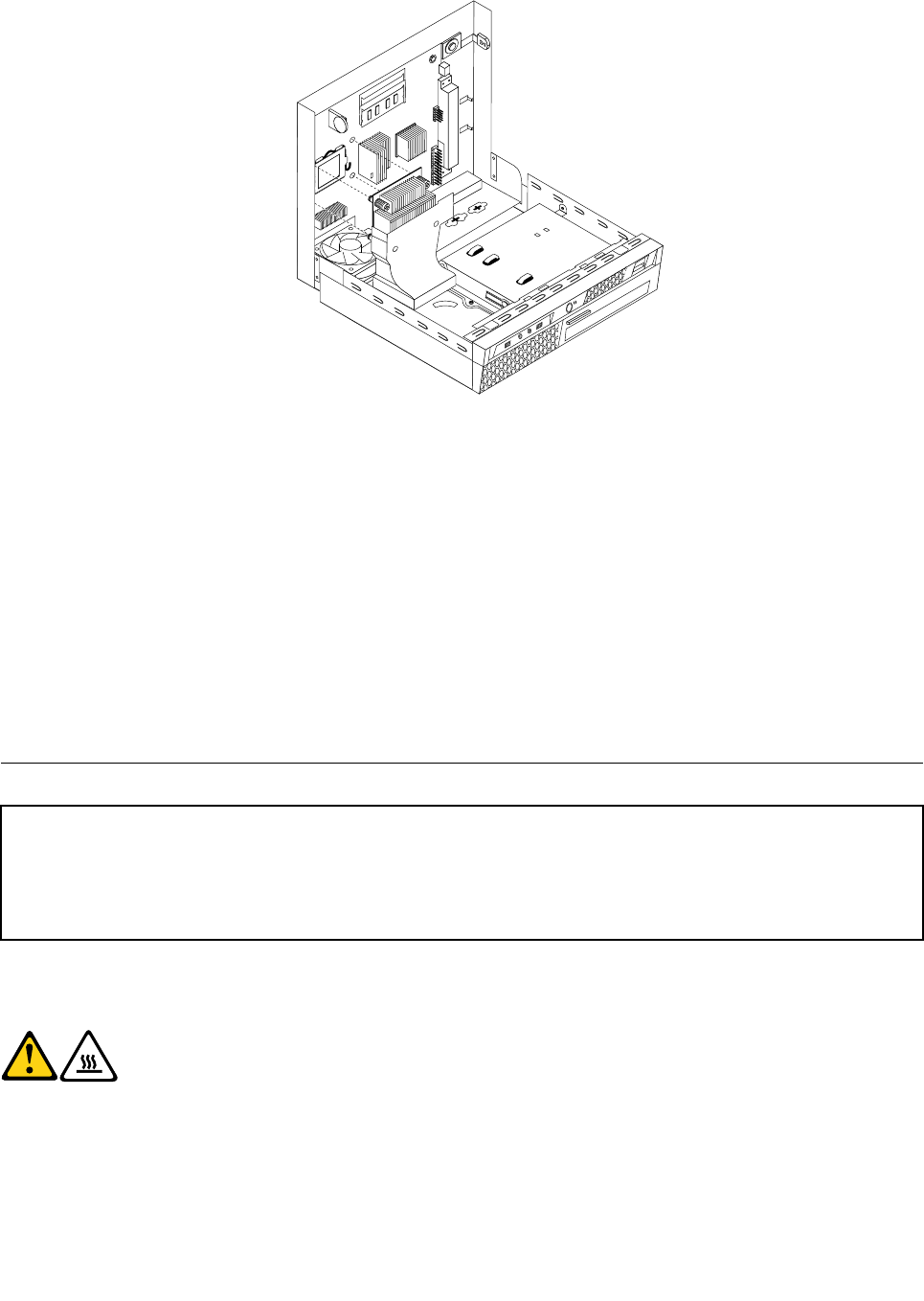
Figure14.Removingtheheatsink
4.Liftthefailingheatsinkoffthesystemboard.
Notes:
a.Youmighthavetogentlytwisttheheatsinktofreeitfromthemicroprocessor.
b.Donottouchthethermalgreasewhilehandlingtheheatsink.
5.Positionthenewheatsinkonthesystemboardsothatthefourscrewsarealignedwiththeholes
onthesystemboard.
6.Alternatetighteningeachscrewasmallandequalamountuntiltheheatsinkissecuredtothesystem
board.Donotover-tightenthescrews.
7.Goto“CompletingtheFRUreplacement”onpage89.
Replacingthemicroprocessor
Attention
Donotopenyourcomputerorattemptanyrepairbeforereadingandunderstandingthe“Importantsafetyinformation”
intheThinkCentreSafetyandWarrantyGuidethatcamewithyourcomputer.ToobtainacopyoftheThinkCentre
SafetyandWarrantyGuide,goto:
http://www.lenovo.com/support
Thissectionprovidesinstructionsonhowtoreplacethemicroprocessor.
CAUTION:
Theheatsinkandmicroprocessormightbeveryhot.Turnoffthecomputerandwait
threetoveminutestoletthecomputercoolbeforeopeningthecomputercover.
Toreplacethemicroprocessor:
1.Openthecomputercover.See“Openingthecomputercover”onpage71.
2.Removeanypartsorcablesthatmaypreventyouraccesstothesystemboard.
78ThinkCentreHardwareMaintenanceManual
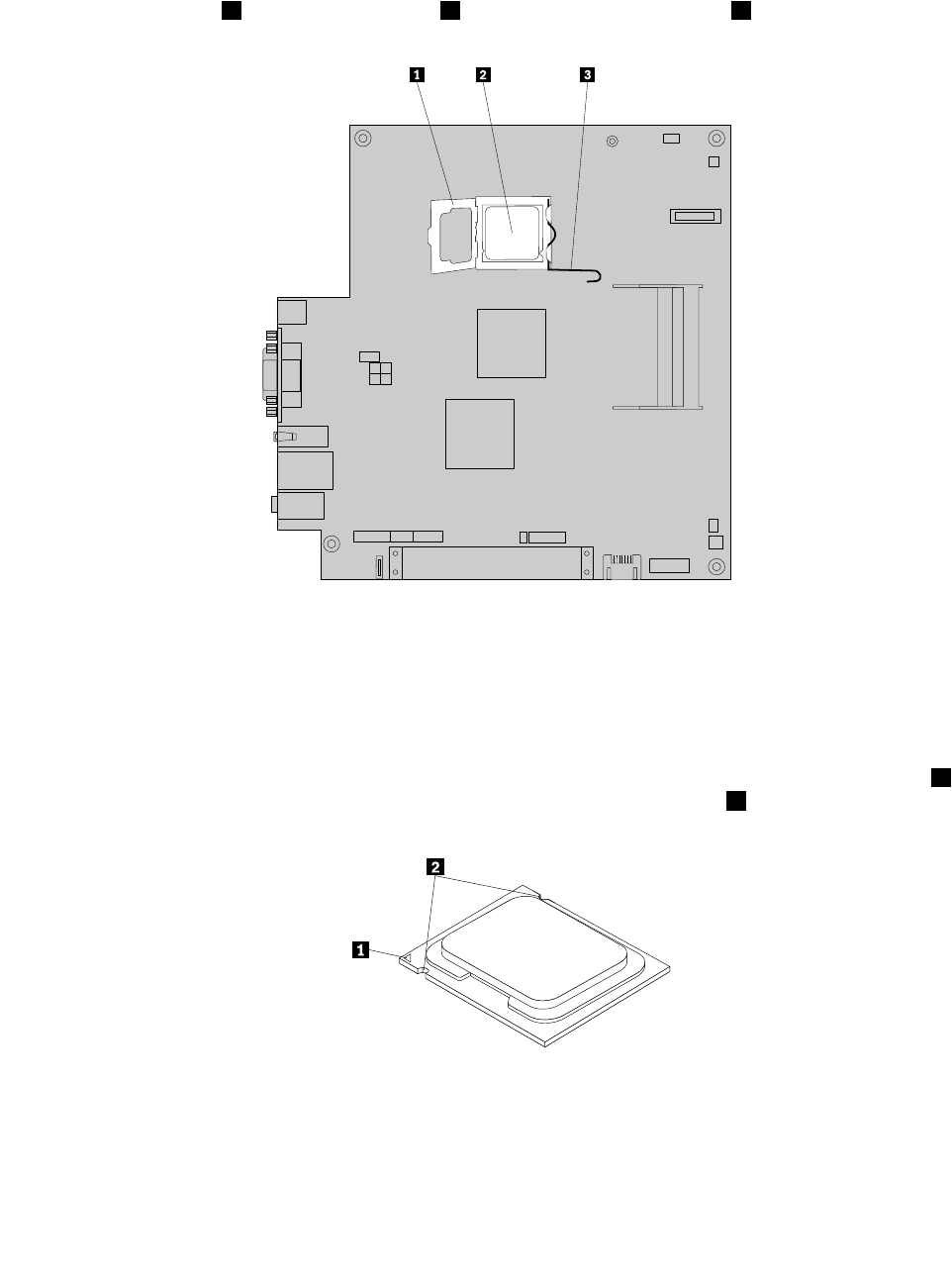
3.Locatetheheatsinkandremoveitfromthesystemboard.See“Locatingcomponents”onpage
69and“Replacingtheheatsink”onpage77.
4.Placetheheatsinkonitssidesothatthethermalgreasedoesnotcomeincontactwithanything.
5.Liftthesmallhandle3andopentheretainer1toaccessthemicroprocessor2.
Figure15.Accessingthemicroprocessor
6.Liftthemicroprocessorstraightupandoutofthesocket.
Notes:
a.Yourmicroprocessorandsocketmightlookdifferentfromtheoneillustrated.
b.Notetheorientationofthemicroprocessorinthesocket.Youcaneitherlookforthesmalltriangle1
ononecornerofthemicroprocessorornotetheorientationofthenotches2onthemicroprocessor.
Thisisimportantwheninstallingthenewmicroprocessoronthesystemboard.
c.Touchonlythesidesofthemicroprocessor.Donottouchthegoldcontactsonthebottom.
d.Donotdropanythingontothemicroprocessorsocketwhileitisexposed.Thesocketpinsmustbe
keptascleanaspossible.
Chapter8.ReplacingFRUs79
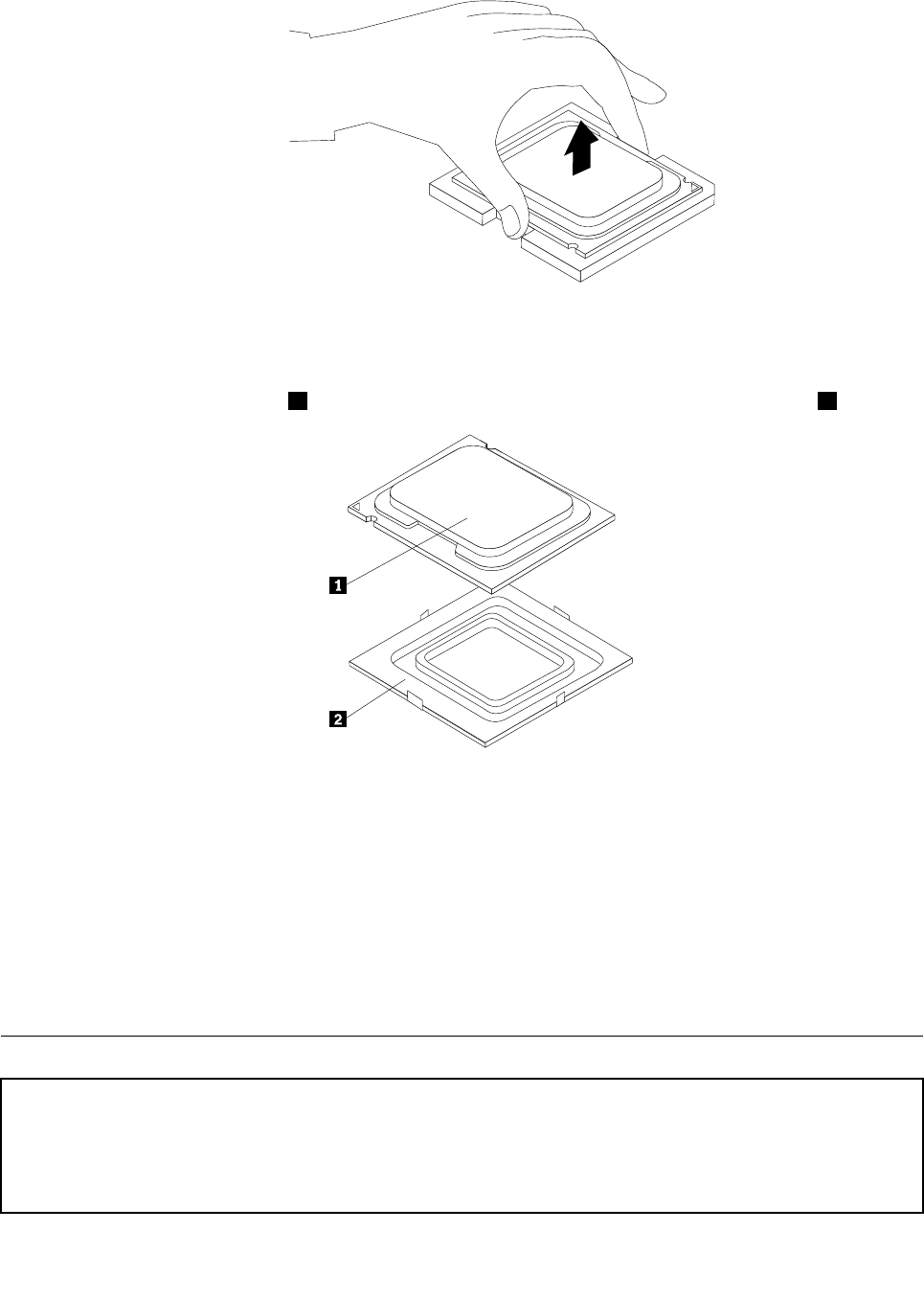
Figure16.Removingthemicroprocessor
7.Makesurethatthesmallhandleisintheraisedpositionandthemicroprocessorretainerisfullyopen.
8.Removetheprotectivecover2thatprotectsthegoldcontactsonthenewmicroprocessor1.
9.Holdthenewmicroprocessorandalignthenotchesonitwiththetabsinthemicroprocessorsocket,or
alignthesmalltriangleononecornerwiththecorrespondingbeveledcornerofthemicroprocessor
socket.
10.Lowerthenewmicroprocessorstraightdownintothemicroprocessorsocketonthesystemboard.
11.Closethemicroprocessorretainerandlockitintopositionwiththesmallhandletosecurethenew
microprocessorinthesocket.
12.Reinstalltheheatsinkonthesystemboard.See“Replacingtheheatsink”onpage77.
13.Reinstallanyotherpartsorreconnectanyothercablesyouremoved.
14.Goto“CompletingtheFRUreplacement”onpage89.
Replacingthesystemboard
Attention
Donotopenyourcomputerorattemptanyrepairbeforereadingandunderstandingthe“Importantsafetyinformation”
intheThinkCentreSafetyandWarrantyGuidethatcamewithyourcomputer.ToobtainacopyoftheThinkCentre
SafetyandWarrantyGuide,goto:
http://www.lenovo.com/support
80ThinkCentreHardwareMaintenanceManual
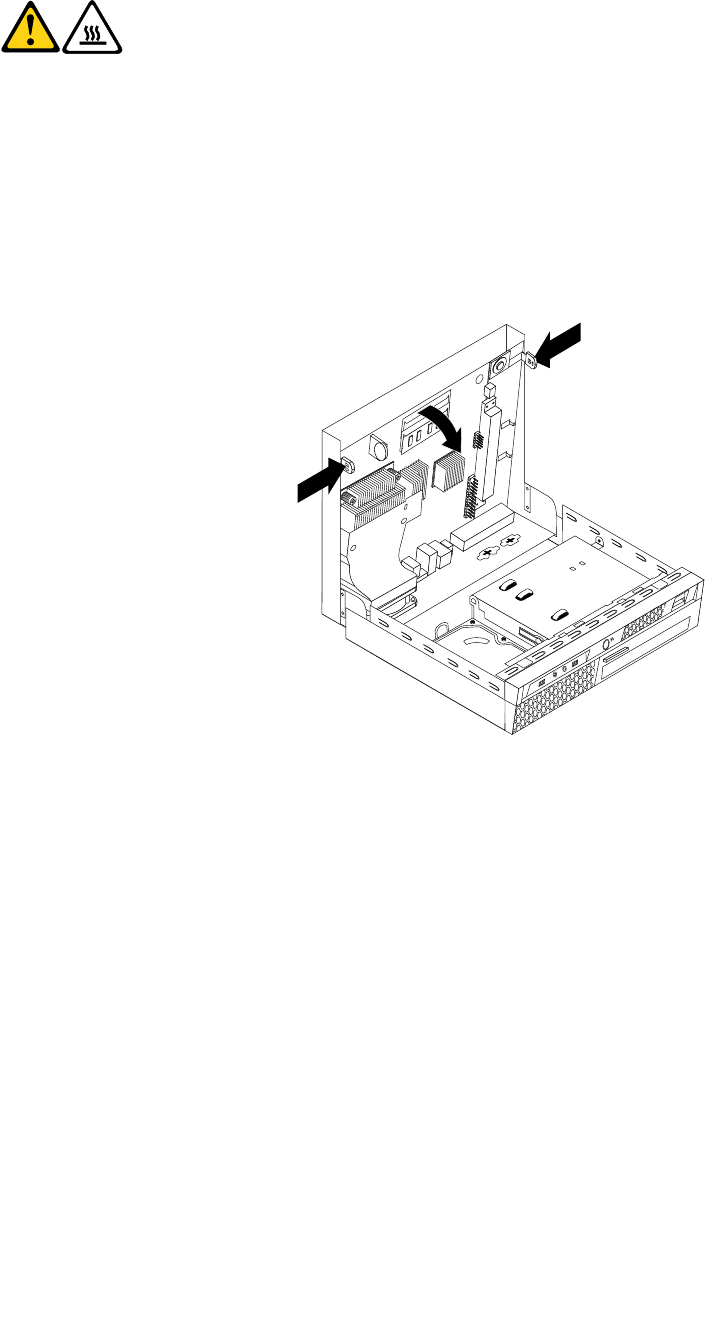
Thissectionprovidesinstructionsonhowtoreplacethesystemboard.
CAUTION:
Theheatsinkandmicroprocessormightbeveryhot.Turnoffthecomputerandwait
threetoveminutestoletthecomputercoolbeforeopeningthecomputercover.
Toreplacethesystemboard:
1.Openthecomputercover.See“Openingthecomputercover”onpage71.
2.Takenotesofthelocationofallthecableconnectorsonthesystemboardandthendisconnectallthe
cables.See“Locatingpartsonthesystemboard”onpage70.
3.Pressthetwosidetabsinwardandthenpivotthesystemboardasshowntoreleasethesystemboard
fromthechassis.
Figure17.Releasingthesystemboard
4.Placethesystemboardonacleanandatsurface.
5.Removetheheatsinkfromthesystemboard.See“Replacingtheheatsink”onpage77.
6.Removethememorymodulesfromthefailingsystemboard.See“Replacingamemorymodule”
onpage73.
7.Removetheadaptercardfromthefailingsystemboard.See“Replacingtheadaptercard”onpage74.
8.Removethebatteryfromthefailingsystemboard.See“Replacingthebattery”onpage72.
9.Removethemicroprocessorfromthefailingsystemboard.See“Replacingthemicroprocessor”on
page78.
10.Removethescrewsthatsecurethefailingsystemboardtotheprotectivecover.
11.Liftthefailingsystemboardoffthecover.
12.Positionthenewsystemboardsothatthescrewholesarealignedwiththemountingstudsonthecover.
13.Installthescrewstosecurethenewsystemboardtotheprotectivecover.
14.Installthememorymodules,adaptercard,battery,andmicroprocessorthatyouremovedfromthe
failingsystemboardtothenewsystemboard.
Chapter8.ReplacingFRUs81
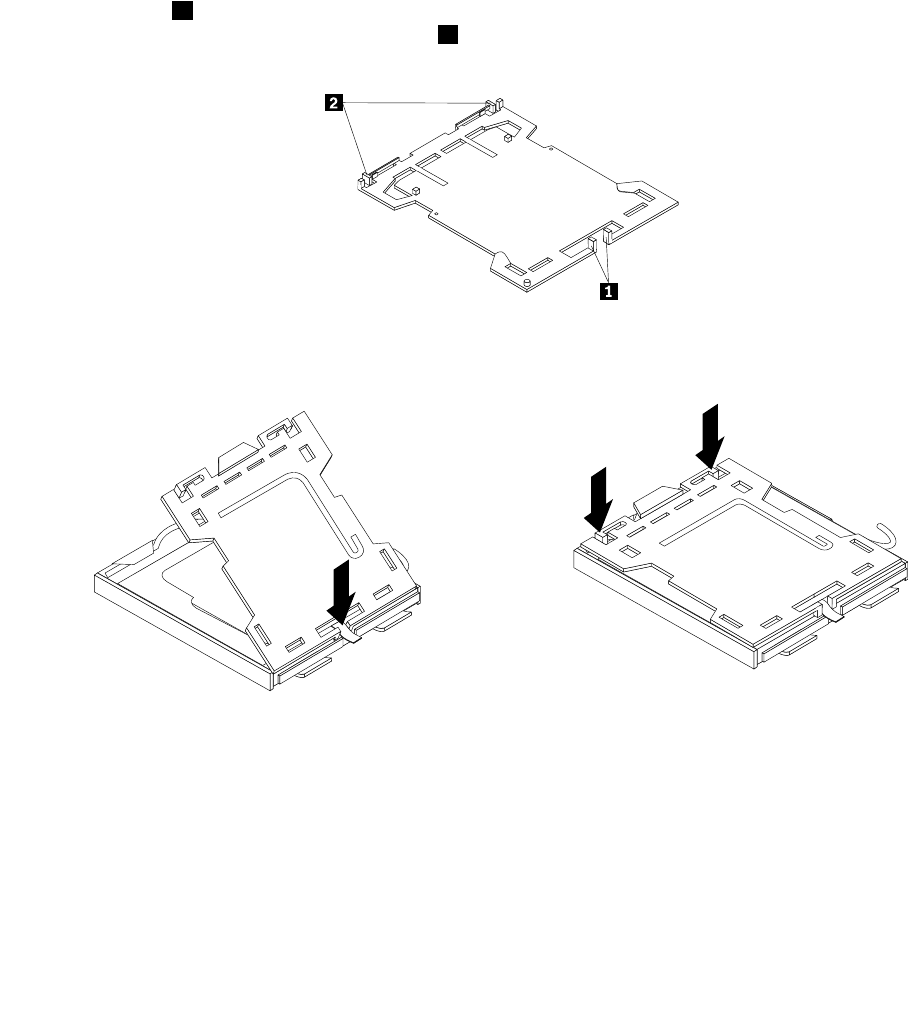
15.Slidethenewsystemboardtotherearofthechassisandthenpivotitinwarduntilitislockedinto
position.
16.Connectallthecablestothenewsystemboard.See“Locatingpartsonthesystemboard”onpage70.
17.Installtheheatsinktothenewsystemboard.See“Replacingtheheatsink”onpage77.
18.Goto“CompletingtheFRUreplacement”onpage89.
Thefailingsystemboardmustbereturnedwithamicroprocessorsocketcovertoprotectthepinsduring
shippingandhandling.
Toinstallthemicroprocessorsocketcover:
1.Removethemicroprocessorfromthemicroprocessorsocket.See“Replacingthemicroprocessor”
onpage78.
2.Closethemicroprocessorretainerandlockitintopositionwiththesmallhandle.
3.Insertthetabs1ofthesocketcoverintothehingedsideofthesocket,andthenpresstheotherside
ofthesocketcoverdownwarduntilthetabs2snapintoposition.
Figure18.Tabsonthemicroprocessorsocketcover(bottomview)
Figure19.Installingthemicroprocessorsocketcover
82ThinkCentreHardwareMaintenanceManual
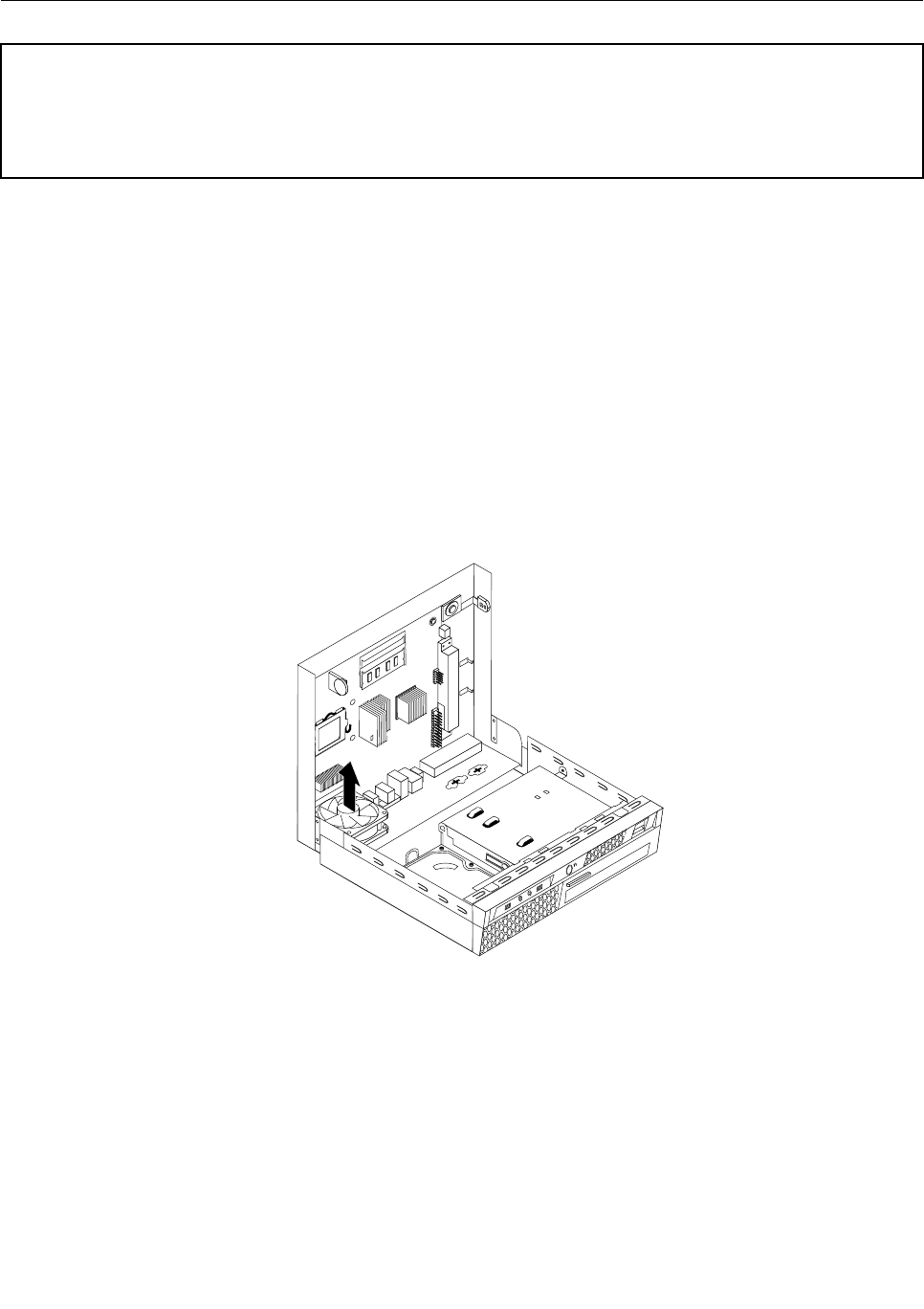
Replacingthesystemfan
Attention
Donotopenyourcomputerorattemptanyrepairbeforereadingandunderstandingthe“Importantsafetyinformation”
intheThinkCentreSafetyandWarrantyGuidethatcamewithyourcomputer.ToobtainacopyoftheThinkCentre
SafetyandWarrantyGuide,goto:
http://www.lenovo.com/support
Thissectionprovidesinstructionsonhowtoreplacethesystemfan.
Toreplacethesystemfan:
1.Openthecomputercover.See“Openingthecomputercover”onpage71.
2.Disconnectthesystemfancablefromthesystemfanconnectoronthesystemboard.See“Locating
partsonthesystemboard”onpage70.
3.Removetheheatsinktogainaccesstothesystemfan.See“Replacingtheheatsink”onpage77.
4.Locatethetworubbermountsthatsecurethesystemfantothechassis.Removetherubbermounts
bybreakingthemorcuttingthemwithscissors.
Note:Whenyoureceivethenewsystemfan,youwillalsoreceivenewrubbermounts.
5.Liftthesystemfanoutofthechassis.
Figure20.Removingthesystemfan
6.Installthetwoshortrubbermountsinthenewsystemfanasshown.
Chapter8.ReplacingFRUs83
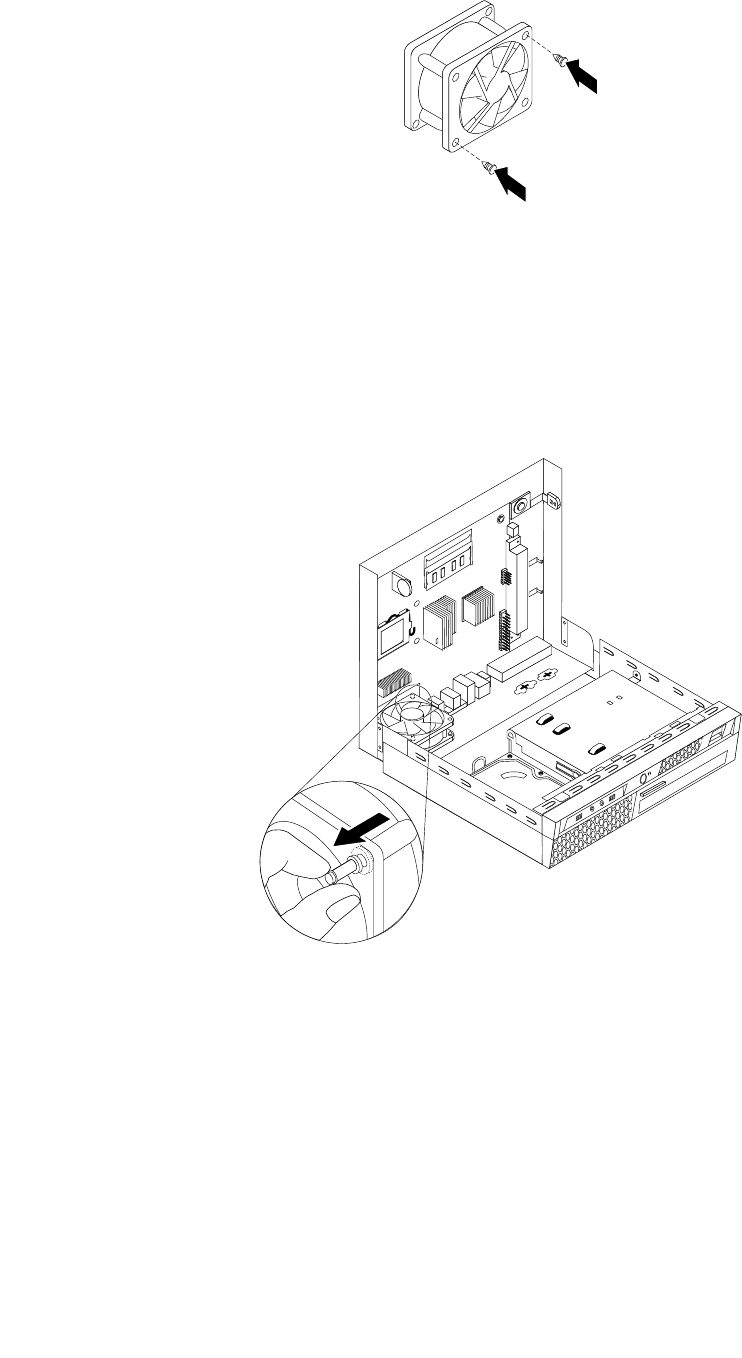
Figure21.Installingtheshortrubbermounts
7.Installthetwolongrubbermountsintotherearofthechassis.Pushthemountsthroughtheholesofthe
chassis.Ifnecessary,pullthemountsthroughtheholesfrominsidethechassis.
8.Toinstallthenewsystemfanassemblyintothechassis,aligntheopenholesinthesystemfanassembly
withthelongrubbermountsinthechassis.Pulltherubbermountsthroughtheholesinthesystem
fanassemblyuntilthefanisinplace.
Figure22.Replacingthesystemfanassembly
9.Oncethesystemfanassemblyissecure,youshouldremovetheextrarubberfromthemounts.
10.Connectthesystemfanassemblycabletothefanconnectoronthesystemboard.
11.Replacetheheatsink.See“Replacingtheheatsink”onpage77.
12.Goto“CompletingtheFRUreplacement”onpage89.
84ThinkCentreHardwareMaintenanceManual
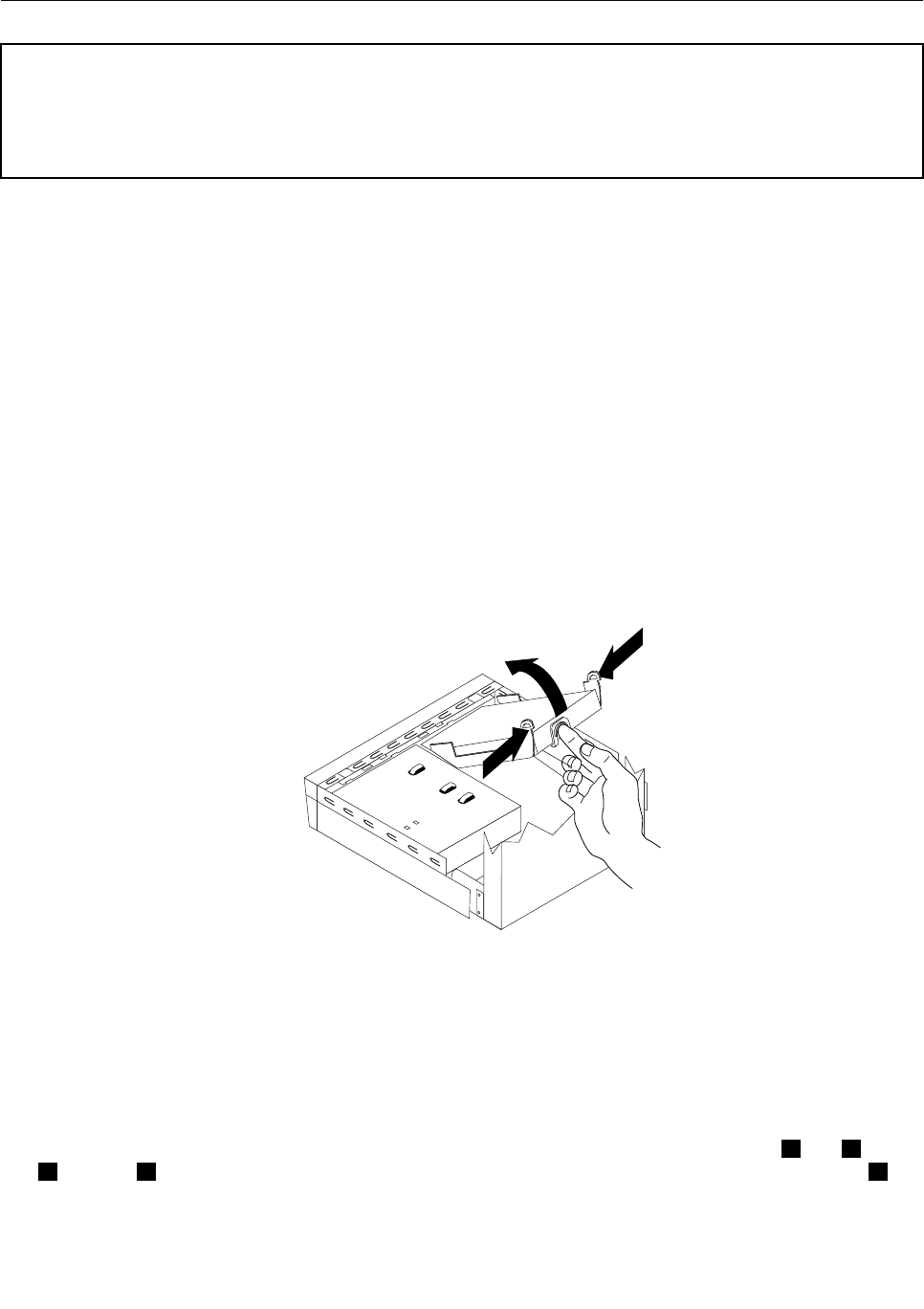
Replacingtheharddiskdrive
Attention
Donotopenyourcomputerorattemptanyrepairbeforereadingandunderstandingthe“Importantsafetyinformation”
intheThinkCentreSafetyandWarrantyGuidethatcamewithyourcomputer.ToobtainacopyoftheThinkCentre
SafetyandWarrantyGuide,goto:
http://www.lenovo.com/support
Thissectionprovidesinstructionsonhowtoreplacetheharddiskdriveifyourcomputerhasone.For
computermodelsthatdonothaveaninternalharddiskdriveinstalledandusearemoteharddiskdrive
accessedthroughtheSMC-StorageArray,contactyournetworkorstorageadministrator.
Important
Whenyoureceiveanewharddiskdrive,youalsoreceiveasetofProductRecoverydiscs.Thesetof
ProductRecoverydiscswillenableyoutorestorethecontentsoftheharddisktothesamestateaswhen
yourcomputerwasoriginallyshippedfromthefactory.Formoreinformationonrecoveringfactory-installed
software,referto“Recoveringsoftware”inyourThinkCentreUserGuide.
Toreplacetheharddiskdrive:
1.Openthecomputercover.See“Openingthecomputercover”onpage71.
2.Disconnectthepowercablefromtheopticaldrive.
3.Placeyourngeronthetablocatedonthefrontoftheharddiskdriveandpushupward.Thenpress
inwardonthesidetabsandpivottheharddiskdriveupwardtoremove.
Figure23.Removingtheharddiskdrive
4.Removethefailingharddiskdrivefromthechassis.
5.Disconnectthesignalandpowercablesfromtheharddiskdrive.
6.Removetheharddiskdrivefromtheplasticbracketbyexingthesidesofthebracketenoughtoslide
itfreeoftheharddiskdrive.
7.Toinstallthenewharddiskdriveintotheplasticbracket,exthebracketandalignpin1,pin2,pin
3,andpin4onthebracketwiththeholesintheharddiskdrive.Donottouchthecircuitboard5
onthebottomoftheharddiskdrive.
Chapter8.ReplacingFRUs85
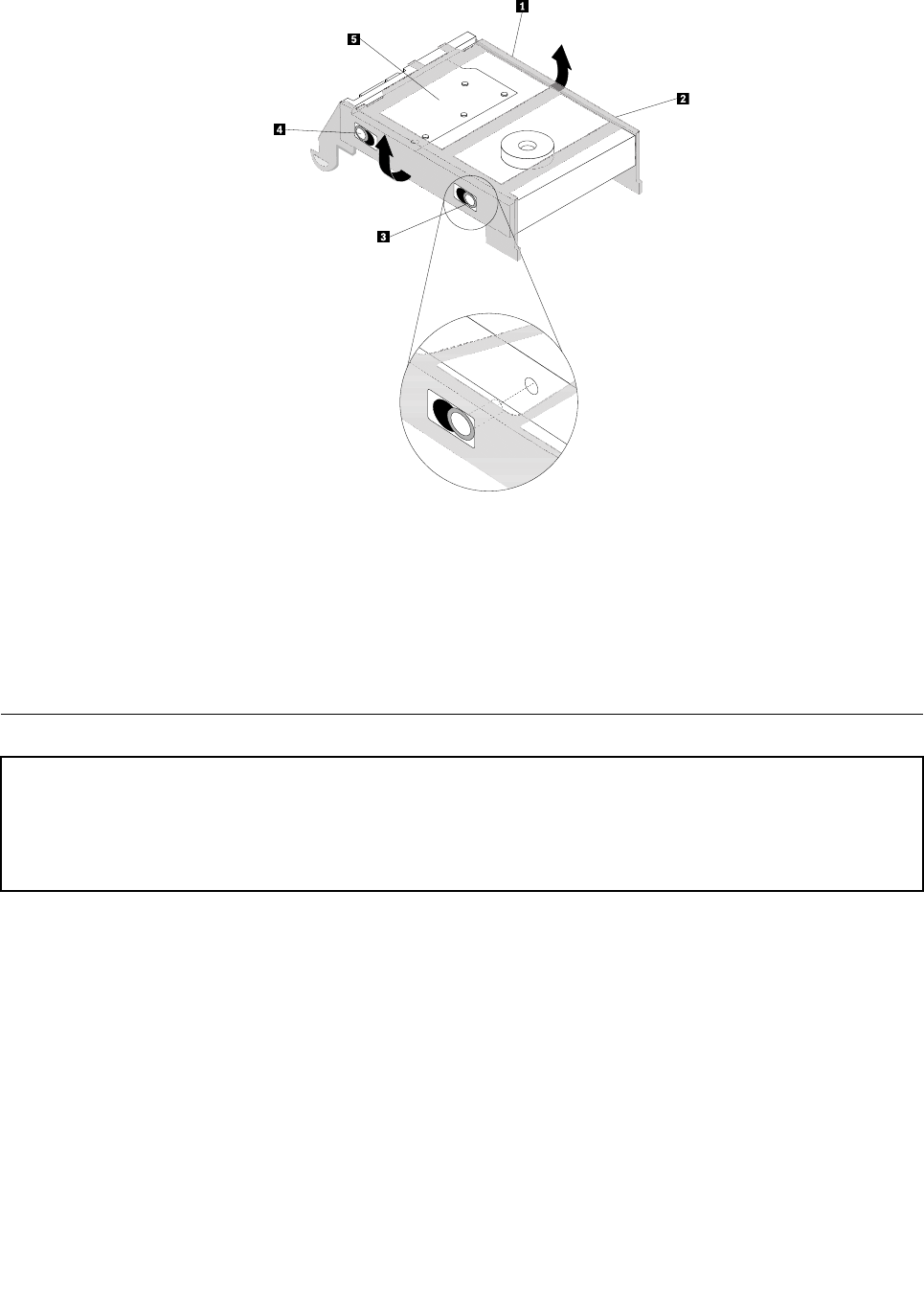
Figure24.Installingtheharddiskdriveintothebracket
8.Connectthesignalandpowercablestotherearofthenewharddiskdrive.
9.Slidethenewharddiskdriveintothedrivebayuntilitsnapsintoposition.
10.Reconnectthepowercabletotheopticaldrive.
11.Goto“CompletingtheFRUreplacement”onpage89.
Replacingtheopticaldrive
Attention
Donotopenyourcomputerorattemptanyrepairbeforereadingandunderstandingthe“Importantsafetyinformation”
intheThinkCentreSafetyandWarrantyGuidethatcamewithyourcomputer.ToobtainacopyoftheThinkCentre
SafetyandWarrantyGuide,goto:
http://www.lenovo.com/support
Thissectionprovidesinstructionsonhowtoreplacetheopticaldrive.
Toreplacetheopticaldrive:
1.Openthecomputercover.See“Openingthecomputercover”onpage71.
2.Removethefrontbezelbyreleasingthetwotabsandpivotingthebezelforwardtoremovecompletely.
86ThinkCentreHardwareMaintenanceManual
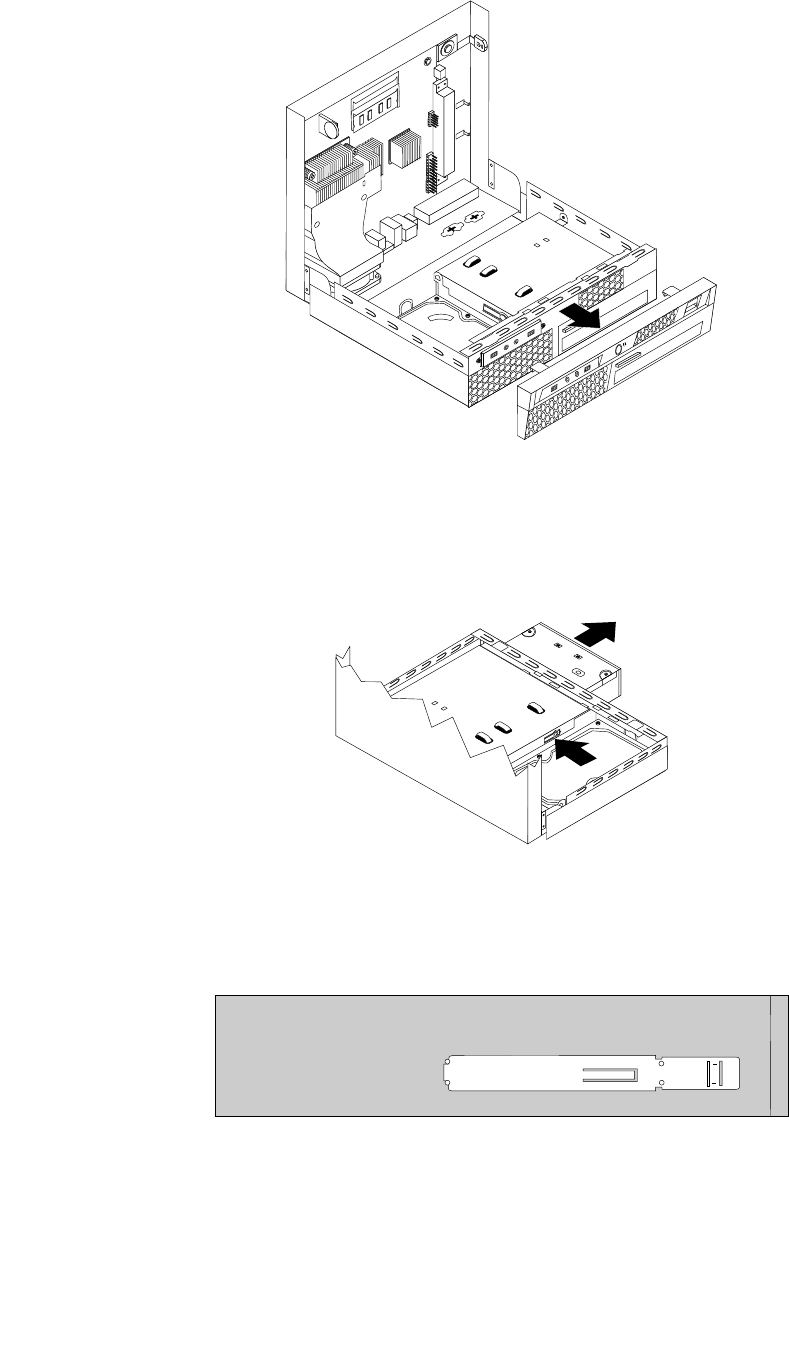
Figure25.Removingthefrontbezel
3.Disconnectthesignalandpowercablesfromtherearoftheopticaldrive.
4.Presstheopticaldrivelockbuttontoremovetheopticaldriveoutthefrontofthecomputer.
Figure26.Removingtheopticaldrive
5.Removetheretainerbracketfromthefailingdriveandinstallitonthenewopticaldrive.
Figure27.Retainerbracketforopticaldrive
6.Slidethenewopticaldriveintothedrivebayuntilitsnapsintoposition.
Chapter8.ReplacingFRUs87
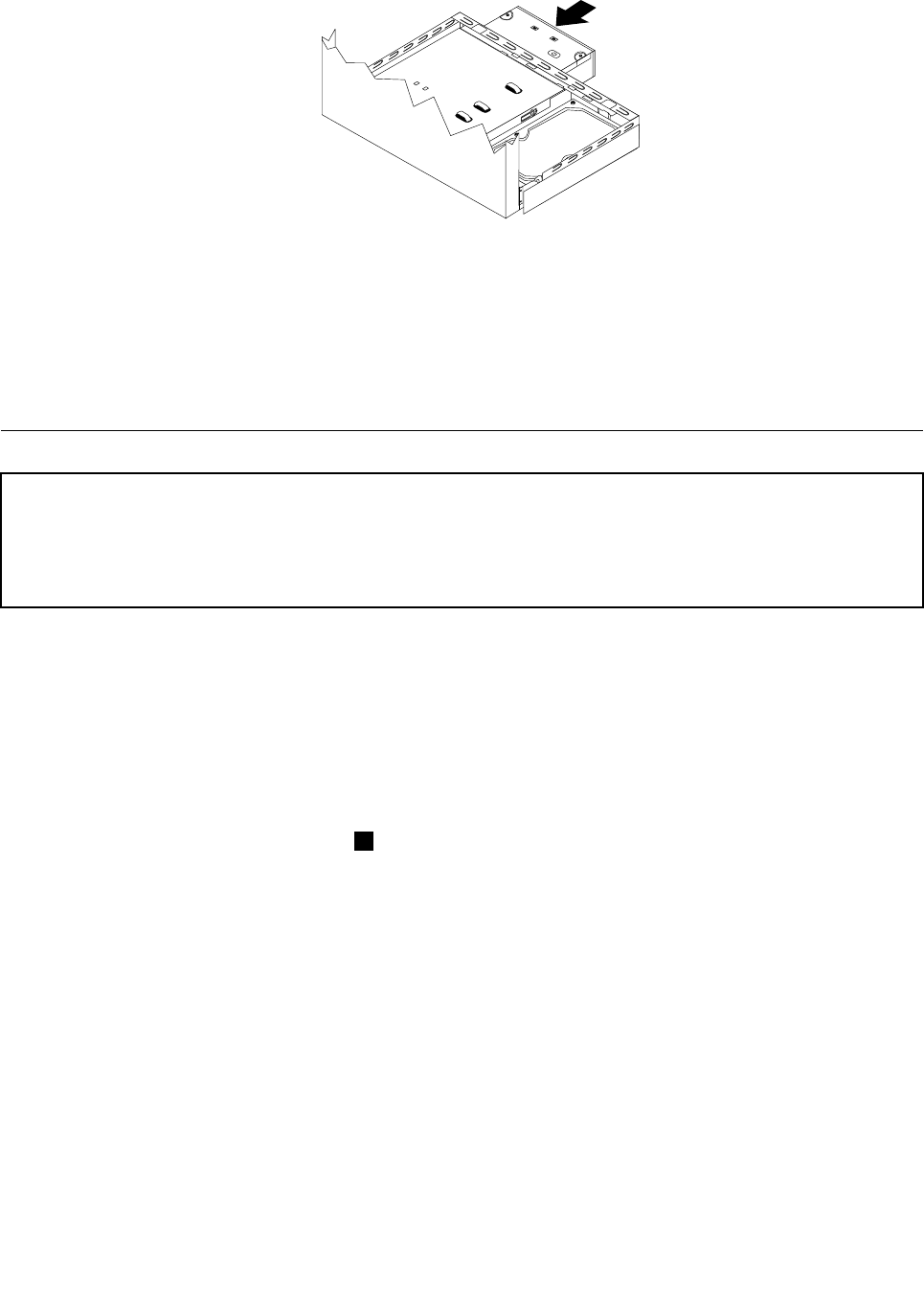
Figure28.Replacingtheopticaldrive
7.Connectthesignalandpowercablestothedrive.
8.Toreinstallthefrontbezel,aligntheplastictabsonthebottomofthebezelwiththecorrespondingholes
inthechassis,thenpivotthebezelinwarduntilitsnapsintoposition.
9.Goto“CompletingtheFRUreplacement”onpage89.
Replacingtheinternalspeaker
Attention
Donotopenyourcomputerorattemptanyrepairbeforereadingandunderstandingthe“Importantsafetyinformation”
intheThinkCentreSafetyandWarrantyGuidethatcamewithyourcomputer.ToobtainacopyoftheThinkCentre
SafetyandWarrantyGuide,goto:
http://www.lenovo.com/support
Thissectionprovidesinstructionsonhowtoreplacetheinternalspeaker.
Toreplacetheinternalspeaker:
1.Openthecomputercover.See“Openingthecomputercover”onpage71.
2.Locatetheinternalspeaker.See“Locatingcomponents”onpage69.
3.Disconnecttheinternalspeakercablefromthesystemboard.See“Locatingpartsonthesystem
board”onpage70.
4.Presstheinternalspeakerlocklatch1,slidetheinternalspeakerdownwardsandremoveitfrom
thechassis.
88ThinkCentreHardwareMaintenanceManual
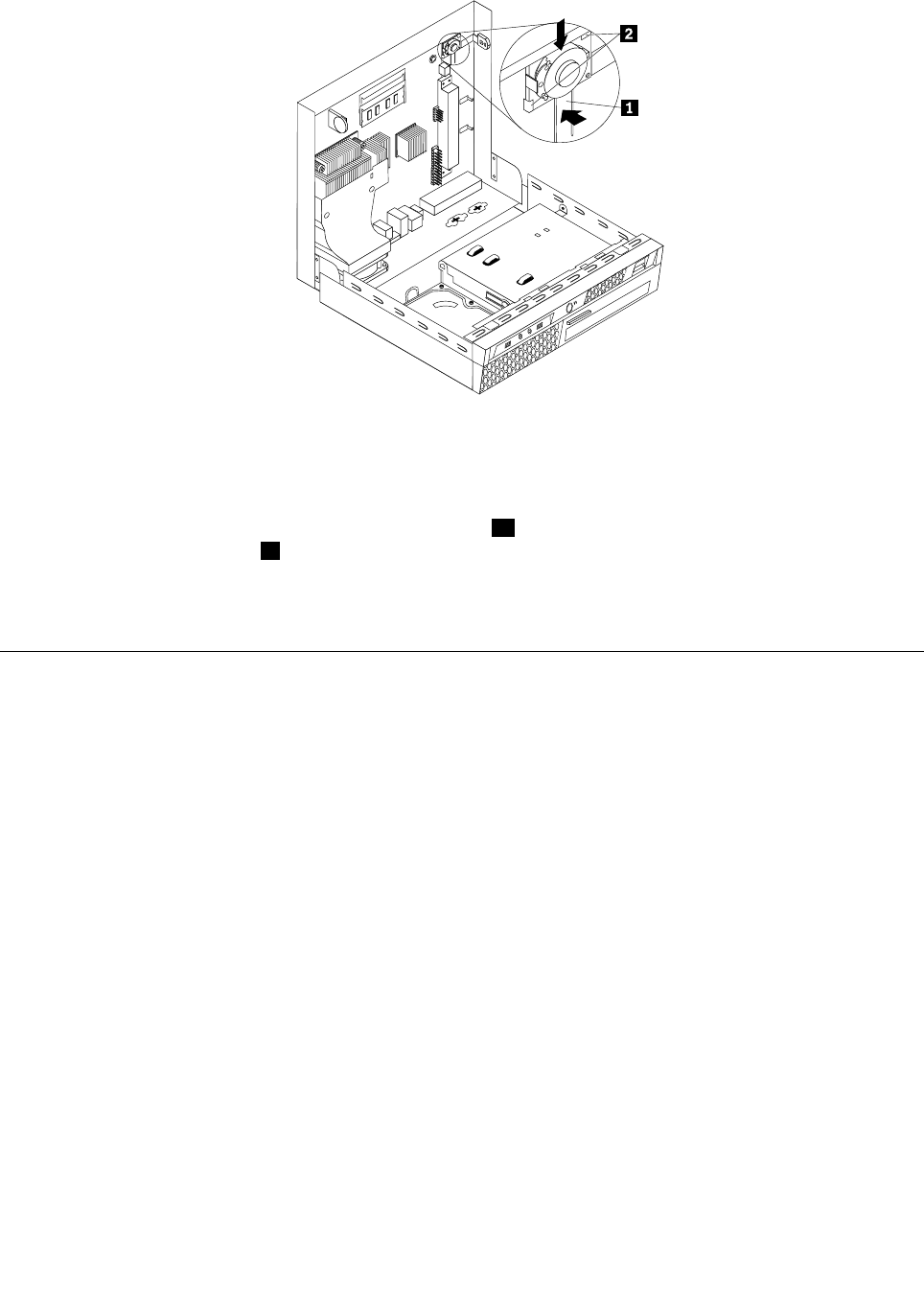
;
Figure29.Removingtheinternalspeaker
5.Positionthenewinternalspeakerintothemetalclips2andpushtheinternalspeakerupwardsuntilitis
securedbythelocklatch1.
6.Connectthenewinternalspeakercabletothesystemboard.
7.Goto“CompletingtheFRUreplacement”onpage89.
CompletingtheFRUreplacement
Thissectionprovidesinstructionsonhowtocompletethepartsreplacement.
Aftercompletingallpartsreplacement,youneedtoclosethecoverandreconnectcables,suchaspower
cords.Dependingonthepartsreplaced,youmightneedtoconrmtheupdatedinformationintheSetup
Utilityprogram.SeeChapter6“UsingtheSetupUtilityprogram”onpage43.
Tocompletethepartsreplacement:
1.Ensurethatallcomponentshavebeenreassembledcorrectlyandthatnotoolsorloosescrewsareleft
insideyourcomputer.See“Locatingcomponents”onpage69forthelocationofvariouscomponents.
2.Makesurethatthecablesareroutedcorrectlybeforeclosingthecomputercover.
Chapter8.ReplacingFRUs89
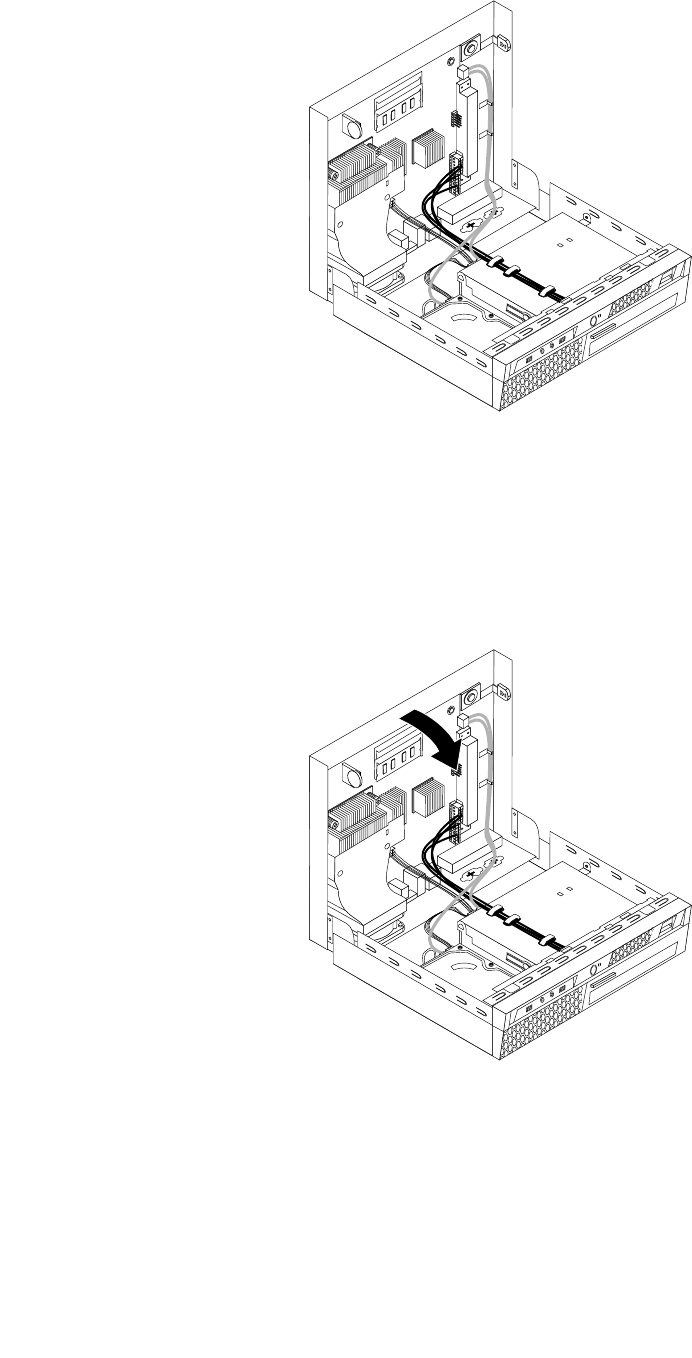
Figure30.Routingthecables
Important
Correctlyrouteallpowersupplycablestoavoidinterferencewhenclosingthecomputercover.Keep
cablesclearofthehingesandsidesofthecomputerchassis.
3.Closethecomputercover.
Figure31.Closingthecomputercover
4.Ifacoverlockisinstalled,lockthecover.
5.Reconnecttheexternalcablesandpowercordstothecomputer.See“Locatingconnectorsontherear
ofthecomputer”onpage68.
6.Toupdateyourconguration,seeChapter6“UsingtheSetupUtilityprogram”onpage43.
90ThinkCentreHardwareMaintenanceManual
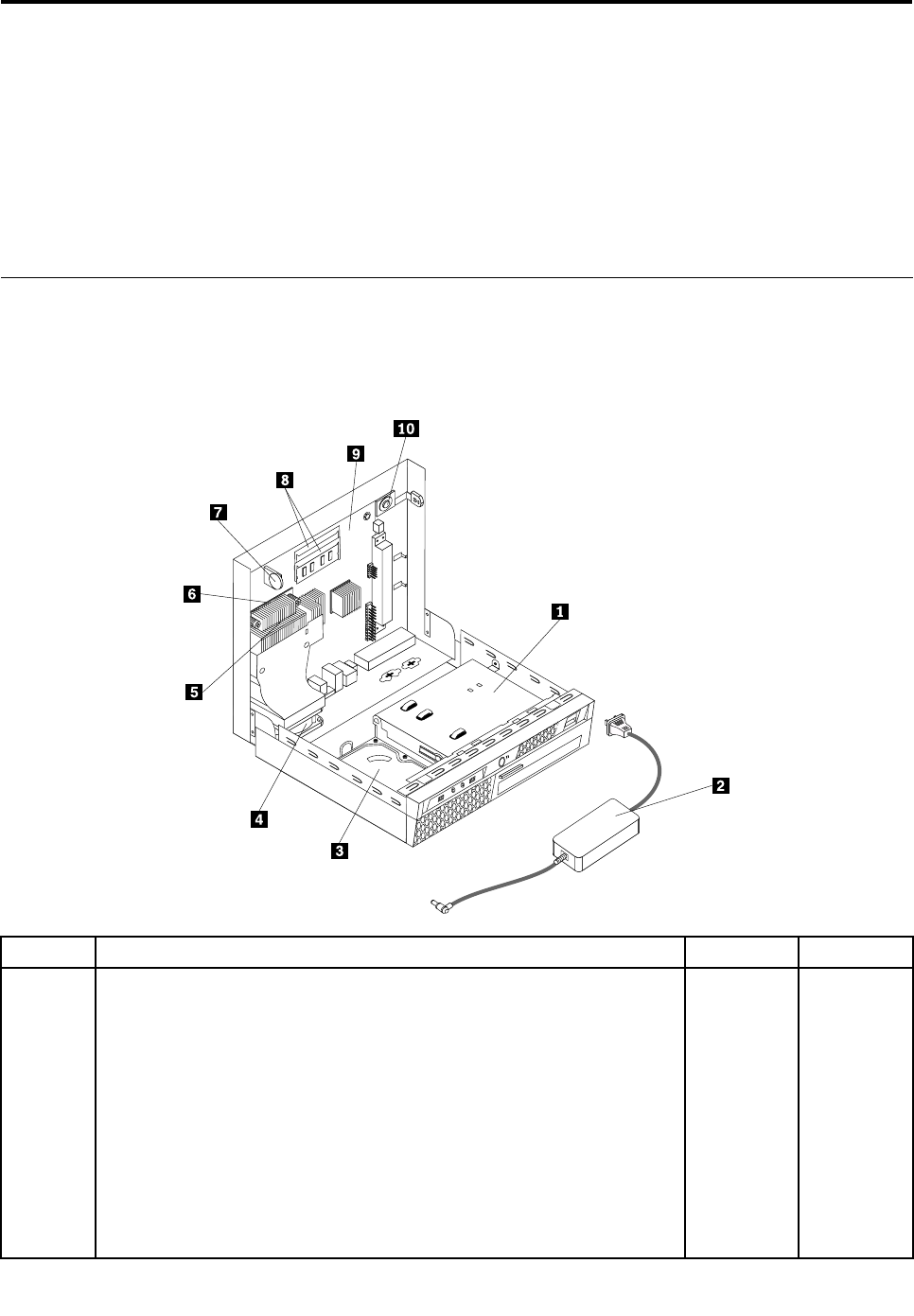
Chapter9.FRUlists
Thischapterliststheinformationontheeldreplaceableunits(FRUs).
Attention:BesuretoreadandunderstandallthesafetyinformationbeforereplacinganyFRUs.
Note:Inthefollowingtables,acustomerreplaceableunit(CRU)isidentiedaseither"1","2",or"N"inthe
CRUcolumn."N"meansthatthepartisnotaCRU,"1"meansthatthepartisaSelf-serviceCRU,and"2"
meansthatthepartisanOptional-serviceCRU.
Overall:MT6136,6139,7187,7345,7348,7356,7359,7479,7626,7629,
7637,8338,8820,and9961
Thefollowingreplaceablecomponentsareavailableforthe6136,6139,7187,7345,7348,7356,7359,7479,
7626,7629,7637,8338,8820,and9961machinetypemodels.
Item#FRUsFRU#CRU
1
Opticaldrive,DVD-ROM16XMaxSATA
•MT6139:
•MT6175:
•MT7187:
•MT7345:
•MT7348:
•MT7356:
•MT7359:D6MD8MDGJDKJDQJDUUDUFF2JF3JF9JFKJ
•MT7479:AMMB1JB4JBBJC2J
•MT7637:
41N33251
©CopyrightLenovo2008,201291

Item#FRUsFRU#CRU
•MT8820:
•MT9961:
•MT6136,7626,7629,and8338_SB
1
Opticaldrive,DVDRecordableSATA/CD-RWRambo8-SATAVista&
non-Vista
•MT6139:A1GA2GA3GA4GA5GA6G
•MT6175:A2G
•MT7187:AKG
•MT7345:A6G
•MT7348:A1GA2GA3GA4GA5G
•MT7356:A2G
•MT7359:B9AB9TD3MD4MD5MD7MD7AD7TD9MDDJDFJDHJ
DJJDNJDPJDVUDVFDWUDWFF1JF4JF6GF7UF7FF7LF8JFAJ
FBMFCJFDMFFMFGJFHJFLJ
•MT7479:B5AB5TANMAPMAQMARMASMAUMAVJAWJB2JB3J
ALMB9UB9FBAJBDMBEUBEFC1JC3J
•MT7637:A2UA2FA2SA2PA2LA2DA2YA2MA2AA2QA2TA2CA2B
A2HA2VA2KA2RA2EA2JA3Q
•MT8820:AJGAKGALGAMGAPGARSARDARYASG
•MT9961:AkUAkFAkSAkPAkDAkYALUALFALSAMG
•MT6136,7626,7629,and8338_SB
43C10421
1
Opticaldrive,DVDRecorderRambo8-SATA12XRAMwrite
•MT6139:
•MT6175:
•MT7187:
•MT7345:
•MT7348:
•MT7356:
•MT7359:B9AB9TD3MD4MD5MD7MD7AD7TD9MDDJDFJDHJ
DJJDNJDPJDVUDVFDWUDWFF1JF4JF6GF7UF7FF7LF8JFAJ
FBMFCJFDMFFMFGJFHJFLJ
•MT7479:B5AB5TANMAPMAQMARMASMAUMAVJAWJB2JB3J
ALMB9UB9FBAJBDMBEUBEFC1JC3J
•MT7637:A2UA2FA2SA2PA2LA2DA2YA2MA2AA2QA2TA2CA2B
A2HA2VA2KA2RA2EA2JA3Q
•MT8820:ARSARDARYASG
•MT9961:
•MT6136,7626,7629,and8338_SB
71Y55451
92ThinkCentreHardwareMaintenanceManual

Item#FRUsFRU#CRU
2
Powersupply,130WAC/DCpweradapter(forGmodel)
•MT6139:
•MT6175:
•MT7187:
•MT7345:
•MT7348:
•MT7356:
•MT7359:
•MT7479:
•MT7637:
•MT8820:
•MT9961:
•MT6136,7626,7629,and8338_SB
54Y88561
2
Powersupply,130WAC/DCpoweradapter(noGmodel)
•MT6139:
•MT6175:
•MT7187:
•MT7345:
•MT7348:
•MT7356:
•MT7359:
•MT7479:
•MT7637:
•MT8820:
•MT9961:
•MT6136,7626,7629,and8338_SB
54Y88571
2
Powersupply,130WAC/DCpoweradapter(forGmodel)
•MT6139:
•MT6175:
•MT7187:
•MT7345:
•MT7348:
•MT7356:
•MT7359:
•MT7479:
•MT7637:
•MT8820:
•MT9961:
•MT6136,7626,7629,and8338_SB
41A97671
Chapter9.FRUlists93

Item#FRUsFRU#CRU
3
Harddiskdrive,SATA160GB7200RPM/3Gb/8MB
•MT6139:
•MT6175:
•MT7187:AKG
•MT7345:A6G
•MT7348:
•MT7356:
•MT7359:F4J
•MT7479:
•MT7637:
•MT8820:
•MT9961:
•MT6136,7626,7629,and8338_SB
40Y90351
3
Harddiskdrive,160GB7200rpmSATA
•MT6139:
•MT6175:
•MT7187:AKG
•MT7345:A6G
•MT7348:
•MT7356:
•MT7359:F4J
•MT7479:
•MT7637:
•MT8820:
•MT9961:
•MT6136,7626,7629,and8338_SB
53Y68371
3
Harddiskdrive,SATA250GB7200RPM/3Gb/8MB
•MT6139:
•MT6175:
•MT7187:
•MT7345:
•MT7348:A1GA4G
•MT7356:A2G
•MT7359:B9AB9TD3MD4MD6MD7MD7AD7TDNJDPJDQJDUU
DUFDVUDVFDWUDWFF1JF2JF3JF6GF7UF7FF7LF8JF9JFHJ
FKJ
•MT7479:AMMANMAPMAQMALMB9UB9FBDMBEUBEF
•MT7637:A2UA2FA2SA2PA2LA2DA2YA2MA2AA2QA2TA2CA2B
A2HA2VA2KA2RA2EA2JA3Q
•MT8820:AnUAnFAnSAnPAnDAnYAQUAQFAQS
•MT9961:AkUAkFAkSAkPAkDAkYALUALFALSAMG
•MT6136,7626,7629,and8338_SB
40Y90361
94ThinkCentreHardwareMaintenanceManual

Item#FRUsFRU#CRU
3
Harddiskdrive,250GB7200rpmSATA
•MT6139:
•MT6175:
•MT7187:
•MT7345:
•MT7348:A4G
•MT7356:A2G
•MT7359:B9AB9TD3MD4MD6MD7MD7AD7TDNJDPJDQJDUU
DUFDVUDVFDWUDWFF1JF2JF3JF6GF7UF7FF7LF8JF9JFHJ
FKJ
•MT7479:AMMANMAPMAQMALMB9UB9FBDMBEUBEF
•MT7637:A2UA2FA2SA2PA2LA2DA2YA2MA2AA2QA2TA2CA2B
A2HA2VA2KA2RA2EA2JA3Q
•MT8820:AQUAQFAQS
•MT9961:AkUAkFAkSAkPAkDAkYALUALFALSAMG
•MT6136,7626,7629,and8338_SB
45K04081
3
Harddiskdrive,SATA320GB7200rpmSATA/8MB
•MT6139:A1GA2GA3GA4GA5GA6G
•MT6175:
•MT7187:
•MT7345:
•MT7348:A2GA3GA5G
•MT7356:
•MT7359:D5MD8MD9MDDJDFJDGJDHJDJJDKJFAJFBMFCJ
FDMFFMFHJFKJ
•MT7479:B5AB5TARMASMAUMAVJAWJB1JB2JB3JB4JBAJ
BBJC1JC2JC3J
•MT7637:
•MT8820:AJGAKGALGAMGAPGARSARDARY
•MT9961:
•MT6136,7626,7629,and8338_SB
87H48911
3
Harddiskdrive,320GB7200rpmSATA
•MT6139:A1GA2GA3GA4GA5GA6G
•MT6175:
•MT7187:
•MT7345:
•MT7348:A2GA3GA5G
•MT7356:
•MT7359:D5MD8MD9MDDJDFJDGJDHJDJJDKJFAJFBMFCJ
FDMFFMFHJFKJ
•MT7479:B5AB5TARMASMAUMAVJAWJB1JB2JB3JB4JBAJ
BBJC1JC2JC3J
•MT7637:
•MT8820:AJGAKGALGAMGAPGARSARDARY
45K04091
Chapter9.FRUlists95

Item#FRUsFRU#CRU
•MT9961:
•MT6136,7626,7629,and8338_SB
3
Harddiskdrive,SATA500GB7200RPM/3Gb/s/8MB
•MT6139:
•MT6175:
•MT7187:
•MT7345:
•MT7348:
•MT7356:
•MT7359:
•MT7479:
•MT7637:
•MT8820:
•MT9961:
•MT6136,7626,7629,and8338_SB
41X55821
3
Harddiskdrive,500GB7200rpmSATA
•MT6139:
•MT6175:
•MT7187:
•MT7345:
•MT7348:
•MT7356:
•MT7359:
•MT7479:
•MT7637:
•MT8820:ASG
•MT9961:
•MT6136,7626,7629,and8338_SB
45K04101
3
Harddiskdrive,SATA1TB7200RPM/3Gb/8MB
•MT6139:91Z
•MT6175:
•MT7187:
•MT7345:
•MT7348:
•MT7356:
•MT7359:91Z
•MT7479:91Z
•MT7637:91Z
•MT8820:91Z
•MT9961:91Z
•MT6136,7626,7629,and8338_SB
45C59731
96ThinkCentreHardwareMaintenanceManual

Item#FRUsFRU#CRU
3
Harddiskdrive,1TB7200rpmSATA
•MT6139:91Z
•MT6175:
•MT7187:
•MT7345:
•MT7348:91Z
•MT7356:
•MT7359:91Z
•MT7479:91Z
•MT7637:91Z
•MT8820:91Z
•MT9961:91Z
•MT6136,7626,7629,and8338_SB
45K04121
3
Harddiskdrive,500GHDDwithcachesize8M->16M
•MT6139:
•MT6175:
•MT7187:
•MT7345:
•MT7348:
•MT7356:
•MT7359:
•MT7479:
•MT7637:
•MT8820:
•MT9961:
•MT6136,7626,7629,and8338_SB
45X55821
4
FRU,systemfanassembly
•MT6139:allmodels
•MT6175:
•MT7187:allmodels
•MT7345:allmodels
•MT7348:allmodels
•MT7356:allmodels
•MT7359:allmodels
•MT7479:allmodels
•MT7637:allmodels
•MT8820:allmodels
•MT9961:allmodels
•MT6136,7626,7629,and8338_SB
43N96552
Chapter9.FRUlists97

Item#FRUsFRU#CRU
5
FRU,65WHeatsinkkit
•MT6139:allmodels
•MT6175:
•MT7187:allmodels
•MT7345:allmodels
•MT7348:allmodels
•MT7356:allmodels
•MT7359:allmodels
•MT7479:allmodels
•MT7637:allmodels
•MT8820:allmodels
•MT9961:allmodels
•MT6136,7626,7629,and8338_SB
43N94272
6
Microprocessor,E4700Conroe2.60GHz800MHzFSB2M
•MT6139:
•MT6175:
•MT7187:
•MT7345:
•MT7348:
•MT7356:
•MT7359:
•MT7479:
•MT7637:
•MT8820:
•MT9961:
•MT6136,7626,7629,and8338_SB
45R57862
6
Microprocessor,E8600Wolfdale,3.33GHZ,1333MFSB6ME-0
•MT6139:
•MT6175:
•MT7187:
•MT7345:
•MT7348:
•MT7356:
•MT7359:
•MT7479:
•MT7637:
•MT8820:
•MT9961:
•MT6136,7626,7629,and8338_SB
46R86402
98ThinkCentreHardwareMaintenanceManual

Item#FRUsFRU#CRU
6
Microprocessor,Core2DuoE8500Processor3.16GHz1333MHzFSB
6ML265WC-0
•MT6139:
•MT6175:
•MT7187:
•MT7345:
•MT7348:
•MT7356:
•MT7359:
•MT7479:ASMBEUBEF
•MT7637:
•MT8820:
•MT9961:
•MT6136,7626,7629,and8338_SB
45C77352
6
Microprocessor,Core2DuoE8400processor3.00GHz1333MHzFSB
6ML265WC-0
•MT6139:
•MT6175:
•MT7187:
•MT7345:A6G
•MT7348:
•MT7356:A2G
•MT7359:
•MT7479:AMMANMAPMAQMARMAVJAWJB1JB2JB3JB4JALM
B9UB9FBAJBBJBDMC1JC2JC3J
•MT7637:
•MT8820:
•MT9961:AkUAkFAkSAkPAkDAkYALUALFALS
•MT6136,7626,7629,and8338_SB
45C77362
6
Microprocessor,Core2DuoE8300processor2.83GHz1333MHzFSB
6ML265WC-0
•MT6139:
•MT6175:
•MT7187:
•MT7345:
•MT7348:
•MT7356:
•MT7359:
•MT7479:
•MT7637:
•MT8820:
•MT9961:
•MT6136,7626,7629,and8338_SB
45C77372
Chapter9.FRUlists99

Item#FRUsFRU#CRU
6
Microprocessor,E7200Wolfdale2.53GHZ1066MHZFSB3MBM-0
•MT6139:
•MT6175:
•MT7187:
•MT7345:
•MT7348:
•MT7356:
•MT7359:
•MT7479:
•MT7637:
•MT8820:
•MT9961:
•MT6136,7626,7629,and8338_SB
45R83372
6
Microprocessor,E7300Wolfdale2.66GHZ1066FSBFSB3MBM-0
•MT6139:
•MT6175:
•MT7187:
•MT7345:
•MT7348:
•MT7356:
•MT7359:
•MT7479:
•MT7637:
•MT8820:
•MT9961:
•MT6136,7626,7629,and8338_SB
46R16222
6
Microprocessor,E2200Conroe-L2.20GHz800MHzFSB1M
•MT6139:
•MT6175:
•MT7187:
•MT7345:
•MT7348:
•MT7356:
•MT7359:
•MT7479:
•MT7637:
•MT8820:
•MT9961:
•MT6136,7626,7629,and8338_SB
45C53492
100ThinkCentreHardwareMaintenanceManual

Item#FRUsFRU#CRU
6
Microprocessor,E2220Conroe-L2.40GHz800MHzFSB1M
•MT6139:
•MT6175:
•MT7187:
•MT7345:
•MT7348:
•MT7356:
•MT7359:
•MT7479:
•MT7637:
•MT8820:
•MT9961:
•MT6136,7626,7629,and8338_SB
45C17742
6
Microprocessor,E5200Wolfdale2.50GHZ800FSB2M
•MT6139:
•MT6175:
•MT7187:
•MT7345:
•MT7348:
•MT7356:
•MT7359:
•MT7479:
•MT7637:
•MT8820:
•MT9961:
•MT6136,7626,7629,and8338_SB
46R95122
6
Microprocessor,4502.20GHZ800MHzFSB512K
•MT6139:
•MT6175:
•MT7187:
•MT7345:
•MT7348:
•MT7356:
•MT7359:
•MT7479:
•MT7637:
•MT8820:
•MT9961:
•MT6136,7626,7629,and8338_SB
46R95142
Chapter9.FRUlists101

Item#FRUsFRU#CRU
6
Microprocessor,E1400Conroe2.00GHZ800MHZFSB512K-NPIM-0
•MT6139:
•MT6175:
•MT7187:
•MT7345:
•MT7348:
•MT7356:
•MT7359:
•MT7479:
•MT7637:
•MT8820:
•MT9961:
•MT6136,7626,7629,and8338_SB
45R83392
6
Microprocessor,Celeron440Processor2.00GHz800MHzFSB512KL2
A-1steppinglevel,valueFMB
•MT6139:
•MT6175:
•MT7187:
•MT7345:
•MT7348:
•MT7356:
•MT7359:
•MT7479:
•MT7637:
•MT8820:
•MT9961:
•MT6136,7626,7629,and8338_SB
43C19652
6
Microprocessor,Q9400Yorkeld2.66GHZ1333FSB6MBVT,TXTR-0
•MT6139:
•MT6175:
•MT7187:
•MT7345:
•MT7348:
•MT7356:
•MT7359:
•MT7479:B5AB5TAUM
•MT7637:
•MT8820:
•MT9961:
•MT6136,7626,7629,and8338_SB
46R86482
102ThinkCentreHardwareMaintenanceManual

Item#FRUsFRU#CRU
6
Microprocessor,Q9550Yorkeld2.83GHz1333FSB12MBVT,TXTE-0
•MT6139:
•MT6175:
•MT7187:
•MT7345:
•MT7348:
•MT7356:
•MT7359:
•MT7479:
•MT7637:
•MT8820:
•MT9961:
•MT6136,7626,7629,and8338_SB
46R86462
6
Microprocessor,Q8200Yorkeld2.33GHZ1333FSB4MBR-0
•MT6139:
•MT6175:
•MT7187:
•MT7345:
•MT7348:
•MT7356:
•MT7359:
•MT7479:
•MT7637:
•MT8820:
•MT9961:
•MT6136,7626,7629,and8338_SB
53Y39462
6
Microprocessor,E7500Wolfdale2.93GHZ/1066FSB3M
ViiV,EIST,EM64T,EDBR-0
•MT6139:
•MT6175:
•MT7187:
•MT7345:
•MT7348:A2GA3GA5G
•MT7356:
•MT7359:F6GFFM
•MT7479:
•MT7637:A2UA2FA2SA2PA2LA2DA2YA2MA2AA2QA2TA2CA2B
A2HA2VA2KA2RA2EA2JA3Q
•MT8820:AJGAKGAnUAnFAnSAnPAnDAnYAPGAQUAQFAQS
ASG
•MT9961:
•MT6136,7626,7629,and8338_SB
53Y66542
Chapter9.FRUlists103

Item#FRUsFRU#CRU
6
Microprocessor,E7400Wolfdale2.8GHZ/1066FSB3M
ViiV,EIST,EM64T,EDBR-0
•MT6139:
•MT6175:
•MT7187:
•MT7345:
•MT7348:
•MT7356:
•MT7359:
•MT7479:
•MT7637:
•MT8820:
•MT9961:
•MT6136,7626,7629,and8338_SB
53Y66532
6
Microprocessor,E1500Conroe2.2GHZ/800FSB512KBEIST,EM64T,EDB
M-0
•MT6139:
•MT6175:
•MT7187:
•MT7345:
•MT7348:
•MT7356:
•MT7359:
•MT7479:
•MT7637:
•MT8820:
•MT9961:
•MT6136,7626,7629,and8338_SB
53Y90512
6
Microprocessor,E5400Wolfdale2.7GHz/800FSB2MBEIST,EM64T,EDB
R-0
•MT6139:A3GA4G
•MT6175:
•MT7187:
•MT7345:
•MT7348:A4G
•MT7356:
•MT7359:
•MT7479:
•MT7637:
•MT8820:
•MT9961:
•MT6136,7626,7629,and8338_SB
64Y10752
104ThinkCentreHardwareMaintenanceManual

Item#FRUsFRU#CRU
6
Microprocessor,E5200Wolfdale2.5GHZ800FSB2MR-0steppinglevel
•MT6139:
•MT6175:
•MT7187:
•MT7345:
•MT7348:
•MT7356:
•MT7359:
•MT7479:
•MT7637:
•MT8820:
•MT9961:
•MT6136,7626,7629,and8338_SB
46R95122
6
Microprocessor,IntelCore2DuoE76003.06G/1066/3M/775VTR065W
QLUH
•MT6139:
•MT6175:
•MT7187:
•MT7345:
•MT7348:
•MT7356:
•MT7359:B9AB9TD6MD7MD7AD7TD8MD9MDDJDFJDGJDHJ
DJJDKJDNJDPJDQJF8JF9JFAJFCJFGJFHJFKJFLJ
•MT7479:
•MT7637:
•MT8820:
•MT9961:
•MT6136,7626,7629,and8338_SB
71Y34862
6
Microprocessor,IntelCore2QuadQ8400S2.66/1333/4/775VTR065W
QLRY
•MT6139:
•MT6175:
•MT7187:
•MT7345:
•MT7348:
•MT7356:
•MT7359:
•MT7479:
•MT7637:
•MT8820:
•MT9961:
•MT6136,7626,7629,and8338_SB
71Y34902
Chapter9.FRUlists105

Item#FRUsFRU#CRU
6
Microprocessor,IntelPentiumDualCoreE63002.8G/1066/2M/775VTR0
65WQLPZ
•MT6139:
•MT6175:
•MT7187:
•MT7345:
•MT7348:
•MT7356:
•MT7359:D3MD4MD5MDUUDUFDVUDVFDWUDWF
•MT7479:
•MT7637:
•MT8820:
•MT9961:
•MT6136,7626,7629,and8338_SB
71Y34842
6
Microprocessor,E5300Wolfdale2.6GHz/800FSB2MBEIST,EM64T,EDB
R-0
•MT6139:A1GA2G
•MT6175:
•MT7187:A1GA2G
•MT7345:A1GA2G
•MT7348:A1GA2G
•MT7356:A1GA2G
•MT7359:A1GA2G
•MT7479:A1GA2G
•MT7637:
•MT8820:A1GA2G
•MT9961:A1GA2G
•MT6136,7626,7629,and8338_SB
53Y90492
6
Microprocessor,InteCeleronDualCoreE34002.6GHZ/800MHz/1MB
R-065WVT
•MT6139:
•MT6175:
•MT7187:
•MT7345:
•MT7348:
•MT7356:
•MT7359:
•MT7479:
•MT7637:
•MT8820:
•MT9961:
•MT6136,7626,7629,and8338_SB
89Y02072
106ThinkCentreHardwareMaintenanceManual

Item#FRUsFRU#CRU
6
Microprocessor,InteCeleronDualCoreE33002.5GHZ/800MHz/1MB
R-065WVT
•MT6139:
•MT6175:
•MT7187:
•MT7345:
•MT7348:
•MT7356:
•MT7359:
•MT7479:
•MT7637:
•MT8820:
•MT9961:
•MT6136,7626,7629,and8338_SB
71Y62522
6
Microprocessor,IntelCeleronDualCoreE32002.4GHZ/800MHz/1MB
R-065WVT
•MT6139:
•MT6175:
•MT7187:
•MT7345:
•MT7348:
•MT7356:
•MT7359:
•MT7479:
•MT7637:
•MT8820:
•MT9961:
•MT6136,7626,7629,and8338_SB
71Y62512
6
Microprocessor,IntelPentiumDualCoreE65002.93GHZ/1066MHz/2MB
R-065W
•MT6139:
•MT6175:
•MT7187:
•MT7345:
•MT7348:
•MT7356:
•MT7359:
•MT7479:
•MT7637:
•MT8820:
•MT9961:
•MT6136,7626,7629,and8338_SB
71Y62502
Chapter9.FRUlists107

Item#FRUsFRU#CRU
6
Microprocessor,IntelPentiumDualCoreE66003.06GHZ/1066MHz/2MB
R-065W
•MT6139:
•MT6175:
•MT7187:
•MT7345:
•MT7348:
•MT7356:
•MT7359:
•MT7479:
•MT7637:
•MT8820:
•MT9961:
•MT6136,7626,7629,and8338_SB
89Y01982
6
Microprocessor,IntelPentiumDualCoreE67003.20GHZ/1066MHZ/2M
VTR065W
•MT6139:
•MT6175:
•MT7187:
•MT7345:
•MT7348:
•MT7356:
•MT7359:FBMFDM
•MT7479:
•MT7637:
•MT8820:
•MT9961:
•MT6136,7626,7629,and8338_SB
03T60092
6
Microprocessor,E6800PentiumDualCore3.3GHZ/1066MHZ/2M
Wolfdale-2MR-0stepping
•MT6139:
•MT6175:
•MT7187:
•MT7345:
•MT7348:
•MT7356:
•MT7359:
•MT7479:
•MT7637:
•MT8820:
•MT9961:
•MT6136,7626,7629,and8338_SB
03T60062
108ThinkCentreHardwareMaintenanceManual

Item#FRUsFRU#CRU
6
Microprocessor,E5700PentiumDualCore
3.0GHz/800Mhz/2M,Wolfdale-2MR-0stepping
•MT6139:
•MT6175:
•MT7187:
•MT7345:
•MT7348:
•MT7356:
•MT7359:
•MT7479:
•MT7637:
•MT8820:
•MT9961:
•MT6136,7626,7629,and8338_SB
03T60072
6
Microprocessor,E3500CeleronDualCore2.7GHZ/800MHZ/1M
Wolfdale-1MR-0stepping
•MT6139:
•MT6175:
•MT7187:
•MT7345:
•MT7348:
•MT7356:
•MT7359:
•MT7479:
•MT7637:
•MT8820:
•MT9961:
•MT6136,7626,7629,and8338_SB
03T60082
8
Memorymodule,1GBPC3-85001066MHzDDR3SoDIMM
•MT6139:
•MT6175:
•MT7187:
•MT7345:
•MT7348:
•MT7356:
•MT7359:DNJDPJDQJF1JF2JF3JF4J
•MT7479:B2JB3JB4J
•MT7637:
•MT8820:
•MT9961:
•MT6136,7626,7629,and8338_SB
46R33251
Chapter9.FRUlists109

Item#FRUsFRU#CRU
8
Memorymodule,2GBPC3-85001066MHzDDR3SoDIMM
•MT6139:A1GA2GA3GA4GA5GA6G
•MT6175:
•MT7187:AKG
•MT7345:A6G
•MT7348:A1GA2GA3GA4GA5G
•MT7356:A2G
•MT7359:B9AB9TD3MD4MD5MD6MD7MD7AD7TD8MD9MDDJ
DFJDGJDHJDJJDKJDUUDUFDVUDVFDWUDWFF6GF7UF7F
F7LF8JF9JFAJFBMFCJFDMFFMFGJFHJFKJFLJ
•MT7479:B5AB5TAMMANMAPMAQMARMASMAUMAVJAWJB1J
ALMB9UB9FBAJBBJBDMBEUBEFC1JC2JC3J
•MT7637:A2UA2FA2SA2PA2LA2DA2YA2MA2AA2QA2TA2CA2B
A2HA2VA2KA2RA2EA2JA3Q
•MT8820:AJGAKGALGAMGAnUAnFAnSAnPAnDAnYAPGAQU
AQFAQSARSARDARYASG
•MT9961:AkUAkFAkSAkPAkDAkYALUALFALSAMG
•MT6136,7626,7629,and8338_SB
46R33261
8
Memorymodule,4GBPC3-106001333MHzDDR3SODIMM
•MT6139:
•MT6175:
•MT7187:
•MT7345:
•MT7348:
•MT7356:
•MT7359:
•MT7479:
•MT7637:
•MT8820:
•MT9961:
•MT6136,7626,7629,and8338_SB
89Y92251
9
Systemboard,504AT-swallowGAIntelQ45non-AMTsubfrom46R1518
•MT6139:A1GA2GA3GA4GA5GA6G
•MT6175:
•MT7187:AKG
•MT7345:A6G
•MT7348:A1GA2GA3GA4GA5G
•MT7356:A2G
•MT7359:F6G
•MT7479:B5AB5TAMMANMAPMAQMARMASMAUMAVJAWJB1J
B2JB3JB4JALMB9UB9FBAJBBJBDMBEUBEFC1JC2JC3J
•MT7637:A2UA2FA2SA2PA2LA2DA2YA2MA2AA2QA2TA2CA2B
A2HA2VA2KA2RA2EA2JA3Q
•MT8820:AJGAKGALGAMGAnUAnFAnSAnPAnDAnYAPGAQU
AQFAQSARSARDARYASG
64Y3057N
110ThinkCentreHardwareMaintenanceManual

Item#FRUsFRU#CRU
•MT9961:AkUAkFAkSAkPAkDAkYALUALFALSAMG
•MT6136,7626,7629,and8338_SB
9
Systemboard,504AT-swallowIntelQ45non-AMT(updatedV1.1)
•MT6139:A1GA2GA3GA4GA5GA6G
•MT6175:
•MT7187:AKG
•MT7345:A6G
•MT7348:A1GA2GA3GA4GA5G
•MT7356:A2G
•MT7359:F6G
•MT7479:B5AB5TAMMANMAPMAQMARMASMAUMAVJAWJB1J
B2JB3JB4JALMB9UB9FBAJBBJBDMBEUBEFC1JC2JC3J
•MT7637:A2UA2FA2SA2PA2LA2DA2YA2MA2AA2QA2TA2CA2B
A2HA2VA2KA2RA2EA2JA3Q
•MT8820:AJGAKGALGAMGAnUAnFAnSAnPAnDAnYAPGAQU
AQFAQSARSARDARYASG
•MT9961:AkUAkFAkSAkPAkDAkYALUALFALSAMG
•MT6136,7626,7629,and8338_SB
64Y2679N
9
Systemboard,planarswallowIntelQ45non-AMT(GIGA)GALevel(PCB
1.1)supportWin7
•MT6139:A1GA2GA3GA4GA5GA6G
•MT6175:
•MT7187:AKG
•MT7345:A6G
•MT7348:A1GA2GA3GA4GA5G
•MT7356:A2G
•MT7359:B9AB9TD3MD4MD5MD6MD7MD7AD7TD8MD9MDDJ
DFJDGJDHJDJJDKJDNJDPJDQJDUUDUFDVUDVFDWUDWF
F1JF2JF3JF4JF6GF7UF7FF7LF8JF9JFAJFBMFCJFDMFFM
FGJFHJFKJFLJ
•MT7479:B5AB5TAMMANMAPMAQMARMASMAUMAVJAWJB1J
B2JB3JB4JALMB9UB9FBAJBBJBDMBEUBEFC1JC2JC3J
•MT7637:A2UA2FA2SA2PA2LA2DA2YA2MA2AA2QA2TA2CA2B
A2HA2VA2KA2RA2EA2JA3Q
•MT8820:AJGAKGALGAMGAnUAnFAnSAnPAnDAnYAPGAQU
AQFAQSARSARDARYASG
•MT9961:AkUAkFAkSAkPAkDAkYALUALFALSAMG
•MT6136,7626,7629,and8338_SB
64Y9772N
Chapter9.FRUlists111

Item#FRUsFRU#CRU
9
Systemboard,RussianonlysystemplanarswallowIntelQ45(GIGA)TPM
disable
•MT6139:
•MT6175:
•MT7187:
•MT7345:
•MT7348:91G
•MT7356:
•MT7479:
•MT7637:
•MT8820:
•MT9961:
•MT6136,7626,7629,and8338_SB
64Y5548N
9
Systemboard,systemplanarswallowIntelQ45(GIGA)TPMdisable
(PCB1.1)supportWin7
•MT6139:
•MT6175:
•MT7187:
•MT7345:
•MT7348:A5G
•MT7356:
•MT7479:
•MT7637:A2UA2FA2SA2PA2LA2DA2YA2MA2AA2QA2TA2CA2B
A2HA2VA2KA2RA2EA2JA3Q
•MT8820:ARSARDARYASG
•MT9961:
•MT6136,7626,7629,and8338_SB
64Y9778N
9
Systemboard,systemplanarswallowIntelQ45(GIGA)GALevel(PCB
1.1)EUP
•MT6139:A1GA2GA3GA4GA5GA6G
•MT6175:
•MT7187:AKG
•MT7345:A6G
•MT7348:A1GA2GA3GA4GA5G
•MT7356:A2G
•MT7479:B5AB5TAMMANMAPMAQMARMASMAUMAVJAWJB1J
B2JB3JB4JALMB9UB9FBAJBBJBDMBEUBEFC1JC2JC3J
•MT7637:A2UA2FA2SA2PA2LA2DA2YA2MA2AA2QA2TA2CA2B
A2HA2VA2KA2RA2EA2JA3Q
•MT8820:ARSARDARYASG
•MT9961:AkUAkFAkSAkPAkDAkYALUALFALSAMG
•MT6136,7626,7629,and8338_SB
71Y6986N
10FRU,C2switch
•MT6139:allmodels
43N95792
112ThinkCentreHardwareMaintenanceManual

Item#FRUsFRU#CRU
•MT6175:
•MT7187:allmodels
•MT7345:allmodels
•MT7348:allmodels
•MT7356:allmodels
•MT7359:allmodels
•MT7479:allmodels
•MT7637:allmodels
•MT8820:allmodels
•MT9961:allmodels
•MT6136,7626,7629,and8338_SB
MechanicalFRUs
TheFRUslistedinthefollowingtablesarenotillustrated.
FRUsFRU#CRU
FRU,mechanicalkit
•MT6139:allmodels
•MT6175:
•MT7187:allmodels
•MT7345:allmodels
•MT7348:allmodels
•MT7356:allmodels
•MT7359:allmodels
•MT7479:allmodels
•MT7637:allmodels
•MT8820:allmodels
•MT9961:allmodels
•MT6136,7626,7629,and8338_SB
43N95692
FRU,verticalstand
•MT6139:allmodels
•MT6175:
•MT7187:allmodels
•MT7345:allmodels
•MT7348:allmodels
•MT7356:allmodels
•MT7359:allmodels
•MT7479:allmodels
•MT7637:allmodels
•MT8820:allmodels
•MT9961:allmodels
•MT6136,7626,7629,and8338_SB
43N95781
Chapter9.FRUlists113

FRUsFRU#CRU
FRU,ODDbezelkit
•MT6139:allmodels
•MT6175:
•MT7187:allmodels
•MT7345:allmodels
•MT7348:allmodels
•MT7356:allmodels
•MT7359:allmodels
•MT7479:allmodels
•MT7637:allmodels
•MT8820:allmodels
•MT9961:allmodels
•MT6136,7626,7629,and8338_SB
43N95801
FRU,non-ODDbezelkit
•MT6139:allmodels
•MT6175:
•MT7187:allmodels
•MT7345:allmodels
•MT7348:allmodels
•MT7356:allmodels
•MT7359:allmodels
•MT7479:allmodels
•MT7637:allmodels
•MT8820:allmodels
•MT9961:allmodels
•MT6136,7626,7629,and8338_SB
43N95811
FRU,cardreaderbezelkit
•MT6139:allmodels
•MT6175:
•MT7187:allmodels
•MT7345:allmodels
•MT7348:allmodels
•MT7356:allmodels
•MT7359:allmodels
•MT7479:allmodels
•MT7637:allmodels
•MT8820:allmodels
•MT9961:allmodels
•MT6136,7626,7629,and8338_SB
43N95821
114ThinkCentreHardwareMaintenanceManual

FRUsFRU#CRU
FRU,noncardreaderbezelkit
•MT6139:allmodels
•MT6175:
•MT7187:allmodels
•MT7345:allmodels
•MT7348:allmodels
•MT7356:allmodels
•MT7359:allmodels
•MT7479:allmodels
•MT7637:allmodels
•MT8820:allmodels
•MT9961:allmodels
•MT6136,7626,7629,and8338_SB
43N95831
FRU,PowercableforHDD.&.ODD
•MT6139:allmodels
•MT6175:
•MT7187:allmodels
•MT7345:allmodels
•MT7348:allmodels
•MT7356:allmodels
•MT7359:allmodels
•MT7479:allmodels
•MT7637:allmodels
•MT8820:allmodels
•MT9961:allmodels
•MT6136,7626,7629,and8338_SB
43N91362
FRU,PowercableforODD&HDD_R_150MM+150mm
•MT6139:allmodels
•MT6175:
•MT7187:allmodels
•MT7345:allmodels
•MT7348:allmodels
•MT7356:allmodels
•MT7359:allmodels
•MT7479:allmodels
•MT7637:allmodels
•MT8820:allmodels
•MT9961:allmodels
•MT6136,7626,7629,and8338_SB
45J95832
Chapter9.FRUlists115

FRUsFRU#CRU
FRU,SATAcable-HDD500mm
•MT6139:allmodels
•MT6175:
•MT7187:allmodels
•MT7345:allmodels
•MT7348:allmodels
•MT7356:allmodels
•MT7359:allmodels
•MT7479:allmodels
•MT7637:allmodels
•MT8820:allmodels
•MT9961:allmodels
•MT6136,7626,7629,and8338_SB
43N91312
FRU,Internalspeaker
•MT6139:allmodels
•MT6175:
•MT7187:allmodels
•MT7345:allmodels
•MT7348:allmodels
•MT7356:allmodels
•MT7359:allmodels
•MT7479:allmodels
•MT7637:allmodels
•MT8820:allmodels
•MT9961:allmodels
•MT6136,7626,7629,and8338_SB
43N90921
FRU,FrontI/Ocable_R(4.5L_PCBA_A400_U400)+LED/switch
•MT6139:allmodels
•MT6175:
•MT7187:allmodels
•MT7345:allmodels
•MT7348:allmodels
•MT7356:allmodels
•MT7359:allmodels
•MT7479:allmodels
•MT7637:allmodels
•MT8820:allmodels
•MT9961:allmodels
•MT6136,7626,7629,and8338_SB
43N90782
116ThinkCentreHardwareMaintenanceManual

FRUsFRU#CRU
FRU,Serialportcable
•MT6139:allmodels
•MT6175:
•MT7187:allmodels
•MT7345:allmodels
•MT7348:allmodels
•MT7356:allmodels
•MT7359:allmodels
•MT7479:allmodels
•MT7637:allmodels
•MT8820:allmodels
•MT9961:allmodels
•MT6136,7626,7629,and8338_SB
41R61982
FRU,USBcable
•MT6139:allmodels
•MT6175:
•MT7187:allmodels
•MT7345:allmodels
•MT7348:allmodels
•MT7356:allmodels
•MT7359:allmodels
•MT7479:allmodels
•MT7637:allmodels
•MT8820:allmodels
•MT9961:allmodels
•MT6136,7626,7629,and8338_SB
42Y80062
FRU,E-SATAcable
•MT6139:allmodels
•MT6175:
•MT7187:allmodels
•MT7345:allmodels
•MT7348:allmodels
•MT7356:allmodels
•MT7359:allmodels
•MT7479:allmodels
•MT7637:allmodels
•MT8820:allmodels
•MT9961:allmodels
•MT6136,7626,7629,and8338_SB
43N91432
Chapter9.FRUlists117

FRUsFRU#CRU
FRU,PS2cable(150mm)
•MT6139:allmodels
•MT6175:
•MT7187:allmodels
•MT7345:allmodels
•MT7348:allmodels
•MT7356:allmodels
•MT7359:allmodels
•MT7479:allmodels
•MT7637:allmodels
•MT8820:allmodels
•MT9961:allmodels
•MT6136,7626,7629,and8338_SB
43N91492
FRU,SATAcable-optical370mm
•MT6139:allmodels
•MT6175:
•MT7187:allmodels
•MT7345:allmodels
•MT7348:allmodels
•MT7356:allmodels
•MT7359:allmodels
•MT7479:allmodels
•MT7637:allmodels
•MT8820:allmodels
•MT9961:allmodels
•MT6136,7626,7629,and8338_SB
43N91342
FRU,paralleltoparalleldonglecable_210mm_R
•MT6139:allmodels
•MT6175:
•MT7187:allmodels
•MT7345:allmodels
•MT7348:allmodels
•MT7356:allmodels
•MT7359:allmodels
•MT7479:allmodels
•MT7637:allmodels
•MT8820:allmodels
•MT9961:allmodels
•MT6136,7626,7629,and8338_SB
45J95202
118ThinkCentreHardwareMaintenanceManual

FRUsFRU#CRU
FRU,accesscoverassembly
•MT6139:allmodels
•MT6175:
•MT7187:allmodels
•MT7345:allmodels
•MT7348:allmodels
•MT7356:allmodels
•MT7359:allmodels
•MT7479:allmodels
•MT7637:allmodels
•MT8820:allmodels
•MT9961:allmodels
•MT6136,7626,7629,and8338_SB
43N96562
FRU,basecoverassembly
•MT6139:allmodels
•MT6175:
•MT7187:allmodels
•MT7345:allmodels
•MT7348:allmodels
•MT7356:allmodels
•MT7359:allmodels
•MT7479:allmodels
•MT7637:allmodels
•MT8820:allmodels
•MT9961:allmodels
•MT6136,7626,7629,and8338_SB
43N96572
FRU,frontbezelassembly
•MT6139:allmodels
•MT6175:
•MT7187:allmodels
•MT7345:allmodels
•MT7348:allmodels
•MT7356:allmodels
•MT7359:allmodels
•MT7479:allmodels
•MT7637:allmodels
•MT8820:allmodels
•MT9961:allmodels
•MT6136,7626,7629,and8338_SB
43N96582
Chapter9.FRUlists119

FRUsFRU#CRU
FRU,HDDtrayassembly
•MT6139:allmodels
•MT6175:
•MT7187:allmodels
•MT7345:allmodels
•MT7348:allmodels
•MT7356:allmodels
•MT7359:allmodels
•MT7479:allmodels
•MT7637:allmodels
•MT8820:allmodels
•MT9961:allmodels
•MT6136,7626,7629,and8338_SB
43N96592
FRU,I/Oshieldingassembly
•MT6139:allmodels
•MT6175:
•MT7187:allmodels
•MT7345:allmodels
•MT7348:allmodels
•MT7356:allmodels
•MT7359:allmodels
•MT7479:allmodels
•MT7637:allmodels
•MT8820:allmodels
•MT9961:allmodels
•MT6136,7626,7629,and8338_SB
43N96602
FRU,MBtrayassembly
•MT6139:allmodels
•MT6175:
•MT7187:allmodels
•MT7345:allmodels
•MT7348:allmodels
•MT7356:allmodels
•MT7359:allmodels
•MT7479:allmodels
•MT7637:allmodels
•MT8820:allmodels
•MT9961:allmodels
•MT6136,7626,7629,and8338_SB
43N96612
120ThinkCentreHardwareMaintenanceManual

FRUsFRU#CRU
FRU,universaladapterbracket5.25to3.5W/bezel
•MT6139:allmodels
•MT6175:
•MT7187:allmodels
•MT7345:allmodels
•MT7348:allmodels
•MT7356:allmodels
•MT7359:allmodels
•MT7479:allmodels
•MT7637:allmodels
•MT8820:allmodels
•MT9961:allmodels
•MT6136,7626,7629,and8338_SB
43N96792
FRU,verticalstand
•MT6139:allmodels
•MT6175:
•MT7187:allmodels
•MT7345:allmodels
•MT7348:allmodels
•MT7356:allmodels
•MT7359:allmodels
•MT7479:allmodels
•MT7637:allmodels
•MT8820:allmodels
•MT9961:allmodels
•MT6136,7626,7629,and8338_SB
43N9828N
FRU,Deco-bezelforuniversaladapter,607BT
•MT6139:allmodels
•MT6175:
•MT7187:allmodels
•MT7345:allmodels
•MT7348:allmodels
•MT7356:allmodels
•MT7359:allmodels
•MT7479:allmodels
•MT7637:allmodels
•MT8820:allmodels
•MT9961:allmodels
•MT6136,7626,7629,and8338_SB
43N9584N
Chapter9.FRUlists121

FRUsFRU#CRU
FRU,1.8to2.5universalHDDbracket
•MT6139:allmodels
•MT6175:
•MT7187:allmodels
•MT7345:allmodels
•MT7348:allmodels
•MT7356:allmodels
•MT7359:allmodels
•MT7479:allmodels
•MT7637:allmodels
•MT8820:allmodels
•MT9961:allmodels
•MT6136,7626,7629,and8338_SB
43N9593N
FRU,PCIparallelcard
•MT6139:allmodels
•MT6175:
•MT7187:allmodels
•MT7345:allmodels
•MT7348:allmodels
•MT7356:allmodels
•MT7359:allmodels
•MT7479:allmodels
•MT7637:allmodels
•MT8820:allmodels
•MT9961:allmodels
•MT6136,7626,7629,and8338_SB
46R1519N
FRU,thermalsensecable
•MT6139:allmodels
•MT6175:allmodels
•MT7187:allmodels
•MT7345:allmodels
•MT7348:allmodels
•MT7356:allmodels
•MT7359:allmodels
•MT7479:allmodels
•MT7637:allmodels
•MT8820:allmodels
•MT9961:allmodels
•MT6136,7626,7629,and8338_SB
54Y82732
122ThinkCentreHardwareMaintenanceManual

KeyboardandMouse
Keyboard(LenovoPreferredProUSB--withouthub)FRU#CRU
USEnglish
•MT6139:A1GA2GA3GA4GA5GA6G
•MT6175:
•MT7187:AKG
•MT7345:A6G
•MT7348:A1GA2GA3GA4GA5G
•MT7356:A2G
•MT7359:B9AD3MD4MD5MD6MD7MD7AD8MD9MDUUDVUDWUF6G
F7UF7LFBMFDMFFM
•MT7479:B5AAMMANMAPMAQMARMASMAUMALMF9UBDMBEU
•MT7637:A2UA2LA2GA2MA2AA2QA2HA2RA2EA3Q
•MT8820:AJGAKGALGAMGAPGAQU
•MT9961:AkUALUAMG
•MT6136,7626,7629,and8338_SB
41A52891
Arabic
•MT6139:A1GA2GA3GA4GA5GA6G
•MT6175:
•MT7187:AKG
•MT7345:A6G
•MT7348:A1GA2GA3GA4GA5G
•MT7356:A2G
•MT7359:F6G
•MT7479:
•MT7637:A2G
•MT8820:AJGAKGALGAMGAPGASG
•MT9961:AMG
•MT6136,7626,7629,and8338_SB
41A52901
A/F
•MT6139:A1GA2GA3GA4GA5GA6G
•MT6175:
•MT7187:AKG
•MT7345:A6G
•MT7348:A1GA2GA3GA4GA5G
•MT7356:A2G
•MT7359:
•MT7479:
•MT7637:
•MT8820:AJGAKGALGAMGAPG
•MT9961:
•MT6136,7626,7629,and8338_SB
41A52911
Chapter9.FRUlists123

Keyboard(LenovoPreferredProUSB--withouthub)FRU#CRU
B/F
•MT6139:
•MT6175:
•MT7187:
•MT7345:
•MT7348:A1GA2GA3GA4GA5G
•MT7356:A2G
•MT7359:
•MT7479:
•MT7637:A2G
•MT8820:ASG
•MT9961:
•MT6136,7626,7629,and8338_SB
41A52921
BelgiumEnglish
•MT6139:A1GA2GA3GA4GA5GA6G
•MT6175:
•MT7187:AKG
•MT7345:A6G
•MT7348:A1GA2GA3GA4GA5G
•MT7356:A2G
•MT7359:F6G
•MT7479:
•MT7637:A2G
•MT8820:AJGAKGALGAMGAPGASG
•MT9961:AMG
•MT6136,7626,7629,and8338_SB
41A52931
BrazilianPortuguese
•MT6139:
•MT6175:
•MT7187:
•MT7345:
•MT7348:
•MT7356:
•MT7359:
•MT7479:
•MT7637:A2P
•MT8820:AnP
•MT9961:AkP
•MT6136,7626,7629,and8338_SB
41A52941
124ThinkCentreHardwareMaintenanceManual

Keyboard(LenovoPreferredProUSB--withouthub)FRU#CRU
Bulgarian
•MT6139:A1GA2GA3GA4GA5GA6G
•MT6175:
•MT7187:AKG
•MT7345:A6G
•MT7348:A1GA2GA3GA4GA5G
•MT7356:A2G
•MT7359:F6G
•MT7479:
•MT7637:A2G
•MT8820:AJGAKGALGAMGAPGASG
•MT9961:AMG
•MT6136,7626,7629,and8338_SB
41A52951
Chinese/US
•MT6139:
•MT6175:
•MT7187:
•MT7345:
•MT7348:
•MT7356:
•MT7359:
•MT7479:
•MT7637:A2BA2V
•MT8820:ASG
•MT9961:
•MT6136,7626,7629,and8338_SB
41A52961
Czech(ABB)
•MT6139:A1GA2GA3GA4GA5GA6G
•MT6175:
•MT7187:AKG
•MT7345:A6G
•MT7348:A1GA2GA3GA4GA5G
•MT7356:A2G
•MT7359:
•MT7479:
•MT7637:A2G
•MT8820:AJGAKGALGAMGAPGASG
•MT9961:AMG
•MT6136,7626,7629,and8338_SB
41A52971
Chapter9.FRUlists125

Keyboard(LenovoPreferredProUSB--withouthub)FRU#CRU
Danish
•MT6139:A1GA2GA3GA4GA5GA6G
•MT6175:
•MT7187:AKG
•MT7345:A6G
•MT7348:A1GA2GA3GA4GA5G
•MT7356:A2G
•MT7359:F6G
•MT7479:
•MT7637:A2G
•MT8820:AJGAKGALGAMGAPGASG
•MT9961:AMG
•MT6136,7626,7629,and8338_SB
41A52981
Dutch
•MT6139:A1GA2GA3GA4GA5GA6G
•MT6175:
•MT7187:AKG
•MT7345:A6G
•MT7348:A1GA2GA3GA4GA5G
•MT7356:A2G
•MT7359:F6G
•MT7479:
•MT7637:A2G
•MT8820:AJGAKGALGAMGAPGASG
•MT9961:AMG
•MT6136,7626,7629,and8338_SB
41A52991
French
•MT6139:A1GA2GA3GA4GA5GA6G
•MT6175:
•MT7187:AKG
•MT7345:A6G
•MT7348:A1GA2GA3GA4GA5G
•MT7356:A2G
•MT7359:F6G
•MT7479:
•MT7637:A2G
•MT8820:AJGAKGALGAMGAPGASG
•MT9961:AMG
•MT6136,7626,7629,and8338_SB
41A53001
126ThinkCentreHardwareMaintenanceManual

Keyboard(LenovoPreferredProUSB--withouthub)FRU#CRU
FrenchCanadian
•MT6139:A1GA2GA3GA4GA5GA6G
•MT6175:
•MT7187:AKG
•MT7345:A6G
•MT7348:A1GA2GA3GA4GA5G
•MT7356:A2G
•MT7359:DUFDVFDWFF7F
•MT7479:B9FBEF
•MT7637:A2F
•MT8820:AJGAKGALGAMGAPGAQF
•MT9961:AkFALF
•MT6136,7626,7629,and8338_SB
41A53011
FrenchCanadian
•MT6139:A1GA2GA3GA4GA5GA6G
•MT6175:
•MT7187:AKG
•MT7345:A6G
•MT7348:A1GA2GA3GA4GA5G
•MT7356:A2G
•MT7359:DUFDVFDWFF7F
•MT7479:B9FBEF
•MT7637:A2F
•MT8820:AJGAKGALGAMGAPG
•MT9961:AkFALF
•MT6136,7626,7629,and8338_SB
41A53021
German
•MT6139:A1GA2GA3GA4GA5GA6G
•MT6175:
•MT7187:AKG
•MT7345:A6G
•MT7348:A1GA2GA3GA4GA5G
•MT7356:A2G
•MT7359:F6G
•MT7479:
•MT7637:A2G
•MT8820:AJGAKGALGAMGAPGASG
•MT9961:AMG
•MT6136,7626,7629,and8338_SB
41A53031
Chapter9.FRUlists127

Keyboard(LenovoPreferredProUSB--withouthub)FRU#CRU
Greek
•MT6139:A1GA2GA3GA4GA5GA6G
•MT6175:
•MT7187:AKG
•MT7345:A6G
•MT7348:A1GA2GA3GA4GA5G
•MT7356:A2G
•MT7359:F6G
•MT7479:
•MT7637:A2G
•MT8820:AJGAKGALGAMGAPGASG
•MT9961:AMG
•MT6136,7626,7629,and8338_SB
41A53041
Greek/US
•MT6139:A1GA2GA3GA4GA5GA6G
•MT6175:
•MT7187:AKG
•MT7345:A6G
•MT7348:A1GA2GA3GA4GA5G
•MT7356:A2G
•MT7359:F6G
•MT7479:
•MT7637:A2G
•MT8820:AJGAKGALGAMGAPGASG
•MT9961:AMG
•MT6136,7626,7629,and8338_SB
41A53051
Hebrew
•MT6139:A1GA2GA3GA4GA5GA6G
•MT6175:
•MT7187:AKG
•MT7345:A6G
•MT7348:A1GA2GA3GA4GA5G
•MT7356:A2G
•MT7359:F6G
•MT7479:
•MT7637:A2G
•MT8820:AJGAKGALGAMGAPGASG
•MT9961:AMG
•MT6136,7626,7629,and8338_SB
41A53061
128ThinkCentreHardwareMaintenanceManual

Keyboard(LenovoPreferredProUSB--withouthub)FRU#CRU
Hungarian
•MT6139:A1GA2GA3GA4GA5GA6G
•MT6175:
•MT7187:AKG
•MT7345:A6G
•MT7348:A1GA2GA3GA4GA5G
•MT7356:A2G
•MT7359:F6G
•MT7479:
•MT7637:A2G
•MT8820:AJGAKGALGAMGAPGASG
•MT9961:AMG
•MT6136,7626,7629,and8338_SB
41A53071
Iceland
•MT6139:A1GA2GA3GA4GA5GA6G
•MT6175:
•MT7187:AKG
•MT7345:A6G
•MT7348:A1GA2GA3GA4GA5G
•MT7356:A2G
•MT7359:F6G
•MT7479:
•MT7637:A2G
•MT8820:AJGAKGALGAMGAPGASG
•MT9961:AMG
•MT6136,7626,7629,and8338_SB
41A53081
Italy
•MT6139:A1GA2GA3GA4GA5GA6G
•MT6175:
•MT7187:AKG
•MT7345:A6G
•MT7348:A1GA2GA3GA4GA5G
•MT7356:A2G
•MT7359:F6G
•MT7479:
•MT7637:A2G
•MT8820:AJGAKGALGAMGAPGASG
•MT9961:AMG
•MT6136,7626,7629,and8338_SB
41A53091
Chapter9.FRUlists129

Keyboard(LenovoPreferredProUSB--withouthub)FRU#CRU
Japanese
•MT6139:
•MT6175:
•MT7187:
•MT7345:
•MT7348:
•MT7356:
•MT7359:DNJDPJDQJF1JF2JF3JF4JF8JF9JFAJFGJFHJFKJFLJ
•MT7479:B2JB3JB4JBAJBBJC1JC2JC3J
•MT7637:A2J
•MT8820:
•MT9961:
•MT6136,7626,7629,and8338_SB
41A53101
Korean
•MT6139:
•MT6175:
•MT7187:
•MT7345:
•MT7348:
•MT7356:
•MT7359:
•MT7479:
•MT7637:A2K
•MT8820:
•MT9961:
•MT6136,7626,7629,and8338_SB
41A53111
LASpanish
•MT6139:
•MT6175:
•MT7187:
•MT7345:
•MT7348:
•MT7356:
•MT7359:
•MT7479:
•MT7637:A2SA2DA2Y
•MT8820:AnSAnDAnYAQSARSARDARY
•MT9961:AkSAkDAkYALS
•MT6136,7626,7629,and8338_SB
41A53121
130ThinkCentreHardwareMaintenanceManual

Keyboard(LenovoPreferredProUSB--withouthub)FRU#CRU
Norwegian
•MT6139:A1GA2GA3GA4GA5GA6G
•MT6175:
•MT7187:AKG
•MT7345:A6G
•MT7348:A1GA2GA3GA4GA5G
•MT7356:A2G
•MT7359:F6G
•MT7479:
•MT7637:A2G
•MT8820:AJGAKGALGAMGAPGASG
•MT9961:AMG
•MT6136,7626,7629,and8338_SB
41A53131
Polish
•MT6139:A1GA2GA3GA4GA5GA6G
•MT6175:
•MT7187:AKG
•MT7345:A6G
•MT7348:A1GA2GA3GA4GA5G
•MT7356:A2G
•MT7359:F6G
•MT7479:
•MT7637:A2G
•MT8820:AJGAKGALGAMGAPGASG
•MT9961:AMG
•MT6136,7626,7629,and8338_SB
41A53141
Portuguese
•MT6139:A1GA2GA3GA4GA5GA6G
•MT6175:
•MT7187:AKG
•MT7345:A6G
•MT7348:A1GA2GA3GA4GA5G
•MT7356:A2G
•MT7359:F6G
•MT7479:
•MT7637:A2G
•MT8820:AJGAKGALGAMGAPGASG
•MT9961:AMG
•MT6136,7626,7629,and8338_SB
41A53151
Chapter9.FRUlists131

Keyboard(LenovoPreferredProUSB--withouthub)FRU#CRU
Romanian
•MT6139:A1GA2GA3GA4GA5GA6G
•MT6175:
•MT7187:AKG
•MT7345:A6G
•MT7348:A1GA2GA3GA4GA5G
•MT7356:A2G
•MT7359:F6G
•MT7479:
•MT7637:A2G
•MT8820:AJGAKGALGAMGAPGASG
•MT9961:AMG
•MT6136,7626,7629,and8338_SB
41A53171
Romanian
•MT6139:A1GA2GA3GA4GA5GA6G
•MT6175:
•MT7187:AKG
•MT7345:A6G
•MT7348:A1GA2GA3GA4GA5G
•MT7356:A2G
•MT7359:F6G
•MT7479:
•MT7637:A2G
•MT8820:AJGAKGALGAMGAPGASG
•MT9961:AMG
•MT6136,7626,7629,and8338_SB
41A53161
Russian/Cyrillic
•MT6139:A1GA2GA3GA4GA5GA6G
•MT6175:
•MT7187:AKG
•MT7345:A6G
•MT7348:A1GA2GA3GA4GA5G
•MT7356:A2G
•MT7359:F6G
•MT7479:
•MT7637:A2G
•MT8820:AJGAKGALGAMGAPGASG
•MT9961:AMG
•MT6136,7626,7629,and8338_SB
41A53181
132ThinkCentreHardwareMaintenanceManual

Keyboard(LenovoPreferredProUSB--withouthub)FRU#CRU
Serbian/Cyrillic
•MT6139:A1GA2GA3GA4GA5GA6G
•MT6175:
•MT7187:AKG
•MT7345:A6G
•MT7348:A1GA2GA3GA4GA5G
•MT7356:A2G
•MT7359:F6G
•MT7479:
•MT7637:A2G
•MT8820:AJGAKGALGAMGAPGASG
•MT9961:AMG
•MT6136,7626,7629,and8338_SB
41A53191
Slovak
•MT6139:A1GA2GA3GA4GA5GA6G
•MT6175:
•MT7187:AKG
•MT7345:A6G
•MT7348:A1GA2GA3GA4GA5G
•MT7356:A2G
•MT7359:F6G
•MT7479:
•MT7637:A2G
•MT8820:AJGAKGALGAMGAPGASG
•MT9961:AMG
•MT6136,7626,7629,and8338_SB
41A53201
Spanish
•MT6139:A1GA2GA3GA4GA5GA6G
•MT6175:
•MT7187:AKG
•MT7345:A6G
•MT7348:A1GA2GA3GA4GA5G
•MT7356:A2G
•MT7359:F6G
•MT7479:
•MT7637:A2G
•MT8820:AJGAKGALGAMGAPGASG
•MT9961:AMG
•MT6136,7626,7629,and8338_SB
41A53211
Chapter9.FRUlists133

Keyboard(LenovoPreferredProUSB--withouthub)FRU#CRU
Swedish/Finnish
•MT6139:A1GA2GA3GA4GA5GA6G
•MT6175:
•MT7187:AKG
•MT7345:A6G
•MT7348:A1GA2GA3GA4GA5G
•MT7356:A2G
•MT7359:F6G
•MT7479:
•MT7637:A2G
•MT8820:AJGAKGALGAMGAPGASG
•MT9961:AMG
•MT6136,7626,7629,and8338_SB
41A53221
SF/G
•MT6139:A1GA2GA3GA4GA5GA6G
•MT6175:
•MT7187:AKG
•MT7345:A6G
•MT7348:A1GA2GA3GA4GA5G
•MT7356:A2G
•MT7359:F6G
•MT7479:
•MT7637:A2G
•MT8820:AJGAKGALGAMGAPGASG
•MT9961:AMG
•MT6136,7626,7629,and8338_SB
41A53231
Thailand
•MT6139:
•MT6175:
•MT7187:
•MT7345:
•MT7348:
•MT7356:
•MT7359:B9TD7T
•MT7479:B5T
•MT7637:A2T
•MT8820:
•MT9961:
•MT6136,7626,7629,and8338_SB
41A53241
134ThinkCentreHardwareMaintenanceManual

Keyboard(LenovoPreferredProUSB--withouthub)FRU#CRU
Turkish
•MT6139:A1GA2GA3GA4GA5GA6G
•MT6175:
•MT7187:AKG
•MT7345:A6G
•MT7348:A1GA2GA3GA4GA5G
•MT7356:A2G
•MT7359:F6G
•MT7479:
•MT7637:A2G
•MT8820:AJGAKGALGAMGAPGASG
•MT9961:AMG
•MT6136,7626,7629,and8338_SB
41A53251
Turkish
•MT6139:A1GA2GA3GA4GA5GA6G
•MT6175:
•MT7187:AKG
•MT7345:A6G
•MT7348:A1GA2GA3GA4GA5G
•MT7356:A2G
•MT7359:F6G
•MT7479:
•MT7637:A2G
•MT8820:AJGAKGALGAMGAPGASG
•MT9961:AMG
•MT6136,7626,7629,and8338_SB
41A53261
UKEnglish
•MT6139:A1GA2GA3GA4GA5GA6G
•MT6175:
•MT7187:AKG
•MT7345:A6G
•MT7348:A1GA2GA3GA4GA5G
•MT7356:A2G
•MT7359:F6G
•MT7479:
•MT7637:A2G
•MT8820:AJGAKGALGAMGAPGASG
•MT9961:AMG
•MT6136,7626,7629,and8338_SB
41A53271
Chapter9.FRUlists135

Keyboard(LenovoPreferredProUSB--withouthub)FRU#CRU
USEuropean
•MT6139:A1GA2GA3GA4GA5GA6G
•MT6175:
•MT7187:AKG
•MT7345:A6G
•MT7348:A1GA2GA3GA4GA5G
•MT7356:A2G
•MT7359:F6G
•MT7479:
•MT7637:A2G
•MT8820:AJGAKGALGAMGAPGASG
•MT9961:AMG
•MT6136,7626,7629,and8338_SB
41A53281
Slovenian
•MT6139:
•MT6175:
•MT7187:
•MT7345:
•MT7348:A1GA2GA3GA4GA5G
•MT7356:A2G
•MT7359:F6G
•MT7479:
•MT7637:A2G
•MT8820:
•MT9961:AMG
•MT6136,7626,7629,and8338_SB
41A53291
Arabic(New)
•MT6139:A1GA2GA3GA4GA5GA6G
•MT6175:
•MT7187:AKG
•MT7345:A6G
•MT7348:A1GA2GA3GA4GA5G
•MT7356:A2G
•MT7359:F6G
•MT7479:
•MT7637:A2G
•MT8820:AJGAKGALGAMGAPGASG
•MT9961:AMG
•MT6136,7626,7629,and8338_SB
45J48801
Lithuanian
•MT6139:
•MT6175:
45J48961
136ThinkCentreHardwareMaintenanceManual

Keyboard(LenovoPreferredProUSB--withouthub)FRU#CRU
•MT7187:
•MT7345:
•MT7348:A1GA2GA3GA4GA5G
•MT7356:A2G
•MT7359:F6G
•MT7479:
•MT7637:A2G
•MT8820:
•MT9961:AMG
•MT6136,7626,7629,and8338_SB
Keyboard(LenovoFingerprintReaderUSB)FRU#CRU
USEnglish
•MT6139:
•MT6175:
•MT7187:
•MT7345:
•MT7348:
•MT7356:
•MT7359:
•MT7479:
•MT7637:
•MT8820:
•MT9961:
•MT6136,7626,7629,and8338_SB
57Y47801
Arabic
•MT6139:
•MT6175:
•MT7187:
•MT7345:
•MT7348:
•MT7356:
•MT7359:
•MT7479:
•MT7637:
•MT8820:
•MT9961:
•MT6136,7626,7629,and8338_SB
57Y47811
Chapter9.FRUlists137

Keyboard(LenovoFingerprintReaderUSB)FRU#CRU
A/F
•MT6139:
•MT6175:
•MT7187:
•MT7345:
•MT7348:
•MT7356:
•MT7359:
•MT7479:
•MT7637:
•MT8820:
•MT9961:
•MT6136,7626,7629,and8338_SB
57Y47821
BelgiumFrench
•MT6139:
•MT6175:
•MT7187:
•MT7345:
•MT7348:
•MT7356:
•MT7359:
•MT7479:
•MT7637:
•MT8820:
•MT9961:
•MT6136,7626,7629,and8338_SB
57Y47831
BelgiumEnglish
•MT6139:
•MT6175:
•MT7187:
•MT7345:
•MT7348:
•MT7356:
•MT7359:
•MT7479:
•MT7637:
•MT8820:
•MT9961:
•MT6136,7626,7629,and8338_SB
57Y47841
138ThinkCentreHardwareMaintenanceManual

Keyboard(LenovoFingerprintReaderUSB)FRU#CRU
BrazilianPortuguese
•MT6139:
•MT6175:
•MT7187:
•MT7345:
•MT7348:
•MT7356:
•MT7359:
•MT7479:
•MT7637:
•MT8820:
•MT9961:
•MT6136,7626,7629,and8338_SB
57Y47851
Bulgarian
•MT6139:
•MT6175:
•MT7187:
•MT7345:
•MT7348:
•MT7356:
•MT7359:
•MT7479:
•MT7637:
•MT8820:
•MT9961:
•MT6136,7626,7629,and8338_SB
57Y47861
Chinese/US
•MT6139:
•MT6175:
•MT7187:
•MT7345:
•MT7348:
•MT7356:
•MT7359:
•MT7479:
•MT7637:
•MT8820:
•MT9961:
•MT6136,7626,7629,and8338_SB
57Y47871
Chapter9.FRUlists139

Keyboard(LenovoFingerprintReaderUSB)FRU#CRU
Czech(ABB)
•MT6139:
•MT6175:
•MT7187:
•MT7345:
•MT7348:
•MT7356:
•MT7359:
•MT7479:
•MT7637:
•MT8820:
•MT9961:
•MT6136,7626,7629,and8338_SB
57Y47881
Danish
•MT6139:
•MT6175:
•MT7187:
•MT7345:
•MT7348:
•MT7356:
•MT7359:
•MT7479:
•MT7637:
•MT8820:
•MT9961:
•MT6136,7626,7629,and8338_SB
57Y47891
Dutch
•MT6139:
•MT6175:
•MT7187:
•MT7345:
•MT7348:
•MT7356:
•MT7359:
•MT7479:
•MT7637:
•MT8820:
•MT9961:
•MT6136,7626,7629,and8338_SB
57Y47901
140ThinkCentreHardwareMaintenanceManual

Keyboard(LenovoFingerprintReaderUSB)FRU#CRU
French
•MT6139:
•MT6175:
•MT7187:
•MT7345:
•MT7348:
•MT7356:
•MT7359:
•MT7479:
•MT7637:
•MT8820:
•MT9961:
•MT6136,7626,7629,and8338_SB
57Y47911
FrenchCanadian
•MT6139:
•MT6175:
•MT7187:
•MT7345:
•MT7348:
•MT7356:
•MT7359:
•MT7479:
•MT7637:
•MT8820:
•MT9961:
•MT6136,7626,7629,and8338_SB
57Y47921
FrenchCanadian
•MT6139:
•MT6175:
•MT7187:
•MT7345:
•MT7348:
•MT7356:
•MT7359:
•MT7479:
•MT7637:
•MT8820:
•MT9961:
•MT6136,7626,7629,and8338_SB
57Y47931
Chapter9.FRUlists141

Keyboard(LenovoFingerprintReaderUSB)FRU#CRU
German
•MT6139:
•MT6175:
•MT7187:
•MT7345:
•MT7348:
•MT7356:
•MT7359:
•MT7479:
•MT7637:
•MT8820:
•MT9961:
•MT6136,7626,7629,and8338_SB
57Y47941
Greek
•MT6139:
•MT6175:
•MT7187:
•MT7345:
•MT7348:
•MT7356:
•MT7359:
•MT7479:
•MT7637:
•MT8820:
•MT9961:
•MT6136,7626,7629,and8338_SB
57Y47951
Greek/US
•MT6139:
•MT6175:
•MT7187:
•MT7345:
•MT7348:
•MT7356:
•MT7359:
•MT7479:
•MT7637:
•MT8820:
•MT9961:
•MT6136,7626,7629,and8338_SB
57Y47961
142ThinkCentreHardwareMaintenanceManual

Keyboard(LenovoFingerprintReaderUSB)FRU#CRU
Hebrew
•MT6139:
•MT6175:
•MT7187:
•MT7345:
•MT7348:
•MT7356:
•MT7359:
•MT7479:
•MT7637:
•MT8820:
•MT9961:
•MT6136,7626,7629,and8338_SB
57Y47971
Hungarian
•MT6139:
•MT6175:
•MT7187:
•MT7345:
•MT7348:
•MT7356:
•MT7359:
•MT7479:
•MT7637:
•MT8820:
•MT9961:
•MT6136,7626,7629,and8338_SB
57Y47981
Iceland
•MT6139:
•MT6175:
•MT7187:
•MT7345:
•MT7348:
•MT7356:
•MT7359:
•MT7479:
•MT7637:
•MT8820:
•MT9961:
•MT6136,7626,7629,and8338_SB
57Y47991
Chapter9.FRUlists143

Keyboard(LenovoFingerprintReaderUSB)FRU#CRU
Italy
•MT6139:
•MT6175:
•MT7187:
•MT7345:
•MT7348:
•MT7356:
•MT7359:
•MT7479:
•MT7637:
•MT8820:
•MT9961:
•MT6136,7626,7629,and8338_SB
57Y48001
Japanese
•MT6139:
•MT6175:
•MT7187:
•MT7345:
•MT7348:
•MT7356:
•MT7359:DDJDFJDGJDHJDJJDKJFCJ
•MT7479:AVJAWJB1J
•MT7637:
•MT8820:
•MT9961:
•MT6136,7626,7629,and8338_SB
57Y48011
Korean
•MT6139:
•MT6175:
•MT7187:
•MT7345:
•MT7348:
•MT7356:
•MT7359:
•MT7479:
•MT7637:
•MT8820:
•MT9961:
•MT6136,7626,7629,and8338_SB
57Y48021
144ThinkCentreHardwareMaintenanceManual

Keyboard(LenovoFingerprintReaderUSB)FRU#CRU
LASpanish
•MT6139:
•MT6175:
•MT7187:
•MT7345:
•MT7348:
•MT7356:
•MT7359:
•MT7479:
•MT7637:
•MT8820:
•MT9961:
•MT6136,7626,7629,and8338_SB
57Y48031
Norwegian
•MT6139:
•MT6175:
•MT7187:
•MT7345:
•MT7348:
•MT7356:
•MT7359:
•MT7479:
•MT7637:
•MT8820:
•MT9961:
•MT6136,7626,7629,and8338_SB
57Y48041
Polish
•MT6139:
•MT6175:
•MT7187:
•MT7345:
•MT7348:
•MT7356:
•MT7359:
•MT7479:
•MT7637:
•MT8820:
•MT9961:
•MT6136,7626,7629,and8338_SB
57Y48051
Chapter9.FRUlists145

Keyboard(LenovoFingerprintReaderUSB)FRU#CRU
Portuguese
•MT6139:
•MT6175:
•MT7187:
•MT7345:
•MT7348:
•MT7356:
•MT7359:
•MT7479:
•MT7637:
•MT8820:
•MT9961:
•MT6136,7626,7629,and8338_SB
57Y48061
Romanian
•MT6139:
•MT6175:
•MT7187:
•MT7345:
•MT7348:
•MT7356:
•MT7359:
•MT7479:
•MT7637:
•MT8820:
•MT9961:
•MT6136,7626,7629,and8338_SB
57Y48081
Romanian
•MT6139:
•MT6175:
•MT7187:
•MT7345:
•MT7348:
•MT7356:
•MT7359:
•MT7479:
•MT7637:
•MT8820:
•MT9961:
•MT6136,7626,7629,and8338_SB
57Y48061
146ThinkCentreHardwareMaintenanceManual

Keyboard(LenovoFingerprintReaderUSB)FRU#CRU
Russian/Cyrillic
•MT6139:
•MT6175:
•MT7187:
•MT7345:
•MT7348:
•MT7356:
•MT7359:
•MT7479:
•MT7637:
•MT8820:
•MT9961:
•MT6136,7626,7629,and8338_SB
57Y48091
Serbian/Cyrillic
•MT6139:
•MT6175:
•MT7187:
•MT7345:
•MT7348:
•MT7356:
•MT7359:
•MT7479:
•MT7637:
•MT8820:
•MT9961:
•MT6136,7626,7629,and8338_SB
57Y48101
Slovak
•MT6139:
•MT6175:
•MT7187:
•MT7345:
•MT7348:
•MT7356:
•MT7359:
•MT7479:
•MT7637:
•MT8820:
•MT9961:
•MT6136,7626,7629,and8338_SB
57Y48111
Chapter9.FRUlists147

Keyboard(LenovoFingerprintReaderUSB)FRU#CRU
Spanish
•MT6139:
•MT6175:
•MT7187:
•MT7345:
•MT7348:
•MT7356:
•MT7359:
•MT7479:
•MT7637:
•MT8820:
•MT9961:
•MT6136,7626,7629,and8338_SB
57Y48121
Swedish/Finnish
•MT6139:
•MT6175:
•MT7187:
•MT7345:
•MT7348:
•MT7356:
•MT7359:
•MT7479:
•MT7637:
•MT8820:
•MT9961:
•MT6136,7626,7629,and8338_SB
57Y48131
SwissFrench/German
•MT6139:
•MT6175:
•MT7187:
•MT7345:
•MT7348:
•MT7356:
•MT7359:
•MT7479:
•MT7637:
•MT8820:
•MT9961:
•MT6136,7626,7629,and8338_SB
57Y48141
148ThinkCentreHardwareMaintenanceManual

Keyboard(LenovoFingerprintReaderUSB)FRU#CRU
Thailand
•MT6139:
•MT6175:
•MT7187:
•MT7345:
•MT7348:
•MT7356:
•MT7359:
•MT7479:
•MT7637:
•MT8820:
•MT9961:
•MT6136,7626,7629,and8338_SB
57Y48151
Turkish
•MT6139:
•MT6175:
•MT7187:
•MT7345:
•MT7348:
•MT7356:
•MT7359:
•MT7479:
•MT7637:
•MT8820:
•MT9961:
•MT6136,7626,7629,and8338_SB
57Y48161
Turkish
•MT6139:
•MT6175:
•MT7187:
•MT7345:
•MT7348:
•MT7356:
•MT7359:
•MT7479:
•MT7637:
•MT8820:
•MT9961:
•MT6136,7626,7629,and8338_SB
57Y48171
Chapter9.FRUlists149

Keyboard(LenovoFingerprintReaderUSB)FRU#CRU
UKEnglish
•MT6139:
•MT6175:
•MT7187:
•MT7345:
•MT7348:
•MT7356:
•MT7359:
•MT7479:
•MT7637:
•MT8820:
•MT9961:
•MT6136,7626,7629,and8338_SB
57Y48181
USEuropean
•MT6139:
•MT6175:
•MT7187:
•MT7345:
•MT7348:
•MT7356:
•MT7359:
•MT7479:
•MT7637:
•MT8820:
•MT9961:
•MT6136,7626,7629,and8338_SB
57Y48191
Slovenian
•MT6139:
•MT6175:
•MT7187:
•MT7345:
•MT7348:
•MT7356:
•MT7359:
•MT7479:
•MT7637:
•MT8820:
•MT9961:
•MT6136,7626,7629,and8338_SB
57Y48201
150ThinkCentreHardwareMaintenanceManual

MiceFRU#CRU
Opticalwheelmouse(400DPI),USB-redwheel(primary)
•MT6139:A1GA2GA3GA4GA5GA6G
•MT6175:A2G
•MT7187:AKG
•MT7345:A6G
•MT7348:A1GA2GA3GA4GA5G
•MT7356:A2G
•MT7359:B9AB9TD3MD4MD5MD6MD7MD7AD7TD8MD9MDDJDFJDGJ
DHJDJJDKJDNJDPJDQJDUUDUFDVUDVFDWUDWFF1JF2JF3JF4JF6G
F7UF7FF7LF8JF9JFAJFBMFCJFFMFGJFHJFKJFLJ
•MT7479:B5AB5TAMMANMAPMAQMARMASMAUMAVJAWJB1JB2JB3J
B4JALMB9UB9FBAJBBJBDMBEUBEFC1JC2JC3J
•MT7637:A2UA2FA2SA2PA2LA2DA2YA2MA2AA2QA2TA2CA2BA2HA2V
A2KA2RA2EA2JA3Q
•MT8820:AJGAKGALGAMGAPGAQUAQFAQSARSARDARYASG
•MT9961:AkUAkFAkSAkPAkDAkYALUALFALSAMG
•MT6136,7626,7629,and8338_SB
41U30131
Opticalwheelmouse(400DPI),USB-redwheel(secondary)
•MT6139:A1GA2GA3GA4GA5GA6G
•MT6175:A2G
•MT7187:AKG
•MT7345:A6G
•MT7348:A1GA2GA3GA4GA5G
•MT7356:A2G
•MT7359:B9AB9TD3MD4MD5MD6MD7MD7AD7TD8MD9MDDJDFJDGJ
DHJDJJDKJDNJDPJDQJDUUDUFDVUDVFDWUDWFF1JF2JF3JF4JF6G
F7UF7FF7LF8JF9JFAJFBMFCJFFMFGJFHJFKJFLJ
•MT7479:B5AB5TAMMANMAPMAQMARMASMAUMAVJAWJB1JB2JB3J
B4JALMB9UB9FBAJBBJBDMBEUBEFC1JC2JC3J
•MT7637:A2UA2FA2SA2PA2LA2DA2YA2MA2AA2QA2TA2CA2BA2HA2V
A2KA2RA2EA2JA3Q
•MT8820:AJGAKGALGAMGAPGAQUAQFAQSARSARDARYASG
•MT9961:AkUAkFAkSAkPAkDAkYALUALFALSAMG
•MT6136,7626,7629,and8338_SB
41U30301
(Toweronly)PS/2Threebuttonballmouse
•MT6139:
•MT6175:
•MT7187:
•MT7345:
•MT7348:
•MT7356:
•MT7359:
•MT7479:
•MT7637:
•MT8820:
41R00181
Chapter9.FRUlists151

MiceFRU#CRU
•MT9961:
•MT6136,7626,7629,and8338_SB
PrimaxLXBMO28UOAUSBmouse
•MT6139:
•MT6175:
•MT7187:
•MT7345:
•MT7348:
•MT7356:
•MT7359:
•MT7479:
•MT7637:
•MT8820:
•MT9961:
•MT6136,7626,7629,and8338_SB
89Y12731
LogitechLXBM-U0022-OUSBmouse
•MT6139:
•MT6175:
•MT7187:
•MT7345:
•MT7348:
•MT7356:
•MT7359:
•MT7479:
•MT7637:
•MT8820:
•MT9961:
•MT6136,7626,7629,and8338_SB
89Y12741
LiteonLXBSM-1065USBmouse
•MT6139:
•MT6175:
•MT7187:
•MT7345:
•MT7348:
•MT7356:
•MT7359:
•MT7479:
•MT7637:
•MT8820:
•MT9961:
•MT6136,7626,7629,and8338_SB
89Y12751
152ThinkCentreHardwareMaintenanceManual

AdaptersandmiscellaneousFRUs
Adapters&miscellaneousFRUsFRU#CRU
DPtoDVIdongle200mm
•MT6139:
•MT6175:
•MT7187:
•MT7345:
•MT7348:
•MT7356:
•MT7359:FCJFGJFHJFKJFLJ
•MT7479:C1JC2JC3J
•MT7637:
•MT8820:
•MT9961:
•MT6136,7626,7629,and8338_SB
43N91601
IEEE1394Firewireadapter(LP)
•MT6139:
•MT6175:
•MT7187:
•MT7345:
•MT7348:
•MT7356:
•MT7359:
•MT7479:
•MT7637:
•MT8820:
•MT9961:
•MT6136,7626,7629,and8338_SB
41D27811
Speakers(2-piece)LenovoLogo(secondary)
•MT6139:
•MT6175:
•MT7187:
•MT7345:
•MT7348:
•MT7356:
•MT7359:
•MT7479:
•MT7637:
•MT8820:
•MT9961:
•MT6136,7626,7629,and8338_SB
41A53341
Chapter9.FRUlists153

Adapters&miscellaneousFRUsFRU#CRU
Speakerpowerbrick-US,Canada,LAlowvoltage,ASEAN(TOWERROCKYS&LX-607)
•MT6139:
•MT6175:
•MT7187:
•MT7345:
•MT7348:
•MT7356:
•MT7359:DUUDVUDWU
•MT7479:
•MT7637:A2UA2SA2A
•MT8820:AnUAnSAQUAQS
•MT9961:AkUAkSALUALS
•MT6136,7626,7629,and8338_SB
89P85711
Modemphonecable
•MT6139:
•MT6175:
•MT7187:
•MT7345:
•MT7348:
•MT7356:
•MT7359:
•MT7479:
•MT7637:
•MT8820:
•MT9961:
•MT6136,7626,7629,and8338_SB
39K51201
ThermalgreaseSyringe
•MT6139:
•MT6175:
•MT7187:
•MT7345:
•MT7348:
•MT7356:
•MT7359:
•MT7479:
•MT7637:
•MT8820:
•MT9961:
•MT6136,7626,7629,and8338_SB
91P88352
154ThinkCentreHardwareMaintenanceManual

Adapters&miscellaneousFRUsFRU#CRU
AClinecordforAC/DCpoweradapter-1.0m/3wire
•MT6139:
•MT6175:
•MT7187:
•MT7345:
•MT7348:
•MT7356:
•MT7359:
•MT7479:
•MT7637:
•MT8820:
•MT9961:
•MT6136,7626,7629,and8338_SB
42T50041
AClinecordforAC/DCpoweradapter-1.0m/3wire
•MT6139:
•MT6175:
•MT7187:
•MT7345:
•MT7348:
•MT7356:
•MT7359:
•MT7479:
•MT7637:
•MT8820:
•MT9961:
•MT6136,7626,7629,and8338_SB
42T50891
DisplayporttoVGAdongle
•MT6139:
•MT6175:
•MT7187:
•MT7345:
•MT7348:
•MT7356:
•MT7359:
•MT7479:
•MT7637:
•MT8820:
•MT9961:
•MT6136,7626,7629,and8338_SB
45J95241
SoftmodemV.90/V.44-LP
•MT6139:
•MT6175:
46R42201
Chapter9.FRUlists155

Adapters&miscellaneousFRUsFRU#CRU
•MT7187:
•MT7345:
•MT7348:
•MT7356:
•MT7359:
•MT7479:
•MT7637:
•MT8820:
•MT9961:
•MT6136,7626,7629,and8338_SB
PowerCords
PowerCords--primaryFRU#CRU
LineCord-US/Canada
•MT6139:A1GA2GA3GA4GA5GA6G
•MT6175:
•MT7187:AKG
•MT7345:A6G
•MT7348:
•MT7356:
•MT7359:B9AD7ADUUDUFDVUDVFDWUDWFF7UF7FF7L
•MT7479:B5AB9UB9FBEUBEF
•MT7637:A2UA2FA2SA2DA2LA2AA2T
•MT8820:AJGAKGALGAMGAPGAQUAQFAQSARSARD
•MT9961:AkUAkFAkSAkDALUALFALS
•MT6136,7626,7629,and8338_SB
42T50891
LineCord-Japan
•MT6139:
•MT6175:
•MT7187:
•MT7345:
•MT7348:
•MT7356:
•MT7359:DDJDFJDGJDHJDJJDKJDNJDPJDQJF1JF2JF3JF4JF8JF9J
FAJFGJFHJFKJFLJ
•MT7479:AVJAWJB1JB2JB3JB4JBAJBBJC1JC2JC3J
•MT7637:A2EA2J
•MT8820:
•MT9961:
•MT6136,7626,7629,and8338_SB
42T50961
156ThinkCentreHardwareMaintenanceManual

PowerCords--primaryFRU#CRU
LineCord-Argentina
•MT6139:
•MT6175:
•MT7187:
•MT7345:
•MT7348:
•MT7356:
•MT7359:F7L
•MT7479:
•MT7637:
•MT8820:AnYARY
•MT9961:AkY
•MT6136,7626,7629,and8338_SB
42T51021
LineCord-Brazil
•MT6139:
•MT6175:
•MT7187:
•MT7345:
•MT7348:
•MT7356:
•MT7359:
•MT7479:
•MT7637:A2P
•MT8820:AnP
•MT9961:AkP
•MT6136,7626,7629,and8338_SB
42T51771
LineCord-German
•MT6139:
•MT6175:
•MT7187:
•MT7345:
•MT7348:
•MT7356:
•MT7359:
•MT7479:
•MT7637:
•MT8820:
•MT9961:AMG
•MT6136,7626,7629,and8338_SB
42T51141
Chapter9.FRUlists157

PowerCords--primaryFRU#CRU
LineCord-UK
•MT6139:A1GA2GA3GA4GA5GA6G
•MT6175:
•MT7187:AKG
•MT7345:A6G
•MT7348:A1GA2GA3GA4GA5G
•MT7356:A2G
•MT7359:B5A
•MT7479:B5A
•MT7637:A2BA2HA2G
•MT8820:AJGAKGALGAMGAPG
•MT9961:AMG
•MT6136,7626,7629,and8338_SB
42T51201
LineCord-Denmark
•MT6139:
•MT6175:
•MT7187:
•MT7345:
•MT7348:A1GA2GA3GA4GA5G
•MT7356:A2G
•MT7359:F6G
•MT7479:
•MT7637:A2G
•MT8820:
•MT9961:AMG
•MT6136,7626,7629,and8338_SB
42T51261
LineCord-Switzerland
•MT6139:A1GA2GA3GA4GA5GA6G
•MT6175:
•MT7187:AKG
•MT7345:A6G
•MT7348:A1GA2GA3GA4GA5G
•MT7356:A2G
•MT7359:F6G
•MT7479:
•MT7637:A2G
•MT8820:AJGAKGALGAMGAPG
•MT9961:AMG
•MT6136,7626,7629,and8338_SB
42T51291
158ThinkCentreHardwareMaintenanceManual

PowerCords--primaryFRU#CRU
LineCord-Italy
•MT6139:A1GA2GA3GA4GA5GA6G
•MT6175:
•MT7187:AKG
•MT7345:A6G
•MT7348:A1GA2GA3GA4GA5G
•MT7356:A2G
•MT7359:F6GF7L
•MT7479:
•MT7637:A2G
•MT8820:AJGAKGALGAMGAPGARSARY
•MT9961:AkSAkYALS
•MT6136,7626,7629,and8338_SB
42T51321
LineCord-Australia/NewZealand
•MT6139:
•MT6175:
•MT7187:
•MT7345:
•MT7348:
•MT7356:
•MT7359:D3MD4MD5MD6MD7MD8MD9MFBMFDMFFM
•MT7479:AMMANMAPMAQMARMASMAUMALMBDM
•MT7637:A2M
•MT8820:
•MT9961:
•MT6136,7626,7629,and8338_SB
42T51351
LineCord-SouthAfrica
•MT6139:A1GA2GA3GA4GA5GA6G
•MT6175:
•MT7187:AKG
•MT7345:A6G
•MT7348:A1GA2GA3GA4GA5G
•MT7356:A2G
•MT7359:B5AAMMANMAPMAQMARMASMAUMALMFBMFDMFFM
•MT7479:B5AAMMANMAPMAQMARMASMAUMALMBDM
•MT7637:A2M
•MT8820:AJGAKGALGAMGAPG
•MT9961:
•MT6136,7626,7629,and8338_SB
42T51411
Chapter9.FRUlists159

PowerCords--primaryFRU#CRU
LineCord-Israel
•MT6139:A1GA2GA3GA4GA5GA6G
•MT6175:
•MT7187:AKG
•MT7345:A6G
•MT7348:A1GA2GA3GA4GA5G
•MT7356:A2G
•MT7359:F6G
•MT7479:
•MT7637:A2G
•MT8820:AJGAKGALGAMGAPG
•MT9961:AMG
•MT6136,7626,7629,and8338_SB
42T51471
LineCord-China
•MT6139:
•MT6175:
•MT7187:
•MT7345:
•MT7348:
•MT7356:
•MT7359:
•MT7479:
•MT7637:A2C
•MT8820:
•MT9961:
•MT6136,7626,7629,and8338_SB
42T51501
LineCord-Taiwan
•MT6139:
•MT6175:
•MT7187:
•MT7345:
•MT7348:
•MT7356:
•MT7359:
•MT7479:
•MT7637:A2V
•MT8820:
•MT9961:
•MT6136,7626,7629,and8338_SB
42T51561
160ThinkCentreHardwareMaintenanceManual

PowerCords--primaryFRU#CRU
LineCord-Korea
•MT6139:
•MT6175:
•MT7187:
•MT7345:
•MT7348:
•MT7356:
•MT7359:
•MT7479:
•MT7637:A2KA2R
•MT8820:
•MT9961:
•MT6136,7626,7629,and8338_SB
42T51621
LineCord-Thailand
•MT6139:
•MT6175:
•MT7187:
•MT7345:
•MT7348:
•MT7356:
•MT7359:
•MT7479:
•MT7637:A2T
•MT8820:
•MT9961:
•MT6136,7626,7629,and8338_SB
42T44001
LineCord-India
•MT6139:
•MT6175:
•MT7187:
•MT7345:
•MT7348:
•MT7356:
•MT7359:
•MT7479:B5T
•MT7637:A2QA3Q
•MT8820:
•MT9961:
•MT6136,7626,7629,and8338_SB
42T51681
Chapter9.FRUlists161

Recoverydiscs
WindowsXPProfessionalRecoveryCD
Note:TheWindowsXPProfessionalrecoveryDVDsareavailableonlyformodelswithavalidMicrosoft
WindowsXPProfessionalcerticateofauthenticity(COA)afxedtothesystem.DuetoaMicrosoftlicensing
limitation,ifamodelcamewithWindowsXPProfessionalpreinstalledfromthefactory,buthaseithera
Windows7orWindowsVistaCOAafxedtothesystem,thatmodeliseligibleonlyforrecoveryDVDsthat
matchtheoperatingsystemspeciedontheCOA.
WindowsXPProfessionalFRU#CRU
Arabicenabled
•MT6139:CTO
•MT6175:
•MT7187:
•MT7345:
•MT7348:CTO
•MT7356:CTO
•MT7359:CTO
•MT7479:CTO
•MT7637:CTO
•MT8820:CTO
•MT9961:CTO
•MT6136,7626,7629,and8338_SB
71Y82741
BrazilianPortuguese
•MT6139:CTO
•MT6175:
•MT7187:
•MT7345:
•MT7348:CTO
•MT7356:CTO
•MT7359:CTO
•MT7479:CTO
•MT7637:CTO
•MT8820:CTO
•MT9961:CTO
•MT6136,7626,7629,and8338_SB
71Y82751
162ThinkCentreHardwareMaintenanceManual

WindowsXPProfessionalFRU#CRU
SimpliedChinese
•MT6139:CTO
•MT6175:
•MT7187:
•MT7345:
•MT7348:CTO
•MT7356:CTO
•MT7359:CTO
•MT7479:CTO
•MT7637:CTO
•MT8820:CTO
•MT9961:CTO
•MT6136,7626,7629,and8338_SB
71Y82761
TraditionalChinese
•MT6139:CTO
•MT6175:
•MT7187:
•MT7345:
•MT7348:CTO
•MT7356:CTO
•MT7359:CTO
•MT7479:CTO
•MT7637:CTO
•MT8820:CTO
•MT9961:CTO
•MT6136,7626,7629,and8338_SB
89Y16191
Czech
•MT6139:CTO
•MT6175:
•MT7187:
•MT7345:
•MT7348:CTO
•MT7356:CTO
•MT7359:CTO
•MT7479:CTO
•MT7637:CTO
•MT8820:CTO
•MT9961:CTO
•MT6136,7626,7629,and8338_SB
71Y82781
Chapter9.FRUlists163

WindowsXPProfessionalFRU#CRU
Danish
•MT6139:CTO
•MT6175:
•MT7187:
•MT7345:
•MT7348:CTO
•MT7356:CTO
•MT7359:CTO
•MT7479:CTO
•MT7637:CTO
•MT8820:CTO
•MT9961:CTO
•MT6136,7626,7629,and8338_SB
71Y82791
Finland
•MT6139:CTO
•MT6175:
•MT7187:
•MT7345:
•MT7348:CTO
•MT7356:CTO
•MT7359:CTO
•MT7479:CTO
•MT7637:CTO
•MT8820:CTO
•MT9961:CTO
•MT6136,7626,7629,and8338_SB
71Y82801
French
•MT6139:CTO
•MT6175:
•MT7187:
•MT7345:
•MT7348:CTO
•MT7356:CTO
•MT7359:CTO
•MT7479:CTO
•MT7637:CTO
•MT8820:CTO
•MT9961:CTO
•MT6136,7626,7629,and8338_SB
71Y82811
164ThinkCentreHardwareMaintenanceManual

WindowsXPProfessionalFRU#CRU
Greek
•MT6139:CTO
•MT6175:
•MT7187:
•MT7345:
•MT7348:CTO
•MT7356:CTO
•MT7359:CTO
•MT7479:CTO
•MT7637:CTO
•MT8820:CTO
•MT9961:CTO
•MT6136,7626,7629,and8338_SB
71Y82821
German
•MT6139:CTO
•MT6175:
•MT7187:
•MT7345:
•MT7348:CTO
•MT7356:CTO
•MT7359:CTO
•MT7479:CTO
•MT7637:CTO
•MT8820:CTO
•MT9961:CTO
•MT6136,7626,7629,and8338_SB
89Y73471
Hebrew
•MT6139:CTO
•MT6175:
•MT7187:
•MT7345:
•MT7348:CTO
•MT7356:CTO
•MT7359:CTO
•MT7479:CTO
•MT7637:CTO
•MT8820:CTO
•MT9961:CTO
•MT6136,7626,7629,and8338_SB
71Y82841
Chapter9.FRUlists165

WindowsXPProfessionalFRU#CRU
HongKong
•MT6139:CTO
•MT6175:
•MT7187:
•MT7345:
•MT7348:CTO
•MT7356:CTO
•MT7359:CTO
•MT7479:CTO
•MT7637:CTO
•MT8820:CTO
•MT9961:CTO
•MT6136,7626,7629,and8338_SB
71Y82851
Hungarian
•MT6139:CTO
•MT6175:
•MT7187:
•MT7345:
•MT7348:CTO
•MT7356:CTO
•MT7359:CTO
•MT7479:CTO
•MT7637:CTO
•MT8820:CTO
•MT9961:CTO
•MT6136,7626,7629,and8338_SB
71Y82861
Italian
•MT6139:CTO
•MT6175:
•MT7187:
•MT7345:
•MT7348:CTO
•MT7356:CTO
•MT7359:CTO
•MT7479:CTO
•MT7637:CTO
•MT8820:CTO
•MT9961:CTO
•MT6136,7626,7629,and8338_SB
71Y82871
166ThinkCentreHardwareMaintenanceManual

WindowsXPProfessionalFRU#CRU
Japan
•MT6139:CTO
•MT6175:
•MT7187:
•MT7345:
•MT7348:CTO
•MT7356:CTO
•MT7359:CTO
•MT7479:CTO
•MT7637:CTO
•MT8820:CTO
•MT9961:CTO
•MT6136,7626,7629,and8338_SB
71Y82881
Korea
•MT6139:CTO
•MT6175:
•MT7187:
•MT7345:
•MT7348:CTO
•MT7356:CTO
•MT7359:CTO
•MT7479:CTO
•MT7637:CTO
•MT8820:CTO
•MT9961:CTO
•MT6136,7626,7629,and8338_SB
71Y82891
Dutch
•MT6139:CTO
•MT6175:
•MT7187:
•MT7345:
•MT7348:CTO
•MT7356:CTO
•MT7359:CTO
•MT7479:CTO
•MT7637:CTO
•MT8820:CTO
•MT9961:CTO
•MT6136,7626,7629,and8338_SB
71Y82901
Chapter9.FRUlists167

WindowsXPProfessionalFRU#CRU
Norway
•MT6139:CTO
•MT6175:
•MT7187:
•MT7345:
•MT7348:CTO
•MT7356:CTO
•MT7359:CTO
•MT7479:CTO
•MT7637:CTO
•MT8820:CTO
•MT9961:CTO
•MT6136,7626,7629,and8338_SB
71Y82911
Polish
•MT6139:CTO
•MT6175:
•MT7187:
•MT7345:
•MT7348:CTO
•MT7356:CTO
•MT7359:CTO
•MT7479:CTO
•MT7637:CTO
•MT8820:CTO
•MT9961:CTO
•MT6136,7626,7629,and8338_SB
71Y82921
Portuguese
•MT6139:CTO
•MT6175:
•MT7187:
•MT7345:
•MT7348:CTO
•MT7356:CTO
•MT7359:CTO
•MT7479:CTO
•MT7637:CTO
•MT8820:CTO
•MT9961:CTO
•MT6136,7626,7629,and8338_SB
71Y82931
168ThinkCentreHardwareMaintenanceManual

WindowsXPProfessionalFRU#CRU
RussianEnglish
•MT6139:CTO
•MT6175:
•MT7187:
•MT7345:
•MT7348:CTO
•MT7356:CTO
•MT7359:CTO
•MT7479:CTO
•MT7637:CTO
•MT8820:CTO
•MT9961:CTO
•MT6136,7626,7629,and8338_SB
71Y82941
Russian
•MT6139:CTO
•MT6175:
•MT7187:
•MT7345:
•MT7348:CTO
•MT7356:CTO
•MT7359:CTO
•MT7479:CTO
•MT7637:CTO
•MT8820:CTO
•MT9961:CTO
•MT6136,7626,7629,and8338_SB
71Y82951
Slovenian
•MT6139:CTO
•MT6175:
•MT7187:
•MT7345:
•MT7348:CTO
•MT7356:CTO
•MT7359:CTO
•MT7479:CTO
•MT7637:CTO
•MT8820:CTO
•MT9961:CTO
•MT6136,7626,7629,and8338_SB
71Y82961
Chapter9.FRUlists169

WindowsXPProfessionalFRU#CRU
Spanish
•MT6139:CTO
•MT6175:
•MT7187:
•MT7345:
•MT7348:CTO
•MT7356:CTO
•MT7359:CTO
•MT7479:CTO
•MT7637:CTO
•MT8820:CTO
•MT9961:CTO
•MT6136,7626,7629,and8338_SB
71Y82971
Swedish
•MT6139:CTO
•MT6175:
•MT7187:
•MT7345:
•MT7348:CTO
•MT7356:CTO
•MT7359:CTO
•MT7479:CTO
•MT7637:CTO
•MT8820:CTO
•MT9961:CTO
•MT6136,7626,7629,and8338_SB
71Y82981
Turkish
•MT6139:CTO
•MT6175:
•MT7187:
•MT7345:
•MT7348:CTO
•MT7356:CTO
•MT7359:CTO
•MT7479:CTO
•MT7637:CTO
•MT8820:CTO
•MT9961:CTO
•MT6136,7626,7629,and8338_SB
71Y82991
170ThinkCentreHardwareMaintenanceManual

WindowsXPProfessionalFRU#CRU
English
•MT6139:CTO
•MT6175:
•MT7187:
•MT7345:
•MT7348:CTO
•MT7356:CTO
•MT7359:CTO
•MT7479:CTO
•MT7637:CTO
•MT8820:CTO
•MT9961:CTO
•MT6136,7626,7629,and8338_SB
71Y99481
MUINordicsEN-DK-FI-NO-SV
•MT6139:CTO
•MT6175:
•MT7187:
•MT7345:
•MT7348:CTO
•MT7356:CTO
•MT7359:CTO
•MT7479:CTO
•MT7637:CTO
•MT8820:CTO
•MT9961:CTO
•MT6136,7626,7629,and8338_SB
89Y73781
MUISwitzEN-FR-GR-IT
•MT6139:CTO
•MT6175:
•MT7187:
•MT7345:
•MT7348:CTO
•MT7356:CTO
•MT7359:CTO
•MT7479:CTO
•MT7637:CTO
•MT8820:CTO
•MT9961:CTO
•MT6136,7626,7629,and8338_SB
89Y73791
MUIBel-LuxEN-FR-GR-NL
•MT6139:CTO
•MT6175:
89Y73801
Chapter9.FRUlists171

WindowsXPProfessionalFRU#CRU
•MT7187:
•MT7345:
•MT7348:CTO
•MT7356:CTO
•MT7359:CTO
•MT7479:CTO
•MT7637:CTO
•MT8820:CTO
•MT9961:CTO
•MT6136,7626,7629,and8338_SB
WindowsVista32HomeBasicRecoveryCD
Note:TheWindowsVistarecoveryDVDsareavailableonlyformodelswithavalidMicrosoftWindowsVista
certicateofauthenticity(COA)afxedtothesystem.DuetoaMicrosoftlicensinglimitation,ifamodelcame
withWindowsVistaBusinessorWindowsVistaUltimatepreinstalledfromthefactory,buthasaWindows7
COAafxedtothesystem,thatmodeliseligibleonlyforrecoveryDVDsthatmatchtheoperatingsystem
speciedontheCOA.
WindowsVista32HomeBasicFRU#CRU
USEnglish
•MT6139:
•MT6175:
•MT7187:
•MT7345:
•MT7348:
•MT7356:
•MT7359:
•MT7479:
•MT7637:
•MT8820:
•MT9961:
•MT6136,7626,7629,and8338_SB
89Y19691
French
•MT6139:
•MT6175:
•MT7187:
•MT7345:
•MT7348:
•MT7356:
•MT7359:
•MT7479:
•MT7637:
•MT8820:
89Y19491
172ThinkCentreHardwareMaintenanceManual

WindowsVista32HomeBasicFRU#CRU
•MT9961:
•MT6136,7626,7629,and8338_SB
German
•MT6139:
•MT6175:
•MT7187:
•MT7345:
•MT7348:
•MT7356:
•MT7359:
•MT7479:
•MT7637:
•MT8820:
•MT9961:
•MT6136,7626,7629,and8338_SB
89Y19511
Spanish
•MT6139:
•MT6175:
•MT7187:
•MT7345:
•MT7348:
•MT7356:
•MT7359:
•MT7479:
•MT7637:
•MT8820:
•MT9961:
•MT6136,7626,7629,and8338_SB
89Y19661
Brazilian
•MT6139:
•MT6175:
•MT7187:
•MT7345:
•MT7348:
•MT7356:
•MT7359:
•MT7479:
•MT7637:
•MT8820:
•MT9961:
•MT6136,7626,7629,and8338_SB
89Y19441
Chapter9.FRUlists173

WindowsVista32HomeBasicFRU#CRU
Italian
•MT6139:
•MT6175:
•MT7187:
•MT7345:
•MT7348:
•MT7356:
•MT7359:
•MT7479:
•MT7637:
•MT8820:
•MT9961:
•MT6136,7626,7629,and8338_SB
89Y19551
Japanese
•MT6139:
•MT6175:
•MT7187:
•MT7345:
•MT7348:
•MT7356:
•MT7359:
•MT7479:
•MT7637:
•MT8820:
•MT9961:
•MT6136,7626,7629,and8338_SB
89Y19561
Dutch
•MT6139:
•MT6175:
•MT7187:
•MT7345:
•MT7348:
•MT7356:
•MT7359:
•MT7479:
•MT7637:
•MT8820:
•MT9961:
•MT6136,7626,7629,and8338_SB
89Y19581
174ThinkCentreHardwareMaintenanceManual

WindowsVista32HomeBasicFRU#CRU
Czech
•MT6139:
•MT6175:
•MT7187:
•MT7345:
•MT7348:
•MT7356:
•MT7359:
•MT7479:
•MT7637:
•MT8820:
•MT9961:
•MT6136,7626,7629,and8338_SB
89Y19471
IndiaEnglish
•MT6139:
•MT6175:
•MT7187:
•MT7345:
•MT7348:
•MT7356:
•MT7359:
•MT7479:
•MT7637:
•MT8820:
•MT9961:
•MT6136,7626,7629,and8338_SB
89Y19481
Polish
•MT6139:
•MT6175:
•MT7187:
•MT7345:
•MT7348:
•MT7356:
•MT7359:
•MT7479:
•MT7637:
•MT8820:
•MT9961:
•MT6136,7626,7629,and8338_SB
89Y19591
Chapter9.FRUlists175

WindowsVista32HomeBasicFRU#CRU
Russian
•MT6139:
•MT6175:
•MT7187:
•MT7345:
•MT7348:
•MT7356:
•MT7359:
•MT7479:
•MT7637:
•MT8820:
•MT9961:
•MT6136,7626,7629,and8338_SB
89Y19631
Turkish
•MT6139:
•MT6175:
•MT7187:
•MT7345:
•MT7348:
•MT7356:
•MT7359:
•MT7479:
•MT7637:
•MT8820:
•MT9961:
•MT6136,7626,7629,and8338_SB
89Y19681
Hungarian
•MT6139:
•MT6175:
•MT7187:
•MT7345:
•MT7348:
•MT7356:
•MT7359:
•MT7479:
•MT7637:
•MT8820:
•MT9961:
•MT6136,7626,7629,and8338_SB
89Y19541
176ThinkCentreHardwareMaintenanceManual

WindowsVista32HomeBasicFRU#CRU
Greek
•MT6139:
•MT6175:
•MT7187:
•MT7345:
•MT7348:
•MT7356:
•MT7359:
•MT7479:
•MT7637:
•MT8820:
•MT9961:
•MT6136,7626,7629,and8338_SB
89Y19501
Portuguese
•MT6139:
•MT6175:
•MT7187:
•MT7345:
•MT7348:
•MT7356:
•MT7359:
•MT7479:
•MT7637:
•MT8820:
•MT9961:
•MT6136,7626,7629,and8338_SB
89Y19601
HongKong
•MT6139:
•MT6175:
•MT7187:
•MT7345:
•MT7348:
•MT7356:
•MT7359:
•MT7479:
•MT7637:
•MT8820:
•MT9961:
•MT6136,7626,7629,and8338_SB
89Y19531
Chapter9.FRUlists177

WindowsVista32HomeBasicFRU#CRU
SimpliedChinese
•MT6139:
•MT6175:
•MT7187:
•MT7345:
•MT7348:
•MT7356:
•MT7359:
•MT7479:
•MT7637:
•MT8820:
•MT9961:
•MT6136,7626,7629,and8338_SB
89Y19451
TraditionalChinese
•MT6139:
•MT6175:
•MT7187:
•MT7345:
•MT7348:
•MT7356:
•MT7359:
•MT7479:
•MT7637:
•MT8820:
•MT9961:
•MT6136,7626,7629,and8338_SB
89Y19461
Korean
•MT6139:
•MT6175:
•MT7187:
•MT7345:
•MT7348:
•MT7356:
•MT7359:
•MT7479:
•MT7637:
•MT8820:
•MT9961:
•MT6136,7626,7629,and8338_SB
89Y19571
178ThinkCentreHardwareMaintenanceManual

WindowsVista32HomeBasicFRU#CRU
Slovenian
•MT6139:
•MT6175:
•MT7187:
•MT7345:
•MT7348:
•MT7356:
•MT7359:
•MT7479:
•MT7637:
•MT8820:
•MT9961:
•MT6136,7626,7629,and8338_SB
89Y19651
RussianEnglish
•MT6139:
•MT6175:
•MT7187:
•MT7345:
•MT7348:
•MT7356:
•MT7359:
•MT7479:
•MT7637:
•MT8820:
•MT9961:
•MT6136,7626,7629,and8338_SB
89Y19611
Hebrew
•MT6139:
•MT6175:
•MT7187:
•MT7345:
•MT7348:
•MT7356:
•MT7359:
•MT7479:
•MT7637:
•MT8820:
•MT9961:
•MT6136,7626,7629,and8338_SB
89Y19521
Chapter9.FRUlists179

WindowsVista32HomeBasicFRU#CRU
ArabicLocalized
•MT6139:
•MT6175:
•MT7187:
•MT7345:
•MT7348:
•MT7356:
•MT7359:
•MT7479:
•MT7637:
•MT8820:
•MT9961:
•MT6136,7626,7629,and8338_SB
89Y19431
Slovakian
•MT6139:
•MT6175:
•MT7187:
•MT7345:
•MT7348:
•MT7356:
•MT7359:
•MT7479:
•MT7637:
•MT8820:
•MT9961:
•MT6136,7626,7629,and8338_SB
89Y19641
Romanian
•MT6139:
•MT6175:
•MT7187:
•MT7345:
•MT7348:
•MT7356:
•MT7359:
•MT7479:
•MT7637:
•MT8820:
•MT9961:
•MT6136,7626,7629,and8338_SB
89Y19621
180ThinkCentreHardwareMaintenanceManual

WindowsVista32HomeBasicFRU#CRU
Serbian-Latin
•MT6139:
•MT6175:
•MT7187:
•MT7345:
•MT7348:
•MT7356:
•MT7359:
•MT7479:
•MT7637:
•MT8820:
•MT9961:
•MT6136,7626,7629,and8338_SB
89Y19671
C&L1Nordics(ENDKFINOSV)
•MT6139:
•MT6175:
•MT7187:
•MT7345:
•MT7348:
•MT7356:
•MT7359:
•MT7479:
•MT7637:
•MT8820:
•MT9961:
•MT6136,7626,7629,and8338_SB
89Y19701
C&L2Switzerland(ENFRGRIT)
•MT6139:
•MT6175:
•MT7187:
•MT7345:
•MT7348:
•MT7356:
•MT7359:
•MT7479:
•MT7637:
•MT8820:
•MT9961:
•MT6136,7626,7629,and8338_SB
89Y19721
C&L3BelLux(ENFRGRNL)
•MT6139:
•MT6175:
89Y19711
Chapter9.FRUlists181

WindowsVista32HomeBasicFRU#CRU
•MT7187:
•MT7345:
•MT7348:
•MT7356:
•MT7359:
•MT7479:
•MT7637:
•MT8820:
•MT9961:
•MT6136,7626,7629,and8338_SB
WindowsVistaHomeBasic32SP2RecoveryCD
Note:TheWindowsVistarecoveryDVDsareavailableonlyformodelswithavalidMicrosoftWindowsVista
certicateofauthenticity(COA)afxedtothesystem.DuetoaMicrosoftlicensinglimitation,ifamodelcame
withWindowsVistaBusinessorWindowsVistaUltimatepreinstalledfromthefactory,buthasaWindows7
COAafxedtothesystem,thatmodeliseligibleonlyforrecoveryDVDsthatmatchtheoperatingsystem
speciedontheCOA.
VistaHomeBasic32SP2FRU#CRU
USEnglish
•MT6139:
•MT6175:
•MT7187:
•MT7345:
•MT7348:
•MT7356:
•MT7359:
•MT7479:
•MT7637:
•MT8820:
•MT9961:
•MT6136,7626,7629,and8338_SB
03T21351
French
•MT6139:
•MT6175:
•MT7187:
•MT7345:
•MT7348:
•MT7356:
•MT7359:
•MT7479:
•MT7637:
•MT8820:
03T21151
182ThinkCentreHardwareMaintenanceManual

VistaHomeBasic32SP2FRU#CRU
•MT9961:
•MT6136,7626,7629,and8338_SB
Greek
•MT6139:
•MT6175:
•MT7187:
•MT7345:
•MT7348:
•MT7356:
•MT7359:
•MT7479:
•MT7637:
•MT8820:
•MT9961:
•MT6136,7626,7629,and8338_SB
03T21161
Hebrew
•MT6139:
•MT6175:
•MT7187:
•MT7345:
•MT7348:
•MT7356:
•MT7359:
•MT7479:
•MT7637:
•MT8820:
•MT9961:
•MT6136,7626,7629,and8338_SB
03T21181
Spanish
•MT6139:
•MT6175:
•MT7187:
•MT7345:
•MT7348:
•MT7356:
•MT7359:
•MT7479:
•MT7637:
•MT8820:
•MT9961:
•MT6136,7626,7629,and8338_SB
03T21321
Chapter9.FRUlists183

VistaHomeBasic32SP2FRU#CRU
Brazilian
•MT6139:
•MT6175:
•MT7187:
•MT7345:
•MT7348:
•MT7356:
•MT7359:
•MT7479:
•MT7637:
•MT8820:
•MT9961:
•MT6136,7626,7629,and8338_SB
03T21111
IndiaEnglish
•MT6139:
•MT6175:
•MT7187:
•MT7345:
•MT7348:
•MT7356:
•MT7359:
•MT7479:
•MT7637:
•MT8820:
•MT9961:
•MT6136,7626,7629,and8338_SB
03T21221
Dutch
•MT6139:
•MT6175:
•MT7187:
•MT7345:
•MT7348:
•MT7356:
•MT7359:
•MT7479:
•MT7637:
•MT8820:
•MT9961:
•MT6136,7626,7629,and8338_SB
03T21241
184ThinkCentreHardwareMaintenanceManual

VistaHomeBasic32SP2FRU#CRU
Czech
•MT6139:
•MT6175:
•MT7187:
•MT7345:
•MT7348:
•MT7356:
•MT7359:
•MT7479:
•MT7637:
•MT8820:
•MT9961:
•MT6136,7626,7629,and8338_SB
03T21141
Polish
•MT6139:
•MT6175:
•MT7187:
•MT7345:
•MT7348:
•MT7356:
•MT7359:
•MT7479:
•MT7637:
•MT8820:
•MT9961:
•MT6136,7626,7629,and8338_SB
03T21251
Russian
•MT6139:
•MT6175:
•MT7187:
•MT7345:
•MT7348:
•MT7356:
•MT7359:
•MT7479:
•MT7637:
•MT8820:
•MT9961:
•MT6136,7626,7629,and8338_SB
03T21291
Chapter9.FRUlists185

VistaHomeBasic32SP2FRU#CRU
Turkish
•MT6139:
•MT6175:
•MT7187:
•MT7345:
•MT7348:
•MT7356:
•MT7359:
•MT7479:
•MT7637:
•MT8820:
•MT9961:
•MT6136,7626,7629,and8338_SB
03T21341
Italian
•MT6139:
•MT6175:
•MT7187:
•MT7345:
•MT7348:
•MT7356:
•MT7359:
•MT7479:
•MT7637:
•MT8820:
•MT9961:
•MT6136,7626,7629,and8338_SB
03T21211
German
•MT6139:
•MT6175:
•MT7187:
•MT7345:
•MT7348:
•MT7356:
•MT7359:
•MT7479:
•MT7637:
•MT8820:
•MT9961:
•MT6136,7626,7629,and8338_SB
03T21171
186ThinkCentreHardwareMaintenanceManual

VistaHomeBasic32SP2FRU#CRU
Portuguese
•MT6139:
•MT6175:
•MT7187:
•MT7345:
•MT7348:
•MT7356:
•MT7359:
•MT7479:
•MT7637:
•MT8820:
•MT9961:
•MT6136,7626,7629,and8338_SB
03T21261
Hungarian
•MT6139:
•MT6175:
•MT7187:
•MT7345:
•MT7348:
•MT7356:
•MT7359:
•MT7479:
•MT7637:
•MT8820:
•MT9961:
•MT6136,7626,7629,and8338_SB
03T21201
SimpliedChinese
•MT6139:
•MT6175:
•MT7187:
•MT7345:
•MT7348:
•MT7356:
•MT7359:
•MT7479:
•MT7637:
•MT8820:
•MT9961:
•MT6136,7626,7629,and8338_SB
03T21121
Chapter9.FRUlists187

VistaHomeBasic32SP2FRU#CRU
TraditionalChinese
•MT6139:
•MT6175:
•MT7187:
•MT7345:
•MT7348:
•MT7356:
•MT7359:
•MT7479:
•MT7637:
•MT8820:
•MT9961:
•MT6136,7626,7629,and8338_SB
03T21131
Korean
•MT6139:
•MT6175:
•MT7187:
•MT7345:
•MT7348:
•MT7356:
•MT7359:
•MT7479:
•MT7637:
•MT8820:
•MT9961:
•MT6136,7626,7629,and8338_SB
03T21231
Slovenian
•MT6139:
•MT6175:
•MT7187:
•MT7345:
•MT7348:
•MT7356:
•MT7359:
•MT7479:
•MT7637:
•MT8820:
•MT9961:
•MT6136,7626,7629,and8338_SB
03T21311
188ThinkCentreHardwareMaintenanceManual

VistaHomeBasic32SP2FRU#CRU
RussianEnglish
•MT6139:
•MT6175:
•MT7187:
•MT7345:
•MT7348:
•MT7356:
•MT7359:
•MT7479:
•MT7637:
•MT8820:
•MT9961:
•MT6136,7626,7629,and8338_SB
03T21271
HongKong
•MT6139:
•MT6175:
•MT7187:
•MT7345:
•MT7348:
•MT7356:
•MT7359:
•MT7479:
•MT7637:
•MT8820:
•MT9961:
•MT6136,7626,7629,and8338_SB
03T21191
ArabicLocalized
•MT6139:
•MT6175:
•MT7187:
•MT7345:
•MT7348:
•MT7356:
•MT7359:
•MT7479:
•MT7637:
•MT8820:
•MT9961:
•MT6136,7626,7629,and8338_SB
03T21101
Chapter9.FRUlists189

VistaHomeBasic32SP2FRU#CRU
Slovakian
•MT6139:
•MT6175:
•MT7187:
•MT7345:
•MT7348:
•MT7356:
•MT7359:
•MT7479:
•MT7637:
•MT8820:
•MT9961:
•MT6136,7626,7629,and8338_SB
03T21301
Romanian
•MT6139:
•MT6175:
•MT7187:
•MT7345:
•MT7348:
•MT7356:
•MT7359:
•MT7479:
•MT7637:
•MT8820:
•MT9961:
•MT6136,7626,7629,and8338_SB
03T21281
Serbian-Latin
•MT6139:
•MT6175:
•MT7187:
•MT7345:
•MT7348:
•MT7356:
•MT7359:
•MT7479:
•MT7637:
•MT8820:
•MT9961:
•MT6136,7626,7629,and8338_SB
03T21331
190ThinkCentreHardwareMaintenanceManual

VistaHomeBasic32SP2FRU#CRU
C&L1Nordics(ENDKFINOSV)
•MT6139:
•MT6175:
•MT7187:
•MT7345:
•MT7348:
•MT7356:
•MT7359:
•MT7479:
•MT7637:
•MT8820:
•MT9961:
•MT6136,7626,7629,and8338_SB
03T21361
C&L2Switzerland(ENFRGRIT)
•MT6139:
•MT6175:
•MT7187:
•MT7345:
•MT7348:
•MT7356:
•MT7359:
•MT7479:
•MT7637:
•MT8820:
•MT9961:
•MT6136,7626,7629,and8338_SB
03T21381
C&L3BelLux(ENFRGRNL)
•MT6139:
•MT6175:
•MT7187:
•MT7345:
•MT7348:
•MT7356:
•MT7359:
•MT7479:
•MT7637:
•MT8820:
•MT9961:
•MT6136,7626,7629,and8338_SB
03T21371
Japanese
•MT6139:
•MT6175:
03T21701
Chapter9.FRUlists191

VistaHomeBasic32SP2FRU#CRU
•MT7187:
•MT7345:
•MT7348:
•MT7356:
•MT7359:
•MT7479:
•MT7637:
•MT8820:
•MT9961:
•MT6136,7626,7629,and8338_SB
WindowsVistaBusiness32RecoveryCD
Note:TheWindowsVistarecoveryDVDsareavailableonlyformodelswithavalidMicrosoftWindowsVista
certicateofauthenticity(COA)afxedtothesystem.DuetoaMicrosoftlicensinglimitation,ifamodelcame
withWindowsVistaBusinessorWindowsVistaUltimatepreinstalledfromthefactory,buthasaWindows7
COAafxedtothesystem,thatmodeliseligibleonlyforrecoveryDVDsthatmatchtheoperatingsystem
speciedontheCOA.
WindowsVistaBusiness32FRU#CRU
USEnglish
•MT6139:
•MT6175:
•MT7187:
•MT7345:
•MT7348:
•MT7356:
•MT7359:
•MT7479:
•MT7637:
•MT8820:
•MT9961:
•MT6136,7626,7629,and8338_SB
89Y19391
French
•MT6139:
•MT6175:
•MT7187:
•MT7345:
•MT7348:
•MT7356:
•MT7359:
•MT7479:
•MT7637:
•MT8820:
89Y19181
192ThinkCentreHardwareMaintenanceManual

WindowsVistaBusiness32FRU#CRU
•MT9961:
•MT6136,7626,7629,and8338_SB
German
•MT6139:
•MT6175:
•MT7187:
•MT7345:
•MT7348:
•MT7356:
•MT7359:
•MT7479:
•MT7637:
•MT8820:
•MT9961:
•MT6136,7626,7629,and8338_SB
89Y19201
Spanish
•MT6139:
•MT6175:
•MT7187:
•MT7345:
•MT7348:
•MT7356:
•MT7359:
•MT7479:
•MT7637:
•MT8820:
•MT9961:
•MT6136,7626,7629,and8338_SB
89Y19361
B/P
•MT6139:
•MT6175:
•MT7187:
•MT7345:
•MT7348:
•MT7356:
•MT7359:
•MT7479:
•MT7637:
•MT8820:
•MT9961:
•MT6136,7626,7629,and8338_SB
89Y19141
Chapter9.FRUlists193

WindowsVistaBusiness32FRU#CRU
Italy
•MT6139:
•MT6175:
•MT7187:
•MT7345:
•MT7348:
•MT7356:
•MT7359:
•MT7479:
•MT7637:
•MT8820:
•MT9961:
•MT6136,7626,7629,and8338_SB
89Y19251
Japanese
•MT6139:
•MT6175:
•MT7187:
•MT7345:
•MT7348:
•MT7356:
•MT7359:
•MT7479:
•MT7637:
•MT8820:
•MT9961:
•MT6136,7626,7629,and8338_SB
89Y19261
Dutch
•MT6139:
•MT6175:
•MT7187:
•MT7345:
•MT7348:
•MT7356:
•MT7359:
•MT7479:
•MT7637:
•MT8820:
•MT9961:
•MT6136,7626,7629,and8338_SB
89Y19281
194ThinkCentreHardwareMaintenanceManual

WindowsVistaBusiness32FRU#CRU
Czech
•MT6139:
•MT6175:
•MT7187:
•MT7345:
•MT7348:
•MT7356:
•MT7359:
•MT7479:
•MT7637:
•MT8820:
•MT9961:
•MT6136,7626,7629,and8338_SB
89Y19171
Polish
•MT6139:
•MT6175:
•MT7187:
•MT7345:
•MT7348:
•MT7356:
•MT7359:
•MT7479:
•MT7637:
•MT8820:
•MT9961:
•MT6136,7626,7629,and8338_SB
89Y19291
Russian
•MT6139:
•MT6175:
•MT7187:
•MT7345:
•MT7348:
•MT7356:
•MT7359:
•MT7479:
•MT7637:
•MT8820:
•MT9961:
•MT6136,7626,7629,and8338_SB
89Y19331
Chapter9.FRUlists195

WindowsVistaBusiness32FRU#CRU
Turkish
•MT6139:
•MT6175:
•MT7187:
•MT7345:
•MT7348:
•MT7356:
•MT7359:
•MT7479:
•MT7637:
•MT8820:
•MT9961:
•MT6136,7626,7629,and8338_SB
89Y19381
Hungarian
•MT6139:
•MT6175:
•MT7187:
•MT7345:
•MT7348:
•MT7356:
•MT7359:
•MT7479:
•MT7637:
•MT8820:
•MT9961:
•MT6136,7626,7629,and8338_SB
89Y19231
IndiaEnglish
•MT6139:
•MT6175:
•MT7187:
•MT7345:
•MT7348:
•MT7356:
•MT7359:
•MT7479:
•MT7637:
•MT8820:
•MT9961:
•MT6136,7626,7629,and8338_SB
89Y19241
196ThinkCentreHardwareMaintenanceManual

WindowsVistaBusiness32FRU#CRU
Greek
•MT6139:
•MT6175:
•MT7187:
•MT7345:
•MT7348:
•MT7356:
•MT7359:
•MT7479:
•MT7637:
•MT8820:
•MT9961:
•MT6136,7626,7629,and8338_SB
89Y19191
Portuguese
•MT6139:
•MT6175:
•MT7187:
•MT7345:
•MT7348:
•MT7356:
•MT7359:
•MT7479:
•MT7637:
•MT8820:
•MT9961:
•MT6136,7626,7629,and8338_SB
89Y19301
SimpliedChinese
•MT6139:
•MT6175:
•MT7187:
•MT7345:
•MT7348:
•MT7356:
•MT7359:
•MT7479:
•MT7637:
•MT8820:
•MT9961:
•MT6136,7626,7629,and8338_SB
89Y19151
Chapter9.FRUlists197

WindowsVistaBusiness32FRU#CRU
TraditionalChinese
•MT6139:
•MT6175:
•MT7187:
•MT7345:
•MT7348:
•MT7356:
•MT7359:
•MT7479:
•MT7637:
•MT8820:
•MT9961:
•MT6136,7626,7629,and8338_SB
89Y19161
HongKong
•MT6139:
•MT6175:
•MT7187:
•MT7345:
•MT7348:
•MT7356:
•MT7359:
•MT7479:
•MT7637:
•MT8820:
•MT9961:
•MT6136,7626,7629,and8338_SB
89Y19221
Korean
•MT6139:
•MT6175:
•MT7187:
•MT7345:
•MT7348:
•MT7356:
•MT7359:
•MT7479:
•MT7637:
•MT8820:
•MT9961:
•MT6136,7626,7629,and8338_SB
89Y19271
198ThinkCentreHardwareMaintenanceManual

WindowsVistaBusiness32FRU#CRU
Slovenian
•MT6139:
•MT6175:
•MT7187:
•MT7345:
•MT7348:
•MT7356:
•MT7359:
•MT7479:
•MT7637:
•MT8820:
•MT9961:
•MT6136,7626,7629,and8338_SB
89Y19351
RussianEnglish
•MT6139:
•MT6175:
•MT7187:
•MT7345:
•MT7348:
•MT7356:
•MT7359:
•MT7479:
•MT7637:
•MT8820:
•MT9961:
•MT6136,7626,7629,and8338_SB
89Y19311
Romanian
•MT6139:
•MT6175:
•MT7187:
•MT7345:
•MT7348:
•MT7356:
•MT7359:
•MT7479:
•MT7637:
•MT8820:
•MT9961:
•MT6136,7626,7629,and8338_SB
89Y19321
Chapter9.FRUlists199

WindowsVistaBusiness32FRU#CRU
Serbian-Latin
•MT6139:
•MT6175:
•MT7187:
•MT7345:
•MT7348:
•MT7356:
•MT7359:
•MT7479:
•MT7637:
•MT8820:
•MT9961:
•MT6136,7626,7629,and8338_SB
89Y19371
Slovakian
•MT6139:
•MT6175:
•MT7187:
•MT7345:
•MT7348:
•MT7356:
•MT7359:
•MT7479:
•MT7637:
•MT8820:
•MT9961:
•MT6136,7626,7629,and8338_SB
89Y19341
ArabicLocalized
•MT6139:
•MT6175:
•MT7187:
•MT7345:
•MT7348:
•MT7356:
•MT7359:
•MT7479:
•MT7637:
•MT8820:
•MT9961:
•MT6136,7626,7629,and8338_SB
89Y19131
200ThinkCentreHardwareMaintenanceManual

WindowsVistaBusiness32FRU#CRU
Hebrew
•MT6139:
•MT6175:
•MT7187:
•MT7345:
•MT7348:
•MT7356:
•MT7359:
•MT7479:
•MT7637:
•MT8820:
•MT9961:
•MT6136,7626,7629,and8338_SB
89Y19211
C&L1Nordics(ENDKFINOSV)
•MT6139:
•MT6175:
•MT7187:
•MT7345:
•MT7348:
•MT7356:
•MT7359:
•MT7479:
•MT7637:
•MT8820:
•MT9961:
•MT6136,7626,7629,and8338_SB
89Y19401
C&L2Switzerland(ENFRGRIT)
•MT6139:
•MT6175:
•MT7187:
•MT7345:
•MT7348:
•MT7356:
•MT7359:
•MT7479:
•MT7637:
•MT8820:
•MT9961:
•MT6136,7626,7629,and8338_SB
89Y19421
C&L3BelLux(ENFRGRNL)
•MT6139:
•MT6175:
89Y19411
Chapter9.FRUlists201

WindowsVistaBusiness32FRU#CRU
•MT7187:
•MT7345:
•MT7348:
•MT7356:
•MT7359:
•MT7479:
•MT7637:
•MT8820:
•MT9961:
•MT6136,7626,7629,and8338_SB
WindowsVistaBusiness32SP2RecoveryCD
Note:TheWindowsVistarecoveryDVDsareavailableonlyformodelswithavalidMicrosoftWindowsVista
certicateofauthenticity(COA)afxedtothesystem.DuetoaMicrosoftlicensinglimitation,ifamodelcame
withWindowsVistaBusinessorWindowsVistaUltimatepreinstalledfromthefactory,buthasaWindows7
COAafxedtothesystem,thatmodeliseligibleonlyforrecoveryDVDsthatmatchtheoperatingsystem
speciedontheCOA.
WindowsVistaBusiness32SP2FRU#CRU
USEnglish
•MT6139:
•MT6175:
•MT7187:
•MT7345:
•MT7348:
•MT7356:
•MT7359:
•MT7479:
•MT7637:
•MT8820:
•MT9961:
•MT6136,7626,7629,and8338_SB
03T21641
French
•MT6139:
•MT6175:
•MT7187:
•MT7345:
•MT7348:
•MT7356:
•MT7359:
•MT7479:
•MT7637:
•MT8820:
03T21441
202ThinkCentreHardwareMaintenanceManual

WindowsVistaBusiness32SP2FRU#CRU
•MT9961:
•MT6136,7626,7629,and8338_SB
German
•MT6139:
•MT6175:
•MT7187:
•MT7345:
•MT7348:
•MT7356:
•MT7359:
•MT7479:
•MT7637:
•MT8820:
•MT9961:
•MT6136,7626,7629,and8338_SB
03T21461
Spanish
•MT6139:
•MT6175:
•MT7187:
•MT7345:
•MT7348:
•MT7356:
•MT7359:
•MT7479:
•MT7637:
•MT8820:
•MT9961:
•MT6136,7626,7629,and8338_SB
03T21611
B/P
•MT6139:
•MT6175:
•MT7187:
•MT7345:
•MT7348:
•MT7356:
•MT7359:
•MT7479:
•MT7637:
•MT8820:
•MT9961:
•MT6136,7626,7629,and8338_SB
03T21401
Chapter9.FRUlists203

WindowsVistaBusiness32SP2FRU#CRU
Italy
•MT6139:
•MT6175:
•MT7187:
•MT7345:
•MT7348:
•MT7356:
•MT7359:
•MT7479:
•MT7637:
•MT8820:
•MT9961:
•MT6136,7626,7629,and8338_SB
03T21511
Dutch
•MT6139:
•MT6175:
•MT7187:
•MT7345:
•MT7348:
•MT7356:
•MT7359:
•MT7479:
•MT7637:
•MT8820:
•MT9961:
•MT6136,7626,7629,and8338_SB
03T21531
Czech
•MT6139:
•MT6175:
•MT7187:
•MT7345:
•MT7348:
•MT7356:
•MT7359:
•MT7479:
•MT7637:
•MT8820:
•MT9961:
•MT6136,7626,7629,and8338_SB
03T21431
204ThinkCentreHardwareMaintenanceManual

WindowsVistaBusiness32SP2FRU#CRU
Polish
•MT6139:
•MT6175:
•MT7187:
•MT7345:
•MT7348:
•MT7356:
•MT7359:
•MT7479:
•MT7637:
•MT8820:
•MT9961:
•MT6136,7626,7629,and8338_SB
03T21541
Russian
•MT6139:
•MT6175:
•MT7187:
•MT7345:
•MT7348:
•MT7356:
•MT7359:
•MT7479:
•MT7637:
•MT8820:
•MT9961:
•MT6136,7626,7629,and8338_SB
03T21581
Turkish
•MT6139:
•MT6175:
•MT7187:
•MT7345:
•MT7348:
•MT7356:
•MT7359:
•MT7479:
•MT7637:
•MT8820:
•MT9961:
•MT6136,7626,7629,and8338_SB
03T21631
Chapter9.FRUlists205

WindowsVistaBusiness32SP2FRU#CRU
Hungarian
•MT6139:
•MT6175:
•MT7187:
•MT7345:
•MT7348:
•MT7356:
•MT7359:
•MT7479:
•MT7637:
•MT8820:
•MT9961:
•MT6136,7626,7629,and8338_SB
03T21491
IndiaEnglish
•MT6139:
•MT6175:
•MT7187:
•MT7345:
•MT7348:
•MT7356:
•MT7359:
•MT7479:
•MT7637:
•MT8820:
•MT9961:
•MT6136,7626,7629,and8338_SB
03T21501
Greek
•MT6139:
•MT6175:
•MT7187:
•MT7345:
•MT7348:
•MT7356:
•MT7359:
•MT7479:
•MT7637:
•MT8820:
•MT9961:
•MT6136,7626,7629,and8338_SB
03T21451
206ThinkCentreHardwareMaintenanceManual

WindowsVistaBusiness32SP2FRU#CRU
Portuguese
•MT6139:
•MT6175:
•MT7187:
•MT7345:
•MT7348:
•MT7356:
•MT7359:
•MT7479:
•MT7637:
•MT8820:
•MT9961:
•MT6136,7626,7629,and8338_SB
03T21551
SimpliedChinese
•MT6139:
•MT6175:
•MT7187:
•MT7345:
•MT7348:
•MT7356:
•MT7359:
•MT7479:
•MT7637:
•MT8820:
•MT9961:
•MT6136,7626,7629,and8338_SB
03T21411
TraditionalChinese
•MT6139:
•MT6175:
•MT7187:
•MT7345:
•MT7348:
•MT7356:
•MT7359:
•MT7479:
•MT7637:
•MT8820:
•MT9961:
•MT6136,7626,7629,and8338_SB
03T21421
Chapter9.FRUlists207

WindowsVistaBusiness32SP2FRU#CRU
HongKong
•MT6139:
•MT6175:
•MT7187:
•MT7345:
•MT7348:
•MT7356:
•MT7359:
•MT7479:
•MT7637:
•MT8820:
•MT9961:
•MT6136,7626,7629,and8338_SB
03T21481
Korean
•MT6139:
•MT6175:
•MT7187:
•MT7345:
•MT7348:
•MT7356:
•MT7359:
•MT7479:
•MT7637:
•MT8820:
•MT9961:
•MT6136,7626,7629,and8338_SB
03T21521
Slovenian
•MT6139:
•MT6175:
•MT7187:
•MT7345:
•MT7348:
•MT7356:
•MT7359:
•MT7479:
•MT7637:
•MT8820:
•MT9961:
•MT6136,7626,7629,and8338_SB
03T21601
208ThinkCentreHardwareMaintenanceManual

WindowsVistaBusiness32SP2FRU#CRU
RussianEnglish
•MT6139:
•MT6175:
•MT7187:
•MT7345:
•MT7348:
•MT7356:
•MT7359:
•MT7479:
•MT7637:
•MT8820:
•MT9961:
•MT6136,7626,7629,and8338_SB
03T21561
Romanian
•MT6139:
•MT6175:
•MT7187:
•MT7345:
•MT7348:
•MT7356:
•MT7359:
•MT7479:
•MT7637:
•MT8820:
•MT9961:
•MT6136,7626,7629,and8338_SB
03T21571
Serbian-Latin
•MT6139:
•MT6175:
•MT7187:
•MT7345:
•MT7348:
•MT7356:
•MT7359:
•MT7479:
•MT7637:
•MT8820:
•MT9961:
•MT6136,7626,7629,and8338_SB
03T21621
Chapter9.FRUlists209

WindowsVistaBusiness32SP2FRU#CRU
Slovakian
•MT6139:
•MT6175:
•MT7187:
•MT7345:
•MT7348:
•MT7356:
•MT7359:
•MT7479:
•MT7637:
•MT8820:
•MT9961:
•MT6136,7626,7629,and8338_SB
03T21591
ArabicLocalized
•MT6139:
•MT6175:
•MT7187:
•MT7345:
•MT7348:
•MT7356:
•MT7359:
•MT7479:
•MT7637:
•MT8820:
•MT9961:
•MT6136,7626,7629,and8338_SB
03T21391
Hebrew
•MT6139:
•MT6175:
•MT7187:
•MT7345:
•MT7348:
•MT7356:
•MT7359:
•MT7479:
•MT7637:
•MT8820:
•MT9961:
•MT6136,7626,7629,and8338_SB
03T21471
210ThinkCentreHardwareMaintenanceManual

WindowsVistaBusiness32SP2FRU#CRU
C&L1Nordics(ENDKFINOSV)
•MT6139:
•MT6175:
•MT7187:
•MT7345:
•MT7348:
•MT7356:
•MT7359:
•MT7479:
•MT7637:
•MT8820:
•MT9961:
•MT6136,7626,7629,and8338_SB
03T21651
C&L2Switzerland(ENFRGRIT)
•MT6139:
•MT6175:
•MT7187:
•MT7345:
•MT7348:
•MT7356:
•MT7359:
•MT7479:
•MT7637:
•MT8820:
•MT9961:
•MT6136,7626,7629,and8338_SB
03T21671
C&L3BelLux(ENFRGRNL)
•MT6139:
•MT6175:
•MT7187:
•MT7345:
•MT7348:
•MT7356:
•MT7359:
•MT7479:
•MT7637:
•MT8820:
•MT9961:
•MT6136,7626,7629,and8338_SB
03T21661
Japanese
•MT6139:
•MT6175:
03T21691
Chapter9.FRUlists211

WindowsVistaBusiness32SP2FRU#CRU
•MT7187:
•MT7345:
•MT7348:
•MT7356:
•MT7359:
•MT7479:
•MT7637:
•MT8820:
•MT9961:
•MT6136,7626,7629,and8338_SB
WindowsVistaBusiness64RecoveryCD
Note:TheWindowsVistarecoveryDVDsareavailableonlyformodelswithavalidMicrosoftWindowsVista
certicateofauthenticity(COA)afxedtothesystem.DuetoaMicrosoftlicensinglimitation,ifamodelcame
withWindowsVistaBusinessorWindowsVistaUltimatepreinstalledfromthefactory,buthasaWindows7
COAafxedtothesystem,thatmodeliseligibleonlyforrecoveryDVDsthatmatchtheoperatingsystem
speciedontheCOA.
WindowsVistaBusiness64FRU#CRU
RussianEnglish
•MT6139:
•MT6175:
•MT7187:
•MT7345:
•MT7348:
•MT7356:
•MT7359:
•MT7479:
•MT7637:
•MT8820:
•MT9961:
•MT6136,7626,7629,and8338_SB
53Y72501
RussianFrench
•MT6139:
•MT6175:
•MT7187:
•MT7345:
•MT7348:
•MT7356:
•MT7359:
•MT7479:
•MT7637:
•MT8820:
53Y72511
212ThinkCentreHardwareMaintenanceManual

WindowsVistaBusiness64FRU#CRU
•MT9961:
•MT6136,7626,7629,and8338_SB
German
•MT6139:
•MT6175:
•MT7187:
•MT7345:
•MT7348:
•MT7356:
•MT7359:
•MT7479:
•MT7637:
•MT8820:
•MT9961:
•MT6136,7626,7629,and8338_SB
53Y72521
Japanese
•MT6139:
•MT6175:
•MT7187:
•MT7345:
•MT7348:
•MT7356:
•MT7359:
•MT7479:
•MT7637:
•MT8820:
•MT9961:
•MT6136,7626,7629,and8338_SB
64Y62621
SimpliedChinese
•MT6139:
•MT6175:
•MT7187:
•MT7345:
•MT7348:
•MT7356:
•MT7359:
•MT7479:
•MT7637:
•MT8820:
•MT9961:
•MT6136,7626,7629,and8338_SB
53Y72541
Chapter9.FRUlists213

WindowsVistaBusiness64FRU#CRU
BrazilPortuguese
•MT6139:
•MT6175:
•MT7187:
•MT7345:
•MT7348:
•MT7356:
•MT7359:
•MT7479:
•MT7637:
•MT8820:
•MT9961:
•MT6136,7626,7629,and8338_SB
71Y79541
Spanish
•MT6139:
•MT6175:
•MT7187:
•MT7345:
•MT7348:
•MT7356:
•MT7359:
•MT7479:
•MT7637:
•MT8820:
•MT9961:
•MT6136,7626,7629,and8338_SB
71Y98701
IndiaEnglish
•MT6139:
•MT6175:
•MT7187:
•MT7345:
•MT7348:
•MT7356:
•MT7359:
•MT7479:
•MT7637:
•MT8820:
•MT9961:
•MT6136,7626,7629,and8338_SB
71Y99621
214ThinkCentreHardwareMaintenanceManual

WindowsVistaUltimate32RecoveryCD
Note:TheWindowsVistarecoveryDVDsareavailableonlyformodelswithavalidMicrosoftWindowsVista
certicateofauthenticity(COA)afxedtothesystem.DuetoaMicrosoftlicensinglimitation,ifamodelcame
withWindowsVistaBusinessorWindowsVistaUltimatepreinstalledfromthefactory,buthasaWindows7
COAafxedtothesystem,thatmodeliseligibleonlyforrecoveryDVDsthatmatchtheoperatingsystem
speciedontheCOA.
WindowsVistaUltimate32FRU#CRU
USEnglish
•MT6139:
•MT6175:
•MT7187:
•MT7345:
•MT7348:
•MT7356:
•MT7359:
•MT7479:
•MT7637:
•MT8820:
•MT9961:
•MT6136,7626,7629,and8338_SB
71Y99301
Japanese
•MT6139:
•MT6175:
•MT7187:
•MT7345:
•MT7348:
•MT7356:
•MT7359:
•MT7479:
•MT7637:
•MT8820:
•MT9961:
•MT6136,7626,7629,and8338_SB
64Y62611
French
•MT6139:
•MT6175:
•MT7187:
•MT7345:
•MT7348:
•MT7356:
•MT7359:
•MT7479:
•MT7637:
•MT8820:
53Y72421
Chapter9.FRUlists215

WindowsVistaUltimate32FRU#CRU
•MT9961:
•MT6136,7626,7629,and8338_SB
German
•MT6139:
•MT6175:
•MT7187:
•MT7345:
•MT7348:
•MT7356:
•MT7359:
•MT7479:
•MT7637:
•MT8820:
•MT9961:
•MT6136,7626,7629,and8338_SB
53Y72431
Spanish
•MT6139:
•MT6175:
•MT7187:
•MT7345:
•MT7348:
•MT7356:
•MT7359:
•MT7479:
•MT7637:
•MT8820:
•MT9961:
•MT6136,7626,7629,and8338_SB
53Y72441
Italian
•MT6139:
•MT6175:
•MT7187:
•MT7345:
•MT7348:
•MT7356:
•MT7359:
•MT7479:
•MT7637:
•MT8820:
•MT9961:
•MT6136,7626,7629,and8338_SB
53Y94711
216ThinkCentreHardwareMaintenanceManual

WindowsVistaUltimate32FRU#CRU
HongKong
•MT6139:
•MT6175:
•MT7187:
•MT7345:
•MT7348:
•MT7356:
•MT7359:
•MT7479:
•MT7637:
•MT8820:
•MT9961:
•MT6136,7626,7629,and8338_SB
53Y72471
ArabicLocalized
•MT6139:
•MT6175:
•MT7187:
•MT7345:
•MT7348:
•MT7356:
•MT7359:
•MT7479:
•MT7637:
•MT8820:
•MT9961:
•MT6136,7626,7629,and8338_SB
53Y72481
C&L1Nordics(ENDKFINOSV)
•MT6139:
•MT6175:
•MT7187:
•MT7345:
•MT7348:
•MT7356:
•MT7359:
•MT7479:
•MT7637:
•MT8820:
•MT9961:
•MT6136,7626,7629,and8338_SB
53Y72491
Chapter9.FRUlists217

WindowsVistaStarterSP2RecoveryCD
Note:TheWindowsVistarecoveryDVDsareavailableonlyformodelswithavalidMicrosoftWindowsVista
certicateofauthenticity(COA)afxedtothesystem.DuetoaMicrosoftlicensinglimitation,ifamodelcame
withWindowsVistaBusinessorWindowsVistaUltimatepreinstalledfromthefactory,buthasaWindows7
COAafxedtothesystem,thatmodeliseligibleonlyforrecoveryDVDsthatmatchtheoperatingsystem
speciedontheCOA.
WindowsVistaStarterSP2FRU#CRU
IndiaEnglish
•MT6139:
•MT6175:
•MT7187:
•MT7345:
•MT7348:
•MT7356:
•MT7359:
•MT7479:
•MT7637:
•MT8820:
•MT9961:
•MT6136,7626,7629,and8338_SB
03T21681
Windows7HomeBasic32RecoveryCD
Windows7HomeBasic32FRU#CRU
English
•MT6139:
•MT6175:
•MT7187:
•MT7345:
•MT7348:
•MT7356:
•MT7359:
•MT7479:
•MT7637:
•MT8820:
•MT9961:
•MT6136,7626,7629,and8338_SB
71Y83401
Spanish
•MT6139:
•MT6175:
•MT7187:
•MT7345:
•MT7348:
•MT7356:
71Y83371
218ThinkCentreHardwareMaintenanceManual

Windows7HomeBasic32FRU#CRU
•MT7359:
•MT7479:
•MT7637:
•MT8820:
•MT9961:
•MT6136,7626,7629,and8338_SB
Russian
•MT6139:
•MT6175:
•MT7187:
•MT7345:
•MT7348:
•MT7356:
•MT7359:
•MT7479:
•MT7637:
•MT8820:
•MT9961:
•MT6136,7626,7629,and8338_SB
71Y83361
Turkish
•MT6139:
•MT6175:
•MT7187:
•MT7345:
•MT7348:
•MT7356:
•MT7359:
•MT7479:
•MT7637:
•MT8820:
•MT9961:
•MT6136,7626,7629,and8338_SB
71Y83391
RussianEnglish
•MT6139:
•MT6175:
•MT7187:
•MT7345:
•MT7348:
•MT7356:
•MT7359:
•MT7479:
•MT7637:
71Y83351
Chapter9.FRUlists219

Windows7HomeBasic32FRU#CRU
•MT8820:
•MT9961:
•MT6136,7626,7629,and8338_SB
Serbian-Latin
•MT6139:
•MT6175:
•MT7187:
•MT7345:
•MT7348:
•MT7356:
•MT7359:
•MT7479:
•MT7637:
•MT8820:
•MT9961:
•MT6136,7626,7629,and8338_SB
71Y83381
ArabicLocalized
•MT6139:
•MT6175:
•MT7187:
•MT7345:
•MT7348:
•MT7356:
•MT7359:
•MT7479:
•MT7637:
•MT8820:
•MT9961:
•MT6136,7626,7629,and8338_SB
71Y83321
BrazilianPortuguese
•MT6139:
•MT6175:
•MT7187:
•MT7345:
•MT7348:
•MT7356:
•MT7359:
•MT7479:
•MT7637:
•MT8820:
•MT9961:
•MT6136,7626,7629,and8338_SB
71Y83331
220ThinkCentreHardwareMaintenanceManual

Windows7HomeBasic32FRU#CRU
SimpliedChinese
•MT6139:
•MT6175:
•MT7187:
•MT7345:
•MT7348:
•MT7356:
•MT7359:
•MT7479:
•MT7637:
•MT8820:
•MT9961:
•MT6136,7626,7629,and8338_SB
71Y83341
IndiaEnglish
•MT6139:
•MT6175:
•MT7187:
•MT7345:
•MT7348:
•MT7356:
•MT7359:
•MT7479:
•MT7637:
•MT8820:
•MT9961:
•MT6136,7626,7629,and8338_SB
71Y86501
Windows7HomeBasic32SP1RecoveryCD
Windows7HomeBasic32SP1FRU#CRU
English
•MT6139:
•MT6175:
•MT7187:
•MT7345:
•MT7348:
•MT7356:
•MT7359:
•MT7479:
•MT7637:
•MT8820:
•MT9961:
03T18051
Chapter9.FRUlists221

Windows7HomeBasic32SP1FRU#CRU
•MT6136,7626,7629,and8338_SB
Spanish
•MT6139:
•MT6175:
•MT7187:
•MT7345:
•MT7348:
•MT7356:
•MT7359:
•MT7479:
•MT7637:
•MT8820:
•MT9961:
•MT6136,7626,7629,and8338_SB
03T18021
Russian
•MT6139:
•MT6175:
•MT7187:
•MT7345:
•MT7348:
•MT7356:
•MT7359:
•MT7479:
•MT7637:
•MT8820:
•MT9961:
•MT6136,7626,7629,and8338_SB
03T18011
Turkish
•MT6139:
•MT6175:
•MT7187:
•MT7345:
•MT7348:
•MT7356:
•MT7359:
•MT7479:
•MT7637:
•MT8820:
•MT9961:
•MT6136,7626,7629,and8338_SB
03T18041
222ThinkCentreHardwareMaintenanceManual

Windows7HomeBasic32SP1FRU#CRU
RussianEnglish
•MT6139:
•MT6175:
•MT7187:
•MT7345:
•MT7348:
•MT7356:
•MT7359:
•MT7479:
•MT7637:
•MT8820:
•MT9961:
•MT6136,7626,7629,and8338_SB
03T18001
Sebian-Latin
•MT6139:
•MT6175:
•MT7187:
•MT7345:
•MT7348:
•MT7356:
•MT7359:
•MT7479:
•MT7637:
•MT8820:
•MT9961:
•MT6136,7626,7629,and8338_SB
03T18031
ArabicLocalized
•MT6139:
•MT6175:
•MT7187:
•MT7345:
•MT7348:
•MT7356:
•MT7359:
•MT7479:
•MT7637:
•MT8820:
•MT9961:
•MT6136,7626,7629,and8338_SB
03T17961
Chapter9.FRUlists223

Windows7HomeBasic32SP1FRU#CRU
BrazilianPortuguese
•MT6139:
•MT6175:
•MT7187:
•MT7345:
•MT7348:
•MT7356:
•MT7359:
•MT7479:
•MT7637:
•MT8820:
•MT9961:
•MT6136,7626,7629,and8338_SB
03T17971
SimpliedChinese
•MT6139:
•MT6175:
•MT7187:
•MT7345:
•MT7348:
•MT7356:
•MT7359:
•MT7479:
•MT7637:
•MT8820:
•MT9961:
•MT6136,7626,7629,and8338_SB
03T17981
IndiaEnglish
•MT6139:
•MT6175:
•MT7187:
•MT7345:
•MT7348:
•MT7356:
•MT7359:
•MT7479:
•MT7637:
•MT8820:
•MT9961:
•MT6136,7626,7629,and8338_SB
03T17991
224ThinkCentreHardwareMaintenanceManual

Windows7HomePremium32RecoveryCD
Windows7HomePremium32FRU#CRU
English
•MT6139:
•MT6175:
•MT7187:
•MT7345:
•MT7348:
•MT7356:
•MT7359:
•MT7479:
•MT7637:
•MT8820:
•MT9961:
•MT6136,7626,7629,and8338_SB
71Y83531
French
•MT6139:
•MT6175:
•MT7187:
•MT7345:
•MT7348:
•MT7356:
•MT7359:
•MT7479:
•MT7637:
•MT8820:
•MT9961:
•MT6136,7626,7629,and8338_SB
71Y83441
German
•MT6139:
•MT6175:
•MT7187:
•MT7345:
•MT7348:
•MT7356:
•MT7359:
•MT7479:
•MT7637:
•MT8820:
•MT9961:
•MT6136,7626,7629,and8338_SB
71Y83451
Chapter9.FRUlists225

Windows7HomePremium32FRU#CRU
Spanish
•MT6139:
•MT6175:
•MT7187:
•MT7345:
•MT7348:
•MT7356:
•MT7359:
•MT7479:
•MT7637:
•MT8820:
•MT9961:
•MT6136,7626,7629,and8338_SB
71Y83521
Italian
•MT6139:
•MT6175:
•MT7187:
•MT7345:
•MT7348:
•MT7356:
•MT7359:
•MT7479:
•MT7637:
•MT8820:
•MT9961:
•MT6136,7626,7629,and8338_SB
71Y83481
Korean
•MT6139:
•MT6175:
•MT7187:
•MT7345:
•MT7348:
•MT7356:
•MT7359:
•MT7479:
•MT7637:
•MT8820:
•MT9961:
•MT6136,7626,7629,and8338_SB
71Y83501
226ThinkCentreHardwareMaintenanceManual

Windows7HomePremium32FRU#CRU
HongKong
•MT6139:
•MT6175:
•MT7187:
•MT7345:
•MT7348:
•MT7356:
•MT7359:
•MT7479:
•MT7637:
•MT8820:
•MT9961:
•MT6136,7626,7629,and8338_SB
71Y83471
Romanian
•MT6139:
•MT6175:
•MT7187:
•MT7345:
•MT7348:
•MT7356:
•MT7359:
•MT7479:
•MT7637:
•MT8820:
•MT9961:
•MT6136,7626,7629,and8338_SB
71Y83511
Japan
•MT6139:
•MT6175:
•MT7187:
•MT7345:
•MT7348:
•MT7356:
•MT7359:
•MT7479:
•MT7637:
•MT8820:
•MT9961:
•MT6136,7626,7629,and8338_SB
71Y83491
Chapter9.FRUlists227

Windows7HomePremium32FRU#CRU
Hebrew
•MT6139:
•MT6175:
•MT7187:
•MT7345:
•MT7348:
•MT7356:
•MT7359:
•MT7479:
•MT7637:
•MT8820:
•MT9961:
•MT6136,7626,7629,and8338_SB
71Y83461
BrazilianPortuguese
•MT6139:
•MT6175:
•MT7187:
•MT7345:
•MT7348:
•MT7356:
•MT7359:
•MT7479:
•MT7637:
•MT8820:
•MT9961:
•MT6136,7626,7629,and8338_SB
71Y83411
SimpliedChinese
•MT6139:
•MT6175:
•MT7187:
•MT7345:
•MT7348:
•MT7356:
•MT7359:
•MT7479:
•MT7637:
•MT8820:
•MT9961:
•MT6136,7626,7629,and8338_SB
71Y83421
228ThinkCentreHardwareMaintenanceManual

Windows7HomePremium32FRU#CRU
TraditionalChinese
•MT6139:
•MT6175:
•MT7187:
•MT7345:
•MT7348:
•MT7356:
•MT7359:
•MT7479:
•MT7637:
•MT8820:
•MT9961:
•MT6136,7626,7629,and8338_SB
71Y83431
C&LBelLux(ENFRGRNL)
•MT6139:
•MT6175:
•MT7187:
•MT7345:
•MT7348:
•MT7356:
•MT7359:
•MT7479:
•MT7637:
•MT8820:
•MT9961:
•MT6136,7626,7629,and8338_SB
71Y83541
C&LNordics(ENDKFINOSV)
•MT6139:
•MT6175:
•MT7187:
•MT7345:
•MT7348:
•MT7356:
•MT7359:
•MT7479:
•MT7637:
•MT8820:
•MT9961:
•MT6136,7626,7629,and8338_SB
71Y83551
Chapter9.FRUlists229

Windows7HomePremium32FRU#CRU
C&LSwitzerland(ENFRGRIT)
•MT6139:
•MT6175:
•MT7187:
•MT7345:
•MT7348:
•MT7356:
•MT7359:
•MT7479:
•MT7637:
•MT8820:
•MT9961:
•MT6136,7626,7629,and8338_SB
71Y83561
IndiaEnglish
•MT6139:
•MT6175:
•MT7187:
•MT7345:
•MT7348:
•MT7356:
•MT7359:
•MT7479:
•MT7637:
•MT8820:
•MT9961:
•MT6136,7626,7629,and8338_SB
71Y86511
Windows7HomePremium32SP1RecoveryCD
Windows7HomePremium32SP1FRU#CRU
English
•MT6139:
•MT6175:
•MT7187:
•MT7345:
•MT7348:
•MT7356:
•MT7359:
•MT7479:
•MT7637:
•MT8820:
•MT9961:
03T18191
230ThinkCentreHardwareMaintenanceManual

Windows7HomePremium32SP1FRU#CRU
•MT6136,7626,7629,and8338_SB
French
•MT6139:
•MT6175:
•MT7187:
•MT7345:
•MT7348:
•MT7356:
•MT7359:
•MT7479:
•MT7637:
•MT8820:
•MT9961:
•MT6136,7626,7629,and8338_SB
03T18101
German
•MT6139:
•MT6175:
•MT7187:
•MT7345:
•MT7348:
•MT7356:
•MT7359:
•MT7479:
•MT7637:
•MT8820:
•MT9961:
•MT6136,7626,7629,and8338_SB
03T18111
Spanish
•MT6139:
•MT6175:
•MT7187:
•MT7345:
•MT7348:
•MT7356:
•MT7359:
•MT7479:
•MT7637:
•MT8820:
•MT9961:
•MT6136,7626,7629,and8338_SB
03T18181
Chapter9.FRUlists231

Windows7HomePremium32SP1FRU#CRU
Italian
•MT6139:
•MT6175:
•MT7187:
•MT7345:
•MT7348:
•MT7356:
•MT7359:
•MT7479:
•MT7637:
•MT8820:
•MT9961:
•MT6136,7626,7629,and8338_SB
03T18141
Korean
•MT6139:
•MT6175:
•MT7187:
•MT7345:
•MT7348:
•MT7356:
•MT7359:
•MT7479:
•MT7637:
•MT8820:
•MT9961:
•MT6136,7626,7629,and8338_SB
03T18161
HongKong
•MT6139:
•MT6175:
•MT7187:
•MT7345:
•MT7348:
•MT7356:
•MT7359:
•MT7479:
•MT7637:
•MT8820:
•MT9961:
•MT6136,7626,7629,and8338_SB
03T18131
232ThinkCentreHardwareMaintenanceManual

Windows7HomePremium32SP1FRU#CRU
Romanian
•MT6139:
•MT6175:
•MT7187:
•MT7345:
•MT7348:
•MT7356:
•MT7359:
•MT7479:
•MT7637:
•MT8820:
•MT9961:
•MT6136,7626,7629,and8338_SB
03T18171
Hebrew
•MT6139:
•MT6175:
•MT7187:
•MT7345:
•MT7348:
•MT7356:
•MT7359:
•MT7479:
•MT7637:
•MT8820:
•MT9961:
•MT6136,7626,7629,and8338_SB
03T18121
BrazilianPortuguese
•MT6139:
•MT6175:
•MT7187:
•MT7345:
•MT7348:
•MT7356:
•MT7359:
•MT7479:
•MT7637:
•MT8820:
•MT9961:
•MT6136,7626,7629,and8338_SB
03T18061
Chapter9.FRUlists233

Windows7HomePremium32SP1FRU#CRU
SimpliedChinese
•MT6139:
•MT6175:
•MT7187:
•MT7345:
•MT7348:
•MT7356:
•MT7359:
•MT7479:
•MT7637:
•MT8820:
•MT9961:
•MT6136,7626,7629,and8338_SB
03T18071
TraditionalChinese
•MT6139:
•MT6175:
•MT7187:
•MT7345:
•MT7348:
•MT7356:
•MT7359:
•MT7479:
•MT7637:
•MT8820:
•MT9961:
•MT6136,7626,7629,and8338_SB
03T18081
C&LBelLux(ENFRGRNL)
•MT6139:
•MT6175:
•MT7187:
•MT7345:
•MT7348:
•MT7356:
•MT7359:
•MT7479:
•MT7637:
•MT8820:
•MT9961:
•MT6136,7626,7629,and8338_SB
03T18201
234ThinkCentreHardwareMaintenanceManual

Windows7HomePremium32SP1FRU#CRU
C&LNordics(ENDKFINOSV)
•MT6139:
•MT6175:
•MT7187:
•MT7345:
•MT7348:
•MT7356:
•MT7359:
•MT7479:
•MT7637:
•MT8820:
•MT9961:
•MT6136,7626,7629,and8338_SB
03T18211
C&LSwitzerland(ENFRGRIT)
•MT6139:
•MT6175:
•MT7187:
•MT7345:
•MT7348:
•MT7356:
•MT7359:
•MT7479:
•MT7637:
•MT8820:
•MT9961:
•MT6136,7626,7629,and8338_SB
03T18221
IndiaEnglish
•MT6139:
•MT6175:
•MT7187:
•MT7345:
•MT7348:
•MT7356:
•MT7359:
•MT7479:
•MT7637:
•MT8820:
•MT9961:
•MT6136,7626,7629,and8338_SB
03T18091
Japanese
•MT6139:
•MT6175:
03T18151
Chapter9.FRUlists235

Windows7HomePremium32SP1FRU#CRU
•MT7187:
•MT7345:
•MT7348:
•MT7356:
•MT7359:
•MT7479:
•MT7637:
•MT8820:
•MT9961:
•MT6136,7626,7629,and8338_SB
Windows7Professional32RecoveryCD
Windows7Professional32FRU#CRU
USEnglish
•MT6139:A2GA3GA4GA5GA6G
•MT6175:
•MT7187:AKG
•MT7345:A6G
•MT7348:A2GA3GA4GA5G
•MT7356:A2G
•MT7359:B9AD3MD4MD5MD6MD7MD7AD8MD9MDUUDVUDWUF6G
F7UF7LFFM
•MT7479:B5AAMMANMAPMAQMARMASMAUMALMB9UBDMBEUBEF
•MT7637:A2UA2LA2GA2MA2AA2QA2HA2RA2EA3Q
•MT8820:AJGAKGALGAMGAnUAPGAQUASG
•MT9961:AkUALUAMG
•MT6136,7626,7629,and8338_SB
71Y83281
French
•MT6139:
•MT6175:
•MT7187:
•MT7345:
•MT7348:
•MT7356:
•MT7359:DDJDFJDGJDHJDJJDKJDNJDPJDQJF1JF2JF3JF4JF8JF9JFAJ
FCJFGJFHJFKJFLJ
•MT7479:B9F
•MT7637:A2J
•MT8820:
•MT9961:
•MT6136,7626,7629,and8338_SB
71Y8309
236ThinkCentreHardwareMaintenanceManual

Windows7Professional32FRU#CRU
German
•MT6139:A2GA3GA4GA5GA6G
•MT6175:
•MT7187:AKG
•MT7345:A6G
•MT7348:A2GA3GA4GA5G
•MT7356:A2G
•MT7359:DUFDVFDWFF6GF7F
•MT7479:
•MT7637:A2FA2G
•MT8820:AJGAKGALGAMGAnFAPGAQFASG
•MT9961:AkFALFAMG
•MT6136,7626,7629,and8338_SB
71Y83111
Japanese
•MT6139:
•MT6175:
•MT7187:
•MT7345:A6G
•MT7348:A2GA3GA4GA5G
•MT7356:A2G
•MT7359:F6G
•MT7479:AVJAWJB1JB2JB3JB4JBAJBBJC1JC2JC3J
•MT7637:A2G
•MT8820:AJGAKGALGAMGAPGASG
•MT9961:AMG
•MT6136,7626,7629,and8338_SB
71Y83161
Spanish
•MT6139:
•MT6175:
•MT7187:
•MT7345:
•MT7348:A2GA3GA4GA5G
•MT7356:A2G
•MT7359:F6G
•MT7479:
•MT7637:A2SA2DA2Y
•MT8820:AJGAKGALGAMGAPGAQSASG
•MT9961:AkSAkDAkYALS
•MT6136,7626,7629,and8338_SB
71Y83251
Chapter9.FRUlists237

Windows7Professional32FRU#CRU
Italian
•MT6139:
•MT6175:
•MT7187:
•MT7345:
•MT7348:A2GA3GA4GA5G
•MT7356:A2G
•MT7359:F6G
•MT7479:
•MT7637:A2G
•MT8820:ASG
•MT9961:AMG
•MT6136,7626,7629,and8338_SB
71Y83151
Czech
•MT6139:A2GA3GA4GA5GA6G
•MT6175:
•MT7187:AKG
•MT7345:A6G
•MT7348:A2GA3GA4GA5G
•MT7356:A2G
•MT7359:F6G
•MT7479:
•MT7637:A2G
•MT8820:ASG
•MT9961:AMG
•MT6136,7626,7629,and8338_SB
71Y83081
Polish
•MT6139:
•MT6175:
•MT7187:
•MT7345:
•MT7348:A2GA3GA4GA5G
•MT7356:A2G
•MT7359:F6G
•MT7479:
•MT7637:A2G
•MT8820:AJGAKGALGAMGAPGASG
•MT9961:AMG
•MT6136,7626,7629,and8338_SB
71Y83181
238ThinkCentreHardwareMaintenanceManual

Windows7Professional32FRU#CRU
Russian
•MT6139:A2GA3GA4GA5GA6G
•MT6175:
•MT7187:AKG
•MT7345:A6G
•MT7348:A2GA3GA4GA5G
•MT7356:A2G
•MT7359:F6G
•MT7479:
•MT7637:A2G
•MT8820:AJGAKGALGAMGAPGASG
•MT9961:AMG
•MT6136,7626,7629,and8338_SB
71Y83221
Turkish
•MT6139:A2GA3GA4GA5GA6G
•MT6175:
•MT7187:AKG
•MT7345:A6G
•MT7348:A2GA3GA4GA5G
•MT7356:A2G
•MT7359:F6G
•MT7479:
•MT7637:A2G
•MT8820:AJGAKGALGAMGAPGASG
•MT9961:AMG
•MT6136,7626,7629,and8338_SB
71Y83271
Hungarian
•MT6139:A2GA3GA4GA5GA6G
•MT6175:
•MT7187:AKG
•MT7345:A6G
•MT7348:A2GA3GA4GA5G
•MT7356:A2G
•MT7359:F6G
•MT7479:
•MT7637:A2G
•MT8820:AJGAKGALGAMGAPGASG
•MT9961:AMG
•MT6136,7626,7629,and8338_SB
71Y83141
Chapter9.FRUlists239

Windows7Professional32FRU#CRU
Greek
•MT6139:A2GA3GA4GA5GA6G
•MT6175:
•MT7187:AKG
•MT7345:A6G
•MT7348:A2GA3GA4GA5G
•MT7356:A2G
•MT7359:F6G
•MT7479:
•MT7637:A2G
•MT8820:AJGAKGALGAMGAPGASG
•MT9961:AMG
•MT6136,7626,7629,and8338_SB
71Y83101
BrazilianPortuguese
•MT6139:A2GA3GA4GA5GA6G
•MT6175:
•MT7187:AKG
•MT7345:A6G
•MT7348:
•MT7356:
•MT7359:
•MT7479:
•MT7637:A2P
•MT8820:AnP
•MT9961:AkP
•MT6136,7626,7629,and8338_SB
71Y83051
Korean
•MT6139:
•MT6175:
•MT7187:
•MT7345:
•MT7348:
•MT7356:
•MT7359:
•MT7479:
•MT7637:A2K
•MT8820:
•MT9961:
•MT6136,7626,7629,and8338_SB
71Y83171
240ThinkCentreHardwareMaintenanceManual

Windows7Professional32FRU#CRU
Slovenian
•MT6139:
•MT6175:
•MT7187:
•MT7345:
•MT7348:A2GA3GA4GA5G
•MT7356:A2G
•MT7359:F6G
•MT7479:
•MT7637:A2G
•MT8820:
•MT9961:AMG
•MT6136,7626,7629,and8338_SB
71Y83241
RussianEnglish
•MT6139:
•MT6175:
•MT7187:
•MT7345:
•MT7348:A2GA3GA4GA5G
•MT7356:A2G
•MT7359:F6G
•MT7479:
•MT7637:A2G
•MT8820:AJGAKGALGAMGAPGASG
•MT9961:AMG
•MT6136,7626,7629,and8338_SB
71Y83201
Romanian
•MT6139:A2GA3GA4GA5GA6G
•MT6175:
•MT7187:AKG
•MT7345:A6G
•MT7348:A2GA3GA4GA5G
•MT7356:A2G
•MT7359:F6G
•MT7479:
•MT7637:A2G
•MT8820:AJGAKGALGAMGAPGASG
•MT9961:AMG
•MT6136,7626,7629,and8338_SB
71Y83211
Chapter9.FRUlists241

Windows7Professional32FRU#CRU
Serbian-Latin
•MT6139:A2GA3GA4GA5GA6G
•MT6175:
•MT7187:AKG
•MT7345:A6G
•MT7348:A2GA3GA4GA5G
•MT7356:A2G
•MT7359:F6G
•MT7479:
•MT7637:A2G
•MT8820:
•MT9961:AMG
•MT6136,7626,7629,and8338_SB
71Y83261
Slovakian
•MT6139:
•MT6175:
•MT7187:
•MT7345:
•MT7348:A2GA3GA4GA5G
•MT7356:A2G
•MT7359:F6G
•MT7479:
•MT7637:A2G
•MT8820:AJGAKGALGAMGAPGASG
•MT9961:AMG
•MT6136,7626,7629,and8338_SB
71Y83231
ArabicLocalized
•MT6139:A2GA3GA4GA5GA6G
•MT6175:
•MT7187:AKG
•MT7345:A6G
•MT7348:A2GA3GA4GA5G
•MT7356:A2G
•MT7359:F6G
•MT7479:
•MT7637:A2G
•MT8820:
•MT9961:AMG
•MT6136,7626,7629,and8338_SB
71Y83041
242ThinkCentreHardwareMaintenanceManual

Windows7Professional32FRU#CRU
Hebrew
•MT6139:
•MT6175:
•MT7187:
•MT7345:
•MT7348:A2GA3GA4GA5G
•MT7356:A2G
•MT7359:F6G
•MT7479:
•MT7637:A2G
•MT8820:AJGAKGALGAMGAPGASG
•MT9961:AMG
•MT6136,7626,7629,and8338_SB
71Y83121
SimpliedChinese
•MT6139:A2GA3GA4GA5GA6G
•MT6175:
•MT7187:AKG
•MT7345:A6G
•MT7348:
•MT7356:
•MT7359:
•MT7479:
•MT7637:A2C
•MT8820:
•MT9961:
•MT6136,7626,7629,and8338_SB
71Y83061
TraditionalChinese
•MT6139:
•MT6175:
•MT7187:
•MT7345:
•MT7348:
•MT7356:
•MT7359:
•MT7479:
•MT7637:A2V
•MT8820:
•MT9961:
•MT6136,7626,7629,and8338_SB
71Y83071
Chapter9.FRUlists243

Windows7Professional32FRU#CRU
HongKong
•MT6139:
•MT6175:
•MT7187:
•MT7345:
•MT7348:
•MT7356:
•MT7359:
•MT7479:
•MT7637:A2B
•MT8820:
•MT9961:
•MT6136,7626,7629,and8338_SB
71Y83131
Portuguese
•MT6139:
•MT6175:
•MT7187:
•MT7345:
•MT7348:A2GA3GA4GA5G
•MT7356:A2G
•MT7359:F6G
•MT7479:
•MT7637:A2G
•MT8820:ASG
•MT9961:AMG
•MT6136,7626,7629,and8338_SB
71Y83191
C&LBelLux(ENFRGRNL)
•MT6139:A2GA3GA4GA5GA6G
•MT6175:
•MT7187:AKG
•MT7345:A6G
•MT7348:A2GA3GA4GA5G
•MT7356:A2G
•MT7359:F6G
•MT7479:
•MT7637:A2G
•MT8820:
•MT9961:AMG
•MT6136,7626,7629,and8338_SB
71Y83291
244ThinkCentreHardwareMaintenanceManual

Windows7Professional32FRU#CRU
C&LNordics(ENDKFINOSV)
•MT6139:A2GA3GA4GA5GA6G
•MT6175:
•MT7187:AKG
•MT7345:A6G
•MT7348:A2GA3GA4GA5G
•MT7356:A2G
•MT7359:F6G
•MT7479:
•MT7637:A2G
•MT8820:
•MT9961:AMG
•MT6136,7626,7629,and8338_SB
71Y83301
C&LSwitzerland(ENFRGRIT)
•MT6139:A2GA3GA4GA5GA6G
•MT6175:
•MT7187:AKG
•MT7345:A6G
•MT7348:A2GA3GA4GA5G
•MT7356:A2G
•MT7359:F6G
•MT7479:
•MT7637:A2G
•MT8820:
•MT9961:AMG
•MT6136,7626,7629,and8338_SB
71Y83311
IndiaEnglish
•MT6139:A2GA3GA4GA5GA6G
•MT6175:
•MT7187:AKG
•MT7345:A6G
•MT7348:
•MT7356:
•MT7359:
•MT7479:
•MT7637:
•MT8820:AJGAKGALGAMGAPGASG
•MT9961:
•MT6136,7626,7629,and8338_SB
71Y86491
Chapter9.FRUlists245

Windows7Professional32SP1RecoveryCD
Windows7Professional32SP1FRU#CRU
USEnglish
•MT6139:A2GA3GA4GA5GA6G
•MT6175:
•MT7187:AKG
•MT7345:A6G
•MT7348:A2GA3GA4GA5G
•MT7356:A2G
•MT7359:B9AD3MD4MD5MD6MD7MD7AD8MD9MDUUDVUDWUF6GF7U
F7LFFM
•MT7479:B5AAMMANMAPMAQMARMASMAUMALMB9UBDMBEUBEF
•MT7637:A2UA2LA2GA2MA2AA2QA2HA2RA2EA3Q
•MT8820:AJGAKGALGAMGAnUAPGAQUASG
•MT9961:AkUALUAMG
•MT6136,7626,7629,and8338_SB
03T17921
French
•MT6139:
•MT6175:
•MT7187:
•MT7345:
•MT7348:A2GA3GA4GA5G
•MT7356:A2G
•MT7359:DUFDVFDWFF6GF7F
•MT7479:B9F
•MT7637:A2FA2G
•MT8820:AJGAKGALGAMGAnFAPGAQFASG
•MT9961:AkFALFAMG
•MT6136,7626,7629,and8338_SB
03T17731
German
•MT6139:A2GA3GA4GA5GA6G
•MT6175:
•MT7187:AKG
•MT7345:A6G
•MT7348:A2GA3GA4GA5G
•MT7356:A2G
•MT7359:F6G
•MT7479:
•MT7637:A2G
•MT8820:AJGAKGALGAMGAPGASG
•MT9961:AMG
•MT6136,7626,7629,and8338_SB
03T17751
246ThinkCentreHardwareMaintenanceManual

Windows7Professional32SP1FRU#CRU
Spanish
•MT6139:
•MT6175:
•MT7187:
•MT7345:
•MT7348:A2GA3GA4GA5G
•MT7356:A2G
•MT7359:F6G
•MT7479:
•MT7637:A2SA2DA2Y
•MT8820:AJGAKGALGAMGAPGAQSASG
•MT9961:AkSAkDAkYALS
•MT6136,7626,7629,and8338_SB
03T17891
Italian
•MT6139:
•MT6175:
•MT7187:
•MT7345:
•MT7348:A2GA3GA4GA5G
•MT7356:A2G
•MT7359:F6G
•MT7479:
•MT7637:A2G
•MT8820:ASG
•MT9961:AMG
•MT6136,7626,7629,and8338_SB
03T17791
Czech
•MT6139:A2GA3GA4GA5GA6G
•MT6175:
•MT7187:AKG
•MT7345:A6G
•MT7348:A2GA3GA4GA5G
•MT7356:A2G
•MT7359:F6G
•MT7479:
•MT7637:A2G
•MT8820:ASG
•MT9961:AMG
•MT6136,7626,7629,and8338_SB
03T17711
Chapter9.FRUlists247

Windows7Professional32SP1FRU#CRU
Polish
•MT6139:
•MT6175:
•MT7187:
•MT7345:
•MT7348:A2GA3GA4GA5G
•MT7356:A2G
•MT7359:F6G
•MT7479:
•MT7637:A2G
•MT8820:AJGAKGALGAMGAPGASG
•MT9961:AMG
•MT6136,7626,7629,and8338_SB
03T17821
Russian
•MT6139:A2GA3GA4GA5GA6G
•MT6175:
•MT7187:AKG
•MT7345:A6G
•MT7348:A2GA3GA4GA5G
•MT7356:A2G
•MT7359:F6G
•MT7479:
•MT7637:A2G
•MT8820:AJGAKGALGAMGAPGASG
•MT9961:AMG
•MT6136,7626,7629,and8338_SB
03T17861
Turkish
•MT6139:A2GA3GA4GA5GA6G
•MT6175:
•MT7187:AKG
•MT7345:A6G
•MT7348:A2GA3GA4GA5G
•MT7356:A2G
•MT7359:F6G
•MT7479:
•MT7637:A2G
•MT8820:AJGAKGALGAMGAPGASG
•MT9961:AMG
•MT6136,7626,7629,and8338_SB
03T17911
248ThinkCentreHardwareMaintenanceManual

Windows7Professional32SP1FRU#CRU
Hungarian
•MT6139:A2GA3GA4GA5GA6G
•MT6175:
•MT7187:AKG
•MT7345:A6G
•MT7348:A2GA3GA4GA5G
•MT7356:A2G
•MT7359:F6G
•MT7479:
•MT7637:A2G
•MT8820:AJGAKGALGAMGAPGASG
•MT9961:AMG
•MT6136,7626,7629,and8338_SB
03T17781
Greek
•MT6139:A2GA3GA4GA5GA6G
•MT6175:
•MT7187:AKG
•MT7345:A6G
•MT7348:A2GA3GA4GA5G
•MT7356:A2G
•MT7359:F6G
•MT7479:
•MT7637:A2G
•MT8820:AJGAKGALGAMGAPGASG
•MT9961:AMG
•MT6136,7626,7629,and8338_SB
03T17741
BrazilianPortuguese
•MT6139:A2GA3GA4GA5GA6G
•MT6175:
•MT7187:AKG
•MT7345:A6G
•MT7348:
•MT7356:
•MT7359:
•MT7479:
•MT7637:A2P
•MT8820:AnP
•MT9961:AkP
•MT6136,7626,7629,and8338_SB
03T17681
Chapter9.FRUlists249

Windows7Professional32SP1FRU#CRU
Korean
•MT6139:
•MT6175:
•MT7187:
•MT7345:
•MT7348:
•MT7356:
•MT7359:
•MT7479:
•MT7637:A2K
•MT8820:
•MT9961:
•MT6136,7626,7629,and8338_SB
03T17811
Slovenian
•MT6139:
•MT6175:
•MT7187:
•MT7345:
•MT7348:A2GA3GA4GA5G
•MT7356:A2G
•MT7359:F6G
•MT7479:
•MT7637:A2G
•MT8820:
•MT9961:AMG
•MT6136,7626,7629,and8338_SB
03T17881
RussianEnglish
•MT6139:
•MT6175:
•MT7187:
•MT7345:
•MT7348:A2GA3GA4GA5G
•MT7356:A2G
•MT7359:F6G
•MT7479:
•MT7637:A2G
•MT8820:AJGAKGALGAMGAPGASG
•MT9961:AMG
•MT6136,7626,7629,and8338_SB
03T17841
250ThinkCentreHardwareMaintenanceManual

Windows7Professional32SP1FRU#CRU
Romanian
•MT6139:A2GA3GA4GA5GA6G
•MT6175:
•MT7187:AKG
•MT7345:A6G
•MT7348:A2GA3GA4GA5G
•MT7356:A2G
•MT7359:F6G
•MT7479:
•MT7637:A2G
•MT8820:AJGAKGALGAMGAPGASG
•MT9961:AMG
•MT6136,7626,7629,and8338_SB
03T17851
Serbian-Latin
•MT6139:A2GA3GA4GA5GA6G
•MT6175:
•MT7187:AKG
•MT7345:A6G
•MT7348:A2GA3GA4GA5G
•MT7356:A2G
•MT7359:F6G
•MT7479:
•MT7637:A2G
•MT8820:
•MT9961:AMG
•MT6136,7626,7629,and8338_SB
03T17901
Slovakian
•MT6139:
•MT6175:
•MT7187:
•MT7345:
•MT7348:A2GA3GA4GA5G
•MT7356:A2G
•MT7359:F6G
•MT7479:
•MT7637:A2G
•MT8820:AJGAKGALGAMGAPGASG
•MT9961:AMG
•MT6136,7626,7629,and8338_SB
03T17871
Chapter9.FRUlists251

Windows7Professional32SP1FRU#CRU
ArabicLocalized
•MT6139:A2GA3GA4GA5GA6G
•MT6175:
•MT7187:AKG
•MT7345:A6G
•MT7348:A2GA3GA4GA5G
•MT7356:A2G
•MT7359:F6G
•MT7479:
•MT7637:A2G
•MT8820:
•MT9961:AMG
•MT6136,7626,7629,and8338_SB
03T17671
Hebrew
•MT6139:
•MT6175:
•MT7187:
•MT7345:
•MT7348:A2GA3GA4GA5G
•MT7356:A2G
•MT7359:F6G
•MT7479:
•MT7637:A2G
•MT8820:AJGAKGALGAMGAPGASG
•MT9961:AMG
•MT6136,7626,7629,and8338_SB
03T17761
SimpliedChinese
•MT6139:A2GA3GA4GA5GA6G
•MT6175:
•MT7187:AKG
•MT7345:A6G
•MT7348:
•MT7356:
•MT7359:
•MT7479:
•MT7637:A2C
•MT8820:
•MT9961:
•MT6136,7626,7629,and8338_SB
03T17691
252ThinkCentreHardwareMaintenanceManual

Windows7Professional32SP1FRU#CRU
TraditionalChinese
•MT6139:
•MT6175:
•MT7187:
•MT7345:
•MT7348:
•MT7356:
•MT7359:
•MT7479:
•MT7637:A2V
•MT8820:
•MT9961:
•MT6136,7626,7629,and8338_SB
03T17701
HongKong
•MT6139:
•MT6175:
•MT7187:
•MT7345:
•MT7348:
•MT7356:
•MT7359:
•MT7479:
•MT7637:A2B
•MT8820:
•MT9961:
•MT6136,7626,7629,and8338_SB
03T17771
Portuguese
•MT6139:
•MT6175:
•MT7187:
•MT7345:
•MT7348:A2GA3GA4GA5G
•MT7356:A2G
•MT7359:F6G
•MT7479:
•MT7637:A2G
•MT8820:ASG
•MT9961:AMG
•MT6136,7626,7629,and8338_SB
03T17831
Chapter9.FRUlists253

Windows7Professional32SP1FRU#CRU
C&LBelLux(ENFRGRNL)
•MT6139:A2GA3GA4GA5GA6G
•MT6175:
•MT7187:AKG
•MT7345:A6G
•MT7348:A2GA3GA4GA5G
•MT7356:A2G
•MT7359:F6G
•MT7479:
•MT7637:A2G
•MT8820:
•MT9961:AMG
•MT6136,7626,7629,and8338_SB
03T17931
C&LNordics(ENDKFINOSV)
•MT6139:A2GA3GA4GA5GA6G
•MT6175:
•MT7187:AKG
•MT7345:A6G
•MT7348:A2GA3GA4GA5G
•MT7356:A2G
•MT7359:F6G
•MT7479:
•MT7637:A2G
•MT8820:
•MT9961:AMG
•MT6136,7626,7629,and8338_SB
03T17941
C&LSwitzerland(ENFRGRIT)
•MT6139:A2GA3GA4GA5GA6G
•MT6175:
•MT7187:AKG
•MT7345:A6G
•MT7348:A2GA3GA4GA5G
•MT7356:A2G
•MT7359:F6G
•MT7479:
•MT7637:A2G
•MT8820:
•MT9961:AMG
•MT6136,7626,7629,and8338_SB
03T17951
254ThinkCentreHardwareMaintenanceManual

Windows7Professional32SP1FRU#CRU
IndiaEnglish
•MT6139:A2GA3GA4GA5GA6G
•MT6175:
•MT7187:AKG
•MT7345:A6G
•MT7348:
•MT7356:
•MT7359:
•MT7479:
•MT7637:
•MT8820:AJGAKGALGAMGAPGASG
•MT9961:
•MT6136,7626,7629,and8338_SB
03T17721
Japanese
•MT6139:
MT6175:
•MT7187:
•MT7345:
•MT7348:
•MT7356:
•MT7359:
•MT7479:
•MT7637:
•MT8820:
•MT9961:
•MT6136,7626,7629,and8338_SB
03T17801
Windows7Professional64RecoveryCD
Windows7Professional64FRU#CRU
USEnglish
•MT6139:
•MT6175:
•MT7187:
•MT7345:
•MT7348:
•MT7356:
•MT7359:FBMFDM
•MT7479:
•MT7637:
•MT8820:
•MT9961:
71Y83661
Chapter9.FRUlists255

Windows7Professional64FRU#CRU
•MT6136,7626,7629,and8338_SB
French
•MT6139:
•MT6175:
•MT7187:
•MT7345:
•MT7348:
•MT7356:
•MT7359:
•MT7479:
•MT7637:
•MT8820:
•MT9961:
•MT6136,7626,7629,and8338_SB
71Y83601
German
•MT6139:
•MT6175:
•MT7187:
•MT7345:
•MT7348:
•MT7356:
•MT7359:
•MT7479:
•MT7637:
•MT8820:
•MT9961:
•MT6136,7626,7629,and8338_SB
71Y83611
Spanish
•MT6139:
•MT6175:
•MT7187:
•MT7345:
•MT7348:
•MT7356:
•MT7359:
•MT7479:
•MT7637:
•MT8820:
•MT9961:
•MT6136,7626,7629,and8338_SB
71Y83651
256ThinkCentreHardwareMaintenanceManual

Windows7Professional64FRU#CRU
Italian
•MT6139:
•MT6175:
•MT7187:
•MT7345:
•MT7348:
•MT7356:
•MT7359:
•MT7479:
•MT7637:
•MT8820:
•MT9961:
•MT6136,7626,7629,and8338_SB
71Y83631
BrazilianPortuguese
•MT6139:
•MT6175:
•MT7187:
•MT7345:
•MT7348:
•MT7356:
•MT7359:
•MT7479:
•MT7637:
•MT8820:
•MT9961:
•MT6136,7626,7629,and8338_SB
71Y83571
SimpliedChinese
•MT6139:
•MT6175:
•MT7187:
•MT7345:
•MT7348:
•MT7356:
•MT7359:
•MT7479:
•MT7637:
•MT8820:
•MT9961:
•MT6136,7626,7629,and8338_SB
71Y83581
Chapter9.FRUlists257

Windows7Professional64FRU#CRU
TraditionalChinese
•MT6139:
•MT6175:
•MT7187:
•MT7345:
•MT7348:
•MT7356:
•MT7359:
•MT7479:
•MT7637:
•MT8820:
•MT9961:
•MT6136,7626,7629,and8338_SB
71Y83591
HongKong
•MT6139:
•MT6175:
•MT7187:
•MT7345:
•MT7348:
•MT7356:
•MT7359:
•MT7479:
•MT7637:
•MT8820:
•MT9961:
•MT6136,7626,7629,and8338_SB
71Y83621
Japan
•MT6139:
•MT6175:
•MT7187:
•MT7345:
•MT7348:
•MT7356:
•MT7359:
•MT7479:
•MT7637:
•MT8820:
•MT9961:
•MT6136,7626,7629,and8338_SB
71Y83641
258ThinkCentreHardwareMaintenanceManual

Windows7Professional64FRU#CRU
C&LNordics(ENDKFINOSV)
•MT6139:
•MT6175:
•MT7187:
•MT7345:
•MT7348:
•MT7356:
•MT7359:
•MT7479:
•MT7637:
•MT8820:
•MT9961:
•MT6136,7626,7629,and8338_SB
71Y83671
Switzerland(ENFRGRIT)
•MT6139:
•MT6175:
•MT7187:
•MT7345:
•MT7348:
•MT7356:
•MT7359:
•MT7479:
•MT7637:
•MT8820:
•MT9961:
•MT6136,7626,7629,and8338_SB
71Y83681
IndiaEnglish
•MT6139:
•MT6175:
•MT7187:
•MT7345:
•MT7348:
•MT7356:
•MT7359:
•MT7479:
•MT7637:
•MT8820:
•MT9961:
•MT6136,7626,7629,and8338_SB
71Y86521
Chapter9.FRUlists259

Windows7Professional64FRU#CRU
Arabic
•MT6139:
•MT6175:
•MT7187:
•MT7345:
•MT7348:
•MT7356:
•MT7359:
•MT7479:
•MT7637:
•MT8820:
•MT9961:
•MT6136,7626,7629,and8338_SB
03T59631
Czech
•MT6139:
•MT6175:
•MT7187:
•MT7345:
•MT7348:
•MT7356:
•MT7359:
•MT7479:
•MT7637:
•MT8820:
•MT9961:
•MT6136,7626,7629,and8338_SB
03T59641
Greek
•MT6139:
•MT6175:
•MT7187:
•MT7345:
•MT7348:
•MT7356:
•MT7359:
•MT7479:
•MT7637:
•MT8820:
•MT9961:
•MT6136,7626,7629,and8338_SB
03T59651
260ThinkCentreHardwareMaintenanceManual

Windows7Professional64FRU#CRU
Hebrew
•MT6139:
•MT6175:
•MT7187:
•MT7345:
•MT7348:
•MT7356:
•MT7359:
•MT7479:
•MT7637:
•MT8820:
•MT9961:
•MT6136,7626,7629,and8338_SB
03T59661
Polish
•MT6139:
•MT6175:
•MT7187:
•MT7345:
•MT7348:
•MT7356:
•MT7359:
•MT7479:
•MT7637:
•MT8820:
•MT9961:
•MT6136,7626,7629,and8338_SB
03T59671
Portuguese
•MT6139:
•MT6175:
•MT7187:
•MT7345:
•MT7348:
•MT7356:
•MT7359:
•MT7479:
•MT7637:
•MT8820:
•MT9961:
•MT6136,7626,7629,and8338_SB
03T59681
Chapter9.FRUlists261

Windows7Professional64FRU#CRU
Romanian
•MT6139:
•MT6175:
•MT7187:
•MT7345:
•MT7348:
•MT7356:
•MT7359:
•MT7479:
•MT7637:
•MT8820:
•MT9961:
•MT6136,7626,7629,and8338_SB
03T59691
Russian
•MT6139:
•MT6175:
•MT7187:
•MT7345:
•MT7348:
•MT7356:
•MT7359:
•MT7479:
•MT7637:
•MT8820:
•MT9961:
•MT6136,7626,7629,and8338_SB
03T04911
Slovakian
•MT6139:
•MT6175:
•MT7187:
•MT7345:
•MT7348:
•MT7356:
•MT7359:
•MT7479:
•MT7637:
•MT8820:
•MT9961:
•MT6136,7626,7629,and8338_SB
03T59701
262ThinkCentreHardwareMaintenanceManual

Windows7Professional64FRU#CRU
Slovenian
•MT6139:
•MT6175:
•MT7187:
•MT7345:
•MT7348:
•MT7356:
•MT7359:
•MT7479:
•MT7637:
•MT8820:
•MT9961:
•MT6136,7626,7629,and8338_SB
03T59711
Serbian-Latin
•MT6139:
•MT6175:
•MT7187:
•MT7345:
•MT7348:
•MT7356:
•MT7359:
•MT7479:
•MT7637:
•MT8820:
•MT9961:
•MT6136,7626,7629,and8338_SB
03T59721
Turkish
•MT6139:
•MT6175:
•MT7187:
•MT7345:
•MT7348:
•MT7356:
•MT7359:
•MT7479:
•MT7637:
•MT8820:
•MT9961:
•MT6136,7626,7629,and8338_SB
03T59731
Chapter9.FRUlists263

Windows7Professional64SP1RecoveryCD
Windows7Professional64SP1FRU#CRU
USEnglish
•MT6139:
•MT6175:
•MT7187:
•MT7345:
•MT7348:
•MT7356:
•MT7359:FBMFDM
•MT7479:
•MT7637:
•MT8820:
•MT9961:
•MT6136,7626,7629,and8338_SB
03T18451
French
•MT6139:
•MT6175:
•MT7187:
•MT7345:
•MT7348:
•MT7356:
•MT7359:
•MT7479:
•MT7637:
•MT8820:
•MT9961:
•MT6136,7626,7629,and8338_SB
03T18291
German
•MT6139:
•MT6175:
•MT7187:
•MT7345:
•MT7348:
•MT7356:
•MT7359:
•MT7479:
•MT7637:
•MT8820:
•MT9961:
•MT6136,7626,7629,and8338_SB
03T18311
264ThinkCentreHardwareMaintenanceManual

Windows7Professional64SP1FRU#CRU
Spanish
•MT6139:
•MT6175:
•MT7187:
•MT7345:
•MT7348:
•MT7356:
•MT7359:
•MT7479:
•MT7637:
•MT8820:
•MT9961:
•MT6136,7626,7629,and8338_SB
03T18421
Italian
•MT6139:
•MT6175:
•MT7187:
•MT7345:
•MT7348:
•MT7356:
•MT7359:
•MT7479:
•MT7637:
•MT8820:
•MT9961:
•MT6136,7626,7629,and8338_SB
03T18341
BrazilianPortuguese
•MT6139:
•MT6175:
•MT7187:
•MT7345:
•MT7348:
•MT7356:
•MT7359:
•MT7479:
•MT7637:
•MT8820:
•MT9961:
•MT6136,7626,7629,and8338_SB
03T18241
Chapter9.FRUlists265

Windows7Professional64SP1FRU#CRU
SimpliedChinese
•MT6139:
•MT6175:
•MT7187:
•MT7345:
•MT7348:
•MT7356:
•MT7359:
•MT7479:
•MT7637:
•MT8820:
•MT9961:
•MT6136,7626,7629,and8338_SB
03T18251
TraditionalChinese
•MT6139:
•MT6175:
•MT7187:
•MT7345:
•MT7348:
•MT7356:
•MT7359:
•MT7479:
•MT7637:
•MT8820:
•MT9961:
•MT6136,7626,7629,and8338_SB
03T18261
HongKong
•MT6139:
•MT6175:
•MT7187:
•MT7345:
•MT7348:
•MT7356:
•MT7359:
•MT7479:
•MT7637:
•MT8820:
•MT9961:
•MT6136,7626,7629,and8338_SB
03T18321
266ThinkCentreHardwareMaintenanceManual

Windows7Professional64SP1FRU#CRU
C&LNordics(ENDKFINOSV)
•MT6139:
•MT6175:
•MT7187:
•MT7345:
•MT7348:
•MT7356:
•MT7359:
•MT7479:
•MT7637:
•MT8820:
•MT9961:
•MT6136,7626,7629,and8338_SB
03T18461
Switzerland(ENFRGRIT)
•MT6139:
•MT6175:
•MT7187:
•MT7345:
•MT7348:
•MT7356:
•MT7359:
•MT7479:
•MT7637:
•MT8820:
•MT9961:
•MT6136,7626,7629,and8338_SB
03T18471
IndiaEnglish
•MT6139:
•MT6175:
•MT7187:
•MT7345:
•MT7348:
•MT7356:
•MT7359:
•MT7479:
•MT7637:
•MT8820:
•MT9961:
•MT6136,7626,7629,and8338_SB
03T18281
Chapter9.FRUlists267

Windows7Professional64SP1FRU#CRU
Arabic
•MT6139:
•MT6175:
•MT7187:
•MT7345:
•MT7348:
•MT7356:
•MT7359:
•MT7479:
•MT7637:
•MT8820:
•MT9961:
•MT6136,7626,7629,and8338_SB
03T18231
Czech
•MT6139:
•MT6175:
•MT7187:
•MT7345:
•MT7348:
•MT7356:
•MT7359:
•MT7479:
•MT7637:
•MT8820:
•MT9961:
•MT6136,7626,7629,and8338_SB
03T18271
Greek
•MT6139:
•MT6175:
•MT7187:
•MT7345:
•MT7348:
•MT7356:
•MT7359:
•MT7479:
•MT7637:
•MT8820:
•MT9961:
•MT6136,7626,7629,and8338_SB
03T18301
268ThinkCentreHardwareMaintenanceManual

Windows7Professional64SP1FRU#CRU
Hebrew
•MT6139:
•MT6175:
•MT7187:
•MT7345:
•MT7348:
•MT7356:
•MT7359:
•MT7479:
•MT7637:
•MT8820:
•MT9961:
•MT6136,7626,7629,and8338_SB
03T18331
Polish
•MT6139:
•MT6175:
•MT7187:
•MT7345:
•MT7348:
•MT7356:
•MT7359:
•MT7479:
•MT7637:
•MT8820:
•MT9961:
•MT6136,7626,7629,and8338_SB
03T18361
Portuguese
•MT6139:
•MT6175:
•MT7187:
•MT7345:
•MT7348:
•MT7356:
•MT7359:
•MT7479:
•MT7637:
•MT8820:
•MT9961:
•MT6136,7626,7629,and8338_SB
03T18371
Chapter9.FRUlists269

Windows7Professional64SP1FRU#CRU
Romanian
•MT6139:
•MT6175:
•MT7187:
•MT7345:
•MT7348:
•MT7356:
•MT7359:
•MT7479:
•MT7637:
•MT8820:
•MT9961:
•MT6136,7626,7629,and8338_SB
03T18381
Russian
•MT6139:
•MT6175:
•MT7187:
•MT7345:
•MT7348:
•MT7356:
•MT7359:
•MT7479:
•MT7637:
•MT8820:
•MT9961:
•MT6136,7626,7629,and8338_SB
03T18391
Slovakian
•MT6139:
•MT6175:
•MT7187:
•MT7345:
•MT7348:
•MT7356:
•MT7359:
•MT7479:
•MT7637:
•MT8820:
•MT9961:
•MT6136,7626,7629,and8338_SB
03T18401
270ThinkCentreHardwareMaintenanceManual

Windows7Professional64SP1FRU#CRU
Slovenian
•MT6139:
•MT6175:
•MT7187:
•MT7345:
•MT7348:
•MT7356:
•MT7359:
•MT7479:
•MT7637:
•MT8820:
•MT9961:
•MT6136,7626,7629,and8338_SB
03T18411
Serbian-Latin
•MT6139:
•MT6175:
•MT7187:
•MT7345:
•MT7348:
•MT7356:
•MT7359:
•MT7479:
•MT7637:
•MT8820:
•MT9961:
•MT6136,7626,7629,and8338_SB
03T18431
Turkish
•MT6139:
•MT6175:
•MT7187:
•MT7345:
•MT7348:
•MT7356:
•MT7359:
•MT7479:
•MT7637:
•MT8820:
•MT9961:
•MT6136,7626,7629,and8338_SB
03T18441
Japanese
•MT6139:
•MT6175:
03T18351
Chapter9.FRUlists271

Windows7Professional64SP1FRU#CRU
•MT7187:
•MT7345:
•MT7348:
•MT7356:
•MT7359:
•MT7479:
•MT7637:
•MT8820:
•MT9961:
•MT6136,7626,7629,and8338_SB
Windows7Ultimate32SP1RecoveryCD
Windows7Ultimate32SP1FRU#CRU
TraditionalChinese
•MT6139:
•MT6175:
•MT7187:
•MT7345:
•MT7348:
•MT7356:
•MT7359:
•MT7479:
•MT7637:
•MT8820:
•MT9961:
•MT6136,7626,7629,and8338_SB
03T18481
USEnglish
•MT6139:
•MT6175:
•MT7187:
•MT7345:
•MT7348:
•MT7356:
•MT7359:
•MT7479:
•MT7637:
•MT8820:
•MT9961:
•MT6136,7626,7629,and8338_SB
03T18491
272ThinkCentreHardwareMaintenanceManual

Windows7Ultimate64SP1RecoveryCD
Windows7Ultimate64SP1FRU#CRU
USEnglish
•MT6139:
•MT6175:
•MT7187:
•MT7345:
•MT7348:
•MT7356:
•MT7359:
•MT7479:
•MT7637:
•MT8820:
•MT9961:
•MT6136,7626,7629,and8338_SB
03T18501
Windows7Starter32SP1RecoveryCD
Windows7StarterX32SP1FRU#CRU
IndiaEnglish
•MT6139:
•MT6175:
•MT7187:
•MT7345:
•MT7348:
•MT7356:
•MT7359:
•MT7479:
•MT7637:
•MT8820:
•MT9961:
•MT6136,7626,7629,and8338_SB
03T23811
Chapter9.FRUlists273

274ThinkCentreHardwareMaintenanceManual

Chapter10.Additionalserviceinformation
Thischapterprovidesadditionalinformationthattheservicerepresentativemightndhelpful.
Securityfeatures
Securityfeaturesinthissectionincludethefollowing:
•Passwords
•VitalProductData
•SecureManagedClient(somemodels)
Hardwarecontrolledpasswords
UsetheSetupUtilityprogramtosetthehardwarecontrolledpasswords.Formoreinformationabout
passwords,see“Usingpasswords”onpage43.
Operatingsystempassword
Note:ThissectionappliesonlytocomputermodelsthathaveanoperatingsystempreinstalledfromLenovo.
Anoperatingsystempasswordisverysimilartoapower-onpasswordanddeniesaccesstothecomputerby
anunauthorizeduserwhenthepasswordisactivated.Thecomputerisunusableuntilthecorrectpassword
isenteredandrecognizedbythecomputer.
VitalProductData
EachcomputerhasauniqueVitalProductData(VPD)codestoredinthenonvolatilememoryonthesystem
board.Afteryoureplacethesystemboard,theVPDmustbeupdated.ToupdatetheVPD,see“Updating
(ashing)BIOSfromadisc”onpage276.
SecureManagedClient
TheSecureManagedClient(SMC)isastorage-based,desktopcomputingsolutionthathelpsbusinesses
reduceITcostsandimprovesecuritybyturningoffharddiskdrivesandstoringalldatainanon-server
remotelocationwhileofferinguserstheexibilityandperformanceofatraditionaldesktopcomputer.For
computermodelsthatdonothaveaninternalharddiskdriveandapreinstalledoperatingsystem,but
usearemoteharddiskdriveaccessedthroughtheSMC-StorageArray,contactthenetworkorstorage
administrator.
BIOSlevels
AnincorrectlevelofBIOScancausefalseerrorsandunnecessaryFRUreplacement.Usethefollowing
informationtodeterminethecurrentlevelofBIOSinstalledinthecomputer,thelatestBIOSavailableforthe
computer,andwheretoobtainthelatestlevelofBIOS.
•TodeterminethecurrentlevelofBIOS:
–StarttheSetupUtility.
–SeeBIOSRevisionLevelontheMainsetupscreen.
•SourcesforobtainingthelatestlevelBIOSavailable
1.Lenovosupportwebsite:http://www.lenovo.com/support/
2.LenovoCustomerSupportCenter
©CopyrightLenovo2008,2012275

3.Levels1and2Support
Toupdate(ash)theBIOS,see“Updating(ashing)BIOSfromadisc”onpage276.
Updating(ashing)BIOSfromadisc
Thissectionprovidesinstructionsonhowtoupdate(ash)BIOSfromadisc.SystemBIOSprogramupdates
areavailableat:
http://www.lenovo.com/support
Toupdate(ash)BIOSfromadisc:
1.Makesuretheopticaldriveyouwanttouseissetastherstbootdeviceinthestartupdevicesequence.
See“Selectingastartupdevice”onpage45.
2.Makesurethecomputeristurnedon.Then,insertthesystemprogramupdate(ash)discintothe
opticaldrive.
3.Turnthecomputeroffandbackonagain.Theupdatebegins.
4.Whenpromptedtochangetheserialnumber,pressY.
5.TypeinthetwentycharacterserialnumberofyourcomputerandthenpressEnter.
6.Whenpromptedtochangethemachinetype/model,pressY.
7.Typeinthetwentycharactermachinetype/modelofyourcomputerandthenpressEnter.
8.Followtheinstructionsonthescreentocompletetheupdate.
RecoveringfromaPOST/BIOSupdatefailure
IfthepowertoyourcomputerisinterruptedwhilePOST/BIOSisbeingupdated(ashupdate),yourcomputer
mightnotrestartcorrectly.Ifthishappens,performthefollowingprocedurewhichiscommonlycalled
Boot-blockRecovery.
1.Turnoffthecomputerandanyattacheddevices,suchasprinters,monitors,andexternaldrives.
2.Unplugallpowercordsfromelectricaloutlets,andopenthecomputercover.See“Openingthe
computercover”onpage71.
3.LocatetheClearCMOS/Recoveryjumperonthesystemboard.See“Locatingpartsonthesystem
board”onpage70.
4.RemoveanycablesthatimpedeaccesstotheClearCMOS/Recoveryjumper.
5.Movethejumperfromthestandardposition(pin1andpin2)topins2andpin3.
6.Reconnectanycablesthatweredisconnected.See“CompletingtheFRUreplacement”onpage89.
7.Closethecomputercoverandreconnectthepowercordsforthecomputerandmonitortoelectrical
outlets.
8.Turnonthecomputerandthemonitor,andtheninsertthePOST/BIOSupdate(ashupdate)disc
intotheopticaldrive.
9.Turnthecomputeroffandbackonagain.
10.Therecoverysessionwilltaketwotothreeminutes.Duringthistimeyouwillhearaseriesofbeeps.After
theupdatesessioniscompleted,therewillbenovideo,theseriesofbeepswillend,andthesystemwill
automaticallyturnoff.Removethediscfromtheopticaldrivebeforethesystemcompletelyturnsoff.
11.Repeatsteps2through4.
12.Movethejumperbacktothestandardposition(pin1andpin2).
13.Reconnectanycablesthatweredisconnected.See“CompletingtheFRUreplacement”onpage89.
14.Closethecomputercoverandreconnectthepowercordsforthecomputerandmonitortoelectrical
outlets.
276ThinkCentreHardwareMaintenanceManual

15.Turnonthecomputertorestarttheoperatingsystem.
Powermanagement
Powermanagementreducesthepowerconsumptionofcertaincomponentsofthecomputersuchasthe
systempowersupply,processor,harddiskdrives,andsomemonitors.
Automaticcongurationandpowerinterface(ACPI)BIOS
BeinganACPIBIOSsystem,theoperatingsystemisallowedtocontrolthepowermanagementfeatures
ofthecomputerandthesettingforAdvancedPowerManagement(APM)BIOSmodeisignored.Not
alloperatingsystemssupportACPIBIOSmode.
AutomaticPower-Onfeatures
TheAutomaticPower-OnfeatureswithinthePowerManagementmenuallowyoutoenableanddisable
featuresthatturnonthecomputerautomatically.
•RTCresume:Youcanspecifyadateandtimeatwhichthecomputerwillbeturnedonautomatically.
Thiscanbeeitherasingleeventoradailyevent.
•WakeonLAN:Ifthecomputerhasaproperlyconguredtoken-ringorEthernetLANadaptercardthatis
WakeonLAN-enabledandthereisremotenetworkmanagementsoftware,youcanusetheWakeonLAN
feature.WhenyousetWakeonLANtoEnabled,thecomputerwillturnonwhenitreceivesaspecic
signalfromanothercomputeronthelocalareanetwork(LAN).
Chapter10.Additionalserviceinformation277

278ThinkCentreHardwareMaintenanceManual

AppendixA.Notices
Lenovomaynotoffertheproducts,services,orfeaturesdiscussedinthisdocumentinallcountries.Consult
yourlocalLenovorepresentativeforinformationontheproductsandservicescurrentlyavailableinyour
area.AnyreferencetoaLenovoproduct,program,orserviceisnotintendedtostateorimplythatonlythat
Lenovoproduct,program,orservicemaybeused.Anyfunctionallyequivalentproduct,program,orservice
thatdoesnotinfringeanyLenovointellectualpropertyrightmaybeusedinstead.However,itistheuser's
responsibilitytoevaluateandverifytheoperationofanyotherproduct,program,orservice.
Lenovomayhavepatentsorpendingpatentapplicationscoveringsubjectmatterdescribedinthis
document.Thefurnishingofthisdocumentdoesnotgiveyouanylicensetothesepatents.Youcansend
licenseinquiries,inwriting,to:
Lenovo(UnitedStates),Inc.
1009ThinkPlace-BuildingOne
Morrisville,NC27560
U.S.A.
Attention:LenovoDirectorofLicensing
LENOVOPROVIDESTHISPUBLICATION“ASIS”WITHOUTWARRANTYOFANYKIND,EITHEREXPRESS
ORIMPLIED,INCLUDING,BUTNOTLIMITEDTO,THEIMPLIEDWARRANTIESOFNON-INFRINGEMENT,
MERCHANTABILITYORFITNESSFORAPARTICULARPURPOSE.Somejurisdictionsdonotallow
disclaimerofexpressorimpliedwarrantiesincertaintransactions,therefore,thisstatementmaynotapply
toyou.
Thisinformationcouldincludetechnicalinaccuraciesortypographicalerrors.Changesareperiodically
madetotheinformationherein;thesechangeswillbeincorporatedinneweditionsofthepublication.
Lenovomaymakeimprovementsand/orchangesintheproduct(s)and/ortheprogram(s)describedinthis
publicationatanytimewithoutnotice.
Theproductsdescribedinthisdocumentarenotintendedforuseinimplantationorotherlifesupport
applicationswheremalfunctionmayresultininjuryordeathtopersons.Theinformationcontainedinthis
documentdoesnotaffectorchangeLenovoproductspecicationsorwarranties.Nothinginthisdocument
shalloperateasanexpressorimpliedlicenseorindemnityundertheintellectualpropertyrightsofLenovo
orthirdparties.Allinformationcontainedinthisdocumentwasobtainedinspecicenvironmentsandis
presentedasanillustration.Theresultobtainedinotheroperatingenvironmentsmayvary.
Lenovomayuseordistributeanyoftheinformationyousupplyinanywayitbelievesappropriatewithout
incurringanyobligationtoyou.
Anyreferencesinthispublicationtonon-LenovoWebsitesareprovidedforconvenienceonlyanddonotin
anymannerserveasanendorsementofthoseWebsites.ThematerialsatthoseWebsitesarenotpartof
thematerialsforthisLenovoproduct,anduseofthoseWebsitesisatyourownrisk.
Anyperformancedatacontainedhereinwasdeterminedinacontrolledenvironment.Therefore,theresult
obtainedinotheroperatingenvironmentsmayvarysignicantly.Somemeasurementsmayhavebeen
madeondevelopment-levelsystemsandthereisnoguaranteethatthesemeasurementswillbethesame
ongenerallyavailablesystems.Furthermore,somemeasurementsmayhavebeenestimatedthrough
extrapolation.Actualresultsmayvary.Usersofthisdocumentshouldverifytheapplicabledatafortheir
specicenvironment.
©CopyrightLenovo2008,2012279

Televisionoutputnotice
Thefollowingnoticeappliestomodelsthathavethefactory-installedtelevision-outputfeature.
ThisproductincorporatescopyrightprotectiontechnologythatisprotectedbymethodclaimsofcertainU.S.
patentsandotherintellectualpropertyrightsownedbyMacrovisionCorporationandotherrightsowners.
UseofthiscopyrightprotectiontechnologymustbeauthorizedbyMacrovisionCorporation,andisintended
forhomeandotherlimitedviewingusesonlyunlessotherwiseauthorizedbyMacrovisionCorporation.
Reverseengineeringordisassemblyisprohibited.
Trademarks
ThefollowingtermsaretrademarksofLenovointheUnitedStates,othercountries,orboth:
Lenovo
PS/2
RescueandRecovery
TheLenovologo
ThinkCentre
ThinkVantage
WakeonLANisatrademarkofInternationalBusinessMachinesCorporationintheUnitedStates,other
countries,orboth.
Celeron,Intel,andIntelCorearetrademarksofIntelCorporationintheUnitedStates,othercountries,orboth.
Microsoft,Windows,andWindowsVistaaretrademarksoftheMicrosoftgroupofcompanies.
Othercompany,product,orservicenamesmaybetrademarksorservicemarksofothers.
280ThinkCentreHardwareMaintenanceManual


282ThinkCentreHardwareMaintenanceManual

PartNumber:53Y6832
PrintedinUSA
(1P)P/N:53Y6832
*53Y6832*
