Lenovo Ideapad 500 14Isk 15Isk Hmm 201509 Z41 Z51 User Manual Hardware Maintenance 14ISK, Laptop (ideapad) Type 80NS
2015-09-16
User Manual: Lenovo Ideapad 500-14Isk 500-15Isk Hmm 201509 Hardware Maintenance Manual - ideapad 500-14ISK, 500-15ISK 500-14ISK Laptop (ideapad) - Type 80NS 80NS
Open the PDF directly: View PDF  .
.
Page Count: 111 [warning: Documents this large are best viewed by clicking the View PDF Link!]
- About this manual
- Safety information
- Important service information
- General checkout
- Related service information
- Lenovo Ideapad 500-14ISK/ideapad 500-15ISK
- Specifications
- Status indicators
- Fn key combinations/Hotkeys
- FRU replacement notices
- Removing and replacing an FRU
- 1010 Keyboard
- 1020 Optical drive
- 1030 Base cover
- 1040 Battery pack
- 1050 Hard disk drive
- 1060 Speakers
- 1070 IO board
- 1080 PCI Express Mini Card for wireless LAN
- 1090 ODD board (Ideapad 500-15ISK)
- 1100 DIMM
- 1110 Fan assembly and Heat Sink assembly
- 1120 System board
- 1130 Upper case
- 1140 LCD unit
- 1150 LCD hinges
- 1160 Integrated camera, LCD cable and antenna assembly
- Locations
- Parts list
- Notices

Lenovo ideapad 500-14ISK/
ideapad 500-15ISK
Hardware
Maintenance
Manual

Notes:
• Before using this information and the product it supports, be sure to read the general information under
“Notices” on page 112.
• This manual applies to the following models: Lenovo ideapad 500-14ISK/ideapad 500-15ISK. The
illustrations used in this manual are for Lenovo ideapad 500-15ISK unless otherwise stated.
First Edition (August 2015)
© Copyright Lenovo 2015. All rights reserved.
LIMITEDANDRESTRICTEDRIGHTSNOTICE:IfdataorsoftwareisdeliveredpursuantaGeneral
ServicesAdministration“GSA”contract,use,reproduction,ordisclosureissubjecttorestrictionsset
forthinContractNo.GS-35F-05925.
©2015Lenovo

iii
Contents
About this manual ....................................... iv
Safety information ........................................ 1
Generalsafety................................................ 2
Electricalsafety.............................................. 3
Safetyinspectionguide.................................. 5
Handlingdevicesthataresensitiveto
electrostaticdischarge.................................... 6
Groundingrequirements................................. 6
Safetynotices:multilingualtranslations.......... 7
Lasercompliancestatement......................... 14
Important service information ................... 16
StrategyforreplacingFRUs......................... 16
Strategyforreplacingaharddiskdrive............17
Importantnoticeforreplacingasystem
board................................................................17
Importantinformationaboutreplacing
RoHScompliantFRUs................................. 18
General checkout ...................................... 19
Whattodorst............................................. 20
Powersystemcheckout................................ 21
CheckingtheACadapter................................. 21
Checkingoperationalcharging.........................22
Checkingthebatterypack................................22
Related service information ...................... 23
Restoringthefactorycontentsbyusing
OneKeyRecovery........................................ 23
Restoreoffactorydefault.................................23
Passwords.................................................... 24
Power-onpassword..........................................24
Hard-diskpassword..........................................24
Administratorpassword....................................24
Powermanagement..................................... 25
Screenblankstate............................................25
Puttingthecomputertosleeporshutting
itdown..............................................................25
Puttingyourcomputertosleep.........................25
Shuttingdownthecomputer.............................25
Lenovo ideapad 500-14ISK/
ideapad 500-15ISK ..................................... 26
Specications............................................... 26
Statusindicators........................................... 28
Fnkeycombinations/Hotkeys....................... 30
FRUreplacementnotices............................. 31
Screwnotices..................................................31
RemovingandreplacinganFRU................. 32
1010Keyboard.................................................33
1020Opticaldrive.............................................37
1030Basecover...............................................40
1040Batterypack.............................................45
1050Harddiskdrive.........................................47
1060Speakers.................................................50
1070IOboard...................................................52
1080PCIExpressMiniCardforwireless
LAN...................................................................53
1090ODDboard(ideapad500-15ISK)............55
1100DIMM.......................................................56
1110FanassemblyandHeatSink
assembly...........................................................57
1120
Systemboard............................................ 60
1130Uppercase...............................................66
1140LCDunit...................................................73
1150LCDhinges..............................................76
1160Integratedcamera,LCDcableand
antennaassembly...........................................77
Locations...................................................... 80
Frontviewandright-sideview..........................80
BottomandLeft-sideview...............................82
Partslist........................................................ 83
Overall..............................................................84
LCDFRUs........................................................90
Keyboard..........................................................93
Miscellaneousparts........................................100
ACadapters....................................................101
Screws............................................................101
Powercords....................................................102
Notices....................................................... 105
Trademarks................................................ 106
iv
About this manual
Thismanualcontainsservice andreferenceinformation forthefollowing
Lenovoproduct:
Lenovo ideapad 500-14ISK/ideapad 500-15ISK
Usethismanualtotroubleshootproblems.
Themanualisdividedintothefollowingsections:
• Thecommonsectionsprovidegeneralinformation,guidelines,and safety
informationrequiredforservicingcomputers.
• Theproduct-specicsectionincludesservice,reference,andproduct-specic
partsinformation.
Important:
This manual is intended only for trained servicers who are familiar with Lenovo
products. Use this manual to troubleshoot problems effectively.
Before servicing a Lenovo product, make sure to read all the information under
“Safety information” on page 1 and “Important service information” on page 16.

1
Safety information
Safety information
Thischapterpresentsthefollowingsafetyinformationthatyouneedtoget
familiarwithbeforeyouserviceaLenovoideapad500-14ISK/
ideapad500-15ISKcomputer:
• “Generalsafety”onpage2
• “Electricalsafety”onpage3
• “Safetyinspectionguide”onpage5
• “Handlingdevicesthataresensitivetoelectrostaticdischarge”onpage6
• “Groundingrequirements”onpage6
• “Safetynotices:multilingualtranslations”onpage7
• “Lasercompliancestatement”onpage14

2
Lenovo ideapad 500-14ISK/ideapad 500-15ISK
Hardware Maintenance Manual
General safety
Followtheserulesbelowtoensuregeneralsafety:
• Observeagoodhousekeepingin theareawhere themachinesareput
duringandafterthemaintenance.
• Whenliftinganyheavyobject:
1. Makesurethatyoucanstandsafelywithoutslipping.
2. Distributetheweightoftheobjectequallybetweenyourfeet.
3. Useaslowliftingforce.Nevermovesuddenlyortwistwhenyouattempt
toliftit.
4. Liftitbystandingorpushingupwithyourlegmuscles;thisactioncould
avoidthestrainfromthemusclesinyourback.Donotattempttoliftany
objectthatweighsmorethan16kg(35lb)orthatyouthinkistooheavy
foryou.
• Donotperformanyaction thatcauseshazardsto thecustomer,orthat
makesthemachineunsafe.
• Beforeyou startthemachine, makesurethatother servicerepresentatives
andthecustomerarenotinahazardousposition.
• Pleaseremovecoversandother partsina safeplace,away fromall
personnel,whileyouareservicingthemachine.
• Keepyourtoolcaseaway fromwalkareassothat otherpeoplewill nottrip
overit.
• Donotwearloose clothingthatcanbetrapped inthemovingpartsofthe
machine.Makesurethatyoursleevesarefastenedorrolledupaboveyour
elbows.Ifyourhairislong,fastenit.
• Inserttheendsof yournecktieorscarfinside clothingorfastenitwiththe
nonconductiveclip,about8centimeters(3inches)fromtheend.
• Donotwearjewelry,chains,metal-frameeyeglasses,ormetalfastenersfor
yourclothing.
Attention:Metalobjectsaregoodelectricalconductors.
• Wearsafetyglasses whenyouarehammering, drilling,soldering,cutting
wire,attachingsprings,using solvents,orworking inanyother conditions
thatmaybehazardoustoyoureyes.
• Afterservice, reinstallallsafety shields, guards,labels,and groundwires.
Replaceanysafetydevicethatiswornordefective.
• Reinstallallcoverscorrectlybeforereturningthemachinetothecustomer.
• Fanlouversonthemachinehelptoprevent theoverheatingof internal
components.Donotobstructfanlouversorcover themwithlabels or
stickers.

3
About this manual
Electrical safety
Observethefollowingruleswhenworkingonelectricalequipments.
Important:
Use only approved tools and test equipments. Some hand tools have handles
covered with a soft material that does not insulate you when working with live
electrical currents.
Many customers have rubber floor mats near their machines that contain small
conductive bers to decrease electrostatic discharges. Do not use such kind of mat
to protect yourself from electrical shock.
• Findtheroomemergencypower-off(EPO)switch, disconnectingswitchor
electricaloutlet.Ifanelectricalaccidentoccurs,you canthenoperate the
switchorunplugthepowercordquickly.
• Donotworkaloneunder hazardous conditionsornear theequipmentthat
hashazardousvoltages.
• Disconnectallpowerbefore:
– Performingamechanicalinspection
– Workingnearpowersupplies
– Removingorinstallingmainunits
• Beforeyoustarttoworkonthemachine,unplug thepowercord.Ifyou
cannotunplugit,askthecustomer topower-offthewallboxthatsupplies
powertothemachine,andtolockthewallboxintheoffposition.
• Ifyouneedto workona machinethathas exposedelectricalcircuits,
observethefollowingprecautions:
– Ensurethatanotherperson,familiarwiththepower-offcontrols,isnear
you.
Attention:Anotherperson mustbethereto switchoffthepower,if
necessary.
– Useonlyonehandwhenworkingwithpowered-onelectricalequipment;
keeptheotherhandinyourpocketorbehindyourback.
Attention:Anelectricalshockcanoccuronlywhenthereisacomplete
circuit.Byobservingtheaboverule, youmaypreventacurrent from
passingthroughyourbody.
– Whenusingtesters,setthe controlscorrectlyand usetheapproved
probeleadsandaccessoriesforthattester.
– Standonsuitablerubbermats(obtainedlocally,ifnecessary)toinsulate
youfromgroundssuchasmetaloorstripsandmachineframes.
Observethespecialsafetyprecautionswhenyouworkwithveryhighvoltages;
instructionsfortheseprecautionsareinthesafetysections ofmaintenance
information.Beextremelycarefulwhenyoumeasurethehighvoltages.
• Regularlyinspectandmaintainyourelectricalhandtoolsforsafeoperational
condition.
• Donotusewornorbrokentoolsandtesters.
• Neverassumethatpowerhasbeendisconnectedfromacircuit.First,check
ittomakesurethatithasbeenpoweredoff.

4
Lenovo ideapad 500-14ISK/ideapad 500-15ISK
Hardware Maintenance Manual
• Alwayslookcarefullyfor possiblehazardsin yourworkarea. Examplesof
thesehazardsaremoistoors,nongroundedpowerextensioncables,power
surges,andmissingsafetygrounds.
• Donottouchliveelectricalcircuitswiththe reflectivesurfaceof aplastic
dentalmirror.Thesurfaceisconductive;suchtouchingcancausepersonal
injuryandmachinedamage.
• Donotservicethefollowingpartswiththepoweronwhentheyareremoved
fromtheirnormaloperatingplacesinamachine:
– Powersupplyunits
– Pumps
– Blowersandfans
– Motorgenerators
andsimilarunits.(Thispracticeensurescorrectgroundingoftheunits.)
• Ifanelectricalaccidentoccurs:
– Caution:donotbecomeavictimyourself.
– Switchoffthepower.
– Sendthevictimtogetmedicalaid.

5
About this manual
Safety inspection guide
Thepurpose ofthisinspection guideistoassistyouinidentifying potential
unsafeconditions.Aseachmachinewas designedandbuilt, requiredsafety
itemswereinstalledtoprotectusersand servicepersonnelfrom injury.This
guideaddressesonlythoseitems.Youshouldusegood judgmenttoidentify
potentialsafetyhazardsaccordingtotheattachmentofnon-Lenovofeaturesor
optionsnotcoveredbythisinspectionguide.
Ifanyunsafeconditionsarepresent,youmustdetermine howseriousthe
apparenthazardcouldbeandwhetheryoucancontinuewithoutrstcorrecting
theproblem.
Considertheseconditionsandthesafetyhazardstheypresent:
• Electricalhazards,especiallyprimarypower(primaryvoltageon theframe
cancauseseriousorfatalelectricalshock)
• Explosivehazards,suchasadamagedCRTfaceorabulgingcapacitor
• Mechanicalhazards,suchaslooseormissinghardware
Todeterminewhether thereareanypotentialunsafe conditions,use the
followingchecklistatthebeginningofeveryservicetask.Beginthecheckswith
thepoweroff,andthepowercorddisconnected.
Checklist:
1. Checkexteriorcoversfordamage(loose,broken,orsharpedges).
2. Turnoffthecomputer.Disconnectthepowercord.
3. Checkthepowercordfor:
a. Athird-wiregroundconnectoringoodcondition.Useametertomeasure
third-wiregroundcontinuityfor 0.1ohmor lessbetweenthe external
groundpinandtheframeground.
b. Thepowercordshouldbethetypespeciedinthepartslist.
c. Insulationmustnotbefrayedorworn.
4. Checkforcrackedorbulgingbatteries.
5. Removethecover.
6. Checkforanyobviousnon-Lenovoalterations.Usegoodjudgmentastothe
safetyofanynon-Lenovoalterations.
7. Checkinsidetheunitforanyobviousunsafe conditions,suchas metal
filings,contamination,wateror otherliquids,or signsoffire orsmoke
damage.
8. Checkforworn,frayed,orpinchedcables.
9. Checkthatthepower-supplycoverfasteners (screws orrivets)have not
beenremovedortamperedwith.

6
Lenovo ideapad 500-14ISK/ideapad 500-15ISK
Hardware Maintenance Manual
Handling devices that are sensitive to electrostatic discharge
Anycomputerpartcontaining transistorsorintegrated circuits(ICs)should be
consideredsensitivetoelectrostaticdischarge(ESD).ESDdamagecanoccur
whenthere isadifferenceincharge betweenobjects.Protectagainst ESD
damagebyequalizingthechargesothatthemachine,thepart,theworkmat,
andthepersonhandlingthepartareallatthesamecharge.
Notes:
1. Use product-specic ESD procedures when they exceed the requirements noted
here.
2. Make sure that the ESD protective devices you use have been certied (ISO
9000) as fully effective.
WhenhandlingESD-sensitiveparts:
• Keepthepartsinprotectivepackagesuntiltheyareinsertedintotheproduct.
• Avoidcontactwithotherpeople.
• Wearagroundedwriststrap againstyourskintoeliminatestaticon your
body.
• Preventthepartfromtouchingyourclothing.Mostclothingisinsulativeand
retainsachargeevenwhenyouarewearingawriststrap.
• Usetheblackside ofagroundedworkmattoprovidea static-freework
surface.ThematisespeciallyusefulwhenhandlingESD-sensitivedevices.
• Selectagroundingsystem,suchasthoselistedbelow,toprovideprotection
thatmeetsthespecicservicerequirement.
Note:
The use of a grounding system to guard against ESD damage is desirable but not
necessary.
– AttachtheESDgroundcliptoanyframeground,groundbraid,orgreen-
wireground.
– Whenworkingonadouble-insulatedorbattery-operatedsystem,usean
ESDcommongroundorreferencepoint.Youcanusecoaxorconnector-
outsideshellsonthesesystems.
– Usetheroundgroundprongoftheacplugonac-operatedcomputers.
Grounding requirements
Electricalgroundingofthecomputerisrequiredforoperatorsafetyandcorrect
systemfunction.Propergrounding oftheelectrical outletcanbe veriedbya
certiedelectrician.
7
About this manual
Safety notices: multilingual translations
Thesafetynoticesinthis sectionareprovided inEnglish,French,German,
Hebrew,Italian,Japanese,andSpanish.
Safety notice 1
Before the computer is powered on after FRU replacement, make sure all screws,
springs, and other small parts are in place and are not left loose inside the computer.
Verify this by shaking the computer and listening for rattling sounds. Metallic parts
or metal akes can cause electrical shorts.
Avant de remettre l’ordinateur sous tension après remplacement d’une unité en
clientèle, vériez que tous les ressorts, vis et autres pièces sont bien en place et
bien xées. Pour ce faire, secouez l’unité et assurez-vous qu’aucun bruit suspect ne
se produit. Des pièces métalliques ou des copeaux de métal pourraient causer un
court-circuit.
Bevor nach einem FRU-Austausch der Computer wieder angeschlossen wird,
muß sichergestellt werden, daß keine Schrauben, Federn oder andere Kleinteile
fehlen oder im Gehäuse vergessen wurden. Der Computer muß geschüttelt und auf
Klappergeräusche geprüft werden. Metallteile oder-splitter können Kurzschlüsse
erzeugen.
Prima di accendere l’elaboratore dopo che é stata effettuata la sostituzione di una
FRU, accertarsi che tutte le viti, le molle e tutte le altri parti di piccole dimensioni
siano nella corretta posizione e non siano sparse all’interno dell’elaboratore.
Vericare ciò scuotendo l’elaboratore e prestando attenzione ad eventuali rumori;
eventuali parti o pezzetti metallici possono provocare cortocircuiti pericolosi.
Antes de encender el sistema despues de sustituir una FRU, compruebe que
todos los tornillos, muelles y demás piezas pequeñas se encuentran en su sitio
y no se encuentran sueltas dentro del sistema. Compruébelo agitando el sistema
y escuchando los posibles ruidos que provocarían. Las piezas metálicas pueden
causar cortocircuitos eléctricos.
8
Lenovo ideapad 500-14ISK/ideapad 500-15ISK
Hardware Maintenance Manual
Safety notice 2
DANGER
Some standby batteries contain a small amount of nickel and cadmium. Do not
disassemble a standby battery, recharge it, throw it into fire or water, or short-
circuit it. Dispose of the battery as required by local ordinances or regulations.
Use only the battery in the appropriate parts listing. Use of an incorrect battery can
result in ignition or explosion of the battery.
Certaines batteries de secours contiennent du nickel et du cadmium. Ne les
démontez pas, ne les rechargez pas, ne les exposez ni au feu ni à l’eau. Ne
les mettez pas en court-circuit. Pour les mettre au rebut, conformez-vous à la
réglementation en vigueur. Lorsque vous remplacez la pile de sauvegarde ou celle
de l’horloge temps réel, veillez à n’utiliser que les modèles cités dans la liste de
pièces détachées adéquate. Une batterie ou une pile inappropriée risque de prendre
feu ou d’exploser.
Die Bereitschaftsbatterie, die sich unter dem Diskettenlaufwerk befindet,
kann geringe Mengen Nickel und Cadmium enthalten. Sie darf nicht zerlegt,
wiederaufgeladen, kurzgeschlossen, oder Feuer oder Wasser ausgesetzt werden. Bei
der Entsorgung die örtlichen Bestimmungen für Sondermüll beachten. Beim Ersetzen
der Bereitschafts-oder Systembatterie nur Batterien des Typs verwenden, der in der
Ersatzteilliste aufgeführt ist. Der Einsatz falscher Batterien kann zu Entzündung oder
Explosion führen.
Alcune batterie di riserva contengono una piccola quantità di nichel e cadmio. Non
smontarle, ricaricarle, gettarle nel fuoco o nell’acqua né cortocircuitarle. Smaltirle
secondo la normativa in vigore (DPR 915/82, successive disposizioni e disposizioni
locali). Quando si sostituisce la batteria dell’RTC (real time clock) o la batteria di
supporto, utilizzare soltanto i tipi inseriti nell’appropriato Catalogo parti. L’impiego
di una batteria non adatta potrebbe determinare l’incendio o l’esplosione della
batteria stessa.
Algunas baterías de reserva contienen una pequeña cantidad de níquel y cadmio.
No las desmonte, ni recargue, ni las eche al fuego o al agua ni las cortocircuite.
Deséchelas tal como dispone la normativa local. Utilice sólo baterías que se
encuentren en la lista de piezas. La utilización de una batería no apropiada puede
provocar la ignición o explosión de la misma.
9
About this manual
Safety notice 3
DANGER
The battery pack contains small amounts of nickel. Do not disassemble it, throw
it into re or water, or short-circuit it. Dispose of the battery pack as required by
local ordinances or regulations. Use only the battery in the appropriate parts listing
when replacing the battery pack. Use of an incorrect battery can result in ignition
or explosion of the battery.
La batterie contient du nickel. Ne la démontez pas, ne l’exposez ni au feu ni à l’eau.
Ne la mettez pas en court-circuit. Pour la mettre au rebut, conformez-vous à la
réglementation en vigueur. Lorsque vous remplacez la batterie, veillez à n’utiliser
que les modèles cités dans la liste de pièces détachées adéquate. En effet, une
batterie inappropriée risque de prendre feu ou d’exploser.
Akkus enthalten geringe Mengen von Nickel. Sie dürfen nicht zerlegt,
wiederaufgeladen, kurzgeschlossen, oder Feuer oder Wasser ausgesetzt werden.
Bei der Entsorgung die örtlichen Bestimmungen für Sondermüll beachten. Beim
Ersetzen der Batterie nur Batterien des Typs verwenden, der in der Ersatzteilliste
aufgeführt ist. Der Einsatz falscher Batterien kann zu Entzündung oder Explosion
führen.
La batteria contiene piccole quantità di nichel. Non smontarla, gettarla nel fuoco
o nell’acqua né cortocircuitarla. Smaltirla secondo la normativa in vigore (DPR
915/82, successive disposizioni e disposizioni locali). Quando si sostituisce la
batteria, utilizzare soltanto i tipi inseriti nell’appropriato Catalogo parti. L’impiego
di una batteria non adatta potrebbe determinare l’incendio o l’esplosione della
batteria stessa.
Las baterías contienen pequeñas cantidades de níquel. No las desmonte, ni
recargue, ni las eche al fuego o al agua ni las cortocircuite. Deséchelas tal como
dispone la normativa local. Utilice sólo baterías que se encuentren en la lista de
piezas al sustituir la batería. La utilización de una batería no apropiada puede
provocar la ignición o explosión de la misma.

10
Lenovo ideapad 500-14ISK/ideapad 500-15ISK
Hardware Maintenance Manual
Safety notice 4
DANGER
The lithium battery can cause a re, an explosion, or a severe burn. Do not recharge
it, remove its polarized connector, disassemble it, heat it above 100°C (212°F),
incinerate it, or expose its cell contents to water. Dispose of the battery as required
by local ordinances or regulations. Use only the battery in the appropriate parts
listing. Use of an incorrect battery can result in ignition or explosion of the battery.
La pile de sauvegarde contient du lithium. Elle présente des risques d’incendie,
d’explosion ou de brûlures graves. Ne la rechargez pas, ne retirez pas son
connecteur polarisé et ne la démontez pas. Ne l’exposez pas à une temperature
supérieure à 100°C, ne la faites pas brûler et n’en exposez pas le contenu à l’eau.
Mettez la pile au rebut conformément à la réglementation en vigueur. Une pile
inappropriée risque de prendre feu ou d’exploser.
Die Systembatterie ist eine Lithiumbatterie. Sie kann sich entzünden, explodieren
oder schwere Verbrennungen hervorrufen. Batterien dieses Typs dürfen nicht
aufgeladen, zerlegt, über 100 C erhitzt oder verbrannt werden. Auch darf ihr Inhalt
nicht mit Wasser in Verbindung gebracht oder der zur richtigen Polung angebrachte
Verbindungsstecker entfernt werden. Bei der Entsorgung die örtlichen Bestimmungen
für Sondermüll beachten. Beim Ersetzen der Batterie nur Batterien des Typs
verwenden, der in der Ersatzteilliste aufgeführt ist. Der Einsatz falscher Batterien
kann zu Entzündung oder Explosion führen.
La batteria di supporto e una batteria al litio e puo incendiarsi, esplodere o
procurare gravi ustioni. Evitare di ricaricarla, smontarne il connettore polarizzato,
smontarla, riscaldarla ad una temperatura superiore ai 100 gradi centigradi,
incendiarla o gettarla in acqua. Smaltirla secondo la normativa in vigore (DPR
915/82, successive disposizioni e disposizioni locali). L’impiego di una batteria
non adatta potrebbe determinare l’incendio o l’esplosione della batteria stessa.
La batería de repuesto es una batería de litio y puede provocar incendios,
explosiones o quemaduras graves. No la recargue, ni quite el conector polarizado,
ni la desmonte, ni caliente por encima de los 100°C (212°F), ni la incinere ni
exponga el contenido de sus celdas al agua. Deséchela tal como dispone la
normativa local.
11
About this manual
Safety notice 5
If the LCD breaks and the uid from inside the LCD gets into your eyes or on your
hands, immediately wash the affected areas with water at least for 15 minutes. Seek
medical care if any symptoms caused by the uid are present after washing.
Si le panneau d’afchage à cristaux liquides se brise et que vous recevez dans les
yeux ou sur les mains une partie du fluide, rincez-les abondamment pendant au
moins quinze minutes. Consultez un médecin si des symptômes persistent après le
lavage.
Die Leuchtstoffröhre im LCD-Bildschirm enthält Quecksilber. Bei der Entsorgung
die örtlichen Bestimmungen für Sondermüll beachten. Der LCD-Bildschirm
besteht aus Glas und kann zerbrechen, wenn er unsachgemäß behandelt wird
oder der Computer auf den Boden fällt. Wenn der Bildschirm beschädigt ist und
die darin befindliche Flüssigkeit in Kontakt mit Haut und Augen gerät, sollten
die betroffenen Stellen mindestens 15 Minuten mit Wasser abgespült und bei
Beschwerden anschließend ein Arzt aufgesucht werden.
Nel caso che caso l’LCD si dovesse rompere ed il liquido in esso contenuto
entrasse in contatto con gli occhi o le mani, lavare immediatamente le parti
interessate con acqua corrente per almeno 15 minuti; poi consultare un medico se i
sintomi dovessero permanere.
Si la LCD se rompe y el uido de su interior entra en contacto con sus ojos o sus
manos, lave inmediatamente las áreas afectadas con agua durante 15 minutos como
mínimo. Obtenga atención medica si se presenta algún síntoma del uido despues
de lavarse.
12
Lenovo ideapad 500-14ISK/ideapad 500-15ISK
Hardware Maintenance Manual
Safety notice 6
DANGER
To avoid shock, do not remove the plastic cover that protects the lower part of the
inverter card.
An d’éviter tout risque de choc électrique, ne retirez pas le cache en plastique
protégeant la partie inférieure de la carte d’alimentation.
Aus Sicherheitsgründen die Kunststoffabdeckung, die den unteren Teil der
Spannungswandlerplatine umgibt, nicht entfernen.
Per evitare scosse elettriche, non rimuovere la copertura in plastica che avvolge la
parte inferiore della scheda invertitore.
Para evitar descargas, no quite la cubierta de plástico que rodea la parte baja de la
tarjeta invertida.
Safety notice 7
DANGER
Though the main batteries have low voltage, a shorted or grounded battery can
produce enough current to burn personnel or combustible materials.
Bien que le voltage des batteries principales soit peu élevé, le court-circuit ou la
mise à la masse d’une batterie peut produire sufsamment de courant pour brûler
des matériaux combustibles ou causer des brûlures corporelles graves.
Obwohl Hauptbatterien eine niedrige Spannung haben, können sie doch bei
Kurzschluß oder Erdung genug Strom abgeben, um brennbare Materialien zu
entzünden oder Verletzungen bei Personen hervorzurufen.
Sebbene le batterie di alimentazione siano a basso voltaggio, una batteria in
corto circuito o a massa può fornire corrente sufficiente da bruciare materiali
combustibili o provocare ustioni ai tecnici di manutenzione.
Aunque las baterías principales tienen un voltaje bajo, una batería cortocircuitada
o con contacto a tierra puede producir la corriente suciente como para quemar
material combustible o provocar quemaduras en el personal.
13
About this manual
Safety notice 8
DANGER
Before removing any FRU, turn off the computer, unplug all power cords from
electrical outlets, remove the battery pack, and then disconnect any interconnecting
cables.
Avant de retirer une unité remplaçable en clientèle, mettez le système hors tension,
débranchez tous les cordons d’alimentation des socles de prise de courant, retirez la
batterie et déconnectez tous les cordons d’interface.
Die Stromzufuhr muß abgeschaltet, alle Stromkabel aus der Steckdose gezogen,
der Akku entfernt und alle Verbindungskabel abgenommen sein, bevor eine FRU
entfernt wird.
Prima di rimuovere qualsiasi FRU, spegnere il sistema, scollegare dalle prese
elettriche tutti i cavi di alimentazione, rimuovere la batteria e poi scollegare i cavi
di interconnessione.
Antes de quitar una FRU, apague el sistema, desenchufe todos los cables de las
tomas de corriente eléctrica, quite la batería y, a continuación, desconecte cualquier
cable de conexión entre dispositivos.
14
Lenovo ideapad 500-14ISK/ideapad 500-15ISK
Hardware Maintenance Manual
Laser compliance statement
SomemodelsofLenovo computerareequippedfromthefactorywithan
opticalstorage devicesuchasa CD-ROMdriveoraDVD-ROMdrive.Such
devicesarealsosoldseparatelyasoptions.Ifoneofthesedrivesisinstalled,
itiscertiedintheU.S.toconformto therequirementsoftheDepartmentof
HealthandHumanServices21CodeofFederalRegulations(DHHS21CFR)
SubchapterJforClass 1laserproducts.Elsewhere,the driveiscertifiedto
conformtotherequirementsof theInternationalElectrotechnical Commission
(IEC)825andCENELECEN60825forClass1laserproducts.
IfaCD-ROMdrive,aDVD-ROMdrive,oranotherlaserdeviceisinstalled,note
thefollowing:
CAUTION
Use of controls or adjustments or performance of procedures other than those
specied herein might result in hazardous radiation exposure.
O uso de controles, ajustes ou desempenho de procedimentos diferentes daqueles
aqui especicados pode resultar em perigosa exposição à radiação.
Pour éviter tout risque d’exposition au rayon laser, respectez les consignes de
réglage et d’utilisation des commandes, ainsi que les procédures décrites.
Werden Steuer- und Einstellelemente anders als hier festgesetzt verwendet, kann
gefährliche Laserstrahlung auftreten.
L’utilizzo di controlli, regolazioni o l’esecuzione di procedure diverse da quelle
specicate possono provocare l’esposizione a.
El uso de controles o ajustes o la ejecución de procedimientos distintos de los aquí
especicados puede provocar la exposición a radiaciones peligrosas.
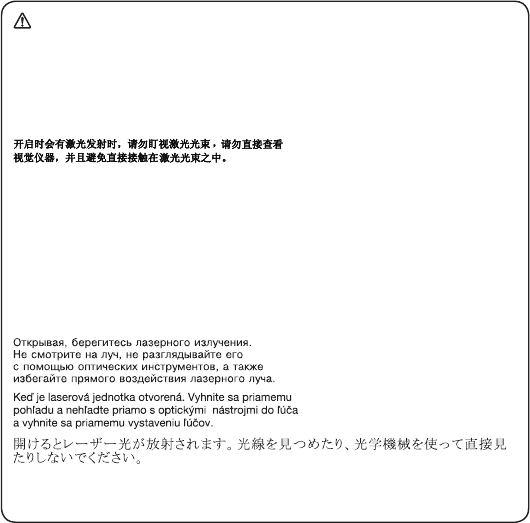
OpeningtheCD-ROMdrive,theDVD-ROMdrive,oranyotheropticalstorage
devicecouldresultinexposuretohazardouslaserradiation.Thereareno
serviceablepartsinsidethosedrives.Do not open.
15
About this manual
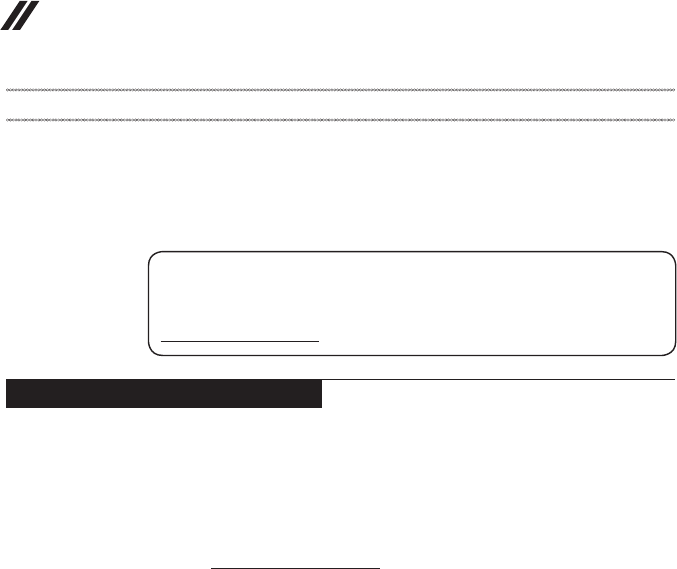
ACD-ROMdrive,aDVD-ROMdrive,oranyotherstoragedeviceinstalledmay
containanembeddedClass3AorClass3Blaserdiode.Notethefollowing:
DANGER
Emits visible and invisible laser radiation when open. Do not stare into the beam,
do not view directly with optical instruments, and avoid direct exposure to the
beam.
Radiação por raio laser ao abrir. Não olhe xo no feixe de luz, não olhe diretamente
por meio de instrumentos óticos e evite exposição direta com o feixe de luz.
Rayonnement laser si carter ouvert. Évitez de fixer le faisceau, de le regarder
directement avec des instruments optiques, ou de vous exposer au rayon.
Laserstrahlung bei geöffnetem Gerät. Nicht direkt oder über optische Instrumente
in den Laserstrahl sehen und den Strahlungsbereich meiden.
Kinyitáskor lézersugár ! Ne nézzen bele se szabad szemmel, se optikai
eszközökkel. Kerülje a sugárnyalábbal való érintkezést!
Aprendo l’unità vengono emesse radiazioni laser. Non fissare il fascio, non
guardarlo direttamente con strumenti ottici e evitare l’esposizione diretta al fascio.
Radiación láser al abrir. No mire jamente ni examine con instrumental óptico el
haz de luz. Evite la exposición directa al haz.
16
Lenovo ideapad 500-14ISK/ideapad 500-15ISK
Hardware Maintenance Manual
Important service information
Thischapterpresentsthefollowingimportantserviceinformation:
• “StrategyforreplacingFRUs”onpage16
– “Strategyforreplacingaharddiskdrive”onpage17
– “Importantnoticeforreplacingasystemboard”onpage17
• “ImportantinformationaboutreplacingRoHScompliantFRUs”onpage18
Important:
BIOS and device driver xes are customer-installable. The BIOS and device
drivers are posted on the customer support site:
http://support.lenovo.com.
Strategy for replacing FRUs
Before replacing parts:
Makesurethatallsoftware xes,drivers,andBIOSdownloadsareinstalled
beforereplacinganyFRUslistedinthismanual.
Afterasystemboardisreplaced,ensurethatthelatestBIOSisloadedtothe
systemboardbeforecompletingtheserviceaction.
Todownloadsoftwarexes,drivers,andBIOS,followthestepsbelow:
1. Gotohttp://support.lenovo.com.
2. Entertheserial numberorselect aproductor useLenovosmart
downloading.
3. SelecttheBIOS/Driver/Applicationsanddownload.
4. Followthedirectionsonthescreenandinstallthenecessarysoftware.
17
Important service information
Usethefollowingstrategy topreventunnecessary expenseforreplacing and
servicingFRUs:
• IfyouareinstructedtoreplaceanFRU,butthereplacementdoesnotsolve
theproblem,reinstalltheoriginalFRUbeforeyoucontinue.
• Somecomputers havebothaprocessor boardandasystem board.Ifyou
areinstructedtoreplaceeitherofthem,andreplacingoneofthemdoesnot
solvetheproblem,reinstallthatboard,andthenreplacetheotherone.
• IfanadapteroradeviceconsistsofmorethanoneFRU,anyoftheFRUs
maybethecauseoftheerror.Before replacingtheadapter ordevice,
removetheFRUsonebyonetoseeifthesymptomschange.Replaceonly
theFRUthatchangedthesymptoms.
Attention:Thesetup configurationon thecomputeryouareservicingmay
havebeencustomized.RunningAutomaticConfigurationmay alterthe
settings.Notethecurrentcongurationsettings(usingtheViewConguration
option);then,whenservicehas beencompleted,verify thatthosesettings
remainineffect.
Strategy for replacing a hard disk drive
Alwaystrytoruna low-levelformatbefore replacingaharddisk drive.This
willcauseallcustomerdataontheharddisk tobelost.Makesure thatthe
customerhasacurrentbackupofthedatabeforeperformingthisaction.
Attention:Thedrivestartupsequenceinthecomputeryouareservicingmay
havebeenchanged.Beextremelycarefulduringwrite operationssuchas
copying,saving,orformatting.Ifyouselectanincorrectdrive,dataorprograms
canbeoverwritten.
Important notice for replacing a system board
Somecomponentsmountedonasystemboardare verysensitive.Improper
handlingcancausedamage tothosecomponents, andmaycause asystem
malfunction.
Attention:Whenhandlingasystemboard:
• Donotdropthesystemboardorapplyanyexcessiveforcetoit.
• Avoidroughhandlingofanykind.
• Avoidbendingthe systemboardandhard pushingtoprevent crackingat
eachBGA(BallGridArray)chipset.

18
Lenovo ideapad 500-14ISK/ideapad 500-15ISK
Hardware Maintenance Manual
Important information about replacing RoHS compliant FRUs
RoHS, The Restriction of Hazardous Substances in Electrical and
Electronic Equipment Directive (2002/95/EC) is a European Union legal
requirement affecting the global electronics industry. RoHS requirements
must be implemented on Lenovo products placed on the market after
June 2006. Products on the market before June 2006 are not required to
have RoHS compliant parts. If the original FRU parts are non-compliant,
replacement parts can also be non-compliant. In all cases if the original
FRU parts are RoHS compliant, the replacement part must also be RoHS
compliant.
Note:RoHSandnon-RoHSFRU partnumberswiththe sametand function
areidentiedwithuniqueFRUpartnumbers.
Lenovoplans totransitto RoHScompliancewellbefore theimplementation
dateandexpectsitssuppliers tobeready tosupportLenovo’srequirements
andscheduleinthe EU.Productssold in2005and 2006willcontain some
RoHScompliantFRUs.Thefollowingstatementpertainstotheseproductsand
anyproductLenovoproducescontainingRoHScompliantFRUs.
RoHScompliantFRUshaveuniqueFRUpartnumbers.Before orafterthe
RoHSimplementationdate,failedRoHS compliantpartsmust alwaysbe
replacedwithRoHScompliantones,soonlytheFRUsidentiedascompliant
inthesystemHMMordirectsubstitutionsforthoseFRUsmaybeused.
Products marketed before June 2006 Products marketed after June 2006
Current or
original part
Replacement FRU Current or
original part
Replacement FRU
Non-RoHS CanbeNon-RoHS
MustbeRoHS MustbeRoHS
Non-RoHS CanbeRoHS
Non-RoHS CansubtoRoHS
RoHS MustbeRoHS
Note:Adirectsubstitutionis apartwithadifferentFRU partnumberthatis
automaticallyshippedbythedistributioncenteratthetimeoftheorder.

19
General checkout
General checkout
Thischapterpresentsthefollowinginformation:
• “Whattodorst”onpage20
• “Powersystemcheckout”onpage21
Beforeyougotothecheckout,makesuretoreadthefollowingimportantnotes:
Important notes:
• Onlycertiedtrainedpersonnelcanservicethecomputer.
• BeforereplacinganyFRU,readtheentirepage onremovingandreplacing
FRUs.
• CarefullyremovescrewsforreusewhenreplacingFRUs.
• Beextremelycarefulduringsuch writeoperationsascopying,saving,or
formatting. Drives in the computer that you are servicing sequence might
have been altered. If you select an incorrect drive, data or programs might be
overwritten.
• ReplaceanFRUonlywithanotherFRUofthecorrectmodel. When you
replace an FRU, make sure that the machine model and the FRU part number are
correct by referring to the FRU parts list.
• AnFRUshouldnotbereplacedjustbecauseofasingle,unreproduciblefailure.
Single failures can occur for a variety of reasons that have nothing to do with a
hardware defect, such as cosmic radiation, electrostatic discharge, or software
errors. Consider replacing an FRU only when a problem recurs. If you suspect that
an FRU is defective, clear the error logs and run the test again. If the error does
not recur, do not replace the FRU.
• BecarefulnottoreplaceanondefectiveFRU.

20
Lenovo ideapad 500-14ISK/ideapad 500-15ISK
Hardware Maintenance Manual
What to do rst
WhenyoudoreturnanFRU,youmustincludethefollowinginformationinthe
partsexchangeformorpartsreturnformthatyouattachtoit:
1. Nameandphonenumberofservicer
2. Dateofservice
3. Dateonwhichthemachinefailed
4. Dateofpurchase
5. ProcedureindexandpagenumberinwhichthefailingFRUwasdetected
6. FailingFRUnameandpartnumber
7. Machinetype,modelnumber,andserialnumber
8. Customer’snameandaddress
Note for warranty:During thewarrantyperiod,the customermaybe
responsiblefor repaircostsif thecomputerdamagewas causedbymisuse,
accident,modification,unsuitablephysical oroperatingenvironment, or
impropermaintenancebythecustomer.
Thefollowingisalist ofsomecommon itemsthatare notcoveredunder
warrantyandsomesymptomsthat mightindicatethat thesystemwas
subjectedtostressbeyondnormaluse.
Beforecheckingproblemswiththecomputer,determinewhetherthedamageis
coveredunderthewarrantybyreferringtothefollowinglist:
The following are not covered under warranty:
• LCDpanelcrackedfromtheapplicationofexcessiveforceorfrombeing
dropped
• Scratched(cosmetic)parts
• Distortion,deformation,ordiscolorationofthecosmeticparts
• Plasticparts,latches,pins,orconnectorsthathavebeencrackedorbroken
byexcessiveforce
• Damagecausedbyliquidspilledintothesystem
• DamagecausedbytheimproperinsertionofaPCCardortheinstallationof
anincompatiblecard
• Improperdiskinsertionoruseofanopticaldrive
• Diskettedrivedamagecausedbypressureonthe diskettedrivecover,
foreignmaterialinthedrive,ortheinsertionofadiskettewithmultiplelabels
• Damagedorbentdisketteejectbutton
• Fusesblownbyattachmentofanonsupporteddevice
• Forgottencomputerpassword(makingthecomputerunusable)
• Stickykeyscausedbyspillingaliquidontothekeyboard
• UseofanincorrectACadapteronlaptopproducts
The following symptoms might indicate damage caused by nonwarranted
activities:
• Missingpartsmightbeasymptomofunauthorizedserviceormodication.
• Ifthespindleofaharddiskdrivebecomesnoisy,itmayhavebeensubjected
toexcessiveforce,ordropped.
21
General checkout
Power system checkout
Toverifyasymptom,followthestepsbelow:
1. Turnoffthecomputer.
2. Removethebatterypack.
3. ConnecttheACadapter.
4. Makesurethatpowerissuppliedwhenyouturnonthecomputer.
5. Turnoffthecomputer.
6. DisconnecttheACadapterandinstallthechargedbatterypack.
7. Makesurethatthe batterypacksupplies powerwhenyouturnonthe
computer.
Ifyoususpectapowerproblem,seetheappropriateoneofthefollowingpower
supplycheckouts:
• “CheckingtheACadapter”onpage21
• “Checkingoperationalcharging”onpage22
• “Checkingthebatterypack”onpage22
Checking the AC adapter
YouareherebecausethecomputerfailsonlywhentheACadapterisused.
• Ifthepower-onindicatordoesnotturnon,check thepowercordoftheAC
adapterforcorrectcontinuityandinstallation.
• Ifthecomputerdoesnot chargeduringoperation, goto“Checking
operationalcharging”.
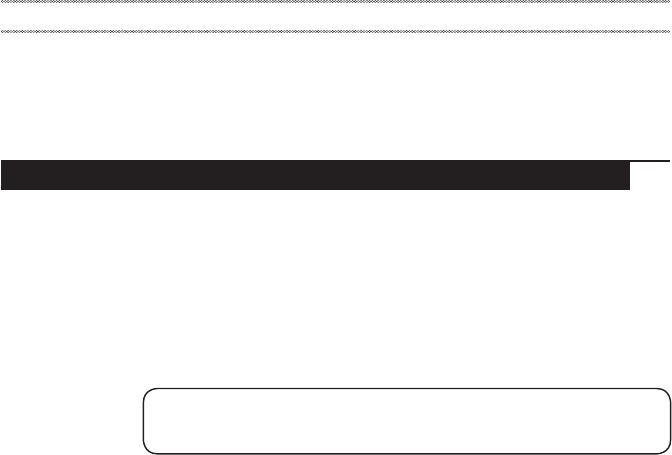
TochecktheACadapter,followthestepsbelow:
1. UnplugtheACadaptercablefromthecomputer.
2. Measuretheoutput voltageattheplug oftheACadapter cable.Seethe
followinggure:
1
2
Voltage (V DC)
+20
0
Pin
1
2
Note:OutputvoltagefortheACadapterpinNo.2maydifferfromtheoneyou
areservicing.
3. Ifthevoltageisnotcorrect,replacetheACadapter.
4. Ifthevoltageisacceptable,dothefollowing:
• Replacethesystemboard.
• Iftheproblempersists,goto“Lenovoideapad500-14ISK/ideapad500-15ISK”
onpage26.
Note:NoisefromtheACadapterdoesnotalwaysindicateadefect.

22
Lenovo ideapad 500-14ISK/ideapad 500-15ISK
Hardware Maintenance Manual
Checking operational charging
Tocheckwhetherthe batterychargesproperlyduring operation, usea
dischargedbattery packorabattery packthathasless than50%ofthetotal
powerremainingwheninstalledinthecomputer.
Performoperationalcharging.Ifthebattery statusindicatororicondoes not
lighton,removethebatterypackandletitreturntoroomtemperature.Reinstall
thebatterypack.Ifthechargeindicatororiconisstilloff,replacethebattery
pack.
Ifthechargeindicatorstill doesnotlighton, replacethesystem board.Then
reinstallthebatterypack.Ifitisstillnotcharged,gotothenextsection.
Checking the battery pack
BatterychargingdoesnotstartuntilthePowerMetershowsthatlessthan95%
ofthetotalpowerremains;underthisconditionthebatterypackcanchargeto
100%ofitscapacity.Thisprotectsthebatterypackfrombeingoverchargedor
fromhavingashortenedlife.
Tocheckyour battery,moveyourcursor tothePowerMetericon intheicon
trayoftheWindows®taskbarandwaitforamoment(butdonotclickit),andthe
percentageofbatterypowerremainingisdisplayed.Togetdetailedinformation
aboutthebattery,double-clickthePowerMetericon.
Note:Ifthebattery packbecomeshot,itmay notbeable tobecharged.
Removeitfromthecomputerandleaveitatroomtemperatureforawhile.After
itcoolsdown,reinstallandrechargeit.
23
Related service information
Related service information
Thischapterpresentsthefollowinginformation:
• “RestoringthefactorycontentsbyusingOneKeyRecovery”onpage23
• “Passwords”onpage24
• “Powermanagement”onpage25
Restoring the factory contents by using OneKey Recovery
Restore of factory default
TheLenovoideapad500-14ISK/ideapad500-15ISKcomputerscomewith
pre-installedOneKeyRecoverySystem.Inordertosaveapplicationlesand
theinitialbackeduplesofthesystem,theharddiskinaLenovocomputer
includesahiddenpartitionwhenitisshipped.Ifyouneedtorestorethesystem
tothepointofyourrstbootup,justenterLenovoOneKeyRecoverySystem
andrunSystem Recovery.FordetailsofOneKeyRecoverySystem,seethe
User Guide for Lenovo OneKey Recovery System.
Note: This will delete all the new data on the system partition (C drive), which
is not recoverable. Make sure to back up your critical data before you perform this
action.

24
Lenovo ideapad 500-14ISK/ideapad 500-15ISK
Hardware Maintenance Manual
Passwords
Asmany asthreepasswords maybeneededfor anyLenovocomputer:
thepower-onpassword(POP),the harddiskpassword (HDP),andthe
administratorpassword.
Ifanyofthesepasswordshasbeenset,apromptforitappearsonthescreen
wheneverthecomputeris turnedon.Thecomputer doesnotstart untilthe
passwordisentered.
Power-on password
Apower-on password(POP)protects thesystemfrom beingpoweredon by
anunauthorized person.The passwordmustbeentered beforeanoperating
systemcanbebooted.
Hard-disk password
Therearetwohard-diskpasswords(HDPs):
+UserHDP-fortheuser
+MasterHDP-forthe systemadministrator,whocan useittogetaccessto
theharddiskdriveeveniftheuserhaschangedtheuserHDP
Attention:Iftheuser HDPhas beenforgotten,check whetheramaster HDP
hasbeenset.If ithas,itcanbeusedforaccess tothehard diskdrive.If
nomasterHDPisavailable,neither LenovonorLenovo authorizedservice
techniciansprovideanyservicestoreseteithertheuserorthemasterHDP,or
torecoverdatafromthehard diskdrive.Thehard diskdrivecanbereplaced
forascheduledfee.
Administrator password
Administratorpasswordcontrolsthe accessofthewholesetuputility.Only
AdministratorpasswordwassetthenUserpasswordcanbeset.IfAdministrator
passwordwascleared,theUserpasswordwasclearedtoo.

25
Related service information
Power management
Note:PowermanagementmodesarenotsupportedforAPMoperatingsystem.
Toreducepowerconsumption, thecomputerhasthree powermanagement
modes:screenblank,sleep(standby),andshutdown.
Screen blank state
Ifthetimesetonthe “Turnoffmonitor”timerinthe operatingsystemexpires,
theLCDbacklightturnsoff.Youcanalso turnofftheLCDbacklight by
pressingF9.
Toendscreenblankstateandresumenormaloperation,pressanykey.
Putting the computer to sleep or shutting it down
Whenyouhavenishedworkingwithyourcomputer,youcanputittosleepor
shutitdown.
Putting your computer to sleep
Ifyouwillbe awayfromyour computerforonly ashorttime, putthecomputerto
sleep.Whenthecomputerisinsleepmode,youcanquicklywakeittoresumeuse,
bypassingthestartupprocess.Toputthecomputertosleep,dooneofthefollowing:
• Closethedisplaypanel.
• Pressthepowerbutton.
• OpentheCharmsandthenselectSettings → Power → Sleep.
Attention:Waituntilthe powerindicatorlightstartsblinking(indicatingthat
thecomputerisinsleepmode) beforeyoumoveyourcomputer.Movingyour
computerwhile theharddisk isspinningcandamage theharddisk, causing
lossofdata.
Towakethecomputer,dooneofthefollowing:
• Pressanykeyonthekeyboard.(Notebookmodeonly)
• Pressthepowerbutton.
Shutting down the computer
Ifyouarenotgoingtouseyourcomputerforalongtime,shutitdown.Toshut
downyourcomputer:
• Openthecharmsbar,thenselectSettings → Power → Shut down.
• Right-clicktheStartbuttoninthelower-leftcornerandselectShut down or
sign out→Shut down.
• Select → Shut downintheupper-rightcorneroftheStartscreen.
Note:TheoperationdependsontheBIOSsetup.Pleaserefertotheactualproduct.

26
Lenovo ideapad 500-14ISK/ideapad 500-15ISK
Hardware Maintenance Manual
Lenovo ideapad 500-14ISK/ideapad 500-15ISK
Thischapter presentsthefollowingproduct-specificservice referencesand
product-specicpartsinformation:
• “Specications”onpage26
• “Statusindicators”onpage28
• “Fnkeycombinations/Hotkeys”onpage30
• “FRUreplacementnotices”onpage31
• “RemovingandreplacinganFRU”onpage32
• “Locations”onpage80
• “Partslist”onpage83
Specications
ThefollowingtableliststhespecicationsoftheLenovoideapad500-14ISK/
ideapad500-15ISK:
Table 1. Specications
Feature Description
Processor • Seethesystempropertiesofyourcomputer,youcandothis
asfollows:
OpentheControl Panel,andthenselectSystem and
Security → System.
Busarchitecture BDW/Carrizo:
• 1600MhzDDR3LSDRAM
• PCIExpressbus2.0
• SerialATA6Gb/s
• USB3.0
• USB2.0
• HDMI1.4
• eDP1.3
AMD carrizo:
• 1600MhzDDR3LSDRAM
• PCIExpressbus2.0
• SerialATA6Gb/s
• USB3.0
• USB2.0
• HDMI1.4
• eDP1.4
Graphicmemory
chip
• IntegratedGraphics
• DiscretedGraghics(Option):AMDMeso XT/AMDMesoXT
andTropoXT2/AMDExoPro
Display • 14.0"16:9,1,920×1,080pixelsFHD
• 15.6"16:9,1,920×1,080pixelsFHD
Standard
memory • DDR3L-1333MHz/1600MHzSODIMM×2(max16GB)
CMOSRAM • 8Mbyte

27
Lenovo ideapad 500-14ISK/ideapad 500-15ISK
Table 1. Specications (continued)
Feature Description
Storagedevices • 2.5-inch,SATAII/SATAIII
• 500GB/1TB/2TB5,400rpm
• HYBRID500GB/1TB5,400rpmSSHD(8GB)
• 128GB/256GB(SSD)SATAIII
I/Oport • Comboaudiojack×1
• RJ-45×1
• HDMI×1
• VGA×1
• USB2.0×1,USB3.0×2
• 4in1slot×1(SD/SDHC/SDXC/MMC)
Audio • 1/8"Comboaudiojack
• 2.5Wspeakers×2
• ArrayDigitalMIC
Ethernet(onthe
systemboard) • 1,000Mbps
Bluetooth
wireless • Combinedincombocard
Keyboard • 6rowLenovoFrameKeyboard
Integrated
camera
• HDCamera
• 3DCamera(ideapad500-15ISK)(onselectmodels)
Battery • 4cells,32Wh/41Wh
ACadapter • 20V,45W/65W/90W
Pre-installed
operating
system
• Windows8.1/10(orsimilarupdatein13months)
• Free-DOS
28
Lenovo ideapad 500-14ISK/ideapad 500-15ISK
Hardware Maintenance Manual
Status indicators
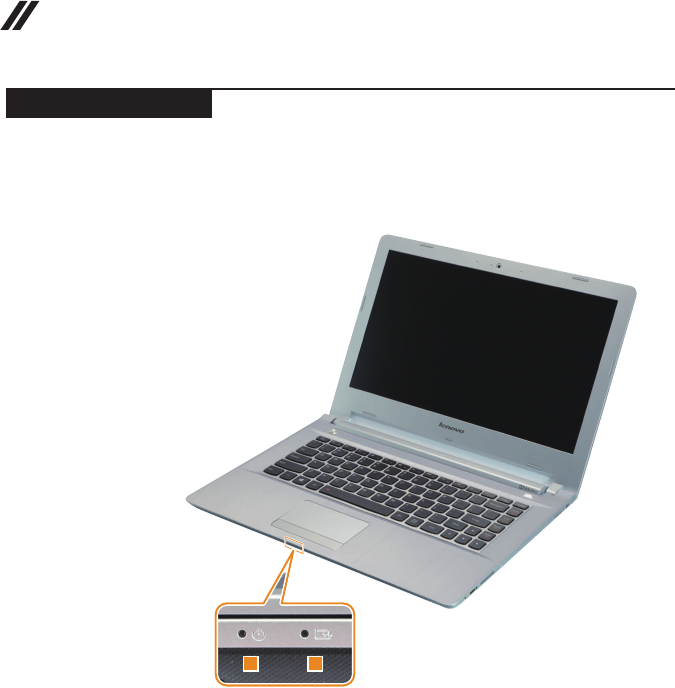
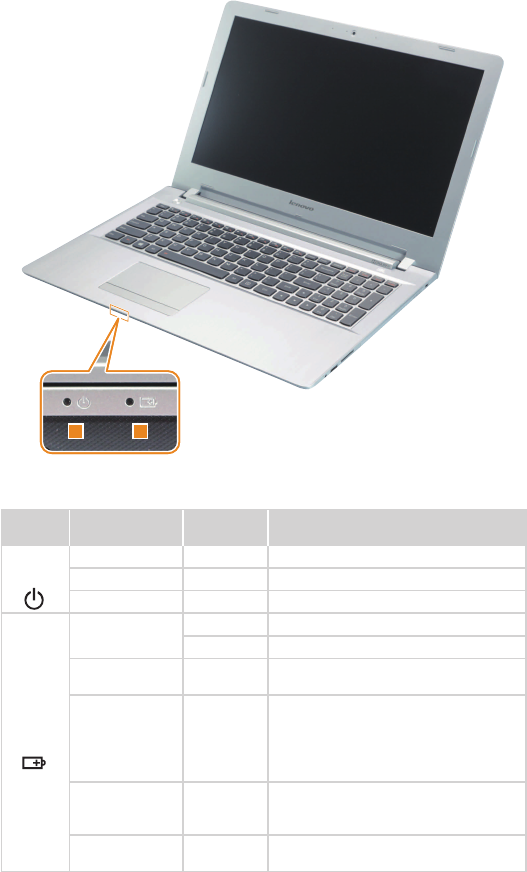
Thesystemstatusindicatorsbelowshowthecomputerstatus:
ideapad 500-14ISK
12
29
Lenovo ideapad 500-14ISK/ideapad 500-15ISK
ideapad 500-15ISK
12
Table 2. Status indicators
Indicator Indicator
status
Charge
status Meaning
1
Power
On(solidwhite) --- Thecomputerispoweredon.
Blinking --- Thecomputerisinsleepmode.
Off --- Thecomputerispoweredoff.
2
Battery
On(solidwhite) Charging Thebatteryhasmorethan80%charge.
Discharging Thebatteryhasmorethan20%charge.
On(solidamber) Discharging Thebatteryhasbetween5%and20%
charge.
Blinkingslowly
(white) Charging
Thebatteryhasbetween20%and80%
charge.Whenthebatteryreaches80%
charge,thelightwillstopblinking.
However,chargingwillcontinueuntil
thebatteryisfullycharged.
Blinkingslowly
(amber) Charging
Thebatteryhaslessthan20%charge.
Whenthebatterychargereaches20%,
theblinkingcolorwillchangetowhite.
Blinkingquickly
(amber)
Charging/
Discharging Thebatteryhaslessthan5%charge.
30
Lenovo ideapad 500-14ISK/ideapad 500-15ISK
Hardware Maintenance Manual
Fn key combinations/Hotkeys
Thefollowing tableshowsthe function ofeachcombination of Fnwitha
functionkey.
Table 3. Fn key combinations
ideapad 500-14ISK
Fn + Home: Activatesthepausefunction.
Fn + End: Activatesthebreakfunction.
Fn + PgUp : Enables/disablesthescrolllock.
Fn + PgDn : Activatestheinsertfunction.
Fn + Space
(on select models): Adjuststhekeyboardbacklight.
ideapad 500-15ISK
Fn + Home: Activatesthepausefunction.
Fn + End: Activatesthebreakfunction.
Fn + PgUp : Enables/disablesthescrolllock.
Fn + PgDn : Activatesthesystemrequest.
Fn + Space
(on select models): Adjuststhekeyboardbacklight.
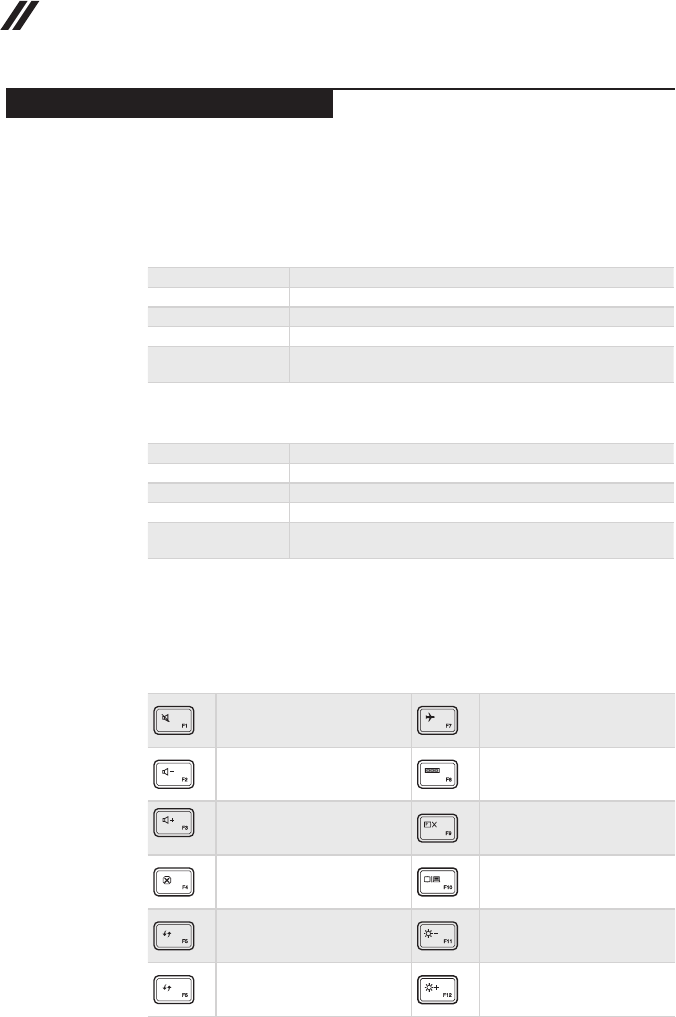
Youcan accesscertainsystem settingsquicklyby pressingtheappropriate
hotkeys.
Table 4. Hotkeys
: Mutes/unmutesthesound. : Enables/disablesAirplane
mode.
: Decreasesthevolumelevel. : Displaysallcurrentlyactive
apps.
: Increasesthevolumelevel. : Turnson/offthebacklightof
theLCDscreen.
: Closesthecurrentlyactive
window. :
Togglesthedisplaybetween
thecomputerandanexternal
device.
: Refreshesthedesktoporthe
currentlyactivewindow. : Decreasesthedisplay
brightness.
: Enables/disablesthe
touchpad. : Increasesthedisplay
brightness.
31
Lenovo ideapad 500-14ISK/ideapad 500-15ISK
FRU replacement notices
Thissection presentsnoticesrelatedto removingandreplacingparts. Read
thissectioncarefullybeforereplacinganyFRU.
Screw notices
Loosescrewscancausea reliabilityproblem.In theLenovocomputer,this
problemisaddressedwithspecialnylon-coatedscrewsthathavethefollowing
characteristics:
• Theymaintaintightconnections.
• Theydonoteasilycomeloose,evenwithshockorvibration.
• Theyarehardertotighten.
Dothefollowingwhenyouservicethismachine:
• Keepthescrewkitinyourtoolbag.
• CarefullyremovescrewsforreusewhenreplacingFRUs.
• Useatorquescrewdriverifyouhaveone.
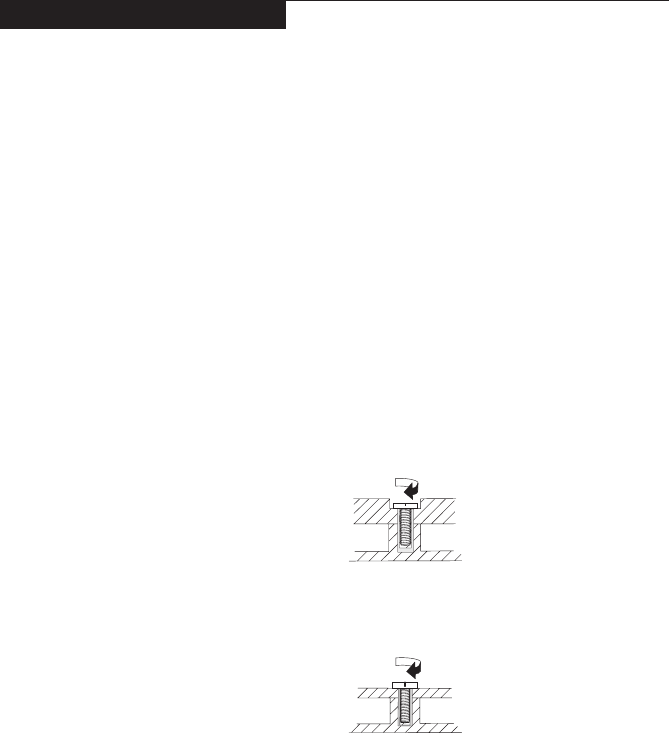
Tightenscrewsasfollows:
• Plastic to plastic
Turnanadditional90°afterthescrewheadtouchesthe surfaceofthe
plasticpart:
more than 90°
(Cross-section)
• Logic card to plastic
Turnanadditional 180°afterthe screwheadtouchesthesurface ofthe
logiccard:
more than 180°
(Cross-section)
• Torque driver
Ifyouhaveatorquescrewdriver,refertothe“Torque”columnforeachstep.
• Makesurethatyouusethecorrectscrews.Ifyouhaveatorquescrewdriver,
tightenallscrewsrmlytothetorqueshowninthetable.Carefully remove
screws for reuse when replacing FRUs. Make sure that all screws are
tightened rmly.
• Ensuretorque screwdriversarecalibratedcorrectly followingcountry
specications.
32
Lenovo ideapad 500-14ISK/ideapad 500-15ISK
Hardware Maintenance Manual
Removing and replacing an FRU
Thissectionpresentsexplodedgureswiththeinstructions toindicatehowto
removeandreplacetheFRU.Makesuretoobservethefollowinggeneralrules:
1. Donotattempttoserviceanycomputerunlessyouhavebeentrainedand
certied.Anuntrainedpersonrunstheriskofdamagingparts.
2. BeforereplacinganyFRU,review“FRUreplacementnotices”onpage31.
3. Beginby removinganyFRUs thathavetoberemovedbeforethefailing
FRU.AnyofsuchFRUsarelistedatthetopofthepage.Removethemin
theorderinwhichtheyarelisted.
4. FollowthecorrectsequenceinthestepstoremovetheFRU,asgiveninthe
guresbythenumbersinsquarecallouts.
5. WhenturningascrewtoreplaceanFRU,turnitinthedirectionasgivenby
thearrowinthegure.
6. WhenremovingtheFRU,moveitinthe directionasgivenbythearrowin
thegure.
7. Toput thenewFRUinplace,reversetheremovalproceduresand follow
anyofthenotesthatpertaintoreplacement. Forinformationabout
connectingandarranginginternalcables,see“Locations”onpage80.
8. WhenreplacinganFRU,usethecorrectscrewasshownintheprocedures.
DANGER
Before removing any FRU, turn off the computer, unplug all power cords from
electrical outlets, remove the battery pack, and then disconnect any of the
interconnecting cables.
Attention:AfterreplacinganFRU,donotturnonthecomputeruntilyouhave
madesurethatallscrews,springs,andothersmallpartsareinplaceandnone
areloose insidethecomputer.Verifythisby shakingthecomputer gently and
listeningforrattlingsounds.Metallicpartsormetal akescancauseelectrical
shortcircuits.
Attention:Thesystem boardissensitiveto, andcanbedamaged by,
electrostaticdischarge. Beforetouchingit,establish personal groundingby
touchingagroundpointwithonehandorusinganelectrostaticdischarge(ESD)
strap(P/N6405959)toremovepotentialshockreasons.
Notes:
• The following procedures about removing and replacing FRUs are the same for the
Lenovo ideapad 500-14ISK/ideapad 500-15ISK.
• The illustrations used in this section are of the Lenovo ideapad 500-15ISK, unless
otherwise stated.
33
Lenovo ideapad 500-14ISK/ideapad 500-15ISK
1010 Keyboard
Figure 1. Removal steps of keyboard
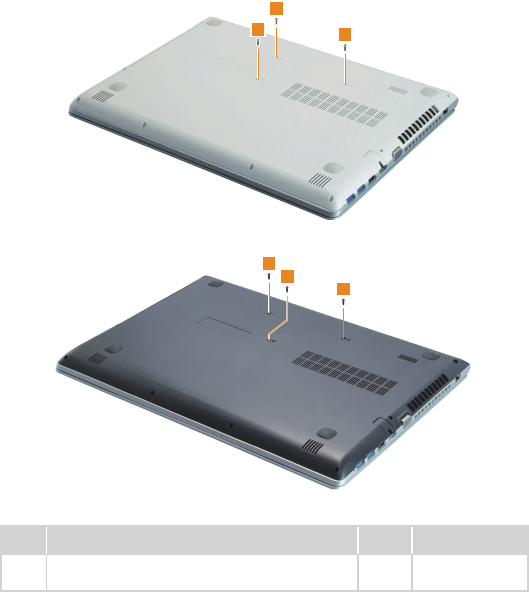
Removethescrews1.
ideapad 500-14ISK
1
1
1
ideapad 500-15ISK
1
1
1
Step Screw (quantity) Color Torque
1M2×6mm,Phillipshead,nylok-coated(3)
LOWTOKB
Black/
Silver 1.85+/-0.15kgf/cm
34
Lenovo ideapad 500-14ISK/ideapad 500-15ISK
Hardware Maintenance Manual
Figure 1. Removal steps of keyboard (continued)
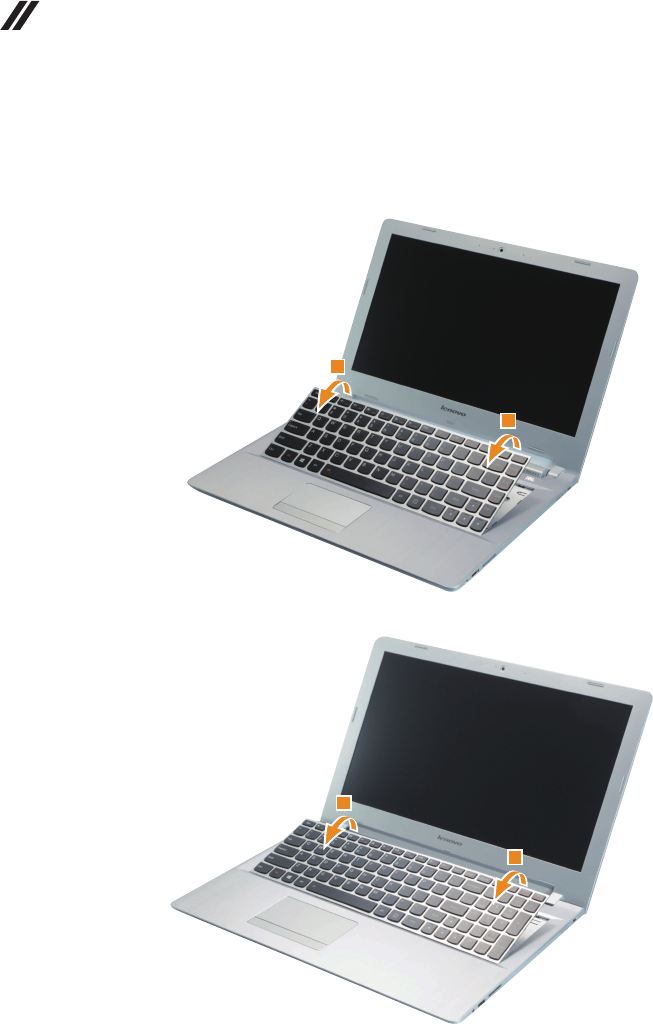
Pushthekeyboardwith thetipof anunfoldedpaper clip(orsimilar object
withouta sharptip)throughthe screwholeonthebackcover.Loosenthe
keyboardwithngersinthedirectionshownbyarrows2.
ideapad 500-14ISK
2
2
ideapad 500-15ISK
2
2
35
Lenovo ideapad 500-14ISK/ideapad 500-15ISK
Figure 1. Removal steps of keyboard (continued)
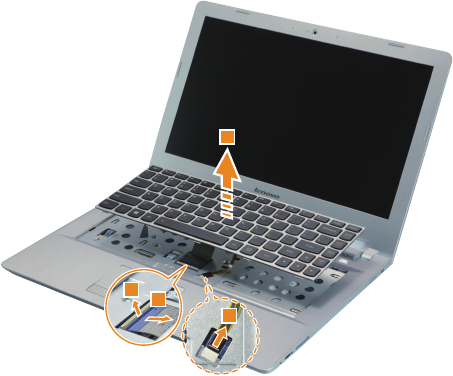
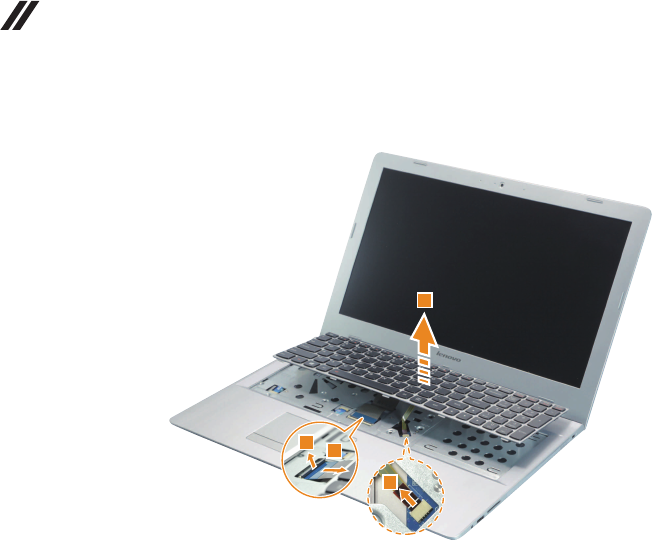
Liftthekeyboardslightly3,andthendetachtheconnectorsin thedirection
shownbyarrows4,5and6.Removethekeyboard.
Note:Selectmodelsdonothavethekeyboardbacklightcable(thedashedarea).
ideapad 500-14ISK
56
4
3
36
Lenovo ideapad 500-14ISK/ideapad 500-15ISK
Hardware Maintenance Manual
Figure 1. Removal steps of keyboard (continued)
ideapad 500-15ISK
4
56
3
When installing:MakesurethattheFPCconnectorisattachedrmly.
37
Lenovo ideapad 500-14ISK/ideapad 500-15ISK
1020 Optical drive
Foraccess,removethisFRU:
• “1010Keyboard”onpage33
Figure 2. Removal steps of optical drive
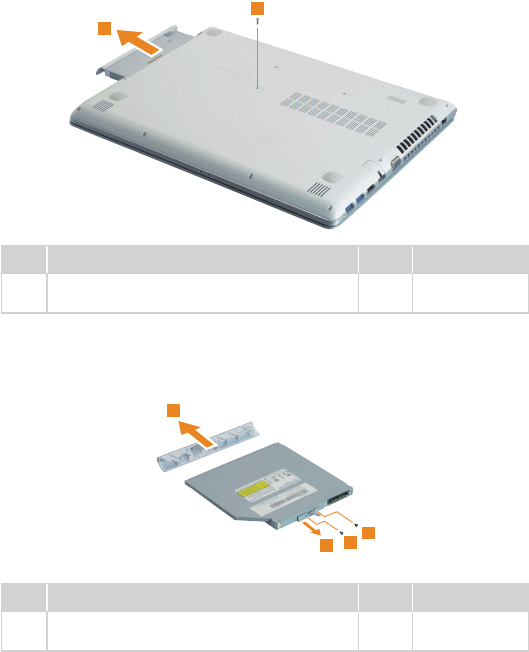
ideapad 500-14ISK
Removethescrew1.Thenpulltheopticaldriveoutinthedirectionshownby
arrow2.
1
2
Step Screw (quantity) Color Torque
1M2×6mm,Phillipshead,nylok-coated(1)
LOWTOUPPER Silver
1.85+/-0.15kgf/cm
Removethescrews3,thencarefullyremovetheopticaldrivebracketand
bezelinthedirectionsshownbyarrows4and5.
4
3
3
5
Step Screw (quantity) Color Torque
3M2×3mm,Phillipshead,nylok-coated(2)
ODDBRKTOODDMODULE Black
1.85+/-0.15kgf/cm
38
Lenovo ideapad 500-14ISK/ideapad 500-15ISK
Hardware Maintenance Manual
Figure 2. Removal steps of Optical drive (continued)
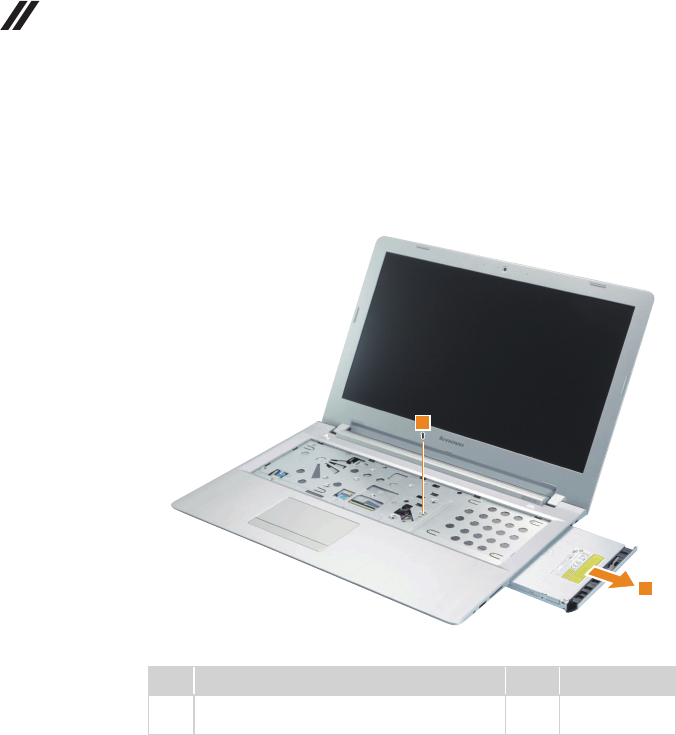
ideapad 500-15ISK
Removethescrew1.Thenpulltheopticaldriveoutinthedirectionshownby
arrow2.
2
1
Step Screw (quantity) Color Torque
1M2×6mm,Phillipshead,nylok-coated(1)
ODDTOLOWER Black
1.85+/-0.15kgf/cm
39
Lenovo ideapad 500-14ISK/ideapad 500-15ISK
Figure 2. Removal steps of optical drive (continued)
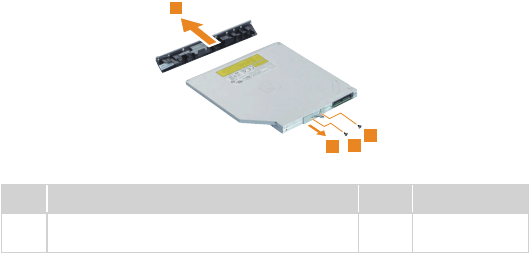
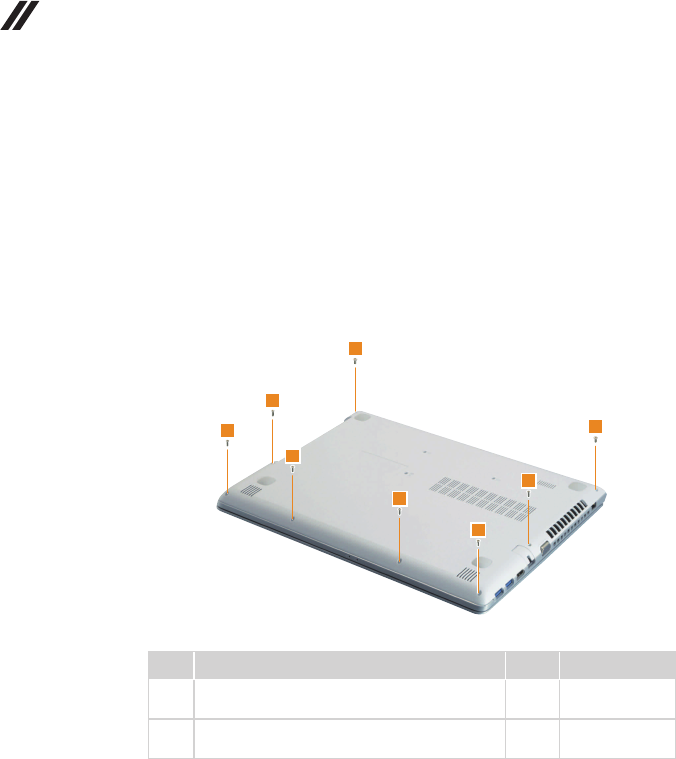
Removethescrews3,thencarefullyremovetheopticaldrivebracketand
bezelinthedirectionsshownbyarrows4and5.
5
3
43
Step Screw (quantity) Color Torque
3M2×3mm,Phillipshead,nylok-coated(2)
ODDBRKTOODDMODULE Black
1.85+/-0.15kgf/cm
40
Lenovo ideapad 500-14ISK/ideapad 500-15ISK
Hardware Maintenance Manual
1030 Base cover
Foraccess,removethisFRU:
• “1010Keyboard”onpage33
• “1020Opticaldrive”onpage37
Figure 3. Removal steps of base cover
ideapad 500-14ISK
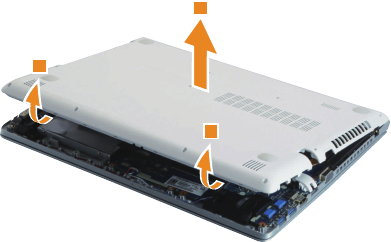
Removethescrews1and2.
2
2
1
1
1
1
1
1
Step Screw (quantity) Color Torque
1M2×6mm,Phillipshead,nylok-coated(6)
LOWTOUPPER
Black/
Silver
1.85+/-0.15kgf/cm
2M2.5×6mm,Phillipshead,nylok-coated(2)
LOWTOUPPER
Black/
Silver 3.0+/-0.3kgf/cm
41
Lenovo ideapad 500-14ISK/ideapad 500-15ISK
Figure 3. Removal steps of base cover (continued)
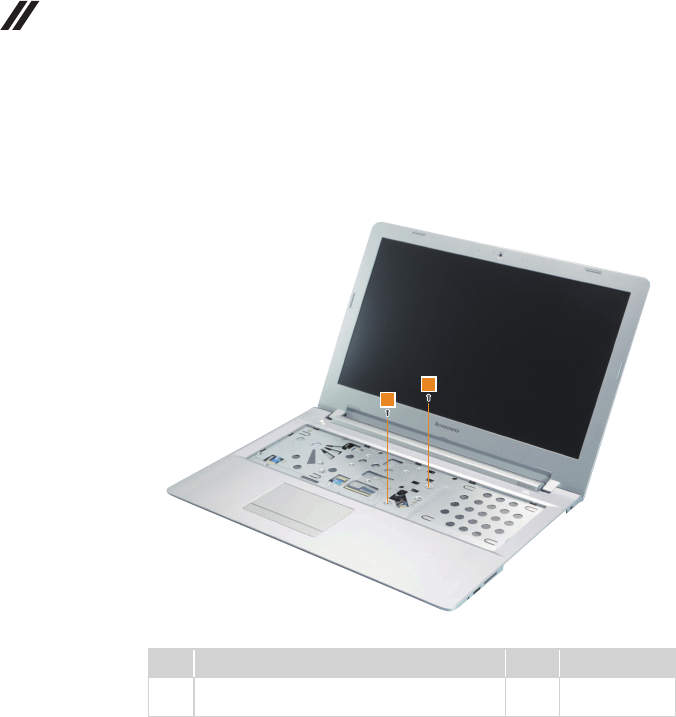
Removethebasecoverinthedirectionsshownbyarrows3and4.
4
3
3
42
Lenovo ideapad 500-14ISK/ideapad 500-15ISK
Hardware Maintenance Manual
Figure 3. Removal steps of base cover (continued)
ideapad 500-15ISK
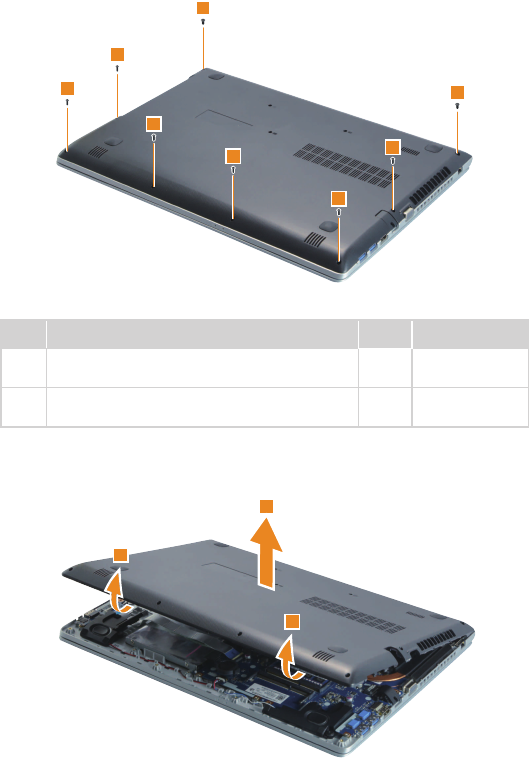
Removethescrews1.
1
1
Step Screw (quantity) Color Torque
1M2×6mm,Phillipshead,nylok-coated(2)
UPPERTOLOWER Black
1.85+/-0.15kgf/cm
43
Lenovo ideapad 500-14ISK/ideapad 500-15ISK
Figure 3. Removal steps of base cover (continued)
Removethescrews2and3fromthebottom.
2
2
2
2
2
2
3
3
Step Screw (quantity) Color Torque
2M2×6mm,Phillipshead,nylok-coated(6)
LOWTOUPPER
Black/
Silver 1.85+/-0.15kgf/cm
3M2.5×6mm,Phillipshead,nylok-coated(2)
LOWTOUPPER
Black/
Silver 3.0+/-0.3kgf/cm
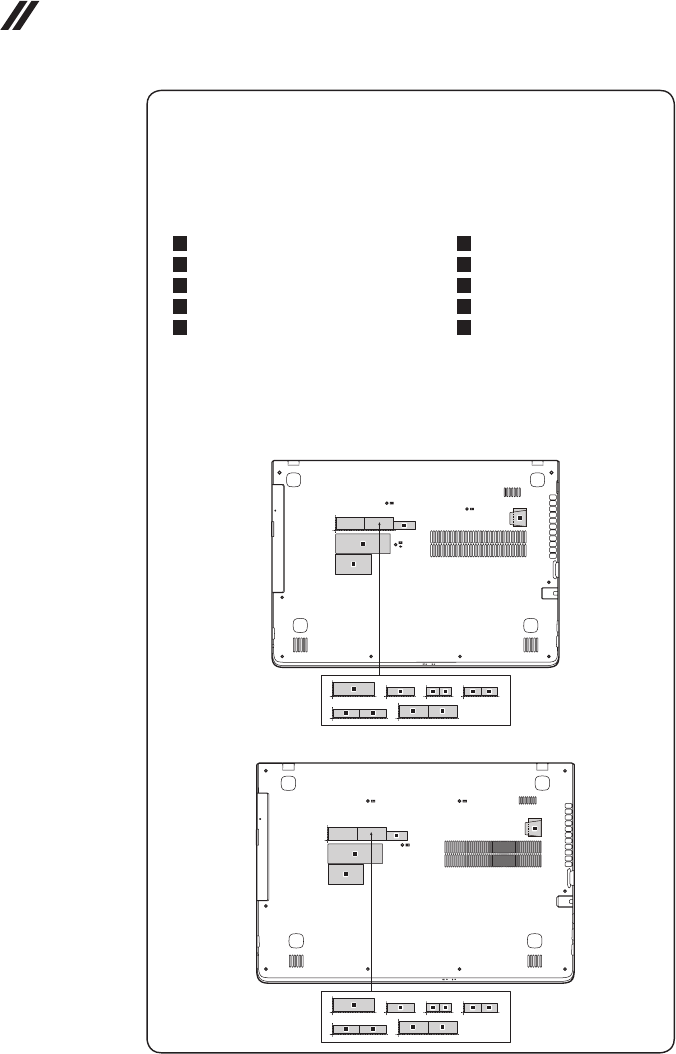
Removethebasecoverinthedirectionsshownbyarrows4and5.
5
4
4
44
Lenovo ideapad 500-14ISK/ideapad 500-15ISK
Hardware Maintenance Manual
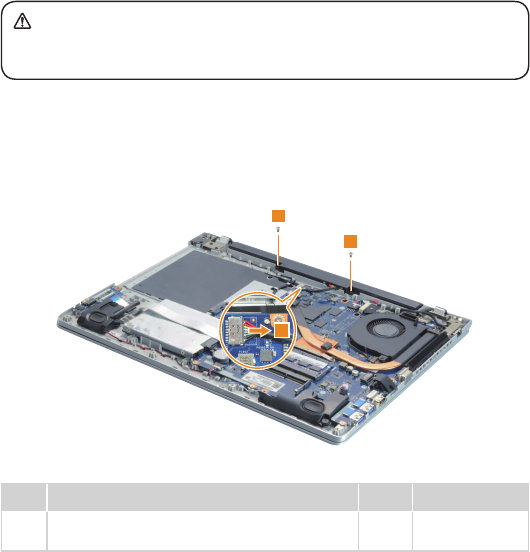
Note: Applying labels to the base cover
ThenewbasecoverFRUisshippedwith akitcontaining labelsofseveral
kinds.Whenyoureplacethe basecover,you needtoapplythefollowing
label:
Thefollowinglabelsneedtobepeeledofffromtheoldbasecover,andneed
tobeputonthenewbasecover.
a KCClabel
b BISlabelforIndia
c Wlan/BTforMalaysia/Indonesia
d Wlan/BTforSouthAfrica
e Wlan/BTforIsrael/US/CA/TW
f Wlan/BTforBrazil
g IndonesiaDsidelabel
h GMLLabel
i Ratinglabel
j Ratingprintlabel
Forsomemodels,youalsoneedtoapplyoneortwoFCClabels.Checkthe
oldbasecover;ifithasoneortwoFCClabels,ndduplicatesoftheminthe
labelkitandapplythemtothenewbasecover.
Forthelocationofeachlabel,refertothefollowinggures:
ideapad 500-14ISK
g
h
abd d
c c
e e f f
i
j
ideapad 500-15ISK
g
h
i
j
abd d
c c
e e f f
45
Lenovo ideapad 500-14ISK/ideapad 500-15ISK
1040 Battery pack
Foraccess,removetheseFRUsinorder:
• “1010Keyboard”onpage33
• “1020Opticaldrive”onpage37
• “1030Basecover”onpage40
DANGER
Only use the battery specied in the parts list for your computer. Any other battery
could ignite or explode.
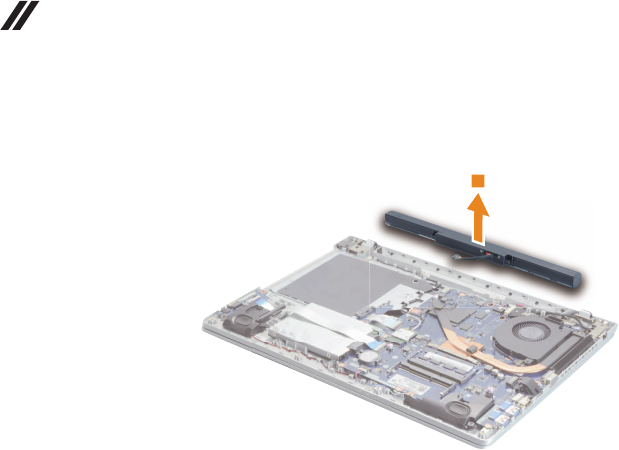
Figure 4. Removal steps of battery pack
Detachthebatterypackconnectorinthedirectionshownbyarrow1,remove
thescrews2.
1
2
2
Step Screw (quantity) Color Torque
2M2.5×4mm,Phillipshead,nylok-coated(2)
BATTERYTOUPPER Silver 3.0+/-0.3kgf/cm
46
Lenovo ideapad 500-14ISK/ideapad 500-15ISK
Hardware Maintenance Manual
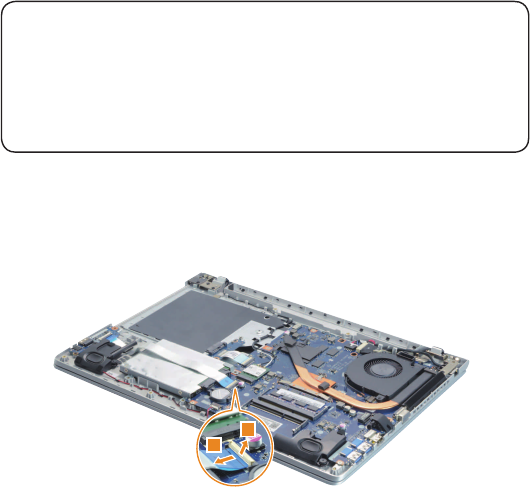
Figure 4. Removal steps of battery pack (continued)
Removethebatterypackinthedirectionshownbyarrow3.
3
When installing:Makesurethebatterypackconnectorisattachedrmly.
47
Lenovo ideapad 500-14ISK/ideapad 500-15ISK
1050 Hard disk drive
Foraccess,removetheseFRUsinorder:
• “1010Keyboard”onpage33
• “1020Opticaldrive”onpage37
• “1030Basecover”onpage40
• “1040Batterypack”onpage45
Attention:
• Donotdroptheharddiskdriveorapplyany physicalshockto it. The hard
disk drive is sensitive to physical shock. Improper handling can cause damages
and permanent loss of data.
• Before removing the drive, suggest the customer to backup all the information on
it if possible.
• Never remove the drive while the system is operating or is in suspend mode.
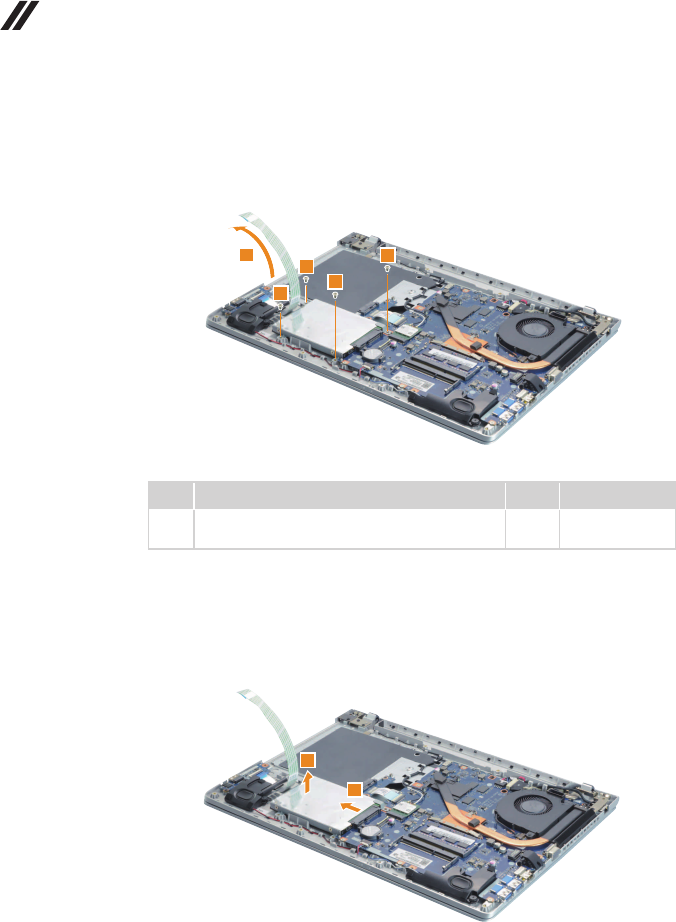
Figure 5. Removal steps of hard disk drive
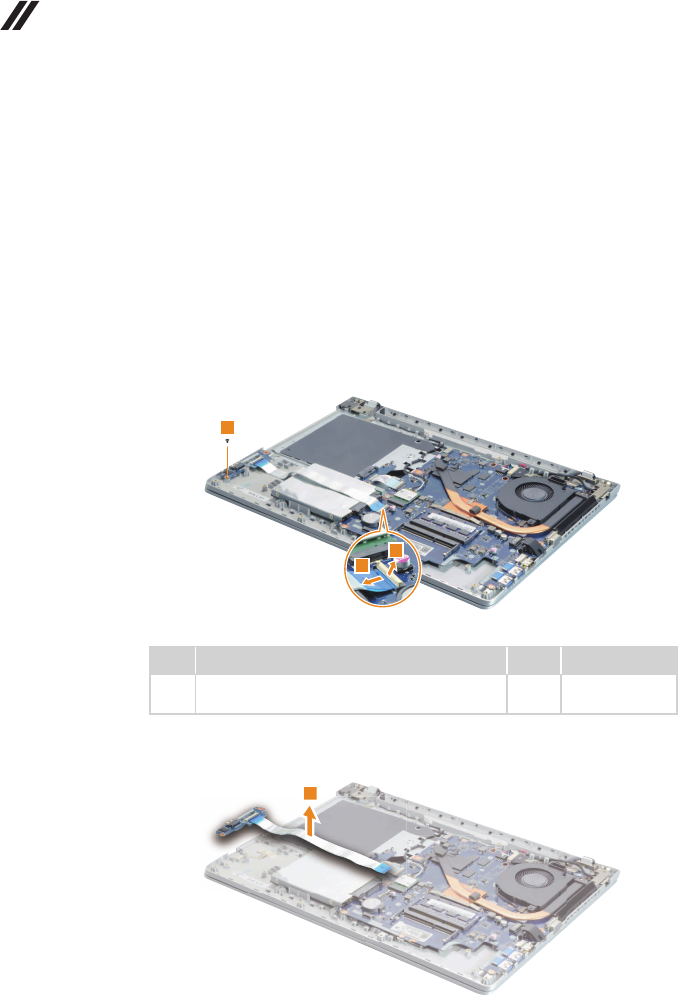
UnplugtheIOboardcableconnectorinthedirectionsshownbyarrows1and2.
1
2
48
Lenovo ideapad 500-14ISK/ideapad 500-15ISK
Hardware Maintenance Manual
Figure 5. Removal steps of hard disk drive (continued)
LifttheIOboardcableinthedirectionshownbyarrow3.Removethescrews
4.
3
4
4
4
4
Step Screw (quantity) Color Torque
4M2.5×4mm,Phillipshead,nylok-coated(4)
HDDBRKTOUPPER Silver 3.0+/-0.3kgf/cm
When installing:Makesurethatthecableconnectorisattachedrmly.
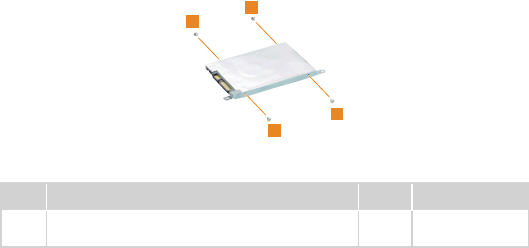
DetachtheHDDconnectorinthedirectionshownbyarrow5.Removethe
harddiskdrivefromtheslotinthedirectionshownbyarrow6.
5
6
When installing:MakesurethattheHDDconnectorisattachedrmly.
49
Lenovo ideapad 500-14ISK/ideapad 500-15ISK
Figure 5. Removal steps of hard disk drive (continued)
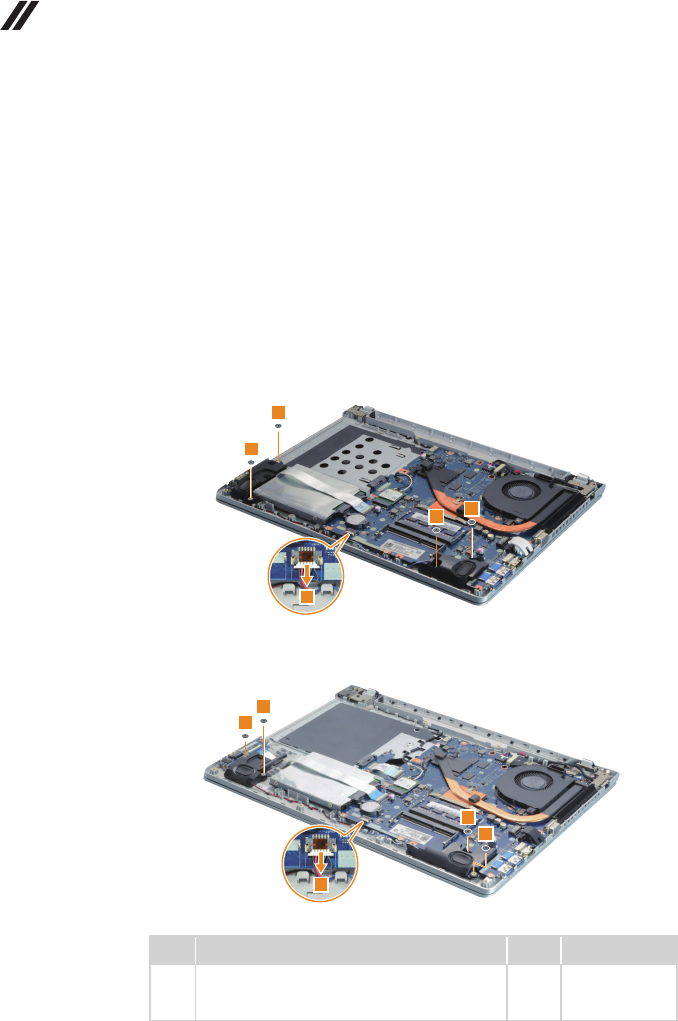
Removethescrews7,thentakeoutthemetalframe.
7
7
7
7
Step Screw (quantity) Color Torque
7M3×3mm,Phillipshead,nylok-coated(4)
HDDBRKTOHDD Silver 3.0+/-0.3kgf/cm
50
Lenovo ideapad 500-14ISK/ideapad 500-15ISK
Hardware Maintenance Manual
1060 Speakers
Foraccess,removetheseFRUsinorder:
• “1010Keyboard”onpage33
• “1020Opticaldrive”onpage37
• “1030Basecover”onpage40
• “1040Batterypack”onpage45
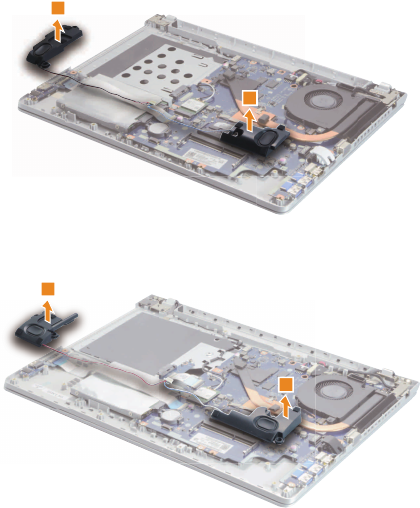
Figure 6. Removal steps of speakers
Detachthespeakersconnectorinthedirectionshownbyarrow1.Removethe
screws2.
ideapad 500-14ISK
1
2
22
2
ideapad 500-15ISK
1
2
2
2
2
Step Screw (quantity) Color Torque
2M2×2,Phillipshead,nylok-coated(4)
SPEAKERRTOUPPER&SPEAKERLTO
UPPER
Black 1.85+/-0.15kgf/cm
51
Lenovo ideapad 500-14ISK/ideapad 500-15ISK
Figure 6. Removal steps of speakers (continued)
Removethespeakers3.
ideapad 500-14ISK
3
3
ideapad 500-15ISK
3
3
When installing: Makesurethatthespeakersconnectorisattachedrmly.
52
Lenovo ideapad 500-14ISK/ideapad 500-15ISK
Hardware Maintenance Manual
1070 IO board
Foraccess,removetheseFRUsinorder:
• “1010Keyboard”onpage33
• “1020Opticaldrive”onpage37
• “1030Basecover”onpage40
• “1040Batterypack”onpage45
• “1060Speakers”onpage50
Figure 7. Removal steps of IO board
Detachthe IOboardconnector inthedirectionsshown byarrows1and 2.
Removethescrew3.
1
2
3
Step Screw (quantity) Color Torque
3M2×3mm,Phillipshead,nylok-coated(1)
IOBOARDTOUPPER Black
1.85+/-0.15kgf/cm
RemovetheIOboardinthedirectionshownbyarrow4.
4
When installing: Makesurethattheconnectorisattachedrmly.
53
Lenovo ideapad 500-14ISK/ideapad 500-15ISK
1080 PCI Express Mini Card for wireless LAN
Foraccess,removetheseFRUsinorder:
• “1010Keyboard”onpage33
• “1020Opticaldrive”onpage37
• “1030Basecover”onpage40
• “1040Batterypack”onpage45
Important: The preinstalledWLANmodulemay onlybereplacedwith a
Lenovoapproved moduleinorderto complywithFCCand ICregulations.
RefertoTable5."Partslist—Overall"onpage86forLenovopartnumbersfor
theapprovedmodules.
Figure 8. Removal steps of PCI Express Mini Card for wireless LAN
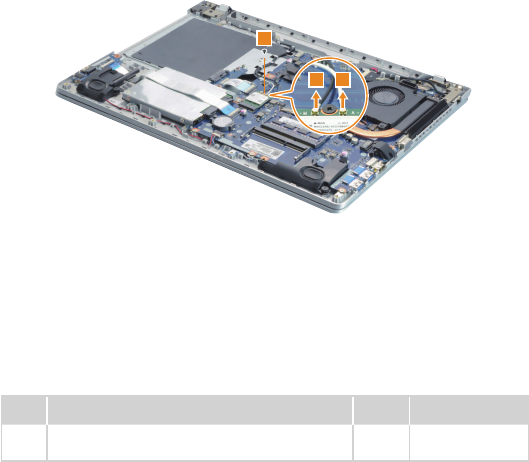
DisconnectthetwowirelessLANcables(white,black)1,andthenremovethe
screw2.
11
2
Instep 1,unplugthe jacksbyusingthe removaltoolantennaRF connector
(P/N:08K7159),orpickuptheconnectorswithyourngersandgentlyunplug
theminthedirectionshownbythearrows.
Notes:ThewirelessLANcardhas2cablesinstep1.
ThewirelessLANcardinsomemodelsmighthave3cablesinstep1.
Step Screw (quantity) Color Torque
2M2×3mm,Phillipshead,nylok-coated(1)
WLANCARDTOMB Black 1.85+/-0.15kgf/cm
54
Lenovo ideapad 500-14ISK/ideapad 500-15ISK
Hardware Maintenance Manual
Figure 8. Removal steps of PCI Express Mini Card for wireless LAN (continued)
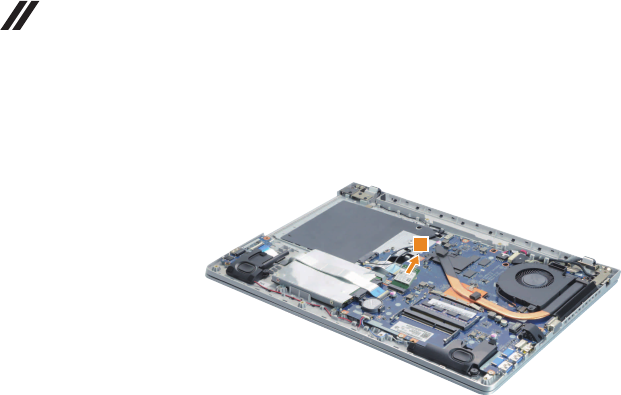
Removethecardinthedirectionshownbyarrow3.
3
When installing:
• Inmodelswithawireless LANcardthat hastwoantenna connectors,plug
theblackcable(1st)(MAIN)intothejacklabeledMAIN,andthewhitecable
(2nd)(AUX)intothejacklabeledAUXonthecard.
• InmodelswithawirelessLANcardthathasthreeantennaconnectors,plug
theblackcable(1st)(MAIN)intothejacklabeled1,thegreycable(3rd)into
thejacklabeled3,andthewhitecable(2nd)(AUX)intothejacklabeled2on
thecard.
55
Lenovo ideapad 500-14ISK/ideapad 500-15ISK
1090 ODD board (ideapad 500-15ISK)
Foraccess,removetheseFRUsinorder:
• “1010Keyboard”onpage33
• “1020Opticaldrive”onpage37
• “1030Basecover”onpage40
• “1040Batterypack”onpage45
Figure 9. Removal steps of ODD board (ideapad 500-15ISK)
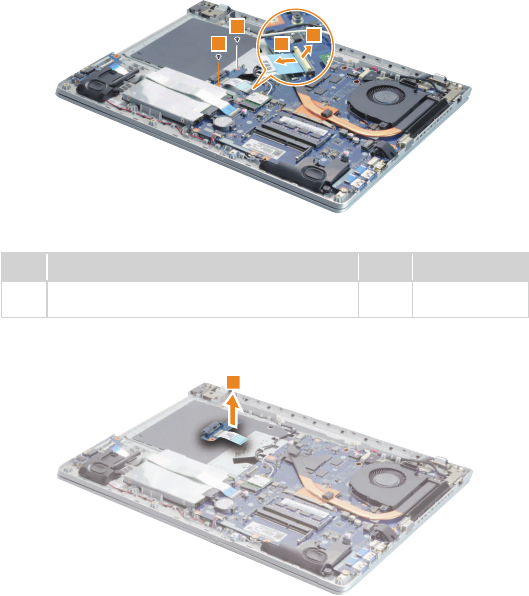
DetachtheFPCconnectorin thedirectionsshown byarrows1 and2.
Removethescrews3.
1
2
3
3
Step Screw (quantity) Color Torque
3M2×3,Phillipshead,nylok-coated(2)
ODDBOARDTOUPPPER Black 1.85+/-0.15kgf/cm
RemovetheODDboardinthedirectionshownbyarrow4.
4
When installing: MakesurethattheODDboardconnectorisattachedrmly.
56
Lenovo ideapad 500-14ISK/ideapad 500-15ISK
Hardware Maintenance Manual
1100 DIMM
Foraccess,removetheseFRUsinorder:
• “1010Keyboard”onpage33
• “1020Opticaldrive”onpage37
• “1030Basecover”onpage40
• “1040Batterypack”onpage45
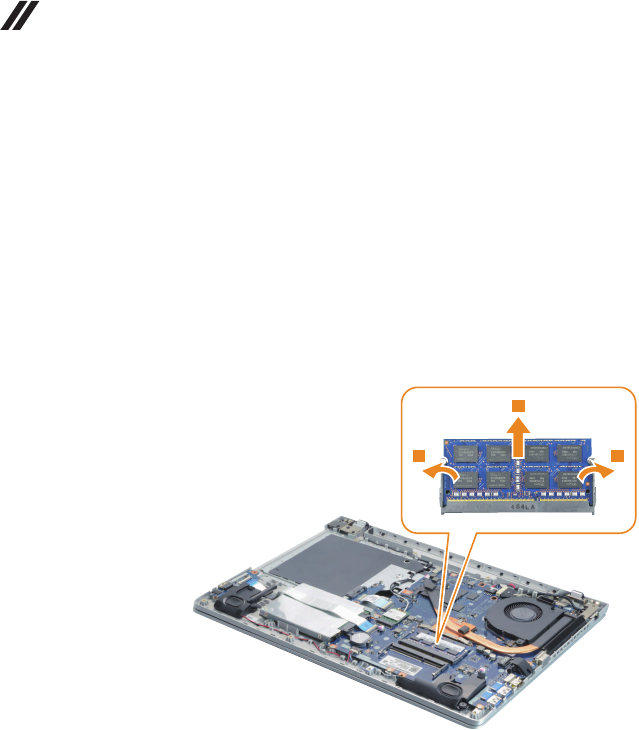
Figure 10. Removal steps of DIMM
Releasethe twolatchesonbothedgesofthe socketatthesame timeinthe
directionshownbyarrows1,andthenunplugtheDIMMinthedirectionshown
byarrow2.
1 1
2
When installing:InsertthenotchedendoftheDIMMintothesocket.Pushthe
DIMMrmly,andpivotituntilitsnapsintotheplace.Makesurethatitisrmly
xedintheslotanddifculttomove.
57
Lenovo ideapad 500-14ISK/ideapad 500-15ISK
1110 Fan assembly and Heat Sink assembly
Foraccess,removetheseFRUsinorder:
• “1010Keyboard”onpage33
• “1020Opticaldrive”onpage37
• “1030Basecover”onpage40
• “1040Batterypack”onpage45
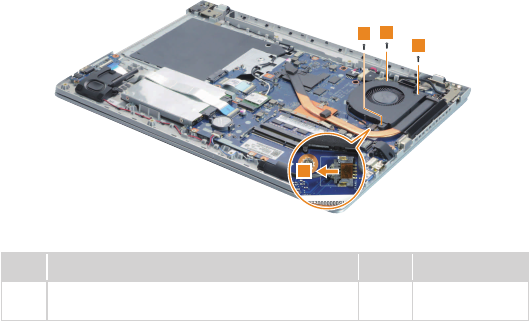
Figure 11. Removal steps of fan assembly and heat sink assembly
Detachthefanconnectorinthedirectionshownbyarrow1,andthenremove
thescrews2.
22
2
1
Step Screw (quantity) Color Torque
2M2×6,Phillipshead,nylok-coated(3)
FANTOUPPER Black 1.85+/-0.15kgf/cm
When installing:Make surethatthefanconnectorisattachedrmlytothe
systemboard.
58
Lenovo ideapad 500-14ISK/ideapad 500-15ISK
Hardware Maintenance Manual
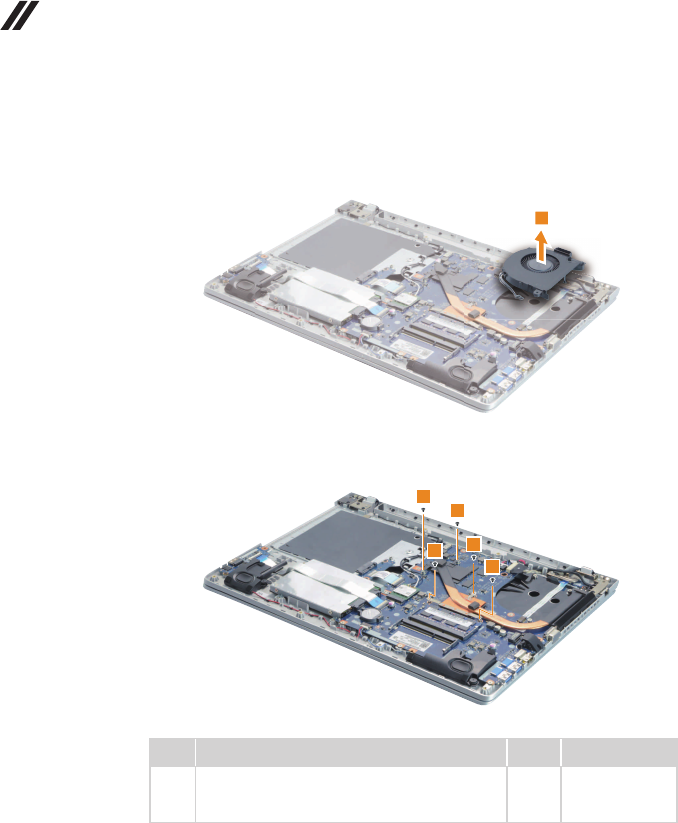
Figure 11. Removal steps of DIMM (continued)
Removethefaninthedirectionshownbyarrow3.Becarefulnottodamage
theconnector.
3
Removethescrews4.
4
4
4
4
4
Step Screw (quantity) Color Torque
4M2×3,Phillipshead,nylok-coated(5)
THERMALMODULETOCPUBRK&THERMAL
MODULETOMB(DIS-40W)
Black 1.85+/-0.15kgf/cm
59
Lenovo ideapad 500-14ISK/ideapad 500-15ISK
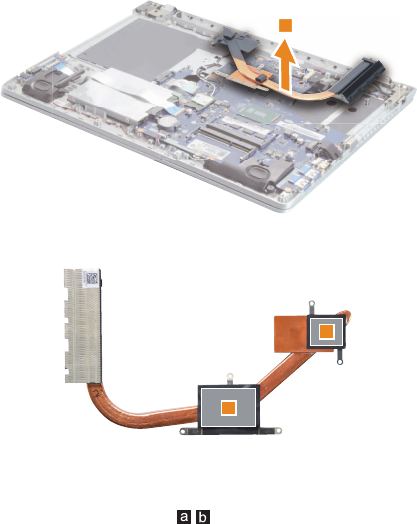
Figure 11. Removal steps of DIMM (continued)
Lifttheheatsinkinthedirectionshownbyarrow5.
5
a
b
When installing:
Beforeyou attachthefan assemblytothecomputer,apply thermalgrease,
atanamountof0.2grams,tothe partshowninthegureabove.Either
toomuchortoolittlegreaseapplicationcan causeathermal problemdueto
imperfectcontactwithacomponent.
60
Lenovo ideapad 500-14ISK/ideapad 500-15ISK
Hardware Maintenance Manual
1120
System board
Important notices for handling the system board:
When handling the system board, bear the following in mind.
• Be careful not to drop the system board on a bench top that has a hard surface,
such as metal, wood, or composite.
• Avoid rough handling of any kind.
• In the whole process, make sure not to drop or stack the system board.
• If you put a system board down, make sure to put it only on a padded surface such
as an ESD mat or conductive corrugated material.
Foraccess,removetheseFRUsinorder:
• “1010Keyboard”onpage33
• “1020Opticaldrive”onpage37
• “1030Basecover”onpage40
• “1040Batterypack”onpage45
• “1050Harddiskdrive”onpage47
• “1060Speakers”onpage50
• “1070IOboard”onpage52
• “1080PCIExpressMiniCardforwirelessLAN”onpage53
• “1090ODDboard(ideapad500-15ISK)”onpage55
• “1110FanassemblyandHeatSinkassembly”onpage57
Figure 12. Removal steps of system board
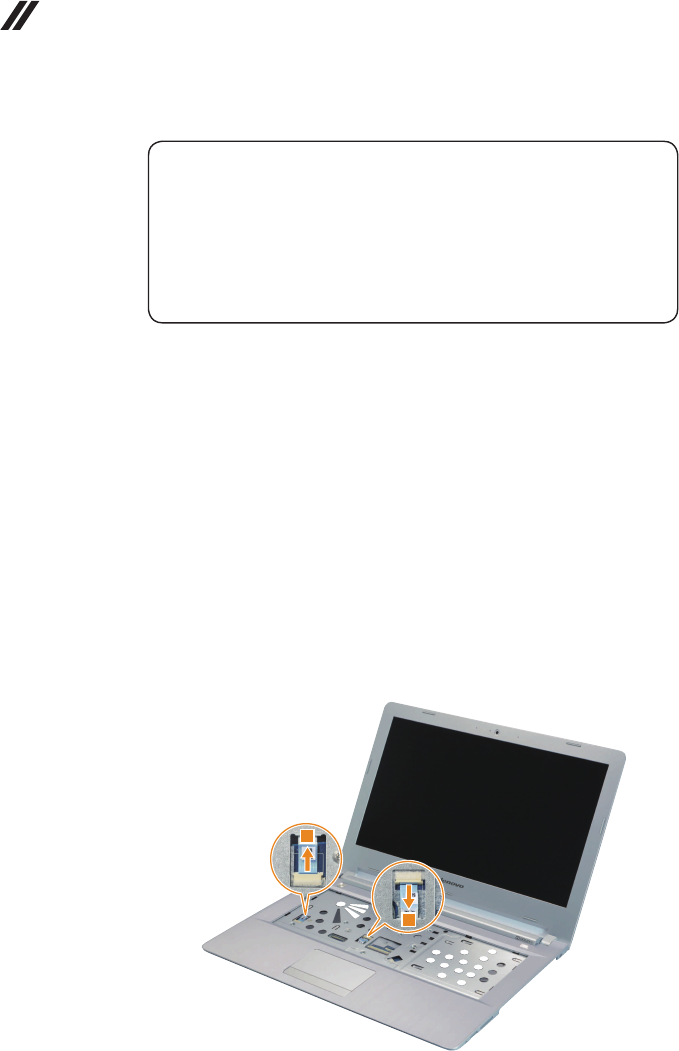
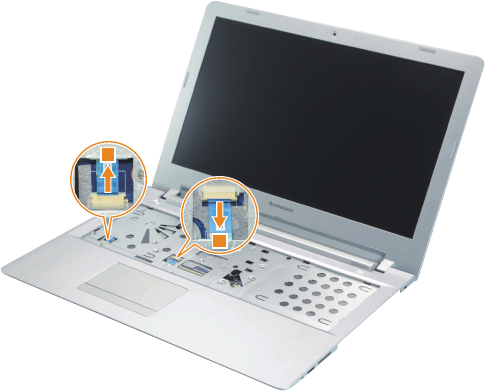
DetachthetwoFPCconnectorsinthedirectionsshownbyarrows1.
ideapad 500-14ISK
1
1
61
Lenovo ideapad 500-14ISK/ideapad 500-15ISK
Figure 12. Removal steps of system board (continued)
ideapad 500-15ISK
1
1
62
Lenovo ideapad 500-14ISK/ideapad 500-15ISK
Hardware Maintenance Manual
Figure 12. Removal steps of system board (continued)
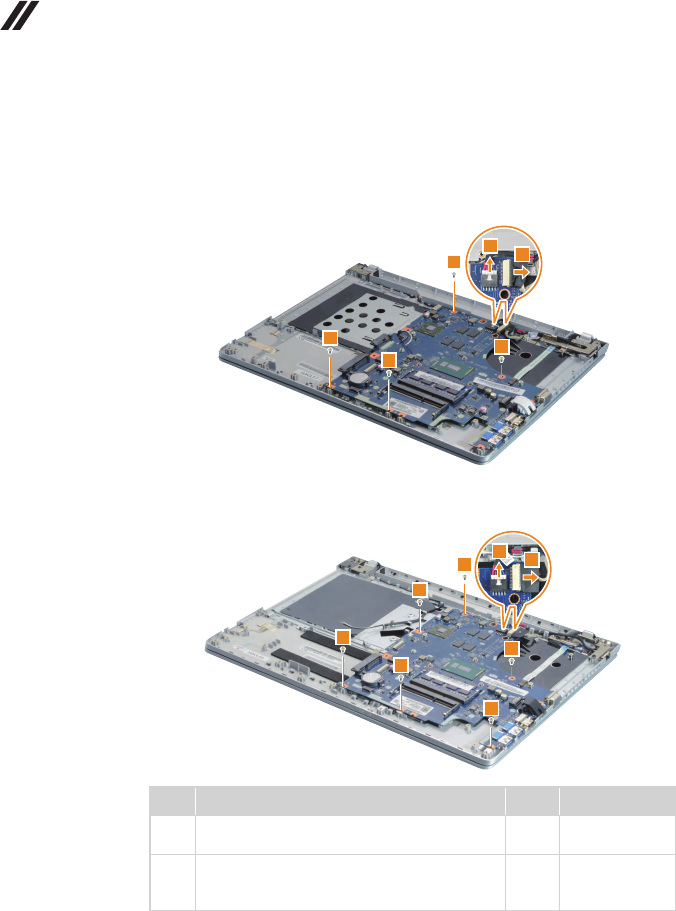
Detachthetwoconnectors inthedirections shownbyarrows 2.Removethe
screws3.
ideapad 500-14ISK
22
3
3
33
ideapad 500-15ISK
22
3
3
3
3
3
3
Step Screw (quantity) Color Torque
3M2.5×4mm,Phillipshead,nylok-coated(4)
MBTOUPPER(ideapad500-14ISK) Silver 3.0+/-0.3kgf/cm
3M2.5×4mm,Phillipshead,nylok-coated(6)
MBTOUPPER&MBTOKBBRK
(ideapad500-15ISK)
Silver 3.0+/-0.3kgf/cm
63
Lenovo ideapad 500-14ISK/ideapad 500-15ISK
Figure 12. Removal steps of system board (continued)
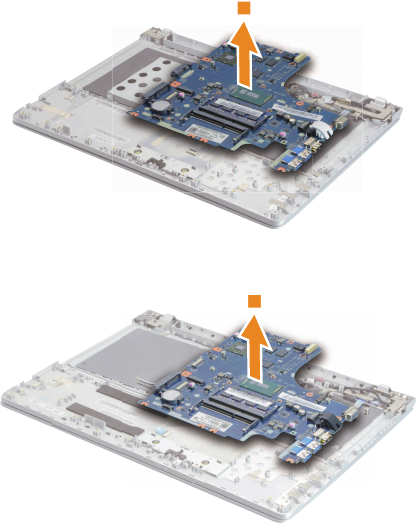
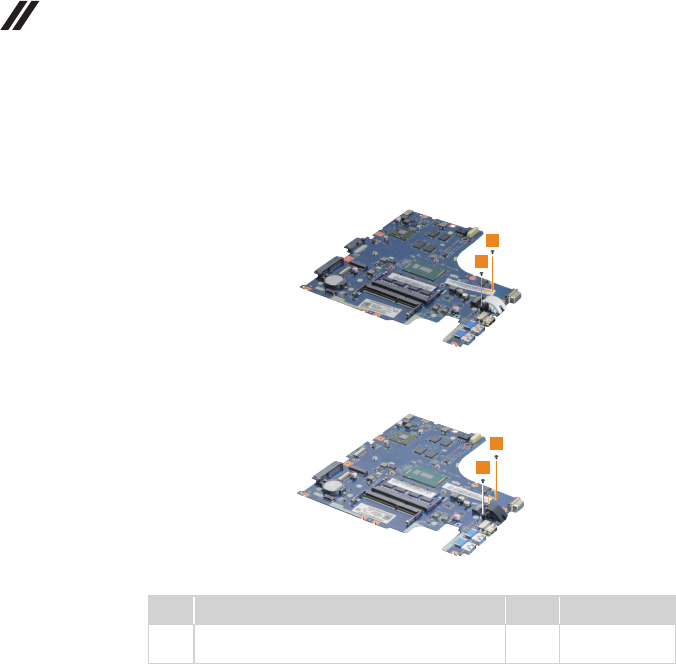
Removethesystemboardinthedirectionshownbyarrow4.
ideapad 500-14ISK
4
ideapad 500-15ISK
4
64
Lenovo ideapad 500-14ISK/ideapad 500-15ISK
Hardware Maintenance Manual
Figure 12. Removal steps of system board (continued)
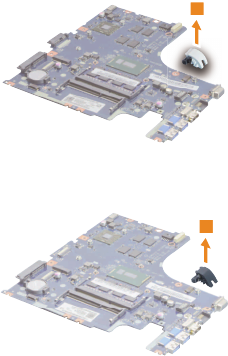
Removethescrews5.
ideapad 500-14ISK
5
5
ideapad 500-15ISK
5
5
Step Screw (quantity) Color Torque
5M2×3,Phillipshead,nylok-coated(2)
RJ45COVERTOMB Black 1.85+/-0.15kgf/cm
65
Lenovo ideapad 500-14ISK/ideapad 500-15ISK
Figure 12. Removal steps of system board (continued)
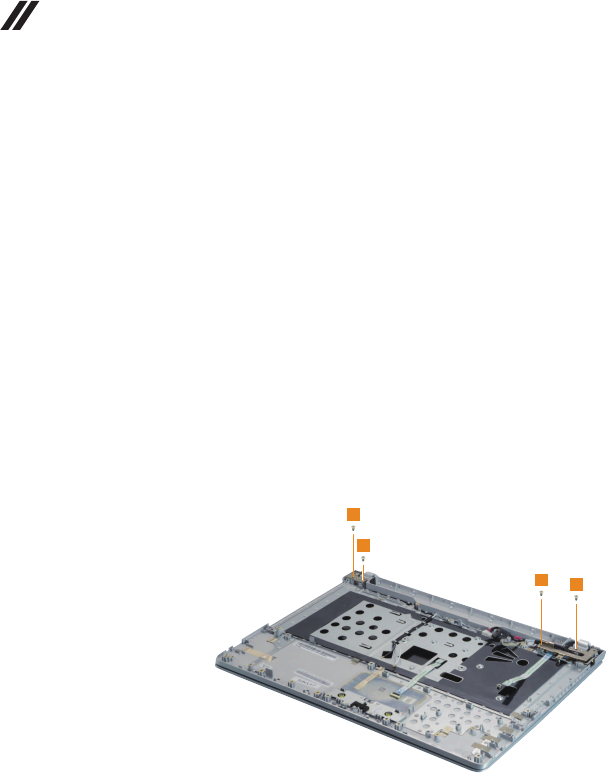
RemovetheRJ-45doorinthedirectionshownbyarrow6.
ideapad 500-14ISK
6
ideapad 500-15ISK
6
66
Lenovo ideapad 500-14ISK/ideapad 500-15ISK
Hardware Maintenance Manual
1130 Upper case
Foraccess,removetheseFRUsinorder:
• “1010Keyboard”onpage33
• “1020Opticaldrive”onpage37
• “1030Basecover”onpage40
• “1040Batterypack”onpage45
• “1050Harddiskdrive”onpage47
• “1060Speakers”onpage50
• “1070IOboard”onpage52
• “1080PCIExpressMiniCardforwirelessLAN”onpage53
• “1090ODDboard(ideapad500-15ISK)”onpage55
• “1110FanassemblyandHeatSinkassembly”onpage57
Figure 13. Removal steps of upper case
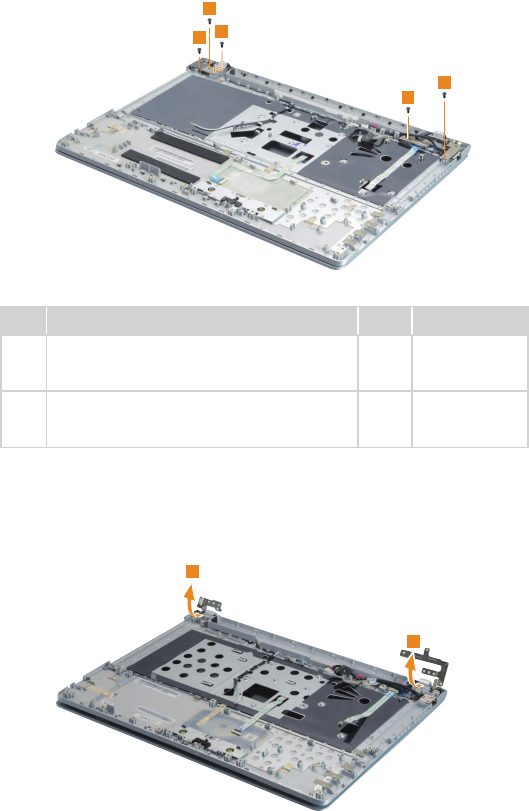
Removethescrews1.
ideapad 500-14ISK
1
1
11
67
Lenovo ideapad 500-14ISK/ideapad 500-15ISK
Figure 13. Removal steps of upper case (continued)
ideapad 500-15ISK
1
1
1
1
1
Step Screw (quantity) Color Torque
1M2.5×4,Phillipshead,nylok-coated(4)
HINGEBRKTOUPPER
(ideapad500-14ISK)
Silver 3.0+/-0.3kgf/cm
1M2.5×5,Phillipshead,nylok-coated(5)
HINGEBRKTOUPPER
(ideapad500-15ISK)
Black 3.0+/-0.3kgf/cm
Openthehingeinthedirectionshownbyarrows2.
ideapad 500-14ISK
2
2
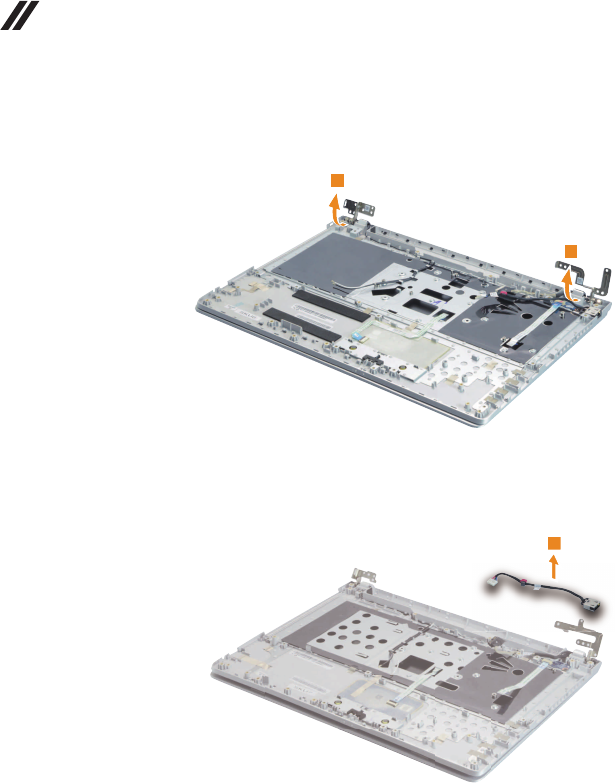
68
Lenovo ideapad 500-14ISK/ideapad 500-15ISK
Hardware Maintenance Manual
Figure 13. Removal steps of upper case (continued)
ideapad 500-15ISK
2
2
RemovetheDCincableinthedirectionshownbyarrow3.
ideapad 500-14ISK
3
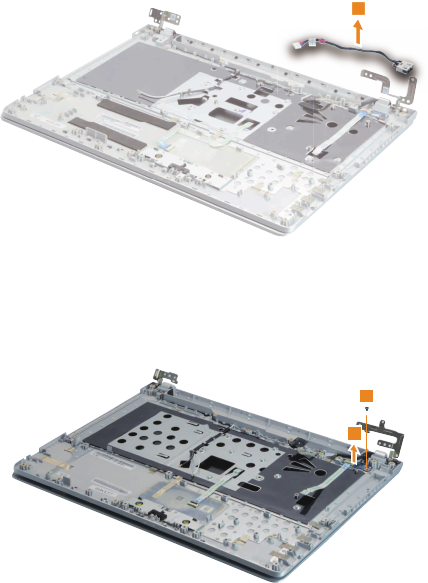
69
Lenovo ideapad 500-14ISK/ideapad 500-15ISK
Figure 13. Removal steps of upper case (continued)
ideapad 500-15ISK
3
Removethescrew4.Thenremovethepowerboardinthedirectionshownby
arrow5.
ideapad 500-14ISK
4
5
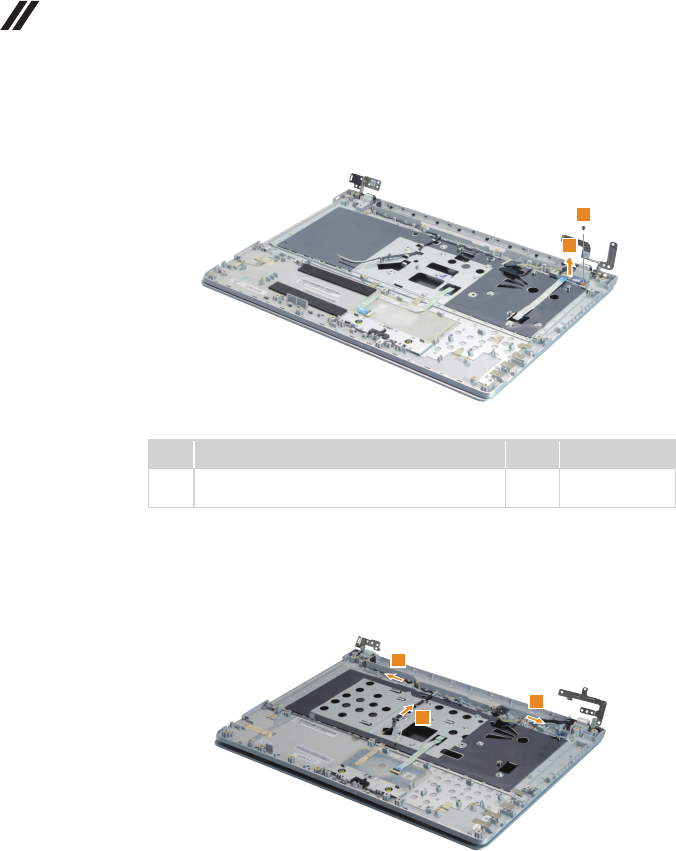
70
Lenovo ideapad 500-14ISK/ideapad 500-15ISK
Hardware Maintenance Manual
Figure 13. Removal steps of upper case (continued)
ideapad 500-15ISK
4
5
Step Screw (quantity) Color Torque
4M2×3,Phillipshead,nylok-coated(1)
POWERBOARDTOUPPER Black 1.85+/-0.15kgf/cm
Releasetheantennacablesfromthecableguidesinthedirectionshownby
arrows6.
ideapad 500-14ISK
6
6
6
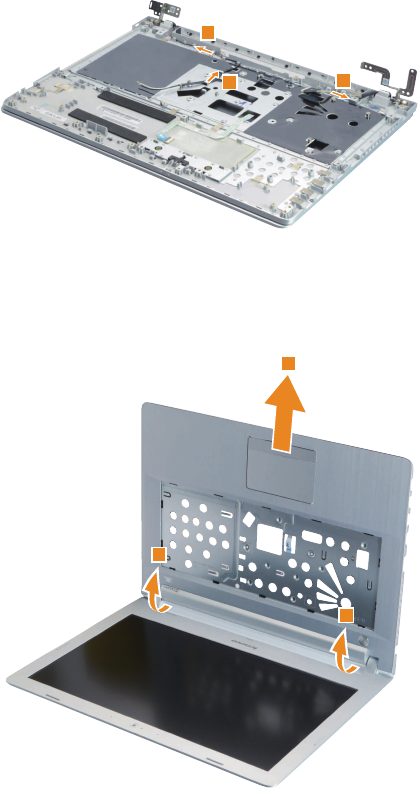
71
Lenovo ideapad 500-14ISK/ideapad 500-15ISK
Figure 13. Removal steps of upper case (continued)
ideapad 500-15ISK
66
6
RemovetheuppercasefromtheLCDmoduleinthedirectionsshownbyarrow
7and8.
ideapad 500-14ISK
7
7
8
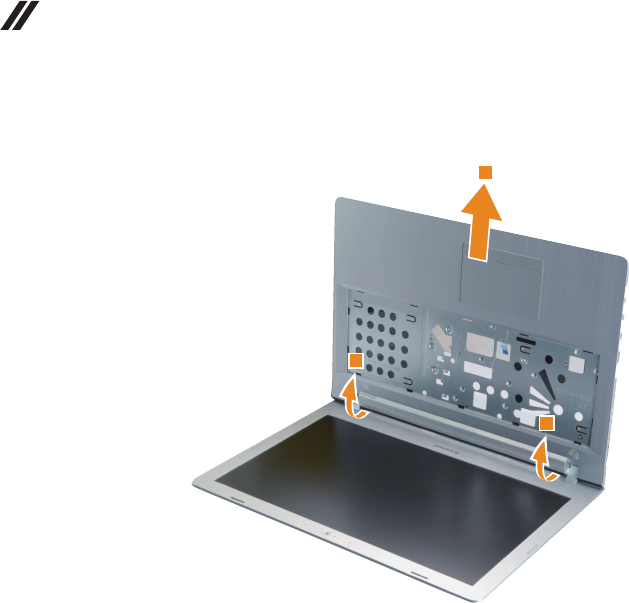
72
Lenovo ideapad 500-14ISK/ideapad 500-15ISK
Hardware Maintenance Manual
Figure 13. Removal steps of upper case (continued)
ideapad 500-15ISK
7
7
8
73
Lenovo ideapad 500-14ISK/ideapad 500-15ISK
1140 LCD unit
Foraccess,removetheseFRUsinorder:
• “1010Keyboard”onpage33
• “1020Opticaldrive”onpage37
• “1030Basecover”onpage40
• “1040Batterypack”onpage45
• “1050Harddiskdrive”onpage47
• “1060Speakers”onpage50
• “1070IOboard”onpage52
• “1080PCIExpressMiniCardforwirelessLAN”onpage53
• “1090ODDboard(ideapad500-15ISK)”onpage55
• “1100DIMM”onpage56
• “1110FanassemblyandHeatSinkassembly”onpage57
• “1120Systemboard”onpage60
• “1130Uppercase”onpage66
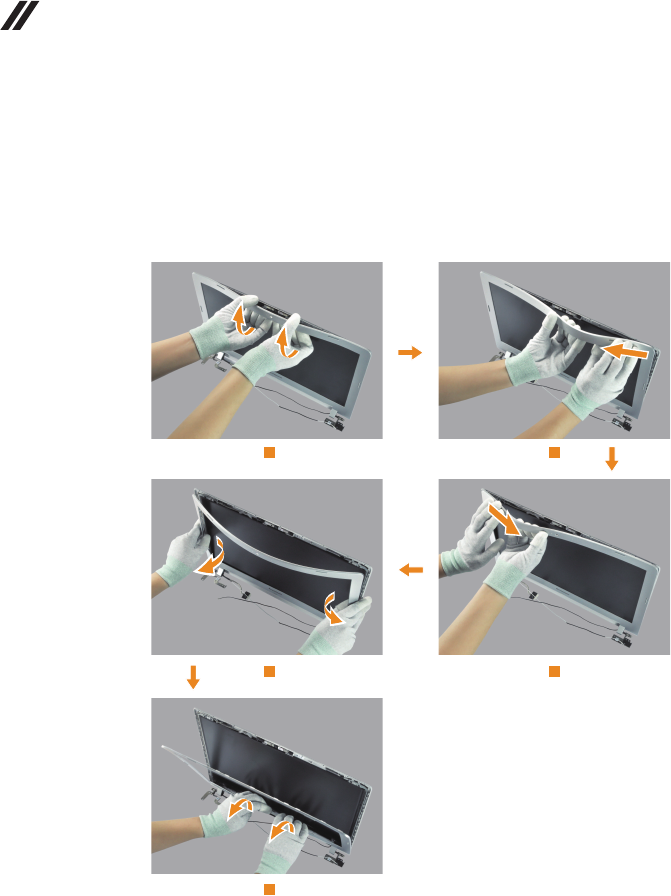
74
Lenovo ideapad 500-14ISK/ideapad 500-15ISK
Hardware Maintenance Manual
Figure 14. Removal steps of LCD unit (continued)
Step1:unlockLCDbezelasshownbypicture1.
Step2&3:unlockbezelofffromtheright&leftcornersasshownbypictures
2&3.
Step4:unlockbezelfrombothsidesasshownbypicture4.
Step5:removebezelfromtherearsideasshownbypicture5.
1
4
5
2
3
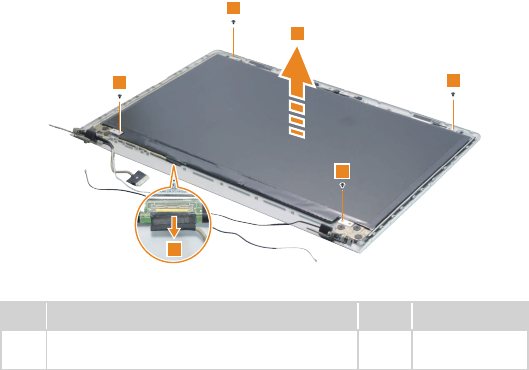
75
Lenovo ideapad 500-14ISK/ideapad 500-15ISK
Figure 14. Removal steps of LCD unit (continued)
Removethescrews1.Liftthe LCDmoduleslightly2.Disconnectthe
connectorinthedirectionshownbyarrow3.ThenremovetheLCDmodule.
1
1
1
1
2
3
Step Screw (quantity) Color Torque
1M2×3,Phillipshead,nylok-coated(4)
HINGEBRKTOLCDPANEL Black 1.85+/-0.15kgf/cm
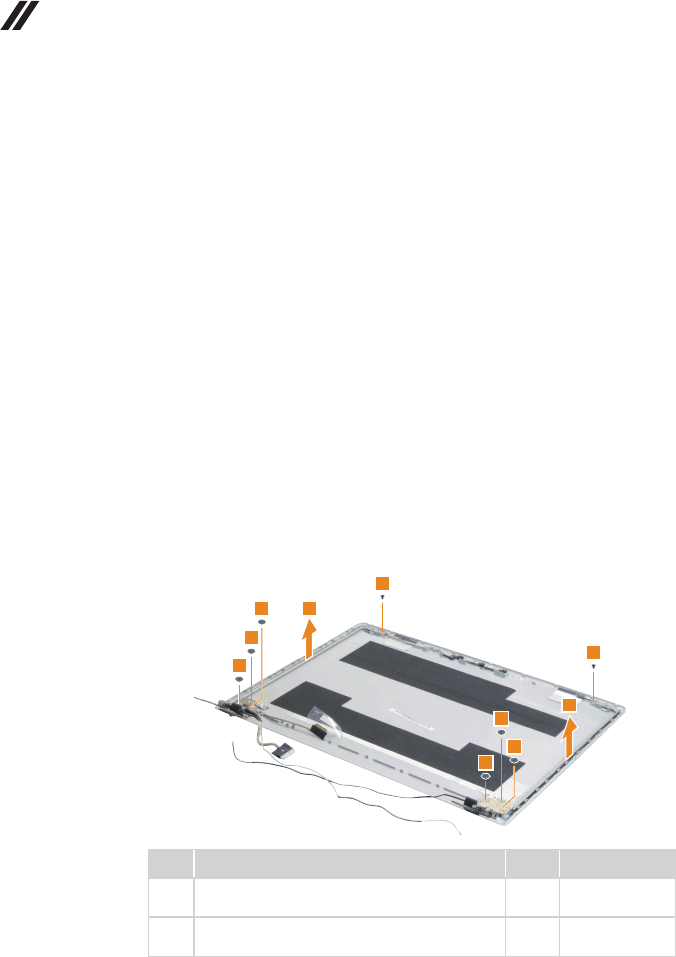
76
Lenovo ideapad 500-14ISK/ideapad 500-15ISK
Hardware Maintenance Manual
1150 LCD hinges
Foraccess,removetheseFRUsinorder:
• “1010Keyboard”onpage33
• “1020Opticaldrive”onpage37
• “1030Basecover”onpage40
• “1040Batterypack”onpage45
• “1050Harddiskdrive”onpage47
• “1060Speakers”onpage50
• “1070IOboard”onpage52
• “1080PCIExpressMiniCardforwirelessLAN”onpage53
• “1090ODDboard(ideapad500-15ISK)”onpage55
• “1100DIMM”onpage56
• “1110FanassemblyandHeatSinkassembly”onpage57
• “1120Systemboard”onpage60
• “1130Uppercase”onpage66
• “1140LCDunit”onpage73
Figure 15. Removal steps of LCD hinges
Removethescrews1 and2.Thenreleasethetwohingesinthe direction
shownbyarrows3.
1
1
2
2
2
2
2
2
3
3
Step Screw (quantity) Color Torque
1M2×3,Phillipshead,nylok-coated(2)
HINGEBRKTOLCDCOVER Black 1.85+/-0.15kgf/cm
2M2.5×2.5,Phillipshead,nylok-coated(6)
HINGEBRKTOLCDCOVER Black 3.0+/-0.3kgf/cm
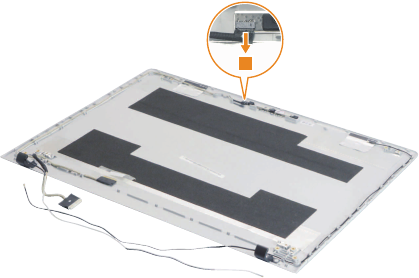
77
Lenovo ideapad 500-14ISK/ideapad 500-15ISK
1160 Integrated camera, LCD cable and antenna assembly
Foraccess,removetheseFRUsinorder:
• “1010Keyboard”onpage33
• “1020Opticaldrive”onpage37
• “1030Basecover”onpage40
• “1040Batterypack”onpage45
• “1050Harddiskdrive”onpage47
• “1060Speakers”onpage50
• “1070IOboard”onpage52
• “1080PCIExpressMiniCardforwirelessLAN”onpage53
• “1090ODDboard(ideapad500-15ISK)”onpage55
• “1100DIMM”onpage56
• “1110FanassemblyandHeatSinkassembly”onpage57
• “1120Systemboard”onpage60
• “1130Uppercase”onpage66
• “1140LCDunit”onpage73
• “1150LCDhinges”onpage76
Figure 16. Removal steps of integrated camera, LCD cable and antenna
assembly
Note:TheintegratedcameraisstuckonthetopcenteroftheLCDcover.
Detachtheintegratedcameraconnectorinthedirectionshownbyarow1.
1
Note:ForLenovoideapad500-15ISK, select modelshavea 3Dcamera.3D
cameracable,EPDcableandmicrophoneboardaredifferentfromthecommon
models.Pleaserefertotheactualproduct.
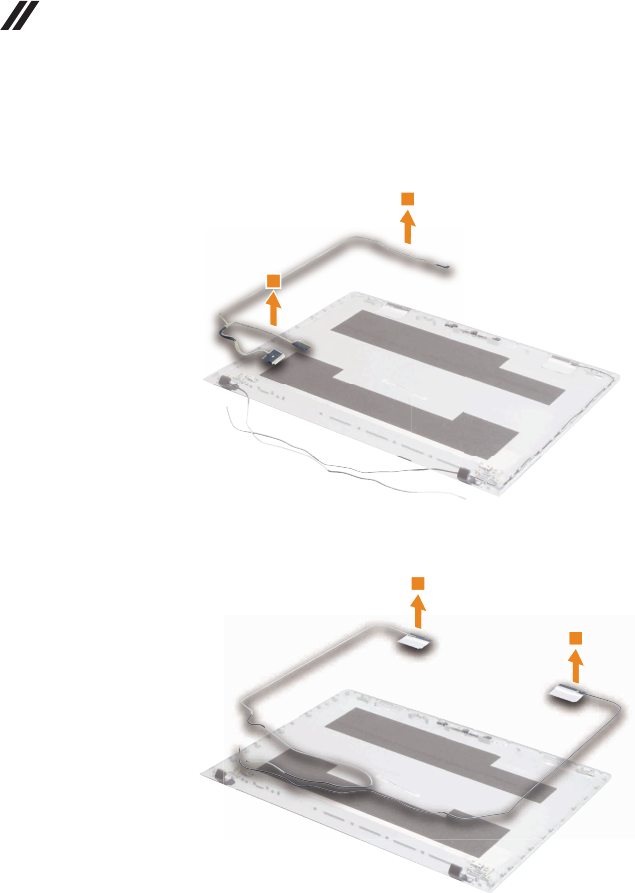
78
Lenovo ideapad 500-14ISK/ideapad 500-15ISK
Hardware Maintenance Manual
Figure 16. Removal steps of integrated camera, LCD cable and antenna
assembly (continued)
RemovetheLCDcableinthedirectionshownbyarrows2.
2
2
Removetheantennaassemblyinthedirectionshownbyarrows3.
3
3
3
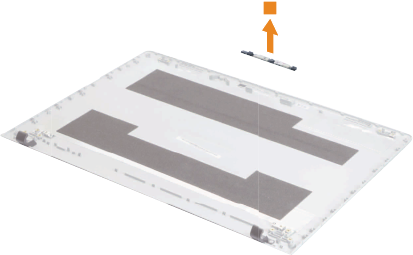
79
Lenovo ideapad 500-14ISK/ideapad 500-15ISK
Figure 16. Removal steps of integrated camera, LCD cable and antenna
assembly (continued)
Removethecamerainthedirectionshownbyarrow4.
4
When installing:Sticktheintegrated cameratothe topcenterof theLCD
coverandadjustthe placementofittomake suretheconnectorisattached
rmly.
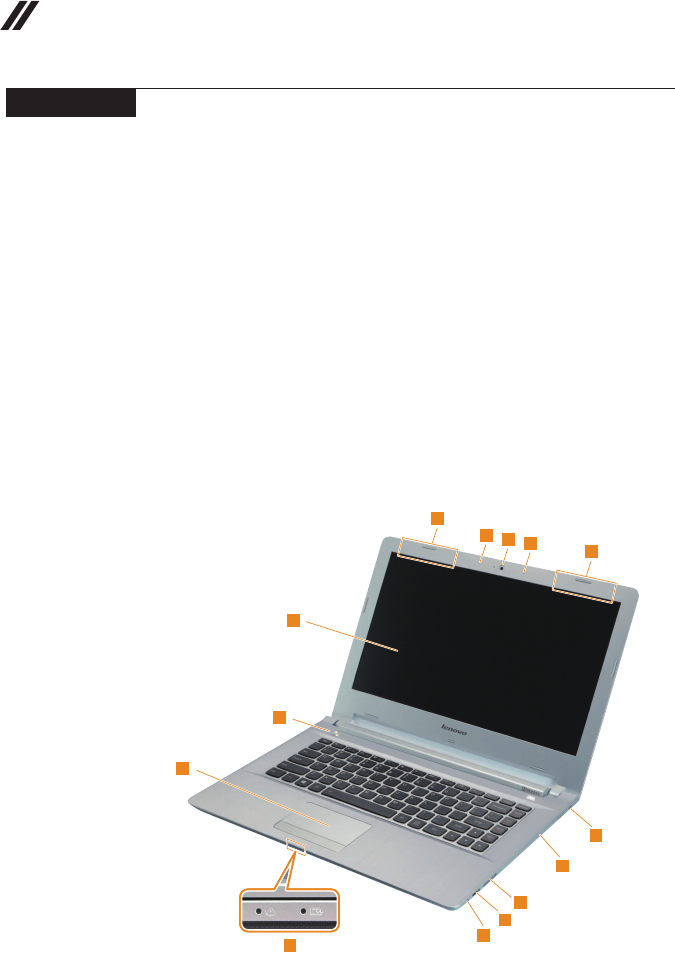
80
Lenovo ideapad 500-14ISK/ideapad 500-15ISK
Hardware Maintenance Manual
Locations
Front view and right-side view
1 Integratedcamera
Note:ForLenovoideapad500-15ISK,selectmodelshavea3Dcamera.
2 Built-inmicrophone
3 WirelessLANantennas
4 Computerdisplay
5 Powerbutton
6 Touchpad
7 Comboaudiojack
8 USBport
9 Memorycardslot
J Opticaldrive(onselectmodels)
K Kensingtonlockslot
L Systemstatusindicators
Note:Forthedescriptionofeachindicator,see“Statusindicators”onpage28.
ideapad 500-14ISK
12
2
3
3
4
5
6
12 7
8
9
10
11
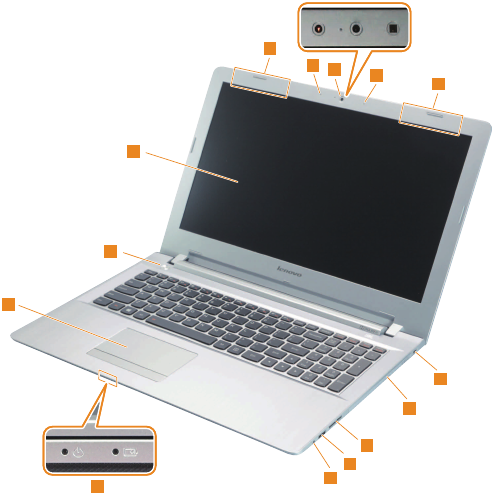
81
Lenovo ideapad 500-14ISK/ideapad 500-15ISK
ideapad 500-15ISK
12
2
3
3
4
5
6
7
8
9
10
11
12
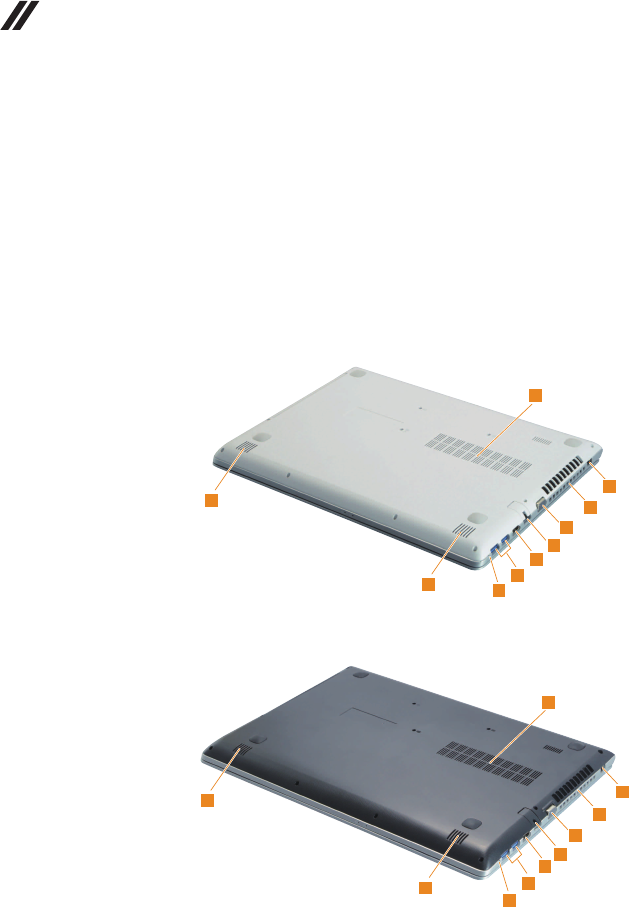
82
Lenovo ideapad 500-14ISK/ideapad 500-15ISK
Hardware Maintenance Manual
Bottom and Left-side view
1 Speakers
2 Novobutton
3 USBport
4 HDMIport
5 RJ-45port
6 VGAport
7 Ventilationslots
8 ACpoweradapterjack
9 Louvers
ideapad 500-14ISK
12
3
4
5
6
7
8
9
1
ideapad 500-15ISK
1
2
3
4
5
6
7
8
9
1
83
Lenovo ideapad 500-14ISK/ideapad 500-15ISK
Parts list
Thissectionpresentsthefollowingserviceparts:
• “Overall”onpage84
• “LCDFRUs”onpage97
• “Keyboard”onpage100
• “Miscellaneousparts”onpage107
• “ACadapters”onpage108
• “Screws”onpage108
• “Powercords”onpage109
Note:
Each FRU is available for all types or models, unless specic types or models are
specied.
Attention:
DonotattempttoreplaceanFRUonyourown.IfanFRUisdamaged,contact
aLenovoauthorizedserviceroramarketing representativeforreplacement
orrepair.Onlyqualiedtechnicianscaninspectorrepairthisproduct.
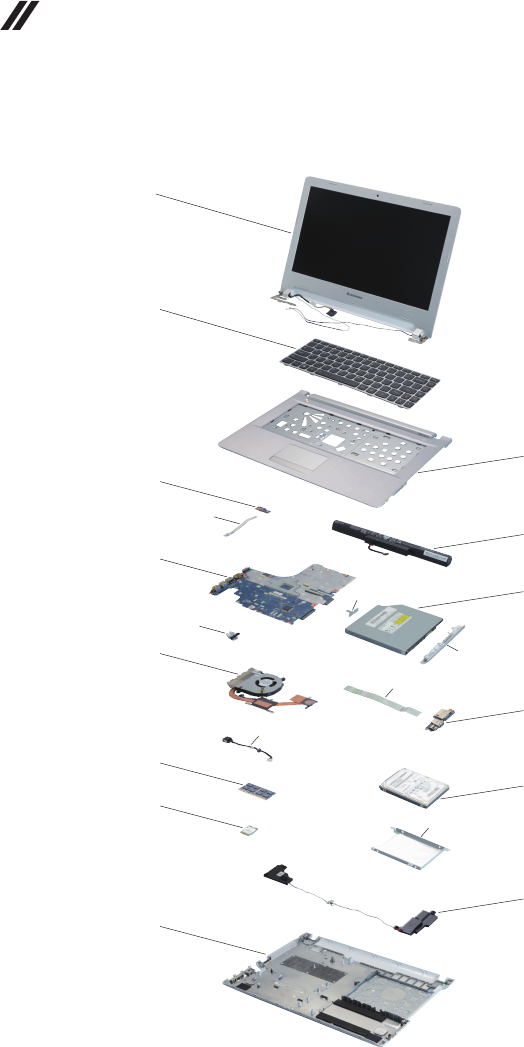
84
Lenovo ideapad 500-14ISK/ideapad 500-15ISK
Hardware Maintenance Manual
Overall
ideapad 500-14ISK
1
2
4
e
6
8
11
12
15
3
5
7
9
13
14
c
a
b
f
g
d
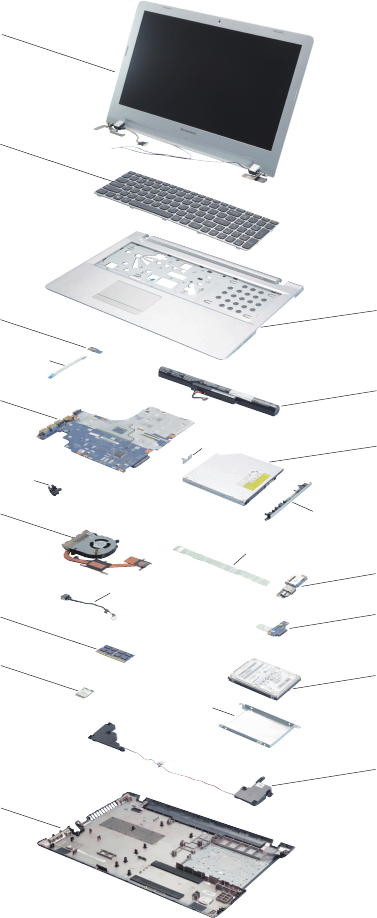
85
Lenovo ideapad 500-14ISK/ideapad 500-15ISK
ideapad 500-15ISK
1
2
3
4
e
c
d
6
8
11
12
15
5
7
9
10
13
14
a
f
b
g

86
Lenovo ideapad 500-14ISK/ideapad 500-15ISK
Hardware Maintenance Manual
Table 5. Parts list—Overall
No.
FRU FRU no.
CRU
ID.
ideapad
500-14ISK
ideapad
500-15ISK
a-h See“Miscellaneousparts”onpage107.
1 LCDunit(see“LCDFRUs”onpage97.)
2 Keyboard(see“Keyboard”onpage100.)
3 UpperCaseCZ41-70NBKLBlackNJBL 5CB0J23813
N
●
3 UpperCaseCZ41-70NBKLBlackJBL 5CB0J23570 ●
3 UpperCaseCZ41-70BKLBlackJBL 5CB0J23601 ●
3 UpperCaseCZ41-70NBKLWhiteNJBL 5CB0J23669 ●
3 UpperCaseCZ41-70NBKLWhiteJBL 5CB0J23699 ●
3 UpperCaseCZ41-70BKLWhiteJBL 5CB0J23734 ●
3 UpperCaseCZ51-70NBKLBlackNJBL 5CB0J23628 ●
3 UpperCaseCZ51-70NBKLBlackJBL 5CB0J23656 ●
3 UpperCaseCZ51-70BKLBlackJBL 5CB0J23687 ●
3 UpperCaseCZ51-70NBKLWhiteNJBL 5CB0J23722 ●
3 UpperCaseCZ51-70NBKLWhiteJBL 5CB0J23760 ●
3 UpperCaseCZ51-70BKLWhiteJBL 5CB0J23799 ●
4 PowerBoardCZ41-70 5C50J23647 ● ●
5 Z41SY/PL14S4E0114.4V41Wh4cell 5B10H13091 ● ●
5 Z41SP/SL14M4E0115V41Wh4cell 5B10H13094 ● ●
5 Z41LGL14L4E0114.88V41Wh4cell 5B10H30033 ● ●
5 Z41SY/PL14S4E0114.4V41Wh4cellGB 5B10K10172 ● ●
5 Z41SP/SL14M4E0115V41Wh4cellGB 5B10K10217 ● ●
5 Z41LGL14L4E0114.88V41Wh4cellGB 5B10K10170 ● ●
5 Z41SY/PL14S4E0114.4V41Wh4cellGB 5B10K10172 ● ●
5 Z41SP/SL14M4E0115V41Wh4cellGB 5B10K10217 ● ●
5 Z41LGL14L4E0114.88V41Wh4cellGB 5B10K10170 ● ●
5 Z41SYL14S4A0114.4V32Wh4cell 5B10H13097 ● ●
5 Z41SP/SL14M4A0114.4V32Wh4cell 5B10H13099 ● ●
5 Z41LGL14L4A0114.4V32Wh4cell 5B10H30034 ● ●
5 Z41SYL14S4A0114.4V32Wh4cellGB 5B10K10216 ● ●
5 Z41SP/SL14M4A0114.4V32Wh4cellGB 5B10K10169 ● ●
5 Z41LGL14L4A0114.4V32Wh4cellGB 5B10K10213 ● ●
5 Z41SYL14S4A0114.4V32Wh4cellGB 5B10K10216 ● ●
5 Z41SP/SL14M4A0114.4V32Wh4cellGB 5B10K10169 ● ●
5 Z41LGL14L4A0114.4V32Wh4cellGB 5B10K10213 ● ●
6MBC80NSI3-6100NOK2GBL 5B20K34569 ●
6MBC80NSI3-6100WIN2GBL 5B20K34552 ●
6MBC80NSI3-6100NOK4GBL 5B20K34580 ●
6MBC80NSI3-6100WIN4GBL 5B20K34571 ●
6MBC80NSI3-6100NOK2GNBL 5B20K34561 ●
6MBC80NSI3-6100WIN2GNBL 5B20K34550 ●
6MBC80NSI3-6100NOK4GNBL 5B20K34578 ●
6MBC80NSI3-6100WIN4GNBL 5B20K34568 ●
6MBC80NSI5-6200NOK2GBL 5B20K34557 ●
6MBC80NSI5-6200WIN2GBL 5B20K34547 ●
6MBC80NSI5-6200NOK4GBL 5B20K34576 ●
6MBC80NSI5-6200WIN4GBL 5B20K34566 ●
6MBC80NSI5-6200NOK2GNBL 5B20K34555 ●

87
Lenovo ideapad 500-14ISK/ideapad 500-15ISK
Table 5. Parts list—Overall (continued)
No.
FRU FRU no.
CRU
ID.
ideapad
500-14ISK
ideapad
500-15ISK
6MBC80NSI5-6200WIN2GNBL 5B20K34564
N
●
6MBC80NSI5-6200NOK4GNBL 5B20K34554 ●
6MBC80NSI5-6200WIN4GNBL 5B20K34582 ●
6MBC80NSI7-6500NOK2GBL 5B20K34573 ●
6MBC80NSI7-6500WIN2GBL 5B20K34570 ●
6MBC80NSI7-6500NOK4GBL 5B20K34558 ●
6MBC80NSI7-6500WIN4GBL 5B20K34548 ●
6MBC80NSI7-6500NOK2GNBL 5B20K34559 ●
6MBC80NSI7-6500WIN2GNBL 5B20K34549 ●
6MBC80NSI7-6500NOK4GNBL 5B20K34577 ●
6MBC80NSI7-6500WIN4GNBL 5B20K34567 ●
6MBC80NSI3-6100NOKUMABL 5B20K34560 ●
6MBC80NSI3-6100WINUMABL 5B20K34581 ●
6MBC80NSI3-6100NOKUMANBL 5B20K34574 ●
6MBC80NSI3-6100WINUMANBL 5B20K34572 ●
6MBC80NSI5-6200NOKUMABL 5B20K34562 ●
6MBC80NSI5-6200WINUMABL 5B20K34551 ●
6MBC80NSI5-6200NOKUMANBL 5B20K34579 ●
6MBC80NSI5-6200WINUMANBL 5B20K34575 ●
6MBC80NSI7-6500NOKUMABL 5B20K34563 ●
6MBC80NSI7-6500WINUMABL 5B20K34553 ●
6MBC80NSI7-6500NOKUMANBL 5B20K34565 ●
6MBC80NSI7-6500WINUMANBL 5B20K34556 ●
6MBC80NTI3-6100NOK2GBL3D 5B20K34603 ●
6MBC80NTI3-6100WIN2GBL3D 5B20K34639 ●
6MBC80NTI3-6100NOK4GBL3D 5B20K34631 ●
6MBC80NTI3-6100WIN4GBL3D 5B20K34620 ●
6MBC80NTI3-6100NOK2GNBL3D 5B20K34613 ●
6MBC80NTI3-6100WIN2GNBL3D 5B20K34608 ●
6MBC80NTI3-6100NOK4GNBL3D 5B20K34602 ●
6MBC80NTI3-6100WIN4GNBL3D 5B20K34599 ●
6MBC80NTI3-6100NOK2GBLN3D 5B20K34594 ●
6MBC80NTI3-6100WIN2GBLN3D 5B20K34598 ●
6MBC80NTI3-6100NOK4GBLN3D 5B20K34593 ●
6MBC80NTI3-6100WIN4GBLN3D 5B20K34589 ●
6MBC80NTI3-6100NOK2GNBLN3D 5B20K34585 ●
6MBC80NTI3-6100WIN2GNBLN3D 5B20K34597 ●
6MBC80NTI3-6100NOK4GNBLN3D 5B20K34592 ●
6MBC80NTI3-6100WIN4GNBLN3D 5B20K34588 ●
6MBC80NTI5-6200NOK2GBL3D 5B20K34583 ●
6MBC80NTI5-6200WIN2GBL3D 5B20K34651 ●
6MBC80NTI5-6200NOK4GBL3D 5B20K34647 ●
6MBC80NTI5-6200WIN4GBL3D 5B20K34641 ●
6MBC80NTI5-6200NOK2GNBL3D 5B20K34630 ●
6MBC80NTI5-6200WIN2GNBL3D 5B20K34629 ●
6MBC80NTI5-6200NOK4GNBL3D 5B20K34619 ●
6MBC80NTI5-6200WIN4GNBL3D 5B20K34612 ●

88
Lenovo ideapad 500-14ISK/ideapad 500-15ISK
Hardware Maintenance Manual
Table 5. Parts list—Overall (continued)
No.
FRU FRU no.
CRU
ID.
ideapad
500-14ISK
ideapad
500-15ISK
6MBC80NTI5-6200NOK2GBLN3D 5B20K34605
N
●
6MBC80NTI5-6200WIN2GBLN3D 5B20K34645 ●
6MBC80NTI5-6200NOK4GBLN3D 5B20K34637 ●
6MBC80NTI5-6200WIN4GBLN3D 5B20K34625 ●
6MBC80NTI5-6200NOK2GNBLN3D 5B20K34618 ●
6MBC80NTI5-6200WIN2GNBLN3D 5B20K34614 ●
6MBC80NTI5-6200NOK4GNBLN3D 5B20K34606 ●
6MBC80NTI5-6200WIN4GNBLN3D 5B20K34601 ●
6MBC80NTI7-6500NOK2GBL3D 5B20K34596 ●
6MBC80NTI7-6500WIN2GBL3D 5B20K34591 ●
6MBC80NTI7-6500NOK4GBL3D 5B20K34586 ●
6MBC80NTI7-6500WIN4GBL3D 5B20K34654 ●
6MBC80NTI7-6500NOK2GNBL3D 5B20K34627 ●
6MBC80NTI7-6500WIN2GNBL3D 5B20K34646 ●
6MBC80NTI7-6500NOK4GNBL3D 5B20K34638 ●
6MBC80NTI7-6500WIN4GNBL3D 5B20K34626 ●
6MBC80NTI7-6500NOK2GBLN3D 5B20K34648 ●
6MBC80NTI7-6500WIN2GBLN3D 5B20K34642 ●
6MBC80NTI7-6500NOK4GBLN3D 5B20K34632 ●
6MBC80NTI7-6500WIN4GBLN3D 5B20K34621 ●
6MBC80NTI7-6500NOK2GNBLN3D 5B20K34633 ●
6MBC80NTI7-6500WIN2GNBLN3D 5B20K34622 ●
6MBC80NTI7-6500NOK4GNBLN3D 5B20K34615 ●
6MBC80NTI7-6500WIN4GNBLN3D 5B20K34609 ●
6MBC80NTI3-6100NOKUMABL3D 5B20K34607 ●
6MBC80NTI3-6100WINUMABL3D 5B20K34649 ●
6MBC80NTI3-6100NOKUMANBL3D 5B20K34643 ●
6MBC80NTI3-6100WINUMANBL3D 5B20K34635 ●
6MBC80NTI3-6100NOKUMABLN3D 5B20K34624 ●
6MBC80NTI3-6100WINUMABLN3D 5B20K34617 ●
6MBC80NTI3-6100NOKUMANBLN3D 5B20K34611 ●
6MBC80NTI3-6100WINUMANBLN3D 5B20K34640 ●
6MBC80NTI5-6200NOKUMABL3D 5B20K34634 ●
6MBC80NTI5-6200WINUMABL3D 5B20K34623 ●
6MBC80NTI5-6200NOKUMANBL3D 5B20K34616 ●
6MBC80NTI5-6200WINUMANBL3D 5B20K34610 ●
6MBC80NTI5-6200NOKUMABLN3D 5B20K34604 ●
6MBC80NTI5-6200WINUMABLN3D 5B20K34600 ●
6MBC80NTI5-6200NOKUMANBLN3D 5B20K34595 ●
6MBC80NTI5-6200WINUMANBLN3D 5B20K34590 ●
6MBC80NTI7-6500NOKUMABL3D 5B20K34587 ●
6MBC80NTI7-6500WINUMABL3D 5B20K34584 ●
6MBC80NTI7-6500NOKUMANBL3D 5B20K34652 ●
6MBC80NTI7-6500WINUMANBL3D 5B20K34653 ●
6MBC80NTI7-6500NOKUMABLN3D 5B20K34650 ●
6MBC80NTI7-6500WINUMABLN3D 5B20K34644 ●
6MBC80NTI7-6500NOKUMANBLN3D 5B20K34636 ●
6MBC80NTI7-6500WINUMANBLN3D 5B20K34628 ●

89
Lenovo ideapad 500-14ISK/ideapad 500-15ISK
Table 5. Parts list—Overall (continued)
No.
FRU FRU no.
CRU
ID.
ideapad
500-14ISK
ideapad
500-15ISK
7HLDSGUE0N9.0mminternalDVDRamboODD 5DX0J46488
*
**
●
7PLDSDA-8A6SH9.0mmSlimTrayRamboODD 5DX0F86404 ●
7PSNUJ8HC9.0mmSlimTrayRamboODD 5DX0G86787 ●
7Z41WhiteDummyODD SMC0H34065 ●
7Z41RedDummyODD SMC0J23501 ●
7Z41BlackDummyODD SMC0J23502 ●
7DummyODDCZ41-70Black 5M20J31782 ●
7DummyODDCZ41-70White 5M20J31780 ●
7HLDSGUE0N9.0mminternalDVDRamboODD 5DX0J46488 ●
7PLDSDA-8A6SH9.0mmSlimTrayRamboODD 5DX0F86404 ●
7PSNUJ8HC9.0mmSlimTrayRamboODD 5DX0G86787 ●
7Z41WhiteDummyODD SMC0H34065 ●
7Z41BlackDummyODD SMC0J23502 ●
7DummyODDCZ51-70Black 5M20J31783 ●
7DummyODDCZ51-70White 5M20J31781 ●
8 ThermalModuleCZ41-70UMA 5H40J23704
N
● ●
8 ThermalModuleCZ41-70DIS25W 5H40J23741 ● ●
9 IOBoardCZ41-70 5C50J23629 ● ●
10 ODDBoardCZ51-70BKL 5C50J23540 ●
10 ODDBoardCZ51-70NBKL 5C50J23560 ●
11 M471B5674QH0-YK02GBDDR3L1600 11202451 ● ●
11 HMT425S6CFR6A-PB2GBDDR3L1600 5M30G99881 ● ●
11 RMT3190MN76F8F-16002GBDDR3L1600 5M30J33428 ● ●
11 MT4KTF25664HZ-1G6E12GBDDR3L1600 11201967 ● ●
11 M471B5173EB0-YK04GBDDR3L1600 5M30G18425 ● ●
11 HMT451S6BFR8A-PB/RD4GBDDR3L1600 11202706 ● ●
11 RMT3170MN68F9F-16004GBDDR3L1600 5M30G75129 ● ●
11 MT8KTF51264HZ-1G6E14GBDDR3L1600 11202125 ● ●
11 M471B1G73EB0-YK08GBDDR3L1600 5M30G18424 ● ●
11 HMT41GS6BFR8A-PB/RD8GBDDR3L1600 11202707 ● ●
11 RMT3160ME68FAF-16008GBDDR3L1600 11202450 ● ●
11 MT16KTF1G64HZ-1G6E18GBDDR3L1600 11201304 ● ●
12 Intel31651x1AC+BTPCIEM.2WLAN SW10H24486 ● ●
12 CbtBCM431621x1AC+BT4.0PCIEM.2WLANV2 SW10A11586 ● ●
12 CbtRTL8821AE1x1AC+BT4.0PCIEM.2WLAN SW10A11648 ● ●
12 LtnNFA4351x1AC+BT4.0PCIEM.2WLAN SW10A11641 ● ●
13 ST500LT0126G7mm5.4K500GHDD 16200383 ● ●
13 HTS545050A7E6606G7mm5.4K500GHDD 5H20H14223 ● ●
13 MQ01ABF0506G7mm5.4K500GHDD 16200433 ● ●
13 WDWD5000LPCX-24VHAT0 5H20J35762 ● ●
13 ST1000LM0246G9.5mm5.4K1THDD 16200385 ● ●
13 HTS541010A9E6606G9.5mm5.4K1THDD 16200400 ● ●
13 TSBMQ01ABD1006G9.5mm5.4K1THDD 16200429 ● ●
13 WD10JPCX-24UE4T06G9.5mm5.4K1THDD 16200393 ● ●
13 ST500LM0007mm500G+8G 5H20H24608 ● ●
13 ST1000LM0149.5mm1T+8G 5H20H24607 ● ●
13 SamsungMZYLF128HCHP2.5‘’5mm128GBSSD 5SD0H45117 ● ●
13 LiteonCV1-DB256256GB2.5"SSD 5SD0J21064 ●

90
Lenovo ideapad 500-14ISK/ideapad 500-15ISK
Hardware Maintenance Manual
No.
FRU FRU no.
CRU
ID.
ideapad
500-14ISK
ideapad
500-15ISK
13 ST2000LM0039.5mm5400rpm 5H20K10149
N
●
13 SamsungMZYLN256HCHP2.5'' 5SD0H00097 ●
14 Z41JBLBladeNSpeaker 5SB0H15127 ●
14 SpeakerCZ41-70 5SB0J23681 ●
14 Z51/Z71JBLBladeNSpeaker 5SB0H15128 ●
14 SpeakerCZ51-70 5SB0J23726 ●
15 LowerCaseCZ41-70Black 5CB0J23683 ●
15 LowerCaseCZ41-70White 5CB0J23776 ●
15 LowerCaseCZ51-70Black 5CB0J23702 ●
15 LowerCaseCZ51-70White 5CB0J23737 ●
— ACadapter(see“ACadapters”onpage108).
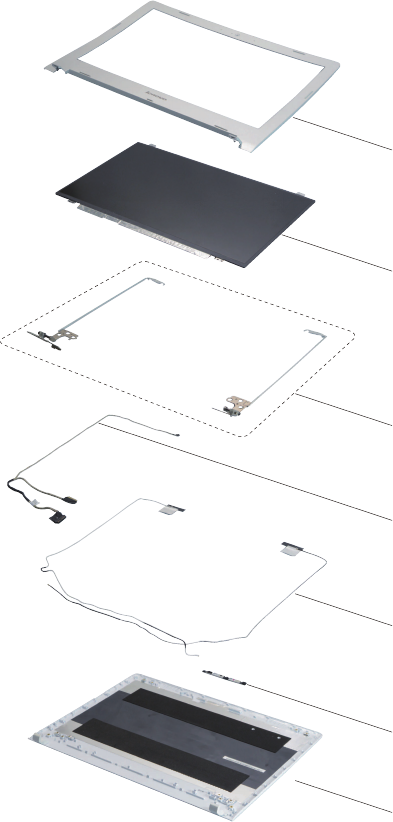
91
Lenovo ideapad 500-14ISK/ideapad 500-15ISK
LCD FRUs
InLenovoideapad500-14ISK/ideapad500-15ISK,therearefollowingtypesof
LCDs.
• “14.0-in.HDLED”
ideapad 500-14ISK
1
2
3
4
5
6
7
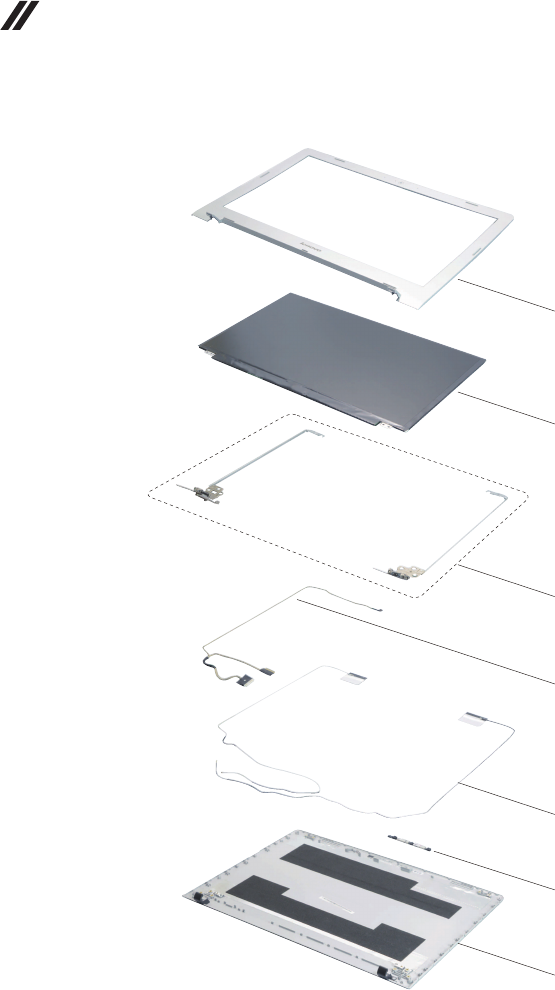
92
Lenovo ideapad 500-14ISK/ideapad 500-15ISK
Hardware Maintenance Manual
• “15.6-in.HDLED”
ideapad 500-15ISK
1
2
3
4
5
6
7
*ForLenovoZ51-70,selectmodelshavea3Dcamera.3Dcameracable,EPD
cableandmicrophoneboardaredifferentfromthecommonmodels.Pleaserefer
totheactualproduct.

93
Lenovo ideapad 500-14ISK/ideapad 500-15ISK
Table 6. Parts list—LCD FRUs
No.
FRU FRU no.
CRU
ID.
ideapad
500-14ISK
ideapad
500-15ISK
1 LCDBezelCZ41-70 5B30J23663
N
●
1 LCDBezelCZ51-70 5B30J23838 ●
1 LCDBezelCZ51-703D 5B30J23547 ●
2 PanelAUOB140HTN01.BFHDAGSNB 5D10H20139 ●
2 PanelINN140HGE-EAAC3FHDTAGSNB 5D10J33368 ●
2 PanelBOHB140FH1-401V4.1FHDTAGS 5D10H56752 ●
2 PanelLGDLP140WF6-SPB1FHDAGSNB 5D10H34771 ●
2 PanelSDCLTN140HL05-401FHDAGSNB 5D10H29268 ●
2 PanelAUOB156HTN03.8FHDAGSNB 5D10H15380 ●
2 PanelINN156HGE-EABC2FHDTAGSNB 5D10J45879 ●
2PanelBOEHB156FH1-401FHDAGSLED1NBLCD 18201585 ●
2 PanelAUOB156HTN03.90AFHDGSNB 5D10H15251 ●
2 PanelINN156HGE-EBBC2FHDTGSNB 5D10J45878 ●
2 PanelBOEHB156FH1-301FHDGSLED1NBLCD 18201673 ●
2 PanelLGDLP156WF6-SPK1FHDAGSNB 5D10H34772 ●
2 PanelSDCLTN156HL09-401FHDAGSNB 5D10H29267 ●
2 PanelBOENV156FHM-N42FHDAGSNB 5D10H32287 ●
3 HingeCZ41-70L+R 5H50J23677 ●
3 HingeCZ51-70 5H50J23638 ●
3 HingeCZ51-703D 5H50J23686 ●
4 EDPCableCZ41-70DIS 5C10J23698 ●
4 EDPCableCZ41-70UMA 5C10J23721 ●
4 EDPCableCZ51-70DIS 5C10J23727 ●
4 EDPCableCZ51-70UMA 5C10J23751 ●
4 EDPCableCZ51-70DIS3D 5C10J23775 ●
4 EDPCableCZ51-70UMA3D 5C10J23795 ●
5 AntennaCZ41-70MAIN+AUX 5A30J23770 ● ●
5 AntennaCZ51-70MAIN+AUX 5A30J23829 ●
6CameraBISBNC416YTKHDNBcamera 5C20G89272 ● ●
6CameraBISBNC416YS7HDNBcamera 5C20G89268 ● ●
6CameraAVCHAA-6D0F03HDNBcamera 5C20G89276 ● ●
6CameraCCYCNFEH39HDNBcamera 5C20G89264 ● ●
6CameraIntelF2003Dcamera 5C20H15126 ●
6CameraCZ41-70 5C20J23680 ● ●
7LCDCoverCZ41-70White 5CB0J23746 ●
7LCDCoverCZ41-70Black 5CB0J23780 ●
7LCDCoverCZ51-70White 5CB0J23817 ●
7LCDCoverCZ51-70Black 5CB0J23535 ●
7LCDCoverCZ51-70White3D 5CB0J23565 ●
7LCDCoverCZ51-70Black3D 5CB0J23597 ●
*CameraCableCZ51-703DDIS 5C10J23567 ●
*CameraCableCZ51-703DUMA 5C10J23592 ●
*MICBoardCZ51-70L+R 5C50J23706 ●
*ForZ51-70only.

94
Lenovo ideapad 500-14ISK/ideapad 500-15ISK
Hardware Maintenance Manual
Keyboard
Table 7. Parts list—Keyboard
Language P/N CRU ID.
ideapad500-14ISK
ChiconyNormal
English 5N20H03103
**
U.K.English 5N20H03076
Italian 5N20H03018
Spanish 5N20H02957
Turkish 5N20H03078
Thai 5N20H03019
Portuguese 5N20H02958
Latin 5N20H02966
CanadianEnglish&French 5N20H03089
Korean 5N20H03029
TraditionalChinese 5N20H02972
Russian 5N20H03092
French 5N20H03030
German 5N20H02993
Arabic 5N20H03114
Brazilian 5N20H03053
Japanese 5N20H02997
Dutch 5N20H03116
Greek 5N20H03055
Hebrew 5N20H03000
Hungarian 5N20H03120
FourNordiccountries 5N20H03058
Belgian 5N20H03002
Icelandic 5N20H03122
Slovenian 5N20H03063
Swiss 5N20H03037
InternationalEnglish 5N20H02977
Czechoslovakian 5N20H03100
Bulgarian 5N20H03041
Indian 5N20H02982
French-Arabic 5N20H31158
LiteonNormal
English 5N20H03008
U.K.English 5N20H03125
Italian 5N20H03065
Spanish 5N20H03009
Turkish 5N20H03129
Thai 5N20H03070
Portuguese 5N20H03013
Latin 5N20H03132
CanadianEnglish&French 5N20H03073
Korean 5N20H03016
TraditionalChinese 5N20H03135
Russian 5N20H03077

95
Lenovo ideapad 500-14ISK/ideapad 500-15ISK
Table 7. Parts list—Keyboard (continued)
Language P/N CRU ID.
ideapad500-14ISK
LiteonNormal
French 5N20H03020
**
German 5N20H02959
Arabic 5N20H03081
Brazilian 5N20H03023
Japanese 5N20H02961
Dutch 5N20H02968
Greek 5N20H03090
Hebrew 5N20H03031
Hungarian 5N20H02973
FourNordiccountries 5N20H03095
Belgian 5N20H03036
Icelandic 5N20H03022
Slovenian 5N20H02960
Swiss 5N20H03085
InternationalEnglish 5N20H03028
Czechoslovakian 5N20H02969
Bulgarian 5N20H03091
Indian 5N20H03039
French-Arabic 5N20H31187
SunrexNormal
English 5N20H02965
U.K.English 5N20H03084
Italian 5N20H03024
Spanish 5N20H02962
Turkish 5N20H03086
Thai 5N20H03027
Portuguese 5N20H02964
Latin 5N20H03111
CanadianEnglish&French 5N20H03052
Korean 5N20H02996
TraditionalChinese 5N20H03115
Russian 5N20H03057
French 5N20H02999
German 5N20H03119
Arabic 5N20H03056
Brazilian 5N20H02998
Dutch 5N20H03121
Greek 5N20H03062
Hebrew 5N20H03003
Hungarian 5N20H02985
FourNordiccountries 5N20H03106
Belgian 5N20H03047
Icelandic 5N20H02986
Slovenian 5N20H02967
Swiss 5N20H03087
InternationalEnglish 5N20H03064

96
Lenovo ideapad 500-14ISK/ideapad 500-15ISK
Hardware Maintenance Manual
Table 7. Parts list—Keyboard (continued)
Language P/N CRU ID.
ideapad500-14ISK
SunrexNormal
Czechoslovakian 5N20H03007
**
Bulgarian 5N20H03126
Indian 5N20H03066
French-Arabic 5N20H31167
ChiconyBacklight
English 5N20H02980
English(forUSA) 5N20H03101
U.K.English 5N20H03043
Italian 5N20H02990
Spanish 5N20H03112
Turkish 5N20H03054
Thai 5N20H03001
Portuguese 5N20H03123
Latin 5N20H02975
CanadianEnglish&French 5N20H03097
Korean 5N20H03083
TraditionalChinese 5N20H03026
Russian 5N20H02971
French 5N20H03094
German 5N20H03035
Arabic 5N20H02978
Brazilian 5N20H03099
Japanese 5N20H03042
Dutch 5N20H02988
Greek 5N20H03108
Hebrew 5N20H03049
Hungarian 5N20H02992
FourNordiccountries 5N20H03118
Belgian 5N20H03061
Icelandic 5N20H03006
Slovenian 5N20H03128
Swiss 5N20H03068
InternationalEnglish 5N20H03011
Czechoslovakian 5N20H03131
Bulgarian 5N20H03072
Indian 5N20H03015
French-Arabic 5N20H31161
SunrexBacklight
English 5N20H03134
English(forUSA) 5N20H03075
U.K.English 5N20H03082
Italian 5N20H03025
Spanish 5N20H02970
Turkish 5N20H03093
Thai 5N20H03034
Portuguese 5N20H02979
Latin 5N20H03102

97
Lenovo ideapad 500-14ISK/ideapad 500-15ISK
Table 7. Parts list—Keyboard (continued)
Language P/N CRU ID.
ideapad500-14ISK SunrexBacklight
CanadianEnglish&French 5N20H03045
**
Korean 5N20H02989
TraditionalChinese 5N20H03110
Russian 5N20H03051
French 5N20H02995
German 5N20H03117
Arabic 5N20H03060
Brazilian 5N20H03004
Dutch 5N20H03124
Greek 5N20H03067
Hebrew 5N20H03010
Hungarian 5N20H03130
FourNordiccountries 5N20H03071
Belgian 5N20H03014
Icelandic 5N20H02955
Slovenian 5N20H03080
Swiss 5N20H03033
InternationalEnglish 5N20H02976
Czechoslovakian 5N20H03098
Bulgarian 5N20H03040
Indian 5N20H02983
French-Arabic 5N20H31182
ideapad500-15ISK ChiconyNormal
English 5N20H03515
U.K.English 5N20H03500
Italian 5N20H03450
Spanish 5N20H03563
Turkish 5N20H03521
Thai 5N20H03475
Portuguese 5N20H03512
Latin 5N20H03466
CanadianEnglish&French 5N20H03425
Korean 5N20H03536
TraditionalChinese 5N20H03490
Russian 5N20H03445
French 5N20H03556
German 5N20H03532
Arabic 5N20H03484
Brazilian 5N20H03439
Japanese 5N20H03548
Dutch 5N20H03504
Greek 5N20H03457
Hebrew 5N20H03416
Hungarian 5N20H03525
FourNordiccountries 5N20H03478
Belgian 5N20H03434

98
Lenovo ideapad 500-14ISK/ideapad 500-15ISK
Hardware Maintenance Manual
Table 7. Parts list—Keyboard (continued)
Language P/N CRU ID.
ideapad500-15ISK
ChiconyNormal
Icelandic 5N20H03546
**
Slovenian 5N20H03502
Swiss 5N20H03489
InternationalEnglish 5N20H03444
Czechoslovakian 5N20H03555
Bulgarian 5N20H03509
Indian 5N20H03469
French-Arabic 5N20H31171
SunrexNormal
English 5N20H03427
U.K.English 5N20H03538
Italian 5N20H03491
Spanish 5N20H03446
Turkish 5N20H03557
Thai 5N20H03510
Portuguese 5N20H03465
Latin 5N20H03441
CanadianEnglish&French 5N20H03552
Korean 5N20H03507
TraditionalChinese 5N20H03460
Russian 5N20H03419
French 5N20H03529
German 5N20H03482
Arabic 5N20H03436
Brazilian 5N20H03551
Japanese 5N20H03506
Dutch 5N20H03458
Greek 5N20H03415
Hebrew 5N20H03562
Hungarian 5N20H03519
FourNordiccountries 5N20H03470
Belgian 5N20H03433
Icelandic 5N20H03544
Slovenian 5N20H03497
Swiss 5N20H03479
InternationalEnglish 5N20H03437
Czechoslovakian 5N20H03547
Bulgarian 5N20H03503
Indian 5N20H03454
French-Arabic 5N20H31162
DarfonNormal
English 5N20H03463
U.K.English 5N20H03420
Italian 5N20H03527
Spanish 5N20H03480
Turkish 5N20H03435
Thai 5N20H03545

99
Lenovo ideapad 500-14ISK/ideapad 500-15ISK
Table 7. Parts list—Keyboard (continued)
Language P/N CRU ID.
ideapad500-15ISK
DarfonNormal
Portuguese 5N20H03501
**
Latin 5N20H03451
CanadianEnglish&French 5N20H03412
Korean 5N20H03523
TraditionalChinese 5N20H03477
Russian 5N20H03513
French 5N20H03464
German 5N20H03424
Arabic 5N20H03534
Brazilian 5N20H03488
Japanese 5N20H03443
Dutch 5N20H03553
Greek 5N20H03508
Hebrew 5N20H03462
Hungarian 5N20H03422
FourNordiccountries 5N20H03531
Belgian 5N20H03522
Icelandic 5N20H03476
Slovenian 5N20H03428
Swiss 5N20H03539
InternationalEnglish 5N20H03494
Czechoslovakian 5N20H03449
Bulgarian 5N20H03559
Indian 5N20H03514
SunrexBacklight
English 5N20H03468
English(forUSA) 5N20H03429
U.K.English 5N20H03540
Italian 5N20H03495
Spanish 5N20H03456
Turkish 5N20H03418
Thai 5N20H03530
Portuguese 5N20H03561
Latin 5N20H03518
CanadianEnglish&French 5N20H03474
Korean 5N20H03432
TraditionalChinese 5N20H03543
Russian 5N20H03499
French 5N20H03453
German 5N20H03414
Arabic 5N20H03526
Brazilian 5N20H03481
Japanese 5N20H03438
Dutch 5N20H03549
Greek 5N20H03505
Hebrew 5N20H03461

100
Lenovo ideapad 500-14ISK/ideapad 500-15ISK
Hardware Maintenance Manual
Table 7. Parts list—Keyboard (continued)
Language P/N CRU ID.
ideapad500-15ISK
SunrexBacklight
Hungarian 5N20H03423
**
FourNordiccountries 5N20H03535
Belgian 5N20H03487
Icelandic 5N20H03455
Slovenian 5N20H03417
Swiss 5N20H03528
InternationalEnglish 5N20H03492
Czechoslovakian 5N20H03447
Bulgarian 5N20H03560
Indian 5N20H03517
French-Arabic 5N20H31170
DarfonBacklight
English 5N20H03472
English(forUSA) 5N20H03486
U.K.English 5N20H03442
Italian 5N20H03554
Spanish 5N20H03520
Turkish 5N20H03473
Thai 5N20H03431
Portuguese 5N20H03542
Latin 5N20H03498
CanadianEnglish&French 5N20H03452
Korean 5N20H03413
TraditionalChinese 5N20H03524
Russian 5N20H03483
French 5N20H03440
German 5N20H03550
Arabic 5N20H03511
Brazilian 5N20H03467
Japanese 5N20H03426
Dutch 5N20H03537
Greek 5N20H03493
Hebrew 5N20H03448
Hungarian 5N20H03558
FourNordiccountries 5N20H03516
Belgian 5N20H03471
Icelandic 5N20H03430
Slovenian 5N20H03541
Swiss 5N20H03496
InternationalEnglish 5N20H03459
Czechoslovakian 5N20H03421
Bulgarian 5N20H03533
Indian 5N20H03485
French-Arabic 5N20H31192

101
Lenovo ideapad 500-14ISK/ideapad 500-15ISK
Miscellaneous parts
Table 8. Parts list—Miscellaneous parts
FRU FRU no.
CRU
ID.
ideapad
500-14ISK
ideapad
500-15ISK
Systemmiscellaneousparts:
N
• (
a
)ODDBracketCZ41-70 5B40J23805 ●
• (
a
)ODDBracketCZ51-70 5B40J23769 ●
• (
b
)ODDBezelCZ41-70Black 5B30J23828 ●
• (
b
)ODDBezelCZ41-70White 5B30J23551 ●
• (
b
)ODDBezelCZ51-70Black 5B30J23792 ●
• (
b
)ODDBezelCZ51-70White 5B30J23823 ●
• (
c
)RJ45DoorCZ41-70Black 5D30J23596 ●
• (
c
)RJ45DoorCZ41-70White 5D30J23626 ●
• (
c
)RJ45DoorCZ51-70Black 5D30J23583 ●
• (
c
)RJ45DoorCZ51-70White 5D30J23611 ●
• (d)HDDBracketCZ41-70 5B40J23575 ● ●
Cablemiscellaneousparts:
• (
e
)PowerBoardCableCZ41-70 5C10J23578 ●
• (
e
)PowerBoardCableCZ51-70 5C10J23816 ●
• (
f
)IOBoardCableCZ41-70 5C10J23559 ●
• (
f
)IOBoardCableCZ51-70 5C10J23793 ●
• (
g
)DC-INCableCZ41-70DIS 5C10J23812 ●
• (
g
)DC-INCableCZ41-70UMA 5C10J23539 ●
• (
g
)DC-INCableCZ51-70DIS 5C10J23750 ●
• (
g
)DC-INCableCZ51-70UMA 5C10J23774 ●
Note:Italicizedlettersinparenthesesarereferences
totheexplodedviewin“Overall”onpage84.

102
Lenovo ideapad 500-14ISK/ideapad 500-15ISK
Hardware Maintenance Manual
AC adapters
Table 9. Parts list—3-pin AC adapters
FRU FRU no.
CRU
ID.
ideapad
500-14ISK
ideapad
500-15ISK
DeltaADLX45NDC3A20V2.25AadapDOE 5A10H03911
*
● ●
LiteonADLX45DLC3A20V2.25AadapDOE 5A10H03910 ● ●
ChiconyADLX45NCC3A20V2.25AadapDOE 5A10H03912 ● ●
AcbelADLX45NAC3A20V2.25Aadap 5A10K02213 ● ●
LiteonADLX45DLC3A20V2.25AadapDOE 5A10H03910 ● ●
ChiconyADLX45NCC3A20V2.25AadapDOE 5A10H03912 ● ●
DeltaADLX45NDC3A20V2.25AadapDOE 5A10H03911 ● ●
LiteonADLX45DLC3A20V2.25AadapDOE 5A10H03910 ● ●
ChiconyADLX45NCC3A20V2.25AadapDOE 5A10H03912 ● ●
ChiconyADLX65NCC3A20V3.25Aadap(CMN) 36200611 ● ●
LiteonADLX65NLC3A20V3.25Aadap(CMN) 36200607 ● ●
DeltaADLX65NDC3A20V3.25Aadapter 36200249 ● ●
DeltaADLX65NDC3A20V3.25ABIS 5A10J46692 ● ●
LiteonADLX65NLC3A20V3.25AADBIS 5A10J75114 ● ●
ChiconyADLX65NCC3A20V3.25AADBIS 5A10J75111 ● ●
DeltaADLX65NDC3A20V3.25ABIS 5A10J46692 ● ●
LiteonADLX65NLC3A20V3.25AADBIS 5A10J75114 ● ●
ChiconyADLX65NCC3A20V3.25AADBIS 5A10J75111 ● ●
Screws
Table 10. Parts list—screws
FRU FRU no.
CRU
ID.
ideapad
500-14ISK
ideapad
500-15ISK
ScrewPackCZ41-70 5S10J23636 N●
ScrewPackCZ51-70 5S10J23771 ●

103
Lenovo ideapad 500-14ISK/ideapad 500-15ISK
Power cords
ALenovopowercordforaspeciccountryorregionisusuallyavailableonlyinthatcountryorregion:
Table 11. Parts list—3-pin power cords
Region P/N CRU
ID.
ideapad
500-14ISK
ideapad
500-15ISK
CCC3PIN
• LINETEKPC323+RVV300/300+LS151m
145000600
*
● ●
Argentina3PIN
• LINETEKLS15+H03VV-F+LP391m
145000599 ● ●
Danmark3PIN
• LINETEKLS15+H03VV-F+LP-381m
145000598 ● ●
Switzerland3PIN
• LINETEKLS15+H03VV-F+LP-371m
145000597 ● ●
Brazil3PIN
• LINETEKLS15H03VV-FLP26A1m
145000596 ● ●
Israel3PIN
• LINETEKLS15+H03VV-F+LP-411m
145000595 ● ●
UL3PIN
• LINETEKLP-30B+SPT-2+LS151m
145000594 ● ●
UK3PIN
• LINETEKLP-61L+H03VV-F+LS151m
145000593 ● ●
Indian3PIN
• LINETEKPE-361+H05VV-F+LS151m
145000592 ● ●
Italy3PIN
• LINETEKLS15+H03VV-F+PE-3361m
145000591 ● ●
Korea3PIN
• LINETEKLS15+H05VV-F+LP-E04A1m
145000590 ● ●
Australia3PIN
• LINETEKLS15+H03VV-F+LP-23A1m
145000589 ● ●
Taiwan3PIN
• LINETEKLS15+VCTF+LP-531m
145000588 ● ●
Japan3PIN
• LINETEKLS15+VCTF+LP-541m
145000587 ● ●
Africa3PIN
• LINETEKLS15+H03VV-F+PE-3641m
145000586 ● ●
CE3PIN
• LINETEKLP-34+H03VV-F+LS151m
145000585 ● ●
CCC3PIN
• LongwellLSG-31+RVV300/300+LS-181m
145000568 ● ●
Argentina3PIN
• LongwellLP-24+H03VV-F+LS-181m
145000567 ● ●
Danmark3PIN
• LongwellLP-40+H03VV-F+LS-181m
145000566 ● ●
Switzerland3PIN
• LongwellLP-37+H03VV-F+LS-181m
145000565 ● ●
Brazil3PIN
• LongwellLP-46+H03VV-F+LS-181m
145000564 ● ●

104
Lenovo ideapad 500-14ISK/ideapad 500-15ISK
Hardware Maintenance Manual
Table 11. Parts list—3-pin power cords (continued)
Region P/N CRU
ID.
ideapad
500-14ISK
ideapad
500-15ISK
Israel3PIN
• LongwellLP-41+H03VV-F+LS-181m
145000563
*
● ●
UL3PIN
• LongwellLP-30B+SPT-218AWG+LS-181m
145000562 ● ●
UK3PIN
• LongwellLP-61L+H03VV-F+LS-181m
145000561 ● ●
Indian3PIN
• LongwellLP-67+BIS+LS-181m
145000560 ● ●
Italy3PIN
• LongwellLP-22+H03VV-F+LS-181m
145000559 ● ●
Korea3PIN
• LongwellLP-486+KTLH03VV-F+LS-51m
145000558 ● ●
Australia3PIN
• LongwellLP-23A+LFC-3R+LS-181m
145000557 ● ●
Taiwan3PIN
• LongwellLP-71+VCTF+LS-331m
145000556 ● ●
Japan3PIN
• LongwellLP-54+VCTF+LS-181m
145000555 ● ●
Africa3PIN
• LongwellLP-39+H03VV-F+LS-181m
145000554 ● ●
CE3PIN
• LongwellLP-34A+H03VV-F+LS-181m
145000553 ● ●
CCC3PIN
• VOLEXGB10S3+RVV300/500+VAC5S1m
145000538 ● ●
UL3PIN
• VolexUS15S3+SPT-2+VAC5S1m
145000537 ● ●
UK3PIN
• VOLEXMP5004+H03VV-F+VAC5S1m
145000605 ● ●
Switzerland3PIN
• VOLEXMP232+H03VV-F+VAC5S1m
145000524 ● ●
Italy3PIN
• VOLEXIT10S3+HO3VV-F+VAC5S1m
145000535 ● ●
Denmark3PIN
• VOLEXMP233D+H03VV-F+VAC5S1m
145000534 ● ●
Korea3PIN
• VOLEXM2511+KETIIEC+VAC5S1m
145000533 ● ●
Australia3PIN
• VOLEXAU10S3+H03VV-F+VAC5S1m
145000532 ● ●
Taiwan3PIN
• VOLEXTW15CS3+VCTF+VAC5S1m
145000531 ● ●
Japan3PIN
• VOLEXVAC5S+VCTF+M7551m
145000530 ● ●

105
Lenovo ideapad 500-14ISK/ideapad 500-15ISK
Table 11. Parts list—3-pin power cords (continued)
Region P/N CRU
ID.
ideapad
500-14ISK
ideapad
500-15ISK
Argentina3PIN
• VOLEXVA2073+H03VV-F+VAC5S1m
145000528
*
● ●
Brazil3PIN
• VOLEXCH10S3+H03VV-F+VAC5S1m
145000527 ● ●
Israel3PIN
• VOLEXSI16S3+H03VV-F+VAC5S1m
145000526 ● ●
CE3PIN
• VOLEXM2511+HO3VV-F+VAC5S1m
145000525 ● ●
UK
• lux0031+H03VV-F0.75/3C+00111m
145500000 ● ●
Europe
• lux0033+H03VV-F0.75/3C+00111m
145500001 ● ●
US
• lux0014+SPT-260°C18/3C+00161m
145500002 ● ●
China
• lux0036+RVV300/3000.75/3C+00021m
145500003 ● ●
Indian
• lux0046+IS6940.75/3C+00111m
145500004 ● ●
Japan
• lux0018(E)+VCTF0.75/3C+00211m
145500005 ● ●
Australia
• lux0038+H03VV-F0.75/3C+00111m
145500006 ● ●
Taiwan
• lux0019+VCTF0.75/3C+00211m
145500007 ● ●
Korea
• lux0033+H03VV-F0.75/3C+00111m
145500008 ● ●
Italy
• lux0029+H03VV-F0.75/3C+00111m
145500009 ● ●
SouthAfrica
• lux0044+H03VV-F0.75/3C+00111m
145500010 ● ●
Brazil
• lux0034+H03VV-F0.75/3C+00111m
145500011 ● ●
Israel
• lux0041+H03VV-F0.75/3C+00111m
145500012 ● ●
Switzerland
• lux0027+H03VV-F0.75/3C+00111m
145500013 ● ●
Denmark
• lux0048+H03VV-F0.75/3C+00111m
145500014 ● ●
Argentina
• lux0040+H03VV-F0.75/3C+00111m
145500015 ● ●

106
Lenovo ideapad 500-14ISK/ideapad 500-15ISK
Hardware Maintenance Manual
Notices
Lenovomaynotoffertheproducts,services,or featuresdiscussedin this
documentinallcountries. Consultyourlocal Lenovorepresentativefor
informationontheproductsand servicescurrentlyavailable inyourarea.Any
referencetoaLenovoproduct,program,orserviceisnotintendedto stateor
implythatonlythat Lenovoproduct,program, orservicemay beused.Any
functionallyequivalent product,program,or servicethatdoesnotinfringe
anyLenovo intellectualpropertyrightmay beusedinstead.However,itisthe
user’sresponsibilitytoevaluateand verifytheoperationofany otherproduct,
program,orservice.
Lenovomayhavepatentsorpendingpatentapplicationscoveringsubjectmatter
describedinthisdocument.Thefurnishing ofthisdocument doesnotgiveyou
anylicensetothesepatents.
LENOVOGROUPLTD.PROVIDESTHIS PUBLICATION“ASIS”
WITHOUTWARRANTYOFANYKIND,EITHEREXPRESS ORIMPLIED,
INCLUDING,BUTNOTLIMITEDTO,THE IMPLIEDWARRANTIESOFNON-
INFRINGEMENT,MERCHANTABILITYOR FITNESSFORAPARTICULAR
PURPOSE.Somejurisdictionsdo notallowdisclaimerofexpressorimplied
warrantiesincertaintransactions,therefore,thisstatementmaynotapplytoyou.
Thisinformation couldincludetechnicalinaccuracies ortypographicalerrors.
Changesareperiodicallymadeto theinformationherein; thesechanges
willbeincorporatedinnew editionsofthe publication.Lenovomaymake
improvementsand/or changesinthe product(s)and/ortheprogram(s)
describedinthispublicationatanytimewithoutnotice.
Theproductsdescribedinthis documentarenot intendedforusein
implantationorotherlife supportapplicationswheremalfunctionmayresultin
injuryordeathtopersons.Theinformationcontainedinthisdocumentdoesnot
affectorchange Lenovoproductspecications orwarranties.Nothing inthis
documentshalloperateasanexpressorimpliedlicenseorindemnityunderthe
intellectualpropertyrightsofLenovoor thirdparties.Allinformationcontained
inthisdocumentwasobtainedinspecicenvironmentsandispresentedasan
illustration.Theresultobtainedinotheroperatingenvironmentsmayvary.
Lenovomayuseor distributeanyof theinformationyou supplyinany wayit
believesappropriatewithoutincurringanyobligationtoyou.
Anyreferencesinthis publicationtonon-LenovoWebsitesare providedfor
convenienceonlyanddonotinanymannerserveasanendorsementofthose
Websites.Thematerials atthoseWebsitesare notpartof thematerialsfor
thisLenovoproduct,anduseofthoseWebsitesisatyourownrisk.

107
Notices
Anyperformance datacontainedhereinwas determinedinacontrolled
environment.Therefore,theresult obtainedinotheroperating environments
mayvarysignificantly.Some measurementsmayhavebeen madeon
development-levelsystemsandthereisnoguaranteethatthesemeasurements
willbethesame ongenerallyavailablesystems.Furthermore, some
measurementsmayhavebeenestimatedthroughextrapolation.Actualresults
mayvary.Users ofthisdocument shouldverifytheapplicabledatafortheir
specicenvironment.
Trademarks
ThefollowingtermsaretrademarksorregisteredtrademarksofLenovointhe
UnitedStates,othercountries,orboth.
Lenovo
OneKey
ideapad
MicrosoftandWindowsare trademarksofMicrosoftCorporationin theUnited
States,othercountries,orboth.
Othercompany,products,orservicenamesmay betrademarksor service
marksofothers.
