Lenovo T420 T420I Hmm User Manual Hardware Maintenance Think Pad T420, Laptop (Think Pad) Type 4179
2012-09-12
User Manual: Lenovo T420 T420I Hmm Hardware Maintenance Manual - ThinkPad T420, T420i T420 Laptop (ThinkPad) - Type 4179 4179
Open the PDF directly: View PDF  .
.
Page Count: 186 [warning: Documents this large are best viewed by clicking the View PDF Link!]
- About this manual
- Chapter 1. Safety information
- Chapter 2. Important service information
- Chapter 3. General checkout
- Chapter 4. Related service information
- Chapter 5. Status indicators
- Chapter 6. Fn key combinations
- Chapter 7. FRU replacement notices
- Chapter 8. Removing and replacing a FRU
- Before servicing ThinkPad T420 and T420i
- 1010 Battery pack
- 1020 ExpressCard blank bezel
- 1030 Serial Ultrabay Enhanced device or travel bezel
- 1040 Hard disk drive (HDD) and solid state drive (SSD)
- 1050 DIMM slot cover
- 1060 DIMM (in the slot on the underside of the computer)
- 1070 PCI Express Mini Card for wireless WAN
- 1080 Keyboard
- 1090 DIMM (in the slot under the keyboard)
- 1100 Backup battery
- 1110 PCI Express Mini Card for wireless LAN
- 1120 Keyboard bezel assembly, FPC cable, and Bluethooth daughter card
- 1130 SmartCard
- 1140 Modem daughter card (MDC)
- 1150 Speaker assembly
- 1160 LCD unit
- 1170 Fan assembly
- 1180 CPU
- 1190 Base cover assembly and DC-in connector cable
- 1200 Magnesium structure frame
- 1210 System board and ExpressCard slot assembly
- 1220 mSATA solid state drive
- 2010 LCD bezel assembly
- 2020 LED board
- 2030 Integrated camera
- 2040 LCD panel and LCD cable
- 2050 Camera cable
- 2060 Wireless LAN antenna assembly or wireless LAN/WAN antenna assembly
- 2070 Hinges and LCD rear cover assembly
- Chapter 9. Locations
- Chapter 10. Parts list
- Appendix A. Notices

ThinkPadT420andT420i
HardwareMaintenanceManual

Note:Beforeusingthisinformationandtheproductitsupports,besuretoreadthegeneralinformation
underAppendixA“Notices”onpage175.
SixthEdition(September2012)
©CopyrightLenovo2012.
LIMITEDANDRESTRICTEDRIGHTSNOTICE:IfdataorsoftwareisdeliveredpursuantaGeneralServicesAdministration
“GSA”contract,use,reproduction,ordisclosureissubjecttorestrictionssetforthinContractNo.GS-35F-05925.

Contents
Aboutthismanual...........iii
Chapter1.Safetyinformation......1
Generalsafety................1
Electricalsafety...............2
Safetyinspectionguide............3
Handlingdevicesthataresensitivetoelectrostatic
discharge..................3
Groundingrequirements............4
Safetynotices(multilingualtranslations)......5
Lasercompliancestatement(multilingual
translations)................17
Chapter2.Importantservice
information..............23
StrategyforreplacingFRUs.........23
Strategyforreplacingaharddiskdrive...23
Importantnoticeforreplacingasystem
board................24
Howtouseerrormessage........24
StrategyforreplacingFRUsforCTO,CMV,and
GAV...................25
Productdenition............25
FRUidenticationforCTO,CMV,andGAV
products...............25
Chapter3.Generalcheckout.....27
Whattodorst..............28
Checkoutguide..............29
SystemsupportingtheLenovoThinkVantage
ToolboxprogramandthePC-DoctorforDOS
diagnosticsprogram..........29
SystemsupportingtheLenovodiagnostics
programs...............33
Powersystemcheckout...........37
Checkingtheacpoweradapter......37
Checkingoperationalcharging......37
Checkingthebatterypack........38
Checkingthebackupbattery.......38
Chapter4.Relatedservice
information..............41
RestoringthefactorycontentsbyusingRecovery
DiscSet.................41
Passwords................42
Power-onpassword...........42
Hard-diskpassword...........42
Supervisorpassword..........43
Howtoremovethepower-onpassword...43
Howtoremovethehard-diskpassword...43
Powermanagement............45
Screenblankmode...........45
Sleep(standby)mode..........45
Hibernationmode...........45
Symptom-to-FRUindex...........47
Numericerrorcodes..........47
Errormessages............49
Beepsymptoms............50
No-beepsymptoms...........50
LCD-relatedsymptoms.........50
Intermittentproblems..........52
Undeterminedproblems.........52
Chapter5.Statusindicators.....53
Chapter6.Fnkeycombinations...57
Chapter7.FRUreplacement
notices................61
Screwnotices...............61
Retainingserialnumbers...........62
Restoringtheserialnumberofthesystem
unit.................62
RetainingtheUUID...........63
ReadingorwritingtheECAinformation...63
Chapter8.Removingandreplacinga
FRU..................65
BeforeservicingThinkPadT420andT420i...66
1010Batterypack.............67
1020ExpressCardblankbezel........68
1030SerialUltrabayEnhanceddeviceortravel
bezel..................69
1040Harddiskdrive(HDD)andsolidstatedrive
(SSD)..................70
1050DIMMslotcover............73
1060DIMM(intheslotontheundersideofthe
computer)................74
1070PCIExpressMiniCardforwirelessWAN..75
1080Keyboard..............77
1090DIMM(intheslotunderthekeyboard)...81
1100Backupbattery............83
1110PCIExpressMiniCardforwirelessLAN..85
1120Keyboardbezelassembly,FPCcable,and
Bluethoothdaughtercard..........87
1130SmartCard..............92
1140Modemdaughtercard(MDC).......94
©CopyrightLenovo2012i

1150Speakerassembly...........95
1160LCDunit...............97
1170Fanassembly.............101
1180CPU................105
1190BasecoverassemblyandDC-inconnector
cable..................106
1200Magnesiumstructureframe.......110
1210SystemboardandExpressCardslot
assembly.................112
1220mSATAsolidstatedrive.........114
2010LCDbezelassembly..........116
2020LEDboard..............117
2030Integratedcamera...........119
2040LCDpanelandLCDcable........121
2050Cameracable.............123
2060WirelessLANantennaassemblyorwireless
LAN/WANantennaassembly.........124
2070HingesandLCDrearcoverassembly...126
Chapter9.Locations........129
Frontview................129
Rearview.................131
Bottomview...............132
Chapter10.Partslist........133
Overall..................134
LCDFRUs................155
Keyboard.................160
Miscellaneousparts............162
Informationaboutacpoweradapters......164
Powercords...............165
Recoverydiscs..............166
Commonservicetools...........173
AppendixA.Notices.........175
Electronicemissionsnotices.........176
Trademarks................177
iiThinkPadT420andT420iHardwareMaintenanceManual

Aboutthismanual
ThismanualcontainsserviceandreferenceinformationforthefollowingThinkPad®products.
ThinkPadT420andT420iMachineType4177,4178,4179,4180,4236,4237,and4238
Usethismanualalongwiththeadvanceddiagnosticteststotroubleshootproblems.
Important:
ThismanualisintendedonlyfortrainedservicetechnicianswhoarefamiliarwithThinkPadproducts.Usethis
manualalongwiththeadvanceddiagnosticteststotroubleshootproblemseffectively.
BeforeservicingaThinkPadproduct,besuretoreadalltheinformationunderChapter1“Safetyinformation”on
page1andChapter2“Importantserviceinformation”onpage23.
©CopyrightLenovo2012iii

ivThinkPadT420andT420iHardwareMaintenanceManual

Chapter1.Safetyinformation
Thischapterpresentsfollowingsafetyinformationthatyouneedtobefamiliarwithbeforeyouservice
aThinkPadNotebook.
•“Generalsafety”onpage1
•“Electricalsafety”onpage2
•“Safetyinspectionguide”onpage3
•“Handlingdevicesthataresensitivetoelectrostaticdischarge”onpage3
•“Groundingrequirements”onpage4
•“Safetynotices(multilingualtranslations)”onpage5
•“Lasercompliancestatement(multilingualtranslations)”onpage17
Generalsafety
Followtheserulestoensuregeneralsafety:
•Observegoodhousekeepingintheareaofthemachinesduringandaftermaintenance.
•Whenliftinganyheavyobject:
1.Makesurethatyoucanstandsafelywithoutslipping.
2.Distributetheweightoftheobjectequallybetweenyourfeet.
3.Useaslowliftingforce.Nevermovesuddenlyortwistwhenyouattempttolift.
4.Liftbystandingorbypushingupwithyourlegmuscles;thisactionremovesthestrainfromthe
musclesinyourback.Donotattempttoliftanyobjectthatweighsmorethan16kg(35lb)orthat
youthinkistooheavyforyou.
•Donotperformanyactionthatcauseshazardstothecustomer,orthatmakestheequipmentunsafe.
•Beforeyoustartthemachine,makesurethatotherservicetechniciansandthecustomer'spersonnelare
notinahazardousposition.
•Placeremovedcoversandotherpartsinasafeplace,awayfromallpersonnel,whileyouareservicing
themachine.
•Keepyourtoolcaseawayfromwalkareassothatotherpeoplewillnottripoverit.
•Donotwearlooseclothingthatcanbetrappedinthemovingpartsofamachine.Makesurethatyour
sleevesarefastenedorrolledupaboveyourelbows.Ifyourhairislong,fastenit.
•Inserttheendsofyournecktieorscarfinsideclothingorfastenitwithanonconductiveclip,about8
centimeters(3inches)fromtheend.
•Donotwearjewelry,chains,metal-frameeyeglasses,ormetalfastenersforyourclothing.
Attention:Metalobjectsaregoodelectricalconductors.
•Wearsafetyglasseswhenyouarehammering,drilling,soldering,cuttingwire,attachingsprings,using
solvents,orworkinginanyotherconditionsthatmightbehazardoustoyoureyes.
•Afterservice,reinstallallsafetyshields,guards,labels,andgroundwires.Replaceanysafetydevice
thatiswornordefective.
•Reinstallallcoverscorrectlybeforereturningthemachinetothecustomer.
•Fanlouversonthemachinehelptopreventoverheatingofinternalcomponents.Donotobstructfan
louversorcoverthemwithlabelsorstickers.
©CopyrightLenovo20121

Electricalsafety
Observethefollowingruleswhenworkingonelectricalequipment.
Important:
Useonlyapprovedtoolsandtestequipment.Somehandtoolshavehandlescoveredwithasoftmaterialthatdoes
notinsulateyouwhenworkingwithliveelectricalcurrents.
Manycustomershave,neartheirequipment,rubberoormatsthatcontainsmallconductiveberstodecrease
electrostaticdischarges.Donotusethistypeofmattoprotectyourselffromelectricalshock.
•Findtheroomemergencypower-off(EPO)switch,disconnectingswitch,orelectricaloutlet.Ifanelectrical
accidentoccurs,youcanthenoperatetheswitchorunplugthepowercordquickly.
•Donotworkaloneunderhazardousconditionsornearequipmentthathashazardousvoltages.
•Disconnectallpowerbefore:
–Performingamechanicalinspection
–Workingnearpowersupplies
–Removingorinstallingmainunits
•Beforeyoustarttoworkonthemachine,unplugthepowercord.Ifyoucannotunplugit,askthecustomer
topower-offthewallboxthatsuppliespowertothemachine,andtolockthewallboxintheoffposition.
•Ifyouneedtoworkonamachinethathasexposedelectricalcircuits,observethefollowingprecautions:
–Ensurethatanotherperson,familiarwiththepower-offcontrols,isnearyou.
Attention:Anotherpersonmustbetheretoswitchoffthepower,ifnecessary.
–Useonlyonehandwhenworkingwithpowered-onelectricalequipment;keeptheotherhandinyour
pocketorbehindyourback.
Attention:Anelectricalshockcanoccuronlywhenthereisacompletecircuit.Byobservingtheabove
rule,youmaypreventacurrentfrompassingthroughyourbody.
–Whenusingtesters,setthecontrolscorrectlyandusetheapprovedprobeleadsandaccessoriesfor
thattester.
–Standonsuitablerubbermats(obtainedlocally,ifnecessary)toinsulateyoufromgroundssuchas
metaloorstripsandmachineframes.
Observethespecialsafetyprecautionswhenyouworkwithveryhighvoltages;Instructionsforthese
precautionsareinthesafetysectionsofmaintenanceinformation.Useextremecarewhenmeasuring
highvoltages.
•Regularlyinspectandmaintainyourelectricalhandtoolsforsafeoperationalcondition.
•Donotusewornorbrokentoolsandtesters.
•Neverassumethatpowerhasbeendisconnectedfromacircuit.First,checkthatithasbeenpoweredoff.
•Alwayslookcarefullyforpossiblehazardsinyourworkarea.Examplesofthesehazardsaremoistoors,
nongroundedpowerextensioncables,powersurges,andmissingsafetygrounds.
•Donottouchliveelectricalcircuitswiththereectivesurfaceofaplasticdentalmirror.Thesurfaceis
conductive;suchtouchingcancausepersonalinjuryandmachinedamage.
•Donotservicethefollowingpartswiththepoweronwhentheyareremovedfromtheirnormaloperating
placesinamachine:
–Powersupplyunits
–Pumps
–Blowersandfans
–Motorgenerators
–Similarunitstolistedabove
Thispracticeensurescorrectgroundingoftheunits.
•Ifanelectricalaccidentoccurs:
2ThinkPadT420andT420iHardwareMaintenanceManual

–Usecaution;donotbecomeavictimyourself.
–Switchoffpower.
–Sendanotherpersontogetmedicalaid.
Safetyinspectionguide
Thepurposeofthisinspectionguideistoassistyouinidentifyingpotentiallyunsafeconditions.Aseach
machinewasdesignedandbuilt,requiredsafetyitemswereinstalledtoprotectusersandservicetechnicians
frominjury.Thisguideaddressesonlythoseitems.Y oushouldusegoodjudgmenttoidentifypotential
safetyhazardsduetoattachmentofnon-ThinkPadfeaturesoroptionsnotcoveredbythisinspectionguide.
Ifanyunsafeconditionsarepresent,youmustdeterminehowserioustheapparenthazardcouldbeand
whetheryoucancontinuewithoutrstcorrectingtheproblem.
Considertheseconditionsandthesafetyhazardstheypresent:
•Electricalhazards,especiallyprimarypower(primaryvoltageontheframecancauseseriousorfatal
electricalshock)
•Explosivehazards,suchasadamagedCRTfaceorabulgingcapacitor
•Mechanicalhazards,suchaslooseormissinghardware
Todeterminewhetherthereareanypotentiallyunsafeconditions,usethefollowingchecklistatthebeginning
ofeveryservicetask.Beginthecheckswiththepoweroff,andthepowercorddisconnected.
Checklist:
1.Checkexteriorcoversfordamage(loose,broken,orsharpedges).
2.Poweroffthecomputer.Disconnectthepowercord.
3.Checkthepowercordfor:
a.Athird-wiregroundconnectoringoodcondition.Useametertomeasurethird-wireground
continuityfor0.1ohmorlessbetweentheexternalgroundpinandtheframeground.
b.Thepowercordshouldbethetypespeciedinthepartslist.
c.Insulationmustnotbefrayedorworn.
4.Checkforcrackedorbulgingbatteries.
5.Removethecover.
6.Checkforanyobviousnon-ThinkPadalterations.Usegoodjudgmentastothesafetyofany
non-ThinkPadalterations.
7.Checkinsidetheunitforanyobviousunsafeconditions,suchasmetallings,contamination,wateror
otherliquids,orsignsofreorsmokedamage.
8.Checkforworn,frayed,orpinchedcables.
9.Checkthatthepower-supplycoverfasteners(screwsorrivets)havenotbeenremovedortamperedwith.
Handlingdevicesthataresensitivetoelectrostaticdischarge
Anycomputerpartcontainingtransistorsorintegratedcircuits(ICs)shouldbeconsideredsensitiveto
electrostaticdischarge(ESD).ESDdamagecanoccurwhenthereisadifferenceinchargebetweenobjects.
ProtectagainstESDdamagebyequalizingthechargesothatthemachine,thepart,theworkmat,andthe
personhandlingthepartareallatthesamecharge.
Chapter1.Safetyinformation3

Notes:
1.Useproduct-specicESDprocedureswhentheyexceedtherequirementsnotedhere.
2.MakesurethattheESDprotectivedevicesyouusehavebeencertied(ISO9000)asfullyeffective.
WhenhandlingESD-sensitiveparts:
•Keepthepartsinprotectivepackagesuntiltheyareinsertedintotheproduct.
•Avoidcontactwithotherpeople.
•Wearagroundedwriststrapagainstyourskintoeliminatestaticonyourbody.
•Preventthepartfromtouchingyourclothing.Mostclothingisinsulativeandretainsachargeevenwhen
youarewearingawriststrap.
•Useagroundedworkmattoprovideastatic-freeworksurface.Thematisespeciallyusefulwhen
handlingESD-sensitivedevices.
•Selectagroundingsystem,suchasthoselistedbelow,toprovideprotectionthatmeetsthespecic
servicerequirement.
Note:TheuseofagroundingsystemtoguardagainstESDdamageisdesirablebutnotnecessary.
–AttachtheESDgroundcliptoanyframeground,groundbraid,orgreen-wireground.
–Whenworkingonadouble-insulatedorbattery-operatedsystem,useanESDcommongroundor
referencepoint.Y oucanusecoaxorconnector-outsideshellsonthesesystems.
–Usetheroundgroundprongoftheacplugonac-operatedcomputers.
Groundingrequirements
Electricalgroundingofthecomputerisrequiredforoperatorsafetyandcorrectsystemfunction.Proper
groundingoftheelectricaloutletcanbeveriedbyacertiedelectrician.
4ThinkPadT420andT420iHardwareMaintenanceManual
Safetynotices(multilingualtranslations)
Thesafetynoticesinthissectionareprovidedinthefollowinglanguages:
•English
•Arabic
•BrazilianPortuguese
•French
•German
•Hebrew
•Japanese
•Korean
•Spanish
•TraditionalChinese
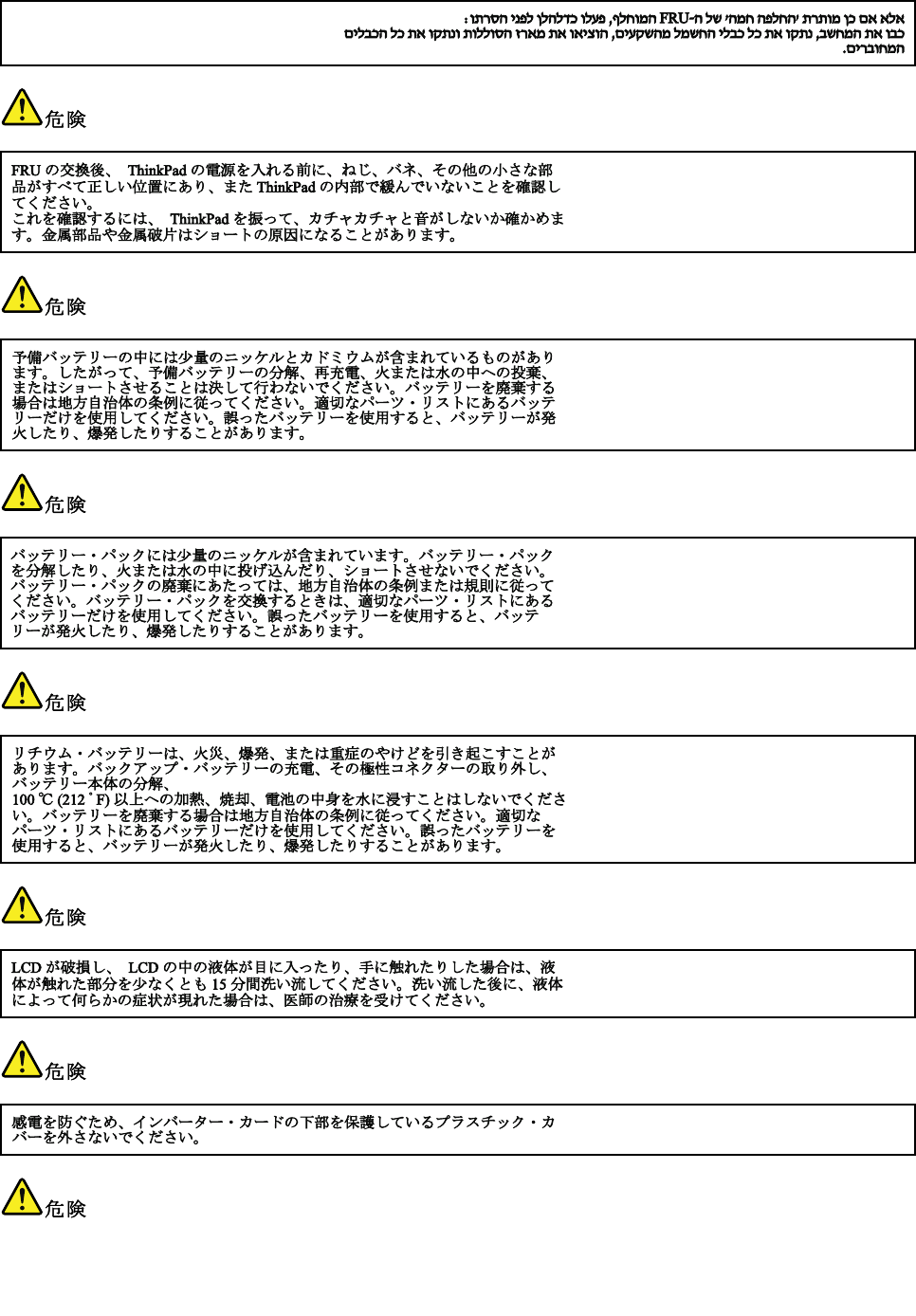
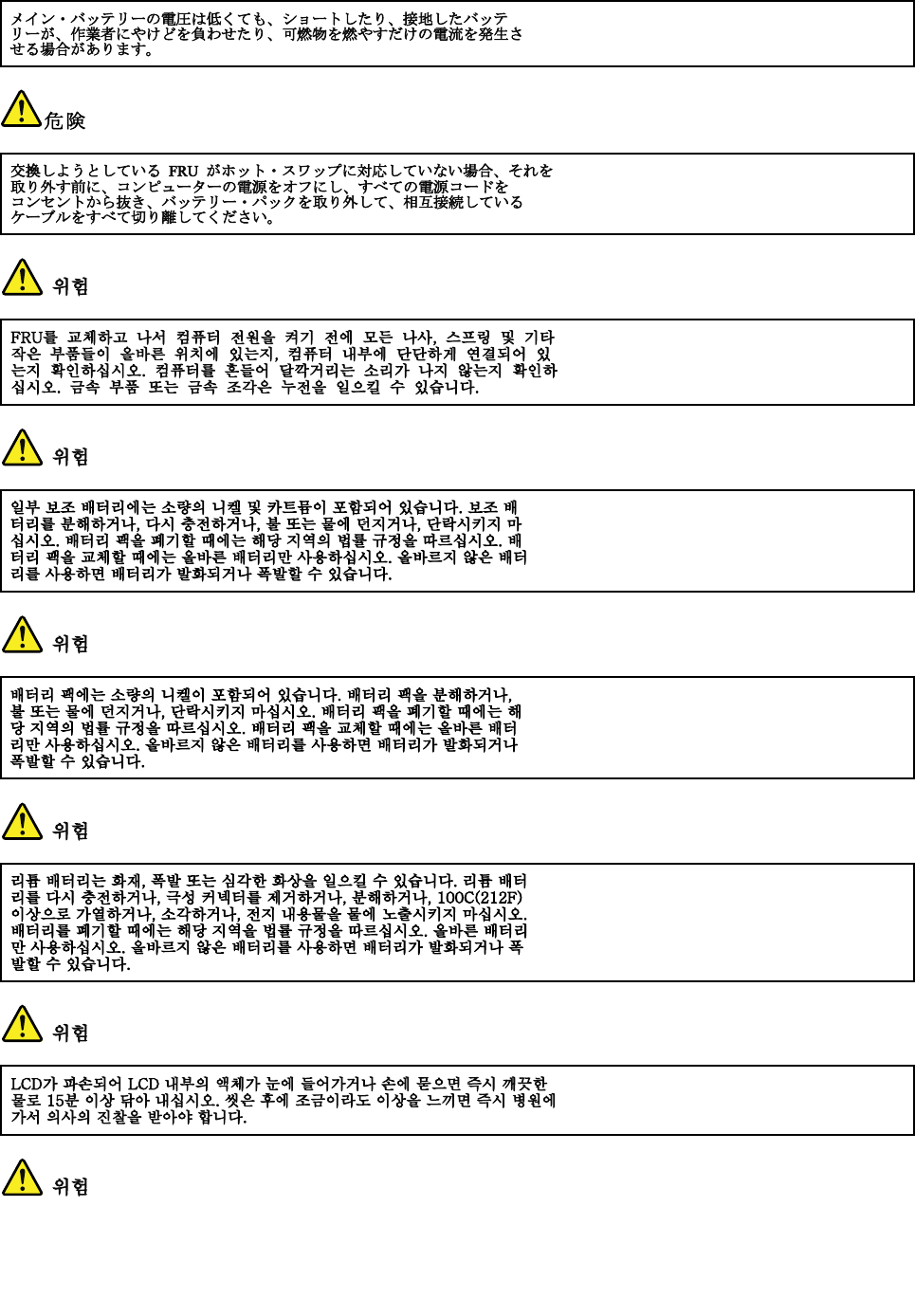
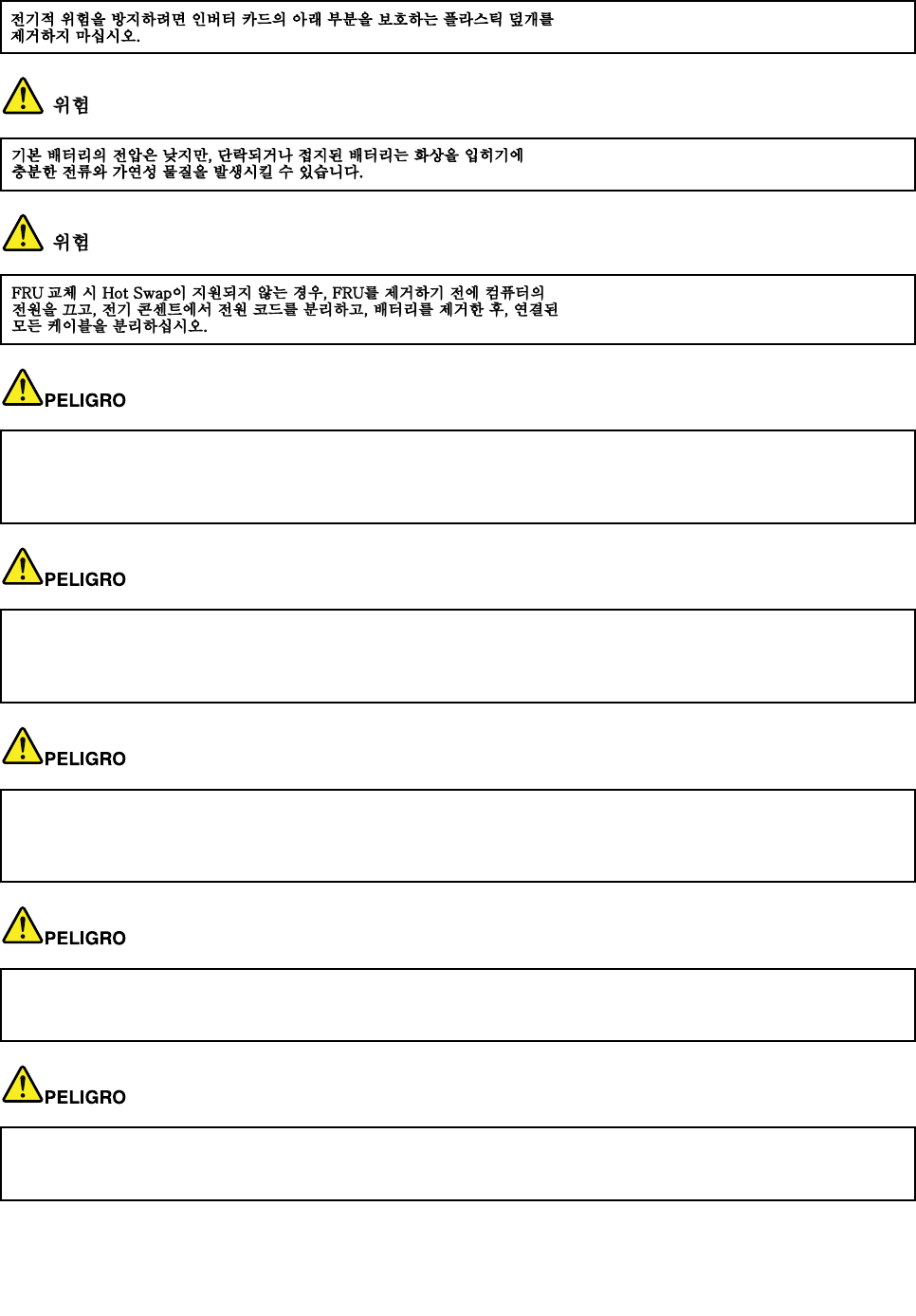
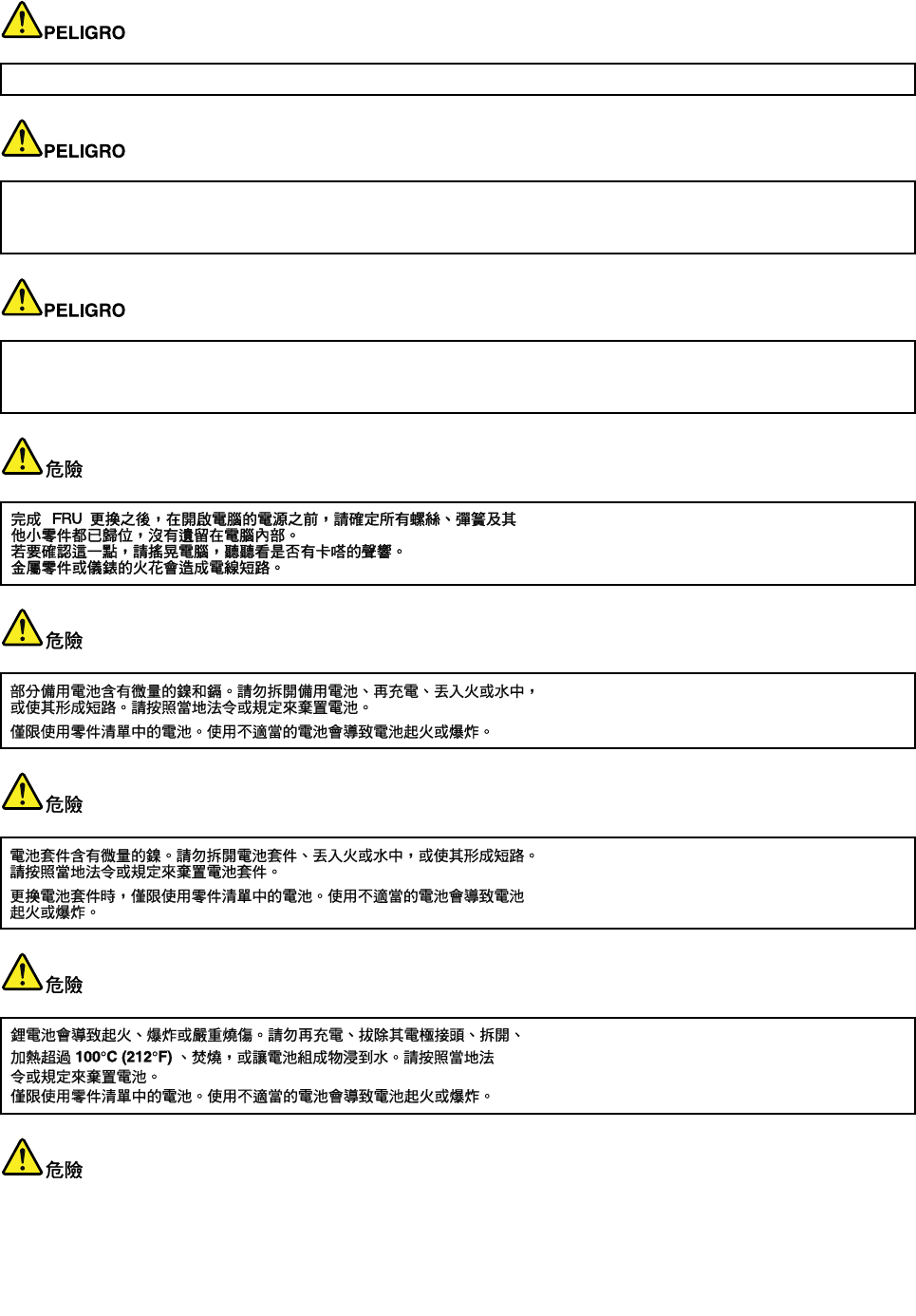
DANGER
BeforethecomputerispoweredonafterFRUreplacement,makesureallscrews,springs,andothersmall
partsareinplaceandarenotleftlooseinsidethecomputer.Verifythisbyshakingthecomputerandlistening
forrattlingsounds.Metallicpartsormetalakescancauseelectricalshorts.
DANGER
Somestandbybatteriescontainasmallamountofnickelandcadmium.Donotdisassembleastandbybattery,
rechargeit,throwitintoreorwater,orshort-circuitit.Disposeofthebatteryasrequiredbylocalordinances
orregulations.Useonlythebatteryintheappropriatepartslisting.Useofanincorrectbatterycanresult
inignitionorexplosionofthebattery.
DANGER
Thebatterypackcontainssmallamountsofnickel.Donotdisassembleit,throwitintoreorwater,or
short-circuitit.Disposeofthebatterypackasrequiredbylocalordinancesorregulations.Useonlythe
batteryintheappropriatepartslistingwhenreplacingthebatterypack.Useofanincorrectbatterycanresult
inignitionorexplosionofthebattery.
DANGER
Thelithiumbatterycancauseare,anexplosion,orasevereburn.Donotrechargeit,removeitspolarized
connector,disassembleit,heatitabove100°C(212°F),incinerateit,orexposeitscellcontentstowater.
Disposeofthebatteryasrequiredbylocalordinancesorregulations.Useonlythebatteryintheappropriate
partslisting.Useofanincorrectbatterycanresultinignitionorexplosionofthebattery.
Chapter1.Safetyinformation5
DANGER
IftheLCDbreaksandtheuidfrominsidetheLCDgetsintoyoureyesoronyourhands,immediatelywash
theaffectedareaswithwaterforatleast15minutes.Seekmedicalcareifanysymptomsfromtheuidare
presentafterwashing.
DANGER
Toavoidshock,donotremovetheplasticcoverthatprotectsthelowerpartoftheinvertercard.
DANGER
Thoughthemainbatterieshavelowvoltage,ashortedorgroundedbatterycanproduceenoughcurrentto
burnpersonnelorcombustiblematerials.
DANGER
UnlesshotswapisallowedfortheFRUbeingreplaced,doasfollowsbeforeremovingit:poweroffthe
computer,unplugallpowercordsfromelectricaloutlets,removethebatterypack,anddisconnectany
interconnectingcables.
6ThinkPadT420andT420iHardwareMaintenanceManual
PERIGO
Chapter1.Safetyinformation7
AntesdeligarocomputadorapósasubstituiçãodaFRU,certique-sedequetodososparafusos,molase
outraspeçaspequenasestejamnolugarenãoestejamsoltosdentrodocomputador.Veriqueissosacudindo
ocomputadoreprocurandoouvirsonsdepeçassoltas.Peçasmetálicasoulascasdemetalpodemcausar
curto-circuito.
PERIGO
Algumasbateriasreservacontêmumapequenaquantidadedeníquelecádmio.Nãodesmonteumabateria
reserva,recarregue-a,jogue-anofogoounaágua,oudeixe-aentraremcurto-circuito.Descarteabateria
conformerequeridopelasleisouregulamentoslocais.Usesomenteabaterianasparteslistadasapropriadas.
Ousodeumabateriaincorretapoderesultaremcombustãoouexplosãodabateria.
PERIGO
Opacotedabateriacontémumapequenaquantidadedeníquel.Nãoodesmonte,jogue-onofogoouna
água,oudeixe-oentraremcurto-circuito.Descarteopacotedabateriaconformerequeridopelasleisou
regulamentoslocais.Usesomenteabaterianasparteslistadasapropriadasaosubstituiropacotedabateria.
Ousodeumabateriaincorretapoderesultaremcombustãoouexplosãodabateria.
PERIGO
Abateriadelítiopodecausarincêndio,explosãoougravesqueimaduras.Nãoarecarregue,removaseu
conectorpolarizado,desmonte-a,aqueça-aacimade100°C(212°F),incinere-a,ouexponhaoconteúdode
suacélulaàágua.Descarteabateriaconformerequeridopelasleisouregulamentoslocais.Usesomente
abaterianasparteslistadasapropriadas.Ousodeumabateriaincorretapoderesultaremcombustão
ouexplosãodabateria.
PERIGO
SeoLCDquebrareouidodedentrodeleentraremcontatocomseusolhosoucomsuasmãos,laveas
áreasafetadasimediatamentecomáguadurantepelomenos15minutos.Procurecuidadosmédicossealgum
sintomacausadopelouidosurgirapósalavagem.
PERIGO
Paraevitarchoqueelétrico,nãoremovaacapaplásticaqueprotegeaparteinferiordaplacainversora.
PERIGO
8ThinkPadT420andT420iHardwareMaintenanceManual
Emboraasprincipaisbateriaspossuambaixavoltagem,umabateriaemcurto-circuitoouaterradapode
produzircorrenteobastanteparaqueimarmateriaisdepessoalouinamáveis.
PERIGO
AmenosqueumahotswapsejapermitidaparaaFRUqueestásendosubstituída,façaoseguinteantesde
removê-la:desligueocomputador,desconectetodososcabosdeenergiadastomadas,removaopacotede
bateriasedesconectequaisquercabosdeinterconexão.
DANGER
Avantderemettrel'ordinateursoustensionaprèsremplacementd'uneunitéenclientèle,vériezquetousles
ressorts,visetautrespiècessontbienenplaceetbienxées.Pourcefaire,secouezl'unitéetassurez-vous
qu'aucunbruitsuspectneseproduit.Despiècesmétalliquesoudescopeauxdemétalpourraientcauser
uncourt-circuit.
DANGER
Certainesbatteriesdesecourscontiennentdunickeletducadmium.Nelesdémontezpas,nelesrechargez
pas,nelesexposezniaufeuniàl'eau.Nelesmettezpasencourt-circuit.Pourlesmettreaurebut,
conformez-vousàlaréglementationenvigueur.Lorsquevousremplacezlapiledesauvegardeoucellede
l'horlogetempsréel,veillezàn'utiliserquelesmodèlescitésdanslalistedepiècesdétachéesadéquate.Une
batterieouunepileinappropriéerisquedeprendrefeuoud'exploser.
DANGER
Labatteriecontientdunickel.Neladémontezpas,nel'exposezniaufeuniàl'eau.Nelamettezpasen
court-circuit.Pourlamettreaurebut,conformez-vousàlaréglementationenvigueur.Lorsquevousremplacez
labatterie,veillezàn'utiliserquelesmodèlescitésdanslalistedepiècesdétachéesadéquate.Eneffet,une
batterieinappropriéerisquedeprendrefeuoud'exploser.
DANGER
Lapiledesauvegardecontientdulithium.Elleprésentedesrisquesd'incendie,d'explosionoudebrûlures
graves.Nelarechargezpas,neretirezpassonconnecteurpolariséetneladémontezpas.Nel'exposezpasà
unetemperaturesupérieureà100°C,nelafaitespasbrûleretn'enexposezpaslecontenuàl'eau.Mettezla
pileaurebutconformémentàlaréglementationenvigueur.Unepileinappropriéerisquedeprendrefeuou
d'exploser.
Chapter1.Safetyinformation9
DANGER
Silepanneaud'afchageàcristauxliquidessebriseetquevousrecevezdanslesyeuxousurlesmainsune
partieduuide,rincez-lesabondammentpendantaumoinsquinzeminutes.Consultezunmédecinsides
symptômespersistentaprèslelavage.
DANGER
And'évitertoutrisquedechocélectrique,neretirezpaslecacheenplastiqueprotégeantlapartieinférieure
delacarted'alimentation.
DANGER
Bienquelevoltagedesbatteriesprincipalessoitpeuélevé,lecourt-circuitoulamiseàlamassed'une
batteriepeutproduiresufsammentdecourantpourbrûlerdesmatériauxcombustiblesoucauserdes
brûlurescorporellesgraves.
DANGER
Sileremplacementàchaudn'estpasautorisépourl'unitéremplaçablesursitequevousremplacez,
procédezcommesuitavantderetirerl'unité:mettezl'ordinateurhorstension,débrancheztousles
cordonsd'alimentationdesprisesdecourant,retirezleblocdebatterieetdéconnecteztouslescâbles
d'interconnexion.
VORSICHT
BevornacheinemFRU-AustauschderComputerwiederangeschlossenwird,mußsichergestelltwerden,daß
keineSchrauben,FedernoderandereKleinteilefehlenoderimGehäusevergessenwurden.DerComputermuß
geschütteltundaufKlappergeräuschegeprüftwerden.Metallteileoder-splitterkönnenKurzschlüsseerzeugen.
VORSICHT
DieBereitschaftsbatterie,diesichunterdemDiskettenlaufwerkbendet,kanngeringeMengenNickel
undCadmiumenthalten.SiedarfnurdurchdieVerkaufsstelleoderdenIBMKundendienstausgetauscht
werden.Siedarfnichtzerlegt,wiederaufgeladen,kurzgeschlossen,oderFeueroderWasserausgesetzt
werden.DieBatteriekannschwereVerbrennungenoderVerätzungenverursachen.BeiderEntsorgungdie
örtlichenBestimmungenfürSondermüllbeachten.BeimErsetzenderBereitschafts-oderSystembatterienur
BatteriendesTypsverwenden,derinderErsatzteillisteaufgeführtist.DerEinsatzfalscherBatterienkann
zuEntzündungoderExplosionführen.
10ThinkPadT420andT420iHardwareMaintenanceManual
VORSICHT
AkkusenthaltengeringeMengenvonNickel.Siedürfennichtzerlegt,wiederaufgeladen,kurzgeschlossen,
oderFeueroderWasserausgesetztwerden.BeiderEntsorgungdieörtlichenBestimmungenfürSondermüll
beachten.BeimErsetzenderBatterienurBatteriendesTypsverwenden,derinderErsatzteillisteaufgeführt
ist.DerEinsatzfalscherBatterienkannzuEntzündungoderExplosionführen.
VORSICHT
DieSystembatterieisteineLithiumbatterie.Siekannsichentzünden,explodierenoderschwereVerbrennungen
hervorrufen.BatteriendiesesTypsdürfennichtaufgeladen,zerlegt,über100°Cerhitztoderverbranntwerden.
AuchdarfihrInhaltnichtmitWasserinVerbindunggebrachtoderderzurrichtigenPolungangebrachte
Verbindungssteckerentferntwerden.BeiderEntsorgungdieörtlichenBestimmungenfürSondermüll
beachten.BeimErsetzenderBatterienurBatteriendesTypsverwenden,derinderErsatzteillisteaufgeführt
ist.DerEinsatzfalscherBatterienkannzuEntzündungoderExplosionführen.
VORSICHT
DieLeuchtstoffröhreimLCD-BildschirmenthältQuecksilber.BeiderEntsorgungdieörtlichenBestimmungen
fürSondermüllbeachten.DerLCD-BildschirmbestehtausGlasundkannzerbrechen,wennerunsachgemäß
behandeltwirdoderderComputeraufdenBodenfällt.WennderBildschirmbeschädigtistunddiedarin
bendlicheFlüssigkeitinKontaktmitHautundAugengerät,solltendiebetroffenenStellenmindestens15
MinutenmitWasserabgespültundbeiBeschwerdenanschließendeinArztaufgesuchtwerden.
VORSICHT
AusSicherheitsgründendieKunststoffabdeckung,diedenunterenTeilderSpannungswandlerplatineumgibt,
nichtentfernen.
VORSICHT
ObwohlHauptbatterieneineniedrigeSpannunghaben,könnensiedochbeiKurzschlußoderErdunggenug
Stromabgeben,umbrennbareMaterialienzuentzündenoderVerletzungenbeiPersonenhervorzurufen.
VORSICHT
Chapter1.Safetyinformation11
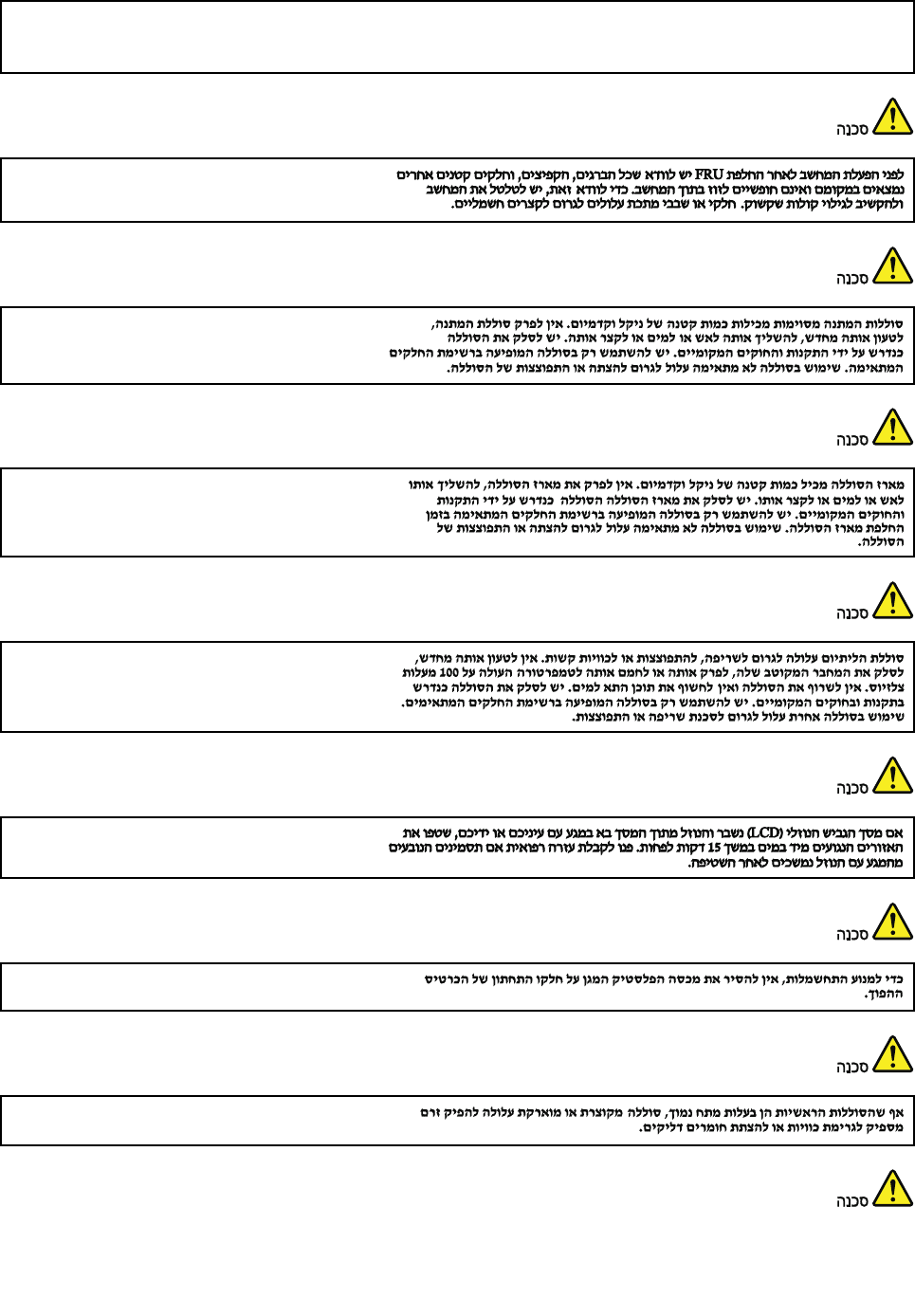
WenneinAustauschderFRUbeilaufendemBetriebnichterlaubtist,gehenSiebeimAustauschderFRUwie
folgtvor:SchaltenSiedenComputeraus,ziehenSiealleNetzkabelvondenNetzsteckdosenab,entfernen
SiedenAkkuundziehenSieallemiteinanderverbundenenKabelab.
12ThinkPadT420andT420iHardwareMaintenanceManual
Chapter1.Safetyinformation13
14ThinkPadT420andT420iHardwareMaintenanceManual
AntesdeencenderelsistemadespuesdesustituirunaFRU,compruebequetodoslostornillos,muellesy
demáspiezaspequeñasseencuentranensusitioynoseencuentransueltasdentrodelsistema.Compruébelo
agitandoelsistemayescuchandolosposiblesruidosqueprovocarían.Laspiezasmetálicaspuedencausar
cortocircuitoseléctricos.
Algunasbateríasdereservacontienenunapequeñacantidaddeníquelycadmio.Nolasdesmonte,ni
recargue,nilasechealfuegooalaguanilascortocircuite.Deséchelastalcomodisponelanormativalocal.
Utilicesólobateríasqueseencuentrenenlalistadepiezas.Lautilizacióndeunabateríanoapropiada
puedeprovocarlaigniciónoexplosióndelamisma.
Lasbateríascontienenpequeñascantidadesdeníquel.Nolasdesmonte,nirecargue,nilasechealfuego
oalaguanilascortocircuite.Deséchelastalcomodisponelanormativalocal.Utilicesólobateríasquese
encuentrenenlalistadepiezasalsustituirlabatería.Lautilizacióndeunabateríanoapropiadapuede
provocarlaigniciónoexplosióndelamisma.
Labateríaderepuestoesunabateríadelitioypuedeprovocarincendios,explosionesoquemadurasgraves.
Nolarecargue,niquiteelconectorpolarizado,niladesmonte,nicalienteporencimadelos100°C(212°F),ni
laincinereniexpongaelcontenidodesusceldasalagua.Deséchelatalcomodisponelanormativalocal.
SilaLCDserompeyeluidodesuinteriorentraencontactoconsusojososusmanos,laveinmediatamente
lasáreasafectadasconaguadurante15minutoscomomínimo.Obtengaatenciónmedicasisepresenta
algúnsíntomadeluidodespuesdelavarse.
Chapter1.Safetyinformation15
Paraevitardescargas,noquitelacubiertadeplásticoquerodealapartebajadelatarjetainvertida.
Aunquelasbateríasprincipalestienenunvoltajebajo,unabateríacortocircuitadaoconcontactoatierra
puedeproducirlacorrientesucientecomoparaquemarmaterialcombustibleoprovocarquemadurasen
elpersonal.
Salvoquesepermitaelintercambioencalienteparalaunidadsustituiblelocalmente,realicelosiguienteantes
deextraerla:apagueelsistema,desconectetodosloscablesdealimentacióndelastomasdealimentación
eléctrica,extraigalabateríaydesconecteloscablesdeinterconexión.
16ThinkPadT420andT420iHardwareMaintenanceManual
18ThinkPadT420andT420iHardwareMaintenanceManual
Chapter1.Safetyinformation19
20ThinkPadT420andT420iHardwareMaintenanceManual
Chapter1.Safetyinformation21
22ThinkPadT420andT420iHardwareMaintenanceManual

Chapter2.Importantserviceinformation
Thischapterpresentsfollowingimportantserviceinformationthatappliestoallmachinetypessupportedby
thismanual:
•“StrategyforreplacingFRUs”onpage23
–“Strategyforreplacingaharddiskdrive”onpage23
–“Importantnoticeforreplacingasystemboard”onpage24
–“Howtouseerrormessage”onpage24
•“StrategyforreplacingFRUsforCTO,CMV,andGAV”onpage25
–“Productdenition”onpage25
–“FRUidenticationforCTO,CMV,andGAVproducts”onpage25
Important:
AdvisecustomerstocontacttheLenovoCustomerSupportCenteriftheyneedanyassistanceinobtainingor
installinganysoftwarexes,drivers,andUEFIBIOSdownloads.TelephonenumbersforLenovoSupportare
availableathttp://www.lenovo.com/support.
SystemDisassembly/ReassemblyvideosthatshowtheFRUremovalsorreplacementsfortheLenovo®authorized
servicetechniciansareavailableinthefollowingsupportsite:
http://www.lenovoservicetraining.com/ion/
StrategyforreplacingFRUs
Beforereplacingparts:
Makesurethatallsoftwarexes,drivers,andUEFIBIOSdownloadsareinstalledbeforereplacingany
FRUslistedinthismanual.
Afterasystemboardisreplaced,ensurethatthelatestUEFIBIOSisloadedtothesystemboardbefore
completingtheserviceaction.
Todownloadsoftwarexes,drivers,andUEFIBIOS,gotohttp://www.lenovo.com/supportandclick
DownloadDrivers&Software.Thenfollowtheinstructionsonthescreentoinstallthenecessarysoftware.
UsethefollowingstrategytopreventunnecessaryexpenseforreplacingandservicingFRUs:
•IfyouareinstructedtoreplaceaFRUbutthereplacementdoesnotcorrecttheproblem,reinstall
theoriginalFRUbeforeyoucontinue.
•Somecomputershavebothaprocessorboardandasystemboard.Ifyouareinstructedtoreplaceeither
theprocessorboardorthesystemboard,andreplacingoneofthemdoesnotcorrecttheproblem,
reinstallthatboard,andthenreplacetheotherone.
•IfanadapteroradeviceconsistsofmorethanoneFRU,anyoftheFRUsmaybethecauseoftheerror.
Beforereplacingtheadapterordevice,removetheFRUs,onebyone,toseeifthesymptomschange.
ReplaceonlytheFRUthatchangedthesymptoms.
Attention:Thesetupcongurationonthecomputeryouareservicingmayhavebeencustomized.Running
AutomaticCongurationmayalterthesettings.Notethecurrentcongurationsettings(usingtheView
Congurationoption);then,whenservicehasbeencompleted,verifythatthosesettingsremainineffect.
Strategyforreplacingaharddiskdrive
Alwaystrytorunalow-levelformatbeforereplacingaharddiskdrive.Thiswillcauseallcustomerdataon
theharddisktobelost.Besurethatthecustomerhasacurrentbackupofthedatabeforedoingthistask.
©CopyrightLenovo201223

Attention:Thedrivestartupsequenceinthecomputeryouareservicingmayhavebeenchanged.Be
extremelycarefulduringwriteoperationssuchascopying,saving,orformatting.Ifyouselectanincorrect
drive,dataorprogramscanbeoverwritten.
IfyourcomputerisshippedwithanmSATAdriveandasolidstatedriveorharddiskdrive,themSATAdrive
willbeseenasharddisk0inthesystem,andassigneddriveC:.Thesolidstatedriveorharddiskdrivewill
beseenasharddisk1,andassigneddriveD:.ThemSATAdriveisinstalledinthewirelessWANcardslotof
thecomputer.TheLenovopreloadedsoftwareisinstalledonthemSATAdrive.
Alwaystrytorunalow-levelformatbeforereplacingaharddiskdrive.Thiswillcauseallcustomerdataon
theharddisktobelost.Besurethatthecustomerhasacurrentbackupofthedatabeforedoingthistask.
Attention:Thedrivestartupsequenceinthecomputeryouareservicingmayhavebeenchanged.Be
extremelycarefulduringwriteoperationssuchascopying,saving,orformatting.Ifyouselectanincorrect
drive,dataorprogramscanbeoverwritten.
Importantnoticeforreplacingasystemboard
Somecomponentsmountedonasystemboardareverysensitive.Improperhandlingofasystemboardcan
causedamagetothosecomponents,andmaycauseasystemmalfunction.
Attention:Whenhandlingasystemboard:
•Donotdropasystemboardorapplyanyexcessiveforcetoit.
•Avoidroughhandlingofanykind.
•AvoidbendingasystemboardandhardpushingtopreventcrackingateachBGA(BallGridArray)chipset.
Howtouseerrormessage
Usetheerrorcodesdisplayedonthescreentodiagnosefailures.Ifmorethanoneerrorcodeisdisplayed,
beginthediagnosiswiththersterrorcode.Whatevercausesthersterrorcodemayalsocausefalseerror
codes.Ifnoerrorcodeisdisplayed,seewhethertheerrorsymptomislistedintheSymptom-to-FRU
Indexforthecomputeryouareservicing.
24ThinkPadT420andT420iHardwareMaintenanceManual

StrategyforreplacingFRUsforCTO,CMV,andGAV
Productdenition
DynamicCongureToOrder(CTO)
ThisprovidestheabilityforacustomertocongureaLenovosolutionfromaneSite,andhavethis
congurationsenttofulllment,whereitisbuiltandshippeddirectlytothecustomer.Themachinelabel,
ProductEntitlementWarehouse(PEW),eSupport,andtheHMMwillloadtheseproductsasthe4-digitMT
and3-digitmodel,wheremodel=“CTO”(Example:1829-CTO).
CustomModelVariant(CMV)
ThisisauniquecongurationthathasbeennegotiatedbetweenLenovoandthecustomer.Aunique4-digit
MTand3-digitmodelisprovidedtothecustomertoplaceorders(Example:1829-W15).ACMVisaspecial
bidoffering.Therefore,itisNOTgenerallyannounced.
•TheMTMportionofthemachinelabelisthe4-digitMTand3-digitmodel,wheremodel=“CTO”
(Example:1829-CTO).ThePRODUCTIDportionofthemachinelabelisthe4-digitMTand3-digitCMV
model(Example:1829-W15).
•ThePEWrecordisthe4-digitMTand3-digitmodel,wheremodel=“CTO”(Example:1829-CTO).
•eSupportwillshowboththeCTOandCMVmachinetypemodels(Example:1829-CTOand1829-W15
willbefoundontheeSupportsite.)
•TheHMMwillhavethe4-digitMTand3-digitCTOmodelonly(Example:1829-CTO).Again,CMVsare
custommodelsandarenotfoundintheHMM.
GeneralAnnounceVariant(GAV)
Thisisastandardmodel(xedconguration).GAVsareannouncedandofferedtoallcustomers.TheMTM
portionofthemachinelabelisa4-digitMTand3-digitmodel,wheremodel=a“xedpartnumber”,not
“CTO”(Example:1829-F1U).Also,PEW,eSupport,andtheHMMwilllisttheseproductsunderthesame
xedmodelnumber.
FRUidenticationforCTO,CMV,andGAVproducts
TherearethreeinformationresourcestoidentifywhichFRUsareusedtosupportCTO,CMV,andGAV
products.ThesesourcesarePEW,eSupport,andtheHMM.
UsingPEW
•PEWistheprimarysourceforidentifyingFRUpartnumbersandFRUdescriptionsforthekeycommodities
forCTO,CMVandGAVproductsataMT-serialnumberlevel.Anexampleofkeycommoditiesarehard
diskdrives,systemboards,microprocessors,LiquidCrystalDisplays(LCDs),andmemory.
•Remember,allCTOandCMVproductsareloadedinPEWunderthe4-digitMTand3-digitmodel,where
model=“CTO”(Example:1829-CTO).GAVsareloadedinPEWunderthe4-digitMTand3-digitmodel,
wheremodel=a“xedpartnumber”,not“CTO”(Example:1829-F1U).
•PEWcanbeaccessedatthefollowingWebsite:
http://www.lenovo.com/support/site.wss/document.do?lndocid=LOOK-WARNTY
SelectWarrantylookup.InputtheMTandtheSerialnumberandthelistofkeycommoditieswillbe
returnedinthePEWrecordunderCOMPONENTINFORMATION.
UsingeSupport
ForKeyCommodities(Examples-harddiskdrive,systemboard,microprocessor,LCD,andmemory)
Chapter2.Importantserviceinformation25

eSupportcanbeusedtoviewthelistofkeycommoditiesbuiltinaparticularmachineserial(thisisthesame
recordfoundinPEW).eSupportcanbeaccessedathttp://www.lenovo.com/support.
Toviewthewarrantystatusofyourcomputer,dothefollowing:
1.ClickWarranty&Services.
2.ClickCheckWarrantyStatus.
3.Typeyourmachinetypeandserialnumber,andthenclickSubmit.
FortheRemainingFRUs(thecompletelistofFRUsattheMTModellevel)
eSupportalsocanbeusedtoviewthecompletelistofFRUsforamachinetypeandmodel.Toviewthe
completelistofFRUs,dothefollowing:
1.ClickParts&Accessories.
2.ClicktheProducts&Partsdetail,andthenfollowtheinstructionsonthescreen.
UsingtheHMM
ForKeyCommodities(Examples-harddiskdrive,systemboard,microprocessor,LCD,andmemory)
UsetheHMMasaback-uptoPEWandeSupporttoviewthecompletelistofFRUsattheMTModellevel.
26ThinkPadT420andT420iHardwareMaintenanceManual

Chapter3.Generalcheckout
Thischapterpresentsthefollowinginformation:
•“Whattodorst”onpage28
•“Checkoutguide”onpage29
–“SystemsupportingtheLenovoThinkVantageToolboxprogramandthePC-DoctorforDOS
diagnosticsprogram”onpage29
–“SystemsupportingtheLenovodiagnosticsprograms”onpage33
•“Powersystemcheckout”onpage37
Beforeyougotothecheckoutguide,besuretoreadthefollowingimportantnotes.
Importantnotes:
•Onlycertiedtrainedpersonnelshouldservicethecomputer.
•BeforereplacinganyFRU,readtheentirepageonremovingandreplacingFRUs.
•WhenyoureplaceFRUs,itisrecommendedtousenewnylon-coatedscrews.
•Beextremelycarefulduringsuchwriteoperationsascopying,saving,orformatting.Drivesinthecomputer
thatyouareservicingsequencemighthavebeenaltered.Ifyouselectanincorrectdrive,dataorprograms
mightbeoverwritten.
•ReplaceaFRUonlywithanotherFRUofthecorrectmodel.WhenyoureplaceaFRU,makesurethatthemodel
ofthemachineandtheFRUpartnumberarecorrectbyreferringtotheFRUpartslist.
•AFRUshouldnotbereplacedbecauseofasingle,unreproduciblefailure.Singlefailurescanoccurfora
varietyofreasonsthathavenothingtodowithahardwaredefect,suchascosmicradiation,electrostaticdischarge,
orsoftwareerrors.ConsiderreplacingaFRUonlywhenaproblemrecurs.IfyoususpectthataFRUisdefective,
cleartheerrorlogandrunthetestagain.Iftheerrordoesnotrecur,donotreplacetheFRU.
•BecarefulnottoreplaceanondefectiveFRU.
©CopyrightLenovo201227

Whattodorst
WhenyoudoreturnaFRU,youmustincludethefollowinginformationinthepartsexchangeformor
partsreturnformthatyouattachtoit:
1.Nameandphonenumberofservicetechnician
2.Dateofservice
3.Dateonwhichthemachinefailed
4.Dateofpurchase
5.Failuresymptoms,errorcodesappearingonthedisplay,andbeepsymptoms
6.ProcedureindexandpagenumberinwhichthefailingFRUwasdetected
7.FailingFRUnameandpartnumber
8.Machinetype,modelnumber,andserialnumber
9.Customer'snameandaddress
Note:Duringthewarrantyperiod,thecustomermayberesponsibleforrepaircostsifthecomputerdamage
wascausedbymisuse,accident,modication,unsuitablephysicaloroperatingenvironment,orimproper
maintenancebythecustomer.Followingisalistofsomecommonitemsthatarenotcoveredunderwarranty
andsomesymptomsthatmightindicatethatthesystemwassubjectedtostressbeyondnormaluse.
Beforecheckingproblemswiththecomputer,determinewhetherthedamageiscoveredunderthewarranty
byreferringtothefollowinglist:
Thefollowingarenotcoveredunderwarranty:
•LCDpanelcrackedfromtheapplicationofexcessiveforceorfrombeingdropped
•Scratched(cosmetic)parts
•Distortion,deformation,ordiscolorationofthecosmeticparts
•Plasticparts,latches,pins,orconnectorsthathavebeencrackedorbrokenbyexcessiveforce
•Damagecausedbyliquidspilledintothesystem
•DamagecausedbytheimproperinsertionofaPCCardortheinstallationofanincompatiblecard
•Improperdiscinsertionoruseofanopticaldrive
•Diskettedrivedamagecausedbypressureonthediskettedrivecover,foreignmaterialinthedrive,
ortheinsertionofadiskettewithmultiplelabels
•Damagedorbentdisketteejectbutton
•Fusesblownbyattachmentofanonsupporteddevice
•Forgottencomputerpassword(makingthecomputerunusable)
•Stickykeyscausedbyspillingaliquidontothekeyboard
•Useofanincorrectacpoweradapteronlaptopproducts
Thefollowingsymptomsmightindicatedamagecausedbynonwarrantedactivities:
•Missingpartsmightbeasymptomofunauthorizedserviceormodication.
•Ifthespindleofaharddiskdrivebecomesnoisy,itmayhavebeensubjectedtoexcessiveforce,
ordropped.
28ThinkPadT420andT420iHardwareMaintenanceManual

Checkoutguide
UsethefollowingproceduresasaguideinidentifyingandcorrectingproblemswiththeThinkPadNotebook.
Note:ThediagnostictestsareintendedtotestonlyThinkPadproducts.Theuseofnon-ThinkPadproducts,
prototypecards,ormodiedoptionscanleadtofalseindicationsoferrorsandinvalidsystemresponses.
1.Identifythefailingsymptomsinasmuchdetailaspossible.
2.Verifythesymptoms.Trytore-createthefailurebyrunningthediagnostictestorbyrepeatingthe
operation.
SystemsupportingtheLenovoThinkVantageToolboxprogramandthe
PC-DoctorforDOSdiagnosticsprogram
ThesectionprovidesinformationaboutThinkPadcomputersthatsupporttheLenovoThinkVantageT oolbox
programandthePC-Doctor®forDOSdiagnosticsprogram.Somedescriptionsmightnotapplytoyour
particularcomputer.
DiagnosticsusingPC-DoctorforDOS
TheThinkPadnotebookcomputerhasatestprogramcalledPC-DoctorforDOS(hereaftercalledPC-Doctor.)
YoucandetecterrorsbyrunningthediagnosticstestincludedinPC-Doctor.
Note:
PC-DoctorforDOSisavailableatthefollowingWebsite:
http://www.lenovo.com/support
TocreatethePC-DoctordiagnosticCD,followtheinstructionsontheWebsite.
Forsomepossiblecongurationsofthecomputer,PC-Doctormightnotruncorrectly.Toavoidthisproblem,
youneedtoinitializethecomputersetupbyuseoftheThinkPadSetupprogrambeforeyourunPC-Doctor.
ToentertheThinkPadSetupprogram,doasfollows:
1.Turnonthecomputer.
2.WhentheThinkPadlogocomesup,immediatelypressF1toentertheThinkPadSetupprogram.
Note:Ifasupervisorpasswordhasbeensetbythecustomer,theThinkPadSetupprogrammenuappears
afterthepasswordisentered.Y oucanstarttheThinkPadSetupprogrambypressingEnterinsteadof
enteringthesupervisorpassword;however,youcannotchangetheparametersthatareprotectedbythe
supervisorpassword.
OntheThinkPadSetupprogramscreen,pressF9,Enter,F10,andthenEnter.
Note:Whenyouinitializethecomputerconguration,somedevicesaredisabled,suchastheserialport.If
youtestoneofthesedevices,youwillneedtoenableitbyusingCongurationutilityforDOS.Theutilityis
availableonthefollowingWebsite:
http://www.lenovo.com/support
PC-Doctorcannotbeusedtotestadevicethatisinthedockingstation,evenifthecomputersupportsthe
dockingstation.TotestaUSBdevice,connectittotheUSBconnectorofthecomputer.
Testingthecomputer
Note:ThePC-DoctorforDOSCD-R/CD-RWdiscsupportsonlytestofinternalopticaldiscdrives(CD-RW,
CD-RW/DVDCombo,andDVDMultidrives)onThinkPadcomputers.Itdoesnotsupporttestofanyoptical
discdrivesconnectedthroughUSBdevices,PCcards,CardBuscards,orsimilar.TheUSBlimitationonly
Chapter3.Generalcheckout29
appliestotestingofthedevice.UsingabootablePC-DoctorforDOSCD/DVD,thesystemcanbestarted
fromaUSBattachedopticaldrive.
Torunthetest,doasfollows:
1.Turnoffthecomputer.
2.Makesurethattheopticaldrivethatissupportedasastartupdeviceisinstalledtothecomputer.
3.Turnonthecomputer.Ifthecomputercannotbepoweredon,goto“Powersystemcheckout”on
page37,andcheckthepowersources.
Ifanerrorcodeappears,goto“Symptom-to-FRUindex”onpage47.
4.WhentheThinkPadlogocomesup,immediatelypressF12toentertheBootMenu.
5.InsertthePC-DoctorCDintotheopticaldrive.
6.PresscursorkeystoselectATAPICDx(x:0,1,...)andthenpressEnter.
7.Followtheinstructionsonthescreen.
8.ThemainpanelofPC-Doctorappears.
9.SelectDiagnosticswiththearrowkeys,andpressEnter.
Note:Y oucanselectanitemnotonlywiththearrowkeys,butalsowiththeTrackPoint®pointer.
InsteadofpressingEnter,clicktheleftbutton.
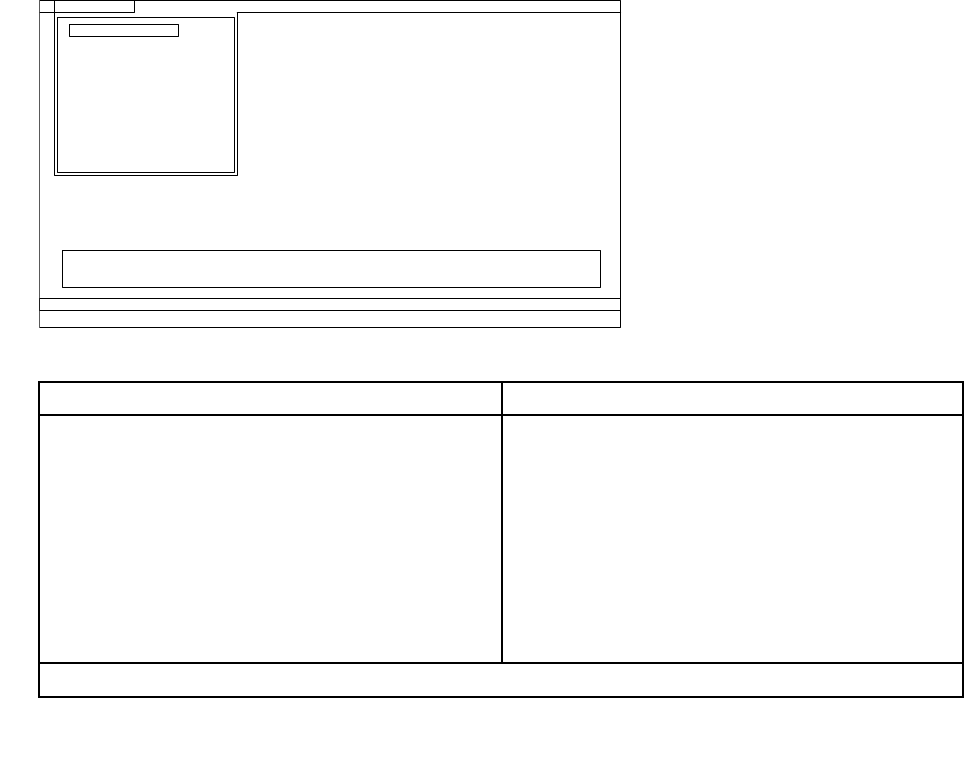
Apull-downmenuappears.(Itsexactformdependsonthemodel.)
Note:PC-Doctormenudoesnotmeantheformalsupportdevicelist.Someunsupporteddevicenames
mayappearinthePC-Doctormenu.
Diagnostics
Run Normal Test
Run Quick Test
CPU/Coprocessor
Systemboard
System Memory
Video Adapter
Fixed Disks
Diskette Drives
Other Devices
Communication
Interactive Tests Hardware Info Utility Quit F1=Help
PC-DOCTOR 2.0 Copyright 2008 PC-Doctor, Inc. All Rights Reserved.
Use the cursor keys and ESC to move in menus. Press ENTER to select.
Wireless LAN
Theoptionsonthetestmenuareasfollows:
DiagnosticsInteractiveTests
•RunNormalTest
•RunQuickTest
•CPU/Coprocessor
•SystemMemory
•Systemboard
•VideoAdapter
•FixedDisks
•DisketteDrives
•OtherDevices
•Communication
•WirelessLAN
•Keyboard
•Video
•InternalSpeaker
•Mouse
•Diskette
•SystemLoad
•OpticalDriveTest
•IntelWLANRadioTest
Notes:
30ThinkPadT420andT420iHardwareMaintenanceManual
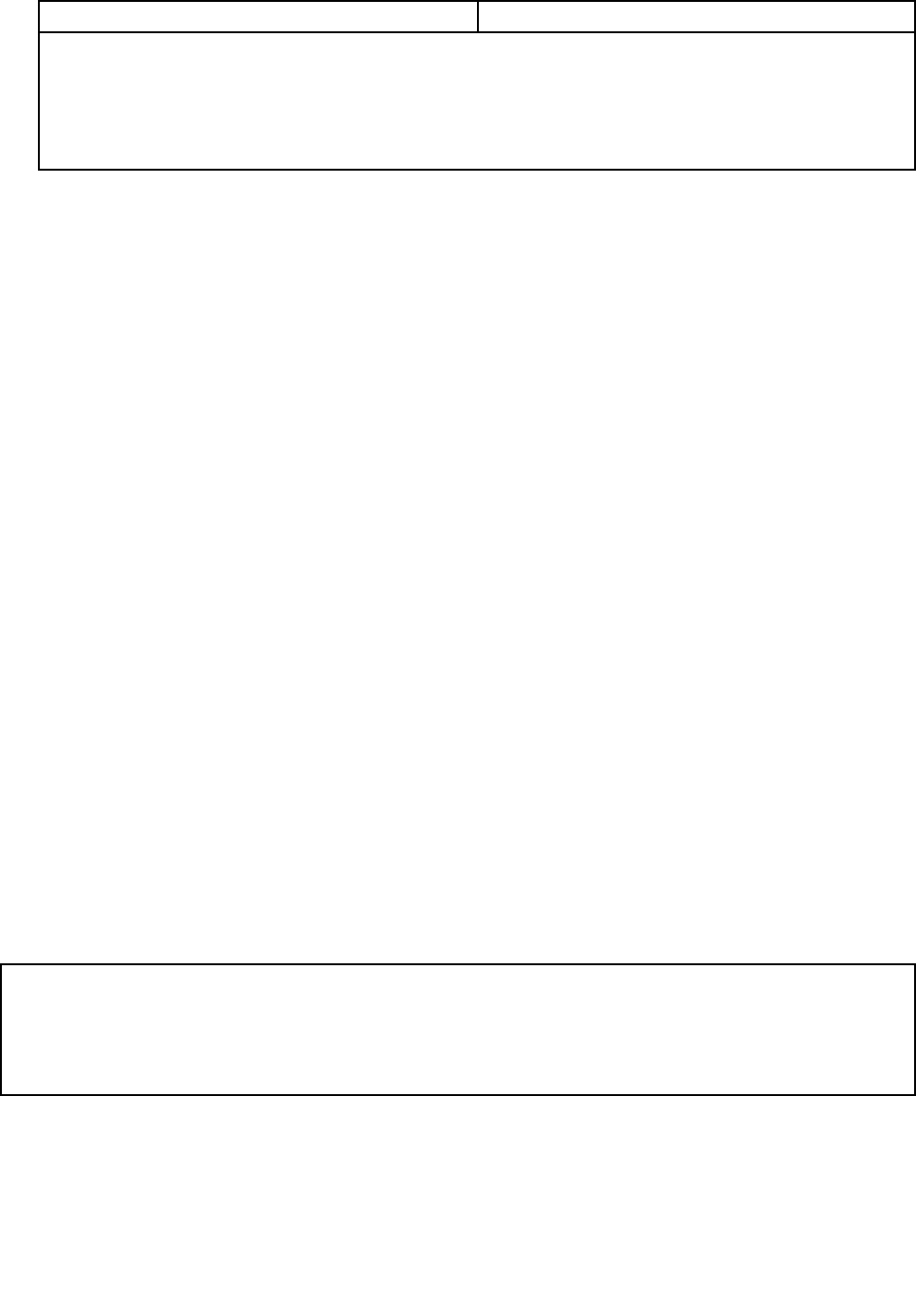
DiagnosticsInteractiveTests
•IntheKeyboardtestinInteractiveT ests,theFnkeyshouldbehelddownforatleast2seconds;otherwise,it
cannotbesensed.
•VideoAdaptertestsupportsonlytheLCDdisplayontheThinkPadNotebook.Ifyouhaveanexternalmonitor
attachedtoyourcomputer,detachitbeforerunningPC-DoctorforDOS.
•TotestDigitalSignatureChip,thesecuritychipmustbesettoActive.
10.Runtheapplicablefunctiontest.
11.Followtheinstructionsonthescreen.Ifthereisaproblem,PC-Doctorshowsmessagesdescribingit.
12.Toexitthetest,selectQuit—ExitDiag.Tocancelthetest,pressEsc.
Note:AfterrunningPC-Doctor,checkthetimeanddateonthesystemandresetthemiftheyareincorrect.
DetectingsysteminformationwithPC-Doctor
PC-Doctorcandetectthefollowingsysteminformation:
HardwareInfo
•SystemConguration
•MemoryContents
•PhysicalDiskDrives
•VGAInformation
•ATADriveInfo
•PCIInformation
•PNPISAInfo
•SMBIOSInfo
•VESALCDInfo
•HardwareEventsLog
Utility
•RunExternalTests
•BenchmarkSystem
•DOSShell
•TechSupportForm
•BatteryRundown
•EraseDriveContents
•ViewPCDRHostLog
LenovoThinkVantageToolbox
LenovoThinkVantage®ToolboxisadiagnosticprogramthatworksthroughtheWindowsoperatingsystem.
Itenablesyoutoviewsymptomsofcomputerproblemsandsolutionsforthem,andincludesautomatic
noticationwhenactionisrequired,computingassistance,advanceddiagnostics,anddiagnostichistory.
Notes:
•ThelatestLenovoThinkVantageToolboxisavailableatthefollowingWebsite:
http://web.lenovothinkvantagetoolbox.com/
•ToinstallthelatestLenovoThinkVantageToolboxonthecomputer,clickDownloadLenovoThinkVantage
Toolbox,andthenfollowtheinstructionsontheWebsite.
Torunthisprogram,doasfollows:
Windows7:
WhiletheWindowsoperatingsystemisrunning,presstheThinkVantagebutton.
Tostartthisprogram,dothefollowing:
Chapter3.Generalcheckout31

•ClickStart➙ControlPanel➙SystemandSecurity➙Lenovo–SystemHealthandDiagnostics.
WindowsVista®andWindowsXP:
ClickStart➙AllPrograms➙ThinkVantage➙LenovoThinkVantageToolbox
Followtheinstructionsonthescreen.LenovoThinkVantageToolboxalsohasproblemdeterminationaids
thatdeterminesoftwareandusageproblems.
Foradditionalinformationaboutthisprogram,seetheHelpfortheprogram.
32ThinkPadT420andT420iHardwareMaintenanceManual

FRUtests
ThefollowingtableshowsthetestforeachFRU.
Table1.FRUtests
FRUApplicabletest
Systemboard1.Diagnostics➙CPU/Coprocessor
2.Diagnostics➙Systemboard
3.IfthedockingstationortheportreplicatorisattachedtotheThinkPadNotebook,
detachit.
4.Placethecomputeronahorizontalsurface,andrunDiagnostics➙ThinkPad
Devices➙HDDActiveProtectionTest.
Note:Donotapplyanyphysicalshocktothecomputerwhilethetestisrunning.
PowerDiagnostics➙ThinkPadDevices➙acpoweradapter,Battery1(Battery2)
LCDunit1.Diagnostics➙VideoAdapter
2.InteractiveT ests➙Video
AudioEntertheThinkPadSetupprogramandchangeSerialATA(SATA)settingto
Compatibility,andrunDiagnostics➙OtherDevice➙ConexantAudio.
SpeakerInteractiveT ests➙InternalSpeaker
Note:OnceAudiotestisdone,thenosoundisheardthistest.Inthiscase,turnoff
andturnonthecomputer.Then,runthistestagain.
Keyboard1.Diagnostics➙Systemboard➙Keyboard
2.InteractiveT ests➙Keyboard
Harddiskdriveorsolidstate
drive
EntertheThinkPadSetupprogramandchangeSerialATA(SATA)settingto
Compatibility,andrunDiagnostics➙FixedDisks.
Diskettedrive1.Diagnostics➙DisketteDrives
2.InteractiveT ests➙Diskette
Opticaldrive1.Diagnostics➙OtherDevices➙OpticalDrive
2.InteractiveTests➙OpticalDriveTest
Memory1.IftwoDIMMsareinstalled,removeoneofthemandrunDiagnostics➙System
Memory.
2.Iftheproblemdoesnotrecur,returntheDIMMtoitsplace,removetheotherone,
andrunthetestagain.
TrackPointorpointing
device
IftheTrackPointdoesnotwork,checkthecongurationasspeciedintheThinkPad
Setupprogram.IftheTrackPointisdisabled,selectAutomatictoenableit.
AfteryouusetheTrackPoint,thepointermaydriftonthescreenforashorttime.This
driftcanoccurwhenaslight,steadypressureisappliedtotheTrackPointpointer.
Thissymptomisnotahardwareproblem.Ifthepointerstopsafterashorttime,no
serviceactionisnecessary.
IfenablingtheTrackPointdoesnotcorrecttheproblem,continuewiththefollowing:
•InteractiveTests➙Mouse
TouchPadIftheTouchPaddoesnotwork,checkthecongurationasspeciedintheThinkPad
Setupprogram.IftheTouchPadisdisabled,selectAutomatictoenableit.Ifenabling
theT ouchPaddoesnotcorrecttheproblem,continuewiththefollowing:
•InteractiveTests➙Mouse
SystemsupportingtheLenovodiagnosticsprograms
ThesectionprovidesinformationaboutThinkPadcomputersthatsupporttheLenovodiagnosticsprograms.
Somedescriptionsmightnotapplytoyourparticularcomputer.
Chapter3.Generalcheckout33

TheLenovodiagnosticsprogramsincludefollowing:
•LenovoSolutionCenter
•Quicktestprograms
•UEFIdiagnosticprogram
•Bootablediagnosticprograms
LenovoSolutionCenter
TheLenovoSolutionCenterprogramenablesyoutotroubleshootandresolvecomputerproblems.It
combinesdiagnostictests,systeminformationcollection,securitystatus,andsupportinformation,along
withhintsandtipsformaximumsystemperformance.
Note:TheLenovoSolutionCenterprogramisavailableonlyonmodelspreinstalledwiththeWindows7
operatingsystem.Italsocanbedownloadedfromhttp://www.lenovo.com/diags.
ToruntheLenovoSolutionCenterprogram,clickStart➙ControlPanel➙SystemandSecurity➙Lenovo
-SystemHealthandDiagnostics,andthenfollowtheinstructionsonthescreen.
Foradditionalinformationaboutthisprogram,seethehelpinformationsystem.
Quicktestprograms
LenovoHardDriveQuickTestandLenovoMemoryQuickTestaretwoquicktestprogramsthatenableyou
totroubleshootandresolvecomputerinternalstorageandmemoryproblems.
Notes:
•IfthecomputeryouareservicingisnotinstalledwiththeLenovoSolutionCenterprogram,youcan
downloadthequicktestprogramsfromtheLenovoSupportWebsite.
•ThetwoprogramsareapplicabletocomputersinstalledwiththeWindows7,WindowsXP ,Windows
Server2003,orWindowsServer2008operatingsystem.
Todownloadandinstallaquicktestprogram,gotohttp://www.lenovo.com/diags,andfollowtheinstructions
ontheWebsite.
Torunaquicktestusingthedownloadedprogram,dothefollowing:
1.GototheC:\SWTOOLS\ldiagfolder.
2.Double-clickthegui_lsc_lite.exele.
3.WhentheUserAccountControlwindowopens,clickYes.
4.Selectthedeviceclasstobetested.
5.Selectthedevicestobetested.
6.Selecttheteststobeperformed.
7.Followtheinstructionsonthescreentostartthetest.Whenaproblemisdetected,information
messageswillbedisplayed.Refertothemessagestotroubleshoottheproblem.
UEFIdiagnosticprogram
AUEFIdiagnosticprogramispreinstalledonthecomputer.Itenablesyoutotestmemoryandinternal
storageproblems,viewsysteminformation,andcheckandrecoverbadsectorsoninternalstoragedevices.
ToruntheUEFIdiagnosticprogram,dothefollowing:
34ThinkPadT420andT420iHardwareMaintenanceManual

1.Turnonthecomputer.Ifthecomputercannotbeturnedon,goto“Powersystemcheckout”onpage37,
andcheckthepowersources.Ifanerrorcodeisdisplayed,goto“Symptom-to-FRUindex”onpage47
forerrorcodedescriptionsandtroubleshootinghints.
2.WhentheThinkPadlogoisdisplayed,repeatedlypressandreleasetheF12key.WhentheBootMenu
windowopens,releasetheF12key.
3.PresstheTabkeytoswitchtotheApplicationMenuwindow.
4.UsethearrowkeystoselectLenovoDiagnosticsandthenpressEnter.ThemainscreenoftheUEFI
diagnosticprogramisdisplayed.
5.Followtheinstructionsonthescreentousethediagnosticprogram.
Theoptionsonthemainscreenareasfollows:
TestsTools
•QuickMemoryTest
•QuickStorageDeviceTest
•ExitApplication
•SystemInformation
•RecoverBadSectorsTool
Bootablediagnosticprograms
IfthecomputeryouareservicingisnotinstalledwiththeUEFIdiagnosticprogram,youcandownloada
bootablediagnosticprogramfromtheLenovoSupportWebsite.Thebootablediagnosticprogramsenable
youtotestcomputermemoryandinternalstoragedevices,viewsysteminformation,andcheckandrecover
theinternalstoragedevices.Tousethebootablediagnosticprograms,youcancreateabootablediagnostic
mediumonaUSBdeviceorCD.
Tocreateabootablediagnosticmedium,dothefollowing:
1.Gotohttp://www.lenovo.com/diags.
2.ClickLenovoBootableDiagnostics.
3.FollowtheinstructionsontheWebsitetocreateabootablediagnosticmediumonaUSBdeviceorCD.
Tousethediagnosticmediumyouhavecreated,dooneofthefollowing:
•IfyouhavecreatedthebootablediagnosticmediumonaUSBdevice,dothefollowing:
1.AttachtheUSBdevicetothecomputer.
2.Turnonthecomputer.Ifthecomputercannotbeturnedon,goto“Powersystemcheckout”onpage
37,andcheckthepowersources.Ifanerrorcodeisdisplayed,goto“Symptom-to-FRUindex”on
page47forerrorcodedescriptionsandtroubleshootinghints.
3.WhentheThinkPadlogoisdisplayed,repeatedlypressandreleasetheF12key.WhentheBoot
Menuwindowopens,releasetheF12key.
4.UsethearrowkeystoselectUSBHDDandthenpressEnter.Thediagnosticprogramwillbe
launchedautomatically.
5.Followtheinstructionsonthescreentousethediagnosticprogram.
•IfyouhavecreatedthebootablediagnosticmediumonaCD,dothefollowing:
1.Turnonthecomputer.Ifthecomputercannotbeturnedon,goto“Powersystemcheckout”onpage
37,andcheckthepowersources.Ifanerrorcodeisdisplayed,goto“Symptom-to-FRUindex”on
page47forerrorcodedescriptionsandtroubleshootinghints.
2.InserttheCDintotheopticaldrive.
3.Restartthecomputer.
4.WhentheThinkPadlogoisdisplayed,repeatedlypressandreleasetheF12key.WhentheBoot
Menuwindowopens,releasetheF12key.
Chapter3.Generalcheckout35

5.UsethearrowkeystoselectATAPICDx(x:0,1,...)andthenpressEnter.Thediagnosticprogram
willbelaunchedautomatically.
6.Followtheinstructionsonthescreentousethediagnosticprogram.
36ThinkPadT420andT420iHardwareMaintenanceManual
Powersystemcheckout
Toverifyasymptom,dothefollowing:
1.Turnoffthecomputer.
2.Removethebatterypack.
3.Connecttheacpoweradapter.
4.Checkthatpowerissuppliedwhenyouturnonthecomputer.
5.Turnoffthecomputer.
6.Disconnecttheacpoweradapterandinstallthechargedbatterypack.
7.Checkthatthebatterypacksuppliespowerwhenyouturnonthecomputer.
Ifyoususpectapowerproblem,seetheappropriateoneofthefollowingpowersupplycheckouts:
•“Checkingtheacpoweradapter”onpage37
•“Checkingoperationalcharging”onpage37
•“Checkingthebatterypack”onpage38
•“Checkingthebackupbattery”onpage38
Checkingtheacpoweradapter
Youareherebecausethecomputerfailsonlywhentheacpoweradapterisused.
•Ifthepowerproblemoccursonlywhenthedockingstationortheportreplicatorisused,replacethe
dockingstationortheportreplicator.
•Ifthepower-onindicatordoesnotturnon,checkthepowercordoftheacpoweradapterforcorrect
continuityandinstallation.
•Ifthecomputerdoesnotchargeduringoperation,goto“Checkingoperationalcharging”onpage37.
Tochecktheacpoweradapter,dothefollowing:
1.Unplugtheacpoweradaptercablefromthecomputer.
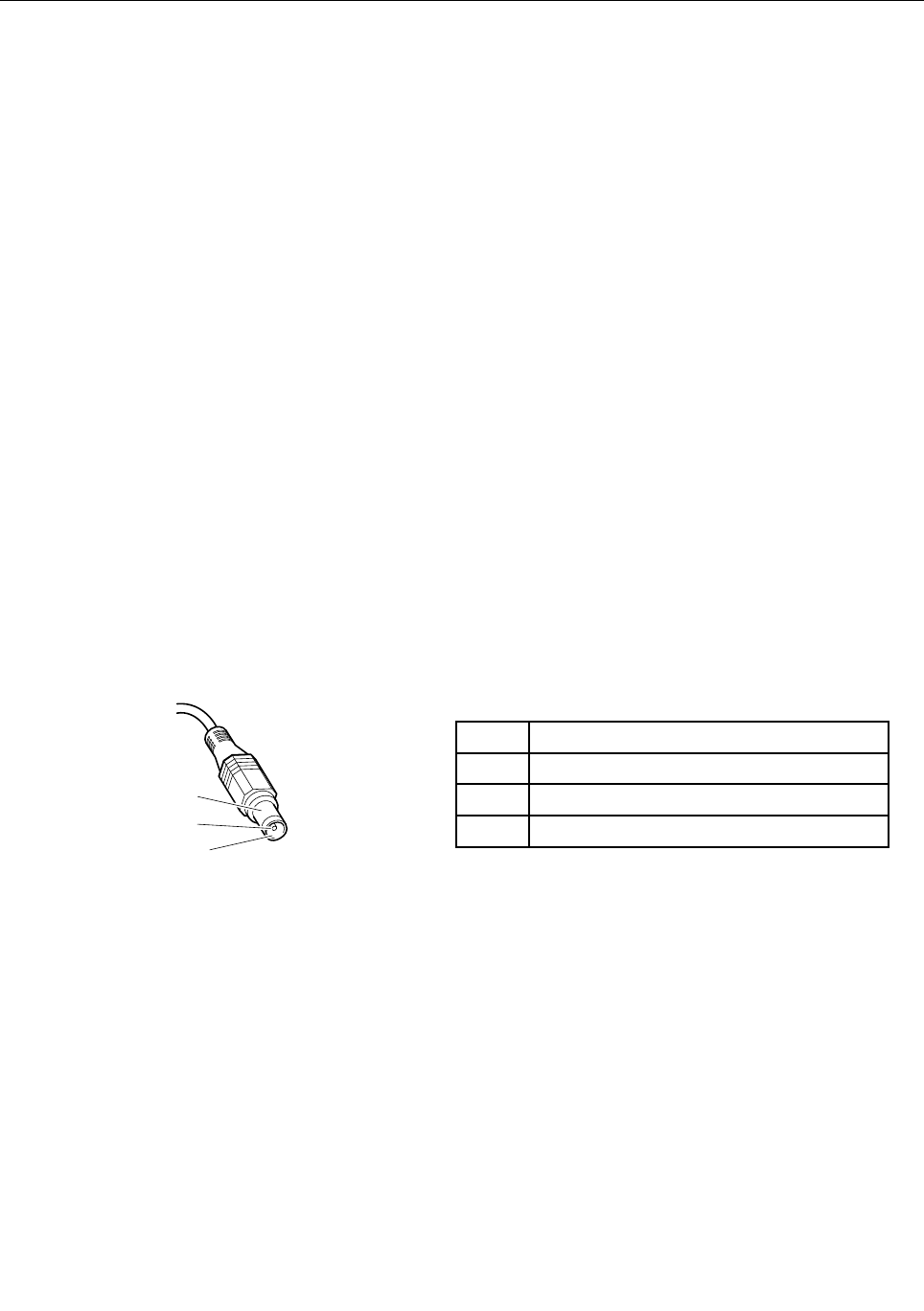
2.Measuretheoutputvoltageattheplugoftheacpoweradaptercable.Seethefollowinggure:
PinVoltage(Vdc)
1+20
20
3Ground
1
2
3
(20V)
Note:Outputvoltageacrosspin2oftheacpoweradaptermightdifferfromtheoneyouareservicing.
3.Ifthevoltageisnotcorrect,replacetheacpoweradapter.
4.Ifthevoltageisacceptable,dothefollowing:
•Replacethesystemboard.
•IftheproblempersistsandyoursystemsupportsthePCdoctorforDOS,goto“FRUtests”on
page33.
Note:Noisefromtheacpoweradapterdoesnotalwaysindicateadefect.
Checkingoperationalcharging
Tocheckwhetherthebatterychargesproperlyduringoperation,useadischargedbatterypackorabattery
packthathaslessthan50%ofthetotalpowerremainingwheninstalledinthecomputer.
Chapter3.Generalcheckout37
Performoperationalcharging.Ifthebatterystatusindicatororicondoesnotturnon,removethebattery
packandletitreturntoroomtemperature.Reinstallthebatterypack.Ifthechargeindicatororiconstilldoes
notturnon,replacethebatterypack.
Ifthechargeindicatorstilldoesnotturnon,replacethesystemboard.Thenreinstallthebatterypack.Ifitis
stillnotcharged,gotothenextsection.
Checkingthebatterypack
BatterychargingdoesnotstartuntilthePowerManagerBatteryGaugeshowsthatlessthan96%ofthe
totalpowerremains;underthisconditionthebatterypackcanchargeto100%ofitscapacity.Thisprotects
thebatterypackfrombeingoverchargedorfromhavingashortenedlife.
Tocheckyourbattery,moveyourcursortothePowerManagerBatteryGaugeiconintheicontrayofthe
Windowstaskbarandwaitforamoment(butdonotclick),andthepercentageofbatterypowerremaining
isdisplayed.Togetdetailedinformationaboutthebattery,double-clickthePowerManagerBattery
Gaugeicon.
Note:Ifthebatterypackbecomeshot,itmaynotbeabletocharge.Removeitfromthecomputerandleave
itatroomtemperatureforawhile.Afteritcoolsdown,reinstallandrechargeit.
Tocheckthebatterypack,dothefollowing:
1.Poweroffthecomputer.
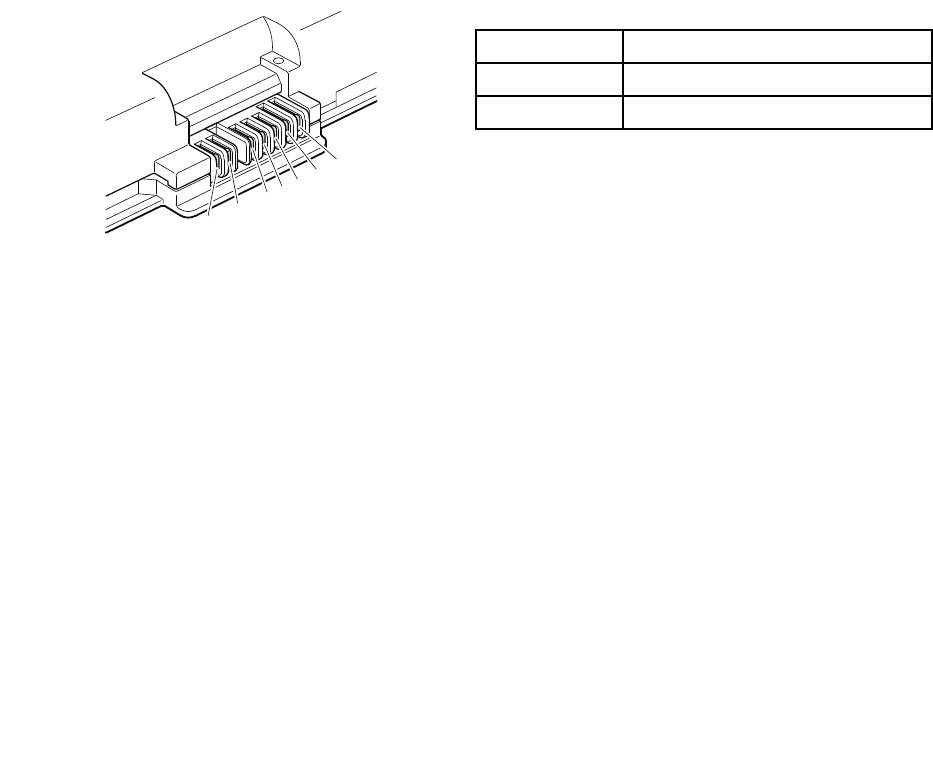
2.Removethebatterypackandmeasurethevoltagebetweenbatteryterminals1(+)and7(-).Seethe
followinggure:
TerminalVoltage(Vdc)
1+0to+16.8
7Ground(-)
1(+)2(+) 3456(-)7(-)
3.Ifthevoltageislessthan+11.0Vdc,thebatterypackhasbeendischarged.
Note:Rechargingwilltakeatleast3hours,eveniftheindicatordoesnotturnon.
Ifthevoltageisstilllessthan+11.0Vdcafterrecharging,replacethebattery.
4.Ifthevoltageismorethan+11.0Vdc,measuretheresistancebetweenbatteryterminals5and7.
Theresistancemustbe4to30KΩ.Iftheresistanceisnotcorrect,replacethebatterypack.Ifthe
resistanceiscorrect,replacethesystemboard.
Checkingthebackupbattery
Dothefollowing:
1.Poweroffthecomputer,andunplugtheacpoweradapterfromit.
2.Turnthecomputerupsidedown.
3.Removethebatterypack(see“1010Batterypack”onpage67).
4.Removethebackupbattery(see“1100Backupbattery”onpage83).
5.Measurethevoltageofthebackupbattery.Seethefollowinggure.
38ThinkPadT420andT420iHardwareMaintenanceManual
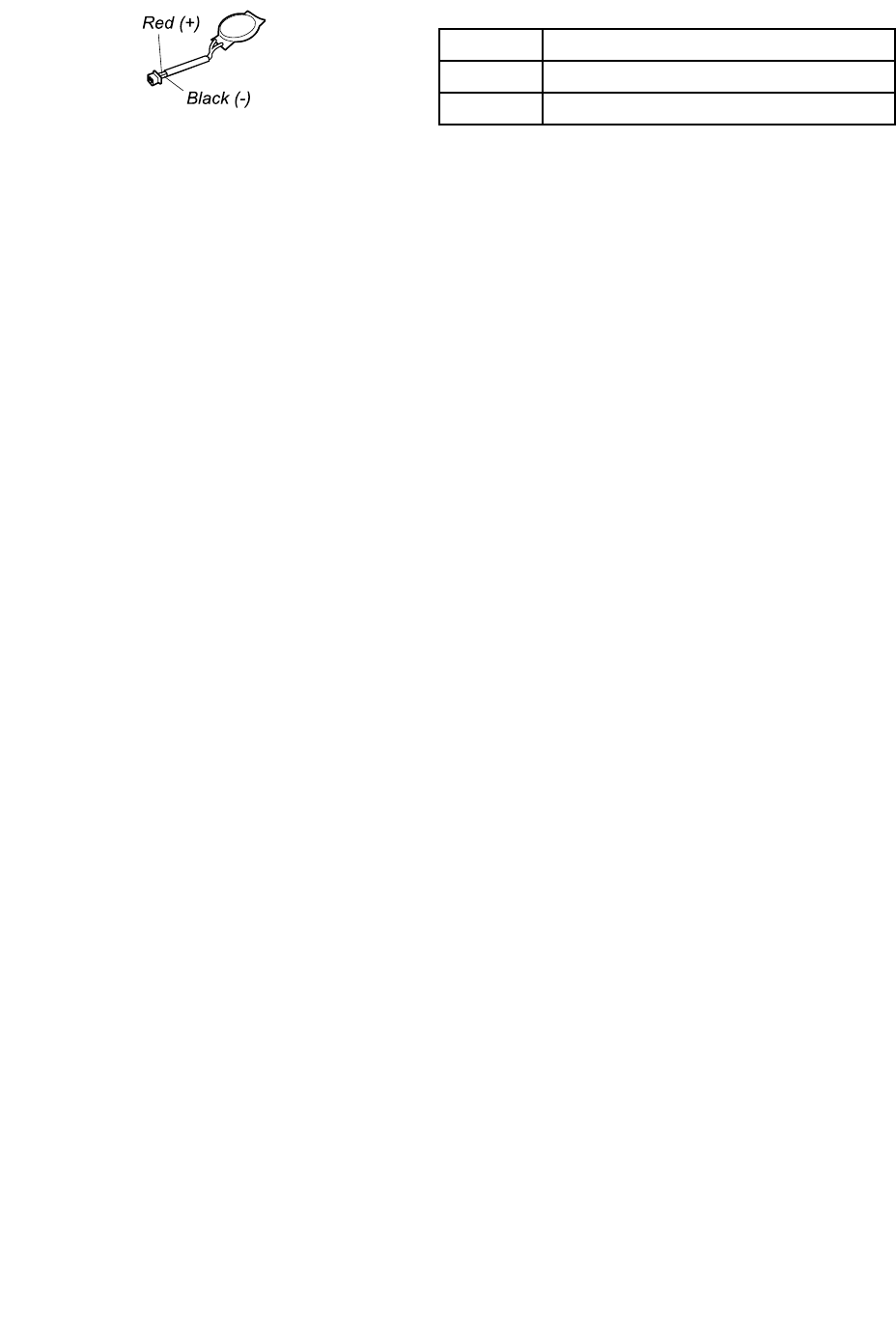
WireVoltage(Vdc)
Red+2.5to+3.2
BlackGround
•Ifthevoltageiscorrect,replacethesystemboard.
•Ifthevoltageisnotcorrect,replacethebackupbattery.
•Ifthebackupbatterydischargesquicklyafterreplacement,replacethesystemboard.
Chapter3.Generalcheckout39

40ThinkPadT420andT420iHardwareMaintenanceManual
Chapter4.Relatedserviceinformation
Thischapterpresentsfollowinginformation:
•“RestoringthefactorycontentsbyusingRecoveryDiscSet”onpage41
•“Passwords”onpage42
•“Powermanagement”onpage45
•“Symptom-to-FRUindex”onpage47
ServiceWebsite:
Whenthelatestmaintenancedisketteandthesystemprogramservicediskettebecomeavailable,theywillbeposted
on
http://www.lenovo.com/support
RestoringthefactorycontentsbyusingRecoveryDiscSet
Whentheharddiskdrive(HDD)orsolidstatedrive(SSD)isreplacedbecauseofafailure,noproductrecovery
programisonthenewdrive.Inthiscase,youmustusetheRecoveryDiscSetforthecomputer.Orderthe
RecoveryDiscSetandthedriveatthesametimesothatyoucanrecoverthenewdrivewiththepre-installed
softwarewhentheyarrive.Forinformationonwhichdiscstoorder,see“Recoverydiscs”onpage166.
TherecoverydiscsetconsistsoftheuserinstructionsandthefollowingsetofDVDstorestorethecomputer
totheoriginalfactoryconguration.
OperatingSystemRecoveryDisc(onedisc)ThisdiscrestorestheMicrosoft®Windowsoperating
system.Usethisdisctostarttherecoveryprocess.
ApplicationsandDriversRecoveryDisc(oneor
morediscs)
Thisdiscrestoresthepreinstalledapplicationsand
driversonthecomputer.
SupplementalRecoveryDiscThisdisccontainsadditionalcontent,suchas
updatestothesoftwarethatwaspreinstalledonthe
computer.Notallrecoverydiscsetscomewitha
SupplementalRecoveryDisc.
Notes:
•Y oumusthaveaDVDdrivetousetherecoverydiscs.IfyoudonothaveaninternalDVDdrive,you
canuseanexternalUSBDVDdrive.
•Duringtherecoveryprocess,alldataonthedrivewillbedeleted.Ifpossible,copyanyimportantdata
orpersonallesthatyouwanttokeepontoremovablemediaoranetworkdrivebeforeyoustartthe
recoveryprocess.
Torestorethecomputertotheoriginalfactorycongurationusingtherecoverydiscset,dothefollowing:
Note:Recoverycantakeonetotwohourstocomplete.Thelengthoftimedependsonthemethodyouuse.Ifyou
userecoverydiscs,therecoveryprocesswilltakeabouttwohours.
1.MaketheCD/DVDdrivetherststartupdeviceinthestartupsequenceusingthefollowingprocedure:
a.PressandholddowntheF1key,andthenturnonthecomputer.Whenthelogoscreenisdisplayed
orifyouhearrepeatingbeeps,releasetheF1key.TheThinkPadSetupprogramopens.
b.UsethearrowkeystoselectStartup➙Boot.
c.SelecttheCD/DVDdriveasthe1stBootDevice.
©CopyrightLenovo201241

2.InserttheOperatingSystemRecoveryDiscintotheDVDdrive.
3.PressF10tosavetheThinkPadSetupprogramcongurationchanges.Followtheinstructionsonthe
screentobegintherecoveryprocess.
4.SelectyourlanguageandclickNext.
5.Readthelicense.Ifyouagreewiththetermsandconditions,selectIacceptthesetermsand
conditionsandthenclickNext.Ifyoudonotagreewiththetermsandconditions,followthe
instructionsonthescreen.
6.ClickYesinthedisplayedwindowtobegintheoperatingsystemrecoveryprocess.
7.InserttheApplicationsandDriversRecoveryDiscwhenpromptedandthenclickOKtobeginthe
applicationsanddriversrecoveryprocess.
8.IfyouhaveaSupplementalRecoveryDisc,insertitwhenpromptedandclickYes.Ifyoudonothavea
SupplementalRecoveryDisc,clickNo.
9.Whenallofthedatahasbeencopiedfromthelastdiscinthesetandhasbeenprocessed,removethe
discandrestartthecomputer.
Note:Therestoftherecoveryprocessisfullyautomatedandnoactionisrequiredbyyou.The
computerwillrestartintotheMicrosoftWindowsdesktopseveraltimesandyoumightexperience
periodswhennoactivityisapparentonthescreenforseveralminutesatatime.Thisisnormal.
10.Whentherecoveryprocessiscomplete,theSetUpWindowsscreenisdisplayed.Followthe
instructionsonthescreentocompletetheWindowssetup.
11.AfteryouhavecompletedtheWindowssetup,youmightwanttorestoretheoriginalstartupsequence.
StarttheThinkPadSetupprogramandthenpressF9torestorethedefaultsettings.PressF10tosave
andexittheThinkPadSetupprogram.
Note:Afterrestoringadrivetothefactorydefaultsettings,youmightneedtoreinstallsomedevicedrivers.
Passwords
AsmanyasthreepasswordsmaybeneededforanyThinkPadNotebook:thepower-onpassword(POP),
thehard-diskpassword(HDP),andthesupervisorpassword(SVP).
Ifanyofthesepasswordshasbeenset,apromptforitappearsonthescreenwheneverthecomputeris
turnedon.Thecomputerdoesnotstartuntilthepasswordisentered.
Note:IfonlyanSVPisinstalled,thepasswordpromptdoesnotappearwhentheoperatingsystemisbooted.
Power-onpassword
Apower-onpassword(POP)protectsthesystemfrombeingpoweredonbyanunauthorizedperson.The
passwordmustbeenteredbeforeanoperatingsystemcanbebooted.ForhowtoremovethePOP ,see
“Howtoremovethepower-onpassword”onpage43.
Hard-diskpassword
Therearetwohard-diskpasswords(HDPs):
•UserHDP—fortheuser
•MasterHDP—forthesystemadministrator,whocanuseittogetaccesstotheharddiskeveniftheuser
haschangedtheuserHDP
Note:TherearetwomodesfortheHDP:UseronlyandMaster+User.TheMaster+Usermoderequires
twoHDPs;thesystemadministratorentersbothinthesameoperation.Thesystemadministratorthen
providestheuserHDPtothesystemuser.
42ThinkPadT420andT420iHardwareMaintenanceManual

Attention:IftheuserHDPhasbeenforgotten,checkwhetheramasterHDPhasbeenset.Ifithas,itcanbe
usedforaccesstotheharddiskdrive.IfnomasterHDPisavailable,neitherLenovonorLenovoauthorized
servicetechniciansprovideanyservicestoreseteithertheuserorthemasterHDP ,ortorecoverdatafrom
theharddiskdrive.Theharddiskdrivecanbereplacedforascheduledfee.
ForhowtoremovethePOP ,see“Howtoremovethehard-diskpassword”onpage43.
Supervisorpassword
Asupervisorpassword(SVP)protectsthesysteminformationstoredintheThinkPadSetupprogram.
TheusermustentertheSVPinordertogetaccesstotheThinkPadSetupprogramandchangethe
systemconguration.
Attention:IftheSVPhasbeenforgottenandcannotbemadeavailabletotheservicetechnician,thereisno
serviceproceduretoresetthepassword.Thesystemboardmustbereplacedforascheduledfee.
Howtoremovethepower-onpassword
ToremoveaPOPthatyouhaveforgotten,dothefollowing:
(A)IfnoSVPhasbeenset:
1.Turnoffthecomputer.
2.Removethebatterypack.Forhowtoremovethebatterypack,see“1010Batterypack”onpage67.
3.Removethebackupbattery.Forhowtoremovethebackupbattery,see“1100Backupbattery”on
page83.
4.TurnonthecomputerandwaituntilthePOSTends.AfterthePOSTends,thepasswordpromptdoes
notappear.ThePOPhasbeenremoved.
5.Reinstallthebackupbatteryandthebatterypack.
(B)IfanSVPhasbeensetandisknownbytheservicetechnician:
1.Turnonthecomputer.
2.WhentheThinkPadlogocomesup,immediatelypressF1toentertheThinkPadSetupprogram.When
thePOPiconisdisplayedonthescreen,enterthePOP .
3.SelectSecurity,usingthecursordirectionalkeystomovethemenu.
4.SelectPassword.
5.SelectPower-OnPassword.
6.TypethecurrentSVPintheEnterCurrentPasswordeld.thenleavetheEnterNewPasswordeld
blank,andpressEntertwice.
7.IntheChangeshavebeensavedwindow,pressEnter.
8.PressF10;then,intheSetupconrmationwindow,selectYes.
Howtoremovethehard-diskpassword
Attention:IfUseronlymodeisselectedandtheuserHDPhasbeenforgottenandcannotbemade
availabletotheservicetechnician,neitherLenovonorLenovoauthorizedservicetechniciansprovideany
servicestoresettheuserHDPsortorecoverdatafromtheharddiskdrive.Theharddiskdrivecanbe
replacedforascheduledfee.
ToremoveauserHDPthathasbeenforgotten,whentheSVPandthemasterHDPareknown,dothe
following:
1.Turnonthecomputer.
Chapter4.Relatedserviceinformation43

2.WhentheThinkPadlogocomesup,immediatelypressF1toentertheThinkPadSetupprogram.When
thePOPiconisappearingonthescreen,enterthePOP .
3.SelectSecurity,usingthecursordirectionalkeystomovethemenu.
4.SelectPassword.
5.SelectHard-diskxpassword,wherexistheletteroftheharddiskdrive.Apop-upwindowopens.
6.SelectMasterHDP.
7.TypethecurrentmasterHDPintheEnterCurrentPasswordeld.thenleavetheEnterNewPassword
eldblank,andpressEntertwice.
8.PressF10.
9.SelectYesintheSetupCongurationwindow.BothuserHDPandmasterHDPwillhavebeenremoved.
44ThinkPadT420andT420iHardwareMaintenanceManual

Powermanagement
Toreducepowerconsumption,thecomputerhasthreepowermanagementmodes:screenblank,sleep
(standbyinWindowsXP),andhibernation.
Screenblankmode
Ifthetimesetonthe“Turnoffmonitor”timerintheoperatingsystemexpires,theLCDbacklightturnsoff.
Toputthecomputerintoscreenblankmode,doasfollows:
1.PressFn+F3.Apanelforselectingapowerplan(inWindowsXP ,powerscheme)appears.
2.SelectPoweroffdisplay(keepcurrentpowerplan)(inWindowsXP ,keepcurrentpowerscheme).
Toendscreenblankmodeandresumenormaloperation,pressanykey.
Sleep(standby)mode
Whenthecomputerenterssleep(standby)mode,thefollowingeventsoccurinadditiontowhatoccurs
inscreenblankmode:
•TheLCDispoweredoff.
•Theharddiskdriveispoweredoff.
•TheCPUstops.
Toentersleep(standby)mode,pressFn+F4.
Note:YoucanchangetheactionoftheFn+F4keycombinationbychangingthesettingsinPowerManager.
Incertaincircumstances,thecomputergoesintosleep(standby)modeautomatically:
•Ifa“suspendtime”hasbeensetonthetimer,andtheuserdoesnotdoanyoperationwiththekeyboard,
theTrackPoint,theharddisk,theparallelconnector,orthediskettedrivewithinthattime.
•Ifthebatteryindicatorblinksorange,indicatingthatthebatterypowerislow.
Note:Evenifyoudonotsetthelow-batteryalarm,thechargeindicatornotiesyouwhenthebatteryislow,
andthenthecomputerentersthepower-savingmodeautomatically.
Tocausethecomputertoreturnfromsleep(standby)modeandresumeoperation,dooneofthefollowing:
•PresstheFnkey.
•OpentheLCDcover.
•Turnonthepowerswitch.
Also,ineitherofthefollowingevents,thecomputerautomaticallyreturnsfromsleep(standby)modeand
resumesoperation:
•Theringindicator(RI)issignaledbyaserialdeviceoraPCCarddevice.
•Thetimesetontheresumetimerelapses.
Note:Thecomputerdoesnotacceptanyinputimmediatelyafteritenterssleep(standby)mode.Waita
fewsecondsbeforetakinganyactiontoreenteroperationmode.
Hibernationmode
Inhibernationmode,thefollowingoccurs:
•Thesystemstatus,RAM,VRAM,andsetupdataarestoredontheharddisk.
Chapter4.Relatedserviceinformation45

•Thesystemispoweredoff.
Note:Ifthecomputerentersthehibernationmodewhileitisdockedtothedockingstation,donotundockit
beforeresumingnormaloperation.Ifyoudoundockitandthentrytoresumenormaloperation,youwillget
anerrormessage,andyouwillhavetorestartthesystem.
Tocausethecomputertoenterhibernationmode,doanyofthefollowing:
•PresstheFn+F12keys.
•Ifyouhavedenedoneofthefollowingactionsastheeventthatcausesthesystemtogointohibernation
mode,performthataction.
–Closingthelid.
–Pressingthepowerbutton.
–PressingFn+F4keys.
Also,thecomputergoesintohibernationmodeautomaticallyineitherofthefollowingconditions:
•Ifa“hibernationtime”hasbeensetonthetimer,andiftheuserdoesnotdoanyoperationwiththe
keyboard,theTrackPoint,theharddiskdrive,theparallelconnector,orthediskettedrivewithinthattime.
•Ifthetimerconditionsaresatisedinsuspendmode.
Whenthepoweristurnedon,thecomputerreturnsfromhibernationmodeandresumesoperation.The
hibernationleinthebootrecordontheharddiskdriveisread,andsystemstatusisrestoredfromthe
harddiskdrive.
46ThinkPadT420andT420iHardwareMaintenanceManual
Symptom-to-FRUindex
Thissectioncontainsfollowinginformation:
•“Numericerrorcodes”onpage47
•“Errormessages”onpage49
•“Beepsymptoms”onpage50
•“No-beepsymptoms”onpage50
•“LCD-relatedsymptoms”onpage50
•“Intermittentproblems”onpage52
•“Undeterminedproblems”onpage52
Thesymptom-to-FRUindexinthissectionlistssymptomsanderrorsandtheirpossiblecauses.Themost
likelycauseislistedrst,inboldfacetype.
Note:DotheFRUreplacementorotheractionsinthesequenceshowninthecolumnheaded“FRUor
action,insequence.”IfreplacingaFRUdoesnotsolvetheproblem,puttheoriginalpartbackinthe
computer.DonotreplaceanondefectiveFRU.
Thisindexcanalsohelpyoudetermine,duringregularservicing,whatFRUsarelikelytoneedtobe
replacednext.
AnumericerrorisdisplayedforeacherrordetectedinPOSTorsystemoperation.Inthedisplays,ncan
beanynumber.
Ifnonumericcodeisdisplayed,checkthenarrativedescriptionsofsymptoms.Ifthesymptomisnot
describedthere,goto“Intermittentproblems”onpage52.
Note:ForadevicenotsupportedbydiagnosticcodesintheThinkPadNotebooks,seethemanualforthatdevice.
Numericerrorcodes
Table2.Numericerrorcodes
SymptomorerrorFRUoraction,insequence
0177
BadSVPdata,stopPOSTtask—Thechecksumofthe
supervisorpasswordintheEEPROMisnotcorrect.
Systemboard.
0182
BadCRC2.EntertheThinkPadSetupprogramandload
Setupdefaults.—ThechecksumoftheCRS2settingin
theEEPROMisnotcorrect.
1.RuntheThinkPadSetupprogram.PressF9,and
Entertoloadthedefaultsetting.Thensavethe
currentsettingbypressingF10.
2.Systemboard.
0183
BadCRCofSecuritySettingsinEFIVariable.Enterthe
ThinkPadSetupprogram.
0187
EAIAdataaccesserror—TheaccesstoEEPROMisfailed.
Systemboard.
0188
InvalidRFIDSerializationInformationArea.
Systemboard.
0189
InvalidRFIDcongurationinformationarea—The
EEPROMchecksumisnotcorrect.
Systemboard.
0190
Criticallow-batteryerror
1.Chargethebatterypack.
2.Batterypack.
Chapter4.Relatedserviceinformation47

Table2.Numericerrorcodes(continued)
SymptomorerrorFRUoraction,insequence
0191
SystemSecurity—InvalidRemoteChangerequested.
1.RuntheThinkPadSetupprogram,andthensave
currentsettingbypressingF10.
2.Systemboard.
0199
SystemSecurity—Securitypasswordretrycount
exceeded.
1.RuntheThinkPadSetupprogram,andthensave
thecurrentsettingbypressingF10.
2.Systemboard.
0251
SystemCMOSchecksumbad—Defaultconguration
used.
1.Chargethebackupbatteryformorethan8hours
byconnectingtheacpoweradapter.
2.ReplacethebackupbatteryandruntheThinkPad
setupprogramtoresetthetimeanddate.
0271
Real-timeclockerror.Checkdateandtimesettings.
RuntheThinkPadSetupprogramtoresetthetime
anddate.
1802
Unauthorizednetworkcardispluggedin—Turnoffand
removetheminiPCInetworkcard.
1.RemoveMiniPCInetworkcard.
2.Systemboard.
1820
Morethanoneexternalngerprintreaderisattached.
Poweroffandremoveallbutthereaderthatyousetup
withinyourmainoperatingsystem.
Removeallbutthereaderthatyousetupforthe
authentication.
2000
HardDriveActiveProtectionsensordiagnostics
failed.Press<Esc>tocontinue.Press<F1>toenter
SETUP
1.Undockdockingstationorportreplicatorifitis
attachedtotheThinkPadNotebook.
2.PlacetheThinkPadNotebookonahorizontalsurface.
Donotapplyanyphysicalshocktothecomputer.
3.RunDiagnostics➙ThinkPadDevices➙HDD
ActiveProtectionTest.
2100
DetectionerroronHDD0(MainHDD)
1.Reseattheharddiskdrive.
2.Mainharddiskdrive.
3.Systemboard.
2101
DetectionerroronHDD1(UltrabayHDD)
1.Reseattheharddiskdrive.
2.Ultrabayharddiskdrive.
3.Systemboard.
2102
DetectionerroronHDD2(MiniSATA)
1.ReseattheMiniSATAdevice.
2.MiniSATAdevice.
3.Systemboard.
2110
ReaderroronHDD0(MainHDD)
1.Reseattheharddiskdrive.
2.Mainharddiskdrive.
3.Systemboard.
2111
ReaderroronHDD1(UltrabayHDD)
1.Reseattheharddiskdrive.
2.Ultrabayharddiskdrive.
3.Systemboard.
2112
ReaderroronHDD2(MiniSATA)
1.ReseattheMiniSATAdevice.
2.MiniSATAdevice.
3.Systemboard.
2200
MachineTypeandSerialNumberareinvalid.
Systemboard.
2201
MachineUUIDisinvalid
Systemboard.
48ThinkPadT420andT420iHardwareMaintenanceManual

Errormessages
Table3.Errormessages
SymptomorerrorFRUoraction,insequence
Fanerror.1.Fan.
2.Thermalgrease.
3.Systemboard.
Thermalsensingerror.Systemboard.
Thissystemdoesnotsupportbatteriesthatarenot
genuineLenovo-madeorauthorized.Thissystemwill
continuetoboot,butmaynotchargeunauthorized
batteries.
Attention:Lenovohasnoresponsibilityforthe
performanceorsafetyofunauthorizedbatteries,and
providesnowarrantiesforfailuresordamagearisingout
oftheiruse.
Replacethebattery.
Chapter4.Relatedserviceinformation49

Beepsymptoms
Table4.Beepsymptoms
SymptomorerrorFRUoraction,insequence
Onebeepandablank,unreadable,orashingLCD.1.ReseattheLCDconnector.
2.LCDassembly.
3.ExternalCRT.
4.Systemboard.
Onelongandtwoshortbeeps,andablankorunreadable
LCD.
1.Systemboard.
2.LCDassembly.
3.DIMM.
Twoshortbeepswitherrorcodes.POSTerror.See“Numericerrorcodes”onpage47.
Twoshortbeepsandablankscreen.1.Systemboard.
2.DIMM.
Twoormorebeeps,oracontinuousbeep.Operating
systemstartssuccessfully.
Ifamini-PCIEthernetcardisinstalled,conrmthatAlert
OnLAN2intheThinkPadSetupprogramisdisabled.
Threeshortbeeps,pause,threemoreshortbeeps,and
oneshortbeep.
Oneshortbeep,pause,threeshortbeeps,pause,three
moreshortbeeps,andoneshortbeep.
1.DIMM.
2.Systemboard.
Onlythecursorappears.Reinstalltheoperatingsystem.
Fourcyclesoffourshortbeepsandablankscreen.Systemboard(securitychip)
Fiveshortbeepsandablankscreen.Systemboard
No-beepsymptoms
Table5.No-beepsymptoms
SymptomorerrorFRUoraction,insequence
Nobeep,power-onindicatoron,LCDblank,andno
POST.
1.Makesurethateveryconnectorisconnected
tightlyandcorrectly.
2.DIMM.
3.Systemboard.
Nobeep,power-onindicatoron,andLCDblankduring
POST.
1.ReseatDIMM.
2.Systemboard.
Thepower-onpasswordpromptappears.Apower-onpasswordorasupervisorpasswordisset.
TypethepasswordandpressEnter.
Thehard-diskpasswordpromptappears.Ahard-diskpasswordisset.Typethepasswordand
pressEnter.
LCD-relatedsymptoms
Important:TheTFTLCDforthenotebookcomputercontainsmanythin-lmtransistors(TFTs).Thepresenceofa
smallnumberofdotsthataremissing,discolored,oralwayslightedischaracteristicofTFTLCDtechnology,but
excessivepixelproblemscancauseviewingconcerns.
IftheLCDyouareservicinghastwoorlessvisibledefectivepixels,itshouldnotbeconsideredfaulty.However,ifthe
LCDhasthreeormorevisibledefectivepixels,itwillbedeemedasdefectivebyLenovoanditshouldbereplaced.
Notes:
•ThispolicyappliestoallThinkPadNotebookspurchasedon1January,2008orlater.
50ThinkPadT420andT420iHardwareMaintenanceManual
•LenovowillnotprovidereplacementiftheLCDiswithinspecicationaswecannotguaranteethatany
replacementLCDwillhavezeropixeldefects.
•OnepixelconsistsofR,G,Bsub-pixels.
Table6.LCD-relatedsymptoms
SymptomorerrorFRUoraction,insequence
Nobeep,power-onindicatoron,andablankLCDduring
POST.
Systemboard.
•LCDbacklightnotworking.
•LCDtoodark.
•LCDbrightnesscannotbeadjusted.
•LCDcontrastcannotbeadjusted.
1.ReseattheLCDconnectors.
2.LCDassembly.
3.Systemboard.
•LCDscreenunreadable.
•Charactersmissingpixels.
•Screenabnormal.
•Wrongcolordisplayed.
1.Seeimportantnotefor“LCD-relatedsymptoms.”
2.ReseatallLCDconnectors.
3.LCDassembly.
4.Systemboard.
HorizontalorverticallinesdisplayedonLCD.LCDassembly.
Chapter4.Relatedserviceinformation51

Intermittentproblems
Intermittentsystemhangproblemscanbeduetoavarietyofcausesthathavenothingtodowithahardware
defect,suchascosmicradiation,electrostaticdischarge,orsoftwareerrors.FRUreplacementshouldbe
consideredonlywhenaproblemrecurs.
Whenanalyzinganintermittentproblem,dothefollowing:
1.Runthediagnostictestforthesystemboardinloopmodeatleast10times.
2.Ifnoerrorisdetected,donotreplaceanyFRUs.
3.Ifanyerrorisdetected,replacetheFRUshownbytheFRUcode.Rerunthetesttoverifythatno
moreerrorsexist.
Undeterminedproblems
Ifthediagnostictestsdidnotidentifytheadapterordevicethathasfailed,ifwrongdevicesareinstalled,
orifthesystemsimplyisnotoperating,followtheseprocedurestoisolatethefailingFRU(donotisolate
FRUsthathavenodefects).
Verifythatallattacheddevicesaresupportedbythecomputer.
Verifythatthepowersupplybeingusedatthetimeofthefailureisoperatingcorrectly.(See“Powersystem
checkout”onpage37.)
1.Turnoffthecomputer.
2.VisuallycheckeachFRUfordamage.ReplaceanydamagedFRU.
3.Removeordisconnectallofthefollowingdevices:
a.Non-ThinkPaddevices
b.Devicesattachedtothedockingstationortheportreplicator
c.Printer,mouse,andotherexternaldevices
d.Batterypack
e.Harddiskdrive
f.Externaldiskettedriveoropticaldrive
g.DIMM
h.Opticaldiskordisketteintheinternaldrive
i.PCCards
4.Turnonthecomputer.
5.Determinewhethertheproblemhasbeensolved.
6.Iftheproblemdoesnotrecur,reconnecttheremoveddevicesoneatatimeuntilyoundthefailingFRU.
7.Iftheproblemremains,replacethefollowingFRUsoneatatime(donotreplaceanondefectiveFRU):
a.Systemboard
b.LCDassembly
52ThinkPadT420andT420iHardwareMaintenanceManual
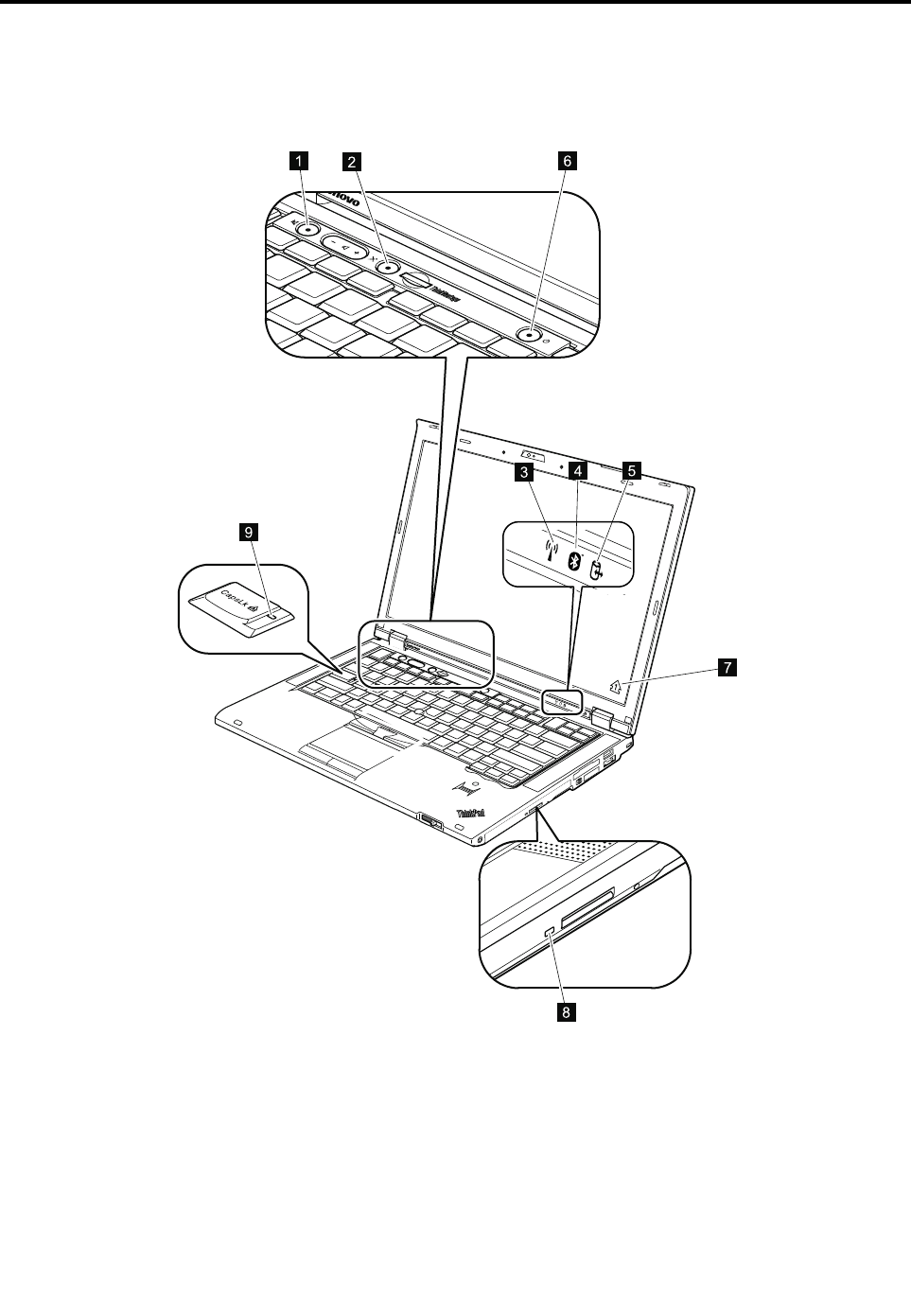
Chapter5.Statusindicators
Thischapterpresentsthesystemstatusindicatorsthatshowthestatusofthecomputer.
7
126
8
9
34 5
©CopyrightLenovo201253
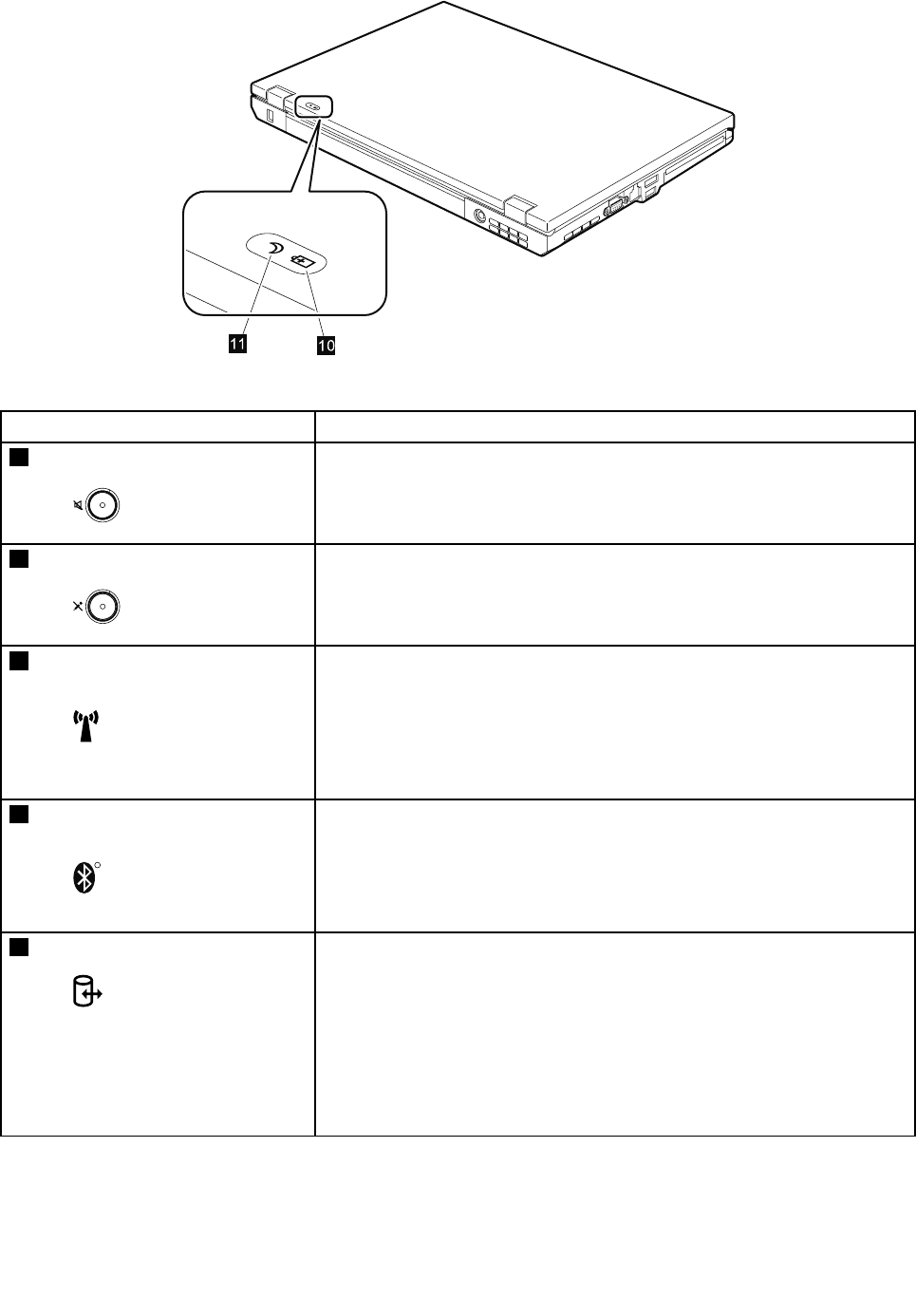
5
6
1110
Table7.Statusindicators
IndicatorMeaning
1SpeakermuteOrange:
Thespeakerisonmute.Tosetthespeakersonmuteorunmute,
pressthespeakermutebutton.
2MicrophonemuteOrange:
Themicrophoneisonmute.Noneoftherecordingdevicesis
availablewhilethemicrophonemuteisonbydefault.
3WirelessLAN,WirelessWAN,
orWiMAXstatusGreen:
ThewirelessLANfeature(theIEEE802.11b/gstandard,802.11
a/b/g,or802.11n),wirelessWANfeature,orWiMaxfeatureis
on,andtheradiolinkisreadyforuse.
Dataisbeingtransmitted.
4BluetoothwirelessorWireless
USBstatus
R
Green:
TheBluetoothwirelessfeatureison,andtheradiolinkisready
foruse.
Dataisbeingtransmitted.
5DeviceaccessGreen:
Dataisbeingreadfromorwrittentotheharddiskdrive,the
diskettedrive,orthedriveintheSerialUltrabayEnhanced
device.Whenthisindicatorison,donotputthecomputerinto
sleep(standby)modeorturnoffthecomputer.
Note:Donotmovethesystemwhilethegreendeviceaccesslightison.
Suddenphysicalshockcouldcausedriveerrors.
54ThinkPadT420andT420iHardwareMaintenanceManual
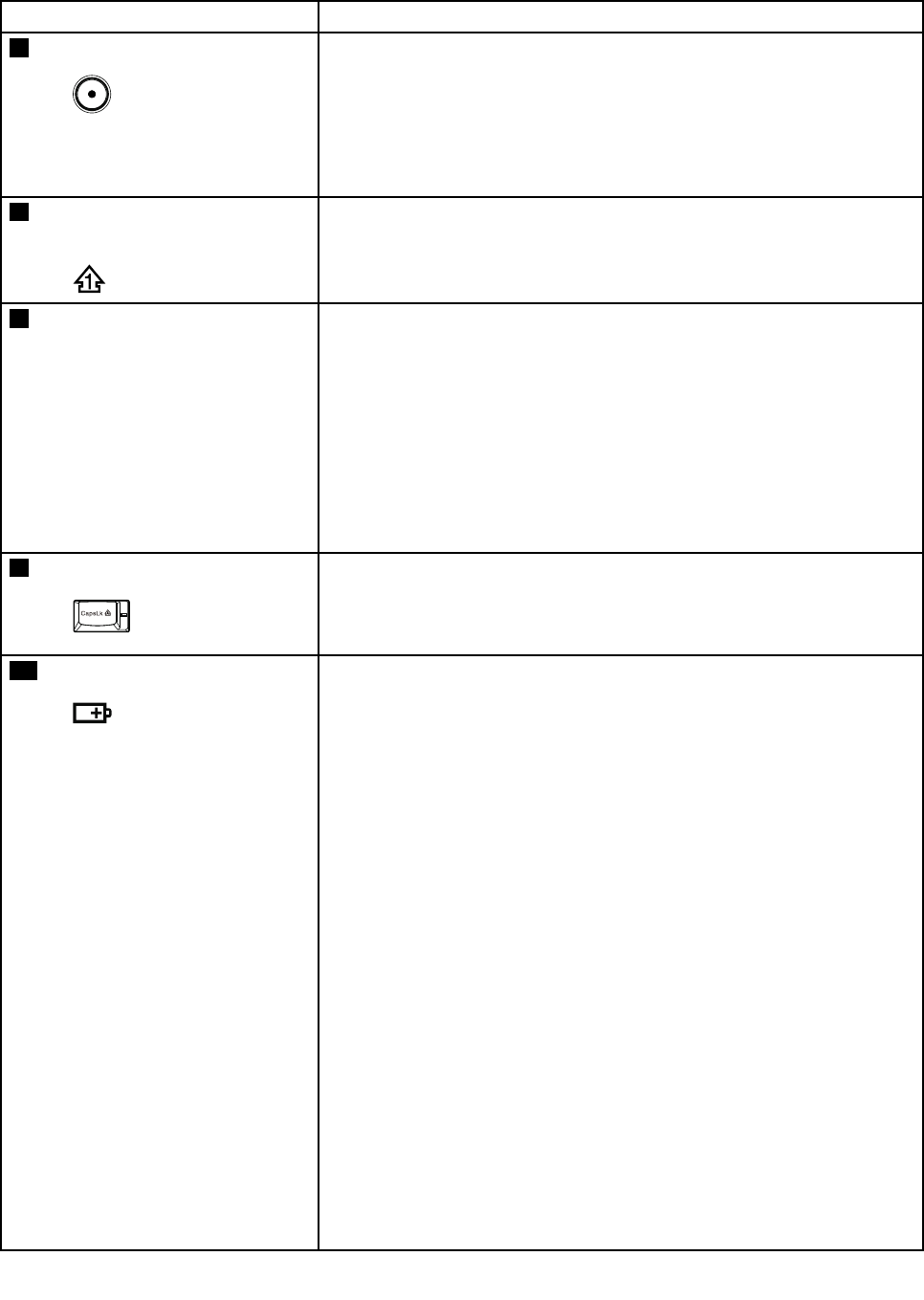
Table7.Statusindicators(continued)
IndicatorMeaning
6PoweronGreen:
Thecomputerisonandreadytouse.Thisindicatorstayslit
aroundthepower-onbuttonwheneverthecomputerisonand
isnotinsleep(standby)mode.
Note:Thisindicatorblinkswhenthecomputerisinsleepmode.
7Numericlock(On-screen
indicator)
Bydefault,whenthenumericlockison,thenumericlockindicatoris
displayedonthescreen.
8SerialUltrabayEnhanced
devicestatusGreen:
ASerialUltrabayEnhanceddeviceisinstalledandinuse.
Blinkinggreen:
ASerialUltrabayEnhanceddeviceisintheprocessofbeing
detached.
Turnoff:
ASerialUltrabayEnhanceddeviceisreadytobeattachedor
detached.
9CapslockGreen:
CapsLockmodeisenabled.T oenableordisableCapsLock
mode,presstheCapsLockkey.
10BatterystatusGreen:
Thebatterychargelevelis20%orhigher.
Orange:
Thebatterychargelevelisbetween5%and20%.
Fastblinkingorange:
Thebatterychargelevelislowerthan5%.
Slowblinkingorange:
Thebatteryisbeingcharged.Whenitreaches20%,theblinking
colorchangestogreen.
Slowblinkinggreen:
Thebatterychargelevelisbetween20%and80%,and
chargingiscontinuing.Whenthebatteryreaches80%charge,
thebatterystatusindicatorstopsblinking,butthechargingmay
continueuntilthebatteryis100%charged.
Note:Ifthecomputerisoperatingonbatterypower,thebattery
statusindicatordoesnotworkwhilethecomputeristurnedoff
orisinsleep(standby)modeorhibernationmode.
Quickblinkingorange:
Anerroroccurredinthebattery.
Thebatterystatusindicatorblinksthreetimes:
Chapter5.Statusindicators55
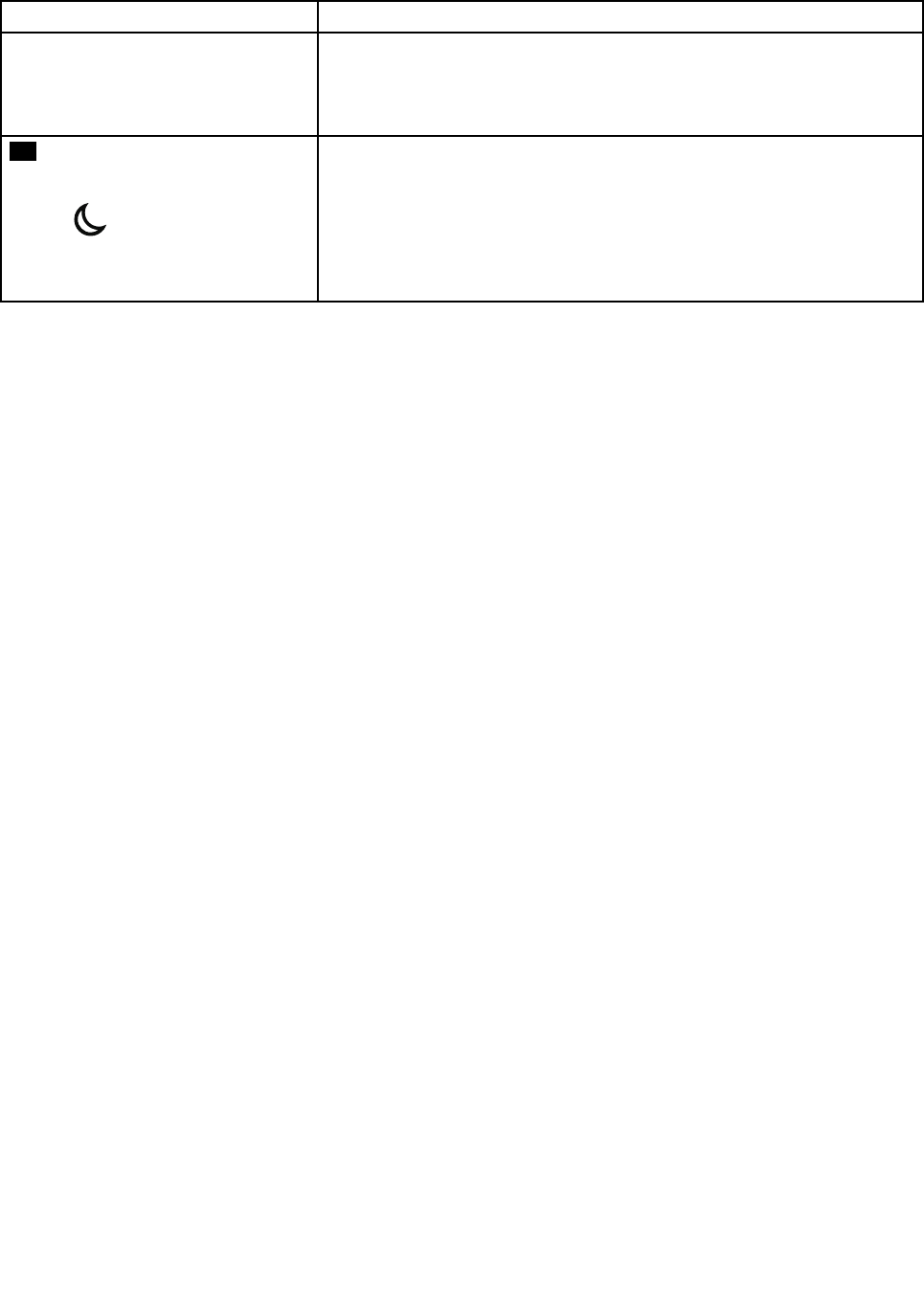
Table7.Statusindicators(continued)
IndicatorMeaning
Theacpoweradapterisattachedtothecomputer.
Thebatterystatusindicatorisoff:
Thebatterypackofthecomputerisfullychargedordetached.
11Sleep(standbyforWindows
XP)statusGreen:
Thecomputerisinsleep(standby)mode.
Blinkinggreen:
Thecomputerisenteringsleep(standby)modeorhibernation
mode,orisresumingnormaloperation.
56ThinkPadT420andT420iHardwareMaintenanceManual

Chapter6.Fnkeycombinations
ThefollowingtableshowsthefunctionofeachcombinationofFnwithafunctionkey.
Table8.Fnkeycombinations
KeycombinationDescription
Fn+F1Reserved.
Fn+F2Lockthecomputer.
Fn+F3Selectapowerplan(inWindowsXP ,powerscheme)thathasbeencreatedbyPowerManager,
oradjustthepowerlevelbyusingtheslidercontrol.Whenyoupressthiscombination,a
panelforselectingapowerplan(powerscheme)appears.
Notes:
Tousethiscombinationofthekeys,ThinkPadPMdevicedrivermusthavebeeninstalled
onthecomputer.
IfyouhaveloggedonwithanadministratoruserIDinWindowsXP ,andyoupressFn+F3,
thepanelforselectingapowerschemeappears.Ifyouhaveloggedonwithanotheruser
IDinWindowsXP ,andyoupressFn+F3,thepaneldoesnotappear.
Fn+F4Putthecomputerinsleep(standby)mode.T oreturntonormaloperation,presstheFnkey
only,withoutpressingafunctionkey.
Notes:
Tousethiscombinationofthekeys,ThinkPadPMdevicedrivermusthavebeeninstalled
onthecomputer.
Ifyouwanttousethecombinationtoputthecomputerintohibernationmodeor
do-nothingmode(inWindowsXP ,shutthecomputerdownorshowthepanelforturning
offthecomputer),changethesettingsinthePowerManager.
Fn+F5Enableordisablethebuilt-inwirelessnetworkingfeatures.IfyoupressFn+F5,alistofwireless
featuresisdisplayed.Youcanquicklychangethepowerstateofeachfeatureinthelist.
Notes:IfyouwanttouseFn+F5toenableordisablethewirelessfeatures,thefollowing
devicedriversmustbeinstalledonthecomputerbeforehand:
•PowerManagementdriver
•OnScreenDisplayUtility
•Wirelessdevicedrivers
Fn+F6Changethecameraandaudiosettings.WhenyoupressFn+F6,thecameraandaudiosetting
windowisopenedandthecamerapreviewisturnedon.
Note:Thecamerasettingsareaonlyappearsifthecomputerhasanintegratedcamera.
Fn+F7Applyapresentationschemedirectly,withnoneedtostartPresentationDirector.
TodisablethisfunctionandusetheFn+F7keycombinationforswitchingadisplayoutput
location,startPresentationDirector,andchangethesettings.
Note:IfthecomputerisanWindows7model,itdoesnotsupportpresentationschemes,
howevertheFn+F7combinationmightstillbeusedtoswitchdisplayoutputlocation.
ForWindows7:
Switchbetweenthecomputerdisplayandanexternalmonitor.Windowswillshowthese
displayoptions:
•Computerdisplayonly(LCD)
•Computerdisplayandexternalmonitor(sameimage)
•Computerdisplayandexternalmonitor(extendeddesktopfunction)
•Externalmonitoronly
©CopyrightLenovo201257

Table8.Fnkeycombinations(continued)
KeycombinationDescription
Note:Toswitchbetweenthecomputerdisplayandanexternalmonitor,theWin+Pkey
combinationisalsoavailable.
ForWindowsVistaandWindowsXP:
Switchbetweenthecomputerdisplayandanexternalmonitor.Ifanexternalmonitoris
attached,computeroutputisdisplayedinthefollowingthreepatternsbyturns:
•Externalmonitor(CRTdisplay)
•Computerdisplayandexternalmonitor(LCD+CRTdisplay)
•Computerdisplay(LCD)
Notes:
Thisfunctionisnotsupportedifdifferentdesktopimagesaredisplayedonthecomputer
displayandtheexternalmonitor(theExtenddesktopfunction).
ThisfunctiondoesnotworkwhileaDVDmovieoravideoclipisplaying.
Toenablethisfunction,startPresentationDirector,andchangethesettings.
Note:MultipleuserscanlogontoasingleoperatingsystembyusingdifferentuserIDs.
Eachuserneedstodothefollowing:
ClickStart➙AllPrograms➙ThinkVantage➙PresentationDirector,andchangethe
Fn+F7settings.
Fn+F8ChangethesettingsoftheUltraNav®pointingdevice.
Fn+F9Reserved.
Fn+F10Reserved.
Fn+F11Reserved.
Fn+F12Putthecomputerintohibernationmode.Toreturntonormaloperation,pressthepower
buttonforlessthanfourseconds.
Notes:
Tousethiscombinationofthekeys,ThinkPadPMdevicedrivermusthavebeeninstalled
onthecomputer.
ThoughthescreenfadesoutimmediatelyafterFn+F12arepressed,thecomputer
doesnotenterthehibernationmodeimmediately.Donotmovethesystemuntilthe
sleep(standby)statusindicatorstopsblinking.Movingthecomputerwhenitisentering
hibernationmightcausecorruptionoftheharddiskdrive.
Fn+PgUpTurntheThinkLight®onoroff.
Note:ThisfunctionissupportedonlyontheThinkPadNotebooksthathavetheThinkLight.
TheonoroffstatusoftheThinkLightisshownonthescreenforafewsecondswhenyou
pressFn+PgUp.
Fn+HomeThecomputerdisplaybecomesbrighter.
Thepurposeofthismethodistochangethebrightnessleveltemporarily.OnWindowsVista,
thedefaultbrightnesslevelisloadedaftersleep(standby),hibernation,reboot,ordetachingor
attachinganacpoweradapter.Tochangethedefaultbrightnesslevel,changethesettingsof
thePowerOptionintheControlPanelorusethePowerManager.
Fn+EndThecomputerdisplaybecomesdimmer.
Thepurposeofthismethodistochangethebrightnessleveltemporarily.OnWindowsVista,
thedefaultbrightnesslevelisloadedaftersleep(standby),hibernation,reboot,ordetachingor
attachinganacpoweradapter.Tochangethedefaultbrightnesslevel,changethesettingsof
thePowerOptionintheControlPanelorusethePowerManager.
58ThinkPadT420andT420iHardwareMaintenanceManual

Table8.Fnkeycombinations(continued)
KeycombinationDescription
Fn+SpacebarEnabletheFullScreenMagnierfunction.
Fn+PrtScHavethesamefunctionastheSysRqkey.
Fn+ScrLkEnableordisablethenumerickeypad.Theindicatorofnumericlockwillbedisplayedon
thescreen.
Fn+PauseHavethesamefunctionastheBreakkey.
Fn+cursorkeysThesekeycombinationsworkwithWindowsMediaPlayer.Theyhavethefollowingfunctions:
•Fn+downarrowkey:PlayorPause
•Fn+uparrowkey:Stop
•Fn+rightarrowkey:NextTrack
•Fn+leftarrowkey:PreviousTrack
Chapter6.Fnkeycombinations59

60ThinkPadT420andT420iHardwareMaintenanceManual
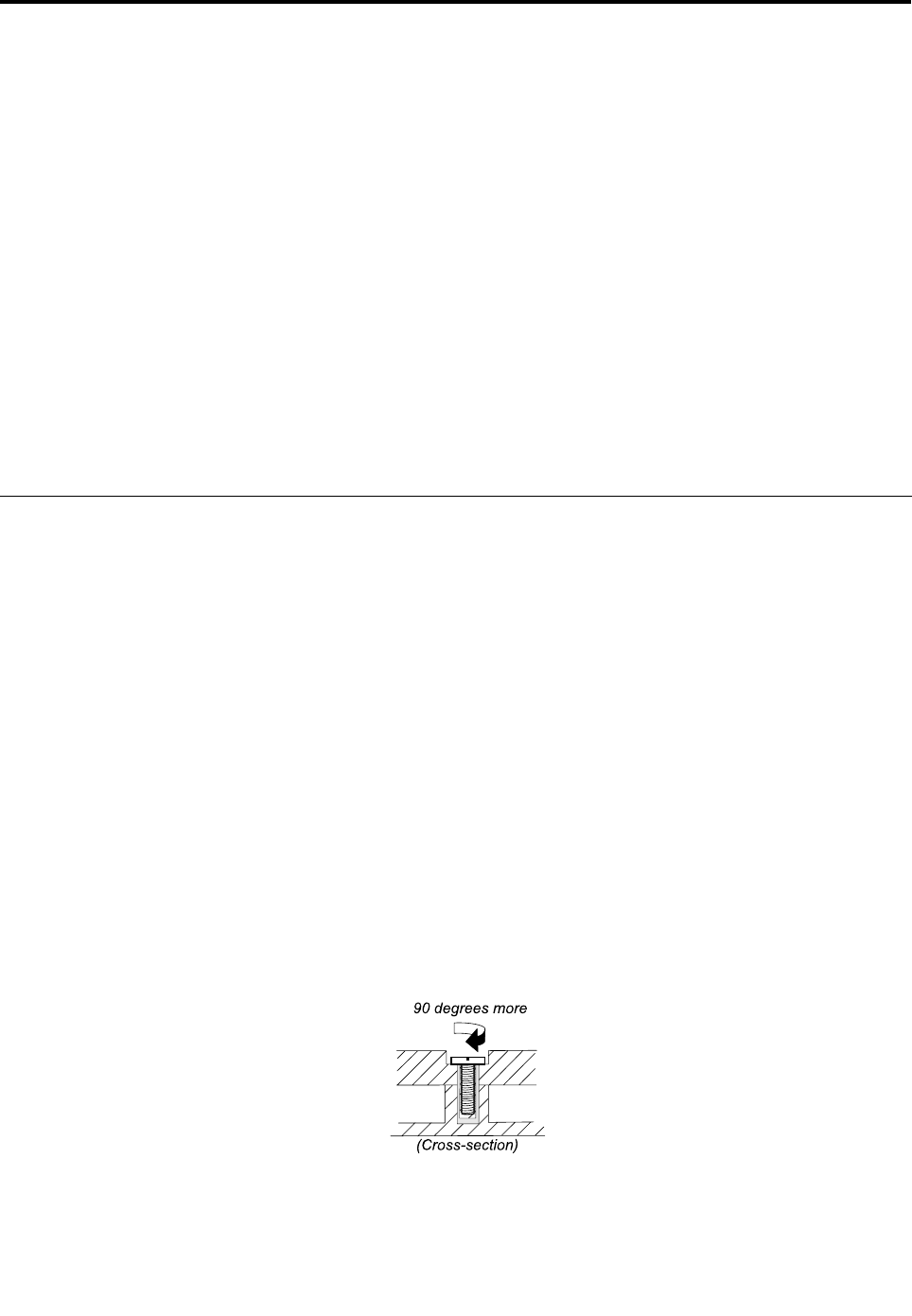
Chapter7.FRUreplacementnotices
Thischapterpresentsnoticesrelatedtoremovingandreplacingparts.Readthischaptercarefullybefore
replacinganyFRU.
ExternalCRUstatementtocustomers:
Someproblemswithyourproductcanberesolvedwithareplacementpartyoucaninstallyourself,called
a“CustomerReplaceableUnit”or“CRU.”SomeCRUsaredesignatedasSelf-serviceCRUsandothers
aredesignatedasOptional-serviceCRUs.InstallationofSelf-serviceCRUsisyourresponsibility;youmay
requestthatLenovoinstallsanOptional-serviceCRUaccordingtothewarrantyserviceforyourproduct.
WhereyouareinstallingtheCRU,LenovowillshiptheCRUtoyou.CRUinformationandreplacement
instructionsareshippedwithyourproductandareavailablefromLenovoatanytimeuponrequest.Y oumay
ndalistofCRUsinthepublicationsthatshipwithyourproductorathttp://www.lenovo.com/CRUs.You
mayberequiredtoreturnthedefectivepartthatisreplacedbytheCRU.Whenreturnisrequired:(1)return
instructions,aprepaidshippinglabel,andacontainerwillbeincludedwiththereplacementCRU;and(2)you
maybechargedforthereplacementCRUifLenovodoesnotreceivethedefectivepartwithinthirty(30)days
ofyourreceiptofthereplacementCRU.SeeyourLenovoLimitedWarrantydocumentationforfulldetails.
Screwnotices
Loosescrewscancauseareliabilityproblem.IntheThinkPadnotebookcomputer,thisproblemisaddressed
withspecialnylon-coatedscrewsthathavethefollowingcharacteristics:
•Theymaintaintightconnections.
•Theydonoteasilycomeloose,evenwithshockorvibration.
•Theyarehardertotighten.
Dothefollowingwhenyouservicethismachine:
•Keepthescrewkitinyourtoolbag.Forthepartnumberofthescrewkit,see“Miscellaneousparts”on
page162.
•Itisrecommendedtousenewscrews.
•Itisrecommendedtouseeachscrewonlyonce.
•Useatorquescrewdriverifyouhaveone.
Tightenscrewsasfollows:
•Plastictoplastic
Turnanadditional90degreesafterthescrewheadtouchesthesurfaceoftheplasticpart:
•Logiccardtoplastic
Turnanadditional180degreesafterthescrewheadtouchesthesurfaceofthelogiccard:
©CopyrightLenovo201261
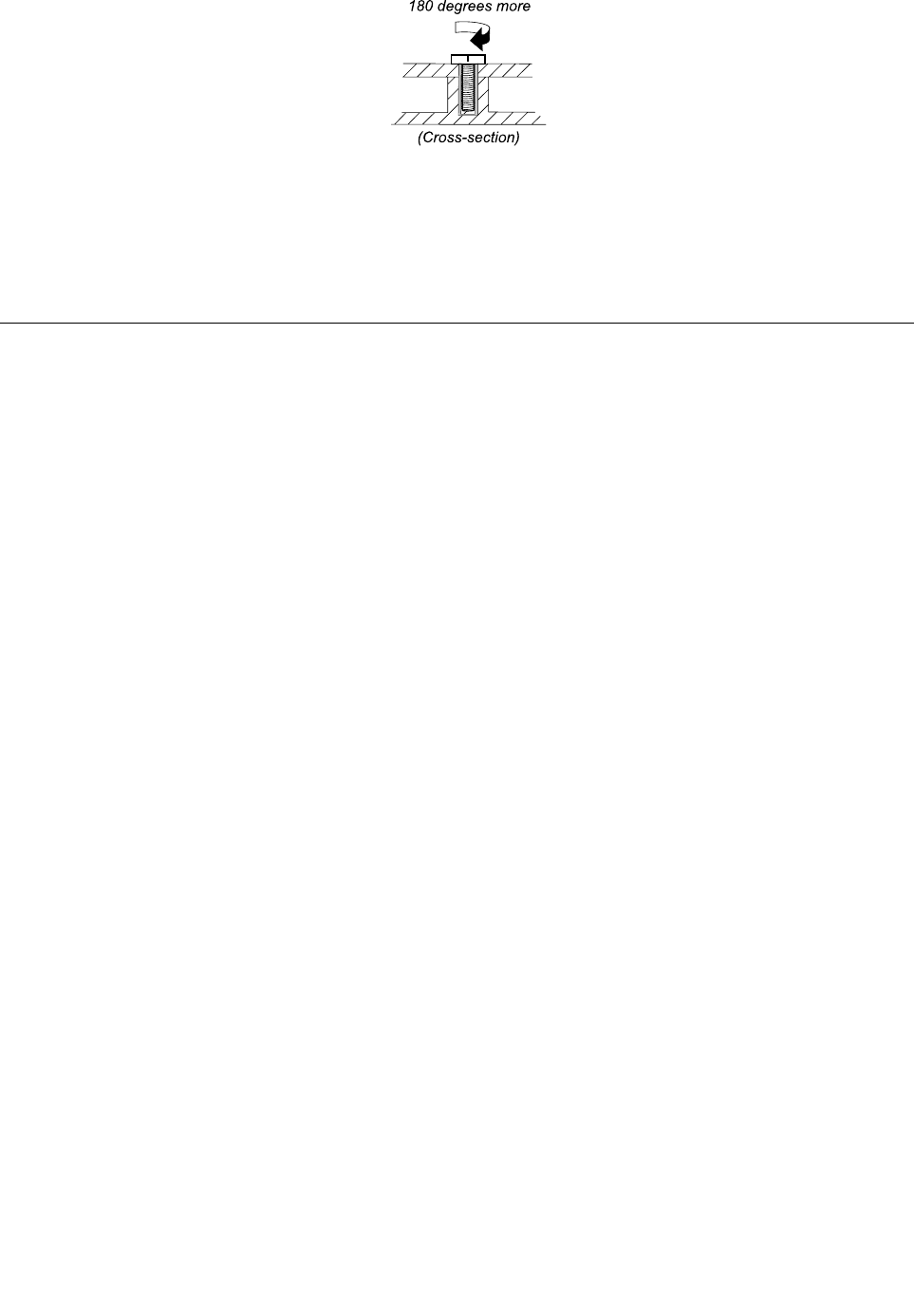
•Torquedriver
Ifyouhaveatorquedriver,refertotheT orquecolumninthescrewinformationtableforeachstep.
•Makesurethatyouusethecorrectscrew.Itisrecommendedtousenewscrewsforreplacements.If
youhaveatorquescrewdriver,tightenallscrewsrmlytothetorquespeciedinthescrewinformation
tableforeachstep.
•Ensuretorquescrewdriversarecalibratedcorrectlyfollowingcountryspecications.
Retainingserialnumbers
Thissectionincludesthefollowingdescriptions:
•“Restoringtheserialnumberofthesystemunit”onpage62
•“RetainingtheUUID”onpage63
•“ReadingorwritingtheECAinformation”onpage63
Restoringtheserialnumberofthesystemunit
Whenthecomputerwasmanufactured,theEEPROMonthesystemboardwasloadedwiththeserial
numbersofthesystemandallmajorcomponents.Thesenumbersneedtoremainthesamethroughout
thelifeofthecomputer.
Ifyoureplacethesystemboard,youmustrestoretheserialnumberofthesystemunittoitsoriginalvalue.
Beforereplacingthesystemboard,savetheoriginalserialnumberbydoingthefollowing:
1.InstalltheLENOVOThinkPadHardwareMaintenanceDisketteVersion1.76orlater,andrestartthe
computer.
2.Fromthemainmenu,select1.SetSystemIdentication.
3.Select2.ReadS/NdatafromEEPROM.
Theserialnumberofeachdeviceinyourcomputerisdisplayed;theserialnumberofthesystemunitis
listedasfollows:
•20:Serialnumber
Writedownthatnumber.
Note:Theserialnumberofthesystemunitisalsowrittenonthelabelattachedtothebottomofthecomputer.
Afteryouhavereplacedthesystemboard,restoretheserialnumberbydoingthefollowing:
1.InstalltheLENOVOThinkPadHardwareMaintenanceDisketteVersion1.76orlaterandrestartthe
computer.
2.Fromthemainmenu,select1.SetSystemIdentication.
3.Select1.AddS/NdatafromEEPROM.Followtheinstructionsonthescreen.
IftheMTMandProductIDnumbersdifferfromeachotherontherearlabel,usewhatisshownforthe
ProductIDeld.Seeexamplebelow:
62ThinkPadT420andT420iHardwareMaintenanceManual

MTMonrearlabel:TTTT-CTOS/NSSSSSSS
ProductIDonrearlabel:TTTT-MMM(UsethisnumberwhensettingSerial
Number)
Intheexample,theSerialNumbertobeinputis“1STTTTMMMSSSSSSS”.
RetainingtheUUID
TheUniversallyUniqueIdentier(UUID)isa128-bitnumberuniquelyassignedtoyourcomputerat
productionandstoredintheEEPROMofyoursystemboard.Thealgorithmthatgeneratesthenumberis
designedtoprovideuniqueIDsuntiltheyearA.D.3400.Notwocomputersintheworldhavethesame
number.
Whenyoureplacethesystemboard,youmustsettheUUIDonthenewsystemboardasfollows:
1.InstalltheLENOVOThinkPadHardwareMaintenanceDisketteVersion1.76orlater,andrestartthe
computer.
2.Fromthemainmenu,select4.AssignUUID.AnewUUIDiscreatedandwritten.IfavalidUUIDalready
exists,itisnotoverwritten.
ReadingorwritingtheECAinformation
InformationonEngineeringChangeAnnouncements(ECA)arestoredintheEEPROMofthesystemboard.
TheelectronicstorageofthisinformationsimpliestheproceduretocheckiftheECAhasbeenpreviously
appliedtoamachine.ThemachinedoesnotneedtobedisassembledtocheckfortheECAapplication.
TocheckwhatECAshavebeenpreviouslyappliedtothemachine,usetheECAInformationRead/Write
functionontheLENOVOThinkPadHardwareMaintenanceDisketteVersion1.76orlater.
1.InserttheLENOVOThinkPadHardwareMaintenanceDisketteVersion1.76orlater,andrestartthe
computer.
2.Fromthemainmenu,select6.SetECAInformation.
3.ToreadECAinformation,select2.ReadECA/reworknumberfromEEPROMandfollowthe
instruction.
4.Toreadboxbuilddate,select5.ReadboxbuilddatefromEEPROM,andfollowtheinstructionon
thescreen.
AfteranECAhasbeenappliedtothemachine,theEEPROMmustbeupdatedtoreecttheECA's
application.UsetheLENOVOThinkPadHardwareMaintenanceDisketteVersion1.76orlatertoupdatethe
EEPROM.
Note:OnlytheECAnumberisstoredintheEEPROM.ThemachinetypeoftheECAisassumedbethesame
asthemachinetypeofthemachinethathadtheECAappliedtoit.
1.InserttheLENOVOThinkPadHardwareMaintenanceDisketteVersion1.76orlater,andrestartthe
computer.
2.Fromthemainmenu,select6.SetECAInformation.
3.TowriteECAinformation,select1.WriteECA/reworknumberfromEEPROM,andfollowthe
instruction.
4.Towriteboxbuilddate,select4.WriteboxbuilddatefromEEPROM,andfollowtheinstructionon
thescreen.
Ifthesystemboardisbeingreplaced,trytoreadtheECAinformationfromtheoldsystemboardandtransfer
theinformationtothenewsystem.Ifthesystemboardisinoperable,thiswillnotbepossible.
Chapter7.FRUreplacementnotices63

64ThinkPadT420andT420iHardwareMaintenanceManual
Chapter8.RemovingandreplacingaFRU
ThischapterpresentsdirectionsanddrawingsforuseinremovingandreplacingaFRU.
ExternalCRUstatementtocustomers:
Someproblemswithyourproductcanberesolvedwithareplacementpartyoucaninstallyourself,called
a“CustomerReplaceableUnit”or“CRU.”SomeCRUsaredesignatedasSelf-serviceCRUsandothers
aredesignatedasOptional-serviceCRUs.InstallationofSelf-serviceCRUsisyourresponsibility;youmay
requestthatLenovoinstallsanOptional-serviceCRUaccordingtothewarrantyserviceforyourproduct.
WhereyouareinstallingtheCRU,LenovowillshiptheCRUtoyou.CRUinformationandreplacement
instructionsareshippedwithyourproductandareavailablefromLenovoatanytimeuponrequest.Y oumay
ndalistofCRUsinthepublicationsthatshipwithyourproductorathttp://www.lenovo.com/CRUs.You
mayberequiredtoreturnthedefectivepartthatisreplacedbytheCRU.Whenreturnisrequired:(1)return
instructions,aprepaidshippinglabel,andacontainerwillbeincludedwiththereplacementCRU;and(2)you
maybechargedforthereplacementCRUifLenovodoesnotreceivethedefectivepartwithinthirty(30)days
ofyourreceiptofthereplacementCRU.SeeyourLenovoLimitedWarrantydocumentationforfulldetails.
Besuretoobservethefollowinggeneralrules:
1.Donottrytoserviceanycomputerunlessyouhavebeentrainedandcertied.Anuntrainedpersonruns
theriskofdamagingparts.
2.BeforereplacinganyFRU,reviewChapter7“FRUreplacementnotices”onpage61.
3.BeginbyremovinganyFRUsthathavetoberemovedbeforereplacingthefailingFRU.AnysuchFRUs
arelistedatthetopofeachFRUreplacementpage.Removethemintheorderinwhichtheyarelisted.
4.FollowthecorrectsequenceinthestepsforremovingaFRU,asgiveninthedrawingsbythenumbers
insquarecallouts.
5.WhenturningascrewtoreplaceaFRU,turnitinthedirectionasgivenbythearrowinthedrawing.
6.WhenremovingaFRU,moveitinthedirectionasgivenbythearrowinthedrawing.
7.ToputthenewFRUinplace,reversetheremovalprocedureandfollowanynotesthatpertainto
replacement.Forinformationaboutconnectingandarranginginternalcables,seeChapter9“Locations”
onpage129.
8.WhenreplacingaFRU,usethecorrectscrew(s)asshownintheprocedures.
DANGER
BeforeremovinganyFRU,turnoffthecomputer,unplugallpowercordsfromelectricaloutlets,
removethebatterypack,andthendisconnectanyinterconnectingcables.
Attention:AfterreplacingaFRU,donotturnonthecomputeruntilyouhavemadesurethatallscrews,
springs,andothersmallpartsareinplaceandnonearelooseinsidethecomputer.Verifythisbyshaking
thecomputergentlyandlisteningforrattlingsounds.Metallicpartsormetalakescancauseelectrical
shortcircuits.
Attention:Thesystemboardissensitiveto,andcanbedamagedby,electrostaticdischarge.Before
touchingit,establishpersonalgroundingbytouchingagroundpointwithonehandorbyusingan
electrostaticdischarge(ESD)strap(P/N6405959).
©CopyrightLenovo201265
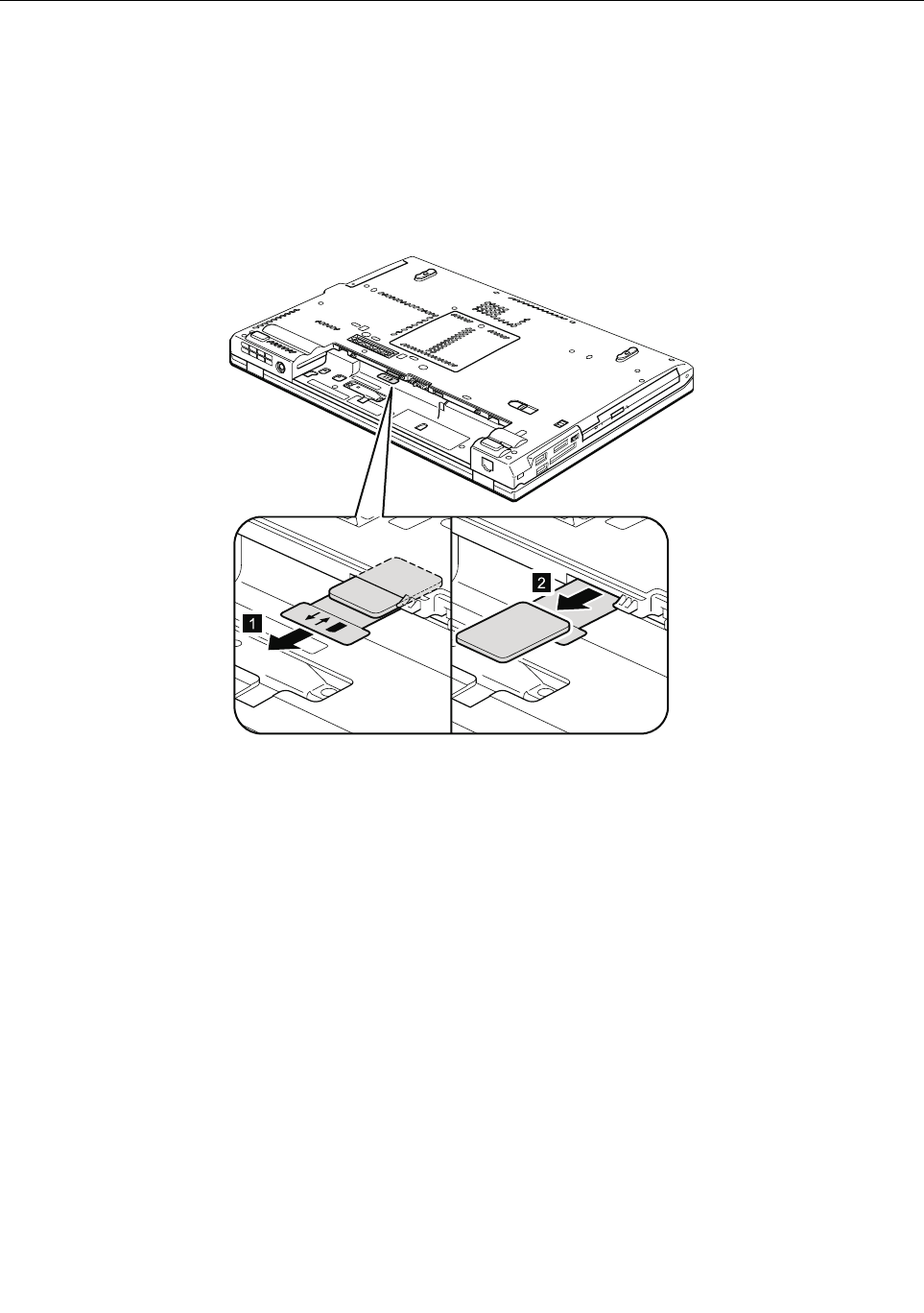
BeforeservicingThinkPadT420andT420i
SomemodelsoftheThinkPadT420andT420iyouareservicingmighthavetheSIMcardthatthecustomer
hasinstalled.
IfthecomputeryouareservicinghastheSIMcard,removeitbeforeyoustarttheservicing.
ToremovetheSIMcard,youneedtoremovethebatterypackrst.(See“1010Batterypack”onpage67.)
Afteryounishtheservicing,makesurethatyouinsertthecardbackintotheslotrmly.
1
2
66ThinkPadT420andT420iHardwareMaintenanceManual
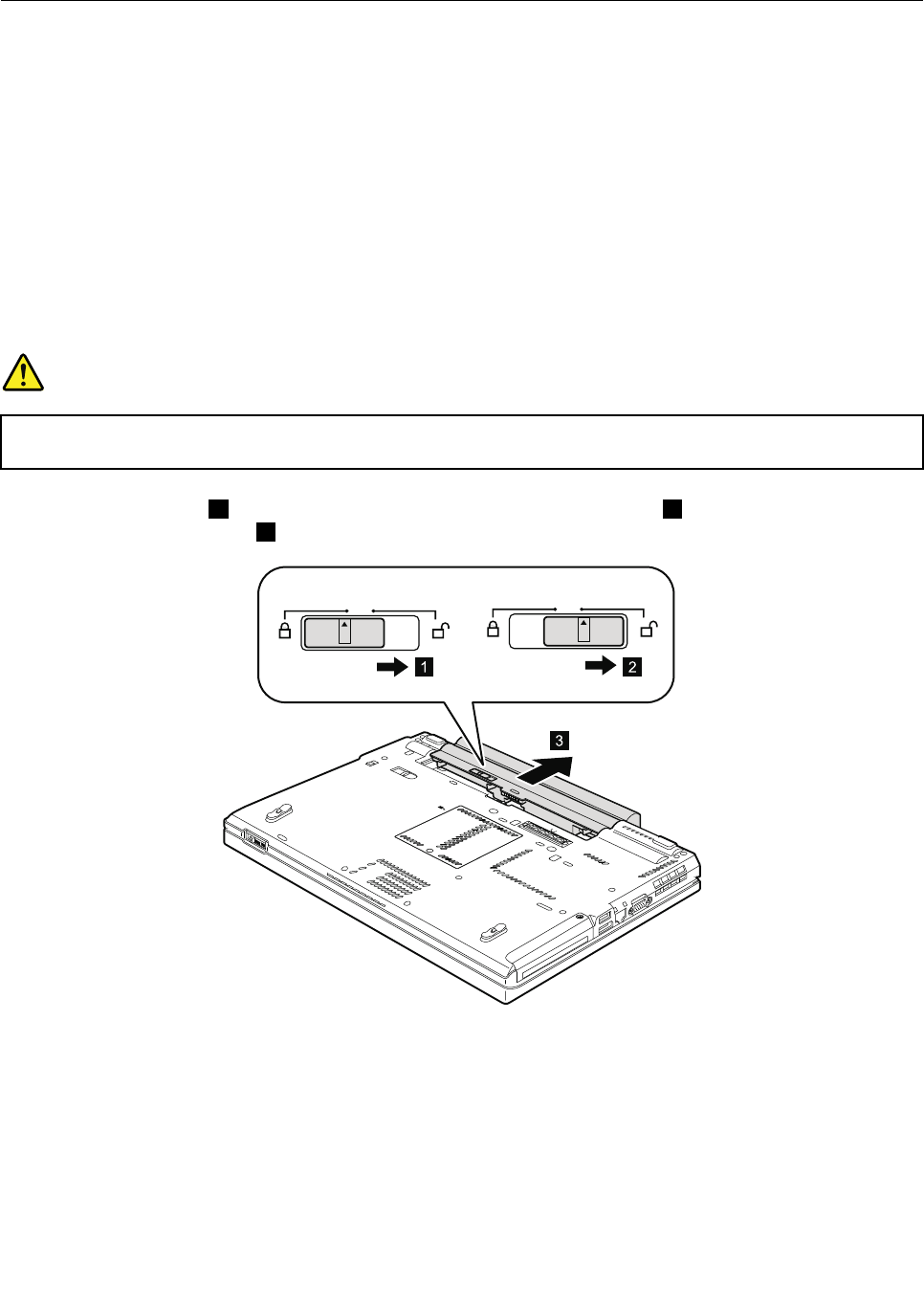
1010Batterypack
Importantnoticeforreplacingabatterypack:
TheLenovoThinkVantageT oolboxandLenovoSolutionCenter(inWindows7)haveanautomaticbattery
diagnosticcomponentthatdeterminesifthebatterypackisdefective.AbatterypackFRUshouldnotbe
replacedunlessthisdiagnostictestshowsthatthebatteryisdefective.
Theonlyexceptiontothisisifthebatterypackisphysicallydamagedoracustomerisreportingapossible
safetyissue.
IfLenovoThinkVantageToolboxisnotinstalledinthecomputer,thecustomershoulddownloadthisprogram
beforeanon-physicallydamagedbatterypackisreplaced.Notethatthereplacementofaphysically
damagedbatterypackisnotcoveredbythewarranty.
Removalstepsofbatterypack
DANGER
Useonlythebatteryspeciedinthepartslistforyourcomputer.Anyotherbatterycouldignite
orexplode.
Unlockthebatterylatch1.Holdingthebatterylatchintheunlockedposition2,removethebatterypackin
thedirectionshownbyarrow3.
3
21
Wheninstalling:Installthebatterypackintheslot.Makesurethatthebatterylatchisinthelockedposition.
Chapter8.RemovingandreplacingaFRU67
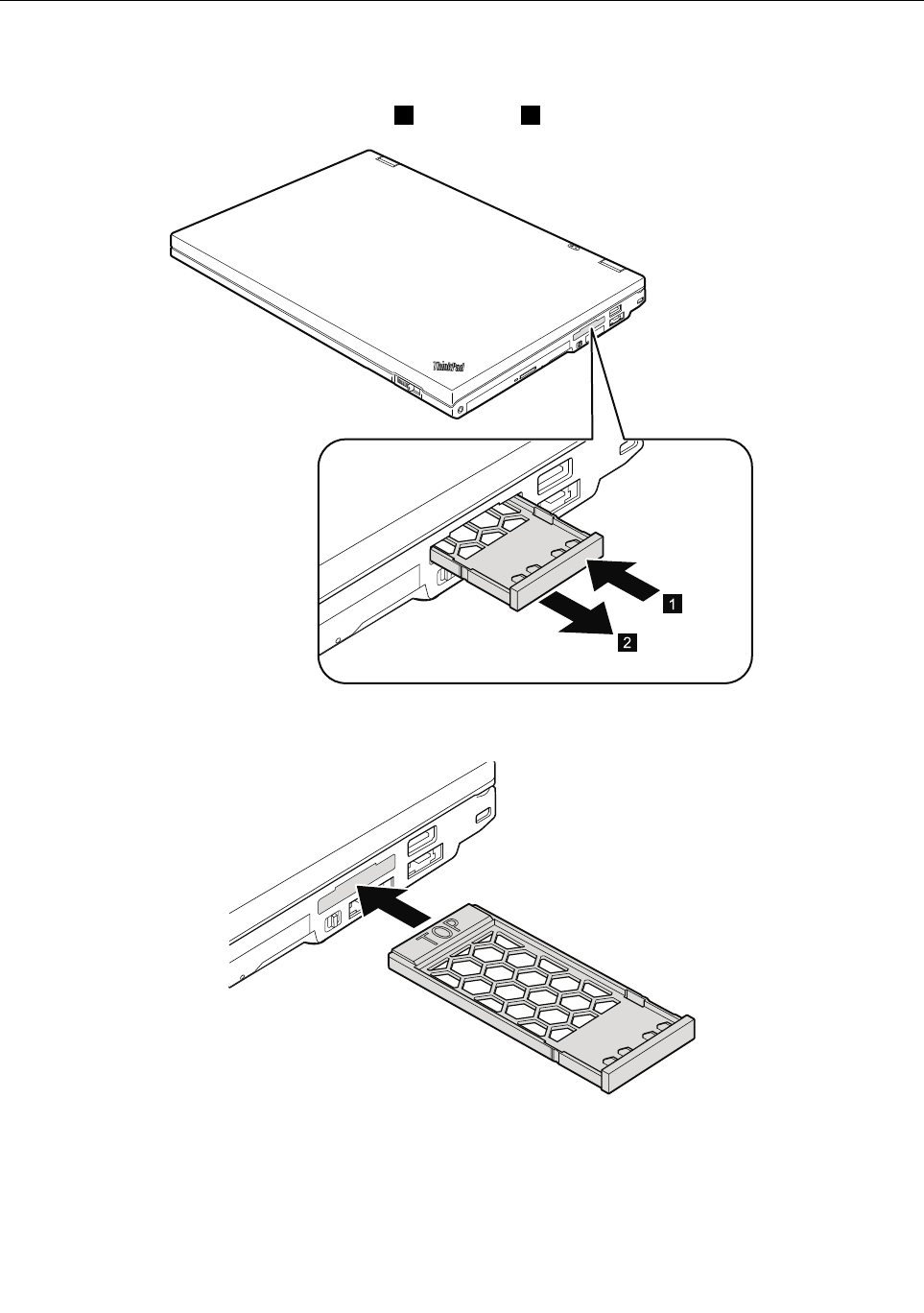
1020ExpressCardblankbezel
RemovalstepsofExpressCardblankbezel
WhenyoupresstheExpressCardblankbezel1,itpopsout2.
1
2
Wheninstalling:Makesurethatthebezeliscorrectlyorientedasshowninthefollowinggure.
68ThinkPadT420andT420iHardwareMaintenanceManual
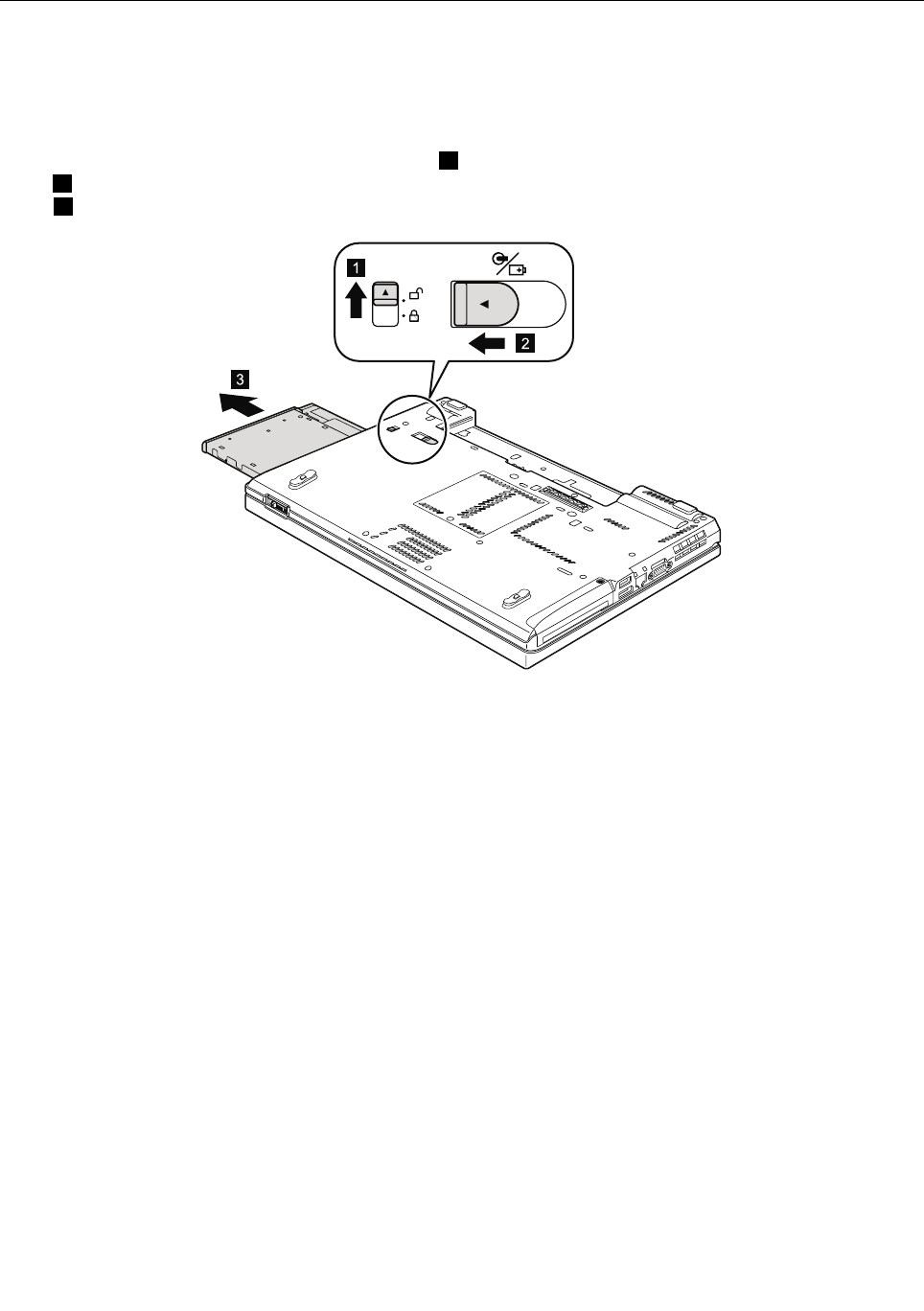
1030SerialUltrabayEnhanceddeviceortravelbezel
Foraccess,removethisFRU:
•“1010Batterypack”onpage67
RemovalstepsofSerialUltrabayEnhanceddeviceortravelbezel
Holdingthebaylocklatchintheunlockedposition1,slidethebayejectlatchinthedirectionshownby
arrow2,andthenpullouttheSerialUltrabayEnhanceddeviceorthetravelbezelinthedirectionshownby
arrow3tocompletelyremoveit.
3
2
1
Chapter8.RemovingandreplacingaFRU69
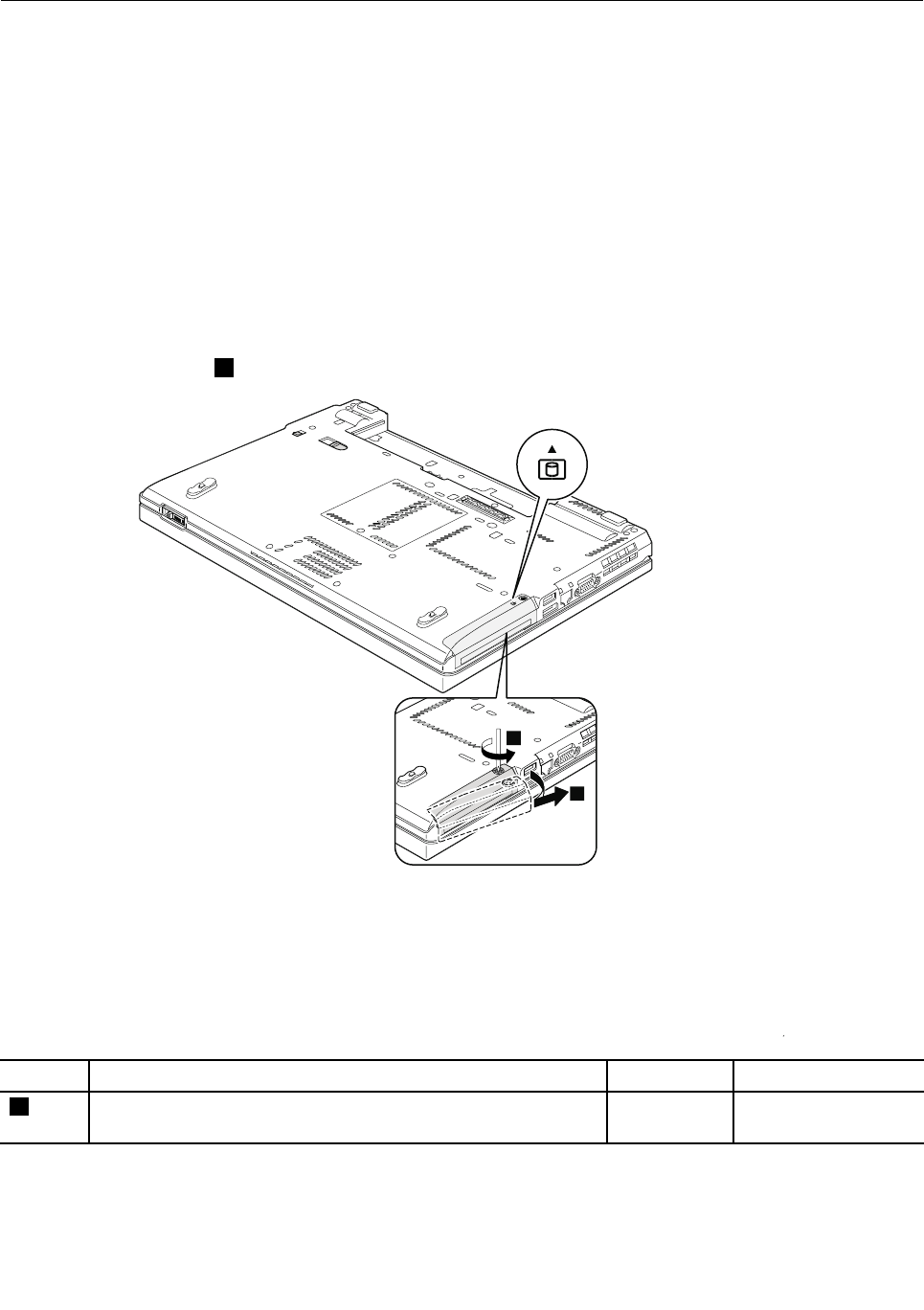
1040Harddiskdrive(HDD)andsolidstatedrive(SSD)
Foraccess,removethisFRU:
•“1010Batterypack”onpage67
Attention:
•Donotdropthedriveorapplyanyphysicalshocktoit.Thedriveissensitivetophysicalshock.Improper
handlingcancausedamageandpermanentlossofdata.
•Beforeremovingthedrive,havetheusermakeabackupcopyofalltheinformationonitifpossible.
•Neverremovethedrivewhilethesystemisoperatingorisinsuspendmode.
Removalstepsofharddiskdriveandsolidstatedrive
Note:Loosenthescrew1,butdonotremoveit.
4
4
2
1
StepScrew(quantity)ColorTorque
1Capturescrew(1)Black0.181Nm
(1.85kgf-cm)
70ThinkPadT420andT420iHardwareMaintenanceManual
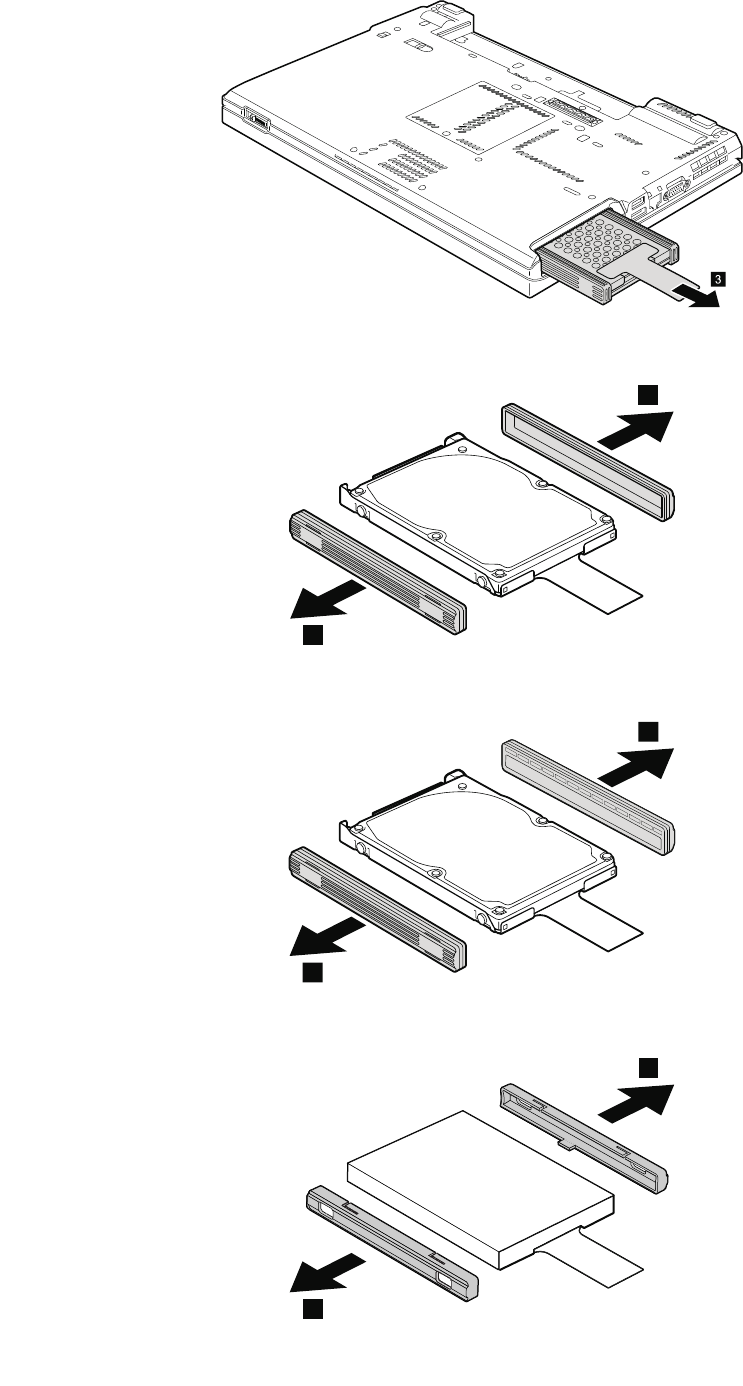
4
3
ForHDDandHDDrubberrails(9.5mm):
4
4
ForHDDandHDDrubberrails(7.0mm):
4
4
ForSSDandspacers:
4
4
Chapter8.RemovingandreplacingaFRU71

Wheninstalling:MakesurethatSSDspacersorHDDrubberrailsareattachedrmly.
72ThinkPadT420andT420iHardwareMaintenanceManual
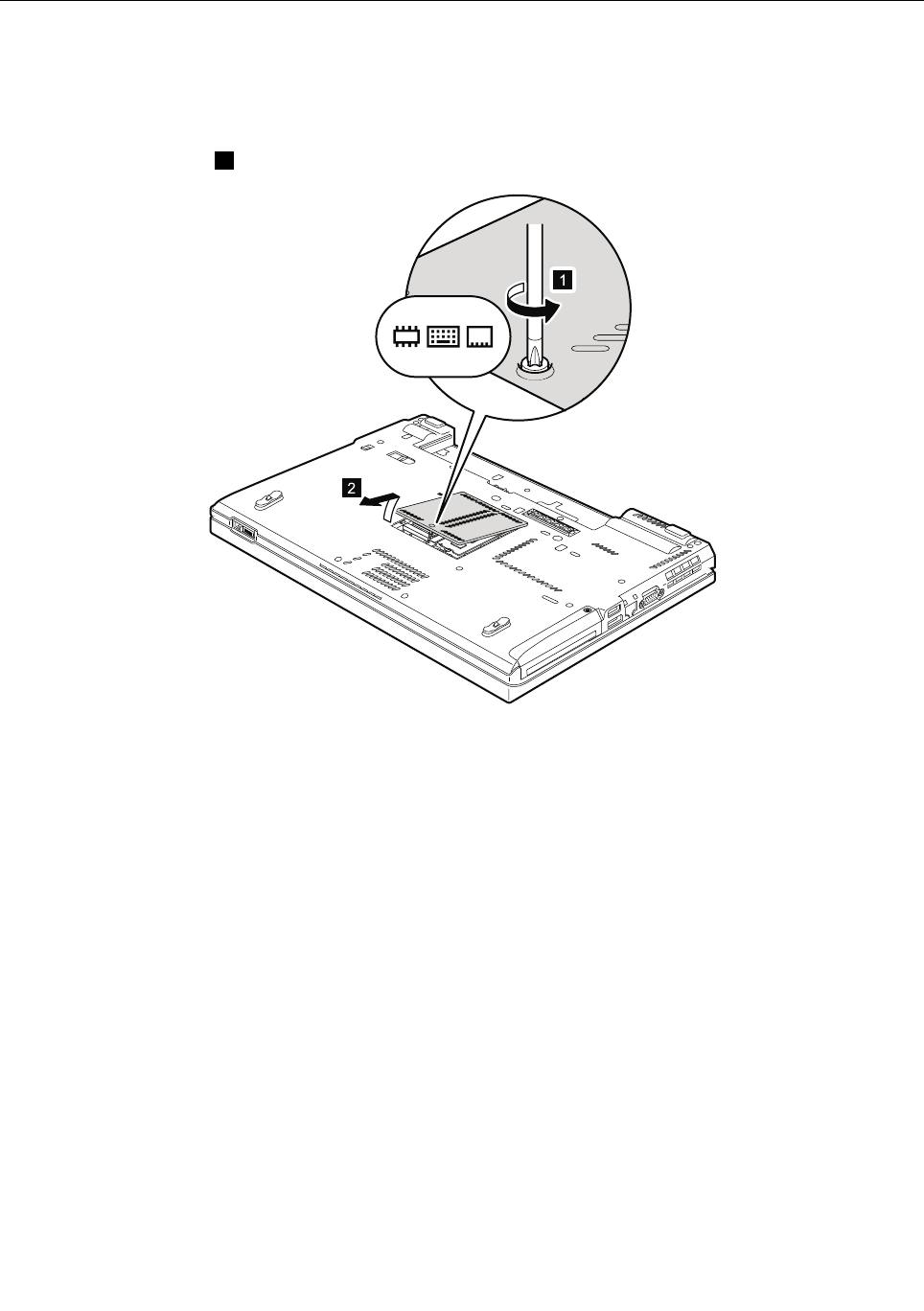
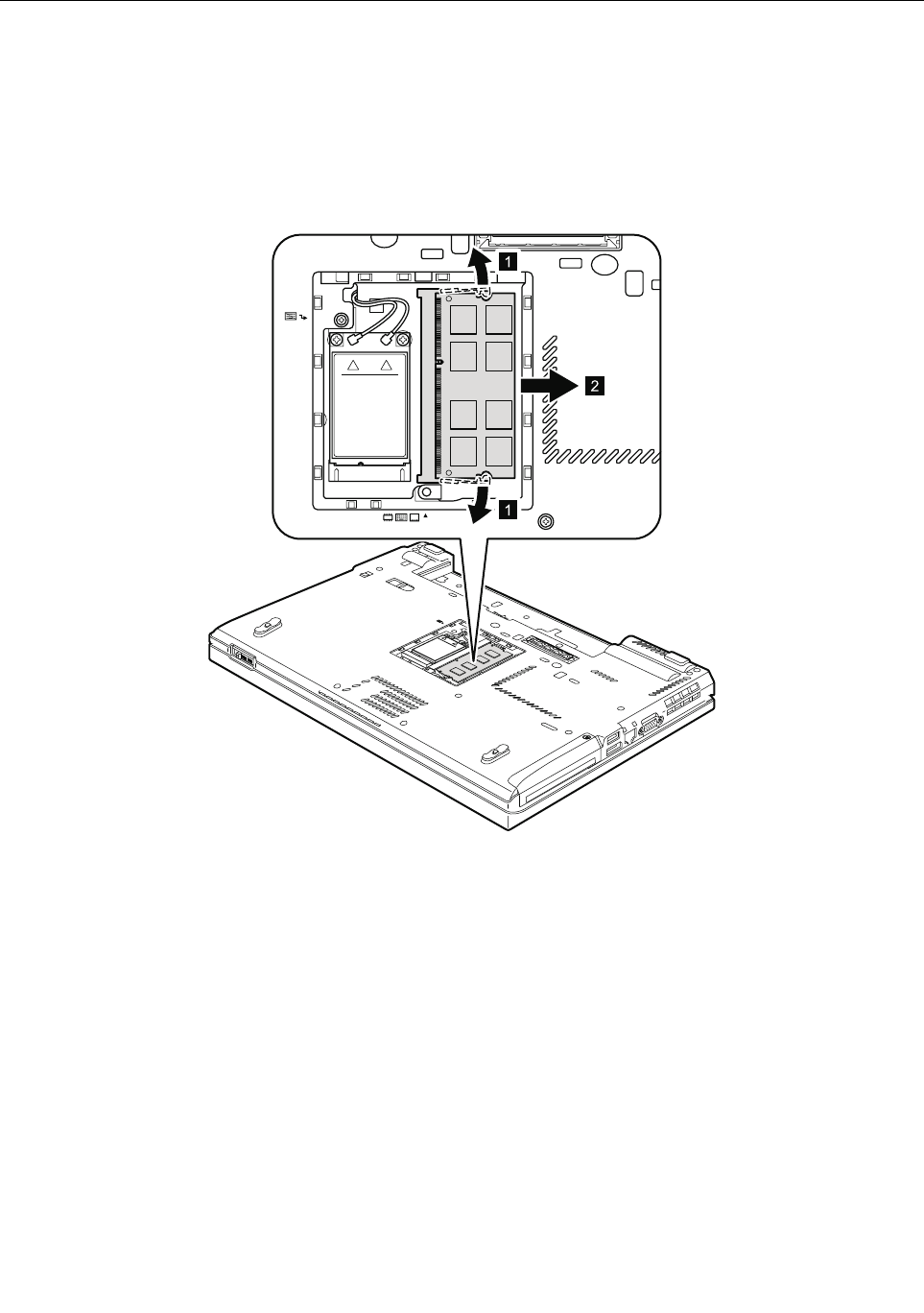
1060DIMM(intheslotontheundersideofthecomputer)
Foraccess,removetheseFRUsinorder:
•“1010Batterypack”onpage67
•“1050DIMMslotcover”onpage73
Note:YourcomputerhastwoDIMMslots:oneunderthekeyboardandanotherontheundersideofthe
computer.IfyouinstallaDIMMinonlyoneofthetwoslots,installitintheslotlocatedunderthekeyboard.
RemovalstepsofDIMM(intheslotontheundersideofthecomputer)
1
1
2
Wheninstalling:InsertthenotchedendoftheDIMMintothesocket.PresstheDIMMrmly,andpivotit
untilitsnapsintoplace.Makesurethatitisrmlyxedintheslotanddoesnotmoveeasily.
74ThinkPadT420andT420iHardwareMaintenanceManual
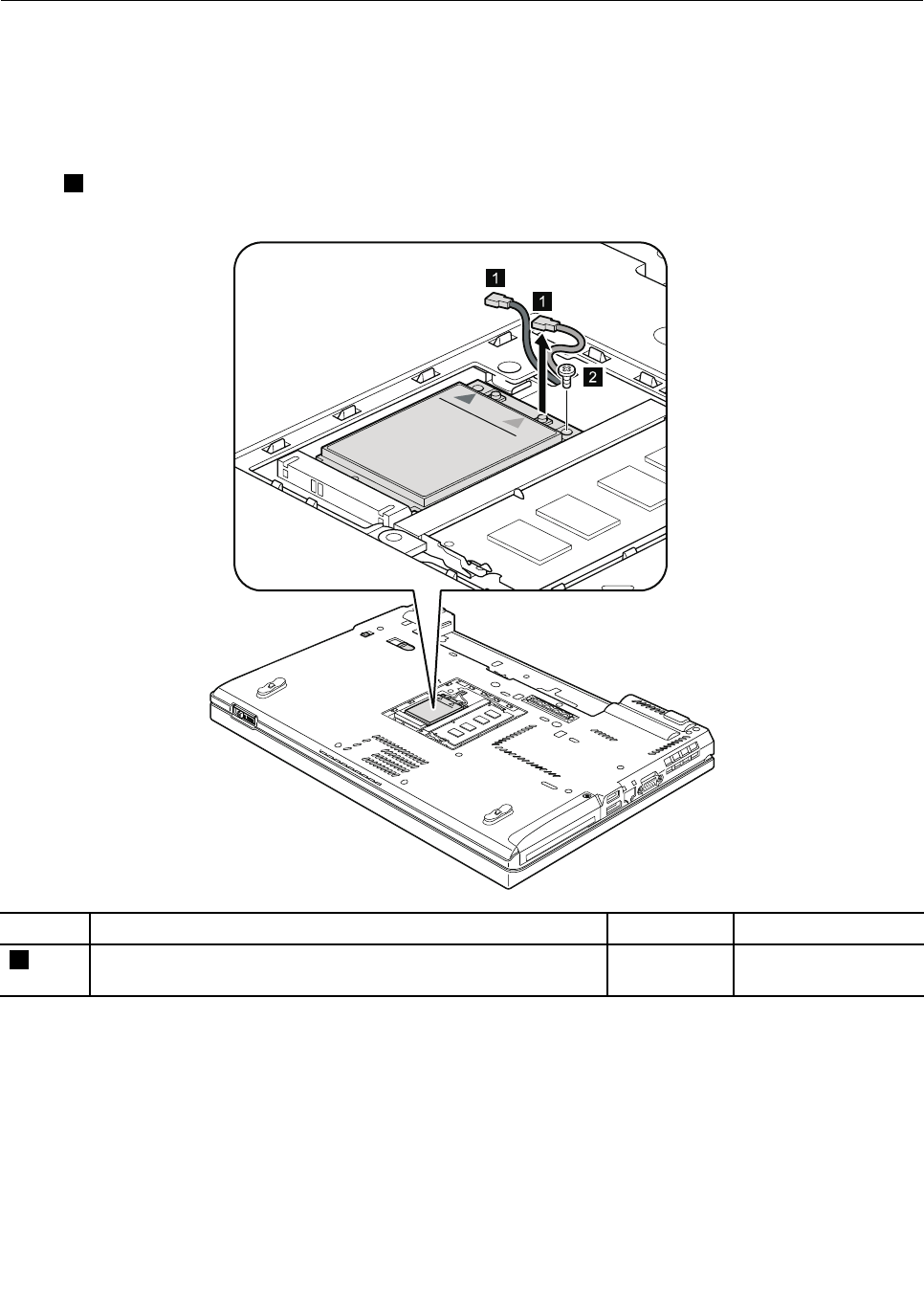
1070PCIExpressMiniCardforwirelessWAN
Foraccess,removetheseFRUsinorder:
•“1010Batterypack”onpage67
•“1050DIMMslotcover”onpage73
RemovalstepsofPCIExpressMiniCardforwirelessWAN
Instep1,unplugthejacksbyusingtheremovaltoolantennaRFconnector(P/N:08K7159),orpickthe
connectorswithyourngersandgentlyunplugtheminthedirectionofthearrow.
1
1
2
StepScrew(quantity)ColorTorque
2M2×3mm,wafer-head,nylon-coated(1)Black0.181Nm
(1.85kgf-cm)
Chapter8.RemovingandreplacingaFRU75
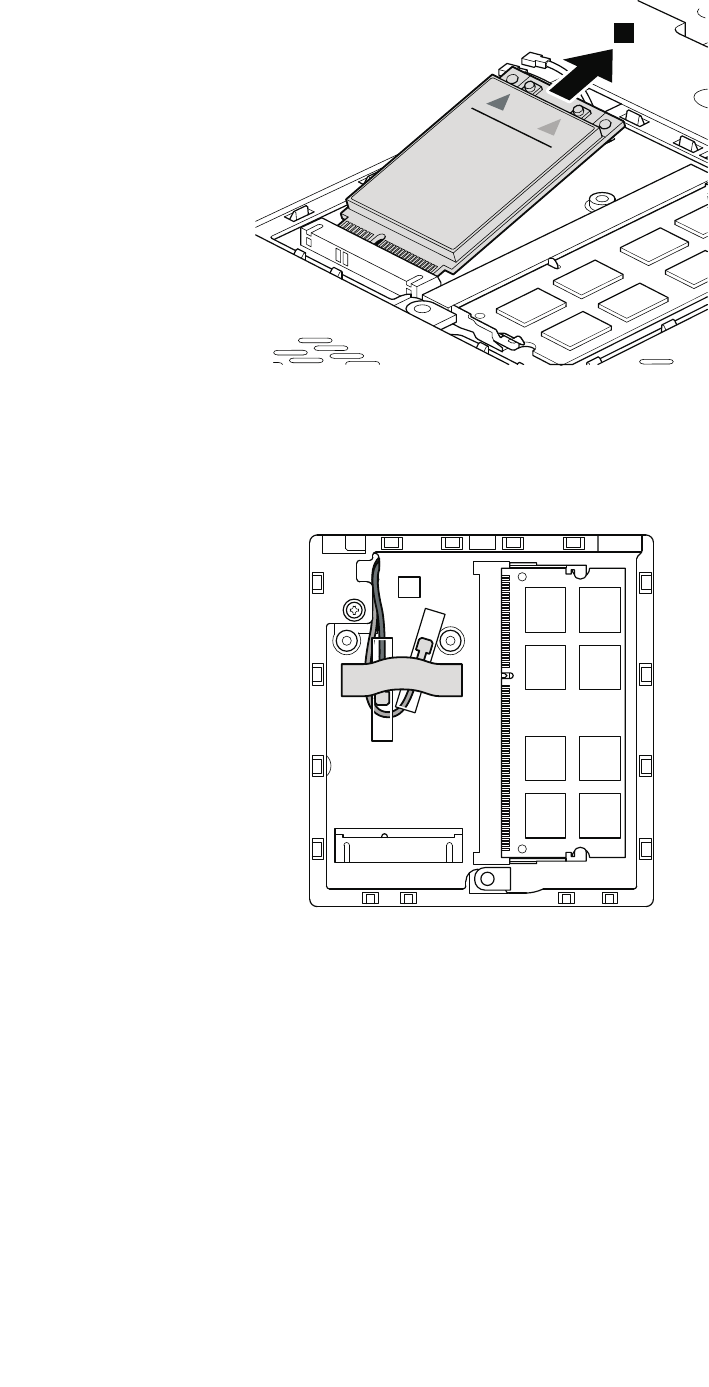
3
Note:PlugtheyellowcableintothejacklabeledMAIN,andthebluecableintothejacklabeledAUX
onthecard.
IfthecomputeryouareservicingisawirelessWAN-readymodelanddoesnothaveawirelessWANcard,
routetheantennacablesandsecurethemwithatapeasshowninthefollowinggure.
76ThinkPadT420andT420iHardwareMaintenanceManual
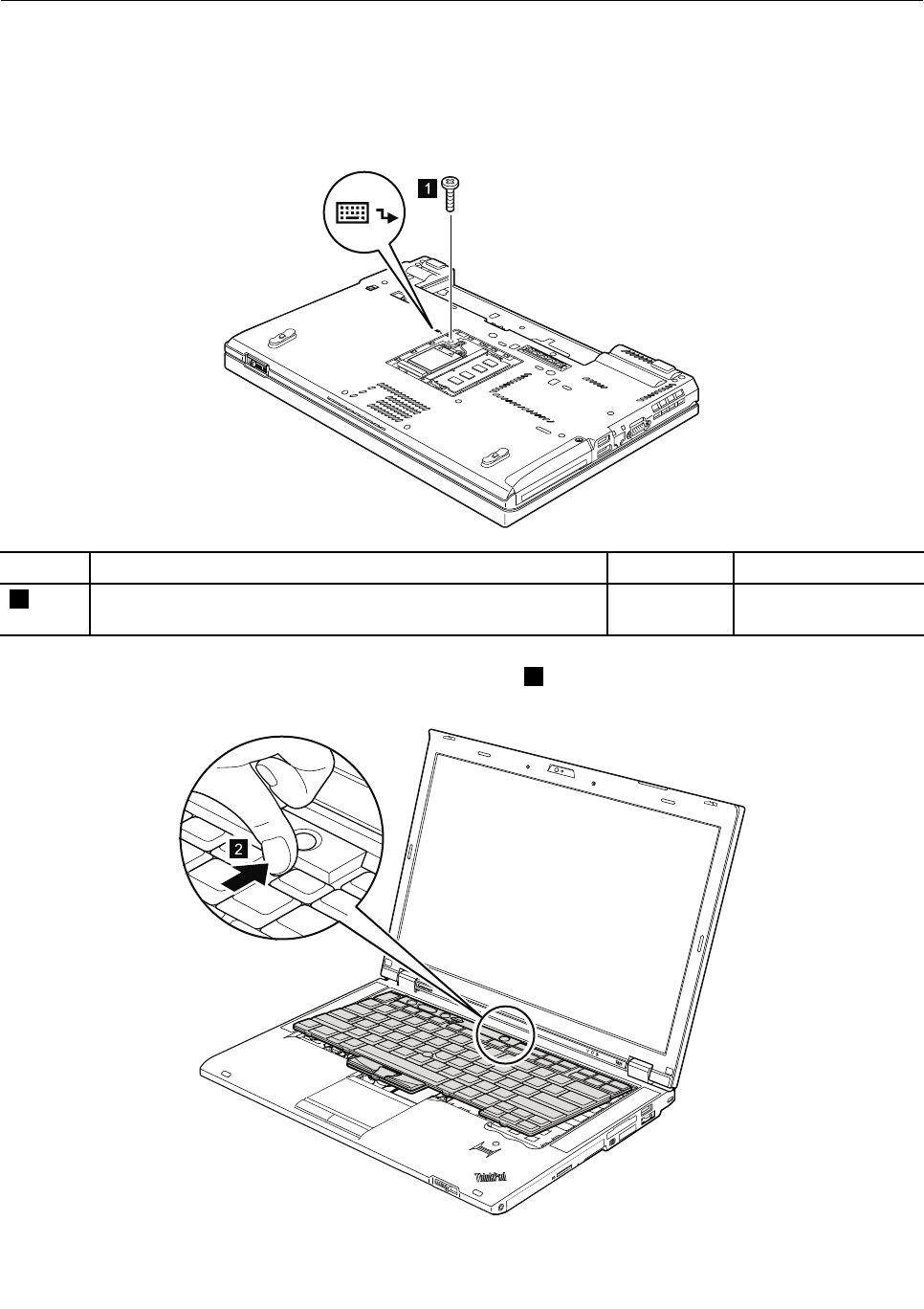
1080Keyboard
Foraccess,removetheseFRUsinorder:
•“1010Batterypack”onpage67
•“1050DIMMslotcover”onpage73
Removalstepsofkeyboard
1
StepScrew(quantity)ColorTorque
1M2×10mm,wafer-head,nylon-coated(1)Silver0.181Nm
(1.85kgf-cm)
Pushdownthekeyboardalittleandslideittowardthearrow2todetachthefrontedgeofthekeyboard
fromtheframe.
2
Chapter8.RemovingandreplacingaFRU77
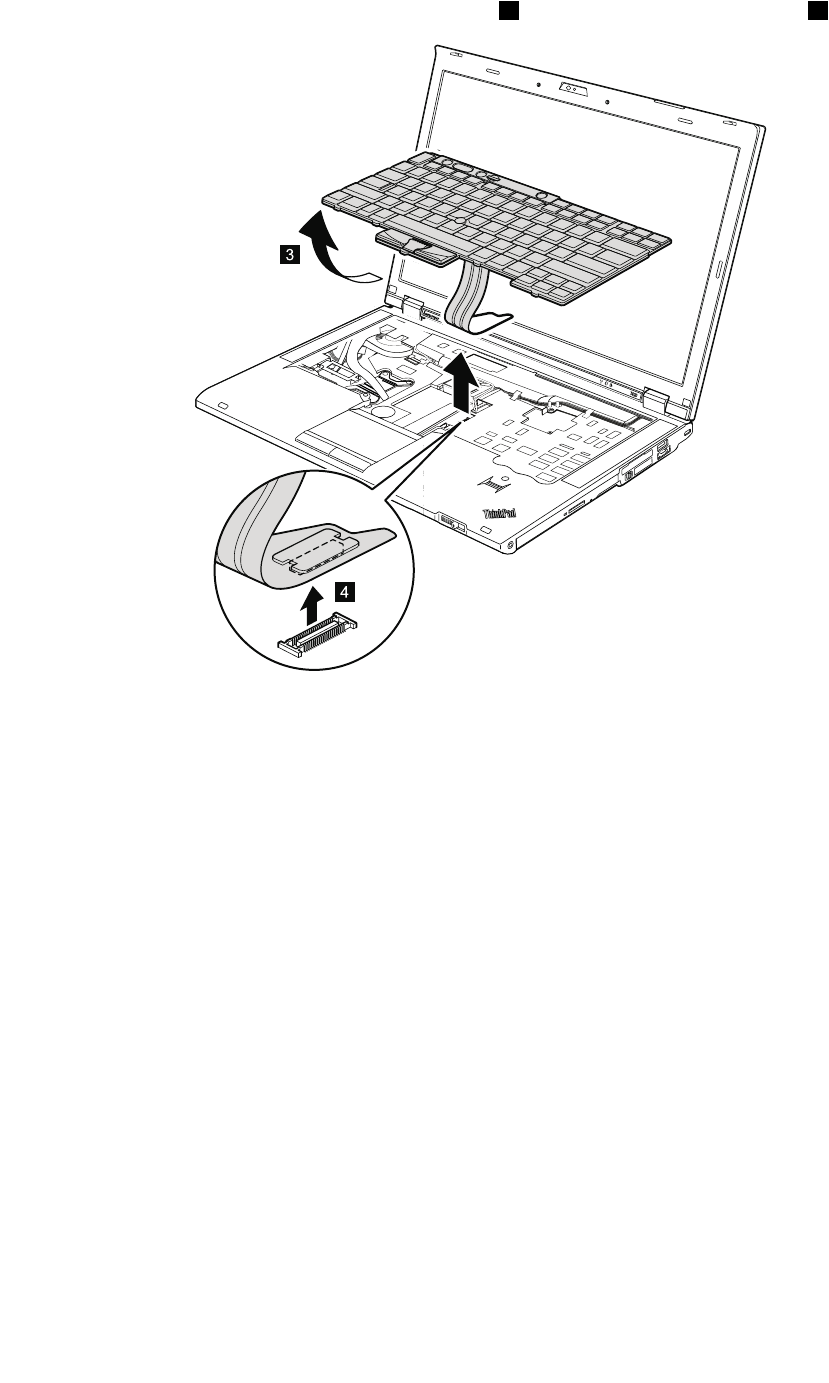
Liftthekeyboardalittleinthedirectionshownbyarrow3,andthendetachtheconnector4.
Installationstepsofkeyboard
Wheninstallingthekeyboard,dothefollowing:
1.Attachthekeyboardconnector.
78ThinkPadT420andT420iHardwareMaintenanceManual
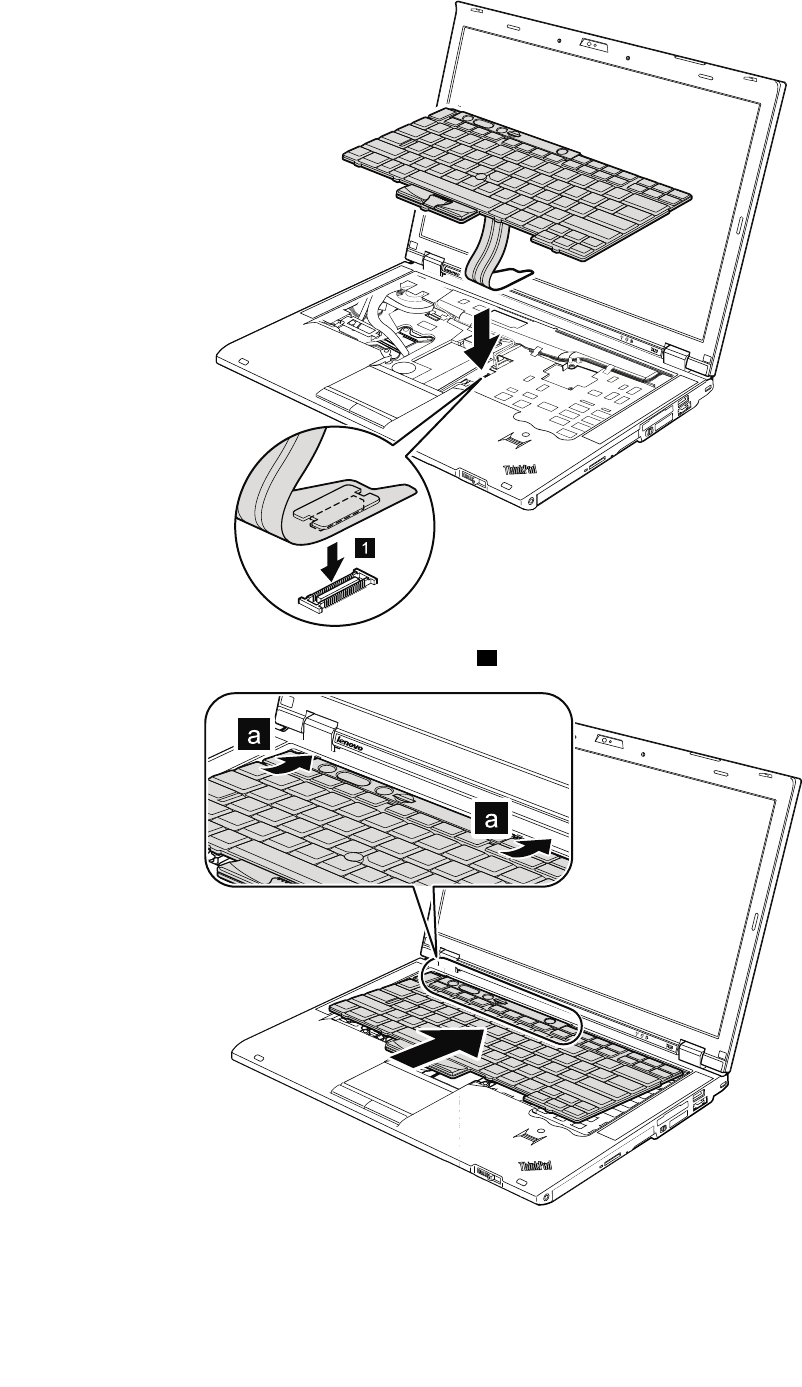
2.Attachthekeyboardsothatthekeyboardedgesaareundertheframe.
3.Tomakesurethatthefrontedgeofthekeyboardishousedrmly,gentlypressthekeyswithyourpalms
andslightlyslidethekeyboardtowardyouuntilitsnapsintoposition.
Chapter8.RemovingandreplacingaFRU79
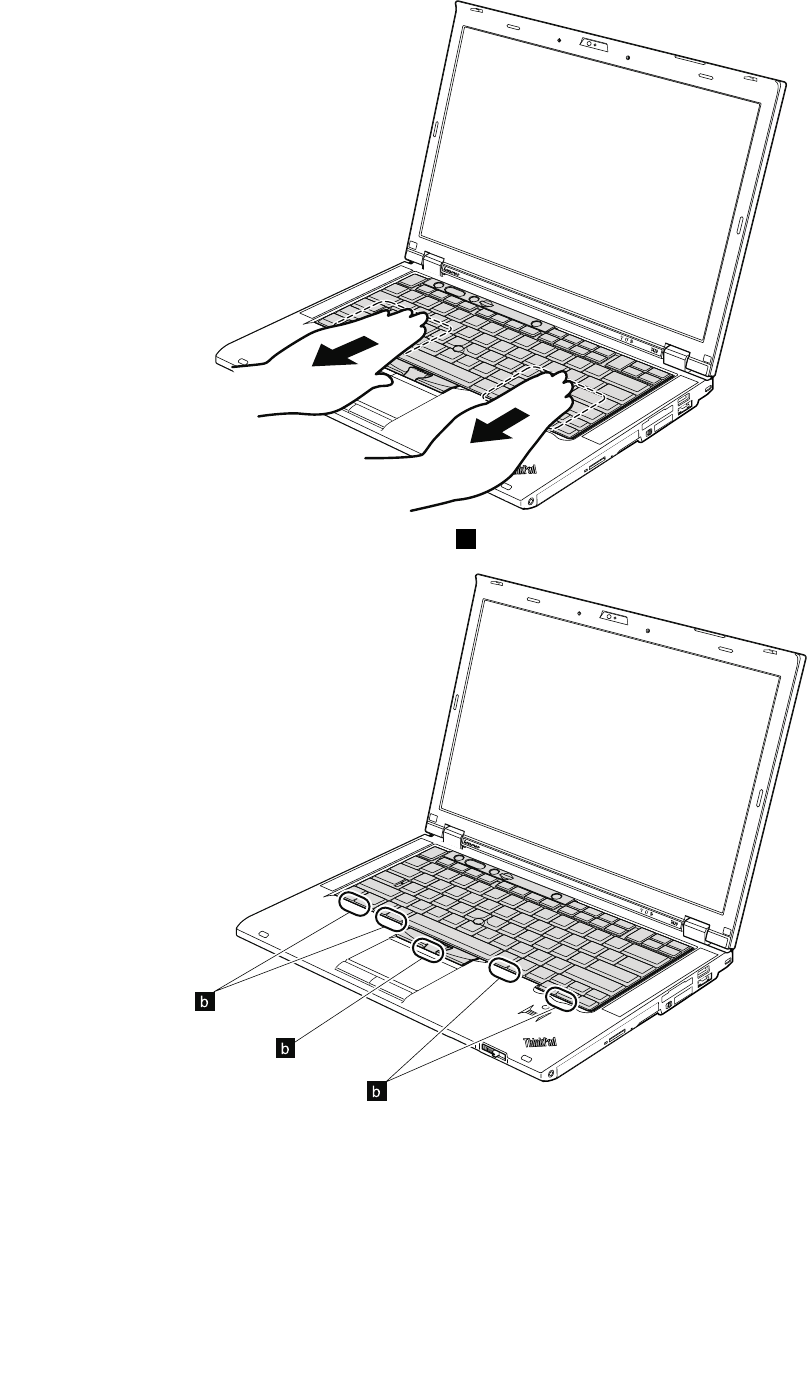
4.Makesurethatthefrontedgeofthekeyboardbisattachedrmly.
b
b
b
5.Securethekeyboardbytighteningthescrewsfromthebottomsideofthecomputer.
80ThinkPadT420andT420iHardwareMaintenanceManual
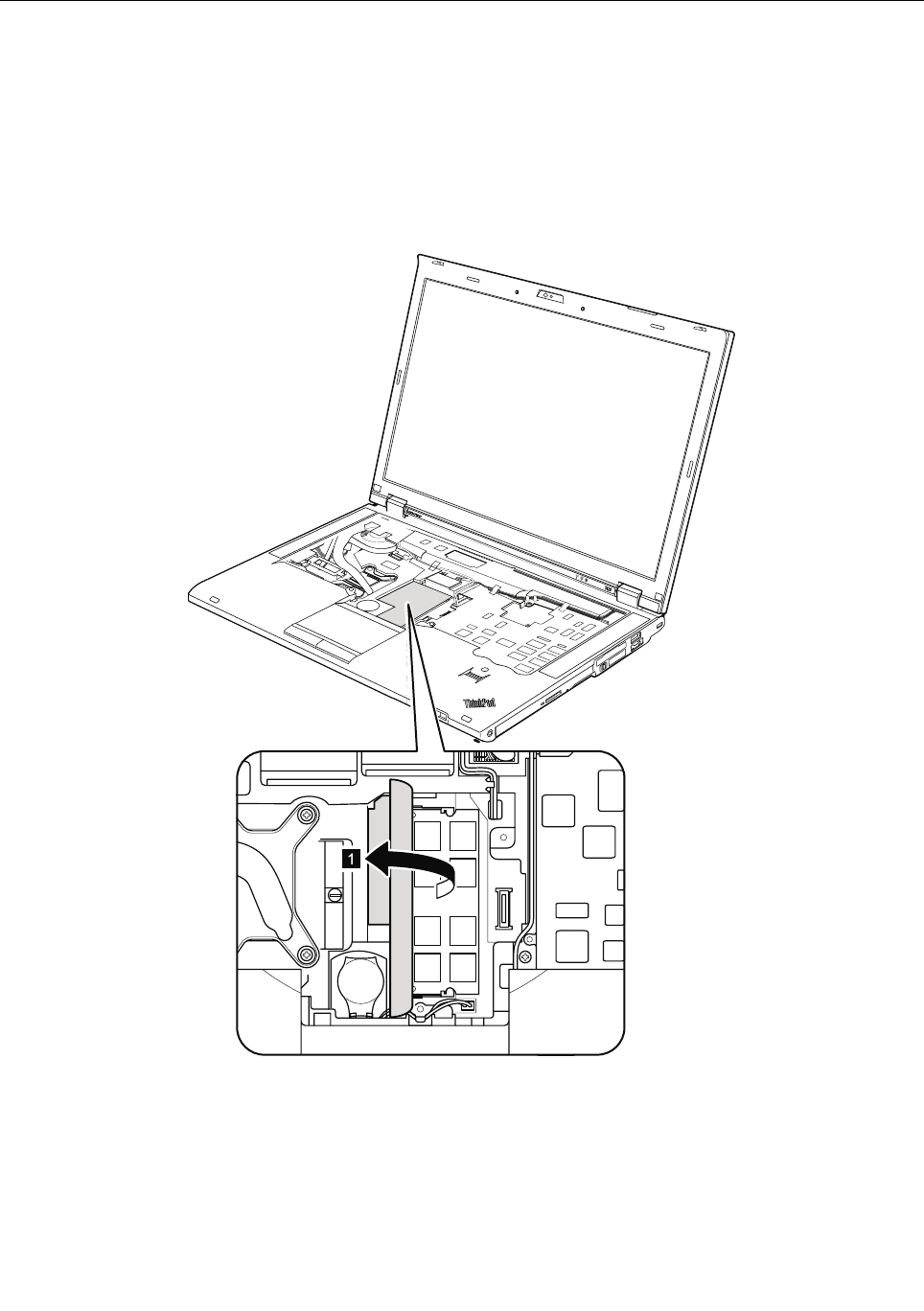
1090DIMM(intheslotunderthekeyboard)
Foraccess,removetheseFRUsinorder:
•“1010Batterypack”onpage67
•“1050DIMMslotcover”onpage73
•“1080Keyboard”onpage77
Note:YourcomputerhastwoDIMMslots:oneunderthekeyboardandanotherontheundersideofthe
computer.IfyouinstallaDIMMinonlyoneofthetwoslots,installitintheslotlocatedunderthekeyboard.
RemovalstepsofDIMM(intheslotunderthekeyboard)
Chapter8.RemovingandreplacingaFRU81
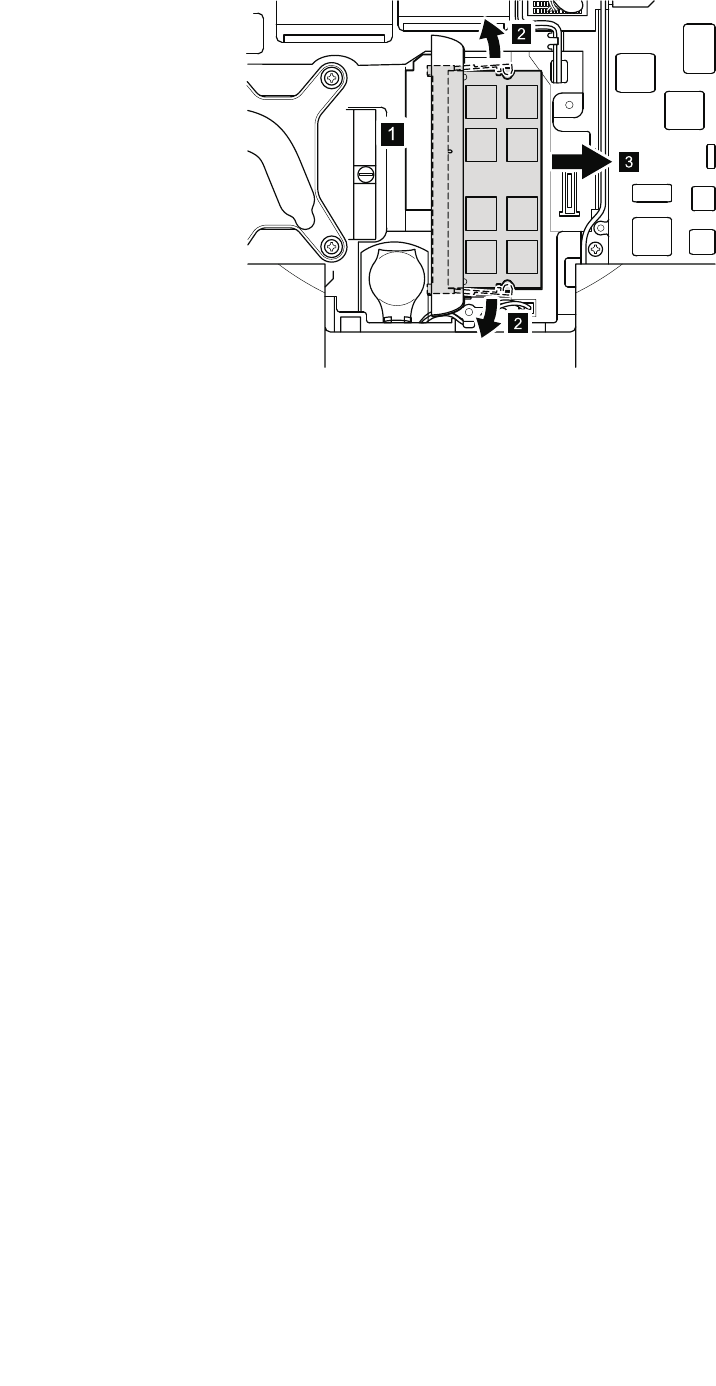
1
2
3
2
Wheninstalling:InsertthenotchedendoftheDIMMintothesocket.PresstheDIMMrmly,andpivotit
untilitsnapsintoplace.Makesurethatitisrmlyxedintheslotanddoesnotmoveeasily.
82ThinkPadT420andT420iHardwareMaintenanceManual
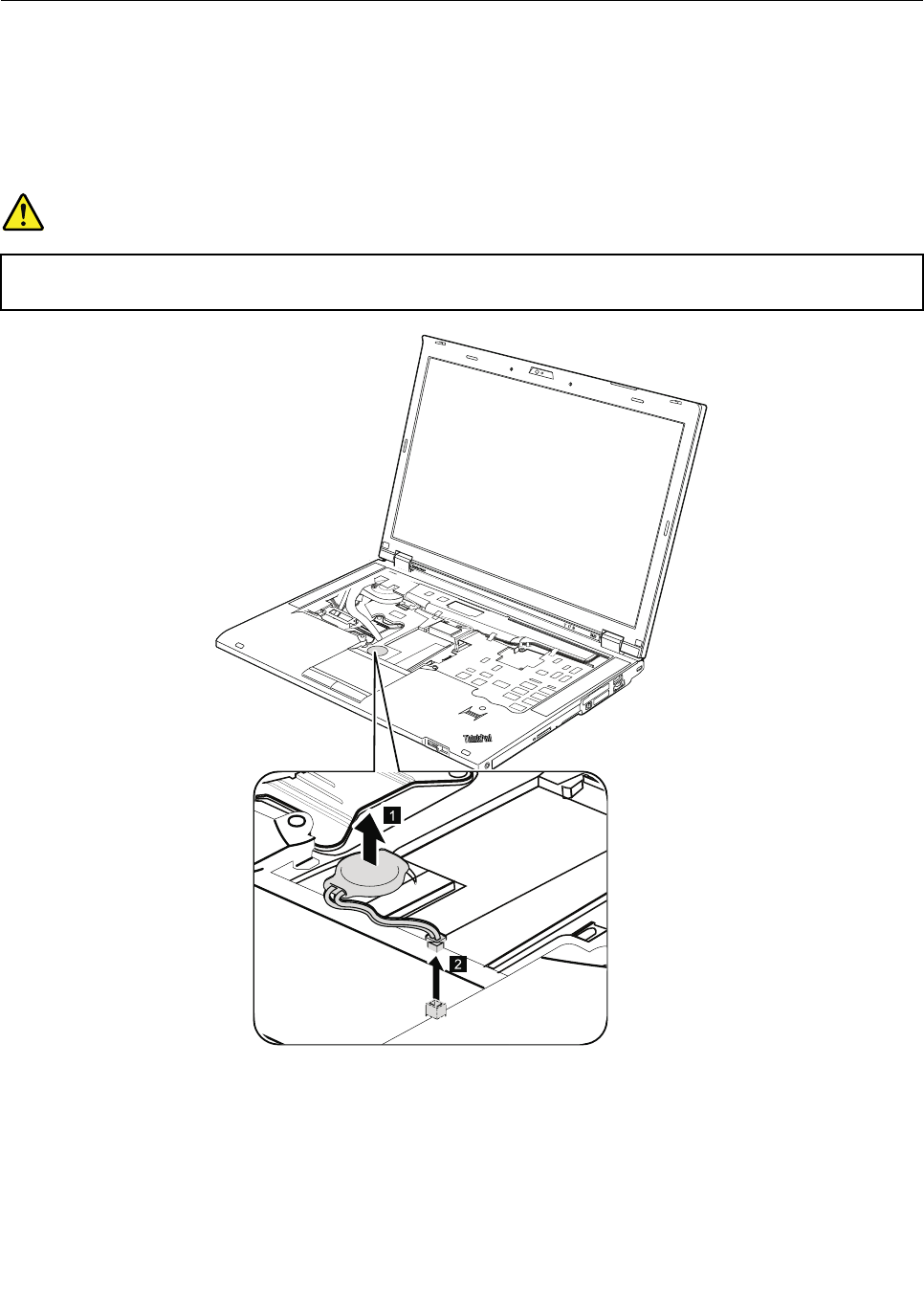
1100Backupbattery
Foraccess,removetheseFRUsinorder:
•“1010Batterypack”onpage67
•“1050DIMMslotcover”onpage73
•“1080Keyboard”onpage77
Removalstepsofbackupbattery
DANGER
Useonlythebatteryspeciedinthepartslistforyourcomputer.Anyotherbatterycouldignite
orexplode.
Cablerouting:Attachthebackupbatteryandroutethecableasshowninthegurebelowandmake
surethatthebatteryconnectorisattachedrmly.
Chapter8.RemovingandreplacingaFRU83
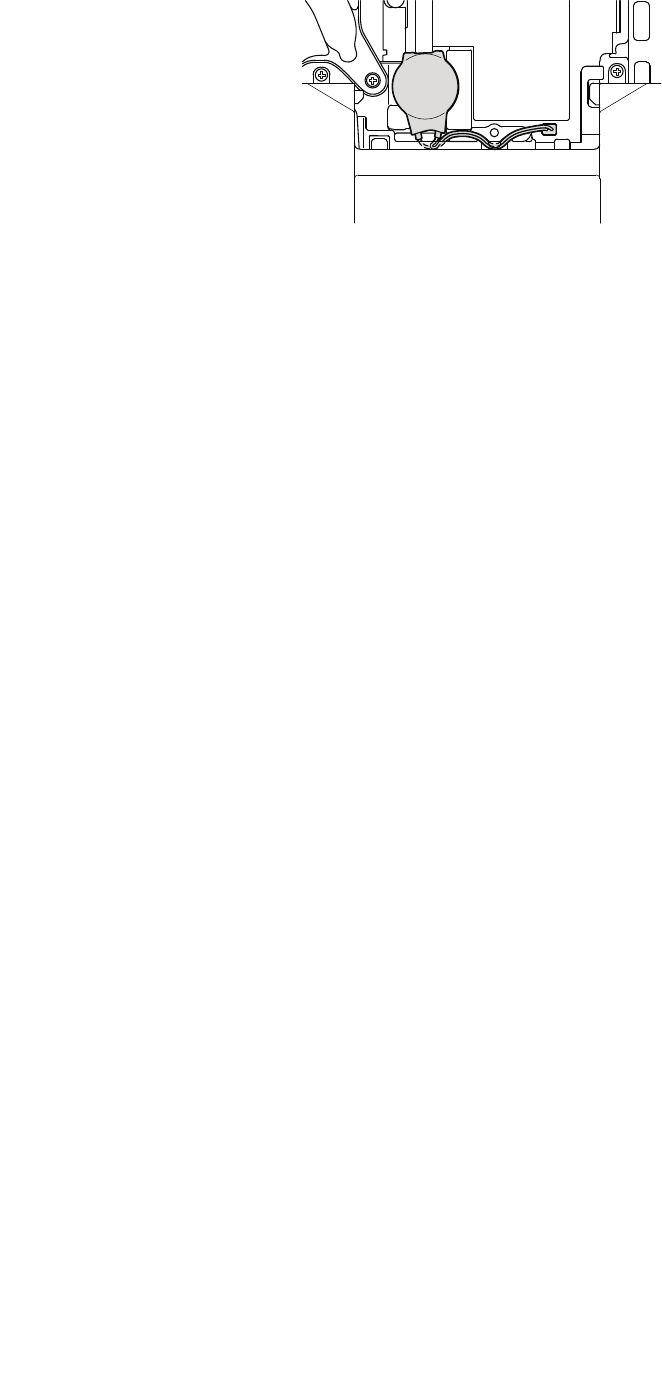
84ThinkPadT420andT420iHardwareMaintenanceManual
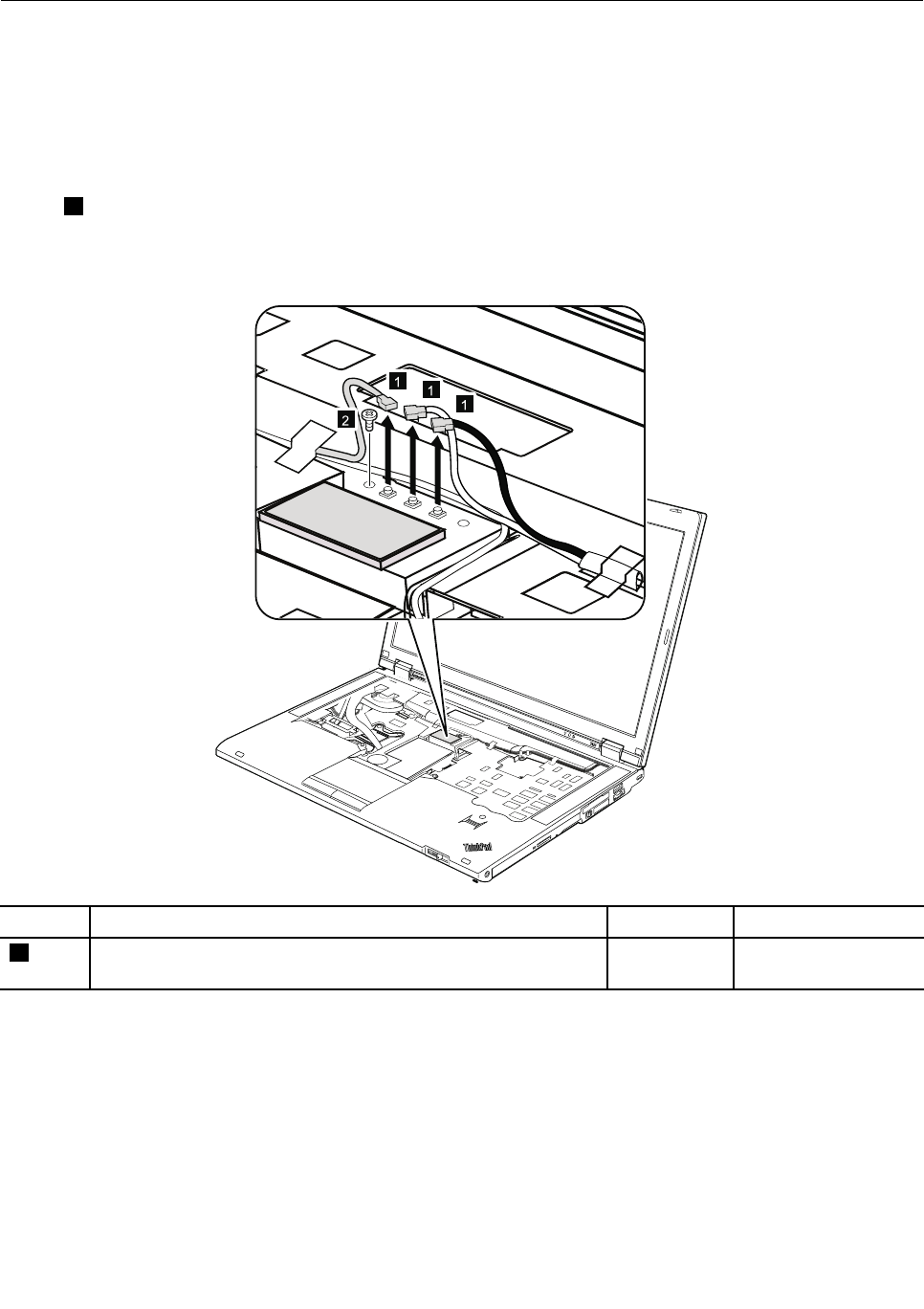
1110PCIExpressMiniCardforwirelessLAN
Foraccess,removetheseFRUsinorder:
•“1010Batterypack”onpage67
•“1050DIMMslotcover”onpage73
•“1080Keyboard”onpage77
RemovalstepsofPCIExpressMiniCardforwirelessLAN
Instep1,unplugthejacksbyusingtheremovaltoolantennaRFconnector(P/N:08K7159),orpickthe
connectorswithyourngersandgentlyunplugtheminthedirectionofthearrow.
Note:Somemodelsmighthaveonlytwoantennacables.
StepScrew(quantity)ColorTorque
2M2×10mm,wafer-head,nylon-coated(1)Silver0.181Nm
(1.85kgf-cm)
Chapter8.RemovingandreplacingaFRU85
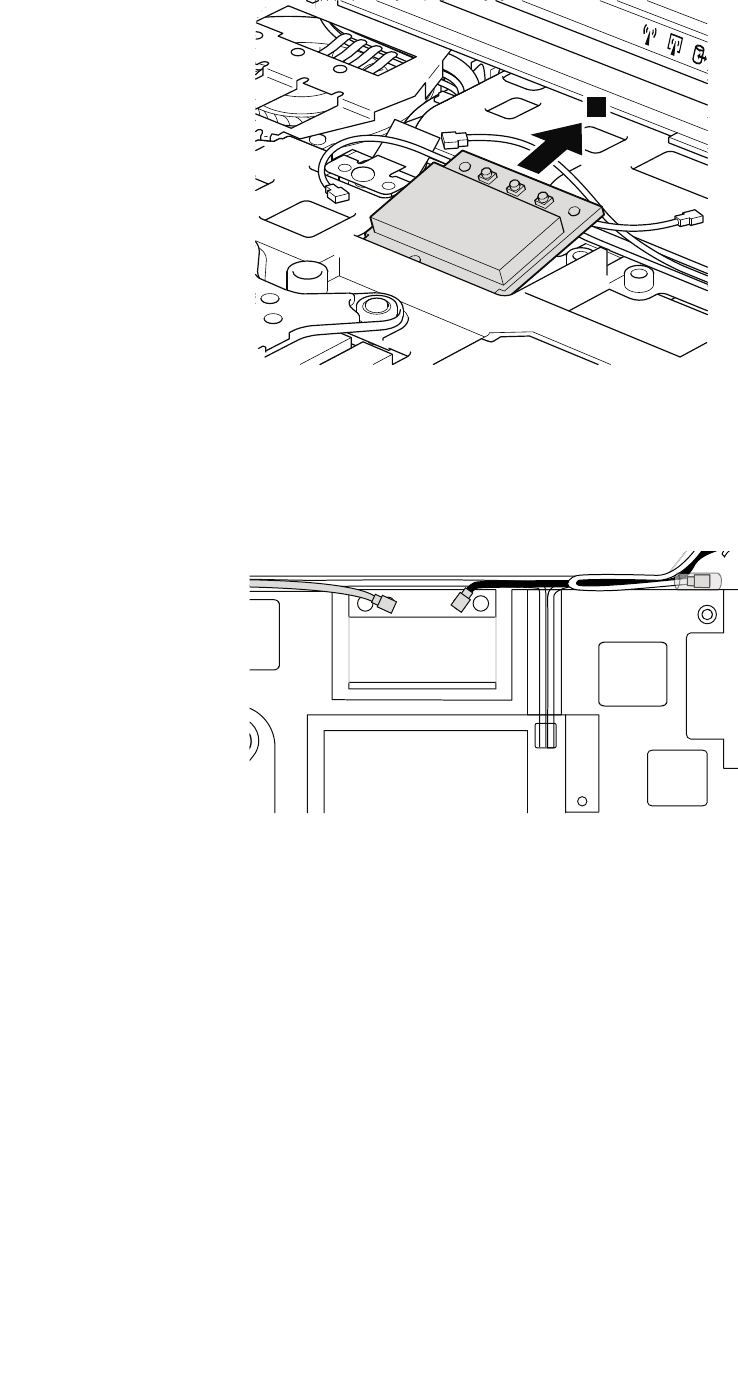
3
Wheninstalling:
•InmodelswithawirelessLANcardthathastwoantennaconnectors,plugthegraycableintothejack
markedMAINorM,andtheblackcableintothejackmarkedAUXorAonthecard.Ifthecomputer
youareservicinghasthreecables,putthewhitecableinthecableprotectiontubeandsecureitwitha
tapeasshowninthisgure.
•InmodelswithawirelessLANcardthathasthreeantennaconnectors,plugthegraycable(MAIN)into
thejackmarkedTR1,thewhitecable(third)intothejackmarkedROorTR3,andtheblackcable(AUX)
intothejackmarkedTR2onthecard.
.
86ThinkPadT420andT420iHardwareMaintenanceManual
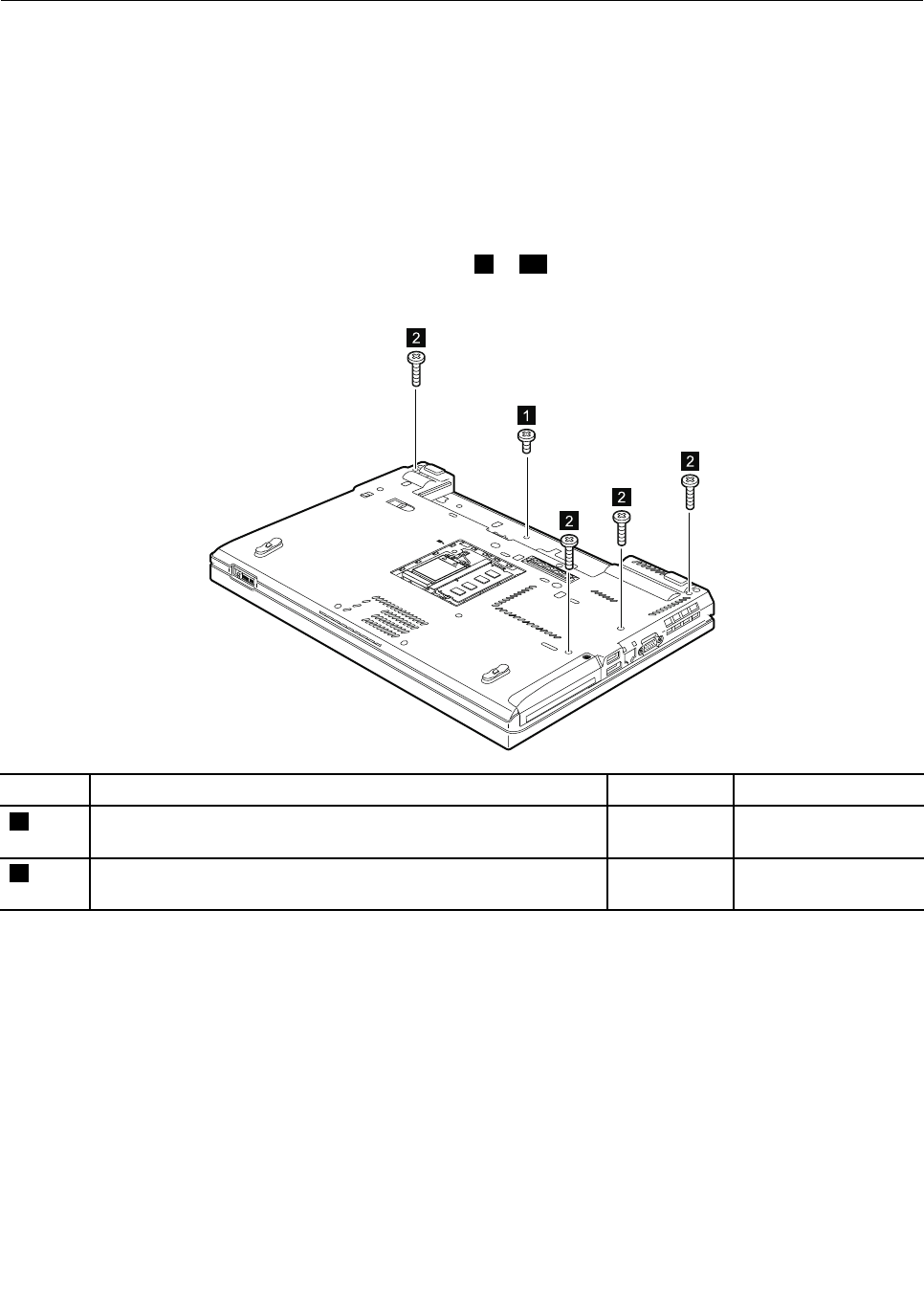
1120Keyboardbezelassembly,FPCcable,andBluethoothdaughter
card
Foraccess,removetheseFRUsinorder:
•“1010Batterypack”onpage67
•“1020ExpressCardblankbezel”onpage68
•“1050DIMMslotcover”onpage73
•“1080Keyboard”onpage77
Note:TheFPCcableisattachedontheundersideofthekeyboardbezelassembly.Insomemodels,the
Bluetoothdaughtercardisalsoattachedontheundersideofthekeyboardbezelassembly.Forthemodels
thatdonothaveaBluetoothdaughtercard,skipsteps8to10.
Removalstepsofkeyboardbezelassembly,FPCcable,andBluetoothdaughtercard
2
2
2
2
1
StepScrew(quantity)ColorTorque
1M2×3mm,wafer-head,nylon-coated(1)Black0.181Nm
(1.85kgf-cm)
2M2×15mm,wafer-head,nylon-coated(4)Black0.181Nm
(1.85kgf-cm)
Chapter8.RemovingandreplacingaFRU87
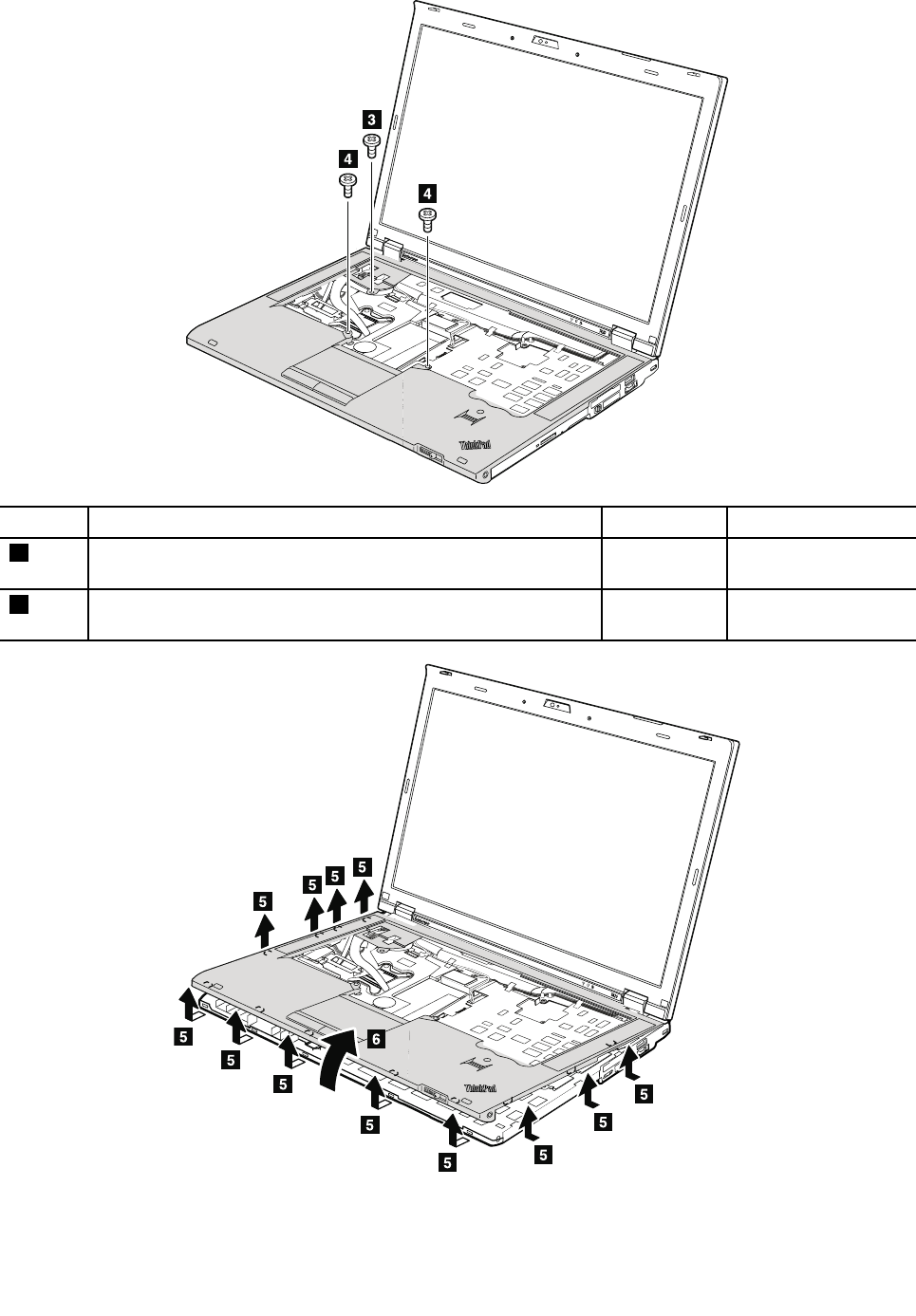
StepScrew(quantity)ColorTorque
3M2×3mm,wafer-head,nylon-coated(1)Black0.181Nm
(1.85kgf-cm)
4Shoulderscrew(2)Silver0.181Nm
(1.85kgf-cm)
88ThinkPadT420andT420iHardwareMaintenanceManual
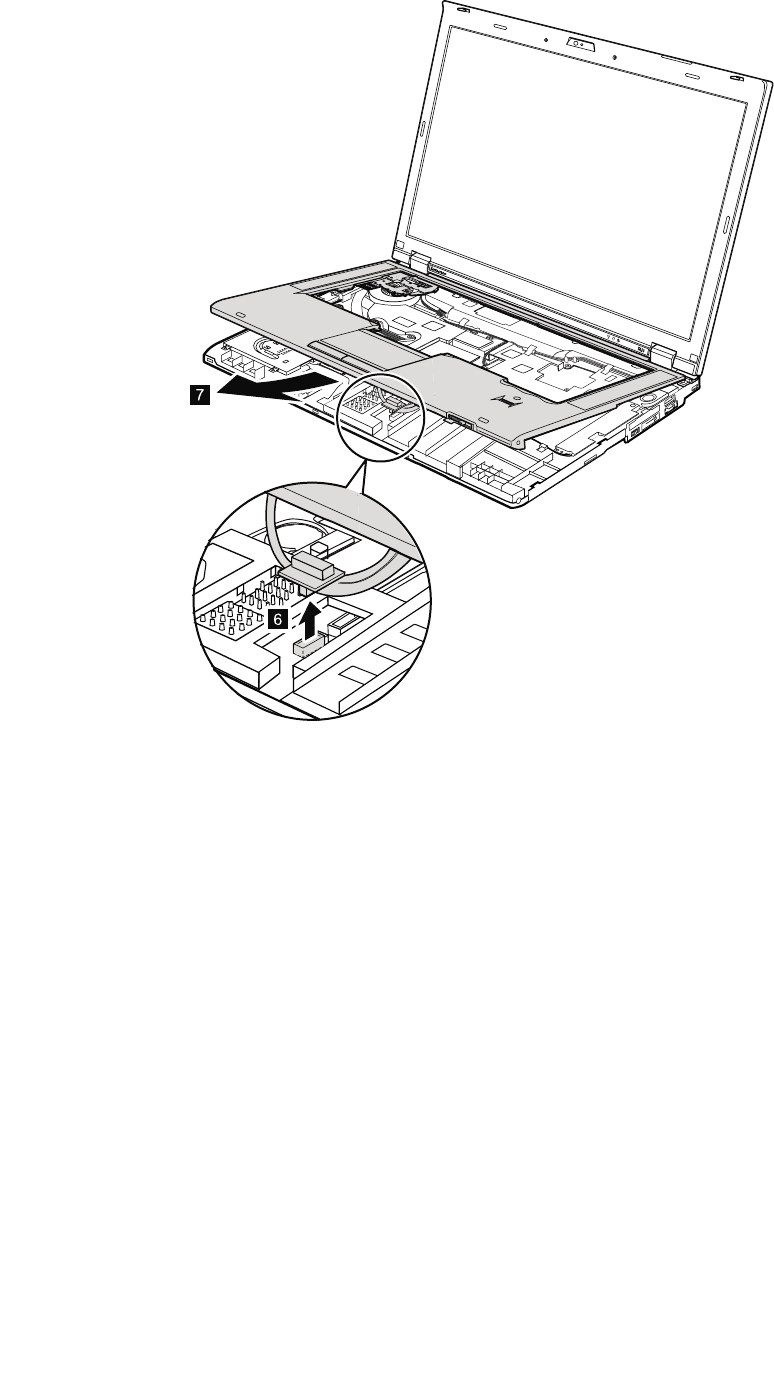
7
6
Wheninstalling:Makesurethattheconnectorisattachedrmly.
Chapter8.RemovingandreplacingaFRU89
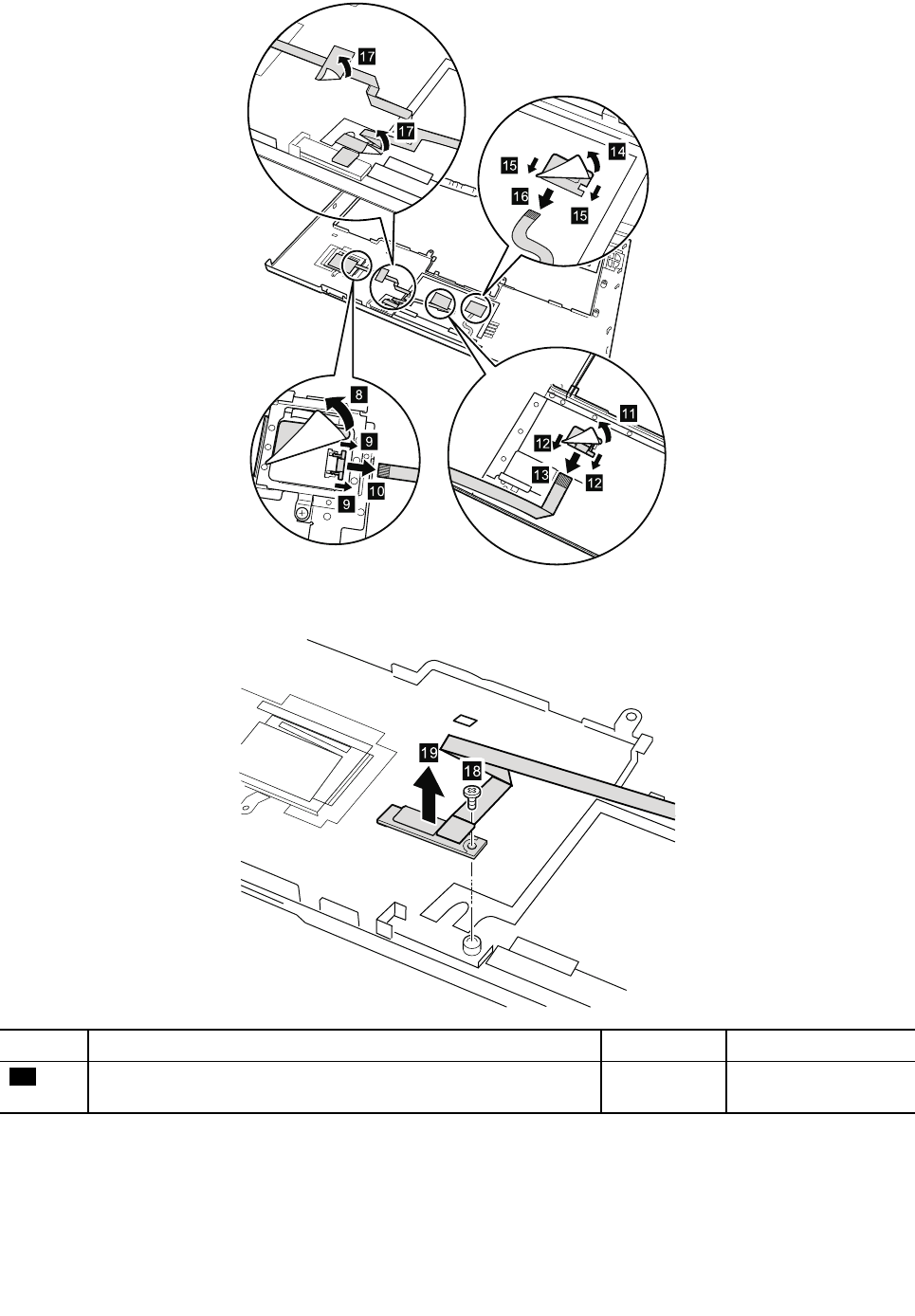
17
17
Wheninstalling:Makesurethattheconnectorsareattachedrmly.
18
19
StepScrew(quantity)ColorTorque
13M2×3mm,wafer-head,nylon-coated(1)Black0.181Nm
(1.85kgf-cm)
90ThinkPadT420andT420iHardwareMaintenanceManual
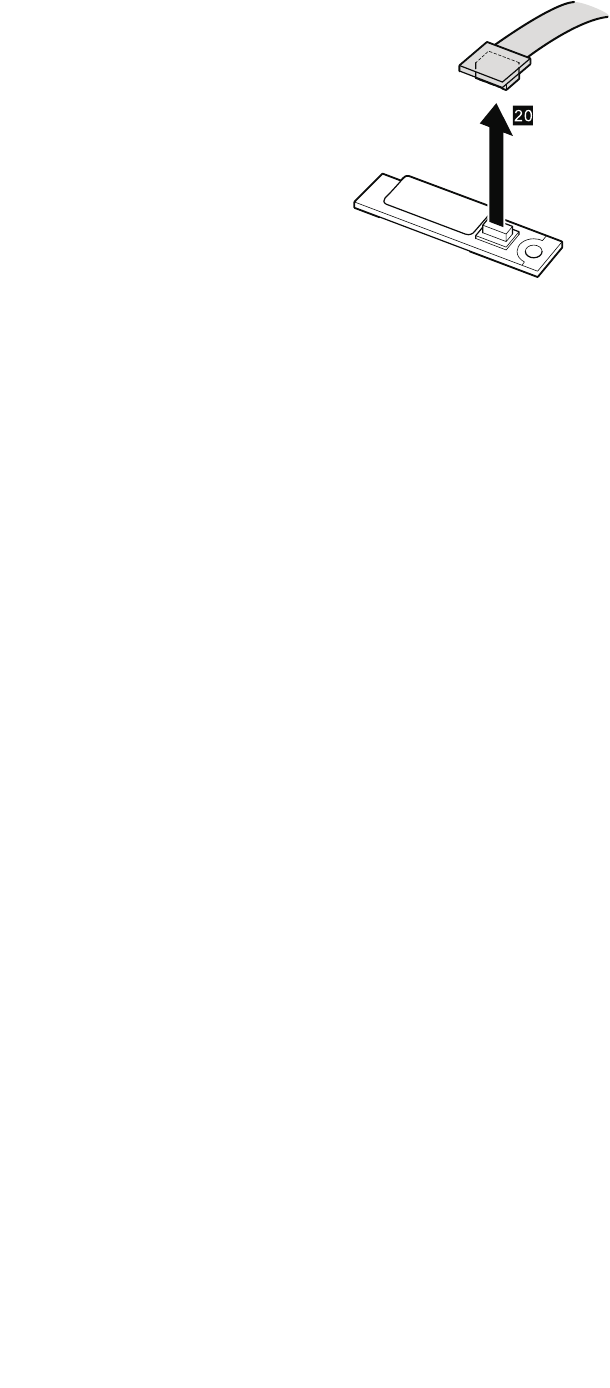
20
Wheninstalling:Makesurethattheconnectorisattachedrmly.
Chapter8.RemovingandreplacingaFRU91
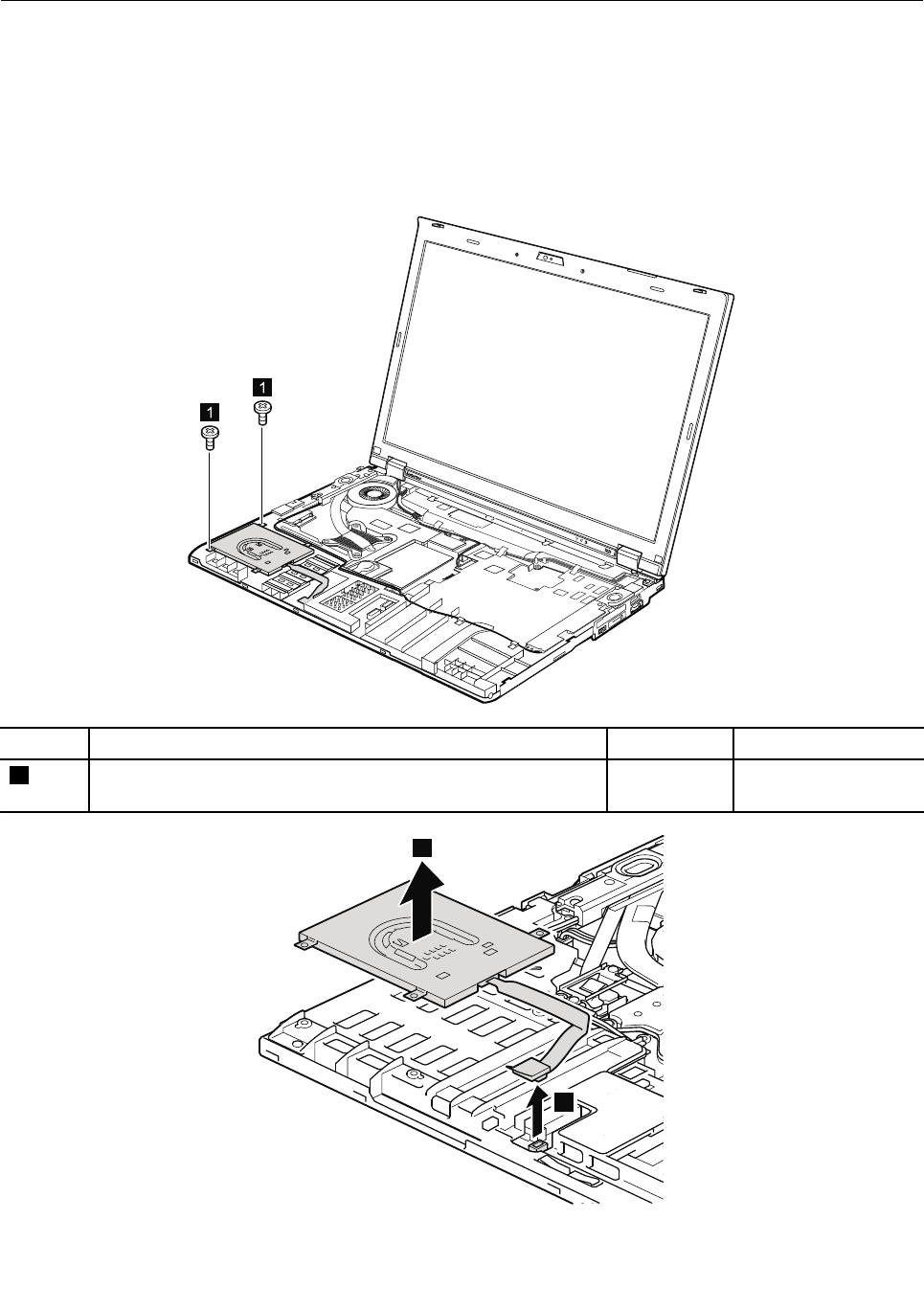
1130SmartCard
Foraccess,removetheseFRUsinorder:
•“1010Batterypack”onpage67
•“1050DIMMslotcover”onpage73
•“1080Keyboard”onpage77
•“1120Keyboardbezelassembly,FPCcable,andBluethoothdaughtercard”onpage87
RemovalstepsofSmartCard
1
1
StepScrew(quantity)ColorTorque
1M2×3mm,wafer-head,nylon-coated(2)Black0.181Nm
(1.85kgf-cm)
2
3
92ThinkPadT420andT420iHardwareMaintenanceManual
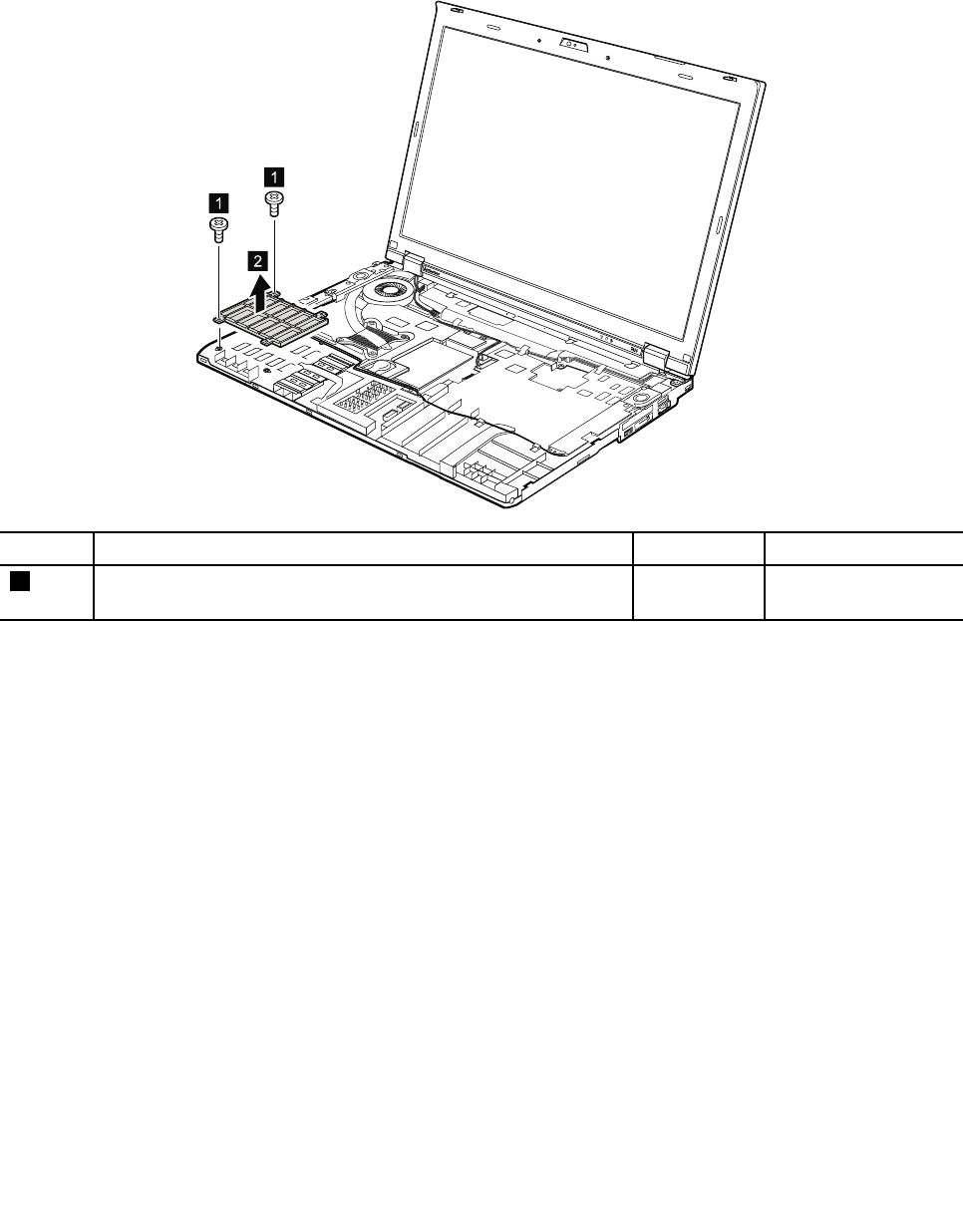
Wheninstalling:Makesurethattheconnectorisattachedrmly.
RemovalstepsofSmartCarddummyspacer
SomemodelshaveaSmartCarddummyspacerasamiscellaneouspart.Forthosemodels,removethe
spacerasshown:
1
1
2
StepScrew(quantity)ColorTorque
1M2×3mm,wafer-head,nylon-coated(2)Black0.181Nm
(1.85kgf-cm)
Chapter8.RemovingandreplacingaFRU93
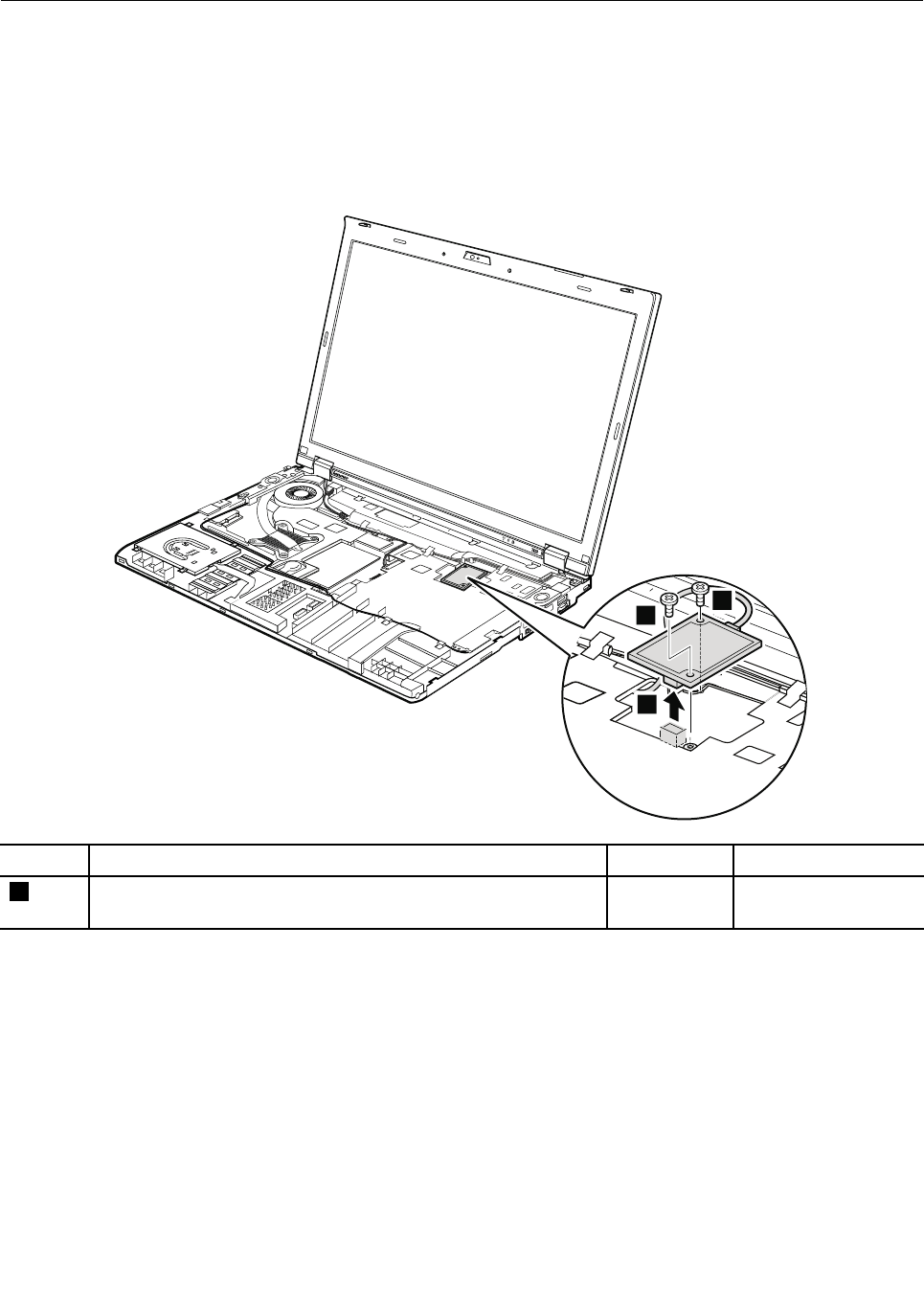
1140Modemdaughtercard(MDC)
Foraccess,removetheseFRUsinorder:
•“1010Batterypack”onpage67
•“1050DIMMslotcover”onpage73
•“1080Keyboard”onpage77
•“1120Keyboardbezelassembly,FPCcable,andBluethoothdaughtercard”onpage87
Removalstepsofmodemdaughtercard(MDC)
1
1
2
StepScrew(quantity)ColorTorque
1M2×3mm,wafer-head,nylon-coated(2)Black0.181Nm
(1.85kgf-cm)
Wheninstalling:Makesurethattheconnectorisattachedrmly.
94ThinkPadT420andT420iHardwareMaintenanceManual
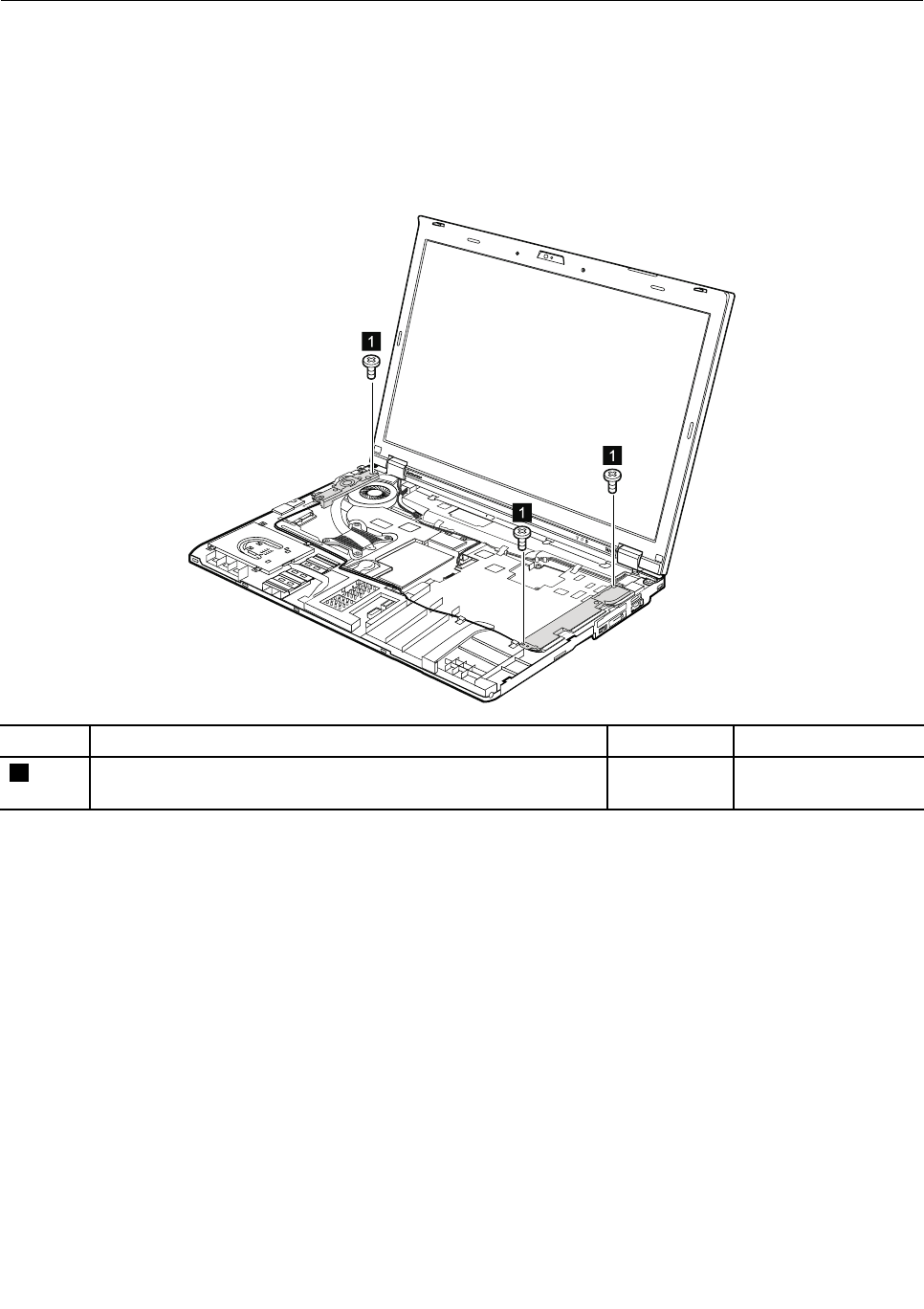
1150Speakerassembly
Foraccess,removetheseFRUsinorder:
•“1010Batterypack”onpage67
•“1050DIMMslotcover”onpage73
•“1080Keyboard”onpage77
•“1120Keyboardbezelassembly,FPCcable,andBluethoothdaughtercard”onpage87
Removalstepsofspeakerassembly
1
1
1
StepScrew(quantity)ColorTorque
1M2×3mm,wafer-head,nylon-coated(3)Black0.181Nm
(1.85kgf-cm)
Chapter8.RemovingandreplacingaFRU95
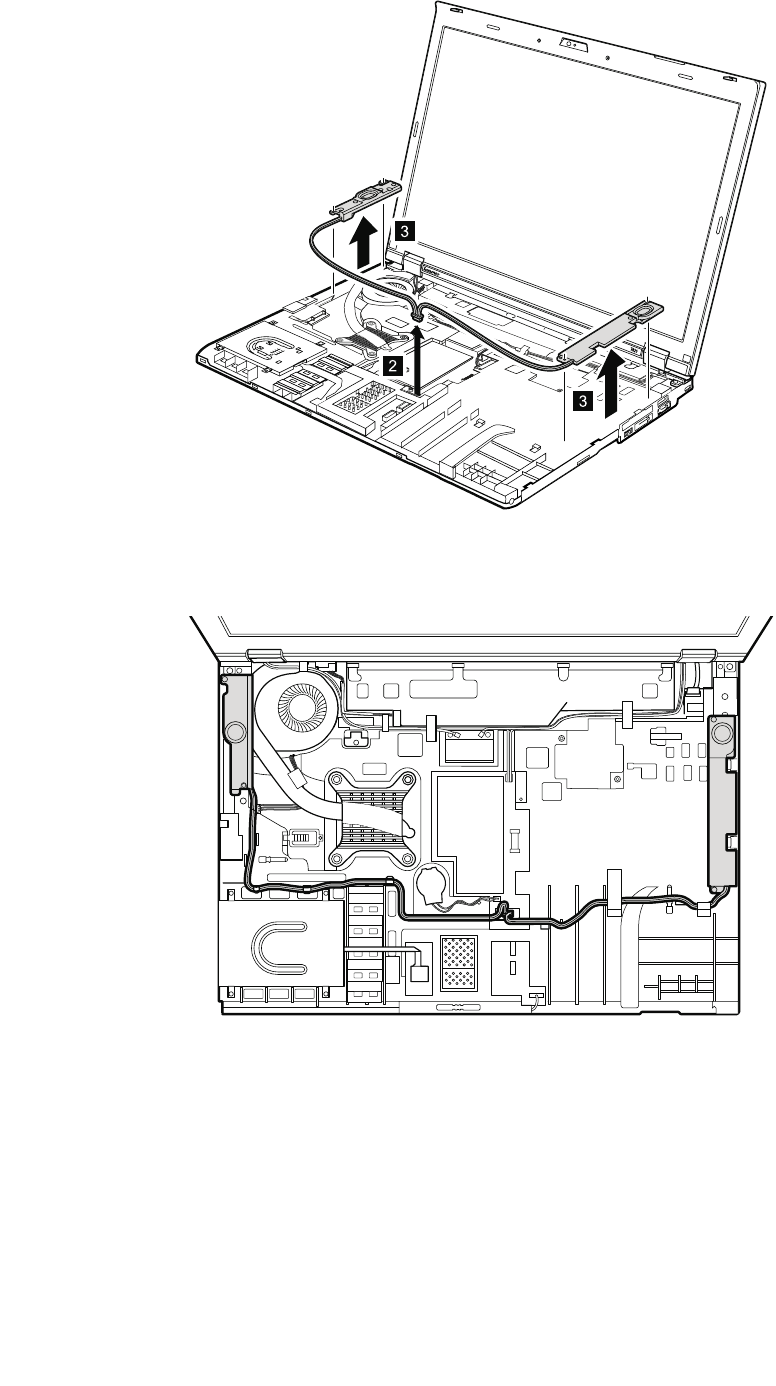
3
3
2
Wheninstalling:Attachthespeakerassemblyandroutethecableasshowninthefollowinggure,and
makesurethatthespeakerconnectorisattachedrmly.
96ThinkPadT420andT420iHardwareMaintenanceManual

1160LCDunit
Foraccess,removetheseFRUsinorder:
•“1010Batterypack”onpage67
•“1020ExpressCardblankbezel”onpage68
•“1050DIMMslotcover”onpage73
•“1070PCIExpressMiniCardforwirelessWAN”onpage75
•“1080Keyboard”onpage77
•“1110PCIExpressMiniCardforwirelessLAN”onpage85
•“1120Keyboardbezelassembly,FPCcable,andBluethoothdaughtercard”onpage87
RemovalstepsofLCDunit
1
1
StepScrew(quantity)ColorTorque
1M2.5×6mm,wafer-head,nylon-coated(2)Black0.392Nm
(4.0kgf-cm)
Chapter8.RemovingandreplacingaFRU97
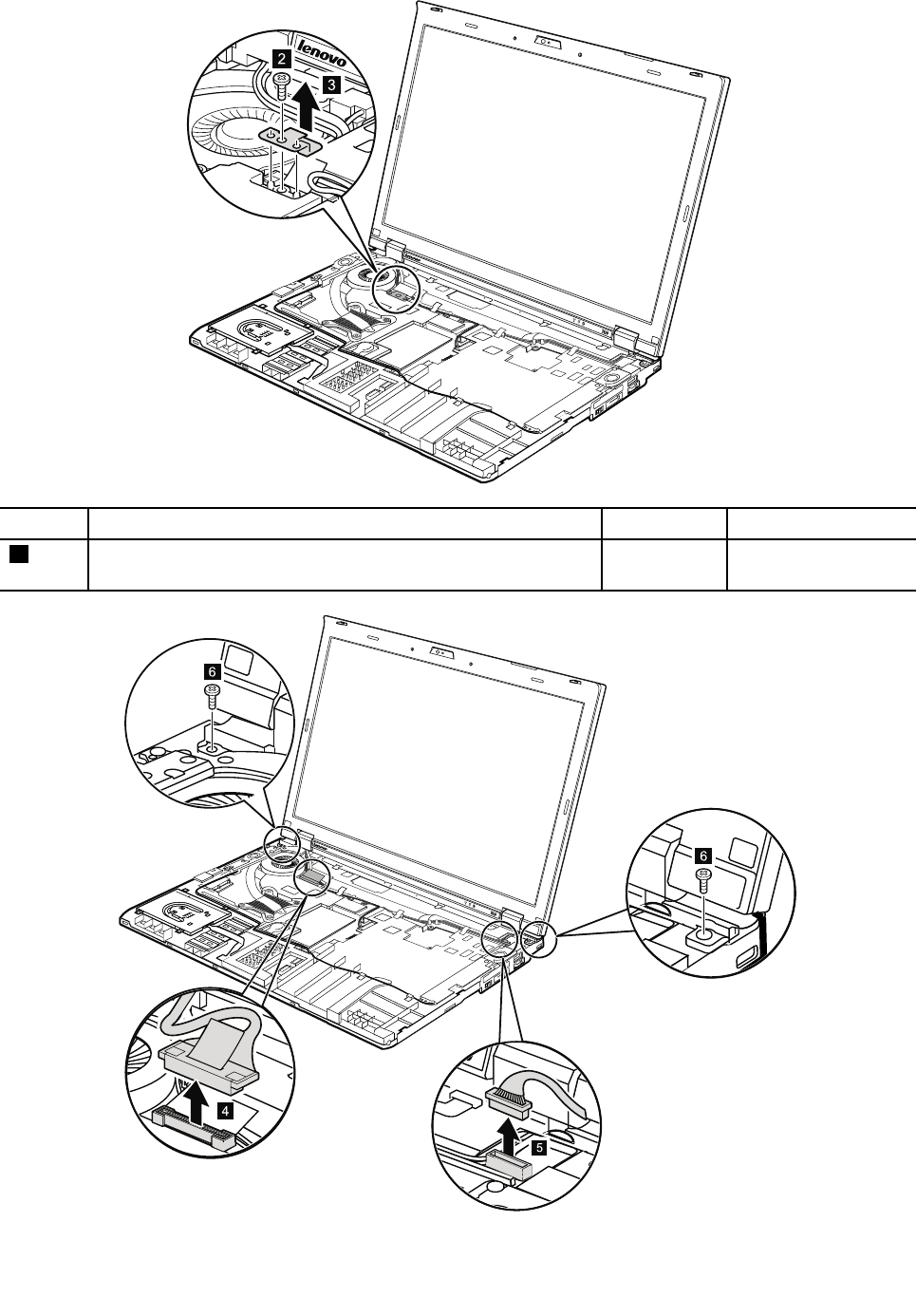
2
3
StepScrew(quantity)ColorTorque
2M2×3mm,wafer-head,nylon-coated(1)Black0.181Nm
(1.85kgf-cm)
6
4
98ThinkPadT420andT420iHardwareMaintenanceManual
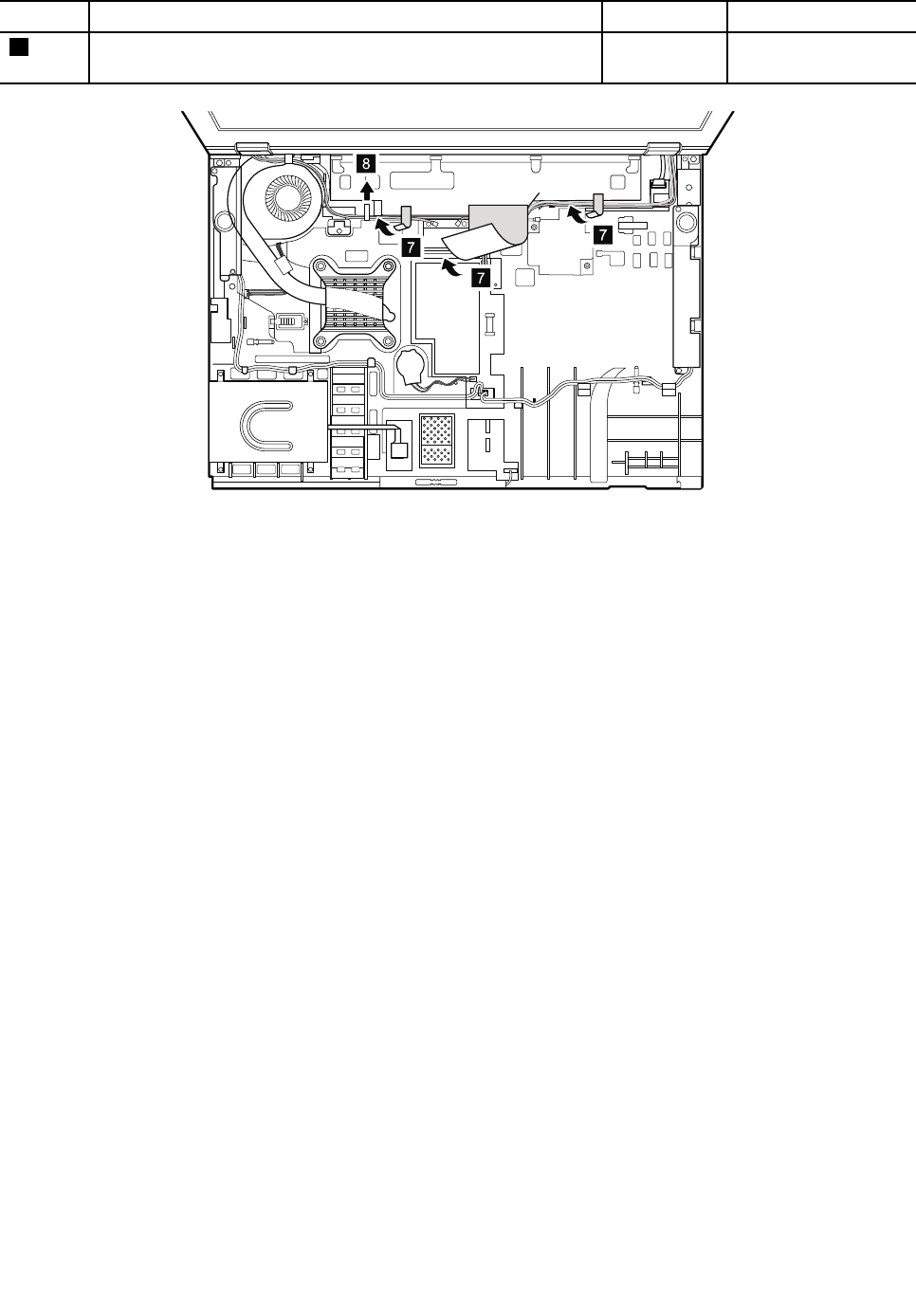
StepScrew(quantity)ColorTorque
6M2.5×6mm,wafer-head,nylon-coated(2)Black0.392Nm
(4.0kgf-cm)
7
7
8
7
Wheninstalling:
•Makesurethatyouattachtheconnectorsrmly.
•Makesurethatyouroutethecablescorrectlyandyoutapeupintheproperpositionsasshownin
theabovegure.
•Whenyouroutethecables,makesurethattheyarenotsubjectedtoanytension.Tensioncouldcause
thecablestobedamagedbythecableguides,orawiretobebroken.
Chapter8.RemovingandreplacingaFRU99
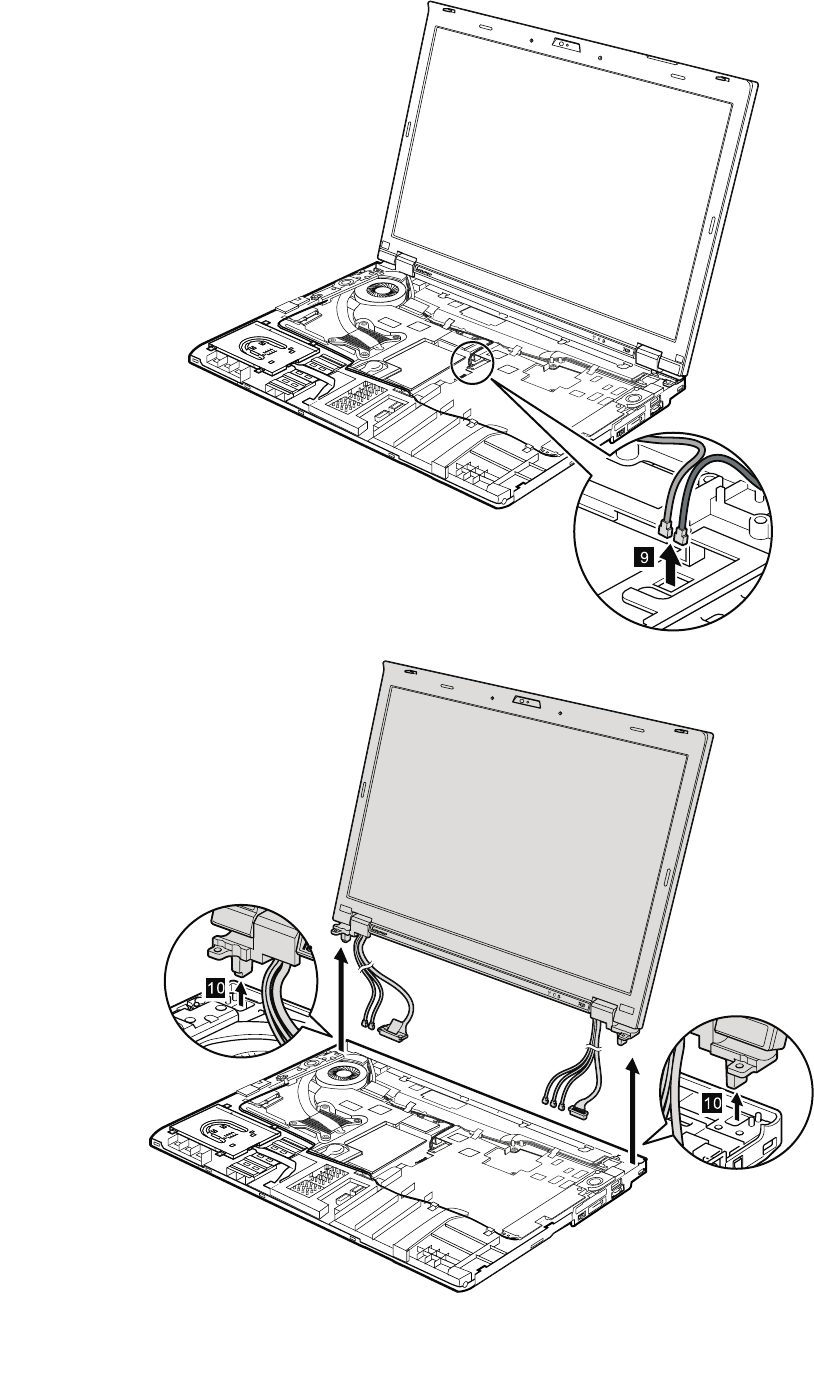
9
10
10
100ThinkPadT420andT420iHardwareMaintenanceManual
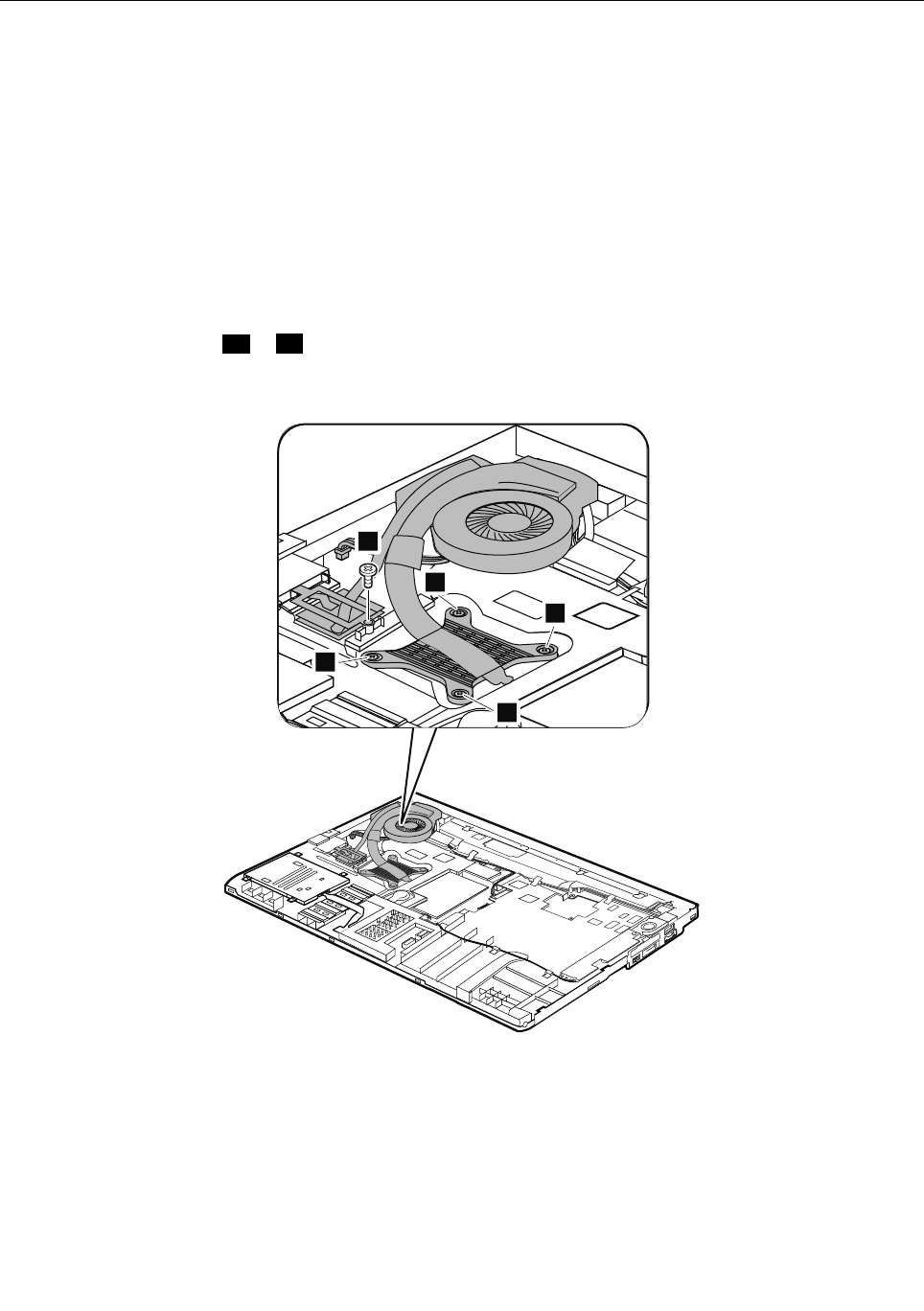
1170Fanassembly
Foraccess,removetheseFRUsinorder:
•“1010Batterypack”onpage67
•“1020ExpressCardblankbezel”onpage68
•“1050DIMMslotcover”onpage73
•“1070PCIExpressMiniCardforwirelessWAN”onpage75
•“1080Keyboard”onpage77
•“1110PCIExpressMiniCardforwirelessLAN”onpage85
•“1120Keyboardbezelassembly,FPCcable,andBluethoothdaughtercard”onpage87
•“1150Speakerassembly”onpage95
•“1160LCDunit”onpage97
Removalstepsoffanassembly
Note:Loosenthescrews1ato1dinorder,butdonotremovethem.
ForDiscreteGraphicsmodels:
1a
2
1d
1c
1b
ForIntegretedGraphicsmodels:
Chapter8.RemovingandreplacingaFRU101
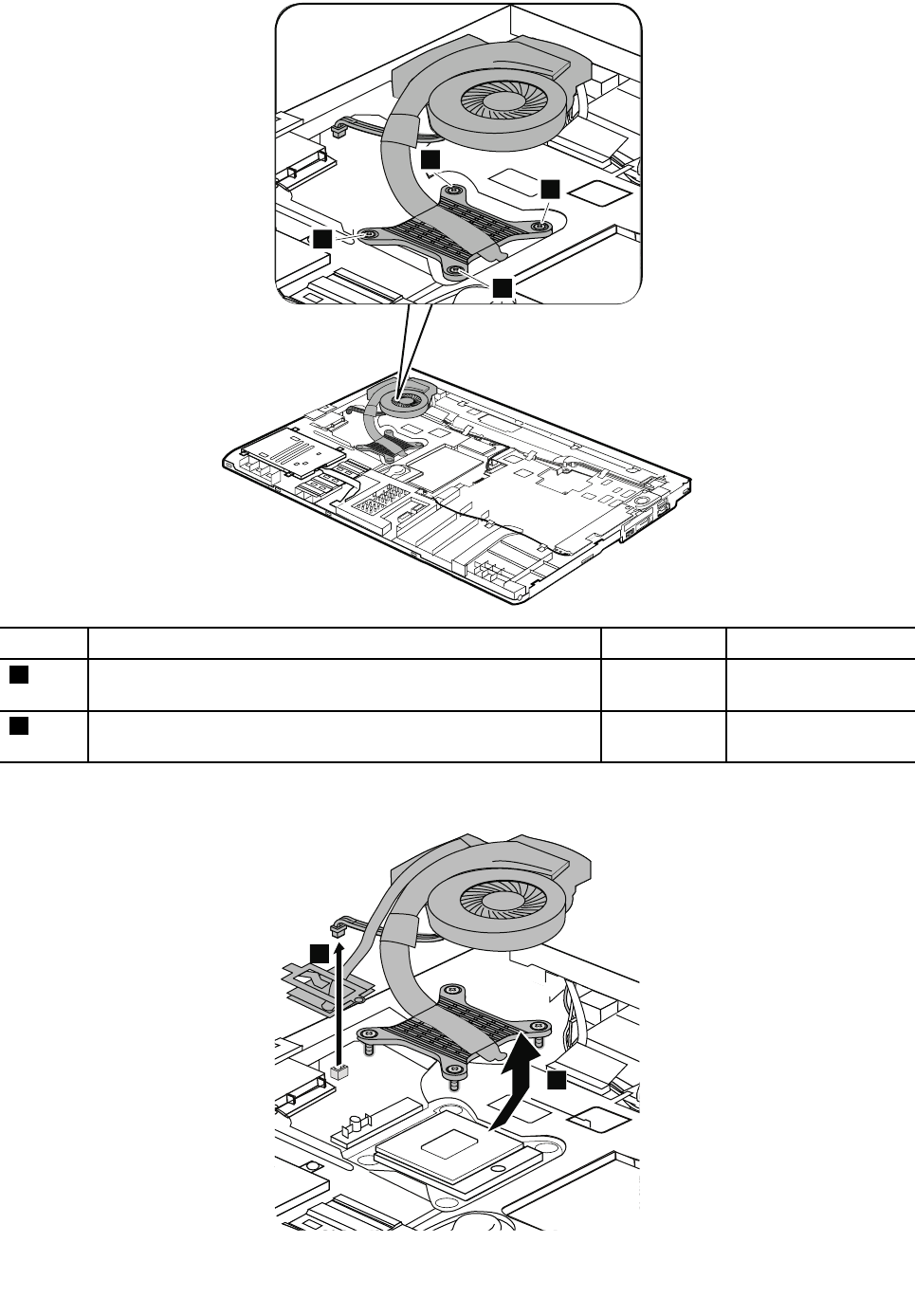
1a
1d
1b
1c
StepScrew(quantity)ColorTorque
1Captureshoulderscrew(4)Silver0.181Nm
(1.85kgf-cm)
2M2×3mm,wafer-head,nylon-coated(1)black0.181Nm
(1.85kgf-cm)
ForDiscreteGraphicsmodels:
4
3
102ThinkPadT420andT420iHardwareMaintenanceManual
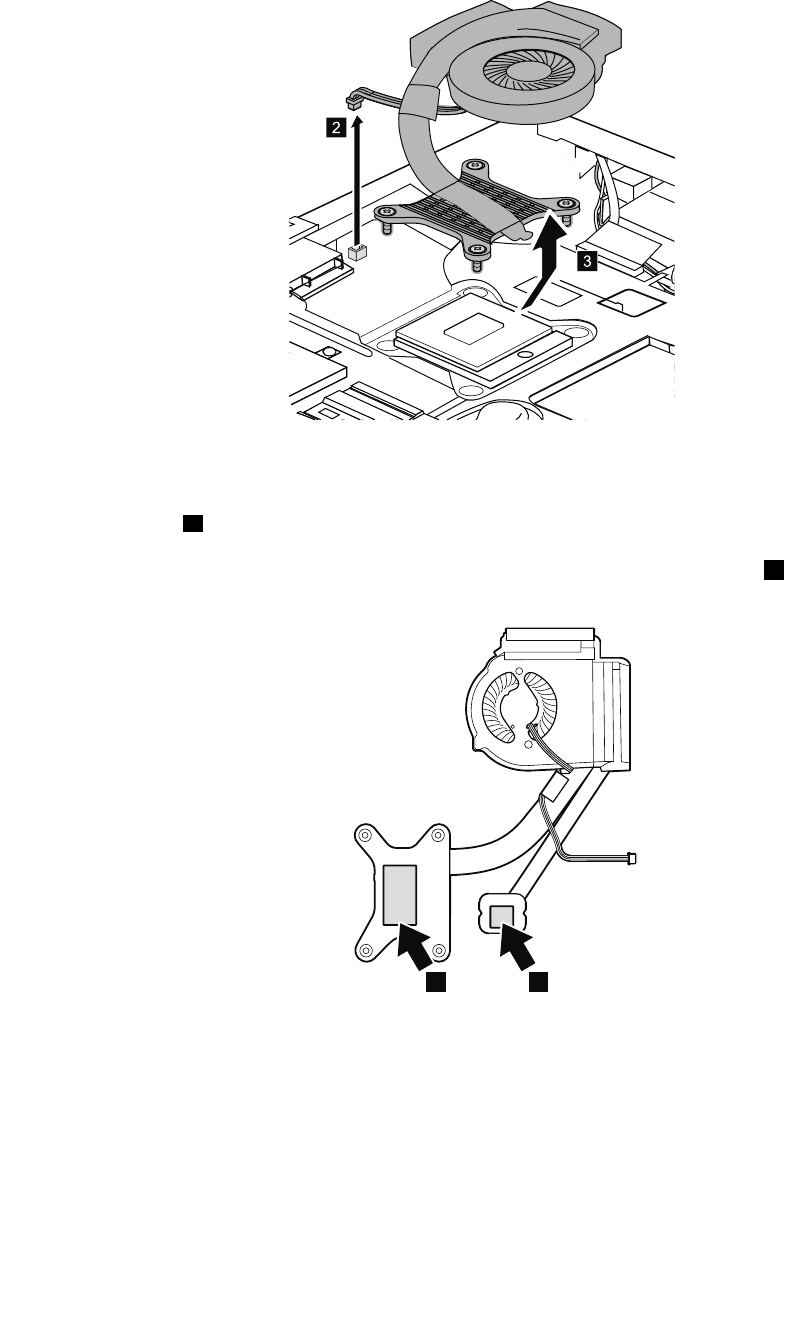
ForIntegretedGraphicsmodels:
2
3
Wheninstalling:
•Beforeyouattachthefanassemblytothecomputer,applythermalgrease,atanamountof0.2grams,on
thepartsmarkedaasinthefollowinggures.Eithertoomuchortoolessapplicationofgreasecan
causeathermalproblemduetoimperfectcontactwithacomponent.Forthefanintheintegrated
graphicsmodels,youneedtopeelthethinlmofffromthethermalrubbermarkedb.
ForDiscreteGraphicsmodels:
ba
ForIntegratedGraphicsmodels:
Chapter8.RemovingandreplacingaFRU103
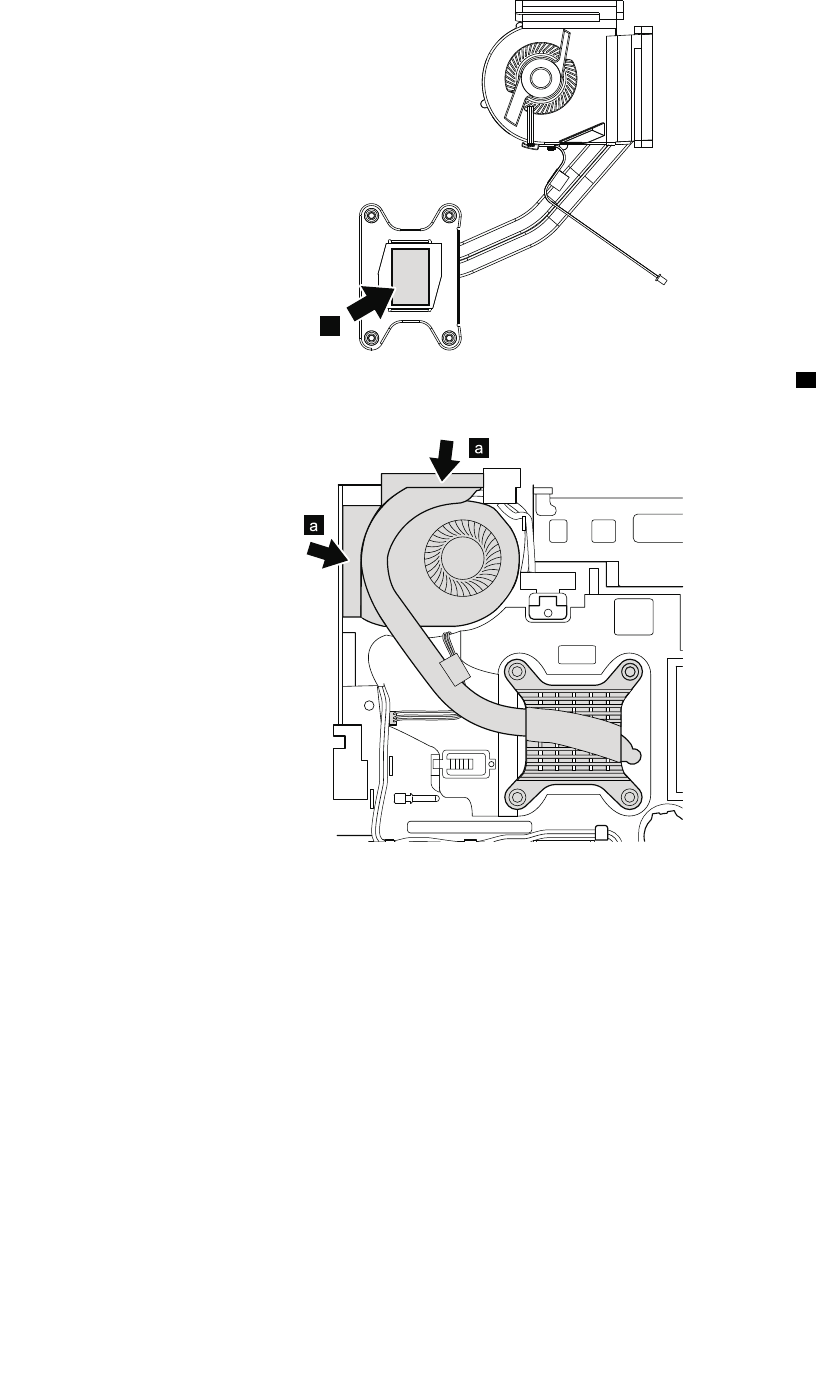
a
•Whenattachingthefanassemblytotheframe,takecarenottodamagetheheatsinkaofthefan
assembly.
•Makesurethatthefanconnectorisattachedrmly.
104ThinkPadT420andT420iHardwareMaintenanceManual
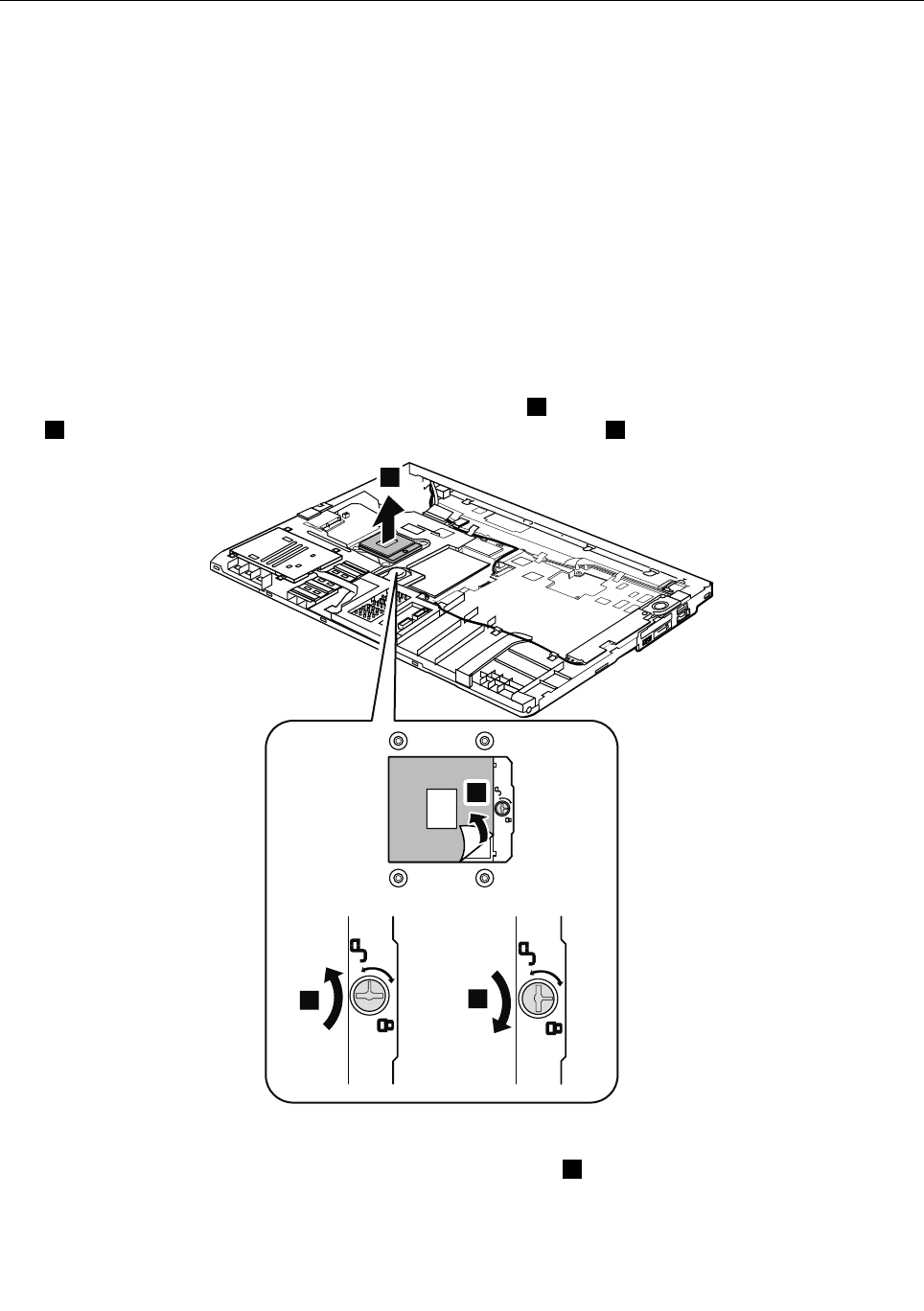
1180CPU
Foraccess,removetheseFRUsinorder:
•“1010Batterypack”onpage67
•“1020ExpressCardblankbezel”onpage68
•“1050DIMMslotcover”onpage73
•“1070PCIExpressMiniCardforwirelessWAN”onpage75
•“1080Keyboard”onpage77
•“1110PCIExpressMiniCardforwirelessLAN”onpage85
•“1120Keyboardbezelassembly,FPCcable,andBluethoothdaughtercard”onpage87
•“1150Speakerassembly”onpage95
•“1160LCDunit”onpage97
•“1170Fanassembly”onpage101
Attention:TheCPUisextremelysensitive.WhenyouservicetheCPU,avoidanykindofroughhandling.
RemovalstepsofCPU
Rotatetheheadofthescrewinthedirectionshownbyarrow1toreleasethelock,andthenremovethe
CPU2.AfterthatpeelthemylarofffromtheCPUasshownbyarrow4.
2
13
4
Wheninstalling:MakesurethatthemylarisattachedtotheCPU.PlacetheCPUontheCPUsocket,and
thenrotatetheheadofthescrewinthedirectionshownbyarrow3tosecuretheCPU.
Chapter8.RemovingandreplacingaFRU105
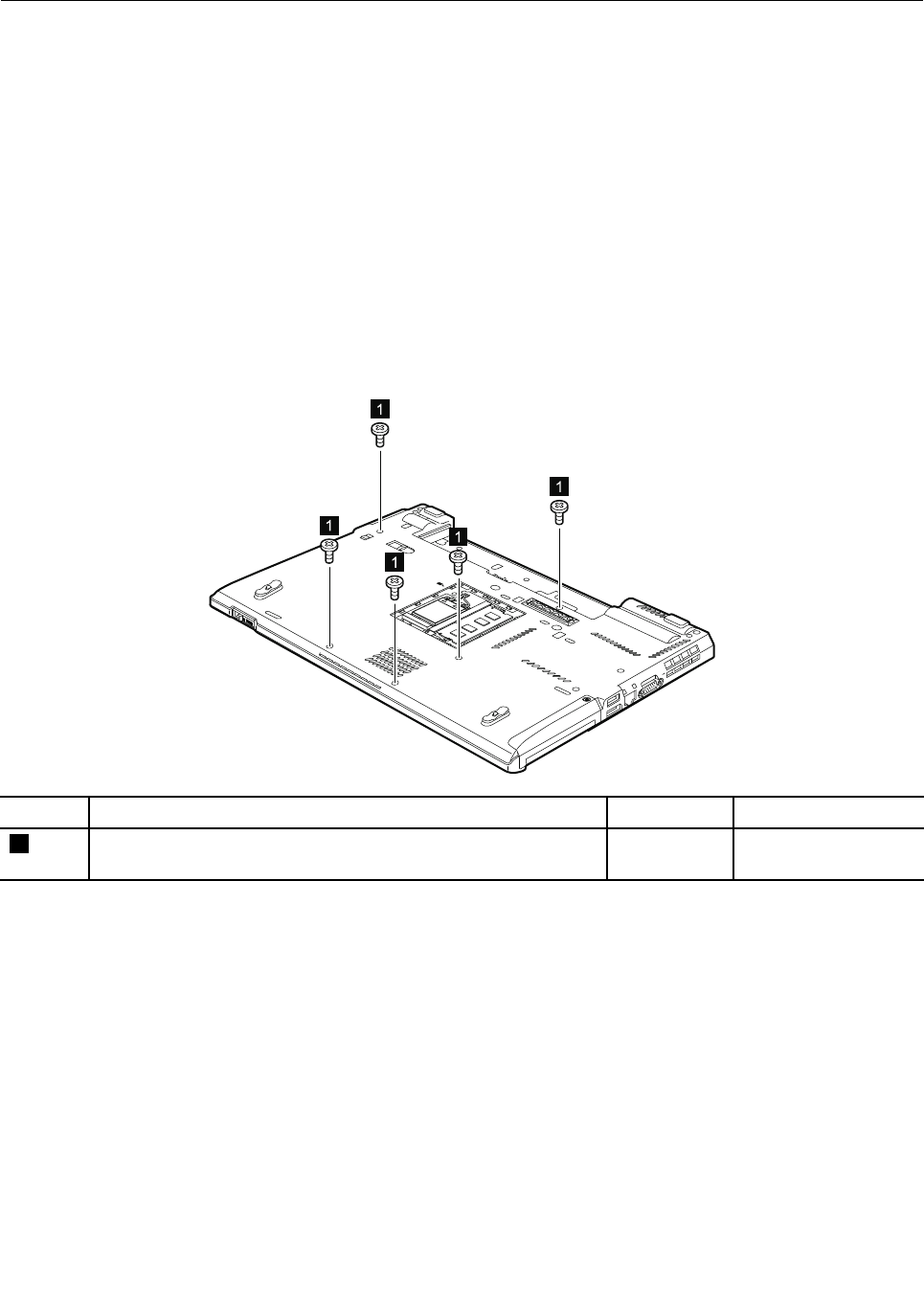
1190BasecoverassemblyandDC-inconnectorcable
Foraccess,removetheseFRUsinorder:
•“1010Batterypack”onpage67
•“1020ExpressCardblankbezel”onpage68
•“1030SerialUltrabayEnhanceddeviceortravelbezel”onpage69
•“1040Harddiskdrive(HDD)andsolidstatedrive(SSD)”onpage70
•“1050DIMMslotcover”onpage73
•“1070PCIExpressMiniCardforwirelessWAN”onpage75
•“1080Keyboard”onpage77
•“1110PCIExpressMiniCardforwirelessLAN”onpage85
•“1120Keyboardbezelassembly,FPCcable,andBluethoothdaughtercard”onpage87
•“1150Speakerassembly”onpage95
•“1160LCDunit”onpage97
•“1170Fanassembly”onpage101
RemovalstepsofbasecoverassemblyandDC-inconnectorcable
1
1
1
1
1
StepScrew(quantity)ColorTorque
1M2×8mm,wafer-head,nylon-coated(5)Black0.181Nm
(1.85kgf-cm)
106ThinkPadT420andT420iHardwareMaintenanceManual
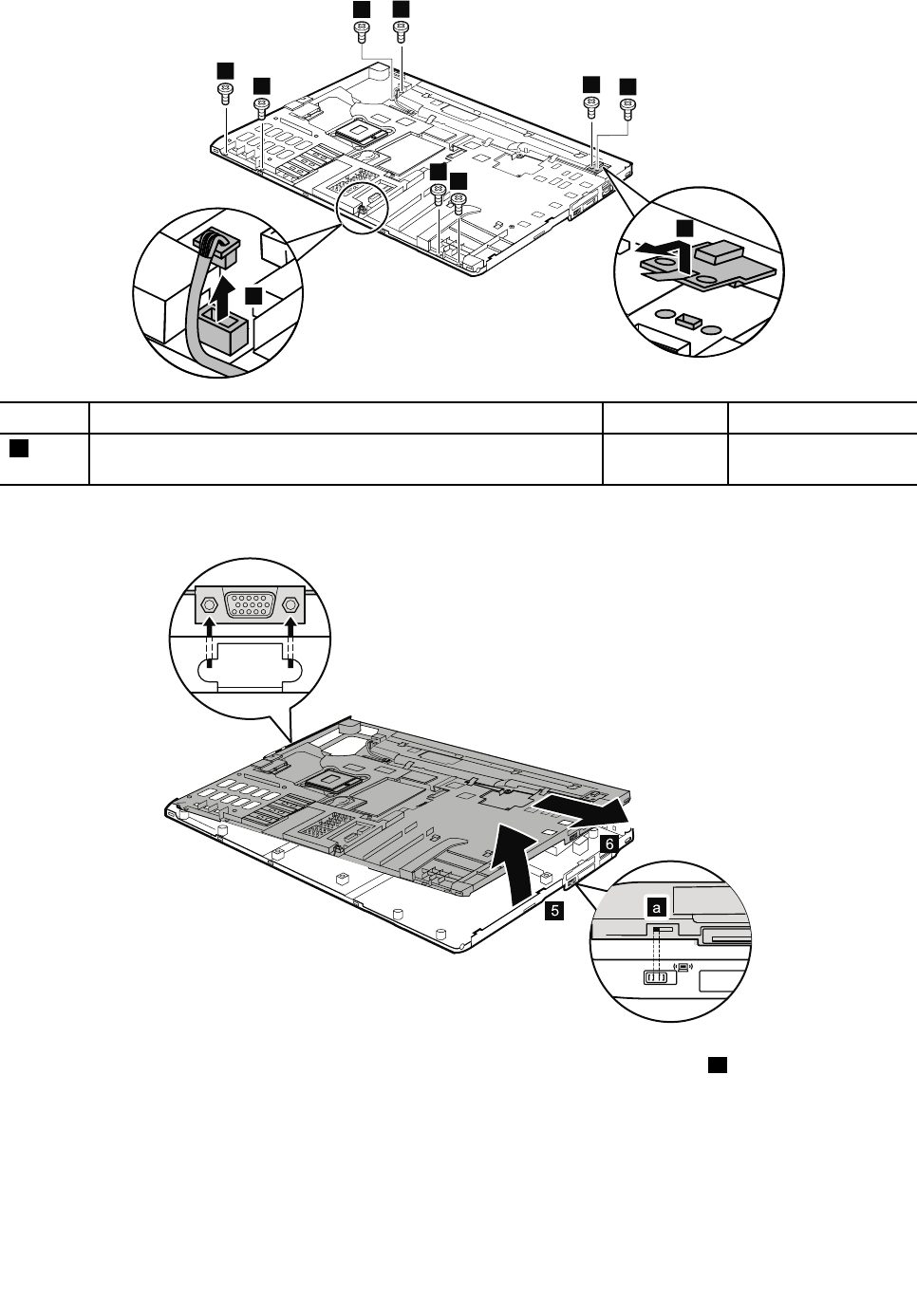
2
2
2
2
2
2
22
3
4
StepScrew(quantity)ColorTorque
2M2×5mm,wafer-head,nylon-coated(8)Black0.181Nm
(1.85kgf-cm)
Wheninstalling:Makesurethattheconnectorisattachedrmly.
5
6
Wheninstalling:Makesurethatthewirelessswitchisadjustedasshownincallouta.
Chapter8.RemovingandreplacingaFRU107
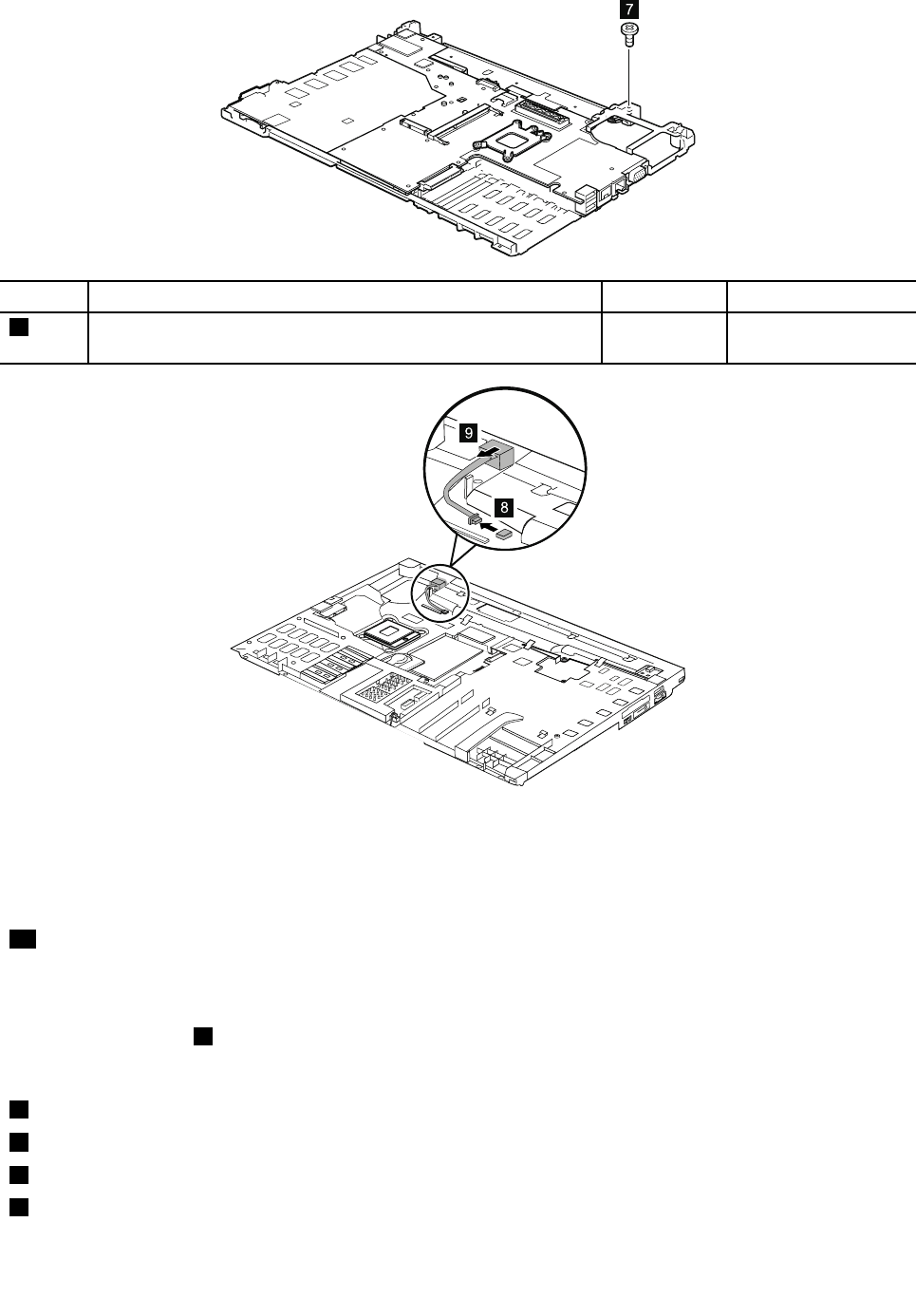
7
StepScrew(quantity)ColorTorque
7M2×3mm,wafer-head,nylon-coated(1)Black0.181Nm
(1.85kgf-cm)
Note:Applyinglabelstothebasecover
ThenewbasecoverFRUisshippedwithakitcontaininglabelsofseveralkinds.
Whenyoureplacethebasecover,youneedtoapplythefollowinglabel:
17Homologationlabel
Thefollowinglabelsneedtobepeeledofffromtheoldbasecover,andneedtobeputonthenewbasecover.
Note:IftheCOAlabel1isattachedtoapartthatisreplaced,returntheoldpartwiththelabelattachedto
thecustomer,orprovidealettertothecustomerstatingwhatthelabelwasoriginallyonthesystemand
whatthelabelpartnumber,serialnumber,andproductkeywere.
1WindowsCerticateofAuthenticationlabel(COA)
2WirelessLANMACaddresslabel
3Informationlabel
4EthernetMACaddresslabel
108ThinkPadT420andT420iHardwareMaintenanceManual
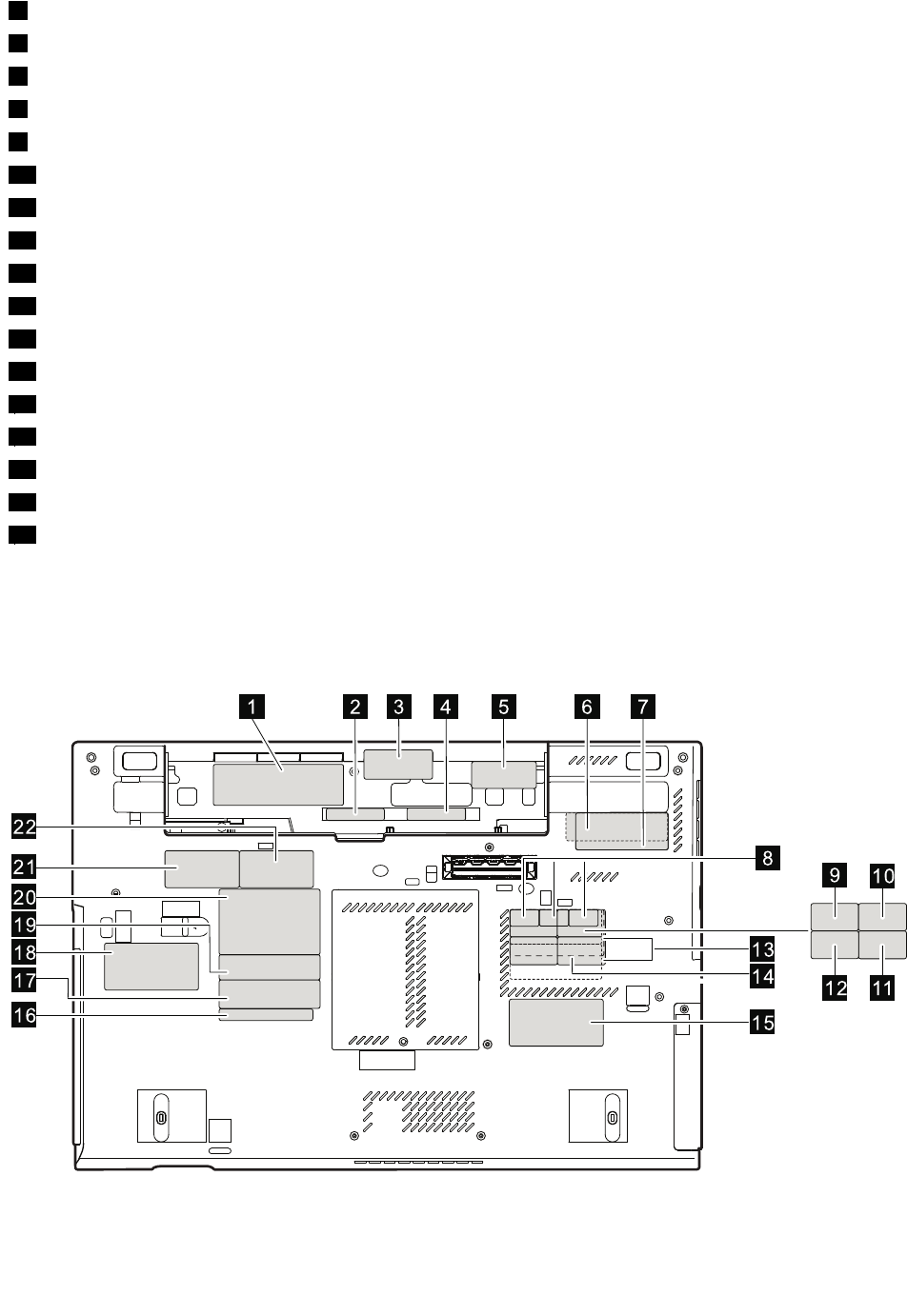
5WirelessWANMACaddresslabel
6ChinamobileIMEIlabel
7ChinatelecomIMEIlabel
8SIRMlabels(onlyforMalaysia)
9Wirelesscardlabel(onlyforBrazil)
10Anatellabel(onlyforBrazil)
11ModemAMOMlabel(onlyforBrazil)
12Bluetoothlabel(onlyforBrazil)
13Israellabel(50mmx19mm)
14NoMIClabel(onlyforTAAmoduleassembledinMexico)
15Vodafonelabel
16FCClabel
18Assettag
19Serialnumberlabel
20Productlabel
21ChinawirelessWANlabel
22Chinamodemlabel
Forsomemodels,youneedtoapplytwoFCClabels.Checktheoldbasecover;ifithastwoFCClabels,
applybothtothenewbasecover.
Forthelocationofeachlabel,referthefollowinggure:
1 2 3 4 5 6 7
8
14
13
15
16
18
20
21
22
19
17
910
1112
Chapter8.RemovingandreplacingaFRU109
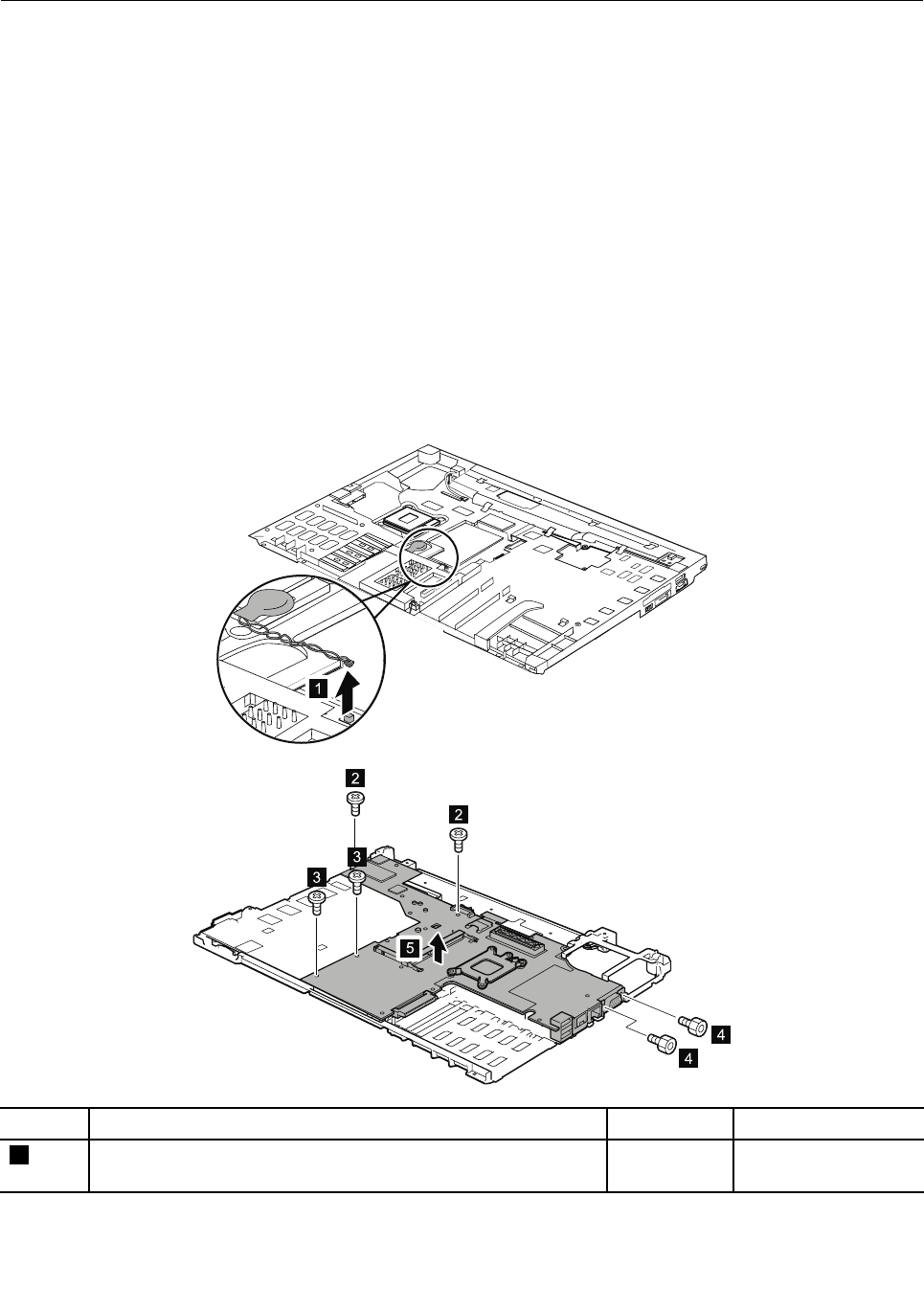
1200Magnesiumstructureframe
Foraccess,removetheseFRUsinorder:
•“1010Batterypack”onpage67
•“1020ExpressCardblankbezel”onpage68
•“1030SerialUltrabayEnhanceddeviceortravelbezel”onpage69
•“1040Harddiskdrive(HDD)andsolidstatedrive(SSD)”onpage70
•“1050DIMMslotcover”onpage73
•“1070PCIExpressMiniCardforwirelessWAN”onpage75
•“1080Keyboard”onpage77
•“1110PCIExpressMiniCardforwirelessLAN”onpage85
•“1120Keyboardbezelassembly,FPCcable,andBluethoothdaughtercard”onpage87
•“1150Speakerassembly”onpage95
•“1160LCDunit”onpage97
•“1170Fanassembly”onpage101
•“1180CPU”onpage105
•“1190BasecoverassemblyandDC-inconnectorcable”onpage106
Removalstepsofmagnesiumstructureframe
1
4
4
2
2
5
3
3
StepScrew(quantity)ColorTorque
2M2×5mm,wafer-head,nylon-coated(2)Black0.181Nm
(1.85kgf-cm)
110ThinkPadT420andT420iHardwareMaintenanceManual
3M2×8mm,wafer-head,nylon-coated(2)Black0.181Nm
(1.85kgf-cm)
4Hexstud,nylon-coated(2)Silver0.392Nm
(4.0kgf-cm)
Chapter8.RemovingandreplacingaFRU111

1210SystemboardandExpressCardslotassembly
Foraccess,removetheseFRUsinorder:
•“1010Batterypack”onpage67
•“1020ExpressCardblankbezel”onpage68
•“1030SerialUltrabayEnhanceddeviceortravelbezel”onpage69
•“1040Harddiskdrive(HDD)andsolidstatedrive(SSD)”onpage70
•“1050DIMMslotcover”onpage73
•“1070PCIExpressMiniCardforwirelessWAN”onpage75
•“1080Keyboard”onpage77
•“1110PCIExpressMiniCardforwirelessLAN”onpage85
•“1120Keyboardbezelassembly,FPCcable,andBluethoothdaughtercard”onpage87
•“1150Speakerassembly”onpage95
•“1160LCDunit”onpage97
•“1170Fanassembly”onpage101
•“1180CPU”onpage105
•“1190BasecoverassemblyandDC-inconnectorcable”onpage106
Importantnoticesforhandlingthesystemboard:
Whenhandlingthesystemboard,bearthefollowinginmind.
•Thesystemboardhasanaccelerometer,whichcanbebrokenbyapplyingseveralthousandsofG-forces.
Note:Droppingasystemboardfromaheightofaslittleas6inchessothatitfallsatonahardbenchcansubject
theaccelerometertoasmuchas6,000G'sofshock.
•Becarefulnottodropthesystemboardonabenchtopthathasahardsurface,suchasmetal,wood,orcomposite.
•Ifasystemboardisdropped,testitusingPC-DoctorforDOSifthesystemsupportsPC-DoctorforDOS,tomake
surethattheHDDActiveProtectionSystem™stillfunctions.
Note:IfthetestshowsthatHDDActiveProtectionSystemisnotfunctioning,besuretodocumentthedropina
rejectreport,andreplacethesystemboard.
•Avoidroughhandlingofanykind.
•Ateverypointintheprocess,besurenottodroporstackthesystemboard.
•Ifyouputasystemboarddown,besuretoputitonlyonapaddedsurfacesuchasanESDmatoracorrugated
conductivesurface.
IfthesystemsupportsPC-DoctorforDOS,afterreplacingthesystemboard,runPC-DoctorforDOStomakesurethat
HDDActiveProtectionSystemstillfunctions.Theprocedureisasfollows:
1.Placethecomputeronahorizontalsurface.
2.RunDiagnostics➙ThinkPadDevices➙HDDActiveProtectionT est.
Attention:Donotapplyphysicalshocktothecomputerwhilethetestisrunning.
RemovalstepsofsystemboardandExpressCardslotassembly
Thefollowingcomponentssolderedonthetopsideofthesystemboardareextremelysensitive.Whenyou
servicethesystemboard,avoidanykindofroughhandling.
aCPU
bAccelerometerchipfortheHDDActiveProtectionSystem
112ThinkPadT420andT420iHardwareMaintenanceManual
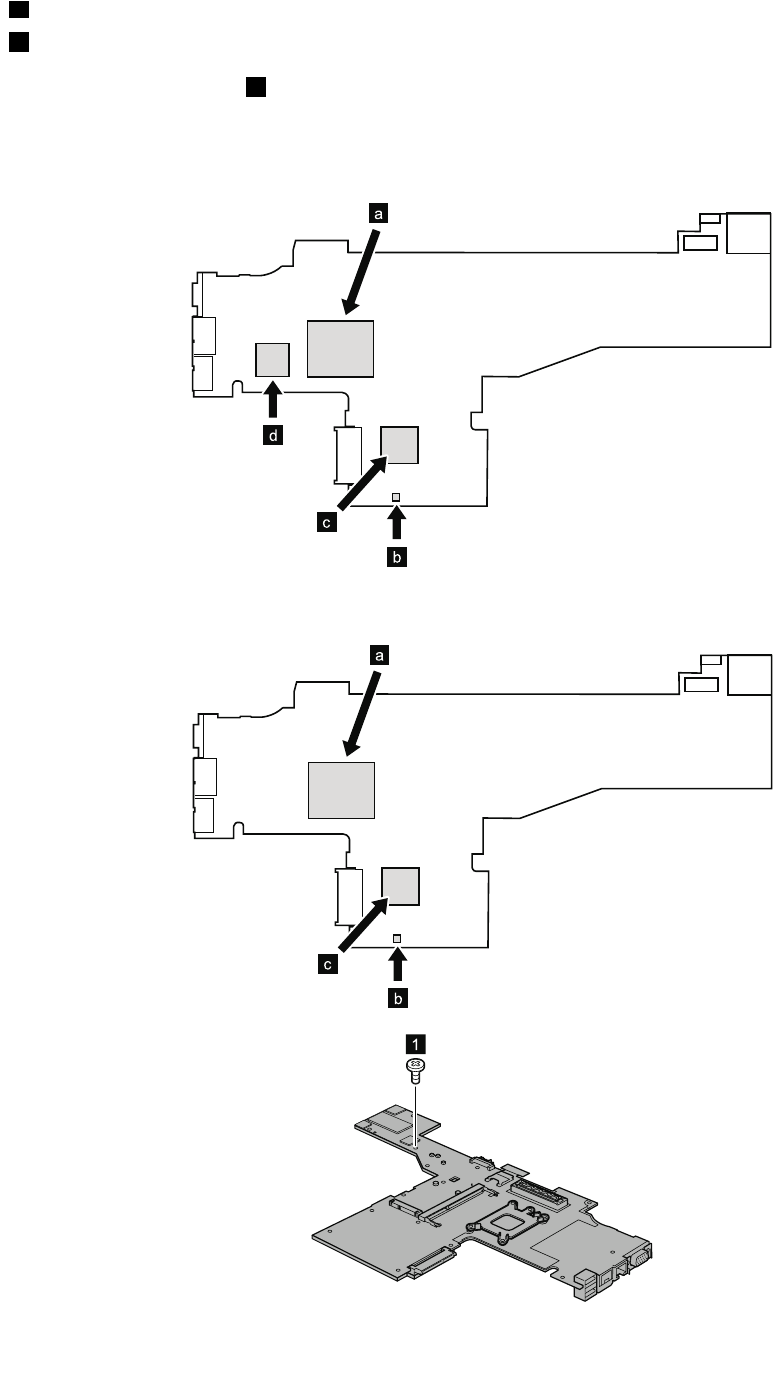
cPlatformControllerHub(PCH)
dGraphicProcessingUnit(GPU)(Discretegraphicschip)
Note:TheGPUdisonlyformodelswithswitchablegraphics.Modelswithintegratedgraphics
donothaveaGPUonthesystemboard.
ForSwitchableGraphicsmodels:
b
c
a
d
ForIntegratedGraphicsmodels:
b
c
a
1
Chapter8.RemovingandreplacingaFRU113
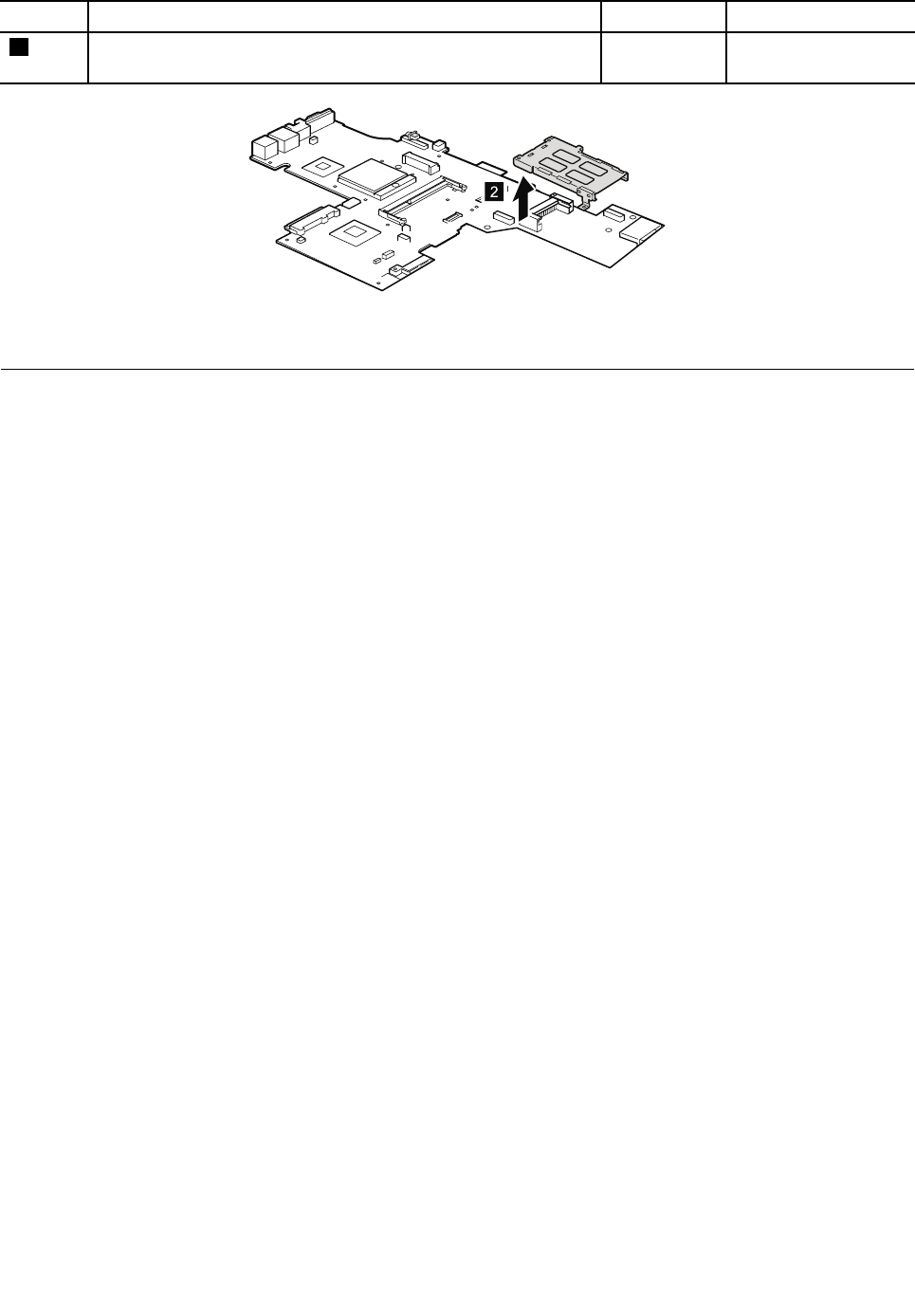
StepScrew(quantity)ColorTorque
1M2×3mm,wafer-head,nylon-coated(1)Black0.181Nm
(1.85kgf-cm)
2
Wheninstalling:Makesurethattheconnectorisattachedrmly.
1220mSATAsolidstatedrive
Foraccess,removetheseFRUsinorder:
•“1010Batterypack”onpage67
•“1050DIMMslotcover”onpage73
Attention:
•Donotdropthedriveorapplyanyphysicalshocktoit.Thedriveissensitivetophysicalshock.Improper
handlingcancausedamageandpermanentlossofdata.
•Beforeremovingthedrive,havetheusermakeabackupcopyofalltheinformationonitifpossible.
•Neverremovethedrivewhilethesystemisoperatingorisinsuspendmode.
114ThinkPadT420andT420iHardwareMaintenanceManual
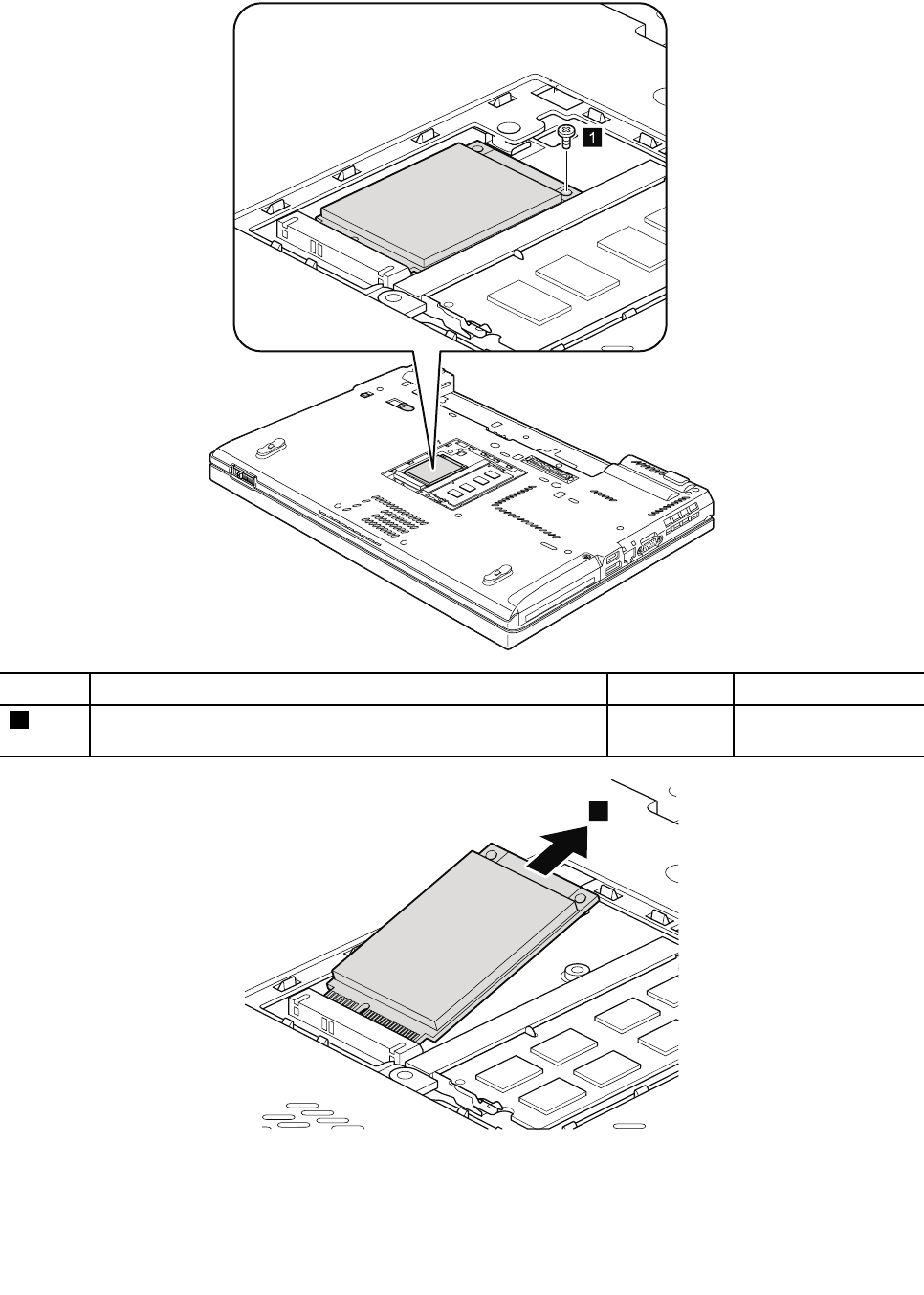
RemovalstepsofmSATAsolidstatedrive
1
StepScrew(quantity)ColorTorque
1M2×3mm,wafer-head,nylon-coated(1)Black0.181Nm
(1.85kgf-cm)
2
Chapter8.RemovingandreplacingaFRU115
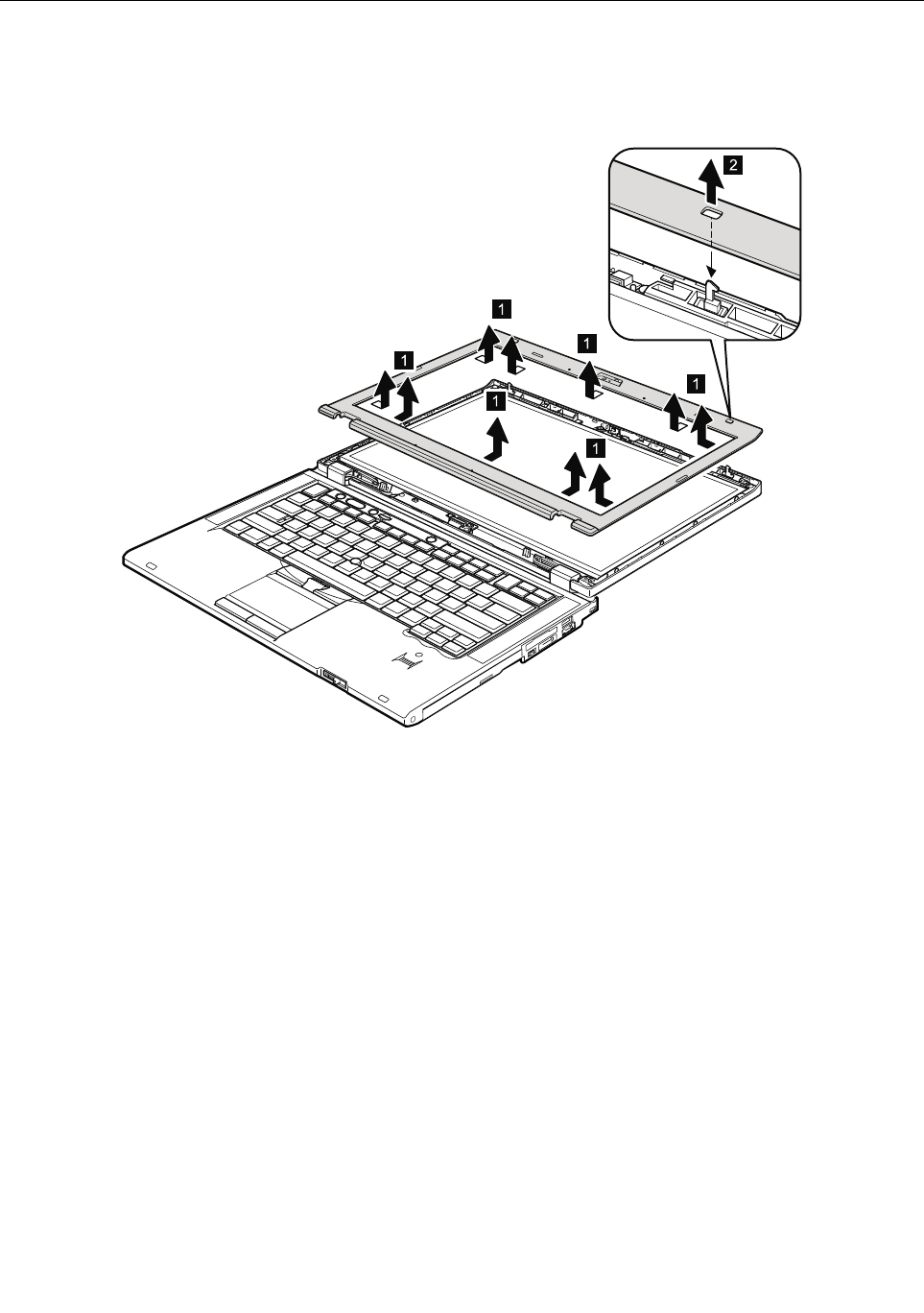
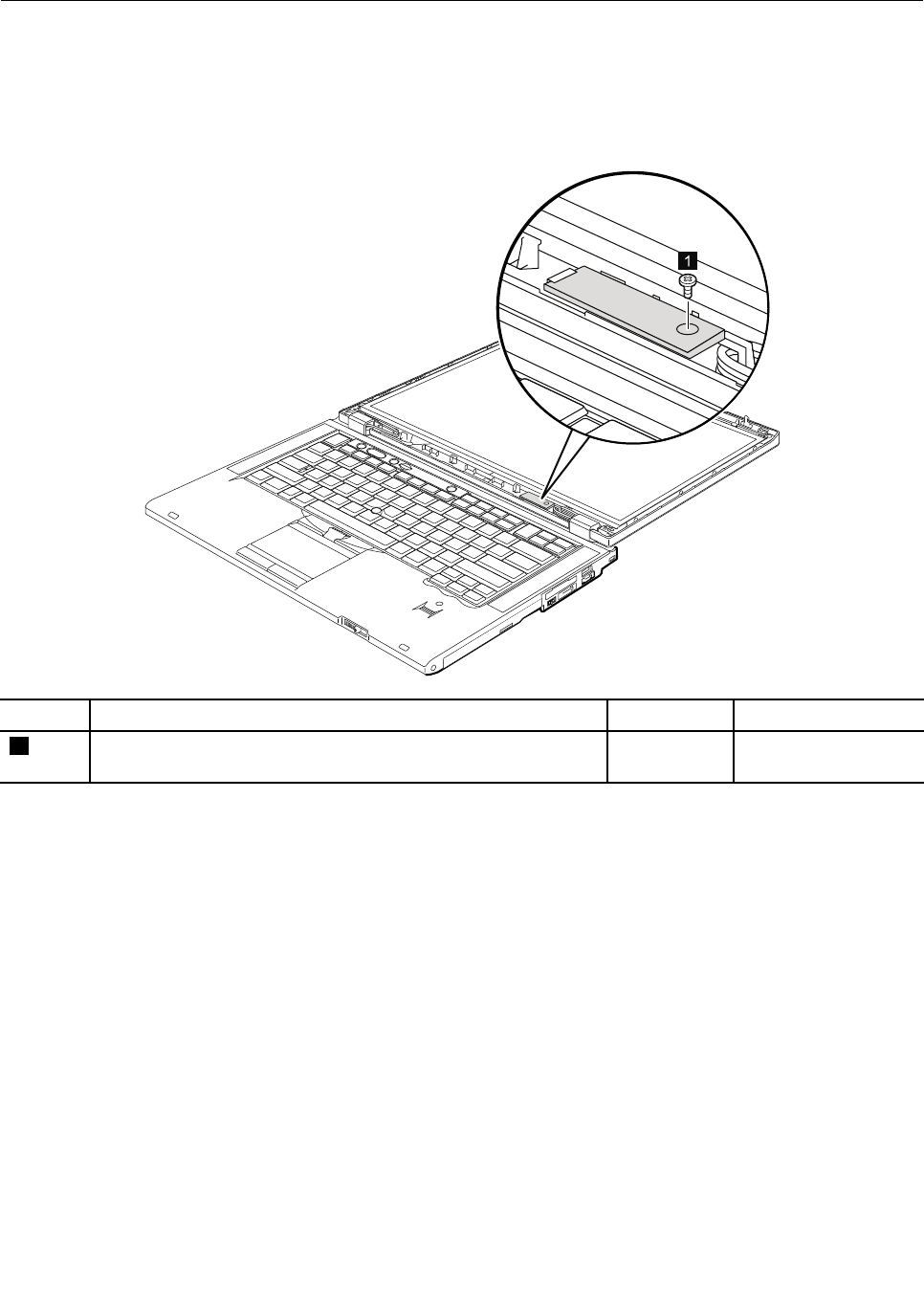
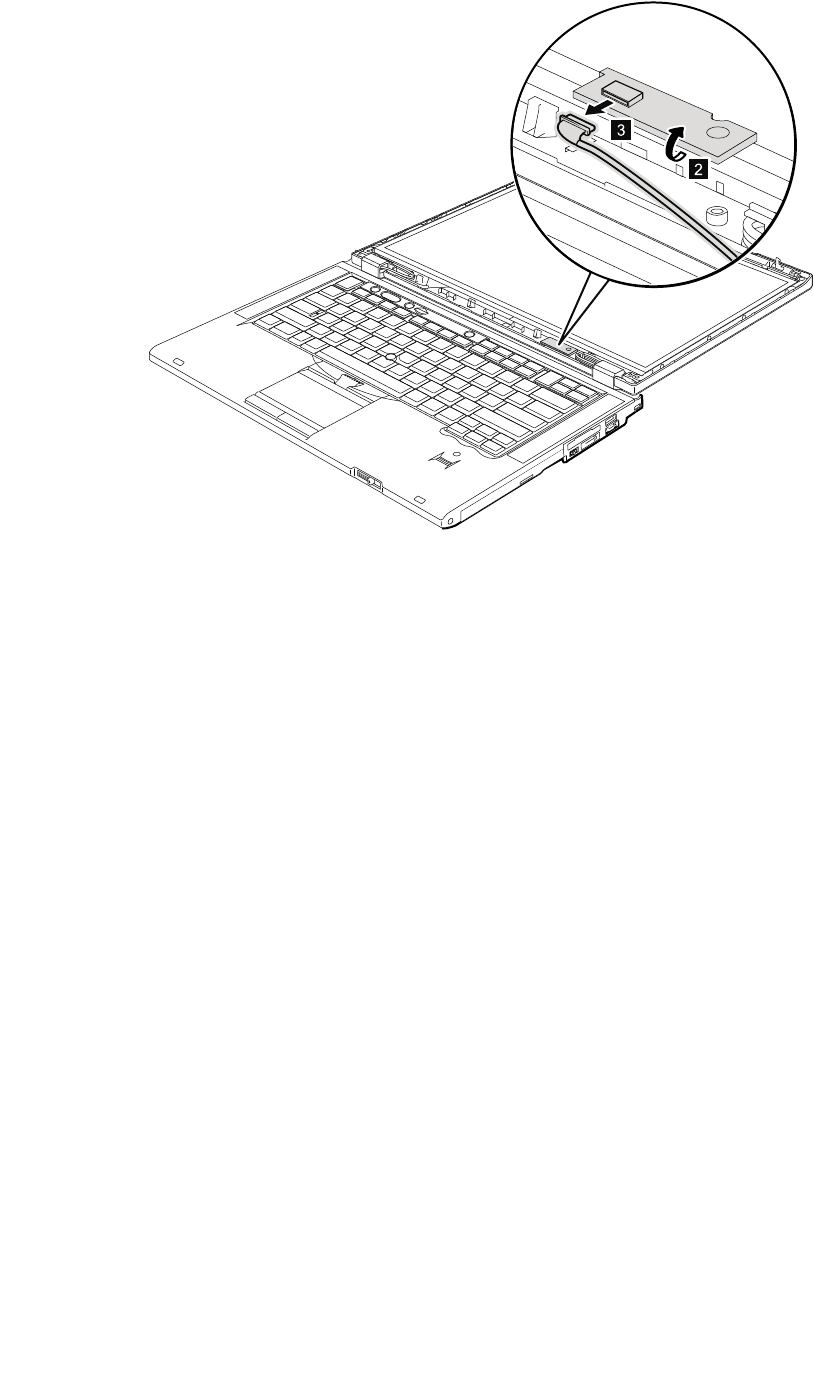
Wheninstalling:Makesurethattheconnectorisattachedrmly.
118ThinkPadT420andT420iHardwareMaintenanceManual
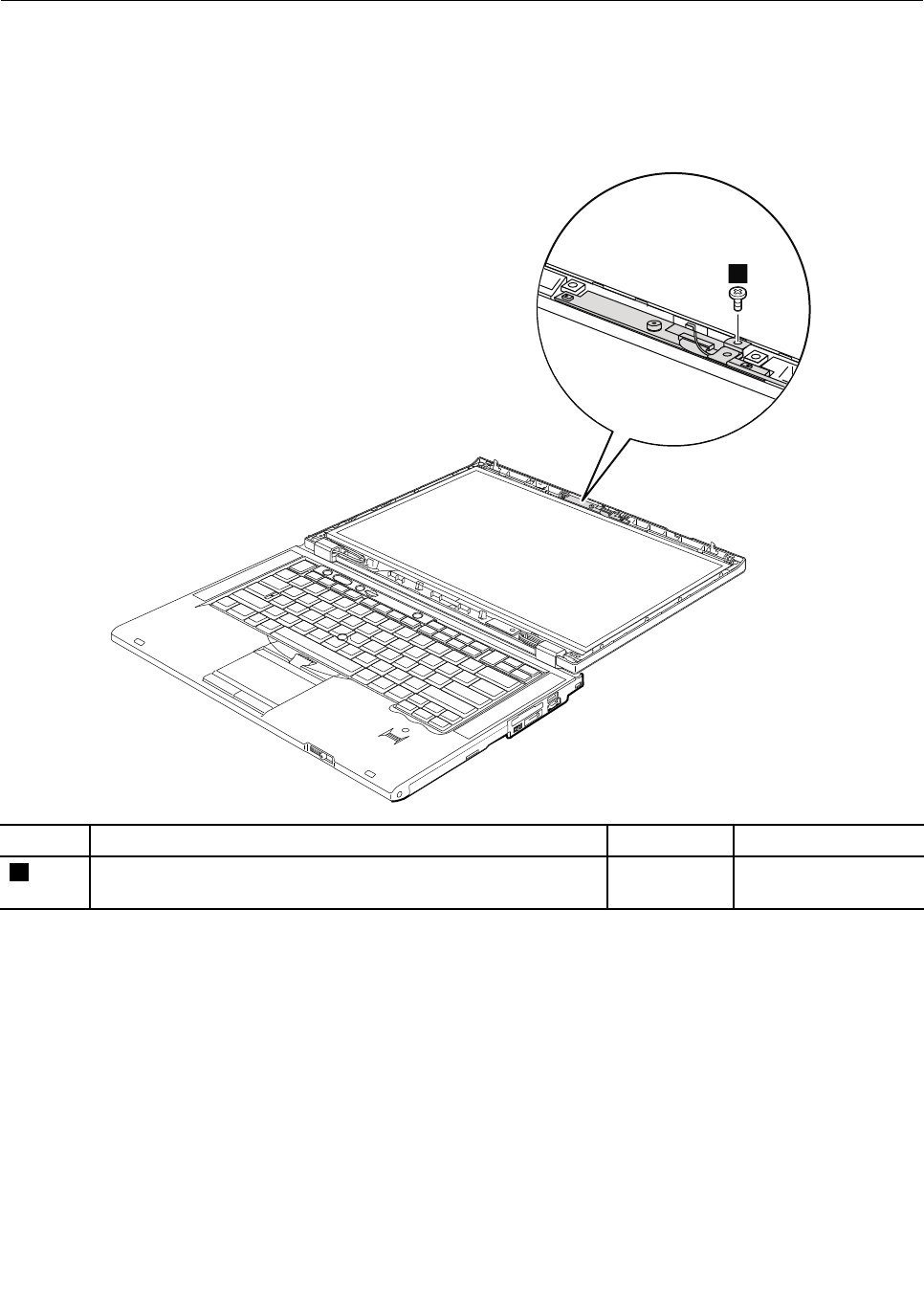
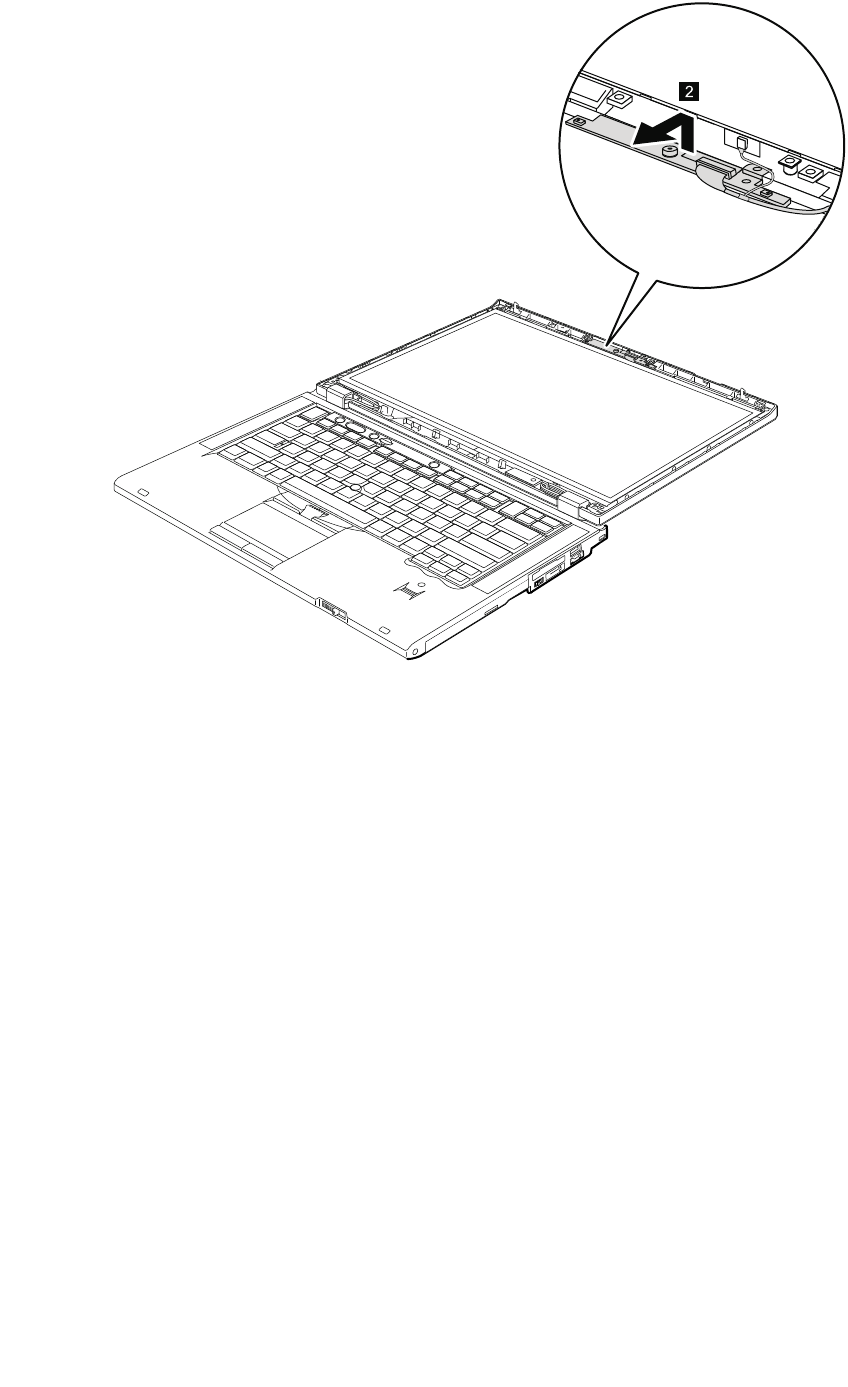
2
120ThinkPadT420andT420iHardwareMaintenanceManual
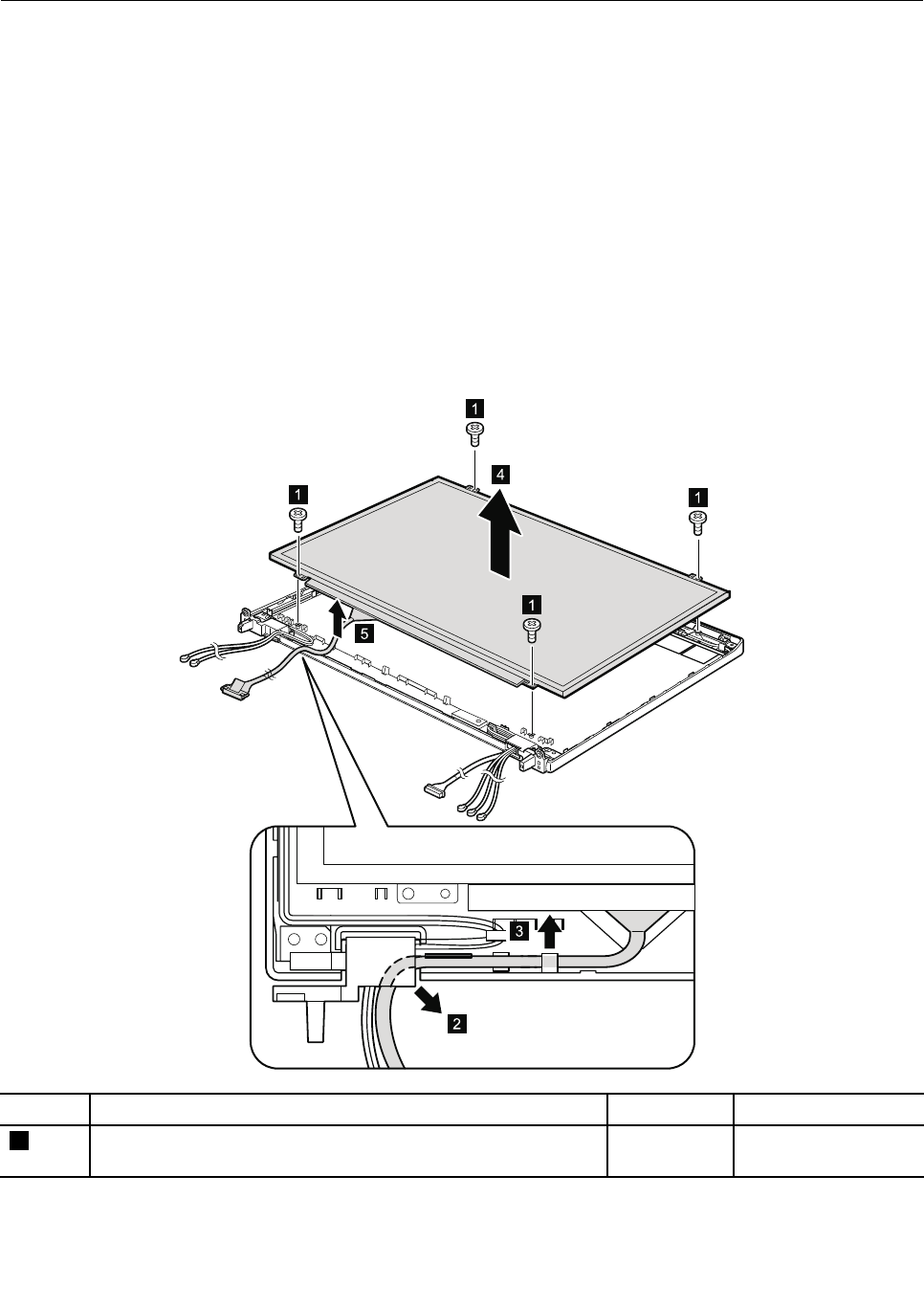
2040LCDpanelandLCDcable
Foraccess,removetheseFRUsinorder:
•“1010Batterypack”onpage67
•“1020ExpressCardblankbezel”onpage68
•“1050DIMMslotcover”onpage73
•“1070PCIExpressMiniCardforwirelessWAN”onpage75
•“1080Keyboard”onpage77
•“1110PCIExpressMiniCardforwirelessLAN”onpage85
•“1120Keyboardbezelassembly,FPCcable,andBluethoothdaughtercard”onpage87
•“1150Speakerassembly”onpage95
•“1160LCDunit”onpage97
•“2010LCDbezelassembly”onpage116
•“2020LEDboard”onpage117
•“2030Integratedcamera”onpage119
RemovalstepsofLCDpanelandLCDcable
2
3
4
5
1
1
1
1
StepScrew(quantity)ColorTorque
1M2×3mm,wafer-head,nylon-coated(4)Black0.181Nm
(1.85kgf-cm)
Wheninstalling:WhenattachingtheLCDpaneltothecover,gentlypresstheleftandrightedgescovered
withmetal.DOnotpressthesurfaceofthepanelorapplyanyexcessiveforcetothepanel.
Chapter8.RemovingandreplacingaFRU121
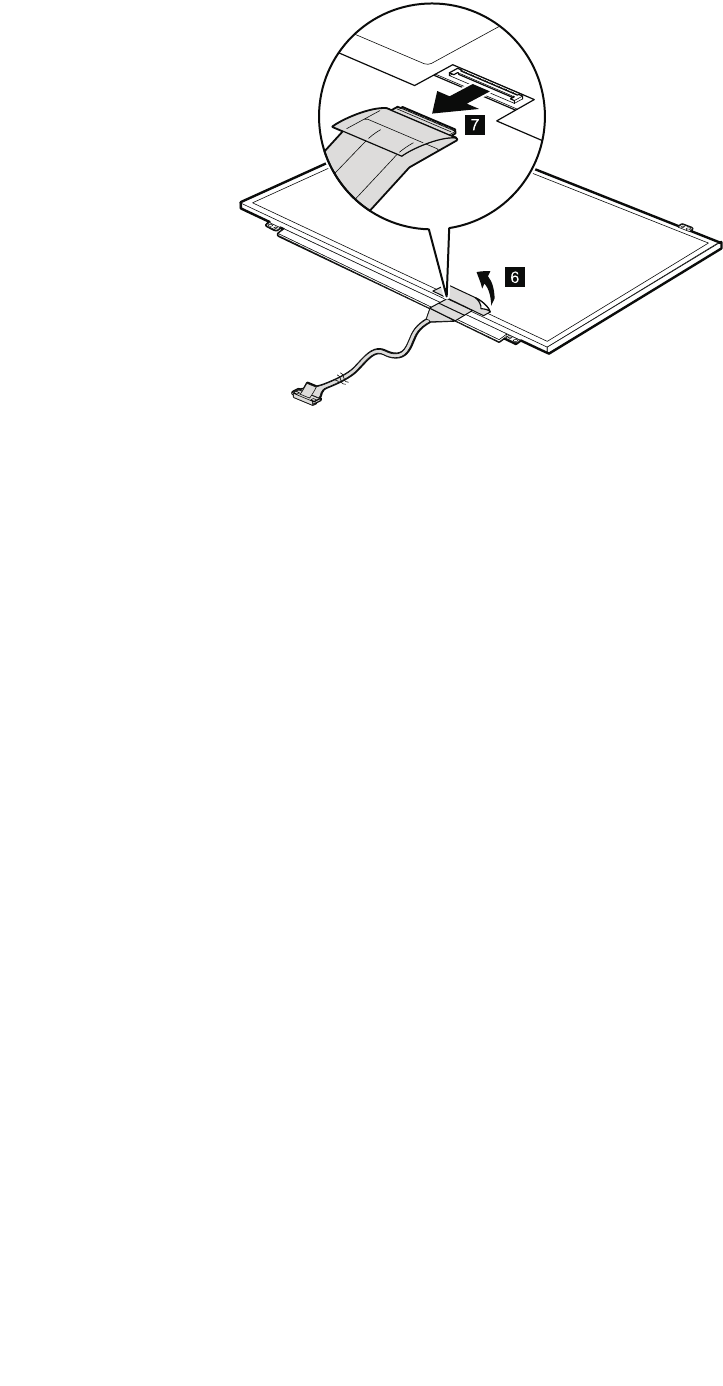
7
6
Wheninstalling:Makesurethattheconnectorisattachedrmly.
122ThinkPadT420andT420iHardwareMaintenanceManual
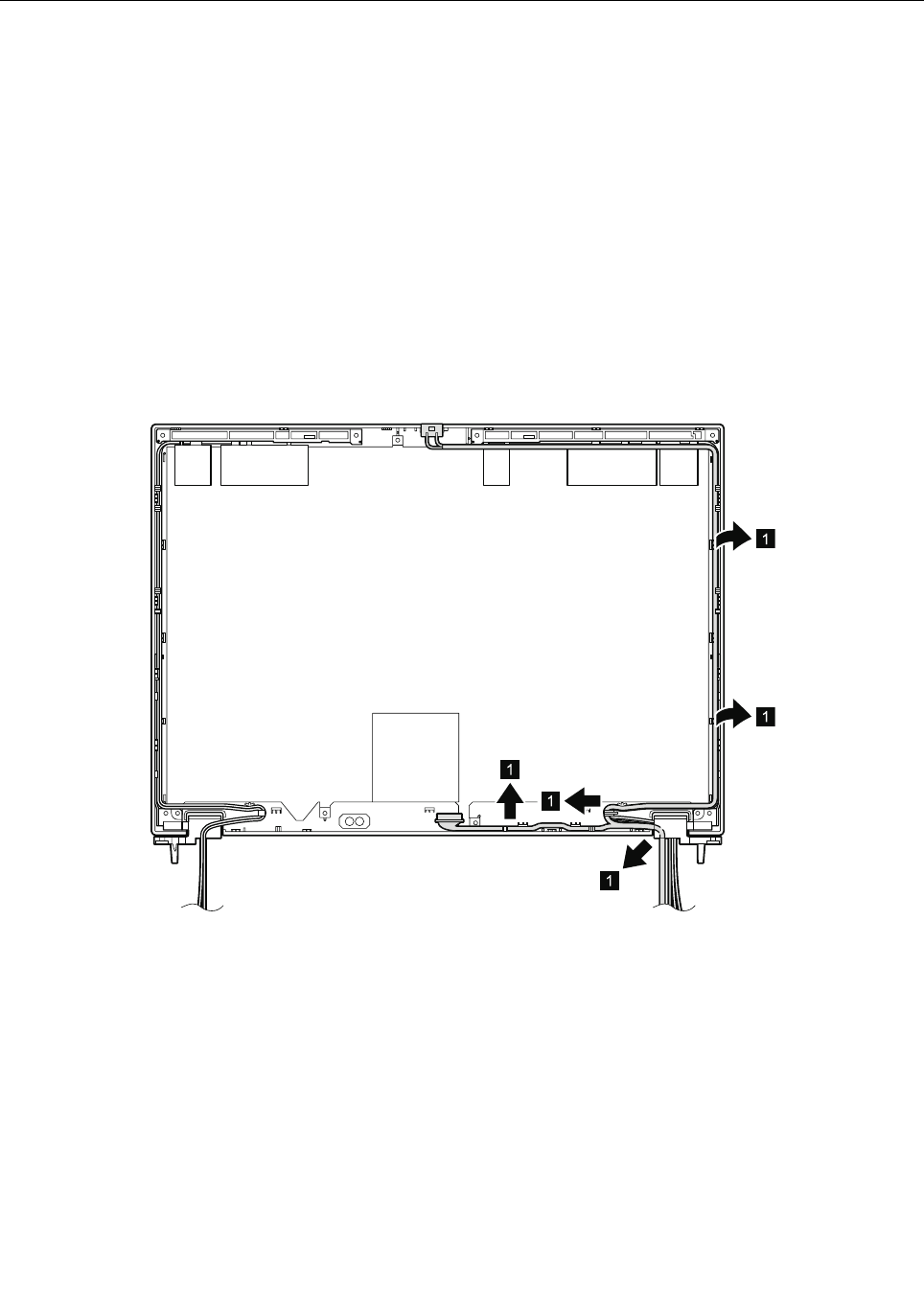
2050Cameracable
Foraccess,removetheseFRUsinorder:
•“1010Batterypack”onpage67
•“1020ExpressCardblankbezel”onpage68
•“1050DIMMslotcover”onpage73
•“1070PCIExpressMiniCardforwirelessWAN”onpage75
•“1080Keyboard”onpage77
•“1110PCIExpressMiniCardforwirelessLAN”onpage85
•“1120Keyboardbezelassembly,FPCcable,andBluethoothdaughtercard”onpage87
•“1150Speakerassembly”onpage95
•“1160LCDunit”onpage97
•“2010LCDbezelassembly”onpage116
•“2020LEDboard”onpage117
•“2030Integratedcamera”onpage119
•“2040LCDpanelandLCDcable”onpage121
Removalstepsofcameracable
1
1
1
1
1
Chapter8.RemovingandreplacingaFRU123
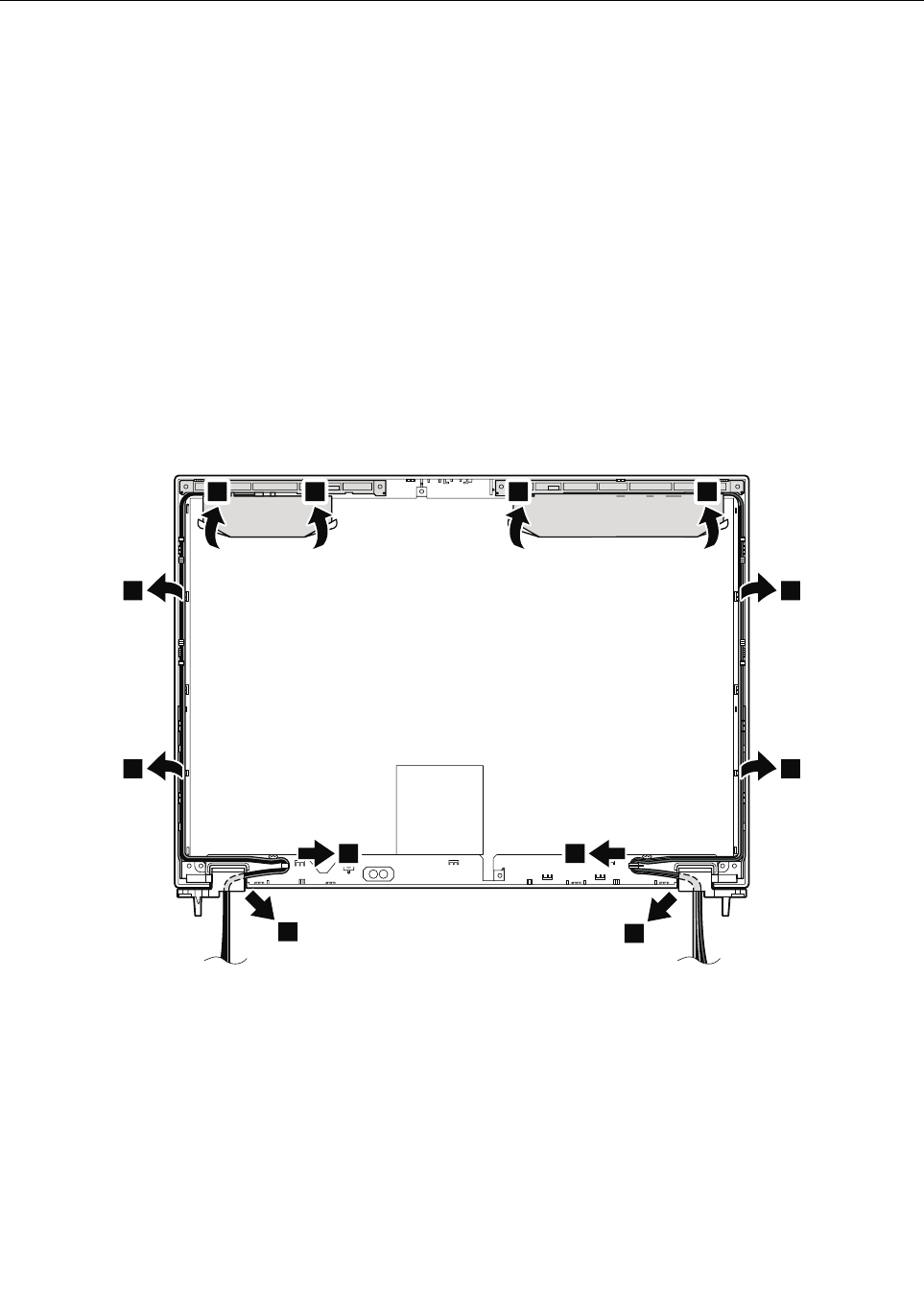
2060WirelessLANantennaassemblyorwirelessLAN/WANantenna
assembly
Foraccess,removetheseFRUsinorder:
•“1010Batterypack”onpage67
•“1020ExpressCardblankbezel”onpage68
•“1050DIMMslotcover”onpage73
•“1070PCIExpressMiniCardforwirelessWAN”onpage75
•“1080Keyboard”onpage77
•“1110PCIExpressMiniCardforwirelessLAN”onpage85
•“1120Keyboardbezelassembly,FPCcable,andBluethoothdaughtercard”onpage87
•“1150Speakerassembly”onpage95
•“1160LCDunit”onpage97
•“2010LCDbezelassembly”onpage116
•“2020LEDboard”onpage117
•“2030Integratedcamera”onpage119
•“2040LCDpanelandLCDcable”onpage121
•“2050Cameracable”onpage123
RemovalstepsofwirelessLANantennaassemblyorwirelessLAN/WANantennaassembly
1
1
1
1
1
1
2 2 2 2
1
1
Wheninstalling:Whenyouinstalltheantennakit,routethecablesasshowninthegureabove.Asyou
routethecables,makesurethattheyarenotsubjectedtoanytension.Tensioncouldcausethecablestobe
damagedbythecableguides,orawiretobebroken.
124ThinkPadT420andT420iHardwareMaintenanceManual
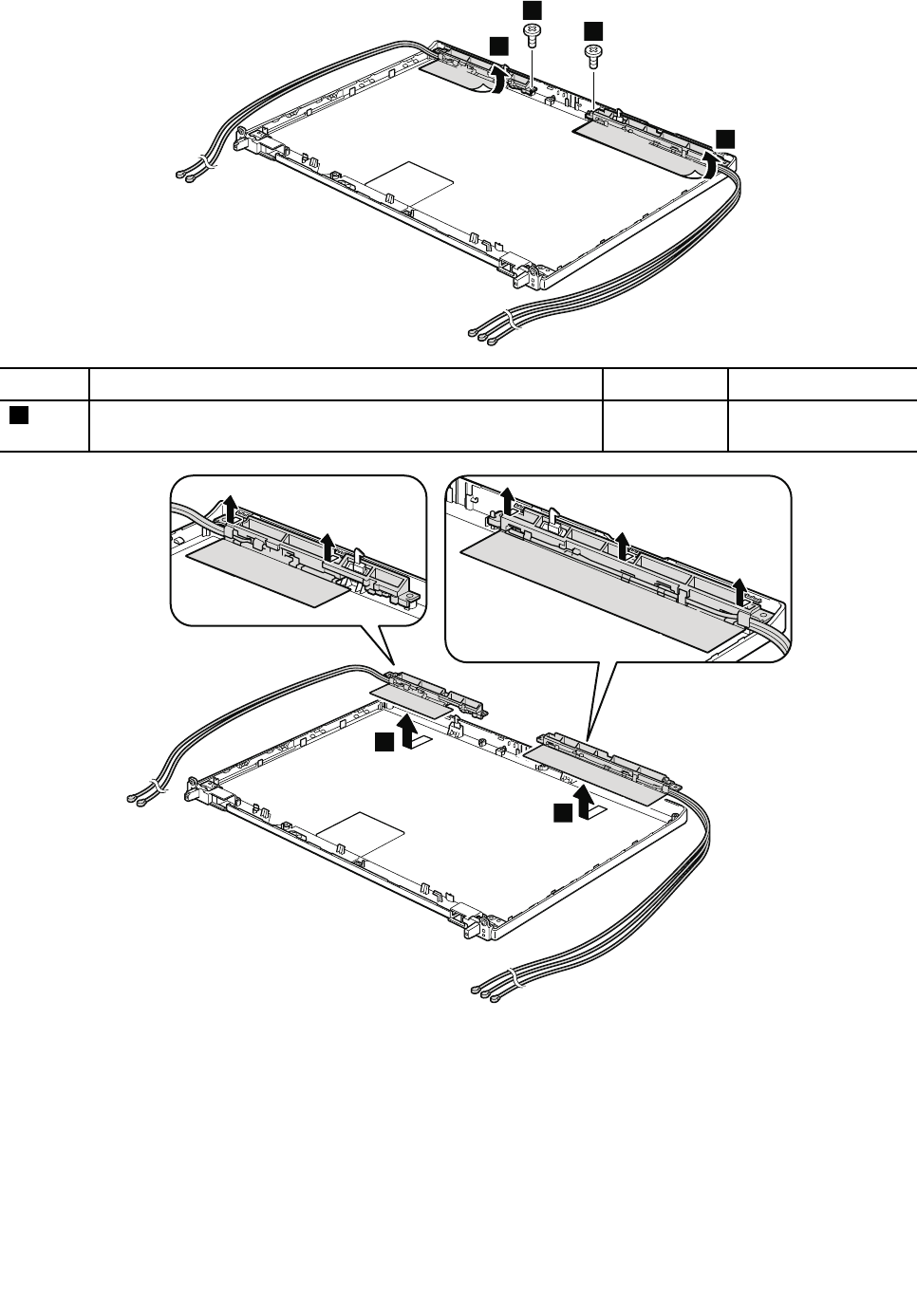
4
3
3
4
StepScrew(quantity)ColorTorque
3M2×3mm,at-head,nylon-coated(2)Black0.181Nm
(1.85kgf-cm)
5
5
Chapter8.RemovingandreplacingaFRU125
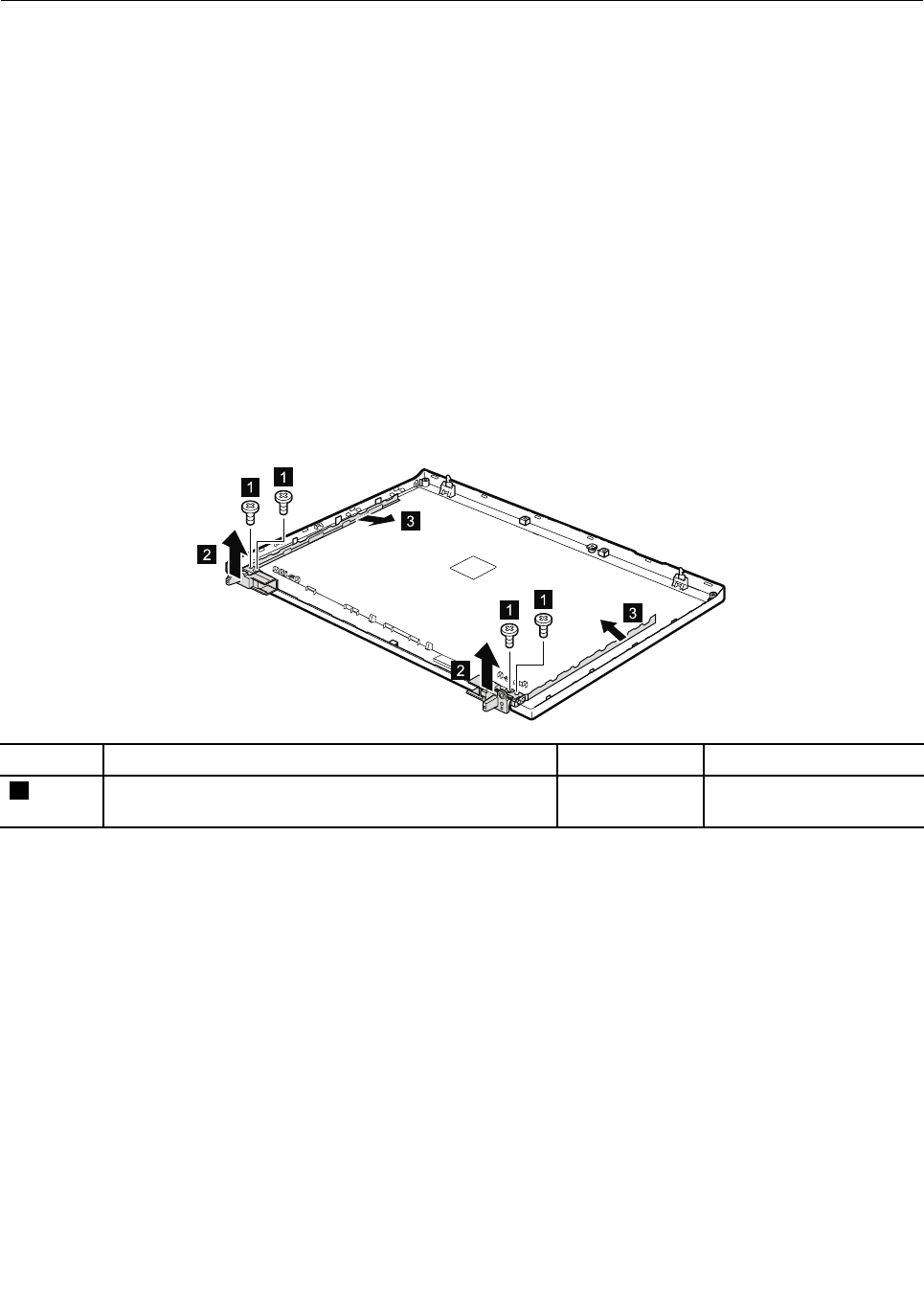
2070HingesandLCDrearcoverassembly
Foraccess,removetheseFRUsinorder:
•“1010Batterypack”onpage67
•“1020ExpressCardblankbezel”onpage68
•“1050DIMMslotcover”onpage73
•“1070PCIExpressMiniCardforwirelessWAN”onpage75
•“1080Keyboard”onpage77
•“1110PCIExpressMiniCardforwirelessLAN”onpage85
•“1120Keyboardbezelassembly,FPCcable,andBluethoothdaughtercard”onpage87
•“1150Speakerassembly”onpage95
•“1160LCDunit”onpage97
•“2010LCDbezelassembly”onpage116
•“2020LEDboard”onpage117
•“2030Integratedcamera”onpage119
•“2040LCDpanelandLCDcable”onpage121
•“2050Cameracable”onpage123
•“2060WirelessLANantennaassemblyorwirelessLAN/WANantennaassembly”onpage124
RemovalstepsofhingesandLCDrearcoverassembly
3
2
11
11
2
3
StepScrew(quantity)ColorTorque
1M2.5×4mm,wafer-head,nylon-coated(4)Black0.392Nm
(4.0kgf-cm)
Wheninstalling:Attachthehingesasshowninthefollowinggure.
126ThinkPadT420andT420iHardwareMaintenanceManual
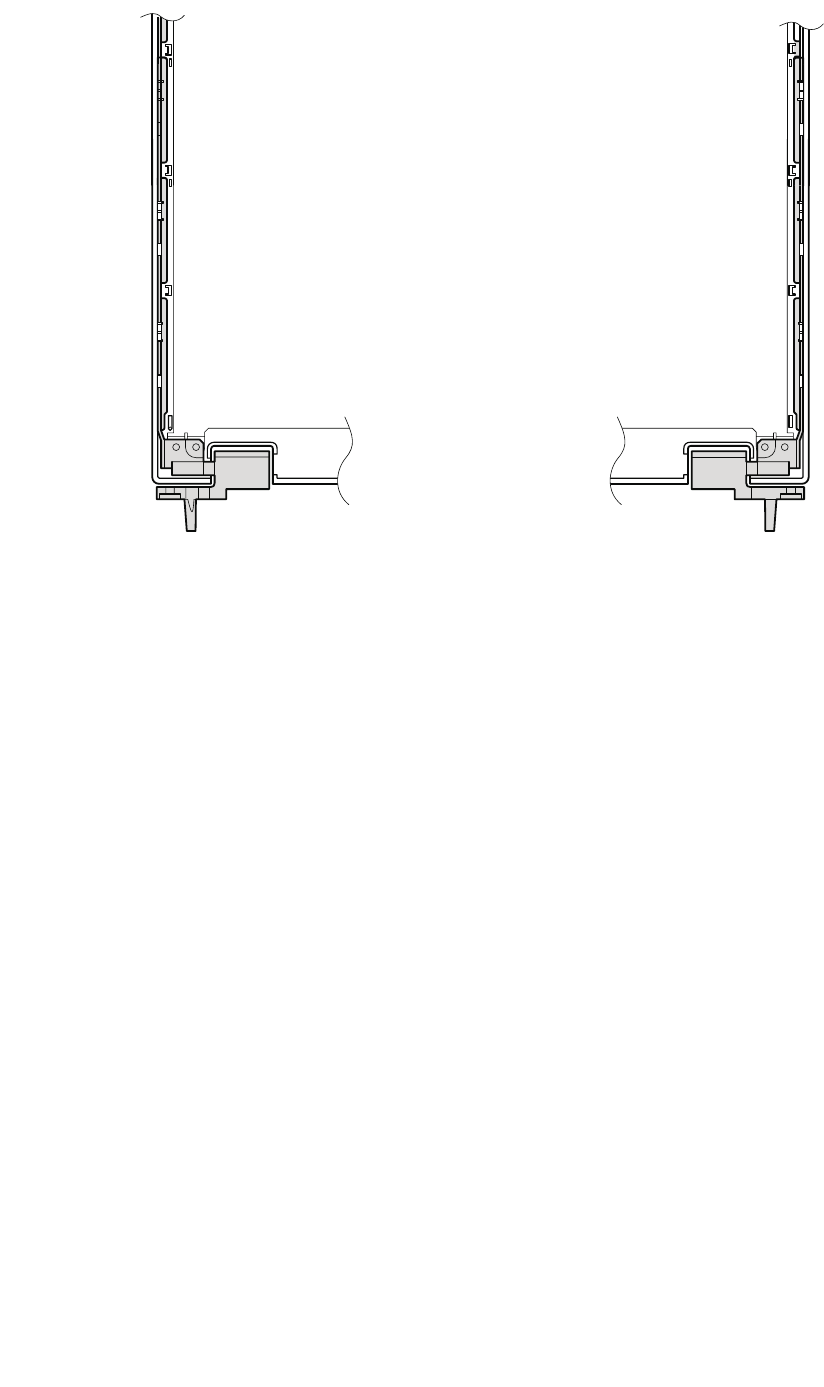
Chapter8.RemovingandreplacingaFRU127

128ThinkPadT420andT420iHardwareMaintenanceManual
Chapter9.Locations
ThischapterpresentsthelocationsofThinkPadT420andT420ihardwarecomponents.
Frontview
1Integratedcamera(forsomemodels)
2ThinkLight
3Built-inmicrophone
4Built-inspeakers
5Securitykeyhole
6Universalserialbus(USB)/eSATAcomboconnector
7USBconnector
8MediaCardReaderslot
9ExpressCardslot
10SerialUltrabayEnhanceddriveortravelbezel
11Comboaudiojack
12Fingerprintreader
13Touchpadbuttons
14Touchpad
15TrackPointbuttons
16TrackPointpointingstick
17UltraNav
18Volumecontrolbuttons
19ThinkVantagebutton
20Powerswitch
21Statusindicators
Note:Forthedescriptionofeachindicator,seeChapter5“Statusindicators”onpage53.
©CopyrightLenovo2012129
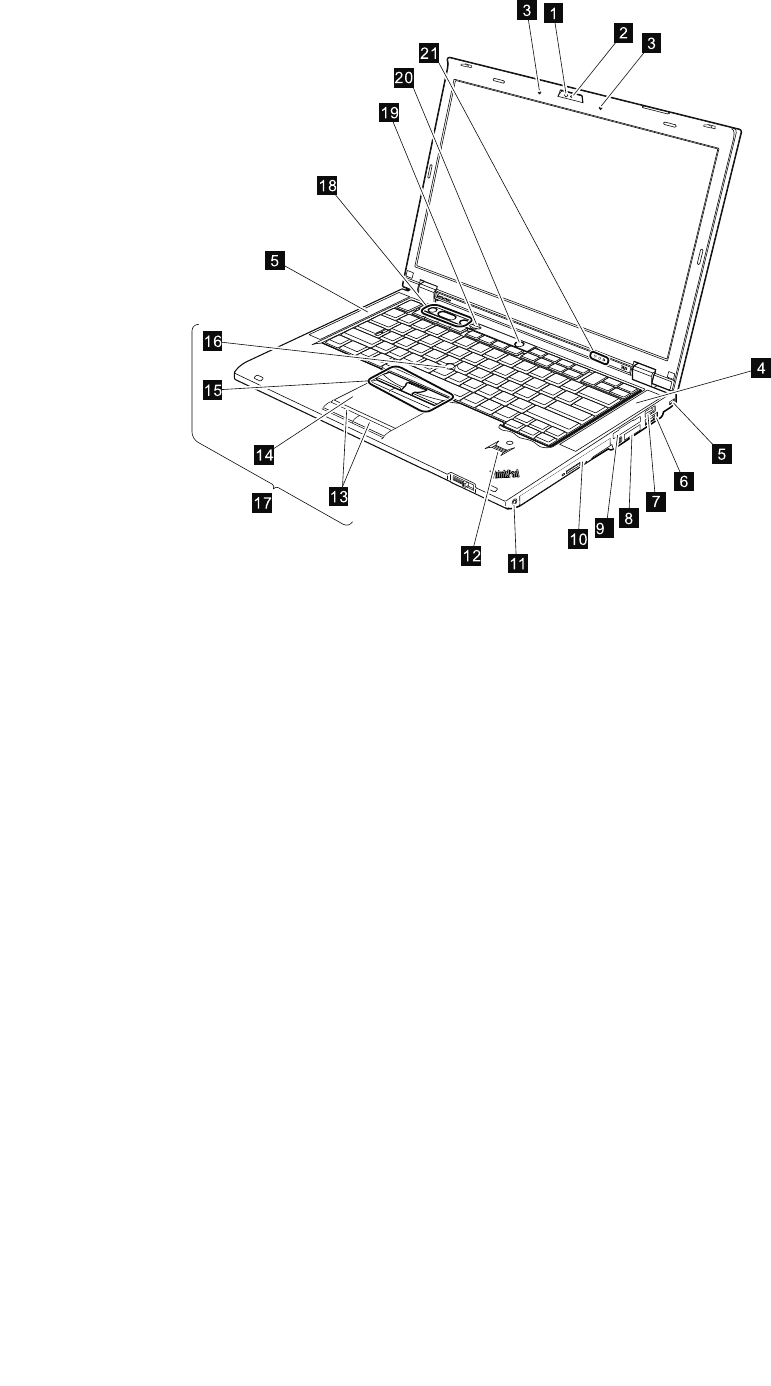
1
3
23
20
4
5
8
6
5
12
10
11
9
14
16
13
17
15
18
19
21
7
130ThinkPadT420andT420iHardwareMaintenanceManual
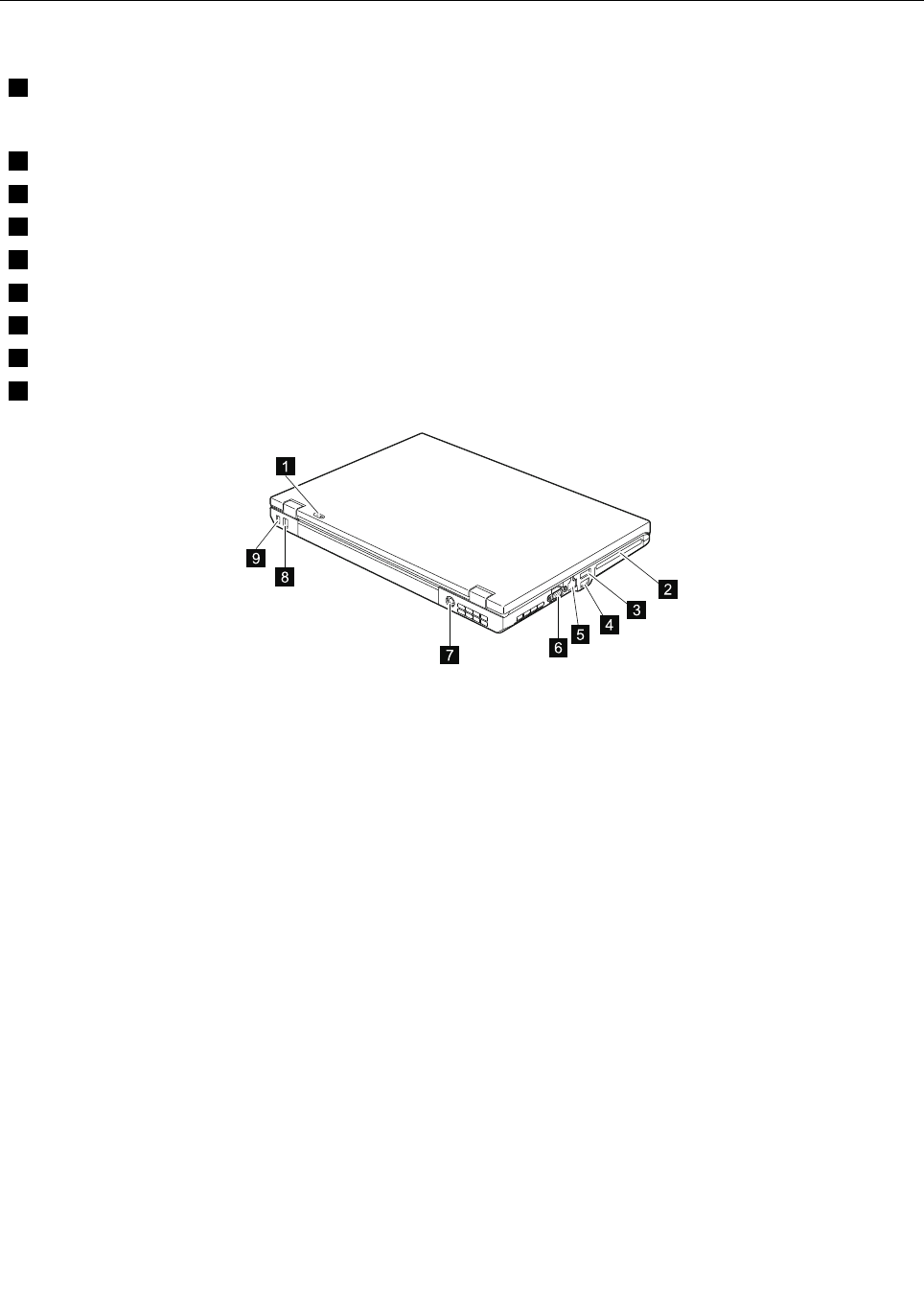
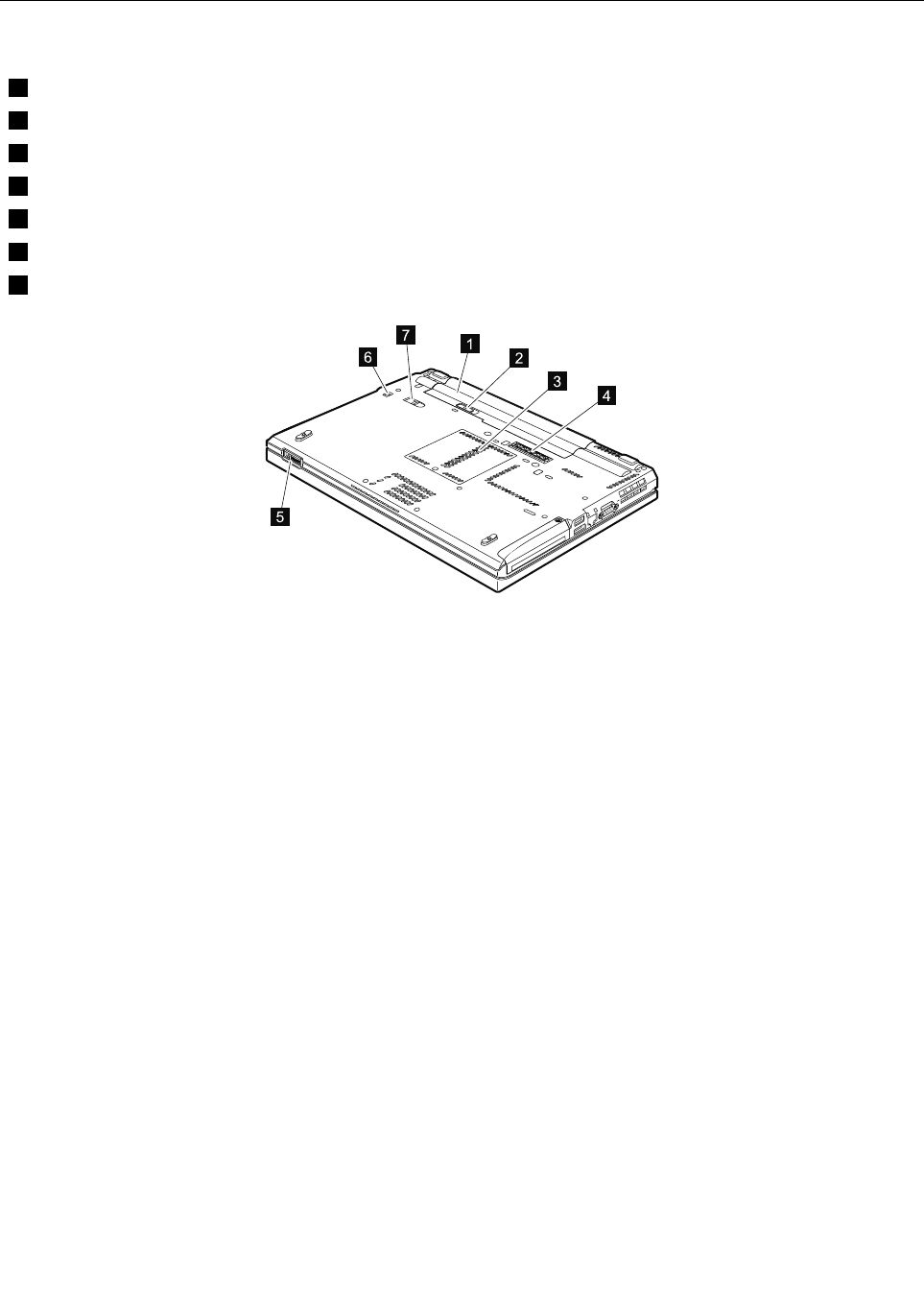
Bottomview
1Batterypack
2Batterypacklatch
3DIMMslot
4Dockingconnector
5LCDcoverlatch
6SerialUltrabayEnhancedlocklatch
7SerialUltrabayEnhancedejectlatch
6
7
5
1
2
3
4
132ThinkPadT420andT420iHardwareMaintenanceManual

Chapter10.Partslist
Thischaptercontainsfollowinglistsoftheserviceparts.
•“Overall”onpage134
•“LCDFRUs”onpage155
•“Keyboard”onpage160
•“Miscellaneousparts”onpage162
•“Informationaboutacpoweradapters”onpage164
•“Powercords”onpage165
•“Recoverydiscs”onpage166
•“Commonservicetools”onpage173
Notes:
•EachFRUisavailableforalltypesormodels,unlessspecictypesormodelsarespecied.
•FRUwithspecicmodelslistedanddescribedasxxU(whereUisanexampleofacountrydesignator)shouldbe
usedforallmodelsendinginU.
•FRUwithspecicmodelslistedanddescribedas3Dx(where3Disanexampleofauniqueconguration)shouldbe
usedforallofthesemodels,unlessspeciccountryorregiondesignatorisspecied.
•ACRU(customerreplaceableunit)isidentiedbyasingleasterisk(*)ortwoasterisks(**)intheCRUIDcolumn.An
NintheCRUIDcolumnmeansthatthepartisnotaCRU.Asingleasterisk(*)meansthatthepartisaSelf-service
CRU;twoasterisks(**)meansthatthepartisanOptional-serviceCRU.
ExternalCRUstatementtocustomers:
Someproblemswithyourproductcanberesolvedwithareplacementpartyoucaninstallyourself,called
a“CustomerReplaceableUnit”or“CRU.”SomeCRUsaredesignatedasSelf-serviceCRUsandothersare
designatedasOptional-serviceCRUs.InstallationofSelf-serviceCRUsisyourresponsibility;youmayrequest
thatLenovoinstallsanOptional-serviceCRUaccordingtothewarrantyserviceforyourproduct.Whereyouare
installingtheCRU,LenovowillshiptheCRUtoyou.CRUinformationandreplacementinstructionsareshipped
withyourproductandareavailablefromLenovoatanytimeuponrequest.YoumayndalistofCRUsinthe
publicationsthatshipwithyourproductorathttp://www.lenovo.com/CRUs.Youmayberequiredtoreturnthe
defectivepartthatisreplacedbytheCRU.Whenreturnisrequired:(1)returninstructions,aprepaidshippinglabel,
andacontainerwillbeincludedwiththereplacementCRU;and(2)youmaybechargedforthereplacementCRUif
Lenovodoesnotreceivethedefectivepartwithinthirty(30)daysofyourreceiptofthereplacementCRU.Seeyour
LenovoLimitedWarrantydocumentationforfulldetails.
ThinkPadNotebookscontainthefollowingtypesofCRUs:
Self-serviceCRUs:TheseCRUsunplugorareheldbynomorethantwoscrews.Examplesofthesetypes
ofCRUsincludetheacpoweradapter,powercord,battery,andharddiskdrive.OtherSelf-serviceCRUs
dependingonproductdesignmayincludethememorymodule,wirelesscard,keyboard,andpalmrestwith
ngerprintreaderandtouchpad.
Optional-serviceCRUs:TheseCRUsareisolatedpartswithinthecomputerthatareconcealedbyanaccess
panelthatistypicallysecuredbymorethantwoscrews.Oncetheaccesspanelisremoved,thespecic
CRUisvisible.
•FRUsmarkedwithOPareavailableasoptions.
©CopyrightLenovo2012133
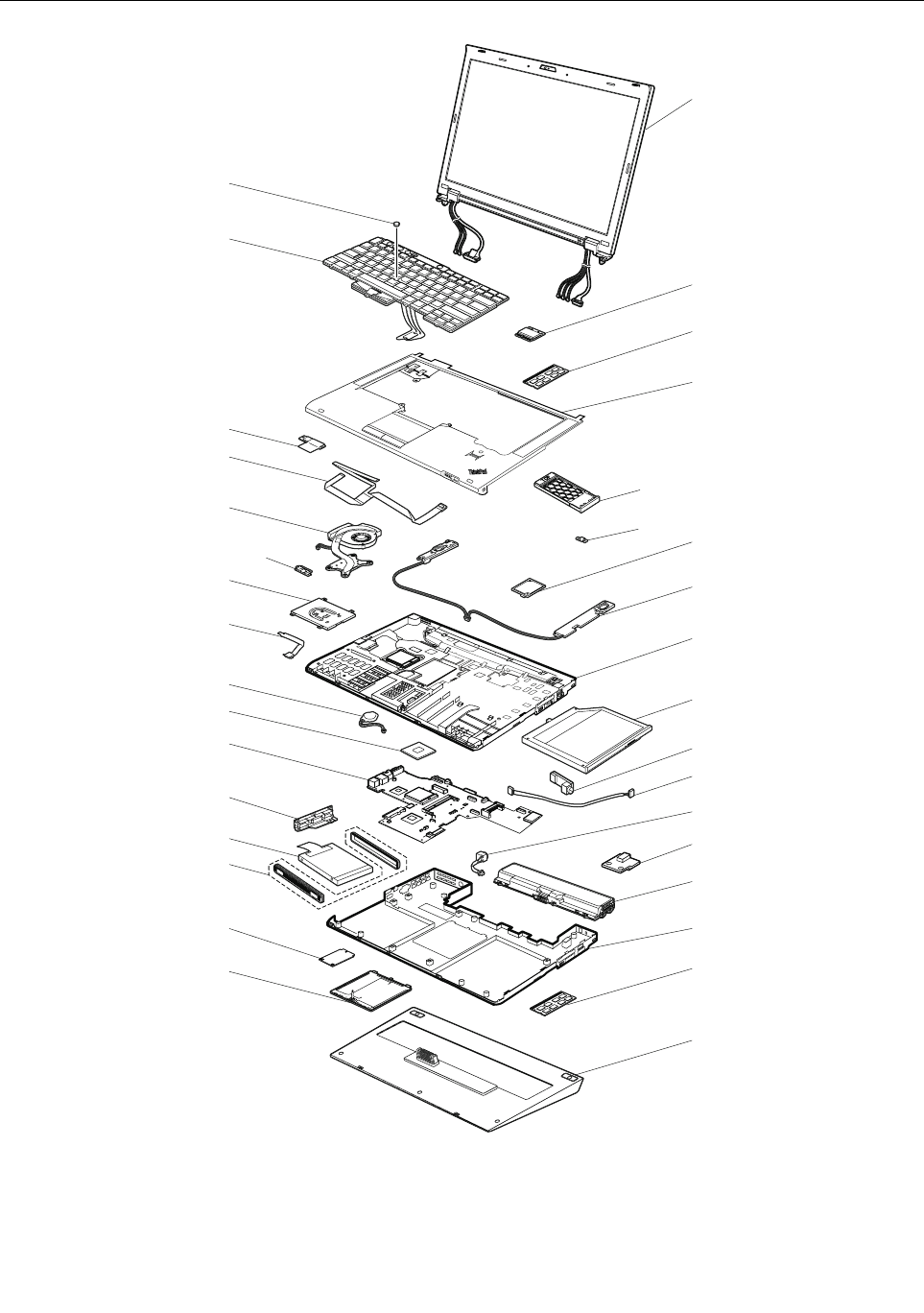
Overall
1
2
3
4
5
6
7
8
9
10
11
12
13
14
15
3
19
18
20
21
22
23
24
25
26
27
28
29
30
17
16
c
a
b
134ThinkPadT420andT420iHardwareMaintenanceManual

Table9.Partslist—Overall
No.FRU(Overall)FRUno.CRUID
a-cSee“Miscellaneousparts”onpage162.
1LCDunit(see“LCDFRUs”onpage155.)
2ThinkPadb/g/nWireless(1x1BGN)
•4177-CTO,25x,26x,27x,28x,29x,2Ax,2Bx,2Cx,2Dx,2Ex,2Fx,2Gx,2Kx,
2Lx,2Mx,2Xx,2Yx,36x,GFx,GKx,GLx,GMx,Q7x,QDx,QQx,QRx,QSx,
R4x,RDx,RFx,RNx,RPx
•4178-CTO,53x,6Bx,6Cx,6Dx,6Ex,9Fx,9Gx,9Hx,9Jx,9Kx,9Lx,9Mx,9Nx,
9Sx,9Tx,9Ux,9Vx,9Wx,9Xx,9Yx,AGx,AHx,AMx,AQx,ARx,AZx,B2x,B3x,
B4x,B5x,B6x,BDx,BEx,BFx,BHx,BJx,BMx,BNx,CCx,CDx,CRx,CSx
•4179-CTO,G2x,G3x,G4x,G5x,G6x,G7x,G8x,G9x,GGx,GHx,GJx,GMx,
GNx,GPx,GSx,GTx,GUx,GXx
•4180-CTO,LEx,LFx,LGx,LHx,LJx,LKx,LNx,LPx,LRx,LSx,LTx,MAx,PDx,
PEx
•4236-CTO,N6x,N7x,N8x,N9x,NCx,NKx,NLx,P4x,PBx,PPx,PQx,QDx,
QJx,QKx,QLx
•4237-CTO
•4238-CTO
60Y3247
60Y3249
**
2Intel®Centrino®Wireless-N1000
•4177-CTO,2Qx,2Rx,2Sx,2Tx,2Ux,2Vx,2Wx,32x,33x,34x,QGx,QJx,QKx,
QLx,QMx,QPx,QTx,QVx,QWx,QXx,QYx,QZx,R2x,R3x,R5x,R6x,R9x,
RBx,RCx,RGx,RHx,RJx,RQx,RRx,RSx,RTx,RUx,RVx,RYx,RZx
•4178-CTO,5Jx,66x,6Mx,6Nx,6Tx,82x,83x,84x,A5x,A6x,A7x,AAx,ACx,
ADx,AEx,AFx,AJx,AKx,AUx,AVx,B7x,B8x,B9x,BAx,BBx,BCx,BKx,
BPx,BQx,BRx,BUx,BVx,BWx,BXx,C2x,C9x,CEx,CFx,CGx,CHx,CJx,
CKx,CLx,CMx,CNx,CPx,CQx,CUx,CXx,D5x,D6x,DHx,DRx,DSx,DTx,
DUx,DVx,DWx,DXx,DYx,DZx,E2x
•4179-CTO,GCx,GDx,GEx,GVx,GWx
•4180-CTO,J4x,MTx,MUx,MVx,MWx,MXx,N3x,N4x,N5x,PJx,PKx,PLx,
PMx,PNx,PPx,PQx,Q6x,Q7x,Q8x,Q9x
•4236-CTO,NXx,NYx,P7x,P8x,PCx,PDx,PEx,PJx
•4237-CTO
•4238-CTO
60Y3241**
2IntelCentrinoAdvanced-N6205(2x2AGN)
•4177-CTO,22x,23x,24x,2Nx,2Px,35x,Q2x,Q4x,Q5x,QHx,QNx,R8x,
RAx,RKx,RLx,RMx,RWx,RXx
•4178-CTO,52x,54x,55x,56x,57x,58x,59x,5Ax,5Bx,5Cx,5Dx,5Ex,5Fx,
5Gx,5Hx,5Kx,5Lx,5Mx,5Nx,5Px,5Qx,5Rx,5Sx,5Tx,5Ux,5Vx,5Wx,5Xx,
5Yx,5Zx,68x,69x,6Ax,6Fx,6Gx,6Hx,6Jx,6Kx,6Lx,6Px,6Qx,6Rx,6Sx,
6Ux,6Vx,6Wx,6Xx,6Yx,6Zx,92x,93x,94x,95x,96x,97x,98x,9Dx,9Ex,
9Qx,9Rx,9Zx,A2x,A3x,A4x,A8x,A9x,ABx,ALx,ANx,APx,ASx,ATx,AWx,
AXx,AYx,BGx,BSx,BTx,BYx,BZx,C3x,C4x,C5x,C6x,C7x,C8x,CAx,CVx,
CWx,CYx,CZx,D2x,D3x,D4x,D7x,D8x,D9x,DAx,DBx,DCx,DEx,DFx,
DGx,DJx,DKx,DQx
•4179-CTO,GBx,GQx,GRx
•4180-CTO,62x,63x,64x,65x,J2x,J3x,K2x,K3x,K4x,K5x,K6x,K7x,K8x,
K9x,KAx,KBx,KCx,KDx,KEx,KFx,KHx,KJx,KKx,KLx,KMx,KNx,KPx,
KQx,KRx,KSx,KTx,KUx,KVx,KWx,L4x,L5x,L6x,L7x,L8x,L9x,LAx,LBx,
LCx,LDx,LLx,LMx,LQx,LUx,LVx,LWx,LXx,LYx,LZx,M2x,M3x,M4x,M7x,
M8x,M9x,MBx,MCx,MDx,MEx,MFx,MGx,MHx,MJx,MKx,MLx,MMx,
MNx,MQx,MRx,MSx,MYx,MZx,N2x,N6x,N7x,N8x,N9x,NBx,NCx,NDx,
NEx,PAx,PBx,PCx,PFx,PGx,PHx,PRx,PSx,PUx,PVx,PWx,PXx,PYx,PZx,
Q2x,Q3x,Q4x,QAx,QCx,QDx,QFx
•4236-CTO,62x,63x,64x,65x,MBx,N2x,N3x,N5x,NAx,NBx,NDx,NEx,NHx,
NMx,NNx,NSx,NTx,NUx,NVx,P3x,P5x,P6x,PAx,PHx,PKx,PLx,PNx,
PRx,PSx,PTx,PUx,PVx,PWx,PXx,PYx,PZx,Q2x,Q3x,Q6x,Q7x,Q8x,Q9x,
QAx,QBx,QCx,QEx,QFx,QGx,QHx
60Y3253**
Chapter10.Partslist135

Table9.Partslist—Overall(continued)
No.FRU(Overall)FRUno.CRUID
•4237-CTO
•4238-CTO
2IntelCentrinoUltimate-N6300
•4177-CTO,2Hx,2Jx,38x,Q8x,QFx
•4178-CTO,67x,99x,9Ax,9Bx,9Cx,CBx,DLx,DMx,DNx
•4179-CTO
•4180-CTO,KGx,KXx,KYx,KZx,L2x,L3x,M5x,M6x,NAx,NFx,PTx,Q5x
•4236-CTO,N4x,NFx,NGx,NPx,NQx,NRx,NWx,P2x,P9x,PFx,PGx,PMx
•4237-CTO
•4238-CTO
60Y3233**
2IntelCentrinoAdvanced-N+WiMAX6250,WWSKU
•4177-CTO,QAx,QBx,QEx,QUx,R7x
•4178-CTO,9Px
•4179-CTO
•4180-CTO,MPx
•4236-CTO
•4237-CTO
•4238-CTO
60Y3195**
2IntelCentrinoAdvanced-N+WiMAX6250,RussiaSKU
•4177-CTO
•4178-CTO
•4179-CTO
•4180-CTO
•4236-CTO
•4237-CTO
•4238-CTO
60Y3209**
31-GBDDR3-1333SDRAMSO-DIMM(PC3-10600)card
•4177-CTO,2Fx,Q7x,QAx
•4178-CTO,5Lx,5Mx,6Tx,92x,94x,96x,97x,9Ux,ADx,AKx
•4179-CTO
•4180-CTO,N3x,N6x,N7x
•4236-CTO,P5x,P6x,P7x
•4237-CTO
•4238-CTO
55Y3715*
32-GBDDR3-1333SDRAMSO-DIMM(PC3-10600)card
•4177-CTO,22x,23x,24x,25x,26x,28x,2Dx,2Ex,2Fx,2Gx,2Hx,2Qx,2Rx,
2Xx,36x,GFx,GKx,GLx,GMx,Q2x,Q4x,Q7x,QCx,QEx,QFx,QQx,QRx,
QSx,QTx,R5x,R6x,R9x,RNx,RUx
•4178-CTO,56x,57x,58x,59x,5Ax,5Bx,5Cx,5Dx,5Ex,5Fx,5Gx,5Hx,5Kx,
5Lx,5Mx,66x,6Jx,6Mx,6Nx,6Sx,6Tx,83x,84x,92x,94x,96x,97x,98x,99x,
9Ax,9Bx,9Dx,9Ex,9Fx,9Gx,9Hx,9Jx,9Kx,9Lx,9Mx,9Nx,9Px,9Qx,9Ux,
9Vx,A5x,A6x,A7x,AAx,ABx,ADx,AEx,AGx,AJx,AKx,ALx,AQx,ARx,ASx,
AUx,AVx,BBx,BCx,BGx,BKx,CDx,CNx,CYx
•4179-CTO,G2x,G3x,G4x,G5x,G6x,G7x,G8x,G9x,GCx,GDx,GEx,GGx,
GHx,GJx,GPx,GQx,GSx,GTx,GUx,GVx,GWx
•4180-CTO,62x,63x,64x,65x,J2x,J3x,J4x,K3x,K6x,K7x,KQx,LCx,LDx,
LEx,LFx,LGx,LHx,LJx,LKx,LLx,LMx,LNx,LRx,LSx,LTx,LUx,LVx,LWx,
M7x,M8x,M9x,MAx,MCx,MGx,MLx,MPx,MTx,MUx,MVx,MWx,MXx,
MYx,N3x,N6x,N7x,NAx,PDx,PHx,PJx,PKx,PLx,PPx,Q6x,Q7x,Q9x
•4236-CTO,62x,63x,64x,65x,N6x,N7x,N8x,N9x,NAx,NBx,NCx,NKx,NLx,
NXx,P3x,P4x,P5x,P6x,P7x,PBx,PJx
•4237-CTO
•4238-CTO
55Y3716*
136ThinkPadT420andT420iHardwareMaintenanceManual

Table9.Partslist—Overall(continued)
No.FRU(Overall)FRUno.CRUID
34-GBDDR3-1333SDRAMSO-DIMM(PC3-10600)card
•4177-CTO,27x,29x,2Ax,2Bx,2Cx,2Hx,2Jx,2Kx,2Lx,2Mx,2Nx,2Px,2Sx,
2Tx,2Ux,2Vx,2Wx,2Yx,32x,33x,34x,35x,37x,38x,Q3x,Q5x,Q8x,QBx,
QDx,QFx,QGx,QHx,QJx,QKx,QLx,QMx,QNx,QPx,QUx,QVx,QWx,QXx,
QYx,QZx,R2x,R3x,R4x,R7x,R8x,RAx,RBx,RCx,RDx,RFx,RGx,RHx,RJx,
RKx,RLx,RMx,RPx,RQx,RRx,RSx,RTx,RVx,RWx,RXx,RYx,RZx
•4178-CTO,52x,53x,54x,55x,5Jx,5Nx,5Px,5Qx,5Rx,5Sx,5Tx,5Ux,5Vx,
5Wx,5Xx,5Yx,5Zx,67x,68x,69x,6Ax,6Bx,6Cx,6Dx,6Ex,6Fx,6Gx,6Hx,
6Kx,6Lx,6Px,6Qx,6Rx,6Ux,6Vx,6Wx,6Xx,6Yx,6Zx,82x,93x,95x,99x,
9Ax,9Bx,9Cx,9Rx,9Sx,9Tx,9Wx,9Xx,9Yx,9Zx,A2x,A3x,A4x,A8x,A9x,
ACx,AEx,AFx,AHx,AMx,ANx,APx,ATx,AWx,AXx,AYx,AZx,B2x,B3x,B4x,
B5x,B6x,B7x,B8x,B9x,BAx,BDx,BEx,BFx,BHx,BJx,BMx,BNx,BPx,BQx,
BRx,BSx,BTx,BUx,BVx,BWx,BXx,BYx,BZx,C2x,C3x,C4x,C5x,C6x,C7x,
C8x,C9x,CAx,CBx,CCx,CEx,CFx,CGx,CHx,CJx,CKx,CLx,CMx,CPx,
CQx,CRx,CSx,CUx,CVx,CWx,CXx,CYx,CZx,D2x,D3x,D4x,D5x,D6x,
D7x,D8x,D9x,DAx,DBx,DCx,DDx,DEx,DFx,DGx,DHx,DJx,DKx,DLx,
DMx,DNx,DPx,DQx,DRx,DSx,DTx,DUx,DVx,DWx,DXx,DYx,DZx,E2x
•4179-CTO,GBx,GMx,GNx,GRx,GXx
•4180-CTO,K2x,K4x,K5x,K8x,K9x,KAx,KBx,KCx,KDx,KEx,KFx,KGx,KHx,
KJx,KKx,KLx,KMx,KNx,KPx,KRx,KSx,KTx,KUx,KVx,KWx,KXx,KYx,
KZx,L2x,L3x,L4x,L5x,L6x,L7x,L8x,L9x,LAx,LBx,LPx,LQx,LXx,LYx,LZx,
M2x,M3x,M4x,M5x,M6x,MBx,MDx,MEx,MFx,MHx,MJx,MKx,MMx,
MNx,MQx,MRx,MSx,MZx,N2x,N4x,N5x,N8x,N9x,NBx,NCx,NDx,NEx,
NFx,PAx,PBx,PCx,PEx,PFx,PGx,PMx,PNx,PQx,PRx,PSx,PTx,PUx,PVx,
PWx,PXx,PYx,PZx,Q2x,Q3x,Q4x,Q5x,Q8x,QAx,QCx,QDx,QFx
•4236-CTO,MBx,N2x,N3x,N4x,N5x,NDx,NEx,NFx,NGx,NHx,NMx,NNx,
NPx,NQx,NRx,NSx,NTx,NUx,NVx,NWx,NYx,P2x,P8x,P9x,PAx,PCx,
PDx,PEx,PFx,PGx,PHx,PKx,PLx,PMx,PNx,PPx,PQx,PRx,PSx,PTx,PUx,
PVx,PWx,PXx,PYx,PZx,Q2x,Q3x,Q4x,Q6x,Q7x,Q8x,Q9x,QAx,QBx,
QCx,QDx,QEx,QFx,QGx,QHx,QJx,QKx,QLx
•4237-CTO
•4238-CTO
55Y3717*
4Keyboardbezelassemblywithngerprintreader
•4177-CTO,22x,23x,24x,27x,29x,2Ax,2Bx,2Cx,2Dx,2Ex,2Fx,2Gx,2Hx,
2Jx,2Kx,2Lx,2Mx,2Nx,2Px,2Qx,2Rx,2Sx,2Tx,2Ux,2Vx,2Wx,2Xx,2Yx,
32x,33x,34x,35x,36x,37x,38x,GFx,GKx,GLx,GMx,Q2x,Q3x,Q4x,Q7x,
Q8x,QAx,QBx,QCx,QEx,QHx,QNx,QPx,QQx,QRx,QTx,QUx,QVx,QWx,
QXx,QYx,QZx,R4x,R5x,R6x,R7x,R8x,R9x,RAx,RBx,RCx,RDx,RFx,
RGx,RHx,RJx,RKx,RLx,RMx,RNx,RPx,RQx,RRx,RSx,RTx,RUx,RWx,
RXx,RYx,RZx
•4178-CTO,52x,53x,54x,55x,5Ax,5Bx,5Cx,5Dx,5Ex,5Fx,5Gx,5Hx,5Jx,
5Kx,5Lx,5Mx,5Nx,5Px,5Qx,5Rx,5Sx,5Tx,5Ux,5Vx,5Wx,5Xx,5Yx,5Zx,
66x,67x,68x,69x,6Ax,6Bx,6Cx,6Dx,6Ex,6Fx,6Gx,6Hx,6Jx,6Kx,6Lx,
6Mx,6Nx,6Px,6Qx,6Rx,6Sx,6Tx,6Ux,6Vx,6Wx,6Xx,6Yx,6Zx,82x,83x,
84x,92x,93x,94x,95x,96x,97x,98x,99x,9Ax,9Bx,9Cx,9Dx,9Ex,9Jx,9Kx,
9Lx,9Mx,9Px,9Qx,9Sx,9Tx,9Ux,9Vx,9Wx,9Xx,9Yx,9Zx,A2x,A3x,A4x,
A8x,A9x,ABx,ADx,AEx,AFx,AGx,AHx,AJx,AKx,ALx,AMx,ANx,APx,ASx,
ATx,AUx,AVx,AWx,AXx,AYx,AZx,B2x,B3x,B4x,B5x,B6x,B7x,B8x,B9x,
BAx,BBx,BCx,BDx,BEx,BFx,BGx,BHx,BJx,BKx,BMx,BNx,BPx,BQx,
BRx,BSx,BTx,BUx,BYx,BZx,C2x,C3x,C4x,C5x,C6x,C7x,C8x,C9x,CAx,
CBx,CCx,CDx,CEx,CFx,CGx,CHx,CJx,CKx,CLx,CMx,CNx,CPx,CQx,
CRx,CSx,CUx,CVx,CWx,CXx,CYx,CZx,D2x,D3x,D4x,D5x,D6x,D7x,
D8x,D9x,DAx,DBx,DCx,DDx,DEx,DFx,DGx,DHx,DJx,DKx,DLx,DMx,
DNx,DPx,DQx,DRx,DSx,DTx,DUx,DVx,DWx,DXx,DYx,DZx,E2x
•4179-CTO,G3x,G4x,G5x,G6x,G7x,G8x,G9x,GBx,GCx,GDx,GGx,GHx,
GJx,GMx,GNx,GPx,GQx,GRx,GSx,GTx,GUx,GVx,GWx,GXx
04W1371N
Chapter10.Partslist137

Table9.Partslist—Overall(continued)
No.FRU(Overall)FRUno.CRUID
•4180-CTO,63x,65x,J2x,J3x,J4x,K2x,K3x,K4x,K5x,K6x,K7x,K8x,K9x,
KAx,KBx,KCx,KDx,KEx,KFx,KGx,KHx,KJx,KKx,KLx,KMx,KNx,KPx,
KQx,KRx,KSx,KTx,KUx,KVx,KWx,KXx,KYx,KZx,L2x,L3x,L4x,L5x,L6x,
L7x,L8x,L9x,LAx,LBx,LCx,LDx,LNx,LPx,LQx,LRx,LSx,LTx,LUx,LVx,
LWx,LXx,LYx,LZx,M2x,M3x,M4x,M5x,M6x,M7x,M8x,MAx,MBx,MCx,
MDx,MEx,MFx,MGx,MHx,MJx,MKx,MMx,MNx,MPx,MQx,MRx,MSx,
MTx,MUx,MVx,MWx,MXx,MYx,MZx,N2x,N3x,N4x,N5x,N6x,N7x,N8x,
N9x,NAx,NBx,NFx,PAx,PBx,PCx,PFx,PGx,PHx,PKx,PLx,PMx,PNx,
PPx,PQx,PRx,PSx,PTx,PUx,PVx,PWx,PXx,PYx,PZx,Q3x,Q4x,Q5x,Q6x,
Q7x,Q8x,Q9x,QAx,QCx,QDx,QFx
•4236-CTO,63x,MBx,N2x,N3x,N4x,N5x,N8x,N9x,NAx,NBx,NCx,NDx,
NEx,NFx,NGx,NHx,NKx,NLx,NMx,NNx,NPx,NQx,NRx,NSx,NTx,NUx,
NVx,NWx,NXx,NYx,P2x,P3x,P4x,P5x,P6x,P7x,P8x,P9x,PAx,PBx,PCx,
PDx,PEx,PFx,PGx,PHx,PJx,PKx,PLx,PMx,PNx,PPx,PQx,PRx,PSx,PTx,
PUx,PVx,PWx,PXx,PYx,PZx,Q2x,Q3x,Q4x,Q6x,Q7x,Q8x,Q9x,QAx,
QBx,QCx,QDx,QEx,QFx,QGx,QHx,QJx,QKx,QLx
•4237-CTO
•4238-CTO
4Keyboardbezelassemblywithoutngerprintreader
•4177-CTO,25x,26x,28x,Q5x,QDx,QFx,QGx,QJx,QKx,QLx,QMx,QSx,
R2x,R3x,RVx,
•4178-CTO,56x,57x,58x,59x,9Fx,9Gx,9Hx,9Nx,9Rx,A5x,A6x,A7x,AAx,
ACx,AQx,ARx,BVx,BWx,BXx
•4179-CTO,G2x,GEx
•4180-CTO,62x,64x,LEx,LFx,LGx,LHx,LJx,LKx,LLx,LMx,M9x,MLx,NCx,
NDx,NEx,PDx,PEx,PJx,Q2x
•4236-CTO,62x,64x,65x,N6x,N7x
•4237-CTO
•4238-CTO
04W1372N
5Modemdaughtercard(MDC)
•4177-CTO,22x,23x,24x,25x,29x,2Ax,2Bx,2Cx,2Ex,2Jx,2Xx,36x,37x,
GFx,GKx,GLx,GMx,Q4x,Q7x,QAx,QCx,QPx,QQx,QRx,QSx,R9x,RBx,
RCx,RFx
•4178-CTO,5Ax,5Bx,5Cx,5Dx,5Ex,5Fx,5Gx,5Hx,5Jx,5Kx,5Lx,5Mx,5Nx,
5Px,5Qx,5Rx,5Sx,5Tx,5Ux,5Vx,5Wx,5Xx,5Yx,5Zx,66x,67x,68x,69x,
6Ax,6Hx,6Jx,6Kx,6Lx,6Qx,6Rx,6Sx,6Tx,6Xx,6Yx,6Zx,82x,83x,84x,92x,
93x,94x,95x,96x,97x,98x,99x,9Ax,9Bx,9Cx,9Dx,9Ex,A5x,A6x,A7x,AJx,
AKx,AQx,ARx,BDx,BEx,BFx,BHx,BJx,BMx,BNx,BPx,BQx,BRx,BUx,
BVx,BWx,BXx,BYx,BZx,C2x,C3x,C4x,CBx,D2x,D3x,D4x,D5x,D8x,D9x,
DAx,DBx,DCx,DDx,DEx,DFx,DGx,DHx,DKx,DMx,DNx,DPx,DQx
•4179-CTO,G2x,G3x,G4x,G5x,G6x,G7x,G8x,G9x,GCx,GDx,GGx,GHx,
GJx,GMx,GNx,GPx,GQx,GRx,GSx,GTx,GUx,GVx,GWx,GXx
•4180-CTO,J2x,J3x,J4x,K2x,K3x,K4x,K5x,K6x,K7x,K8x,K9x,KAx,KBx,
KCx,KDx,KEx,KFx,KGx,KHx,KJx,KKx,KLx,KMx,KNx,KPx,KQx,KRx,
KSx,KTx,KUx,KVx,KWx,KXx,KYx,KZx,L2x,L3x,L4x,L5x,L6x,L7x,L8x,
L9x,LAx,LBx,LCx,LDx,LEx,LFx,LGx,LHx,LJx,LKx,LLx,LMx,LNx,LPx,
LQx,LRx,LSx,LTx,LYx,LZx,M2x,M3x,M4x,M5x,M6x,M9x,MAx,MBx,
MCx,MDx,MEx,MFx,MGx,MQx,MRx,MSx,MTx,MUx,MVx,MWx,MXx,
MZx,N2x,N3x,N4x,N5x,N6x,N7x,N8x,N9x,NAx,NCx,NFx,PDx,PKx,PLx,
PMx,PNx,PPx,PQx,PSx,PXx,Q3x,Q6x,Q7x,Q8x,Q9x
•4236-CTO,MBx,N2x,N3x,N4x,N5x,N6x,N7x,N8x,N9x,NAx,NBx,NCx,
NDx,NEx,NFx,NGx,NHx,NKx,NLx,NMx,NNx,NPx,NQx,NRx,NSx,NTx,
NWx,NXx,NYx,P2x,P3x,P4x,P5x,P6x,P8x,P9x,PBx,PCx,PDx,PEx,
PHx,PJx
•4237-CTO
•4238-CTO
60Y3207N
138ThinkPadT420andT420iHardwareMaintenanceManual

Table9.Partslist—Overall(continued)
No.FRU(Overall)FRUno.CRUID
6Speakerassembly04W1633
04W1634
N
7Magnesiumstructureframeassembly04W1629N
8DVD-RAM/RWdrive
•4177-CTO,22x,23x,24x,25x,26x,27x,28x,29x,2Ax,2Bx,2Cx,2Dx,2Ex,
2Fx,2Gx,2Hx,2Jx,2Kx,2Lx,2Mx,2Nx,2Px,2Qx,2Rx,2Sx,2Tx,2Ux,2Vx,
2Wx,2Xx,2Yx,32x,33x,34x,35x,36x,37x,38x,GFx,GKx,GLx,GMx,Q2x,
Q3x,Q4x,Q5x,Q8x,QAx,QBx,QCx,QEx,QGx,QHx,QJx,QKx,QLx,QMx,
QNx,QPx,QQx,QRx,QSx,QTx,QUx,QVx,QWx,QXx,QYx,QZx,R2x,R3x,
R4x,R5x,R6x,R7x,R8x,R9x,RAx,RBx,RCx,RDx,RFx,RGx,RHx,RJx,RKx,
RLx,RMx,RNx,RPx,RQx,RRx,RSx,RTx,RUx,RVx,RWx,RXx,RYx,RZx
•4178-CTO,52x,53x,54x,55x,56x,57x,58x,59x,5Ax,5Bx,5Cx,5Dx,5Ex,
5Fx,5Gx,5Hx,5Jx,5Kx,5Lx,5Mx,5Nx,5Px,5Qx,5Rx,5Sx,5Tx,5Ux,5Vx,
5Wx,5Xx,5Yx,5Zx,66x,67x,68x,69x,6Ax,6Bx,6Cx,6Dx,6Ex,6Fx,6Gx,
6Hx,6Jx,6Kx,6Lx,6Mx,6Nx,6Px,6Qx,6Rx,6Sx,6Tx,6Ux,6Vx,6Wx,6Xx,
6Yx,6Zx,82x,83x,84x,92x,93x,94x,95x,96x,97x,98x,99x,9Ax,9Bx,
9Cx,9Dx,9Ex,9Fx,9Gx,9Hx,9Jx,9Kx,9Lx,9Mx,9Nx,9Px,9Qx,9Rx,9Sx,
9Tx,9Ux,9Vx,9Wx,9Xx,9Yx,9Zx,A2x,A3x,A4x,A5x,A6x,A7x,A8x,A9x,
AAx,ABx,ACx,ADx,AEx,AFx,AGx,AHx,AJx,AKx,ALx,AMx,ANx,APx,
AQx,ARx,ASx,ATx,AUx,AVx,AWx,AXx,AYx,AZx,B2x,B3x,B4x,B5x,B6x,
B7x,B8x,B9x,BAx,BBx,BCx,BDx,BEx,BFx,BGx,BHx,BJx,BKx,BMx,
BNx,BPx,BQx,BRx,BSx,BTx,BUx,BVx,BWx,BXx,BYx,BZx,C2x,C3x,
C4x,C5x,C6x,C7x,C8x,C9x,CAx,CBx,CCx,CDx,CEx,CFx,CGx,CHx,
CJx,CKx,CLx,CMx,CNx,CPx,CQx,CRx,CSx,CUx,CVx,CWx,CXx,CYx,
CZx,D2x,D3x,D4x,D5x,D6x,D7x,D8x,D9x,DAx,DBx,DCx,DDx,DEx,
DFx,DGx,DHx,DJx,DKx,DLx,DMx,DNx,DPx,DQx,DRx,DSx,DTx,DUx,
DVx,DWx,DXx,DYx,DZx,E2x
•4179-CTO,G2x,G3x,G4x,G5x,G6x,G7x,G8x,G9x,GBx,GCx,GDx,GEx,
GGx,GHx,GJx,GMx,GNx,GPx,GQx,GRx,GSx,GTx,GUx,GVx,GWx,GXx
•4180-CTO,62x,63x,64x,65x,J2x,J3x,J4x,K2x,K3x,K4x,K5x,K6x,K7x,
K8x,K9x,KAx,KBx,KCx,KDx,KEx,KFx,KGx,KHx,KJx,KKx,KLx,KMx,KNx,
KPx,KQx,KRx,KSx,KTx,KUx,KVx,KWx,KXx,KYx,KZx,L2x,L3x,L4x,L5x,
L6x,L7x,L8x,L9x,LAx,LBx,LCx,LDx,LEx,LFx,LGx,LHx,LJx,LKx,LLx,
LMx,LNx,LRx,LSx,LTx,LUx,LVx,LWx,LXx,LYx,LZx,M2x,M3x,M4x,M5x,
M6x,M7x,M8x,M9x,MAx,MBx,MCx,MDx,MEx,MFx,MGx,MHx,MJx,
MKx,MLx,MMx,MNx,MPx,MQx,MRx,MSx,MTx,MUx,MVx,MWx,MXx,
MYx,MZx,N2x,N3x,N4x,N5x,N6x,N7x,N8x,N9x,NAx,NBx,NCx,NDx,
NEx,NFx,PAx,PBx,PCx,PDx,PEx,PFx,PGx,PHx,PJx,PKx,PLx,PMx,PNx,
PPx,PQx,PRx,PSx,PTx,PUx,PVx,PWx,PXx,PYx,PZx,Q2x,Q3x,Q4x,Q5x,
Q6x,Q7x,Q8x,Q9x,QAx,QCx,QDx,QFx
•4236-CTO,62x,63x,64x,65x,MBx,N2x,N3x,N4x,N5x,N6x,N7x,N8x,N9x,
NAx,NBx,NCx,NFx,NGx,NHx,NKx,NLx,NMx,NNx,NPx,NQx,NRx,NSx,
NTx,NUx,NVx,NWx,NXx,NYx,P2x,P3x,P4x,P5x,P6x,P7x,P8x,P9x,PAx,
PBx,PCx,PDx,PEx,PFx,PGx,PHx,PJx,PKx,PLx,PMx,PNx,PPx,PQx,PRx,
PSx,PTx,PUx,PVx,PWx,PXx,PYx,PZx,Q2x,Q3x,Q4x,Q6x,Q7x,Q8x,Q9x,
QAx,QBx,QCx,QDx,QEx,QFx,QGx,QHx,QJx,QKx,QLx
•4237-CTO
•4238-CTO
75Y5115
75Y5113
75Y5111
*
8DVD-ROMdrive
•4177-CTO
•4178-CTO
•4179-CTO
•4180-CTO
•4236-CTO
•4237-CTO
•4238-CTO
75Y5117*
Chapter10.Partslist139

Table9.Partslist—Overall(continued)
No.FRU(Overall)FRUno.CRUID
8TravelBezel
•4177-CTO
•4178-CTO
•4179-CTO
•4180-CTO,LPx,LQx
•4236-CTO,NEx,NDx
•4237-CTO
•4238-CTO
60Y5512*
9Audiosubcard
•4177-CTO
•4178-CTO
•4179-CTO
•4180-CTO
•4236-CTO
•4237-CTO
•4238-CTO
04W1623N
10Audiosubcardcable
•4177-CTO
•4178-CTO
•4179-CTO
•4180-CTO
•4236-CTO
•4237-CTO
•4238-CTO
04W1624N
11DC-incable04W1635N
12I/Osubcard(USBonly)
•4177-CTO,22x,23x,24x,25x,26x,27x,28x,29x,2Ax,2Bx,2Cx,2Dx,2Ex,
2Jx,2Xx,32x,33x,34x,36x,37x,GFx,GKx,GLx,GMx,Q2x,Q3x,Q4x,Q5x,
Q7x,QAx,QCx,QDx,QFx,QGx,QJx,QKx,QLx,QPx,QQx,QRx,QSx,QTx,
QUx,QVx,QWx,QXx,QYx,QZx,R2x,R3x,R5x,R6x,R7x,R9x,RBx,RCx,
RFx,RGx,RHx,RJx,RNx,RPx,RVx,RYx,RZx
•4178-CTO,52x,53x,54x,55x,56x,57x,58x,59x,5Ax,5Bx,5Cx,5Dx,5Ex,
5Fx,5Gx,5Hx,5Jx,5Kx,5Lx,5Mx,5Nx,5Px,5Qx,5Rx,5Sx,5Tx,5Ux,5Vx,
5Wx,5Xx,5Yx,5Zx,66x,67x,68x,69x,6Ax,6Hx,6Jx,6Kx,6Lx,6Qx,6Rx,
6Sx,6Tx,6Xx,6Yx,6Zx,82x,83x,84x,92x,93x,94x,95x,96x,97x,98x,99x,
9Ax,9Bx,9Cx,9Dx,9Ex,9Px,9Qx,9Rx,A5x,A6x,A7x,AAx,ABx,ACx,AGx,
AHx,AJx,AKx,ALx,AMx,ANx,APx,AQx,ARx,ASx,AUx,AVx,B5x,B6x,B7x,
B8x,B9x,BAx,BBx,BCx,BDx,BEx,BFx,BHx,BJx,BMx,BNx,BPx,BQx,
BRx,BUx,BVx,BWx,BXx,BYx,BZx,C2x,C3x,C4x,CBx,CCx,CDx,CHx,
CJx,CRx,CSx,CUx,CZx,D2x,D3x,D4x,D5x,D6x,D8x,D9x,DAx,DBx,DCx,
DDx,DEx,DFx,DGx,DHx,DKx,DMx,DNx,DPx,DQx
•4179-CTO,G2x,G3x,G4x,G5x,G6x,G7x,G8x,G9x,GCx,GDx,GGx,GHx,
GJx,GMx,GNx,GPx,GQx,GRx,GSx,GTx,GUx,GVx,GWx,GXx
•4180-CTO,J2x,J3x,J4x,K2x,K3x,K4x,K5x,K6x,K7x,K8x,K9x,KAx,KBx,
KCx,KDx,KEx,KFx,KGx,KHx,KJx,KKx,KLx,KMx,KNx,KPx,KQx,KRx,
KSx,KTx,KUx,KVx,KWx,KXx,KYx,KZx,L2x,L3x,L4x,L5x,L6x,L7x,L8x,
L9x,LAx,LBx,LCx,LDx,LEx,LFx,LGx,LHx,LJx,LKx,LLx,LMx,LNx,LPx,
LQx,LRx,LSx,LTx,LUx,LVx,LWx,LXx,LYx,LZx,M2x,M3x,M4x,M5x,M6x,
M7x,M8x,M9x,MAx,MBx,MCx,MDx,MEx,MFx,MGx,MLx,MPx,MQx,
MRx,MSx,MTx,MUx,MVx,MWx,MXx,MYx,MZx,N2x,N3x,N4x,N5x,N6x,
N7x,N8x,N9x,NAx,NBx,NCx,NFx,PAx,PDx,PEx,PFx,PGx,PHx,PJx,PKx,
PLx,PMx,PNx,PPx,PQx,PSx,PTx,PXx,Q2x,Q3x,Q4x,Q5x,Q6x,Q7x,Q8x,
Q9x,QAx,QCx,QFx
•4236-CTO,MBx,N2x,N3x,N4x,N5x,N6x,N7x,N8x,N9x,NAx,NBx,NCx,
NDx,NEx,NFx,NGx,NHx,NKx,NLx,NMx,NNx,NPx,NQx,NRx,NSx,NTx,
04W1630N
140ThinkPadT420andT420iHardwareMaintenanceManual

Table9.Partslist—Overall(continued)
No.FRU(Overall)FRUno.CRUID
NWx,NXx,NYx,P2x,P3x,P4x,P5x,P6x,P8x,P9x,PAx,PBx,PCx,PDx,PEx,
PFx,PGx,PHx,PJx,PLx,PPx,PQx,QFx
•4237-CTO
•4238-CTO
12I/Osubcard(1394andUSB)
•4177-CTO,2Fx,2Gx,2Hx,2Kx,2Lx,2Mx,2Nx,2Px,2Qx,2Rx,2Sx,2Tx,2Ux,
2Vx,2Wx,2Yx,35x,38x,Q8x,QBx,QEx,QHx,QMx,QNx,R4x,R8x,RAx,
RDx,RKx,RLx,RMx,RQx,RRx,RSx,RTx,RUx,RWx,RXx
•4178-CTO,6Bx,6Cx,6Dx,6Ex,6Fx,6Gx,6Mx,6Nx,6Px,6Ux,6Vx,6Wx,9Fx,
9Gx,9Hx,9Jx,9Kx,9Lx,9Mx,9Nx,9Sx,9Tx,9Ux,9Vx,9Wx,9Xx,9Yx,9Zx,
A2x,A3x,A4x,A8x,A9x,ADx,AEx,AFx,ATx,AWx,AXx,AYx,AZx,B2x,B3x,
B4x,BGx,BKx,BSx,BTx,C5x,C6x,C7x,C8x,C9x,CAx,CEx,CFx,CGx,CKx,
CLx,CMx,CNx,CPx,CQx,CVx,CWx,CXx,CYx,D7x,DJx,DLx,DRx,DSx,
DTx,DUx,DVx,DWx,DXx,DYx,DZx,E2x
•4179-CTO,GBx,GEx
•4180-CTO,62x,63x,64x,65x,MHx,MJx,MKx,MMx,MNx,NDx,NEx,PBx,
PCx,PRx,PUx,PVx,PWx,PYx,PZx,QDx
•4236-CTO,62x,63x,64x,65x,NUx,NVx,P7x,PKx,PMx,PNx,PRx,PSx,PTx,
PUx,PVx,PWx,PXx,PYx,PZx,Q2x,Q3x,Q4x,Q6x,Q7x,Q8x,Q9x,QAx,
QBx,QCx,QDx,QEx,QGx,QHx,QJx,QKx,QLx
•4237-CTO
•4238-CTO
04W1631N
—RJ11cablewithconnector
•4177-CTO
•4178-CTO
•4179-CTO
•4180-CTO
•4236-CTO
•4237-CTO
•4238-CTO
04W1632N
13Batterypack,Li-ion(4-cell)55
•4177-CTO,2Dx,GFx,GKx,QDx,QEx,QMx,RRx,RSx,RTx,RUx
•4178-CTO,66x,67x,68x,9Fx,9Gx,9Hx,9Jx,9Kx,9Lx,9Mx,9Nx,A5x,A6x,
A7x,AAx,AGx,BUx,BVx,BWx,BXx,CKx,CLx,CMx,CNx,CPx,CQx
•4179-CTO
•4180-CTO,PJx
•4236-CTO
•4237-CTO
•4238-CTO
42T4883
42T4885
*
13Batterypack,Li-ion(6-cell)55+
•4177-CTO,22x,23x,24x,25x,26x,27x,28x,29x,2Ax,2Bx,2Cx,2Ex,2Fx,
2Gx,2Hx,2Jx,2Kx,2Lx,2Mx,2Nx,2Px,2Qx,2Rx,2Sx,2Tx,2Ux,2Vx,2Wx,
2Xx,2Yx,32x,33x,34x,35x,36x,37x,38x,GLx,GMx,Q2x,Q5x,Q8x,QAx,
QCx,QGx,QHx,QJx,QKx,QLx,QNx,QPx,QQx,QRx,QSx,QTx,QUx,QVx,
QWx,QXx,QYx,QZx,R2x,R3x,R4x,R5x,R6x,R7x,R8x,R9x,RAx,RBx,
RCx,RDx,RFx,RGx,RHx,RJx,RKx,RLx,RMx,RNx,RPx,RQx,RVx,RWx,
RXx,RYx,RZx
•4178-CTO,52x,53x,54x,55x,56x,57x,59x,5Ax,5Bx,5Cx,5Dx,5Ex,5Fx,
5Gx,5Hx,5Jx,5Kx,5Lx,5Mx,5Nx,5Px,5Qx,5Rx,5Sx,5Tx,5Ux,5Vx,5Wx,
5Xx,5Yx,5Zx,69x,6Ax,6Bx,6Cx,6Dx,6Ex,6Fx,6Gx,6Hx,6Jx,6Kx,6Lx,
6Mx,6Nx,6Qx,6Rx,6Sx,6Tx,6Ux,6Xx,6Yx,6Zx,82x,83x,84x,92x,93x,
94x,95x,96x,97x,98x,99x,9Ax,9Bx,9Cx,9Dx,9Ex,9Px,9Qx,9Rx,9Sx,
9Tx,9Ux,9Vx,9Wx,9Xx,9Yx,9Zx,A2x,A3x,A8x,A9x,ABx,ACx,ADx,AEx,
AFx,AHx,AJx,AKx,ALx,AMx,ANx,APx,AQx,ARx,ASx,ATx,AUx,AVx,AWx,
AXx,AYx,AZx,B2x,B3x,B4x,B5x,B6x,B7x,B8x,B9x,BAx,BBx,BCx,BDx,
BEx,BFx,BGx,BHx,BJx,BKx,BMx,BNx,BPx,BQx,BRx,BSx,BTx,BYx,
42T4791
42T4793
42T4795
42T4911
*
Chapter10.Partslist141

Table9.Partslist—Overall(continued)
No.FRU(Overall)FRUno.CRUID
BZx,C2x,C3x,C4x,C7x,C8x,C9x,CBx,CCx,CDx,CEx,CFx,CGx,CHx,
CJx,CRx,CSx,CUx,CVx,CWx,CXx,CYx,CZx,D2x,D3x,D4x,D5x,D6x,
D7x,D8x,D9x,DAx,DBx,DCx,DDx,DEx,DFx,DGx,DHx,DJx,DKx,DLx,
DMx,DNx,DRx,DSx,DTx,DUx,DVx,DWx,DXx,DYx,DZx,E2x
•4179-CTO,G2x,G3x,G4x,G5x,G6x,G7x,G8x,G9x,GBx,GCx,GDx,GEx,
GGx,GHx,GJx,GMx,GNx,GPx,GQx,GRx,GSx,GTx,GUx,GVx,GWx,GXx
•4180-CTO,62x,63x,64x,J2x,J3x,J4x,K2x,K3x,K4x,K5x,K6x,K7x,K8x,
K9x,KAx,KBx,KCx,KDx,KEx,KFx,KGx,KHx,KJx,KKx,KLx,KMx,KNx,
KPx,KQx,KRx,KSx,KTx,KUx,KVx,KWx,KXx,KYx,L2x,L3x,L4x,L5x,L6x,
L7x,L8x,L9x,LAx,LBx,LCx,LDx,LEx,LFx,LGx,LHx,LJx,LKx,LLx,LMx,
LNx,LPx,LQx,LRx,LSx,LTx,LUx,LVx,LWx,LXx,LYx,LZx,M2x,M3x,M4x,
M5x,M6x,M7x,M8x,M9x,MBx,MCx,MDx,MEx,MGx,MHx,MJx,MKx,MLx,
MNx,MPx,MQx,MRx,MSx,MTx,MUx,MVx,MWx,MXx,MYx,MZx,N2x,
N3x,N4x,N5x,N6x,N7x,N8x,NBx,NCx,NDx,NEx,NFx,PAx,PBx,PCx,PDx,
PEx,PFx,PGx,PHx,PKx,PLx,PMx,PNx,PPx,PQx,PTx,PUx,PVx,PWx,
PXx,PYx,PZx,Q2x,Q3x,Q6x,Q7x,Q8x,Q9x,QAx,QCx,QDx,QFx
•4236-CTO,62x,63x,64x,MBx,N2x,N3x,N4x,N5x,N6x,N7x,N8x,N9x,NAx,
NBx,NCx,NDx,NEx,NFx,NGx,NHx,NKx,NLx,NMx,NNx,NPx,NQx,NRx,
NSx,NTx,NUx,NWx,NXx,NYx,P3x,P4x,P5x,P6x,P7x,P8x,P9x,PAx,PBx,
PCx,PDx,PEx,PGx,PHx,PJx,PLx,PMx,PPx,PQx,PSx,PTx,PUx,PVx,
PWx,PXx,PYx,PZx,Q2x,Q3x,Q4x,Q6x,Q7x,Q8x,Q9x,QAx,QBx,QCx,
QDx,QEx,QFx,QGx,QHx,QJx,QKx,QLx
•4237-CTO
•4238-CTO
13Batterypack,Li-ion(6-cell)26+
•4177-CTO
•4178-CTO
•4179-CTO
•4180-CTO
•4236-CTO
•4237-CTO
•4238-CTO
42T4817
42T4819
*
13Batterypack,Li-ion(9-cell)55++
•4177-CTO,Q3x,Q4x,Q7x,QBx,QFx
•4178-CTO,58x,6Px,6Vx,6Wx,A4x,C5x,C6x,CAx,DPx,DQx
•4179-CTO
•4180-CTO,65x,KZx,MAx,MFx,MMx,N9x,NAx,PRx,PSx,Q4x,Q5x
•4236-CTO,65x,NVx,P2x,PFx,PKx,PNx,PRx
•4237-CTO
•4238-CTO
42T4799
42T4801
42T4912
*
14Basecoverassembly
•4177-CTO
•4178-CTO
•4179-CTO
•4180-CTO
•4236-CTO
•4237-CTO
•4238-CTO
04W1626N
142ThinkPadT420andT420iHardwareMaintenanceManual

Table9.Partslist—Overall(continued)
No.FRU(Overall)FRUno.CRUID
14Basecoverassembly(Taiwan90W)
•4177-CTO,RRx,RSx,RTx,RUx
•4178-CTO,5Fx,5Hx,9Hx,9Jx,9Kx,9Lx,9Mx,9Nx,A5x,A6x,A7x,BUx,BVx,
BXx,CKx,CLx,CMx,CNx,CPx,CQx
•4179-CTO
•4180-CTO,64x,65x,MMx
•4236-CTO,64x,65x,NVx,PRx
•4237-CTO
•4238-CTO
04W1627N
14Basecoverassembly(Taiwan65W)
•4177-CTO,QMx
•4178-CTO,5Bx,5Dx,5Kx,66x,67x,68x,9Fx,9Gx,BWx
•4179-CTO
•4180-CTO,62x,63x,MBx,MNx,PAx,QFx
•4236-CTO,62x,63x,MBx,NHx,NUx,PAx,QFx
•4237-CTO
•4238-CTO
04W1628N
15Slicebattery
•4177-CTO
•4178-CTO
•4179-CTO
•4180-CTO
•4236-CTO
•4237-CTO
•4238-CTO
42T4739*
16DIMMslotdoor04W1636*
17IntegratedMobileBroadband(Gobi30003GwithGPS)
•4177-CTO
•4178-CTO,APx
•4179-CTO
•4180-CTO,PFx
•4236-CTO
•4237-CTO
•4238-CTO
60Y3257**
17IntegratedMobileBroadband(Gobi30003GwithGPSforMalaysia)
•4177-CTO
•4178-CTO
•4179-CTO
•4180-CTO
•4236-CTO
•4237-CTO
•4238-CTO
60Y3283**
17IntegratedMobileBroadband(EricssonF5521gw)
•4177-CTO,Q7x,QFx
•4178-CTO,54x,55x,5Ax,5Cx,5Ex,5Gx,5Tx,6Px,6Yx,82x,94x,99x,AMx,
ANx,B6x,B8x,BHx,BJx,BMx,BNx,BRx,C2x,C6x,CHx,CSx,D4x,DFx,
DGx,DHx,DUx,DVx
•4179-CTO
•4180-CTO,K9x,KAx,KBx,KCx,KFx,KJx,KMx,KNx,KSx,KUx,KVx,KYx,
KZx,L2x,L4x,L8x,LBx,LHx,LJx,LKx,M5x,MDx,MFx,PBx,PTx
•4236-CTO,N2x,N4x,NAx,NBx,NFx,NGx,NMx,NNx,P2x,P3x,PFx,PGx,
PQx
•4237-CTO
•4238-CTO
60Y3279**
Chapter10.Partslist143

Table9.Partslist—Overall(continued)
No.FRU(Overall)FRUno.CRUID
17IntegratedMobileBroadband(EricssonF5521gwforMalaysia)
•4177-CTO
•4178-CTO
•4179-CTO
•4180-CTO
•4236-CTO
•4237-CTO
•4238-CTO
60Y3267**
17IntegratedChinaT elecomMobileBroadbandTD-SCDMA(LeadcoreLC5740)
•4177-CTO
•4178-CTO
•4179-CTO
•4180-CTO
•4236-CTO
•4237-CTO
•4238-CTO
60Y3261**
17IntegratedChinaTelecomMobileBroadband(HuaweiEM660)
•4177-CTO
•4178-CTO
•4179-CTO
•4180-CTO
•4236-CTO
•4237-CTO
•4238-CTO
60Y3239**
—mSATASolidaStateDrive
•4177-CTO
•4178-CTO,CZx,DDx,DEx,G2x,68x,67x
•4179-CTO,GNx
•4180-CTO,J4x,MQx
•4236-CTO,63x
•4237-CTO
•4238-CTO
45N8259**
18HDDrubberrails41V9756*
18HDDrubberrails(7.0mm-highHDDrubberrailsfor9.5mm-highbay)04W1640*
18SSDspacers
•4177-CTO
•4178-CTO
•4179-CTO
•4180-CTO
•4236-CTO
•4237-CTO
•4238-CTO
04W1641*
19SATAharddiskdrive,250GB,5,400rpm
•4177-CTO,26x,GKx,QAx,QCx
•4178-CTO,6Tx,AJx
•4179-CTO
•4180-CTO,K3x,K4x,KQx,MFx,MVx,MWx,PDx
•4236-CTO,N5x,P4x
•4237-CTO
•4238-CTO
45N7217
45N7229
45N7305
45N7285
42T1153
42T1167
*
144ThinkPadT420andT420iHardwareMaintenanceManual

Table9.Partslist—Overall(continued)
No.FRU(Overall)FRUno.CRUID
19SATAharddiskdrive,320GB,5,400rpm
•4177-CTO,22x,25x,28x,2Dx,2Ex,GLx,GMx,QDx,QNx,QQx,QRx,QSx,
QUx,R7x,RNx
•4178-CTO,5Ax,5Bx,5Cx,5Dx,9Vx,AAx,ABx,AGx,AQx,ARx,CDx,DRx
•4179-CTO,G2x,G4x,G5x,G6x,G7x,G8x,G9x
•4180-CTO,KWx,LEx,LNx,LUx,M7x,MAx,PJx,Q2x,QAx
•4236-CTO,N2x,N6x,NCx,NXx,NYx,PCx,PDx,PEx
•4237-CTO
•4238-CTO
45N7219
45N7297
45N7315
45N7307
45N7287
42T1155
*
19SATAharddiskdrive,500GB,5,400rpm
•4177-CTO
•4178-CTO,DSx,DVx,DXx,DYx
•4179-CTO
•4180-CTO,QCx
•4236-CTO
•4237-CTO
•4238-CTO
45N7221
45N7309
*
19SATAharddiskdrive,160GB,7200rpm
•4177-CTO
•4178-CTO
•4179-CTO
•4180-CTO
•4236-CTO
•4237-CTO
•4238-CTO
45N7251
45N7271
45N7317
45N7323
42T1157
42T1169
*
19SATAharddiskdrive,250GB,7200rpm
•4177-CTO
•4178-CTO
•4179-CTO
•4180-CTO
•4236-CTO
•4237-CTO
•4238-CTO
42T1163
42T1173
*
19SATAharddiskdrive,320GB,7200rpm
•4177-CTO,23x,29x,2Ax,2Fx,36x,GFx,Q2x,Q4x,Q5x,QGx,QJx,QKx,
QLx,QTx,R2x,R3x,R5x,R6x,RVx
•4178-CTO,52x,53x,54x,56x,58x,59x,5Ex,5Fx,5Gx,5Hx,5Kx,6Hx,6Jx,
83x,84x,9Ex,9Px,9Qx,9Rx,9Ux,9Wx,9Xx,9Yx,ACx,ADx,AKx,AMx,ANx,
APx,AUx,AVx,B3x,B4x,B5x,B6x,BAx,BBx,BCx,CRx,CSx,E2x
•4179-CTO,GCx,GEx,GGx,GHx,GQx,GSx,GTx,GVx
•4180-CTO,62x,63x,64x,K2x,K6x,K7x,K8x,K9x,KCx,KEx,KFx,KHx,KJx,
KLx,KMx,KPx,KRx,KSx,KTx,KUx,KYx,L2x,L9x,LAx,LCx,LDx,LVx,LWx,
M9x,MBx,MCx,MGx,MJx,MLx,MPx,MSx,MXx,MYx,MZx,NBx,NCx,NDx,
NEx,PBx,PCx,PEx,PFx,PHx,PKx,PPx,Q6x
•4236-CTO,62x,63x,64x,MBx,N3x,N4x,NHx,NKx,NLx,NNx,P3x,QDx,
QJx,QKx
•4237-CTO
•4238-CTO
45N7255
45N7275
45N7319
45N7325
42T1159
42T1171
*
Chapter10.Partslist145

Table9.Partslist—Overall(continued)
No.FRU(Overall)FRUno.CRUID
19SATAharddiskdrive,500GB,7200rpm
•4177-CTO,24x,27x,2Bx,2Cx,2Gx,2Hx,2Jx,2Kx,2Lx,2Mx,2Nx,2Px,2Qx,
2Rx,2Sx,2Tx,2Ux,2Vx,2Wx,2Xx,2Yx,32x,33x,34x,35x,37x,38x,Q3x,
QBx,QHx,QMx,QPx,QVx,QWx,QXx,QYx,QZx,R4x,R8x,R9x,RAx,RBx,
RCx,RDx,RFx,RGx,RHx,RJx,RKx,RLx,RMx,RPx,RQx,RRx,RSx,RTx,
RUx,RWx,RYx,RZx
•4178-CTO,55x,57x,5Jx,5Lx,5Mx,5Nx,5Px,5Qx,5Tx,5Ux,5Vx,5Wx,5Xx,
5Yx,5Zx,66x,67x,68x,69x,6Ax,6Bx,6Cx,6Dx,6Ex,6Fx,6Kx,6Lx,6Mx,
6Nx,6Qx,6Rx,6Sx,6Ux,6Vx,6Wx,6Xx,6Yx,6Zx,82x,92x,93x,94x,95x,
96x,97x,98x,9Ax,9Bx,9Cx,9Dx,9Fx,9Gx,9Hx,9Jx,9Kx,9Lx,9Mx,9Nx,
9Sx,9Tx,9Zx,A2x,A3x,A4x,A5x,A6x,A7x,A8x,A9x,AFx,AHx,ALx,ASx,
AXx,AYx,AZx,B2x,B8x,B9x,BDx,BEx,BFx,BGx,BHx,BJx,BKx,BPx,BQx,
BRx,BSx,BTx,BUx,BVx,BWx,BXx,BYx,BZx,C2x,C3x,C4x,C5x,C7x,C8x,
C9x,CAx,CBx,CCx,CEx,CFx,CGx,CHx,CJx,CKx,CLx,CMx,CNx,CPx,
CQx,CVx,CWx,CXx,CYx,D2x,D3x,D4x,D5x,D6x,D8x,D9x,DAx,DBx,
DCx,DDx,DFx,DGx,DHx,DLx,DMx,DNx,DPx,DQx,DTx,DUx,DWx,DZx
•4179-CTO,G3x,GBx,GDx,GJx,GMx,GNx,GPx,GRx,GUx,GWx,GXx
•4180-CTO,65x,J2x,J3x,J4x,K5x,KDx,KGx,KKx,KNx,KVx,KXx,KZx,LBx,
LFx,LGx,LHx,LJx,LKx,LLx,LMx,LPx,LQx,LRx,LSx,LTx,LXx,LYx,LZx,
M2x,M3x,M4x,M5x,M6x,M8x,MHx,MKx,MMx,MNx,MRx,MTx,MUx,N2x,
N3x,N4x,N5x,N6x,N7x,N8x,N9x,NAx,PGx,PLx,PMx,PNx,PQx,PRx,PSx,
PTx,PUx,PVx,PXx,PYx,Q3x,Q4x,Q5x,Q7x,Q8x,Q9x,QDx
•4236-CTO,65x,N7x,N8x,N9x,NAx,NBx,NDx,NEx,NFx,NGx,NPx,NQx,
NRx,NUx,NVx,NWx,P2x,P5x,P6x,P7x,P8x,P9x,PFx,PGx,PHx,PJx,PKx,
PLx,PMx,PNx,PPx,PQx,PRx,PSx,PTx,PUx,PVx,PWx,PXx,PYx,PZx,
Q2x,Q3x,Q4x,Q6x,Q7x,Q8x,Q9x,QAx,QBx,QGx,QHx,QLx
•4237-CTO
•4238-CTO
45N7257
45N7277
45N7321
*
19Solidstatedrive,128GB
•4177-CTO,Q7x
•4178-CTO,5Rx,ATx,B7x,CUx,D7x
•4179-CTO
•4180-CTO,KAx,L3x,L6x,L7x,PAx
•4236-CTO,NMx,PAx,PBx
•4237-CTO
•4238-CTO
45N8081
45N8007
45N7981
*
19Solidstatedrive,160GB
•4177-CTO,Q8x,QEx,QFx,RXx
•4178-CTO,5Sx,6Gx,6Px,99x,AEx,AWx,BMx,BNx,C6x,CZx,DEx,DJx,DKx
•4179-CTO
•4180-CTO,KBx,L4x,L5x,L8x,MDx,MEx,MQx,NFx,PWx,PZx,QFx
•4236-CTO,NSx,NTx,QCx,QEx,QFx
•4237-CTO
•4238-CTO
45N8057*
19Solidstateashdrive,4GB
•4177-CTO
•4178-CTO
•4179-CTO
•4180-CTO
•4236-CTO
•4237-CTO
•4238-CTO
45N8085*
20HDDcover04W1637*
146ThinkPadT420andT420iHardwareMaintenanceManual

Table9.Partslist—Overall(continued)
No.FRU(Overall)FRUno.CRUID
21Systemboardassembly,integratedgraphics,AMT,TPM
•4177-CTO,Q2x,Q5x,Q8x,QAx,QNx,RMx
•4178-CTO,52x,56x,57x,59x,5Ax,5Bx,5Vx,5Wx,5Xx,67x,68x,6Fx,6Gx,
6Qx,6Ux,6Zx,9Bx,9Cx,9Px,9Qx,ABx,ALx,ANx,APx,ASx,ATx,AWx,AYx,
C8x,CZx,DKx,DMx
•4179-CTO,GBx,GQx,GRx
•4180-CTO,62x,63x,K2x,K3x,K4x,K5x,K6x,K7x,K8x,K9x,KAx,KBx,KCx,
KDx,KEx,KFx,KGx,KHx,KJx,KKx,LDx,LUx,LWx,M2x,M7x,M8x,M9x,
MBx,MDx,MEx,MJx,MLx,MNx,MPx,MQx,MSx,MYx,N2x,NBx,NDx,NFx,
PAx,PBx,PCx,PFx,PGx,PHx,PVx,PXx,Q2x,Q3x,QAx,QCx,QFx
•4236-CTO,62x,63x,MBx,N2x,N3x,N5x,NGx,NHx,NMx,NNx,NTx,NUx,
P3x,P5x,P9x,PAx,PGx,PLx,PMx,PXx,Q6x,Q9x,QAx,QBx,QCx,QEx,
QFx,QGx,QHx
•4237-CTO
•4238-CTO
04W2045N
21Systemboardassembly,integratedgraphics,AMT,non-TPM
•4177-CTO,2Hx
•4178-CTO
•4179-CTO
•4180-CTO,MCx
•4236-CTO
•4237-CTO
•4238-CTO
04W2046N
21Systemboardassembly,integratedgraphics,non-AMT,TPM
•4177-CTO,25x,26x,27x,28x,29x,2Dx,2Ex,2Qx,2Rx,2Sx,35x,36x,38x,
GKx,GMx
•4178-CTO,53x,5Cx,5Dx,5Jx,5Kx,5Lx,5Mx,5Nx,5Px,5Rx,5Tx,5Ux,66x,
69x,6Bx,6Cx,6Dx,6Ex,6Hx,6Jx,6Kx,6Lx,6Mx,6Nx,83x,84x,92x,93x,
95x,96x,97x,98x,9Fx,9Gx,9Rx,9Zx,A7x,A8x,AAx,ACx,AFx,AGx,AHx,
AMx,ARx,AUx,AVx,AZx,B2x,B3x,B4x,B5x,B6x,B7x,B9x,BAx,BBx,BCx,
BDx,BEx,BGx,BJx,BKx,BMx,BNx,BPx,BSx,BWx,BYx,C2x,C3x,C9x,
CBx,CCx,CDx,CEx,CFx,CJx,CKx,CLx,CRx,CSx,CUx,CWx,CXx,D2x,
D4x,D5x,D6x,D7x,DAx,DBx,DDx,DEx,DFx,DHx,DLx,DNx,DPx,DQx,
DRx,DSx,DTx,DUx,DVx,DYx,DZx,E2x
•4179-CTO,G2x,G3x,G4x,G5x,G6x,G7x,G8x,GEx,GGx,GSx
•4180-CTO,LEx,LFx,LGx,LHx,LJx,LKx,LNx,LPx,LRx,LSx,LTx,MUx,MVx,
MWx,NCx,PDx,PEx,PJx
•4236-CTO,N6x,N7x,N8x,NCx,NKx,NLx,NXx,NYx,P4x,P6x,P7x,P8x,PBx,
PCx,PDx,PEx,PHx,PJx,PPx,PQx,PSx,PTx,PUx,PVx,PZx,Q2x,Q4x,
QDx,QJx,QKx,QLx
•4237-CTO
•4238-CTO
04W2047N
21Systemboardassembly,integratedgraphics,non-AMT,non-TPM
•4177-CTO,2Fx,2Gx
•4178-CTO,6Tx,9Vx,9Wx,9Yx,ADx,AJx,AKx
•4179-CTO
•4180-CTO
•4236-CTO
•4237-CTO
•4238-CTO
04W2048N
Chapter10.Partslist147

Table9.Partslist—Overall(continued)
No.FRU(Overall)FRUno.CRUID
21Systemboardassembly,discretegraphics,AMT,TPM
•4177-CTO,2Jx,2Nx,2Px,Q3x,Q4x,QBx,QFx,RKx,RLx
•4178-CTO,54x,55x,58x,5Ex,5Fx,5Yx,5Zx,6Ax,6Px,6Rx,6Vx,6Wx,6Xx,
6Yx,99x,9Ax,A3x,A4x,A9x,C5x,C6x,C7x,CAx,DJx
•4179-CTO
•4180-CTO,64x,65x,J2x,J3x,KLx,KMx,KNx,KPx,KQx,KRx,KSx,KTx,
KUx,KVx,KWx,KXx,KYx,KZx,L2x,L3x,L4x,L5x,L6x,L7x,L8x,L9x,LAx,
LBx,LCx,LLx,LMx,LQx,LVx,LXx,LYx,LZx,M4x,M5x,M6x,MFx,MGx,
MHx,MKx,MMx,MRx,N6x,N7x,N8x,N9x,NAx,NEx,PRx,PSx,PTx,PUx,
PWx,PYx,PZx,Q4x,Q5x,QDx
•4236-CTO,64x,65x,N4x,NAx,NBx,NDx,NEx,NFx,NPx,NQx,NRx,NSx,
NVx,NWx,P2x,PFx,PKx,PNx,PRx,PYx,Q7x,Q8x
•4237-CTO
•4238-CTO
04W2049N
21Systemboardassembly,discretegraphics,AMT,non-TPM
•4177–CTO
•4178–CTO,AXx
•4179–CTO
•4180–CTO,MZx
•4236–CTO
•4237–CTO
•4238–CTO
04W2050N
21Systemboardassembly,discretegraphics,non-AMT,TPM
•4177-CTO,22x,23x,24x,2Ax,2Bx,2Cx,2Kx,2Lx,2Mx,2Tx,2Ux,2Vx,2Wx,
2Xx,2Yx,32x,33x,34x,37x,GFx,GLx,QEx,QHx,QPx,QRx,QWx,QXx,QYx,
QZx,R4x,RAx,RCx,RDx,RHx,RJx,RQx,RTx,RUx,RWx,RXx,RZx
•4178-CTO,5Gx,5Hx,5Qx,5Sx,6Sx,82x,94x,9Dx,9Ex,9Hx,9Jx,9Kx,9Lx,
9Mx,9Nx,A2x,A5x,A6x,AQx,B8x,BFx,BHx,BQx,BRx,BTx,BUx,BVx,
BXx,BZx,C4x,CGx,CHx,CMx,CNx,CPx,CQx,CVx,CYx,D3x,D8x,D9x,
DCx,DGx,DWx,DXx
•4179-CTO,G9x,GCx,GDx,GHx,GJx,GMx,GNx,GPx,GTx,GUx,GVx,GWx,
GXx
•4180-CTO,J4x,M3x,MAx,MTx,MXx,N3x,N4x,N5x,PKx,PLx,PMx,PNx,
PPx,PQx,Q6x,Q7x,Q8x,Q9x
•4236-CTO,N9x,PWx,Q3x
•4237-CTO
•4238-CTO
04W2051N
21Systemboardassembly,discretegraphics,non-AMT,non-TPM
•4177-CTO
•4178-CTO
•4179-CTO
•4180-CTO,9Sx,9Tx,9Ux,9Xx,AEx
•4236-CTO
•4237-CTO
•4238-CTO
04W2052N
148ThinkPadT420andT420iHardwareMaintenanceManual

Table9.Partslist—Overall(continued)
No.FRU(Overall)FRUno.CRUID
22CPUassembly,i5-2520M(2.50GHz)
•4177-CTO,2Fx,2Nx,Q5x,Q8x,QNx
•4178-CTO,52x,56x,58x,5Ax,5Bx,5Ex,5Fx,5Vx,5Zx,68x,6Fx,6Qx,6Ux,
6Vx,6Xx,6Yx,6Zx,9Ax,9Bx,9Cx,9Kx,9Px,9Qx,9Tx,9Wx,A3x,A9x,AAx,
ABx,ACx,ALx,ANx,APx,ASx,C6x,CZx,DMx
•4179-CTO,G2x,G3x,G4x,GBx,GEx,GQx
•4180-CTO,62x,64x,J2x,J3x,K2x,K3x,K4x,K6x,K7x,K8x,KPx,KQx,KRx,
KSx,L6x,L7x,L8x,LEx,LFx,LGx,LHx,LNx,LUx,LVx,LWx,LXx,LYx,M2x,
M7x,M8x,M9x,MCx,MDx,MEx,MGx,MHx,MJx,MLx,MNx,MPx,MSx,
MYx,MZx,N6x,N7x,N8x,NBx,PAx,PBx,PCx,PDx,PEx,PFx,PHx,PJx,PVx,
PWx,QAx,QCx,QFx
•4236-CTO,62x,64x,N3x,N6x,N7x,N8x,N9x,NCx,NMx,NNx,NUx,P3x,
P4x,PAx,PBx,Q6x,Q7x,QFx
•4237-CTO
•4238-CTO
04W0492N
22CPUassembly,i5-2540M(2.60GHz)
•4177-CTO,2Gx,2Px,Q2x,Q4x,QLx,RLx,RMx
•4178-CTO,54x,55x,57x,59x,5Wx,6Px,6Rx,9Lx,ATx,BEx,BNx,C7x,C8x,
DKx
•4179-CTO
•4180-CTO,63x,65x,K5x,K9x,KAx,KEx,KFx,KHx,KJx,KKx,KLx,KMx,
KNx,KTx,KUx,KVx,KWx,L5x,L9x,LAx,LBx,LCx,LDx,LJx,LKx,LLx,LMx,
LZx,M4x,MBx,MKx,MQx,NDx,NEx
•4236-CTO,63x,65x,MBx,N2x,N5x,NAx,NBx,NHx,NSx,NTx,P5x,PCx,
PDx,Q8x,Q9x,QAx,QEx,QGx,QHx
•4237-CTO
•4238-CTO
04W0493N
22CPUassembly,i7-2620M(2.70GHz)
•4177-CTO,2Hx,2Jx,Q7x,QAx,QBx,QFx
•4178-CTO,5Xx,5Yx,67x,6Ax,6Gx,6Wx,99x,9Mx,9Sx,A4x,AEx,AFx,AWx,
AXx,AYx
•4179-CTO,GRx
•4180-CTO,KBx,KCx,KDx,KGx,KXx,KYx,KZx,L2x,L3x,L4x,LPx,LQx,M5x,
M6x,MFx,MMx,MRx,N2x,N9x,NAx,NFx,PGx
•4236-CTO,N4x,NDx,NEx,NFx,NGx,NPx,NQx,NRx,NVx,NWx,P2x,P9x,
PEx,PKx
•4237-CTO
•4238-CTO
04W0494N
22CPUassembly,i7-2640M(2.80GHz)
•4177-CTO,RKx
•4178-CTO,C5x,C9x,CAx,DJx
•4179-CTO
•4180-CTO,PRx,PSx,PTx,PUx,PXx,PYx,PZx,Q2x,Q3x,Q4x,Q5x,QDx
•4236-CTO,PFx,PGx,PLx,PMx,PNx,PRx,PXx,PYx,QBx,QCx
•4237-CTO
•4238-CTO
04W3461N
Chapter10.Partslist149

Table9.Partslist—Overall(continued)
No.FRU(Overall)FRUno.CRUID
22CPUassembly,i3-2310M(2.10GHz)
•4177-CTO,22x,23x,24x,26x,28x,29x,2Ax,2Bx,2Dx,2Ex,2Qx,2Rx,2Sx,
2Tx,2Ux,2Xx,2Yx,QCx,QDx,QGx,QMx,QTx,QUx
•4178-CTO,5Cx,5Dx,5Gx,5Hx,5Jx,5Kx,5Lx,5Mx,6Bx,6Cx,6Hx,6Jx,6Mx,
6Nx,6Tx,84x,98x,9Fx,9Gx,9Hx,9Nx,9Ux,9Vx,A5x,A6x,A7x,ADx,AGx,
AJx,AKx,AUx,AVx
•4179-CTO,G5x,G6x,G8x,G9x,GCx,GDx
•4180-CTO,LRx,LSx,MAx,MTx,MUx,MVx,MWx,MXx
•4236-CTO,NLx,NXx,NYx
•4237-CTO
•4238-CTO
04W0495N
22CPUassembly,IntelDualCorei3-2330M(2.20GHz)
•4177-CTO,QVx,QWx,QXx,R9x,RBx,RCx,RDx
•4178-CTO,AZx,B2x,B3x,B4x,BGx,BKx,BPx,BQx,BRx,BWx,BXx,CDx
•4179-CTO,GGx,GHx,GJx,GMx
•4180-CTO
•4236-CTO,PSx,PTx
•4237-CTO
•4238-CTO
04W1891N
22CPUassembly,IntelDualCorei3-2350M(2.30GHz)
•4177-CTO,R2x,R5x,R6x,R7x,RGx,RHx,RJx,RNx,RRx,RSx,RTx,RUx
•4178-CTO,BAx,BBx,BCx,CEx,CFx,CGx,D6x,DHx,DPx,DQx
•4179-CTO,GNx,GPx,GSx
•4180-CTO
•4236-CTO
•4237-CTO
•4238-CTO
04W1892N
22PUassembly,IntelDualCorei3-2370M(2.40GHz)
•4177-CTO,32x,RYx,RZx
•4178-CTO,CKx,CLx,CMx,CNx,CPx,D5x,DRx,DSx,DTx,DUx,DVx
•4179-CTO,GTx,GUx,GXx
•4180-CTO
•4236-CTO,QJx,QKx
•4237-CTO
•4238-CTO
04W4094N
22CPUassembly,i5-2410M(2.30GHz)
•4177-CTO,25x,27x,2Cx,2Kx,2Lx,2Mx,2Vx,2Wx,QEx,QHx,QJx,QKx,QPx
•4178-CTO,53x,5Nx,5Px,5Qx,5Rx,5Sx,5Tx,5Ux,66x,69x,6Dx,6Ex,6Kx,
6Lx,6Sx,82x,83x,92x,93x,94x,95x,96x,97x,9Dx,9Ex,9Jx,9Rx,9Xx,
9Yx,9Zx,A2x,A8x,AHx,AMx
•4179-CTO,G7x
•4180-CTO,J4x,LTx,M3x,N3x,N4x,N5x,NCx
•4236-CTO,NKx,P6x,P7x,P8x
•4237-CTO
•4238-CTO
04W0496N
22CPUassembly,IntelDualCorei5-2430M(2.40GHz)
•4177-CTO,QYx,QZx,R3x,R4x,R8x,RAx,RFx,RPx,RXx
•4178-CTO,B5x,B6x,B7x,B8x,B9x,BDx,BFx,BHx,BJx,BMx,BSx,BTx,
BUx,BVx,BYx,BZx,C2x,C3x,C4x,CBx,CCx
•4179-CTO
•4180-CTO,PKx,PLx,PMx,PNx,PPx,PQx
•4236-CTO,PHx,PJx,PPx,PQx,PUx,PVx,PWx
•4237-CTO
•4238-CTO
04W1893N
150ThinkPadT420andT420iHardwareMaintenanceManual

Table9.Partslist—Overall(continued)
No.FRU(Overall)FRUno.CRUID
22CPUassembly,IntelDualCorei5-2450M(2.50GHz)
•4177-CTO,33x,34x,35x,37x,38x,RQx,RVx,RWx
•4178-CTO,CHx,CJx,CQx,CRx,CSx,CUx,CVx,CWx,CXx,CYx,D2x,D3x,
D4x,D7x,D8x,D9x,DAx,DBx,DCx,DDx,DEx,DFx,DGx,DLx,DNx,DWx,
DXx,DYx,DZx,E2x
•4179-CTO,GVx,GWx
•4180-CTO,Q6x,Q7x,Q8x,Q9x
•4236-CTO,PZx,Q2x,Q3x,Q4x,QDx,QLx
•4237-CTO
•4238-CTO
04W4095N
22CPUassembly,IntelPentiumB950(2.10GHz)
•4177-CTO,GFx,GKx,GLx,GMx
•4178-CTO
•4179-CTO
•4180-CTO
•4236-CTO
•4237-CTO
•4238-CTO
04W1895N
22CPUassembly,IntelPentiumB940(2.0GHz)
•4177-CTO,QQx,QRx,QSx
•4178-CTO,AQx,ARx
•4179-CTO
•4180-CTO
•4236-CTO
•4237-CTO
•4238-CTO
04W1894N
22CPUassembly,IntelPentiumB960(2.2GHz)
•4177-CTO,36x
•4178-CTO
•4179-CTO
•4180-CTO
•4236-CTO
•4237-CTO
•4238-CTO
04W4093N
23Backupbattery02K7078
04W1642
**
24SmartCardReaderFPCcable
•4177-CTO
•4178-CTO
•4179-CTO
•4180-CTO
•4236-CTO
•4237-CTO
•4238-CTO
04W1639N
Chapter10.Partslist151

Table9.Partslist—Overall(continued)
No.FRU(Overall)FRUno.CRUID
25SmartCardReader
•4177-CTO,2Fx,2Gx,2Hx,37x,38x,Q7x,Q8x,QAx,QBx,QPx,R9x,RBx,
RCx,RLx,RMx,RRx,RSx,RTx,RUx
•4178-CTO,5Lx,5Mx,5Nx,5Px,5Qx,5Rx,5Sx,5Tx,5Ux,5Vx,5Wx,5Xx,5Yx,
5Zx,66x,67x,68x,6Ax,6Bx,6Cx,6Dx,6Ex,6Fx,6Gx,6Qx,6Rx,6Xx,6Yx,
6Zx,92x,93x,94x,95x,96x,97x,98x,99x,9Ax,9Bx,9Cx,A5x,A6x,A7x,AEx,
AXx,AYx,AZx,B2x,B3x,B4x,BDx,BEx,BFx,BHx,BJx,BMx,BNx,BPx,BQx,
BRx,BUx,BVx,BWx,BXx,BZx,C3x,C4x,C5x,C6x,CBx,CFx,CHx,CKx,
CLx,CMx,CNx,CPx,CQx,CXx,CYx,D7x,DBx,DDx,DEx,DFx,DGx,DHx,
DJx,DKx,DLx,DRx,DSx,DTx,DUx,DVx,DWx,DXx,DYx,DZx
•4179-CTO,GXx
•4180-CTO,KEx,KFx,L9x,LAx,LBx,LPx,LQx,LVx,LXx,M8x,MCx,MDx,
MEx,MRx,MSx,MZx,N2x,NDx,NEx,NFx,PBx,PCx,PUx,PVx,PWx,PXx,
PYx,PZx,Q3x
•4236-CTO,N3x,NDx,NEx,PDx,PJx,PKx,PMx,PPx,PQx
•4237-CTO
•4238-CTO
04W1638
04W2084
N
26Fanassembly,integrated
•4177-CTO,25x,26x,27x,28x,29x,2Dx,2Ex,2Fx,2Gx,2Hx,2Qx,2Rx,2Sx,
35x,36x,38x,GKx,GMx,Q2x,Q5x,Q7x,Q8x,QAx,QCx,QDx,QGx,QJx,
QKx,QLx,QMx,QNx,QQx,QSx,QTx,QUx,QVx,R2x,R3x,R5x,R6x,R7x,
R8x,R9x,RBx,RFx,RGx,RMx,RNx,RPx,RRx,RSx,RVx,RYx
•4178-CTO,52x,53x,56x,57x,59x,5Ax,5Bx,5Cx,5Dx,5Jx,5Kx,5Lx,5Mx,
5Nx,5Px,5Rx,5Tx,5Ux,5Vx,5Wx,5Xx,66x,67x,68x,69x,6Bx,6Cx,6Dx,
6Ex,6Fx,6Gx,6Hx,6Jx,6Kx,6Lx,6Mx,6Nx,6Qx,6Tx,6Ux,6Zx,83x,84x,
92x,93x,95x,96x,97x,98x,9Bx,9Cx,9Fx,9Gx,9Px,9Qx,9Rx,9Vx,9Wx,
9Yx,9Zx,A7x,A8x,AAx,ABx,ACx,ADx,AFx,AGx,AHx,AJx,AKx,ALx,AMx,
ANx,APx,ARx,ASx,ATx,AUx,AVx,AWx,AYx,AZx,B2x,B3x,B4x,B5x,B6x,
B7x,B9x,BAx,BBx,BCx,BDx,BEx,BGx,BJx,BKx,BMx,BNx,BPx,BSx,
BWx,BYx,C2x,C3x,C8x,C9x,CBx,CCx,CDx,CEx,CFx,CJx,CKx,CLx,
CRx,CSx,CUx,CWx,CXx,CZx,D2x,D4x,D5x,D6x,D7x,DAx,DBx,DDx,
DEx,DFx,DHx,DKx,DLx,DMx,DNx,DPx,DQx,DRx,DSx,DTx,DUx,DVx,
DYx,DZx,E2x
•4179-CTO,G2x,G3x,G4x,G5x,G6x,G7x,G8x,GBx,GEx,GGx,GQx,GRx,
GSx
•4180-CTO,62x,63x,K2x,K3x,K4x,K5x,K6x,K7x,K8x,K9x,KAx,KBx,KCx,
KDx,KEx,KFx,KGx,KHx,KJx,KKx,LDx,LEx,LFx,LGx,LHx,LJx,LKx,LNx,
LPx,LRx,LSx,LTx,LUx,LWx,M2x,M7x,M8x,M9x,MBx,MCx,MDx,MEx,
MJx,MLx,MNx,MPx,MQx,MSx,MUx,MVx,MWx,MYx,N2x,NBx,NCx,
NDx,NFx,PAx,PBx,PCx,PDx,PEx,PFx,PGx,PHx,PJx,PVx,PXx,Q2x,
Q3x,QAx,QCx,QFx
•4236-CTO,62x,63x,MBx,N2x,N3x,N5x,N6x,N7x,N8x,NCx,NGx,NHx,
NKx,NLx,NMx,NNx,NTx,NUx,NXx,NYx,P3x,P4x,P5x,P6x,P7x,P8x,P9x,
PAx,PBx,PCx,PDx,PEx,PGx,PHx,PJx,PLx,PMx,PPx,PQx,PSx,PTx,PUx,
PVx,PXx,PZx,Q2x,Q4x,Q6x,Q9x,QAx,QBx,QCx,QDx,QEx,QFx,QGx,
QHx,QJx,QKx,QLx
•4237-CTO
•4238-CTO
04W0407
04W0409
N
152ThinkPadT420andT420iHardwareMaintenanceManual

Table9.Partslist—Overall(continued)
No.FRU(Overall)FRUno.CRUID
26Fanassembly,discrete
•4177-CTO,22x,23x,24x,2Ax,2Bx,2Cx,2Jx,2Kx,2Lx,2Mx,2Nx,2Px,2Tx,
2Ux,2Vx,2Wx,2Xx,2Yx,32x,33x,34x,37x,GFx,GLx,Q3x,Q4x,QBx
•4178-CTO,54x,55x,58x,5Ex,5Fx,5Gx,5Hx,5Qx,5Sx,5Yx,5Zx,6Ax,6Px,
6Rx,6Sx,6Vx,6Wx,6Xx,6Yx,82x,94x,99x,9Ax,9Dx,9Ex,9Hx,9Jx,9Kx,
9Lx,9Mx,9Nx,9Sx,9Tx,9Ux,9Xx,A2x,A3x,A4x,A5x,A6x,A9x,AEx,AQx,
AXx,B8x,BFx,BHx,BQx,BRx,BTx,BUx,BVx,BXx,BZx,C4x,C5x,C6x,
C7x,CAx,CGx,CHx,CMx,CNx,CPx,CQx,CVx,CYx,D3x,D8x,D9x,DCx,
DGx,DJx,DWx,DXx
•4179-CTO,G9x,GCx,GDx,GHx,GJx,GMx,GNx,GPx,GTx,GUx,GVx,GWx,
GXx
•4180-CTO,64x,65x,J2x,J3x,J4x,KLx,KMx,KNx,KPx,KQx,KRx,KSx,KTx,
KUx,KVx,KWx,KXx,KYx,KZx,L2x,L3x,L4x,L5x,L6x,L7x,L8x,L9x,LAx,
LBx,LCx,LLx,LMx,LQx,LVx,LXx,LYx,LZx,M3x,M4x,M5x,M6x,MAx,MFx,
MGx,MHx,MKx,MMx,MRx,MTx,MXx,MZx,N3x,N4x,N5x,N6x,N7x,N8x,
N9x,NAx,NEx,PKx,PLx,PMx,PNx,PPx,PQx,PRx,PSx,PTx,PUx,PWx,
PYx,PZx,Q4x,Q5x,Q6x,Q7x,Q8x,Q9x,QDx
•4236-CTO,64x,65x,N4x,N9x,NAx,NBx,NDx,NEx,NFx,NPx,NQx,NRx,
NSx,NVx,NWx,P2x,PFx,PKx,PNx,PRx,PWx,PYx,Q3x,Q7x,Q8x
•4237-CTO
•4238-CTO
04W0408
04W0410
N
27FPCcable(touchpadwithngerprintreaderandBluetooth)
•4177-CTO,22x,23x,24x,27x,29x,2Ax,2Bx,2Cx,2Dx,2Ex,2Fx,2Gx,2Hx,
2Jx,2Kx,2Lx,2Mx,2Nx,2Px,2Qx,2Rx,2Sx,2Tx,2Ux,2Vx,2Wx,2Xx,2Yx,
32x,33x,34x,35x,36x,37x,38x,GFx,GKx,GLx,GMx,Q2x,Q3x,Q4x,Q7x,
Q8x,QAx,QBx,QEx,QHx,QNx,QPx,QQx,QRx,QTx,QUx,QVx,QWx,QXx,
QYx,QZx,R4x,R5x,R6x,R7x,R8x,R9x,RAx,RBx,RCx,RDx,RFx,RGx,RHx,
RJx,RKx,RLx,RMx,RNx,RPx,RQx,RRx,RSx,RTx,RUx,RWx,RXx,RYx,RZx
•4178-CTO,52x,53x,54x,55x,5Ax,5Bx,5Cx,5Dx,5Ex,5Fx,5Gx,5Hx,5Jx,
5Kx,5Lx,5Mx,5Nx,5Px,5Qx,5Rx,5Sx,5Tx,5Ux,5Vx,5Wx,5Xx,5Yx,5Zx,
66x,67x,68x,69x,6Ax,6Bx,6Cx,6Dx,6Ex,6Fx,6Gx,6Hx,6Jx,6Kx,6Lx,
6Mx,6Nx,6Px,6Qx,6Rx,6Sx,6Tx,6Ux,6Vx,6Wx,6Xx,6Yx,6Zx,82x,83x,
84x,92x,93x,94x,95x,96x,97x,98x,99x,9Ax,9Bx,9Cx,9Dx,9Ex,9Jx,9Kx,
9Lx,9Mx,9Px,9Qx,9Sx,9Tx,9Ux,9Vx,9Wx,9Xx,9Yx,9Zx,A2x,A3x,A4x,
A8x,A9x,ABx,ADx,AEx,AFx,AGx,AHx,AJx,AKx,ALx,AMx,ANx,APx,ASx,
ATx,AUx,AVx,AWx,AXx,AYx,AZx,B2x,B3x,B4x,B5x,B6x,B7x,B8x,B9x,
BAx,BBx,BCx,BDx,BEx,BFx,BGx,BHx,BJx,BKx,BMx,BNx,BPx,BQx,
BRx,BSx,BTx,BUx,BYx,BZx,C2x,C3x,C4x,C5x,C6x,C7x,C8x,C9x,CAx,
CBx,CCx,CDx,CEx,CFx,CGx,CHx,CJx,CKx,CLx,CMx,CNx,CPx,CQx,
CRx,CSx,CUx,CVx,CWx,CXx,CYx,CZx,D2x,D3x,D4x,D5x,D6x,D7x,
D8x,D9x,DAx,DBx,DCx,DDx,DEx,DFx,DGx,DHx,DJx,DKx,DLx,DMx,
DNx,DPx,DQx,DRx,DSx,DTx,DUx,DVx,DWx,DXx,DYx,DZx,E2x
•4179-CTO,G3x,G4x,G5x,G6x,G7x,G8x,G9x,GBx,GCx,GDx,GGx,GHx,
GJx,GMx,GNx,GPx,GQx,GRx,GSx,GTx,GUx,GVx,GWx,GXx
•4180-CTO,63x,65x,J2x,J3x,J4x,K2x,K3x,K4x,K5x,K6x,K7x,K8x,K9x,
KAx,KBx,KCx,KDx,KEx,KFx,KGx,KHx,KJx,KKx,KLx,KMx,KNx,KPx,
KQx,KRx,KSx,KTx,KUx,KVx,KWx,KXx,KYx,KZx,L2x,L3x,L4x,L5x,L6x,
L7x,L8x,L9x,LAx,LBx,LNx,LPx,LQx,LRx,LSx,LTx,LUx,LVx,LWx,LXx,
LYx,LZx,M2x,M3x,M4x,M5x,M6x,M7x,M8x,MAx,MBx,MCx,MDx,MEx,
MFx,MGx,MHx,MJx,MKx,MMx,MNx,MPx,MQx,MRx,MSx,MTx,MUx,
MVx,MWx,MXx,MYx,MZx,N2x,N3x,N4x,N5x,N6x,N7x,N8x,N9x,NAx,
NBx,NFx,PAx,PBx,PCx,PFx,PGx,PHx,PKx,PLx,PMx,PNx,PPx,PQx,
PRx,PSx,PTx,PUx,PVx,PWx,PXx,PYx,PZx,Q3x,Q4x,Q5x,Q6x,Q7x,
Q8x,Q9x,QAx,QCx,QDx,QFx
•4236-CTO,63x,MBx,N2x,N3x,N4x,N5x,N8x,N9x,NAx,NBx,NCx,NDx,
NEx,NFx,NGx,NHx,NKx,NLx,NMx,NNx,NPx,NQx,NRx,NSx,NTx,NUx,
NVx,NWx,NXx,NYx,P2x,P3x,P4x,P5x,P6x,P7x,P8x,P9x,PAx,PBx,PCx,
04W1625N
Chapter10.Partslist153

Table9.Partslist—Overall(continued)
No.FRU(Overall)FRUno.CRUID
PDx,PEx,PFx,PGx,PHx,PJx,PKx,PLx,PMx,PNx,PPx,PQx,PRx,PSx,PTx,
PUx,PVx,PWx,PXx,PYx,PZx,Q2x,Q3x,Q4x,Q6x,Q7x,Q8x,Q9x,QAx,
QBx,QCx,QDx,QEx,QFx,QGx,QHx,QJx,QKx,QLx
•4237-CTO
•4238-CTO
28Bluetoothdaughtercard(BDC-3.0)
•4177-CTO,22x,23x,24x,25x,27x,29x,2Ax,2Bx,2Cx,2Dx,2Ex,2Fx,2Gx,
2Hx,2Jx,2Kx,2Lx,2Mx,2Nx,2Px,2Qx,2Rx,2Sx,2Tx,2Ux,2Vx,2Wx,2Xx,
2Yx,32x,33x,34x,35x,36x,37x,38x,GFx,GKx,GLx,GMx,Q2x,Q3x,Q4x,
Q7x,Q8x,QAx,QBx,QDx,QEx,QHx,QJx,QMx,QNx,QPx,QQx,QRx,QSx,
QTx,QUx,QVx,QWx,QXx,QYx,QZx,R2x,R3x,R4x,R5x,R6x,R7x,R8x,
R9x,RAx,RBx,RCx,RDx,RFx,RGx,RHx,RJx,RKx,RLx,RMx,RNx,RPx,
RQx,RRx,RSx,RTx,RUx,RVx,RWx,RXx,RYx,RZx
•4178-CTO,52x,53x,54x,55x,56x,57x,58x,59x,5Ax,5Bx,5Cx,5Dx,5Ex,
5Fx,5Gx,5Hx,5Jx,5Kx,5Lx,5Mx,5Nx,5Px,5Qx,5Rx,5Sx,5Tx,5Ux,5Vx,
5Wx,5Xx,5Yx,5Zx,66x,67x,68x,69x,6Ax,6Bx,6Cx,6Dx,6Ex,6Fx,6Gx,
6Hx,6Jx,6Kx,6Lx,6Mx,6Nx,6Px,6Qx,6Rx,6Sx,6Tx,6Ux,6Vx,6Wx,6Xx,
6Yx,6Zx,82x,83x,84x,92x,93x,94x,95x,96x,97x,98x,99x,9Ax,9Bx,9Cx,
9Dx,9Ex,9Fx,9Gx,9Hx,9Jx,9Kx,9Lx,9Mx,9Nx,9Px,9Qx,9Rx,9Sx,9Tx,
9Ux,9Vx,9Wx,9Xx,9Yx,9Zx,A2x,A3x,A4x,A5x,A6x,A7x,A8x,A9x,ABx,
ACx,ADx,AEx,AFx,AGx,AHx,AJx,AKx,ALx,AMx,ANx,APx,AQx,ARx,
ASx,ATx,AUx,AVx,AWx,AXx,AYx,AZx,B2x,B3x,B4x,B5x,B6x,B7x,B8x,
B9x,BAx,BBx,BCx,BDx,BEx,BFx,BGx,BHx,BJx,BKx,BMx,BNx,BPx,
BQx,BRx,BSx,BTx,BUx,BVx,BWx,BXx,BYx,BZx,C2x,C3x,C4x,C5x,
C6x,C7x,C8x,C9x,CAx,CBx,CCx,CDx,CEx,CFx,CGx,CHx,CJx,CKx,
CLx,CMx,CNx,CPx,CQx,CRx,CSx,CUx,CVx,CWx,CXx,CYx,CZx,D2x,
D3x,D4x,D5x,D6x,D7x,D8x,D9x,DAx,DBx,DCx,DDx,DEx,DFx,DGx,
DHx,DJx,DKx,DLx,DMx,DNx,DPx,DQx,DRx,DSx,DTx,DUx,DVx,DWx,
DXx,DYx,DZx,E2x
•4179-CTO,G2x,G3x,G4x,G5x,G6x,G7x,G8x,G9x,GBx,GCx,GDx,GEx,
GGx,GHx,GJx,GMx,GNx,GPx,GQx,GRx,GSx,GTx,GUx,GVx,GWx,GXx
•4180-CTO,62x,63x,64x,65x,J2x,J3x,J4x,K2x,K3x,K4x,K5x,K6x,K7x,
K8x,K9x,KAx,KBx,KCx,KDx,KEx,KFx,KGx,KHx,KJx,KKx,KLx,KMx,KNx,
KPx,KQx,KRx,KSx,KTx,KUx,KVx,KWx,KXx,KYx,KZx,L2x,L3x,L4x,L5x,
L6x,L7x,L8x,L9x,LAx,LBx,LEx,LFx,LGx,LHx,LJx,LKx,LLx,LMx,LNx,LPx,
LQx,LRx,LSx,LTx,LUx,LVx,LWx,LXx,LYx,LZx,M2x,M3x,M4x,M5x,M6x,
M7x,M8x,M9x,MAx,MBx,MCx,MDx,MEx,MFx,MGx,MHx,MJx,MKx,MLx,
MMx,MNx,MPx,MQx,MRx,MSx,MTx,MUx,MVx,MWx,MXx,MYx,MZx,
N2x,N3x,N4x,N5x,N6x,N7x,N8x,N9x,NAx,NBx,NFx,PAx,PBx,PCx,PFx,
PGx,PHx,PKx,PLx,PMx,PNx,PPx,PQx,PRx,PSx,PTx,PUx,PVx,PWx,
PXx,PYx,PZx,Q2x,Q3x,Q4x,Q5x,Q6x,Q7x,Q8x,Q9x,QAx,QCx,QDx,QFx
•4236-CTO,62x,63x,64x,65x,MBx,N2x,N3x,N4x,N5x,N6x,N7x,N8x,N9x,
NAx,NBx,NCx,NDx,NEx,NFx,NGx,NHx,NKx,NLx,NMx,NNx,NPx,NQx,
NRx,NSx,NTx,NUx,NVx,NWx,NXx,NYx,P2x,P3x,P4x,P5x,P6x,P7x,P8x,
P9x,PAx,PBx,PCx,PDx,PEx,PFx,PGx,PHx,PJx,PKx,PLx,PMx,PNx,PPx,
PQx,PRx,PSx,PTx,PUx,PVx,PWx,PXx,PYx,PZx,Q2x,Q3x,Q4x,Q6x,Q7x,
Q8x,Q9x,QAx,QBx,QCx,QDx,QEx,QFx,QGx,QHx,QJx,QKx,QLx
•4237-CTO
•4238-CTO
60Y3271
60Y3275
N
29Keyboard(see“Keyboard”onpage160.)
30TrackPointcaps91P9642*
—Thermalgrease91P8835N
—acpoweradapter(see“Informationaboutacpoweradapters”onpage164.)
154ThinkPadT420andT420iHardwareMaintenanceManual
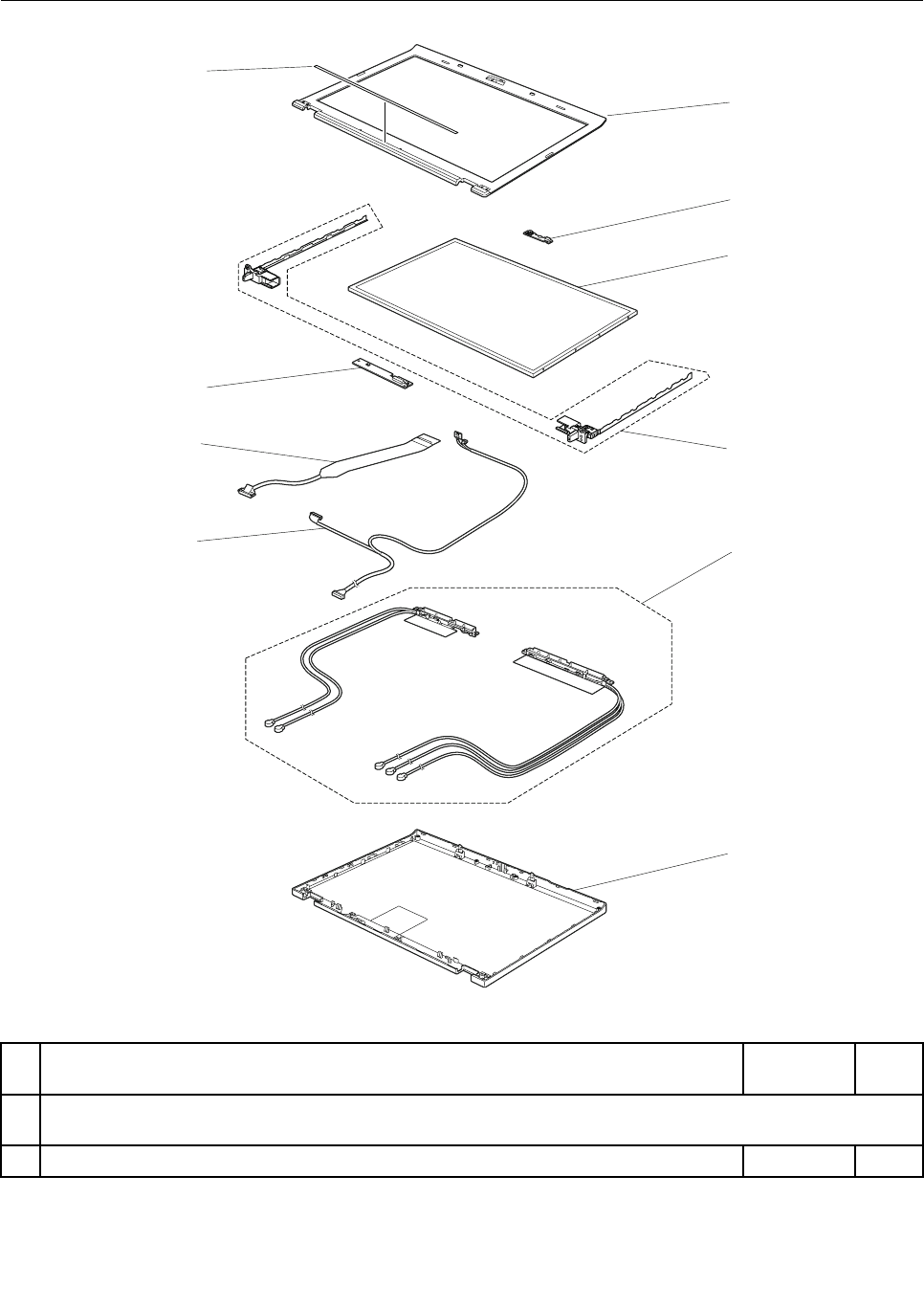

Table10.Partslist—LCDFRUs(continued)
No.FRUFRUno.CRU
ID
2Cameramodule
•4177-CTO,22x,23x,24x,25x,26x,27x,28x,29x,2Ax,2Bx,2Cx,2Dx,2Ex,2Fx,
2Gx,2Hx,2Jx,2Kx,2Lx,2Mx,2Nx,2Px,2Qx,2Rx,2Sx,2Tx,2Ux,2Vx,2Wx,2Xx,
2Yx,32x,33x,34x,35x,36x,37x,38x,GFx,GKx,GLx,GMx,Q2x,Q3x,Q4x,Q5x,
Q8x,QAx,QBx,QDx,QEx,QGx,QHx,QJx,QKx,QLx,QMx,QNx,QPx,QQx,QRx,
QSx,QUx,QVx,QWx,QXx,QYx,QZx,R2x,R3x,R4x,R7x,R8x,R9x,RAx,RBx,
RCx,RDx,RFx,RGx,RHx,RJx,RKx,RLx,RMx,RNx,RPx,RQx,RRx,RSx,RTx,
RUx,RVx,RWx,RXx,RYx,RZx
•4178-CTO,52x,53x,54x,55x,56x,57x,58x,59x,5Ax,5Bx,5Cx,5Dx,5Ex,5Fx,5Gx,
5Hx,5Jx,5Kx,5Lx,5Mx,5Nx,5Px,5Qx,5Rx,5Sx,5Tx,5Ux,5Vx,5Wx,5Xx,5Yx,
5Zx,66x,67x,68x,69x,6Ax,6Bx,6Cx,6Dx,6Ex,6Fx,6Gx,6Hx,6Jx,6Kx,6Lx,6Mx,
6Nx,6Px,6Qx,6Rx,6Sx,6Tx,6Ux,6Vx,6Wx,6Xx,6Yx,6Zx,82x,83x,84x,92x,93x,
94x,95x,96x,97x,98x,99x,9Ax,9Bx,9Cx,9Dx,9Ex,9Fx,9Gx,9Hx,9Jx,9Kx,9Lx,
9Mx,9Nx,9Px,9Qx,9Rx,9Sx,9Tx,9Ux,9Vx,9Wx,9Xx,9Yx,9Zx,A2x,A3x,A4x,
A5x,A6x,A7x,A8x,A9x,AAx,ABx,ADx,AEx,AFx,AGx,AHx,AJx,AKx,ALx,AMx,
ANx,APx,AQx,ARx,ASx,ATx,AUx,AVx,AWx,AXx,AYx,AZx,B2x,B3x,B4x,B5x,
B6x,B7x,B8x,B9x,BAx,BBx,BCx,BDx,BEx,BFx,BGx,BHx,BJx,BKx,BMx,BNx,
BPx,BQx,BRx,BSx,BTx,BUx,BVx,BWx,BXx,BYx,BZx,C2x,C3x,C4x,C5x,C6x,
C7x,C8x,C9x,CAx,CBx,CCx,CDx,CEx,CFx,CGx,CHx,CJx,CKx,CLx,CMx,CNx,
CPx,CQx,CRx,CSx,CUx,CVx,CWx,CXx,CYx,CZx,D2x,D3x,D4x,D5x,D6x,D7x,
D8x,D9x,DAx,DBx,DCx,DDx,DEx,DFx,DGx,DHx,DJx,DKx,DLx,DMx,DNx,DPx,
DQx,DRx,DSx,DTx,DUx,DVx,DWx,DXx,DYx,DZx,E2x
•4179-CTO,G3x,G4x,G5x,G6x,G7x,G8x,G9x,GBx,GCx,GDx,GGx,GHx,GJx,
GMx,GNx,GPx,GQx,GRx,GSx,GTx,GUx,GVx,GWx,GXx
•4180-CTO,62x,63x,64x,65x,J2x,J3x,J4x,K7x,K8x,K9x,KAx,KBx,KCx,KDx,
KEx,KFx,KGx,KHx,KJx,KKx,KLx,KMx,KNx,KQx,KRx,KSx,KTx,KUx,KVx,KWx,
KXx,KYx,KZx,L2x,L3x,L4x,L5x,L6x,L7x,L8x,L9x,LAx,LBx,LCx,LDx,LFx,LGx,
LHx,LLx,LMx,LNx,LPx,LQx,LRx,LSx,LTx,LVx,LWx,LXx,LYx,LZx,M2x,M3x,
M4x,M5x,M6x,M7x,M8x,M9x,MAx,MBx,MCx,MDx,MEx,MGx,MHx,MJx,MKx,
MMx,MNx,MPx,MQx,MRx,MSx,MTx,MUx,MVx,MWx,MXx,MYx,MZx,N2x,N3x,
N4x,N5x,N6x,N7x,N8x,N9x,NAx,NBx,NCx,NFx,PAx,PBx,PCx,PFx,PGx,PKx,
PLx,PMx,PNx,PPx,PQx,PRx,PSx,PTx,PUx,PVx,PWx,PXx,PYx,PZx,Q2x,Q3x,
Q4x,Q5x,Q6x,Q7x,Q8x,Q9x,QAx,QCx,QDx,QFx
•4236-CTO,62x,63x,64x,65x,MBx,N2x,N4x,N5x,N7x,N8x,N9x,NAx,NBx,NCx,
NDx,NEx,NFx,NGx,NHx,NKx,NLx,NPx,NQx,NRx,NSx,NTx,NUx,NVx,NWx,
NXx,NYx,P2x,P3x,P4x,P5x,P6x,P7x,P8x,P9x,PAx,PBx,PCx,PDx,PEx,PFx,
PGx,PHx,PJx,PKx,PLx,PMx,PNx,PPx,PQx,PRx,PSx,PTx,PUx,PVx,PWx,
PXx,PYx,PZx,Q2x,Q3x,Q4x,Q6x,Q7x,Q8x,Q9x,QAx,QBx,QCx,QDx,QEx,
QFx,QGx,QHx,QJx,QKx,QLx
•4237-CTO
•4238-CTO
60Y9994N
2Cameramodule(Nocameraandwithmicrophone)
•4177-CTO,Q7x,QCx,QFx,QTx,R5x,R6x
•4178-CTO,ACx
•4179-CTO,G2x,GEx
•4180-CTO,K2x,K3x,K4x,K5x,K6x,KPx,LEx,LJx,LKx,LUx,MFx,MLx,NDx,NEx,
PDx,PEx,PHx,PJx
•4236-CTO,N3x,N6x,NMx,NNx
•4237-CTO
•4238-CTO
04W1613N
156ThinkPadT420andT420iHardwareMaintenanceManual

Table10.Partslist—LCDFRUs(continued)
No.FRUFRUno.CRU
ID
2Cameramodule(Nocameraandnointegratedmicrophone)
•4177-CTO
•4178-CTO
•4179-CTO
•4180-CTO
•4236-CTO
•4237-CTO
•4238-CTO
04W1614N
3LCDmodule,14.0-inchHD(1366x768)LEDbacklightAnti-GlareDisplay
•4177-CTO,22x,23x,24x,25x,26x,27x,28x,29x,2Ax,2Bx,2Cx,2Dx,2Ex,2Fx,2Gx,
2Hx,2Jx,2Mx,2Rx,2Sx,2Tx,2Ux,2Vx,2Wx,2Xx,32x,33x,34x,36x,GFx,GKx,
GLx,GMx,Q2x,Q5x,Q7x,QCx,QDx,QEx,QGx,QJx,QLx,QMx,QNx,QPx,QQx,
QRx,QSx,QTx,QUx,QWx,QXx,QYx,QZx,R2x,R3x,R5x,R6x,R7x,R9x,RBx,RCx,
RFx,RGx,RHx,RJx,RNx,RPx,RRx,RSx,RTx,RUx,RVx,RWx,RXx,RYx,RZx
•4178-CTO,52x,53x,56x,57x,5Ax,5Bx,5Cx,5Dx,5Ex,5Fx,5Gx,5Hx,5Jx,5Kx,5Lx,
5Mx,69x,6Bx,6Cx,6Dx,6Ex,6Fx,6Gx,6Hx,6Jx,6Mx,6Qx,6Tx,6Ux,6Zx,83x,
84x,92x,93x,94x,95x,98x,9Dx,9Ex,9Fx,9Gx,9Hx,9Nx,9Ux,9Vx,9Wx,9Yx,A5x,
A6x,A7x,AAx,ABx,ACx,ADx,AGx,AHx,AJx,AKx,AMx,ANx,APx,AQx,ARx,ATx,
AUx,AVx,AWx,AYx,AZx,B2x,B3x,B4x,B5x,B6x,B7x,B9x,BAx,BBx,BCx,BKx,
BPx,BVx,BWx,BXx,BYx,BZx,C2x,C3x,C4x,CCx,CDx,CFx,CJx,CKx,CLx,CMx,
CNx,CPx,CQx,CRx,CSx,CUx,CXx,CZx,D2x,D3x,D4x,D5x,D6x,DAx,DBx,DCx,
DPx,DQx,DRx,DSx,DTx,DUx,DVx,DWx,DXx,E2x
•4179-CTO,G2x,G3x,G4x,G5x,G6x,G7x,G8x,G9x,GBx,GCx,GDx,GEx,GGx,
GHx,GJx,GMx,GNx,GPx,GQx,GRx,GSx,GTx,GUx,GVx,GWx,GXx
•4180-CTO,62x,64x,J3x,J4x,K2x,K3x,K4x,K5x,K6x,K7x,K8x,K9x,KAx,KBx,
KCx,KDx,KEx,KFx,KGx,KLx,KMx,KNx,L7x,L8x,L9x,LCx,LDx,LEx,LFx,LGx,
LHx,LJx,LKx,LLx,LMx,LNx,LPx,LRx,LSx,LTx,LUx,LVx,LWx,LXx,LYx,M2x,
M3x,M4x,M5x,M6x,M7x,M9x,MAx,MCx,MGx,MLx,MNx,MTx,MUx,MVx,MWx,
MXx,N3x,N4x,N6x,NCx,NDx,NEx,PAx,PBx,PCx,PDx,PEx,PFx,PHx,PJx,PKx,
PLx,PMx,PPx,PQx,PTx,PXx,Q2x,Q6x,Q7x,Q8x,Q9x,QAx,QCx,QFx
•4236-CTO,62x,64x,N2x,N3x,N5x,NCx,NDx,NKx,NLx,NMx,NPx,NQx,NRx,NUx,
NWx,NXx,NYx,P3x,P4x,P5x,P6x,P7x,P8x,P9x,PAx,PBx,PCx,PDx,PEx,PHx,
PJx,PLx,PPx,PQx,PSx,PTx,PUx,PVx,PWx,PXx,PYx,PZx,Q2x,Q3x,Q4x,Q6x,
Q7x,Q8x,Q9x,QAx,QBx,QCx,QDx,QEx,QFx,QGx,QHx,QJx,QKx,QLx
•4237-CTO
•4238-CTO
93P5691
93P5687
04W0476
93P5697
N
3LCDmodule,14.0-inchHD+(1600x900)LEDbacklightAnti-GlareDisplay
•4177-CTO,2Kx,2Lx,2Nx,2Px,2Qx,2Yx,35x,37x,38x,Q3x,Q4x,Q8x,QAx,QBx,
QFx,QHx,QKx,QVx,R4x,R8x,RAx,RDx,RKx,RLx,RMx,RQx
•4178-CTO,54x,55x,58x,59x,5Nx,5Px,5Qx,5Rx,5Sx,5Tx,5Ux,5Vx,5Wx,5Xx,
5Yx,5Zx,66x,67x,68x,6Ax,6Kx,6Lx,6Nx,6Px,6Rx,6Sx,6Vx,6Wx,6Xx,6Yx,82x,
96x,97x,99x,9Ax,9Bx,9Cx,9Jx,9Kx,9Lx,9Mx,9Px,9Qx,9Rx,9Sx,9Tx,9Xx,9Zx,
A2x,A3x,A4x,A8x,A9x,AEx,AFx,ALx,ASx,AXx,B8x,BDx,BEx,BFx,BGx,BHx,
BJx,BMx,BNx,BQx,BRx,BSx,BTx,BUx,C5x,C6x,C7x,C8x,C9x,CAx,CBx,
CEx,CGx,CHx,CVx,CWx,CYx,D7x,D8x,D9x,DDx,DEx,DFx,DGx,DHx,DJx,
DKx,DLx,DMx,DNx,DYx,DZx
•4179-CTO
•4180-CTO,63x,65x,J2x,KHx,KJx,KKx,KPx,KQx,KRx,KSx,KTx,KUx,KVx,KWx,
KXx,KYx,KZx,L2x,L3x,L4x,L5x,L6x,LAx,LBx,LQx,LZx,M8x,MBx,MDx,MEx,
MFx,MHx,MJx,MKx,MMx,MPx,MQx,MRx,MSx,MYx,MZx,N2x,N5x,N7x,N8x,
N9x,NAx,NBx,NFx,PGx,PNx,PRx,PSx,PUx,PVx,PWx,PYx,PZx,Q3x,Q4x,
Q5x,QDx
•4236-CTO,63x,65x,MBx,N4x,N6x,N7x,N8x,N9x,NAx,NBx,NEx,NFx,NGx,NHx,
NNx,NSx,NTx,NVx,P2x,PFx,PGx,PKx,PMx,PNx,PRx
•4237-CTO
•4238-CTO
93P5693
93P5689
N
Chapter10.Partslist157

Table10.Partslist—LCDFRUs(continued)
No.FRUFRUno.CRU
ID
4Hinges04W1610
04W1612
04W1611
N
5Wirelessantennaset04W1615
04W1616
N
6LCDrearcoverassembly04W1608N
7LEDcablewithcamerabracket04W1619N
8LCDcable(for14.0-inchHDLCDmodule)
•4177-CTO,22x,23x,24x,25x,26x,27x,28x,29x,2Ax,2Bx,2Cx,2Dx,2Ex,2Fx,2Gx,
2Hx,2Jx,2Mx,2Rx,2Sx,2Tx,2Ux,2Vx,2Wx,2Xx,32x,33x,34x,36x,GFx,GKx,
GLx,GMx,Q2x,Q5x,Q7x,QCx,QDx,QEx,QGx,QJx,QLx,QMx,QNx,QPx,QQx,
QRx,QSx,QTx,QUx,QWx,QXx,QYx,QZx,R2x,R3x,R5x,R6x,R7x,R9x,RBx,RCx,
RFx,RGx,RHx,RJx,RNx,RPx,RRx,RSx,RTx,RUx,RVx,RWx,RXx,RYx,RZx
•4178-CTO,52x,53x,56x,57x,5Ax,5Bx,5Cx,5Dx,5Ex,5Fx,5Gx,5Hx,5Jx,5Kx,5Lx,
5Mx,69x,6Bx,6Cx,6Dx,6Ex,6Fx,6Gx,6Hx,6Jx,6Mx,6Qx,6Tx,6Ux,6Zx,83x,
84x,92x,93x,94x,95x,98x,9Dx,9Ex,9Fx,9Gx,9Hx,9Nx,9Ux,9Vx,9Wx,9Yx,A5x,
A6x,A7x,AAx,ABx,ACx,ADx,AGx,AHx,AJx,AKx,AMx,ANx,APx,AQx,ARx,ATx,
AUx,AVx,AWx,AYx,AZx,B2x,B3x,B4x,B5x,B6x,B7x,B9x,BAx,BBx,BCx,BKx,
BPx,BVx,BWx,BXx,BYx,BZx,C2x,C3x,C4x,CCx,CDx,CFx,CJx,CKx,CLx,CMx,
CNx,CPx,CQx,CRx,CSx,CUx,CXx,CZx,D2x,D3x,D4x,D5x,D6x,DAx,DBx,DCx,
DPx,DQx,DRx,DSx,DTx,DUx,DVx,DWx,DXx,E2x
•4179-CTO,G2x,G3x,G4x,G5x,G6x,G7x,G8x,G9x,GBx,GCx,GDx,GEx,GGx,
GHx,GJx,GMx,GNx,GPx,GQx,GRx,GSx,GTx,GUx,GVx,GWx,GXx
•4180-CTO,62x,64x,J3x,J4x,K2x,K3x,K4x,K5x,K6x,K7x,K8x,K9x,KAx,KBx,
KCx,KDx,KEx,KFx,KGx,KLx,KMx,KNx,L7x,L8x,L9x,LCx,LDx,LEx,LFx,LGx,
LHx,LJx,LKx,LLx,LMx,LNx,LPx,LRx,LSx,LTx,LUx,LVx,LWx,LXx,LYx,M2x,
M3x,M4x,M5x,M6x,M7x,M9x,MAx,MCx,MGx,MLx,MNx,MTx,MUx,MVx,MWx,
MXx,N3x,N4x,N6x,NCx,NDx,NEx,PAx,PBx,PCx,PDx,PEx,PFx,PHx,PJx,PKx,
PLx,PMx,PPx,PQx,PTx,PXx,Q2x,Q6x,Q7x,Q8x,Q9x,QAx,QCx,QFx
•4236-CTO,62x,64x,N2x,N3x,N5x,NCx,NDx,NKx,NLx,NMx,NPx,NQx,NRx,NUx,
NWx,NXx,NYx,P3x,P4x,P5x,P6x,P7x,P8x,P9x,PAx,PBx,PCx,PDx,PEx,PHx,
PJx,PLx,PPx,PQx,PSx,PTx,PUx,PVx,PWx,PXx,PYx,PZx,Q2x,Q3x,Q4x,Q6x,
Q7x,Q8x,Q9x,QAx,QBx,QCx,QDx,QEx,QFx,QGx,QHx,QJx,QKx,QLx
•4237-CTO
•4238-CTO
04W1617N
8LCDcable(for14.0-inchHD+LCDmodule)
•4177-CTO,2Kx,2Lx,2Nx,2Px,2Qx,2Yx,35x,37x,38x,Q3x,Q4x,Q8x,QAx,QBx,
QFx,QHx,QKx,QVx,R4x,R8x,RAx,RDx,RKx,RLx,RMx,RQx
•4178-CTO,54x,55x,58x,59x,5Nx,5Px,5Qx,5Rx,5Sx,5Tx,5Ux,5Vx,5Wx,5Xx,
5Yx,5Zx,66x,67x,68x,6Ax,6Kx,6Lx,6Nx,6Px,6Rx,6Sx,6Vx,6Wx,6Xx,6Yx,82x,
96x,97x,99x,9Ax,9Bx,9Cx,9Jx,9Kx,9Lx,9Mx,9Px,9Qx,9Rx,9Sx,9Tx,9Xx,9Zx,
A2x,A3x,A4x,A8x,A9x,AEx,AFx,ALx,ASx,AXx,B8x,BDx,BEx,BFx,BGx,BHx,
BJx,BMx,BNx,BQx,BRx,BSx,BTx,BUx,C5x,C6x,C7x,C8x,C9x,CAx,CBx,
CEx,CGx,CHx,CVx,CWx,CYx,D7x,D8x,D9x,DDx,DEx,DFx,DGx,DHx,DJx,
DKx,DLx,DMx,DNx,DYx,DZx
•4179-CTO
•4180-CTO,63x,65x,J2x,KHx,KJx,KKx,KPx,KQx,KRx,KSx,KTx,KUx,KVx,KWx,
KXx,KYx,KZx,L2x,L3x,L4x,L5x,L6x,LAx,LBx,LQx,LZx,M8x,MBx,MDx,MEx,
MFx,MHx,MJx,MKx,MMx,MPx,MQx,MRx,MSx,MYx,MZx,N2x,N5x,N7x,N8x,
N9x,NAx,NBx,NFx,PGx,PNx,PRx,PSx,PUx,PVx,PWx,PYx,PZx,Q3x,Q4x,
Q5x,QDx
•4236-CTO,63x,65x,MBx,N4x,N6x,N7x,N8x,N9x,NAx,NBx,NEx,NFx,NGx,NHx,
NNx,NSx,NTx,NVx,P2x,PFx,PGx,PKx,PMx,PNx,PRx
•4237-CTO
•4238-CTO
04W1618
158ThinkPadT420andT420iHardwareMaintenanceManual
Table10.Partslist—LCDFRUs(continued)
No.FRUFRUno.CRU
ID
9LEDsubcard04W1370N
10Clearplatekit04W1620N
Chapter10.Partslist159

Keyboard
Table11.Partslist—Keyboard
LanguageFRUno.CRU
ID
Arabic45N207645N214645N2216
Belgian45N207745N214745N2217
BrazilianPortuguese45N207545N214545N2215
Bulgarian45N207845N214845N2218
CanadianFrench(058)45N207345N214345N2213
CanadianFrench(Acnor)45N207245N214245N2212
Czech45N207945N214945N2219
Danish45N208045N215045N2220
Finnish,Swedish45N209745N216745N2237
French45N208245N215245N2222
German45N208345N215345N2223
Greek(U.S.EnglishandGreeklayout)45N208445N215445N2224
Hebrew45N208545N215545N2225
Hungarian45N208645N215645N2226
Icelandic45N208745N215745N2227
Indian63Y021963Y022163Y0223
Italian45N208845N215845N2228
Japanese45N210245N217245N2242
Kazakhstan45N208945N215945N2229
Korean45N210345N217345N2243
LatinAmericanSpanish45N207445N214445N2214
Norwegian45N209145N216145N2231
Polish45N209245N216245N2232
Portuguese45N209345N216345N2233
Russian45N209445N216445N2234
Slovak45N209545N216545N2235
Slovenian45N209645N216645N2236
Spanish45N208145N215145N2221
Swiss45N209845N216845N2238
Thai45N210545N217545N2245
TraditionalChinese45N210445N217445N2244
Turkish45N209945N216945N2239
U.K.English45N210045N217045N2240
U.S.English45N207145N214145N2211
U.S.English(International,withaEurosymbol)45N210145N217145N2241
*
160ThinkPadT420andT420iHardwareMaintenanceManual
Table11.Partslist—Keyboard(continued)
LanguageFRUno.CRU
ID
Netherlands45N209045N216045N2230
Turkish(FType)60Y955260Y955460Y9550
Chapter10.Partslist161

Miscellaneousparts
Table12.Partslist—Miscellaneousparts
FRUFRUno.CRU
ID
Screwandsealkit:
•M2×3mm,black(50)
•M2×5mm,black(20)
•M2×8mm,black(15)
•M2×10mm,Silver(4)
•M2×15mm,black(8)
•M2.5×4mm,black(8)
•M2.5×6mm,black(8)
•M2(shoulder),black(4)
•Hexstud,Silver(4)
•Tape10x20mm(10)
•Tape10x25mm(5)
•DDR3tape(5)
04W1605N
Basemiscellaneousparts:
•Footrubber-frontleft
•Footrubber-frontright
•Footrubber-rear
•Bottomshield
•Insulationsheet-CPU
•Insulationsheet-systemboard
•Insulationsheet-touchpad
•Insulationsheet-batteryconnector
•Lens,LED(RJ-45)
•Knob,wirelessswitch
•Lever,wirelessswitch
•ODDlockbutton
•ODDejectspring
•ODDejectbutton
•ODDejectbrecket
•Dustlter1
•Dustlter2
•Dustlter3
•Dustlter4
•Dustlter5
•ODDstoprubber
•SpongeL43W4H5
•SpongeL15W4H5
•SpongeL110W4H5
•SpongeL85W3H3
•SpongeL26W4H1
04W1602N
Keyboardbezelmiscellaneousparts:
•Magnet-suspendswitch
•Bracket-touchpad
•Bracket-rightspeaker
•Bracket-leftspeaker
•Bracket-leftspeakerEMIspring
•Bracket-FPREMI
•Speakermesh
•Facesheet-touchpad
•ThinkPadlogo
•Bracket-touchpadbutton
•Bracket-FPR
•Insulationsheet-touchpad
04W1603N
162ThinkPadT420andT420iHardwareMaintenanceManual

Table12.Partslist—Miscellaneousparts(continued)
FRUFRUno.CRU
ID
•Insulationsheet-ngerprint
•LCDlatchleft
•LCDlatchright
•LCDlink
•LCDlatchspring
Systemmiscellaneousparts:
•(a)Expressdummycard
•(b)LCDconnectorbracket
•(c)Fanbracket,discrete
•CPUmylarfor35WSVGT2
•1394cover
•Dummycover,RJ-11
•Plasticsupportforsmartcard
•BlindsheetforSIMcard
•SIMdummycard
Note:Italicizedlettersinparenthesesarereferencestotheexplodedviewin“Overall”
onpage134.
04W1604N
Systemboardmiscellaneousparts:
•Insulationsheet-MB
•Insulationsheet-DDR
•Insulationsheet-expresscard
•Insulationsheet-battery
•Insulationsheet-docking
•Insulationsheet-bottomhole
•Insulationsheet-DC-in
•Bracket-expresscard
•SIMguidebracketsubaccessory
•CPUbracketsubaccessory
•SIMslidespacer
•SIMpulltab
•SpongeforRJ45connector
•Spongefordisplayportconnector
•SpongeforHDD1
•SpongeforHDD2
•SpongeforHDD3
•SpongeforODD1
•SpongeforODD2
04W1601N
LCDmiscellaneousparts:
•LCDfrontbezel
•Rubber-LCDfrontbezel
•Stopper-LCDfrontbezel
•LEDlens-LCDfrontbezel
•Shield-EMC
•Clearplate-LCDrearcover
•LEDlens-LCDrearcover
•ThinkPadlogo
•Lenovologo
•LCDlatch-right
•LCDlatch-left
•Sponge-center
•Sponge-upper
•Sponge-lower
•Stopper-upperright
•Stopper-upperleft
•Stopper-lowerright
•Stopper-lowerleft
04W1607N
Chapter10.Partslist163
Informationaboutacpoweradapters
Table13.Partslist—2-pinacpoweradapters
FRUFRUno.CRU
ID
2-pin(65W,20V)adapter(modelsCTO,xxE,xxF ,xxJ,xxL,xxP ,xxS,xxU,xxY)42T5282
2-pin(65W,20V)adapter(modelsCTO,xxE,xxF ,xxJ,xxL,xxP ,xxS,xxU,xxY)42T4423
2-pin(65W,20V)adapter(modelsCTO,xxE,xxF ,xxJ,xxL,xxP ,xxS,xxU,xxY)42T4419
2-pin(90W,20V)adapter(modelsCTO,xxE,xxF ,xxJ,xxL,xxP ,xxS,xxU,xxY)42T4427
2-pin(90W,20V)adapter(modelsCTO,xxE,xxF ,xxJ,xxL,xxP ,xxS,xxU,xxY)42T4431
2-pin(90W,20V)adapter(modelsCTO,xxE,xxF ,xxJ,xxL,xxP ,xxS,xxU,xxY)42T4435
2-pin(90W,20V)adapter(modelsCTO,xxE,xxF ,xxJ,xxL,xxP ,xxS,xxU,xxY)42T4439
*
Table14.Partslist—3-pinacpoweradapters
FRUFRUno.CRU
ID
3-pin(65W,20V)adapter(modelsCTO,xxA,xxB,xxG,xxH,xxK,xxM,xxQ,xxT,xxV)42T5283
3-pin(65W,20V)adapter(modelsCTO,xxA,xxB,xxG,xxH,xxK,xxM,xxQ,xxT,xxV)42T4421
3-pin(65W,20V)adapter(modelsCTO,xxA,xxB,xxG,xxH,xxK,xxM,xxQ,xxT,xxV)42T4417
3-pin(90W,20V)adapter(modelsCTO,xxA,xxB,xxG,xxH,xxK,xxM,xxQ,xxT,xxV)42T4425
3-pin(90W,20V)adapter(modelsCTO,xxA,xxB,xxG,xxH,xxK,xxM,xxQ,xxT,xxV)42T4429
3-pin(90W,20V)adapter(modelsCTO,xxA,xxB,xxG,xxH,xxK,xxM,xxQ,xxT,xxV)42T4433
3-pin(90W,20V)adapter(modelsCTO,xxA,xxB,xxG,xxH,xxK,xxM,xxQ,xxT,xxV)45N0068
*
164ThinkPadT420andT420iHardwareMaintenanceManual
Powercords
AThinkPadpowercordforaspeciccountryorregionisusuallyavailableonlyinthatcountryorregion:
Table15.Partslist—2-pinpowercords
CountryorregionFRUno.CRU
ID
Argentina
•models-CTO,xxY
42T502042T5105
Brazil
•models-CTO,xxP
42T518042T5183
Canada,U.S.
•models-CTO,xxF ,xxL,xxS,xxU
42T500842T5093
Japan
•models-CTO,xxE,xxJ
42T501442T5099
*
Table16.Partslist—3-pinpowercords
CountryorregionFRUno.CRU
ID
Australia,NewZealand
•models-CTO,xxM
42T505042T5135
Bangladesh,SriLanka,SouthAfrica
•models-CTO,xxG
42T505642T5141
Canada,U.S.
•models-CTO,xxG,xxT
42T500442T5089
China(P .R.C.)(otherthanHongKongS.A.R.)
•models-CTO,xxC
42T506542T5150
Denmark
•models-CTO,xxG
42T504142T5126
Europeancountries
•models-CTO,xxG
42T502942T5114
India
•models-CTO,xxQ
42T508342T5168
Israel
•models-CTO,xxG
42T506242T5147
Italy
•models-CTO,xxG
42T504742T5132
Korea
•models-CTO,xxK
42T507742T5162
Switzerland
•models-CTO,xxG
42T504442T5129
Taiwan
•models-CTO,xxV
42T507142T5156
U.K.,China(HongKongS.A.R.)
•models-CTO,xxB,xxG,xxH
42T503542T5120
*
Chapter10.Partslist165
Recoverydiscs
WindowsXPProfessionalDVDs
Note:TheWindowsXPProfessionalrecoveryDVDsareavailableonlyformodelswithavalidMicrosoft
WindowsXPProfessionalcerticateofauthenticity(COA)afxedtothesystem.DuetoaMicrosoftlicensing
limitation,ifamodelcamewithWindowsXPProfessionalpreinstalledfromthefactory,buthaseithera
Windows7orWindowsVistaCOAafxedtothesystem,thatmodeliseligibleonlyforrecoveryDVDsthat
matchtheoperatingsystemspeciedontheCOA.
WindowsXPProfessionalispreinstalledastheoperatingsysteminthefollowingmodels:
•4177-CTO
•4178-CTO
•4179-CTO
•4180-CTO
•4236-CTO
•4237-CTO
•4238-CTO
Table17.Partslist—WindowsXPProfessionalrecoveryDVDs
LanguageP/NCRU
ID
French04T1306
German04T1307
Italian04T1308
Japanese04X0075
SimpliedChinese04T1305
USEnglish04X0076
*
WindowsVistaBusiness(32bit)SP2DVDs
Note:TheWindowsVistarecoveryDVDsareavailableonlyformodelswithavalidMicrosoftWindowsVista
certicateofauthenticity(COA)afxedtothesystem.DuetoaMicrosoftlicensinglimitation,ifamodelcame
withWindowsVistaBusinessorWindowsVistaUltimatepreinstalledfromthefactory,buthasaWindows7
COAafxedtothesystem,thatmodeliseligibleonlyforrecoveryDVDsthatmatchtheoperatingsystem
speciedontheCOA.
WindowsVistaBusiness(32bit)SP2ispreinstalledastheoperatingsysteminthefollowingmodels:
•4177-CTO
•4178-CTO
•4179-CTO
•4180-CTO
•4236-CTO
•4237-CTO
•4238-CTO
Table18.Partslist—WindowsVistaBusiness(32bit)SP2recoveryDVDs
LanguageP/NCRU
ID
English(forIndia)04T3729
USEnglish04T3730
*
166ThinkPadT420andT420iHardwareMaintenanceManual
WindowsVistaHomeBasic(32bit)SP2DVDs
Note:TheWindowsVistarecoveryDVDsareavailableonlyformodelswithavalidMicrosoftWindowsVista
certicateofauthenticity(COA)afxedtothesystem.DuetoaMicrosoftlicensinglimitation,ifamodelcame
withWindowsVistaBusinessorWindowsVistaUltimatepreinstalledfromthefactory,buthasaWindows7
COAafxedtothesystem,thatmodeliseligibleonlyforrecoveryDVDsthatmatchtheoperatingsystem
speciedontheCOA.
WindowsVistaHomeBasic(32bit)SP2ispreinstalledastheoperatingsysteminthefollowingmodels:
•4177-CTO
•4178-CTO
•4179-CTO
•4180-CTO
•4236-CTO
•4237-CTO
•4238-CTO
Table19.Partslist—WindowsVistaHomeBasic(32bit)SP2recoveryDVDs
LanguageP/NCRU
ID
USEnglish04T3731*
Windows7Professional(32bit)DVDs
Windows7Professional(32bit)ispreinstalledastheoperatingsysteminthefollowingmodels:
•4177-CTO,Q7x,QAx,QDx,QTx,R5x,R6x
•4178-CTO,9Px,9Qx,9Ux,9Vx,ACx,ALx,ASx,AUx,AVx,BBx,BCx
•4179-CTO,G3x,G7x,GQx,GRx
•4180-CTO,K3x,K6x,K7x,KLx,KQx,L7x,LCx,LDx,LGx,LHx,LKx,LMx,LPx,LQx,LRx,LSx,LTx,MFx,
MLx,MPx,MYx,PHx,PJx,PPx,Q9x
•4236-CTO,N6x,N7x,N8x,N9x,NAx,NDx,NEx,NLx
•4237-CTO
•4238-CTO
Table20.Partslist—Windows7Professional(32bit)recoveryDVDs
LanguageP/NCRU
ID
French04T3733
German04T3734
Japanese04T3736
C&LNordics(Danish,Finnish,Swedish,Norwegian,andEnglish)04T3739
C&LEMEA(Dutch,French,German,Italian,andEnglish)04T3740
Spanish04T3737
SimpliedChinese04T3732
TraditionalChinesewithEnglish(HongKongS.A.R)04T3735
USEnglish04T3738
*
Windows7Professional(64bit)DVDs
Windows7Professional(64bit)ispreinstalledastheoperatingsysteminthefollowingmodels:
•4177-CTO,25x,26x,27x,28x,29x,2Ax,2Bx,2Cx,2Dx,2Kx,2Nx,2Px,2Qx,2Rx,2Sx,2Ux,2Wx,
32x,33x,35x,37x,38x,Q2x,Q3x,Q4x,Q5x,Q8x,QBx,QCx,QEx,QGx,QHx,QKx,QLx,QMx,QNx,
Chapter10.Partslist167
QPx,QVx,QXx,QYx,R2x,R3x,R4x,R8x,R9x,RAx,RBx,RCx,RDx,RFx,RGx,RJx,RKx,RLx,RMx,
RNx,RPx,RQx,RRx,RTx,RVx,RWx,RXx,RYx
•4178-CTO,52x,53x,54x,55x,56x,57x,58x,59x,5Ax,5Bx,5Cx,5Dx,5Ex,5Fx,5Gx,5Hx,5Kx,5Mx,
5Px,5Qx,5Rx,5Sx,5Tx,5Ux,5Vx,5Wx,5Xx,5Yx,5Zx,66x,67x,68x,6Ax,6Cx,6Ex,6Fx,6Gx,6Hx,
6Kx,6Mx,6Nx,6Px,6Qx,6Rx,6Ux,6Vx,6Wx,6Yx,82x,83x,84x,93x,96x,99x,9Ax,9Bx,9Cx,9Gx,
9Hx,9Jx,9Kx,9Lx,9Mx,9Rx,9Sx,9Tx,9Wx,9Xx,9Yx,9Zx,A2x,A3x,A4x,A5x,A7x,A8x,A9x,AAx,
ABx,ADx,AEx,AFx,AGx,AHx,AKx,AMx,ANx,APx,ATx,AWx,AXx,AYx,B2x,B3x,B5x,B6x,B7x,B8x,
B9x,BAx,BDx,BEx,BFx,BGx,BHx,BJx,BKx,BMx,BNx,BPx,BQx,BRx,BSx,BTx,BUx,BVx,BXx,
C3x,C4x,C5x,C6x,C7x,C8x,C9x,CAx,CBx,CCx,CDx,CEx,CFx,CGx,CHx,CJx,CKx,CPx,CQx,
CRx,CSx,CUx,CVx,CWx,CXx,CYx,CZx,D2x,D6x,D7x,D9x,DBx,DCx,DDx,DEx,DFx,DGx,DHx,
DJx,DKx,DLx,DMx,DNx,DPx,DQx,DRx,DSx,DTx,DUx,DVx,DWx,DXx,DYx,DZx,E2x
•4179-CTO,GBx,GEx
•4180-CTO,62x,63x,64x,65x,K2x,K4x,K5x,K8x,K9x,KAx,KBx,KCx,KDx,KEx,KFx,KGx,KHx,KJx,
KKx,KMx,KNx,KPx,KRx,KSx,KTx,KUx,KVx,KWx,KXx,KYx,KZx,L2x,L3x,L4x,L5x,L6x,L8x,L9x,
LAx,LBx,LUx,LVx,LWx,LXx,LYx,LZx,M2x,M3x,M4x,M5x,M6x,M7x,M8x,M9x,MBx,MCx,MDx,
MEx,MHx,MJx,MKx,MMx,MNx,MQx,MRx,MSx,MTx,MUx,MVx,MZx,N2x,N4x,N5x,N8x,N9x,
NAx,NBx,NDx,NEx,NFx,PAx,PBx,PCx,PEx,PFx,PGx,PMx,PNx,PRx,PSx,PTx,PUx,PVx,PWx,
PXx,PYx,PZx,Q2x,Q3x,Q4x,Q5x,Q8x,QAx,QCx,QDx,QFx
•4236-CTO,62x,63x,64x,65x,MBx,N2x,N3x,N4x,N5x,NBx,NFx,NGx,NHx,NMx,NNx,NSx,NTx,
NUx,NVx,NXx,NYx,P2x,P3x,P5x,P6x,P7x,P8x,P9x,PAx,PCx,PFx,PGx,PHx,PJx,PKx,PLx,
PMx,PNx,PPx,PQx,PRx,PTx,PVx,PWx,PXx,PYx,Q2x,Q3x,Q7x,Q8x,Q9x,QBx,QCx,QDx,QEx,
QFx,QGx,QJx,QLx
•4237-CTO
•4238-CTO
Table21.Partslist—Windows7Professional(64bit)recoveryDVDs
LanguageP/NCRU
ID
ArabicwithEnglish04T3742
BrazilianPortuguese04T3743
CzechwithEnglish04T3746
C&LNordics(Danish,Finnish,Swedish,Norwegian,andEnglish)04T3766
C&LEMEA(Dutch,French,German,Italian,andEnglish)04T3767
C&LCroatian(Slovenian,Croatian,andEnglish)04T3768
English(forIndia)04T3747
French04T3748
GreekwithEnglish04T3749
German04T3750
HebrewwithEnglish04T3751
HungarianwithEnglish04T3753
Japanese04T3754
KoreawithEnglish04T3755
Polish04T3756
PortuguesewithEnglish04T3757
RomanianwithEnglish04T3758
Russian04T3759
*
168ThinkPadT420andT420iHardwareMaintenanceManual
Table21.Partslist—Windows7Professional(64bit)recoveryDVDs(continued)
LanguageP/NCRU
ID
SlovakwithEnglish04T1340or
04T3768
Spanish04T3761
Serbian-LatinwithEnglish04T3762
SimpliedChinese04T3744
TraditionalChinesewithEnglish(HongKongS.A.R.)04T3752
TurkishwithEnglish04T3763
TraditionalChinesewithEnglish04T4694
USEnglish(Disabled)04T3764
USEnglish04T3765
Windows7HomeBasic(32bit)DVDs
Windows7HomeBasic(32bit)ispreinstalledastheoperatingsysteminthefollowingmodels:
•4177-CTO,22x,23x,24x,2Ex,2Xx,36x,GFx,GKx,GLx,GMx,QQx,QRx,QSx
•4178-CTO,6Sx,9Dx,9Ex,AQx,ARx
•4179-CTO,G8x,G9x,GCx,GDx,GGx,GHx,GJx,GPx,GSx,GTx,GUx,GVx,GWx
•4180-CTO,J2x,J3x,J4x,MAx,MGx,MXx,N3x,N6x,N7x,PKx,PLx,Q6x,Q7x
•4236-CTO
•4237-CTO
•4238-CTO
Table22.Partslist—Windows7HomeBasic(32bit)recoveryDVDs
LanguageP/NCRU
ID
ArabicwithEnglish04T3770
BrazilianPortuguese04T3771
English(forIndia)04T3773
French04T3774
PortuguesewithEnglish04T3775
Russian04T3776
SimpliedChinese04T3772
Spanish04T3777
Serbian-LatinwithEnglish04T3778
TurkishwithEnglish04T3779
USEnglish04T3780
*
Windows7HomeBasic(64bit)DVDs
Windows7HomeBasic(64bit)ispreinstalledastheoperatingsysteminthefollowingmodels:
•4177-CTO
•4178-CTO,
•4179-CTO,GXx
•4180-CTO
Chapter10.Partslist169
•4236-CTO
•4237-CTO
•4238-CTO
Table23.Partslist—Windows7HomeBasic(64bit)recoveryDVDs
LanguageP/NCRU
ID
SimpliedChinese04T3784*
Windows7HomePremium(32bit)DVDs
Windows7HomePremium(32bit)ispreinstalledastheoperatingsysteminthefollowingmodels:
•4177-CTO
•4178-CTO
•4179-CTO,G4x
•4180-CTO,LNx
•4236-CTO,NCx
•4237-CTO
•4238-CTO
Table24.Partslist—Windows7HomePremium(32bit)recoveryDVDs
LanguageP/NCRU
ID
English(forIndia)04T3782
SimpliedChinese04T3781
USEnglish04T3783
*
Windows7HomePremium(64bit)DVDs
Windows7HomePremium(64bit)ispreinstalledastheoperatingsysteminthefollowingmodels:
•4177-CTO,2Jx,2Lx,2Mx,2Tx,2Vx,2Yx,34x,QFx,QJx,QUx,QWx,QZx,R7x,RHx,RSx,RUx,RZx
•4178-CTO,9Fx,9Nx,A6x,BWx,CLx,CMx,CNx
•4179-CTO,GMx,GNx
•4180-CTO,NCx,PQx
•4236-CTO,NPx,NQx,NRx,NWx
•4237-CTO
•4238-CTO
Table25.Partslist—Windows7HomePremium(64bit)recoveryDVDs
LanguageP/NCRU
ID
ArabicwithEnglish04T3785
BrazilianPortuguese04T3786
CzechwithEnglish04T3789
C&LNordics(Danish,Finnish,Swedish,Norwegian,andEnglish)04T3808
C&LEMEA(Dutch,French,German,Italian,andEnglish)04T3809
C&LCroatian(Slovenian,Croatian,andEnglish)04T3810
French04T3790
GreekwithEnglish04T3791
*
170ThinkPadT420andT420iHardwareMaintenanceManual
Table25.Partslist—Windows7HomePremium(64bit)recoveryDVDs(continued)
LanguageP/NCRU
ID
German04T3792
HebrewwithEnglish04T3793
HungarianwithEngish04T3795
Japanese04T3796
KoreawithEnglish04T3797
Polish04T3798
PortuguesewithEnglish04T3799
RomanianwithEnglish04T3800
Russian04T3801
SlovakwithEnglish04T1381and
04T3810
SimpliedChinese04T3787
Spanish04T3803
Serbian-LatinwithEnglish04T3804
TraditionalChinesewithEnglish04T4695
TraditionalChinesewithEnglish(HongKongS.A.R.)04T3794
TurkishwithEnglish04T3805
USEnglish(Disabled)04T3806
USEnglish04T3807
Windows7Ultimate(32bit)DVDs
Windows7Ultimate(32bit)ispreinstalledastheoperatingsysteminthefollowingmodels:
•4177-CTO
•4178-CTO
•4179-CTO
•4180-CTO
•4236-CTO
•4237-CTO
•4238-CTO
Table26.Partslist—Windows7Ultimate(32bit)recoveryDVDs
LanguageP/NCRU
ID
USEnglish04T3741*
Windows7Ultimate(64bit)DVDs
Windows7Ultimate(64bit)ispreinstalledastheoperatingsysteminthefollowingmodels:
•4177-CTO
•4178-CTO
•4179-CTO
•4180-CTO
•4236-CTO
•4237-CTO
Chapter10.Partslist171

•4238-CTO
Table27.Partslist—Windows7Ultimate(64bit)recoveryDVDs
LanguageP/NCRU
ID
USEnglish04T3769*
172ThinkPadT420andT420iHardwareMaintenanceManual
Commonservicetools
Table28.Partslist—Commonservicetools
ToolP/N
Screwdriverkit95F3598
1/4"drivespinnerhandle1650840
1/4"Sq.to1/4"hextorxadapter93F2838
TR7-TR-10tamperresistanttorxbits00P6967
RemovaltoolantennaRFconnector08K7159
USB2.0CD-RW/DVD-ROMcombodriveII40Y8687
USBcable40Y8704
USBoppydiskettedriveformaintenancediskette05K9283
USBoppydiskettedrivetoolkit27L3452
TestcardforintegratedSmartCard42W7820
LENOVOThinkPadHardwareMaintenanceDisketteVersion1.76orlater
Note:DownloadthelefromthefollowingWebsite:
http://www.lenovo.com/support
—
Chapter10.Partslist173

174ThinkPadT420andT420iHardwareMaintenanceManual

AppendixA.Notices
Lenovomaynotoffertheproducts,services,orfeaturesdiscussedinthisdocumentinallcountries.Consult
yourlocalLenovorepresentativeforinformationontheproductsandservicescurrentlyavailableinyour
area.AnyreferencetoaLenovoproduct,program,orserviceisnotintendedtostateorimplythatonlythat
Lenovoproduct,program,orservicemaybeused.Anyfunctionallyequivalentproduct,program,orservice
thatdoesnotinfringeanyLenovointellectualpropertyrightmaybeusedinstead.However,itistheuser’s
responsibilitytoevaluateandverifytheoperationofanyotherproduct,program,orservice.
Lenovomayhavepatentsorpendingpatentapplicationscoveringsubjectmatterdescribedinthis
document.Thefurnishingofthisdocumentdoesnotgiveyouanylicensetothesepatents.Y oucansend
licenseinquiries,inwriting,to:
Lenovo(UnitedStates),Inc.
1009ThinkPlace-BuildingOne
Morrisville,NC27560
U.S.A.
Attention:LenovoDirectorofLicensing
LENOVOGROUPLTD.PROVIDESTHISPUBLICATION“ASIS”WITHOUTWARRANTYOFANYKIND,
EITHEREXPRESSORIMPLIED,INCLUDING,BUTNOTLIMITEDTO,THEIMPLIEDWARRANTIES
OFNON-INFRINGEMENT,MERCHANTABILITYORFITNESSFORAPARTICULARPURPOSE.Some
jurisdictionsdonotallowdisclaimerofexpressorimpliedwarrantiesincertaintransactions,therefore,
thisstatementmaynotapplytoyou.
Thisinformationcouldincludetechnicalinaccuraciesortypographicalerrors.Changesareperiodically
madetotheinformationherein;thesechangeswillbeincorporatedinneweditionsofthepublication.
Lenovomaymakeimprovementsand/orchangesintheproduct(s)and/ortheprogram(s)describedinthis
publicationatanytimewithoutnotice.
Theproductsdescribedinthisdocumentarenotintendedforuseinimplantationorotherlifesupport
applicationswheremalfunctionmayresultininjuryordeathtopersons.Theinformationcontainedinthis
documentdoesnotaffectorchangeLenovoproductspecicationsorwarranties.Nothinginthisdocument
shalloperateasanexpressorimpliedlicenseorindemnityundertheintellectualpropertyrightsofLenovo
orthirdparties.Allinformationcontainedinthisdocumentwasobtainedinspecicenvironmentsandis
presentedasanillustration.Theresultobtainedinotheroperatingenvironmentsmayvary.
Lenovomayuseordistributeanyoftheinformationyousupplyinanywayitbelievesappropriatewithout
incurringanyobligationtoyou.
Anyreferencesinthispublicationtonon-LenovoWebsitesareprovidedforconvenienceonlyanddonotin
anymannerserveasanendorsementofthoseWebsites.ThematerialsatthoseWebsitesarenotpartof
thematerialsforthisLenovoproduct,anduseofthoseWebsitesisatyourownrisk.
Anyperformancedatacontainedhereinwasdeterminedinacontrolledenvironment.Therefore,theresult
obtainedinotheroperatingenvironmentsmayvarysignicantly.Somemeasurementsmayhavebeen
madeondevelopment-levelsystemsandthereisnoguaranteethatthesemeasurementswillbethesame
ongenerallyavailablesystems.Furthermore,somemeasurementsmayhavebeenestimatedthrough
extrapolation.Actualresultsmayvary.Usersofthisdocumentshouldverifytheapplicabledatafortheir
specicenvironment.
©CopyrightLenovo2012175

Electronicemissionsnotices
ForelectronicemissioninformationonClassBdigitaldevices,refertothecorrespondinginformationin
theUserGuide.
176ThinkPadT420andT420iHardwareMaintenanceManual

Trademarks
ThefollowingtermsaretrademarksofLenovointheUnitedStates,othercountriesorboth:
ActiveProtectionSystem
Lenovo
ThinkLight
ThinkPad
ThinkVantage
TrackPoint
Ultrabay
MicrosoftandWindowsaretrademarksofMicrosoftgroupofcompanies:
Intel,IntelCentrinoandIntelCorearetrademarksofIntelCorporationintheU.S.and/orothercountries:
Othercompany,product,orservicenamesmaybethetrademarksorservicemarksofothers.
AppendixA.Notices177

178ThinkPadT420andT420iHardwareMaintenanceManual

PartNumber:0A60007_05
(1P)P/N:0A60007_05
*1P0A60007_05*
