Lenovo U31 70 HMM Hardware Maintenance Manual Yoga 530 14IKB Laptop (ideapad) Type 81FQ Yoga530 14arr 201803
2018-04-02
User Manual: Lenovo Hardware Maintenance Manual - Yoga 530-14IKB Yoga 530-14IKB Laptop (ideapad) - Type 81FQ 81FQ
Open the PDF directly: View PDF  .
.
Page Count: 93
- About this manual
- Safety information
- Laser compliance statement
- Grounding requirements
- Handling devices that are sensitive to electrostatic discharge
- Safety inspection guide
- Safety notices: multilingual translations
- Important service information
- General checkout
- Related service information
- Lenovo YOGA 530-14IKB/YOGA 530-14ARR
- Notices

Lenovo YOGA 530
Hardware Maintenance Manual
YOGA 530-14IKB
YOGA 530-14ARR

Note:
• Before using this information and the product it supports, be sure to read the general information under
“Notices” on page 88.
First Edition (March 2018)
© Copyright Lenovo 2018. All rights reserved.
LIMITEDANDRESTRICTEDRIGHTSNOTICE:IfdataorsoftwareisdeliveredpursuantaGeneral
ServicesAdministration“GSA”contract,use,reproduction,ordisclosureissubjecttorestrictionsset
forthinContractNo.GS-35F-05925.
©2018Lenovo

iii
Contents
About this manual ....................................... iv
Safety information ........................................ 1
Generalsafety................................................ 2
Electricalsafety.............................................. 3
Safetyinspectionguide.................................. 5
Handlingdevicesthataresensitiveto
electrostaticdischarge.................................... 6
Groundingrequirements................................. 6
Safetynotices:multilingualtranslations.......... 7
Lasercompliancestatement......................... 14
Important service information ................... 16
StrategyforreplacingFRUs......................... 16
Strategyforreplacingaharddiskdrive............17
Importantnoticeforreplacingasystem
board................................................................17
ImportantinformationaboutreplacingRoHS
compliantFRUs............................................ 18
General checkout ...................................... 19
Whattodorst............................................. 20
Powersystemcheckout................................ 21
CheckingtheACadapter.................................21
Checkingoperationalcharging.........................22
Checkingthebatterypack................................22
Related service information ...................... 23
Restoringthefactorycontentsbyusing
Push-buttonreset........................................ 23
Restoreoffactorydefault.................................23
Passwords.................................................... 24
Power-onpassword..........................................24
Hard-diskpassword..........................................24
Administratorpassword....................................24
Powermanagement..................................... 25
Puttingthecomputertosleeporshuttingit
down.................................................................25
Puttingyourcomputertosleep.........................25
Shuttingdownthecomputer.............................26
Lenovo YOGA 530-14IKB/
YOGA 530-14ARR ....................................... 27
Specications............................................... 27
Statusindicators........................................... 29
Hotkeys......................................................... 30
FRUreplacementnotices............................. 31
Screwnotices..................................................31
RemovingandreplacinganFRU................. 32
1010Basecover...............................................33
1020Batterypack.............................................37
1030PCIExpressMiniCardforwireless
LAN...................................................................39
1040DIMM.......................................................41
1050SSDcard.................................................42
1060Speakers.................................................44
1070FanassemblyandHeatSink
assembly...........................................................45
1080Uppercase..............................................47
1090
Systemboard............................................ 50
1100I/Oboard..................................................52
1110Touchpad.................................................53
1120Fingerprint................................................54
1130LCDunit..................................................56
1140MICboard,sensorboardandcamera.....60
Locations...................................................... 62
Frontviewandright-sideview..........................62
BottomandLeft-sideview...............................63
Partslist........................................................ 64
Overall..............................................................65
LCDFRUs........................................................82
Miscellaneousparts..........................................84
ACpoweradapters...........................................84
Screws..............................................................87
Notices......................................................... 88
Trademarks.................................................. 89
iv
About this manual
Thismanualcontainsserviceandreferenceinformationforthefollowing
Lenovoproduct:
Lenovo YOGA 530-14IKB/YOGA 530-14ARR
Theillustrationsanddescriptionsinthismanualmaydifferfromtheactual
product.Pleaserefertotheactualproduct.
Themanualisdividedintothefollowingsections:
•Thecommonsectionsprovidegeneralinformation,guidelines,andsafety
informationrequiredforservicingcomputers.
•Theproduct-specicsectionincludesservice,reference,andproduct-specic
partsinformation.
Important:
This manual is intended only for trained servicers who are familiar with Lenovo
products. Use this manual to troubleshoot problems effectively.
Before servicing a Lenovo product, make sure to read all the information under
“Safety information” on page 1 and “Important service information” on page
16.

1
Safety information
Safety information
Thischapterpresentsthefollowingsafetyinformationthatyouneedtoget
familiarwith beforeyouservice a Lenovo YOGA 530-14IKB/YOGA 530-14ARR
computer.
• “Generalsafety”onpage2
• “Electricalsafety”onpage3
• “Safetyinspectionguide”onpage5
• “Handlingdevicesthataresensitivetoelectrostaticdischarge”onpage6
• “Groundingrequirements”onpage6
• “Safetynotices:multilingualtranslations”onpage7
• “Lasercompliancestatement”onpage14

2
Hardware Maintenance Manual
General safety
Followtheserulesbelowtoensuregeneralsafety:
•Observeagoodhousekeeping inthe areawherethemachinesareput
duringandafterthemaintenance.
• Whenliftinganyheavyobject:
1. Makesurethatyoucanstandsafelywithoutslipping.
2. Distributetheweightoftheobjectequallybetweenyourfeet.
3. Useaslowliftingforce.Nevermovesuddenlyortwistwhenyouattempt
toliftit.
4. Liftitbystandingorpushingupwithyourlegmuscles;thisactioncould
avoidthestrainfromthemusclesinyourback.Donotattempttoliftany
objectthatweighsmorethan16kg(35lb)orthatyouthinkistooheavy
foryou.
•Donotperformany actionthatcauseshazardstothecustomer,or that
makesthemachineunsafe.
• Beforeyou startthe machine,makesurethatotherservicerepresentatives
andthecustomerarenotinahazardousposition.
•Pleaseremovecoversand otherparts ina safeplace,awayfromall
personnel,whileyouareservicingthemachine.
•Keepyourtoolcaseawayfromwalkareassothatotherpeoplewillnot trip
overit.
•Donotwearlooseclothingthatcanbetrappedinthemovingparts ofthe
machine.Makesurethatyoursleevesarefastenedorrolledupaboveyour
elbows.Ifyourhairislong,fastenit.
•Inserttheendsofyournecktieorscarfinsideclothingor fastenit withthe
nonconductiveclip,about8centimeters(3inches)fromtheend.
• Donotwearjewelry,chains,metal-frameeyeglasses,ormetalfastenersfor
yourclothing.
Attention:Metalobjectsaregoodelectricalconductors.
•Wearsafetyglasses whenyouarehammering,drilling,soldering,cutting
wire,attachingsprings,usingsolvents,orworkinginanyotherconditions
thatmaybehazardoustoyoureyes.
•Afterservice, reinstallall safetyshields,guards,labels,and groundwires.
Replaceanysafetydevicethatiswornordefective.
• Reinstallallcoverscorrectlybeforereturningthemachinetothecustomer.
•Fanlouversonthemachinehelp toprevent theoverheating ofinternal
components.Donotobstructfanlouvers orcover themwith labelsor
stickers.
3
Safety information
Electrical safety
Observethefollowingruleswhenworkingonelectricalequipments.
Important:
Use only approved tools and test equipments. Some hand tools have handles
covered with a soft material that does not insulate you when working with live
electrical currents.
Many customers have rubber floor mats near their machines that contain small
conductive bers to decrease electrostatic discharges. Do not use such kind of mat
to protect yourself from electrical shock.
• Findtheroomemergency power-off(EPO)switch,disconnectingswitchor
electricaloutlet.Ifanelectricalaccident occurs,you canthen operatethe
switchorunplugthepowercordquickly.
• Donotworkalone underhazardousconditionsornear theequipment that
hashazardousvoltages.
• Disconnectallpowerbefore:
– Performingamechanicalinspection
– Workingnearpowersupplies
– Removingorinstallingmainunits
• Beforeyoustarttoworkonthemachine,unplug thepower cord.Ifyou
cannotunplugit,askthecustomerto power-offthewall boxthatsupplies
powertothemachine,andtolockthewallboxintheoffposition.
• Ifyouneedtoworkonamachinethathasexposedelectricalcircuits,
observethefollowingprecautions:
– Ensurethatanotherperson,familiarwiththepower-offcontrols,isnear
you.
Attention:Anotherperson mustbetheretoswitchoffthepower,if
necessary.
– Useonlyonehandwhenworkingwithpowered-onelectricalequipment;
keeptheotherhandinyourpocketorbehindyourback.
Attention:Anelectricalshockcanoccuronlywhenthereisacomplete
circuit.Byobservingtheaboverule,you maypreventacurrentfrom
passingthroughyourbody.
– Whenusingtesters,setthecontrolscorrectlyandusetheapproved
probeleadsandaccessoriesforthattester.
– Standonsuitablerubbermats(obtainedlocally,ifnecessary)toinsulate
youfromgroundssuchasmetaloorstripsandmachineframes.
Observethespecialsafetyprecautionswhenyouworkwithveryhighvoltages;
instructionsfortheseprecautionsareinthesafetysectionsofmaintenance
information.Beextremelycarefulwhenyoumeasurethehighvoltages.
• Regularlyinspectandmaintainyourelectricalhandtoolsforsafeoperational
condition.
• Donotusewornorbrokentoolsandtesters.
• Neverassumethatpowerhasbeendisconnectedfromacircuit.First,check
ittomakesurethatithasbeenpoweredoff.
Safety information

4
Hardware Maintenance Manual
• Alwayslookcarefullyforpossiblehazardsinyourworkarea.Examplesof
thesehazardsaremoistoors,nongroundedpowerextensioncables,power
surges,andmissingsafetygrounds.
• Donottouchliveelectricalcircuits withthe reflectivesurface ofaplastic
dentalmirror.Thesurfaceisconductive;suchtouchingcancausepersonal
injuryandmachinedamage.
• Donotservicethefollowingpartswiththepoweronwhentheyareremoved
fromtheirnormaloperatingplacesinamachine:
– Powersupplyunits
– Pumps
– Blowersandfans
– Motorgenerators
andsimilarunits.(Thispracticeensurescorrectgroundingoftheunits.)
• Ifanelectricalaccidentoccurs:
– Caution:donotbecomeavictimyourself.
– Switchoffthepower.
– Sendthevictimtogetmedicalaid.

5
Safety information
Safety inspection guide
Thepurpose ofthis inspectionguideistoassistyouinidentifyingpotential
unsafeconditions.Aseachmachine wasdesigned andbuilt, requiredsafety
itemswereinstalledtoprotectusersandservicepersonnelfrominjury.This
guideaddressesonlythoseitems.You shoulduse goodjudgment toidentify
potentialsafetyhazardsaccordingtotheattachmentofnon-Lenovofeaturesor
optionsnotcoveredbythisinspectionguide.
Ifanyunsafeconditionsarepresent,youmustdetermine howserious the
apparenthazardcouldbeandwhetheryoucancontinuewithoutrstcorrecting
theproblem.
Considertheseconditionsandthesafetyhazardstheypresent:
• Electricalhazards,especiallyprimarypower(primaryvoltageontheframe
cancauseseriousorfatalelectricalshock)
• Explosivehazards,suchasadamagedCRTfaceorabulgingcapacitor
• Mechanicalhazards,suchaslooseormissinghardware
Todeterminewhetherthereareanypotentialunsafeconditions, usethe
followingchecklistatthebeginningofeveryservicetask.Beginthecheckswith
thepoweroff,andthepowercorddisconnected.
Checklist:
1. Checkexteriorcoversfordamage(loose,broken,orsharpedges).
2. Turnoffthecomputer.Disconnectthepowercord.
3. Checkthepowercordfor:
a. Athird-wiregroundconnectoringoodcondition.Useametertomeasure
third-wiregroundcontinuityfor0.1ohmorlessbetweentheexternal
groundpinandtheframeground.
b. Thepowercordshouldbethetypespeciedinthepartslist.
c. Insulationmustnotbefrayedorworn.
4. Checkforcrackedorbulgingbatteries.
5. Removethecover.
6. Checkforanyobviousnon-Lenovoalterations.Usegoodjudgmentastothe
safetyofanynon-Lenovoalterations.
7. Check insidethe unitfor anyobviousunsafeconditions,suchasmetal
filings,contamination,waterorotherliquids,orsignsoffireorsmoke
damage.
8. Checkforworn,frayed,orpinchedcables.
9. Checkthatthepower-supplycover fasteners(screwsorrivets)havenot
beenremovedortamperedwith.
6
Hardware Maintenance Manual
Handling devices that are sensitive to electrostatic discharge
Anycomputerpartcontainingtransistorsorintegratedcircuits(ICs)shouldbe
consideredsensitivetoelectrostaticdischarge(ESD).ESDdamagecanoccur
whenthere isa differenceinchargebetween objects.Protect againstESD
damagebyequalizingthechargesothatthemachine,thepart,theworkmat,
andthepersonhandlingthepartareallatthesamecharge.
Notes:
1. Use product-specic ESD procedures when they exceed the requirements noted
here.
2. Make sure that the ESD protective devices you use have been certied (ISO
9000) as fully effective.
WhenhandlingESD-sensitiveparts:
• Keepthepartsinprotectivepackagesuntiltheyareinsertedintotheproduct.
• Avoidcontactwithotherpeople.
• Wearagroundedwriststrapagainstyourskintoeliminate staticonyour
body.
• Preventthepartfromtouchingyourclothing.Mostclothingisinsulativeand
retainsachargeevenwhenyouarewearingawriststrap.
• Usetheblacksideofagroundedworkmattoprovideastatic-freework
surface.ThematisespeciallyusefulwhenhandlingESD-sensitivedevices.
• Selectagroundingsystem,suchasthoselistedbelow,toprovideprotection
thatmeetsthespecicservicerequirement.
Note:
The use of a grounding system to guard against ESD damage is desirable but not
necessary.
– AttachtheESDgroundcliptoanyframeground,groundbraid,orgreen-
wireground.
– Whenworkingonadouble-insulatedorbattery-operatedsystem,usean
ESDcommongroundorreferencepoint.Youcanusecoaxorconnector-
outsideshellsonthesesystems.
– Usetheroundgroundprongoftheacplugonac-operatedcomputers.
Grounding requirements
Electricalgroundingofthecomputerisrequiredforoperatorsafetyandcorrect
systemfunction.Propergroundingoftheelectricaloutletcanbeveriedbya
certiedelectrician.
7
Safety information
Safety notices: multilingual translations
Thesafetynoticesin thissection areprovidedinEnglish,French,German,
Hebrew,Italian,Japanese,andSpanish.
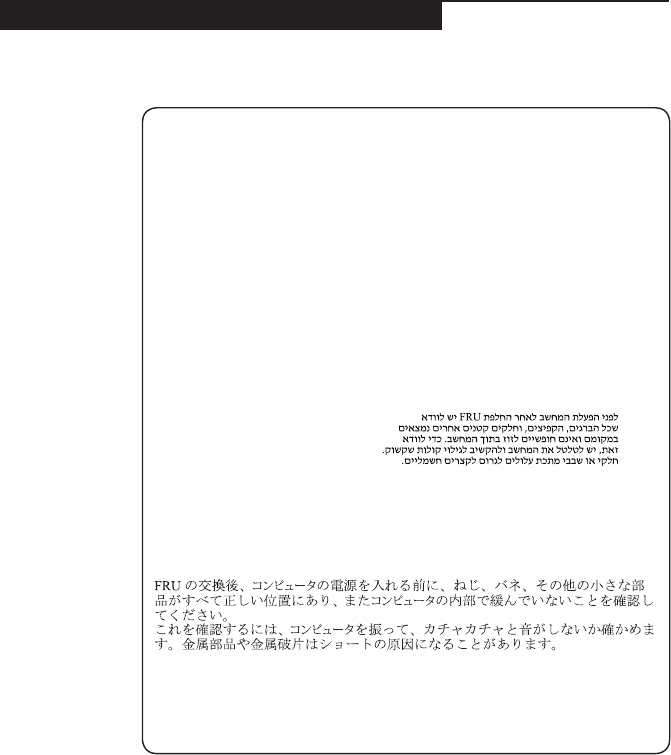
Safety notice 1
Before the computer is powered on after FRU replacement, make sure all screws,
springs, and other small parts are in place and are not left loose inside the computer.
Verify this by shaking the computer and listening for rattling sounds. Metallic parts
or metal akes can cause electrical shorts.
Avant de remettre l’ordinateur sous tension après remplacement d’une unité en
clientèle, vériez que tous les ressorts, vis et autres pièces sont bien en place et
bien xées. Pour ce faire, secouez l’unité et assurez-vous qu’aucun bruit suspect ne
se produit. Des pièces métalliques ou des copeaux de métal pourraient causer un
court-circuit.
Bevor nach einem FRU-Austausch der Computer wieder angeschlossen wird,
muß sichergestellt werden, daß keine Schrauben, Federn oder andere Kleinteile
fehlen oder im Gehäuse vergessen wurden. Der Computer muß geschüttelt und auf
Klappergeräusche geprüft werden. Metallteile oder-splitter können Kurzschlüsse
erzeugen.
Prima di accendere l’elaboratore dopo che é stata effettuata la sostituzione di una
FRU, accertarsi che tutte le viti, le molle e tutte le altri parti di piccole dimensioni
siano nella corretta posizione e non siano sparse all’interno dell’elaboratore.
Vericare ciò scuotendo l’elaboratore e prestando attenzione ad eventuali rumori;
eventuali parti o pezzetti metallici possono provocare cortocircuiti pericolosi.
Antes de encender el sistema despues de sustituir una FRU, compruebe que
todos los tornillos, muelles y demás piezas pequeñas se encuentran en su sitio
y no se encuentran sueltas dentro del sistema. Compruébelo agitando el sistema
y escuchando los posibles ruidos que provocarían. Las piezas metálicas pueden
causar cortocircuitos eléctricos.
8
Hardware Maintenance Manual
Safety notice 2
DANGER
Some standby batteries contain a small amount of nickel and cadmium. Do not
disassemble a standby battery, recharge it, throw it into fire or water, or short-
circuit it. Dispose of the battery as required by local ordinances or regulations.
Use only the battery in the appropriate parts listing. Use of an incorrect battery can
result in ignition or explosion of the battery.
Certaines batteries de secours contiennent du nickel et du cadmium. Ne les
démontez pas, ne les rechargez pas, ne les exposez ni au feu ni à l’eau. Ne
les mettez pas en court-circuit. Pour les mettre au rebut, conformez-vous à la
réglementation en vigueur. Lorsque vous remplacez la pile de sauvegarde ou celle
de l’horloge temps réel, veillez à n’utiliser que les modèles cités dans la liste de
pièces détachées adéquate. Une batterie ou une pile inappropriée risque de prendre
feu ou d’exploser.
Die Bereitschaftsbatterie, die sich unter dem Diskettenlaufwerk befindet,
kann geringe Mengen Nickel und Cadmium enthalten. Sie darf nicht zerlegt,
wiederaufgeladen, kurzgeschlossen, oder Feuer oder Wasser ausgesetzt werden. Bei
der Entsorgung die örtlichen Bestimmungen für Sondermüll beachten. Beim Ersetzen
der Bereitschafts-oder Systembatterie nur Batterien des Typs verwenden, der in der
Ersatzteilliste aufgeführt ist. Der Einsatz falscher Batterien kann zu Entzündung oder
Explosion führen.
Alcune batterie di riserva contengono una piccola quantità di nichel e cadmio. Non
smontarle, ricaricarle, gettarle nel fuoco o nell’acqua né cortocircuitarle. Smaltirle
secondo la normativa in vigore (DPR 915/82, successive disposizioni e disposizioni
locali). Quando si sostituisce la batteria dell’RTC (real time clock) o la batteria di
supporto, utilizzare soltanto i tipi inseriti nell’appropriato Catalogo parti. L’impiego
di una batteria non adatta potrebbe determinare l’incendio o l’esplosione della
batteria stessa.
Algunas baterías de reserva contienen una pequeña cantidad de níquel y cadmio.
No las desmonte, ni recargue, ni las eche al fuego o al agua ni las cortocircuite.
Deséchelas tal como dispone la normativa local. Utilice sólo baterías que se
encuentren en la lista de piezas. La utilización de una batería no apropiada puede
provocar la ignición o explosión de la misma.
9
Safety information
Safety notice 3
DANGER
The battery pack contains small amounts of nickel. Do not disassemble it, throw
it into re or water, or short-circuit it. Dispose of the battery pack as required by
local ordinances or regulations. Use only the battery in the appropriate parts listing
when replacing the battery pack. Use of an incorrect battery can result in ignition
or explosion of the battery.
La batterie contient du nickel. Ne la démontez pas, ne l’exposez ni au feu ni à l’eau.
Ne la mettez pas en court-circuit. Pour la mettre au rebut, conformez-vous à la
réglementation en vigueur. Lorsque vous remplacez la batterie, veillez à n’utiliser
que les modèles cités dans la liste de pièces détachées adéquate. En effet, une
batterie inappropriée risque de prendre feu ou d’exploser.
Akkus enthalten geringe Mengen von Nickel. Sie dürfen nicht zerlegt,
wiederaufgeladen, kurzgeschlossen, oder Feuer oder Wasser ausgesetzt werden.
Bei der Entsorgung die örtlichen Bestimmungen für Sondermüll beachten. Beim
Ersetzen der Batterie nur Batterien des Typs verwenden, der in der Ersatzteilliste
aufgeführt ist. Der Einsatz falscher Batterien kann zu Entzündung oder Explosion
führen.
La batteria contiene piccole quantità di nichel. Non smontarla, gettarla nel fuoco
o nell’acqua né cortocircuitarla. Smaltirla secondo la normativa in vigore (DPR
915/82, successive disposizioni e disposizioni locali). Quando si sostituisce la
batteria, utilizzare soltanto i tipi inseriti nell’appropriato Catalogo parti. L’impiego
di una batteria non adatta potrebbe determinare l’incendio o l’esplosione della
batteria stessa.
Las baterías contienen pequeñas cantidades de níquel. No las desmonte, ni
recargue, ni las eche al fuego o al agua ni las cortocircuite. Deséchelas tal como
dispone la normativa local. Utilice sólo baterías que se encuentren en la lista de
piezas al sustituir la batería. La utilización de una batería no apropiada puede
provocar la ignición o explosión de la misma.
10
Hardware Maintenance Manual
Safety notice 4
DANGER
The lithium battery can cause a re, an explosion, or a severe burn. Do not recharge
it, remove its polarized connector, disassemble it, heat it above 100°C (212°F),
incinerate it, or expose its cell contents to water. Dispose of the battery as required
by local ordinances or regulations. Use only the battery in the appropriate parts
listing. Use of an incorrect battery can result in ignition or explosion of the battery.
La pile de sauvegarde contient du lithium. Elle présente des risques d’incendie,
d’explosion ou de brûlures graves. Ne la rechargez pas, ne retirez pas son
connecteur polarisé et ne la démontez pas. Ne l’exposez pas à une temperature
supérieure à 100°C, ne la faites pas brûler et n’en exposez pas le contenu à l’eau.
Mettez la pile au rebut conformément à la réglementation en vigueur. Une pile
inappropriée risque de prendre feu ou d’exploser.
Die Systembatterie ist eine Lithiumbatterie. Sie kann sich entzünden, explodieren
oder schwere Verbrennungen hervorrufen. Batterien dieses Typs dürfen nicht
aufgeladen, zerlegt, über 100 C erhitzt oder verbrannt werden. Auch darf ihr Inhalt
nicht mit Wasser in Verbindung gebracht oder der zur richtigen Polung angebrachte
Verbindungsstecker entfernt werden. Bei der Entsorgung die örtlichen Bestimmungen
für Sondermüll beachten. Beim Ersetzen der Batterie nur Batterien des Typs
verwenden, der in der Ersatzteilliste aufgeführt ist. Der Einsatz falscher Batterien
kann zu Entzündung oder Explosion führen.
La batteria di supporto e una batteria al litio e puo incendiarsi, esplodere o
procurare gravi ustioni. Evitare di ricaricarla, smontarne il connettore polarizzato,
smontarla, riscaldarla ad una temperatura superiore ai 100 gradi centigradi,
incendiarla o gettarla in acqua. Smaltirla secondo la normativa in vigore (DPR
915/82, successive disposizioni e disposizioni locali). L’impiego di una batteria
non adatta potrebbe determinare l’incendio o l’esplosione della batteria stessa.
La batería de repuesto es una batería de litio y puede provocar incendios,
explosiones o quemaduras graves. No la recargue, ni quite el conector polarizado,
ni la desmonte, ni caliente por encima de los 100°C (212°F), ni la incinere ni
exponga el contenido de sus celdas al agua. Deséchela tal como dispone la
normativa local.
11
Safety information
Safety notice 5
If the LCD breaks and the uid from inside the LCD gets into your eyes or on your
hands, immediately wash the affected areas with water at least for 15 minutes. Seek
medical care if any symptoms caused by the uid are present after washing.
Si le panneau d’afchage à cristaux liquides se brise et que vous recevez dans les
yeux ou sur les mains une partie du fluide, rincez-les abondamment pendant au
moins quinze minutes. Consultez un médecin si des symptômes persistent après le
lavage.
Die Leuchtstoffröhre im LCD-Bildschirm enthält Quecksilber. Bei der Entsorgung
die örtlichen Bestimmungen für Sondermüll beachten. Der LCD-Bildschirm
besteht aus Glas und kann zerbrechen, wenn er unsachgemäß behandelt wird
oder der Computer auf den Boden fällt. Wenn der Bildschirm beschädigt ist und
die darin befindliche Flüssigkeit in Kontakt mit Haut und Augen gerät, sollten
die betroffenen Stellen mindestens 15 Minuten mit Wasser abgespült und bei
Beschwerden anschließend ein Arzt aufgesucht werden.
Nel caso che caso l’LCD si dovesse rompere ed il liquido in esso contenuto
entrasse in contatto con gli occhi o le mani, lavare immediatamente le parti
interessate con acqua corrente per almeno 15 minuti; poi consultare un medico se i
sintomi dovessero permanere.
Si la LCD se rompe y el uido de su interior entra en contacto con sus ojos o sus
manos, lave inmediatamente las áreas afectadas con agua durante 15 minutos como
mínimo. Obtenga atención medica si se presenta algún síntoma del uido despues
de lavarse.
12
Hardware Maintenance Manual
Safety notice 6
DANGER
To avoid shock, do not remove the plastic cover that protects the lower part of the
inverter card.
An d’éviter tout risque de choc électrique, ne retirez pas le cache en plastique
protégeant la partie inférieure de la carte d’alimentation.
Aus Sicherheitsgründen die Kunststoffabdeckung, die den unteren Teil der
Spannungswandlerplatine umgibt, nicht entfernen.
Per evitare scosse elettriche, non rimuovere la copertura in plastica che avvolge la
parte inferiore della scheda invertitore.
Para evitar descargas, no quite la cubierta de plástico que rodea la parte baja de la
tarjeta invertida.
Safety notice 7
DANGER
Though the main batteries have low voltage, a shorted or grounded battery can
produce enough current to burn personnel or combustible materials.
Bien que le voltage des batteries principales soit peu élevé, le court-circuit ou la
mise à la masse d’une batterie peut produire sufsamment de courant pour brûler
des matériaux combustibles ou causer des brûlures corporelles graves.
Obwohl Hauptbatterien eine niedrige Spannung haben, können sie doch bei
Kurzschluß oder Erdung genug Strom abgeben, um brennbare Materialien zu
entzünden oder Verletzungen bei Personen hervorzurufen.
Sebbene le batterie di alimentazione siano a basso voltaggio, una batteria in
corto circuito o a massa può fornire corrente sufficiente da bruciare materiali
combustibili o provocare ustioni ai tecnici di manutenzione.
Aunque las baterías principales tienen un voltaje bajo, una batería cortocircuitada
o con contacto a tierra puede producir la corriente suciente como para quemar
material combustible o provocar quemaduras en el personal.
13
Safety information
Safety notice 8
DANGER
Before removing any FRU, turn off the computer, unplug all power cords from
electrical outlets, remove the battery pack, and then disconnect any interconnecting
cables.
Avant de retirer une unité remplaçable en clientèle, mettez le système hors tension,
débranchez tous les cordons d’alimentation des socles de prise de courant, retirez la
batterie et déconnectez tous les cordons d’interface.
Die Stromzufuhr muß abgeschaltet, alle Stromkabel aus der Steckdose gezogen,
der Akku entfernt und alle Verbindungskabel abgenommen sein, bevor eine FRU
entfernt wird.
Prima di rimuovere qualsiasi FRU, spegnere il sistema, scollegare dalle prese
elettriche tutti i cavi di alimentazione, rimuovere la batteria e poi scollegare i cavi
di interconnessione.
Antes de quitar una FRU, apague el sistema, desenchufe todos los cables de las
tomas de corriente eléctrica, quite la batería y, a continuación, desconecte cualquier
cable de conexión entre dispositivos.
14
Hardware Maintenance Manual
Laser compliance statement
SomemodelsofLenovocomputerareequippedfromthefactorywithan
opticalstorage devicesuchasaCD-ROMdriveor aDVD-ROM drive.Such
devicesarealsosoldseparatelyasoptions.Ifoneofthesedrivesisinstalled,
itiscertiedintheU.S.toconformto therequirementsoftheDepartmentof
HealthandHumanServices21CodeofFederalRegulations(DHHS21CFR)
SubchapterJforClass1laserproducts.Elsewhere,the driveis certifiedto
conformtotherequirements ofthe InternationalElectrotechnicalCommission
(IEC)825andCENELECEN60825forClass1laserproducts.
IfaCD-ROMdrive,aDVD-ROMdrive,oranotherlaserdeviceisinstalled,note
thefollowing:
CAUTION
Use of controls or adjustments or performance of procedures other than those
specied herein might result in hazardous radiation exposure.
O uso de controles, ajustes ou desempenho de procedimentos diferentes daqueles
aqui especicados pode resultar em perigosa exposição à radiação.
Pour éviter tout risque d’exposition au rayon laser, respectez les consignes de
réglage et d’utilisation des commandes, ainsi que les procédures décrites.
Werden Steuer- und Einstellelemente anders als hier festgesetzt verwendet, kann
gefährliche Laserstrahlung auftreten.
L’utilizzo di controlli, regolazioni o l’esecuzione di procedure diverse da quelle
specicate possono provocare l’esposizione a.
El uso de controles o ajustes o la ejecución de procedimientos distintos de los aquí
especicados puede provocar la exposición a radiaciones peligrosas.
OpeningtheCD-ROMdrive,theDVD-ROMdrive,oranyotheropticalstorage
devicecouldresultinexposuretohazardouslaser radiation.Thereareno
serviceablepartsinsidethosedrives.Do not open.
15
Safety information
ACD-ROMdrive,aDVD-ROMdrive,oranyotherstoragedeviceinstalledmay
containanembeddedClass3AorClass3Blaserdiode.Notethefollowing:
DANGER
Emits visible and invisible laser radiation when open. Do not stare into the beam,
do not view directly with optical instruments, and avoid direct exposure to the
beam.
Radiação por raio laser ao abrir. Não olhe xo no feixe de luz, não olhe diretamente
por meio de instrumentos óticos e evite exposição direta com o feixe de luz.
Rayonnement laser si carter ouvert. Évitez de fixer le faisceau, de le regarder
directement avec des instruments optiques, ou de vous exposer au rayon.
Laserstrahlung bei geöffnetem Gerät. Nicht direkt oder über optische Instrumente
in den Laserstrahl sehen und den Strahlungsbereich meiden.
Kinyitáskor lézersugár ! Ne nézzen bele se szabad szemmel, se optikai
eszközökkel. Kerülje a sugárnyalábbal való érintkezést!
Aprendo l’unità vengono emesse radiazioni laser. Non fissare il fascio, non
guardarlo direttamente con strumenti ottici e evitare l’esposizione diretta al fascio.
Radiación láser al abrir. No mire jamente ni examine con instrumental óptico el
haz de luz. Evite la exposición directa al haz.
16
Hardware Maintenance Manual
Important service information
Thischapterpresentsthefollowingimportantserviceinformation:
• “StrategyforreplacingFRUs”onpage16
– “Strategyforreplacingaharddiskdrive”onpage17
– “Importantnoticeforreplacingasystemboard”onpage17
• “ImportantinformationaboutreplacingRoHScompliantFRUs”onpage18
Important:
BIOS and device driver xes are customer-installable. The BIOS and device
drivers are posted on the customer support site:
http://support.lenovo.com.
Strategy for replacing FRUs
Before replacing parts:
Makesurethatall softwarexes, drivers,andBIOSdownloadsareinstalled
beforereplacinganyFRUslistedinthismanual.
Afterasystemboardisreplaced,ensurethatthelatestBIOSisloadedtothe
systemboardbeforecompletingtheserviceaction.
Todownloadsoftwarexes,drivers,andBIOS,followthestepsbelow:
1. Gotohttp://support.lenovo.com.
2. Enterthe serialnumber orselect aproduct oruseLenovosmart
downloading.
3. SelecttheBIOS/Driver/Applicationsanddownload.
4. Followthedirectionsonthescreenandinstallthenecessarysoftware.
17
Important service information
Usethefollowingstrategytopreventunnecessaryexpenseforreplacingand
servicingFRUs:
• IfyouareinstructedtoreplaceanFRU,butthereplacementdoesnotsolve
theproblem,reinstalltheoriginalFRUbeforeyoucontinue.
• Somecomputers havebothaprocessorboardand asystem board.Ifyou
areinstructedtoreplaceeitherofthem,andreplacingoneofthemdoesnot
solvetheproblem,reinstallthatboard,andthenreplacetheotherone.
• IfanadapteroradeviceconsistsofmorethanoneFRU,anyoftheFRUs
maybethecauseofthe error.Beforereplacingtheadapter ordevice,
removetheFRUsonebyonetoseeifthesymptomschange.Replaceonly
theFRUthatchangedthesymptoms.
Attention:Thesetup configurationonthecomputeryouareservicingmay
havebeencustomized.RunningAutomaticConfiguration mayalter the
settings.Notethecurrentcongurationsettings(usingtheViewConguration
option);then,whenservice hasbeen completed,verifythatthosesettings
remainineffect.
Strategy for replacing a hard disk drive
Alwaystrytorun alow-level formatbeforereplacingaharddiskdrive.This
willcauseallcustomerdataontheharddisk tobe lost.Make surethatthe
customerhasacurrentbackupofthedatabeforeperformingthisaction.
Attention:Thedrivestartupsequenceinthecomputeryouareservicingmay
havebeenchanged.Beextremelycareful duringwrite operationssuch as
copying,saving,orformatting.Ifyouselectanincorrectdrive,dataorprograms
canbeoverwritten.
Important notice for replacing a system board
Somecomponentsmountedon asystem boardare verysensitive. Improper
handlingcancausedamagetothosecomponents,andmaycauseasystem
malfunction.
Attention:Whenhandlingasystemboard:
• Donotdropthesystemboardorapplyanyexcessiveforcetoit.
• Avoidroughhandlingofanykind.
• Avoidbendingthe systemboardandhardpushingtopreventcrackingat
eachBGA(BallGridArray)chipset.
18
Hardware Maintenance Manual
Important information about replacing RoHS compliant FRUs
RoHS, The Restriction of Hazardous Substances in Electrical and
Electronic Equipment Directive (2002/95/EC) is a European Union legal
requirement affecting the global electronics industry. RoHS requirements
must be implemented on Lenovo products placed on the market after
June 2006. Products on the market before June 2006 are not required to
have RoHS compliant parts. If the original FRU parts are non-compliant,
replacement parts can also be non-compliant. In all cases if the original
FRU parts are RoHS compliant, the replacement part must also be RoHS
compliant.
Note:RoHSandnon-RoHSFRUpartnumberswiththesametandfunction
areidentiedwithuniqueFRUpartnumbers.
Lenovoplans totransit toRoHScompliancewellbefore theimplementation
dateandexpectsits supplierstobereadytosupportLenovo’srequirements
andscheduleintheEU.Productssoldin2005and2006will containsome
RoHScompliantFRUs.Thefollowingstatementpertainstotheseproductsand
anyproductLenovoproducescontainingRoHScompliantFRUs.
RoHScompliant FRUshaveuniqueFRUpartnumbers.Before orafterthe
RoHSimplementationdate,failedRoHScompliantpartsmustalwaysbe
replacedwithRoHScompliantones,soonlytheFRUsidentiedascompliant
inthesystemHMMordirectsubstitutionsforthoseFRUsmaybeused.
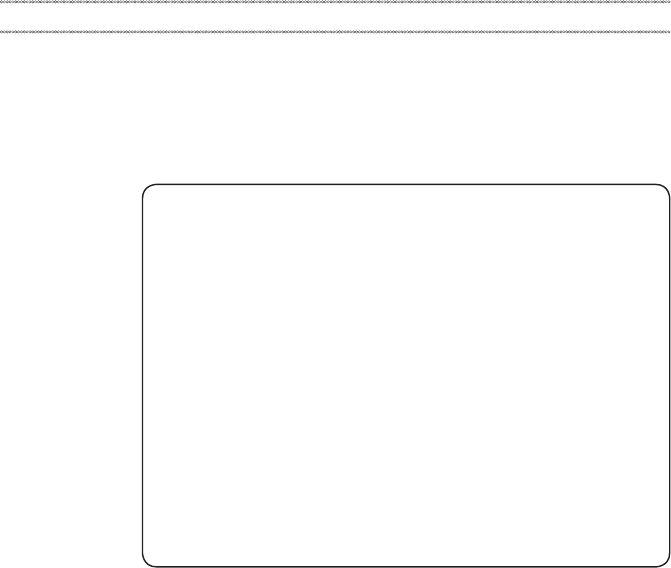
Products marketed before June 2006 Products marketed after June 2006
Current or
original part
Replacement FRU Current or
original part
Replacement FRU
Non-RoHS CanbeNon-RoHS
MustbeRoHS MustbeRoHS
Non-RoHS CanbeRoHS
Non-RoHS CansubtoRoHS
RoHS MustbeRoHS
Note:AdirectsubstitutionisapartwithadifferentFRUpartnumberthatis
automaticallyshippedbythedistributioncenteratthetimeoftheorder.
19
General checkout
General checkout
Thischapterpresentsthefollowinginformation:
• “Whattodorst”onpage20
• “Powersystemcheckout”onpage21
Beforeyougotothecheckout,makesuretoreadthefollowingimportantnotes:
Important notes:
• Onlycertiedtrainedpersonnelcanservicethecomputer.
• BeforereplacinganyFRU,readtheentirepageonremovingandreplacing
FRUs.
• CarefullyremovescrewsforreusewhenreplacingFRUs.
• Beextremelycarefulduringsuch writeoperationsas copying,saving,or
formatting. Drives in the computer that you are servicing sequence might
have been altered. If you select an incorrect drive, data or programs might be
overwritten.
• ReplaceanFRUonlywithanotherFRUofthecorrectmodel. When you
replace an FRU, make sure that the machine model and the FRU part number are
correct by referring to the FRU parts list.
• AnFRUshouldnotbereplacedjustbecauseofasingle,unreproduciblefailure.
Single failures can occur for a variety of reasons that have nothing to do with a
hardware defect, such as cosmic radiation, electrostatic discharge, or software
errors. Consider replacing an FRU only when a problem recurs. If you suspect that
an FRU is defective, clear the error logs and run the test again. If the error does
not recur, do not replace the FRU.
• BecarefulnottoreplaceanondefectiveFRU.

20
Hardware Maintenance Manual
What to do rst
WhenyoudoreturnanFRU,youmustincludethefollowinginformationinthe
partsexchangeformorpartsreturnformthatyouattachtoit:
1. Nameandphonenumberofservicer
2. Dateofservice
3. Dateonwhichthemachinefailed
4. Dateofpurchase
5. ProcedureindexandpagenumberinwhichthefailingFRUwasdetected
6. FailingFRUnameandpartnumber
7. Machinetype,modelnumber,andserialnumber
8. Customer’snameandaddress
Note for warranty:During thewarrantyperiod,thecustomer maybe
responsiblefor repaircosts ifthe computerdamagewascausedbymisuse,
accident,modification,unsuitablephysicaloroperatingenvironment,or
impropermaintenancebythecustomer.
Thefollowingisa listof somecommon itemsthatarenotcoveredunder
warrantyandsomesymptoms thatmight indicatethat thesystemwas
subjectedtostressbeyondnormaluse.
Beforecheckingproblemswiththecomputer,determinewhetherthedamageis
coveredunderthewarrantybyreferringtothefollowinglist:
The following are not covered under warranty:
• LCDpanelcrackedfromtheapplicationofexcessive forceor frombeing
dropped
• Scratched(cosmetic)parts
• Distortion,deformation,ordiscolorationofthecosmeticparts
• Plasticparts,latches,pins,orconnectorsthathavebeencrackedorbroken
byexcessiveforce
• Damagecausedbyliquidspilledintothesystem
• DamagecausedbytheimproperinsertionofaPCCardortheinstallationof
anincompatiblecard
• Improperdiskinsertionoruseofanopticaldrive
• Diskettedrivedamagecausedbypressure onthe diskettedrive cover,
foreignmaterialinthedrive,ortheinsertionofadiskettewithmultiplelabels
• Damagedorbentdisketteejectbutton
• Fusesblownbyattachmentofanonsupporteddevice
• Forgottencomputerpassword(makingthecomputerunusable)
• Stickykeyscausedbyspillingaliquidontothekeyboard
• UseofanincorrectACadapteronlaptopproducts
The following symptoms might indicate damage caused by nonwarranted
activities:
• Missingpartsmightbeasymptomofunauthorizedserviceormodication.
• Ifthespindleofaharddiskdrivebecomesnoisy,itmayhavebeensubjected
toexcessiveforce,ordropped.
21
General checkout
Power system checkout
Toverifyasymptom,followthestepsbelow:
1. Turnoffthecomputer.
2. Removethebatterypack.
3. ConnecttheACadapter.
4. Makesurethatpowerissuppliedwhenyouturnonthecomputer.
5. Turnoffthecomputer.
6. DisconnecttheACadapterandinstallthechargedbatterypack.
7. Makesurethatthebatterypacksuppliespowerwhenyouturnonthe
computer.
Ifyoususpectapowerproblem,seetheappropriateoneofthefollowingpower
supplycheckouts:
• “CheckingtheACadapter”onpage21
• “Checkingoperationalcharging”onpage22
• “Checkingthebatterypack”onpage22
Checking the AC adapter
YouareherebecausethecomputerfailsonlywhentheACadapterisused.
• Ifthepower-onindicatordoesnotturnon,checkthepowercordoftheAC
adapterforcorrectcontinuityandinstallation.
• Ifthecomputerdoes notcharge duringoperation,goto“Checking
operationalcharging”.
TochecktheACadapter,followthestepsbelow:
1. UnplugtheACadaptercablefromthecomputer.
2. MeasuretheoutputvoltageattheplugoftheACadaptercable.See the
followinggure:
2
1
Voltage (V DC)
+20
0
Pin
1
2
Note:OutputvoltagefortheACadapterpinNo.2maydifferfromtheoneyou
areservicing.
3. Ifthevoltageisnotcorrect,replacetheACadapter.
4. Ifthevoltageisacceptable,dothefollowing:
• Replacethesystemboard.
• Iftheproblempersists,goto“LenovoYOGA530-14IKB/YOGA530-14ARR”
onpage27.
Note:NoisefromtheACadapterdoesnotalwaysindicateadefect.

22
Hardware Maintenance Manual
Checking operational charging
Tocheck whetherthebattery chargesproperly duringoperation,usea
dischargedbattery packorabatterypackthathas lessthan50%ofthetotal
powerremainingwheninstalledinthecomputer.
Performoperationalcharging.Ifthebatterystatus indicatoror icondoesnot
lighton,removethebatterypackandletitreturntoroomtemperature.Reinstall
thebatterypack.Ifthechargeindicatororicon isstilloff,replacethebattery
pack.
Ifthechargeindicator stilldoesnotlighton,replacethesystemboard.Then
reinstallthebatterypack.Ifitisstillnotcharged,gotothenextsection.
Checking the battery pack
BatterychargingdoesnotstartuntilthePowerMetershowsthatlessthan95%
ofthetotalpowerremains;underthisconditionthebatterypackcanchargeto
100%ofitscapacity.Thisprotectsthebatterypackfrombeingoverchargedor
fromhavingashortenedlife.
Tocheckyourbattery,moveyourcursortothe PowerMeter iconintheicon
trayoftheWindows®taskbarandwaitforamoment(butdonotclickit),andthe
percentageofbatterypowerremainingisdisplayed.Togetdetailedinformation
aboutthebattery,double-clickthePowerMetericon.
Note:Ifthebatterypackbecomeshot,itmaynotbe ableto becharged.
Removeitfromthecomputerandleaveitatroomtemperatureforawhile.After
itcoolsdown,reinstallandrechargeit.
23
Related service information
Related service information
Thischapterpresentsthefollowinginformation:
• “RestoringthefactorycontentsbyusingPush-buttonreset”onpage23
• “Passwords”onpage24
• “Powermanagement”onpage25
Restoring the factory contents by using Push-button reset
Restore of factory default
TheLenovoYOGA530-14IKB/YOGA530-14ARRcomputerscomewithpre-
installedPush-buttonreset.Inordertosaveapplicationfilesandtheinitialbacked
upfilesofthesystem,theharddiskinaLenovocomputerincludesahidden
partitionwhenitisshipped.Ifyouneedtorestorethesystemtothepointofyour
firstbootup,presstheNovobuttonandrunSystem Recovery.Fordetailsof
“Push-buttonreset”,seethe Recovery system inthe User Guide.
Note: This will delete all the new data on the system partition (C drive), which
is not recoverable. Make sure to back up your critical data before you perform this
action.
Whenyouusetherecoverydiscstobootyourcomputer,thesystemwillenter
theuserinterfaceforsystem recoveryautomatically.Pleasefollowtheprompt
toinsertthebackupdiscstocompletethewholerecoveryprocess.
Note:The recovery process might take up to 2 hours.

24
Hardware Maintenance Manual
Passwords
Asmany asthree passwordsmaybeneededforanyLenovo computer:
thepower-onpassword(POP), thehard diskpassword(HDP),andthe
administratorpassword.
Ifanyofthesepasswordshasbeenset,apromptforitappearsonthescreen
wheneverthecomputeristurnedon.Thecomputerdoesnotstartuntilthe
passwordisentered.
Power-on password
Apower-onpassword(POP)protectsthesystemfrombeingpoweredonby
anunauthorized person.Thepasswordmust beenteredbefore anoperating
systemcanbebooted.
Hard-disk password
Therearetwohard-diskpasswords(HDPs):
+UserHDP-fortheuser
+MasterHDP-for thesystemadministrator, whocanuseittogetaccessto
theharddiskdriveeveniftheuserhaschangedtheuserHDP
Attention:IftheuserHDPhasbeen forgotten,check whethera masterHDP
hasbeenset.Ifithas,itcanbeusedforaccesstotheharddiskdrive.If
nomasterHDPisavailable, neitherLenovo norLenovoauthorizedservice
techniciansprovideanyservicestoreseteithertheuserorthemasterHDP,or
torecoverdatafromtheharddiskdrive.Thehard diskdrive canbereplaced
forascheduledfee.
Administrator password
Administratorpasswordcontrolstheaccessofthewholesetuputility.Only
aftertheAdministratorpasswordhasbeensetcantheUserpasswordbeset.If
Administratorpasswordwascleared,theUserpasswordwasclearedtoo.
25
Related service information
Power management
Note:PowermanagementmodesarenotsupportedforAPMoperatingsystem.
Toreducepowerconsumption, thecomputer hastwo powermanagement
modes:sleep(standby),andhibernation.
Putting the computer to sleep or shutting it down
Whenyouhavenishedworkingwithyourcomputer,youcanputittosleepor
shutitdown.
Putting your computer to sleep
Ifyouwillbeawayfromyourcomputerforonlyashorttime,putthecomputer
tosleep.
Whenthecomputerisinsleepmode, youcanquicklywakeittoresumeuse,
bypassingthestartupprocess.
Toputthecomputertosleep,dooneofthefollowing:
• Closethedisplaylid.
• PressthePowerbutton.
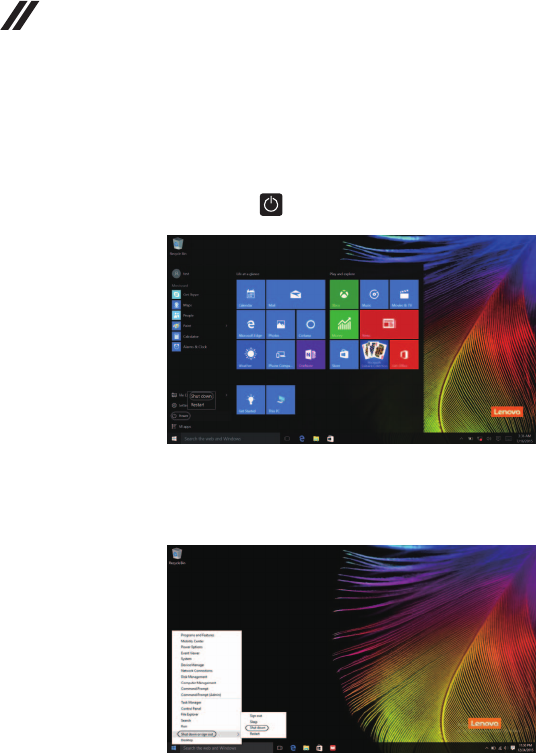
• Movethe cursorto thelower-leftcorner,and thenselectthe Startbutton.
SelectPower → Sleep.
Note:Putyourcomputertosleepbeforeyoumoveit.Movingyourcomputer
whiletheharddiskdriveisspinningcandamagetheharddisk,causing
lossofdata.
Towakeupthecomputer,performthefollowing:
• Pressanykeyonthekeyboard.
• PressthePowerbutton.
26
Hardware Maintenance Manual
• Right-clicktheStartbuttoninthelower-leftcornerandselectShut down or
sign out→Shut down.
Shutting down the computer
Ifyouarenotgoingtouseyourcomputerforalongtime,shutitdown.
Toshutdownyourcomputer,dooneofthefollowing:
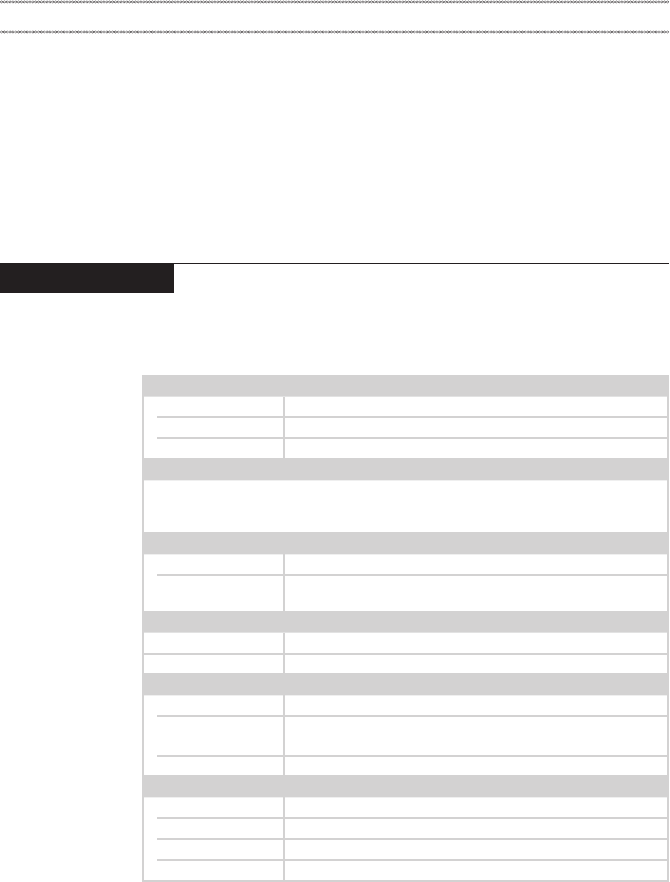
• Movethe cursorto thelower-leftcorner,and thenselectthe Startbutton.
SelectPower → Shut down.
27
Lenovo YOGA 530-14IKB/YOGA 530-14ARR
Lenovo YOGA 530-14IKB/YOGA 530-14ARR
Thischapter presentsthefollowingproduct-specificservice referencesand
product-specicpartsinformation:
• “Specications”onpage27
• “Statusindicators”onpage29
• “Hotkeys”onpage30
• “FRUreplacementnotices”onpage31
• “RemovingandreplacinganFRU”onpage32
• “Locations”onpage62
• “Partslist”onpage64
Specications
ThefollowingtableliststhespecificationsoftheLenovoYOGA530-14IKB/
YOGA530-14ARR:
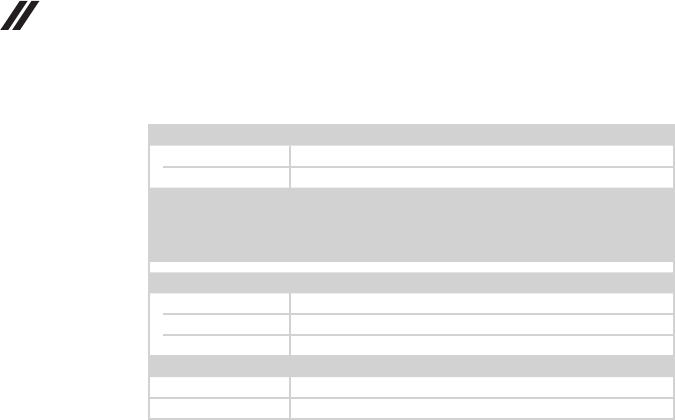
Table 1. Specications
Form Factor
Dimensions Appr.328mm×229mm×17.6mm
Weight Appr.1.60kgwithbattery
LCDsize 14.0-inch
Processor
Seethesystempropertiesofyourcomputer,youcandothisasfollows:
ClickControl Panel,thenclickHardware and Sound,clickDevice Manager
underDevices and PrintersanddoubleclickProcessors.
Memory
Typeandspeed DDR4,2133MHz/2400MHz
Maximum
supportedcapacity 16GB
Storage
Capacity SSD,128GB/256GB/512GB
Interface PCIE
Display
Screen Multi-touchscreen
Displayresolution
(LCD)
16:9,1,366×768pixelsHD/
1,920×1,080pixelsFHD
LCDbacklight LED
I/O Ports
USB USB3.0×2,Type-C(USB3.0only)×1
Audio Comboaudiojack×1
Video/Audio HDMIslot×1
Memorycardslot 4-in-1(SD,SDHC,SDXC,MMC)
28
Hardware Maintenance Manual
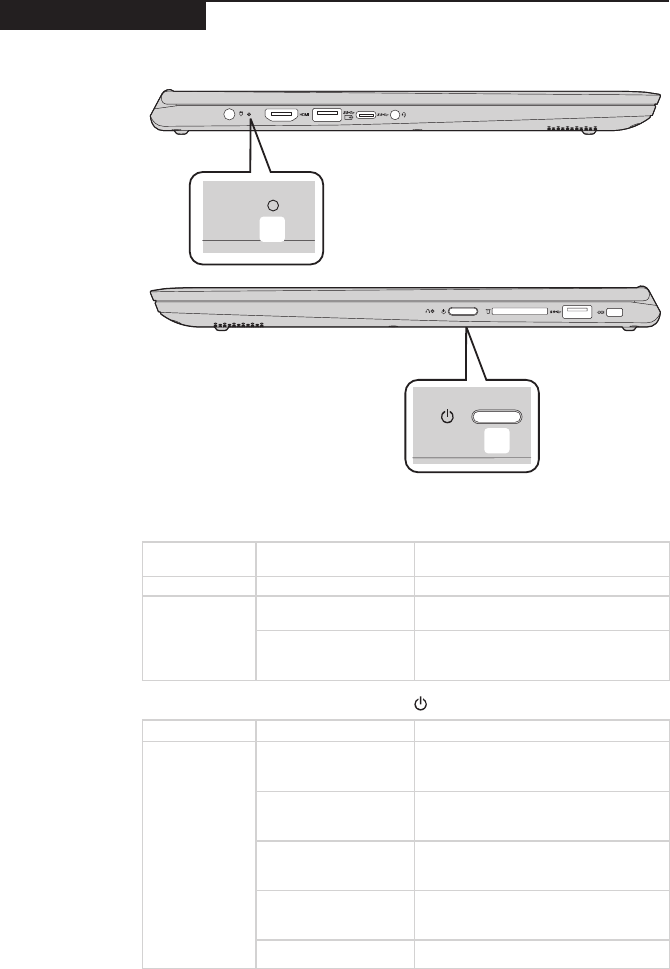
Table 1. Specications (continued)
Battery pack
Type Polymer
Cells/Capacity 4Cell,45Wh
Note: Thecapacitygivenhereisthetypicaloraveragecapacityas
measuredinaspecictestenvironment.Capacitiesmeasuredinother
environmentsmaydifferbutarenolowerthantheratedcapacity(see
productlabel).
AC power adapter
Input 100-240V,50-60Hz
Outputvoltage 20VDC
Power 65W
Miscellaneous
Camera HD
Security KensingtonMiniSecurityslot×1
29
Lenovo YOGA 530-14IKB/YOGA 530-14ARR
Status indicators
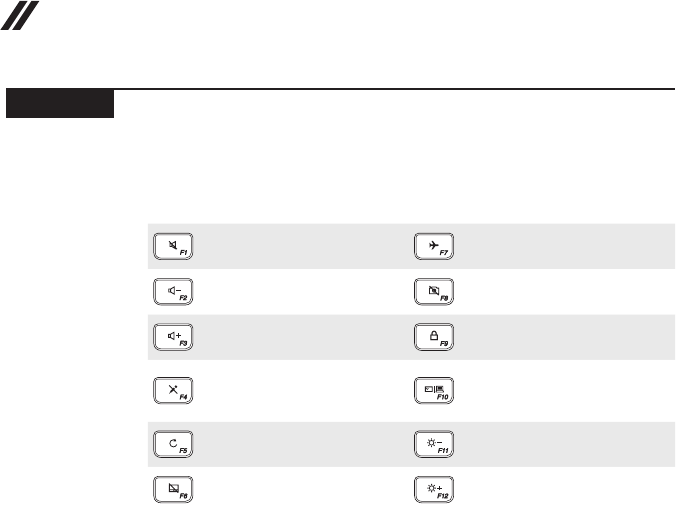
Thesystemstatusindicatorsbelowshowthecomputerstatus:
a
b
Table 2. Status indicators
1 Battery/Charging status LED
AC power
adapter status
LED status Meaning
Disconnected Off Thebatteryisnotcharging.
Connected
Solidamber Thebatteryhasbetween1%and
80%chargeandisstillcharging.
Solidwhite
Thebatteryhasmorethan80%
charge,chargingwillcontinueuntil
thebatteryisfullycharged.
2 Power button/Power status indicator
Indicator Indicator status Meaning
Power status
indicator
On(solidwhite)
Thecomputerispoweredonandthe
batteryhasbetween20%and100%
charge.
On(solidamber)
Thecomputerispoweredonandthe
batteryhasbetween1%and20%
charge.
Slowblinkingamber
Thecomputerisinsleepmodeand
thebatteryhasbetween1%and20%
charge.
Slowblinkingwhite
Thecomputerisinsleepmodeand
thebatteryhasbetween20%and
100%charge.
Off Thecomputerispoweredoff.
30
Hardware Maintenance Manual
Hotkeys
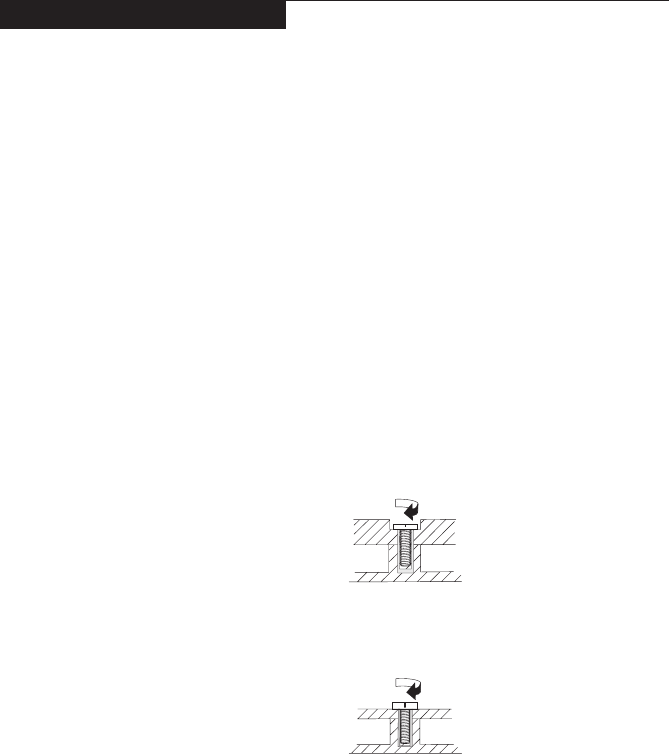
Youcanaccesscertainsystemsettingsquicklybypressingtheappropriate
hotkeys.
Table 3. Hotkeys
:
Mutes/unmutesthesound.
:Enables/disablesairplane
mode.
:
Decreasesthevolumelevel.
: Enables/disablescamera.
:
Increasesthevolumelevel.
: LockstheLCDscreen.
:
Enables/disables
microphone.
:
Enablestheexternal
projectorordanglesthe
externaldisplay.
:
Refreshespage.
:Decreasesdisplay
brightness.
:
Enables/disablesthetouch
pad.
:Increasesdisplay
brightness.
31
Lenovo YOGA 530-14IKB/YOGA 530-14ARR
FRU replacement notices
Thissection presentsnoticesrelatedtoremoving andreplacingparts. Read
thissectioncarefullybeforereplacinganyFRU.
Screw notices
Loosescrewscancause areliability problem.IntheLenovocomputer,this
problemisaddressedwithspecialnylon-coatedscrewsthathavethefollowing
characteristics:
• Theymaintaintightconnections.
• Theydonoteasilycomeloose,evenwithshockorvibration.
• Theyarehardertotighten.
• Eachoneshouldbeusedonlyonce.
Dothefollowingwhenyouservicethismachine:
• Keepthescrewkitinyourtoolbag.
• CarefullyremovescrewsforreusewhenreplacingFRUs.
• Useatorquescrewdriverifyouhaveone.
Tightenscrewsasfollows:
• Plastic to plastic
Turnanadditional90° afterthe screwhead touchesthe surfaceof the
plasticpart:
more than 90°
(Cross-section)
• Logic card to plastic
Turnanadditional180°afterthescrewheadtouchesthesurfaceofthe
logiccard:
more than 180°
(Cross-section)
• Torque driver
Ifyouhaveatorquescrewdriver,refertothe“Torque”columnforeachstep.
• Makesurethatyouusethecorrectscrews.Ifyouhaveatorquescrewdriver,
tightenallscrewsrmlytothetorqueshowninthetable.Carefully remove
screws for reuse when replacing FRUs. Make sure that all screws are
tightened rmly.
• Ensuretorque screwdriversarecalibratedcorrectlyfollowing country
specications.
32
Hardware Maintenance Manual
Removing and replacing an FRU
Thissectionpresentsexplodedgures withtheinstructionstoindicatehowto
removeandreplacetheFRU.Makesuretoobservethefollowinggeneralrules:
1. Donotattempttoserviceanycomputerunlessyouhavebeentrainedand
certied.Anuntrainedpersonrunstheriskofdamagingparts.
2. BeforereplacinganyFRU,review“FRUreplacementnotices”onpage31.
3. Beginby removingany FRUsthat haveto beremoved beforethe failing
FRU.AnyofsuchFRUsarelistedatthetopofthepage.Removethemin
theorderinwhichtheyarelisted.
4. FollowthecorrectsequenceinthestepstoremovetheFRU,asgiveninthe
guresbythenumbersinsquarecallouts.
5. WhenturningascrewtoreplaceanFRU,turnitinthedirectionasgivenby
thearrowinthegure.
6. WhenremovingtheFRU,move itinthedirectionasgivenbythearrow in
thegure.
7. Toputthe newFRUinplace,reversetheremovalproceduresandfollow
anyofthenotesthatpertain toreplacement. Forinformation about
connectingandarranginginternalcables,see“Locations”onpage62.
8. WhenreplacinganFRU,usethecorrectscrewasshownintheprocedures.
DANGER
Before removing any FRU, turn off the computer, unplug all power cords from
electrical outlets, remove the battery pack, and then disconnect any of the
interconnecting cables.
Attention:AfterreplacinganFRU,donotturnonthecomputeruntilyouhave
madesurethatallscrews,springs,andothersmallpartsareinplaceandnone
areloose insidethe computer. Verify thisbyshakingthecomputer gentlyand
listeningforrattlingsounds.Metallic partsormetalakescancauseelectrical
shortcircuits.
Attention:Thesystem boardissensitiveto,andcanbe damagedby,
electrostaticdischarge. Beforetouchingit,establishpersonal groundingby
touchingagroundpointwithonehandorusinganelectrostaticdischarge(ESD)
strap(P/N6405959)toremovepotentialshockreasons.
33
Lenovo YOGA 530-14IKB/YOGA 530-14ARR
1010 Base cover
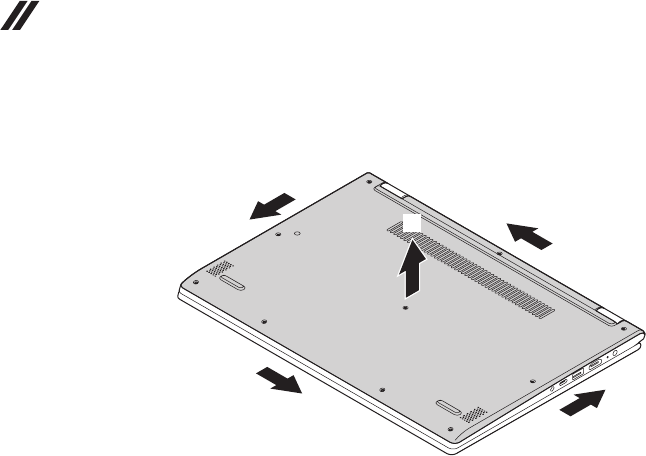
Figure 1. Removal steps of base cover
Removethescrews1.
a
a
a
a
a
a
a
a
a
a
Step Screw (quantity) Color Torque
1M2×6.5mm,plumowerhead(10) Silver 1.85kg±0.15kgf.cm
34
Hardware Maintenance Manual
Figure 1. Removal steps of base cover (continued)
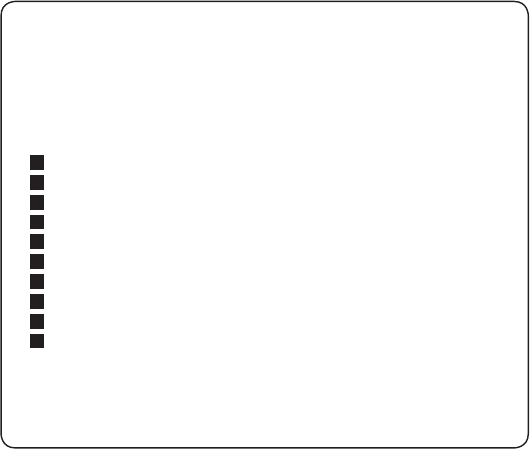
Removethebasecoverinthedirectionsshownbyarrows2and3.
b
b
b
b
c
35
Lenovo YOGA 530-14IKB/YOGA 530-14ARR
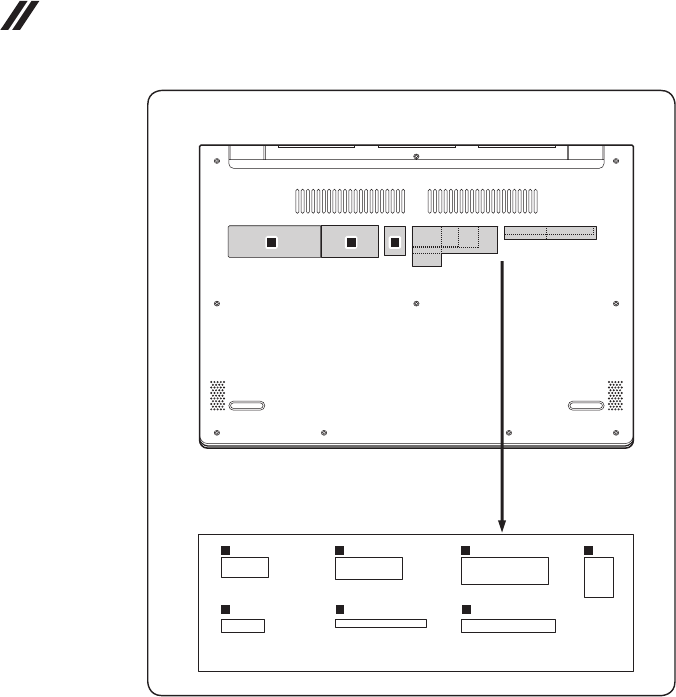
Note: Applying labels to the base cover
ThenewbasecoverFRUisshippedwithakitcontaininglabelsofseveral
kinds.Whenyoureplacethebasecover,youneedtoapplythefollowing
labels:
Thefollowinglabelsneedtobepeeledofffromtheoldbasecoverandput
onthenewbasecover.
ForcountriesotherthanChina:
aRatinglabel70×24mm
bRatingprint43×24mm
cGMLLabel16.077×22.501mm
dWL/BT label 35×15mm e
eKCClabel50×16mm
fAdapterlabel65×20mm
gBISlabel22×30mm
hIndonesialabel32×10mm
iArgentinalabel68×6mm
jTWlabel70×10mm
Forsomemodels,youalsoneedtoapplyoneortwoFCClabels.Checkthe
oldbasecover;ifithasoneortwoFCClabels,ndduplicatesoftheminthe
labelkitandapplythemtothenewbasecover.
36
Hardware Maintenance Manual
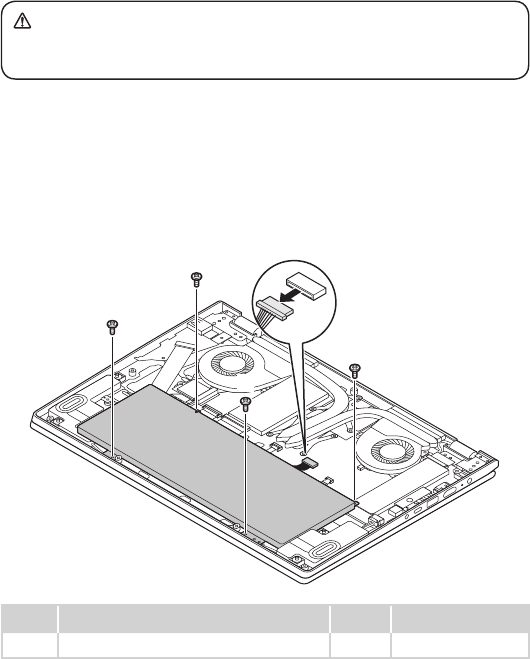
Forthelocationofeachlabel,refertothefollowinggures:
ForcountriesotherthanChina:
de
h
f
i
g
j
ac
b
37
Lenovo YOGA 530-14IKB/YOGA 530-14ARR
1020 Battery pack
DANGER
Only use the battery specied in the parts list for your computer. Any other battery
could ignite or explode.
Foraccess,removetheseFRUsinorder:
• “1010Basecover”onpage33
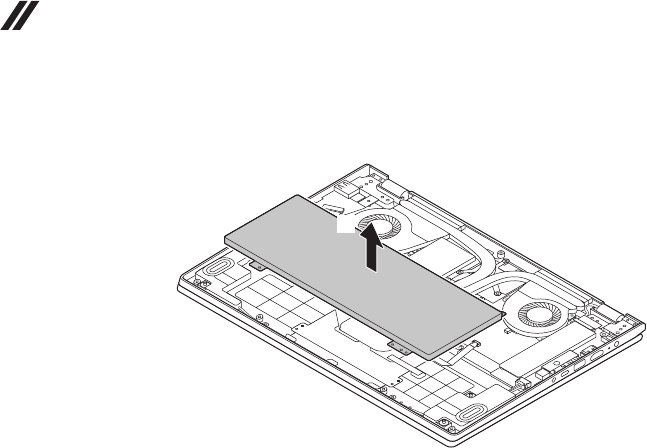
Figure 2. Removal steps of battery pack
Detachthebatterypackconnectorinthedirectionshownbyarrow1.Remove
thescrews2.
b
b
b
b
b
a
Step Screw (quantity) Color Torque
BM2×3.5mm,Phillips-head(4) Black 1.85kg±0.15kgf.cm
38
Hardware Maintenance Manual
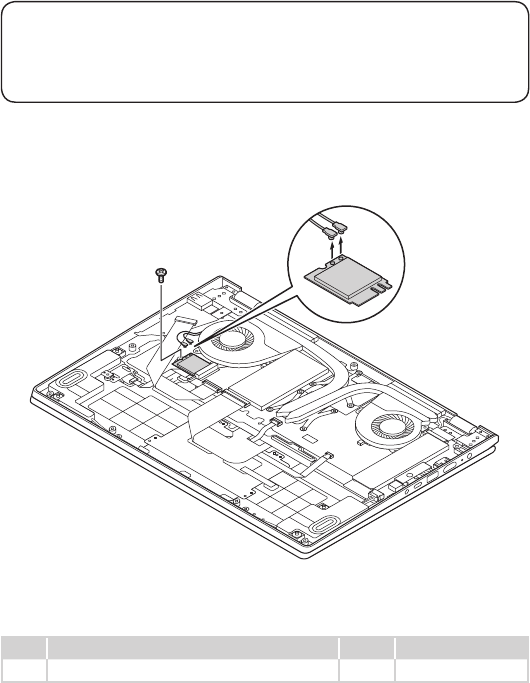
Figure 2. Removal steps of battery pack (continued)
Removethebatterypackinthedirectionshownbyarrow3.
c
39
Lenovo YOGA 530-14IKB/YOGA 530-14ARR
1030 PCI Express Mini Card for wireless LAN
Foraccess,removetheseFRUsinorder:
• “1010Basecover”onpage33
• “1020Batterypack”onpage37
Important:
The preinstalled WLAN module may only be replaced with a Lenovo approved
module in order to comply with FCC and IC regulations. Refer to Table 4 “Parts
list—Overall” on page 66 for Lenovo part numbers for the approved modules.
Figure 3. Removal steps of PCI Express Mini Card for wireless LAN
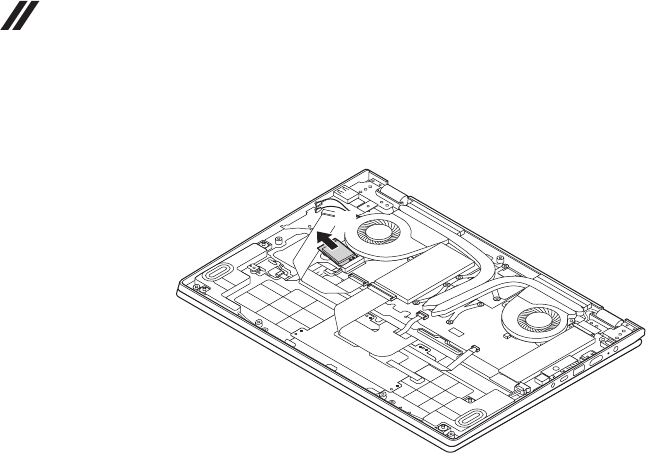
DisconnectthetwowirelessLANcables(black,grey)1,andthenremovethe
screw2.
b
a
a
Instep1,unplugthejacksbyusingtheremovaltoolantennaRFconnector
(P/N:08K7159),orpickuptheconnectorswithyourngersandgentlyunplug
theminthedirectionshownbythearrows.
Step Screw (quantity) Color Torque
2M2×3.5mm,Phillips-head(1) Black 1.85kg±0.15kgf.cm
40
Hardware Maintenance Manual
Figure 3. Removal steps of PCI Express Mini Card for wireless LAN (continued)
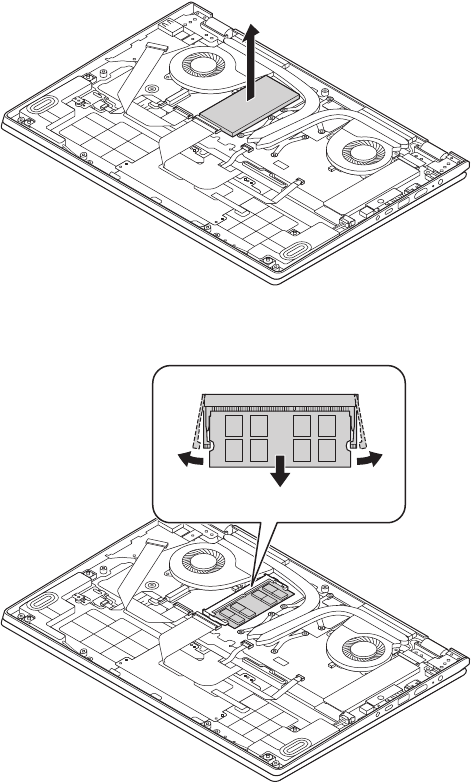
Removethecardinthedirectionshownbyarrow3.
c
When installing:
PlugtheblackcableintothejacklabeledMAIN,andthegraycableintothe
jacklabeledAUXonthecard.
41
Lenovo YOGA 530-14IKB/YOGA 530-14ARR
1040 DIMM
Foraccess,removetheseFRUsinorder:
• “1010Basecover”onpage33
• “1020Batterypack”onpage37
• “1030PCIExpressMiniCardforwirelessLAN”onpage39
Figure 4. Removal steps of DIMM
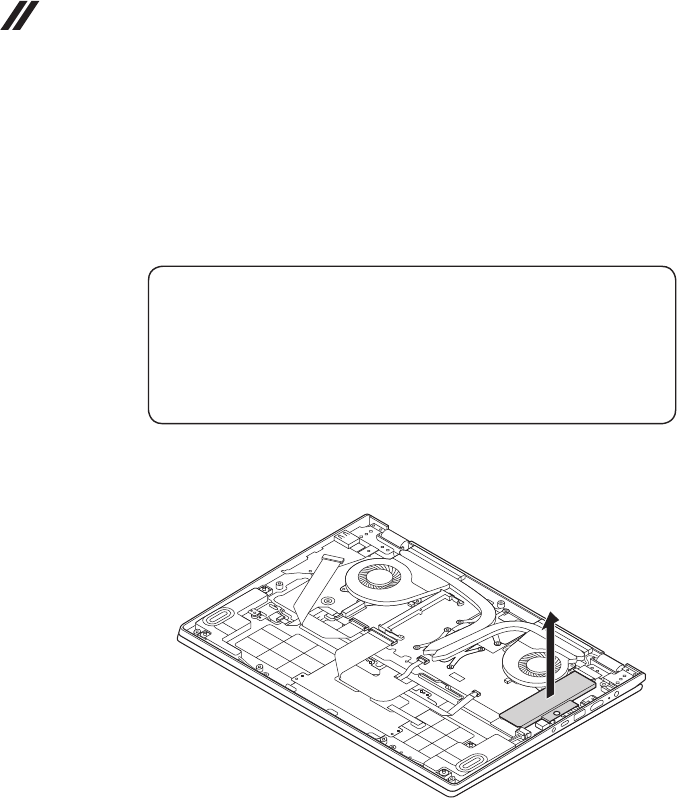
RemovetheDIMMcoverinthedirectionshownbyarrow1.
a
Releasethetwolatchesonbothedgesofthesocketat thesame timein the
directionsshownbyarrows2,andthenunplugtheDIMMinthedirectionshown
byarrow3.
b
b
c
42
Hardware Maintenance Manual
1050 SSD card
Foraccess,removetheseFRUsinorder:
• “1010Basecover”onpage33
• “1020Batterypack”onpage37
• “1030PCIExpressMiniCardforwirelessLAN”onpage39
• “1040DIMM”onpage41
Attention:
• DonotdroptheSSDcardorapplyanyphysicalshocktoit. The SSD card is
sensitive to physical shock. Improper handling can cause damage and permanent
loss of data.
• Before removing the SSD card, suggest the customer to backup all the information
on it if possible.
• Never remove the SSD card while the system is operating or in suspend mode.
Figure 5. Removal steps of SSD card
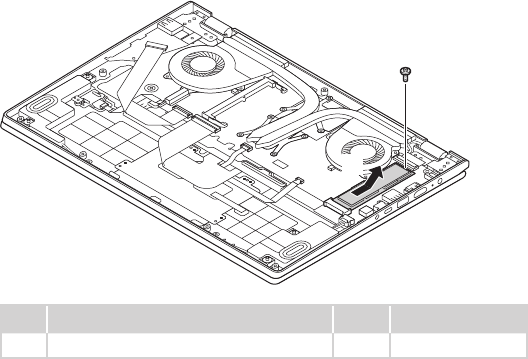
RemovetheSSDcoverinthedirectionshownbyarrow1.
a
43
Lenovo YOGA 530-14IKB/YOGA 530-14ARR
Removethescrew2.Then removethe SSDcard inthedirectionshownby
arrow3.
b
c
Step Screw (quantity) Color Torque
2M2x3.5mm,Phillips-head(1) Black 1.85kg±0.15kgf.cm
44
Hardware Maintenance Manual
1060 Speakers
Foraccess,removetheseFRUsinorder:
• “1010Basecover”onpage33
• “1020Batterypack”onpage37
• “1030PCIExpressMiniCardforwirelessLAN”onpage39
• “1040DIMM”onpage41
• “1050SSDcard”onpage42
Figure 6. Removal steps of speakers
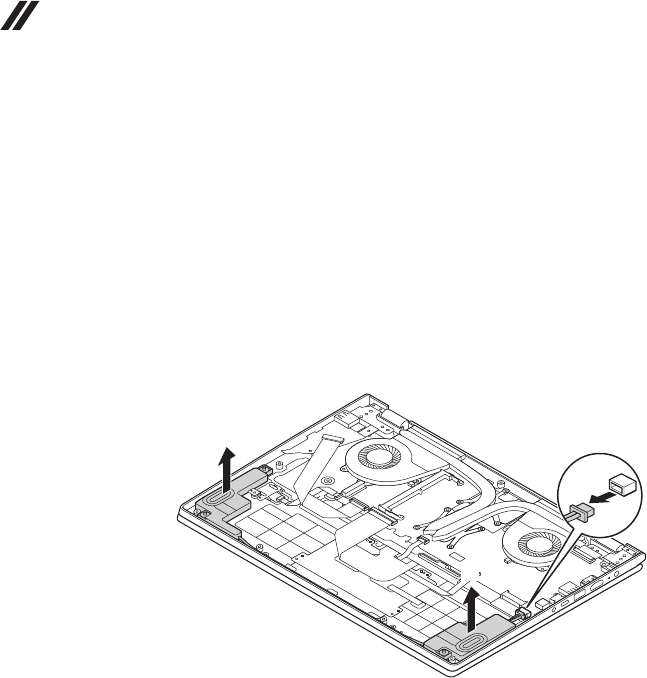
Unplugthespeakerconnectorinthedirectionshownbyarrow1.Thenremove
thespeakers2.
a
b
b
When installing:Makesurethattheconnectorisattachedrmly.
45
Lenovo YOGA 530-14IKB/YOGA 530-14ARR
1070 Fan assembly and Heat Sink assembly
Foraccess,removetheseFRUsinorder:
• “1010Basecover”onpage33
• “1020Batterypack”onpage37
• “1030PCIExpressMiniCardforwirelessLAN”onpage39
• “1040DIMM”onpage41
• “1050SSDcard”onpage42
• “1060Speakers”onpage44
Figure 7. Removal steps of fan assembly and Heat Sink assembly
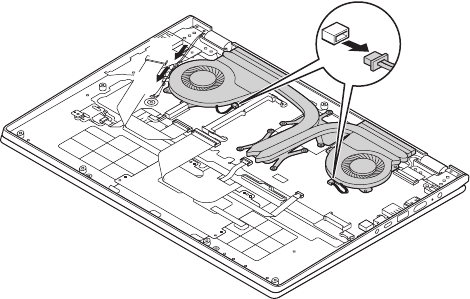
Releasethecablesfromthecableguidesinthedirectionsshownbyarrows
1. Unplugthefanconnectorinthedirectionshownbyarrow2.
a
b
a
When installing:Route theantenna cablesalongthecableguides.As you
routethecables,makesurethattheyarenotsubjectedtoanytension.Tension
couldcausethecablestobedamagedbythecableguides,orawiretobe
broken.
46
Hardware Maintenance Manual
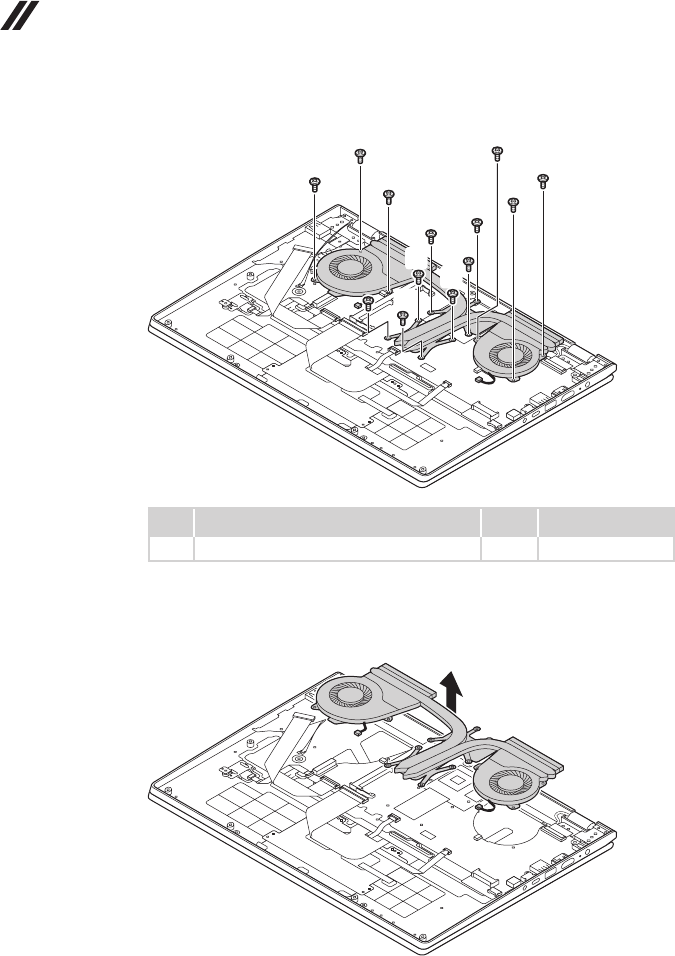
Removethescrews3.Loosenthescrews4.
c
cc
cc
c
d
d
d
d
d
d
Step Screw (quantity) Color Torque
3M2x3.5mm,Phillips-head(6) Black 1.85kg±0.15kgf.cm
When installing:Makesurethattheconnectorisattachedrmly.
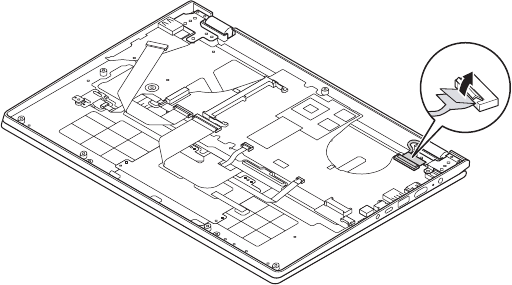
RemovethefanandHeatSinkassemblyinthedirectionshownbyarrow5.Be
carefulnottodamagetheconnector.
e
47
Lenovo YOGA 530-14IKB/YOGA 530-14ARR
1080 Upper case
Foraccess,removetheseFRUsinorder:
• “1010Basecover”onpage33
• “1020Batterypack”onpage37
• “1030PCIExpressMiniCardforwirelessLAN”onpage39
• “1040DIMM”onpage41
• “1050SSDcard”onpage42
• “1060Speakers”onpage44
• “1070FanassemblyandHeatSinkassembly”onpage45
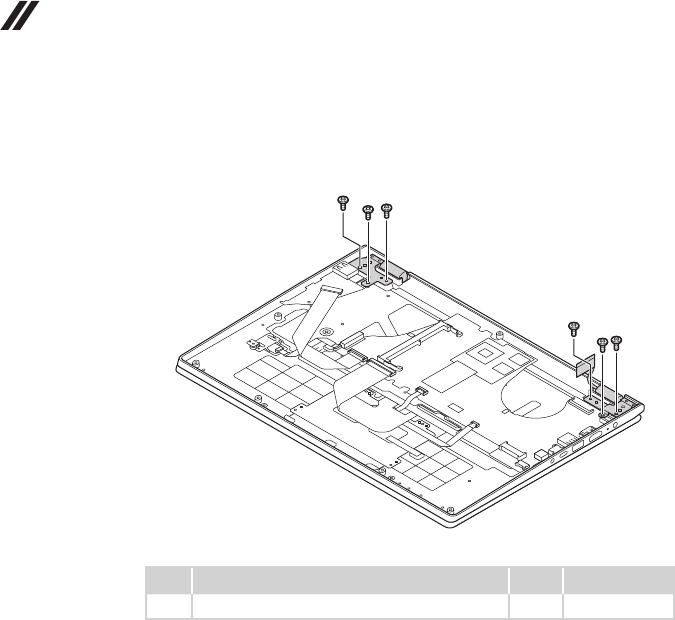
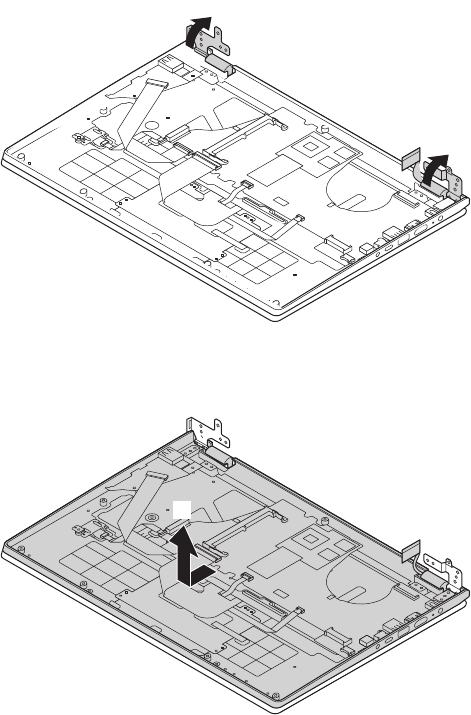
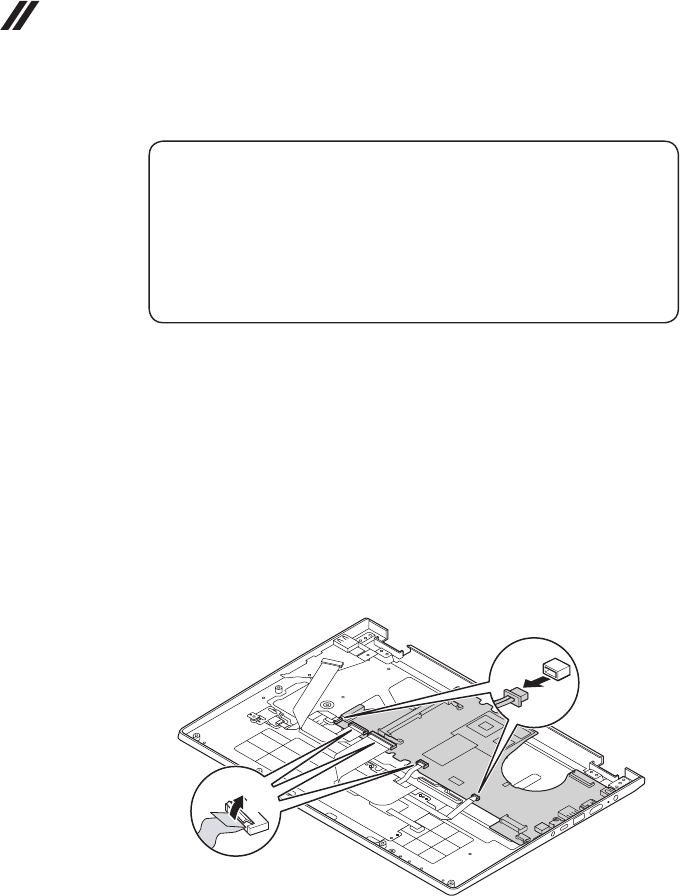
Figure 8. Removal steps of upper case
DetachtheEDPcableinthedirectionshownbyarrow1.
a
48
Hardware Maintenance Manual
Figure 8. Removal steps of upper case (continued)
Removethescrews2.
bb
b
b
b
b
Step Screw (quantity) Color Torque
2M2.5×4mm,Phillips-head(6) Black 3kg±0.3kgf.cm
49
Lenovo YOGA 530-14IKB/YOGA 530-14ARR
Figure 8. Removal steps of upper case (continued)
OpenthehingeinthedirectionshownbyarrowsC.
c
c
RemovetheuppercasefromtheLCDmoduleinthedirectionshownby
arrowD.
d
50
Hardware Maintenance Manual
1090
System board
Important notices for handling the system board:
When handling the system board, bear the following in mind.
• Be careful not to drop the system board on a bench top that has a hard surface,
such as metal, wood, or composite.
• Avoid rough handling of any kind.
• During the whole process, make sure not to drop or stack the system board.
• If you put a system board down, make sure to put it only on a padded surface such
as an ESD mat or conductive corrugated material.
Foraccess,removetheseFRUsinorder:
• “1010Basecover”onpage33
• “1020Batterypack”onpage37
• “1030PCIExpressMiniCardforwirelessLAN”onpage39
• “1040DIMM”onpage41
• “1050SSDcard”onpage42
• “1060Speakers”onpage44
• “1070FanassemblyandHeatSinkassembly”onpage45
• “1080Uppercase”onpage47
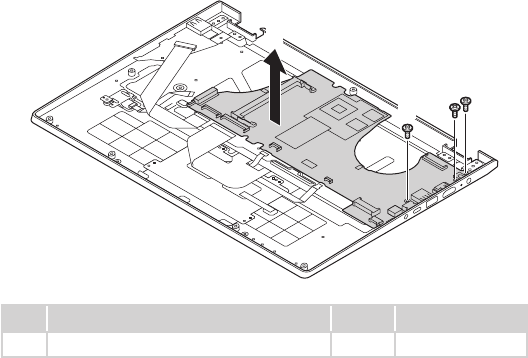
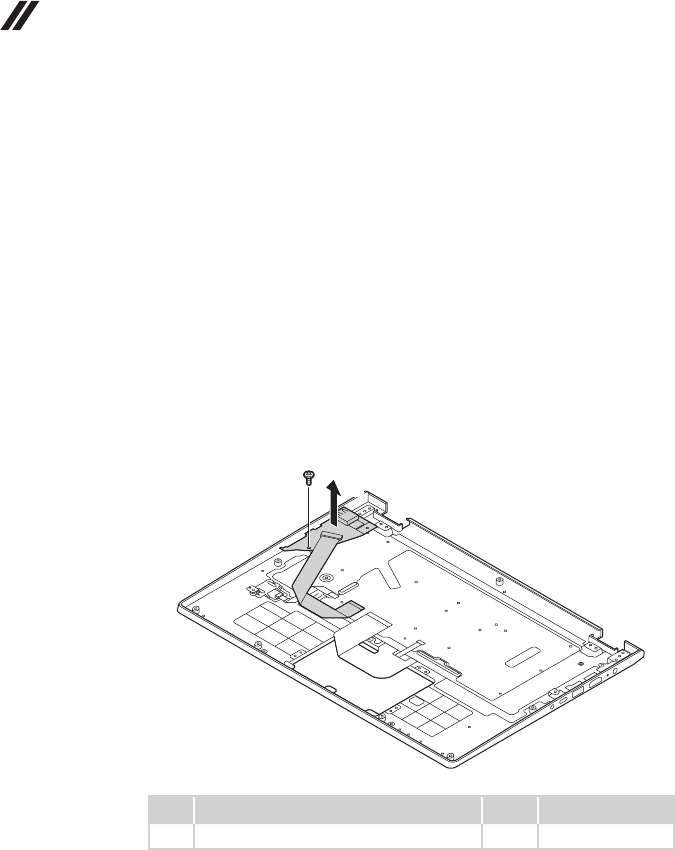
Figure 9. Removal steps of system board
Disconnecttheconnectorsinthedirectionsshownbyarrows1-3.
ba
c
When installing:Makesurethattheconnectorisattachedrmly.
51
Lenovo YOGA 530-14IKB/YOGA 530-14ARR
Figure 9. Removal steps of system board (continued)
Removethescrews4.Andthenremovethesystemboardinthedirection
shownbyarrow5.
e
d
dd
Step Screw (quantity) Color Torque
4M2×3.5mm,Phillips-head(3) Black 1.85kg±0.15kgf.cm
52
Hardware Maintenance Manual
1100 I/O board
Foraccess,removetheseFRUsinorder:
• “1010Basecover”onpage33
• “1020Batterypack”onpage37
• “1030PCIExpressMiniCardforwirelessLAN”onpage39
• “1040DIMM”onpage41
• “1050SSDcard”onpage42
• “1060Speakers”onpage44
• “1070FanassemblyandHeatSinkassembly”onpage45
• “1080Uppercase”onpage47
• “1090Systemboard”onpage50
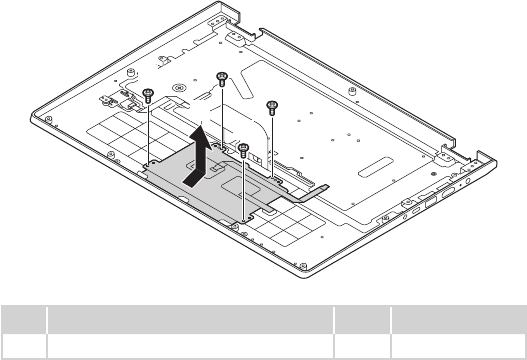
Figure 10. Removal steps of I/O board
RemovethescrewsAandI/OboardB.
a
b
Step Screw (quantity) Color Torque
1M2×3.5mm,Phillips-head(1) Black 1.85kg±0.15kgf.cm
53
Lenovo YOGA 530-14IKB/YOGA 530-14ARR
1110 Touch pad
Foraccess,removetheseFRUsinorder:
• “1010Basecover”onpage33
• “1020Batterypack”onpage37
• “1030PCIExpressMiniCardforwirelessLAN”onpage39
• “1040DIMM”onpage41
• “1050SSDcard”onpage42
• “1060Speakers”onpage44
• “1070FanassemblyandHeatSinkassembly”onpage45
• “1080Uppercase”onpage47
• “1090Systemboard”onpage50
• “1100I/Oboard”onpage52
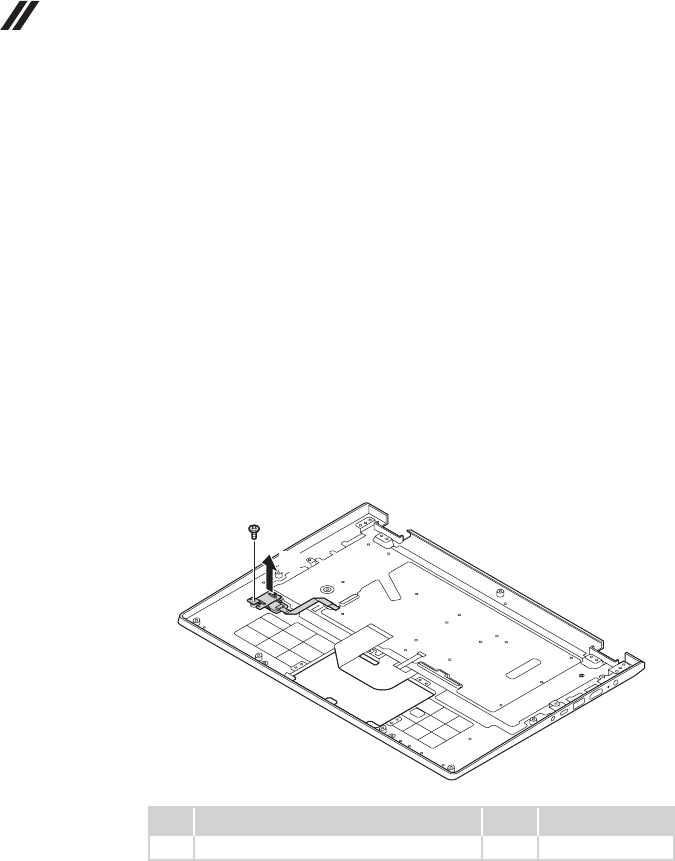
Figure 11. Removal steps of touch pad
Removethescrews1andtouchpad2.
a
a
a
a
b
Step Screw (quantity) Color Torque
1M2×2.3mm,Phillips-head(4) Silver 1.85kg±0.15kgf.cm
54
Hardware Maintenance Manual
1120 Fingerprint
Foraccess,removetheseFRUsinorder:
• “1010Basecover”onpage33
• “1020Batterypack”onpage37
• “1030PCIExpressMiniCardforwirelessLAN”onpage39
• “1040DIMM”onpage41
• “1050SSDcard”onpage42
• “1060Speakers”onpage44
• “1070FanassemblyandHeatSinkassembly”onpage45
• “1080Uppercase”onpage47
• “1090Systemboard”onpage50
• “1100I/Oboard”onpage52
• “1110Touchpad”onpage53
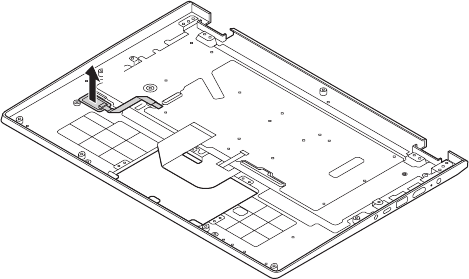
Figure 12. Removal steps of Fingerprint
Removethescrew1.Then removengerprintbracketinthedirectionshown
byarrow2.
a
b
Step Screw (quantity) Color Torque
1M2×2.3mm,Phillips-head(1) Silver
55
Lenovo YOGA 530-14IKB/YOGA 530-14ARR
Removethengerprintnthedirectionshownbyarrow3.
c
56
Hardware Maintenance Manual
1130 LCD unit
Foraccess,removetheseFRUsinorder:
• “1010Basecover”onpage33
• “1020Batterypack”onpage37
• “1030PCIExpressMiniCardforwirelessLAN”onpage39
• “1040DIMM”onpage41
• “1050SSDcard”onpage42
• “1060Speakers”onpage44
• “1070FanassemblyandHeatSinkassembly”onpage45
• “1080Uppercase”onpage47
• “1090Systemboard”onpage50
• “1100I/Oboard”onpage52
• “1110Touchpad”onpage53
• “1120Fingerprint”onpage54
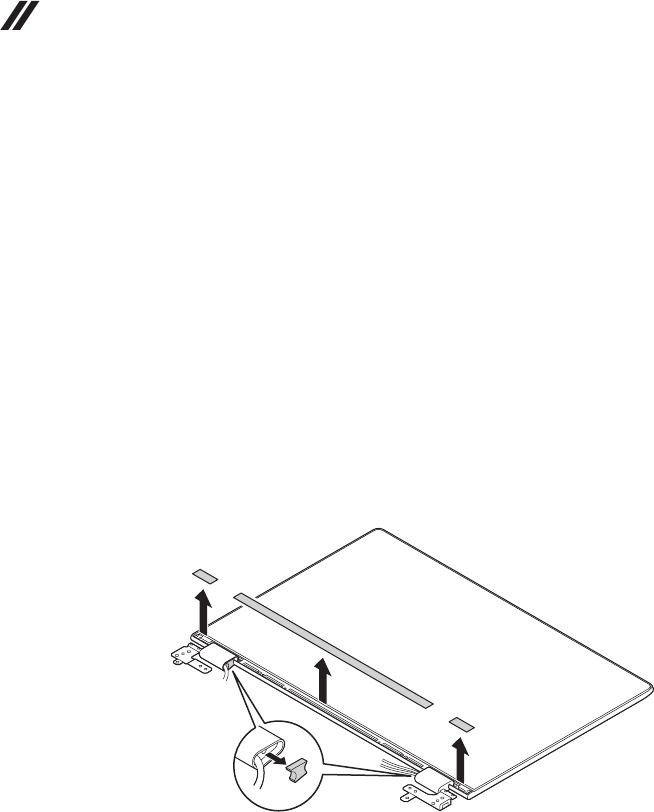
Figure 13. Removal steps of LCD unit
Pulloutthecaprubberinthedirectionshownbyarrow1.Removethehinge
capinthedirectionsshownbyarrows2.
a
b
b
b
57
Lenovo YOGA 530-14IKB/YOGA 530-14ARR
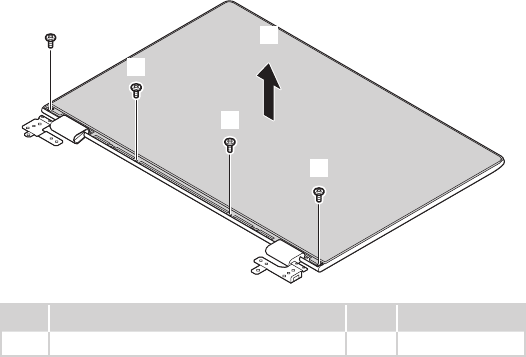
Figure 13. Removal steps of LCD unit (continued)
Removethescrews3.Blow-drytheLCDalongthesides.Removethepanelinthe
directionshownbyarrow4.
Note: HeatingthetapesbelowtheLCDto60ºC,tearoffthetapes.
d
c
c
c
c
Step Screw (quantity) Color Torque
3M2×3.0mm,Phillips-head(4) Silver 1.85kg±0.15kgf.cm
58
Hardware Maintenance Manual
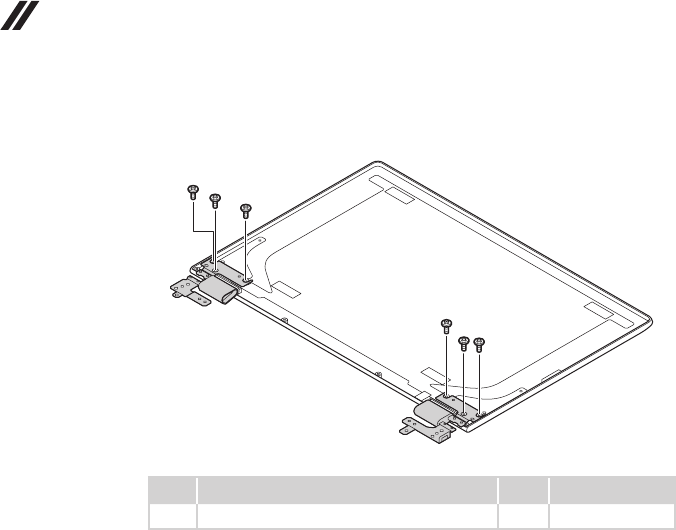
Figure 13. Removal steps of LCD unit (continued)
Removethescrews1.
aaa
aa
a
Step Screw (quantity) Color Torque
1M2×2mm,Phillips-head(6) Black 1.85kg±0.15kgf.cm
59
Lenovo YOGA 530-14IKB/YOGA 530-14ARR
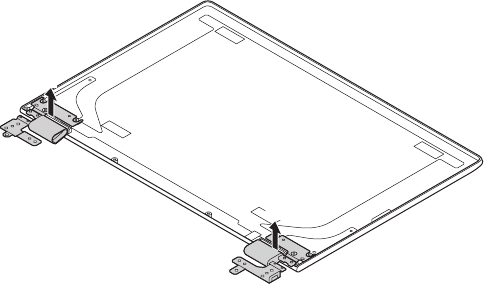
Figure 13. Removal steps of LCD unit (continued)
Removehingesinthedirectionshownbyarrow2.
b
b
When installing: Makesurethattheconnectorsareattachedrmly.
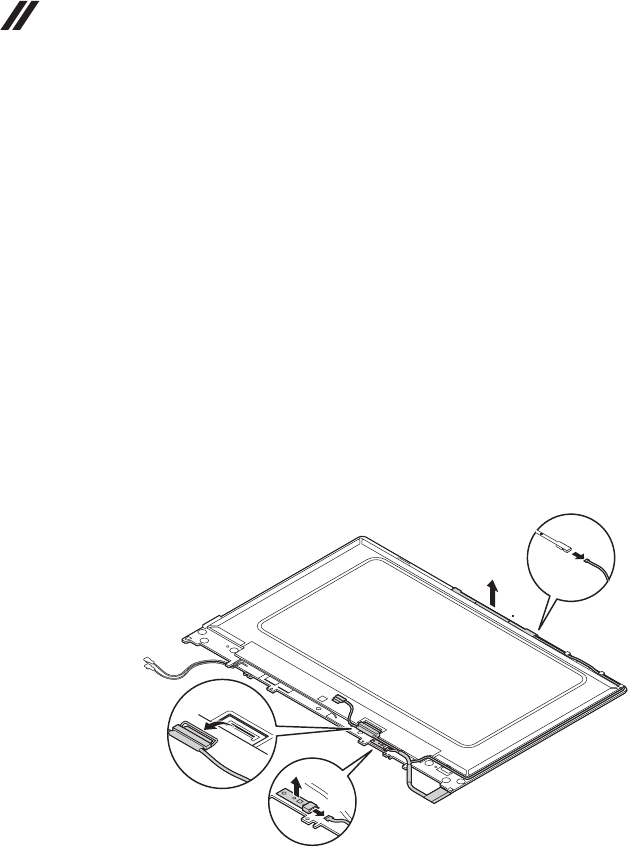
60
Hardware Maintenance Manual
1140 MIC board, sensor board and camera
Foraccess,removetheseFRUsinorder:
• “1010Basecover”onpage33
• “1020Batterypack”onpage37
• “1030PCIExpressMiniCardforwirelessLAN”onpage39
• “1040DIMM”onpage41
• “1050SSDcard”onpage42
• “1060Speakers”onpage44
• “1070FanassemblyandHeatSinkassembly”onpage45
• “1080Uppercase”onpage47
• “1090Systemboard”onpage50
• “1100I/Oboard”onpage52
• “1110Touchpad”onpage53
• “1120Fingerprint”onpage54
• “1130LCDunit”onpage56
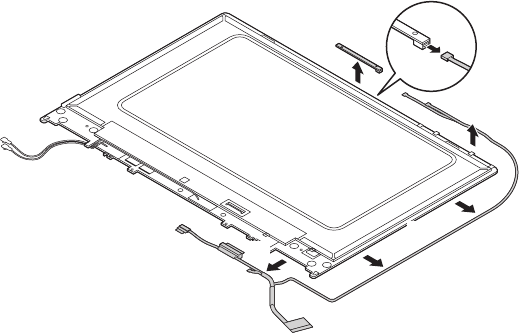
Figure 14. Removal steps of MIC board, sensor board and camera
Disconnecttheconnectorsinthedirectionsshownbyarrows1,2.Remove
thesensorboardinthedirectionshownbyarrow3.
When installing:Makesurethattheconnectorsareattachedrmly.
a
a
b
c
a
61
Lenovo YOGA 530-14IKB/YOGA 530-14ARR
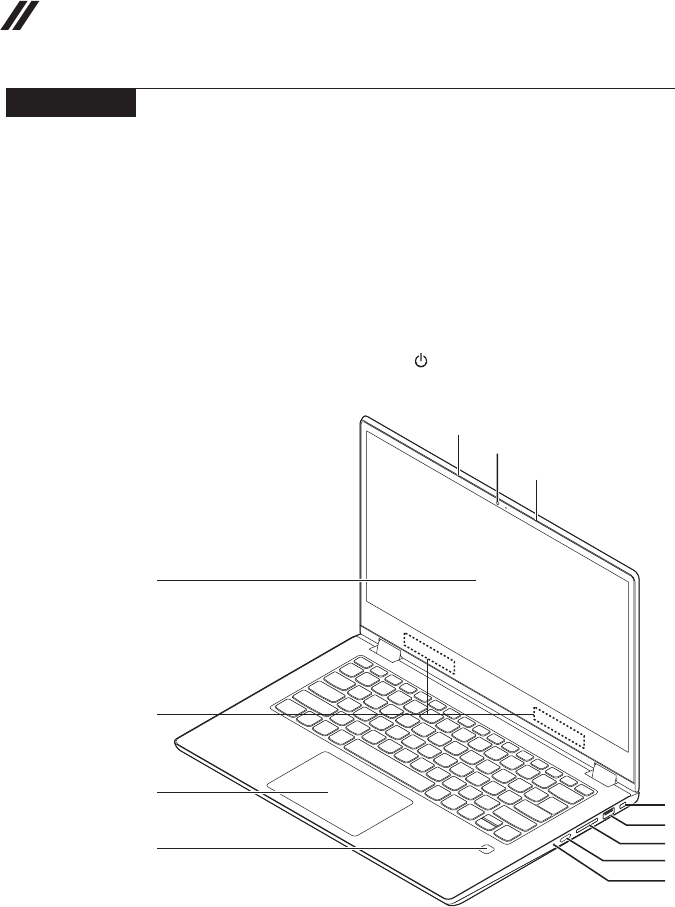
Disconnect the connectors in the direction shown by arrow 1. Remove the
camera and EDP cable in the directions shown by arrows 2.
a
b
b
b
b
62
Hardware Maintenance Manual
Locations
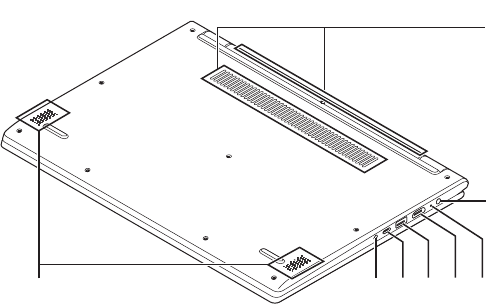
Front view and right-side view
1 Integratedcamera
2 Built-inmicrophone
3 Multi-touchscreen(onselectmodels)
4 WirelessLANantennas
5 Touchpad
6 Fingerprintreader(onselectmodels)
7 KensingtonMiniSecurityslot
8 USB3.0port
9 Memorycardslot
J Powerbutton/Powerstatusindicator
K Novobutton
e
f
d
c
g
h
i
j
k
a
b
b
63
Lenovo YOGA 530-14IKB/YOGA 530-14ARR
Bottom and Left-side view
1 Ventilationslots
2 Speakers
3 ACpoweradapterjack
4 Battery/ChargingstatusLED
5 HDMIport
6 USB3.0port
7 Type-Cport
8 Comboaudiojack
hg f e d
b
c
a
64
Hardware Maintenance Manual
Parts list
Thissectionpresentsthefollowingserviceparts:
• “Overall”onpage65
• “LCDFRUs”onpage82
• “Miscellaneousparts”onpage84
• “ACpoweradapters”onpage84
• “Screws”onpage87
Note:
Each FRU is available for all types or models, unless specic types or models are
specied.
Attention:
DonotattempttoreplaceanFRUonyourown.IfanFRUisdamaged,contact
aLenovoauthorizedserviceroramarketing representativeforreplacement
orrepair.Onlyqualiedtechnicianscaninspectorrepairthisproduct.
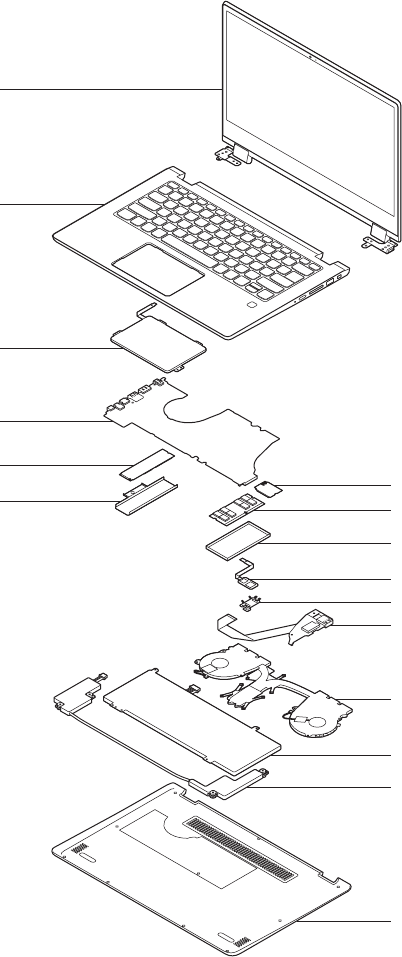
65
Lenovo YOGA 530-14IKB/YOGA 530-14ARR
Overall
2
6
7
b
8
8
9
10
11
12
13
3
4
5
a
1

66
Hardware Maintenance Manual
Table 4. Parts list—Overall
No. FRU FRU no. CRU
ID.
a-d See“Miscellaneousparts”onpage84.
1 LCDunit(see“LCDFRUs”onpage82).
2 UpperCaseL81EKW/KBIGFPBLGK 5CB0R08775
N
2 UpperCaseL81EKW/KBIGFPBLUI 5CB0R08852
2 UpperCaseL81EKW/KBIGFPBLKO 5CB0R08723
2 UpperCaseL81EKW/KBIGFPBLCH 5CB0R08653
2 UpperCaseL81EKW/KBIGFPBLRU 5CB0R08795
2 UpperCaseL81EKW/KBIGFPBLAR-E 5CB0R08638
2 UpperCaseL81EKW/KBIGFPBLHB 5CB0R08663
2 UpperCaseL81EKW/KBIGFPBLTI 5CB0R08598
2 UpperCaseL81EKW/KBIGFPBLINDIA 5CB0R08831
2 UpperCaseL81EKW/KBIGFPBLUA 5CB0R08483
2 UpperCaseL81EKW/KBIGFPBLUK 5CB0R08819
2 UpperCaseL81EKW/KBIGFPBLIT 5CB0R08583
2 UpperCaseL81EKW/KBIGFPBLSP 5CB0R08468
2 UpperCaseL81EKW/KBIGFPBLTR 5CB0R08712
2 UpperCaseL81EKW/KBIGFPBLPO 5CB0R08888
2 UpperCaseL81EKW/KBIGFPBLLA 5CB0R08679
2 UpperCaseL81EKW/KBIGFPBLCF-E 5CB0R08836
2 UpperCaseL81EKW/KBIGFPBLND 5CB0R08693
2 UpperCaseL81EKW/KBIGFPBLFR 5CB0R08604
2 UpperCaseL81EKW/KBIGFPBLGR 5CB0R08491
2 UpperCaseL81EKW/KBIGFPBLNL 5CB0R08751
2 UpperCaseL81EKW/KBIGFPBLHG 5CB0R08574
2 UpperCaseL81EKW/KBIGFPBLBE 5CB0R08793
2 UpperCaseL81EKW/KBIGFPBLICE 5CB0R08714
2 UpperCaseL81EKW/KBIGFPBLSA 5CB0R08671
2 UpperCaseL81EKW/KBIGFPBLSW 5CB0R08470
2 UpperCaseL81EKW/KBIGFPBLBU 5CB0R08796
2 UpperCaseL81EKW/KBIGFPBLCZ-SK 5CB0R08756
2 UpperCaseL81EKW/KBIGFPBLBZ 5CB0R08910
2 UpperCaseL81EKW/KBIGFPBLAR-FR 5CB0R08682
2 UpperCaseL81EKW/KBIGFPBLUSA 5CB0R08815
2 UpperCaseL81EKW/KBIGFPBLUS 5CB0R08514
2 UpperCaseL81EKW/KBIGFPNBLGK 5CB0R08526
2 UpperCaseL81EKW/KBIGFPNBLUI 5CB0R08466
2 UpperCaseL81EKW/KBIGFPNBLKO 5CB0R08768
2 UpperCaseL81EKW/KBIGFPNBLCH 5CB0R08782
2 UpperCaseL81EKW/KBIGFPNBLRU 5CB0R08617
2 UpperCaseL81EKW/KBIGFPNBLAR-E 5CB0R08748
2 UpperCaseL81EKW/KBIGFPNBLHB 5CB0R08687
2 UpperCaseL81EKW/KBIGFPNBLTI 5CB0R08652
2 UpperCaseL81EKW/KBIGFPNBLINDIA 5CB0R08624
2 UpperCaseL81EKW/KBIGFPNBLUA 5CB0R08619
2 UpperCaseL81EKW/KBIGFPNBLUK 5CB0R08818
2 UpperCaseL81EKW/KBIGFPNBLIT 5CB0R08810

67
Lenovo YOGA 530-14IKB/YOGA 530-14ARR
Table 4. Parts list—Overall (continued)
No. FRU FRU no. CRU
ID.
2 UpperCaseL81EKW/KBIGFPNBLSP 5CB0R08477
N
2 UpperCaseL81EKW/KBIGFPNBLTR 5CB0R08865
2 UpperCaseL81EKW/KBIGFPNBLPO 5CB0R08590
2 UpperCaseL81EKW/KBIGFPNBLLA 5CB0R08542
2 UpperCaseL81EKW/KBIGFPNBLCF-E 5CB0R08763
2 UpperCaseL81EKW/KBIGFPNBLND 5CB0R08791
2 UpperCaseL81EKW/KBIGFPNBLFR 5CB0R08861
2 UpperCaseL81EKW/KBIGFPNBLGR 5CB0R08887
2 UpperCaseL81EKW/KBIGFPNBLNL 5CB0R08726
2 UpperCaseL81EKW/KBIGFPNBLHG 5CB0R08873
2 UpperCaseL81EKW/KBIGFPNBLBE 5CB0R08802
2 UpperCaseL81EKW/KBIGFPNBLICE 5CB0R08492
2 UpperCaseL81EKW/KBIGFPNBLSA 5CB0R08758
2 UpperCaseL81EKW/KBIGFPNBLSW 5CB0R08622
2 UpperCaseL81EKW/KBIGFPNBLBU 5CB0R08801
2 UpperCaseL81EKW/KBIGFPNBLCZ-SK 5CB0R08866
2 UpperCaseL81EKW/KBIGFPNBLBZ 5CB0R08479
2 UpperCaseL81EKW/KBIGFPNBLAR-FR 5CB0R08706
2 UpperCaseL81EKW/KBIGFPNBLUS 5CB0R08472
2 UpperCaseL81EKW/KBIGNFPBLGK 5CB0R08834
2 UpperCaseL81EKW/KBIGNFPBLUI 5CB0R08899
2 UpperCaseL81EKW/KBIGNFPBLKO 5CB0R08759
2 UpperCaseL81EKW/KBIGNFPBLCH 5CB0R08593
2 UpperCaseL81EKW/KBIGNFPBLRU 5CB0R08850
2 UpperCaseL81EKW/KBIGNFPBLAR-E 5CB0R08658
2 UpperCaseL81EKW/KBIGNFPBLHB 5CB0R08587
2 UpperCaseL81EKW/KBIGNFPBLTI 5CB0R08534
2 UpperCaseL81EKW/KBIGNFPBLINDIA 5CB0R08727
2 UpperCaseL81EKW/KBIGNFPBLUA 5CB0R08771
2 UpperCaseL81EKW/KBIGNFPBLUK 5CB0R08908
2 UpperCaseL81EKW/KBIGNFPBLIT 5CB0R08607
2 UpperCaseL81EKW/KBIGNFPBLSP 5CB0R08724
2 UpperCaseL81EKW/KBIGNFPBLTR 5CB0R08797
2 UpperCaseL81EKW/KBIGNFPBLPO 5CB0R08550
2 UpperCaseL81EKW/KBIGNFPBLLA 5CB0R08552
2 UpperCaseL81EKW/KBIGNFPBLCF-E 5CB0R08882
2 UpperCaseL81EKW/KBIGNFPBLND 5CB0R08667
2 UpperCaseL81EKW/KBIGNFPBLFR 5CB0R08811
2 UpperCaseL81EKW/KBIGNFPBLGR 5CB0R08842
2 UpperCaseL81EKW/KBIGNFPBLNL 5CB0R08523
2 UpperCaseL81EKW/KBIGNFPBLHG 5CB0R08857
2 UpperCaseL81EKW/KBIGNFPBLBE 5CB0R08806
2 UpperCaseL81EKW/KBIGNFPBLICE 5CB0R08563
2 UpperCaseL81EKW/KBIGNFPBLSA 5CB0R08613
2 UpperCaseL81EKW/KBIGNFPBLSW 5CB0R08620
2 UpperCaseL81EKW/KBIGNFPBLBU 5CB0R08581

68
Hardware Maintenance Manual
No. FRU FRU no. CRU
ID.
2 UpperCaseL81EKW/KBIGNFPBLCZ-SK 5CB0R08694
N
2 UpperCaseL81EKW/KBIGNFPBLBZ 5CB0R08522
2 UpperCaseL81EKW/KBIGNFPBLAR-FR 5CB0R08808
2 UpperCaseL81EKW/KBIGNFPBLUSA 5CB0R08625
2 UpperCaseL81EKW/KBIGNFPBLUS 5CB0R08863
2 UpperCaseL81EKW/KBIGNFPNBLGK 5CB0R08869
2 UpperCaseL81EKW/KBIGNFPNBLUI 5CB0R08584
2 UpperCaseL81EKW/KBIGNFPNBLKO 5CB0R08721
2 UpperCaseL81EKW/KBIGNFPNBLCH 5CB0R08832
2 UpperCaseL81EKW/KBIGNFPNBLRU 5CB0R08837
2 UpperCaseL81EKW/KBIGNFPNBLAR-E 5CB0R08543
2 UpperCaseL81EKW/KBIGNFPNBLHB 5CB0R08646
2 UpperCaseL81EKW/KBIGNFPNBLTI 5CB0R08906
2 UpperCaseL81EKW/KBIGNFPNBLINDIA 5CB0R08684
2 UpperCaseL81EKW/KBIGNFPNBLUA 5CB0R08509
2 UpperCaseL81EKW/KBIGNFPNBLUK 5CB0R08776
2 UpperCaseL81EKW/KBIGNFPNBLIT 5CB0R08841
2 UpperCaseL81EKW/KBIGNFPNBLSP 5CB0R08608
2 UpperCaseL81EKW/KBIGNFPNBLTR 5CB0R08824
2 UpperCaseL81EKW/KBIGNFPNBLPO 5CB0R08532
2 UpperCaseL81EKW/KBIGNFPNBLLA 5CB0R08872
2 UpperCaseL81EKW/KBIGNFPNBLCF-E 5CB0R08847
2 UpperCaseL81EKW/KBIGNFPNBLND 5CB0R08626
2 UpperCaseL81EKW/KBIGNFPNBLFR 5CB0R08673
2 UpperCaseL81EKW/KBIGNFPNBLGR 5CB0R08480
2 UpperCaseL81EKW/KBIGNFPNBLNL 5CB0R08578
2 UpperCaseL81EKW/KBIGNFPNBLHG 5CB0R08547
2 UpperCaseL81EKW/KBIGNFPNBLBE 5CB0R08489
2 UpperCaseL81EKW/KBIGNFPNBLICE 5CB0R08817
2 UpperCaseL81EKW/KBIGNFPNBLSA 5CB0R08555
2 UpperCaseL81EKW/KBIGNFPNBLSW 5CB0R08586
2 UpperCaseL81EKW/KBIGNFPNBLBU 5CB0R08789
2 UpperCaseL81EKW/KBIGNFPNBLCZ-SK 5CB0R08611
2 UpperCaseL81EKW/KBIGNFPNBLBZ 5CB0R08696
2 UpperCaseL81EKW/KBIGNFPNBLAR-FR 5CB0R08485
2 UpperCaseL81EKW/KBIGNFPNBLUS 5CB0R08747
2 UpperCaseL81EKW/KBPTNFPBLGK 5CB0R08742
2 UpperCaseL81EKW/KBPTNFPBLUI 5CB0R08722
2 UpperCaseL81EKW/KBPTNFPBLKO 5CB0R08527
2 UpperCaseL81EKW/KBPTNFPBLCH 5CB0R08467
2 UpperCaseL81EKW/KBPTNFPBLRU 5CB0R08606
2 UpperCaseL81EKW/KBPTNFPBLAR-E 5CB0R08807
2 UpperCaseL81EKW/KBPTNFPBLHB 5CB0R08867
2 UpperCaseL81EKW/KBPTNFPBLTI 5CB0R08864
2 UpperCaseL81EKW/KBPTNFPBLINDIA 5CB0R08645
2 UpperCaseL81EKW/KBPTNFPBLUA 5CB0R08602
Table 4. Parts list—Overall (continued)

69
Lenovo YOGA 530-14IKB/YOGA 530-14ARR
Table 4. Parts list—Overall (continued)
No. FRU FRU no. CRU
ID.
2 UpperCaseL81EKW/KBPTNFPBLUK 5CB0R08907
N
2 UpperCaseL81EKW/KBPTNFPBLIT 5CB0R08805
2 UpperCaseL81EKW/KBPTNFPBLSP 5CB0R08636
2 UpperCaseL81EKW/KBPTNFPBLTR 5CB0R08649
2 UpperCaseL81EKW/KBPTNFPBLPO 5CB0R08760
2 UpperCaseL81EKW/KBPTNFPBLLA 5CB0R08904
2 UpperCaseL81EKW/KBPTNFPBLCF-E 5CB0R08753
2 UpperCaseL81EKW/KBPTNFPBLND 5CB0R08478
2 UpperCaseL81EKW/KBPTNFPBLFR 5CB0R08902
2 UpperCaseL81EKW/KBPTNFPBLGR 5CB0R08674
2 UpperCaseL81EKW/KBPTNFPBLNL 5CB0R08830
2 UpperCaseL81EKW/KBPTNFPBLHG 5CB0R08725
2 UpperCaseL81EKW/KBPTNFPBLBE 5CB0R08717
2 UpperCaseL81EKW/KBPTNFPBLICE 5CB0R08517
2 UpperCaseL81EKW/KBPTNFPBLSA 5CB0R08469
2 UpperCaseL81EKW/KBPTNFPBLSW 5CB0R08780
2 UpperCaseL81EKW/KBPTNFPBLBU 5CB0R08678
2 UpperCaseL81EKW/KBPTNFPBLCZ-SK 5CB0R08735
2 UpperCaseL81EKW/KBPTNFPBLBZ 5CB0R08571
2 UpperCaseL81EKW/KBPTNFPBLAR-FR 5CB0R08481
2 UpperCaseL81EKW/KBPTNFPBLUSA 5CB0R08890
2 UpperCaseL81EKW/KBPTNFPBLUS 5CB0R08901
2 UpperCaseL81EKW/KBPTNFPNBLGK 5CB0R08718
2 UpperCaseL81EKW/KBPTNFPNBLUI 5CB0R08701
2 UpperCaseL81EKW/KBPTNFPNBLKO 5CB0R08828
2 UpperCaseL81EKW/KBPTNFPNBLCH 5CB0R08630
2 UpperCaseL81EKW/KBPTNFPNBLRU 5CB0R08785
2 UpperCaseL81EKW/KBPTNFPNBLAR-E 5CB0R08883
2 UpperCaseL81EKW/KBPTNFPNBLHB 5CB0R08623
2 UpperCaseL81EKW/KBPTNFPNBLTI 5CB0R08854
2 UpperCaseL81EKW/KBPTNFPNBLINDIA 5CB0R08529
2 UpperCaseL81EKW/KBPTNFPNBLUA 5CB0R08524
2 UpperCaseL81EKW/KBPTNFPNBLUK 5CB0R08656
2 UpperCaseL81EKW/KBPTNFPNBLIT 5CB0R08545
2 UpperCaseL81EKW/KBPTNFPNBLSP 5CB0R08499
2 UpperCaseL81EKW/KBPTNFPNBLTR 5CB0R08821
2 UpperCaseL81EKW/KBPTNFPNBLPO 5CB0R08487
2 UpperCaseL81EKW/KBPTNFPNBLLA 5CB0R08764
2 UpperCaseL81EKW/KBPTNFPNBLCF-E 5CB0R08609
2 UpperCaseL81EKW/KBPTNFPNBLND 5CB0R08554
2 UpperCaseL81EKW/KBPTNFPNBLFR 5CB0R08812
2 UpperCaseL81EKW/KBPTNFPNBLGR 5CB0R08905
2 UpperCaseL81EKW/KBPTNFPNBLNL 5CB0R08731
2 UpperCaseL81EKW/KBPTNFPNBLHG 5CB0R08464
2 UpperCaseL81EKW/KBPTNFPNBLBE 5CB0R08826
2 UpperCaseL81EKW/KBPTNFPNBLICE 5CB0R08737

70
Hardware Maintenance Manual
Table 4. Parts list—Overall (continued)
No. FRU FRU no. CRU
ID.
2 UpperCaseL81EKW/KBPTNFPNBLSA 5CB0R08757
N
2 UpperCaseL81EKW/KBPTNFPNBLSW 5CB0R08892
2 UpperCaseL81EKW/KBPTNFPNBLBU 5CB0R08650
2 UpperCaseL81EKW/KBPTNFPNBLCZ-SK 5CB0R08792
2 UpperCaseL81EKW/KBPTNFPNBLBZ 5CB0R08702
2 UpperCaseL81EKW/KBPTNFPNBLAR-FR 5CB0R08572
2 UpperCaseL81EKW/KBPTNFPNBLUS 5CB0R08885
2 UpperCaseL81EKW/KBPTNNFPBLGK 5CB0R08853
2 UpperCaseL81EKW/KBPTNNFPBLUI 5CB0R08559
2 UpperCaseL81EKW/KBPTNNFPBLKO 5CB0R08715
2 UpperCaseL81EKW/KBPTNNFPBLCH 5CB0R08471
2 UpperCaseL81EKW/KBPTNNFPBLRU 5CB0R08565
2 UpperCaseL81EKW/KBPTNNFPBLAR-E 5CB0R08740
2 UpperCaseL81EKW/KBPTNNFPBLHB 5CB0R08677
2 UpperCaseL81EKW/KBPTNNFPBLTI 5CB0R08605
2 UpperCaseL81EKW/KBPTNNFPBLINDIA 5CB0R08804
2 UpperCaseL81EKW/KBPTNNFPBLUA 5CB0R08640
2 UpperCaseL81EKW/KBPTNNFPBLUK 5CB0R08743
2 UpperCaseL81EKW/KBPTNNFPBLIT 5CB0R08497
2 UpperCaseL81EKW/KBPTNNFPBLSP 5CB0R08870
2 UpperCaseL81EKW/KBPTNNFPBLTR 5CB0R08579
2 UpperCaseL81EKW/KBPTNNFPBLPO 5CB0R08562
2 UpperCaseL81EKW/KBPTNNFPBLLA 5CB0R08531
2 UpperCaseL81EKW/KBPTNNFPBLCF-E 5CB0R08657
2 UpperCaseL81EKW/KBPTNNFPBLND 5CB0R08651
2 UpperCaseL81EKW/KBPTNNFPBLFR 5CB0R08784
2 UpperCaseL81EKW/KBPTNNFPBLGR 5CB0R08544
2 UpperCaseL81EKW/KBPTNNFPBLNL 5CB0R08558
2 UpperCaseL81EKW/KBPTNNFPBLHG 5CB0R08465
2 UpperCaseL81EKW/KBPTNNFPBLBE 5CB0R08484
2 UpperCaseL81EKW/KBPTNNFPBLICE 5CB0R08858
2 UpperCaseL81EKW/KBPTNNFPBLSA 5CB0R08816
2 UpperCaseL81EKW/KBPTNNFPBLSW 5CB0R08860
2 UpperCaseL81EKW/KBPTNNFPBLBU 5CB0R08900
2 UpperCaseL81EKW/KBPTNNFPBLCZ-SK 5CB0R08591
2 UpperCaseL81EKW/KBPTNNFPBLBZ 5CB0R08838
2 UpperCaseL81EKW/KBPTNNFPBLAR-FR 5CB0R08897
2 UpperCaseL81EKW/KBPTNNFPBLUSA 5CB0R08594
2 UpperCaseL81EKW/KBPTNNFPBLUS 5CB0R08660
2 UpperCaseL81EKW/KBPTNNFPNBLGK 5CB0R08643
2 UpperCaseL81EKW/KBPTNNFPNBLUI 5CB0R08695
2 UpperCaseL81EKW/KBPTNNFPNBLKO 5CB0R08855
2 UpperCaseL81EKW/KBPTNNFPNBLCH 5CB0R08772
2 UpperCaseL81EKW/KBPTNNFPNBLRU 5CB0R08788
2 UpperCaseL81EKW/KBPTNNFPNBLAR-E 5CB0R08601
2 UpperCaseL81EKW/KBPTNNFPNBLHB 5CB0R08886
2 UpperCaseL81EKW/KBPTNNFPNBLTI 5CB0R08490

71
Lenovo YOGA 530-14IKB/YOGA 530-14ARR
No. FRU FRU no. CRU
ID.
2 UpperCaseL81EKW/KBPTNNFPNBLINDIA 5CB0R08665
N
2 UpperCaseL81EKW/KBPTNNFPNBLUA 5CB0R08884
2 UpperCaseL81EKW/KBPTNNFPNBLUK 5CB0R08843
2 UpperCaseL81EKW/KBPTNNFPNBLIT 5CB0R08871
2 UpperCaseL81EKW/KBPTNNFPNBLSP 5CB0R08880
2 UpperCaseL81EKW/KBPTNNFPNBLTR 5CB0R08473
2 UpperCaseL81EKW/KBPTNNFPNBLPO 5CB0R08691
2 UpperCaseL81EKW/KBPTNNFPNBLLA 5CB0R08895
2 UpperCaseL81EKW/KBPTNNFPNBLCF-E 5CB0R08794
2 UpperCaseL81EKW/KBPTNNFPNBLND 5CB0R08641
2 UpperCaseL81EKW/KBPTNNFPNBLFR 5CB0R08773
2 UpperCaseL81EKW/KBPTNNFPNBLGR 5CB0R08588
2 UpperCaseL81EKW/KBPTNNFPNBLNL 5CB0R08521
2 UpperCaseL81EKW/KBPTNNFPNBLHG 5CB0R08518
2 UpperCaseL81EKW/KBPTNNFPNBLBE 5CB0R08809
2 UpperCaseL81EKW/KBPTNNFPNBLICE 5CB0R08528
2 UpperCaseL81EKW/KBPTNNFPNBLSA 5CB0R08891
2 UpperCaseL81EKW/KBPTNNFPNBLSW 5CB0R08576
2 UpperCaseL81EKW/KBPTNNFPNBLBU 5CB0R08716
2 UpperCaseL81EKW/KBPTNNFPNBLCZ-SK 5CB0R08486
2 UpperCaseL81EKW/KBPTNNFPNBLBZ 5CB0R08755
2 UpperCaseL81EKW/KBPTNNFPNBLAR-FR 5CB0R08519
2 UpperCaseL81EKW/KBPTNNFPNBLUS 5CB0R08539
2 UpperCaseL81EKW/KBLBFPBLGK 5CB0R08769
2 UpperCaseL81EKW/KBLBFPBLUI 5CB0R08846
2 UpperCaseL81EKW/KBLBFPBLKO 5CB0R08738
2 UpperCaseL81EKW/KBLBFPBLCH 5CB0R08692
2 UpperCaseL81EKW/KBLBFPBLRU 5CB0R08501
2 UpperCaseL81EKW/KBLBFPBLAR-E 5CB0R08508
2 UpperCaseL81EKW/KBLBFPBLHB 5CB0R08879
2 UpperCaseL81EKW/KBLBFPBLTI 5CB0R08627
2 UpperCaseL81EKW/KBLBFPBLINDIA 5CB0R08592
2 UpperCaseL81EKW/KBLBFPBLUA 5CB0R08676
2 UpperCaseL81EKW/KBLBFPBLUK 5CB0R08889
2 UpperCaseL81EKW/KBLBFPBLIT 5CB0R08745
2 UpperCaseL81EKW/KBLBFPBLSP 5CB0R08540
2 UpperCaseL81EKW/KBLBFPBLTR 5CB0R08546
2 UpperCaseL81EKW/KBLBFPBLPO 5CB0R08893
2 UpperCaseL81EKW/KBLBFPBLLA 5CB0R08585
2 UpperCaseL81EKW/KBLBFPBLCF-E 5CB0R08566
2 UpperCaseL81EKW/KBLBFPBLND 5CB0R08770
2 UpperCaseL81EKW/KBLBFPBLFR 5CB0R08533
2 UpperCaseL81EKW/KBLBFPBLGR 5CB0R08474
2 UpperCaseL81EKW/KBLBFPBLNL 5CB0R08839
2 UpperCaseL81EKW/KBLBFPBLHG 5CB0R08664
2 UpperCaseL81EKW/KBLBFPBLBE 5CB0R08733
2 UpperCaseL81EKW/KBLBFPBLICE 5CB0R08575
2 UpperCaseL81EKW/KBLBFPBLSA 5CB0R08493

72
Hardware Maintenance Manual
No. FRU FRU no. CRU
ID.
2 UpperCaseL81EKW/KBLBFPBLSW 5CB0R08500
N
2 UpperCaseL81EKW/KBLBFPBLBU 5CB0R08637
2 UpperCaseL81EKW/KBLBFPBLCZ-SK 5CB0R08848
2 UpperCaseL81EKW/KBLBFPBLBZ 5CB0R08496
2 UpperCaseL81EKW/KBLBFPBLAR-FR 5CB0R08825
2 UpperCaseL81EKW/KBLBFPBLUSA 5CB0R08874
2 UpperCaseL81EKW/KBLBFPBLUS 5CB0R08698
2 UpperCaseL81EKW/KBLBFPNBLGK 5CB0R08515
2 UpperCaseL81EKW/KBLBFPNBLUI 5CB0R08615
2 UpperCaseL81EKW/KBLBFPNBLKO 5CB0R08898
2 UpperCaseL81EKW/KBLBFPNBLCH 5CB0R08766
2 UpperCaseL81EKW/KBLBFPNBLRU 5CB0R08822
2 UpperCaseL81EKW/KBLBFPNBLAR-E 5CB0R08612
2 UpperCaseL81EKW/KBLBFPNBLHB 5CB0R08814
2 UpperCaseL81EKW/KBLBFPNBLTI 5CB0R08506
2 UpperCaseL81EKW/KBLBFPNBLINDIA 5CB0R08570
2 UpperCaseL81EKW/KBLBFPNBLUA 5CB0R08699
2 UpperCaseL81EKW/KBLBFPNBLUK 5CB0R08752
2 UpperCaseL81EKW/KBLBFPNBLIT 5CB0R08560
2 UpperCaseL81EKW/KBLBFPNBLSP 5CB0R08680
2 UpperCaseL81EKW/KBLBFPNBLTR 5CB0R08833
2 UpperCaseL81EKW/KBLBFPNBLPO 5CB0R08754
2 UpperCaseL81EKW/KBLBFPNBLLA 5CB0R08856
2 UpperCaseL81EKW/KBLBFPNBLCF-E 5CB0R08538
2 UpperCaseL81EKW/KBLBFPNBLND 5CB0R08556
2 UpperCaseL81EKW/KBLBFPNBLFR 5CB0R08648
2 UpperCaseL81EKW/KBLBFPNBLGR 5CB0R08681
2 UpperCaseL81EKW/KBLBFPNBLNL 5CB0R08686
2 UpperCaseL81EKW/KBLBFPNBLHG 5CB0R08840
2 UpperCaseL81EKW/KBLBFPNBLBE 5CB0R08703
2 UpperCaseL81EKW/KBLBFPNBLICE 5CB0R08568
2 UpperCaseL81EKW/KBLBFPNBLSA 5CB0R08666
2 UpperCaseL81EKW/KBLBFPNBLSW 5CB0R08896
2 UpperCaseL81EKW/KBLBFPNBLBU 5CB0R08765
2 UpperCaseL81EKW/KBLBFPNBLCZ-SK 5CB0R08730
2 UpperCaseL81EKW/KBLBFPNBLBZ 5CB0R08736
2 UpperCaseL81EKW/KBLBFPNBLAR-FR 5CB0R08704
2 UpperCaseL81EKW/KBLBFPNBLUS 5CB0R08876
2 UpperCaseL81EKW/KBLBNFPBLGK 5CB0R08569
2 UpperCaseL81EKW/KBLBNFPBLUI 5CB0R08502
2 UpperCaseL81EKW/KBLBNFPBLKO 5CB0R08713
2 UpperCaseL81EKW/KBLBNFPBLCH 5CB0R08616
2 UpperCaseL81EKW/KBLBNFPBLRU 5CB0R08507
2 UpperCaseL81EKW/KBLBNFPBLAR-E 5CB0R08710
2 UpperCaseL81EKW/KBLBNFPBLHB 5CB0R08561
2 UpperCaseL81EKW/KBLBNFPBLTI 5CB0R08629
2 UpperCaseL81EKW/KBLBNFPBLINDIA 5CB0R08683
2 UpperCaseL81EKW/KBLBNFPBLUA 5CB0R08535

73
Lenovo YOGA 530-14IKB/YOGA 530-14ARR
No. FRU FRU no. CRU
ID.
2 UpperCaseL81EKW/KBLBNFPBLUK 5CB0R08504
N
2 UpperCaseL81EKW/KBLBNFPBLIT 5CB0R08849
2 UpperCaseL81EKW/KBLBNFPBLSP 5CB0R08823
2 UpperCaseL81EKW/KBLBNFPBLTR 5CB0R08580
2 UpperCaseL81EKW/KBLBNFPBLPO 5CB0R08513
2 UpperCaseL81EKW/KBLBNFPBLLA 5CB0R08707
2 UpperCaseL81EKW/KBLBNFPBLCF-E 5CB0R08700
2 UpperCaseL81EKW/KBLBNFPBLND 5CB0R08859
2 UpperCaseL81EKW/KBLBNFPBLFR 5CB0R08688
2 UpperCaseL81EKW/KBLBNFPBLGR 5CB0R08510
2 UpperCaseL81EKW/KBLBNFPBLNL 5CB0R08705
2 UpperCaseL81EKW/KBLBNFPBLHG 5CB0R08749
2 UpperCaseL81EKW/KBLBNFPBLBE 5CB0R08829
2 UpperCaseL81EKW/KBLBNFPBLICE 5CB0R08642
2 UpperCaseL81EKW/KBLBNFPBLSA 5CB0R08659
2 UpperCaseL81EKW/KBLBNFPBLSW 5CB0R08669
2 UpperCaseL81EKW/KBLBNFPBLBU 5CB0R08803
2 UpperCaseL81EKW/KBLBNFPBLCZ-SK 5CB0R08599
2 UpperCaseL81EKW/KBLBNFPBLBZ 5CB0R08614
2 UpperCaseL81EKW/KBLBNFPBLAR-FR 5CB0R08567
2 UpperCaseL81EKW/KBLBNFPBLUSA 5CB0R08503
2 UpperCaseL81EKW/KBLBNFPBLUS 5CB0R08628
2 UpperCaseL81EKW/KBLBNFPNBLGK 5CB0R08536
2 UpperCaseL81EKW/KBLBNFPNBLUI 5CB0R08661
2 UpperCaseL81EKW/KBLBNFPNBLKO 5CB0R08851
2 UpperCaseL81EKW/KBLBNFPNBLCH 5CB0R08790
2 UpperCaseL81EKW/KBLBNFPNBLRU 5CB0R08762
2 UpperCaseL81EKW/KBLBNFPNBLAR-E 5CB0R08463
2 UpperCaseL81EKW/KBLBNFPNBLHB 5CB0R08498
2 UpperCaseL81EKW/KBLBNFPNBLTI 5CB0R08475
2 UpperCaseL81EKW/KBLBNFPNBLINDIA 5CB0R08573
2 UpperCaseL81EKW/KBLBNFPNBLUA 5CB0R08728
2 UpperCaseL81EKW/KBLBNFPNBLUK 5CB0R08633
2 UpperCaseL81EKW/KBLBNFPNBLIT 5CB0R08697
2 UpperCaseL81EKW/KBLBNFPNBLSP 5CB0R08750
2 UpperCaseL81EKW/KBLBNFPNBLTR 5CB0R08577
2 UpperCaseL81EKW/KBLBNFPNBLPO 5CB0R08662
2 UpperCaseL81EKW/KBLBNFPNBLLA 5CB0R08548
2 UpperCaseL81EKW/KBLBNFPNBLCF-E 5CB0R08881
2 UpperCaseL81EKW/KBLBNFPNBLND 5CB0R08690
2 UpperCaseL81EKW/KBLBNFPNBLFR 5CB0R08541
2 UpperCaseL81EKW/KBLBNFPNBLGR 5CB0R08557
2 UpperCaseL81EKW/KBLBNFPNBLNL 5CB0R08494
2 UpperCaseL81EKW/KBLBNFPNBLHG 5CB0R08862
2 UpperCaseL81EKW/KBLBNFPNBLBE 5CB0R08600
2 UpperCaseL81EKW/KBLBNFPNBLICE 5CB0R08634
2 UpperCaseL81EKW/KBLBNFPNBLSA 5CB0R08631
2 UpperCaseL81EKW/KBLBNFPNBLSW 5CB0R08635

74
Hardware Maintenance Manual
No. FRU FRU no. CRU
ID.
2 UpperCaseL81EKW/KBLBNFPNBLBU 5CB0R08672
N
2 UpperCaseL81EKW/KBLBNFPNBLCZ-SK 5CB0R08786
2 UpperCaseL81EKW/KBLBNFPNBLBZ 5CB0R08781
2 UpperCaseL81EKW/KBLBNFPNBLAR-FR 5CB0R08603
2 UpperCaseL81EKW/KBLBNFPNBLUS 5CB0R08845
2 US80KeyPD4SBChiconyGreyKBacklightKB SN20Q40627
2 US80KeyPD4SBChiconyGreyKBacklightKB-forUSA SN20Q40688
2 UK81KeyPD4SBChiconyGreyKBacklightKB SN20Q40631
2 Italian81KeyPD4SBChiconyGreyKBacklightKB SN20Q40637
2 Spanish81KeyPD4SBChiconyGreyKBacklightKB SN20Q40728
2 Turkish81KeyPD4SBChiconyGreyKBacklightKB SN20Q40781
2 Thailand80KeyPD4SBChiconyGreyKBacklightKB SN20Q40601
2 Portugue81KeyPD4SBChiconyGreyKBacklightKB SN20Q40623
2 LatinSpa81KeyPD4SBChiconyGreyKBacklightKB SN20Q40606
2 CanadFrEn81KeyPD4SBChiconyGreyKBacklightKB SN20Q40840
2 Korean80KeyPD4SBChiconyGreyKBacklightKB SN20Q40665
2 TradChine80KeyPD4SBChiconyGreyKBacklightKB SN20Q40710
2 Russian80KeyPD4SBChiconyGreyKBacklightKB SN20Q40844
2 French81KeyPD4SBChiconyGreyKBacklightKB SN20Q40643
2 German81KeyPD4SBChiconyGreyKBacklightKB SN20Q40788
2 Arabic80KeyPD4SBChiconyGreyKBacklightKB SN20Q40666
2 Brazilian81KeyPD4SBChiconyGreyKBacklightKB SN20Q40744
2 Dutch81KeyPD4SBChiconyGreyKBacklightKB SN20Q40823
2 Greek80KeyPD4SBChiconyGreyKBacklightKB SN20Q40676
2 Hebrew80KeyPD4SBChiconyGreyKBacklightKB SN20Q40633
2 Hungarian81KeyPD4SBChiconyGreyKBacklightKB SN20Q40745
2 Nordic81KeyPD4SBChiconyGreyKBacklightKB SN20Q40797
2 Belgian81KeyPD4SBChiconyGreyKBacklightKB SN20Q40675
2 Iceland81KeyPD4SBChiconyGreyKBacklightKB SN20Q40842
2 Slovenian81KeyPD4SBChiconyGreyKBacklightKB SN20Q40771
2 Swiss81KeyPD4SBChiconyGreyKBacklightKB SN20Q40766
2 USInter80KeyPD4SBChiconyGreyKBacklightKB SN20Q40650
2 Czh-Slk81KeyPD4SBChiconyGreyKBacklightKB SN20Q40834
2 Bulgarian81KeyPD4SBChiconyGreyKBacklightKB SN20Q40671
2 India80KeyPD4SBChiconyGreyKBacklightKB SN20Q40702
2 French-Arabic81KeyPD4SBChiconyGreyKBacklightKB SN20Q40602
2 Ukrainia80keyPD4SBChiconyGreyKBacklightKB SN20Q40790
2 US80KeyPD4SBLiteonGreyKBacklightKB SN20Q40730
2 US80KeyPD4SBLiteonGreyKBacklightKB-forUSA SN20Q40674
2 UK81KeyPD4SBLiteonGreyKBacklightKB SN20Q40663
2 Italian81KeyPD4SBLiteonGreyKBacklightKB SN20Q40703
2 Spanish81KeyPD4SBLiteonGreyKBacklightKB SN20Q40750
2 Turkish81KeyPD4SBLiteonGreyKBacklightKB SN20Q40798
2 Thailand80KeyPD4SBLiteonGreyKBacklightKB SN20Q40704
2 Portugue81KeyPD4SBLiteonGreyKBacklightKB SN20Q40698
2 LatinSpa81KeyPD4SBLiteonGreyKBacklightKB SN20Q40765
2 CanadFrEn81KeyPD4SBLiteonGreyKBacklightKB SN20Q40811
2 Korean80KeyPD4SBLiteonGreyKBacklightKB SN20Q40784

75
Lenovo YOGA 530-14IKB/YOGA 530-14ARR
No. FRU FRU no. CRU
ID.
2 TradChine80KeyPD4SBLiteonGreyKBacklightKB SN20Q40735
N
2 Russian80KeyPD4SBLiteonGreyKBacklightKB SN20Q40616
2 French81KeyPD4SBLiteonGreyKBacklightKB SN20Q40810
2 German81KeyPD4SBLiteonGreyKBacklightKB SN20Q40661
2 Arabic80KeyPD4SBLiteonGreyKBacklightKB SN20Q40628
2 Brazilian81KeyPD4SBLiteonGreyKBacklightKB SN20Q40659
2 Dutch81KeyPD4SBLiteonGreyKBacklightKB SN20Q40668
2 Greek80KeyPD4SBLiteonGreyKBacklightKB SN20Q40670
2 Hebrew80KeyPD4SBLiteonGreyKBacklightKB SN20Q40680
2 Hungarian81KeyPD4SBLiteonGreyKBacklightKB SN20Q40635
2 Nordic81KeyPD4SBLiteonGreyKBacklightKB SN20Q40763
2 Belgian81KeyPD4SBLiteonGreyKBacklightKB SN20Q40619
2 Iceland81KeyPD4SBLiteonGreyKBacklightKB SN20Q40736
2 Slovenian81KeyPD4SBLiteonGreyKBacklightKB SN20Q40792
2 Swiss81KeyPD4SBLiteonGreyKBacklightKB SN20Q40645
2 USInter80KeyPD4SBLiteonGreyKBacklightKB SN20Q40733
2 Czh-Slk81KeyPD4SBLiteonGreyKBacklightKB SN20Q40593
2 Bulgarian81KeyPD4SBLiteonGreyKBacklightKB SN20Q40644
2 India80KeyPD4SBLiteonGreyKBacklightKB SN20Q40828
2 French-Arabic81KeyPD4SBLiteonGreyKBacklightKB SN20Q40806
2 Ukrainia80keyPD4SBLiteonGreyKBacklightKB SN20Q40841
2 US80KeyPD4SBDarfonGreyKBacklightKB SN20Q40624
2 US80KeyPD4SBDarfonGreyKBacklightKB-forUSA SN20Q40700
2 UK81KeyPD4SBDarfonGreyKBacklightKB SN20Q40839
2 Italian81KeyPD4SBDarfonGreyKBacklightKB SN20Q40819
2 Spanish81KeyPD4SBDarfonGreyKBacklightKB SN20Q40632
2 Turkish81KeyPD4SBDarfonGreyKBacklightKB SN20Q40693
2 Thailand80KeyPD4SBDarfonGreyKBacklightKB SN20Q40595
2 Portugue81KeyPD4SBDarfonGreyKBacklightKB SN20Q40845
2 LatinSpa81KeyPD4SBDarfonGreyKBacklightKB SN20Q40653
2 CanadFrEn81KeyPD4SBDarfonGreyKBacklightKB SN20Q40832
2 Korean80KeyPD4SBDarfonGreyKBacklightKB SN20Q40687
2 TradChine80KeyPD4SBDarfonGreyKBacklightKB SN20Q40802
2 Russian80KeyPD4SBDarfonGreyKBacklightKB SN20Q40776
2 French81KeyPD4SBDarfonGreyKBacklightKB SN20Q40614
2 German81KeyPD4SBDarfonGreyKBacklightKB SN20Q40846
2 Arabic80KeyPD4SBDarfonGreyKBacklightKB SN20Q40609
2 Brazilian81KeyPD4SBDarfonGreyKBacklightKB SN20Q40639
2 Dutch81KeyPD4SBDarfonGreyKBacklightKB SN20Q40768
2 Greek80KeyPD4SBDarfonGreyKBacklightKB SN20Q40761
2 Hebrew80KeyPD4SBDarfonGreyKBacklightKB SN20Q40762
2 Hungarian81KeyPD4SBDarfonGreyKBacklightKB SN20Q40751
2 Nordic81KeyPD4SBDarfonGreyKBacklightKB SN20Q40794
2 Belgian81KeyPD4SBDarfonGreyKBacklightKB SN20Q40605
2 Iceland81KeyPD4SBDarfonGreyKBacklightKB SN20Q40722
2 Slovenian81KeyPD4SBDarfonGreyKBacklightKB SN20Q40667
2 Swiss81KeyPD4SBDarfonGreyKBacklightKB SN20Q40725
2 USInter80KeyPD4SBDarfonGreyKBacklightKB SN20Q40636

76
Hardware Maintenance Manual
No. FRU FRU no. CRU
ID.
2 Czh-Slk81KeyPD4SBDarfonGreyKBacklightKB SN20Q40599
N
2 Bulgarian81KeyPD4SBDarfonGreyKBacklightKB SN20Q40677
2 India80KeyPD4SBDarfonGreyKBacklightKB SN20Q40603
2 French-Arabic81KeyPD4SBDarfonGreyKBacklightKB SN20Q40690
2 Ukrainia80keyPD4SBSunrexGreyKBacklightKB SN20Q40612
2 US80KeyPD4SBSunrexGreyKBacklightKB SN20Q40714
2 US80KeyPD4SBSunrexGreyKBacklightKB-forUSA SN20Q40843
2 UK81KeyPD4SBSunrexGreyKBacklightKB SN20Q40596
2 Italian81KeyPD4SBSunrexGreyKBacklightKB SN20Q40796
2 Spanish81KeyPD4SBSunrexGreyKBacklightKB SN20Q40779
2 Turkish81KeyPD4SBSunrexGreyKBacklightKB SN20Q40748
2 Thailand80KeyPD4SBSunrexGreyKBacklightKB SN20Q40634
2 Portugue81KeyPD4SBSunrexGreyKBacklightKB SN20Q40829
2 LatinSpa81KeyPD4SBSunrexGreyKBacklightKB SN20Q40591
2 CanadFrEn81KeyPD4SBSunrexGreyKBacklightKB SN20Q40696
2 Korean80KeyPD4SBSunrexGreyKBacklightKB SN20Q40692
2 TradChine80KeyPD4SBSunrexGreyKBacklightKB SN20Q40618
2 Russian80KeyPD4SBSunrexGreyKBacklightKB SN20Q40651
2 French81KeyPD4SBSunrexGreyKBacklightKB SN20Q40803
2 German81KeyPD4SBSunrexGreyKBacklightKB SN20Q40793
2 Arabic80KeyPD4SBSunrexGreyKBacklightKB SN20Q40655
2 Brazilian81KeyPD4SBSunrexGreyKBacklightKB SN20Q40772
2 Dutch81KeyPD4SBSunrexGreyKBacklightKB SN20Q40814
2 Greek80KeyPD4SBSunrexGreyKBacklightKB SN20Q40756
2 Hebrew80KeyPD4SBSunrexGreyKBacklightKB SN20Q40607
2 Hungarian81KeyPD4SBSunrexGreyKBacklightKB SN20Q40830
2 Nordic81KeyPD4SBSunrexGreyKBacklightKB SN20Q40642
2 Belgian81KeyPD4SBSunrexGreyKBacklightKB SN20Q40782
2 Iceland81KeyPD4SBSunrexGreyKBacklightKB SN20Q40694
2 Slovenian81KeyPD4SBSunrexGreyKBacklightKB SN20Q40755
2 Swiss81KeyPD4SBSunrexGreyKBacklightKB SN20Q40640
2 USInter80KeyPD4SBSunrexGreyKBacklightKB SN20Q40685
2 Czh-Slk81KeyPD4SBSunrexGreyKBacklightKB SN20Q40747
2 Bulgarian81KeyPD4SBSunrexGreyKBacklightKB SN20Q40835
2 India80KeyPD4SBSunrexGreyKBacklightKB SN20Q40804
2 French-Arabic81KeyPD4SBSunrexGreyKBacklightKB SN20Q40808
2 Ukrainia80keyPD4SBSunrexGreyKBacklightKB SN20Q40646
2 US80KeyPD4SChiconyGreyKNormalKB SN20Q40597
2 UK81KeyPD4SChiconyGreyKNormalKB SN20Q40615
2 Italian81KeyPD4SChiconyGreyKNormalKB SN20Q40625
2 Spanish81KeyPD4SChiconyGreyKNormalKB SN20Q40795
2 Turkish81KeyPD4SChiconyGreyKNormalKB SN20Q40678
2 Thailand80KeyPD4SChiconyGreyKNormalKB SN20Q40610
2 Portugue81KeyPD4SChiconyGreyKNormalKB SN20Q40617
2 LatinSpa81KeyPD4SChiconyGreyKNormalKB SN20Q40684
2 CanadFrEn81KeyPD4SChiconyGreyKNormalKB SN20Q40673
2 Korean80KeyPD4SChiconyGreyKNormalKB SN20Q40805
2 TradChine80KeyPD4SChiconyGreyKNormalKB SN20Q40723

77
Lenovo YOGA 530-14IKB/YOGA 530-14ARR
No. FRU FRU no. CRU
ID.
2 Russian80KeyPD4SChiconyGreyKNormalKB SN20Q40767
N
2 French81KeyPD4SChiconyGreyKNormalKB SN20Q40786
2 German81KeyPD4SChiconyGreyKNormalKB SN20Q40812
2 Arabic80KeyPD4SChiconyGreyKNormalKB SN20Q40711
2 Brazilian81KeyPD4SChiconyGreyKNormalKB SN20Q40774
2 Dutch81KeyPD4SChiconyGreyKNormalKB SN20Q40836
2 Greek80KeyPD4SChiconyGreyKNormalKB SN20Q40778
2 Hebrew80KeyPD4SChiconyGreyKNormalKB SN20Q40822
2 Hungarian81KeyPD4SChiconyGreyKNormalKB SN20Q40764
2 Nordic81KeyPD4SChiconyGreyKNormalKB SN20Q40758
2 Belgian81KeyPD4SChiconyGreyKNormalKB SN20Q40589
2 Iceland81KeyPD4SChiconyGreyKNormalKB SN20Q40785
2 Slovenian81KeyPD4SChiconyGreyKNormalKB SN20Q40697
2 Swiss81KeyPD4SChiconyGreyKNormalKB SN20Q40833
2 USInter80KeyPD4SChiconyGreyKNormalKB SN20Q40739
2 Czh-Slk81KeyPD4SChiconyGreyKNormalKB SN20Q40818
2 Bulgarian81KeyPD4SChiconyGreyKNormalKB SN20Q40715
2 India80KeyPD4SChiconyGreyKNormalKB SN20Q40734
2 French-Arabic81KeyPD4SChiconyGreyKNormalKB SN20Q40707
2 Ukrainia80keyPD4SChiconyGreyKNormalKB SN20Q40726
2 US80KeyPD4SLiteonGreyKNormalKB SN20Q40820
2 UK81KeyPD4SLiteonGreyKNormalKB SN20Q40695
2 Italian81KeyPD4SLiteonGreyKNormalKB SN20Q40719
2 Spanish81KeyPD4SLiteonGreyKNormalKB SN20Q40654
2 Turkish81KeyPD4SLiteonGreyKNormalKB SN20Q40720
2 Thailand80KeyPD4SLiteonGreyKNormalKB SN20Q40638
2 Portugue81KeyPD4SLiteonGreyKNormalKB SN20Q40706
2 LatinSpa81KeyPD4SLiteonGreyKNormalKB SN20Q40669
2 CanadFrEn81KeyPD4SLiteonGreyKNormalKB SN20Q40681
2 Korean80KeyPD4SLiteonGreyKNormalKB SN20Q40621
2 TradChine80KeyPD4SLiteonGreyKNormalKB SN20Q40662
2 Russian80KeyPD4SLiteonGreyKNormalKB SN20Q40664
2 French81KeyPD4SLiteonGreyKNormalKB SN20Q40815
2 German81KeyPD4SLiteonGreyKNormalKB SN20Q40800
2 Arabic80KeyPD4SLiteonGreyKNormalKB SN20Q40648
2 Brazilian81KeyPD4SLiteonGreyKNormalKB SN20Q40641
2 Dutch81KeyPD4SLiteonGreyKNormalKB SN20Q40626
2 Greek80KeyPD4SLiteonGreyKNormalKB SN20Q40716
2 Hebrew80KeyPD4SLiteonGreyKNormalKB SN20Q40724
2 Hungarian81KeyPD4SLiteonGreyKNormalKB SN20Q40699
2 Nordic81KeyPD4SLiteonGreyKNormalKB SN20Q40721
2 Belgian81KeyPD4SLiteonGreyKNormalKB SN20Q40773
2 Iceland81KeyPD4SLiteonGreyKNormalKB SN20Q40717
2 Slovenian81KeyPD4SLiteonGreyKNormalKB SN20Q40759
2 Swiss81KeyPD4SLiteonGreyKNormalKB SN20Q40775
2 USInter80KeyPD4SLiteonGreyKNormalKB SN20Q40731
2 Czh-Slk81KeyPD4SLiteonGreyKNormalKB SN20Q40777
2 Bulgarian81KeyPD4SLiteonGreyKNormalKB SN20Q40801

78
Hardware Maintenance Manual
No. FRU FRU no. CRU
ID.
2 India80KeyPD4SLiteonGreyKNormalKB SN20Q40689
N
2 French-Arabic81KeyPD4SLiteonGreyKNormalKB SN20Q40752
2 Ukrainia80keyPD4SLiteonGreyKNormalKB SN20Q40718
2 US80KeyPD4SJMEGreyKNormalKB SN20Q40821
2 UK81KeyPD4SJMEGreyKNormalKB SN20Q40629
2 Italian81KeyPD4SJMEGreyKNormalKB SN20Q40604
2 Spanish81KeyPD4SJMEGreyKNormalKB SN20Q40620
2 Turkish81KeyPD4SJMEGreyKNormalKB SN20Q40613
2 Thailand80KeyPD4SJMEGreyKNormalKB SN20Q40590
2 Portugue81KeyPD4SJMEGreyKNormalKB SN20Q40705
2 LatinSpa81KeyPD4SJMEGreyKNormalKB SN20Q40727
2 CanadFrEn81KeyPD4SJMEGreyKNormalKB SN20Q40738
2 Korean80KeyPD4SJMEGreyKNormalKB SN20Q40657
2 TradChine80KeyPD4SJMEGreyKNormalKB SN20Q40757
2 Russian80KeyPD4SJMEGreyKNormalKB SN20Q40608
2 French81KeyPD4SJMEGreyKNormalKB SN20Q40809
2 German81KeyPD4SJMEGreyKNormalKB SN20Q40656
2 Arabic80KeyPD4SJMEGreyKNormalKB SN20Q40741
2 Brazilian81KeyPD4SJMEGreyKNormalKB SN20Q40743
2 Dutch81KeyPD4SJMEGreyKNormalKB SN20Q40799
2 Greek80KeyPD4SJMEGreyKNormalKB SN20Q40817
2 Hebrew80KeyPD4SJMEGreyKNormalKB SN20Q40838
2 Hungarian81KeyPD4SJMEGreyKNormalKB SN20Q40825
2 Nordic81KeyPD4SJMEGreyKNormalKB SN20Q40672
2 Belgian81KeyPD4SJMEGreyKNormalKB SN20Q40831
2 Iceland81KeyPD4SJMEGreyKNormalKB SN20Q40701
2 Slovenian81KeyPD4SJMEGreyKNormalKB SN20Q40592
2 Swiss81KeyPD4SJMEGreyKNormalKB SN20Q40740
2 USInter80KeyPD4SJMEGreyKNormalKB SN20Q40708
2 Czh-Slk81KeyPD4SJMEGreyKNormalKB SN20Q40791
2 Bulgarian81KeyPD4SJMEGreyKNormalKB SN20Q40658
2 India80KeyPD4SJMEGreyKNormalKB SN20Q40813
2 French-Arabic81KeyPD4SJMEGreyKNormalKB SN20Q40847
2 Ukrainia80keyPD4SJMEGreyKNormalKB SN20Q40652
2 US80KeyPD4SDarfonGreyKNormalKB SN20Q40647
2 UK81KeyPD4SDarfonGreyKNormalKB SN20Q40732
2 Italian81KeyPD4SDarfonGreyKNormalKB SN20Q40660
2 Spanish81KeyPD4SDarfonGreyKNormalKB SN20Q40770
2 Turkish81KeyPD4SDarfonGreyKNormalKB SN20Q40789
2 Thailand80KeyPD4SDarfonGreyKNormalKB SN20Q40753
2 Portugue81KeyPD4SDarfonGreyKNormalKB SN20Q40807
2 LatinSpa81KeyPD4SDarfonGreyKNormalKB SN20Q40749
2 CanadFrEn81KeyPD4SDarfonGreyKNormalKB SN20Q40826
2 Korean80KeyPD4SDarfonGreyKNormalKB SN20Q40816
2 TradChine80KeyPD4SDarfonGreyKNormalKB SN20Q40709
2 Russian80KeyPD4SDarfonGreyKNormalKB SN20Q40848
2 French81KeyPD4SDarfonGreyKNormalKB SN20Q40737
2 German81KeyPD4SDarfonGreyKNormalKB SN20Q40686

79
Lenovo YOGA 530-14IKB/YOGA 530-14ARR
No. FRU FRU no. CRU
ID.
2 Arabic80KeyPD4SDarfonGreyKNormalKB SN20Q40682
N
2 Brazilian81KeyPD4SDarfonGreyKNormalKB SN20Q40783
2 Dutch81KeyPD4SDarfonGreyKNormalKB SN20Q40769
2 Greek80KeyPD4SDarfonGreyKNormalKB SN20Q40754
2 Hebrew80KeyPD4SDarfonGreyKNormalKB SN20Q40760
2 Hungarian81KeyPD4SDarfonGreyKNormalKB SN20Q40679
2 Nordic81KeyPD4SDarfonGreyKNormalKB SN20Q40729
2 Belgian81KeyPD4SDarfonGreyKNormalKB SN20Q40622
2 Iceland81KeyPD4SDarfonGreyKNormalKB SN20Q40742
2 Slovenian81KeyPD4SDarfonGreyKNormalKB SN20Q40630
2 Swiss81KeyPD4SDarfonGreyKNormalKB SN20Q40824
2 USInter80KeyPD4SDarfonGreyKNormalKB SN20Q40787
2 Czh-Slk81KeyPD4SDarfonGreyKNormalKB SN20Q40713
2 Bulgarian81KeyPD4SDarfonGreyKNormalKB SN20Q40683
2 India80KeyPD4SDarfonGreyKNormalKB SN20Q40594
2 French-Arabic81KeyPD4SDarfonGreyKNormalKB SN20Q40649
2 Ukrainia80keyPD4SDarfonGreyKNormalKB SN20Q40827
3 TM-P3255-00169x104x1.00.5I2C ST60M57336
3 SA469D-22H969x104x1.00.5I2C ST60M57453
4 MBL81EKNOK44I5UUMABLFP 5B20R08520
4 MBL81EKWIN44I5UUMABLFP 5B20R08711
4 MBL81EKNOKI37130UUMABLFP 5B20R08734
4 MBL81EKWINI37130UUMABLFP 5B20R08746
4 MBL81EKNOKI58250UUMABLFP 5B20R08482
4 MBL81EKWINI58250UUMABLFP 5B20R08875
4 MBL81EKNOKI78550UUMABLFP 5B20R08774
4 MBL81EKWINI78550UUMABLFP 5B20R08512
4 MBL81EKNOK44I5UUMABLNFP 5B20R08670
4 MBL81EKWIN44I5UUMABLNFP 5B20R08618
4 MBL81EKNOKI37130UUMABLNFP 5B20R08877
4 MBL81EKWINI37130UUMABLNFP 5B20R08835
4 MBL81EKNOKI58250UUMABLNFP 5B20R08827
4 MBL81EKWINI58250UUMABLNFP 5B20R08537
4 MBL81EKNOK44I5UUMANBLFP 5B20R08668
4 MBL81EKWIN44I5UUMANBLFP 5B20R08549
4 MBL81EKNOKI37130UUMANBLFP 5B20R08800
4 MBL81EKWINI37130UUMANBLFP 5B20R08761
4 MBL81EKNOKI58250UUMANBLFP 5B20R08685
4 MBL81EKWINI58250UUMANBLFP 5B20R08511
4 MBL81EKNOK44I5UUMANBLNFP 5B20R08589
4 MBL81EKWIN44I5UUMANBLNFP 5B20R08689
4 MBL81EKNOKI37130UUMANBLNFP 5B20R08844
4 MBL81EKWINI37130UUMANBLNFP 5B20R08729
4 MBL81EKNOKI58250UUMANBLNFP 5B20R08675
4 MBL81EKWINI58250UUMANBLNFP 5B20R08708
4 MBL81EKNOKI37130U2GBLFP 5B20R08564
4 MBL81EKWINI37130U2GBLFP 5B20R08813
4 MBL81EKNOKI58250U2GBLFP 5B20R08488

80
Hardware Maintenance Manual
No. FRU FRU no. CRU
ID.
4 MBL81EKWINI58250U2GBLFP 5B20R08799
N
4 MBL81EKNOKI78550U2GBLFP 5B20R08655
4 MBL81EKWINI78550U2GBLFP 5B20R08777
4 MBL81EKNOKI37130U2GBLNFP 5B20R08654
4 MBL81EKWINI37130U2GBLNFP 5B20R08553
4 MBL81EKNOKI58250U2GBLNFP 5B20R08903
4 MBL81EKWINI58250U2GBLNFP 5B20R08732
4 MBL81EKNOKI37130U2GNBLFP 5B20R08597
4 MBL81EKWINI37130U2GNBLFP 5B20R08767
4 MBL81EKNOKI58250U2GNBLFP 5B20R08783
4 MBL81EKWINI58250U2GNBLFP 5B20R08647
4 MBL81EKNOKI37130U2GNBLNFP 5B20R08516
4 MBL81EKWINI37130U2GNBLNFP 5B20R08778
4 MBL81EKNOKI58250U2GNBLNFP 5B20R08644
4 MBL81EKWINI58250U2GNBLNFP 5B20R08595
4 MBL81EKNOKI37020UUMABLFP 5B20R19600
4 MBL81EKWINI37020UUMABLFP 5B20R19605
4 MBL81EKNOKI37020UUMABLNFP 5B20R19607
4 MBL81EKWINI37020UUMABLNFP 5B20R19608
4 MBL81EKNOKI37020UUMANBLFP 5B20R19586
4 MBL81EKWINI37020UUMANBLFP 5B20R19606
4 MBL81EKNOKI37020UUMANBLNFP 5B20R19594
4 MBL81EKWINI37020UUMANBLNFP 5B20R19577
4 MBL81EKNOKI37020U2GBLFP 5B20R19593
4 MBL81EKWINI37020U2GBLFP 5B20R19587
4 MBL81EKNOKI37020U2GBLNFP 5B20R19585
4 MBL81EKWINI37020U2GBLNFP 5B20R19573
4 MBL81EKNOKI37020U2GNBLFP 5B20R19583
4 MBL81EKWINI37020U2GNBLFP 5B20R19592
4 MBL81EKNOKI37020U2GNBLNFP 5B20R19579
4 MBL81EKWINI37020U2GNBLNFP 5B20R19588
4 MBL81EKNOKI38130UUMABLFP 5B20R19578
4 MBL81EKWINI38130UUMABLFP 5B20R19582
4 MBL81EKNOKI38130UUMABLNFP 5B20R19609
4 MBL81EKWINI38130UUMABLNFP 5B20R19591
4 MBL81EKNOKI38130UUMANBLFP 5B20R19601
4 MBL81EKWINI38130UUMANBLFP 5B20R19584
4 MBL81EKNOKI38130UUMANBLNFP 5B20R19580
4 MBL81EKWINI38130UUMANBLNFP 5B20R19604
4 MBL81EKNOKI38130U2GBLFP 5B20R19589
4 MBL81EKWINI38130U2GBLFP 5B20R19575
4 MBL81EKNOKI38130U2GBLNFP 5B20R19581
4 MBL81EKWINI38130U2GBLNFP 5B20R19576
4 MBL81EKNOKI38130U2GNBLFP 5B20R19590
4 MBL81EKWINI38130U2GNBLFP 5B20R19597
4 MBL81EKNOKI38130U2GNBLNFP 5B20R19610
4 MBL81EKWINI38130U2GNBLNFP 5B20R19603
5 SSMZVLW128HEGR128GPCIESSD 5SD0L73445

81
Lenovo YOGA 530-14IKB/YOGA 530-14ARR
No. FRU FRU no. CRU
ID.
5 LITCA1128GBM.22280PCIeSSD 5SD0N04881
N
5 SSMZVLW256HEHP256GPCIESSD 5SD0L73444
5 TSBXG5256GM.22280PCIeSSD(CSinJul2017) SSD0P31684
5 LenovoAM6671256GM.22280PCIe 5SD0N26459
5 SAMPM981512GBM.22280PCIe(CSinSep) SSD0P20906
5 TSBXG5512GM.22280PCIeSSD(CSinJul2017) SSD0P31682
5 LenovoAM6671512GM.22280PCIe 5SD0N26460
6Intel82652x2AC+BTPCIEM.2WLANNV SW10K97453
6FoxconnRTL8822BEM2WLAN SW10K97464
6RTL8821CE1x1AC+BT4.2ComboM.2BS SW10K97462
6LtnNFA435A1x1AC+BT4.0PCIEM.2WLAN SW10K97461
6Intel31651x1AC+BTPCIEM.2WLAN SW10H24486
74GBDDR426SM471A5244CB0-CTD SM30N76487
74GBD426SHMA851S6CJR6N-VKN0 SM30K25310
74GBD426SMTA4ATF51264HZ-2G6E1 SM30K25318
74GBD426SRMSA3270ME86H9F-2666 SM30K25316
78GBDDR426SM471A1K43CB1-CTD SM30N76488
78GBD426SHMA81GS6CJR8N-VKN0 SM30K25311
78GBD426SMTA8ATF1G64HZ-2G6E1 SM30N76493
78GBD426SRMSA3260ME78HAF-2666 SM30N76498
716GBDDR426SM471A2K43CB1-CTD SM30N76489
716GBD426SHMA82GS6CJR8N-VKN0 SM30K25312
716GBD426SMTA16ATF2G64HZ-2G6E1 SM30N76494
716GBD426SRMSA3300ME78HBF-2666 SM30N76499
8 JYAA063A-IronGrey SF30M82343
8 JYAA062A-PlatinumGrey SF30M82345
8 JYAA118A-LightliquidBlue8*8 SF30Q58511
8 MLE3M4-PlatinumGray SF30M97440
8 MLE3M3-IronGray SF30M97437
9 I/OBoardL81EKW/FFC 5C50R08719
10 HeatsinkL81EKW/FANUMAU 5H40R08709
10 HeatsinkL81EKW/FANDISU 5H40R08909
10 HeatsinkL81EKW/FANUMAR 5H40R19595
10 HeatsinkL81EKW/FANDISR 5H40R19574
11 SP/AL17M4PB07.68V45Wh4cell 5B10Q16066
11 CP/CL17C4PB07.68V45Wh4cell 5B10Q16067
12 Yoga530-14Veco1224Speaker 5SB0Q58700
12 Yoga530-14YG1224Speaker 5SB0Q58701
13 LowerCaseL81EKIG 5CB0R08530
13 LowerCaseL81EKPTN 5CB0R08610
13 LowerCaseL81EKLB 5CB0R08582
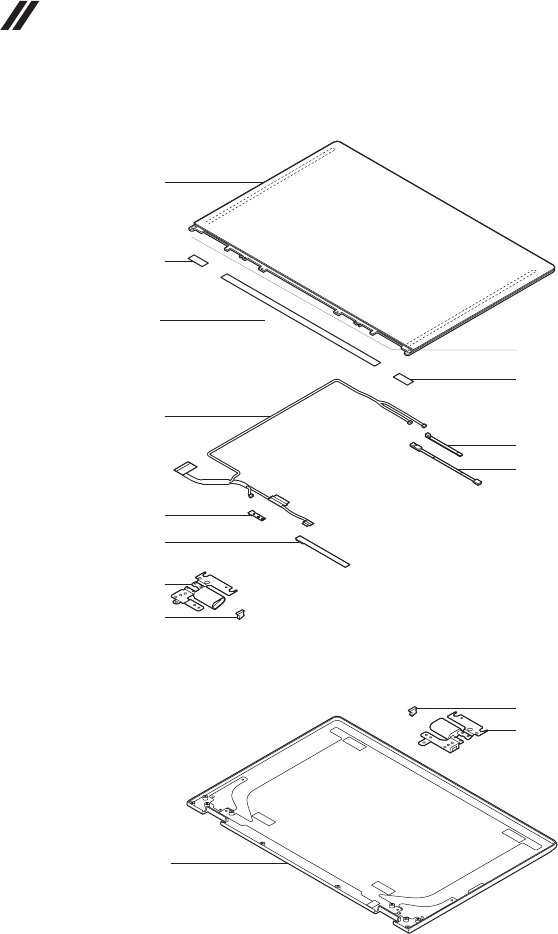
82
Hardware Maintenance Manual
LCD FRUs
1
7
d
5
4
2
2
2
3
5
6
7
d
8
c
83
Lenovo YOGA 530-14IKB/YOGA 530-14ARR
Table 5. Parts list—LCD FRUs
No. FRU FRU no. CRU
ID.
1 LCDModuleL81EKHD 5D10R03188
N
1 LCDModuleL81EKFHD 5D10R03189
2 HingeCoverL81EK 5CB0R08476
3 EDPCableL81EKW/TP 5C10R08621
4 ComnCameraSlimHDw/oMICBsn SC20F27084
4 ComnCameraSlimHDw/oMICChy SC20F27083
4 ComnCameraSlimHDw/oMICAzw SC20F27085
4 ComnCameraSlimHDw/oMICAVC SC20F27086
5 MICBoardL81EKW/TP 5C50R19596
6SensorBoardL81EKW/TP 5C50R19598
7HingeL81EKR+LIG 5H50R08798
7HingeL81EKR+LPTN 5H50R08495
7HingeL81EKR+LLB 5H50R08639
8 LCDCoverL81EKIGW/TP 5CB0R08787
8 LCDCoverL81EKPTNW/TP 5CB0R08505
8 LCDCoverL81EKLBW/TP 5CB0R08525
84
Hardware Maintenance Manual
Miscellaneous parts
Table 6. Parts list—Miscellaneous parts
FRU FRU no. CRU
ID.
Systemmiscellaneousparts:
N
• (a)SSDShieldingL81EK 5S60R08779
• (b)DimmShieldingL81EK 5S60R08632
• (c)RemovableTapeL81EK 5T10R08868
• (d)RubberHingeL81EK 5R60R08894
Note:Italicized lettersin parenthesesarereferencestotheexplodedview in
“Overall”onpage65.
AC power adapters
Table 7. Parts list—AC power adapters
FRU P/N CRU
ID.
Delta ADLX65CDGC2A 20V3.25A COO SA10M42764
N
Delta ADLX65CDGG2A 20V3.25A COO SA10M42758
Delta ADLX65CDGU2A 20V3.25A COO SA10M42765
Delta ADLX65CDGK2A 20V3.25A COO SA10M42745
Delta ADLX65CDGI2A 20V3.25A COO SA10M42796
Delta ADLX65CDGR2A 20V3.25A COO SA10M42775
Delta ADLX65CDGA2A 20V3.25A COO SA10M42718
Delta ADLX65CDGE2A 20V3.25A COO SA10M42794
Delta ADLX65CDGB2A 20V3.25A COO SA10M42769
Liteon ADLX65CLGC2A 20V3.25A COO SA10M42791
Liteon ADLX65CLGG2A 20V3.25A COO SA10M42714
Liteon ADLX65CLGU2A 20V3.25A COO SA10M42725
Liteon ADLX65CLGK2A 20V3.25A COO SA10M42531
Liteon ADLX65CLGI2A 20V3.25A COO SA10M42753
Liteon ADLX65CLGR2A 20V3.25A COO SA10M42738
Liteon ADLX65CLGA2A 20V3.25A COO SA10M42793
Liteon ADLX65CLGE2A 20V3.25A COO SA10M42740
Liteon ADLX65CLGB2A 20V3.25A COO SA10M42817
Chicony ADLX65CCGC2A 20V3.25A COO SA10M42805
Chicony ADLX65CCGG2A 20V3.25A COO SA10M42815
Chicony ADLX65CCGU2A 20V3.25A COO SA10M42762
Chicony ADLX65CCGK2A 20V3.25A COO SA10M42735
Chicony ADLX65CCGI2A 20V3.25A COO SA10M42751
Chicony ADLX65CCGR2A 20V3.25A COO SA10M42704
Chicony ADLX65CCGA2A 20V3.25A COO SA10M42766
Chicony ADLX65CCGE2A 20V3.25A COO SA10M42760
Chicony ADLX65CCGB2A 20V3.25A COO SA10M42707
Delta ADLX65NDC3A 20V3.25A RCOO SA10M42715
Liteon ADLX65NLC3A 20V3.25A R 5A10J40449
Chicony ADLX65NCC3A 20V3.25A RCOO SA10M42747
LINETEK PC323+RVV300/300+LS15 1米电源线 145000600

85
Lenovo YOGA 530-14IKB/YOGA 530-14ARR
FRU P/N CRU
ID.
LINETEK LS15+H03VV-F+LP39 1米电源线 145000599
N
LINETEK LS15+H03VV-F+LP-37 1米电源线 145000597
LINETEK LS15 H03VV-F LP26A 1米电源线 145000596
LINETEK LS15+H03VV-F+LP-41 1米电源线 145000595
LINETEK LP-30B + SPT-2 + LS15 1米电源线 145000594
LINETEK LP-61L+ H03VV-F+ LS15 1米电源线 145000593
LINETEK PE-361+ H05VV-F+ LS15 1米电源线 145000592
LINETEK LS15+H03VV-F+PE-336 1米电源线 145000591
LINETEK LS15+H05VV-F+LP-E04A 1米电源线 145000590
LINETEK LS15+H03VV-F+LP-23A 1米电源线 145000589
LINETEK LS15+VCTF+LP-53 1米电源线 145000588
LINETEK LS15+VCTF+LP-54 1米电源线 145000587
LINETEK LS15+H03VV-F+PE-364 1米电源线 145000586
LINETEK LP-34+H03VV-F + LS15 1米电源线 145000585
Longwell LSG-31+RVV300/300+LS-18 1米电源线 145000568
Longwell LP-24+H03VV-F+LS-18 1米电源线 145000567
Longwell LP-37+H03VV-F+LS-18 1米电源线 145000565
Longwell LP-46+H03VV-F+LS-18 1米电源线 145000564
Longwell LP-41+H03VV-F+LS-18 1米电源线 145000563
Longwell LP-30B+SPT-2 18AWG+LS-18 1米电源线 145000562
Longwell LP-61L+H03VV-F+LS-18 1米电源线 145000561
Longwell LP-67+BIS+LS-18 1米电源线 145000560
Longwell LP-22+H03VV-F+LS-18 1米电源线 145000559
Longwell LP-486+KTLH03VV-F+LS-5 1米电源线 145000558
Longwell LP-23A+LFC-3R+LS-18 1米电源线 145000557
Longwell LP-71+VCTF+LS-33 1米电源线 145000556
Longwell LP-54+VCTF+LS-18 1米电源线 145000555
Longwell LP-39+H03VV-F+LS-18 1米电源线 145000554
Longwell LP-34A+H03VV-F+LS-18 1米电源线 145000553
VOLEX GB10S3+RVV 300/500+VAC5S 1米电源线 145000538
Volex US15S3+SPT-2 +VAC5S 1米电源线 145000537
VOLEX MP5004+H03VV-F+VAC5S 1米电源线 145000605
VOLEX MP232+H03VV-F+VAC5S 1米电源线 145000524
VOLEX IT10S3+HO3VV-F+VAC5S 1米电源线 145000535
VOLEX M2511+KETI IEC+VAC5S 1米电源线 145000533
VOLEX AU10S3+H03VV-F+VAC5S 1米电源线 145000532
VOLEX TW15CS3+VCTF+VAC5S 1米电源线 145000531
VOLEX VAC5S+VCTF+M755 1米电源线 145000530
VOLEX VA2073+H03VV-F+VAC5S 1米电源线 145000528
VOLEX CH10S3+H03VV-F+VAC5S 1米电源线 145000527
VOLEX SI16S3+H03VV-F+VAC5S 1米电源线 145000526
VOLEX M2511+HO3VV-F+VAC5S 1米电源线 145000525
lux 0036+RVV 300/300 0.75/3C+0002 1米电源线 145500003
lux 0040+H03VV-F 0.75/3C+0011 1米电源线 145500015
lux 0027+H03VV-F 0.75/3C+0011 1米电源线 145500013
lux 0034+H03VV-F 0.75/3C+0011 1米电源线 145500011
lux 0041+H03VV-F 0.75/3C+0011 1米电源线 145500012
Table 7. Parts list—AC power adapters (continued)
86
Hardware Maintenance Manual
FRU P/N CRU
ID.
lux 0014+SPT-2 60℃ 18/3C+0016 1米电源线 145500002
N
lux 0014+H03VV-F 0.75/3C+0011 1米电源线 5L60J33143
lux 0031+H03VV-F 0.75/3C+0011 1米电源线 145500000
lux 0046+IS694 0.75/3C+0011 1米电源线 145500004
lux 0029+H03VV-F 0.75/3C+0011 1米电源线 145500009
lux 0033+H03VV-F 0.75/3C+0011 1米电源线 145500008
lux 0038+H03VV-F 0.75/3C+0011 1米电源线 145500006
lux 0019+VCTF 0.75/3C+0021 1米电源线 145500007
lux 0018(E)+VCTF 0.75/3C+0021 1米电源线 145500005
lux 0044+H03VV-F 0.75/3C+0011 1米电源线 145500010
lux 0033+H03VV-F 0.75/3C+0011 1米电源线 145500001
Table 7. Parts list—AC power adapters (continued)
87
Lenovo YOGA 530-14IKB/YOGA 530-14ARR
Screws
Table 8. Parts list—screws
FRU P/N CRU
ID.
ScrewL81EK2L7D0.5TNL+CR3+
5S10R08551
N
ScrewL81EK3.0L3.5D0.5TBNINL
5S10R08878
ScrewL81EK6.5L3.4D0.4TNINL
5S10R08744
ScrewL81EK3.5L4.5D0.5TZK+
5S10R08720
ScrewL81EK4L4.5D0.8TBNINL
5S10R19602
ScrewL81EK6.5L3.4D0.4TBNLNL
5S10R19599

88
Hardware Maintenance Manual
Notices
Lenovomaynotoffertheproducts,services,orfeaturesdiscussedinthis
documentinallcountries.ConsultyourlocalLenovorepresentativefor
informationontheproducts andservices currentlyavailableinyourarea.Any
referencetoaLenovoproduct,program,orserviceisnot intendedtostateor
implythatonlythatLenovoproduct,program,orservicemaybeused.Any
functionallyequivalent product,program, orservicethatdoesnotinfringe
anyLenovo intellectualpropertyrightmaybeusedinstead. However, itisthe
user’sresponsibilitytoevaluateandverifytheoperationofanyotherproduct,
program,orservice.
Lenovomayhavepatentsorpendingpatentapplicationscoveringsubjectmatter
describedinthisdocument.The furnishingofthisdocumentdoesnotgiveyou
anylicensetothesepatents.
LENOVOGROUPLTD.PROVIDESTHISPUBLICATION“ASIS”
WITHOUTWARRANTY OFANYKIND,EITHEREXPRESSORIMPLIED,
INCLUDING,BUTNOTLIMITEDTO,THEIMPLIEDWARRANTIESOFNON-
INFRINGEMENT,MERCHANTABILITYORFITNESSFORAPARTICULAR
PURPOSE.Somejurisdictionsdonotallowdisclaimerofexpressorimplied
warrantiesincertaintransactions,therefore,thisstatementmaynotapplytoyou.
Thisinformation couldinclude technicalinaccuraciesor typographicalerrors.
Changesareperiodicallymade tothe informationherein; thesechanges
willbeincorporatedin neweditions ofthe publication.Lenovomaymake
improvementsand/or changesin theproduct(s)and/ortheprogram(s)
describedinthispublicationatanytimewithoutnotice.
Theproductsdescribedin thisdocument arenotintendedforusein
implantationorotherlifesupportapplicationswheremalfunctionmay resultin
injuryordeathtopersons.Theinformationcontainedinthisdocumentdoesnot
affectorchange Lenovoproduct specicationsor warranties.Nothinginthis
documentshalloperateasanexpressorimpliedlicenseorindemnityunderthe
intellectualpropertyrightsofLenovoorthird parties.Allinformationcontained
inthisdocumentwasobtainedinspecicenvironmentsandispresentedasan
illustration.Theresultobtainedinotheroperatingenvironmentsmayvary.
Lenovomayuseordistributeanyoftheinformationyousupplyinanywayit
believesappropriatewithoutincurringanyobligationtoyou.
Anyreferencesinthispublicationtonon-LenovoWebsitesareprovidedfor
convenienceonlyanddonotinanymannerserveasanendorsementofthose
Websites.Thematerials atthoseWebsitesarenotpartofthematerials for
thisLenovoproduct,anduseofthoseWebsitesisatyourownrisk.

89
Notices
Anyperformance datacontainedherein wasdetermined inacontrolled
environment.Therefore,theresultobtainedin otheroperating environments
mayvarysignificantly.Some measurementsmayhavebeenmadeon
development-levelsystemsandthereisnoguaranteethatthesemeasurements
willbethesameongenerallyavailablesystems.Furthermore,some
measurementsmayhavebeenestimatedthroughextrapolation.Actualresults
mayvary.Usersofthisdocumentshouldverify theapplicable datafor their
specicenvironment.
Trademarks
ThefollowingtermsaretrademarksorregisteredtrademarksofLenovointhe
UnitedStates,othercountries,orboth.
Lenovo
MicrosoftandWindowsaretrademarksofMicrosoftCorporationin theUnited
States,othercountries,orboth.
Othercompany,products,or servicenames maybetrademarksorservice
marksofothers.
