Lifescan One Touch Basic Blood Glucose Monitoring System Users Manual Original Owner’s Booklet Canadian English
bloodglucosemonitoringsystem2 23d6d803-c851-4fe2-84dc-43de5c52789b Lifescan Blood Glucose Meter BLOOD GLUCOSE MONITORING SYSTEM User Guide |
2015-02-09
: Lifescan Lifescan-One-Touch-Basic-Blood-Glucose-Monitoring-System-Users-Manual-571833 lifescan-one-touch-basic-blood-glucose-monitoring-system-users-manual-571833 lifescan pdf
Open the PDF directly: View PDF  .
.
Page Count: 85

BLOOD GLUCOSE MONITORING SYSTEM
SYSTÈME DE CONTRÔLE DE LA GLYCÉMIE
®
®
OWNER’S BOOKLET
MANUEL DU PROPRIÉTAIRE
LSI-97-050 OTB Eg 7/25/97 11:09 PM Page 1

BLOOD GLUCOSE MONITORING SYSTEM
OWNER’S BOOKLET
®
®
LSI-97-050 OTB Eg 7/25/97 11:09 PM Page 3
Dear ONE TOUCH®BASIC®Owner:
Congratulations! You’ve chosen a very easy-
to-use blood glucose monitoring system for
home testing. Your ONE TOUCH®BASIC®
System will give you the accurate test
results you need, in just a few simple steps.
Everything you need to know about using
the ONE TOUCH BASIC System is includ-
ed in this booklet.
Blood glucose monitoring plays an impor-
tant role in controlling your diabetes. The
results you get with the ONE TOUCH
BASIC System can help you and your
Health Care Professional monitor and
adjust your treatment plan (diet, exercise,
and medication) to help you gain better
control of your diabetes.
If you have any questions, please feel free
to call our toll-free number and speak
with our Technical Services Department,
1 800 663-5521.
Thank you for choosing the ONE TOUCH
BASIC Meter.
Sincerely,
Jackie Graham
Manager, Customer Service
LifeScan Canada Ltd.
P.S. Don’t forget to complete and mail the
Warranty Registration Card. When we
receive your Warranty Card, we’ll send you
a complimentary gift to show our apprecia-
tion. See your Warranty Card for details.
LSI-97-050 OTB Eg 7/25/97 11:09 PM Page 4

CAUTION: Before using any product to test your blood glucose
(sugar), read all instructions and practice the test. Consult your
diabetes health professional for advice regarding selection of
equipment, testing times and procedures. These recommenda-
tions apply to all blood glucose monitoring systems and are
supported by the Diabetes Educator Section of the Canadian
Diabetes Association.
LSI-97-050 OTB Eg 7/25/97 11:09 PM Page 5
TABLE OF CONTENTS
1. GETTING STARTED Description and Use . . . . . . . . . . . . . . . . 1
Getting to Know the Meter . . . . . . . . . . . 2
Precautions and Limitations . . . . . . . . . . 5
2. SETTING THE METER Selecting the Display Language
and the Unit of Measurement . . . . . . . 7
Coding the Meter . . . . . . . . . . . . . . . . . . 8
3. CHECKING THE SYSTEM Checking with the Check Strip . . . . . . . 11
Checking with Control Solution . . . . . . 17
4. GETTING A DROP OF BLOOD Using the PENLET®II Automatic
Blood Sampler . . . . . . . . . . . . . . . . . 20
5. TESTING YOUR BLOOD Step-by-Step Instructions . . . . . . . . . . . 28
LifeScan Technical Services: Canada 1 800 663-5521
USA 1 800 227-8862
LSI-97-050 OTB Eg 7/25/97 11:09 PM Page 6
6. AFTER TESTING Checking the Amount of Blood . . . . . . 36
Recording Your Test Results . . . . . . . . . 37
Displaying Last Test Result . . . . . . . . . 38
7. HELP! (Troubleshooting) Test Procedure Messages . . . . . . . . . . . 40
Error Messages . . . . . . . . . . . . . . . . . . . 43
8. TAKING CARE OF THE METER Daily Meter Check . . . . . . . . . . . . . . . . 55
Cleaning the Meter . . . . . . . . . . . . . . . . 55
Battery Replacement . . . . . . . . . . . . . . . 60
9. QUESTIONS AND ANSWERS 64
10. SPECIFICATIONS Performance Characteristics . . . . . . . . . 72
Guarantee and Warranty . . . . . . . . . . . . 73
11. INDEX 75
LifeScan Technical Services: Canada 1 800 663-5521
USA 1 800 227-8862
LSI-97-050 OTB Eg 7/25/97 11:09 PM Page 7
BLANK
LSI-97-050 OTB Eg 7/25/97 11:09 PM Page 8
Description and Use
The ONE TOUCH
®
BASIC
®
Blood
Glucose Monitoring System is
intended for in vitro diagnostic use.
This statement means that the system
should be used only for testing
purposes and only outside of the
human body. The ONE TOUCH
®
BASIC
®
Meter and Test Strips are
used for monitoring whole blood
glucose for people who have been
diagnosed with diabetes mellitus.
This device is not to be used for the
diagnosis of diabetes.
The ONE TOUCH BASIC Blood
Glucose Monitoring System meas-
ures the amount of glucose (sugar) in
whole blood. When blood is applied
to the Test Strip, compounds on the
Test Strip react with the blood and
a blue color is formed. The intensity
of the color is then measured and
read by the ONE TOUCH BASIC
Meter.
1
1. GETTING STARTED
LSI-97-050 OTB Eg 7/25/97 11:09 PM Page 1
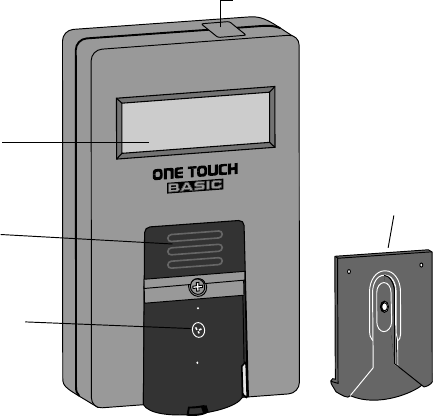
Getting to Know the
Meter
Study this diagram
and become familiar
with all the parts of
your ONE TOUCH
®
BASIC
®
Meter.
2
C Button
Battery
Compartment
(on back)
Display
On/Off
Button
Test Area
with Protective
Coating
Test Strip
Holder
LSI-97-050 OTB Eg 7/25/97 11:09 PM Page 2
ON/OFF BUTTON. This button
turns the Meter on and off.
DISPLAY. This is where you read
your test results and the simple
messages that help guide you
through the test.
BATTERY COMPARTMENT.
Holds one J-size battery. The battery
is already installed in your Meter.
“C” BUTTON. Use the “C” Button
to match the Meter code with the
code number on the Test Strip
package. You can also use the “C”
Button to select display languages in
English, French, Spanish, German,
Dutch, Italian, Portuguese, Swedish,
Danish, Norwegian, Finnish, Greek,
Turkish, Hungarian, Czech, Polish,
Russian or Japanese and each
language’s corresponding unit of
measurement, (mmol/L) or (mg/dL).
TEST STRIP HOLDER. The dark
gray Test Strip Holder keeps the Test
Strip in place. The Meter reads the
color of the reacted Test Strip
through the small hole in the Test
Strip Holder. Remove the Test Strip
Holder from the Meter for cleaning.
3
LSI-97-050 OTB Eg 7/25/97 11:09 PM Page 3
TEST AREA. When the Test Strip
Holder is removed, the Test Area is
exposed. The Test Area has a clear,
protective coating over the Meter
optics window that must be kept
clean and lint-free for accurate
results. Be careful not to scratch
or damage this coating.
TEST STRIPS. ONE TOUCH
®
Test
Strips are used to test your blood
glucose (sugar) level. They are
sensitive to moisture and light, so
they come in a moisture-resistant,
light-protected vial or foil package.
Keep the Test Strips sealed in their
original package until you’re ready
to use them. DO NOT store Test
Strips outside of their packaging.
■Carefully read this Owner’s
Booklet and all other instructional
material provided with your blood
glucose monitoring system and test
supplies.
TEST SUMMARY*
®
TM
TEST SUMMARY*
®
TM
TEST SUMMARY*
1 2 3
Press On/ Off Button,
Insert test strip
Apply Blood Sample Results in
45 Seconds
1
✔
1
✔
10
Code
t
e
s
t
f
o
r
t
h
e
q
u
a
n
t
i
t
i
e
s
m
e
a
s
u
r
m
t
e
s
t
f
o
r
t
h
e
q
u
a
n
t
i
t
i
e
s
m
e
a
s
u
r
m
t
e
s
t
f
o
r
t
h
e
q
u
a
n
t
i
t
i
e
s
m
e
a
s
u
r
m
t
e
s
t
f
o
r
t
h
e
q
u
a
n
t
i
t
i
e
s
m
e
a
s
u
r
m
t
e
s
t
f
o
r
t
h
e
q
u
a
n
t
i
t
i
e
s
m
e
a
s
u
r
m
t
e
s
t
f
o
r
t
h
e
q
u
a
n
t
i
t
i
e
s
m
e
a
s
u
r
m
t
e
s
t
f
o
r
t
h
e
q
u
a
n
t
i
t
i
e
s
m
e
a
s
u
r
m
t
e
s
t
f
o
r
t
h
e
q
u
a
n
t
i
t
i
e
s
m
e
a
s
u
r
m
t
e
s
t
f
o
r
t
h
e
q
u
a
n
t
i
t
i
e
s
m
e
a
s
u
r
m
t
e
s
t
f
o
r
t
h
e
q
u
a
n
t
i
t
i
e
s
m
e
a
s
u
r
m
t
e
s
t
f
o
r
t
h
e
q
u
a
n
t
i
t
i
e
s
m
e
a
s
u
r
m
t
e
s
t
f
o
r
t
h
e
q
u
a
n
t
i
t
i
e
s
m
e
a
s
u
r
m
t
e
s
t
f
o
r
t
h
e
q
u
a
n
t
i
t
i
e
s
m
e
a
s
u
r
m
T E S T S T R I P
10
CODE:
TEST FOR GLUCOSE
IN WHOLE BLOOD
OPEN
HERE
Milpites,CA Made in U.S.A. 51-453B
INC.
R
T E S T S T R I P
10
CODE:
TEST FOR GLUCOSE
IN WHOLE BLOOD
OPEN
HERE
Milpites,CA Made in U.S.A. 51-453B
INC.
R
S T R I P
10
CODE:
OPEN
HERE
R
10
CODE:
OPEN
HERE
R
1
✔
4
LSI-97-050 OTB Eg 7/25/97 11:09 PM Page 4
Precautions and Limitations
The following information may
be useful to you and your Health
Care Professional when using the
ONE TOUCH
®
BASIC
®
System to
monitor your blood glucose level.
If you experience symptoms that
are not consistent with your blood
glucose results, and you have
carefully followed the procedure
described in the Owner’s Booklet,
contact your Health Care Profes-
sional immediately.
Never make significant changes
to your medication program or
ignore physical symptoms with-
out consulting your Health Care
Professional.
If the message HIGH appears on the
meter display, this indicates severe
hyperglycemia (high blood sugar);
contact your Health Care Profes-
sional immediately.
IMPORTANT: The ONE TOUCH
®
BASIC
®
Meter is not intended for
monitoring neonatal (newborn
child) blood samples.
5
LSI-97-050 OTB Eg 7/25/97 11:09 PM Page 5
DO NOT use ONE TOUCH
®
Test
Strips beyond the expiration date
printed on the package label. If using
Test Strips from a vial, discard the
vial and unused Test Strips 4
months after the date first opened.
DO NOT use ONE TOUCH Test
Strips that are discolored, wrinkled,
torn, cut or altered in any way (the
Test Spot of a normal Test Strip is
white or ivory-colored).
DO NOT store or carry Test Strips
outside of their vial or foil package.
ONE TOUCH Test Strips must be
stored in a cool, dry place, below
30°C (86°F). Do not refrigerate Test
Strips or place Test Strips in heat
or direct sunlight.
It is important to clean your Meter
as described in this booklet to
ensure that you get accurate results.
(See Cleaning the Meter, page 55.)
6
LSI-97-050 OTB Eg 7/25/97 11:09 PM Page 6
2. SETTING THE METER
Selecting the Display Language
and the Unit of Measurement
The ONE TOUCH
®
BASIC
®
Meter
displays easy-to-follow messages in
English, French, Spanish, German,
Dutch, Italian, Portuguese, Swedish,
Danish, Norwegian, Finnish, Greek,
Turkish, Hungarian, Czech, Polish,
Russian, or Japanese to help guide
you through the test procedure. The
Meter is preset in English (mmol/L)
at the factory.
To select another display language
and its corresponding unit of
measurement:
1. Press and hold the “C” Button.
2. Press and release the On/Off
Button.
3. Release the “C” Button.
The following programs with their
corresponding language and unit of
measurement appear as you con-
tinue pressing the “C” Button: “P 4”
for French (mmol/L), “P 5” for
French (mg/dL), “P 6” for German
(mg/dL), “P 7” for German (mmol/L),
“P 8” for Dutch (mg/dL), “P 9” for
Dutch (mmol/L), “P 10” for Italian
(mg/dL), “P 11” for Portuguese
(mg/dL),
“P 12” for Swedish (mmol/L), “P 13”
for Danish (mmol/L), “P 14” for
7
LSI-97-050 OTB Eg 7/25/97 11:09 PM Page 7

Norwegian (mmol/L), “P 15” for
Finnish (mmol/L), “P 16” for Greek
(mg/dL), “P 17” for Turkish (mg/dL),
“P 18” for Hungarian (mmol/L),
“P 19” for Czech (mmol/L), “P 20”
for Polish (mmol/L), “P 21” for
Russian (mmol/L), “P 22” for
Japanese (mg/dL), “P 23” for
Japanese (mmol/L), “P 1” for English
(mg/dL), “P 2” for Spanish (mg/dL),
“P 3” for English (mmol/L).
When your desired selection is
displayed, press the On/Off Button.
All messages will now appear in the
language you have chosen.
Coding the Meter
Set the code:
■Before using the Meter for the first
time.
■Every time you open a new
package of Test Strips or change to
a different package of Test Strips.
■If the Meter is displaying reset
code.
IMPORTANT: Every time you test,
the code number on the Meter
display must match the code
number on the ONE TOUCH
®
Test
Strip package you’re using. If these
two code numbers do not match,
you will get inaccurate results.
8
LSI-97-050 OTB Eg 7/25/97 11:09 PM Page 8
Step 1: Turn on the Meter
Press the On/Off Button to turn the
Meter on. The result from your last
blood glucose or Control Solution
test will appear for 3 seconds.
memory or memory
mm 5 . 9 (example) c 5 . 4 (example)
(Your ONE TOUCH
®
BASIC
®
Meter auto-
matically recalls and displays your last
result—either from a blood glucose or
Control Solution test—whenever the Meter
is turned on. When using the Meter for the
first time, memory/no data appears to
indicate that there is no test result in the
memory. See Displaying Last Test Result,
page 38.)
Then
code 7 (example)
appears on the display
for 2 seconds, followed
by
insert
strip
The code number on the
Test Strip package (vial
or foil) ranges from 1 to
16. If the number on the
display matches the code
number on your Test
Strip package, you may
proceed with a blood test. If it is not
the same, go on to Step 2.
10
Code
t
e
s
t
f
o
r
t
h
e
q
u
a
n
t
i
t
i
e
s
m
e
a
s
u
r
m
t
e
s
t
f
o
r
t
h
e
q
u
a
n
t
i
t
i
e
s
m
e
a
s
u
r
m
t
e
s
t
f
o
r
t
h
e
q
u
a
n
t
i
t
i
e
s
m
e
a
s
u
r
m
t
e
s
t
f
o
r
t
h
e
q
u
a
n
t
i
t
i
e
s
m
e
a
s
u
r
m
t
e
s
t
f
o
r
t
h
e
q
u
a
n
t
i
t
i
e
s
m
e
a
s
u
r
m
t
e
s
t
f
o
r
t
h
e
q
u
a
n
t
i
t
i
e
s
m
e
a
s
u
r
m
t
e
s
t
f
o
r
t
h
e
q
u
a
n
t
i
t
i
e
s
m
e
a
s
u
r
m
t
e
s
t
f
o
r
t
h
e
q
u
a
n
t
i
t
i
e
s
m
e
a
s
u
r
m
t
e
s
t
f
o
r
t
h
e
q
u
a
n
t
i
t
i
e
s
m
e
a
s
u
r
m
t
e
s
t
f
o
r
t
h
e
q
u
a
n
t
i
t
i
e
s
m
e
a
s
u
r
m
t
e
s
t
f
o
r
t
h
e
q
u
a
n
t
i
t
i
e
s
m
e
a
s
u
r
m
t
e
s
t
f
o
r
t
h
e
q
u
a
n
t
i
t
i
e
s
m
e
a
s
u
r
m
t
e
s
t
f
o
r
t
h
e
q
u
a
n
t
i
t
i
e
s
m
e
a
s
u
r
m
T E S T S T R I P
10
CODE:
OPEN
HERE
INC.
Milpites,CA Made in U.S.A. 51-453B
TEST FOR GLUCOSE
IN WHOLE BLOOD
R
code 7
9
LSI-97-050 OTB Eg 7/25/97 11:09 PM Page 9
Step 2: Match the Code Number
Press the “C” Button. With
code 7
(example)
on the display, press and release the
“C” Button, and the number will
increase by one. Continue pressing
until the number on the display
matches the code
number on your
Test Strip package.
code 10 (example)
The Meter is now properly coded
and you may proceed with the test.
From now on, the Meter will
remember this code until you
change the code for a new package
of Test Strips.
code10
10
LSI-97-050 OTB Eg 7/25/97 11:09 PM Page 10
3. CHECKING THE
SYSTEM
There are two ways to make sure
your ONE TOUCH
®
BASIC
®
System
is working properly. The Check
Strip
is used to check that the Meter is
operating properly. The ONE TOUCH
®
Normal Glucose Control Solution—
Blue Formula is used to check that
both the Meter and the Test Strips
are working together as a system,
and that you are doing the test
correctly. It is very important that
you do these simple checks
routinely to make sure you get
accurate results.
Checking with the Check Strip
A purple and white Check Strip is
included with your ONE TOUCH
BASIC Meter. The Check Strip is
used to make sure your Meter is
working properly.
1
✔
2
✔
Front Back
11
LSI-97-050 OTB Eg 7/25/97 11:09 PM Page 11
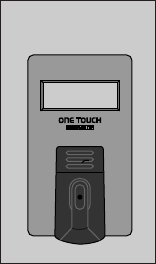
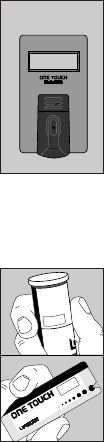
Before doing a Check Strip test,
make sure the Test Strip Holder, the
Test Area and Check Strip are clean,
dry, and lint-free. Do the Check Strip
test at room temperature between
18°C and 26°C (64°F–79°F).
How to use the Check Strip
Step 1:
Press On/Off Button. Your last blood
glucose or Control Solution test
result will appear for 3 seconds,
memory or memory
mm 5 . 9 (example) c 5 . 4 (example)
then
code 7 (example)
will appear on the
display.
code 7
12
LSI-97-050 OTB Eg 7/25/97 11:09 PM Page 12
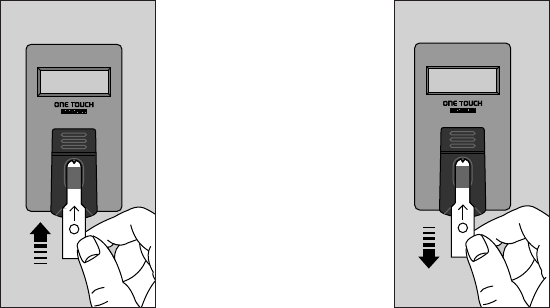
When
insert
strip
appears, slide the
notched end of the
Check Strip into the
Test Strip Holder
with Side 1 (purple)
facing up.
wait
appears for a few seconds.
Step 2:
When
apply
sample
appears, slide the
Check Strip from
the Test Strip
Holder.
sample
1
✔
strip
1
✔
13
LSI-97-050 OTB Eg 7/25/97 11:09 PM Page 13
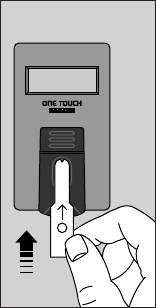
Step 3:
When
insert
side 2
appears, turn the
Check Strip over
and slide it back
into the Test Strip
Holder, notched end
first, Side 2 (white)
facing up. The Meter
counts down from
4 to 0, then
A 4 . 4 (example)
A ok
appears if the number falls within
the acceptable Check Strip range.
The Meter automatically tells you if
your reading falls within the correct
Check Strip range. (The range is also
printed on the back of the Meter.)
These messages will continue to
display until you turn the Meter off
or for 2 minutes, when the Meter
automatically turns off.
side 2
2
✔
14
LSI-97-050 OTB Eg 7/25/97 11:09 PM Page 14
If the reading is not within the
printed range, the Meter displays
will read
A 2.1 (example)
Anotok
redo A
Go back to Step 1 and repeat the
Check Strip test. If this message
appears again, clean your Meter
and repeat the test. For further
assistance, call LifeScan Technical
Services.
If you do not obtain an acceptable
Check Strip reading, your last blood
glucose or Control Solution test
result will appear for 3 seconds the
next time you turn on your Meter,
then
redo A
code 7 (example)
will appear, indicating your Check
Strip was out of range at the last
reading.
This message will appear each time
the Meter is turned on until you
obtain a Check Strip reading that
falls in the printed range.
15
LSI-97-050 OTB Eg 7/25/97 11:09 PM Page 15

You must use the Check Strip:
■At least once a day.
■After cleaning the Meter.
■Whenever your results are not
consistent with how you feel, or
when you think your results are
not accurate.
■Whenever this message appears:
A 2.1 (example)
Anotok
redo A
Cleaning and Maintaining the
Check Strip
■Make sure both sides of the Check
Strip are clean. If not, wipe with a
soft cloth or tissue dampened with
water. Dry completely.
■Do not put blood, alcohol, Control
Solution, or any other fluid (except
water) on the Check Strip.
■Do not scratch the Check Strip.
■Do not leave the Check Strip in
sunlight for long periods of time.
CAUTION: If your Check Strip
result falls outside the printed
range, the Meter is not working
properly. DO NOT use the Meter
to test your blood until you get a
Check Strip reading that is within
the printed range. For assistance,
call LifeScan Technical Services.
16
LSI-97-050 OTB Eg 7/25/97 11:09 PM Page 16
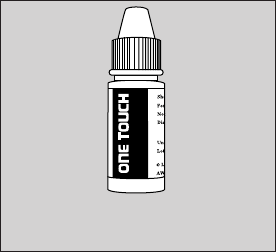
■If you lose or damage the Check
Strip, call LifeScan Technical
Services for a free replacement.
Checking with Control Solution
ONE TOUCH
®
Normal Glucose
Control Solution—Blue Formula
should be used to make sure your
Meter and Test Strips are working
properly.
Before you use the Meter to test
your blood glucose for the first time,
practice the procedure using the
Control Solution in place of blood.
When you can do three tests in a
row that are within the ONE TOUCH
Normal Control range, you are ready
to test your blood.
ONE TOUCH Normal Glucose
Control Solution—Blue Formula
R
Normal Glucose Control
Solution - Blue Formula
17
LSI-97-050 OTB Eg 7/25/97 11:09 PM Page 17
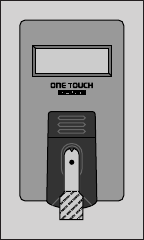
■Use only ONE TOUCH
®
Normal
Glucose Control Solution—Blue
Formula, available from your drug
store or Authorized LifeScan
Distributor.
■Check the expiration date on the
Control Solution vial. If it has
expired, replace it with new
Control Solution.
■Shake the Control Solution vial
vigorously before using.
To do a Control Solution test, follow
the same procedure you would if
you were testing your blood. (See
Testing Your Blood, page 27.)
Your Control Solution results will
appear on the Meter display as
follows:
c 5 . 4 (example)
contrl
c 5. 4
18
LSI-97-050 OTB Eg 7/25/97 11:09 PM Page 18

The range for the ONE TOUCH
®
Normal Glucose Control Solution—
Blue Formula is printed on the Test
Strip vial or the foil wrapper. This
range is for the Glucose Control
Solution only; it is not intended as
a recommended range for your blood
glucose test results.
You should use the Glucose Control
Solution:
■At least once a week.
■When you begin using a new
package of Test Strips.
■Whenever you suspect the Meter
or Test Strip may not be working
properly (for example, when your
results are not consistent with how
you feel).
CAUTION: If your Control
Solution result falls outside the
printed range, the system is not
working properly. DO NOT use
the system to test your blood until
you get a reading that falls within
the printed range. For assistance,
call LifeScan Technical Services.
19
LSI-97-050 OTB Eg 7/25/97 11:09 PM Page 19
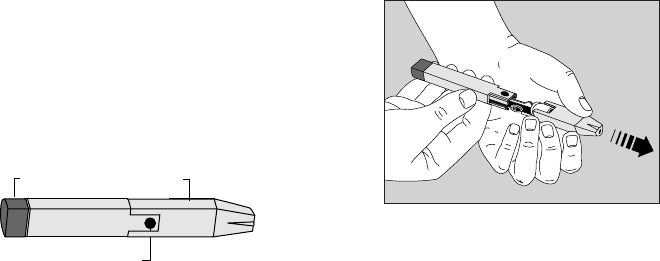
4. GETTING A DROP OF
BLOOD
The PENLET
®
II Automatic Blood
Sampler is an easy, safe tool for
obtaining a good drop of blood for
testing.
Using the PENLET II
Automatic Blood Sampler
Step 1: Insert a Lancet
Remove the PENLET II Cap by
pulling it straight off.
Release Button
Sliding Barrel Cap
20
LSI-97-050 OTB Eg 7/25/97 11:09 PM Page 20
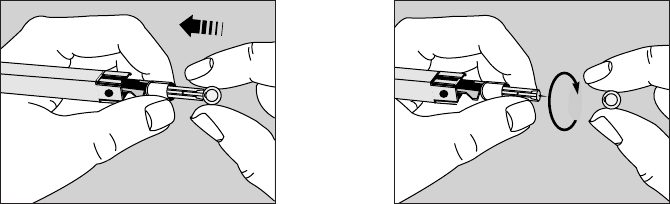
Insert a new, sterile Lancet into the
Lancet Holder. The Lancet will slide
into the Lancet Holder easier if you
DO NOT line up the ridges on the
Lancet with the slots in the Lancet
Holder. (NOTE: Inserting the Lancet
may automatically cock the
PENLET
®
II.)
Hold the Lancet firmly and gently
twist off the Lancet Protective Disk.
21
LSI-97-050 OTB Eg 7/25/97 11:09 PM Page 21
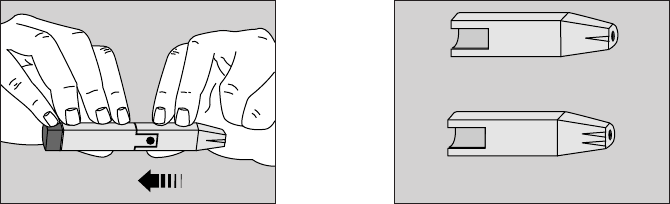
Replace the PENLET
®
II Cap. The PENLET II Sampler includes
two Caps. The Cap that comes
attached to the PENLET II Sampler
has a single line on the flat side and
works well for children and most
adults. The other Cap has two lines
on the flat side and works well for
very thick or calloused skin, or
when a deeper puncture is needed.
Deep Penetration
Regular
22
LSI-97-050 OTB Eg 7/25/97 11:09 PM Page 22
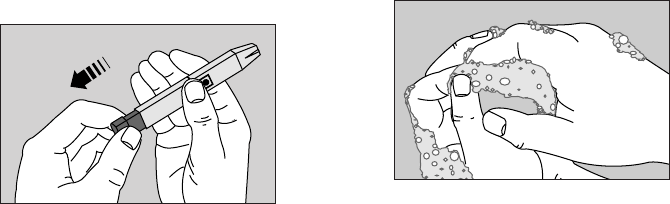
Step 2: Cock the PENLET
®
II
Sampler
Holding the lower portion of the
PENLET II Sampler, pull out the
dark gray sliding barrel until it
clicks. If it does not click, the
PENLET II Sampler may have
been cocked when the Lancet
was inserted.
Step 3: Get a Drop of Blood
Wash your hands with soap and
warm water and dry them thoroughly.
Warm water stimulates the flow of
blood to the fingers. Hanging your
arm down at your side for 10–15
seconds before the fingerstick will
make it easier, too. If you use alcohol
to clean your finger, make sure you
let it dry before sticking your finger.
23
LSI-97-050 OTB Eg 7/25/97 11:09 PM Page 23
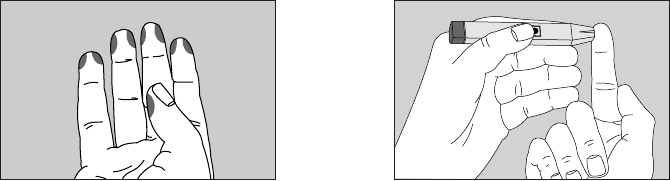
Choose a spot on the side of a
different finger each time you test.
Repeated punctures in the same
spot can make your finger sore
and calloused.
Hold the PENLET
®
II Sampler firmly
against the side of the finger, with
the Cap resting on the finger. (The
harder you press, the deeper the
puncture.)
Press the dark gray Release Button.
24
LSI-97-050 OTB Eg 7/25/97 11:09 PM Page 24
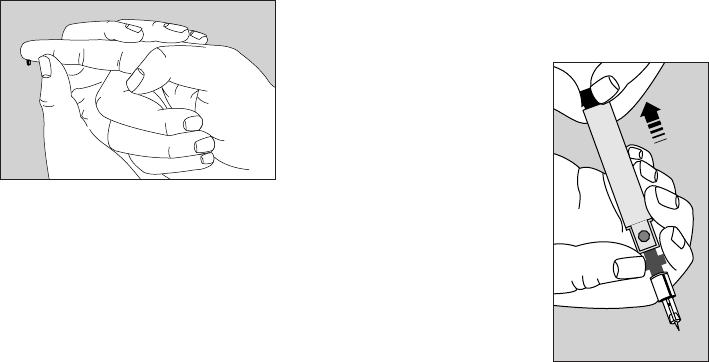
Squeeze the finger gently to obtain
a large, hanging drop of blood.
Proceed with the blood glucose test.
(See Testing Your Blood, page 27.)
Step 4: Remove the Lancet
Always use caution when removing
the Lancet and
PENLET
®
II Cap.
Remove the
PENLET II Cap.
Grasp the ridges on
the dark gray prongs
located on the shaft
near the Release
Button. Point the
Lancet down and
away from you. Pull
back on the dark gray sliding barrel
until the Lancet drops out.
25
LSI-97-050 OTB Eg 7/25/97 11:09 PM Page 25

Cleaning the PENLET II Sampler
Clean the PENLET II Sampler and
Cap with soap and water as
needed.
CAUTION:
■Never use a Lancet that has
been used by someone else.
■Dispose of the Lancet in a
container for sharp objects.
■To help avoid infection, use a
new sterile Lancet every time
you test.
■If you share a PENLET
®
II
Sampler, each person should
always use a new Lancet and
a new or properly disinfected
Cap. For assistance, call
LifeScan Technical Services.
26
LSI-97-050 OTB Eg 7/25/97 11:09 PM Page 26
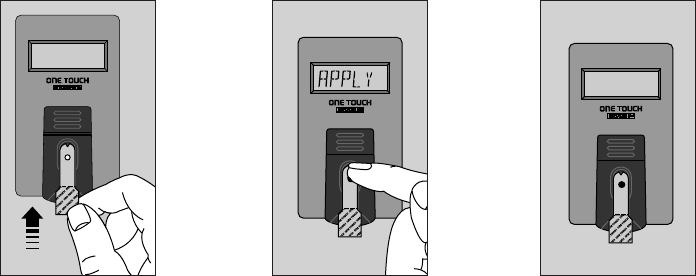
5. TESTING YOUR BLOOD
You can test your blood glucose by following these three simple steps:
NOTE: Be sure to read the following section carefully before testing.
Step 3: Accurate
results in 45 seconds.
Step 2: Apply
blood sample.
Step 1: Press On/Off
Button (last test result
appears), insert Test
Strip.
mm 6. 0
PAS D'ALCOOL
insertinsert
27
LSI-97-050 OTB Eg 7/25/97 11:09 PM Page 27

Step-by-Step Instructions
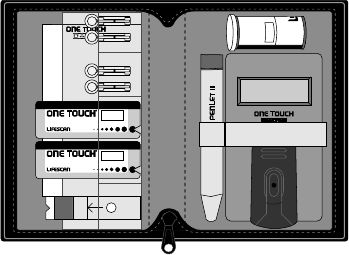
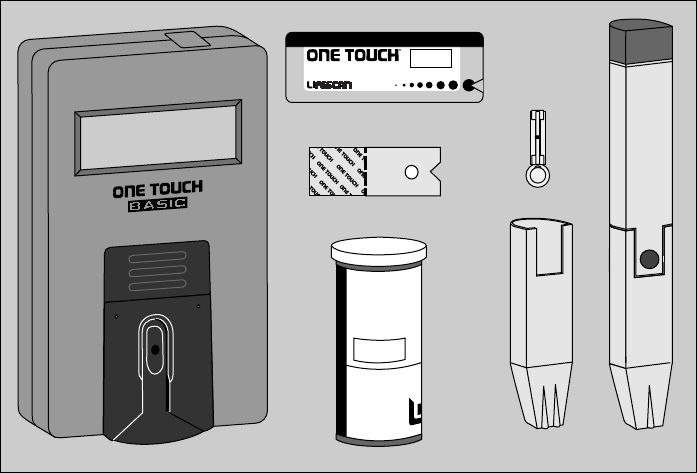
Choose a clean, dry work surface.
Make sure you have all the materials
needed for a test:
■ONE TOUCH
®
BASIC
®
Meter
■ONE TOUCH
®
Test Strips
■PENLET
®
II Automatic Blood
Sampler (with choice of Caps)
■Sterile Lancet
IMPORTANT:
■The Test Strip Holder and Test
Area of the Meter must be
clean, dry and lint-free.
■Check the expiration date on the
Test Strip package. If the date
has passed, discard the Test
Strips and open a new package.
■If using vial Test Strips, discard
unused Test Strips 4 months
after opening.
■If you have questions about the
testing procedure, call LifeScan
Technical Services.
28
LSI-97-050 OTB Eg 7/25/97 11:09 PM Page 28
10
Code
t
e
s
t
f
o
r
t
h
e
q
u
a
n
t
i
t
i
e
s
m
e
a
s
u
r
m
t
e
s
t
f
o
r
t
h
e
q
u
a
n
t
i
t
i
e
s
m
e
a
s
u
r
m
t
e
s
t
f
o
r
t
h
e
q
u
a
n
t
i
t
i
e
s
m
e
a
s
u
r
m
t
e
s
t
f
o
r
t
h
e
q
u
a
n
t
i
t
i
e
s
m
e
a
s
u
r
m
t
e
s
t
f
o
r
t
h
e
q
u
a
n
t
i
t
i
e
s
m
e
a
s
u
r
m
t
e
s
t
f
o
r
t
h
e
q
u
a
n
t
i
t
i
e
s
m
e
a
s
u
r
m
t
e
s
t
f
o
r
t
h
e
q
u
a
n
t
i
t
i
e
s
m
e
a
s
u
r
m
t
e
s
t
f
o
r
t
h
e
q
u
a
n
t
i
t
i
e
s
m
e
a
s
u
r
m
t
e
s
t
f
o
r
t
h
e
q
u
a
n
t
i
t
i
e
s
m
e
a
s
u
r
m
t
e
s
t
f
o
r
t
h
e
q
u
a
n
t
i
t
i
e
s
m
e
a
s
u
r
m
t
e
s
t
f
o
r
t
h
e
q
u
a
n
t
i
t
i
e
s
m
e
a
s
u
r
m
t
e
s
t
f
o
r
t
h
e
q
u
a
n
t
i
t
i
e
s
m
e
a
s
u
r
m
t
e
s
t
f
o
r
t
h
e
q
u
a
n
t
i
t
i
e
s
m
e
a
s
u
r
m
Deep Regular
T E S T S T R I P
10
CODE:
TEST FOR GLUCOSE
IN WHOLE BLOOD
OPEN
HERE
Milpites,CA Made in U.S.A. 51-453B
INC.
R
29
LSI-97-050 OTB Eg 7/25/97 11:09 PM Page 29
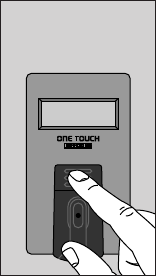
Step 1: Press On/
Off Button to turn
the Meter on
Your last blood glucose or Control
Solution test result will appear for
3 seconds.
memory or memory
mm 5 . 9 (example) c 5 . 4 (example)
Then
code 10 (example)
appears on the display for 2 seconds.
Make sure the code number on the
Meter display matches the code
number on the Test Strip package
you are using. (See Coding the
Meter, page 8.)
The message
insert
strip
then appears.
•
30
LSI-97-050 OTB Eg 7/25/97 11:09 PM Page 30
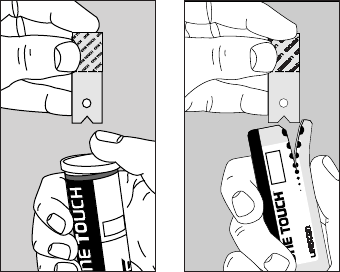
Insert Test Strip
Remove a Test Strip from the
package. DO NOT touch the white
Test Spot. When using Test Strips
from a vial, replace the cap imme-
diately. When using a foil-wrapped
Test Strip, be careful not to tear the
Test Strip when opening the foil.
Vial Test Strips Foil-Wrapped Test Strips
E S T S T R I P
10
CODE:
OPEN
HERE
INC.
Milpites,CA Made in U.S.A. 51-453B
TEST FOR GLUCOSE
IN WHOLE BLOOD
R
t
e
s
t
f
o
r
t
h
e
q
u
a
n
t
i
t
i
e
s
m
e
a
s
u
r
m
t
e
s
t
f
o
r
t
h
e
q
u
a
n
t
i
t
i
e
s
m
e
a
s
u
r
m
t
e
s
t
f
o
r
t
h
e
q
u
a
n
t
i
t
i
e
s
m
e
a
s
u
r
m
t
e
s
t
f
o
r
t
h
e
q
u
a
n
t
i
t
i
e
s
m
e
a
s
u
r
m
t
e
s
t
f
o
r
t
h
e
q
u
a
n
t
i
t
i
e
s
m
e
a
s
u
r
m
t
e
s
t
f
o
r
t
h
e
q
u
a
n
t
i
t
i
e
s
m
e
a
s
u
r
m
t
e
s
t
f
o
r
t
h
e
q
u
a
n
t
i
t
i
e
s
m
e
a
s
u
r
m
t
e
s
t
f
o
r
t
h
e
q
u
a
n
t
i
t
i
e
s
m
e
a
s
u
r
m
t
e
s
t
f
o
r
t
h
e
q
u
a
n
t
i
t
i
e
s
m
e
a
s
u
r
m
t
i
t
i
e
s
m
e
a
s
u
r
m
t
e
s
t
f
o
r
t
h
e
q
u
a
n
t
i
t
i
e
s
m
e
a
s
u
r
m
S
TEST STRIPS
RR
31
LSI-97-050 OTB Eg 7/25/97 11:09 PM Page 31
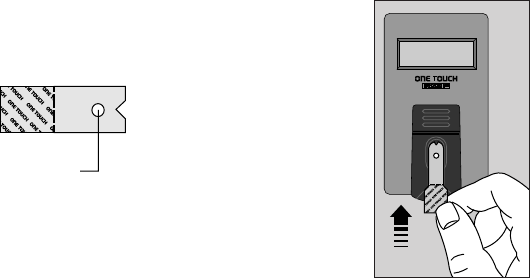
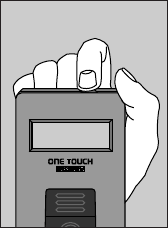
The Test Spot should be white or
ivory-colored, with no tears or
wrinkles.
When
insert
strip
appears, slide the notched end of the
Test Strip into the Holder with the
Test Spot side up. Make sure you
push the Test Strip all the way into
the Holder until it stops.
wait
appears for a few seconds. Then,
apply
sample
appears until you apply blood to the
Test Spot (or for 5 minutes).
insertinsert
Test Spot
32
LSI-97-050 OTB Eg 7/25/97 11:09 PM Page 32
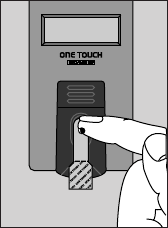
Step 2: Apply blood sample
With the Test Strip in the Meter and
apply
sample
on the display, apply a drop of blood
to the Test Spot.
The Meter will beep when the blood
has been applied to the Test Spot.
Make sure that you:
■Do not remove the Test Strip from
the Meter to apply blood.
■Do not smear blood on the Test
Spot or apply a second drop after
the test begins.
■Do not move the Test Strip when
you are applying blood. If the Test
Strip moves, push it back to its
original position.
■Touch only the tip of the drop of
blood to the Test Spot.
■Apply enough blood to form a
round, shiny drop that covers the
Test Spot completely and stays wet
during the entire test.
sample
33
LSI-97-050 OTB Eg 7/25/97 11:09 PM Page 33
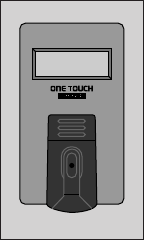
Step 3: Accurate results in
45 seconds
The Meter then counts down from
45 to 0 seconds, followed by a series
of beeps when your result is displayed.
mm 6 . 0 (example)
IMPORTANT:
Always check that “MM” and a
decimal point are displayed with
your blood glucose result. If not, you
may have accidentally changed the
display language and unit of mea-
surement to “P 1” English (mg/dL)
or an electronic malfunction may
have occurred. See Setting the
Meter, page 7, to reset the language
and unit of measurement to “P 3”
English (mmol/L).
Be sure to wait for
the beeps before
you note your
result. Your result
will continue to
display until you
turn the meter off
or for 2 minutes,
when the meter
automatically turns off. The Meter
displays results which are between
0 and 33.3 mmol/L. Results above
33.3 mmol/L are displayed as
high
Press the On/Off Button to turn the
Meter off.
mm 6. 0
34
LSI-97-050 OTB Eg 7/25/97 11:09 PM Page 34
6. AFTER TESTING
Although the ONE TOUCH
®
BASIC
®
System requires only a small drop of
blood, it is very important that the
drop be large enough to cover the
Test Spot completely.
In many cases, the Meter can detect
if the drop of blood was too small to
give an accurate reading. If
not
enough
blood
retest
or
c 5 . 8 (example)
contrl
appears on the display, your drop of
blood was too small or smeared, or
the Test Strip was inserted only part-
way into the Test Strip Holder.
Repeat the test with a new Test Strip
and enough blood to cover the entire
Test Spot.
35
LSI-97-050 OTB Eg 7/25/97 11:09 PM Page 35
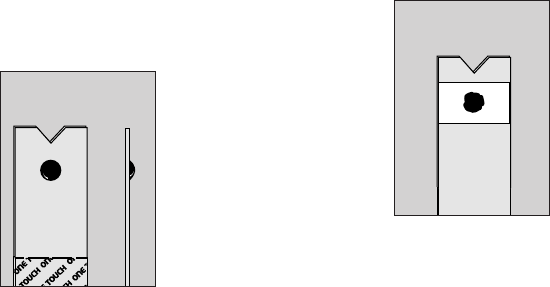
Checking the Amount of Blood
on the Test Strip
The Meter cannot always tell if a
sample is too small, so it is impor-
tant that you also look at the Test
Strip to make sure that you applied
enough blood.
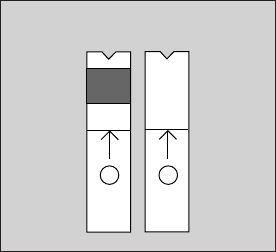
■Remove the Test
Strip from the
Meter and look at
the Test Spot. It
should still have
a wet, shiny drop
that completely covers the circle.
If the blood sample has a dull, dry
appearance, you may not have
applied enough blood, or you may
have smeared it.
■Look at the back
of the Test Strip.
You should see a
full, dark circle.*
*The white portion on
the back of the Test
Strip may also appear as a small square,
due to different manufacturing processes.
This difference will not affect your blood
glucose results.
Back
Front Side
36
LSI-97-050 OTB Eg 7/25/97 11:09 PM Page 36
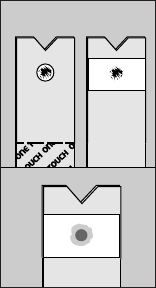
If there are any
white patches or
streaks, you may
have smeared the
blood or the drop
was too small. In
either case, you
may have an
inaccurately low
result. Repeat the
test with a new
Test Strip.
(Incorrect)
Recording Your Test Results
Your ONE TOUCH
®
BASIC
®
System
Kit comes with a Logbook that you
can use to keep a permanent record
of your test results, along with
information on diet and medication.
If you run out of space in your Log-
book, you can get a new one from
your Authorized LifeScan Distributor,
drug store, or directly from LifeScan.
37
LSI-97-050 OTB Eg 7/25/97 11:09 PM Page 37
Displaying Last Test Result
The ONE TOUCH
®
BASIC
®
Meter
automatically recalls and displays
your last result—either from a
blood glucose or Control Solution
test—whenever the Meter is
turned on.
memory or memory
mm 5 . 9 (example) c 5 . 4 (example)
appears for 3 seconds, then the
Meter immediately displays test
messages starting with
code 7 (example)
Only blood glucose or Control
Solution test results are recalled and
displayed. Check Strip test results
are not stored in the Meter memory.
When using the Meter for the first
time
memory
nodata
appears to indicate that there is no
blood glucose or Control Solution
test result in the Meter’s memory.
38
LSI-97-050 OTB Eg 7/25/97 11:09 PM Page 38
7. HELP! (Troubleshooting)
The display messages that appear on the Meter will guide you through the
glucose test and quality control test procedures and alert you to problems as
they occur. This section provides you with a complete listing of the display
messages, what they mean, and what to do if there is a problem.
39
LSI-97-050 OTB Eg 7/25/97 11:09 PM Page 39

Test Procedure Messages
These messages appear during routine testing. Just follow them carefully and
they will guide you through the test.
MESSAGE APPEARS WHEN
You press and hold the On/Off Button. It provides a visual
test that all display segments are working.
The Meter is turned on. The value displayed is your last
blood glucose test result. (When using the Meter for the
first time, memory nodata will appear.)
The Meter is turned on. The value displayed is your last
Control Solution test result.
The Meter is in a code-setting mode. The code number
(1–16) displayed must match the code number on the Test
Strip package.
code 7 (example)
memory
c 5
.
4(example)
memory
mm 6
.
0(example)
40
LSI-97-050 OTB Eg 7/25/97 11:09 PM Page 40

MESSAGE APPEARS WHEN
The Meter is ready for you to perform a blood, Check
Strip, or Control Solution test.
The Meter is performing internal checks.
The Meter is ready to receive a blood or Control Solution
sample. If performing a Check Strip test, this is your signal
to remove the Check Strip (Side 1) from the Meter.
The Meter is counting down from 45 seconds to 0.
A blood test is completed. This indicates a blood glucose
result.
mm 6
.
0(example)
45,44,43...0
apply
sample
wait
insert
strip
41
LSI-97-050 OTB Eg 7/25/97 11:09 PM Page 41

MESSAGE APPEARS WHEN
A Control Solution test is completed. However, if this
appears after a blood test, it means that your test result
was not accurate because the blood sample was too small
and the Meter read it as a Control Solution sample.
You are performing a Check Strip test. Turn the Check
Strip over and slide it back into the Test Strip Holder
with Side 2 up.
The Check Strip result falls into the acceptable range.
Your blood glucose result is above 33.3 mmol/L,
indicating severe hyperglycemia. Contact your
physician immediately.
high
A 4
.
4(example)
A ok
insert
side 2
c 5
.
4(example)
contrl
42
LSI-97-050 OTB Eg 7/25/97 11:09 PM Page 42
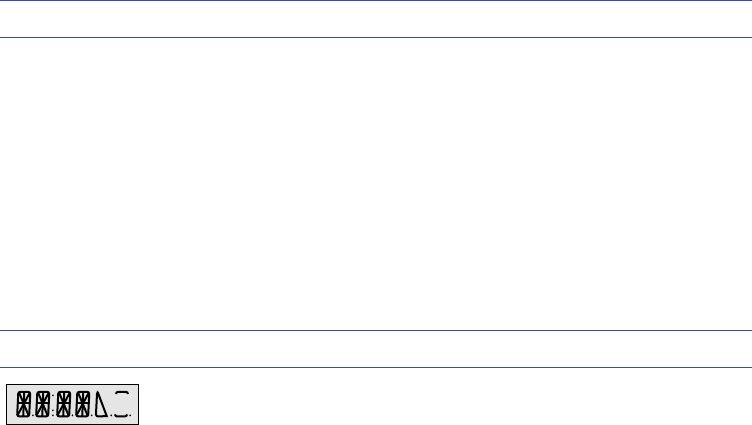
MESSAGE APPEARS WHEN
You are setting the display language and the unit of
measurement. This means that messages will appear in
the selection program. “P 3” corresponds to the English
(mmol/L) selection. “P 4” corresponds to the French
(mmol/L) selection.
Error Messages
When any of these messages appear, there is a problem with the Meter or the
way in which you are performing a procedure. In most cases, problems are
easy to fix. If you need it, help is available from LifeScan Technical Services.
MESSAGE PROBLEM WHAT TO DO
Some parts of the display Call LifeScan
Technical
are not working. The Services.
messages will be incomplete.
p 1R23
43
LSI-97-050 OTB Eg 7/25/97 11:09 PM Page 43

MESSAGE PROBLEM WHAT TO DO
The language and unit of See Setting the Meter, page 7,
measurement have been to reset the language and
changed to “P 1” English unit of measurement to
(mg/dL) either accidentally “P 3” English (mmol/L).
or through an electronic
malfunction.
T
he battery is too low. The Replace the battery.
Meter will not operate.
1) There is dirt, blood, or lint Clean the Test Area
on the Test Area. and Test Strip Holder
according to instructions.
2) Your hand or an object Repeat the test. Keep
covered the Test Area while Test Area clear.
the Meter was turned on.
clean
test
area
battry
114 (example)
[No “mm” before the
result and no
decimal point]
44
LSI-97-050 OTB Eg 7/25/97 11:09 PM Page 44

MESSAGE PROBLEM WHAT TO DO
3) The Test Strip was Repeat the test. Wait for
inserted before insert insert strip before
strip appeared on the inserting a new Test Strip.
display.
4) The center of the Test Strip Depress the center by
Holder where the small hole pressing forward on the
is located is raised. base, or by pressing down
on the center, or by inserting
a check strip into the Test
Strip Holder.
If this message appears after Repeat the test with a new
a blood test, your blood Test Strip and a larger drop
sample was too small, of blood.
smeared, or another drop was
added after the test began.
c 3
.
8(example)
contrl
45
LSI-97-050 OTB Eg 7/25/97 11:09 PM Page 45

MESSAGE PROBLEM WHAT TO DO
The sample was applied Repeat test with a new
before apply sample Test Strip and wait for
appeared. apply sample to appear.
Error in the test procedure
such as:
1) The Test Strip moved Repeat the test with a new
during the test. Test Strip.
2) The Test Strip was not Repeat the test, pushing a
inserted correctly. new Test Strip all the way
into the Test Strip Holder.
3) The Test Strip was Repeat the test with a new
removed before the test Test Strip.
was completed.
error2
retest
error1
retest
46
LSI-97-050 OTB Eg 7/25/97 11:09 PM Page 46

MESSAGE PROBLEM WHAT TO DO
4) There was not enough Repeat the test with a new
blood on the Test Strip. Test Strip and a larger drop
of blood.
5) The Meter was used in Move the Meter out of
very bright light. direct light and repeat the
test with a new Test Strip.
6) The Check Strip procedure Repeat the Check Strip test.
was incorrect.
7) The Meter may not be Call LifeScan Technical
operating correctly. Services.
47
LSI-97-050 OTB Eg 7/25/97 11:09 PM Page 47

MESSAGE PROBLEM WHAT TO DO
When any message flashes Test results will still be
continually, it means the accurate, but replace the
battery is getting low. battery as soon as possible.
Your last test result was
not stored in the Meter’s
memory for one of the
following reasons:
1) A not enough blood Repeat the test with a new
retest message was dis- Test Strip and a larger drop
played during your last of blood.
blood or Control Solution
test due to a too small or
smeared sample.
memory
retest
insert
insert
insert
(example)
48
LSI-97-050 OTB Eg 7/25/97 11:09 PM Page 48

MESSAGE PROBLEM WHAT TO DO
2) An error2 retest Review the error2
message was displayed retest problems listed
during your last test due on pages 46–47 before
to a procedural error. repeating the test.
3) A not ok message was Call LifeScan Technical
displayed during your last Services.
test.
4) A power loss, including Repeat the test with a new
turning the meter off, Test Strip.
occurred during your
last test.
49
LSI-97-050 OTB Eg 7/25/97 11:09 PM Page 49

MESSAGE PROBLEM WHAT TO DO
1) The blood sample was Repeat the test with a new
too small or smeared. Test Strip and a large, shiny
drop of blood.
2) The Test Strip was not Repeat the test. This time
inserted all the way into push the Test Strip all the
the Test Strip Holder. way into the Test Strip
Holder.
Your Meter may have an Call LifeScan Technical
electronic problem. Services.
The Check Strip test result is Clean the Meter and
outside the acceptable range. Check Strip. Repeat the
Check Strip test.
A 5
.
8(example)
Anotok
redo A
not ok
not
enough
blood
retest
50
LSI-97-050 OTB Eg 7/25/97 11:09 PM Page 50

MESSAGE PROBLEM WHAT TO DO
The last Check Strip test was Stop and do a Check Strip
outside the acceptable range test.
and a repeat test that passed
has not been performed.
The Test Strip was inserted Remove the Test Strip.
before the Meter was ready. Wait for insert strip
message.
remove
strip
redo A
code 7 (example)
51
LSI-97-050 OTB Eg 7/25/97 11:09 PM Page 51

MESSAGE PROBLEM WHAT TO DO
The Meter has lost some Use the “C” Button to reset
important information, the Meter code to match the
including the code number, Test Strip package code.
and the language and the Reset the language and unit
unit of measurement have of measurement to “P 3”
changed to “P 1” English for English (mmol/L) as
(mg/dL) either accidentally described in the section
or through an electronic Setting the Meter, page 7.
malfunction. If this continues to happen,
there may be a problem
with your Meter. Call
LifeScan Technical
Services.
reset
code
52
LSI-97-050 OTB Eg 7/25/97 11:09 PM Page 52
8. TAKING CARE OF THE
METER
Your ONE TOUCH
®
BASIC
®
Meter
is simple to use and easy to main-
tain. However, it must be handled
carefully and cleaned regularly to
remain in good operating condition.
You should follow these rules at all
times:
■Keep the Test Strip Holder and
Test Area clean.
■Do not drop or toss the Meter.
The Meter’s electronics could be
damaged by such treatment. If you
drop the Meter, make sure the Test
Strip Holder is still securely in
place and check the Meter with
the Check Strip before doing a
blood glucose test.
■Avoid exposing the Meter or Test
Strips to extremes in temperature
or humidity for long periods of
time. For example, do not store the
Meter or Test Strips in your car.
■Never let your Meter get wet. The
Meter could be permanently
damaged if water or other liquids
get inside.
53
LSI-97-050 OTB Eg 7/25/97 11:09 PM Page 53

■Do not take the Meter apart.
Sensitive parts could be damaged
and cause inaccurate results. Taking
the Meter apart will invalidate the
Meter warranty.
IMPORTANT: Infection Control Information
■If you are sharing the ONE TOUCH
®
BASIC
®
Meter with another
person, always use a new or properly disinfected Test Strip Holder for
each person.
■If you are sharing the PENLET
®
II Automatic Blood Sampler with
another person, always use a new sterile Lancet and a new or properly
disinfected PENLET II Cap for each person.
■For disinfecting information, an additional Test Strip Holder, or a
PENLET II Cap, please call LifeScan Technical Services.
54
LSI-97-050 OTB Eg 7/25/97 11:09 PM Page 54
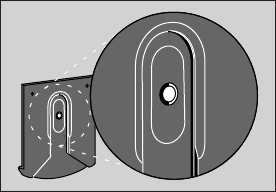
Daily Meter Check
Look through the small hole in the
Test Strip Holder to make sure there
is no lint, dirt, or blood blocking any
part of the hole.
If there is anything blocking the
hole, or if the Test Area has dirt, lint,
or blood on it, remove the Test Strip
Holder. Clean the Test Strip Holder
and Test Area by following the
instructions in the next section.
Cleaning the Meter
The Meter and Test Strip Holder
should be cleaned once a week.
In addition, they must be cleaned
whenever the Test Area looks dirty
or the message
clean
test
area
appears on the display.
55
LSI-97-050 OTB Eg 7/25/97 11:09 PM Page 55
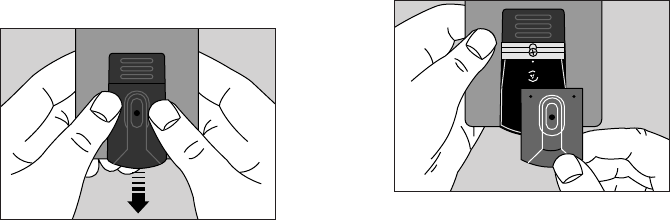
Step 1: Remove Test Strip Holder
Hold the Meter and place your
thumbs on the two raised dots on
the Test Strip Holder.
Slide the Test Strip Holder toward
you.
Remove the Test Strip Holder to
expose the Test Area.
56
LSI-97-050 OTB Eg 7/25/97 11:09 PM Page 56
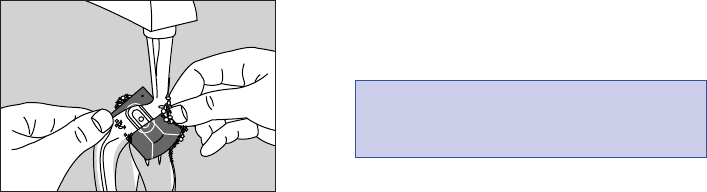
Step 2: Clean Test Strip Holder
Wash the Test Strip Holder with
soap and water.
Clean the underside of the Test Strip
Holder and check the small hole for
any dirt, blood, or lint. Rinse well.
Dry completely with a soft cloth or
tissue.
Step 3: Clean Test Area
The following cleaning agents will
damage the Meter.
DO NOT USE:
■Alcohol
■Cleansers with ammonia or phenol
■Windex
®
or other glass cleaners
■Abrasive cleansers
CAUTION: DO NOT GET
WATER INSIDE THE METER.
57
LSI-97-050 OTB Eg 7/25/97 11:09 PM Page 57
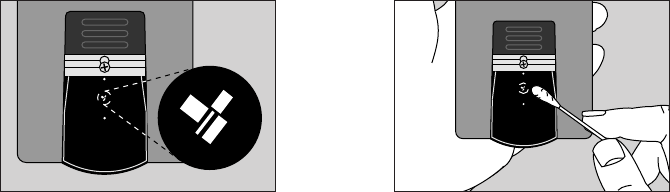
Check the clear, protective coating
over the Meter optics to make sure
it is not scratched or damaged.
Rub Test Area with a cotton swab or
soft cloth dampened with water to
remove all blood, dirt, or lint from
the Test Area. If necessary, a mild
liquid dishwashing detergent mixed
with water may also be used. Do not
apply full-strength detergent to the
Test Area. Be careful not to scratch
the Test Area.
58
LSI-97-050 OTB Eg 7/25/97 11:09 PM Page 58
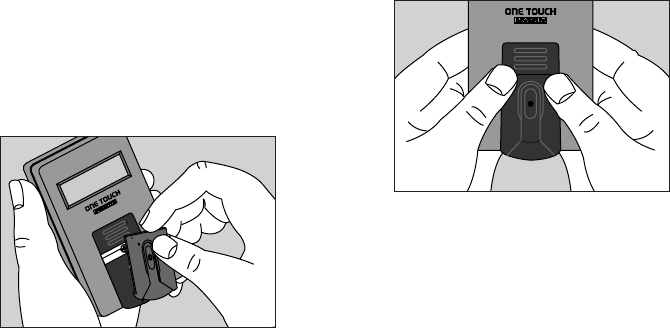
Dry the Test Area with a soft, dry
cloth or tissue that doesn’t contain
lotion or perfume. Remove any lint.
Step 4: Replace Test Strip Holder
Hook the bottom of the Test Strip
Holder onto the square notch on
the Meter.
Press down on the raised dots of
the Test Strip Holder until it snaps
firmly into place. Press forward on
the base, then down on the center of
the Test Strip Holder to make sure
the small hole over the Test Area is
not raised. You are now ready to do
a Check Strip test. If the Check Strip
will not slide into the Test Strip
Holder, repeat Step 4.
R
59
LSI-97-050 OTB Eg 7/25/97 11:09 PM Page 59
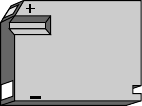
Battery Replacement
The ONE TOUCH
®
BASIC
®
Meter
comes with a battery already in-
stalled. When the battery must be
replaced, use only a Duracell
®
brand
alkaline battery (J-size, 6 volts,
part #7K67), which is commonly
available in drug and hardware
stores. This will ensure you get
the best performance from your
ONE TOUCH BASIC Meter.
The battery should last about one
year with typical home use.
When the battery is getting low, the
display will flash.
insert (example)
insert
insert
The Meter will still provide accurate
test results with a low battery, but
you should replace it as soon as
possible.
6-VOLT
60
LSI-97-050 OTB Eg 7/25/97 11:09 PM Page 60
When
battry
appears on the display, the Meter
will no longer give results and you
must replace the battery before you
can perform another test.
A dead battery or battery removal
will not affect the previous test
result stored in the Meter’s memory,
as long as the battery is replaced
within 30 days.
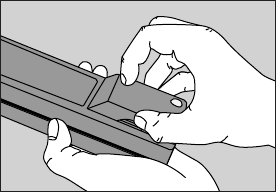
Replacing the battery
Make sure the Meter is turned off
before you remove the battery.
Turn the Meter upside down.
With your thumb, firmly press in
and up on the ridges on the side
of the battery door until the door
releases from the clasp. Remove
the battery door by sliding it out.
61
LSI-97-050 OTB Eg 7/25/97 11:09 PM Page 61
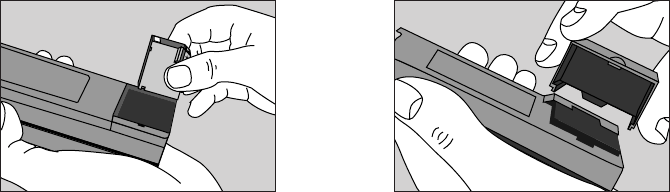
Remove the old battery and discard
properly. Insert a new J-size battery
in the battery compartment.
To replace the battery door, insert
the tabbed side of the door into the
slot in the battery compartment.
6-VOLT
62
LSI-97-050 OTB Eg 7/25/97 11:09 PM Page 62
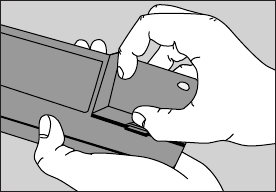
With your thumb, press in and down
on the ridged side of the battery door
until it snaps shut.
63
LSI-97-050 OTB Eg 7/25/97 11:09 PM Page 63
9. QUESTIONS AND
ANSWERS
In the following pages, we’ve
provided answers to some of the
most common questions people
have about home blood glucose
monitoring and the ONE TOUCH
®
BASIC
®
Meter. If you have a question
that isn’t covered here, consult your
Health Care Professional or call
LifeScan Technical Services.
Q. Why should I test my blood
glucose (sugar)?
A. No doubt your Health Care
Professional has explained the
importance of keeping your diabetes
under control. Your ONE TOUCH
BASIC System helps you check
whether or not you are in control by
monitoring your blood glucose levels.
The test results provide a good
picture of how diet, exercise, and
medication are affecting your
diabetes.
Test results can also indicate whether
your diabetes is changing in ways
that might require an adjustment in
your treatment program.
Always consult your Health Care
Professional before making changes
in your diabetes control plan.
64
LSI-97-050 OTB Eg 7/25/97 11:09 PM Page 64
Q. How often should I test my
blood glucose?
A. This is best decided by you and
your Health Care Professional. It
may vary according to your age, the
type of diabetes you have, any
medication you are using, whether
you are ill, and any physical or
emotional changes in your life.
Q. Should my test results always
be the same?
A. No. Results will vary somewhat
from test to test, depending on diet,
activity level, and time of day. These
variations provide useful clues about
your condition and how well your
treatment program is working.
With your Health Care Professional,
determine your own personal target
blood glucose values, as well as what
an unusually high or low test result
is for you. In most cases, your test
results should stay within that range.
Q. What can I do to be sure I get
accurate test results?
A. Make sure that you do the
following:
65
LSI-97-050 OTB Eg 7/25/97 11:09 PM Page 65
Keep your Meter clean at all times.
Use enough blood. The entire Test
Spot must be completely covered
with blood. Touch the drop of blood
lightly to the middle of the Test Spot
to fill the entire Spot. The drop of
blood should form a round, shiny
circle over the entire Spot, and stay
wet during the entire test.
Do not smear the blood or touch the
Test Spot with your finger. Do not
add more blood after you’ve applied
the first drop.
Never use Test Strips beyond their
expiration date. Do not store Test
Strips outside of their packaging.
Make sure the Meter code number is
set to match the code number on the
package of Test Strips you are using.
Periodically review your use of
the Meter with your Health Care
Professional.
Q. What should I do if my blood
glucose test results are consistently
high for my own diabetes control
plan?
A. The goal of diabetes management
is to maintain a “near normal”
amount of glucose in the blood.
Normal, low, and high blood glucose
values for your individual treatment
plan should be determined with
66
LSI-97-050 OTB Eg 7/25/97 11:09 PM Page 66
your Health Care Professional.
If your blood glucose test results
remain consistently high, contact
your Health Care Professional.
Q. What are the expected blood
glucose values associated with
well-controlled diabetes?
A. Fasting: 3.3–7.2 mmol/L
After meals (1 hour): Less than
10.0 mmol/L
After meals (2 hours): Less than
8.3 mmol/L
1,2
Q. What do I do if test results still
seem too low or too high?
A. Remember, the test results you
obtain will vary from time to time
depending on food intake, insulin
dose, exercise, etc. Ask yourself the
following questions:
■“How do I feel?”
■“Do I have symptoms of low blood
sugar (hypoglycemia) or high
blood sugar (hyperglycemia)?”
■“What have I eaten?”
■“How much exercise have I had?”
■“Am I ill (e.g., common cold,
flu, etc.)?”
67
LSI-97-050 OTB Eg 7/25/97 11:09 PM Page 67
In addition to the common factors
listed above which cause real
variations in blood glucose results,
there are certain abnormal condi-
tions which can interfere with the
accuracy of your blood glucose
monitoring results. These limitations
are described below and should be
discussed with your physician:
Extremes in hematocrit (the amount
of red blood cells in the blood) can
affect test results. High hematocrits
(above 60%) cause inaccurately low
results. Very low hematocrits (below
25%) can also cause inaccurately
low results.
Severe dehydration and excessive
water loss may cause inaccurately
low results. This has been reported
in the medical literature for leading
blood glucose monitoring products.
3,4
Severe dehydration can lead to many
serious medical complications. One
complication which is of particular
importance in diabetes management
is a “hyperglycemic-hyperosmolar”
state, with or without ketosis, which
may be life-threatening if left un-
treated. The following are some
of the factors which could lead
to severe dehydration:
68
LSI-97-050 OTB Eg 7/25/97 11:09 PM Page 68

■Vomiting and diarrhea
■Prescription drugs, e.g., diuretics
■Inability to recognize or respond to
“thirst” sensations
■Sustained uncontrolled diabetes
Whenever inadequate fluid intake
or excessive water loss occurs,
CONSULT A PHYSICIAN
IMMEDIATELY.
Remember, if you ever experience
symptoms which are not consistent
with your blood glucose monitoring
results and you have eliminated
common procedural errors described
in this Owner’s Booklet as the cause,
you should contact a physician
immediately!
Never make significant changes to
your medication program or ignore
physical symptoms without
consulting a physician.
IMPORTANT: When the message
HIGH appears on the Meter
display, this indicates severe
hyperglycemia (blood sugar too
high); contact your physician
immediately.
69
LSI-97-050 OTB Eg 7/25/97 11:09 PM Page 69
Q. Why don’t my Meter results
match the results that I got from
my doctor’s laboratory exactly?
A. Many Health Care Professionals
believe that the result that you get
with your Meter should fall within
15% to 20% of the result obtained
when whole blood is tested on
laboratory equipment.
5
However,
there are a number of reasons why
the blood glucose result from your
Meter may vary even more than 20%
from a laboratory result.
6
One of
the most common reasons is that
laboratories use serum or plasma
samples, while home blood glucose
monitors use whole blood. Whole
blood results are approximately
10%–12% lower than serum or
plasma values from the same blood
sample (at average hemocrit levels
of 41%–45%). To adjust for this
difference, divide the laboratory
value by 112% or 1.12.
7
Example:
■Let’s assume your lab (plasma)
result is 8.3 mmol/L.
■8.3 divided by 1.12 = 7.4 mmol/L.
■Compare your Meter result to
7.4 mmol/L.
70
LSI-97-050 OTB Eg 7/25/97 11:09 PM Page 70
There is a difference in the glucose
levels of venous blood (usually
drawn from a vein in your arm)
and capillary blood (blood from a
fingerstick). After a meal, the glucose
levels in the capillaries may be
1.1–3.9 mmol/L higher than the
levels in venous blood.
6
If your lab
test is taken while you are in the
fasting state (before breakfast),
this difference will be minimal
(0.1–0.3 mmol/L).
7
Variation may also occur between
your Meter and the lab if the two tests
were not done within 10–15 minutes
of each other. Blood glucose values
change rapidly, especially after you
have eaten, and the two tests could
have very different results.
8,9
1Skyler JS, et al: Postgraduate Medicine (1987) 81(6):163–174.
2 Skyler JS, et al: Diabetes Care (1981) 4:311–318.
3 Wickham NWR, et al: Practical Diabetes (1986) 3(2):100.
4 Cohen FE, et al: Diabetes Care (1986) 9(3):320–322.
5 Clarke WL, et al: Diabetes Care (1987) 10:622–628.
6 Gadsen RH: Challenges in Diabetes Management, Milpitas
CA, LifeScan, Inc. (1988) 63–66.
7 Caraway WT: Carbohydrates, in Tietz NW (ed). Fundamentals
of Clinical Chemistry. Philadelphia, WB Saunders Company
(1976) 242–244.
8 Surwit RS and Feinglos MN: Diabetes Forecast (1988) April:
49–51.
9 Nelson RL: Diabetes Spectrum (1989) 2:219–223.
71
LSI-97-050 OTB Eg 7/25/97 11:09 PM Page 71
10. SPECIFICATIONS
Performance Characteristics
See the ONE TOUCH
®
Test Strip
package insert for ONE TOUCH
®
System accuracy and precision.
Power Supply: One Duracell
®
alkaline battery, size J (6V) part #
7K67 is included with Meter.
Battery Life: Approximately one
year (at two tests per day).
Result Range: 0–33.3 mmol/L.
Higher values displayed as HIGH.
Display Type: Alphanumeric;
6-character, 14-segment LCD.
Dimensions:
Length—12.07 cm (4
3
/
4
0)
Width—6.70 cm (2
5
/
8
0)
Height—2.70 cm (1
1
/
16
0)
Weight—approx. 135 g (4.8 oz.)
[including battery]
Operating Temperature Range:
15°C–35°C (59°F–95°F)
Operating Humidity Range:
0%–90% relative humidity
(non-condensing).
Memory: Last result — either a blood
glucose or Control Solution test.
Code Numbers: 1–16.
72
LSI-97-050 OTB Eg 7/25/97 11:09 PM Page 72
Guarantee and Warranty
30-Day Money-Back Guarantee
If you are not fully satisfied with the
ONE TOUCH
®
BASIC
®
System, a full
refund may be obtained by calling a
LifeScan Technical Representative at
the toll-free number within 30 days
of purchase. You must return the
ONE TOUCH
®
BASIC
®
Meter and
a copy of your receipt to receive
a refund.
Three-Year Warranty
If, at any time during the first three
years after purchase, the Meter does
not work for any reason (except
for obvious abuse), LifeScan will
replace it with a new or rebuilt
Meter or equivalent product free of
charge.
The warranty policy applies only to
the original purchaser of this Meter
and does not include the battery
supplied with the Meter.
Please complete the Warranty
Registration Card and mail it to
LifeScan.
The ONE TOUCH BASIC Meter has
a full three-year warranty from the
original date of purchase. Write your
date of purchase here:
__________________________________
73
LSI-97-050 OTB Eg 7/25/97 11:09 PM Page 73

The warranty policy does not
apply to the performance of the
ONE TOUCH
®
BASIC
®
Meter when
used with any test strip other than
ONE TOUCH
®
Test Strips, or when
the ONE TOUCH BASIC Meter or
Test Strips are changed or modified
in any way.
This warranty is in lieu of all other
warranties, express or implied,
including any implied warranty of
merchantability or fitness for a
particular purpose.
Before you return your Meter, or
any product for warranty replace-
ment, first call your LifeScan
Technical Representative at the
toll-free number for detailed
instructions.
74
LSI-97-050 OTB Eg 7/25/97 11:09 PM Page 74

11. INDEX
Battery Replacement . . . . . . . . . . . . . . . . . . . . . . . . . . . . . . . . . . . . . . . . . . . 60
Blood Glucose Values (expected) . . . . . . . . . . . . . . . . . . . . . . . . . . . . . . . . . 67
Blood Sample Size . . . . . . . . . . . . . . . . . . . . . . . . . . . . . . . . . . . . . . . . . . . . . 36
Check Strip . . . . . . . . . . . . . . . . . . . . . . . . . . . . . . . . . . . . . . . . . . . . . . . . . . 11
Cleaning and Maintaining
Check Strip . . . . . . . . . . . . . . . . . . . . . . . . . . . . . . . . . . . . . . . . . . . . . . 16
PENLET
®
II . . . . . . . . . . . . . . . . . . . . . . . . . . . . . . . . . . . . . . . . . . . . . . . 26
Test Area of the Meter . . . . . . . . . . . . . . . . . . . . . . . . . . . . . . . . . . . . . . 57
Test Strip Holder . . . . . . . . . . . . . . . . . . . . . . . . . . . . . . . . . . . . . . . . . . 57
75
LifeScan Technical Services: Canada 1 800 663-5521
USA 1 800 227-8862
LSI-97-050 OTB Eg 7/25/97 11:09 PM Page 75

Coding the Meter . . . . . . . . . . . . . . . . . . . . . . . . . . . . . . . . . . . . . . . . . . . . . . . 8
Control Solution . . . . . . . . . . . . . . . . . . . . . . . . . . . . . . . . . . . . . . . . . . . 11, 17
Displaying Last Test Result . . . . . . . . . . . . . . . . . . . . . . . . . . . . . . . . . . . . 9, 38
Error Messages . . . . . . . . . . . . . . . . . . . . . . . . . . . . . . . . . . . . . . . . . . . . . 43–52
Hematocrit . . . . . . . . . . . . . . . . . . . . . . . . . . . . . . . . . . . . . . . . . . . . . . . . 68, 70
Infection Control . . . . . . . . . . . . . . . . . . . . . . . . . . . . . . . . . . . . . . . . . . . . . . 54
Language Setting and Unit of Measurement . . . . . . . . . . . . . . . . . . . . . . . . . . 7
Money-Back Guarantee . . . . . . . . . . . . . . . . . . . . . . . . . . . . . . . . . . . . . . . . . 73
PENLET
®
II Automatic Blood Sampler . . . . . . . . . . . . . . . . . . . . . . . . . . . . . 20
Performance Characteristics . . . . . . . . . . . . . . . . . . . . . . . . . . . . . . . . . . . . . 72
76
LifeScan Technical Services: Canada 1 800 663-5521
USA 1 800 227-8862
LSI-97-050 OTB Eg 7/25/97 11:09 PM Page 76

Precautions and Limitations . . . . . . . . . . . . . . . . . . . . . . . . . . . . . . . . . . . . . . 5
Questions and Answers . . . . . . . . . . . . . . . . . . . . . . . . . . . . . . . . . . . . . . . . . 64
Specifications . . . . . . . . . . . . . . . . . . . . . . . . . . . . . . . . . . . . . . . . . . . . . . . . 72
Testing Your Blood . . . . . . . . . . . . . . . . . . . . . . . . . . . . . . . . . . . . . . . . . 27–34
Test Procedure Messages . . . . . . . . . . . . . . . . . . . . . . . . . . . . . . . . . . . . . 40–43
Test Strips . . . . . . . . . . . . . . . . . . . . . . . . . . . . . . . . . . . . . . . . . . . . . . 4, 31–32
Troubleshooting . . . . . . . . . . . . . . . . . . . . . . . . . . . . . . . . . . . . . . . . . . . . . . . 39
Warranty . . . . . . . . . . . . . . . . . . . . . . . . . . . . . . . . . . . . . . . . . . . . . . . . . . . . 73
77
LifeScan Technical Services: Canada 1 800 663-5521
USA 1 800 227-8862
LSI-97-050 OTB Eg 7/25/97 11:09 PM Page 77

Toll-Free customer service:
Appels sans frais:
Canada 1 800 663-5521
U.S.A. 1 800 227-8862
Printed in U.S.A.
AW *05160052A* Imprimé aux États-Unis © 1994 LIFESCAN INC. 6/94
Burnaby, B.C. V5C 6C6
*05160052A*
LSI-97-050 OTB Fr 7/25/97 11:00 PM Page 86
