Lifestyler 831297152 User Manual EXPANSE 550 Manuals And Guides 99020076
LIFESTYLER Treadmill Manual 99020076 LIFESTYLER Treadmill Owner's Manual, LIFESTYLER Treadmill installation guides
User Manual: Lifestyler 831297152 831297152 LIFESTYLER LIFESTYLER EXPANSE 550 - Manuals and Guides View the owners manual for your LIFESTYLER LIFESTYLER EXPANSE 550 #831297152. Home:Fitness Equipment Parts:Lifestyler Parts:Lifestyler LIFESTYLER EXPANSE 550 Manual
Open the PDF directly: View PDF  .
.
Page Count: 20
e x p a n s e
8F.A 8
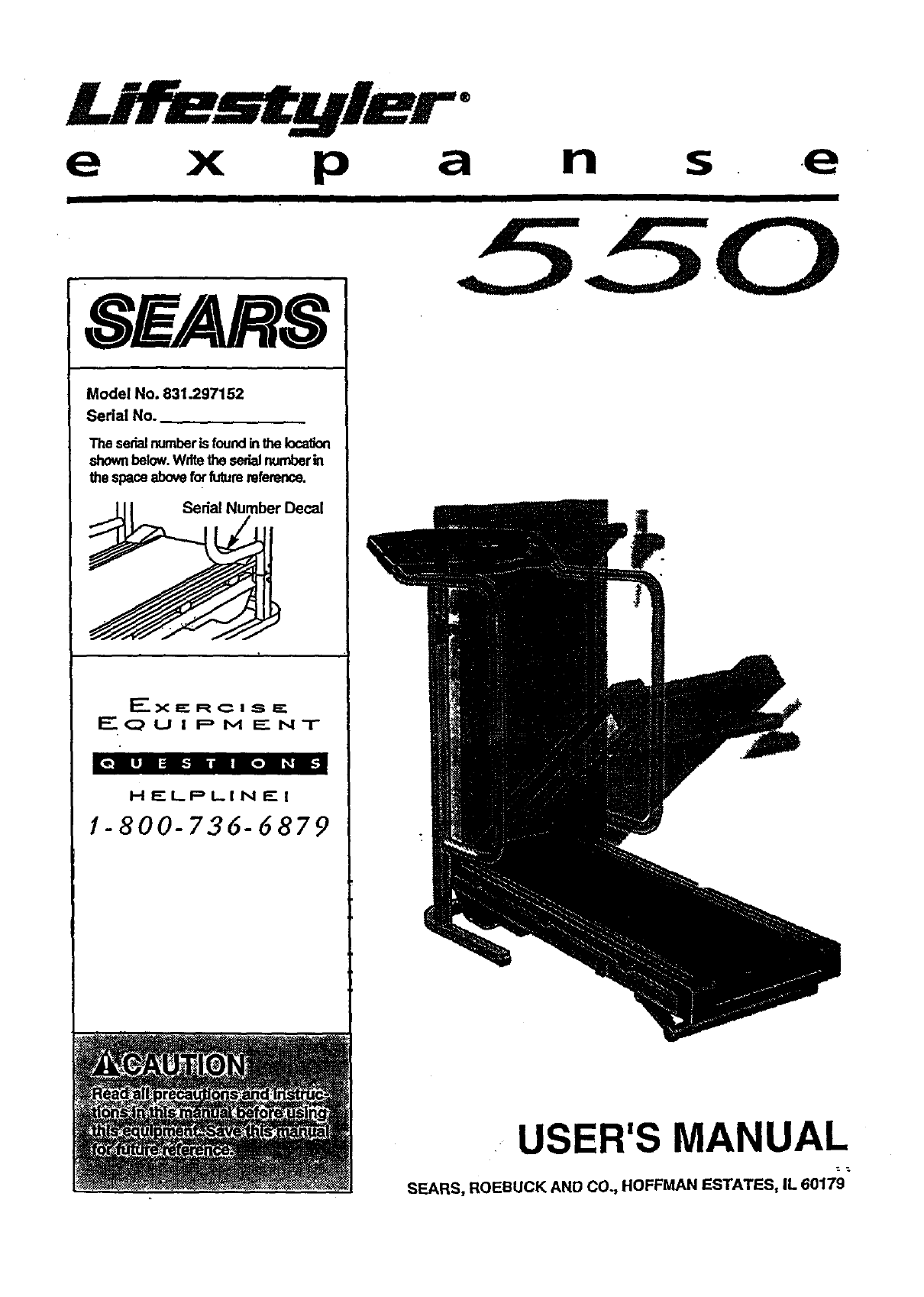
Model No. 831.297152
Sedal No.
Theserialnumberisfoundinthe
shownbelow.Writethe serialnurnberin
the spaceaboveforfuturereference.
Sedal Number Decal
E_XECRC I S z=="
W__.O UIP 1_4 _" N-F
HEL_PLINI:" I
1-800=736-6879
55.0
USER'S MANUAL
SEARS, ROEBUCK AND CO., HOFFMAN ESTATES, IL 60179
TABLE OF CONTENTS
IMPORTANT PRECAUTIONS . . .2
8,4o4J,eo.., ,._,.oo_ooqo ..,.ool4 O=6O..O.,O,gG***.IQO OJ*OOQOOOIO
BEFORE YOU BEGIN ....................................................................... .4
ASSEMBLY .............................................................................. .5
OPERATION AND ADJUSTMENT "".7
o_Qo ..4o • Q Q • o*l °.°. •*..., ° o a °, *Q oQ .. Q oQ I.. Q Q o _,,= • *. o., _ Qo
HOW TO FOLD AND MOVE THE TREADMILL .................................................. 10
TROUBLE-SHOOTING ................................................................... . . 12
CONDITIONING GUIDELINES ............................................................... 14
ORDERING REPLACEMENT PARTS .................................................. Back Cover
FULL 90 DAY WARRANTY. ....................................................... . . . Back Cover
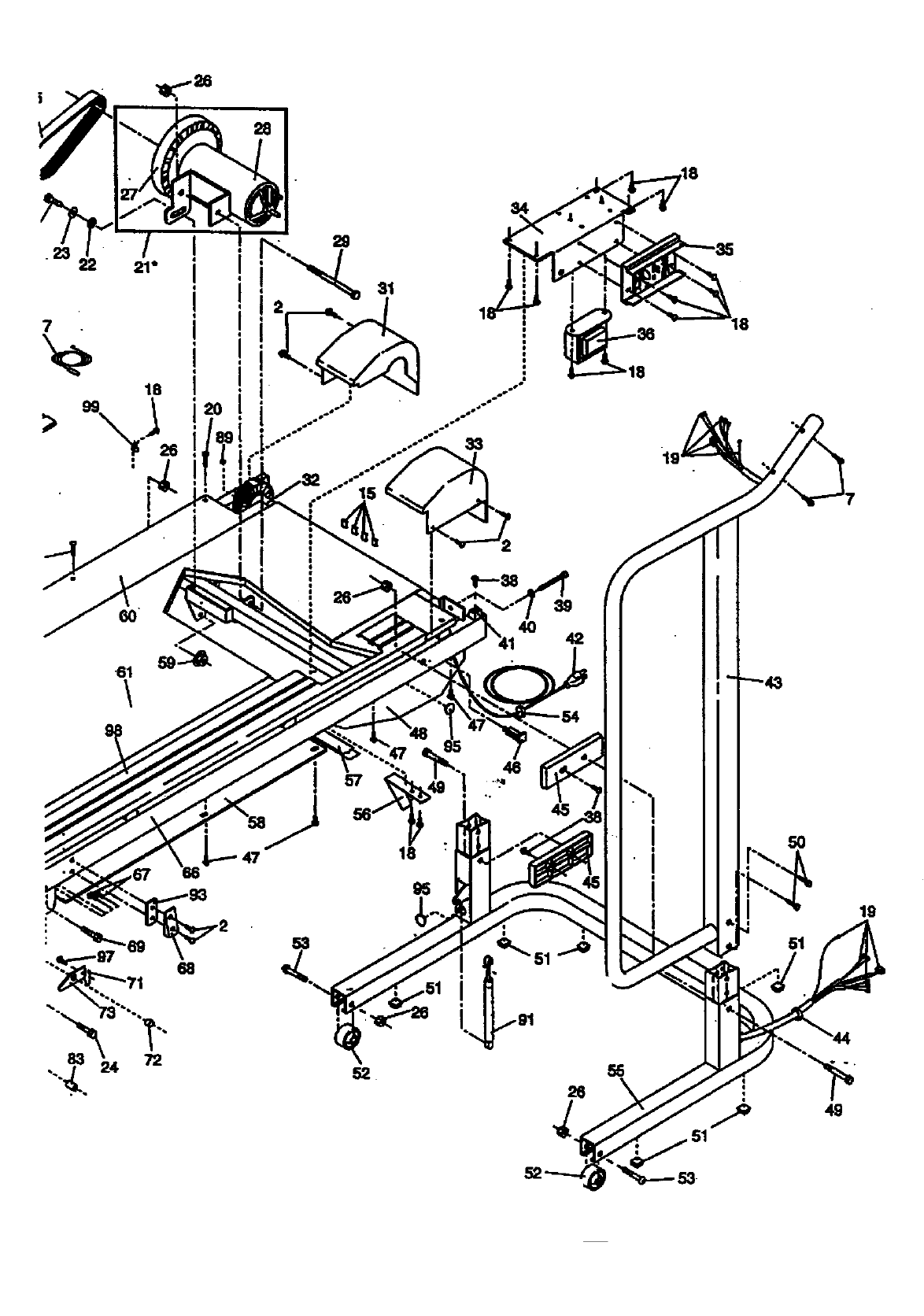
Note: An EXPLODED DRAWING and a PART UST are attached to the center of this manuel Save the
EXPLODED DRAWING and PART UST fopfuture reference.
IMPORTANT PRECAUTIONS
2
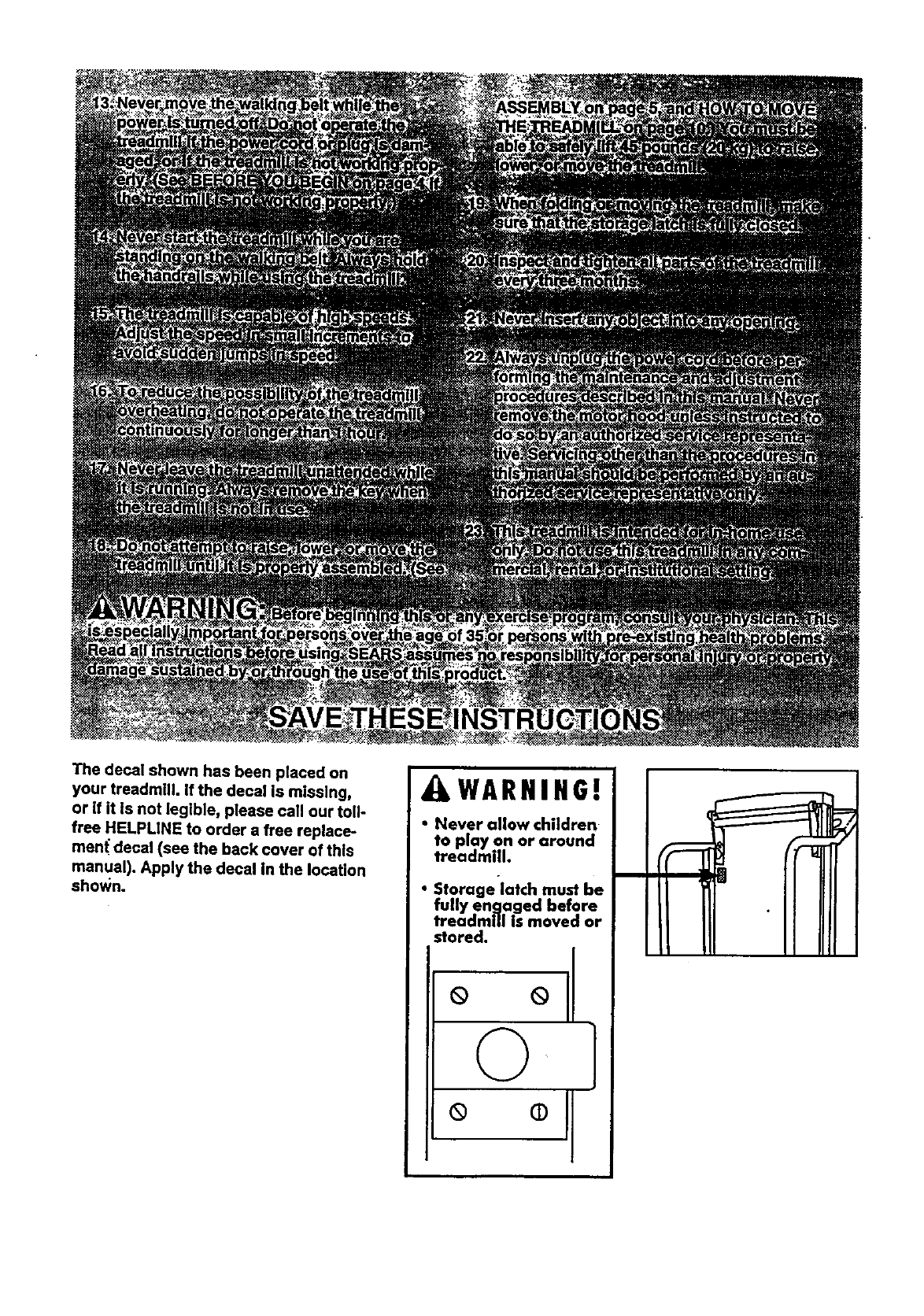
The decal shown has been placed on
your treadmill. If the decal is missing,
or if it Is not legible, please call our toll-
free HELPLINE to order a free replace-
men( decal (see the back cover of this
manual). Apply the decal in the location
shown.
i
AWARNIHO!
• Never allow children
to play on or around
treadmill.
•Storage latch must be
fully engaged before
treadmill is moved or
stored.
o oll
©
o °tI
BEFORE YOU BEGIN
Thank you for selecting the SEARS UFESTYLEPP
EXPANSE 550 treadmill. The EXPANSE 550 treadmill
blends advanced technology with innovative design to
lot you enjoy an excellent form of cardiovascular exer-
cise in the convenience and privacy ()f your home.
For _,our benefit, read this manual carefullY before
using the treadmill. If you have additional questions;
please call our toll-free HELPUNE at 1-800-736-6879,
Monday through Saturday, 7 a.m. until 7 p.m. Central
Time (exclud'mgholidays). To help us assist you,
please note the product model number and serial num-
ber before calling. The model number of the treadmill
is 831.297152. The serial number can be found on a
decal attached to the treadmill (=_e the front cover of
this manual for the location).
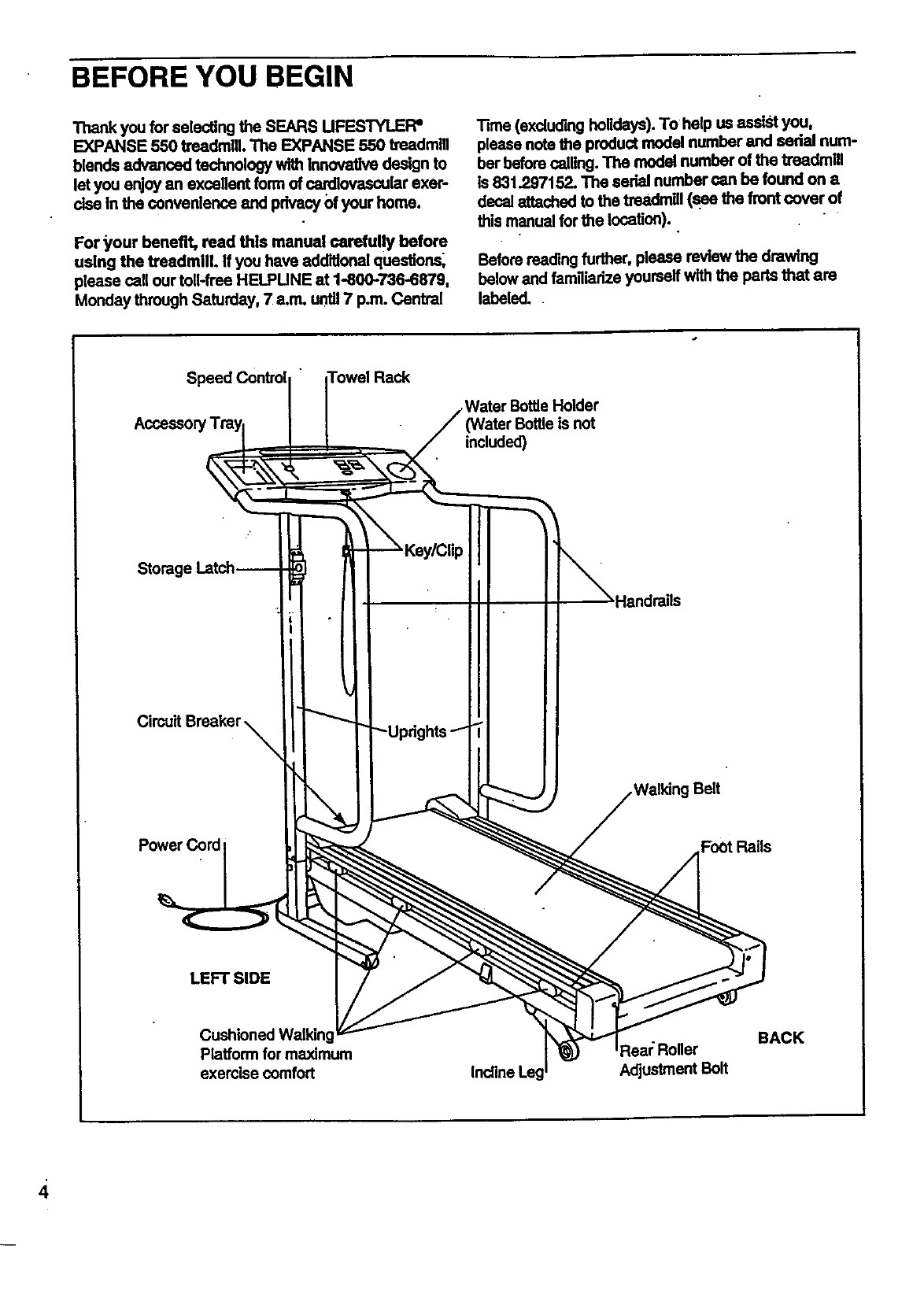
Before reading further, please review the drawing
below and familiarize yourself with the parts that am
labeled.
Accessor Water Bottle Holder
included)
Circuit Breaker
Belt
Power Cord FoOtRails
LEFT SIDE
Cushioned Walkinc
Platform for maximum
exercise comfort
_eal:Roller
Adjustment Bolt
BACK
4
ASSEMBLY
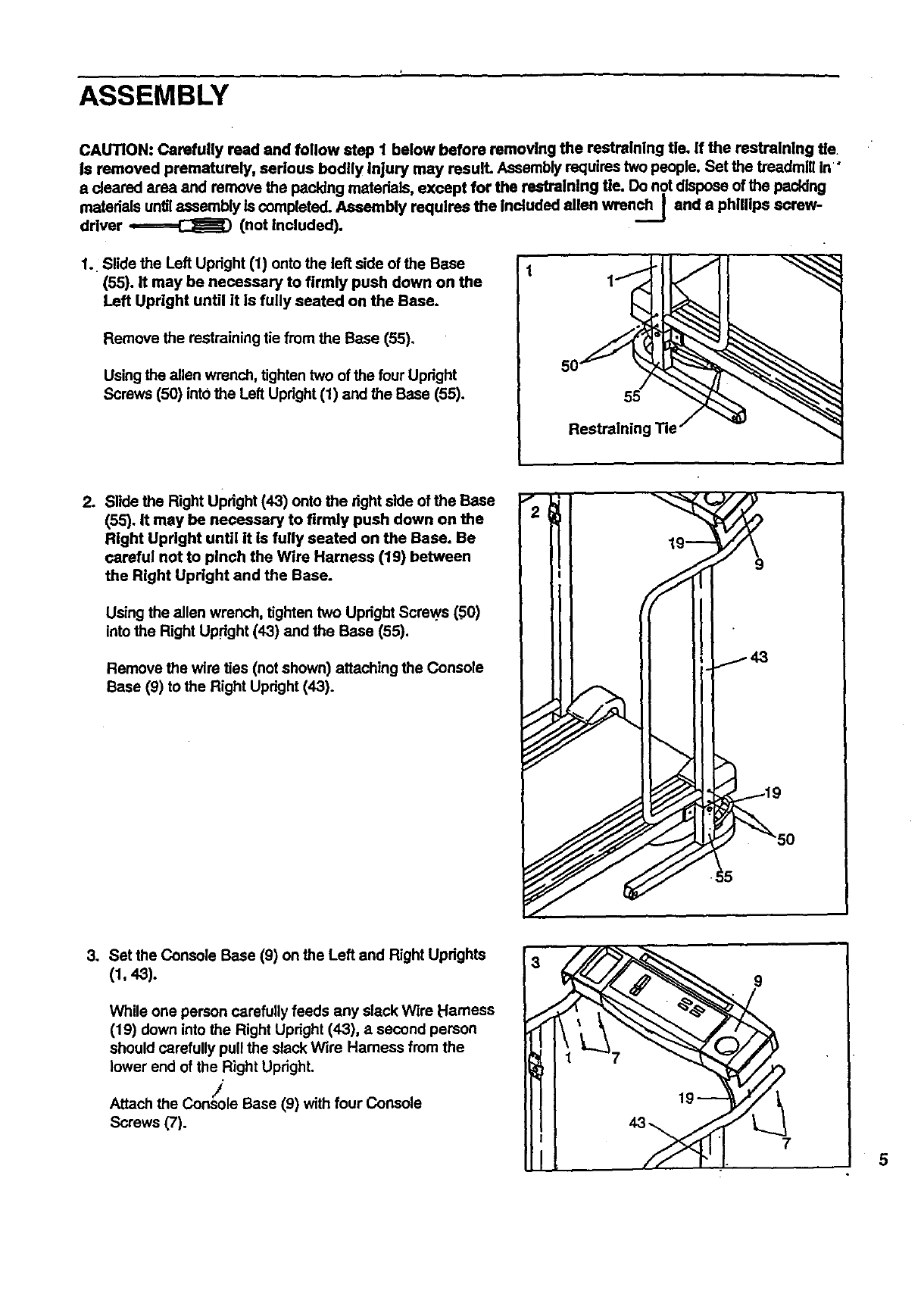
CAUTION: Carefully read end follow step I below before removing the restraining tie. If the restraining tie.
is removed prematurely, serious bodily Injury may result. Assembly requires two people. Set the beadmlll in"
a cleared area and mrnove the packing materials, except for the restraining tie. Do not dispose of the packing
reatedals unfilassembly is completed. Assembly requires the Included allen wrench] and a phillips screw-
driver ,.======C:_:) (not included).
1. Slide the Left Upright (f) onto the left side of the Base
(55). It may be necessary to firmly push down on the
Left Upright until it Is fully seated on the Base.
Remove the restraining tie from the Base (55).
Usingtheallenwrench,tightentwo ofthefourUpright
Screws(50) intothe LeftUpright(f) and theBase(55).
50
55
Restraining Tie
2. Slide the Right UPdght (43) onto the right side of the Base
(55). It may be necessary to firmly push down on the
Right Upright until it is fully seated on the Base. Be
careful not to pinch the Wire Harness (19) between
the Right Upright and the Base.
Using the allen wrench, tighten two Uprigbt Screws (.50)
into the Right Upright (43) and the Base (55).
Remove the wire ties (not shown) attaching the Console
Base (g) to the Right Upright (43).
3. Set the Console Base (9) on the Left and Right Updghla
(1, 43).
While one person carefully feeds any slack Wire Harness
(19) down into the Right Upright (43), a second person
should carefully pull the slack Wire Hamess from the
lower end of the Right Upright.
/
Attach the Console Base (9) with four Console
Screws (7).
75
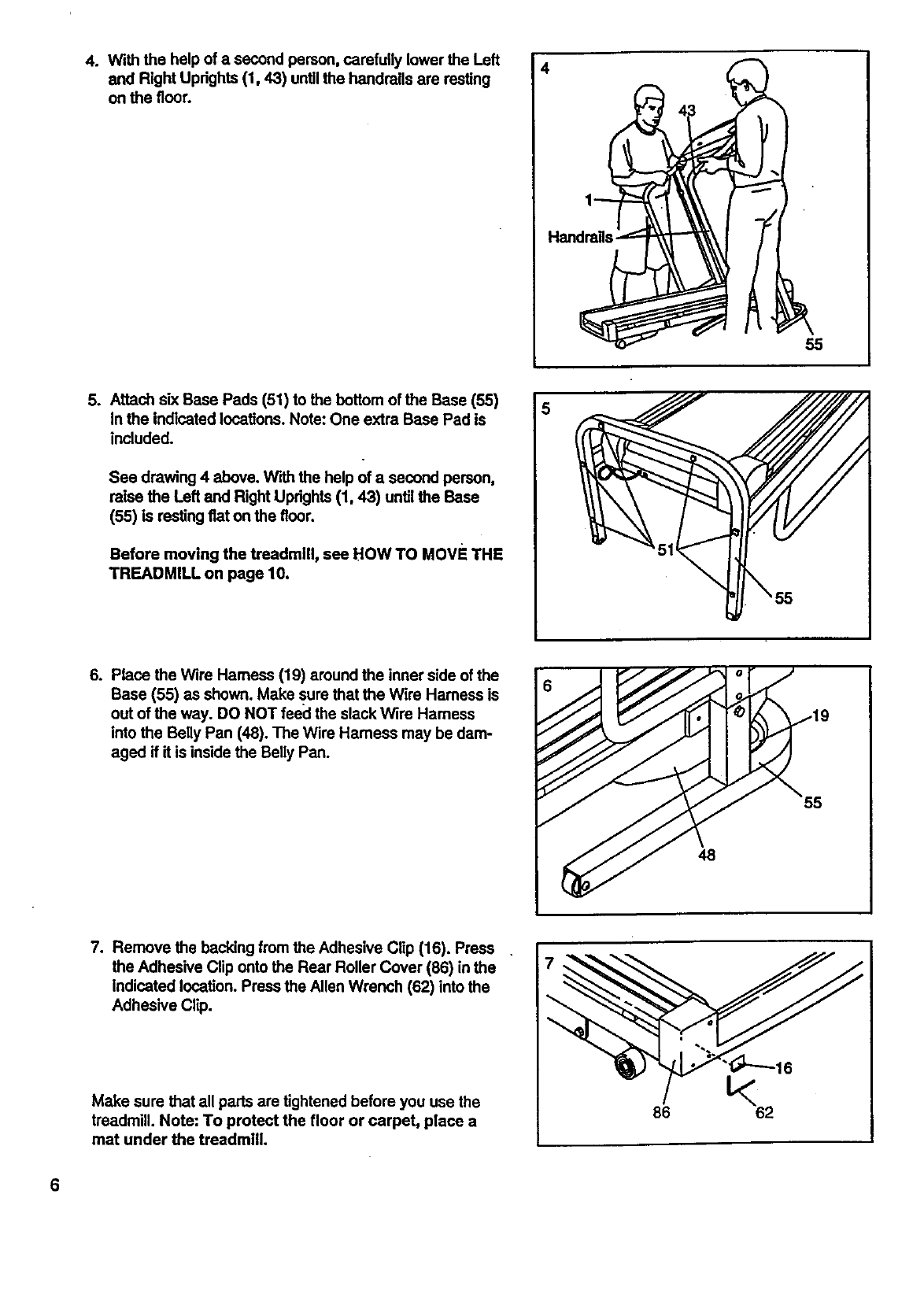
4. Withthehelpofasecondperson,carefullylowerthe Left
and Right Updghts (t, 43) untilthe handrails are resting
on the floor.
4
Handrails¸
55
So Attach six Base Pads (51) to the bottom of the Base (55)
In the indicated locations. Note: One extra Base Pad is
included.
See drawing 4 above. W'dhthe help of asecond person,
raise the Left and Right Updghts (1, 43) until the Base
(55) is resting fiat on the fleer.
Before moving the treadmill, see HOW TO Move THE
TREADMILL on page 10.
6. Place the Wire Hamess (19) around the inner side of the
Base (55) as shown. Make sure that the Wire Harness is
out of the way. DO NOT feecl the slack Wire Hamess
into the Belly Pan (48). The Wire Hamess may be dam-
aged if it is inside the Belly Pan.
55
48
7. Remove the backing from the Adhesive Clip (16). Press
the Adhesive Clip onto the Rear Roller Cover (86) in the
Indicated location. Press the Allen Wrench (62) into the
Adhesive Clip.
Make sure that all parts are tightened before you use the
treadmill. Note: To protect the floor or carpet, place a
mat under the treadmill.
86
OPERATION AND ADJUSTMENT
THE PERFORMANT LUBE TM WALKING BELT
Your treadmill features awalking belt coated with
PERFORMANT LUBE TM, a high-performance lubdcanL
IMPORTANT: Never apply all|cone spray or other
substances to the walking belt or the walking plat-
form. They will deteriorate the walldng belt and
cause excessive wear.
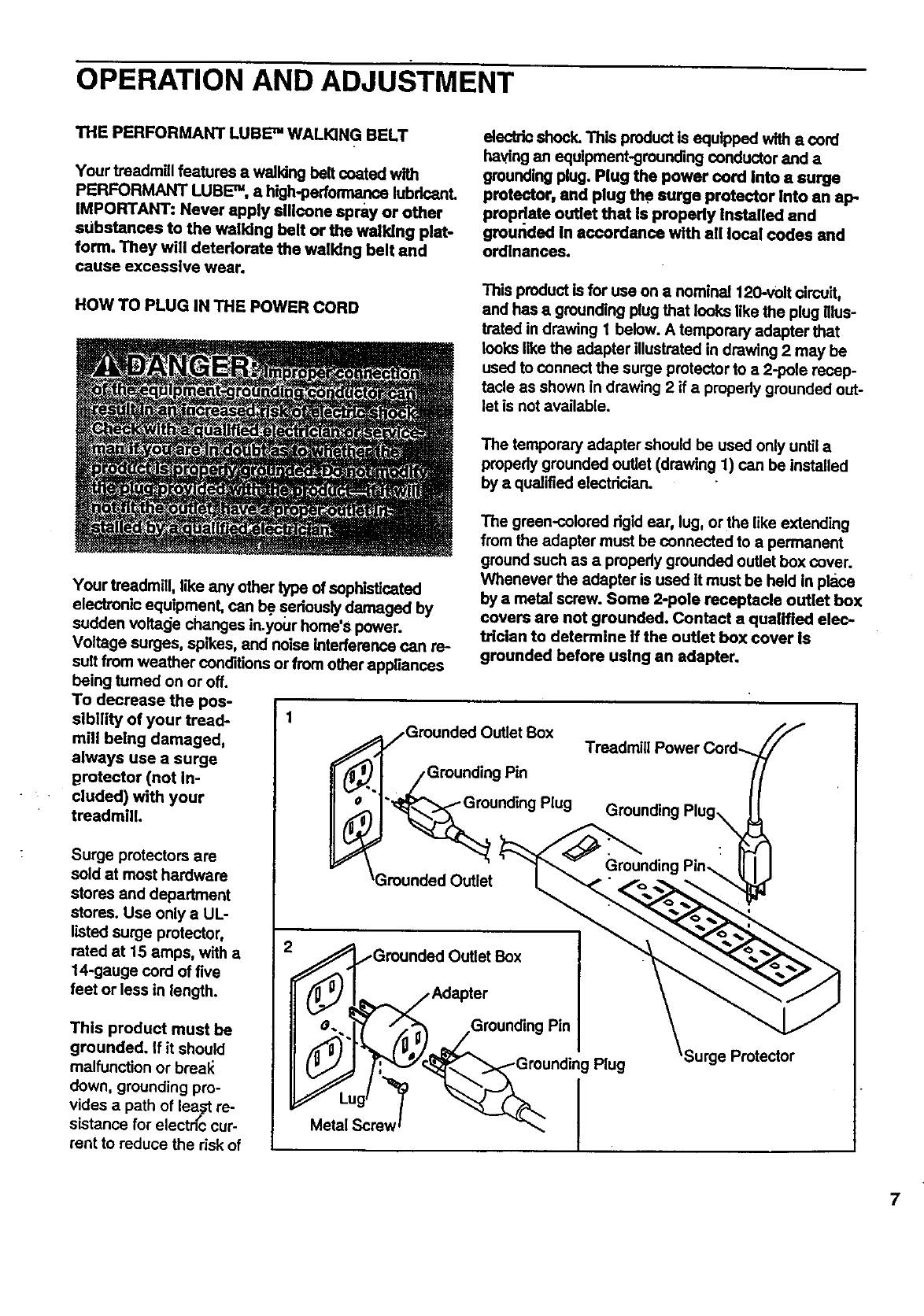
HOW TO PLUG IN THE POWER CORD
electric shock. This product is equipped with acord
having an equipment-grounding conductor and a
groundiug plug. Plug the power cord into a surge
protector, and plug the surge protector Into an ap
propdate outlet that Is properly Installed and
grounded In accordance with all local codes and
ordinances.
This product is for use on a nominal 120-v01tcircuit,
and has a grounding plug that looks like the plug Illus-
trated in drawing 1 below. A temporary adapter that
looks like the adapter illustrated in drawing 2 may be
used to connect the surge protector to a 2-pole recep-
tacle as shown in drawing 2 if a propedy grounded out-
let is not available.
The temporary adapter should be used only until a
propedy grounded outlet (drawing 1) can be installed
by aqualified electrician.
Your treadmill, like any other type of sophisticated
electronic equipment, can be seriously damaged by
sudden voltage changes in.your home's power.
Voltage surges, spikes, and noise Interference can re-
suit from weather conditions or from other appliances
being tumed on or off.
To decrease the pos-
sibltity of your tread- 1
mill being damaged,
always use a surge
grotector (not in-
cluded) with your
treadmill.
Surge protectors are
sold at most hardware
stores and department
stores. Use only a UL-
listed surge protector,
rated at 15 amps, with a
14-gauge cord of five
feet or less in length.
This product must be
grounded, if it should
malfunction or breal_
down, grounding pro-
vides a path of lea_ re-
sistance for electn_ccur-
rent to reduce the risk of
The green-colored dgid ear, lug, or the like extending
from the adapter must be connected to a permanent
ground such as apropedy grounded outlet box cover.
Whenever the adapter is used it must be held in place
by a metal screw. Some 2-pole receptacle outlet box
covers are not grounded. Contact a qualified elec-
trician to determine if the outlet box cover Is
grounded before using an adapter.
/Grounded Outlet Box
/Grounding Pin
"_unding Plug
_Grounded Outlet
e._l_Grounded Outlet Box
/Adapter
_) __Grounding Pin
Plug •ge Protector
7
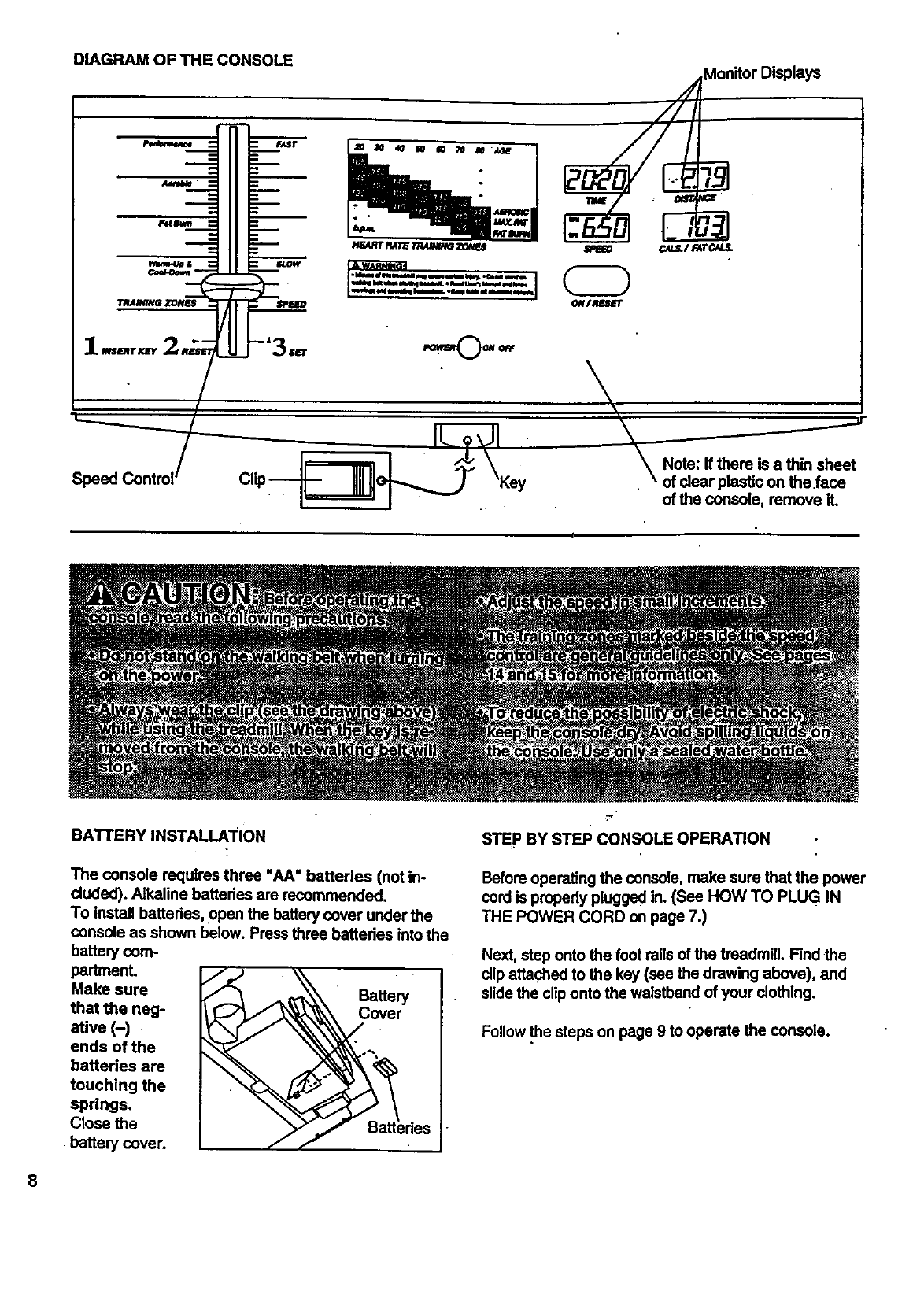
DIAGRAMOFTHECONSOLE MonitorDisplays
ip.. .Key _Note: If there is thin
asheet
of clear plastic on the face
of the console, remove it.
BATTERY INSTALLATION
The console requires three =AA" batteries (not in-
cluded). Alkaline batteries are recommended.
To install batteries, open the battery cover under the
console as shown below. Press three batteries into the
battery com-
padmenL
Make sure
that the neg-
ative (-)
ends of the
batteries are
touching the
springs.
Close the
:battery cover.
Battery
.C°.vet
_a_edes
STEP BY STEP CONSOLE OPERATION
Before operating the console, make sure that the power
cord is propedy plugged in. (See HOW TO PLUG IN
THE POWER CORD on page 7.)
Next, step onto the foot rails of the treadmill. Find the
dip attached to the key (see the drawing above), and
slide the clip onto the waistband of your clothing.
Follow .thesteps on page 9 to operate the console.
8
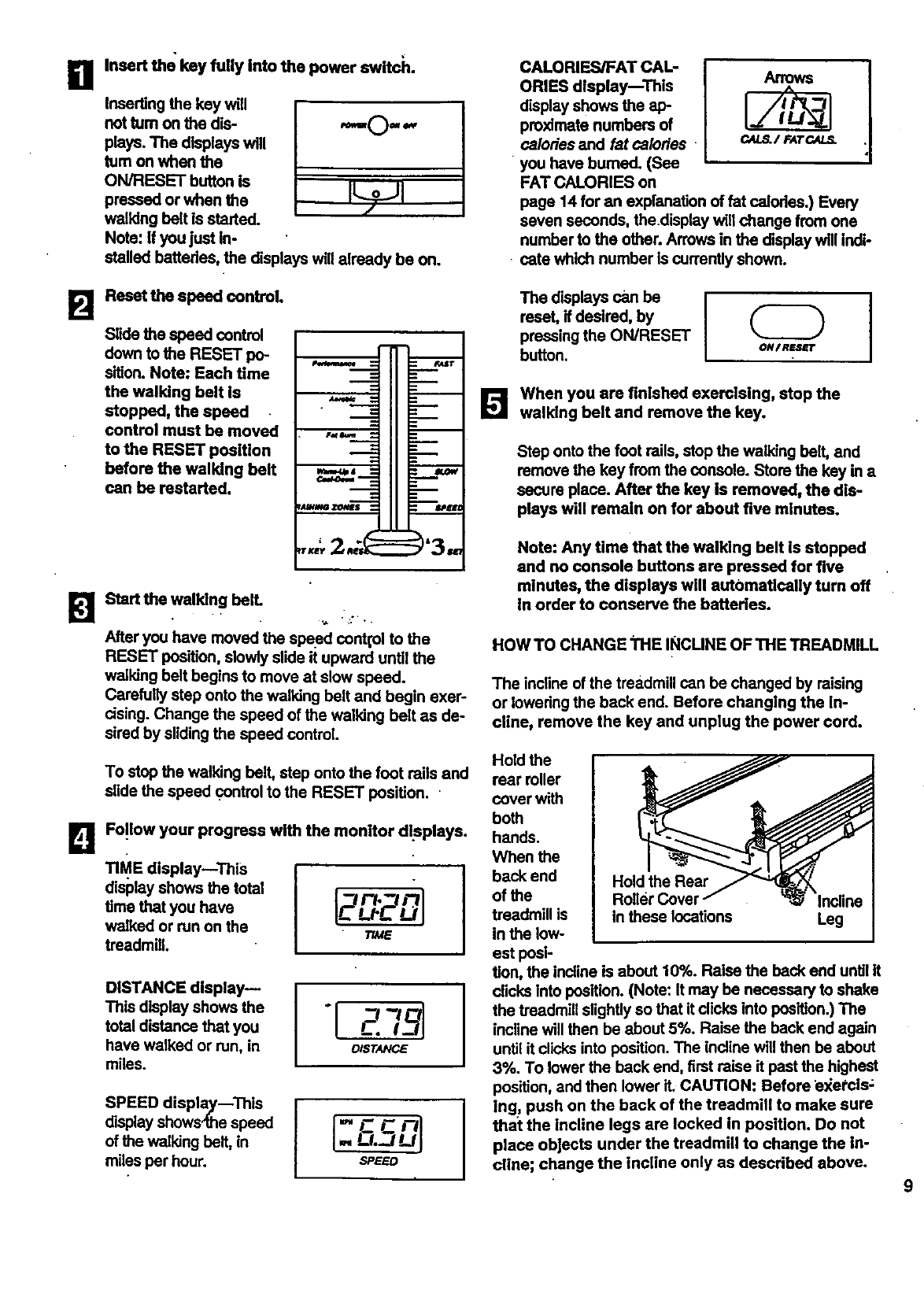
BInsert the key fully Into the power switch.
Inserting the key will
not tum on the dis- ,==0, =,
plays. The displays will
tom on when the
ON/RESET button is
pressed or when the
walking belt is started.
Note: If you just in-
stalled batteries, the displays will already be on.
J -yl !
CALORIES/FAT CAL-
ORIES display--This
display shows the ap-
proximate numbers of
calories and fat calories
you have bumed. (See
FAT CALORIES on
page 14 for an explanation of fat calories.) Every
seven seconds, the.display will change from one
number to the other. Arrows in the display will indt-
• cate which number Is currently shown.
B Reset the speed control.
Slide the speed control
down to the RESET IxP
sition. Note: Each time '_"
the walking belt is
stopped, the speed
control must be moved
to the RESET position
before the walking belt
can be restarted.
BStart the walking belt.
After you have moved the speed contt'ol to the
RESET position, slowly slide it upward until the
walking belt begins to move at slow speed.
Carefully step onto the walking belt and begin exer-
cising. Change the speed of the walking belt as de-
sired by sliding the speed control.
To stop the walking belt, step onto the foot mils and
slide the speed control to the RESET position.
B Fo!low your progress with the monitor displays.
TIME display--ThiS
display shows the total I
time that you have
walked or run on the Tu_e
treadmill.
DISTANCE display--
This display shows the
total distance that you
have walked or run, in
miles. DISTANCE
SPEEOdlap'ay--ThisI
display shows4he speed
of the walking belt, in
miles per hour. SPEED
The displays can be I
reset, if desired, by I
pressing the ON/RESET
button, oM/Resrr
[] When you are finishedexercising,stop the
walking belt and remove the key.
Step onto the foot re,s, stop the walking belt, and
remove the key from the console. Store the key in a
secure place. After the key is removed, the dis-
plays will remain on for about five minutes.
Note: Any time that the walking belt Is stopped
and no console buttons are pressed for five
minutes, the displays will autbmatlcally turn off
In order to conserve the batteries.
HOW TO CHANGE _'I-IE INCUNE OF THE TREADMILL
The incline of the treadmill can be changed by raising
or lowering the back end. Before changlng the in-
cline, remove the key and unplug the power cord.
Hold the
rear roller
cover with
both
hands.
When the
back end
of the
treadmill is
in the low-
est posl-
Iold the Rear
Roller Cover
in these locations Incline
Leg
tion, the incline is about 10%. Raise the beck end until it
clicks into position. (Note: It may be necessary to shake
the treadmill slightly so that it clicks into position.) The
incline will then be about 5%. Raise the back end again
until it clicks into position. The incline will then be about
3%. To lower the back end, first raise it past the highest
position, and then lower it. CAUTION: Before e_etcls;
Ing, push on the back of the treadmill to make sure
that the incline legs are locked in position. Do not
place objects under the treadmill to change the in-
cline; change the incline only as described above.
9
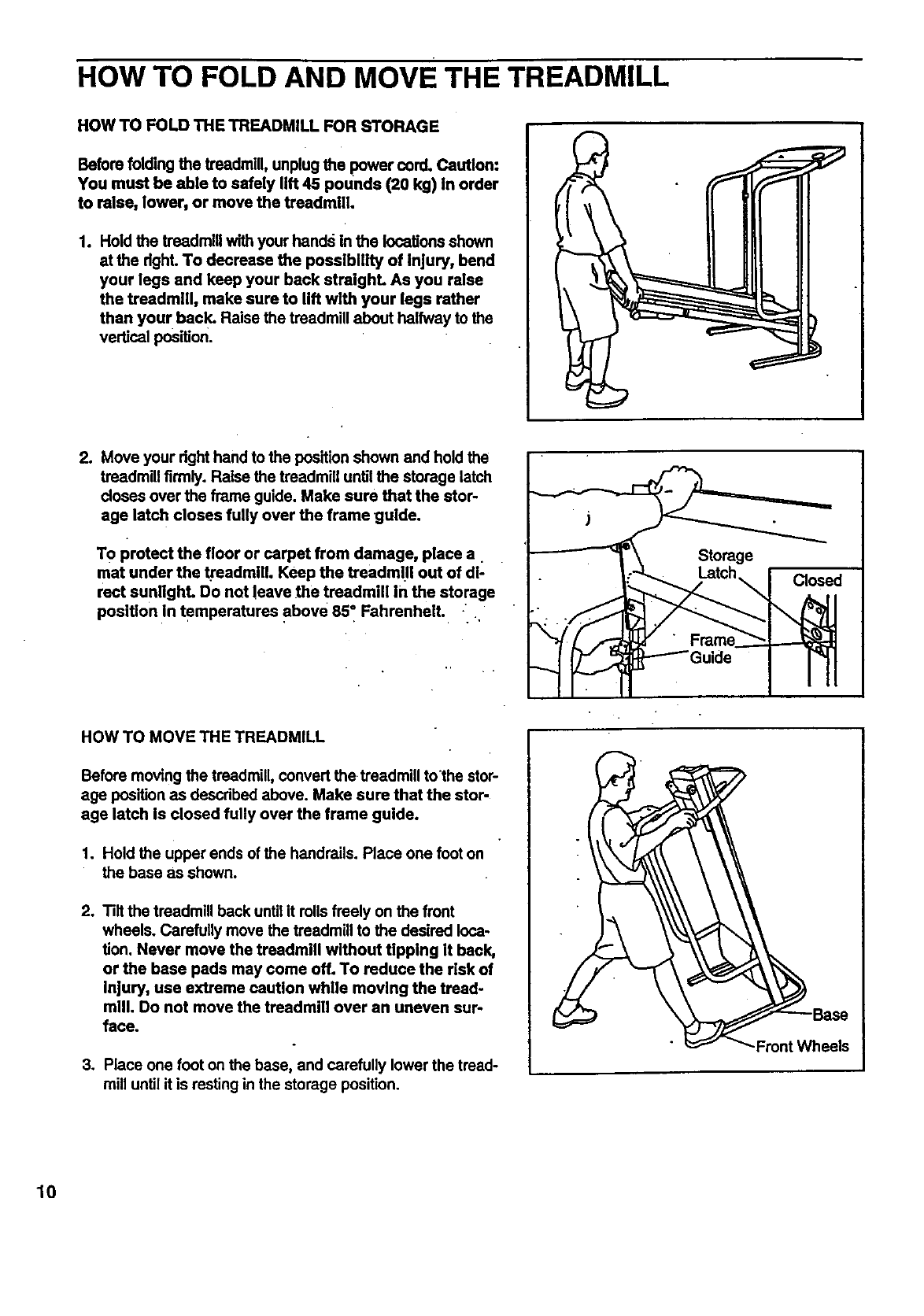
HOW TO FOLD AND MOVE THE TREADMILL
HOW TO FOLD THE TREADMILL FOR STORAGE
Before folding the treadmill, unplug the power cord. Caution:
You must be able to safely lift 45 pounds (20 kg) in order
to raise, lower, or move the treadmill.
1. Hold the treadmlUwith your hands in the locations shown
at the dght. To decrease the possibility of Injury, bend
your legs and keep your back straight. As you raise
the treadmill, make sure to lift with your legs rather
than your back. Raise the treadmill about halfway to the
vertical position.
2. Move your dght hand to the position shown and hold the
treadmill firmly. Raise the treadmill until the storage latch
doses over the frame guide. Make sure that the stor-
age latch closes fully over the frame guide.
To protect the floor or carpet from damage, place a
mat under the _eadmlll. Keep the treadmUI out of dl-
rect sunlight. Do not leave the treadmill in the storage
position in temperatures above 85" Fahrenheit. ..
Storage
Closed
HOW TO MOVE THE TREADMILL
Before moving the treadmill, convert the treadmill tothe stor-
age position as described above. Make sure that the stor-
age latch is closed fully over the frame guide.
1. Hold the upper ends of the handrails. Place one foot on
the base as shown.
2, Tilt the treadmill back until it rollsfreely on the front
wheals. Carefully move the treadmill to the desired loca-
tion. Never move the treadmill without tipping it back,
or the base pads may come off. To reduce the risk of
Injury, use extreme caution while moving the treed.
mill. Do not move the treadmill over an uneven sur-
face.
3. Place one foot on the base, and carefully lower the tread-
mill until it is resting in the storage position.
•Front Wheels
10
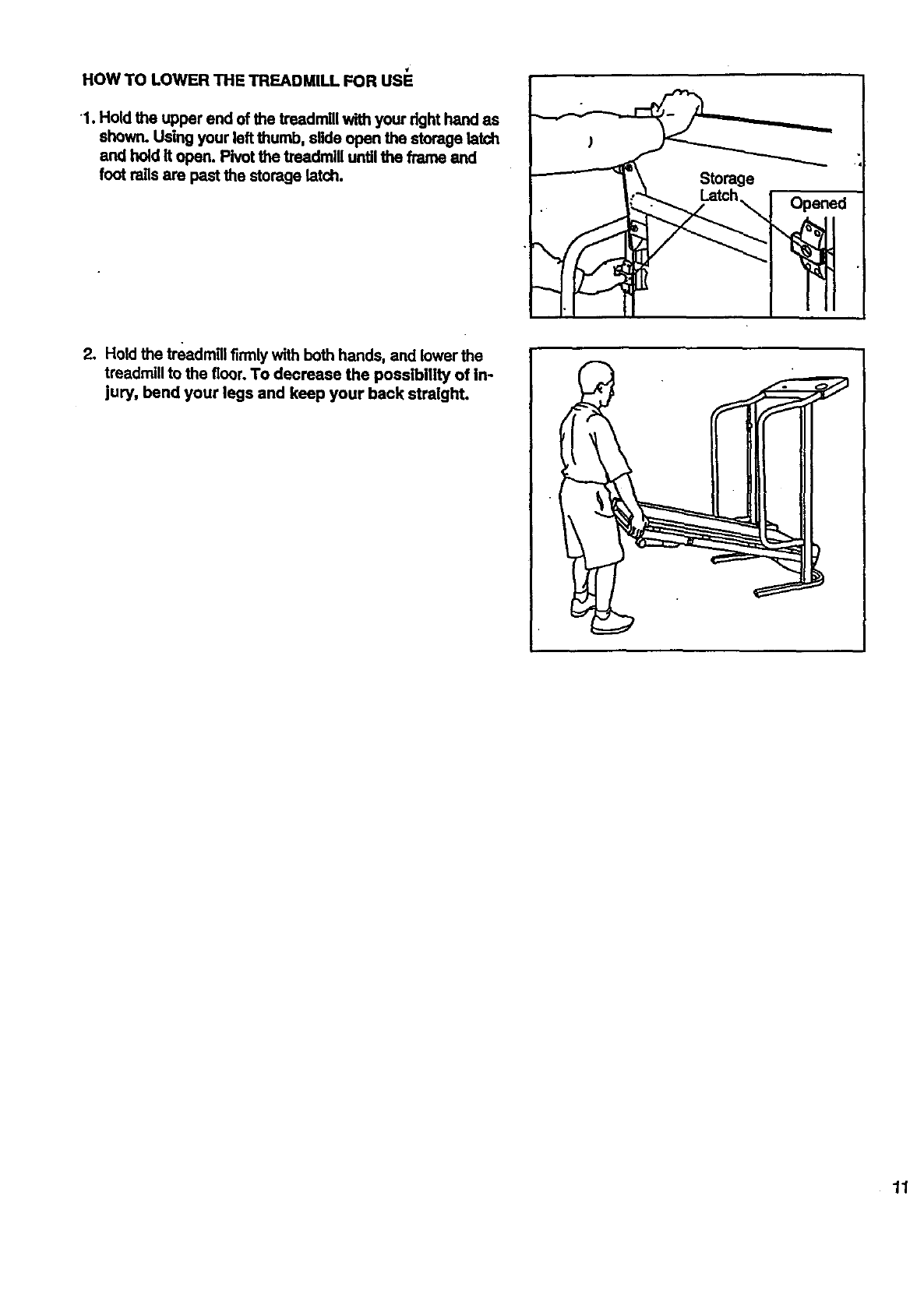
HOW TO LOWER THE TREADMILL FOR USE
1. Hold the upper end of the treadmill with your dght hand as
shown. Using your left thumb, slide open the storage latch
and hold it open. Pivot the treadmill until the frame and
foot rails are past the storage latch. Storage
Opened
2. Hold the treadmillfirmly with both hands, and lower the
treadmill to the floor. To decrease the possibility of in-
jury, bend your legs and keep your back straight.
11
TROUBLE-SHOOTING
Most treadmill problems can be solved by following the simple steps below. Rnd the symptom that ap-
plies, and follow the steps listed. If further assistance Is needed, call our toll-fl_.,e HELPUNE at 1-800-736-
6873, Monday through Saturday, 7 a.m. untU 7 p.m. Central Tlme (excluding holidays).
1. SYMPTOM: THE POWER DOES N.OT TURN ON
a. Make sure that the power cord Is plugged into a surge protector, and that the surge protector Is plugged into.
a proparly grounded outlet. (See HOW TO PLUG IN THE POWER CORD on page 7.) Use only a UL4isted
surge protocter, rated at 15 amps, with a 14-gauge cord of five feet or lass in length.
b. After the power cord has been. plugged in, make sure that the key is fully inserted into the console. (See step
1 on page 9.)
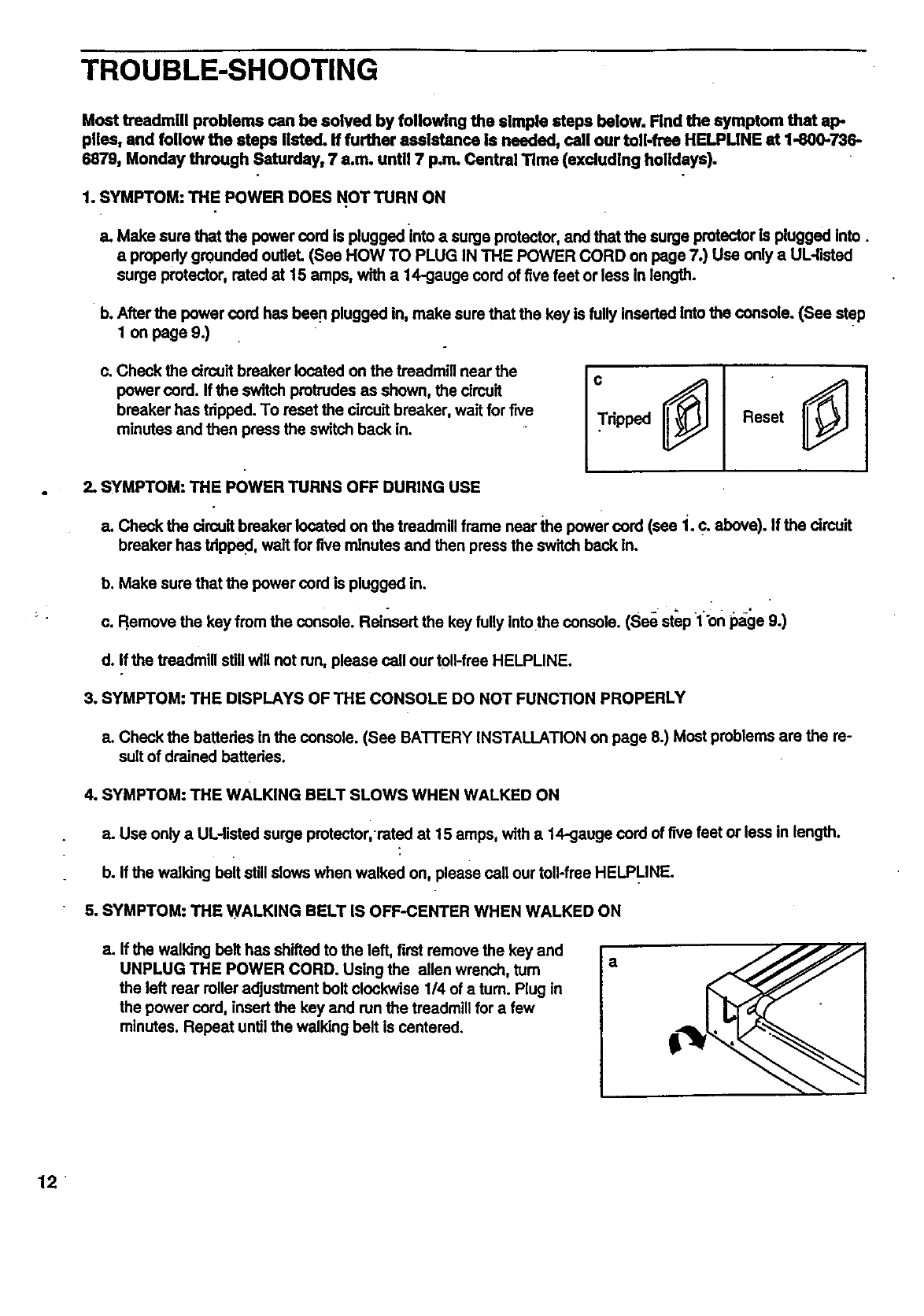
c. Check the drcuif breaker located on the treadmill near the
power cord. If the switch protrudes as shown, the circuit
breaker has trippad. To reset the cimuit breaker, wait for five
minutes and then press the switch back in. Tripped Reset
2. SYMPTOM: THE POWER TURNS OFF DURING USE
a. Check the drcult breaker located on the treadmill frame near the power cord (see "1.c. above). If the circuit
breaker has tripped , wait for five minutes and then press the switch back in.
b. Make sure that the power cord is plugged in.
c. Remove the key from the console. Reinsert the key fully intothe console. (See step 1"onpage 9.)
d. If the treadmill still will not run, please call our toll-free HELPLINE.
3. SYMPTOM: THE DISPLAYS OF THE CONSOLE DO NOT FUNCTION PROPERLY
a. Chock the baltedes in the console. (See BA'I-I'ERY INSTALLATION on page 8.) Most problems are the re-
sult of drained batteries.
4, SYMPTOM: THE WALKING BELT SLOWS WHEN WALKED ON
a. Use only a UL-listed surge protector,rated at 15 amps, with a 14-geuge cord of five feet or less in length.
b. If the walking beit still slows when walked on, please call our toll-free HELPLINE.
5. SYMPTOM: THE WALKING BELT IS OFF-CENTER WHEN WALKED ON
a. If the walking belt has shifted to the left, first remove the key and
UNPLUG THE POWER CORD. Using the allen wrench, turn
the left rear roller adjustment bolt clockwise 1/4 of a turn. Plug in
the power cord, insert the key and run the treadmill for a few
minutes. Repeat until the walking belt is centered.
a
12
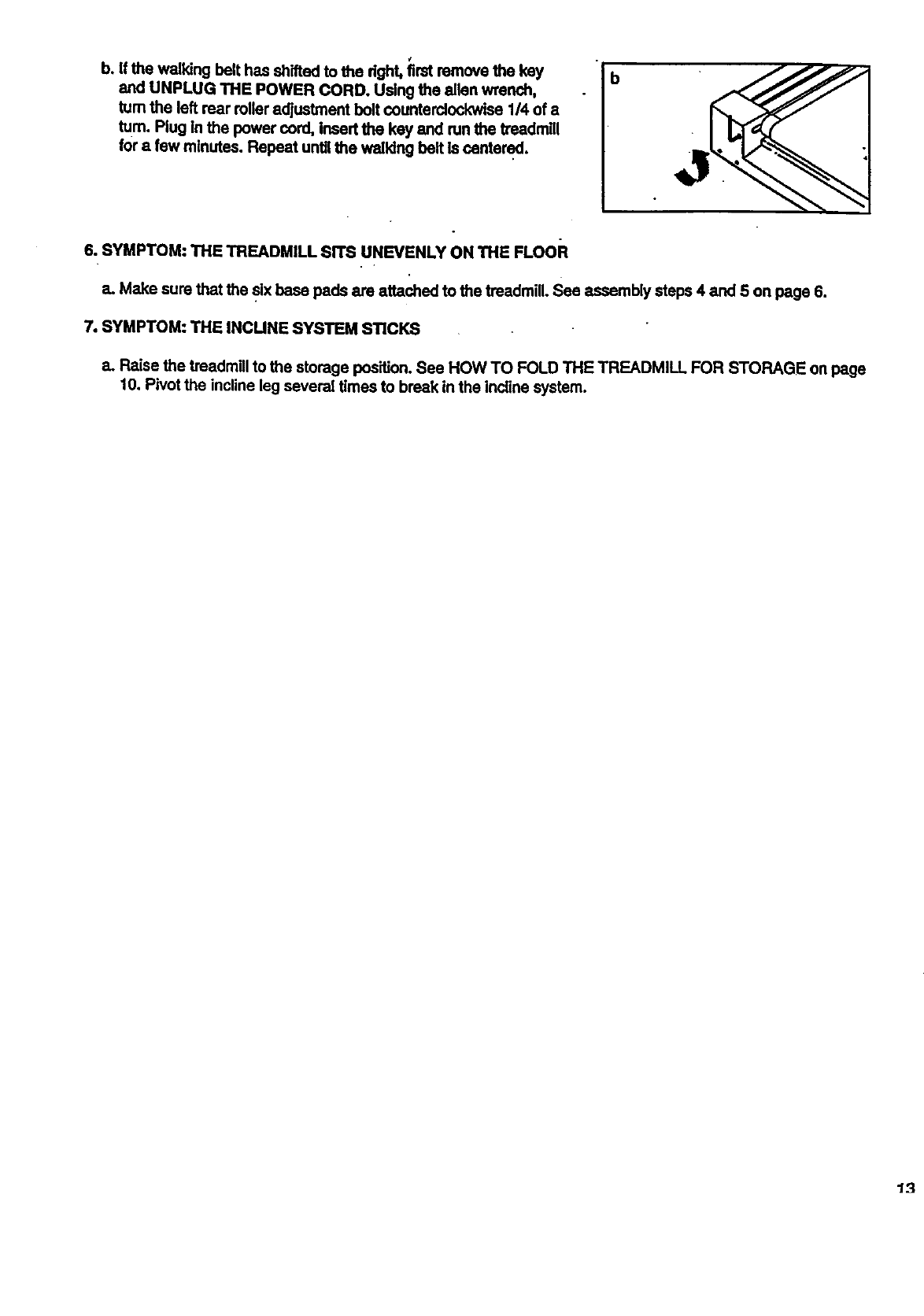
b. If the walking belt has shifted to the dght, first remove the key
and UNPLUG THE POWER CORD. Using the allen wrench,
turn the left rear roller adjustment bolt counterclockwise 1/4 of a
turn. Plug in the power cord, Insert the key and run the treadmill
for a few minutes. Repeat until the walking belt is centered.
6. SYMPTOM: THE TREADMILL SITS UNEVENLY ON THE FLOOR
a. Make sure that the six base pads are attached to the treadmill. See assembly steps 4 and 5 on page 6.
7. SYMPTOM: THE INCUNE SYSTEM STICKS
a. Raise the treadmill to the storage position. See HOW TO FOLD THE TREADMILL FOR STORAGE on page
t0. Pivot the incline leg several times to break in the incline system.
13
CONDITIONING GUIDELINES
14
.... II' ".............
The following guidelines will help you to plan your ex-
ercise program. Remember--these are general guide-
lines only. For more detailed exercise information, ob-
tain a reputable hook or consult your physician.
EXERCISE INTENSITY
Whether your goal is to bum fat or to strengthen your•
cardiovascular system, the key to achieving the de-
sired results Is to exercise with the proper intensity.
The proper intensity level can be found by using your
heart rate as a guide. The chadbelow shows recom-
mended heart ratesfor fat burning and aerobic exer-
cise. ('['his chart is also found on the console.)
20 30"" 40 50 "'69 70
b,p.m.
HEART RATE TRAINING ZONES
"80 AGE
AEROBIC
MAX. FAT
FATBURN
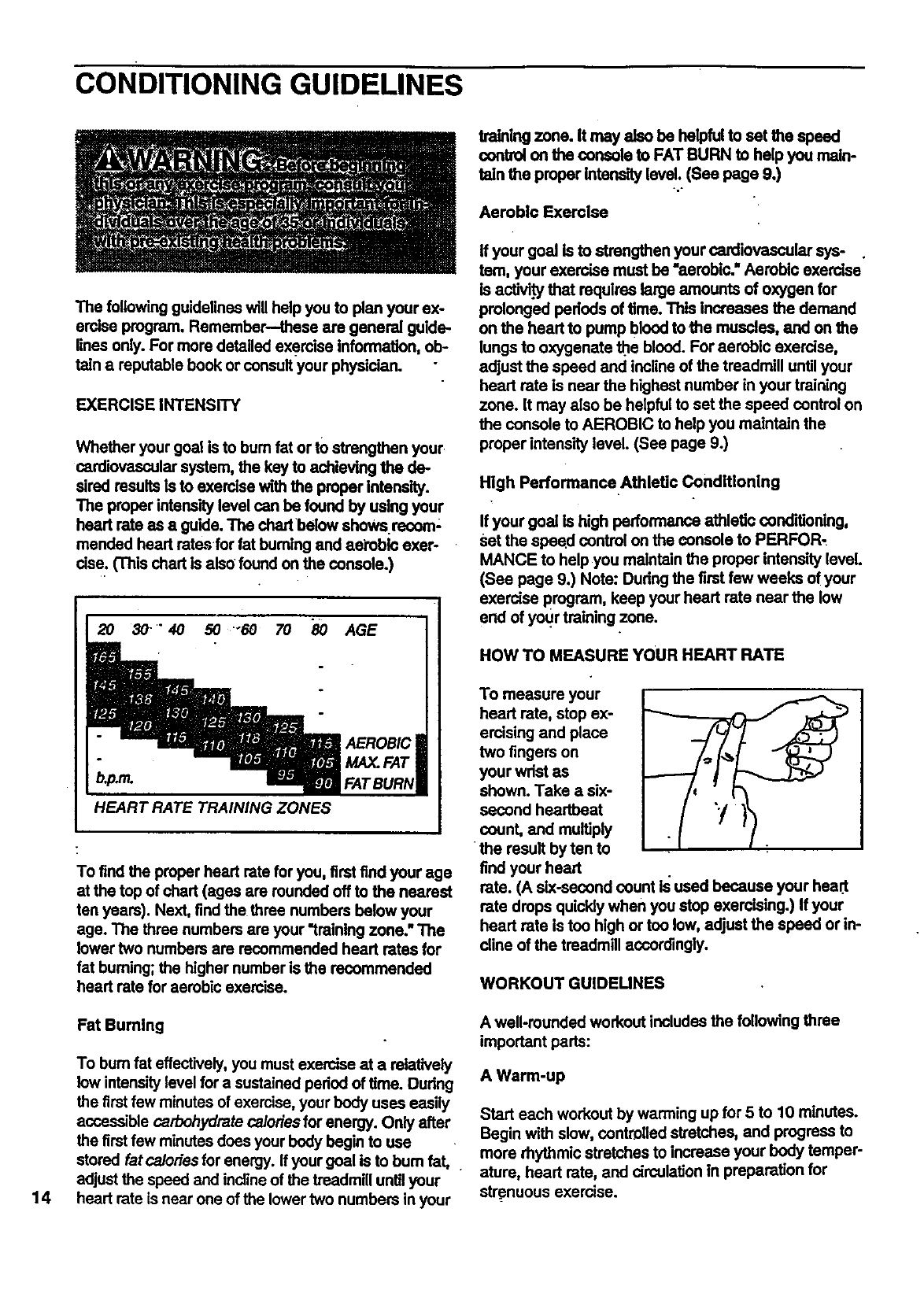
To find the proper heart rate for you, first find your age
at the top of chart (ages are rounded off to the nearest
ten years). Next, find the three numbers below your
age. The three numbers are your "training zone." The
lower two numbers are recommended heart rates for
fat buming; the higher number is the recommended
heart rate for aerobic exercise.
Fat Burning
To bum fat effectively, you must exercise at a relatively
low intensitylevel for a sustained pednd of time. During
the first few minutes of exercise, your body uses easily
accessible carbohydrate calories for energy. Only after
the first few minutes does your body begin to use
stored fat calories for energy. If your goal is to bum fat,
adjust the speed and incline of the treadmill untilyour
heart rate is near one of the lower two numbers in your
training zone. It may also be helpful to set the speed
control on the console to FAT BURN to help you maln-
taln the proper Intensity level. (See page 9.)
.o.
Aerobic Exercise
ff your goal is to strengthen your cardiovascular sys-
tem, your exercise must be "aerobic." Aerobic exercise
is activi.tythat requires large amounts of oxygen for
prolonged pednds of time. This Increases the demand
on the heart to pump blood to the muscles, and on the
lungs to oxygenate _e blood. For aerobic exercise,
adjust the speed and incline of the treadmill untilyour
heart rate is near the highest number in your training
zone. It may also be helpful to set the speed control on
the console to AEROBIC to help you maintain the
proper intensity level. (See page 9.)
High Performance.Athletic Conditioning
If your goal is high performance athletic condition'mg,
Set the epe_l control on the console to PERFOR,
MANCE to help you maintain the proper intensity level.
(See page 9.) Note: During the first few weeks of your
exercise program, keep your heart rate near the low
end of you_rtraining zone.
HOW TO MEASURE YOUR HEART RATE
To measure your
heart rate, stop ex-
ercising and place
two fingers on
your wdst as
shown. Take asix-
second heartbeat
count, and multiply
•the result by ten to
find your heart
rate. (A six-second count Is used because your heart
rate drops quickly when you stop exercising.) If your
heart rate is too high or too low, adjust the speed or in-
dine of the treadmill accordingly.
WORKOUT GUIDELINES
A well-rounded workout includes the following three
important parts:
A Warm-up
Start each workout by warming up for 5 to 10 minutes.
Begin with slow, controUed stretches, and progress to
more rhythmic stretches to increase your body temper-
ature, heart rate, and circulation In preparation for
strenuous exercise.
TrainingZoneExercise
Afterwarmingup,increasetheintensityofyourexer-
ciseuntilyourpulseisinyourtrainingzonefur20to
60minutes.(Duringthefirstfewweeksof yourexer-
deeprogram,donotkeepyourpulseinyour training
zone fur longer than 20 minutes.) Breathe regularly
and deeply as you exerdse--never hold your breath.
A Cool-down
Finish each workout with 5 to 10 minutes of stretching
to cooldown. Thiswillincreasethe flexibilityof your
muscles andwill helpto preventpost-exerciseproblems,
Exercise Frequency
To maintain or improve your condition, complete three
workouts each week, with at least one day of rest be-
tween workouts. After a _'ewmonths, you may com-
.plete up to five workouts each week if desired.
The key to success is to make exercise aregular and
enjoyable part of your everyday life.
. SUGGESTED STRETCHES
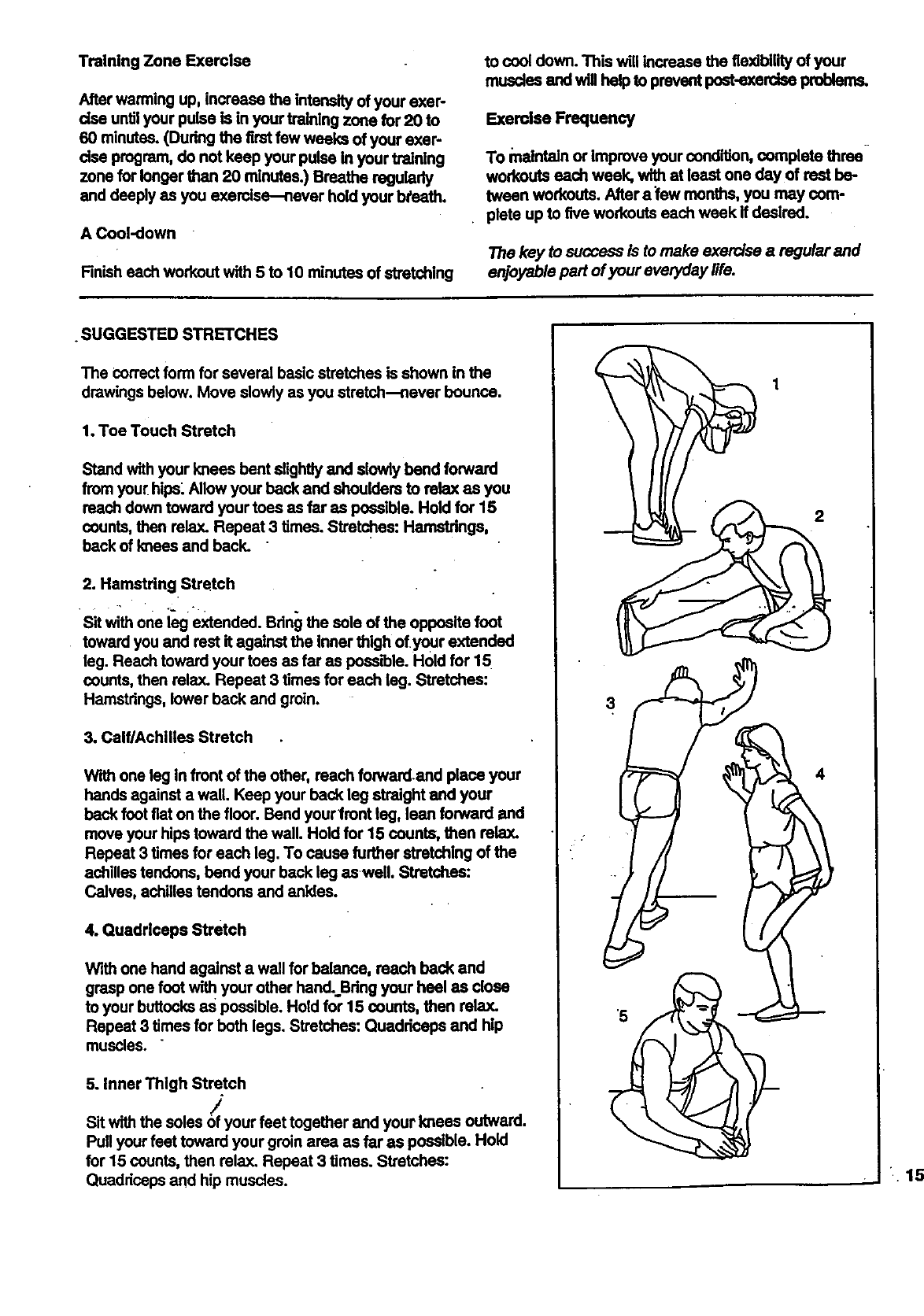
The correct form for several basic stretches is shown in the
drawings below. Move slowly as you stretch--never bounce.
1oToe Touch Stretch
Stand with your knees bent slightly and slowly bend forward
from your hips Allow your back and shouldom to relax as you
reach down toward your toes as far as possible. Hold for 15
counts, then relax. Repeat 3 times. Stretches: Hamstrings,
back of knees and back.
2. Hamstring Stretch
Sit with one i_g extended. Bring the sole of the opposite foot
toward you and rest it against the Inner thigh of your extended
leg. Reach toward your toes as far as peas_le. Hold for 15
counts, then relax. Repeat 3 times for each leg. Stretches:
Hamstrings, lower beck and groin.
3. Calf/Achilles Stretch
With one leg In front of the other, reach forward.and place your
hands against a wall. Keep your back leg straight and your
back foot fiat on the floor. Bend your front leg, lean forward and
move your hips toward the wall. Hold for 15 counts, then relax.
Repeat 3 times for each leg. To cause further stretching of the
achilles tendons, bend your back leg as well. Stretches:
Calves, achilles tendons and ankles.
4. Ouadrloeps Stretch
With one hand against a wall for balance, reach back and
grasp one foot with your other hand. Bdng your heel as close
to your buttocks as possible. Hold for 15 counts, then rela_
Repeat 3 times for both legs. Stretches: Quaddeeps and hip
muscles. "
5. Inner Thigh Stretch
]
Sit with the soles Ofyour feet together and your knees outward.
Pull your feet toward your groin area as far as possible° Hold
for 15 counts, then relax. Repeat 3 times. Stretches:
Quadriceps and hip muscles.
2
3
• 15
EXPLODED DRAWING---Model No. 831.297152 R1296A"
REMOVE THIS
AND PART LIST
Save this EXPLODED DRAWING and PART LIST for future referenoe.
Note: _lctikmtiomi lira lub]egt" to change withoutnotice. F_ Information abom
orcledngreplacement parts, see _e bedc cover of Ihe Users Manual.
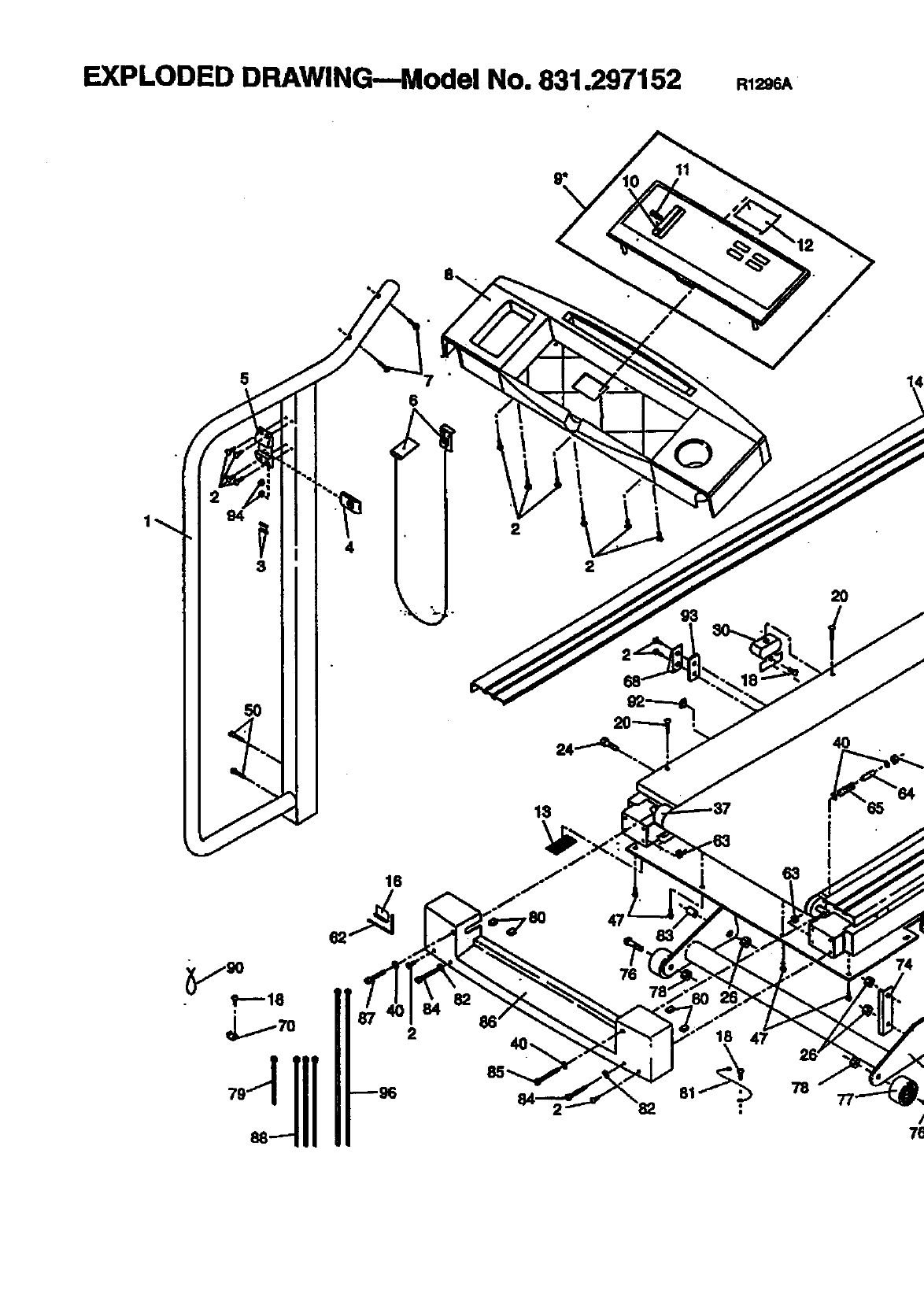
EXPLODED DRAWING---Model No. 831.297152 R1296A
4
6
€
2
15
2
2O
i
16
2
82
78
i I_. _s
.23 22
61
\
55
50
19
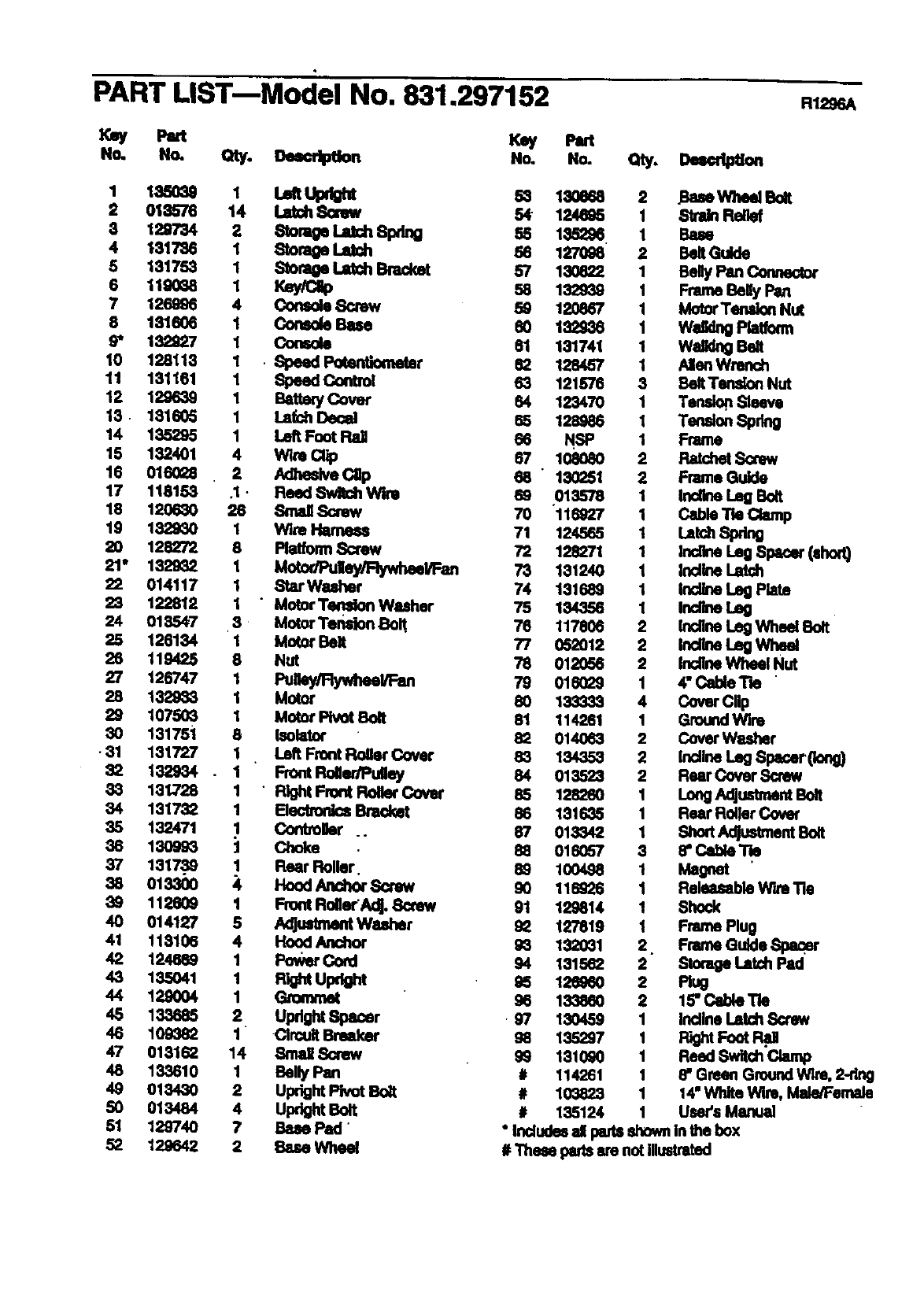
PART LIST--Model No. 831.297152 RI296A
P=rt Key Pitt
No. No. Qty. Oelclption No. HO. Qty. D_o,
12 l,._oao L,dtUpdght
01_'7S 114 _4•'50eea
Lalch 8crow 2 .BeseWheel Bolt
124_S _Re_
3 129734 Storage latch 8pdng 135296
I317'36 12 _orage _ _ 1_' 1 BeltGuide
132939 Frame Belly Pan
7126996 IvlotorTenldon Nut
181606 4 Console 8crow _120867
.98* _Col_;o/e_ 132936 1 Waldng Platform
=,=,,,, w. o.
128113
181161 _SpeedspeedControlP°tenti°meter 82 128457 1 AllenWrench
BeltTen,don Nut
12 129639 1 Bettery Cover _121578
123470 1 Te_. Sleeve
18 181605
14 135295 _Left FootRallLalchDecal 65 128_16 11 Tension Spring
15 132401 Wlre Cllp _1(_
16 016028 4 . 2 Sinew
Adheslve Cap 1217 118153 .1 • Reed Switch Wire 69 136251 Frame Guide
0135"78 Indlne leg Bolt
18 120630 26 Small Screw 70 116927 _ Cable Tle Clamp
19 1829_0 1 Wire I-Mmeea 71 124565 Latch Spring
20 128272 8 Platform Screw 72 128271 1 Incline Le9 Spacer (shod)
21" 1329_2 1 Motor/Pulley_l/Fan
22 014117 77_4 131240 Indlne Latch
131662 Ind_ LegP_te
22_ 122812 _Star_ 11
• Motor Temdon Washer 75 134356 Indine Le9
018547 3 Motor Tension .Boil 12
_2_ 126134 1Motor Belt " 77_6052012117806: lndlnelncllneLegWh_BoltLegWheel
119425 8 Nut _7_ 012056 Indlne Wheal Nut
27 126747 1 Pulley/Fl_ 0180_9 4" Cable Tb "
28132983 1 Cover Cllp
1075O3 11 Mot°r
Motor Pivot Bolt _133333
114261 1 Ground Wim
13175i Isolator ' 82 014063 2 Cover Wesher
131727 Left Front Roller Cover 83 134353
132934 22 tndlneLegSl_eerpang)
33 131,728 _Front RolledPulley 84 013523 Reer Cover Screw
•Right Front Rolle¢ Cover
34 1317= 1 Eleotroni_Bracket _6 1=8260 _ Long Adjustment Bolt
131635 Rear Roller Cove(
3_ 132471
150993 _Controller .. Shod Ac_us_eentBolt
,o1=.128" C,_ie'ne016057
_8 131739 Rear Roller. Magnet '
Hood And_ Screw 11 Releasable W'a_Tie116226
40_ 112809014127 t5 Front RollerAdj. 8orew 129814 11 Shock
Adjustment Washer 127819 Frame Rug
41 118106 Frame Gulde Spaqer
_4_ 124669 4_Hood Anchor _93 1262501320_12.
135041 Power Cord 131562 : Storage IJltChPad
133860 12 Incline Latch Screw
138885 2. Updght 8pacer 13045,9
40 109382 Clrcu# Breaker 98 135297 I Fight Foot Rd.
47 018162 14 Small 8crow 99 1310g0 1 Reed Switch
48 133610
40 01343O
50 013484
51 129740
62 128642
1 Belly Pan
2 Updght Pk,ot Bott
4upr_tBoR
7Bese Pad
2 Sue Wheel
# 114261 1 8" Green Ground Wlre, 2-dng
# 103823 1 14"White Wire, Male/Female
# 135124 1 User's Manual
"Indudee d pads shown in _e box
#These pads are not illustrated
SF./AVRS
Model No. 831.297152
QUESTIONS?
If you find that:
• you need help assembling or
operaUng the EXPANSE 550
treadmill
• a part is missing
• or you need to schedule repair
service
call our toll-free HELPLINE
1-800-736-6879
Monday--Saturday, 7 am-7 pm
Central Time (excluding holidays)
REPLACEMENT
.PARTS
If parts become wom and need
to be replaced, call the following
toll-frss number
1-800-FON-PART
(1-800-366-7278)
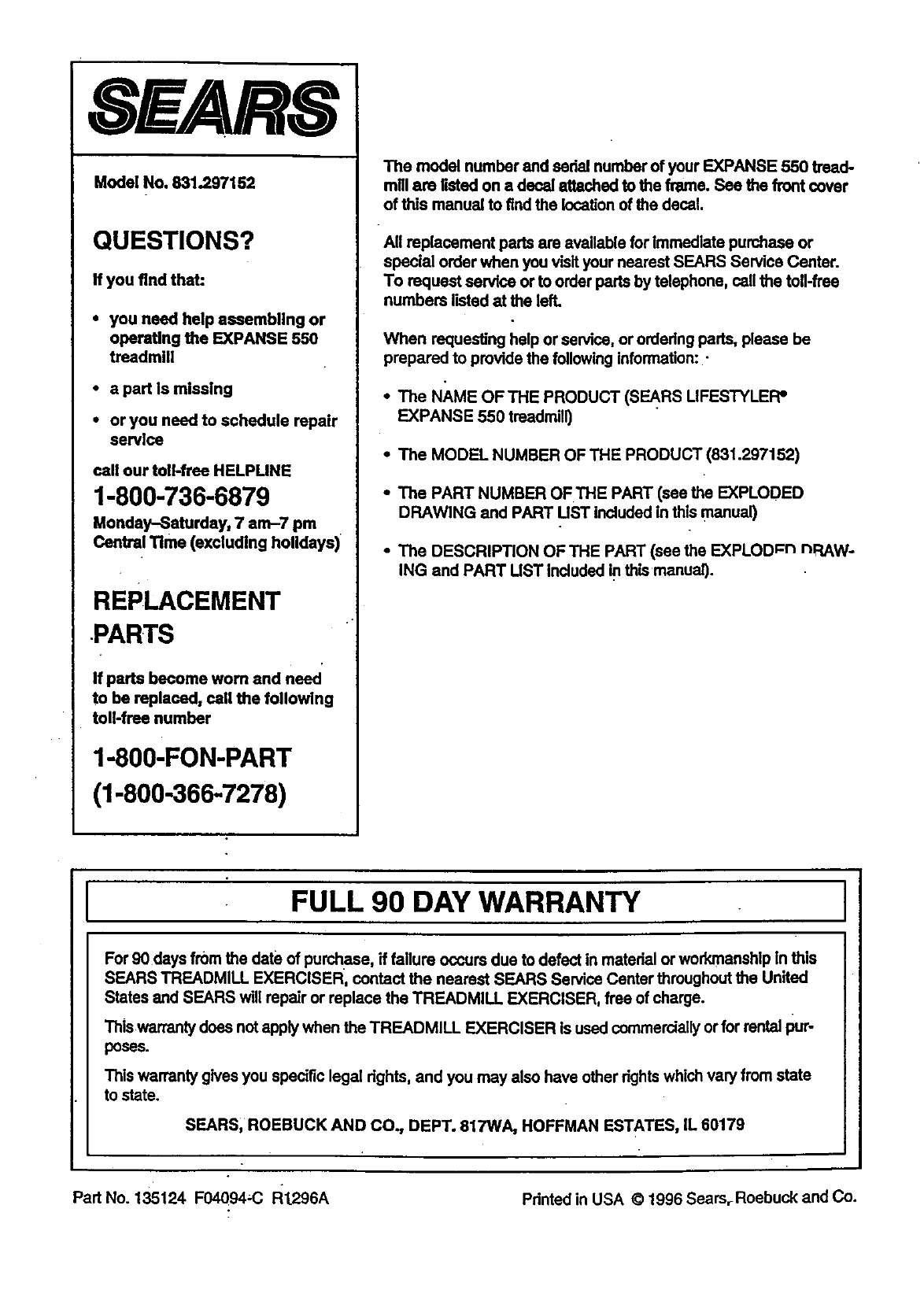
The model number and sedal number of your EXPANSE 550 tread-
mill are listed on a decal attached to the frame See the front cover
of this manuel to find the location of the decal.
All replacament parts are available for immediate purchase or
special order when you visit your nearest SEARS Service Center.
To request service or to order pads by telephone, call the toll-frse
numbers listed at the left.
When requesting help or service, or ordedng pads, please be
prepared to provide the following information:.-
• The NAME OFTHE PRODUCT (SF_J_,RSUFESTYLEFP
EXPANSE 550 treadmill)
•The MODEL NUMBER OF THE PRODUCT (831.297152)
• The PART NUMBER OF THE PART (see the EXPLODED
DRAWING and PART UST included in this manual)
•The DESCRIPTION OF THE PART (see the EXPLODpn nRAW-
ING and PART UST IncJudedin this manual).
FULL 90 DAY WARRANTY
For 90 days from the date of purchase, if failure occurs due to defect in material or workmanship in this
SEARS TREADMILL EXERCISER, contact the nearest SEARS Service Center throughout the United
States and SEARS will repair or replace the TREADMILL EXERCISER, free of charge.
This warranty does not apply when the TREADMILL EXERCISER is used commercially or for rental pur-
poses.
This warranty gives you specific legal rights, and you may also have other dghtswhich vary from state
to state.
SEARS, ROEBUCK AND CO., DEPT. 817WA, HOFFMAN ESTATES, IL 60179
Part No. 135124 F04094,C Rt296A Pdnted in USA © 1996 Searsr Roebuck and Co.
