Liftmaster Garage Door Opener 3130 1 3 Hp Users Manual 114A3331B
2015-01-21
: Liftmaster Liftmaster-Garage-Door-Opener-3130-1-3-Hp-Users-Manual-351595 liftmaster-garage-door-opener-3130-1-3-hp-users-manual-351595 liftmaster pdf
Open the PDF directly: View PDF  .
.
Page Count: 36
- Models 3130 1/3 HP 3240 1/2 HP
- TABLE OF CONTENTS
- INTRODUCTION
- ASSEMBLY
- INSTALLATION
- Determine the Header Bracket Location
- Install the Header Bracket
- Attach the Rail to the Header Bracket
- Install The Protector System®
- Position the Opener
- Hang the Opener
- Install the Door Control
- Install the Lights
- Attach the Emergency Release Rope and Handle
- Electrical Requirements
- Complete Safety Reversing Sensor Installation
- Fasten the Door Bracket
- Connect Door Arm to Trolley
- ADJUSTMENT
- OPERATION
- CARE OF YOUR OPENER
- HAVING A PROBLEM?
- PROGRAMMING
- REPAIR PARTS
- ACCESSORIES
- WARRANTY
- Spanish
The Chamberlain Group, Inc.
845 Larch Avenue
Elmhurst, Illinois 60126-1196
www.liftmaster.com
GARAGE DOOR OPENER
Models
Owner’s Manual
■Please read this manual and the enclosed safety materials carefully!
■Fasten the manual near the garage door after installation.
■The door WILL NOT CLOSE unless the Protector System®is connected and properly
aligned.
■Periodic checks of the opener are required to ensure safe operation.
■The model number label is located on the front panel of your opener.
®
3130 1/3 HP 3240 1/2 HP
For Residential Use Only
2
Introduction 2-5
Safety symbol and signal word review . . . . . . . . . . . . . .2
Preparing your garage door . . . . . . . . . . . . . . . . . . . . . . .3
Tools needed . . . . . . . . . . . . . . . . . . . . . . . . . . . . . . . . . .3
Planning . . . . . . . . . . . . . . . . . . . . . . . . . . . . . . . . . . . . .4
Carton inventory . . . . . . . . . . . . . . . . . . . . . . . . . . . . . . . .5
Hardware inventory . . . . . . . . . . . . . . . . . . . . . . . . . . . . .5
Assembly 6
Fasten rail to the motor unit . . . . . . . . . . . . . . . . . . . . . . .6
Installation 7-22
Installation safety instructions . . . . . . . . . . . . . . . . . . . . .7
Determine the header bracket location . . . . . . . . . . . . . .8
Install the header bracket . . . . . . . . . . . . . . . . . . . . . . . .9
Attach the rail to the header bracket . . . . . . . . . . . . . . .10
Install the Protector System® . . . . . . . . . . . . . . . . . . .11-13
Position the opener . . . . . . . . . . . . . . . . . . . . . . . . . . . .14
Hang the opener . . . . . . . . . . . . . . . . . . . . . . . . . . . . . .15
Install the door control . . . . . . . . . . . . . . . . . . . . . . . . . .16
Install the lights . . . . . . . . . . . . . . . . . . . . . . . . . . . . . . .17
Attach the emergency release rope and handle . . . . . .17
Electrical requirements . . . . . . . . . . . . . . . . . . . . . . . . .18
Complete safety reversing sensor installation . . . . . . . .18
Fasten the door bracket . . . . . . . . . . . . . . . . . . . . . .19-20
Connect the door arm to the trolley . . . . . . . . . . . . .21-22
Adjustment 23-25
Adjust the travel limits . . . . . . . . . . . . . . . . . . . . . . . . . .23
Adjust the force . . . . . . . . . . . . . . . . . . . . . . . . . . . . . . .24
Test the safety reversal system . . . . . . . . . . . . . . . . . . .25
Test the Protector System® . . . . . . . . . . . . . . . . . . . . . .25
Operation 26-30
Operation safety instructions . . . . . . . . . . . . . . . . . . . . .26
Using your garage door opener . . . . . . . . . . . . . . . . . . .26
Using the wall-mounted door control . . . . . . . . . . . . . . .27
To open the door manually . . . . . . . . . . . . . . . . . . . . . .27
Care of your garage door opener . . . . . . . . . . . . . . . . .28
Having a problem? . . . . . . . . . . . . . . . . . . . . . . . . . . . . .29
Diagnostic chart . . . . . . . . . . . . . . . . . . . . . . . . . . . . . . .30
Programming 31-32
To add or reprogram a hand-held remote control . . . . .31
To erase all codes . . . . . . . . . . . . . . . . . . . . . . . . . . . . .31
3-Button remotes . . . . . . . . . . . . . . . . . . . . . . . . . . . . . .31
To add, reprogram or change
a Keyless Entry PIN . . . . . . . . . . . . . . . . . . . . . . . . . . . .32
Repair Parts 33-34
Rail assembly parts . . . . . . . . . . . . . . . . . . . . . . . . . . . .33
Installation parts . . . . . . . . . . . . . . . . . . . . . . . . . . . . . . .33
Motor unit assembly parts . . . . . . . . . . . . . . . . . . . . . . .34
Accessories 35
Repair Parts and Service 36
Warranty 36
TABLE OF CONTENTS
When you see these Safety Symbols and Signal Words
on the following pages, they will alert you to the
possibility of serious injury or death if you do not
comply with the warnings that accompany them. The
hazard may come from something mechanical or from
electric shock. Read the warnings carefully.
When you see this Signal Word on the following pages, it
will alert you to the possibility of damage to your garage
door and/or the garage door opener if you do not comply
with the cautionary statements that accompany it. Read
them carefully.
INTRODUCTION
Safety Symbol
and Signal Word Review
This garage door opener has been designed and tested to offer safe service provided it is installed, operated,
maintained and tested in strict accordance with the instructions and warnings contained in this manual.
Mechanical
Electrical
WARNING
CAUTION WARNING
WARNING
WARNING
CAUTION WARNING
WARNING
WARNING
CAUTION WARNING
WARNING
3
To prevent damage to garage door and opener:
• ALWAYS disable locks BEFORE installing and operating the
opener.
• ONLY operate garage door opener at 120V, 60 Hz to avoid
malfunction and damage.
To prevent possible SERIOUS INJURY OR DEATH:
• ALWAYS call a trained door systems technician if garage
door binds, sticks, or is out of balance. An unbalanced
garage door may not reverse when required.
• NEVER try to loosen, move or adjust garage door, door
springs, cables, pulleys, brackets or their hardware, all of
which are under EXTREME tension.
• Disable ALL locks and remove ALL ropes connected to
garage door BEFORE installing and operating garage door
opener to avoid entanglement.
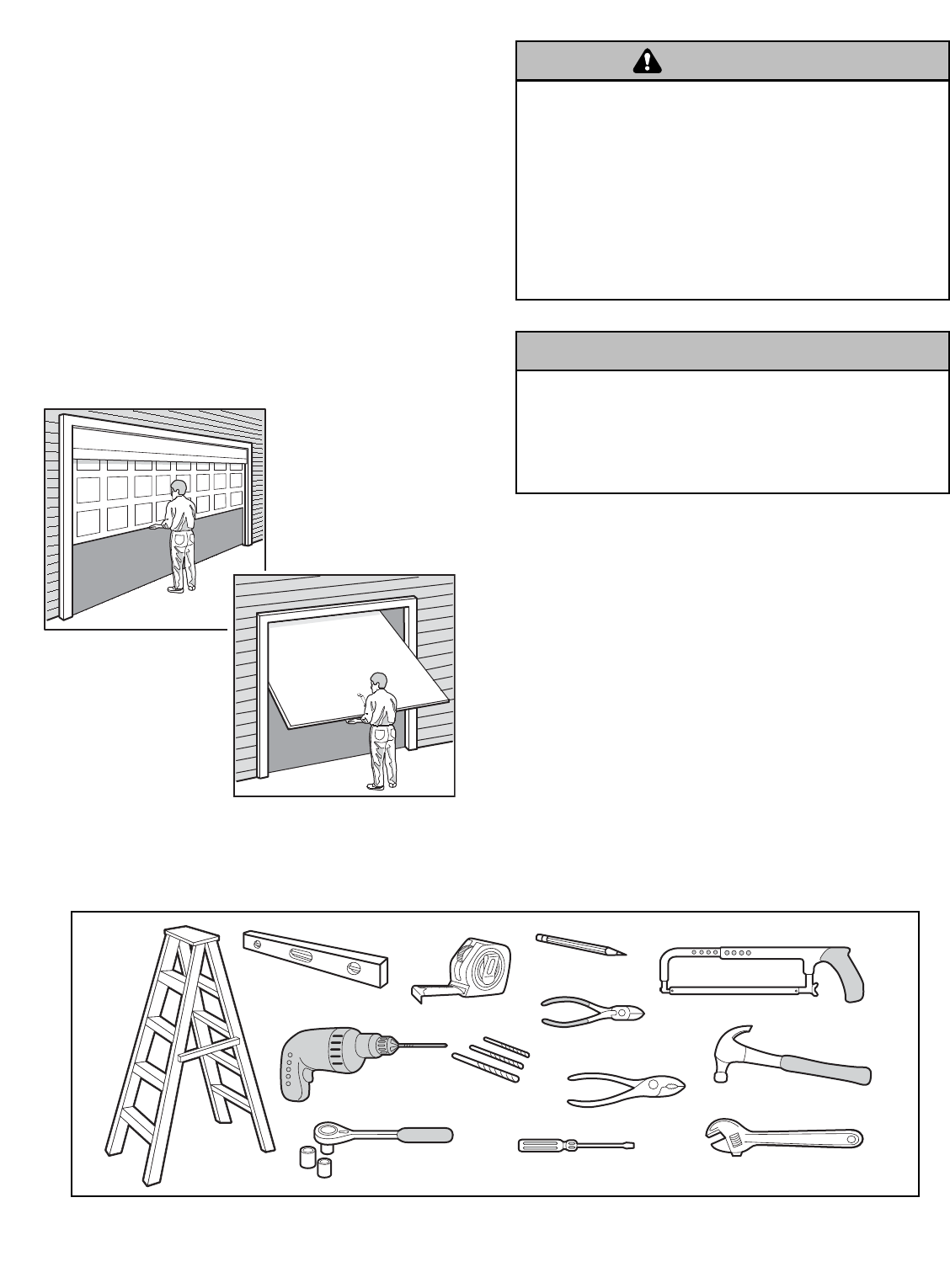
Preparing your garage door
Before you begin:
• Disable locks.
• Remove any ropes connected to garage door.
•Complete the following test to make sure your
garage door is balanced and is not sticking or binding:
1. Lift the door about halfway as shown. Release the
door. If balanced, it should stay in place, supported
entirely by its springs.
2. Raise and lower the door to see if there is any
binding or sticking.
If your door binds, sticks, or is out of balance, call a
trained door systems technician.
Tools needed
During assembly, installation and adjustment of the
opener, instructions will call for hand tools as illustrated
below.
WARNING
CAUTION WARNING
WARNING
WARNING
CAUTION WARNING
WARNING
Pliers
Wire Cutters
Claw Hammer
Hack Saw
Screwdriver Adjustable End Wrench
1/2" and 3/8" Sockets
and Wrench
Drill
Tape Measure
2
1
Stepladder
Pencil
3/16", 5/16" and
5/32" Drill Bits
Carpenter's
Level (Optional)
Sectional Door
One-Piece Door
4
Safety Reversing Sensor
FINISHED CEILING
Support bracket
& fastening
hardware is required.
See page 19.
Safety Reversing
Sensor
Access
Door
Gap between floor
and bottom of door must not exceed 1/4" (6 mm).
Wall-mounted
Door Control
Header Wall
Motor
Unit
Rail
Safety Reversin
g
Sensor
Horizontal and vertical reinforcement
is needed for lightweight garage doors
(fiberglass, steel, aluminum, door with
glass panels, etc.). See page 19 for details.
Support bracket &
fastening hardware
is required.
See page 15.
— — — — — — — —
Header Wall
Safety Reversing
Sensor
Gap between floor
and bottom of door
must not exceed 1/4" (6 mm).
FINISHED CEILING
Torsion
Spring
Access Door
Motor Unit
Wall-
mounted
Door
Control
Rail
Extension
Spring
OR
Vertical
Centerline
of Garage
Door
SECTIONAL DOOR INSTALLATION
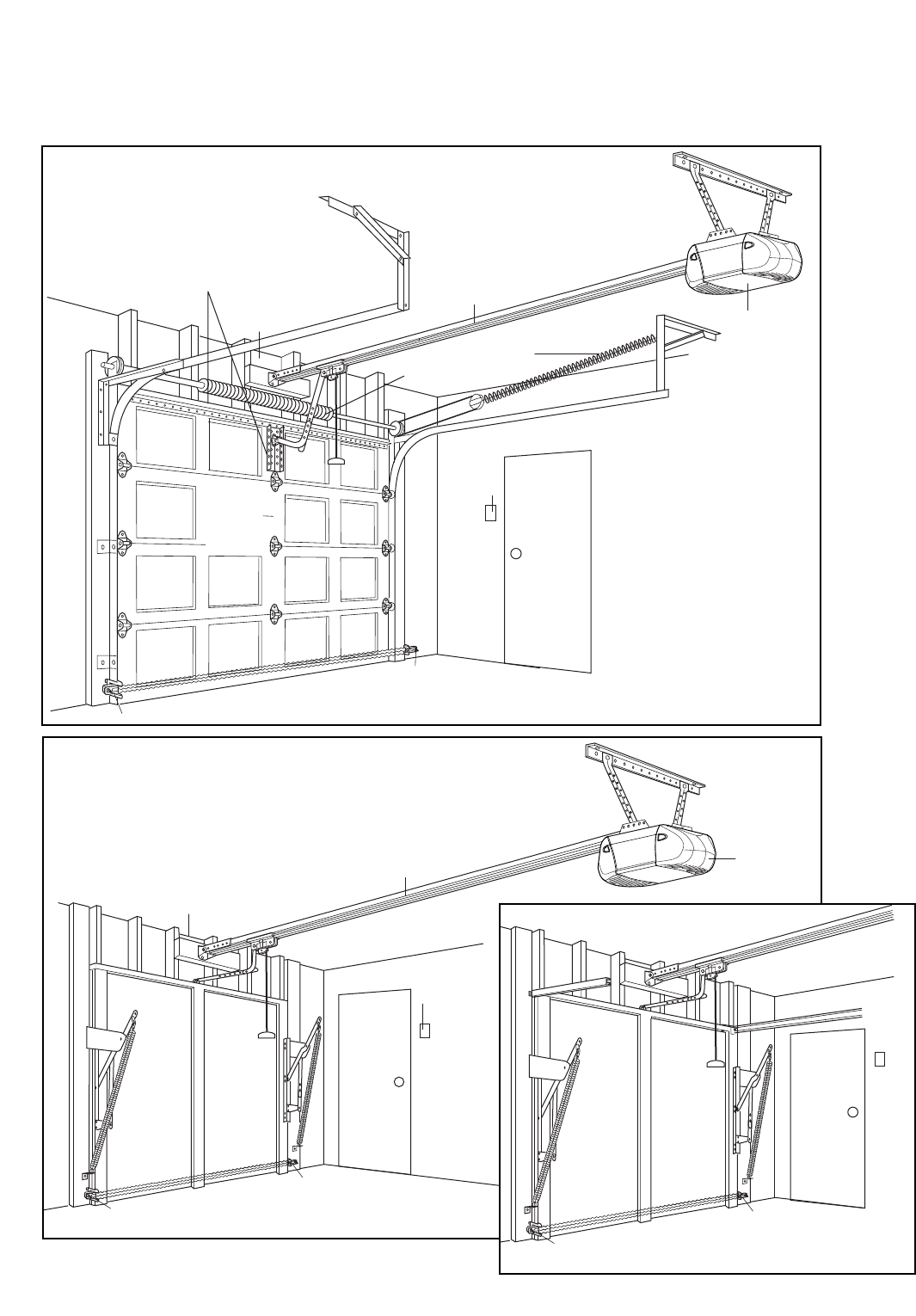
Planning
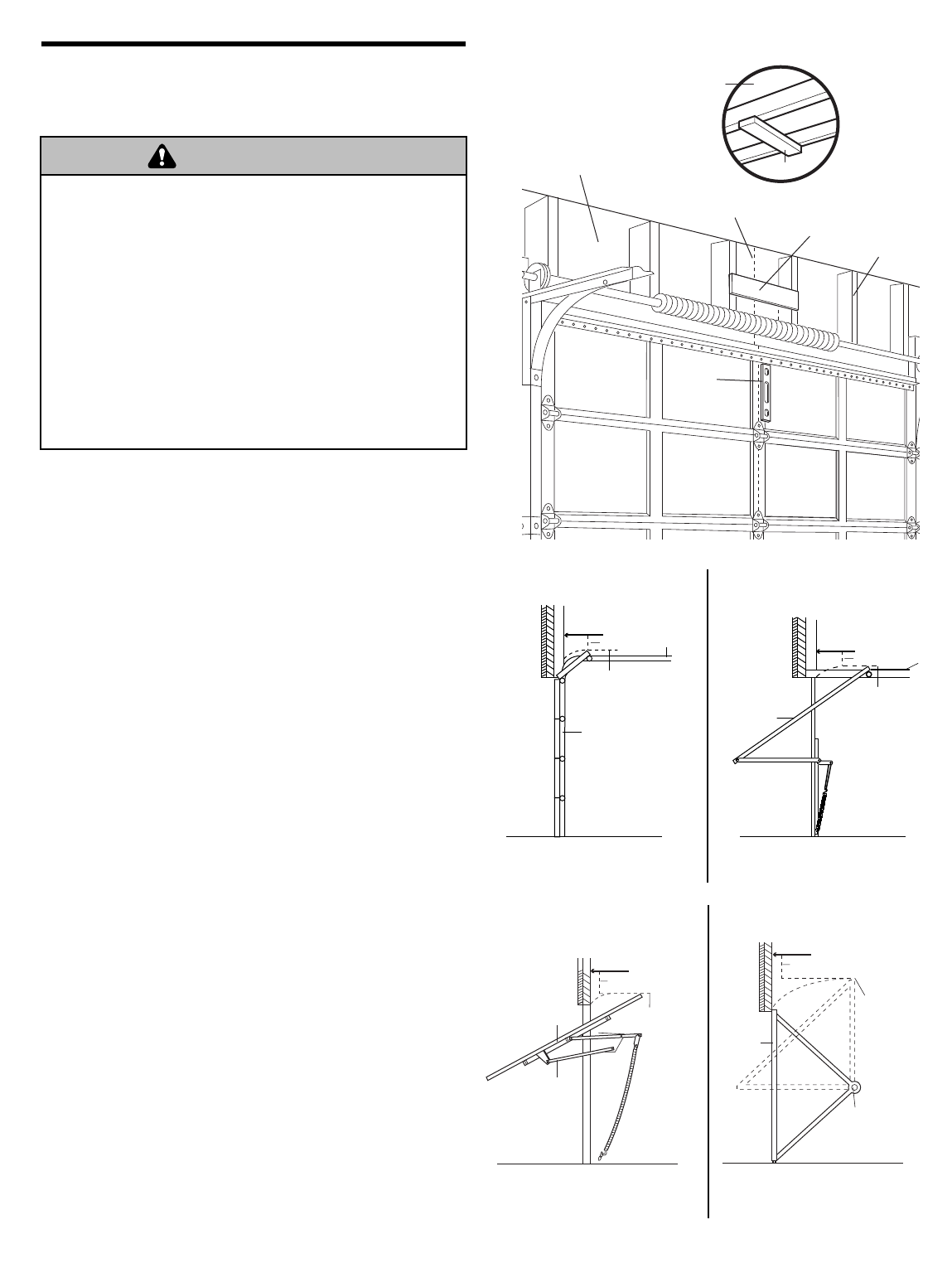
Identify the type and height of your garage door. Survey your garage area to see if any of the conditions below apply to
your installation. Additional materials may be required. You may find it helpful to refer back to this page and the
accompanying illustrations as you proceed with the installation of your opener.
ONE-PIECE DOOR WITHOUT TRACK
Safety
Reversing Sensor
Safety
Reversing Sensor
Access
Door
Gap between floor
and bottom of door
must not exceed 1/4" (6 mm).
Header
Wall
ONE-PIECE DOOR WITH TRACK
15.
5
Straight Door
Arm Section
Curved Door
Arm Section
Safety Labels
and
Literature
Header Bracket
UP
CEILING MOUNT ONLY
2 Conductor Bell Wire
White & White/Red
Remote Control
Visor Clip
Door Bracket
SECURITY✚®
3-Button Remote Control
Multi-Function
Door Control Panel
LOCK
LIGHT
The Protector System®
(2) Safety Reversing Sensors
(1 Sending Eye and 1 Receiving Eye)
with 2-Conductor White & White/Black
Bell Wire attached
Safety Sensor
Bracket (2)
Lighted
Door Control Button
SECURITY✚®
1-Button Remote Control
Sprocket Coupling
Model 3240 Model 3130
Model 3130 (1)
Model 3240 (1)
Trolley
Rail
Motor Unit with 2 Light Lenses
Model 3240
Motor Unit with Light Lens
Model 3130
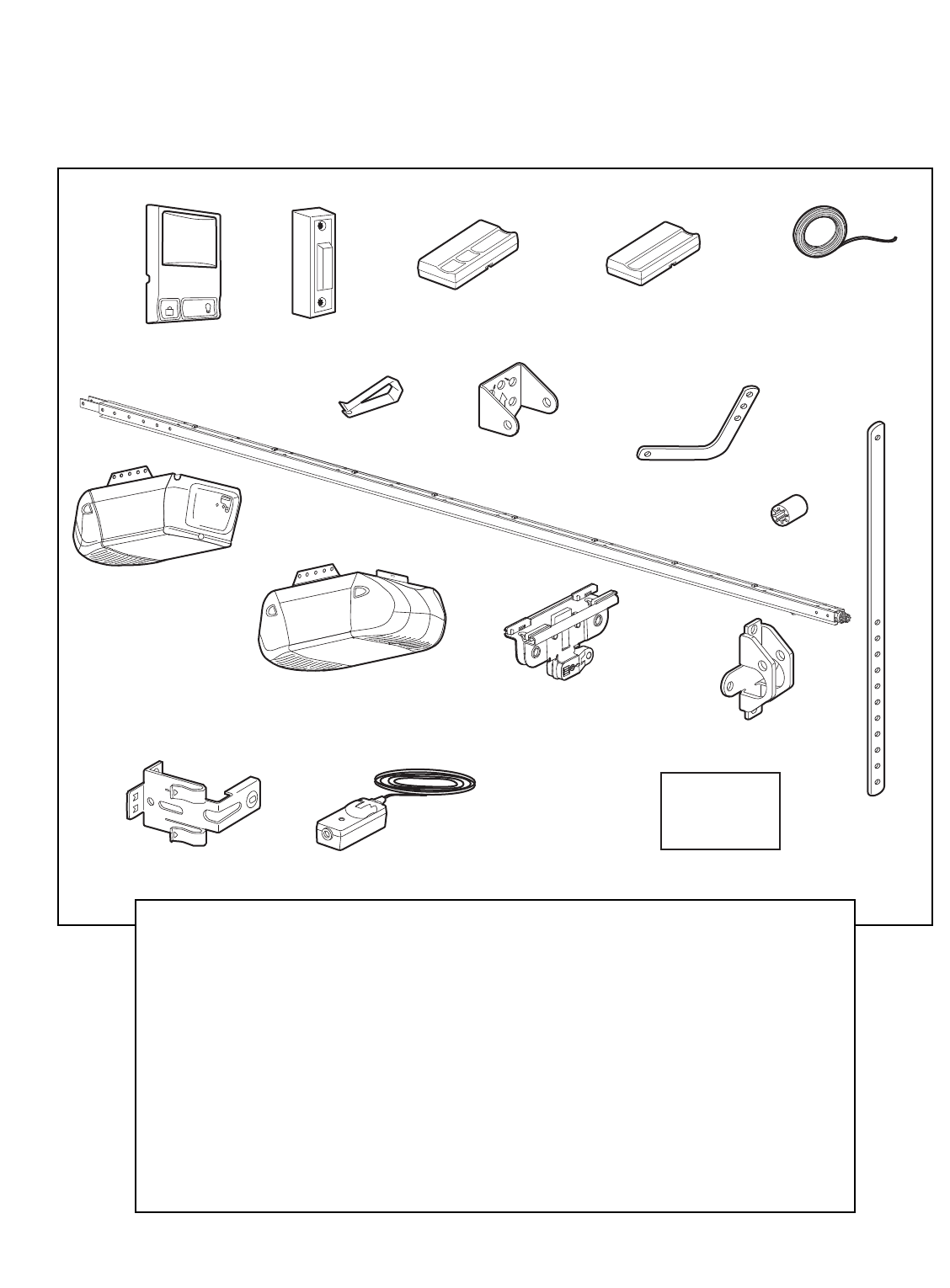
Your garage door opener is packaged in two cartons
which contain the motor unit and all parts illustrated
below. Accessories will depend on the model purchased.
If anything is missing, carefully check the packing
material. Parts may be stuck in the foam. Hardware for
installation is also listed below.
Carton Inventory
RAIL ASSEMBLY
Coupling Sleeve (1)
Hex Bolt 1/4"-20 x 5/8" (4)
Nut 1/4" - 20 (4)
INSTALLATION HARDWARE
Hex Bolt 5/16"-18x7/8" (4)
Lag Screw 5/16"-9x1-5/8" (2)
Lag Screw 5/16"-18x1-7/8" (2)
Clevis Pin 5/16"x2-3/4" (1)
Clevis Pin 5/16"x1-1/4" (1)
Clevis Pin 5/16"x1" (1)
Nut 5/16"-18 (4)
Lock Washer 5/16" (4)
Screw 6ABx1-1/4" (2)
Screw 6-32x1" (2)
Self-Threading Screw 1/4"-14x5/8" (2)
Insulated Staples (30)
Ring Fastener (3)
Drywall Anchors (2)
Carriage Bolt 1/4"-20x1/2" (2)
Wing Nut 1/4"-20 (2)
Rope
Handle
Rail
Sprocket
Rail Assembly
Release arm
Arrow must point up
Coupling
Motor Unit
Bracket Motor Unit
Sprocket
Foam Packaging
Hex Bolts
1/4"-20x7/16"
Hex Bolts
1/4-20x7/16"
6
ASSEMBLY STEP 1
Fasten the Rail to the Motor Unit
To avoid installation difficulties, do not run the
garage door opener until instructed to do so.
To aid in assembly and installation, replace the foam
packing around the motor unit. Remove it after
Installation Step 5.
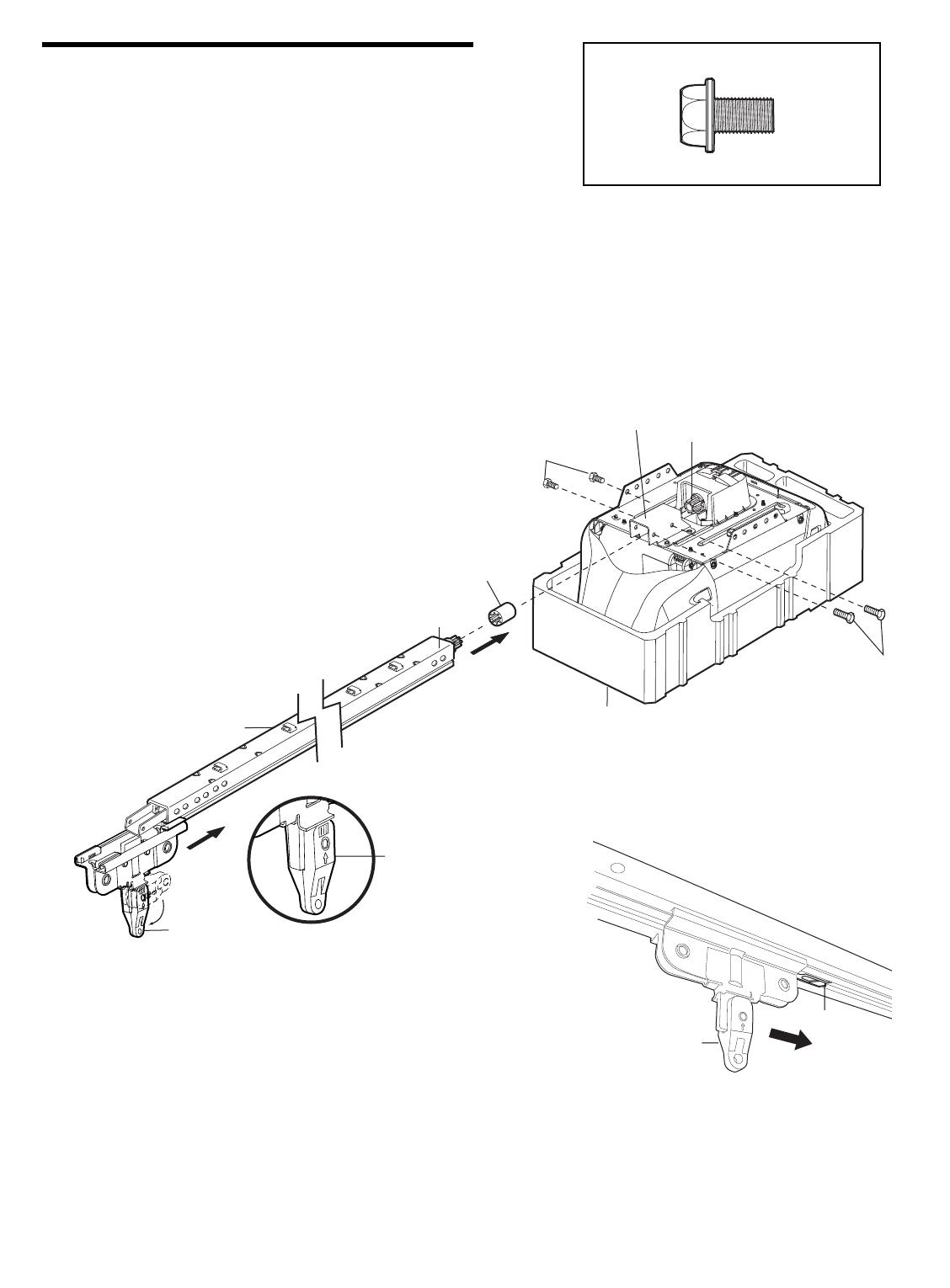
• Working on a level surface, align the rail assembly with
the motor unit, as shown.
• Slip the coupling over the rail sprocket.
• Slide the rail through the motor unit bracket until the
coupling fits securely over the motor unit sprocket.
• Align the two bolt holes in the rail with those in the
motor unit bracket. Insert four 1/4"-20x7/16" hex bolts.
Tighten securely with a 3/8" socket wrench.
• Turn release arm down to disengage trolley.
• Slide the trolley onto and along the bottom of the rail.
Align trolley with rack and turn release arm up to
re-engage trolley. Be certain to install it facing
correctly: the trolley release arm must be
horizontal (lock position), with its arrow pointed
away from the motor unit.
Trolley
Rack
To motor unit
Hex Bolt 1/4-20x7/16"
HARDWARE SHOWN ACTUAL SIZE
7
1. READ AND FOLLOW ALL INSTALLATION WARNINGS AND
INSTRUCTIONS.
2. Install garage door opener ONLY on properly balanced and
lubricated garage door. An improperly balanced door may
not reverse when required and could result in SEVERE
INJURY or DEATH.
3. ALL repairs to cables, spring assemblies and other
hardware MUST be made by a trained door systems
technician BEFORE installing opener.
4. Disable ALL locks and remove all ropes connected to
garage door BEFORE installing opener to avoid
entanglement.
5. Install garage door opener 7 feet (2.13 m) or more above
floor.
6. Mount emergency release handle 6 feet (1.83 m) above
floor.
7. NEVER connect garage door opener to power source until
instructed to do so.
8. NEVER wear watches, rings or loose clothing while
installing or servicing opener. They could be caught in
garage door or opener mechanisms.
9. Install wall-mounted garage door control:
• within sight of the garage door
• out of reach of children at minimum height of 5 feet
(1.5 m)
• away from ALL moving parts of the door
10. Place entrapment warning label on wall next to garage
door control.
11. Place manual release/safety reverse test label in plain view
on inside of garage door.
12. Upon completion of installation, test safety reversal
system. Door MUST reverse on contact with a
1-1/2" (3.8 cm) high object (or a 2x4 laid flat) on the floor.
To reduce the risk of SEVERE INJURY or DEATH:
WARNING
WARNING
WARNING
INSTALLATION
IMPORTANT INSTALLATION INSTRUCTIONS
8
INSTALLATION STEP 1
Determine the Header Bracket
Location
Installation procedures vary according to garage door
types. Follow the instructions which apply to your door.
1. Close the door and mark the inside vertical centerline
of the garage door.
2. Extend the line onto the header wall above the door.
You can fasten the header bracket within 4 feet
(1.22 m) of the left or right of the door center only
if a torsion spring or center bearing plate is in the
way; or you can attach it to the ceiling (see page 9)
when clearance is minimal. (It may be mounted on
the wall upside down if necessary, to gain
approximately 1/2" (1 cm).
If you need to install the header bracket on a 2x4
(on wall or ceiling), use lag screws (not provided)
to securely fasten the 2x4 to structural supports as
shown here and on page 9.
3. Open your door to the highest point of travel as shown.
Draw an intersecting horizontal line on the header wall
above the high point:
• 3" (7.5 cm) above the high point for sectional door
and one-piece door with track.
• 8" (20 cm) above the high point for one-piece door
without track.
This height will provide travel clearance for the top
edge of the door.
NOTE: If the total number of inches exceeds the
height available in your garage, use the maximum
height possible, or refer to page 9 for ceiling
installation.
To prevent possible SERIOUS INJURY or DEATH:
• Header bracket MUST be RIGIDLY fastened to structural
support on header wall or ceiling, otherwise garage door
might not reverse when required. DO NOT install header
bracket over drywall.
• Concrete anchors MUST be used if mounting header
bracket or 2x4 into masonry.
• NEVER try to loosen, move or adjust garage door, springs,
cables, pulleys, brackets, or their hardware, all of which are
under EXTREME tension.
• ALWAYS call a trained door systems technician if garage
door binds, sticks, or is out of balance. An unbalanced
garage door might not reverse when required.
Header Wall
Sectional door with curved track
Highest Point
of Travel
Door
Track
3" (7.5 cm)
One-piece door with horizontal track
Door
Track
Header Wall
Highest Point
of Travel
3" (7.5 cm)
Header Wall
Vertical Centerline
of Garage Door
Level
(optional)
2x4
2x4
Structural
Supports
OPTIONAL
CEILING
MOUNT
FOR
HEADER
BRACKET
Unfinished
Ceiling
WARNING
CAUTION WARNING
WARNING
Door
Jamb
Hardware
One-piece door without track:
jamb hardware
8" (20 cm)
Highest
Point
of Travel Door
Pivot
8" (20 cm)
One-piece door without track:
pivot hardware
Highest
Point
of Travel
Header Wall
Header Wall
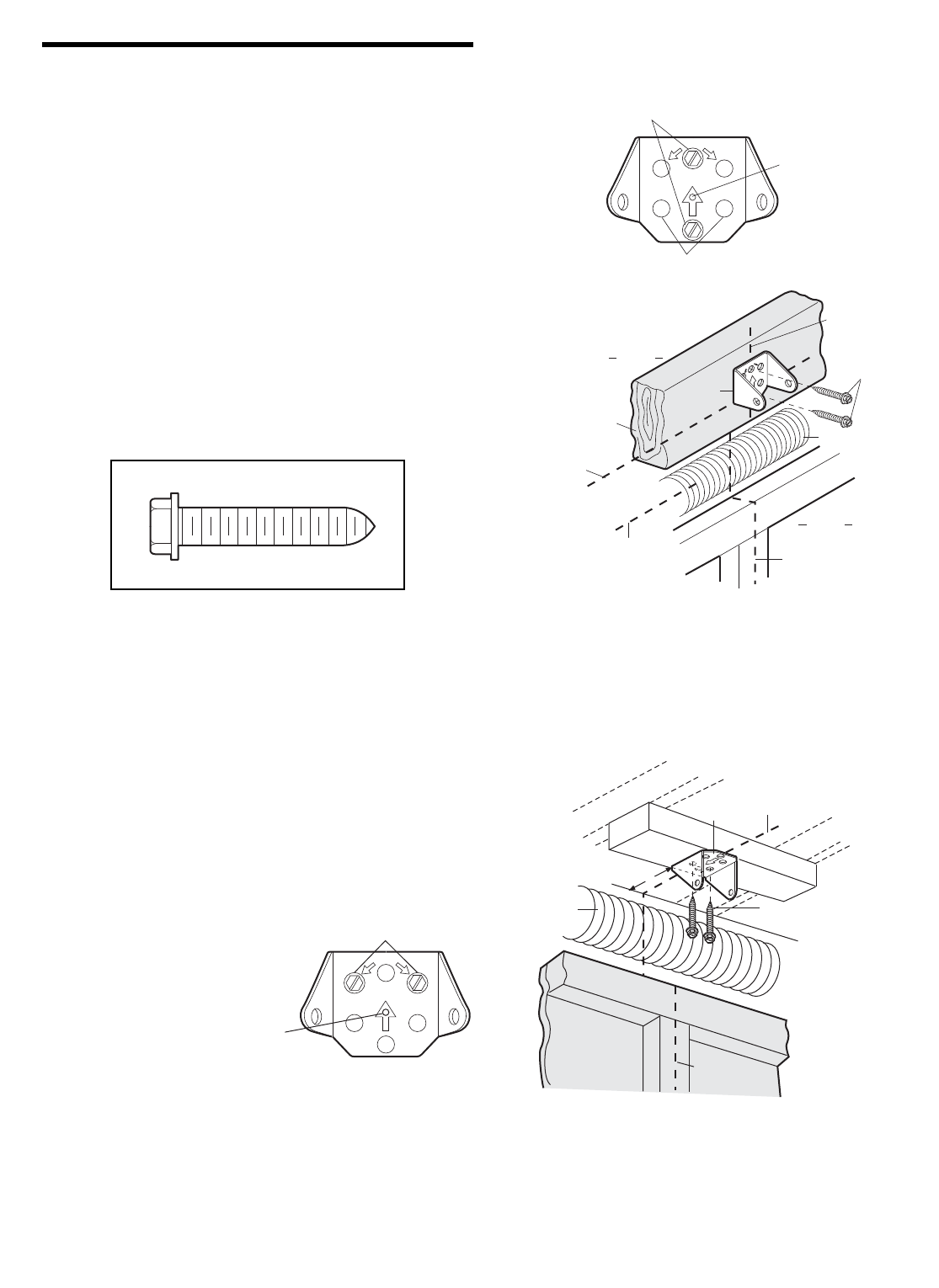
9
INSTALLATION STEP 2
Install the Header Bracket
You can attach the header bracket either to the wall
above the garage door, or to the ceiling. Follow the
instructions which will work best for your particular
requirements. Do not install the header bracket over
drywall. If installing into masonry, use concrete
anchors (not provided).
WALL HEADER BRACKET INSTALLATION
• Center the bracket on the vertical centerline with the
bottom edge of the bracket on the horizontal line as
shown (with the arrow pointing toward the ceiling).
• Mark the vertical set of bracket holes (do not use the
holes designated for ceiling mount). Drill 3/16" pilot
holes and fasten the bracket securely to a structural
support with the hardware provided.
Lag Screw
5/16"-9 x 1-5/8"
HARDWARE SHOWN ACTUAL SIZE
Lag Screws
5/16"-9x1-5/8"
Highest Point of
Garage Door Travel
Header
Wall
Garage
Door
UP
CEILING MOUNT ONLY
Wall Mounting Holes
Optional
Wall Mounting Holes
The nail hole is for
positioning only.
You must use lag screws
to mount the header bracket.
UP
CEILING MOUNT ONLY
Door Spring
Header
Bracket
2x4
Structural
Support
Horizontal
Line
Vertical
Centerline
of Garage Door
Vertical
Centerline
of Garage Door
UP
CEILING MOUNT ONLY
Ceiling Mounting Holes
The nail hole is for
positioning only.
You must use lag screws
to mount the header bracket.
UP
Lag Screws
5/16"-9x1-5/8"
Garage Door
Header Wall
– Finished Ceiling –
Header
Bracket
6" (15 cm)
Maximum
Door
Spring
Vertical
Centerline
of Garage Door
Vertical
Centerline
of Garage Door
CEILING HEADER BRACKET INSTALLATION
• Extend the vertical centerline onto the ceiling as
shown.
• Center the bracket on the vertical mark, no more than
6" (15 cm) from the wall. Make sure the arrow is
pointing toward the wall. The bracket can be mounted
flush against the ceiling when clearance is minimal.
• Mark the side holes. Drill 3/16" pilot holes and fasten
bracket securely to a structural support with the
hardware provided.
10
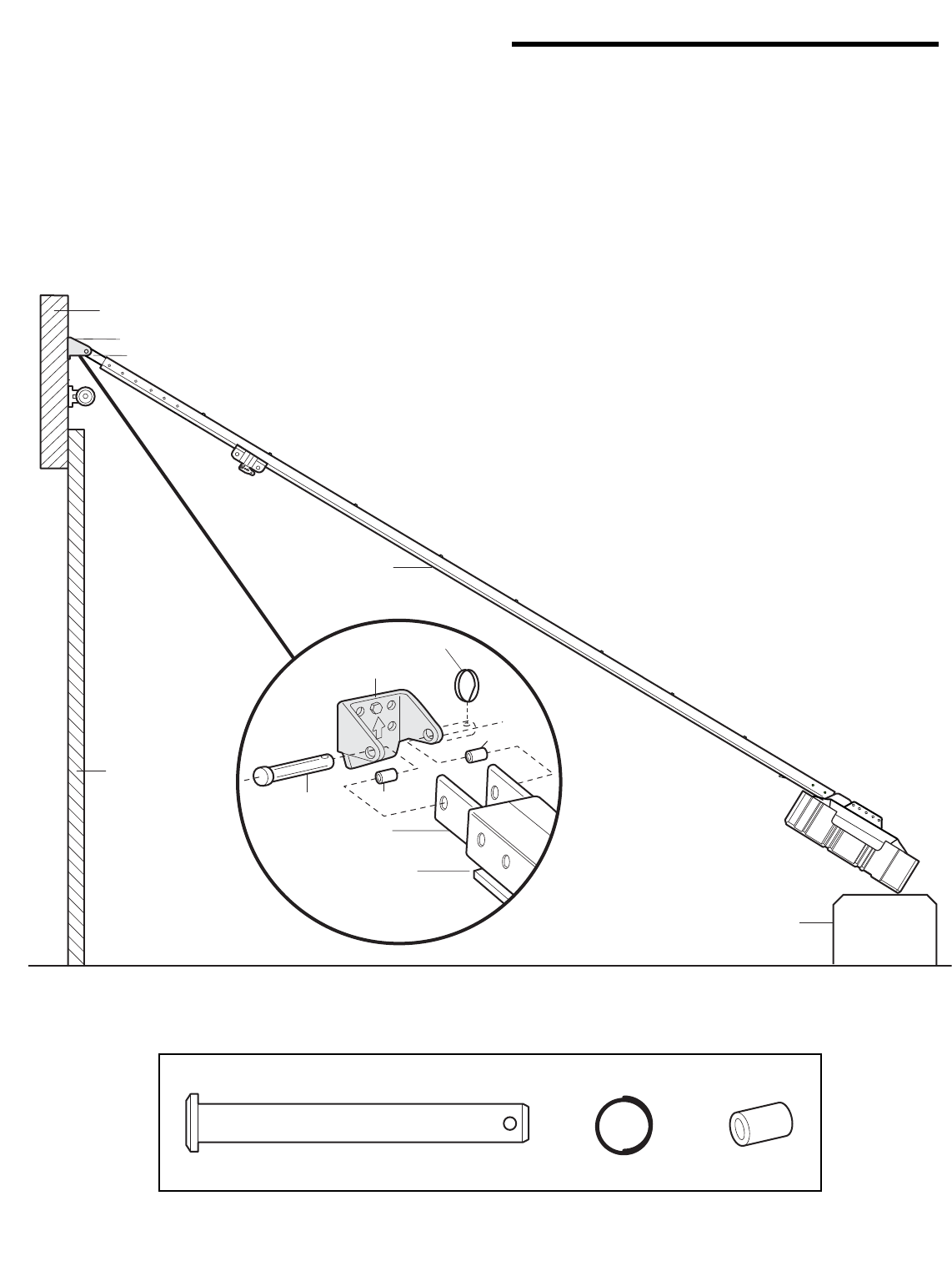
INSTALLATION STEP 3
Attach the Rail to the Header Bracket
• Position the opener on the garage floor below the
header bracket. Use packing material as a protective
base. NOTE: If the door spring is in the way you’ll
need help. Have someone hold the opener securely on
a temporary support to allow the rail to clear the
spring.
• Position the rail bracket against the header bracket.
• Align the bracket holes and join with a clevis pin
as shown.
• Insert a ring fastener to secure.
Header Bracket
Rail Bracket
Opener Carton or
Temporary
Support
Header Wall
Garage
Door
Rail
Clevis Pin
5/16"x2-3/4"
Ring Fastener
Header Bracket
Rail
Bracket
Rail
Spacer
Spacer
Clevis Pin
5/16"x2-3/4" Ring Fastener Spacer
HARDWARE SHOWN ACTUAL SIZE
11
INSTALLATION STEP 4
Install The Protector System®
The safety reversing sensor must be connected and
aligned correctly before the garage door opener will
move in the down direction.
IMPORTANT INFORMATION ABOUT THE SAFETY
REVERSING SENSOR
When properly connected and aligned, the sensor will
detect an obstacle in the path of its electronic beam. The
sending eye (with an amber indicator light) transmits an
invisible light beam to the receiving eye (with a green
indicator light). If an obstruction breaks the light beam
while the door is closing, the door will stop and reverse
to full open position, and the opener lights will flash
10 times.
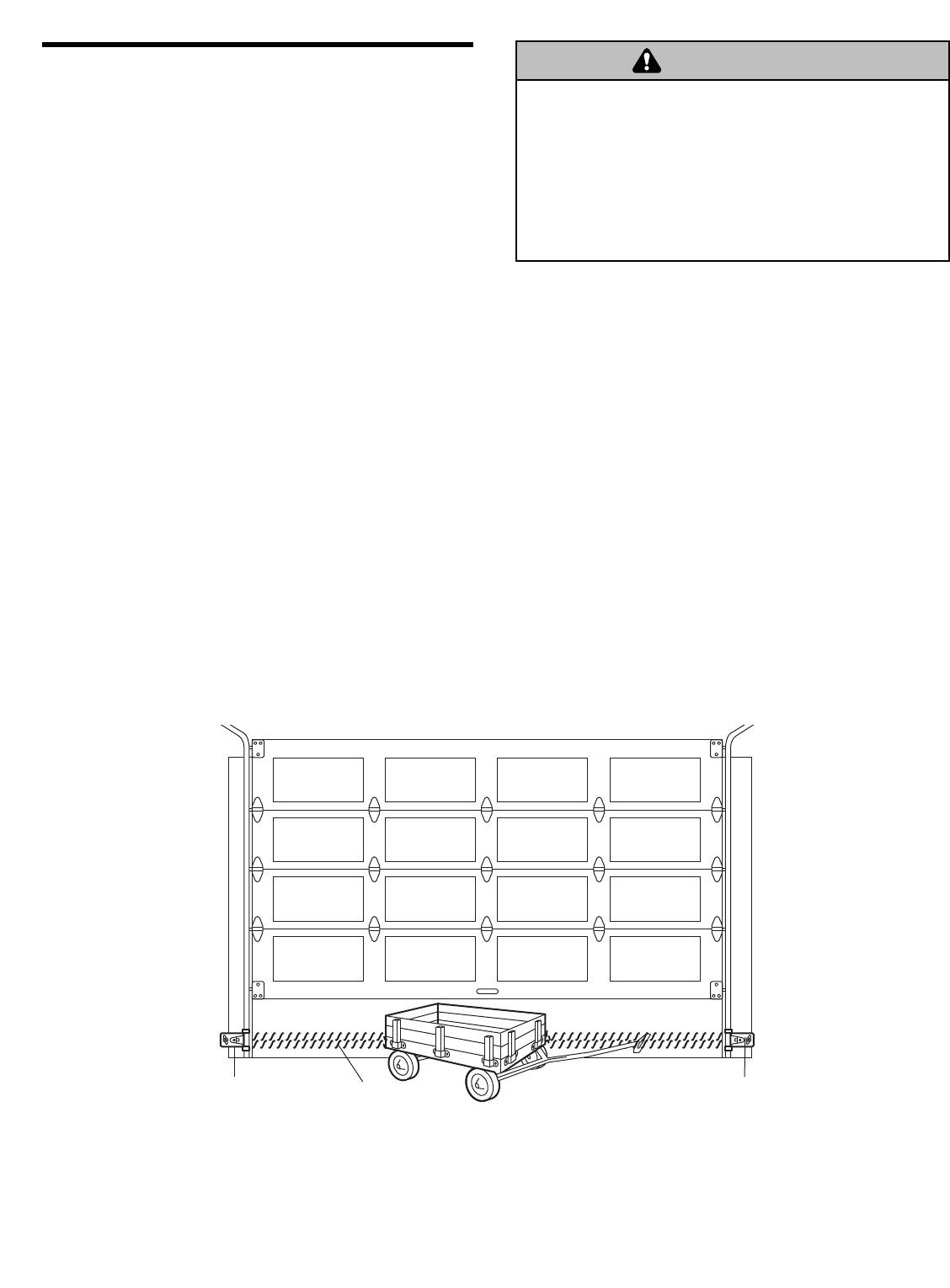
The units must be installed inside the garage so that the
sending and receiving eyes face each other across the
door, no more than 6" (15 cm) above the floor. Either can
be installed on the left or right of the door as long as the
sun never shines directly into the receiving eye lens.
The mounting brackets are designed to clip onto the
track of sectional garage doors without additional
hardware.
If it is necessary to mount the units on the wall, the
brackets must be securely fastened to a solid surface
such as the wall framing. Extension brackets (see
accessories) are available if needed. If installing in
masonry construction, add a piece of wood at each
location to avoid drilling extra holes in masonry if
repositioning is necessary.
The invisible light beam path must be unobstructed. No
part of the garage door (or door tracks, springs, hinges,
rollers or other hardware) may interrupt the beam while
the door is closing.
Be sure power is not connected to the garage door opener
BEFORE installing the safety reversing sensor.
To prevent SERIOUS INJURY or DEATH from a closing
garage door:
• Correctly connect and align the safety reversing sensor.
This required safety device MUST NOT be disabled.
• Install the safety reversing sensor so beam is NO HIGHER
than 6" (15 cm) above garage floor.
WARNING
CAUTION WARNING
WARNING
Invisible Light Beam
Protection Area
Safety Reversing Sensor
6" (15 cm) max. above floor Safety Reversing Sensor
6" (15 cm) max. above floor
Facing the door from inside the garage
12
DOOR TRACK MOUNT (RIGHT SIDE)
Indicator
Light
Lens
Lip
Sensor
Bracket
Door
Track
FLOOR MOUNT (RIGHT SIDE)
WALL MOUNT (RIGHT SIDE)
Indicator
Light
Sensor
Bracket
Lens
Extension
Bracket
(See Accessories)
Inside
Garage
Wall
(Provided with
Extension
Bracket)
(Provided with
Extension Bracket)
Figure 1
Figure 2
Figure 3
Figure 4
WALL MOUNT (RIGHT SIDE)
Attach with
Concrete Anchors
(Not Provided)
Inside
Garage
Wall
Sensor
Bracket
Lens
Indicator
Light
Inside
Garage
Wall
Indicator
Light Sensor
Bracket
Lens
Lag Screws
(Not Provided)
Fasten Wood Block to Wall with
Lag Screws (Not Provided)
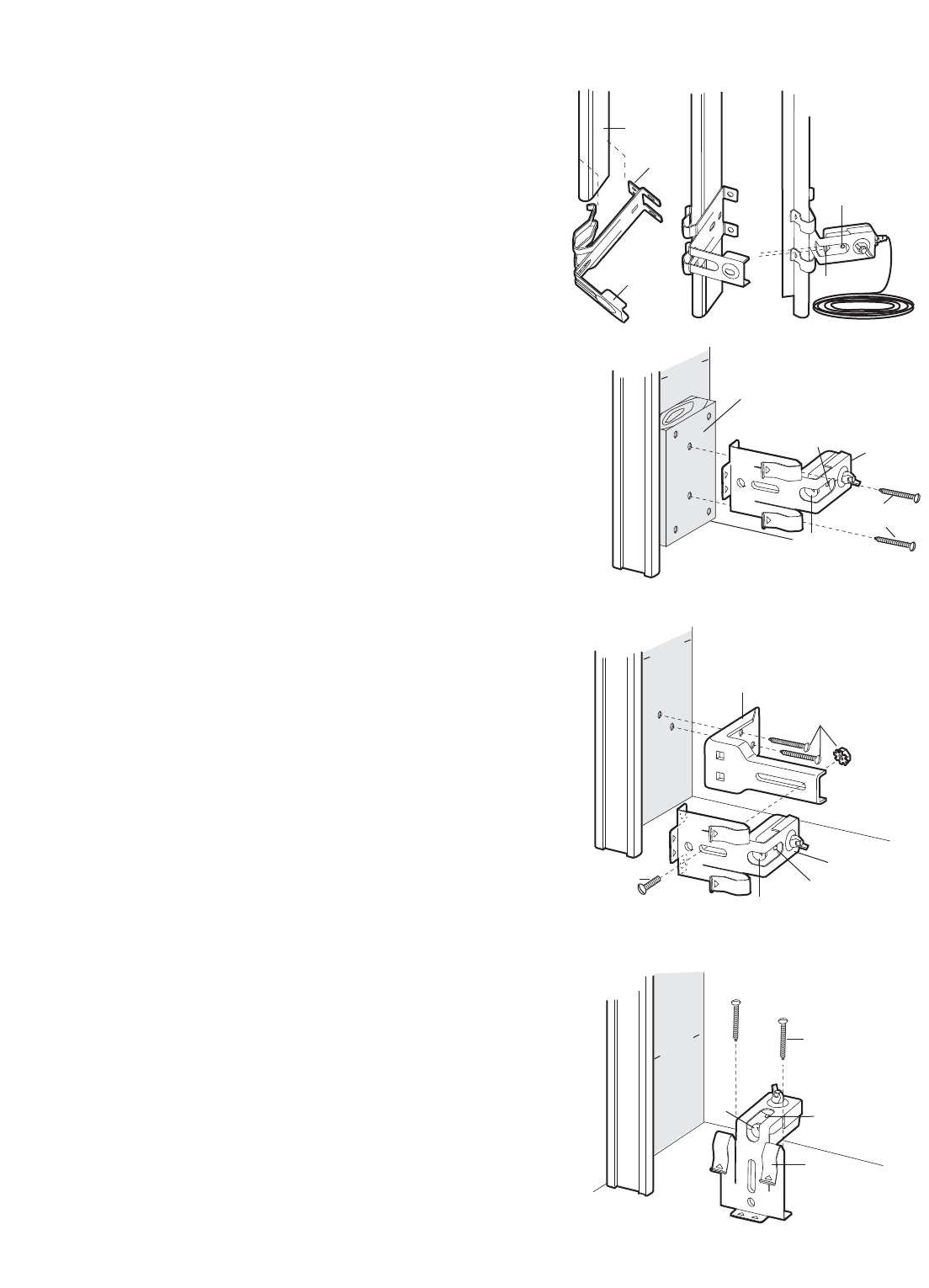
INSTALLING THE BRACKETS
Be sure power to the opener is disconnected. Install
and align the brackets so the sensors will face each
other across the garage door, with the beam no higher
than 6" (15 cm) above the floor. They may be installed in
one of three ways, as follows:
Garage door track installation (preferred):
• Slip the curved arms over the rounded edge of each
door track, with the curved arms facing the door. Snap
into place against the side of the track. It should lie
flush, with the lip hugging the back edge of the track,
as shown in Figure 1.
If your door track will not support the bracket securely,
wall installation is recommended.
Wall installation (Figures 2 & 3):
• Place the bracket against the wall with curved arms
facing the door. Be sure there is enough clearance for
the sensor beam to be unobstructed.
• If additional depth is needed, an extension bracket
(see Accessories) or wood blocks can be used.
• Use bracket mounting holes as a template to locate
and drill (2) 3/16" diameter pilot holes on the wall at
each side of the door, no higher than 6" (15 cm) above
the floor.
• Attach brackets to wall with lag screws (not provided).
• If using extension brackets or wood blocks, adjust right
and left assemblies to the same distance out from the
mounting surface. Make sure all door hardware
obstructions are cleared.
Floor installation (Figure 4):
• Use wood blocks or extension brackets (see
Accessories) to elevate sensor brackets so the lenses
will be no higher than 6" (15 cm) above the floor.
• Carefully measure and place right and left assemblies
at the same distance out from the wall. Be sure all
door hardware obstructions are cleared.
• Fasten to the floor with concrete anchors as shown.
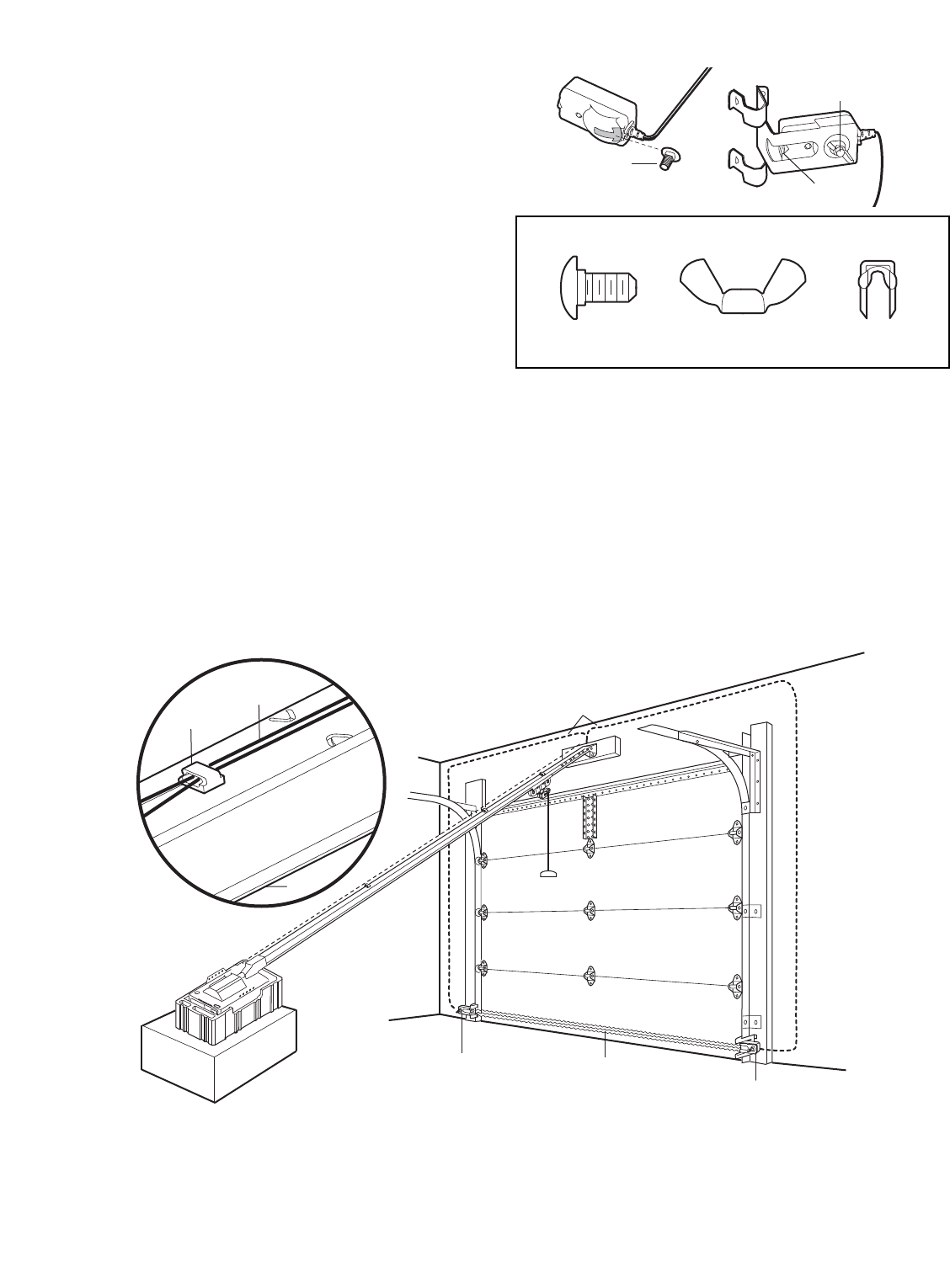
13
Carriage Bolt
1/4"-20x1/2" Lens
Wing Nut
1/4"-20
Figure 5
Wing Nut
1/4"-20
Staples
Carriage Bolt
1/4"-20x1/2"
HARDWARE SHOWN ACTUAL SIZE
Invisible Light Beam
Protection Area Safety Reversing
Sensor
Safety Reversing Sensor
Bell Wire
Sensor Wire
Wire Clips
Rail
Figure 6
MOUNTING AND WIRING THE SAFETY SENSORS
• Slide a 1/4"-20x1/2" carriage bolt head into the slot on
each sensor. Use wing nuts to fasten sensors to
brackets, with lenses pointing toward each other
across the door. Be sure the lens is not obstructed by
a bracket extension (Figure 5).
• Finger tighten the wing nuts.
Recommended Wire Routing
1. Using insulated staples, run the wires from both
sensors to the rail at the door header (Figure 6).
2. Run the wires through wire clips at the top of the rails.
NOTE: If your access door is near the garage door, you
may choose to install the door control at this time and
run the door control wire along the rail with the sensor
wires.
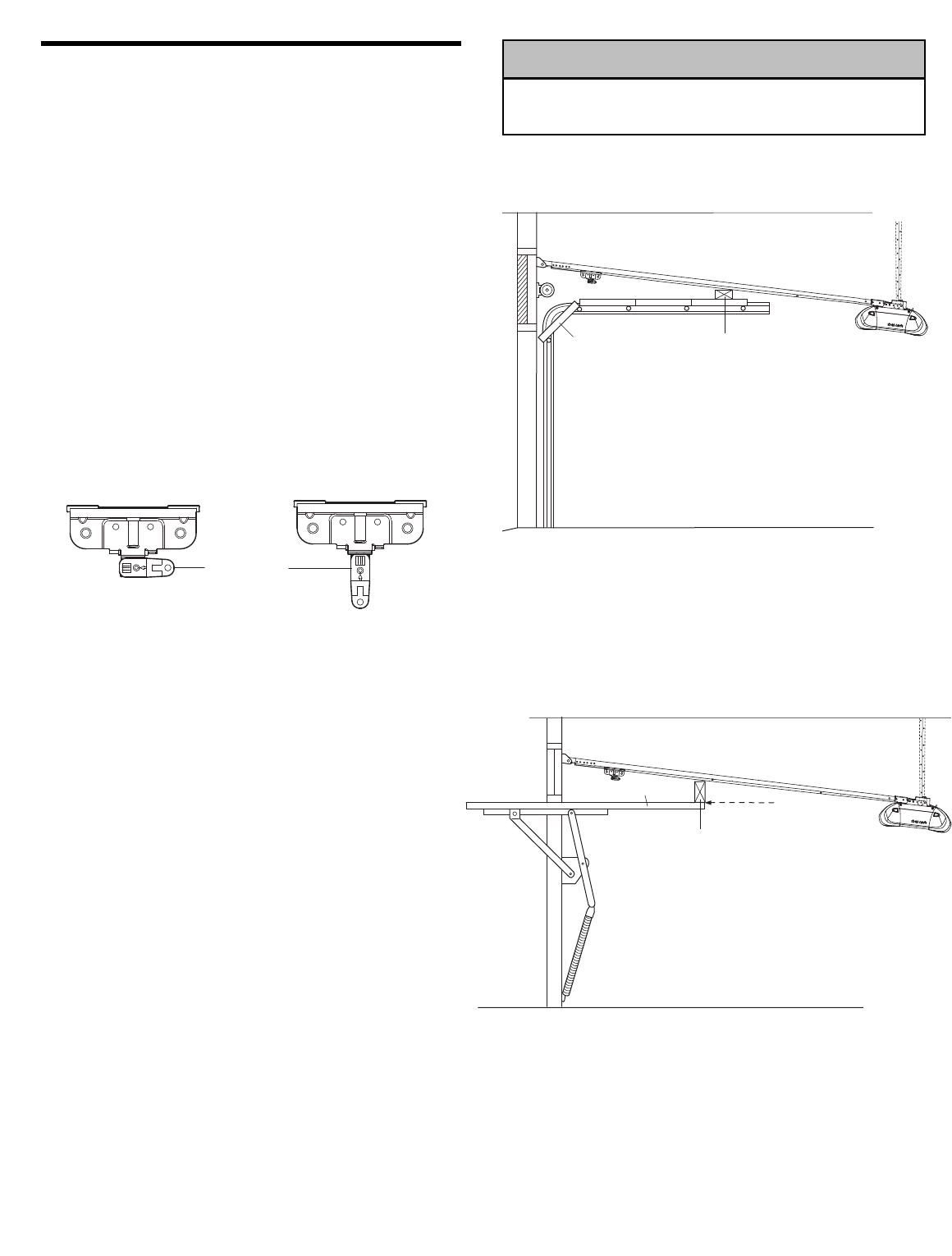
14
ONE-PIECE DOOR WITHOUT TRACK
A 2x4 on its side is convenient for setting an ideal
door-to-rail distance.
• Remove foam packaging.
• Raise the opener onto a stepladder. You will need help
at this point if the ladder is not tall enough.
• Open the door all the way and place a 2x4 on its side
on the top section of the door beneath the rail.
• The top of the door should be level with the top of the
motor unit. Do not position the opener more than 4"
(10 cm) above this point.
INSTALLATION STEP 5
Position the Opener
Follow instructions which apply to your door type as
illustrated.
SECTIONAL DOOR OR ONE-PIECE DOOR WITH
TRACK
A 2x4 laid flat is convenient for setting an ideal
door-to-rail distance.
• Raise the opener onto a stepladder. You will need help
at this point if the ladder is not tall enough.
• Open the door all the way and place a 2x4 laid flat on
the top section beneath the rail.
• If the top section or panel hits the trolley when you
raise the door, pull down on the trolley release arm
to disconnect inner and outer sections. Slide the outer
trolley toward the motor unit. The trolley can remain
disconnected until Installation Step 13 is completed.
To prevent damage to garage door, rest garage door opener
rail on 2x4 placed on top section of door.
WARNING
CAUTION WARNING
WARNING
Trolley
Release Arm
ENGAGED
RELEASED
2x4 is used to determine
the correct mounting height
from ceiling.
Door
Top of Door
Top of Door
2x4 is used to determine
the correct mounting height
from ceiling.
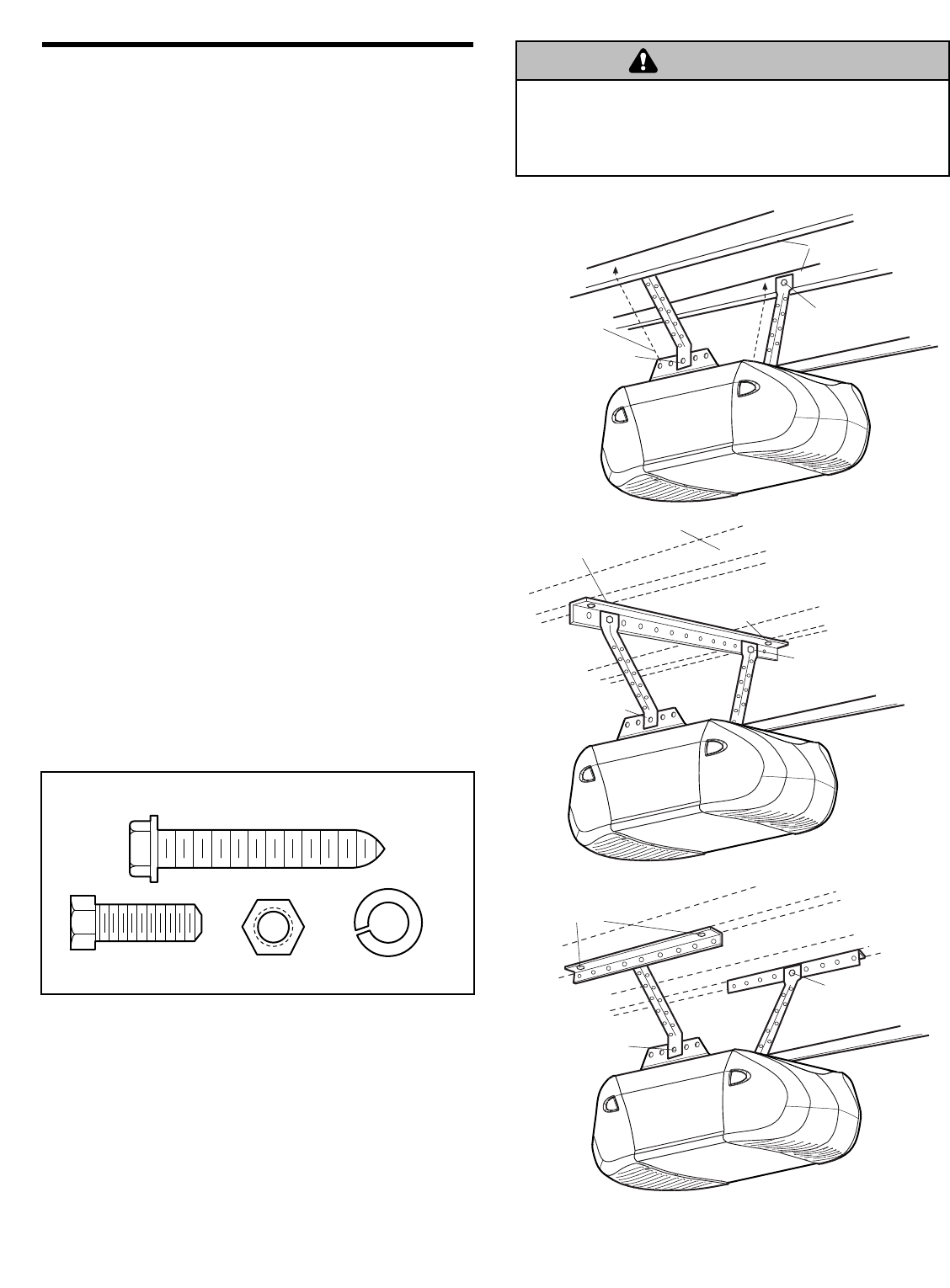
15
INSTALLATION STEP 6
Hang the Opener
Three representative installations are shown. Yours may
be different. Hanging brackets should be angled
(Figure 1) to provide rigid support. On finished ceilings
(Figure 2 and Figure 3), attach a sturdy metal bracket to
structural supports before installing the opener. This
bracket and fastening hardware are not provided.
1. Measure the distance from each side of the motor unit
to the structural support.
2. Cut both pieces of the hanging bracket to required
lengths.
3. Drill 3/16" pilot holes in the structural supports.
4. Attach one end of each bracket to a support with
5/16"-18x1-7/8" lag screws.
5. Fasten the opener to the hanging brackets with
5/16"-18x7/8" hex bolts, lock washers and nuts.
6. Check to make sure the rail is centered over the door
(or in line with the header bracket if the bracket is not
centered above the door).
7. Remove the 2x4. Operate the door manually. If the
door hits the rail, raise the header bracket.
NOTE: DO NOT connect power to opener at this time.
To avoid possible SERIOUS INJURY from a falling garage
door opener, fasten it SECURELY to structural supports of
the garage. Concrete anchors MUST be used if installing any
brackets into masonry.
Lag Screw 5/16"-18x1-7/8"
Hex Bolt
5/16"-18x7/8" Nut 5/16"-18 Lock Washer 5/16"
HARDWARE SHOWN ACTUAL SIZE
WARNING
CAUTION WARNING
WARNING
Measure
Distance Lag Screws
5/16"-18x1-7/8"
Structural
Supports
Bracket
(Not Provided)
Lag Screws
5/16"-18x1-7/8"
(Not Provided)
Bolt 5/16"-18x7/8"
Lock Washer 5/16"
Nut 5/16"-18
FINISHED CEILING
Hidden
Support
Bolt 5/16"-18x7/8"
Lock Washer 5/16"
Nut 5/16"-18
Bolt 5/16"-18x7/8"
Lock Washer 5/16"
Nut 5/16"-18
Bolt 5/16"-18x7/8"
Lock Washer 5/16"
Nut 5/16"-18
Lag Screws
5/16"-18x1-7/8"
(Not Provided)
Bolt 5/16"-18x7/8"
Lock Washer 5/16"
Nut 5/16"-18
FINISHED CEILING
Figure 1
Figure 2
Figure 3
16
KG
1
3
9
7
5
KG
1
3
9
7
5
To release wire, push in tab
with screwdriver tip
Door Control
Connections
Red Grey
White
Strip wire 7/16" (11 mm)
7/16" (11 mm)
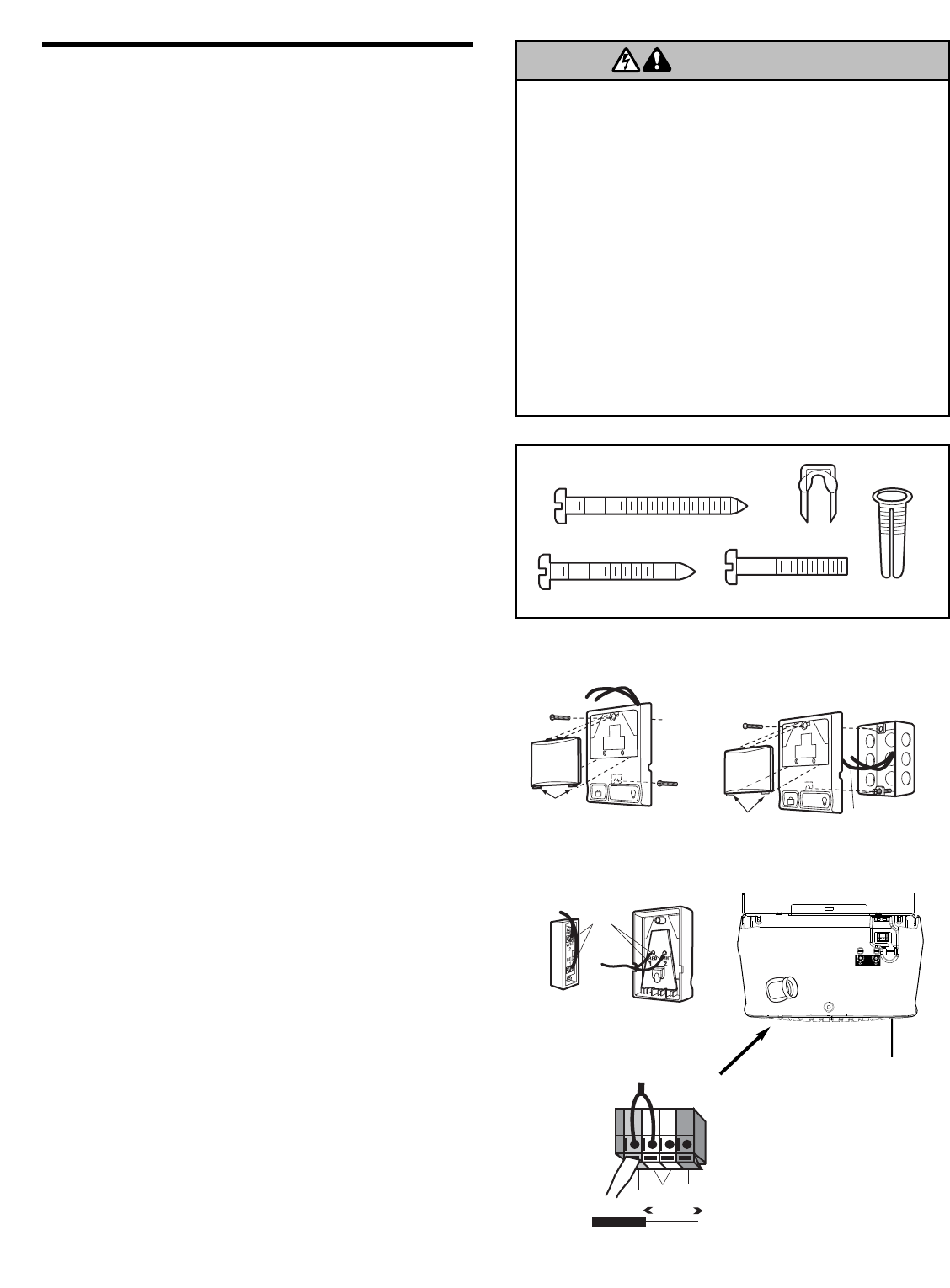
INSTALLATION STEP 7
Install the Door Control
Locate door control within sight of the door at a minimum height
of 5 feet (1.5 m) where small children cannot reach, and away
from moving parts of the door and door hardware. The
installation surface must be smooth and flat. If installing into
drywall (Figure 1), drill 5/32" holes and use anchors provided.
For pre-wired installations (as in new home construction), it
may be mounted to a single gang box (Figure 2). NOTE: After
installation, a green indicator light behind the cover will indicate
proper connection. If not lit, the Lock and Light features will not
function (reverse wires to correct).
1. Strip 7/16" (11 mm) of insulation from one end of bell wire
and connect to the two screw terminals on back of door
control by color: white wire to 2 and white/red wire to the 1
(Figure 3).
2. Lighted door control: Fasten to wall with 6ABx1-1/2"
self-threading screws.
Multi-function: Remove white cover by gently prying at slot
in top of the cover with a small flat head screwdriver. Fasten
with 6ABx1-1/4" self-threading screws (drywall installation) or
6-32x1" machine screws (into gang box) as follows:
• Drill and install bottom screw, allowing 1/8" (3 mm) to
protrude above wall surface.
• Position bottom of door control on screw head and slide
down to secure. Adjust screw for snug fit.
• Install top screw with care to avoid cracking plastic housing.
Do not overtighten.
• Insert bottom tabs and snap on cover.
NOTE: The push bar may stick if the door control is not
mounted on a smooth surface. If a click is not heard when
pressing the push bar, loosen the two mounting screws or
relocate the door control to a smoother surface.
3. (Standard installation only) Run bell wire up wall and
across ceiling to motor unit. Use insulated staples to secure
wire in several places. Do not pierce wire with a staple,
creating a short or open circuit. If your access door is near
the garage door, you may run this wire with the Safety
Reversing Sensor wires along the top of the rail. See
page 13.
4. Insert all wires through the opening on top of motor unit
above the terminal block on the back panel (Figure 4).
5. Strip 7/16" (11 mm) of insulation from each set of wires.
Insert door control wire into quick-connect terminals by color:
white wire to white, white/red wire to red.
Separate white and white/black wires sufficiently to connect
to the opener quick-connect terminals. Twist like colored
wires together. Insert wires into quick-connect holes: white to
white and white/black to grey (Figure 4).
NOTE: When connecting multiple door controls to the opener,
twist same color wires together. Insert wires into quick-connect
holes: white to white and red/white to red.
6. Use tacks or staples to permanently attach entrapment
warning label to wall near door control, and manual
release/safety reverse test label in a prominent location on
inside of garage door.
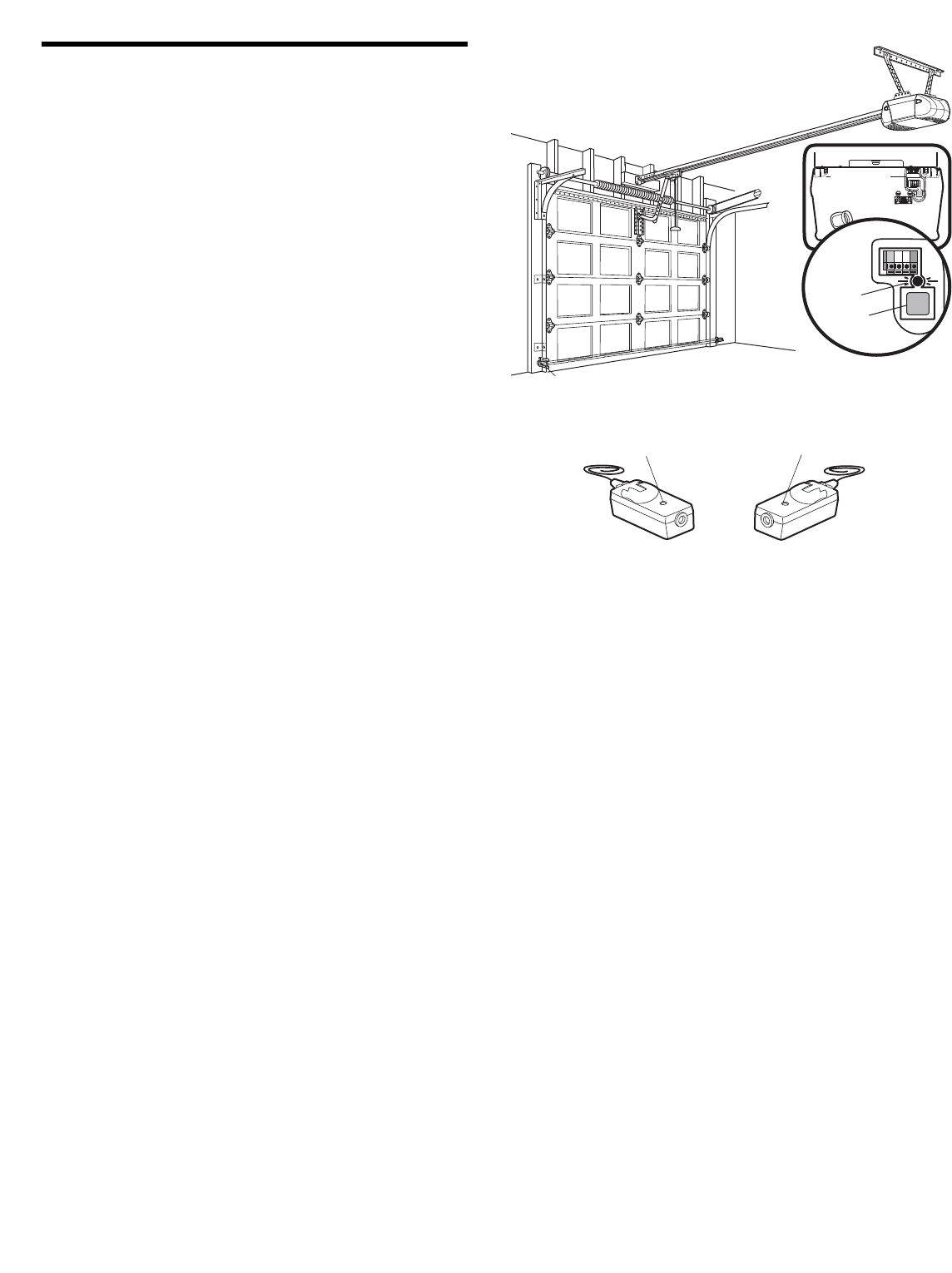
NOTE: DO NOT connect the power and operate the opener at
this time. The trolley will travel to the full open position but will
not return to the close position until the sensor beam is
connected and properly aligned. See Step 11 on page 18.
Figure 2
To Replace
Insert Bottom Tabs First
PRE-WIRED
INSTALLATION
24 Volt
Bell Wire
LOCK
LIGHT
LOCK
LIGHT
To Replace
Insert Bottom Tabs First
Figure 1 STANDARD
INSTALLATION
Figure 3
To prevent possible SERIOUS INJURY or DEATH from
electrocution:
• Be sure power is not connected BEFORE installing door
control.
• Connect ONLY to 24 VOLT low voltage wires.
To prevent possible SERIOUS INJURY or DEATH from a
closing garage door:
• Install door control within sight of garage door, out of reach
of children at a minimum height of 5 feet (1.5 m), and away
from all moving parts of door.
• NEVER permit children to operate or play with door control
push buttons or remote control transmitters.
• Activate door ONLY when it can be seen clearly, is properly
adjusted, and there are no obstructions to door travel.
• ALWAYS keep garage door in sight until completely closed.
NEVER permit anyone to cross path of closing garage door.
WARNING
CAUTION WARNING
WARNING
Figure 4
Lighted Door Control Button
6ABx1-1/2" Screw
Drywall
Anchors
Insulated
Staples
Multi-function (std installation)
6AB x 1-1/4" Screw
Multi-function (pre-wired)
6-32 x 1" Screw
HARDWARE SHOWN ACTUAL SIZE
Multi-function
Wall Control
Lighted
Door Control
Terminal
Screws
17
INSTALLATION STEP 8
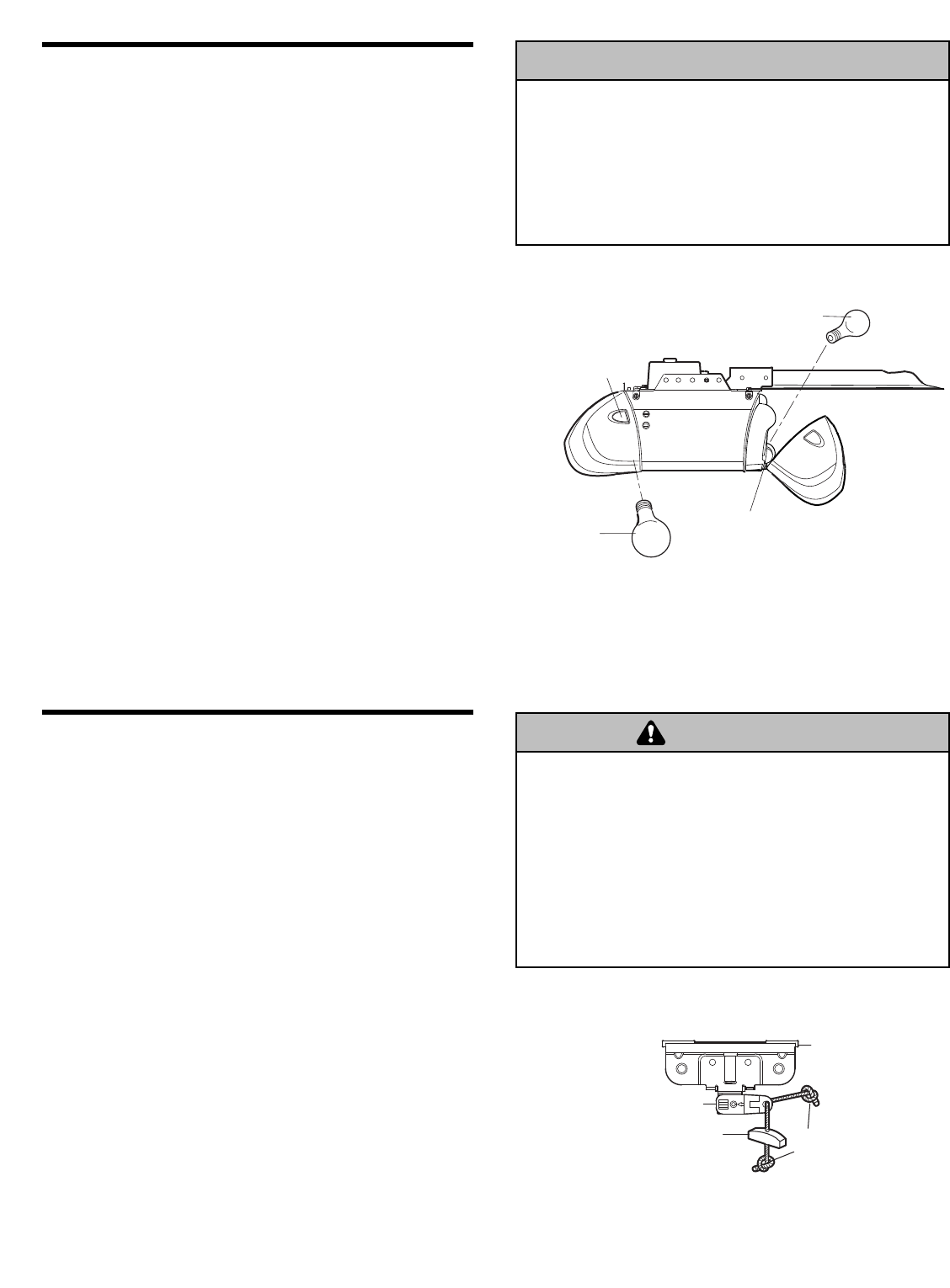
Install the Lights
• Press the release tabs on both sides of lens. Gently
rotate lens back and downward until the lens hinge is
in the fully open position. Do not remove the lens.
• Install a 100 watt maximum light bulb in each socket.
Light bulb size should be A19, standard neck only. The
lights will turn ON and remain lit for approximately
4-1/2 minutes when power is connected. Then the
lights will turn OFF.
• Reverse the procedure to close the lens.
• Use A19, standard neck garage door opener bulbs for
replacement.
NOTE: Use only standard light bulbs. The use of short
neck or speciality light bulbs may overheat the endpanel
or light socket.
INSTALLATION STEP 9
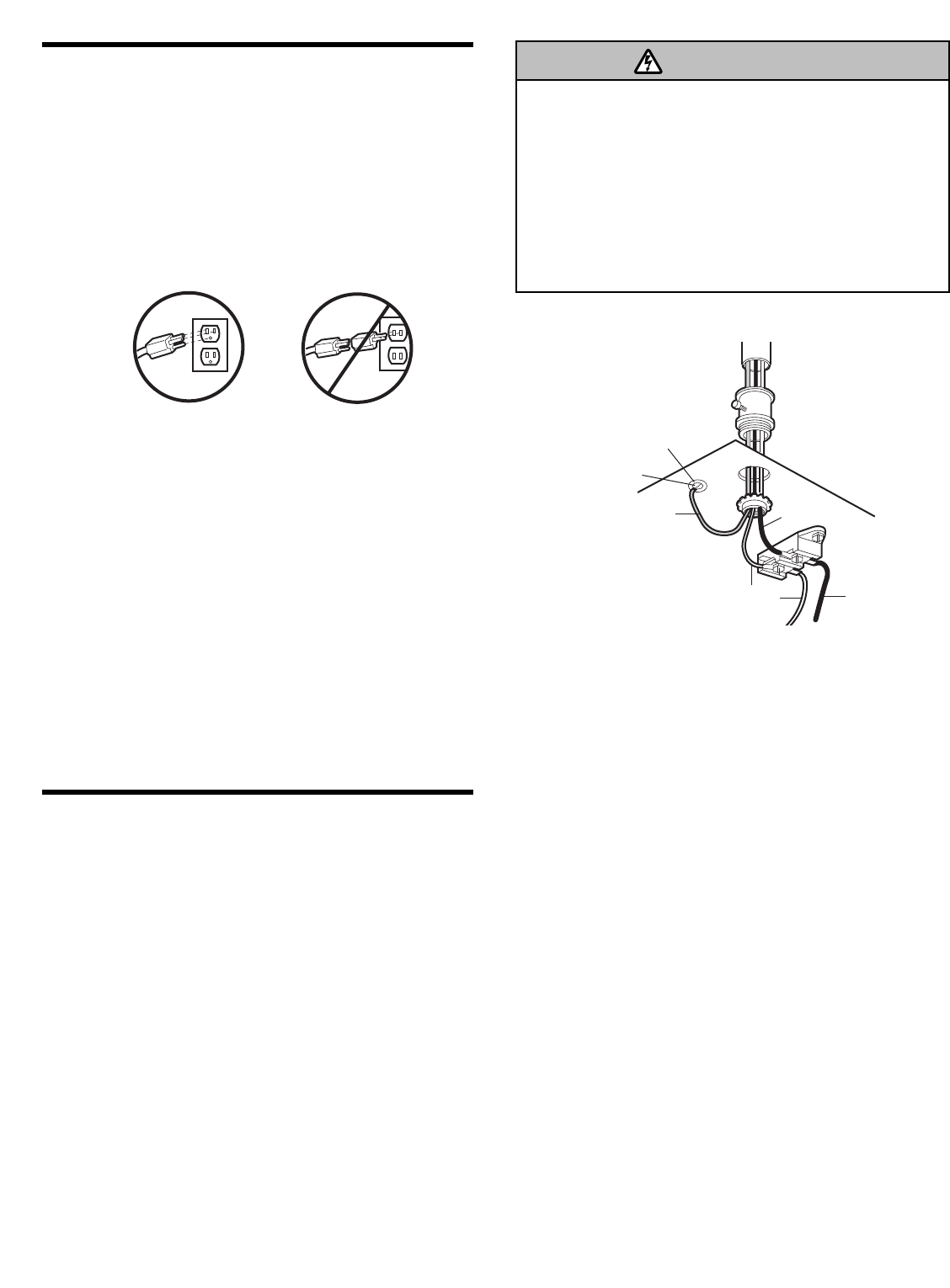
Attach the Emergency Release Rope
and Handle
• Thread one end of the rope through the hole in the top
of the red handle so “NOTICE” reads right side up as
shown. Secure with an overhand knot at least
1" (2.5 cm) from the end of the rope to prevent
slipping.
• Thread the other end of the rope through the hole in
the release arm of the outer trolley.
• Adjust rope length so the handle is 6 feet (1.83 m)
above the floor. Secure with an overhand knot.
NOTE: If it is necessary to cut the rope, heat seal the cut
end with a match or lighter to prevent unraveling.
To prevent possible SERIOUS INJURY or DEATH from a
falling garage door:
• If possible, use emergency release handle to disengage
trolley ONLY when garage door is CLOSED. Weak or broken
springs or unbalanced door could result in an open door
falling rapidly and/or unexpectedly.
• NEVER use emergency release handle unless garage
doorway is clear of persons and obstructions.
• NEVER use handle to pull door open or closed. If rope knot
becomes untied, you could fall.
WARNING
CAUTION WARNING
WARNING
Lens
Hinge
100 Watt (Max)
Standard Light Bulb
Release Tab
100 Watt (Max)
Standard Light Bulb
Trolley Release Arm
NOTICE
Overhand
Knot
Emergency
Release Handle
Trolley
To prevent possible OVERHEATING of the endpanel or light
socket:
• DO NOT use short neck or specialty light bulbs.
• DO NOT use halogen bulbs. Use ONLY incandescent.
To prevent damage to the opener:
• DO NOT use bulbs larger than 100W.
• ONLY use A19 size bulbs.
WARNING
CAUTION WARNING
WARNING
18
INSTALLATION STEP 10
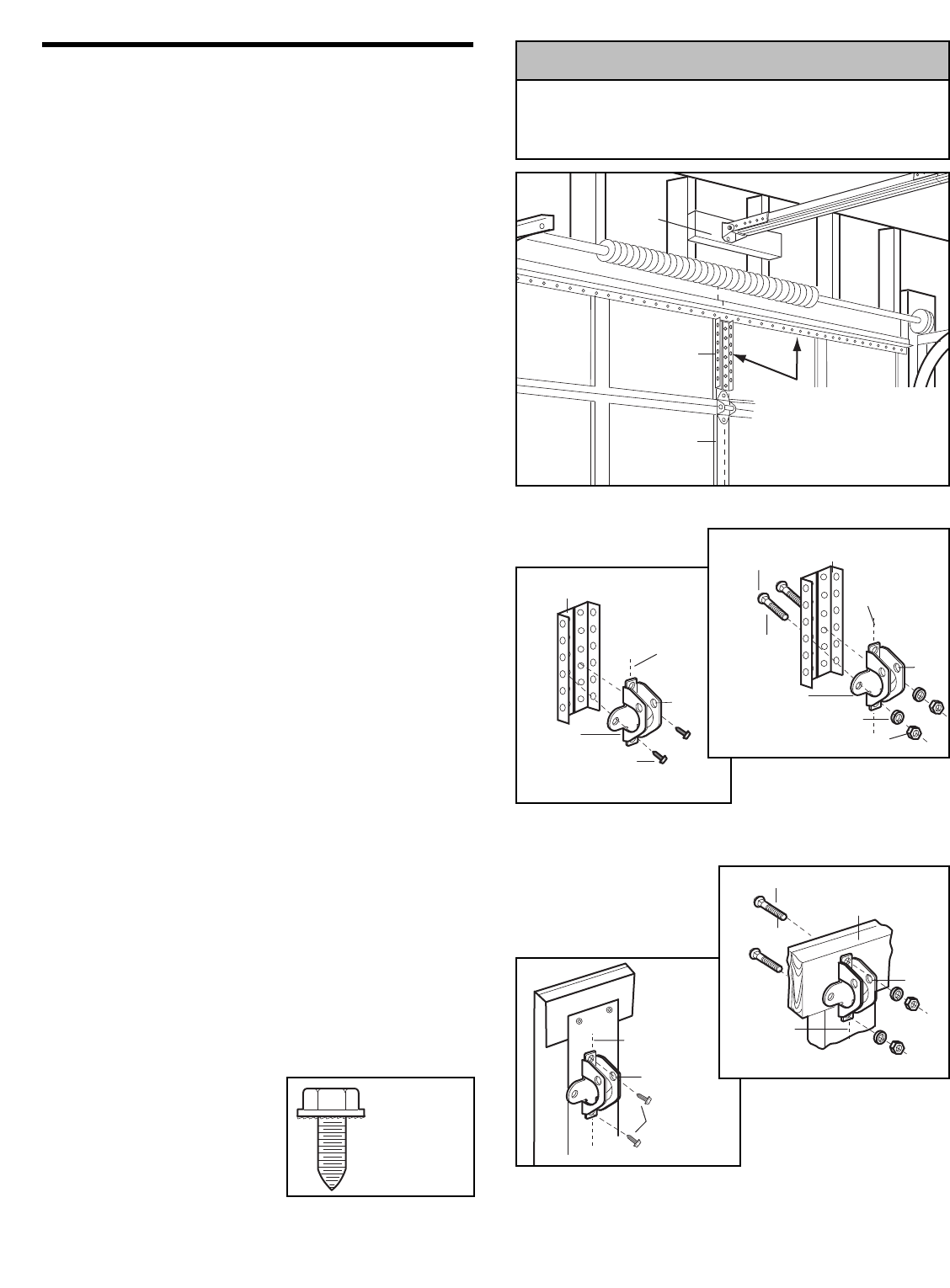
Electrical Requirements
To avoid installation difficulties, do not run the
opener at this time.
To reduce the risk of electric shock, your garage door
opener has a grounding type plug with a third grounding
pin. This plug will only fit into a grounding type outlet. If
the plug doesn’t fit into the outlet you have, contact a
qualified electrician to install the proper outlet.
If permanent wiring is required by your local code,
refer to the following procedure.
To make a permanent connection through the 7/8" hole
in the top of the motor unit:
• Remove the motor unit cover screws and set the cover
aside.
• Remove the attached 3-prong cord.
• Connect the black (line) wire to the screw on the brass
terminal; the white (neutral) wire to the screw on the
silver terminal; and the ground wire to the green
ground screw. The opener must be grounded.
• Reinstall the cover.
To avoid installation difficulties, do not run the
opener until Step 11 below.
RIGHT WRONG
To prevent possible SERIOUS INJURY or DEATH from
electrocution or fire:
• Be sure power is not connected to the opener, and
disconnect power to circuit BEFORE removing cover to
establish permanent wiring connection.
• Garage door installation and wiring MUST be in compliance
with all local electrical and building codes.
• NEVER use an extension cord, 2-wire adapter, or change
plug in any way to make it fit outlet. Be sure the opener is
grounded.
Ground Tab
Green
Ground Screw
Ground Wire
Black Wire
PERMANENT WIRING
CONNECTION
White Wire
Black
Wire
WARNING
CAUTION WARNING
WARNING
INSTALLATION STEP 11
Complete Safety Reversing Sensor
Installation
ALIGNING THE SAFETY REVERSING SENSORS
Plug in the opener. The indicator lights in both the
sending and receiving eyes will glow steadily if wiring
connections and alignment are correct.
The sending eye amber indicator light will glow
regardless of alignment or obstruction. If the green
indicator light in the receiving eye is off, dim, or flickering
(and the invisible light beam path is not obstructed),
alignment is required.
• Loosen the sending eye wing nut and readjust, aiming
directly at the receiving eye. Lock in place.
• Loosen the receiving eye wing nut and adjust the
sensor vertically and/or horizontally until it receives the
sender’s beam. When the green indicator light glows
steadily, tighten the wing nut.
TROUBLESHOOTING THE SAFETY REVERSING
SENSORS
1. If the sending eye indicator light does not glow steadily
after installation, check for:
• Electric power to the opener.
• A short in the white or white/black wires. These can
occur at staples, or at opener connections.
• Incorrect wiring between sensors and opener.
• A broken wire.
2. If the sending eye indicator light glows steadily but the
receiving eye indicator light doesn’t:
• Check alignment.
• Check for an open wire to the receiving eye.
3. If the receiving eye indicator light is dim, realign either
sensor.
NOTE: When the invisible beam path is obstructed or
misaligned while the door is closing, the door will
reverse. If the door is already open, it will not close. The
opener lights will blink 10 times (if bulbs are not installed,
10 clicks can be heard). See page 11.
19
UP
Self-Threading
Screw
1/4"-14x5/8"
Vertical
Centerline
of Garage Door
INSTALLATION STEP 12
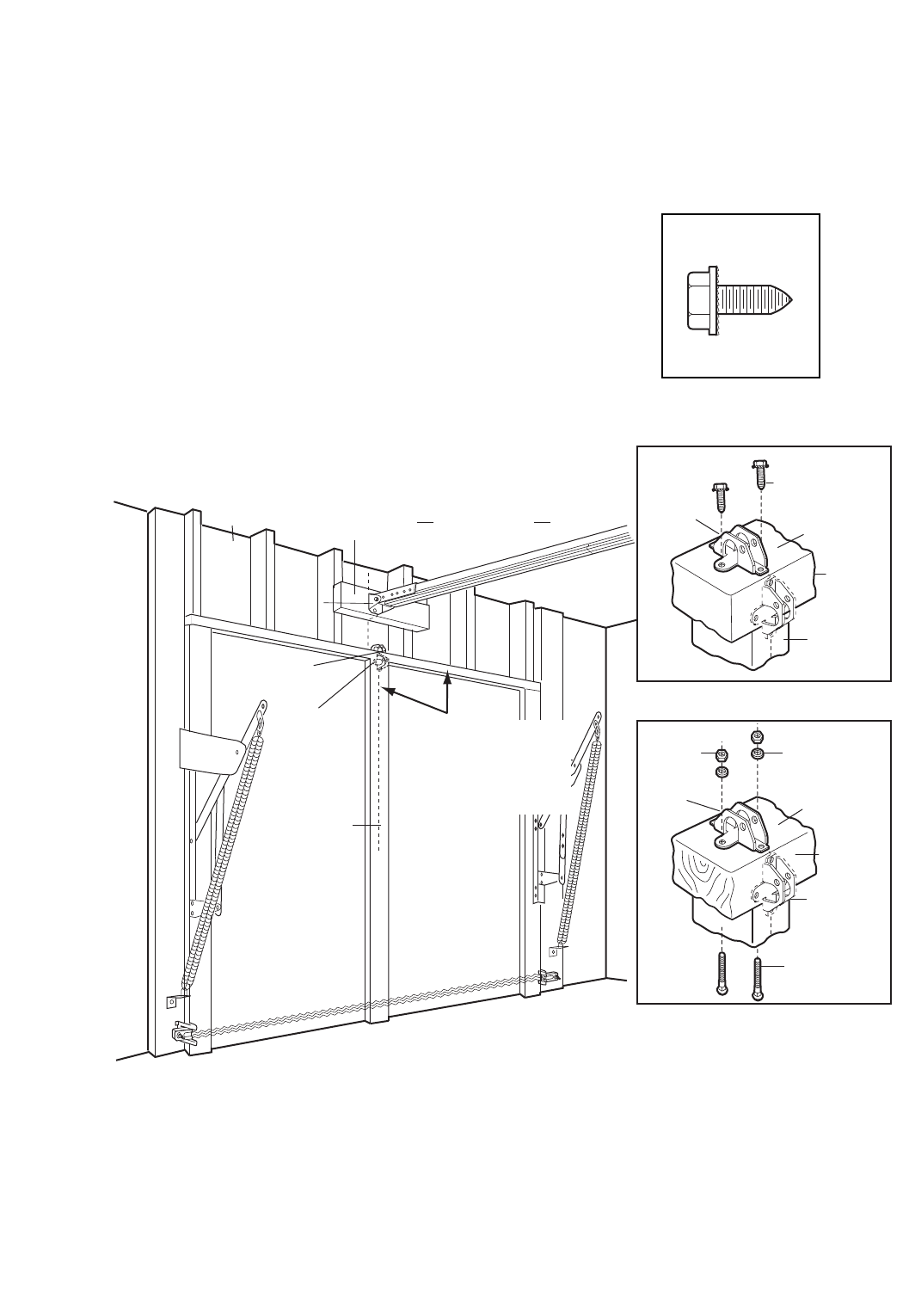
Fasten the Door Bracket
Follow instructions which apply to your door type
as illustrated below or on the following page.
A horizontal reinforcement brace should be long
enough to be secured to two or three vertical
supports. A vertical reinforcement brace should
cover the height of the top panel.
Figure 1 shows one piece of angle iron as the horizontal
brace. For the vertical brace, 2 pieces of angle iron are
used to create a U-shaped support. The best solution is
to check with your garage door manufacturer for an
opener installation door reinforcement kit.
NOTE: Many door reinforcement kits provide for direct
attachment of the clevis pin and door arm. In this case
you will not need the door bracket; proceed to Step 13.
SECTIONAL DOORS
1. Center the door bracket on the previously marked
vertical centerline used for the header bracket
installation. Note correct UP placement, as stamped
inside the bracket.
2. Position the top edge of the bracket 2"-4" (5-10 cm)
below the top edge of the door, OR directly below any
structural support across the top of the door.
3. Mark, drill holes and install as follows, depending on
your door’s construction:
Metal or light weight doors using a vertical angle
iron brace between the door panel support and the
door bracket:
• Drill 3/16" fastening holes. Secure the door bracket
using the two 1/4"-14x5/8" self-threading screws
(Figure 2A).
• Alternately, use two 5/16" bolts, lock washers and nuts
(not provided) (Figure 2B).
Metal, insulated or light weight factory reinforced
doors:
• Drill 3/16" fastening holes. Secure the door bracket
using the self-threading screws (Figure 3).
Wood Doors:
• Use top and bottom or side to side door bracket holes.
Drill 5/16" holes through the door and secure bracket
with 5/16"x2" carriage bolts, lock washers and nuts
(not provided) (Figure 4).
NOTE: The 1/4"-14x5/8" self-threading screws are not
intended for use on wood doors.
Door
Bracket
Vertical
Centerline
of Garage Door
UP
Vertical
Reinforcement
Self-Threading
Screw
1/4"-14x5/8"
Door
Bracket
Nut
5/16"-18
Bolt
5/16"-18x2"
Lock Washer
5/16"
UP
Vertical
Reinforcement
(Not Provided)
Vertical
Centerline
of Garage Door
Figure 1
Figure 2A
Figure 2B
Self-Threading
Screw
1/4"-14x5/8"
HARDWARE
SHOWN
ACTUAL SIZE
Figure 3
Vertical
Centerline
of Garage
Door
Door
Bracket
Location
Header
Bracket
HORIZONTAL AND VERTICAL
REINFORCEMENT IS NEEDED
FOR LIGHTWEIGHT GARAGE
DOORS (FIBERGLASS,
ALUMINUM, STEEL, DOORS
WITH GLASS PANEL, ETC.).
(NOT PROVIDED)
UP
Inside Edge
of Door or
Reinforcement Board
Bolt
5/16"x2"
(Not Provided)
Vertical
Centerline
of Garage
Door
Figure 4
Fiberglass, aluminum or lightweight steel garage doors WILL
REQUIRE reinforcement BEFORE installation of door bracket.
Contact your door manufacturer for reinforcement kit.
WARNING
CAUTION WARNING
WARNING
Header Wall
Vertical
Centerline of
Garage Door
Finished Ceiling
Optional
Placement
of Door
Bracket
Header
Bracket
Door
Bracket
2x4 Support
For a door with no exposed framing,
or for the optional installation, use
lag screws 5/16"x1-1/2" (Not Provided)
to fasten door bracket.
METAL DOOR
Top of Door
(Inside
Garage)
Door
Bracket
Optional
Placement
Top Edge
of Door
Self-Threading
Screw
1/4"-14x5/8"
Door
Bracket
Top of Door
(Inside
Garage)
Carriage Bolt
5/16"x2"
(Not Provided)
Optional
Placement
Lock
Washer
5/16"
Nut
5/16"-18
Top Edge
of Door
WOOD DOOR
HORIZONTAL AND VERTICAL
REINFORCEMENT IS NEEDED
FOR LIGHTWEIGHT GARAGE
DOORS (FIBERGLASS,
ALUMINUM, STEEL, DOORS
WITH GLASS PANEL, ETC.).
(NOT PROVIDED)
20
ONE-PIECE DOORS
Please read and comply with the warnings and
reinforcement instructions on the previous page. They
apply to one-piece doors also.
• Center the door bracket on the top of the door, in line
with the header bracket as shown. Mark either the left
and right, or the top and bottom holes.
•Metal Doors: Drill 3/16" pilot holes and fasten the
bracket with the 1/4"-14x5/8" self-threading screws
provided.
•Wood Doors: Drill 5/16" holes and use 5/16"x2"
carriage bolts, lock washers and nuts (not provided) or
5/16"x1-1/2" lag screws (not provided) depending on
your installation needs.
NOTE: The door bracket may be installed on the top
edge of the door if required for your installation (refer to
the dotted line optional placement drawing).
Self-Threading Screw
1/4"-14x5/8"
HARDWARE SHOWN
ACTUAL SIZE
21
Cut this end
Lock
Washers
5/16"
Nuts
5/16"-18
Bolts
5/16"-18x7/8"
Door Bracket
Ring
Fastener
Door
Bracket
Straight
Door Arm
Curved Door Arm
Inner
Trolley
Outer
Trolley
Emergency
Release
Handle
Clevis Pin
5/16"x1"
Clevis Pin
5/16"x1-1/4"
Lock
Washers
5/16"
Nuts
5/16"-18
Bolts
5/16"-18x7/8"
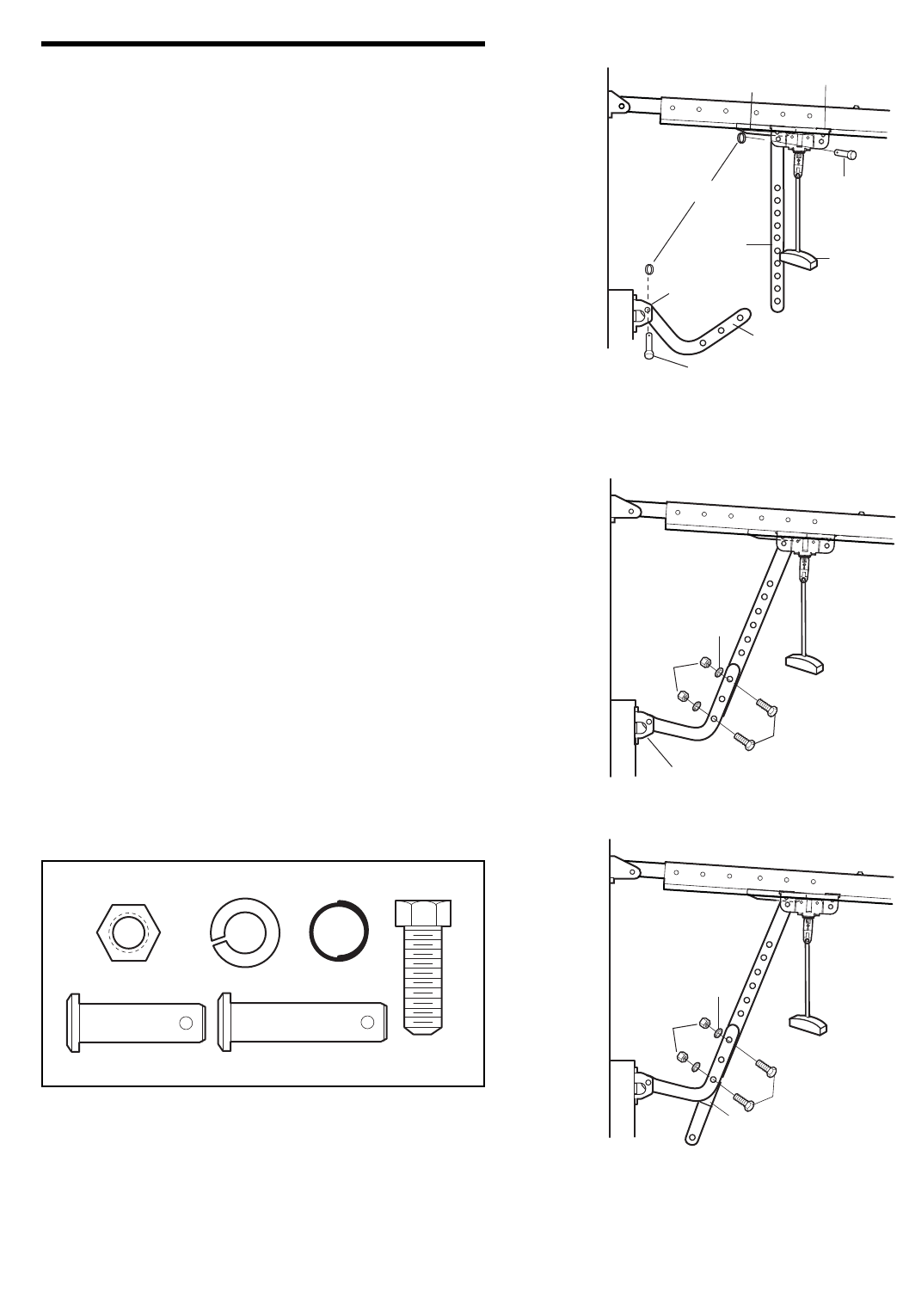
INSTALLATION STEP 13
Connect Door Arm to Trolley
Follow instructions which apply to your door type as
illustrated below and on the following page.
SECTIONAL DOORS ONLY
• Make sure garage door is fully closed. Pull the
emergency release handle to disconnect the outer
trolley from the inner trolley. Slide the outer trolley back
(away from the door) about 2" (5 cm) as shown in
Figures 1, 2 and 3.
• Figure 1:
– Fasten straight door arm section to outer trolley with
the 5/16"x1" clevis pin. Secure the connection with a
ring fastener.
– Fasten curved section to the door bracket in the
same way, using the 5/16"x1-1/4" clevis pin.
• Figure 2:
– Bring arm sections together. Find two pairs of holes
that line up and join sections. Select holes as far
apart as possible to increase door arm rigidity.
• Figure 3, Hole alignment alternative:
– If holes in curved arm are above holes in straight
arm, disconnect straight arm. Cut about 6" (15 cm)
from the solid end. Reconnect to trolley with cut end
down as shown.
– Bring arm sections together.
– Find two pairs of holes that line up and join with
bolts, lock washers and nuts.
• Pull the emergency release handle toward the opener
at a 45° angle so that the trolley release arm is
horizontal. Proceed to Adjustment Step 1, page 23.
Trolley will re-engage automatically when opener is
operated.
Figure 1
Figure 2
Figure 3
Lock Washer 5/16"
Nut 5/16"-18 Ring Fastener
Hex Bolt
5/16"-18x7/8"
Clevis Pin
5/16"x1" (Trolley)
Clevis Pin
5/16"x1-1/4" (Door Bracket)
HARDWARE SHOWN ACTUAL SIZE
22
Closed
Door
Outer Trolley
Outer Trolley
Door Arm
Emergency
Release Handle
Door Arm
Connector Hole
Open Door
Door with
Backward Slant
(Incorrect)
Correct Angle
Inner Trolley
Inner Trolley
Door Arm
Connector Hole
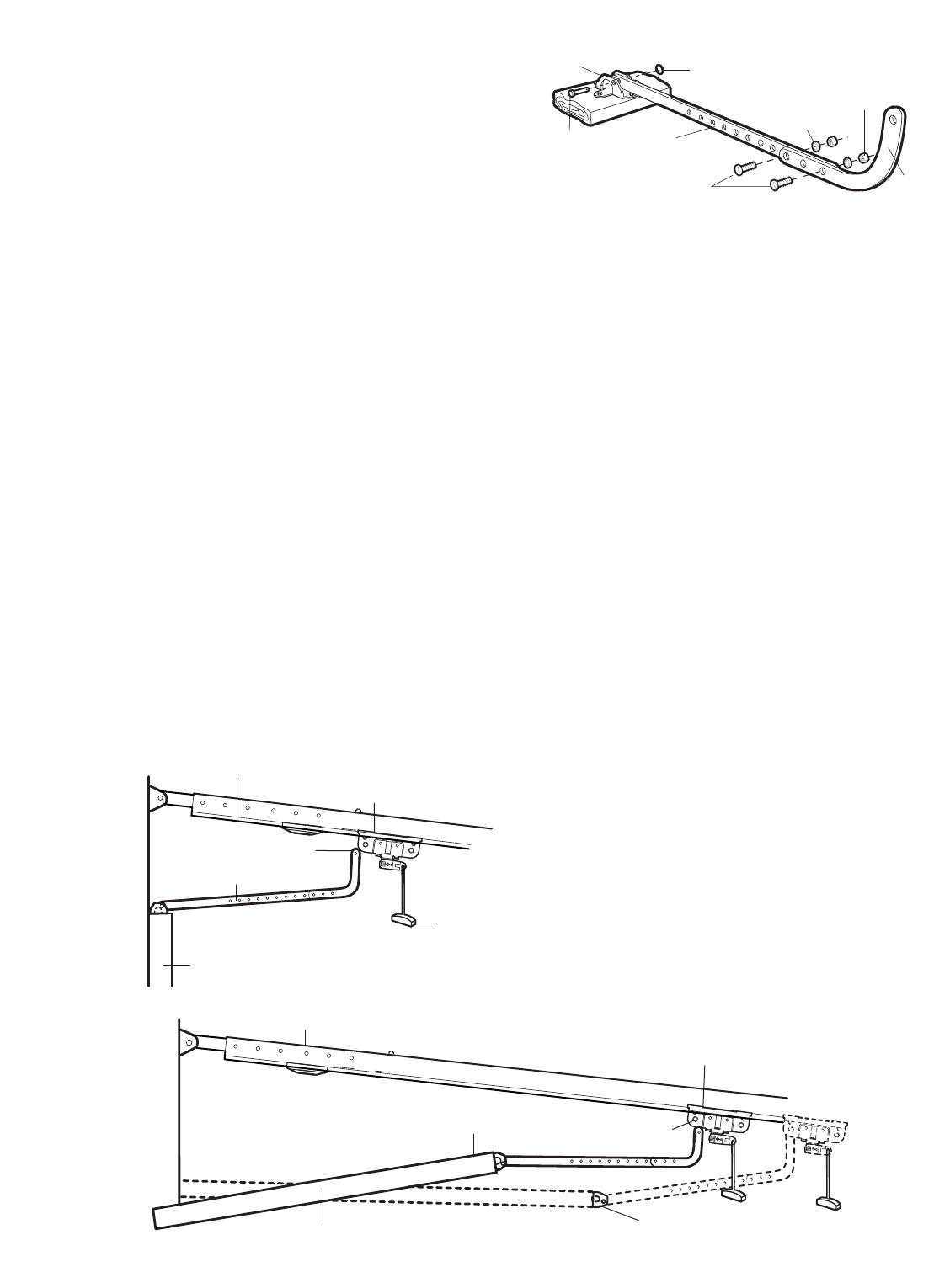
ALL ONE-PIECE DOORS
1. Assemble the door arm, Figure 4:
• Fasten the straight and curved door arm sections
together to the longest possible length (with a 2 or 3
hole overlap).
• With the door closed, connect the straight door arm
section to the door bracket with the
5/16"x1-1/4" clevis pin.
• Secure with a ring fastener.
2. Adjustment procedures, Figure 5:
• On one-piece doors, before connecting the door arm
to the trolley, the travel limits must be adjusted. Limit
adjustment screws are located on the left side panel
as shown on page 23. Follow adjustment procedures
below.
• Open door adjustment: decrease UP travel limit
– Turn the UP limit adjustment screw
counter-clockwise 4 turns.
– Press the Door Control push button. The trolley will
travel to the fully open position.
– Manually raise the door to the open position
(parallel to the floor), and lift the door arm to the
trolley. The arm should touch the trolley just in back
of the door arm connector hole. Refer to the fully
open trolley/door arm positions in the illustration. If
the arm does not extend far enough, adjust the limit
further. One full turn equals 2" (5 cm) of trolley
travel.
• Closed door adjustment: decrease DOWN travel
limit
– Turn the DOWN limit adjustment screw clockwise
4 complete turns.
Nuts
5/16"-18
Lock
Washers
5/16"
Ring
Fastener
Straight
Arm
Bolts
5/16"-18x7/8
Door
Bracket
Clevis Pin
5/16"x1-1/4"
Curved
Door Arm
– Press the Door Control push button. The trolley will
travel to the fully closed position.
– Manually close the door and lift the door arm to the
trolley. The arm should touch the trolley just ahead
of the door arm connector hole. Refer to the fully
closed trolley/door arm positions in the illustration. If
the arm is behind the connector hole, adjust the limit
further. One full turn equals 2" (5 cm) of trolley
travel.
3. Connect the door arm to the trolley:
• Close the door and join the curved arm to the
connector hole in the trolley with the remaining clevis
pin. It may be necessary to lift the door slightly to
make the connection.
• Secure with a ring fastener.
• Run the opener through a complete travel cycle. If the
door has a slight “backward” slant in full open position
as shown in the illustration, decrease the UP limit until
the door is parallel to the floor.
NOTE: When setting the up limit on the following page,
the door should not have a “backward” slant when fully
open as illustrated below. A slight backward slant will
cause unnecessary bucking and/or jerking operation as
the door is being opened or closed from the fully open
position.
Figure 4
Figure 5
23
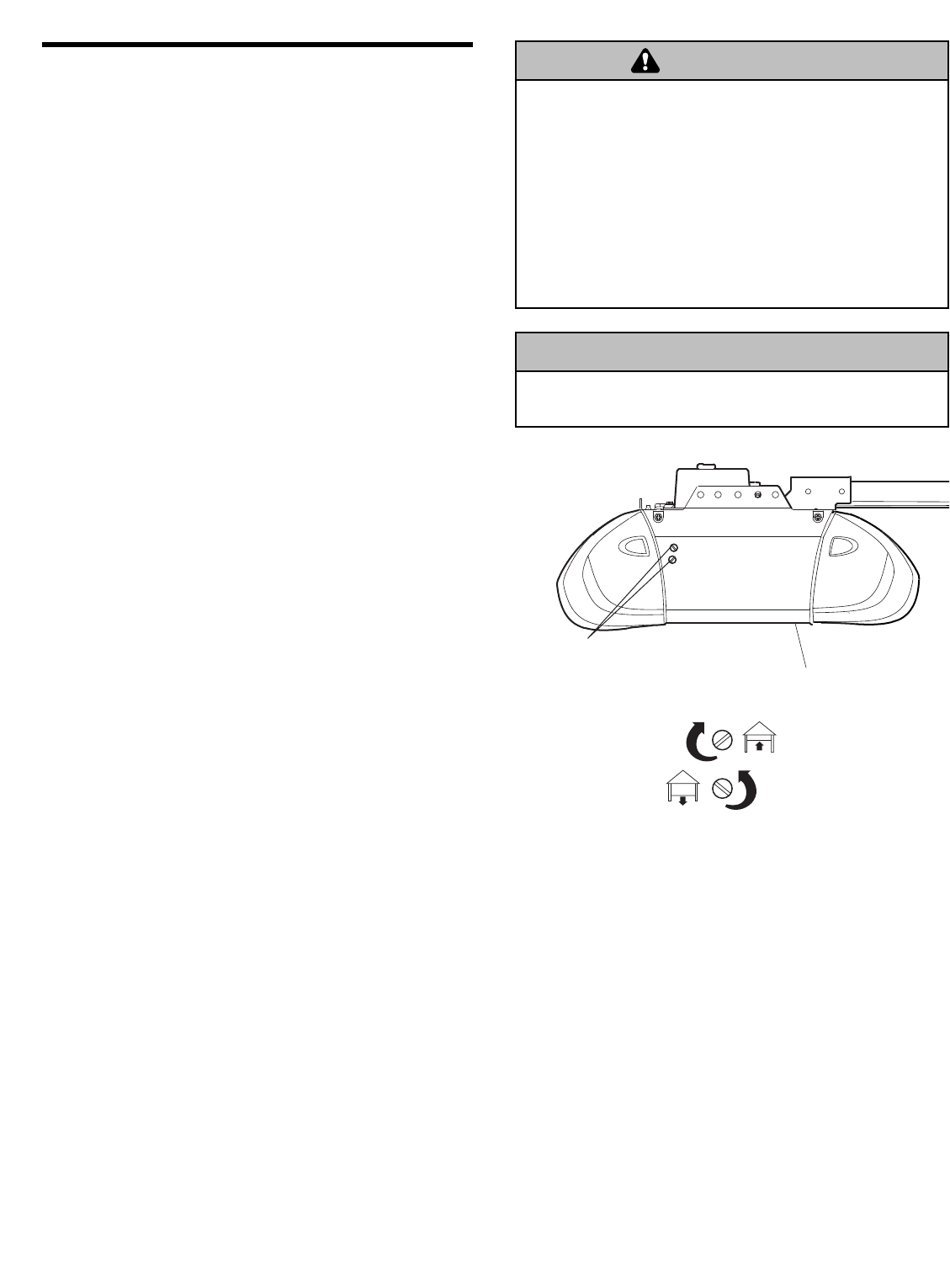
ADJUSTMENT STEP 1
Adjust the UP and DOWN Travel Limits
Limit adjustment settings regulate the points at which the
door will stop when moving up or down.
To operate the opener, press the Door Control push bar.
Run the opener through a complete travel cycle.
• Does the door open and close completely?
• Does the door stay closed and not reverse
unintentionally when fully closed?
If your door passes both of these tests, no limit
adjustments are necessary unless the reversing test fails
(Adjustment Step 3, page 25).
Adjustment procedures are outlined below. Read the
procedures carefully before proceeding to Adjustment
Step 2. Use a screwdriver to make limit adjustments.
Run the opener through a complete travel cycle after
each adjustment.
NOTE: Repeated operation of the opener during
adjustment procedures may cause the motor to overheat
and shut off. Simply wait 15 minutes and try again. If
anything interferes with the door’s upward travel, it will
stop. If anything interferes with the door’s downward
travel (including binding or unbalanced doors), it will
reverse.
HOW AND WHEN TO ADJUST THE LIMITS
• If the door does not open completely but opens at
least 5 feet (1.5 m):
Increase up travel. Turn the UP limit adjustment screw
clockwise. One turn equals 2" (5 cm) of travel.
NOTE: To prevent the trolley from hitting the cover
protection bolt, keep a minimum distance of 2-4"
(5-10 m) between the trolley and the bolt.
• If door does not open at least 5 feet (1.5 m):
Adjust the UP (open) force as explained in Adjustment
Step 2.
• If the door does not close completely:
Increase down travel. Turn the down limit adjustment
screw counterclockwise. One turn equals 2" (5 cm) of
travel.
If door still won’t close completely and the trolley
bumps into the pulley bracket (page 4), try lengthening
the door arm (page 21) and decreasing the down limit.
• If the opener reverses in fully closed position:
Decrease down travel. Turn the down limit adjustment
screw clockwise. One turn equals 2" (5 cm) of travel.
Without a properly installed safety reversal system, persons
(particularly small children) could be SERIOUSLY INJURED
or KILLED by a closing garage door.
• Incorrect adjustment of garage door travel limits will
interfere with proper operation of safety reversal system.
• If one control (force or travel limits) is adjusted, the other
control may also need adjustment.
• After ANY adjustments are made, the safety reversal system
MUST be tested. Door MUST reverse on contact with 1-1/2"
(3.8 cm) high object (or 2x4 laid flat) on floor.
• If the door reverses when closing and there is no
visible interference to travel cycle:
If the opener lights are flashing, the Safety Reversing
Sensors are either not installed, misaligned, or
obstructed. See Troubleshooting, page 18.
Test the door for binding: Pull the emergency release
handle. Manually open and close the door. If the door
is binding or unbalanced, call for a trained door
systems technician. If the door is balanced and not
binding, adjust the DOWN (close) force. See
Adjustment Step 2.
WARNING
CAUTION WARNING
WARNING
To prevent damage to vehicles, be sure fully open door
provides adequate clearance.
WARNING
CAUTION WARNING
WARNING
ADJUSTMENT LABEL
Left Side Panel
Limit Adjustment Screws
24
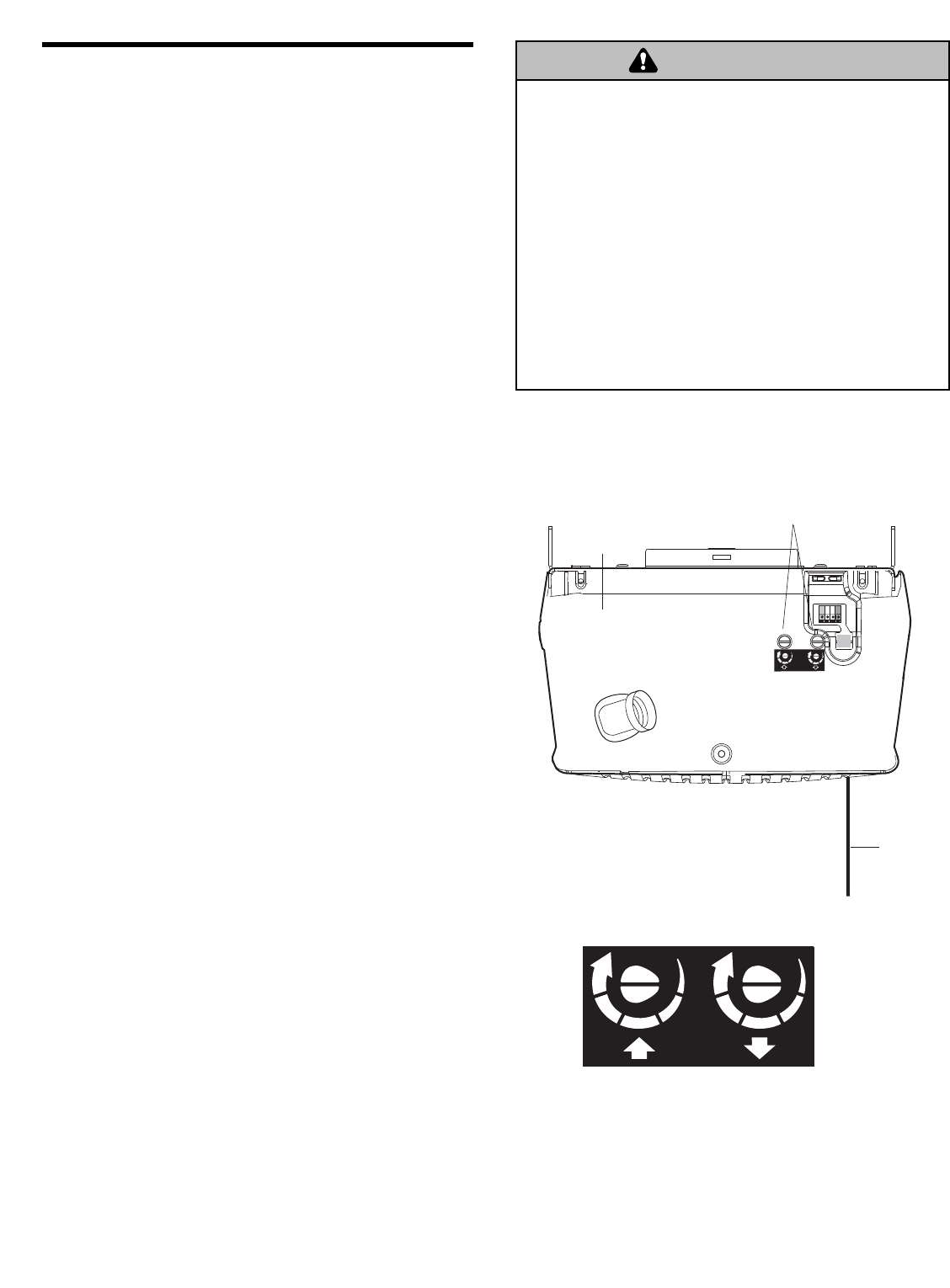
ADJUSTMENT STEP 2
Adjust the Force
Force adjustment controls are located on the back panel
of the motor unit. Force adjustment settings regulate the
amount of power required to open and close the door.
If the forces are set too light, door travel may be
interrupted by nuisance reversals in the down direction
and stops in the up direction. Weather conditions can
affect the door movement, so occasional adjustment may
be needed.
The maximum force adjustment range is about 3/4 of
a complete turn. Do not force controls beyond that
point. Turn force adjustment controls with a screwdriver.
NOTE: If anything interferes with the door’s upward
travel, it will stop. If anything interferes with the door’s
downward travel (including binding or unbalanced doors),
it will reverse.
HOW AND WHEN TO ADJUST THE FORCES
1. Test the DOWN (close) force
• Grasp the door bottom when the door is about halfway
through DOWN (close) travel. The door should
reverse. Reversal halfway through down travel does
not guarantee reversal on a 1-1/2" (3.8 cm)
obstruction. See Adjustment Step 3, page 25. If the
door is hard to hold or doesn’t reverse, DECREASE
the DOWN (close) force by turning the control
counterclockwise. Make small adjustments until the
door reverses normally. After each adjustment, run the
opener through a complete cycle.
• If the door reverses during the down (close) cycle
and the opener lights aren’t flashing, INCREASE
DOWN (close) force by turning the control clockwise.
Make small adjustments until the door completes a
close cycle. After each adjustment, run the opener
through a complete travel cycle. Do not increase the
force beyond the minimum amount required to close
the door.
2. Test the UP (open) force
• Grasp the door bottom when the door is about halfway
through UP (open) travel. The door should stop. If the
door is hard to hold or doesn’t stop, DECREASE
UP (open) force by turning the control
counterclockwise. Make small adjustments until the
door stops easily and opens fully. After each
adjustment, run the opener through a complete travel
cycle.
• If the door doesn’t open at least 5 feet (1.5 m),
INCREASE UP (open) force by turning the control
clockwise. Make small adjustments until door opens
completely. Readjust the UP limit if necessary. After
each adjustment, run the opener through a complete
travel cycle.
Without a properly installed safety reversal system, persons
(particularly small children) could be SERIOUSLY INJURED
or KILLED by a closing garage door.
• To much force on garage door will interfere with proper
operation of safety reversal system.
• NEVER increase force beyond minimum amount required to
close garage door.
• NEVER use force adjustments to compensate for a binding
or sticking garage door.
• If one control (force or travel limits) is adjusted, the other
control may also need adjustment.
• After ANY adjustments are made, the safety reversal system
MUST be tested. Door MUST reverse on contact with 1-1/2"
(3.8 cm) high object (or 2x4 laid flat) on floor.
WARNING
CAUTION WARNING
WARNING
Force
Adjustment
Controls
Back Panel
FORCE ADJUSTMENT LABEL
KG KG
1
3
9
7
5
1
3
9
7
5
KG KG
Antenna
Open Force Close Force
25
Without a properly installed safety reversal system, persons
(particularly small children) could be SERIOUSLY INJURED
or KILLED by a closing garage door.
• Safety reversal system MUST be tested every month.
• If one control (force or travel limits) is adjusted, the other
control may also need adjustment.
• After ANY adjustments are made, the safety reversal system
MUST be tested. Door MUST reverse on contact with 1-1/2"
(3.8 cm) high object (or 2x4 laid flat) on the floor.
ADJUSTMENT STEP 3
Test the Safety Reversal System
TEST
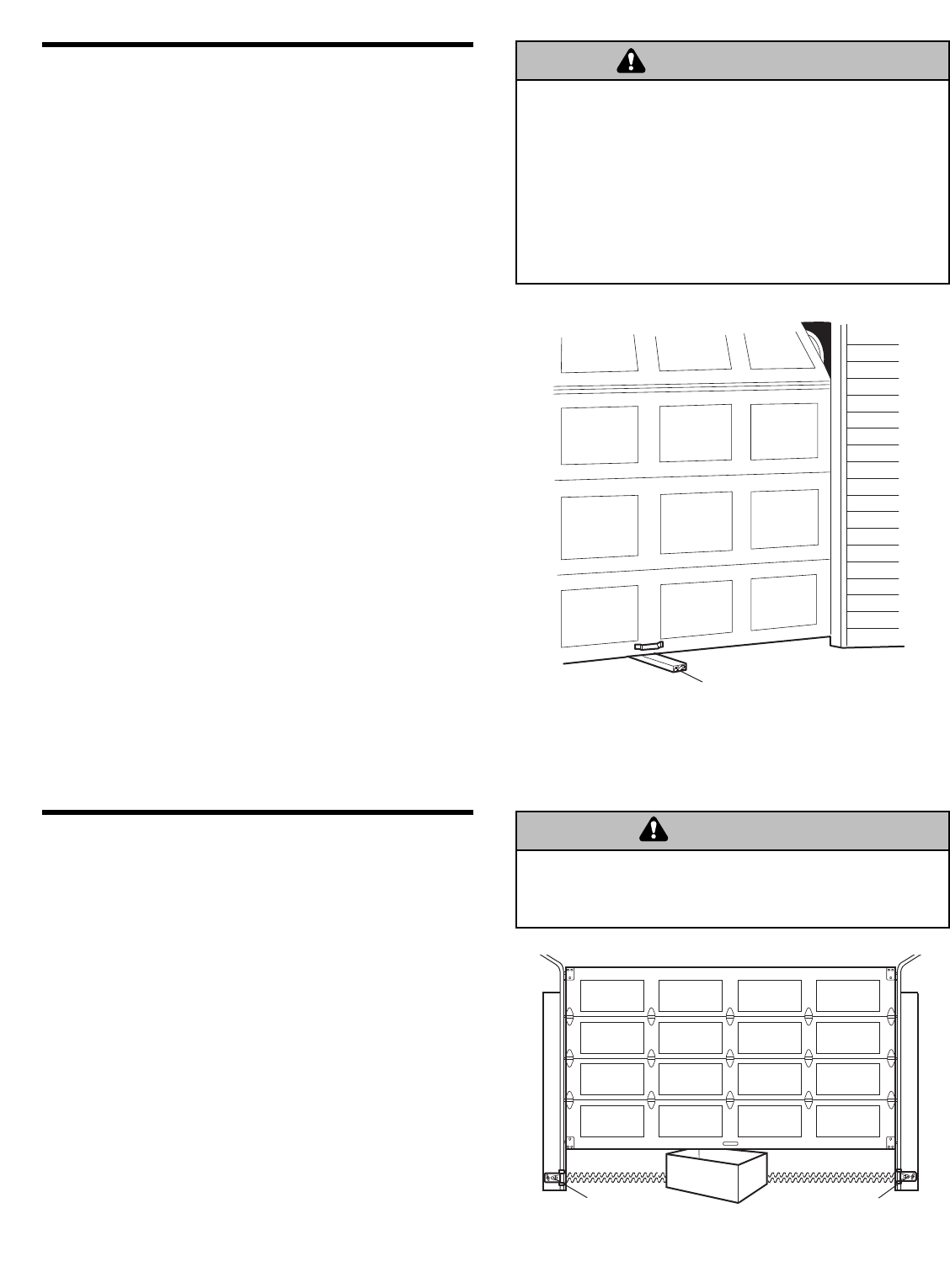
• With the door fully open, place a 1-1/2" (3.8 cm) board
(or a 2x4 laid flat) on the floor, centered under the
garage door.
• Operate the door in the down direction. The door must
reverse on striking the obstruction.
ADJUST
• If the door stops on the obstruction, it is not traveling
far enough in the down direction. Increase the DOWN
limit by turning the DOWN limit adjustment screw
counterclockwise 1/4 turn.
NOTE: On a sectional door, make sure limit
adjustments do not force the door arm beyond a
straight up and down position. See the illustration on
page 21.
• Repeat the test.
• When the door reverses on the 1-1/2" (3.8 cm) board,
remove the obstruction and run the opener through 3
or 4 complete travel cycles to test adjustment.
IMPORTANT SAFETY CHECK:
Test the Safety Reverse System after:
• Each adjustment of door arm length, limits, or force
controls.
• Any repair to or adjustment of the garage door
(including springs and hardware).
• Any repair to or buckling of the garage floor.
• Any repair to or adjustment of the opener.
ADJUSTMENT STEP 4
Test the Protector System®
• Press the remote control push button to open the door.
• Place the opener carton in the path of the door.
• Press the remote control push button to close the door.
The door will not move more than an inch (2.5 cm),
and the opener lights will flash.
The garage door opener will not close from a remote if
the indicator light in either sensor is off (alerting you to
the fact that the sensor is misaligned or obstructed).
If the opener closes the door when the safety
reversing sensor is obstructed (and the sensors are
no more than 6" (15 cm) above the floor), call for a
trained door systems technician.
Safety Reversing Sensor Safety Reversing Sensor
Without a properly installed safety reversing sensor, persons
(particularly small children) could be SERIOUSLY INJURED
or KILLED by a closing garage door.
WARNING
CAUTION WARNING
WARNING
WARNING
CAUTION WARNING
WARNING
1-1/2" (3.8 cm) board
(or a 2x4 laid flat)
26
OPERATION
To reduce the risk of SEVERE INJURY or DEATH:
Using Your Garage Door Opener
Your Security✚®opener and hand-held remote control
have been factory-set to a matching code which changes
with each use, randomly accessing over 100 billion new
codes. Your opener will operate with up to eight
Security✚®remote controls and one Security✚®Keyless
Entry System. If you purchase a new remote, or if you
wish to deactivate any remote, follow the instructions in
the Programming section.
Activate your opener with any of the following:
•The hand-held Remote Control: Hold the large push
button down until the door starts to move.
•The wall-mounted Door Control: Hold the push button
or bar down until the door starts to move.
•The Keyless Entry (See Accessories): If provided with
your garage door opener, it must be programmed
before use. See Programming.
When the opener is activated (with the safety
reversing sensor correctly installed and aligned):
1. If open, the door will close. If closed, it will open.
2. If closing, the door will reverse.
3. If opening, the door will stop.
4. If the door has been stopped in a partially open
position, it will close.
5. If obstructed while closing, the door will reverse. If the
obstruction interrupts the sensor beam, the opener
lights will blink for five seconds.
6. If obstructed while opening, the door will stop.
7. If fully open, the door will not close when the beam is
broken. The sensor has no effect in the opening cycle.
If the sensor is not installed, or is misaligned, the door
won’t close from a hand-held remote. However, you can
close the door with the Door Control, the Outside
Keylock, or Keyless Entry, if you activate them until down
travel is complete. If you release them too soon, the door
will reverse.
The opener lights will turn on under the following
conditions: when the opener is initially plugged in; when
power is restored after interruption; when the opener is
activated.
They will turn off automatically after 4-1/2 minutes or
provide constant light when the Light feature on the
Multi-Function Door Control is activated. Bulb size is A19.
Bulb power is 100 watts maximum.
Security
✚
®light feature: Lights will also turn on when
someone walks through the open garage door. With a
Multi-Function Door Control, this feature may be turned
off as follows: With the opener lights off, press and hold
the light button for 10 seconds, until the light goes on,
then off again. To restore this feature, start with the
opener lights on, then press and hold the light button for
10 seconds until the light goes off, then on again.
WARNING
WARNING
WARNING
1. READ AND FOLLOW ALL WARNINGS AND INSTRUCTIONS.
2. ALWAYS keep remote controls out of reach of children.
NEVER permit children to operate or play with garage door
control push buttons or remote controls.
3. ONLY activate garage door when it can be seen clearly, it is
properly adjusted, and there are no obstructions to door
travel.
4. ALWAYS keep garage door in sight until completely closed.
NO ONE SHOULD CROSS THE PATH OF THE MOVING
DOOR.
5. NO ONE SHOULD GO UNDER A STOPPED, PARTIALLY OPEN
DOOR.
6. If possible, use emergency release handle to disengage
trolley ONLY when garage door is CLOSED. Weak or broken
springs or unbalanced door could result in an open door
falling rapidly and/or unexpectedly.
7. NEVER use emergency release handle unless garage
doorway is clear of persons and obstructions.
8. NEVER use handle to pull garage door open or closed. If
rope knot becomes untied, you could fall.
9. If one control (force or travel limits) is adjusted, the other
control may also need adjustment.
10. After ANY adjustments are made, the safety reversal system
MUST be tested.
11. Safety reversal system MUST be tested every month.
Garage door MUST reverse on contact with 1-1/2"
(3.8 cm) high object (or a 2 x 4 laid flat) on the floor.
12. ALWAYS KEEP GARAGE DOOR PROPERLY BALANCED
(see page 3). An improperly balanced door may not reverse
when required and could result in SEVERE INJURY or
DEATH.
13. ALL repairs to cables, spring assemblies and other
hardware, ALL of which are under EXTREME tension, MUST
be made by a trained door systems technician.
14. ALWAYS disconnect electric power to garage door opener
BEFORE making ANY repairs or removing covers.
15. SAVE THESE INSTRUCTIONS.
IMPORTANT SAFETY INSTRUCTIONS
27
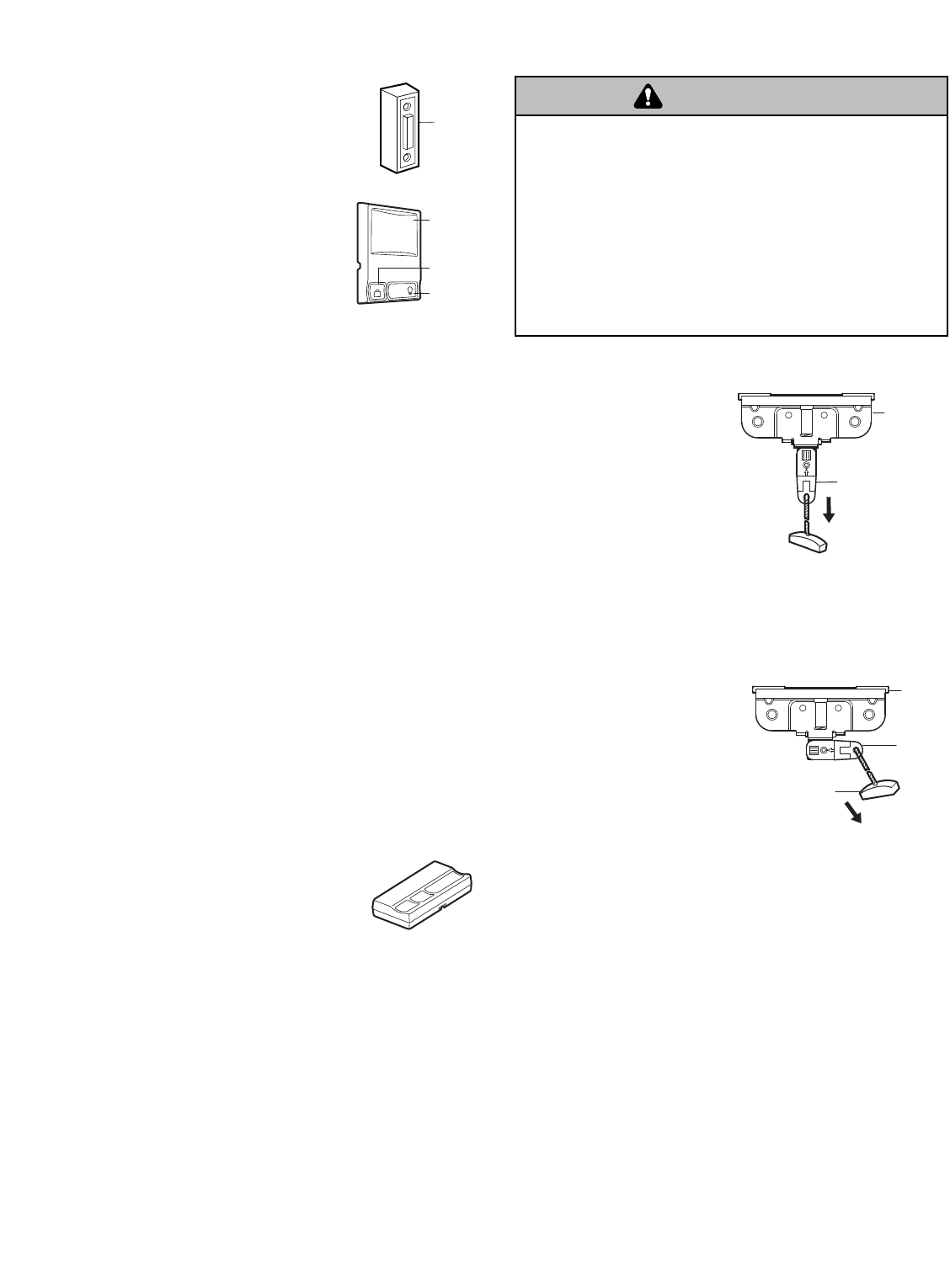
To Open the Door Manually
DISCONNECT TROLLEY:
The door should be fully
closed if possible. Pull down
on the emergency release
handle (so that the trolley
release arm snaps into a
vertical position) and lift the
door manually.
The lockout feature prevents
the trolley from reconnecting
automatically, and the door
can be raised and lowered
manually as often as necessary.
TO RE-CONNECT THE TROLLEY:
Pull the emergency release
handle toward the opener at
a 45° angle so that the
trolley release arm is
horizontal. The trolley will
reconnect on the next UP or
DOWN operation, either
manually or by using the
door control or remote.
To prevent possible SERIOUS INJURY or DEATH from a
falling garage door:
• If possible, use emergency release handle to disengage
trolley ONLY when garage door is CLOSED. Weak or broken
springs or unbalanced door could result in an open door
falling rapidly and/or unexpectedly.
• NEVER use emergency release handle unless garage
doorway is clear of persons and obstructions.
• NEVER use handle to pull door open or closed. If rope knot
becomes untied, you could fall.
Using the Wall-Mounted
Door Control
Press the push button to open or close the
door. Press again to reverse the door
during the closing cycle or to stop the door
while it’s opening.
THE MULTI-FUNCTION DOOR
CONTROL
Press the push bar to open or close the
door. Press again to reverse the door
during the closing cycle or to stop the
door while it’s opening.
Light feature
Press the Light button to turn the opener light on or off. It
will not control the opener lights when the door is in
motion. If you turn it on and then activate the opener, the
light will remain on for 4-1/2 minutes. Press again to turn
it off sooner. The 4-1/2 minute interval can be changed to
1-1/2, 2-1/2, or 3-1/2 minutes as follows: Press and hold
the Lock button until the light blinks (about 10 seconds).
A single blink indicates that the timer is reset to 1-1/2
minutes. Repeat the procedure and the light will blink
twice, resetting the timer to 2-1/2 minutes. Repeat again
for a 3-1/2 minute interval, etc., up to a maximum of four
blinks and 4-1/2 minutes.
Lock feature
Designed to prevent operation of the door from
hand-held remote controls. However, the door will open
and close from the Door Control, the Outside Keylock
and the Keyless Entry Accessories.
To activate, press and hold the Lock button for 2
seconds. The push bar light will flash as long as the Lock
feature is on.
To turn off, press and hold the Lock button again for
2 seconds.The push bar light will stop flashing. The Lock
feature will also turn off whenever the “Learn” button on
the motor unit panel is activated.
Additional features when used with the
3-Button hand-held remote
To control the opener lights:
In addition to operating the door, you may
program the remote to operate the lights.
1. With the door closed, press and hold a small remote
button that you want to control the light.
2. Press and hold the Light button on the
Multi-Function door control.
3. While holding the Light button, press and hold the Lock
button on the door control.
4. After the opener lights flash, release all buttons.
LOCK
LIGHT
Push
Button
Lock
Button
Light
Button
WARNING
CAUTION WARNING
WARNING
TO RECONNECT
LOCKOUT POSITION
(MANUAL DISCONNECT)
Push
Button
NOTICE
Emergency
Release Handle
(Pull at 45° angle)
Trolley
Release
Arm
Trolley
NOTICE
Trolley Release
Arm (in Manual
Disconnect Position)
Trolley
28
CARE OF YOUR OPENER
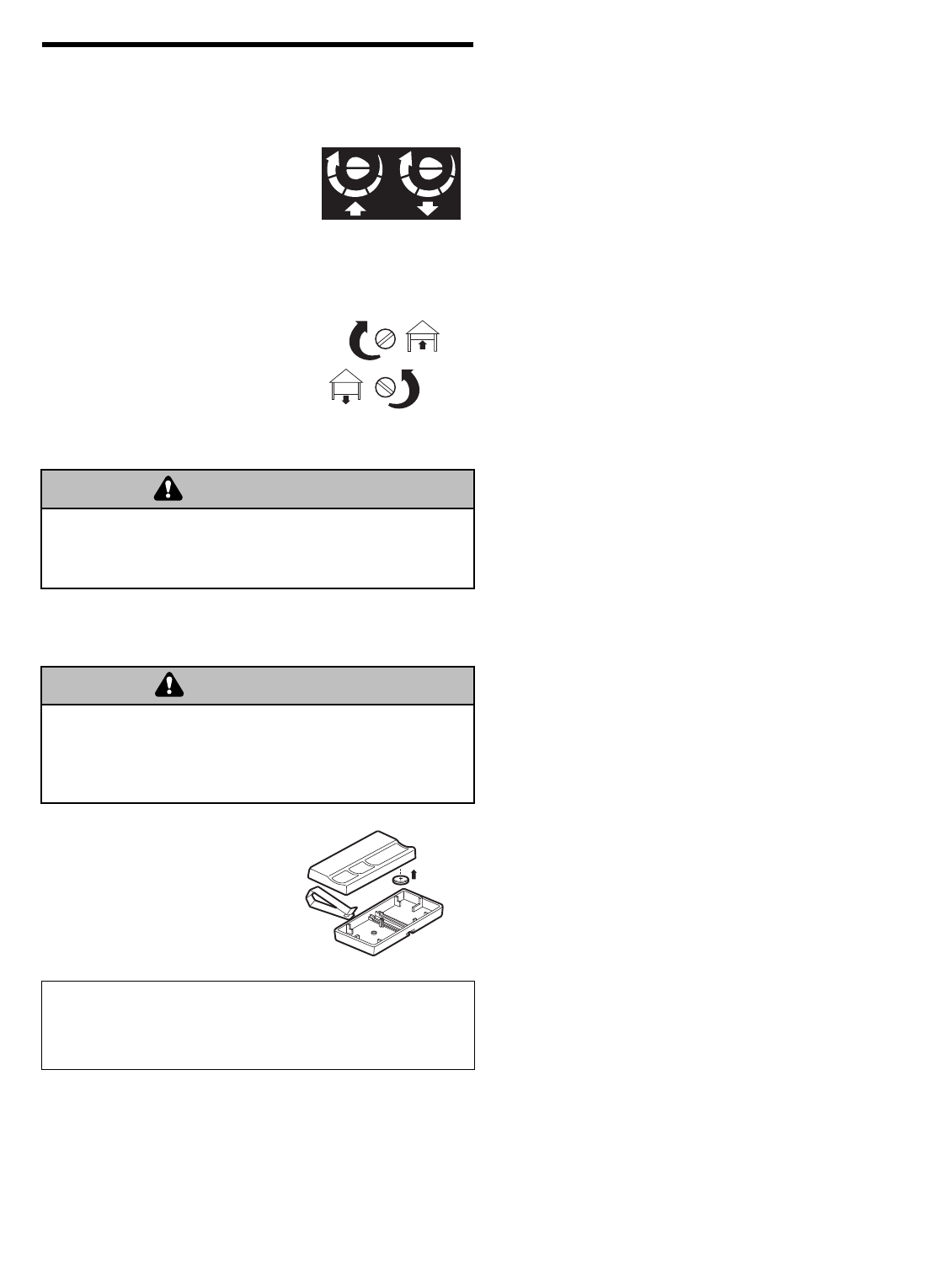
LIMIT AND FORCE ADJUSTMENTS:
Weather conditions may cause
some minor changes in door
operation requiring some re-
adjustments, particularly during the
first year of operation.
Pages 23 and 24 refer to the limit
and force adjustments. Only a
screwdriver is required. Follow the
instructions carefully.
Repeat the safety reverse test
(Adjustment Step 3, page 25) after
any adjustment of limits or force.
MAINTENANCE SCHEDULE
Once a Month
• Manually operate door. If it is unbalanced or binding,
call a trained door systems technician.
• Check to be sure door opens & closes fully. Adjust
limits and/or force if necessary. See pages 23 and 24.
• Repeat the safety reverse test. Make any necessary
adjustments. See Adjustment Step 3.
Once a Year
• Oil door rollers, bearings and hinges. The opener does
not require additional lubrication. Do not grease the
door tracks.
FORCE CONTROLS
1
3
9
7
5
1
3
9
7
5
KG KG
LIMIT CONTROLS
THE REMOTE CONTROL BATTERY
The lithium battery should produce power for up to
5 years.
NOTICE: To comply with FCC and or Industry Canada rules (IC), adjustment or modifications of
this receiver and/or transmitter are prohibited, except for changing the code setting or replacing
the battery. THERE ARE NO OTHER USER SERVICEABLE PARTS.
Tested to Comply with FCC Standards FOR HOME OR OFFICE USE. Operation is subject to the
following two conditions: (1) this device may not cause harmful interference, and (2) this device
must accept any interference received, including interference that may cause undesired operation.
To prevent possible SERIOUS INJURY or DEATH:
• NEVER allow small children near batteries.
• If battery is swallowed, immediately notify doctor.
WARNING
CAUTION WARNING
WARNING
Battery
positive
side up (+)
To reduce risk of fire, explosion or chemical burn:
• Replace ONLY with 3V2032 coin batteries.
• Do NOT recharge, disassemble, heat above 100°C (212°F)
or incinerate.
WARNING
CAUTION WARNING
WARNING
To replace battery, use the visor
clip or screwdriver blade to pry
open the case as shown. Insert
battery positive side up (+).
Dispose of old battery properly.
Replace the battery with only
3V2032 coin cell batteries.
29
HAVING A PROBLEM?
1. My door will not close and the light bulbs blink on
my motor unit: The safety reversing sensor must be
connected and aligned correctly before the garage
door opener will move in the down direction.
•Verify the safety sensors are properly installed,
aligned and free of any obstructions. Refer to
Installation Step 10: Install The Protector System®.
• Check diagnostic LED for flashes on the motor unit
then refer to the Diagnostic Chart on the following
page.
2. My remotes will not activate the door:
•Verify your Premium door control is not blinking. If it
is blinking, deactivate the Lock Mode following the
instructions for Using the Multi-Function Door
Control.
• Reprogram remotes following the programming
instructions. Refer to Programming.
• If remote will still not activate your door, check
diagnostic LED for flashes on motor unit then refer to
Diagnostic Chart on the following page.
3. My door reverses for no apparent reason: Repeat
safety reverse test after adjustments to force or travel
limits. The need for occasional adjustment for the force
and limit settings is normal. Weather conditions in
particular can affect door travel.
• Manually check door for balance or any binding
problems.
• Refer to Adjustment Step 2, Adjust the Force.
4. My door reverses for no apparent reason after fully
closing and touching the floor: Repeat safety
reverse test after adjustments to force or travel limits.
The need for occasional adjustment for the force and
limit settings is normal. Weather conditions in particular
can affect door travel.
• Refer to Adjustment Step 1, Adjust the UP and
DOWN Travel Limits. Decrease down travel by
turning down limit adjustment screw clockwise.
Receiving Eye Safety Reversing
Sensor (Green Indicator Light)
Sending Eye Safety Reversing
Sensor (Amber Indicator Light)
5. My lights will not turn off when door is open:
• The garage door opener is equipped with a security
light feature. This feature activates the light on when
the safety sensor beam has been obstructed. Refer
to Operation section; Using the Wall Mounted Door
Control, Light Feature.
KG KG
LED or
Diagnostic
LED
"Learn"
Button
Diagnostics
Located On
Motor Unit
Safety Reversing Sensor
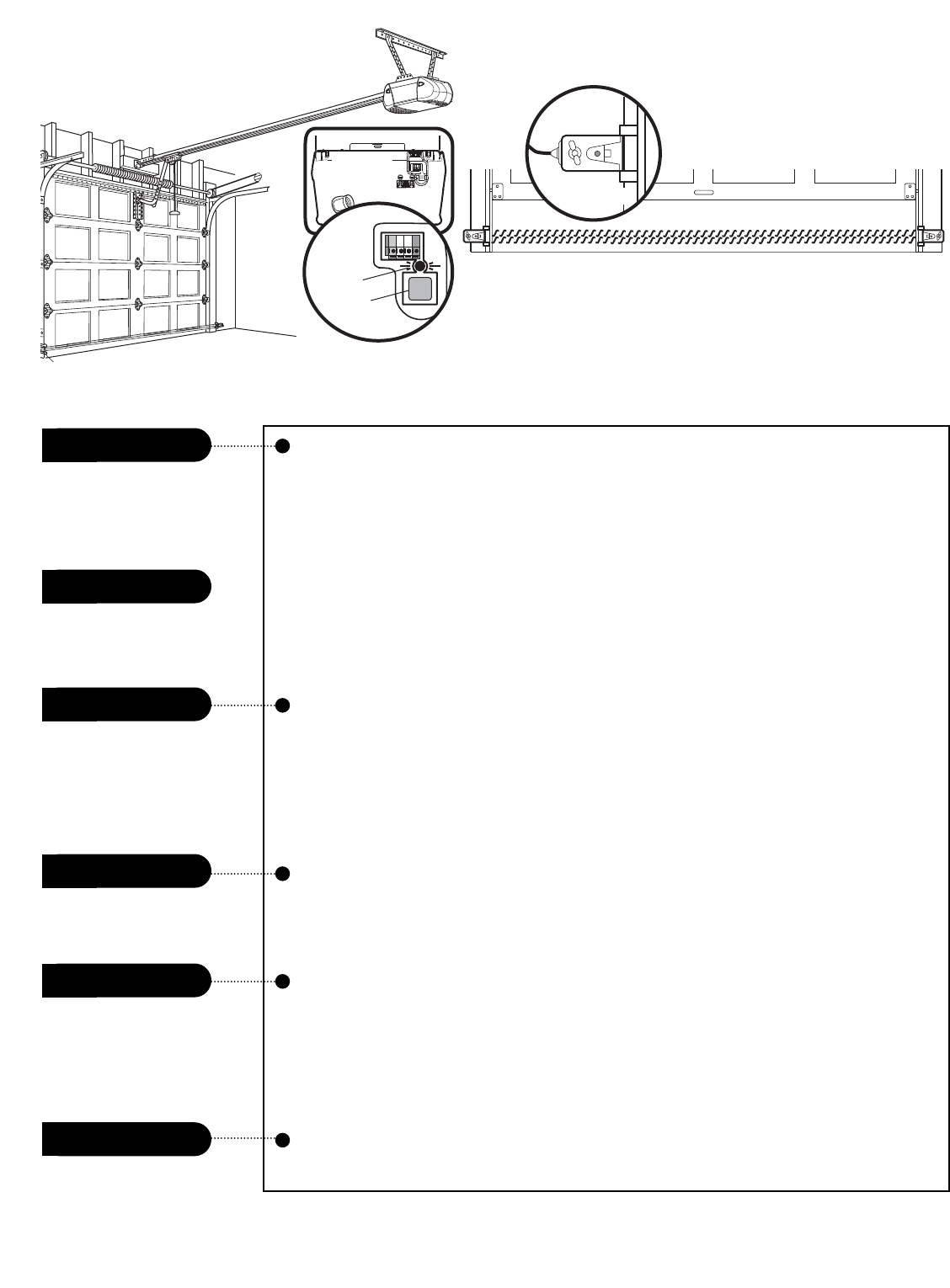
30
Diagnostic Chart
Symptom: One or both of the Indicator lights on the safety sensors do not
glow steady.
• Inspect sensor wires for a short (staple in wire), correct wiring polarity (black/white
wires reversed), broken or disconnected wires, replace/attach as needed.
• Disconnect all wires from back of motor unit.
• Remove sensors from brackets and shorten sensor wires to 1-2 ft (30-60 cm) from
back each of sensor.
• Reattach sending eye to motor unit using shortened wires. If sending eye indicator
light glows steadily, attach the receiving eye.
• Align sensors, if the indicator lights glow replace the wires for the sensors. If the
sensor indicator lights do not light, replace the safety sensors.
Symptom: LED is not lit on door control.
• Inspect door control/wires for a short (staple in wire), replace as needed.
• Disconnect wires at door control, touch wires together. If motor unit activates,
replace door control.
• If motor unit does not activate, disconnect door control wires from motor unit.
Momentarily short across red and white terminals with jumper wire. If motor unit
activates, replace door control wires.
Symptom: Sending indicator light glows steadily, receiving indicator light is
dim or flashing.
• Realign receiving eye sensor, clean lens and secure brackets.
•Verify door track is firmly secured to wall and does not move.
Symptom: Motor has over heated; the motor unit does not operate;
RPM Sensor = Short travel 6-8" (15-20 cm).
• Unplug unit to reset. Try to operate motor unit, check diagnostic code.
• If it is still flashing 5 times and motor unit moves 6-8" (15-20 cm), replace RPM
sensor.
• If motor unit doesn’t operate, motor unit is overheated. Wait 30 minutes and retry.
If motor unit still will not operate replace logic board.
Symptom: Motor unit doesn’t operate.
• Replace logic board because motor rarely fails.
Motor Circuit Failure.
Replace Receiver
Logic Board.
Motor overheated or
possible RPM sensor
failure. Unplug to reset.
Safety reversing sensors
slightly misaligned
(dim or flashing LED).
Door control or wire
shorted.
Safety reversing sensors
wire shorted or
black/white wire reversed.
Safety reversing sensors
wire open (broken or
disconnected).
1 FLASH
2 FLASHES
3 FLASHES
4 FLASHES
5 FLASHES
6 FLASHES
OR
Installed
Safety Reversing
Sensor
KG KG
LED or
Diagnostic
LED
"Learn"
Button
Diagnostics
Located On
Motor Unit
Safety Reversing Sensor
Your garage door opener is programmed with self-diagnostic
capabilities. The “Learn” button/diagnostic LED will flash a
number of times then pause signifying it has found a potential
issue. Consult Diagnostic Chart below.
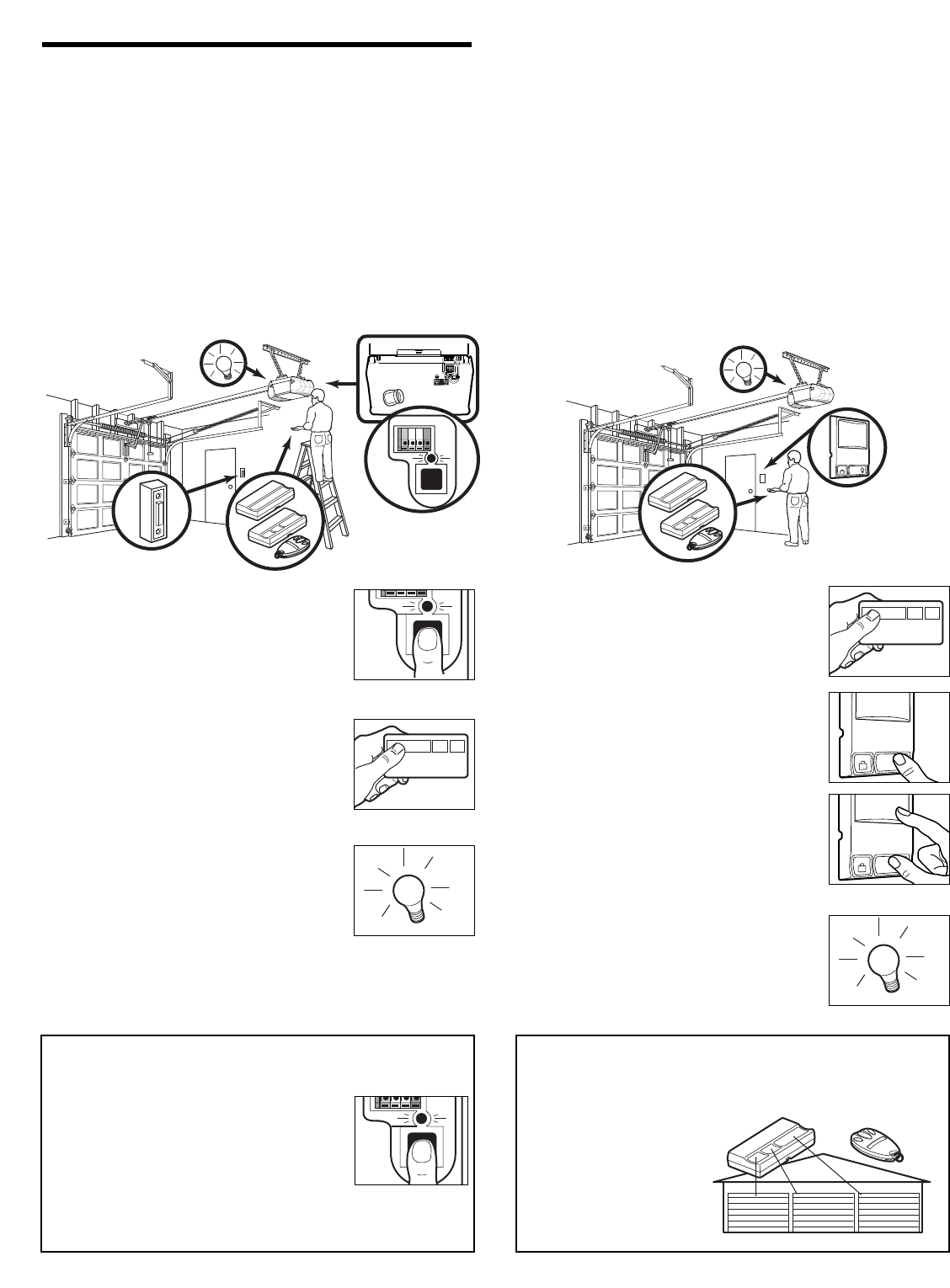
31
*3-Button Remotes
If provided with your garage door opener, the large button
is factory programmed to operate it. Additional buttons on
any Security✚®3-button
remote or mini-remote can
be programmed to operate
other Security✚®garage
door openers.
To Erase All Codes From Motor Unit
Memory
To deactivate any unwanted remote, first
erase all codes:
Press and hold the “learn” button on motor
unit until the learn indicator light goes out
(approximately 6 seconds). All previous
codes are now erased. Reprogram each remote or
keyless entry you wish to use.
1. Press and hold the button on the
hand-held remote*that you wish to
operate your garage door.
2. While holding the remote button,
press and hold the LIGHT button on
the Multi-Function Door Control.
3. Continue holding both buttons while
you press the push bar on the Multi-
Function Door Control (all three
buttons are held).
4. Release buttons when the motor unit
lights blink. It has learned the code. If
light bulbs are not installed, two clicks
will be heard.
1. Press and release the “learn” button
on the motor unit. The learn indicator
light will glow steadily for 30 seconds.
2. Within 30 seconds, press and hold the
button on the hand-held remote*that
you wish to operate your garage door.
3. Release the button when the motor
unit lights blink. It has learned the
code. If light bulbs are not installed,
two clicks will be heard.
To Add and Reprogram an Additional Hand-held Remote Control
USING THE “LEARN” BUTTON USING THE MULTI-FUNCTION DOOR CONTROL
LOCK
LIGHT
LOCK
LIGHT
PROGRAMMING
Your garage door opener has already been programmed at the factory to operate with your hand-held remote control.
The door will open and close when you press the large push button.
Below are instructions for programming your opener to operate with additional Security✚®remote controls.
NOTICE: If this Security
✚
®garage door opener is operated with a non-rolling code transmitter, the technical measure in
the receiver of the garage door opener, which provides security against code-theft devices, will be circumvented. The
owner of the copyright in the garage door opener does not authorize the purchaser or supplier of the non-rolling code
transmitter to circumvent that technical measure.
KG
1
3
9
7
5
KG
1
3
9
7
5
LOCK
LIGHT
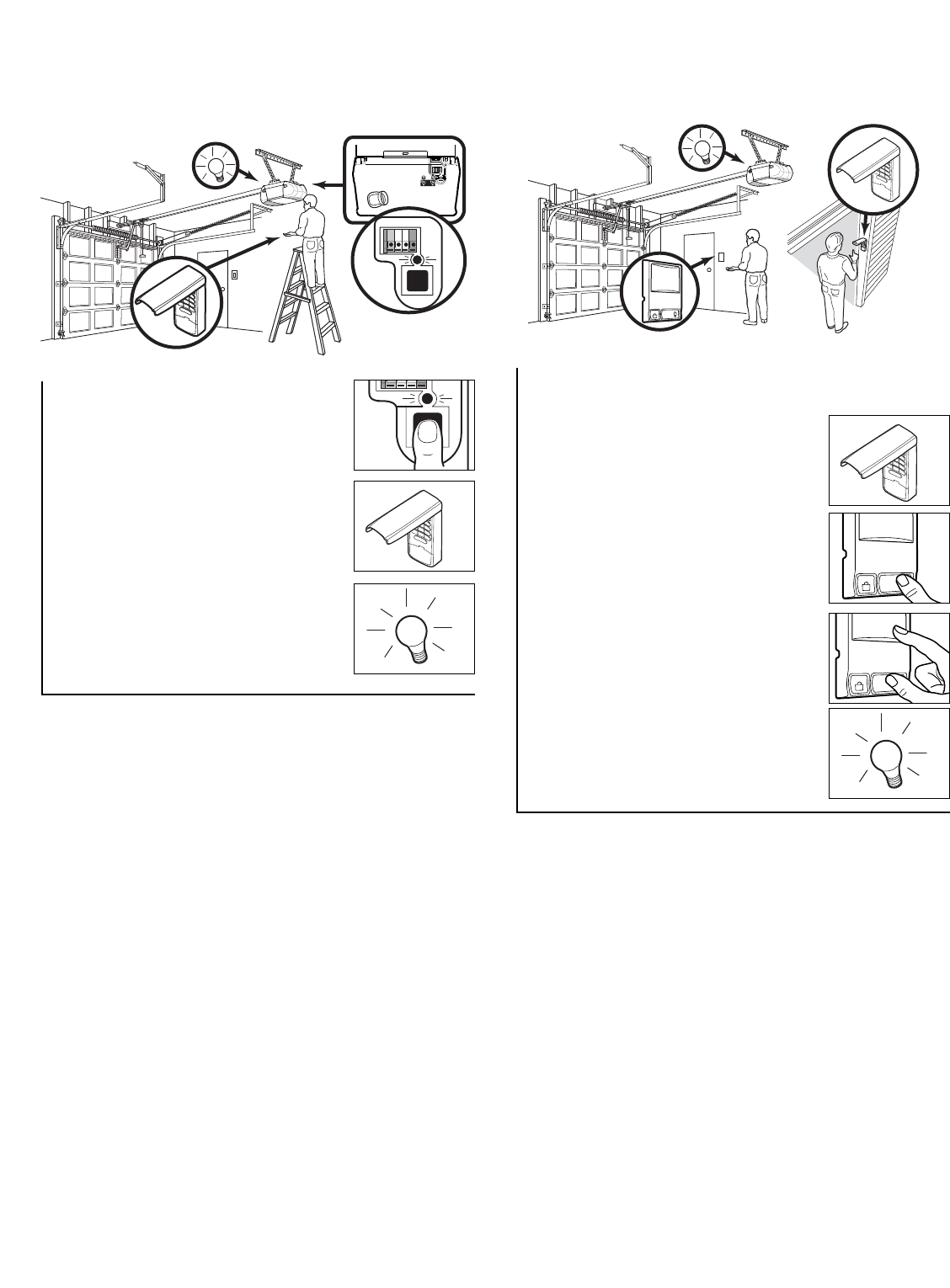
32
1. Enter a four digit personal
identification number (PIN) of your
choice on the keypad. Then press
and hold ENTER.
2. While holding the ENTER button,
press and hold the LIGHT button
on the Multi-Function Door
Control.
3. Continue holding the ENTER and
LIGHT buttons while you press
the push bar on the Multi-Function
Door Control (all three buttons are
held).
4. Release buttons when the motor
unit lights blink. It has learned the
code. If light bulbs are not
installed, two clicks will be heard.
To Add, Reprogram or Change a Keyless Entry PIN
NOTE: Your new Keyless Entry must be programmed to operate your garage door opener.
USING THE “LEARN” BUTTON USING THE MULTI-FUNCTION DOOR CONTROL
NOTE: This method requires two people if the Keyless
Entry is already mounted outside the garage.
LOCK
LIGHT
LOCK
LIGHT
To change an existing, known PIN
If the existing PIN is known, it may be changed by one
person without using a ladder.
1. Press the four buttons for the present PIN, then press
and hold the # button.
The opener light will blink twice. Release the # button.
2. Press the new 4-digit PIN you have chosen, then
press Enter.
The motor unit lights will blink once when the PIN has been
learned.
Test by pressing the new PIN, then press Enter. The door
should move.
To set a temporary PIN
You may authorize access by visitors or service people with
a temporary 4-digit PIN. After a programmed number of
hours or number of accesses, this temporary PIN expires
and will no longer open the door. It can be used to close the
door even after it has expired. To set a temporary PIN:
1. Press the four buttons for your personal entry PIN
(not the last temporary PIN), then press and hold the
✽button.
The opener light will blink three times. Release the
button.
2. Press the temporary 4-digit PIN you have chosen, then
press Enter.
The opener light will blink four times.
3. To set the number of hours this temporary PIN will work,
press the number of hours (up to 255), then press ✽.
OR
3. To set the number of times this temporary PIN will work,
press the number of times (up to 255), then press #.
The opener light will blink once when the temporary PIN has
been learned.
Test by pressing the four buttons for the temporary PIN,
then press Enter. The door should move. If the temporary
PIN was set to a certain number of openings, remember
that the test has used up one opening.To clear the
temporary password, repeat steps 1-3, setting the number
of hours or times to 0 in step 3.
One Button Close: Opener can be closed by pressing only the ENTER button if the one button close feature has been
activated. This feature has been activated at the factory. To activate or deactivate this feature press and hold buttons 1
and 9 for 10 seconds. The keypad will blink twice when the one button close is active. The keypad will blink four times
when one button close is deactivated.
1. Press and release the “learn” button
on motor unit. The learn indicator
light will glow steadily for 30
seconds.
2. Within 30 seconds, enter a four digit
personal identification number (PIN)
of your choice on the keypad. Then
press and hold the ENTER button.
3. Release the button when the motor
unit lights blink. It has learned the
code. If light bulbs are not installed,
two clicks will be heard.
LOCK
LIGHT
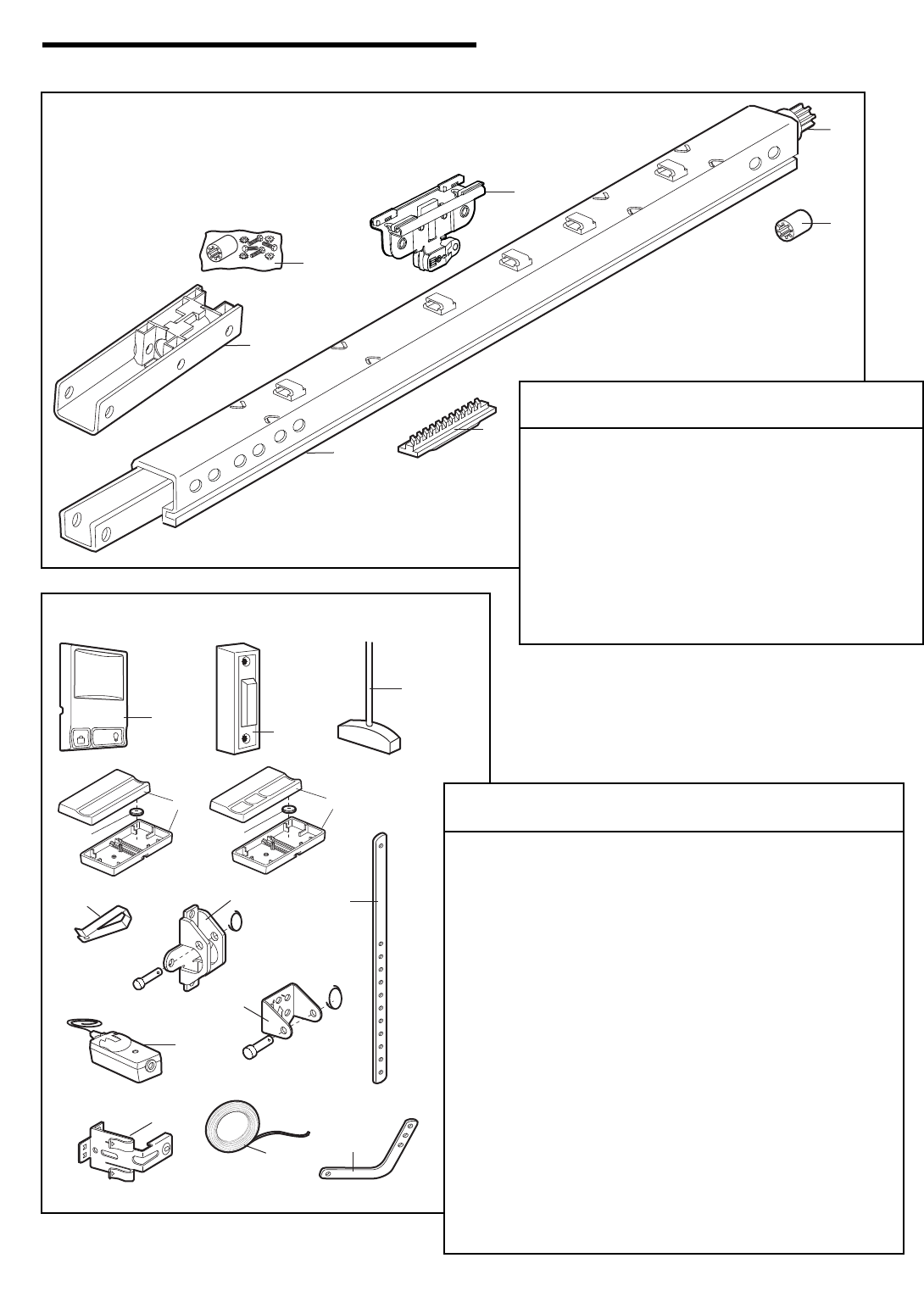
33
1
6
2
3
5
4
7
9
3
NOTICE
7
UP
CEILING MOUNT ONLY
10
14
8
1
11
12
LOCK
LIGHT
4
6
5
6
2
13
KEY PART
NO. NO. DESCRIPTION
1 41A5273-1 Multi-function door control (3240)
2 41A4166 Lighted door control button (3130)
3 41A2828 Emergency release rope & handle
4 371LM 1-button remote control (3130)
5 373LM 3-button remote control (3240)
6 10A20 3V 2032 Lithium battery (1 required)
7 29B137 Visor clip
8 41A5047 Door bracket w/clevis pin & fastener
9 178B34 Straight door arm section
10 41A4353 Header bracket w/clevis pin & fastener
11 41A5034 Safety sensor kit: receiving and sending
eyes with 3' (.9 m) 2-conductor bell wire
attached
12 41A5266-1 Safety sensor bracket
13 41B4494-1 2-Conductor bell wire: white & white/red
14 178B35 Curved door arm section
NOT SHOWN
41A4675-7 Installation hardware bag (see page 5)
114A3331 Owner’s manual
114A3331SP Owner’s manual-Spanish
Installation Parts
REPAIR PARTS
Rail Assembly Parts
KEY PART
NO. NO. DESCRIPTION
1 41A6353 Hardware bag
(includes sprocket coupling)
2 81C275 Rack
3 41A6262 Complete trolley assembly
4 3077SD Screw Drive one-piece rail 7' (2.1 m)
5 41A4836 Drive sprocket kit
6 25C20 Acolpe
7 41A6312 Rail End Bracket
NOT SHOWN
28A143 Rail Wire Clips
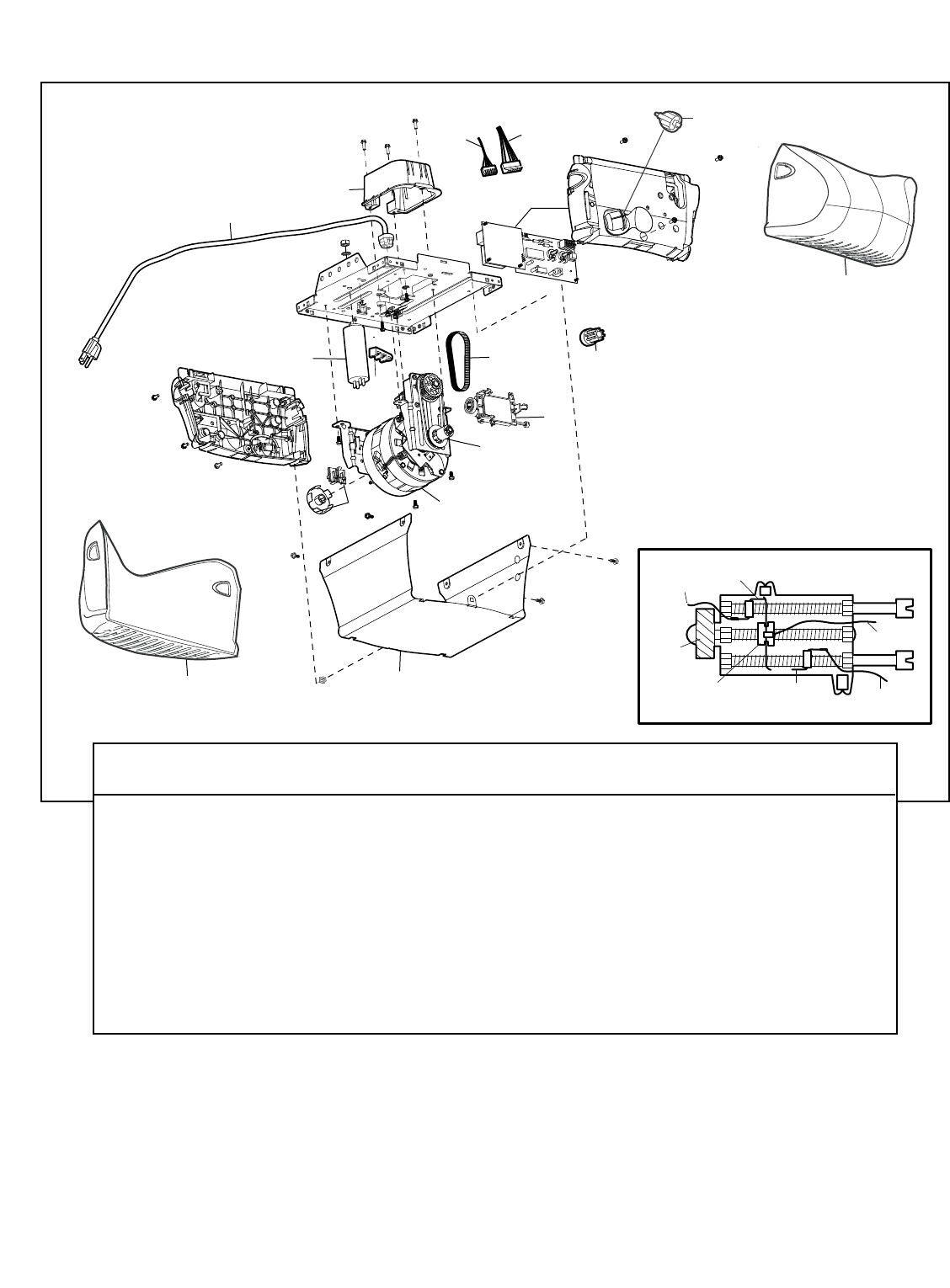
2
1
11
3
5
8
7
4
6a
6
12
13
14
14
10
99a
34
Motor Unit Assembly Parts
KEY PART
NO. NO. DESCRIPTION
1 31C568 Drive shaft cover
2 41B4245 Line cord
3 30B620 Capacitor – 1/2 HP
30B638 Capacitor – 1/3 HP
4 41A3150 Terminal block w/screws
5 41D4671 Limit switch assembly
6 41A6241 Motor drive assy. complete
6a 20B21-1 Drive belt
7 41C4672 Screw drive RPM kit
KEY PART
NO. NO. DESCRIPTION
8 41A4837-1 Worm gear and retainer
9 41A6335 Low voltage wire harness
9a 41A6334 High voltage wire harness
10 41AS050R1 Receiver logic board (3130)
41AS050R2 Receiver logic board (3240)
11 41A5525-57 Cover (Model 3130)
41A5525-53 (Model 3240)
12 41C22-1 Drive coupling hub
13 175B88 Light socket
14 108D79 Light lens
DN
UP
Brown
Wire
(Down)
Contact LIMIT SWITCH ASSY.
Grey
Wire
Yellow
Wire
(Up)
Contact
Center Limit
Contact
Drive
Gear
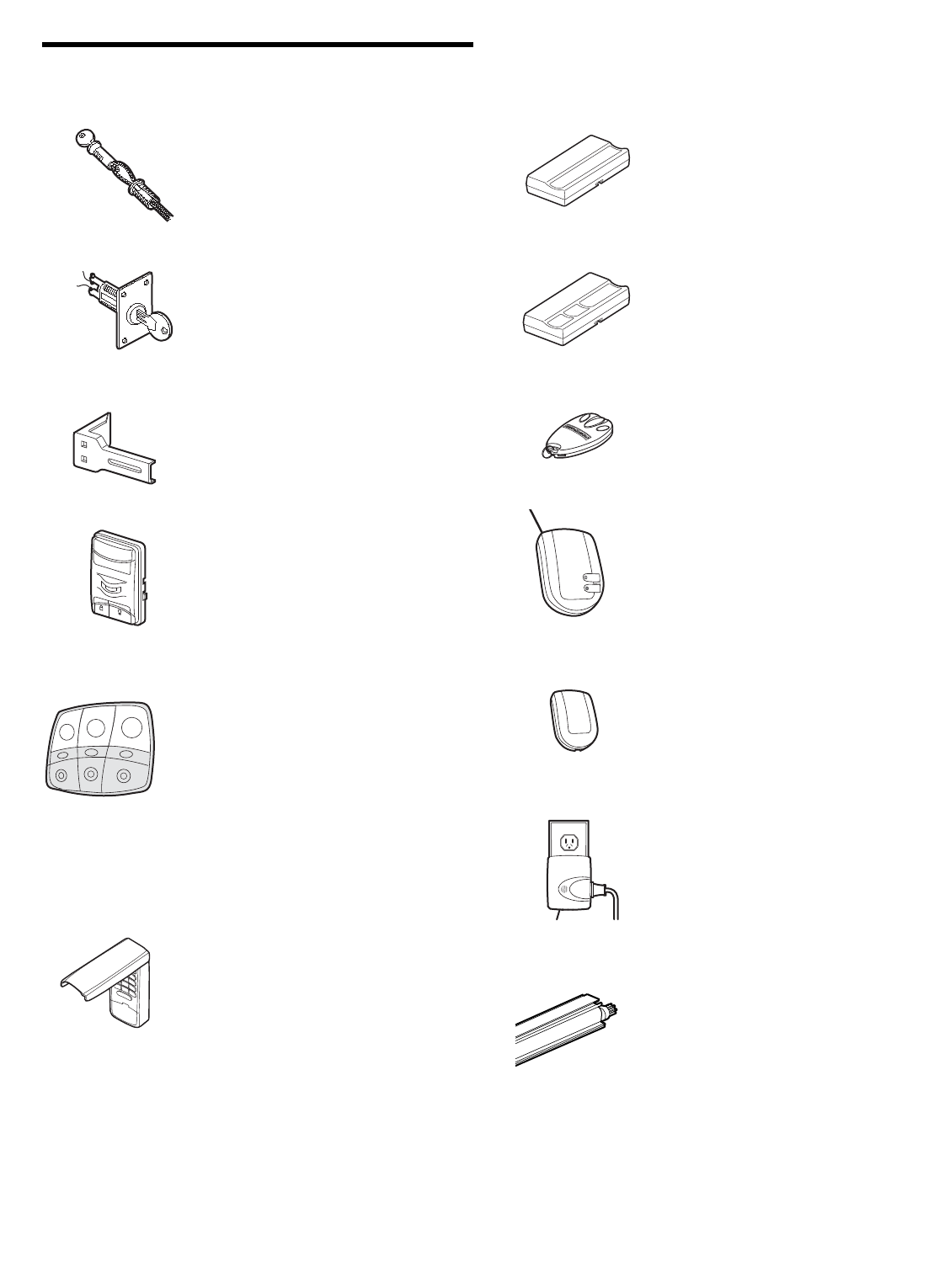
35
ACCESSORIES
LOCK LIGHT
CLOSED
OPEN
915LM
1702LM Outside Quick Release:
Required for a garage with NO access
door. Enables homeowner to open
garage door manually from outside by
disengaging trolley.
Extension Brackets:
(Optional) For safety sensor
installation onto the wall or floor.
41A5281
902LM/903LM
Wireless Keyless Entry with
Security✚®:
Enables homeowner to operate garage
door opener from outside by entering a
password on a specially designed
keyboard. Also can add a temporary
password for visitors or service
persons. This temporary password can
be limited to a programmable number
of hours or entries.
59LM Outside Keylock:
Operates the garage door
automatically from the outside when
remote control is not handy.
371LM 1-Button Security✚®Remote Control:
Includes visor clip.
373LM 3-Button Security✚®Remote Control:
Includes visor clip.
2 & 3 Door Multi-Function Wall
Control:
Ideal for homes with up to three
garage doors. Combine up to three
controls into one wall control panel for
a neat compact appearance.
Enhanced functions include Lock
Feature to lock out outside radio
signals while you are away from home
and turn opener lights on or off from
the control panel.
377LM
Garage Door Monitor:
Security for the largest door of your
home!
Tells you if your garage door is open or
closed. Monitors up to 4 garage doors by
adding additional sensor modules.
916LM Garage Door Monitor Sensor:
Additional accessory sensor for homes
with multiple garage doors.
395LM
Motion Detecting Control Panel:
Multi-function door control with motion
sensor that automatically turns opener
lights on for 5 minutes when it detects
a person entering the garage. Sensor
can be easily deactivated when
desired.
Model 98LM
Remote Light Control:
Enables homeowner to turn on a lamp,
television or other appliance from their
car with their garage door opener remote
or from anywhere in their home with an
additional LiftMaster Security✚®remote.
370LM 3-Button Mini-Remote Control with
Security✚®:
With key ring and fastening strip.
3088SD 8 Foot (2.4 m) Complete Rail:
To allow an 8 foot (2.4 m) door to open
fully.
© 2007, The Chamberlain Group, Inc.
114A3331B All Rights Reserved
LIFTMASTER SERVICE IS
ON CALL
OUR LARGE SERVICE ORGANIZATION
SPANS AMERICA
INSTALLATION AND SERVICE INFORMATION IS AS
NEAR AS YOUR TELEPHONE. SIMPLY DIAL OUR TOLL
FREE NUMBER:
1-800-528-9131
www.liftmaster.com
For professional installation, parts and service, contact
your local LIFTMASTER/CHAMBERLAIN dealer. Look for
him in the Yellow Pages, or call our Service number for a
list of dealers in your area.
HOW TO ORDER
REPAIR PARTS
Selling prices will be furnished on request or parts will be
shipped at prevailing prices and you will be billed
accordingly.
WHEN ORDERING REPAIR PARTS, ALWAYS GIVE THE
FOLLOWING INFORMATION:
• PART NUMBER
• PART NAME
• MODEL NUMBER
ADDRESS ORDERS TO:
THE CHAMBERLAIN GROUP, INC.
Technical Support Group
6020 S. Country Club Road
Tucson, Arizona 85706
SERVICE INFORMATION
TOLL FREE NUMBER:
1-800-528-9131
LIFTMASTER 1 YEAR LIMITED WARRANTY
LIFETIME MOTOR WARRANTY (MODEL 3240)
2 YEAR LIMITED MOTOR WARRANTY (MODEL 3130)
The Chamberlain Group, Inc. (“Seller”) warrants to the first retail purchaser of this product, for the residence in which this product is originally installed, that it is free
from defect in materials and/or workmanship for a period of one year from the date of purchase and that the motor is free from defect in materials and/or
workmanship for a lifetime Model 3240 or for a period of two years Model 3130 from the date of purchase. The proper operation of this product is dependent on
your compliance with the instructions regarding installation, operation, maintenance and testing. Failure to comply strictly with those instructions will void this limited
warranty in its entirety.
If, during the limited warranty period, this product appears to contain a defect covered by this limited warranty, call 1-800-528-9131, toll free, before dismantling this
product. Then send this product, pre-paid and insured, to our service center for warranty repair. You will be advised of shipping instructions when you call. Please
include a brief description of the problem and a dated proof-of-purchase receipt with any product returned for warranty repair. Products returned to Seller for
warranty repair, which upon receipt by Seller are confirmed to be defective and covered by this limited warranty, will be repaired or replaced (at Seller's sole option)
at no cost to you and returned pre-paid. Defective parts will be repaired or replaced with new or factory-rebuilt parts at Seller's sole option.
ALL IMPLIED WARRANTIES FOR THE PRODUCT, INCLUDING BUT NOT LIMITED TO ANY IMPLIED WARRANTIES OF MERCHANTABILITY AND FITNESS
FOR A PARTICULAR PURPOSE, ARE LIMITED IN DURATION TO THE 1 YEAR LIMITED WARRANTY PERIOD SET FORTH ABOVE [EXCEPT THE IMPLIED
WARRANTIES WITH RESPECT TO THE MOTOR, WHICH ARE LIMITED IN DURATION TO THE LIFETIME WARRANTY PERIOD FOR THE MOTOR
MODEL 3240 OR 2 YEARS MODEL 3130], AND NO IMPLIED WARRANTIES WILL EXIST OR APPLY AFTER SUCH PERIOD. Some States do not allow
limitations on how long an implied warranty lasts, so the above limitation may not apply to you. THIS LIMITED WARRANTY DOES NOT COVER NON-
DEFECT DAMAGE, DAMAGE CAUSED BY IMPROPER INSTALLATION, OPERATION OR CARE (INCLUDING, BUT NOT LIMITED TO ABUSE, MISUSE,
FAILURE TO PROVIDE REASONABLE AND NECESSARY MAINTENANCE, UNAUTHORIZED REPAIRS OR ANY ALTERATIONS TO THIS PRODUCT), LABOR
CHARGES FOR REINSTALLING A REPAIRED OR REPLACED UNIT, REPLACEMENT OF BATTERIES AND LIGHT BULBS OR UNITS INSTALLED FOR
NON-RESIDENTIAL USE.
THIS LIMITED WARRANTY DOES NOT COVER ANY PROBLEMS WITH, OR RELATING TO, THE GARAGE DOOR OR GARAGE DOOR HARDWARE,
INCLUDING BUT NOT LIMITED TO THE DOOR SPRINGS, DOOR ROLLERS, DOOR ALIGNMENT OR HINGES. THIS LIMITED WARRANTY ALSO DOES NOT
COVER ANY PROBLEMS CAUSED BY INTERFERENCE. ANY SERVICE CALL THAT DETERMINES THE PROBLEM HAS BEEN CAUSED BY ANY OF THESE
ITEMS COULD RESULT IN A FEE TO YOU.
UNDER NO CIRCUMSTANCES SHALL SELLER BE LIABLE FOR CONSEQUENTIAL, INCIDENTAL OR SPECIAL DAMAGES ARISING IN CONNECTION
WITH USE, OR INABILITY TO USE, THIS PRODUCT. IN NO EVENT SHALL SELLER'S LIABILITY FOR BREACH OF WARRANTY, BREACH OF CONTRACT,
NEGLIGENCE OR STRICT LIABILITY EXCEED THE COST OF THE PRODUCT COVERED HEREBY. NO PERSON IS AUTHORIZED TO ASSUME FOR US
ANY OTHER LIABILITY IN CONNECTION WITH THE SALE OF THIS PRODUCT.
Some states do not allow the exclusion or limitation of consequential, incidental or special damages, so the above limitation or exclusion may not apply to you. This
limited warranty gives you specific legal rights, and you may also have other rights which vary from state to state.
