Liftmaster J Owners Manual 01 35241F
655302 0135241
2014-07-19
: Liftmaster Liftmaster-J-Owners-Manual liftmaster-j-owners-manual liftmaster pdf
Open the PDF directly: View PDF  .
.
Page Count: 44
- INSTALLATION MANUAL
- TABLE OF CONTENTS
- SAFETY INFORMATION
- TROLLEY OPERATORS
- HOIST AND JACKSHAFT OPERATORS
- ASSEMBLY
- TYPICAL INSTALLATION
- WIRING
- ENTRAPMENT PROTECTION
- ADJUSTMENT
- TESTING
- MANUAL RELEASE
- PROGRAMMING
- MAINTENANCE
- TROUBLESHOOTING
- WIRING DIAGRAMS
- ACCESSORIES
- CONTROL CONNECTION DIAGRAM
- SPANISH
- FRENCH
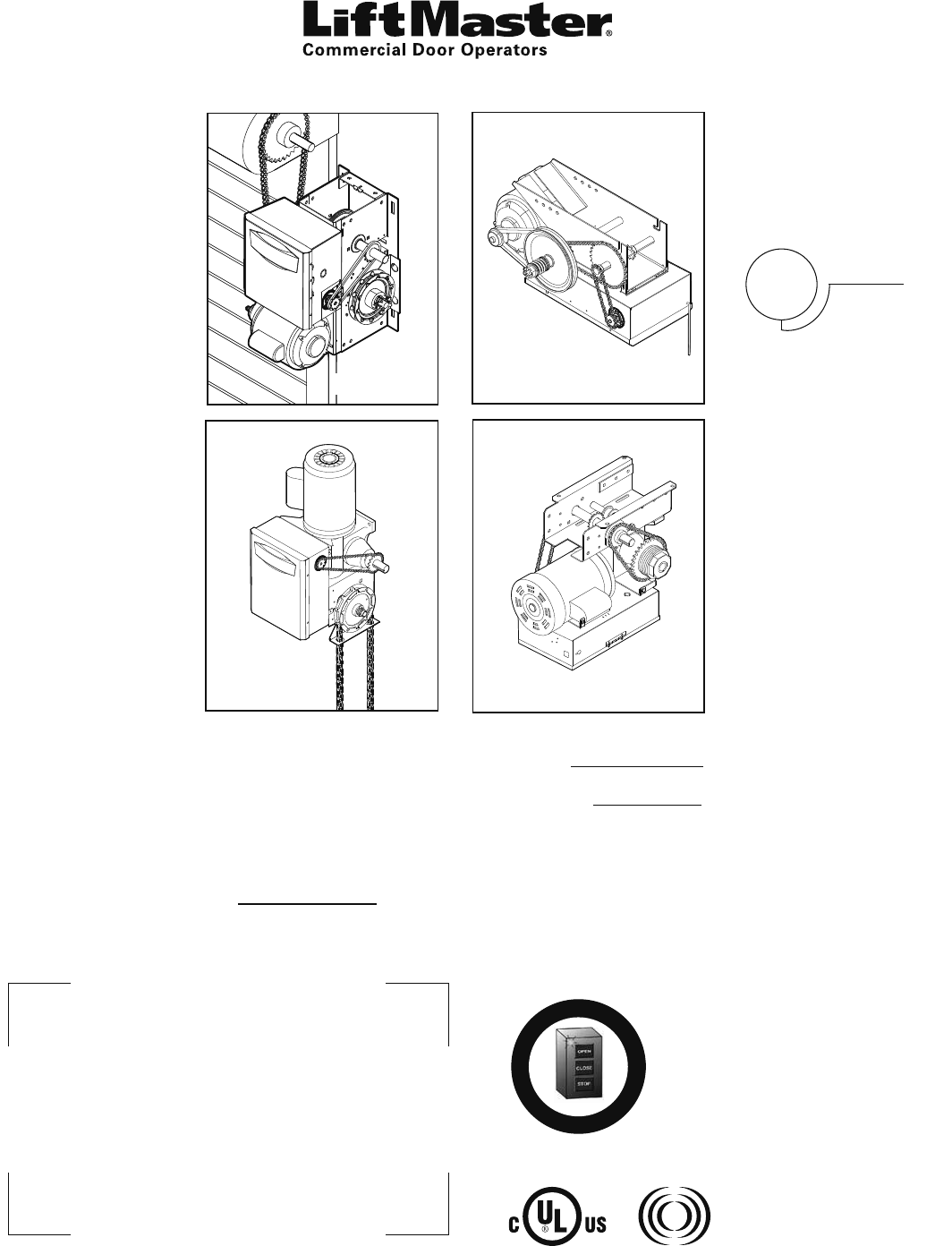
ogic
L4
INSTALLATION MANUAL
L3
GT
T AND APT
H, J, AND HJ
GH
A
L
E
R
T
S
Y
S
T
E
M
M
A
I
N
T
E
N
A
N
C
E
PATENT PENDING
The Maintenance Alert System™ allows the installer
to set an internal Maintenance Cycle Counter. The
Logic 4 operator incorporates a self-diagnostic
feature built into the (MAS) Maintenance Alert
System LED. An LED on the 3-button station will
signal when the set number of cycles/months is
reached or when the operator requires immediate
service.
THIS OPERATOR FEATURES THE ENHANCED
Radio Receiver
Built on Board
315MHz
NOT FOR RESIDENTIAL USE
Serial # Box
Installation Date
2 YEAR WARRANTYTHIS PRODUCT IS TO BE
INSTALLED AND SERVICED
BY A TRAINED DOOR
SYSTEMS TECHNICIAN
ONLY.
Operators are shipped in C2
operating mode.
Visit www.liftmaster.com to locate
a professional installing dealer in
your area.
CONTACT INFORMATION

TABLE OF CONTENTS
SAFETY INFORMATION 3
TROLLEY OPERATORS 4-12
Carton Inventory . . . . . . . . . . . . . . . . . . . . . . . . . . . . . . . 4
Operator Specifications . . . . . . . . . . . . . . . . . . . . . . . . .4-5
Maximum Door Area . . . . . . . . . . . . . . . . . . . . . . . . . . . . 5
Weights and Dimensions . . . . . . . . . . . . . . . . . . . . . . . . . 6
ASSEMBLY. . . . . . . . . . . . . . . . . . . . . . . . . . . . . . . . . . .7-9
Assemble the Operator (Models T and GT) . . . . . . . . . 7
Install the Chain (Models T and GT). . . . . . . . . . . . . . . 8
Assemble the Operator (Model APT) . . . . . . . . . . . . . . 9
TYPICAL INSTALLATION . . . . . . . . . . . . . . . . . . . . . .10-12
Install the Header Bracket . . . . . . . . . . . . . . . . . . . . . 10
Attach the Track to the Header Bracket . . . . . . . . . . . 11
Hang the Operator . . . . . . . . . . . . . . . . . . . . . . . . . . . 11
Attach the Door Arm . . . . . . . . . . . . . . . . . . . . . . . . . 12
HOIST AND JACKSHAFT OPERATORS 13-17
Carton Inventory . . . . . . . . . . . . . . . . . . . . . . . . . . . . . . 13
Operator Specifications . . . . . . . . . . . . . . . . . . . . . . .13-14
Maximum Door Area . . . . . . . . . . . . . . . . . . . . . . . . . . . 14
Weights and Dimensions . . . . . . . . . . . . . . . . . . . . . . . . 15
ASSEMBLY. . . . . . . . . . . . . . . . . . . . . . . . . . . . . . . . . . . 16
Assemble the Operator . . . . . . . . . . . . . . . . . . . . . . . 16
TYPICAL INSTALLATION . . . . . . . . . . . . . . . . . . . . . .16-17
Determine Mounting Location . . . . . . . . . . . . . . . . . . 16
Mounting . . . . . . . . . . . . . . . . . . . . . . . . . . . . . . . . . . 17
Install the Manual Disconnect . . . . . . . . . . . . . . . . . . 17
WIRING 18-19
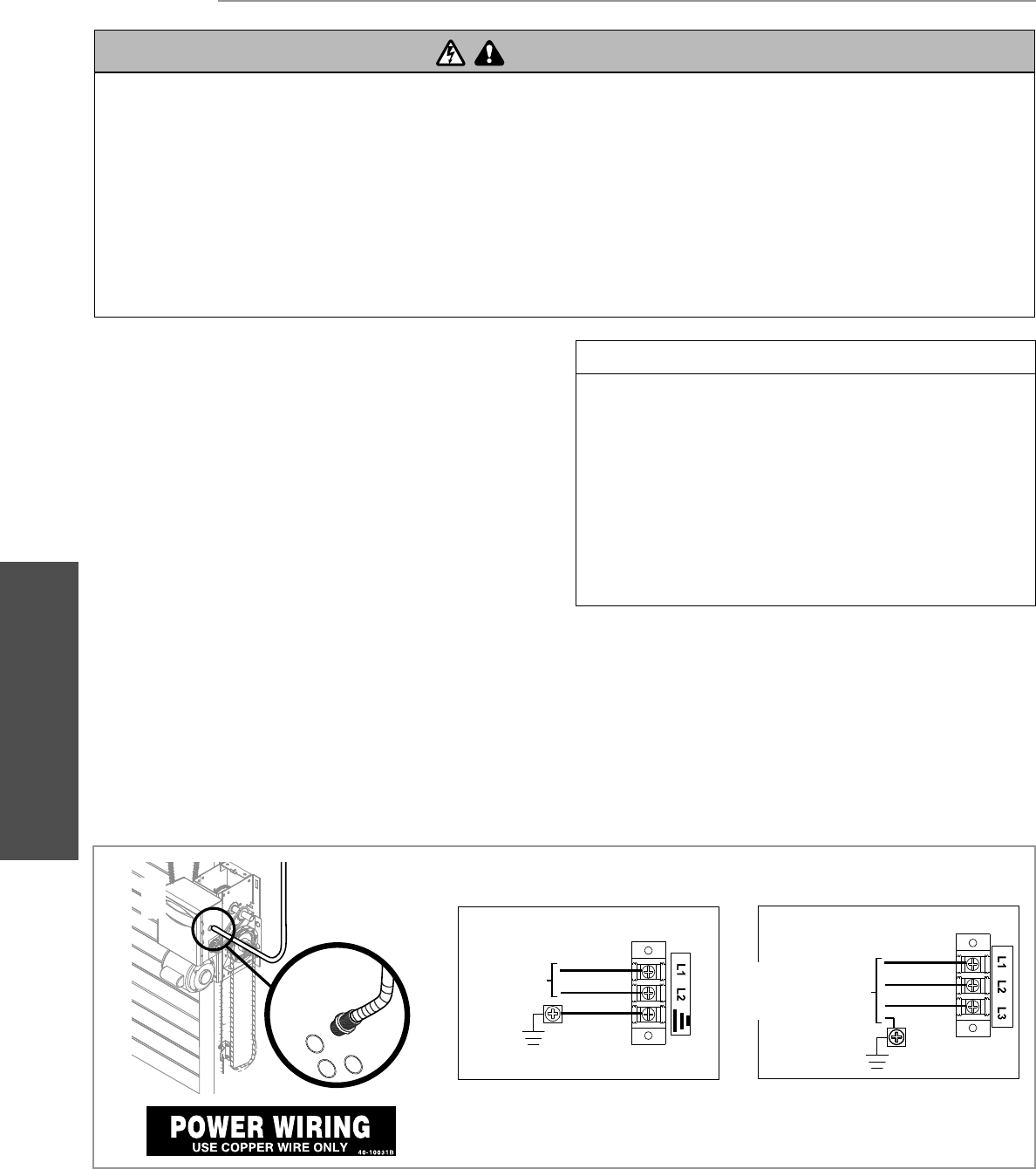
Power and Ground . . . . . . . . . . . . . . . . . . . . . . . . . . . . . 18
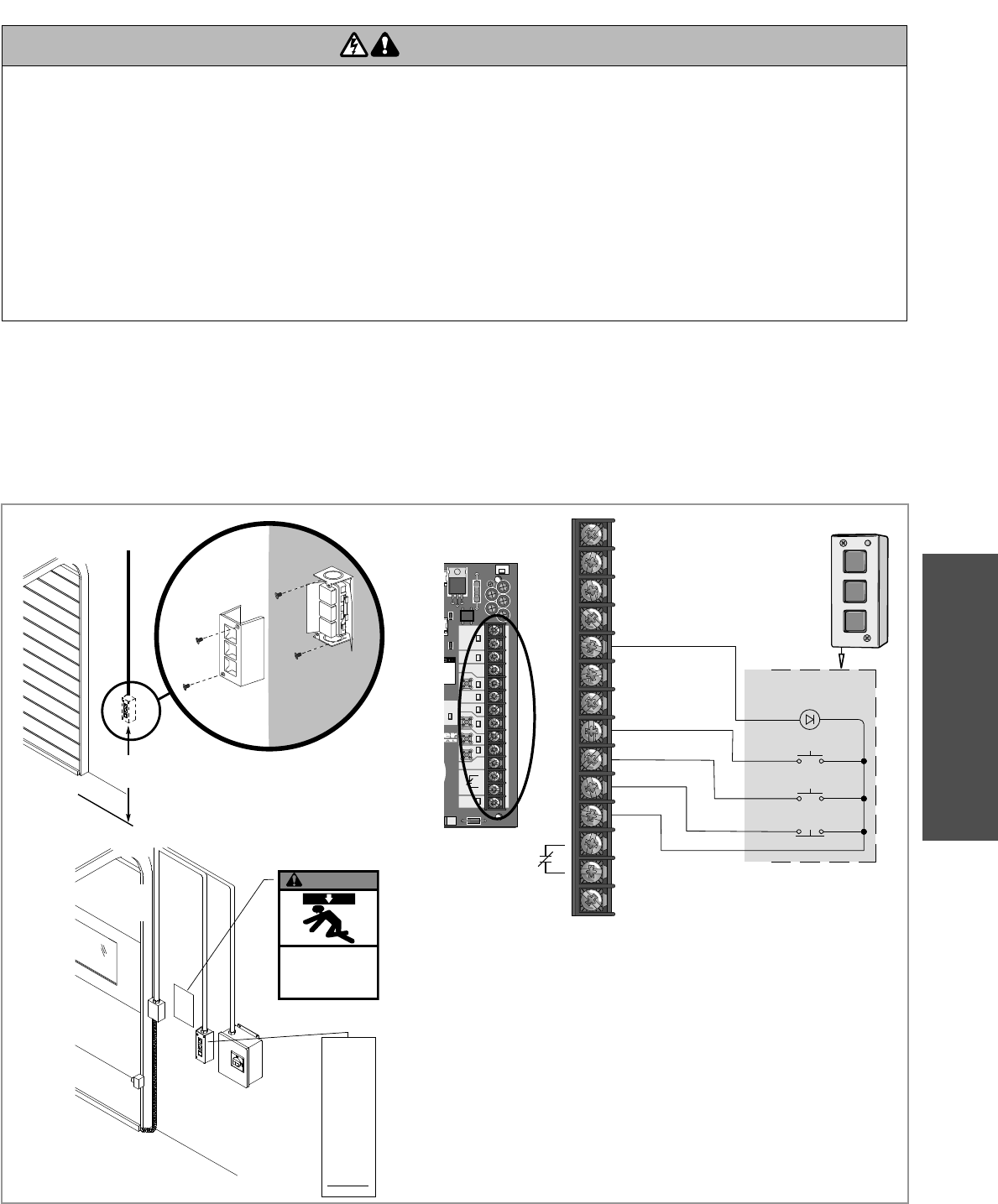
Control Station . . . . . . . . . . . . . . . . . . . . . . . . . . . . . . . . 19
ENTRAPMENT PROTECTION 20-22
LiftMaster Monitored Entrapment
Protection (LMEP) . . . . . . . . . . . . . . . . . . . . . . . . . . . . . 20
Install the Photoelectric Sensors (Provided) . . . . . . . . . 21
Mount the Photoelectric Sensors (Provided) . . . . . . . . . 22
Wire the LiftMaster Monitored Entrapment
Protection (LMEP) Devices . . . . . . . . . . . . . . . . . . . . . . 22
ADJUSTMENT 23-24
Limit Adjustment . . . . . . . . . . . . . . . . . . . . . . . . . . . . . . 23
Clutch Adjustment (Belt Drive Model Operators) . . . . . . 24
TESTING 25
MANUAL RELEASE 26-27
Emergency Disconnect System Model GT and T . . . . . . 26
Emergency Disconnect System Model APT . . . . . . . . . . 26
Emergency Disconnect System
Model H, GH, J, and HJ . . . . . . . . . . . . . . . . . . . . . . . . . 27
PROGRAMMING 28-35
Introduction to Programming. . . . . . . . . . . . . . . . . . . . . 28
Determine and Set Wiring Type . . . . . . . . . . . . . . . . . . . 29
Programming Remote Controls . . . . . . . . . . . . . . . . .30-31
Maintenance Alert System (MAS) . . . . . . . . . . . . . . . . . 32
Open Mid Stop . . . . . . . . . . . . . . . . . . . . . . . . . . . . . . . . 33
Timer-To-Close . . . . . . . . . . . . . . . . . . . . . . . . . . . . .33-34
Car Dealer Mode. . . . . . . . . . . . . . . . . . . . . . . . . . . . . . . 34
Maximum Run Timer (MRT) . . . . . . . . . . . . . . . . . . . . . 35
Resetting Factory Defaults - Clearing Memory . . . . . . . . 35
MAINTENANCE 36
Maintenance Schedule . . . . . . . . . . . . . . . . . . . . . . . . . . 36
Life of Operator Feature (Odometer/Cycle Counter) . . . . 36
Brake (If Present). . . . . . . . . . . . . . . . . . . . . . . . . . . . . . 36
How to Order Repair Parts . . . . . . . . . . . . . . . . . . . . . . . 36
TROUBLESHOOTING 37-40
Diagnostic Chart. . . . . . . . . . . . . . . . . . . . . . . . . . . . . . . 37
Troubleshooting Guide. . . . . . . . . . . . . . . . . . . . . . . . . . 38
Troubleshooting Error Codes . . . . . . . . . . . . . . . . . . . . . 39
Troubleshooting Radio Functionality . . . . . . . . . . . . . . . 40
WIRING DIAGRAMS 41-42
Logic (Ver. 4.0) 1 Phase Wiring Diagram. . . . . . . . . . . . 41
Logic (Ver. 4.0) 3 Phase Wiring Diagram. . . . . . . . . . . . 42
ACCESSORIES 43
CONTROL CONNECTION DIAGRAM BACK COVER
Table of contents 2
SAFETY INFORMATION
TO REDUCE THE RISK OF SEVERE INJURY OR DEATH:
IMPORTANT INSTALLATION INSTRUCTIONS
1. READ AND FOLLOW ALL INSTALLATION WARNINGS AND
INSTRUCTIONS.
2. Install door operator ONLY on properly balanced and
lubricated door. An improperly balanced door may NOT
reverse when required and could result in SEVERE INJURY
or DEATH.
3. ALL repairs to cables, spring assemblies and other hardware
MUST be made by a trained door systems technician BEFORE
installing operator.
4. Disable ALL locks and remove ALL ropes connected to door
BEFORE installing operator to avoid entanglement.
5. Install door operator 8 feet (2.44 m) or more above floor.
6. NEVER connect door operator to power source until
instructed to do so.
7. NEVER wear watches, rings or loose clothing while installing
or servicing operator. They could be caught in door or
operator mechanisms.
8. Install control station:
• within sight of the door.
• out of reach of children at minimum height of
5 feet (1.5 m).
• away from ALL moving parts of the door.
9. Install the control station far enough from the door to
prevent the user from coming in contact with the door while
operating the controls.
10. Install the entrapment warning placard on wall next to the
control station in a prominent location that is visible from
the door.
11. Place manual release/safety reverse test label in plain view
on inside of door.
12. Upon completion of installation, test entrapment protection
device.
13. SAVE THESE INSTRUCTIONS.
WARNING
WARNING
WARNING WARNING
When you see these Safety Symbols and Signal Words on the
following pages, they will alert you to the possibility of serious
injury or death if you do not comply with the warnings that
accompany them. The hazard may come from something
mechanical or from electric shock. Read the warnings carefully.
When you see this Signal Word on the following pages, it will
alert you to the possibility of damage to your door and/or the
door operator if you do not comply with the cautionary
statements that accompany it. Read them carefully.
Mechanical
Electrical
IMPORTANT NOTES:
• BEFORE attempting to install, operate or maintain the operator,
you must read and fully understand this manual and follow all
safety instructions.
• DO NOT attempt repair or service of your commercial door and
gate operator unless you are an Authorized Service Technician.
• Operator intended to be installed on a properly balanced door
only. Make sure door is properly balanced before installing.
ATTENTION
AVERTISSEMENT AVERTISSEMENT
AVERTISSEMENT
WARNING
WARNING
CAUTION
WARNING
WARNING
PRECAUCIÓN ADVERTENCIA
ADVERTENCIA ADVERTENCIA
ATTENTION
AVERTISSEMENT AVERTISSEMENT
AVERTISSEMENT
WARNING
CAUTION
WARNING
WARNING
WARNING
PRECAUCIÓN ADVERTENCIA
ADVERTENCIA ADVERTENCIA
ATTENTION
AVERTISSEMENT AVERTISSEMENT
AVERTISSEMENT
WARNING
CAUTION
CAUTION
WARNING
WARNING
PRECAUCIÓN ADVERTENCIA
ADVERTENCIA ADVERTENCIA
SAFETY INFORMATION
Safety Information3
TROLLEY
4
OPERATOR SPECIFICATIONS
Carton inventory/Operator specifi cations - Trolley
TROLLEY OPERATORS
CARTON INVENTORY
Before beginning your installation check that all components were provided.
DESCRIPTION
Powerhead assembly
Owner’s manual and caution labels
Hardware box (includes fasteners, track spacers, trolley, door arm assembly, front idler and header mounting bracket)
3-Button control station with LED
Trolley drive chain: #48 for 1/3 and 1/2 HP,
#41 for 3/4 HP and higher (all GT models)
Entrapment Protection Device: Model CPS-U photoelectric sensors (standard)
NOTE: The tracks are shipped separately.
MOTOR
TYPE: . . . . . . . . . . . . . . . . . . . . . . . . . . . . . . . . Continuous duty
HORSEPOWER:
Model APT . . . . . . . . . . . . . . . . . . . . . . . . . . . . . . . . . . .1/2 HP
Model GT . . . . . . . . . . . . . . . . . . . . . . 1/2, 3/4, 1 and 1-1/2 HP
Model T . . . . . . . . . . . . . . . . . . . . . . . . 1/3, 1/2, 3/4 and 1 HP
SPEED (At rated load): . . . . . . . . . . . . . . . . . . . . . . .1725 RPM
VOLTAGE: . . . . . . . . . . . . . . . . . . . . . . . . . . . . . . . . . . . . . . . . .
Model APT . . . . . . . . . . . . . . . . . . . . . . . . . . . . . 115V 1 Phase
Model GT and T . . . . . . . . . . . . . . . . . . . . . 115/230V 1 Phase,
208/230/460/575V 3 Phase
CURRENT (Amperage):
Model T and GT
Voltage-Phase 1/3 HP 1/2 HP 3/4 HP 1 HP 1-1/2 HP
115-1Ø, 60Hz 8.5 11.2 13.6 16 20
230-1Ø, 60Hz 4.2 5.6 6.8 8 10
208/230-3Ø, 60Hz 3 3.1 4 6 7
460-3Ø, 60Hz 1.5 1.75 2 3 3.5
575-3Ø, 60Hz 1.3 1.4 1.6 1.8 2.75
Model APT
Voltage-Phase 1/2 HP
115-1Ø, 60Hz 11.2
ELECTRICAL
TRANSFORMER:. . . . . . . . . . . . . . . . . . . . . . . 24Vac Secondary
CONTROL STATION:. . . . . . . . . . . . . . .NEMA 3-Button Station
Open/Close/Stop w/LED
WIRING TYPE: . . . . . . . . . . . . . . . . . . . . . . . . . . .C2 (Standard)
Momentary contact to OPEN & STOP, constant pressure to
CLOSE, plus wiring for sensing device to reverse and auxiliary
devices to open and close with open override. See page 29 for
optional wiring types and operating modes.
LIMIT ADJUST:. . . . . . . . . . Linear driven, fully adjustable screw
type cams. Adjustable to 24 feet.
SAFETY
DISCONNECT:. . . . . . . . . . . . . . . Quick disconnect door arm for
emergency manual door operation.
ENTRAPMENT PROTECTION:
LiftMaster Monitored Entrapment Protection (LMEP)
Photoelectric Sensors (CPS-U): . . . . . . . . . . . . . Through beam
used to provide non-contact safety protection.
Safety Edge (Optional): . . . . . . . .Electric or pneumatic sensing
device attached to the bottom edge of door.
5
TROLLEY
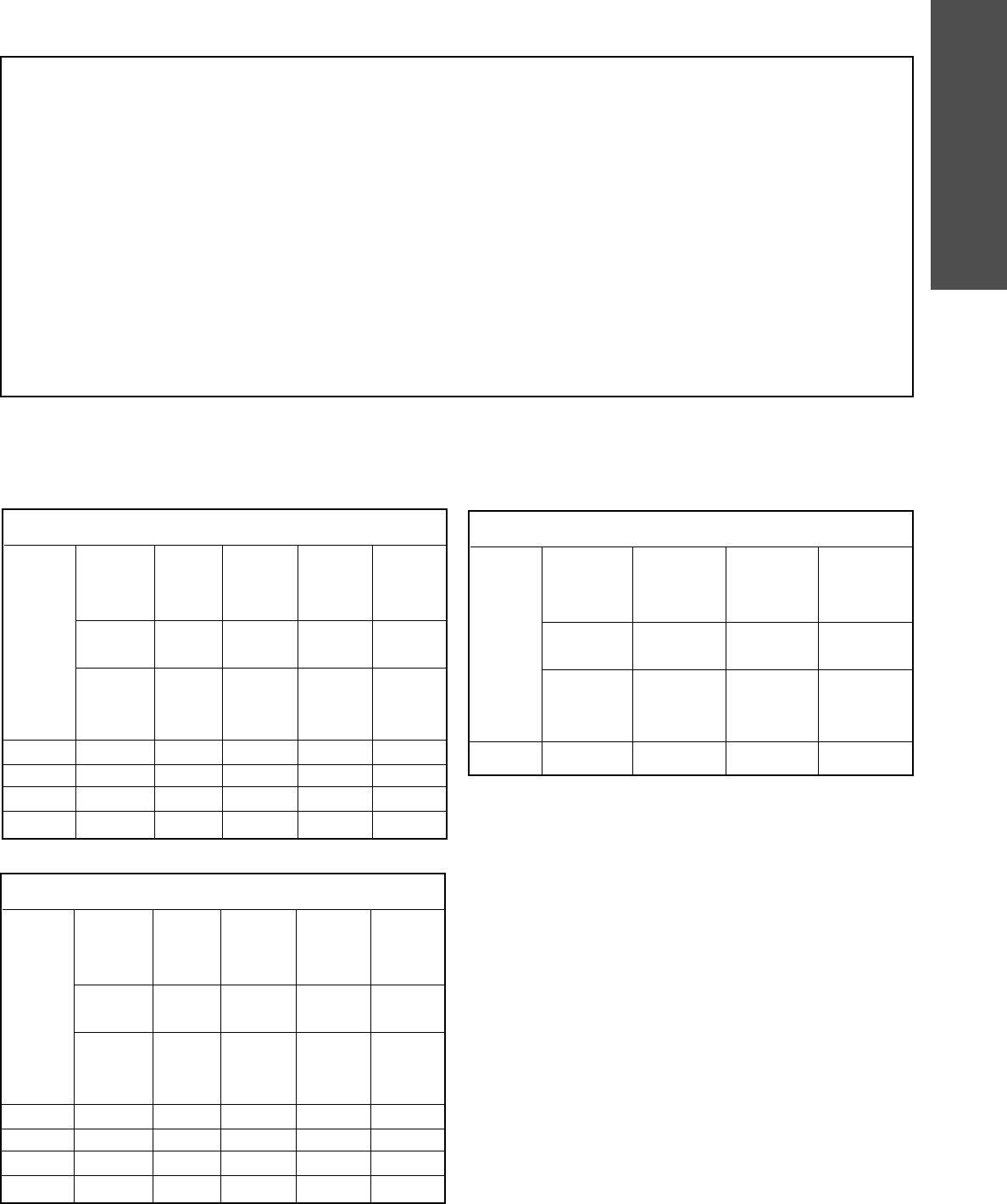
MAXIMUM DOOR AREA (SQ. FT.)
MODEL T
STANDARD SECTIONAL
24 ga.
22 ga.
Steel
Alum.
Doors
---
285
350
500
625
---
Fiberglass
Doors
---
310
400
560
640
20 ga.
Steel
Wood
Doors
24 ga.
Steel
Insul.
260
320
450
560
16 ga.
Steel
---
20 ga.
Steel
Insul.
175
250
325
400
---
---
16 ga.
Steel
Insul.
125
200
275
310
1/3 HP
1/2 HP
3/4 HP
1 HP
MODEL GT
STANDARD SECTIONAL
24 ga.
22 ga.
Steel
Alum.
Doors
---
350
500
575
625
---
Fiberglass
Doors
---
400
560
625
---
20 ga.
Steel
Wood
Doors
24 ga.
Steel
Insul.
320
450
500
550
16 ga.
Steel
---
20 ga.
Steel
Insul.
250
325
400
475
---
---
16 ga.
Steel
Insul.
200
250
300
380
1/2 HP
3/4 HP
1 HP
1-1/2 HP
MODEL APT
STANDARD SECTIONAL
20 ga.
Steel
Wood
Doors
24 ga.
Steel
Insul.
225
24 ga.
22 ga.
Steel
Alum.
Doors
Fiberglass
Doors
250
16 ga.
Steel
---
20 ga.
Steel
Insul.
150
---
---
16 ga.
Steel
Insul.
100
1/2 HP
Operator specifi cations/Maximum door area - Trolley
MECHANICAL
DRIVE REDUCTION:
Model APT and T . . . . . . . . . . Primary: Heavy duty (5L) V-Belt
Secondary: #41 chain/sprocket;
Output: #48 chain (1/3 and 1/2 HP Model T and APT)
or #41 chain (3/4 and 1 HP Model T ONLY)
Model GT . . . . . . . . . . . . . . . . . . . . . .Primary: 20:1 Heavy duty
worm gear-in-oil-bath speed reducer
Output: #41 chain
OUTPUT SHAFT SPEED:
Model APT . . . . . . . . . . . . . . . . . . . . . . . . . . . . . . . . . .96 RPM
Model GT . . . . . . . . . . . . . . . . . . . . . . . . . . . . . . . . 113.5 RPM
Model T . . . . . . . . . . . . . . . . . . . . . . . . . . . . . . . . . . .140 RPM
DOOR SPEED (not adjustable):
Model APT . . . . . . . . . . . . . . . . . . . . . . . . . . . .6-7" per second
Model GT . . . . . . . . . . . . . . . . . . . . . . . . . . .11-12" per second
Model T . . . . . . . . . . . . . . . . . . . . . . . . . . . .11-12" per second
BRAKE: Solenoid actuated disc brake on 3/4 and 1 HP, standard
on Model GT (Available as an option for 1/3 and 1/2 HP)
BEARINGS: . . . . . . . . . . . . . . Output Shaft: Shielded ball bearing
Model APT and T . . . .Clutch Shaft: IronCopper sintered and oil
impregnated
OPERATOR SPECIFICATIONS
TROLLEY
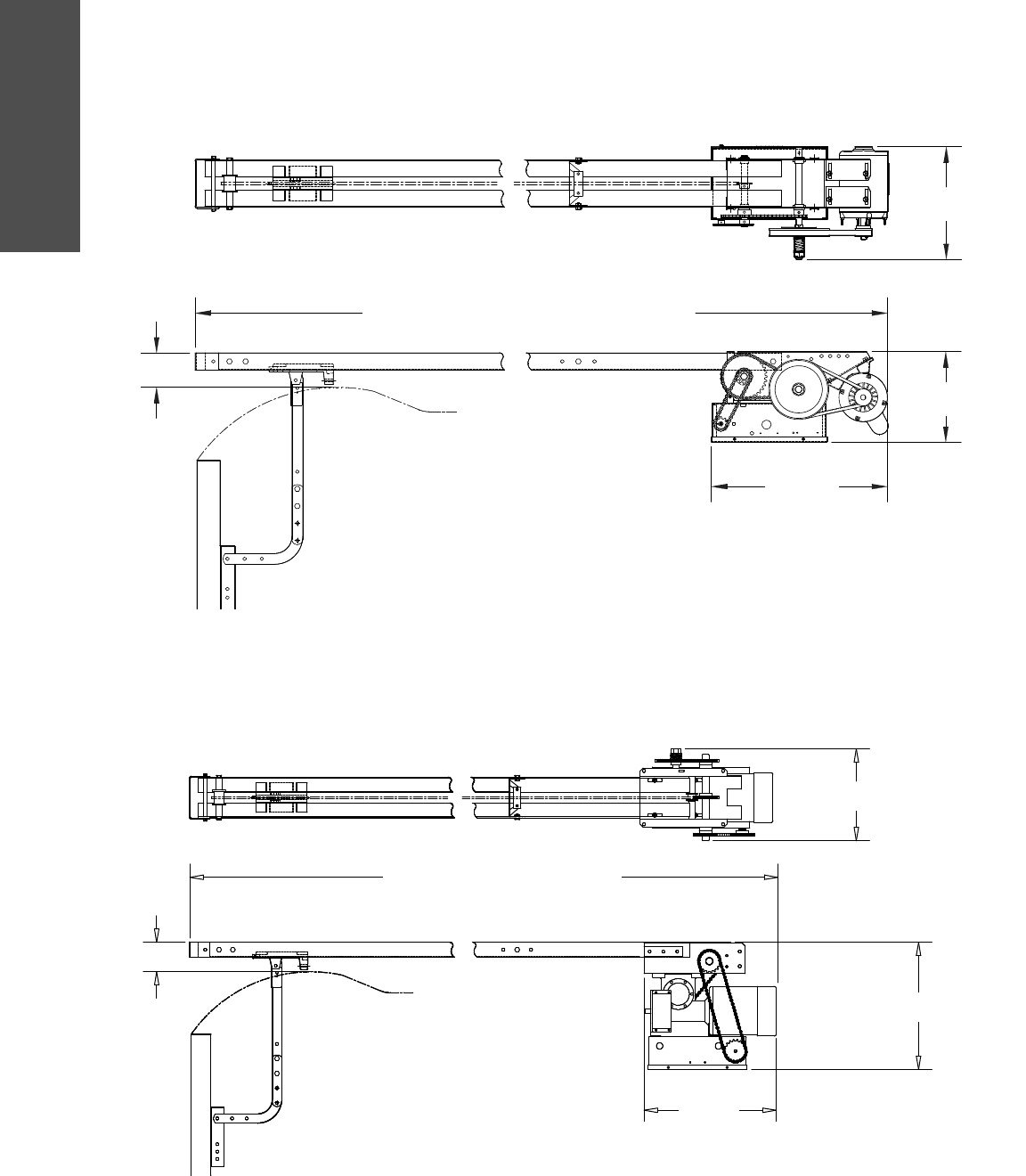
6 Weights and dimensions - Trolley
11.63"
(29.54 cm)
*Door Height Plus 4 feet (minimum)
*23.43"
(59.51 cm)
14"
(35.56 cm)
Highest Point of Door Travel
4"
(10.16 cm)
*- For Units with Brake add 3-1/2"
(Standard on APT, T 3/4 and T 1 HP models; Optional on T 1/3 and 1/2 HP models)
WEIGHTS AND DIMENSIONS
MODELS T AND APT
Hanging Weight: 80-110 lbs.
*
MODEL GT
Hanging Weight: 140 lbs.
Door Height Plus 4 feet (minimum)
13.05"
(33.15 cm)
18.5"
(46.99 cm)
17.5"
(44.45 cm)
4"
(10.16 cm)
7
TROLLEY
Assembly - Trolley
1
2
4
5
3
6
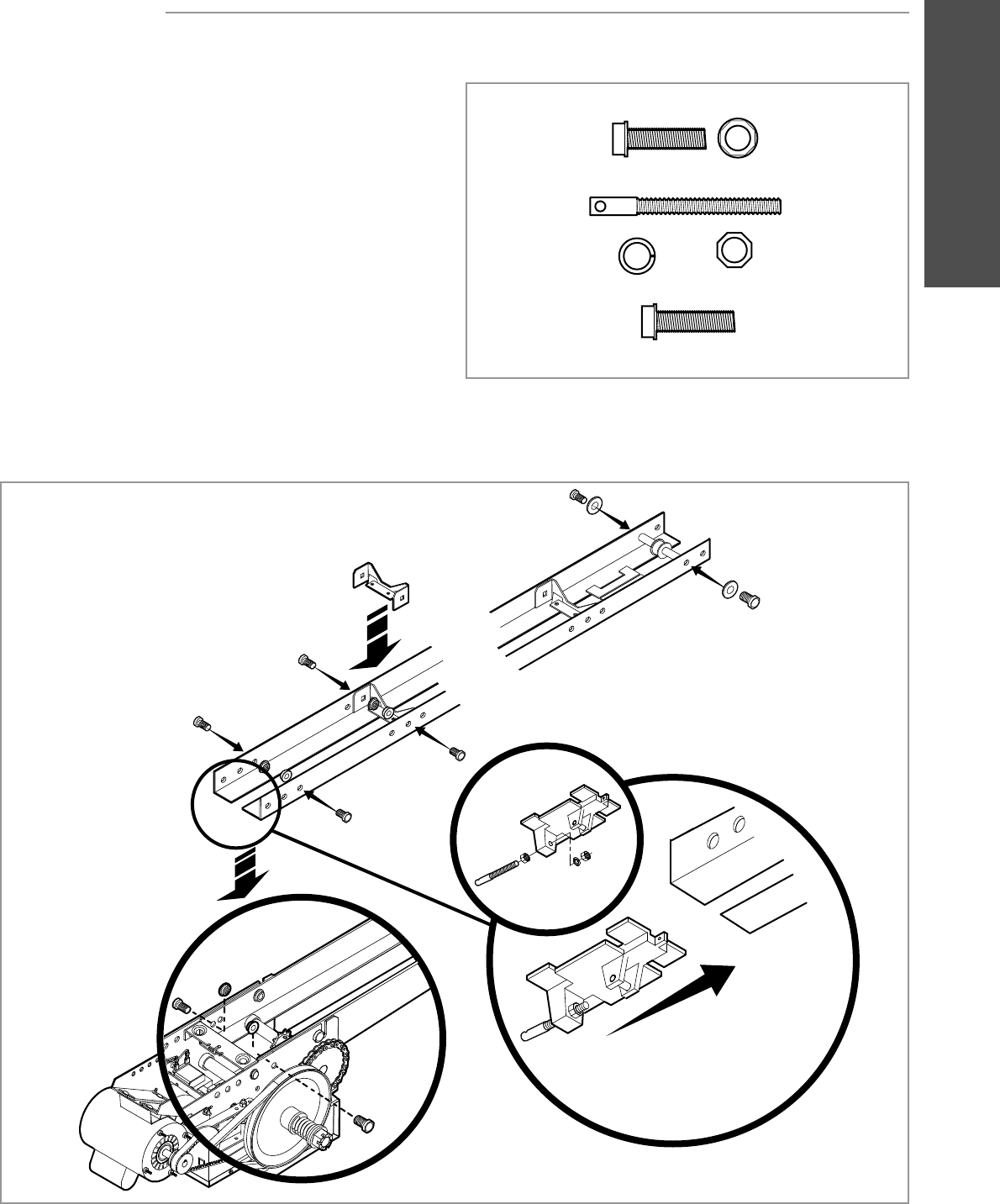
ASSEMBLE THE OPERATOR (MODELS T AND GT)
ASSEMBLY
NOTE: For Model APT assembly refer to page 9.
1 Install the track spacers evenly over the length of the track.
Fasten the spacers to the track with bolt (A) and fl ange hex
nuts (B).
2 Install the front idler to the track with bolts (F) and washers
(D).
3 Assemble the trolley with the take up bolt (C), hex nuts (E),
and lock washer (D).
4 Slide the trolley onto the track.
5 Insert bolts (A) into the end of the track and loosely thread the
nuts (B) onto the ends of the bolts.
6 Slide bolts (A) on the end of the track assembly into the “L”
slot in the operator and tighten nuts (B). Insert bolts (A) into
the holes on the end of the track and the operator. Secure the
track with nuts (B).
HARDWARE
Bolt 3/8"-16 x 3/4"
Bolt 3/8"-16 x 1"
Take Up Bolt
Lock Washer 3/8" Hex Nut 3/8"-16
Flange Hex Nut
3/8"-16
AB
C
DE
F
TROLLEY
8 Assembly - Trolley
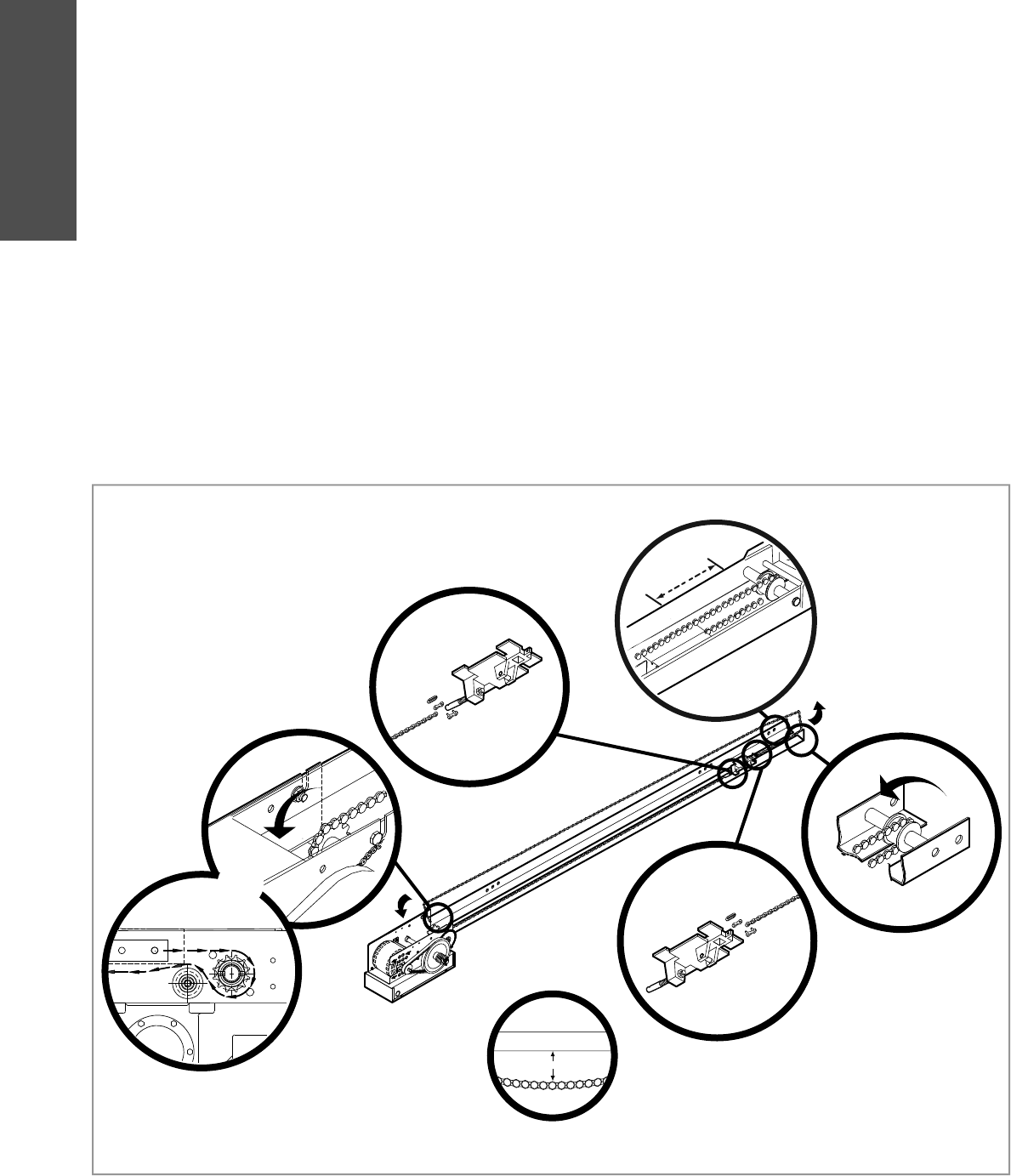
INSTALL THE CHAIN (MODELS T AND GT)
3˝
2˝
1
2
4
5
6
3
NOTE: For Model APT assembly refer to page 9.
1 Position the trolley 2 inches away from the front idler.
2 Attach the chain to the trolley threaded shaft using the master
link.
3 Run the chain along the track to the operator. Wrap the chain
around the operator drive sprocket.
4 Run the chain along the track to the front idler. Wrap the chain
around the front idler.
5 Attach the chain to the front of the trolley using the master
link.
6 Tighten the chain until the chain sags about 3 inches at the
mid point of the track.
MODEL T
MODEL GT
9
TROLLEY
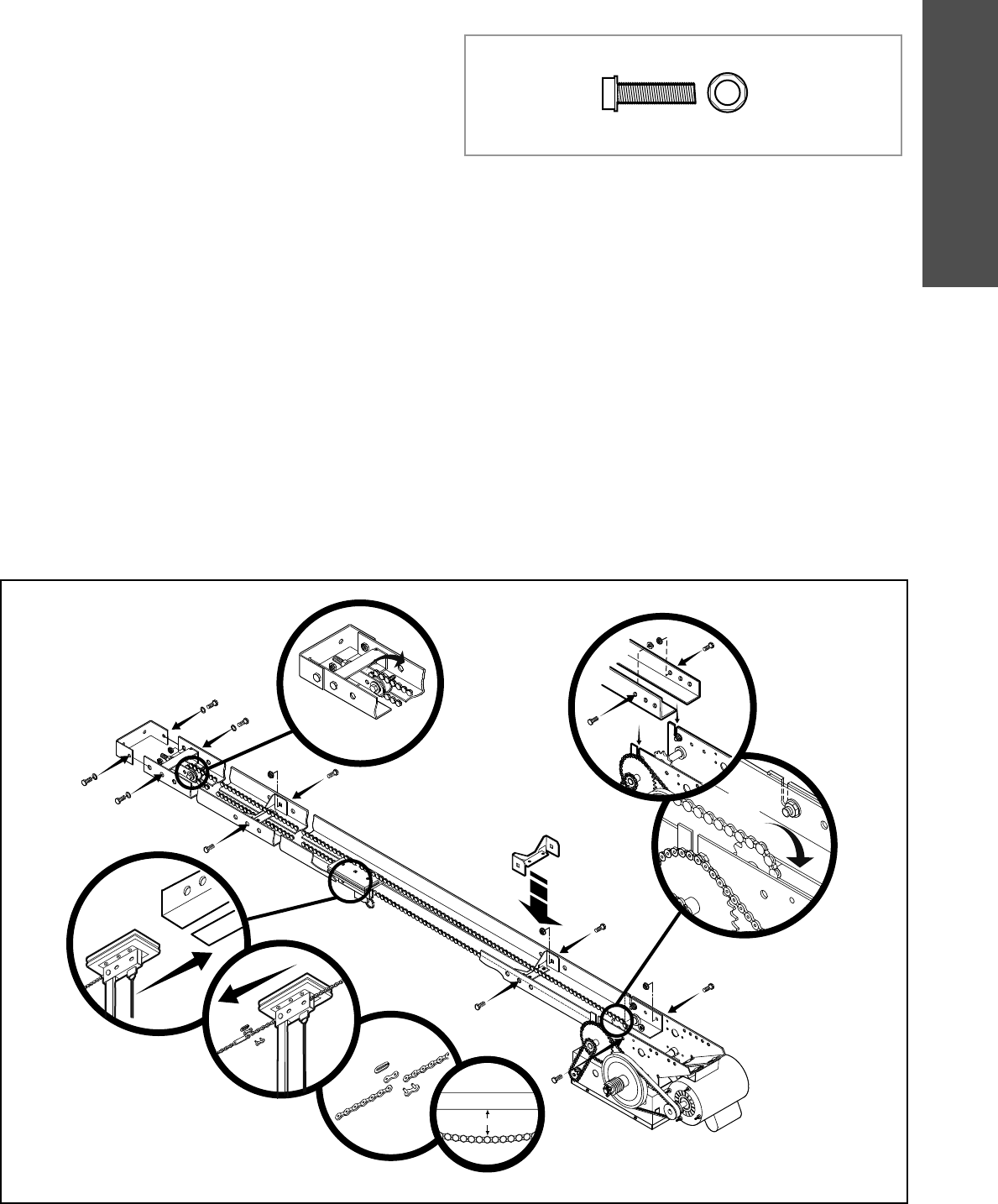
ASSEMBLE THE OPERATOR (MODEL APT)
NOTE: If your model is not an APT, proceed to the next page. HARDWARE
Bolt 3/8"-16 x 3/4" Flange Hex Nut
3/8"-16
AB
Assembly - Trolley
1
2
6
3
3˝
10
4
7
8
9
5
Pull the release clip on the trolley and push the end of the
chain through the slot in the trolley.
Install the track spacers evenly over the length of the track.
Fasten the spacers to the track with bolt (A) and fl ange hex
nuts (B).
Install the front idler in the second set of holes on the end of
the track with bolts (A) and nuts (B).
Slide the trolley onto the track so the door arm hole faces the
front (towards the door).
Insert bolts (A) into the end of the track and loosely thread
the nuts (B) onto the ends of the bolts. Slide bolts (A) on the
end of the track assembly into the “L” slot in the operator and
tighten nuts (B).
Insert bolts (A) into the holes on the end of the track and the
operator. Secure the track with nuts (B).
Run the chain along the track to the front idler. Wrap the
chain around the front idler.
Run the chain along the track to the operator. Wrap the chain
around the operator drive sprocket.
Attach one end of the chain to the drive link using a master
link.
Attach the other end of the chain to the free end of the drive
link using a master link and making sure the chain has the
correct tension (the chain should sag about 3 inches at the
mid point of the track). The chain will need to be cut for
proper adjustment. The take-up bolt can be loosened or
tightened to adjust the slack of the chain. Slide the trolley
back and forth past the drive chain to ensure there is no
binding.
1
2
3
4
5
6
7
8
9
10
TROLLEY
10
Typical installation - Trolley
TYPICAL INSTALLATION
To prevent possible SERIOUS INJURY or DEATH:
• Header bracket MUST be RIGIDLY fastened to structural
support on header wall or ceiling, otherwise door might NOT
reverse when required. DO NOT install header bracket over
drywall.
• Concrete anchors MUST be used if mounting header bracket
or 2x4 into masonry.
• NEVER try to loosen, move or adjust door, springs, cables,
pulleys, brackets, or their hardware, ALL of which are under
EXTREME tension.
• ALWAYS call a trained door systems technician if door binds,
sticks, or is out of balance.
ATTENTION
AVERTISSEMENT AVERTISSEMENT
AVERTISSEMENT
WARNING
WARNING
CAUTION
WARNING
WARNING
PRECAUCIÓN ADVERTENCIA
ADVERTENCIA ADVERTENCIA
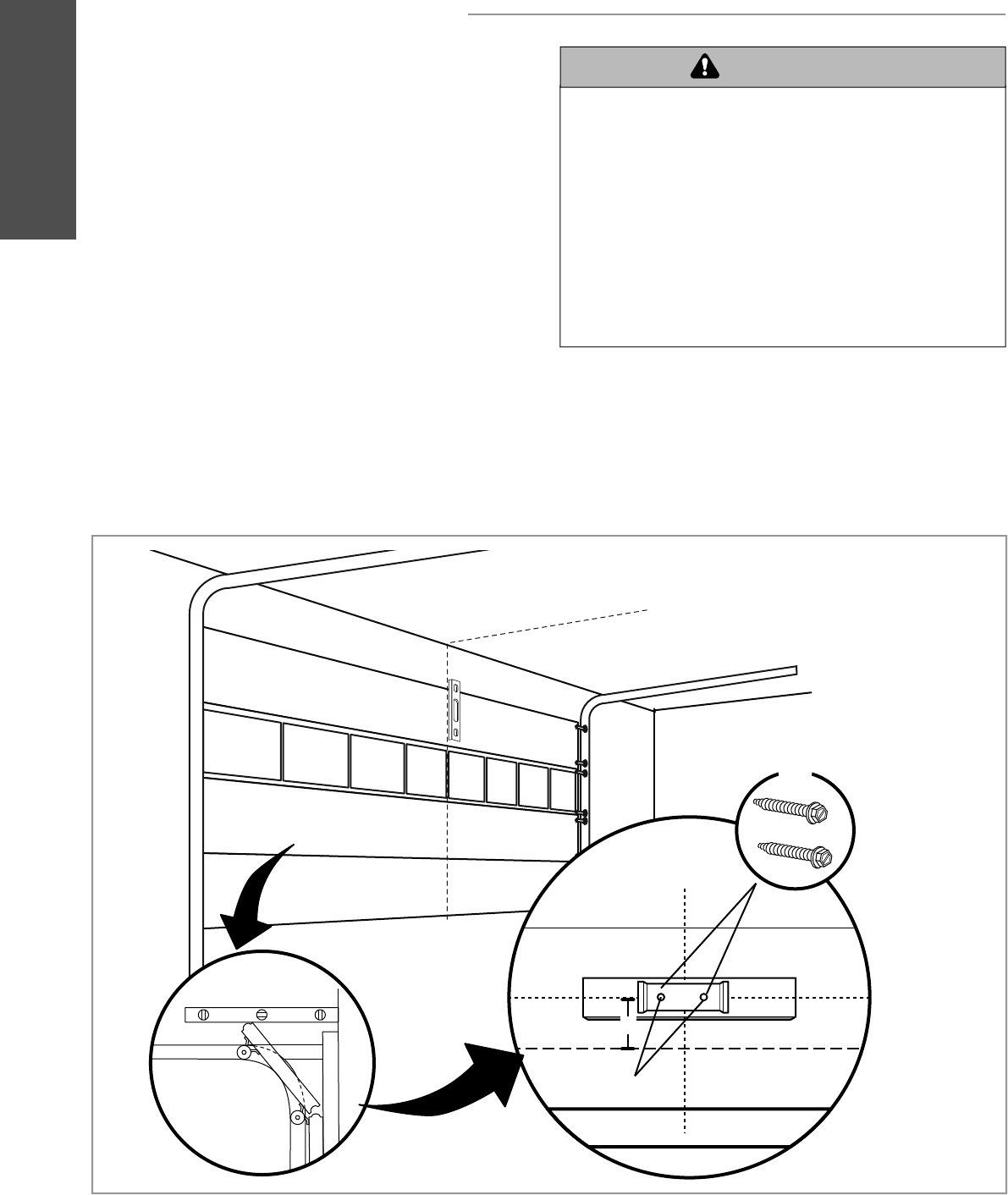
1Close the door. Mark the center of the door with a vertical line,
extend the line onto the ceiling.
INSTALL THE HEADER BRACKET
2Open the door to the highest point of travel mark 4 inches
above the highest point of travel.
1
2
4
3
4"
5
The trolley operator is generally mounted over the center of the
door. However, off center mounting may be required due to
interfering structures or location of door stile / top section support.
Typically, the operator may be mounted up to 24 inches off
center on torsion spring doors. Extension springs require center
mounting.
3
4
Center the header bracket on the vertical center line and the
horizontal line.
Drill the pilot holes for the header bracket.
5Fasten the header bracket with appropriate hardware
(not provided).
11
TROLLEY
Typical installation - Trolley
ATTACH THE TRACK TO THE HEADER BRACKET
HANG THE OPERATOR
1Secure the operator using the appropriate fasteners and
locking hardware that will support the weight of the operator.
1
1
3
2
To avoid possible SERIOUS INJURY from a falling operator:
• Fasten the operator SECURELY to structural supports of the
building.
• Concrete anchors MUST be used if installing ANY brackets
into masonry.
ATTENTION
AVERTISSEMENT AVERTISSEMENT
AVERTISSEMENT
WARNING
CAUTION
CAUTION
WARNING
WARNING
PRECAUCIÓN ADVERTENCIA
ADVERTENCIA ADVERTENCIA
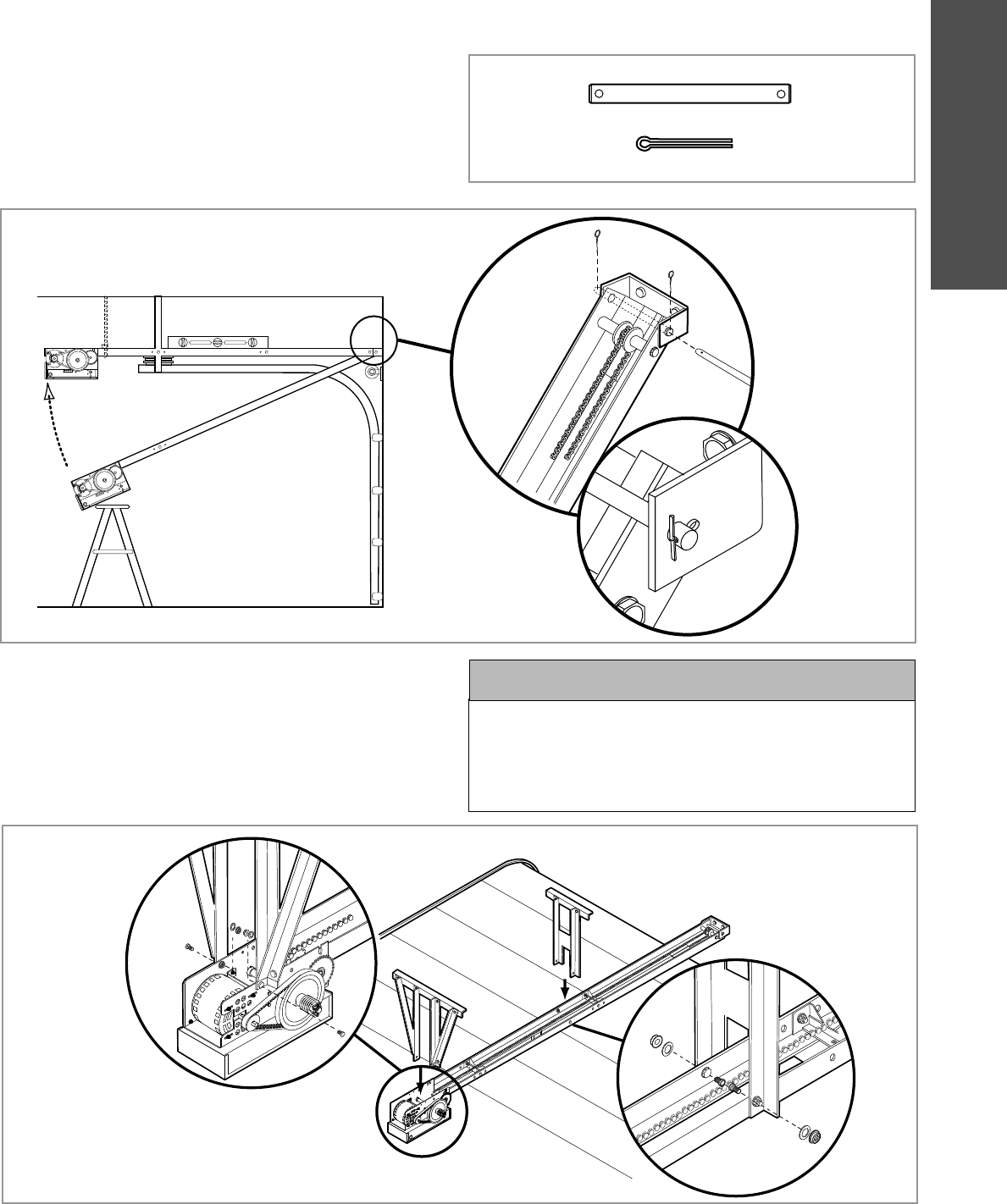
1Align the track with the header bracket.
2
3
Insert the pin through the track and header bracket holes.
Secure with the fasteners.
Swing the operator up and ensure the operator is level.
HARDWARE
Header Pivot Pin (1)
Cotter pins (2)
TROLLEY
12 Typical installation - Trolley
ATTACH THE DOOR ARM
1
2
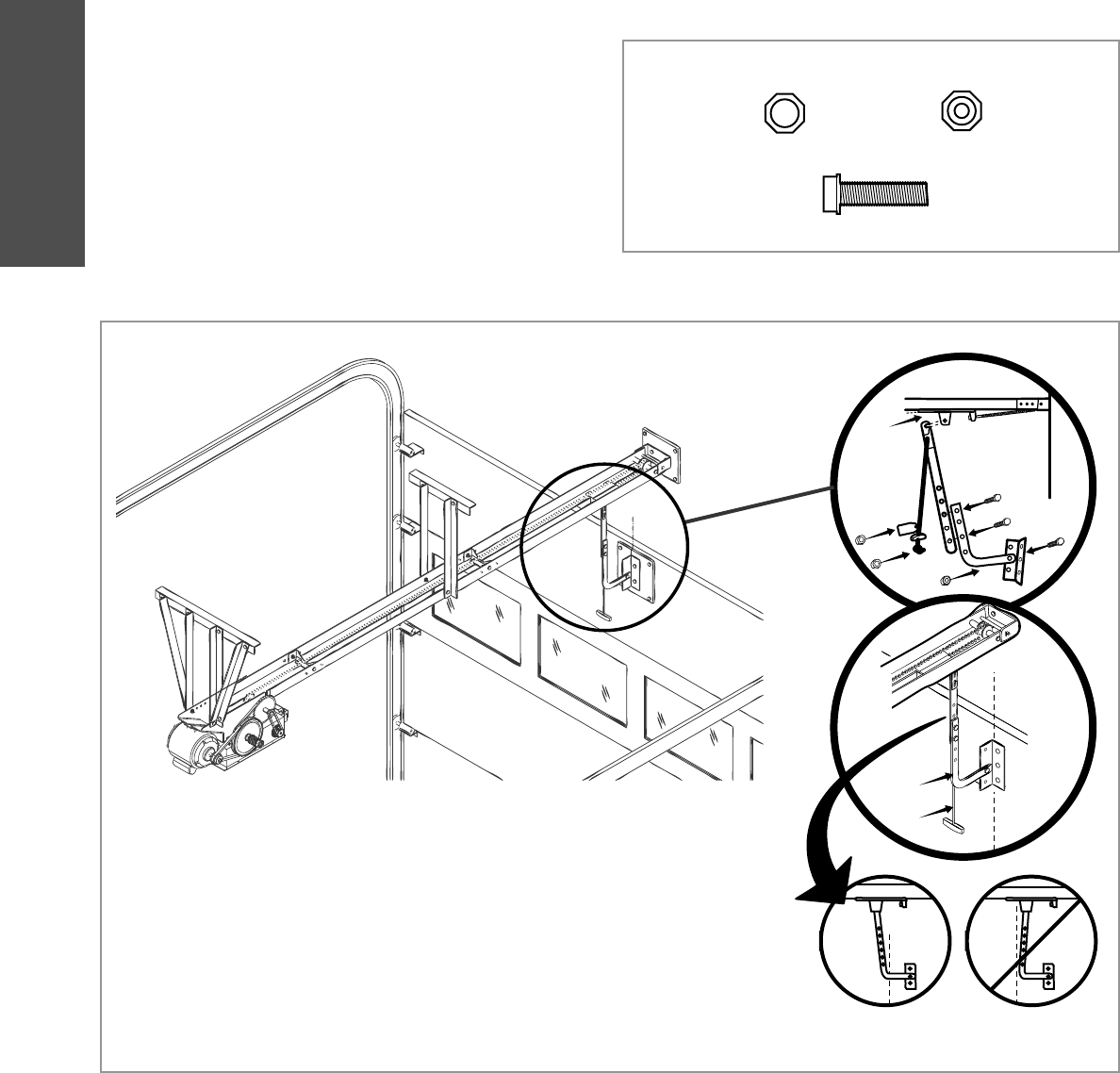
Latch the door arm to the trolley. Make sure the open side of
the notch on the door arm faces the door.
Position the door bracket to the center line of the door and
attach the door bracket to the door using appropriate hardware
(not included). NOTE: When properly installed and adjusted the
door arm should be leaning back toward the operator slightly.
Refer to door manufacturer’s instructions for recommended
installation guidelines.
NO ECIT
1
2
HARDWARE
A
B
Nylok Nut 3/8"-16 (1)
Flanged Hex Nut 3/8"-16 (2)
A B
Bolt 3/8"-16 x 1" (3)
13
HOIST AND JACKSHAFT
Carton inventory/Operator specifi cations - Hoist and Jackshaft
OPERATOR SPECIFICATIONS
CARTON INVENTORY
Before beginning your installation check that all components were provided.
DESCRIPTION
Powerhead assembly
Owner’s manual and caution labels
Hardware box (includes fasteners, track spacers, trolley, door arm assembly, front idler and header mounting bracket)
3-Button control station with LED
Hoist hand chain (Models H, HJ and GH ONLY)
Door sprocket
Door/operator drive chain
Entrapment Protection Device: Model CPS-U photoelectric sensors (standard)
HOIST AND JACKSHAFT OPERATORS
MOTOR
TYPE: . . . . . . . . . . . . . . . . . . . . . . . . . . . . . . . . Continuous duty
HORSEPOWER:
Model J, H and HJ . . . . . . . . . . . . . . . . 1/3, 1/2, 3/4 and 1 HP
Model GH . . . . . . . . . . . . . . . . .1/2, 3/4, 1, 1-1/2, 2 and 3 HP
SPEED:. . . . . . . . . . . . . . . . . . . . . . . . . . . . . . . . . . . .1725 RPM
VOLTAGE:
Model J, H and HJ . . . . . . . . . . . . . . . . . . . .115/230V 1 Phase
208/230/460/575V 3 Phase
Model GH . . . . . . . . . . . . . . . . . . . . . . . . . .115/230V 1 Phase
208/230/460/575V 3 Phase
CURRENT (Amperage):
Models H, HJ, and J
Voltage-Phase 1/3 HP 1/2 HP 3/4 HP 1 HP
115-1Ø, 60Hz 8.5 11.2 13.6 16
230-1Ø, 60Hz 4.2 5.6 6.8 8
208/230-3Ø, 60Hz 3 3.1 4 6
460-3Ø, 60Hz 1.5 1.75 2 3
575-3Ø, 60Hz 1.3 1.4 1.6 1.8
Model GH
Voltage-Phase 1/2 HP 3/4 HP 1 HP 1-1/2 HP 2 HP 3 HP
115-1Ø, 60Hz 11.2 13.6 16 20 - -
230-1Ø, 60Hz 5.6 6.8 8 10 - -
208/230-3Ø, 60Hz 3.1 4 6 7 8 10.6
460-3Ø, 60Hz 1.75 2 3 3.5 4 4.8
575-3Ø, 60Hz 1.4 1.6 1.8 2.75 3 -
ELECTRICAL
TRANSFORMER:. . . . . . . . . . . . . . . . . . . . . . . . 24Vac Secondary
CONTROL STATION:. . . . . . . . . . . . . . . . NEMA 3-Button Station
Open/Close/Stop w/LED
WIRING TYPE: . . . . . . . . . . . . . . . . . . . . . . . . . . . C2 (Standard)
Momentary contact to OPEN and STOP, constant pressure to
CLOSE, plus wiring for sensing device to reverse and auxiliary
devices to open and close with open override. See page 29 for
optional wiring types and operating modes.
LIMIT ADJUST:. . . . . . . . . . Linear driven, fully adjustable screw
type cams. Adjustable to 24 feet.
SAFETY
DISCONNECT:
Model J . . . . .Floor level disconnect for manual door operation
Model H and GH . . . . . . . Floor level chain hoist with electrical
interlock for manual door operation
Model HJ . . . . . . . . . . . . . . Includes both floor level disconnect
systems stated above
ENTRAPMENT PROTECTION:
LiftMaster Monitored Entrapment Protection (LMEP)
Photoelectric Sensors (CPS-U): . . . . . . . . . . . . .Through beam
used to provide non-contact safety protection.
Safety Edge (Optional): . . . . . . . Electric or pneumatic sensing
device attached to the bottom edge of door.
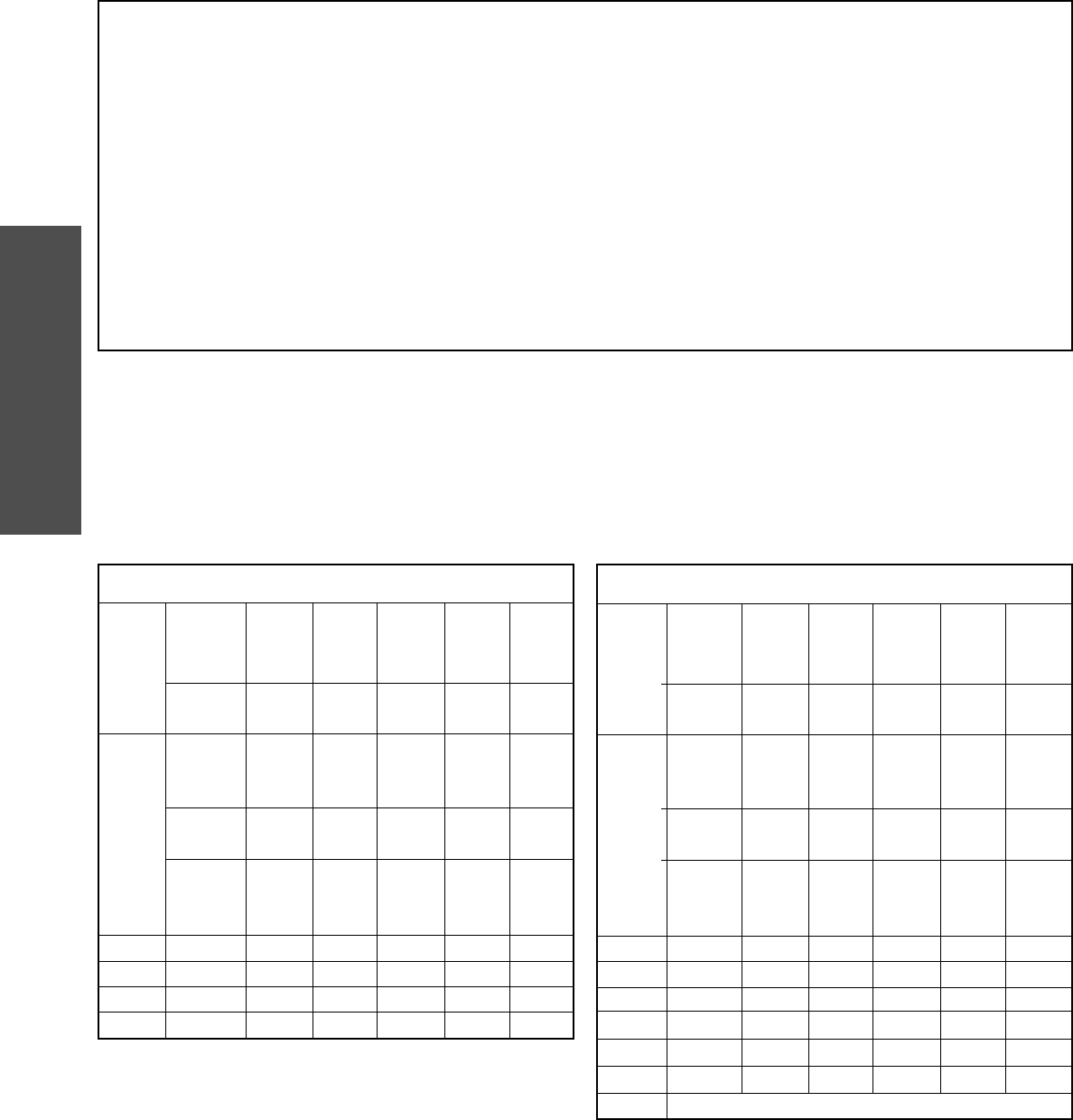
14
HOIST AND JACKSHAFT
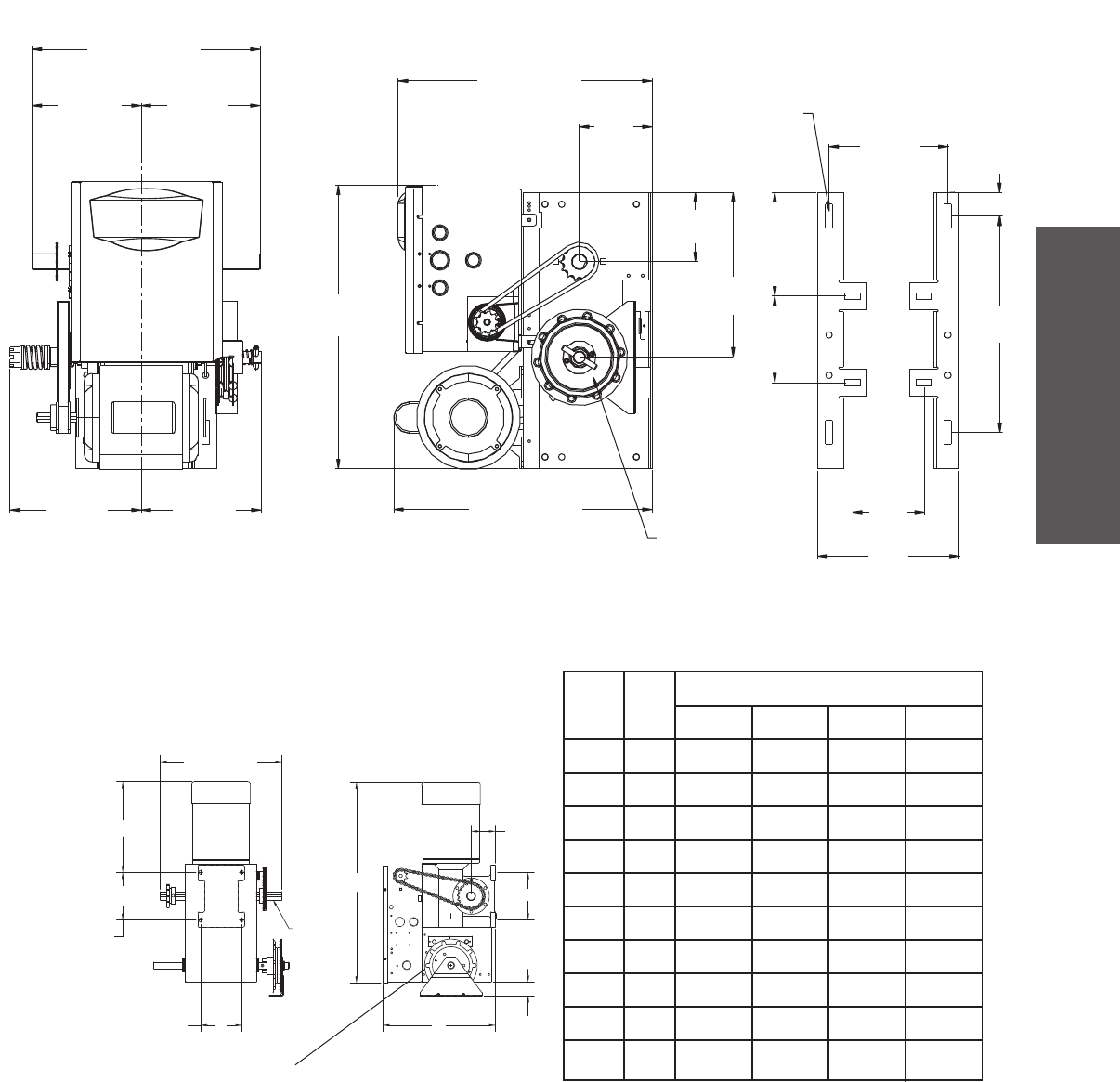
MAXIMUM DOOR AREA (SQ. FT.)
MODELS J, H, AND HJ
SECTIONAL
22 ga.
Steel
Alum.
Doors
24 ga.
22 ga.
Steel
Alum.
Doors
---
285
350
500
625
24 ga.
Steel
Alum.
Grilles
---
Fiberglass
Doors
---
310
400
560
640
---
---
20 ga.
Steel
Wood
Doors
24 ga.
Steel
Insul.
260
320
450
560
20 ga.
18 ga.
Steel
Steel
Grilles
---
---
---
210
280
380
475
---
---
---
---
16 ga.
Steel
Insul.
125
200
250
310
1/3 HP
1/2 HP
3/4 HP
1 HP
ROLLING
16 ga.
Steel
---
16 ga.
Steel
---
20 ga.
Steel
Insul.
175
250
325
400
MODEL GH
SECTIONAL
22 ga.
Steel
Alum.
Doors
24 ga.
22 ga.
Steel
Alum.
Doors
---
300
430
560
---
---
---
24 ga.
Steel
Alum.
Grilles
---
Fiberglass
Doors
---
325
480
650
---
---
---
---
---
20 ga.
Steel
Wood
Doors
24 ga.
Steel
Insul.
275
390
500
680
---
---
20 ga.
18 ga.
Steel
Steel
Grilles
---
---
---
250
340
430
540
640
875
---
---
---
---
16 ga.
Steel
Insul.
175
225
300
375
460
620
1/2 HP
3/4 HP
1 HP
1-1/2 HP
2 HP
3 HP
5 HP
ROLLING
16 ga.
Steel
---
16 ga.
Steel
---
20 ga.
Steel
Insul.
225
275
325
425
560
840
Call for specifications
Operator specifi cations/Maximum door area - Hoist and Jackshaft
MECHANICAL
DRIVE REDUCTION:
Model J, H, and HJ . . . . . . . . Primary: Heavy duty (5L) V-Belt
Secondary: #48 chain/sprocket;
Output: #50 chain
Model GH . . . . . . . . . . . . Primary: 45:1 for 1/2, 3/4 and 1 HP
Worm gear-in-oil bath gear reducer 44:1 for 1-1/2 and 2 HP
42:1 for 3 HP
Output: #50 chain
OUTPUT SHAFT SPEED:
Model J, H and HJ . . . . . . . . . . . . . . . . . . . . . . . . . . . . 36 RPM
Model GH . . . . . . . . . . . . . . . . . . . .38.3 for 1/2, 3/4 and 1 HP
39.2 for 1-1/2 and 2 HP
41.1 for 3 HP
DOOR SPEED:
Model J, H and HJ . . . . . . . 8-9" per second depending on door
Model GH . . . . . . . . . . . . . 8-9" per second depending on door
BRAKE: . . . . . . . . . . . . . . . . . . . . . Solenoid actuated disc brake
BEARINGS . . . . . . . . . . . . . .Output Shaft: Shielded Ball Bearing
Clutch Shaft: IronCopper sintered and oil impregnated
Models H and HJ ONLY
HAND CHAIN WHEEL: . . . . . . . . . . . . . . . . .Left or right handing
Models H and HJ ONLY
HOIST WHEEL: . . . . . . . Standard mounting on left or right side
OPERATOR SPECIFICATIONS
15
HOIST AND JACKSHAFT
A
AA
BB
B
B
A
13.75"
(34.93 cm)
1.5" (3.81 cm)
Door Height Plus 4 feet (minimum)
A - Wall Mounting
B - Bracket Mounting (rolling door)
6.59"
(16.74 cm)
5.5"
(14 cm)
10.5"
(26.67 cm)
Hand Chain Wheel Present
with Models H and HJ ONLY
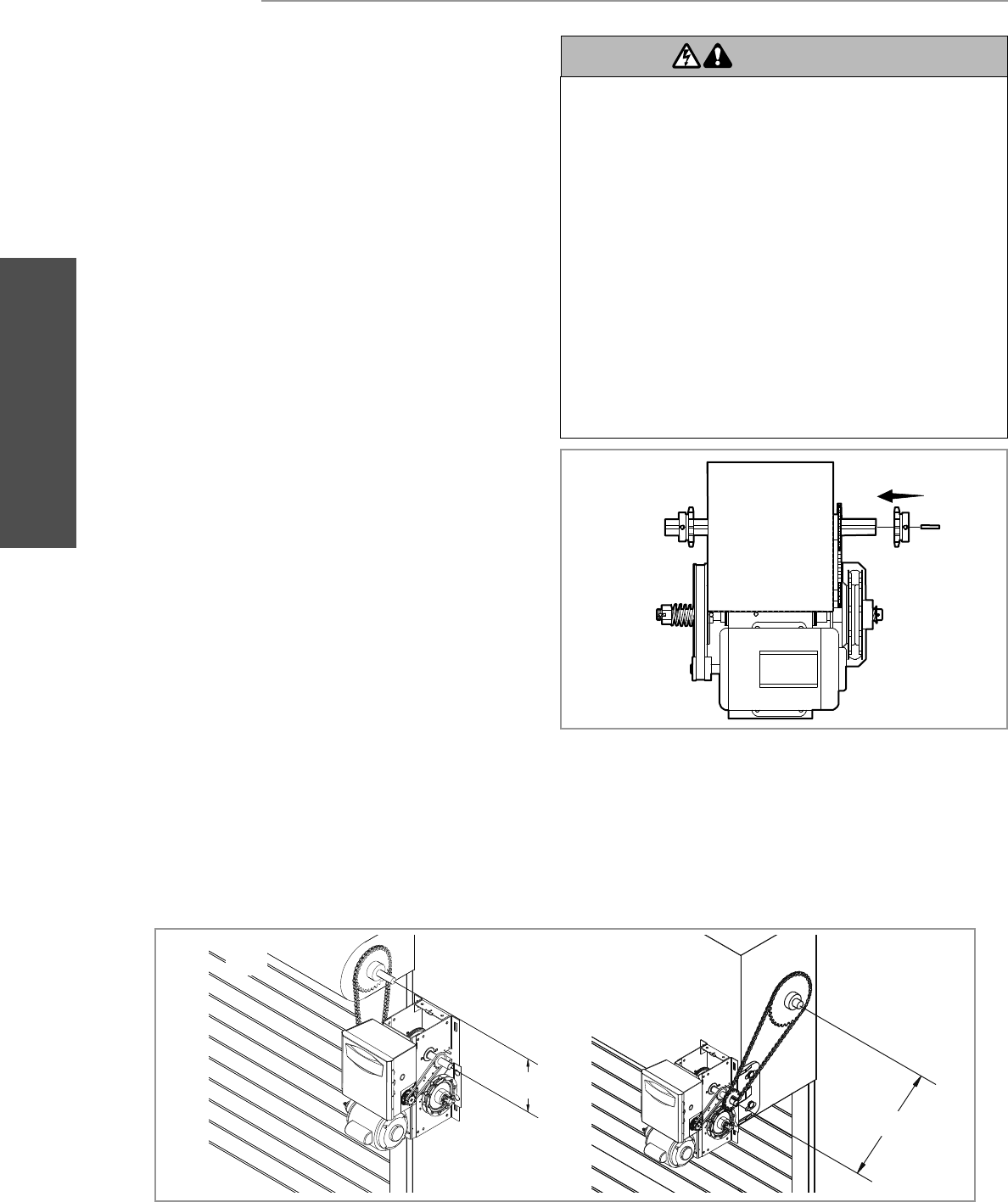
WEIGHTS AND DIMENSIONS
MODELS J, H AND HJ
Hanging Weight: 80-110 lbs.
14"
WEIGHTS AND DIMENSIONS
HANGING WEIGHT : .........80-1 10 LBS.
Hand Chain Wheel
See
Note #1
See
Note #2
A
X
B
Y
C
D
Y
See
Note #3
A
11-1/2
12-1/2
12-3/4
12-3/4
11
11
12
12-1/2
12-3/4
13-1/4
B
25-3/4
26-3/4
27
27
25-1/4
25-1/4
26-1/4
26-3/4
27
28-5/8
C
12-63/64
12-63/64
12-63/64
13-63/64
12-63/64
12-63/64
12-63/64
13-63/64
13-63/64
15-15/64
D
3
3
3
3-1/2
3
3
3
3-1/2
3-1/2
3-15/16
1/2
3/4
1
1-1/2
1/2
3/4
1
1-1/2
2
3
1
1
1
1
3
3
3
3
3
3
HP
DIMENSIONS
PHASE
MODEL GH
Hanging Weight: 140 lbs.
Weights and dimensions - Hoist and Jackshaft
14.5"
(36.83 cm)
16.81"
(42.7 cm)
6.94"
(17.63 cm)
7.56"
(19.2 cm)
7.56"
(19.2 cm)
4.62"
(11.73 cm)
3/8" Bolt
4.41"
(11.2 cm)
4.56"
(11.58 cm)
9"
(22.86 cm)
7.62"
(19.35 cm)
20.15"
(51.18 cm)
16.43"
(41.73 cm)
14"
(35.56 cm)
8.34"
(21.18 cm)
NOTES:
1) Output shaft with 1" x 1/4" key for 1/2 thru 1 HP operators, 1-3/16" x 5/16" key for 1-1/2 and 2 HP operators,
1-1/4" x 1/4" key for 3 HP operators.
2) Mounting centers: X = 4-3/4"; Y = 5-1/2" for 1/2 thru 2 HP operators.
X = 3-5/8"; Y = 9-1/16" for 3 HP operators.
3) Hand chain wheel extends 1-5/8" beyond operator in vertical mounting position as shown.
*23.43"
(59.51 cm)
16
HOIST AND JACKSHAFT
Assembly/Typical installation - Hoist and Jackshaft
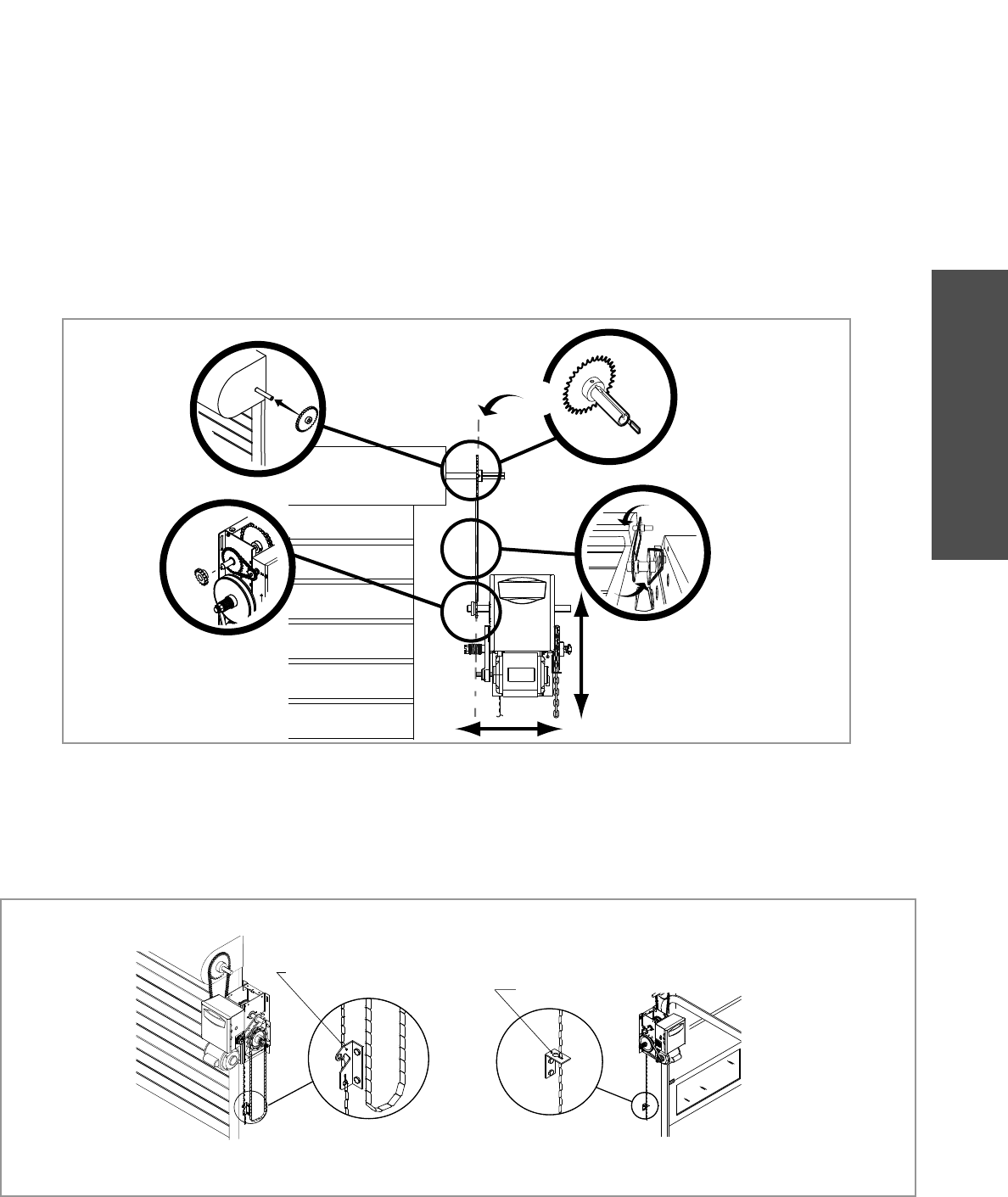
DETERMINE MOUNTING LOCATION
TYPICAL INSTALLATION
1
1
1a
1b
Select handing. Right (R) or Left (L).
On models J, H, HJ and GH operators the drive sprocket can be
mounted on either the right or left side.
For models H and HJ with manual hand chain systems, the
handing of the operator must be determined at the time of order.
The handing is indicated by the last letter of the model number
(R or L). The hand chain wheel cannot be switched. If your
installation causes the hand chain to hang in the door opening,
hook the chain to the side near the top of the door jamb.
The operator may be mounted on the wall, shelf or bracket
(not provided, see accessories). The optimum distance between
the door shaft and operator drive shaft is 12 - 15 inches.
Wall mount
Shelf or bracket mount
It is imperative that the wall or mounting surface provide adequate
support for the operator.
This surface must:
a. Be rigid to prevent play between the operator and the door
shaft.
b. Provide a level base.
c. Permit the operator to be fastened securely and with the drive
shaft parallel to the door shaft.
To prevent possible SERIOUS INJURY or DEATH:
• DO NOT connect electric power until instructed to do so.
• If the door lock needs to remain functional, install an interlock
switch.
• ALWAYS call a trained door systems technician if door binds,
sticks or is out of balance. An unbalanced door may NOT
reverse when required.
• NEVER try to loosen, move or adjust doors, door springs,
cable, pulleys, brackets or their hardware, ALL of which are
under EXTREME tension and can cause SERIOUS PERSONAL
INJURY.
• Disable ALL locks and remove ALL ropes connected to door
BEFORE installing and operating door operator to avoid
entanglement.
• Fasten the operator SECURELY to structural supports of the
building.
• Concrete anchors MUST be used if installing ANY brackets.
ATTENTION
AVERTISSEMENT AVERTISSEMENT
AVERTISSEMENT
WARNING
CAUTION
WARNING
WARNING
WARNING
PRECAUCIÓN ADVERTENCIA
ADVERTENCIA ADVERTENCIA
ASSEMBLE THE OPERATOR
ASSEMBLY
1a 1b
12" - 15"
12" - 15"
EXAMPLE: Right Hand
17
HOIST AND JACKSHAFT
Typical installation - Hoist and Jackshaft
MOUNTING
INSTALL THE MANUAL DISCONNECT
1
1
2
3
Place the door sprocket on the door shaft.
Fasten Door retaining bracket 4 feet above the fl oor.
Door retaining bracket
Door retaining bracket
Place the operator drive sprocket on the appropriate side of the
operator for your installation type.
Wrap the drive chain around the door sprocket and the drive
sprocket then secure with the master link.
4Align the door and the drive sprockets. Insert keys and
fasten the sprockets with the set screws. NOTE: It is highly
recommended to add a thread adhesive to secure the set
screws in place.
1
23
4
1
18
WIRING
Wiring - Power and ground wiring
WIRING
To reduce the risk of SEVERE INJURY or DEATH:
• ANY maintenance to the operator or in the area near the
operator MUST NOT be performed until disconnecting the
electrical power and locking-out the power. Upon completion of
maintenance the area MUST be cleared and secured, at that
time the unit may be returned to service.
• Disconnect power at the fuse box BEFORE proceeding.
Operator MUST be properly grounded and connected in
accordance with national and local electrical codes. The
operator should be on a separate fused line of adequate
capacity.
• ALL electrical connections MUST be made by a qualified
individual.
• DO NOT install ANY wiring or attempt to run the operator
without consulting the wiring diagram.
• ALL power wiring should be on a dedicated circuit and well
protected. The location of the power disconnect should be
visible and clearly labeled.
• ALL power and control wiring MUST be run in separate
conduit.
Three Phase Power Wiring
Single Phase Power Wiring
Line Power
115/230 Vac
Single Phase
Hot
Neutral
Ground
Phase 1
Phase 2
Phase 3
WARNING
WARNING
WARNING
WARNING
2
13
Line Power
208/230/460/575 Vac
Three Phase
POWER AND GROUND
Power and control wiring must be run in separate conduit in
accordance with national and local electrical codes. Must use
14 AWG or heavier wire for power wiring. Use conduit knockouts
for wiring as indicated on the electrical box labels.
Remove the operator cover.
Attach power and ground wires to appropriate terminals.
IMPORTANT NOTE: This operator must be properly
grounded. Failure to properly ground the operator could
result in electric shock and serious injury.
NOTE: In some installations, such as a through-wall-installation,
the rotation of the motor and logic board may have to be changed.
1. Locate the MOTOR DIRECTION jumper on the logic board.
Remove jumper and relocate from STD to REV.
2. Relocate the safety limit switch (SLS) to the opposite side.
3. Remove CLOSE/OPEN decal and reattach appropriately.
1
3
2Run power wires to electrical box according to national and
local electrical codes.
ON THREE PHASE MACHINES ONLY: Incorrect phasing of
the power supply will cause the motor to rotate in the wrong
direction. To change motor rotation, exchange incoming
power leads L1 and L2.
DISTANCE GAUGE
50 feet 14 AWG
100 feet 12 AWG
200 feet 8 AWG*
350 feet 6 AWG*
500 feet 4 AWG*
1000 feet 2 AWG*
POWER WIRING CHART
*
Maximum wire gauge that can be connected to the operator’s
terminal is 12 AWG. When a larger wire gauge is required, the wire
must be gauged down to 12 AWG. USE COPPER WIRE ONLY.
19
WIRING
Wiring - Control station
Remove the control station cover.
Select appropriate knockout and run the wires to the
operator.
1Connect wires to the control station and replace the control
station cover.
4
3
Fasten the entrapment warning placard next to the control
station.
52 Fasten the control station to the wall at least 5 feet above the
ground. The installation surface must be smooth and fl at.
Attach the MAS label to the side of the control station.
DATA
24VAC
24VAC
LMEP:
EDGE:
OPEN
CLOSE
STOP
COMMON
SBC
MAS
COMMON
TIMER
DEFEAT
POWER
TIMER
NABLE
N
3-PHASE
1 PHASE
Open
Close
Stop
Maintenance
Alert LED
(WH)(RD)
3-Button
Station
OPEN
CLOSE
STOP
24VAC
24VAC
TIMER
DEFEAT
COMMON
MAS
LMEP
EDGE
OPEN
CLOSE
STOP
COMMON
SBC
11
10
9
14
13
12
8
7
6
5
4
3
2
1
CONTROL STATION
4
^
O
OPEN
STOP
^
CLOSE
5'
1
2
3
To prevent possible SERIOUS INJURY or DEATH from
electrocution:
• Be sure power is NOT connected BEFORE installing door
control.
To prevent possible SERIOUS INJURY or DEATH from a closing
door:
• Install door control within sight of door, out of reach of
children at a minimum height of 5 feet (1.5 m) and away from
ALL moving parts of door.
• Install the control station far enough from the door to prevent
the user from coming in contact with the door while operating
the controls.
• Install the entrapment warning placard on wall next to the
control station in a prominent location that is visible from the
door.
• NEVER permit children to operate or play with door control
push buttons or remote controls.
• Activate door ONLY when it can be seen clearly, is properly
adjusted and there are no obstructions to door travel.
• ALWAYS keep door in sight until completely closed. NEVER
permit anyone to cross path of closing door.
ATTENTION
AVERTISSEMENT AVERTISSEMENT
AVERTISSEMENT
WARNING
CAUTION
WARNING
WARNING WARNING
PRECAUCIÓN ADVERTENCIA
ADVERTENCIA ADVERTENCIA
WARNING
Keep Door in Sight at all Times When Door is Moving
Moving Door Can Cause
Serious Injury or Death
Keep Clear! Door May Move at any Time
Without Prior Warning
Do Not Let Children Operate the Door or Play
in the Door Area
Maintenance
Alert System
TM
If light is Flashing
Rapidly, it is time
for routine door
maintenance.
If light is Flashing
Slowly, followed
by a pause, call for
immediate service.
Service every
cycles/months
5
NOTE: The low voltage control circuit wiring requires insulated,
20 AWG or greater wire. Refer to back page for additional control
wiring.
UL Entrapment Placard
MAS Label
20
ENTRAPMENT PROTECTION
Entrapment Protection
To prevent possible SERIOUS INJURY or DEATH from a closing
door:
• Be sure power is NOT connected to the door operator BEFORE
installing the photoelectric sensor.
• The door MUST be in the fully opened or closed position
BEFORE installing the LiftMaster Monitored Entrapment
Protection device.
To prevent SERIOUS INJURY, DEATH, ENTRAPMENT, or
PROPERTY DAMAGE:
• Correctly connect and align the photoelectric sensor.
• Install the photoelectric sensor beam NO HIGHER than
6" (15 cm) above the floor.
• This is a required safety device for B2, TS, T, and FSTS wiring
types and MUST NOT be disabled. For D1, C2, and E2 wiring
the installation of an entrapment device is recommended.
• LiftMaster Monitored Entrapment Protection devices are for
use with LiftMaster Commercial Door Operators ONLY. Use
with ANY other product voids the warranty.
• If an edge sensor is being used on a horizontal slide door,
then place one or more edge sensors on both the leading and
trailing edge.
• If an edge sensor is being used on a vertically moving door,
then place one or more edge sensors on the bottom edge of
the door.
ATTENTION
AVERTISSEMENT AVERTISSEMENT
AVERTISSEMENT
WARNING
CAUTION
WARNING
WARNING
WARNING
PRECAUCIÓN ADVERTENCIA
ADVERTENCIA ADVERTENCIA
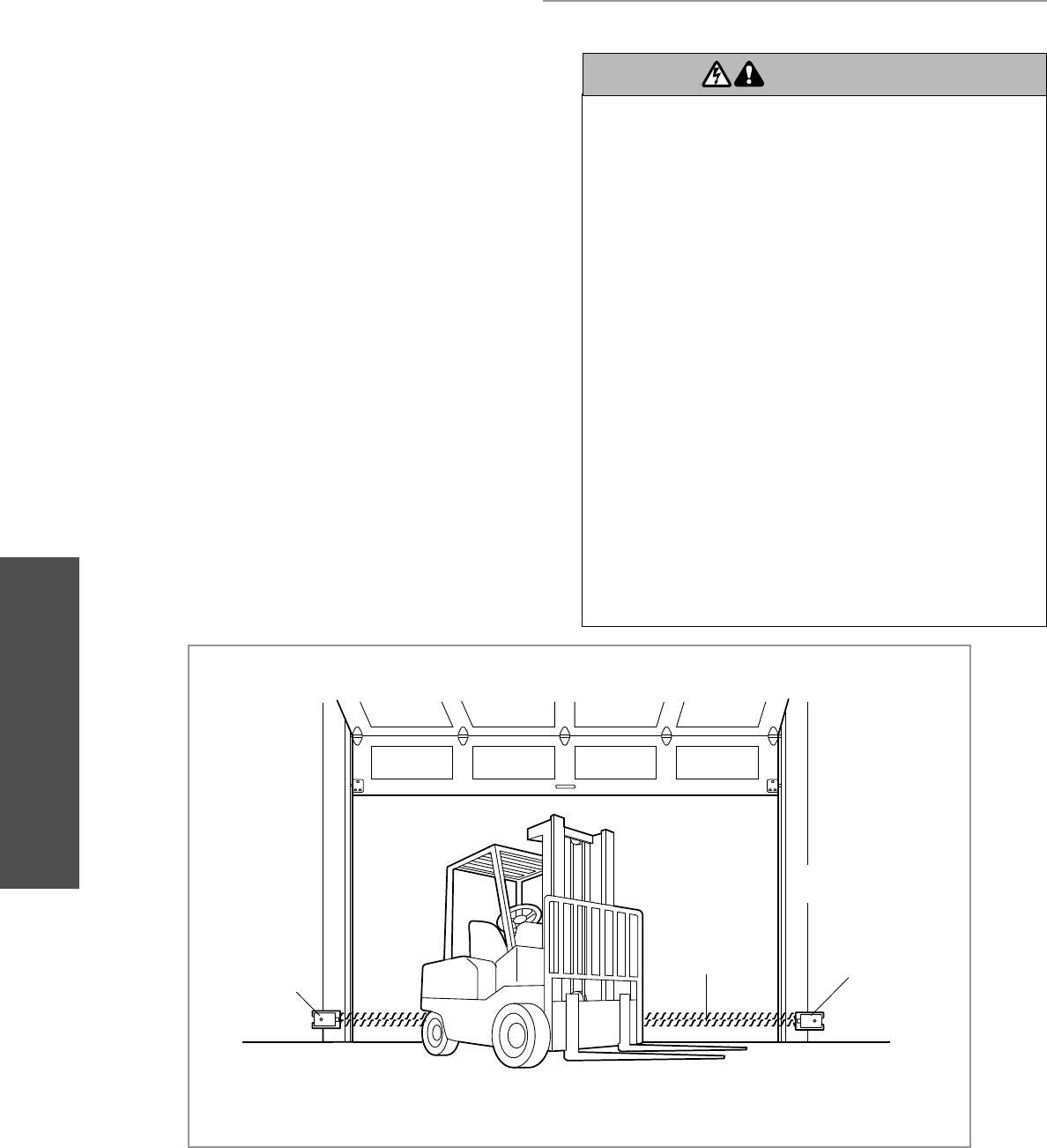
LIFTMASTER MONITORED ENTRAPMENT
PROTECTION (LMEP)
Safety Reversing
Sensor
Invisible Light Beam
Protection Area
Safety Reversing
Sensor
— Right Side of Garage
—
—Left Side of Garage—
Photoelectric Sensor
6" (15 cm) max. above
floor
Invisible Light Beam
Protection Area
Photoelectric Sensor
6" (15 cm) max. above
floor
ENTRAPMENT PROTECTION
IMPORTANT INFORMATION ABOUT THE LIFTMASTER
MONITORED ENTRAPMENT PROTECTION DEVICES
A LiftMaster Monitored Entrapment Protection (LMEP) device is
required for most wiring types (refer to page 29). The operator
comes standard with the photoelectric sensors model CPS-U,
additional entrapment devices are available for purchase
(see accessories). If a LiftMaster Monitored Entrapment Protection
device is not installed, constant pressure to close will be required
from the control station.
When properly connected and aligned, the photoelectric sensors
will detect an obstruction in the path of its invisible light beam. If
an obstruction breaks the light beam while the door is closing, the
door will stop and typically reverse to the full open position.
The photoelectric sensors must be installed facing each other
across the door, no more than 6" (15 cm) above the floor.
Each photoelectric sensor has an LED that will glow steady when
the sensor is properly connected and aligned. The LEDs on both
photoelectric sensors will flicker rapidly when obstructed or
misaligned.
21
ENTRAPMENT PROTECTION
Entrapment Protection
Mounting Bracket with Square Holes
“C” Wrap
Screws#
10-32x3/8"
Lock Nuts
#10-32
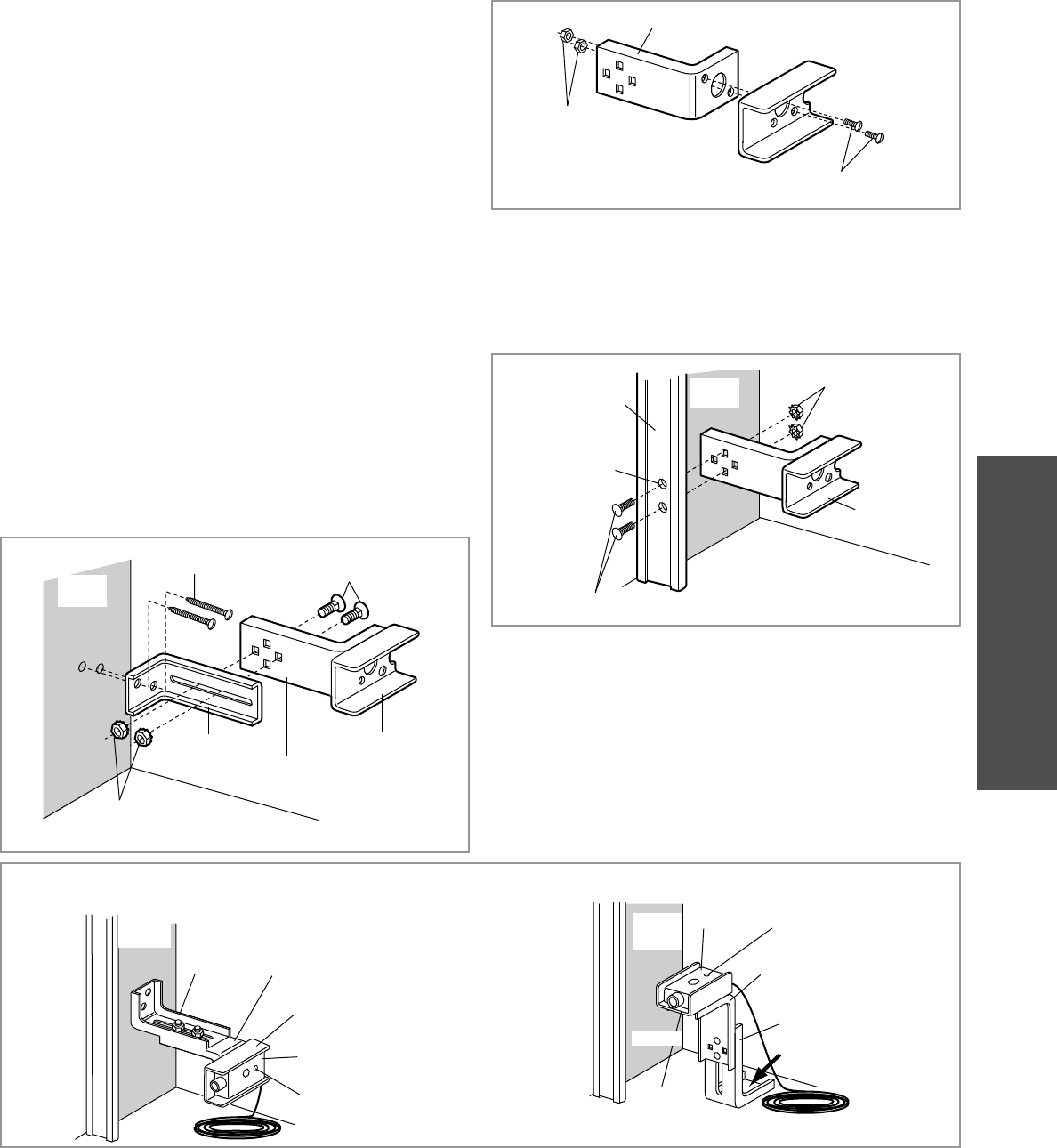
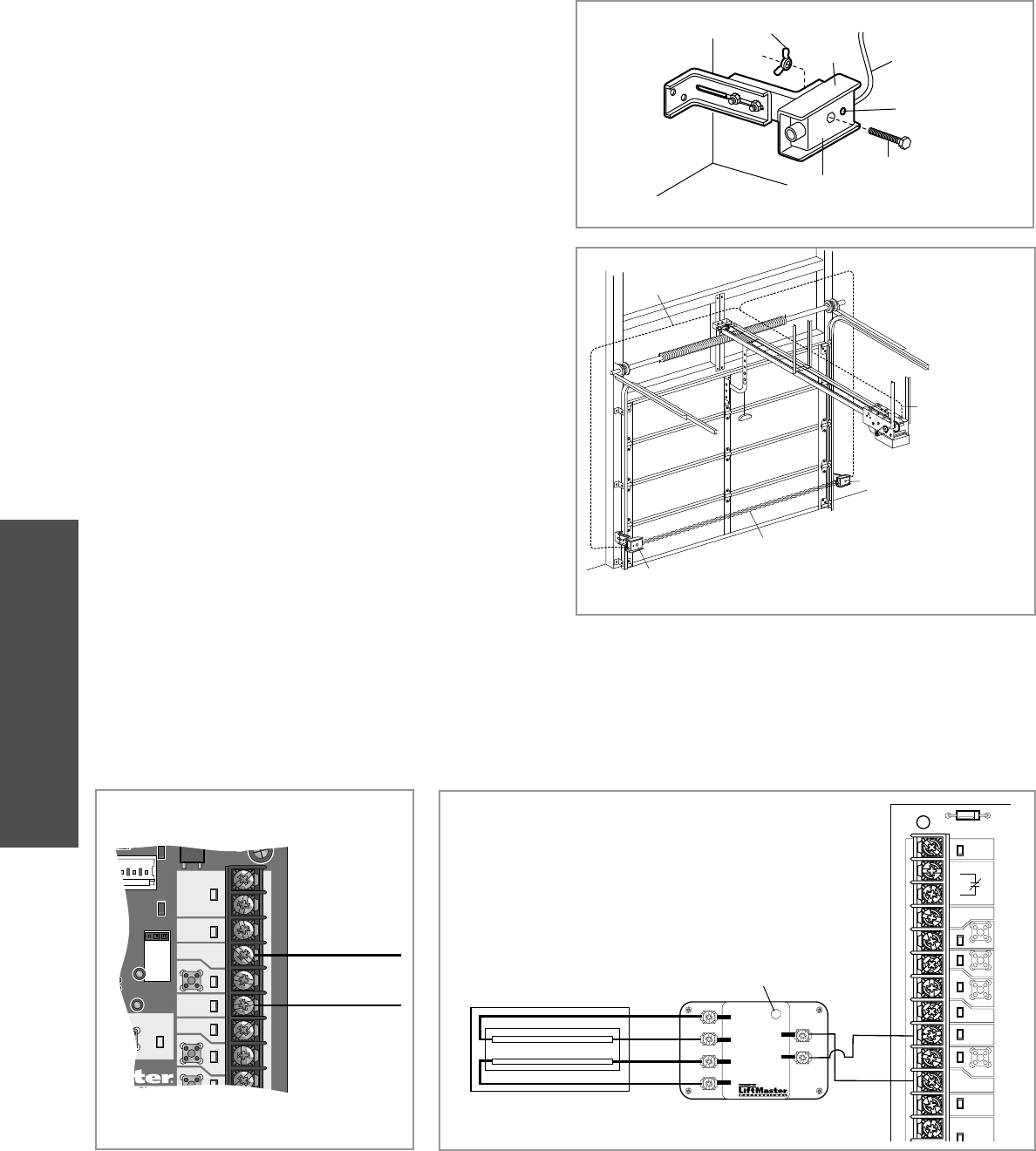
INSTALL THE PHOTOELECTRIC SENSORS (PROVIDED)
WALL INSTALLATION
2Connect each assembly to a slotted bracket, using the
hardware shown. Note alignment of brackets for left and
right sides of the door.
3Finger tighten the lock nuts.
4Use bracket mounting holes as a template to locate and drill
(2) 3/16" diameter pilot holes on both sides of the garage
door, 4-6 inches (10-15 cm) above the fl oor. Do not exceed
6 inches (15 cm).
5Attach bracket assemblies with 1/4"x1-1/2" lag screws.
6Adjust right and left side bracket assemblies to the same
distance out from mounting surface. Make sure all door
hardware obstructions are cleared. Tighten the nuts securely.
ALTERNATE FLOOR INSTALLATION
2Discard slotted bracket. Drill 3/8" holes in each track and
fasten securely with hardware .
DOOR TRACK INSTALLATION
Lag Screws
1/4x1-1/2"
Carriage Bolts (with square
shoulders) 1/4-20x12"
Lock Nuts
1/4"-20
Inside
Wall
Mounting Bracket
with Slot Mounting Bracket with
Square Holes
“C” Wrap
Inside
Wall
“C” Wrap
Mounting Bracket with
Square Holes
Lock Nuts 1/4"
Door Track
Drill 3/8" Holes
Carriage Bolts 1/4-20x1/2"
Sensor
with Wire
Inside
Wall
Indicator Light
Mounting Bracket with
Square Holes
Mounting Bracket
with Slot
“C” Wrap
- Floor -
Attach with Concrete Anchors (Not Provided)
The following instructions show recommended assembly of the bracket(s) and “C” wrap based on the wall installation of the
photoelectric sensors on each side of the door or on the door tracks themselves.
There are also alternate mounting methods which may fi t
your installation requirements better.
Make sure the wraps and brackets are aligned so the photoelectric sensors will face each other across the door.
Fasten the “C” wraps to the mounting brackets having square
holes, using hardware shown.
1
Indicator Light
ALTERNATE WALL INSTALLATION
Mounting Bracket
with Slot
“C” Wrap
Sensor with Wire
Inside
Wall
- Floor -
Mounting Bracket with
Square Holes
22
ENTRAPMENT PROTECTION
MOUNT THE PHOTOELECTRIC SENSORS (PROVIDED)
Center each sensor in the bracket with the lenses pointing
toward each other across the door.
Attach the sensors to the brackets with the provided
hardware. Finger tighten the receiving sensor wing nut.
Securely tighten the sending sensor wing nut.
Run the wires from both sensors to the operator. Use
insulated staples to secure wire to the wall and ceiling.
Connect the sensor wires to the operator (see below).
1
2
3
4
Wire
Indicator Light
“C” Wrap
Wing Nut
Hex Bolt 1/4-20x1-1/2"
Sensor
Photoelectric Sensor
6" (15 cm) max. above fl oor
Photoelectric Sensor
6" (15 cm) max. above fl oor
Invisible Light Beam Protection Area
Bell Wire
Secure wire with
insulated staples
Connect wire to
Operator (refer to
following page)
Entrapment Protection
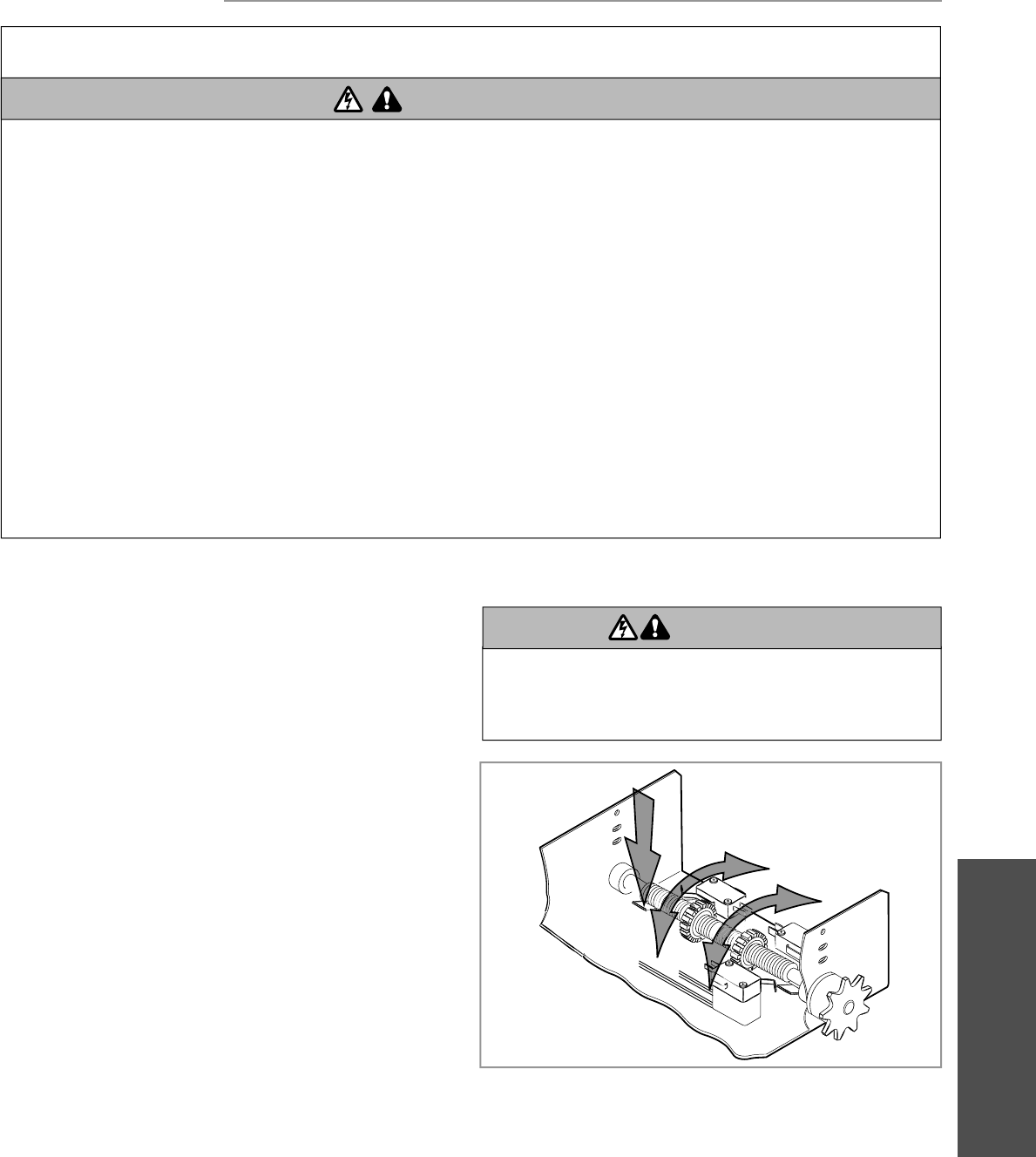
WIRE THE LIFTMASTER MONITORED ENTRAPMENT PROTECTION (LMEP) DEVICES
Connect the LiftMaster Monitored Entrapment Protection
(LMEP) device to the logic board according to the models
shown below:
1
TTC
24VAC
24VAC
LMEP:
EDGE:
OPEN
CLOSE
STOP
COMMON
MAS
COMMON
TIMER
DEFEAT
POWER
TIMER
ENABLE
3
FSTS
DIAG
TS
3-PHASE
1-PHASE
White (Blue)
White/Black (Brown)
CPS-U and CPS-UN4
40-34141-1
LMEP2
LMEP1
E1
E2
E3
E4
CPS-EI
24VAC
LMEP
EDGE
OPEN
CLOSE
STOP
COMMON
SBC
MAS
COMMON
TIMER
DEFEAT
POWER
Green LED
4-Wire Sensing Edge
Black
Black
White
White
CPS-EI
23
ADJUSTMENT
ADJUSTMENT
LIMIT ADJUSTMENT
Adjustment - Limits Adjustment
To avoid SERIOUS personal INJURY or DEATH from
electrocution:
• Disconnect electric power BEFORE performing ANY
adjustments or maintenance.
ATTENTION
AVERTISSEMENT AVERTISSEMENT
AVERTISSEMENT
WARNING
CAUTION
WARNING
WARNING
WARNING
PRECAUCIÓN ADVERTENCIA
ADVERTENCIA ADVERTENCIA
TO REDUCE THE RISK OF SEVERE INJURY OR DEATH:
IMPORTANT SAFETY INSTRUCTIONS
1. READ AND FOLLOW ALL WARNINGS AND INSTRUCTIONS.
2. ALWAYS keep remote controls out of reach of children.
NEVER permit children to operate or play with door control
push buttons or remote controls.
3. ONLY activate door when it can be seen clearly, it is properly
adjusted and there are no obstructions to door travel.
4. Personnel should keep away from a door in motion and
ALWAYS keep door in sight until completely closed. NO ONE
SHOULD CROSS THE PATH OF THE MOVING DOOR.
5. NO ONE SHOULD GO UNDER A STOPPED, PARTIALLY
OPENED DOOR.
6. If possible, use manual release handle to disengage door
ONLY when door is CLOSED. Weak or broken springs or
unbalanced door could result in an open door falling rapidly
and/or unexpectedly causing SEVERE INJURY or DEATH.
7. NEVER use manual release handle unless doorway is clear of
persons and obstructions.
8. After ANY adjustments are made, the entrapment protection
device MUST be tested. Failure to adjust the operator
properly may cause SEVERE INJURY and DEATH.
9. Entrapment Protection device MUST be tested every month.
Failure to adjust the operator properly may cause SEVERE
INJURY and DEATH.
10. ALWAYS KEEP DOOR PROPERLY BALANCED. An
improperly balanced door may NOT reverse when required
and could result in SEVERE INJURY or DEATH. See door
manufacturer’s owners manual.
11. ALL repairs to cables, spring assemblies and other
hardware, ALL of which are under EXTREME tension, MUST
be made by a trained door systems technician.
12. ALWAYS disconnect electric power to door operator
BEFORE making ANY repairs or removing covers.
13. SAVE THESE INSTRUCTIONS.
WARNING
WARNING
WARNING WARNING
1
2
3
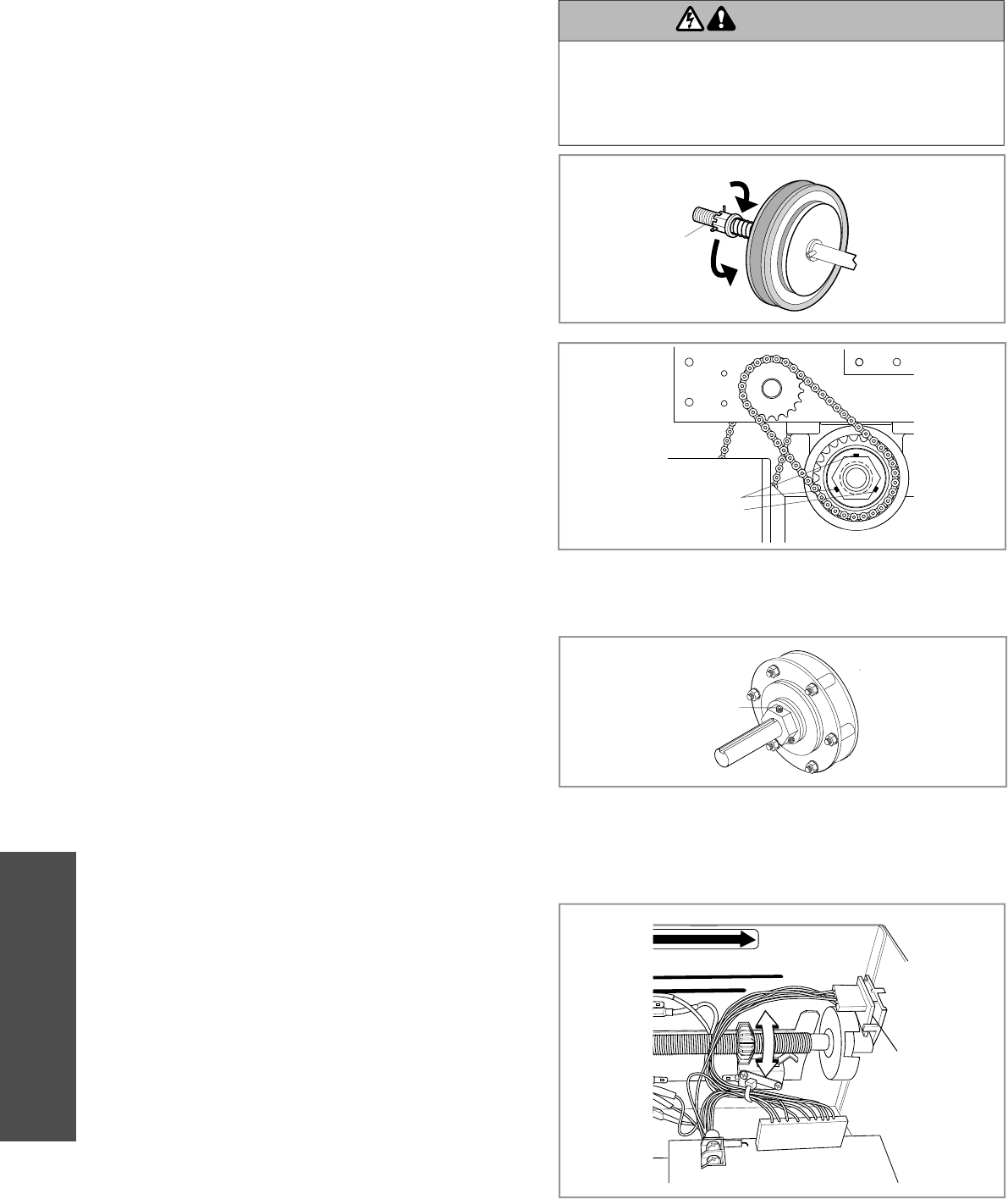
1 Begin with the door in the fully closed position to set the
CLOSE limit.
2 Depress the retaining plate (1) and move the limit nut to the
CLOSE limits (2).
NOTE: The Close Limit Switch (CLS) and Safety Limit Switch
(SLS) LEDs on the logic board will illuminate when the switches
are activated and the power is on.
3 When the retaining plate is released, verify that the retaining
plate is fully seated with the notches of the limit nuts.
4 Open the door to the fully open position and set the OPEN
limit (3).
NOTE: The Open Limit Switch (OLS) LED on the logic board will
illuminate when the switches are activated and the power is on.
5 When the retaining plate is released, verify that the retaining
plate is fully seated with the notches of the limit nuts.
24
ADJUSTMENT
CLUTCH ADJUSTMENT
(BELT DRIVE MODEL OPERATORS)
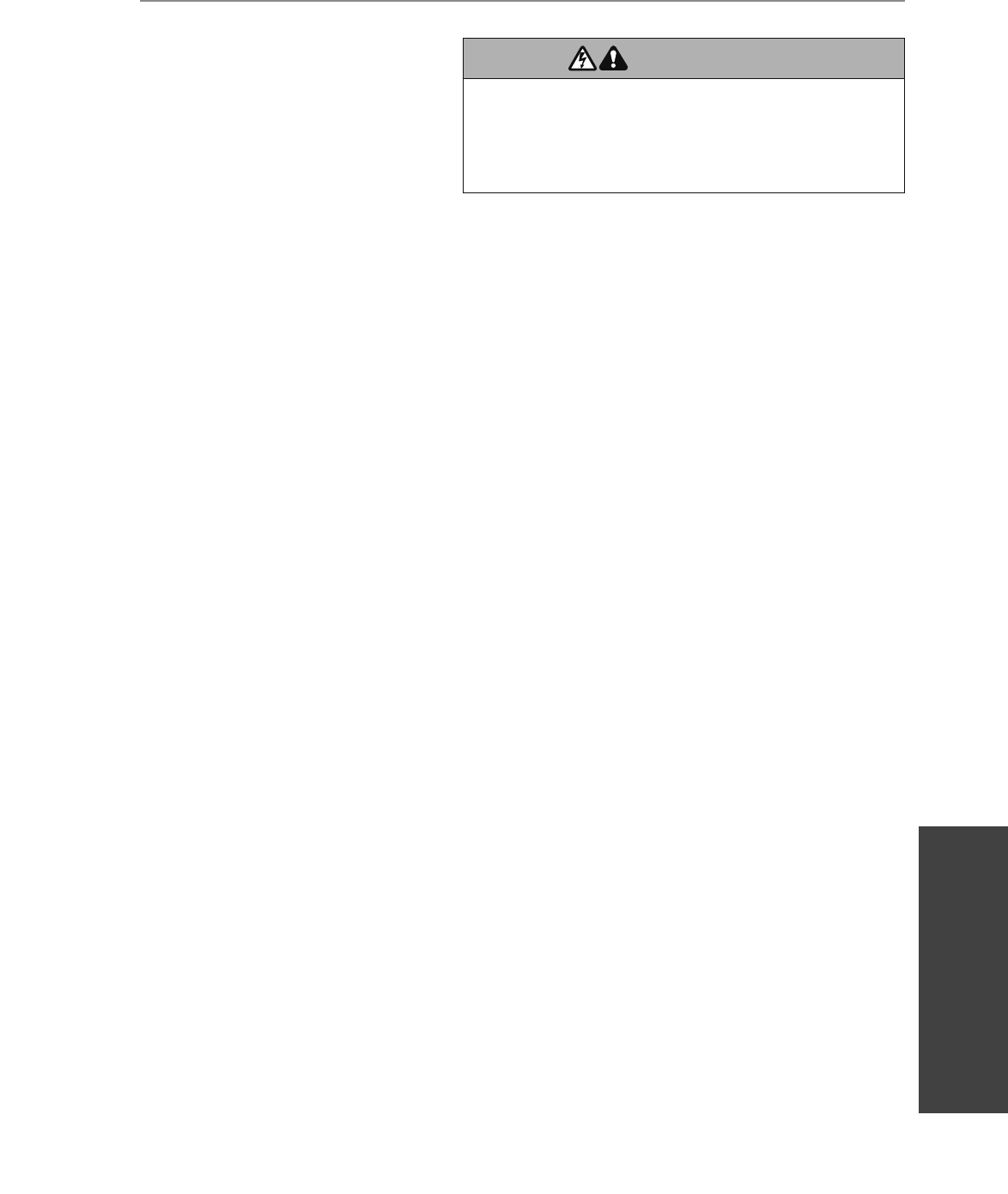
Remove the cotter pin from the clutch nut on the clutch shaft.
Turn the clutch nut to release tension.
Re-tighten the clutch nut until there is just enough tension to
permit smooth operation of the door and to allow the clutch
to slip if the door is obstructed.
Secure the clutch nut with the cotter pin.
1
1
2
2
3
3
4
4
1
4
2
3
Adjustment - Clutch adjustment
To avoid SERIOUS personal INJURY or DEATH from
electrocution:
• Disconnect electric power BEFORE performing ANY
adjustments or maintenance.
ATTENTION
AVERTISSEMENT AVERTISSEMENT
AVERTISSEMENT
WARNING
CAUTION
WARNING
WARNING WARNING
PRECAUCIÓN ADVERTENCIA
ADVERTENCIA ADVERTENCIA
AUXILIARY REVERSAL SYSTEM / RPM SENSOR
The Auxiliary Reversal System is designed to protect the door
and motorized operator. It is NOT a substitute for a safety sensing
device.
Feature: This feature utilizes the RPM sensor connected to the logic
board to detect when the clutch slips and reverses the door (clutch
must be properly adjusted). In addition, the RPM eliminates the
need for a centrifugal switch on single phase motors.
Benefit: The Auxiliary Reversal System reverses the operator upon
hitting an obstruction, preventing excessive door and operator
damage. We require the use of safety devices for primary safety
protection. By removing the centrifugal switch on single phase
motors, the leading cause of motor failures is eliminated. (Auxiliary
Reversal System not applicable on models GH and GT.)
NOTE: This feature is automatically learned and does not require
programming.
L
OSE OPEN
RPM Sensor
Logic Board
1
2
3
Loosen set screws on clutch nut.
Back off clutch nut until there is very little tension on the
clutch spring.
Tighten clutch nut gradually until there is just enough tension
to permit the operator to move the door smoothly but to allow
the clutch to slip if the door is obstructed. When the clutch is
properly adjusted, it should generally be possible to stop the
door by hand during travel.
Loosen set screws of torque adjustment nut on the gear
reducer.
Back off torque nut until there is very little tension on the
belleville washers.
Tighten torque nut gradually until there is just enough tension
to permit the operator to move the door smoothly through a
complete open/close cycle, but to allow the reducer to slip if
the door is obstructed.
Re-tighten the set screw that is directly over the fl at portion
of the shaft.
(3) Set Screws
Set Screws
Torque Nut
ADJUST TORQUE LIMITER CLUTCH (MODEL GT)
MODEL GH (OPTIONAL MODIFICATION)
25
TESTING
Testing
TEST 3-BUTTON CONTROL STATION
1. Press OPEN button. (The door should move in the open
direction.)
2. Press STOP button. (The door should stop.)
3. Press and hold the CLOSE button. (The door should move in
the close direction.)
4. Release CLOSE button. Door should stop if in C2 or D1 mode.
Door will reverse to full open position in E2 mode. The door
should continue closing in all other modes.
5. Press STOP button. (The door should stop.)
TEST LIMIT ADJUSTMENT
1. Press OPEN button. (The door should open.)
2. Allow the door to fully open.
3. Press and hold the CLOSE button. (The door should close.)
4. Allow the door to fully close.
5. If the limits are not set properly, remove power and adjust
limits (refer to Limit Adjustment section).
TEST THE PHOTOELECTRIC SENSORS
1. Open the door.
2. Place an obstruction in the path of the photoelectric sensors.
The LMEP LED will blink on the logic board and the receiving
eye LED will turn off.
3. Press and hold the CLOSE button.
The door should not close if photoelectric sensors are
installed.
4. Remove the obstruction.
5. Press and hold the CLOSE button. Door should close.
If door did not reverse from obstruction, check
photoelectric sensors.
NOTE: The Logic 4 control board will automatically learn the
photoelectric sensors (LMEP) once they are properly connected.
If the LMEP is misaligned or disconnected the LMEP LED on the
logic control board will blink on and off. You can close the door
by entering the Restricted Close (RC) mode by holding the close
button. The operator will begin closing after 5 seconds and will
continue to close to the Close Limit or when the close button is
released.
To unlearn the photoelectric sensors, turn the selector dial to
DIAG, push and hold the stop button until the MAS LED flashes.
Without the photoelectric sensors connected the only mode of
operation will be C2, D1 or E2.
IMPORTANT NOTES:
• Do not leave power to the operator on unless all safety and
entrapment protection devices have been tested and are
working properly.
• Be sure you have read and understand all safety instructions
included in this manual.
• Be sure the owner or person(s) responsible for operation of the
door have read and understand the safety instructions, know
how to electrically operate the door in a safe manner and how
to manually disconnect the door from the operator.
TESTING
To avoid SERIOUS personal INJURY or DEATH:
• Disconnect electric power BEFORE performing ANY
adjustments or maintenance.
• ALL maintenance MUST be performed by a trained door
systems technician.
ATTENTION
AVERTISSEMENT AVERTISSEMENT
AVERTISSEMENT
WARNING
CAUTION
WARNING
WARNING
WARNING
PRECAUCIÓN ADVERTENCIA
ADVERTENCIA ADVERTENCIA
Apply power to the operator.
When power is applied to the operator, the following LED’s will
illuminate: STOP, CLOSE, OPEN, LMEP, 24Vac, RADIO, DATA,
TIMER ENABLE, OLS MID, SLS, CLS, and MAS. Once the power
up process is completed (approximately 2-3 seconds) only the
appropriate LED’s will continue to be lit:
• Between limits: 24Vac and STOP
• Fully closed position: 24Vac, STOP, CLS and SLS
• Fully opened position: 24Vac, STOP and OLS
Additional LED’s will light when device(s) are activated.
NOTE: When the power up process is over, the MAS LED will
blink a code indicating the version of firmware. If the selector dial
is in the DIAG, OPTN, or PROG position, the MAS will not provide
this code. After the code has been provided the MAS LED will go
out.
1. After power is connected to the operator, the green indicator
lights in both the sending and receiving sensors will glow
steadily if wiring connections and alignment are correct.
2. If the green indicator lights are fl ashing rapidly (and the
invisible light beam path is not obstructed), alignment is
required:
• Loosen the receiving sensor wing nut to allow slight rotation of
the sensor. Adjust sensor vertically and/or horizontally until the
green indicator light glows steadily.
• When the indicator lights are glowing in both sensors, tighten
the receiving sensor wing nut.
ALIGN THE PHOTOELECTRIC SENSORS
26
MANUAL RELEASE
To prevent possible SERIOUS INJURY or DEATH from a falling
door or arm:
• DO NOT stand under the door arm when pulling the
emergency release.
• If possible, use emergency release handle to disengage trolley
ONLY when door is CLOSED. Weak or broken springs or
unbalanced door could result in an open door falling rapidly
and/or unexpectedly.
• NEVER use emergency release handle unless doorway is clear
of persons and obstructions.
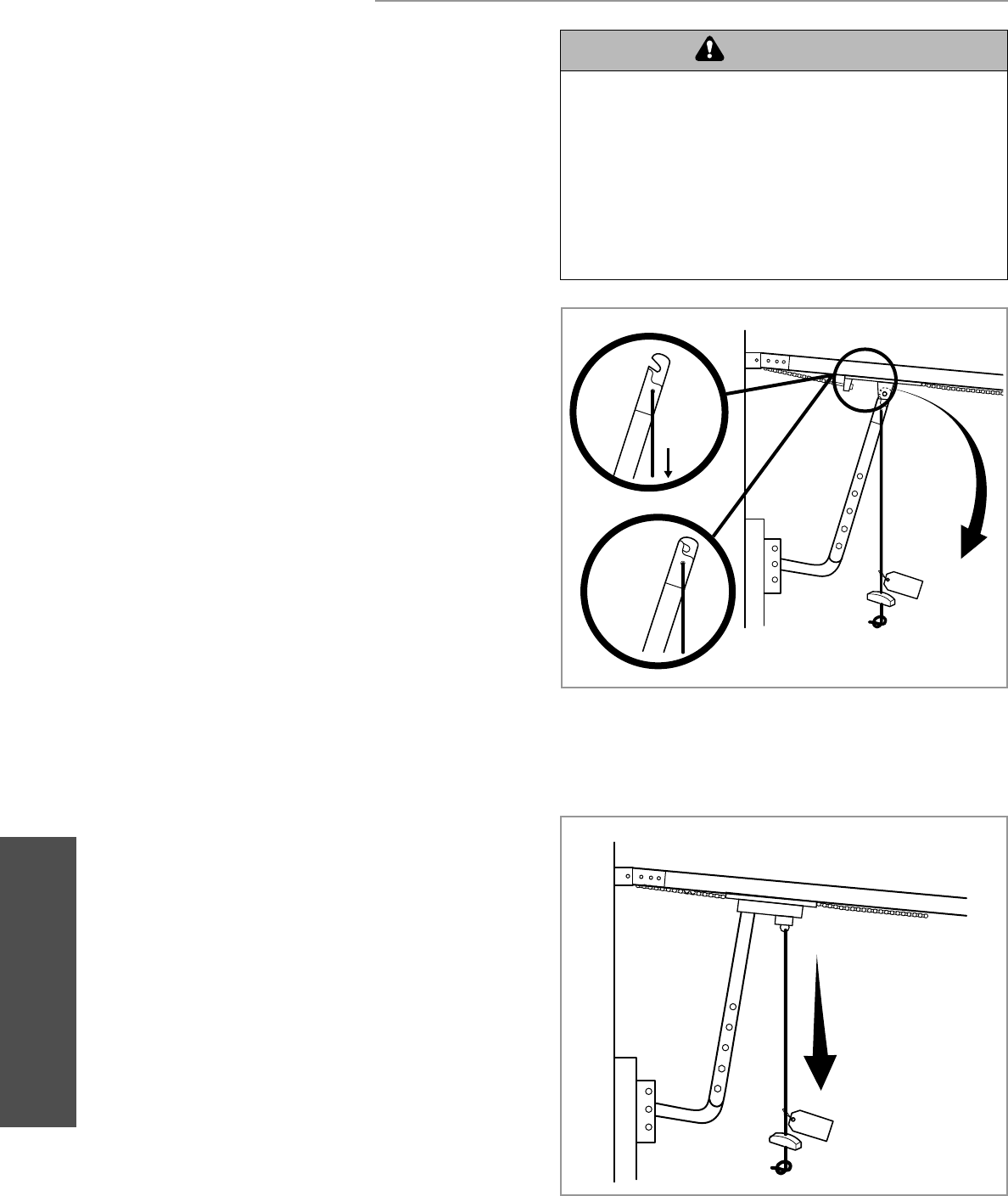
EMERGENCY DISCONNECT SYSTEM
MODEL GT AND T
MANUAL RELEASE
TO DISCONNECT DOOR FROM OPERATOR
The door should be in the fully closed position if possible.
Pull emergency release handle straight down. Emergency
disconnect will open.
TO RECONNECT DOOR ARM TO TROLLEY
Lift free end of door arm to trolley. Pull emergency release
handle to allow arm to engage roll pin. Release handle.
Emergency disconnect will close.
ATTENTION
AVERTISSEMENT AVERTISSEMENT
AVERTISSEMENT
WARNING
WARNING
CAUTION
WARNING
WARNING
PRECAUCIÓN ADVERTENCIA
ADVERTENCIA ADVERTENCIA
Manual Release
1
2
NO ECI
T
1
EMERGENCY DISCONNECT SYSTEM
MODEL APT
TO DISCONNECT DOOR FROM OPERATOR
The door should be in the fully closed position if possible.
Pull down on the emergency release handle and raise or
lower the door manually.
TO RECONNECT DOOR ARM TO TROLLEY
The trolley will reconnect on the next UP or DOWN operation,
either manually or by using the door control or remote.
1
2
N O E C I
T
2
1
27
MANUAL RELEASE
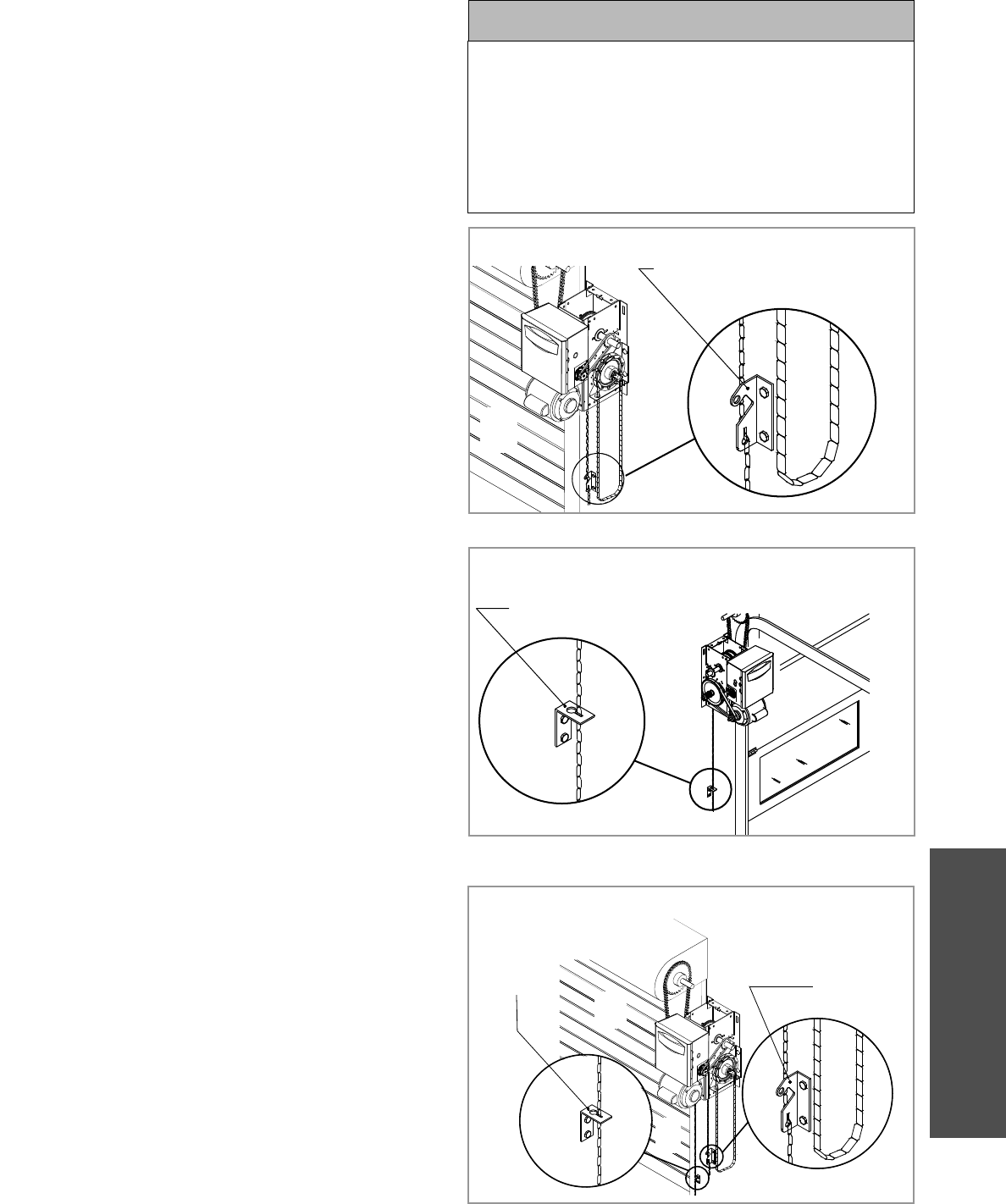
This operator has provisions for manually operating the door
in case of emergency or power failure. Refer to the appropriate
instructions below for your model operator.
MODEL HJ
This operator includes both a fl oor level disconnect chain
(sash chain) to disconnect the door from the door operator and
a disconnect chain with manual hoist to electrically disable the
operator controls.
Pull the disconnect chain to engage the hoist mechanism.
The disconnect chain may be locked in position by slipping
the end through the keyhole of the chain keeper mounted on
the wall.
To disengage, pull the disconnect chain and secure in the
disengaged position by slipping the end through the keyhole
bracket mounted on the wall.
Operate the door in the desired direction by pulling on one
side or the other of the continuous loop hoist chain.
Release the disconnect chain to operate the door again
electrically.
To prevent possible SERIOUS INJURY from a moving chain:
• DISCONNECT electric power to the operator BEFORE manually
operating your door.
• If possible, use emergency disconnect ONLY when door is
CLOSED. Weak or broken springs or unbalanced door could
result in an open door falling rapidly and/or unexpectedly.
• NEVER use emergency disconnect unless doorway is clear of
persons and obstructions.
ATTENTION
AVERTISSEMENT AVERTISSEMENT
AVERTISSEMENT
WARNING
CAUTION
CAUTION
WARNING
WARNING
PRECAUCIÓN ADVERTENCIA
ADVERTENCIA ADVERTENCIA
1
3
4
These operators are equipped with a manual hoist. An electrical
interlock will disable the electrical controls when the hoist is used.
To operate the hoist:
Pull the disconnect chain (sash chain) to engage the hoist
mechanism. The disconnect chain may be locked in position
by slipping the end through the keyhole of the chain keeper
mounted on the wall.
Operate the door in the desired direction by pulling on one
side or the other of the continuous loop hoist chain.
The disconnect chain must be released from the chain keeper
before the door will operate again electrically.
MODEL H AND GH
1
2
3
3
1
2
MODEL J
This operator has a fl oor level disconnect chain to disconnect the
door from the door operator.
To disengage, pull the disconnect chain (sash chain) and
secure in the disengaged position by slipping the end
through the keyhole bracket mounted on the wall.
The door may now be pushed up or pulled down manually.
Release the disconnect chain to operate the door again
electrically.
1
2
2
3
1
3
2
H and GH
J
HJ
EMERGENCY DISCONNECT SYSTEM
MODEL H, GH, J, AND HJ
1
2
4
4
3
Manual Release
28
PROGRAMMING
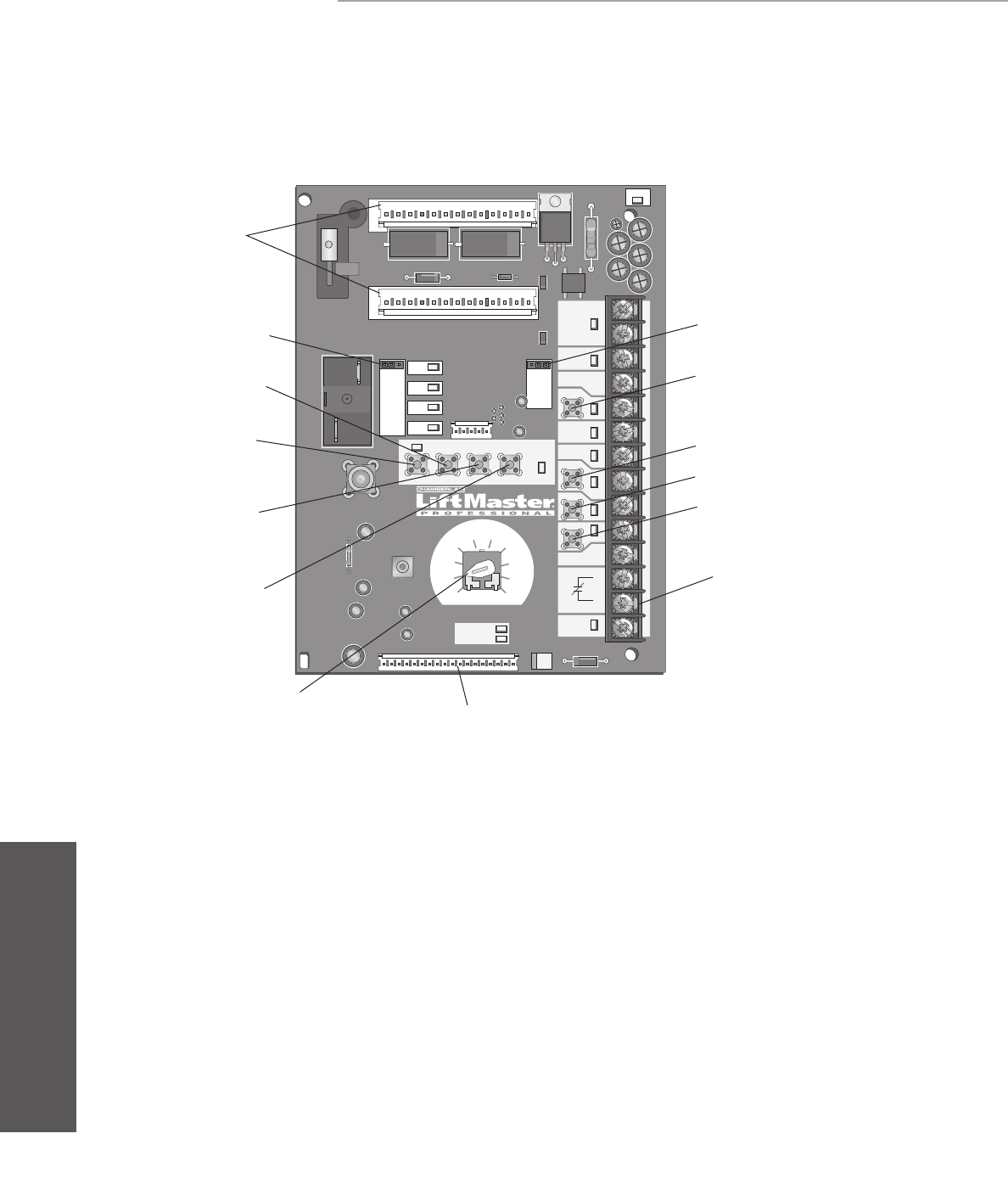
INTRODUCTION TO PROGRAMMING
SLOT 1
RADIO
SLS
MRT MID TTC
DATA
24VAC
24VAC
LMEP:
EDGE:
OPEN
CLOSE
STOP
COMMON
RELAY A
RELAY B
SBC 1
2
3
4
5
6
7
8
9
10
11
12
13
14
MAS
COMMON
TIMER
DEFEAT
POWER
TIMER
ENABLE
123
FSTS
DIAG
OPTN
PROG
T TS
E2
D1
C2
B2
CLS
OLS
MID
REV
STD
SLOT 2
MOTOR
DIRECTION
3-PHASE
1-PHASE
Selector Dial
(used for programming
and selecting wiring type) Main Motor Control Harness Connection
Maximum Run
Timer Button
Optional Auxiliary
Card Receptacles
Mid Stop Learn Button
Timer-To-Close
Learn Button
Radio Learn Button Open Button
Close Button
Stop Button
Control Wiring
Terminal Block
Motor Direction Jumper
Maintenance Alert
System Button for
Programming
Single Phase &
Three Phase Jumper
PROGRAMMING
Programming-Introduction to programming
LOGIC BOARD OVERVIEW
LOGIC BOARD PUSH BUTTONS (OPEN, CLOSE, STOP)
Open, Close and Stop buttons are mounted directly on the logic
board. Thus, making it easy to program as well as have door
control at the electrical box.
Either the stop control or a jumper MUST be wired between
terminals 4 and 5 for the on board push buttons to function.
NOTE: Before programming the logic board, set the operator’s
open and close limits. LEDs on the logic board are provided to
assist setting the limits. As each limit is activated the
corresponding LED will light up. The abbreviations are Open Limit
Switch (OLS), Close Limit Switch (CLS) and Sensing Limit Switch
(SLS). Refer to page 19 for limit switch adjustment instructions.
When power is applied to the operator, the following LED’s will
illuminate: STOP, CLOSE, OPEN, LMEP, 24Vac, RADIO, DATA,
TIMER ENABLE, OLS MID, SLS, CLS, and MAS. Once the power
up process is completed (approximately 2-3 seconds) only the
appropriate LED’s will continue to be lit (i.e., STOP, 24Vdc, limit
LED(s) if limit(s) is activated).
NOTE: When the power up process is over, the MAS LED will
blink a code indicating the version of firmware. If the selector
dial is in the DIAG, OPTN, or PROG position, the MAS will not
provide this code. After the code has been provided the MAS LED
will go out.
LOGIC BOARD LED OVERVIEW
Many programmable functions require that a LiftMaster
Entrapment Protection (LMEP) device be installed in order to
function. Refer to the Entrapment Protection section.
29
PROGRAMMING
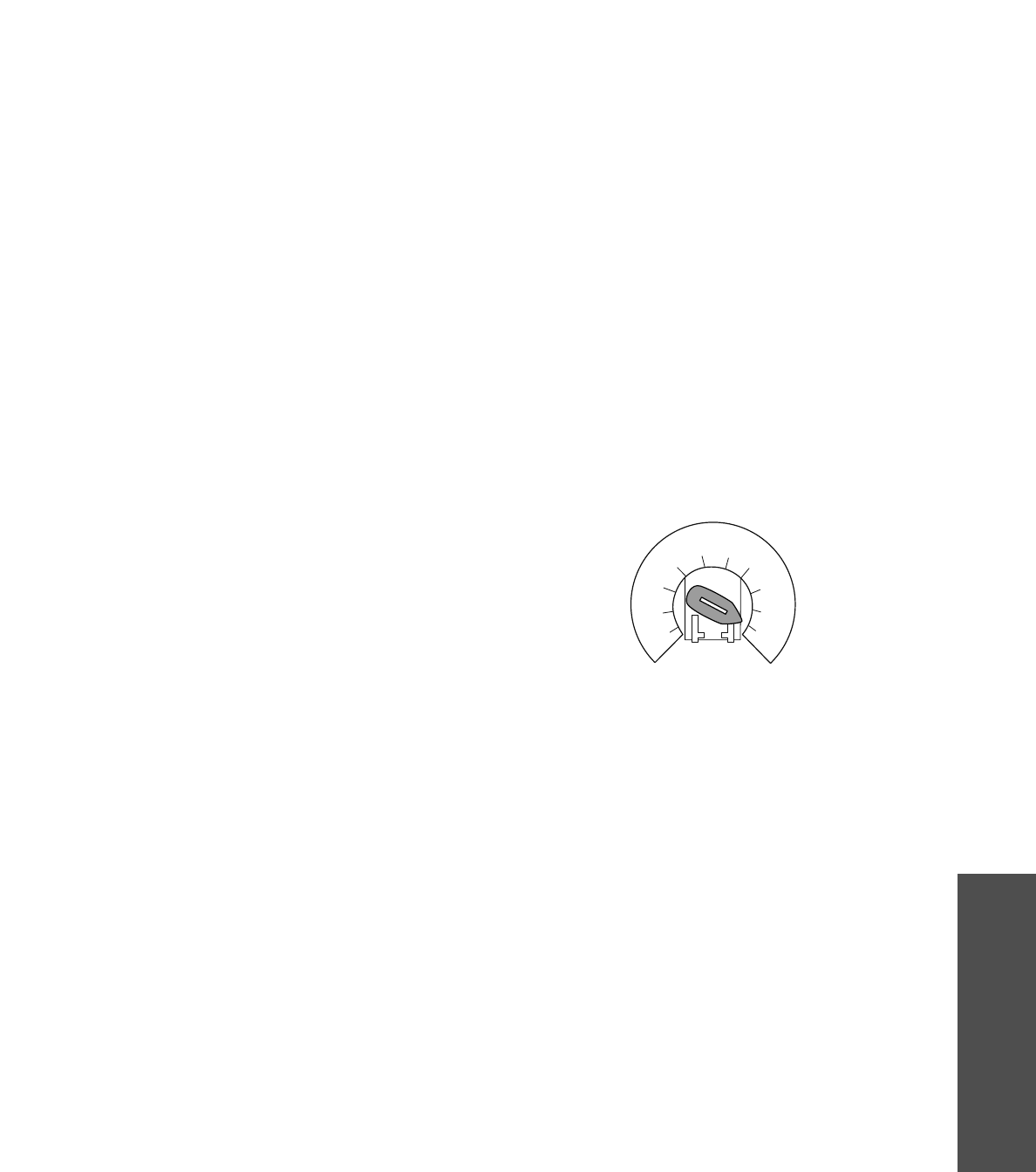
DETERMINE AND SET WIRING TYPE
Read the descriptions of the different wiring types to determine which setting will be correct for each application. Once the wiring type
is determined, set the selector dial accordingly.
OPTN
PROG
DIAG
FSTS
TS
T
E2
D1
C2
B2
SELECTOR DIAL
Programming - Determine and set wiring type
IMPORTANT NOTES:
1. External interlocks may be used with all functional modes.
2. Auxiliary devices are any devices that have only dry contacts.
Examples: photocell, loop detector, pneumatic or electrical
treadles, radio controls, one button stations, pull cords, etc.
3. Open override means that the door may be reversed while
closing by activating an opening device without the need to use
the stop button first.
4. When the door is in a stopped position other than fully closed,
and a safety input is activated (LMEP or EDGE), the Restricted
Close (RC) feature will allow a close command when the close
button is pressed and held. The operator will begin closing after
5 seconds. If the close button is released the door will stop.
When in E2 mode, the door will move to the fully open position.
LIFTMASTER MONITORED ENTRAPMENT PROTECTION (LMEP)
DEVICE IS REQUIRED
A LiftMaster Entrapment Protection (LMEP) device is required for
the following wiring types.
LIFTMASTER MONITORED ENTRAPMENT PROTECTION (LMEP)
DEVICE IS RECOMMENDED
A LiftMaster Entrapment Protection (LMEP) device is
recommended for the following wiring types.
B2 Momentary contact to open, close and stop, plus wiring for
sensing device to reverse and auxiliary devices to open and
close with open override. Programmable mid stop available
with this wiring type. Compatible with 3-Button Station,
1-Button Station, 1 and 3-Button Remote Control.
TS (TIMER SECURE)
This mode will attempt to close the door from any position
except when fully closed, or when a safety input is present.
The stop button will not disable the Timer-To-Close at any
position. To disable the Timer-To-Close in this mode,
installation of a defeat switch is required (see wiring
diagram).
Momentary contact to open, close, and stop with open
override and Timer-To-Close. Every device that causes
door to open, including a reversing device, activates the
Timer-To-Close. Auxiliary controls can be connected to open
input to activate the Timer-To-Close. If the timer has been
activated, the open button and radio control can recycle the
timer. The Timer-To-Close will function from the
programmable mid stop with this wiring type. Compatible
with 3-Button Station, 1-Button Station and 1 and 3-Button
Remote Control.
NOTE: A Programmable “Car Dealer Mode” available.
T Momentary contact to open, close, and stop, with open
override and Timer-To-Close. Every device that causes
the door to open, except any safety edge input device,
activates the Timer-To-Close. Auxiliary controls can be
connected to open input to activate the Timer-To-Close.
If the Timer-To-Close has been activated, the open button
and radio control can recycle the timer. The stop button will
deactivate the timer until the next command input. The
Timer-To-Close will function from the programmable
mid stop with this wiring type. Compatible with 3-Button
Station,1-Button Station and 1 and 3-Button Remote
Control.
NOTE: Programmable “Car Dealer Mode” available.
FSTS Momentary button contact for open, close and stop
programming. User set mid stop. User set Timer-To-Close.
The single button station opens the door to the full
open limit bypassing the mid stop and activates the
Timer-To-Close, putting the operator in TS mode until the
door reaches the down limit, or is stopped in travel. At
which time the operator enters the B2 mode.
Compatible with 3-Button Station, 1-Button Station, 1 and
3-Button Remote Control. A 1-Button remote control in
FSTS mode will open only with the Timer-To-Close,
bypassing a programmed mid stop. The Timer-To-Close will
reset and reverse when closing.
C2 Momentary contact to open and stop with constant pressure
to close, open override plus wiring for sensing device to
reverse. Programmable mid stop available with this wiring
type. Compatible with 3-Button Station and 1-Button
Station.
E2 Momentary contact to open with override and constant
pressure to close. Release of close button will cause door to
reverse (roll-back feature) plus wiring for sensing device to
reverse. Compatible with 3-Button Station.
D1 Constant pressure to open and close with wiring for sensing
device to stop. Compatible with 2 or 3-Button Station.
30
PROGRAMMING
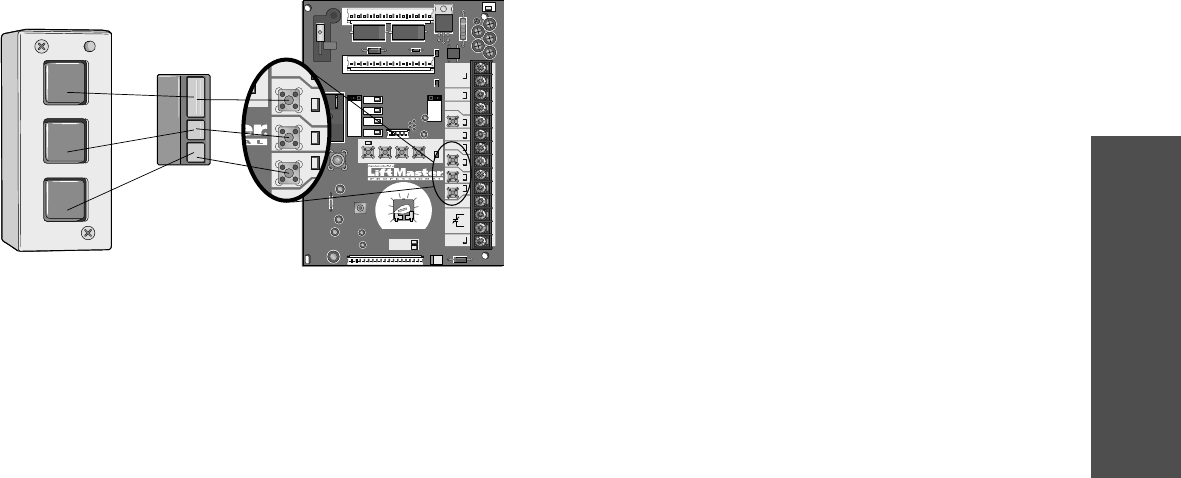
SINGLE BUTTON REMOTE CONTROL PROGRAMMED AS
A SINGLE BUTTON CONTROL (SBC)
This function programs a remote control as a wireless single
button control. This function will work in the following modes:
In B2 mode, operation is OPEN/STOP/CLOSE/REVERSE/STOP.
In T and TS modes, operation is OPEN/STOP/CLOSE/REVERSE/
STOP and Timer-To-Close start/refresh. NOTE: If Car Dealer
mode is enabled, SBC will be open only stopping at the Open
Mid-Stop.
In FSTS mode, operation is OPEN with Timer-To-Close
start/refresh only, bypassing a programmed Open Mid Stop.
1. Press and release the RADIO button on the logic board
(RADIO LED will light).
2. Press and release the SBC externally wired button or TIMER on
the logic board (RADIO LED flashes rapidly and then remains
on solid).
3. Press and hold the remote control button until the RADIO LED
flashes rapidly. The RADIO LED will then remain on solid after
releasing.
4. Press and release the RADIO button on the logic board (RADIO
LED flashes rapidly and then turns off). The programming
mode is exited if no activity is performed within 30 seconds.
NOTE: Single button remote control is not supported with D1 and
E2 wiring modes. C2 mode will only open and stop while opening.
ERASING REMOTE CONTROLS
Press and hold the RADIO button on the logic board until the
RADIO LED flashes rapidly (approximately 5 seconds).
All remote controls will be erased.
Built in 3-channel, 315 MHz radio receiver allows you to add as
many as 23 Security✚® remotes or dip switch remote controls.
NOTE: The following programming requires a LiftMaster
Monitored Entrapment Protection (LMEP) device.
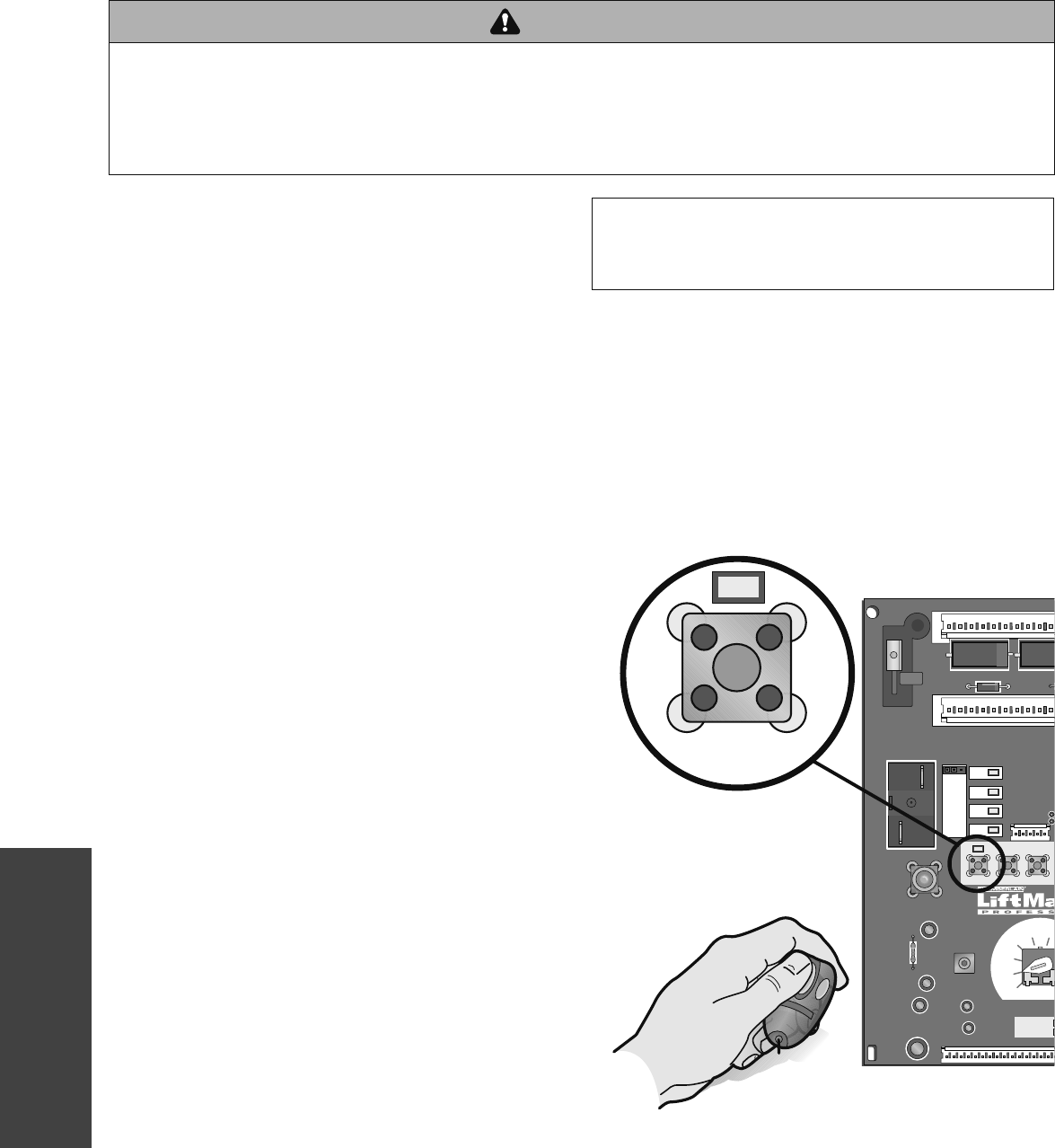
STANDARD REMOTE CONTROL
1. To enter programming press and release the RADIO button on
the logic board (RADIO LED will light).
2. Press and hold the remote control button until the RADIO LED
flashes rapidly, then release remote control button. The RADIO
LED will then remain on solid after releasing the button. Repeat
to add additional remote control(s).
3. Press and release the RADIO button to complete the
programming. The programming mode is exited if no activity is
performed within 30 seconds.
PROGRAMMING REMOTE CONTROLS
NOTICE: To comply with FCC and or Industry Canada (IC) rules, adjustment or modifications of this
receiver and/or transmitter are prohibited, except for changing the code setting or replacing the
battery. THERE ARE NO OTHER USER SERVICEABLE PARTS.
Tested to Comply with FCC Standards FOR HOME OR OFFICE USE. Operation is subject to the
following two conditions: (1) this device may not cause harmful interference, and (2) this device
must accept any interference received, including interference that may cause undesired operation.
Programming - Remote controls
To prevent possible SEVERE INJURY or DEATH:
• Install a LiftMaster Monitored Entrapment Protection (LMEP)
device.
• NEVER permit children to operate or play with door control
push buttons or remote controls.
• Activate door ONLY when it can be seen clearly, is properly
adjusted and there are no obstructions to door travel.
• ALWAYS keep door in sight until completely closed. NEVER
permit anyone to cross the path of closing door.
ATTENTION
AVERTISSEMENT AVERTISSEMENT
AVERTISSEMENT
WARNING WARNING
CAUTION
WARNING
WARNING
PRECAUCIÓN ADVERTENCIA
ADVERTENCIA ADVERTENCIA
SLOT 1
RADIO
SLS
MRT MID
RELAY A
RELAY B
12
TT
S
E2
D1
C2
B2
CLS
OLS
MID
REV
STD
SLOT 2
MOTOR
DIRECTION
L
i
f
t
M
a
s
t
e
r
RADIO
31
PROGRAMMING
NOTE: The following programming requires a LiftMaster
Monitored Entrapment Protection (LMEP) device.
Your 315 MHz Security✚® or dip switch remote control can be
programmed to operate as a 3-button wireless control station:
the large button will open the door, the middle button will close
the door, and the third button will stop the door’s movement.
You may set up this feature as follows:
1. To enter programming press and release the RADIO button on
the logic board (the RADIO LED will light).
2. To program the OPEN button to a remote control press and
release the OPEN button on the logic board. The RADIO LED
will flash and then stay on solid. Then press the corresponding
button on the remote control. The RADIO LED on the logic
board will flash, this confirms that the remote control has been
programmed. (By programming the remote you use 1 channel
of the 23 channels on the radio receiver.)
3. To program the CLOSE button to a remote control press and
release the CLOSE button on the logic board. The RADIO LED
will flash and then stay on solid. Then press the corresponding
button on the remote control. The RADIO LED on the logic
board will flash, this confirms that the remote control has been
programmed. (By programming the remote you use 1 channel
of the 23 channels on the radio receiver.)
4. To program the STOP button to a remote control press and
release the STOP button on the logic board. The RADIO LED
will flash and then stay on solid. Then press the corresponding
button on the remote control. The RADIO LED on the logic
board will flash, this confirms that the remote control has been
programmed. (By programming the remote you use 1 channel
of the 23 channels on the radio receiver.)
5. After learning remote controls press the RADIO button on the
logic board (RADIO LED will turn off). NOTE: If no activity
within 30 seconds the radio will automatically exit
programming mode.
SLOT 1
RADIO
SLS
MRT MID TTC
DATA
24VAC
24VAC
LMEP:
EDGE:
OPEN
CLOSE
STOP
COMMON
RELAY A
RELAY B
SBC
MAS
COMMON
TIMER
DEFEAT
POWER
TIMER
ENABLE
123
FSTS
DIAG
OPTN
PROG
TTS
E2
D1
C2
B2
CLS
OLS
MID
REV
STD
SLOT 2
MOTOR
DIRECTION
3-PHASE
1-PHASE
EDGE:
OPEN
CLOSE
STOP
COMMON
MER
NABLE
OPEN
CLOSE
STOP
Open
Close
Stop
REMOTE CONTROL PROGRAMMING FEATURE
Program Remote Controls from the 3-button control station
(3BCS).
This feature allows the user to add additional remote controls
from the 3BCS. By default the remote control learn option is off.
NOTE: Requires access to the operator electrical box to enable or
disable this feature.
To turn this feature on:
1. Turn the SELECTOR DIAL to PROG.
2. Press and release the RADIO button. The RADIO LED will be lit.
3. Press and release the MID button. The RADIO LED will flash
quickly 6 times.
4. Press and release the RADIO button. The RADIO LED will turn
off.
5. Return the SELECTOR DIAL to the desired wiring type.
To add remote controls from the 3BCS:
1. With the door in the fully closed position (close limit activated),
press and hold STOP.
2. While holding STOP, press and hold CLOSE.
3. While holding STOP and CLOSE, press and hold OPEN.
4. Release all three buttons once the MAS LED has lit.
5. Learn a remote control by one of the following methods:
a. Programming a standard single button/single function
remote control, push and hold the remote control button
until the MAS LED goes out. Repeat steps 1 through 4 to
add additional remote controls.
b. Programming a 3-button/three function remote control
(OPEN/CLOSE/STOP), first push the button on the 3BCS
(Example: OPEN) and then press and hold the button on
the remote control (Example: large button) that you want
to correspond with the selected (Example: OPEN)
command until the MAS LED flashes and goes out.
Repeat steps 1 through 4 to add additional buttons
(CLOSE AND STOP).
To turn this feature off:
1. Turn the SELECTOR DIAL to PROG.
2. Press and release the RADIO button. The RADIO LED will be lit.
3. Press and release the MRT button. The RADIO LED will flash
quickly 3 times.
4. Press and release RADIO button. The RADIO LED will turn off.
5. Return SELECTOR DIAL to desired wiring type.
NOTE: Restoring the operator to Factory Default (see RESETTING
FACTORY DEFAULTS) will also disable this feature. The remote
controls will still be learned.
Programming - Remote controls
PROGRAMMING REMOTE CONTROLS
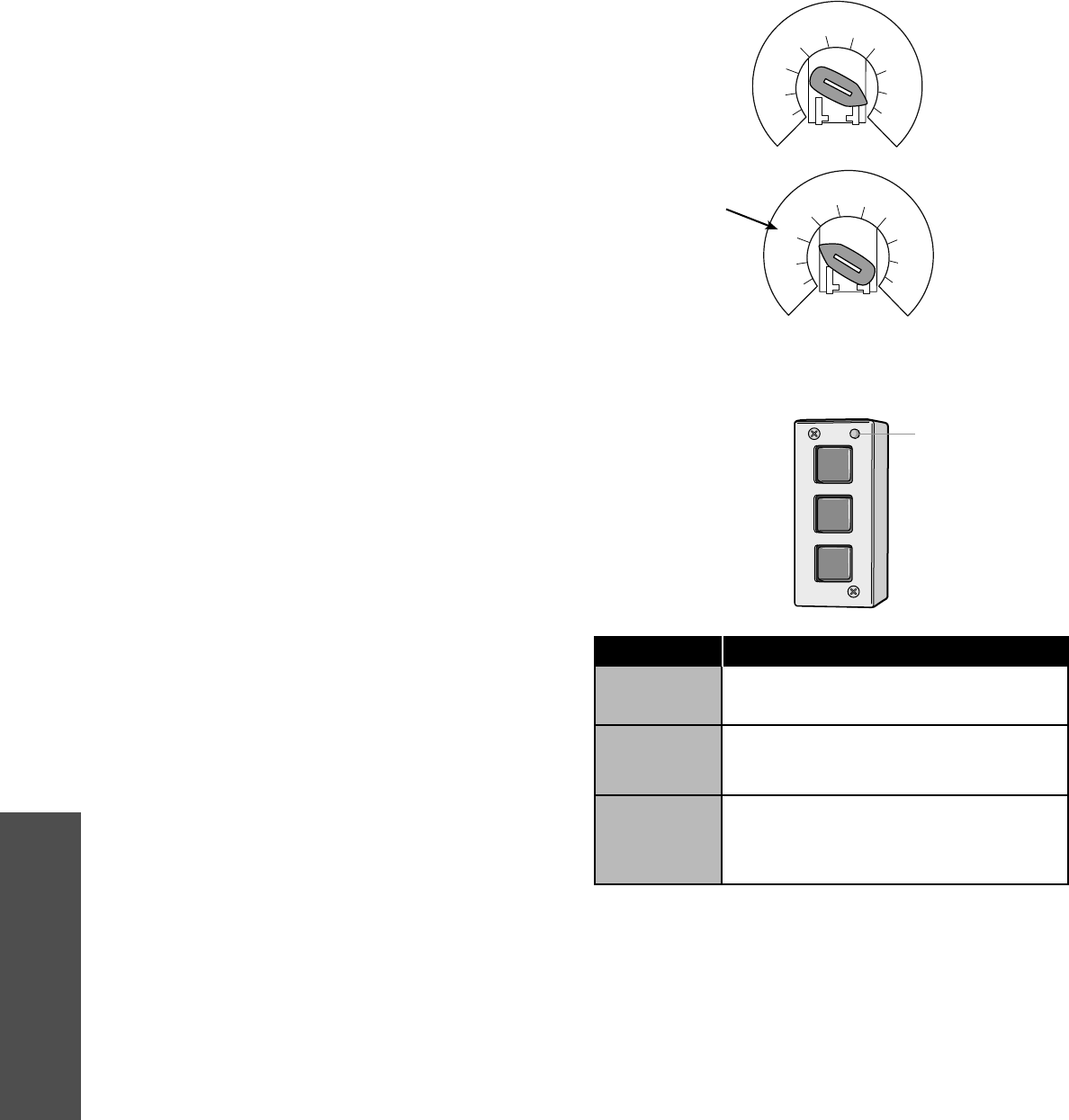
32
PROGRAMMING
MAINTENANCE ALERT SYSTEM (MAS)
Feature: An internal cycle counter will activate a flashing LED on
the 3-button control station when the preset number of cycles or
months has elapsed (whichever occurs first). Setting this feature
is optional. By default this feature will never activate. Logic 4
operators incorporate a self diagnostic feature built into the MAS
LED. In addition to indicating when routine maintenance is due,
the MAS LED can be used to troubleshoot some problems with
the operator.
Benefit: The Maintenance Alert System (MAS) assists the
installing dealer in setting up a routine maintenance program.
Once programmed, the MAS notifies the end user (with a flashing
LED on the 3-button station) when a preset number of cycles/
months has elapsed and scheduled maintenance is due.
To Program:
1. Close the door.
2. Turn the selector dial to PROGRAM.
3. Press and release the MAS SET button.
4. Press the STOP button once to clear the MAS memory.
5. Press the OPEN button once for every 5,000 cycles increments.
Press the CLOSE button once for every 3 month increments.
6. Press and release the MAS button to complete the
programming. The on board LED will flash back the
programmed settings. The OPEN LED will flash once for every
5,000 cycles. The CLOSE LED will flash once for every 3
months.
7. Turn the selector dial back to the desired wiring type.
NOTE: If MAS LED flashes 2 or more flashes in a row followed by
a pause, an operator error occurred. Turn to page 35 to diagnose
problem.
Example: A door is installed with 30,000 cycle springs and has an
annual service contract. To set the MAS, turn selector dial to
PROGRAM, press MAS button, press the STOP button to clear the
memory and then press the OPEN button 6 times (30,000 cycles)
and CLOSE 4 times (12 months). Press the MAS again to
complete the programming. Turn the selector dial back to desired
wiring type.
Special Notes about MAS: A 5th wire must be run to the control
station to activate the MAS LED. The MAS LED on the logic board
is always enabled. When the operator is serviced after the MAS
LED has started to flash, repeat the setup procedure to program in
the number or cycles desired until the next service visit OR press
and hold the MAS button for 5 seconds in the PROGRAM mode to
reset the MAS with its current programmed value. To disable the
MAS, follow the programming procedure above and press the
STOP button to reset the counter to zero. Every time the operator
leaves the close limit is counted as one cycle.
To view how many cycles are programmed into the MAS, set the
selector dial to DIAGNOSTIC and press the MAS button. The
OPEN button LED will flash once for every 5,000 cycle increment
programmed and the CLOSE button LED will flash once for every
3 month increment programmed.
To view how many cycles have elapsed since the last time the
MAS was programmed, set the selector dial to DIAGNOSTIC and
press the MAS button. Press the OPEN button; the OPEN LED will
flash once for every 5,000 cycles that has elapsed. Press the
CLOSE button; the CLOSE LED will flash once for every (3)
months that has elapsed. Press the MAS button to exit. Turn the
selector dial back to desired wiring type.
SELECTOR DIAL
OPEN
CLOSE
STOP
Adds 5,000 cycles to Maintenance Alert
System Activation Counter.
Adds 3 Months to Maintenance Alert System
Activation Timer.
Clears memory, sets Maintenance Alert
System Activation Counter to 0 cycles and
0 months.
Press This To Get This
3-BUTTON STATION
OPEN
CLOSE
STOP
Maintenance Alert LED
Programming-Maintenance Alert System (MAS)
OPTN
PROG
DIAG
FSTS
TS
T
E2
D1
C2
B2
Operation will vary
depending on wiring
type
OPTN
PROG
DIAG
FSTS
TS
T
E2
D1
C2
B2
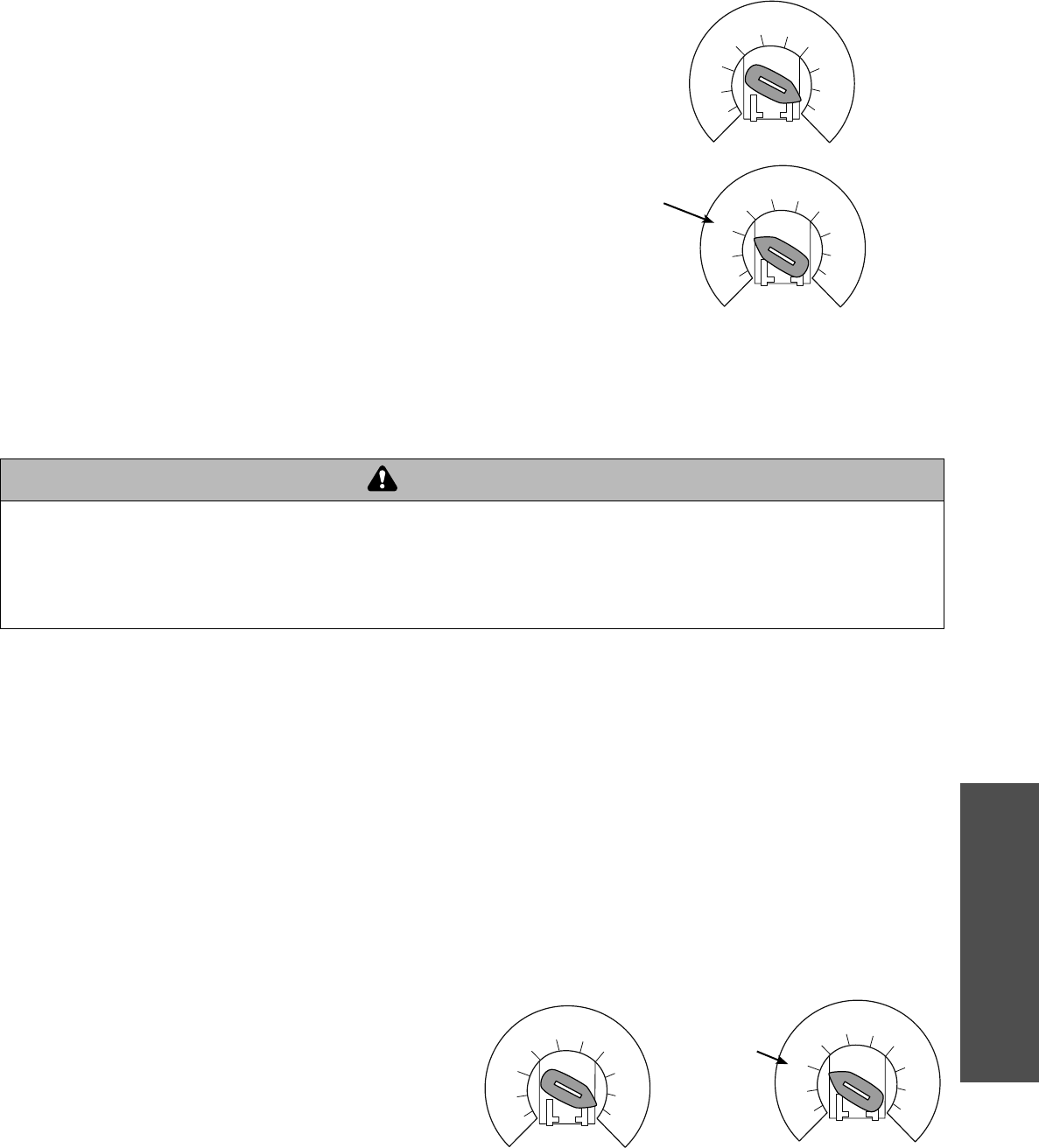
33
PROGRAMMING
OPTN
PROG
DIAG
FSTS
TS
T
E2
D1
C2
B2
SELECTOR DIAL
Programming - Open mid stop/Timer-To-Close
Operation will
vary depending
on wiring type
SELECTOR DIAL
To prevent possible SEVERE INJURY or DEATH:
• Install a LiftMaster Monitored Entrapment Protection (LMEP)
device.
• NEVER permit children to operate or play with door control
push buttons or remote controls.
• Activate door ONLY when it can be seen clearly, is properly
adjusted and there are no obstructions to door travel.
• ALWAYS keep door in sight until completely closed. NEVER
permit anyone to cross path of closing door.
ATTENTION
AVERTISSEMENT AVERTISSEMENT
AVERTISSEMENT
WARNING WARNING
CAUTION
WARNING
WARNING
PRECAUCIÓN ADVERTENCIA
ADVERTENCIA ADVERTENCIA
OPEN MID STOP
Feature: The Mid Stop feature is to open the door to a preset
point prior to the fully open position.
Benefit: The door opens to a midpoint between open and close
reducing heating and cooling costs. The door will not cycle fully,
providing longer door and operator life.
To Program:
1. Close the door.
2. Turn selector dial to PROGRAM.
3. Press and release the MID button on logic board.
4. Press the OPEN button, wait until the door reaches the desired
mid stop height, then press and release the STOP button.
5. Press and release the MID button to complete programming.
6. Turn selector dial back to desired wiring type.
NOTE: A momentary open command will open the door fully from
the Mid Stop position. Once at the Mid Stop, photoelectric sensors
and other safety devices will not open the door beyond the mid
stop position, except in E2 mode. The Timer-To-Close will work
from the Mid Stop.
To clear the Mid Stop set the selector dial to PROG and press and
hold the MID button for 5 seconds. The MID LED will flash rapidly
and turn off once the Mid Stop has been cleared. Turn selector
dial back to desired wiring type.
TIMER-TO-CLOSE
Feature: Timer automatically closes door after preset time. All
safety devices must be unobstructed.
Benefit: The door will automatically close after preset amount of
time. Great for apartment buildings, fire stations and other
applications where the end user wants the door to close
automatically after a specified amount of time.
Requirements: Must have at least one LiftMaster Monitored
Entrapment Protection (LMEP) device installed (refer to page 20).
Wiring type must be set to TS, T or FSTS.
TO PROGRAM MANUALLY (METHOD 1):
1. Close the door.
2. Turn the selector dial to PROGRAM.
3. Press and release the TIMER button on the logic board.
4. Press and release the STOP button to clear the timer.
5. Press and release the OPEN button for every second the
operator should wait before attempting to close the door. Press
and release the CLOSE button for every 15 seconds the
operator should wait before closing the door.
6. Press and release the TIMER button to complete programming.
The OPEN/CLOSE button LEDs will flash to confirm the timer
setting. The OPEN LED will flash once for every second
programmed and the CLOSE LED will flash once for every 15
seconds programmed.
7. Turn the selector dial to desired timer wiring type
(TS ,T or FSTS).
Example: To close the door after 70 seconds. Turn selector dial to
PROGRAM, press and release the TIMER button, press and
release the STOP button to clear the timer, press and release the
CLOSE button four times for 60 seconds and press and release
the OPEN button 10 times for 10 seconds. Press the TIMER
button to finish programming the timer. Turn selector dial to
desired timer wiring type. (TS, T, FSTS).
OPTN
PROG
DIAG
FSTS
TS
T
E2
D1
C2
B2
Operation will vary
depending on wiring
type
OPTN
PROG
DIAG
FSTS
TS
T
E2
D1
C2
B2
OPTN
PROG
DIAG
FSTS
TS
T
E2
D1
C2
B2
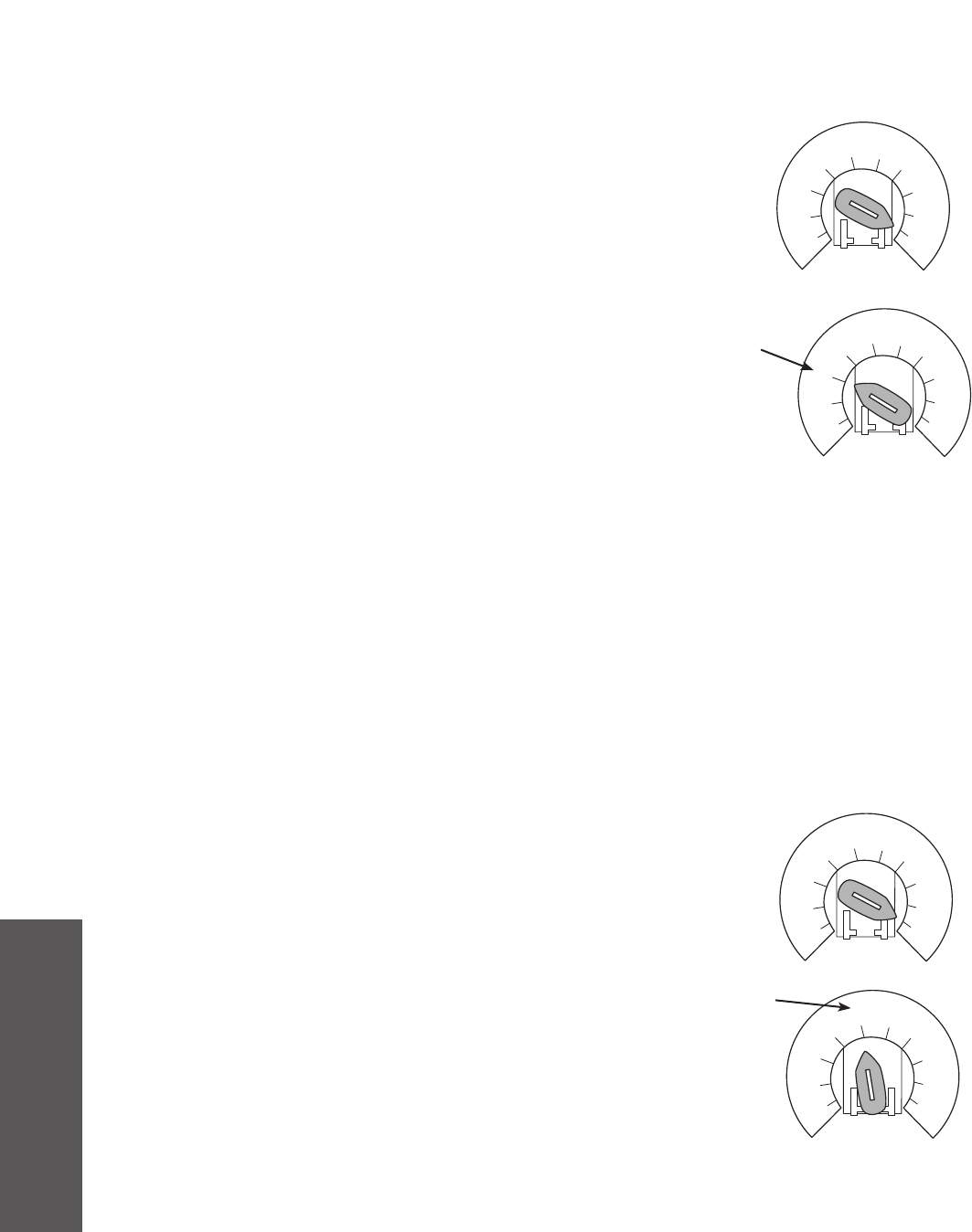
34
PROGRAMMING
OPTN
PROG
DIAG
FSTS
TS
T
E2
D1
C2
B2
OPTN
PROG
DIAG
FSTS
TS
T
E2
D1
C2
B2
OPTN
PROG
DIAG
FSTS
TS
T
E2
D1
C2
B2
OPTN
PROG
DIAG
FSTS
TS
T
E2
D1
C2
B2
TIMER-TO-CLOSE
PROGRAM TIMER-TO-CLOSE BY EXAMPLE (Method 2):
TO PROGRAM:
1. Close the door.
2. Turn the selector dial to PROGRAM.
3. Press and hold TIMER button for 5 seconds until OPEN and
OLS flashes then release.
4. Press and release the OPEN button and wait for the door to
reach full open or mid stop position.
5. Wait for desired amount of time to pass. (An internal stop
watch starts counting when the door stops moving.)
6. Press and release the TIMER button, CLOSE button or STOP
button to stop the timer. (TIMER SET LED will turn on.)
7. Turn the selector dial to the desired wiring type (T, TS, FSTS).
NOTE: To read back the Timer-To-Close setting, turn the selector
dial to DIAGNOSTIC and press the TIMER button. The OPEN LED
will flash once for every second programmed and the CLOSE LED
will flash once for every 15 seconds programmed.
In T Mode, timer can be deactivated from the open position by
pressing the STOP button. The timer will be reactivated on the
next operation command. The STOP button WILL NOT deactivate
the timer in the TS mode. To deactivate the timer for more than
one cycle in T mode or in TS mode, attach a defeat switch to 11
and 12 (COMMON and TIMER DEFEAT).
Reminders: FSTS wiring mode allows the Timer-To-Close to be
activated by the Single Button Control (terminal 1) only. T wiring
mode allows the door to attempt to close only one time for safety
purposes.
Operation will vary
depending on wiring type
SELECTOR DIAL
CAR DEALER MODE
Feature: The car dealer mode uses the SBC (Single Button Control
input) to bring the door from a closed position to the programmed
Open Mid-Stop position and keep it at that location even with
multiple inputs.
Benefit: Provides energy cost savings by limiting the door
opening height.
Requirements: This feature works in conjunction with the
programmable Timer-To-Close feature. To enable this feature you
must first connect a treadle, photoelectric sensor or loop detector
accessory to the SBC input and must have at least one LiftMaster
Monitored Entrapment Protection (LMEP) device installed (refer to
page 20). Wiring type must be set to TS or T.
TO PROGRAM:
1. Start with the door in the closed position.
2. Turn the SELECTOR DIAL to PROG.
3. Push the TIMER button and release (Green Timer LED will
be lit).
4. Push the MID button and release. This turns on the Car Dealer
Mode. (The GREEN TIMER LED will flash 6 times indicating the
Car Dealer Mode is turned on.)
5. Push the TIMER button and release.
6. Turn the SELECTOR DIAL to the desired wiring type (TS or T).
NOTE: To disable the Dealer Mode follow steps 2 and 3, then
press the MRT button and release. (The GREEN TIMER LED will
flash 3 times indicating that the Car Dealer Mode is off.)
Programming - Timer-to-close/Car dealer mode
Operation will vary
depending on wiring type
SELECTOR DIAL
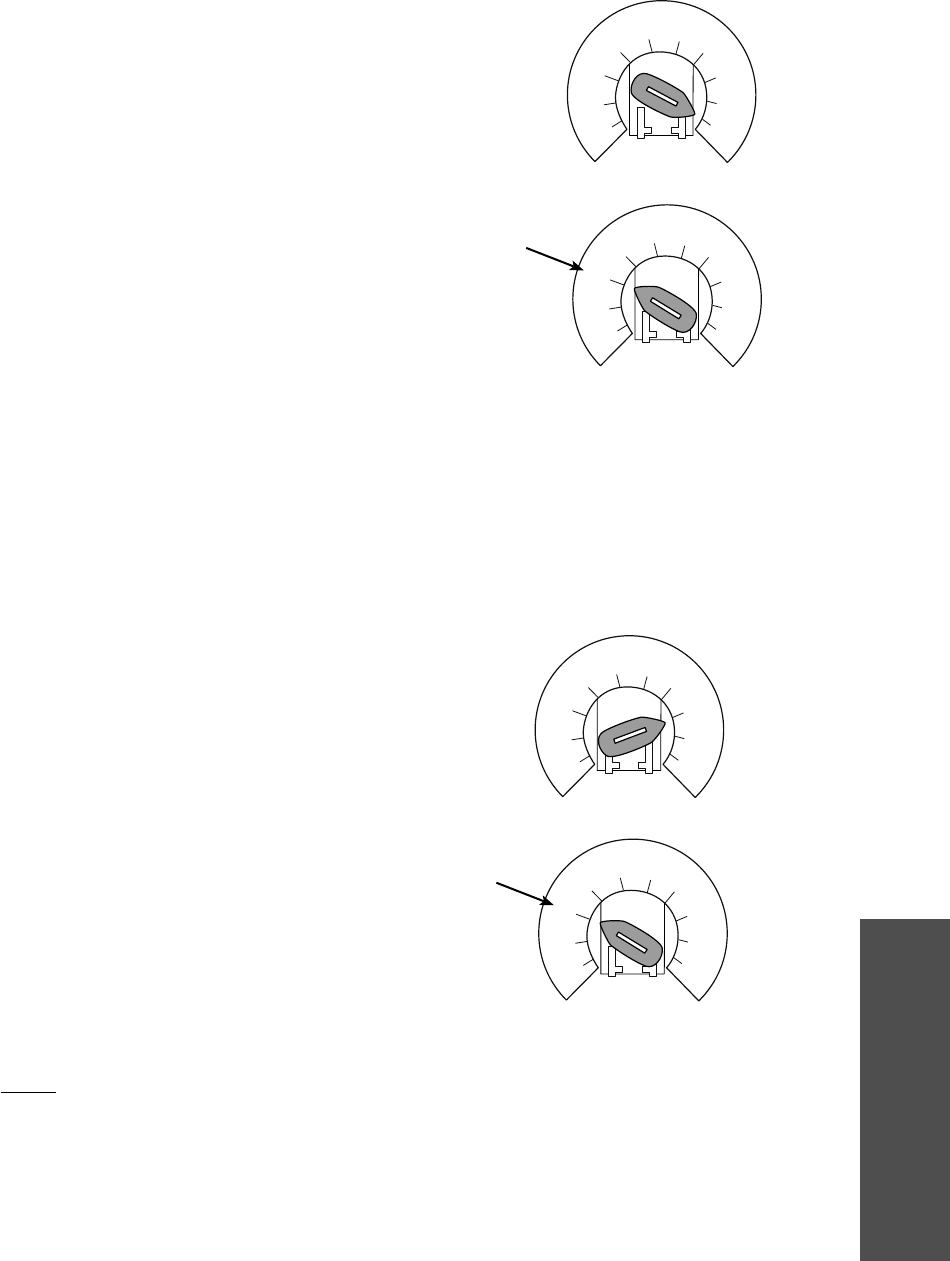
35
PROGRAMMING
OPTN
PROG
DIAG
FSTS
TS
T
E2
D1
C2
B2
OPTN
PROG
DIAG
FSTS
TS
T
E2
D1
C2
B2
OPTN
PROG
DIAG
FSTS
TS
T
E2
D1
C2
B2
MAXIMUM RUN TIMER (MRT)
Feature: The operator can learn the time it takes to open or close
the door plus and an additional 10 seconds.
Benefit: If the operator does not meet its open or close limit
within the set time it will stop, limiting damage to the door and
operator.
To Program:
NOTE: The default setting for the MRT is 90 seconds. In the event
the application requires the MRT be manually learned for a longer
duration follow steps below.
1. Start with the door in the closed position.
2. Set the selector dial to PROGRAM.
3. Press and release the MRT button on logic board.
4. Press the OPEN button and wait for the door to reach the full
open limit.
5. Once the door has reached the open position, programming is
complete.
6. Turn dial to desired wiring type.
NOTE: To reset MRT only, turn selector dial to program and press
and hold the MRT button until the MAS led flashes rapidly.
Operation will vary
depending on wiring
type
SELECTOR DIAL
Programming - Maximum Run Timer (MRT)/Factory defaults
OPTN
PROG
DIAG
FSTS
TS
T
E2
D1
C2
B2
RESETTING FACTORY DEFAULTS -
CLEARING MEMORY
To reset most of the user installed settings back to factory
defaults:
1. Turn the selector dial to DIAGNOSTIC.
2. Press and hold the STOP button for 5 seconds. The MAS LED
will flash momentarily when the factory defaults have been
restored.
3. Return the selector dial to the desired wiring type.
Factory Defaults:
a. Timer-To-Close = 0 seconds
b. The Mid Stop is deactivated
c. The Maintenance Alert System is deactivated
d. The Maximum Run Timer is set to 90 seconds
e. Car Dealer Mode is deactivated
f. The remote controls will still be learned
g. Remote control programming via the 3-button station
h. The LiftMaster Monitored Entrapment Protection (LMEP)
device will be unprogrammed
NOTE: Life of Operator feature (Odometer/Cycle Counter) and
programmed remote controls are not cleared.
Operation will vary
depending on wiring type
SELECTOR DIAL
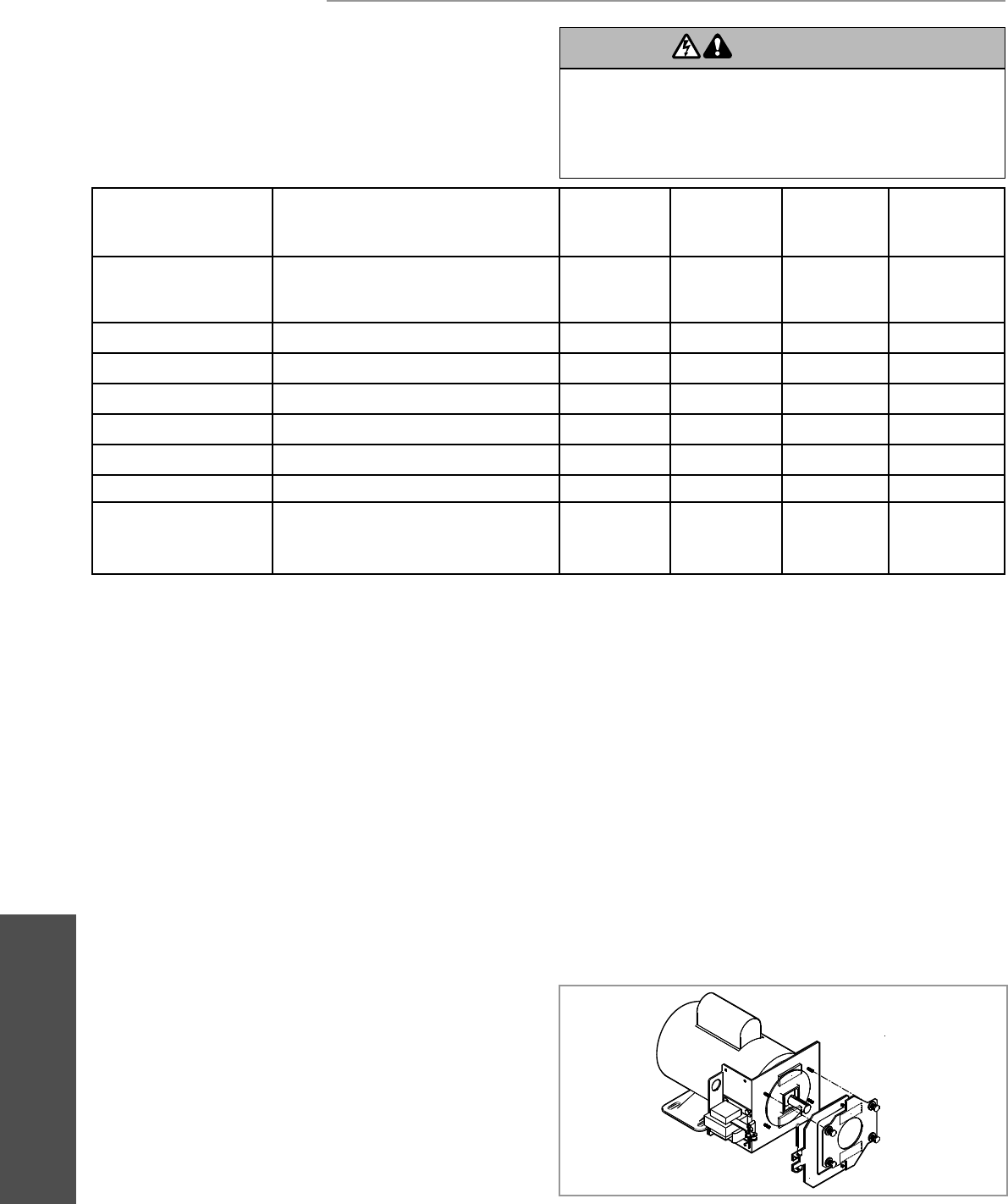
36
MAINTENANCE
MAINTENANCE
MAINTENANCE SCHEDULE
For use with Maintenance Alert System.
Check at the intervals listed in the following chart:
HOW TO ORDER REPAIR PARTS
OUR LARGE SERVICE ORGANIZATION SPANS AMERICA
Installation and service information are available.
Call our TOLL FREE number:
1-800-528-2806
www.liftmaster.com
6 Use SAE 30 Oil (Never use grease or silicone spray).
• Do not lubricate motor. Motor bearings are rated for
continuous operation.
• Do not lubricate clutch or V-belt.
Repeat ALL procedures.
z Inspect and service whenever a malfunction is observed or
suspected.
To avoid SERIOUS personal INJURY or DEATH:
• Disconnect electric power BEFORE performing ANY
adjustments or maintenance.
• ALL maintenance MUST be performed by a trained door
systems technician.
ATTENTION
AVERTISSEMENT AVERTISSEMENT
AVERTISSEMENT
WARNING
CAUTION
WARNING
WARNING
WARNING
PRECAUCIÓN ADVERTENCIA
ADVERTENCIA ADVERTENCIA
LIFE OF OPERATOR FEATURE (ODOMETER/CYCLE COUNTER)
The operator is equipped with an odometer to show how many months and cycles the operator has performed from the time it as
installed. This feature can help determine how long the operator has been in service.
1. Start with the door in the closed position.
2. Turn the SELECTOR DIAL to DIAG (diagnostic mode).
3. Press and release the MAS button on the logic board.
4. Press and release the MRT button on the logic board.
5. The open and close lights will flash. OPEN for every 5,000 cycles and CLOSE for every 3 months.
6. Return the SELECTOR DIAL to the desired wiring type.
NOTE: If the operator has not reached 5,000 cycles or 3 months, there will be no indications.
EVERY 3
MONTHS OR
5,000 CYCLES
z6
z
z6
EVERY MONTH
z
EVERY 6
MONTHS OR
10,000 CYCLES
z
z
z
z
EVERY 12
MONTHS OR
20,000 CYCLES
ITEM
Drive Chain
Sprockets
Clutch
Belt
Fasteners
Manual Disconnect
Bearings and Shafts
LiftMaster Monitored
Entrapment Protection
(LMEP)
PROCEDURE
Check for excessive slack.
Check and adjust as required.
Lubricate.
Check set screw tightness.
Check and adjust as required.
Check condition and tension.
Check and tighten as required.
Check and operate.
Check for wear and lubricate.
Check alignment and
functionality.
BRAKE (IF PRESENT)
A solenoid brake is available as an option for some models. The
brake is adjusted at the factory and should not need additional
adjustment for the life of the brake assembly.
Inspect the brake pad and replace brake assembly when
necessary.
NOTE: Your operator may look different than the operator shown.
Maintenance

37
TROUBLESHOOTING
DIAGNOSTIC CHART
The logic board has several LEDs to assist in the installation and troubleshooting of the operator. The following chart should assist in
verifying the operator is functioning properly. Turn the selector dial to DIAGNOSTIC to keep the door from moving while
troubleshooting.
TROUBLESHOOTING
Power Green Indicates that power is being generated for the logic board.
Stop Green Indicates a closed circuit between common and terminal 5. Pressing stop should turn off this LED.
Open Yellow Indicates a closed circuit between common and terminal 7. Pressing the open button should turn
ON this LED.
Close Yellow Indicates a closed circuit between common and terminal 6. Pressing the close button should turn
ON this LED.
LMEP Green Solid on indicates photoelectric sensors learned. Flashing indicates photoelectric sensors need to be
connected or obstructed**. Solid off indicates no sensors learned.
Timer Defeat Yellow Solid on indicates a closed circuit between common and terminal 12. Timer-To-Close will not close.
OLS Yellow Pressing the Open Limit Switch should turn ON this LED.
CLS Yellow Pressing the Close Limit Switch should turn ON this LED.
SLS Yellow Pressing the Sensing Limit Switch should turn ON this LED.
Edge Yellow Indicates a closed circuit between common and terminal 8. Pressing the edge should turn ON this LED.
Mid Stop Yellow Solid on indicates door is stopped on up or down mid stop. Flashing indicates MID STOP is being set.
Timer Enabled Green Solid on indicates TIMER is programmed and will activate from open or mid stop position. Flashing
indicates Timer is counting down and door will close after preset time.
SBC Yellow Indicates a closed circuit between common and terminal 1. Pressing the single button control station
should turn ON this LED.
MAS Yellow Indicates the Maintenance Alert System has been activated or an error code has been triggered.
Relay A Yellow Indicates open or close command has been given to the motor. LED turns on when OPEN/CLOSE button is
pressed.
Relay B Yellow Indicates open or close command has been given to the motor. LED turns on when OPEN/CLOSE button is
pressed.
DATA Green Indicates communication between the Logic 4 board and optional TLSCARD.
LED COLOR DEFINITION
Troubleshooting
** RESTRICTED CLOSE. This method will allow you to close the door when LMEP device(s) are no longer working. Press and hold the
CLOSE button until the door reaches the closed limit. If the CLOSE button is released before the door reaches the closed limit the
operator will stop and the procedure will need to be repeated to fully close the door.
38
TROUBLESHOOTING
TROUBLESHOOTING GUIDE
THE OPERATOR WILL
NOT RESPOND TO ANY
COMMANDS
POWER LED IS NOT ON
STOP BUTTON LED IS
NOT ON
THE DOOR WILL MOVE
ABOUT A FOOT THEN
STOP. AFTER STOPPING,
ONLY CONSTANT
PRESSURE COMMANDS
WILL MOVE THE DOOR
THE DOOR WILL MOVE
MOST OF THE WAY
TOWARDS A LIMIT THEN
STOP. AN EXTRA OPEN OR
CLOSE COMMAND IS ABLE
TO GET DOOR TO
COMPLETE CYCLE
THE DOOR WILL OPEN
SOME BUT NOT
COMPLETELY. AN EXTRA
OPEN IS ABLE TO GET THE
DOOR TO OPEN
COMPLETELY
THE DOOR WILL OPEN BUT
WILL ONLY CLOSE AFTER
A FIVE SECOND DELAY
WITH CONSTANT
PRESSURE ON THE CLOSE
BUTTON (RESTRICTED
CLOSE MODE)
a) No power supply ➤ Verify primary line voltage from power source. Green POWER LED
must be on.
b) Operator control station is wired wrong ➤ Use the OPEN, CLOSE and STOP LEDs to help check correct wiring.
Verify that the board is accepting commands by using the onboard
station. Green LED next to stop button must be on.
c) Interlock switch is activated ➤ Check Interlock(s). If more than one external interlock is present they
must be wired in series. Green LED next to stop button must be on.
d) Dial still in programming, option, ➤ Set dial to desired wiring type.
or diagnostic mode
e) Motor is malfunctioning ➤ Verify proper voltage getting to the motor (Check motor name plate).
f) Motor thermal overload tripped ➤ Check to see if motor is hot. Allow motor to cool before attempting to
move door. Cycle operator in constant pressure one full cycle open and
close to reset fault.
g) Possible accessory malfunction ➤ Disconnect all devices, reattach them one at a time testing for a failure
after each one is replaced.
h) Off Board relay may need to be ➤ When the OPEN or CLOSE button is pressed, Relay A or B LED should
replaced see wiring diagram turn on and the door should move in the corresponding direction. If
Relay A or B lights and the door does not move, off board relay may
need to be replaced (see wiring diagram Off Board Relays).
i) Possible logic board failure ➤ Replace logic board.
a) Control station not connected or wired ➤ Check wiring to control station.
correctly
b) Interlock switch ➤ Check interlock switch(es) for continuity.
a) The photoelectric sensors, edge or ➤ If the on board LMEP LED is flashing, the photoelectric sensor are
other sensing device is obstructed misaligned or not connected. Remove any obstructions, check the
or activated safety device wires for continuity and shorts.
b) The logic board thinks that the direct ➤ Unlearn the photoelectric sensors from the memory by resetting
connect photoelectric sensors are factory defaults.
attached and blocked
FAULT POSSIBLE CAUSE FIX
a) RPM sensor is not connected properly ➤ Check the RPM assembly for loose connections. Check that RPM wheel
or may need to be replaced is turning when operator is running. Check for foreign matter blocking
optical lens.
➤ Replace RPM sensor.
b) Clutch slipping ➤ Adjust clutch and verify that door is not binding.
The Maximum Run Timer is not set ➤ Manually reprogram the Maximum Run Timer (page 35).
correctly OR reset the factory defaults (page 35).
There may be a Mid Stop set ➤ Check to see if the Mid Stop LED is on. Clear the Mid Stop by turning
the selector dial to program. Press and hold the MID STOP button for
5 seconds. Return dial to desired wiring type.
To reset Open Mid Stop refer to page 33.
a) Loose secondary wiring connections ➤ Repair or replace connections or control transformer.
or a faulty control transformer
b) Hoist interlock switch ➤ Check interlock. Verify the manual release chain is not engaged.
Troubleshooting guide
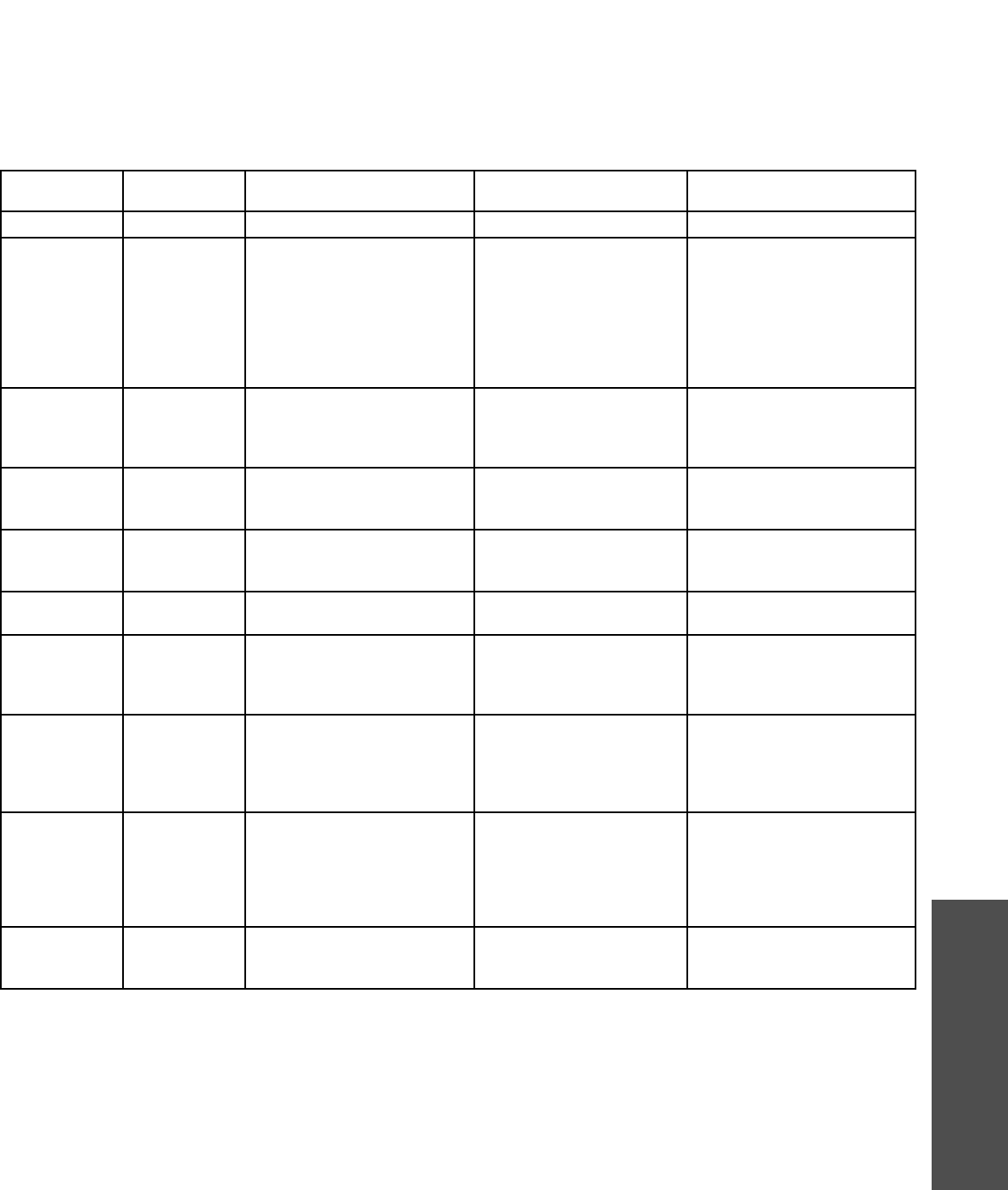
39
TROUBLESHOOTING
TROUBLESHOOTING ERROR CODES
Logic 4.0 operators incorporate a self diagnostic feature built into
the MAS LED. In addition to indicating when routine maintenance
is due, the MAS LED can be used to troubleshoot some problems
with the operator.
If the MAS LED is flashing on and off rapidly, the Maintenance
Alert System has been triggered and the schedule operator service
is due. If the MAS LED flashes 2 or more pulses in a row followed
by a pause, an operator error has occurred. To view how many
errors currently exist, turn the selector dial to DIAGNOSTIC and
press the OPEN button. To read out each individual error code
(if more than one exists) press CLOSE. It is possible to have more
than one error at a time.
The chart below can assist with identifying the flashes on the
MAS LED.
NOTE: Error codes take priority over normal MAS LED operation. Error codes will repeat on the MAS every 1.5 seconds until cleared.
There may be more than one error present, but only the highest priority will flash. If the highest error is cleared, the next highest will
flash. All errors self-correct when the corrective action is taken and a reset is not needed.
Troubleshooting error codes
ERROR CODE DISPLAY DESCRIPTION EFFECT CORRECTION
E1 1 blink MAS triggered (cycles or months) None normal operation Reset MAS (page 32).
E2 2 blinks No RPM input during opening The door only responds to
constant pressure commands
Clutch is slipping, adjust clutch, or
verify RPM sensor connection or
replace RPM sensor.
NOTE: To relearn the RPM sensor,
move the door with a constant
pressure command. The door will
stop once relearned and normal
operation will resume.
E3 3 blinks (MRT) Maximum Run Time timed
out
The door stops before reaching
set open or close limit(s)
First check Operator for any faults
(i.e., Bad Limit switch), manually
learn Max Run Timer (page 35) OR
reset factory defaults (page 35).
E4 4 blinks Obstruction sensed on closing Operator will reverse to OPEN
position
Cleared by removing obstruction or
realigning photoelectric sensors
and giving a close command.
E5 5 blinks Stuck button pressed for greater
than 2 minutes
Stuck button on 3-button station
will not respond
Stuck button must be unstuck
before it will be recognized as an
input.
E6 6 blinks Invalid option card plugged into
option card receptacles
Option card will not function
properly
Refer to accessories page for list
of supported option card(s).
E7 7 blinks LiftMaster Monitored Entrapment
Protection (LMEP) device faulted
or removed for greater than
2 minutes
Normal operation (5 second
constant pressure override
required to close)
Cleared when safety device is
cleared or connected.
E8 8 blinks Brownout Detected Operator will run as long as
enough power is present
1. Check AC line for voltage.
2. Check transformer secondary
for low voltage. Too many
accessories may be connected
to the transformer.
E9 Flash on start of
movement
Motor movement at invalid time Operator will continue to
function normally for 5
operations and then default to a
constant pressure mode
Check relays and the drive circuitry
to ensure that they are turning off.
Operator must know that they are
turning off. Operator must run
correctly for two starts for the
error to be cleared.
E10 10 blinks Motor Phase Jumper changed
while unit is not in programming
mode
The phase will not change Enter programming mode and
move phase jumper to change
phase.

40
TROUBLESHOOTING
TROUBLESHOOTING RADIO FUNCTIONALITY
The error codes will display at the radio LED.
NOTE: Radio receiver is compatible with 315 MHz remotes.
ERROR CODE DISPLAY SYMPTOM POSSIBLE PROBLEM CORRECTION
R1 Quick Flash No response from the remote Unlearned remote - Try re-learning the
A user tries to use a remote, remote (page 30).
but the RADIO LED only flashes
briefly and there is no response
from the operator.
R2 No LED activity No response from the remote Cannot recognize remote - Replace battery - OR -
A weak signal caused by a eliminate interference - OR-
discharged battery or outside obtain a qualified remote - OR-
interference with the check antenna connections.
remote(s) - OR - the remote(s)
being learned is not compatible
with the operator. Antenna not
installed or damaged.
R3 Radio LED turns The remote cannot be learned Cannot recognize remote - Replace battery - OR -
off after 30 A weak signal caused by a eliminate interference - OR-
seconds discharged battery or outside obtain a qualified remote - OR-
interference interfering with the check antenna connections.
learn process - OR - the
remote(s) being learned is not
compatible with the operator.
Antenna not installed or
damaged.
R4 2 blinks The remote cannot be learned Receiver memory full - Erase all learned remotes
A user enters RADIO function and re-learn the desired
learning mode but there is no remote.
space left to add another remote.
R5 3 blinks The remote cannot be learned Duplicate remote - This remote already has a
A user enters RADIO function function associated with it. To
learning and selects the function change the function, erase all
to be learned. When the remote learned remotes and
button is pressed for learning, a re-learn the desired remote.
search reveals that remote
is already learned.
R6 LMEP LED flashes Cannot close via constant pressure in No safety device present - Must connect a LiftMaster
C2, D1 or E2 modes. A safety device is required to Monitored Entrapment
close via constant pressure. Protection (LMEP) device.
Troubleshooting radio functionality
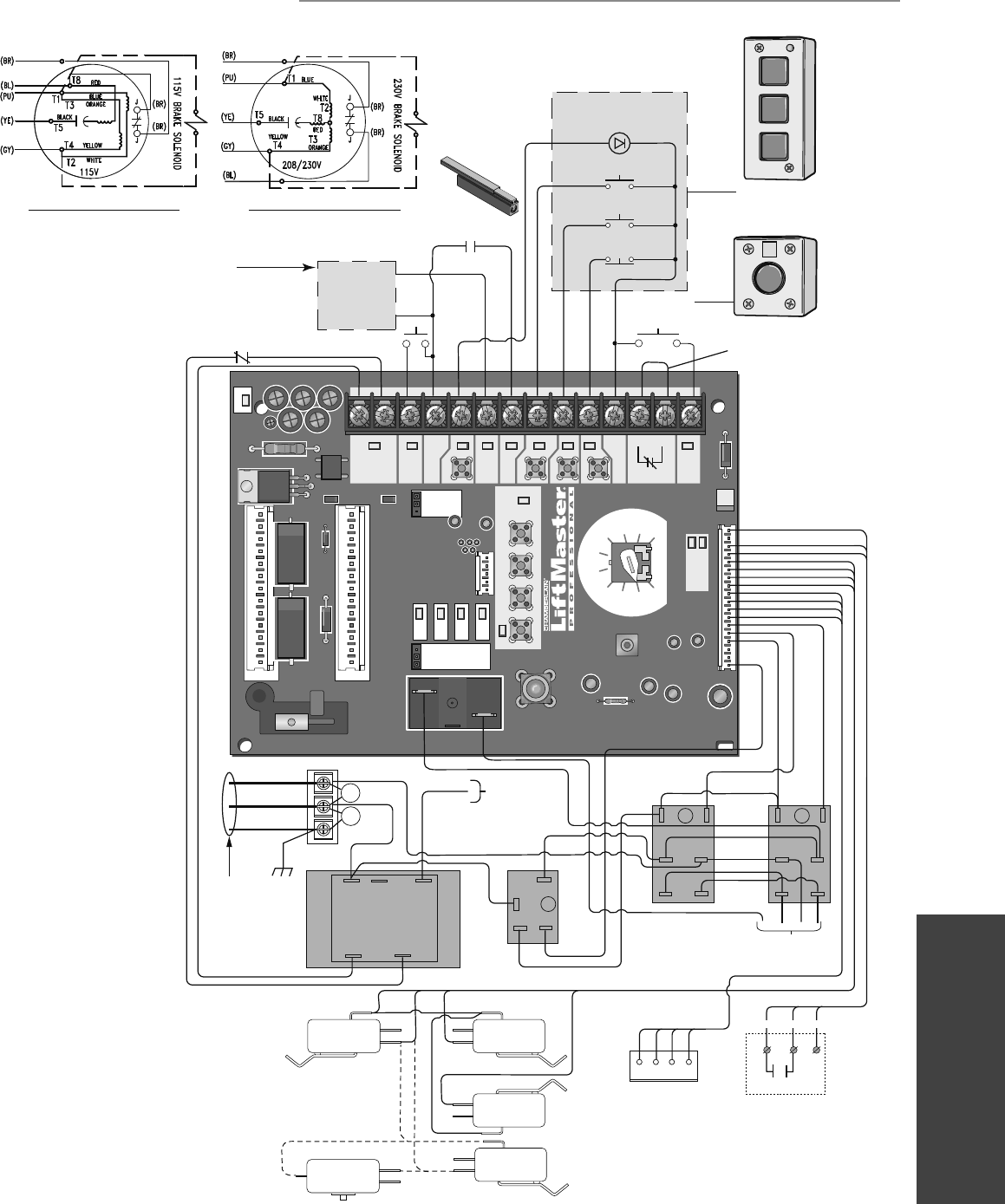
41
WIRING DIAGRAMS
Wiring Diagrams
C1
C8
C61
SLOT 1
RADIO
SLS
MRT MID TTC
DATA
24VAC 14
13
12
11
10
6
7
8
9
5
4
3
2
1
24VAC
LMEP:
EDGE:
OPEN
CLOSE
STOP
COMMON
RELAY A
RELAY B
SBC
MAS
COMMON
TIMER
DEFEAT
POWER
TIMER
ENABLE
123
FSTS
DIAG
OPTN
PROG
TTS
E2
D1
C2
B2
CLS
OLS
MID
REV
STD
SLOT 2
MOTOR
DIRECTION
3-PHASE
1-PHASE
Remove Jumper
To Install External
Door Interlock
3-Button Station
Maintenance
Alert LED
(RD) (WH)
Open
Close
Stop
Open/Close
Single Button
Sensing
Edge
Refer to page 26 for
LiftMaster Monitored
Entrapment Protection (LMEP)
device connections
Hoist Interlock
When Present
TMR DEF
SWITCH
MOV
MOV
(YE)
(BL)
(YE)
(OR)
(WH)
(YE)
(PU)
(WH)
(RD)
(GY)
(YE)
(RD)
(WH)
(PU)
(YE)
(OR)
(GY)
(OR) (PU)
(WH)
(WH)
(WH)
(WH)
(WH)
(PU)
(YE)
(WH)
(WH)
(WH)
(WH)
(YE)
115 / 230
VOLT 1PH.
POWER IN
hot
neutral
ground
(BK)
COM 120
VAC
120 / 240
VAC
+24 VAC -24 VAC
See Motor
Connections
8
01
4
6
2
6
2
8
4
01
COIL
COM
NO
C
BA
(WH)
(BL) (GY)
(YE)
(BR)
(GY)
See Motor
Connections
NOTE: Lock Sensor is provided on Models
DJ and DH only, red wire from main harness
connects to NC on Bypass L/S and to NO on
LOCK SENSOR switch. White wires connect the
COM on BYPASS L/S and LOCK SENSOR switch
to NC on Open L/S.
NOTE: The Lock Sensor switch is
located in the chassis.
OPEN
CLOSE
STOP
NOTE: Gray (GY) and purple (PU) motor wires are reversed
for H and HJ right hand models and all GH and J models.
115V MOTOR CONNECTION 230V MOTOR CONNECTION
(WH)
(WH)
(WH)
(RD) (PU)
(YE)
COM
NO
NC
NO
NC
COM
NO
NC
COM
OPEN L/S
NO
NC
LOCK
SENSOR
(see note at left)
CLOSE L/S
SAFETY L/S
(WH) (RD)
(WH)
(RD)
(WH)
(RD)
(YE)
(GY)
1 2 3 4
RPM Board
L3 L2 L1
COM
NO
NC
BYPASS
L/S
(WH)
External Radio Receiver
NOTE: 32 Vdc power supplied
from White and Yellow wires located
within the electrical box.
(WH) (OR) (YE)
R1 R2 R3
LOGIC (VER. 4.0) 1 PHASE WIRING DIAGRAM
WIRING DIAGRAMS
Refer to page 22 for
LiftMaster Monitored
Entrapment Protection (LMEP)
device connections
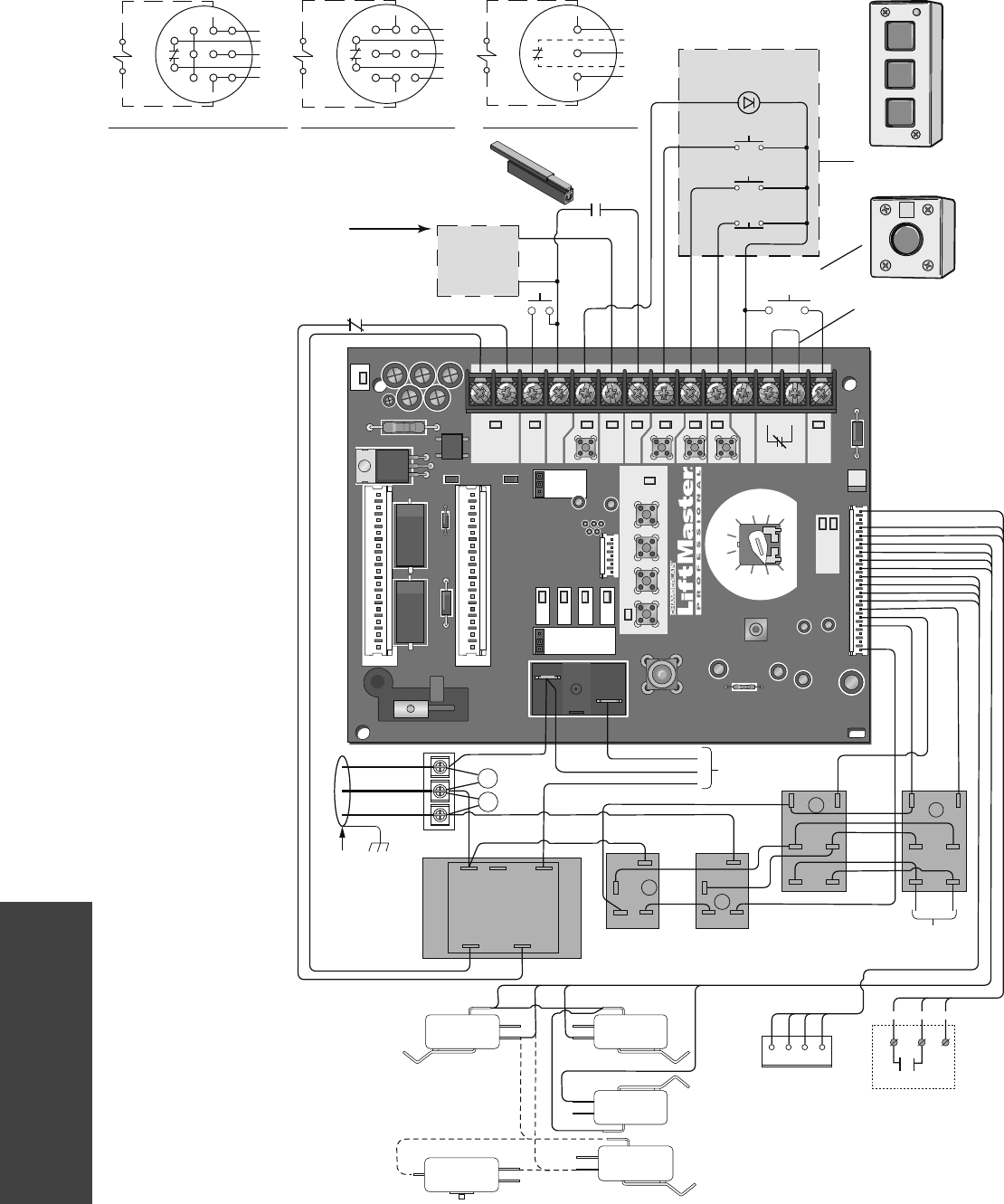
42
WIRING DIAGRAMS
Wiring Diagrams
SLOT 1
RADIO
SLS
MRT MID TTC
DATA
24VAC
24VAC
LMEP:
EDGE:
OPEN
CLOSE
STOP
COMMON
RELAY A
RELAY B
SBC
MAS
COMMON
TIMER
DEFEAT
POWER
TIMER
ENABLE
123
FSTS
DIAG
OPTN
PROG
TTS
E2
D1
C2
B2
CLS
OLS
MID
REV
STD
SLOT 2
MOTOR
DIRECTION
3-PHASE
1-PHASE
Remove Jumper
To Install External
Door Interlock
3-Button Station
Maintenance
Alert LED
(RD) (WH)
Open
Close
Stop
Open/Close
Single Button
Sensing
Edge
Hoist Interlock
When Present
TMR DEF
SWITCH
MOV
MOV
NOTE: Lock Sensor is provided on Models
DJ and DH only, red wire from main harness
connects to NC on BYPASS L/S and to NO on
LOCK SENSOR switch. White wires connect the
COM on BYPASS L/S and Lock Sensor switch to
NC on Open L/S.
(WH)
(WH)
(WH)
(RD) (PU)
(YE)
COM
NO
NC
NO
NC
COM
NO
NC
COM
OPEN L/S
NO
NC
LOCK
SENSOR
(see note at left)
CLOSE L/S
SAFETY L/S
(WH) (RD)
(YE)
(BL)
(YE)
(OR)
(WH)
(YE)
(PU)
(WH)
(RD)
(GY)
(YE)
(RD)
(WH)
(PU)
(YE)
(OR)
(GY)
(OR)
(PU)
(WH)
(WH)
(WH)
(WH)
(WH)
(WH)
(GY) (YE)
(WH)
(GY)
(WH)
(WH)
(WH)
(WH) (WH)
(PU)
(BR)
(BR)
(YE)
208/230/460
VOLT 3PH.
POWER IN
(BK)
COM 120
VAC 240 / 460 /
575 VAC
+24 VAC -24 VAC
COIL COIL
COM COM
NO NO
See Motor
Connections
See Motor
Connections
8
01
4
62
62
84
01 A
B
C
D
OPEN
CLOSE
STOP
NOTE: Gray (GY) and purple (PU) motor
wires are reversed for H and HJ right hand
models and all GH and J models.
575V BRAKE
(WHEN PRESENT)
1
2
3
(GY)
(BR)
(PU)
(BR)
(BL/BK)
(BL/BK)
(YE)
230V BRAKE
(WHEN PRESENT)
J
T4 T7 T1
T5 T8 T2
T6 T9 T3
(GY)
(BR)
(PU)
(BR)
(YE)
J
230V BRAKE
(WHEN PRESENT)
J
T4 T7 T1
T5 T8 T2
T6 T9 T3
(GY)
(BR)
(PU)
(BR)
(YE)
J
208/230V MOTOR CONNECTION 460V MOTOR CONNECTION 575V MOTOR CONNECTION
(WH)
(RD)
(YE)
(GY)
1 2 3 4
RPM Board
L3 L2 L1
Refer to page 26 for
LiftMaster Monitored
Entrapment Protection (LMEP)
device connections
NOTE: The Lock Sensor switch is
located in the chassis.
(RD)
COM
NO
NC
BYPASS
L/S
(WH)
14
13
12
11
10
6
7
8
9
5
4
3
2
1
External Radio Receiver
NOTE: 32 Vdc power supplied
from White and Yellow wires located
within the electrical box.
(WH) (OR) (YE)
R1 R2 R3
LOGIC (VER. 4.0) 3 PHASE WIRING DIAGRAM
Refer to page 22 for
LiftMaster Monitored
Entrapment Protection (LMEP)
device connections
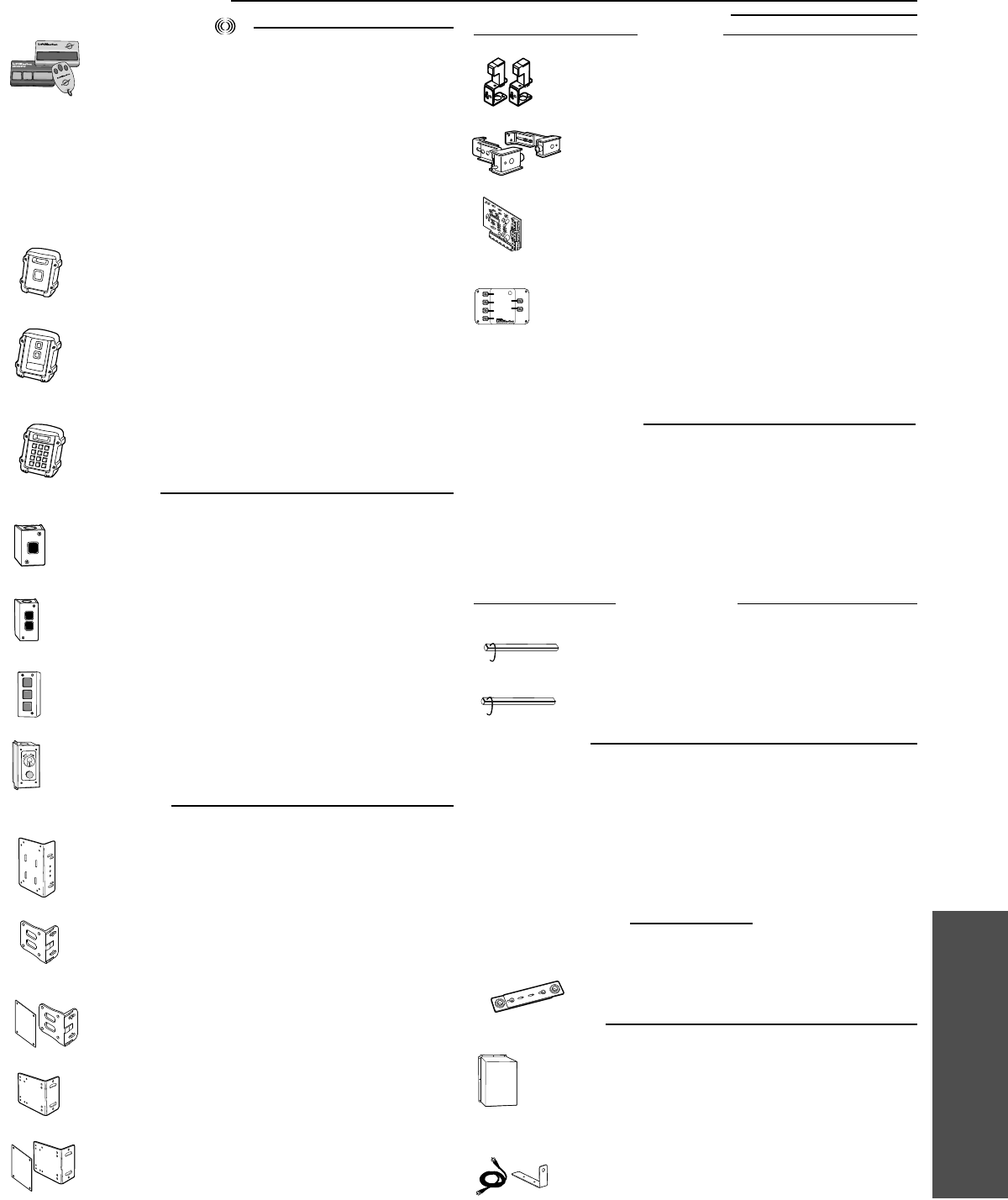
43
ACCESSORIES
OPEN
OPEN
OPEN
OPEN
CLOSE
OPEN
OPEN
CLOSE
STOP
OPENOPEN
373LM
371LM
65-8202
65-5202
3-Button SECURITY✚® Remote Control:
Includes visor clip.
1-Button SECURITY✚® Remote Control:
Includes visor clip.
Vehicle Detection System:
Pneumatic Sensing Edge Kit with exterior air switch, 2-wire
coil cord and 14' air hose.
Vehicle Detection System:
Pneumatic Sensing Edge Kit with exterior air switch, 2-wire
take-up reel (20' extended) and 14' air hose.
333LM 3-Button Tri-Colored Dip Switch Remote Control:
Includes visor clip.
2-Button Control Station:
Steel enclosure.
1-Button Control Station:
Steel enclosure.
Commercial Protector System®:
Provides protection on doors up to 45' wide. NEMA-4 rated.
CPS-UN4
3-Button Control Station:
Steel enclosure with Maintenance Alert System.
02-103L
OPEN
Commercial Protector System®:
Provides protection on doors up to 30' wide.
CPS-U
OPEN
OPEN
ENTRAPMENT PROTECTION DEVICES
REMOTE CONTROLS 315MHz
CONTROL STATIONS
OPTION CARDS
02-102
02-101
ACCESSORIES
CPS-EI Monitored Safety Edge Interface:
For use with the approved 4-wire safety edge (see below).
OPEN
40-34141-1
LMEP2
LMEP1
E1
E2
E3
E4
CPS-EI
OPEN
OPEN
STOP
CLOSE
Key Control Station:
Indoor flush mount, NEMA 1 with Stop button.
02-110
Accessories
Timer Light Status Card:
The TLS option card provides special functionality to
activate and flash auxiliary devices such as lights, bells, and
horns/strobes at various door positions, and to provide
special timer functions.
TLS1CARD
Auxiliary Contact Card:
The Auxiliary Contact option card has both Normally-Open
and Normally-Closed contacts that actuate when the door is
idle, opening, or closing.
AUXCARD
65ME1234 Miller ME123 4-Wire Monitored Safety Edge:
For sectional or rolling doors.
65ME110 Miller ME110 4-Wire Monitored Safety Edge:
For rolling grilles and counter shutters.
Cast iron bracket to mount J, H, DH, DJ, and GH side mount
operators on end bracket of a rolling door or grill. For vertical or
horizontal mount on either front or top of coil. Cannot be welded.
Heavy gauge steel bracket for vertical or horizontal mount on either
front or top of coil on a rolling door. Has a variety of mounting hole
patterns compatible with many OEM manufacturers. For use with J,
H, DJ, and DH operators. May be welded.
08-9098
MOUNTING BRACKETS
OPEN
OPEN
10-12360
Same as 08-9098, but with adapter plate to hold mounting bolts in
place for easy mounting.
Heavy gauge steel bracket for vertical or horizontal mount on either
front or top of coil on a rolling door. May be welded. For use with J,
H, DJ, and DH operators.
Same as 1A4324, but with adapter plate to hold mounting bolts in
place for easy mounting.
08-9098EZ
1A4324
1A4324EZ
OPEN
Operator Cover:
For use with wall-mounted J, H, GH, DH or DJ operators.
Measures 31" x 19" x 18" (L x W x D). Assembly required.
Recommended for damp environments where direct spray is
present. Required when the operator is installed less than 8
feet above the floor.
1A3982
OPEN
OPEN
Antenna Extension Kit:
The antenna extension kit can be used with EXT-ANT for
maximum radio receiver range.
86LM (15')
86LMT (25')
MISCELLANEOUS
For 1" shafts. Recommended to properly tension drive chain
between operator shaft and door shaft.
71-6023
71-6125 Same as 71-6023, but for 1-1/4" shafts.
For Jackshaft Type Operators
CHAIN TENSIONERS
65ME123C U-Shaped Mounting Channel:
For 65ME1234 edge when installed on sectional doors.
65ME123C1 T-Shaped Mounting Channel:
For 65ME1234 edge when installed on rolling doors. Fits between
L-shaped angles used to construct a bottom bar on rolling doors.
65ME123CA3 L-Shaped Mounting Channel:
For 65ME1234 edge when installed on sectional doors.
MOUNTING CHANNELS
CPS3CARD Option Logic Board:
For use when more than one set of photoelectric sensors are
required. Also available pre-packaged with a second set of
photoelectric sensors; see CPS3 or CPS3-N4 in Commercial Door
Operator Product and Accessories Price List for more information.
MONITORED
NON-MONITORED
OPEN
WPB3LM3
WPB1LM3
Wireless 3 Button Control Station SECURITY✚®:
Rugged composite housing. (Wireless controls cannot be used in
place of hard wired controls.)
Wireless Single Push Button Control SECURITY✚®:
Rugged composite housing. (Wireless controls cannot be
used in place of hard wired controls.)
12
45
78
*
0
3
6
9
#
WKP5LM3 (5 4-digit entry codes)
WKP250LM3 (250 4-digit entry codes)
Wireless Access Control Keypads SECURITY✚®:
Rugged composite housing. (Wireless controls cannot be
used in place of hard wired controls.)
LiftMaster offers a variety of SECURITY✚® Remote Controls for your
application needs. Single to 4-Button, visor or key chain. Contact
your authorized dealer.
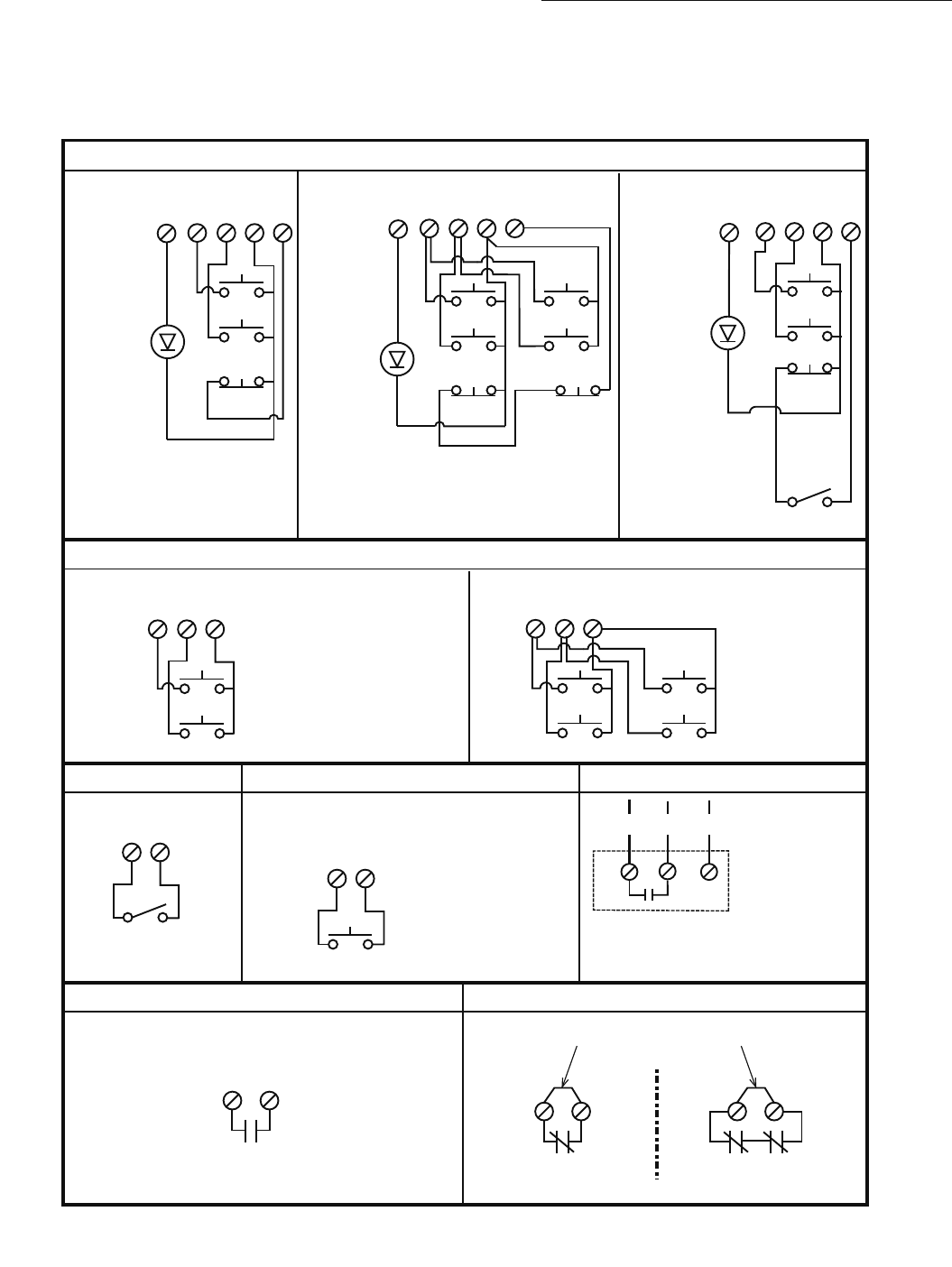
© 2012, The Chamberlain Group, Inc.
01-35241G All Rights Reserved
CONTROL CONNECTION DIAGRAM
IMPORTANT NOTES:
1. The 3-Button Control Station provided must be connected for operation.
2. If a STOP button is not used, a jumper must be placed between terminals 4 and 5.
3. When adding accessories, install them one at a time and test each one after it is added to ensure proper installation and operation
with the Commercial Door Operator.
3 BUTTON STATION OR 3 POSITION KEYSWITCH WITH SPRING RETURN TO CENTER AND STOP BUTTON
2 OR MORE KEY LOCKOUT
R1 R2 R3
7 6 4 5
Stop
Close
Open
Stop
Close
Open
7 6 4 5
Stop
Close
Open
2 BUTTON STATION OR 3 POSITION KEYSWITCH WITH SPRING RETURN TO CENTER
STANDARD
7 6 4
Close
Open
D1 & E2
MODE ONLY
2 OR MORE
7 6 4
Close
Open
Close
Open
D1 & E2
MODE ONLY
OPEN / CLOSE
14B2, T, TS & FSTS
MODE ONLY
1 BUTTON STATION OR ANY AUXILIARY DEVICE RADIO CONTROLS
EXTERNAL
RADIO RECEIVER
NON-MONITORED SENSING DEVICE TO REVERSE OR STOP EXTERNAL INTERLOCK
11 82323
Remove Factory Installed Jumper
When Interlock is Used
ONE 2 OR MORE
STANDARD
7 6 4 5
Stop
Close
Open
All Wiring Types
Keyswitch
Sensing Device
10
Maintenance
Alert LED
10 10
Maintenance
Alert LED
Maintenance
Alert LED
(RED)
(WHITE)
(RED)
(WHITE)
(RED)
(WHITE)
Note: 11 and 4 are both the same common.
Either is acceptable.
See note 2.
See note 2.
See note 2.
TIMER DEFEAT SWITCH
NOTE: 32 Vdc power supplied from white
and yellow wires located within the
electrical box.
NOTE: Stop circuit must be wired in series for
all stop buttons to function. This may require
removal of factory installed jumper bar in the
3-button station.
Keyswitch
11 12 (WH) (OR) (YE)
