Lincoln Electric Na 5N Users Manual Svm131a
NA-5NF to the manual 8e62f948-c797-42fc-88ed-636f50965ff4
2015-02-09
: Lincoln-Electric Lincoln-Electric-Na-5N-Users-Manual-574577 lincoln-electric-na-5n-users-manual-574577 lincoln-electric pdf
Open the PDF directly: View PDF  .
.
Page Count: 152 [warning: Documents this large are best viewed by clicking the View PDF Link!]
- Master TOC
- Safety
- Section A Installation
- Section B Operations
- Section C Accessories
- Section D Maintenance
- Section E Theory of Operation
- Section F Troubleshooting & Repair
- Symptoms
- The wire feeds whenever the input power switch is in the “ON” position.
- The wire does not feed. Pressing any of the switches (buttons) will NOT feed the wire. The motor does NOT run.
- The wire will not feed and the circuit breaker (CB1) trips when the inch down, inch up or the start buttons...
- When the inch up button is press the wire feeds down. When the inch down button is pressed the wire feeds up.
- The wire will not feed when the inch down button is pressed. The wire does inch up OK and feeds down...
- The wire will not inch down but does inch up properly. The wire does not feed in either direction when the start...
- The wire will not inch down but does inch up properly. When the start button is pressed the wire feeds up...
- NA-5 units above code 8300 with “cold starting”. The wire feeds up instead of down when the start button is pressed.
- NA-5 units above code 8300 with “cold starting”. While pressing the inch down button the wire does not stop when it touches.
- The wire will NOT inch up but does inch down and weld properly.
- The wire feeds UP when either inch button is pressed.
- The wire feeds down when either inch button is pressed.
- The speed and voltage controls do not function. All of the mode lights function properly.
- All the mode lights function properly. None of the speed controls operate properly.
- All the mode lights function properly. None of the voltage controls operate properly.
- Only the strike mode functions, when the unit is at idle, regardless of the selector switch position.
- Only the strike mode functions while welding. The unit stays in the strike mode and does not progress through...
- The strike light is OFF and neither strike control functions. The other mode lights work. The unit will not...
- The strike light does not light. The strike controls (voltage and wire feed speed) do function normally.
- The strike light comes on but the strike controls (voltage and wire feed speed) do not function normally.
- The start light does not light. The start controls (voltage and wire feed speed) may or may not function normally.
- The start light is ON but the start controls (voltage and wire feed speed) do not function. The NA-5 is...
- When the start button is pressed and the unit is welding, the start mode is skipped.
- When welding the start timer does not time out. The unit stays in the start mode.
- The crater light does not light. The crater controls (voltage and wire feed speed) may or may not function.
- The crater light is ON but the crater controls (voltage and wire feed speed) do not function. The NA-5 is...
- At the end of the weld the crater light does NOT light.
- At the end of the weld the crater timer does not time out. The unit stays in the crater mode.
- No burnback/retract occurs at the end of the weld.
- The burnback timer does not time out properly.
- The weld light does not light. The weld controls (voltage and wire feed speed) may or may not function.
- The weld light is ON but the weld controls (voltage and wire feed speed) do not function. The NA-5 is...
- During the welding sequence the weld light does not go ON.
- While welding the weld mode is omitted in the welding sequence. The weld timer is set for a longer...
- The weld timer does not time out. the unit stays in the weld mode.
- The start button does not initiate the power source output or the wire feed. The mode selector switch is in...
- The start button initiates the power source output, but the wire does not feed.
- The start button initiates the wire feed, but does not activiate the power source output.
- The travel function will not operate regardless of the travel switch position.
- The travel will not function with the travel switch in the “Hand” travel position. The unit operates properly...
- The travel will not function with the travel switch in the “Auto” postion. The travel operates correctly with the...
- The travel runs continuously when the travel switch is in the “Auto” position.
- After pressing the stop button, the electrode “Hot” light goes OFF, but the electrode wire remains electrically...
- After pressing the stop button, the weld light remains on and the wire continues to feed.
- The set and actual speed meter readings match within a few IPM, but both are in error.
- The set speed and actual speed meter readings do not match within a few IPM. One or both readings may be erratic.
- The set speed is adjustable and steady. The actual speed is uncontrollable. The meter displays the actual speed correctly.
- The set speed is adjustable and steady. The actual speed reading is incorrect and or erratic.
- The set volts and actual volts readings match within a few tenths of a volt while welding. However both...
- The actual volts reading does NOT match the set volts reading within a few tenths of a volt. One reading...
- The NA-5 repeatedly shutsdown while welding.
- The circuit breaker trips when the inch up, inch down, or start buttons are pressed.
- The circuit breaker trips and or the fuse (F101) blows when the NA-5 is turned on. (input power applied).
- The circuit breaker trips after the wire has been feeding for a period of time. Welding is normal.
- The 1/8 amp fuse on the voltage board repeatedly fails.
- The arc voltage appears to rise too slowly. The wire stubs or blasts off at the start of the weld sequence.
- The voltage seems too high or flares excessively at the start of the weld sequence. Once the arc is established...
- The arc is unstable or oscillating.
- The flux or gas/water solenoid does not function (open).
- The flux or gas/water solenoid continuously remains open.
- The arc is unstable or oscillating.
- The welding arc is variable or “hunting”.
- Poor arc striking with sticking or “blast offs”. The weld bead is ropey and has porosity.
- Section G - Electrical Diagrams
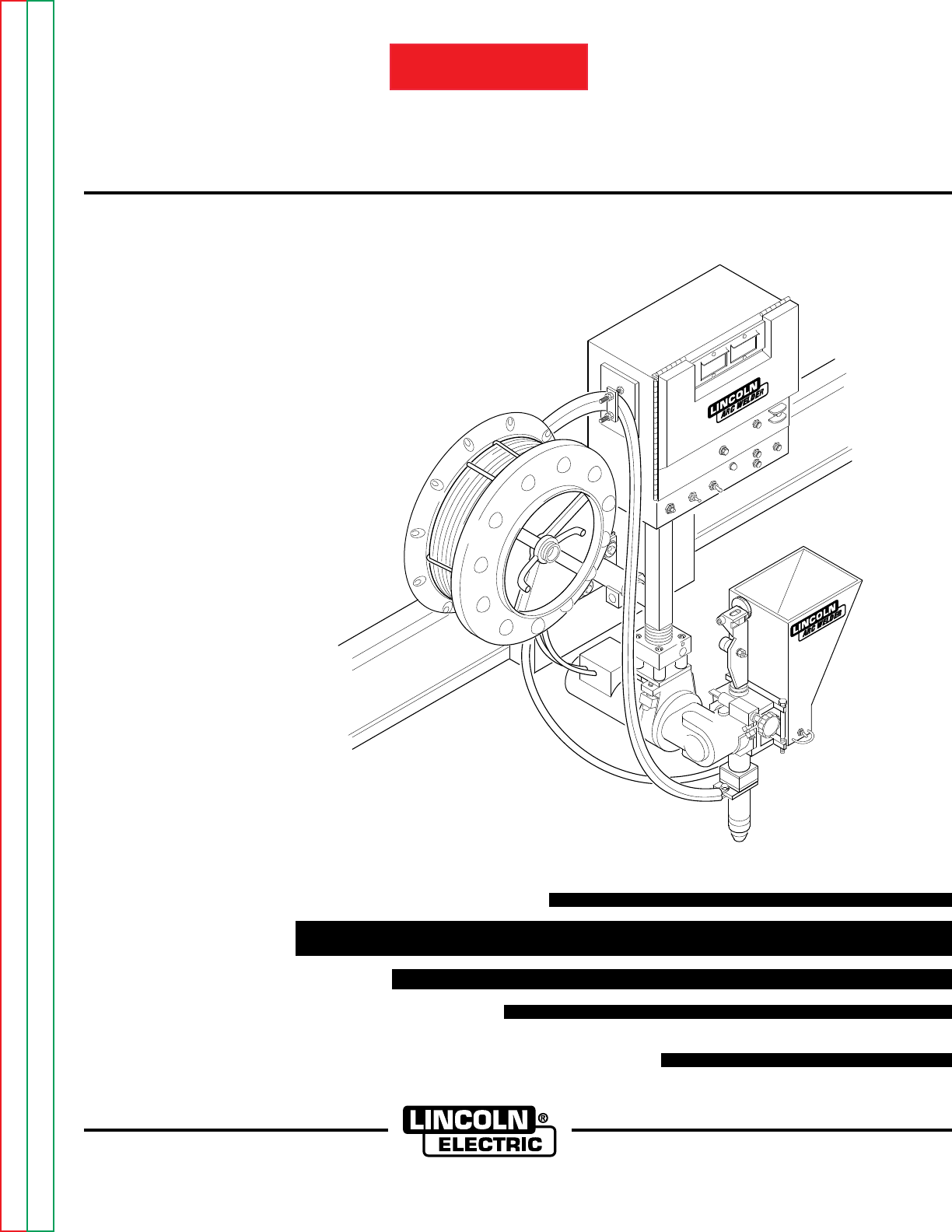
NA-5
AUTOMATIC WELDING SYSTEMS
SERVICE MANUAL
Sales and Service through Subsidiaries and Distributors Worldwide
22801 St. Clair Ave. Cleveland, Ohio 44117-1199 U.S.A. Tel. (216) 481-8100
World's Leader in Welding and Cutting Products Premier Manufacturer of Industrial Motors
SVM131-A
July, 1997
Safety Depends on You
Lincoln arc welding and cutting
equipment is designed and built
with safety in mind. However,
your overall safety can be
increased by proper installation
... and thoughtful operation on
your part. DO NOT INSTALL,
OPERATE OR REPAIR THIS
EQUIPMENT WITHOUT READ-
ING THIS MANUAL AND THE
SAFETY PRECAUTIONS CON-
TAINED THROUGHOUT. And,
most importantly, think before
you act and be careful.
For use with the following models: NA-5N
NA-5NF
NA-5S
NA-5SF
Return to Master TOC Return to Master TOC Return to Master TOC Return to Master TOC
View Safety Info View Safety Info View Safety Info View Safety Info
RETURN TO MAIN INDEX
SAFETY ii
FOR ENGINE
powered equipment.
1.a. Turn the engine off before troubleshooting and maintenance
work unless the maintenance work requires it to be running.
____________________________________________________
1.b.Operate engines in open, well-ventilated
areas or vent the engine exhaust fumes
outdoors.
____________________________________________________
1.c. Do not add the fuel near an open flame weld-
ing arc or when the engine is running. Stop
the engine and allow it to cool before refuel-
ing to prevent spilled fuel from vaporizing on
contact with hot engine parts and igniting. Do
not spill fuel when filling tank. If fuel is spilled,
wipe it up and do not start engine until fumes
have been eliminated.
____________________________________________________
1.d. Keep all equipment safety guards, covers and
devices in position and in good repair.Keep
hands, hair, clothing and tools away from V-
belts, gears, fans and all other moving parts
when starting, operating or repairing equip-
ment.
____________________________________________________
1.e. In some cases it may be necessary to remove safety
guards to perform required maintenance. Remove
guards only when necessary and replace them when the
maintenance requiring their removal is complete.
Always use the greatest care when working near moving
parts.
___________________________________________________
1.f. Do not put your hands near the engine fan. Do not attempt to
override the governor or idler by pushing on the throttle con-
trol rods while the engine is running.
___________________________________________________
1.g. To prevent accidentally starting gasoline engines while
turning the engine or welding generator during maintenance
work, disconnect the spark plug wires, distributor cap or
magneto wire as appropriate.
ARC WELDING CAN BE HAZARDOUS. PROTECT YOURSELF AND OTHERS FROM POSSIBLE SERIOUS INJURY OR DEATH.
KEEP CHILDREN AWAY. PACEMAKER WEARERS SHOULD CONSULT WITH THEIR DOCTOR BEFORE OPERATING.
Read and understand the following safety highlights. For additional safety information, it is strongly recommended that you pur-
chase a copy of “Safety in Welding & Cutting - ANSI Standard Z49.1” from the American Welding Society, P.O. Box 351040,
Miami, Florida 33135 or CSA Standard W117.2-1974. A Free copy of “Arc Welding Safety” booklet E205 is available from the
Lincoln Electric Company, 22801 St. Clair Avenue, Cleveland, Ohio 44117-1199.
BE SURE THAT ALL INSTALLATION, OPERATION, MAINTENANCE AND REPAIR PROCEDURES ARE
PERFORMED ONLY BY QUALIFIED INDIVIDUALS.
WARNING
Mar ‘95
ELECTRIC AND
MAGNETIC FIELDS
may be dangerous
2.a. Electric current flowing through any conductor causes
localized Electric and Magnetic Fields (EMF). Welding
current creates EMF fields around welding cables and
welding machines
2.b. EMF fields may interfere with some pacemakers, and
welders having a pacemaker should consult their physician
before welding.
2.c. Exposure to EMF fields in welding may have other health
effects which are now not known.
2.d. All welders should use the following procedures in order to
minimize exposure to EMF fields from the welding circuit:
2.d.1.
Route the electrode and work cables together - Secure
them with tape when possible.
2.d.2. Never coil the electrode lead around your body.
2.d.3. Do not place your body between the electrode and
work cables. If the electrode cable is on your right
side, the work cable should also be on your right side.
2.d.4. Connect the work cable to the workpiece as close as
possible to the area being welded.
2.d.5. Do not work next to welding power source.
1.h. To avoid scalding, do not remove the
radiator pressure cap when the engine is
hot.
CALIFORNIA PROPOSITION 65 WARNINGS
Diesel engine exhaust and some of its constituents
are known to the State of California to cause can-
cer, birth defects, and other reproductive harm.
The engine exhaust from this product contains
chemicals known to the State of California to cause
cancer, birth defects, or other reproductive harm.
The Above For Diesel Engines The Above For Gasoline Engines
Return to Master TOC Return to Master TOC Return to Master TOC Return to Master TOC
SAFETY iiii
ARC RAYS can burn.
4.a. Use a shield with the proper filter and cover
plates to protect your eyes from sparks and
the rays of the arc when welding or observing
open arc welding. Headshield and filter lens
should conform to ANSI Z87. I standards.
4.b. Use suitable clothing made from durable flame-resistant
material to protect your skin and that of your helpers from
the arc rays.
4.c. Protect other nearby personnel with suitable, non-flammable
screening and/or warn them not to watch the arc nor expose
themselves to the arc rays or to hot spatter or metal.
ELECTRIC SHOCK can kill.
3.a. The electrode and work (or ground) circuits
are electrically “hot” when the welder is on.
Do not touch these “hot” parts with your bare
skin or wet clothing. Wear dry, hole-free
gloves to insulate hands.
3.b. Insulate yourself from work and ground using dry insulation.
Make certain the insulation is large enough to cover your full
area of physical contact with work and ground.
In addition to the normal safety precautions, if welding
must be performed under electrically hazardous
conditions (in damp locations or while wearing wet
clothing; on metal structures such as floors, gratings or
scaffolds; when in cramped positions such as sitting,
kneeling or lying, if there is a high risk of unavoidable or
accidental contact with the workpiece or ground) use
the following equipment:
• Semiautomatic DC Constant Voltage (Wire) Welder.
• DC Manual (Stick) Welder.
• AC Welder with Reduced Voltage Control.
3.c. In semiautomatic or automatic wire welding, the electrode,
electrode reel, welding head, nozzle or semiautomatic
welding gun are also electrically “hot”.
3.d. Always be sure the work cable makes a good electrical
connection with the metal being welded. The connection
should be as close as possible to the area being welded.
3.e. Ground the work or metal to be welded to a good electrical
(earth) ground.
3.f.
Maintain the electrode holder, work clamp, welding cable and
welding machine in good, safe operating condition. Replace
damaged insulation.
3.g. Never dip the electrode in water for cooling.
3.h. Never simultaneously touch electrically “hot” parts of
electrode holders connected to two welders because voltage
between the two can be the total of the open circuit voltage
of both welders.
3.i. When working above floor level, use a safety belt to protect
yourself from a fall should you get a shock.
3.j. Also see Items 6.c. and 8.
FUMES AND GASES
can be dangerous.
5.a. Welding may produce fumes and gases
hazardous to health. Avoid breathing these
fumes and gases.When welding, keep
your head out of the fume. Use enough
ventilation and/or exhaust at the arc to keep
fumes and gases away from the breathing zone. When
welding with electrodes which require special
ventilation such as stainless or hard facing (see
instructions on container or MSDS) or on lead or
cadmium plated steel and other metals or coatings
which produce highly toxic fumes, keep exposure as
low as possible and below Threshold Limit Values (TLV)
using local exhaust or mechanical ventilation. In
confined spaces or in some circumstances, outdoors, a
respirator may be required. Additional precautions are
also required when welding on galvanized steel.
5.b.
Do not weld in locations near chlorinated hydrocarbon
vapors
coming from degreasing, cleaning or spraying operations.
The heat and rays of the arc can react with solvent vapors
to
form phosgene, a highly toxic gas, and other irritating
products.
5.c. Shielding gases used for arc welding can displace air and
cause injury or death. Always use enough ventilation,
especially in confined areas, to insure breathing air is safe.
5.d. Read and understand the manufacturer’s instructions for this
equipment and the consumables to be used, including the
material safety data sheet (MSDS) and follow your
employer’s safety practices. MSDS forms are available from
your welding distributor or from the manufacturer.
5.e. Also see item 1.b. Mar ‘95
Return to Master TOC Return to Master TOC Return to Master TOC Return to Master TOC
SAFETY iiiiii
FOR ELECTRICALLY
powered equipment.
8.a. Turn off input power using the disconnect
switch at the fuse box before working on
the equipment.
8.b. Install equipment in accordance with the U.S. National
Electrical Code, all local codes and the manufacturer’s
recommendations.
8.c. Ground the equipment in accordance with the U.S. National
Electrical Code and the manufacturer’s recommendations.
CYLINDER may explode
if damaged.
7.a. Use only compressed gas cylinders
containing the correct shielding gas for the
process used and properly operating
regulators designed for the gas and
pressure used. All hoses, fittings, etc. should be suitable for
the application and maintained in good condition.
7.b. Always keep cylinders in an upright position securely
chained to an undercarriage or fixed support.
7.c. Cylinders should be located:
•Away from areas where they may be struck or subjected to
physical damage.
•A safe distance from arc welding or cutting operations and
any other source of heat, sparks, or flame.
7.d. Never allow the electrode, electrode holder or any other
electrically “hot” parts to touch a cylinder.
7.e. Keep your head and face away from the cylinder valve outlet
when opening the cylinder valve.
7.f. Valve protection caps should always be in place and hand
tight except when the cylinder is in use or connected for
use.
7.g. Read and follow the instructions on compressed gas
cylinders, associated equipment, and CGA publication P-l,
“Precautions for Safe Handling of Compressed Gases in
Cylinders,” available from the Compressed Gas Association
1235 Jefferson Davis Highway, Arlington, VA 22202.
Mar ‘95
WELDING SPARKS can
cause fire or explosion.
6.a.
Remove fire hazards from the welding area.
If this is not possible, cover them to prevent
the welding sparks from starting a fire.
Remember that welding sparks and hot
materials from welding can easily go through small cracks
and openings to adjacent areas. Avoid welding near
hydraulic lines. Have a fire extinguisher readily available.
6.b. Where compressed gases are to be used at the job site,
special precautions should be used to prevent hazardous
situations. Refer to “Safety in Welding and Cutting” (ANSI
Standard Z49.1) and the operating information for the
equipment being used.
6.c. When not welding, make certain no part of the electrode
circuit is touching the work or ground. Accidental contact can
cause overheating and create a fire hazard.
6.d. Do not heat, cut or weld tanks, drums or containers until the
proper steps have been taken to insure that such procedures
will not cause flammable or toxic vapors from substances
inside. They can cause an explosion even
though
they have
been “cleaned”. For information, purchase “Recommended
Safe Practices for the
Preparation
for Welding and Cutting of
Containers and Piping That Have Held Hazardous
Substances”, AWS F4.1 from the American Welding Society
(see address above).
6.e. Vent hollow castings or containers before heating, cutting or
welding. They may explode.
6.f.
Sparks and spatter are thrown from the welding arc. Wear oil
free protective garments such as leather gloves, heavy shirt,
cuffless trousers, high shoes and a cap over your hair. Wear
ear plugs when welding out of position or in confined places.
Always wear safety glasses with side shields when in a
welding area.
6.g. Connect the work cable to the work as close to the welding
area as practical. Work cables connected to the building
framework or other locations away from the welding area
increase the possibility of the welding current passing
through lifting chains, crane cables or other alternate circuits.
This can create fire hazards or overheat lifting chains or
cables until they fail.
6.h. Also see item 1.c.
Return to Master TOC Return to Master TOC Return to Master TOC Return to Master TOC
SAFETY iviv
PRÉCAUTIONS DE SÛRETÉ
Pour votre propre protection lire et observer toutes les instructions
et les précautions de sûreté specifiques qui parraissent dans ce
manuel aussi bien que les précautions de sûreté générales suiv-
antes:
Sûreté Pour Soudage A L’Arc
1. Protegez-vous contre la secousse électrique:
a. Les circuits à l’électrode et à la piéce sont sous tension
quand la machine à souder est en marche. Eviter
toujours tout contact entre les parties sous tension et
la peau nue ou les vétements mouillés. Porter des
gants secs et sans trous pour isoler les mains.
b. Faire trés attention de bien s’isoler de la masse quand
on soude dans des endroits humides, ou sur un
plancher metallique ou des grilles metalliques,
principalement dans les positions assis ou couché
pour lesquelles une grande partie du corps peut être
en contact avec la masse.
c. Maintenir le porte-électrode, la pince de masse, le
câble de soudage et la machine à souder en bon et sûr
état defonctionnement.
d. Ne jamais plonger le porte-électrode dans l’eau pour
le refroidir.
e. Ne jamais toucher simultanément les parties sous
tension des porte-électrodes connectés à deux
machines à souder parce que la tension entre les deux
pinces peut être le total de la tension à vide des deux
machines.
f. Si on utilise la machine à souder comme une source
de courant pour soudage semi-automatique, ces
precautions pour le porte-électrode s’applicuent aussi
au pistolet de soudage.
2. Dans le cas de travail au dessus du niveau du sol, se protéger
contre les chutes dans le cas ou on recoit un choc. Ne jamais
enrouler le câble-électrode autour de n’importe quelle partie
du corps.
3. Un coup d’arc peut être plus sévère qu’un coup de soliel,
donc:
a. Utiliser un bon masque avec un verre filtrant approprié
ainsi qu’un verre blanc afin de se protéger les yeux du ray-
onnement de l’arc et des projections quand on soude ou
quand on regarde l’arc.
b. Porter des vêtements convenables afin de protéger la
peau de soudeur et des aides contre le rayonnement de
l‘arc.
c. Protéger l’autre personnel travaillant à proximité au
soudage à l’aide d’écrans appropriés et non-inflammables.
4. Des gouttes de laitier en fusion sont émises de l’arc de
soudage. Se protéger avec des vêtements de protection libres
de l’huile, tels que les gants en cuir, chemise épaisse, pan-
talons sans revers, et chaussures montantes.
5. Toujours porter des lunettes de sécurité dans la zone de
soudage. Utiliser des lunettes avec écrans lateraux dans les
zones où l’on pique le laitier.
6. Eloigner les matériaux inflammables ou les recouvrir afin
de prévenir tout risque d’incendie dû aux étincelles.
7. Quand on ne soude pas, poser la pince à une endroit isolé
de la masse. Un court-circuit accidental peut provoquer un
échauffement et un risque d’incendie.
8. S’assurer que la masse est connectée le plus prés possible
de la zone de travail qu’il est pratique de le faire. Si on
place la masse sur la charpente de la construction ou
d’autres endroits éloignés de la zone de travail, on
augmente le risque de voir passer le courant de soudage
par les chaines de levage, câbles de grue, ou autres
circuits. Cela peut provoquer des risques d’incendie ou
d’echauffement des chaines et des câbles jusqu’à ce qu’ils
se rompent.
9. Assurer une ventilation suffisante dans la zone de soudage.
Ceci est particuliérement important pour le soudage de
tôles galvanisées plombées, ou cadmiées ou tout autre
métal qui produit des fumeés toxiques.
10. Ne pas souder en présence de vapeurs de chlore provenant
d’opérations de dégraissage, nettoyage ou pistolage. La
chaleur ou les rayons de l’arc peuvent réagir avec les
vapeurs du solvant pour produire du phosgéne (gas
fortement toxique) ou autres produits irritants.
11. Pour obtenir de plus amples renseignements sur la sûreté,
voir le code “Code for safety in welding and cutting” CSA
Standard W 117.2-1974.
PRÉCAUTIONS DE SÛRETÉ POUR
LES MACHINES À SOUDER À
TRANSFORMATEUR ET À
REDRESSEUR
1. Relier à la terre le chassis du poste conformement au code de
l’électricité et aux recommendations du fabricant. Le dispositif
de montage ou la piece à souder doit être branché à une
bonne mise à la terre.
2. Autant que possible, I’installation et l’entretien du poste seront
effectués par un électricien qualifié.
3. Avant de faires des travaux à l’interieur de poste, la debranch-
er à l’interrupteur à la boite de fusibles.
4. Garder tous les couvercles et dispositifs de sûreté à leur
place.
Mar. ‘93
Return to Master TOC Return to Master TOC Return to Master TOC Return to Master TOC

vv
NA-5
MASTER TABLE OF CONTENTS FOR ALL SECTIONS
Page
Safety . . . . . . . . . . . . . . . . . . . . . . . . . . . . . . . . . . . . . . . . . . . . . . . . . . . i-iv
Installation . . . . . . . . . . . . . . . . . . . . . . . . . . . . . . . . . . . . . . . . . . . . . . . . Section A
Technical Specifications . . . . . . . . . . . . . . . . . . . . . . . . . . . . . . . . . . . . A-2
Mechanical Installation . . . . . . . . . . . . . . . . . . . . . . . . . . . . . . . . . . . . A-4
Electrical Installation . . . . . . . . . . . . . . . . . . . . . . . . . . . . . . . . . . . . . . A-6
Electrode Polarity . . . . . . . . . . . . . . . . . . . . . . . . . . . . . . . . . . . . . . . . A-8
Power Source Connection Diagrams . . . . . . . . . . . . . . . . . . . . . . . . . . A-8
Operating Instructions . . . . . . . . . . . . . . . . . . . . . . . . . . . . . . . . . . . . . . . Section B
Safety Precautions . . . . . . . . . . . . . . . . . . . . . . . . . . . . . . . . . . . . . . . . B-2
Operator’s Instructions . . . . . . . . . . . . . . . . . . . . . . . . . . . . . . . . . . . . . B-2
Controls and Their Functions . . . . . . . . . . . . . . . . . . . . . . . . . . . . . . . . B-3
Setup Instructions . . . . . . . . . . . . . . . . . . . . . . . . . . . . . . . . . . . . . . . . B-4
Starting and Stopping Sequences . . . . . . . . . . . . . . . . . . . . . . . . . . . . . B-5
Setting Travel Starting and Stopping . . . . . . . . . . . . . . . . . . . . . . . . . . . B-6
Voltage Control Response . . . . . . . . . . . . . . . . . . . . . . . . . . . . . . . . . . B-9
Automatic Shutdown . . . . . . . . . . . . . . . . . . . . . . . . . . . . . . . . . . . . . . B-10
Cold Start Circuitry . . . . . . . . . . . . . . . . . . . . . . . . . . . . . . . . . . . . . . . . B-11
Security of Weld Procedure Settings . . . . . . . . . . . . . . . . . . . . . . . . . . . B-12
Accessories . . . . . . . . . . . . . . . . . . . . . . . . . . . . . . . . . . . . . . . . . . . . . . . Section C
General . . . . . . . . . . . . . . . . . . . . . . . . . . . . . . . . . . . . . . . . . . . . . . . . C-2
Listing of Accessories . . . . . . . . . . . . . . . . . . . . . . . . . . . . . . . . . . . . . C-3
Maintenance . . . . . . . . . . . . . . . . . . . . . . . . . . . . . . . . . . . . . . . . . . . . . . . Section D
Control Box . . . . . . . . . . . . . . . . . . . . . . . . . . . . . . . . . . . . . . . . . . . . . D-2
Welding Head . . . . . . . . . . . . . . . . . . . . . . . . . . . . . . . . . . . . . . . . . . . D-3
Optional Features . . . . . . . . . . . . . . . . . . . . . . . . . . . . . . . . . . . . . . . . D-6
Theory of Operation . . . . . . . . . . . . . . . . . . . . . . . . . . . . . . . . . . . . . . . . . Section E
General Description . . . . . . . . . . . . . . . . . . . . . . . . . . . . . . . . . . . . E-2
Input Power Circuits . . . . . . . . . . . . . . . . . . . . . . . . . . . . . . . . . . . . E-2
Power and Voltage Boards . . . . . . . . . . . . . . . . . . . . . . . . . . . . . . . . E-3
Control, Logic and Procedure Boards . . . . . . . . . . . . . . . . . . . . . . . . E-4
Optional start, Crater Fill and Weld Timer Boards . . . . . . . . . . . . . . . E-5
SCR Operation . . . . . . . . . . . . . . . . . . . . . . . . . . . . . . . . . . . . . . . . . . . E-6
Troubleshooting . . . . . . . . . . . . . . . . . . . . . . . . . . . . . . . . . . . . . . . . . . . . Section F
Electrical Diagrams . . . . . . . . . . . . . . . . . . . . . . . . . . . . . . . . . . . . . . . . . . . . . Section G
Parts Listing . . . . . . . . . . . . . . . . . . . . . . . . . . . . . . . . . . . . . . . . . . . . . . . P-135
RETURN TO MAIN INDEX


TABLE OF CONTENTS
- INSTALLATION SECTION -
NA-5
Installation . . . . . . . . . . . . . . . . . . . . . . . . . . . . . . . . . . . . . . . . . . . . . Section A
Technical Specifications . . . . . . . . . . . . . . . . . . . . . . . . . . . . . . . . . A-2
Mechanical Installation . . . . . . . . . . . . . . . . . . . . . . . . . . . . . . . . . . A-4
Introduction . . . . . . . . . . . . . . . . . . . . . . . . . . . . . . . . . . . . . . . A-4
Control Box Installation . . . . . . . . . . . . . . . . . . . . . . . . . . . . . . . A-4
Welding Head Installation . . . . . . . . . . . . . . . . . . . . . . . . . . . . . A-5
Electrical Installation . . . . . . . . . . . . . . . . . . . . . . . . . . . . . . . . . . . . A-6
Input Power Requirements . . . . . . . . . . . . . . . . . . . . . . . . . . . . A-6
Control Box to Welding Head Connections . . . . . . . . . . . . . . . . . A-6
Power Supply to Control Box Connections . . . . . . . . . . . . . . . . . A-7
Electrode Polarity . . . . . . . . . . . . . . . . . . . . . . . . . . . . . . . . . . . . . . A-8
Power Source Connection Diagrams . . . . . . . . . . . . . . . . . . . . . . . . A-8
Figure A.8 — Connection of NA-5 (All) to a DC-600 . . . . . . . . . . A-9
Figure A.9 — Connection of NA-5 (All) to a DC-650 Pro . . . . . . . A-10
Figure A.10 — Connection of NA-5 (All) to a R3S-400, -600
or -800 with no Line Voltage Compensator (Obsolete) . . . . . . A-11
Figure A.11 — Connection of NA-5 (All) to a SAM-400 Motor
Generator or Engine Welder . . . . . . . . . . . . . . . . . . . . . . . . . . A-12
Figure A.12 — Connection of NA-5 (All) to a SAM-650
Engine Welder . . . . . . . . . . . . . . . . . . . . . . . . . . . . . . . . . . . . A-13
Figure A.13 — Connection of NA-5 to DC-1000 or DC-1500 . . . . A-14
Figure A.14 — Connection of NA-5 to DC-400 or CV-400 . . . . . . A-15
Section ASection A
Return to Master TOC Return to Master TOC Return to Master TOC Return to Master TOC
A-2
INSTALLATION
A-2
NA-5
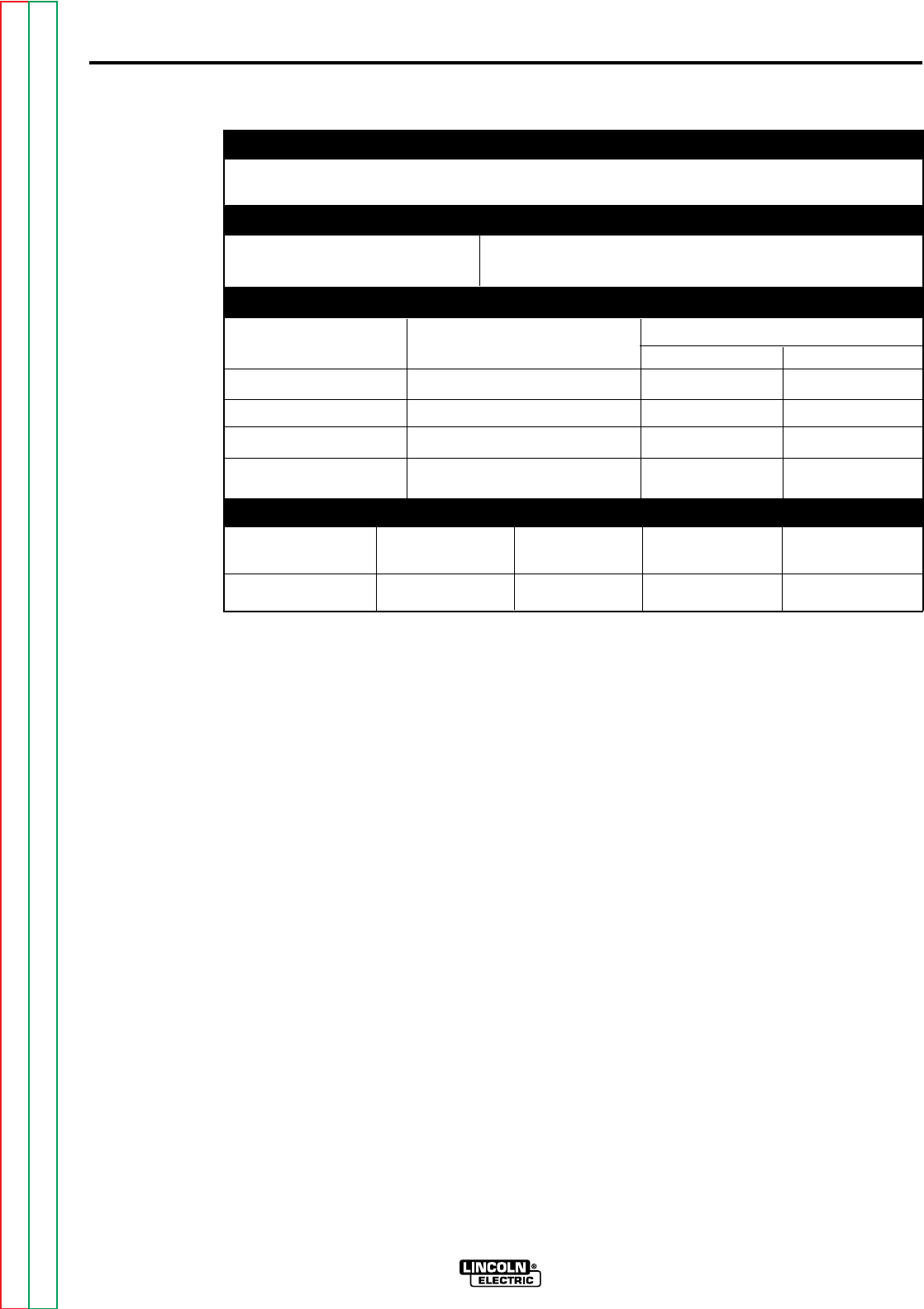
TECHNICAL SPECIFICATIONS – NA-5
MINIMUM ELECTRICAL INPUT REQUIREMENTS
115 VAC @ 3 amps 50/60 Hz power
REQUIRED WELDING POWER SOURCE
NA-5 DC Constant Voltage
WIRE FEED SPEED and GEAR RATIOS
FEED SPEED RANGE MAX. WIRE SIZE in. (mm)
GEAR RATIO in./min (m/min) CORED WIRE SOLID WIRE
21:1 100 - 2070 (2.54 - 52.6) 0.052 (1.3) 0.052 (1.3)
57:1 38 - 7.78 (0.96 - 19.8) 3/32 (2.4) 1/16 (1.6)
95:1 22 - 456 (0.56 - 11.6) 5/32 (4.0) 1/8 (3.2)
142:1 15 - 300 (0.38 - 7.62) 5/32 (4.0) 7/32 (5.6)
PHYSICAL DIMENSIONS
LENGTH WIDTH HEIGHT WEIGHT
MODEL in. (mm) in. (mm) in. (mm) lbs (kg)
NA-5 Control Box 9.02 (229) 17.87 (454) 15.05 (382) 30 (13)
Return to Section TOC Return to Section TOC Return to Section TOC Return to Section TOC
Return to Master TOC Return to Master TOC Return to Master TOC Return to Master TOC
INSTALLATION A-3
A-3
NA-5
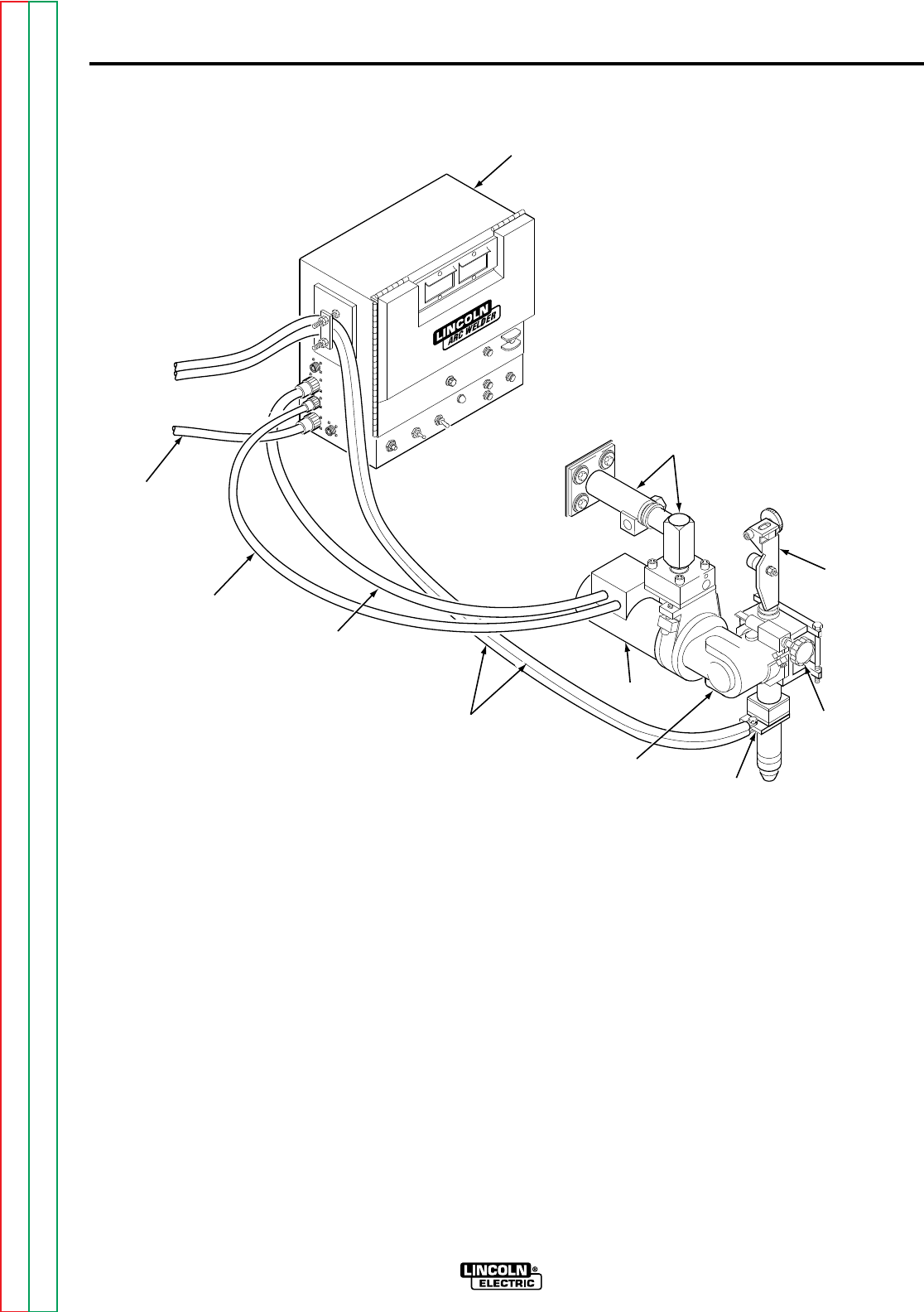
FIGURE A.1 – BASIC CONTROL AND WIRE DRIVE SYSTEM.
CONTROL BOX
HEAD MOUNTING PARTS
(WITH INSULATION
AND HARDWARE)
WIRE
STRAIGHTENER
CROSS
SEAM
ADJUSTER
CONTACT
ASSEMBLY
(OPTIONAL)
GEAR BOX
4 FT (1.2 M) CABLE
(DRIVE MOTOR TO
CONTROL BOX)
4 FT (1.2 M) ELECTRODE CABLES
[(TWO 4/0) CONTACT ASSEMBLY
TO CONTROL BOX]
MOTOR
CONTROL
CABLE
TO
POWER
SOURCE
TACHOMETER
CABLE
Return to Section TOC Return to Section TOC Return to Section TOC Return to Section TOC
Return to Master TOC Return to Master TOC Return to Master TOC Return to Master TOC
MECHANICAL
INSTALLATION
ELECTRIC SHOCK
can kill.
• Turn off input power to
the welding power source
using the disconnect
switch before working on
this equipment.
INTRODUCTION
This section covers the basic requirements to
install the control box and welding head
shown in Figure A.1. This section will give
you mounting hole alignments, component
mounting clearances, and any special
instructions or precautions that must be fol-
lowed when installing the control box and
mounting head.
CONTROL BOX INSTALLATION
The control box can be mounted either on
the standard travel carriage or on a separate
fixture. It is electrically grounded by a lead
in the input cable assembly.
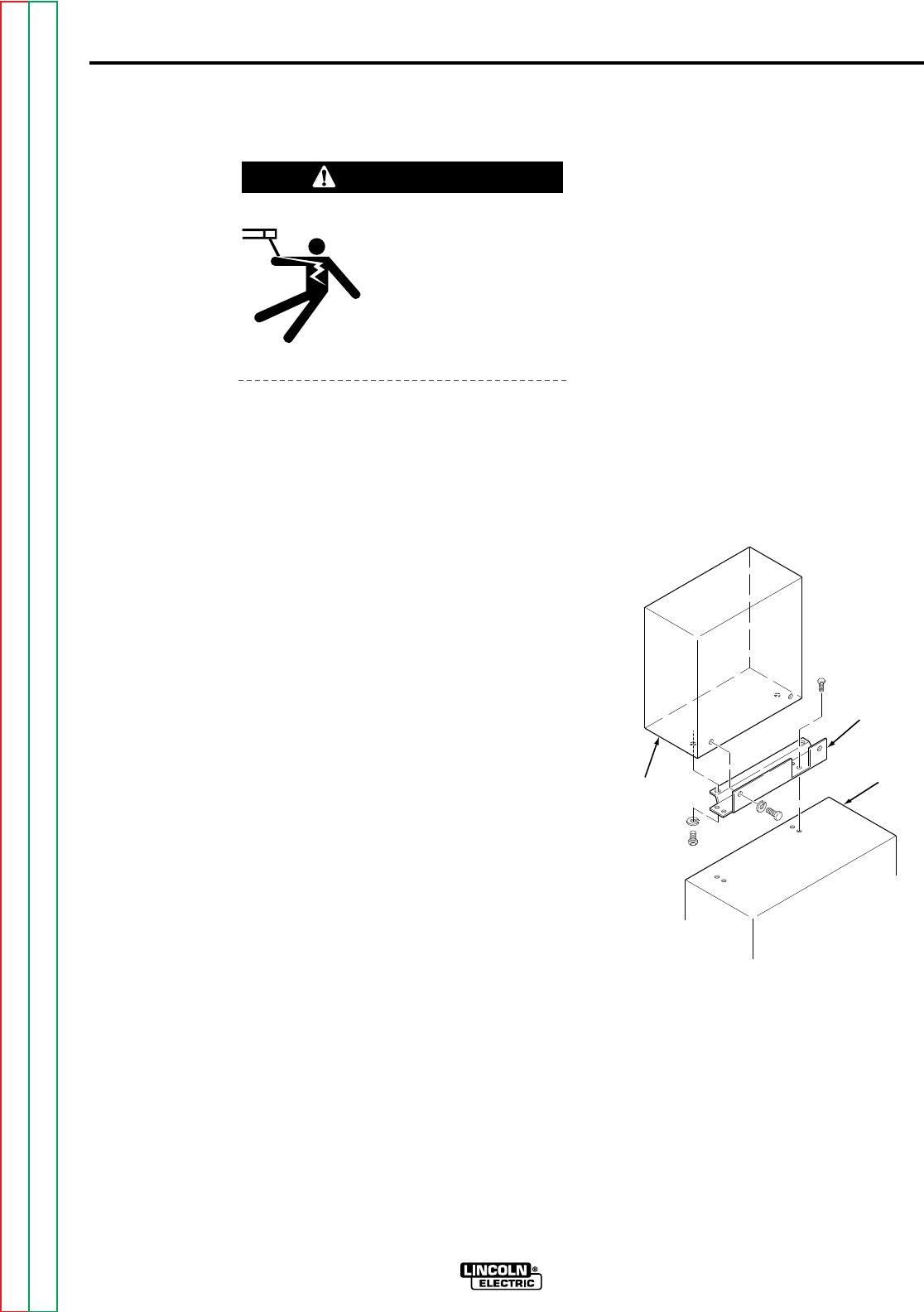
To install the control box on the standard
travel carriage, use mounting kit T14469 and
perform the following steps. Also refer to
Figure A.2.
1. Align the mounting holes in adapter
plate M-13945 to the holes in the
travel carriage.
2. Install four hex head screws through
the adapter plate and into the travel
carriage.
3. Secure the control box to the adapter
plate with four lock washers and four
bolts, two from the bottom and two
from the back.
Before mounting the control box onto a
fixture, you must provide mounting holes in
the fixture per the measurements provided
in Figure A.3 or dimension print S16717.
When placing the mounting holes, ensure
the controls and meters are convenient to
the operator.
INSTALLATION A-4
A-4
NA-5
WARNING
ADAPTER
PLATE
TRAVEL
CARRIAGE
CONTROL
BOX
FIGURE A.2 – CONTROL BOX
CARRIAGE MOUNTING.
Return to Section TOC Return to Section TOC Return to Section TOC Return to Section TOC
Return to Master TOC Return to Master TOC Return to Master TOC Return to Master TOC
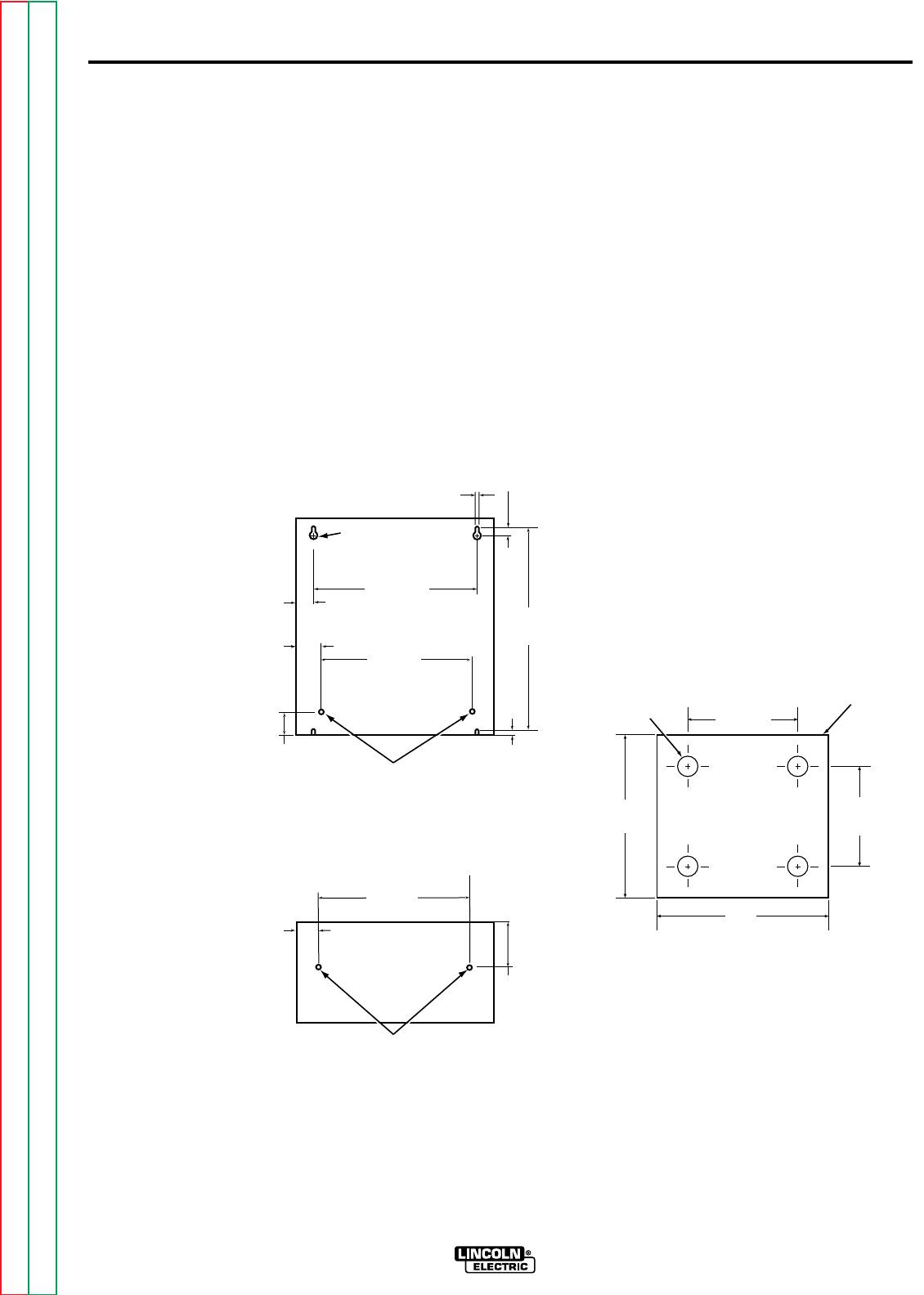
To install the control box on a fixture,
perform the following steps and refer to
Figure A.3.
1. Align the mounting holes on the back
and/or bottom of the control box with
the holes you put in the fixture
according to the measurements
provided in Figure A.3.
2. Secure the control box to the fixture
using lock washers and hex head
screws at each of the mounting holes.
WELDING HEAD INSTALLATION
The welding head can be mounted either
with the standard head mounting hardware
or with the horizontal head and/or vertical lift
adjusters. Design the installation of your
welding head so it meets the adjustability
requirements of your welding application.
Refer to Section C, Accessories, for more
information regarding the adjustable
mounting hardware.
The welding head and electrode are
electrically “hot” when welding. They must
be insulated from ground.
Standard head mounting hardware and
insulation are shipped with the NA-5
welding head. If you are mounting the
welding head on a separate fixture, provide
the mounting holes for the standard head
mount as specified in Figure A.4. For best
arc striking, use a rigid mounting that
prevents the head from moving when the
electrode strikes the work.
FRONT
VIEW FROM BOTTOM
1/4-20 THREAD HOLES
3.50
(88.9)
VIEW FROM BACK
1/4-20
THREAD HOLES
1.71
(43.43)
1.09
(27.68)
0.28 (7.11) SLOTS
4 PLACES
0.41
(10.41)
0.43
(10.92)
13.77
(349.76)
12.75
(323.85)
0.562 DIA (14.27)
2 HOLES
12.00
(304.8)
12.00
(304.8)
NOTE: DIMENSIONS ARE IN INCHES
WITH MILLIMETERS IN
PARENTHESES.
1.34
(34.04)
1.71
(43.43)
APPROXIMATE
INSULATOR
SIZE
2.62
(66.55)
2.88
(73.15)
4.265
(108.33)
0.531 DIA.
(13.49)
NOTE: DIMENSIONS ARE IN INCHES
WITH MILLIMETERS IN
PARENTHESES.
4.5
(114.30)
FIGURE A.4 – WELDING HEAD
MOUNTING HOLES.
INSTALLATION A-5A-5
FIGURE A.3 – CONTROL BOX
FIXTURE MOUNTING.
NA-5
Return to Section TOC Return to Section TOC Return to Section TOC Return to Section TOC
Return to Master TOC Return to Master TOC Return to Master TOC Return to Master TOC
INSTALLATION A-6A-6
NA-5
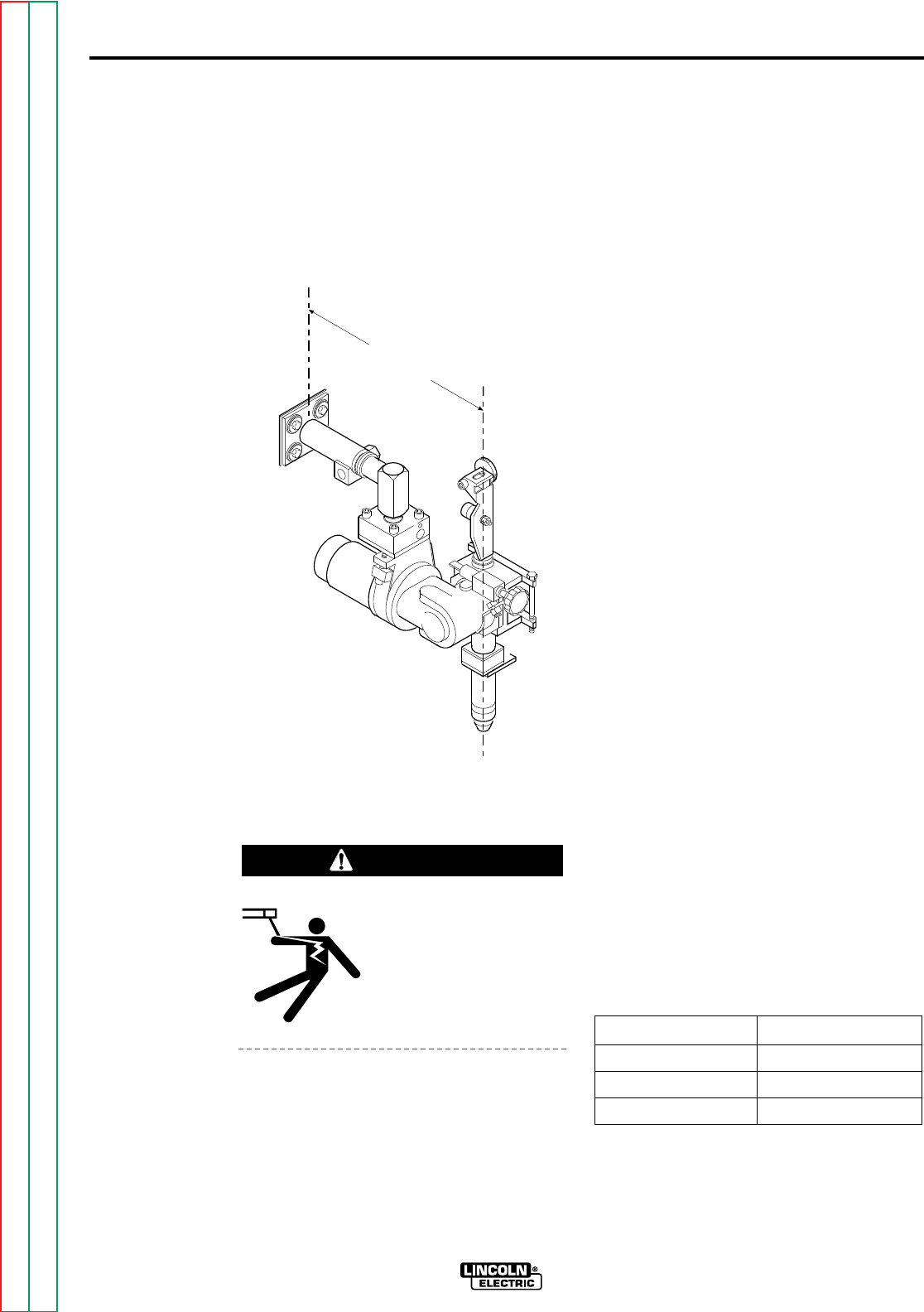
When mounting the welding head to the
standard travel carriage, (see 305-B sec.
T2.2.4) mount it so only a minimum of
overhang weight exists. Mount the head so
it stays within the dimension shown in Figure
A.5.
ELECTRICAL
INSTALLATION
ELECTRIC SHOCK
can kill.
• Do not touch electrically
live parts such as output
terminals or internal
wiring.
This section provides information on proper
wiring procedures for the NA-5 welding sys-
tem. This section also provides basic con-
nection diagrams for connecting automatic
welding systems to various welding power
sources.
INPUT POWER REQUIREMENTS
350 volt-amperes of 115 VAC 50/60 Hz
power is required for the wire feed motor and
controls. Another 250 volt-amperes may be
required depending on the travel circuit.
CONTROL BOX TO WELDING
HEAD CONNECTIONS
All welding heads include a 4 ft (1.2 m)
motor cable and motor tachometer cable.
Insert the plugs on these cables into the
matching receptacles on the side of the
control box.
If the 4 ft (1.2 m) cables are not sufficient,
install a K335 or K338 control to head
extension cable of the length ordered [up to
30 ft (9.1 m)]. The K335, for the NA-5S
head, includes motor, tachometer and flux
hopper lead extensions with polarized plugs
on each end, and electrode cables. The
K338 for the NA-5N, NF, and SF heads is
the same as the K335 without the flux
hopper lead extension.
The NA-5N and NA-5S also include two 4 ft
(1.2 m) lengths of electrode cable. Bolt the
terminals at one end of the the cable pair to
the wire contact assembly and the terminals
at the other end to the electrode leads on the
power source to control cable assembly.
Properly insulate the bolted connection.
When the K335 or K338 extension cables are
used between the controls and heads, the 4 ft
(1.2 m) lengths of electrode cable are not
used. If currents or duty cycles higher than
1000 amps at 80% duty cycle will be used,
add additional electrode cable per Table A.1.
TABLE A.1
FIGURE A.5 – MOUNT TO CARRIAGE
OVERHANG DIMENSION.
19 IN.
(483 MM)
WARNING
80% Duty Cycle
Below 1000 amps Two 4/0
1000 to 1300 amps Three 4/0
1300 to 1500 amps Four 4/0
Return to Section TOC Return to Section TOC Return to Section TOC Return to Section TOC
Return to Master TOC Return to Master TOC Return to Master TOC Return to Master TOC
The “F” models do not include the 4 ft (1.2
m) lengths of electrode cable as standard.
If you are not using a K335 or K338 exten-
sion cable for the NA-5NF or NA-5SF, order
an appropriate length of the needed elec-
trode cable. Connect it between the wire
contact assembly and the control cable
assembly as described above.
POWER SUPPLY TO CONTROL
BOX CONNECTIONS
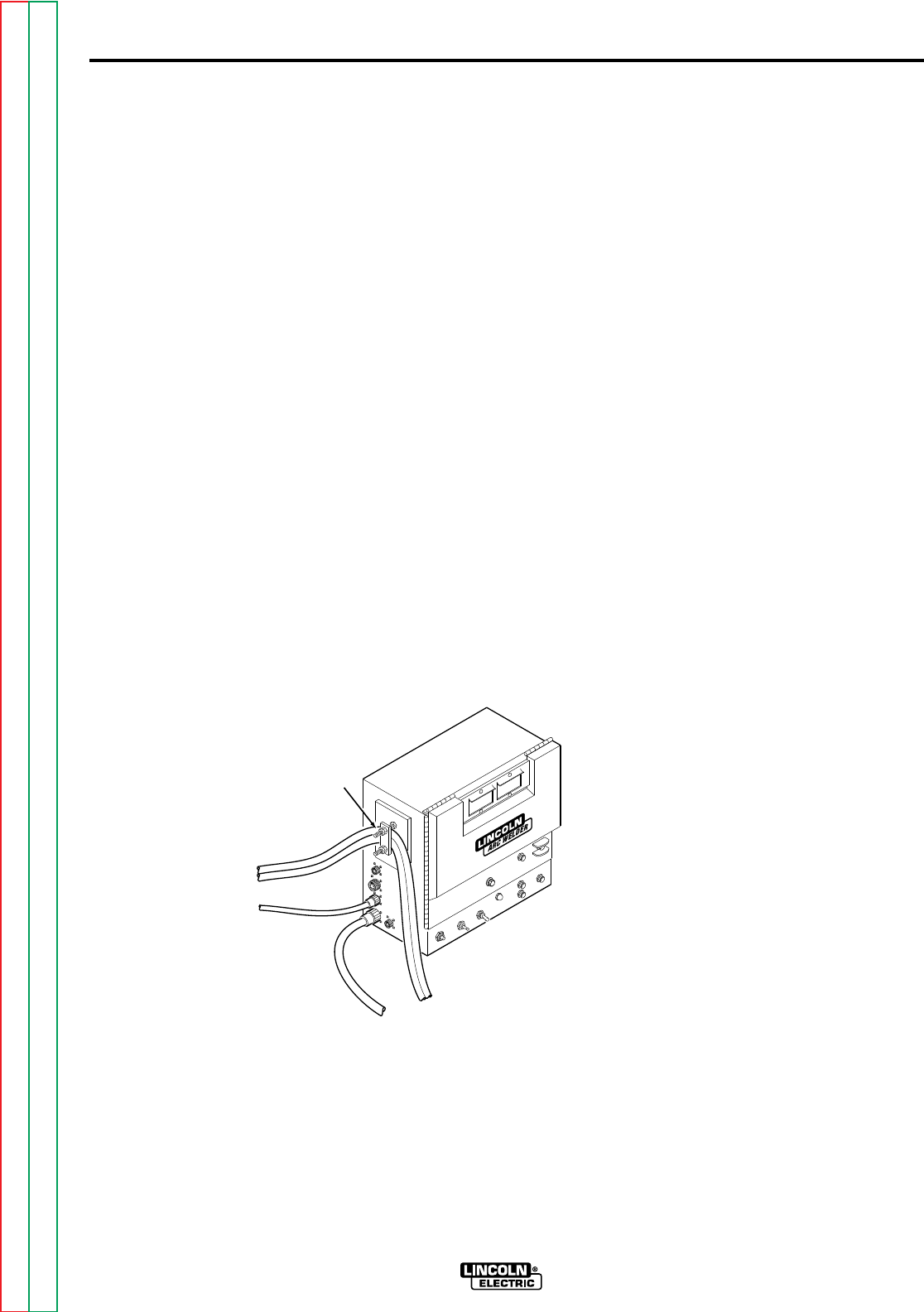
At the NA-5 control box, in order to activate
the NA-5 weld current sensing switch, the
electrode cables of the control cable
assembly must be placed under the clamp
bar on the left-hand side of the control box,
as shown in Figure A.6. This is required
for proper operation of the reed switch.
The nuts holding the clamp bar in place
need only to be pulled up snug. Do not
overtighten. If a carriage is used, the
electrode cables should also be clamped
to it with the cable clamp supplied on the
carriage. Do not clamp the control cable
under the travel carriage clamp but route it
over its top.
Insert the polarized connector of the K215
or K597* control cable into the matching
receptacle on the side of the control box.
With the power source off, connect the
control cable assembly to the power
source as follows:
1. If using the multi-process power
source (SAM, SA-800, SAF-600,
DC-400, DC-600, DC-1000, or DC-
1500 types), be sure it is properly set
for the welding process being used
per the connection diagram (Figures
A.8 to A.14).
2. Connect the K215 control cable
leads to the power source terminal
strip exactly as specified on the
connection diagram.* Include all
jumpers on the terminal strips as
shown on the diagram. Do not put
on any other jumpers. If currents or
duty cycles higher than 1000 amps
at 80% duty cycle will be used, add
additional electrode cables to the
K215 assembly per Table A.1.
3 Depending on the power source and
the process to be used, the jumpers
on the NA-5 voltage board may have
to be changed. As shipped, the
NA-5 is connected for use with the
DC-400, DC-600, DC-1000, and
DC-1500 type power sources. For
other power sources, refer to the
appropriate connection diagram and
to IM305 Sec. T3.6.
4. Connect work leads of sufficient size
and length per Table A.1. between
the “To Work” stud on the power
source and the work. Be sure the
connection to the work makes a tight
and clean metal-to-metal contact.
*The K597 cable assembly has a 14-pin MS-type
connector for use with later model Lincoln CV power
sources.
INSTALLATION A-7
A-7
NA-5
FROM
POWER
SOURCE
TO
WELDING
HEAD
CLAMP
BAR
FIGURE A.6 – CONTROL BOX
ELECTRICAL CONNECTIONS.
Return to Section TOC Return to Section TOC Return to Section TOC Return to Section TOC
Return to Master TOC Return to Master TOC Return to Master TOC Return to Master TOC
INSTALLATION A-8A-8
NA-5
ELECTRODE POLARITY
ELECTRIC SHOCK
can kill.
• Turn off input power to
the welding power
source using the
disconnect switch
before working on this
equipment.
Polarity is changed at the power source.
The polarity of the NA-5 control circuit is
shipped connected for electrode positive. If
electrode negative is required, two leads
inside the NA-5 control must be reversed.
Proceed as follows:
1. Turn off the input power to the NA-5
control box by turning off the welding
power source.
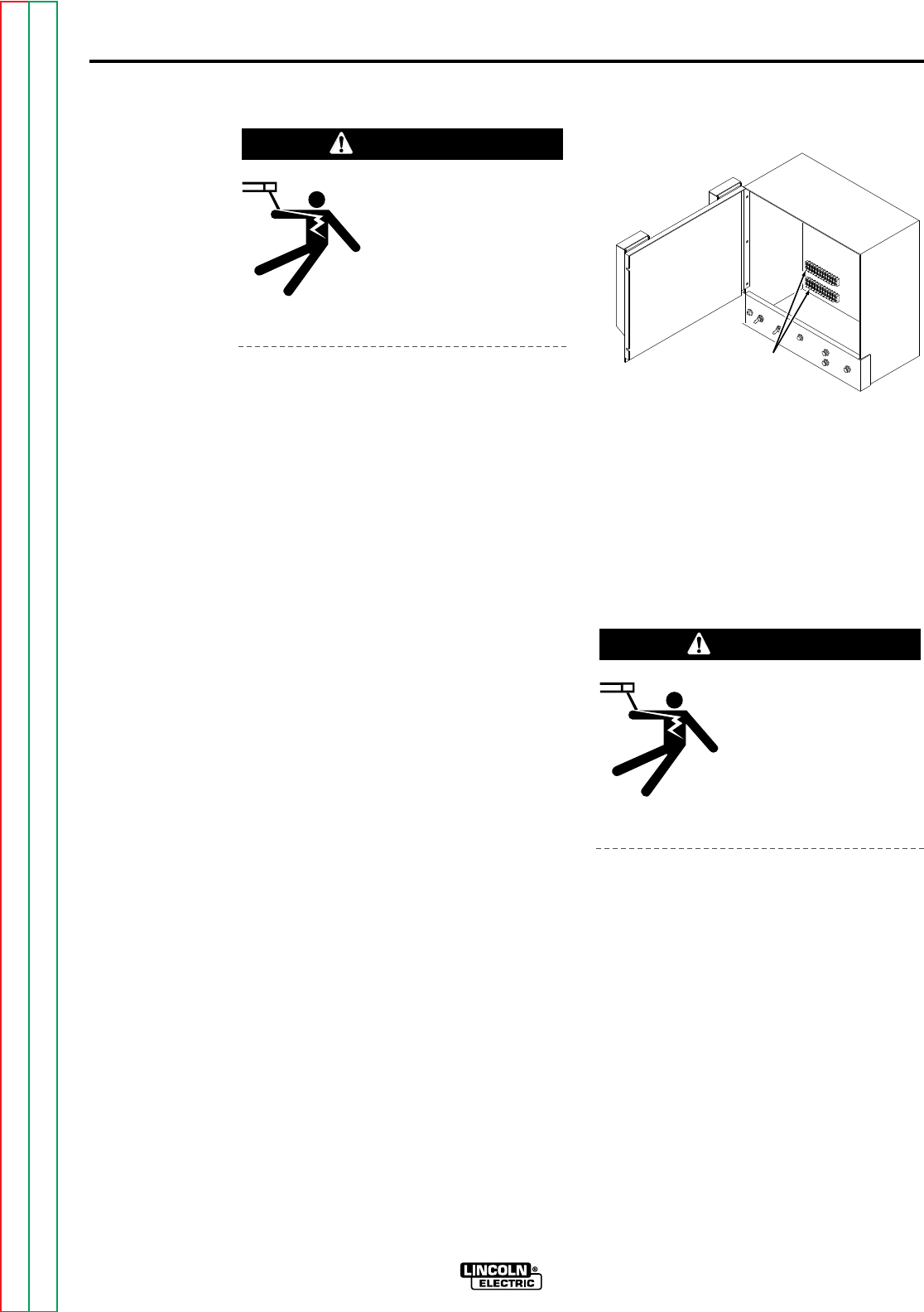
2. Open the control box door and locate
the terminal strips on the back of the
control box in the lower left-hand
corner as shown in Figure A.7.
3. On the right end of the lower terminal
strip, interchange the black and white
leads going to the terminals marked
(+) and (-). The black lead (#67)
must be connected to the same
polarity as the electrode welding lead;
i.e. if the electrode is positive,
connect the black lead to the (+)
terminal on the terminal strip. The
white lead (#21) is connected to the
opposite polarity terminal.
POWER SOURCE
CONNECTION DIAGRAMS
The following section contains the wiring
diagrams necessary to connect the
applicable power source to the control box.
If there is no diagram, refer to power source
manual.
ELECTRIC SHOCK
can kill.
• Turn off input power to
the welding power
source using the
disconnect switch
before working on this
equipment.
WARNING
TERMINAL
STRIPS
FIGURE A.7 – TERMINAL STRIP
LOCATION.
WARNING
Return to Section TOC Return to Section TOC Return to Section TOC Return to Section TOC
Return to Master TOC Return to Master TOC Return to Master TOC Return to Master TOC
INSTALLATION A-9A-9
NA-5
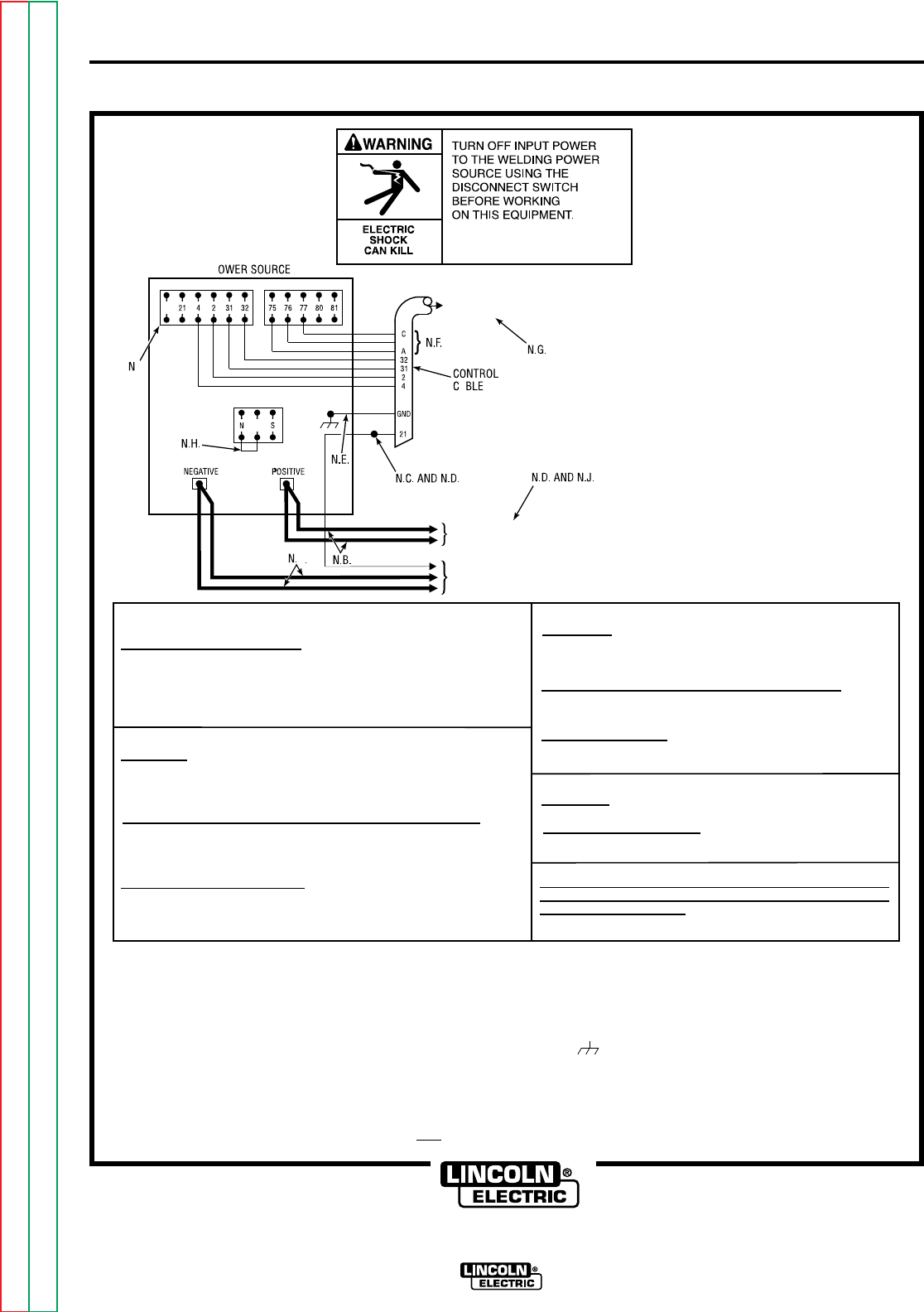
FIGURE A.8 – CONNECTION OF NA-5 (ALL) TO A DC-600.
N.A. ON EARLIER DC-600'S, #67 TERMINAL WAS ALSO ON THE TERMINAL STRIP.
N.B. WELDING CABLES MUST BE OF PROPER CAPACITY FOR THE CURRENT AND DUTY CYCLE OF IMMEDIATE AND FUTURE APPLICATIONS.
N.C. EXTEND LEAD #21 USING #14 OR LARGER INSULATED WIRE PHYSICALLY SUITABLE FOR THE INSTALLATION. AN S-16586 - [ ] REMOTE VOLTAGE SENSING WORK
LEAD IS AVAILABLE FOR THIS PURPOSE. CONNECT IT DIRECTLY TO THE WORK PIECE KEEPING IT SEPARATE FROM THE WELDING WORK CABLE CONNECTION
TO THE WORK PIECE. FOR CONVENIENCE, THIS EXTENDED #21 LEAD SHOULD BE TAPED ALONG THE WELDING WORK CABLE.
N.D. TAPE UP BOLTED CONNECTION.
N.E. CONNECT THE NA-5 CONTROL CABLE GROUNDING LEAD TO THE FRAME TERMINAL MARKED NEAR THE POWER SOURCE TERMINAL STRIP. THE POWER
SOURCE MUST BE PROPERLY GROUNDED.
N.F. IF USING AN OLDER K-215 CONTROL CABLE: CONNECT LEAD #75 TO #75 ON TERMINAL STRIP, CONNECT LEAD #76 TO #76 ON TERMINAL STRIP, CONNECT
LEAD #77 TO #77 ON TERMINAL STRIP.
N.G. THE JUMPERS ON THE NA-5 VOLTAGE BOARD MUST BE CONNECTED AS FOLLOWS: CONNECT RED JUMPER TO PIN "S". CONNECT WHITE JUMPER TO PIN "B".
N.H. CONNECT A JUMPER FROM "N" TO "P". THERE IS NO NPS TERMINAL STRIP ON DC-600 CODES ABOVE 8200.
N.J. FOR PROPER NA-5 OPERATION, THE ELECTRODE CABLES MUST BE SNUGGED UNDER THE CLAMP BAR ON THE LEFT SIDE OF THE NA-5 CONTROL BOX.
NOTE: DIAGRAM SHOWS ELECTRODE CONNECTED POSITIVE.
TO CHANGE POLARITY, TURN POWER OFF, REVERSE THE
ELECTRODE AND WORK CABLES AT THE POWER SOURCE
AND POSITON THE SWITCH ON POWER SOURCE TO PROPER
POLARITY. REFER TO NA-5 OPERATING MANUAL FOR REQUIRED
NA-5 CONTROL BOX POLARITY CONNECTIONS.
ALL CODES:
TURN OFF INPUT POWER
ADJUST THE POWER SOURCE: DC-600:
1. CONNECT ELECTRODE CABLES TO TERMINAL OF DESIRED POLARITY.
2. SET TOGGLE SWITCH TO SAME POLARITY AS THE ELECTRODE CABLE
CONNECTION.
3. SET TOGGLE SWITCH TO "REMOTE".
4. SET MODE SWITCH TO THE DESIRED POSITION FOR THE PROCESS TO BE USED.
DC-600 CODES 8000-8045:
FOR SUB ARC:
1. SET MODE SWITCH TO CV SUB ARC.
2. WHITE LEAD ON CONTROL PC BOARD IS CONNECTED TO PIN "M" AND BLUE
LEAD IS CONNECTED TO "W".
FOR ALL OPEN ARC PROCESSES EXCEPT NR-302 AND NR-203 ELECTRODES:
1. SET MODE SWITCH TO CV INNERSHIELD.
2. WHITE LEAD ON CONTROL PC BOARD IS CONNECTED TO PIN "M" AND BLUE
LEAD IS CONNECTED TO "W".
FOR NR-203 AND NR-302 ELECTRODES:
1. SET MODE SWITCH TO CV INNERSHIELD.
2. WHITE LEAD ON CONTROL PC BOARD IS CONNECTED TO PIN "I"
AND BLUE LEAD IS CONNECTED TO "S".
DC-600 CODES 8046-8200:
FOR SUB ARC:
1. SET MODE SWITCH TO CV SUB ARC.
2. WHITE LEAD ON CONTROL PC BOARD IS CONNECTED TO PIN "M".
FOR ALL OPEN ARC PROCESSES EXCEPT MR-203 ELECTRODES:
1. SET MODE SWITCH TO CV INNERSHIELD.
2. WHITE LEAD ON CONTROL PC BOARD IS CONNECTED TO PIN "M".
FOR NR-203 ELECTRODES:
1. SET MODE SWITCH TO CV INNERSHIELD.
2. WHITE LEAD ON CONTROL PC BOARD IS CONNECTED TO PIN "I".
DC-600 CODES ABOVE 8200:
FOR SUB ARC:
1. SET MODE SWITCH TO CV SUB ARC.
FOR ALL OPEN ARC PROCESSES:
2. SET MODE SWITCH TO CV INNERSHIELD.
FOR OPTIMUM PERFORMANCE WITH NA-5, DC-600'S WITH CODES 8288 AND
ABOVE ARE PREFERRED. FOR ADDITIONAL INSTALLATION INSTRUCTIONS,
SEE NA-5 OPERATING MANUAL.
P
A
B
P
B
.A.
TO NA-5 INPUT
CABLE PLUG
CONNECT TO CABLES FROM NA-5
WIRE CONTACT ASSEMBLY
CONNECT
TO WORK
CLEVELAND, OHIO U.S.A.
Return to Section TOC Return to Section TOC Return to Section TOC Return to Section TOC
Return to Master TOC Return to Master TOC Return to Master TOC Return to Master TOC
INSTALLATION A-10A-10
NA-5
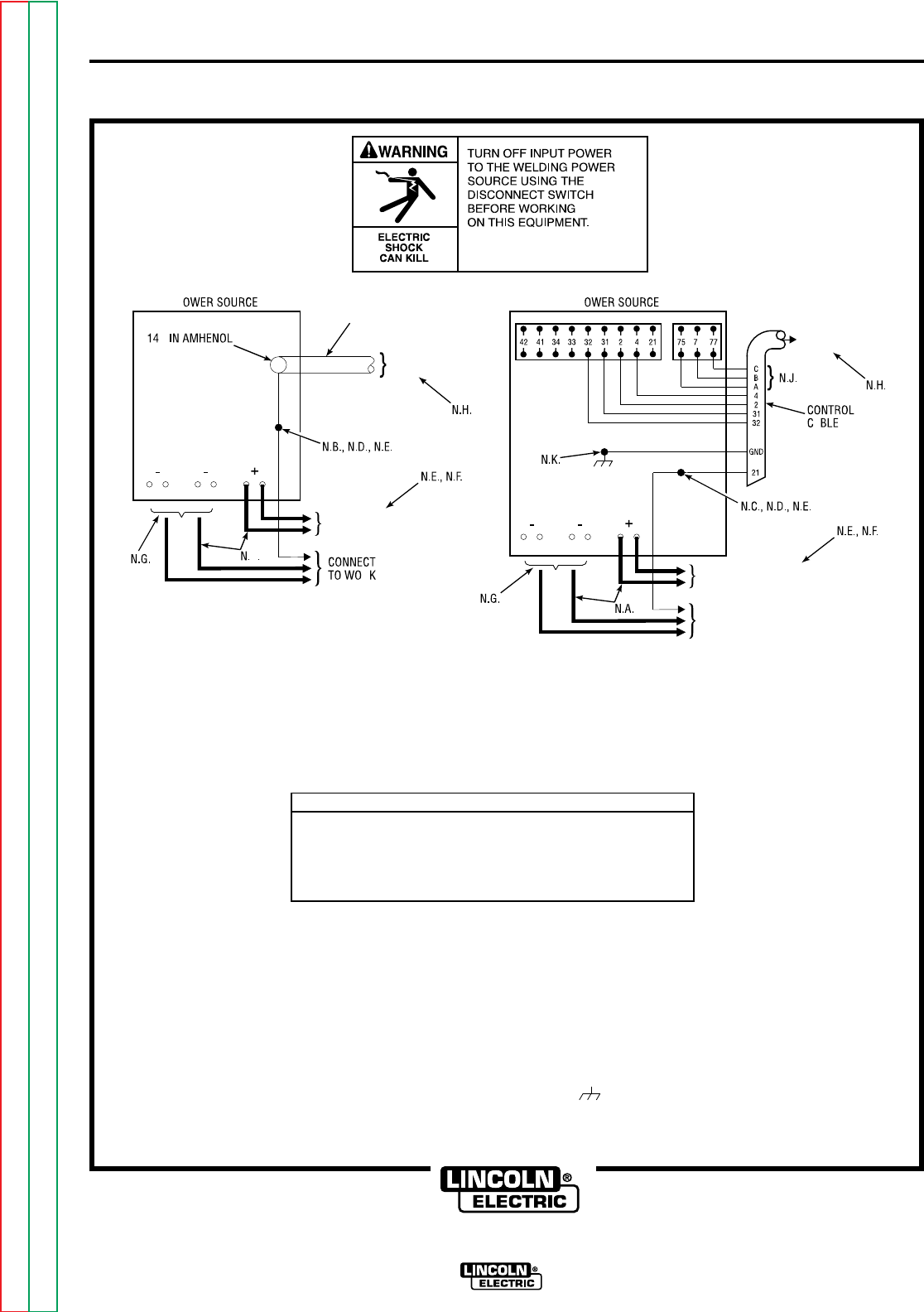
FIGURE A.9 – CONNECTION OF NA-5 (ALL) TO A DC-650 PRO
NOTE: ABOVE DIAGRAMS SHOW ELECTRODE CONNECTED POSITIVE. TO CHANGE POLARITY, TURN POWER OFF, REVERSE THE ELECTRODE
AND WORK CABLES AT THE POWER SOURCE AND POSITION THE SWITCH ON THE POWER SOURCE TO PROPER POLARITY. REFER TO
NA-5 OPERATING MANUAL FOR REQUIRED NA-5 CONTROL BOX POLARITY CONNECTIONS.
DC650 PRO POWER SOURCE SETTINGS
1. TURN OFF INPUT POWER.
2. CONNECT ELECTRODE CABLES TO TERMINALS OF DESIRED POLARITY.
3. SET TOGGLE SWITCH TO SAME POLARITY AS ELECTRODE CABLE CONNECTION.
4. SET TOGGLE SWITCH TO REMOTE.
5. SET MODE SWITCH TO DESIRED POSITION FOR THE PROCESS TO BE USED.
6. CONNECT NEGATIVE OUTPUT CABLES TO MATCH MODE SWITCH SETTING.
P
A
R
P
A
N.A. WELDING CABLES MUST BE SIZED FOR CURRENT AND DUTY CYCLE OF APPLICATION.
N.B. EXTEND LEAD #21A BY REMOVING LEAD #21A FROM THE TERMINAL STRIP AND CONNECTING IT TO A #14 OR LARGER INSULATED WIRE PHYSICALLY SUITABLE FOR
THE INSTALLATION.
N.C. EXTEND LEAD #21 USING A #14 OR LARGER INSULATED WIRE PHYSICALLY SUITABLE FOR INSTALLATION.
N.D. CONNECT EXTENDED LEAD DIRECTLY TO THE WORK PIECE KEEPING IT SEPARATE FROM THE WELDING WORK CABLE CONNECTION TO THE WORK PIECE. FOR
CONVENIENCE, THIS EXTENDED LEAD SHOULD BE TAPED ALONG THE WELDING WORK CABLE.
N.E. TAPE UP CONNECTION.
N.F. FOR PROPER NA-5 OPERATION, THE ELECTRODE CABLES MUST BE SNUGGED UNDER THE CLAMP BAR ON THE LEFT SIDE OF THE NA-5 CONTROL BOX.
N.G. CONNECT NEGATIVE OUTPUT CABLES TO STUDS TO MATCH DC650 PRO MODE SWITCH SETTING.
N.H. THE JUMPERS ON THE NA-5 VOLTAGE BOARD MUST BE CONNECTED AS FOLLOWS: CONNECT RED JUMPER TO PIN "S", CONNECT WHITE JUMPER TO PIN "B".
N.J. IF USING AN OLDER K-215 CONTROL CABLE, CONNECT LEAD #75 TO #75 ON TERMINAL STRIP, CONNECT LEAD #76 TO #76 ON THE TERMINAL STRIP, CONNECT
LEAD #77 TO #77 ON THE TERMINAL STRIP.
N.K. CONNECT THE NA-5 CONTROL CABLE GROUNDING LEAD TO THE FRAME TERMINAL MARKED NEAR THE POWER SOURCE TERMINAL STRIP.
P6
CONTROL
CABLE
TO NA-5 INPUT
CABLE PLUG
CONNECT TO CABLES FROM
NA-5 WIRE CONTACT ASSEMBLY
TO NA-5 INPUT
CABLE PLUG
CONNECT TO CABLES FROM NA-5
WIRE CONTACT ASSEMBLY
CONNECT
TO WORK
CLEVELAND, OHIO U.S.A.
Return to Section TOC Return to Section TOC Return to Section TOC Return to Section TOC
Return to Master TOC Return to Master TOC Return to Master TOC Return to Master TOC
INSTALLATION A-11A-11
NA-5
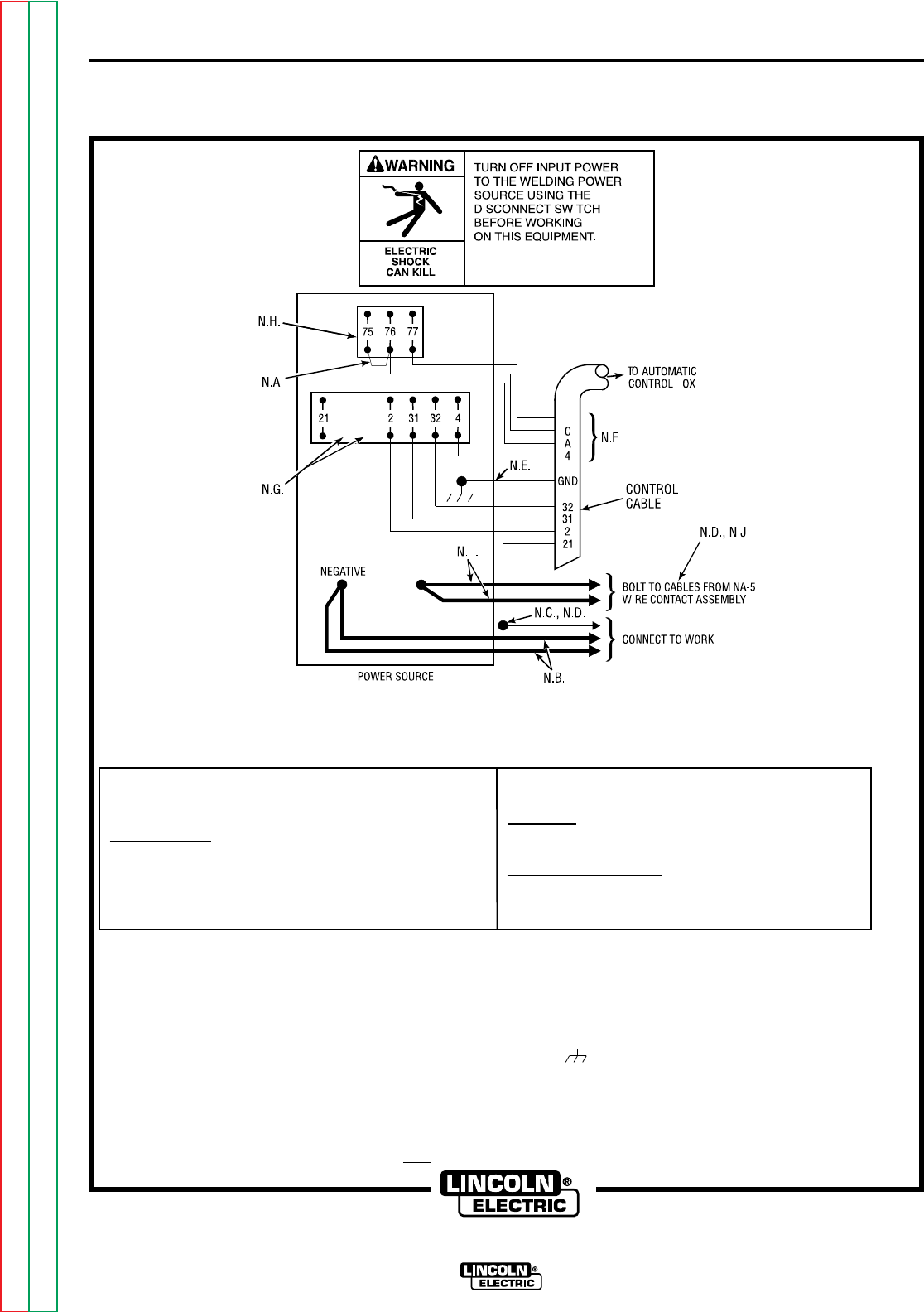
FIGURE A.10 – CONNECTION OF NA-5 (ALL) TO A R3S-400, -600, OR -800
WITH NO LINE VOLTAGE COMPENSATOR (OBSOLETE).
R3S POWER SOURCE SETTINGS
TURN POWER SOURCE OFF.
FOR ALL PROCESSES:
1. CONNECT ELECTRODE CABLE TO TERMINAL OF DESIRED POLARITY.
2. SET THE POLARITY SWITCH TO THE SAME POLARITY AS THE ELECTRODE
CABLE CONNECTION.
3. SET TOGGLE SWITCH TO REMOTE.
4. INSTALL VOLTAGE TRIANGLE IN A POSITION AS CLOSE AS POSSIBLE TO
THE DESIRED ARC VOLTAGE.
NA-5 SETTINGS
FOR SUB ARC:
1. RED LEAD ON VOLTAGE PC BOARD IS CONNECTED TO PIN "S".
2. WHITE LEAD ON VOLTAGE PC BOARD IS CONNECTED TO PIN "A".
FOR ALL OPEN ARC PROCESSES:
1. RED LEAD ON VOLTAGE PC BOARD IS CONNECTED TO PIN "F".
2. WHITE LEAD ON VOLTAGE PC BOARD IS CONNECTED TO PIN "A".
NOTE: ABOVE DIAGRAM SHOWS ELECTRODE CONNECTED POSITIVE. TO CHANGE POLARITY, TURN POWER OFF, REVERSE THE ELECTRODE AND WORK CABLES AT THE
POWER SOURCE AND POSITION THE SWITCH ON POWER SOURCE TO PROPER POLARITY. REFER TO NA-5 OPERATING MANUAL FOR REQUIRED NA-5 CONTROL
BOX POLARITY CONNECTIONS.
N.A. ADD JUMPER FROM #75 TO #76, USING INSULATED COPPER WIRE.
N.B. WELDING CABLES MUST BE OF PROPER CAPACITY FOR THE CURRENT AND DUTY CYCLE OF IMMEDIATE AND FUTURE APPLICATIONS.
N.C. EXTEND LEAD #21 USING #14 OR LARGER INSULATED WIRE PHYSICALLY SUITABLE FOR THE INSTALLATION. AN S -16586 [ ] REMOTE VOLTAGE-SENSING WORK LEAD
IS AVAILABLE FOR THIS PURPOSE. CONNECT IT DIRECTLY TO THE WORK PIECE, KEEPING IT SEPARATE FROM THE WELDING WORK CABLE CONNECTION TO THE
WORK PIECE. FOR CONVENIENCE, THIS EXTENDED #21 LEAD SHOULD BE TAPED ALONG THE WELDING WORK CABLE.
N.D. TAPE UP BOLTED CONNECTION.
N.E. CONNECT THE NA-5 CONTROL CABLE GROUNDING LEAD TO THE FRAME TERMINAL MARKED , NEAR THE POWER SOURCE TERMINAL STRIP. THE POWER SOURCE
MUST BE PROPERLY GROUNDED.
N.F. IF USING AN OLDER K-215 CONTROL CABLE: CONNECT LEAD #75 TO #75 ON TERMINAL STRIP, CONNECT LEAD #76 TO #77 ON TERMINAL STRIP, CONNECT
LEAD #77 TO #76 ON TERMINAL STRIP, AND ADD JUMPER PER N.A.
N.G. ON EARLIER R3S MACHINES, #67 AND #1 TERMINALS WERE ALSO ON THE TERMINAL STRIP.
N.H. THE UPPER TERMINAL STRIP (#75, #76, #77) WAS NOT PRESENT ON EARLY R3S MACHINES. THOSE MACHINES ARE NOT COMPATIBLE WITH THE NA-5 SINCE THERE
CAN BE NO ADJUSTMENT OF VOLTAGE BY THE NA-5.
N.J. FOR PROPER NA-5 OPERATION, THE ELECTRODE CABLES MUST BE SNUGGED UNDER THE CLAMP BAR ON THE LEFT SIDE OF THE NA-5 CONTROL BOX.
FOR ADDITIONAL INSTALLATION INSTRUCTIONS, SEE NA-5 OPERATING MANUAL.
B
B
B
POSITIVE
CLEVELAND, OHIO U.S.A.
Return to Section TOC Return to Section TOC Return to Section TOC Return to Section TOC
Return to Master TOC Return to Master TOC Return to Master TOC Return to Master TOC
INSTALLATION A-12A-12
NA-5
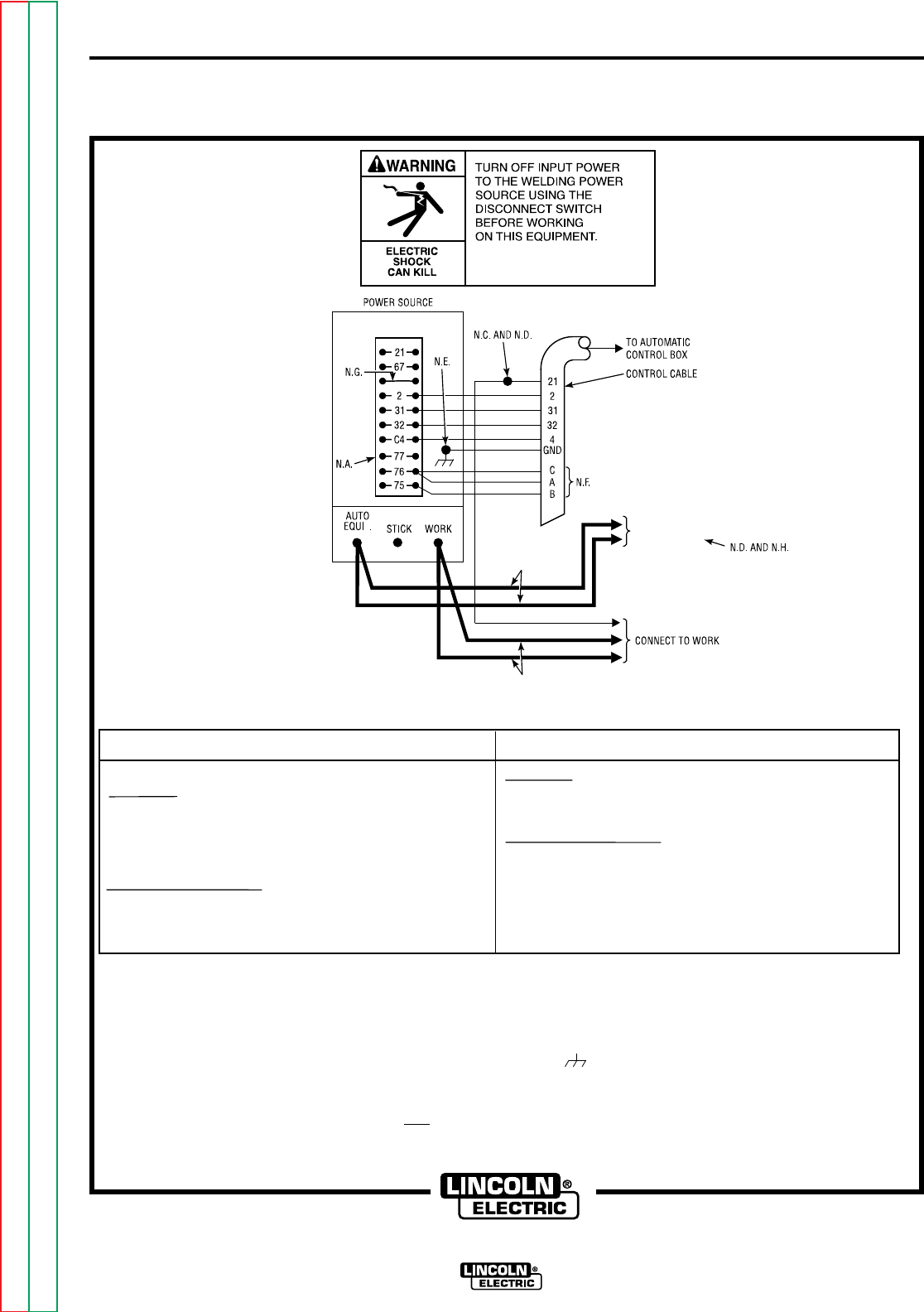
FIGURE A.11 – CONNECTION OF NA-5 (ALL) TO A SAM-400 MOTOR
GENERATOR OR ENGINE WELDER.
NOTE: TO CHANGE POLARITY, TURN POWER OFF, AND POSITION THE SWITCH ON POWER SOURCE TO PROPER POLARITY. REFER TO NA-5 OPERATING MANUAL FOR
REQUIRED NA-5 CONTROL BOX POLARITY CONNECTIONS.
N.A. REMOVE SAM PORTABLE FIELD CONTROL AND CONNECT NA-5 CONTROL CABLE.
N.B. WELDING CABLES MUST BE OF PROPER CAPACITY FOR THE CURRENT AND DUTY CYCLE OF IMMEDIATE AND FUTURE APPLICATIONS.
N.C. EXTEND LEAD #21 USING #14 OR LARGER INSULATED WIRE PHYSICALLY SUITABLE FOR THE INSTALLATION. AN S-16586-[ ] REMOTE VOLTAGE-SENSING WORK LEAD
IS AVAILABLE FOR THIS PURPOSE. CONNECT IT DIRECTLY TO THE WORK PIECE, KEEPING IT SEPARATE FROM THE WELDING WORK CABLE CONNECTION TO
WORK PIECE. FOR CONVENIENCE, THIS EXTENDED #21 LEAD SHOULD BE TAPED ALONG THE WELDING WORK CABLE.
N.D. TAPE UP BOLTED CONNECTION.
N.E. CONNECT THE NA-5 CONTROL CABLE GROUNDING LEAD TO THE FRAME TERMINAL MARKED , NEAR THE POWER SOURCE TERMINAL STRIP. THE POWER SOURCE
MUST BE PROPERLY GROUNDED.
N.F. IF USING AN OLDER K-215 CONTROL CABLE: CONNECT LEAD #76 TO #75 ON TERMINAL STRIP, CONNECT LEADS #75 AND #77 TO #76 ON TERMINAL STRIP.
N.G. ON EARLIER SAM MACHINES, #1 TERMINAL WAS ALSO ON THE TERMINAL STRIP.
N.H. FOR PROPER NA-5 OPERATION, THE ELECTRODE CABLES MUST BE SNUGGED UNDER THE CLAMP BAR ON THE LEFT SIDE OF THE NA-5 CONTROL BOX.
FOR ADDITIONAL INSTALLATION INSTRUCTIONS, SEE NA-5 OPERATING MANUAL.
NA-5 SETTINGS
FOR SUB ARC:
1. RED LEAD ON VOLTAGE PC BOARD IS CONNECTED TO PIN "S".
2. WHITE LEAD ON VOLTAGE PC BOARD IS CONNECTED TO PIN "A".
FOR ALL OPEN ARC PROCESSES:
1. RED LEAD ON VOLTAGE PC BOARD IS CONNECTED TO PIN "F".
2. WHITE LEAD ON VOLTAGE PC BOARD IS CONNECTED TO PIN "A".
SAM POWER SOURCE SETTINGS
FOR SUB ARC:
1. SET THE ELECTRODE POLARITY SWITCH TO THE VARIABLE VOLTAGE
POSITION OF THE POLARITY DESIRED FOR THE PROCESS BEING USED.
2. SET THE TOGGLE SWITCH TO CONSTANT VOLTAGE.
3. SET THE CONSTANT VOLTAGE CONTROL TO NUMBER 7 AND THE
CURRENT CONTROL TO 500.
FOR ALL OPEN ARC PROCESSES:
1. SET THE ELECTRODE POLARITY SWITCH TO THE CONSTANT VOLTAGE
POSITION OF THE POLARITY DESIRED FOR THE PROCESS BEING USED.
2. SET THE TOGGLE SWITCH TO CONSTANT VOLTAGE.
3. SET THE CONSTANT VOLTAGE CONTROL TO NUMBER 5.
TURN POWER SOURCE OFF.
P
BOLT TO CABLES
FROM NA-5
WIRE CONTACT
ASSEMBLY
N.B.
N.B.
CLEVELAND, OHIO U.S.A.
Return to Section TOC Return to Section TOC Return to Section TOC Return to Section TOC
Return to Master TOC Return to Master TOC Return to Master TOC Return to Master TOC
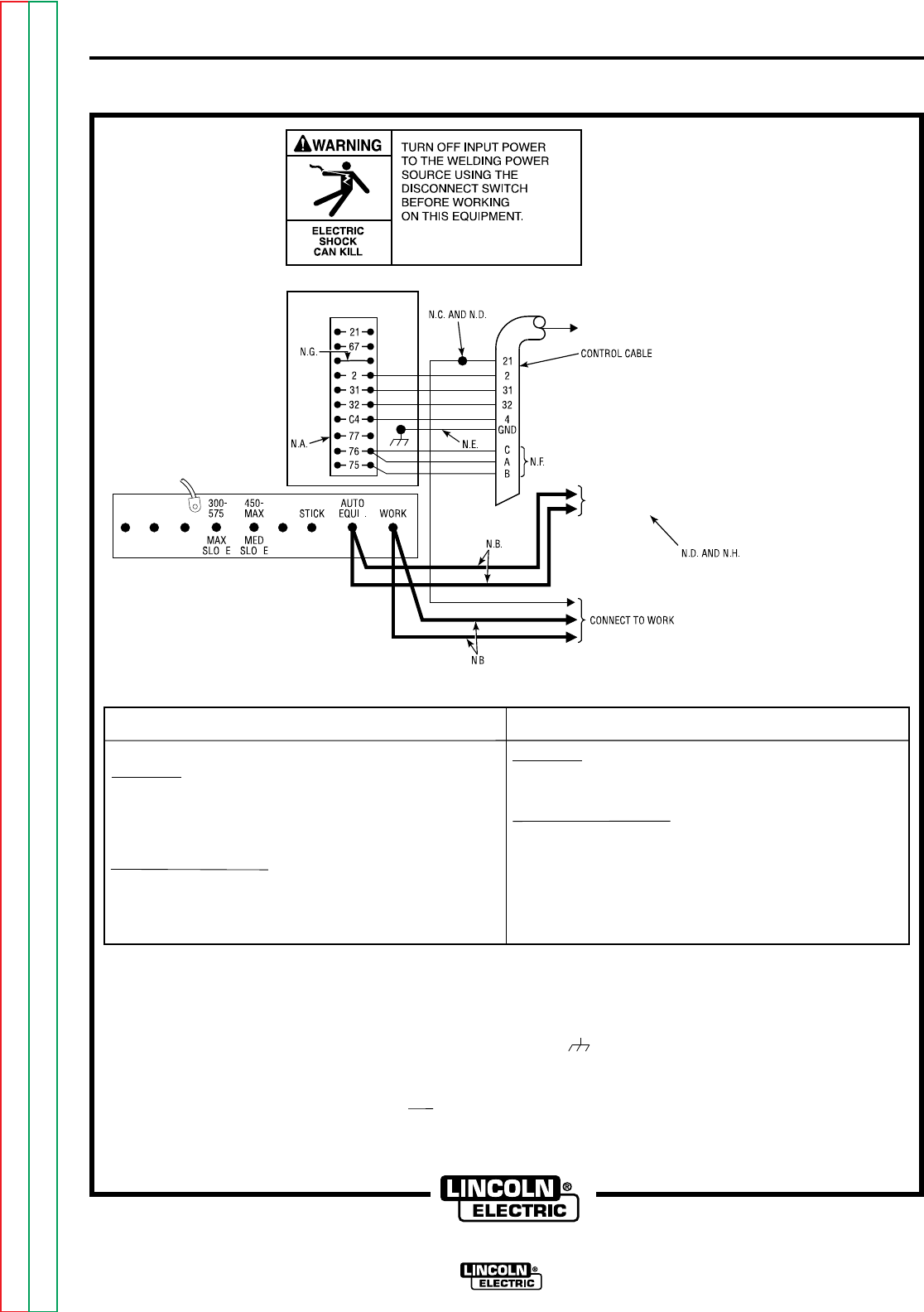
INSTALLATION A-13A-13
NA-5
FIGURE A.12 – CONNECTION OF NA-5 (ALL) TO A SAM-650 ENGINE WELDER.
NOTE: TO CHANGE POLARITY, TURN POWER OFF, AND
POSITION THE SWITCH ON POWER SOURCE TO
PROPER POLARITY. REFER TO NA-5
OPERATING MANUAL FOR REQUIRED
NA-5 CONTROL BOX POLARITY CONNECTIONS.
FOR ADDITIONAL INSTALLATION INSTRUCTIONS, SEE NA-5 OPERATING MANUAL.
SAM POWER SOURCE SETTINGS
FOR SUB ARC:
1. SET THE ELECTRODE POLARITY SWITCH TO THE POLARITY DESIRED FOR THE
PROCESS BEING USED.
2. SET THE TOGGLE SWITCH TO CONSTANT VOLTAGE.
3. SET THE CONSTANT VOLTAGE CONTROL TO NUMBER 7.
4. CONNECT THE TAP CABLE TO THE "300-575, MAX, SLOPE" STUD.
FOR ALL OPEN ARC PROCESSES:
1. SET THE ELECTRODE POLARITY SWITCH TO THE POLARITY DESIRED FOR THE
PROCESS BEING USED.
2. SET THE TOGGLE SWITCH TO CONSTANT VOLTAGE.
3. SET THE CONSTANT VOLTAGE CONTROL TO NUMBER 5.
4. CONNECT THE TAP CABLE TO THE "450-MAX, MED SLOPE" STUD.
NA-5 SETTINGS
FOR SUB ARC:
1. RED LEAD ON VOLTAGE PC BOARD IS CONNECTED TO PIN "S".
2. WHITE LEAD ON VOLTAGE PC BOARD IS CONNECTED TO PIN "A".
FOR ALL OPEN ARC PROCESSES:
1. RED LEAD ON VOLTAGE PC BOARD IS CONNECTED TO PIN "F".
2. WHITE LEAD ON VOLTAGE PC BOARD IS CONNECTED TO PIN "A".
TURN POWER SOURCE OFF.
N.A. REMOVE SAM PORTABLE FIELD CONTROL AND CONNECT NA-5 CONTROL CABLE.
N.B. WELDING CABLES MUST BE OF PROPER CAPACITY FOR THE CURRENT AND DUTY CYCLE OF IMMEDIATE AND FUTURE APPLICATIONS.
N.C. EXTEND LEAD #21 USING #14 OR LARGER INSULATED WIRE PHYSICALLY SUITABLE FOR THE INSTALLATION. AN S-16586- [ ] REMOTE VOLTAGE-SENSING WORK
LEAD IS AVAILABLE FOR THIS PURPOSE. CONNECT IT DIRECTLY TO THE WORK PIECE, KEEPING IT SEPARATE FROM THE WELDING WORK CABLE CONNECTION
TO THE WORK PIECE. FOR CONVENIENCE, THIS EXTENDED #21 LEAD SHOULD BE TAPED ALONG THE WELDING WORK CABLE.
N.D. TAPE UP BOLTED CONNECTION.
N.E. CONNECT THE NA-5 CONTROL CABLE GROUNDING LEAD TO THE FRAME TERMINAL MARKED NEAR THE POWER SOURCE TERMINAL STRIP. THE POWER
SOURCE MUST BE PROPERLY GROUNDED.
N.F. IF USING AN OLDER K-215 CONTROL CABLE: CONNECT LEAD #76 TO #75 ON TERMINAL STRIP, CONNECT LEADS #75 AND #77 TO #76 ON TERMINAL STRIP.
N.G. ON EARLIER SAM MACHINES, #1 TERMINAL WAS ALSO ON THE TERMINAL STRIP.
N.H. FOR PROPER NA-5 OPERATION, THE ELECTRODE CABLES MUST BE SNUGGED UNDER THE CLAMP BAR ON THE LEFT SIDE OF THE NA-5 CONTROL BOX.
PP
P
.
.
"TAP"
POWER SOURCE
TO NA-5 INPUT
CABLE PLUG
BOLT TO CABLES
FROM NA-5
WIRE CONTACT
ASSEMBLY
CLEVELAND, OHIO U.S.A.
Return to Section TOC Return to Section TOC Return to Section TOC Return to Section TOC
Return to Master TOC Return to Master TOC Return to Master TOC Return to Master TOC
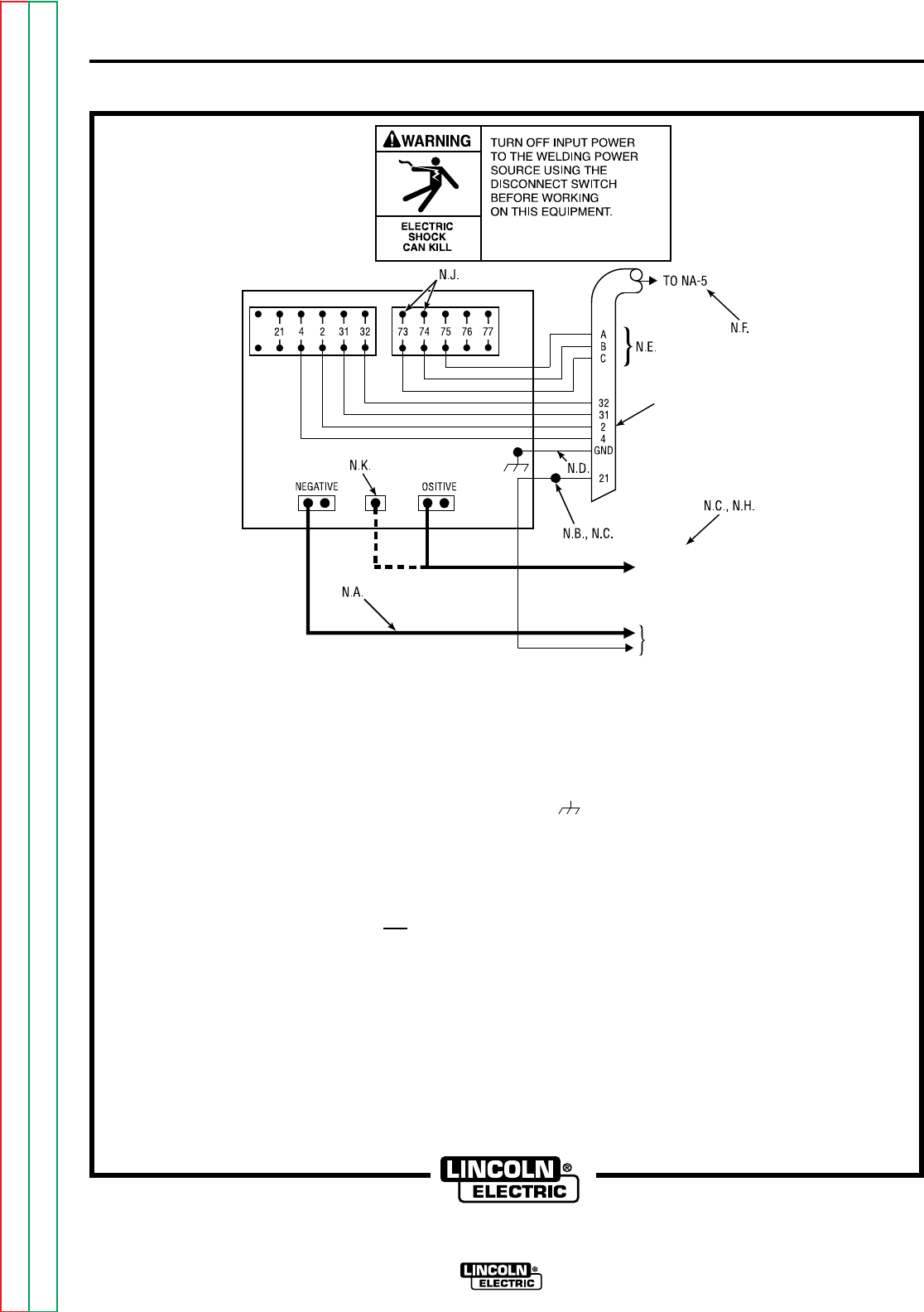
INSTALLATION A-14A-14
NA-5
FIGURE A.13 – CONNECTION OF NA-5 TO DC-1000 OR DC-1500.
THE DIAGRAM SHOWS ELECTRODE CONNECTED POSITIVE. TO CHANGE POLARITY, TURN POWER OFF, REVERSE THE ELECTRODE AND WORK LEADS AT THE
POWER SOURCE, POSITION THE POSITIVE-NEGATIVE SWITCH ON THE POWER SOURCE TO CORRESPOND TO THE POLARITY OF THE ELECTRODE CABLE CONNECTION.
REFER TO NA-5 OPERATING MANUAL FOR REQUIRED NA-5 CONTROL BOX POLARITY CONNECTIONS.
P
POWER SOURCE
CONTROL
CABLE
BOLT TO CABLES FROM
NA-5 WIRE CONTACT
ASSEMBLY
INPUT CABLE PLUG
N.A. WELDING CABLES MUST BE OF PROPER CAPACITY FOR THE CURRENT AND DUTY CYCLE OF IMMEDIATE AND FUTURE APPLICATIONS.
N.B. EXTEND LEAD 21 USING #14 OR LARGER INSULATED WIRE PHYSICALLY SUITABLE FOR THE INSTALLATION. AN S-16586-[ ] REMOTE VOLTAGE-SENSING WORK LEAD
IS AVAILABLE FOR THIS PURPOSE. CONNECT IT DIRECTLY TO THE WORK PIECE KEEPING IT SEPARATE FROM THE WELDING WORK CABLE CONNECTION TO
WORK PIECE. FOR CONVENIENCE, THIS EXTENDED #21 LEAD SHOULD BE TAPED ALONG THE WELDING WORK CABLE.
N.C. TAPE UP BOLTED CONNECTION.
N.D. CONNECT THE NA-5 CONTROL CABLE GROUND LEAD TO THE FRAME TERMINAL MARKED NEAR THE POWER SOURCE TERMINAL STRIP. THE POWER SOURCE
MUST BE PROPERLY GROUNDED.
N.E. IF USING AN OLDER AUTOMATIC CONTROL CABLE WITH LEADS 75, 76, 77; CONNECT LEAD 75 TO #75 ON TERMINAL STRIP, CONNECT LEAD #76 TO #74 ON TERMINAL
STRIP, CONNECT LEAD #77 TO #73 ON TERMINAL STRIP.
N.F. CONNECT THE JUMPERS ON THE NA-5 VOLTAGE BOARD AS FOLLOWS: CONNECT RED JUMPER TO PIN "S". CONNECT WHITE JUMPER TO PIN "B".
N.G. SET THE DC-1000 OR DC-1500 CONTROLS AS FOLLOWS: SET THE CONTROL SWITCH TO "OUTPUT CONTROL REMOTE".
FOR SUBMERGED ARC PROCESSES, SET THE MODE SWITCH TO "C.V. SUBMERGED ARC". FOR OPEN ARC PROCESSES, SET THE MODE
SWITCH TO "C.V. INNERSHIELD"
N.H. FOR PROPER OPERATION, THE ELECTRODE CABLE MUST BE SNUGGED UNDER THE CLAMP BAR ON THE LEFT SIDE OF THE NA-5 CONTROL BOX.
N.J. TERMINALS #73 AND #74 WERE NOT PRESENT ON DC-1500 MACHINES BELOW CODE 8294. THESE EARLIER CODE MACHINES ARE NOT SUITABLE FOR
USE WITH THE NA-5.
N.K. ALTERNATIVE 500 AMP POSITIVE TERMINAL CONNECTION PROVIDED ON DC-1000 MODELS ABOVE CODE 9500 ONLY.
N.L. ALTERNATE SUBMERGED ARC MODE AVAILABLE FOR IMPROVED ARC STABILITY IN HIGH CURRENT, LARGE PUDDLE, SLOW TRAVEL PROCEDURES BY MAKING
SPECIAL CONNECTIONS ON BOTH DC-1500 AND NA-5.
ON DC-1500 CONTROL BOARD (G-1530-2 AND SUPERSEDING) REMOVE RED AND BLUE JUMPERS FROM "FR" PINS AND RECONNECT TO CORRESPONDING "SR" PINS.
ON NA-5 VOLTAGE BOARD (G-1556-1 AND SUPERSEDING) WHITE JUMPER MUST BE CONNECTED TO PIN "D".
NA-5 PIN "D" CONNECTION MAY ALSO BE USED FOR SOME PROCEDURES ON DC-1500 WITHOUT CONTROL BOARD JUMPERS, DC-1500 WITH CONTROL BOARD
JUMPERS ON "FR" PINS OR DC-1000.
CONNECT TO WORK
CLEVELAND, OHIO U.S.A.
Return to Section TOC Return to Section TOC Return to Section TOC Return to Section TOC
Return to Master TOC Return to Master TOC Return to Master TOC Return to Master TOC
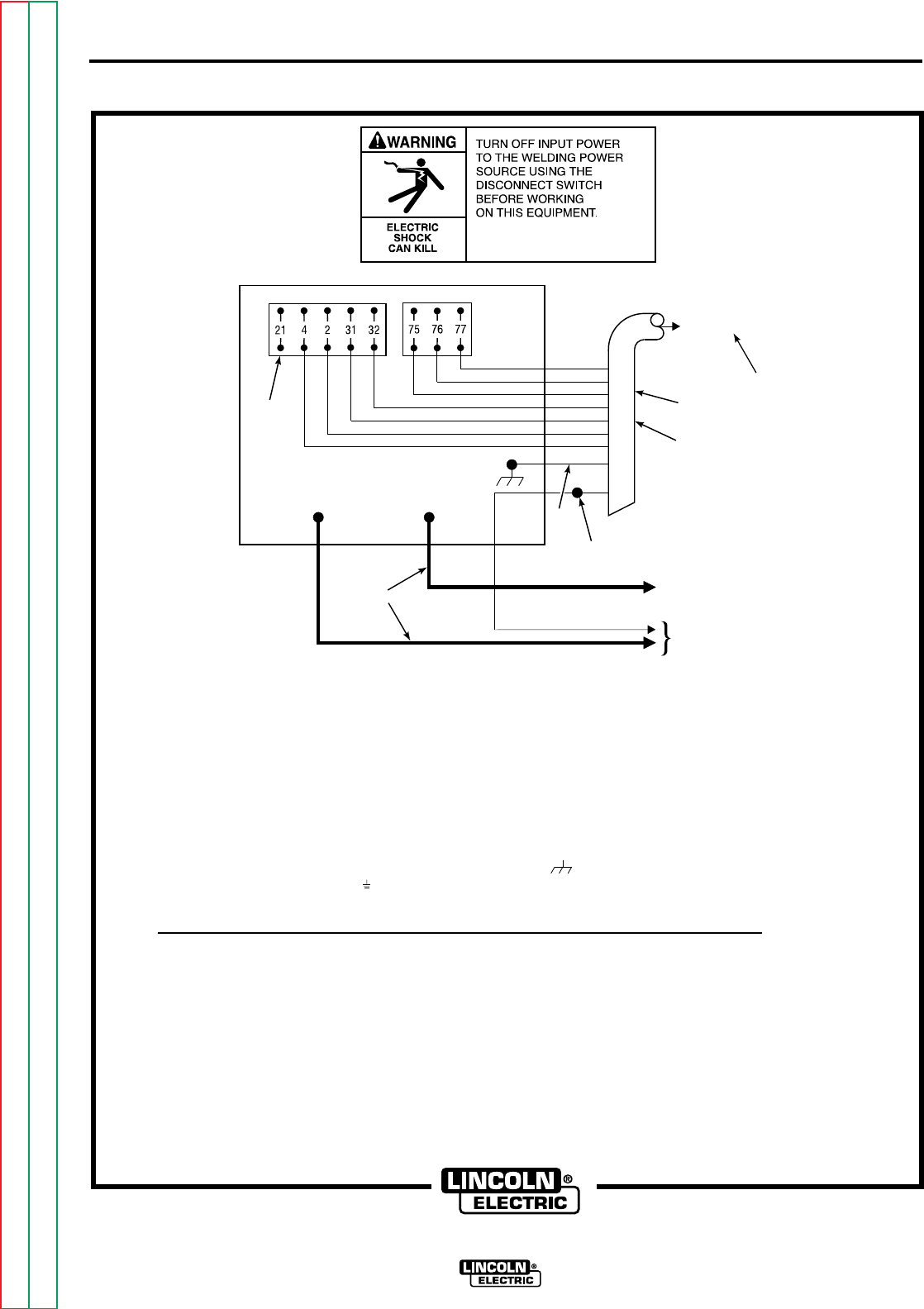
INSTALLATION A-15A-15
NA-5
FIGURE A.14 – CONNECTION OF NA-5 TO DC-400 OR CV-400.
THE DIAGRAM SHOWS ELECTRODE CONNECTED POSITIVE. TO CHANGE POLARITY, TURN POWER OFF, REVERSE THE ELECTRODE AND WORK LEADS AT THE
POWER SOURCE AND POSITION THE SWITCH ON POWER SOURCE (IF EQUIPPED), TO PROPER POLARITY. REFER TO NA-5 OPERATING MANUAL FOR REQUIRED
NA-5 CONTROL BOX POLARITY CONNECTIONS. ALSO REFER TO NOTE N.H.
FOR ADDITIONAL INSTALLATION INSTRUCTIONS, SEE NA-5 OPERATING MANUAL.
* DOES NOT APPLY TO DC-400 BELOW CODE 9200 WITH POLARITY SWITCH.
N.A. WELDING CABLES MUST BE OF PROPER CAPACITY FOR THE CURRENT AND DUTY CYCLE OF IMMEDIATE AND FUTURE APPLICATIONS.
N.B. EXTEND LEAD #21 USING #14 AWG OR LARGER INSULATED WIRE PHYSICALLY SUITABLE FOR THE INSTALLATION. AN S-16586- [LENGTH] REMOTE
VOLTAGE-SENSING WORK LEAD IS AVAILABLE FOR THIS PURPOSE. CONNECT IT DIRECTLY TO THE WORK PIECE KEEPING IT ELECTRICALLY SEPARATE
FROM THE WELDING WORK LEAD CIRCUIT AND CONNECTION. FOR CONVENIENCE, THIS EXTENDED #21 LEAD SHOULD BE TAPED TO THE WELDING
WORK LEAD. (IF THE LENGTH OF WORK LEAD CIRCUIT IS SHORT, AND CONNECTIONS CAN BE EXPECTED TO BE RELIABLE, THEN CONTROL CABLE
LEAD #21 DOES NOT NEED TO BE EXTENDED AND CAN BE DIRECTLY CONNECTED TO TERMINAL #21 ON THE TERMINAL STRIP. NOTE THAT THIS IS
NOT THE PREFERRED CONNECTION BECAUSE IT ADDS ERROR TO THE NA-5 VOLTMETER READING.)
N.C. TAPE UP BOLTED CONNECTION.
N.D. CONNECT THE CONTROL CABLE GROUND LEAD TO THE FRAME TERMINAL MARKED NEAR THE POWER SOURCE TERMINAL STRIP. THE POWER
SOURCE GROUNDING TERMINAL (MARKED AND LOCATED NEAR THE POWER SOURCE INPUT POWER CONNECTIONS) MUST BE PROPERLY CONNECTED
TO ELECTRICAL GROUND PER THE POWER SOURCE OPERATING MANUAL. .
N.E. THE JUMPERS ON THE NA-5 VOLTAGE BOARD MUST BE CONNECTED AS FOLLOWS: CONNECT RED JUMPER TO PIN "S". CONNECT WHITE JUMPER TO PIN "B".
WHEN USING NA-5 CONTROLS ABOVE CODE 8300 WITHOUT THE OPTIONAL DC-400 DIODE KIT OR CV-400, CVI-500 DIODE OPTIONS:
THE NA-5 INCH DOWN BUTTON WILL NOT OPERATE UNLESS A JUMPER IS CONNECTED BETWEEN THE TWO TAB TERMINALS, LABELED "AUTO",
LOCATED ABOVE THE TRANSFORMER ON THE NA-5 VOLTAGE PC BOARD. THIS JUMPER, HOWEVER, WILL DISABLE THE COLD STARTING/AUTO STOP
FEATURE OF THE NA-5, PERMITTING ONLY HOT STARTING TECHNIQUES TO BE USED.
N.G. FOR PROPER NA-5 OPERATION, THE ELECTRODE CABLES MUST BE SNUGGED UNDER THE CLAMP BAR ON THE LEFT SIDE OF THE NA-5 CONTROL BOX.
N.H.*IF LEAD #21 IS TO BE CONNECTED TO THE TERMINAL STRIP, CONNECT TO THE #21 TERMINAL THAT MATCHES WORK POLARITY. THIS CONNECTION MUST
BE CHANGED WHENEVERTHE ELECTRODE POLARITY IS CHANGED.
POWER SOURCE
TO NA-5 INPUT CABLE PLUG
CONTROL
CABLE
BOLT TO CABLES FROM NA-5
WIRE CONTACT ASSEMBLY
CONNECT TO WORK
N.E.
N.D. AND N.H.
N.B. AND N.C.
N.H.
N.A.
NEGATIVE POSITIVE N.D.
C
B
A
32
31
2
4
GND
21
CLEVELAND, OHIO U.S.A.
Return to Section TOC Return to Section TOC Return to Section TOC Return to Section TOC
Return to Master TOC Return to Master TOC Return to Master TOC Return to Master TOC


TABLE OF CONTENTS
- OPERATING INSTRUCTIONS SECTION -
NA-5
Operating Instructions . . . . . . . . . . . . . . . . . . . . . . . . . . . . . . . . . . . . Section B
Safety Precautions . . . . . . . . . . . . . . . . . . . . . . . . . . . . . . . . . . . . . B-2
Operator’s Instructions . . . . . . . . . . . . . . . . . . . . . . . . . . . . . . . . . . B-2
Controls and Their Functions . . . . . . . . . . . . . . . . . . . . . . . . . . . . . B-3
Exposed Controls (With Lockable Cover Down) . . . . . . . . . . . . . B-3
Controls Under the Lockable Security Cover . . . . . . . . . . . . . . . B-3
Setup Instructions . . . . . . . . . . . . . . . . . . . . . . . . . . . . . . . . . . . . . . B-4
Starting and Stopping Sequences . . . . . . . . . . . . . . . . . . . . . . . . . . B-5
Means of Arc Striking . . . . . . . . . . . . . . . . . . . . . . . . . . . . . . . . B-5
Setting Travel Starting and Stopping . . . . . . . . . . . . . . . . . . . . . . . . B-6
Starting Sequences . . . . . . . . . . . . . . . . . . . . . . . . . . . . . . . . . . B-6
Stopping Sequences . . . . . . . . . . . . . . . . . . . . . . . . . . . . . . . . . B-6
Reconfiguring the Travel Sequences . . . . . . . . . . . . . . . . . . . . . B-6
Voltage Control Response . . . . . . . . . . . . . . . . . . . . . . . . . . . . . . . . B-9
Automatic Shutdown . . . . . . . . . . . . . . . . . . . . . . . . . . . . . . . . . . . . B-10
Cold Start Circuitry . . . . . . . . . . . . . . . . . . . . . . . . . . . . . . . . . . . . . B-11
Security of Weld Procedure Settings . . . . . . . . . . . . . . . . . . . . . . . . B-12
Section BSection B
Return to Master TOC Return to Master TOC Return to Master TOC Return to Master TOC
OPERATOR’S
INSTRUCTIONS
Once the system is properly set up, the
operator can make production welds
without readjusting the controls
using the
following simple instructions:
1. Be sure there is enough electrode in
the machine to complete the weld.
2. If submerged arc welding, fill flux
hopper with new or freshly screened
flux. All reused flux must be screened
100% through an 8 mesh screen
[0.065 to 0.075 in. (1.6 to 1.9 mm)
opening]. Turn the switch on the
hopper to “On.”
3. Start the power source.
4. Turn the “Power Control” switch on the
wire feeder control to “On.”
5. Position the welding head at the start
of the weld. Be sure the travel carriage
or other travel mechanism is set to
move in the proper direction.
6. Set the travel switch to “Automatic
Travel.” When set to “Hand Travel”,
the travel system operates without
welding.
7. For best starts, cut the electrode to a
sharp point.
8. Press the “Inch Down” button to feed
the electrode out of the nozzle.
a. For most applications, when hot
starting, leave the electrode
1/4 in. (6.4 mm) or more away
from the work.
b. When cold starting some
submerged arc welding, inch the
electrode down until it touches the
work and the flux valve opens.
9. Press the “Start” button.
10. While welding, turn the cross seam
adjuster handwheel as needed to keep
the arc in the joint.
11. At the end of the weld, press the
“Stop” button.
12. If needed, press the “Inch Up” button
to get the electrode up and out of the
way. Remove the work and reload the
fixture.
NOTE: When the contact tip in the end of the
nozzle wears during repetitive welding, it
must be replaced. Check the contact tip for
wear if weld quality seems to be
deteriorating.
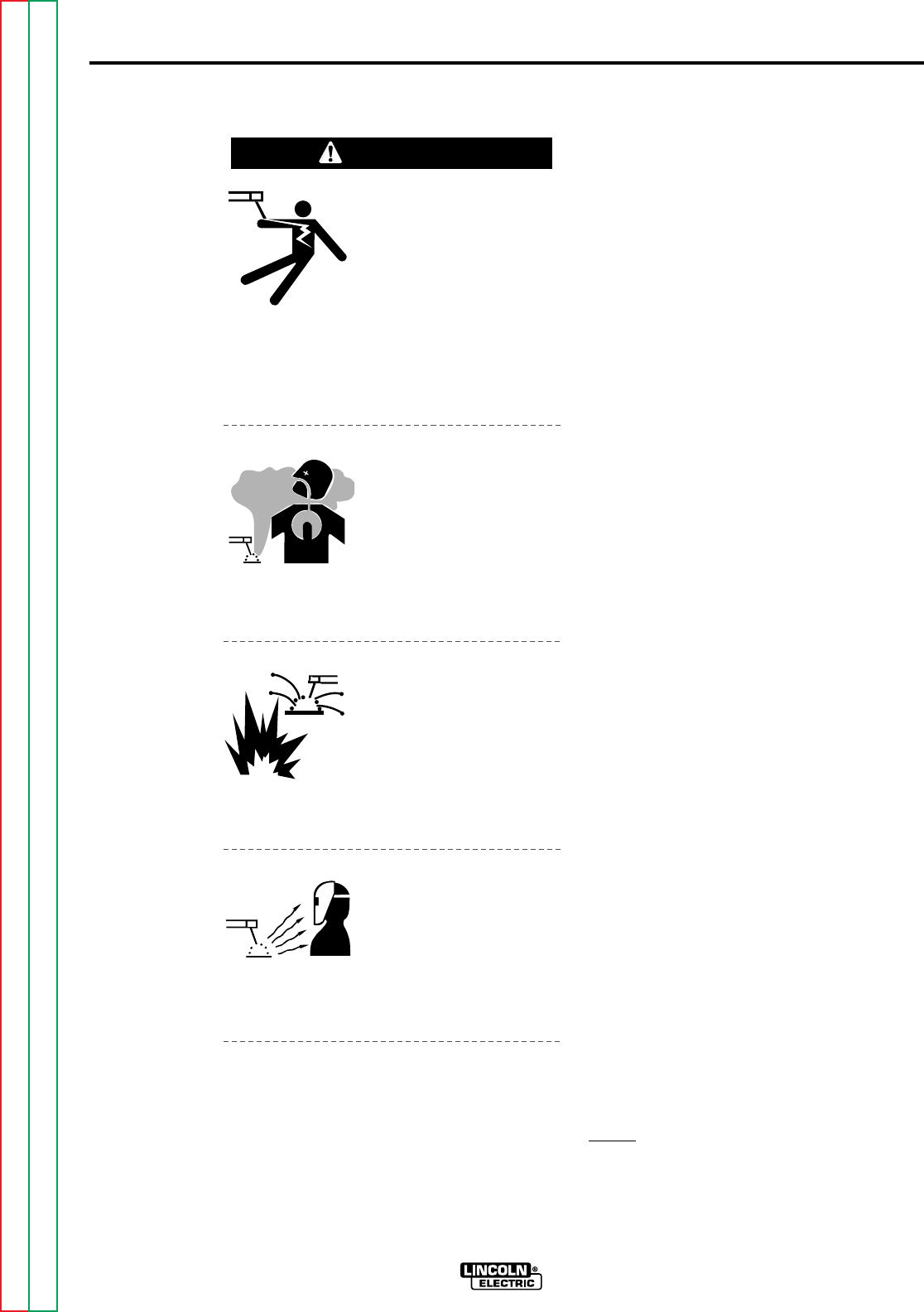
ELECTRIC SHOCK
can kill.
• Do not touch electrical-
ly live parts or elec-
trode with skin or wet
clothing.
• Insulate yourself from
work or ground.
• Always wear dry insu-
lating gloves.
FUMES AND GASES
can be dangerous.
• Keep your head out of
fumes.
• Use ventilation or
exhaust to remove
fumes from breathing
zone.
WELDING SPARKS
can cause fire or
explosion.
• Keep flammable mater-
ial away.
• Do not weld on con-
tainers that have held
combustibles.
ARC RAYS
can burn.
• Wear eye, ear, and
body protection.
Observe additional Safety Guidelines
detailed in the beginning of this manual.
B-2
OPERATING INSTRUCTIONS
B-2
NA-5
SAFETY PRECAUTIONS
WARNING
Return to Section TOC Return to Section TOC Return to Section TOC Return to Section TOC
Return to Master TOC Return to Master TOC Return to Master TOC Return to Master TOC
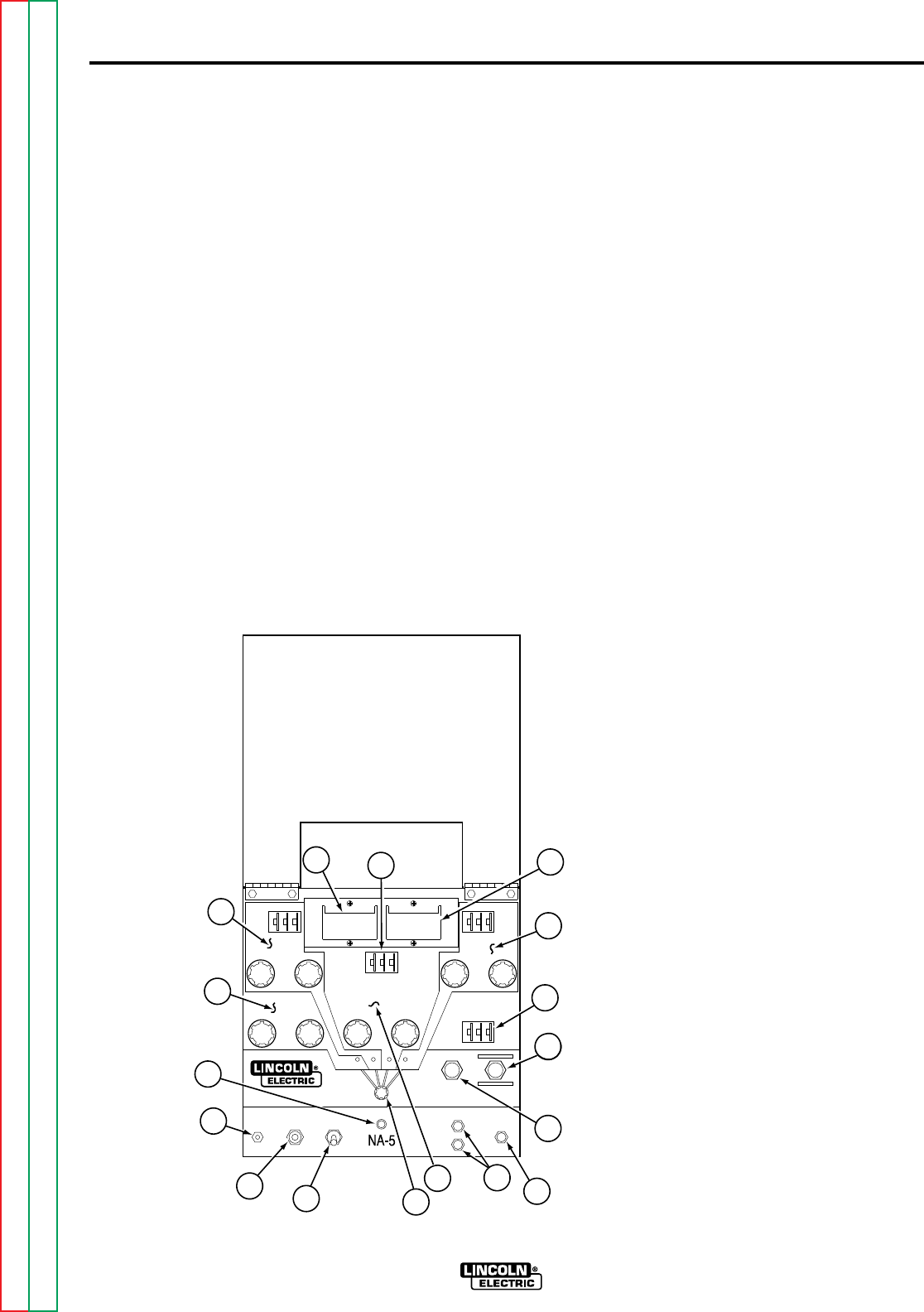
OPERATING INSTRUCTIONS B-3B-3
NA-5
CONTROLS AND
THEIR FUNCTIONS
The operator controls for the NA-5 are
illustrated in Figure B.1. Refer to the figure
and the following explanations of the
controls.
EXPOSED CONTROLS (WITH
LOCKABLE COVER DOWN)
1. CIRCUIT BREAKER. Protects the
circuit from severe wire feed motor
overloads and short circuits. Press to
reset.
2. CONTROL POWER. Turns input
control power “On” and “Off.” Also
used as an emergency “Off” in case
of malfunction.
3. ELECTRODE “HOT” LIGHT.
Comes on when the “Start button” is
pressed and the electrode circuit
becomes electrically hot.
4. INCH UP AND INCH DOWN. Press to
inch electrode up or down.
5. MODE SELECTOR SWITCH AND
LIGHTS. Used to preset the voltage
and wire feed speed for the various
modes of operation (Strike, Start,
Weld, and Crater).
6. SET-ACTUAL BUTTON. When
pressed, will display the actual wire
speed and voltage in the wire speed
and volts meters. When the button is
not pressed, the set wire speed and
voltage is displayed.
7. START. Begins welding cycle.
8. STOP. Initiates the stopping cycle at
the end of the weld.
9. TRAVEL. Turn to “Off” for no travel,
“Hand Travel” for travel without
welding, and “Automatic Welding” for
welding operations.
10. VOLTS METER. Displays the set or
actual voltage for each mode (Strike,
Start, Weld, Crater).
11. WIRE SPEED METER. Displays the
set or actual wire speed for each
mode (Strike, Start, Weld, Crater).
CONTROLS UNDER THE
LOCKABLE SECURITY COVER
12. ARC STRIKING CONTROLS. Sets
the wire speed until the welding
current begins to flow and controls
the power source voltage during arc
striking.
13. BURNBACK AND ELECTRODE
BACKUP TIME. Controls the length
of burnback delay time after the stop
circuit is energized.
14. WELD CONTROLS. Controls the
voltage and wire speed during the
welding mode.
15. CRATER CONTROLS (OPTIONAL).
Sets the ending current and voltage
for an adjustable period of time.
16. START CONTROLS (OPTIONAL).
Sets the starting current and voltage
for an adjustable period of time.
17. WELD TIME (OPTIONAL). Controls
the time of the weld mode.
FIGURE B.1 – NA-5 CONTROLS.
92
3
12
11
17
16
10
15
13
7
6
8
4
14
5
1
Return to Section TOC Return to Section TOC Return to Section TOC Return to Section TOC
Return to Master TOC Return to Master TOC Return to Master TOC Return to Master TOC

OPERATING INSTRUCTIONS B-4B-4
NA-5
SETUP INSTRUCTIONS
Use the following steps to set up the NA-5
welding system prior to welding:
1. If using a multi-process power source
(SAM, DC-400, DC-600, DC-1000,
OR DC-1500 type), make con-
nections and settings per the power
source connection diagram (Figures
A.8 to A.14) for the process being
used.
AUTO TAB
When using the NA-5 with the DC-
400 or CV-400 power source, the
auto tab jumper on the NA-5 voltage
PC board must be connected in order
for the inch down circuit to function.
When the auto tab jumper is
connected, the cold starting feature
of the NA-5 is disabled and only the
hot starting technique can be used. If
the cold start technique is to be used,
the optional Diode must be installed
on the DC-400 or CV-400.
2. Set the power source and NA-5
circuit polarity per information on
Electrode Polarity
in Section A,
Installation.
3. Depending on the procedures and
applications, decide:
a. The means of arc striking and
whether to start the travel with
the “Start” button or the arc.
b. Whether the initial bead size or
penetration requires use of the
optional “Start Controls.”
See the
Starting and Stopping
Sequences
section.
4. Depending upon the procedures and
applications:
a. Select the arc and travel stopping
sequence. See the
Starting and
Stopping Sequences
section.
b. Decide if the control of the ending
bead size or crater fill requires
the use of optional “Crater
Controls”. See the
Starting and
Stopping Sequences
section.
5. Set the head position relative to the
work as required for the fixture,
application, and procedures. See
IM305 Sec. T3.2.3.
6. Rotate the wire straightener, if used,
until the top of the straightener faces
the wire reel. This is required for
smooth feeding of the electrode into
the straightener.
7. Refer to the instructions for the wire
contact assembly being used. See
IM305 Sec. T2.2.6, T2.2.7, T2.5.3, or
T2.5.4.
8. The mount for standard 50 and 60 lb
(22.7 and 27.2 kg) electrode coils
includes a two-position brake
assembly. Generally the brake should
be at the inner position (nearest to
the wire reel shaft) for wire feed
speeds below 400 in./min (10 m/min).
It should be at the outer position for
faster wire speeds. To adjust the
brake position, remove the wire reel.
Pull the cotter pin that holds the
brake shoe to the arm, move the
shoe, and replace the cotter pin. Do
not bend the cotter pin — it is held in
place by a friction fit.
9. Load the wire reel per IM305 Sec.
T3.2.2 or install the Speed-Feed
drum or reel per Sec. T2.5.7-A or -B.
10. Straighten the first 6 in. (152.4 mm)
of electrode and push it through the
wire straightener to the drive rolls. To
use the cored wire straightener,
remove the knurled nut at the top and
feed the wire through the nut, down
through the straightener, and into the
drive rolls. Screw the nut back onto
the straightener. Feed the wire
through the nozzle tip and adjust
the straightener for optimum
straightness. With wire contact
assemblies, except the K231, adjust
until the electrode is straight as it
comes out of the nozzle. Do not
completely straighten the wire when
using the K231 contact nozzle
because the nozzle relies on the
small curvature of the electode for
proper electrical contact within the
contact tip.
Return to Section TOC Return to Section TOC Return to Section TOC Return to Section TOC
Return to Master TOC Return to Master TOC Return to Master TOC Return to Master TOC

OPERATING INSTRUCTIONS B-5B-5
NA-5
11. Set the travel speed as specified by
the procedures. With the wire feeder
travel switch set to “Hand Travel”, the
travel runs without welding, permitting
accurate measurement of travel
speed. When using a Lincoln travel
carriage, adjust the speed with the
rheostat and the direction with the
toggle switch on the carriage control
panel.
12. Connect the work lead to the work or
a suitable piece of scrap. Clip the
end of the electrode to a sharp point.
13. Preset the “Start” (if used), “Weld”,
and “Crater” (if used) controls to the
wire speed and voltage specified in
the procedure.
14. Make several test welds, readjusting
the controls in the following order:
a. Set the “Arc Striking”, “Inch Wire
Speed”, and “Volts” controls for
optimum arc striking. The
optimum strike control settings for
most processes will be typically 4
to 5 volts higher than the weld
mode voltage setting and 40% to
50% of the weld mode wire feed
speed setting (possibly lower if
cold starting is used).
b. If striking is still not satisfactory,
refer to the section on
Setting
Travel Starting and Stopping
or
IM305 Sec. T3.5.2 for information
on wire feed motor acceleration.
c. If installed, adjust the “Start
Controls” to set the welding
procedures for the time set on the
timer to provide the bead size,
penetration, or other factor as
needed for the application.
d. If installed, adjust the “Crater
Controls” to set the welding
procedures for the set time after
the “Stop” button is pressed to
provide the bead size or fill the
crater as needed for the
application.
e. Set the “Burnback Time” to
provide the stopping char-
acteristics needed.
STARTING AND STOPPING
SEQUENCES
MEANS OF ARC STRIKING
The NA-5 Codes utilize “hot start” arc
striking which operates as follows:
1. With the electrode not touching the
work, press the “Start” button.
2. The electrically “hot” electrode
inches down as set by the “Inch Wire
Speed” control.
3. When the electrode makes contact
with the work, the arc strikes and the
circuit automatically switches from
“Strike” settings to “Weld” (or “Start”,
if used) settings.
NA-5 models above Code 8300 offer both
“hot start” arc striking, as described
above, or “Cold Start” arc striking which
operates as follows:
1. Press the “Inch Down” button until the
tip of the electrode touches the work,
automatically stops, and the flux (if
used) is automatically dispensed.
NOTE: If inch speed is set too high, the
electrode may stop with too much force on
its tip, resulting in possible poor starting.
2. The arc establishes when the “Start”
button is pressed, and the circuit
automatically switches to “Weld” (or
“Start”, is used) settings. Should the
arc not start immediately, the wire will
retract slightly until the arc is
established and then feed down in the
normal manner.
Use either the standard “on-the-fly” travel
starting or rewire the controls for “standstill”
travel starting as described in the
Setting
Travel Starting and Stopping
section.
Optional “Start Controls”
Recommended for applications where
penetration, bead size, and other
characteristics must be carefully controlled
at the start.
Return to Section TOC Return to Section TOC Return to Section TOC Return to Section TOC
Return to Master TOC Return to Master TOC Return to Master TOC Return to Master TOC
OPERATING INSTRUCTIONS B-6B-6
NA-5
The starting sequence is as described above
except that when the arc strikes, the
machine welds at the wire speed and
voltage set by the “Start Controls” panel until
the time set on the thumbwheel switch
elapses. The circuit then automatically
switches to the “Welding Controls” wire
speed and voltage. Actual settings depend
on application requirements.
Available options for applications with
particularly difficult starting.
1. K238 High Frequency Generator -
See IM305 Sec. T2.5.8.
SETTING TRAVEL
STARTING AND STOPPING
Standard machines can be connected for a
variety of starting and stopping sequences.
STARTING SEQUENCES
“On-the-Fly” Travel Starting
When shipped, all models are connected for
“On-the-Fly” travel starting. The starting
sequence is as follows:
1. With the electrode NOT touching the
work, press the “Start” button. This
starts both the wire feed and travel
motors.
2. When the electrically “hot” electrode
touches the work to start the arc,
there is relative motion between the
end of the electrode and the work.
This “scratching” type contact helps
assure consistent arc striking.
This sequence is recommended for most
welding applications including:
1. Roundabouts and any other weld
which ends at its starting point. A
K337 Weld Timer Module to control
the welding cycle duration can be
installed.
2. Welds started on a run-out tab.
3. Any application for improved arc
striking.
“Standstill” Travel Starting
All models can be reconnected so the travel
remains at a standstill until the arc starts.
“Standstill” travel starting is used when the
electrode
must
be started at a precise
location.
For consistent arc striking with “Standstill”
travel starting, always clip the end of the
electrode to a sharp point before starting.
STOPPING SEQUENCES
As shipped, the travel stops when the “Stop”
button is pressed, producing a small crater
area.
When the end of the weld overlaps the
beginning, changing the stopping sequence
to stop the travel later spreads the crater
over a longer area.
RECONFIGURING THE TRAVEL
SEQUENCES
ELECTRIC SHOCK
can kill.
• Turn off input power to
the welding power source
using the disconnect
switch before working on
this equipment.
To change the travel sequence, turn off all
input power to the NA-5 control box. Open
the control box. The logic board is mounted
on the back of the box in the upper right
hand corner. To change the travel circuit for
the various modes of starting and stopping,
follow the information in the wiring diagram
for the NA-5 being used. Table B.1 also
shows information on reconfiguring the
travel sequences.
WARNING
Return to Section TOC Return to Section TOC Return to Section TOC Return to Section TOC
Return to Master TOC Return to Master TOC Return to Master TOC Return to Master TOC
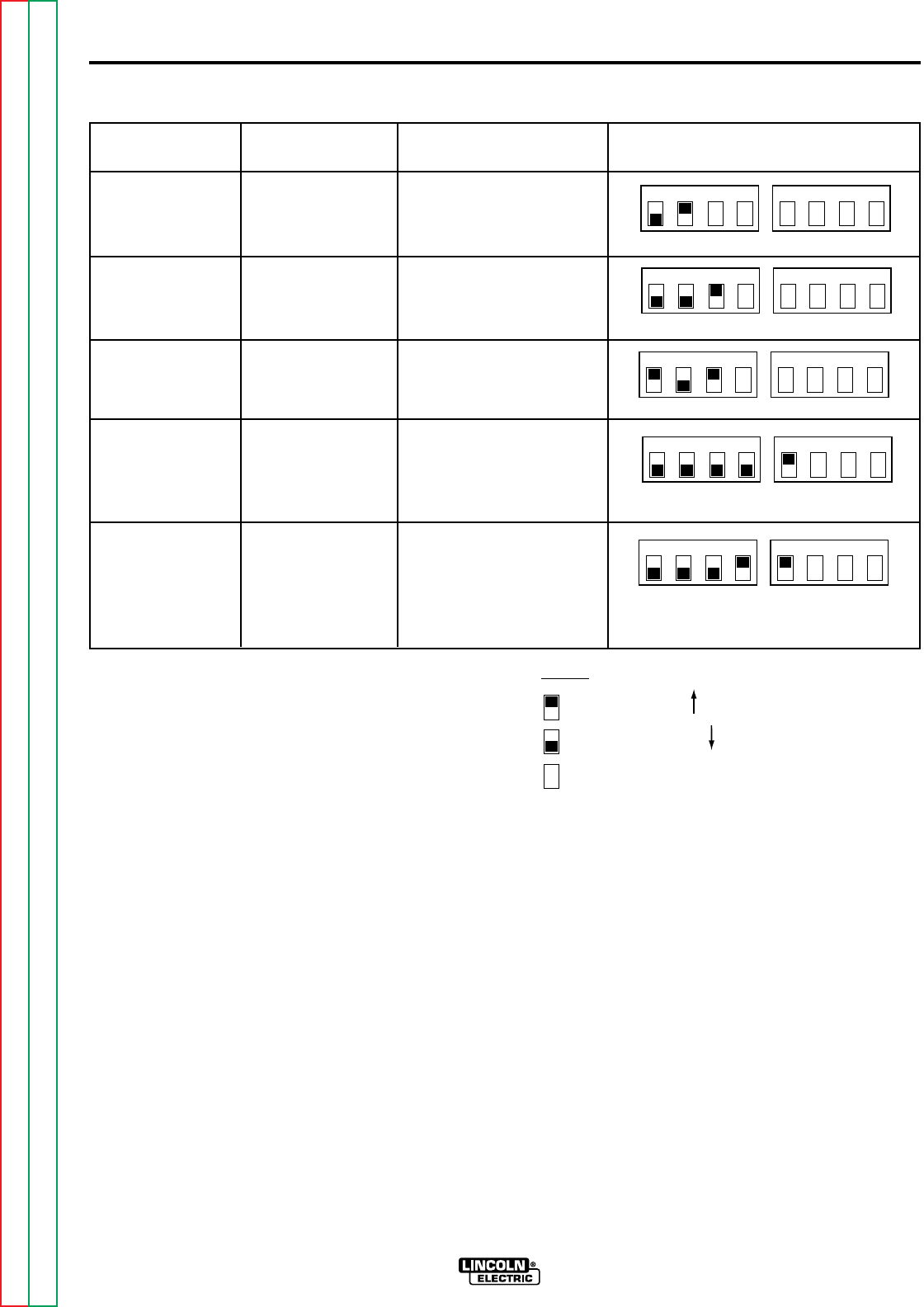
OPERATING INSTRUCTIONS B-7B-7
NA-5
Travel Starts Travel Stops Older Models Newer Models*
With “Start” With “Stop” Lead #691 to Pin 6
Button Button Lead #692 to Pin 5
With Arc Striking With Arc Stopping Lead #691 to Pin 6
Lead #692 to Pin 7
With Arc Striking With Stop Button Lead #691 to Pin 5
Lead #692 to Pin 7
With “Start” With End Crater Lead #691 to Pin 6
Button Fill Time (With Lead #692 to Pin 9
optional procedure
module installed in
crater receptacle1)
With “Start” After Burnback Lead #691 to Pin 6
Button Time (with Lead #692 to Pin 8
optional procedure
module installed
in crater
receptacle1)
1234 1234
Switch #1 Switch #2
1234 1234
Switch #1 Switch #2
1234 1234
Switch #1 Switch #2
1234 1234
Switch #1 Switch #2
TABLE B.1 – TRAVEL SEQUENCE LEAD AND SWITCH POSITIONS.
1234 1234
Switch #1 Switch #2
*NOTE:
Indicates switch in up position
Indicates switch in down position
Indicates switch position does not matter
1If the optional procedure module is installed in the crater receptacle,
DIP switch position 1 on switch #2 should be in the UP position as
shown. Additionally, remove 583C to 584C jumper plug from the pro
cedure board. If the procedure module is not installed, the switch
should be in the down position and the 583C to 584C jumper plug
should be reinstalled on the procedure board.
Return to Section TOC Return to Section TOC Return to Section TOC Return to Section TOC
Return to Master TOC Return to Master TOC Return to Master TOC Return to Master TOC
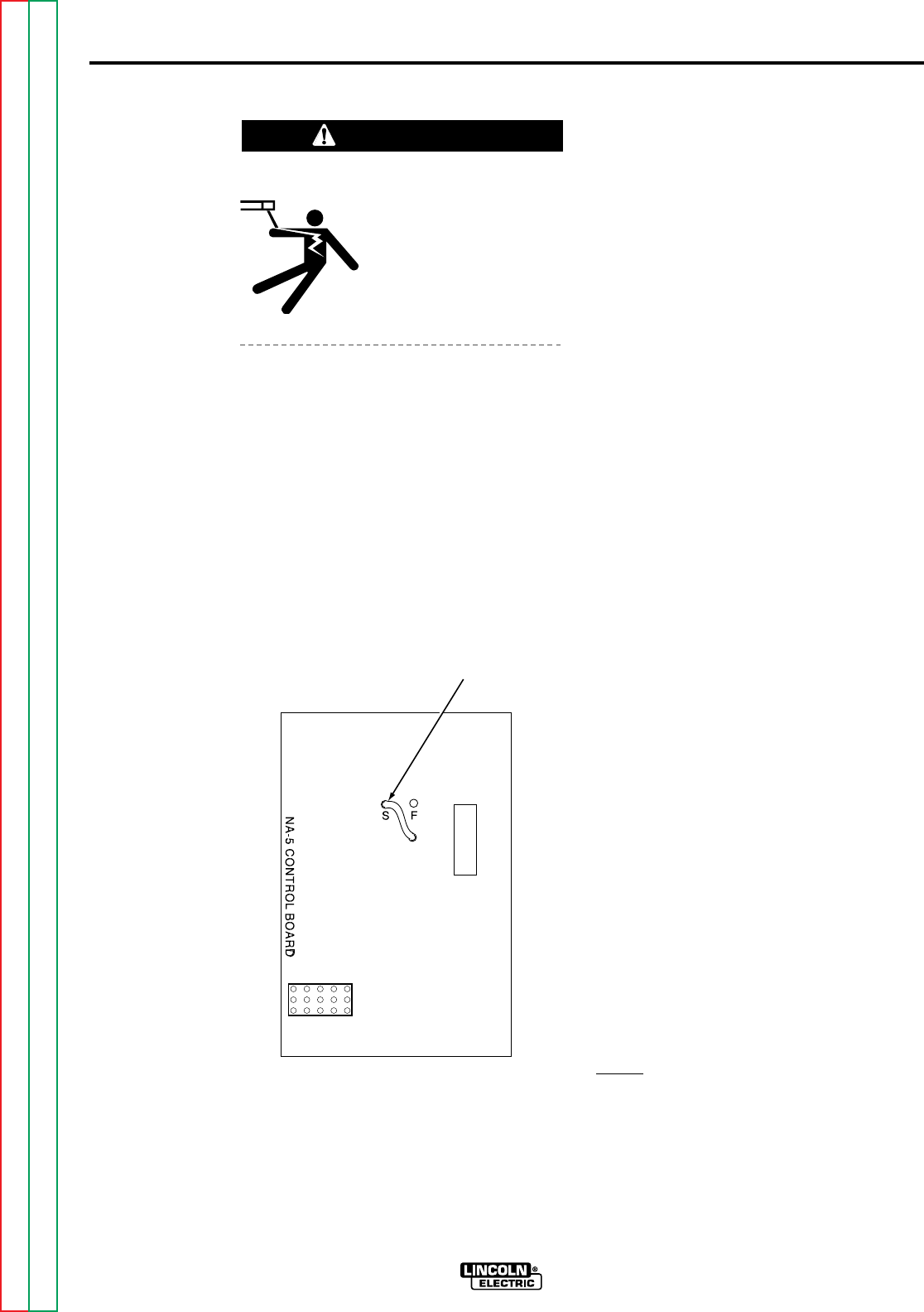
OPERATING INSTRUCTIONS B-8B-8
Wire Feed Motor Acceleration
ELECTRIC SHOCK
can kill.
• Turn off input power to
the welding power source
using the disconnect
switch before working on
this equipment.
The NA-5 has two different speeds of
controlled wire feed motor acceleration. As
shipped, the unit is connected for fast
acceleration which is best for most
applications. To change to the slower
acceleration, turn off all input power to the
NA-5 control box. Open the control box.
Locate the Control PC Board mounted on
the back of the box in the lower right hand
corner. Change the jumper plug from the “F”
pin to the “S” pin as shown in Figure B.2.
Burnback and Electrode Backup
The primary consideration in setting the arc
stopping sequence is to prevent the
electrode from sticking in the puddle. This
is easily done with the machine as shipped.
The standard stopping sequence when the
optional “Crater Controls” are not used is as
follows:
1. Press the “Stop” button.
2. The wire feed motor stops and the
“Burnback Time Delay” starts.
3. The arc continues to burn the
electrode back from the puddle until
the arc goes out or the time set on the
thumbwheel switch elapses. This
control should be set for just enough
burnback time to prevent crater
sticking.
There are two other ways this circuit can be
connected. One will cause the wire to
retract* with a contactor drop out delay at
the end of the weld. The second will cause
the wire to retract* during burnback time,
and there will be no contactor drop out delay
at the end of the weld. If either one of these
alternate methods of stopping the weld is
desired, the connections on the logic board
can be easily changed.
To change the stopping sequence, turn the
input AC power off at the power source,
remove the screw holding the inner panel,
and swing the panel open. Change the
connections (older models) or switch
positions (newer models) on the logic board
as shown in Table B.2.
Optional “Crater Controls”
This option is recommended for applications
where the ending bead size must be
controlled, applications when the crater must
be filled, roundabouts, and any other welds
where the end overlaps the start.
When the “Stop” button is pressed, the
machine welds at the wire speed and
voltage set by the “Crater Controls” until the
time set on the thumbwheel switch elapses.
The circuit then automatically switches to the
arc stopping sequence described above.
NOTE: Setting crater time to 0.00 seconds
will give zero crater time; however, the
crater settings will be active during
burnback time until the arc goes out.
*
Wire will retract at weld mode speed (or crater mode
speed, if installed) until the arc goes out and then retract
at strike mode speed for the remainder of burnback
time.
NA-5
JUMPER
PLUG
FIGURE B.2 – ACCELERATION
JUMPER PLUGS.
WARNING
Return to Section TOC Return to Section TOC Return to Section TOC Return to Section TOC
Return to Master TOC Return to Master TOC Return to Master TOC Return to Master TOC
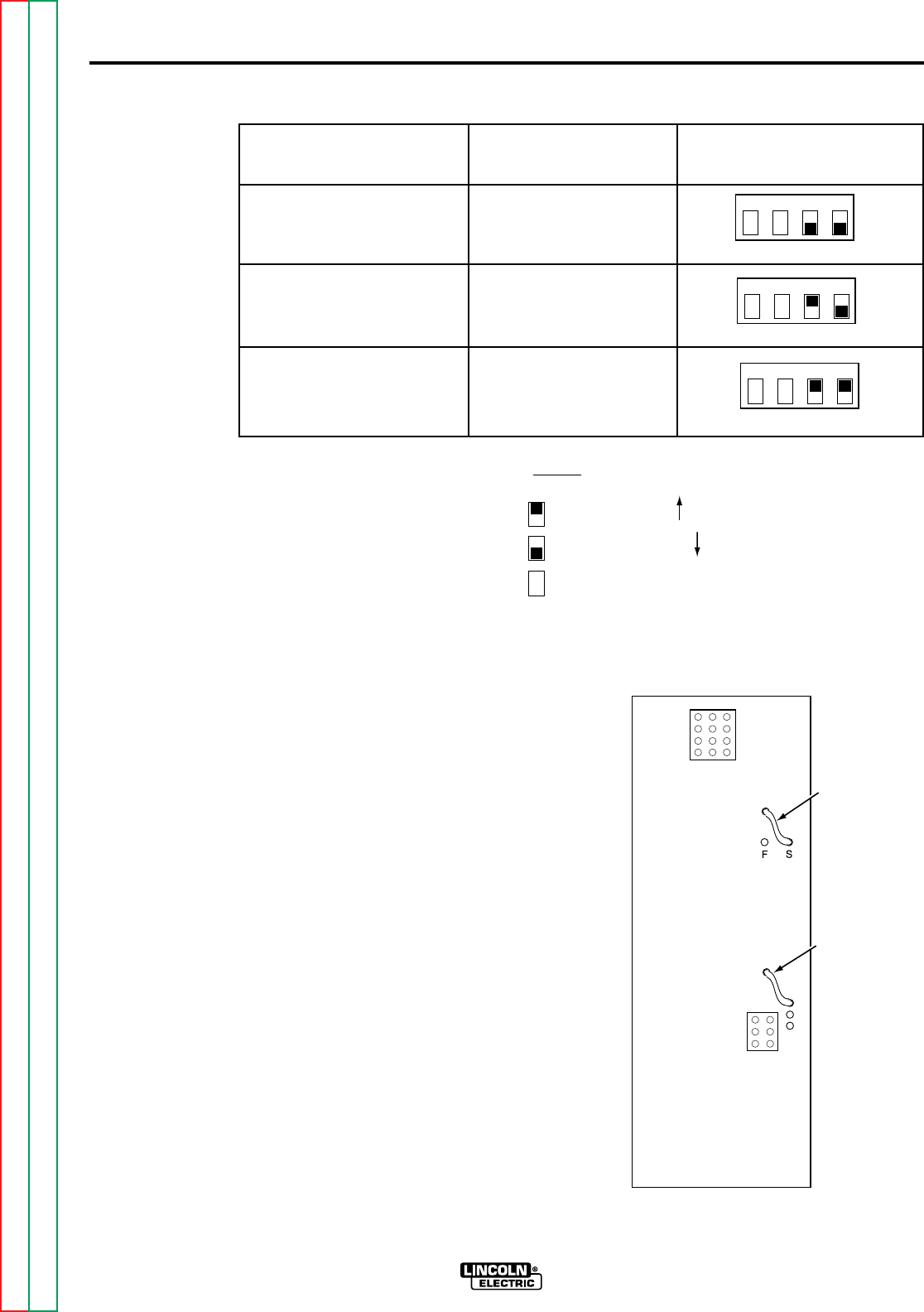
TABLE B.2 – STOPPING SEQUENCE SETTINGS.
When “Stop” Button
is Pressed Older Models Newer Models*
Feed motor stops and Lead #693 to Pin 3
electrode burns back with Lead #690 to Pin 4
contactor delay (standard)
Feed motor inches up and Lead #693 to Pin 1
electrode burns back with Lead #690 to Pin 4
contactor delay
Feed motor inches up and Lead #693 to Pin 1
contactor opens Lead #690 to Pin 2
(no burnback)
*NOTE:
VOLTAGE CONTROL
RESPONSE
The NA-5 is provided with selectable voltage
control response. Proper setting depends on
the power source and process being used.
Refer to the appropriate power source
connection diagram for the proper
connection of the jumpers located on the
NA-5 Voltage P.C. Board, shown in Figure
B.3.
To change the voltage control response:
1. Turn off all input power to the NA-5
control.
2. Open the control box.
3. Locate the Voltage P.C. Board
mounted on the right side of the box.
Position the jumper plugs on the
Voltage P.C. Board per the
appropriate power source connection
diagram.
1234
Switch #2
1234
Switch #2
1234
Switch #2
OPERATING INSTRUCTIONS B-9B-9
NA-5
Indicates switch in up position
Indicates switch in down position
Indicates switch position does not matter
NA-5
VOLTAGE
A
D
B
RED
JUMPER
PLUG
WHITE
JUMPER
PLUG
FIGURE B.3 – VOLTAGE CONTROL
RESPONSE JUMPER PLUG
LOCATIONS.
Return to Section TOC Return to Section TOC Return to Section TOC Return to Section TOC
Return to Master TOC Return to Master TOC Return to Master TOC Return to Master TOC

AUTOMATIC SHUTDOWN
If the NA-5 voltage control is unable to
supply the “Set” value of the arc voltage
while welding, the automatic shutdown
circuit will activate. This protection circuit
immediately returns the NA-5 control to idle
state within a few seconds after the arc
voltage discrepancy occurs.
Typical causes that activate this protective
shutdown circuit are as follows:
1. “Set” value of arc voltage is outside
the power source range.
2. Power source voltage control not set
for “Remote”.
3. Misconnection of NA-5 control cable
leads to the power source.
4. Incorrect weld polarity connections, or
settings, at NA-5 or power source.
5. Lost connection of NA-5 voltage
sensing leads (#67 and #21) between
arc and voltage control or a blown 1/8
amp fuse on voltage PC boards built
since 1983.
With NA-5 units above Code 8300, the
conditions of causes 4 and 5 above would
result in the wrong wire feed direction when
the weld is started. See the section on
Cold
Start Circuitry.
In the case of full-range control power
sources, such as the DC-600, this protective
shutdown circuit could prevent welding
under the conditions of causes 3, 4 and 5
above by holding the power output at
minimum, possibly providing too low of a
power source output to even establish an
arc, or causing the field fuse to blow
because of rapid field reversals with NA-5
controls above Code 8300. See the section
on
Cold Start Circuitry.
Although out of range shutdown can occur
with all power sources when working with
very low or very high arc voltages, it is most
likely to occur when using the R3S models
with the somewhat limited voltage ranges of
the various taps. For instance, if the R3S-
400 triangle tap setting is for 31 volts, the
range of control from the remote circuit is
approximately 7 volts, i.e. 27.5 to 34.5 volts
at nominal input voltage. If the NA-5
controls are set for 29 volts, and the input
voltage to the R3S goes up, it may not be
possible for the NA-5 control circuit to hold
the 29 volts, so the welding will shut down.
By changing to the 27 volt triangle setting,
the range will be approximately 23.5 to 30.5
volts, and at high input voltage, there will be
sufficient control to hold the “Set” arc
voltage. On these machines, if the NA-5
stops welding, follow this procedure:
1. Move the NA-5 voltage set point 2
volts lower than the desired
procedure and make a test weld.
a. If the NA-5 still shuts down, go to
step 2 below.
b. If the NA-5 keeps welding,
change the R3S triangle setting
to the next higher voltage and
reset the NA-5 set point to the
desired procedure. The R3S is
now set properly unless there is
a significant change in input
voltage. Skip the following step.
2. Move the NA-5 voltage setting set
point 2 volts higher than the desired
procedure and make a test weld.
a. If the NA-5 keeps welding,
change the R3S triangle setting
to the next lower voltage and
reset the NA-5 set point to the
desired procedure. The R3S is
now set properly unless there is
a significant change in input
voltage. Skip the following step.
b. If the NA-5 still shuts down, refer
to the following paragraph and
other causes previously listed.
OPERATING INSTRUCTIONS B-10B-10
NA-5
Return to Section TOC Return to Section TOC Return to Section TOC Return to Section TOC
Return to Master TOC Return to Master TOC Return to Master TOC Return to Master TOC

OPERATING INSTRUCTIONS B-11B-11
NA-5
In some cases, it is also possible to hold the
“Actual” button pressed while starting the
arc. Before the NA-5 shuts down, the actual
arc voltage can be read on the digital meter.
Comparing this reading to the “Set” reading
will tell what change in the range controls of
the power source are required so it can
supply the desired voltage. Should the
meter read zero, check the NA-5 sensing
leads (#21 and #67) connections. Should
the meter read negative (-) voltage, the
polarity connections or settings at the NA-5
or power source are wrong.
This same general procedure can be used
on the other power sources. For example,
if the NA-5 keeps shutting down and the
other possible causes have been checked,
adjust the “Set” voltage higher and/or lower
than the desired voltage. If the NA-5
continues to weld at one of these voltages,
it can be determined what change in the
range controls of the power source are
required so it can supply the desired voltage.
COLD START CIRCUITRY
NA-5 controls above Code 8300 contain
circuitry added to the voltage PC board to
facilitate the “cold starting” features of these
units.* This circuitry senses the voltage
present between the electrode and work, via
leads #67 and #21, and permits normal wire
feed if this voltage exceeds approximately
6.5 VDC. However, if this voltage level is
not exceeded, or drops below approximately
3.5 VDC, the “Auto Stop” activates while
inching down or electrode backup occurs if
the arc start circuit has been initiated.
*Units below Code 8300 can be provided with the cold
start circuitry by replacing the old L-6257 voltage board
with the new G-1556 voltage board. This new board
will mount and connect in the same manner as the old
board, except the third harness connector (previously
connected to a jumper plug) must be connected to the
lower receptacle of the new voltage board.
NOTE: HI-FREQ starting cannot be used
with converted units below Code 8300.
A. Auto Stop
When the “Inch Down” button is pressed, a
low-level DC voltage signal is applied
between the electrode and work which
permits the wire to inch down normally.
When the electrode makes electrical contact
with the work, it shorts out this signal
causing the wire feed to automatically stop
and the flux solenoid to activate until the
“Inch Down” button is released. The “Inch
Up” button is not affected by this circuit.
B. Electrode Backup
If while starting or welding the electrode
stubs or shorts to work, the resulting loss of
arc voltage will cause the electrode to
momentarily back up until the arc voltage is
re-established and then change back to the
normal feed direction.
NOTE: The “cold starting” circuitry will
cause the NA-5 to feed in the wrong
direction when the “Start” button is pressed
if the “Actual” arc voltage, as read on the
NA-5 voltmeter, does not exceed typically
about 6.5 volts. Usual causes for the
situation are:
1. No wire loaded through the NA-5
head and nozzle assembly (except
when using the K148 Contact
Nozzle).
2. No power source weld cable
connection to the NA-5 head or work.
3. Incorrect electrode polarity
connections at the NA-5 or power
source.
4. Little or no output voltage from the
power source.
5. An open voltage sensing lead #67 or
#21 to the NA-5 control box or a
blown 1/8 amp fuse on a voltage PC
board built since 1983.
Return to Section TOC Return to Section TOC Return to Section TOC Return to Section TOC
Return to Master TOC Return to Master TOC Return to Master TOC Return to Master TOC

OPERATING INSTRUCTIONS B-12B-12
NA-5
SECURITY OF WELD
PROCEDURE SETTINGS
There are two means provided to prevent or
limit unauthorized readjustment of the NA-5
voltage and wire feed speed controls once
set to the desired procedure.
1. The security panel of the NA-5 can be
locked to prevent access to the
control knobs.
2. The control range of the procedure
control knobs can be limited to either
about 3% or about 15% of the full
range control by installing a knob
rotation stop screw to any or all of the
control knobs. This stop screw is
installed in the following manner:
a. Turn off the input power to the
NA-5.
b. Loosen each knob set screw and
remove all knobs, including the
rotary select switch knob.
c. Remove the felt seal and square
spacer tube mounted behind
each control knob.
d. Open the control box.
Disconnect, then remove, the
procedure control PC board
assembly and its panel insulation.
e. Install a 1/2 in. long, pan or round
head, #4 sheet metal screw into
the 0.10 in. diameter hole located
beneath each square so the head
is on the back side of the panel
(inside the control box).
f. Remount the PC board assembly
and its panel insulation.
Reconnect the PC board and
close and secure the control box.
g. Remount the rotary select switch
knob and replace each square
spacer tube and felt seal so the
#4 screw protrudes between the
tube and the felt seal.
h. Turn on the NA-5 input power and
set the desired procedure by
rotating the shafts of the controls.
i. Carefully replace each control
knob so the #4 screw inserts into
the center of the shorter length
channel on the back of the knob
for about 3% of the total range of
control or into the center of the
longer length channel for about
15% of the total range of control.
j. With finger pressure on the knob
against the felt seal, carefully
retighten the set screw of each
knob.
NOTE: Steps h thru j will have to be
repeated if it is desired to change the
procedure settings to values outside the
selected 3% or 15% control range limit.
Return to Section TOC Return to Section TOC Return to Section TOC Return to Section TOC
Return to Master TOC Return to Master TOC Return to Master TOC Return to Master TOC

TABLE OF CONTENTS
- ACCESSORIES SECTION -
NA-5
Accessories . . . . . . . . . . . . . . . . . . . . . . . . . . . . . . . . . . . . . . . . . . . . . . . Section C
General . . . . . . . . . . . . . . . . . . . . . . . . . . . . . . . . . . . . . . . . . . . . . C-2
Listing of Accessories . . . . . . . . . . . . . . . . . . . . . . . . . . . . . . . . . . . C-3
K29 Vertical Lift Adjuster . . . . . . . . . . . . . . . . . . . . . . . . . . . . . . C-3
K58 Magnetic Separator . . . . . . . . . . . . . . . . . . . . . . . . . . . . . . C-3
K96 Horizontal Adjuster . . . . . . . . . . . . . . . . . . . . . . . . . . . . . . . C-3
K129 Submerged Arc Small Wire Twinarc® . . . . . . . . . . . . . . . . . C-3
K148 Contact Nozzle and K149 Linc-FillTM
Long Stickout Extension . . . . . . . . . . . . . . . . . . . . . . . . . . . . . C-3
K218 Horizontal Fillet/Lap Attachment . . . . . . . . . . . . . . . . . . . . C-3
K219 Flux Hopper Kit . . . . . . . . . . . . . . . . . . . . . . . . . . . . . . . . C-3
K223 Solenoid Kit . . . . . . . . . . . . . . . . . . . . . . . . . . . . . . . . . . . C-3
K225 Submerged Arc Twinarc Kit . . . . . . . . . . . . . . . . . . . . . . . C-4
K238 High Frequency Unit . . . . . . . . . . . . . . . . . . . . . . . . . . . . C-4
K239 Twinarc Kit for Innershield®Electrodes . . . . . . . . . . . . . . . C-4
K278 SpreadarcTM . . . . . . . . . . . . . . . . . . . . . . . . . . . . . . . . . . . C-4
K281 Solid Wire Straightener for Tiny Twinarc . . . . . . . . . . . . . . C-4
K285 Concentric Flux Cone . . . . . . . . . . . . . . . . . . . . . . . . . . . . C-4
K310 Flux Screen . . . . . . . . . . . . . . . . . . . . . . . . . . . . . . . . . . . C-4
K325 TC-3 Travel Carriage . . . . . . . . . . . . . . . . . . . . . . . . . . . . C-4
K334 Start and Crater Controls . . . . . . . . . . . . . . . . . . . . . . . . . C-5
K336 Remote Interface Module . . . . . . . . . . . . . . . . . . . . . . . . . C-5
K337 Weld Timer Module . . . . . . . . . . . . . . . . . . . . . . . . . . . . . C-5
K349 Multi-Procedure Kit . . . . . . . . . . . . . . . . . . . . . . . . . . . . . . C-5
S-22022 or S-22182 Current Relay . . . . . . . . . . . . . . . . . . . . . . C-5
Speed-Feed Drum . . . . . . . . . . . . . . . . . . . . . . . . . . . . . . . . . . C-5
Speed-Feed Reel . . . . . . . . . . . . . . . . . . . . . . . . . . . . . . . . . . . C-5
Section CSection C
Return to Master TOC Return to Master TOC Return to Master TOC Return to Master TOC
C-2
ACCESSORIES
C-2
NA-5
Product Number Product Name
K29 VERTICAL LIFT ADJUSTER
K58 MAGNETIC SEPARATOR
K96 HORIZONTAL ADJUSTER
K129 SUBMERGED ARC SMALL WIRE TWINARC
K148 CONTACT NOZZLE
K149 LINC-FILL LONG STICKOUT EXTENSION
K218 HORIZONTAL FILLET/LAP ATTACHMENT
K219 FLUX HOPPER KIT
K223 SOLENOID KIT
K225 SUBMERGED ARC TWINARC KIT
K238 HIGH FREQUENCY UNIT
K239 TWINARC KIT FOR INNERSHIELD ELECTRODES
K278 SPREADARC
K281 SOLID WIRE STRAIGHTENER FOR TINY TWINARC
K285 CONCENTRIC FLUX CONE
K310 FLUX SCREEN
K325 TC-3 TRAVEL CARRIAGE
K334 START AND CRATER CONTROLS
K336 REMOTE INTERFACE MODULE
K337 WELD TIMER MODULE
K349 MULTI-PROCEDURE KIT
S22022 or S22182 CURRENT RELAY
SPEED-FEED DRUMS
SPEED-FEED REELS
GENERAL
This section contains a listing and short
description of the accessories that are available with the NA-5 automatic welding
system.
TABLE C.1 – NA-5 AUTOMATIC WELDING SYSTEM ACCESSORIES.
Return to Section TOC Return to Section TOC Return to Section TOC Return to Section TOC
Return to Master TOC Return to Master TOC Return to Master TOC Return to Master TOC

ACCESSORIES C-3C-3
NA-5
LISTING OF ACCESSORIES
K29 VERTICAL LIFT ADJUSTER
When mounted in the NA-5 head mounting
system, the K29 Vertical Lift Adjuster
provides quick hand crank adjustment of the
vertical head position. It also has some
horizontal adjustability as described in Sec.
T3.2.3 of operator’s manual IM305.
Installation instructions are shipped with
each K29 Vertical Lift Adjuster kit, are
contained in the IM305 manual, and can be
ordered as Sec. T2.2.11.
K58 MAGNETIC SEPARATOR
Useful with any submerged arc equipment.
The unit removes foreign magnetic particles
from reused submerged arc welding flux.
Operating instructions are included with the
kit.
K96 HORIZONTAL ADJUSTER
When mounted in the NA-5 head mounting
system, the K96 Horizontal Adjuster
provides quick hand crank adjustment of the
horizontal head position. Installation
instructions are shipped with each K96
Horizontal Adjuster kit, are contained in the
IM305 manual, and can be ordered as Sec.
T2.2.12.
K129 SUBMERGED ARC SMALL
WIRE TWINARC®
The Twinarc system provides for the feeding
of two small solid wires through a single wire
feeder. The Twinarc assembly includes a
wire reel, reel brake, shaft and mounting
bracket, drive roll, idle roll assembly, dual
wire guides, and nozzle and contact tip or
contact tip holder. Instructions are shipped
with each kit, are contained in the IM305
manual, and can be ordered as Sec. T2.5.3
K129.
K148 CONTACT NOZZLE AND
K149 LINC-FILLTM LONG
STICKOUT EXTENSION
This Innershield and submerged arc nozzle
is designed for 0.062 through 3/16 in.
(1.57 through 4.76 mm) wire at high
currents. When long stickout [2 to 5 (50.80
to 127.00 mm)] is required, the K149
Linc-Fill Long Stickout Extension is
recommended along with the K237 Linc-Fill
Starting Relay. Instructions are contained in
the IM305 manual and can also be ordered
as Sec. T2.2.7.
K218 HORIZONTAL
FILLET/LAP ATTACHMENT
This special contact assembly automatically
guides the electrode when making
submerged arc horizontal fillet and lap welds
to ensure accurate bead placement without
expensive fixtures and clamps. Installation,
operating, and maintenance instructions are
shipped with each kit, are contained in the
IM305 manual, and can also be ordered as
Sec. T2.5.4.
K219 FLUX HOPPER KIT
This flux hopper, which has an electric flux
valve, can be mounted on NA-5N and
NA-5NF heads for submerged arc welding.
Installation instructions are included with
each kit. The operator and maintenance
instructions are contained in the IM305
manual and can also be ordered as
Sec. T2.5.9.
K223 SOLENOID KIT
The solenoid kit includes a valve to control
water flow when using the cooling
attachment on the K148 or K239 contact
nozzle assembly. It opens when the start
button is pressed and can be wired to close
either when the stop button is pressed or
when the arc goes out. Installation
instructions are shipped with each kit.
Return to Section TOC Return to Section TOC Return to Section TOC Return to Section TOC
Return to Master TOC Return to Master TOC Return to Master TOC Return to Master TOC

ACCESSORIES C-4C-4
K225 SUBMERGED
ARC TWINARC KIT
The Twinarc kit provides for the feeding of
two 5/64, 3/32, or 1/8 in. (1.98, 2.38, or
3.18 mm) solid wires through a single wire
feeder. The electrode wire must be the
same size. The assembly includes a wire
reel, insulated reel mounting bracket, wire
straightener, dual wire guides, nozzle, and
contact block. Installation, operating, and
maintenance instructions are shipped with
each kit, are contained in the IM305 manual,
and can be ordered as Sec. T2.5.3 K225.
K238 HIGH FREQUENCY UNIT
This unit supplies high frequency to the
welding leads for more positive starts, which
may be required for certain difficult starting
applications. Factory-installed insulation is
required. Instructions are shipped with each
unit. Installation instructions are contained
in the IM305 manual and can be ordered as
Sec. T2.5.8.
K239 TWINARC KIT FOR
INNERSHIELD®ELECTRODES
This kit provides for welding with two
Innershield electrodes. Two 3/32 in.
(2.38 mm) flux-cored electrodes are fed
through a single wire feeder. Both wires
must be the same size. The K239 kit
includes the nozzle equipped for water
cooling, drive rolls, drive roll locating collar,
idle roll assembly, ingoing and outgoing
guide tubes, wire straightener, wire reel, and
wire reel mounting shaft and insulation.
Instructions are included in the kit, are
contained in the IM305 manual, and can
also be ordered as Sec. T2.5.3 K239.
K278 SPREADARCTM
The primary application for this accessory is
for hardfacing buildup using a Twinarc
nozzle. The combination “Spreadarc-
Twinarc” covers large areas quickly with
smooth beads of minimum admixture with
the base metal. Flux cored electrode, open
arc, and submerged arc procedures can be
used. Instructions are shipped with the kit,
are contained in the IM305 manual, and can
also be ordered as Sec. T2.5.6.
K281 SOLID WIRE
STRAIGHTENER FOR
TINY TWINARC
This wire straightener will straighten 0.045
through 3/32 in. (1.14 through 2.38 mm) wire
diameters. It is recommended for welding
procedures requiring long stickout and
where wire position accuracy is essential.
Instructions are shipped with the kit, are
contained in the IM305 manual, and can be
ordered as Sec. T2.5.5.
K285 CONCENTRIC FLUX CONE
The concentric flux cone was designed to
fit on the K148 Contact Nozzle alone, the
K148 Contact Nozzle with a K149 Linc-Fill
Long Stickout Extension, the K129
Submerged Arc Small Wire Twinarc, and
the K391 nozzles. (The maximum electrical
stickout when using the K149 Linc-Fill Long
Stickout Extension will be 4 in. [101.6 mm.]).
Use of this attachment results in the flux
being fed concentrically around the
electrodes. Installation, operating, and
maintenance instructions are shipped with
each kit, are contained in the IM305 manual,
and can be ordered as Sec. T2.2.8 K285.
K310 FLUX SCREEN
Useful for any submerged arc equipment. It
removes foreign magnetic particles from
reused submerged arc welding flux.
Operating instructions are included in the kit.
K325 TC-3 TRAVEL CARRIAGE
The K325 Travel Carriage carries the control
box and wire drive head, in either direction,
on a beam of suitable length and
mechanical specifications. Two models are
available: Standard and High Capacity.
NA-5
Return to Section TOC Return to Section TOC Return to Section TOC Return to Section TOC
Return to Master TOC Return to Master TOC Return to Master TOC Return to Master TOC

ACCESSORIES C-5C-5
NA-5
K334 START AND CRATER
CONTROLS
Easily installed procedure and timer boards
to permit adjustment of wire speed and
voltage. Can be installed to function at
either the start of the weld or at the end for
crater filling. Installation, operating, and
maintenance instructions are shipped with
each kit and can be ordered as Sec. T2.5.13
K334.
K336 REMOTE INTERFACE
MODULE
Permits connection of customer-furnished
remote start-stop and inch momentary
contact closure or momentary 24 volt
signals. Also used when a single remote
signal is desired to start or stop multiple
heads. This module replaces the earlier
K336 Remote Pushbutton Interface Module.
Installation and application instructions are
shipped with each kit and can be ordered as
Sec. T2.5.11 K336.
K337 WELD TIMER MODULE
Permits setting of weld time for an adjustable
period. Eliminates need to press the “Stop”
button. Instructions are included in the kit.
K349 MULTI-PROCEDURE KIT
The K349 Multi-Procedure Kit provides three
additional weld mode procedure settings of
wire feed speed and voltage, allowing the
choice of four NA-5 weld mode procedures.
Installation, operating, and maintenance
instructions are shipped with each kit, are
contained in the IM305 manual, and can be
ordered as Sec. T2.5.19 K349.
S22022 OR S22182 CURRENT
RELAY MODULES
The current relay is useful to fixture builders
and others who need a signal indicating that
welding current is flowing. Installation,
operating, and maintenance instructions are
shipped with each kit. The S22022 relay
module is suitable for dry circuit applications
and it is rated at 2 Amps, 115 VAC or 28
VDC. This relay has both normally open and
normally closed contacts. The S22182 relay
module is suitable for applications requiring
at least 10 mA current and it is rated at 3
Amps, 115 VAC or 28 VDC. This relay only
has normally open contacts.
SPEED-FEED DRUM
These drums must be set on a turntable
which permits them to freely turn in a
clockwise direction. Installation, operating,
and maintenance instructions are contained
in the IM305 manual and can be ordered as
Sec. T2.5.7-A.
SPEED-FEED REEL
These reels require dereeling equipment
that permits the reel to rotate freely as the
electrode is used. Installation, operating,
and maintenance instructions are contained
in the IM305 manual and can be ordered as
Sec. T2.5.7-B.
Return to Section TOC Return to Section TOC Return to Section TOC Return to Section TOC
Return to Master TOC Return to Master TOC Return to Master TOC Return to Master TOC


TABLE OF CONTENTS
- MAINTENANCE SECTION -
NA-5
Maintenance . . . . . . . . . . . . . . . . . . . . . . . . . . . . . . . . . . . . . . . . . . . . Section D
Control Box . . . . . . . . . . . . . . . . . . . . . . . . . . . . . . . . . . . . . . . . . . D-2
General . . . . . . . . . . . . . . . . . . . . . . . . . . . . . . . . . . . . . . . . . . D-2
Circuit Protection . . . . . . . . . . . . . . . . . . . . . . . . . . . . . . . . . . . D-2
Ground Fault Fuse Protection . . . . . . . . . . . . . . . . . . . . . . . . . . D-3
Welding Head . . . . . . . . . . . . . . . . . . . . . . . . . . . . . . . . . . . . . . . . . D-3
Wire Drive Gear Box . . . . . . . . . . . . . . . . . . . . . . . . . . . . . . . . . D-3
Wire Drive Motor . . . . . . . . . . . . . . . . . . . . . . . . . . . . . . . . . . . D-4
Changing Wire Feed Gear Ratios . . . . . . . . . . . . . . . . . . . . . . . . D-4
Wire Drive Mechanism . . . . . . . . . . . . . . . . . . . . . . . . . . . . . . . D-5
Wire Straighteners . . . . . . . . . . . . . . . . . . . . . . . . . . . . . . . . . . D-5
Optional Features . . . . . . . . . . . . . . . . . . . . . . . . . . . . . . . . . . . . . . D-6
Contact Assemblies . . . . . . . . . . . . . . . . . . . . . . . . . . . . . . . . . . D-6
Wire Reel Mounting for 50 or 60 lb (22.7 or 27.2 kg) Coils . . . . . D-6
Travel Carriage . . . . . . . . . . . . . . . . . . . . . . . . . . . . . . . . . . . . . D-6
Vertical Lift Adjuster . . . . . . . . . . . . . . . . . . . . . . . . . . . . . . . . . D-6
Horizontal Adjuster . . . . . . . . . . . . . . . . . . . . . . . . . . . . . . . . . . D-6
High Frequency Generator . . . . . . . . . . . . . . . . . . . . . . . . . . . . D-6
Spreadarc . . . . . . . . . . . . . . . . . . . . . . . . . . . . . . . . . . . . . . . . . D-6
Section DSection D
Return to Master TOC Return to Master TOC Return to Master TOC Return to Master TOC
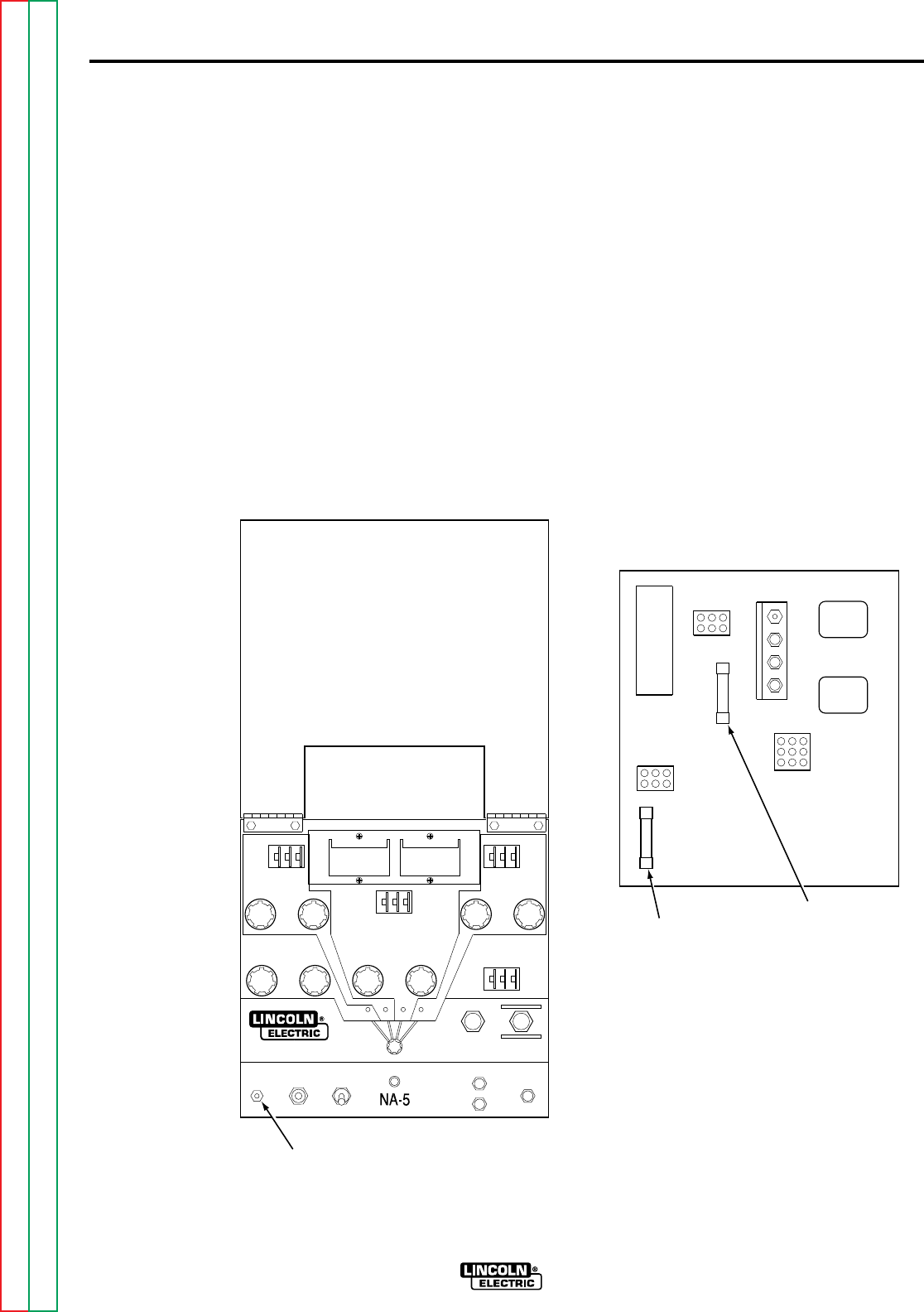
D-2
MAINTENANCE
D-2
NA-5
CONTROL BOX
GENERAL
Inspect the control box every 3 months. If
needed, blow dirt out using
low
pressure air.
No further maintenance should be required.
CIRCUIT PROTECTION
The circuit breaker mounted on the left side
of the control box protects the control circuit
from short circuit conditions and from severe
wire feed overloads. If it is open, determine
and correct the cause for the overload. To
reset the circuit breaker, push in the red
button shown in Figure D.1.
FIGURE D.1 – CIRCUIT BREAKER
RESET BUTTON.
If a complete or partial short occurs in the
field circuit, or if there is a defect on the PC
board, a 1/2 amp slow-blow type fuse will
blow. This field circuit fuse is mounted on the
power PC board, shown in Figure D.2, inside
the control box. Before replacing the fuse,
check the motor field for a short condition.
Normal resistance is approximately 700
ohms.
With NA-5 controls above Code 8300, the
field circuit fuse may blow due to frequent
motor field reversals from application
problems affecting the “cold” starting circuit,
such as the power source output being too
low to establish an arc or the welding
procedure causing frequent electrode-to-
puddle shorting. (Refer to
Automatic
Shutdown
in Section B, Operating
Instructions.)
FIGURE D.2 – POWER PC BOARD
FUSE LOCATIONS.
The power supply for the electronic circuitry
is protected by a 1/2 amp slow-blow type fuse
shown in Figure D.2. It is located on the
power PC board inside the control box.
CIRCUIT
BREAKER
RESET BUTTON
FIELD
1/2 AMP
SLOW-BLOW
FUSE
POWER
1/2 AMP
SLOW-BLOW
FUSE
NA-5 POWER
Return to Section TOC Return to Section TOC Return to Section TOC Return to Section TOC
Return to Master TOC Return to Master TOC Return to Master TOC Return to Master TOC
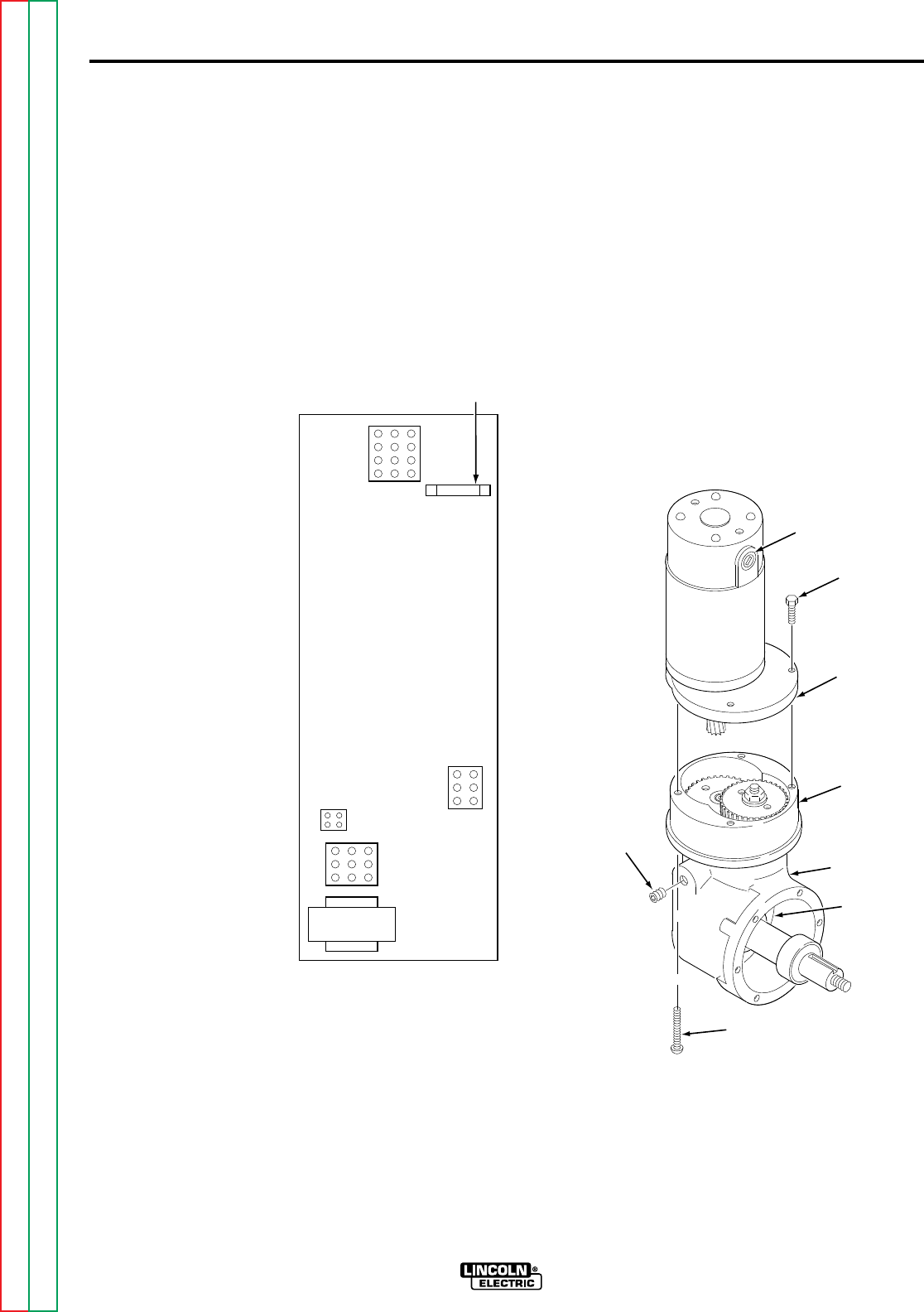
MAINTENANCE D-3D-3
NA-5
The 1/8 amp fast-blow fuse, shown in Figure
D.3, on a voltage PC board built since 1983,
protects the NA-5 circuitry from damage
which may result from a ground or case
faulted control lead. If the fuse blows, the
NA-5 voltage sensing lead circuit will be
opened (Refer to
Automatic Shutdown
in
Section B, Operating Procedures) and the
Troubleshooting Guide.
FIGURE D.3 – VOLTAGE BOARD FUSE
LOCATION.
GROUND FAULT FUSE
PROTECTION
A 1/8 amp fast-blow fuse, shown in Figure
D.3, is located on the voltage PC board.
This fuse will protect the NA-5 circuitry from
damage resulting from a ground or case
faulted control lead when the arc voltage
potential exists between ground and the
NA-5 circuit common (#510). Such a
condition typically exists when the NA-5
polarity connections are set for electrode
negative.
WELDING HEAD
WIRE DRIVE GEAR BOX
Once a year, recoat all gear teeth with a
non-fluid molydisulfide type grease such as
Non-Fluid Oil Corporation’s A-29 Special/MS
Lubricant. For access to the gears in the first
chamber, remove the adapter plate and
motor assembly as shown in Figure D.4.
FIGURE D.4 – WIRE DRIVE MOTOR
GEAR BOX.
To lubricate the gears in the second
chamber, remove one of the pipe plugs and
feed grease until it comes in contact with the
bevel gear teeth. Then, rotate the output
shaft by hand until all teeth are lubricated.
1/8 AMP
FAST-BLOW
FUSE
NA-5
VOLTAGE
HEX HEAD
SCREW
ADAPTER
PLATE AND
MOTOR
ASSEMBLY
FIRST
CHAMBER
WIRE DRIVE
GEARBOX
SECOND
CHAMBER
SLOT HEAD
SCREW
PIPE
PLUG
DRIVE MOTOR
BRUSH ACCESS
Return to Section TOC Return to Section TOC Return to Section TOC Return to Section TOC
Return to Master TOC Return to Master TOC Return to Master TOC Return to Master TOC
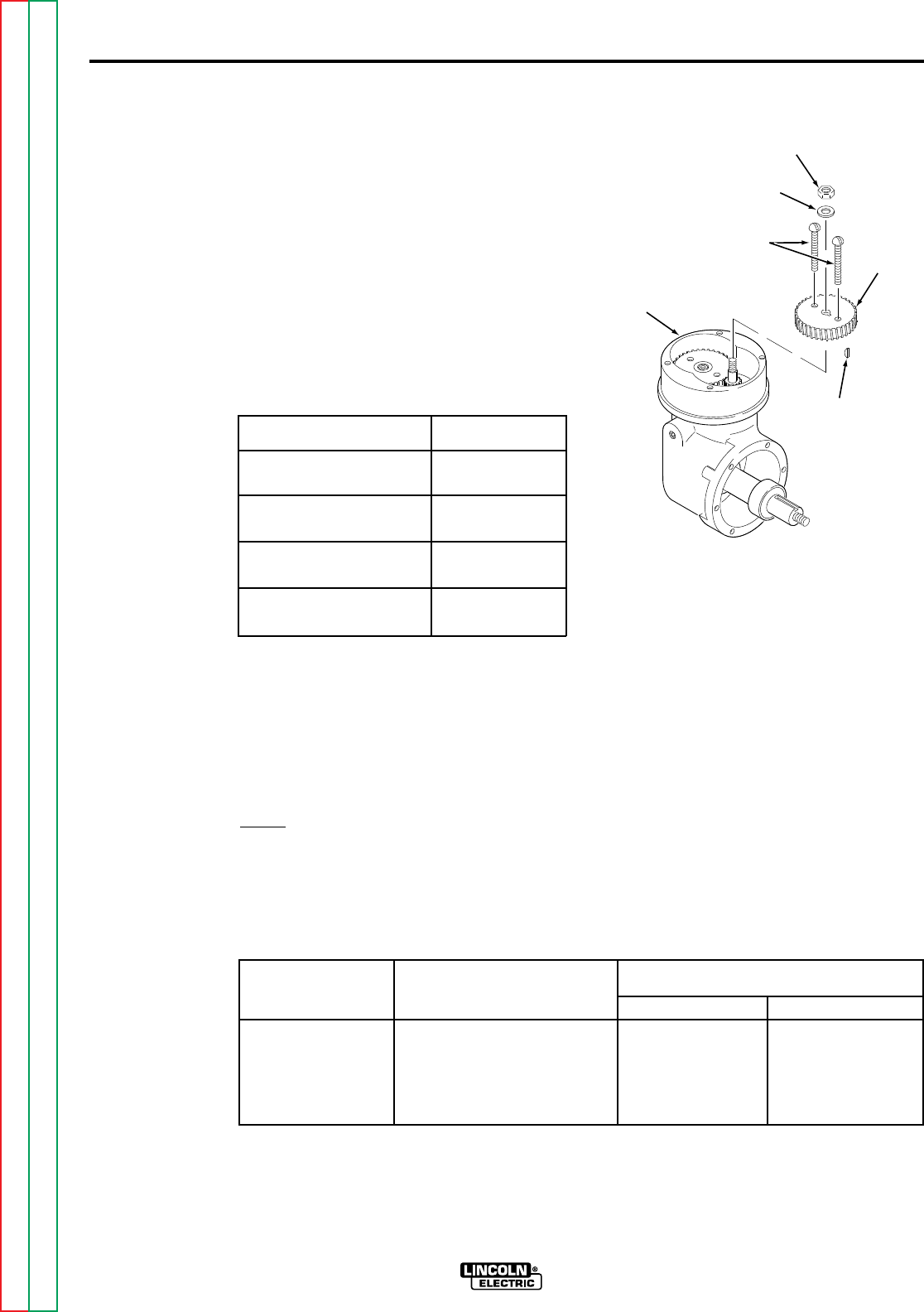
MAINTENANCE D-4D-4
NA-5
WIRE DRIVE MOTOR
Periodically inspect the wire drive motor
brushes, Figure D.4. Replace the brushes
as needed.
CHANGING WIRE FEED GEAR
RATIOS
Four wire size conversion kits are available
to modify the wire feeder for different size or
type electrodes. The kits include drive rolls
and guide tubes for the wire specified, as
shown in Table D.1.
TABLE D.1 - CONVERSION KITS
Wire Type in. (mm) Conversion Kit
3/32-7/32 (2.38-5.56) T13724-A
Solid or Cored
1/16-3/32 (1.59-2.38) T13724-B
Solid or Cored
0.035-0.052 (0.89-1.32) T13724-C
Solid
0.045-0.052 (1.14-1.32) T13724-D
Cored
Refer to Table D.2. Four gear ratios are
available: 21:1, 57:1, 95:1, and 142:1. To
change the gear ratio, replace the motor
pinion and the first reduction gear per the
following instructions (Refer to Figures D.4,
D.5 and D.6).
NOTE: Any item numbers in parentheses
on Figure D.5 refer to item numbers in the
task description breakdown.
FIGURE D.5 – CHANGING THE WIRE
FEED GEAR RATIO
1. Remove the four screws that mount
the adapter plate and motor assembly
to the gear box. Remove the adapter
plate and motor assembly from the
gear box.
2. Take the two long screws removed in
step 1 and screw one into each of the
tapped holes located on the face of
fiber input helical gear (12). Insert the
screws through the full thickness of
the gear, and using a screwdriver
wedged between the screws to
prevent rotation, remove hex nut (11)
that holds the gear to the shaft.
Remove plain washer (9).
TABLE D.2 – WIRE FEED GEAR RATIOS.
Feed Speed Max Wire Size
Gear Range in. (mm)
Ratio in/min (m/min) Cored Wire Solid Wire
21:1 100-2070 (2.54-52.58) 0.052 (1.3) 0.052 (1.3)
57:1 40-778 (1.02-19.76) 3/32 (3.0) 1/16 (1.6)
95:1 22-456 (0.56-11.58) 5/32 (4.0) 1/8 (3.2)
142:1 15-300 (0.38-7.62) 5/32 (4.0) 7/32 (5.6)
HEX NUT (11)
PLAIN WASHER (9)
WOODRUFF
KEY (8)
WIRE
FEED
GEARBOX
INPUT
HELICAL
GEAR (12)
SLOT HEAD
SCREWS
(MOUNTING
SCREWS)
Return to Section TOC Return to Section TOC Return to Section TOC Return to Section TOC
Return to Master TOC Return to Master TOC Return to Master TOC Return to Master TOC
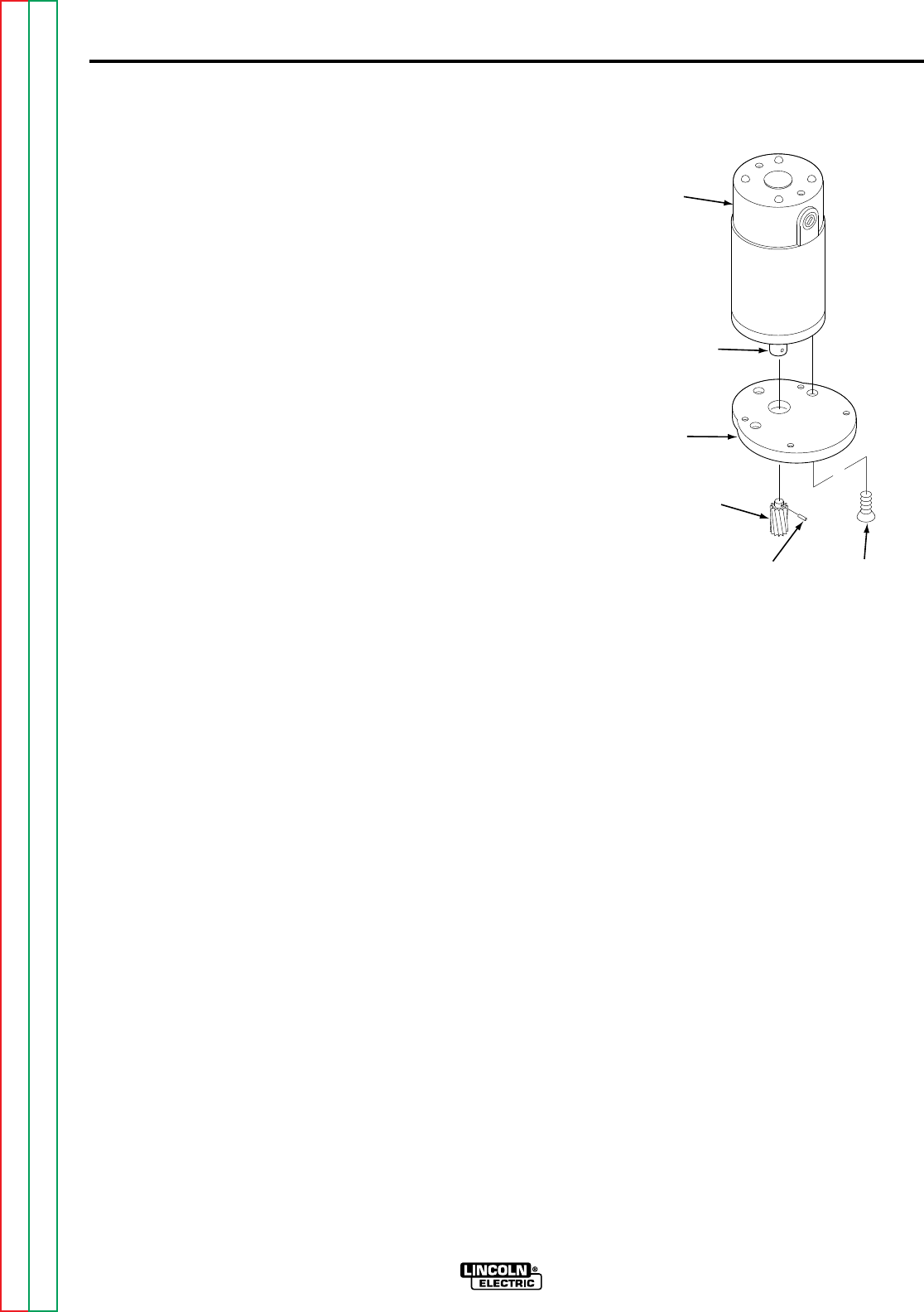
MAINTENANCE D-5D-5
NA-5
3. Pull the gear from the shaft using the
screws as a pulling device.
4. Be certain woodruff key (8) is properly
located on the shaft. Screw the
adapter plate and motor assembly
mounting screws into the new fiber
input helical gear from the stenciled
side and place the gear on the shaft.
Replace plain washer (9), tighten the
hex nut (1), and remove the adapter
plate and motor assembly mounting
screws from the gear.
5. After noting the relation of the adapter
plate with the motor leads, remove
the adapter plate from the wire drive
motor. See Figure D.6. Support the
pinion properly and, with the proper
size punch, drive the roll pin that
holds the pinion out of the shaft. Pull
the pinion off. Install the new pinion
and replace the roll pin. Replace the
adapter plate in its original location.
6. Cover the teeth of the motor pinion
and the input gear with a non-fluid
molydisulfide type grease such as
Non-Fluid Oil Corporation’s A-29
Special/MS Lubricant. This grease
can be scooped from the cavity of the
gear case.
7. Reassemble the motor on the gear
box; make sure the gears mesh
properly and the adapter plate
locating bead is in its cavity. Replace
and tighten the four screws removed
in step 1.
8. Jumper on wire speed meter PC
board must be properly positioned for
the gear ratio and drive rolls being
used (See the wiring diagram for the
wire speed meter PC board.)
WIRE DRIVE MECHANISM
Drive mechanisms for three wire size ranges
are available: 0.035 through 0.052 in.
(0.9 through 1.3 mm), 1/16 through 3/32 in.
1.6 through 2.4 mm), and 3/32 through
7/32 in. (2.4 through 5.6 mm). If changing to
wire sizes outside this range, change the
drive rolls and the incoming and outgoing
guide tubes. Also change the gear ratio as
necessary.
The electrode is driven by gripping
between the grooved drive rolls and
spring-loaded idle roll. Replace the drive
rolls when they become worn. The drive rolls
for 1/16 in. (1.6 mm) and larger diameter
electrodes have two sets of teeth so they
can be reversed once before they must be
replaced.
WIRE STRAIGHTENERS
Solid Electrode
Periodically inspect the slide bushing at the
top of the straightener and the ingoing wire
guide at the bottom of the straightener for
signs of wire milling. If necessary, rotate the
guide to present an unworn surface. To
reverse the slide bushing for a fresh wear
surface, remove the cross adjustment screw
and turn the bushing over.
Flux-Cored Electrode
Severe wear at the “V” groove in the curved
arm of the straightener can result in wire
wander at the arc. Periodically check the
groove and replace the arm when badly
worn. Also replace the ingoing guide at the
top of the straightener if it shows signs of
wire milling.
WIRE
DRIVE
MOTOR
SHAFT
ADAPTOR
PLATE
PINION
ROLL PIN MOUNTING
SCREW (X3)
FIGURE D.6 – DRIVE MOTOR PINION
GEAR REMOVAL.
Return to Section TOC Return to Section TOC Return to Section TOC Return to Section TOC
Return to Master TOC Return to Master TOC Return to Master TOC Return to Master TOC

MAINTENANCE D-6D-6
NA-5
OPTIONAL FEATURES
CONTACT ASSEMBLIES
A dirty or rusty electrode and excessively
high currents cause rapid wear of the
contact tips. The nozzle contact tip must be
replaced when it no longer provides accurate
wire location or good electrical contact. See
Sec. T2.2.6, Sec. T2.2.7, or Sec. T2.5.3 of
the IM305 manual for specific instructions to
replace contact tips and to perform
maintenance on other various contact
assemblies.
WIRE REEL MOUNTING FOR
50 OR 60 LB (22.7 OR
27.2 KG) COILS
Periodically coat the reel shaft with a thin
layer of grease. No maintenance of the two-
position adjustable brake is needed except
to replace the shoe assembly if it wears
through.
TRAVEL CARRIAGE
Periodically:
1. Disengage the release handle and
see that the carriage moves freely
along the beam.
2. Add a few drops of machine oil to
each of the head lift bearings. This
can be done through the front
opening in the carriage.
3. Add a few drops of oil to the clutch
handle bearings.
4. Add a few drops of oil into each of the
cups at the travel mounting pivot
point.
(No change of lubrication is required
for cold temperature operation.)
Once a year:
1. Check the motor brushes. If 0.25 in.
(6.35 mm) or shorter, replace with
new brushes.
2. Check the carriage drive gear teeth.
If the teeth are badly worn, replace
the drive gear.
3. After 5,000 hours of operation, the
motor and the first reduction gear
should be removed from the gear box,
and all the gear teeth should be
recoated with a good grade of
graphite grease.
VERTICAL LIFT ADJUSTER
Every month, add a few drops of SAE-140
oil or equivalent to the oil cup on the back
of the vertical lift housing. Every year,
replace the grease in the top section gear
cavity with a medium grease. If the unit is
disassembled for cleaning, apply a layer of
medium grease to the screw threads of the
head lift tube and head lift screw. Apply a
thin layer of grease to the outside diameter
of the head lift tube and the inside diameter
of the long hole in the head lift body. Slide
the head lift tube into the head lift body and
screw in the head lift screw. Fill the upper
section gear cavity one-half full of grease.
Be sure the needle bearings are packed in
grease.
HORIZONTAL ADJUSTER
Twice a year, apply a thin coat of grease to
all sliding surfaces. Every year, replace the
grease in the gear cavity with a medium
grease.
HIGH FREQUENCY GENERATOR
Inspect the spark gaps monthly and maintain
the setting specified on the spark gap cover
plate.
SPREADARC
Refer to the maintenance information
provided in IM305 Sec. T2.5.6.
Return to Section TOC Return to Section TOC Return to Section TOC Return to Section TOC
Return to Master TOC Return to Master TOC Return to Master TOC Return to Master TOC

E-1
THEORY OF OPERATION
E-1
NA-5
TABLE OF CONTENTS
-THEORY OF OPERATION SECTION-
Theory of Operation..................................................................................................................Section E
General Description..........................................................................................................................E-2
Input Power Circuits .........................................................................................................................E-2
Power and Voltage Boards...............................................................................................................E-3
Control, Logic and Procedure Boards ..............................................................................................E-4
Optional start, Crater Fill and Weld Timer Boards............................................................................E-5
SCR Operation.................................................................................................................................E-6
Return to Master TOC Return to Master TOC Return to Master TOC Return to Master TOC
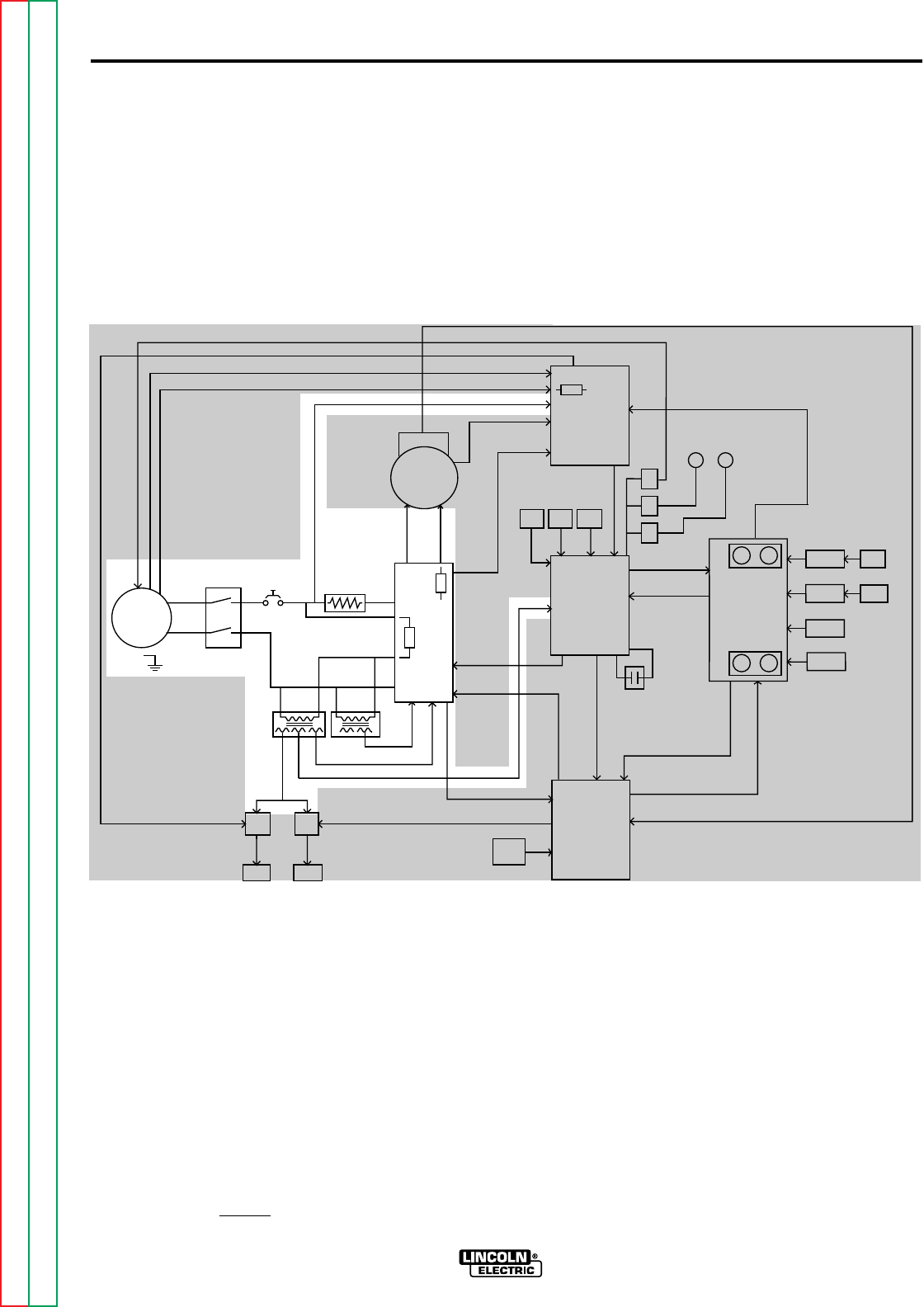
E-2
THEORY OF OPERATION
E-2
INPUT POWER CIRCUITS
The NA-5 control unit is supplied with
115VAC power usually from the welding
power source. The 115VAC power is
connected to the control box circuitry
through the control cable receptacle,
the input power switch and a 5 amp cir-
cuit breaker.
The 115VAC is applied through a 2 ohm
resistor to the power board where is
rectified and controlled to supply arma-
ture and field voltage to the wire drive
motor. The voltage board receives
115VAC and transforms and rectifies it
to 24VDC for the "work touch sensing"
circuit. The T1 and T2 transformer pri-
maries are also supplied with 115VAC
via the F1 (1/2amp) fuse on the power
board. The T1 and T2 secondary wind-
ings offer a variety of isolated AC sup-
ply voltages to the power, logic and
meter boards.
FIGURE E.1 Input Circuits
NA-5
F1
A
R
M
A
T
U
R
E
F
I
E
L
D
V
O
L
T
A
G
E
V
O
L
T
A
G
E
T1 T2
OPTIONAL
START
BOARD
OPTIONAL
CRATER
BOARD
OPTIONAL
WELD
TIMER
BURNBACK
TIMER
VOLTAGE
BOARD
METER
BOARD
SPEED
VOLT METER
BOARD
DIGITAL
METER DIGITAL
METER
MOTOR
LOGIC
BOARD
CONTROL
BOARD
P
O
W
E
R
B
O
A
R
D
P
R
O
C
E
D
U
R
E
B
O
A
R
D
TACH
INCH
DOWN
SWITCH
STOP
SWITCH
START
SWITCH
WELD
CURRENT
REED SWITCH
CR
1
CR
2
CR
3
FLUX
RECEPTACLE
TRAVEL
RECEPTACLE
CONTACTOR CLOSURE (#2 AND #4)
REMOTE VOLTAGE CONTROL (A, B, C)
WORK SENSING (#21)
TACH FEEDBACK (MOTOR RPM)
DC SUPPLY VOLTAGE
10VDC REFERENCEVOLTAGE
DC VOLTAGE
S
I
G
N
A
L
INPUT
POWER
SWITCH CIRCUIT
BREAKER R1(2 OHMS)
MOTOR G
A
T
E
S
I
G
N
A
L
S
CONTROL
CABLE
RECEPTACLE
TACH FEEDBACK (MOTOR RPM)
115VAC
36VAC (18+18VAC)
22VAC
1
V
A
C
0
D
C
S
U
P
P
L
Y
V
O
L
T
A
G
E
SIGNAL
A
R
C
V
O
L
T
A
G
E
S
H
U
T
D
O
W
N
A
N
D
INCH
UP
SWITCH
STRIKE/WELD PROCEDURE
ENABLE
FIELD
ARMATURE
F
E
E
D
E
N
A
B
L
E
DIRECTION
ARC VOLTS (SET & ACTUAL)
WIRE FEED SPEED (SET & ACTUAL)
E
L
E
C
T
R
ODE SENSING (#67)
115
VAC
WELD
VOLTS SPEED
VOLTS SPEED
STRIKE
115VAC
#31
#32
1/2 AMP
F501
SET SPEED
SET VOLTAGE
START
TIMER
CRATER
TIMER
F2
NOTE: Unshaded areas of block logic diagrams are the subject of discussion.
GENERAL DESCRIPTION
The NA-5 is a fully automatic wire feed
control unit. It is designed for multiple
process CV operation and can be used
with a variety of wire feeder heads, con-
tact nozzles and welding processes.
The NA-5 control unit enables the oper-
ator to preset wire feed speed and arc
voltage on digital meters. These preset
conditions are internally monitored and
remain constant until changed by the
operator.
Return to Section TOC Return to Section TOC Return to Section TOC Return to Section TOC
Return to Master TOC Return to Master TOC Return to Master TOC Return to Master TOC
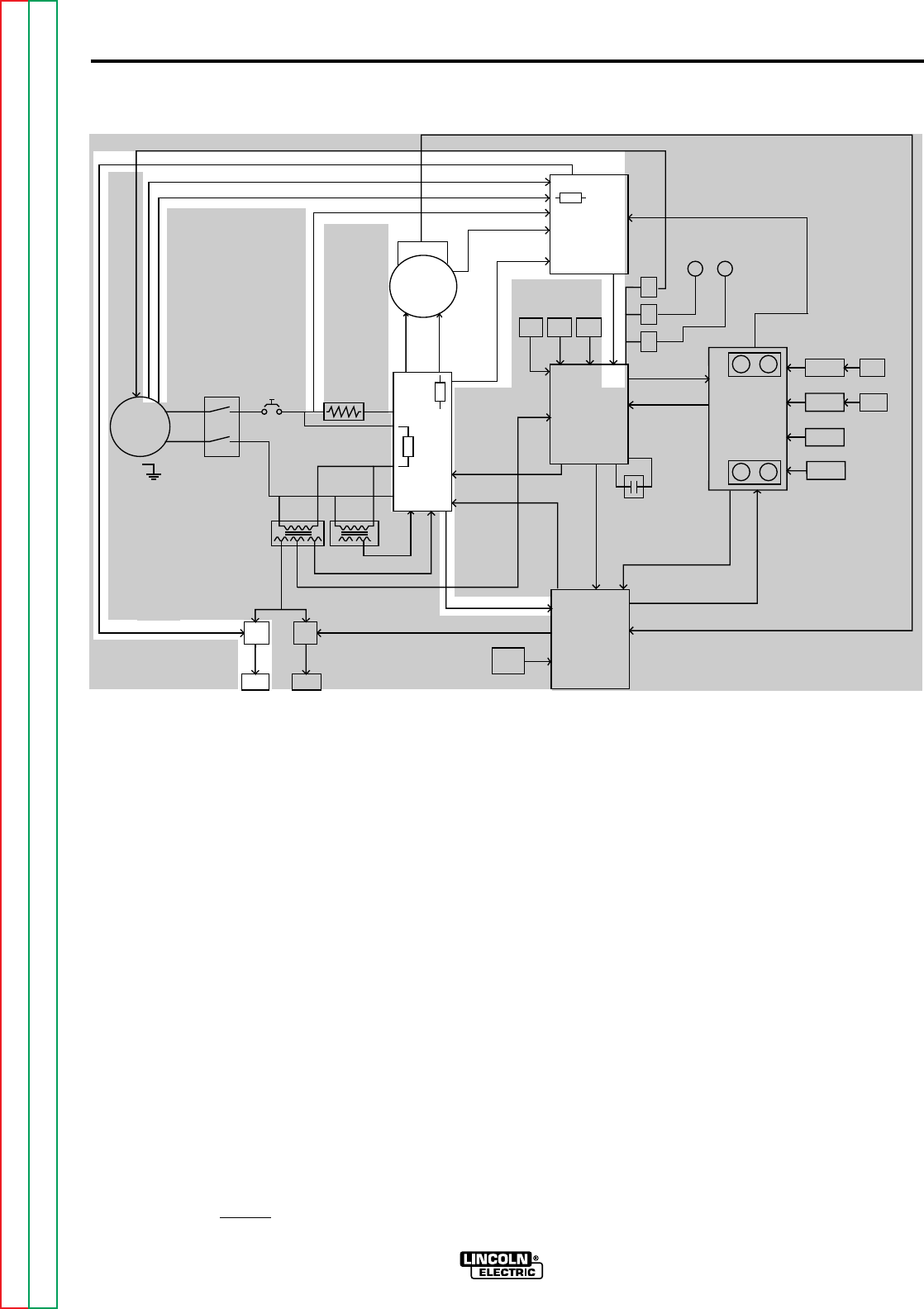
E-3
THEORY OF OPERATION
E-3
POWER AND VOLTAGE
BOARDS
The AC voltages that are received by
the power board are rectified and regu-
lated. These DC voltages are supplied
to the motor, voltage board and control
board. The two SCR-controlled
115VDC supplies power the motor
armature and field circuits.
The actual arc voltage is sensed at leads
#67(electrode) and #21(work) which are
coupled to the voltage board. The pre-
set voltage requirements are also sent to
the voltage board. This information is
compared and processed on the voltage
board and the resultant correction signal
is sent to the Lincoln CV power source
via the remote voltage leads (A,B,C).
The preset and actual arc voltage infor-
mation is also sent to the voltage meter
board where it is processed and dis-
played on the digital meter.
The voltage board also generates a low
DC voltage that is applied to the elec-
trode during the inch down mode.
When the electrode makes contact with
the work piece, this low voltage is
"loaded down", signaling the control cir-
cuitry to stop the wire feed motor. This
feature allows the operator to utilize the
"work touch sensing" feature.
If for any reason the actual welding arc
voltage does not match the set weld
voltage
(+/- 0.5Volts) the NA-5 will shutdown.
This feature insures that the actual
welding voltage is the same as the pre-
set voltage during the welding cycle.
This circuitry is incorporated on the volt-
age board.
FIGURE E.2 Power and Voltage Boards
NA-5
F1
A
R
M
A
T
U
R
E
F
I
E
L
D
V
O
L
T
A
G
E
V
O
L
T
A
G
E
T1 T2
OPTIONAL
START
BOARD
OPTIONAL
CRATER
BOARD
OPTIONAL
WELD
TIMER
BURNBACK
TIMER
VOLTAGE
BOARD
METER
BOARD
SPEED
VOLT METER
BOARD
DIGITAL
METER DIGITAL
METER
MOTOR
LOGIC
BOARD
CONTROL
BOARD
P
O
W
E
R
B
O
A
R
D
P
R
O
C
E
D
U
R
E
B
O
A
R
D
TACH
INCH
DOWN
SWITCH
STOP
SWITCH
START
SWITCH
WELD
CURRENT
REED SWITCH
CR
1
CR
2
CR
3
FLUX
RECEPTACLE
TRAVEL
RECEPTACLE
CONTACTOR CLOSURE (#2 AND #4)
REMOTE VOLTAGE CONTROL (A, B, C)
WORK SENSING (#21)
TACH FEEDBACK (MOTOR RPM)
DC SUPPLY VOLTAGE
10VDC REFERENCEVOLTAGE
DC VOLTAGE
S
I
G
N
A
L
INPUT
POWER
SWITCH CIRCUIT
BREAKER R1(2 OHMS)
MOTOR G
A
T
E
S
I
G
N
A
L
S
CONTROL
CABLE
RECEPTACLE
TACH FEEDBACK (MOTOR RPM)
115VAC
36VAC (18+18VAC)
22VAC
1
V
A
C
0
D
C
S
U
P
P
L
Y
V
O
L
T
A
G
E
SIGNAL
A
R
C
V
O
L
T
A
G
E
S
H
U
T
D
O
W
N
A
N
D
INCH
UP
SWITCH
STRIKE/WELD PROCEDURE
ENABLE
FIELD
ARMATURE
F
E
E
D
E
N
A
B
L
E
DIRECTION
ARC VOLTS (SET & ACTUAL)
WIRE FEED SPEED (SET & ACTUAL)
E
L
E
C
T
R
ODE SENSING (#67)
115
VAC
WELD
VOLTS SPEED
VOLTS SPEED
STRIKE
115VAC
#31
#32
1/2 AMP
F501
SET SPEED
SET VOLTAGE
START
TIMER
CRATER
TIMER
F2
NOTE: Unshaded areas of block logic diagrams are the subject of discussion.
Return to Section TOC Return to Section TOC Return to Section TOC Return to Section TOC
Return to Master TOC Return to Master TOC Return to Master TOC Return to Master TOC
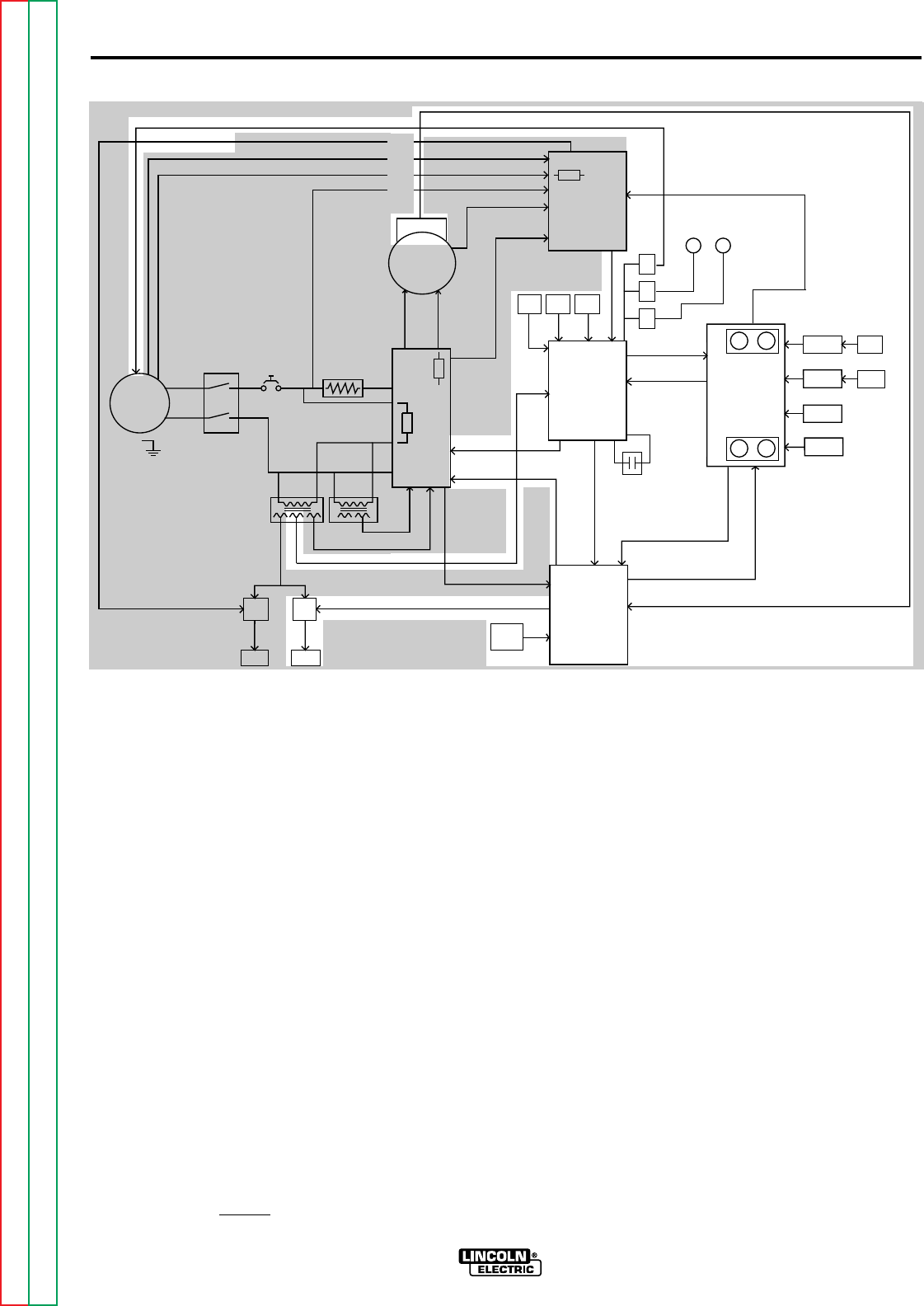
E-4
THEORY OF OPERATION
E-4
CONTROL, LOGIC AND
PROCEDURE BOARDS
The logic board interprets and processes the signals it
receives from the various PC boards, switches and con-
trols. The logic board also houses a DC power supply
(+5 -10) which is derived from the 22VAC received from
the T2 transformer. This DC voltage is also used on the
procedure board.
Upon receiving voltage reference level commands from
the procedure and voltage boards, or the user-operated
switches, the logic board sends the appropriate com-
mand signals to the control and power boards to drive
the wire feed motor to the proper speed and direction.
When the "start" signal is received by the logic board the
power source contact relay (3CR) is energized along
with the travel relay (2CR) and the flux relay (1CR). The
"inch down" and "stop" switches signal the logic board
which then directs the control and power boards to apply
the appropriate armature and field voltages to the wire
drive motor. The "inch up" switch, which is connected
directly to the control board, dictates that the wire drive
motor reverse direction, backing the electrode wire away
from the work piece. When the welding current closes
the reed switch the logic board directs the procedure
board to proceed from the "strike" settings to the optional
start board if used, or to the welding wire speed and arc
voltage parameters.
The control board receives information from the logic
board, the procedure board and the tach feedback cir-
cuit. The control board then applies the appropriate gate
signal to the SCR power supply on the power board.
This variable and regulated DC voltage is applied to the
motor armature thus controlling the speed of the wire
feed motor. The preset and actual wire feed speed infor-
mation is sent to the speed meter board where it is
processed and displayed on the digital meter.
The procedure board incorporates the many options
available with the NA-5. The "strike" and "weld" controls
are part of the procedure board and are not optional.
The wire feed speed and arc voltage settings for the vari-
ous modes are "programmed" through the procedure
board and are then sent to the logic, voltage and control
boards at the appropriate times during the welding cycle.
The burnback time is also coupled through the procedure
board. This control determines the length of time of
burnback delay after the stop circuit is energized.
Depending on the connections on the logic board, it may
also determine the length of time the wire feed motor
reverses after the stop button is pressed.
FIGURE E.4 Control Logic and Procedure Boards
NA-5
NOTE: Unshaded areas of block logic diagrams are the subject of discussion.
F1
A
R
M
A
T
U
R
E
F
I
E
L
D
V
O
L
T
A
G
E
V
O
L
T
A
G
E
T1 T2
OPTIONAL
START
BOARD
OPTIONAL
CRATER
BOARD
OPTIONAL
WELD
TIMER
BURNBACK
TIMER
VOLTAGE
BOARD
METER
BOARD
SPEED
VOLT METER
BOARD
DIGITAL
METER DIGITAL
METER
MOTOR
LOGIC
BOARD
CONTROL
BOARD
P
O
W
E
R
B
O
A
R
D
P
R
O
C
E
D
U
R
E
B
O
A
R
D
TACH
INCH
DOWN
SWITCH
STOP
SWITCH
START
SWITCH
WELD
CURRENT
REED SWITCH
CR
1
CR
2
CR
3
FLUX
RECEPTACLE
TRAVEL
RECEPTACLE
CONTACTOR CLOSURE (#2 AND #4)
REMOTE VOLTAGE CONTROL (A, B, C)
WORK SENSING (#21)
TACH FEEDBACK (MOTOR RPM)
DC SUPPLY VOLTAGE
10VDC REFERENCEVOLTAGE
DC VOLTAGE
S
I
G
N
A
L
INPUT
POWER
SWITCH CIRCUIT
BREAKER R1(2 OHMS)
MOTOR G
A
T
E
S
I
G
N
A
L
S
CONTROL
CABLE
RECEPTACLE
TACH FEEDBACK (MOTOR RPM)
115VAC
36VAC (18+18VAC)
22VAC
1
V
A
C
0
D
C
S
U
P
P
L
Y
V
O
L
T
A
G
E
SIGNAL
A
R
C
V
O
L
T
A
G
E
S
H
U
T
D
O
W
N
A
N
D
INCH
UP
SWITCH
STRIKE/WELD PROCEDURE
ENABLE
FIELD
ARMATURE
F
E
E
D
E
N
A
B
L
E
DIRECTION
ARC VOLTS (SET & ACTUAL)
WIRE FEED SPEED (SET & ACTUAL)
E
L
E
C
T
R
ODE SENSING (#67)
115
VAC
WELD
VOLTS SPEED
VOLTS SPEED
STRIKE
115VAC
#31
#32
1/2 AMP
F501
SET SPEED
SET VOLTAGE
START
TIMER
CRATER
TIMER
F2
Return to Section TOC Return to Section TOC Return to Section TOC Return to Section TOC
Return to Master TOC Return to Master TOC Return to Master TOC Return to Master TOC
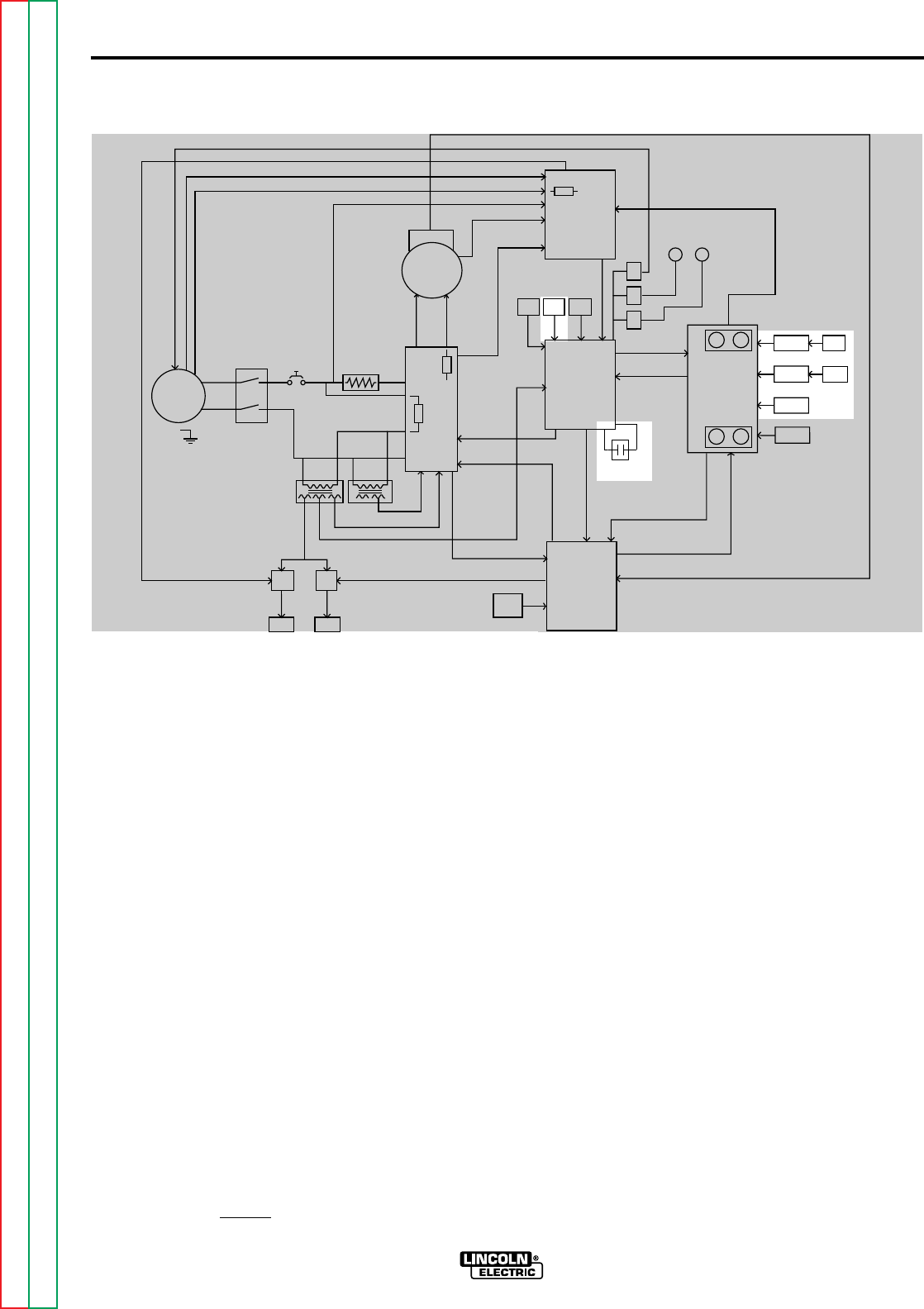
E-5
THEORY OF OPERATION
E-5
OPTIONAL START, CRATER
FILL AND WELD TIMER
BOARDS
When installed, the optional start board
dictates to the procedure board the
starting wire feed speed and arc volt-
age. This condition can be operator set
for a predetermined period of time.
These parameters can be set either
higher or lower than those of the weld-
ing procedure to control penetration,
bead shape, or other factors at the start
of the weld. The start circuit becomes
active when the weld current sensing
reed switch is closed.
The crater fill board is used by the oper-
ator to adjust the finishing wire feed
speed and voltage either higher or
lower than the welding procedure for an
adjustable period of time. This circuit
becomes active when the "stop" switch
is pressed. This optional feature is
helpful in controlling bead shape and
filling craters at the end of a weld.
The weld timer permits setting of weld
time for an adjustable period of time.
This feature eliminates the need to
press the "stop" switch.
FIGURE E.3 Optional Start, Crater Fill and Weld Timer Boards
NA-5
NOTE: Unshaded areas of block logic diagrams are the subject of discussion.
F1
A
R
M
A
T
U
R
E
F
I
E
L
D
V
O
L
T
A
G
E
V
O
L
T
A
G
E
T1 T2
OPTIONAL
START
BOARD
OPTIONAL
CRATER
BOARD
OPTIONAL
WELD
TIMER
BURNBACK
TIMER
VOLTAGE
BOARD
METER
BOARD
SPEED
VOLT METER
BOARD
DIGITAL
METER DIGITAL
METER
MOTOR
LOGIC
BOARD
CONTROL
BOARD
P
O
W
E
R
B
O
A
R
D
P
R
O
C
E
D
U
R
E
B
O
A
R
D
TACH
INCH
DOWN
SWITCH
STOP
SWITCH
START
SWITCH
WELD
CURRENT
REED SWITCH
CR
1
CR
2
CR
3
FLUX
RECEPTACLE
TRAVEL
RECEPTACLE
CONTACTOR CLOSURE (#2 AND #4)
REMOTE VOLTAGE CONTROL (A, B, C)
WORK SENSING (#21)
TACH FEEDBACK (MOTOR RPM)
DC SUPPLY VOLTAGE
10VDC REFERENCEVOLTAGE
DC VOLTAGE
S
I
G
N
A
L
INPUT
POWER
SWITCH CIRCUIT
BREAKER R1(2 OHMS)
MOTOR G
A
T
E
S
I
G
N
A
L
S
CONTROL
CABLE
RECEPTACLE
TACH FEEDBACK (MOTOR RPM)
115VAC
36VAC (18+18VAC)
22VAC
1
V
A
C
0
D
C
S
U
P
P
L
Y
V
O
L
T
A
G
E
SIGNAL
A
R
C
V
O
L
T
A
G
E
S
H
U
T
D
O
W
N
A
N
D
INCH
UP
SWITCH
STRIKE/WELD PROCEDURE
ENABLE
FIELD
ARMATURE
F
E
E
D
E
N
A
B
L
E
DIRECTION
ARC VOLTS (SET & ACTUAL)
WIRE FEED SPEED (SET & ACTUAL)
E
L
E
C
T
R
ODE SENSING (#67)
115
VAC
WELD
VOLTS SPEED
VOLTS SPEED
STRIKE
115VAC
#31
#32
1/2 AMP
F501
SET SPEED
SET VOLTAGE
START
TIMER
CRATER
TIMER
F2
Return to Section TOC Return to Section TOC Return to Section TOC Return to Section TOC
Return to Master TOC Return to Master TOC Return to Master TOC Return to Master TOC
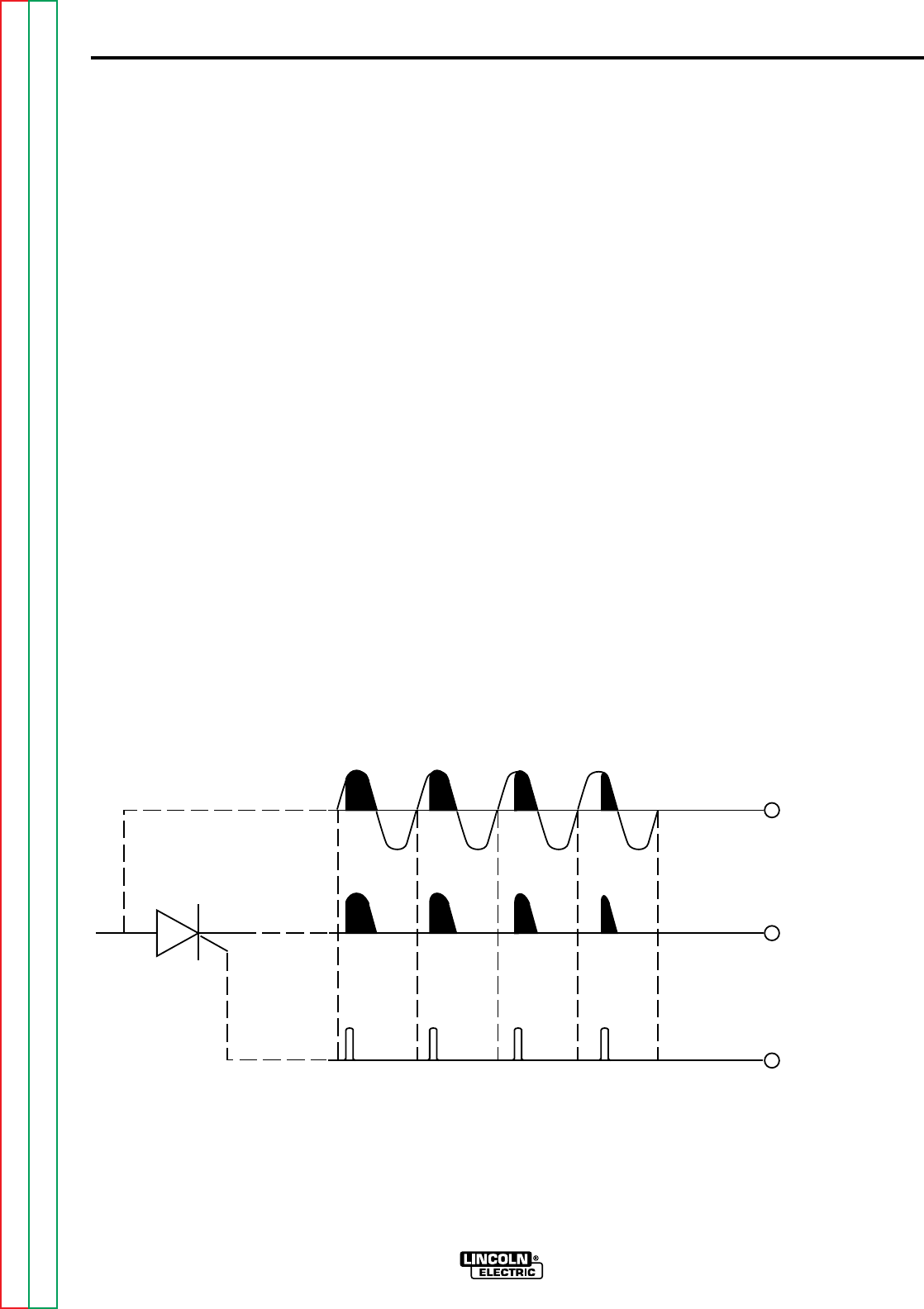
E-6
THEORY OF OPERATION
E-6
NA-5
SCR OPERATION
A silicon controlled rectifier (SCR) is a three terminal
device used to control rather large currents to a load.
An SCR acts very much like a switch. When a gate
signal is applied to the SCR it is turned ON and there
is current flow from anode to cathode. In the ON state
the SCR acts like a closed switch. When the SCR is
turned OFF there is no current flow from anode to
cathode thus the device acts like an open switch. As
the name suggests, the SCR is a rectifier, so it passes
current only during positive half cycles of the AC sup-
ply. The positive half cycle is the portion of the sine
wave in which the anode of the SCR is more positive
than the cathode.
When an AC supply voltage is applied to the SCR, the
device spends a certain portion of the AC cycle time in
the on state and the remainder of the time in the off
state. The amount of time spent in the ON state is
controlled by the Gate.
An SCR is fired by a short burst of current into the
gate. This gate pulse must be more positive than the
cathode voltage. Since there is a standard PN junc-
tion between gate and cathode, the voltage between
these terminals must be slightly greater than 0.6V.
Once the SCR has fired it is not necessary to continue
the flow of gate current. As long as current continues
to flow from anode to cathode the SCR will remain on.
When the anode to cathode current drops below a
minimum value, called holding current, the SCR will
shut off. This normally occurs as the AC supply volt-
age passes through zero into the negative portion of
the sine wave. If the SCR is turned on early in the
positive half cycle, the conduction time is longer
resulting in greater SCR output. If the gate firing
occurs later in the cycle the conduction time is less
resulting in lower SCR output.
FIGURE E.4 SCR Operation
CATHODE
ANODE GATE
GATE
INPUT
OUTPUT NOTE: AS THE GATE
PULSE IS APPLIED
LATER IN THE CYCLE
THE SCR OUTPUT
IS DECREASED.
Return to Section TOC Return to Section TOC Return to Section TOC Return to Section TOC
Return to Master TOC Return to Master TOC Return to Master TOC Return to Master TOC

NA-5
SECTION F-1
TROUBLESHOOTING & REPAIR
SECTION F-1
TABLE OF CONTENTS
-TROUBLESHOOTING AND REPAIR SECTION-
Troubleshooting and Repair......................................................................................................Section F
How to Use Troubleshooting Guide......................................................................................................F-2
PC Board Troubleshooting Procedures................................................................................................F-3
Troubleshooting Guide .........................................................................................................................F-4
PC Board LED Definitions ..................................................................................................................F-36
PC Board LED Sequence Table.........................................................................................................F-37
Test Procedures .................................................................................................................................F-38
DC Power Supply Test....................................................................................................................F-38
T1 and T2 Transformer Test ...........................................................................................................F-42
Voltage Board Transformer Test.....................................................................................................F-45
Wire Feed Drive Motor Test ............................................................................................................F-48
External Resistance Test (Leads #21 and #67) ..............................................................................F-50
Out of Voltage Range Shut Sown Test ...........................................................................................F-52
Tach Board Feedback Test.............................................................................................................F-55
VoltmeterAccuracy Test ..................................................................................................................F-57
Wire Speed Accuracy Test..............................................................................................................F-60
Meter Circuit Accuracy Test ............................................................................................................F-64
Replacement Procedures...................................................................................................................F-71
PC Board(s) Removal and Replacement ........................................................................................F-71
Digital Meter and Meter PC Board Removal and Replacement......................................................F-73
Tach PC Board Removal and Replacement ...................................................................................F-77
Wire Drive Motor Removal and Replacement.................................................................................F-81
Retest After Repair.............................................................................................................................F-85
Return to Master TOC Return to Master TOC Return to Master TOC Return to Master TOC

WARNING
NA-5
F-2
TROUBLESHOOTING & REPAIR
F-2
This Troubleshooting Guide is provided to
help you locate and repair possible machine
malfunctions. Simply follow the three-step
procedure listed below.
Step 1. LOCATE PROBLEM (SYMPTOM).
Look under the column labeled “PROBLEM
(SYMPTOMS)”. This column describes
possible symptoms that the machine may
exhibit. Find the listing that best describes
the symptom that the machine is exhibiting.
Symptoms are grouped into the following
categories: wire feeding problems, mode
function problems, function problems and
welding problems.
Step 2. PERFORM EXTERNAL TESTS.
The second column labeled “POSSIBLE
AREAS OF MISADJUSTMENT(S)” lists the
obvious external possibilities that may con-
tribute to the machine symptom. Perform
these tests/checks in the order listed. In
general, these tests can be conducted with-
out removing the case wrap-around cover.
Step 3. RECOMMENDED COURSE OF
ACTION
The last column labeled “Recommended
Course of Action” lists the most likely com-
ponents that may have failed in your
machine. It also specifies the appropriate
test procedure to verify that the subject
component is either good or bad. If there
are a number of possible components,
check the components in the order listed to
eliminate one possibility at a time until you
locate the cause of your problem.
All of the referenced test procedures
referred to in the Troubleshooting Guide are
described in detail at the end of this chap-
ter. Refer to the Troubleshooting and Repair
Table of Contents to locate each specific
Test Procedure. All of the specified test
points, components, terminal strips, etc. can
be found on the referenced electrical wiring
diagrams and schematics. Refer to the
Electrical Diagrams Section Table of
Contents to locate the appropriate diagram.
HOW TO USE TROUBLESHOOTING GUIDE
Service and Repair should only be performed by Lincoln Electric Factory Trained Personnel.
Unauthorized repairs performed on this equipment may result in danger to the technician and
machine operator and will invalidate your factory warranty. For your safety and to avoid
Electrical Shock, please observe all safety notes and precautions detailed throughout this
manual.
__________________________________________________________________________
CAUTION
If for any reason you do not understand the test procedures or are unable to perform the
tests/repairs safely, contact the Lincoln Electric Service Department for technical trou-
bleshooting assistance before you proceed call 216-383-2531 or 1-800-833-9353.
_____________________________________________________________
Return to Section TOC Return to Section TOC Return to Section TOC Return to Section TOC
Return to Master TOC Return to Master TOC Return to Master TOC Return to Master TOC
NA-5
F-3
TROUBLESHOOTING & REPAIR
F-3
_______________________________
CAUTION: Sometimes machine failures
appear to be due to PC board failures. These
problems can sometimes be traced to poor
electrical connections. To avoid problems
when troubleshooting and replacing PC
boards, please use the following procedure:
1. Determine to the best of your technical
ability that the PC board is the most likely
component causing the failure symptom.
2. Check for loose connections at the PC
board to assure that the PC board is prop-
erly connected.
3. If the problem persists, replace the sus-
pect PC board using standard practices to
avoid static electrical damage and electri-
cal shock. Read the warning inside the
static resistant bag and perform the follow-
ing procedures:
P.C. Board can be dam-
aged by static electricity.
- Remove your body’s stat-
ic charge before opening
the static-shielding bag.
Wear an anti-static wrist
strap. For safety, use a 1
Meg ohm resistive cord
connected to a grounded
part of the equipment
frame.
- If you don’t have a wrist
strap, touch an unpainted,
grounded, part of the
equipment frame. Keep touching the frame to
prevent static build-up. Be sure not to touch
any electrically live parts at the same time.
- Tools which come in contact with the P.C.
Board must be either conductive, anti-static or
static-dissipative.
ELECTRIC SHOCK can kill.
Have an electrician install
and service this equip-
ment. Turn the input power
OFF at the fuse box before
working on equipment. Do
not touch electrically hot
parts.
- Remove the P.C. Board from the static-
shielding bag and place it directly into the
equipment. Don’t set the P.C. Board on or
near paper, plastic or cloth which could have
a static charge. If the P.C. Board can’t be
installed immediately, put it back in the static-
shielding bag.
- If the P.C. Board uses protective shorting
jumpers, don’t remove them until installation
is complete.
- If you return a P.C. Board to The Lincoln
Electric Company for credit, it must be in the
static-shielding bag. This will prevent further
damage and allow proper failure analysis.
4. Test the machine to determine if the fail-
ure symptom has been corrected by the
replacement PC board.
NOTE: It is desirable to have a spare (known
good) PC board available for PC board trou-
bleshooting.
NOTE: Allow the machine to heat up so that
all electrical components can reach their oper-
ating temperature.
5. Remove the replacement PC board and
substitute it with the original PC board to
recreate the original problem.
a. If the original problem does not reap-
pear by substituting the original
board, then the PC board was not the
problem. Continue to look for bad
connections in the control wiring har-
ness, junction blocks, and terminal
strips.
b. If the original problem is recreated by
the substitution of the original board,
then the PC board was the problem.
Reinstall the replacement PC board
and test the machine.
6. Always indicate that this procedure was
followed when warranty reports are to be
submitted.
NOTE: Following this procedure and writing
on the warranty report, “INSTALLED AND
SWITCHED PC BOARDS TO VERIFY
PROBLEM,” will help avoid denial of legiti-
mate PC board warranty claims.
PC BOARD TROUBLESHOOTING PROCEDURES
WARNING
ATTENTION
Static-Sensitive
Devices
Handle only at
Static-Safe
Workstations
Reusable
Container
Do Not Destroy
Return to Section TOC Return to Section TOC Return to Section TOC Return to Section TOC
Return to Master TOC Return to Master TOC Return to Master TOC Return to Master TOC
F-4
TROUBLESHOOTING & REPAIR
F-4
NA-5
Observe all Safety Guidelines detailed throughout this manual
If for any reason you do not understand the test procedures or are unable to perform the tests/repairs safely, contact the Lincoln Electric
Service Department for technical troubleshooting assistance before you proceed. Call 216-383-2531 or 1-800-833-9353.
CAUTION
WIRE FEEDING PROBLEMS
PROBLEMS
(SYMPTOMS) POSSIBLE AREAS OF
MISADJUSTMENTS(S) RECOMMENDED
COURSE OF ACTION
The wire feeds whenever the input
power switch is in the “ON” position. 1. Check the “Start” switch (S5).
Make sure it is not stuck closed.
2. Check the “Inch Down” switch
(S4). Make sure it is not stuck
closed.
3. Check the “Inch Up” switch (S3)
Make sure it is not stuck closed.
4. Check to make sure that jumper
lead #693 is connected to the
proper pin on the logic board.
See wiring diagram.
1. Check light 7B on the logic board.
It should NOT be on. If light 7B is
ON remove lead #518A from the
“Start” switch. If the light remains
ON the logic board may be faulty.
If the light goes OFF check the
switch and associated leads.
See wiring diagram and Figure
F.1.
2. Check light 7J on the logic board.
It should NOT be on. If light 7J is
ON remove lead #592 from the
“Inch Down” switch. If the light
remains ON the logic board may
be faulty. If the light goes OFF
check the switch and associated
leads. See wiring diagram and
Figure F.1.
3. |Disconnect lead #586 from the
“Inch Up” switch. If the problem
is resolved check the switch and
associated leads. See wiring dia-
gram.
4. Check lights 7B, 7J and 7E.
They should all be OFF. If lights
7B and 7J are OFF and light 7E
is ON the logic board may be
faulty. See Figure F.1.
5. Disconnect plug “A” from the logic
board. If the wire feed stops the
logic board may be faulty. See
Figure F.1.
6. If the feed does not stop with plug
“A” disconnected, disconnect plug
“E” from the logic board. If the
wire feed stops with plug “E” dis-
connected the logic board may be
faulty. If the wire feed does NOT
stop with plug “E” disconnected
the power board may be faulty.
Replace. See Figure F.1.
Return to Section TOC Return to Section TOC Return to Section TOC Return to Section TOC
Return to Master TOC Return to Master TOC Return to Master TOC Return to Master TOC
F-5
TROUBLESHOOTING & REPAIR
F-5
NA-5
Observe all Safety Guidelines detailed throughout this manual
If for any reason you do not understand the test procedures or are unable to perform the tests/repairs safely, contact the Lincoln Electric
Service Department for technical troubleshooting assistance before you proceed. Call 216-383-2531 or 1-800-833-9353.
CAUTION
WIRE FEEDING PROBLEMS
PROBLEMS
(SYMPTOMS) POSSIBLE AREAS OF
MISADJUSTMENTS(S) RECOMMENDED
COURSE OF ACTION
The wire does not feed. Pressing
any of the switches (buttons) will
NOT feed the wire. The motor does
NOT run.
1. Make sure input power switch is
ON.
2. Check the circuit breaker (CB1).
Reset if tripped.
3. Make sure 115VAC is being
applied to the control box through
the control cable receptacle.
Leads #31 and #32.
4. Check the two fuses on the
power board. Replace if blown. If
fuse F101 immediately fails when
replaced contact your local
Lincoln Authorized Field Service
Facility.
5. Make sure the motor cable is con-
nected to the motor receptacle on
the NA-5 control box.
1. Check the lights (LEDS) locate on
the PC boards. Some should be
lit. See
Table F.1.
If none of the
lights are lit perform the
T1 and
T2 Transformer Test.
2. If the appropriate lights are lit
(see Table F.1.) and the wire
does NOT feed perform the
Wire
Drive Motor Test.
3. If only some of the appropriate
lights on the power board are lit
the power board may be faulty.
4. If all of the appropriate lights are
lit, except light 1D on the power,
board, check resistor R1. Normal
resistance is 2 ohms. See wiring
diagram.
5. If fuse F101 immediately fails
when input power is applied,
unplug all of the PC boards
except the power board. If the
fuse still fails the power board
may be faulty. If the fuse does
not fail reconnect the PC boards
one at a time until the faulty
board is located. Also check and
inspect the wiring harness for
“short” or “grounds”. Reconnect
the PC boards in the following
order: control, voltage,logic,pro-
cedure,option,timer, remote inter-
face,speedmeter and voltmeter.
NOTE: Some of the above PC
boards are optional and may not
be used in all NA-5 control units.
Return to Section TOC Return to Section TOC Return to Section TOC Return to Section TOC
Return to Master TOC Return to Master TOC Return to Master TOC Return to Master TOC
F-6
TROUBLESHOOTING & REPAIR
F-6
NA-5
Observe all Safety Guidelines detailed throughout this manual
If for any reason you do not understand the test procedures or are unable to perform the tests/repairs safely, contact the Lincoln Electric
Service Department for technical troubleshooting assistance before you proceed. Call 216-383-2531 or 1-800-833-9353.
CAUTION
WIRE FEEDING PROBLEMS
PROBLEMS
(SYMPTOMS) POSSIBLE AREAS OF
MISADJUSTMENTS(S) RECOMMENDED
COURSE OF ACTION
The wire will not feed and the circuit
breaker (CB1) trips when the inch
down, inch up or the start buttons
are pressed. The wire drive motor
does not turn.
When the inch up button is press the
wire feeds down. When the inch
down button is pressed the wire
feeds up.
1. Check for a mechanical restric-
tion in the wire feeding path.
2. Make sure the proper input volt-
age (115VAC) is applied to the
NA-5 control unit.
3. Check the F102 field fuse on the
power board. Replace if faulty.
Note: Frequent motor polarity
changes can cause the fuse to
fail. This can be caused by the
following:
•A welding procedure with
frequent electrode to puddle
shorting.
•A power source output too
low to establish an arc.
1. The welding head is designed to
feed wire in the proper direction
when it is installed as shipped
from the factory. If the nozzle
and wire straightener aare rotated
about the axis of the gearbox
outpu shaft, the wire may feed in
the opposite direction.
Interchange leads #626 and #627
at the terminal strip (TS2) inside
the control box. See wiring dia-
gram.
1. Perform the
Wire Drive Motor
Test.
2. The power board may be faulty.
See Table F.1.
3. Check the motor control cable for
“shorts’ or “grounds”.
Return to Section TOC Return to Section TOC Return to Section TOC Return to Section TOC
Return to Master TOC Return to Master TOC Return to Master TOC Return to Master TOC
F-7
TROUBLESHOOTING & REPAIR
F-7
NA-5
Observe all Safety Guidelines detailed throughout this manual
If for any reason you do not understand the test procedures or are unable to perform the tests/repairs safely, contact the Lincoln Electric
Service Department for technical troubleshooting assistance before you proceed. Call 216-383-2531 or 1-800-833-9353.
CAUTION
WIRE FEEDING PROBLEMS
PROBLEMS
(SYMPTOMS) POSSIBLE AREAS OF
MISADJUSTMENTS(S) RECOMMENDED
COURSE OF ACTION
The wire will not feed when the inch
down button is pressed. The wire
does inch up OK and feeds down
when the start button is pressed.
1. If a DC400, Pulse Power 500 or a
CV400 power source is used a
Diode Kit must be installed in the
power source.
2. Check to see if light 7J on the
logic board is ON while the inch
down button is pressed. If it does
NOT light check the inch down
button and associated leads.
See wiring diagram.
•(For codes below 8300) If
light 7J DOES light when
the inch down button is
pressed the logic board
may be faulty.
•(For codes above 8300)
Jumper the AUTO tabs on
the voltage board and press
inch down button. If the
wire does NOT feed down
the logic board may be
faulty.
1. Disconnect the white #21 lead
from the NA-5 polarity terminal
strip (TS1). See wiring diagram.
With the inch down button
pressed read the ACTUAL volts
on the NA-5 digital voltmeter.
The digital meter should read
over 19 volts and the wire should
inch down. If not, perform the
Voltage Board Transformer
Test.
If the test is OK the voltage
board may be faulty. Replace.
2. If the voltage is over 19 volts
and the wire DOES inch down
with the #21 lead disconnected
reconnect the #21 lead to the
terminal strip and read the
ACTUAL volts with the inch
down button pressed. If the
voltage is less than 8 volts per-
form the
#21 - #67 External
Resistance Test.
If the resis-
tance test is OK the voltage
board may be faulty. Replace.
Return to Section TOC Return to Section TOC Return to Section TOC Return to Section TOC
Return to Master TOC Return to Master TOC Return to Master TOC Return to Master TOC
F-8
TROUBLESHOOTING & REPAIR
F-8
NA-5
Observe all Safety Guidelines detailed throughout this manual
If for any reason you do not understand the test procedures or are unable to perform the tests/repairs safely, contact the Lincoln Electric
Service Department for technical troubleshooting assistance before you proceed. Call 216-383-2531 or 1-800-833-9353.
CAUTION
WIRE FEEDING PROBLEMS
PROBLEMS
(SYMPTOMS) POSSIBLE AREAS OF
MISADJUSTMENTS(S) RECOMMENDED
COURSE OF ACTION
The wire will not inch down but does
inch up properly. The wire does not
feed in either direction when the start
button is pressed.
The wire will not inch down but does
inch up properly. When the start
button is pressed the wire feeds up
instead of down.
1. Check to make sure that light 7J,
on the logic board, is lit when the
inch down button is pressed. If
not check the inch down switch
and associated leads. See wiring
diagram.
2. Check to make sure that light 7B,
on the logic board, is lit when the
start button is pressed. If not
check the start button and associ-
ated leads. See wiring diagram.
1. For codes below 8300 make sure
the jumper plug is securely
installed in the harness receptacle
near the voltage board.
2. Check to make sure light 7E, on
the logic board, is on when the
inch down button is pressed. If
light 7E is ON the power board
may be faulty.
3. Check the 1/8 amp fuse on the
voltage board . Replace if faulty.
1. The logic board may be faulty.
Replace.
2. The power board may be faulty.
Replace.
1. Jumper the AUTO tabs on the
voltage board. (Above code
8300) Press the inch down but-
ton. If the wire inches down the
voltage board may be faulty.
Replace.
If the wire does NOT inch down
the logic board may be faulty.
Replace.
Return to Section TOC Return to Section TOC Return to Section TOC Return to Section TOC
Return to Master TOC Return to Master TOC Return to Master TOC Return to Master TOC
F-9
TROUBLESHOOTING & REPAIR
F-9
NA-5
Observe all Safety Guidelines detailed throughout this manual
If for any reason you do not understand the test procedures or are unable to perform the tests/repairs safely, contact the Lincoln Electric
Service Department for technical troubleshooting assistance before you proceed. Call 216-383-2531 or 1-800-833-9353.
CAUTION
WIRE FEEDING PROBLEMS
PROBLEMS
(SYMPTOMS) POSSIBLE AREAS OF
MISADJUSTMENTS(S) RECOMMENDED
COURSE OF ACTION
NA-5 units above code 8300 with
“cold starting”.
The wire feeds up instead of down
when the start button is pressed.
The wire inches up and down prop-
erly.
1. Make sure the electrode wire is
fed into the welding tip.
2. Check the 1/8 amp fuse on the
voltage board. Replace if faulty.
3. Make sure electrode polarity is
correct and the same as the #67
and #21 leads at terminal strip
(TS1). See wiring diagram.
4. Make sure the welding power
source is producing welding arc
voltage.
1. Jumper the #2 and #4 leads at
the Lincoln CV power source.
Open circuit voltage should be
present at both the power source
and at the ACTUAL voltmeter
reading on the NA-5. If open cir-
cuit voltage is present at the
power source but NOT at the NA-
5 ACTUAL voltmeter reading per-
form the
#21-#67 External resis-
tance Test.
2. With the start button pressed light
7K should be lit. If it is not the
logic board may be faulty.
3. Check contactor relay 3CR.
Leads #2 and #4 are closed by
relay 3CR. Make sure the relay is
functiioning properly.
4. Check the control cable between
the power source and the NA-5
control unit. See wiring diagram.
Return to Section TOC Return to Section TOC Return to Section TOC Return to Section TOC
Return to Master TOC Return to Master TOC Return to Master TOC Return to Master TOC
F-10
TROUBLESHOOTING & REPAIR
F-10
NA-5
Observe all Safety Guidelines detailed throughout this manual
If for any reason you do not understand the test procedures or are unable to perform the tests/repairs safely, contact the Lincoln Electric
Service Department for technical troubleshooting assistance before you proceed. Call 216-383-2531 or 1-800-833-9353.
CAUTION
WIRE FEEDING PROBLEMS
PROBLEMS
(SYMPTOMS) POSSIBLE AREAS OF
MISADJUSTMENTS(S) RECOMMENDED
COURSE OF ACTION
NA-5 units above code 8300 with
“cold starting”.
While pressing the inch down button
the wire does not stop when it touch-
es the work.
The wire will NOT inch up but does
inch down and weld properly.
The wire feeds UP when either inch
button is pressed.
1. Check the 1/8 amp fuse on the
voltage board. Replace if faulty.
2. While pressing the inch down but-
ton with the wire touching the
work piece, observe light 7G on
the logic board. If the light goes
on but the wire does NOT stop
feeding the logic board may be
faulty.
1. With the unit at idle (no buttons
pressed) observe lights 1D, on
the power board, and light 7E, on
the logic board. 1D should be
ON. 7E should be OFF.
2. If 1D is OFF replace the power
board.
3. If 7E is ON replace the logic
board.
1. While pressing the inch down but-
ton observe light 7E on the logic
board. It should be ON.
2. If light 7E is ON, while the inch
down button is pressed, the
power board may be faulty.
Replace.
3. If light 7E remains OFF, while
the inch down button is pressed,
the logic board may be faulty.
Replace.
1. Perform the
#21-#67 External
ResistanceTest.
2. Check the continuity of leads
#667 and #621 to the voltage
board. See wiring diagram.
3. The logic board may be faulty.
4. The voltage board may be faulty.
1. Check the inch up switch (button)
for proper operation. Also check
associated leads for loose or
faulty connections. See wiring
diagram.
1. Check the inch up and inch down
switches (buttons) for proper oper-
ation and wiring. See wiring dia-
gram.
Return to Section TOC Return to Section TOC Return to Section TOC Return to Section TOC
Return to Master TOC Return to Master TOC Return to Master TOC Return to Master TOC
F-11
TROUBLESHOOTING & REPAIR
F-11
NA-5
Observe all Safety Guidelines detailed throughout this manual
If for any reason you do not understand the test procedures or are unable to perform the tests/repairs safely, contact the Lincoln Electric
Service Department for technical troubleshooting assistance before you proceed. Call 216-383-2531 or 1-800-833-9353.
CAUTION
WIRE FEEDING PROBLEMS
PROBLEMS
(SYMPTOMS) POSSIBLE AREAS OF
MISADJUSTMENTS(S) RECOMMENDED
COURSE OF ACTION
The wire feeds down when either
inch button is pressed. 1. Wth the unit at idle (no buttons
pressed) observe light 7E on the
logic board. It should be OFF.
2. If light 7E is ON the logic board
may be faulty. Replace.
3. If light 7E is OFF the power board
may be faulty. Replace.
1. Check the inch up and inch down
switches (buttons) for proper oper-
ation and wiring. See wiring dia-
gram.
Return to Section TOC Return to Section TOC Return to Section TOC Return to Section TOC
Return to Master TOC Return to Master TOC Return to Master TOC Return to Master TOC
F-12
TROUBLESHOOTING & REPAIR
F-12
NA-5
Observe all Safety Guidelines detailed throughout this manual
If for any reason you do not understand the test procedures or are unable to perform the tests/repairs safely, contact the Lincoln Electric
Service Department for technical troubleshooting assistance before you proceed. Call 216-383-2531 or 1-800-833-9353.
CAUTION
MODE FUNCTION PROBLEMS
PROBLEMS
(SYMPTOMS) POSSIBLE AREAS OF
MISADJUSTMENTS(S) RECOMMENDED
COURSE OF ACTION
The speed and voltage controls do
not function. All of the mode lights
function properly.
All the mode lights function properly.
None of the speed controls operate
properly.
All the mode lights function properly.
None of the voltage controls operate
properly.
1. Check lights 1A and 1B located
on the power board. They should
both be ON.
2. If both lights 1A and 1B are ON
the control board may be faulty.
Replace.
1. The control board may be faulty.
Replace.
1. The voltage board may be faulty.
Replace.
1. If lights 1A and /or 1B are OFF
perform the
DC Power Supply
Test.
2. Perform the
T1 and T2
Transformer Test.
3. The power board may be faulty.
Replace.
Return to Section TOC Return to Section TOC Return to Section TOC Return to Section TOC
Return to Master TOC Return to Master TOC Return to Master TOC Return to Master TOC
F-13
TROUBLESHOOTING & REPAIR
F-13
NA-5
Observe all Safety Guidelines detailed throughout this manual
If for any reason you do not understand the test procedures or are unable to perform the tests/repairs safely, contact the Lincoln Electric
Service Department for technical troubleshooting assistance before you proceed. Call 216-383-2531 or 1-800-833-9353.
CAUTION
MODE FUNCTION PROBLEMS
PROBLEMS
(SYMPTOMS) POSSIBLE AREAS OF
MISADJUSTMENTS(S) RECOMMENDED
COURSE OF ACTION
Only the strike mode functions, when
the unit is at idle, regardless of the
selector switch position.
Only the strike mode functions while
welding. The unit stays in the strike
mode and does not progress through
the welding sequence.
The strike light is OFF and neither
strike control functions. The other
mode lights work. The unit will not
feed wire when the start button is
pressed.
1. The logic board may be faulty.
Replace.
2. The procedure board may be
faulty.
1. While the unit is welding check
light 7D on the logic board. It
should be ON when welding cur-
rent is present. If light 7D is ON
the logic board may be faulty.
3. If light 7D is NOT lit when weld
current is present make sure the
weld cables have been properly
routed through the cable clamp
on the left side of the control box.
1. Check light 7D on the logic board.
If it is off the logic board may be
faulty. Replace.
2. If the start light is on all the time
the start board (if used) may be
faulty. Replace or install jumper
plug in procedure board.
3. If the crater light is on all the time
the crater board (if used) may be
faulty. Replace or install jumper
plug in procedure board.
4. If the weld light is on all the time
the logic board may be faulty.
Replace.
. If light 7D is NOT lit, when weld
current is present, connect a
jumper wire from terminal #528 to
#500 on terminal strip TS1. See
wiring diagram. If light 7D does
light check the CR4 reed switch
and associated leads and connec-
tions. See wiring diagram.
2. If 7D does NOT light, with the
jumper wire in place, check the
#528 lead and the #500 lead
between the TS1 terminal strip
and the logic board. See wiring
diagram.
3. The logic board may be faulty.
Replace.
1. If light 7D is ON check the CR4
reed switch and associated leads.
See wiring diagram.
Return to Section TOC Return to Section TOC Return to Section TOC Return to Section TOC
Return to Master TOC Return to Master TOC Return to Master TOC Return to Master TOC
F-14
TROUBLESHOOTING & REPAIR
F-14
NA-5
Observe all Safety Guidelines detailed throughout this manual
If for any reason you do not understand the test procedures or are unable to perform the tests/repairs safely, contact the Lincoln Electric
Service Department for technical troubleshooting assistance before you proceed. Call 216-383-2531 or 1-800-833-9353.
CAUTION
MODE FUNCTION PROBLEMS
PROBLEMS
(SYMPTOMS) POSSIBLE AREAS OF
MISADJUSTMENTS(S) RECOMMENDED
COURSE OF ACTION
The strike light does not light. The
strike controls (voltage and wire feed
speed) do function normally.
The strike light comes on but the
strike controls (voltage and wire feed
speed) do not function normally.
The start light does not light. The
start controls (voltage and wire feed
speed) may or may not function nor-
mally. The NA-5 is at idle with the
selector switch in the “Start” position.
The start light is ON but the start
controls (voltage and wire feed
speed) do not function. The NA-5 is
at idle with the selector switch in the
“Start” position.
1. The procedure board may be
faulty. Replace.
1. The procedure board may be
faulty. Replace.
1. Make sure the start option board
is installed correctly.
2. The procedure board may be
faulty. Replace.
1. If no other mode lights are lit the
start option board may be faulty.
Replace.
2. If the strike light is also lit (along
with the start light) the logic board
may be faulty.
3. If the weld and or crater lights are
also lit (along with the start light)
the procedure board may be
faulty.
1. Check the lead harness between
the start option board and the
procedure board for loose or
faulty connections. See wiring
diagram.
1. Check the lead harness between
the start option board and the
procedure board for loose or
faulty connections. See wiring
diagram.
Return to Section TOC Return to Section TOC Return to Section TOC Return to Section TOC
Return to Master TOC Return to Master TOC Return to Master TOC Return to Master TOC
F-15
TROUBLESHOOTING & REPAIR
F-15
NA-5
Observe all Safety Guidelines detailed throughout this manual
If for any reason you do not understand the test procedures or are unable to perform the tests/repairs safely, contact the Lincoln Electric
Service Department for technical troubleshooting assistance before you proceed. Call 216-383-2531 or 1-800-833-9353.
CAUTION
MODE FUNCTION PROBLEMS
PROBLEMS
(SYMPTOMS) POSSIBLE AREAS OF
MISADJUSTMENTS(S) RECOMMENDED
COURSE OF ACTION
When the start button is pressed and
the unit is welding, the start mode is
skipped.
1. Make sure the start option is in-
stalled properly in the NA-5.
2. Make sure the start timer is set
for a time greater than zero sec-
onds.
3. If the weld light goes ON as soon
as (but not before) the arc is
struck and the start timer is set
for a time greater than zero sec-
onds, the start timer board may
be faulty.
4. If the weld light goes ON before
the arc is struck replace the start
option board with the jumper
plug. If the weld light continues
to go ON before the arc is struck
the logic board may be faulty.
Replace.
5. With the jumper plug installed: If
the weld light does NOT go ON
until the arc is struck the start
option board may be faulty.
1. Check the lead harness between
the start option boards and the
procedure board for loose or
faulty connections. See wiring
diagram.
Return to Section TOC Return to Section TOC Return to Section TOC Return to Section TOC
Return to Master TOC Return to Master TOC Return to Master TOC Return to Master TOC
F-16
TROUBLESHOOTING & REPAIR
F-16
NA-5
Observe all Safety Guidelines detailed throughout this manual
If for any reason you do not understand the test procedures or are unable to perform the tests/repairs safely, contact the Lincoln Electric
Service Department for technical troubleshooting assistance before you proceed. Call 216-383-2531 or 1-800-833-9353.
CAUTION
MODE FUNCTION PROBLEMS
PROBLEMS
(SYMPTOMS) POSSIBLE AREAS OF
MISADJUSTMENTS(S) RECOMMENDED
COURSE OF ACTION
When welding the start timer does
not time out. The unit stays in the
start mode.
The crater light does not light. The
crater controls (voltage and wire
feed speed) may or may not func-
tion. The NA-5 is at idle with the
selector switch in the ”Crater” pos-
tion.
The crater light is ON but the crater
controls (voltage and wire feed
speed) do not function. The NA-5 is
at idle with the selector switch in the
“Crater” position.
1. When the weld is stopped check
to see if the crater (if used) or
burnback timer is functioning
properly. If the crater and or burn-
back timer IS functioning properly
the start timer may be faulty.
2. If the start, crater and burnback
timers are not working properly
the procedure board may be
faulty.
1. Make sure the crater option
boards are installed correctly.
2. The procedure board may be
faulty. Replace.
1. If no other lights are lit the crater
option board may be faulty.
Replace.
2. If the strike light is also lit (along
with the crater light) the logic
board may be faulty.
3. If the weld and or start lights are
also lit (along with the crater light)
the procedure board may be
faulty.
1. Check the lead harness between
the start option boards and the
procedure board for loose or
faulty connections. See wiring
diagram.
1. Check the lead harness between
the crater option boards and the
procedure board for loose or
faulty connections. See wiring
diagram.
1. Check the lead harness between
the crater option boards and the
procedure board for loose or faulty
connections. See wiring diagram.
Return to Section TOC Return to Section TOC Return to Section TOC Return to Section TOC
Return to Master TOC Return to Master TOC Return to Master TOC Return to Master TOC
F-17
TROUBLESHOOTING & REPAIR
F-17
NA-5
Observe all Safety Guidelines detailed throughout this manual
If for any reason you do not understand the test procedures or are unable to perform the tests/repairs safely, contact the Lincoln Electric
Service Department for technical troubleshooting assistance before you proceed. Call 216-383-2531 or 1-800-833-9353.
CAUTION
MODE FUNCTION PROBLEMS
PROBLEMS
(SYMPTOMS) POSSIBLE AREAS OF
MISADJUSTMENTS(S) RECOMMENDED
COURSE OF ACTION
At the end of the weld the crater light
does NOT light.
At the end of the weld the crater
timer does not time out. The unit
stays in the crater mode.
No burnback/retract occurs at the
end of the weld.
1. Make sure the crater option is
installed properly in the NA-5.
2. Make sure the crater timer is set
for a time greater than zero sec-
onds.
3. The crater option and or timer
board may be faulty. Replace.
4. The logic board may be faulty.
1. Replace the crater option board
with the jumper plug. Set the
burnback timer for any time
greater than zero seconds. If the
unit then stops after the weld and
burnback time, the crater timer
board may be faulty. Replace.
2. If the unit does not stop the pro-
cedure board may be faulty.
1. Make sure the burnback timer is
set for a time greater than zero
ohms.
2. Be sure the jumper leads or dip
switches on the logic board are
comfigured correctly for the burn-
back/retract desired. See wiring
diagram.
3. The burnback timer module may
be faulty. Replace.
4. The procedure board may be
faulty.
1. Check the lead harness between
the crater boards and the proce-
dure board for loose or faulty con-
nections. See wiring diagram.
1. Check the lead harness between
the crater boards and the proce-
dure board for loose or faulty con-
nections. See wiring diagram.
1. Check the lead harness between
the burnback module and the pro-
cedure board for loose or faulty
connections.
Return to Section TOC Return to Section TOC Return to Section TOC Return to Section TOC
Return to Master TOC Return to Master TOC Return to Master TOC Return to Master TOC
F-18
TROUBLESHOOTING & REPAIR
F-18
NA-5
Observe all Safety Guidelines detailed throughout this manual
If for any reason you do not understand the test procedures or are unable to perform the tests/repairs safely, contact the Lincoln Electric
Service Department for technical troubleshooting assistance before you proceed. Call 216-383-2531 or 1-800-833-9353.
CAUTION
MODE FUNCTION PROBLEMS
PROBLEMS
(SYMPTOMS) POSSIBLE AREAS OF
MISADJUSTMENTS(S) RECOMMENDED
COURSE OF ACTION
The burnback timer does not time
out properly.
The weld light does not light. The
weld controls (voltage and wire feed
speed) may or may not function.
The NA-5 is at idle with the selector
switch in the “Weld” position.
The weld light is ON but the weld
controls (voltage and wire feed
speed) do not function. The NA-5 is
at idle with the selector switch in the
“Weld” postion.
1. Test if the other timers (start,
weld, crater) function properly. If
they time out correctly the burn-
back module may be faulty.
Replace.
2. If the other timers (start, weld,
crater) do NOT function correctly
the procedure board may be
faulty.
1. The procedure board may be
faulty. Replace.
1. If the option boards (start and
crater) are not installed make
sure the jumper plugs are
installed in the procedure board.
2. If the strike light is also lit (along
with the weld light) the logic
board may be faulty.
3. The procedure board may be
faulty. Replace.
1. Check the lead harness between
the burnback module and the pro-
cedure board for loose or faulty
connections.
Return to Section TOC Return to Section TOC Return to Section TOC Return to Section TOC
Return to Master TOC Return to Master TOC Return to Master TOC Return to Master TOC
F-19
TROUBLESHOOTING & REPAIR
F-19
NA-5
Observe all Safety Guidelines detailed throughout this manual
If for any reason you do not understand the test procedures or are unable to perform the tests/repairs safely, contact the Lincoln Electric
Service Department for technical troubleshooting assistance before you proceed. Call 216-383-2531 or 1-800-833-9353.
CAUTION
MODE FUNCTION PROBLEMS
PROBLEMS
(SYMPTOMS) POSSIBLE AREAS OF
MISADJUSTMENTS(S) RECOMMENDED
COURSE OF ACTION
During the welding sequence the
weld light does not go ON.
While welding the weld mode is
omitted in the welding sequence.
The weld timer is set for a longer
time than zero seconds.
The weld timer does not time out.
the unit stays in the weld mode.
1. If the optional start timer is
installed determine if the start
mode is timing out. If the
sequence stays in the “start”
mode the start timer may be
faulty.
2. If the start module is OK and the
weld light does not go ON the
logic board may be faulty.
Replace.
3. If a start module is NOT used
make sure the jumper plug is
installled in the procedure board
receptacle.
1. The weld timer module may be
faulty. Replace.
1. Set the burnback timer for a value
greater than zero seconds. Start
the weld sequence and then stop
it with the stop button. Check to
see if the unit returns to the nor-
mal idle state.(Strike light ON and
“Hot Electrode” light OFF).
• If the weld mode ends and
the unit returns to the nor-
mal idle state, the weld
timer module may be
faulty.
• If the unit does NOT return
to the normal idle state the
procedure board may be
faulty.
1. Check the lead harness between
the weld timer and the procedure
board for loose or faulty connec-
tions.
1. Check the lead harness between
the weld timer and the procedure
board for loose or faulty connec-
tions.
Return to Section TOC Return to Section TOC Return to Section TOC Return to Section TOC
Return to Master TOC Return to Master TOC Return to Master TOC Return to Master TOC
F-20
TROUBLESHOOTING & REPAIR
F-20
NA-5
Observe all Safety Guidelines detailed throughout this manual
If for any reason you do not understand the test procedures or are unable to perform the tests/repairs safely, contact the Lincoln Electric
Service Department for technical troubleshooting assistance before you proceed. Call 216-383-2531 or 1-800-833-9353.
CAUTION
FUNCTION PROBLEMS
PROBLEMS
(SYMPTOMS) POSSIBLE AREAS OF
MISADJUSTMENTS(S) RECOMMENDED
COURSE OF ACTION
The start button does not initiate the
power source output or the wire
feed. The mode selector switch is in
the strike position and the mode
strike light is lit.
The start button initiates the power
source output, but the wire does not
feed.
1. If the crater and or start option
boards are NOT used the jumper
plugs must be installed in the pro-
cedure board receptacles.
2. With the unit at idle check light 7C
on the logic board. It should be
OFF. Also check light 7B on the
logic board. With the start button
pressed light 7B should go ON. If
lights 7C and 7B are functioning
normally the logic board may be
faulty.
1. If the wire inches up properly, but
does not feed when the start but-
ton is pressed, the logic board
may be faulty.
2. If the wire does NOT feed, when
the inch up button is pressed,
check light 1E on the power
board. It should go ON when the
inch up button is pressed. If light
1E does not go on when the inch
up button is pressed the control
board may be faulty.
3. The power board may be faulty.
1. If light 7C is ON check the stop
button and associated leads for
“shorts” or “grounds”. Light 7C
should be on ONLY when the
stop button is pressed.
2. If light 7B does NOT go on, when
the start button is pressed, check
the start switch (button) and asso-
ciated leads for loose or faulty
connections. See wiring diagram.
3. Check the lead harness between
the logic board and the procedure
board for loose or faulty connec-
tions. See wiring diagram.
1. If the wire does not feed when the
inch up button is pressed perform
the
Wire Drive Motor Test.
Return to Section TOC Return to Section TOC Return to Section TOC Return to Section TOC
Return to Master TOC Return to Master TOC Return to Master TOC Return to Master TOC
F-21
TROUBLESHOOTING & REPAIR
F-21
NA-5
Observe all Safety Guidelines detailed throughout this manual
If for any reason you do not understand the test procedures or are unable to perform the tests/repairs safely, contact the Lincoln Electric
Service Department for technical troubleshooting assistance before you proceed. Call 216-383-2531 or 1-800-833-9353.
CAUTION
FUNCTION PROBLEMS
PROBLEMS
(SYMPTOMS) POSSIBLE AREAS OF
MISADJUSTMENTS(S) RECOMMENDED
COURSE OF ACTION
The start button initiates the wire
feed, but does not activiate the
power source output.
1. Make sure that lead #690 is con-
nected to the proper pin on the
logic board. On newer logic
boards the dip switches must be
in the proper position. See wiring
diagram.
2. Make sure the power source is
capable of producing welding
output voltage. Jumper #2 and
#4 at the power source’s terminal
strip. This should produce open
circuit voltage at the output termi-
nals. If open circuit voltage is not
present the power source may be
faulty.
3. Check or replace the control
cable between the NA-5 and the
power source.
4. With the start button pressed
check light 7K on the logic board
and the “Electrode Hot” light.
Both lights should be on. If the
lights are OFF unplug the burn-
back timer. If the problem is
resolved the burnback timer may
be faulty. Replace.
5. The logic board may be faulty.
1. The CR3 relay may be faulty.
Check or replace.
2. Check the #2 and #4 leads
between the CR3 relay and the
control cable receptacle. See
wiring diagram.
Return to Section TOC Return to Section TOC Return to Section TOC Return to Section TOC
Return to Master TOC Return to Master TOC Return to Master TOC Return to Master TOC
F-22
TROUBLESHOOTING & REPAIR
F-22
NA-5
Observe all Safety Guidelines detailed throughout this manual
If for any reason you do not understand the test procedures or are unable to perform the tests/repairs safely, contact the Lincoln Electric
Service Department for technical troubleshooting assistance before you proceed. Call 216-383-2531 or 1-800-833-9353.
CAUTION
TRAVEL FUNCTION PROBLEMS
PROBLEMS
(SYMPTOMS) POSSIBLE AREAS OF
MISADJUSTMENTS(S) RECOMMENDED
COURSE OF ACTION
The travel function will not operate
regardless of the travel switch posi-
tion.
The travel will not function with the
travel switch in the “Hand” travel
position. The unit operates properly
with the travel switch in the “Auto”
position.
1. Check the travel switch for proper
operation. Also check associat-
ed leads for loose or faulty con-
nections.
2. Check the travel receptacle and
associated leads for loose or
faulty connections.
3. Make sure the travel unit is oper-
ational.
1. Check the travel switch and asso-
ciated leads for loose or faulty
connectioins.
1. With the travel switch (S2) in the
hand travel position, and the
115VAC input power applied to
the NA-5 unit, check for 115VAC
at the travel receptacle. 115VAC
should be present at leads #531
to #532. 115VAC should also be
present at leads #25 to #531. If
either of these two voltages are
missing or not correct check the
lead harness, switch (S2) and
travel receptacle for loose or
faulty connections. See wiring
diagram.
2. If the above voltages are correct
the problem is in the travel unit or
connecting cable.
1. The travel switch may be faulty.
Check or replace.
Return to Section TOC Return to Section TOC Return to Section TOC Return to Section TOC
Return to Master TOC Return to Master TOC Return to Master TOC Return to Master TOC
F-23
TROUBLESHOOTING & REPAIR
F-23
NA-5
Observe all Safety Guidelines detailed throughout this manual
If for any reason you do not understand the test procedures or are unable to perform the tests/repairs safely, contact the Lincoln Electric
Service Department for technical troubleshooting assistance before you proceed. Call 216-383-2531 or 1-800-833-9353.
CAUTION
TRAVEL FUNCTION PROBLEMS
PROBLEMS
(SYMPTOMS) POSSIBLE AREAS OF
MISADJUSTMENTS(S) RECOMMENDED
COURSE OF ACTION
The travel will not function with the
travel switch in the “Auto” postion.
The travel operates correctly with the
travel switch in the “Hand” position.
The travel runs continuously when
the travel switch is in the “Auto” posi-
tion.
1. Make sure the jumper leads #691
and #692 are connected properly
to the correct pins on the logic
board. See wiring diagram.
2. Check the travel switch (S2) and
associated leads for loose or
faulty connections. See wiring
diagram.
3. Check light 7H located on the
logic board. This light should be
ON when the “Auto” travel is
active. If light 7H does not light
the logic board may be faulty.
1. Make sure the jumper leads #691
and #692 are connected properly
to the correct pins on the logic
board. See wiring diagram.
2. Check light 7H on the logic board.
If light 7H is always ON the logic
board may be faulty.
1. If light 7H, located on the logic
board, does light when the auto-
matic travel is active check the
CR2 relay. Normal coil resis-
tance is 10,000 ohms. The con-
tacts (terminals 2 and 4) should
“close” when 110VDC is applied
to the relay coil (terminals 1 +
and 3 -).
1. The 2CR relay may be faulty.
The contacts (terminals 2 and 4)
may be stuck closed.
2. Check the associated leads for
misconnections. See wiring dia-
gram.
Return to Section TOC Return to Section TOC Return to Section TOC Return to Section TOC
Return to Master TOC Return to Master TOC Return to Master TOC Return to Master TOC
F-24
TROUBLESHOOTING & REPAIR
F-24
NA-5
Observe all Safety Guidelines detailed throughout this manual
If for any reason you do not understand the test procedures or are unable to perform the tests/repairs safely, contact the Lincoln Electric
Service Department for technical troubleshooting assistance before you proceed. Call 216-383-2531 or 1-800-833-9353.
CAUTION
FUNCTION PROBLEMS
PROBLEMS
(SYMPTOMS) POSSIBLE AREAS OF
MISADJUSTMENTS(S) RECOMMENDED
COURSE OF ACTION
After pressing the stop button, the
electrode “Hot” light goes OFF, but
the electrode wire remains electrical-
ly hot. (The welding voltage is
always present). The wire stops
feeding.
After pressing the stop button, the
weld light remains on and the wire
continues to feed.
The set and actual speed meter
readings match within a few IPM, but
both are in error.
1. Carefully disconnect the #2 lead
from the power source terminal
strip. The welding voltage should
be disabled. If the welding volt-
age is still present the power
source is faulty.
2. Check or replace the control
cable between the power source
and the NA-5 unit.
1. If a crater option module is used,
check to make sure the logic
board jumper (#694) is on pin
P10.
2. While pressing the stop button
observe light 7C located on the
logic board. It should be lit. If
light 7C is ON and the wire feed-
ing and welding does not stop,
the logic board may be faulty.
1. Made sure the calibration jumper
on the speedmeter board is con-
nected properly. See
Operation
Section.
1. The 3CR relay may be faulty.
The contacts (terminals 2 and 4)
may be stuck closed.
2. Check the associated leads for
misconnections. See wiring dia-
gram.
1. If, while pressing the stop button,
light 7C does NOT go on, check
the stop button and associated
leads.
1. Remove the drive motor end cap
and the tach cover plate from the
end of the wire drive motor.
Check to make sure the slotted
disc is secure and aligned and
rotates freely through the center
of the module pick-up.
2. Perform the
Wire Speed
Accuracy Test
3. Perform the
Meter Circuit
Accuracy Test.
4. The control board may be faulty.
Replace.
Return to Section TOC Return to Section TOC Return to Section TOC Return to Section TOC
Return to Master TOC Return to Master TOC Return to Master TOC Return to Master TOC
F-25
TROUBLESHOOTING & REPAIR
F-25
NA-5
Observe all Safety Guidelines detailed throughout this manual
If for any reason you do not understand the test procedures or are unable to perform the tests/repairs safely, contact the Lincoln Electric
Service Department for technical troubleshooting assistance before you proceed. Call 216-383-2531 or 1-800-833-9353.
CAUTION
FUNCTION PROBLEMS
PROBLEMS
(SYMPTOMS) POSSIBLE AREAS OF
MISADJUSTMENTS(S) RECOMMENDED
COURSE OF ACTION
The set speed and actual speed
meter readings do not match within a
few IPM. One or both readings may
be erratic.
The set speed is adjustable and
steady. The actual speed is uncon-
trollable. The meter displays the
actual speed correctly.
1. Contact your local Lincoln
Authorized Field Service Facility.
1. Contact your local Lincoln
Authorized Field Service Facility.
1. Check the lead and switch conti-
nuity of the SET speedmeter cir-
cuit. See wiring diagram.
2. Check the lead and switch conti-
nuity of the ACTUAL speedmeter
circuit. See wiring diagram.
3. Perform the
Wire Speed
Accuracy Test
4. Perform the
Meter Circuit
Accuracy Test.
5. The control board may be fault
1. While the motor is running care-
fully unplug the 15 pin molex from
the control board.
A. If the motor continues to
run the power board may
be faulty. Replace.
B. If the motor stops the
control board may be
faulty. Replace.
2. Perform the
Wire Drive Motor
Test.
Return to Section TOC Return to Section TOC Return to Section TOC Return to Section TOC
Return to Master TOC Return to Master TOC Return to Master TOC Return to Master TOC
F-26
TROUBLESHOOTING & REPAIR
F-26
NA-5
Observe all Safety Guidelines detailed throughout this manual
If for any reason you do not understand the test procedures or are unable to perform the tests/repairs safely, contact the Lincoln Electric
Service Department for technical troubleshooting assistance before you proceed. Call 216-383-2531 or 1-800-833-9353.
CAUTION
FUNCTION PROBLEMS
PROBLEMS
(SYMPTOMS) POSSIBLE AREAS OF
MISADJUSTMENTS(S) RECOMMENDED
COURSE OF ACTION
The set speed is adjustable and
steady. The actual speed reading is
incorrect and or erratic.
The set volts and actual volts read-
ings match within a few tenths of a
volt while welding. However both
readings are inaccurate.
1. Check that the jumper plug is
installed securely in the harness
receptacle near the voltage
board. Codes below 8300 only.
2. Check for loose or faulty connec-
tions on leads #510A, #525A and
#555 between the tach receptacle
and the control board.
3. Check the tach cable from the
tach board to the tach receptacle.
The shield in the cable should
NOT be grounded to the case.
1. Put the Lincoln power source in
the machine control mode.
Check to see if the power supply
can be set for the arc voltage
required for the process. If not,
the power source may be faulty.
2. The control cable may be faulty.
Check or replace.
1. Remove the drive motor end cap
and the tach cover plate from the
end of the wire drive motor.
Check to make sure the slotted
disc is secure and aligned and
rotates freely through the center
of the module pick-up.
2. Perform the
Tach Board
Feedback Test.
3. If the
Tach Board Feedback
Test
is OK the control board may
be faulty. Replace.
1. Check the voltage sensing leads
for continuity. (zero ohms). #21
should have continuity to the
work piece and #67 should have
continuity to the wire feed head
assembly. See wiring diagram.
2. Perform the
Voltmeter Accuracy
Test.
3. Perform the
Meter Circuit
Accuracy Test.
4. The voltage board may be faulty.
Return to Section TOC Return to Section TOC Return to Section TOC Return to Section TOC
Return to Master TOC Return to Master TOC Return to Master TOC Return to Master TOC
F-27
TROUBLESHOOTING & REPAIR
F-27
NA-5
Observe all Safety Guidelines detailed throughout this manual
If for any reason you do not understand the test procedures or are unable to perform the tests/repairs safely, contact the Lincoln Electric
Service Department for technical troubleshooting assistance before you proceed. Call 216-383-2531 or 1-800-833-9353.
CAUTION
FUNCTION PROBLEMS
PROBLEMS
(SYMPTOMS) POSSIBLE AREAS OF
MISADJUSTMENTS(S) RECOMMENDED
COURSE OF ACTION
The actual volts reading does NOT
match the set volts reading within a
few tenths of a volt. One reading
may be erratic. The NA-5 does not
shut off.
1. NA-5 units with a G1556-2 (or
higher) voltage board do not con-
trol the actual strike voltage to
match the set strike voltage. The
actual strike voltage is a function
of the set strike voltage and the
OCV contrtol characteristics of
the welding power source.
NA-5 controls with a G1556-3 (or
higher) voltage board must have
the jumper plug connected to the
4-cavity receptacle on the board,
unless the pulsed power filter
board option is connected.
2. Make sure the shutdown
“BYPASS” pins are not jumpered
together on the NA-5 voltage
board.
3. Check the voltage sensing leads
for continuity. (zero ohms). #21
lead should have continuity to the
work piece and #67 lead should
have continuity to the wire feed
head assembly. See wiring dia-
gram.
4. Put the Lincoln welding power
source in the machine control
mode. Check to see if the power
supply can be set for the arc volt-
age required for the process. If
not, the power supply may be
faulty.
1. If the actual reading is the prob-
lem check the actual volts switch
and associated leads. See wiring
diagram.
2. If the set reading is the problem
check the set volts switch and the
asociated leads. See wiring dia-
gram.
3. Perform the
Voltmeter Accuracy
Test
4. Perform the
Meter Circuit
Accuraty Test.
5. The voltage board may be faulty.
Return to Section TOC Return to Section TOC Return to Section TOC Return to Section TOC
Return to Master TOC Return to Master TOC Return to Master TOC Return to Master TOC
F-28
TROUBLESHOOTING & REPAIR
F-28
NA-5
Observe all Safety Guidelines detailed throughout this manual
If for any reason you do not understand the test procedures or are unable to perform the tests/repairs safely, contact the Lincoln Electric
Service Department for technical troubleshooting assistance before you proceed. Call 216-383-2531 or 1-800-833-9353.
CAUTION
FUNCTION PROBLEMS
PROBLEMS
(SYMPTOMS) POSSIBLE AREAS OF
MISADJUSTMENTS(S) RECOMMENDED
COURSE OF ACTION
The NA-5 repeatedly shutsdown
while welding. 1. Make sure the power source
polarity switch is set for the cor-
rect electrode polarity.
2. Make sure the #67 and #21 leads
are connected to the TS1 termi-
nal strip for the correct electrode
polarity. See wiring diagram.
3. Make certain the voltage control
switch on the Lincoln CV power
source is set in the “Remote”
position.
4. Make sure the #21 lead has con-
tinuity (zero ohms) to the work
piece.
5. Make sure the #67 lead has con-
tinuity (zero ohms) to the wire
feed head assembly.
6. Check the 1/8 amp fuse on the
NA-5 voltage board. Replace if
faulty.
7. The control cable may be faulty.
Check or replace.
8. Be sure the welding power
source is compatable with the
NA-5.
1. Perform the
Out of Voltage
Range Shutdown Test.
2. The voltage board may be faulty.
Return to Section TOC Return to Section TOC Return to Section TOC Return to Section TOC
Return to Master TOC Return to Master TOC Return to Master TOC Return to Master TOC
F-29
TROUBLESHOOTING & REPAIR
F-29
NA-5
Observe all Safety Guidelines detailed throughout this manual
If for any reason you do not understand the test procedures or are unable to perform the tests/repairs safely, contact the Lincoln Electric
Service Department for technical troubleshooting assistance before you proceed. Call 216-383-2531 or 1-800-833-9353.
CAUTION
FUNCTION PROBLEMS
PROBLEMS
(SYMPTOMS) POSSIBLE AREAS OF
MISADJUSTMENTS(S) RECOMMENDED
COURSE OF ACTION
The circuit breaker trips when the
inch up, inch down, or start buttons
are pressed.
The circuit breaker trips and or the
fuse (F101) blows when the NA-5 is
turned on. (input power applied).
1. The power board may be faulty.
Replace.
1. Contact your Local Lincoln
Authorized Field Service Facility.
1. Perform the
Wire Drive Motor
Test.
2. Perform the
DC Power Supply
Test.
1. If fuse F101 or the circuit breaker-
immediately fails when input
power is applied, unplug all of
the PC boards except the power
board. If the fuse still fails the
power board may be faulty. If
the fuse does not fail reconnect
the PC boards one at a time until
the faulty board is located. Also
check and inspect the wiring har-
ness for “short” or “grounds”.
Reconnect the PC boards in the
following order: control,
voltage,logic,procedure,option-
timer, remote interface,speedme-
ter and voltmeter.
NOTE: Some of the above PC
boards are optional and may not
be used in all NA-5 control units.
Return to Section TOC Return to Section TOC Return to Section TOC Return to Section TOC
Return to Master TOC Return to Master TOC Return to Master TOC Return to Master TOC
F-30
TROUBLESHOOTING & REPAIR
F-30
NA-5
Observe all Safety Guidelines detailed throughout this manual
If for any reason you do not understand the test procedures or are unable to perform the tests/repairs safely, contact the Lincoln Electric
Service Department for technical troubleshooting assistance before you proceed. Call 216-383-2531 or 1-800-833-9353.
CAUTION
FUNCTION PROBLEMS
PROBLEMS
(SYMPTOMS) POSSIBLE AREAS OF
MISADJUSTMENTS(S) RECOMMENDED
COURSE OF ACTION
The circuit breaker trips after the
wire has been feeding for a period of
time. Welding is normal.
The 1/8 amp fuse on the voltage
board repeatedly fails.
1. Check to make sure there are not
any mechanical restrictions in the
wire feeding path which could
cause excessive loading on the
wire drive motor.
1. Check to make sure the PC
boards are NOT grounded to the
case of the NA-5. This can hap-
pen due to metallic dust build-up.
1. Perform the
DC Power Supply
Test.
2. Perform the
Wire Drive Motor
Test.
3. The power board may be faulty.
1. Remove the input power to the
NA-5 and replace the 1/8 amp
fuse. Locate and remove the #21
and #67 leads from the TS1 ter-
minal strip.
A. Make a resistance check
from the following leads
to the NA-5 case ground-
ing screw. Lead #510A,
510P, 500, 515 and 525.
B. The resistances should
be above 1000 ohms. If
any tests are below 1000
ohms that circuit has low
resistance to case
ground. Isolate faulty
leads or PC board. See
wiring diagram and
schematic.
Return to Section TOC Return to Section TOC Return to Section TOC Return to Section TOC
Return to Master TOC Return to Master TOC Return to Master TOC Return to Master TOC
F-31
TROUBLESHOOTING & REPAIR
F-31
NA-5
Observe all Safety Guidelines detailed throughout this manual
If for any reason you do not understand the test procedures or are unable to perform the tests/repairs safely, contact the Lincoln Electric
Service Department for technical troubleshooting assistance before you proceed. Call 216-383-2531 or 1-800-833-9353.
CAUTION
STARTING/WELDING PROBLEMS
PROBLEMS
(SYMPTOMS) POSSIBLE AREAS OF
MISADJUSTMENTS(S) RECOMMENDED
COURSE OF ACTION
The arc voltage appears to rise too
slowly. The wire stubs or blasts off
at the start of the weld sequence.
Once the arc is established the weld-
ing is OK.
The voltage seems too high or flares
excessively at the start of the weld
sequence. Once the arc is estab-
lished the welding is OK.
1. Increase the strike and or start
voltage settings.
2. Put the output control switch (on
the power source) in the
“Machine Control” position.
Jumper the “BYPASS “ pins on
the NA-5 voltage board. Control
the arc voltage from the power
source. If the problem is NOT
remedied the power source may
be at fault. If the problem is
solved the NA-5 may be at fault.
3. If the start response jumper, on
the voltage board, is in the “B”
position, change to the “A” posi-
tion. If the “A” position cures the
starting problem the voltage
board may be faulty.
1. Decrease the strike and or start
voltage settings.
2. Put the output control switch (on
the power source) in the
“Machine Control” position.
Jumper the “BYPASS” pins on
the voltage board. Control the
arc voltage from the power
source. If the problem is NOT
remedied the power source may
be at fault. If the problem is
solved the NA-5 may be at fault.
1. The voltage board may be faulty.
Replace.
1. The voltage board may be faulty.
Replace.
Return to Section TOC Return to Section TOC Return to Section TOC Return to Section TOC
Return to Master TOC Return to Master TOC Return to Master TOC Return to Master TOC
F-32
TROUBLESHOOTING & REPAIR
F-32
NA-5
Observe all Safety Guidelines detailed throughout this manual
If for any reason you do not understand the test procedures or are unable to perform the tests/repairs safely, contact the Lincoln Electric
Service Department for technical troubleshooting assistance before you proceed. Call 216-383-2531 or 1-800-833-9353.
CAUTION
WELDING PROBLEMS
PROBLEMS
(SYMPTOMS) POSSIBLE AREAS OF
MISADJUSTMENTS(S) RECOMMENDED
COURSE OF ACTION
The arc is unstable or oscillating. 1. Check the welding cables for
loose or faulty connections.
2. Make sure the electrode and gas
(if used) is correct for the process
being used.
3. Put the output control switch (on
the power source) in the
“Machine Control” position.
Jumper the “BYPASS “ pins on
the NA-5 voltage board. Control
the arc voltage from the power
source. If the problem is NOT
remedied the power source may
be at fault. If the problem is
solved the NA-5 may be at fault.
1. The NA-5 voltage board may be
faulty. Replace.
Return to Section TOC Return to Section TOC Return to Section TOC Return to Section TOC
Return to Master TOC Return to Master TOC Return to Master TOC Return to Master TOC
F-33
TROUBLESHOOTING & REPAIR
F-33
NA-5
Observe all Safety Guidelines detailed throughout this manual
If for any reason you do not understand the test procedures or are unable to perform the tests/repairs safely, contact the Lincoln Electric
Service Department for technical troubleshooting assistance before you proceed. Call 216-383-2531 or 1-800-833-9353.
CAUTION
FUNCTION PROBLEMS
PROBLEMS
(SYMPTOMS) POSSIBLE AREAS OF
MISADJUSTMENTS(S) RECOMMENDED
COURSE OF ACTION
The flux or gas/water solenoid does
not function (open).
The flux or gas/water solenoid con-
tinuously remains open.
1. Make sure the switch on the flux
hopper is in the ON position.
2. Check light 7G located on the
logic board. This light should be
on when the flux valve would nor-
mally be active. If light 7G does
not light the logic board may be
faulty.
1. Check light 7G located on the
logic board. This light should be
lit only when the flux valve would
normally be active. If light 7G is
lit continuously the logic board
may be faulty.
2. Check to make sure the solenoid
is not stuck in the open position.
1. If light 7G, located on the logic
board, does light when the flux
(gas/water) solenoid is normally
active, check the CR1 relay.
Normal coil resistance is 10,000
ohms. The contacts (terminals 2
and 4) should “close” when
110VDC is applied to the relay coil
(terminals 1 + and 3 -).
2. Check the wiring harness for
loose or faulty connections
between the CR1 relay, the logic
board, the TS2 terminal strip and
the flux receptacle. See wiring
diagram.
1. Check the CR1 relay. The con-
tacts (terminal 2 and 4) should
“close” only when 110VDC is
applied to the relay coil. (termi-
nals 1+ and 3-). If the contacts
are “closed” continuously replace
the CR1 relay.
Return to Section TOC Return to Section TOC Return to Section TOC Return to Section TOC
Return to Master TOC Return to Master TOC Return to Master TOC Return to Master TOC
F-34
TROUBLESHOOTING & REPAIR
F-34
NA-5
Observe all Safety Guidelines detailed throughout this manual
If for any reason you do not understand the test procedures or are unable to perform the tests/repairs safely, contact the Lincoln Electric
Service Department for technical troubleshooting assistance before you proceed. Call 216-383-2531 or 1-800-833-9353.
CAUTION
WELDING PROBLEMS
PROBLEMS
(SYMPTOMS) POSSIBLE AREAS OF
MISADJUSTMENTS(S) RECOMMENDED
COURSE OF ACTION
The arc is unstable or oscillating.
The welding arc is variable or “hunt-
ing”.
1. Check the welding cables for
loose or faulty connections.
2. Make sure the electrode and gas
(if used) is correct for the process
being used.
3. Put the Lincoln power source in
the machine control
mode.Jumper the “BYPASS” pins
on the NA-5 voltage board.
Adjust the weld voltage at the
power source for the process
being used. If the problem is
NOT resolved the power source
may be faulty.
1. Make sure the welding parame-
ters are correct for the welding
procedure being used.
2. Check the welding cables for-
loose or faulty connections.
3. Check the wire feeding path for
restrictions.
4. The contact tip may be worn.
Check or replace.
5. The welding power source may
be faulty. Check or replace.
1. The NA-5 voltage board may be
faulty Replace.
1. Put the Lincoln power source in
the machine control mode.
Jumper the “BYPASS” pins on the
NA-5 voltage board. Adjust the
weld voltage at the power source
for the process being used. If the
problem is resolved check or
replace the control cable or the
NA-5 voltage board may be faulty.
2. Perform the
Wire Drive Motor
Test.
Return to Section TOC Return to Section TOC Return to Section TOC Return to Section TOC
Return to Master TOC Return to Master TOC Return to Master TOC Return to Master TOC
F-35
TROUBLESHOOTING & REPAIR
F-35
NA-5
Observe all Safety Guidelines detailed throughout this manual
If for any reason you do not understand the test procedures or are unable to perform the tests/repairs safely, contact the Lincoln Electric
Service Department for technical troubleshooting assistance before you proceed. Call 216-383-2531 or 1-800-833-9353.
CAUTION
WELDING PROBLEMS
PROBLEMS
(SYMPTOMS) POSSIBLE AREAS OF
MISADJUSTMENTS(S) RECOMMENDED
COURSE OF ACTION
Poor arc striking with sticking or
“blast offs”. The weld bead is ropey
and has porosity.
1. Make sure the welding parame-
ters (voltages and wire feed
speed) and techniques are cor-
rect for the welding procedure
being used.
2. Check the welding cables for
loose or faulty connections.
3. The contact tip may be worn.
Check or replace.
4. The welding power source may
be faulty. Check or replace.
1. Put the Lincoln power source in
the machine control mode.
Jumper the “BYPASS” pins on the
NA-5 voltage board. Adjust the
weld voltage at the power source
for the process being used. If the
problem is resolved check or
replace the control cable or the
NA-5 voltage board may be faulty.
Return to Section TOC Return to Section TOC Return to Section TOC Return to Section TOC
Return to Master TOC Return to Master TOC Return to Master TOC Return to Master TOC
F-36
TROUBLESHOOTING & REPAIR
F-36
LED Number Functions Indicated By PC Board LEDS
1A +15VDC Analog Supply Present
1B -10VDC Analog Supply Present
1C Down Field Voltage Applied
1D Up Field Voltage Applied
1E Armature Voltage Applied
1F 115VDC Relay Supply Present
7A +15VDC Logic Supply Present
7B "Start" Switch Pressed
7C "Stop" Switch Pressed
7D Welding Current Present
7E Signal to Apply Down Field Voltage
7G Signal to Operate Flux or Water Solenoid
7H Signal to Operate Travel Circuit
7J "Inch Down" Switch Pressed
7K Signal to Operate Power Source Output Contactor
PC BOARD LED (LIGHT) DEFINITIONS
NA-5
LED LIGHT LOCATIONS
OILCG
LED 7B
LED 7C
LED 7D
LED7A
NA-5
LED 7J
LED 7K LED 7G LED 7H
LED 7E
LED LIGHT LOCATIONS
NA-5 POWER
LED 1F
LED 1B
LED 1D
LED 1C
LED 1E
LED 1A
Return to Section TOC Return to Section TOC Return to Section TOC Return to Section TOC
Return to Master TOC Return to Master TOC Return to Master TOC Return to Master TOC
F-37
TROUBLESHOOTING & REPAIR
F-37
Light Location Idle "Inch Up" "Inch Down" "Start" "Stop" Burnback Weld Arc
No. (PC Board) Mode Switch Switch Switch Switch Mode Establish
Pressed Pressed Pressed Pressed
1A Power ON ON ON ON ON ON ON
1B Power ON ON ON ON ON ON ON
1C Power ON ON ON
1D Power ON ON ON ON
1E Power ON ON ON ON
1F Power ON ON ON ON ON ON ON
7A Logic ON ON ON ON ON ON ON
7B Logic ON*
7C Logic ON*
7D Logic ON ON
7E Logic ON ON ON
7G Logic ON* ON ON
7H Logic ON** ON** ON
7J Logic ON*
7K Logic ON ON ON
PC BOARD LED (LIGHT) SEQUENCE TABLE ABOVE CODE 8300
NA-5
ON* only while switch is pressed ON** dependent on travel mode
INDICATOR LIGHTS CONDITIONS FOR LIGHT "ON"
Return to Section TOC Return to Section TOC Return to Section TOC Return to Section TOC
Return to Master TOC Return to Master TOC Return to Master TOC Return to Master TOC

NA-5
F-38
TROUBLESHOOTING & REPAIR
F-38
TEST DESCRIPTION
This will help determine if the power and logic boards are supplying the correct DC voltages
to the NA-5 circuitry.
MATERIALS NEEDED
5/16" Nutdriver
Volt/Ohmmeter (Multimeter)
Wiring diagram
DC POWER SUPPLY TEST
Service and repair should be performed only by Lincoln Electric factory trained per-
sonnel. Unauthorized repairs performed on this equipment could result in danger to
the technician or the machine operator and will invalidate your factory warranty. For
your safety and to avoid electrical shock, please observe all safety notes and precau-
tions detailed throughout this manual.
If for any reason you do not understand the test procedures or are unable to perform
the tests/repairs safely, contact the Lincoln Electric service department for technical
troubleshooting assistance before you proceed.
Call (216) 383-2531 or (800) 833-9353 (WELD).
_____________________________________________________________
WARNING
This procedure takes approximately 16 minutes to perform.
Return to Section TOC Return to Section TOC Return to Section TOC Return to Section TOC
Return to Master TOC Return to Master TOC Return to Master TOC Return to Master TOC
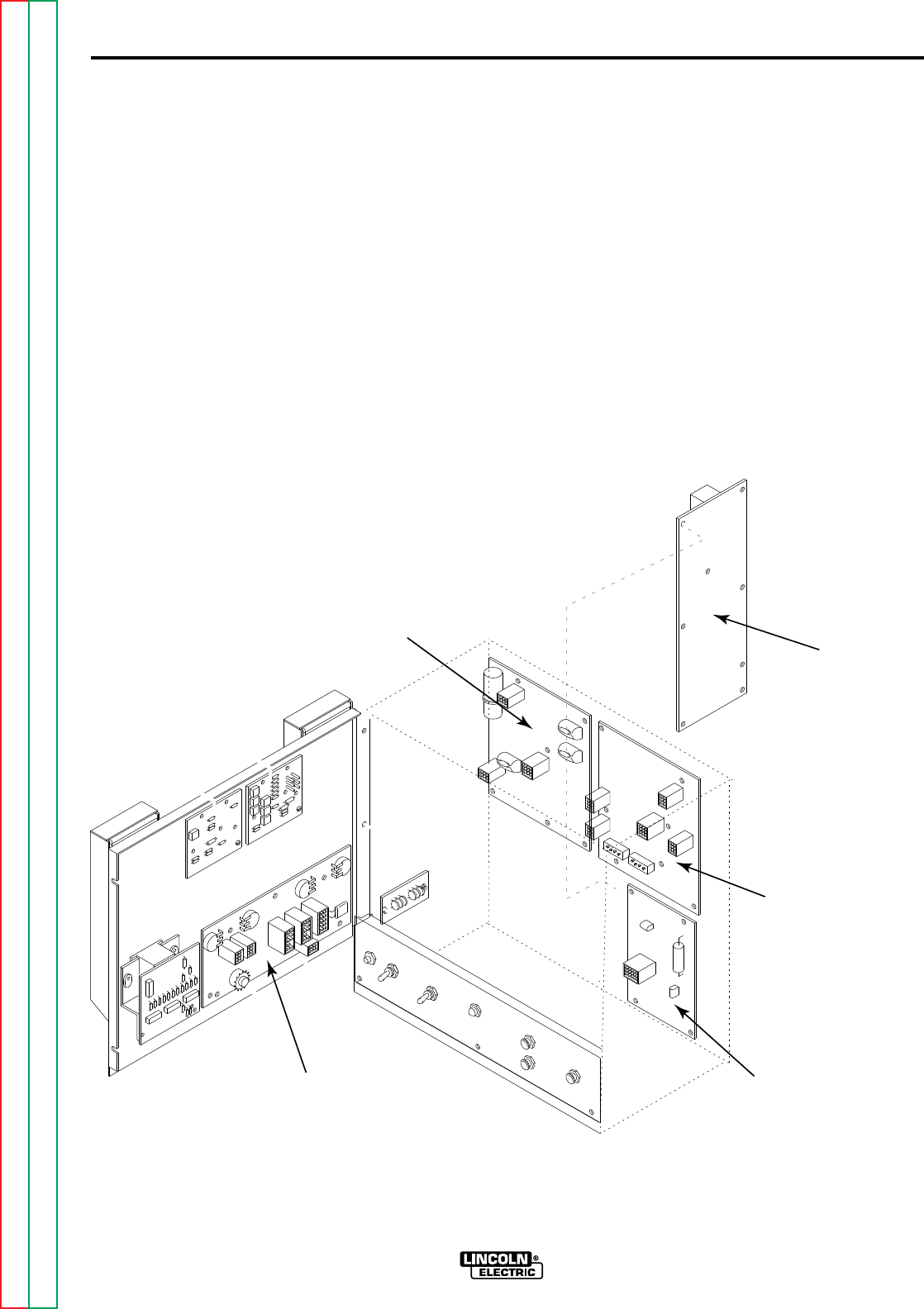
F-39
TROUBLESHOOTING & REPAIR
F-39
TEST PROCEDURE
1. Remove input power to the NA-5.
2. Using the 5/16" nutdriver open the
control box PC board access door.
3. Locate the power, logic, voltage,
control and procedure boards. See
Figure F.1
4. Apply 115VAC to the NA-5 wire
feeder at the correct pins. See
wiring diagram.
5. Perform the power supply checks as
described in Table F.1 If any of the
readings are incorrect (out of range)
or missing the power or logic board
may be faulty. See wiring diagram.
Note: Do not unplug the molex con-
nectors.
Also check associated leads and
plugs for loose or faulty connec-
tions.
DC POWER SUPPLY TEST (continued)
NA-5
FIGURE F.1 P.C. BOARD LOCATIONS
PROCEDURE
BOARD
POWER
BOARD
LOGIC
BOARD
CONTROL
BOARD
VOLTAGE
BOARD
Return to Section TOC Return to Section TOC Return to Section TOC Return to Section TOC
Return to Master TOC Return to Master TOC Return to Master TOC Return to Master TOC
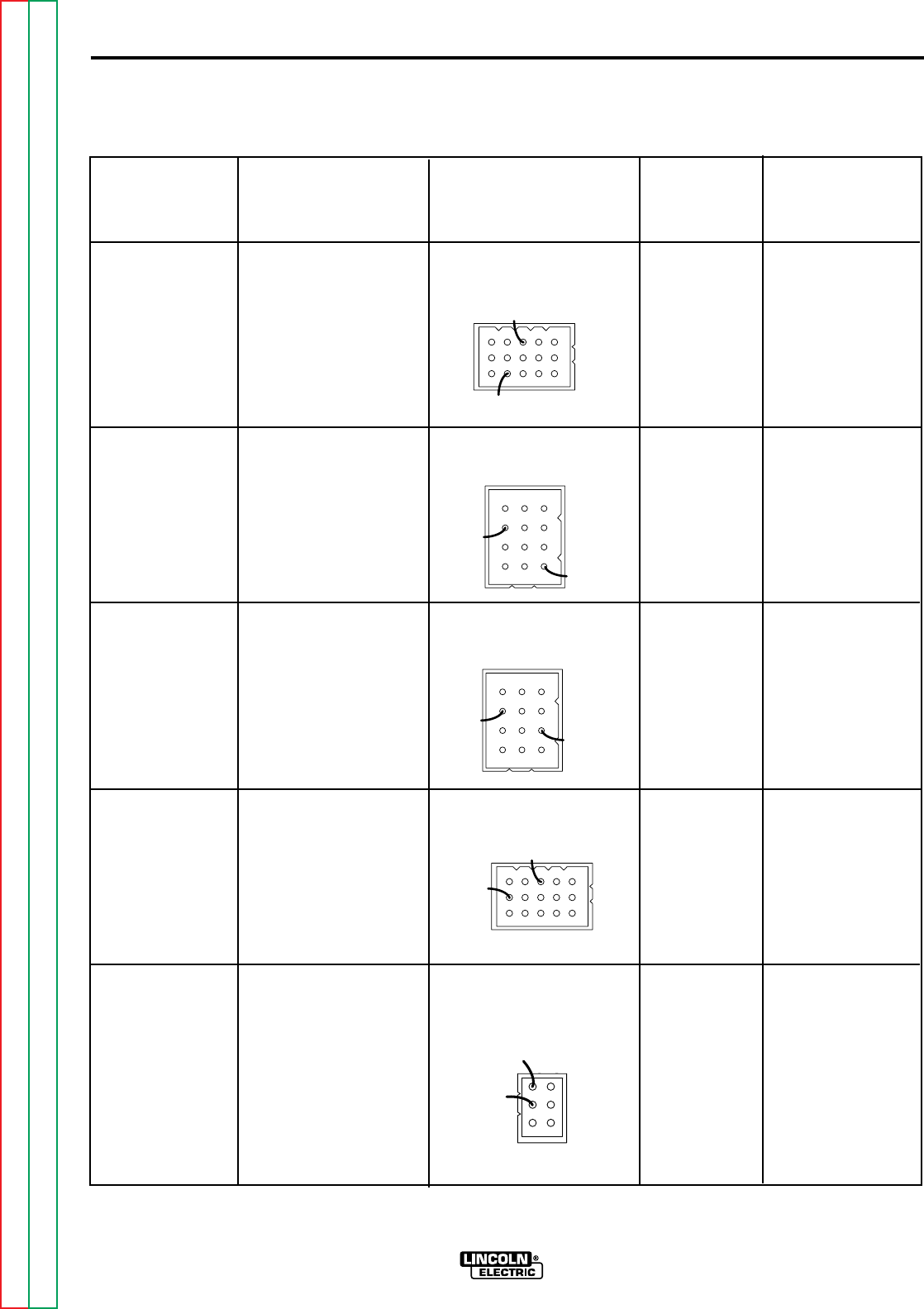
F-40
TROUBLESHOOTING & REPAIR
F-40
CHECK POINT TEST CONNECTOR LEAD NO. NORMAL
LOCATION DESCRIPTION PLUG PIN NO. ACCEPTABLE
VOLTAGE
READING
CONTROL PC CHECK +15VDC PIN 10 + 525 + 14.0 - 16.0 VDC
BOARD SUPPLY FROM PIN 9 - 510 -
CONNECTOR POWER BOARD
PLUG TO
CONTROL BOARD
VOLTAGE PC CHECK +15VDC PIN 3 + 525 + 14.0 - 16.0 VDC
BOARD 12 PIN SUPPLY FROM PIN 7 - 510 -
CONNECTOR POWER BOARD
PLUG TO
VOLTAGE BOARD
VOLTAGE PC CHECK -10VDC PIN 6 - 500 - 9.0 - 11.0 VDC
BOARD 12 PIN SUPPLY FROM PIN 7+ 510 +
CONNECTOR POWER BOARD
PLUG TO
VOLTAGE BOARD
CONTROL PC CHECK -10VDC PIN 14 - 500 - 9.0 - 11.0 VDC
BOARD SUPPLY FROM PIN 9 + 510 +
CONNECTOR POWER BOARD
PLUG TO
CONTROL BOARD
LOGIC PC CHECK +110VDC PLUG J1 PIN 1+ 610 + 90 - 135 VDC
BOARD J1 SUPPLY FROM PLUG J1 PIN 2 - 500 -
CONNECTOR POWER BOARD
PLUG TO
LOGIC BOARD
DC POWER SUPPLY TEST (continued)
NA-5
TABLE F.1 DC POWER SUPPLY CHECKS
525 +
510 -
525
+
510 -
500 -
510 +
500 -
510 +
500 -
610 +
Return to Section TOC Return to Section TOC Return to Section TOC Return to Section TOC
Return to Master TOC Return to Master TOC Return to Master TOC Return to Master TOC
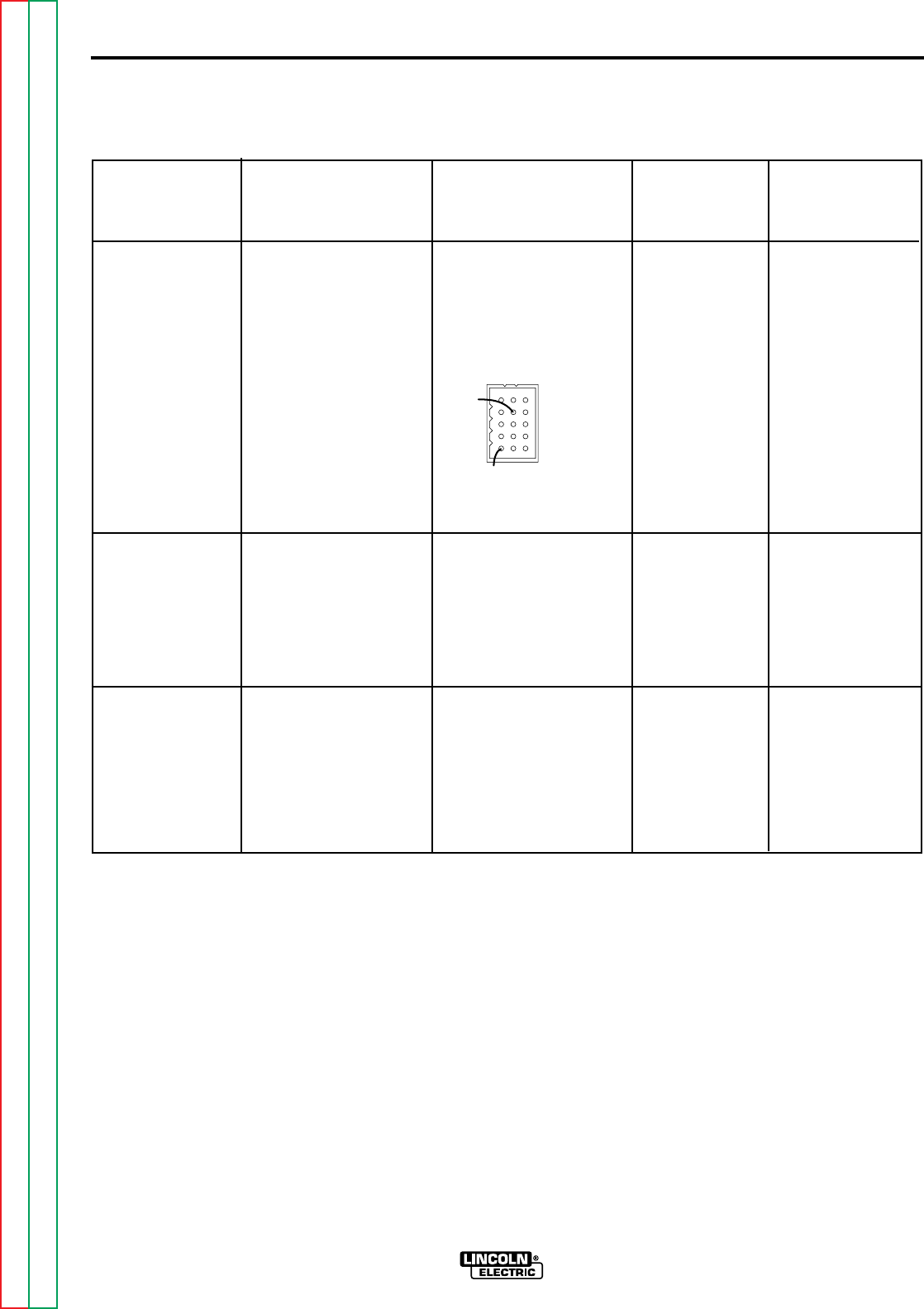
F-41
TROUBLESHOOTING & REPAIR
F-41
DC POWER SUPPLY TEST (continued)
NA-5
CHECK POINT TEST CONNECTOR LEAD NO. NORMAL
LOCATION DESCRIPTION PLUG PIN NO. ACCEPTABLE
VOLTAGE
READING
PROCEDURE CHECK +15VDC PLUG J19 515 +
PC BOARD SUPPLY FROM PIN 5 +
J19 CONNECTOR LOGIC BOARD 14.0 - 16.0 VDC
PLUG TO PLUG J19 500 -
PROCEDURE BOARD PIN 15 -
VOLTMETER CHECK +5VDC TEST POINT1. TP5 +
BOARD SUPPLY TP5 +
PRODUCED 4.75 - 5.25 VDC
ON THE
VOLTMETER TEST POINT1. LEAD 510P -
BOARD 510P -
SPEEDMETER CHECK +5VDC TEST POINT1. TP5 +
BOARD SUPPLY TP5 + 4.75 - 5.25 VDC
PRODUCED
ON THE TEST POINT1. LEAD 510P -
SPEEDMETER 510P -
BOARD
TABLE F.1 DC POWER SUPPLY CHECKS (continued)
500 -
515 +
1.Scrape encapsulation from test points.
Return to Section TOC Return to Section TOC Return to Section TOC Return to Section TOC
Return to Master TOC Return to Master TOC Return to Master TOC Return to Master TOC

F-42
TROUBLESHOOTING & REPAIR
F-42
NA-5
TEST DESCRIPTION
This test will help the technician to determine if the T1 and/or T2 transformers are functioning
properly.
MATERIALS NEEDED
115VAC power supply
Volt-Ohmmeter (Multimeter)
5/16" Nutdriver
Slot head screwdriver
T1 and T2 TRANSFORMER TEST
Service and repair should be performed only by Lincoln Electric factory trained per-
sonnel. Unauthorized repairs performed on this equipment could result in danger to
the technician or the machine operator and will invalidate your factory warranty. For
your safety and to avoid electrical shock, please observe all safety notes and precau-
tions detailed throughout this manual.
If for any reason you do not understand the test procedures or are unable to perform
the tests/repairs safely, contact the Lincoln Electric service department for technical
troubleshooting assistance before you proceed.
Call (216) 383-2531 or (800) 833-9353 (WELD).
_____________________________________________________________
WARNING
This procedure takes approximately 15 minutes to perform.
Return to Section TOC Return to Section TOC Return to Section TOC Return to Section TOC
Return to Master TOC Return to Master TOC Return to Master TOC Return to Master TOC
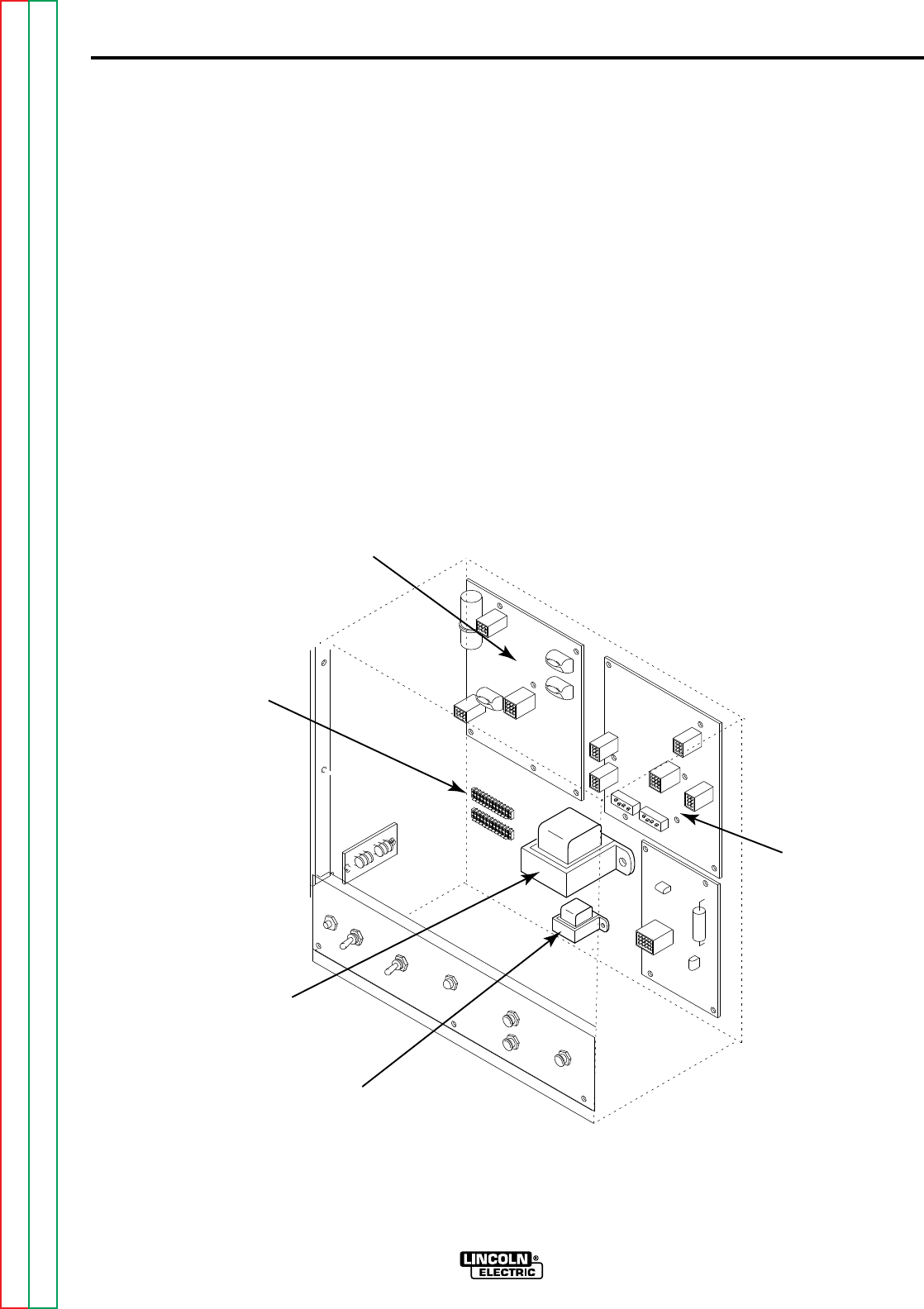
F-43
TROUBLESHOOTING & REPAIR
F-43
PROCEDURE
1. Remove all input power to the NA-5.
2. Using 5/16" nutdriver open the con-
trol box PC board access door.
3. Locate the T1 and T2 transformers.
See Figure F.2
4. Locate and remove the two sets of
primary leads (#531B and #532)
from the upper terminal strip TS2.
Label leads for reassembly. See
wiring diagram and Figure F.2
5. Using the 115VAC supply carefully
apply 115VAC to the T1 primary
leads #531B and #532.
6. Check for approximately 10VAC at
the yellow secondary leads (#601
and #602). See wiring diagram.
T1 and T2 TRANSFORMER TEST (Continued)
NA-5
FIGURE F.2 T1 AND T2 TRANSFORMERS
POWER
BOARD
LOGIC
BOARD
UPPER
TERMINAL
STRIP
T1 TRANSFORMER
T2 TRANSFORMER
Return to Section TOC Return to Section TOC Return to Section TOC Return to Section TOC
Return to Master TOC Return to Master TOC Return to Master TOC Return to Master TOC

F-44
TROUBLESHOOTING & REPAIR
F-44
7. Check for approximately 22VAC at
the blue secondary leads. The blue
secondary leads are connected to
the logic board. See wiring diagram.
8. Check for approximately 18VAC at
the white to red leads. The white
and red leads are connected to the
power board. See wiring diagram.
9. Check for approximately 36VAC at
the red to red leads. Both red leads
are also connected to the power
board. See wiring diagram.
10. If all the secondary voltages are
correct the T1 transformer is func-
tioning properly.
11. If any or all of the secondary volt-
ages are low or not present the T1
transformer may be faulty.
12. Using the 115VAC supply carefully
apply 115VAC to the T2 primary
leads #531B and #532.
13. Check for approximately 115VAC
at the orange secondary leads.
The orange leads are connected to
the power board. See wiring dia-
gram.
14. Check for approximately 24VAC at
the brown secondary leads. See
wiring diagram.
15. If all the secondary voltages are
correct the T2 transformer is func-
tioning properly.
16. If any or all of the secondary volt-
ages are low or not present the T2
transformer may be faulty.
17. Reconnect the primary leads
(#531B and #532) to the TS2 termi-
nal strip.
18. Close and secure the access door.
T1 and T2 TRANSFORMER TEST (Continued)
NA-5
Return to Section TOC Return to Section TOC Return to Section TOC Return to Section TOC
Return to Master TOC Return to Master TOC Return to Master TOC Return to Master TOC

F-45
TROUBLESHOOTING & REPAIR
F-45
NA-5
TEST DESCRIPTION
This test will aid the technician in determining if the transformer on the voltage board is func-
tioning properly.
MATERIALS NEEDED
5/16" Nutdriver
Phillips head screwdriver
115VAC power supply
Volt/Ohmmeter
VOLTAGE BOARD TRANSFORMER TEST
Service and repair should be performed only by Lincoln Electric factory trained per-
sonnel. Unauthorized repairs performed on this equipment could result in danger to
the technician or the machine operator and will invalidate your factory warranty. For
your safety and to avoid electrical shock, please observe all safety notes and precau-
tions detailed throughout this manual.
If for any reason you do not understand the test procedures or are unable to perform
the tests/repairs safely, contact the Lincoln Electric service department for technical
troubleshooting assistance before you proceed.
Call (216) 383-2531 or (800) 833-9353 (WELD).
_____________________________________________________________
WARNING
This procedure takes approximately 15 minutes to perform.
Return to Section TOC Return to Section TOC Return to Section TOC Return to Section TOC
Return to Master TOC Return to Master TOC Return to Master TOC Return to Master TOC
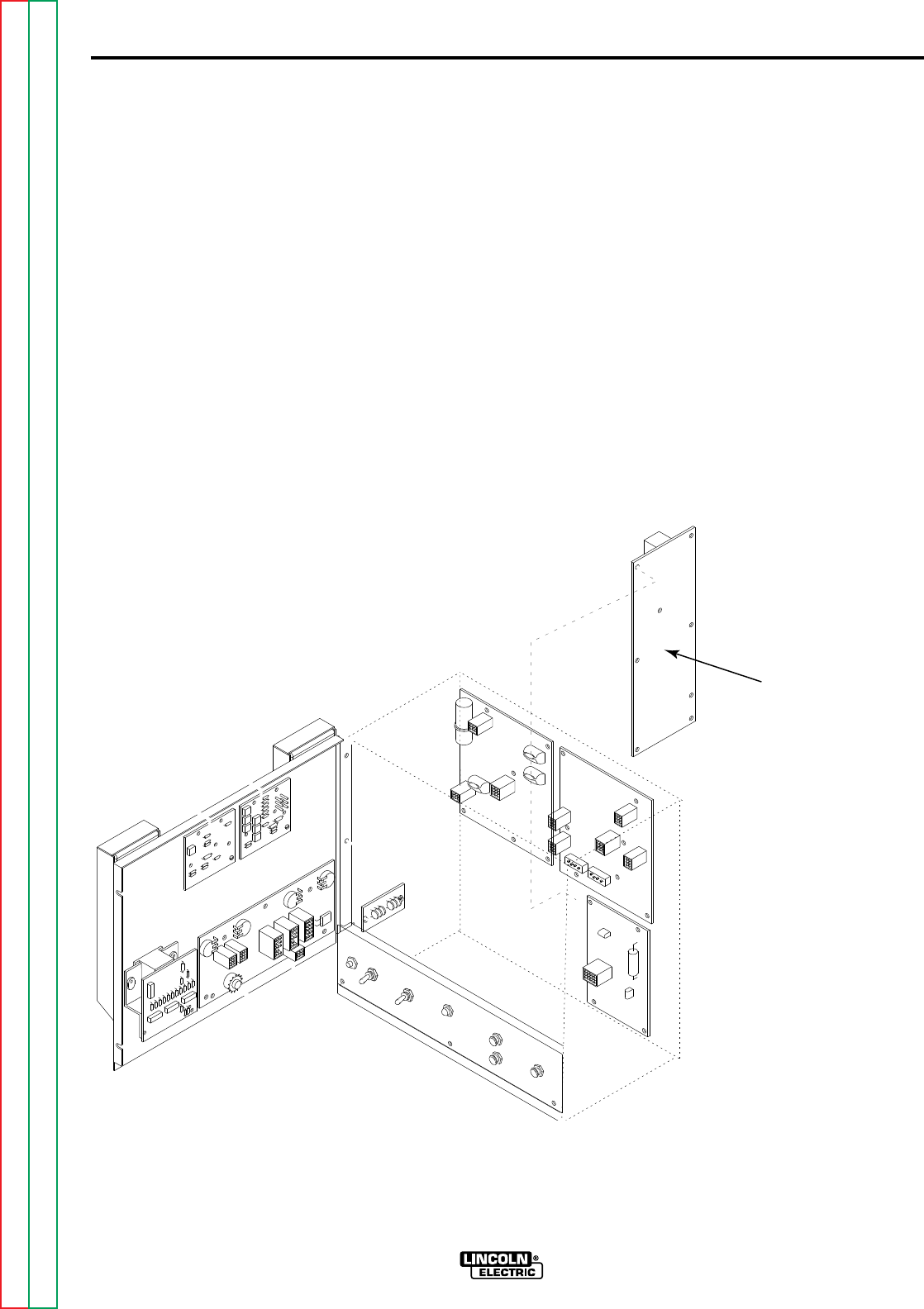
F-46
TROUBLESHOOTING & REPAIR
F-46
TEST PROCEDURE
1. Remove all input power to the NA-5.
2. Using the 5/16" nutdriver open the
control box PC board access door.
3. Locate the voltage board. See
Figure F.3
4. Remove the molex type plugs from
the voltage board.
5. Using the phillips head screwdriver
remove the voltage board from the
control box.
6. Locate the transformer and test
points on the voltage board. See
Figure F.4
VOLTAGE BOARD TRANSFORMER TEST (Continued)
NA-5
FIGURE F.3 VOLTAGE BOARD LOCATION
VOLTAGE
BOARD
Return to Section TOC Return to Section TOC Return to Section TOC Return to Section TOC
Return to Master TOC Return to Master TOC Return to Master TOC Return to Master TOC
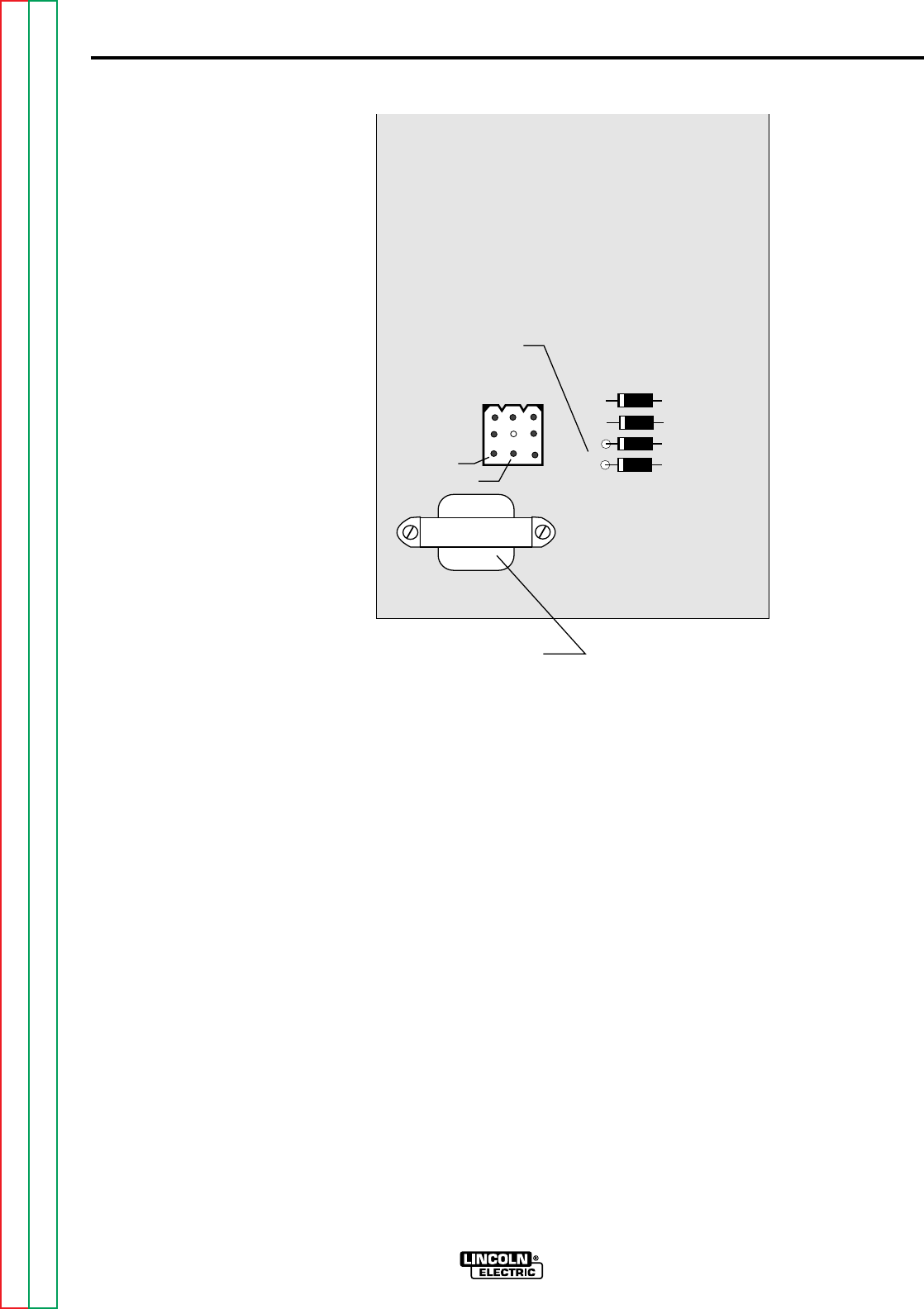
F-47
TROUBLESHOOTING & REPAIR
F-47
7. Using the 115VAC supply carefully
apply 115VAC to pins #8 and #9 in
the nine pin molex plug cavity on the
voltage board. See Figure F.4
Make sure the board and leads are
insulated from each other and any
metal conductors.
8. Using the voltmeter check for
approximately 24VAC at the sec-
ondary test points. See Figure F.4
Note: The secondary voltage will vary
with the input primary voltage. The
insulating material will have to be
removed from the secondary test
points to insure that the meter probes
make good electrical contact.
9. If the secondary voltage is correct
the transformer is functioning proper-
ly.
10. If the secondary voltage is low or
not present the transformer may be
faulty.
11. Carefully remove the 115VAC sup-
ply from the voltage board.
12. Install the voltage board and con-
nect the molex plugs.
13. Close and secure the access door.
VOLTAGE BOARD TRANSFORMER TEST (Continued)
NA-5
FIGURE F.4 TRANSFORMER TEST POINTS
NA-5
VOLTAGE
G1556-[ ]
VOLTAGE BOARD
TRANSFORMER
PIN #8
PIN #9
24VAC
SECONDARY
TEST POINTS
{
Return to Section TOC Return to Section TOC Return to Section TOC Return to Section TOC
Return to Master TOC Return to Master TOC Return to Master TOC Return to Master TOC

F-48
TROUBLESHOOTING & REPAIR
F-48
NA-5
TEST DESCRIPTION
This test will determine if the wire drive motor is able to function when supplied with the cor-
rect voltages..
MATERIALS NEEDED
Variable DC voltage supply 0 to 90 VDC
Isolated DC voltage supply 0 to 120 VDC
Volt/Ohmeter
WIRE FEED DRIVE MOTOR TEST
Service and repair should be performed only by Lincoln Electric factory trained per-
sonnel. Unauthorized repairs performed on this equipment could result in danger to
the technician or the machine operator and will invalidate your factory warranty. For
your safety and to avoid electrical shock, please observe all safety notes and precau-
tions detailed throughout this manual.
If for any reason you do not understand the test procedures or are unable to perform
the tests/repairs safely, contact the Lincoln Electric service department for technical
troubleshooting assistance before you proceed.
Call (216) 383-2531 or (800) 833-9353 (WELD).
_____________________________________________________________
WARNING
This procedure takes approximately 17 minutes to perform.
Return to Section TOC Return to Section TOC Return to Section TOC Return to Section TOC
Return to Master TOC Return to Master TOC Return to Master TOC Return to Master TOC
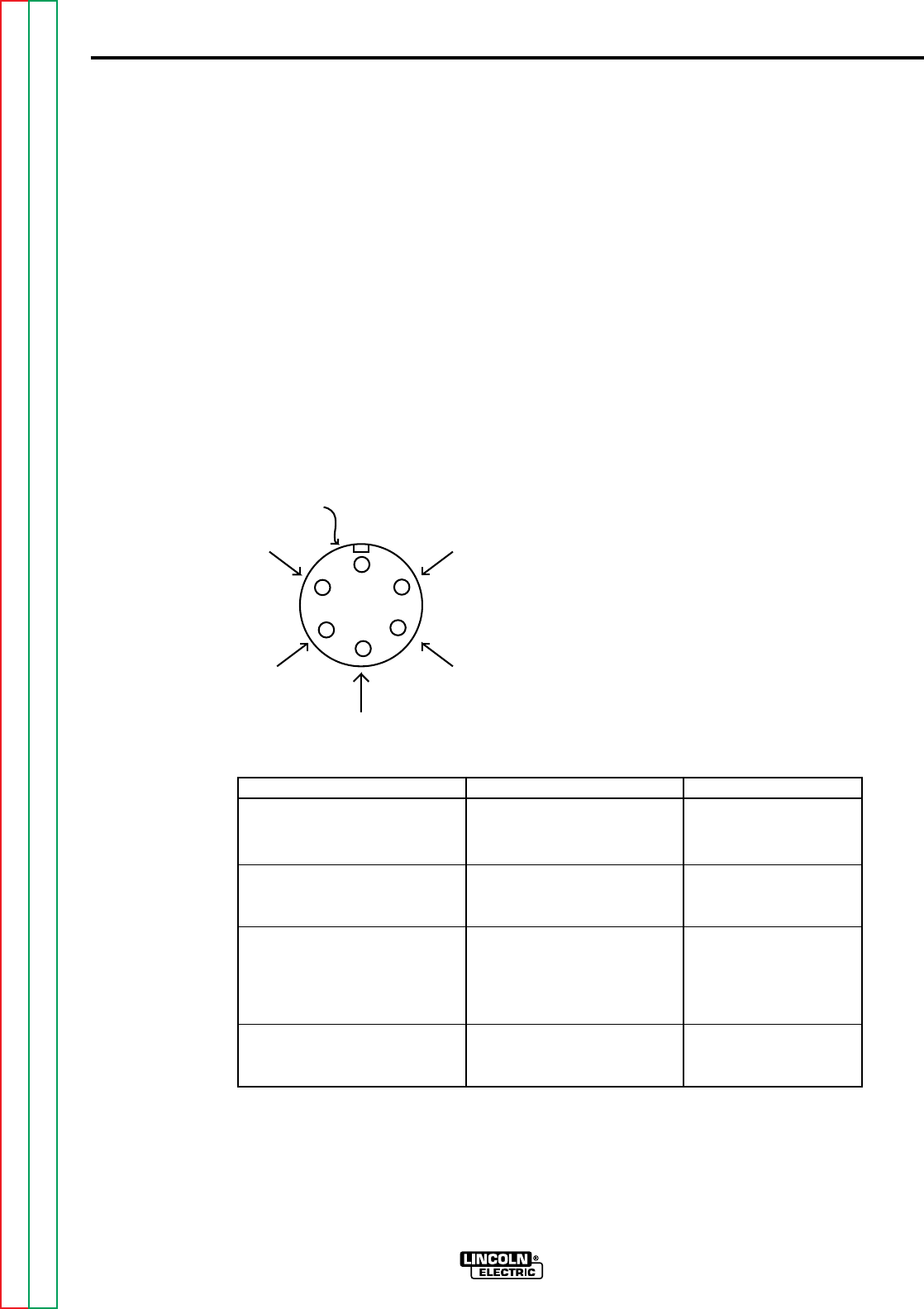
F-49
TROUBLESHOOTING & REPAIR
F-49
TEST PROCEDURE
1. Remove the wire feed motor connec-
tor from the NA-5 control box.
2. Using the ohmmeter, measure the
resistances per the table below. Also
see Figure F.5.
3. If the motor resistance test is good,
proceed to the
Motor Applied Voltage
Test
.
MOTOR APPLIED
VOLTAGE TEST
1. Carefully connect the isolated 120
VDC supply (SUPPLY TURNED
OFF) to pins C and D on the motor
connector.
2. Carefully connect the variable 0 to 90
VDC supply (SUPPLY TURNED
OFF) to pins A and B on the motor
connector. (See Table F.1.)
3. Apply field voltage first (pins C and
D) to the motor. Then, slowly apply
the armature voltage to pins A and B.
(See Table F.1).
4. The motor should run, and the speed
should vary with changes to the
armature voltage.
5. If the motor does NOT run and
change speed correctly, the motor or
gear box may be faulty.
6. To stop the motor, REMOVE THE
ARMATURE VOLTAGE FIRST (pins
A and B).
WIRE FEED DRIVE MOTOR TEST (Continued)
NA-5
TEST POINTS RESISTANCE DC VOLTAGE
Lead #539 to lead #541 4 to 5 ohms 0 to 90 VDC
armature
Lead #626 to lead #627 750 to 850 ohms 90 to 120 VDC
field winding
All leads 500,000 ohms NONE
to min.
motor shell
(Except lead #67)
Lead #67 to motor zero ohms Not Applicable
shell
FIGURE F.5 WIRE FEED DRIVE MOTOR
CONNECTOR PINS.
FA
B
C
D
E
#541
#539
#67
#627
#626
MOTOR
CONNECTOR
PINS
Return to Section TOC Return to Section TOC Return to Section TOC Return to Section TOC
Return to Master TOC Return to Master TOC Return to Master TOC Return to Master TOC

F-50
TROUBLESHOOTING & REPAIR
F-50
NA-5
TEST DESCRIPTION
This test will help the technician to determine if the external voltage sensing leads are con-
nected properly and intact.
MATERIALS NEEDED
Volt-Ohmmeter (Multimeter)
5/16" Nutdriver
3/4" wrench
Wiring diagram
EXTERNAL RESISTANCE TEST (LEADS #21 AND #67)
Service and repair should be performed only by Lincoln Electric factory trained per-
sonnel. Unauthorized repairs performed on this equipment could result in danger to
the technician or the machine operator and will invalidate your factory warranty. For
your safety and to avoid electrical shock, please observe all safety notes and precau-
tions detailed throughout this manual.
If for any reason you do not understand the test procedures or are unable to perform
the tests/repairs safely, contact the Lincoln Electric service department for technical
troubleshooting assistance before you proceed.
Call (216) 383-2531 or (800) 833-9353 (WELD).
_____________________________________________________________
WARNING
This procedure takes approximately 8 minutes to perform.
Return to Section TOC Return to Section TOC Return to Section TOC Return to Section TOC
Return to Master TOC Return to Master TOC Return to Master TOC Return to Master TOC

F-51
TROUBLESHOOTING & REPAIR
F-51
PROCEDURE
1. Make sure the electrode wire is fed
through the wire contact assembly
tip but NOT touching the "work"
piece.
2. Disconnect input power to the NA-5.
3. Make sure the drive motor cable and
power source control cables are
properly connected to the NA-5 con-
trol box.
4. Using the 5/16" nutdriver open the
control box PC board access door.
5. Locate the TS1 terminal strip. See
wiring diagram.
6. Using the ohmmeter check the resis-
tances per the following table F.2
7. Reconnect the welding cable leads
to the contact assembly.
8. If any of the resistances are not cor-
rect per Table F.2 check the associ-
ated leads, cables and circuits for
"opens" or "shorts". See wiring dia-
gram.
9. Close and secure the control box
access door.
EXTERNAL RESISTANCE TEST (LEADS #21 AND #67) (Continued)
NA-5
TEST POINTS EXPECTED COMMENTS AND
RESISTANCES CONDITIONS
Lead #667 Zero or less than Electrode wire must be in
to 1 ohm contact assembly tip
Electrode wire
Lead #621 to Zero or less than Polarity switches must be
work piece 1 ohm in the correct positions
Lead #667 to Greater than 15K Using the 3/4" wrench
#621 ohms disconnect the welding
cable(s) from the
contact assembly
TABLE F.2 EXTERNAL VOLTAGE SENSING LEADS TEST POINTS
Return to Section TOC Return to Section TOC Return to Section TOC Return to Section TOC
Return to Master TOC Return to Master TOC Return to Master TOC Return to Master TOC

F-52
TROUBLESHOOTING & REPAIR
F-52
NA-5
TEST DESCRIPTION
This test will help determine if the out-of-voltage range shut down circuitry is functioning prop-
erly.
MATERIALS NEEDED
5/16" Nutdriver
Jumper wire
Lincoln CV Power Source
OUT OF VOLTAGE RANGE SHUT DOWN TEST
Service and repair should be performed only by Lincoln Electric factory trained per-
sonnel. Unauthorized repairs performed on this equipment could result in danger to
the technician or the machine operator and will invalidate your factory warranty. For
your safety and to avoid electrical shock, please observe all safety notes and precau-
tions detailed throughout this manual.
If for any reason you do not understand the test procedures or are unable to perform
the tests/repairs safely, contact the Lincoln Electric service department for technical
troubleshooting assistance before you proceed.
Call (216) 383-2531 or (800) 833-9353 (WELD).
_____________________________________________________________
WARNING
This procedure takes approximately 18 minutes to perform.
Return to Section TOC Return to Section TOC Return to Section TOC Return to Section TOC
Return to Master TOC Return to Master TOC Return to Master TOC Return to Master TOC
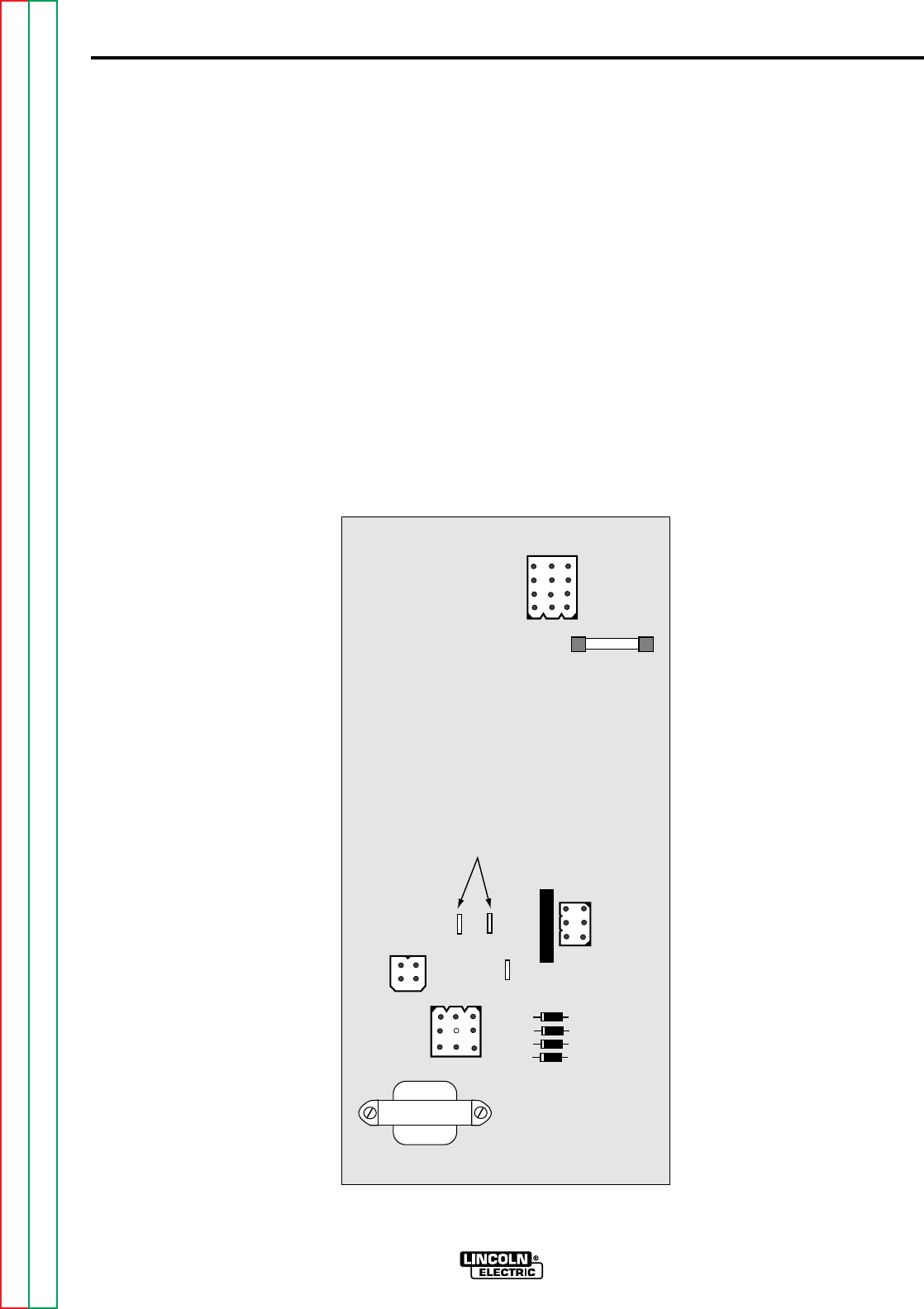
F-53
TROUBLESHOOTING & REPAIR
F-53
TEST PROCEDURE
1. Remove input power to the NA-5
2. Using the 5/16" nutdriver open the
control box PC board access door.
3. Locate the voltage PC board.
Jumper together the "BYPASS" and
“Common” pins on the NA-5 voltage
PC board. See Figure F.6 (On older
voltage boards these pins may be
labeled "B"). This should disable the
shut down circuit.
4. Connect to a Lincoln Electric CV
power source per connection dia-
gram. See the
Installation section
of this manual.
OUT OF VOLTAGE RANGE SHUT DOWN TEST (Continued)
NA-5
FIGURE F.6 VOLTAGE BOARD AND PIN LOCATIONS
NA-5
VOLTAGE
G1556-[ ]
BYPASS
COM
AUTO
JUMPER
TOGETHER
1/8 AMP FUSE
Return to Section TOC Return to Section TOC Return to Section TOC Return to Section TOC
Return to Master TOC Return to Master TOC Return to Master TOC Return to Master TOC

F-54
TROUBLESHOOTING & REPAIR
F-54
5. Start welding and observe the
ACTUAL voltage reading on the NA-
5 digital meter. The actual voltage
must match the SET voltage within
+/- 0.5VDC. If it does NOT, the NA-
5 is designed to shut down.
6. If the NA-5 continues to shut down
with the "BYPASS" pins jumpered
together, the voltage PC board may
be faulty.
7. If the ACTUAL voltage reading is
zero, the sensing leads may be
faulty. Perform the
External
Resistance Test
. Also check the
1/8 amp fuse on the voltage PC
board.
8. Check the polarity switche in the
Lincoln power source and its associ-
ated leads. Set the switches to the
same polarity as the electrode. See
the Wiring Diagram.
9. If the ACTUAL voltage reading is dif-
ferent from the SET voltage reading,
the power source may not be capa-
ble of producing the required arc
voltage, the control cable may be
faulty or misconnected, or the NA-5
voltage PC board may be faulty.
10. After all tests are complete, remove
the input power to the wire feeder
and remove the jumper wire you
placed on the "BYPASS' pins on
the voltage PC board. Close and
secure the access door.
OUT OF VOLTAGE RANGE SHUT DOWN TEST (Continued)
NA-5
Return to Section TOC Return to Section TOC Return to Section TOC Return to Section TOC
Return to Master TOC Return to Master TOC Return to Master TOC Return to Master TOC

F-55
TROUBLESHOOTING & REPAIR
F-55
TACH BOARD FEEDBACK TEST
NA-5
TEST DESCRIPTION
This procedure will aid the technician to determine if the tach board is functioning properly.
MATERIALS NEEDED
5/16" Nutdriver
Phillips head screwdriver
Analog volt/ohmmeter (Multimeter)
Wiring diagram
Service and repair should be performed only by Lincoln Electric factory trained per-
sonnel. Unauthorized repairs performed on this equipment could result in danger to
the technician or the machine operator and will invalidate your factory warranty. For
your safety and to avoid electrical shock, please observe all safety notes and precau-
tions detailed throughout this manual.
If for any reason you do not understand the test procedures or are unable to perform
the tests/repairs safely, contact the Lincoln Electric service department for technical
troubleshooting assistance before you proceed.
Call (216) 383-2531 or (800) 833-9353 (WELD).
_____________________________________________________________
WARNING
This procedure takes approximately 10 minutes to perform.
Return to Section TOC Return to Section TOC Return to Section TOC Return to Section TOC
Return to Master TOC Return to Master TOC Return to Master TOC Return to Master TOC

F-56
TROUBLESHOOTING & REPAIR
F-56
PROCEDURE
1. Remove input power to the NA-5.
2. Using the 5/16" nutdriver open the
control box PC board access door.
3. Locate leads #510A, #525A and
#555 on the control board.
4. Apply 115VAC to the NA-5 wire
feeder at the correct pins. See
wiring diagram.
5. Check leads #525A(+) to #510A(-)
for the presence of 15VDC. This is
the supply voltage from the control
PC board to the tach PC board. If
the voltage is present, proceed to
the next step. If the voltage is miss-
ing check the associated wiring and
then perform the
DC Power Supply
Test
.
6. With the motor running (activate
either inch switches or the start
switch) and check leads #555(+) to
#510A(-) for the presence of
between 4.5 - 10.5VDC. (The motor
must be running.) This is the feed-
back voltage from the tach PC board
to the control PC board. This volt-
age is dependent upon motor speed.
7. If the feedback voltage is missing or
does not vary with motor speed, the
tach PC board may be faulty. Also
check for loose or faulty connec-
tions.
8. After the completion of the tests
remove the 115VAC power and
close and secure the access door.
TACH BOARD FEEDBACK TEST (Continued)
NA-5
Return to Section TOC Return to Section TOC Return to Section TOC Return to Section TOC
Return to Master TOC Return to Master TOC Return to Master TOC Return to Master TOC

F-57
TROUBLESHOOTING & REPAIR
F-57
NA-5
VOLTMETER ACCURACY TEST
TEST DESCRIPTION
This test will help determine if the NA-5 voltmeter is providing accurate readings.
MATERIALS NEEDED
Digital volt/ohmmeter with at least 3-1/2 digits and +/-0.5% accuracy
Service and repair should be performed only by Lincoln Electric factory trained per-
sonnel. Unauthorized repairs performed on this equipment could result in danger to
the technician or the machine operator and will invalidate your factory warranty. For
your safety and to avoid electrical shock, please observe all safety notes and precau-
tions detailed throughout this manual.
If for any reason you do not understand the test procedures or are unable to perform
the tests/repairs safely, contact the Lincoln Electric service department for technical
troubleshooting assistance before you proceed.
Call (216) 383-2531 or (800) 833-9353 (WELD).
_____________________________________________________________
WARNING
This procedure takes approximately 10 minutes to perform.
Return to Section TOC Return to Section TOC Return to Section TOC Return to Section TOC
Return to Master TOC Return to Master TOC Return to Master TOC Return to Master TOC
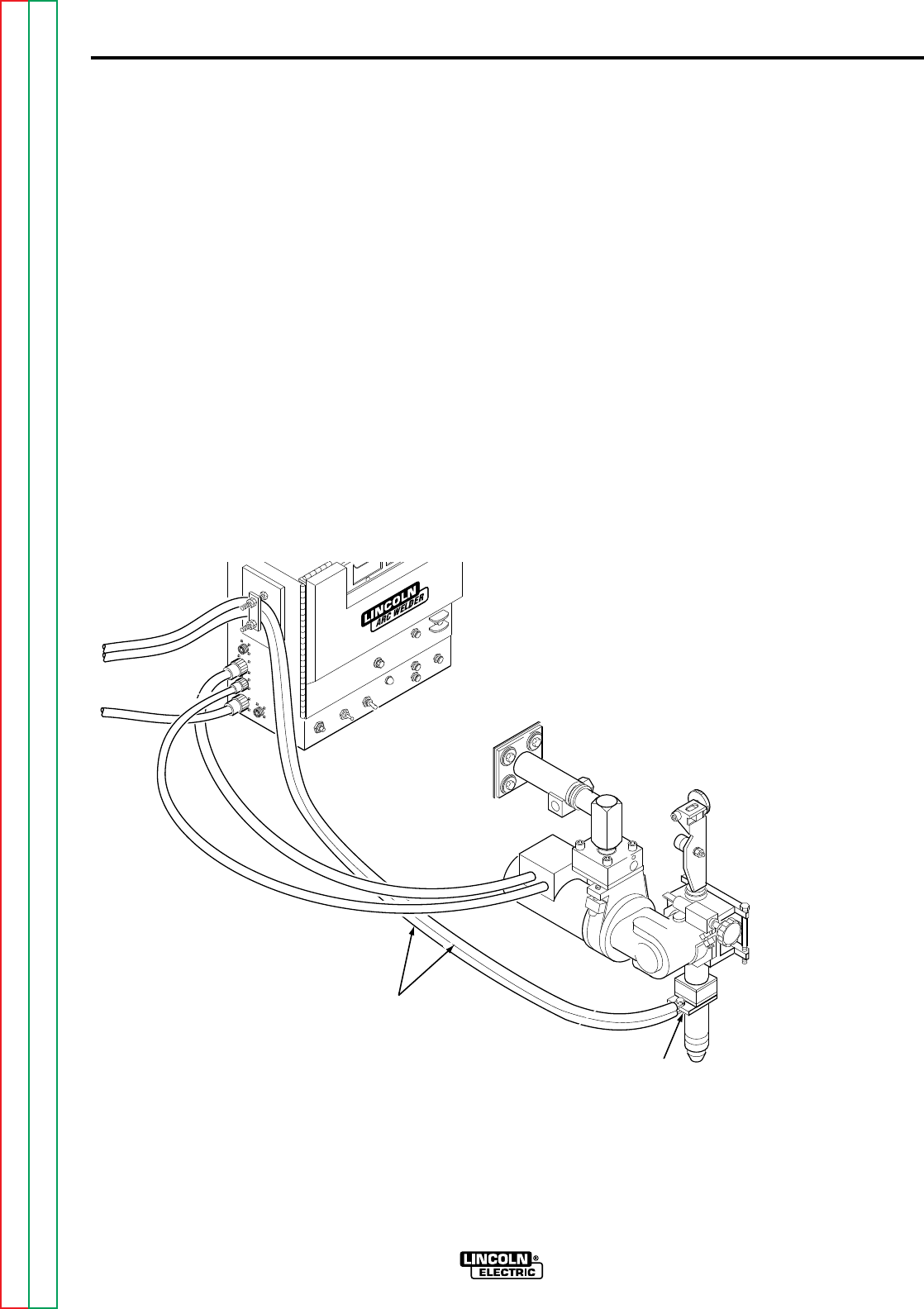
F-58
TROUBLESHOOTING & REPAIR
F-58
TEST PROCEDURE
Perform the following checks with the
NA-5 connected to a Lincoln CV weld-
ing power source according to the prop-
er connection diagram. See the
Installation Section
of this manual.
1. Connect the test voltmeter (see
Materials Needed) between the
"work" and the electrode cable con-
nection at the welding head. See
Figure F.7
2. Using the 5/16" nutdriver open the
control box PC board access door.
3. Place a jumper wire between leads
#2 and #4 located on CR3 relay.
See Figure F.8 This this should
energize the output terminals of the
Lincoln CV welding power source.
An open circuit voltage should be
present at the welding output termi-
nals. The test voltmeter reading
should match the ACTUAL volts
meter reading on the NA-5 within +/-
0.5VDC (typically +/- 0.2VDC). If it
does not, check the integrity and
placement of the voltage
sensing leads #21 and #67 and
associated wiring. Perform the
Meter Circuit Accuracy Test
.
VOLTMETER ACCURACY TEST (Continued)
NA-5
FIGURE F.7 TEST METER CONNECTION POINTS
CONNECT VOLTMETER
TO ELECTRODE
CONNECTION
POINT
ELECTRODE CABLES
Return to Section TOC Return to Section TOC Return to Section TOC Return to Section TOC
Return to Master TOC Return to Master TOC Return to Master TOC Return to Master TOC
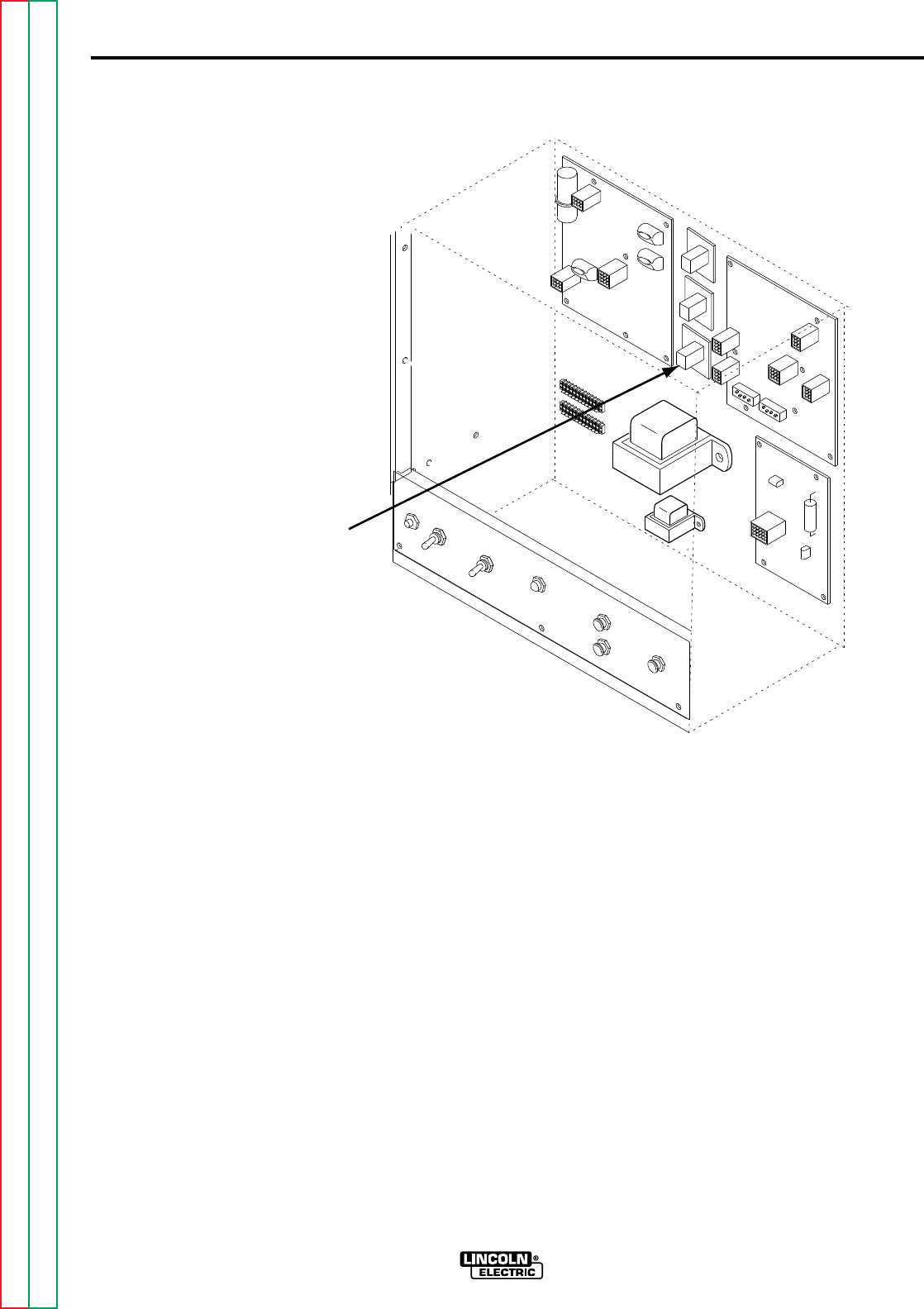
F-59
TROUBLESHOOTING & REPAIR
F-59
4. Remove the jumper wire from leads
#2 and #4.
5. Remove the test voltmeter and,
while welding, compare the SET
volts and ACTUAL volts meter read-
ings. Depending upon the arc volt-
age characteristics of the process
being welded, the ACTUAL reading
may vary somewhat about an aver-
age value. The average ACTUAL
reading should match the SET read-
ing within +/- 0.5 VDC. If not, refer
to the
Meter Circuit Accuracy Test
.
6. If no further tests are required,
remove all test equipment and close
and secure the access door.
VOLTMETER ACCURACY TEST (Continued)
NA-5
FIGURE F.8 CR3 RELAY
CR3 RELAY
Return to Section TOC Return to Section TOC Return to Section TOC Return to Section TOC
Return to Master TOC Return to Master TOC Return to Master TOC Return to Master TOC

F-60
TROUBLESHOOTING & REPAIR
F-60
NA-5
WIRE SPEED ACCURACY TEST
TEST DESCRIPTION
This test will help determine if the NA-5 is providing the proper wire feed per inches of revolu-
tion of the drive roll.
MATERIALS NEEDED
Ruler or other linear measuring device
5/16" Nutdriver
Service and repair should be performed only by Lincoln Electric factory trained per-
sonnel. Unauthorized repairs performed on this equipment could result in danger to
the technician or the machine operator and will invalidate your factory warranty. For
your safety and to avoid electrical shock, please observe all safety notes and precau-
tions detailed throughout this manual.
If for any reason you do not understand the test procedures or are unable to perform
the tests/repairs safely, contact the Lincoln Electric service department for technical
troubleshooting assistance before you proceed.
Call (216) 383-2531 or (800) 833-9353 (WELD).
_____________________________________________________________
WARNING
This procedure takes approximately 20 minutes to perform.
Return to Section TOC Return to Section TOC Return to Section TOC Return to Section TOC
Return to Master TOC Return to Master TOC Return to Master TOC Return to Master TOC
F-61
TROUBLESHOOTING & REPAIR
F-61
TEST PROCEDURE
Perform the following checks with the
NA-5 connected to a Lincoln CV weld-
ing power source according to the prop-
er connection diagram. See the
Installation Section
of this manual.
1. Check to make sure the speedmeter
calibration jumper is connected to
the proper calibration pin for the
head and drive roll system being
used. See Table F.3
WIRE SPEED ACCURACY TEST (Continued)
NA-5
SPEEDMETER HEAD DRIVE ROLL WIRE SIZE RANGE RATED SPEED
CALIBRATION RATIO PART NUMBER RANGE (IPM)
21* 21/1 S12778 Single .035 - .052 Solid 100 - 2070
S19113 Single .045 - .052 Cored
57F** 57/1 S12778 Single .035 - .052 40 - 778
57** 57/1 S12515 Single 1/16 - 3/32 38 - 762
95 95/1 S12514 Single 3/32 - 5/32 22 - 428
95S*** 95/1 S12515 Single 1/16 - 3/32 23 - 456
S19113 Single .045 - .052 Cored
S13161-052 Twin .045 -.052
S13161-5/64 Twin 1/16 - 5/64
S14904 (Outer) Twin 3/32
S14905 (Inner)
142 142/1 S12514 Single 3/32 - 7/32 15 - 289
142T*** 142/1 S14904 (Outer) Twin 5/64 - 1/8 15 - 300
S14905 (Inner)
TABLE F.3
* Present on HI -Speed NA-5 speedmeter board only. ** Early speedmeter pins were labeled 55F and 55,
respectively.
*** Early speedmeter PC boards did not include these calibration pins.
Return to Section TOC Return to Section TOC Return to Section TOC Return to Section TOC
Return to Master TOC Return to Master TOC Return to Master TOC Return to Master TOC
F-62
TROUBLESHOOTING & REPAIR
F-62
2. Check for the proper wire feed inch-
es per revolution of the drive roll.
A. Set the Strike speed control to
any setting between 50 and 125
IPM. While pressing the INCH
DOWN button measure the pre-
cise length of wire fed by exactly
10 revolutions of the drive roll.
The measured length should be
within the range specified in
Table F.4 for the drive roll and
wire size employed.
B. If the measured length is not
within the specified lengths
there may be a problem with the
wire or wire feeding path. See
the
Troubleshooting Guide
(Feeding Problems)
in this sec-
tion of the manual. Also check
for correct drive roll tension
adjustment.
WIRE SPEED ACCURACY TEST (Continued)
NA-5
DRIVE ROLL PART WIRE SIZE RANGE INCHES OF WIRE FED PER
NUMBER 10 REVOLUTIONS OF
DRIVE ROLL
S12778 Single .035 - .052 Solid 53 - 54
S19113 Single .045 - .052 Cored 53 - 55
S12515 Single 1/16 - 3/32 51 - 53
S12514 Single 3/32 - 5/32 49 - 51
S13161-052 Twin .045 - .052 53 - 55
S13161-5/64 Twin 1/16 - 5/64 53 - 55
S14904 (Outer) Twin 3/32 51 - 52
S14905 (Inner)
S12514 Single 3/32 - 7/32 49 - 52
S14904 (Outer) Twin 5/64 - 1/8 51 - 53
S14905 (Inner)
TABLE F.4
Return to Section TOC Return to Section TOC Return to Section TOC Return to Section TOC
Return to Master TOC Return to Master TOC Return to Master TOC Return to Master TOC
F-63
TROUBLESHOOTING & REPAIR
F-63
3. Check for the proper drive roll revo-
lutions per minute. (RPM)
A. Adjust the STRIKE speed con-
trol to obtain the SET speed
specified for the speedmeter
calibration pin and head ratio
specified per Table F.5 While
pressing the INCH down button
count the drive roll revolutions in
60 seconds. The drive roll revo-
lutions and actual speed reading
should match Table F.5
B. If the readings do not match the
number in Table F.5 refer to the
Meter Circuit Accuracy Test
.
WIRE SPEED ACCURACY TEST (Continued)
NA-5
SPEEDMETER HEAD SET SPEEDMETER DRIVE ROLL ACTUAL
CALIBRATION RATIO READING (IPM) RPM SPEEDMETER
PIN READING (IPM)
21* 21/1 0.27 (IPM X 1000) 50 +/- 2 0.27 +/- 0.01
(IPM X 1000)
57F** 57/1 268 50 +/- 1 268 +/- 2
57** 57/1 262 50 +/- 1 262 +/- 2
95 95/1 249 50 +/- 1 249 +/- 2
95S*** 95/1 265 50 +/- 1 265 +/- 2
142 142/1 250 50 +/- 1 250 +/- 2
142T*** 142/1 260 50 +/- 1 260 +/- 2
TABLE F.5
* Present on HI -Speed NA-5 speedmeter board only. ** Early speedmeter pins were labeled 55F and 55,
respectively.
*** Early speedmeter PC boards did not include these calibration pins.
Return to Section TOC Return to Section TOC Return to Section TOC Return to Section TOC
Return to Master TOC Return to Master TOC Return to Master TOC Return to Master TOC

F-64
TROUBLESHOOTING & REPAIR
F-64
NA-5
METER CIRCUIT ACCURACY TEST
TEST DESCRIPTION
This test will help determine if the NA-5 meter circuit is functioning properly.
MATERIALS NEEDED
Digital volt/ohmmeter with at least 3-1/2 digits and +/- 0.5% accuracy
5/16" Nutdriver
Service and repair should be performed only by Lincoln Electric factory trained per-
sonnel. Unauthorized repairs performed on this equipment could result in danger to
the technician or the machine operator and will invalidate your factory warranty. For
your safety and to avoid electrical shock, please observe all safety notes and precau-
tions detailed throughout this manual.
If for any reason you do not understand the test procedures or are unable to perform
the tests/repairs safely, contact the Lincoln Electric service department for technical
troubleshooting assistance before you proceed.
Call (216) 383-2531 or (800) 833-9353 (WELD).
_____________________________________________________________
WARNING
The Speed Meter Circuit tests take approximately 15 minutes to perform.
The Volt Meter Circuit tests take approximately 15 minutes to perform.
Return to Section TOC Return to Section TOC Return to Section TOC Return to Section TOC
Return to Master TOC Return to Master TOC Return to Master TOC Return to Master TOC
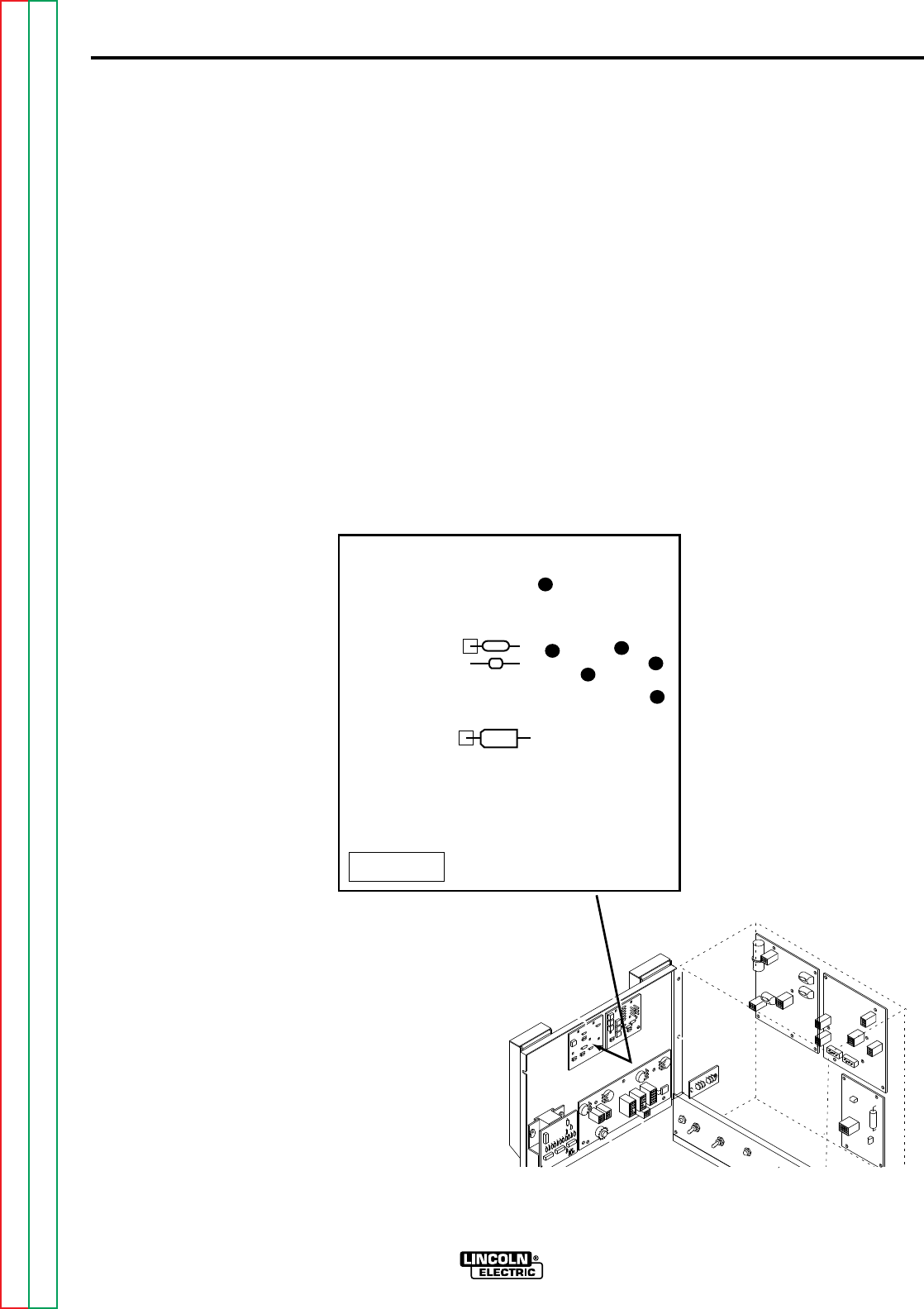
F-65
TROUBLESHOOTING & REPAIR
F-65
TEST PROCEDURE
1. Remove input power to the NA-5.
2. Using the 5/16" nutdriver open the
control box PC board access door.
3. Locate the voltmeter PC board. See
Figure F.9
4. Apply input power to the NA-5.
5. Test for AC supply to the volt-
meter PC board.
• Check for 8 to 11VAC from lead
#601 to #602. See Figure F.9
Note: The coating will have to be
removed from the test points to ensure
accurate voltmeter readings. If the cor-
rect AC voltage is not present check for
loose or faulty connects with the associ-
ated leads. See wiring diagram.
METER CIRCUIT ACCURACY TEST (Continued)
NA-5
FIGURE F.9 VOLTMETER PC BOARD AND TEST POINTS
L6685-[ ] METER
TP4
TP5
517
518
510
510C 601
602
Return to Section TOC Return to Section TOC Return to Section TOC Return to Section TOC
Return to Master TOC Return to Master TOC Return to Master TOC Return to Master TOC
F-66
TROUBLESHOOTING & REPAIR
F-66
6. Test for DC volts on the voltmeter
PC board.
• Check for 4.75 to 5.25VDC from
TP5 to lead #510C. See Figure
F.9
Note: The coating will have to be
removed from the test points to ensure
accurate voltmeter readings.
• If the display is NOT lit and the
correct DC voltage is present at
TP5 to lead #510C, the digital
meter may be faulty. Replace the
meter.
• If the AC voltage IS present at
leads #601 to #602 and the DC
voltage is missing, the voltmeter
PC board may be faulty.
7. Test Digital Voltmeter Accuracy
• Use a test meter with at least 3-
1/2 digits and +/- 0.5% accuracy.
• Connect the + probe to TP4 and
the - probe to lead 510C. Do NOT
disconnect plug.
Note: The coating will have to be
removed from the test points to ensure
accurate meter readings.
• With the NA-5 voltmeter reading
SET values of STRIKE voltage,
adjust the strike voltage control
until the test meter matches the
settings in the table below.
• If the NA-5 digital voltmeter does
not match the readings, the digital
meter may be faulty.
METER CIRCUIT ACCURACY TEST (Continued)
NA-5
NA-5 SET VOLTS READING TEST VOLTMETER READING
15.0VDC .150 +/- .004VDC
30.0VDC .300 +/- .004VDC
60.0VDC .600 +/- .006 VDC
Return to Section TOC Return to Section TOC Return to Section TOC Return to Section TOC
Return to Master TOC Return to Master TOC Return to Master TOC Return to Master TOC
F-67
TROUBLESHOOTING & REPAIR
F-67
8. Test Voltmeter PC Board Accuracy
• Use a test meter with at least 3-
1/2 digits and +/- 0.5% accuracy.
• Connect the + probe to lead #517
and the - probe to lead #510C.
Do not disconnect plug.
Note: The coating will have to be
removed from the test points to ensure
accurate meter readings.
• With the NA-5 voltmeter reading
SET values of STRIKE voltage,
adjust the strike voltage control
until the NA-5 voltmeter matches
the settings in the table below.
• If the test meter does not match
the readings, the voltmeter PC
board may be faulty.
METER CIRCUIT ACCURACY TEST (Continued)
NA-5
NA-5 SET VOLTS READING TEST VOLTMETER READING
15.0VDC 1.50VDC +/- .04
30.0VDC 3.00VDC +/- .04
60.0VDC 6.00VDC +/- .06
Return to Section TOC Return to Section TOC Return to Section TOC Return to Section TOC
Return to Master TOC Return to Master TOC Return to Master TOC Return to Master TOC
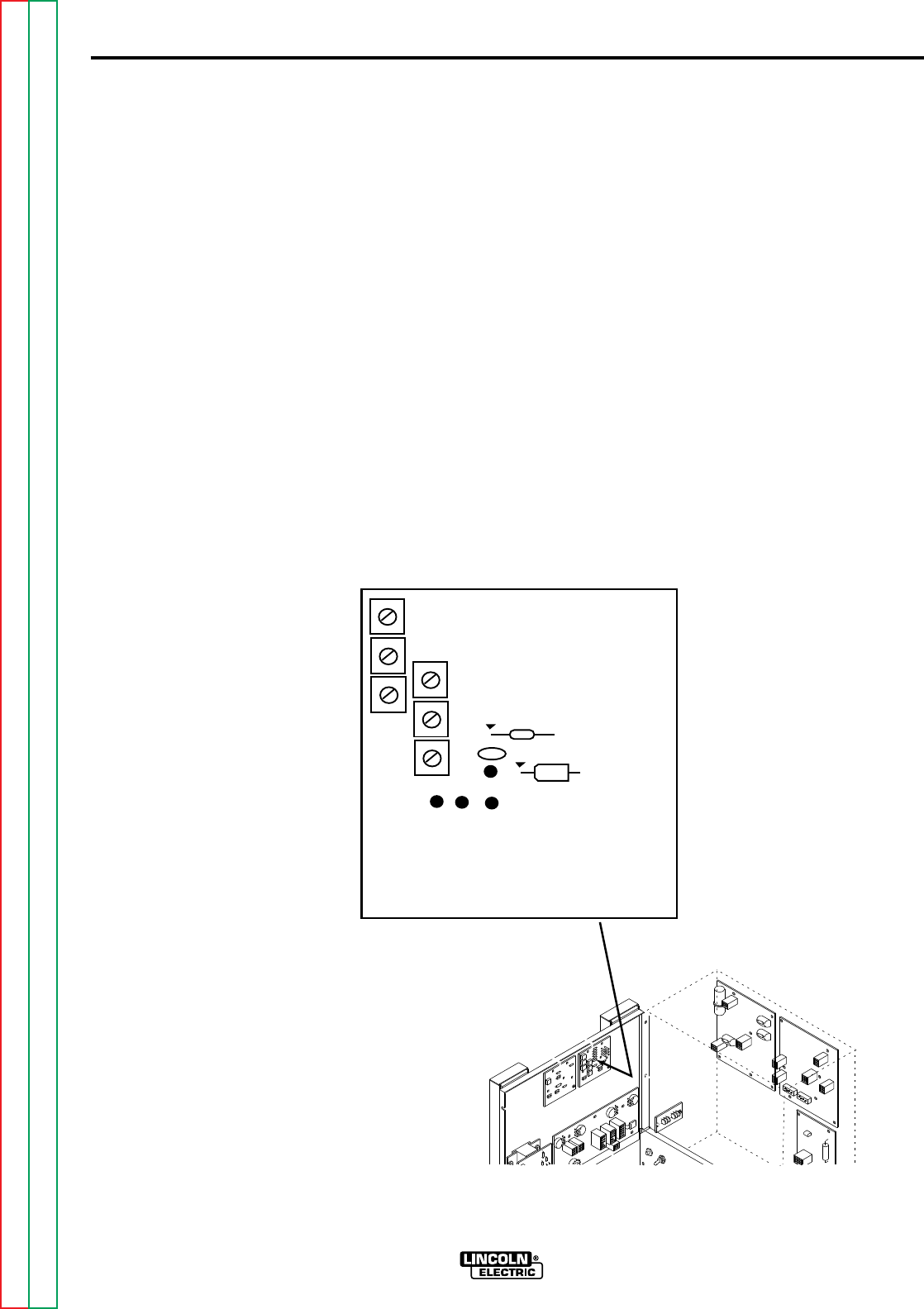
F-68
TROUBLESHOOTING & REPAIR
F-68
9. Locate the speedmeter PC board.
See Figure F.10
10. Apply input power to the NA-5.
11. Test for AC supply to the speed-
meter PC board.
• Check for 8 to 11VAC from lead
#601 ot #602. See Figure F.10
Note: The coating will have to be
removed from the test points to ensure
accurate voltmeter readings. If the cor-
rect AC voltage is not present check for
loose or faulty connects with the associ-
ated leads. See wiring diagram.
12. Test for DC volts on the speed-
meter PC board.
• Check for 4.75 to 5.25VDC from
TP5 to lead #510P. See Figure
F.10
Note: The coating will have to be
removed from the test points to ensure
accurate meter readings.
• If the display is NOT lit and the
correct DC voltage is present at
TP5 to lead #510P, the digital
meter may be faulty. Replace the
meter.
• If the AC voltage IS present at
leads #601 to #602 and the DC
voltage is missing, the speedme-
ter PC board may be faulty.
METER CIRCUIT ACCURACY TEST (Continued)
NA-5
FIGURE F.10 SPEEDMETER PC BOARD AND TEST POINTS
NA5 SPEED METER L6233
TP4
TP5
510
510P
601
602
Return to Section TOC Return to Section TOC Return to Section TOC Return to Section TOC
Return to Master TOC Return to Master TOC Return to Master TOC Return to Master TOC
F-69
TROUBLESHOOTING & REPAIR
F-69
13. Test Speedmeter Digital Meter
Accuracy
• Use a test meter with at least 3-
1/2 digits and +/- 0.5% accuracy.
• Connect the + probe to TP4 and
the - probe to lead 510P. Do NOT
disconnect plug.
Note: The coating will have to be
removed from the test points to ensure
accurate meter readings.
• With the NA-5 speedmeter read-
ing SET values of STRIKE speed,
adjust the strike wire speed con-
trol until the test meter matches
the settings in the table below.
• If the NA-5 digital speedmeter
does not match the readings, the
digital meter may befaulty.
METER CIRCUIT ACCURACY TEST (Continued)
NA-5
*For Hi-Speed NA-5 speedmeter (IPM X 1000).
NA-5 SET SPEED READING TEST VOLTMETER READING
(IPM)
150 (1.50*) .150 +/- .004VDC
300 (3.00*) .300 +/- .004VDC
Return to Section TOC Return to Section TOC Return to Section TOC Return to Section TOC
Return to Master TOC Return to Master TOC Return to Master TOC Return to Master TOC
F-70
TROUBLESHOOTING & REPAIR
F-70
14. Test Speedmeter PC Board
Accuracy
• Use a test meter with at least 3-
1/2 digits and +/- 0.5% accuracy.
• Connect the + probe to lead #519
(Jumper lead) and the - probe to
lead #510P. Do not discon-
nect plug.
Note: The coating will have to be
removed from the test points to ensure
accurate meter readings.
• With the NA-5 speedmeter read-
ing SET values of STRIKE speed ,
adjust the strike wire speed con-
trol until the NA-5 speedmeter
matches the settings in the table
below.
• If the test meter does not match
the readings, the speedmeter PC
board may be faulty.
15. When the testing is complete close
and secure the access door.
METER CIRCUIT ACCURACY TEST (Continued)
NA-5
SPEEDMETER NA-5 SET SPEED READING TEST VOLTMETER
CALIBRATION PIN (IPM) READING
21* 2.07* 6.00 +/- .06
57F 778 6.00 +/- .06
57 762 6.00 +/- .06
95 428 6.00 +/- .06
95S 456 6.00 +/- .06
142 289 6.00 +/- .06
142T 300 6.00 +/- .06
* For Hi-Speed NA-5 speedmeter (IPM X 1000)
Return to Section TOC Return to Section TOC Return to Section TOC Return to Section TOC
Return to Master TOC Return to Master TOC Return to Master TOC Return to Master TOC

F-71
TROUBLESHOOTING & REPAIR
F-71
NA-5
PC BOARD(S) REMOVAL AND REPLACEMENT
DESCRIPTION
The following procedure will aid the technician in removing and replacing the printed circuit
boards for maintenance or replacement.
MATERIALS NEEDED
Phillips head screwdriver
5/16" Nutdriver
Service and repair should be performed only by Lincoln Electric factory trained per-
sonnel. Unauthorized repairs performed on this equipment could result in danger to
the technician or the machine operator and will invalidate your factory warranty. For
your safety and to avoid electrical shock, please observe all safety notes and precau-
tions detailed throughout this manual.
If for any reason you do not understand the test procedures or are unable to perform
the tests/repairs safely, contact the Lincoln Electric service department for technical
troubleshooting assistance before you proceed.
Call (216) 383-2531 or (800) 833-9353 (WELD).
_____________________________________________________________
WARNING
This procedure takes approximately 17 minutes to perform.
Return to Section TOC Return to Section TOC Return to Section TOC Return to Section TOC
Return to Master TOC Return to Master TOC Return to Master TOC Return to Master TOC

F-72
TROUBLESHOOTING & REPAIR
F-72
PROCEDURE
Before starting the following procedure,
refer to the
PC Board
Troubleshooting Procedures
at the
beginning of this section.
1. Remove the input power to the NA-
5.
2. Using the 5/16" nutdriver open the
control box PC board cover.
3. Carefully remove the molex type
plugs (and leads) connected to the
PC board that is to be removed.
4. Using the phillips head screwdriver,
remove the PC board mounting
screws.
5. Carefully remove the PC board.
REPLACEMENT PROCEDURE
1. Using the phillips head screwdriver
and mounting screws carefully posi-
tion and install the new PC board.
2. Reconnect the molex type plugs
(and leads) into the new PC board.
3. Close and secure the access door.
PC BOARD(S) REMOVAL AND REPLACEMENT (Continued)
NA-5
Return to Section TOC Return to Section TOC Return to Section TOC Return to Section TOC
Return to Master TOC Return to Master TOC Return to Master TOC Return to Master TOC

F-73
TROUBLESHOOTING & REPAIR
F-73
NA-5
DIGITAL METER AND METER PC BOARD REMOVAL AND REPLACEMENT
DESCRIPTION
The following procedure will help the technician remove the digital meters and meter PC
boards for repair or replacement.
MATERIALS NEEDED
5/16" Nutdriver
Phillips head screwdriver
Service and repair should be performed only by Lincoln Electric factory trained per-
sonnel. Unauthorized repairs performed on this equipment could result in danger to
the technician or the machine operator and will invalidate your factory warranty. For
your safety and to avoid electrical shock, please observe all safety notes and precau-
tions detailed throughout this manual.
If for any reason you do not understand the test procedures or are unable to perform
the tests/repairs safely, contact the Lincoln Electric service department for technical
troubleshooting assistance before you proceed.
Call (216) 383-2531 or (800) 833-9353 (WELD).
_____________________________________________________________
WARNING
This meter PC Board portion of this procedure takes approximately 8 minutes to perform.
The total Meter PC Board and Meter Replacement procedure takes approximately 15 minutes to perform.
Return to Section TOC Return to Section TOC Return to Section TOC Return to Section TOC
Return to Master TOC Return to Master TOC Return to Master TOC Return to Master TOC
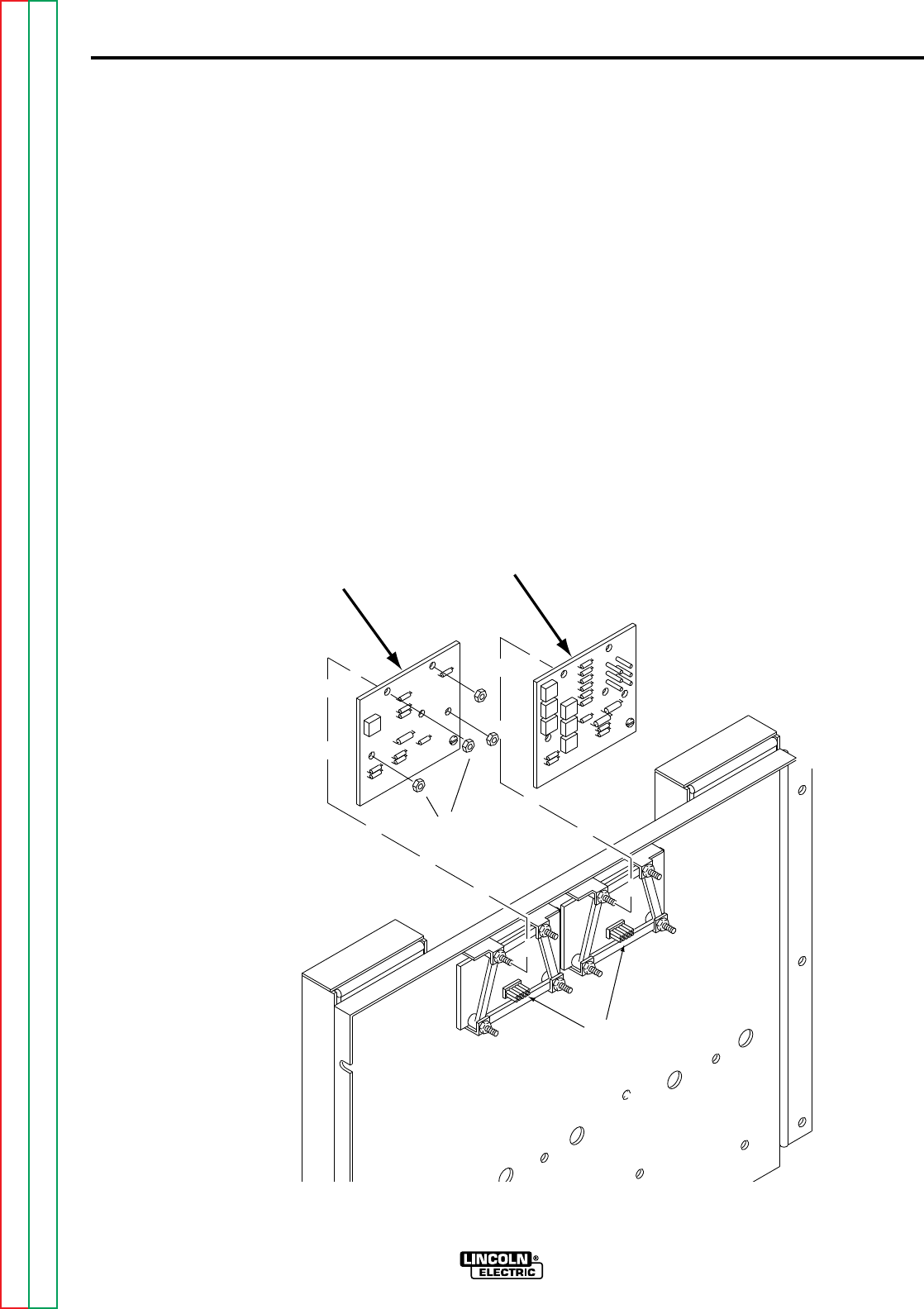
F-74
TROUBLESHOOTING & REPAIR
F-74
METER PC BOARD REMOVAL
PROCEDURE
1. Remove input power to the NA-5.
2. Using the 5/16" nutdriver open the
control box PC board access door.
3. Locate and unplug the meter PC
board that is to be removed. See
Figure F.11
4. Using the 5/16" nutdriver remove the
four PC board mounting nuts. See
Figure F.11
5. Carefully remove the meter PC
board.
Note insulation placement for reassem-
bly. Also make sure the plug on the
back of the PC board plugs into the
prongs on the meter when you
reassemble.
DIGITAL METER AND METER PC BOARD REMOVAL AND REPLACEMENT
NA-5
FIGURE F.11 METER PC BOARD, MOUNTING NUTS AND PLUG
MOUNTING
NUTS
PC BOARD
PLUG PRONGS
SPEED METER BOARD
METER BOARD
Return to Section TOC Return to Section TOC Return to Section TOC Return to Section TOC
Return to Master TOC Return to Master TOC Return to Master TOC Return to Master TOC
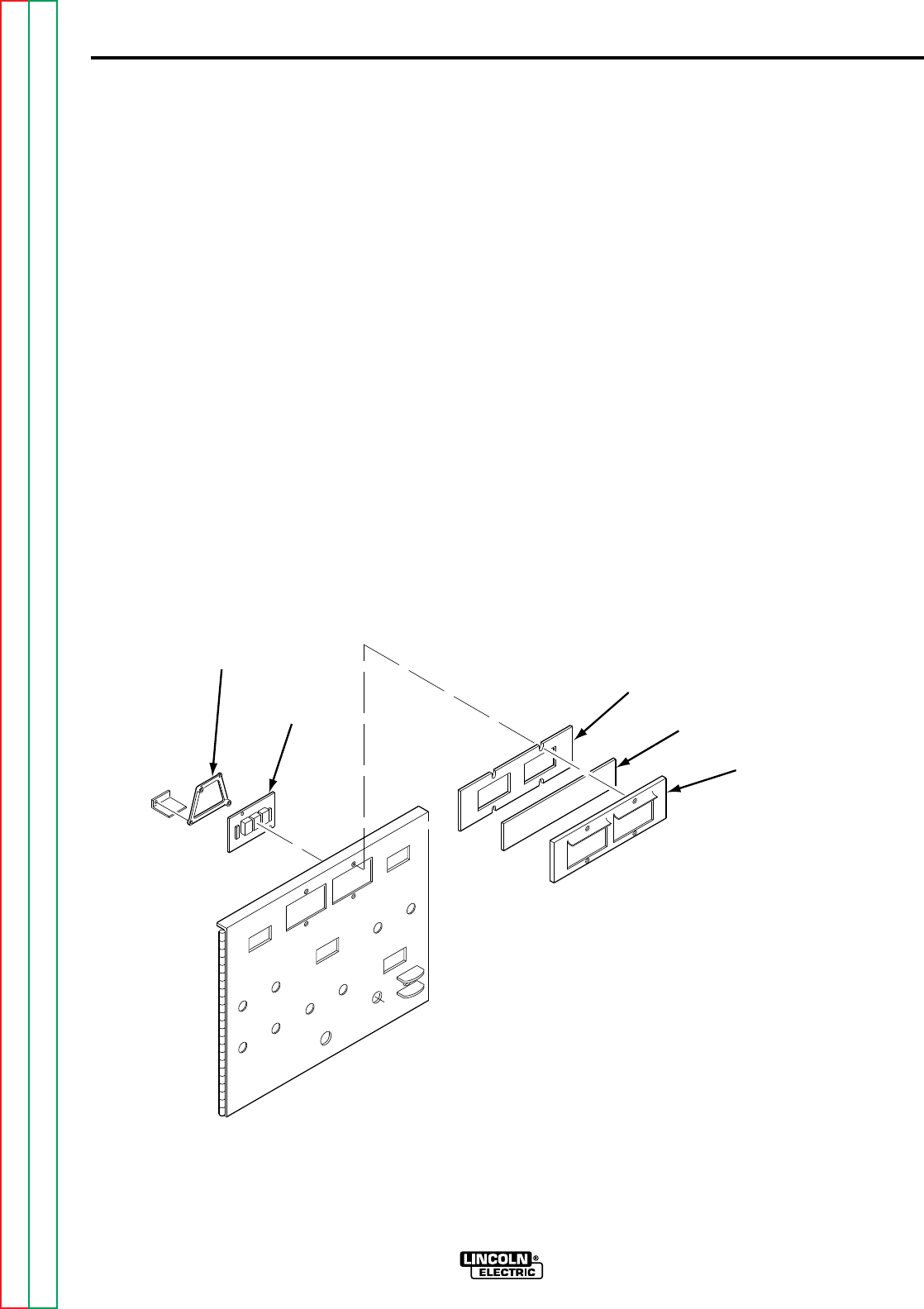
F-75
TROUBLESHOOTING & REPAIR
F-75
DIGITAL METER REMOVAL
PROCEDURE
1. Using the phillips head screwdriver
remove the four screws from the
meter bezel. See Figure F.12
2. Carefully remove the bezel assem-
bly.
3. Carefully remove the meter shield
assembly.
4. Using the 5/16" nutdriver, remove
the two nuts, screws and lockwash-
ers holding the digital meter to the
cover assembly.
5. Carefully remove the digital meter.
DIGITAL METER AND METER PC BOARD REMOVAL AND REPLACEMENT
NA-5
FIGURE F.12 METER BEZEL AND SCREW LOCATIONS
METER BEZEL
METER SHIELD
DIGITAL
METER
MOUNTING
INSULATOR METER SHIELD
ASSEMBLY
Return to Section TOC Return to Section TOC Return to Section TOC Return to Section TOC
Return to Master TOC Return to Master TOC Return to Master TOC Return to Master TOC

F-76
TROUBLESHOOTING & REPAIR
F-76
REPLACEMENT PROCEDURE
1. With the 5/16" nutdriver, fasten the
digital meter to the cover assembly
with two screws, nuts and lockwash-
ers.
2. Using the phillips head screwdriver,
reattach the meter shield and bezel
assembly.
3. Position the insulation and plug the
PC meter board into the digital
meter.
4. Mount the meter PC board using the
four nuts previously removed.
5. Reattach the molex plug.
6. Close and secure the access door.
DIGITAL METER AND METER PC BOARD REMOVAL AND REPLACEMENT
NA-5
Return to Section TOC Return to Section TOC Return to Section TOC Return to Section TOC
Return to Master TOC Return to Master TOC Return to Master TOC Return to Master TOC

F-77
TROUBLESHOOTING & REPAIR
F-77
NA-5
TACH PC BOARD REMOVAL AND REPLACEMENT
DESCRIPTION
The following procedure will help the technician remove the Tach PC board and related com-
ponents for repair or replacement.
MATERIALS NEEDED
5/16" Nutdriver
Slot head screwdriver
Phillips head screwdriver
3/8" Wrench
Service and repair should be performed only by Lincoln Electric factory trained per-
sonnel. Unauthorized repairs performed on this equipment could result in danger to
the technician or the machine operator and will invalidate your factory warranty. For
your safety and to avoid electrical shock, please observe all safety notes and precau-
tions detailed throughout this manual.
If for any reason you do not understand the test procedures or are unable to perform
the tests/repairs safely, contact the Lincoln Electric service department for technical
troubleshooting assistance before you proceed.
Call (216) 383-2531 or (800) 833-9353 (WELD).
_____________________________________________________________
WARNING
This procedure takes approximately 9 minutes to perform.
Return to Section TOC Return to Section TOC Return to Section TOC Return to Section TOC
Return to Master TOC Return to Master TOC Return to Master TOC Return to Master TOC
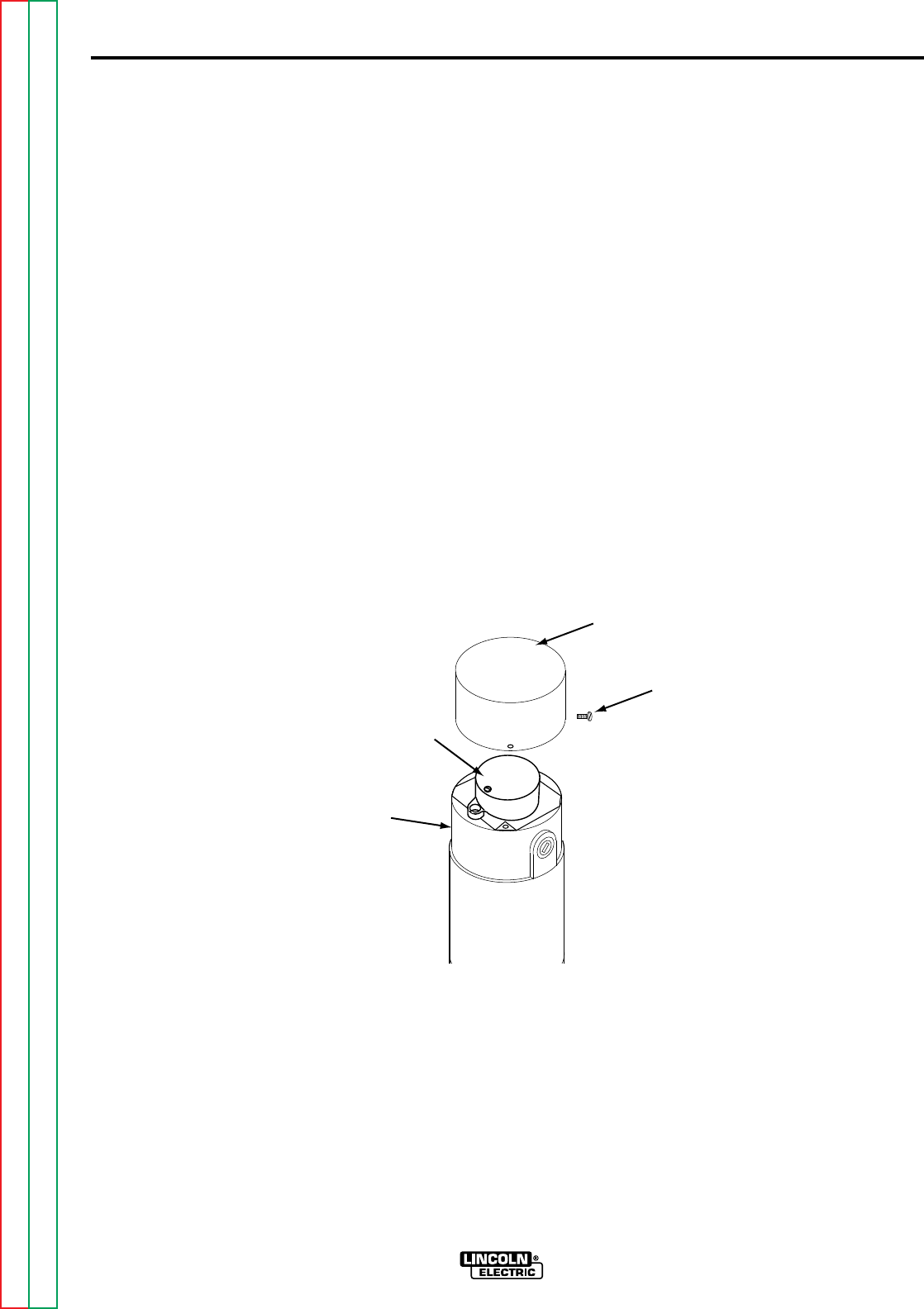
F-78
TROUBLESHOOTING & REPAIR
F-78
PROCEDURE
1. Remove input power to the NA-5.
2. With the 5/16" nutdriver locate and
remove the four screws holding the
tach cover to the wire feed drive
motor. See Figure F.13
3. Using the 5/16" nutdriver remove the
two screws from the connection box
cover.
4. Locate and disconnect the in-line
connectors from leads #510A,
#525A and #555.
5. Using the phillips head screwdriver,
remove the two screws from the
pick-up assembly cover . See
Figure F.14. Remove the cover.
6. Hold the nut in place with the 3/8"
wrench. With the phillips head
screwdriver, remove the locking
screw from the rotating disc. See
Figure F.15
TACH PC BOARD REMOVAL AND REPLACEMENT (Continued)
NA-5
FIGURE F.13 DRIVE MOTOR, TACH COVER, AND CONNECTION BOX
WIRE
DRIVE
MOTOR
MOUNTING
SCREWS (x4)
TACH COVER
PICKUP
ASSEMBLY
Return to Section TOC Return to Section TOC Return to Section TOC Return to Section TOC
Return to Master TOC Return to Master TOC Return to Master TOC Return to Master TOC
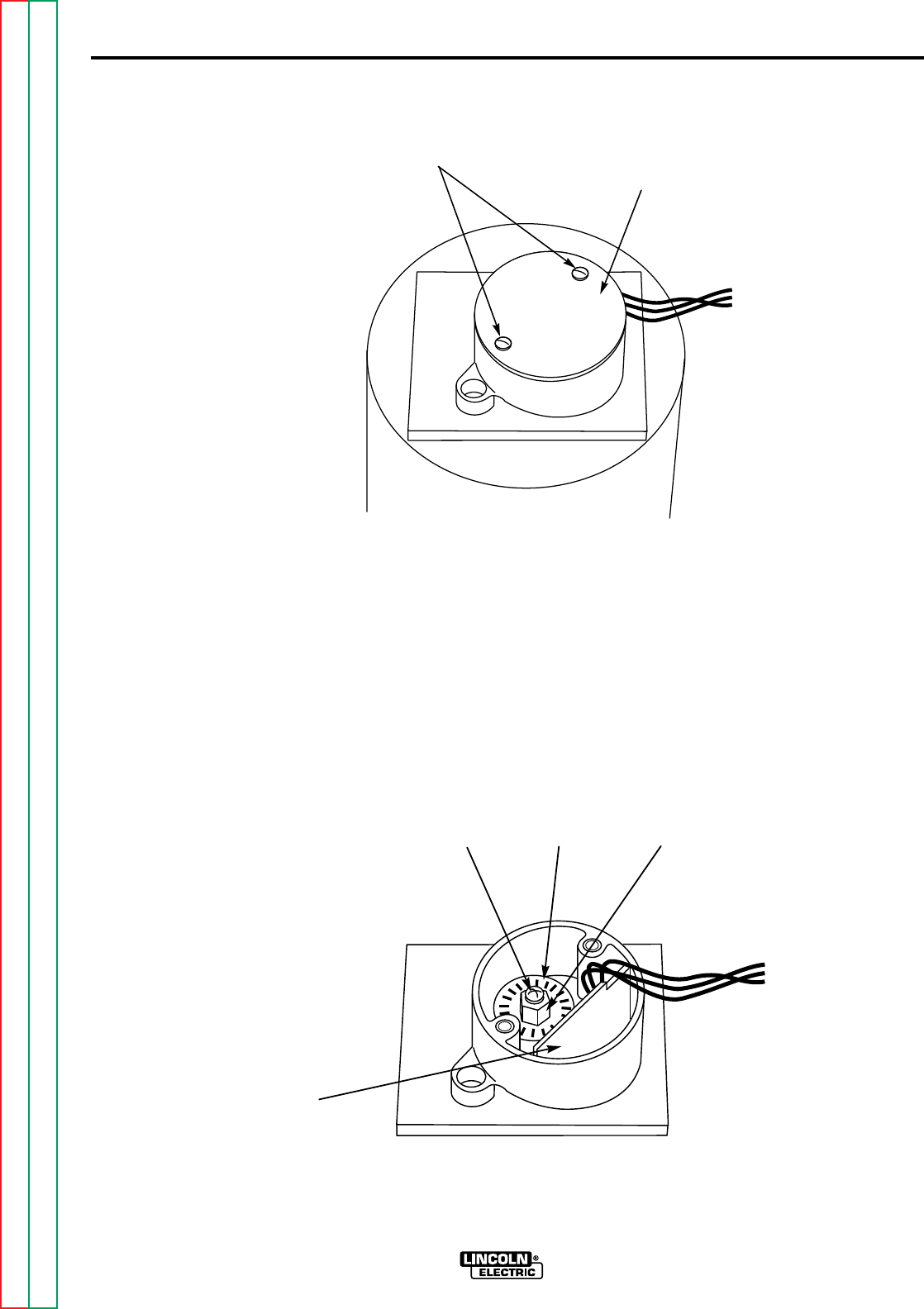
F-79
TROUBLESHOOTING & REPAIR
F-79
7. Carefully remove the rotating disc
and tach PC board together. Note
spacer washers underneath the disc.
8. If tach PC board is to be removed
carefully remove leads from connec-
tion box and cover plate.
TACH PC BOARD REMOVAL AND REPLACEMENT (Continued)
NA-5
FIGURE F.14 PICK-UP ASSEMBLY AND COVER
TACHASSEMBLY
COVER
SCREWS
FIGURE F.15 ROTATING DISC, NUT AND TACH BOARD
DISC NUT
TACH
PC BOARD
PHILLIPS
SCREW
Return to Section TOC Return to Section TOC Return to Section TOC Return to Section TOC
Return to Master TOC Return to Master TOC Return to Master TOC Return to Master TOC

F-80
TROUBLESHOOTING & REPAIR
F-80
REASSEMBLY
1. Upon reassembly the spacers must
be used to assure that the disc
rotates freely and smoothly within
the sensor "window" on the printed
circuit board. Note the tach PC
board must be held in place when
aligning the rotating disc in the sen-
sor window. Press down on the tach
PC board with your finger to simulate
the cover.
2. Use the 3/8" wrench to hold the nut
in place. Attach the rotating disc
with the phillips head screw.
3. Thread leads #510A, #525A and
#555 through the cover plate and
into the connection box. Attach to
their respective in-line connectors.
4. Replace the connection box cover.
5. Replace the pick-up assembly cover.
6. Reattach the tach cover to the wire
feed drive motor.
TACH PC BOARD REMOVAL AND REPLACEMENT (Continued)
NA-5
Return to Section TOC Return to Section TOC Return to Section TOC Return to Section TOC
Return to Master TOC Return to Master TOC Return to Master TOC Return to Master TOC

F-81
TROUBLESHOOTING & REPAIR
F-81
NA-5
WIRE DRIVE MOTOR REMOVAL AND REPLACEMENT
DESCRIPTION
This procedure will aid the technician in the removal and replacement of the drive motor to
the gear box and also associated wiring to the control box.
MATERIALS NEEDED
7/16" Wrench
5/16" Nutdriver
Large slot head screwdriver
Service and repair should be performed only by Lincoln Electric factory trained per-
sonnel. Unauthorized repairs performed on this equipment could result in danger to
the technician or the machine operator and will invalidate your factory warranty. For
your safety and to avoid electrical shock, please observe all safety notes and precau-
tions detailed throughout this manual.
If for any reason you do not understand the test procedures or are unable to perform
the tests/repairs safely, contact the Lincoln Electric service department for technical
troubleshooting assistance before you proceed.
Call (216) 383-2531 or (800) 833-9353 (WELD).
_____________________________________________________________
WARNING
This procedure takes approximately 35 minutes to perform.
Return to Section TOC Return to Section TOC Return to Section TOC Return to Section TOC
Return to Master TOC Return to Master TOC Return to Master TOC Return to Master TOC
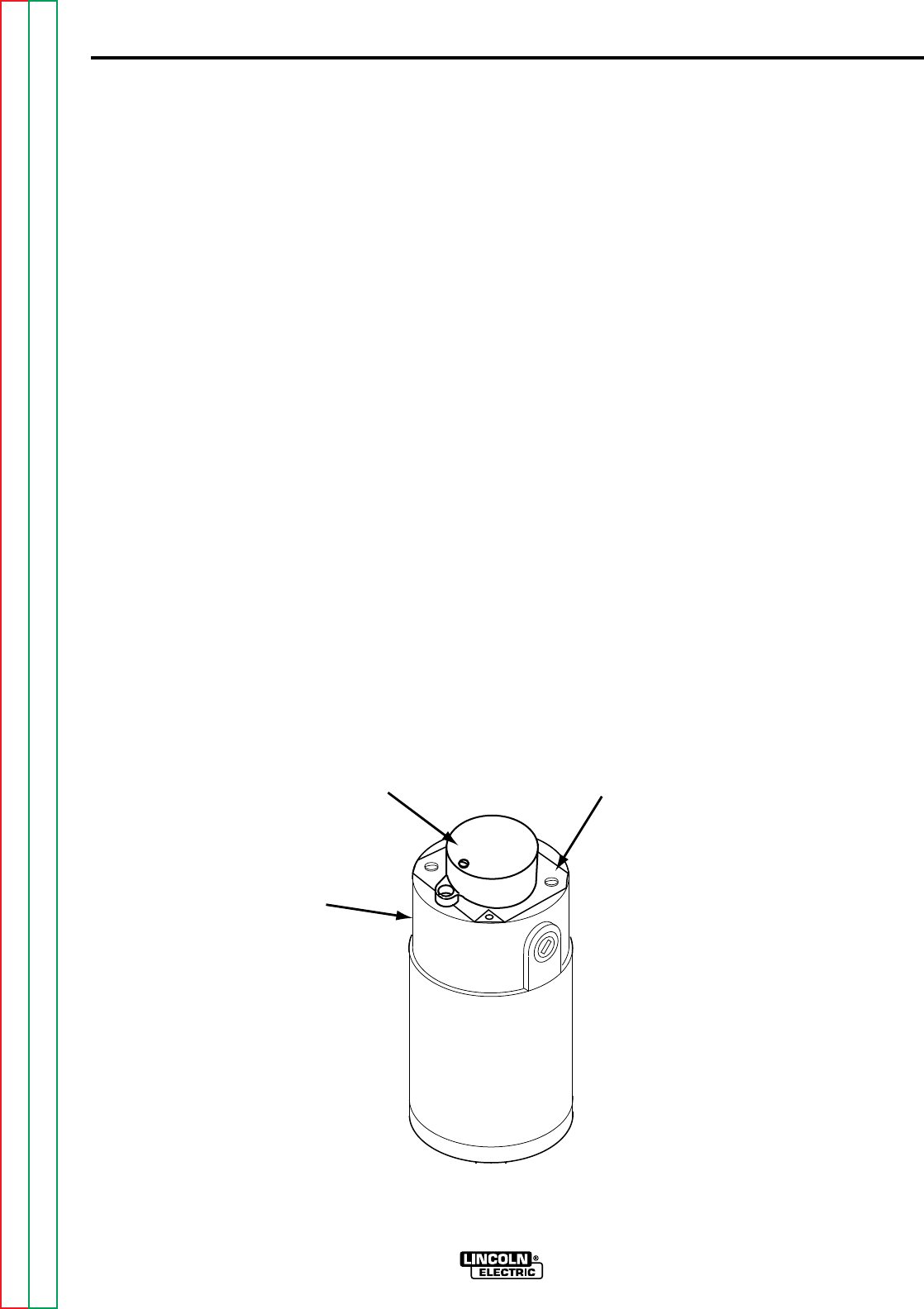
F-82
TROUBLESHOOTING & REPAIR
F-82
MOTOR REMOVAL
PROCEDURE
1. Remove input power to the NA-5.
2. Remove the motor and tach cable
from the NA-5 control box.
3. Perform the
Tach Board Removal
Procedure
.
4. Using the slot head screwdriver
remove the two screws mounting the
tach housing to the drive motor.
Remove the tach housing from the
drive motor.
5. Using the phillips head screwdriver
remove the cover plate adaptor.
See Figure F.16
6. Using the 5/16" nutdriver remove the
clamp holding the connection box to
the drive motor.
7. Carefully remove the connection box
being careful not to stretch the leads.
WIRE DRIVE MOTOR REMOVAL AND REPLACEMENT (Continued)
NA-5
FIGURE F.16 DRIVE MOTOR AND TACH HOUSING
WIRE
DRIVE
MOTOR
TACH HOUSING COVER PLATE
ADAPTER
Return to Section TOC Return to Section TOC Return to Section TOC Return to Section TOC
Return to Master TOC Return to Master TOC Return to Master TOC Return to Master TOC
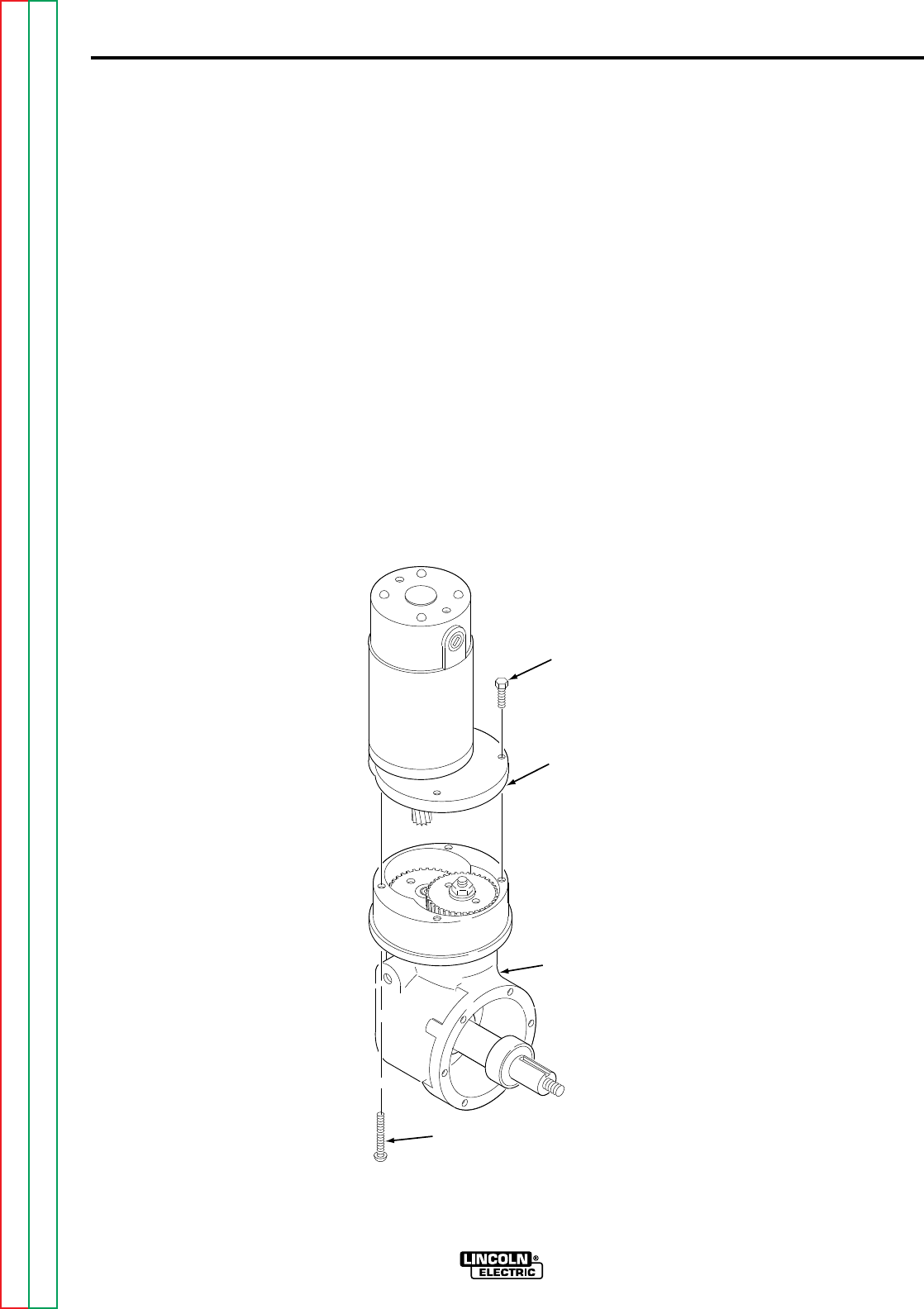
F-83
TROUBLESHOOTING & REPAIR
F-83
8. Remove leads #67, #627, #626,
#539 and #541 from the terminal
strip in the connector box.
9. Using the 7/16" wrench, remove two
1/4-20 bolts holding the adapter
plate and motor assembly to the wire
feed gear box. (Older models may
have slot head 1/4-20 bolts). See
Figure F.17
10. Using the large slot head screwdriv-
er, remove the two slot head screws
that go through the wire feed gear
box and into the adapter plate.
11. Carefully remove the adapter plate
and motor assembly (with pinion
attached).
12. With a slot head screwdriver,
remove the adapter plate from the
drive motor.
WIRE DRIVE MOTOR REMOVAL AND REPLACEMENT (Continued)
NA-5
FIGURE F.17 DRIVE MOTOR
HEX HEAD
BOLT
ADAPTER
PLATE AND
MOTOR
ASSEMBLY
WIRE DRIVE
GEARBOX
SLOT HEAD
SCREW
Return to Section TOC Return to Section TOC Return to Section TOC Return to Section TOC
Return to Master TOC Return to Master TOC Return to Master TOC Return to Master TOC

F-84
TROUBLESHOOTING & REPAIR
F-84
MOTOR REPLACEMENT
PROCEDURE
1. Attach the adapter plate to the drive
motor using the slot head screwdriv-
er.
2. Carefully install the replacement
motor (with correct pinion) and
mount the adapter mounting plate
using the 1/4-20 bolts and slot head
screws previously removed.
3. Attach leads #67, #627, #626, #539
and #541 to their respective termi-
nals in the connector box.
4. Carefully position the connector box
and clamp to the drive motor and
using the 5/16' nutdriver secure in
position. Be sure NOT to "pinch"
any leads.
5. Using the phillips head screwdriver
mount the cover plate adaptor to the
drive motor.
6. Using the slot head screwdriver
attach the tach housing to the drive
motor.
7. Perform the
Tach Board
Replacement Procedure
.
8. Assemble the motor and tach cables
to the NA-5 control box.
WIRE DRIVE MOTOR REMOVAL AND REPLACEMENT (Continued)
NA-5
Return to Section TOC Return to Section TOC Return to Section TOC Return to Section TOC
Return to Master TOC Return to Master TOC Return to Master TOC Return to Master TOC
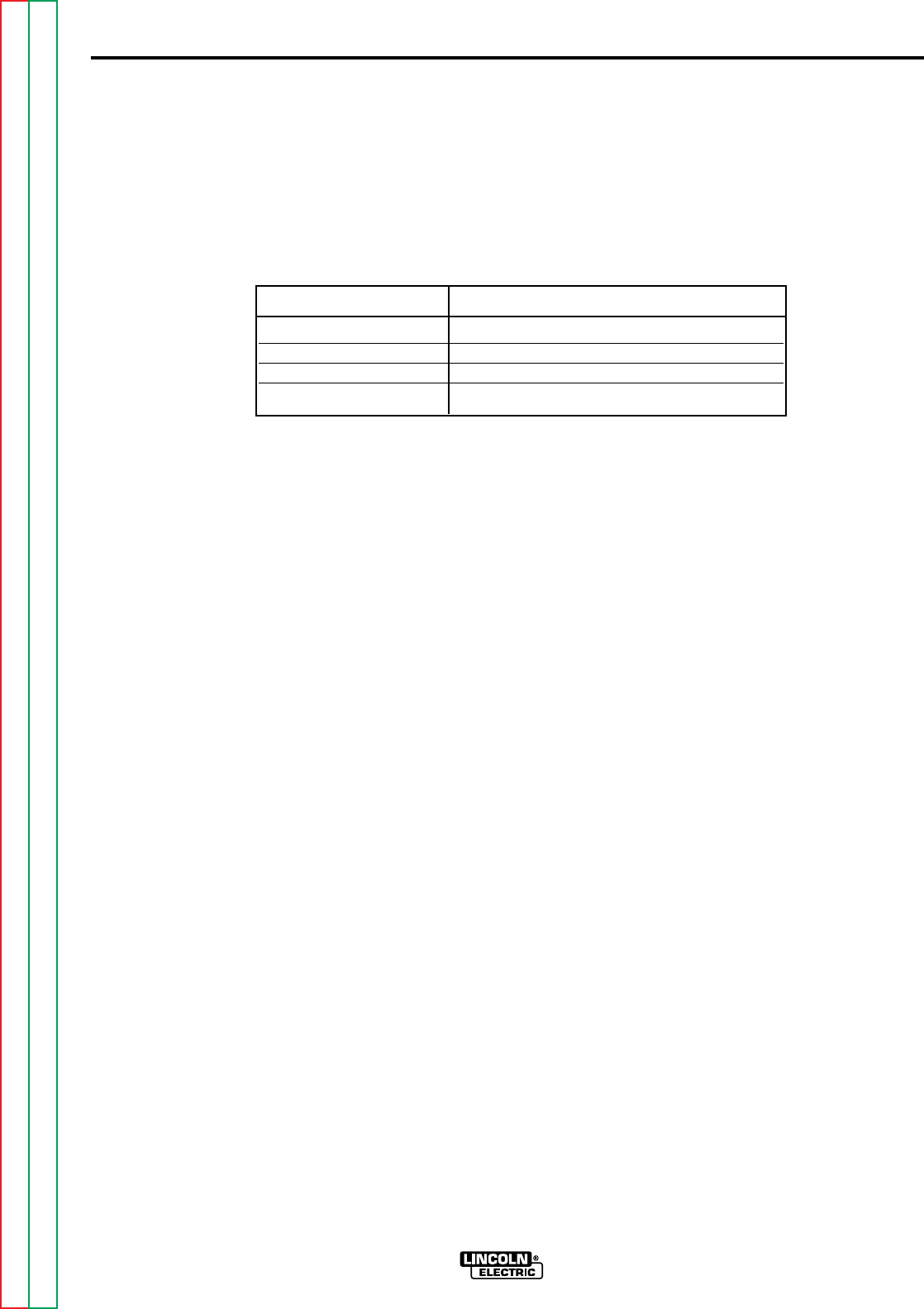
F-85
TROUBLESHOOTING & REPAIR
F-85
If a failed test indicates that any mechanical part that could affect the machine's electrical characteristics must be
replaced or if any electrical components are repaired or replaced, the machine must be retested and must meet
the following standards.
Wire Feed Speed per following table:..........................
RETEST AFTER REPAIR
NA-5
LEDS . . . . . . . . . . . . . . . . . . . . . . . . . . . . . . . . . .Must operate per PC Board LED Definitions table in
Troubleshooting Section
.
Flux or Water Solenoid . . . . . . . . . . . . . . . . . . . .Must operate when "Start" switch is pressed.
Relay 3CR . . . . . . . . . . . . . . . . . . . . . . . . . . . . . .Must operate and "close" power source contactor.
Relay 2CR . . . . . . . . . . . . . . . . . . . . . . . . . . . . . .Must operate and activate external travel circuit, if used.
Voltmeter . . . . . . . . . . . . . . . . . . . . . . . . . . . . . . .Refer to
Voltmeter Accuracy Test
.
Wire Speed Meter . . . . . . . . . . . . . . . . . . . . . . . .Refer to
Wire Speed Accuracy Test
.
Voltage control and shutdown . . . . . . . . . . . . . . .Refer to
Out of Voltage Range Shut Down Test
.
Gear Ratio Wire Speed Range in/min (m/min)
21/1 100-2070 (2.54-52.58)
57/1 38-778 (.97-19.76)
95/1 22-456 (.56-11.58)
142/1 15-300 (.38-7.62)
Return to Section TOC Return to Section TOC Return to Section TOC Return to Section TOC
Return to Master TOC Return to Master TOC Return to Master TOC Return to Master TOC


G-1
ELECTRICAL DIAGRAMS
G-1
TABLE OF CONTENTS
-ELECTRICAL DIAGRAMS SECTION-
Electrical Diagrams....................................................................................................................Section G
Wiring Diagram ....................................................................................................................................G-2
Logic PC Board (L6242-1) Schematic .................................................................................................G-3
Logic PC Board (L6242-2 & above) Schematic ...................................................................................G-4
Power PC Board (L6252-1) Schematic................................................................................................G-5
Power PC Board (L6252-2 & above) Schematic..................................................................................G-6
Voltage PC Board Schematic ..............................................................................................................G-7
Control Circuit Schematic ....................................................................................................................G-8
Procedure Board Schematic................................................................................................................G-9
Option & Timer Board Schematics.....................................................................................................G-10
Meter PC Board Schematic & Layout ................................................................................................G-11
Miscellaneous PC Board Layouts......................................................................................................G-12
Return to Master TOC Return to Master TOC Return to Master TOC Return to Master TOC

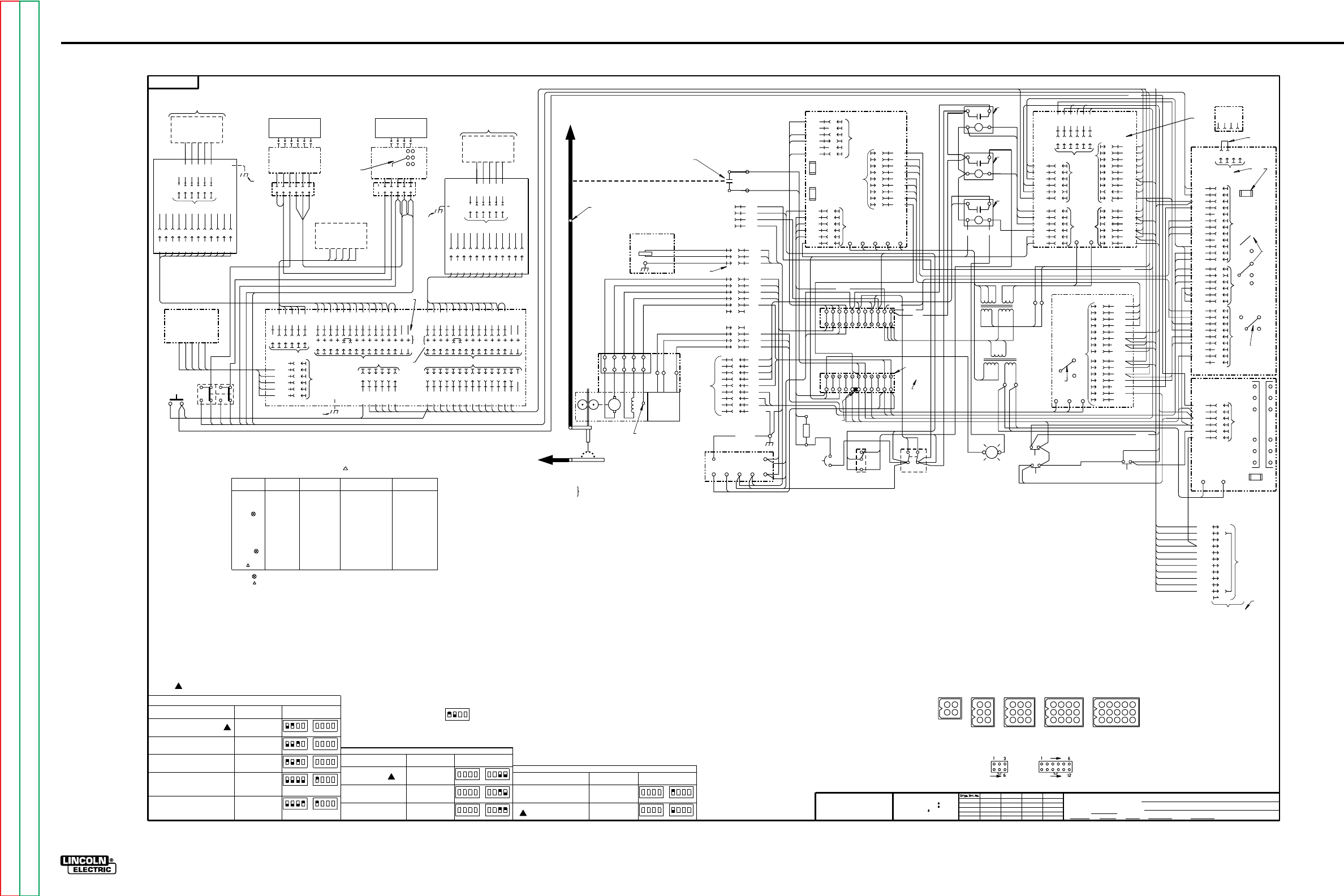
G-2
ELECTRICAL DIAGRAMS
NA-5
Wiring Diagram
1553
8-24-84H
11-14-86L
7-19-91J
7-10-92B
5-19-95D
1-12-96D
7-12-96P
NA-5
WIRING DIAGRAM
DAD
NONE
1553
8-1-80
5-8-92 G1512
t
UNLESS OTHERWISE SPECIFIED TOLERANCE
ON HOLE SIZES PER E2056
ON 2 PLACE DECIMALS IS .02
WITH PUBLISHED STANDARDS.
ON 3 PLACE DECIMALS IS .002
ON ALL ANGLES IS .5 OF A DEGREE
MATERIAL TOLERANCE (" ") TO AGREE
THE LINCOLN ELECTRIC CO.
CLEVELAND, OHIO U.S.A.
EQUIP.
TYPE
SCALE
DR DATE CHK REF.
SUBJECT
SUP'S'D'G
SHT.
NO.
THE LINCOLN ELECTRIC CO.
THIS SHEET CONTAINS PROPRIETARY INFORMATION
OWNED BY AND IS
NOT TO BE REPRODUCED, DISCLOSED OR USED
THE LINCOLN ELECTRIC CO.
G
G
WITHOUT THE EXPRESS PERMISSION OF
DIGITAL METER
VOLTMETER BOARD SPEED-
METER
BOARD
510
519
602
601
25341
6
518
510
517
510P
602
601
510P
510P
602
601
510
510
519
510P
602
601
DIGITAL METER
25341
6
WORK
WELDING
NOZZLE
ARM.
ELECTRODE
BLUE
BLACK
WHITE
RED
541
539
626
627
67
525A
555
510A
TACH.
PICK-UP
P.C. BD.
CONTROL
POWER
SOURCE
A
B
C
87
531
GND
A
B
C
D
E
F
541
539
627
626
67
A
B
C
D
MOTOR RECEPTACLE
525A
555
510A
A
B
C
D
E
F
TACH. RECEPTACLE
G
H
I
2
4
31
32
21
A
B
C
GREEN
531
87
FLUX OR WATER
SOLENOID
INPUT RECEPTACLE
S12778
S12515
S12514
S12515
S13161-052
S13161-5/64
S14904(OUTER)
S14905(INNER)
S12514
S14904(OUTER)
S14905(INNER)
57F 57/1
57 57/1
95 95/1
95S 95/1
142 142/1
142/1
142T
SINGLE .035-.052
SINGLE 1/16-3/32
SINGLE 3/32-5/32
SINGLE 1/16-3/32
TWIN .045-.052
SINGLE 3/32-7/32
TWIN 3 32
/
TWIN 1/16-5/64
TWIN 5/64-1/8
40-778 I.P.M.
38-762 I.P.M.
22-428 I.P.M.
23-456 I.P.M.
15-289 I.P.M.
15-300 I.P.M.
PIN RATIO PART NUMBER RANGE RANGE
USE OF PIN "S" JUMPER CONNECTION.
541
539
627
87
32
531
532
531B
31
RF BYPASS
P.C. BOARD
621 87
667 531 626
WHITE
627
626
610
681
500
500
528
689
+
-
2
5
1
6
3
4
532
531A
631
610
531B
500
1/2A SLOW BLOW
POWER P. C. BOARD
POWER FUSE
1/2A SLOW BLOW
FIELD FUSE
539
627
541
626 1
2
3
4
5
6
528
500
CR4
COUPLED
MAGNETICALLY
ELECTRODE CABLE
TO POWER SOURCE
REED SWITCH ACTUATED BY
WELDING CURRENT
*
*
2
4
8
6
3
7
9
5
1
587
525
510
540
500
525
510
500
500
*
ORANGE
ORANGE
RED WHITE RED
TS2
528
ELECT
67
TS1
500
WORK
21
531A
R1
631
531B
POLARITY CONNECTIONS WHICH MATCH ELECTRODE AND WORK CABLE POLARITY CONNECTIONS TO POWER SOURCE.
HI-FREQUENCY INSTALLATION INSTRUCTIONS FOR REQUIRED #67 ELECTRODE VOLTAGE SENSING LEAD CONNECTION.
NOTE: NA-5 MOTORS INSULATED FOR HIGH FREQUENCY STARTING DO NOT HAVE THIS CONNECTION. REFER TO
"COM" TAB, UNLESS SPECIFIED ON THE POWER SOURCE CONNECTION DIAGRAM TO BE CONNECTED TO THE "AUTO" TAB
TO DISABLE THE "COLD" STARTING FEATURE.
AND TAPED CONNECTION
532
531
531A
CB1
500
500
528
689
621
667
TERMINAL
STRIP JUMPER
CIRCUIT
POLARITY
TERMINALS
610 R
ELECTRODE
500
*
*
682
681
585
610
2
LOGIC
P.C. BOARD
*
*
BLUE BLUE
WHITE
RED
RED
BLUE
BLUE
YELLOW
YELLOW
BLACK
BLACK
601
602
T1
587
ORANGE
ORANGE
BROWN
BROWN
T2
500
12 540
10 525
9510
14
13 628
1520
8510P
7510P
METER
6632
2512
3511
5511A
4510P
15 586
11
*
CONTROL
P.C. BOARD
F
S
555 510A 525A
VOLTAGE P.C. BOARD
516 9
514 2
635 4
564A
510P 8
10
525 3
510 7
500 6
5
530 1
667 11
621 12
6
A
B4
C5
592 3
687 2
688 1
3
531B 8
532 9
637 4
511 1
511A 2
7
500 6
5
*
FAST BLOW
FUSE
1 8 AMP
/
S
F
*
B
D
A
*
BYPASS COM
AUTO
*
42
1
3
688
688A
525
500
FILTER P.C. BOARD
LEAD PLUG
500
500
560 1
564 2
500 3
515 4
635 5
520 6
632 7
510P 8
9
W
W10
564A 11
114A 12
*
PROCEDURE KIT
RECEPTACLE
JUMPER PLUG
ELECTRICAL SYMBOLS PER E1537
CAVITY NUMBERING SEQUENCE
*
N.M.
N.L.
N.E.
563
N.N.
1584C
2564
583S
4
5500
6515
3500
1
5
4
6
3
589
581 1
582 4
628 2
530 3
687 5
688 6
5563
9563
6561
8560
7588
4584S
3566
2565
1583C
4
3
2
1
5
6
637
528
586
587
592
689
*
REMOTE INTERFACE
MODULE (OPTIONAL)
COM COM
UP DOWN START STOP
SWITCHES
RED RED
N.L.
24V.
SIGNALS
*
1
6
5
4
2
3
581A
500
586
592
582
515
N.F.
WHITE
WHITE
RED
RED
N.D.
N.H
FLUX RECEPTACLE
J4
A
B
C
GND
D
532
25
531
J3
J2
J1
WORK CABLE TO
POWER SOURCE
TS
3
N.K.
N.J.
5A CIRCUIT
BREAKER
25
TRAVEL SW.
S2
532
531
31 32
POWER SW.
S1
"HOT" LIGHT
LT1
DOWN
592 500
S4
INCH
UP
S3
586
500
625
N.A. SPEEDMETER BOARD CALIBRATION JUMPER IS TO BE CONNECTED FOR NA-5 HEAD AND DRIVE ROLL
EMPLOYED PER CHART BELOW: (CONNECTED TO PIN "95" OR "21" WHEN SHIPPED.
21 21/1 S12778 SINGLE .035-.052 100-2070 I.P.M.
= EARLIER SPEEDMETER BOARDS DID NOT HAVE THESE PINS.
= SINGLE "21" PIN ON HIGH SPEED BOARD ONLY.
N.B. REMOVE START RECEPTACLE JUMPER PLUG FROM PROCEDURE BOARD TO INSTALL OPTIONAL PROCEDURE
MODULE AS START PROCEDURE CONTROL. IF MODULE IS REMOVED, REPLACE JUMPER PLUG.
N.C. REMOVE CRATER RECEPTACLE JUMPER PLUG FROM PROCEDURE BOARD TO INSTALL OPTIONAL PROCEDURE
MODULE AS CRATER PROCEDURE CONTROL AND CONNECT LOGIC BOARD LEAD #694 TO PIN #P10.
IF MODULE IS REMOVED, REPLACE JUMPER PLUG AND LOGIC BOARD LEAD #694 TO PIN #P8.
N.D. CONTROL BOARD JUMPER LEAD CONNECTED TO PIN "F" WHEN SHIPPED. SEE OPERATING MANUAL FOR
N.E. VOLTAGE BOARD RED JUMPER LEAD CONNECTED TO PIN "S" AND WHITE JUMPER LEAD CONNECTED TO
N.G. 531-532 115VAC
531-25 115VAC (SWITCHED) 250 VAC
N.J. CONNECT #67 BLACK (ELECTRODE) LEAD AND #21 WHITE (WORK) LEAD TO APPROPRIATE TERMINAL STRIP
N.K. LEAD CONNECTED TO MOTOR FRAME WHICH IS ELECTRICALLY COMMON WITH ELECTRODE DRIVE ROLL AND DRIVEN ELECTRODE.
N.L. REMOVE JUMPER PLUG TO INSTALL OPTIONAL KIT. IF KIT IS REMOVED, REPLACE JUMPER PLUG.
N.M. NOT PRESENT ON EARLIER VOLTAGE P.C. BOARDS.
N.N. BLUE JUMPER LEAD NOT PRESENT ON EARLIER VOLTAGE P.C. BOARDS. THE JUMPER IS TO BE CONNECTED TO THE
BLUE
WHITE
RED
582
STOP
S6
581A
682
ELECTRODE LEAD BOLTED
142T
95S
57F
TIMER BOARD
(START TIME USE)
655
500
I
O
515
12
4
14
13
9
6
7
1
8
10
11
3
5
2
15
500
510P
515
520
635
632
584S
583S
584C
583C
588
563
564
564A
START RECEPT. *
10
5
6
12
14
15
11
8
9
7
1
13
2
4
3520
515
510P
500
583S
584S
588
588A
635
632
655
JUMPER
PLUGS
*
10
5
6
12
14
15
11
8
9
7
1
13
2
4
3520
515
510P
500
588
588A
635
632
655
584C
583C
CRATER RECEPT.
OPTIONAL PROCEDURE MODULE
USED FOR START CONTROL
5
4
3
2
1
6
581A
581
565
566
561
560
*N.B.
N.C.
5
6
4
3
2
1
1
500
655
515
I
O
*
5
6
4
3
2
1
500
655
515
I
O
WELD TIME
RECEPT.
TIMER BOARD
655
500
I
O
515
OPTION BOARD
5
6
4
3
2
1
655
500
I
O
515
TIMER
RECEPT.
OPTIONAL PROCEDURE MODULE
USED FOR CRATER CONTROL
(CRATER TIME USE)
TIMER BOARD
(BURNBACK TIME)
500
655
515
I
O
START
S5
500
581A
581A
516
514
512
511
510P
601
602
517
519
655
500
I
O
515
WELD TIMER BOARD
(OPTIONAL)
N.A.
SET-ACTUAL
S7
PROCEDURE BOARD
*
BURNBACK
RECEPT.
531B 532
592
(COMPONENT SIDE OF P.C. BOARD)
SPEEDMETER NA-5 HEAD DRIVE ROLL WIRE SIZE RATED SPEED
562S
562S
562C
562C
142
95
57
1
2
3
4
1
2
3
4
5
6
1
2
3
4
5
6
7
8
9
1
2
3
4
5
6
7
8
9
10
11
12
1
2
3
4
5
6
7
8
9
10
11
12
13
14
15
J29
N.H. 531-87 115 VAC (SWITCHED) 1/2 AMP.
PIN "B" WHEN SHIPPED, FOR USE TYPICALLY WITH DC-[ ]TYPE POWER SOURCES. REFER TO CONNECTION
DIAGRAM FOR ALTERNATE CONNECTIONS, AND JUMPER CONNECTIONS FOR R3S, SAM AND SAF OR SA
POWER SOURCES WITH K224. EARLIER VOLTAGE BOARDS DO NOT CONTAIN PIN "D".
1/8 AMP FUSE
OPTIONAL PULSE POWER
TRAVEL RECEPT.
J5
1
562
583
655
515
500
584
588
588A
632
635
520
510P
9
10
8
3
2
6
4
12
5
11
*
7
P29 (C)
J29 (C)
J28 (C)
(CRATER FILL USE)
OPTION BOARD
5
6
4
3
2
1
655
500
I
O
515
TIMER
RECEPT.
1
562
583
655
515
500
584
588
588A
632
635
520
510P
9
10
8
3
2
6
4
12
5
11
*
7
(START USE)
J28 (S)
J29 (S)
P29 (S)
P28 (S)
J28
P28 (C)
CABLE
TO
532
87
610
532
585
589
FLUX RELAY MODULE
CR1
31
42
610
CR2
31
42
RELAY MODULE
RELAY MODULE
N.P.
532
TRAVEL
CONTACTOR
4
2
625
682
CR3
3
1
42
610
N.P.
N.P.
N.P. EARLIER RELAYS HAD SAME TERMINAL NUMBERS BUT IN A DIFFERENT ORIENTATION.
METHODS OF TRAVEL
START/STOP WITH SWITCHES
LEAD #691 to P6
LEAD #692 to P5
LEAD #691 to P6
LEAD #692 to P7
STOP WITH STOP SWITCH
LEAD #691 to P5
LEAD #692 to P7
START WITH START SWITCH
STOP AFTER CRATER TIME
LEAD #691 to P6
LEAD #692 to P9
FOR EARLIER LOGIC P.C.
BOARDS WITH JUMPERS
CONNECT
CONNECT
SWITCH #1
1234
SWITCH #2
1234
SWITCH #1
1234
SWITCH #2
1234
FOR LOGIC P.C. BOARDS WITH
CONNECT
CONNECT
SWITCH #1
1234
SWITCH #2
1234
SWITCH #1
1234
SWITCH #2
1234
FOR EARLIER LOGIC P.C.
BOARDS WITH JUMPERS
YES CONNECT
LEAD #694 TO P10
NO CONNECT
LEAD #694 TO P8
CRATER BOARD INSTALLED?
SWITCH #1
1234
SWITCH #2
1234
SWITCH #1
1234
SWITCH #2
1234
FOR LOGIC P.C. BOARDS WITH
DIP SWITCHES
DIP SWITCHES
FOR EARLIER LOGIC P.C.
BOARDS WITH JUMPERS
SWITCH #1
1234
SWITCH #2
1234
SWITCH #1
1234
SWITCH #2
1234
FOR LOGIC P.C. BOARDS WITH
DIP SWITCHES
1234 1234
METHODS OF BURNBACK
CONNECT
LEAD #690 TO P4
LEAD #693 TO P3
CONNECT
LEAD #690 TO P4
LEAD #693 TO P1
CONNECT
LEAD #690 TO P2
LEAD #693 TO P1
1234
SAMPLE SWITCH
SWITCH POSITION 1 IS UP
SWITCH POSITION 2 IS DOWN
SWITCH POSITIONS 3 AND 4 ARE NOT APPLICABLE
NA-5 SHIPPED CONNECTED FOR INDICATED METHODS OF TRAVEL & BURNBACK.
START WITH START SWITCH
LEAD #691 to P6
LEAD #692 to P8
CONNECT
SWITCH #1
1234
SWITCH #2
1234
START/STOP WITH WELD CURRENT
START WITH WELD CURRENT
(OPTIONAL PROCEDURE MODULE
INSTALLED IN CRATER RECEPTACLE)
(OPTIONAL PROCEDURE MODULE
INSTALLED IN CRATER RECEPTACLE)
STOP AFTER BURN-BACK TIME
N.F. LOGIC BOARD DIP SWITCHES OR JUMPERS TO BE SET TO SUIT DESIRED APPLICATIONS PER CHARTS BELOW:
WIRE FEED STOP WITH
CONTACTOR DELAY
INCH UP WITH CONTACTOR DELAY
INCH UP WITH NO CONTACTOR
DELAY
USE OF OPTIONAL CRATER MODULE
N.R.
N.R.
N.R.
N.R. POTENTIOMETERS AND SWITCHES MOUNTED ON P.C. BOARD ARE CONNECTED TO FRAME, FOR ESD.
(NOT PRESENT ON EARLIER BOARDS)
G-2
NOTE: This diagram is for reference only. It may not be accurate for all machines covered by this manual.
Return to Section TOC Return to Section TOC Return to Section TOC Return to Section TOC
Return to Master TOC Return to Master TOC Return to Master TOC Return to Master TOC
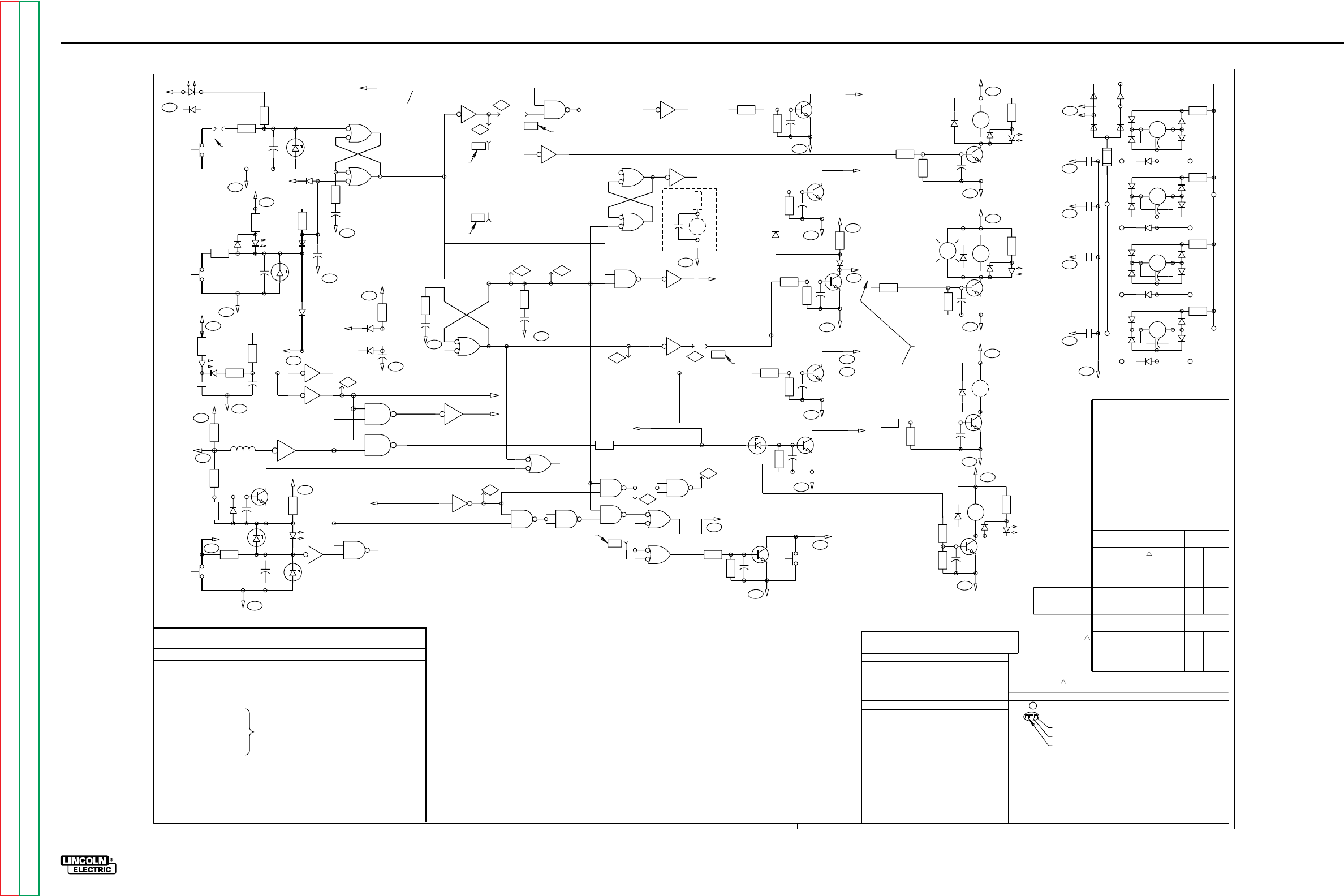
G-3
ELECTRICAL DIAGRAMS
NA-5
LOGIC PC BOARD (L6242-1) SCHEMATIC
R707
R706
581
S801A
DISABLE
START
500
D9C
START
S5
581A
N.A. C706
DZ702
LED 7C
515
D8C
R702
R703
D710
500
D9C
S6
582
C704
DZ701
STOP
R704
565
PROCEDURE
PC BOARD
WELD TIME
OVER
D708
C728
500
D9C
R705
C705
500
D9C
+
5
4X707
B6
1
2A
X707 3
515
D8C
R713
LED7D
R712
D714
R711
+
CR4
CURRENT
528
500
C707
D9C
D709
687
SHUT-
DOWN
C4M
R708
515
D8C
D715
566
PROCEDURE
PC BOARD
D716
BURNBACK
TIME OVER
C729 500
D9C
9
13
D
F
X706
X706
12
8P7
2
1
X702
A
X702
B
4
5
3
6
11 E
X706
10
584S
START
TIME
INITIATE
CURRENT
588 }PROCEDURE
PC BOARD
L701
12
A
X706
515
D8C
R714
637
C2M
VOLTAGE
PRESENT
R715
R716
Q701
D717 +
C709
DZ703
R717
515
D8C
LED 7J
DZ704
C712
S4
INCH
DOWN
592 R718
592
C3K
500
D9C
1D
X705
21
2X703
A3
3F
X705
4
P5
P10
692
N.D.
X701
D
13
12 11
691
N.D.
R710
C711
500
D9C
D
X707
13
12 11
8
10
9C
X707
11 E10
X705
694
10
9
N.C.
X701
C8
PROCEDURE
PC BOARD START TIME
OVER WELD TIME
OVER
583S
X701
X701
B
A
1
23
4
56
+
C708
500
D9C
R709
P6
P2
X702
D
12
13 11
PROCEDURE
PC BOARD
CRATER
TIME OVER
BURNBACK
TIME
INITIATE
583C 3B4
X706 P9
12
13 X704
D
X704
C
11 10
985
4X703
X704
A
B
1
23
69
10
X703
C
12
13
X703
D11
8
693
N.D. DZ705
LED
7E
13 AX705
12
N.B.
.047
MFD
CR6
470
OHMS
500
D9C
689
10
9C
X702
85CX705
6
584C
CRATER
TIME
PROCEDURE
PC BOARD
INITIATE
P1 5C
X706
6P4 690
N.D.
R738
C725
D726
Q709
560
PRESET
MONITOR
ENABLE
515
D8C
R737
PROCEDURE
PC BOARD
R735
D725
R736
C724
Q708
530
C4D
500
D9C
HOLD-LOW
DISABLE
R742
C727
500
D9C
R741
X705
8
B
9Q711
564
WELD
PROCEDURE
ENABLE
PROCEDURE
PC BOARD
R721
C719
500
A7H
Q702
R720
D718 CR2
D722
LED 7H
TRAVEL
R722
610
A7E
589
R726
C721
500
A7H
Q704
R725
D720
CR3
D723 LED 7K
POWER
R727
610
A6G
682
R
LT1
ELECTRODE
HOT
R734
C723
Q707
688
500
D9C
R733
SHUTDOWN
ENABLE
C5K
C5E
N.E.
R740
C726
Q710 563
500
D9C
DZ706
PROCEDURE
PC BOARD
561
STRIKE PROCEDURE
DISABLE
R739
STRIKE
ENABLE
PROCEDURE
R724
C720
500
A7H
Q703
D719
CR5
610
A6G
681
R723
CURRENT
ARC CONTROL
ENABLE
R729
C722
500
A7H
Q705
D721
CR1
D724
LED 7G
R730
610
A6G
585 FLUX OR
WATER
R728
P3
X704
B
5
46
587
A3K
FEED
FORWARD
R731
R732
C710
500
D9C
S3
INCH
UP
586
B7J
FEED
ENABLE
R1001
D1002
D1004
C1001
+
CR
1001
D1001
D1003
SWITCH
D1005
24V SIG.
START
R1002
D1007
D1009
C1002
+
CR
1002
D1006
D1008
SWITCH
D1010
24V SIG.
SIGNAL
COMMOM
R1003
D1012
D1014
C1003
+
CR
1003
D1011
D1013
SWITCH
D1015
24V SIG.
R1004
D1017
D1019
C1004
+
CR
1004
D1016
D1018
SWITCH
D1020
24V SIG.
SIGNAL
COMMOM
STOP
INCH UP
INCH DOWN
REMOTE INTERFACE
OPTION
RED
VAC
24 RED
D1021 D1023
D1024
D1022
500
D9C
592 CR
1004
D7A
COMMON
SWITCH
586 CR
1003
D7J
582 CR
1002
D3A
581A
CR
1001
D1A
F1001
COMMON
SWITCH
A6G
FOR LEAD #694 CONNECTION SEE N.C.
METHODS OF TRAVEL AND BURNBACK.
NA-5 SHIPPED CONNECTED FOR INDICATED
SOURCE
OUTPUT
500
D9C
PROCEDURE
PCB
Q706
+
P8
CLEVELAND, OHIO U.S.A.
1-12-96D
L6682-4
C701
4.7/35
C702
C703
C704
C705
C706
C707
C708
C709
C710
THRU
C729
D701
THRU
D712
500/50
.047/100
10/25
D714
THRU
D717
D718
THRU
D721
D722
THRU
D726
.22/100
10/25
.047/100
10/25
10/25
}
}
}
}
}
.022/25
1A, 400V
1A, 400V
1A, 400V
1A, 1000V
16V, 1W
DZ701
DZ702
DZ703
DZ704
DZ705
DZ706
LED 7A
L701
THRU
16V, 1W
3V, 1/2W
16V, 1W
3V, 1/2W
5.1V, 1/2W
5.6mH, 28mA
LED 7E
LED 7G
LED 7H
LED 7J
LED 7K
Q701
RED
LIGHT
EMITTING
DIODE
Q702
THRU
Q705
Q706
THRU
Q711
}
}
2N 4123
2N 5657
2N 4123
R701 4.7K
4.7K
47K
100
R702
R703
R704
R705
R706
R707
R708
R709
R710
R711
R712
R713
R714
R715
R716
R717
R718
R720
R721
R722
R723
R724
470
100
4.7K
47K
470
470
15K
470
4.7K
4.7K
100K
22K
4.7K
100
2.7K
1.5K
68K
2.7K
1.5K
R725 2.7K
R726
R727
R728
R729
R730
R731
R732
R733
R734
R735
R736
R737
R738
R739
R740
R741
R742
X701
1.5K
68K
2.7K
1.5K
68K
22K
47K
22K
47K
22K
47K
6.8K
47K
10K
15K
10K
15K
QUAD 2
X702
X703
X704
INPUT
GATE
NAND
X707
X705
X706
X708
HEX
INVERTER
+15 V VOLTAGE
REGULATOR
LOGIC P.C. BOARD
KEY TO SYMBOLS
SCHEMATIC LOCATION REFERENCE
HORIZONTAL CO-ORDINATE LETTER
VERTICAL CO-ORDINATE NUMBER
UNLESS OTHERWISE SPECIFIED, COMPONENT VALUES OF:
CAPACITORS = MFD/VOLTS
RESISTORS = OHMS, 1 2 WATT/
POWER SUPPLY SOURCE POINT
SCHEMATIC IDENTIFICATION LETTER
SINCE COMPONENTS OR CIRCUITRY ON A PRINTED CIRCUIT
BOARD MAY CHANGE WITHOUT AFFECTING THE INTERCHANGE-
ABILITY OF A COMPLETE BOARD, THIS DIAGRAM MAY NOT
SHOW THE EXACT COMPONENTS OR CIRCUITRY OF CONTROLS
HAVING A COMMON CODE NUMBER.
ELECTRICAL SYMBOLS PER E1537
COMPONENTS NOT ON P.C. BOARD
TIC 22V 600mA SECONDARY
(PRIMARY SHOWN ON SCHEMATIC A)
S3
S4
S5
S6
}
SPST PUSH BUTTON SWITCH
LT1 INDICATOR LIGHT
CR6 OPTIONAL LINC-FILL
SOLID-STATE PILOT RELAY
}
CR5
CR4
CR3
}
}
OPTIONAL 110 VDC RELAY
COIL ACTUATED BY CR4
REED SWITCH ACTUATED BY
WELDING CURRENT
CR2
CR1 SPST 110 VDC RELAY COIL
SCHEMATIC A)
(N.O. CONTACTS SHOWN ON
R1001 THRU R1004
D1001 THRU D1004
C1001 THRU C1004
CR1001 THRU CR1004
F1001
2/50
150
SPDT, 24VDC
1A, 600V
1/8A FUSE
OPTIONAL REMOTE INTERFACE P.C. BOARD
}
FOR REMOTE INTERFACE PC. BOARDS L6580-1
OR HIGHER USE S21207 SCHEMATIC FOR
COMPONENT VALUES AND CIRCUIT CONNECTIONS.
N.A. S801 (SEE PROCEDURE PC BOARD
POSITION TO START WELD CYCLE.
SCHEMATIC) MUST BE IN "STRIKE"
N.B. COMPONENTS INCLUDED WITH
OPTIONAL LINC-FILL BYPASS KIT
(ALSO SEE SCHEMATIC A).
N.C. LEAD 694 TO BE CONNECTED TO
N.D. LOGIC BOARD JUMPER LEADS ARE TO
BE CONNECTED TO SUIT APPLICATION
PER CHARTS BELOW.
PIN P10 IF OPTIONAL CRATER MODULE
(SEE SCHEMATIC E) IS INSTALLED, OR
TO PIN P8 IF REMOVED.
G1556-1 AND EARLIER VOLTAGE BOARDS.
N.E. HOLD-LOW DISABLE IS USED WITH
ARC CONTROL ENABLE IS USED WITH
LATER VOLTAGE BOARDS.
START WITH WELD CURRENT
TO PIN
NO.
LEAD
NO.METHODS OF TRAVEL
START-STOP
WITH SWITCHES
START-STOP
WITH WELD CURRENT
STOP WITH STOP SWITCH
START WITH START SWITCH
STOP AFTER CRATER TIME
START WITH START SWITCH
STOP AFTER BURN-BACK TIME
691
692 P6
P5
691
692 P6
P7
691
692 P7
P5
691
692 P6
P9
691
692 P6
P8
TO PIN
NO.
LEAD
NO.METHODS OF BURNBACK
WIRE FEED STOP WITH
CONTACTOR DELAY
INCH UP WITH
CONTACTOR DELAY
690
693 P4
P3
690
693 P4
P1
INCH UP WITH NO
CONTACTOR DELAY 690
693 P2
P1
WHEN OPTIONAL
PROCEDURE MODULE
IS INSTALLED IN
CRATER RECEPTACLE
D712
LED 7B
515
D8C
FOR LOGIC P.C. BOARDS L6242-2 OR HIGHER USE G2974 SCHEMATIC FOR
COMPONENT VALUES AND CIRCUIT CONNECTIONS.
G-3
NOTE: Lincoln Electric assumes no responsibility for liablilities resulting from board level troubleshooting. PC Board repairs will invalidate your factory warranty. Individual Printed Circuit Board Components are not available from Lincoln Electric. This information is provided
for reference only. Lincoln Electric discourages board level troubleshooting and repair since it may compromise the quality of the design and may result in danger to the Machine Operator or Technician. Improper PC board repairs could result in damage to the machine.
Return to Section TOC Return to Section TOC Return to Section TOC Return to Section TOC
Return to Master TOC Return to Master TOC Return to Master TOC Return to Master TOC
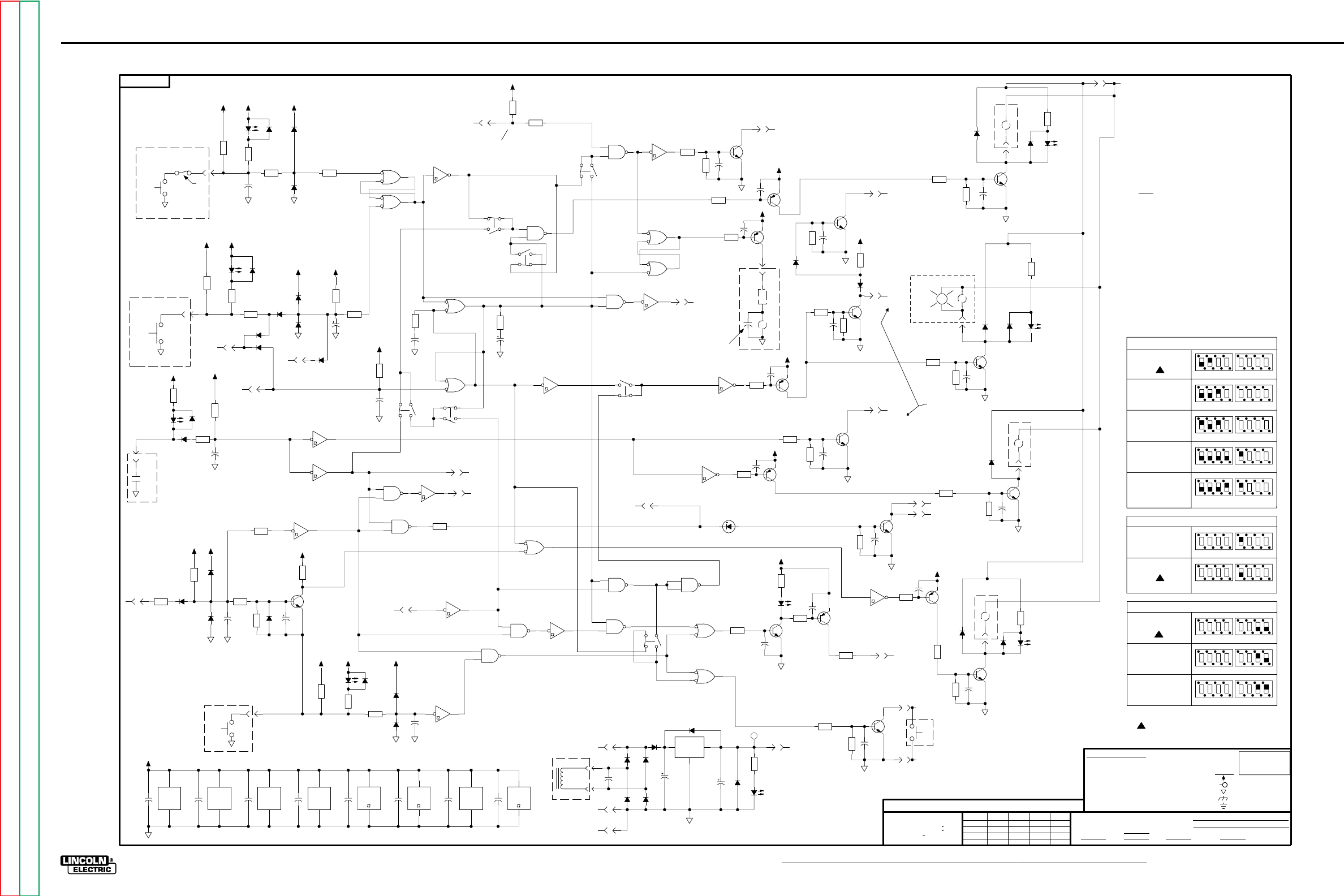
G-4
ELECTRICAL DIAGRAMS
NA-5
LOGIC PC BOARD (L6242-2 & above) SCHEMATIC
3
2
1
3
4
SWITCH #2
4
4
1
4
2
3
4
1
2
3
44
4
SWITCH #1
SWITCH #2
2
Inch up with no contactor
delay
Methods of Burnback
1
1
SWITCH #2
3
SWITCH #2
4
3
1
2 4
4
D30
1.00K
R36
X6
7
14
1.50K
R38
D33
50V
.022
C3
D34
4011
X2
14
7
C17
D35
4011
X4
14
7
4011
X1
14
7
C18
X5
7
14
C16
C15
4011
X3
14
7
C28
100
R50
X8
6
5
J5
5
LED 7J
D31
50V
.022
C2
4.7
35V
C9
J3
1
47.5K
R16
X6
12
13
221K
R15
F
100
R35
D17
Q1
2N4401
500
C29
500
500
515
515 515
500500
500
515
INCH
S4
DOWN
592
C
PROCEDURE
PC BOARD
583C
PRESENT
VOLTAGE
50V
.022
C14
Q16
2N4403
LED 7E
100K
R58
J5
4
100
R49
7.68K
R46
J3
5
7.68K
R48
X8
4
3
Q10
2N4401
50V
.022
C23
J3
9
2.67K
R28
Q17
2N4403
475
R32
C33
2.67K
R23
515
500
500
515
515
A
587
FEED FORWARD
(TO POWER P.C. BOARD)
B
STRIKE
PROCEDURE
ENABLE
563
563
688
ENABLE
SHUT DOWN
ENABLE
ARC CONTROL
DISABLE
STRIKE PROCEDURE
561
B
A
TIME
INITIATE
CRATER
TIME OVER
BURNBACK
X2
4
5
6
J3
4
X4
4
5
6
1W
5.1V
DZ1
J3
6
C34
1.50K
R47
22.1K
R45
Q15
2N4401
100K
R57
22.1K
R33
C35
C36
E
Q7
2N4401
X2
3
2
1
C
B
X4
3
2
1
B
PC BOARD
PROCEDURE
Q14
2N4403
C26
15.0K
R34
X3
3
2
1
X5
6
5
X2
12
13
11
X4
11
12
13
7.68K
R44
X8
2
1
J2
6
S1
6
12
11
5
X6
10
11
22.1K
R39
X6
4
3
J3
7
X6
6
5
X6
8
9
50V
.022
C4
682
7.68K
R43
CURRENT
C37
S2
8
10
9
7
X5
10
11
D26
500
681
1A
1N4007
1000V
D19
1A
1N4007
1000V
D20
2.67K
R25
D25
J1
3
68.1K
R27
100K
R56
500
Q8
2N4401
50V
.022
C21
50V
.022
C24
CR5
500
6.81K
R37
2N5657
Q4
J1
6
SOURCE
POWER
OUTPUT
J2
3
515
500
515
C
D
D
689
OHMS
470
N.B.
PC BOARD
PROCEDURE
INITIATE
CRATER TIME
584C
A
CR6
E
N.F.
-4
CR3
LT1
R
HOT
ELECTRODE
ENABLE
HOLD-LOW
N.D.
530
7.68K
R41
1A
1N4004
400V
D23
100K
R62
Q13
2N4403
22.1K
R42
LED 7K
515
515
515
500
515
500
500
500
100
R17
J3
3
D32
LED 7C
START
D27
581A
J2
4
J2
5
475
R19
D15
22.1K
R18
D8
D9
1.00K
R5
22.1K
R24
4.7
35V
C5
1.50K
R11
D10
J3
2
D16
D13
2974
515
515
500
515
500500
515
500
515
515
LED 7B
DISABLE
687
BURNBACK
TIME OVER
SHUT DOWN
566
565
WELD TIME
OVER
PROCEDURE PC BOARD
528
CURRENT
CR4
STOP
S6
B
A
582
15.0K
R29
N.A.
581
J5
2
LED 7D D28
D14
1.50K
R13
100
R12
10
25V
C7
475
R4
J2
1
100
R6
1.50K
R3
C6
D12
D11
1.00K
R2
D29
475
R14
J5
1
S5
START
G
N.F. SCHEMATIC SHOWN WITH DIP SWITCHES IN THE "UP" POSITION.
1A
1N4007
1000V
D18
X5
89
50V
.022
C27
10.0K
R40
Q11
2N4401
X5
2
1
C31
CIRCUITRY OF CONTROLS HAVING A COMMON CODE NUMBER.
J4
1
J5
6
X2
10
8
9
C32
BYPASS KIT (ALSO SEE SCHEMATIC A)
7.68K
R53
X1
5
6
4
X1
10
8
9
100K
R55
Q18
2N4403
Q12
2N4403
X1
2
1
3
Q9
2N4401
100K
R54
PER CHARTS BELOW
68.1K
R22
50V
.022
C19
J1
4
J1
1
2N5657
Q2
LED 7H
J4
2
J3
8
50V
.022
C25
N.C. DIP SWITCHES ARE TO BE SET TO SUIT APPLICATION
100K
R63
N.B. COMPONENTS INCLUDED WITH OPTIONAL LINC-FILL
2.67K
R20
515
500
515
500
515
500
1A
1N4004
400V
D22
A
A
N.F.
-1
560
PC BOARD
PROCEDURE
ENABLE
MONITOR
PRESET
CR2
564
PROCEDURE
PC BOARD
TRAVEL
589
PROCEDURE
ENABLE
WELD
610
CYCLE
N.A. SWITCH (SEE PROCEDURE P.C. BOARD SCHEMATIC)
NOTES:
DIAGRAM MAY NOT SHOW THE EXACT COMPONENTS OR
N.E. SINCE COMPONENTS OR CIRCUITRY ON A PRINTED
CIRCUIT BOARD MAY CHANGE WITHOUT AFFECTING THE
INTERCHANGEABILITY OF A COMPLETE BOARD, THIS
IS USED WITH LATER VOLTAGE BOARDS.
EARLIER VOLTAGE BOARDS. ARC CONTROL ENABLE
N.D. HOLD-LOW DISABLE IS USED WITH G1556-1 AND
MUST BE IN "STRIKE" POSITION TO START WELD
500
500
X3
4
5
6
S2
6
12
11
5
X3
12
13
11
D5
J2
2
D6
D2
D1
B1
(HS)
IN
7815
OUT
GND
X9
J4
6
J4
3
X8
7
14
100V
.22
C1
C30
500
T1C BLU
X3
8
9
10
515
4.7
35V
C13
B2
LED 7A
D7
D3
D4
500
50V
C12
515
N.F.
BC
D
-3
C
A
C
SUPPLY
POWER
LOGIC
628
BLU
22VAC
1.50K
R1
4011
X7
14
7
PROCEDURE
PC BOARD
515
X7
8
9
10
S1
2
16
15
1
500
S1
4
14
13
3
475
R9
475
R10
50V
.022
C11
10
25V
C8
X6
2
1
S1
8
10
9
7
X7
12
13
11
22.1K
R52
X5
4
3
22.1K
R51
X1
11
12
13
J4
4
500
N.F. N.F.
-2
-1
-3
-4
N.F.
N.F.
A
D
PC BOARD
PROCEDURE
588
D
INITIATE
START
TIME
584S
CURRENT
C
PC BOARD
PROCEDURE
D
B
OVER
START TIME
OVER
WELD TIME
C
B
583S
THIS SHEET CONTAINS PROPRIETARY INFORMATION OWNED BY
Ch'ge.Sht.No.
ELECTRICAL SYMBOLS PER E1537
UNLESS OTHERWISE SPECIFIED)
GENERAL INFORMATION
MFD
NONE
SUBJECT
CLEVELAND, OHIO U.S.A.
ON 3 PLACE DECIMALS IS + .OO2
SCALE
RESISTORS = Ohms (
(
UNLESS OTHERWISE SPECIFIED)
CAPACITORS =
.022/50V
DIODES =
1A, 400V
(UNLESS OTHERWISE SPECIFIED)
1/4W
FILENAME: G2974_2DA
MAB
9-27-94
SHT.
LOGIC CIRCUIT
DATE
WITH PUBLISHED STANDARDS
G
ON ALL ANGLES IS + .5 OF A DEGREE
DR.
MATERIAL TOLERANCE ("t") TO AGREE
NA-5
NO.
CHK.
SUP'S'D'G.
2974
THE LINCOLN ELECTRIC CO.
TYPE
THE LINCOLN ELECTRIC CO.
THE LINCOLN ELECTRIC CO.
EQUIP.
LOGIC POWER SUPPLY DISTRIBUTION AND BYPASSING
J4
5
50V
.022
C22
Q6
2N4401
J5
3
50V
.022
C10
100K
R59
22.1K
R31
UNLESS OTHERWISE SPECIFIED TOLERANCE
ON 2 PLACE DECIMALS IS + .O2
ON HOLES SIZES PER E-2056
500
ENABLE
FEED
S3
INCH
UP
586
500
J1
2
18
63
37
X-
R-
7K
9
Q-
LED-
2
35
S-
5
1
B-
J-
2
DZ1-
2
68.1K
R30
LED 7G
1A
1N4007
1000V
D21
100K
R61
2N5657
Q5
1A
1N4004
400V
D24
50V
.022
C20
J1
5
500
500
PCB
PROCEDURE
CR1
585
AND IS NOT TO BE REPRODUCED, DISCLOSED OR USED WITHOUT THE EXPRESS PERMISSION OF
EARTH GROUND CONNECTION
POWER SUPPLY SOURCE POINT
FRAME CONNECTION
COMMON CONNECTION
SUPPLY
VOLTAGE NET
X7
2
1
3
2N5657
Q3
S2
2
16
15
1
D-
LABELS
LAST NO. USED
X7
5
6
4
100K
R60
C-
METHODS OF TRAVEL & BURNBACK.
NA-5 SHIPPED CONNECTED FOR INDICATED
2
SWITCH #1
2
1
3
SWITCH #1
2
1
3
1
3
SWITCH #1
3
Yes
2
2
3
1
SWITCH #1
SWITCH #1
4
4
SWITCH #2
3
1
2 4
3
1
2
current
Start/stop with weld
Start/stop with switches
Methods of Travel
3
1
2 4
3
1
2
SWITCH #2
3
2
SWITCH #1
1
3
WATER
OR
FLUX
No
contactor delay
Wire feed stop with
delay
Inch up with contactor
SWITCH #1
2
receptacle)
Start with start switch
Stop after burn-back time
(Optional procedure
module installed in crater
SWITCH #1
SWITCH #1
1
3
1
(Optional procedure
Start with start switch
module installed in crater
Stop after crater time
receptacle)
Start with weld current
Stop with stop switch
1
637
2
1
3
4
SWITCH #2
44
SWITCH #2
2
Optional Crater Module Installed?
2
1
3
4
SWITCH #2
4
SWITCH #2
500
515 515
1-12-96D
G-4
NOTE: Lincoln Electric assumes no responsibility for liablilities resulting from board level troubleshooting. PC Board repairs will invalidate your factory warranty. Individual Printed Circuit Board Components are not available from Lincoln Electric. This information is provided
for reference only. Lincoln Electric discourages board level troubleshooting and repair since it may compromise the quality of the design and may result in danger to the Machine Operator or Technician. Improper PC board repairs could result in damage to the machine.
Return to Section TOC Return to Section TOC Return to Section TOC Return to Section TOC
Return to Master TOC Return to Master TOC Return to Master TOC Return to Master TOC
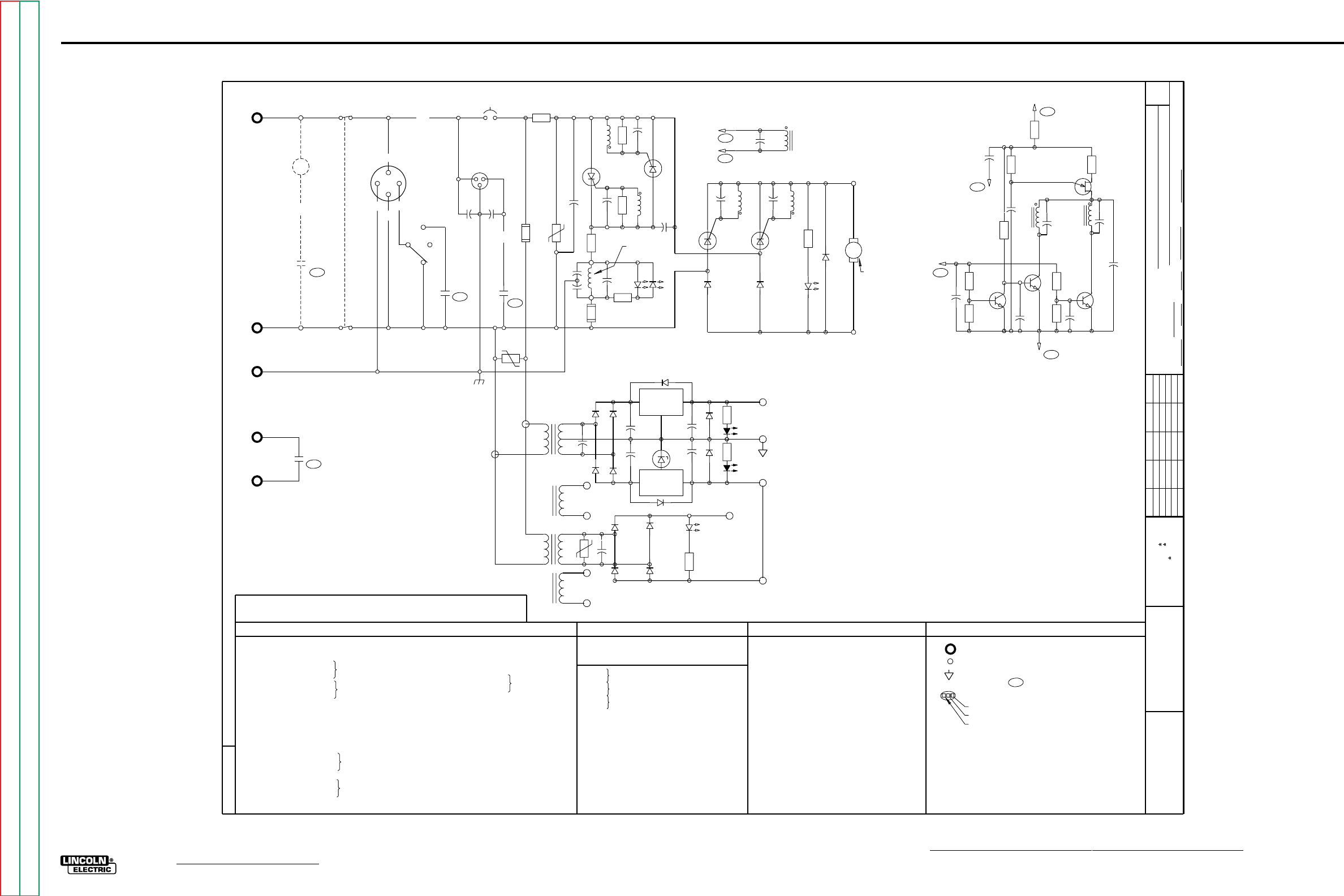
G-5
ELECTRICAL DIAGRAMS
NA-5
POWER PC BOARD (L6252-1) SCHEMATIC
6682-1
Ch'ge. Sht. No.
11-20-81G
9-7-84A
5-18-92N
9-11-92J
3-31-94E
t
UNLESS OTHERWISE SPECIFIED TOLERANCE
ON HOLE SIZES PER E2056
ON 2 PLACE DECIMALS IS .02
WITH PUBLISHED STANDARDS.
ON 3 PLACE DECIMALS IS .002
ON ALL ANGLES IS .5 OF A DEGREE
MATERIAL TOLERANCE (" ") TO AGREE
EQUIP.
TYPE
SUBJECT
DR CHK REF. SUP'S'D'G
SHT.
NO.
THE LINCOLN ELECTRIC CO.
THIS SHEET CONTAINS PROPRIETARY INFORMATION
OWNED BY AND IS
NOT TO BE REPRODUCED, DISCLOSED OR USED
THE LINCOLN ELECTRIC CO.
L
WITHOUT THE EXPRESS PERMISSION OF
CR7
666
CR6
D2G
GND
532
25
S2
TRAVEL
531
S1A CONTROL POWER AND
EMERGENCY STOP 531
TRAVEL
RECEPTACLE
AUTO
OFF
HAND
CR2
D1K
C1104
C1105
531 87
FLUX OR
CB1
531A
CR1
D6K
87
TP102
F101
R1
TP101
C101
PT
102B
R104
C104
SCR
102
631
R103
C102
SCR
101
PT
103B
R101
627
C1106
C1105
LED
LED
1C
1D
R102
C103
WH
RED
626
F102
C121
532
D101 D102
C105 C106
PT101B PT101C
SCR SCR
103 104
D103
R105
LED
1E
WIRE FEED
MOTOR
ARMATURE
BLU
BLK TO TACH
PICK-UP
P.C. BOARD
539
541
115 VAC
INPUT
S1B32
GND
532
WATER SOLENOID
RECEPTACLE
WIRE FEED
MOTOR FIELD
B2L C119
PT101A
540
500
A6H
R112
C111
Q103
C112
R111
PT102A C110
QU101
Q102
C120
R108 R107
Q101
C122
500
A6H
587
D6G
FEED
FORWARD
R113
R110
C109
R109
C108
+
C107
500
A6H
R106
525
A5H
2
4
D3K
CR3 532
531B BLK
BLK
RED
RED
115
VAC
18
18
VAC
VAC
T1A
D106
D107
C113
WHT
D104 D105
C114
+
IN
X101
OUT
GND
D108
C116
+
D110
R114
LED 1A
IN
X102
OUT
GND
C117 +D111
R115
LED 1B
D109
DZ101
C115
525
+15V
ANALOG
510
ZERO-VOLT
REFERNCE
500
-10V
500
RELAY
POWER SUPPLY
ANALOG
POWER SUPPLY
FEED DIRECTION CIRCUIT
ARMATURE SUPPLY
FIELD SUPPLY
610
LED 1F
R116
D113
D112
D114
C118
TP
103
ORG
T2A
115
VAC
ORG
BLK
BRN
115
VAC
T2B
BLK
VAC
24 INTERFACE OPTION
POWER SUPPLY
C101
C102
C103
C104
C105
C106
C107
C108
C109
C110
C111
C112
C113
C114
C115
.15/200
.047/100
.022/25
.022/25
.022/25
.22/100
.15/200
.047/100
.022/25
POWER P.C. BOARD
C116
C117
C118
C119
C120
C121
C122
.005/1400
50/250
.047/100
4.7/35
500/50
500/50
4.7/35
18/15
.02/600
.047/100
.022/25
.02/600
.022/25
D101 16A, 400 V
D102
D103
D104
THRU
D111
D112
THRU
D115
16A, 400 V
16A, 400 V
1A, 400 V
DZ101 5.1 V., 1 2 W
/
F101 /
1 2A SLOW BLOW,
1 2A SLOW BLOW,
POWER SUPPLIES FUSE
/
F102 FIELD FUSE
LED 1A
LED 1F
THRU RED LIGHT
EMITTING
DIODE
PT101
PT103
1:1:1
PULSE
TRANSFORMER
PT102
Q101
Q102
Q103
QU101
2N4123
2N5816
2N5816
UJT
R101
R102
R103
R104
R105
R106
R107
R108
R109
R110
R111
R112
R113
R114
R115
R116
40, 12W
68K
100
100
10K, 2W
100
10K
47K
4.7K
6.8K
680
47K
680
4.7K
3.3K
68K
SCR 101 8A, 600V
SCR 102
SCR 103
SCR 104
8A, 600V
16A, 400V
16A, 400V
TP101
TP102
TP103 150V, 10J
X101 +15V VOLTAGE
REGULATOR
X102 -5V VOLTAGE
REGULATOR
.0047/3000
C1101
C1102
C1103
C1104
C1105
C1106
.0047/3000
.0047/3000
ARC VOLTAGE BY-PASS
(SEE SCHEMATIC "C")
FLUX SOLENOID BY-PASS
MOTOR FIELD BY-PASS
R.F. BYPASS P.C. BOARD
CB1
CR1
CR2
CR3
CR6
CR7
5A. CIRCUIT BREAKER
SPST, N.O. FLUX OR WATER
SPST, N.O. TRAVEL
SPST, N.O. POWER SOURCE OUTPUT
SPST, N.O. SOLID STATE, OPTIONAL
LINC-FILL PILOT RELAY
OPTIONAL LINC-FILL BY-PASS CONTACTOR
R1
S1
S2
T1A
2, 50W
EMERGENCY STOP
SPDT, TRAVEL
36 VCT, 300mA SECONDARY
T1B 10 VAC, 600mA SECONDARY
T1C
T2A
T2B 115VAC, 80mA SECONDARY
24VAC, 30mA SECONDARY
COMPONENTS NOT ON P.C. BOARD KEY TO SYMBOLS
INPUT CONTROL CABLE CONNECTION
POWER SUPPLY SOURCE POINT
COMMON CONNECTION TO ANALOG POWER
A5H
SCHEMATIC LOCATION REFERENCE
HORIZONTAL CO-ORDINATE LETTER
VERTICAL CO-ORDINATE NUMBER
CODE NUMBER.
CIRCUIT BOARD MAY CHANGE WITHOUT AFFECTING THE
SINCE COMPONENTS OR CIRCUITRY ON A PRINTED
INTERCHANGEABILITY OF A COMPLETE BOARD, THIS
DIAGRAM MAY NOT SHOW THE EXACT COMPONENTS
OR CIRCUITRY OF CONTROLS HAVING A COMMON
A.N.S.I. ELECTRICAL SYMBOLS PER E1537
UNLESS OTHERWISE SPECIFIED, COMPONENT VALUES OF:
CAPACITORS = MFD/VOLTS
RESISTORS = OHMS, 1 2 WATT/
1
2
3
4
5
6
7
ABCDEFGHJKLM
FOR NA-5 CONTROL CODES
8400
8993
NA-5 SCHEMATIC
POWER CIRCUIT
DAD
NONE
6682-1
10-3-81
7-2-92
THE LINCOLN ELECTRIC CO.
CLEVELAND, OHIO U.S.A.
EQUIP.
TYPE
SCALE SUBJECT
DR DATE CHK REF. SUP'S'D'G
SHT.
NO.
L
A
31
1A, 1000 V
PT103A
SCHEMATIC IDENTIFICATION LETTER
DPST, CONTROL POWER AND
SEE LOGIC SCHEMATIC "D"
D115
BRN
+
YLW
T1B
VAC
10
YLW
601
METER
SUPPLY
602
SUPPLY; 510
SCHEMATIC FOR COMPONENT VALUES AND CIRCUIT CONNECTIONS.
FOR POWER P.C. BOARDS L6252-2 OR HIGHER USE L8956
FOR R.F. BYPASS P.C. BOARDS M14133-1 OR
HIGHER USE S20995 SCHEMATIC FOR
COMPONENT VALUES AND CIRCUIT CONNECTIONS.
G-5
NOTE: Lincoln Electric assumes no responsibility for liablilities resulting from board level troubleshooting. PC Board repairs will invalidate your factory warranty. Individual Printed Circuit Board Components are not avail-
able from Lincoln Electric. This information is provided for reference only. Lincoln Electric discourages board level troubleshooting and repair since it may compromise the quality of the design and may result in
danger to the Machine Operator or Technician. Improper PC board repairs could result in damage to the machine.
Return to Section TOC Return to Section TOC Return to Section TOC Return to Section TOC
Return to Master TOC Return to Master TOC Return to Master TOC Return to Master TOC
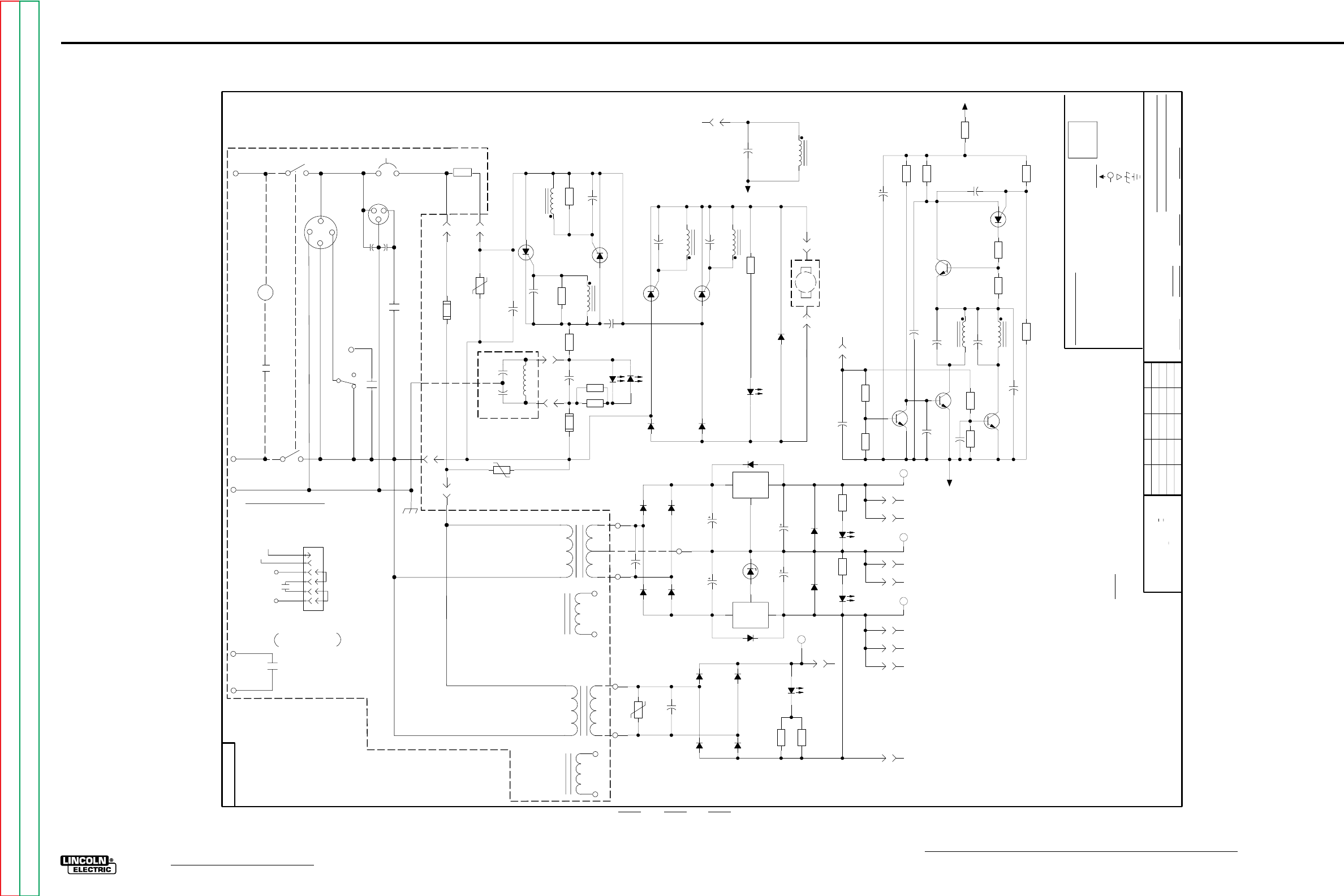
G-6
ELECTRICAL DIAGRAMS
NA-5
POWER PC BOARD (L6252-2 & above) SCHEMATIC
CR1
OFF
TRAVEL
AUTO
HAND
S1B
CR7
626
666
CR6
S2
FOR THE NA-5R ONLY:
BURNBACK KIT IS CONNECTED TO 631 AND 532.
631
AND CR2 ARE REMOVED ON THE NA-5R.
MOTOR ARMATURE
WIRE FEED
18
115 VAC
531B
532
WIRE FEED
3000
.0047
3000
.0047
BLK
531B
RED
MOTOR FIELD
WHT
500
P1
J3
6
P1
J3
1
P1
J3
5
-10V
500
500
POWER SUPPLY
RELAY
500
500
J2
4
25
2
GND
SHOWN WITH JUMPER
PLUG INSTALLED
NA-5R OPTIONAL BURNBACK
4
404
1
2
3
6
5
4
402
532
RECEPTACLE WHICH IS DRAWN BELOW.THE
CR3 IS SHOWN IN THE OPTIONAL BURNBACK KIT
L
TRAVEL
RECEPTACLE
532
THE TRAVEL RECEPTACLE,THE TRAVEL SWITCH,
4
2
CR3
GND
32
KIT RECEPTACLE
CR3
CONTROL POWER AND
EMERGENCY STOP
S1A
31
115VAC
INPUT
8956
531
531
531
GND
3000
.0047
C22
16A
400V
D2
539
LED1D
16A
400V
D1
500
525
UNLESS OTHERWISE SPECIFIED)
(UNLESS OTHERWISE SPECIFIED)
UNLESS OTHERWISE SPECIFIED)
LABELS
C-
D-
R-
541
ELECTRICAL SYMBOLS PER E1537
M
BLUE
1/4W
.022/50V
GENERAL INFORMATION
(
DIODES =
RESISTORS = Ohms (
1A, 400V
MFD
CAPACITORS =
24
EQUIP.
22
POWER SUPPLY SOURCE POINT
EARTH GROUND CONNECTION
COMMON CONNECTION
FRAME CONNECTION
LAST NO. USED
VOLTAGE NET
540
NA-5,NA-5R
J1
4
0.5A
125V
F2
50
250V
C3
P1
J1
1
12W
40
R1
LED1C
133K
R2
627
133K
R18
LED1E
150V
45J
TP1
200V
.15
C2
1400V
.0047
C1
0.5A
125V
F1
0.2mH
PT1
1
2
SHT.
J2
5
L
SUP'S'D'G.
SUBJECT
NO.
P1
J3
3
0.2mH
PT2
1
2
8956
15
100V
.047
C5
2N6398
SCR1
200V
.15
C4
TYPE
SUPPLY
631
0.2mH
PT3
1
2
600V
.02
C21
100
R3
2N6403
SCR3
2N6403
SCR4
BLACK
16A
400V
2W
10K
R5
FEED FORWARD
D3
100V
.047
C19
6.81K
R10
13.7K
R20
4.7
35V
C7
2N6027
QU1
2
3
1
P1
J1
3
4.75K
R9
C24
332
R21
P1
J1
6
100
R6
0.2mH
PT1
5
6
100V
.047
C6
100
R4
J2
1
0.2mH
PT1
3
4
2N6398
SCR2
LED1F
133K
R16
D9
1N4007
D12
1N4007
D15
GND
IN
OUT
X2
B3
B4
D7
D6
B5
1N4007
D13
1N4007
D14
610
150V
45J
TP3
J2
6
600V
.02
C18
LED1B LED1A
D10
500
50V
C15
D11
4.7
35V
C16
500
50V
C14
500
610
ARMATURE SUPPLY
B1
D4
133K
R17
18
15V
C17
D5
3.32K
R15
(HS)
IN
7815
OUT
GND
X1
1W
5.1V
DZ1
100V
.22
C13
B2
4.75K
R14
D8
BRN
24
VAC
T2B
532
10 VAC
531B
T2A
YLW
BLK
602
601
YLW
BLK
BRN
115 VAC
532
BLK
T1B
METER
VAC
CANADA
ORG
115
ORG
RED
AUSTRALIA
POWER SUPPLY
INTERFACE OPTION
FRANCE
87
FLUX OR WATER
R1
SOLENOID RECEPTACLE
2 OHMS
50 WATTS
531A
CB1
531A
631
.0047
3000
VAC
CR2
T1A
SUPPLY
J2
3
J2
2
150V
45J
TP2
VAC
WHT
18
RED
FIELD SUPPLY
40V
600mA
Q9
0.2mH
PT3
3
4
40V
600mA
Q3
1.50K
R19
C20
681
R11
P1
J3
8
P1
J3
4
10K
R7
100V
.047
C8
40V
600mA
Q1
P1
J3
9
P1
J3
2
47.5K
R8
C12
0.2mH
PT2
3
4
C9
33.2K
R22
C10
C11
40V
600mA
Q2
500
510
525
NONE
SCALE
CHK.
DATE
Ch'ge.Sht.No.
DR.
47.5K
R12
THE LINCOLN ELECTRIC CO.
CLEVELAND, OHIO U.S.A.
K.K.
ON ALL ANGLES IS + .5 OF A DEGREE
ON 3 PLACE DECIMALS IS + .OO2
ON HOLES SIZES PER E-2056
UNLESS OTHERWISE SPECIFIED TOLERANCE
ON 2 PLACE DECIMALS IS + .O2
WITH PUBLISHED STANDARDS
MATERIAL TOLERANCE ("t") TO AGREE
N.A. SINCE COMPONENTS OR CIRCUITRY ON A PRINTED CIRCUIT BOARD MAY CHANGE
CIRCUIT
ANALOG
REFERENCE
POWER SUPPLY
FIELD DIRECTION
NOT SHOW THE EXACT COMPONENTS OR CIRCUITRY OF CONTROLS HAVING A COMMON CODE
WITHOUT AFFECTING THE INTERCHANGEABILITY OF A COMPLETE BOARD, THIS DIAGRAM MAY
NUMBER.
NOTES :
P1
J3
7
587
510
510
ZERO VOLT
ANALOG
525
+15V
525
5/12/92
POWER P.C. BOARD SCHEMATIC
G-6
NOTE: Lincoln Electric assumes no responsibility for liablilities resulting from board level troubleshooting. PC Board repairs will invalidate your factory warranty. Individual Printed Circuit Board Components are not avail-
able from Lincoln Electric. This information is provided for reference only. Lincoln Electric discourages board level troubleshooting and repair since it may compromise the quality of the design and may result in
danger to the Machine Operator or Technician. Improper PC board repairs could result in damage to the machine.
Return to Section TOC Return to Section TOC Return to Section TOC Return to Section TOC
Return to Master TOC Return to Master TOC Return to Master TOC Return to Master TOC
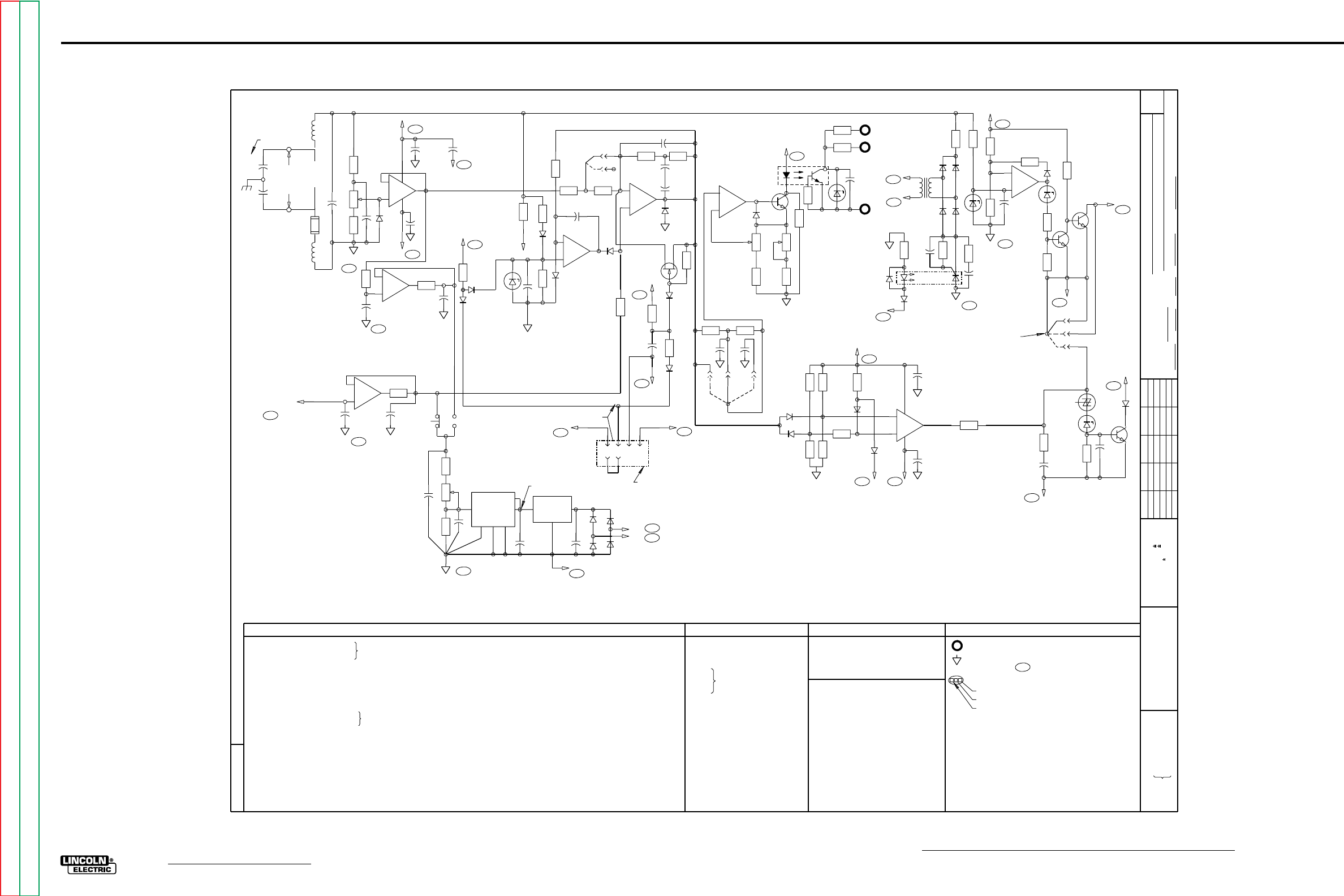
G-7
ELECTRICAL DIAGRAMS
NA-5
VOLTAGE PC BOARD SCHEMATIC
6682-3
Ch'ge. Sht. No.
9-27-85E
11-14-86L
3-6-92B
7-10-92A
3-25-94
11-17-95G
t
UNLESS OTHERWISE SPECIFIED TOLERANCE
ON HOLE SIZES PER E2056
ON 2 PLACE DECIMALS IS .02
WITH PUBLISHED STANDARDS.
ON 3 PLACE DECIMALS IS .002
ON ALL ANGLES IS .5 OF A DEGREE
MATERIAL TOLERANCE (" ") TO AGREE
EQUIP.
TYPE
SUBJECT
DR CHK REF. SUP'S'D'G
SHT.
NO.
THE LINCOLN ELECTRIC CO.
THIS SHEET CONTAINS PROPRIETARY INFORMATION
OWNED BY AND IS
NOT TO BE REPRODUCED, DISCLOSED OR USED
THE LINCOLN ELECTRIC CO.
L
WITHOUT THE EXPRESS PERMISSION OF
C501
.022/25
.47/50
.47/50
DZ502 /
L501
R501
27K
15K
2.2K
2.7K
4.7K
100K
2.7K
S7B
COMPONENTS NOT ON P.C. BOARD KEY TO SYMBOLS
COMMON CONNECTION TO ANALOG POWER
SUPPLY 510
A5H
SCHEMATIC LOCATION REFERENCE
HORIZONTAL CO-ORDINATE LETTER
VERTICAL CO-ORDINATE NUMBER
CODE NUMBER.
CIRCUIT BOARD MAY CHANGE WITHOUT AFFECTING THE
SINCE COMPONENTS OR CIRCUITRY ON A PRINTED
INTERCHANGEABILITY OF A COMPLETE BOARD, THIS
DIAGRAM MAY NOT SHOW THE EXACT COMPONENTS
OR CIRCUITRY OF CONTROLS HAVING A COMMON
A.N.S.I. ELECTRICAL SYMBOLS PER E1537
UNLESS OTHERWISE SPECIFIED, COMPONENT VALUES OF:
CAPACITORS = MFD/VOLTS
RESISTORS = OHMS, 1 2 WATT/
1
2
3
4
5
6
7
BCDEFGHJKLM
FOR NA-5 CONTROL CODES
8400
8993
NA-5 SCHEMATIC
VOLTAGE CIRCUIT
DAD
NONE
6682-3
10-5-81
7-2-92
THE LINCOLN ELECTRIC CO.
CLEVELAND, OHIO U.S.A.
EQUIP.
TYPE
SCALE SUBJECT
DR DATE CHK REF. SUP'S'D'G
SHT.
NO.
L
C
39/20
4.7/35 L502
500 TRIMMER
1K
100K
15K
330K
22K
3.3K
R526
VOLTAGE P.C. BOARD
47K
47K
22K
100K
27K
10K
100
10K
56K
27K
DM601 DIGITAL METER
SPDT, VOLTS SET-ACTUAL
NOTES:
C601 500/50
4.7/35
.022/25
1A, 400V
R601
R602
R603
X601
2.80K, 1/4W, 1%
A
A5H
635 SETTING
C506
D
-
+
6
5X501
CONTROL
AMP
7
A
-
+
2
3X502 X502
R514
R540
637
D5A
500
A6H
Q503
C528
R531
687
D4B
R602 R601
CAL
CW
4
R603
TP4
C603 EC
DM601
1
2
C602
+
OUT IN
X601
GND
+
C601
601
602
A6E
A6E
D602
D604
D603
D601
510
B7G
TP5
+5V
510P
B3C
VOLTMETER VOLTMETER
POWER SUPPLY
ACTUAL
SET
S7B
VOLTS
SET-ACTUAL
9147
N.B.
C504
C505
C506
C507
C508
C509
C510
C511
C512
C513
C514
C516
C517
C518
C519
C520
C521
C522
C523
C524
C525
C526
C527
C528
.1/100
4.0/50
.022/25
.022/25
.022/25
1.8/20
27/35
4.7/35
.022/25
39/20
.0047-.005/1400
.022/25
.022/25
.022/25
.022/25
.022/25
.01/200
4.7/35
.47/50
.022/25
D501
THRU
D522 1A, 400V
DZ503
DZ504
DZ505
DZ506
DZ507
6.8V, 1 2W
5.1V, 1/2W
20V, 1W
15V, 1W
6.2V, 1/2W
6.8V, 1/2W
33uH, 110mA
33uH, 110mA
OCI501
OCI502 OPTO-ISOLATOR
Q501
Q503
Q505
Q506
Q507
Q508
X501
X502
2N4123
2N5816
2N4123
2N4857
2N5816
2N5816
QUAD OP-AMP
QUAD OP-AMP
R502
R503
R504
R505
R506
R507
R508
R509
R510
R511
R512
R513
R514
R515
R516
R517
R518
R519
R520
R521
R522
R523
R524
R525
44.2K, 1/4W, 1%
4.75K, 1/4W, 1%
100K
10K
1K
2K TRIMMER
5.6K
100K
39K
56K
27K
R527
R528
R529
R530
R531
R532
R533
R534
R535
R536
R537
R538
R539
R540
R541
R542
R543
R544
R545
R546
R547
R548
R549
22K
27K
1K
33K
5K TRIMMER
1K, 12W
470
68K
15K
15K
270
270
100
270
F501 1 8 AMP FAST
/
BLOW FUSE
SWITCH
SBS501
T501 24 VAC, 185 mf
SECONDARY
TP501 150V, 10J
VOLTMETER P.C. BOARD
C602
C603
C604
D601
.022/25
D602
D603
D604
24.3K, 1/4W, 1%
2K TRIMMER
+5V VOLTAGE REGULATOR
INPUT CONTROL CABLE CONNECTION
N.A. THESE CAPACITORS ARE LOCATED
ON THE R.F. BYPASS BOARD.
(SEE SCHEMATIC A).
N.B. SEE L6682-3A SCHEMATIC FOR
BOARD.
SUPERSEDED G1556-1 VOLAGE
N.C. EARLIER VOLTAGE BOARDS DO
NOT HAVE THIS RECEPTACLE, AND
LEAD 688A WAS 688.
C1102
C1101
N.A.
+
-
ARC
VOLTAGE
POLARITY
TERMINALS
F501
L502
L501
667
621
C519
510P
B3C
R503 R502 R501
C501
D502
CW A
+
-
13
12 11
414
C521
500
A6H
C520
525
A5H
C524
+
500
A6H
B
+
-
9
10
8
R504
C504
510P
B3C
X501
R547
C523
ACTUAL VOLTAGE
METER FILTER
C
-
+
R546
517
C604
A
518
3
2X5011514
C510
+
510P
B3C
SET VOLTAGE
BUFFER
VOLTAGE
PROCEDURE
P.C. BOARD
E2E
516
R537
525
ACTUAL VOLTAGE
BUFFER
D501
D503
DZ
503
+
C505
R505
D504
R539
R532
D516
R506
D505
R535 R507
1
+
+
C518
C508
R509
R510
C507
D506
PIN S
PIN F
WELD
RESPONSE
JUMPER
(RED)
R518
Q506
525
A5H
R516
R517
C517 +
500
A6H
D508
R508
HOLD - LOW CIRCUIT
4231
688 525
A5H
D4J
688A
ARC CONTROL
ENABLE
N.C.
VOLTAGE P.C. BOARD RECEPTACLE FOR
BOARD (SHOWN WITH JUMPER PLUG
OPTIONAL PULSED POWER FILTER P. C.
INSTALLED.)
10
9
+
B
-
8
D517
Q501
R515
START
CW
R512
GAIN CW
R538
R511 R519
+
+
C512 D514
PIN
PIN
PIN
ABD
D510
D511
R521
R523
R520
R522
R524
525
A5H
C511
R525
D507
C
+
-
4
5
611
D509
688
D4J
500
A6H
C522
X502
7
SHUTDOWN
ENABLE
SHUTDOW CIRCUIT
525
A5H
R533
R534
A
B
R513
1 OCI501
264
5
DZ
504
C509
C
POWER SOURCE
CONTROL INTERFACE
C513
+
R549
SHUTDOWN
D518
SBS
501
R530
BYPASS
AUTO
COM
500
D9C
Q508
Q507
R529 R536
R528
DZ
507
D515
D
+
-X502
R526
525
A5H
R527
+
C526
R545
510P
B3C
R544
AUTO-STOP
CIRCUIT
AUTO-STOP AND
SHUTDOWN BYPASS
TAB JUMPER (BLUE)
START
RESPONSE
JUMPER
(WHITE)
R541
DZ
506
D520
D519
T501
115 VAC
531B
532
A5D
A5D
24
VAC
D521 D522
R548
510P
B3C
R543
R542
C525
510
D513
592
D7A
0CI502
C527
5
4
6
2
1
TP
501
C516
D512
SCHEMATIC IDENTIFICATION LETTER
DZ502
D514
12
13 14
S7B
FROM
OPTION
AND
FOR VOLTMETER P.C. BOARDS
L6685-1 OR HIGHER USE S21143
SCHEMATIC FOR COMPONENT
VALUES AND CIRCUIT CONNECTIONS.
SILICON BILATERAL
G-7
NOTE: Lincoln Electric assumes no responsibility for liablilities resulting from board level troubleshooting. PC Board repairs will invalidate your factory warranty. Individual Printed Circuit Board Components are not avail-
able from Lincoln Electric. This information is provided for reference only. Lincoln Electric discourages board level troubleshooting and repair since it may compromise the quality of the design and may result in
danger to the Machine Operator or Technician. Improper PC board repairs could result in damage to the machine.
Return to Section TOC Return to Section TOC Return to Section TOC Return to Section TOC
Return to Master TOC Return to Master TOC Return to Master TOC Return to Master TOC
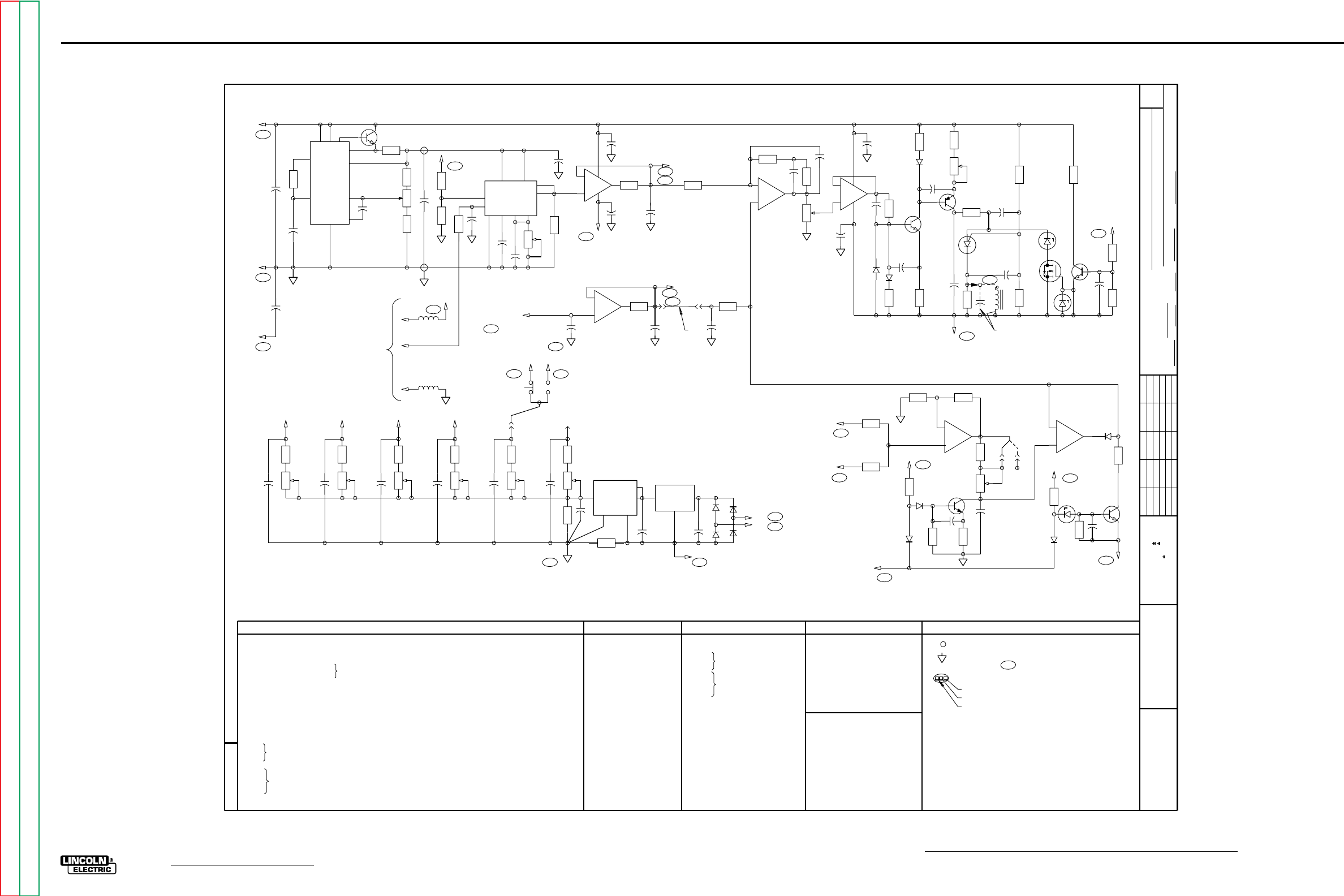
G-8
ELECTRICAL DIAGRAMS
NA-5
CONTROL CIRCUIT SCHEMATIC
6682-2
Ch'ge. Sht. No.
11-9-90D
7-19-91J
3-6-92B
5-15-92N
7-10-92A
t
UNLESS OTHERWISE SPECIFIED TOLERANCE
ON HOLE SIZES PER E2056
ON 2 PLACE DECIMALS IS .02
WITH PUBLISHED STANDARDS.
ON 3 PLACE DECIMALS IS .002
ON ALL ANGLES IS .5 OF A DEGREE
MATERIAL TOLERANCE (" ") TO AGREE
EQUIP.
TYPE
SUBJECT
DR CHK REF. SUP'S'D'G
SHT.
NO.
THE LINCOLN ELECTRIC CO.
THIS SHEET CONTAINS PROPRIETARY INFORMATION
OWNED BY AND IS
NOT TO BE REPRODUCED, DISCLOSED OR USED
THE LINCOLN ELECTRIC CO.
L
WITHOUT THE EXPRESS PERMISSION OF
C201 .022/25
.047/100
.022/25
.022/25
.15/200
18/15
18/15
4.7/35
18/15
.022/25
D201
THRU
D206
D208
1A, 400 V
DZ201 6.8 V., 1 2 W.
/
Q201 2N4123
2N4123
2N4123
R201
15K
10K
33K
10K
270
15K
47K
15K
100K
X201
OCI301
TACHOMETER P.C. BOARD
S7A
COMPONENTS NOT ON P.C. BOARD KEY TO SYMBOLS
POWER SUPPLY SOURCE POINT
COMMON CONNECTION TO ANALOG POWER
A5H
SCHEMATIC LOCATION REFERENCE
HORIZONTAL CO-ORDINATE LETTER
VERTICAL CO-ORDINATE NUMBER
CODE NUMBER.
CIRCUIT BOARD MAY CHANGE WITHOUT AFFECTING THE
SINCE COMPONENTS OR CIRCUITRY ON A PRINTED
INTERCHANGEABILITY OF A COMPLETE BOARD, THIS
DIAGRAM MAY NOT SHOW THE EXACT COMPONENTS
OR CIRCUITRY OF CONTROLS HAVING A COMMON
UNLESS OTHERWISE SPECIFIED, COMPONENT VALUES OF:
CAPACITORS = MFD/VOLTS
RESISTORS = OHMS, 1 2 WATT/
1
2
3
4
5
6
7
BCDEFGHJKLM
FOR NA-5 CONTROL CODES
9147
9338
NA-5 SCHEMATIC
CONTROL CIRCUIT
DAD
NONE
6682-2
10-4-81
7-2-92
THE LINCOLN ELECTRIC CO.
CLEVELAND, OHIO U.S.A.
EQUIP.
TYPE
SCALE SUBJECT
DR DATE CHK REF. SUP'S'D'G
SHT.
NO.
L
B
C202
C203
C204
C205
C206
C207
C208
C209
C210
C211
C212
C213
C214
C215
C216
C217
THRU
C229
.022/25
4.7/35
.0033/200
.47/50
4/50
4.7/35
100pf/100
DZ202
DZ203 3.0 V., 1 W.
L201
L202 330 uH, 110mA
Q202
Q203
Q204
Q205
Q206
Q207
2N4125
BS170
2N4123
2N5816
2N6027
QU201
VOLTAGE REGULATOR
X202
X203
X204
F- TO -V CONVERTER
QUAD OP-AMP
QUAD OP-AMP
R203
R204
R205
R206
R207
R208
R209
R210
R211
R212
R213
R214
R215
R216
R217
R218
R219
R220
R221
R222
R223
1K
500 TRIMMER
1.00K, 1/4W, 1%
2.94K, 1.4W, 1%
100K TRIMMER
1K
1K
1K
33K
50K TRIMMER
15K
10K TRIMMER
33K
R224
R225
R226
100K
10K
1K
R227
CONTROL P.C. BOARD
R228
R229
R230
R231
R232
R233
R234
R235
R236
R237
R238
R239
R240
R241
R242
R243
15
1M
10
6.8K
10K
20K TRIMMER
27K
100
6.8K
2.7K
10K
15K
10K
15K
5.6K
15K
270
Q301
R301
R302
R304
OPTO-INTERRUPTER
2N4123
1K
15K
1.3K
DM401 DIGITAL METER
SPDT SPEED SET-ACTUAL
NOTES:
N.A. 511 IS CONNECTED TO 511A
BY CONNECTION TO
VOLTAGE P.C. BOARD.
N.B. THESE COMPONENTS ARE
LOCATED ON POWER P.C.
BOARD (SEE SCHEMATIC A).
SPEEDMETER P.C. BOARD
C401
C402
C403
THRU
C409
500/50
4.7/35
.022/25
D401
D402
D403
D404
1A, 400V
X401 +5V VOLTAGE REGULATOR
R401
R402
R403
R404
R405
R406
R407
R408
R409
R410
R411
R412
R413
R414
2K TRIMMER
2K TRIMMER
5K TRIMMER
5K TRIMMER
5K TRIMMER
5K TRIMMER
17.8K, 1/4W, 1%
2.80K, 1/4W, 1%
18.2K, 1/4W, 1%
33.2K, 1/4W, 1%
52.3K 1/4W, 1%
10
31.6K, 1/4W, 1%
51.1K, 1/4W, 1%
+
R201
C204
C201
5
6
X201
525
A5H
A5H
510
A6H
500
+
C214
C202
4
13
101211
2
3
Q207
R205 R203 R204
R243
+
C203
520
+10.00V
510P
R209
R206
525
A5H
C216
R207
L201
525
525A
A5H
555
L202
510A
TO TACH
PICK-UP
P.C. BOARD
TACH SIGNAL CONVERTER
C221
9810
5
11
1
12 2 34
X202
C205
C206
R210
R208
CW
CAL
+
A
C217
C212
C218
500
A
2
3+
-4
11
R211
512
B4E
A6H
B4J
R217
ACTUAL SPEED BUFFER
C213
C215
510P
B
13
12 +
-
R242
511
B4E
B3C
B5J
SPEED
632
PROCEDURE
PC BOARD
E2D
SETTING
SET SPEED BUFFER
X203
+
14
511
C228
R218
R221
R238
C208
D
-
+
6
5X203
R222
CONTROL
AMP
+10.00 V
REFERENCE
SUPPLY
7
CW
HI
A
-
+
2
31
C219
4X204
+
C210
C220
R226
D208 C223
R227
D205
Q203
R228 R239
R230
R229
D206
C224
LO
CW
Q204
R231
C211
500
A6H
R233
R235
C229
QU201
C225
R234
DZ202
Q205
DZ203
C227
R237 R236
628
D8A
Q206
R232
540
PT
101A
C119
A1H
N.B
ARMATURE FIRING CIRCUIT
D204
B
-
+X204
R225
8
9
10
500
A6H
Q202
C222
R224
DZ201
525
A5H
R223
D203
FEED ENABLE CIRCUIT
R212 R214
C
-
+X203
8
9
10
R240
R241
512
511
B1G
B3G
FAST-SLOW
ACCELER
JUMPER
PIN
S
PIN
F
CW
ACC
R220 R219
+
C207
D201
R215
R216
C226
D202
Q201
525
A5H
R213
586
D7J
FEED
ENABLE
ACCELERATION CIRCUIT
R413 R414
C409
CAL
CW
142T
R411 R412
C408
CAL
CW
95S
R408 R409
C407
CAL
CW
142
R406 R407
C406
CAL
CW
R404 R405
C405
CAL
CW
R401 R402
C404
CAL
CW
57F
95 57
4
R403
TP4
C403
R410
EC
DM401
1
2
C402
+
OUT IN
X401
GND
+
C401
601
602
A6E
A6E
D402
D404
D403
D401
510
C7E
TP5
+5V
510P
B3C
SPEEDMETER SPEEDMETER
POWER SUPPLY
519
ACTUAL
SET
S7A
SPEED
SET-ACTUAL SPEEDMETER
CALIBRATION
JUMPER
511 512
B3G B1G
7
X203
1
511A
N.A.
C209
11
SCHEMATIC IDENTIFICATION LETTER
16.0 V., 1 W.
SUPPLY; 510
ELECTRICAL SYMBOLS PER E1537.
AND
FROM OPTION
G-8
NOTE: Lincoln Electric assumes no responsibility for liablilities resulting from board level troubleshooting. PC Board repairs will invalidate your factory warranty. Individual Printed Circuit Board Components are not avail-
able from Lincoln Electric. This information is provided for reference only. Lincoln Electric discourages board level troubleshooting and repair since it may compromise the quality of the design and may result in
danger to the Machine Operator or Technician. Improper PC board repairs could result in damage to the machine.
Return to Section TOC Return to Section TOC Return to Section TOC Return to Section TOC
Return to Master TOC Return to Master TOC Return to Master TOC Return to Master TOC
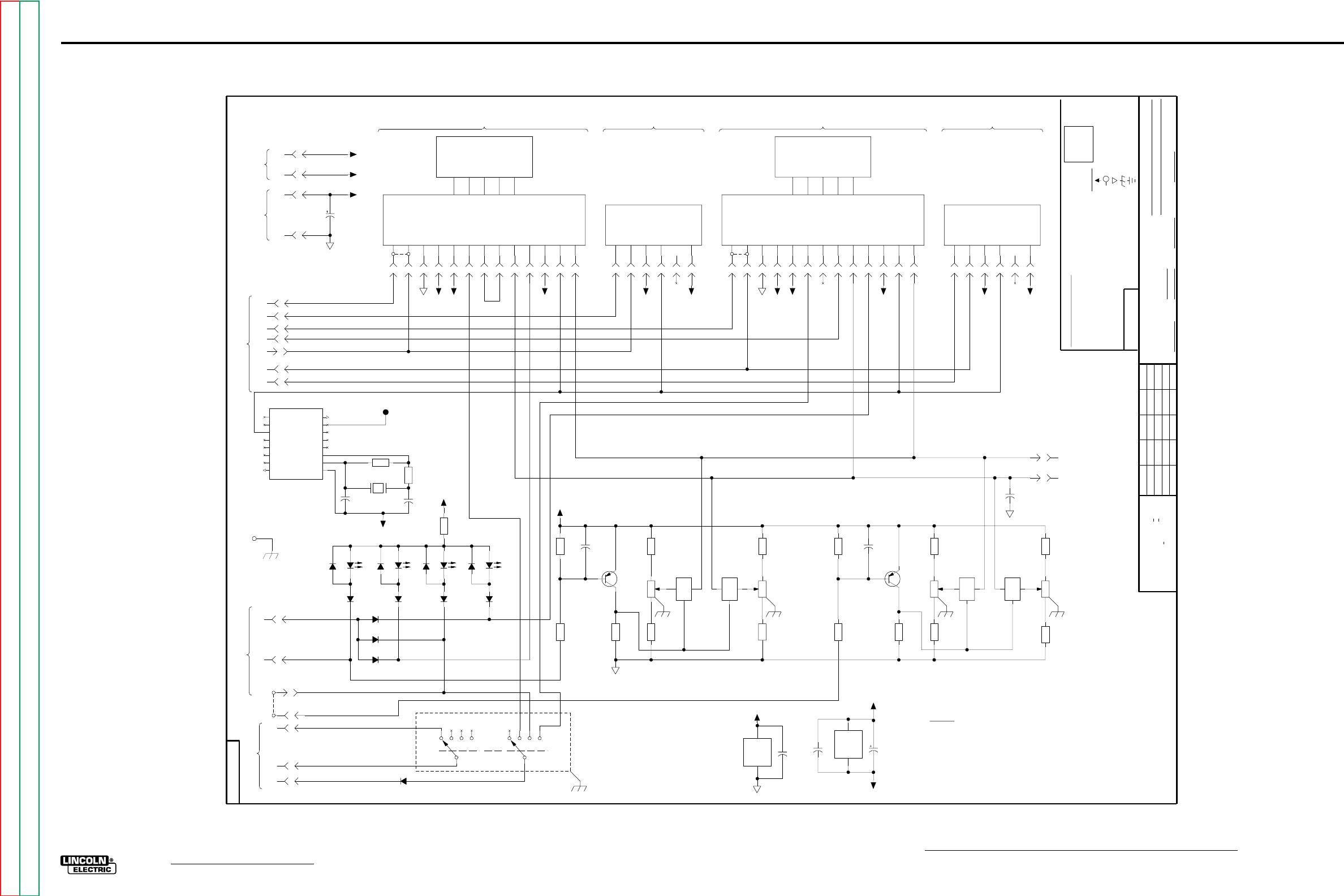
G-9
ELECTRICAL DIAGRAMS
NA-5
PROCEDURE PC BOARD SCHEMATIC
563
520
PCB
L
565
564
N.E.
SPEED
WELD
N.E.
515
500
500
515
500520
515
500
J9
4
J10
2
J10
11
J10
9
J10
6
J10
15
J10
12
J10
13
J10
14
J10
8
J9
5
J10
4
J10
1
26.7K
R16
C9
J9
6
J10
3
4.75K
R17
5.62K
R7
X1
1
2
13
10K
2W
CW
R8
C7
J19
11
X1
10
11
12
C5
J19
10
C4
332
R9
4.7
35V
C8
600mA
40V
Q2
5.62K
R4
MC14060
X2
16
8
47.5K
R18
10K
2W
CW
R5
4066B
X1
14
7
X1
4
3
5
X1
98
6
515
J8
5
J8
6
J8
1
J8
2
J8
4
J8
3
J10
7
520
VOLTS
STRIKE
N.E.
SCREW, FOR ESD.
STRIKE MODE SETTINGS
+10V
B
+5V
+10V
-10V
+5V
-10V-10V
TO PIN P8.
NUMBER.
NOTES :
NOT INSTALLED.
WELD MODE SETTINGS
+5V
A
N.E.
1.82K
R6
WELD PROCEDURE ENABLE
560
PROCEDURE KIT
LOGIC
PCB
8754
LOGIC
FRAME
581A
564A
581
584S
OUTPUT
561
RECEPTACLE
SPEED
CRATER
N.D.
-10V
500
515
+5V
655
515
I
N.C.
584
632
655 655
SELECTOR
PRESET MONITOR ENABLE
566
583S
584C
588
SUPPLIES
583C
ON LOGIC PCB
PCB
FROM REF
VOLTAGE ON
LOGIC
FROM LOGIC
CONTROL PCB
POWER
START MODULE
OPTIONAL OPTIONAL
WELD TIMER MODULE
D12
J18
6
J19
13
J18
5
8
16
Q7
Q14
Q13
MC14060
Q9
OUT2
Vdd
Vss
RES
Q10
Q8
Q6
Q12
Q5
CLKQ4
OUT1
X2
13
14
15
10
11
12
9
7
6
5
4
3
1
2
J18
1
N.A. SINCE COMPONENTS OR CIRCUITRY ON A PRINTED CIRCUIT BOARD MAY CHANGE
N.C. A JUMPER PLUG CONNECTS 584C TO 583C WHEN THE OPTIONAL START MODULE IS
510P
562
O
500
583
515
588A
655
520
OPTION BOARD
TIMER BOARD
POWER SUPPLY DISTRIBUTION
NOT INSTALLED. ALSO, LOGIC CIRCUIT 694 LEAD MUST BE MOVED FROM PIN P10
CD
NOT SHOW THE EXACT COMPONENTS OR CIRCUITRY OF CONTROLS HAVING A COMMON CODE
N.B. A JUMPER PLUG CONNECTS 584S TO 583S WHEN THE OPTIONAL START MODULE IS
WITHOUT AFFECTING THE INTERCHANGEABILITY OF A COMPLETE BOARD, THIS DIAGRAM MAY
500
TIMER BOARD
515
655
O
I
515
562
500
655
I
CRATER MODULE
632635
588
N.D. 564 IS CONNECTED TO 564A BY A LEAD RECEPTACLE JUMPER PLUG, WHICH IS
N.E. R2, R5, R8, R11 AND S1 ARE CONNECTED TO FRAME BY PCB TRACES AND MOUNTING
REMOVED WHEN THE OPTIONAL MULTI-PROCEDURE KIT IS INSTALLED.
AND BYPASSING
OPTIONAL
-10V
BURNBACK TIMER
D2
D3
STRIKE
+10V
LED3
D4
1/2W
10M
R20
D7
D11
100V
47p
C3
C1
S1
3
42 5
C2
S1
9
10
8
11
J18
3
635
562
OPTION BOARD
+5V
DIGITAL TIMERS
N.E.
-10V
STRIKE PROCEDURE
DISABLE
START
WELD
+5V
STRIKE
WELD
PRESET MODE
START
STRIKE
B
CRATER
STRIKE
A
STRIKE PROCEDURE
ENABLE
START DISABLE
WELD PROCEDURE ENABLE
START DISABLE
1.6384MHz
Y1
LED2
J19
14
J18
4
J19
4
D1
100V
22p
C2
LED1
D5
10K
2W
CW
R2
600mA
40V
Q1
5.62K
R1
C6
47.5K
R14
26.7K
R15
267
R3
4.75K
R13
D10
LED4
D6
D8
2.21K
R19
D9
N.E.
VOLTS
TO SET
ON 2 PLACE DECIMALS IS + .O2
ON CONTROL PCB
SPEED BUFFER
TO SET
VOLTAGE BUFFER
632
635
ON HOLES SIZES PER E-2056
ON VOLTAGE PCB
WELD
Ch'ge.Sht.No.
10-29-91
21
SCHEMATIC
EARTH GROUND CONNECTION
LAST NO. USED
POWER SUPPLY SOURCE POINT
COMMON CONNECTION
SHT.
NO.
L
8754
VOLTAGE NET
NA-5 PROCEDURE
FRAME CONNECTION
12
9
FILE: L8754_3DB
SCALE
MFD
1A, 400V
DIODES =
RESISTORS = Ohms (
NONE
(
THE LINCOLN ELECTRIC CO.
CLEVELAND, OHIO U.S.A.
GENERAL INFORMATION
ELECTRICAL SYMBOLS PER E1537
CAPACITORS =
CHK.
(UNLESS OTHERWISE SPECIFIED)
UNLESS OTHERWISE SPECIFIED)
UNLESS OTHERWISE SPECIFIED)
.022/50V
1/4W
C-
EQUIP.
SUBJECT
TYPE
SUP'S'D'G.
UNLESS OTHERWISE SPECIFIED TOLERANCE
MATERIAL TOLERANCE ("t") TO AGREE
ON 3 PLACE DECIMALS IS + .OO2
ON ALL ANGLES IS + .5 OF A DEGREE
DR.
DATE
FM
WITH PUBLISHED STANDARDS
SUPPLY
LABELS
D-
R-
1.82K
R12
5.62K
R10
10K
2W
CW
R11
515
J11
6
J19
8
J19
6
J19
9
J18
2
J19
1
J19
7
J11
4
J19
2
J19
15
J19
3
J9
1
J9
3
O
J11
14
J9
2
J11
15
18
15V
C1
J11
11
J11
13
J11
8
J11
12
J11
9
J11
2
J11
1
J11
7
J11
3
J19
5
500
520
500
515
500
515
520
TIMER BOARD
515
510P
520
500
515
BURNBACK TIME OVER
START TIME OVER/WELD TIME INITIATE
CRATER TIME INITIATE
CRATER TIME OVER/BURNBACK TIME INITIATE
CURRENT
WELD TIME OVER
START TIME INITIATE
+10V
584
N.B.
I
500
O
1.6384 MHz
TEST POINT
FOR
TIME BASE
100 Hz
TIME BASE
+5V
510P
588588A
562
583
520
TIMER BOARD
+10V
500
-10V
7.68K
R21
3-6-92B
7-10-92N
7-12-96N
G-9
NOTE: Lincoln Electric assumes no responsibility for liablilities resulting from board level troubleshooting. PC Board repairs will invalidate your factory warranty. Individual Printed Circuit Board Components are not avail-
able from Lincoln Electric. This information is provided for reference only. Lincoln Electric discourages board level troubleshooting and repair since it may compromise the quality of the design and may result in
danger to the Machine Operator or Technician. Improper PC board repairs could result in damage to the machine.
Return to Section TOC Return to Section TOC Return to Section TOC Return to Section TOC
Return to Master TOC Return to Master TOC Return to Master TOC Return to Master TOC
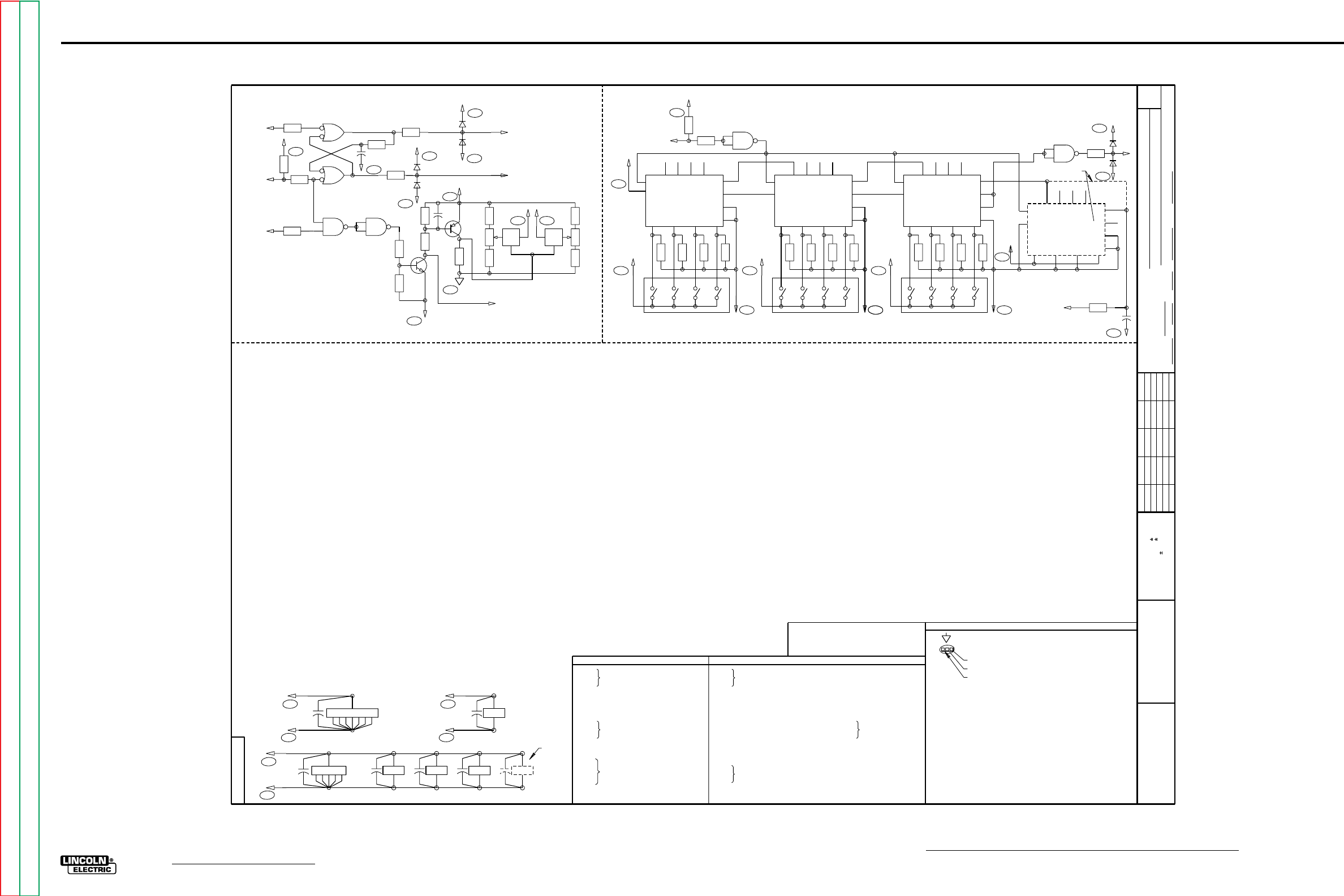
G-10
ELECTRICAL DIAGRAMS
NA-5
OPTION & TIMER PC BOARD SCHEMATICS
6682-5
Ch'ge. Sht. No.
9-7-84A
1-31-86A
7-11-86D
3-6-92B
7-10-92A
t
UNLESS OTHERWISE SPECIFIED TOLERANCE
ON HOLE SIZES PER E2056
ON 2 PLACE DECIMALS IS .02
WITH PUBLISHED STANDARDS.
ON 3 PLACE DECIMALS IS .002
ON ALL ANGLES IS .5 OF A DEGREE
MATERIAL TOLERANCE (" ") TO AGREE
EQUIP.
TYPE
SUBJECT
DR CHK REF. SUP'S'D'G
SHT.
NO.
THE LINCOLN ELECTRIC CO.
THIS SHEET CONTAINS PROPRIETARY INFORMATION
OWNED BY AND IS
NOT TO BE REPRODUCED, DISCLOSED OR USED
THE LINCOLN ELECTRIC CO.
L
WITHOUT THE EXPRESS PERMISSION OF
KEY TO SYMBOLS
SCHEMATIC LOCATION REFERENCE
HORIZONTAL CO-ORDINATE LETTER
VERTICAL CO-ORDINATE NUMBER
UNLESS OTHERWISE SPECIFIED, COMPONENT VALUES OF:
CAPACITORS = MFD/VOLTS
RESISTORS = OHMS, 1 2 WATT/
1
2
3
4
6
BCDEFGHJKLM
FOR NA-5 CONTROL CODES
8400
8993
NA-5 SCHEMATIC
CIRCUIT
DAD
NONE
6682-5
10-2-81
7-2-92
THE LINCOLN ELECTRIC CO.
CLEVELAND, OHIO U.S.A.
EQUIP.
TYPE
SCALE SUBJECT
DR DATE CHK REF. SUP'S'D'G
SHT.
NO.
L
E
A
SCHEMATIC IDENTIFICATION LETTER
X902
C903 8
16
515
500
D6C
D9C
SINCE COMPONENTS OR CIRCUITRY ON A PRINTED CIRCUIT
BOARD MAY CHANGE WITHOUT AFFECTING THE INTERCHANGE-
ABILITY OF A COMPLETE BOARD, THIS DIAGRAM MAY NOT
SHOW THE EXACT COMPONENTS OR CIRCUITRY OF CONTROLS
HAVING A COMMON CODE NUMBER.
N.C. X905 AND C906 ARE USED ONLY ON 100 SECOND
TIMER BOARDS. BOARD JUMPER IS USED ON 10
SECOND TIMER BOARDS.
COMMON CONNECTION TO ANALOG POWER SUPPLY
OPTION P.C. BOARD
C001
THRU
C004
R001
R002
R003
R004
R005
R006
R007
R008
R009
R010
R011
R012
THRU
R016
R017
R018
.022/25
5.6K
330
5.6K
1.8K
4.7K
47K
27K
22K
47K
10K, 2W MULTI-TURN POT
10K, 2W MULTI-TURN POT
22K, 1/4W
1K
1K
Q001
Q002
X001
X002
D001
THRU
D004
2N 4125
2N 4123
QUAD ANALOG
SWITCH
QUAD 2 INPUT
NAND GATE
1A, 400V
C902
THRU
C906 .022/25
C907 100pf/100
D901
D902 1A, 400
1A, 400
R901
THRU
R915
R916
22K, 1/4W
1K
X901
X902
THRU
X904
X905
X906
QUAD 2-INPUT NAND GATE
PROGRAMMABLE
DIVIDE-BY-N
COUNTER
3 DIGIT BCD THUMBWHEEL
SWITCH
TIMER P.C. BOARD
X903
8
16
X904
8
16
X905
8
16
C906
C904
X001
1312
1312
721
X901
C902
14
N.C.
X002
7
14
C003
515
500
D8C
D9C
14
117
1021
C001
520
510P
B1C
B3C
R016 X002
A
6
5
R013
OVER
TIME
INITIATE
CURRENT
588
584
0
515
D8C
2
1X002
B
R014
4
3
R017
R015
C004
500
R018
D9C
D003
515
D8C
500
B1C
D004
D001
515
D8C
500
D9C
D002
TIME
OVER
583
R012 12
13 C
X002 11 9
8X002
D10
R010R011
Q002
520
C002
R007
R008
R009
Q001
510P
B3C
500
D9C
R003 R002 R001
SPEED CW
4A
X001
B3F
632
3
5
C4A
635
X001
B
9
6
8
CW
R004R005
R006
VOLTS
PROCEDURE
ENABLE
562
OPTION BOARD
588A
5
7
8
9
D8C
515 3
R905
R904
R903
R902
515
D8C
S901A
MOST SIGNIFICANT DIGIT
21411 5
DP1
DP2
DP3
DP4
X902
13 CF
PE C
0
INH
MR
500
D9C
10
4
12
6
Q1
Q2
Q3
Q4
115 9 73
R906
515
D8C
S901B
21411 5
DP1
DP2
DP3
DP4
X903
13 CF
PE C
0
INH
MR
500
D9C
10
4
12
6
Q1
Q2
Q3
Q4
115 9 7
500
D9C
63
R910
515
D8C
S901C
21411 5
DP1
DP2
DP3
DP4
X904
13 CF
PE C
0
INH
MR
500
D9C
10
4
12
6
Q1
Q2
Q3
Q4
115 9 7
R907
R908
R909
LEAST SIGNIFICANT DIGIT
R911
R912
R913
10
A
X901
8
9
R915
515
I
INITIATE
R901
D8C
TIMER BOARD
3
21411 5
DP1
DP2
DP3
DP4
X905
13
C
0
INH
MR 10
4
12
6
Q1
Q2
Q3
Q4
115 9 7
515
D8C
500
D9C
R914
655
100 HZ TIME
BASE OUTPUT
FROM
PROCEDURE
PC BOARD
5
6
X901
B4OVER
O
D902
D901
R916
515
D8C
500
D9C
N.C.
D9C
C907
ELECTRICAL SYMBOLS PER E1537
FOR OPTION P.C. BOARD L6246-2
OR HIGHER USE M16795 SCHEMATIC
FOR COMPONENT VALUES AND
CIRCUIT CONNECTIONS.
POWER SUPPLY DISTRIBUTION AND BYPASSING
G-10
NOTE: Lincoln Electric assumes no responsibility for liablilities resulting from board level troubleshooting. PC Board repairs will invalidate your factory warranty. Individual Printed Circuit Board Components are not avail-
able from Lincoln Electric. This information is provided for reference only. Lincoln Electric discourages board level troubleshooting and repair since it may compromise the quality of the design and may result in
danger to the Machine Operator or Technician. Improper PC board repairs could result in damage to the machine.
Return to Section TOC Return to Section TOC Return to Section TOC Return to Section TOC
Return to Master TOC Return to Master TOC Return to Master TOC Return to Master TOC
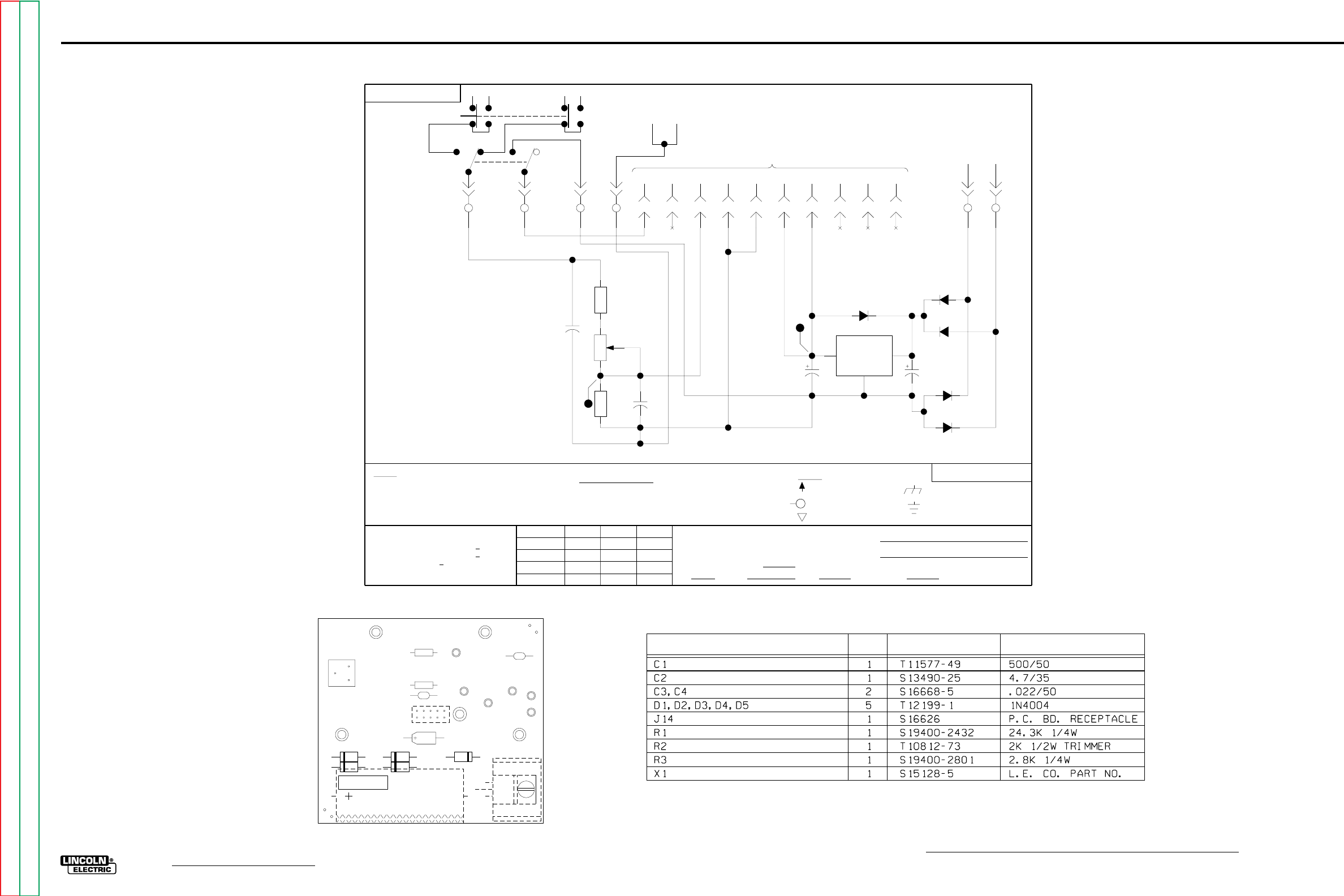
G-11
ELECTRICAL DIAGRAMS
NA-5
METER PC BOARD SCHEMATIC & LAYOUT
515
21143
514
SET
S
SPEED
512
511
ACTUAL
516
513
VOLTS
TO DIGITAL METER
510A 510B
10 VAC
2
+5V
602
WIRE
CIRCUIT BOARD
B3
J14
2
J14
3
J14
10
J14
5
J14
9
J14
7
J14
4
J14
1
J14
6
J14
8
D3
500
50V
C1
C3
OUT
IN
GND
X1
D5
4.7
35V
C2
D2
D1
B6
B2B5
B1
2.8K
R3
24.3K
R1
2K
CW
R2
C4
D4
1
5
518 510517
510C
601
TP5
A C
E
4 D
TP4562
510C
518 510
+5V
3
N.A.
UNLESS OTHERWISE SPECIFIED)
MAY CHANGE
SUPPLY
LABELS
POWER SUPPLY SOURCE POINT
VOLTAGE NET
FRAME CONNECTION
RESISTORS = Ohms (
(
CAPACITORS =
MFD
WITHOUT AFFECTING
B4
CODE NUMBER.
SINCE COMPONENTS OR CIRCUITRY ON
OF A COMPLETE
NOTES :
CONTROLS HAVING A COMMON
DIODES =
BOARD.
UNLESS OTHERWISE SPECIFIED)
(UNLESS OTHERWISE SPECIFIED)
TP4
1/4W
GENERAL INFORMATION
ELECTRICAL SYMBOLS PER E1537
.022/50V
A PRINTED
THIS DIAGRAM MAY NOT
SHOW THE EXACT COMPONENTS
THE INTERCHANGEABILITY
CLEVELAND, OHIO U.S.A.
ON ALL ANGLES IS + .5 OF A DEGREE
ON 3 PLACE DECIMALS IS + .OO2
MATERIAL TOLERANCE ("t") TO AGREE
DR.
WITH PUBLISHED STANDARDS
FM
21143
S
SHT.
9-23-93
CHK.
NONE
DATE
SCALE
NO.
ON HOLES SIZES PER E-2056
Ch'ge.Sht.No.
ON 2 PLACE DECIMALS IS + .O2
UNLESS OTHERWISE SPECIFIED TOLERANCE
THE LINCOLN ELECTRIC CO.
TYPE
METER BOARD SCHEMATIC
SUBJECT
SUP'S'D'G.
COMMON CONNECTION
EQUIP.
EARTH GROUND CONNECTION
OR CIRCUITRY OF
1A, 400V
FILE: S21143_1CA
LN-9, LN-9F, NA-5
3-25-94
B
G-11
NOTE: Lincoln Electric assumes no responsibility for liablilities resulting from board level troubleshooting. PC Board repairs will invalidate your factory warranty. Individual Printed Circuit Board Components are not avail-
able from Lincoln Electric. This information is provided for reference only. Lincoln Electric discourages board level troubleshooting and repair since it may compromise the quality of the design and may result in
danger to the Machine Operator or Technician. Improper PC board repairs could result in damage to the machine.
IDENTIFICATION
PART NO.
REQ'D
ITEM
J14
L6685-1 METER
R3
R1 C4
C2
R2
C1
X1
D5 D4
D3
D2
D1
517
518
510 602
510C
601
C3
Return to Section TOC Return to Section TOC Return to Section TOC Return to Section TOC
Return to Master TOC Return to Master TOC Return to Master TOC Return to Master TOC
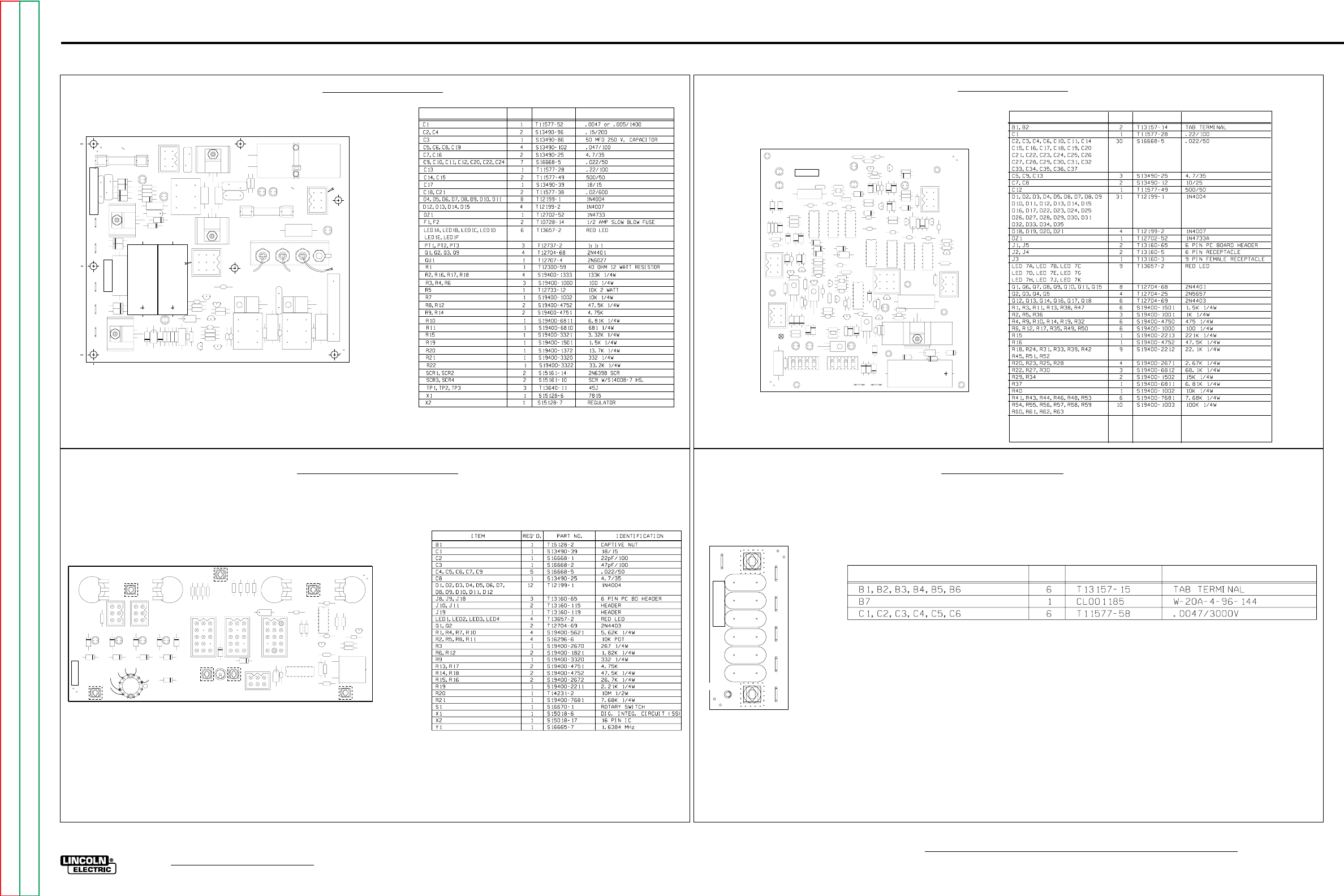
G-12
ELECTRICAL DIAGRAMS
NA-5
MISCELLANEOUS PC BOARDS
IDENTIFICATION
PART NO.
REQ'D
ITEM
CAPACITORS = MFD/VOLTS
RESISTORES = OHMS
D3
D2
L6252-2
NA-5 POWER
R1
R17
R21
R22
R18
R20
R19
R2
R7 R8
R9
R11
R12
R6
R4
R3
R10
R14
R15
R16
X2 X1
SCR3
SCR4
D1
C24
C22
C20
C11
C12
C10
C9
C6
C5
C8
C19
C7
C16
C17
C3
C4
C2
C13
C21
C18
C1
DZ1
D10
D8
D11
D14
D15
D13
D12
D7
D6
D5
D4
D9
J2
J1
J3
F2
F1
LED1E
LED1D
LED1C
LED1B
LED1A
LED1F
TP2
TP1
TP3
B2 B5 B4 B3 B1
R5
PT3
PT2
PT1
SCR2
SCR1
Q9
Q3
Q2
Q1
QU1
BLOW
SLOW
AMP21
POWER
BLOWSLOW
AMP21
FIELD
C14
C15
G-12
NOTE: Lincoln Electric assumes no responsibility for liablilities resulting from board level troubleshooting. PC Board repairs will invalidate your factory warranty. Individual Printed Circuit Board Components are not avail-
able from Lincoln Electric. This information is provided for reference only. Lincoln Electric discourages board level troubleshooting and repair since it may compromise the quality of the design and may result in
danger to the Machine Operator or Technician. Improper PC board repairs could result in damage to the machine.
IDENTIFICATION
PART NO.
REQ'D
ITEM
NA-5 LOGIC
L6242-2
J3
R6
R3
D9
R5
D11
D19
R24
R27
D20
D23
C21
Q4
LED 7K
R30
D21
R25
LED 7G
C19
Q2
C22
Q5
R29
D18
R22
D1
D2
X1
X5
X2
X6
X3 X4
X7
R42
R41
R20
Q11
C27
C1
C2
C3
C4
C5
C7
+
C8
+
C9
C12
J1
J2
J4
J5
LED 7A
LED 7B
LED 7C
LED 7D
LED 7E
LED 7H
LED 7J
S1 S2
C13
D7
D6
R1
D5
D4
D3
D17
R16
R15
R35
D30
D29
D31
R32
Q1
R34
R36
R38
R50
D34
D35
R14
R13
D14
R12
D16
R11
D10
R17
D32
D15
D27 D8
R18
R19
C29
R2
C6
D12
R4
R10
C11
R51
R52
R54
D22
R63
Q3
C20
R61
R23
Q7
C26
R57
R33
X8
R44
C33
Q14
Q8
C24
R56 D25
R37
D26
R55
Q9
C14
C18
R49
C35
Q15
Q16
R46
R47
C34
R45
R60
B1
B2
C15
C16 C17
C28
C30
R9
R28
Q17
C36
R48
R43
C37
Q13
Q6
C10
R59
R31
Q10
C23
R58
Q12
Q18
C31
R53
C32
DZ1
D33
R39
R40
R62
D28
D24
D13
C25
X9
PROCEDURE
BURNBACK
WELD CRATER
START
J18
J9 J8
G1566-3
B1
FRAME
J19 J11 J10
R19
R12
R10
R9
R7
R6
R4
R3
R1
R16
R15
R17
R13
R18
R14
R21
C3
C2
C9
C5
C4
C6 C7
C8
C1
D11
D9
D5
D3
D2
D1
D4
D8 D7 D6
D12
D10
X1
X2
LED1
LED2
LED3
LED4
R8 R11 R5 R2
R20
S1
1
2
3
4
5
6
7
8
9
10
11
12
Q2
Q1
Y1
ITEM REQ'D PART NO. DESCRIPTION
CAPACITORS = MFD/VOLTS
B1 B2 B3 B4 B5
B6
B7
C1
C2
C3
C4
C5
C6
RF BYPASS M14133-1
621 667 87 531 626
627
GND
POWER BOARD LOGIC BOARD
PROCEDURE BOARD BYPASS BOARD
Return to Section TOC Return to Section TOC Return to Section TOC Return to Section TOC
Return to Master TOC Return to Master TOC Return to Master TOC Return to Master TOC
