Line 6 Dt25 112 Quick Start Guide Guitar Amplifier Pilot's Revision C
Line-6-Dt25-Head-Quick-Start-Guide line-6-dt25-head-quick-start-guide
2014-07-19
: Line-6 Line-6-Dt25-112-Quick-Start-Guide line-6-dt25-112-quick-start-guide line-6 pdf
Open the PDF directly: View PDF  .
.
Page Count: 8

Pilot’s Guide
Manuel de pilotage
Pilotenhandbuch
Pilotenhandboek
Manual del Piloto
取扱説明書
40-00-0311 Pilot’s Handbook available @ www.line6.com/manuals Rev C
®
DT25 Guitar Amplifier
CAUTION: This equipment has been tested and found to comply with the limits for a Class B digital device pursuant to Part 15 of FCC Rules. Operation is subject to the
following two conditions: (1) This device may not cause harmful interference, and (2) this device must accept any interference received, including interference that may
cause undesired operation.
Important Safety Instructions
WARNING: TO REDUCE THE RISK OF FIRE OR ELECTRIC SHOCK, DO NOT EXPOSE THE APPLIANCE TO RAIN OR MOISTURE.
WARNING: TO REDUCE THE RISK OF FIRE OR ELECTRIC SHOCK, DO NOT REMOVE SCREWS. NO USER-SERVICEABLE PARTS INSIDE.
REFER SERVICING TO QUALIFIED SERVICE PERSONNEL.
The lightning symbol within a triangle means “electrical caution!” It in-
dicates the presence of information about operating voltage and potential
risks of electrical shock.
The exclamation point within a triangle means “caution!” Please read the
information next to all caution signs.
CAUTION
RISK OF ELECTRIC
SHOCK DO NOT OPEN
SERIAL NO:
Please Note:
Line 6 and POD are trademarks of Line 6, Inc. registered in the U.S. and other countries. DT25 is a trademark of Line 6, Inc. All rights reserved.
Line 6, Inc.:
The POD, Clifton House, Butler’s leap.
Rugby, Warwickshire, United Kingdom, CV 21 3RQ
26580 Agoura Road,
Calabasas, CA 91302-1921 USA
You should read these Important Safety Instructions. Keep these instructions in a safe place
• Readtheseinstructions.
• Keeptheseinstructions.
• Heedallwarnings.
• Followallinstructions.
• Donotusethisapparatusnearwater.
• Cleanonlywithdrycloth.
• Donotblockanyventilationopenings.Installinaccordancewiththemanufacturer’sinstructions.
• Donotinstallnearanyheatsourcessuchasradiators,heatregisters,stoves,orotherapparatus(includingampliers)thatproduceheat.
• ThisapparatusshallbeconnectedtoaMAINSsocketoutletwithaprotectiveearthingconnection.
• Donotdefeatthesafetypurposeofthepolarizedorgrounding-typeplug.Apolarizedplughastwobladeswithonewiderthantheother.Agroundingtypeplug
hastwobladesandathirdgroundingprong.Thewidebladeorthethirdprongareprovidedforyoursafety.Iftheprovidedplugdoesnottintoyouroutlet,
consult an electrician for replacement of the obsolete outlet.
• Protectthepowercordfrombeingwalkedonorpinchedparticularlyatplugs,conveniencereceptacles,andthepointwheretheyexitfromtheapparatus.
• Onlyuseattachments/accessoriesspeciedbythemanufacturer.
• Useonlywiththecart,stand,tripod,bracket,ortablespeciedbythemanufacturer,orsoldwiththeapparatus.Whenacartisused,usecautionwhenmoving
thecart/apparatuscombinationtoavoidinjuryfromtip-over.
• Unplugthisapparatusduringlightningstormsorwhenunusedforlongperiodsoftime.
• Referallservicingtoqualiedservicepersonnel.Servicingisrequiredwhentheapparatushasbeendamagedinanyway,suchaspower-supplycordorplugisdam-
aged, liquid has been spilled or objects have fallen into the apparatus, the apparatus has been exposed to rain or moisture, does not operate normally, or has been
dropped.
• Theapparatusshallnotbeexposedtodrippingorsplashingandthatnoobjectslledwithliquids,suchasvases,shallbeplacedontheapparatus.
• WARNING:Toreducetheriskofreorelectricshockdonotexposethisapparatustorainormoisture.
• Theappliancecouplerisusedasthedisconnectdevice,thedisconnectdeviceshallremainreadilyoperable.
• ConnectonlytoACpoweroutletsrated:100/120V220/240V50/60Hz(dependingonthevoltagerangeoftheincludedpowersupply).
• Prolongedlisteningathighvolumelevelsmaycauseirreparablehearinglossand/ordamage.Alwaysbesuretopractice“safelistening.”
• Serviceisrequiredwhentheapparatushasbeendamagedinanyway,suchas:
•power-supplycordorplugisdamaged.
•liquidhasbeenspilledorobjectshavefallenintotheapparatus.
•theunithasbeenexposedtorainormoisture.
•theunitisdroppedortheenclosureisdamaged.
•theunitdoesnotoperatenormallyorchangesinperformanceinasignicantway.
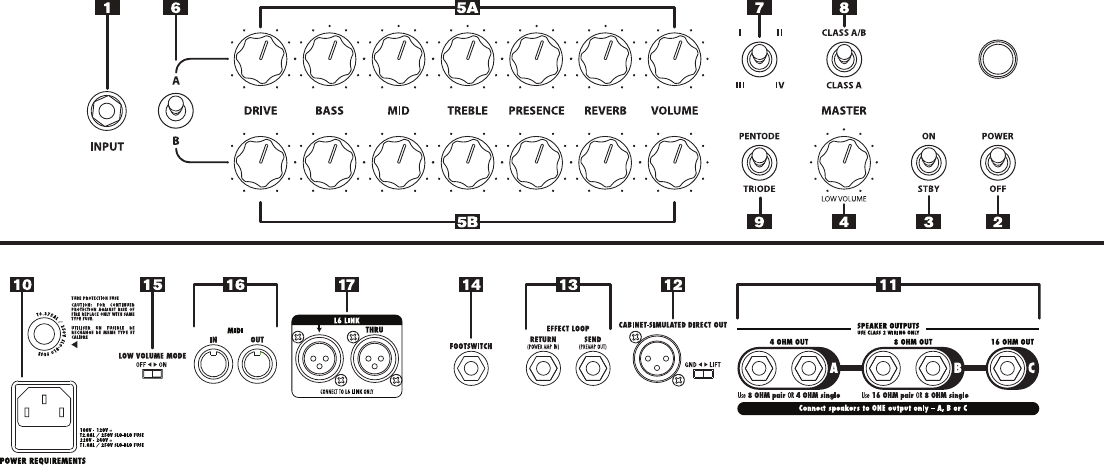
Front Panel Controls & ConneCtions
1. Guitar In – Plug your guitar in here.
2. Power Switch – Connect the included power cable to your rear panel.
For optimum tube life always power your amp on with your amp set to
STBY.
3. Standby Switch – Allowtheamptowarmupforoneminutebefore
setting STBY to ON. This extends the life and performance of your
vacuum tubes. It is not necessary to set the amp to STBY before
setting the Power Switch to its OFF position, but it can be a good
habit,ifonlytoensureyou’vegotitsetproperlynexttimeyoupower
up the amp.
4. Master Volume – Setstheoverallvolumeoftheamplierwithout
having to change your individual channel settings.
5. Channel A & B Controls – DRIVE controls how much “dirt” or
“distortion” you get in your sound. BASS, MID, TREBLE and
PRESENCE controls will interact differently depending on which
VOICING you have selected. REVERBadjuststhechannel’sreverb
level, allowing you to switch between channels with different amounts
of reverb. If you don’t want any reverb, simply turn this knob fully
counter-clockwise. VOLUME sets the output level for its channel
only.
6. Channel Select Switch – DT25 features two independent
channels, A & B.WhensettoA,usethe(5A)controls.ForB use
the (5B) controls. You can assign unique combinations of Voicing/
Feedback Topology, Amplier Operating Class and Pentode/
Triode settings for each channel. This provides much more than the
traditionalclean/dirtychannelconguration.Eitherchannelcanbeset
upanywayyoulike…evenidentically,ifthat’swhatyou’relookingfor.
Customizationofeachchannelisnotlimitedtosimplychangingsome
components of the preamp or tone stack - the entire power section
canbe reconguredand switchedinstantly too. It’s likehaving two
extremely versatile tube amps in one box!
7. Voicing Switch – This switch determines the flavor of the currently
selected channel’s preamp and tone stack, as well as the Negative
Feedback Loop topology (NFL). NFL has a big impact on tonal
characteristics and the overall “feel” of the amp. Flip the switch up or
downtotogglethroughsettingsIthroughIV.Withasingleswitchyour
tonecangofromcleantomean.Eachvoicingisdistinct:
I – PutstheNFLinitstightestsettingwhileconguringtheChannel
Control’sbehaviorreminiscentofthegreatAmerican“Blackface”
ampsofthe60’s.
II – Sets the NFL topology to be a little looser than I while the
Channel Control settings are capable of dialing in echoes of
classic British amps.
III – ThisistheZeroNegativeFeedbackLoopsettingwhichproducesa
very “open” or “dynamic” feeling amp. In this setting, the Channel
Controlsarecongured forversatility witha distinct“chime-y”
quality.
IV – Setting IV brings the NFL back in and adds a low frequency
resonance that pairs quite well with high gain voicing applied to
the Channel Controls.
8. Class A / Class AB Switch – Class A operation is more dynamic
with greater touch sensitivity. Use Class AB operation for greater
headroom and power. In addition to setting the operating class, this
switch also determines the wattage and bias type:
Whenset toClass A the ampis runningat 10 Watts andcathode
biased.WhensettoClass ABtheampisrunningat25Wattsandxed
biased.
Try both settings with each voicing to see what sounds best to you.
9. Pentode / Triode Switch – Thisswitchchangestheconguration
of the power tubes. Set switch to Pentode to sound clear and
commanding. Triode sounds quieter and rounder with a more vintage
feel.
rear Panel Controls & ConneCtions
10. Power Cord Receptacle – Plug the included power cable here.
11. Speaker Outs – Connect speakers here using speaker cables only.
You should only use one output (A, B, or C) at a time and never power
theamplierupwithoutspeakersconnected.Ifyouwanttosilencethe
speakers,usetheStandbyswitch.Thedetailsareasfollows:
Output A isfora4-ohmspeakerload.Youcaneitherhookupone
4-ohmspeaker/cabortwo8-ohmspeakers/cabs
Output Bisforan8-ohmspeakerload.Youcaneitherhookupone
8-ohmspeaker/cabortwo16-ohmspeakers/cabs.
Output Cisforasingle16-ohmspeakerload.
12. Cabinet Simulated Direct Out – Provides a transformer-tapped
direct output with cabinet simulation for studio recording or live
performancewithoutmic’ingyouramplier.Thegroundliftswitchcan
beusedtoeliminatehumorbuzz.
13. Serial Effect Loop – Usetheeffectlooptosendyouraudiosignalto
external effects processors and stomp boxes such as modulations, delays
& reverbs. Note:Signalpathisinseries.WhenusingtheSEND,
audio will not pass through to the poweramp without a connection
back to the RETURN.
14. Footswitch – ConnectaTip-Ring-Sleeve(TRS)latching,two-button
footswitchfor easy access to switching ReverbOn and Off (Global)
and switching between Channels A & B.Alternately,connectinga
Tip-Sleeve(TS)latching,single-buttonfootswitchprovideseasyaccess
to switching between Channels A & B.
15. Low Volume Mode - IfyouneedtotameyourDT25powersection,
set this switch to ONtoreduceyourtheoutputvolumeofyourDT25.
NowyoucansetyourMaster Volume for whisper quiet operation.
16. MIDI – IntegrateyourDT25ampintoyourexistingMIDIrig.
17. L6 LINK – isapowerful,proprietaryconnectiondevelopedbyLine6
toenableeasy,reliable,one-cableconnectivitybetweenvariousLine6
products.InthecaseoftheDT25SeriesguitarampliersandPODHD
(300/400/500) series multi-effects processors, this connection allows
both products to sync and communicate uniquely with each other. L6
LINK passes both audio and control data in a single XLR cable, and
the resulting operation allows users to plug a single cable from their
PODHDfamilyprocessorintoaDT25seriesampandreceivemany
incrediblebenets:
• No additional cables are required to connect a POD HD
(300/400/500)toaDT25seriesguitaramplier.
• ChangingTonesettings(forexample)oneitherthePODHDor
DT25 immediately updates the other, with the result that both
units stay perfectly in sync.
• “Edit”apresetonaPODHDbysimplyturningknobsontheDT25
asonewouldonanyotherguitaramp,thensaveitonthePODHD
to perfectly recall every time the preset is selected.
• Thisoneiscrazycool!Callingupaparticularampmodelorpreset
onthePODHDenablestheDT25todynamicallyrecongureitself
intheanalogrealmtooptimizeitscomponentstomatchthesource
amplier. Changeyourpreset ona PODHD,and theDT25 will
immediately align itself in the analog realm to such things as the
appropriate Class A or AB operation, Biasing method, Feedback
topology,Triode/Pentodepowertubecongurationandmore!
• Automaticsensingallowsampsthataredaisy-chainedviaL6LINK
tooperatein avariety ofways, dependingon which PODHD is
connected.Ataminimum,allPODHDmulti-effectssupportstereo
operationwithlinkedDT25s,andPODHD500supportsuptofour
uniquelylinkedampsmakingstereoandwet/dry/wetcongurations
easily available.
More online at www.line6.com/manuals
Whileyou’reonlinebesuretoregisteryouramporsimplylloutandmail
us your included registration card. Registering gets you all set up for war-
rantyserviceshouldyouhaveanissuewithyouramp,andalsoqualiesyou
for contests, special offers and more.
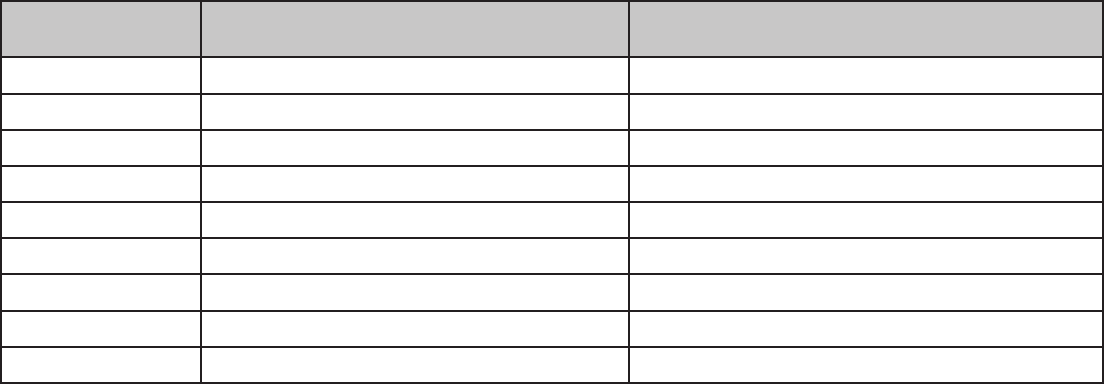
MiDi iMPleMentation
Continous Controller
(MIDI CC #) Value Function
19 0-63 = Channel A, 64-127 = Channel B Channel A/B Toggle
77 0 = Voicing I, 1 = Voicing II, 2 = Voicing III, 3 = Voicing IV Channel A Voicing (I, II, III, IV)
73 0-63 = Class A, 64-127 = Class AB Channel A Operation Class Conguration (Class A / Class AB)
75 0-63 = Triode, 64-127 = Pentode Channel A Power Tube Conguration (Pentode/Triode)
36 0-63 = Reverb Off, 64-127 = Reverb On Channel A Reverb On/Off
114 0 = Voicing I, 1 = Voicing II, 2 = Voicing III, 3 = Voicing IV Channel B Voicing (I, II, III, IV)
115 0-63 = Class A, 64-127 = Class AB Channel B Operation Class Conguration (Class A / Class AB)
116 0-63 = Triode, 64-127 = Pentode Channel B Power Tube Conguration (Pentode/Triode)
105 0-63 = Reverb Off, 64-127 = Reverb On Channel B Reverb On/Off
