Loea L2500-2 Point to Point Radio User Manual Loea Corporation

Loea Corporation Point to Point Radio Loea Corporation

Manual

Document No. D-L2500-001  L-2500 Users Manual    06/15/05   Version Draft 2  1              Model L-2500 Point to Point Radio System 71.0 to 76.0GHz & 81.0 to 86.0GHz    Users Manual                    10455 Pacific Center Court                   www.loeacom.com San Diego, CA.  92121 Sales: 858-922-0030
Document No. D-L2500-001  L-2500 Users Manual    06/15/05   Version Draft 2  2     WARRANTY  We warrant that the equipment (other than consumables) being sold to you will be free of defects in design, material or workmanship for a period of twelve (12) months from the date of installation.  If the equipment fails to satisfy this warranty, you will promptly notify us of such failure within the warranty period.  At our option we will repair or replace the defective equipment.  You will not return any equipment or component to us without our prior written authorization.  If we are unable to repair or replace the equipment after reasonable efforts, we will, as your exclusive remedy, refund the portion of the purchase price previously paid by you that is attributable to the defective equipment. Notwithstanding the foregoing provisions, we shall have no obligation or responsibility to repair or replace any defective equipment if the defect was caused by: (a)  your failure to properly operate or maintain the equipment in accordance with our written instructions, (b)  any attempted repair or modification of the equipment that is not performed or authorized in writing by us, (c)  any power failure, power surge, fire, water damage, Act of God or other circumstance or event not within our reasonable control, (d)  any relocation of equipment not performed or authorized in writing by us, (e)  normal wear and tear, or (f)  any other act or omission of you, your agents or any other third party except as provided in this Standard Conditions of Quotation.    LIMITED WARRANTIES AND DISCLAIMER  THE FOREGOING LIMITED WARRANTY IS IN LIEU OF ALL OTHER WARRANTIES EXPRESSED OR IMPLIED AS TO ANY MATTER, INCLUDING, WITHOUT LIMITATION, THE CONDITION, USE, INSTALLATION, MERCHANTABILITY AND FITNESS FOR USE OF THE PRODUCTS OR SERVICES, OR ANY IMPLIED WARRANTY ARISING OUT OF A COURSE OF DEALING OR OF PERFORMANCE, CUSTOM OR USAGE IN THE TRADE, AND ALL OBLIGATIONS OR LIABILITIES ON THE PART OF COMPANY FOR DAMAGES ARISING OUT OF OR IN CONNECTION WITH THE USE OR PERFORMANCE OF THE PRODUCTS OR SERVICES ARE LIMITED ACCORDINGLY. COMPANY SHALL NOT, IN ANY EVENT, BE LIABLE FOR INDIRECT, SPECIAL, EXEMPLARY, INCIDENTAL OR CONSEQUENTIAL DAMAGES (WHETHER SUCH LIABILITY ARISES FROM A CLAIM BASED ON CONTRACT, WARRANTY, TORT OR OTHERWISE), INCLUDING BUT NOT LIMITED TO DAMAGES RESULTING FROM LOSS OF USE, LOSS OF PROFITS OR ANY HARM OR DAMAGE TO PERSONS OR PROPERTY ARISING OUT OF OR IN CONNECTION WITH ANY PRODUCTS OR SERVICES.       POST WARRANTY SERVICE AGREEMENT  At the expiration of the warranty period, XYZ Corporation will make available to you a one-year service contract covering the equipment.
Document No. D-L2500-001  L-2500 Users Manual    06/15/05   Version Draft 2  3     LIMITATION OF LIABILITY  Our responsibility for any claims, damages, losses or liabilities arising out of or related to our performance under the Quotation shall not exceed the aggregate consideration paid to us pursuant to the Quotation.  In addition, in no event shall we be liable to you, your employees or agents or to any other third party for any indirect, special, exemplary, incidental or consequential damages, including but not limited to damages resulting from loss of use, loss of data, loss of profits or any harm or damage to persons or property arising out of or in connection with the Quotation or any equipment, materials or services provided under the Quotation.       FCC NOTICE  This equipment complies with the FCC radiation exposure limits set forth for an uncontrolled environment when installed as directed. This equipment should be installed and operated with fixed mounted antennas that are installed such that these antennas will have a minimum of 2m of separation distance between the antenna and all persons during normal operation.  This device complies with Part 101 of the FCC Rules.   This device is labeled with the following FCC ID number:  S2N-L2500-2       PROFESSIONAL INSTALLATION REQUIRED  The L-2500 must be installed as a system by experienced antenna installation professionals who are familiar with Radio Frequency (RF) issues such as gains and losses, as well as local building and safety codes. Failure to do so will void the product warranty and may expose the end user to excessive RF hazard.  Regulations regarding maximum antenna gains, power output and maximum permissible exposure vary from country to country. It is the responsibility of the end user to operate within the limits of these regulations and to ensure that the professional installers who install this device are aware of these regulations. All antennas are intended to be installed outdoors.
Document No. D-L2500-001  L-2500 Users Manual    06/15/05   Version Draft 2  4       MICROWAVE RADIO RADIATION WARNING  When installed properly, this product complies with the limits for human exposure to radio frequency (RF) fields adopted by the Federal Communications Commission (FCC). The product is designed so that under normal working conditions, microwave radiation directly from the transceiver is negligible when compared with the permissible limit of continuous daily exposure recommended in the United States by ANSI/IEEE C95.1-1991 (R1997), Safety Levels with Respect to Human Exposure to Radio Frequency Electromagnetic Fields, 3kHz to 300GHz.  Microwave signal levels that give rise to hazardous radiation levels can exist within transmitter power amplifiers, associated RF multiplexers, and antenna systems. Do not disconnect RF coaxial connectors, open microwave units, or break down any microwave screening while the radio equipment is operating.         LASER SAFETY NOTICE  This product complies with CFR 1040.10 and 1040.11. The product includes a Class I laser utilized as a fiber optic driver. Class I lasers do not emit radiation at known hazardous levels. However, it is recommended that maintenance or service personnel should never look at an open fiber end or connector that is carrying a live signal. During use, this optical fiber communications system is completely enclosed except if an accidental break occurs in the system cable, or if the patch cable becomes accidentally disconnected from the demarcation box. There are no controls or adjustments other than power ON/OFF that may be accessed by the user.  CAUTION: Use of controls or adjustments or performance of procedure other than those specified in this Manual may result in hazardous radiation exposure.
Document No. D-L2500-001  L-2500 Users Manual    06/15/05   Version Draft 2  5    Table of Contents  SECTION 1    Overview.......................................................................................................6 SECTION 2   Installation Procedures..............................................................................10 SECTION 3   Systems Integration...................................................................................18 Appendix A................................................................................................................................24 Field Service Form....................................................................................................................24 Appendix B................................................................................................................................25 System Verification Operational Test.......................................................................................25
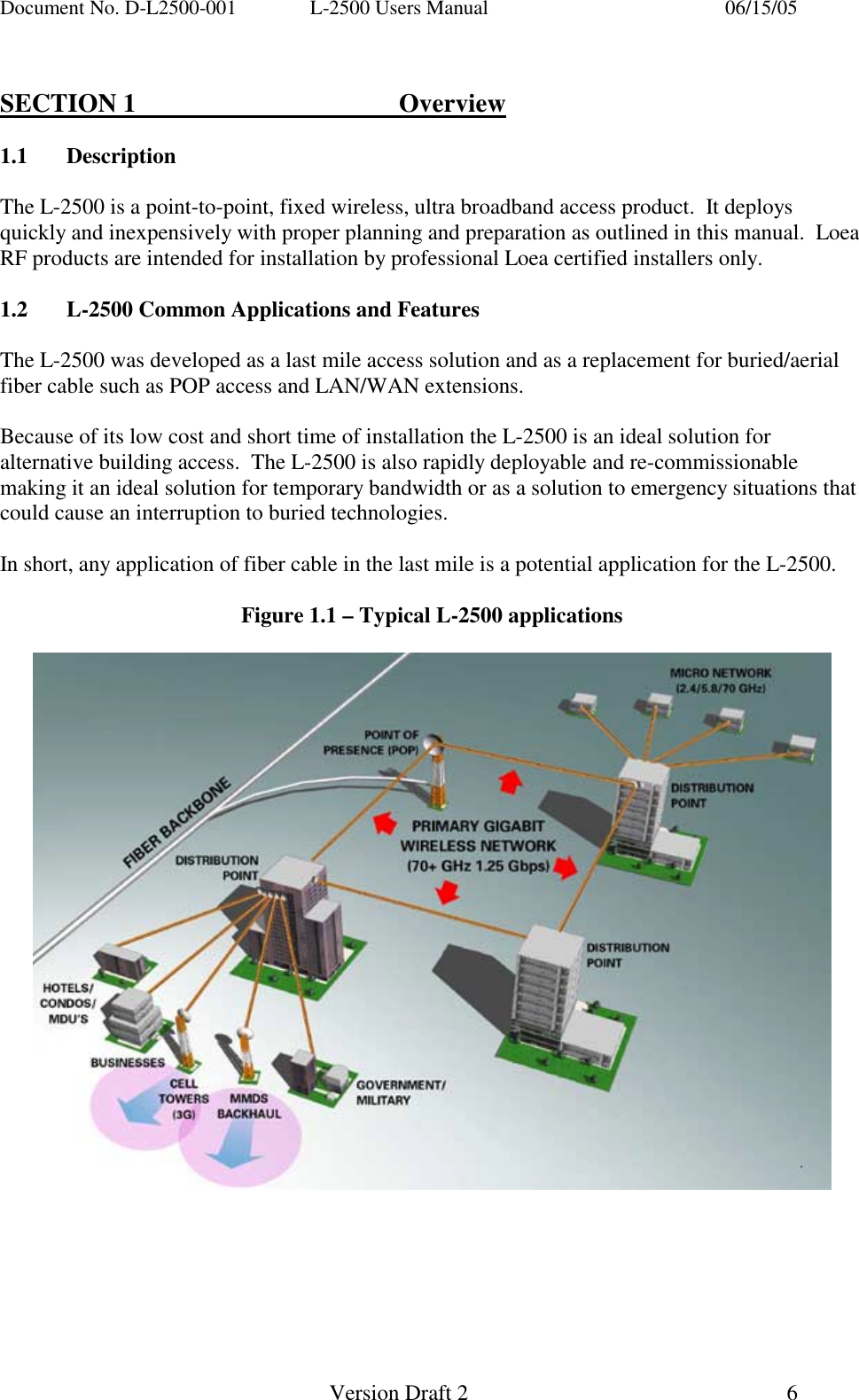
Document No. D-L2500-001  L-2500 Users Manual    06/15/05   Version Draft 2  6    SECTION 1    Overview  1.1 Description  The L-2500 is a point-to-point, fixed wireless, ultra broadband access product.  It deploys quickly and inexpensively with proper planning and preparation as outlined in this manual.  Loea RF products are intended for installation by professional Loea certified installers only.  1.2  L-2500 Common Applications and Features  The L-2500 was developed as a last mile access solution and as a replacement for buried/aerial fiber cable such as POP access and LAN/WAN extensions.    Because of its low cost and short time of installation the L-2500 is an ideal solution for alternative building access.  The L-2500 is also rapidly deployable and re-commissionable making it an ideal solution for temporary bandwidth or as a solution to emergency situations that could cause an interruption to buried technologies.    In short, any application of fiber cable in the last mile is a potential application for the L-2500.  Figure 1.1 – Typical L-2500 applications
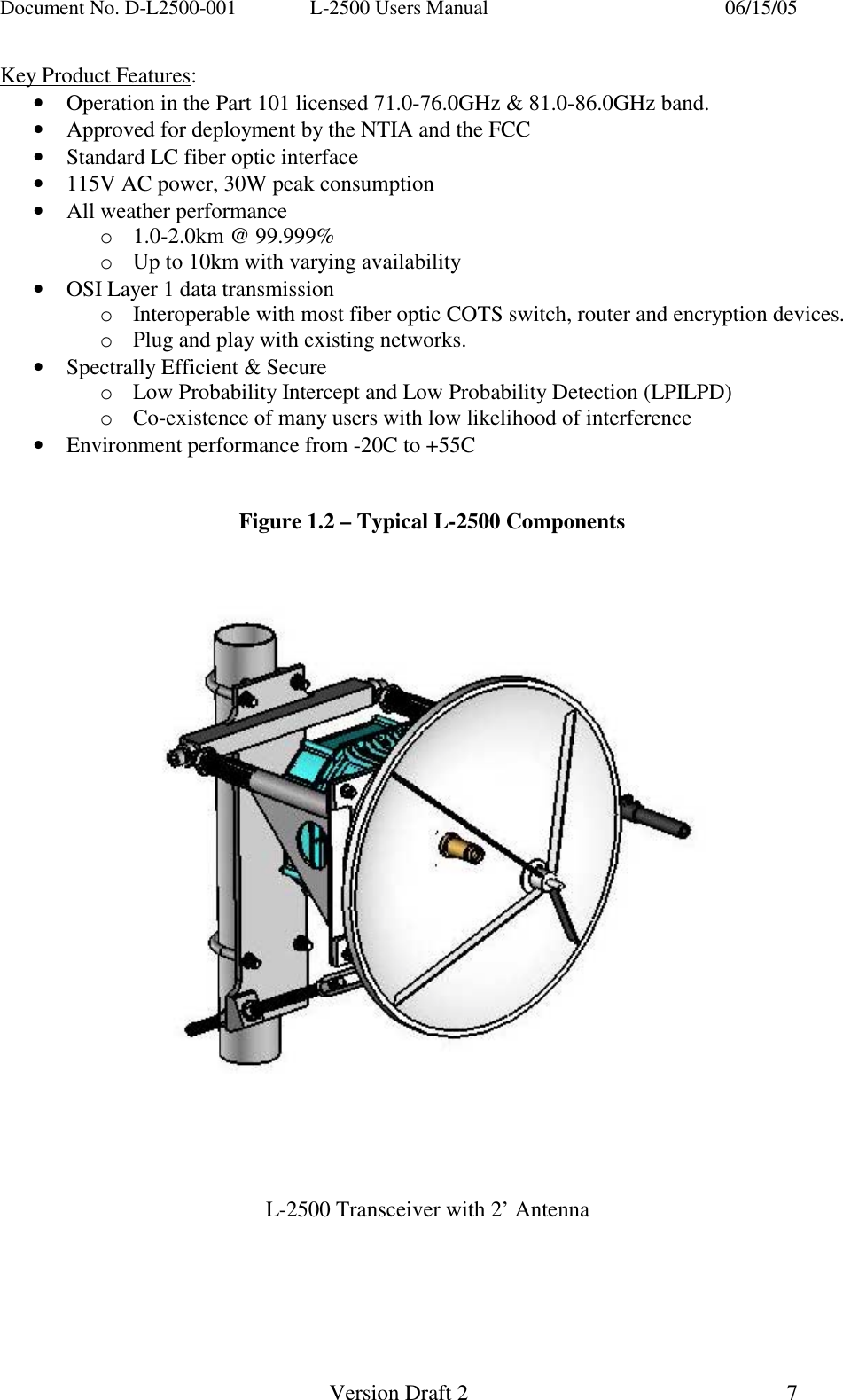
Document No. D-L2500-001  L-2500 Users Manual    06/15/05   Version Draft 2  7   Key Product Features: •  Operation in the Part 101 licensed 71.0-76.0GHz & 81.0-86.0GHz band. •  Approved for deployment by the NTIA and the FCC •  Standard LC fiber optic interface •  115V AC power, 30W peak consumption •  All weather performance o1.0-2.0km @ 99.999% oUp to 10km with varying availability  •  OSI Layer 1 data transmission oInteroperable with most fiber optic COTS switch, router and encryption devices. oPlug and play with existing networks. •  Spectrally Efficient & Secure oLow Probability Intercept and Low Probability Detection (LPILPD) oCo-existence of many users with low likelihood of interference •  Environment performance from -20C to +55C   Figure 1.2 – Typical L-2500 Components            L-2500 Transceiver with 2’ Antenna
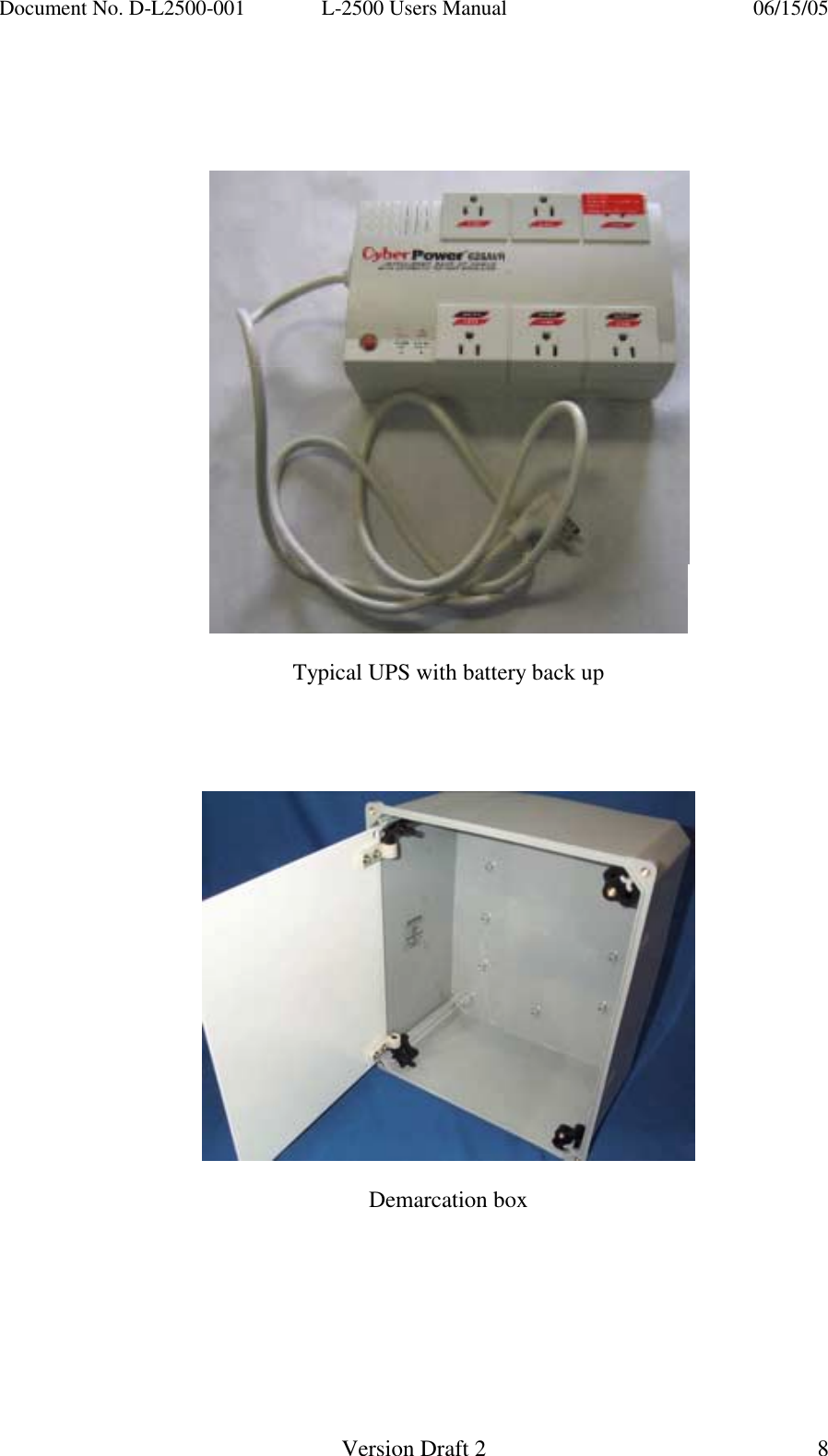
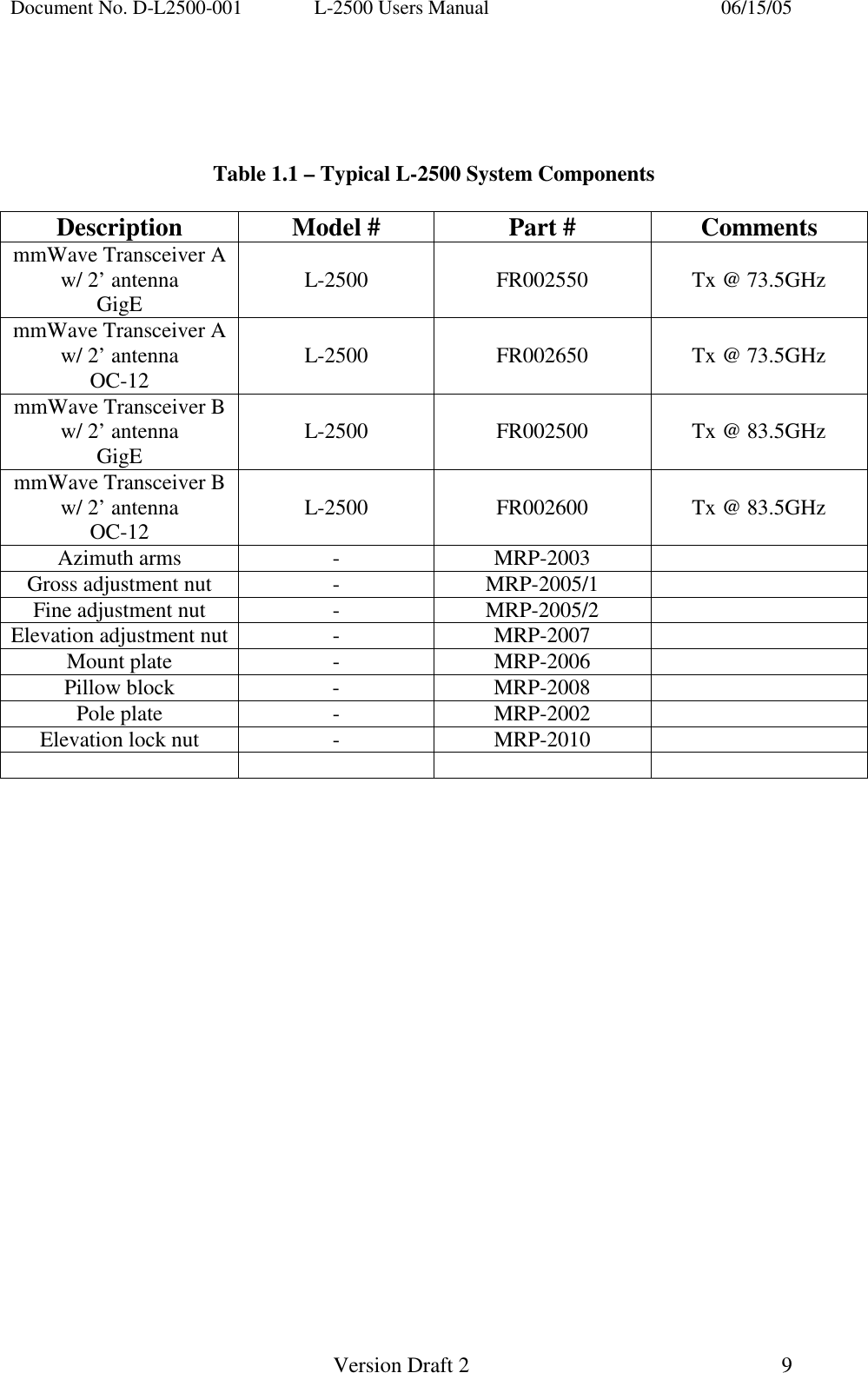
Document No. D-L2500-001  L-2500 Users Manual    06/15/05   Version Draft 2  8         Typical UPS with battery back up        Demarcation box
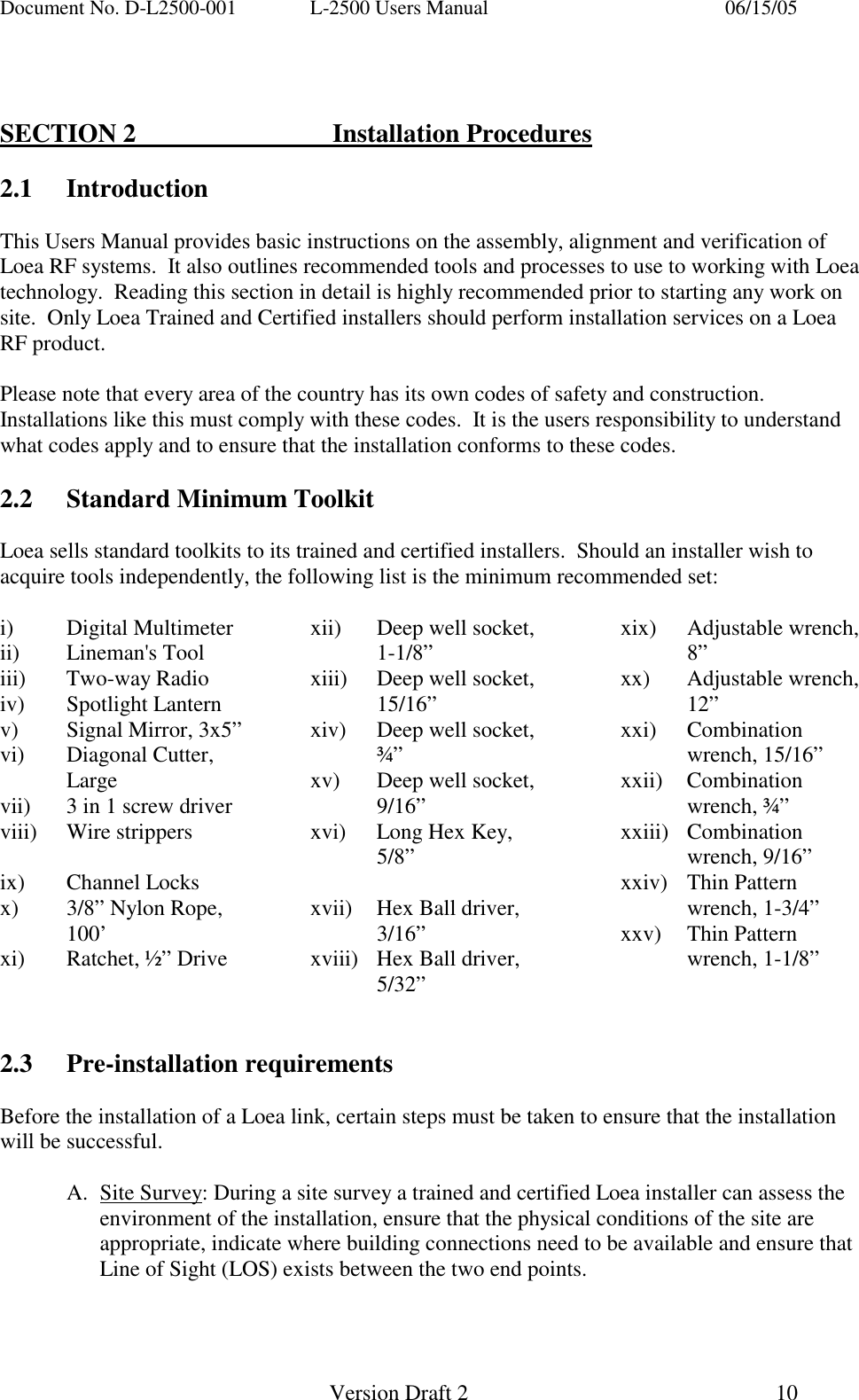
Document No. D-L2500-001  L-2500 Users Manual    06/15/05   Version Draft 2  9       Table 1.1 – Typical L-2500 System Components  Description  Model #  Part #  Comments mmWave Transceiver A w/ 2’ antenna GigE  L-2500   FR002550   Tx @ 73.5GHz mmWave Transceiver A w/ 2’ antenna OC-12  L-2500   FR002650   Tx @ 73.5GHz mmWave Transceiver B w/ 2’ antenna GigE  L-2500   FR002500   Tx @ 83.5GHz mmWave Transceiver B w/ 2’ antenna OC-12  L-2500   FR002600   Tx @ 83.5GHz Azimuth arms  -  MRP-2003   Gross adjustment nut  -  MRP-2005/1   Fine adjustment nut  -  MRP-2005/2   Elevation adjustment nut  -  MRP-2007   Mount plate  -  MRP-2006   Pillow block  -  MRP-2008   Pole plate  -  MRP-2002   Elevation lock nut  -  MRP-2010
Document No. D-L2500-001  L-2500 Users Manual    06/15/05   Version Draft 2  10     SECTION 2   Installation Procedures  2.1 Introduction  This Users Manual provides basic instructions on the assembly, alignment and verification of Loea RF systems.  It also outlines recommended tools and processes to use to working with Loea technology.  Reading this section in detail is highly recommended prior to starting any work on site.  Only Loea Trained and Certified installers should perform installation services on a Loea RF product.  Please note that every area of the country has its own codes of safety and construction.  Installations like this must comply with these codes.  It is the users responsibility to understand what codes apply and to ensure that the installation conforms to these codes.   2.2  Standard Minimum Toolkit  Loea sells standard toolkits to its trained and certified installers.  Should an installer wish to acquire tools independently, the following list is the minimum recommended set:  i) Digital Multimeter ii) Lineman's Tool iii) Two-way Radio iv) Spotlight Lantern v)  Signal Mirror, 3x5” vi) Diagonal Cutter, Large vii)  3 in 1 screw driver viii) Wire strippers  ix) Channel Locks x)  3/8” Nylon Rope, 100’ xi)  Ratchet, ½” Drive xii)  Deep well socket, 1-1/8” xiii)  Deep well socket, 15/16” xiv)  Deep well socket, ¾” xv)  Deep well socket, 9/16” xvi)  Long Hex Key, 5/8”  xvii)  Hex Ball driver, 3/16” xviii)  Hex Ball driver, 5/32” xix) Adjustable wrench, 8” xx) Adjustable wrench, 12” xxi) Combination wrench, 15/16” xxii) Combination wrench, ¾” xxiii) Combination wrench, 9/16” xxiv) Thin Pattern wrench, 1-3/4” xxv) Thin Pattern wrench, 1-1/8”   2.3 Pre-installation requirements  Before the installation of a Loea link, certain steps must be taken to ensure that the installation will be successful.  A. Site Survey: During a site survey a trained and certified Loea installer can assess the environment of the installation, ensure that the physical conditions of the site are appropriate, indicate where building connections need to be available and ensure that Line of Sight (LOS) exists between the two end points.
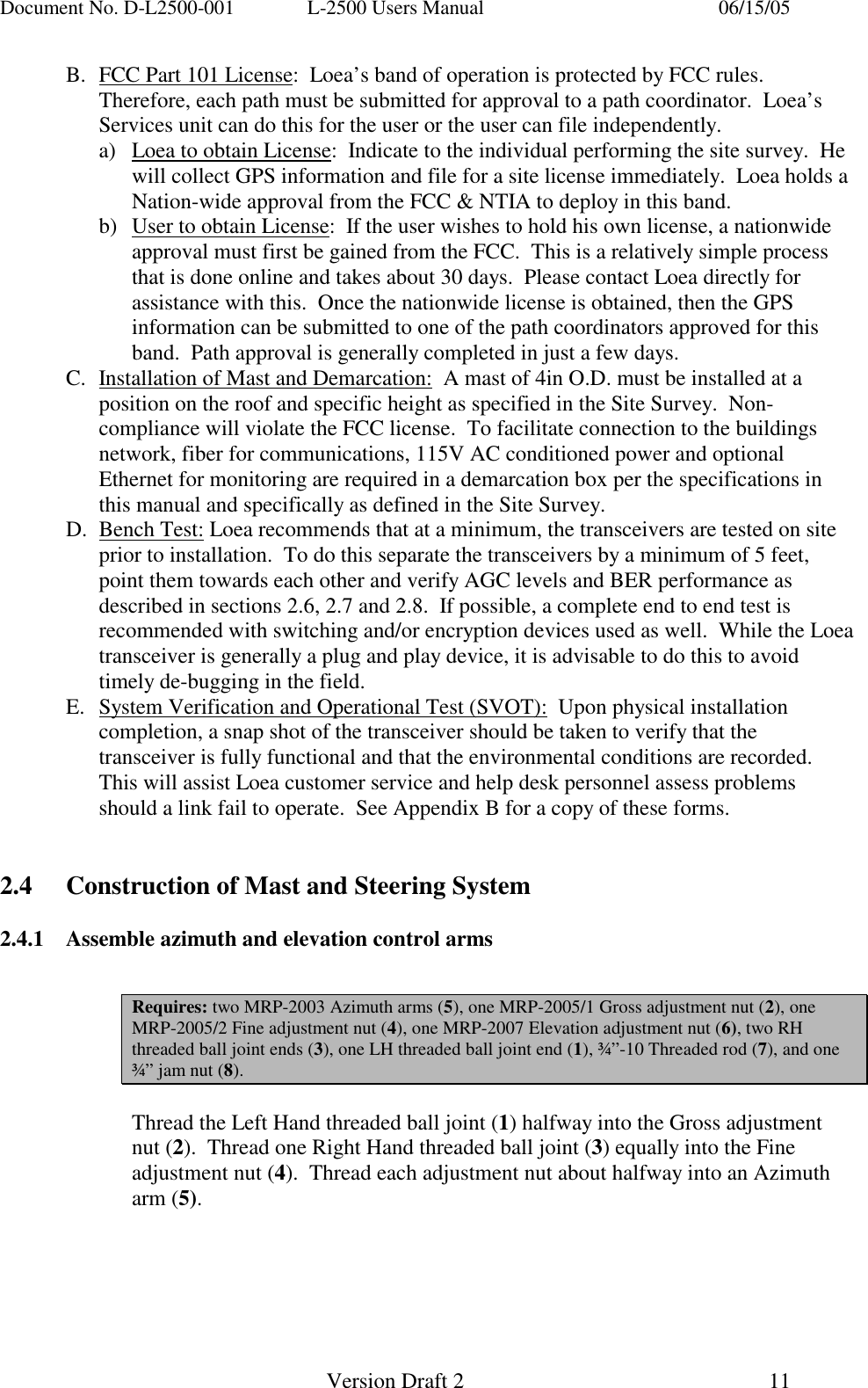
Document No. D-L2500-001  L-2500 Users Manual    06/15/05   Version Draft 2  11   B.  FCC Part 101 License:  Loea’s band of operation is protected by FCC rules.  Therefore, each path must be submitted for approval to a path coordinator.  Loea’s Services unit can do this for the user or the user can file independently. a)  Loea to obtain License:  Indicate to the individual performing the site survey.  He will collect GPS information and file for a site license immediately.  Loea holds a Nation-wide approval from the FCC & NTIA to deploy in this band. b)  User to obtain License:  If the user wishes to hold his own license, a nationwide approval must first be gained from the FCC.  This is a relatively simple process that is done online and takes about 30 days.  Please contact Loea directly for assistance with this.  Once the nationwide license is obtained, then the GPS information can be submitted to one of the path coordinators approved for this band.  Path approval is generally completed in just a few days. C.  Installation of Mast and Demarcation:  A mast of 4in O.D. must be installed at a position on the roof and specific height as specified in the Site Survey.  Non-compliance will violate the FCC license.  To facilitate connection to the buildings network, fiber for communications, 115V AC conditioned power and optional Ethernet for monitoring are required in a demarcation box per the specifications in this manual and specifically as defined in the Site Survey. D. Bench Test: Loea recommends that at a minimum, the transceivers are tested on site prior to installation.  To do this separate the transceivers by a minimum of 5 feet, point them towards each other and verify AGC levels and BER performance as described in sections 2.6, 2.7 and 2.8.  If possible, a complete end to end test is recommended with switching and/or encryption devices used as well.  While the Loea transceiver is generally a plug and play device, it is advisable to do this to avoid timely de-bugging in the field. E.  System Verification and Operational Test (SVOT):  Upon physical installation completion, a snap shot of the transceiver should be taken to verify that the transceiver is fully functional and that the environmental conditions are recorded.  This will assist Loea customer service and help desk personnel assess problems should a link fail to operate.  See Appendix B for a copy of these forms.   2.4  Construction of Mast and Steering System  2.4.1  Assemble azimuth and elevation control arms   Requires: two MRP-2003 Azimuth arms (5), one MRP-2005/1 Gross adjustment nut (2), one MRP-2005/2 Fine adjustment nut (4), one MRP-2007 Elevation adjustment nut (6), two RH threaded ball joint ends (3), one LH threaded ball joint end (1), ¾”-10 Threaded rod (7), and one ¾” jam nut (8).  Thread the Left Hand threaded ball joint (1) halfway into the Gross adjustment nut (2).  Thread one Right Hand threaded ball joint (3) equally into the Fine adjustment nut (4).  Thread each adjustment nut about halfway into an Azimuth arm (5).
Document No. D-L2500-001  L-2500 Users Manual    06/15/05   Version Draft 2  12     Thread the jam nut (8) and the course end (6a) of the Elevation adjustment nut (6) onto the one end of the ¾”-10 threaded rod (7) far enough to reach the hollow.  Thread the ball joint (3) equally into the fine end of the adjustment nut (6b).    2.4.2  Assemble Antenna mount plate and control arms                                Requires: one MRP-2006 Mount plate (9), one MRP-2008 pillow block (10), four ½” Hardware Assemblies (11) consisting of [½”- 13 x 1-3/4” bolt, hex nut, lock washer, flat washer], and three ¼”-20 socket head cap screws (12).  Position the Mount plate (9) so the offset tab is on the lower right while assembled.  Locate the three ¼”-20 threaded holes on the tab and fasten the pillow block (10) to the plate with the socket head cap screws (12).  The application of Lock-Tite™ or an equivalent compound during this step is recommended.
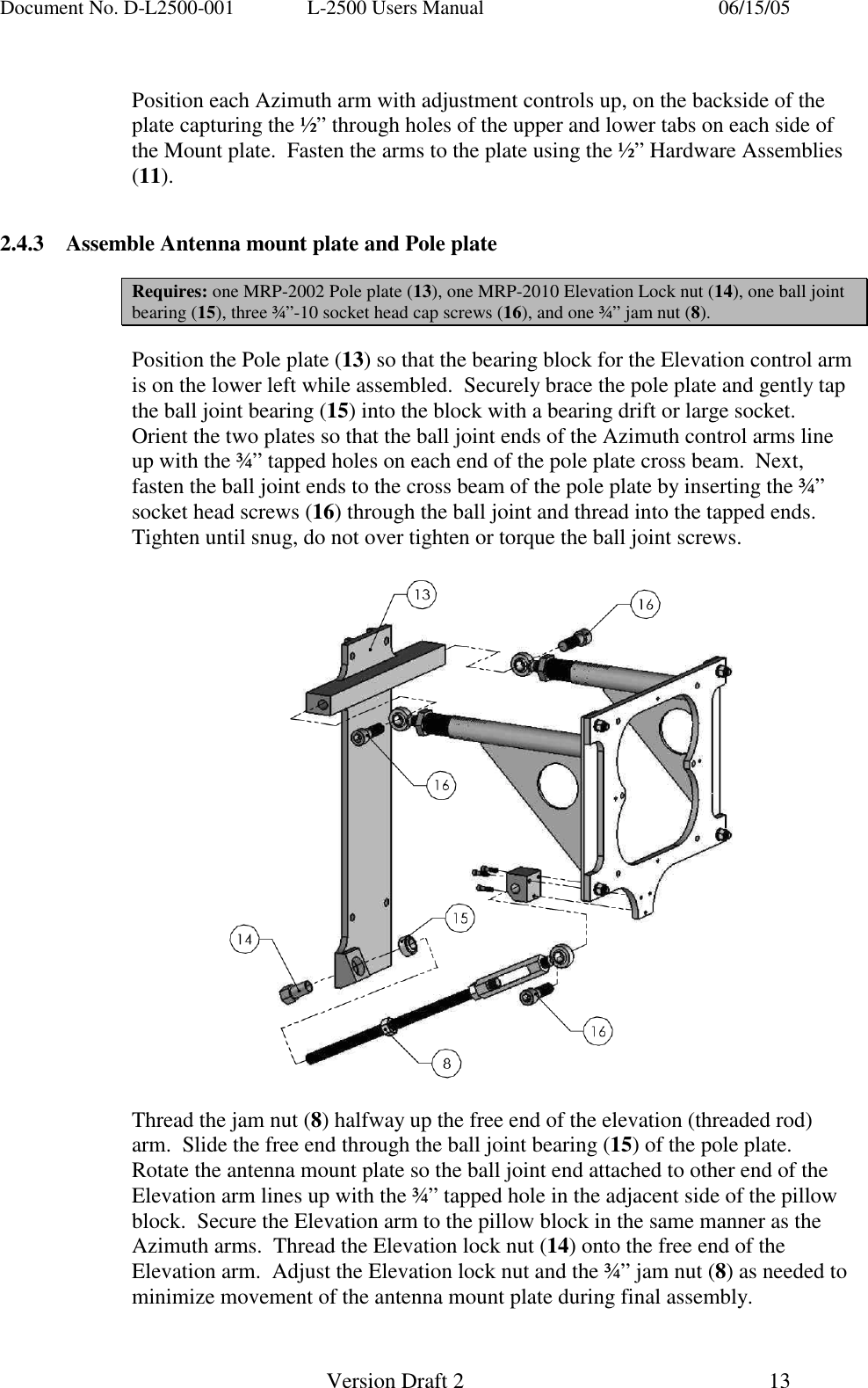
Document No. D-L2500-001  L-2500 Users Manual    06/15/05   Version Draft 2  13    Position each Azimuth arm with adjustment controls up, on the backside of the plate capturing the ½” through holes of the upper and lower tabs on each side of the Mount plate.  Fasten the arms to the plate using the ½” Hardware Assemblies (11).               2.4.3  Assemble Antenna mount plate and Pole plate  Requires: one MRP-2002 Pole plate (13), one MRP-2010 Elevation Lock nut (14), one ball joint bearing (15), three ¾”-10 socket head cap screws (16), and one ¾” jam nut (8).  Position the Pole plate (13) so that the bearing block for the Elevation control arm is on the lower left while assembled.  Securely brace the pole plate and gently tap the ball joint bearing (15) into the block with a bearing drift or large socket. Orient the two plates so that the ball joint ends of the Azimuth control arms line up with the ¾” tapped holes on each end of the pole plate cross beam.  Next, fasten the ball joint ends to the cross beam of the pole plate by inserting the ¾” socket head screws (16) through the ball joint and thread into the tapped ends.  Tighten until snug, do not over tighten or torque the ball joint screws.      Thread the jam nut (8) halfway up the free end of the elevation (threaded rod) arm.  Slide the free end through the ball joint bearing (15) of the pole plate.  Rotate the antenna mount plate so the ball joint end attached to other end of the Elevation arm lines up with the ¾” tapped hole in the adjacent side of the pillow block.  Secure the Elevation arm to the pillow block in the same manner as the Azimuth arms.  Thread the Elevation lock nut (14) onto the free end of the Elevation arm.  Adjust the Elevation lock nut and the ¾” jam nut (8) as needed to minimize movement of the antenna mount plate during final assembly.
Document No. D-L2500-001  L-2500 Users Manual    06/15/05   Version Draft 2  14   2.4.4  Attach assembly to Mast, attach antenna  Requires: two U-Bolt Assemblies (17) consisting of [one 4.5” diameter, ½”-13 U-bolts, two hex nuts, two lock washers], four 3/8”-16 bolts and flat washers (18), and Antenna (19)  Lifting the steering assembly from the front, press the pole plate against the mast using the parallel runners on the backside to steady the assembly while the two U-bolt assemblies (17) are installed.  Once the steering system is shifted into the desired position the plate’s runners will bind to the mast as the U-bolts are tightened so as to prevent the mount from inadvertently slipping.          Once the steering assembly is secured to the mast, locate the four 3/8” through holes correlating with the four threaded holes located on the backside of the antenna.  Position the antenna (19) onto the mount plate in relation to the most accessible placement of the optical alignment scope.  Secure the antenna to the mount using the 3/8” bolts and flat washers (18).  Although the steering system can accommodate course adjustments, the mount may need to shift beyond the range of the Azimuth arms.  The U-bolts can always be loosened enough to permit a slightly greater rotation to correct such alignment issues.
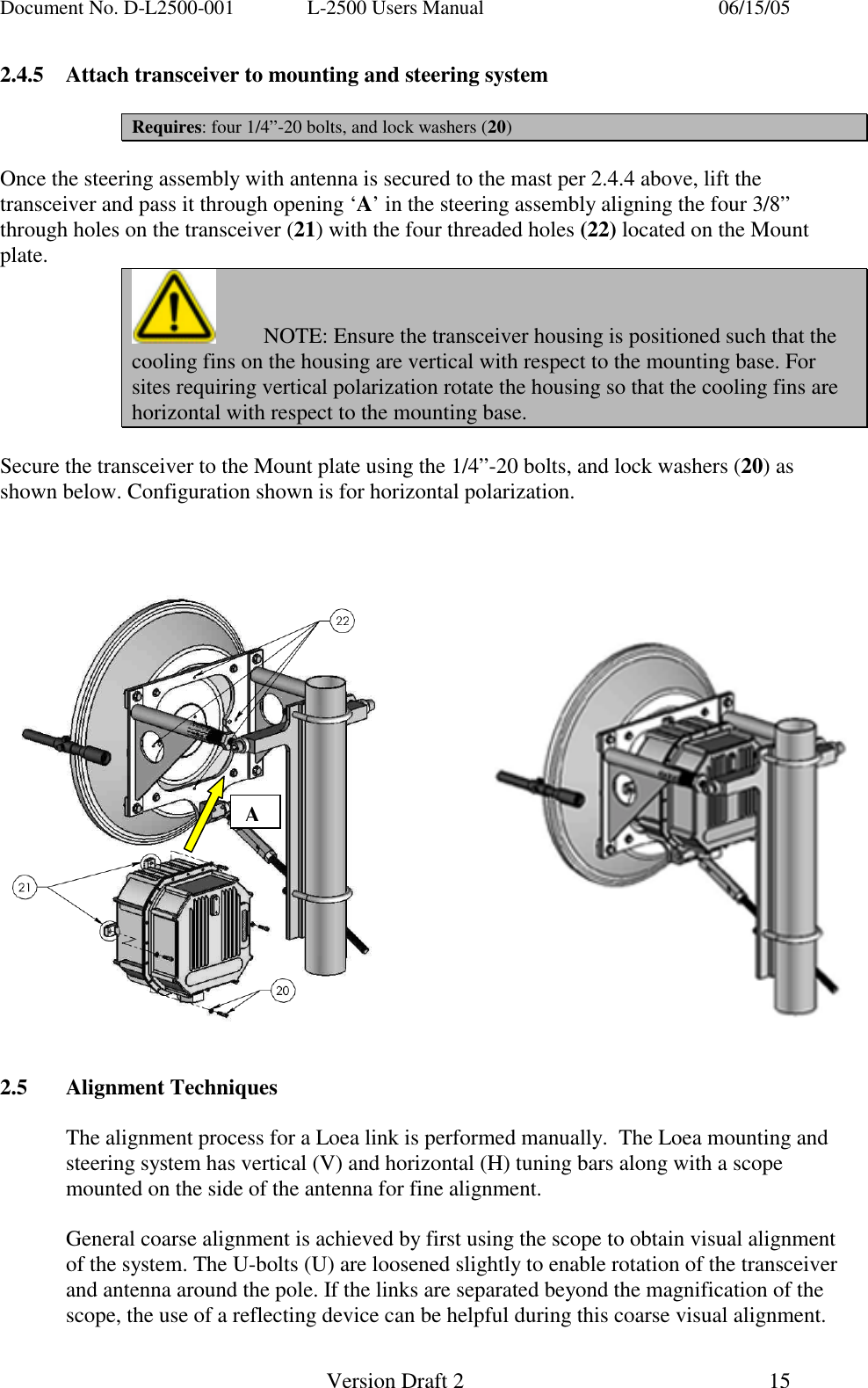
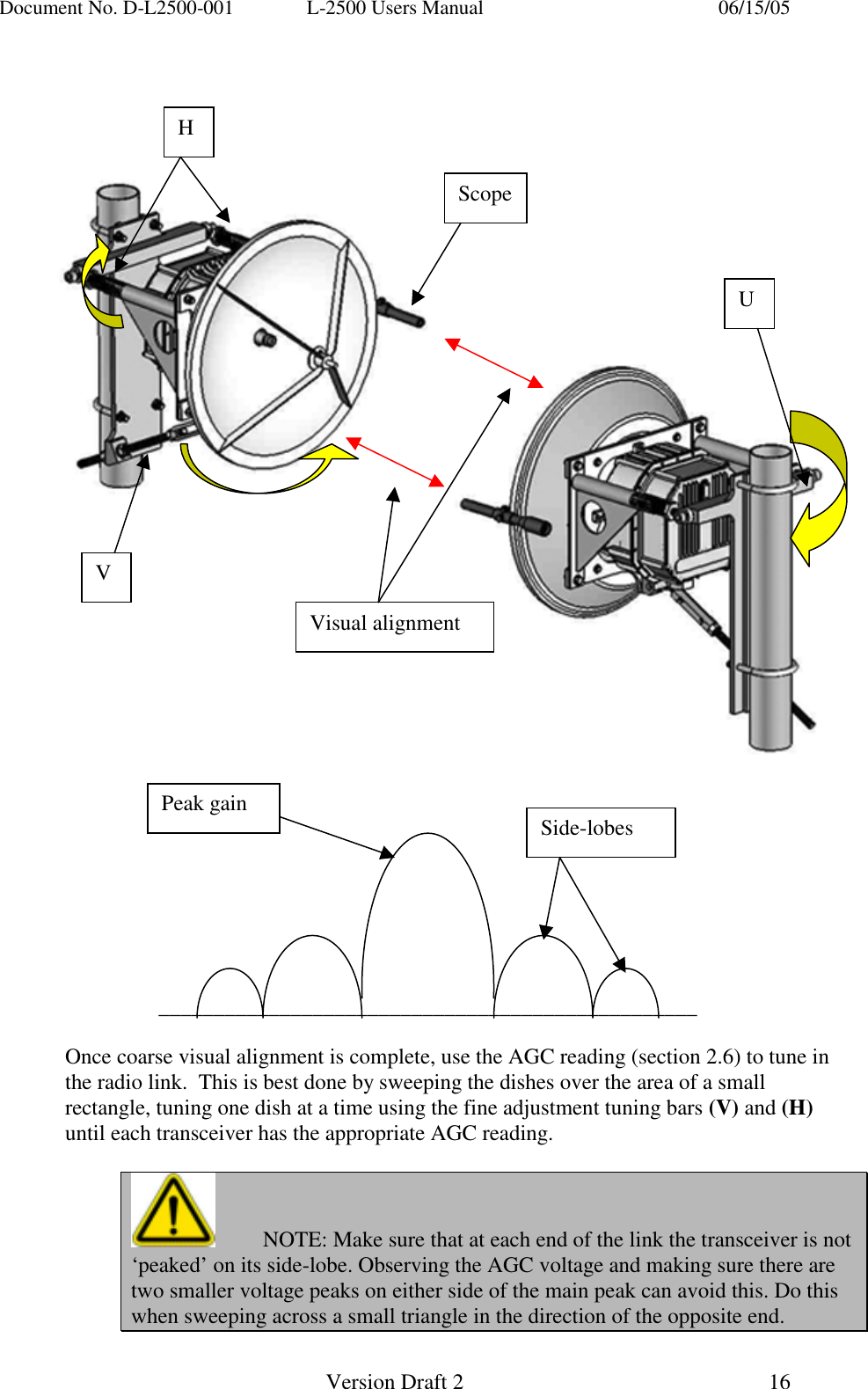
Document No. D-L2500-001  L-2500 Users Manual    06/15/05   Version Draft 2  15   2.4.5  Attach transceiver to mounting and steering system  Requires: four 1/4”-20 bolts, and lock washers (20)  Once the steering assembly with antenna is secured to the mast per 2.4.4 above, lift the transceiver and pass it through opening ‘A’ in the steering assembly aligning the four 3/8” through holes on the transceiver (21) with the four threaded holes (22) located on the Mount plate.   NOTE: Ensure the transceiver housing is positioned such that the cooling fins on the housing are vertical with respect to the mounting base. For sites requiring vertical polarization rotate the housing so that the cooling fins are horizontal with respect to the mounting base.  Secure the transceiver to the Mount plate using the 1/4”-20 bolts, and lock washers (20) as shown below. Configuration shown is for horizontal polarization.                         2.5 Alignment Techniques  The alignment process for a Loea link is performed manually.  The Loea mounting and steering system has vertical (V) and horizontal (H) tuning bars along with a scope mounted on the side of the antenna for fine alignment.  General coarse alignment is achieved by first using the scope to obtain visual alignment of the system. The U-bolts (U) are loosened slightly to enable rotation of the transceiver and antenna around the pole. If the links are separated beyond the magnification of the scope, the use of a reflecting device can be helpful during this coarse visual alignment. A
Document No. D-L2500-001  L-2500 Users Manual    06/15/05   Version Draft 2  16                                _________________________________________________  Once coarse visual alignment is complete, use the AGC reading (section 2.6) to tune in the radio link.  This is best done by sweeping the dishes over the area of a small rectangle, tuning one dish at a time using the fine adjustment tuning bars (V) and (H) until each transceiver has the appropriate AGC reading.    NOTE: Make sure that at each end of the link the transceiver is not  ‘peaked’ on its side-lobe. Observing the AGC voltage and making sure there are two smaller voltage peaks on either side of the main peak can avoid this. Do this when sweeping across a small triangle in the direction of the opposite end. H V U Peak gain  Side-lobes ScopeVisual alignment
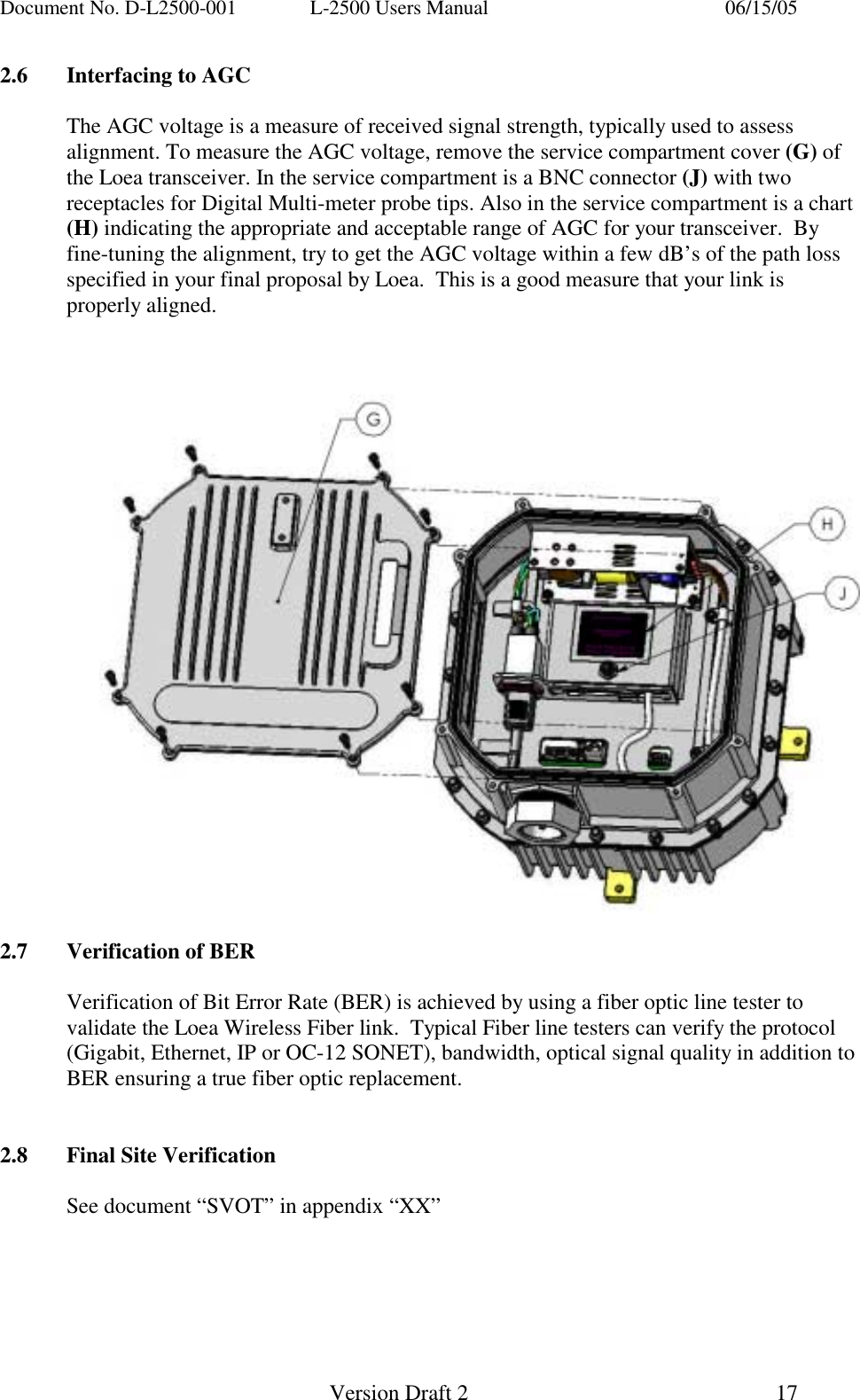
Document No. D-L2500-001  L-2500 Users Manual    06/15/05   Version Draft 2  17   2.6  Interfacing to AGC  The AGC voltage is a measure of received signal strength, typically used to assess alignment. To measure the AGC voltage, remove the service compartment cover (G) of the Loea transceiver. In the service compartment is a BNC connector (J) with two receptacles for Digital Multi-meter probe tips. Also in the service compartment is a chart (H) indicating the appropriate and acceptable range of AGC for your transceiver.  By fine-tuning the alignment, try to get the AGC voltage within a few dB’s of the path loss specified in your final proposal by Loea.  This is a good measure that your link is properly aligned.        2.7  Verification of BER  Verification of Bit Error Rate (BER) is achieved by using a fiber optic line tester to validate the Loea Wireless Fiber link.  Typical Fiber line testers can verify the protocol (Gigabit, Ethernet, IP or OC-12 SONET), bandwidth, optical signal quality in addition to BER ensuring a true fiber optic replacement.   2.8  Final Site Verification    See document “SVOT” in appendix “XX”
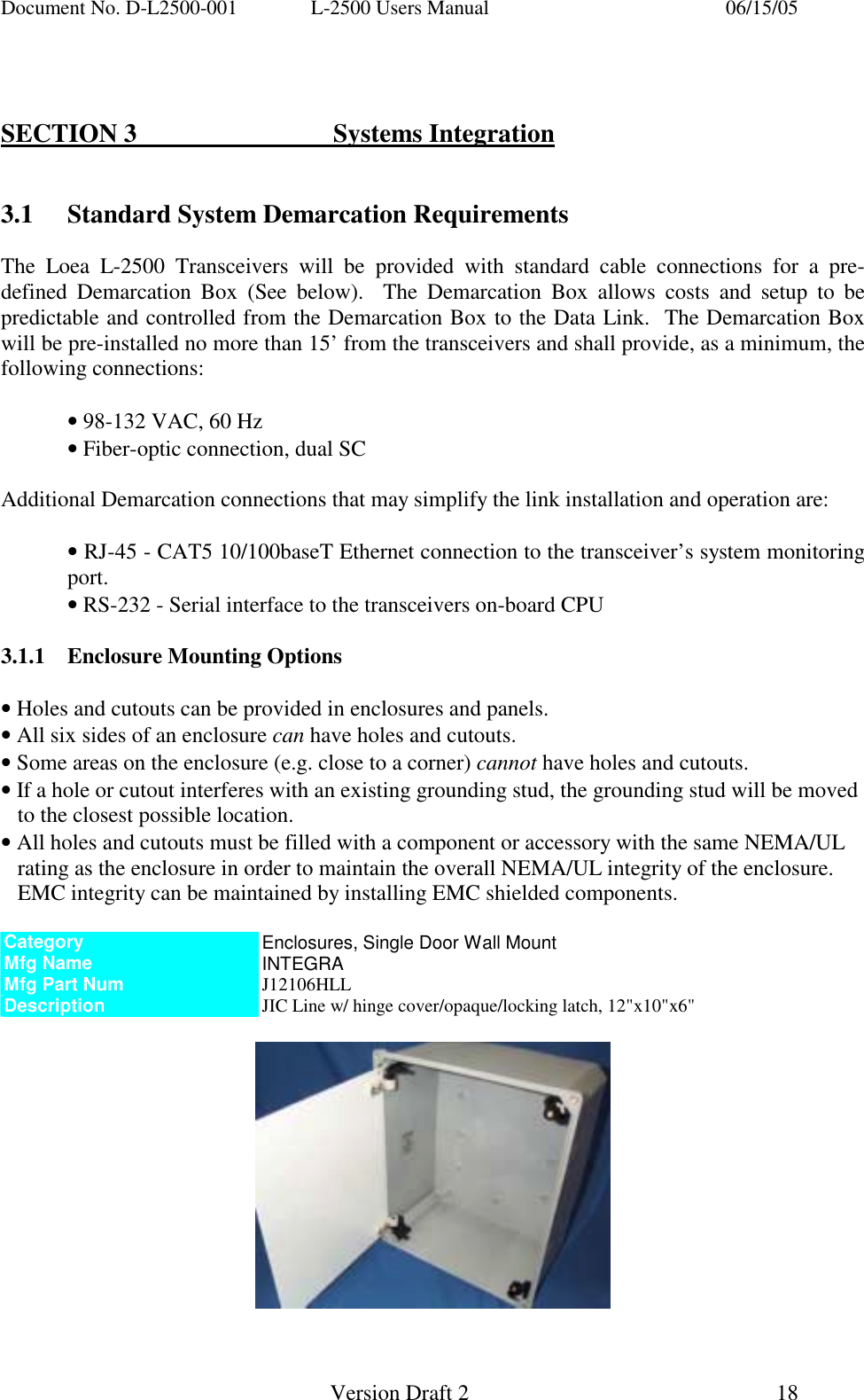
Document No. D-L2500-001  L-2500 Users Manual    06/15/05   Version Draft 2  18     SECTION 3   Systems Integration   3.1  Standard System Demarcation Requirements  The Loea L-2500 Transceivers will be provided with standard cable connections for a pre-defined Demarcation Box (See below).  The Demarcation Box allows costs and setup to be predictable and controlled from the Demarcation Box to the Data Link.  The Demarcation Box will be pre-installed no more than 15’ from the transceivers and shall provide, as a minimum, the following connections:  • 98-132 VAC, 60 Hz  • Fiber-optic connection, dual SC  Additional Demarcation connections that may simplify the link installation and operation are:  • RJ-45 - CAT5 10/100baseT Ethernet connection to the transceiver’s system monitoring   port. • RS-232 - Serial interface to the transceivers on-board CPU  3.1.1  Enclosure Mounting Options  • Holes and cutouts can be provided in enclosures and panels. • All six sides of an enclosure can have holes and cutouts. • Some areas on the enclosure (e.g. close to a corner) cannot have holes and cutouts. • If a hole or cutout interferes with an existing grounding stud, the grounding stud will be moved to the closest possible location. • All holes and cutouts must be filled with a component or accessory with the same NEMA/UL rating as the enclosure in order to maintain the overall NEMA/UL integrity of the enclosure. EMC integrity can be maintained by installing EMC shielded components.  Category  Enclosures, Single Door Wall Mount Mfg Name  INTEGRA Mfg Part Num  J12106HLL Description  JIC Line w/ hinge cover/opaque/locking latch, 12"x10"x6"
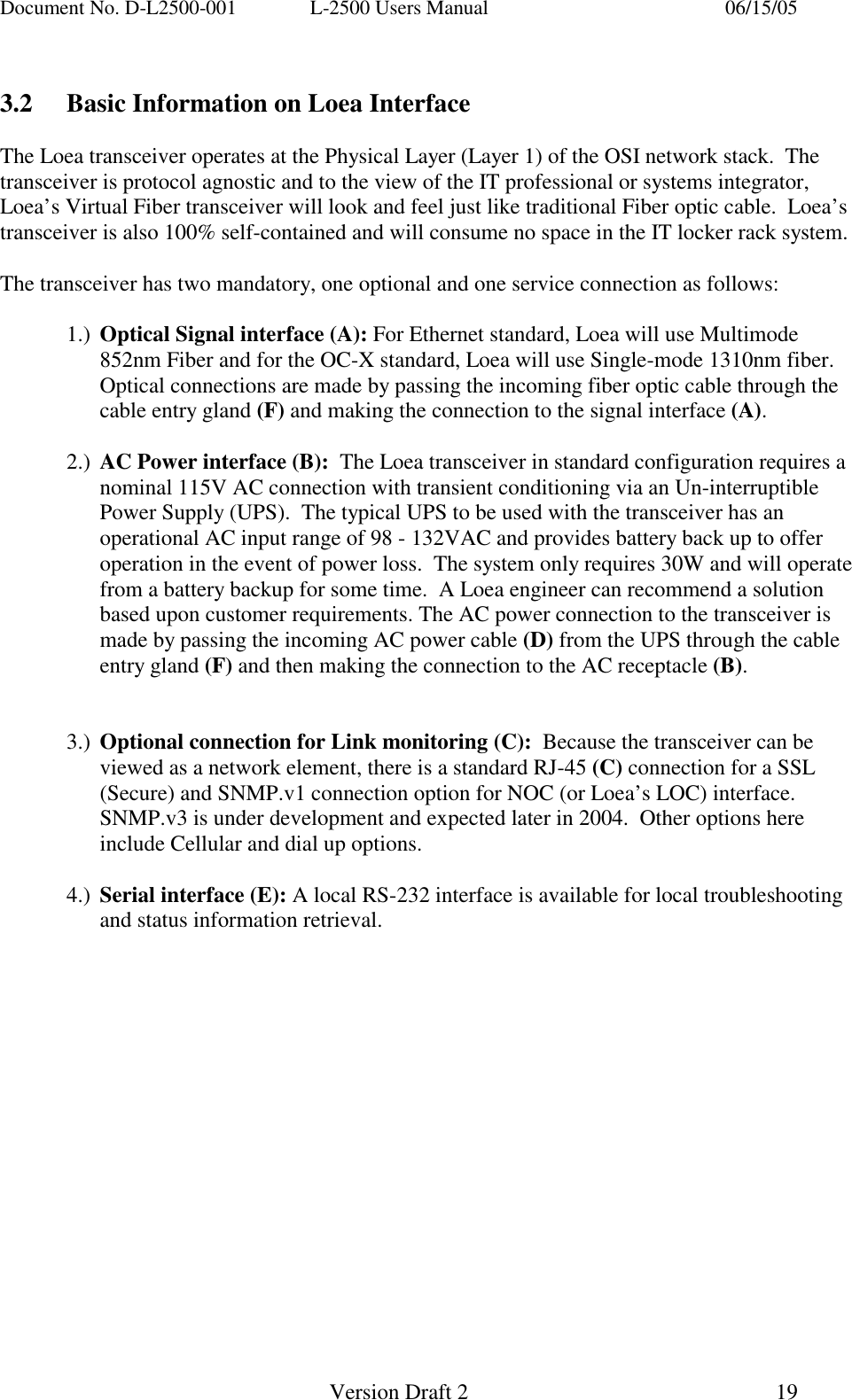
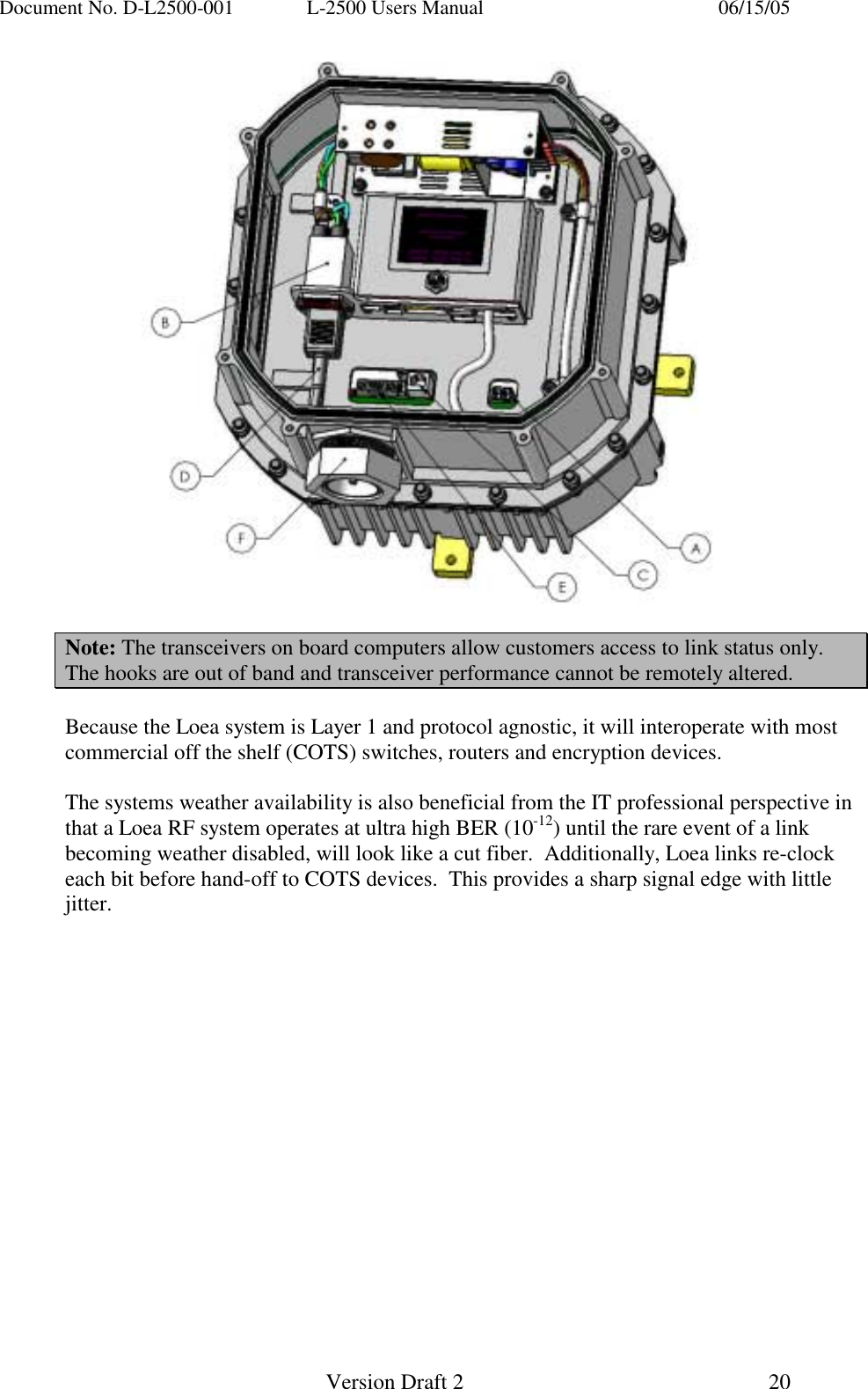
Document No. D-L2500-001  L-2500 Users Manual    06/15/05   Version Draft 2  19    3.2  Basic Information on Loea Interface  The Loea transceiver operates at the Physical Layer (Layer 1) of the OSI network stack.  The transceiver is protocol agnostic and to the view of the IT professional or systems integrator, Loea’s Virtual Fiber transceiver will look and feel just like traditional Fiber optic cable.  Loea’s transceiver is also 100% self-contained and will consume no space in the IT locker rack system.   The transceiver has two mandatory, one optional and one service connection as follows:  1.)  Optical Signal interface (A): For Ethernet standard, Loea will use Multimode 852nm Fiber and for the OC-X standard, Loea will use Single-mode 1310nm fiber. Optical connections are made by passing the incoming fiber optic cable through the cable entry gland (F) and making the connection to the signal interface (A).  2.)  AC Power interface (B):  The Loea transceiver in standard configuration requires a nominal 115V AC connection with transient conditioning via an Un-interruptible Power Supply (UPS).  The typical UPS to be used with the transceiver has an operational AC input range of 98 - 132VAC and provides battery back up to offer operation in the event of power loss.  The system only requires 30W and will operate from a battery backup for some time.  A Loea engineer can recommend a solution based upon customer requirements. The AC power connection to the transceiver is made by passing the incoming AC power cable (D) from the UPS through the cable entry gland (F) and then making the connection to the AC receptacle (B).   3.)  Optional connection for Link monitoring (C):  Because the transceiver can be viewed as a network element, there is a standard RJ-45 (C) connection for a SSL (Secure) and SNMP.v1 connection option for NOC (or Loea’s LOC) interface.  SNMP.v3 is under development and expected later in 2004.  Other options here include Cellular and dial up options.  4.)  Serial interface (E): A local RS-232 interface is available for local troubleshooting and status information retrieval.
Document No. D-L2500-001  L-2500 Users Manual    06/15/05   Version Draft 2  20     Note: The transceivers on board computers allow customers access to link status only. The hooks are out of band and transceiver performance cannot be remotely altered.  Because the Loea system is Layer 1 and protocol agnostic, it will interoperate with most commercial off the shelf (COTS) switches, routers and encryption devices.    The systems weather availability is also beneficial from the IT professional perspective in that a Loea RF system operates at ultra high BER (10-12) until the rare event of a link becoming weather disabled, will look like a cut fiber.  Additionally, Loea links re-clock each bit before hand-off to COTS devices.  This provides a sharp signal edge with little jitter.
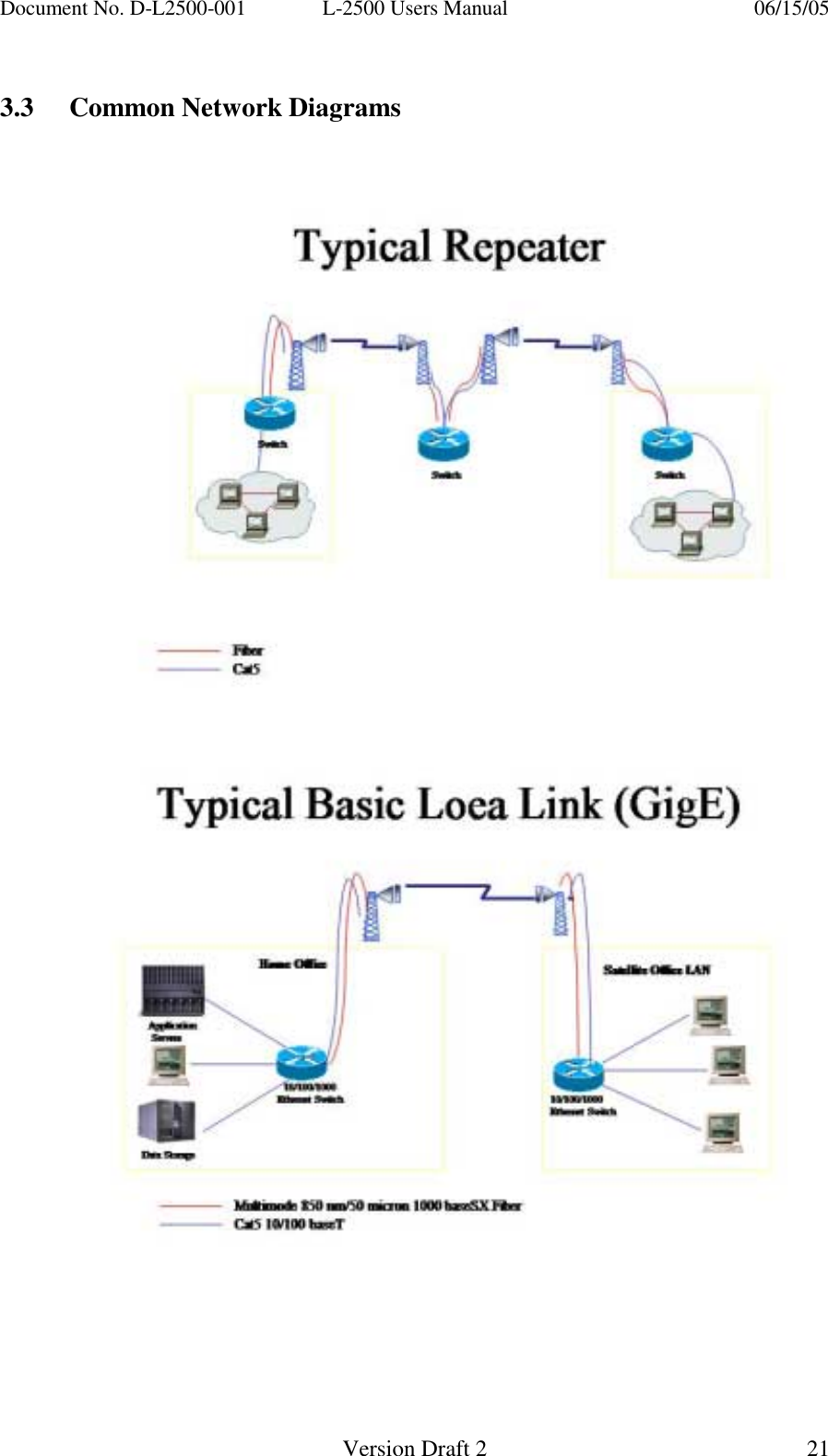
Document No. D-L2500-001  L-2500 Users Manual    06/15/05   Version Draft 2  21    3.3  Common Network Diagrams
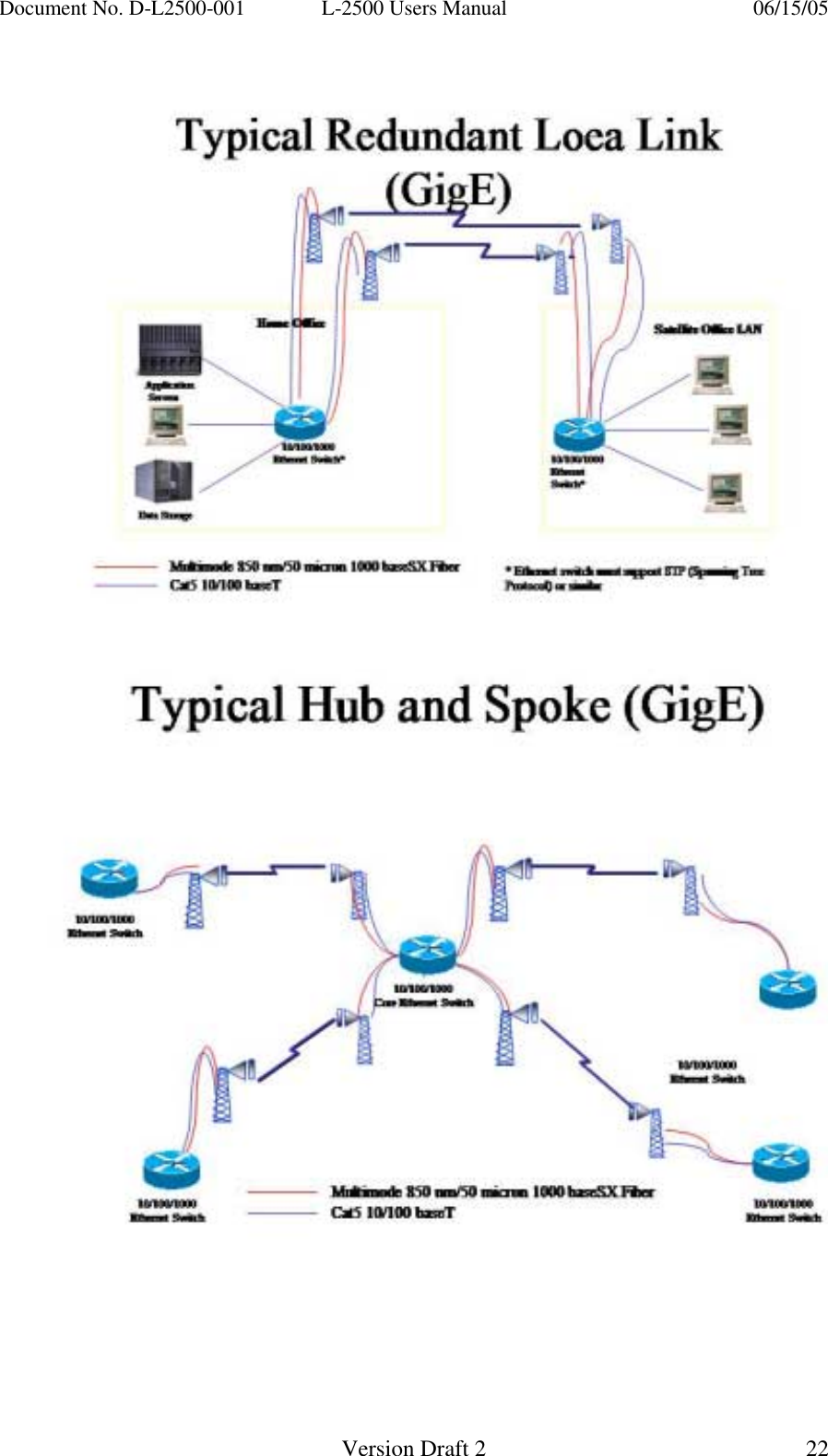
Document No. D-L2500-001  L-2500 Users Manual    06/15/05   Version Draft 2  22
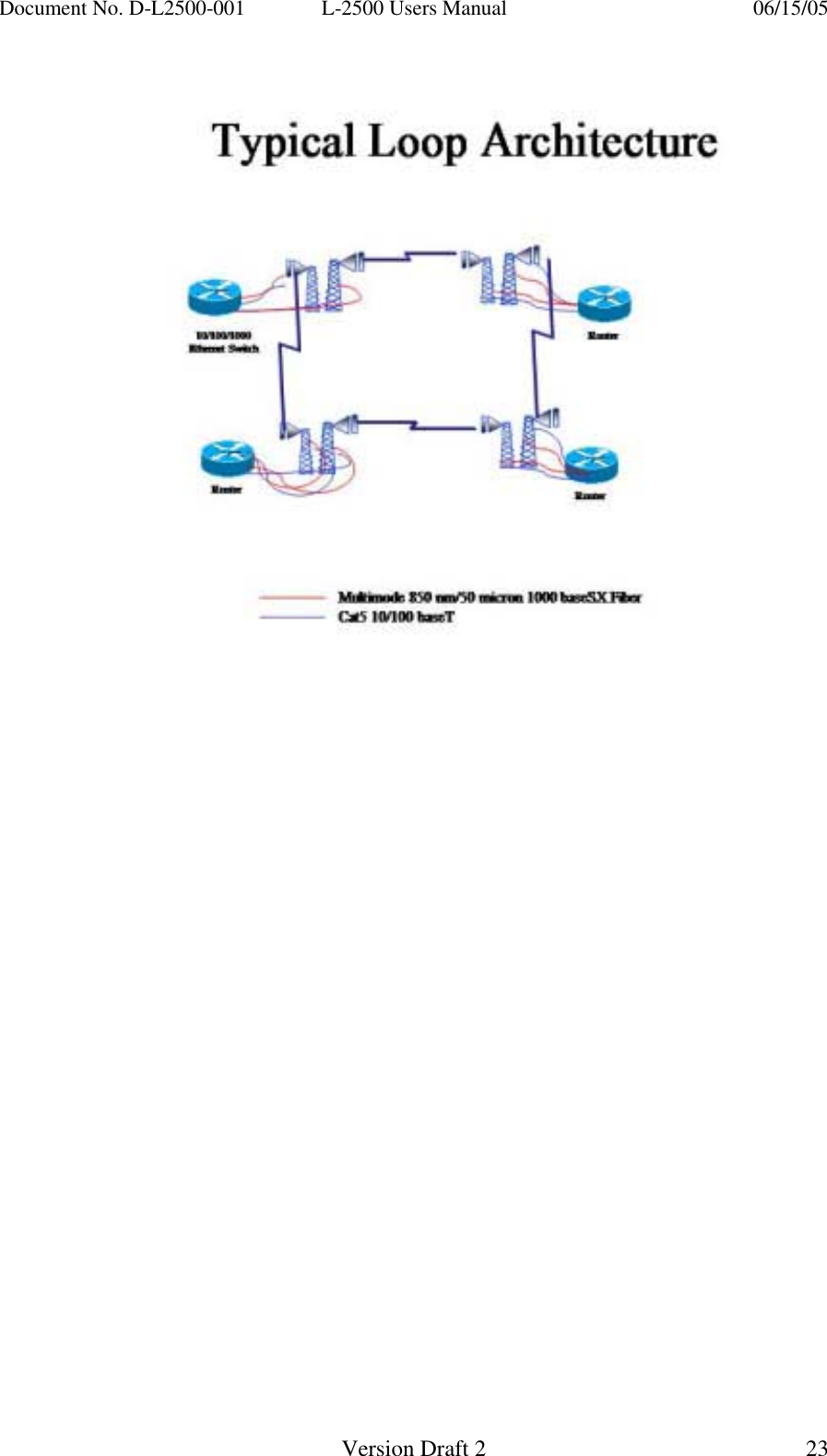
Document No. D-L2500-001  L-2500 Users Manual    06/15/05   Version Draft 2  23
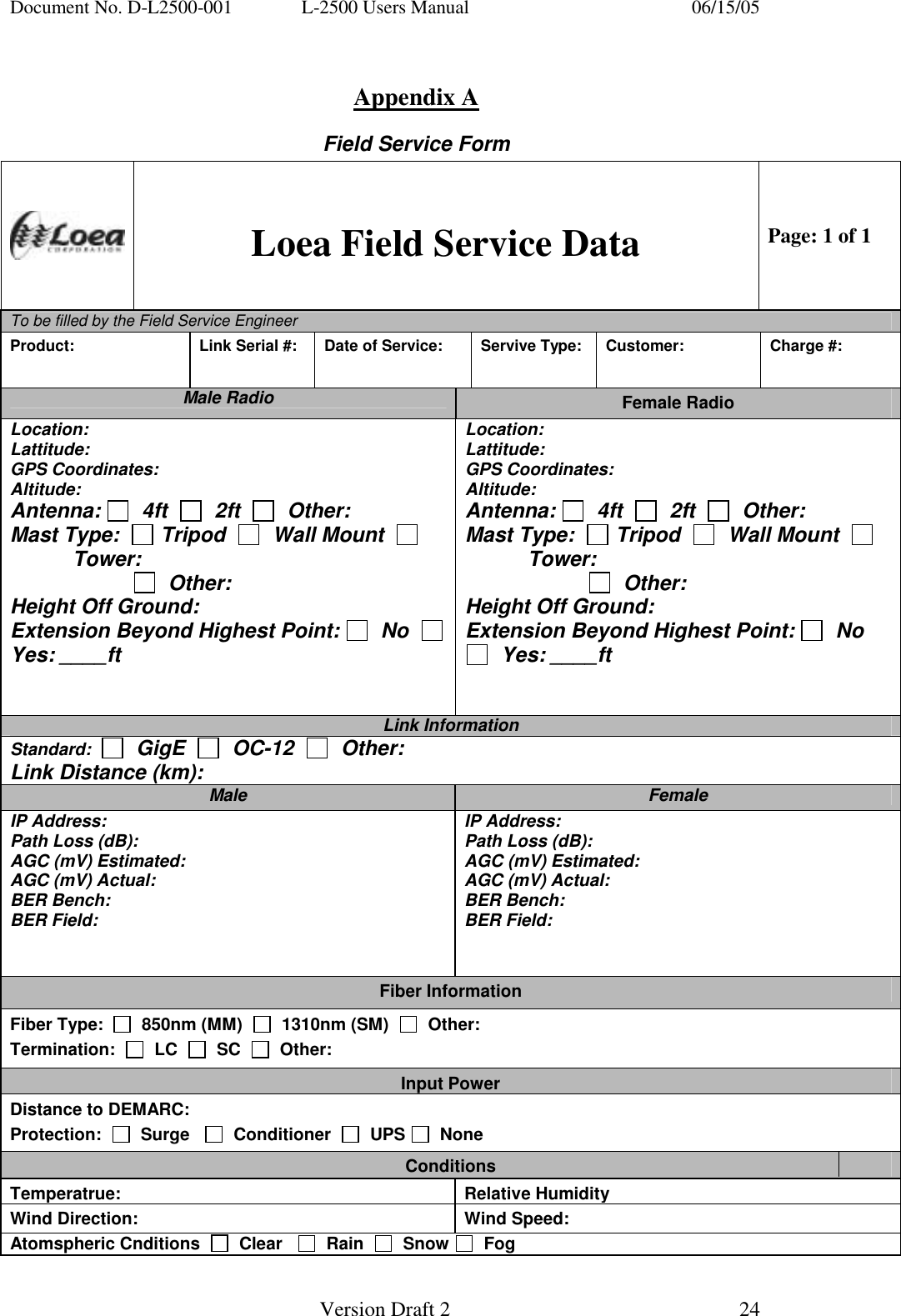
Document No. D-L2500-001  L-2500 Users Manual    06/15/05   Version Draft 2  24    Appendix A Field Service Form  Loea Field Service Data Page: 1 of 1 To be filled by the Field Service Engineer        Product:   Link Serial #:  Date of Service:  Servive Type:  Customer:  Charge #: Male Radio  Female Radio Location: Lattitude: GPS Coordinates: Altitude: Antenna:    4ft     2ft     Other: Mast Type:    Tripod     Wall Mount     Tower:                         Other: Height Off Ground: Extension Beyond Highest Point:   No    Yes: ____ft   Location: Lattitude: GPS Coordinates: Altitude: Antenna:    4ft     2ft     Other: Mast Type:    Tripod     Wall Mount     Tower:                         Other: Height Off Ground: Extension Beyond Highest Point:   No    Yes: ____ft   Link Information Standard:     GigE     OC-12     Other: Link Distance (km): Male  Female IP Address: Path Loss (dB): AGC (mV) Estimated: AGC (mV) Actual: BER Bench: BER Field: IP Address: Path Loss (dB): AGC (mV) Estimated: AGC (mV) Actual: BER Bench: BER Field: Fiber Information Fiber Type:     850nm (MM)     1310nm (SM)     Other: Termination:     LC     SC     Other: Input Power Distance to DEMARC: Protection:     Surge      Conditioner     UPS    None Conditions Temperatrue: Relative HumidityWind Direction:  Wind Speed: Atomspheric Cnditions     Clear      Rain     Snow    Fog
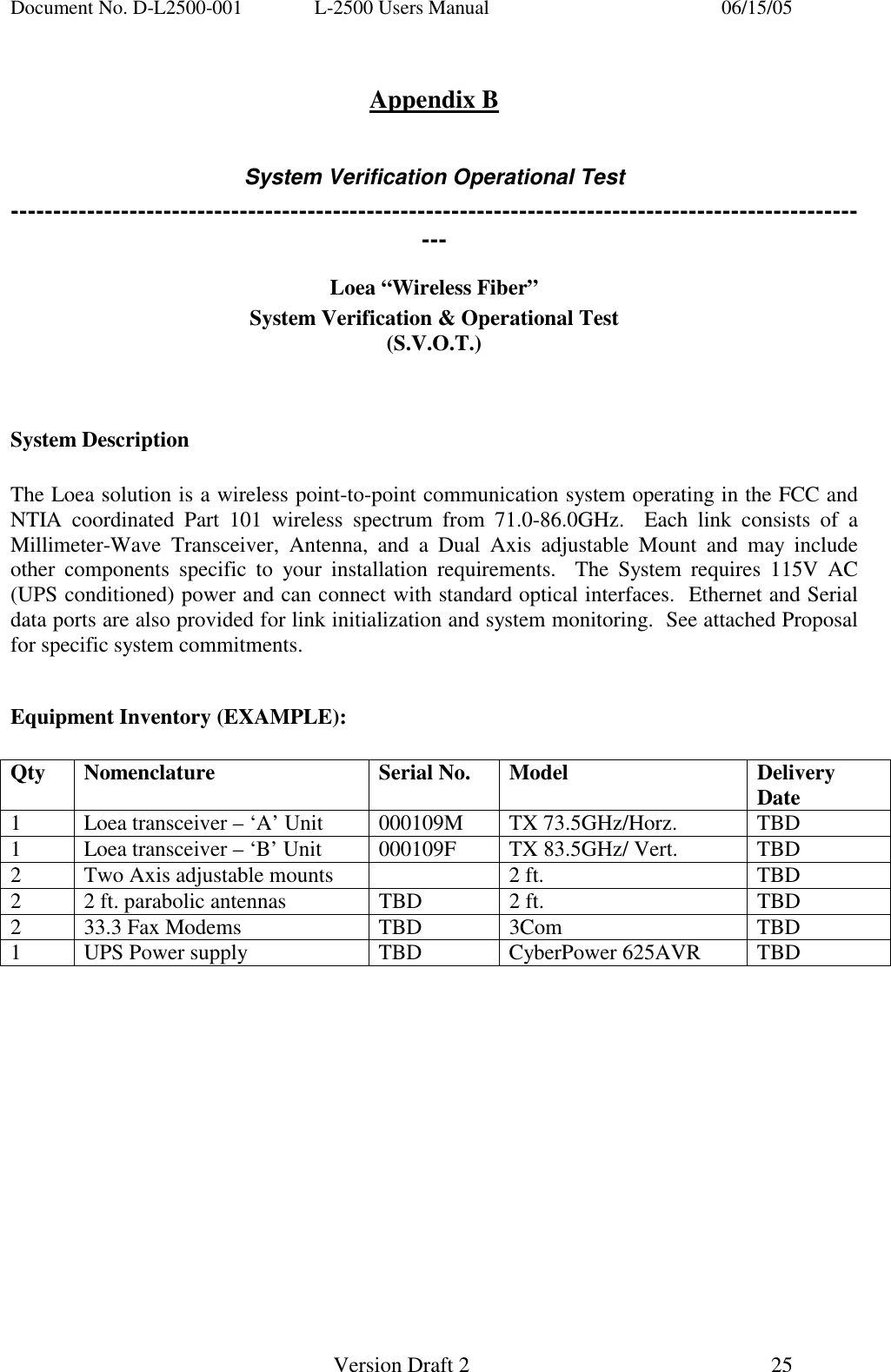
Document No. D-L2500-001  L-2500 Users Manual    06/15/05   Version Draft 2  25    Appendix B  System Verification Operational Test ------------------------------------------------------------------------------------------------------- Loea “Wireless Fiber” System Verification & Operational Test (S.V.O.T.)   System Description  The Loea solution is a wireless point-to-point communication system operating in the FCC and NTIA coordinated Part 101 wireless spectrum from 71.0-86.0GHz.  Each link consists of a Millimeter-Wave Transceiver, Antenna, and a Dual Axis adjustable Mount and may include other components specific to your installation requirements.  The System requires 115V AC (UPS conditioned) power and can connect with standard optical interfaces.  Ethernet and Serial data ports are also provided for link initialization and system monitoring.  See attached Proposal for specific system commitments.  Equipment Inventory (EXAMPLE):   Qty Nomenclature  Serial No. Model  Delivery Date 1  Loea transceiver – ‘A’ Unit  000109M  TX 73.5GHz/Horz.  TBD 1  Loea transceiver – ‘B’ Unit  000109F  TX 83.5GHz/ Vert.  TBD 2  Two Axis adjustable mounts    2 ft.  TBD 2  2 ft. parabolic antennas  TBD  2 ft.  TBD 2  33.3 Fax Modems  TBD  3Com  TBD 1  UPS Power supply  TBD  CyberPower 625AVR  TBD
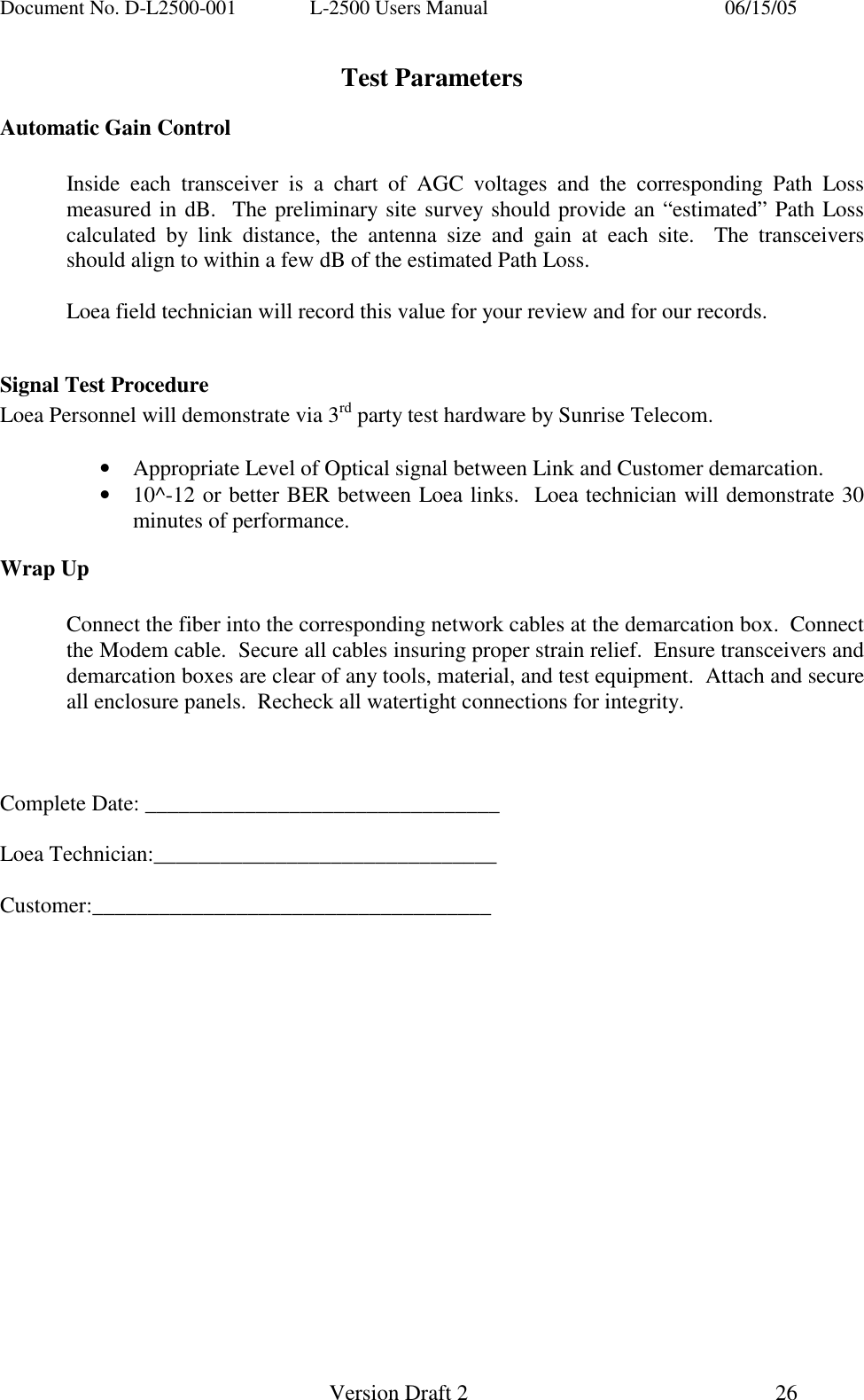
Document No. D-L2500-001  L-2500 Users Manual    06/15/05   Version Draft 2  26   Test Parameters Automatic Gain Control    Inside each transceiver is a chart of AGC voltages and the corresponding Path Loss measured in dB.  The preliminary site survey should provide an “estimated” Path Loss calculated by link distance, the antenna size and gain at each site.  The transceivers should align to within a few dB of the estimated Path Loss.      Loea field technician will record this value for your review and for our records.  Signal Test Procedure Loea Personnel will demonstrate via 3rd party test hardware by Sunrise Telecom.    •  Appropriate Level of Optical signal between Link and Customer demarcation. •  10^-12 or better BER between Loea links.  Loea technician will demonstrate 30 minutes of performance. Wrap Up     Connect the fiber into the corresponding network cables at the demarcation box.  Connect the Modem cable.  Secure all cables insuring proper strain relief.  Ensure transceivers and demarcation boxes are clear of any tools, material, and test equipment.  Attach and secure all enclosure panels.  Recheck all watertight connections for integrity.    Complete Date: ________________________________  Loea Technician:_______________________________  Customer:____________________________________

Navigation menu