Logitech T630 User Manual To The E17398a1 Ff20 4bc7 84b7 87e31b0750e9
User Manual: Logitech T630 to the manual
Open the PDF directly: View PDF  .
.
Page Count: 86
October 2003
T630/T628

White Paper T630/T628
2October 2003
This document is published by Sony Ericsson
Mobile Communications AB, without any
warranty*. Improvements and changes to this text
necessitated by typographical errors, inaccuracies
of current information or improvements to
programs and/or equipment, may be made by
Sony Ericsson Mobile Communications AB at any
time and without notice. Such changes will,
however, be incorporated into new editions of this
document are to be regarded as temporary
reference copies only.
*All implied warranties, including without limitation
the implied warranties of merchantability or fitness
for a particular purpose, are excluded. In no event
shall Sony Ericsson or its licensors be liable for
incidental or consequential damages of any
nature, including but not limited to lost profits or
commercial lost, arising out of the use of the
information in this document.
This White Paper is published by:
Sony Ericsson Mobile Communications AB, SE-
221 88 Lund, Sweden
Phone:+46 46 19 40 00
Fax: +46 46 19 41 00
www.SonyEricsson.com/
© Sony Ericsson Mobile Communications AB,
2003. All rights reserved. You are hereby granted
a license to download and/or print a copy of this
document.
Any rights not expressly granted herein are
reserved.
First edition (October 2003)
Publication number EN/LZT 108 6815
Preface
Purpose of this document
The Sony Ericsson T630/T628 White Paper is
designed to give the reader a deeper technical
understanding of how the phones are designed,
and of how they interact with other media. This
document will make it easier to integrate the T630/
T628 with the IT and communications solutions of
a company or organization.
People who can benefit from this document
include:
• Corporate buyers
• IT Professionals
• Software developers
• Support engineers
• Business decision-makers
More information, useful for product, service and
application developers, is published on SonyErics-
son Developer World, which contains up-to-date
information about tecnologies, products and tools.
White Paper T630/T628
3October 2003
Contents
Purpose of this document .....................................................................................2
Key functions and features .......................................................................................6
My friends ..............................................................................................................6
Sony Top 10’ .........................................................................................................7
QuickShare TM ......................................................................................................8
Built-in camera ......................................................................................................8
Display ...................................................................................................................9
New and innovative user interface ........................................................................9
Pictures ................................................................................................................11
Multimedia in T630/T628 .....................................................................................11
MMS (Multimedia Messaging Service) ................................................................12
MMS objects .......................................................................................................13
Benefits ................................................................................................................14
EMS (Enhanced Messaging Service) ...................................................................15
Messaging using EMS .........................................................................................16
Java .....................................................................................................................18
Games .................................................................................................................19
MIDI - Musical Instrument Digital Interface .........................................................21
A fun, personalization, music application – Music DJ. ........................................22
Polyphonic ring signals ........................................................................................22
Bluetooth™ wireless technology .........................................................................23
Using Bluetooth wireless technology in the T630/T628 ......................................24
Synchronize calendar and phone book ...............................................................24
SyncML, an open standard for remote synchronization in the T630/T628 .........24
Local synchronization ..........................................................................................27
WAP services .......................................................................................................28
Bearer type characteristics ..................................................................................30
Gateway characteristics ......................................................................................30
Security using the WAP .......................................................................................31
Configuration of WAP settings ............................................................................31
Push services .......................................................................................................32
cHTML support ....................................................................................................32
Mobile Internet .....................................................................................................33
Data connections .................................................................................................33
Mobile positioning ...............................................................................................33
General Packet Radio Services ...........................................................................33
Using GPRS in the T630/T628 .............................................................................34
Modem and AT commands .................................................................................35
GSM data communication ...................................................................................35
AT commands support ........................................................................................36
Online Developer Resources ...............................................................................36
Sony Ericsson Developer Support .......................................................................37
Infrared transceiver ..............................................................................................37
Connection via infrared ........................................................................................37
Chinese versions .................................................................................................38
Network-dependent features ...............................................................................44
SIM application toolkit .........................................................................................45
SIM AT services supported by the T630/T628 ....................................................46
User interaction with SIM AT ...............................................................................49
White Paper T630/T628
4October 2003
Security and M-commerce technical data ..........................................................50
Terminology and abbreviations ...........................................................................50
Related information .............................................................................................53
Technical specifications ..........................................................................................54
General technical data .........................................................................................55
Exterior description ..............................................................................................55
Ambient temperatures .........................................................................................56
Supported Man-Machine Interface (MMI) languages ..........................................56
Current consumption, talk and standby times ....................................................57
Speech coding .....................................................................................................57
Cell broadcast service .........................................................................................57
Short message service ........................................................................................59
Enhanced message service .................................................................................61
Multimedia message service ...............................................................................63
Bluetooth technical data ......................................................................................65
Performance and technical characteristics .........................................................65
Tone and percussion maps in the T630/T628 .....................................................66
Percussion map ...................................................................................................69
WAP browser technical data ...............................................................................70
WAP Operator technical data ..............................................................................72
GPRS technical data ...........................................................................................76
Built-in GSM data modem technical data ...........................................................79
E-mail client technical data .................................................................................79
USSD technical data ...........................................................................................81
Image format technical data ................................................................................81
Images – downloading to phone .........................................................................81
SyncML technical data ........................................................................................83
Infrared transceiver technical data ......................................................................83
White Paper T630/T628
5October 2003
T630/T628 Product
overview
T630/T628 is an innovative and easy to use high-
end mobile phone. It offers complete imaging and
messaging capabilities that allow both family and
friends to capture, share and preserve those spe-
cial moments.
Designed with the professional user in mind, T630/
T628’s powerful efficiency makes it an ideal tool in
the professional work place.
Featuring a large TFT colour display with 65,536
colours, it offers the viewer sharp, detailed images
in rich, natural colours. The built-in camera makes
taking a picture quick and easy and automatically
shows the subject in the display. Pictures can then
be used as wallpapers, in multimedia messages
and in the phone book.
White Paper T630/T628
6October 2003
Key functions and features
My friends
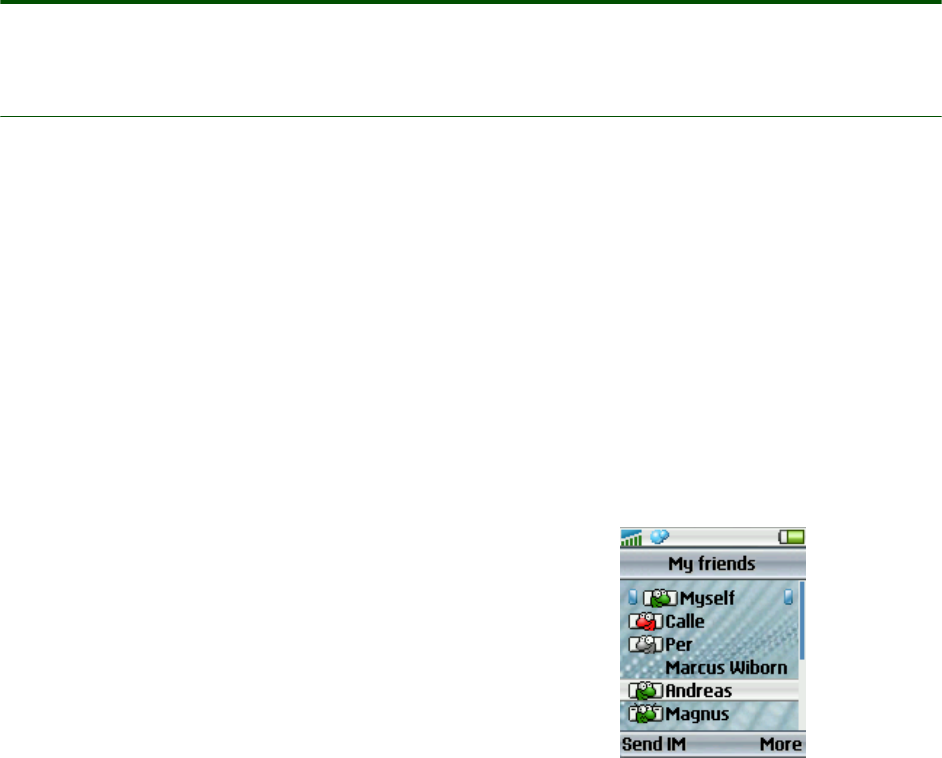
Sony Ericsson’s new application - My friends- ena-
bles an enhanced messaging facility that enables
you to quickly access a list of contacts and quickly
choose the mode of communication you wish to
reach them by, such as SMS, MMS, e-mail, or chat.
The existing messaging facility in mobile phones
can be improved to give users quicker access to
their list of contacts and enable a service that is
more user friendly and provides more options to
the user.
The utility of My friends is also enhanced by the
addition of a service that will keep track of the
online status and availability of your chat partners
or contacts; and notify you of changes to their sta-
tus or availability.
The My friends application merges the Phonebook
and messaging functionalities that we commonly
find in phones. At a click you can access your list of
My friends, and with another click you can choose
how you want to communicate with them - via
SMS, EMS, MMS, or other modes.
The application also enables you to view the ‘pres-
ence’, or availability of the contacts in My friends.
You can easily and quickly find out whether they
are on a call, in a meeting, or free to speak to you.
You can then choose how you wish to contact
them.
My friends contains all the information you need
about your contacts.
You can have:
• a select list of up to 20 people
• their contact information such as phone num-
ber, E-mail, chat and mail addresses
• call information - calls to and from them
• presence information - their availability, online
status (on or off), and any text or image they
choose to send you regarding their availability
• message information - with regard to MMS, E-
mail, chat, SMS/EMS, sent or received
You can present similar information about your own
availability and status.
You have access to chatrooms, and can form wire-
less communities of business associates or con-
tacts.
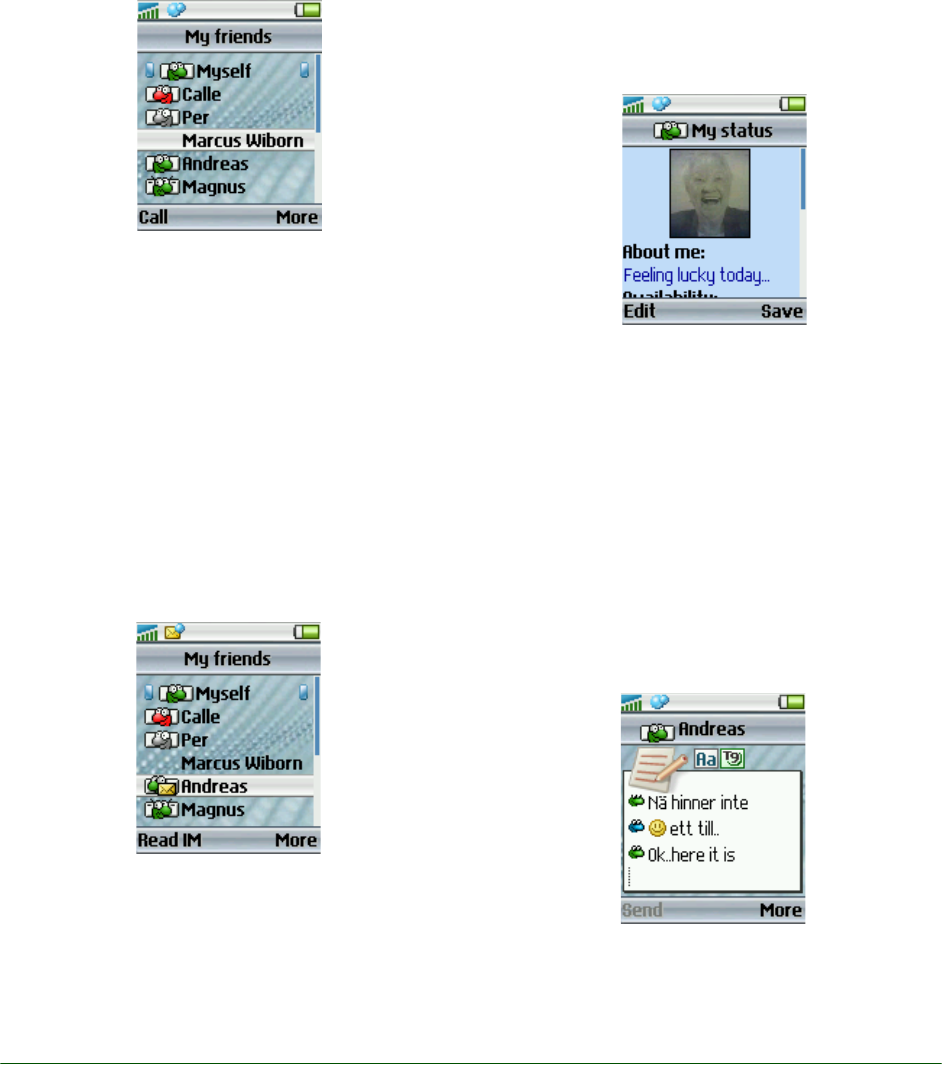
The Main View
You can access the My friends menu by clicking
the desktop icon.
The icon in the status bar indicates the online sta-
tus of the chosen friend in the list, and indicates
new, unread messages if any.
The most likely action (which is context dependent)
is available on the left softkey.
Additional actions become available to you when
you press the More key.
Adding contacts to My friends
You can add a contact from the Phonebook to the
list of My friends; and you can control the position
of the friend in the list. This enables you to have
your list of immediate business or social contacts
at hand, so you can establish easy communication
with them almost instantly.
White Paper T630/T628
7October 2003
Managing My friends
Your list of immediate contacts may change to suit
business demands. You may need to interact with
new sets of persons depending on your current
project or work at hand. Or you may simply want to
alter your list of personal My friends whom you
want to keep in constant touch with.
You can manage the My friends list to quickly alter
the list of My friends that you want displayed. You
can sort the names, edit nicknames, block or
delete friend, or link a friend to Phonebook.
Viewing the status of contacts in My friends
You can view the status of contacts in My friends
before you decide to contact. Click More on the
right side bottom of the My friends list to access
the More menu; and click View status.
You can view your contact’s status and decide how
you want to communicate with him or her. You may
want to call or send an SMS, MMS, or e-mail, or
join your friend in a chatroom.
Access to the chatroom
The My friends application supports chatroom invi-
tations. You can bookmark associates you would
like to chat with. The application can establish con-
nectivity between different service offerings that
enable chat between terminals.
Sony Top 10’
Sony Top 10 is a unique direct-link music download
application which is easy to use and promises you
best-selling music for mobile download.
By pressing an icon on the phone desktop, you can
go straight to a live list of Top Music Hits. Choose a
song, listen to it, and if you like what you hear you
can add it to My Sounds.

White Paper T630/T628
8October 2003
The Sony Music Top 10 service can be owned by a
network operator and/or hosted by Sony Ericsson
and the premium content maintained and managed
by Sony Music. The music on offer can easily be
suited to a specific region or target group.
The music format is Midi (Polyphonic 24 voices or
more).
Implementation costs for network operators are
minimal and server communication is based on
existing, well-established systems and services.
Operator benefits
Sony Music Top 10 creates quality and quantity
revenue for network operators. The process
involves:
• Accessing online music
• Downloading list
• Choosing a song
• Buying a song
* Available in customized phones only.
QuickShare TM
The Sony Ericsson QuickShareTM is the smartest,
fastest and easiest way to share images. By com-
bining several imaging features and capabilities in
the T630/T628, QuickShareTM lets you take a pic-
ture with two rapid clicks and then in four further
steps send it anywhere in the world.
It is also possible to exchange pictures directly
over Bluetooth connections and even drag and
drop pictures to and from the T630/T628 and a PC.
Built-in camera
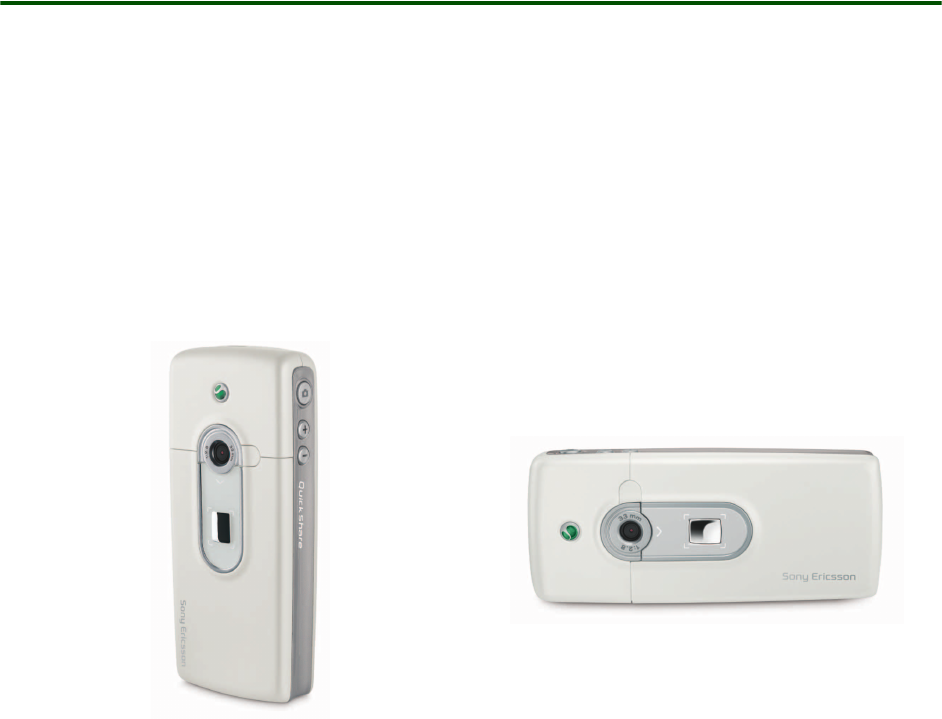
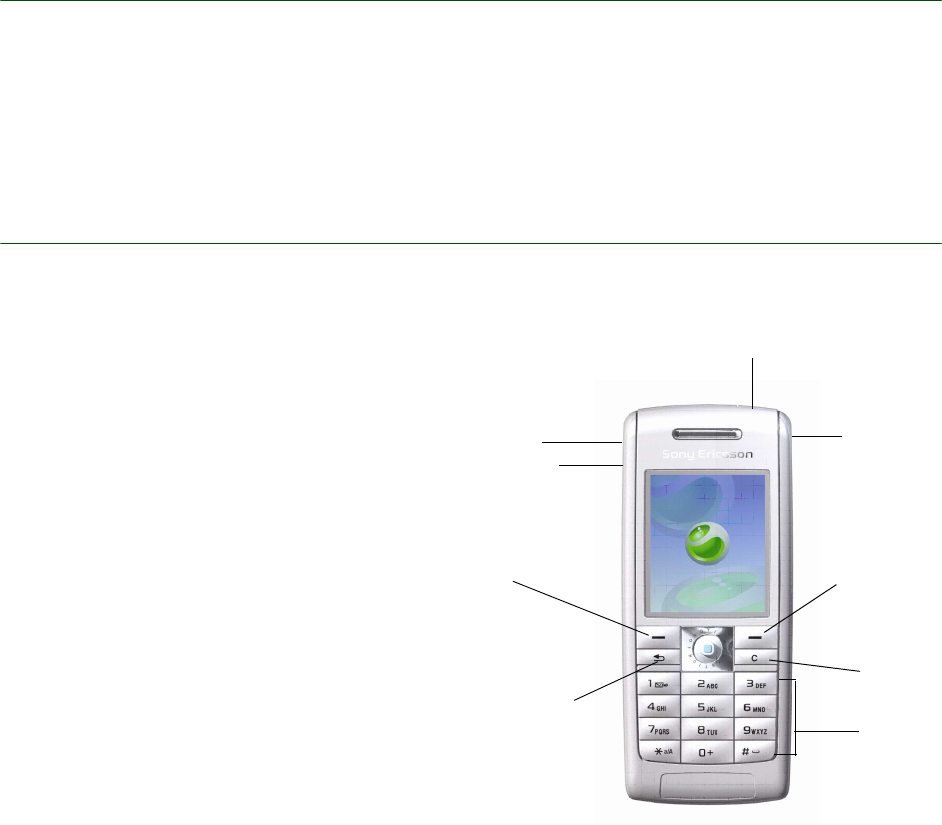
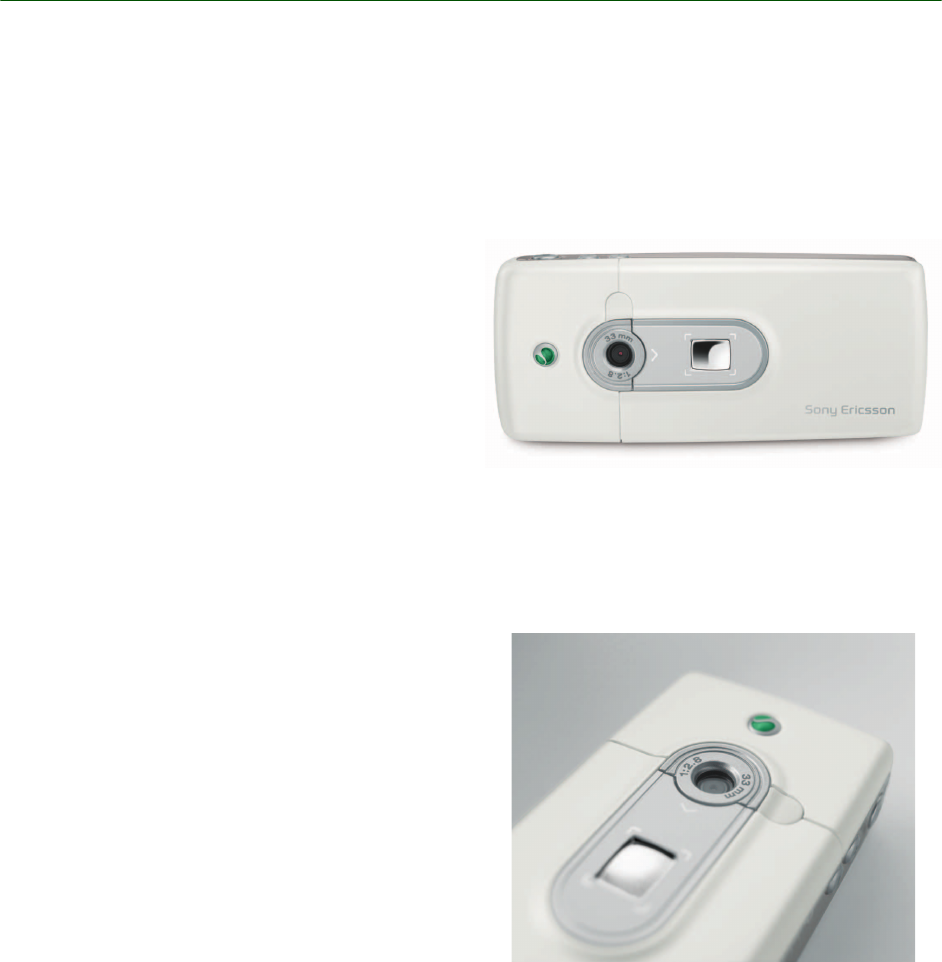
The built-in camera is capable of taking still pic-
tures up to common image format (CIF) resolution
(288 x 352 pixels) and 24 bit colour depth. In addi-
tion, it is possible to let the phone automatically
resize the image to VGA resolution (480x640 pix-
els). The lens is recessed into the back cover of the
T630/T628. The viewfinder will fill up the whole
screen, irrespective of the resolution at which the
picture is taken. A dedicated hardware button pro-
vides fast access to the camera application.
Images are stored in the phone’s filing system and
are therefore available for other applications to use.
The number of images that can be stored depends
on the available file space, which is shared with
other applications. The viewfinder will give an esti-
mation of the number of images remaining, assum-
ing that all of the free storage is available for the
camera application and using the current settings
for size and quality. Approximate JPEG file sizes
are 20 kbytes for CIF.
Saved images may be viewed in the image viewer
application, and are available for use by other
applications in T630/T628 such as MMS and e-
mail.
White Paper T630/T628
9October 2003
Display
The T630/T628 lets the user enjoy the ultimate
viewing experience afforded by the 65,536 full col-
our LCD. The LCD has 128x160 pixels and is a 1.8
” TFT screen. The display has a 16 bits pixel mem-
ory depth. Camera pictures, picture messages and
gaming are all enhanced by the crisp, sharp col-
ours afforded by the TFT. The screen also offers the
user maximum information with the least scrolling.
New and innovative user interface
The T630/T628 has a new, innovative user interface
which enables the user to manage the phone in an
easy and efficient way. Combined with attractive
graphics in a wide variety of styles, the new user
interface gives the user a new and stimulating
experience.
The development of the new user interface is
founded on usability tests performed on a wide
range of mobile phones - Sony Ericsson phones as
well as competitors’. The result is a new interface
that is easier and quicker to use than the vast
majority in products on the market.
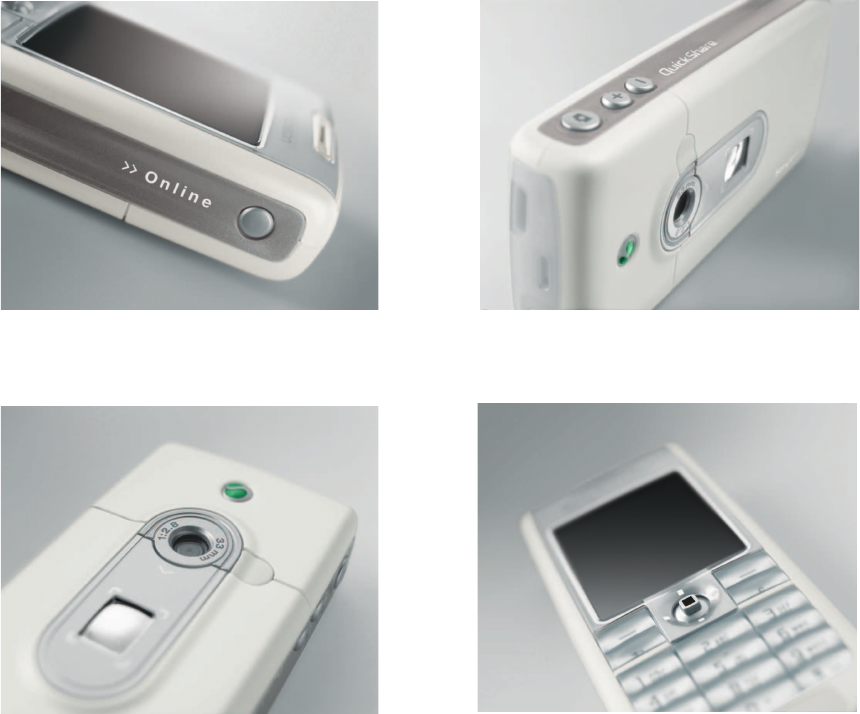
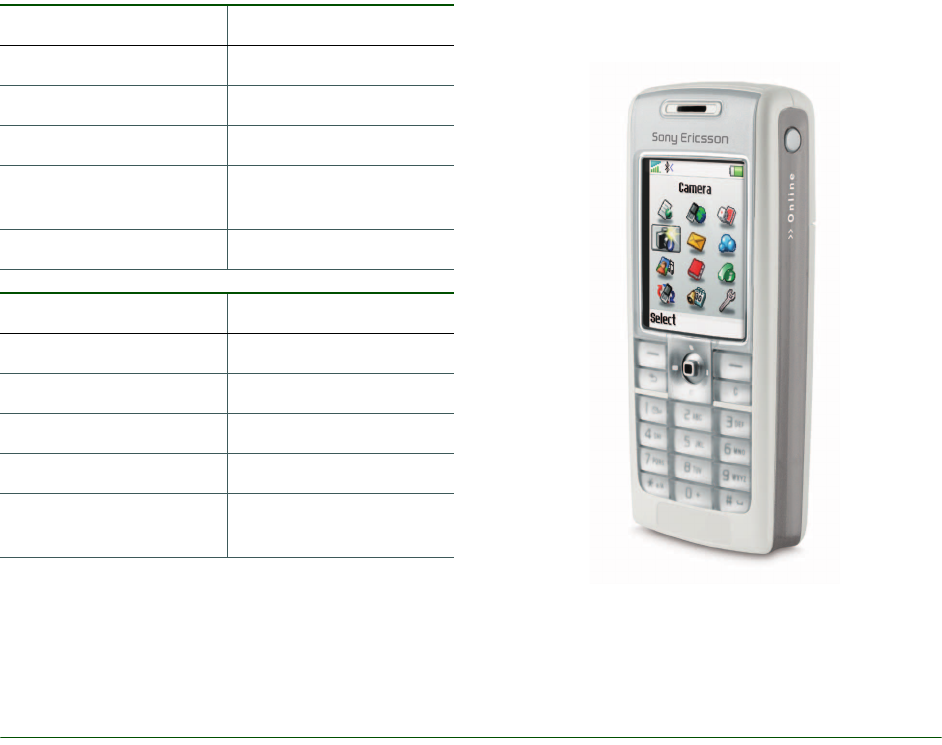
The keys to efficiency
The lay out of the keys is one of the many new and
improved elements in the T630/T628, helping the
user to find functions and features in the phone
quickly and easily. Conveniently and ergonomically
grouped together on the front, the two soft keys, a
navigation key, the back key and the “C” key ena-
ble the user to navigate, select and perform
actions.
Actions and options
The left and right soft keys perform the actions
shown immediately above these keys in the dis-
play. The most frequently used actions are always
available on the left soft key. Other actions are
accessible on the right soft key, directly on the key
or via the More list. Since most of the common
actions are carried out by the left soft key, the back
key is conveniently placed immediately under it.
Back and delete
The Back key enables the user to go back one step
at the time. It makes it easy to find the way back,
but more importantly gives the possibility to
recover from mistakes. To press and hold the Back
key is an instant return to stand by.
The “C” key is used to delete items and to turn off
sounds:
• Press and hold in Stand by - activate silent
mode
• Press and hold during ongoing call - mute
• Normal press during incoming call - mute ring
Internet
key
Number
keys
C key
Right soft
key
C
amera
k
ey
l
L
eft soft
k
ey
Back key
Volume
keys
On/Off key
White Paper T630/T628
10 October 2003
More Features
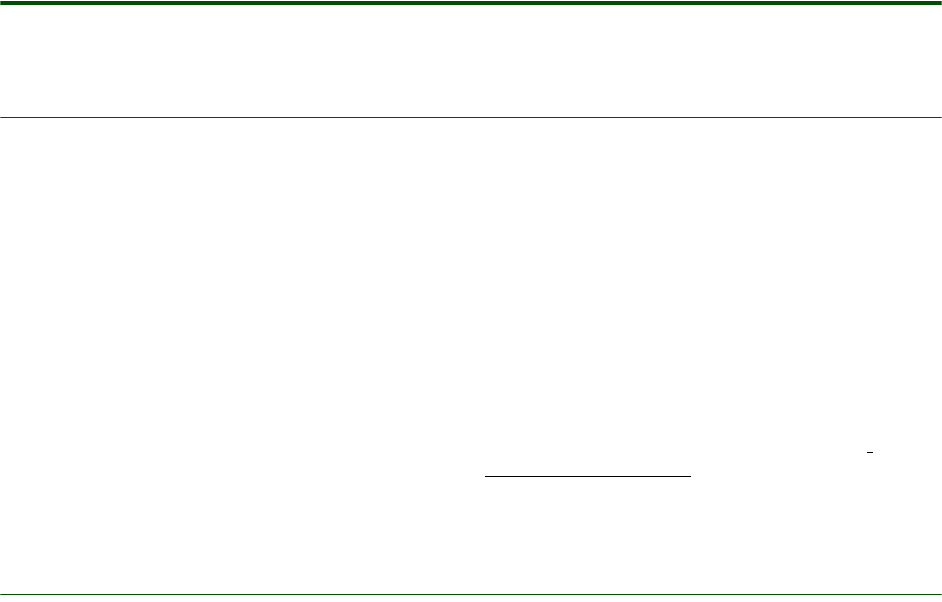
The key features in the phone are easily accessible,
and the main menu is reached by a press with the
navigation key in stand by. It is also accessible dur-
ing an ongoing call, which allows for multitasking -
an air time generator. The main menu gives an
overview of all functions and features in the phone.
Actions in the T630/T628 are always carried out in
the most efficient way, and there is always a visible
status bar at the top of the display. The status bar
extends the usage of non voice features by dis-
playing icons and indicators of ongoing actions.
The already popular Themes in Sony Ericsson
mobile phones have been further developed and
improved in the T630/T628, enabling the user to
personalize the phone with pictures, colours, wall-
papers, etc. The Themes and all their features are
displayed in the large 65k colour screen, which
gives a unique user experience.
White Paper T630/T628
11 October 2003
Technologies in detail
Pictures
Pictures is the T630/T628’s image viewer. It ena-
bles you to view and organise your photographs,
including pictures taken by the built-in camera plus
images loaded from elsewhere, such as received
via e-Mail. Pictures supports image types JPEG,
GIF, Animated GIFs and WBMP.
Pictures can be viewed in thumbnail and full screen
mode. Thumbnail images may be ordered by name,
date, size or type. In full screen mode the user can
browse through the images and rename or delete
them. It is also possible to send them as e-mail,
MMS messages or via Bluetooth and infrared. Sim-
ply select a picture, add a message and send just
like an SMS message or build a slide show with
several images and your favourite sound clips.
Pictures of loved ones can be saved in Contacts.
When a contact calls (or the user calls that con-
tact), the picture is displayed with the details of the
call. This is known as Picture Phone Book.
Pictures may be loaded up to the Internet. Sony
Ericsson Mobile Internet has an on-line album ena-
bling you to share pictures and video clips:
wap.sonyericsson.com
Multimedia in T630/T628
Graphics
Graphics (tables, charts, diagrams and layouts)
have a major impact on the way we work. The
T630/T628 supports JPEG (max 640x480), GIF
(max 640x480), PNG (max 640x480), BMP ( max
640x480), WBMP (max 320x320) and animated
GIFs. With MMS, the user can personalize the
appearance of the display – for example the back-
ground colours and the background picture.
White Paper T630/T628
12 October 2003
Audio
With the sound recorder function in the T630/T628,
it is easy to make a voice recording, for example a
personal rendition of “Happy Birthday”. The audio
function in the T630/T628 also allows downloading
of sounds and melodies.
Themes
With themes, the user can change the appearance
of the display, for example the background colours
and the background picture. The phone comes
with a number of pre-defined pictures, and it is
possible to download additional themes. The maxi-
mum number of themes is limited only by the
amount of memory.
E-mail
With inbox, outbox, save draft and reply options,
you have all the functions you need for effective e-
mail communication in a powerful mobile phone.
Constantly connected to a POP3, SMTP or IMAP4
e-mail server anywhere on the Internet, your T630/
T628 stores messages dynamically, depending on
available memory, and updates your inbox auto-
matically and over the air. Check your e-mail any-
where. Reply to e-mail on the move. Friends, family
and business contacts know that when they send
you e-mail, you can receive, read and act on it
immediately. You can include pictures in outgoing
e-mails and receive attachments. Hyperlinks in e-
mails are supported.
MMS (Multimedia Messaging Service)
One of the key features in the T630/T628 is the
Multimedia Messaging Service (MMS), this is
expected to become the preferred messaging
method of mobile terminal users, since there are
virtually no limits to the content of an MMS trans-
mission. An MMS message (also known as a Pic-
ture Message) from the T630/T628 can contain
text, pictures, graphics, animations, images, audio
clips and ring melodies. For third-party developers’
information, please visit the Sony Ericsson Devel-
oper World.
Defined and specified by 3GPP as a standard for
third generation implementation, MMS completes
the potential of messaging. Sending digital post-
cards and PowerPoint-style presentations is
expected to be among the most popular user appli-
cations of MMS. Eagerly awaited by young users in
particular, MMS is projected to fuel the growth of
related market segments by as much as forty per-
cent. Using the Wireless Application Protocol (WAP) as
bearer technology and powered by the high-speed
transmission technologies EDGE, GPRS and UMTS
(W-CDMA), Multimedia Messaging allows users to
send and receive messages that look like Power-
Point-style presentations. The messages may
include any combination of text, graphics, photo-
graphic images, speech and music clips. MMS
messaging will serve as the default mode of mes-
saging on all terminals, making total content
exchange second nature. From utility to sheer fun,
it offers benefits at every level and to every kind of
user.
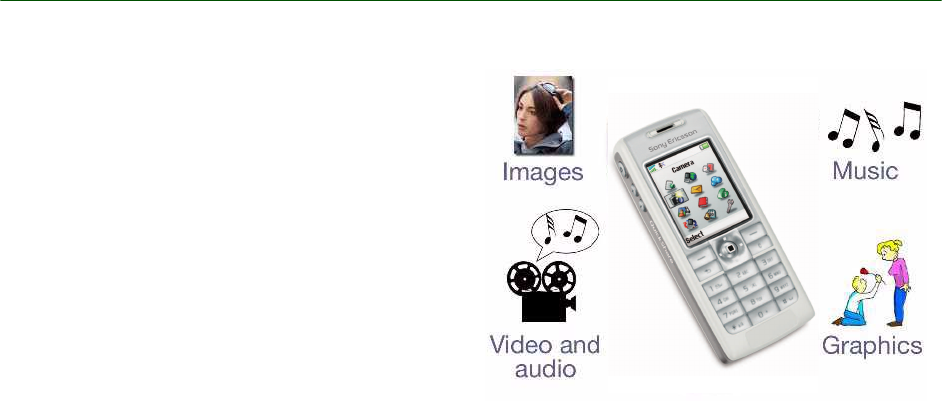
F
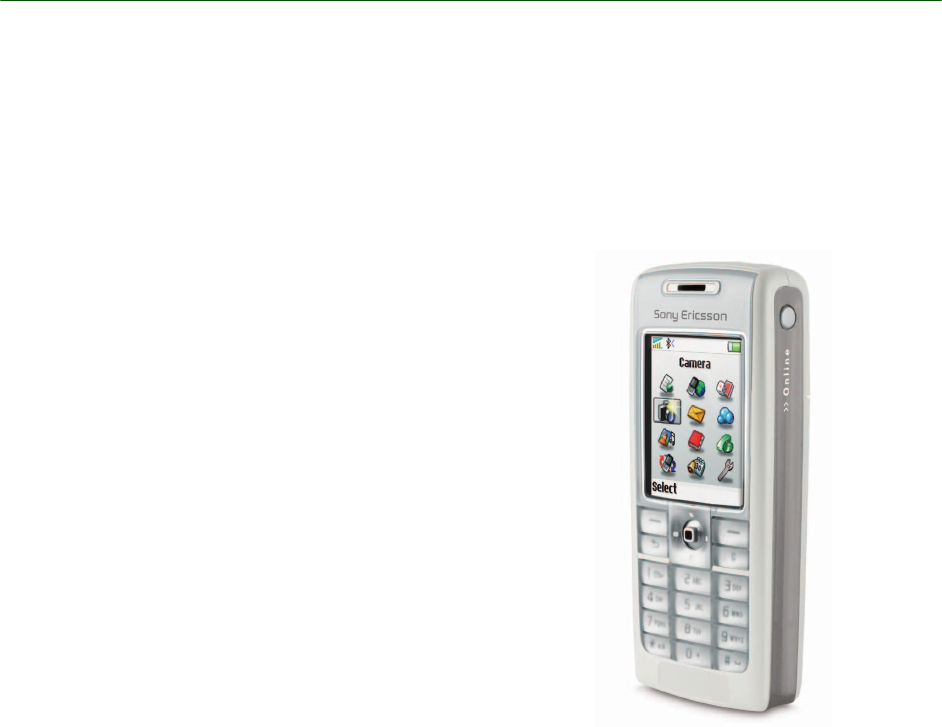
igure 1. An MMS message can contain images,
m
usic, audio and graphics.

White Paper T630/T628
13 October 2003
MMS objects
Although MMS is a direct descendant of SMS, the
difference in content is dramatic. The size of an
average SMS message is about 140 bytes, while
the maximum size of an MMS message is limited
only by the memory. That is why the key word to
describe Picture Message content is rich. Com-
plete with words, sounds and images, MMS con-
tent is endowed with the user’s ideas, feelings and
personality. An MMS message can contain one or
more of the following:
Text
As with SMS and EMS, an MMS message can con-
sist of normal text. The text can consist of up to
1000 characters. The main difference between an
EMS and MMS message is that in an MMS mes-
sage, text can be accompanied not only by simple
pixel images or melodies but by photographic
images, graphics, audio clips and in the future,
video sequences.
Templates
The T630/T628 comes with a number of MMS pre-
defined templates, for example templates for birth-
day cards, meeting requests etc.
Audio
MMS provides the ability to send and receive full
sound (iMelody and AMR) messages. Not only can
users share a favourite song or ring signal with a
friend, they can also use the mobile phone to
record sound and send it along with a message.
Because sound includes speech as well as music,
this extra dimension of an MMS message makes
for enhanced immediacy of expression and com-
munication. Rather than sending a downloaded
birthday jingle in EMS, for example, a user can
send a clip of his or her own personal rendition of
“Happy Birthday”.
Pictures and themes
By using the built-in digital camera in the T630/
T628 users can take a snapshot and immediately
send it to a recipient. The ability to send pictures is
one of the most exciting attributes of MMS, as it
allows users to share meaningful moments with My
friends, family and colleagues.
Mobile picture transmission also offers inestimable
utility in business applications, from sending on-
site pictures of a construction project to capturing
and storing an interesting design concept for later
review. Editing a picture by adding text allows
users to create their own electronic postcards, an
application that is expected to substantially cut into
the traditional postcard-sending market.
Themes (downloaded or pre-defined) can be
exchanged via MMS.
SMIL presentations
SMIL stands for Synchronized Multimedia Integra-
tion Language and is pronounced “smile”. SMIL in
the T630/T628 allows the user to the create and
transmit PowerPoint-style presentations on the
mobile device. SMIL is an advanced XML-based
protocol, and Sony Ericsson MMS supports a sub-
set of this protocol. Using a simple media editor,
users can incorporate audio and animated GIFs
along with still images, animations and text to
assemble full multimedia presentations.
The idea of SMIL is to allow the user to customize
the page timing in PowerPoint-style presentations.
The user can decide in which order the image and
text will be displayed, as well as for how long the
images and text lines are to be shown in the dis-
play
PIM communication with MMS
With MMS in the T630/T628, it is easy to send and
receive business cards, calendar entries and notes.
Business card (vCard)
With MMS in the T630/T628, the user can send a
business card.
Calendar entry (vCal)
With the vCal function the user can enclose a vCal
entry when sending a meeting request via MMS.
Notes
The T630/T628 supports vNote. Notes can be sent
via MMS.
White Paper T630/T628
14 October 2003
Benefits
Essentially enabling the mobile terminal to serve as
image processor and conveyor, Multimedia Mes-
saging accommodates the exchange of important
visual information as readily as it facilitates fun.
Business and leisure usage of MMS will be dynam-
ically merged, resulting in enhanced personal effi-
ciency for users and increased network activity for
operators. In short, MMS affords total usage for
total communication
Because MMS uses WAP as its bearer technology
and is being standardized by 3GPP, it has wide
industry support and offers full interoperability,
which is a major benefit to service providers and
end users. Ease-of-use resulting from both the
gradual steps of the messaging evolution and the
continuity of user experience gained from interop-
erability is assured.
The MMS server, through which MMS messages
are sent, supports flexible addressing (to both nor-
mal phone numbers (MSISDN) and e-mail
accounts), which makes user interface more
friendly and allows greater control for operators.
The MMS server, moreover, is responsible for the
instant delivery feature of MMS.
MMS technical features
The MMS standard, just like SMS, offers store-and-
forward transmission (instant delivery) of mes-
sages, rather than a mailbox-type model. MMS is a
person-to-person communications solution, mean-
ing that the user gets the message directly into the
mobile phone. He or she doesn’t have to call the
server to get the message downloaded to the
mobile phone. Unlike SMS, the MMS standard
uses WAP as its bearer protocol. MMS will take
advantage of the high speed data transport tech-
nologies EDGE and GPRS and support a variety of
image, video and audio formats to facilitate a com-
plete communication experience.
Architecture
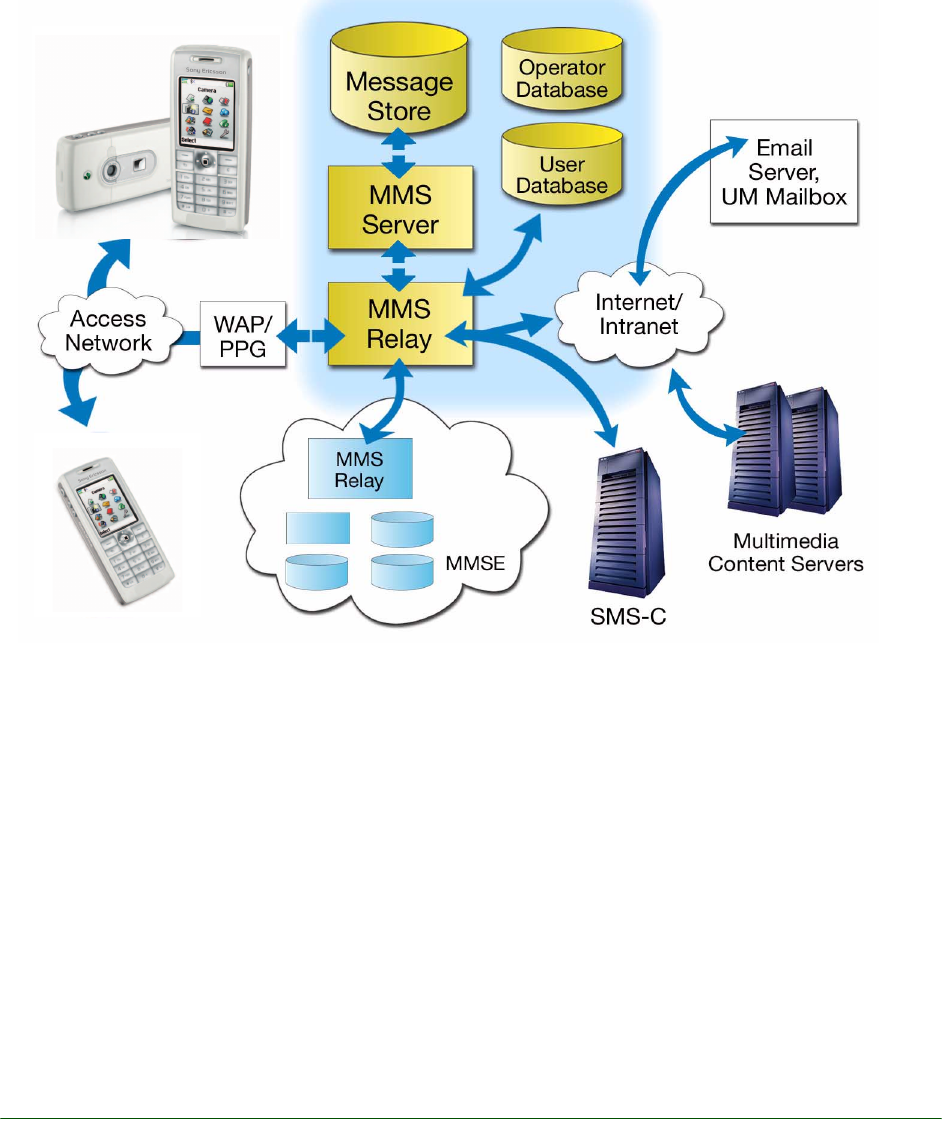
The MMS Centre (MMS-C) is comprised of the
MMS Server, the MMS Proxy-Relay and the MMS
Store. The MMS Centre is the central element of
the MMS network architecture, providing storage
and operational support, enabling instant delivery
of multimedia messages from terminal-to-terminal
and terminal-to-e-mail, and supporting flexible
addressing. The centre’s MMS Proxy-Relay inter-
acts with the application being run on the MMS-
enabled terminal to provide various messaging
services. WAP is used as bearer of an MMS mes-
sage between the MMS-C and the MMS client
(application). The WAP Gateway is used for delivery
and retrieval of messages.
White Paper T630/T628
15 October 2003
Message conversion
The MMS-C is able to perform limited message
conversion - for example, from MMS to SMS - so
that processing and air time is not wasted in send-
ing messages to mobile terminals that do not have
adequate capability to receive them. It also handles
service aspects such as store and forward, guaran-
teed delivery, subscriber preferences, operator
constraints, and billing information. The MMS-C
also vouches for high quality messaging, e.g. by
format conversion. This means that the MMS-C
recognizes which formats are supported in the
mobile phone, and adapts the MMS messages to
these formats.
OTA configuration
Users can easily get MMS into their phone. MMS
supports OTA, meaning that the user does not have
to configure the settings manually. The configura-
tion is done by the operator.
EMS (Enhanced Messaging Service)
EMS uses existing SMS infrastructure and industry
standards, keeping investments to a minimum for
operators and providing a familiar user interface
and compatibility with existing phones.
Figure 2. The architecture of MMS

White Paper T630/T628
16 October 2003
Sounds and melodies
EMS gives the user the ability to send and receive
melodies. These can be pre-defined sounds,
downloaded from the Internet, received in SMS
messages or composed by the user on the phone
keypad or a PC.
Several sounds and melodies can be inserted in
one message, and they can be combined with pic-
tures.
Pictures and animations
Phones supporting EMS include a set of pre-
defined animations. New pictures and animations
can be downloaded from the Internet or received in
SMS messages.
Pictures can be created and edited in the phone
using a built-in Picture Editor. Several pictures can
be inserted in one message, and they can be com-
bined with sounds and melodies.
Messaging using EMS
Concatenated messages
A part of the EMS standard is the support for con-
catenated messages, which means that the phone
is able to automatically combine several messages
both when creating and receiving EMS. This is use-
ful to be able to build and display messages with
rich content since the amount of information in
each SMS is limited by the SMS standards.
Compatible with SMS standards
Users will find EMS as easy to use as SMS. At the
moment 15 billion SMS messages, are sent every
month worldwide. Roughly 80% of this traffic is
user-to-user i.e. mobile phone users sending short
messages to each other using the keypad of the
phone to enter text. The remaining 20% is shared
by downloads and notifications of different kinds.
Huge business potential
Network operators can now enhance their services
and attract more customers by offering pictures,
animations, ring signals and melodies for download
at their portals. Operators can charge more per
EMS message since it contains more data. Thereby
EMS adds more value to the operators and to the
end users.
Standards
The Enhanced Messaging Service (EMS) was first
submitted to the standards committees by Erics-
son. Ericsson presented the outline structure of
EMS to the relevant ETSI/ 3GPP committees. The
major mobile phone manufacturers and most oper-
ators are actively contributing to the 3GPP stand-
ards. Hence the EMS standard has evolved and is
now stable and complete as part of the 3rd Gener-
ation Partnership Project (3GPP) technical specifi-
cation.
EMS dynamics
An EMS message can be sent to a mobile phone
that does not support EMS, or only supports part
of EMS. All the EMS elements i.e. text formatting,
pictures, animations and sounds are located in the
message header. The EMS contents will be ignored
by a receiving phone that does not support the
standard. Only the text message will be displayed
to the receiver. This is true consumer-friendly
standardization.
Examples of EMS contents and
applications
A wide range of contents, applications and serv-
ices may be developed. Below is a list of examples
and areas where messaging can be enhanced with
EMS.
User-to-user message
Messages usually originating from the keypad of a
mobile phone can include pictures, animations,
melodies, formatted text with EMS.
Voice and e-mail notifications
Notifying mobile phone users that they have new
voice or fax mail messages waiting - including
icons or melodies with EMS.
White Paper T630/T628
17 October 2003
Unified messaging
The user typically receives a short message notify-
ing them that they have a new message in their uni-
fied messaging box, with icons or formatted text
further enhancing the message.
Internet e-mail alerts
An Internet e-mail alert is provided in the form of a
short message that typically details the sender of
the e-mail, the subject field and first few words of
the e-mail message, and in this case formatted text
is excellent to identify message elements.
Ring signals
Downloading ring signals from the Internet
News & commercials
World news illustrated, sports scores and news
headlines, finance and stock market news with dia-
grams and tickers, commercial product promo-
tions, weather reports with maps, tunes from TV
commercials as ring signals.
Info & entertainment
Ring signals, e-greetings, football club logo, joke-
of-the-day illustrated by pictures or sound, horo-
scopes, movie related animation or theme song, TV
show promotions, music artist promotions, lottery
results, food and drinks pictures and recipes,
mood-related pictures.
Corporate
Flight schedules, pre-installed corporate logos,
map snippets and travel info, company branded
icons and ring signals, corporate e-mail notifica-
tions, affinity programmes where companies notify
customers of product updates etc., banks notifying
customers about new services and interest rates,
call centres providing answers to questions about a
product, vehicle positioning combining EMS with
Global Positioning System (GPS) position informa-
tion, job dispatch with delivery addresses for sales
or courier package delivery, using EMS in a retail
environment for credit card authorization, remote
monitoring of machines for service and mainte-
nance purposes.
Using WAP, WAP and SMS for download
Already today services exist on the Internet where
users can create melodies, and view icons and pic-
tures, subscribe to entertainment and informations
services. These may develop further in the future to
support access via PC over the Internet, from the
phone using WAP and even with an SMS request
interface.
White Paper T630/T628
18 October 2003
Java
The T630/T628 supports J2ME CLDC/MIDP. It is
ready to run applications written for handheld com-
puters and mobile phones.
Applications are easily downloaded directly to the
T630/T628 using the browser, or may be installed
from a connected PC. Applications such as the
currency converter can obtain the latest exchange
rates from the Mobile Internet and then make up-
to-date calculations. It is also possible to access
and download data from a company server.
T630/T628 supports JSR-135 allowing control of
the synthesizer for MIDI, I-melody and Tone
sequence playback.
Sandbox security concept
J2ME/CLDC uses a sandbox security concept
which includes a number of system components
working together to ensure that untrusted applica-
tions cannot gain access to system resource.
Selection keys
When executing a MIDP application a lower portion
of the screen is reserved for displaying selection
keys associated with the application. The appear-
ance of this soft key area at runtime depends on
which base class the displayed application is
derived from.The left soft key is for the first com-
mand in the command list and the right soft key is
for the “More” list and “Help”.
Optional download features
The browser can download JAR/JAD files from
WAP and HTML pages provided that the server
supports the actual file types. T630/T628 can also
download JAD/JAR files from ordinary WAP serv-
ers provided that they support the mime type for
each of the file types.
Supported protocols
The T630/T628 supports “Sun OTA recommended
practice for J2ME CLDC/MIDP” and ordinary MIDP
1.0 applications without extension API’s.
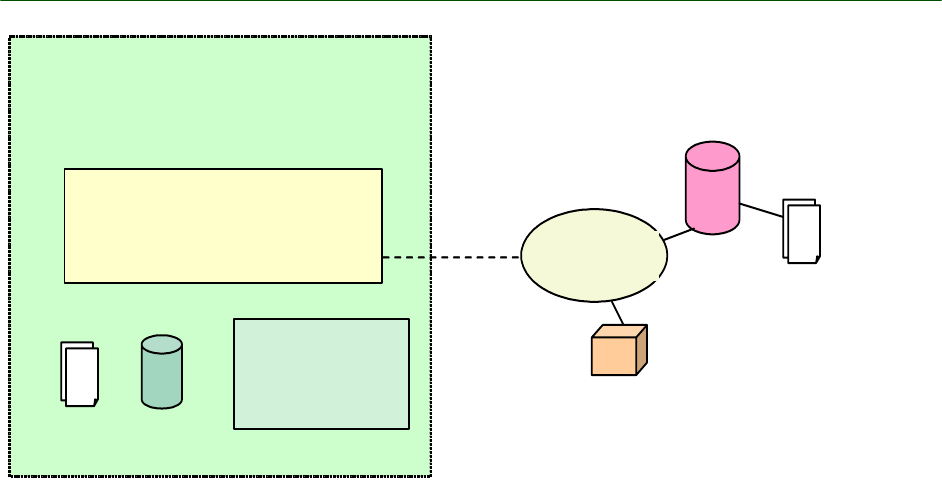
MIDP Application
running on
MIDP/CLDC/kVM
User Interface
Internet
Persistent
Storage
JAR file
resource
Services and pages
with response in
HTML format
Other networked
devices (datagram
communication)
J2ME
CLDC
Sandbox
HTTP/
Datagram
White Paper T630/T628
19 October 2003
General information
Note: For more information, visit the Sony Ericsson
Developer World.
Games
T630/T628 has four games pre-loaded and more
can be easily downloaded. The games download is
made possible by a true virtual machine. The Sony
Ericsson portal for downloading of free games for
the T630/T628 is accessible with only one key
press in the games menu. The openness of the
downloadable games solution is dedicated to pro-
vide an enhanced gaming experience.
Downloadable games can fully take advantage of
the phone´s interfaces, such as TCP/IP, SMS/MMS,
32 voices polyphonic sounds, and vibrator. The vir-
tual machine executes the downloading of games
for the optimal game experience. The user can
download an unlimited number of games as long
as the file system allows it, i e until the phone mem-
ory is full.
The downloading concept includes certification of
the games, which makes it possible to create a rev-
enue chain and favourable business opportunities
for network operators and content providers. The
virtual machine uses true sandbox technology for
the highest level of security.
mophun ™
mophun™ is a software based gaming console for
mobile terminals. It offers the user optimized
graphics and interaction access to ensure the best
possible gaming experience.
mophun™ gamelets will drive traffic and increase
revenue for operators.
mophun RTE
The mophun™ runtime environment consists of a
virtual machine that requires less than 40kb of
memory. Its small size means that it can fit inside
the instruction cache of the host CPU. It has a
Implementation
CLDC 1.0
MIDP 1.0
JSR 135
Support Over the Air Recom-
mended Practice
Permissions Net Access
Memory
Heap size (RAM) 256 KB
Max no.of applications 50
Size of applications Approximately 60 KB
File system size Up to 2 MB
Number of simultaneous
executing applications One

White Paper T630/T628
20 October 2003
native code interface that requires as little as 10
machine instructions (depending on the host sys-
tem) overhead for calls to native functions.
Gaming API
The gaming API provides all the functionality a
game requires. It provides platform independent
video access, input, sound and communication. It
also features a query interface that lets you adapt a
game to the capabilities of the device. The API
consists of 100% native code that ensures the best
possible performance.
Because different platforms have varying capabili-
ties, this gaming API has been created with differ-
entiators such as a built in sprite engine, map
engine, different color depth tiles and transparency
support etc. With this gaming API it is possible to
isolate code and data into modules that can be
loaded according to the capabilities of various plat-
forms. It is possible to have both grayscale and
color graphics resources but only load the specific
resources that are compatible with the surrounding
system. Games that do not provide multiple
resources are not a problem because the mop-
hun™ system automatically handles the conver-
sions. Indeed, future extensions even include a 3D
API.
Secure gamelets
mophun™ gamelets are executed in a secure
sandbox environment that eliminates any possibil-
ity of illegal actions. A secure layer exists between
the mophun™ application and the “real” system
interfaces. Security is further enhanced as result of
the gamelets having to be digitally signed before
execution on the mobile terminal is possible.
Gamelets are signed in the publishing process after
being screened for malicious content.
Software development kit
The mophun™ SDK is built with GNU tools using
open standards. It is non-proprietary and is offered
to developers completely free of charge. Games
are written in C/C++ or assembler and the kit was
built by game developers. A general PC can be
used to both write and test the software without
any need to access the real device. Source level
debugging is available for both the Linux and Win-
dows versions of the SDK.
Emulation profiles for the target mophun™ ena-
bled mobile terminal are included in the SDK. It
also ships with a full set of binary utilities for manip-
ulation and handling of code, data and resources.
Certification and deployment
Each game must be certified by Synergenix Inter-
active AB before it can be run on a mobile phone.
This ensures there is no offensive content, that the
game is of sufficient quality and that the gameplay
and functionality conform to settled standards.
A game file can be downloaded via WAP or cable
from an operator’s page or from any publisher’s
WAP page. If the download is supposed to be in
one session, the file size should be less that 60 000
bytes.
Game file sizes
Each game has its own directory in the file system.
A game directory in the T630/T628 can contain up
to 16 different files but together they may not
exceed an aggregate of 480 000 bytes.The maxi-
mum size of files for downloading depends on the
size of the WAP gateway. When provisioning mop-
hun games that are larger than the WAP gateway
limitation, the games may be split up in portions
and reassembled on the mobile terminal.
Functions
Send/receive via TCP/IP link Yes
Send/receive via SMS Yes
Send/receive via Bluetooth Yes
Send/receive via infrared Yes
Vibrator on/off Yes
Backlight on/off Yes
Colour support Yes
Certification control of games Yes
True sandbox technology Yes
True file support Yes
Sprite detection collision Yes
Built-in Unicode including Chinese Yes
White Paper T630/T628
21 October 2003
Getting started
In order to receive the mophun™ SDK developers
must go to http:// www.mophun.com and down-
load the free software. Developers will also benefit
from the full support package that is available at
Sony Ericsson Developer World. Everything needed
to begin developing games for Sony Ericsson
mobile phones is available at these sites.
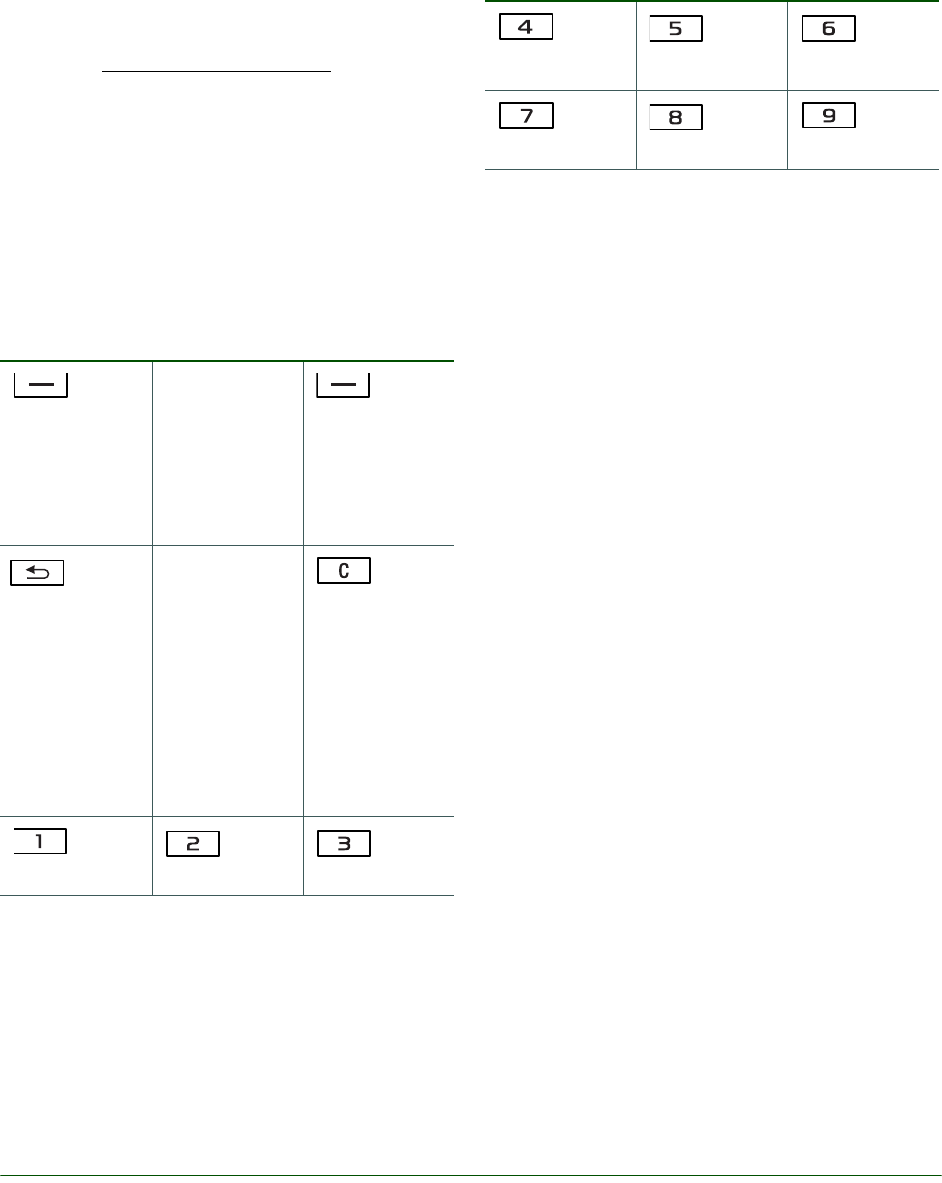
Game controls
Use the navigation key to move up, down, left or
right and to select an item, or use the keys as fol-
lows:
Other useful key functions:
• Press START to start a new game.
• Press EXIT to finish a game.
• Press MORE to delete, view game info, or view
memory status.
Note: The above text and control panel does not
apply to Java games.
Gameboard EGB-10
The Sony Ericsson Gameboard EGB-10 can be
purchased separately as an accessory. It lets you
take the maximum fun and functionality of your
phone’s gaming potential with you wherever you
go. It offers:
•8-way game pad
• 4 functional keys
• Ergonomic design
MIDI - Musical Instrument Digital Interface
The T630/T628 contains an advanced MIDI com-
poser that allows the user to compose melodies
and ring signals in polyphonic sound. A MIDI signal
or file does not contain any music. It contains
Select the
options that
might appear in
the display
immediately
above these
keys.
Press once to
go back one
level in the
menus. Press
and hold to
return to stand-
by. Exit the
game.
Delete num-
bers, letters or
an item from a
list.
left and up
up
right and up
left
select or fire
right
left and down
down
right and down
White Paper T630/T628
22 October 2003
binary data (information) of how a melody is played
and when this data reaches a synthesizer, the syn-
thesizer will translate the binary data to music,
when connected to an amplifier with speakers so
that the sound becomes audible.
The development from the iMelody format to the
MIDI format means a revolution to the sound qual-
ity. The MIDI files are small, and perfect for mobile
devices, which have limited storage capacity. MIDI
is a specification for a communications protocol
principally used to control electronic musical
instruments. MIDI is today a well known standard
used by musicians, composers and arrangers.
A fun, personalization, music application – Music DJ.
The Music DJ lets the user select pre-recorded
musical loops to compose a melody in much the
same way as modern artists create music through
more advanced systems. Music DJ enables the
user to create and edit a polyphonic ring signal
using only “blocks” containing ready-mixed
sequenced loops played by different instruments.
The blocks are kept in banks or libraries. This appli-
cation makes it possible for even semi-profession-
als to customize their mobile phones and to test
new melodies while on the move.
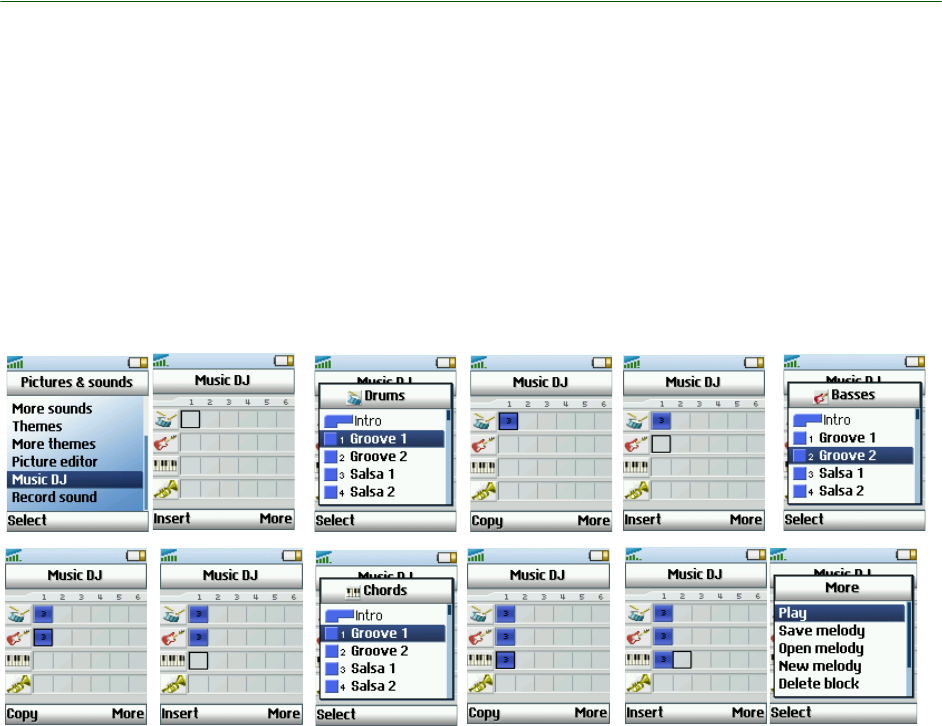
Composing
You can compose and edit melodies to use as ring
signals. A melody consists of four tracks - Drums,
Basses, Chords and Accents. A track contains a
number of music blocks. The blocks consist of pre-
arranged sounds with different characteristics. The
blocks are grouped into Intro, Verse, Chorus, and
Break, depending on where in the melody they fit
in. You compose a melody by adding music blocks
to the tracks.

White Paper T630/T628
23 October 2003
Polyphonic ring signals
Protocol
The T630/T628 has a hardware synthesizer chip,
built into the mobile phone. The software controls
the MIDI files, and makes sure they fit into the hard-
ware chip. It is possible to modify the dynamics,
and it is possible to make the sound escalate, start
quietly and grow louder.
The T630/T628 Sony Ericsson mobile phone com-
pletely supports the MIDI 1.0 detailed specification.
Please visit http://www.midi.org/ for more informa-
tion.
Excellent sound quality – 32voices
The human ear can hear sounds from approxi-
mately 20 Hz up to 20 KHz. In most GSM mobile
phones, the speech sound range is from 300 Hz to
3400 Hz, which is good enough for speaking, but
quite poor for music. The T630/T628 can handle up
to 15000 Hz, equivalent to an FM stereo radio,
which means excellent sound quality.
T630/T628 has a dedicated speaker to ensure the
best possible sound quality. This speaker is situ-
ated on the back of the phone ensuring no discom-
fort is felt if a second call is received during an
ongoing call. It also ensures louder ring signals and
removes the need for escalating rings signals.
The quality of the sound heard from the speakers
depends on many different things, for example on
the synthesizer, the amplifier, or the speakers. An
important factor for sound quality is the number of
voices. The human ear cannot separate each voice
if the number of voices increases above about 16,
then the voices merge together. But the nuances in
the music increase, and the music is experienced
as more sophisticated if the number of voices
increases. Many modern sound modules in synthe-
sizers used by musicians have 16, 24 or 32 note
polyphony. The number of voices used in the T630/
T628 is 32, which gives excellent sound quality.
Wavetable synthesis
Sony Ericsson has chosen to implement the
Wavetable synthesis, which consists of sampled
real instruments, which gives a much higher quality
than the FM-synthesis. Especially the treble is more
distinguished.
Touch correct feature
The so called “Touch correct” feature makes
dynamic compression possible. This equalizes the
amplitude of the instruments included in the MIDI
file, which greatly improves the sound quality,
especially in melodies with big differences in ampli-
tude.
Bluetooth™ wireless technology
The T630/T628 features built-in Bluetooth wireless
technology. Its short-range radio link operates in
the globally available 2.4 GHz radio frequency
band, ensuring fast and secure communications up
to a range of 10 metres.
Bluetooth wireless technology is designed to be
fully functional even in noisy radio frequency envi-
ronments. All data transfer is protected by
advanced error-correction methods, ensuring a
high level of data security. Bluetooth wireless tech-
nology facilitates instant connections, which are
maintained even when the devices are not within
line of sight. High-quality voice transmission is pro-
vided under adverse conditions, making it possible
to use a headset connection to the T630/T628 at all
times.
Ericsson was a founding partner of the Bluetooth
Special Interest Group (SIG). Bluetooth wireless
technology devices that are expected to be availa-
ble in the near future, include:
• Headsets for wireless voice transmission and
remote call control
• PCs, laptops, PDAs, palmpads for data transfer,
synchronization etc.

White Paper T630/T628
24 October 2003
•PC cards for Bluetooth wireless technology in
laptops and PDAs
• MP3 music player
• Other phones for exchanging business cards,
ring signals, playing games etc.
• Digital still and motion video cameras
• Printers, hard disks and other storage devices
• Handheld scanners for text, barcodes and
images
• Household appliances with built-in logic, as well
as games and entertainment devices
• Access points in hotel lobbies and airports for
connecting to computer networks and the Inter-
net
• Car handsfree solutions
Using Bluetooth wireless technology in the T630/T628
Key benefits include:
• True wireless connection
• Cable replacement for connecting to headsets,
computers, networks, printers and other
devices.
• The T630/T628 identifies and maintains several
devices in a pairing list.
• Radio link
• No line of sight required; the phone can remain
in a briefcase or in a pocket, as long as no solid
objects are in between (whereas infrared
requires line of sight).
• Secure and fast
• Data connection with a Bluetooth PC/laptop
turns the phone into a modem for connecting to
the Internet and for data transfer (faster than
infrared or cable).
•Synchronization
• Fast synchronization, even without line of sight,
of calendar and phone book with PC/laptop and
PDA, and quick exchange of business cards,
calendar events and melodies with other
phones and devices.
Synchronize calendar and phone book
In everyday life, access to an updated calendar and
addresses of My friends and business colleagues is
greatly appreciated. To be truly mobile, users must
be able to carry their important information with
them. Equipping mobile phones with Personal
Information Manager (PIM) programs such as cal-
endars, to-do lists and address books gives users
access to their most important data anywhere and
anytime. The information is kept updated by syn-
chronizing with the information at the office or at
home.
Hierarchical phone book with contacts
The T630/T628 features a hierarchical phone book.
For every contact, details such as name, home,
work and mobile numbers, pager number, e-mail
address and other information can be stored. The
hierarchical phone book in the T630/T628 is com-
patible with most groupware and agenda pro-
grams, such as Microsoft Outlook, enabling
smooth local synchronization of contact informa-
tion between the phone and a PC, via cable, Blue-
tooth wireless technology or IR. For remote
synchronization of Contacts and Calendar over
WAP, the T630/T628 supports SyncML.
White Paper T630/T628
25 October 2003
SyncML, an open standard for remote synchronization
in the T630/T628
SyncML – background
The SyncML Initiative Ltd. was founded by Erics-
son, IBM, Lotus, Motorola, Matsushita, Nokia,
Palm Inc., Psion and Starfish Software in February
2000. Supported by more than 60 software and
hardware developers, the SyncML Initiative Ltd.
seeks to develop and promote a globally open
standard for remote synchronization, called Syn-
cML. Unlike many other synchronization platforms,
SyncML is an open industry specification that
offers universal interoperability. Because it uses a
common language, called XML, for specifying the
messages that synchronize devices and applica-
tions, SyncML has been called the only truly future-
proof platform for enabling reliable and immediate
update of data. The benefit for the end user is that
SyncML can be used almost anywhere and in a
wide variety of devices, regardless of application or
operating system.
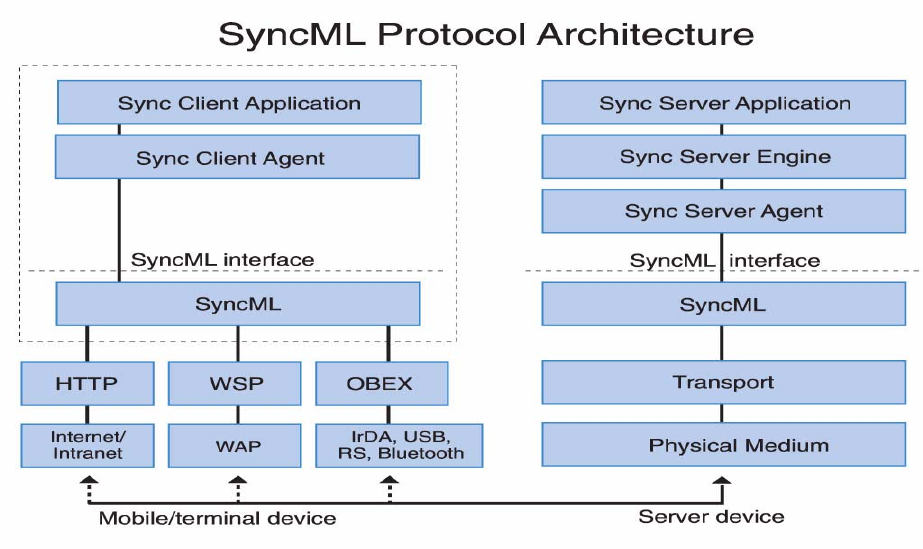
What is SyncML?
SyncML is the common language for synchronizing
all devices and applications over any network. Syn-
cML leverages Extensible Markup Language (XML),
making SyncML a truly future-proof platform. With
SyncML any personal information, such as e-mail,
calendars, to-do lists, contact information and
other relevant data, will be consistent, accessible
and up to date, no matter where the information is
stored. For example, a calendar entry made to a
mobile device on a business trip is equally available
to a secretary in a network calendar. SyncML is the
ultimate choice for remote synchronization.
In the T630/T628 SyncML supports remote syn-
chronization of the calendar and phone book,
designed for the requirements of the wireless world
SyncML is designed specifically with the wireless
world’s tight requirements in mind. SyncML mini-
mizes the use of bandwidth and can deal with the
special challenges of wireless synchronization,
such as relatively low connection reliability and
high network latency. SyncML supports synchroni-
zation over WAP, fixed networks, infrared, cable or
Bluetooth wireless technology.
In the T630/T628 SyncML enables synchronization
over WAP – an ultimate solution for travellers.
White Paper T630/T628
26 October 2003
Benefits of a common synchronization
protocol
End users
Today’s user of mobile devices probably uses a dif-
ferent synchronization product with every device.
Each technology can synchronize only a few appli-
cations, or is limited to a particular type of network
connection. This arrangement is expensive to
install, confusing to configure and operate, and
costly to administer. With SyncML, users will be
able to buy devices that synchronize with a broader
range of data.
Device manufacturers
Device manufacturers will benefit from a common
protocol that will make the device interoperable
with a broader range of applications, services, and
network and transmission technologies.
Service providers
Service providers moving into the growth area of
application hosting are particularly concerned that
a proliferation of synchronization technologies will
make it impossible to deploy and support their cus-
tomers in a cost-effective manner. To support the
range of data types and devices in use today, serv-
ice providers must install and configure multiple
server infrastructures, maintain and support that
infrastructure, and maintain compatibility and per-
formance. The alternative now available, to use a
single solution for data connectivity, involves the
risk of a tight coupling to a propriety solution. With
SyncML, they will be able to provide connectivity to
a wider selection of applications.
Application developers
Choosing to support multiple synchronization tech-
nologies enables an application to support more
types of devices and networked data, but that
choice comes at a cost. With SyncML, application
developers will be able to develop an application
that can connect to a more diverse set of devices
and network data.

White Paper T630/T628
27 October 2003
Network operators
As multiple applications that need remote synchro-
nization over WAP are developed, there will be an
automatic growth of revenue for network operators.
Local synchronization
Open standard
Synchronization is possible with almost any group-
ware or office program, since the synchronization
method complies with the open standard IrMC 1.1,
as specified by the Infrared Data Association – ref-
erence http://www.irda.org. IrMC 1.1 brings
together the following standards:
• vCard 2.1 for address book information
• vCalendar 1.0 for appointment and to-do
information
• ObEx (Object Exchange) for data exchange
Bluetooth wireless technology or
infrared
The T630/T628 synchronizes using the same proto-
col, regardless of connection type. It connects via
Bluetooth wireless technology, infrared or cable.
The cable is connected either directly to the phone
or to the desktop charger.
Automatic synchronization
When infrared or Bluetooth wireless technology is
switched on in the phone, the synchronization
process starts automatically, as soon as the phone
is within range of a compatible port on a PC or
handheld device (a suitable synchronization pro-
gram must be running on the device).
Intelligent process
A synchronization engine performs the task of syn-
chronizing. For local synchronization, the synchro-
nization engine is an application that runs on the
desktop computer. The synchronization engine
compares, updates and resolves conflicts to
ensure that the information in the phone is the
same as that in the computer.
Local synchronization software and the
T630/T628
PCs equipped with XTNDConnect For Sony Erics-
son will perform synchronization with Microsoft
Outlook. For other groupware environments (Lotus
Notes, etc.), the full version of XTNDConnect PC is
required. By using Bluetooth wireless technology,
infrared, USB or the RS 232 Cable, you can easily
perform a fast, local synchronization.
Integration between XTNDConnect For Sony Erics-
son and Microsoft Outlook provides an embedded
menu for one-key synchronization.
To enhance functionality and compatibility further,
the synchronization software can easily be
upgraded.
The number of units that can talk to each other is
unlimited. One phone can be partner with several
PCs. This ensures that information from both the
work PC and the home PC can be synchronized
with the phone. For users that have both a desktop
PC and a laptop (free version XTNDConnect PC) or
a PDA (free version XTNDConnect PC), it is an effi-
cient way to synchronize data with the phone. This
way, data can also be transferred between PCs to
keep them in sync.
If the synchronization software is upgraded to a full
version of XTNDConnect PC, one PC can be part-
nered with several different phones. This is vital if,
for example, each member in a work group has his/
her own T630/T628, and needs to synchronize with
a PC. It makes it easy, for example, to download a
common company phone directory to the phone
book in each company mobile phone. With the full
version of the synchronization software, other
phone types and handheld devices, such as PDAs
and Windows CE computers, can also be synchro-
nized.
White Paper T630/T628
28 October 2003
XTNDConnect for Sony Ericsson
This synchronization software can be downloaded
from www.SonyEricsson.com and provides a pow-
erful set of functions:
• T630/T628 phone book and calendar synchroni-
zation with Microsoft Outlook.
• An embedded synchronization in Microsoft Out-
look, providing one-key synchronization and
allowing the user to control the synchronization
process with easy-to-use settings.
• PC applications supported by XTNDConnect
For Sony Ericsson:
• Microsoft Outlook 97, 98, 2000
• Platforms for using XTNDConnect For Sony
Ericsson:
• Windows 98, Me (Millennium Edition), Windows
NT 4.0 and 2000.
• Pentium II recommended
• 64 MB RAM recommended (minimum 32 MB)
• Other requirements:
• 20 MB free hard disk space
•Bluetooth wireless technology, infrared, or cable
connection
• Support is handled by Sony Ericsson.
XTNDConnect PC
All users of the T630/T628 can easily upgrade to
the full version of the synchronization software. A
number of features and supported applications will
then be added, including XTNDConnect Phone
Viewer.
• Phone book and calendar synchronization for
the T630/T628.
• XTNDConnect Phone Viewer for easy data
entry. All data can be created, viewed and
edited on a PC.
• PC applications supported by XTNDConnect
PC (full upgraded version):
• Microsoft Outlook 97, 98, 2000
• Lotus Notes 4.5, 4.6, R5
• Lotus Organizer 4.1, 5.0, 97, 97 GS, 6.0
• Symantec ACT! 3.05, 4.0, 2000
• NetManage Ecco Pro 4.0
• GoldMine 3.0, 4.0 (Standard-
Edition)
• Platforms for using XTNDConnect PC:
• Windows 98, Me (Millennium Edition), Windows
NT 4.0, 2000 and XP.
• Pentium II recommended
• 64 MB RAM recommended (minimum 32 MB)
• Other requirements:
• 20 MB free hard disk space
•Bluetooth wireless technology, infrared, or cable
connection
• An embedded synchronization in Microsoft Out-
look, providing one-key synchronization and
allowing the user to control the synchronization
process with easy-to-use settings.
• Handheld devices supported include the T630/
T628, palm-sized and handheld devices using
Windows CE and PalmOS/ Casio Personal
Organizers.
WAP services
The T630/T628 has a WAP browser, supporting
WAP 2.0 (WML 1.3). WAP 2.0 optimizes usage of
higher bandwidths and packet-based connections
of wireless networks.
Using the WAP browser
The WAP browser in the T630/T628 is compliant
with WAP 2.0 and includes WTLS class 3 as well as
mechanisms for digital signatures. It supports WML
and XHTML. The WAP browser in the T630/T628 is
also designed to access information such as time-
tables, share prices, exchange rates, Internet bank-
ing and other interactive services.
The built-in WAP browser in the T630/T628 gives
the user portable, fast and secure access to a wide
variety of services, including personalized services,
with new opportunities for business, individuals
and service providers.
White Paper T630/T628
29 October 2003
Direct Links
There are direct links in the menu system for easy
download of e.g. pictures and melodies from WAP
sites.
Push services
Businesses and service providers can “push” con-
tent or service indications to work groups and/or
customers. Examples of pushed content would be
mail alerts, messaging, news, stock quotes, con-
tacts, meeting requests, etc.
Support of XHTML
The WAP browser supports the markup languages
of WAP 2.0. It supports WAP 1.2.1 + XHTML
Mobile Profile 1.0 + WCSS (XHTML-MP), XHTML
Basic, a subset of XHTML-MP, IHTML, WAP Cas-
cading Style Sheets (WCSS), WML version 1.3 and
WMLScript. The subsets of the WAP standard
XHTML are supported by all major WAP browsers.
WAP pages authored in XHTML and WCSS can be
displayed in standard PC browsers such as IE and
Netscape. WAP pages authored in WML can be
displayed in WAP browsers only. It is preferable,
therefore, that developers use XHTML and CSS to
develop content as these are pure WAP standards.
WML and WMLScript are for backwards compati-
bility.
All of the basic XHTML and IHTML features are
supported, including text, images, links, check-
boxes, radio buttons, text areas, headings, hori-
zontal rules and lists. For IHTML also blink and
marquee, but not tables.
Support for cookies
T630/T628 has support for cookies (client based),
an application used by WAP sites to store site-spe-
cific information in the browser between visits to
the site. Cookies give the site owner a possibility to
see when a person has visited their site. They also
save the user from having to enter the same infor-
mation (e.g. the password or user ID) more than
once. Cookies are often used by e-commerce sites
(shopping carts and wish lists).
Style sheets
T630/T628 supports style sheets offering content
developers more control over the way their WAP
pages are displayed.
Sending bookmarks
WAP 2.0 enables the sending of bookmarks via
infrared as well as via SMS.
Provide settings
Using SMS messages, configuration settings can
be sent over the air, OTA, so that the user does not
need to configure the WAP access settings manu-
ally. WAP settings may also be customized by the
operator.
Adapt to phone type
The User Agent Profile function allows WAP con-
tent to be automatically optimized for the T630/
T628, ensuring the intended user experience.
Several bearer types
The T630/T628 accesses the WAP over a standard
GSM Data connection as well as over a GPRS con-
nection (network-dependent services.)
Bandwidth efficiency
Unlike traditional Internet services, WAP services
are relayed to wireless devices as binary encoded
data, maximizing bandwidth efficiency. A GPRS
connection further increases efficiency.
Easy create for WAP
Creating a WAP service is no harder than creating
an Internet/intranet service, as WML and WMLS-
cript are based on well-known Internet languages
such as HTML and JavaScript.
Using standard tools
Service creators can use standard tools such as
ASP (Active Server Page) or CGI (Common Gate-
way Interface) to generate content dynamically.
Services can be created once and then made
accessible on a broad range of wireless networks.
Maintain customer base
Existing services can be adapted to WAP. The nec-
essary binary encoding is handled by a WAP Gate-
way, allowing HTML-based services to be viewed
on the WAP browser of the T630/T628. An XHTML
page can be viewed in both the WAP browser and
in any standard Web (HTML) browser.

White Paper T630/T628
30 October 2003
Improve productivity
A business can use a WAP gateway to provide a
secure connection to its corporate network,
improving internal communication flow by making
information available to mobile as well as office
users.
The WAP profiles
A WAP profile holds network settings and user
identification, allowing the user to switch easily
between corporate services and WAP services on
the Internet, simply by switching WAP profile.
The T630/T628 has dynamic WAP profile handling,
which means that the user can add, edit and delete
WAP profiles. There are up to 5 WAP profiles.
During WAP browsing, the options button gives the
user immediate access to a dynamic option menu
for WAP services, similar to a mouse right-click in
PC programs.
Bearer type characteristics
The T630/T628 accesses WAP services over IP. IP
can be provided either over GSM Data, HSCSD or
GPRS, depending on network services.
Typical differences which distinguish the bearer
types are listed below.
High Speed Data
High Speed Data (HSCSD) increases speeds for
circuit switched data by allowing the phone to use
a coding scheme with a high capacity, and to use
two time slots for receiving data. The download
speed is increased to up to 28,800 bps. The speed
for sending data is limited to 14,400 bps. The data
rate can be increased several times by the use of
rate adaption, interworking with ISDN. This also
provides additional features, such as quick call set-
up capability.
GPRS access
The connection is maintained “constantly”, with
data transmitted in packets, and transmission
capacity being used by the application in use on an
as-needed basis.
Higher transmission speed than with GSM Data or
SMS access.
Pricing of GPRS can be dependent on the actual
use of bandwidth, which means the user is charged
for the volume of data transmitted, rather than the
duration of the connection.
When transmitting large amounts of data, band-
width can be increased automatically to allow
faster transmission speed.
Ideal for complex pull services, browsing, data
transfer, provisioning, pager services, messaging
services, info services, push initiations.
GSM data access
Circuit connection of data calls, which means that
the phone is connected during the entire WAP ses-
sion.
Pricing is comparable to that of data calls in the
network.
Gateway characteristics
A WAP Gateway provides Internet/intranet as well
as WAP services to the mobile browser. A Gateway
is identified by an IP number, depending on access
type.
End-to-end gateway navigation
The WAP 2.0 supports E2E (End-to-End) Gateway
navigation, making it possible for example for a
bank to redirect its clients from the Internet gate-
way to its own gateway.

White Paper T630/T628
31 October 2003
Security using the WAP
For certain WAP services, such as banking serv-
ices, a secure connection between the phone and
WAP gateway is necessary. An icon in the display
of the T630/T628 indicates when a secure connec-
tion is in use.
The T630/T628 is based on the WAP 2.0 (WML 1.3)
specification suite, in which security functionality is
specified by a technology called Wireless Transport
Layer Security (WTLS). The WAP protocols for han-
dling connection, transport and security are struc-
tured in layers, with security handled by the WTLS
layer, operating above the transport protocol layer.
WTLS classes define the levels of security for a
WTLS connection:
• WTLS class 1 – encryption with no authentica-
tion.
• WTLS class 2 – encryption with server authenti-
cation.
• WTLS class 3 – encryption with both server and
client authentication.
Server authentication requires a server certificate
stored at the server side and a trusted certificate
stored at the client side.
Client authentication requires a client certificate
stored at the client side and a trusted certificate
stored at the server side.
A Wireless Identity Module (WIM) can contain both
trusted and client certificates, private keys and
algorithms needed for WTLS handshaking, encryp-
tion/decryption and signature generation. The WIM
module can be placed on a SIM card and is then
referred to as a SWIM card.
Certificates
To use secure connections, the user needs to have
certificates stored in the phone. There are two
types of certificates:
Trusted certificate
A certificate that guarantees that a WAP site is gen-
uine. If the phone has a stored certificate of a cer-
tain type, it means that the user can trust all WAP
gateways that use the certificate. Trusted certifi-
cates can be pre-installed in the phone, in the
SWIM or they can be downloaded from the trusted
supplier’s WAP page.
Client certificate
A personal certificate that verifies the user’s iden-
tity. A bank that the user has a contract with may
issue this kind of certificate. Client certificates can
be pre-installed in the SWIM card.
WIM locks (PIN codes)
There are two types of WAP security locks (PIN
codes) for a SWIM, which protect the subscription
from unauthorized use. The PIN codes should typi-
cally be provided by the supplier of the SWIM.
Access lock
An access lock protects the data in the WIM. The
user is asked to enter the PIN code the first time
the SWIM card is accessed when establishing a
connection.
Signature lock
A signature lock is used for confirming transac-
tions, much like a digital signature.
In the T630/T628, the user can check which trans-
actions have been made with the phone when
browsing. Each time the user confirms a transac-
tion with a signature lock code, a contract is stored
in the phone. The contract contains details about
the transaction.
Configuration of WAP settings
An easy way to perform WAP configuration in the
T630/T628 is to use the step-by-step WAP config-
urator available on http://www.SonyEricsson.com.
The configurator utilizes OTA provisioning.
Manual configuration is done using the menu sys-
tem in the phone. This is described in the User’s
guide.

White Paper T630/T628
32 October 2003
Over-the-air provisioning
of WAP settings
To simplify the configuration of WAP settings in the
T630/T628, all settings can be sent to the phone as
an SMS message. This makes it easy for an opera-
tor, a service provider or a company to distribute
settings for Internet/intranet, and WAP, without the
user having to configure the phone manually. This
also makes it easy to upgrade services, as no man-
ual configuration is required.
• The OTA configuration message is distributed
via SMS point-to-point.
• The setup information is a binary encoded XML
message (WBXML). To receive information
about OTA specifications, please contact your
local Sony Ericsson representative for con-
sumer products. A configurator that utilizes OTA
provisioning can be tested on www.SonyErics-
son.com
• The user is alerted about new settings when the
ongoing browsing session ends. Settings are
not changed during an ongoing browsing ses-
sion.
• User interaction is limited to receiving and
accepting/rejecting the configuration message,
and selecting which WAP profile to allocate the
settings to.
• Security can be handled using a keyword identi-
fier displayed on the screen as a shared secret
between the SMS sender and recipient. There-
fore the user can verify that the configuration
message is authentic.
Push services
Examples of WAP services that can be pushed
include:
• Notification of new e-mail, voice mail, etc.
• News, sports results, weather forecasts, finan-
cial information (stock quotes etc.).
• Personal Information Manager (PIM) - delivery
of contacts, meeting requests etc.
• Smart card e-cash.
• Interactive games.
In the , the user selects whether to allow push mes-
sages or not. There are two different forms of Push
services:
Service Indication (SI)
An SI service sends to the browser a text message
with a URL of a WAP page. If the user decides to
load the URL, normal WAP browsing commences.
When an SI is received by the T630/T628, the user
can load it immediately, postpone it or delete it.
Received SIs are stored in the Push Inbox and can
be viewed and loaded at a later time. The Push
Inbox displays a list containing the first part of each
received message. The list is sorted by action
attribute (high/medium/low) or reception time of the
message.
Service Loading (SL)
An SL service sends and displays a WAP page if
accepted by the user. If the SL is not accepted, it is
loaded and stored in the cache for later use. The
user can start the browser and load the page from
the cache manually.
cHTML support
Compact HTML or cHTML is defined as a subset of
HTML 2.0, HTML 3.2 and HTML 4.0 specifications.
This means that Compact HTML inherits its flexibil-
ity and portability from standard HTML. T630/T628
supports cHTML to facilitate development of I -
mode applications for the handset. I-mode is a
Japanese service for transferring packet-based
data to handheld devices and is owned by NTT
DoCoMo. cHTML does not use WAP as a transmis-
sion method.

White Paper T630/T628
33 October 2003
Mobile Internet
The mobile Internet offers much more than mobile
access to the Internet. It opens up a whole new
range of situation-based services that give the user
access to personalized communications, informa-
tion and entertainment, anytime, anywhere.
Data connections
In order to browse via WAP or use an Internet con-
nection, the user must have a data communication
connection configured in the phone. This connec-
tion contains specific settings and parameters to
connect to an appropriate server. Several data con-
nections can be saved in the T630/T628. To make it
easier for the user, data connections can be pro-
vided by the operator via OTA provisioning.
Advantages of data connections include:
• Once the data connections are defined and
named, the user does not have to enter the set-
tings for the connection again.
• Data connections can be re-used at any time.
• Individual data settings for working with WAP, e-
mail or the Internet can be stored and activated
as needed.
• Data connections can be used for both GSM
Data and GPRS connection settings.
• Bearer type for WAP and corresponding bearer-
specific parameters may be selected.
• Data connections contain all the necessary set-
tings for the Internet access point, including
modem pool phone number or IP address, user
ID and password.
Mobile positioning
The geographic location of mobile subscribers can
be used to provide them with related information
and a variety of services. Sony Ericsson’s Mobile
Positioning System (MPS) gives operators a fast
and cost-effective way to establish and roll out
location-based services.
For users of the T630/T628, the integration of
mobile positioning with WAP services means that a
complete range of service and information tools is
available.
More information regarding possibilities with and
technologies for mobile positioning is available at
http://www.SonyEricsson.com/mps.
General Packet Radio Services
The introduction of GPRS (General Packet Radio
Services) is one of the key steps in the evolution of
today’s GSM networks for enhancing the capabili-
ties of data communication. Data traffic is increas-
ing enormously (over both wired and wireless
networks), with the growth in demand for Internet
access and services paralleling that for mobile
communications. Users want access to the Internet
while they are away from their offices and homes,
and surveys have found that the vast majority of
business professionals want the ability to send and
receive e-mail, browse the WAP and transmit text

White Paper T630/T628
34 October 2003
and graphics on a portable device. That is why the
main applications driving Mobile Internet develop-
ment are e-mail clients and WAP browsers.
The demand for high-speed Internet access will be
the key driver for coming generations of wireless
services, and GPRS can deliver the necessary
speed. GPRS allows innovative services to be cre-
ated, enabling new and previously inaccessible
market segments to be addressed and increasing
customer loyalty.
GPRS applications can be developed as both hori-
zontal and vertical. Vertical applications are spe-
cific, including those for operations such as
reaching police and emergency, taxi, delivery or
automated services (vending machines, supervi-
sion, vehicle tracking). Horizontal applications are
more generic and include those for Internet access,
e-mail, messaging, e-commerce and entertain-
ment.
GPRS is able to take advantage of the global cov-
erage of existing GSM networks. Applications
developed for GPRS can be deployed on a large
scale and can reap the associated benefits. GPRS
also provides a secure medium for connections to
private networks, banking and financial services.
With GPRS, the T630/T628 sends data in “pack-
ets” at a very high speed. The T630/T628 remains
connected to the network at all times, using trans-
mission capacity only when data is sent or
received.
Using GPRS in the T630/T628
Instead of occupying an entire voice channel for
the duration of a data session, the T630/T628
sends/receives data in small packets, as needed,
much like IP on the Internet. Because of this, the
T630/T628 maintains a constant online connection,
its data transmission abilities summoned by the
application in use on an as-needed basis.
The GPRS specification includes four coding
schemes – CS1, CS2, CS3 and CS4 – that allow
data speeds of 9,050 bps, 13,400 bps, 15,600 bps
and 21,400 bps respectively. The T630/T628 works
with all four coding schemes, but data speed will
naturally vary according to network configuration.
At the moment, CS-3 and CS-4 are not supported
in any live network, i.e present speed is limited to
53,600 bps.
The GSM system limits the ability to use all eight
time slots, so the T630/T628 uses up to four time
slots for receiving data, and one slot for transmit-
ting. This means the speed for receiving data is up
to 85,600 bps and up to 21,400 bps for sending
data.
Using GPRS with the T630/T628 has several
advantages, for example:
• Constant connection
• Keep an open connection to an e-mail system
or the company network, staying online to
receive and send messages at all times. All con-
nection settings can be managed by using the
data connections feature.
• High speed
• Gain access automatically to increased band-
width when downloading large files, images etc.
• Cost efficient
• Use transmission capacity only when needed,
thus reducing costs.
• WAP over GPRS
• Access the Internet via WAP at high speed and
with a constant connection.
• E-mail over GPRS
• Remain connected to an e-mail system while
reading and preparing messages, (which are
sent at a high speed).
• Data communication
• Transfer data and access the Internet or an
intranet with a PC, PDA or handheld device
connected via Bluetooth wireless technology,
infrared or cable.
• Data and voice
• Maintain a data connection, for example, a con-
stant connection to an e-mail system when con-
ducting a voice call.
• Provide settings
• Receive GPRS configuration settings from the
provider over the air, OTA, making manual con-
figuration unnecessary.
• User controlled settings

White Paper T630/T628
35 October 2003
• Take advantage of full user control in the data
connections menu, establishing multiple
descriptions and accessing advanced settings
for GPRS.
Interruption of GPRS data account
When the user is browsing with a T630/T628 the
GPRS connection will be automatically discon-
nected when an incoming call is received. This is
the default behaviour. However, it is possible for
operators to customize the phone in such a way as
to ensure that the user is asked if they wish to
remain connected when an incoming call is
received.
Modem and AT commands
The T630/T628 contains a complete GSM/GPRS
modem. This provides data and e-mail communi-
cation, as well as Internet/intranet access, for a
connected PC, PDA or handheld device. Once the
PC/PDA is connected to the phone using a cable,
Bluetooth wireless technology or infrared, and the
appropriate software is installed, the modem in the
phone works in a similar way to a PC Card modem,
or an external modem.
In the T630/T628, AT commands are used for:
• controlling the data communication between
the PC and the remote service
• configuring and requesting settings and behav-
iours in the phone, from a connected PC or PDA
GSM data communication
The built-in data capability turns the phone into a
modem when connected to a PC/PDA. The T630/
T628 offers the user data connection anytime, any-
where, unmatched by fixed telephone networks.
Each GSM channel is divided into eight repeating
time slots. A normal GSM voice or data call is cir-
cuit switched, and only one time slot is used for
each call. The data speed is therefore limited to
9,600 bps.
High Speed Data gives a faster speed
High Speed Data (HSCSD) increases speeds for
circuit switched data by allowing the phone to use
a coding scheme with a high capacity, and to use
two time slots for receiving data. The download
speed is increased to up to 28,800 bps. The speed
for sending data is limited to 14,400 bps. The data
rate can be increased several times by the use of
rate adaption, interworking with ISDN. This also
provides additional features, such as quick call set-
up capability.
GPRS enables constant connection and
high speed
With GPRS, the connection is maintained “con-
stantly”, and data is transmitted in packets. Pricing
of GPRS can be dependent on the actual use of
bandwidth, which means very low cost when no
data is sent or received, while the phone remains
connected. When transmitting large amounts of
data, bandwidth can be increased automatically to
allow faster transmission speed, up to 85,600 bps
download speed.

White Paper T630/T628
36 October 2003
AT commands support
This section outlines the AT commands supported
by the T630/T628. The information here can be of
use for advanced users, to indicate the possibilities
they have to:
• develop new communications software
• add the T630/T628 to an application’s list of
compatible modems
• adjust the settings of their mobile telephone and
modem
The modem in the T630/T628 supports the V.25ter
command set, which is the standard communica-
tion set used by modems.
The T630/T628 is compatible with industry de facto
extensions, ETSI 07.05, 07.07 and 07.10.
Overview of AT command functions
AT commands are used to configure the mobile tel-
ephone, to request information about the current
configuration or operational status of the mobile
phone, and to test availability and request the
range of valid parameters, when applicable, for an
AT command.
The built-in modem can be set to any one of three
modes of operation. These are:
Off-line command mode
The command mode for entry of AT commands,
when the device is first turned on.
On-line data mode
Allows “normal” operation of the built-in modem,
for exchanging data or facsimiles with a remote
modem.
On-line command mode
For sending AT commands to the built-in modem
while remaining connected to a remote modem.
The AT commands are grouped as follows:
• Control and Identification
• Call Control
• Interface Commands
• Data Compression
•Mode Management
• Audio Control
• Accessory Menus
• Accessory Authentication
• Voice Call Control
• Accessory Identification
• GSM DTE-DCE Interface Commands
• GSM Call Control
•GSM Data
• GSM High Speed Circuit Switched Data
• GSM Network Services
• GSM USSD
• GSM Facility Lock
• GSM Mobile Equipment, Control and Status
• GSM Mobile Equipment Error Control
• GSM SMS and PDU Mode
•GSM GPRS
• GSM Phonebook
• GSM Clock, Date and Alarm Handling
• GSM Subscriber Identification
• Ericsson Specific AT Commands for GSM
• MMI Settings
•Voice Control
•OBEX
• WAP Browser
Online Developer Resources
AT the Sony Ericsson Developer World, developers
will find all documentation and tools such as White
Papers, Developers Guidelines, SDK’s and API’s
etc. The developer web site also contains discus-
sion forums monitored by our Sony Ericsson Devel-
oper Support team, a searcheable Knowledge
Base of support queries and solutions, Tips &
Tricks, example code, etc. To stay up to date on
development issues, register and subscribe to the
monthly Sony Ericsson Developer Newsletter.

White Paper T630/T628
37 October 2003
Sony Ericsson Developer Support
Sony Ericsson offers developers professional tech-
nical support services. The service can be pur-
chased from the developer web portal, as part of
the Sony Ericsson Core and Core+ membership
packages or as single support queries. There are
two levels of support included in the member-
ships:.
The Basic E-mail Developer Support is an annual
support service included in the Core membership
that provides developers with all the basics to suc-
cessfully develop world-class applications for Sony
Ericsson products. Developers get access to Sony
Ericsson developer support engineers via e-mail
with same-day response, five technical support
incidents as well as the ability to purchase more.
The Priority E-mail Developer Support is an
annual support service included in the Core+ mem-
bership that equips professional developers with
everything they need to successfully develop
world-class applications for Sony Ericsson prod-
ucts. Developers get priority access to Sony Erics-
son developer support engineers via e-mail with
fast response times and up to 50 technical support
incidents.
Infrared transceiver
Infrared communication creates a data link
between two communications devices through an
infrared beam of light. On the T630/T628, this link
is used to connect with desktop computers, PDAs,
Sony Ericsson handheld computers, laptop PCs,
other phones and other hardware supporting the
standard. The Infrared Data Association (IrDA) has
set the hardware and software standards that form
the infrared communication links. The T630/T628
complies with the IrMC 1.1 specification, which
defines how mobile telephony and communication
devices can exchange information. In the T630/
T628, the IrMC 1.1 specification is also used for
communication via a cable.
Key benefits of using the T630/T628 with its built-in
infrared transceiver:
• True wireless communication
• Low power consumption
• Secure data transmission with the IrDA DATA
standard
• Ability to send and receive e-mail and data on
the connected PC/PDA
• Ability to connect to the Internet or intranet/LAN
from the connected PC/PDA
• Ability to manage the phone book from a PC
• Exchange of business cards and calendar
events with vCard/vCalendar compatible
devices
• Exchange of ring signals between compatible
phones
Connection via infrared
IrDA is a point-to-point communication link
between two infrared ports. The infrared beam has
to be directed towards the target infrared port and
as long as the two infrared ports are within sight
and range, the devices exchange data. For optimal
performance, place the T630/T628 within 20cm
from the infrared port on the PC/PDA, or other
phone. An advantage of the necessary proximity of
devices is reduced risk of transmitting data to other
nearby devices. An infrared link is a serial connec-
tion, which means that data bits are sent one after
another in a long stream. The IrDA–SIR Data Link
Standard is a protocol that makes transmission of
data faultless.
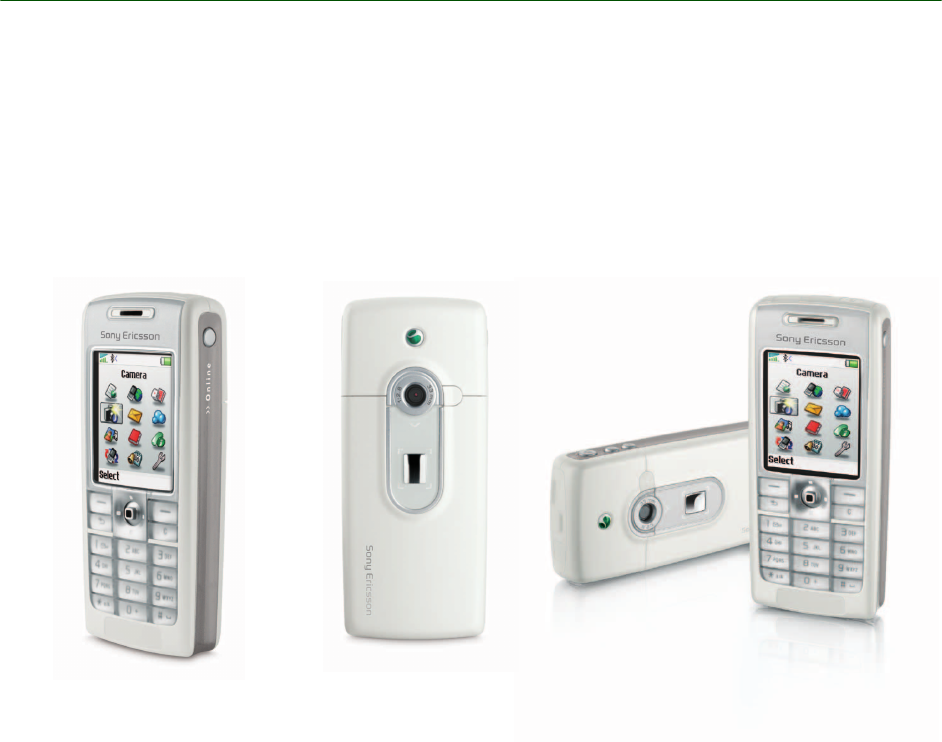
White Paper T630/T628
38 October 2003
Connection via cable
The infrared connection is not always the best
solution when connecting to a PC/PDA. Indeed, it
is not always even possible. The DRS-11 cable and
the USB cable DCU-11 provides the same connec-
tivity between the phone and another unit.
The DRS-11 cable supports a subset of the signals
in the RS-232 standard.
Chinese versions
These mobile phones come in two different
Chinese versions, the T630 for Hong Kong,
Singapore, Malaysia and Taiwan, and the T628 for
mainland China. The only difference between these
Chinese versions is that they support different
languages and input methods.
Both versions contain a Lunar calendar.
Both versions also support the predictive text input
method T9™ Text Input. Predictive text input
makes it fast and easy to write text messages. It
works by searching a word database to anticipate
which word you are writing. You only have to press
each key once, even if the letter you want is not the
first letter on the key.
White Paper T630/T628
39 October 2003
Facts and figures
*Subscription and/or network-dependent
A Antenna connector, external for HF kits Yes
B Background light Yes
Background pictures, pre-defined Yes
Background pictures, downloadable Yes, only limited by memory
Bluetooth wireless technology support Yes, built-in
Bookmarks (URL memory) Yes, (25)
Built-in antenna Yes
Business card exchange Yes
C Call functions
Call counter Yes, outgoing and total (not incoming)
Call barring* Yes
Call divert* Yes
Call hold* Yes
Call list (last dialled, answered and missed
calls) Yes, 30 entries

White Paper T630/T628
40 October 2003
Call screening* Yes
Call time/call cost (a.k.a Advice of Charge,
Information/Charging)* Yes
Call transfer* Yes
Calling card service Yes
Calling Line Identification (CLI) Yes. Either as the number of the caller, or
as a picture, icon or personal ring signal
assigned to the number of the caller.
Conference calls* Yes
Camera Yes.
Chat Yes, possible through My friends applica-
tion
Clock Yes, with automatic Time Zone*
Closed User Groups (CUG)* Yes
Colour display Yes, 65536 colours, 128x160 pixels
Connected Line Identity Presentation (COLP) Yes
Contacts Yes
Copyright protection Yes, possible with copyright protection
via EMS, MMS, IR and Bluetooth.
CSD, Circuit Switched Data* Yes
DDate Yes
Display light Yes
E EDGE (enhanced Data rates for Global Evolu-
tion)* No
E-mail address storage Yes
E-mail client Yes, supporting IMAP4, POP3, SMTP.
EMS (Enhanced Messaging Service)* Yes, with 30 pre-defined pictures, 15 pre-
defined animations and 4 melodies.
External antenna connector Yes
F File system Yes. At the purchase of the T630/T628
phone, there is up to 2.0 Mb of memory
space for own objects such as pictures,
sounds and themes. Customized kits
may vary.
Fixed Dialling Numbers (FDN)* Yes

White Paper T630/T628
41 October 2003
G Games Yes, 4 pre-loaded and more games avail-
able for download at Sony Ericsson
Mobile Internet.
GPRS (General Packet Radio Services)* Yes, up to 85,6 kbps (multislot class 8,
4+1 time slots)
H High Speed Data (HSCSD)* Yes, multislot class 2
I Image browser Yes. Gives access to pictures stored in
the phone.
Imaging support Yes
Infrared port Yes
Input methods T9 Text Input, multitap alphabetic (GSM
standard)
JJava Yes
K Keypad lock Yes
L Languages 45
M Melody composer Yes, Music DJ
Memory check Yes, dynamic memory allocation: approx.
2.0 Mb
MMS (Multimedia Messaging Service) Yes
Modem (data) Yes, built-in (max. data rate 108,800 bit/
s.)
My friends Yes
N Navigation key Yes, five-way
Notes Yes, up to 10 – depending on size.
P Personal management
Calculator Yes
Calendar Yes
Alarm clock with snooze function Yes
Stopwatch Yes
Timer Yes
Code memo Yes
Organizer Yes
Phone book
Capacity 510 numbers in phone + SIM

White Paper T630/T628
42 October 2003
Maximum number of ADN read from the SIM 255
Maximum number of FDN read from the SIM 55
Phone book user groups Yes, 10
Phone lock Yes
Pictures
Total storage capacity Limited by the memory
Number of pre-loaded pictures TBD
Possibility to download Yes, storage capacity limited by memory
Possibility to create Yes, storage capacity limited by memory
Picture editor Yes, stand-alone picture editor facility.
Here the user can create new and edit
existing pictures (WBMP).
Picture phone book Yes
Pictures, exchange Yes, via EMS, MMS, infrared and Blue-
tooth wireless technology
Polyphonic ring signals Yes, 32 voice
Predictive text input Yes
Profiles Yes, 7
QQuickShareTM Yes
R Re-dialling, automatic Yes
Ring signals
Total storage capacity Limited by the memory
Preloaded 24
Possibility to download Yes, storage capacity only limited by the
memory
Possibility to compose Yes, storage capacity only limited by the
memory
Exchange Yes, via EMS, MMS, infrared and Blue-
tooth wireless technology
S Screen saver Yes
Silent mode Yes
Silent mode: activation Long “C”
SIM relative features
SIM voltage 3V and 5V

White Paper T630/T628
43 October 2003
Number of networks that the handset can
manage on the SIM card 60
SDN support Yes, 15. Located in Phonebook menu/
Special numbers/ Service numbers
SIM Application Toolkit* Yes
SIM card copy Yes
SIM card lock Yes (support of GID 1 and GID 2)
Sleep mode Yes
SMS (Short Message Service)* Yes
SMS, long messages (a.k.a. concatenated
SMS)* Yes, up to 10 messages of 160 charac-
ters each.
SMS Cell Broadcast* Yes
SMS counter Yes
SMS templates Yes, up to 10 templates of 30 characters
each
Sony Top 10 Yes
Sound browser Yes. Gives the user access to sounds
stored in the phone.
Sound handling Yes (iMelody, AMR and MIDI)
Speaker phone No
Speech coding Enhanced, Full and Half Rate. AMR sup-
ported where available.
Speed dialling Yes
Start-up/Shutdown shows Yes
Status menu Yes
Swatch Internet Time No
Synchronization with PC Yes, via RS232 cable, USB, infrared and
Bluetooth wireless technology
SyncML Yes
T Themes, pre-loaded Yes, 4
Themes, downloadable Yes, limited only by memory
Themes, exchange Yes, via MMS, infrared and Bluetooth
wireless technology
Two Line Service (a.k.a Alternate Line Service,
ALS) Yes

White Paper T630/T628
44 October 2003
Network-dependent features
SMS and EMS messaging
The T630/T628 is capable of sending and receiving
SMS and EMS messages, and linked messages.
• With the Short Message Service, a user can
send text messages containing up to 160 char-
acters to and from GSM mobile stations
• With the linked SMS, the user can link up to 10
SMS messages together to create a longer
message (network-dependent service)
• A Service Centre (SC) acts as a storage and for-
warding centre. The T630/T628 also supports
using SMS as a bearer type for connecting to
WAP.
• SMS consists of two basic services:
• Mobile Originated SMS
• Mobile Terminated SMS
U USB protocol support No, but through the DCU-10 accessory
(USB to System Connector cable + driv-
ers) you can get the USB functionality,
though not charging
USB physical interface support No, only with accessory
Connection to a PC USB port No, only with accessory
Battery recharging through USB port No
Maximum data rate through USB port (bit/s) 46080
V Vibrating modes Yes
Vibrating only Yes
Vibrating then ringing No
Vibrating + ringing Yes
Voice recognition Yes, dialling, answering and rejecting
with HF, redial, switch profile, record/play
memos and “magic word”. Maximum
contacts: 34.
Voice command Yes, maximum number of functions: 6
Voice coding Yes
Voice memo Yes, the total time is only limited by the
memory. The maximum number of voice
memos is 20. Voice memos cannot be
used as ring signals.
W WAP browser Yes, WAP 2.0 browser with support for
XHTML and CHTML.
WTLS for added WAP security* Yes, WTLS class 1, 2, 3 and signText
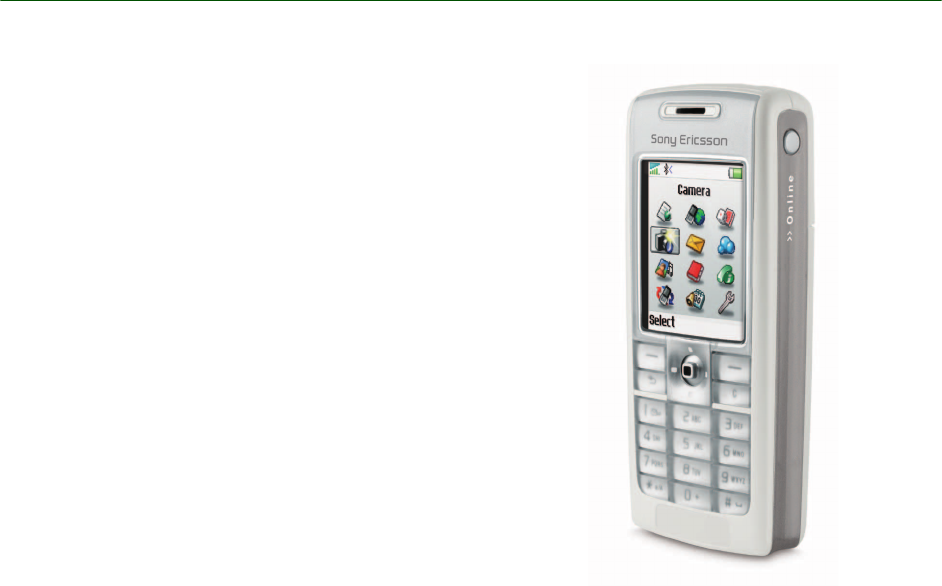
White Paper T630/T628
45 October 2003
For Mobile Originated SMS, an SMS message is
sent from a Mobile Station to the SMS-C where it is
forwarded to its destination. This can be another
Mobile Station, or a terminal in the fixed network.
A Mobile Terminated SMS is when an SMS mes-
sage is forwarded from the SMS-C to a Mobile Sta-
tion. When the Mobile Station receives the
message, it returns a delivery report saying the
transfer was successful.
Fixed dialling and Restricted calls
For a company or an organization, it can be useful
to restrict phone calls. Fixed Dialling allows the
user to preset a number of digits, for example area
codes. This restricts the user to making calls only
to numbers which use the preset digits as leading
digits. Fixed Dialling makes use of the PIN2, and it
requires fixed dial fields on the SIM card.
The Restrict Calls service allows the user to block
outgoing or incoming calls in certain situations, for
example international calls.
SIM application toolkit
The SIM Application Toolkit (SIM AT) is a smart
card-centric method of deploying programs that
apply only to GSM and to SMS and USSD trans-
ports. Programs must be distributed on smart
cards. For an operator, a company or service pro-
vider, SIM AT offers a powerful way to deploy pro-
grams and services to users, without the need for
new or upgraded equipment. All necessary setup
and programming is distributed to users over the
air, directly to their phones. In the T630/T628, a
separate menu is available for functions residing on
the SIM card. These can include submenus for
controlling functions, and also functions which
allow the phone to initiate calls, send data, and dis-
play information to the user.

White Paper T630/T628
46 October 2003
SIM AT services supported by the T630/T628
Service Mode Support
CALL CONTROL Yes
CELL BROADCAST DOWN-
LOAD Yes
DISPLAY TEXT Text of up to 240 characters (120 ucs2 coded). Yes
bit 1: 0 = normal priority Yes
1 = high priority Yes
bit 8: 0 = clear message after a delay Yes
1 = wait for user to clear message Yes
GET INKEY General: The GET_INKEY requires that the user
confirms his/her choice Yes
bit 1: 0 = digits (0-9, *, # and +) only
1 = alphabet set
Yes
Yes
bit 2: 0 = SMS default alphabet
1 = UCS2 alphabet
Yes
Yes
bit 3: 0 = character sets defined by bit 1 and bit 2 are
enabled
1 = character sets defined by bit 1 and bit 2 are
disabled and the Yes/No response is requested
Yes
Yes
GET INPUT General: No. of hidden input characters 20
bit 1: 0 = digits (0-9, *, # and +) only
1 = alphabet set
Yes
Yes
bit 2: 0 = SMS default alphabet
1 = UCS2 alphabet
Yes
Yes
bit 3: 0 = ME may echo user input on the display
1 = user input not to be revealed in any way (see
note)
Yes
Yes
bit 4: 0 = user input to be in unpacked format
1 = user input to be in SMS packed format
Yes
Yes
bit 8: 0 = no help information available
1 = help information available
Yes
No

White Paper T630/T628
47 October 2003
LAUNCH BROWSER Yes
MORE TIME Yes
PLAY TONE Yes
POLLING OFF Yes
POLL INTERVAL Yes
PROVIDE LOCAL INFORMA-
TION '00' = Location Information (MCC, MNC, LAC
and Cell Identity) Yes
'01' = IMEI of the ME Yes
'02' = Network Measurement results Yes
'03' = Date, time and time zone (DTTinPLI) Yes
'04' - Language setting Yes
'05' - Timing setting Yes
REFRESH General: The reset option requests the user to
wait while the phone restarts Yes
'00' =SIM Initialization and Full File Change
Notification Yes
'01' = File Change Notification Yes
'02' = SIM Initialization and File Change Notifi-
cation Yes
'03' = SIM Initialization Yes
'04' = SIM Reset Yes
SELECT ITEM Yes
SEND DTMF Yes
SEND SHORT MESSAGE bit 1: 0 = packing not required
1 = SMS packing by the ME required
Yes
Yes
SEND SS Yes
SEND USSD Yes
Service Mode Support

White Paper T630/T628
48 October 2003
SET UP CALL General: Capability configuration
Set-up speech call CallParty
Subaddress DTMF support
Yes
No
Yes
'00' = set up call, but only if not currently busy
on another call Yes
'01' = set up call, but only if not currently busy
on another call, with re-dial Yes
'02' = set up call, putting all other calls (if any)
on hold Yes
'03' = set up call, putting all other calls (if any)
on hold, with re-dial Yes
'04' = set up call, disconnecting all other calls (if
any) Yes
'05' = set up call, disconnecting all other calls (if
any), with re-dial Yes
SET UP EVENT LIST '00' = MT call Yes
'01' = Call connected Yes
'02' = Call disconnected Yes
'03' = Location status Yes
'04' = User activity No
'05' = Idle screen available Yes
'06' = Card reader status Not
Applica-
ble
'07' = Language selection Yes
'08' = Browser termination Yes
'09' = Data available No
'OA' = Channel status No
SET UP IDLE MODE TEXT Yes, 1
row of
text is
sup-
ported
SET UP MENU Yes
SMS PP DOWNLOAD Yes
Service Mode Support

White Paper T630/T628
49 October 2003
User interaction with SIM AT
Display text
Text of up to 240 characters (120 UCS coded) is
supported. Text clearing times are 5-20 seconds
and a 60-second time-out limit for the user to clear
the text.‘Key’ responses:
• ‘Long Back’ – Proactive session terminated by
user.
• ‘Back’ – Backward move in proactive session.
Any other key clears display if the command is per-
formed successfully.
Get inkey
Prompt for a one-character input. Pressing ‘Ok’
without entering a character gives warning mes-
sage “Minimum 1 character”. ‘Key’ responses:
• ‘C’ clears current character.
• ‘Long Back’ terminates the proactive session.
• ‘Back’ – Backward move in proactive session.
• ‘OK’ – Command performed successfully.
Get input
Prompt for character input. The phone will refuse to
accept further input when maximum response
length is exceeded. MMI Maximum Response
lengths
• Digits Only – 160 characters
• SMS default alphabet characters – 160 charac-
ters
• Hidden Characters (digits only) – 20characters
‘Key’ responses:
• ‘C’ clears current character.
• ‘Long Back’ terminates the proactive session.
• ‘Back’ – Backward move in proactive session.
• ‘OK’ – Command performed successfully.
Refresh
When a refresh command is executed by the
phone, it requests the user to wait while the phone
restarts. A notification will be made if it is
demanded that the SIM card initializes again.
Select item
Scroll to highlight item for selection. ‘Key’
responses:
• Navigation key press down– Scroll down list.
• Navigation key press up– Scroll up list.
• Long ‘Back’ terminates proactive session.
• ‘Back’ – Backward move in proactive session.
• ‘OK’– Command performed successfully.
Send short message
Default message “Sending message, please wait”
can be replaced for the Alpha Identifier text, or sup-
pressed completely if a null text is provided.
Default responses are “MESSAGE FAILED” or
“MESSAGE SENT”. ‘Key’ responses:
• Long ‘Back’ or ‘Back’ ends the proactive ses-
sion.
Set up call
If the ME is on a call when the command ‘Set up
Call’, ‘putting all other calls on hold' is sent, the
user will see the text 'Setting up a call current call
will be held'. If ‘OK’ is pressed the current call will
be put on hold and the new call set up. If the ME is
on a call when the command ‘Set Up Call, discon-
necting all other calls’ is sent, the user will see the
text ‘Setting up a call current call will be discon-
nected’. If the ‘OK’ key is pressed the current call
will be disconnected and the new call set up.
Set up menu
Incorporates a SIM Application Toolkit Menu Item
into the ME’s main menu structure. From the
standby display the right or left arrow buttons can
be pressed to select the Menu Items.
If an Alpha Identifier is supplied in the Set Up Menu
command, this is used as the SIM AT entry in the
ME’s main menu. If no alpha identifier is supplied
and several items are found in the menu, a default
title is used. If the SIM AT Menu Item is selected by
pressing ‘Select’ all the items sent in the Set Up
Menu command will be available for selection, in
the same way as the Select Item command.
White Paper T630/T628
50 October 2003
Security and M-commerce technical data
Terminology and abbreviations
3GPP
3rd Generation Partnership Project. AMR
Adaptive Multi Rate. Audio format for speech
sounds.
Feature Support in the T630/T628 for m-commerce
Dual-slot No
Associated with a STK card,
allowing ISO B0' bank card
payments
If separate card, no
Associated with a STK card,
allowing EMV bank card pay-
ments
If separate card, no
Certified by the “GIE Carte
Bancaire” If separate card, no
WIM support If separate card, no
Ability to use a WIM applica-
tion embedded on a SIM/
USIM card
Yes
WIM application embedded
on a SIM/USIM card the
default WIM application
Yes
Number of smart card read-
ers in the handset 1
Provisioning of the following
SATK commands: Perform
Card APDU, Power Off Card,
Power On Card, Get Reader
Status
No
Release of SIM Application
Toolkit supported R99 with exceptions (missing AT commands, for example “Launch
browser” and “Show icon” – still under investigation)
Information to the user while
in secured mode (WTLS) Yes, via icon
Is an incoming class 2 SMS
transferred to the SIM even
when another application (a
browser) is running?
Yes
Access to the WIM WIM can only be accessed by native applications, e.g. the browser
White Paper T630/T628
51 October 2003
API
Application Programming Interface.
ASP
Active Server Page. Server technology that gener-
ates WAP pages dynamically.
Bearer
The method for accessing WAP from the phone, for
example GSM Data (CSD) and SMS.
bFTP
binary File Transfer Protocol.
Bluetooth
Bluetooth wireless technology is a secure, fast,
point-to-multipoint radio connection technology. It
is a specification for a small-form factor, low-cost
radio solution providing links between mobile com-
puters, mobile phones and other portable handheld
devices, and connection to the Internet. For more
information, http://www.bluetooth.com.
Bookmark
A URL and header/title stored in the phone.
Browsing session
The period from the first access of content until the
termination of the connection.
Calling Line Identification (CLI)
Shows the number of the caller, or a picture
assigned to the number of the caller in the mobile
phone display. Not all numbers can be displayed.
Network-dependent service.
Card
A single WML unit of navigation and user interface.
May contain information to present to the user,
instructions for gathering user input, etc.
CDMA
Code division Multiple Access. A generic term that
describes a wireless air interface based on code
division multiple access technology.
CDC
Connected Device Configuration. A J2ME configu-
ration aimed at, for example, PDAs.
CHTML
Compact Hyper Text Markup Language.
CLDC
Connected Limited Device Configuration. A J2ME
configuration aimed at, for example, mobile
phones.
DRM
Digital Rights Management.
GSM
Global System for Mobile Communications. GSM
is the world’s most widely-used digital mobile
phone system, now operating in over 100 countries
around the world, particularly in Europe and Asia-
Pacific.
HTTP
Hyper Text Transfer Protocol.
IDE
Integrated Development Environment
J2ME
Java 2 Platform, Micro Edition. A Java platform tar-
geting “micro” devices with small processors and
memory capacities, such as mobile phones, com-
municators and PDAs.
JAD
Java Application Descriptor (file).
JAR
Java Archive (file).
LAN
Local Area Network.
ME
Mobile Equipment.
Micro browser
Accesses and displays Internet content in a mobile
phone, using small file sizes and the bandwidth of
the wireless-handheld network.
MIDP
Mobile Information Device Profile. A J2ME profile
connected to the CLDC configuration and aimed at
mobile phones.
MMI
Man-Machine Interface.
White Paper T630/T628
52 October 2003
MS
Mobile Station.
MT
Mobile Termination.
OTA
Over-the Air Configuration. To provide settings for
the phone by way of sending an SMS message
over the network to the phone. This reduces the
need for the user to configure the phone manually.
PDA
Personal Digital Assistant.
PDP
Packet Data Protocol.
Phone book
A memory in the mobile phone or SIM card where
phone numbers can be stored and accessed by
name or position.
PIM
Personal Information Management.
SC
Service Centre (for SMS).
Service provider
A company that provides services and subscrip-
tions to mobile phone users.
SI
Service Indication.
SL
Service Loading.
SIM card
Subscriber Identity Module card – a card that must
be inserted in any GSM-based mobile phone. It
contains subscriber details, security information
and memory for a personal directory of numbers.
The card can be a small plug-in type or credit card-
sized, but both types have the same functions. The
T630/T628 uses the small plug-in card.
SMS
Short Message Service. Allows messages of up to
160 characters to be sent and received via the net-
work operator's message centre to a mobile
phone.
SS
Supplementary Services.
SyncML
An open standard for synchronization of all devices
and applications over any network.
TCP/IP
Transmission Control Protocol/Internet Protocol.
UMTS
Universal Mobile Telecommunications System. The
telecommunications system, incorporating mobile
cellular and other functionality, that is the subject of
standards produced by 3GPP.
URL
Uniform Resource Locator.
USSD
Unstructured Supplementary Services Data.
VAD
Voice Activated Dialling.
VAS
Value Added Service.
vCalendar
vCalendar defines a transport and platform-inde-
pendent format for exchanging calendar and
scheduling information for use in PIMs/PDAs and
group schedulers. vCalendar is specified by IETF.
vCard
vCard automates the exchange of personal infor-
mation typically found on a traditional business
card, for use in applications such as Internet mail,
voice mail, WAP browsers, telephony applications,
call centres, video conferences, PIMs /PDAs, pag-
ers, fax, office equipment, and smart cards. vCard
is specified by IETF.
WAE
Wireless Application Environment.
WAP
Wireless Application Protocol. Handheld devices,
low bandwidth, binary coded, a deck/card meta-
phor to specify a service. A card is typically a unit
of interaction with the user, that is, either presenta-
tion of information or request for information from
the user. A collection of cards is called a deck,
which usually constitutes a service.

White Paper T630/T628
53 October 2003
WAP Application
A collection of WML cards, with the new context
attribute set in the entry card.
WAP service
A WML application residing on a WAP site.
WBMP
WAP Bitmap.
WBXML
Wireless Binary Extensible Markup Language.
WDP
Wireless Datagram Protocol.
WML
Wireless Markup Language. A markup language
used for authoring services, fulfilling the same pur-
pose as HyperText Markup Language (HTML) does
on the World Wide WAP (WWW). In contrast to
HTML, WML is designed to fit small handheld
devices.
WMLScript
WMLScript can be used to enhance the functional-
ity of a service, just as, for example, JavaScript
may be utilized in HTML. It makes it possible to
add procedural logic and computational functions
to WAP-based services.
WSP
Wireless Session Protocol.
WTLS
Wireless Transport Layer Security.
WWW
World Wide WAP.
XML
Extensible Markup Language.
XHTML
Extensible HyperText Markup Language.
Related information
Documents
• The T630/T628 User’s Guide
• Sony Ericsson T630/T628 FAQ
• AT Command Reference Manual
• WAP June2000 (WAP 2.0) Specification
Software
• XTNDConnect PC For Ericsson can be
downloaded from http://www.SonyErics-
son.com.
• XTNDConnect PC, upgraded version from
Extended Systems Inc.
Links
The link to Sony Ericsson Developer World is:
http://www.SonyEricsson.com/developer
Other important links are:
• http://www.SonyEricsson.com/
• http://www.SonyEricsson.com/
• http://wap.SonyEricsson.com/
• http://www.gprsworld.com/
• http://www.extendedsystems.com/
• http://www.bluetooth.com/
• http://www.imc.org/
• http://www.3gpp.org/
• http://www.irda.org/
• http://www.etsi.fr/
• http://www.wapforum.org/
• http://www.imc.org/pdi/
• http://www.syncml.org/
• http://www.w3.org/TR/xhtml-basic/
Trademarks and acknowledgements
• BLUETOOTH is a trademark owned by the
Bluetooth SIG, Inc. The IrDA Feature Trade-
mark is owned by the Infrared Data Associa-
tion and is used under licence there from.
• Microsoft, Windows, Windows CE and Win-
dows NT are registered trademarks or trade-
marks of Microsoft Corporation.
• Pentium is a registered trademark or trade-
mark of Intel.
• Palm, PalmPilot and Palm OS are trade-
marks or registered trademarks of Palm Inc.
or its
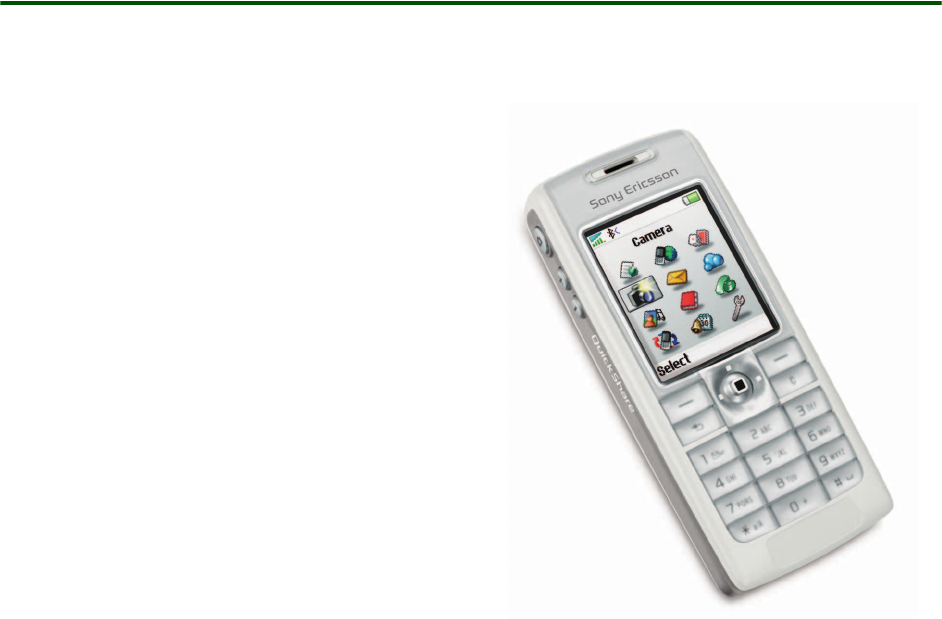
White Paper T630/T628
54 October 2003
subsidiaries.
• T9 is a registered trademark of Tegic
Communications.
• XTNDConnect is a trademark of Extended
Systems Inc.
• XHTML™ is a registered trademark of the
W3C.
Technical specifications
The consumer pack includes:
• Mobile Phone T630/T628
• Battery
• Travel Charger
• CD containing Windows SW package for the
phone;
Extended Systems XTNDConnect Server syn-
chronization, Sony Ericsson applications to cre-
ate and manage content in the mobile phone,
Connection Wizard to create dial-up connec-
tions for CSD, HSCSD, GPRS.
• User’s guide, including Battery Information
• Accessory leaflet
• Service and Support Leaflet
White Paper T630/T628
55 October 2003
General technical data
Exterior description
Product name T630/T628
System Tri-band. GSM phase 2 recommendations. GSM 900 (3GPP TS 51.010-
1), GSM 1800 (3GPP TS 51.010-1) and GSM 1900 (NATWG 03), e-GSM
supported
Speech coding Enhanced, Full and Half Rate. AMR supported where available for high
speech quality
SIM card Small plug-in card, 3 V and 5V type
Type number 1021012-BV and 1021012-CN
Size 102x43x17 mm with battery
Weight 92,5 grams with battery
Display Full graphical display TFD (active-matrix) 128 x 160 pixels
65536 colours
16 bits/pixel depth.
Pixel size: 0.222x0.222mm: 1.8” panel
Colour depth: 16 bits represented by two byte (5 bits red, 6 bits green
and 5 bits blue)
1st Byte D7-d0: R4R3R2R1R0G5G4G3
2nd Byte D7-d0: G2G1G0B4B3B2B1B0
Response time (black to white) <100ms
1) Type: graphical
Resolution: 128 x BGRx 160 pixels.
Size: Minimum viewing area: 30 x 37.1mm
Technology: TFT LCD, 65536 colours
Colours displayed together: 65536 colours
Size (lines): 9
Backlight colour: 1
Fonts: 3
Antenna Built-in
Text size 1
Colours 1
Battery Li-Polymer Battery BST-14 (770 mAh)
Network LED No
Exchangeable covers No
White Paper T630/T628
56 October 2003
Ambient temperatures
Supported Man-Machine Interface (MMI) languages
Depending on software in the phone, these languages are supported:
Albanian (SQ), Arabic (AR), Brazilian Portuguese (PB), Bulgarian (BG), Canadian French (CF), Czech (CS),
Croatian (HR), Danish (DA), Dutch (NL), English (EN), Estonian (ET), Farsi (FA), Finnish (FI), French (FR),
German (DE), Greek (EL), Hebrew (IW), Hungarian (HU), Indonesian-Bahasar (IN), Italian (IT), Latin
American Spanish (XL), Latvian (LV), Lithuanian (LT), Malay (MS), Norwegian (NO), Philippine-Tagalog (TL),
Polish (PL), Portuguese (PT), Romanian (RO), Russian (RU), Serbian (SR), Sesotho (ST), Slovakian (SK),
Slovenian (SL), Spanish (ES), Swedish (SV), Thai (TH), Turkish (TR), US English (AE), Vietnamese (VI), Zulu
(ZU).
Keypad 5-way navigation key, 18 keys, volume keys, camera key, power button,
Web access key.
Keypad lock: from standby, Lock keys in More list. It is also possible to
select Auto key lock in the Settings menu.
Use of several keys simultaneously (e.g. for games) is possible.
Operating Max: +50×C, Min -10×C
Storage Max: +85×C, Min -40×C
Charging Max: +45×C, Min +4×C
White Paper T630/T628
57 October 2003
Current consumption, talk and standby times
Speech coding
Cell broadcast service
Dimension Value in GSM 900
Transmission current 74 mA (min)
215 mA (max)
Standby current 2,45 mA (min), (paging rate 9, 1 neighbour present)
4,5 mA (max), (paging rate 2, 16 neighbours present)
Talk time Up to 9 hrs
Standby time Up to 300 hrs
Dimension Full rate Enhanced full rate
Type RPE/LPC with LTP ACELP
Bit rate 13.0 Kbp/s 12.2 Kbp/s
Frame duration 20 ms 20 ms
Block length 260 bits 244 bits
Class 1 bits 182 bits
Class 2 bits 78 bits
Feature
User notification of the reception of a CB
message Message displayed on screen
Handling of reception of several unread mes-
sages The messages are queued in order to be read in the
same order they were received.
Support of all CMBI from 0 to 4096 Yes
File support CBMI and CBMID
Support CB SIM data download Yes
White Paper T630/T628
58 October 2003
Support of all applicable Data Coding
Scheme values as defined in 3G TS 23.038
V3.3.0 (with the exception of Language pref-
erence)
Yes
Ability to display in a understandable way a
message with a DCS “language unspecified”
whatever language is set in the SIM card
Yes
Ability to extract a phone number or short
number of a CB message to re-use it Yes
Support of multi-page CB-messages Yes
Feature

White Paper T630/T628
59 October 2003
Short message service
Feature Support in the T630/T628
SMS Service Centre Number It is possible to pre-record the SMS Service Centre
Number.
Pictures It is possible to insert a picture or an icon into the text
message. EMS compliant mobile handsets will be able
to see the picture correctly.
Input methods Predictive text input or multitap
Reply to messages It is possible to reply to received messages by SMS,
phone call,...
Message creation methods support Predictive writing or multitap
Copy, cut and paste words No
Teaching of predictive words that are not
in the predictive dictionary Yes
Possibilities when creating a message:
save a sent message in a “Sent items”
folder or a “SIM archive” folder Yes
insert a line in the message Yes
assign a validity period to the message Yes
print via IrDA No
use pre-defined messages Yes
Possibilities when receiving a message:
reply to the sender Yes (only to the sender, not to all or part of the message
recipients)
resend the message Yes
forward the message Yes
save the message in the “SIM archive” Yes
get delivery time and date Yes
print via IrDA No
Possibilities of the previously sent message:
delivery report of the message Yes
forward the message Yes
save the message in the “SIM archive” or
“Sent items” folders Yes
know the remaining capacity storage Yes

White Paper T630/T628
60 October 2003
print via IrDA No
Possibilities of the previously received mes-
sage:
reply to the sender Yes (only to the sender, not to all or part of the message
recipients)
save the message in the “SIM archive” Yes
forward the message Yes
know the remaining capacity storage Yes
Supported ways for replying to a received
SMS:
via SMS Yes
via phone call (set up a call to the number
contained in the message body) Yes
via WAP call (go to the WAP address
contained in the message body) Yes
via USSD session No
Possibility to offer the user the ability of
sending an SMS to a list of recipients Yes, using Phone Book groups or by adding more
recipients
Possibility to write an e-mail address as a
recipient address Yes, if SMS type=e-mail
SMS storage In the SIM and in the handset.
Nokia Picture Messaging Yes
Feature Support in the T630/T628
White Paper T630/T628
61 October 2003
Enhanced message service
Feature Support in the T630/T628
Level of compliance supported by the
handset regarding the specifications
described in release 99.
Enhanced Messaging Service (EMS) according to the
standard 3GPP TS 23.040 v4.3.0, with the addition of
the ODI feature from 3GPP TS 23.040 v5.0.0.
Number of messages that the handset is
able to handle to generate a concatenated
message
10
Capacity storage 70 in the handset + SIM (30) maximum 100
Outgoing messages It is possible to...
• see how many short messages an EMS message
consists of before sending it.
• choose whether to send the message or not after
writing it.
Incoming messages • A signal is heard once all parts of the message have
been received or when a timeout occurs.
• It is possible to re-use the content of an EMS mes-
sage. Sounds, pictures, animations and text format-
ting can be aved in the terminal and then inserted in
a new message, if the object is not protected using
ODI.
Concatenated messages A receipt is received in the handset when all parts of a
concatenated message have been delivered.
Attachments It is possible to attach pictures, animations and sounds
to an EMS message.
Text formatting • Centred, left and right aligned text.
• Small, normal and large font size.
• Bold, italic, underlined and strikethrough style.
Sounds Chimes high, chimes low, ding, tada, notify, drum, claps,
fanfare, chords high, chords low.
I-melody Yes, version 1.2.
Melodies It is possible to....
• send and receive melodies via EMS. If the melodies
are not protected by copyright.
• download melodies and commercial tunes from
WAP/WAP portals.
• create melodies on WAP/WAP portals.
• Music DJ in the terminal only supports MIDI-format
WBMP Yes
Picture sizes 16x16 mm, 32x32 mm, variable size receipts in black
and white.

White Paper T630/T628
62 October 2003
Pictures It is possible to...
• edit and create pictures by using the phone keypad.
• send and receive pictures via EMS. If the pictures
are not protected by copyright.
• create pictures on WAP/WAP portals.
• download pictures from WAP/WAP portals.
• receive pictures in enhanced messages originated
by service providers.
Animations The handset supports the following animations: I am
ironic, I am glad, I am sceptic, I am sad, WOW!, I am cry-
ing. I am winking, I am laughing, I am indifferent, I am in
love, I am confused, Tongue hanging out, I am angry,
Wearing glasses, Devil.
It is possible to...
• send and receive animations.
TP-PID field value given by the handset
before sending an EMS message 0x00
Feature Support in the T630/T628
White Paper T630/T628
63 October 2003
Multimedia message service
Feature Support in the T630/T628
MMS/CSD parameters and MMS/GPRS
parameters placement MMS is bound to a WAP profile. A WAP profile is
bound to a Data Account. A Data Account contains
either CSD parameters or GPRS parameters.
Possibility to pre-configure the MMS param-
eters in factory • MMS/CSD: Yes
• MMS/GPRS: Yes
Possibility to configure the MMS parameters
by OTA provisioning • MMS/CSD: Yes
• MMS/GPRS: Yes
Possibility for all the parameters from the
parameters set to be OTA provisioned at the
same time
• MMS/CSD: Yes
• MMS/GPRS: Yes
Possibility for only one parameter from the
parameters set to be OTA provisioned • MMS/CSD: No
• MMS/GPRS: No
OTA provisioning solution OTA specified by Sony Ericsson and Nokia
MMS User Agent functional entity will be a
separate entity from WAP browser: Yes
MMS User Agent support WAP WTA, WAP UAProf and WTA Public.
Supplier indication of realized inter operabil-
ity tests between its MMS User Agent and
MMS Relay/Server from other suppliers
Yes
Support of a standard or a proprietary proce-
dure for OTA provisioning of MMS parame-
ters
Proprietary
Functionalities that the user is able to set
during message composition: • message subject
• MSISDN recipient address
•e-mail recipient address
• message Cc recipient(s) address(es)
•delivery report request
•read-reply report request
•message priority
From where can the user insert multimedia
elements into multimedia messages: • terminal memory
• directly from camera
Supplier indication if MMS User Agent will be
able to handle a network-based address
book
No
Possibility for sent messages to be memo-
rized into a folder in handset memory Yes
Actions that the user can perform after mes-
sage notification: • retrieve the message immediately
• defer message retrieval
• reject message
White Paper T630/T628
64 October 2003
Instant messaging/ Chat
Actions that the user can perform after mes-
sage retrieval: • reply to the sender of the message
• reply to the sender and to Cc people
• forward the message
• delete the message
• save message into terminal
Multimedia codecs/formats supported for
audio AMR,
Multimedia codecs/formats supported for
video None
Multimedia codecs/formats supported for
image Baseline JPEG, wbmp, GIF 89a
MMS User Agent provides: • text formatting facilities (only textsize)
• coloured text/background (Viewer/player sup-
ports coloured text and background.)
• predictive writing
Supported formats for message presenta-
tion: • message body + attachments (e-mail presenta-
tion)
• SMIL version as described in “Nokia/Ericsson
MMS Conformance document
(not WML and SMIL 2.0 Boston)
Maximum message size that can be handled
by the handset for message Unlimited
Possibility to configure unconditional mes-
sage modification (such as media modifica-
tion in messages)
Yes
MMS User Agent will report problems to user
in case of: • message not sent causes no user subscription to
service, if included in ResponseText (please see
WAP209)
• message not sent causes required functionality
not supported by MMS Relay/Server, if included
in ResponseText (please see WAP209)
• message not sent causes insufficient credit (in
case of prepaid charging), if included in Respon-
seText (please see WAP209)
Feature Support in the T630/T628
Feature Support in the T630/T628
Support of instant messaging Yes
Chat Possible through My friends application
White Paper T630/T628
65 October 2003
Bluetooth technical data
Performance and technical characteristics
Dimension Support in the T630/T628
Bluetooth capability state-
ment This product is manufactured to meet Bluetooth Specification 1.0b
and is designed to work with V1 devices.
Bluetooth functions Dial-up Networking Profile
File Transfer Profile
Generic Access Profile
Generic Object Exchange Profile
Headset Profile
Object Push Profile
Serial Port Profile
Synchronization Profile
Basic Imaging Profile
Handsfree Profile
Connectable devices All products supporting Bluetooth spec. 1,0b or 1.1 and at least one
of the above profiles.
Coverage area Up to 10 metres (33 feet)
Transmission power 1mW (0dBm)
Frequency band 2.4 GHz - the unlicensed ISM band
Power consumption Standby current: < 0.3 mA
Voice mode: 10-35 mA
Data mode average: 5 mA [0.3-30 mA, 20 kbps, 25%]
Data transmission rate up to 108 kbps with one time slot
Specific commands working
with the SIM card No
Support of multipoint con-
nections No
Dimension GSM 900/E-GSM
900 GSM 1800 GSM 1900
Frequency range TX: 880 – 914 MHz
RX: 925 – 959 MHz TX: 1710 – 1785
RX: 1805 – 1880 TX: 1850 – 1910
RX: 1930 – 1990
Channel spacing 200 kHz 200 kHz 200 kHz
White Paper T630/T628
66 October 2003
Tone and percussion maps in the T630/T628
The T630/T628 has a tone bank of 128 (0-127) sampled instruments. The instruments are complemented
by 47 percussion sounds, see table number two. Echo effects are possible.
Number of channels 174 Carriers *8
(TDMA) 374 Carriers *8
(TDMA) 299 Carriers *8
(TDMA)
Modulation GMSK GMSK GMSK
TX Phase Accuracy < 5º RMS Phase
error (burst) < 5º RMS Phase error
(burst) < 5º RMS Phase
error (burst)
Duplex spacing 45 MHz 95 MHz 80 MHz
Frequency stability +/- 0.1 +/- 0.1 +/- 0.1
Voltage operation (nominal) 3.6 Volts 3.6 Volts 3.6 Volts
Transmitter RF power output 33 dBm Class 4 (2W
peak) 30 dBm Class 1 (1W
peak) 30 dBm Class 1 (1W
peak)
Transmitter Output imped-
ance 50 W50 W50 W
Transmitter Spurious emis-
sion < -36 dBm up to 1
GHz
< -30 dBm over 1
GHz
(according to GSM
spec.)
< - 30 dBm
(according to GSM
spec.)
< - 30 dBm
(according to GSM
spec.)
Receiver RF level Better than – 102
dBm – 102 dBm – 102 dBm
Receiver RX Bit error rate < 2.4% < 2.4% < 2.4%
Tone map
GM Poly GM Tone Map GM Poly GM Tone Map
0 1 Acoustic Grand Piano 65 1 Alto Sax
1 1 Bright Acoustic Piano 66 1 Tenor Sax
2 2 Electric Grand Piano 67 1 Baritone Sax
3 2 Honky-tonk Piano 68 1 Oboe
4 1 Electric Piano 1 69 1 English Horn
5 1 Electric Piano 2 70 1 Bassoon
6 1 Harpsichord 71 1 Clarinet
Dimension GSM 900/E-GSM
900 GSM 1800 GSM 1900

White Paper T630/T628
67 October 2003
7 1 Clavi 72 1 Piccolo
8 1 Celesta 73 1 Flute
9 1 Glockenspiel 74 1 Recorder
10 2 Music Box 75 1 Pan Flute
11 1 Vibraphone 76 2 Blown Bottle
12 1 Marimba 77 2 Shakuhachi
13 1 Xylophone 78 1 Whistle
14 1 Tubular Bells 79 1 Ocarina
15 2 Dulcimer 80 2 Lead 1 (square)
16 2 Drawbar Organ 81 2 Lead 2 (sawtooth)
17 2 Percussive Organ 82 2 Lead 3 (calliope)
18 2 Rock Organ 83 2 Lead 4 (chiff)
19 2 Church Organ 84 2 Lead 5 (charang)
20 1 Reed Organ 85 2 Lead 6 (voice)
21 2 Accordion 86 2 Lead 7 (fifths)
22 1 Harmonica 87 2 Lead 8 (bass + lead)
23 2 Tango Accordion 88 2 Pad 1 (new age)
24 1 Acoustic Guitar (nylon) 89 2 Pad 2 (warm)
25 1 Acoustic guitar (steel) 90 2 Pad 3 (polysynth)
26 1 Electric Guitar (Jazz) 91 2 Pad 4 (choir)
27 1 Electric Guitar (clean) 92 2 Pad 5 (bowed)
28 1 Electric Guitar (muted) 93 2 Pad 6 (metallic)
29 1 Overdriven Guitar 94 2 Pad 7 (halo)
30 1 Distortion Guitar 95 2 Pad 8 (sweep)
31 1 Guitar Harmonics 96 2 Fx1 (rain)
32 1 Acoustic Bass 97 2 Fx2 (soundtrack)
33 1 Electric Bass (finger) 98 2 Fx3 (crystal)
34 1 Electric Bass (pick) 99 2 Fx4 (atmosphere)
35 1 Fretless Bass 100 2 Fx5 (brightness)
36 1 Slap Bass 1 101 2 Fx6 (goblins)
Tone map
GM Poly GM Tone Map GM Poly GM Tone Map

White Paper T630/T628
68 October 2003
37 1 Slap Bass 2 102 2 Fx7 (echoes)
38 1 Synth Bass 1 103 2 Fx8 (sci-fi)
39 1 Synth Bass 2 104 1 Sitar
40 1 Violin 105 1 Banjo
41 1 Viola 106 1 Shamisen
42 1 Cello 107 1 Koto
43 1 Contrabass 108 1 Kalimba
44 1 Tremolo Strings 109 2 Bag pipe
45 1 Pizziano Strings 110 2 Fiddle
46 1 Orchestral Harp 111 1 Shanai
47 1 Timpani 112 1 Tinkle Bell
48 1 String Ensemble 1 113 1 Agogo
49 1 String Ensemble 2 114 2 Steel Drums
50 1 Synth String 1 115 1 Woodblock
51 2 Synth String 2 116 1 Taiko Drum
52 1 Choir Aahs 117 1 Melodic Tom
53 1 Voice Oohs 118 2 Synth Drum
54 2 Synth Voice 119 1 Reverse Cymbal
55 2 Orchestra Hit 120 1 Guitar Fret Noise
56 1 Trumpet 121 1 Breath Noise
57 1 Trombone 122 2 Seashore
58 1 Tuba 123 1 Bird Tweet
59 1 Muted Trumpet 124 1 Telephone Ring
60 2 French Horn 125 1 Helicopter
61 1 Brass Section 126 2 Applause
62 2 Synth Brass 1 127 1 Gunshot
63 2 Synth Brass 2
Tone map
GM Poly GM Tone Map GM Poly GM Tone Map

White Paper T630/T628
69 October 2003
Percussion map
No. Percussion name No. Percussion name
35 Acoustic Bass Drum 59 Ride Cymbal2
36 Bass Drum 1 60 Hi Bongo
37 Side Stick 61 Low Bongo
38 Acoustic Snare 62 Mute Hi Conga
39 Hand Clap 63 Open Hi Conga
40 Electric Snare 64 Low Conga
41 Low floor Tom 65 High Timbale
42 Closed Hi-Hat 66 Low Timbale
43 High Floor Tom 67 High Agogo
44 Pedal Hi-Hat 68 Low Agogo
45 Low tom 69 Cabasa
46 Open Hi-Hat 70 Maracas
47 Low-Mid Tom 71 Short Whistle
48 Hi-Mid Tom 72 Long Whistle
49 Crash Cymbal 1 73 Short Guiro
50 High Tom 74 Long Guiro
51 Ride Cymbal 1 75 Clavas
52 Chinese Cymbal 76 Hi Wood Block
53 Ride Bell 77 Low Wood Block
54 Tambourine 78 Mute Cuica
55 Splash Cymba 1 79 Open Cuica
56 Cowbell 80 Mute Triangle
57 Crash Cymba 2 81 Open Triangle
58 Vibraslap

White Paper T630/T628
70 October 2003
WAP browser technical data
Feature Support in the T630/T628 WAP browser
Back to previous page Yes
Bearer type GPRS (IP) Yes
Bearer type GSM Data (IP) Yes, HSCSD, ISDN and analog
Bookmarks Yes, up to 25 named bookmarks for easy access to frequently visited
pages
Bookmark Export/Import Yes, can be sent and received as link using SMS and vBookmark for-
mat via IR and BT
Cache Yes (size 6 kbyte)
Character sets * UTF8 (Default), USASCII, Latin1, UCS2
Clear cache Yes
Colour Colour display
Home page Yes, up to 5 different, one for each WAP profile
HTML version for WAP
browser xHTML, mobile profile
Hyperlinks in Text Yes, highlighted by inverse video
Hyperlinks in Images Yes, indicated by a frame
Image Animation No
Image Formats GIF (interlaced and non-interlaced), WBMP, no transparent layers,
JPG
Network Settings Up to 5 different settings available by selecting WAP profile (Intranet,
Internet, Banking, Gateway etc.)
OTA Support Yes
PPP Authentication PAP, CHAP supported
Reload page Yes
Tables Yes
User Agent Profiles Yes, list of client characteristics - e.g. display size
WAP/WML WAP WAP 2.0/ WML 1.3
White Paper T630/T628
71 October 2003
*) When creating WML applications, it is recommended that you
always save the page contents as UTF8, and that this is clearly indi-
cated in the pages before publishing. This ensures that the contents
of the application can be viewed, regardless of character sets used in
gateways and the phone. All characters are not supported in all
phones. The software version depends on which market the phone is
associated to. Also, please note that the phone may not support input
on a WAP Service which uses certain characters (languages), even if
those characters are supported for browsing in the phone.
WAP browser WAP 2.0 baseline
WAP profiles Dynamic - up to 5 WAP profiles, each with its own settings
WTLS (security) Yes,
WTLS Class 1 - Encoding
WTLS Class 2 - Encoding + Server Authentication. Root Certificates
needed in phone
WTLS Class 3 - Encoding + Server Authentication + Client
Certification. Root Certificates needed in phone + special SIM cards
Sign text
Feature Support in the T630/T628 WAP browser
White Paper T630/T628
72 October 2003
WAP Operator technical data
Feature Support in the T630/T628 for WAP
WAP Browser
Version 2.0 baseline
HTML XHTML, mobile profile
WAP Provisioning
Total Parameter sets 5
Parameter set list Name
Startpage
IP settings:
CSD phone no., CSD Data rate, CSD dial type
GPRS APN, password request, allow calls, authentication,
data compression, header compression, quality of services
IP address, datamode
UserId and password
Security on/off
Show images on/off
Response timer
Manual selection Yes, between Analog (V32) and Digital (V110)
Parameter sets include WAP/CSD, WAP/GPRS (different sets)
Factory pre-configuration WAP/CSD (possibility to lock a setting), WAP/GPRS
OTA WAP/CSD, WAP/GPRS configuration possible
Simultaneous OTA WAP/CSD, WAP/GPRS configuration possible
Single OTA WAP/CSD, WAP/GPRS is not possible
Bookmarks Not empty by default
URL format Underlined
Security mechanism
OTA provisioning (if empty) Operator verification through a code, included in the OTA data.
This code is shown to the user who can choose installation or
not.
Interface (if empty) An Install question is asked with the code, if available.
The user has to choose if a new WAP profile shall be created or
an existing profile shall be replaced.
Re-provisioning (Set 1 filled) As above
Interface (Set 1 filled) As above
Carrier reset/provisioning Yes, but not if the set is pre-configured in the factory and locked.

White Paper T630/T628
73 October 2003
SWIM Not used for provisioning.
The SWIM is only used for WAP security, both WTLS connections
and digital signatures.
SWIM certificate Both client and trusted certificates can be used for WTLS
connections and digital signatures.
No new certificates can be stored and no old ones can be
removed by the terminal.
Applicative provisioning
Preferred bearer customization Yes
E-mail customization No
Other applications/features Yes. MMS, SyncML
Technologies
SonyEricsson and WAP Forum
provisioning over SMS and Cell
Broadcast
Yes
Openwave OTA No
Other Yes. The Ericsson-Nokia solution.
Provisioning bearer SMS
Parameter sets available 5
Parameter sets for OTA
modification 5
PUSH
Content types
Service Indication (SI) Yes
Service Loading (SL) Yes
Cache Operation (CO) content
type Yes
Session Initiation Application (SIA) Yes
Man Machine Interface
SI/content retrieval postponing Yes
SI menu structure accessability WAP services, Push inbox
SL reception warning The user can make a choice if a dialog is wanted or not before
loading the SL.
WAP services/options/common/Push access/prompt
SIA reception warning Yes
Feature Support in the T630/T628 for WAP

White Paper T630/T628
74 October 2003
Number of push messages Depending on the size of the push messages. Around 20 push
messages with a size of 500 bytes can be stored.
Push de-activate Yes. WAP services/options/common/Push access/Off
Dynamic push menu changes No. There are no changes in the menus when activating/
deactivating push
Security
Mechanisms for push None
Trust with PPG Sending a SIA is the most trustful.
WSP push sessions 1
Denial of service/spoofing
User agent profile
UA profile content sent at
beginning of WSP session No
OA profile content size
URL sent pointing to the UA profile
at the beginning of WSP session Yes
URL location On the manufacturer WAP site.
WTAI
WTA Make Call Yes
WTA Send DTMF Yes
WTA Add Phone Book Yes
Other WTA/WTAI No
DOWNLOAD
WAP solutions
SAR/WSP/HTTP GET solution to
download content over WAP Yes
Download Fun from Openwave No
Other download content over WAP Yes. Downloaded without using SAR is limited to 10kB
Features
Download application/product
memory check Yes
Downloaded object solution Yes. The user is asked if the content is to be saved.
UAP indication for downloading Yes
Feature Support in the T630/T628 for WAP

White Paper T630/T628
75 October 2003
Other features Yes. Store, delete, forward, use, manage.
Object formats
Ringing tones audio/iMelody, other/eMelody, vMel.
Wallpapers Image/WBMP, GIF, JPEG.
Pictures Image/WBMP, GIF, JPEG.
Games Yes, 4-6 pre-loaded and 5-7 at Sony Ericsson Mobile Internet.
JAVA applications Yes
Screen savers Image/GIF, JPEG
Audio files audio/MPEG4 not used,MP3 not used, WAV not used
Skins Application /skin
Video Video/MPEG4 not used
GRAPHICAL USER INTERFACE
Man Machine Interface
Soft keys Yes
Separate/dedicated back or erase
keys Yes
Screen backlight on when
browsing Yes
Predictive writing Yes
“http://” string displayed
automatically when entering URLs Not displayed but the “http://” is added automatically to the URL.
Elements
Number of display lines for a WAP
connection 4 to 7 plus Title, depending on the selected font size.
Pop-up menus Yes, in XHTML
Radio buttons Yes, in XHTML.
Check boxes Yes, in XHTML.
Buttons Available as XHTML form controls.
Feature Support in the T630/T628 for WAP
White Paper T630/T628
76 October 2003
GPRS technical data
Dimension Support in the T630/T628
Compatible GPRS and
SMG specifications ETSI R97 SMG 31 bis
Data rates Multislot class 8 supported (4+1)
CS-1, CS-2, CS-3, CS-4
9,050 bps, 13,400 bps, 15,600 bps, 21,400 bps supported (network-
dependent)
Indicator of attachment to
the GPRS service Yes, an icon in the bottom left corner, a filled triangle if attached
Indicator of PDP context
activation Yes, an icon on the right side. Animated globe
Data volume counter • The Data volume counter details the volume of data exchanged in
bytes for the up/down link for last call for each PDP context.
• The Total data counter details the sum of all GPRS sessions (i.e. not
the sum of total data received + sent during the last GPRS session.
The total data counter can be reset by the user.
Medium Access Modes Fixed and dynamic allocation
Support of Packet Con-
trol Channels (PBCCH/
PCCCH)
Yes
Network operation mode NOM I, II, III
Support of GPRS/CS
combined procedures Yes
Network control mode NC0
Support of access in 2
phases Yes
Support of PRACH on 11
bits Yes
Support of GPRS re-
selection C31/C32 Yes
Support of static and
dynamic addressing Yes
Support of power control
Uplink and Downlink Uplink = yes, Downlink is a network feature
Support of ciphering
algorithms GEA1 and GEA2
Support of compression
algorithms Yes, V42bis and IP header com-
pression
White Paper T630/T628
77 October 2003
Support of the QoS modi-
fication procedure Yes, when initiated by the network
(not by the handset)
Interfaces to external
devices supported by the
handset and available for
a GPRS link
IrDA, RS-232, AT commands. IrDA,
Datarate=SIR & MIR RS232, auto-
baud, max 460kbit/s Bluetooth,
v1.0B+Critical errata, Certified and
listed Supported Bluetooth pro-
files: DUN, FAX, Headset, Synch,
Object push
Downlink data rate Up to 85,600 bps for packet data communication, using 4 time slots in
coding scheme CS-4
Uplink data rate Up to 21,400 bps for packet data communication, using 1 time slot in cod-
ing scheme CS-4
Mode of operation Class B and Class C modes of operation supported. It is possible for the
user to choose if the Circuit Switched services should be favoured.
R Reference point Physical layer: Support of RS232
PPP is supported as L2 layer in the R reference point
Authentication algorithms PAP, CHAP supported
IP connectivity PDP type IP is supported
IP termination in mobile or TE (laptop, PDA) supported
Application WAP over GPRS supported (UDP/IP and GPRS-SMS)
SMS over GPRS (SMS-MT, SMS-MO) supported
QoS QoS negotiation supported. Default requested QoS sent by the handset at
PDP context activation is reliability Class 3. Peak/Mean/Delay/Precedence
Class: subscribed
• Precedence class supported (1,2,3)
• Reliability class 1-5 supported
• Delay classes supported (1,2,3,4)
• Mean and peak throughput rate limited by multislot class 4 and CS-4
PDP context 10 PDP context descriptions stored in mobile
PDP context description is edited via application in mobile, AT-command
or via OTA
Simultaneous PDP contexts not supported
Network requested PDP context not supported
SIM GPRS aware, as well as non GPRS aware SIMs are supported
Dimension Support in the T630/T628
White Paper T630/T628
78 October 2003
AT commands supported • AT+CGDCONT - DEFINE
PDP CONTEXT
• AT+CGQREQ - Quality of
Service Profile
(REQUESTED)
• AT+CGQMIN - Quality of
Service Profile (Minimum
Acceptable)
•AT+CGATT - PACKET
DOMAIN SERVICE ATTACH
OR DETACH
• AT+CGACT - PDP CONTEXT
ACTIVATE OR DEACTIVATE
•AT+CGDATA - ENT
Dimension Support in the T630/T628
White Paper T630/T628
79 October 2003
Built-in GSM data modem technical data
E-mail client technical data
Dimension Support in the T630/T628
Standards AT commands industry standard, ETSI 07.05 and 07.07 and 07.10, V.25ter
command set supported
Data rates, Circuit
Switched (CSD) Download data rate Up to 19,200 or 28,800 bps (depending on base
rate) no compression,
with V.42bis compression up to four times higher
transmission rates depending on the data type
Upload data rate Up to 9,600 or 14,400 bps (depending on base
rate) for GSM Data communication, no compres-
sion
with V.42bis compression up to four times higher
transmission rates depending on the data type
Data rates, GPRS See GPRS Technical data
Feature Support in the T630/T628 e-mail client
Attachment Yes (outgoing,
images only)
Bearer type GPRS (IP) Yes
Bearer type GSM Data (IP) Yes, HSCSD, ISDN and analog
Character sets * US ASCII (All variants)
ISO8859-1 (All variants)

White Paper T630/T628
80 October 2003
ISO8859-2 All variants
ISO8859-5 All variants
ISO8859-10 All variants
KOI8-R All variants
WIN1251 All variants WIN1252 (All variants UTF7 (All variants)
UTF8 All variants
GB2312
BIG5
GB18030
OTA Support Yes
Supported protocols POP3, IMAP4, SMTP
Feature Support in the T630/T628 e-mail client
White Paper T630/T628
81 October 2003
USSD technical data
Image format technical data
Images – downloading to phone
Feature Support in the T630/T628
USSD support GSM Phase 1/ 2 (Cross-phase compatibility). GPRS
behavior according to class B
Mode support -mode MMI-mode supported.
No application mode support (not needed for any
application).
MMI-mode details • USSD messages displayed until removed by user
• It is possible to scroll up and down the text in
USSD messages
Format Visible Max Animation Colours Visible col-
ours Transpar-
ency support
GIF 160x160
pics 640x480
pixels 50 frames (1
frame/
100ms)
256 65535
(5:6:5=RGB;
less blue
colours)
JPEG 160x160
pics 640x480
pixels No 16.8 mil. 65535
WBMP 160x160
pics 320x320
pixels No Black/
White 2
PNG 160x160
pics 640x480
pixels No 65535 65535
BMP 160x160
pics 640x480
pixels No 16.8 mil. 65535
Feature File type Max. size PC/
Cable PC/
IrDA PC/
BT Phon
e-to-
phon
e
WAP MMS
EMS icons WBMP WxH<=1024
pixels Yes Yes Yes Yes Yes Yes
White Paper T630/T628
82 October 2003
MMS GIF, WBMP,
JPG Limited by
the memory Yes Yes Yes Yes Yes Yes
Background GIF,
WBMP;
JPG
Limited by
the memory Yes Yes Yes Yes Yes Yes
MMS tem-
plate Send 30k,
Receive 50k No No No No No Yes
Animations Animated
GIF Limited by
the memory Yes Yes Yes Yes Yes, 1) Yes
Themes GIF (propri-
ety, THM) Limited by
the memory Yes Yes Yes Yes Yes No
Screensaver Animated
GIF Limited by
the memory Yes Yes Yes Yes Yes Yes
Exceptions:
MMS: GIF, WBMP, JPG, 128x160 pics
EMS icons: WBMP max WidthxHeight<=1024 pixels (e.g. 32x32=1024)
Themes: GIF, JPG max, 128x160 pixels
WAP: Can not show animations in the WAP Browser. You can download maximum 3kb. The animation
will be shown in the Image Browser if it’s saved in the phone.
GIF: Animations used as background images or user greetings displays first frame only.
Feature File type Max. size PC/
Cable PC/
IrDA PC/
BT Phon
e-to-
phon
e
WAP MMS
White Paper T630/T628
83 October 2003
SyncML technical data
Infrared transceiver technical data
Feature Support for Sync ML in the T630/T628
SyncML compliance The handset is fully SyncML compliant (it passed both Syn-
cML Conformance and Inter operability testing [SyncFest])
Basic data formats Contacts: vCard 2.1, Calendar: vCalendar 1.0, Tasks: vTodo
1.0.
Possibility for operators to extend
SyncML functionality No
Possibility to synchronize other hand-
sets using SyncML No
Transport method for SyncML mes-
sages WSP (i.e. using a WAP connection)
Synchronization application place-
ment Inside the handset
Possibility for the user to configure
login parameters (e.g. username and
password) to access the remote
database
Yes
Configuration parameters that can be
entered/modified by the user Server URL, Server UserID, Server PWD, Paths to databases
(Calendar, Contacts, Tasks) UserID and PWD for Databases,
Databases to be synced (on/off), WAP Account, Sync Sound
Mechanisms used by the handset to
capture changes made by the end
user (i.e. how does the SyncML client
in your handset know which changes
were made to the address book)
It uses a change log where it marks the contact as updated
Ability to deal with multiple servers No
Ability to perform conflict resolution
actions No
Signal in RS-232 Support in DRS-11
CD (Carrier
Detect) No. Set stati-
cally
CTS (Clear To
Send) Yes
White Paper T630/T628
84 October 2003
DSR (Data Service
Ready) Statically connected with DTR
DTR (Data Termi-
nal Ready) Statically connected with DSR
GND (Signal
Ground) Yes
RI (Ring Indica-
tion) No. Set stati-
cally
RTS (Request To
Send) Yes
Rx (Received
Data) Yes
Tx (Transmitted
Data) Yes
White Paper T630/T628
85 October 2003
Index
Numerics
3GPP .......................................................16
A
Abbreviations .............................................50
Acknowledgement ......................................53
Architecture ...............................................14
Assembler .................................................20
AT Command Functions ..............................36
Audio .......................................................13
B
Backlight ..................................................20
Bluetooth ..................................................20
Bluetooth devices .......................................23
Bluetooth technical data ..............................65
Built-in GSM data modem technical data ........79
C
Cell broadcast service .................................57
Certification ...............................................20
Chinese versions ........................................38
cHTML support ..........................................32
colour support ...........................................20
Compatibility .............................................16
Compatible with old phones .........................16
Connection via desktop charger ....................27
Current consumption, talk and standby times ..57
D
deployment ...............................................20
Desktop charger .........................................27
Documents ................................................53
E
E-mail ......................................................12
E-mail client technical data ...........................79
Enhanced message service ..........................61
Exterior description .....................................56
F
Fixed Dialling .............................................45
Friends .......................................................6
G
Game file sizes ...........................................20
Games .....................................................57
Gaming API ...............................................20
General Packet Radio Service .......................33
GPRS ...................................................... 33
GPRS access characteristics ....................... 30
GPRS technical data .................................. 76
Graphics .................................................. 11
GSM Data access characteristics .................. 30
GSM system support .................................. 55
I
Image format technical data ......................... 81
Images, downloading to phone ..................... 81
Info & entertainment ................................... 17
infrared .................................................... 20
L
Languages, MMI ........................................ 56
Links ....................................................... 53
M
Messenger ................................................. 6
MMS Centre ............................................. 14
MMS content
audio ............................................................. 13
graphics ........................................................ 11
SMIL presentations ...................................... 13
text ............................................................... 13
video ............................................................. 13
MMS Technical features
architecture ......................................... 14
MMSC ..................................................... 14
Mobile Internet .......................................... 32
Modem and AT Commands ......................... 35
mophun RTE ............................................. 19
Multimedia message service ........................ 63
Music block .............................................. 22
My friends .................................................. 6
N
News & commercials .................................. 17
O
Online Developer Resources ........................ 36
Online Services ......................................... 45
OTA configuration .................................15, 32
Overview of AT command functions .............. 36
P
Performance and technical characteristics ...... 65
Push inbox ............................................... 32
Push services ............................................ 32
White Paper T630/T628
86 October 2003
Q
QuickShare TM ............................................8
R
Related information .....................................53
Restricted Calls ..........................................45
Ring signals ...............................................17
Ring signals and melodies
music block ..................................................22
track ...................................................22
S
sandbox ...................................................20
Secure gamelets ........................................20
Short message service ................................59
SIM Application Toolkit ................................45
SIM AT Services .........................................46
SIM card type ............................................55
SMIL presentations .....................................13
SMS ........................................................20
SMS access characteristics ..........................30
SMS request .............................................17
SMS standard ............................................16
Software ...................................................53
Software developement kit ...........................20
Sony Ericsson Developer Support ..................37
Sony Top 10 ................................................7
Speech coding ...........................................57
Sprite detection ..........................................20
Supported MMI languages ...........................56
Synchronization software .............................28
Synchronization, local .................................27
SyncML ....................................................24
SyncML technical data ................................83
Synergenix Interactive AB ............................20
T
TCP/IP link ................................................20
Technical Specifications ..............................54
Terminology and abbreviations ......................50
Text .........................................................13
Touch correct feature ..................................23
Trademarks and acknowledgements ..............53
True file support .........................................20
Two displays ...............................................6
U
Unicode ....................................................20
Unified messaging ......................................17
User-to-user ..............................................16
USSD technical data ...................................81
V
Vehicle positioning ......................................17
Vibrator ....................................................20
Video ....................................................... 13
W
WAP browser technical data ........................ 66
WAP Operator technical data ....................... 72
WAP, security ........................................... 31
Weight ..................................................... 55
X
XTNDConnect PC ...................................... 28
