Lonsdor Technology K518ISE Key Programmer User Manual

Shenzhen Lonsdor Technology Co., Ltd. Key Programmer

User Manual

__________________________________K518ISE Key ProgrammerUser ManualThis manual is specialized for Lonsdor K518ISE, please read it carefully before operating,keep it well for further reference.
K518ISE Key Programmer User Manual1Lonsdor K518ISE BasicsCopyright1. Lonsdor's entire contents, including but not limited to products or services, which areissued by or co-issued with the cooperation companies, and materials and software relatedto Lonsdor's affiliated companies, are copyrighted and protected by law.2. No part of the above all shall be copied, modified, extracted, transmitted or bundled withother products, sold in any way or by any means without the written permission of Lonsdor.3. Any infringement of the company's copyright and other intellectual property rights,Lonsdor shall seize its legal liability according to law.4. Lonsdor 518ISE key programmer and related information, which should be used only fornormal vehicle maintenance, diagnosis and testing, please do not use it for illegal purposes.5. All information, specifications and illustrations in this manual are based on the latestconfigurations and functions available at the time of printing. Lonsdor reserves the right tomake changes at any time when necessary without notice.DisclaimerLonsdor shall not assume any incidental or consequential damages or any economicdamages arising from the accidents of individual users and the third parties, as well as legalresponsibilities, due to their misuse, unauthorized change or repair of the device, or abuseto violate laws and regulations. The product has a certain degree of reliability, but does notrule out the possible loss and damage. The risk arising from the user at their own risk,Lonsdor does not assume any risks and responsibilities.K518ISE Main Unit MaintenancePlace the equipment and accessories in a place where children are not accessible.Keep the equipment in dry and good ventilated environment. Do not use chemicals,detergents or water to clean the equipment, and avoid rain, moisture or liquid containedminerals to corrosion electronic circuit boards.Do not store the equipment in over hot/cold place as it will shorten the lifespan ofelectronic devices and damage the battery, the temperature range required: lowtemperature (-10 ± 3) ℃, high temperature (55 ± 3) ℃.Please do not disassemble the equipment personally, shall you have any problem,please contact after-sales service or the certified dealer.Do not throw, knock or strongly vibrate the device, it will damage the internal circuitboard.If the equipment is in water, make sure it is disconnected and should not bedisassembled personally. Do not use any heating equipment (dryer, microwave oven,etc.) to dry. Please send the device to local dealer for inspection.
K518ISE Key Programmer User Manual2After a long time use, such as during working state, long charge, connect OBD todiagnose, the device may become a slight fever, this is normal, please do not worry.The device has a built-in antenna, please do not damage or modify the antennawithout authorization, to avoid performance degradation of the device and the SAR valueexceeds the recommended range. As the antenna position will affect antenna performance,resulting in equipment transmission power in an unstable state, so please try to avoidholding the antenna area (upper right corner).Do not place heavy objects on the device or squeeze vigorously, to avoid devicedamage or display screen distortion.Battery MaintenanceWhen the device is in start state, please do not remove or maintain the battery. Theinside polymer lithium battery, if not handled properly, may run the risk of fire or burningitself.Please do not disassemble the battery, do external short-circuit contact, or expose thebattery at excessively high or low temperature (-10°C~55°C as suggested), and do notdispose battery in fire or as normal waste.Please be careful to keep the battery dry and away from water or other liquids, to avoidshort circuit. If soaked, please do not start the device or remove the battery withoutdirection.
K518ISE Key Programmer User Manual3Table of ContentsLonsdor K518ISE Basics............................................................................................................... 1Copyright......................................................................................................................................1Disclaimer.................................................................................................................................... 1K518ISE Main Unit Maintenance.............................................................................................1Battery Maintenance..................................................................................................................21. ABOUT LONSDOR K518ISE......................................................................................................41.1 Introduction........................................................................................................................... 41.2 Accessories...........................................................................................................................41.3 Application.............................................................................................................................51.4 Feature.................................................................................................................................. 51.5 Technical Parameter........................................................................................................... 62. PRODUCT APPEARANCE......................................................................................................... 62.1 Main Unit Appearance........................................................................................................ 62.2 KPROG-2 Adapter Appearance........................................................................................ 73. FUNCTION & OPERATION.........................................................................................................83.1 Registration & Activation.................................................................................................... 83.1.1 Network setting.........................................................................................................83.1.2 System update..........................................................................................................83.1.3 Registration & activation......................................................................................... 83.2 Vehicle Connection..............................................................................................................93.3 Function Description......................................................................................................... 103.4 Diagnosis Description....................................................................................................... 133.5 Adaptor Binding..................................................................................................................154. DISPOSAL................................................................................................................................... 155. CONTACT.....................................................................................................................................16Warranty Service Sheet................................................................................................................17
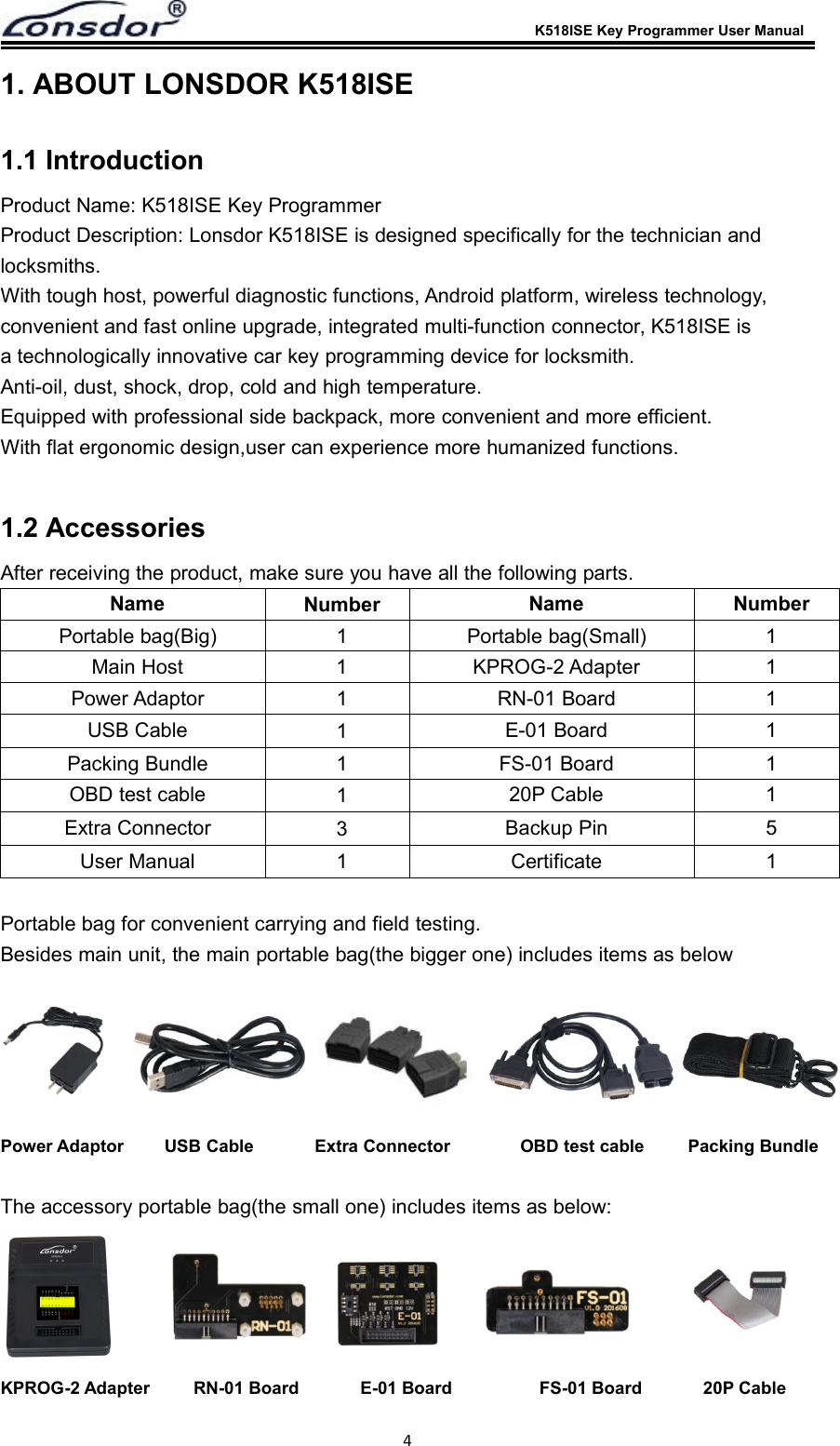
K518ISE Key Programmer User Manual41. ABOUT LONSDOR K518ISE1.1 IntroductionProduct Name: K518ISE Key ProgrammerProduct Description: Lonsdor K518ISE is designed specifically for the technician andlocksmiths.With tough host, powerful diagnostic functions, Android platform, wireless technology,convenient and fast online upgrade, integrated multi-function connector, K518ISE isa technologically innovative car key programming device for locksmith.Anti-oil, dust, shock, drop, cold and high temperature.Equipped with professional side backpack, more convenient and more efficient.With flat ergonomic design,user can experience more humanized functions.1.2 AccessoriesAfter receiving the product, make sure you have all the following parts.Name Number Name NumberPortable bag(Big) 1 Portable bag(Small) 1Main Host 1KPROG-2 Adapter 1Power Adaptor 1RN-01 Board 1USB Cable 1E-01 Board 1Packing Bundle 1 FS-01 Board 1OBD test cable 120P Cable 1Extra Connector 3Backup Pin 5User Manual 1 Certificate 1Portable bag for convenient carrying and field testing.Besides main unit, the main portable bag(the bigger one) includes items as belowPower Adaptor USB Cable Extra Connector OBD test cable Packing BundleThe accessory portable bag(the small one) includes items as below:KPROG-2 Adapter RN-01 Board E-01 Board FS-01 Board 20P Cable
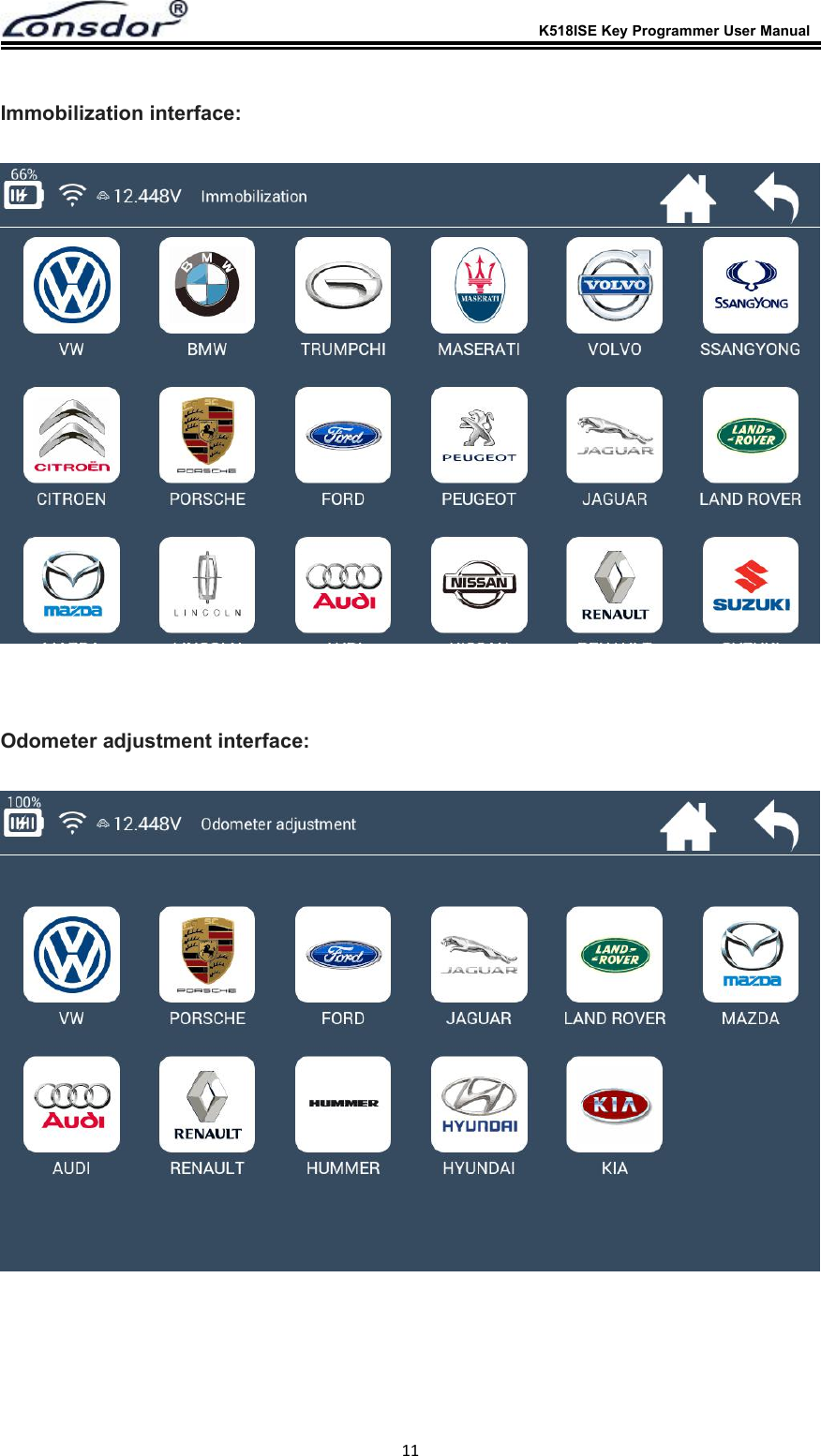
K518ISE Key Programmer User Manual51.3 ApplicationLonsdor K518ISE Key Programmer is now basically used to the following fields:ImmobilizationOdometer adjustmentCars Coverage List for Immobilization:Europe:Audi, BMW, Benz, VW, Volvo, Citroen, Ferrari, Maserati, Fiat, Lamborghini, Jaguar, MG,Land Rover, Bentley, Lancia, Opel, Peugeot, Porsche, DS, Renault, Alfa Romeo, Smart,BorgwardAmerica:Cadillac, Chevrolet, Dodge, GMC, Buick, Hummer, Ford, JEEP, Lincoln, MercuryAsia:Honda, Hyundai, Isuzu, KIA, Lexus, Mazda, Mitsubishi, Nissan, Ssangyong, Subaru, Suzuki,Toyota, Shigaoka QueenChina:Iveco, Trumpchi, BYD, Geely, Chery, Great Wall, Young Lotus (Basically all Chinese carmodels are included)Odometer Adjustment Car List:VW, Porsche, Ford, Jaguar, Land Rover, Mazda, Audi, Renault, Hummer, Hyundai, KiaNote: K518ISE is still under rapid upgrading, more functions and high end car models willbe released soon, please refer to our website www.lonsdor.com for instant updating news,also you can “One key update” for the latest version by yourself.1.4 FeatureThe best car diagnostic tool based on AndroidWIFI networking ensures software upgrading more convenient.No need to plug memory card, or connect the computer with data cable, moreflexible in online upgrading, updating and activating.With USB-B2.0 standard connector, OBD-II test cable integrated with thediagnostic connector function of the adapter.Diagnostic speed greatly accelerated, work efficiency improved, better timesaving.7 inches high brightness, high definition color IPS capacitive screen3800mAh polymer batterySupport external memory expansion, better within 32G
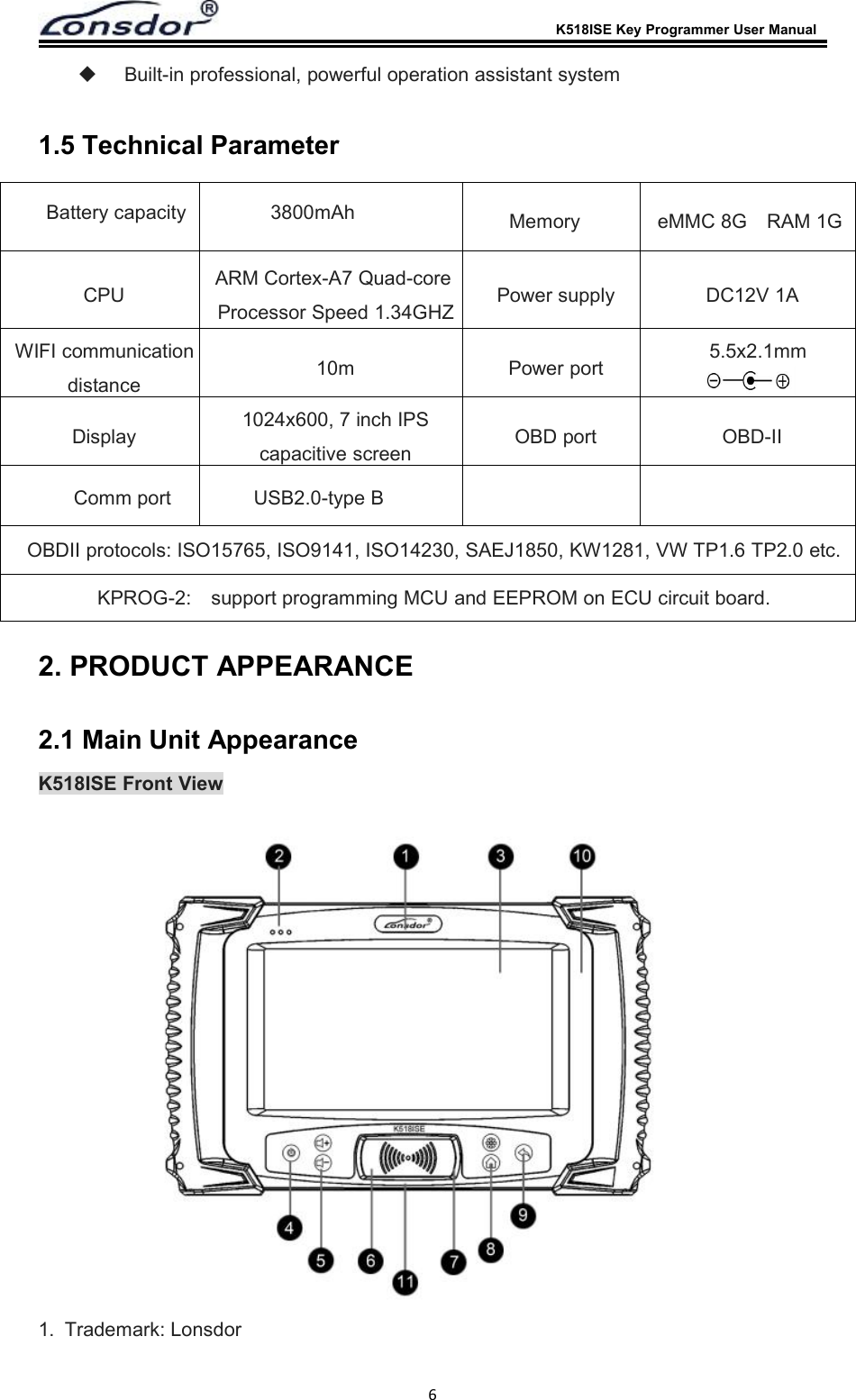
K518ISE Key Programmer User Manual6Built-in professional, powerful operation assistant system1.5 Technical Parameter2. PRODUCT APPEARANCE2.1 Main Unit AppearanceK518ISE Front View1. Trademark: LonsdorBattery capacity 3800mAhCPU ARM Cortex-A7 Quad-coreProcessor Speed 1.34GHZ Power supply DC12V 1AWIFI communicationdistance 10m Power port 5.5x2.1mmDisplay 1024x600, 7 inch IPScapacitive screen OBD port OBD-IIMemory eMMC 8G RAM 1GComm port USB2.0-type BOBDII protocols: ISO15765, ISO9141, ISO14230, SAEJ1850, KW1281, VW TP1.6 TP2.0 etc.KPROG-2: support programming MCU and EEPROM on ECU circuit board.
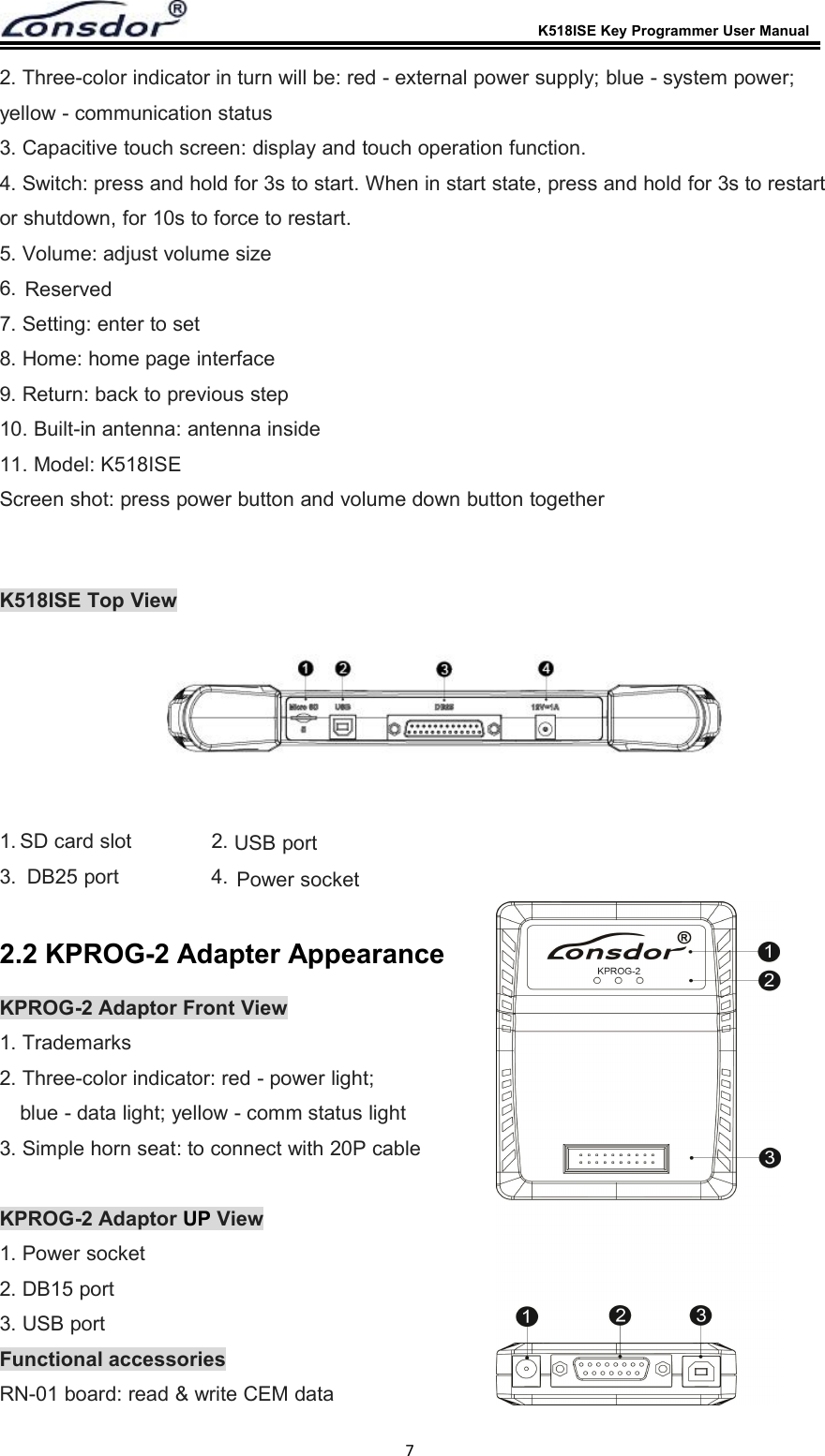
K518ISE Key Programmer User Manual72. Three-color indicator in turn will be: red - external power supply; blue - system power;yellow - communication status3. Capacitive touch screen: display and touch operation function.4. Switch: press and hold for 3s to start. When in start state, press and hold for 3s to restartor shutdown, for 10s to force to restart.5. Volume: adjust volume size6.7. Setting: enter to set8. Home: home page interface9. Return: back to previous step10. Built-in antenna: antenna inside11. Model: K518ISEScreen shot: press power button and volume down button togetherK518ISE Top View1.Power socket2.SD card slot3. DB25 port 4.USB port2.2 KPROG-2 Adapter AppearanceKPROG-2 Adaptor Front View1. Trademarks2. Three-color indicator: red - power light;blue - data light; yellow - comm status light3. Simple horn seat: to connect with 20P cableKPROG-2 Adaptor UP View1. Power socket2. DB15 port3. USB portFunctional accessoriesRN-01 board: read & write CEM dataReserved
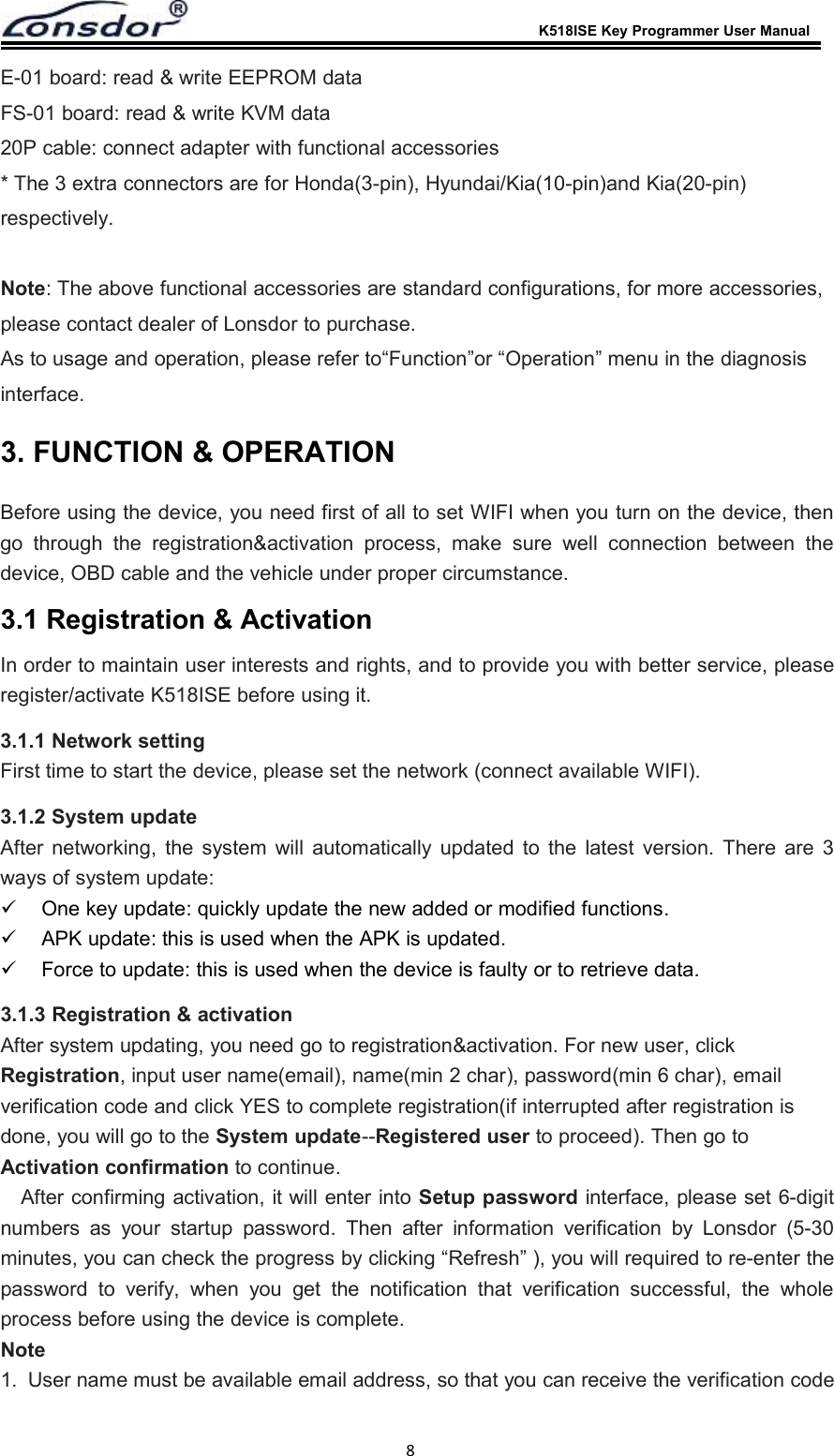
K518ISE Key Programmer User Manual8E-01 board: read & write EEPROM dataFS-01 board: read & write KVM data20P cable: connect adapter with functional accessories* The 3 extra connectors are for Honda(3-pin), Hyundai/Kia(10-pin)and Kia(20-pin)respectively.Note: The above functional accessories are standard configurations, for more accessories,please contact dealer of Lonsdor to purchase.As to usage and operation, please refer to“Function”or “Operation” menu in the diagnosisinterface.3. FUNCTION & OPERATIONBefore using the device, you need first of all to set WIFI when you turn on the device, thengo through the registration&activation process, make sure well connection between thedevice, OBD cable and the vehicle under proper circumstance.3.1 Registration & ActivationIn order to maintain user interests and rights, and to provide you with better service, pleaseregister/activate K518ISE before using it.3.1.1 Network settingFirst time to start the device, please set the network (connect available WIFI).3.1.2 System updateAfter networking, the system will automatically updated to the latest version. There are 3ways of system update:One key update: quickly update the new added or modified functions.APK update: this is used when the APK is updated.Force to update: this is used when the device is faulty or to retrieve data.3.1.3 Registration & activationAfter system updating, you need go to registration&activation. For new user, clickRegistration, input user name(email), name(min 2 char), password(min 6 char), emailverification code and click YES to complete registration(if interrupted after registration isdone, you will go to the System update--Registered user to proceed). Then go toActivation confirmation to continue.After confirming activation, it will enter into Setup password interface, please set 6-digitnumbers as your startup password. Then after information verification by Lonsdor (5-30minutes, you can check the progress by clicking “Refresh” ), you will required to re-enter thepassword to verify, when you get the notification that verification successful, the wholeprocess before using the device is complete.Note1. User name must be available email address, so that you can receive the verification code
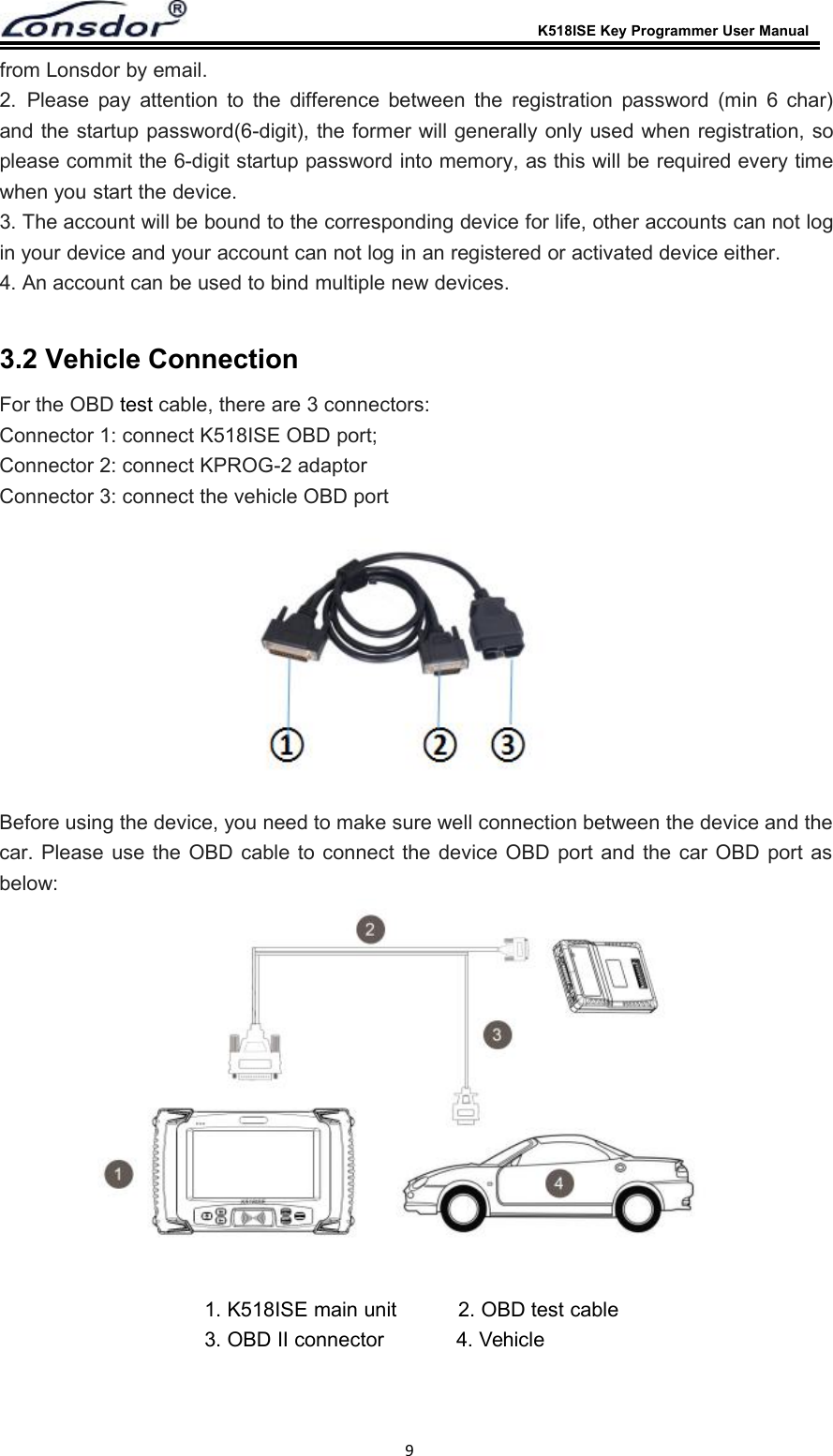
K518ISE Key Programmer User Manual9from Lonsdor by email.2. Please pay attention to the difference between the registration password (min 6 char)and the startup password(6-digit), the former will generally only used when registration, soplease commit the 6-digit startup password into memory, as this will be required every timewhen you start the device.3. The account will be bound to the corresponding device for life, other accounts can not login your device and your account can not log in an registered or activated device either.4. An account can be used to bind multiple new devices.3.2 Vehicle ConnectionFor the OBD test cable, there are 3 connectors:Connector 1: connect K518ISE OBD port;Connector 2: connect KPROG-2 adaptorConnector 3: connect the vehicle OBD portBefore using the device, you need to make sure well connection between the device and thecar. Please use the OBD cable to connect the device OBD port and the car OBD port asbelow:1. K518ISE main unit 2. OBD test cable3. OBD II connector 4. Vehicle
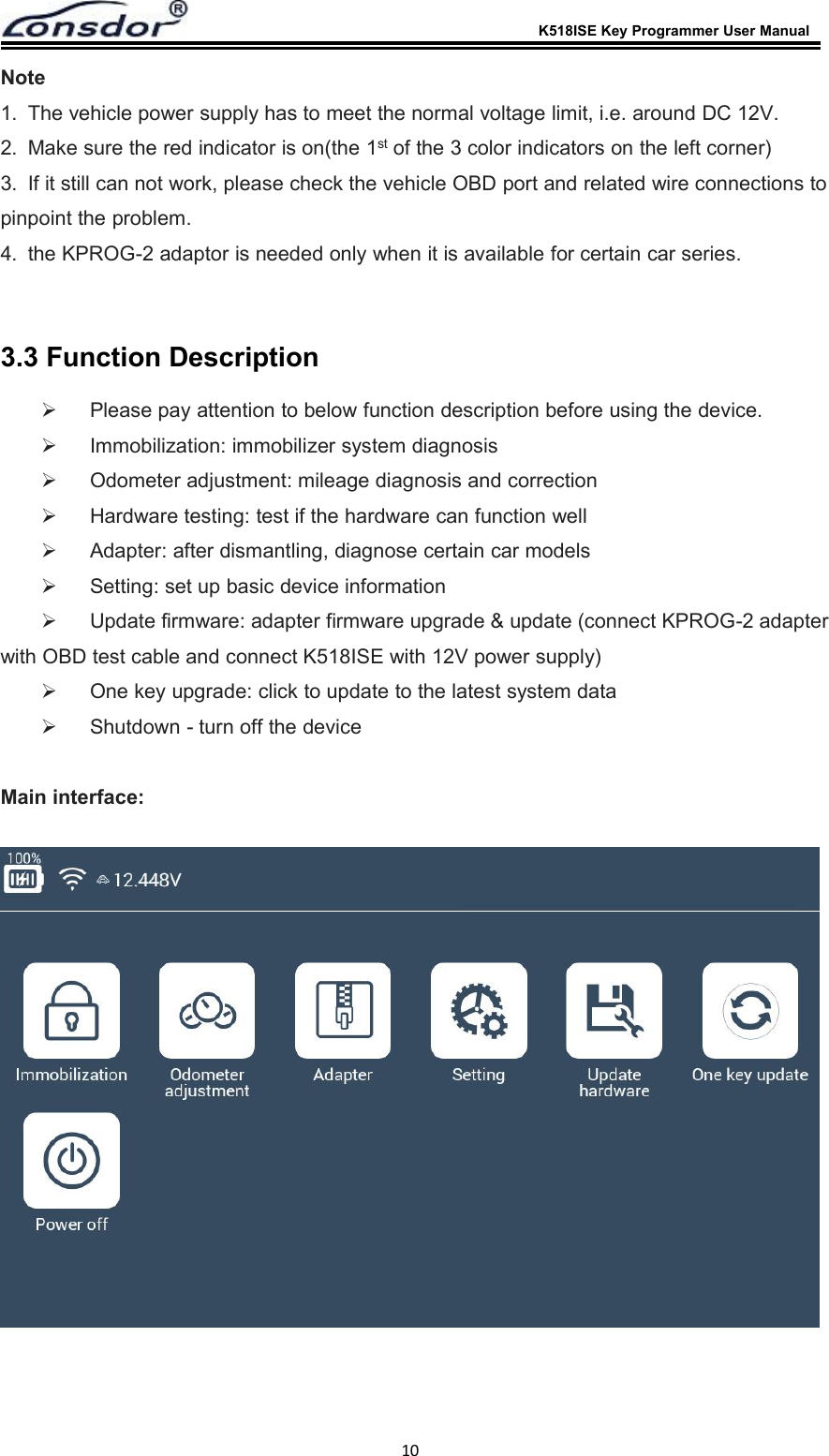
K518ISE Key Programmer User Manual10Note1. The vehicle power supply has to meet the normal voltage limit, i.e. around DC 12V.2. Make sure the red indicator is on(the 1st of the 3 color indicators on the left corner)3. If it still can not work, please check the vehicle OBD port and related wire connections topinpoint the problem.4. the KPROG-2 adaptor is needed only when it is available for certain car series.3.3 Function DescriptionPlease pay attention to below function description before using the device.Immobilization: immobilizer system diagnosisOdometer adjustment: mileage diagnosis and correctionHardware testing: test if the hardware can function wellAdapter: after dismantling, diagnose certain car modelsSetting: set up basic device informationUpdate firmware: adapter firmware upgrade & update (connect KPROG-2 adapterwith OBD test cable and connect K518ISE with 12V power supply)One key upgrade: click to update to the latest system dataShutdown - turn off the deviceMain interface:
K518ISE Key Programmer User Manual11Immobilization interface:Odometer adjustment interface:
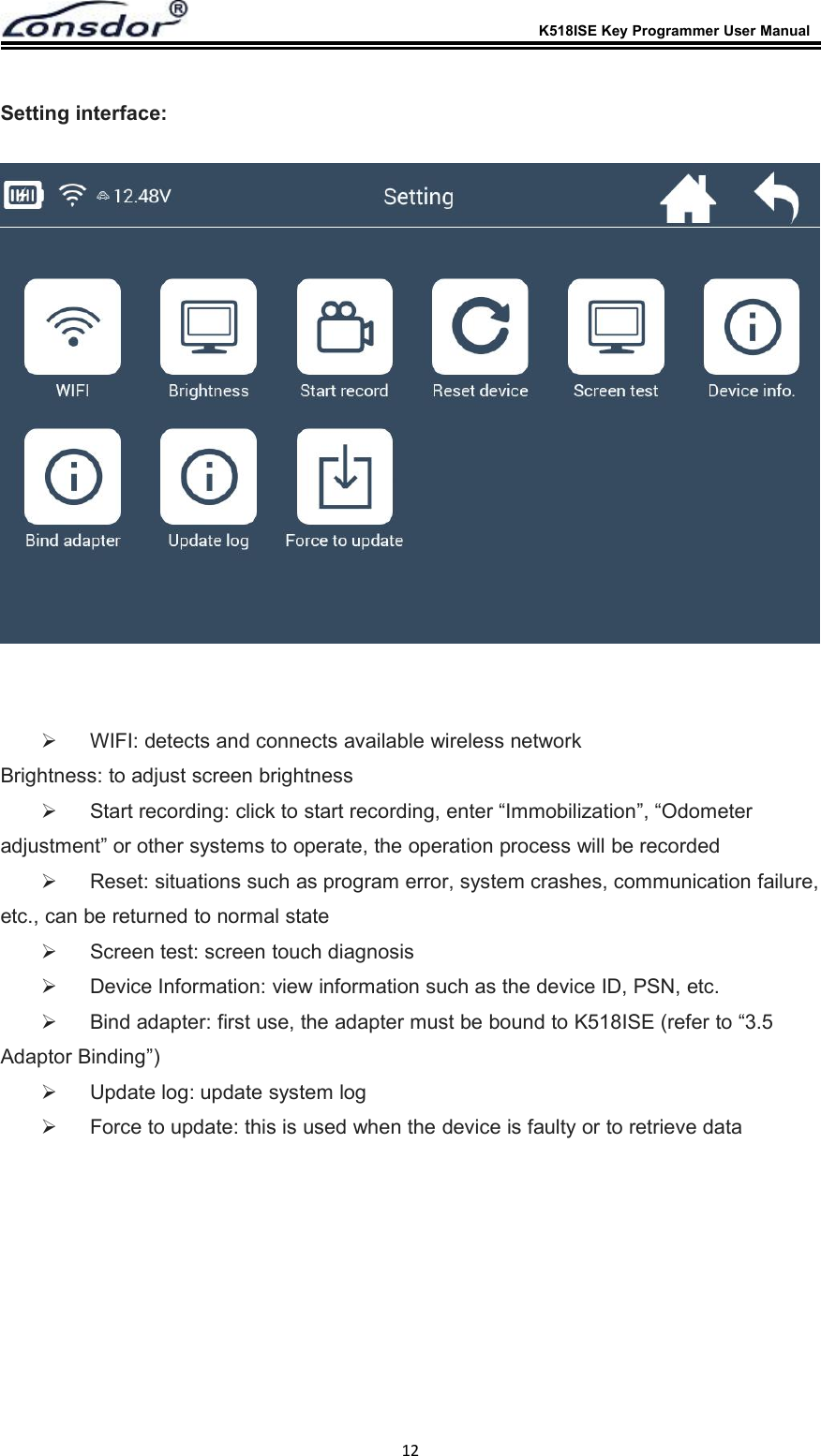
K518ISE Key Programmer User Manual12Setting interface:WIFI: detects and connects available wireless networkBrightness: to adjust screen brightnessStart recording: click to start recording, enter “Immobilization”, “Odometeradjustment” or other systems to operate, the operation process will be recordedReset: situations such as program error, system crashes, communication failure,etc., can be returned to normal stateScreen test: screen touch diagnosisDevice Information: view information such as the device ID, PSN, etc.Bind adapter: first use, the adapter must be bound to K518ISE (refer to “3.5Adaptor Binding”)Update log: update system logForce to update: this is used when the device is faulty or to retrieve data
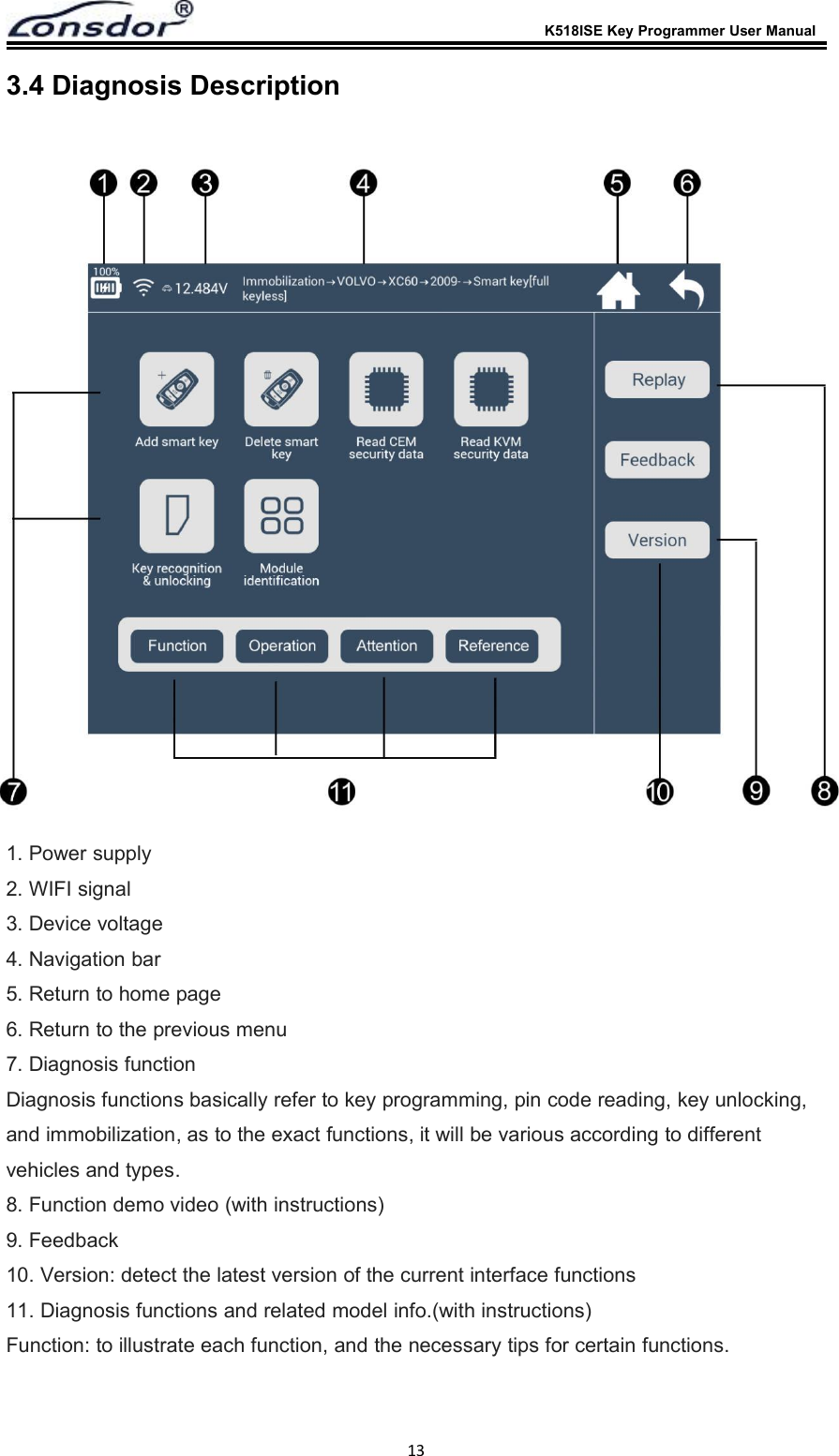
K518ISE Key Programmer User Manual133.4 Diagnosis Description1. Power supply2. WIFI signal3. Device voltage4. Navigation bar5. Return to home page6. Return to the previous menu7. Diagnosis functionDiagnosis functions basically refer to key programming, pin code reading, key unlocking,and immobilization, as to the exact functions, it will be various according to differentvehicles and types.8. Function demo video (with instructions)9. Feedback10. Version: detect the latest version of the current interface functions11. Diagnosis functions and related model info.(with instructions)Function: to illustrate each function, and the necessary tips for certain functions.
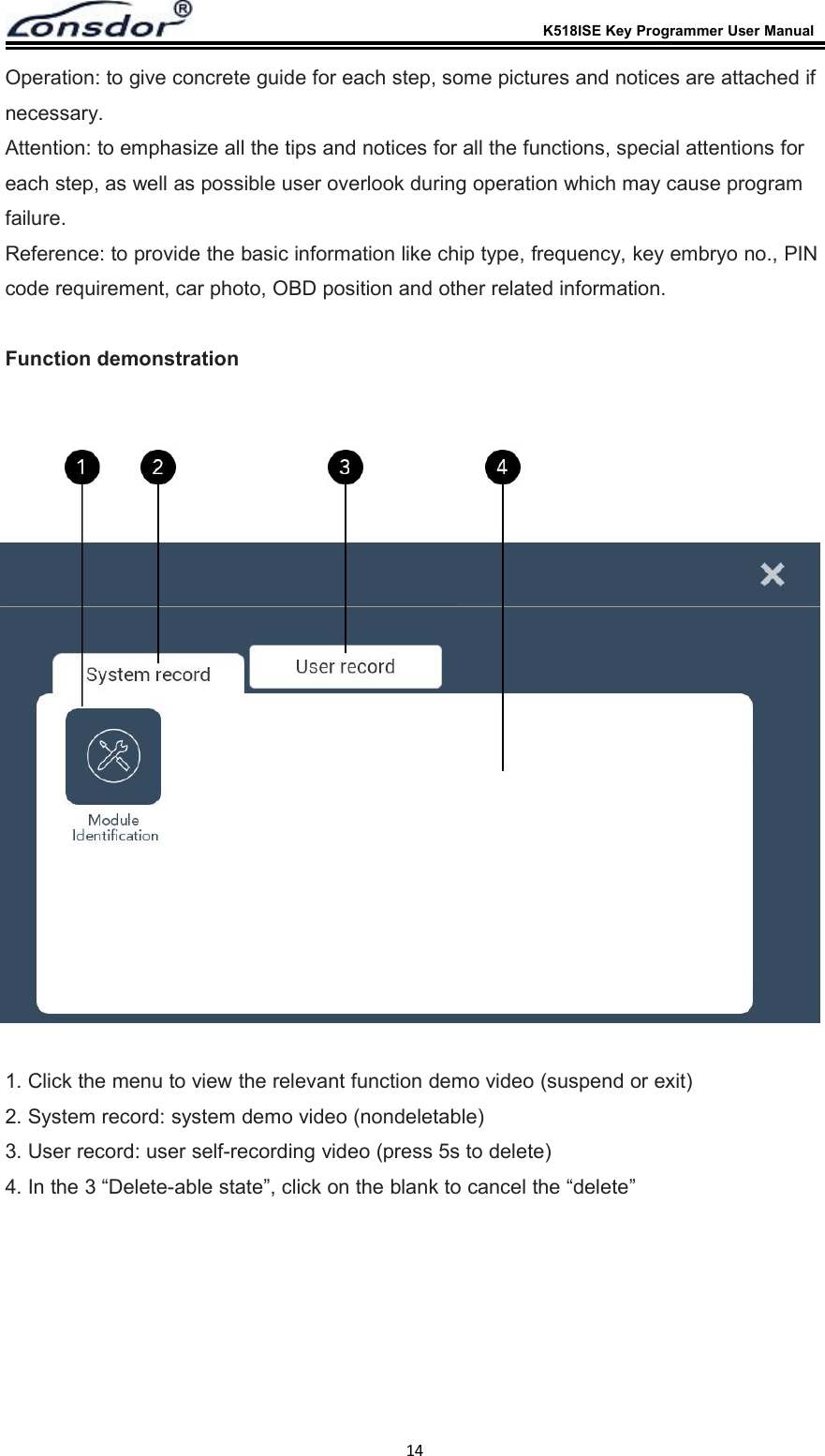
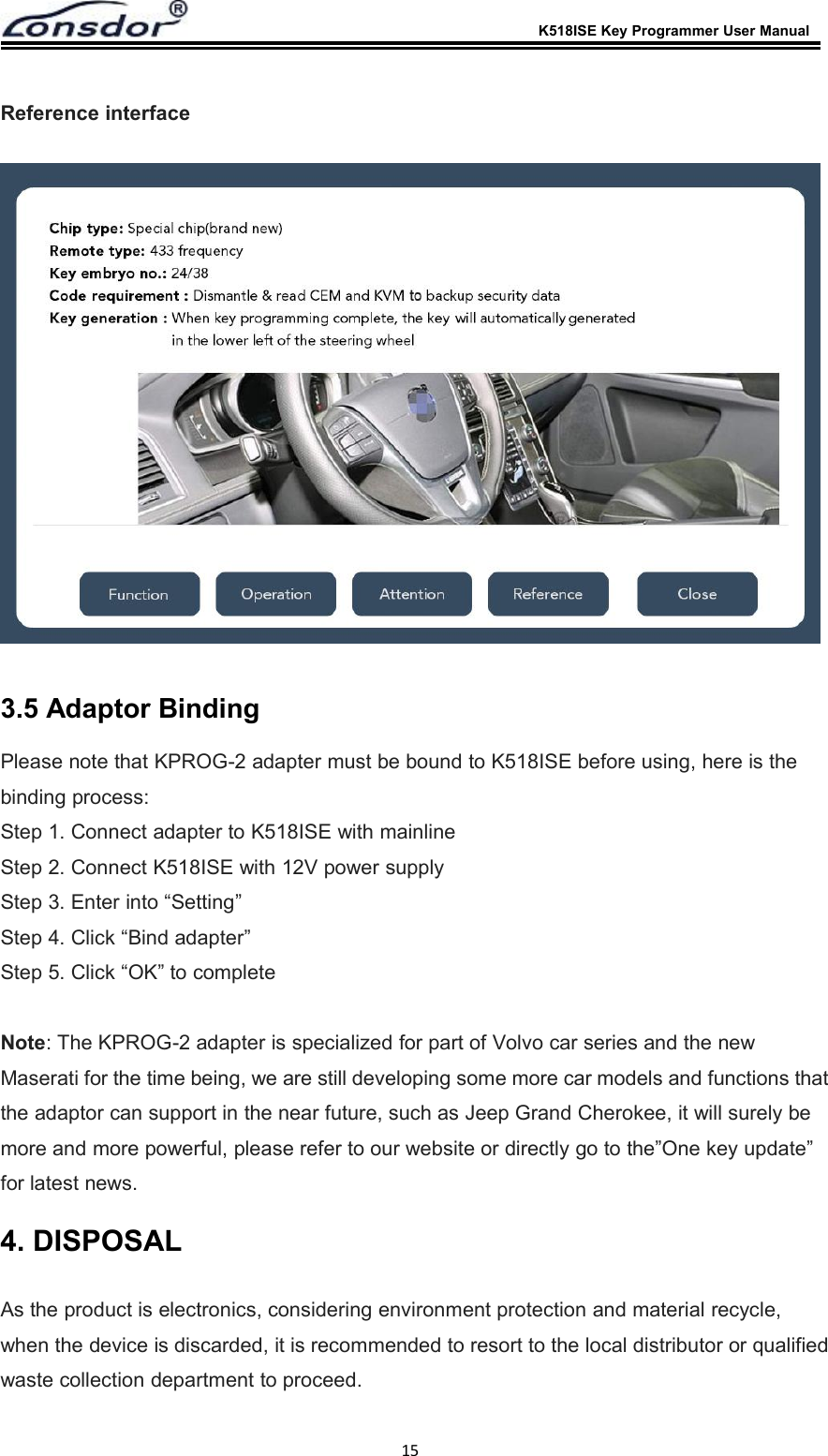
K518ISE Key Programmer User Manual14Operation: to give concrete guide for each step, some pictures and notices are attached ifnecessary.Attention: to emphasize all the tips and notices for all the functions, special attentions foreach step, as well as possible user overlook during operation which may cause programfailure.Reference: to provide the basic information like chip type, frequency, key embryo no., PINcode requirement, car photo, OBD position and other related information.Function demonstration1. Click the menu to view the relevant function demo video (suspend or exit)2. System record: system demo video (nondeletable)3. User record: user self-recording video (press 5s to delete)4. In the 3 “Delete-able state”, click on the blank to cancel the “delete”
K518ISE Key Programmer User Manual15Reference interface3.5 Adaptor BindingPlease note that KPROG-2 adapter must be bound to K518ISE before using, here is thebinding process:Step 1. Connect adapter to K518ISE with mainlineStep 2. Connect K518ISE with 12V power supplyStep 3. Enter into “Setting”Step 4. Click “Bind adapter”Step 5. Click “OK” to completeNote: The KPROG-2 adapter is specialized for part of Volvo car series and the newMaserati for the time being, we are still developing some more car models and functions thatthe adaptor can support in the near future, such as Jeep Grand Cherokee, it will surely bemore and more powerful, please refer to our website or directly go to the”One key update”for latest news.4. DISPOSALAs the product is electronics, considering environment protection and material recycle,when the device is discarded, it is recommended to resort to the local distributor or qualifiedwaste collection department to proceed.
K518ISE Key Programmer User Manual16* Lonsdor retains the final interpretation of the above terms.6. CONTACTShenzhen Lonsdor Technology Co., Ltd.Web: www.lonsdor.comEmail:service@lonsdor.comAdd.: Shenzhen, China5. FCCStatementThis device complies with Part 15 of the FCC rules. Operation is subject to the following two conditions: 1) this device may not cause harmful interference, and 2) this device must accept any interference received, including interference that may cause undesired operation.Note: This equipment has been tested and found to comply with the limits for a ClassB digital device, pursuant to part 15 of the FCC Rules. These limits are designed toprovide reasonable protection against harmful interference in a residential installation.This equipment generates uses and can radiate radio frequency energy and, if not installed and used in accordance with the instructions, may cause harmful interference to radio communications. However, there is no guarantee that interference will not occur in particular installation. If this equipment does cause harmful interference to radio or television reception, which can be determined by turning the equipment off and on, the user is encouraged to try to correct the interference by one or more of the following measures:--Reorient or relocate the receiving antenna.--Increase the separation between the equipment and receiver.--Connect the equipment into an outlet on a circuit different from that to which the receiver is connected.--Consult the dealer or an experienced radio/TV technician for help.Changes or modifications not expressly approved by the party responsible for compliance could void the user’s authority to operate the equipment.FCC Radiation Exposure StatementThis device complies with FCC RF radiation exposure limits set forth for an uncontrolled environment. This transmitter must not be co-located or operating in conjunction with any other antenna or transmitter.

Navigation menu