Lucent Trans Electronics BTHS01 BLUETOOTH HEADSET User Manual USERS MANUAL

Lucent Trans Electronics Co., Ltd BLUETOOTH HEADSET USERS MANUAL

USERS MANUAL

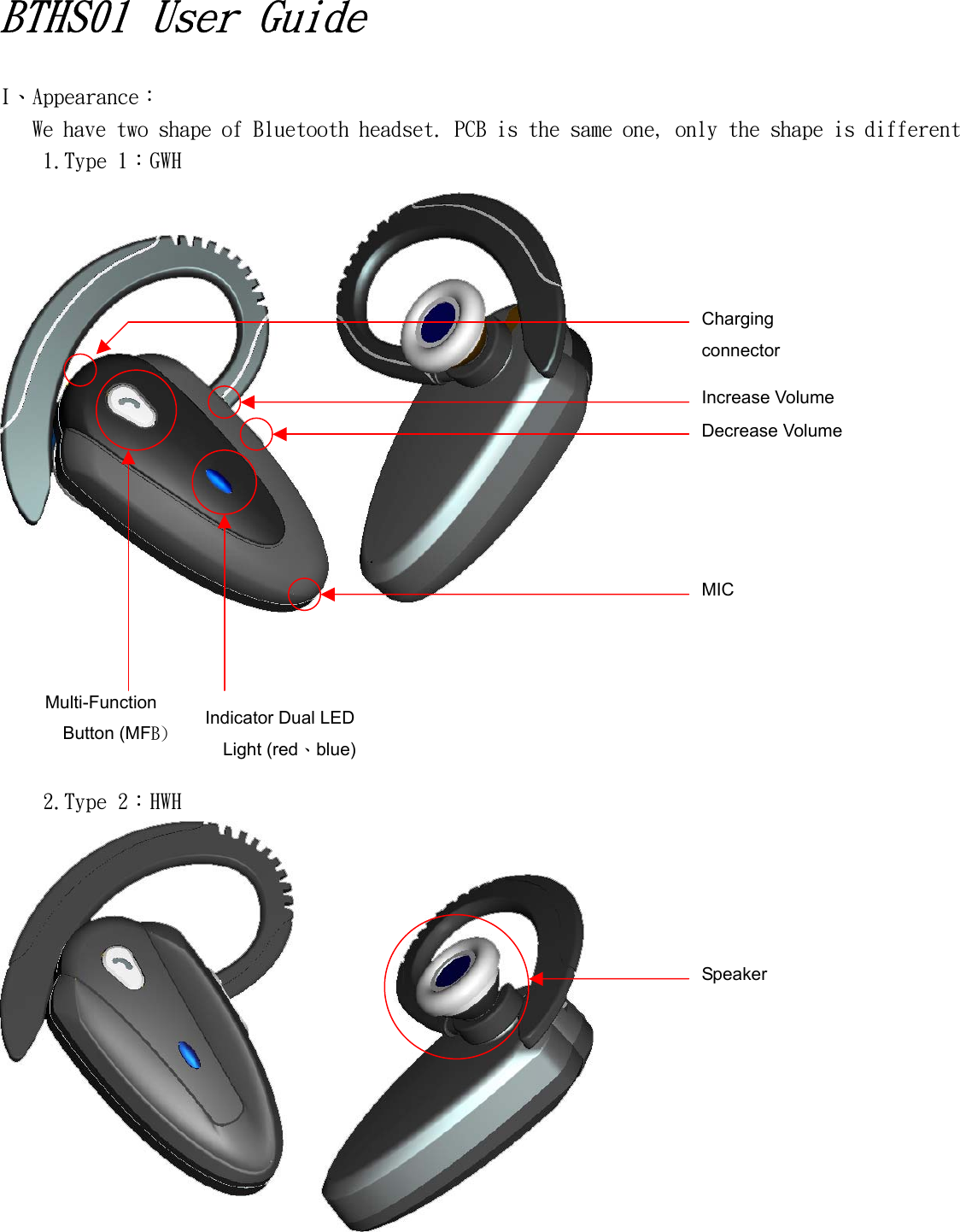
 BTHS01 User Guide  I、Appearance: We have two shape of Bluetooth headset. PCB is the same one, only the shape is different 1.Type 1:GWH           2.Type 2:HWH    Increase Volume Decrease Volume Multi-Function Button (MFB)  Indicator Dual LED Light (red、blue) Charging connector MIC Speaker
II、Charging: 1.  Use 5V / 200mA AC adapter 2.  First time use this headset, battery need to finish charging totally. 3.  The battery is too low, The LED will light on and flashes red, and you will hear 4 low beep(warning sound) in each twenty second. 4.  Battery charging, LED light on red.    Full charging finish, LED light off. 5.  The headset not available to use, when it is charging. If the headset is connected with mobile phone before charging, headset will disconnect by itself when charging. 6.  Travel charger model is “1BGT”、Input:AC100V~240V/80mA/47~63Hz、Output:5.2V/200mA  III、Match and connect with mobile phone:         Headset need to match with mobile phone, then it can connect with mobile phone. The match way as below: 1.  Confirm headset is switch off(No indicator LED light、No response when press any button) 2.  Turn the headset on => Press and hold MFB button. You will hear beep (scale from low to high) around 2 seconds.(LED light red and blue flashes 3 times) Keep press and hold MFB button, you will hear beep after 2 seconds.(scale from low to high). When the headset enter Paring model, You will see blue and red indicator light alternate flashes. 3.  Using mobile phone to search Bluetooth device(The operation way are different of each mobile phone, please refer to mobile phone user guide) 4.  When mobile phone searching to BTHS01, select it and enter the passkey ”0000” 5.  After successful matching, some mobile phone will connected automatically. But some mobile phone need to enter the list and select “connect”. 6.  Headset indicator blue light will flash twice each 5 seconds when successfully added.  IV、Turn the headset off:         Headset will turn off after press and hold MFB button around 4~5 seconds Process: You will hear long beep, then short beep (scale from low to high).    Blue and Red LED light will flash 3 times.      V、Answering and Ending a call:         Headset will hear a ring sound when incoming a call. Press MFB button can answering acall. When answering a call, LED light(red, blue) will quickly flash 3 times each 5 seconds.      Press MFB button one time will ending a call.  VI、Adjusting Volume:     Headset connected situation=> Press“┼”can increase volume, and you will hear beep.    And press“─”can decrease volume, and you also can hear beep. There are 7 scale can be volume adjusting.
 VII、Automatically connecting:         You only need to add the headset to the phone once. When you turn on the headset, you only need to press MFB button around 2 seconds, you will hear beep (scale from low to high).          Then, headset will connect will the phone.    VIII、Other Special Operation(All the Bluetooth mobile phone are not support below functions. Please refer to each mobile phone user guide): • Making a call using voice commands:Connecting Situation => Press MFB button 1 time, you will hear a short beep.    You can enter the voice command at the same time.    LED light(red, blue) will flash 3 times each 5 seconds. • Memory the last call and call out:Connecting Situation => Press MFB button around 2.5second, you will hear a long beep.    Mobile phone will memory the last call and call out at the same time.    LED light(red, blue) will flash 3 times each 5 seconds. • Holding a call:Press MFB button around 2.5 seconds, you will hear a long beep.    This call will be holing situation, and other side will hear holing voice commands.    Repeating the same way again, you will get this call back.    LED light(red, blue) will flash 3 times each 5 seconds. • Operation silent:  When you answering a call, press“┼”around 2.5 seconds, You will hear a long beep can enter to silence mode.( You can hear other side’s voice, but they can not hear your voice. ) • Silence mode=> Headset will send out a short beep in each 3 seconds to remind you that you are in silence mode.    Repeat the same way again, the silence model will be cancel.    LED light(red, blue) will flash 3 times each 5 seconds. • Voice switch(Headset to mobile phone):When you answering a call, press“─”around 2.5 seconds.    You will hear long beep can switch the sound from headset to mobile phone.    After you switch the sound, the headset can not communicate with other side.     Press MFB button (in 1 second) can switch the sound back to headset.    LED light(red, blue) will flash 3 times each 5 seconds.
Manual  FEDERAL COMMUNICATIONS COMMISSION INTERFERENCE STATEMENT This equipment has been tested and found to comply with the limits for a Class B digital device, pursuant to part 15 of the FCC Rules. These limits are designed to provide reasonable protection against harmful interference in a residential installation. This equipment generates, uses and can radiate radio frequency energy and, if not installed and used in accordance with the instructions, may cause harmful interference to radio communications. However, there is no guarantee that interference will not occur in a particular installation. If this equipment does cause harmful interference to radio or television reception, which can be determined by turning the equipment off and on, the user is encouraged to try to correct the interference by one or more of the following measures: -Reorient or relocate the receiving antenna. -Increase the separation between the equipment and receiver. -Connect the equipment into an outlet on a circuit different from that to which the receiver is connected. -Consult the dealer or an experienced radio/ TV technician for help. •  This device complies with Part 15 of the FCC Rules. Operation is subject to the following two conditions :(1) this device may not cause harmful interference, and (2) this device must accept any interference received, including interference that may cause undesired operation.  •  Any changes or modifications not expressly approved bye the party responsible for compliance could void the authority to operate equipment.  FCC RF Radiation Exposure Statement This equipment complies with FCC RF radiation exposure limits set forth for an uncontrolled environment .  This equipment must not be co-located or operating in conjunction with any other antenna or transmitter.

Navigation menu