Lucent Trans Electronics BTHS02X-XXX BLUETOOTH HEADSET User Manual
Lucent Trans Electronics Co., Ltd BLUETOOTH HEADSET Users Manual
Users Manual
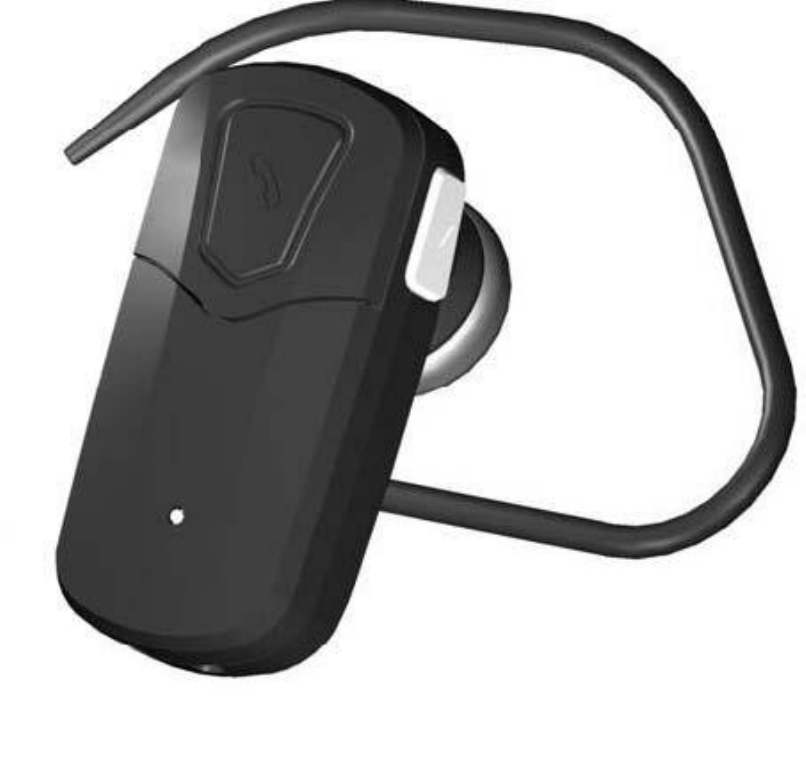
BTHS02C-MWH
Bluetooth User Manual
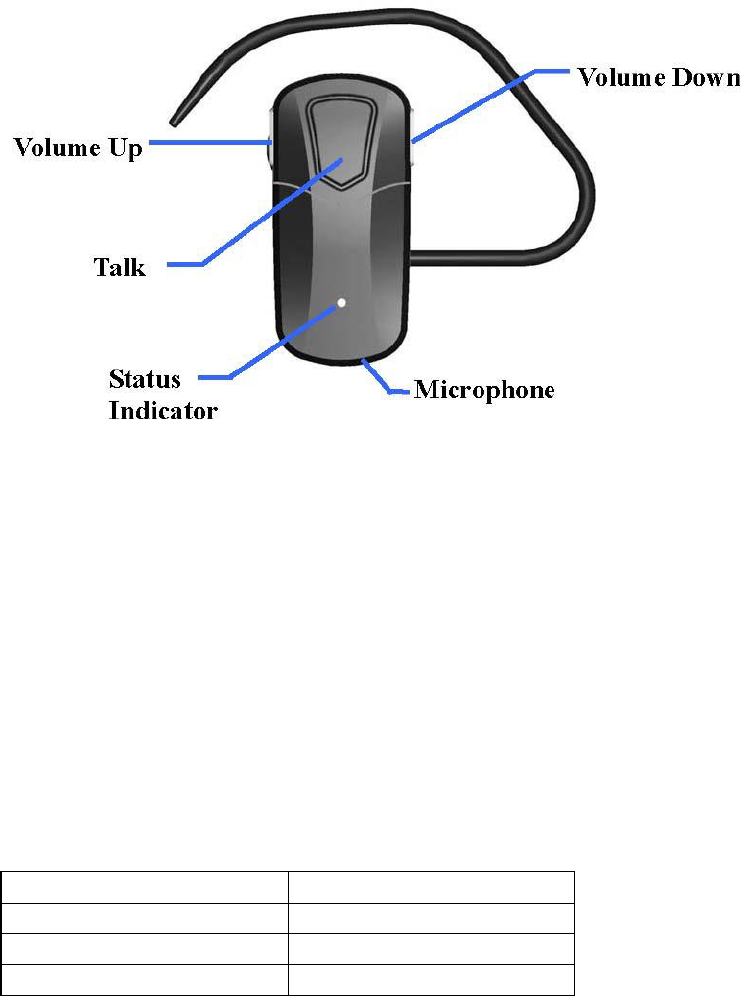
PLEASE NOTE: Before using your new MWH Bluetooth headset, you must fully charge it and
set it up by ‘pairing it’ with your selected Bluetooth device.
About your MWH Bluetooth Headset
LED
Charge your headset
Make sure your MWH Bluetooth headset is fully charged before you start using it. Use the USB
charging cable to charge it. When the battery is running low, you will hear 4 beeps and the LED indicator
flashes in red in every 20 seconds to remind you that you need to charge your headset. If the headset is
paired to the handset before you charge it, the connection will be disconnected. Please pair again after
charging. Important: The headset cannot be used while charging.
The LED indicator on your headset indicates the charging status while charging:
Light
Status
Red
Charging
Off
Charge complete
Red Flash
Battery is running low
Turing your heaset on and off
To
Press and hold
You will hear
You will see
Turn headset
on
The Multi-Function
Button for 2 seconds
2 ascending tones
3 purple flashes
Turn headset
off
The Multi-Function
Button for 5 seconds
1 long beep and then 2
descending tones
3 red flashes
Pairing the headset with your phone
Before you use your Bluetooth headset, you need to pair it with your mobile phone.
1.Make sure the headset is off.
2.Press and hold the Multi-Function button for 4 seconds. You will first turn on the headset then enter
pairing mode.
3.Set your Bluetooth phone to ‘discover’ the Bluetooth headset. Follow your phone’s instruction guide. This
usually involves going to a ‘setup,’ ‘connect’ or ‘Bluetooth’ menu on your phone and selecting the option to
‘discover’ or ‘add’ a Bluetooth device.
4.Your phone will find BTHS02x. Your phone then asks if you want to pair with it. Accept by pressing ‘Yes’
or ‘OK’ on the phone and confirm with the passkey or PIN= 0000 (4 zeros).Your phone will confirm when
pairing is complete. In case of unsuccessful pairing, repeat steps 1 to 4.
Important: If pairing was successful, the blue light flashes every 5 seconds.
How to
Answer a call
-Press once the Multi-Function Button on your headset to answer an incoming call.
End a call
-Press once the Multi-Function Button on your headset to end an active call.
Adjust sound and volume
- Press the volume up or down button to adjust the volume.
To
Press
You will hear
Turn the volume up
△ on the side of the headset
1 beep
Turn the volume down
▽ on the side of the headset
1 beep
There are 7 scales of volume. When the volume has reached the maximum or minimum scale, you will
hear 2 beeps.
Auto connection
- Once you pair the headset with a device, the headset will be automatically connected to the
device whenever you turn the headset on.
To
Press and hold
You will hear
You will see
Turn the
headset on
The Multi-Function Button
for 2 seconds
2 ascending
tones
3 purple flashes
Enter pairing
mode
The Multi-Function Button
for 2 more seconds when
headset is on
4 ascending
tones
The blue and red light
alternatively flashes

Activate voice dialing Please check if your mobile phone supports voice dialing. If it does, please set
up voice tags on your mobile phone first, if required. Most phones have the capability to recognize
voice commands without pre-programming. Refer to you phones users manual for further details.
-Press once the Multi-Function Button when the headset is on and not used. You will hear a short
beep and the phone will enter voice commands mode. The purple light flashes every 5 seconds.
-Say the command you wish to active
-Press the Multi-Function Button again to cancel the voice commands menu.
Last number dialing
Press and hold the Multi-Function Button for 2.5 seconds when the headset is on and not used.
You will hear a long beep and the redial tone. The phone will dial last number. The purple light
flashes every 5 seconds.
Call waiting and placing a call on hold This lets you put a call on hold during a conversation and
answer a waiting call. Press and hold the Multi-function Button for 2.5 seconds during a conversation
to put the active call on hold and answer the waiting call. Press the Multi-function Button for 2.5
seconds to switch between the two calls. Press once the Multi-Function Button to end the active
conversation.
Mute/unmute Press and hold the volume up button (△) for 2.5 second during a conversation to mute.
You will hear a long tone indicating mute mode. The microphone is muted but you can still hear the
voice from the other party. A low beep alert plays every 3 seconds during a muted call. To unmute,
press the volume up button (△) for 2.5 second again.
Transferring a call Press and hold the volume down button (▽) for 2.5 second during a conversation
to transfer the current call from your headset to your phone. To switch back, press the volume down
button (▽) for 2.5 second again
Reject call Press and hold the Multi-Function Button for 2.5 seconds when the call incoming.
You will hear a long beep then reject an incoming call.
Safety and General Information
1.Please read this guidebook carefully and follow the instructions.
2.To avoid any damage or malfunction of the unit, do not drop it from high place.
3.Keep away unit from humidity, water and any other liquid. And if the unit is exposed by water, moisture
and other liquid directly, do not operate it normally to avoid any electrical shock, explosion and damage of
the unit.
4.Do not place or keep the unit near the heat sources such as direct sun light, radiators, stoves or other
apparatus which produce heat. It may cause explosion, degrade of performance and reduce battery life.
5.Do not modify, repair & disassemble unit at discretion (especially battery: it may cause an explosion)
6.Do not place the heavy objects on the unit.
7.Use only supplied and approved charging device.
8.Unplug this unit when it is unused for long period of time or during lightening storms.
CAUTIONS: ELECTRIC SHOCK HAZARD The battery used in this device may present a risk of fire or
chemical burn if mis-treated.

WEEE Symbol Information
- Correct Disposal of This Product (Waste Electrical & Electronic Equipment)
(Applicable in the European Union and other European countries with separate collection systems) This
marking shown on the product or its literature, indicates that it should not be disposed with other household
wastes at the end of its working life. To prevent possible harm to the environment or human health from
uncontrolled waste disposal, please separate this from other types of wastes and recycle it responsibly to
promote the sustainable reuse of material resources. Household users should contact either the retailer
where they purchased this product or their local government office, for details of where and how they can
take this item for environmentally safe recycling. Business users should contact their supplier and check
the terms and conditions of the purchase contract. This product should not be mixed with other commercial
wastes for disposal.
Bluetooth is a trademark owned by the Bluetooth SIG, Inc.
FCC Information .
Federal Communications Commission (FCC) Statement
15.21
You are cautioned that changes or modifications not expressly approved by the part responsible for compliance
could void the user’s authority to operate the equipment.
15.105(b)
This equipment has been tested and found to comply with the limits for a Class B digital device, pursuant to part
15 of the FCC rules. These limits are designed to provide reasonable protection against harmful interference in a
residential installation. This equipment generates, uses and can radiate radio frequency energy and, if not
installed and used in accordance with the instructions, may cause harmful interference to radio communications.
However, there is no guarantee that interference will not occur in a particular installation. If this equipment
does cause harmful interference to radio or television reception, which can be determined by turning the
equipment off and on, the user is encouraged to try to correct the interference by one or more of the following
measures:
-Reorient or relocate the receiving antenna.
-Increase the separation between the equipment and receiver.
-Connect the equipment into an outlet on a circuit different from that to which the receiver is connected.
-Consult the dealer or an experienced radio/TV technician for help.
This device complies with Part 15 of the FCC Rules.Operation is subject to the following two conditions:
1) this device may not cause harmful interference and
2) this device must accept any interference received, including interference that may cause undesired
operation of the device.
FCC RF Radiation Exposure Statement:
This equipment complies with FCC radiation exposure limits set forth for an uncontrolled environment. End
users must follow the specific operating instructions for satisfying RF exposure compliance. This transmitter
must not be co-located or operating in conjunction with any other antenna or transmitter.