M SYSTEM 0000001 WIRELESS GATEWAY User Manual 05

M-SYSTEM CO., LTD. WIRELESS GATEWAY 05

05 User Manual

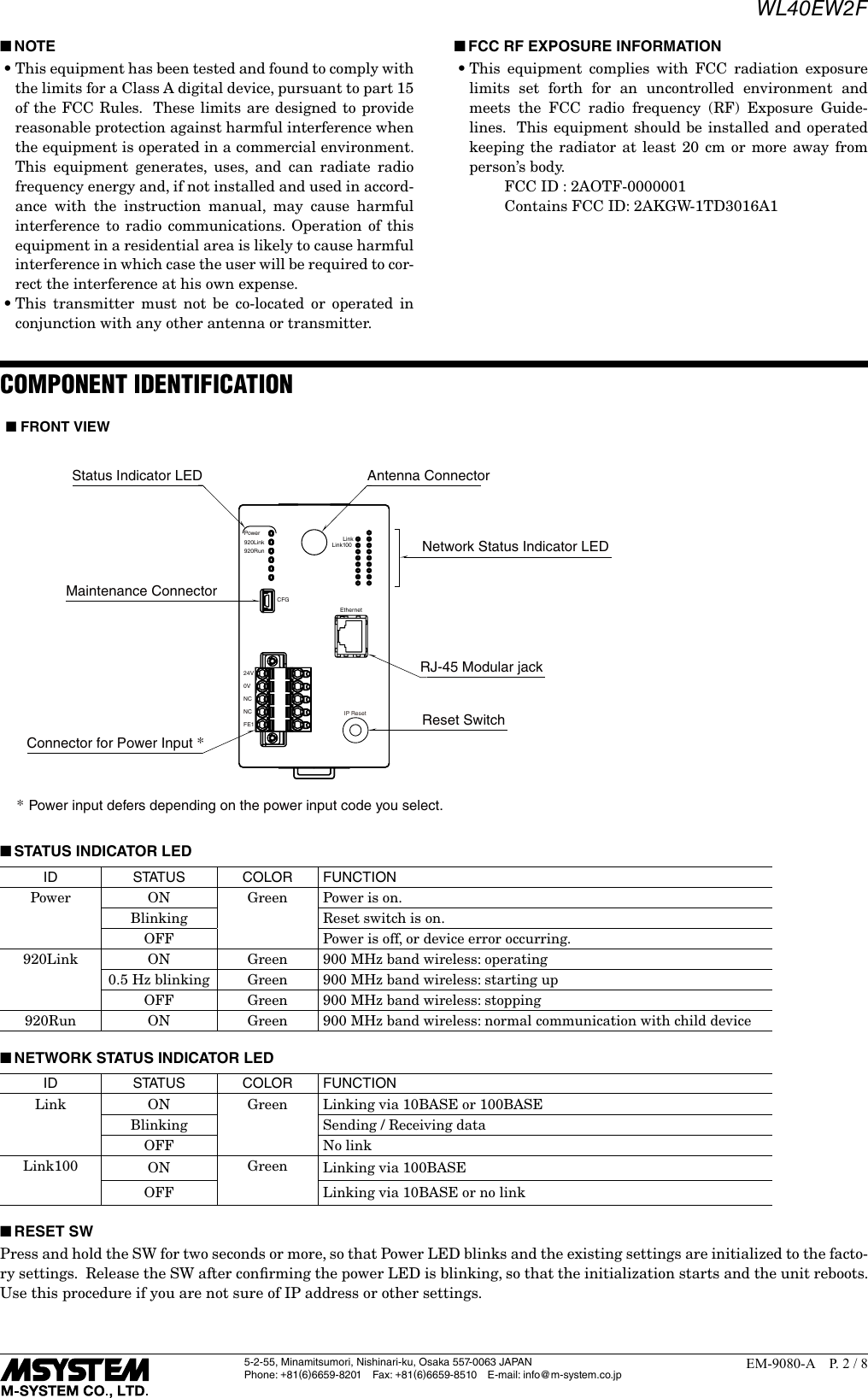
5-2-55, Minamitsumori, Nishinari-ku, Osaka 557-0063 JAPANPhone: +81(6)6659-8201 Fax: +81(6)6659-8510  E-mail: info@m-system.co.jpEM-9080-A  P. 1 / 8INSTRUCTION MANUALWIRELESS GATEWAY(Modbus/TCP (Ethernet), Modbus-RTU Transparent 900 MHz Band Wireless Device (Child device))MODEL WL40EW2FBEFORE USE ....Thank you for choosing M-System.  Before use, please check contents of the package you received as outlined below.If you have any problems or questions with the product, please contact M-System’s Sales Office or representatives. ■PACKAGE INCLUDES:Wireless gateway.................................................................(1)Antenna ...............................................................................(1) ■MODEL NO.Confirm Model No. marking on the product to be exactly what you ordered. ■INSTRUCTION MANUALThis manual describes necessary points of caution when you use this product, including installation, connection and basic maintenance procedures.For information on the introduction of wireless device, refer to the 900 MHz band wireless device users manual (EM-9085).For information on the detailed setting, refer to the operat-ing manual (NM-9080-B).For information on Modbus specification, refer to the Mod-bus Protocol Reference Guide (EM-5650). These manuals are downloadable at M-System’s web site (http://www.m-system.co.jp).POINTS OF CAUTION ■POWER INPUT RATING & OPERATIONAL RANGE•Locate the power input rating marked on the product and confirm its operational range as indicated below:    24V DC rating: 24V ±10%, ≤ 90mA    12V DC rating: 12V ±10%, ≤ 170mA ■GENERAL PRECAUTIONS•Before you remove the unit or mount it, turn off the power supply for safety. ■ENVIRONMENT•Indoor use.•When heavy dust or metal particles are present in the air, install the unit inside proper housing with sufficient ventilation.•Do not install the unit where it is subjected to continuous vibration.  Do not subject the unit to physical impact.•Environmental temperature must be within -20 to +60°C (-4 to 140°F) with relative humidity within 10 to 90% RH in order to ensure adequate life span and operation.•Attach the antenna to the unit. •Attachment and adjustment of sleeve antenna; Loosen the connector (See the top-right figure.), and rotate the antenna. Holding the antenna vertical, tighten the con-nector by hand.  Make sure to fix the antenna firmly.Connector•Attachment of rooftop antenna;  There is a magnet on the bottom face which allows you to attach the antenna on a metal box and such.  To obtain optimum performance from the antenna, attach on a metal plate (recommended dimension: 500 mm × 500 mm or more).  However, in the case of connecting FE1 to a metal plate, the isolation be-tween FE1 and antenna connector will be lost.  Tighten the connector with a specified torque (0.9 N∙m).  As a guide, finger-tighten it until the connector stops, and then rotate it 10 to 15 degrees with a wrench.  Do not force the cable to bend less than acceptable radius of 3 cm.•Using 7.5 m coaxial cable (model: CX-SAC0SAD0Q0750)(OKI) for extension decreases transmission distance. ■WIRING•Do not install cables close to noise sources (relay drive cable, high frequency line, etc.).•Do not bind these cables together with those in which noises are present.  Do not install them in the same duct.•Use a shielded twisted pair (STP) cable as a LAN cable. ■AND ....•The unit is designed to function as soon as power is sup-plied, however, a warm up for 10 minutes is required for satisfying complete performance described in the data sheet.CAUTION REGARDING RADIO FREQUENCY ■FCC NOTICE•This device complies with part 15 of the FCC Rules.  Operation is subject to the following two conditions:  (1) This device may not cause harmful interference, and    (2) this device must accept any interference received, in-cluding interference that may cause undesired operation. ■FCC CAUTION•Changes or modifications not expressly approved by the party responsible for compliance could void the user’s au-thority to operate the equipment.
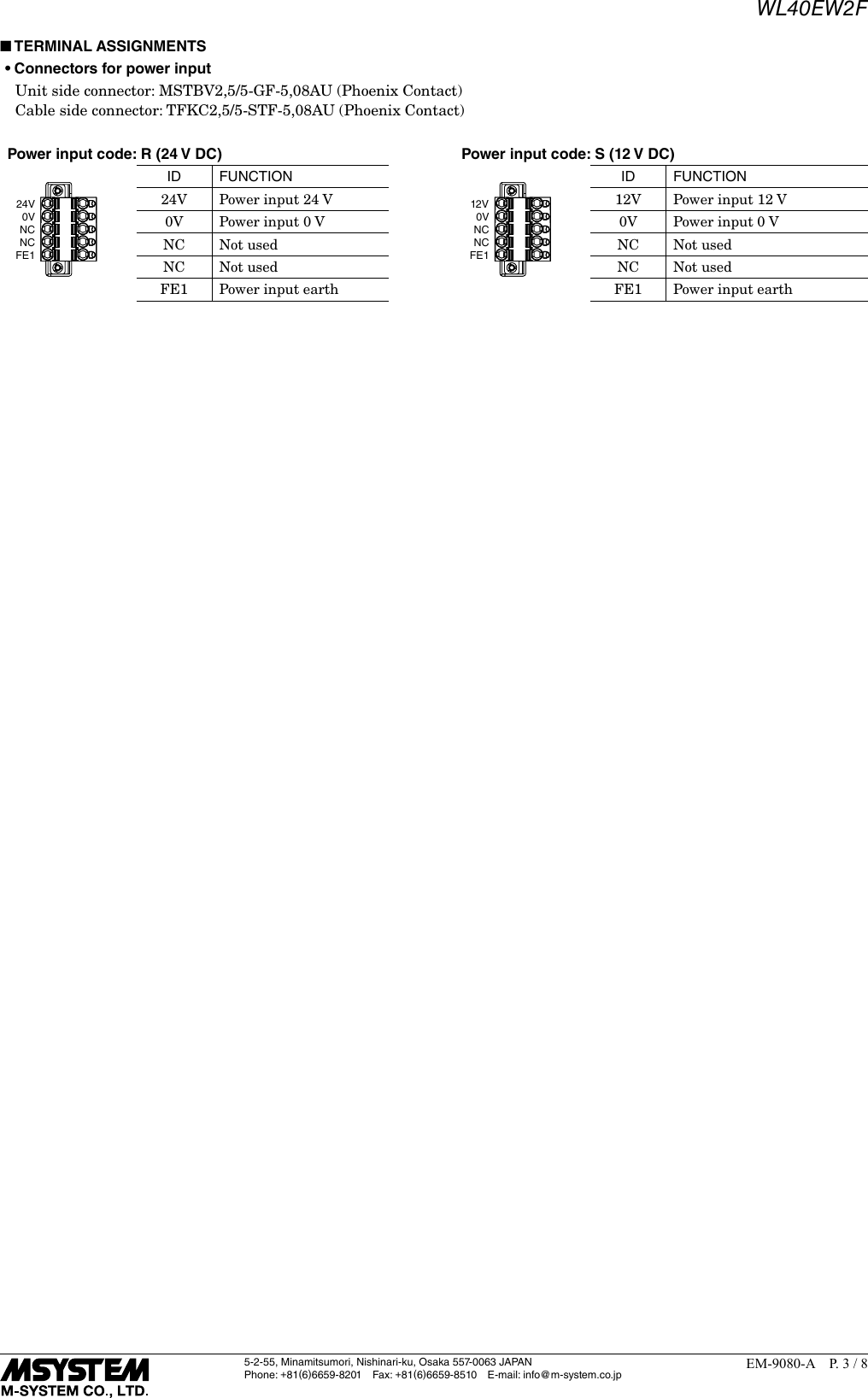
WL40EW2F5-2-55, Minamitsumori, Nishinari-ku, Osaka 557-0063 JAPANPhone: +81(6)6659-8201 Fax: +81(6)6659-8510  E-mail: info@m-system.co.jpEM-9080-A  P. 2 / 8 ■NOTE•This equipment has been tested and found to comply with the limits for a Class A digital device, pursuant to part 15 of the FCC Rules.  These limits are designed to provide reasonable protection against harmful interference when the equipment is operated in a commercial environment.  This equipment generates, uses, and can radiate radio frequency energy and, if not installed and used in accord-ance with the instruction manual, may cause harmful interference to radio communications. Operation of this equipment in a residential area is likely to cause harmful interference in which case the user will be required to cor-rect the interference at his own expense.•This transmitter must not be co-located or operated in conjunction with any other antenna or transmitter. ■FCC RF EXPOSURE INFORMATION•This equipment complies with FCC radiation exposure limits set forth for an uncontrolled environment and meets the FCC radio frequency (RF) Exposure Guide-lines.  This equipment should be installed and operated keeping the radiator at least 20 cm or more away from person’s body.      FCC ID : 2AOTF-0000001      Contains FCC ID: 2AKGW-1TD3016A1COMPONENT IDENTIFICATIONNetwork Status Indicator LED*Power input defers depending on the power input code you select.Status Indicator LED Antenna ConnectorMaintenance ConnectorConnector for Power Input *Power920Link920RunCFG24V0VNCNCFE1RJ-45 Modular jackLinkLink100EthernetIP Reset Reset Switch■ FRONT VIEW ■STATUS INDICATOR LEDID S TAT U S COLOR FUNCTIONPower ON Green Power is on.Blinking Reset switch is on.OFF Power is off, or device error occurring.920Link ON Green 900 MHz band wireless: operating0.5 Hz blinking Green 900 MHz band wireless: starting upOFF Green 900 MHz band wireless: stopping920Run ON Green 900 MHz band wireless: normal communication with child device ■NETWORK STATUS INDICATOR LEDID S TAT U S COLOR FUNCTIONLink ON Green Linking via 10BASE or 100BASEBlinking Sending / Receiving dataOFF No linkLink100 ON Green Linking via 100BASEOFF Linking via 10BASE or no link ■RESET SWPress and hold the SW for two seconds or more, so that Power LED blinks and the existing settings are initialized to the facto-ry settings.  Release the SW after confirming the power LED is blinking, so that the initialization starts and the unit reboots.Use this procedure if you are not sure of IP address or other settings.
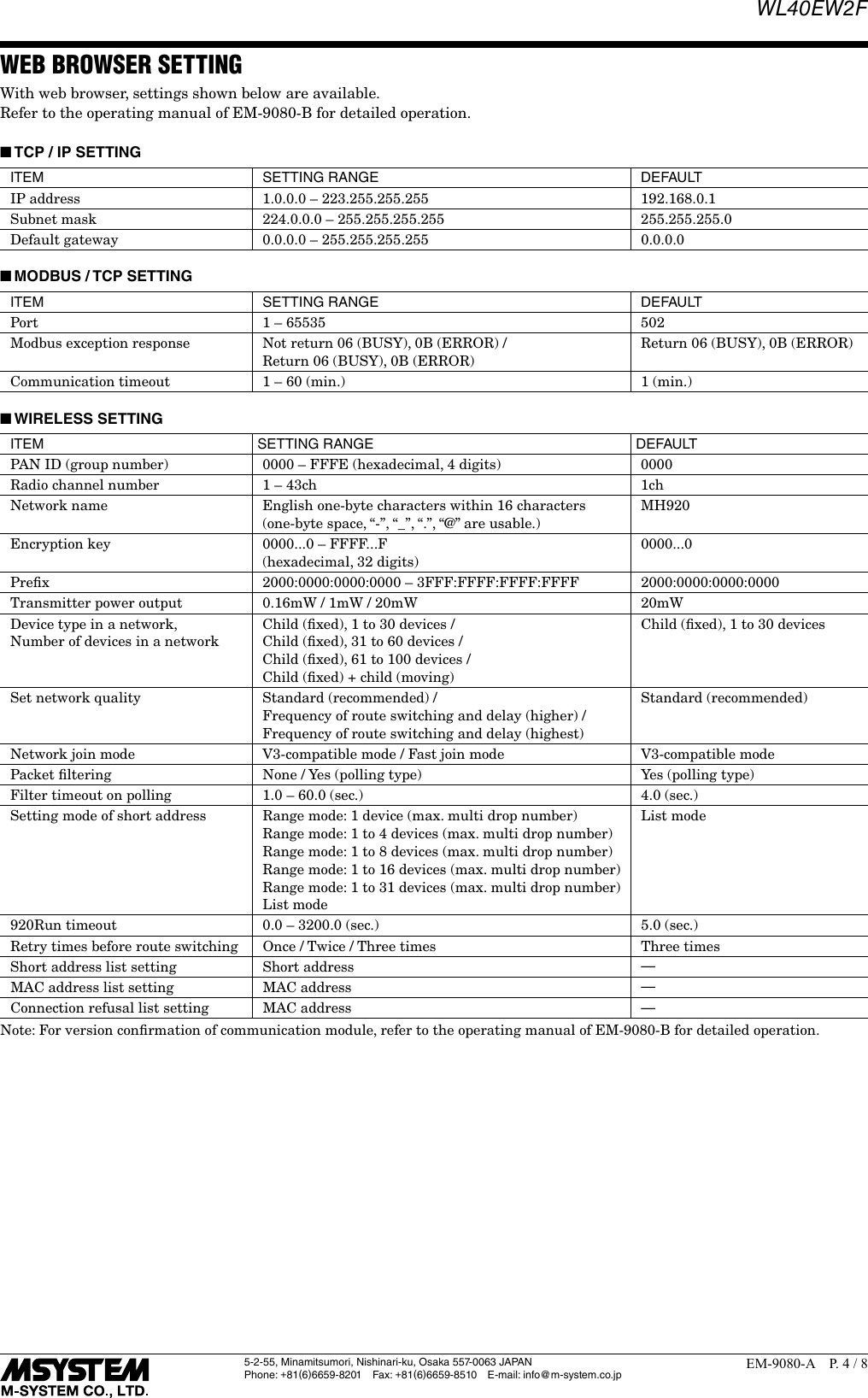
WL40EW2F5-2-55, Minamitsumori, Nishinari-ku, Osaka 557-0063 JAPANPhone: +81(6)6659-8201 Fax: +81(6)6659-8510  E-mail: info@m-system.co.jpEM-9080-A  P. 3 / 8 ■TERMINAL ASSIGNMENTS• Connectors for power input  Unit side connector: MSTBV2,5/5-GF-5,08AU (Phoenix Contact)  Cable side connector: TFKC2,5/5-STF-5,08AU (Phoenix Contact)Power input code: R (24 V DC) Power input code: S (12 V DC)24V0VNCNCFE1ID FUNCTION12V0VNCNCFE1ID FUNCTION24V Power input 24 V 12V Power input 12 V0V Power input 0 V 0V Power input 0 VNC Not used NC Not usedNC Not used NC Not usedFE1 Power input earth FE1 Power input earth
WL40EW2F5-2-55, Minamitsumori, Nishinari-ku, Osaka 557-0063 JAPANPhone: +81(6)6659-8201 Fax: +81(6)6659-8510  E-mail: info@m-system.co.jpEM-9080-A  P. 4 / 8WEB BROWSER SETTINGWith web browser, settings shown below are available.Refer to the operating manual of EM-9080-B for detailed operation. ■TCP / IP SETTINGITEM SETTING RANGE DEFAULTIP address 1.0.0.0 – 223.255.255.255 192.168.0.1Subnet mask 224.0.0.0 – 255.255.255.255 255.255.255.0Default gateway 0.0.0.0 – 255.255.255.255 0.0.0.0 ■MODBUS / TCP SETTINGITEM SETTING RANGE DEFAULTPort 1 – 65535 502Modbus exception response Not return 06 (BUSY), 0B (ERROR) / Return 06 (BUSY), 0B (ERROR)Return 06 (BUSY), 0B (ERROR)Communication timeout 1 – 60 (min.) 1 (min.) ■WIRELESS SETTINGITEM SETTING RANGE DEFAULTPAN ID (group number) 0000 – FFFE (hexadecimal, 4 digits) 0000Radio channel number 1 – 43ch 1chNetwork name English one-byte characters within 16 characters(one-byte space, “-”, “_”, “.”, “@” are usable.)MH920Encryption key 0000...0 – FFFF...F(hexadecimal, 32 digits)0000...0Prefix 2000:0000:0000:0000 – 3FFF:FFFF:FFFF:FFFF 2000:0000:0000:0000Transmitter power output 0.16mW / 1mW / 20mW 20mWDevice type in a network, Number of devices in a networkChild (fixed), 1 to 30 devices / Child (fixed), 31 to 60 devices / Child (fixed), 61 to 100 devices / Child (fixed) + child (moving)Child (fixed), 1 to 30 devicesSet network quality Standard (recommended) / Frequency of route switching and delay (higher) / Frequency of route switching and delay (highest)Standard (recommended)Network join mode V3-compatible mode / Fast join mode V3-compatible modePacket filtering None / Yes (polling type) Yes (polling type)Filter timeout on polling 1.0 – 60.0 (sec.) 4.0 (sec.)Setting mode of short address Range mode: 1 device (max. multi drop number)Range mode: 1 to 4 devices (max. multi drop number)Range mode: 1 to 8 devices (max. multi drop number)Range mode: 1 to 16 devices (max. multi drop number)Range mode: 1 to 31 devices (max. multi drop number)List modeList mode920Run timeout 0.0 – 3200.0 (sec.) 5.0 (sec.)Retry times before route switching Once / Twice / Three times Three timesShort address list setting Short address —MAC address list setting MAC address —Connection refusal list setting MAC address —Note: For version confirmation of communication module, refer to the operating manual of EM-9080-B for detailed operation.
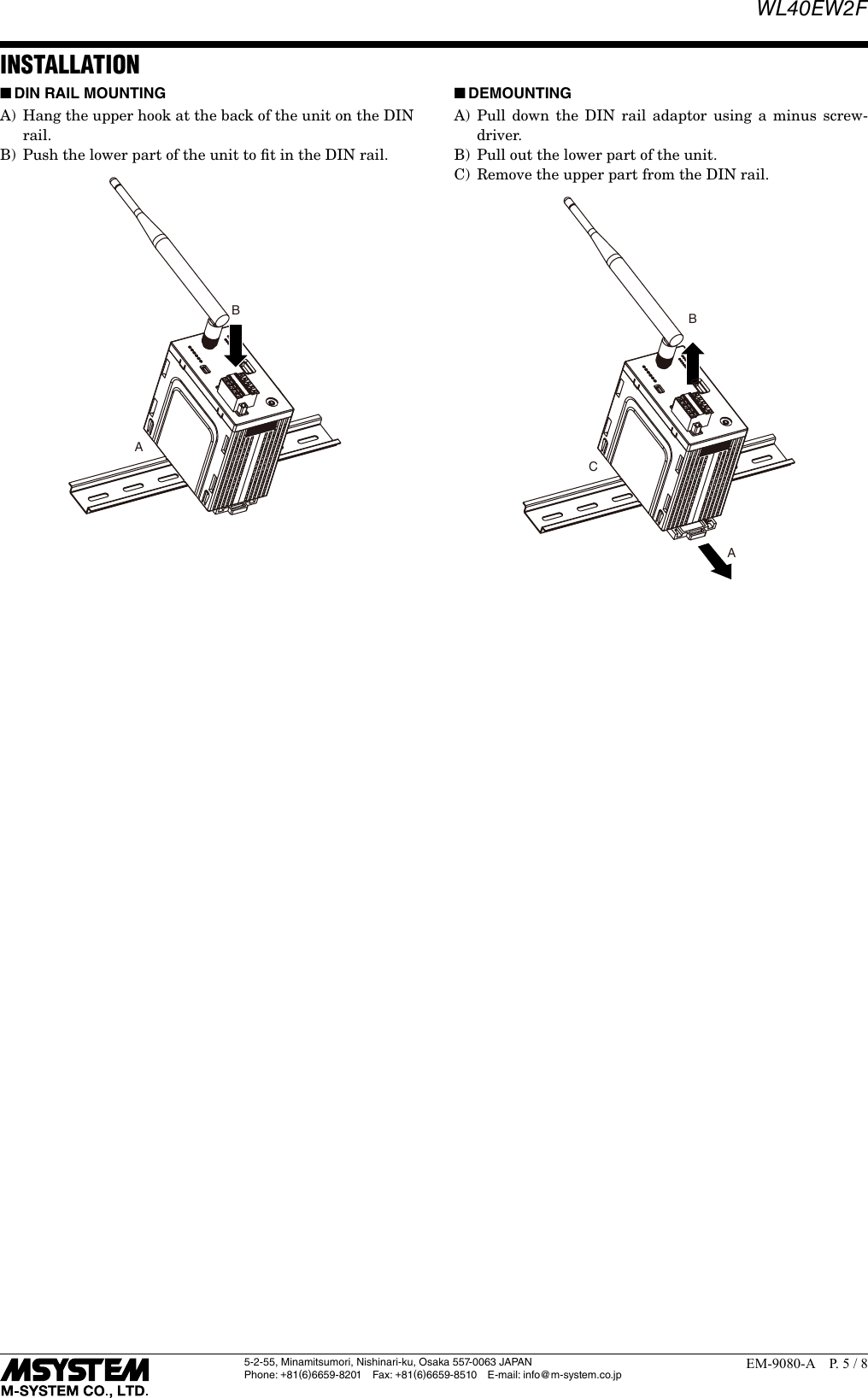
WL40EW2F5-2-55, Minamitsumori, Nishinari-ku, Osaka 557-0063 JAPANPhone: +81(6)6659-8201 Fax: +81(6)6659-8510  E-mail: info@m-system.co.jpEM-9080-A  P. 5 / 8INSTALLATION ■DIN RAIL MOUNTING A)  Hang the upper hook at the back of the unit on the DIN rail.B)  Push the lower part of the unit to fit in the DIN rail.AB ■DEMOUNTINGA) Pull down the DIN rail adaptor using a minus screw-driver.B)  Pull out the lower part of the unit.C)  Remove the upper part from the DIN rail.ABC
WL40EW2F5-2-55, Minamitsumori, Nishinari-ku, Osaka 557-0063 JAPANPhone: +81(6)6659-8201 Fax: +81(6)6659-8510  E-mail: info@m-system.co.jpEM-9080-A  P. 6 / 8TERMINAL CONNECTIONSConnect the unit as in the diagram below. ■EXTERNAL DIMENSIONS  unit: mm (inch)105 (4.13)[260 (10.24)]60 (2.36) 107 (4.21)107 (4.21)3 (.12)3 (.12)45 (1.77)[200 (7.87)]20(.79)approx. 2500 (98.4)ø27(1.06)ø3 (.12)ø1.2 (.05)36 (1.42)80 (3.15)5 (.20)[155 (6.10)] [R165 (6.50)] • With sleeve antenna• With rooftop antennaDIN RAIL35mm wideDIN RAIL35mm wide8 (.31) Hex.
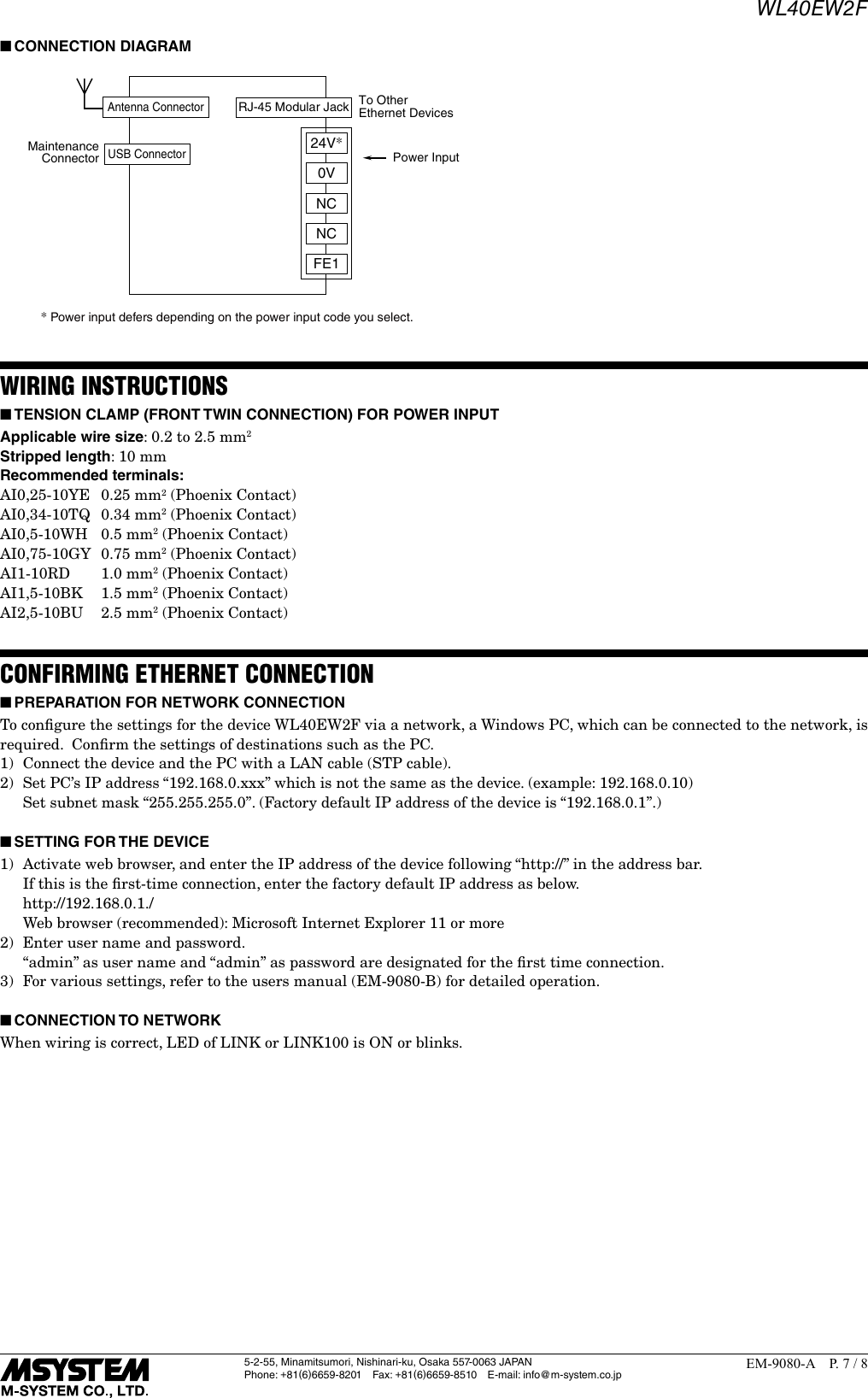
WL40EW2F5-2-55, Minamitsumori, Nishinari-ku, Osaka 557-0063 JAPANPhone: +81(6)6659-8201 Fax: +81(6)6659-8510  E-mail: info@m-system.co.jpEM-9080-A  P. 7 / 8 ■CONNECTION DIAGRAMPower InputMaintenanceConnectorTo OtherEthernet Devices* Power input defers depending on the power input code you select. RJ-45 Modular JackUSB ConnectorAntenna ConnectorNCNCFE10V24V*WIRING INSTRUCTIONS ■TENSION CLAMP (FRONT TWIN CONNECTION) FOR POWER INPUTApplicable wire size: 0.2 to 2.5 mm2Stripped length: 10 mmRecommended terminals:AI0,25-10YE  0.25 mm2 (Phoenix Contact)AI0,34-10TQ  0.34 mm2 (Phoenix Contact)AI0,5-10WH  0.5 mm2 (Phoenix Contact)AI0,75-10GY  0.75 mm2 (Phoenix Contact)AI1-10RD   1.0 mm2 (Phoenix Contact)AI1,5-10BK  1.5 mm2 (Phoenix Contact)AI2,5-10BU  2.5 mm2 (Phoenix Contact)CONFIRMING ETHERNET CONNECTION ■PREPARATION FOR NETWORK CONNECTIONTo configure the settings for the device WL40EW2F via a network, a Windows PC, which can be connected to the network, is required.  Confirm the settings of destinations such as the PC.1)  Connect the device and the PC with a LAN cable (STP cable).2)  Set PC’s IP address “192.168.0.xxx” which is not the same as the device. (example: 192.168.0.10)  Set subnet mask “255.255.255.0”. (Factory default IP address of the device is “192.168.0.1”.) ■SETTING FOR THE DEVICE1)  Activate web browser, and enter the IP address of the device following “http://” in the address bar.  If this is the first-time connection, enter the factory default IP address as below.   http://192.168.0.1./  Web browser (recommended): Microsoft Internet Explorer 11 or more2)  Enter user name and password.  “admin” as user name and “admin” as password are designated for the first time connection.3)  For various settings, refer to the users manual (EM-9080-B) for detailed operation.  ■CONNECTION TO NETWORKWhen wiring is correct, LED of LINK or LINK100 is ON or blinks.
WL40EW2F5-2-55, Minamitsumori, Nishinari-ku, Osaka 557-0063 JAPANPhone: +81(6)6659-8201 Fax: +81(6)6659-8510  E-mail: info@m-system.co.jpEM-9080-A  P. 8 / 8 ■CHECK FOR WL40EW2F CONNECTIONOpen Command Prompt in Windows, and enter “ping command” as follows:C: ¥WINDOWS > ping ***.***.***.***(***.***.***.***: Enter IP address in decimal.)ping ***.***.***.*** with 32 bytes of data:Reply from ***.***.***.*** : bytes=32 time < 10ms TTL = 64Reply from ***.***.***.*** : bytes=32 time < 10ms TTL = 64Reply from ***.***.***.*** : bytes=32 time < 10ms TTL = 64Reply from ***.***.***.*** : bytes=32 time < 10ms TTL = 64Ping statistics for ***.***.***.***Packets : Sent = 4, Received = 4, Lost = 0 (0% loss)Replies in case of normal connection are as shown above.  If the connection cannot be established normally due to e.g.  wrong IP address, other replies such as ‘timeout’ will be received.MODBUS FUNCTION CODEModbus function codes are shown below. ■DATA AND CONTROL FUNCTIONSCODE NAME01 Read Coil Status Digital output from the slave (read/write)02 Read Input Status Status of digital inputs to the slave (read only)03 Read Holding Registers General purpose register within the slave (read/write)04 Read Input Registers Collected data from the field by the slave (read only)05 Force Single Coil Digital output from the slave (read/write)06 Preset Single Registers General purpose register within the slave (read/write)15 Force Multiple Coils Digital output from the slave (read/write)16 Preset Multiple Registers General purpose register within the slave (read/write) ■EXCEPTION CODESCODE NAME06 Slave Device Busy Device’s Modbus/TCP request queue is full.11 Gateway Target Device Failed To Respond  Response from 900 MHz band wireless device (child) is error, or response timeout occurred.Note:  When 900 MHz band wireless device (child) returns an exception code other than the above, the exception code is directly transmitted to upper devices.LIGHTNING SURGE PROTECTIONM-System offers a series of lightning surge protector for protection against induced lightning surges.  Please contact M-System to choose appropriate models.

Navigation menu