MAGIT TECHNOLOGY BS-201 Bluetooth speaker User Manual BS 201
MAGIT TECHNOLOGY LIMITED Bluetooth speaker BS 201
User Manual
User’s manual (BS-201)
Thanks for your purchase of our Bluetooth Speaker!
Like all our products, great care has been taken in its design. A combination of advanced engineering and
state-of- the-art materials will provide you with years of listening pleasure.
Charging the Battery
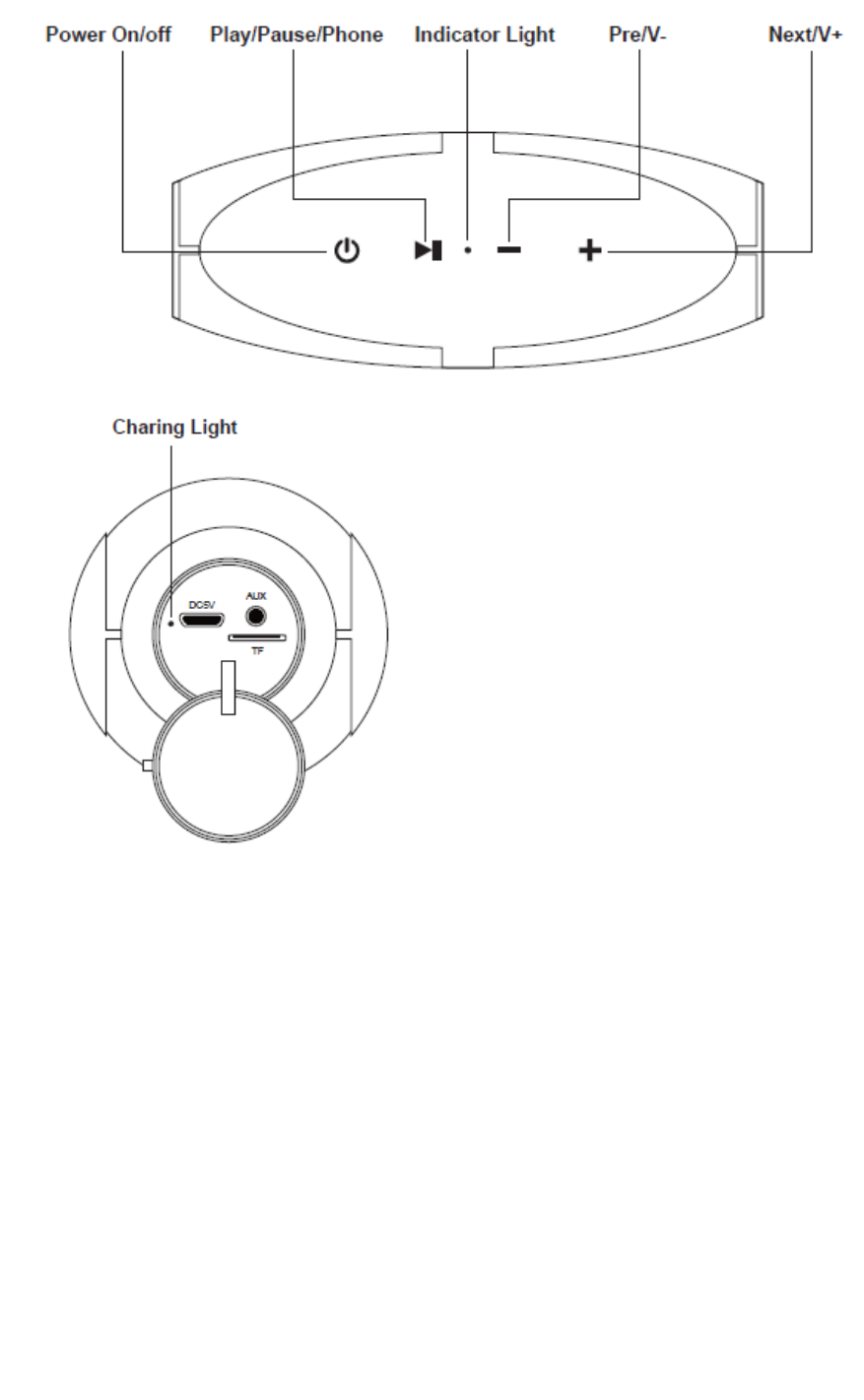
Before using, fully charge the battery using the supplied USB cable. Connect the “DC5V“ charging slot to any
USB port supplying power (Laptop, Computer, AC Charger, Car Charger, etc.).
A solid red LED indicates that the speaker is charging, it will turn off when fully charged.
Power on/off
Long press Power on/off button to power on/off the unit.
Bluetooth Pairing
With the speaker turned on, it comes to Bluetooth mode, and blue LED indicator flashing. Open the
Bluetooth® settings of your phone, tablet or other Bluetooth enabled audio device and select
“BS‐201”.When prompted for the pairing code, enter 0000.
Once paired, blue LED will stop flashing. and display Blue

Playing Music
Select a song, artist, genre, or playlist on your phone, tablet or other Bluetooth enabled audio device.
Short press the “play/pause” button to start or pause the music.
Press “Pre/V –” and “Next /V+” button to go to Pre or next song.
Long press “Pre/V –” and “Next /V+” button to adjust volume.
Hands-free For Calling
Pick up or hang up a call by short pressing the “play/pause” button.
Long press the “play/pause” button to reject when a new call comes in.
Short Press the “play/pause” button twice to redial the last phone call
AUX./ TF playing
Play music directly when insert in TF card.
LED Indicator Status of the speaker
Red LED light on Battery is charging
Red LED light off while charging Battery is full
Specifications
Bluetooth protocol V4.2
Online distance of Bluetooth Appro.10m
S/N 85dB
Power sources Built-in Lithium-ion battery 4000mah
Speaker power: 5W*2
Playing time 8 hours
Dimensions 210*88*90mm
Package Contents:
Wireless speaker*1
USB charging cable*1
3.5mm Aux cable
Portable pouch*1
Hanging buckle*1
User manual*1
Thanks card*1
FCCCaution.
Thisdevicecomplieswithpart15oftheFCCRules.Operationissubjecttothefollowingtwoconditions:(1)Thisdevice
maynotcauseharmfulinterference,and(2)thisdevicemustacceptanyinterferencereceived,includinginterferencethat
maycauseundesiredoperation.
AnyChangesormodificationsnotexpresslyapprovedbythepartyresponsibleforcompliancecouldvoidtheuser's
authoritytooperatetheequipment.
Note:ThisequipmenthasbeentestedandfoundtocomplywiththelimitsforaClassBdigitaldevice,pursuanttopart15
oftheFCCRules.Theselimitsaredesignedtoprovidereasonableprotectionagainstharmfulinterferenceinaresidential
installation.Thisequipmentgeneratesusesandcanradiateradiofrequencyenergyand,ifnotinstalledandusedin
accordancewiththeinstructions,maycauseharmfulinterferencetoradiocommunications.However,thereisno
guaranteethatinterferencewillnotoccurinaparticularinstallation.Ifthisequipmentdoescauseharmfulinterferenceto
radioortelevisionreception,whichcanbedeterminedbyturningtheequipmentoffandon,theuserisencouragedtotry
tocorrecttheinterferencebyoneormoreofthefollowingmeasures:
‐Reorientorrelocatethereceivingantenna.
‐Increasetheseparationbetweentheequipmentandreceiver.
‐Connecttheequipmentintoanoutletonacircuitdifferentfromthattowhichthereceiverisconnected.
‐Consultthedealeroranexperiencedradio/TVtechnicianforhelp.
*RFwarningforPortabledevice:
ThedevicehasbeenevaluatedtomeetgeneralRFexposurerequirement.Thedevicecanbeusedinportable
exposureconditionwithoutrestriction.