MANN HUMMEL FILTER TECHNOLOGY S E A SZT-1 Senzit User Manual

MANN HUMMEL FILTER TECHNOLOGY S.E.A. PTE. LTD. Senzit

User manual

    USER GUIDE  Model Number : Senzit
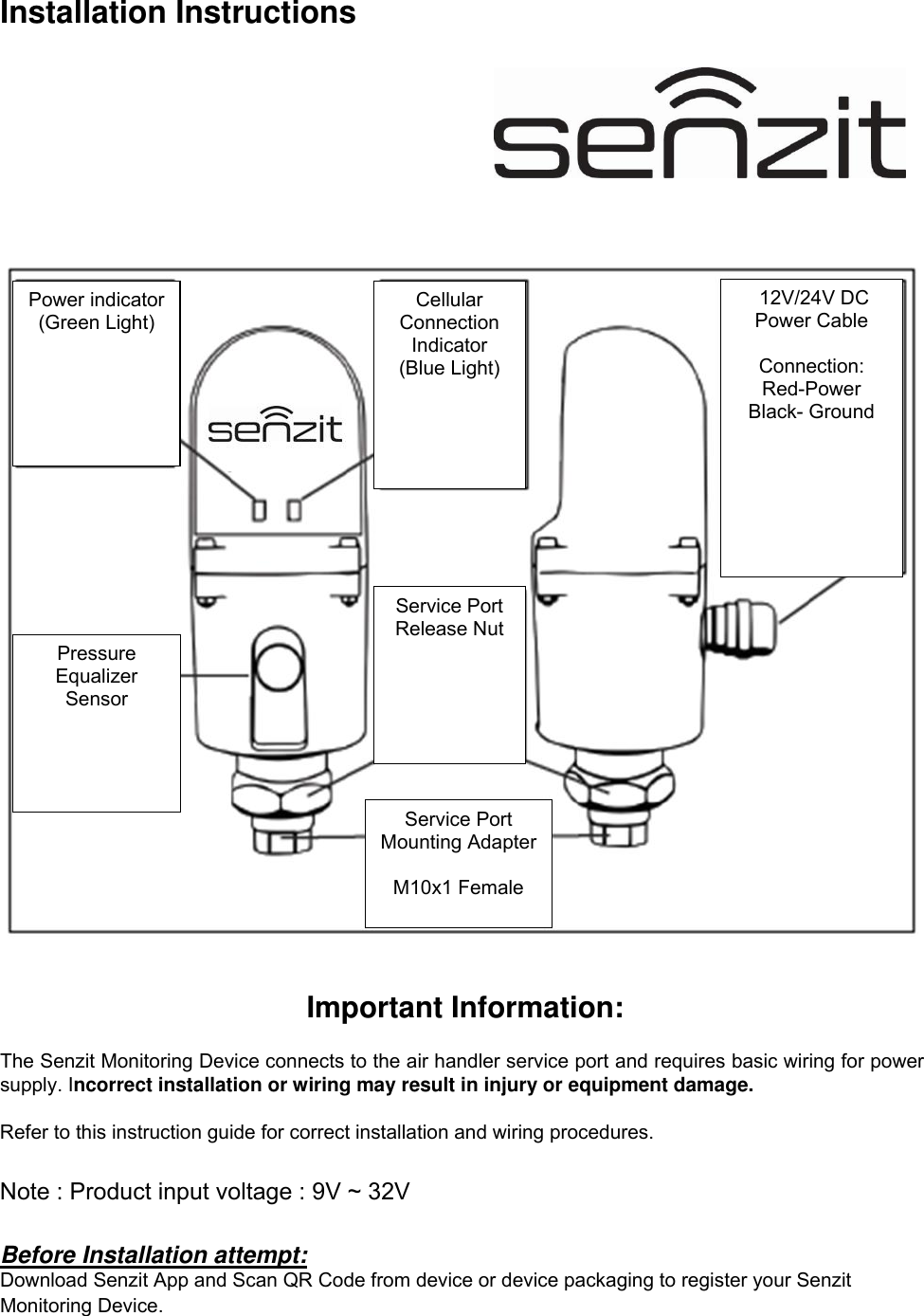
Installation Instructions      Important Information:  The Senzit Monitoring Device connects to the air handler service port and requires basic wiring for power supply. Incorrect installation or wiring may result in injury or equipment damage.   Refer to this instruction guide for correct installation and wiring procedures.   Note : Product input voltage : 9V ~ 32V   Before Installation attempt: Download Senzit App and Scan QR Code from device or device packaging to register your Senzit Monitoring Device.   Power indicator (Green Light) Cellular Connection Indicator (Blue Light)  12V/24V DC  Power Cable   Connection: Red-Power Black- Ground Service Port Release Nut  Service Port Mounting Adapter  M10x1 Female Pressure Equalizer Sensor
FCC Statement Any changes or modifications not expressly approved by the party responsible for compliance could void your authority to operate the equipment.   This device complies with part 15 of the FCC Rules. Operation is subject to the following two conditions:  (1) This device may not cause harmful interference, and  (2) this device must accept any interference received, including interference that may cause undesired operation.   RF exposure statements  1. This Transmitter must not be located or operating in conjunction with any other antenna or transmitter.  2. This equipment complies with FCC RF radiation exposure limits set forth for an uncontrolled environment. This equipment should be installed and operated with a minimum distance of 20 centimeters between the radiator and your body or nearby persons.   Note: This equipment has been tested and found to comply with the limits for a Class B digital device, pursuant to part 15 of the FCC Rules. These limits are designed to provide reasonable protection against harmful interference in a residential installation. This equipment generates, uses and can radiate radio frequency energy and, if not installed and used in accordance with the instructions, may cause harmful interference to radio communications. However, there is no guarantee that interference will not occur in a particular installation. If this equipment does cause harmful interference to radio or television reception, which can be determined by turning the equipment off and on, the user is encouraged to try to correct the interference by one or more of the following measures:  — Reorient or relocate the receiving antenna.  — Increase the separation between the equipment and receiver.  — Connect the equipment into an outlet on a circuit different from that to which the receiver is connected.  — Consult the dealer or an experienced radio/TV technician for help.            Radiation Exposure Statement:  This equipment complies with IC radiation exposure limits set forth for an uncontrolled environment. This equipment should be installed and operated with minimum distance 20cm between the radiator & your body.   Declaration d’exposition aux radiations:  Cet equipement est conforme aux limites d’exposition aux rayonnements IC etablies pour un environnement non controle. Cet equipement doit etre installe et utilise avec un minimum de 20 cm de distance entre la source de rayonnement et votre corps.   Hereby, MANN HUMMEL FILTER TECHNOLOGY S.E.A. PTE. LTD. declares that the radio equipment type Senzit is in compliance with Directive 2014/53/EU.      Canadian Compliance Statement  This device complies with Industry Canada license-exempt RSSs. Operation is subject to the following two conditions: 1) This device may not cause interference, and 2) This device must accept any interference, including interference that may cause undesired operation of the device.  Le présent appareil est conforme aux CNR d’Industrie Canada applicables aux appareils radio exempts de licence. L’exploitation est autorisée aux deux conditions suivantes : 1) l’appareil ne doit pas produire de brouillage; 2) l’utilisateur de l’appareil doit accepter tout brouillage radioélectrique subi, meme si le brouillage est susceptible d’en compromettre le fonctionnement.
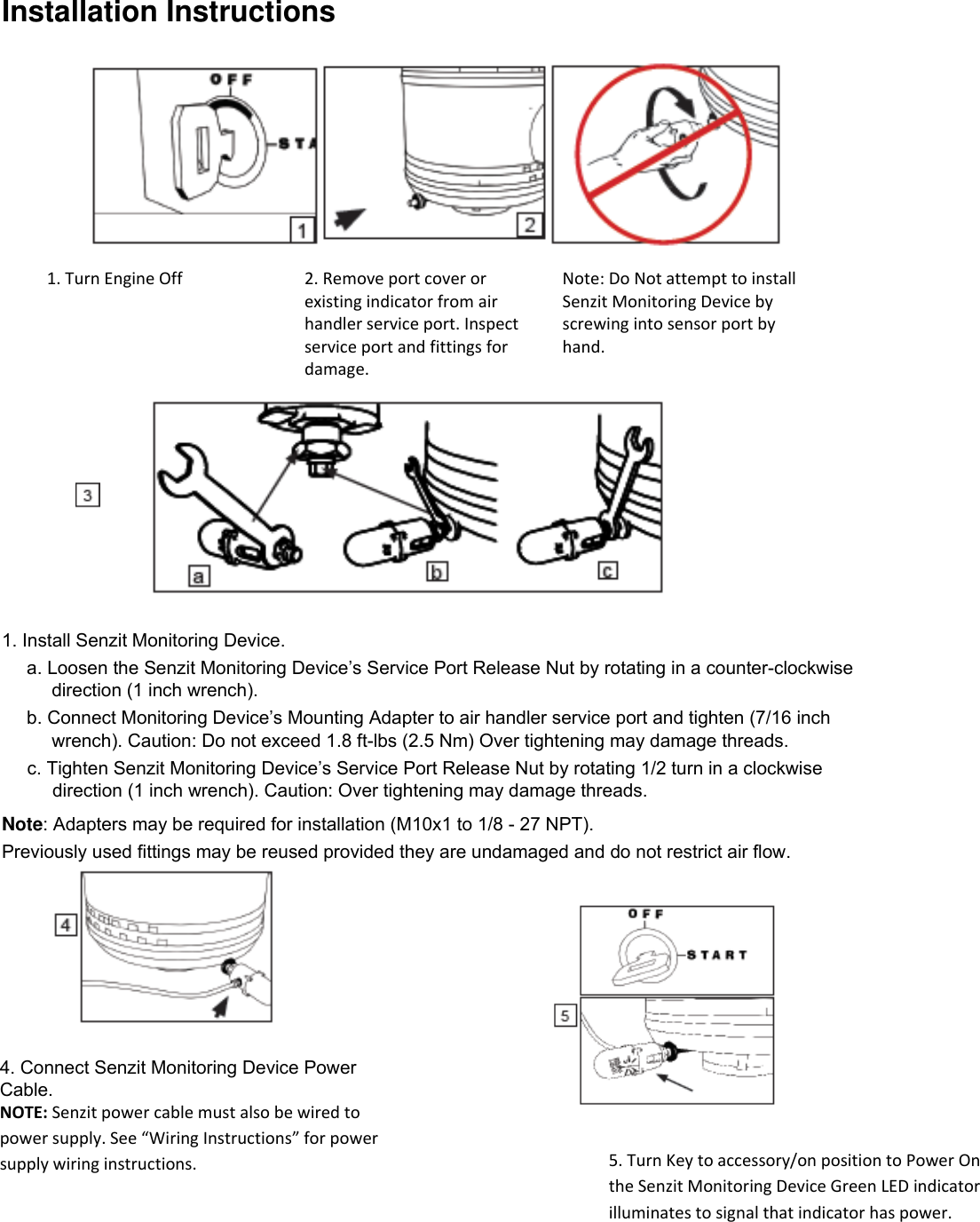
Installation Instructions 4. Connect Senzit Monitoring Device Power Cable. NOTE: Senzit power cable must also be wired to power supply. See “Wiring Instructions” for power supply wiring instructions.  5. Turn Key to accessory/on position to Power On the Senzit Monitoring Device Green LED indicator illuminates to signal that indicator has power.   1. Turn Engine Off 2. Remove port cover or existing indicator from air handler service port. Inspect service port and fittings for damage. Note: Do Not attempt to install Senzit Monitoring Device by screwing into sensor port by hand.      1. Install Senzit Monitoring Device. a. Loosen the Senzit Monitoring Device’s Service Port Release Nut by rotating in a counter-clockwise direction (1 inch wrench). b. Connect Monitoring Device’s Mounting Adapter to air handler service port and tighten (7/16 inch wrench). Caution: Do not exceed 1.8 ft-lbs (2.5 Nm) Over tightening may damage threads. c. Tighten Senzit Monitoring Device’s Service Port Release Nut by rotating 1/2 turn in a clockwise direction (1 inch wrench). Caution: Over tightening may damage threads. Note: Adapters may be required for installation (M10x1 to 1/8 - 27 NPT). Previously used fittings may be reused provided they are undamaged and do not restrict air flow.
Installation Instructions  Suggested Items to assist with Installs. Materials: 1. Black plastic air tubing (1/4”) 2. 1/8”-24 NPT with 1/4” in tube compression fitting; male or female may be required      depending on application 3. In-line Fusible link (20 or 18 gauge) 4. Butt Splice Connectors (20-18 gauge) 5. Additional Wire (20 or 18 gauge) 6. Heat shrink 7. Ring Terminals (3/8” to fit over positive and negative connectors) 8. Hydraulic Hose Support Clamp; 2”-2” 1/16” opening     a.) To be used for remote installs  Tools: 1. 6” crescent wrench 2. 8” crescent wrench 3. Standard screw drivers 4. Wire strippers 5. Wire crimpers 6. Box cutter 7. Wire ties 8. Lighter or Butane torch 9. Teflon tape 10. Black electrical tape  Recommended items only, additional items may be required depending on equipment and install method chosen by user.
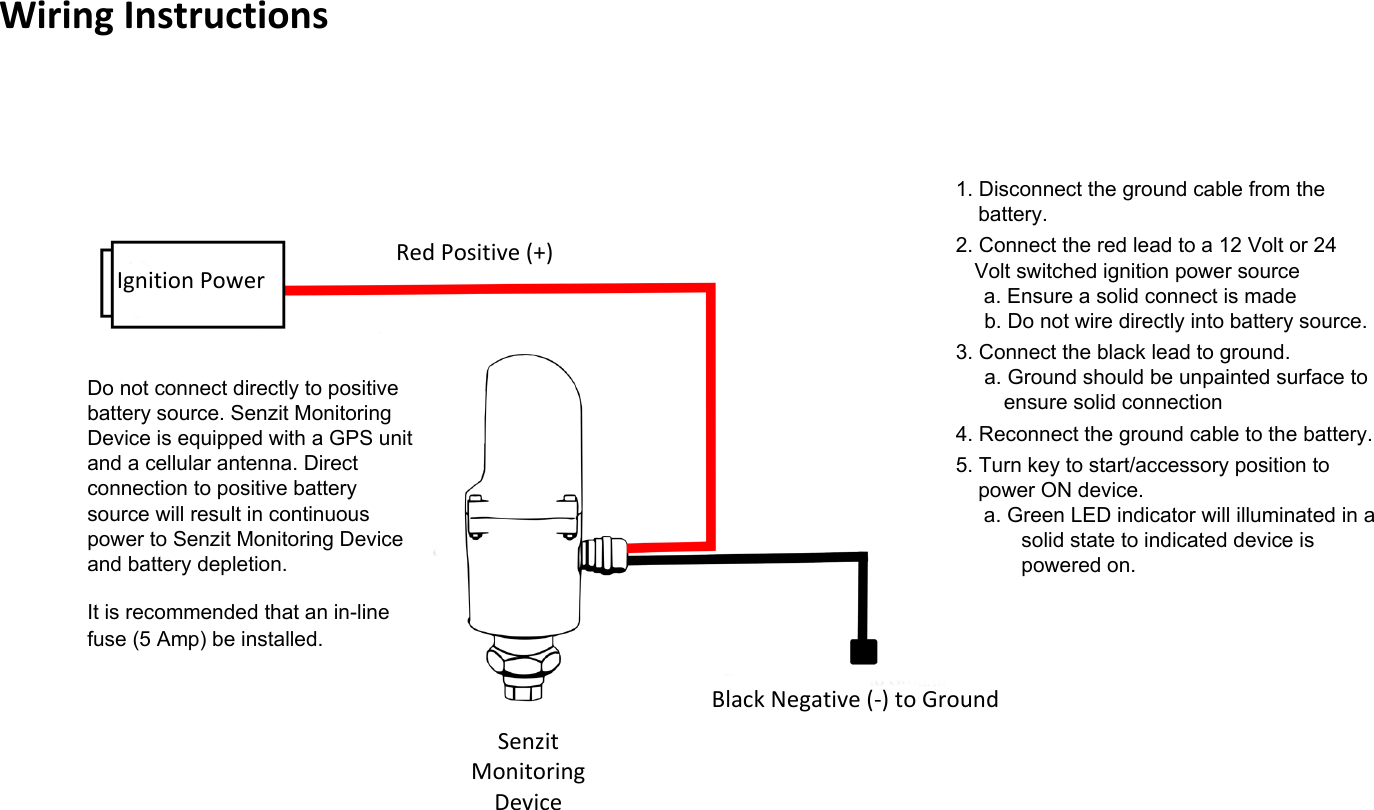
Wiring Instructions  Do not connect directly to positive battery source. Senzit Monitoring Device is equipped with a GPS unit and a cellular antenna. Direct connection to positive battery source will result in continuous power to Senzit Monitoring Device and battery depletion.  It is recommended that an in-line fuse (5 Amp) be installed. 1. Disconnect the ground cable from the battery. 2. Connect the red lead to a 12 Volt or 24 Volt switched ignition power source a. Ensure a solid connect is made b. Do not wire directly into battery source. 3. Connect the black lead to ground. a. Ground should be unpainted surface to ensure solid connection 4. Reconnect the ground cable to the battery.  5. Turn key to start/accessory position to power ON device. a. Green LED indicator will illuminated in a solid state to indicated device is powered on. Ignition Power Senzit Monitoring Device Red Positive (+) Black Negative (-) to Ground

Navigation menu