MANOVA MANOVA-BT-78N SWiNG Bluetooth Speaker User Manual BT 78N manual English 200x200mm
MANOVA International Ltd. SWiNG Bluetooth Speaker BT 78N manual English 200x200mm
MANOVA >
Users Manual
Instruction manual model:BT-78N
'SWiNG' Portable Bluetooth speaker (for smart phones; with NFC passive pairing function)
Product Features
z
Stylish hidden ‘SWiNG’ ON/OFF switch
z
*Bluetooth® v3.0 (OR v4.0) wireless connection up to 10M
z
NFC™ pairing function
z
Superb sound portable speaker
z
Built-in 5W amplified speaker
z
Coaxial Bass Enhancer built-in
z
Built-in battery rechargeable via. USB
z
Speaker phone call-pick function
z
Travel switch lock
z
Portable simplicity design
z
AUX 3.5mm audio input via. accessory cable
z
Ideal audio mate for smart phones or other multimedia player devices
This superb sound speaker is compliant with Bluetooth v3.0 (OR v4.0) wireless standard,
and powered by its built-in battery which is rechargeable by USB port from. The
simplicity drum shape casing is a stylistic desktop design which can be portable as well.
An ideal wireless audio companion for smart phones.
NFC™ Pairing with your phone
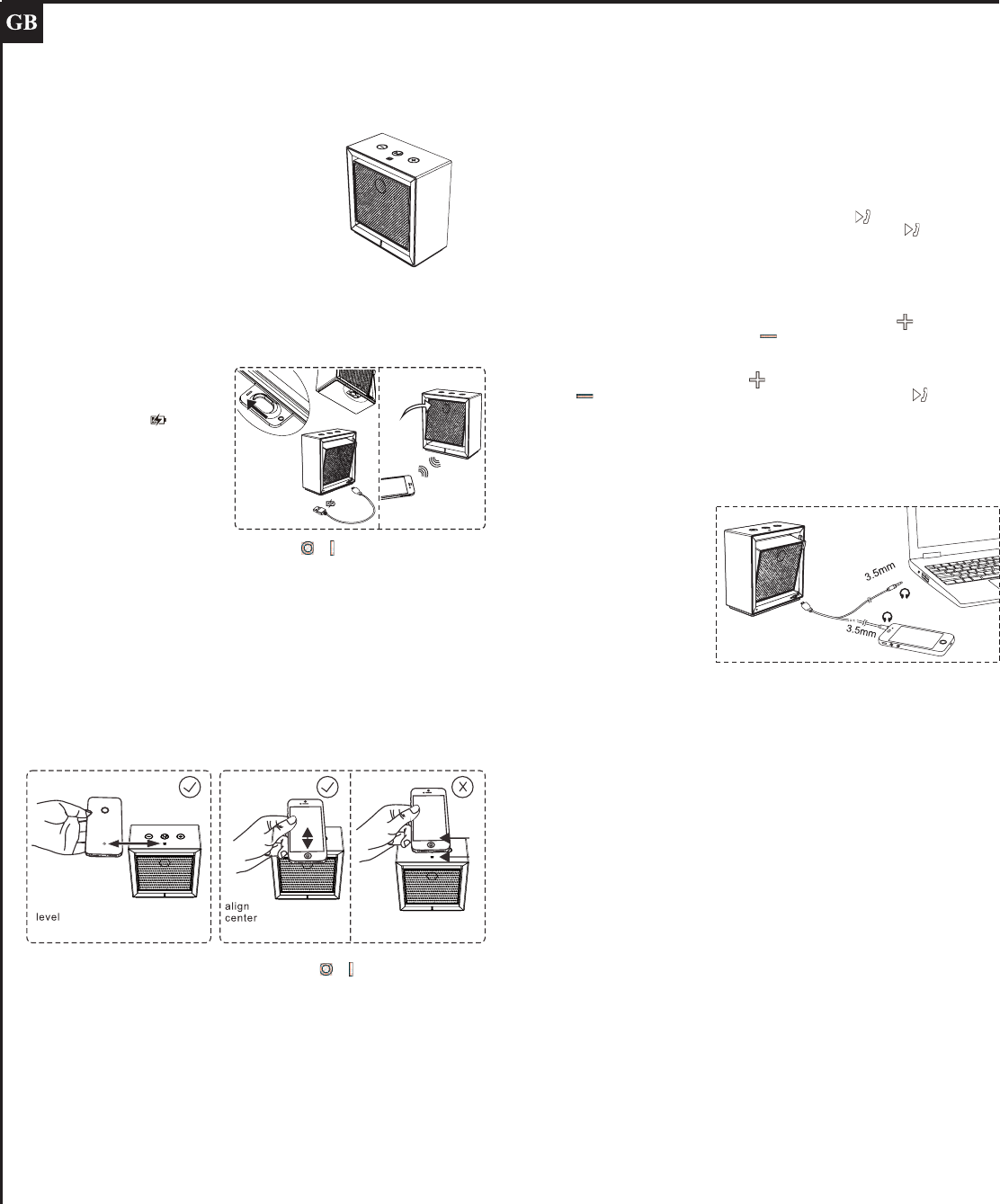
Turn on the travel lock slide switch at the bottom from to position; and push the main
body ‘swing’ to ON position (fig.2) to switch on the speaker, and then
If your smart phone is NFC enabled,
a) Firstly, locate the NFC antenna spot on your smart phone (fig.3)
b) NFC antenna is now ‘at the top’ of our BT-78N speakers (fig.3)
c) Align NFC antennas as close as possible, you will hear a ‘cling’ sound when they
matched (fig.4)
d) Wait for a few second and you will hear a “Bloop” sound from the speaker and its blue
LED will lit continuously. The pairing is completed now.
Note-
1. "The N-Mark is a trademark or registered trademark of NFC Forum, Inc. in the United States and in
other countries."
2. Some phone models are NFC enabled, but their NFC Apps were not built-in. For these models you
will need to install a NFC Apps and activate the NFC function on your phone– Please visit our website to
download the driver installer : http://www.manova.com.hk/download.php
Pairing the speaker (manually)- if your phone is NOT NFC enabled
a.) Turn on the travel lock slide switch at the bottom from to position; and push the
main body ‘swing’ to ON position (fig.2) to switch on the speaker, and then, power is auto
ON within 3 sec. and LED indicates blue on front. For first time use, the blue LED will be
flashing fast (8 times every sec.) to show it is ready for pairing. Browse your smart phone
Bluetooth device list found, and select the one named ‘SWiNG’ to confirm pairing on your
smart phone. You will hear a beep tone on the speakers which is sent from your phone,
and then the speakers’ blue LED flashes steadily (1.5 times every sec.). Pairing
connection is successful then.
b.) When you need to disconnect the speaker, you first switch off Bluetooth function on
your smart phone, the speaker’s blue LED will flash slowly (1 time every sec.) Then you
switch to OFF the speaker (swing main body back to straight), the pairing memory will be
then kept there.
Next time when you swing the main body to turn ON the speaker, it will automatically
connect to your smart phone again and blue LED lit continuously (when your smart
phone’s Bluetooth function is also ON and nearby <5M).
c) If you need to pair the speaker with a new smart phone, switch off Bluetooth function
on your old smart phone first. Then power on your new smart phone’s Bluetooth function.
After that switch OFF and swing main body to slanted position to power ON the speaker
until the speakers’ blue LED will be flashing fast again (8 times every sec.), and then you
repeat steps as in above paragraph a.).
Call-pick function
When speakers is connected to your smart phone (blue LED lit continuously), whenever
there is an incoming call ring, you can press [play/call] button once on the speakers to
pick up and use it as speaker phone. (press and hold [play/call] button 2 sec. will
switch the call to your smart phone)
How to Use / Controls
Adjust volume: during music playback or call, press & hold [+] button to increase
speaker volume, or press & hold [-] button to reduce speaker volume. You have to
‘press and hold’ until adjust volume to desire level.
During music playback, press [+] button once will forward to play next track; press [-]
button once will backward to previous track. Press [play/call] button once will
pause playback, press again to resume play.
If battery power becomes low, there will be some beeping alert sound during playback,
and LED flashes RED and BLUE quickly (8 times every sec., Red light interval every 4
sec.). Then charge the speaker as mentioned in above section. (You can play music at
the same time while charging the built-in battery…)
(You will need to operate the smart phone to resume music playback when you
disconnect the AUX cable and use it wireless again, and operate the speaker buttons as
usual)
Specifications:
dimensions: W 100 x D 51 x H 105 mm
product weight: 405g
Bluetooth wireless connection v3.0 +EDR; class II; typ. 8M visible distance; max.
10M
support multiple pairing: up to 4 devices**
driver: dia. 50mm
frequency response (0dB at 1KHz): 100 Hz ~ 20,000 Hz
amplifier max. output : 5W (THD=10%, 1KHz@0dB)
signal to noise ratio: 85dB
operation voltage min. 3V; max. 4.2V DC
built-in 3.7V Li-polymer rechargeable battery
battery charging voltage typ. 5V; max. 5.5V DC (via. USB port)
battery charging current 500mA max.
battery charging time 2.5 hours.
drain current (power on, no input) <=35mA
playback time up to 8 hours (fully charged, volume at 1/3 level)
standby time up to 20 hours
*The Bluetooth® word mark and logos are registered trademarks owned by Bluetooth SIG, Inc.
and any use of such marks by Manova International Limited is under license. Other trademarks and
trade names are those of their respective owners.
*Design and specifications are subject to change per technical needs, without prior notice
**This speaker supports pairing ‘records’ up to 4 devices, but NOT ‘connection’ to 4 devices at the same
time
dd 2014/07/04
Charging the speaker
As shown (fig.1), connect the micro
USB port with the charging cable
and its USB plug with marking
to an USB port with power on the
other end. Red LED will light up to
indicate charging. When the
speaker is fully charged (approx. in
2 hrs every recharging), LED will
turn into blue.
You can use the AUX 3.5mm
audio cable connect to smart
phones or other player devices
for music playback (fig.5).
Whenever you plug in the AUX
port, the Bluetooth connection
will be powered off and all the
speaker buttons are off. You will
need to operate the smart phone
or player device to increase or
reduce speaker volume.
(fig.3) (fig.4) too far
(fig.5)
AUX
(fig.1)
wireless
on
(fig.2)
FCC WARNING
This device complies with Part 15 of the FCC Rules. Operation is subject to the following two
conditions:
(1) This device may not cause harmful interference, and
(2) this device must accept any interference received, including interference that may cause
undesired operation.
NOTE 1: Any changes or modifications to this unit not expressly approved by the party
responsible for compliance could void the user's authority to operate the equipment.