user manual
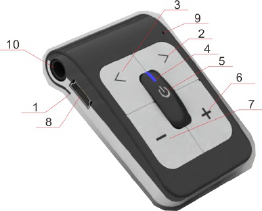
BLUETOOTH STEREO HEADSET
USER GUIDE
I. Introduction
II. How to use
III. SPEC.
I. Introduction
1. NEXT
2. PREVIEW
3. LED INDICATION
4. MULTI-FUNCTION BUTTOM(MFB)
5. VOLUME UP
6. VOLUME DOWN
7. CHARGE PORT
8. MIC
9. EAR JACK
LED INDACTION
Flashing Blue. BH-04A is standby mode.
Flashing Red. Battery is low. Power up
Flashing Blue+Red. BH-04A is in paring mode and ready to connect to your device. Go to your device’s Bluetooth setting to connect.
II. Power Up
When battery is low. The led indication flash red.
Plug into your wall charger or a USB port on you computer.
When fully charged. The led indication turn blue.
Note: It takes 2 hours to get you BH-04A 80% charged. A full charge takes 3 hours.
III. How to use.
A. Power on.
Press+Hold the MFB for 3 seconds, BH-04A will power on.
B. Enter Pairing Mode
When BH-04A in the power off status. Press+Hold the MFB for 5 seconds, till Red and Blue Led blink alternately. And then release the MFB. The unit will into pair mode.
C. Pairing With Your Mobile Device.
Be sure your device’s Bluetooth in open and search status. And BH-04A was also in the pairing mode. You can find “BH-04A” on your device list.
D. Power Off
Press+Hold the MFB for 3 seconds, BH-04A will power off.
E. Answer/End a call
Press the MFB on your BH-04A to both answer and end a call
NOTE: Hold the MFB for 2 seconds will decline an incoming call.
F. Make/Redial the call
Use your phone to dial as usual. Listen and talk through BH-04
Press the MFB twice will redial last number.
G. Play/Stop Music
In Standby mode, Press the MFB to both play and stop music. When you listen the music, you can answer/make a call. The music will pause automatically until finish the call.
H. Preview/Next Music
Press the Press ”>” /Next “<” music, you can change the music by BH-04A
I. Adjust the Volume
Press+Hold “+” / “-“, you can adjust the volume by BH-04A.
FCC statement:
Changes or modifications not expressly approved by the party responsible for compliance could void the user's authority to operate the equipment
This device complies with Part 15 of the FCC Rules. Operation is subject to the
following two conditions: (1) this device may not cause harmful interference, and (2) this device must accept any interference received, including interference that may cause undesired operation.
The device has been evaluated to meet general RF exposure requirement. The device can be used in portable exposure condition without restriction.