MICROTRONIC 2690003 RFID payment system User Manual 08 04 13 Rev 07 User Guide
MICROTRONIC AG RFID payment system 08 04 13 Rev 07 User Guide
User Guide
08.04.13 Rev 07 User Guide.doc 1/13
Csaba Schulz
Nespresso RFID Payment System
User Guide
Revision ...................................................................................................................... 1
Introduction ................................................................................................................. 2
Dispenser Lock Information ........................................................................................ 3
Dispenser Locking Process ........................................................................................ 4
Dispenser Unlocking Process ..................................................................................... 5
Dispenser and Client Payment Card Interaction ......................................................... 6
Loading Station and Client Payment Card Interaction ................................................ 7
Loading Station and Client Payment Card Recharge Process ................................... 8
Loading Station Locking Process ............................................................................... 9
Loading Station Backup Lock Process ..................................................................... 10
Loading Station Unlocking Process .......................................................................... 11
Loading Station Reset Process ................................................................................ 12
Certifications ............................................................................................................. 13
Revision
Rev 01 Draft document –DTU 04.03.08
Rev 02 Draft-DTU 15.03.08
Rev 03/ DRAFT Draft-DTU 02.08.08
Rev 04 Microtronic, A. Berger 30.10.08
Rev 05 Draft-DTU 20.11.08
Rev 06 User Guide 03.12.08
Rev 07 User Guide, certification details, MIC, C. Schulz 08.04.13

08.04.13 Rev 07 User Guide.doc 2/13
Csaba Schulz
Introduction
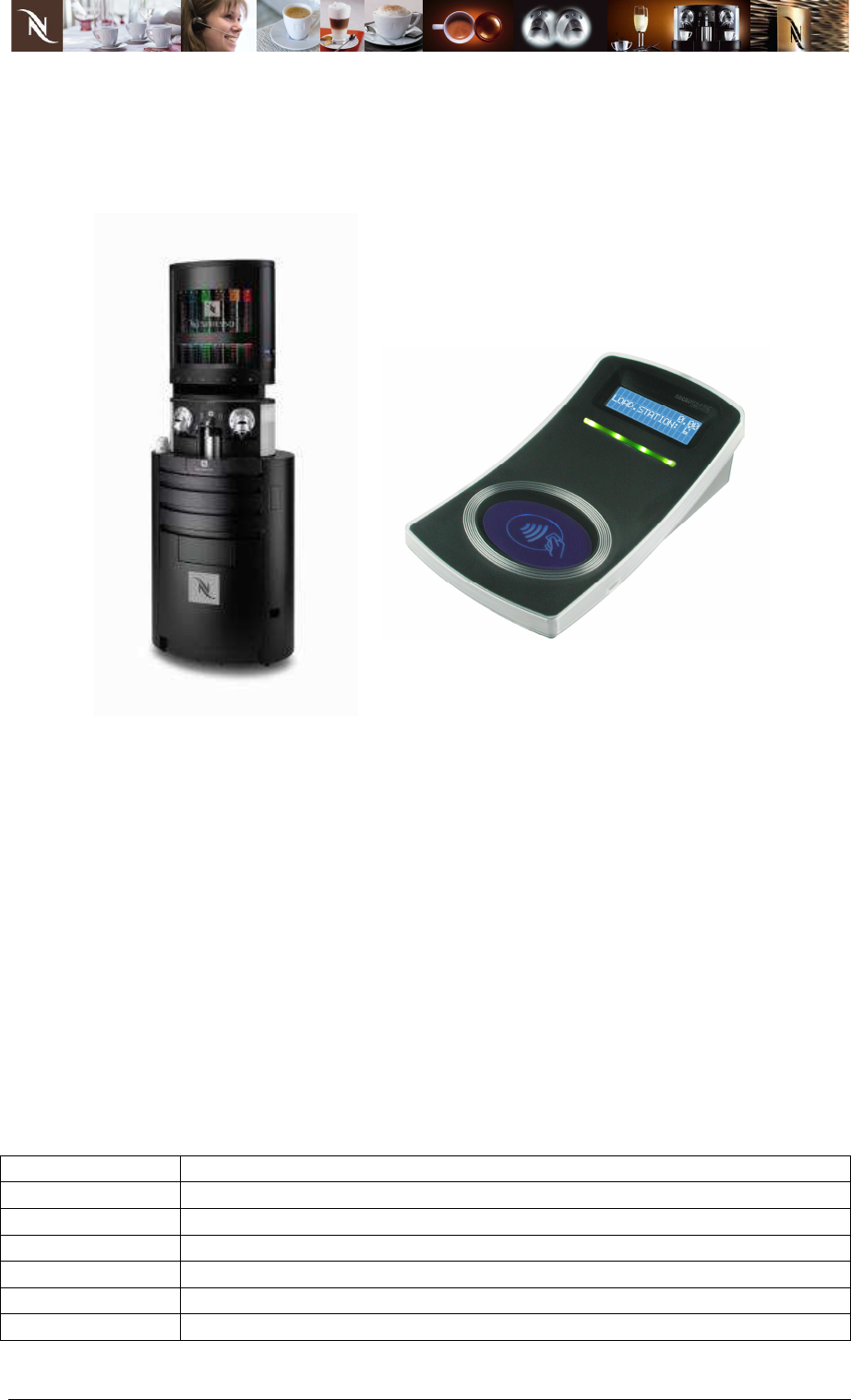
The complete RFID payment solution for the Nespresso TOWER consists of the
following elements:
- RFID reader of capsule dispenser
integrated reader in front door;
- RFID desktop loading station (TML6)
separate unit to load electronic purse (e-purse) of user payment card,
including power supply for various countries and three different loading cards
to recharde 10, 20 and 50;
- RFID media
User payment media with e-purse and form factors: cards, key fobs, stickers;
Lock key: activate local security;
Unlock key: deactivate local security to use system in universal way;
Backup key: get the actual lock and migrate to Lock key;
Reset key: reset statistics of loading station and reset e-purse of user media.
This technical user guide describes every process that can be performed with this
RFID solution.

08.04.13 Rev 07 User Guide.doc 3/13
Csaba Schulz
Dispenser Lock Information
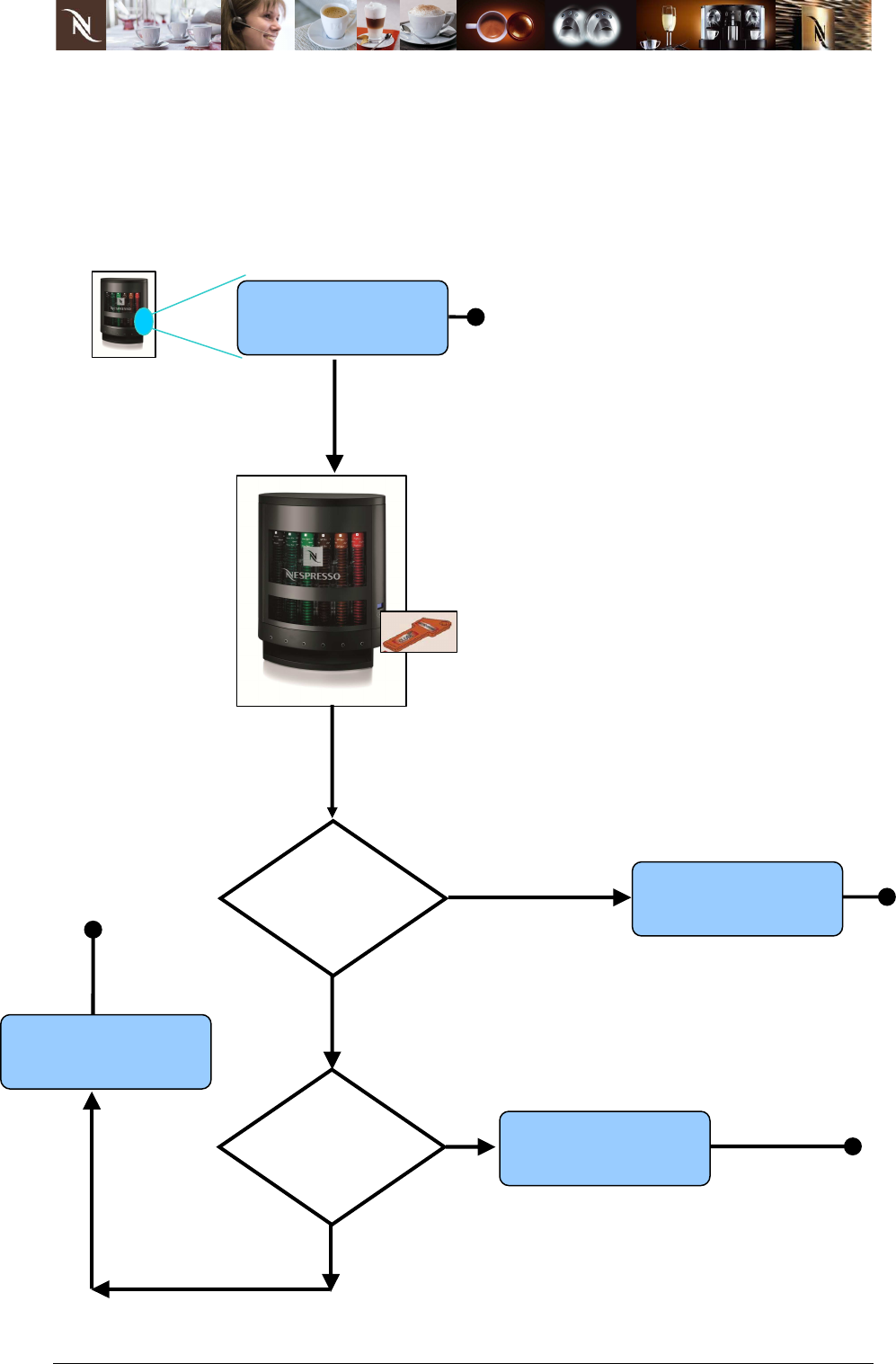
When the dispenser is switched on (main switch) its status should be indicated briefly
at the init process.
If the dispensers is locked
Compliance with MDB protocol must be ensured.
08.04.13 Rev 07 User Guide.doc 4/13
Csaba Schulz
Dispenser Locking Process
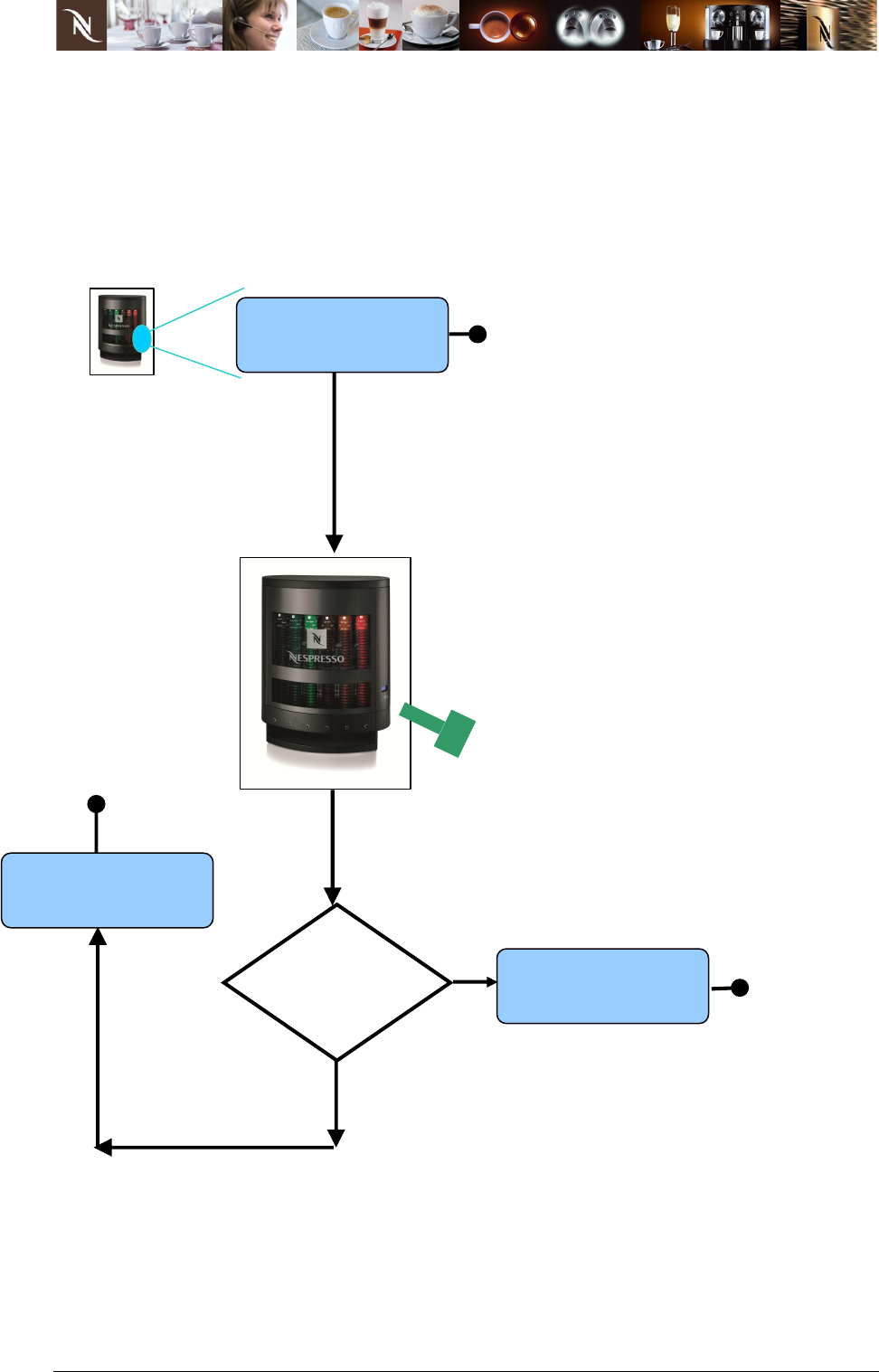
How does the dispenser behave when a Lock key is presented to it.
When the dispenser is switched ON, the display shows the status (locked/unlocked).
SAME
LOCK
Is DISPENSER
already
LOCKED ?
SAME LOCK
as Lock key ?
LOCK :
SUCCESS
ALREADY
LOCKED
YES
NO
YES
NO
Lock key is
presented towards
dispenser
Dispenser display
08.04.13 Rev 07 User Guide.doc 5/13
Csaba Schulz
Dispenser Unlocking Process
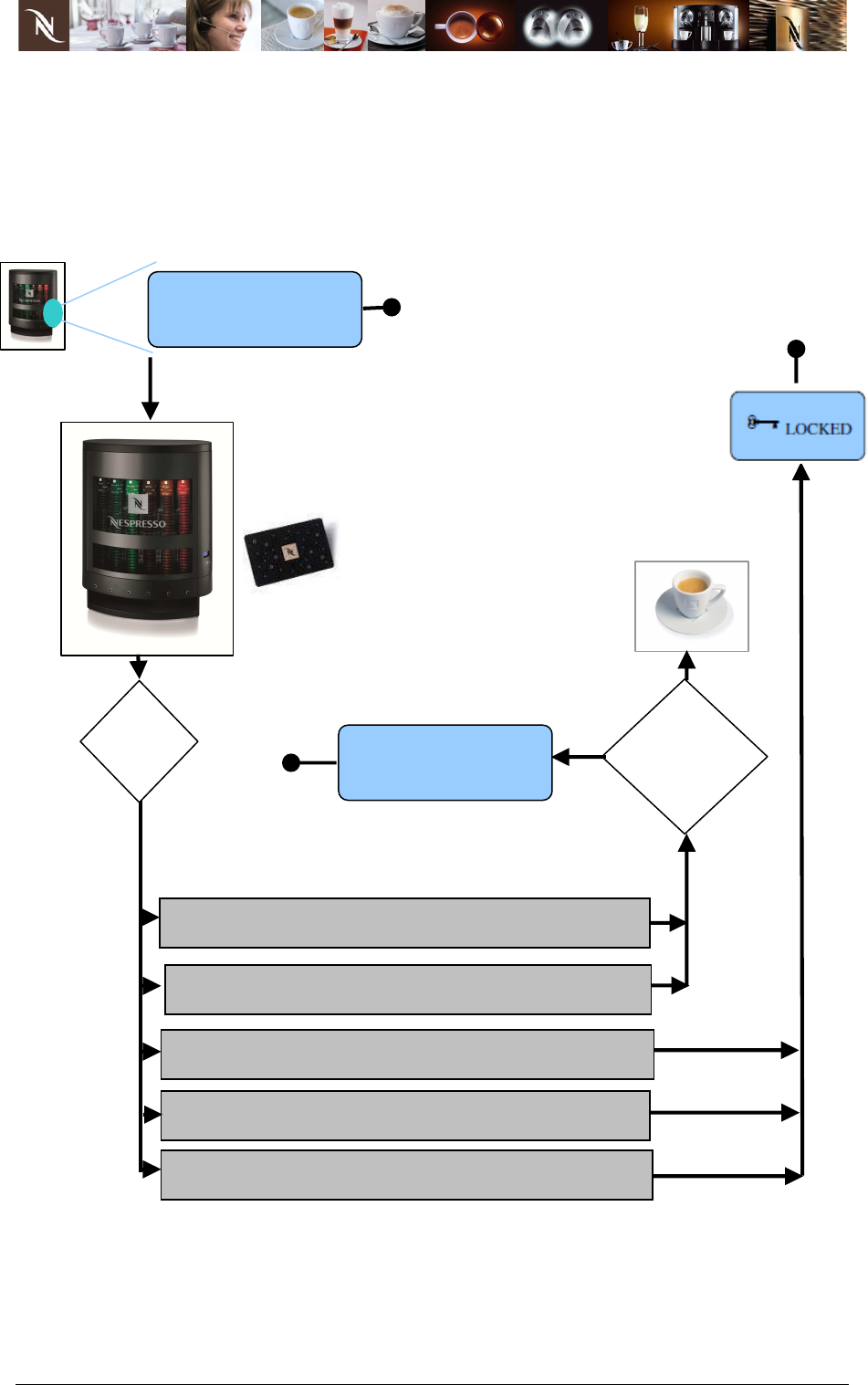
How does the dispenser behave when an Unlock Key is presented to it.
When the dispenser is switched ON, the display shows the status (locked/unlocked).
IS DISPENSER
already
UNLOCKED ?
UNLOCK :
SUCCESS
ALREADY
UNLOCKED
YES
NO
Unlock key is
presented towards
dispenser
Dispenser display
08.04.13 Rev 07 User Guide.doc 6/13
Csaba Schulz
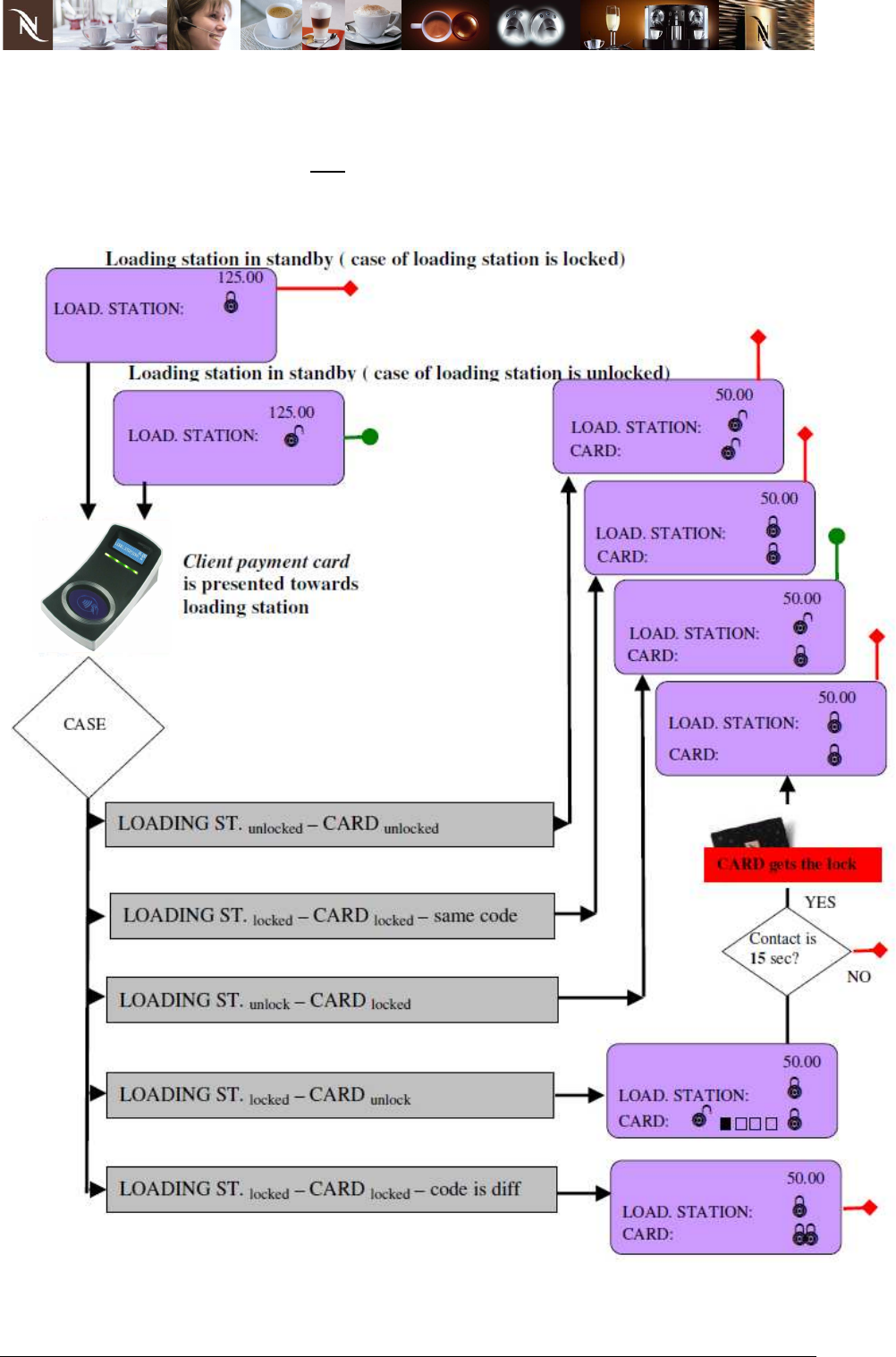
Dispenser and Client Payment Card Interaction
How does the dispenser behave when a Client Payment Card is presented to it.
When the dispenser is switched ON, the display shows the status (locked/unlocked).
* if user inserts a coin in base cabinet coiner and credit is available, the card can be
recharged only if the card belongs to the current network.
*
DISPENSER
locked
– CARD
locked
– lock is different
DISPENSER
locked
– CARD
unlock
DISPENSER
unlocked
– CARD
locked
DISPENSER
unlock
– CARD
unlock
DISPENSER
locked
– CARD
locked
– same lock
Coffee
selection ?
CASE
YES
NO
Dispenser display
Client payment card
is presented towards
dispenser
50.00
08.04.13 Rev 07 User Guide.doc 7/13
Csaba Schulz
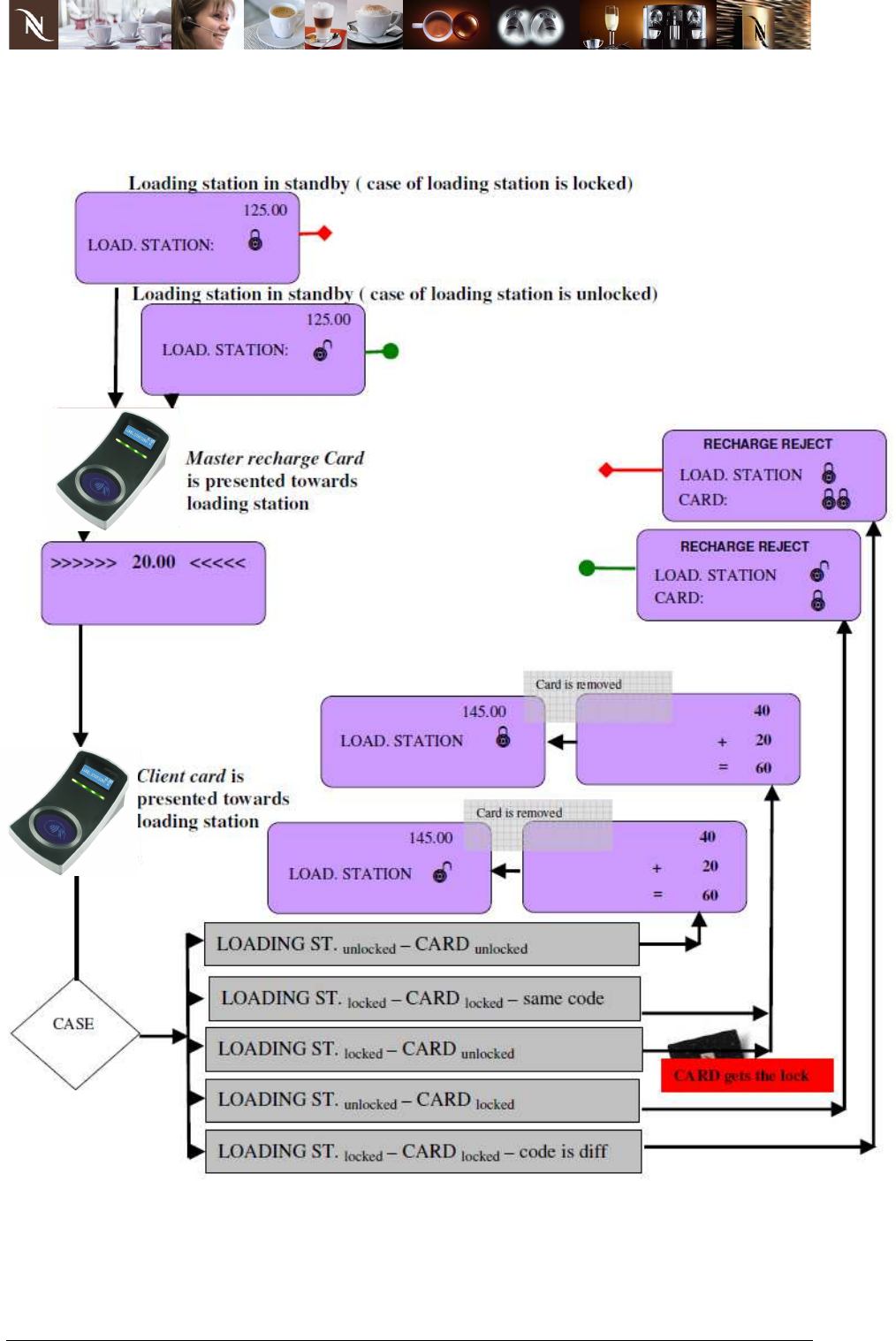
Loading Station and Client Payment Card Interaction
The loading station is used as a tool which informs the user of the current set up of
the loading station, client card and backup key.
08.04.13 Rev 07 User Guide.doc 8/13
Csaba Schulz
Loading Station and Client Payment Card Recharge Process
Master Recharge Card cannot be locked, this card remains always universal.

08.04.13 Rev 07 User Guide.doc 9/13
Csaba Schulz
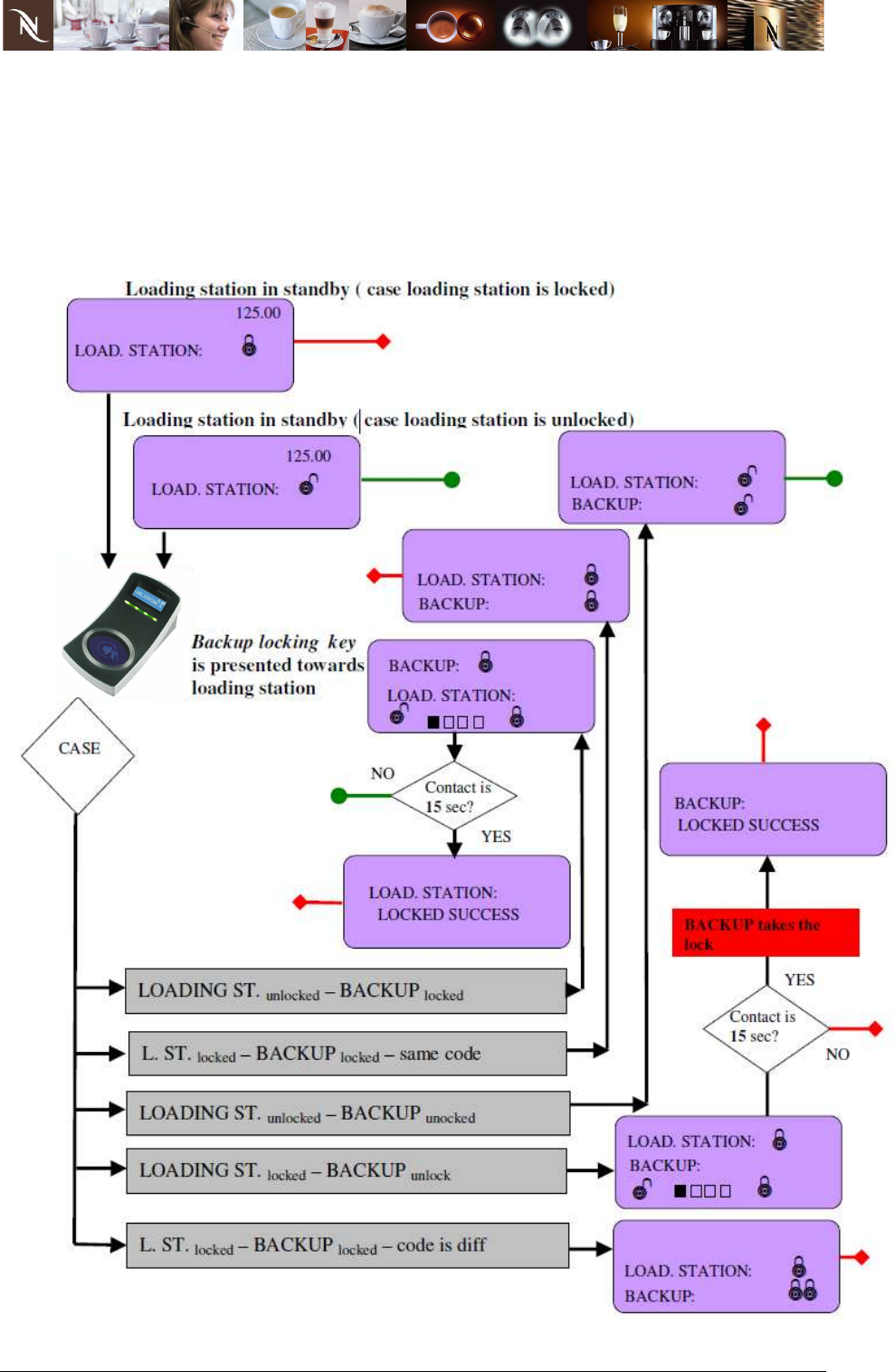
Loading Station Locking Process
How does the loading station behave when a Locking key is presented to it.
08.04.13 Rev 07 User Guide.doc 10/13
Csaba Schulz
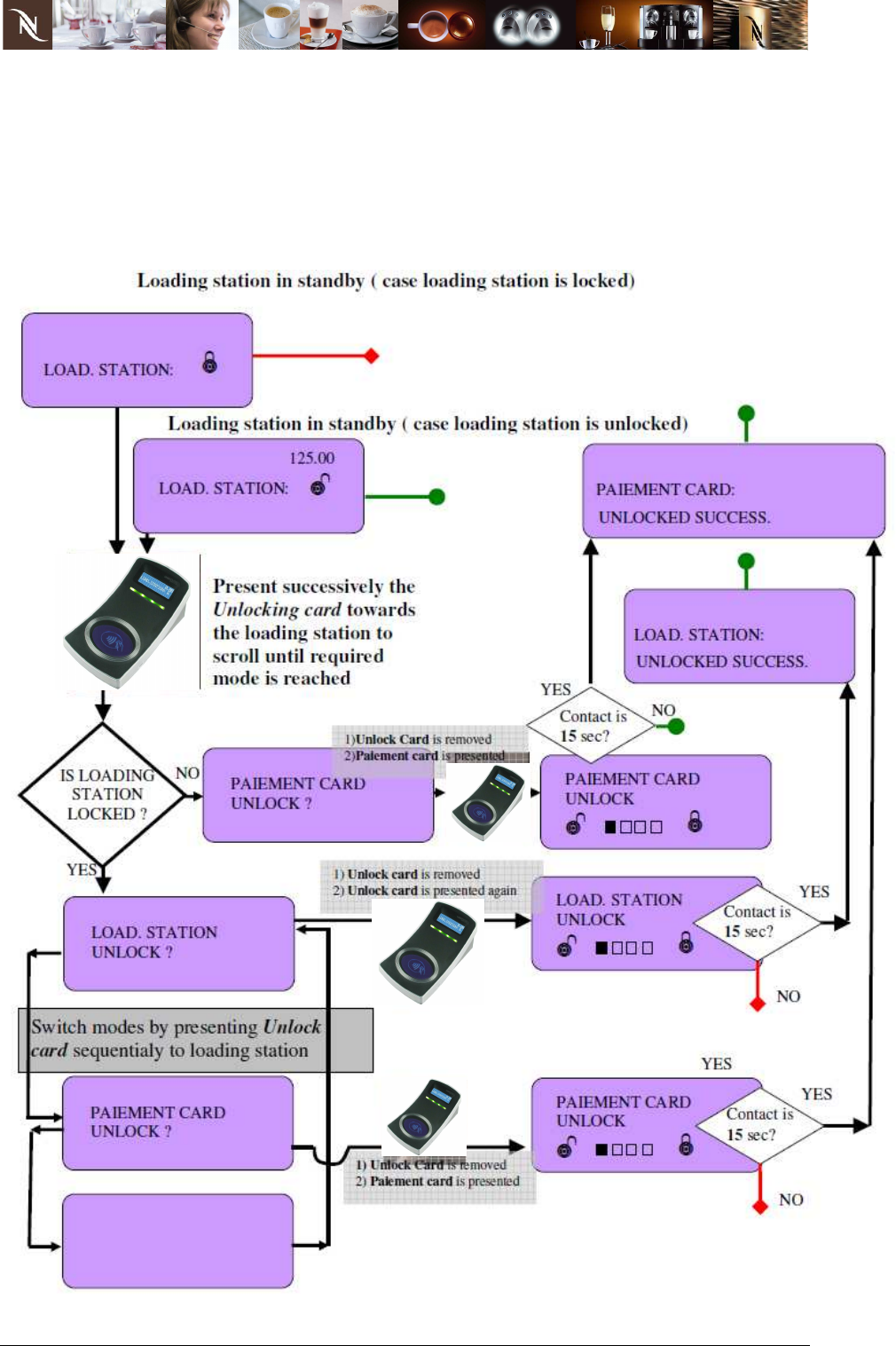
Loading Station Backup Lock Process
How does the loading station behave when a Backup Locking Key is presented. This
backup process is only possible using the loading station, the backup locking key
cannot be used at the dispenser.
08.04.13 Rev 07 User Guide.doc 11/13
Csaba Schulz
Loading Station Unlocking Process
How does the loading station behave when a Unlock Key is presented.
It is possible to select 2 x unlocking processes:
- to unlock the loading station;
- to unlock the user payment cards.
08.04.13 Rev 07 User Guide.doc 12/13
Csaba Schulz
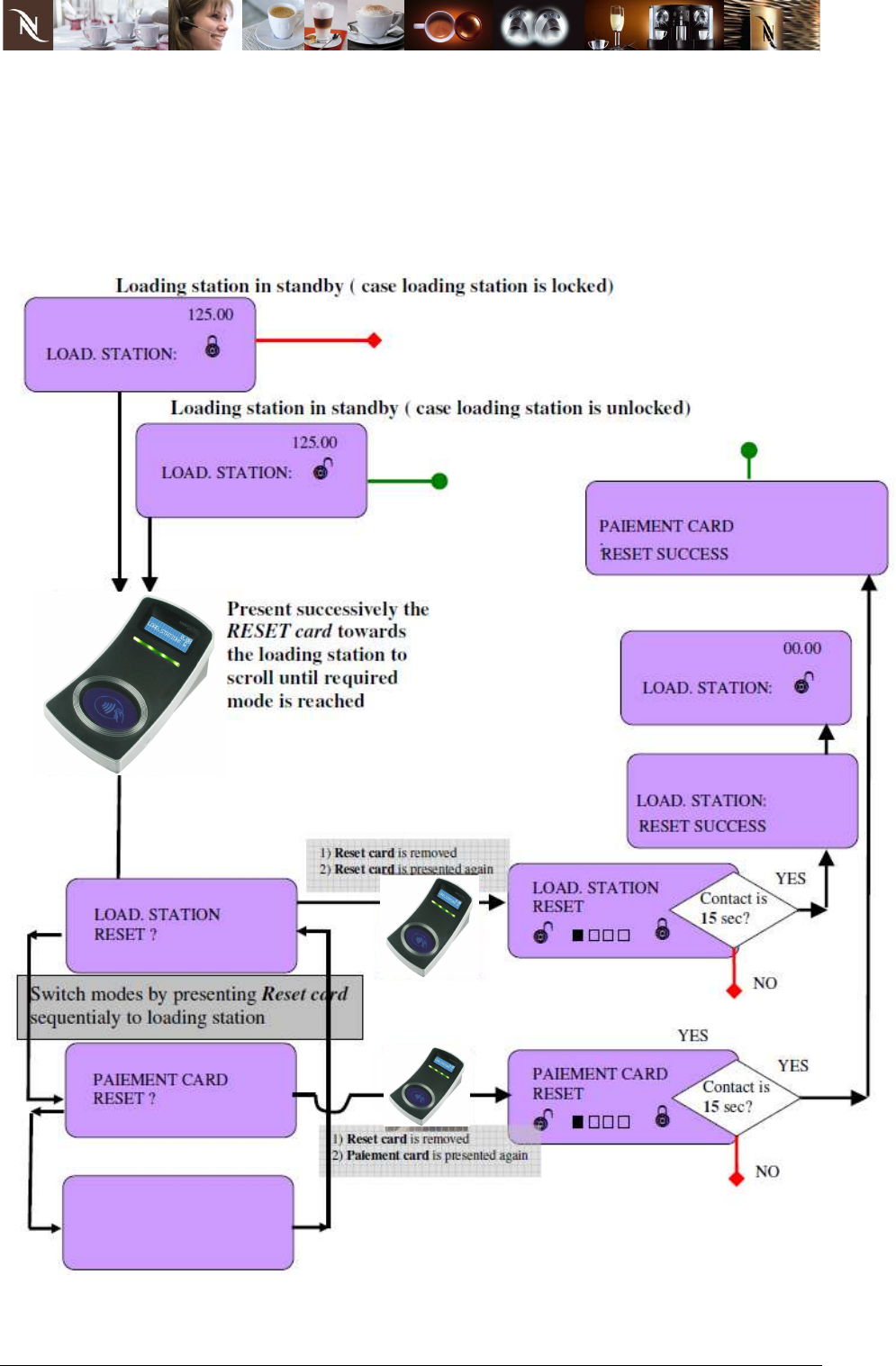
Loading Station Reset Process
How does the loading station behave when a Reset Card is presented.
It is possible to select 2 x reset processes:
- to reset the loading station (internal statistics data remain unchanged);
- to user payment cards (lock + credit).

08.04.13 Rev 07 User Guide.doc 13/13
Csaba Schulz
Certifications
This device complies with Part 15 of the FCC Rules and with Industry Canada
licence-exempt RSS standard(s).
Operation is subject to the following two conditions:
(1) this device may not cause harmful interference, and
(2) this device must accept any interference received, including interference
that may cause undesired operation.
Le présent appareil est conforme aux CNR d'Industrie Canada applicables aux
appareils radio
exempts de licence. L'exploitation est autorisée aux deux conditions suivantes:
(1) l'appareil ne doit pas produire de brouillage, et
(2) l'utilisateur de l'appareil doit accepter tout brouillage radioélectrique subi,
même si le brouillage est susceptible d'en compromettre le fonctionnement.
NOTICE:
Changes or modifications made to this equipment not expressly approved by
MICROTRONIC may void the FCC authorization to operate this equipment.
NOTE:
This equipment has been tested and found to comply with the limits for a Class A
digital device, pursuant to Part 15 of the FCC Rules. These limits are designed to
provide reasonable protection against harmful interference when the equipment is
operated in a commercial environment. This equipment generates, uses, and can
radiate radio frequency energy and, if not installed and used in accordance with the
instruction manual, may cause harmful interference to radio communications.
Operation of this equipment in a residential area is likely to cause harmful
interference in which case the user will be required to correct the interference at his
own expense.