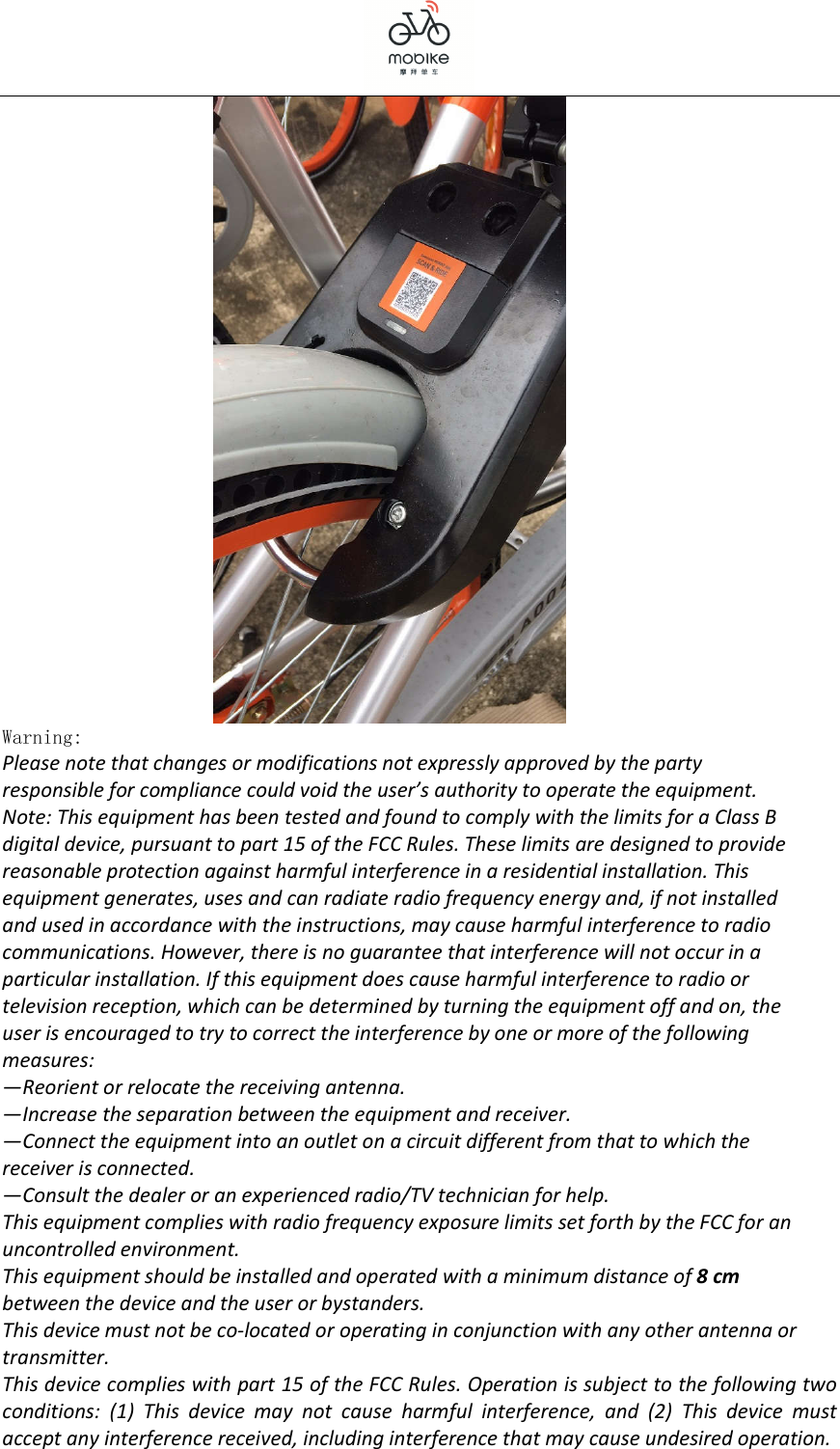
MOBIKE LBC4-5 Mobike Lock User Manual

MOBIKE (HONG KONG) LIMITED Mobike Lock

User manual

     MOBIKE (HONG KONG) LIMITED   Smart Lock Product Description                        Writer: Smart Lock Team Time  : 2016-11-02
  Documentation Release Notes  Version TIME Writer N V1.0 2016/12/06 ZuoXiang INITIAL CREATION
  CONTENTS 1 Product Overview ................................................................................................................... 4 2 Instructions for use ........................................................................................................... 4
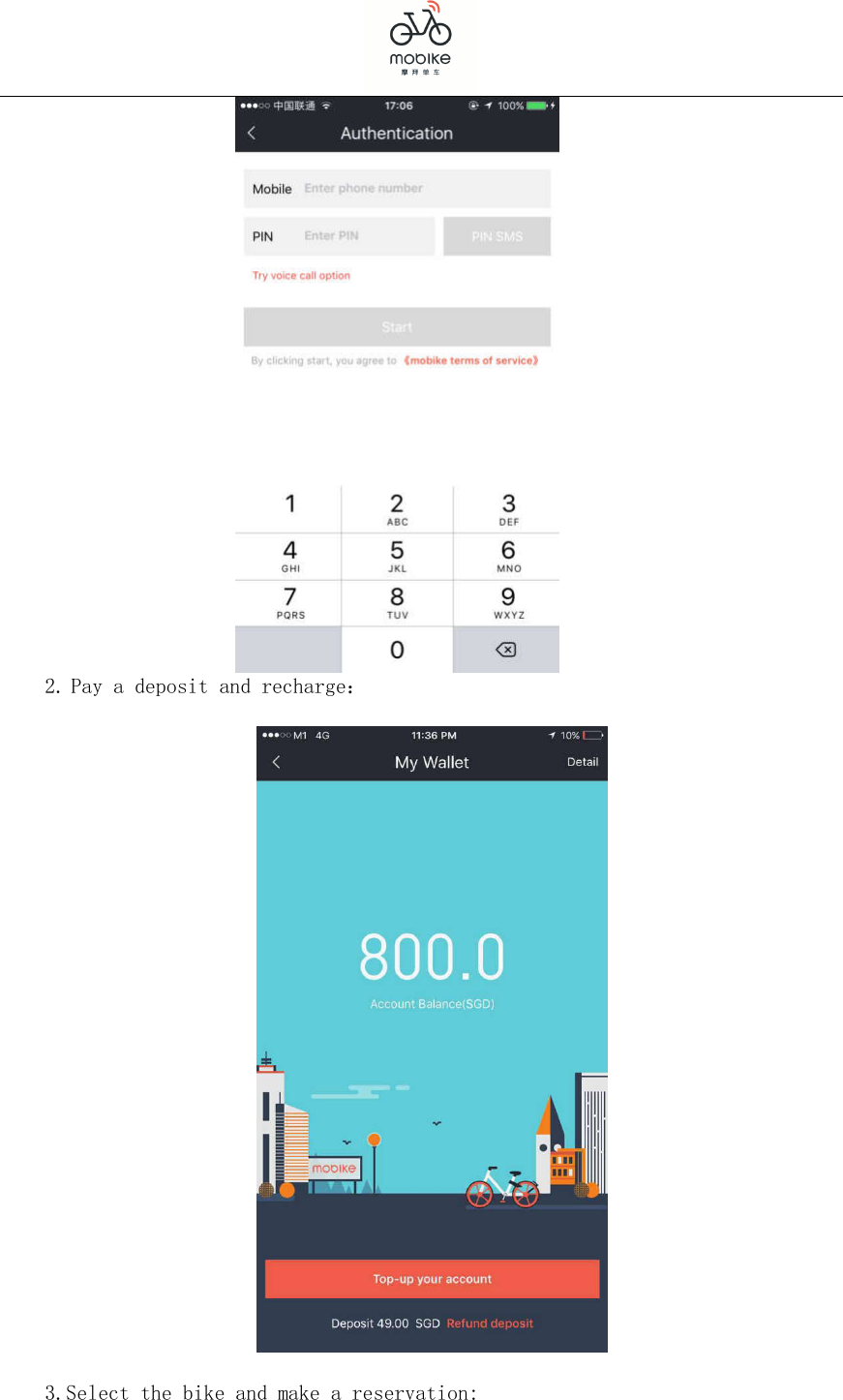
   1 Product Overview Mobike is the world’s first cashless and station-less smart bike sharing company, combining innovation and today’s IoT (Internet of Things) technology that  aims  to  provide  an  affordable  means  of  shared  transportation  for convenient short urban trips, while reducing congestion and our city's carbon footprint that improves the quality of city life. Mobike uses a unique patented bike design, smart lock system and combines with the smartphone app to bring you greater access and convenience to a bike when you need it the most. Download Mobike App, with the cost of XX Dollar per half hour to use a bike, to complete a few kilometers of travel. Innovative  technology  and  advanced  concept  of  no  pile  make  user's  car rental  more  simple  and  convenient.  Mobike  efforts  to  be  found  within  100, through scanning code to unlock the lock to start riding. Upon arrivals, in any painting white line area in the street the bike can be parked to complete the rental by lock procedures.  Elegant design  totally  stay  in  line  with  the  concept  of  urban  commuting, responsible for the design and development by the Mobike;  GPS positioning and tracking function;  Network  communication  function.  Mobile  phone  App  unlock  the  bicycle remotely; Bluetooth communication and 2G is supported.  Bike interaction with people, unlocking and locking will notify and prompt the user through sound or light promptly;  Self-charging  function,  providing  bike  positioning,  communication  and unlocking power, by the flower drum charging and solar charging;  Supporting  remote  online  firmware  upgrade.  You  can  remotely  upgrade  the bike communication strategy and positioning strategy, to meet the needs of the latter part of the hardware upgrade;  The low temperature  batteries for  northern  city,  -8  ℃   above  can  charge, and  -25  ℃   above  discharge.  Suitable  for  the  northern  city  where temperatures in winter may be as low as zero below; 2 Instructions for use Smart Lock supports the smartphones drived by Android and IOS systems. Users open the phone to download APP, then use the APP to unlock. 1.Register:
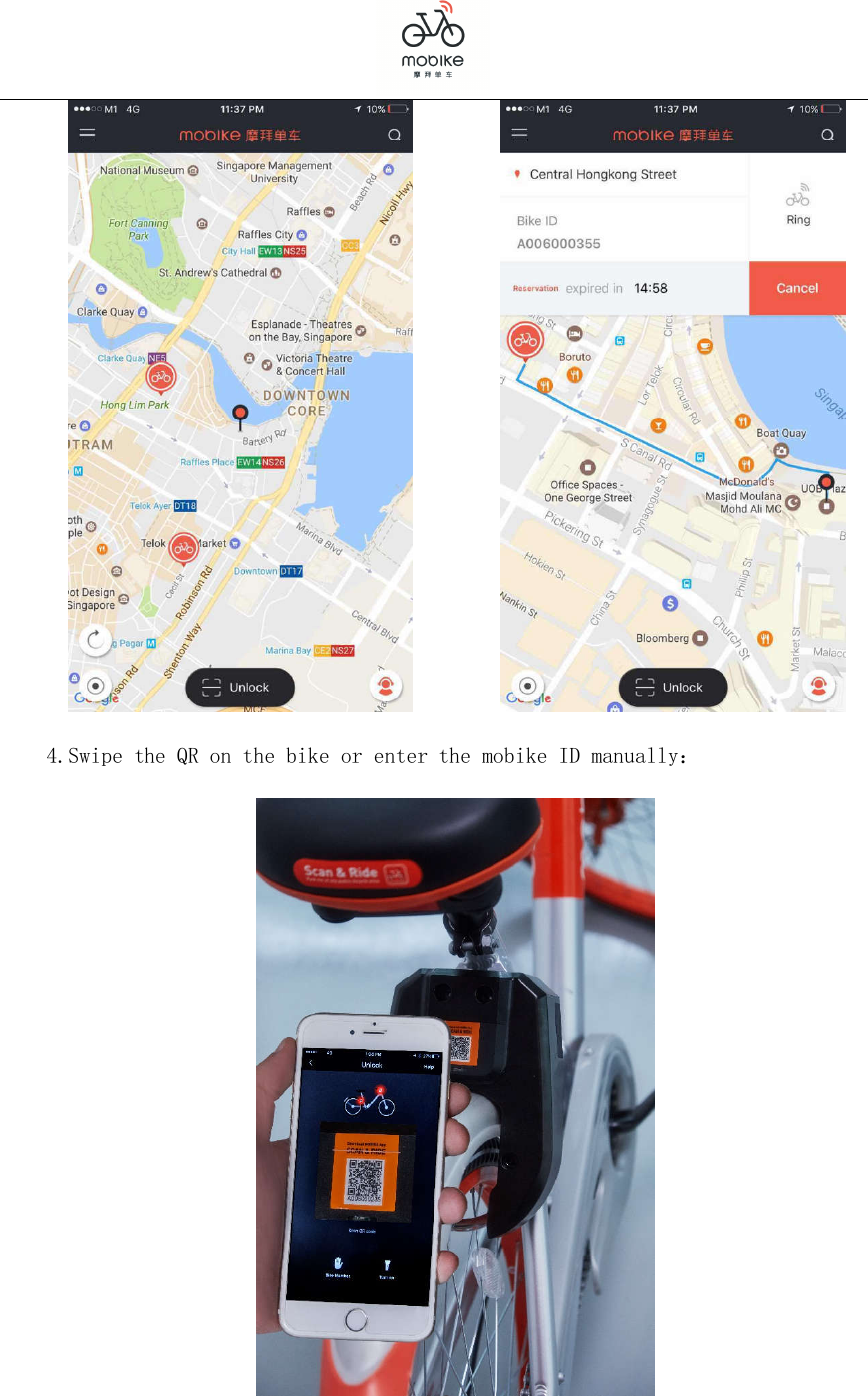
   2. Pay a deposit and recharge:    3.Select the bike and make a reservation:
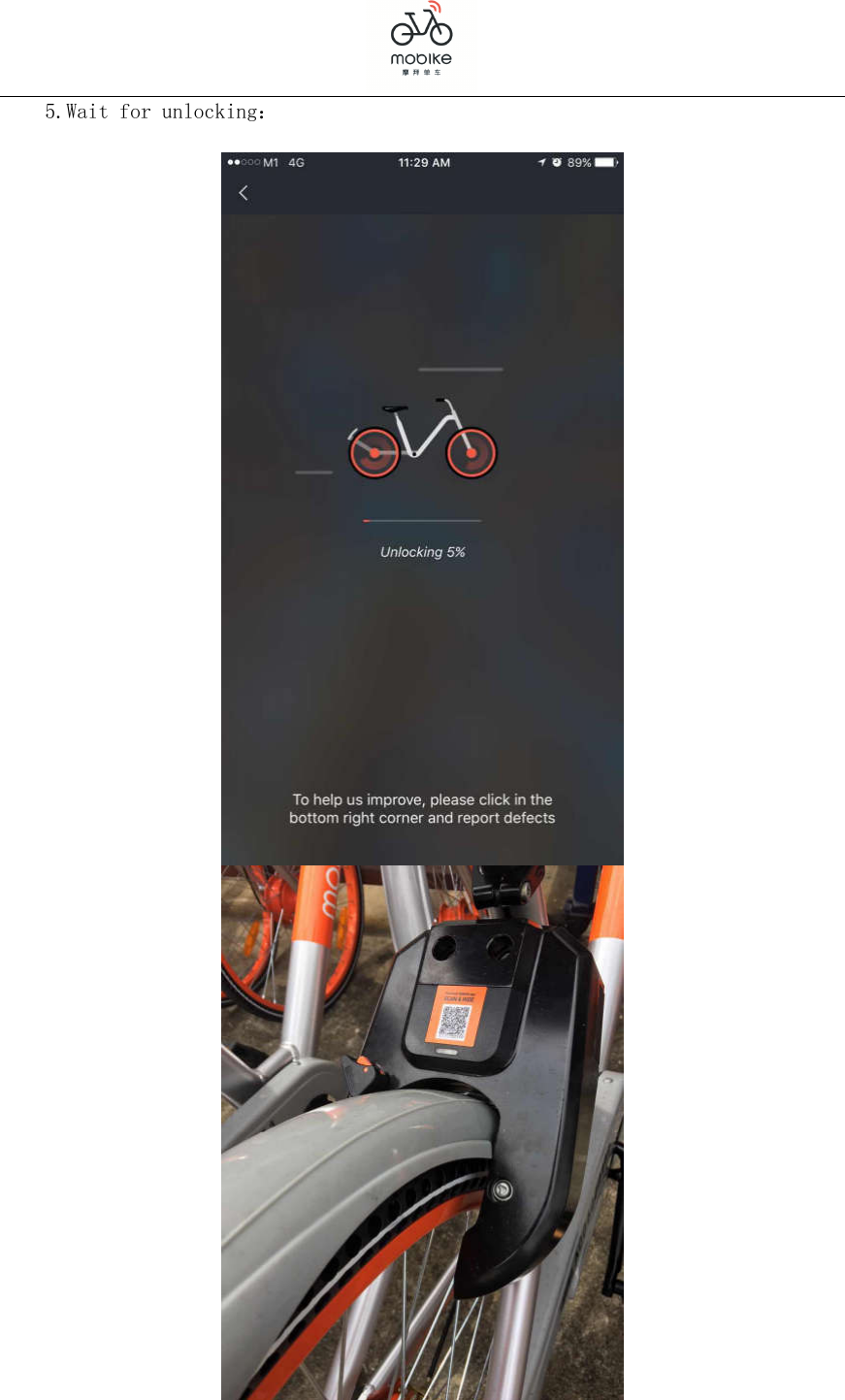
             4.Swipe the QR on the bike or enter the mobike ID manually:
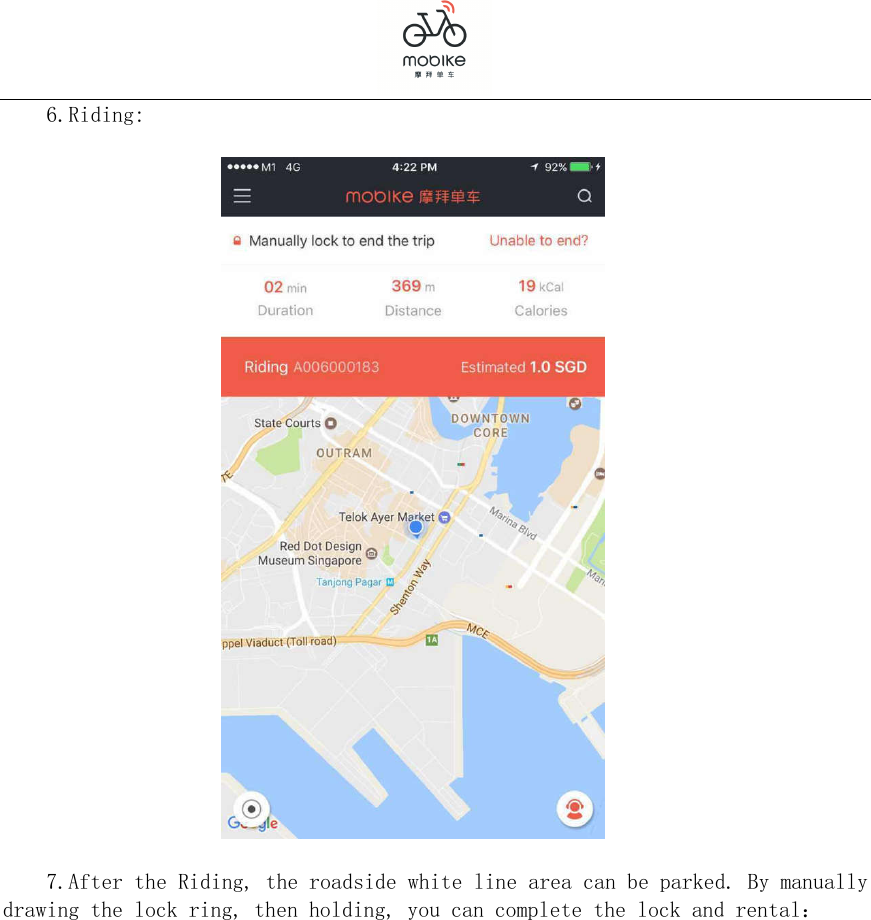
  5.Wait for unlocking:
  6.Riding:    7.After the Riding, the roadside white line area can be parked. By manually drawing the lock ring, then holding, you can complete the lock and rental:
   Warning: Please note that changes or modifications not expressly approved by the party responsible for compliance could void the user’s authority to operate the equipment. Note: This equipment has been tested and found to comply with the limits for a Class B digital device, pursuant to part 15 of the FCC Rules. These limits are designed to provide reasonable protection against harmful interference in a residential installation. This equipment generates, uses and can radiate radio frequency energy and, if not installed and used in accordance with the instructions, may cause harmful interference to radio communications. However, there is no guarantee that interference will not occur in a particular installation. If this equipment does cause harmful interference to radio or television reception, which can be determined by turning the equipment off and on, the user is encouraged to try to correct the interference by one or more of the following measures: —Reorient or relocate the receiving antenna. —Increase the separation between the equipment and receiver. —Connect the equipment into an outlet on a circuit different from that to which the receiver is connected. —Consult the dealer or an experienced radio/TV technician for help. This equipment complies with radio frequency exposure limits set forth by the FCC for an uncontrolled environment. This equipment should be installed and operated with a minimum distance of 8 cm between the device and the user or bystanders. This device must not be co-located or operating in conjunction with any other antenna or transmitter. This device complies with part 15 of the FCC Rules. Operation is subject to the following two conditions:  (1)  This  device  may  not  cause  harmful  interference,  and  (2)  This  device  must accept any interference received, including interference that may cause undesired operation.

Navigation menu