MYSTIC Z300 3G Mobile Phone User Manual Warranty Details
MYSTIC CORPORATION S.A. 3G Mobile Phone Warranty Details
MYSTIC >
Contents
- 1. Users Manual
- 2. User Manual
Users Manual

Contents Contents Contents Contents
General General General GeneralSafety Safety Safety SafetyInstructions Instructions Instructions Instructions……………………………………… ……………………………………… ……………………………………… ………………………………………4 444
HandlingandMaintenance…………………………………………………..4
UsageEnvironment…………………………………………………….4
Safety…………………………………………………………………………4
Accessories………………………………………………………………………5
Usageconditionsandrestrictions…………………………5
Abbreviations/Terminology………………………………………………….6
Product Product Product ProductOverview Overview Overview Overview…………………………………………… …………………………………………… …………………………………………… …………………………………………….. .. .. ..7 777
Getting Getting Getting GettingStared Stared Stared Stared…………………………………………… …………………………………………… …………………………………………… ……………………………………………8 888
BeforeFirstUse……………………………………………………………….8
MicroSDCard……………………………………………………………….8
SIMCard(2G/3G)……………………………………………………………..8
InsertingTheSIMCard(s)andBattery………………………8
Charging……………………………………………………………………..9
SwitchOn/Off……………………………………………………....................9
TurnOn/OffTheScreen……………………………………………………….9
Volume…………………………………………………………10
LinkingWithYourGoogleAccount……………………………………...10
SIMManagement………………………………………………………………10
Operation Operation Operation Operation…………………………………………………… …………………………………………………… …………………………………………………… …………………………………………………….12 .12 .12 .12
EnteringYourPIN……………………………………………………………12
ScreenOperation………………………………………………12
PhoneCalls……………………………………………………………13
CallSettings……………………………………………………………….18
Contacts…………………………………………………………………….18
Messaging…………………………………………………………………….19
ApplicationsandWidgets……………………………………………..20
AddandManageDesktopIcons……………………………….21
ConnectWithComputer……………………………………………….22
Browser……………………………………………………………………………..23
ScreenCompatibility………………………………………………….24
BackgroundApplications………………………………………..24
GetandInstallApplications…………………………………….24
UninstallApplications……………………………………………..25
PlayStoreandCalendarErrorMessages…………………………25
Settings………………………………………………....................26
WirelessandNetworks………………………………………………..26
Bluetooth………………………………………………………………….28
Device……………………………………………………………………28
Personalization………………………………………………………………29
System…………………………………………………………………..32
Camera……………………………………………………………………..32
DownloadFilesManagement………………………………………….33
Radio………………………………………………33
Specifications Specifications Specifications Specifications……………………………………… ……………………………………… ……………………………………… ………………………………………34 34 34 34
Page2GeneralSafetyInstruction

General General General GeneralSafety Safety Safety SafetyInstructions Instructions Instructions Instructions
Readthismanualthoroughlybeforefirstuseandkeepitinasafeplacefor
futurereference,alongwiththecompletedwarrantycard,purchasereceipt
Page3GeneralSafetyInstruction
andcarton.Thesafetyprecautionsenclosedhereinreducetheriskoffire,
electricshockandinjurywhencorrectlyadheredto.
Handling Handling Handling Handlingand and and andmaintenance maintenance maintenance maintenance
�Water: Water: Water: Water:Ensurethatthisproductdoesnotgetwetandprotectitfromwater
splashes,rain,excessivehumidityandsweat.Contactwithwaterwill
causethephonetoshort-circuit,corrodeorcauseelectricshock.Donot
useitwhereitcanfallintowater(suchasnearapool,pond,bathetc.).Do
notuseitwithwethands.Donotimmerseitinwater.Donotturnitonifitis
wet.Donottrytodryitinamicrowaveoven.
�Handling: Handling: Handling: Handling:
To
avoiddamagingthephone,batteryorcharger,donotdropit
orshakeitvigorouslyasthismaycausedeviceorbatteryfailure,fireor
explosion.
�Repair: Repair: Repair: Repair:Thisdeviceisahighprecisionelectronicproduct.Itcontainsno
userserviceablepartsinside.Donottrytodismantle,modifyorrepairthe
deviceorchargeryourself.Anymodificationscouldvoidyourwarranty
Usage Usage Usage Usageenvironment environment environment environment
�Environment: Environment: Environment: Environment:Donotusethisproductwhereitisexcessivelyhotcold,
dustyorhumid,orwhereitisexposedtostrongmagneticfieldorlong
periodsofsunshine.Exposuretoveryloworveryhightemperaturesmay
causedeviceorbatteryfailure,fireorexplosion.
�Heat Heat Heat Heatsources: sources: sources: sources:Donotleavetheproductnearanyheatsources,stoves,
ovensorotherappliances(includingamplifiers)thatproduceheat
�Interference:Donotusethephonenearotherelectronicdevicesthatuse
radiofrequencysignals.Avoidusingitwithina15cmrangeofapacemaker
(ifyouhaveapacemaker,donotcarrythephoneinabreastpocket).
Safety Safety Safety Safety
�Road Road Road Roadsafety: safety: safety: safety:Obeyallocallawsandregulationsontheuseofmobile
deviceintheareawhereyoudrive.Payfullattentiontodrivingandthe
road.Keepyourhandsfreetooperatethevehicleatthetimes;use
hand-freeoperationifphoneusageisrequired.
�Health Health Health Healthfacilities: facilities: facilities: facilities:Observerelevantrulesorregulationsregardingmobile
phoneuseinhealthfacilities.Turnoffthephoneinthevicinityofmedical
devicesandwhereverdirectedtodosobypostedsigns.Mobilephone
radiationmayinterferewithpacemakers,hearingaidsandothermedical
equipment.
�Aircraft: Aircraft: Aircraft: Aircraft:Turnoffthesmartphonewhenboardinganairplaneinorderto
avoidinterferencewithaircraftradiosignals.
Page4GeneralSafetyInstruction
�Magnetic Magnetic Magnetic Magneticequipment: equipment: equipment: equipment:Stayawayfrommagneticequipmenttoavoidthe
riskofinterferingwithorerasingtheinformationstoredonthedevice.
�Volume: Volume: Volume: Volume:Alwaysselecttheappropriatevolumewhenusingthemusicor
videofunction.Thevolumeshouldnotbetooloudwhenusingearphones.
�Explosive Explosive Explosive Explosiveenvironments: environments: environments: environments:Turnoffthephoneinblastingareasandinany
potentiallyexplosiveenvironment(suchasatapetrolstationorother
refuelingpoints).
�Back-up: Back-up: Back-up: Back-up:
To
avoidlossofdata,werecommendalwaysbackingupany
importanttotheeyesofpeopleorpets.
Accessories Accessories Accessories Accessories
�Accessories: Accessories: Accessories: Accessories:OnlyusethedevicewiththemicroUSBcableandbattery
chargersupplied.Useofotheraccessoriesnotrecommendedinthis
manualmaycausedamagetotheunitandvoidyourwarranty.
�Battery Battery Battery Batterycharger: charger: charger: charger:Onlyusethechargerprovided.Donotusethephone
whileitischarging.Donotdroporcauseanimpacttothecharger.
�Battery Battery Battery Batteryhandling: handling: handling: handling:Donotexposethebatterytohightemperatures.Take
carewhenhandleachargedbattery,particularlywhenplacingitinside
yourpocket,purseorothercontainerwithmetalobjects.
�Power Power Power Powercord: cord: cord: cord:Donotbendanddamagethecableofbatterycharger.
�Damage: Damage: Damage: Damage:Donotusethechargerifthecableorplugisdamaged.Incase
ofdamage,contacttheaftersalessupportlineforadvice.
�Disconnect: Disconnect: Disconnect: Disconnect:Griptheplugwhendisconnectingthecharger;donotpullon
thecord.
�Memory Memory Memory Memorycard: card: card: card:Alwayshandlethephone
’
smemorycard(s)withcare.
Protectthecard(s)fromstaticelectricityandstrongshocks.
Usage Usage Usage Usageconditions conditions conditions conditionsand and and andrestrictions restrictions restrictions restrictions
�Packaging: Packaging: Packaging: Packaging:Plasticpackagingmaterialscanpresentsuffocationhardfor
youngchildrenandbabies.Keepallpackagingmaterialsoutofchildren
’
s
reachtoensuretheydonotplaywiththese.
�Personal Personal Personal Personalusage: usage: usage: usage:Donotusethisproductforanythingotherthanits
intendedpurpose,andonlyuseitasdescribedinthismanual.
�Restricted Restricted Restricted Restrictedusage: usage: usage: usage:Theequipmentisnotintendedforusebypersons
(includingchildren)withreducedphysical,sensoryormentalcapabilities,
orlackofexperienceandknowledge,unlesstheyhavebeengiven
supervisionorinstructionconcerninguseoftheequipmentbyaperson
responsiblefortheirsafety.
�Children: Children: Children: Children:Thisphoneisnotatoy.Keepthephone,batteryandcharger
awayfromyoungchildren.Superviseyoungchildrenwhenthephoneis
goingtobeused
byornearyoungchildren.
Page5GeneralSafetyInstruction

Wi-Fi Wi-Fi Wi-Fi Wi-Fi
WirelessFidelity
BT BT BT BT
Bluetooth
SD SD SD SDcard card card card
SecureDigitalFlashMemoryCard
SIM SIM SIM SIMcard card card card
SubscriberIdentityModule(MobileServiceCard)
�Cleaning: Cleaning: Cleaning: Cleaning:Cleanthehousingofthedevicelightlywithadrycottoncloth.
Donotusealcohol,thinners,benzeneoranyotherchemicalcleaning
solutions.
�Lost Lost Lost Lostphone: phone: phone: phone:Werecommendyouinformyourtelecommunicationsservice
providertoblockyourSIMcard(s)whenyourphoneislost.
You
mayalso
wanttoaskthemtoblockthephone
’
sIMEInumber(s),theseareprinted
onalabelinsidethephoneunderneaththebattery.(Alternatively,the
number(s)willbeincludedonalabelwiththepackaging.)Pleasenote
downthisnumberssoyouhavethemhandyincaseyourphoneislost.
�Disposal: Disposal: Disposal: Disposal:Whendiscardingthisdevice,observelocalregulationsand
disposeofitappropriatelyforrecycling.Neverdisposeofthebatteryina
fire.Contactyourlocalauthoritiesforadviceonfacilities.
�Noncompliance: Noncompliance: Noncompliance: Noncompliance:Weacceptnoliabilityforanydamagecausedby
noncompliancewiththeseinstructionsoranyotherimproperuseor
mishandling.
Abbreviations/Terminology Abbreviations/Terminology Abbreviations/Terminology Abbreviations/Terminology
Page6GeneralSafetyInstruction
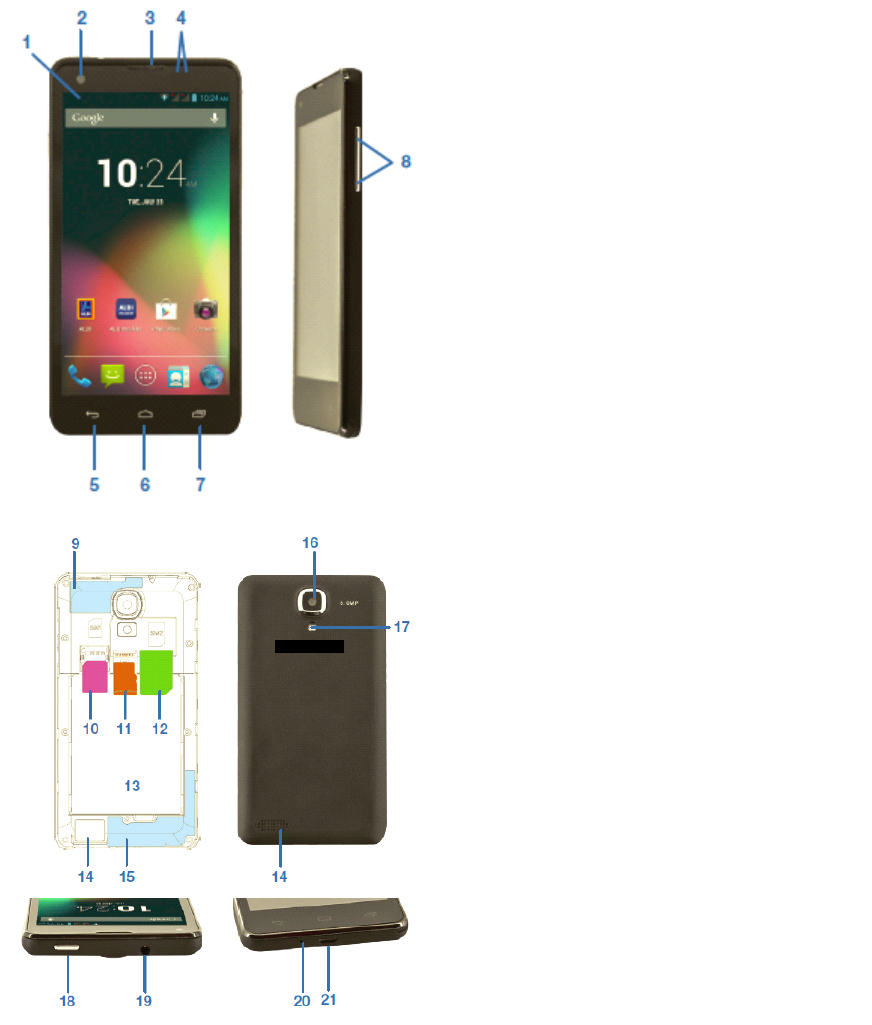
Product Product Product ProductOverview Overview Overview Overview
Pic1.
Pic2.
1. 1. 1. 1.Notification Notification Notification NotificationBar Bar Bar Bar
2. 2. 2. 2.Front Front Front FrontCamera Camera Camera Camera
3. 3. 3. 3.Earpiece Earpiece Earpiece Earpiece
4. 4.4. 4.Light Light Light Lightand and and andproximity proximity proximity proximitysensors sensors sensors sensors
5. 5. 5. 5.Back/Return Back/Return Back/Return Back/Return
6. 6.6. 6.Home Home Home Home
7. 7. 7. 7.Resent Resent Resent ResentApps/Options Apps/Options Apps/Options Apps/OptionsMenu Menu Menu Menu
8. 8. 8. 8.Volume Volume Volume Volume+/- +/- +/- +/-
9. 9. 9. 9.WI-FI WI-FI WI-FI WI-FI/Bluetooth /Bluetooth /Bluetooth /BluetoothAntenna Antenna Antenna Antenna
10. 10. 10. 10.S SSSIM IM IM IMBay1-Supports Bay1-Supports Bay1-Supports Bay1-Supports2G/3G 2G/3G 2G/3G 2G/3G(Micro (Micro (Micro (Micro
SSSSIM IMIM IMcard) card) card) card)
11. 11. 11. 11.Micro Micro Micro MicroSD SD SD SDCard Card Card CardSlot Slot Slot Slot
12. 12. 12. 12.S SSSIM IM IM IMBay2-Support Bay2-Support Bay2-Support Bay2-Support2G 2G 2G 2G/3G /3G /3G /3G( (((MINI MINI MINI MINI
SSSSIM IMIM IMCard) Card) Card) Card)
13. 13. 13. 13.Battery Battery Battery BatteryBay Bay Bay Bay
14. 14. 14. 14.Loud Loud Loud LoudSpeaker Speaker Speaker Speaker
15. 15. 15. 15.Cellular Cellular Cellular CellularAntenna Antenna Antenna Antenna
16. 16. 16. 16.Rear Rear Rear RearCamera Camera Camera Camera
17. 17. 17. 17.Camera Camera Camera CameraFlash Flash Flash Flash
18. 18. 18. 18.Power Power Power PowerButton Button Button Button
19. 19. 19. 19.3.5mm 3.5mm 3.5mm 3.5mmHeadset Headset Headset HeadsetSocket Socket Socket Socket
20. 20. 20. 20.
Microphone Microphone Microphone Microphone
21. 21. 21. 21.
Micro Micro Micro MicroUSB USB USB USBSocket Socket Socket Socket
Page7ProductionOverview
Getting Getting Getting GettingStarted Started Started Started
Before Before Before Beforefirst first first firstuse use use use
�Unpacktheproductbutkeepallpackagingmaterialsuntilyouhavemade
sureyournew3Gsmartphoneisundamagedandingodworkingorder.
Plasticwrappinganbeasuffocationhazardforbabiesandyoungchildren,
soensureallpackagingmaterialsareoutoftheirreach.
�UnwindtheUSBcableandbatterychargingadaptorandinspectthemfor
damage.Donotusethecablesorthechargerifanypartisdamaged.In
caseofdamage,contactouraftersalessupportlineforadviceon
examination,repairorreturnofthedamagedproduct.
�Readthismanualtofamiliarizeyourselfwithallthefeaturesandoperating
principlesofyournew3GSmartphone.Payparticularattentiontothe
safetyinstructionsonthepreviouspages.
Micro Micro Micro MicroSD SD SD SDCard Card Card Card
�MysticsmartphoneiscompatiblewithClass10MicroSDHCcards,upto
32GBincapacity.
�PoweroffyourPhone,theninsertyourMicroSDcardintotheSDsloton
therearofthePhone,makingsurethegoldcontactsarefacingtothefront
ofthePhone.
�
To
removetheSDcard,poweroffthePhoneandremovethebattery,then
gentlypulltheSDcardout.
SIM SIM SIM SIMCard Card Card Card(2G/3G) (2G/3G) (2G/3G) (2G/3G)
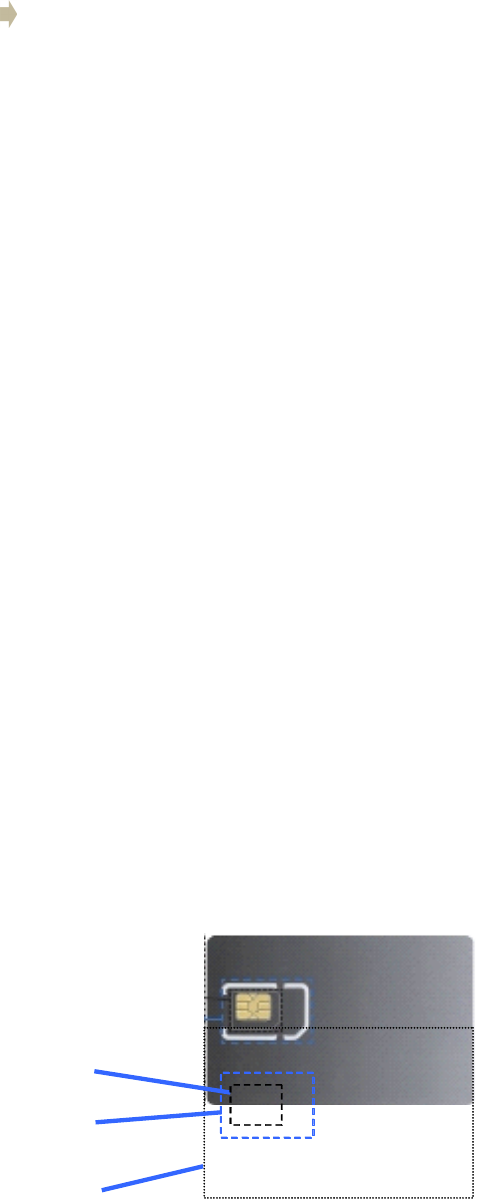
�MysticsmartPhonecardiscompatiblewith‘Mini
’
and‘Micro
’
sizedSIM
card.
Note:SIMcardsizeadaptorsshouldnotbe
usedastheymaycausedamageor
becomestuck.
MicroSIM
MiniSIM
NormalSIM
Inserting Inserting Inserting Insertingthe the the theSIM SIM SIM SIMCard(s) Card(s) Card(s) Card(s)and and and andbattery battery battery battery
�Placeyourfingerinthesmallrecessinthecornerofthemobilephoneand
withyourfingernail,carefullypriseitopenandliftoffthebackcover.
�Ifthebatteryisinplace,removeit.
�InsertyourSIMcard(s)intothededicatedbays.Baynumber(1)supports
MicroSIMCardsfor3Gand2G;baynumber(2)supportsMiniSIMCards
for2Gonly.Ifrequired,insertamicroSDcardintoitsdedicatedspace.
�OncetheSIMandSDcardsaresecurelyinplace,insertthebattery
(supplied)intothephone,makingsuretoalignthepinswiththecontact
�Reinstallthebackcover.Itwilllockintoplace.
NOTE: NOTE: NOTE: NOTE:SomeSIMcardsrequireaPINnumbertobeenteredbeforeuse(see
page13fordetails).ThisPINmaybeprintedontheSIMcardpackaging,or
youmayhavetocontactyourserviceproviderforthenumber.
Charging Charging Charging Charging
Thebatteryhasbeenpartiallychargedatthefactory.
To
performallfunctions,
werecommendyoufullyrechargeitasfollows:
�
To ToTo To
charger charger charger chargerthe the the thedevice device device devicewith with with withthe the the thebattery battery battery batterycharger, charger, charger, charger,plugthelargeendofthe
USBcableintothechargingadaptorandthesmallerendintothemicro
USBportonthe3GSmartphone.Plugthechargerintoyourmainspower
supply.
�
To ToTo To
charge charge charge chargethe the the thedevice device device deviceusing using using usingthe the the theUSB USB USB USBcable cable cable cableand and and andcomputer, computer, computer, computer,plugthe
largeendoftheUSBcableintoaUSBportonyourcomputerandthe
smallerendintothemicroUSBportonthe3GSmartphone.Ensureyour
computeristurnedon.
�Whenthephoneindicatesafullcharge(thebatterystatusiconislocated
inthetoprightcornerofthedisplay),disconnectthechargerorUSBcable.
�Followoneofthesechargingprocedureswheneveryour3GSmartphone
indicatesalowbatterycharge.
Switch Switch Switch Switchon/off on/off on/off on/off
Power Power Power Powerbutton button button button
�Longpresstoturnon,
�Wheninpower-onstate,presstoturnonoroffthescreen.
�Wheninpower-onstate,longpresstodisplaythepoweroffmenu.
NOTE: NOTE: NOTE: NOTE:ifphonebecomesunresponsive,removeandreinsertthebattery
Switch Switch Switch Switchon on on on
�Whenthepower-onstate,pressandholdthepowerfor2secondsandthe
devicewillstartup.
Switch Switch Switch Switchoff off off off
�Pressandholdthepowerfor2seconds:anoptionslistwillappearonthe
screen.
�Choosetoswitchoffthedevice.
Page8GettingStarted

Turn Turn Turn Turnon/off on/off on/off on/offthe the the thescreen screen screen screen
Thescreenwillautomaticallyturnoffwheninidletime
�Afteraperiodofinactivity,thescreenautomaticallyturnsofftosave
batterypower.Thiscanbesetusingthe‘Sleep
’
settingfromthedisplay
menuinthedevicesettingsmenu.
�Ifafteralongtimeinsleepstatethescreendoesnotturnon,removethen
reinsertthebattery.Thenpressthepowerbuttontoturnonagain.
Turn Turn Turn Turnon on on onthe the the thescreen screen screen screen
�Ifthescreenisoff,Pressthepowerbuttontoturnitbackon
Volume Volume Volume Volume
�
To
adjusttheringervolume,presstheVolumeDownbuttonsontheright
sideofthe3GSmartphonetothedesiredlevel.Whileadjustingtheringer
volume,awindowwillappearonthescreendisplayingthevolumelevels.
Linking Linking Linking Linkingwith with with withyour your your yourGoogle Google Google Googleaccount account account account
Whenyouturnonthephoneforthefirsttime,youcansignintoyourGoogle
Account,soyoucansynchronizeGmail/GoogleMail,CalendarandContacts
betweenyourphoneandtheweb.
You
alsoneedtosignintoaGoogleAccount
touseGoogleAppssuchasGoogle
Talk
™andPlayStore.
Onyourphone,goto‘Settings
’
andtap‘ppAccount
’
>‘Google
’
>‘Existing’.
Tap
“signin”,enteryourusernameandpasswordandthentap“Signin”.After
signingin,allemails,contacts,andcalendareventsonyourGoogleAccount
willautomaticallysynchronizewithyourphone.
NOTE: NOTE: NOTE: NOTE:
Tap
“Create”ifyoudonothaveaGoogleAccountyet.
Google Google Google GoogleAccount Account Account Accountpassword password password password
IfyoucannotrememberyourGoogleAccountpassword,followthesteps
belowtoretrieveit:
�Onyourcomputer,openyourbrowserandgoto
http://google.com/accounts.
�Ontherightsideofthepage,tap“Can’taccessyouraccount”.
�Inthe“Havingtroublesigningin?”section,select“Idon’tknowmy
password”.
�Followtheprocedureonhowtorecoveryourpassword.
SIM SIM SIM SIMmanagement management management management
This3GSmartphonecanbeusedwithtwoSIMcards:Whenyouhavetwo
SIMcardsinserted,youcanchoosetouseeitherSIM1orSIM2,orbothof
them.UnlessyouhavedetermineduseofoneparticularSIMcardasyour
Page9GettingStarted
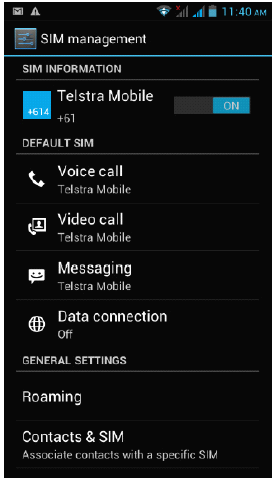
defaultcardinthesettings,youwillbepromptedtochooseanappropriateSIM
cardeverytimeyouwanttomakeacallorsendamessage.
NOTE: NOTE: NOTE: NOTE:OnlySIMcardbaynumber1supports3Gdataconnection.
SIM SIM SIM SIMInformation Information Information Information
Tap
thecheckboxtochooseenableordisableaSIMcard,ortapaSIMcardto
changeitsinformation.
Default Default Default DefaultSIM SIM SIM SIM
You
couldchoosethedefaultSIMcardforyourvoicecalls,videocalls,
messagesorconnection.
General General General Generalsettings settings settings settings
You
couldchangeroamingsettingsorassociatecontactswithaspecificSIM.
Page10GettingStarted
Click/ShortPress
Whenusingtheon-screenkeyboard,openinganapplicationor
selectingitems
LongPress
Pressandholdforseveralsecondsonanitem(suchasatextboxor
webpagelink)todisplaytheactionorsubmenuforan
item,ifavailable. SlideorRapidSlide
Slidingorfastslidingmeansverticalorhorizontaldragaction.
Drag
Whendragging,youmustholdtheiconwithyourfingerandkeep
pressureuntilitreachesdestination.
DisplayRotation
Formostofthescreens,thecontentwillchangebetweenlandscape
andportraitmode,accordingtothedevice
orientation.
Operation Operation Operation Operation
Entering Entering Entering Enteringyour your your yourPIN PIN PIN PIN
IfyouwanttouseaSIMcardwhichispresetwithaPIN(personalidentification
number),youwillhavetoenterthePINtoproceed.Justfollowthepromptsto
entertheSIMPINandthentap“OK”.
Screen Screen Screen Screenoperation operation operation operation
Unlocking Unlocking Unlocking Unlockingthe the the themain main main mainscreen screen screen screen
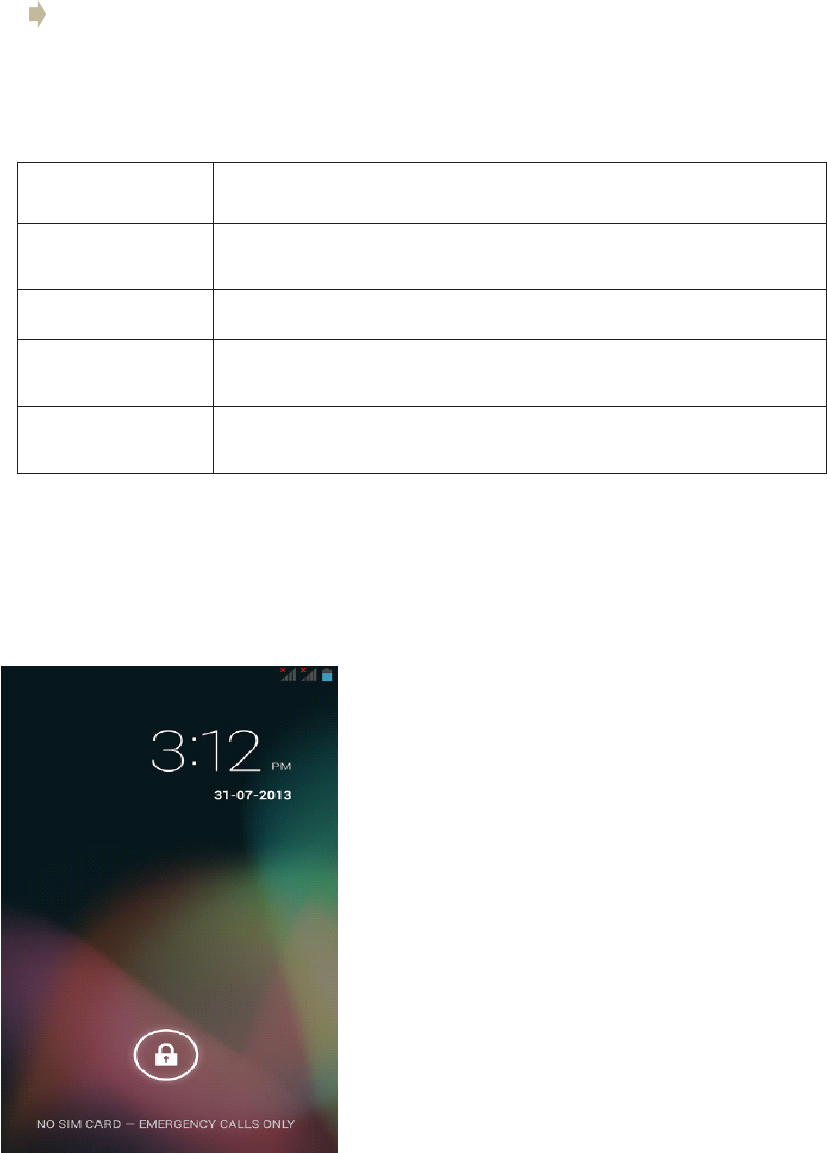
�Dragthelocktotherightsidetounlockthe
screen
�Afterunlockingthescreen,youwillsee
thelastitemyouhadopenonthemain
screen,whichhasfivewindowsorpages.
You
canviewthepagesbydraggingyour
fingerleftandrightacrossthescreen.
�
To
returnquicklytothemainscreen,press
thehomebutton.
Page11GettingStarted
Icons Icons Icons IconsDescription Description Description Description
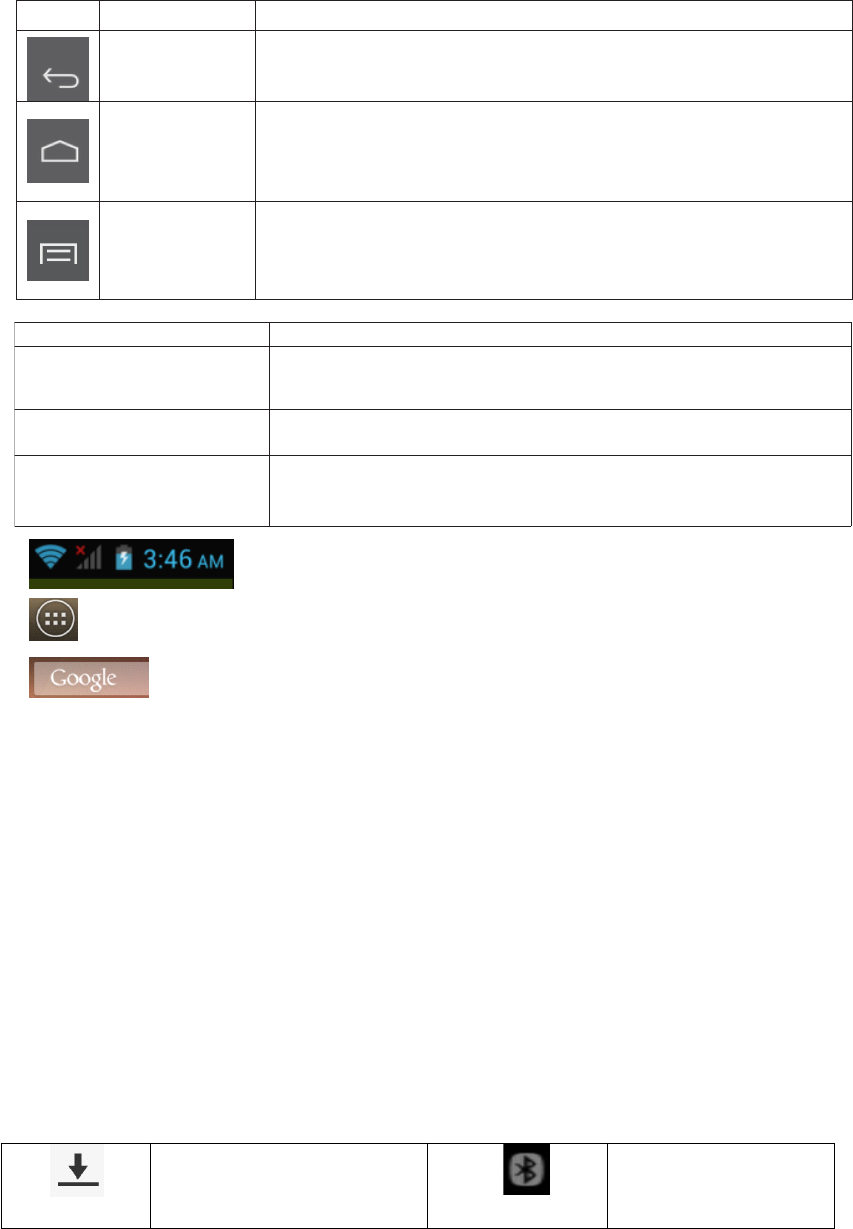
·Fromlefttoright:Wi-FiSignalStatus,SIMSignalStatus,Battery
Status,CurrentTime(dependsoncurrentapplications).
·Clicktodisplayalistofallapplicationsandwidgets.
·Clicktosearchforafileorapplicationonthe3GSmartphone,or
tosearchtheinternet
Button Button Button Button
Name Name Name Name
Description Description Description Description
Back
·Gotothelastpage(eveninanotherapplication).Whenreturned
tothemainscreen,youcannotgotothelastpageagain.
Home
(GoogleNow)
·Onekeytoreturntothemainpage(themiddlepageamongthe
fivepages)
·LongpresstodisplayGoogleNowWindows
Recent
applications
(Optionsmenu)
·Displayalistofrecentlyusedapplications/background
applications
·Longpresstodisplayoptions/settingsmenuwheninapps
Screen Screen Screen Screenbuttons buttons buttons buttons
Therearethreebuttonsatthebottomofthescreen.Nomatterwhatfunctions
youareusing,youcanreturntothelastpageormainscreenbyusingthese
buttons.
Notifications Notifications Notifications Notifications
Thenotificationbarshowsyouataquickglancethestatusofyourphone.It
canbeexpandedtoshowmoreinformationandquickaccesstosettings.
Notificationiconsinformyouofthereceiptofnewmessages,calendarevents,
setalarmsandongoingsettingsforthingssuchasactivecallforwardingorthe
currentcallstatus.
Belowisadescriptionoftheirmeanings.Clickonthecolumnboxtoopenthe
notificationlist.
Expanding Expanding Expanding Expandingand and and andclosing closing closing closingthe the the thenotifications notifications notifications notificationspanel panel panel panel
�
To
expandthenotificationbartoseealltheoptional,placeyourfingeron
thenotificationbarthenswipe/draginadownwardmotion.
�
To
hidethenotificationbar,pressthebackbutton.
FilebeingdownloadedBluetooth
Page12Operation

FilebeingdownloadBluetooth
playstoreNoSDcard
ConnectedwithPC
Wi-Ficonnected
GMSsignal
Common
notification
Alarmclockon
MicroSDspacenot
enough
Uploading/downloading
To-doevents
Downloadingfinished
Charging
Datasynchronization3G
PlayStoreNoSDcard
ConnectedwithPCWi-Ficonnected
GSMsignalCommon
notification
AlarmclockonMicroSDspace
notenough
Uploading/downloadingTo-doevents
DownloadfinishedCharging
DataSynchronization3G
Phone Phone Phone Phonecalls calls calls calls
Making Making Making Makinga aaacall call call call
You
canmakeaphonecallanumberofdifferentways
Calling Calling Calling Callingusing using using usingthe the the thedialer dialer dialer dialer
�
Tap
(call/phone)atthebottomofthescreentoenterthedialerscreen.
����Indialermode,whenyouinputanumber,youhavetwooptionstomakea
call.
Page13Operation
1.Directlytap“Call”onthekeyboardandthenchoosewhichSIMcardyou
wanttouse(ifyouhavetwoSIMcardsinserted).
2.Slidetotherighttochoosethenumberinyourcallhistory.
NOTE: NOTE: NOTE: NOTE:*IfyouhaveonlyoneSIMcardinserted,youcannotuseanotherSIM
cardtomakeacall.WhenoneSIMcardisusedforacall,theotheris
temporarilyunavailable.
Calling Calling Calling Callinga aaaphone phone phone phonenumber number number numberin in in ina aaatext text text textmessage message message message
Whileviewingatextmessage,youcanplaceacalltoanumberthatisinthe
bodyofthemessage.
�
Tap
themessagewiththephonenumber.
�
Tap
thenumberyouwanttocallonthe“selectaction”screen.Thedialer
screenthenopenswiththephonenumberautomaticallyfilledinandready
tobedialed.
�
To
placethecall,tap“Call”(andselecttheSIMcardyouwanttouse,if
appropriate).
Calling Calling Calling Callinga aaaphone phone phone phonenumber number number numberin in in incontacts contacts contacts contacts
To
callanumberfromyourcontacts,enterthecontactslistandselectthe
contact,thentapthe‘call
’
iconbehindthenumberyouwanttocall.
Making Making Making Makingan an an anemergency emergency emergency emergencycall call call call
�Dialtheappreciatedemergencynumber(000or112inAustralia),andthen
tap“Call”.
�Ifyourphoneislockedwithapasscode,youmaystillbeabletomakean
emergencycall.Onthe“Enterpasscode”screen,tap“Emergencycall”,
thenentertheemergencynumberandtapthecallbutton.
Incoming Incoming Incoming Incomingphone phone phone phonecalls calls calls calls
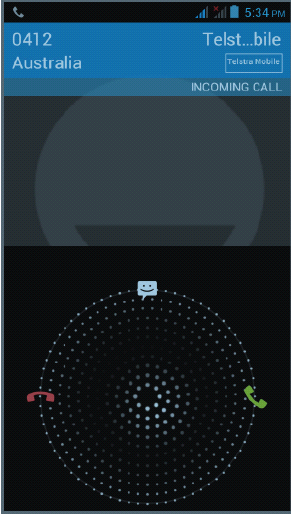
�Receiving Receiving Receiving Receivinga aaaphone phone phone phonenumber number number numberfrom from from froma aaacontact contact contact contact:Whenyoureceiveaphone
callfromacontact,theincomingcallscreenappears,displayingthecall
icon,nameandthephonenumberofthecallingparty.
�When When When Whenyou you you youreceive receive receive receivea aaaphone phone phone phonecall call call callfrom from from fromsomeone someone someone someoneelse else else else(whosecontact
detailsarenotstoredinyourcontacts),onlythedefaultcallerIDiconand
phonenumberwillappearontheincomingcallscreen.
Answering Answering Answering Answeringa aaacall call call call
Slidethe“Call”iconacrossthescreentoansweranincomingcall.
Rejecting Rejecting Rejecting Rejectinga aaacall call call call
Slidetothe“Endcall”icontoreject.
Muting Muting Muting Mutingthe the the thering ring ring ringsound sound sound sound
Page14Operation
To
mutetheringsoundwithoutrejectingthecall,presstheVolumeDown
buttonorPowerbutton.
You
canalsomutetheringsoundbyfirsttapping
“Menu”,then“Mute”
In-call In-call In-call In-calloptions options options options
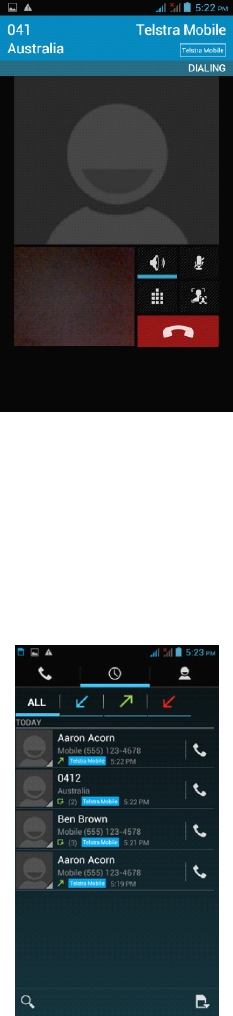
Whenacallisinprogress,youcanstilloperatekeyoptions.
Tap
theavailable
buttonstoputacallonhold,dialanothercontactforaphoneconference,mute
thephonemicrophone,andmore.
NOTE: NOTE: NOTE: NOTE:Whenthephoneisdialing,onlythe“Endcall”and“Speakeron”icons
areavailable.
Muting Muting Muting Mutingthe the the themicrophone microphone microphone microphone
Tap
"Mute”toturnthemicrophoneonoroff.Whenthemicrophoneisturnedoff,
the“Mute”iconappearsinthestatusbar.
Putting Putting Putting Puttinga aaacall call call callon on on onhold hold hold hold
Tap
Holdtoputthecallonhold.Whenyouputacallonhold,the“Holdcall”
iconappearsinthestatusbar.
Tap
“Unhold”toresumethecall.
Turning Turning Turning Turningthe the the thespeakerphone speakerphone speakerphone speakerphoneon/off on/off on/off on/off
�Whenyouareonacall,tap“speaker”totogglebetweenturningthe
speakerphoneonoroff.The“speakerphone”iconappearsonthestatus
barwhenthespeakerphoneison.
�WARNING! WARNING! WARNING! WARNING!Protectyourhearing!Donotholdthephoneagainstyourear
whentheloudspeakeristurnedon.
Ending Ending Ending Endinga aaacall call call call
Page15Operation
You
havetwooptionstoendacall:
�
Tap
“Endcall”.
�Ifyouareusingawiredheadset,pressandholdthebuttontoendthecall.
Video Video Video Videocalls calls calls calls
Usethisfunctionwhenyouwanttoseeaswellashearthepersonyouare
phoning,ifthatperson
’
smobilephonesupportsthisfunction.
NOTE: NOTE: NOTE: NOTE:Notallmobilephonesandnetworkssupportvideocalling.Contactyour
serviceproviderfordetails.Videocallingmayincurextracharges.
Call Call Call Calllog log log logtab tab tab tab
Enterthedialnumberandslidetotherighttothecalllog.Thenselectto:
Tap
thenameandnumberinthelisttophonethecontact.
Tap
thecontacticonofanameornumberinthelisttodisplaytheoptions
menuwhereyoucanchoosefromthefollowoptions:“Viewcontact
information”(ifthenumberisstoredinyourcontactslist),“Editnumberbefore
call”,“Sendtextmessage”,or“Removefromcalllog”.
Phone Phone Phone Phonesettings settings settings settings
Page16Operation

You
canadjustthephonesettingsofyourphonesuchasyourvoicemail
number,orenableadditionalcallservicesfromyournetworkserviceprovider.
To
openthephonesettingsmenu,selectSIM1orSIM2asappropriate,then
tab“Home”>“Menu”andthentap“Settings”>“Callsettings”.
Options Options Options OptionsDescription Description Description Description
FixeddialingnumbersRestrictoutgoingcallstoafixedsetofnumbers.
To
enablethis
featureyoumustknowyourSIMcard
’
sPIN2code.
VoicemailSpecifyanothervoicemailnumberasidefromthevoicemail
numberonyourSIMcard.
Autoanswer1ring,2ring,3ring,NeverAnswer(default)
CallforwardingSelecthowyouwantyourphonetohandle
callswhenbusy,
unansweredandunreachable.
You
canalsosetcallforwardingoptionsforallincomingcalls.
CallbarringSelectbarringoutgoingorincomingcalls.
Contactyournetworkserviceprovider(s)toactivatethis
function.
Additionalcallsettings
Enableordisableoperatorservicessuchascaller
IDandcall
waiting.
Call Call Call Callsettings settings settings settings
Voice Voice Voice Voicecall call call call
Selectthisoptiontochangesettingsforyourvoicemailserviceandnumber,
voicecallforwarding,voicecallbarring,phonenumberandcallwaiting
settings.
Video Video Video Videocall call call call
Selectthisoptiontochangeyourvideocallsettingssuchassetapictureto
displaywhenthecameranotinuse,sizeofpeervideoandlocalvideo,etc.
Internet Internet Internet Internetcall call call call
SelectthisoptiontologintoanInternetcallaccount.
Other Other Other Othersettings settings settings settings
Selectthisoptiontomanagefixeddialingnumbers,callcostinformation,
mobilebroadcastsettingsandminutereminder.
Airplane Airplane Airplane Airplanemode mode mode mode
To
enable/disableairplanemode,chooseoneofthefollowingoptions:
Airplane Airplane Airplane Airplanemode mode mode mode
To
enable/disableairplanemode,chooseoneofthefollowingoptions:
Press“Home”>“Menu”,thentap“Settings”>“Wirelesscontrols”.
PressandholdthePowerbuttonandthentap“Airplanemode”.
Page17Operation

Inthenotificationbar,tapthe“Airplanemode”shortcuttoturnairplanemode
onoroff.
NOTE: NOTE: NOTE: NOTE:Whenyoudisableairplanemode,thephonefunctionisturnedbackon
andthepreviousBluetoothandWi-Fistatesarerestored.
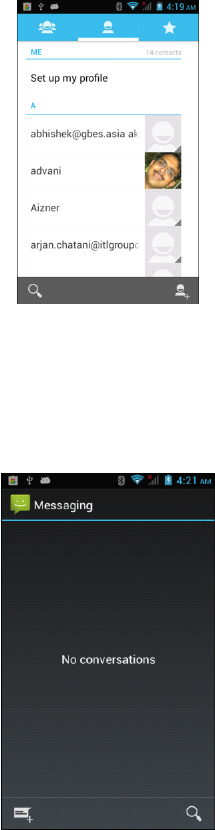
Contacts Contacts Contacts Contacts
Thecontactsapplicationletsyoumanageyourphone,messagingandemail
communicationswiththecontactsinyourcontactslist.Ifyouaresynchronizing
contactswithyourGoogleaccountviayourPCtools,anycontactsstoredin
thoseaccountswilldisplayed.
Contacts Contacts Contacts Contactslist list list list
Adding Adding Adding Addinga aaanew new new newcontact contact contact contact
�Onthecontactslistscreen,pressthe
button,thentap“createcontact”
�Enterthecontactinformationinthefieldsprovided.
�Scrolltothebottomofthescreenandtap“Save”.
Searching Searching Searching Searchingfor for for fora aaacontact contact contact contact
Pressthe
buttontoenterthesearchmenu,asearchbarwillappearat
thetopoftheContactslistscreen,matchingcontactswillbedisplayed.
NOTE: NOTE: NOTE: NOTE:Ifthelistofmatchingcontactsislong,taptohidetheon-screen
keyboardtoviewmoreresults.
Deleting Deleting Deleting Deletinga aaacontact contact contact contact
OntheContactslistscreen,press“Menu”andthentap“Deletecontact”.
OntheDeletescreen,youcanselect“Multiplechoice”,or“Markall”.
WARNING: WARNING: WARNING: WARNING:Thisoperationwilldeletethecontact.Takecarewhenusingit.
Displayoptions
Choosethissettingtocustomizeyourdisplayoptions,includingdefaultand
Gmailaccountdisplayoptions.
NOTE: NOTE: NOTE: NOTE:AftersynchronizingcontactswithyourGoogleaccount,addthecontact
tothephoneandselect“Allothercontacts”inyourGmailaccountdisplay
optionstodisplaythecontactsinthelist.
Page18Operation
Messaging Messaging Messaging Messaging
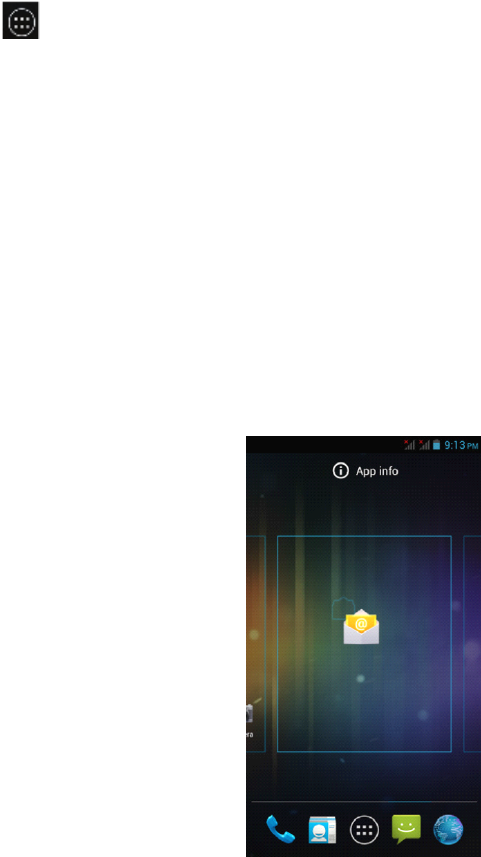
Messagingletsyoucomposeandsendtext(SMS)andmultimediamessages
(MMS)toothermobilephones.
Creating Creating Creating Creatingand and and andsending sending sending sendingSMS SMS SMS SMSand and and andMMS MMS MMS MMSmessages messages messages messages
�Anytext(SMS)messagesyoucomposethatcontainupto160characters
willbedeliveredasonemessage.Ifyourmessagecontainsmorethan160
characters,itwillstillbedeliveredasonebutitwillcountasmorethanone
message.Yourserviceprovidermaychargeyouextraforsuchlinked
(concatenated)messages.
�Multimedia(MMS)messagescancontaintextandapicture,arecorded
voice,anaudioorvideofileorapictureslideshow.
�
To
createandsendatextmessage,tap“Create”ontheAllmessages
screenandenterthephonenumberofthemessagerecipientinthe
To
fieldontheComposescreen.Anymatchingcontactswillappearonthe
screen.
Tap
arecipientorcontinueenteringtherecipient
’
sphonenumber.
Tap
thetextboxthatcontainsthetext“Typemessage”,andthenstart
composingyourmessage.Whendone,tap“Send”tosendthemessage.
NOTE: NOTE: NOTE: NOTE:
Page19Operation
�Asyoucomposethemessage,acounterinthetoprightcornerofthetext
boxwillkeeptrackofthenumberofcharacters.Onceyougoover160
characters,anewmessageiscreatedbutautomaticallylinkedintoone
whenreceived.
�
To
receivedeliveryreportsandnotificationswhenatextmessageis
received,press“Menu”andthentap“Settings”ontheAllthreadsscreen.
IntheSMSsettingssection,selectthe“Deliveryreports”checkbox.
Applications Applications Applications Applicationsand and and andwidgets widgets widgets widgets
Enter Enter Enter Enterapplications applications applications applications
Click
toenterthelistofallapplicationsandwidgets.
ClickontheAPPStabinthetopleftcorner.
�Thiswindowwilldisplayalistoftheapplications.
�Asyouinstallmoreapplications,thefirstpagewillfillupandthe
applicationiconswillautomaticallyspreadontootherpages.
�Swipeleftandrighttoseetheotherpages.
Add Add Add Addand and and andmanage manage manage managedesktop desktop desktop desktopicons icons icons icons
Add Add Add Adddesktop desktop desktop desktopicons icons icons icons
Attheapplicationlistorwidgetlist,longpressanyapplicationorwidgetand
thedevicewillshiftintodesktop,thendragtheicontoanyplaceonthe
desktop.
Desktop Desktop Desktop Desktopshortcuts shortcuts shortcuts shortcutsmanagement management management management
To
createafolderonthemainscreens,justdragandoverlayanyicononto
anothericon,thenrelease.
A
newfolderwillbecreatedcontainingthetwo
Page20Operation
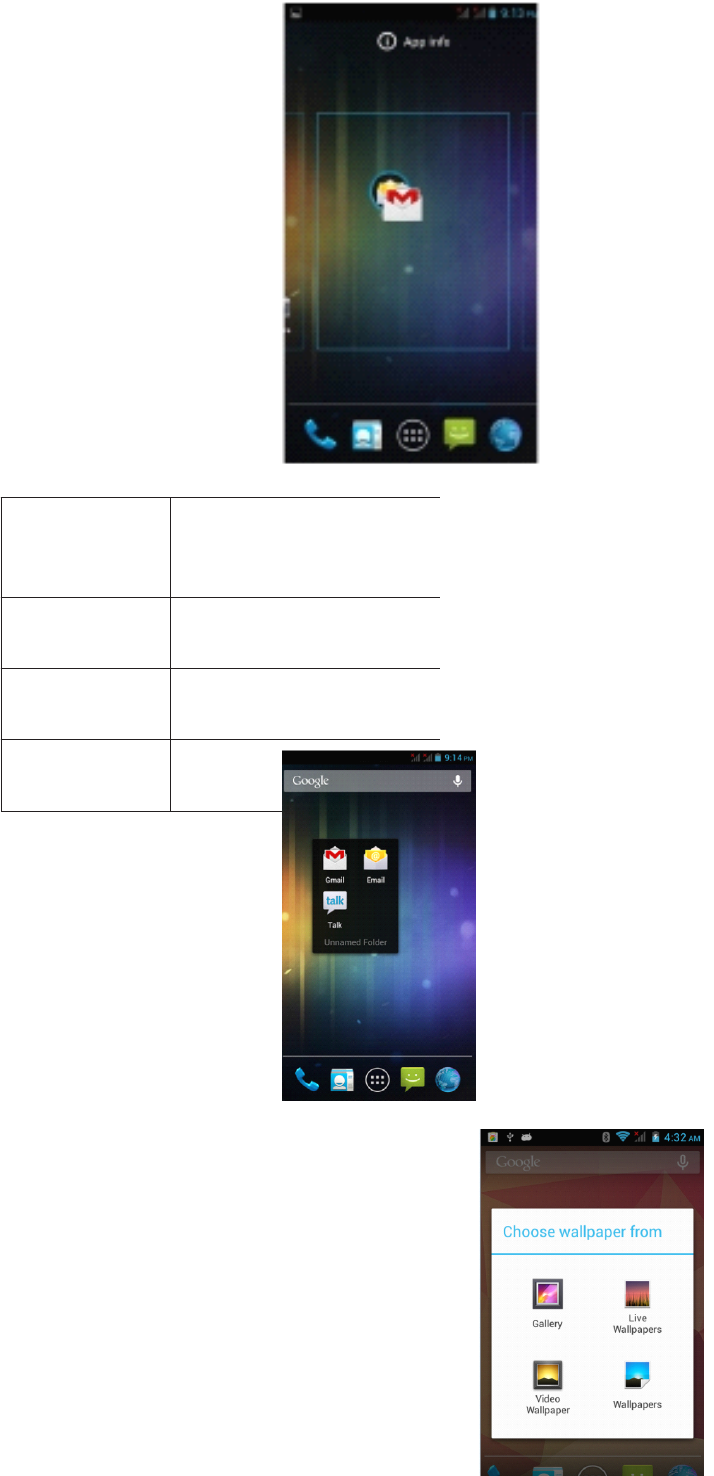
GalleryChoosefromthepictures
storedonyour3GSmart
phone
cameragallery WallpaperChoosefromthedefault
wallpapers.
LiveWallpaperChooseamovingwallpaper
VideoWallpaperChooseavideotoasyour
wallpaper
applications.Itwillappearasablackcirclewithsmalliconsofyourappson
top.
Thenyoucanviewthefoldercontentsbyclickingonthefoldericonanditwill
displayaspicturedbelow.
You
canchangetheiconpositionsinsidethefolderbylongpressingthem,
thendraggingtothenewposition.
Ifyouwanttoremoveaniconfromthefolder,longpresstheiconanddragto
outsidethefolder.
To
changethefoldername,clickonthefolder,thentap“Unnamedfolder”.
A
keyboardwillappear.Typethenewname,thentap“Enter”toapplyit.
Page21Operation
Connect Connect Connect Connectwith with with withcomputer computer computer computer
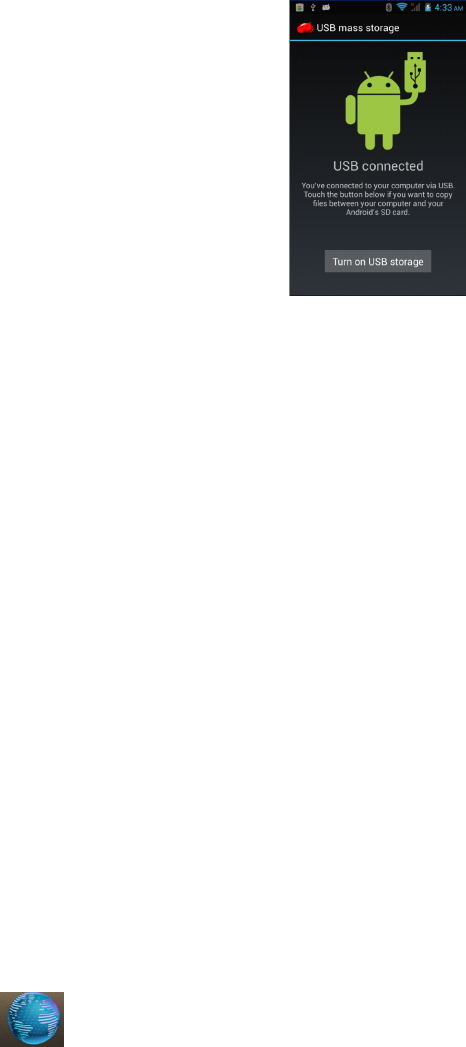
ConnectthedevicetoacomputerwithaUSBcable.Whenconnectedwitha
computer,amessagewillappearinthenotificationbarwhichwilldescribe
whichUSBmodethePhoneisin.
Thereare4optionsavailabletochoosefrom:
�USBStorage
�MediaDevice(MTP)
�Camera(PTP)
�Chargeonly
Somedevicesorcomputersmayonlybeabletodetectthetabletif‘USB
Storage
’
isselected.Afterchoosinganoption,youmayneedtodisconnectthe
USBcable,thenreconnectit.When‘USBStorage
’
modeisselected,youwill
needtoclickon“TurnonUSBstorage”whenthemessageappears.
NOTE: NOTE: NOTE: NOTE:USBStoragemodewillonlyshowthecontentsoftheMicroSDcard(if
inserted).
Ifthemessagedoesnotappearwhenyouconnectthetablettoyourcomputer
withaUSBcable,orifthedevicedoesnotappearonyourcomputer,trythe
following.
�Checkandensurethatyouhaveturnedthetableton.Checkandensure
you’reyourcomputeristurnedon.
�UnplugtheUSBcable,thenreconnectittothesameUSBport.
�IfyourcomputerhasUSBportsontherear,tryconnectingtoone.
�TryadifferentUSBcable.
Browser Browser Browser Browser
Tap
toopenthebrowser.
Page22Operation
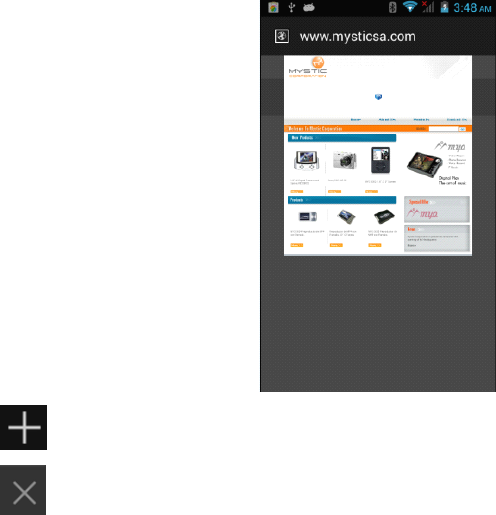
Tap
toopenanewbrowserwindow.
Tap
toclosethecurrentbrowserwindow.
Whentheinternetsignalispoorandthewebpagedoesnotload,tap“Refresh”
inhemenutotryloadingthewebpageagain.Therearemanyuseful
advancedoptionsin“Settings”.
Screen Screen Screen Screencompatibility compatibility compatibility compatibility
Whenthedeviceisinstalledwithprogramsdesignedforsmallscreenand
cannotshowinfullscreen,ascreenzoommenuwillpopup.
You
mustconfirm
ittoopenthoseprograms.
Background Background Background BackgroundApplications Applications Applications Applications
Tap
the“backgroundapplications”(recentapplications)on-screenbuttonto
showallprogramsrunninginthebackground.
Tap
anitemtore-openit.
Dragtheitemstotheleftorrighttocloseandremovetheapplicationfromthe
list.
Get Get Get Getand and and andinstall install install installapplications applications applications applications
Therearetwowaystogetapplicationssoftware:downloadthroughthisdevice
orcopyfromcomputer.
Option Option Option Option1: 1: 1: 1:Download Download Download Downloadusing using using usinga aaa“ “““Market Market Market Market” ”””or or or or‘“ ‘“ ‘“ ‘“Store Store Store Store” ”””application application application application
DownloadapplicationssoftwareusingapplicationssuchasGoogle
’
s“Play
Store”.Belowarephotosshowingtheprocessofdownloading“Angrybirds”
from“PlayStore”.
Page23Operation
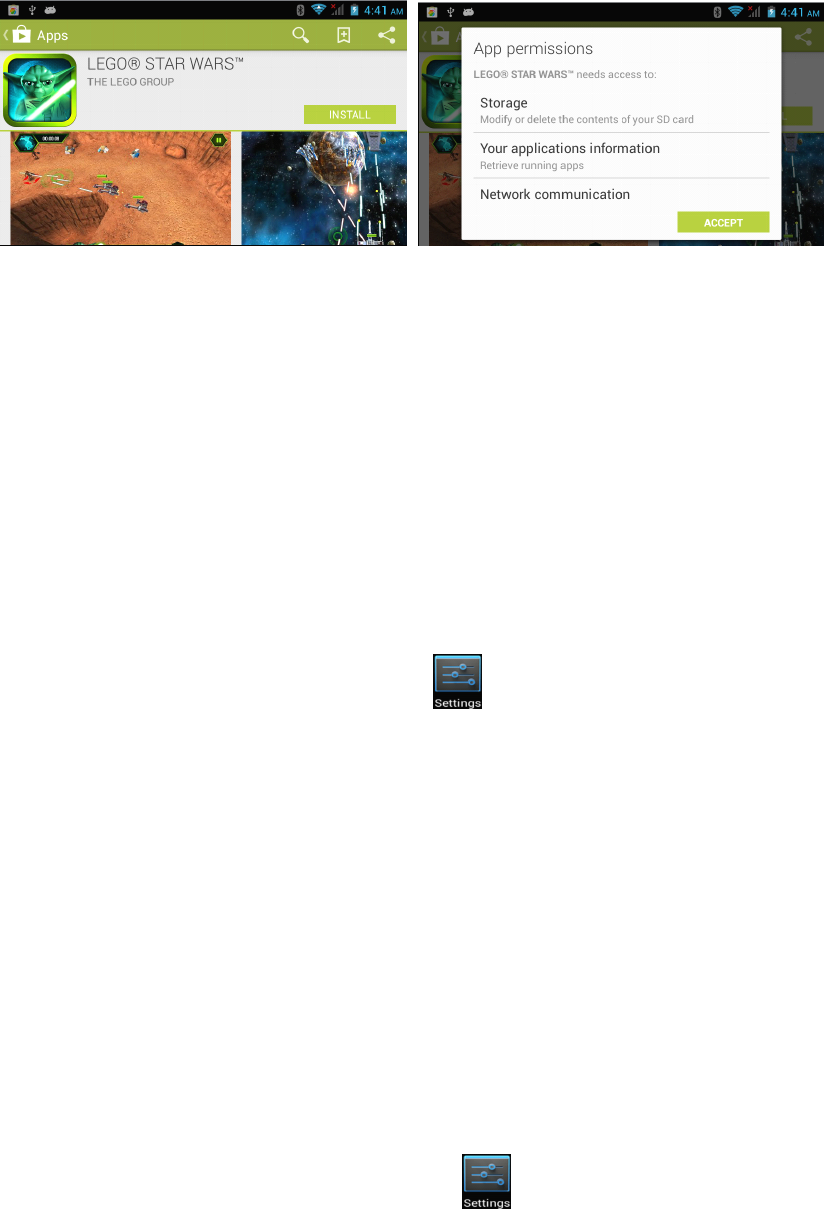
Afterdownloading,theapplicationwillautomaticallyinstallthesoftware.
NOTE: NOTE: NOTE: NOTE:Someapplicationsmaynotbecompatibleduetohardware
requirementsor
geographiclocationlimitationsoftheapplication.
Option Option Option Option2: 2: 2: 2:Copy Copy Copy Copyinstallation installation installation installationfile file file filefrom from from fromcomputer computer computer computer
Copyanapplicationinstallfile(APK)fromacomputertothestorageofthe3G
Smartphone,thenfindandinstallthemusing“Filemanager”.
Tap
onthefileto
installit.
Uninstall Uninstall Uninstall Uninstallapplications applications applications applications
�Opentheapplicationwindowandtap
,thentaponAppsfromthemenu
ontheleft.
�Usethetabatthetopandscrollupanddownthroughthelistof
applicationsuntilyoufindtheapplicationyouwishtouninstall.
�Clickontheapplication,thenanAppinfopagewillappear.
�ClickontheUninstallbuttonandtheapplicationwillberemoved.
�
Play Play Play PlayStore Store Store Storeand and and andCalendar Calendar Calendar Calendarerror error error errormessages messages messages messages
OccasionallywhenlinkinganewGoogleaccounttoyour3GSmartphone,you
mayreceivevariouserrormessagessuchas“...error(-101)...”inthePlay
Store,oryourCalendarappointmentsandeventsmaynotappear.
To
fixthisissueandre-syncronizethe3GSmartphonewithyourGoogle
account,pleasefollowthestepsbelow.
1.Opentheapplicationswindowandtap,thentapon“Apps”fromthe
menuontheleft
2.Inthewindowontheright-handside,tapthe“All”tabatthetop.
3.Scrollupanddownthroughthelistofapplicationsuntilyoufind“Google.
Services.Framework”andclickonit.
4.
Tap
the“Cleardata”icon.
Page24Operation
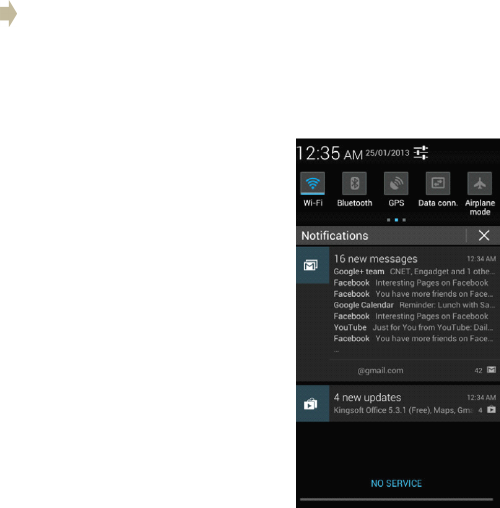
5.Clickon“
Yes
”.
6.PressandholdthePowerbuttonfor2seconds.
7.
Tap
“Yes”toagreetoturnoffthe3GSmartphone.
8.Oncethephonehasfinishedshuttingdown,turnthephonebackon.
9.Openthe“PlayStore”appandwaitfortheimagestoload.Oncetheyhave
finishedloading,presstheBackbutton.
10.Waitfor30secondsthenreopen‘PlayStore
’
app.
11.You
maynowopen“Calendar”andcheckyourentriesarethere,oropen
“PlayStore”anddownloadtheapplicationyouthatwasgivingtheerror
message.
Settings Settings Settings Settings
Thesettingfunctiononthis3GSmartphoneislikethatonacomputercontrol
panel.
You
canaccessthesettingspagefromthenotificationsbaror“Setting”
iconintheapplicationslist.
Wireless Wireless Wireless Wirelessand and and andnetworks networks networks networks
Page25Operation
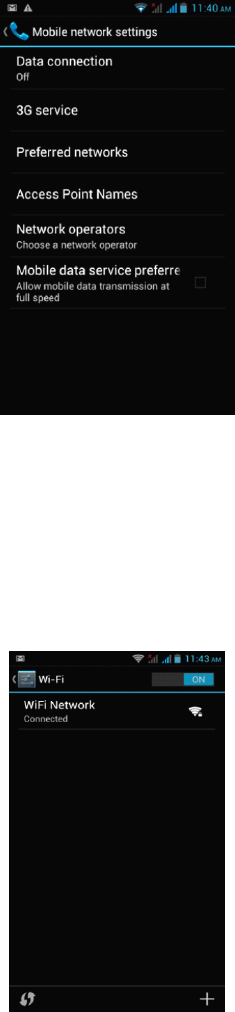
The“MobileNetworks”sectionislocatedunderthe“More”option.
�
To
activatedatawithusingyourSIMcardselect“Dataconnection”.
�Theremainingsettingsshouldbeleftwithdefaultvaluesunlessyourlocal
serviceprovideradvisesyouotherwise.
�
Tap
“Wi-Fi”toopentheWi-Fifunction
�
To
therightoftheWi-FilabelisthebuttontoenableanddisableWi-Fi.
�Presstheon/offbuttontoturntheWi-Fifunctiononoroff
�Clickonthenetworkyouwishtoconnectto.
Connecting Connecting Connecting ConnectingWi-Fi Wi-Fi Wi-Fi Wi-Fi
WhentheWi-Finetworkisnotprotected,itwillconnectwiththedevice
automatically.Forinformationsecurityreasons,becarefulusingunprotected
Wi-Fisources.WhenyouclickonaprotectedWi-Fi,awindowwillpopupto
inputapassword.
Page26Settings
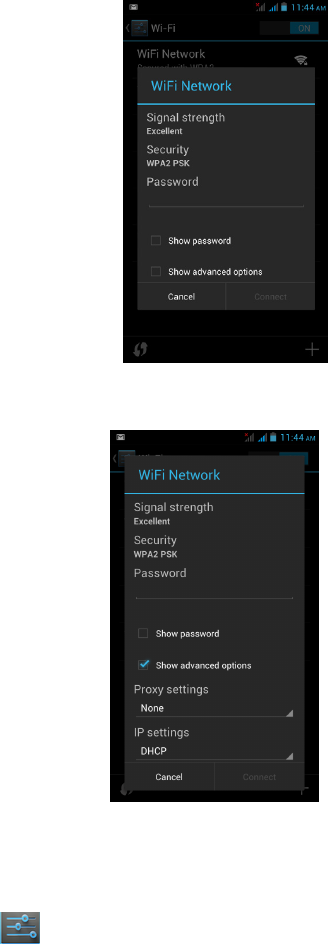
TherearemoreusefuladvancedWi-Fisettingswhenyouchooseto“Show
advancedoptions”.
Bluetooth Bluetooth Bluetooth Bluetooth
1.
Tap
“Settings”atthemainmenuorapplicationslist.
2.Inthewireless&networks”menu,tap“Bluetooth”.
3.
Tap
theon/offbuttoninthemenuonthelefttoturn“Bluetooth”onoroff.
Change Change Change ChangeBluetooth Bluetooth Bluetooth Bluetoothdevice device device devicename name name name
Bydefault,theBluetoothdevicewillhaveaname.
To
makeyourdevicesmore
easilyidentifiable,youcanrenameitasfollows.
1.Goto“Settings”>“Wireless&networks”andmakesureBluetoothison.
2.Choose“Bluetooth”.
3.Inputthenewname.
Pair Pair Pair Pairwith with with withother other other otherBluetooth Bluetooth Bluetooth Bluetoothdevice device device device
Page27Settings
Tap
“Searchfordevices”,thedevicewillscanforallavailableBluetooth
devices.Ifitcannotfindtheoneyouwant,checkiftheotherdeviceBluetooth
ison.
Tap
aBluetoothIDtopair.Ifitispasswordprotected,inputthepasswordat
bothdevices.
Device Device Device Device
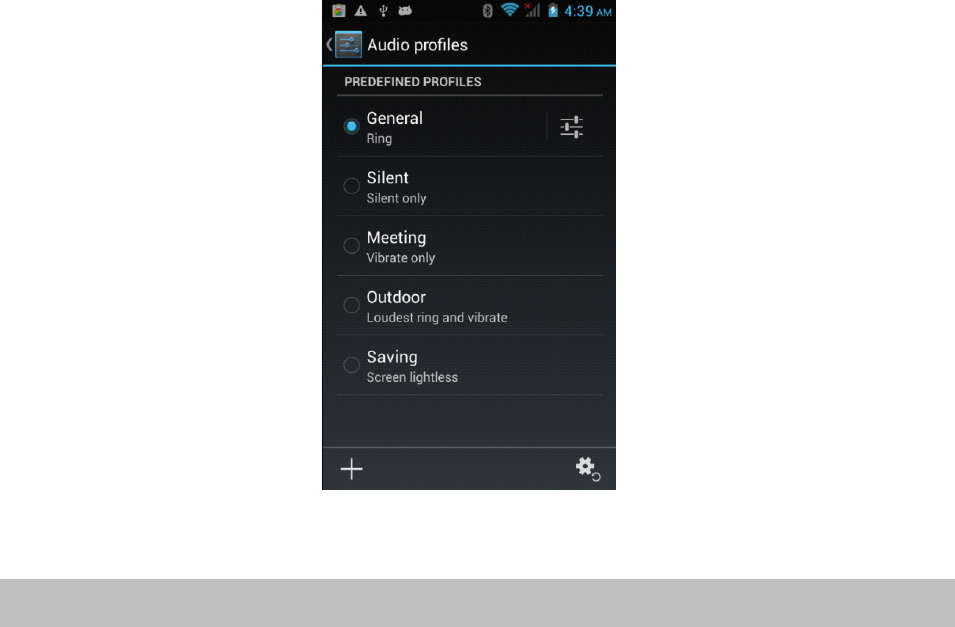
Audio Audio Audio Audioprofiles profiles profiles profiles
Setallsoundoptionshere.
Clickon“Volumes”tochangethevolumelevelsformultimediaplayersand
applicationsandalsofornotificationsandalarms.
Display Display Display Display
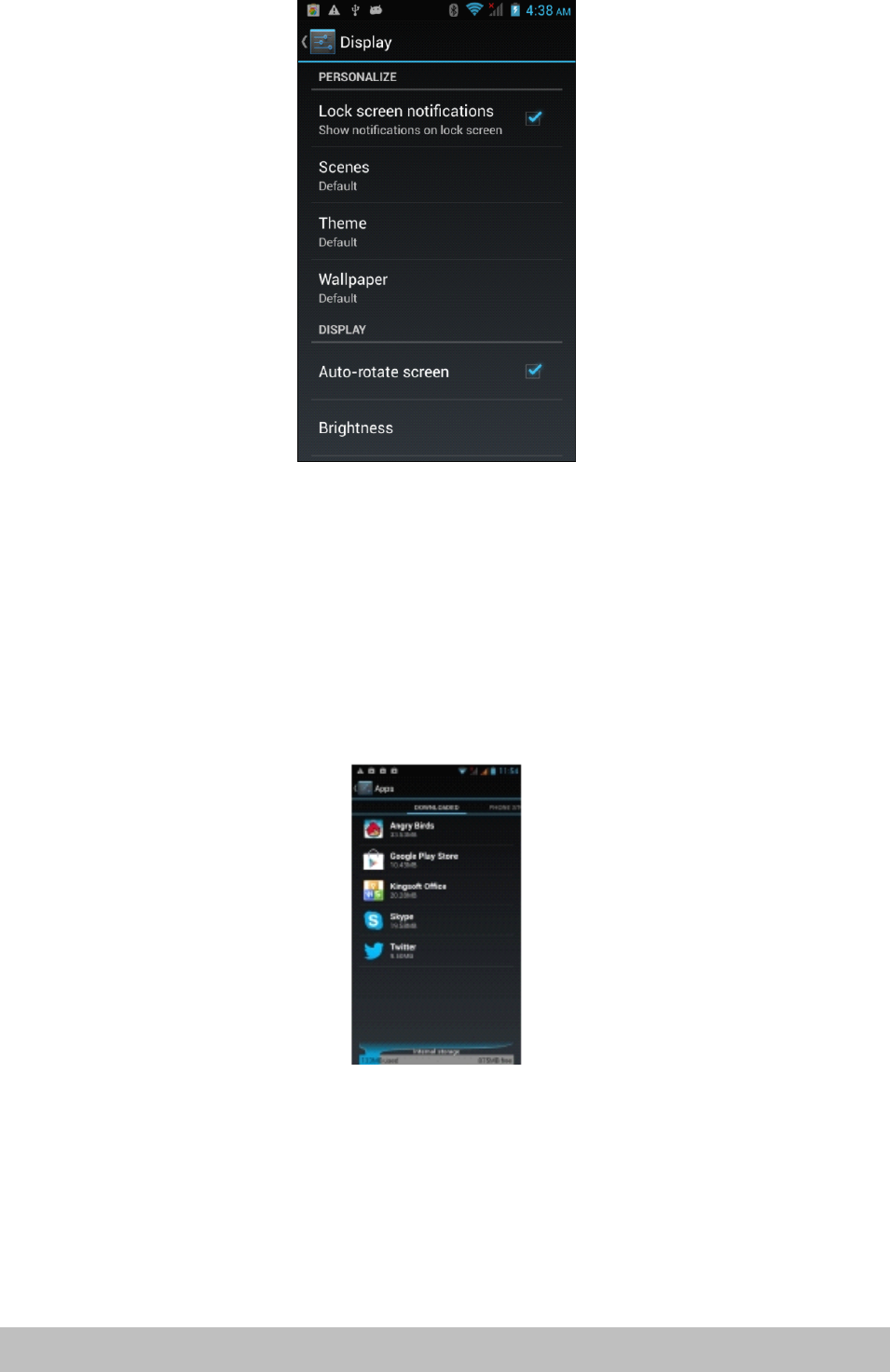
You
cansetbrightness,wallpaper,auto-rotate,andfontsizeoptions.
Page28Settings
Storage Storage Storage Storage
Internalstorage:spaceforinstallationofapplications(APKsoftware)
ExternalSD:storagespaceontheremovableSDcard(ifinserted)
Battery Battery Battery Battery
Showbatterybalanceandconsumption.
Applications Applications Applications Applications
Hereyoucanmanageapplications,suchasuninstallthemorclearapplication
data.
Personalization Personalization Personalization Personalization
Location Location Location Locationaccess access access access
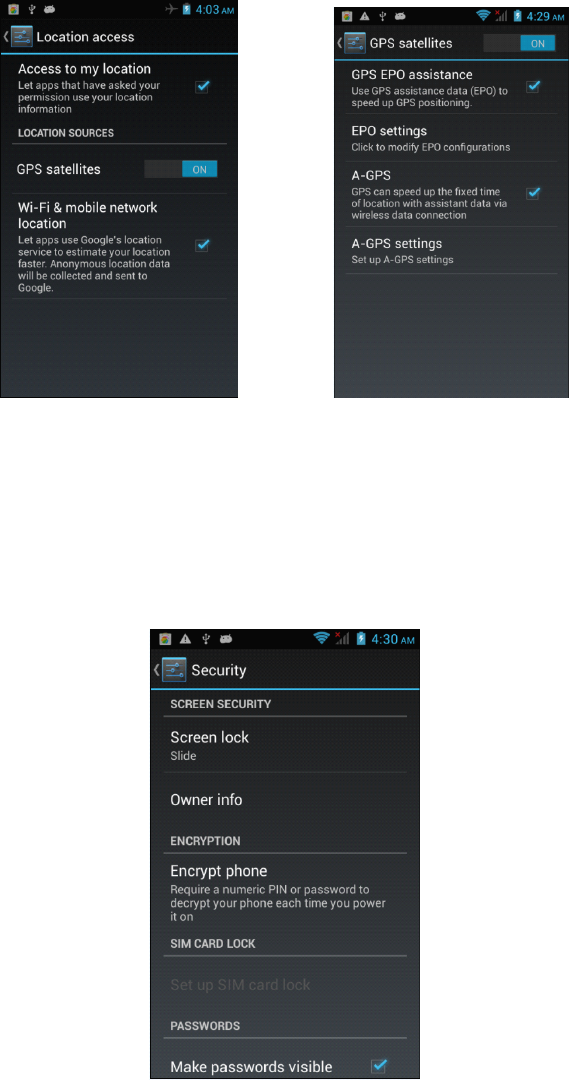
AllowsyoutoenableordisablethevariouslocationservicessuchasGPS.
Page29Settings
Security Security Security Security
Thesecuritymenucontainsmanyusefuloptionsforsecuringyour3G
Smartphoneanddata.
Screen Screen Screen Screenlock: lock: lock: lock:Changeorsetaprotectionmethodforlockingscreen.
Owner Owner Owner Ownerinfo: info: info: info:Entertextthatwillbedisplayedonthelockscreen.Thisisa
messagethatotherscanseewithouthavingtounlockphone.
Encrypt Encrypt Encrypt Encryptphone: phone: phone: phone:
Applyencryptiontoalldataonthe3GSmartphone.Alsorequiresyoutoenter
aPINorpasswordtouseyourphoneeachtimeyouturniton.
WARNING: WARNING: WARNING: WARNING:DatacannotberecoveredifyouforgetthePINorpasswordyou
set!
Unknown Unknown Unknown UnknownSource: Source: Source: Source:Enablethisifyouwishtoinstallapplications(APKfiles)
thatarenotfrom“PlayStore”.
NOTE: NOTE: NOTE: NOTE:Ifyouforgetthescreenlockpassword,PINorpattern,youmust
performafirmwareresetonthedevice.Passwordscannotberecovered.
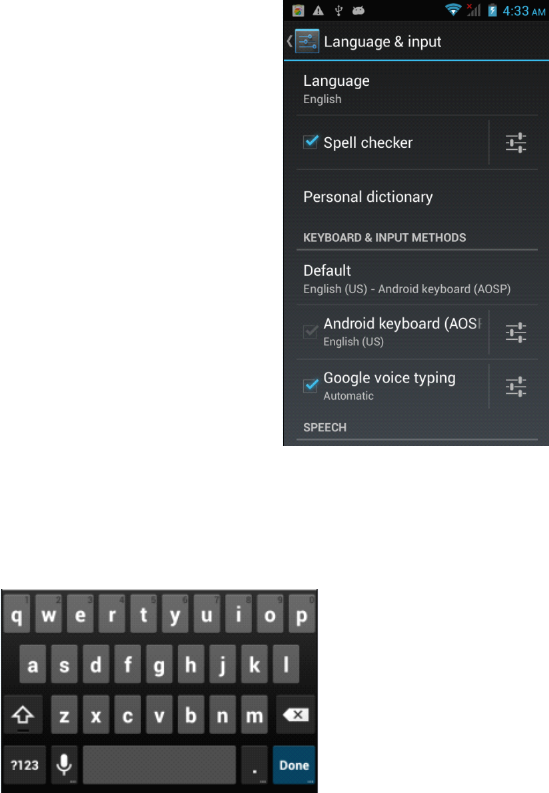
Language Language Language Languageand and and andinput input input input
Inthisareayoucanchangethesystemlanguageandchangesettingsforthe
keyboard.
Keyboard Keyboard Keyboard Keyboard
Someapplicationscanopenthekeyboardautomatically;othersrequireyouto
clickinaninputfield/areafirst.
You
canhidethekeyboardbyholdingdowntheBackbutton.
Text Text Text Textselection selection selection selection- ---Copy, Copy, Copy, Copy,Share, Share, Share, Share,Find Find Find Find
�Pressandholdononeofthewordsyouwishtoselect.Thewordwill
highlightinblueandabluetapwillappearatbothends.
�Pressanddragthebluetabstohighlightthetextyouwishtoselect.
�Choosethetaskyouwishtoperformfromthemenuthatappearsatthetop
ofthescreen.
Text Text Text Textselection selection selection selection– –––Paste Paste Paste Paste
�Oneyouhaveusedtheabovemethodtocopytexttotheclipboard,press
andholdonafileinanapplicationorareaofadocumentwhereyouwish
toinputthecopiedtext.
Page30Settings

�
A
bluetabwillappear,dragittothepositionyouwantthetextinserted,
thenclick“Paste”.
Other Other Other Otheroperations operations operations operations
�
To
inputcapitalletters:
�Presstheshiftbuttonorkeeppressingonshiftwhileinputting
letters.
To To To To
switch switch switch switchto to to tocapital capital capital capitalletters: letters: letters: letters:
�Pressandholdtheshift
buttonwhilealowcasemode,theiconwill
changeinto.Pressagaintoswitchbacktolowercasemode
�Featuresandnumbers:
�Pressthe“?123”button.
You
canthenpressthe“~\{”buttonformore
choices.
Frequently Frequently Frequently Frequentlyused used used usedsymbols: symbols: symbols: symbols:
�Pressandholdasymbolbuttontoenterthealternatesymboldisplayedin
greyaboveit.
�Pressshift
andclickthespecialsymbolwhichisshowningreyatthe
cornerandofanyletterstoinputthesymbol.
Mouse/trackpad Mouse/trackpad Mouse/trackpad Mouse/trackpad
Thisallowsyoutoadjustthepointerspeedofanyattachedmouseortrackpad
device,suchasaBluetoothmouse.
Backup Backup Backup Backupand and and andreset reset reset reset
Reset Reset Reset Resetto to to tofactory factory factory factorysettings: settings: settings: settings:Whensomeapplicationsorthephoneitselfdo
workproperly,youcanusethisfunctiontoreturnthe3GSmartphoneto
factorydefaultsettings.Butyouwilllosealluserinstalledapplicationsanddata.
Itisthereforeimportantthatyoubackupimportantdatafirst.
System System System System
Date Date Date Dateand and and andtime time time time
Containsoptionsforsettingthedate,timeandtimezone
Accessibility Accessibility Accessibility Accessibility
Containssettingsforeasyuseofapplicationsandservices(ifinstalled)
About About About About
Displayssomeinformationaboutthedevice
Page31Settings
Camera Camera Camera Camera
Thecamerahasphoto-takingandvideo-recordingfunctions.Therearetwo
camerasonthephone.
You
canfindyourcameraphotosandvideofootageat>Applications>Gallery,
orseecameravideosandallothervideofilesat>Applications>VideoPlayer
Clicktotakephotos.
�ThefirsttimeyouopentheCameraapplicationashortanimationwillplay
showingyouhowtousethecameraoptions…
Downloaded Downloaded Downloaded Downloadedfiles files files filesmanagement management management management
Whendownloadingfiles,youcancheckdownloadstatus,view,reopenor
deletethemusing“Downloadmanagement”.
Manage Manage Manage Managedownloaded downloaded downloaded downloadedfiles files files files
�Applications>Downloadedfiles
�
Tap
anyonetoopenit.
�Chooseanyfileyouwanttosharewithothers,thentap“Sharing”,then
chooseawaytoshare
�Chooseanyfileyouwanttodeletebytapping.
�Click“Bysize”or“Bydate”toarraythefiles.
Radio Radio Radio Radio
To
useyour3GSmartphonetolistentotheradio,firstinsettheearphones,
thentap“FMRadio”.
Selectable Selectable Selectable Selectablechannel channel channel channel
�
Tap
“OK”toselectoricontoscanthefrequencybandorfine-tunea
channel.
Adjust Adjust Adjust Adjustthe the the thevolume volume volume volume
�
Tap
menu,thenselectthe“Mute”andmutethesound;select“Mute”again
torestorethesound.
�Withtheearphonesdisconnected,tap“Menu”,thenselect“Speaker”to
listentotheradiovolumethroughtheexternalspeaker.
Scan Scan Scan Scanand and and andsave save save save
Pressthesettingbuttonand“Select&save”
Page32Settings

Ifyoutap“OK”,allpresetswillberemovedandtheradiowillscanforavailable
channels.
Specifications Specifications Specifications Specifications
CPUMTK6572DualCore1.2GHzCortex
A
Series
OSAndroid4.2
Display4.3”
Resolution800x480resolution
InternalmemoryBuilt-in4GB
RAM512MB
TouchscreenCapacitivescreen(5points)
BatteryBuilt-in1350mAh(removable)
WiFiIEEE802.1b/g/n
BluetoothVersion2.1+EDR
SIMDualSIM/Standby
2G/3Gmodule2G:GPRS/EDGE,3G:WCDMA/HSPA
FrequencyUMTS(850/1900)MHz;
GPSBuilt-inGPSmodule
GsensorScreenRotationsensor
CamerasFront:0.3MP,rear:2.0MPAutoFocus
MicroSDSupportsupto32GBMicroSDHCclass10cards
MicrophoneBuilt-inmicrophone
I/OPorts1x3.5mmHands-freeHeadphonesocket
1xMicroUSB
1xMicroSDCard(Coveredbybatterycase)
1xMiniSIMCard
1xMicroSIMCard
Page33Settings

Repair Repair Repair Repairand and and andRefurbished Refurbished Refurbished Refurbished
Goods Goods Goods Goodsor or or orParts Parts Parts PartsNotice Notice Notice Notice
Unfortunately,fromtimetotime,faultyproductsaremanufacturedwhichneed
tobereturnedtothesupplierforrepair.
Pleasebeawarethatifyourproductiscapableofretaininguser-generated
data(suchasfilesstoredonacomputerharddrive,telephonenumbersstored
onamobiletelephone,songsstoredonaportablemediaplayer,gamessaved
onagamesconsoleorfilesstoredonaUSBmemorystick)duringtheprocess
ofrepair,someorallofyourstoreddatamaybelost.We We We Werecommend recommend recommend recommendyou you you you
save save save savethis this this thisdata data data dataelsewhere elsewhere elsewhere elsewhereprior prior prior priorto to to tosending sending sending sendingthe the the theproduct product product productfor for for forrepair. repair. repair. repair.
You
shouldalsobeawarethatratherthanrepairinggoods,wemayreplace
themwithrefurbishedgoodsofthesametypeoruserefurbishedpartsinthe
repairprocess.
Page34Specifications
48
FCC RF Exposure Information and Statement
The SAR limit of USA (FCC) is 1.6 W/kg averaged over one gram of tissue.
Device types: Z300(FCC ID: 2ABWM-Z300) has also been tested against this
SAR limit. The highest SAR value reported under this standard during product
certification for use at the ear is 0.190W/kg and when properly worn on the body
is 0.778W/kg. This device was tested for typical body-worn operations with the
back of the handset kept 1.0cm from the body. To maintain compliance with FCC
RF exposure requirements, use accessories that maintain a 1.0cm separation
distance between the user's body and the back of the handset. The use of belt
clips, holsters and similar accessories should not contain metallic components
in its assembly. The use of accessories that do not satisfy these requirements
may not comply with FCC RF exposure requirements, and should be avoided.
This device complies with part 15 of the FCC rules. Operation is subject to the
following two conditions: (1) this device may not cause harmful interference,
and (2) this device must accept any interference received, including
interference that may cause undesired operation.
NOTE: The manufacturer is not responsible for any radio or TV interference
caused by unauthorized modifications to this equipment. Such modifications
could void the user’s authority to operate the equipment.
NOTE: This equipment has been tested and found to comply with the limits for
a Class B digital device, pursuant to part 15 of the FCC Rules. These limits
are designed to provide reasonable protection against harmful interference in
a residential installation. This equipment generates uses and can radiate
radio frequency energy and, if not installed and used in accordance with the
instructions, may cause harmful interference to radio communications.
However, there is no guarantee that interference will not occur in a particular
installation.
If this equipment does cause harmful interference to radio or television
reception, which can be determined by turning the equipment off and on, the
user is encouraged to try to correct the interference by one or more of the
following measures:
- Reorient or relocate the receiving antenna.
- Increase the separation between the equipment and receiver.
-Connect the equipment into an outlet on a circuit different from that to which
the receiver is connected.
-Consult the dealer or an experienced radio/TV technician for help.