Mamiya 6 Instruction Manual
6 - Instructions Mmy_6_v4 Free User Guide for Mamiya Camera, Manual
Mamiya_6_v4
2015-07-27
: Mamiya Mamiya-6-Instruction-Manual-776177 mamiya-6-instruction-manual-776177 mamiya pdf
Open the PDF directly: View PDF  .
.
Page Count: 35
- Cover
- Introduction
- Table of Contents
- Special Features
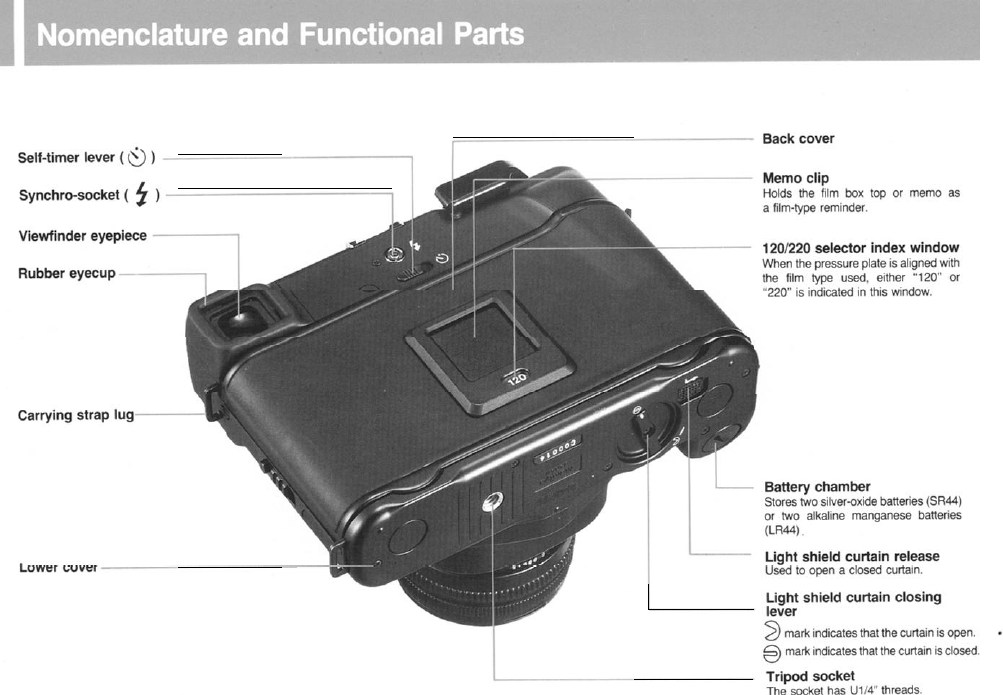
- Nomenclature /Functional Parts
- Preparatory Steps for Use
- Mounting/Removing Lenses
- Retracting the Lens Mount
- Inserting Batteries
- Opening/Closing Light Shield Curtain
- Releasing the Shutter
- Before Loading the Film
- Loading the Film
- Shutter Speed
- Shutter Release Button
- LED Indicators in the Viewfinder
- Focusing the Lens
- Taking Photographs
- AE (Automatic Exposure) Photography
- AE Lock (AEL) Photography
- Manual Photography
- Self-Timer
- Depth-of-Field
- Exposure Compensation
- Time Exposures
- Flash Photography
- Infrared Photography
- Emergency Winding-Stop Release Button
- How to Hold the Camera
- Lenses
- Depth-of-Field Tables
- Accessories
- Specifications
- Trouble Shooting
- Camera Care
- Camera Storage & Maintenance

Congratulations on your purchase of the New Mamiya 6, 6
x
6cm
range/viewfinder camera for
120/220
film, featuring interchangeable
lenses and automatic exposure control in a compact, lightweight body,
which handles as easily as a 35mm camera.
Its
innovative retractable lens
mount allows the lens to be partially recessed in the camera body
-
a unique feature which further adds to the camera’s compactness.
Three interchangeable lenses, a 75mm standard, a 50mm wide-angle
and a
150mm
telephoto, make the New Mamiya 6 a system camera that
serves many needs.
The New Mamiya 6 is built with traditional precision workmanship and
optical perfection. It is a product of Mamiya Camera Co., Ltd., Tokyo,
Japan, a pioneer in medium format cameras for over half a century.
While the New Mamiya 6 has undergone extensive quality control
checks, it is extremely important that this manual be read carefully before
attempting to use the camera. A thorough understanding of just how and
why your new camera works eliminates mishandling and ensures a long
service life.
1

Special Features of the New Mamiya
6
.........................
3
Nomenclature and
FunctionalPartss...............................
5
Preparatory steps
for
use
...............................................
9
Mounting/Removingg
Lenses............................................
1
0
How to
Retract
the
LensMount......................................
1 1
InsertingBatteries............................................................
11
Opening/Closingg
Light Shield
Curtain .............................
13
ReleasingtheeShutter......................................................
1 4
BeforeLoadingtheFilm..................................................
15
Loading
the
Film
..............................................................
1 6
ShutterSpeed..................................................................
18
ShutterReleaseButton
....................................................
1 9
LEDIndicators
inthe Viewfinder
.....................................
19
FocusingtheLens............................................................
21
TakingPhotographs.........................................................
22
AE (AutomaticExposure)Photography..........................
23
AELock(AEL) Photography
...........................................
23
Manual
Photography
........................................................
24
Self-Timer.........................................................................
24
Depth-of-Fieldd
...................................................................
25
ExposureCompensation................................................. 26
TimeExposures............................................................... 26
Flash
Photography
...........................................................
27
InfraredPhotography.......................................................
27
Emergency Winding-Stop
ReleaseButton
.....................
28
Howwto
Hold
the Camera.................................................
28
Lenses..............................................................................
29
Depth-of-Field Tables.......................................................
30
Accessories
......................................................................
31
Specifications....................................................................
32
TroubleShooting.............................................................. 33
CameraCare
.................................................................... 33
CameraStorage andMaintenance................................. 34
2

Automatic Exposure
(AE)/Simplicity at
Your Fingertips
Utilizing the latest in electronic technology, the New Mamiya
6
aperture-priority
AE control guarantees simplicity in all camera
operations.
Just focus the lens and actuate the shutter with a touch of the
electromagnetic release. The many built in error-preventing inter-
locks will be
welcomed
by the pro working under pressure.
6 x 6 Square Format
The
6
x
6
medium format lends itself to this “quick-draw”
range-
finder camera, which has the handling ease of a 35mm camera but
the advantages
of
a 360% larger negative and therefore far
superior image quality. Composition details can be leisurely
decided in the darkroom.
Advantages of
Rangefinder
Camera
Since rangefinder focusing is easier than groundglass focusing in
dim light, the New Mamiya
6
will be particularly useful to wedding
and party photographers. Sports, aerial and action photographers
will
also
benefit from its
fast
operational features.
Innovative Retractable Lens Mount Compactness and
Safety Controls
The interchangeable lenses fit on a retractable lens
mount
which
reduces the
storage
depth by 31mm (1-1/4").
The lens barrels and mount are made of a tough, durable light
weight aluminum alloy that promises
a
long
service
life, even under
rough
professional
use.
Precision and
Accuracy/Double-lmage
Superimposing
Rangefinder
The rangefinder with its precision ground pentaprism is crisp and
clear and ensures quick, easy focusing. Focusing
error
has been
substantially eliminated due to its long
6Omm
base. When mounting
any one of its three lenses, the corresponding field of view frames
in the viewfinder are automatically selected, and parallax is
automatically compensated for.
LED
Display/A
Variety of Safety Features
The
user
will find all relevant data on the LED display - correct
shutter
speed.
as well as over or under exposure indicator. A blink-
ing LED signals when
the
batteries
need to be replaced.
A self-timer with a
10
second delay and electronic flash sychroni-
zation at all shutter speeds are additional features.
Wide Angle, Standard and Telephoto Lenses
The
high contrast, color balance and resolving power of
Mamiya multi-coated, high performance lenses reflect the latest
discoveries in optical technology. The short flange focal distance
design of these lenses contributes substantially to their out-
standing quality.
The wide-angle lens in particular transmits large amounts of
peripheral light rays, resulting in corner to corner sharpness.
The image quality produced by these new Mamiya lenses is
unsurpassed, regardless of the subject matter-be it landscape,
aerial, industrial, scientific, fashion or
portrait
photography.
3
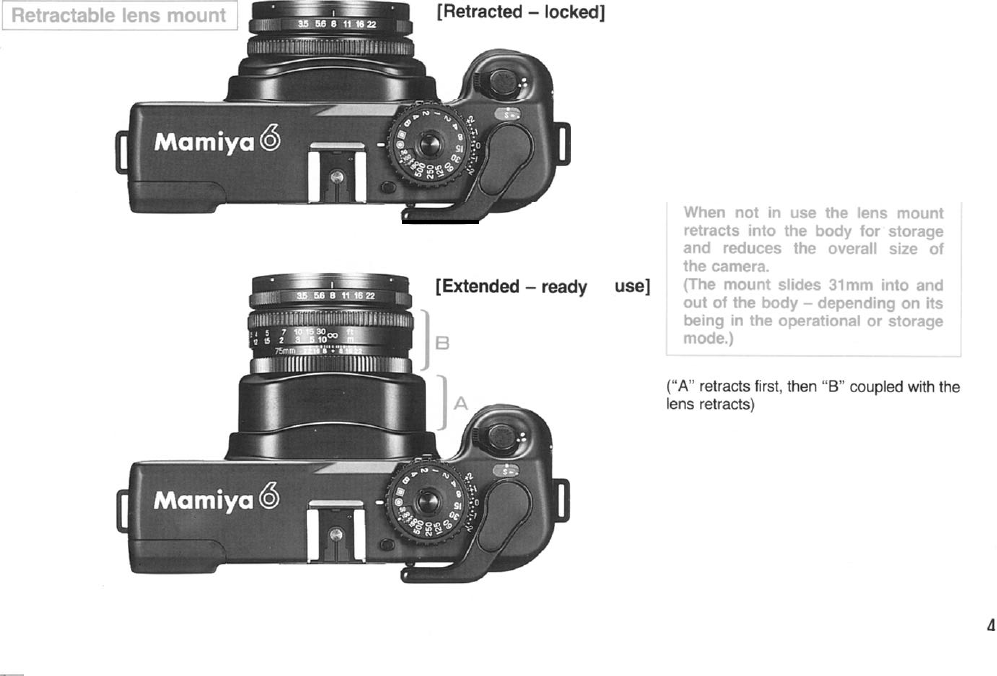
The retractable
Iens
mount
greatly
reduces
the profile of the New Mamiya
6.
making it
more convenient to
store
and carry.
to
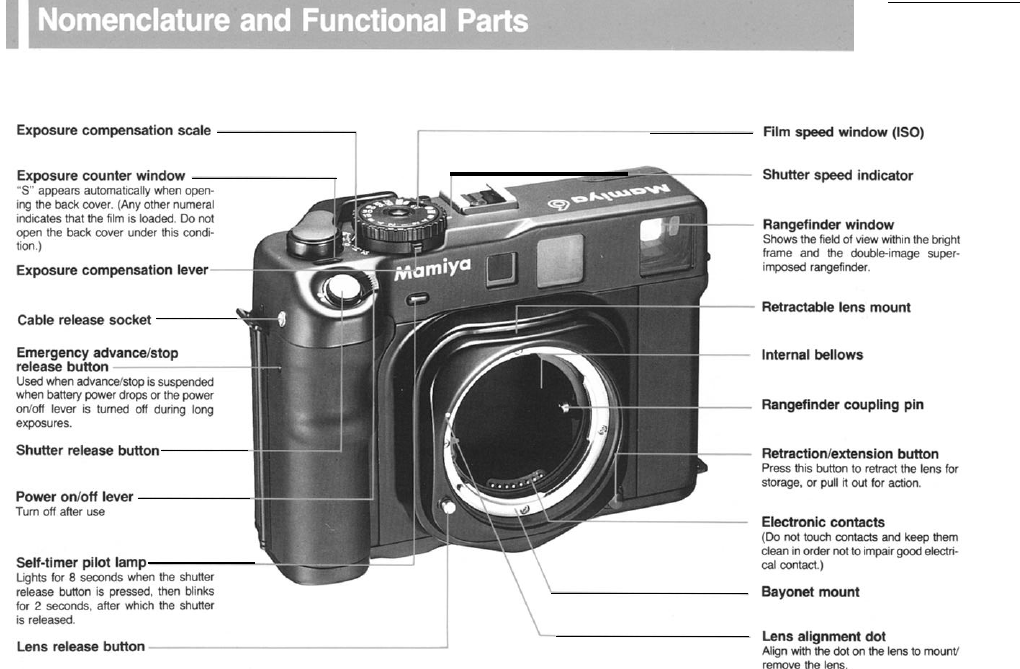
5
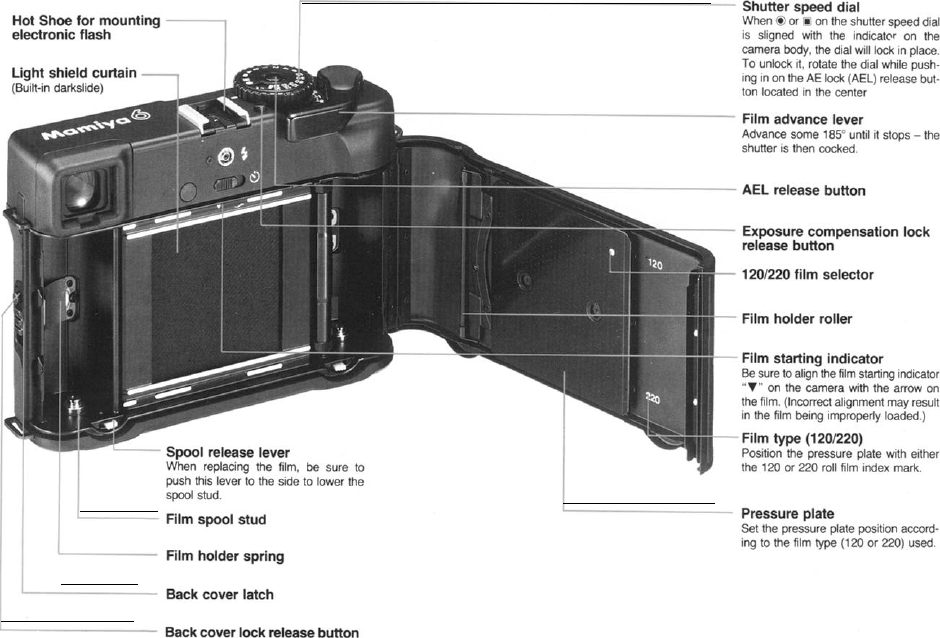
6
_
7
Body cap
In
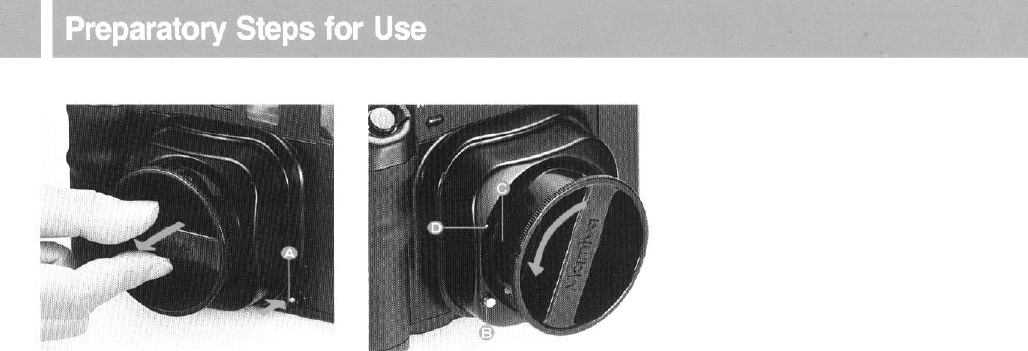
order to attach the lens, first pull out the
lens mount and remove the camera body
cap. To do this, while pressing the retraction/
extension button (A) in, pull the lens mount
out by gripping the cross bar of the lens cap.
Then, while pressing the lens release button
(B) in, rotate the cap counterclockwise, and
align the groove (C) on the cap’s side with
the lens alignment dot (D) on the body. The
body cap can then be pulled out.
*The lens release button cannot be pressed
when the light shield curtain is open. So make sure
the curtain is closed. For curtain opening/closing
see page 13.
9
[Mounting lens] [Removing lens]
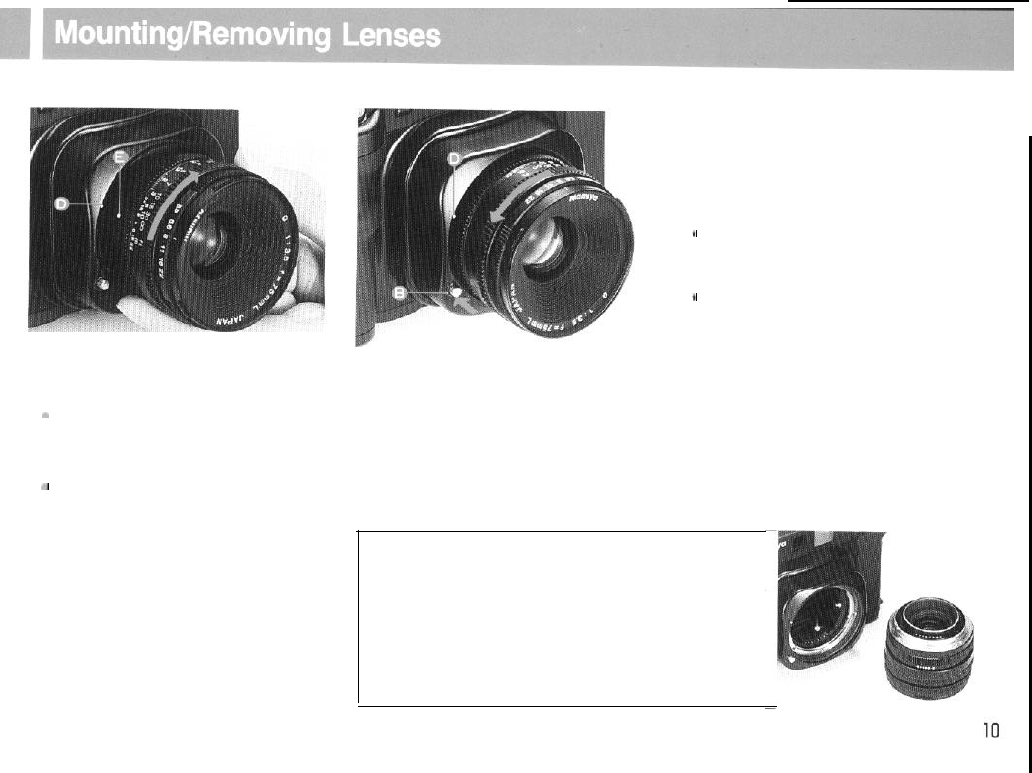
Remove the front and rear lens caps.
a
The front lens cap can be removed by
pressing in the tabs on the right and left
with your fingers and pulling the cap
towards you.
*
The rear lens cap can be removed by
rotating it counterclockwise.
Align Lens Alignment Dot (E) With the
Camera Alignment Dot
(D).
Insert the lens
into the camera body. Then
turn
the lens in
the direction of the arrow until it clicks and
locks into place.
Like removing the camera body cap, while
pressing in the lens release button (B),
rotate the lens in the direction of the arrow
until the lens alignment dot is lined up
with the white alignment dot (D) on the
camera body.
Changing lens
When changing lens, pull out the retractable
mount and proceed to the action mode.
l
Through mounting the lens is possible with the
mount retracted, removing it is not possible. (Inter-
locks!)
t
When the
mount is retracted, or if the
light baffle
is
open
when trying to remove the lens, the lens
release button will not work, preventing lens re-
lease.
+
Particularly
when mounting the 50mm lens, take
care so that the rear rim of the lens does not
touch
the body’s rangefinder coupling cam.
*When the lens has been removed and film
remains in the camera body, avoid exposure to
direct
sunlight as film fogging may result.
[CAUTION]
Gold Plated Electronic contacts
are
provided inside the retractable
mount and at the rear of each lens. If oil, dirt, or other foreign matter
collects on the contacts poor electronic
information
transfer
may
result. When soiled, use a piece of clean cloth to wipe
them
thoroughly before installing the lens
.
Also,
use the utmost care so as
not to touch them. (Position the front face of the lens which has
been removed as shown in the photo.)
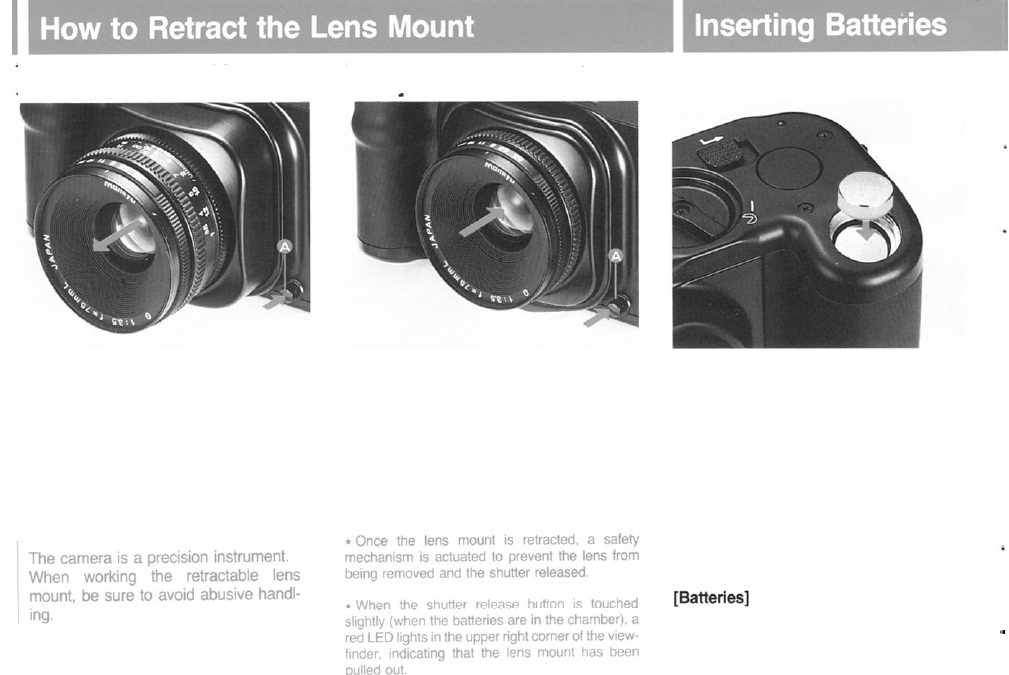
[Pulling out the retractable
lens mount]
1. While pressing in the retraction button
(A) on the camera
body
in the direction of
the
arrow,
pull
out
the lens and lens
mount
2.
When both have been pulled
out,
take
your
fingers
off the
retraction
button, and
until it clicks.
make
sure
that both have been
completely
pulled
out.
[Retracting (storing) the lens
mount]
1.
While pressing in the
retraction
button
(A) on the camera body in the direction of
2.
When the lens
mount
has been retracted
the
arrow,
push the lens
straight
in towards
in place, take your fingers off the button and
make sure that the
lens
has been securely
seated in the camera
body.
the camera
body.
The camera will not function with-
out
batteries.
1.
Remove the battery chamber cover on
the
bottom
of the camera with a
coin
or
screwdriver.
2.
“+”
is indicated on the inside of the
battery
chamber
cover.
Insert
the
two
bat-
teries,
being sure to properly place each
battery with the
“+”
side up, facing the
cover.
The New Mamiya
6
uses either two SR44
silver oxide batteries or two
LR44
alkaline
manganese
batteries.
.
1111
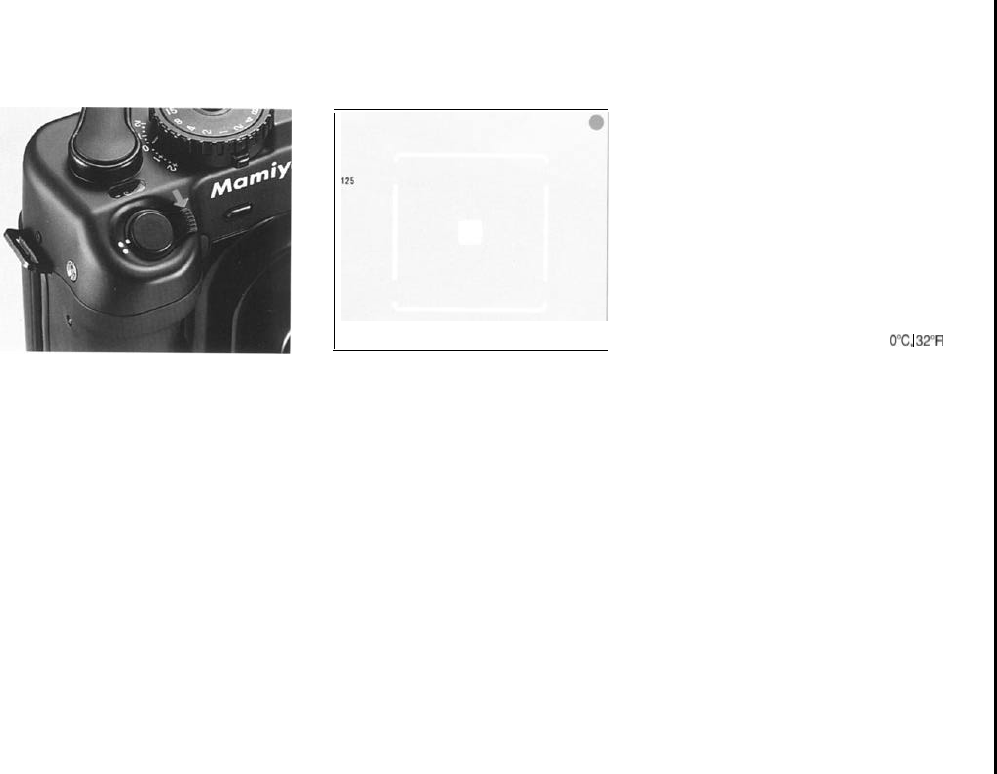
[Battery check]
1.
Power can be
turned
on/off
with the
small lever beside the shutter release button.
(ON) Align the white dot on the lever with
the white dot on the camera body.
(OFF) Align the white dot on the lever with
the red dot on the camera body.
2.
When the power is turned ON and the
shutter release button is touched slightly,
the shutter speed is indicated on the left
side of the viewfinder and a red LED indi-
cator lights on the upper right side indicating
that power is normal.
*When battery power drops below normal, or
when the
batteries have been inserted
improperly
,
the
shutter speed does
not
show and the red LED
does not light.
l
When
the
shutter release
button
is lightly touched.
CAUTION:
l Be sure to confirm proper polarity of the bat-
teries before insetting them.
l
D
o
not contaminate the battery surface with oil,
sweat, or other foreign matter. Failure to insert
clean batteries could result in
poor
electrical
contact.
When contaminated, carefully wipe with a dry
cloth, or clean lens tissue.
l
After
the
camera has bean used for many hours
of photographing, or has been inactive for a long
time,
insert
new batteries.
l
When the camera is used in low temperatures,
battery
performance
deteriorates: below
0°C.
34F
use new batteries as needed.
[Spare batteries]
Can be stored inside the body cap.
If
the power
on/off
lever
is left ON, the LED
lights up when the shutter release
button
is
pressed,
resulting
in early battery depletion.
Be
sure
to
keep the
on/off
lever OFF.
1212
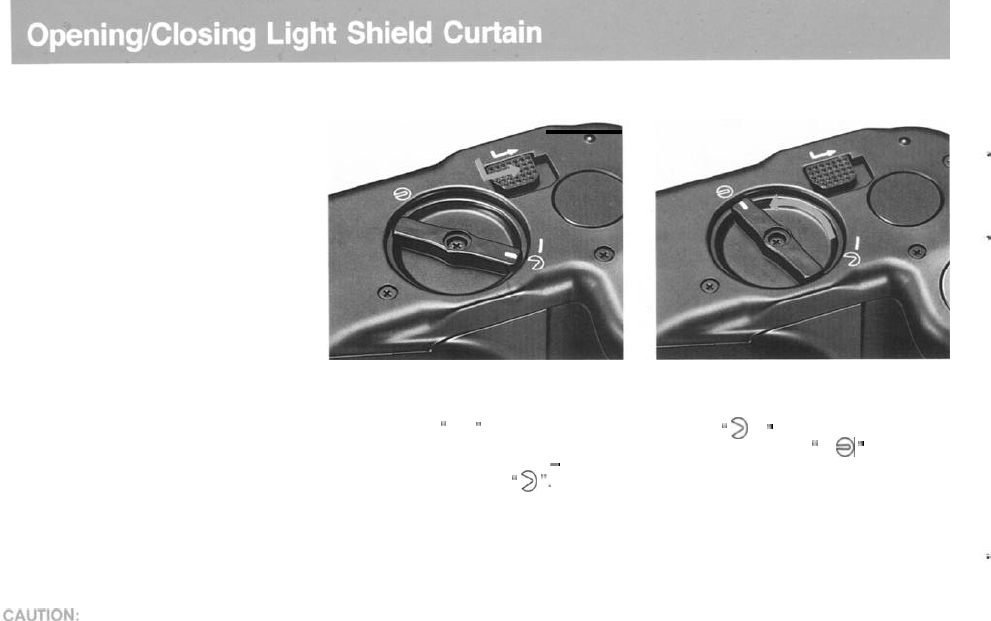
[Opening the light shield curtain] [Closing the light shield curtain]
Before opening/closing the light
shield curtain, be sure to cock
the shutter, otherwise, it will not
open/close.
To open the light shield curtain, slide the
light shield curtain release lever along to fol-
low the arrow
down and right. This
will cause curtain to snap open.
The light shield lever indicator
-
(a white
line) is then aligned with
”
3
“.
Rotate the light shield closing lever in the
direction of the arrow, away from the open
position
”
2
”
and align the white indi-
cator on the lever with
”
@
”
to close.
l
When the light shield curtain is open, the lens
cannot
be removed. Close the curtain to
remove
the lens.
l
When the light shield curtain is closed, the shut-
ter cannot
be
released.
When taking a picture, open the light shield cur-
tain.
(If the light shield curtain is closed, a
red
LED will
indicate that it is closed.)
Never touch the light shield curtain or the
bellows. If touched, light leakage or a mal-
function may result.
13
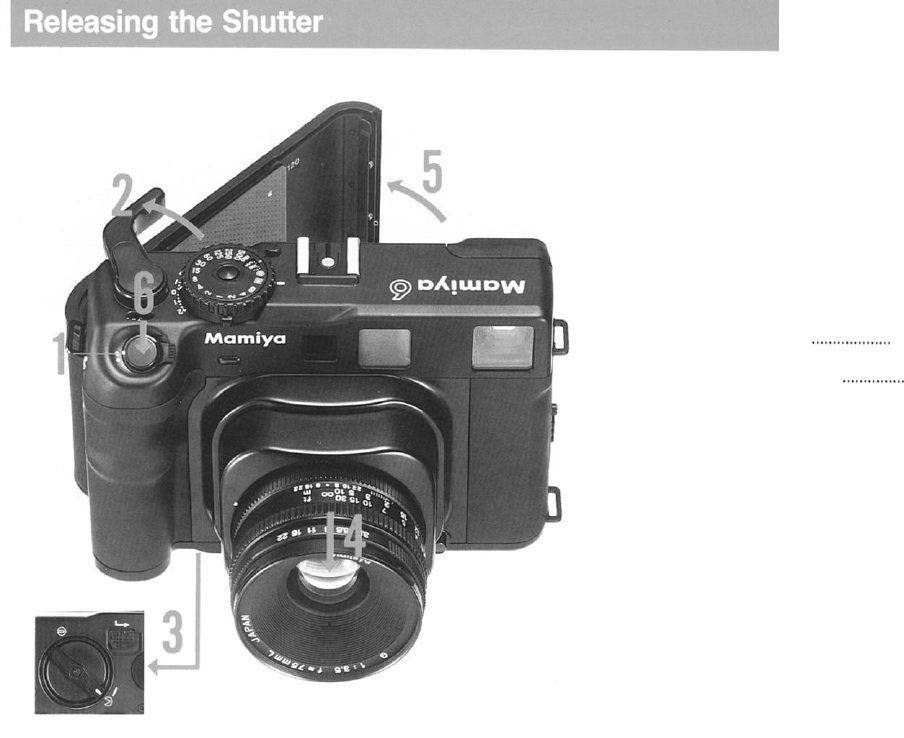
Before using the camera, it is advisable
to
understand how it works.
1.Power
on/off
lever .................... set to ON.
(See
page
12)
2
.
Film advance lever ....
Wind
the lever to
cock the shutter.
3.
Light shield curtain
.._................
Open.
(See
page 13)
4
. Retractable lens mount
._......_.._...
Pull
out.
(Photographing position) (See page
11)
5. Back
cover .......................................
Open.
(See
page
15)
6. Release the shutter ......(See page
19)
Note:
If the shutter is
not
released, a red (LED) in the
viewfinder will light; repeat steps
2
to
5
again.
1414
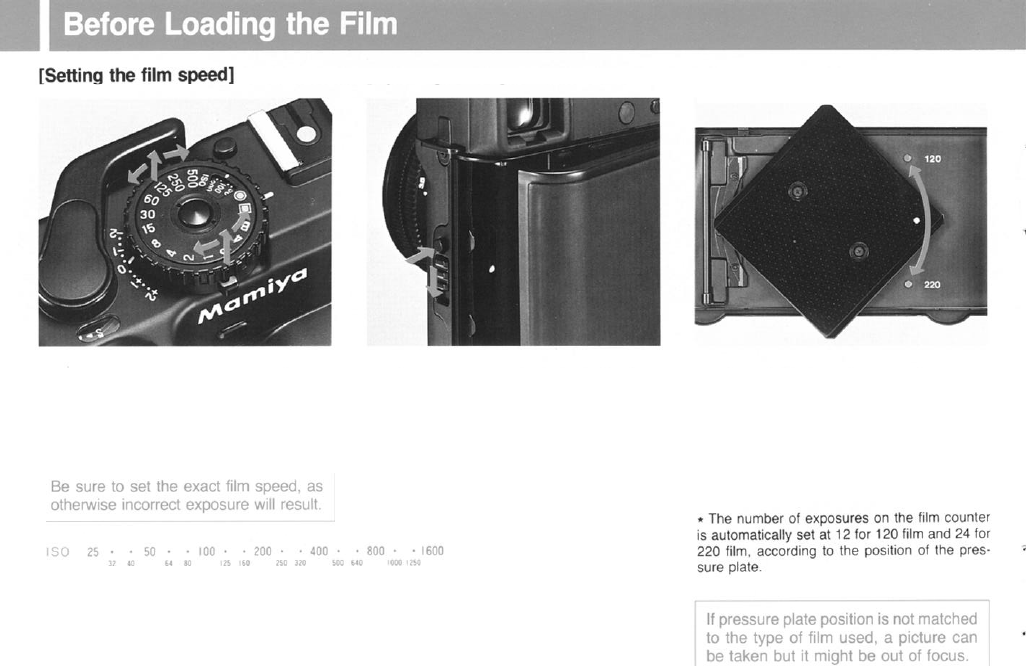
Set the film speed of the film being used by
lining up the outer rim of the
shutter speed
dial and rotate it until the
correct
IS0 value
appears in the window.
[Opening/closing the back cover]
While depressing the back
cover
lock but-
ton,
simultaneously
push down the lock
lever in the direction of the arrow and the
back will open.
When closing the back
cover,
securely
press both corners until it clicks.
[Setting the film
type]
This camera can use either
120
or 220 film.
To
set the type of film used, simply rotate
the pressure plate in the direction of the
arrow until the white dot is at “120”
or
“220”.
When set. “120” or “220” will appear in
the small window under the memo clip.
15
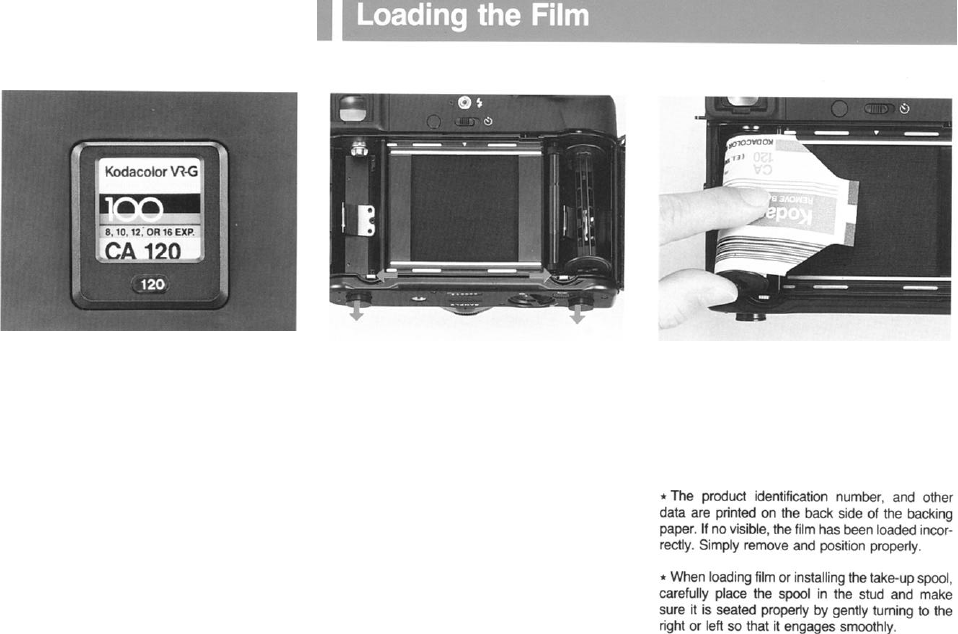
[Memo clip]
The memo clip on the back
cover
is used to
hold the film box
to
serve
as a convenient
reminder of the type of film in the camera or
for recording the date.
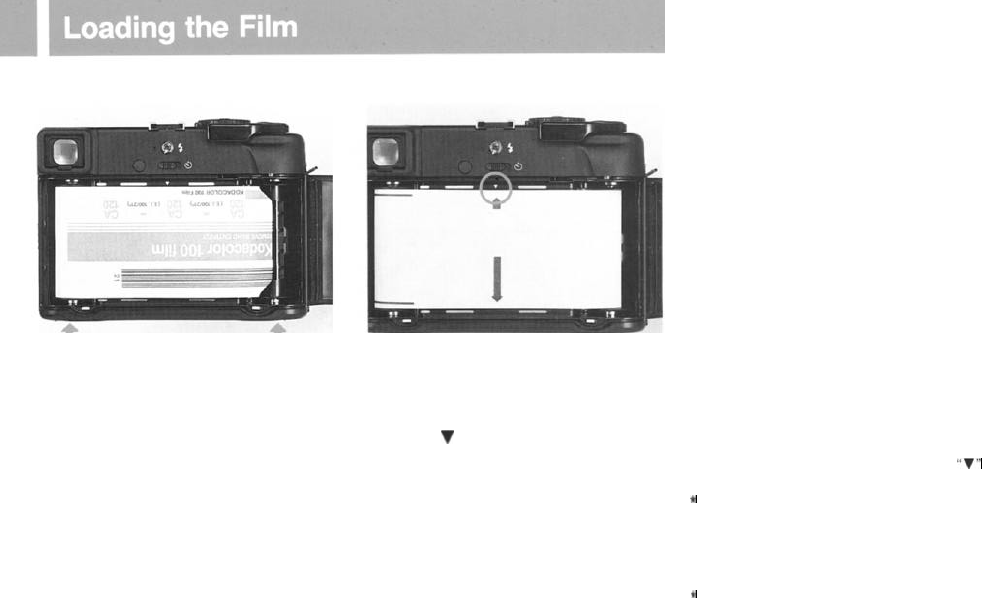
1.
Push the spool release lever of
right
side
to the
right,
and install the
take-up
spool
in
the take-up spool chamber, then push
the
lower
spool
stud up.
2.
Like installing the take-up spool, push
the
spool release lever of
left
side
to
the
left,
place a
roll
of film in the film chamber, mak-
ing sure it seats properly. Make sure the
backing
paper is in the position illustrated
16
3. When the new
roll
has been inserted, be
sure to reset the lower
spool
stud by
pres-
sing it in. (Also, be sure to reset the take-up
spool stud in a similar manner.)
4.
Pull out the backing paper, and insert the
tip into the slot on the take-up
spool
as
pic-
tured.
5. Wind the
film
advance lever until the
small arrow (the starting indicator on the
backing paper) aligns with the film starting
indicator (
V
) on the camera body. Then
close the back cover.
6 . Wind the film advance until it stops and
“1” appears in the exposure counter
window.
l
Make sure backing paper advances evenly be-
tween the spool flanges and does
not
begin
to
slant. If it advances unevenly, remove the backing
paper from the take-up spool and refeed, starting
again.
l If the film is not properly aligned with the
“V”
indicator, the film may be improperly loaded.
e
When any other numeral than
"S"
appears in
the exposure counter window, it is an indication
that the
film
is loaded.
So
do not open!
* Do not excessively pull on the backing
paper.
and do not load/unload the film in direct sunlight:
bright light may
fog
the film.
t
Tightly
wind
the backing paper around the spool
a couple of times. If this is not done, light may
enter from the spool flanges
when
the film is
unloaded.
17
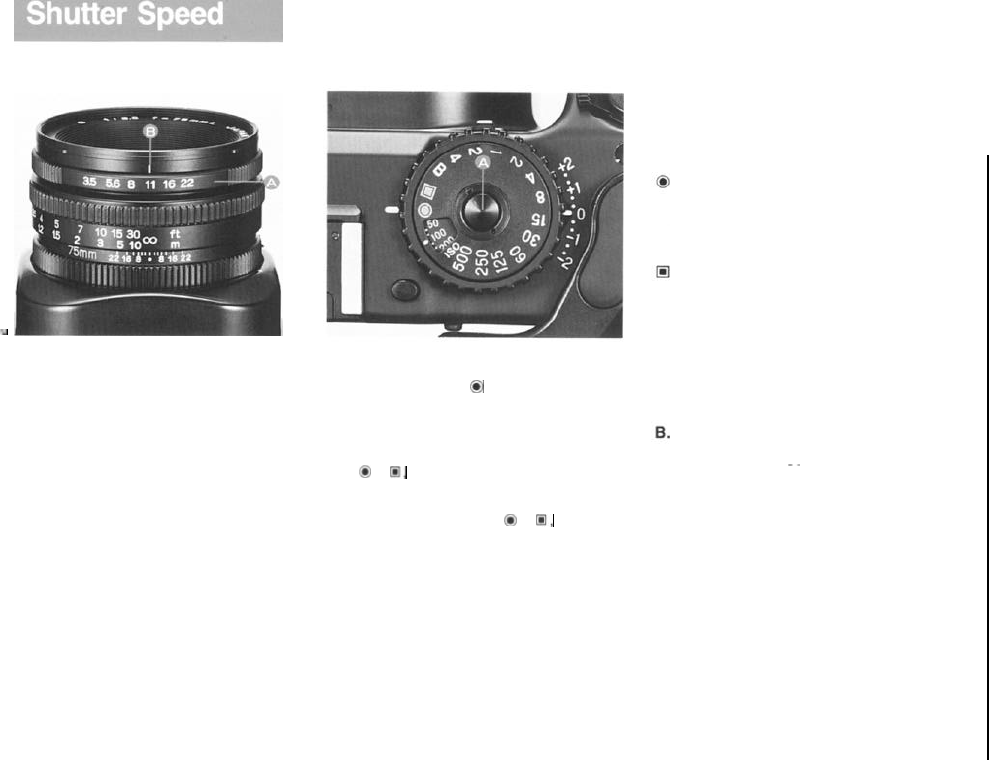
[Determining the shutter speed]
-.
The New Mamiya 6 has an aperture-prior-
ity, AE lens shutter. Once the aperture and
film speed are set, the AE meter selects a
proper shutter speed in relation to the set
aperture. Under the manual photographic
mode, proper shutter speed is indicated by
a red LED within the viewfinder.
1.
.
To set the diaphragm to a desired aper-
ture, rotate the aperture ring (A) until the
appropriate figure is aligned with the cent-
ral red index line (B). (Click stops are pro-
vided at each engraved aperture number
but the diaphragm can be set also for in-
termediate stops.)
2. Rotate the shutter speed dial and
select either the AE
0
or manual mode for
photographing.
Rotate the dial to align it with the white
index line (-) on the camera body.
l
At
0
or
13,
the
dial is locked.
The
lock
can be
released by pressing the AE lock release button
(A) in the center of the dial.
l In any position other than
0
or
@,
the shutter
speed dial moves freely from click-stop to
click-
stop: it must be set on a specific click-stop and
cannot be used at an in between setting.
l Intermediate Diaphragm settings (between
click stops) are possible. Intermediate Shutter
Speeds (between engraved numbers) are not
possible.
Shutter speed dial:
AE (automatic exposure)
Based on the aperture setting, the
camera automatically selects the shut-
ter speed.
AEL (AE
lock)
The camera memorizes the aperture
when shutter release button is
touched slightly so that, even when
the position of the subject or
camera
changes, a picture can be taken with
the initial aperture setting and is not
affected by changes in light.
Bulb
exposure
At this position, the shutter will remain
~~
. .
open as long as the shutter release
button is pressed.
Shutter controls
On the shutter speed dial the yellow
numbers indicate the number of whole
seconds while the white numbers indi-
cate fractions of seconds,
Example: “4” indicates 4 seconds
while 125 indicates 1/125 seconds.
1818
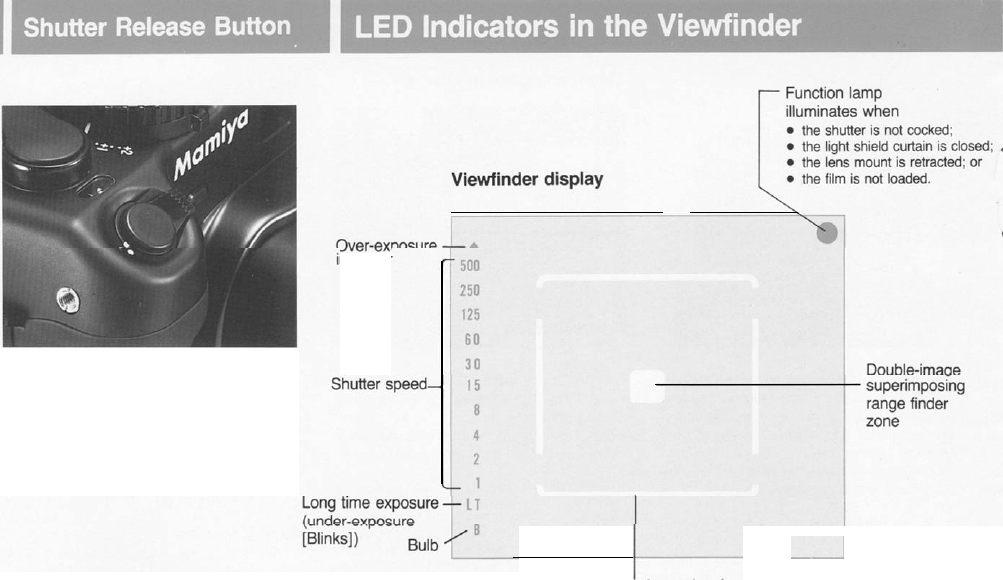
The
shutter
release
button
is designed
so
that pressure can be applied in two stages.
When it is slightly touched, correct metering
data is displayed on the left side of the view
finder. When it is depressed all the way,
the shutter is released and an exposure
is made.
*The LED’s are located at the very left
margin of the finder in order not to interfere
with the
field
of view of the wide angle lens.
indicator
I~-
-~-i
Bright field of view frame (set by lens)
l
When the lens mount is retracted, the viewfinder frame
(i.e.
the bright frame) selected is the widest frame for
1919
all lenses.
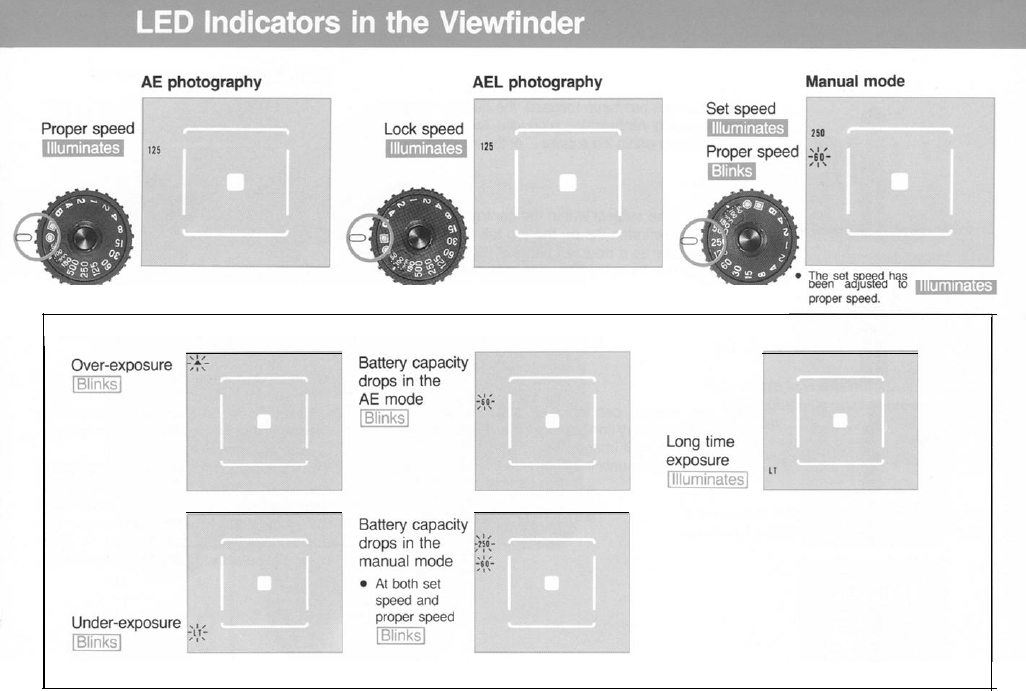
20
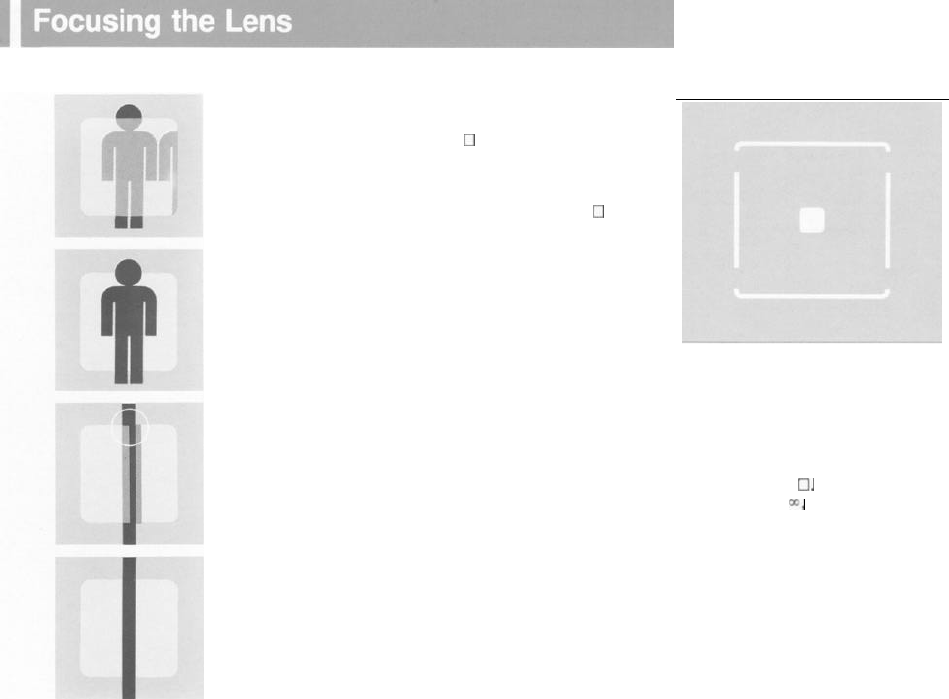
[Photographic area covered]
When the lens has been focused, the double-image
superimposing rangefinder produces two superim-
posed images within the square
0
of the viewfinder.
How To:
1. Position the subject within the central square
0
of the viewfinder. As on the top left the subject
will appear as a double image.
2. Rotate the focusing ring until the two images
converge and are superimposed as on the
figure on the left. The lens is now focused.
The two images can also be superimposed by
using the boundary line between the viewfinder and
the square or split image.
Adjust the images until the boundary lines converge.
Within the viewfinder the photographic
area covered is indicated by the visible
bright frame. Parallax is automatically
compensated for according to the
subject-
to-lens distance.
The composition will be with in the lines of
the bright frame
0.
83% of the field of
view is visible at
r;,
and 100% is visible at
the minimum focusing distance. The
appropriate bright frame area is auto-
matically selected upon lens interchange.
21
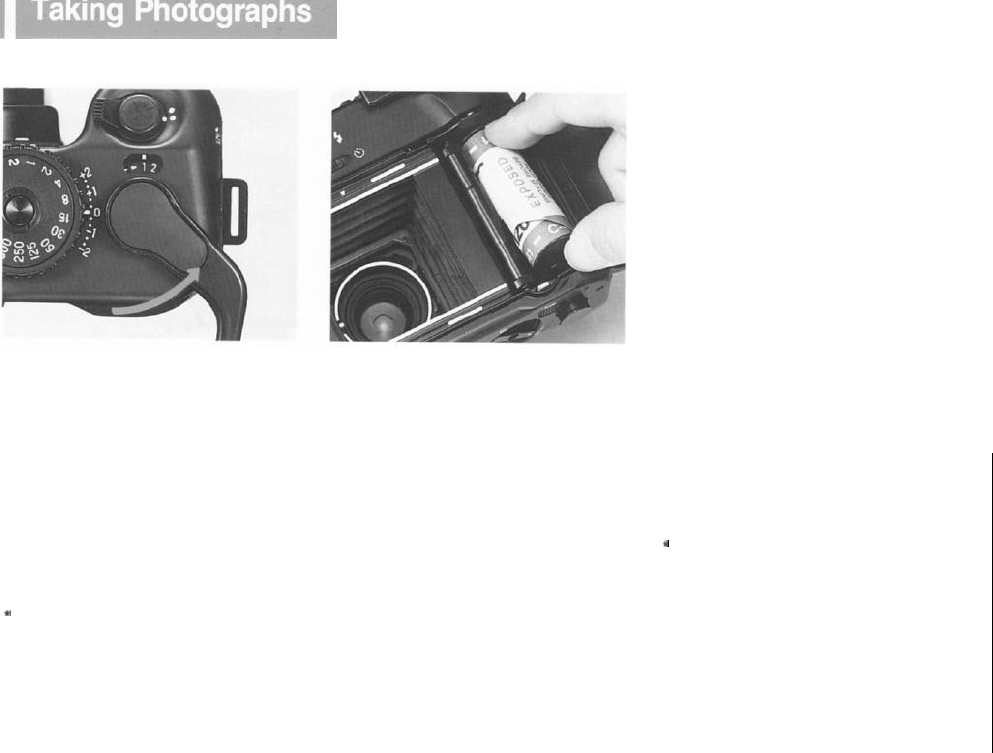
[Unloading the film]
1. Press the shutter release button when
you have focused and determined compos-
ition.
2. Advance the film by winding the film
advance lever until it stops. (The shutter is
then cocked.)
3. After completing the last exposure, wind
the advance lever several times, until the
film with its backing paper is completely
wound onto the take-up spool. The advance
lever will become easier to actuate when
the film has been completely wound on the
spool.
*
When the shutter release button is pressed and
the film is exposed, a red LED will light on the
upper right side
of
the viewfinder.
1. .
Open the back cover and remove the roll
of film. By pushing the
spool
stud release
lever to the right, disengage and remove the
spool. As shown, the roll of film can be eas-
ily removed from the take-up chamber if you
push up the spool up a little-it will then lift
out. When the back cover is opened, the
exposure counter will automatically return to
'S' (start).
2. Be careful not to let the roll of exposed
film unwind. Be sure to seal it immediately.
l
To prepare for another roll, remove the empty
spool from the film chamber, and place it in the
take-up chamber.
l
Wind
the advance lever until it
stops.
(Other-
wise, a red LED in the
viewfinder
will signal that it
is
impossible
to press
the
shutter release button.)
l
Do not advance the
film
too quickly, as
this
might
adversely affect
film
flatness, or frame spacing.
t
To remove
the
film
before exposing the entire
roll, cap the lens and press the shutter release but-
ton and wind the
film
onto the take-up spool frame
by frame.
22
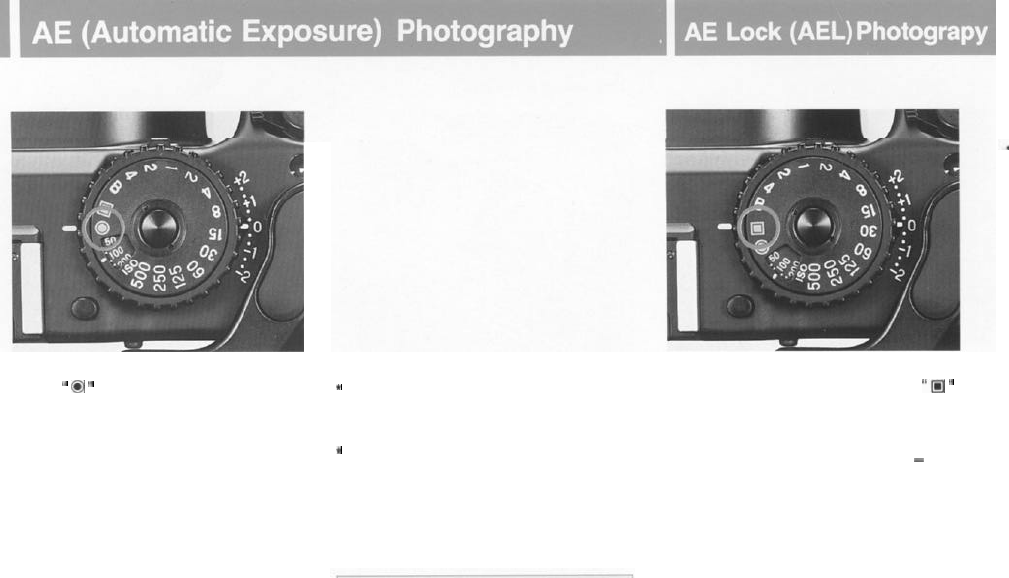
1. Align
”
0
”
on the shutter speed dial with
the white line index mark on the camera
body.
2.
Be
sure to set the exposure compensa-
tion scale to 0.
3. Set the aperture to the desided
"f"
number according to conditions.
4. When the shutter release button is
slightly
touched, an LED indicating proper
exposure will automatically light in the view-
finder. When
"
"
LED blinks,
it
indicates
over-exposure. Rotate the aperture ring to
stop down to a smaller exposure until an
LED indicates proper exposure.
f
Blinking "LT" indicates under-exposure:
rotate
the aperture ring until the LED stops blinking to
increase exposure.
t
Illuminating
"LT"
indicates
that
the shutter is set
for a relatively
long
exposure
from
between 1 to
4
seconds.
When taking pictures at such
slow
speeds, be
careful not to move or vibrate the camera. Either
open the aperture for a higher shutter
speed,
or
use a tripod, or
use
a flash.
l
Under AE (automatic exposure) or AEL
(AE lock), the
LED display in the viewfinder will
continue to Operate as long as the shutter
re-
lease button is touched slightly. When you
take your
finger
off
the
button.
the
LEDs
will
go out.
Rotate the shutter speed dial until
“m
”
aligns with the
white
index mark on the
camera
body.
Position the important part of your subject in
the central square of the viewfinder
-
this
will establish the correct exposure. Then
touch the shutter release button slightly and
an LED will light indicating the correct expc-
sure. After making any necessary adjust-
ments to the aperture, press completely for
your exposure. Even when light quality is
variable, an optimum exposure is possible.
If you cannot get close enough to your sub-
ject for another meter reading, make substi-
tute measurements by pointing the camera
to light and dark areas and calculate a
mean exposure value or try taking a reading
off your palm.
23
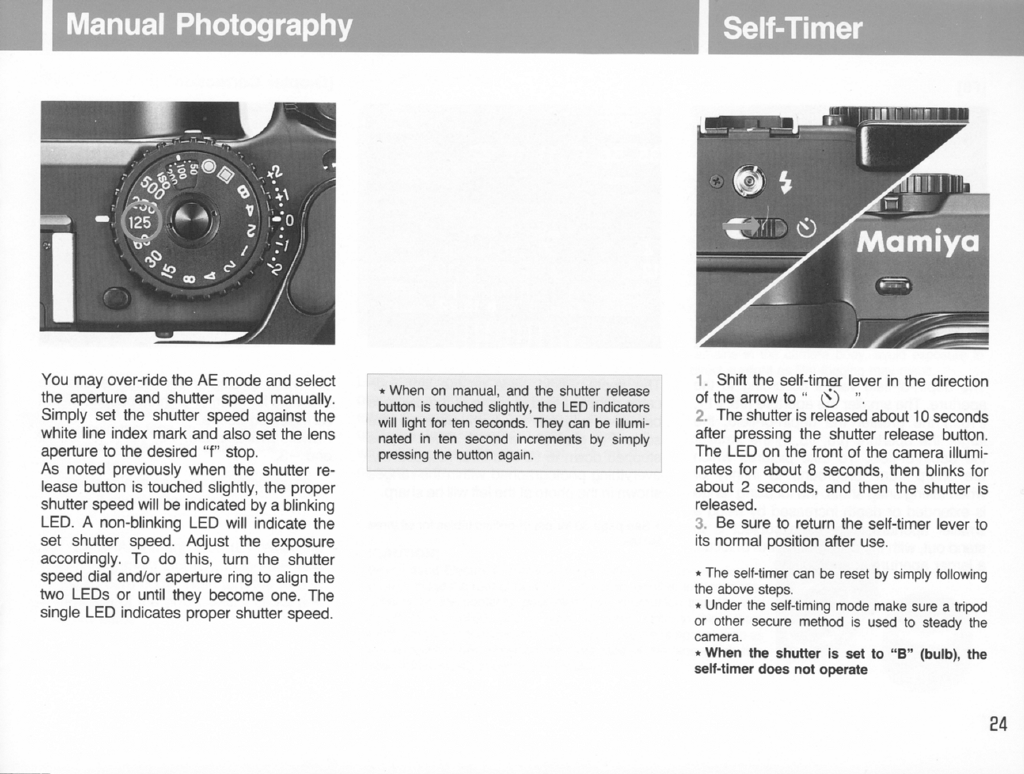
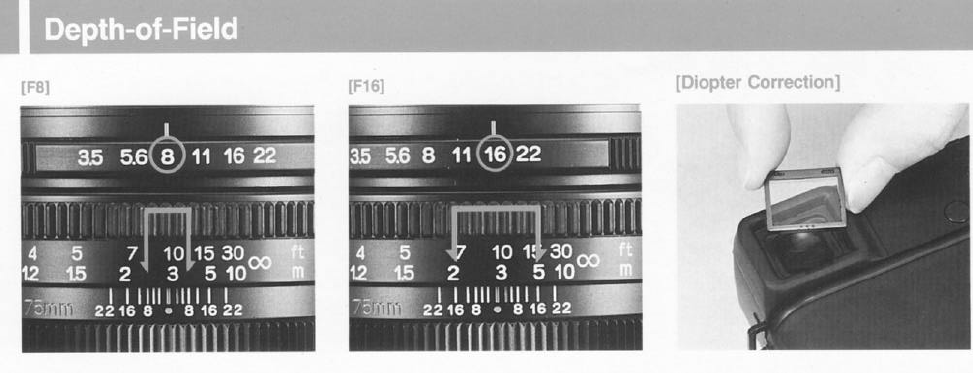
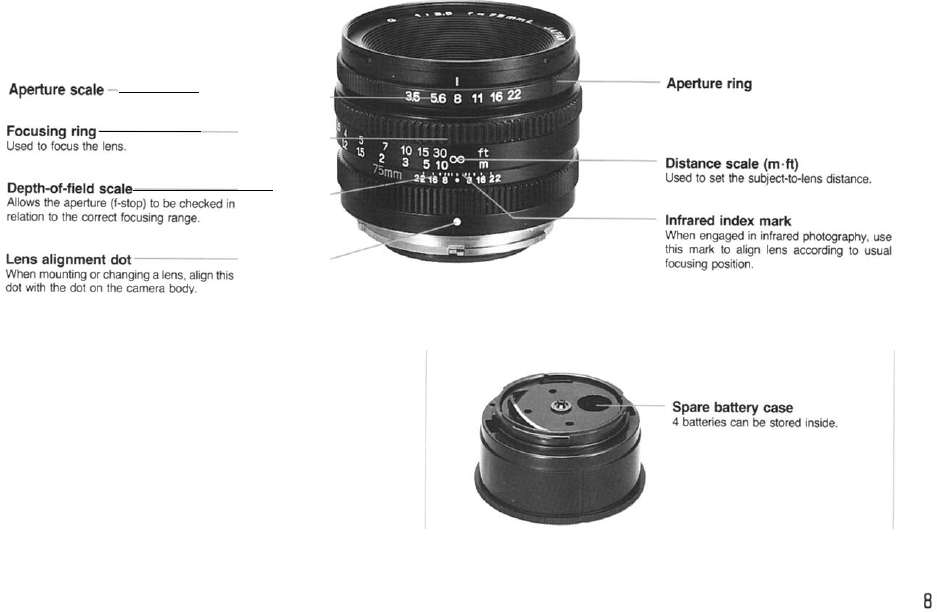
The depth-of-field varies according to the
aperture. The smaller the aperture
(f/8,
f
/11
,
f/16...) the greater the depth-of-field; the
larger the aperture (f/8, f/5....) the smaller
the depth-of-field. To take pictures which
are sharp from foreground to infinity or
when taking snap shots, the focusing range
is extended or depth increased by using a
smaller aperture. When the subject is to
stand out, with the background out of
focus,
a larger aperture is appropirate.
The depth-of-field scale on the lens
indi-
cates depth-of-field in terms of the distance
between subjects on both sides of the
scale. For example, when a 75mm lens is
stopped down to
f/8
and f/16, respectively,
everything photographed within the ranges
shown in the photo at the left will be sharp.
Six types of diopter correcting lenses are
available for near/far-sighted people. Mount
as indicated above.
Powers available are: +3, +2.
+1
-1, -2
and -3.
l
See page 30 for depth-of-field tables for all three
lenses.
25
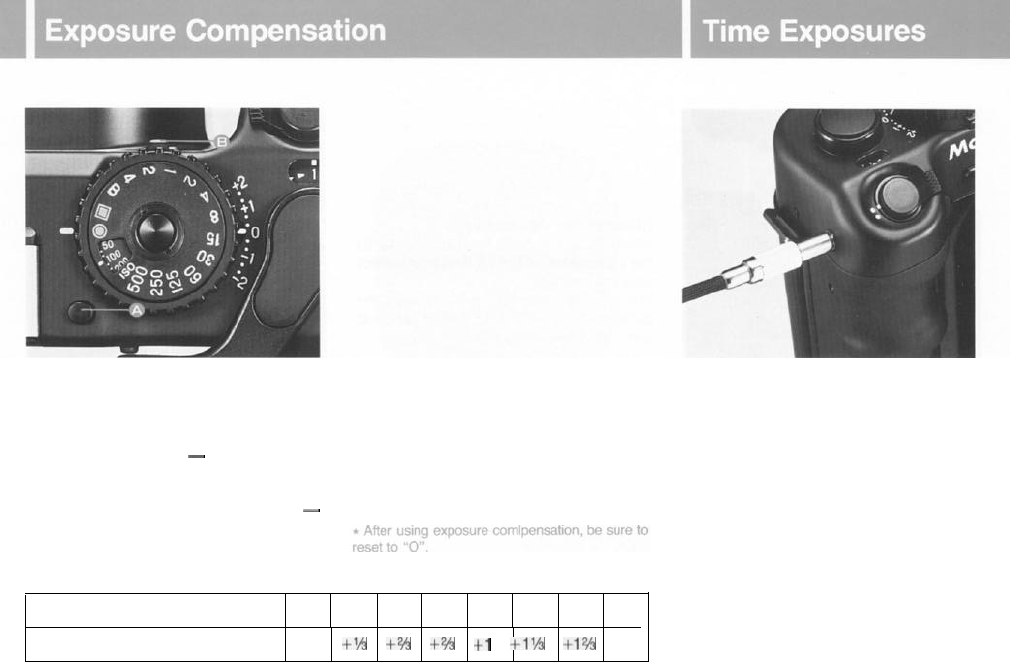
The exposure compensator functions in a
number of important ways. It can be used to
correct exposure values
(EVs)
or the differ-
ences in brightness between a primary sub-
ject and its background
-
especially when
over or under-exposures occur. It can also
be used when filters are employed or when
engaged in available light photography
-
or under high contrast conditions (i.e.
low
or
high key).
To set, press the compensator lock release
button (A), and move lever (B) to select the
desired EV: graduations are 1/3 EV.
[When a filter is
used]
Whether using the AE or manual mode sim-
ply compensate for the
filter
exposure factor
as indicated in the table below.
When taking an exposure longer than
4 seconds, set shutter to “B” (bulb). While
the button is pressed down, the shutter will
remain open. In order to prevent camera
movement, it is best to use a cable release
and tripod.
When set at
“B”
the self-timer does not
work.
The cable release can be screwed in the
release socket beside the shutter release
button as pictured above.
Fitter exposure factor
Xl x1.2 x1.5 xl.7 x2 x2.5 x3 x4
Exposure compensation value
(EV) 0
+‘h
+zh
+2h
+1
+I’/+
+12h
+2
26
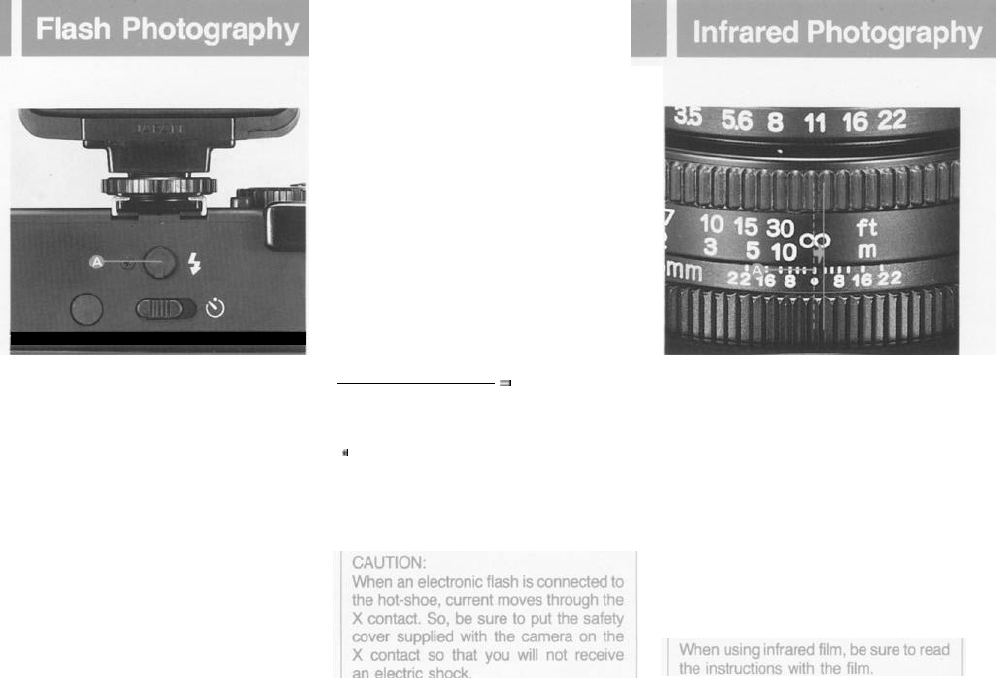
The new Mamiya 6 features an X synchro
flash terminal and its lens shutter system
permits flash synchronization at all shutter
speeds.
Shoe-mounted flash units can be attached
directly to the hot-shoe, while flash brackets
can be attached to the tripod socket for
larger flash guns.
Remove safety cover (A) to
attach
sync
cord in the socket.
[Determining the aperture]
When using automatic flash units, refer to
the instructions on the flash unit for correct
aperture settings.
When using a manual electronic flash, the
guide number divided by subject distance
gives the correct aperture.
Guide number (46)
= Correct aperture
Subject distance (6 m) setting (8)
t
Charged
electronic flash units sometimes fire
when they are attached to the camera. This does
not indicate a defective circuit.
l
When using electronic flash, be sure to read its
manual
carefully.
When using infrared film, it is necessary to
make a focusing adjustment in order to
achieve accurate focus. This is because the
focus position of the image deviates from
normal since the infrared ray wavelength is
longer. After focusing in the usual manner,
check the distance on the distance scale
that is aligned with the center reference
mark of the lens. Make the focusing adjust-
ment by turning the focusing ring in the
direction of the arrow in the accompanying
photograph so that the distance just
observed is aligned with the infrared mark.
27
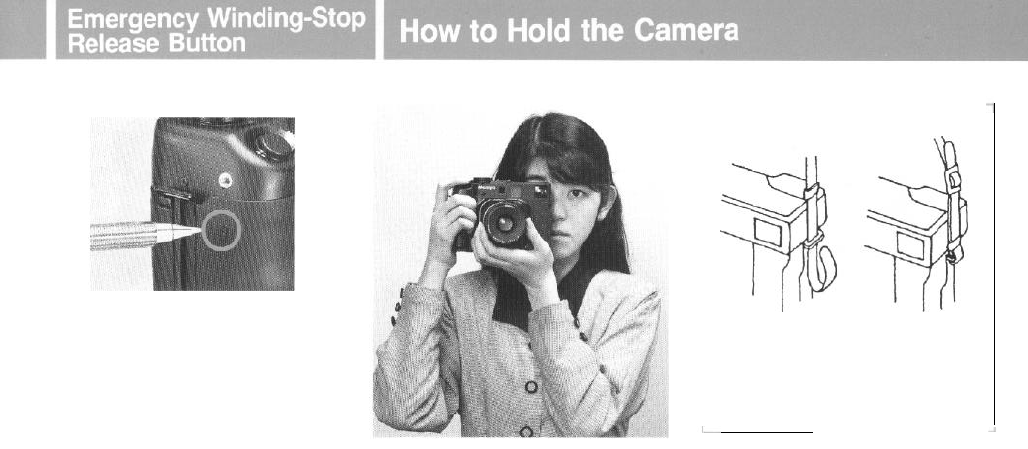
[Neck strap]
If the batteries have been depleted
-
espe-
cially when the power on-off lever has been
set to the OFF position during long expo-
sures (at
"B"
; 4 seconds or 2 seconds)
-
the winding-stop prevents the film from
being wound.
If this happens, push the emergency ad-
vance/stop release button with a pen or
other pointed object as shown above. The
advance/stop is then released, allowing the
film to be wound. Please note that that par-
ticular frame will be poorly exposed.
l When the batteries have been depleted,
immediately replace them.
l
The emergency winding-stop release button
should
not
be used for any other purposes.
Since the New Mamiya 6 has a 6
x
6 for-
mat, it
is
not necessary to adjust for vertical
and horizontal composition. Because most
out of focus pictures are the result of camera
movement, make sure
not
to move when
pressing the shutter button. Hold the camera
with your elbows close to your body: pres-
sing
part
of the camera on your forehead
will help stabilize it. Then gently release the
shutter.
When making exposures longer than 1/30
sec.,
it is advisable to use a tripod with a
cable release.
Pass the neck strap through the
carrying strap lug, and fasten it
as shown.
[Using a tripod]
When using the camera
with a large tripod
head, the head may interfere with the spood
stud, preventing
film
from being loaded. To
prevent this, use the optional tripod adapter
for the M645 Super.
*The threaded tripod screw hole is
5.5mm
deep
and the use of a longer tripod screw might result in
the damage or breakage of internal working parts.
So be careful not to apply unnecessary pressure
when mounting the camera.
28
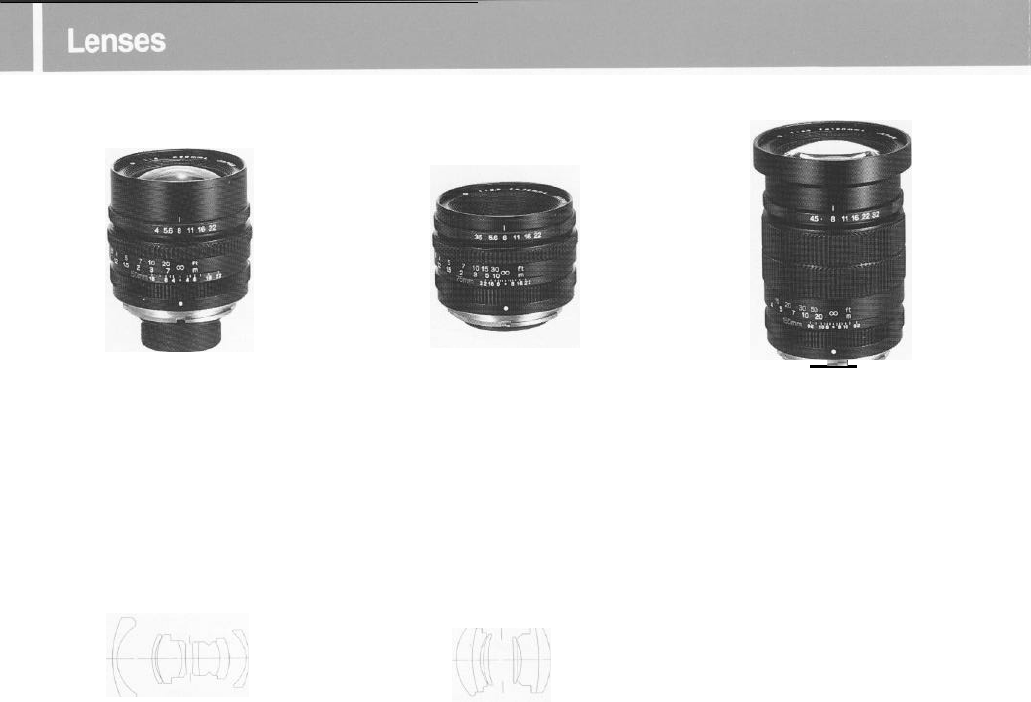
G4/50L
(50mm f/4)
G3.5/75L
(75mm f/3.5)
Lens construction: 8 elements in 5 groups
Angle of view: 75°
Minimum aperture: 22
35mm equivalent: 28mm
Minimum focusing distance: 1 m
Minimum magnification: 0.059
Area covered: 945 x 945mm
Filter size: 58mm
Hood: Bayonet type
Dimensions: 55 (length) x 64mm (diameter)
Weight:
335g
Lens construction: 6 elements in 4 groups
Angle of view: 55°
Minimum aperture: 22
35mm equivalent: 41 mm
Minimum focusing distance: 1 m
Minimum magnification: 0.089
Area covered: 632 x 632mm
Filter size: 58mm
Hood: Bayonet type
Dimensions: 43 (length) x 64mm (diameter)
Weight:
250g
G4.5/15OL
(150mm
f/4.5)
---
Lens construction: 6 elements in 5 groups
Angle of view: 30°
Minimum aperture: 32
35mm equivalent: 82mm
Minimum focusing distance:
1.8m
Minimum magnification: 0.0996
Area covered: 562 x 562mm
Filter size: 67mm
Hood: Screw-in type
Dimensions: 86 (length) x 70mm (diameter)
Weight: 480g
29
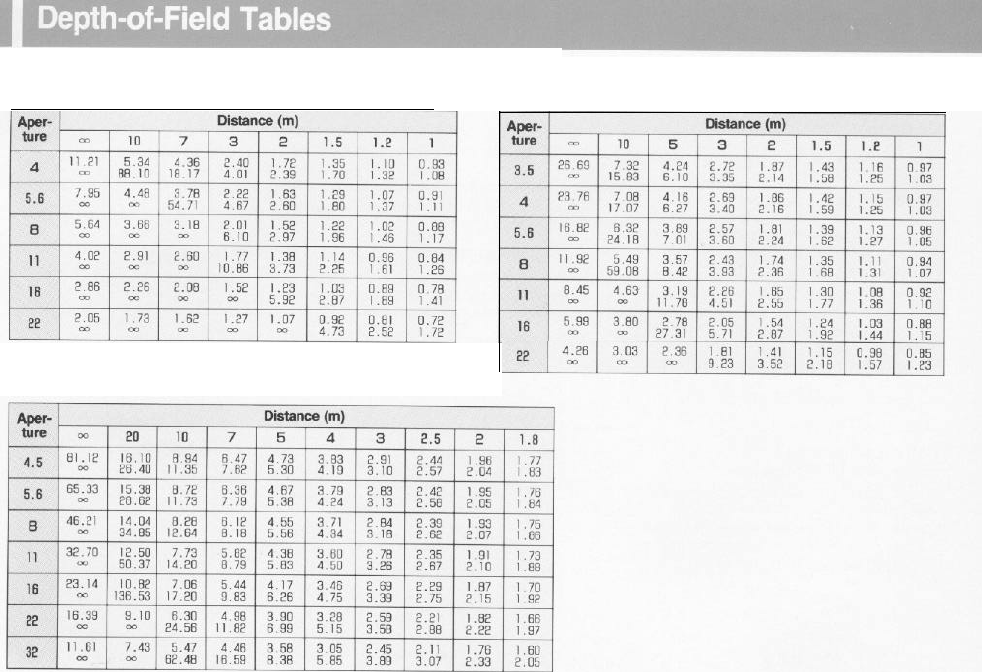
G4/50L
G3.5/75L
G4.5/1
50L
30
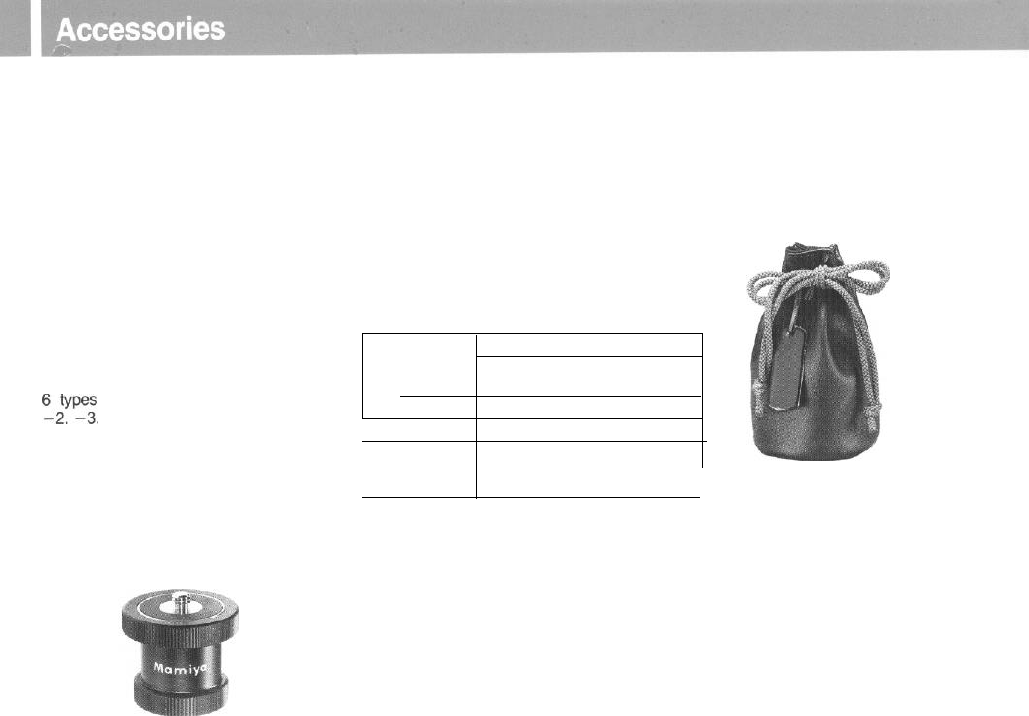
[Lens hood]
For 50mm
f/4:
Bayonet type
(58mm
in diameter)
For 75mm f/3.5: Bayonet
type
(58mm in diameter)
For
150mm
f/4.5
Screw-in type
(67mm in diameter)
All are supplied with the lenses.
[Diopter correcting lens]
Focusing accuracy diminishes when the
eye diopter is incorrect. So, it is advisable
that near and far sighted people use diopter
correcting lenses.
Fit the proper diopter correcting lens to the
eyepiece.
“,v”_”
are available: +3, +2,
+1,
-1,
[Tripod adapter
N]
(common to
M645
Super)
This is used to mount the camera to the
tripod head.
Even when the tripod has a large head, the
adapter allows film to be loaded, while the
camera is attached to the tripod.
31
[Auto Close up Lens
]
[Lens case] Type A
The close-up adapter “Auto Close up Lens”
The lens case is made of special material
is designed for use with standard
75mm/
which is very soft but tough.
f3.5 lens. Dimension: bottom diameter is 90mm and it
It will be very
convenient
for taking
close-
is
160mm
in length
ups of portraits, plants, flowers and insects,
as well as for the reproduction of books, and
similar items.
It can be simply mounted on or removed
from the camera, without special adjust-
ments. It easily couples with the
rangefin-
der, and allows close-ups to 50cm. (20 inch)
Subject
distance
From the film 110 - 61.7 (cm)
From the front frame of the
auto
close
up lens 100-50 (cm)
Magnification x0.07 (100cm)-0.17
(50cm)
Area covered 75x75-34x34 (cm)
Percentage of
the field of
90%-100
%
view visible
Camera type: 6
x
6cm format, interchangeable lens, rangefinder camera
Film type: 120 (12 exposures) or 220 (24 exposures)
roll
film
Actual negative size: 56mm x 56mm
Lens type: Wide Angle
5Omm
f/4
Standard 75mm
f/3.5
Telephoto
150mm
f/4.5
Focusing: A single 185° stroke
Shutter:
#OO
electronic
leaf
shutter; B, 4 to
‘1500
second, electromagnetic release; X con-
tact, synchronizing at all speeds with hot shoe and cord
socket;
electronic self timer
Exposure Control: Aperture priority AE; Silicon Photo Diode receptor
in
viewfinder; meter-
ing range: EV 3.5 to EV 18 (75mm lens f/3.5,
IS0
100); exposure compensation:
+2 to -2EV (in
l/3
EV increments)
Film speed range:
IS0
25
-
1600
Rangefinder:
Lens declination, double image superimposing system; base length 60mm
(effective base length
34.8mm)
Viewfinder: Coupled with rangefinder; automatic bright line frame selection
(50mm,
75mm,
150mm): parallax compensation; magnification: 0.58X; 83% of the field of view
visible at infinity; built-in shutter speed and exposure display, safety interlock
warning L.E.D.
Internal “Dark Slide” curtain: For interchangeable lens function
Safety mechanisms:
1.
Double exposure prevention
2. Exposure prevention when internal dark slide engaged
3. Exposure prevention when lens mount is retracted
Power supply: Two
1.5V
batteries (MS 76,
SR44
or
LR44)
Dimensions: Camera body: 6.1” (155mm) length
x
4.3”
(109mm)
height
x
2.7”
(69mm)
depth
-
2.1” (54mm) depth when lens mount retracted
Body with 75mm lens: 6.1”
(155mm)
length
x
4.3”
(109mm)
height
x
4.2”
(106mm) depth
-
2.9” (75mm) depth when lens mount retracted
Weight: Camera Body: 31.4
oz
(890g)
Body with 75mm lens: 40.2
oz
(1,140g)
*
Specifications and design are subject to change without notice.
32
Uniquely designed to prevent mistakes, the New Mamiya 6
incorporates numerous safety features.
If the shutter will not function, it is very likely due to user
error rather than camera malfunction. Should something
appear to go wrong, be sure to review the following points.
0
When the shutter will not function.
@
Is the power on/off lever set to the ON position?
@
Has the film been completely advanced to the
next
frame?
Have all the exposures already been made (12 with
120, 24 with
220)?
@
Has the film advance lever been wound until it stops?
@
Is the lens mount retracted?
@
Is the light shield curtain closed?
(In the case of examples
0
-
0,
the red LED will
flash a warning on the upper right side of the view-
finder.
0
When the lens cannot be removed:
0
Is the light shield curtain open?
@
Is the lens mount retracted or stored in the body?
0
Be
sure to use new batteries.
*
Expose the camera to cold air only when in use.
t
Batteries
which will not
function
at low temperatures may be used when
returned
to
use at normal temperatures.
Avoid quick heating or cooling as unstable voltage may result.
An automatic circuit will signal battery depletion.
When the shutter release button is touched slightly, an LED
blinks to indicate a suitable shutter speed. A few exposures can
be made, but replace the batteries as soon as possible.
When the batteries are depleted, the LED ceases to light and
the shutter cannot be released.
l Replace both batteries at the same time. Avoid using old
batteries with new ones, and avoid mixing different types
of batteries.
*
When inserting batteries in the battery chamber, verify correct
polarity. If contaminated with oil, sweat or other foreign matter,
be sure to wipe clean with a dry cloth or lens tissue.
33
0 If the camera is not to be used for a long time, remove the
batteries and film.
l Do not store the camera at temperatures exceeding
40°C
or below
-
10°C. Also avoid storing in a damp or sea air environ-
ment.
When stored in the vicinity of gaseous chemicals, such as
naphthaline and formalin, the camera and film may be adversely
affected. Read the instructions on the film carefully for proper
handling procedures.
9
As
your
camera is a precision instrument, avoid exposing it to
vibrations or severe shocks.
When handholding your camera, always use a neck strap and
exercise extreme caution when removing lenses and adjusting
the mount.
*
Prolonged disuse does not lengthen camera life, but shortens
it.
So
,
when storing for a long time, periodically take the camera
and release the shutter several times to keep it in good condi-
tion.
l
Do not touch either the front or the back of the lens surfaces.
If either needs cleaning use blower or lens tissue to remove dust
particles. A fingerprint can be removed with a drop
of
lens
cleaner and wiped off with lens tissue.
l Carefully read all instructions in the manual.
Periodic Examination
In order to maintain the camera in its best condition, it is advis-
able to pedodically check all functions.
When the camera has not been used for a long time, or when it
is to be used for very important photographs, check the camera
or take some trial pictures beforehand. (Be sure to check the
batteries, electronic flash synchronization, film advance,
upper and lower images in the rangefinder, correct
m
position, and shutter function.)
For a general
overhaul, cleaning, or repairs, take the camera to
your nearest authorized Mamiya Service Center or ask your
camera shop for advice.
This product employs a protective circuit for prevention of electrostatic
electrification. Should an electrostatic trouble occur, be sure to turn off
power to this Product before using it again. Be careful not to touch the
electrical
contact
of this
Product.
In rare cases,
this Product may be affected by a
strong
external
electromagnetic wave. In such cases, carefully use this Product.
34
