Mamiya Rz67 Pro Instruction Manual
RZ67 Pro - Instructions Mmy_rz67_pro_v4 Free User Guide for Mamiya Camera, Manual
RZ67_Pro_v4
2015-07-27
: Mamiya Mamiya-Rz67-Pro-Instruction-Manual-776210 mamiya-rz67-pro-instruction-manual-776210 mamiya pdf
Open the PDF directly: View PDF  .
.
Page Count: 43
- Cover
- Introduction
- Table of Contents
- Special Features
- Names & Functions of Parts
- Inserting a Battery
- Attaching/Removing Lenses
- Focusing Hood Operation
- Raising/Lowering Magnifier
- Releasing the Shutter
- Release Collor Button
- The R-M Lever
- Cocking Lever Operation
- Monitor Lamps
- Shutter Speed & Aperture
- Focusing/Locking the Focusing Knob
- The Revolving Back
- The Roll Film Holder
- Taking Photographs
- Unloading the Film
- Distance Scale/Depth of Field
- Close-up Photography
- Using a Tripod/Long Exposures
- Mirror-up Operation
- Flash Photography
- Use of Carrying Strap
- Interchanging Magnifier/ Hood/ Screen
- Attaching a Lens - Special Cases
- Overriding Safety Features
- Camera Back Lock System
- RB Series Lense & Accessories
- Troubleshooting
- Care of the Camera
- Specifications

Building upon its long experience since the introduction in
1970 of
the
revolutionary
RB67
SLR with revolving back and the later refinements
incorporated into the
RB67
Pro-S, Mamiya Camera Company has
utilized the latest electronic technology in order to fulfill its
Commitment
to advanced amateurs and professional photographers by producing
the ultimate 6
x
7cm
camera, the Mamiya
RZ67.
The result is a camera with incredible versatility and handling ease.
ideally suited for commercial,
industrial, scientific, news, portrait, scenic,
and fashion photography. In fact, the Mamiya
RZ67
knows no bounds
in photographic application?.. However, in order to fully take advantage
of its capabilities, as well as avoid possible mishandling, be
sure
to care-
fully read this instruction manual before attempting to use your new
camera.

Contents
Special Features of the Mamiya
RZ67................................................
...
2
Outline of Names and Functions of
Partss
..................................................
4
Inserting
a
Battery...............................................................................
.
10
Attaching/RemovingLenses......................................................................
11
FocusingHoodOperation.........................................................................
12
ReleasingtheShutter.................................................................................
14
Shutter SpeedandAperture..............................................................
.....17
Focusing and Locking the Focusing Knob...............................................
18
TheRevolvingBack.......................................................................
. . ..
19
The
RollFilm
Holder............................................................
.
...................20
Loading the
Film
Holder.........................................................
........
.. ..
21
TakingPhotographs...................................................................................
24
Unloading the
Film
......................................................................................
25
DistanceScale/Depth-of-Field .....................................
.............................
26
Close-upPhotography..............................................
............................... 27
Using a Tripod/Long Exposures
...............................................................
28
Mirror-upOperation.................................................................................... 29
MultipleExposures.............................................. .................................... 30
Flash
Photography.....................................................................................
31
Close-up Photography with Auto Extension Tubes................................... 32
How toUse fheCarryingStrap................................................................ 33
Interchanging Magnifier/Focusing
Hood/Focusing
Screen
....................
34
Attaching a Lens with Shutter Released or Mirror Raised......................... 35
Camera
Back
Lock System........................................................................ 37
RB SeriesLensesand Accessories
.......................
................................ 38
Troubleshooting .........................................................................................
39
Care of theCamera.................................................................................... 40
Mamiya RZ67
Specifications
............................
......................................
41

Special Features of the Mamiya
RZ67
The
following exemplify how the outstanding features of the
RB67
have
been
further refined in the Mamiya
RZ67,
resulting in un-
precedented quality and performance.
1. Ultra Performance Lenses
Without changing the outer diameter of the lens mount on the camera
body, the inner diameter of the mount on the RZ67 has been increased by
7mm (from 54mm on the RB to
61mm
on the RZ). Furthermore, the
flange back (distance of the lens mount to film plane) has been reduced
by the same amount (from 111 mm on the RB to
104mm
on the RZ).
The increase in
size
of the diameter of the mount and decrease in the
distance of the flange back have made it possible to design a new series
of ultra performance lenses designed exclusively
for
the Mamiya RZ67,
offering performance previously believed unattainable. It is now also pos-
sible to design new, specialized optics, such as shift or high speed
lenses.
Moreover, any RB lenses already in the possession of the photo-
grapher can be used on the RZ67 without an adapter or loss in perfor-
mance.
2. Improved Handling
It
is now possible to advance the film and Exposure Counter, set the
mirrorand Light Baffle, and cock the lens with
a single stroke of the Cock-
ing Lever.
With Winder
RZ
attached to the camera body, a gentle touch of the
electromagnetic release makes it possible to effortlessly take consecu-
tive photographs.
As the revolving back is rotated to change from horizontal to vertical for-
mat, or vice versa, the
viewfinder
masks also simultaneously change
automatically, preventing the photographer from seeing anything other
than the area actually being photographed.
While retaining the “T” (time)
setting
on the lens, a “B” (bulb) setting
has been incorporated into the Shutter Speed Dial of the camera body for
added versatility.
The mirror-up mechanism is now automatically engaged as soon as a
cable release is attached to the Mirror-up Socket.
3. Improved Performance
Shutter speed accuracy and durability have been significantly en-
hanced by utilizing an electromagnetic release and Mamiya’s own Mov-
ing Coil system in conjunction with the Seiko
#1
electronic shutter. Addi-
tionally, the longest fixed shutter speed has been increased to 8 seconds,
making the camera more flexible than ever.
When the camera is not prepared for use, the shutter release automati-
cally locks and awaming lamp illuminates in the viewfinder, informing the
photographer precisely what needs to be done, a red lamp indicating that
the Dark Slide must be removed from the Film Holder, and an orange
lamp reminding the photographer to advance the Cocking Lever.
When using a Mamiyalite electronic flash, a green LED illuminates in
the viewfinder when the unit is fully charged and ready to fire.
For viewfinders with built-in exposure meters, the film speed, shutter
speed, and aperture information is electronically transmitted to the expo-
sure meter.
With a Mamiyalite
MZ36R
or
MZ18R
attached to the RZ67, aperture
and film speed information is automatically and electronically relayed to
the flash unit, controlling its light output.
’
_
_
By attaching Winder RZ and Receiver MZ to the RZ67, remote control
of the camera is possible with Transmitter MZ, thereby immensely in-
creasing the applications of the camera.
(Special Features Shared with the
RB67)
The Ideal Format
The 6
x
7cm format not only offers an area approximately 4.5
x
greater
than the 35mm negative size, but it enlarges to standard sizes, such as 8
x
1 0", with virtually no cropping, making it possible to utilize the full nega-
tive area. Ideally suited for publication and standard print sizes, the 6
x
7cm format makes the ideal choice for professional photographers.
2

Instant Change in Format
By
revolving
the back 90’, the photographer can instantly change from
horizontal to vertical format, or vice versa. In the
RZ67.
viewfinder masks
also change automatically, totally eliminating the chance of exposing the
film with the incorrect composition.
Peerless Film Flatness
After prolonged testing and research, Mamiya has developed Film
Holders which solve the problem of film curl by retaining the film perfectly
flat across the entire film plane. Thus, the full potential of Mamiya-Sekor
ultra performance lenses and the large negative size are realized.
In addition to unparalleled film flatness, the Roll Film Holders also in-
corporate a double exposure prevention mechanism. with multiple expo-
sure provision as well.
Interchangeable Film Holders
120, 220 and Polaroid holders are available which not only allow the
photographer to select a holder in accordance with the application, but
also make it possible to change film in mid-roll from color to black and
white, or color negative to color reversal.
Viewing Ease
The standard
Focusing
Hood opens with a single touch. exposing a
large: bright image on the Focusing Screen. With another touch, the
Magnifier Instantly rises for critical focusing. The
four
sides of the Focus-
ing Hood totally block the screen from extraneous light so that the image
always remains bright and clear, enabling the photographer to work
speedily and accurately. Both hood and screen are instantly interchange-
able.
Lens Shutter Design
Use of a lens shutter makes it possible to synchronize electronic flash
at all shutter speeds, not only eliminating the problem of ghost images
(secondary images recorded by available light) occasionally encoun-
tered with focal plane shutters, but also enabling the photographer to
balance flash illumination with available light.
Mirror-up Photography
For occasions when the camera is mounted on a tripod, both the
RB
and RZ67 allow the photographer to raise the mirror well before releasing
the shutter. Since "mirror shock” is thereby completely eliminated.
razor-
sharp photographs are still possible when working at high magnifications
or long shutter speeds. This feature is especially useful
for
close-up work,
telephoto photography, and use of “slow” shutter speeds.
Built-in Bellows
Since the
RB
and
RZ67
have a built-in bellows with a maximum exten-
sion of
46mm,
close-up photography is possible without accessories,
Moreover. by adding an extension tube, a
magnification
ratio of greater
than 1 : 1:1 (lifesize) is possible.
Additional Features
The Film Holder can not be removed from the camera back unless the
Dark Slide is first inserted into the holder, thereby protecting the film from
accidental exposure to light. Additionally, after the holder is removed, the
Dark Slide remains locked to the holder, again guarding the film from
light.
When using wide-angle lenses, the Focusing Knob of the camera can
be locked at the
hyperfocal
distance for focus-free photography. The
Focusing Knob Lock Lever also proves useful when engaged in close-up
photography, using telephoto lenses, or taking consecutive exposures of
a stationary subject.
Finally,
multiple exposures become possible with a mere flickof the RM
Lever.
3
l
Outline of Names and Functions of Parts
(Detailed instructions follow.)
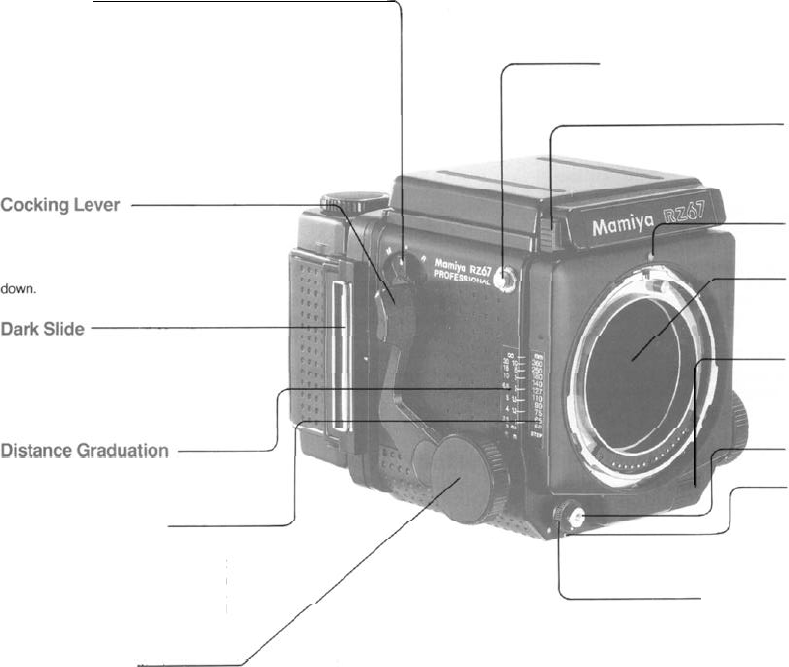
R-M Lever
For double exposure prevention and
normal operation. keep R-M Lever
aligned with central index mark.
R: The lever is set
to
this
position
before revolving the back.
M: Set the lever
to
this position when
desiring to take multiple exposures.
The lever is also kept at this position
when releasing the shutter without
film in the camera.
Carrying Strap Lug
Focusing Hood Lock Button
To remove the hood, push in on
both
(right
and left) lock buttons and lift
hood
off camera
body.
In a single operation this lever ad-
vances the films,
cocks
the shutter. and
sets the mirror. For proper operation.
be sure to push the lever completely
Lens Alignment Dot
Mirror
Do not touch the mirror under any
cir-
cumstances.
As a safety feature. the
shutter
can
not
be
released unless the Dark Slide is
Shutter Release Jack Cover
Sliding the
cover
upwards
reveals elec-
trical
contacts (lack) for an auxiliary
shutter release.
first removed.
Make it a habit to first
re-
move
the Dark Slide before attempting
to take a photograph.
A single scale indicating distance in
meters and feet is
used
for all lenses.
Focal Length Scale
Curved
lines representing
most
focal
lengths
appear on this scale. The point
at which the appropriate focal length
curve intersects
the Distance
Gradua-
lion indicates the distance focused
upon
by the lens.
Focusing Knob
Shutter Release Button
Collar Stop Lever
As a safely feature. the Release Button
Collar
can
not be rotated to the orange
dot
position
until the Collar Stop Lever
is first depressed.
Release Button Collar
For normal operation the white dot on the Release
Button Collar is kept aligned with the white dot on the
Collar Stop Lever. Aligning the white dot of the
collar
with the red dot on the camera body
Iocks
the Shutter
Release Button. Aligning the
collar with
the orange dot
makes it possible to operate the shutter at approxi-
mately
1/400
sec. without
batteries
in the camera.
4
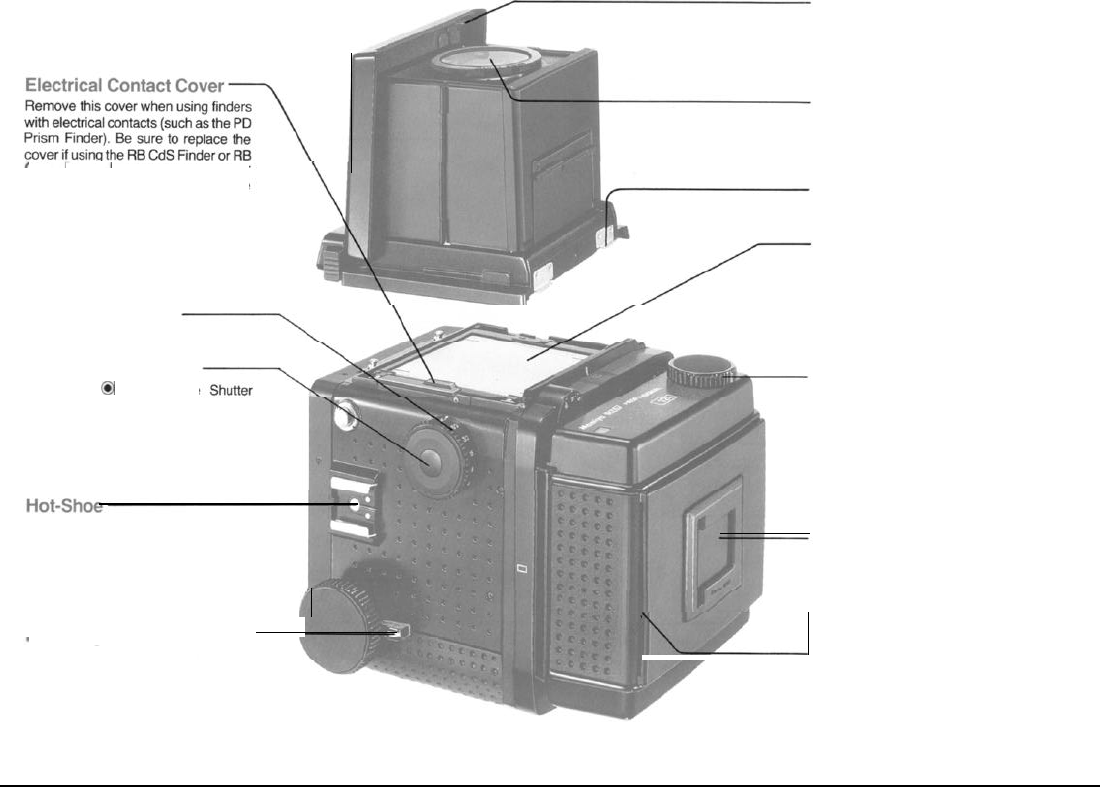
Magnifier Release
To raise the
magnifier.
push the Mag-
nifier Release to the left.
Magnifier
Interchangeable with other magnifiers
CdS
Prism
Finder, for the finder
switches will not Operate without the
cover in place.
in various diopter strengths.
Focusing Hood Catch
Focusing Screen
Shutter Speed Dial
The
visible field of the focusing
screen
automatically changes from vertical to
horizontal format, or vice-versa, as the
revolving back is rotated. The screen it-
self is also
interchangable.
Lock Release Button
When the
@
mark on the
Film Advance Knob
Speed Dial is aligned with the index
mark on the camera
body,
the dial will
lock in
place.To
unlock it, rotate the dial
while pushing in on the Lock Release
Button.
/
Focusing Knob Lock Lever
Memo Clip
Holds the film box top, or memo, as a
film-type reminder.
L
Dark Slide Slot
5
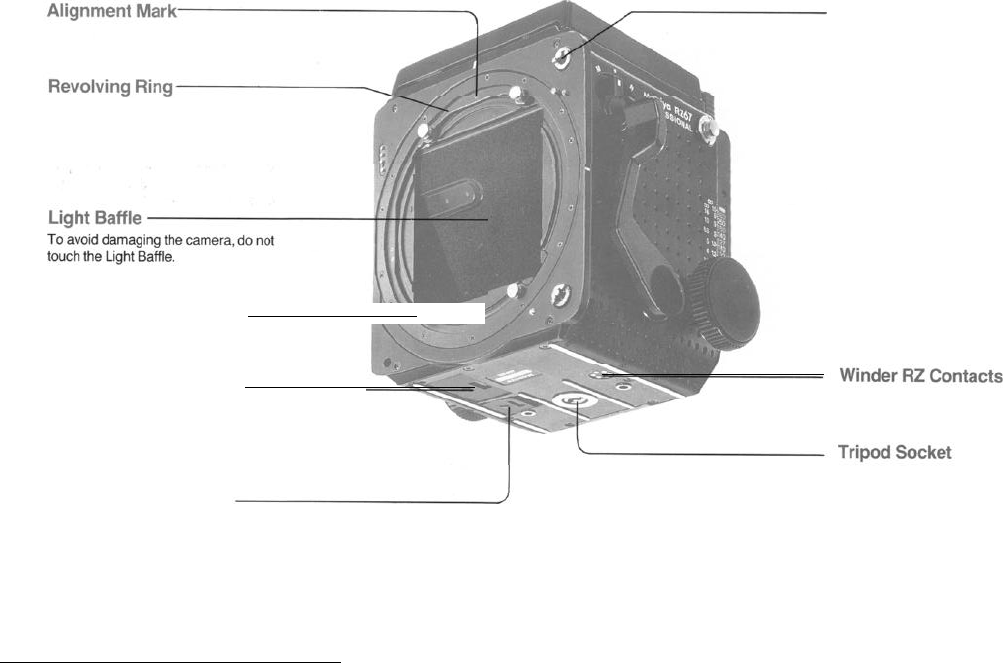
The small circle appearing on the Re-
volving Ring should be aligned with
either the uppermost (“12
o’
clock”) or
right-hand side
(“3
o’
clock”) index.
Film Advance Coupler
The central
pin transmits a signal to the
film holder which disengages the film
advance-stop and activates the multi-
ple exposure prevention mechanism.
To avoid damaging the
camera
do not
“.::::B+
Camera Back Mount Pin
Battery Chamber Cover
The camera uses a 6 volt alkaline or
silver oxide
battery.
The
socket
has standard U
1/4"
Winder Coupler Cover
threads which can be removed, con-
verting
it
to a
3/8"
socket.
6
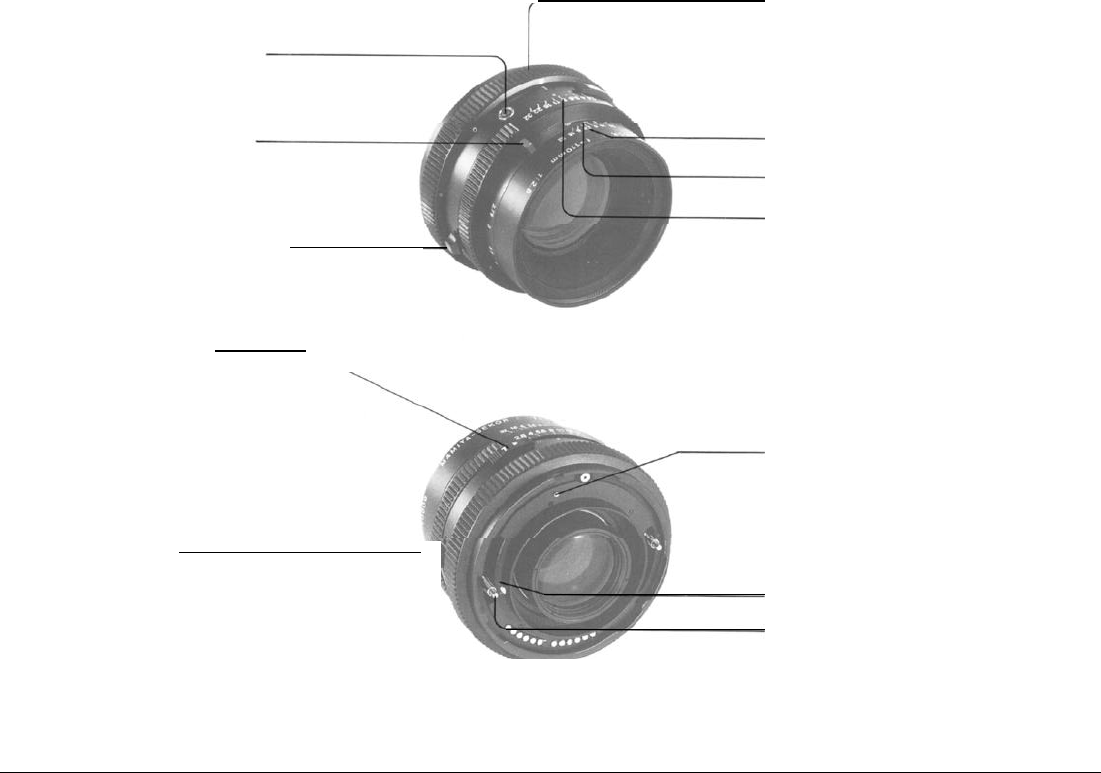
Flash Sync Terminal
(
X-sync
)
Lens Distance Scale Knob
Depth-of-Field Preview Lever
Time Exposure Lever
Mirror-up Socket
Bayonet Ring
The Bayonet Ring is a breech mount which se-
cures the lens
onto
the
camera
body.
As a safety
feature, the lens can not be removed from the
camera body unless the mirror is set (lowered),
thereby assisting the Light Baffle in shielding the
film from light.
Depth-of-Field Scale
Lens Distance Scale
Aperture Ring
Shutter Lock Pin
When the lens is removed from the camera body.
the spring-loaded Shutter Lock Pin emerges.
locking the shutter and preventing accidental
shutter release. If desired. the
shutter
can
be re-
leased by rotating the Shutter Cocking Pins
clockwise while depressing the Shutter
Lock
Pin.
Merely
screwing
a cable release into the
Mirror-
up
Socket prepares the camera for mirror-up, or
vibration-free,
photography.
When this is done
and the Shutter Release Button is depressed.
the
mirror and
Light
Baffle rise. After rising, and any
trace of vibration is
eliminated, the shutter can be
released with the cable release.
Cocking Position Marks
Shutter Cocking Pins
When manually cocking the shutter, be sure to
rotate the Shutter Cocking Pins as far as they will
go (to the red dot).
7
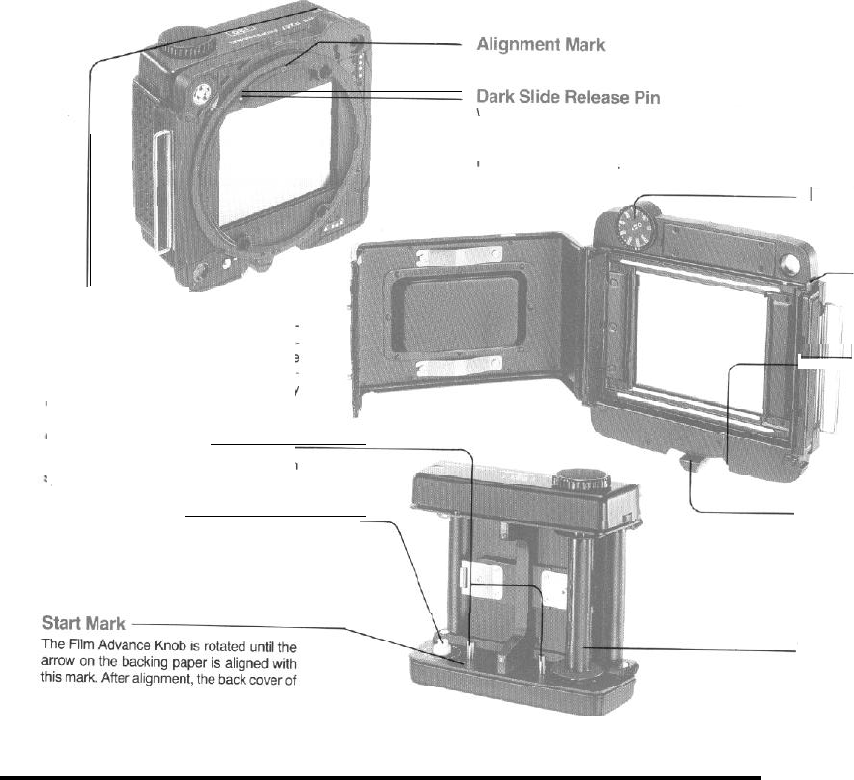
Roll Film Holder RZ
When the Film Holder is removed
from
the camera back, the Dark Slide is
automatically locked in the holder, preventing accidental removal. Placing the
Film Holder
onto
the camera back automatically unlocks the Dark Slide, so that
it can easily be removed
Film Speed Dial
(I-SO)
Back Cover Latch
Exposure
Counter
After releasing the shutter, a red band
ap-
pears next to the frame number in the Expo-
sure Counter. Upon advancing the film, the
red band disappears, informing the photo-
grapher that tie film is advanced and ready
to be exposed.
Spool Release Pins
Depress these pins to load or unload a
film
spool.
Film Spool Stud
A new roll of film is loaded on this stud with
the paper leader pulled over the roller in the
direction indicated by
the
dotted line and
arrow which appears
around
the stud.
-.--2
Lock Release Lever
Holder Lock Lever
Should one inadvertently attempt to remove
the Film Holder
without
first inserting the
Dark Slide, the Holder Lock Lever will not
unlock, thereby preventing
accidental
ex-
posure
of
the film to light.
the film holder is closed, and the film
ad-
vanced until the numeral “1” appears in the
Exposer Counter.
Take-up Spool
Alter
removing
an exposed roll
of
film,
place
the empty spool at this position.
8
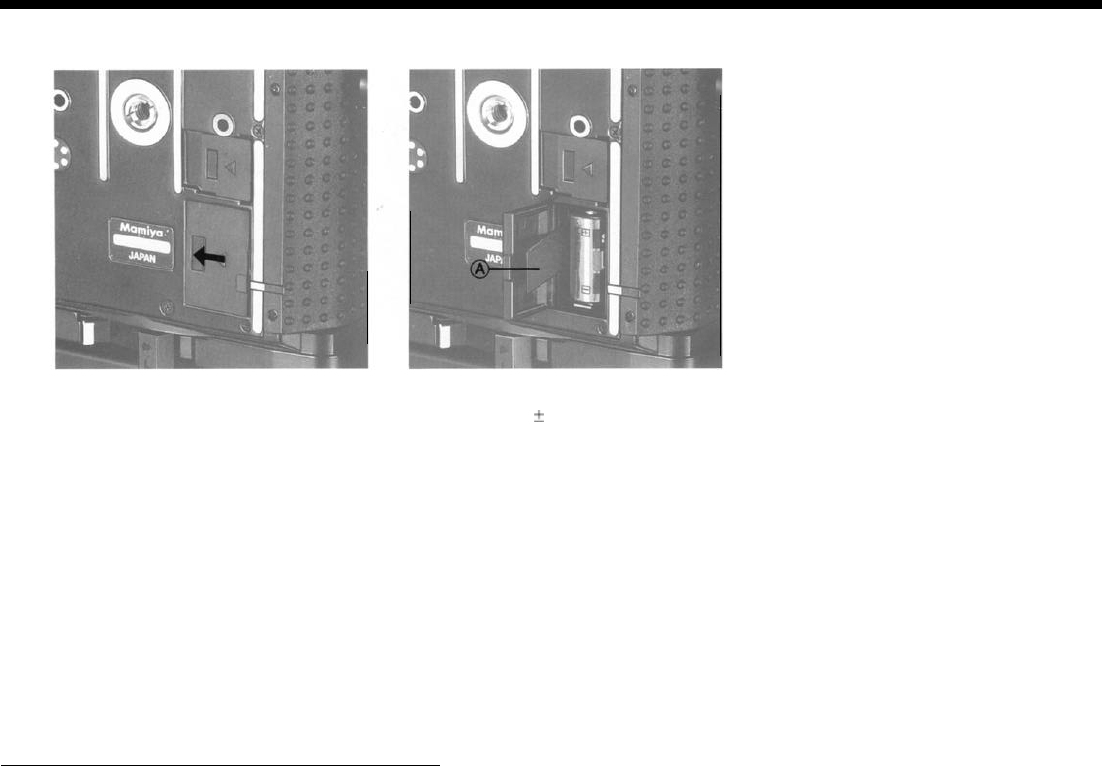
Inserting a Battery
Because the Mamiya RZ67 does not func-
tion properly without a battery, be sure to load
one into the Battery Chamber before attempt-
ing to use the camera.
The camera uses one of either of the follow-
ing batteries:
4LR444(6V alkaline manganese battery)
4SR44
(6V silver oxide battery)
1.
Pull the Battery Chamber
Cover in the direc-
tion of the arrowhead to open it.
2. Insert the battery into the chamber, taking
care to match the
f
poles of the battery with
those shown in the diagram found in the
chamber. Future replacement of the battery will
be simplified if the Battery Removal Ribbon (A)
is placed under and over the battery.
l
Even
if battery power is depleted, aligning the
Re-
lease Button Collar
with the orange dot will make it
possible to release the shutter at approximately
1/400 sec.
CAUTION:
1.
Be
sure
to match the poles of the battery with those
shown in the diagram in the chamber.
2.
Carefully wipe the contacts of the battery before in-
serting it into the chamber. Failure to do so could result
in
poor
electrical contact and consequent erratic func-
tioning of the camera.
3. When not using the camera for a long period of
time, remove the battery and store it in a
dry,
cool
place.
4. Used batteries can be dangerous. Consequently,
when disposing of a battery. do
not
place it in a fire or
short circuit it.
5. Battery life
varies
considerably in accordance with
the following factors: battery, type, battery brand,
freshness of the battery when purchased, the condi-
tions under which the
battery
was stored before
purchase and is stored after purchase, temperature at
the time of use, whether the battery receives frequent
or intermittent use.
6. Silver oxide batteries have longer battery life than
alkaline batteries.
1010
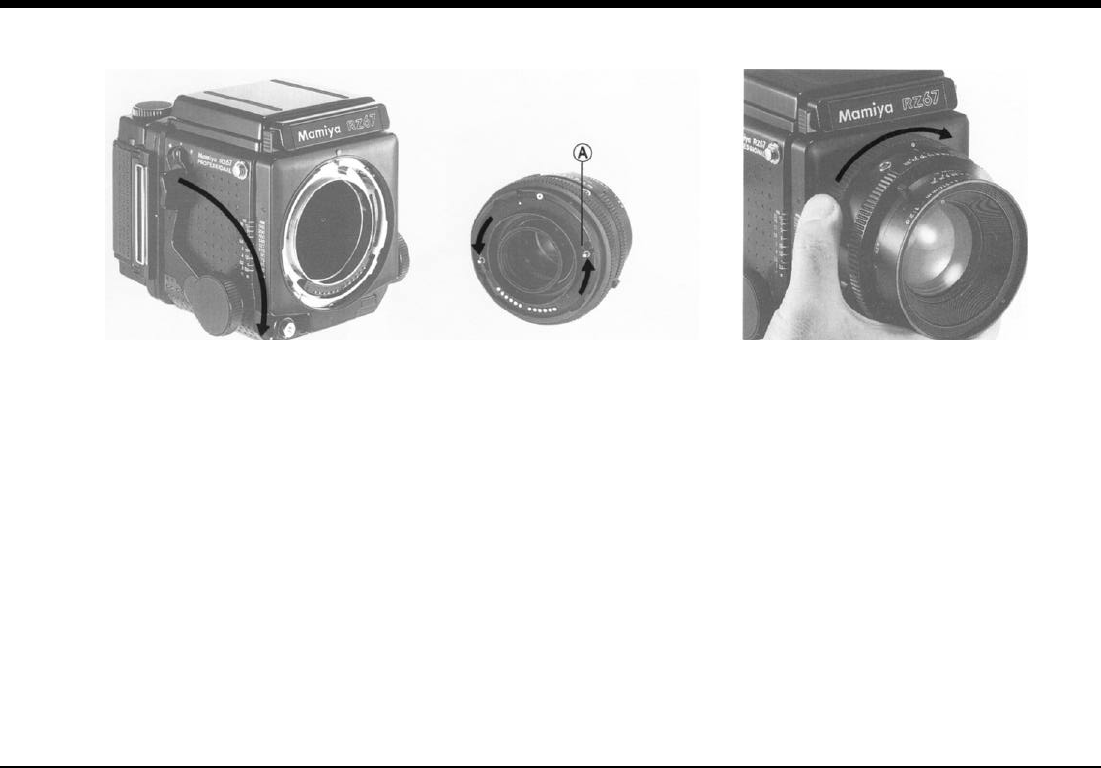
Attaching/Removing Lenses
Attaching
Lenses
Before attaching a lens to the camera body,
the mirror of the body must be set and the shut-
ter of the lens cocked.
(A) Setting the Mirror
1. Remove the Body Cap from the camera.
2. Make sure the mirror is set (lowered). If the
mirror is raised, lower it by pushing the Cocking
Lever as far as it will go toward the front of the
camera body.
(B) Cocking the Lens Shutter
1.
Remove the Rear Lens Cap.
2.
If the lens shutter is not cocked, firmly rotate
the Shutter Cocking Pins as far as they will go
(to the red dot). When releasing the pins, they
will return to the green dot and the shutter
blades will remain open.
l
Moving the Shutter Cocking Pins only as far as the
green dot will result in incomplete
shutter
cocking.
Be
sure to rotate
them as far as the red dot.
l
Whenever a lens
is
removed
from the camera
body
it is already Cocked.
(C) Attaching the Lens
1.
With the front of the lens facing you, rotate
the Bayonet Ring counterclockwise as far as it
will go (the white dot on the Bayonet Ring will
be aligned with the central index of the lens).
2. Seat the lens on the camera body with the
central index of the lens lined up with the red
Alignment Dot of the camera
body. Next,
rotate
the Bayonet Ring of the lens firmly in a
clockwise direction, securing the lens to the
camera body.
11
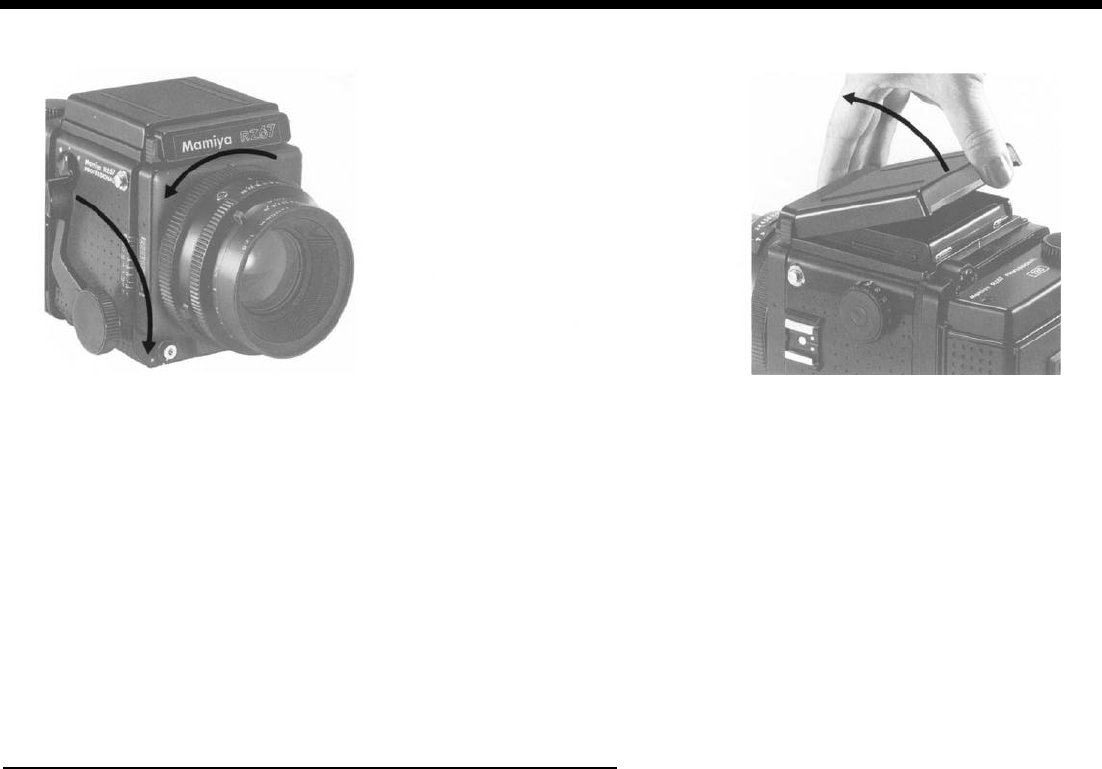
Focusing Hood Operation
Removing Lenses Raising the Focusing Hood
1.
Push the Cocking Lever of the camera body
completely down, setting the mirror and
cock-
ing the lens shutter.
2. Rotate the Bayonet Ring of the lens coun-
terclockwise as far as it will go (white dot of
Bayonet Ring will align with central index of
lens) and remove lens.
Merely
lift
the back of the hood until it opens
completely.
l If you try to rotate the Bayonet Ring coun-
terclockwise without first depressing the Cock-
ing Lever of the camera body, the movement of
the ring will be interrupted, making it impossible
to remove the lens. This safety feature assures
that the mirror is always lowered whenever the
lens is removed, thereby assisting the Light
Baffle in shielding the film from light.
12
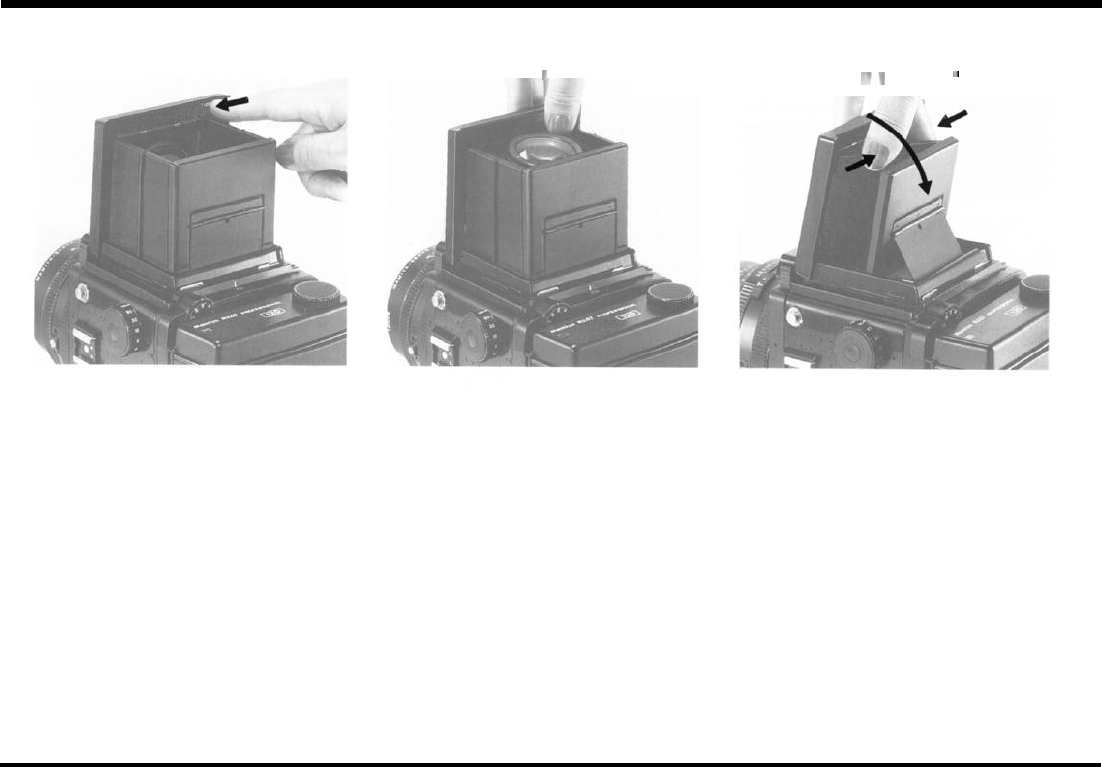
Raising the Magnifier Lowering the Magnifier
.
r
Folding the Focusing Hood
Slide the Magnifier Release slightly to the left
and the Magnifier will pop up into position.
Gently push the base plate of the Magnifier
all the way down until it locks in place. Afler lowering the Magnifier, gently squeeze
the right and left panels of the hood together
while closing it.
13
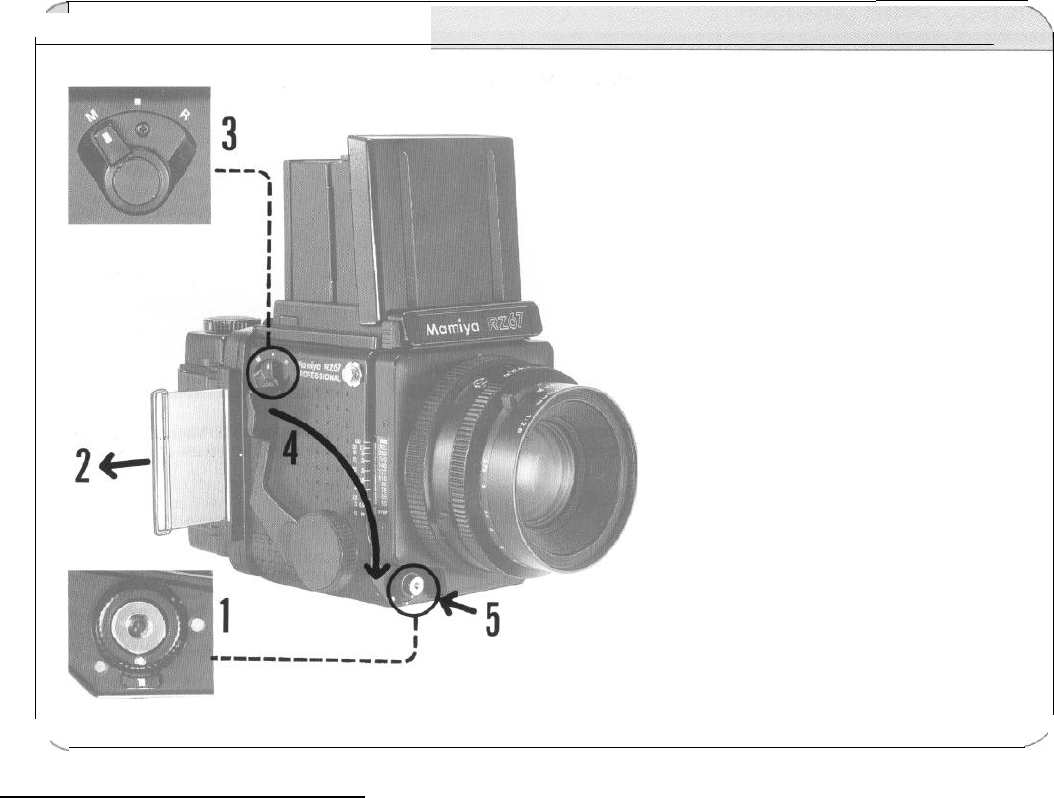
r
Releasing the Shutter
It is best to
become
acquainted with the
method of releasing the
shutter before using
film
in the camera.
1.
2.
3.
4.
5.
Rotate the Release Button Col-
lar until the white dot on it is
aligned with the one
im-
mediately below (on the Collar
Stop Lever).
Remove the Dark Slide.
Set the R-M Lever to the
“M”
(multiple exposure) position.
Push the Cocking Lever all the
way down.
Press the Shutter Release But-
ton.
The first
4
steps can be done in any
order. After you are thoroughly famil-
iar with the above steps, return the RM
Lever to its normal setting (the center
position).
\
/
14
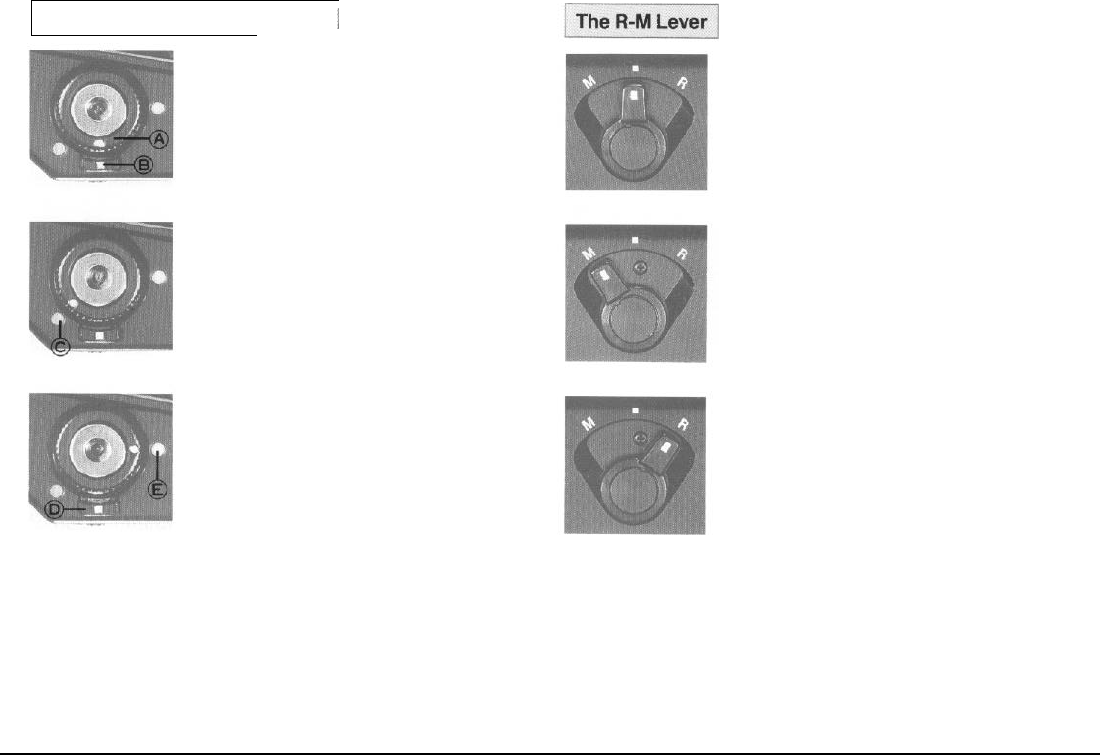
Using the Release Button Collar
I
1. For normal operation, align the white dot on
the Release Button Collar (A) with the white dot
on the lever below (B). When this is done, the
Shutter Release functions electromagnetically
and the various safety mechanisms operate
electrically.
2.
When the camera is not in use, lock the Shut-
ter Release Button. This is done by aligning the
white dot of the Release Button Collar with the
red dot (C) on the camera body. By locking the
Shutter Release Button, you
not only prevent
un-
intentional exposure of film, but also prevent ac-
cidental battery drainage caused by pressure on
the Release Button. For this reason, be sure to
lock the Release Button when carrying the cam-
era in a bag.
l Emergency Shutter Operation
If you were to suddenly
find
yourself with a
dead battery in the midst of a photographic ses-
sion,
switch
over
to
the emergency Shutter oper-
ation mode. In order to do so, push the Collar
Stop Lever
(D)
toward the camera body and
while holding
it there align
the white dot of the Re-
lease Button Collar with the orange dot (E) on the
camera body. The shutter will now operate (even
without a battery) at approximately
1/400
sec.,
regardless of the setting of the Shutter Speed
Dial.
Because electricity is not being used in the
emergency shutter operation mode, the Monitor
Lamps in the viewfinder will not illuminate.
Moreover, even if the Dark Slide is not with-
drawn, the shutter can still be released, so exer-
cise
care.
The Normal Position
For normal operation of the camera, the R-M
Lever should be kept in the center position,
aligned with the index mark. Setting the lever to
this position activates the double exposure pre-
vention mechanism so that photo after photo can
be taken without fear of
accidental
double expo-
sures.
Multiple Exposure Position
When desiring to make deliberate double of
multiple exposures, set the R-M Lever to the
"M"
position. When this is done, pushing down on the
Cocking Lever will cock the lens shutter, but will
not advance the film. Upon completion of the
multiple exposure, do not forget lo
return
the R-M
Lever to its normal (center) position. The lever is
also set to ‘M’ when testing the shutter without
film in the camera.
Revolving Back Position
Before revolving the back
,
set the R-M Lever to
the
"R"R"
position. After this is done, the lever will
automatically return to the normal position when
the Shutter Release Button or Cocking Lever is
next
used.
15
[
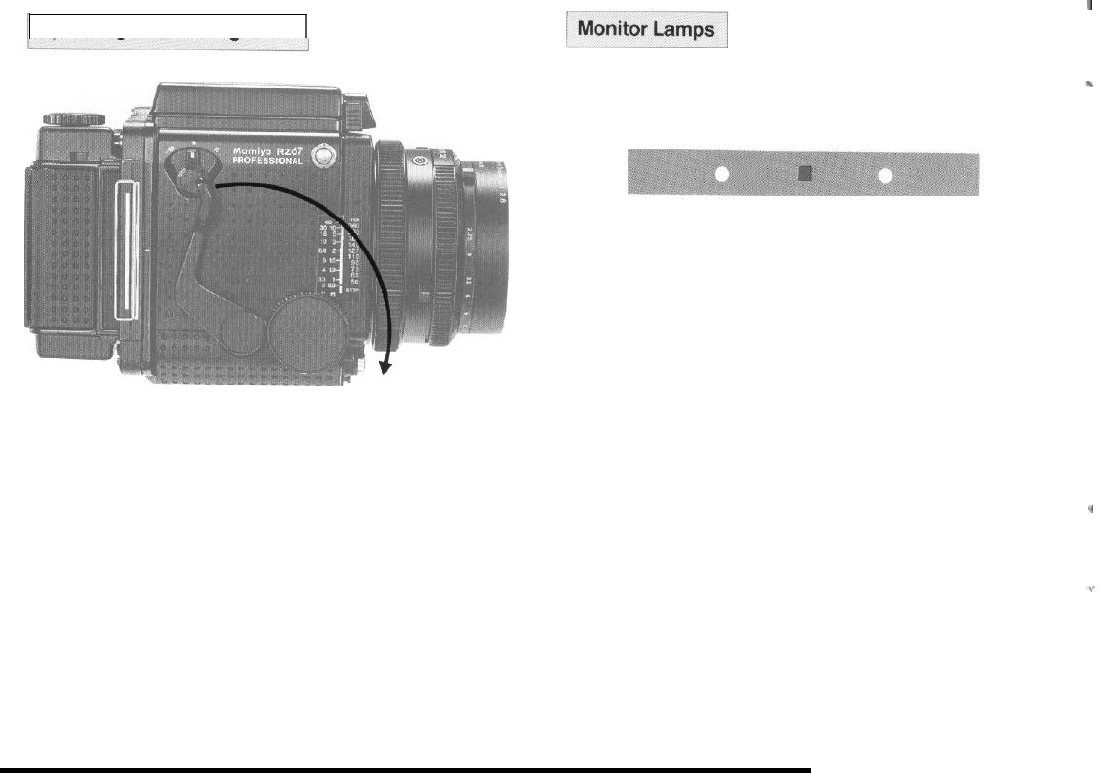
Operating the Cocking Lever
/
When depressing the Cocking Lever, be sure to push it all the way for-
ward (toward the Shutter Release Button).
If the Cocking Lever
is
not pressed forward as far as it will go,
It
will re-
turn to its original position when released, but the shutter will not be
cocked. At such a time, the shutter will not operate and an orange warn-
ing lamp will illuminate in the viewfinder when the Shutter Release Button
is depressed.
Depressing the Cocking Lever advances the film, sets the
Light
Baffle
and mirror, and cocks the shutter.
I
Under the following circumstances an orange, red,
or green
lamp will il-
luminate
in the viewfinder when the Shutter Release
Button is depressed.
1. Cocking Lever Not Set (Orange
warning lamp)
If
the Cocking Lever has not been depressed or has been only partially
depressed, an orange warning lamp will illuminate in the viewfinder when
the Shutter Release Button is pressed,warning the user that the film has
not been advanced, the mirror not been set, and the shutter not been
cocked.
2. Dark
Slide in Holder
(Red warning lamp)
When attempting to take a photograph without removing the Dark Slide
from the Film Holder, the Shutter Release Button will lock and a red warn-
ing lamp acts as a reminder to withdraw the Dark Slide.
3.
Mamiyalite Charged
(Green signal lamp)
When a Mamiyalite ZE, MZ 18
R,
or MZ 36
R
is connected to the
Hot-
Shoe and fully charged, a green lamp will illuminate upon pressing the
Shutter Release Button halfway, indicating that the flash unit is ready to
fire.
,
4.
Battery
Check
To check the condition of the battery, insert the Dark Slide into the Film
Holder and depress the Shutter Release Button; the red warning lamp
should illuminate with a steady glow. If the red lamp flickers, it indicates
that battery voltage is low and the battey should be replaced as soon as
possible.
16
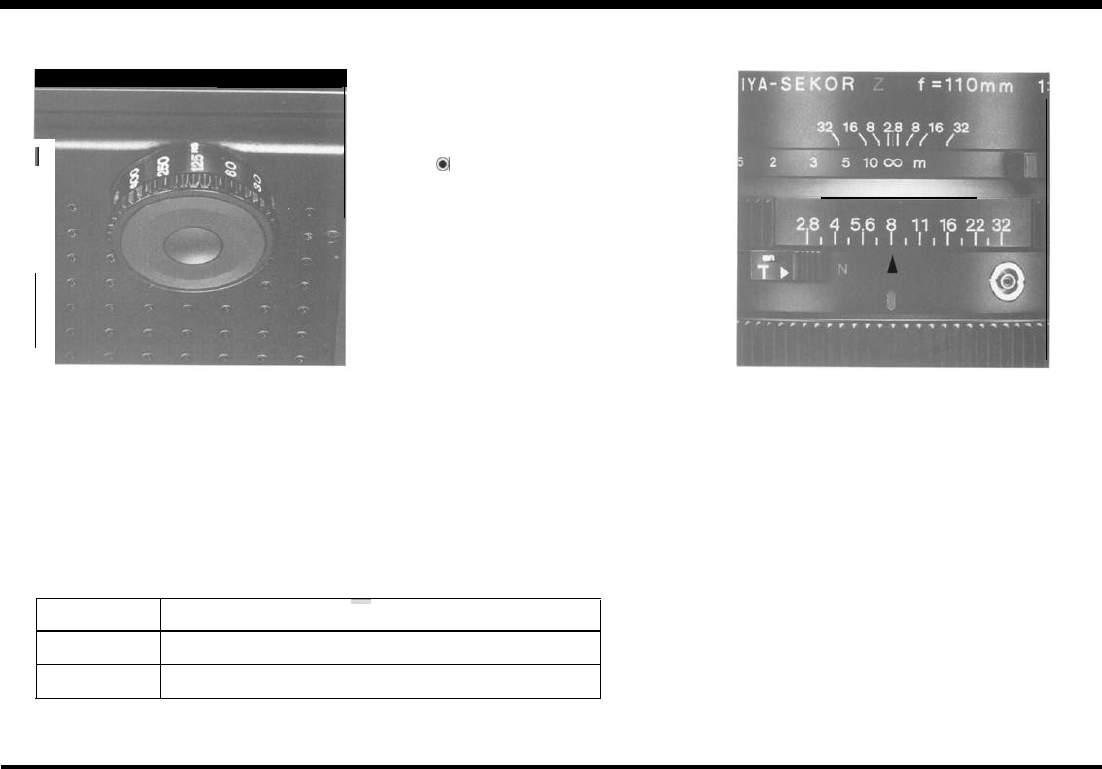
Shutter Speed and Aperture
The Shutter Speed Dial
I
Select the shutter speed desired and rotate
the Shutter Speed Dial until the appropriate fi-
gure is aligned with the shutter speed index
mark.
The Shutter
Speed
Dial must be set to a
click-stop position and can not be used at
in-be-
tween settings.
The numerals as they appear on the dial and
the shutter speeds they represent are shown in
the following table.
When the Shutter Speed Dial is set to “B”
(bulb). the shutter will remain open as long as
pressure is applied to the Shutter Release But-
ton and will close as soon as pressure is re-
leased.
The
0
mark which appears between “B”
and 400 on the Shutter Speed Dial is the setting
for the AE Finder (which will be available in the
future). When set at this position. the dial locks
in place. To unlock it, rotate the dial while de-
pressing the Lock Release Button which ap-
pears in the center of the dial.
Fractions of a second Wholeseconds
Numerals
400 250 125 60 30 15 8 4 2 1248
Shutter peed 1/400 1/250 1/125 1/60 1/30 1/15 1/8 1/4 1/2 1248
17
The Aperture Ring
To set the diaphragm to a desired aperture,
rotate the Aperture Ring until the appropriate fi-
gure is aligned with the central index line. It is
perfectly acceptable to use the Aperture Ring at
in-between click-stop settings.
When the Shutter Release
Button
is de-
pressed, the diaphragm will automatically stop
down to the preselected aperture before the
shuner opens for the exposure.
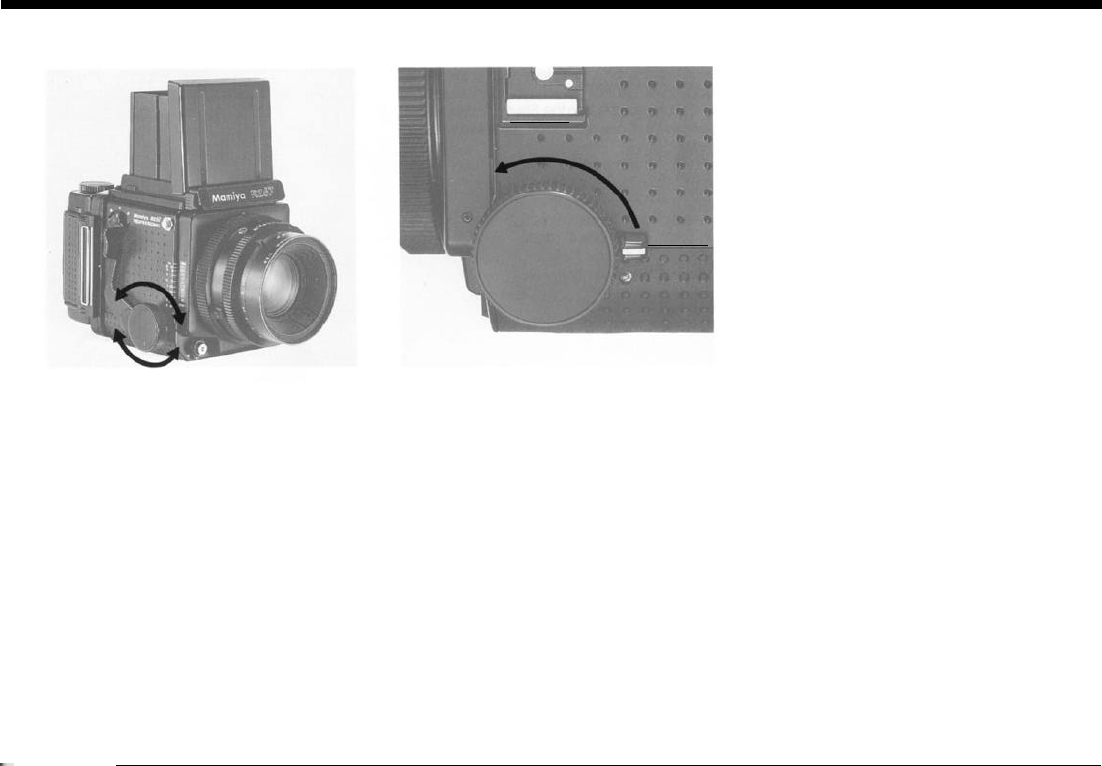
Focusing and Locking the Focusing Knob
Focusing
Depressing the Cocking Lever sets the mir-
ror. projecting a bright image on the focusing
screen. Focus by rotating to-and-fro either of
the two Focusing Knobs until the image ap-
pears sharp.
Locking the Focusing Knob
After adjusting the focus, focusing deviation
can
be
prevented by locking the Focusing Knob
with the Focusing Knob Lock Lever, which is
found at the rear of the left-hand Focusing
Knob. Simply raise the lever and push it for-
ward. clamping the Focusing Knob in place.
When working with wide-angle lenses, the
lens can be
prefocused
at the
hyperfocal
dis-
tance, and the knob locked with the Focusing
Knob Lock Lever so that snap-shots can freely
be taken without the need of focusing. Exam-
ples of other occasions on which the lock lever
will prove useful include when copying, engag-
ing in
macrophotography, or
using telephoto
lenses.
18
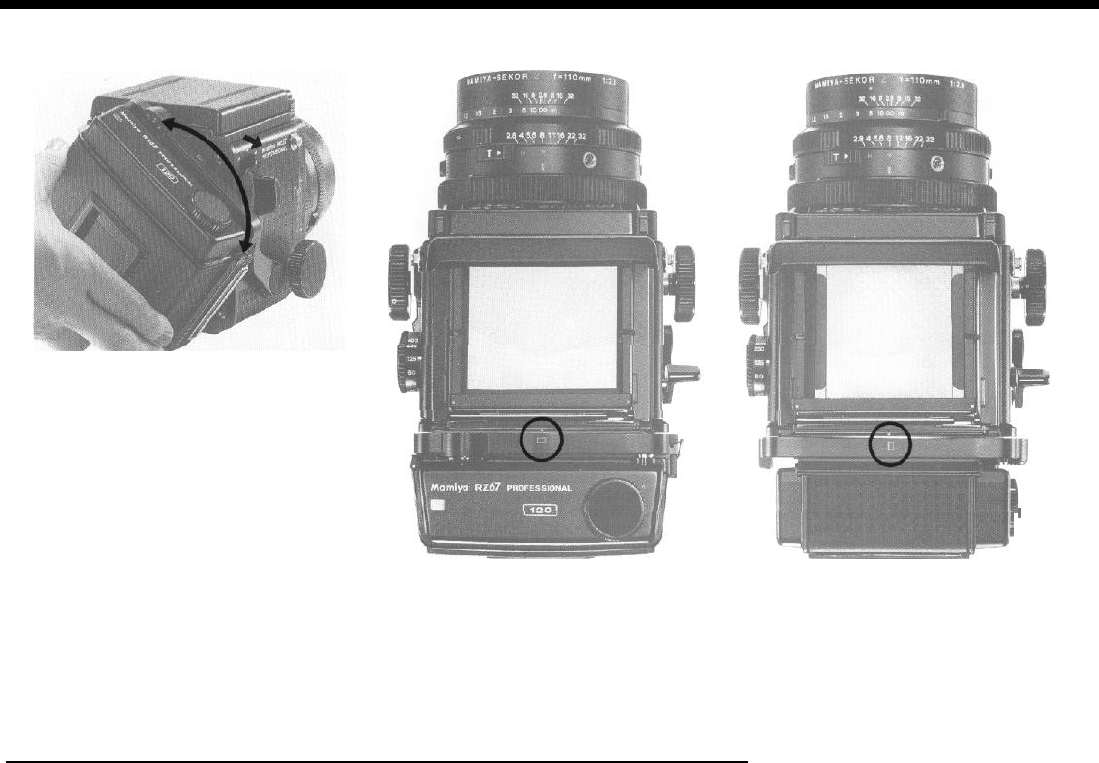
The Revolving Back
The Vertical and Horizontal Formats
Before attempting to revolve the back, set
the R-M Lever to
“R”
To change from horizon-
tal to vertical format, rotate the Film Holder
clockwise as far as it will go. Rotating it counter-
clockwise, changes the format from vertical
back to horizontal.
Be sure to
rotate
the
Film Holder
gently, as undue
use of force can result in damage to the camera.
The R-M Lever will automatically return from “R” to
its normal
position
upon depressing the Cocking
Lever or Shutter Release
Button. However
, as long as
the R-M Lever remains at the
“R”
setting,
the Film Hol-
der can
inadvertently
be moved of-center. Con-
sequently, we recommend manually returning the
lever to its normal position (center index mark) im-
mediately after revolving the back.
Change in Viewfinder Format
I
As the revolving back is rotated. the viewfinder format automatically changes
from horizontal to vertical, or vice versa. This is accomplished by viewfinder
masks which are coupled to the revolving back.
Additionally, when viewed from the top, a small rectangle appears at the upper
edge of the Film Holder. Visible at a glance, this rectangle acts as a reminder, indi-
cating whether the holder has been set for the vertical or horizontal format.
19
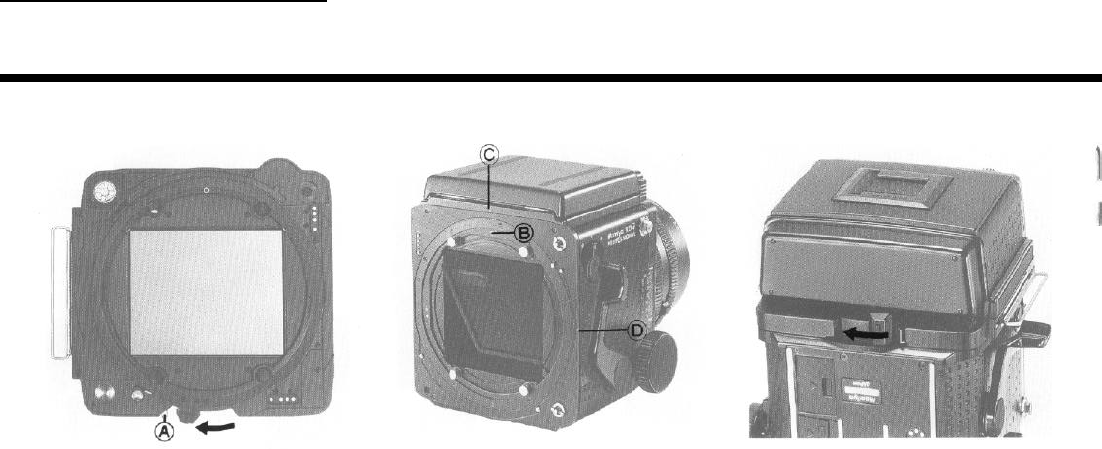
The Roll Film Holder
Attaching the Holder
Remove the rear body cap by sliding it up-
wards.
CAUTION: Do not touch the Light Baffle or
mir-
ror.
Touching the Baffle could result in a light leak
or malfunction.
1.
Slide the Holder Lock Lever of the Film Hol-
der completely toward the Lock Release Lever
(A).
2. Align the orange circle (B) of the Revolving
Ring (found at the rear of the camera) with one
of the two
white
index marks on the camera
body.
Hold the Film Holder so that its orange circle
is at the same position as the one on the
Re-
volving
Ring (B) and
fit
the
holder
onto the cam-
era back,
taking
care that the four Camera
Back Mount Pins fit into the four openings of the
holder
3. Lock the holder on the camera body by
moving the Slide Lock as far as it will go in the
direction of the arrow.
20
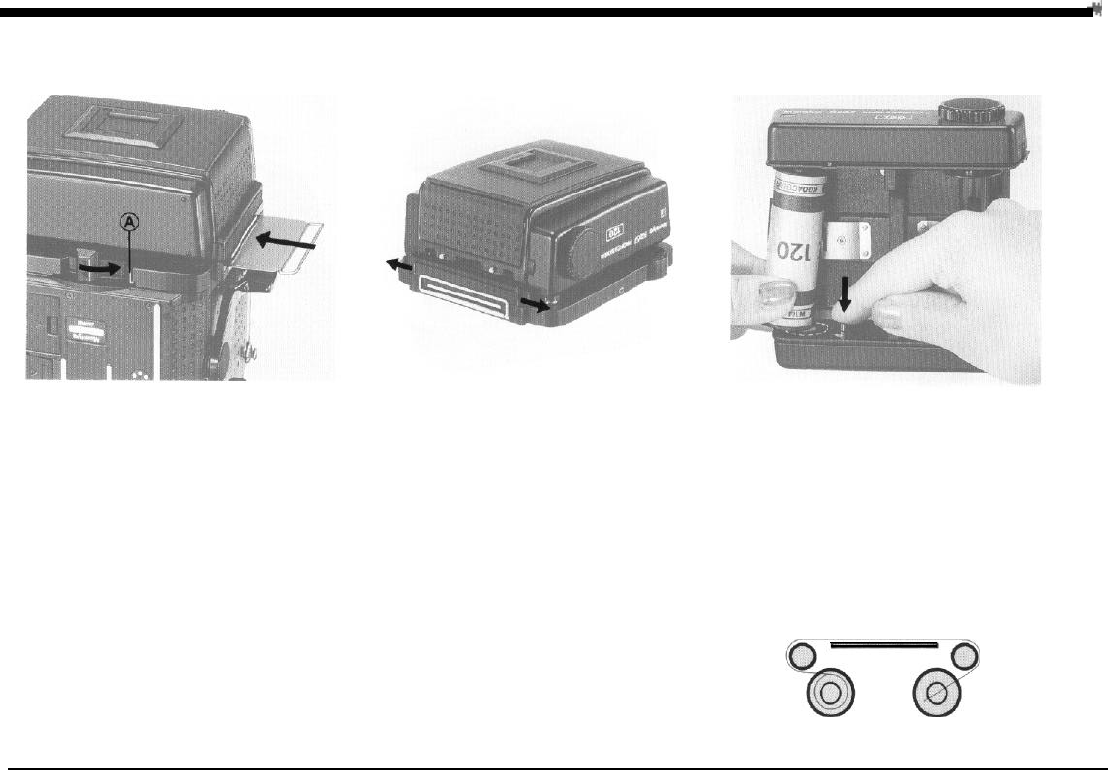
Loading the Film Holder
Removing the Holder
4. Insert the Dark Slide into the Roll Film Hol-
der. For instant recognition, the Dark Slide Slot
is
bordered by white reference lines.
The Film Holder can be removed after mov-
ing the Holder Lock Lever as far as it will go to-
ward the Lock Release Lever (A). It is recom-
mended that you remove the holder on a table
or similar support, or in your lap, to avoid the
possibility of dropping the
holder or
having it fall
off the camera.
If you attempt to remove the holder without replac-
ing the Dark
Slide,
the Holder Lock
Lever
will
automat-
tically
lock in place. preventing accidental removal of
the holder and exposure of the film.
However, if you must remove the holder without the
Dark
Slide
in place. the automatic lock can
be overrid
den by pulling
the
Lock Release Lever toward the Hol-
der Lock Lever, holding the
lever
there, and then mov-
ing the Lock Lever.
1. Pull out the upper and lower Back Cover
Latches and the back cover will open.
Because of the double safety lock, pulling out
just one of the two Back Cover Latches will not
open the back cover.
After opening the back cover of
the Roll
Film Holder,
remove the Film Insert. When loading film, it
is not
necessary to remove the holder from the
camera
back.
When loading film, avoid direct sunlight, either load-
ing the film in the shade or
turning
your body away
from
the sun and loading it in the shade of
your own
2. While holding down the left-hand Spool
Re-
lease Pin of the Film
Insert,
fit a roll of film bet-
ween the upper and lower left-hand Film Spool
Studs.
Pull the backing paper in the direction of the
dotted line and arrow around the stud, over the
roller, across the back, over the right-hand rol-
ler, and feed it into the Take-up Spool. When
loaded correctly, the inside of the backing
paper (black side) will appear outside of the in-
sert back. If it does not, remove the roll of film,
turn it upside-down, and reload it.
21
body.
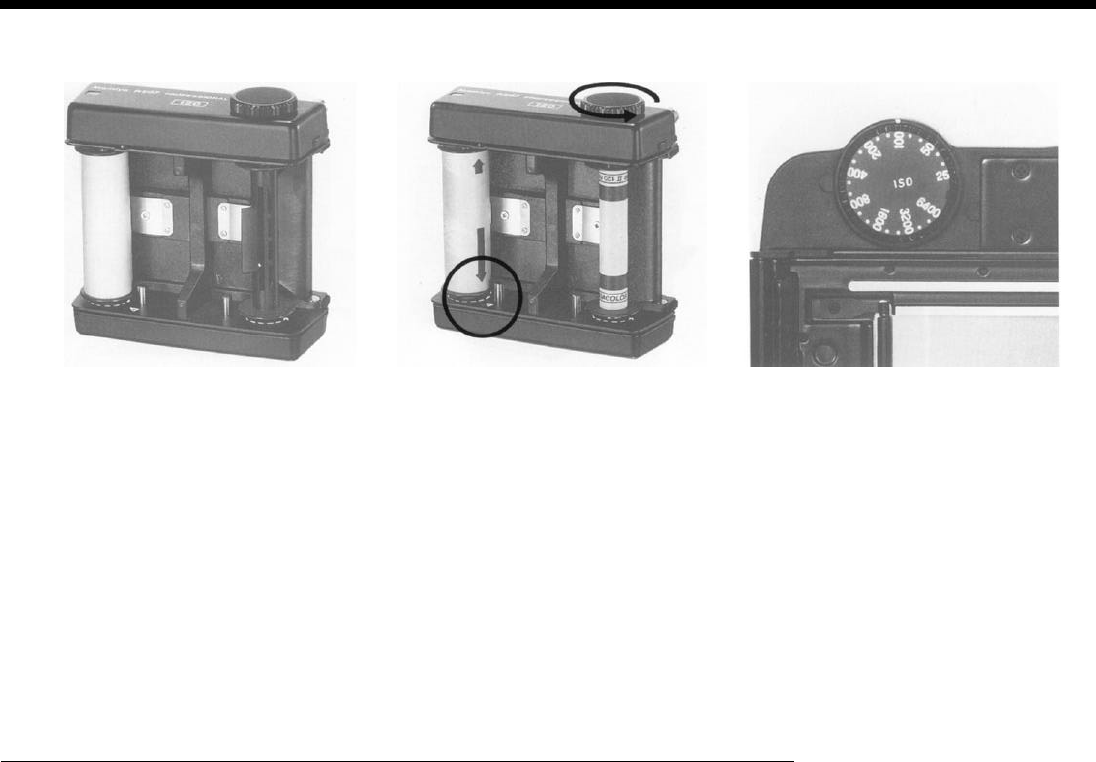
Loading the Film Holder
3. After feeding the tip of the backing paper
into the slot of the Take-up Spool.
4.
Gently wind the Film Advance Knob until the
arrow of the backing paper aligns with the insert
Start Mark.
As you gently advance the backing paper, make
sure it advances evenly
between
the spool flanges
and does
not
begin
to
slant. If it advances unevenly,
remove the backing paper from the Take-up Spool
and refeed, starting again. Heeding this point will
eliminate the possibility of crinkling the edge
of
the
film.
5.
Set the correct film speed value on the Film
Speed Dial of the Roll Film Holder.
22
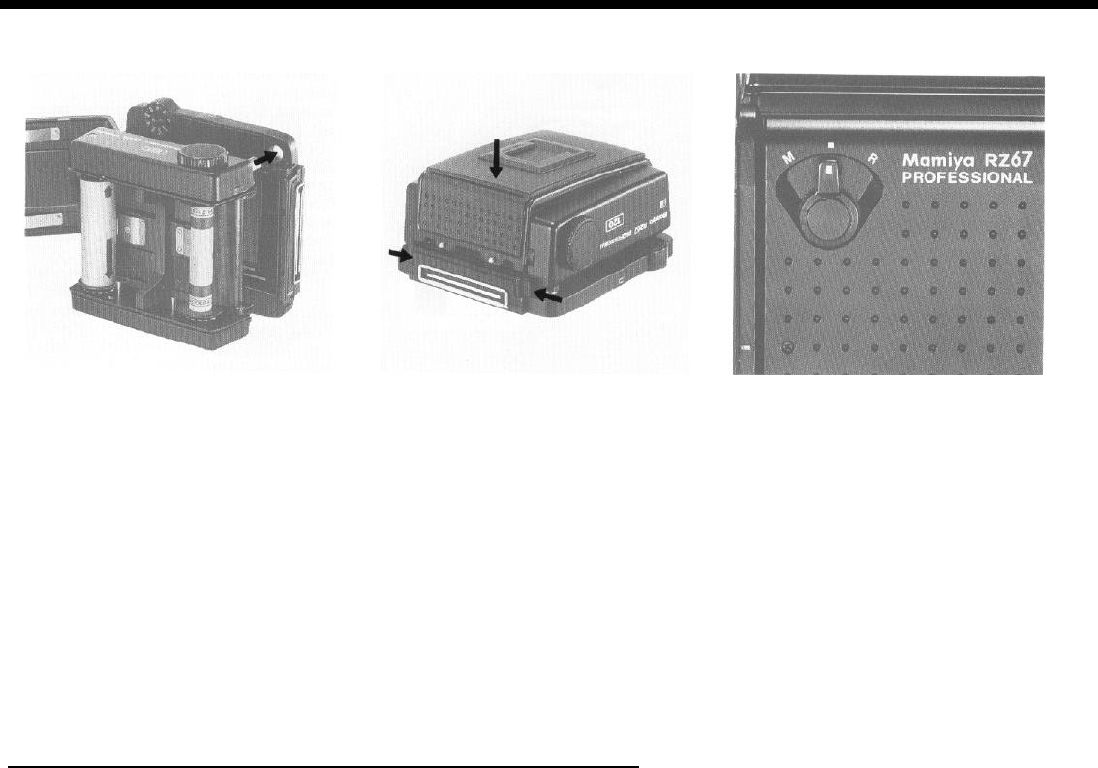
6.
Place the Film Insert into the outer cassette,
making sure the film advance coupler of the
in-
sert fits into the appropriate opening of the cas-
sette.
7.
After
correctly
placing the
insert
into the cas-
sette, close the back cover, and while gently
holding it in place, push both of the Back Cover
Latches as far as they will
go.
The RZ Roll Film Holder
oute
r
cassette
will accept
either
120
or 220
Film
Inserts
.
Advancing the Film
Before attempting to advance the film to the
first frame, make sure the R-M Lever is set to its
normal (center) position. If the lever is set to ‘M
(multiple exposure), it will not be possible to ad-
vance the film with the Cocking Lever.
23
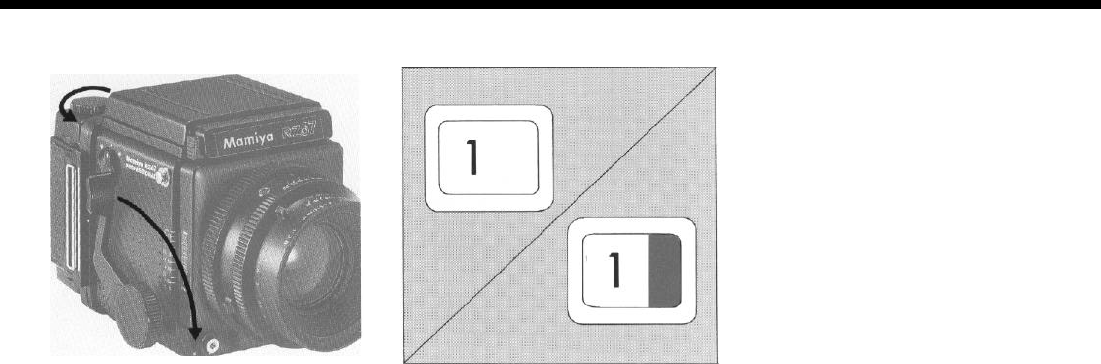
Taking Photographs
The film can be advanced in
either
of two
ways.
A) By winding the Film Advance Knob of the
Film
Insert
until
it
stops.
B) By pressing the Cocking Lever of the cam-
era body several times, until it stops. (The lens
shutter
will
not be cocked unless the Cocking
Lever is consecutively pressed until it stops.)
When the film is completely advanced, the
numeral
‘1’
will
appear in the Exposure Counter
and the red, film-unadvanced warning will dis-
appear.
While advancing the film from
S
(start) to 1
with the Cocking Lever, the shutter releasing
mechanism
is automatically locked
until the film
is fully advanced to frame
1.
After removing the Dark Slide and releasing
the shutter, the red warning mark will reappear
in the Exposure Counter, indicating that the ex-
posure has been made and the camera needs
to be set for the next exposure.
When the film is advanced to the next frame,
the numeral in the Exposure Counter will au-
tomatically change and the red mark will disap-
pear.
Operate the Cocking Lever gently. If if is
pressed very rapidly, the spacing
between
frames may not be uniform.
After an exposure is made, the automatic dou-
ble exposure prevention mechanism will make
it
impossible to release the shutter until
the
film
is advanced.
After completing the last exposure, press the
Cocking Lever several times, until the film and
backing paper is completely
wound
onto
the
Take-up Spool. Instead of using the Cocking
Lever, you can use the
Film
Advance Knob of
the Film Insert, if you prefer.
24
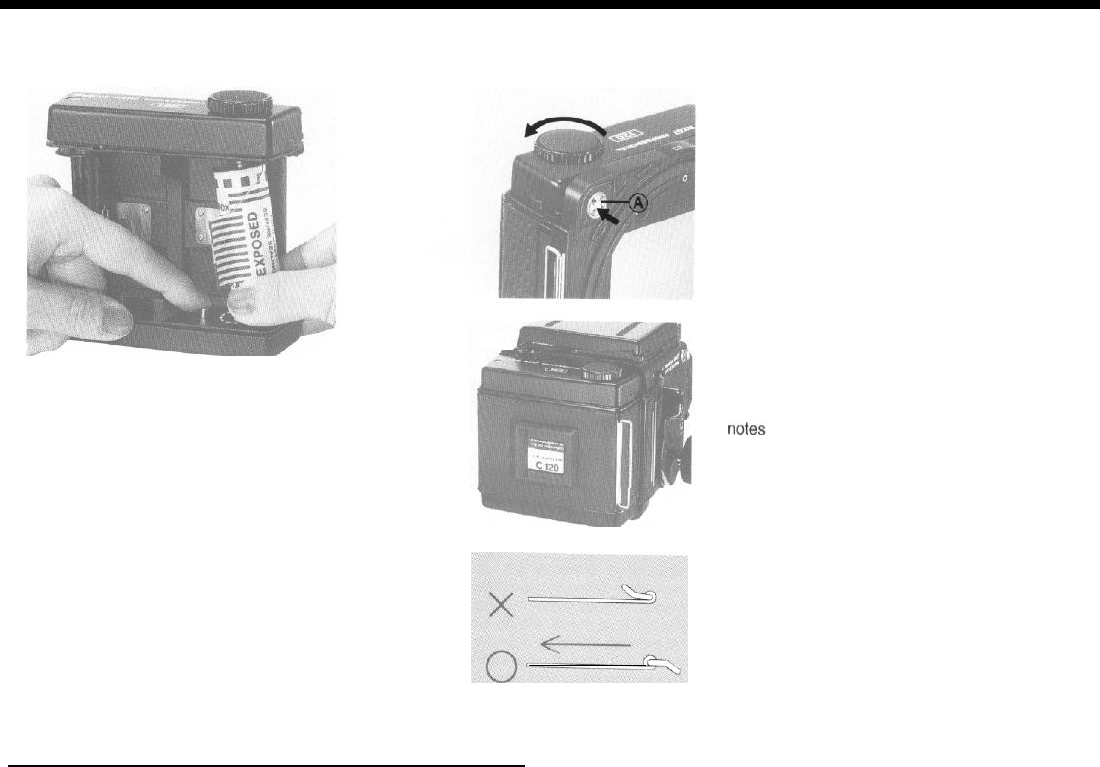
Unloading the Film
1.
Open the back cover of the Film Holder and
remove the Film Insert.
2. While holding down the right-hand Spool
Release Pin, remove the film, exercising care
that the backing paper does not unroll or be-
come loose.
3. In preparation for the future, remove the
empty spool from the
Film
Insert, replacing it on
the right-hand side so that it will act as the new
Take-up Spool.
When the back cover of the holder is opened,
the Exposure Counter will automatically return
to "S" (Start).
If anything other than
‘s’
appears
in the Exposure
Counter,
it
indicates
that there is film in the holder. To
prevent accidental exposure of the
film
to light, always
check the Exposure Counter before opening the back
cover of the
holder.
When desiring to turn in for processing a roll
of film that has been only partially exposed, first
remove the holder after inserting the Dark
Slide. Next, while holding in the pin in thecenter
of the coupler(A), completely
wind
the
film
onto
the Take-up Spool with the Film Advance
Knob. Instead of
continuously
holding in the
coupler
pin
,
you can push it in once after each
frame, if preferred.
During exposures, the Dark Slide can be
stored in the Dark Slide Slot in the back of the
holder.
The Memo Clip on the back cover can be
used
for
holding
the film
box-top as a film remin-
der or for holding a piece of paper with special
25
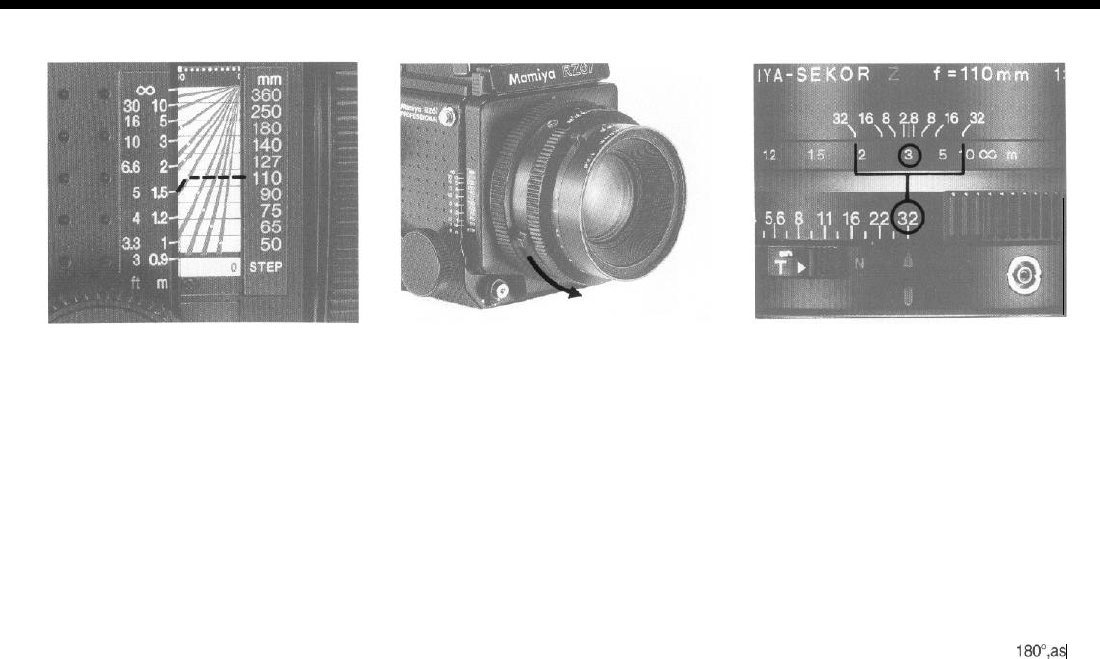
Distance Scale Depth-of-Field
The Distance Scale is used to determine the
film-plane-to-subject distance. The scale itself
is
composed
of two parts, the Distance Gradu-
ation and Focal Length Scale.
After focusing, the
correct
distance can be
determined by
locating
the point at which the
curved line for the focal length in use intersects
the Distance Graduation.
For example, tithe
110mm
lens is mounted
on the camera and focused as shown in the il-
lustration, the subject is
1.5m
(5 ft) from the film
plane.
Depth-of-Field Preview Using the Depth-of-Field Scale
1.
Set the Aperture Ring to the desired f-stop
and focus the lens.
2. Depress the Depth-of-Field Preview Lever
of the lens and you will be able to check the
depth-of-field directly on the focusing screen.
1.
Check the camera-to-subject distance on
the Distance Scale.
2. Rotate the Lens Distance Scale Knob until
the previously noted camera-to-subject dis-
tance is aligned
with
the center index of the
Depth-of-Field Scale.
3. Locate the selected aperture on both sides
of the Depth-of-Field Scale.
4. The figures of the Lens Distance Scale, ap-
pearing above the selected aperture, indicate
the nearest and furthermost limits of sharpness
for that aperture.
For example, when the
110 mm
lens is
fo-
cused
at 3m and stopped down to f/32, every-
thing from approximately 2m to
10m
will be in
focus.
When desiring to know the depth-of-field in
feet, rotate the Lens Distance Scale
180”,as
one side is in feet and the other in meters.
26
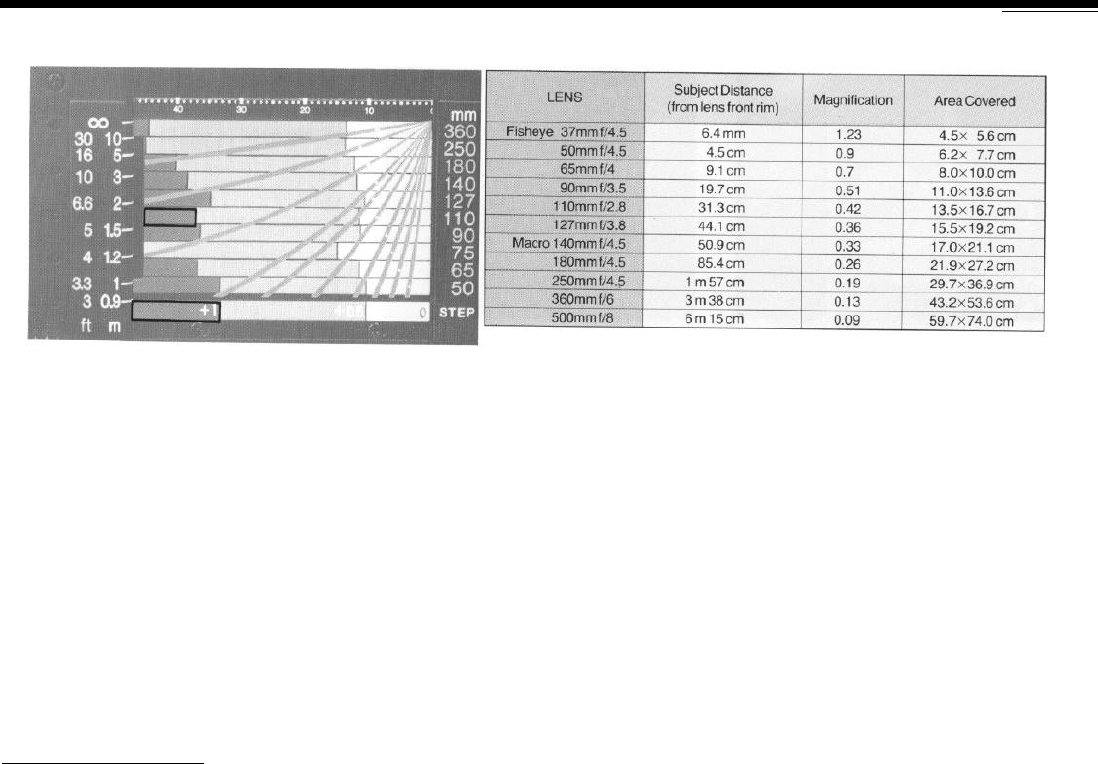
Close-up Photography
Exposure
Compensation
for Close-up Photography Area Covered with Bellows fully Extended
When working very close to the subject, the
exposure must be increased. The actual expo-
sure factor will vary in accordance with the dis-
tance that the lens is extended. This is simply
because the brightness of the image
striking
the film grows increasingly dimmer as the lens
is progressively moved further from the film
plane.
Exposure compensation is easily deter-
mined by referring
to
the
Exposure Compensa-
tion Scale.
1. After focusing the lens, read the exposure
compensation factor on the scale. The scale is
divided into three zones of light, medium, and
dark shades. As indicated by the table at the
base of the scale, the light zone represents an
exposure factor of zero (no compensation is
necessary), the medium shaded zone indi-
cates
+0.5
(a
1/2
stop increase in exposure is
required), and the dark zone denotes a factor of
+
1
(a full stop increase in exposure is neces-
sary).
To find the exposure factor, first locate the fi-
gure on the Focal Length Scale for the lens in
use. Next, move along the scale, in the same
column, until you reach the Distance Gradua-
tion. The shading of the zone (light, medium,
dark) which touches the Distance Graduation
indicates the correct exposure factor. For
example, when the
110mm
lens is focused as
shown in the illustration, the correct exposure
factor is +
1.
2. Compensate the exposure by changing
either the shutter speed or aperture. When the
exposure factor is
+1,
either open the aperture
or lengthen the shutter speed by a full stop.
With a factor of +0.5, open the aperture by a
half-stop. For example, assume that a hand-
held exposure meter indicates a normal expo-
sure reading of
f/16
at
1/60
sec., for exposure
27
compensation of + 1, set the lens to either
f/16
at
1/30
sec. or
f/1
1 at 1/60 sec.
When using a finder with a built-in meter,
such as the PD Prism Finder, there is no need
to compensate for close-up photography.
l
For optimum clarity at
the corners when using the
50mm
and
65mm
wide-angle lenses at
distances
closer
than 1 meter, use as
small an aperture as pos-
sible.
l
The bellows extension in millimeters appears on
the top of the Focal Length Scale. These figures are
used to determine the required exposure compensa-
tion factor when using extension tubes.
Using a Tripod Long Exposures
For optimum quality, use of a large, sturdy
tripod is recommended.
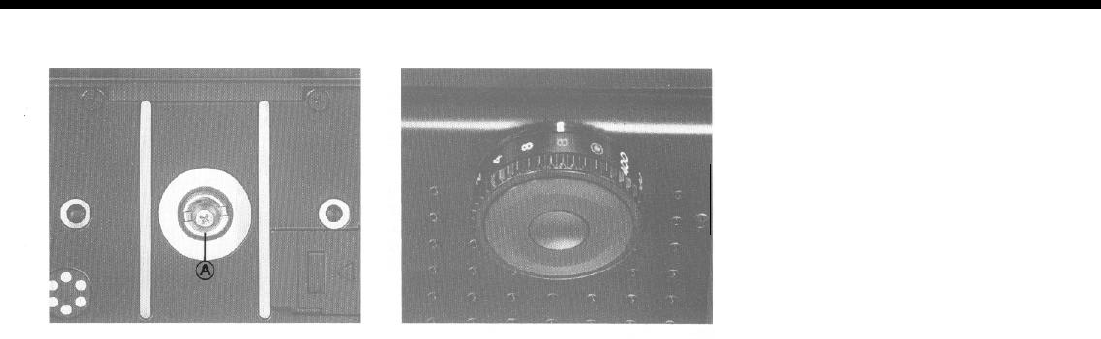
1. The Tripod Socket will accept standard size
(U
1/4" thread)
tripod screws without
modifica-
lion. Simply attach the RZ 67 as you would any
other camera with standard threads.
2. When using a tripod with a
3/8” screw, first
remove the small screw in the base of the
Tripod Socket of the camera by rotating it coun-
terclockwise with an appropriate screwdriver.
Next, use a coin to remove the
1/4”
adapter (A)
from the Tripod Socket by rotating it counter-
clockwise. The camera can then be mounted
on a
3/8"
screw tripod.
Bulb (B) Exposures
When the Shutter Speed
Dial
is set to B, the
shutter will remain open as long as the Shutter
Release Button remains depressed. Since bulb
exposure is also controlled electronically, the
shutter will automatically close after approxi-
mately one minute in order to prevent inadver-
tent battery depletion. When using bulb, if the
Shutter Release Button is depressed for ap-
proximately 50 seconds, a warning buzzer will
sound. If pressure on the Release Button is
maintained, the buzzer will continue for about
10
seconds longer, after which the electricity
will be automatically extinguished and the shut-
ter will close. When desiring to take exposures
of longer than one minute, use time exposures.
When using bulb, if pressure is released from the
Shutter Release Button too quickly (before the mirror
completes its upward travel), the shutter may remain
open. To
correct this situation,
press
the Shutter
Re-
lease Button once again, upon releasing pressure the
shutter will close. If you do not
correct
the situation
yourself. the
buzzer
will sound after approximately 50
seconds, 10 seconds the buzzer will stop and the
shutter close.
28
Mirror-up Operation
Time Exposures
1.
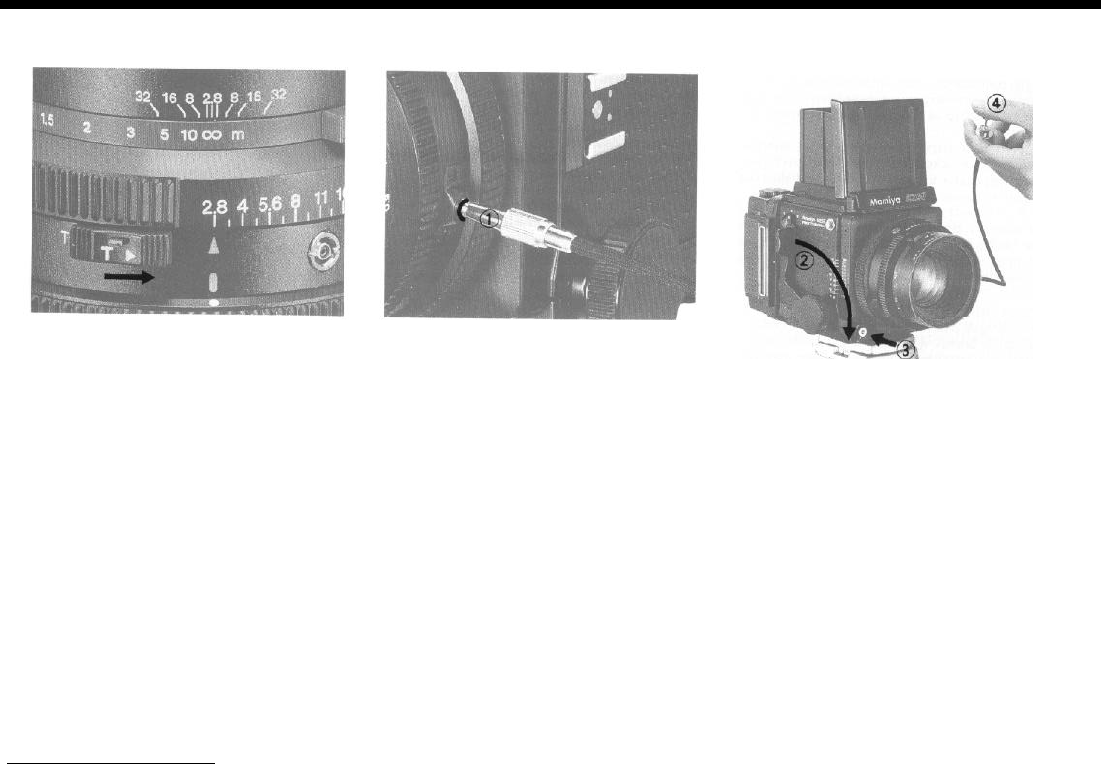
To make a time exposure,
first
slide the T
Lever of the lens until the letter
"T"
is exposed.
After doing so, the shutter will remain open
upon depressing the Shutter Release Button.
At this time, the setting of the Shutter Speed
Dial on the camera body is inconsequential.
2. To close the shutter, slide the T Lever in the
opposite direction, exposing the letter ‘N’ (nor-
mal). During time exposures, do not touch the
Cocking Lever until the shutter closes.
Since the shutter operates mechanically, not
electronically,
during
a time exposure, there is
virtually no expenditure of battery power, and
the length of time the shutter remains open is
insignificant.
With the RZ 67, it is possible to lock the
mirror
in
the up position beforehand, and at the de-
sired instant release the shutter without the
usual accompanying mirror movement.
Referred to as,
“mirror-up
operation,” this
technique is extremely valuable when desiring
to eliminate even
the slightest mirror shock.
Be-
cause the mirror normally rises and causes vib-
rations the very instant before the shutter
opens, a loss of sharpness is possible when
working at high magnifications or with long
shutter speeds. Consequently, mirror-up oper-
ation is especially useful when engaging in
close-up photography, using telephoto lenses,
and making long
(“slow")
exposures. Yet
another application is when trying to catch the
peak of
action.
By raising the mirror be-
forehand, the shutter can instantly be released,
totally eliminating the time lag usually present
between the time the mirror completes its up-
ward swing and the time the shutter opens.
29
1.
After screwing a cable release firmly
into
the Mirror-up Socket of the lens, the socket
will
elevate slightly and the camera will be ready for
mirror-up
operation.
2. Press the Cocking Lever as far as it will go.
Step 2 may either follow or precede step
1
.
3. Depress the Shutter Release Button. The
mirror will rise, but the shutter will
remain
closed.
4. Press the plunger of the cable release and
the shutter will operate.
5. When you no longer need mirror-up opera-
tion, remove the cable release.
Upon removing the cable release, the
,Mir-
ror-up Socket will retract and the camera will
return to normal shutter operation.
Multiple Exposures
If
you complete step 3 above, but remove the cable re-
lease without making an exposure (step 4), the shutter
will be released as soon as the cable release is re-
moved.
Even when using mirror-up operation,
everytime
the shutter is cocked, the mirror is
relowered.
There-
fore,
it
is possible to check the
viewfinder
before each
frame is exposed.
A convenient
double
cable release is available as
an
accesory.
Since one end of the release screws into
the
Shutter
Release Button and the other end into the
Mirro-up Socket, if is possible to use the same release
to raise the mirror and later release the shutter.
CAUTION
l
As long as a cable release remains attached to the
Mirror-up Socket, it is possible to use the same re-
lease to raise the mirror and later release the shutter.
Photograph by merely pressing the Shutter Release
Button.
l
lf the red line around the Mirror-up Socket
is still visi-
ble when the cable release
is
removed, the camera is
still set for mirror-up operation. If such is the case,
reattach the cable release, making sure that the soc-
ket retracts as you remove it once again.
.
The shutter should be released with the cable re-
lease within 50 seconds of pressing the Shutter Re-
lease Button. If this is not done, the buzzer
will
sound
after 50 seconds and
continue
for
10
seconds before
stopping.
. If
you
release the shutter with the cable release after
the buzzer stops, the shutter speed will be
1/400
sec.
If you wish to use a shutter speed other than
1/400
sec. after the buzzer stops, follow the procedure for
multiple exposure.
Using Bulb with Mirror-up Operation
1. Attach cable release to Mirror-up Socket.
2. Set the Shutter Speed Dial to B
3
.
Press the Shutter Release Button (mirror rises).
4.
Press plunger of cable release (shutter opens).
5. Press Shutter Release Button (shutter closes).
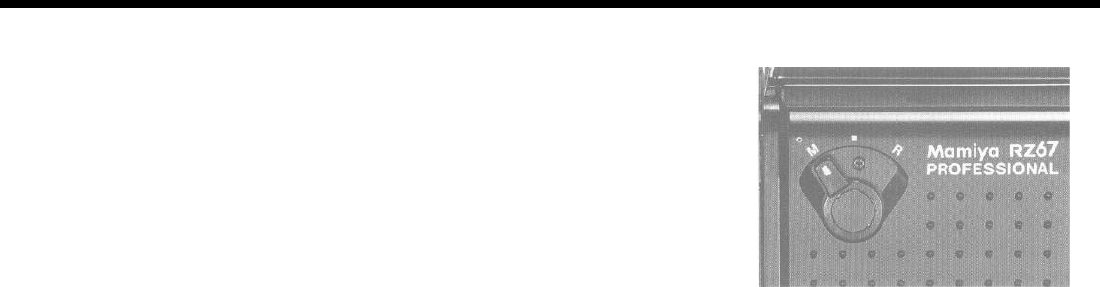
1. Set the R-M Lever to
‘M’
(multiple expo-
sure). The lever can be moved to ‘M’ either be-
fore or after releasing the shutter.
2. Press the Cocking Lever as far as it will go
in order to cock the shutter and set the mirror.
The film will not move at this time. The shutter
can now be released, creating a double expo-
sure. This procedure can be repeated as often
as desired.
When photographing the same
subject
2 or
more
times exposure compensation is necessary. The
same is true with different
subjects
that are all evenly
illuminated.
With
subjects of
different
brightness, the
darker one is
normally
photographed first. However, it
is not within the scope of this
operating
manual to
teach multiple exposure technique, as many excellent
books dealing with this
subject
are already
available.
After completing your
multiple
exposure, im-
mediately replace the R-M Lever to its normal pos-
tion. If this is not done, the shutter may later be re-
leased mistakenly, not only
ruining
the
multlple
expo-
sure, but also ruining the additional exposure.
30
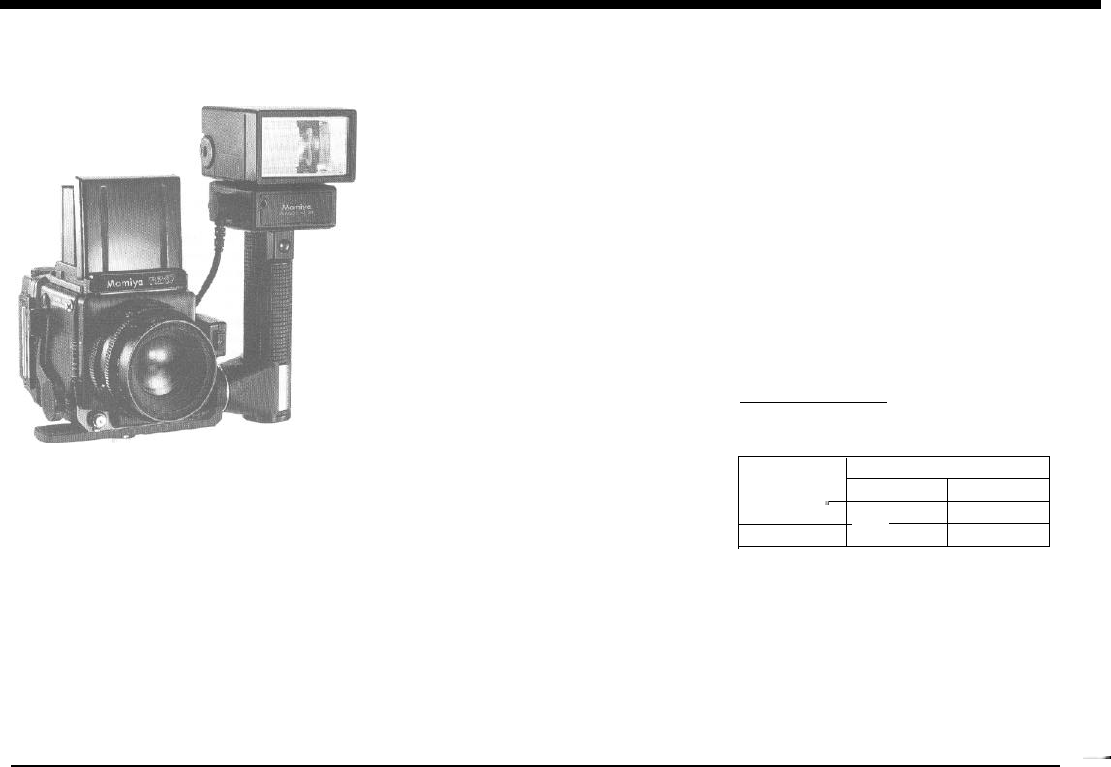
Flash Photography
Attaching Flash Units
Compact, clip-on units can be attached di-
rectly to the Hot-Shoe of the camera.
When using large, grip-type units, attach the
sync cord to the flash to the Flash Sync Termi-
nal
(X-sync) of the lens.
When using the Mamiyalite
ZE,
MZ 18 R, or
MZ
36 R, and pressing the Shutter Release
Button halfway, the green monitor
lamp
in the
viewfinder will illuminate if the flash is fully
charged and ready to fire. When using Mamiya
flash units, two units can be fired simultane-
ously by connecting one unit to the Hot-Shoe
and the other to the Sync Terminal.
However, if the same procedure were fol-
lowed with flash units of other makes, damage
may result to the camera or flash units. There-
fore, if using flash
units
of other makes, be sure
to use only one at time (unless others are fired
by slave units).
Determining the Aperture
When using automatic flash units, refer to the
instructions of the flash unit for the correct aper-
tures to use.
When using a manual electronic flash unit or
flash bulbs, the guide number divided by the
subject distance gives the correct aperture to
use.
G.N. (48)
Subject Distance (6)
=
Correct aperture
setting (8)
Flash Synchronization Table
Flash Type
Electronic
_
M-class bulb
Shutter Speed
8 sec.
-1/30
1/60-1/400
Yes Yes
Yes No
31
-
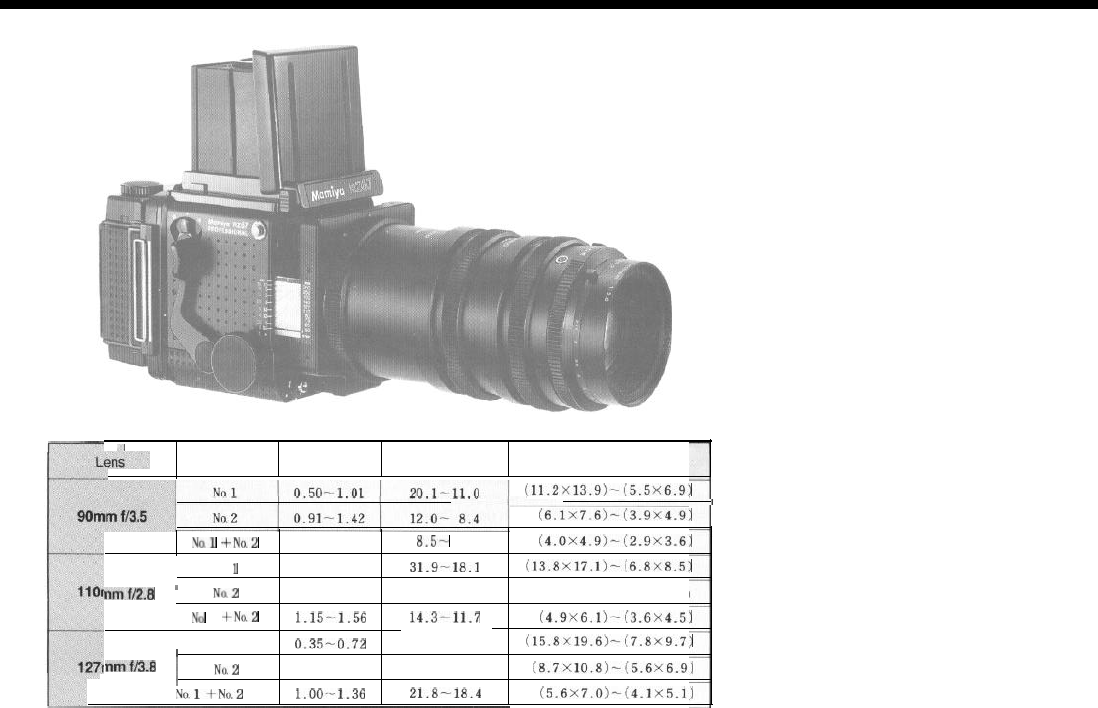
Close-up Photography with Auto Extension Tubes
Close-up Table
.I
Extension Tubs
Magnification Subject
Distance (cm) Area Covered (cm)
(ll.Zx13.9)-i5.5x6.9)
(6.1X7.6)-(3.9X4.9)
x0.1
+No.Z
1.41-1.92
8.5-
6.8
(4.0X4.9)-_!2.9X3.6)
No.
1
0.41-0.82
31.9-18.1 ~13.8x17.1~-!6.8x6.5~
nmt12.8
’
Na2
0.74-1.15 19.6-14.2 (7.6X9.4)-(4.8X6.0)
Na
1
+No.2
1.15_~1.56
14.3Pl1.7
(4.9X6.1)-(3.6X4.5)
No. 1
0.35-0.72
44.9-26.8
/
(15.6X19.6)-(7.8X9.7)
nmfB.8
j
Na2
0.65-1.01 28.7-21.7
(8.7X10.8)-(5.6X6.9)
I
NnlfNo.2
l.OO~-1.36
21.8-18.4
(5.6X7.0)-(4.1X5.1)
32
After attaching an auto extension tube to a
lens, treat
the extension tube/lens combination
as a single unit, attaching and removing them
from the camera as any other lens. Moreover,
when using the auto extension tubes, dia-
phragm automation of the lens is fully
main-
tained
sot hat close-up photography is as con-
venient as standard operating procedure.
CAUTION
1. Because of the extraordinarily shallow
depth-of-
field encountered in close-up photography, use as
small an aperture as possible.
2. Mirror-up operation is recommended for optimum
results.
3. When
using
a finder
with
built-in exposure meter,
exposure compensation is not necessary. However,
when working with a handheld meter, compensation
is required. Refer to the individual instructions that
come with the auto extension tubes.
l The subject distance appearing on the
Close-up Table referto the distance from the
front rim of the lens to the subject.
l The two rows of figures appearing in the
“Magnification,” “Subject Distance,” and “Area
Covered” columns of the table apply to zero
and maximum (46mm) extension of the bel-
lows. Figures to the left indicate no extension,
figures to the right, maximum extension.
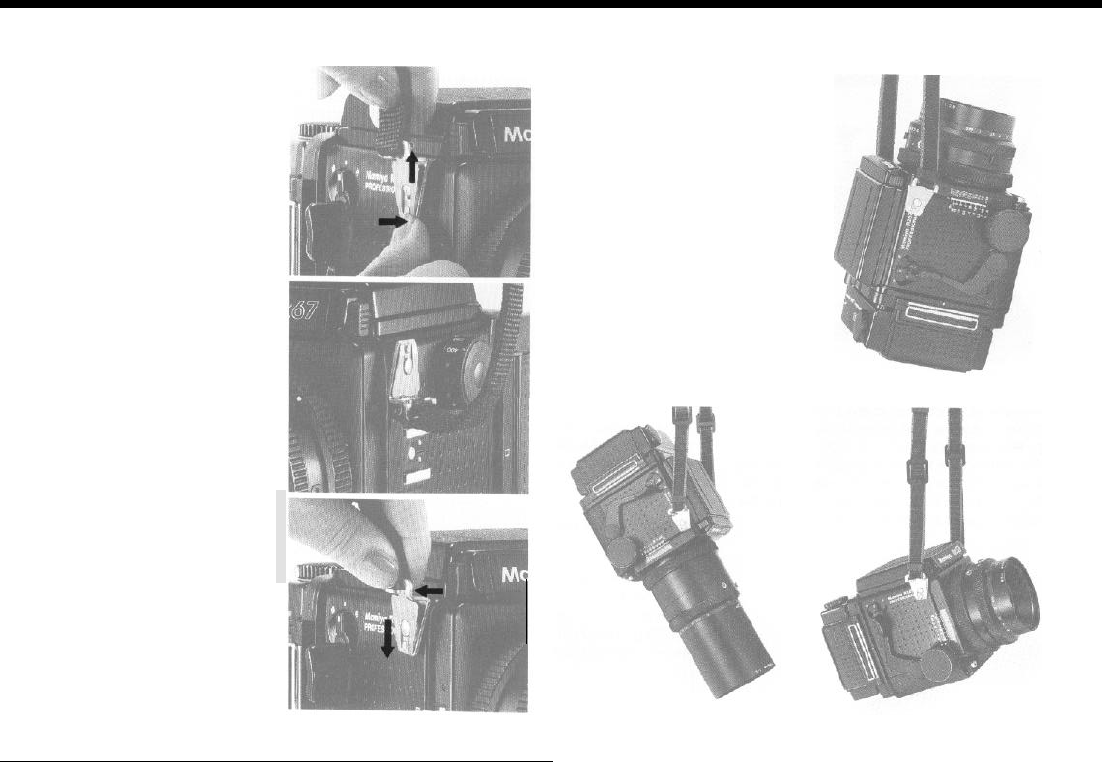
How to Use the Carrying Strap
Attaching the Strap
Hold the metal clamp of the strap
so that the key-hole shaped open-
ing faces the Carrying Strap Lug on
the camera body. Gently fit the
upper
part
of the key-hole opening
over the lug. Next, gently push the
bottom of the metal clamp upwards
and it will lock in place with a click.
If the clamp is attached to the
Hot-
Shoe side of the camera
upside-
down,
it
will be difficult to remove,
so
be careful to attach the clamp
right-
side-up.
Removing the Strap
Reach behind the strap and while
gently squeezing the top of the
pro-
truding
front plate (leaf spring), slide
the clamp downward and off the lug.
Three Carrying Positions
Depending upon the way the
strap is attached to the camera.
there are three ways of carrying the
camera as shown in the accom-
panying illustrations. Since the Car-
rying Strap Lug is not rotary, the
car-
rying
strap will not become twisted.
33
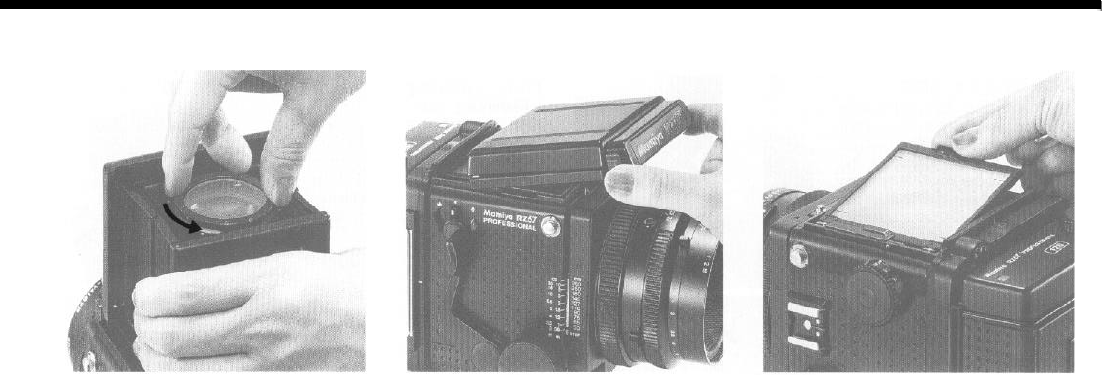
Interchanging Magnifier/ Focusing Hood/Focusing Screen
Magnifier Focusing Hood
The Magnifier of the Focusing Hood is inter-
changeable. In addition to the standard
(-
1.3
diopter) magnifier, the following diopter lenses
are also available: +1
,
0, -1, -2, -3.
To remove the Magnifier, gently squeeze the
sides of the Focusing Hood, preventing the
Magnifier Base Plate from moving, rotate the
Magnifier counter-clockwise and remove.
Removing the Focusing Hood
To remove the Focusing Hood, merely
squeeze both Focusing Hood Lock Buttons to-
ward each other and lift the hood off the cam-
era.
Attaching the Hood
To attach the hood, slide the Focusing Hood
Catches into the groove of the camera body,
and while holding in both Focusing Hood Lock
Buttons, seat the front of the hood on the cam-
era body. The hood will lock in place after re-
leasing pressure from the Lock Buttons.
Focusing Screens
There are seven instantly interchangeable
focusing screens to choose from, each de-
signed for specific applications.
Removing a Focusing Screen
After removing the focusing hood, lift up and
remove the screen by grasping the lug on the
right-hand side (as viewed from the
back of
the
camera). To replace a screen, gently lower the
left-hand side of the screen (as seen from the
camera back), followed by the right-hand side,
and
lightly
snap screen into place.
CAUTION
When removing screens, exercise care not to touch
the vertical and horizontal
format viewfinder mask.
34
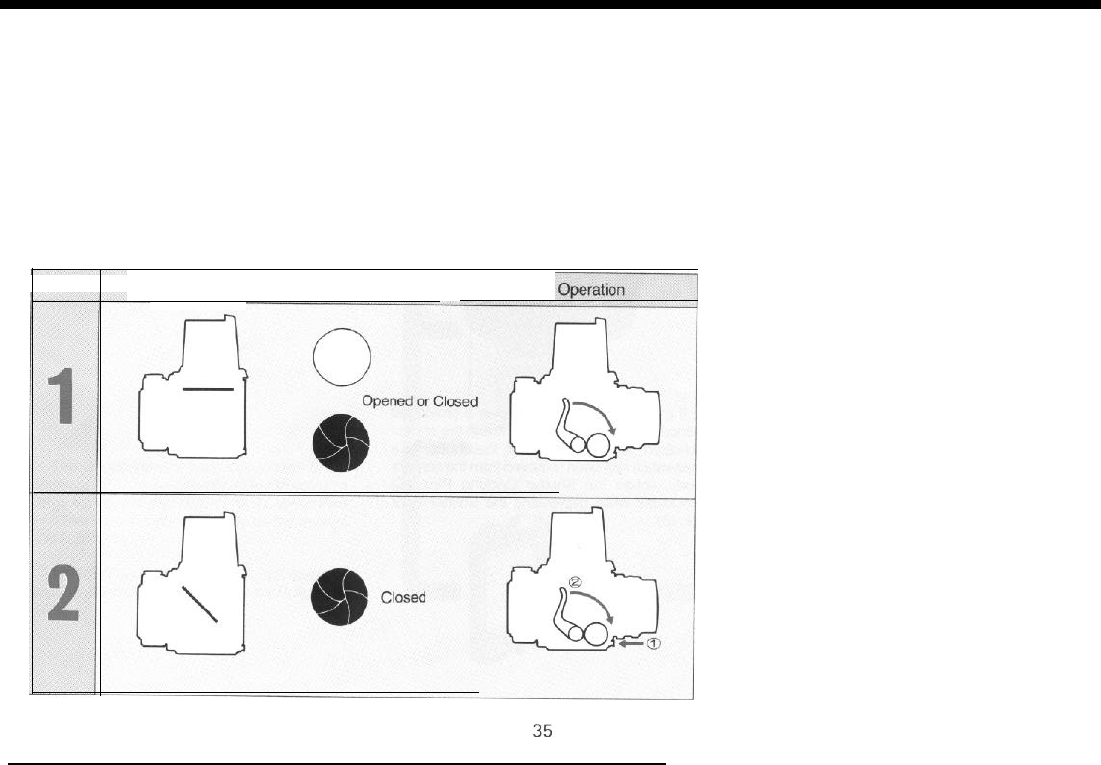
Attaching a Lens with Shutter Released or Mirror Raised
When a lens is removed from the camera
1.
body, the mirror is set (lowered) and the lens
If the mirror is raised (regardless of whether
shutter cocked. Conversely, when attaching a the lens shutter is cocked or released),
simply
lens, the same conditions should prevail (mirror depress the Cocking Lever to reset the camera.
set and shutter cocked). However, should a
2.
If
mirror is set and lens shutter released
lens be attached with either the mirror raised or
(closed), remove the Dark Slide from Film
shutter released, or both, the camera can be Holder and depress the Shutter Release But-
reset by following the procedures below. ton (film will not be exposed). Next, depress the
Cocking Lever to reset the camera.
Mirror condition Shutter blade condition
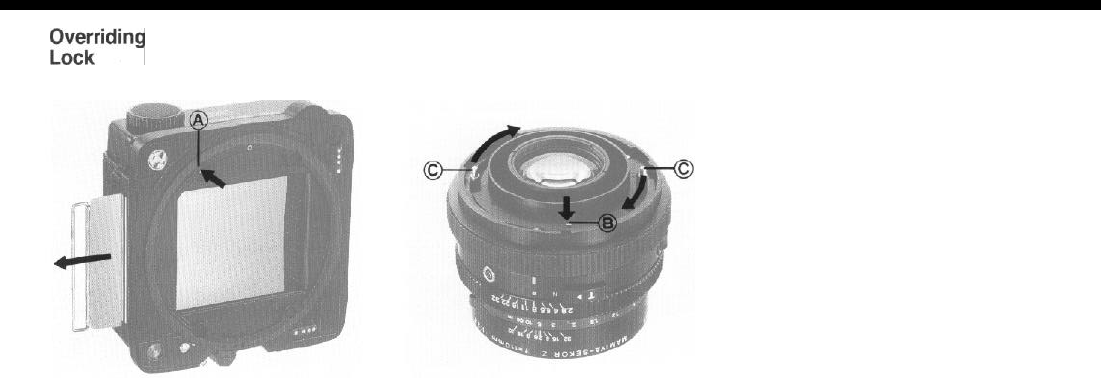
Overriding
the Dark Slide Safety
Overriding the Shutter Lock Pin
When a Film Holder is removed from the
camera body, the Dark Slide automatically
locks in place to prevent possible exposure of
the film to light. Nevertheless, this safety lock
can be
overriden
if necessary. Simply depress
the Dark Slide Release Pin (A) with the tip of a
ball point pen or similar object and remove the
slide.
If a lens. is not to be used over a prolonged
period, it is desirable to store it with the shutter
released. In order to release the shutter of a
lens which has been removed from the camera
body, rotate the Shutter Cocking Pins (C)
clockwise while depressing the Shutter Lock
Pin(B).
36
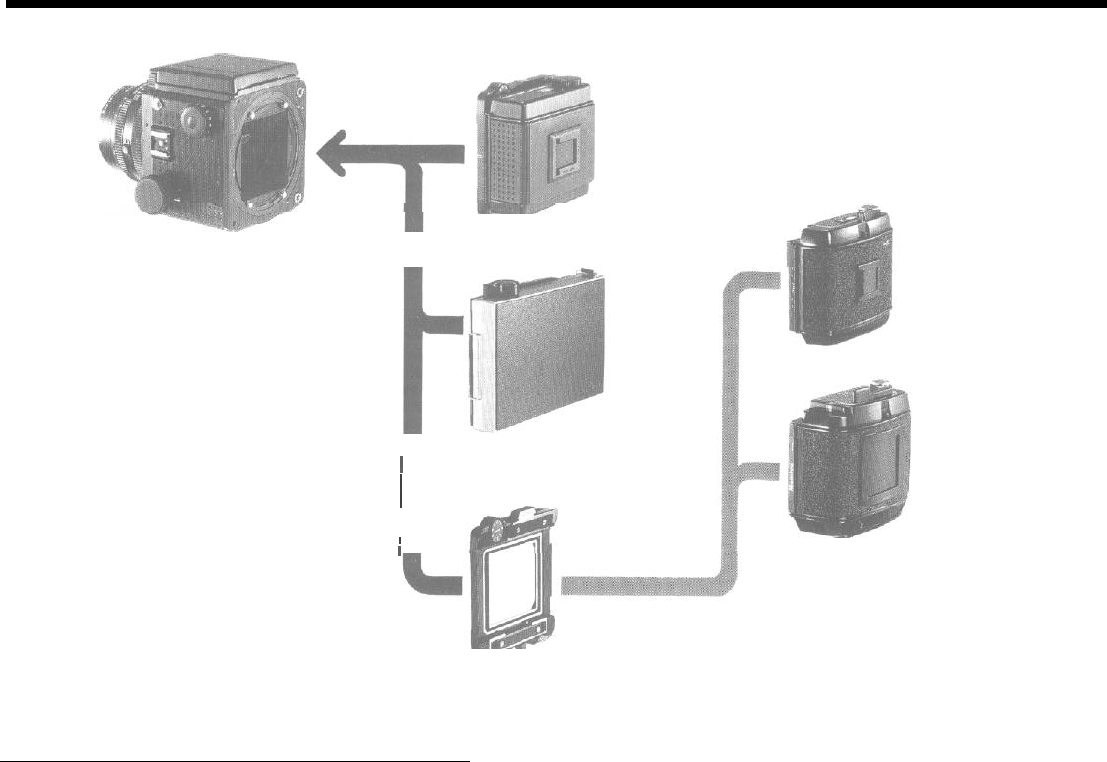
Camera Back Lock System
120 Roll film holder RZ
220 Roll
film
holder RZ
Polaroid Land pack film holder RZ
The unique camera back lock system of the
i
Mamiya RZ67 is designed to allow it to accept a
large variety of Film Holders. All RZ series Film
j
G adapter
RZ
Holders mount and lock directly on the back of
the
RZ67.
/
I
Roll film holder for Mamiya
RB
(and G-lock system holders)
All RB67 series holders (G-Lock System)
can be attached to the RZ67 via the G Adapter
RZ.
37

RB Series Lenses and Accessories
l
Lenses
1.
Focusing
RB67 lenses mount directly onto the
RZ67;
however, the bellows must
be extended 7mm in order to focus the lens at infinity
(m).
Therefore,
even when photographing distant subjects, be sure to use the Focusing
Screen.
CAUTION: Because of the differences in flange back between the two
series of lenses, the Distance
Scale
of the RZ67 body does not apply
when using
RB67
lenses.
2.
Shutter
Speed Selection
When a
RB67
lens is mounted on the RZ67 body, use the Shutter
Speed Ring of the lens for shutter speed selection. The setting of the
camera body Shutter Speed Dial is inconsequential.
The shutter is cocked and released in the same manner as RZ series
lenses.
l
Film Holders
Follow the procedure outlined below in order to use RB series (G-Lock
System) holders on the
RZ67.
1. Attach G Adapter RZ to the back of the
RZ67.
2.
Set the R-M Lever of the camera body to “M”. If the lever is set to its
normal position (the central index mark), the shutter will not release.
3. Advance the film with the Film Advance Lever of the Film Holder.
4. After releasing the shutter, slide the Film Wind-Stop Release Lever of
the holder to the left, freeing the film, and advance the film to the next
frame.
CAUTION:
*
The Film-Unadvanced Indicator (red bar appearing in the Exposure
Counter window) comes into view after the Film Wind-Stop Release
Lever is moved.
*
The double exposure prevention mechanism does not operate when
a Pro-S Roll Film Holder is used on the
RZ67
body, so do not forget to ad-
vance the film immediately after releasing the shutter.
l
Even if a Dark Slide is not inserted into a Pro-S Roll Film Holder, it can
still be removed from an RZ67 camera body. Therefore, when desiring to
remove a holder containing a partially exposed roll of film, be sure to first
insert the Dark
Slide.
*
The Shutter Release Button of the
RZ67
will not lock automatically,
nor will the viewfinder red warning lamp illuminate
if
a Dark Slide remains
in a Pro-S Roll Film Holder. Consequently, be sure to remove the Dark
Slide before beginning a picture-taking session.
38
Troubleshooting
NXK3
Finders
When using the
RB
series CdS Finder or CdS Prim Finder on a
RZ67
body, be sure the Electrical Contact Cover is in place, for it is used to de-
press the switch at the base of the finder.
The Lens Speed Scale of either of the above finders does not have pro-
vision for a lens faster than
f/3.8;
therefore, when using the
Mamiya-
Sekor Z 110mm f/2.8 lens, follow the procedure indicated below.
1.
Set the Lens Speed Scale to 3.5.
2.
Next, set the Film Speed Dial of the finder to
1/2
the actual film speed.
For example, when using 100 ASA
(ISO)
film, set the dial to 50.
Uniquely designed to prevent errors, the
RZ67
incorporates
numerous safety features, so if you can not release the shutter,
or remove a
lens or holder,
it is most likely
due
to user error rather
than a camera malfunction. Should something appear to go
wrong, be sure to check the following points.
When the shutter can not be released
1. Has the film been completely advanced to the first frame?
Have all the exposures already been made (10 with 120, 20 with
220)?
2.
Has the Cocking Lever been advanced as far as it will go?
3. Has the Dark Slide been removed?
4. Have you locked the Shutter Release Button and forgotten?
5. Is there a battery in the Battery Chamber’? Is the battery still
good?
l
In the case of examples
1-3,
an orange lamp will illuminate in
the viewfinder if an error has been made.
When the lens can not be removed
Have you pressed the Cocking Lever completely forward?
When the Film Holder can not be removed
Have you inserted the Dark Slide into the holder?
39

Care of the Camera
When not used for a long period of time, remove the battery and any
film from the camera. Do not store the camera at temperatures exceeding
40°C or below -10°C. Also avoid storing the camera in a damp or salty
area.
As your camera is a precision instrument, avoid exposing it to severe
vibrations or shocks. When handholding your camera always use a neck
strap and exercise extreme caution when removing a lens or Film Holder.
Prolonged disuse does not lengthen camera life, but shortens it. Thus,
when storing a camera for a long time, periodically remove the camera
and release the shutter several times to keep the camera in good condi-
tion.
Cleaning
Do not touch the lens or mirror surfaces. If a lens needs cleaning, use a
blower or lens tissue to remove dust particles. Never use anything other
than a blower for the mirror, as its surface should never be touched.
Periodic Check
Periodically check the camera to make sure it is in working order. This
is especially important before beginning a photographic session or as-
signment. Check the battery, flash synchronization, mirror and shutter
operation, diaphragm automation, and film advance. Also check any ac-
cessories you plan to use.
For a general overhaul, cleaning, or minor repair, take the camera to
your nearest authorized Mamiya Service Center or see your camera
shop for advice.
40

Mamiya RZ67 Specifications
Camera Type:
Film Type:
Standard Lenses:
Lens Mount:
Shutter:
Focusing Hood:
Focusing Screen:
Viewfinder Information:
Revolving Back:
Focusing Method:
Film Transport:
Film Holder:
Multiple Exposure:
Battery Type:
Additional:
Dimensions:
Weight:
6
x 7cm
roll film
SLR with
lens shutter.
Uses 120
(10 exposure)
or 220 (20 exposure)
roll film.
Actual negative size of 56 x
69.5mm.
Mamiya-Sekor Z 90
mm f/3.5 (6 elements in 6 groups).
Mamiya-Sekor Z
110mm f/2.8 (6 elements in 5 groups).
Mamiya-Sekor Z 127mm f/3.8 (5 elements in 3 groups).
Large diameter (61 mm) bayonet (breech lock) mount with built-in safety
lock and 12 electrical contacts. Accepts RB lenses without an adapter.
Seiko
#1
electronic shutter; B, T,
8-1/400
sec.; mechanical shutter speed of
1/400
sec. usable without a battery; built-in Shutter Release Button safety
lock and manual lock provided.
Opens and closes with a single touch: equipped with 3.2 x Magnifier (inter-
changeable with 5 other diopter lenses): 95% of the field of view visible;
several interchangeable viewfinders available.
All matter with Fresnel lens and instantly interchangeable.
Orange warning lamp illuminates when Cocking Lever has not been set or
properly
advanced
.
Red lamp illuminates when Dark Slide has not been
withdrawn; also doubles as battery check lamp. Green lamp illuminates
when Mamiyalite electronic flash unit is fully charged.
Back revolves
9O" to
change from horizontal to vertical format, or vice versa.
Viewfinder format automatically changes as back revolves.
Rack and pinion focusing extends built-in bellows up to a maximum of
46mm. Focusing Knob provided with Lock Lever.
A single 114” stroke of the Cocking Lever advances the
film
and Exposure
Counter, sets the mirror and Light Baffle, and cocks the shutter.
Interchangeable holders are available for various film types.
The built-in automatic double exposure prevention mechanism can be
overridden with a single touch of a lever, providing multiple exposure provi-
sion.
One 6V silver-oxide battery
(4SR44)
or 6V alkaline battery
(4LR44).
Camera has remote control capability and mirror-up
capability (for vibrationless photography).
(with
110mm f/2.8 lens)
104mm
(width) x
133.5mm
(height) x
211.5mm
(length).
2.4 kg with 110mm f/2.8 lens.
. Specifications and appearance are subject to change without notice.
