Pdf Fg01586 Rca Ht2 Manual User
Rca-Dht235Ab-Users-Manual-273347 rca-dht235ab-users-manual-273347
Niles-Rca-Ht2-Owner-S-Manual niles-rca-ht2-owner-s-manual
RCA-HT2 to the manual f411d522-bff9-4e35-a318-5a91a656fdd1
2017-06-28
User Manual: Manual Pdf Fg01586 Rca-Ht2 Manual pdf_FG01586_RCA-HT2_manual FG01586 products
Open the PDF directly: View PDF  .
.
Page Count: 28
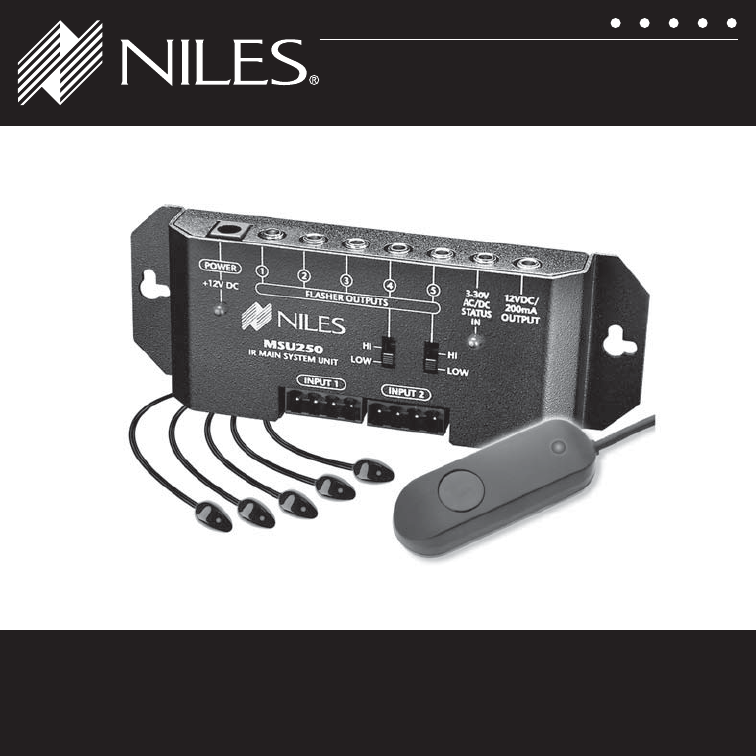
REMOTE CONTROL ANYWHERE!
®
KIT
RCA-HT2
INSTALLATION GUIDE

II
CONGRATULATIONS!
Thank you for choosing the RCA-HT2 Remote Control Anywhere! Kit from Niles. With proper
installation and operation, you should enjoy years of trouble-free use.
Niles manufactures the industry’s most complete line of custom installation components and
accessories for audio/video systems. To see the complete Niles product assortment, visit us on the
internet at: www.nilesaudio.com.
TABLE OF CONTENTS
Introduction 1
Contents 1
Features and Benefits 2
Installation Considerations 6
Installation 7
Specifications 22
Limited Warranty 24
Warranty Registration Card 25
NILES AUDIO CORPORATION – 1-800-BUY-HIFI – 1-305-238-4373 1
INTROdUCTION
The Niles RCA-HT2 Remote Control Anywhere! Kit enables you to operate your remote controlled
audio/video equipment from virtually any location. Now you can place your audio/video (A/V)
components out of sight (behind cabinet doors, in the rear of a room, or in a different room) and still
conveniently control your system.
CONTENTS
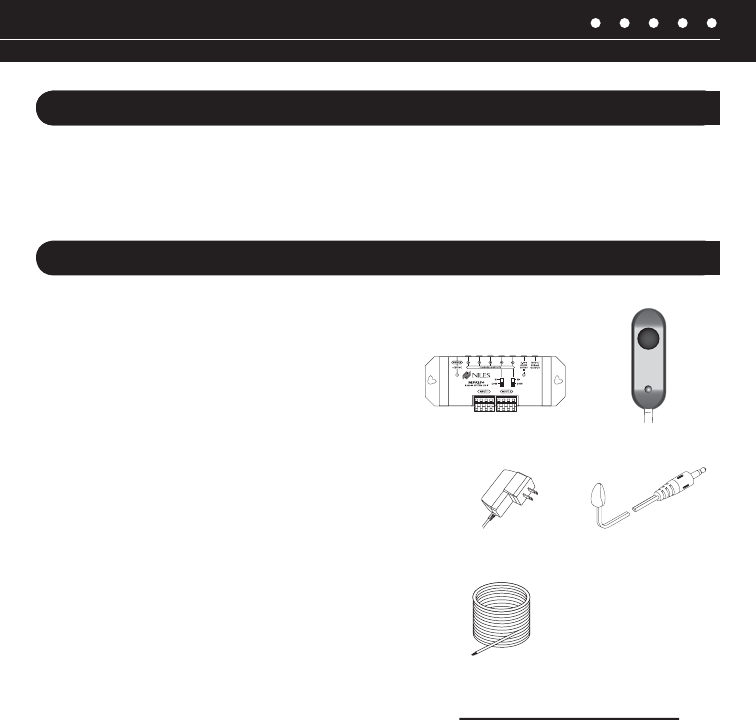
Check that your RCA-HT2 Remote Control Anywhere! Kit contains the following:
®
® (5)
Connection Hub
MicroFlasher (5)
CAT-5 Sensor
Cable (50ft)
Surface Mount
MicroSensor
12VDC Power
Supply

2
FEATURES ANd BENEFITS – REMOTE CONTROL ANYWHERE! KIT
COMPLETE SYSTEM
Everything needed to assemble a complete IR extender system is included in one box:
ONE INFRAREd MICROSENSOR®
ONE MAIN SYSTEM UNIT
Amplifies and distributes the commands to the infrared flashers
IR MICROFLASHER® (FIVE)
Transmit the IR commands to the audio/video components

NILES AUDIO CORPORATION – 1-800-BUY-HIFI – 1-305-238-4373 3
FEATURES ANd BENEFITS – IR MICROSENSOR®
HIGH-FIdELITY WIdEBANd dESIGN
Ensures compatibility with virtually any brand of equipment, even those using faster, more difficult
to reproduce IR codes
PATENT PENdING UNIVERSAL NOISE SUPPRESION dESIGN
fluorescent lights, and direct sunlight
EXTENdEd IR RECEIVING RANGE
PRINTEd CIRCUIT BOARd
SMALL SIzE
EXTRA LONG CABLE

4
FEATURES ANd BENEFITS – MAIN SYSTEM UNIT
UNIVERSAL SYSTEM
Compatible with virtually all brands of audio/video equipment and remote controls
VERSATILE CONNECTIONS
® with removable screwless connector plus four IR flashers via
SYSTEM FEEdBACK LEd
Confirms proper operation
3-30V AC/dC STATUS INPUT
Provides system status to connected sensors and keypads
EXPANdABLE
INTEGRATEd MOUNTING WINGS
Both horizontal and vertical installation is supported
POWER SUPPLY
12VdC OUTPUT
This is useful for triggering external devices and system automation
2X VARIABLE
Flasher out (4 +5) allows for use of high output flasher (sold separately)

NILES AUDIO CORPORATION – 1-800-BUY-HIFI – 1-305-238-4373 5
FEATURES ANd BENEFITS – MICROFLASHER®
MINIATURE ANd dISCRETE
while maintaining a clean appearance
VISIBLE FEEdBACK
TRANSPARENT TO IR COMMANdS
your equipment using a remote control
EASY INSTALLATION
A strip of self-adhesive tape provides secure mounting
CONNECTING WIRE

6
INSTALLATION CONSIdERATIONS
1. Read through the entire manual – Before attempting any installation, read this manual
thoroughly and keep it for future reference.
2. Avoid contact with all high voltage electrical wiring and equipment!
3. Keep away from water and moisture – Never use or install electronic products near water,
ie., near a bathtub, sink, washing machine, in a wet basement, near a swimming pool, or
anywhere else the product may be exposed to water or moisture.
4. Power supply cord protection – Do not run the power cord where it may be subject to wear or
abuse. Do not allow anything to rest on or roll over the power cord which may damage it.
6. Lightning – It is suggested that you remove the power supply from the wall if your system will
not be used for long periods of time. Power surges due to lightning strikes may damage your
equipment.
7. Check your local building and electrical codes – There may be specific requirements
regarding running low voltage in your area.
NILES AUDIO CORPORATION – 1-800-BUY-HIFI – 1-305-238-4373 7
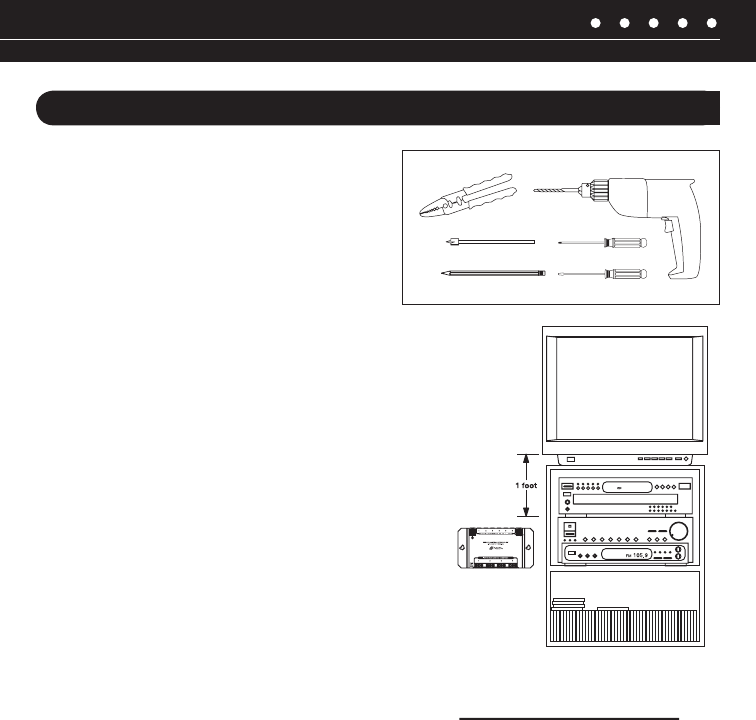
Figure 1 Connection Hub Placement
INSTALLATION
TOOLS REQUIREd
• Pencil
• Standard screwdriver
• Phillips screwdriver
• Wire strippers
• Drill (and assorted bits)
GETTING STARTEd
While the Remote Control Anywhere! Kit is compatible with
most brands of audio/video components, there are a few
for compatibility before you conceal wire or permanently
mount any parts.
Steps one through five describe how to perform a quick
and easy check for compatibility.
Once you have determined that all of your remote
controlled A/V components are compatible, proceed with
the rest of the installation.
8
INSTALLATION
STEP 1 – PLACING THE CONNECTION HUB
Never place the connection hub closer than 1’ away from a television set ( Figure 1).
To unswitched
AC Outlet
Connection
Plugged into a switched
AC Outlet. Typically
found in back
of a receiver.
To Niles IR Flasher
Figure 2:
NILES AUDIO CORPORATION – 1-800-BUY-HIFI – 1-305-238-4373 9
Figure 3: Removable Connector Plug Figure 4: Wiring Legend
INSTALLATION (continued)
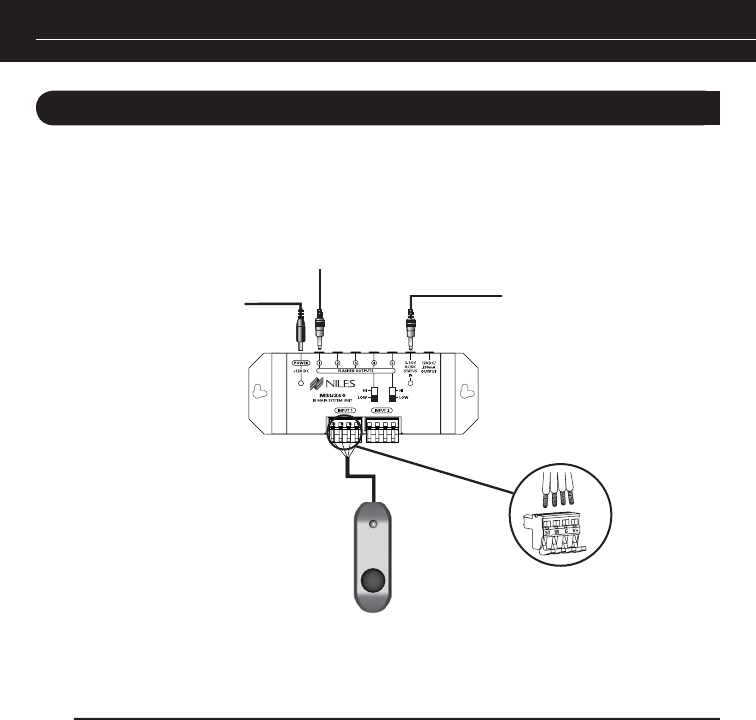
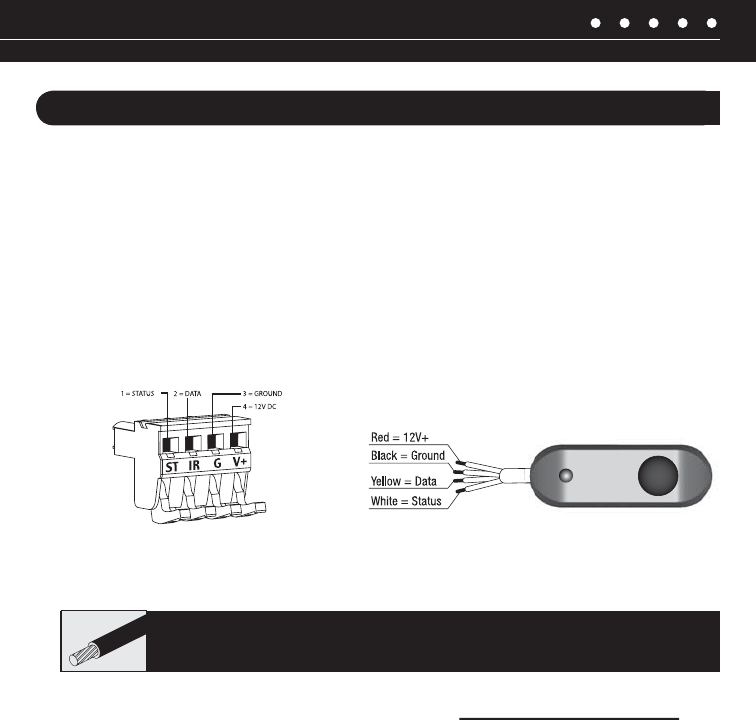
STEP 2 – CONNECTING THE MICROSENSOR CABLE TO
THE CONNECTION HUB
Insert each wire into the appropriate hole on the removable connector plug (Figure 2), and snap the
locking tab down. To help you, the connector plug is keyed. Insert the smooth side of the connector
Figure 3 & 4).
TECH TIP: Wire size is expressed by it’s AWG (American Wire Gauge) number. The lower
10
INSTALLATION (continued)
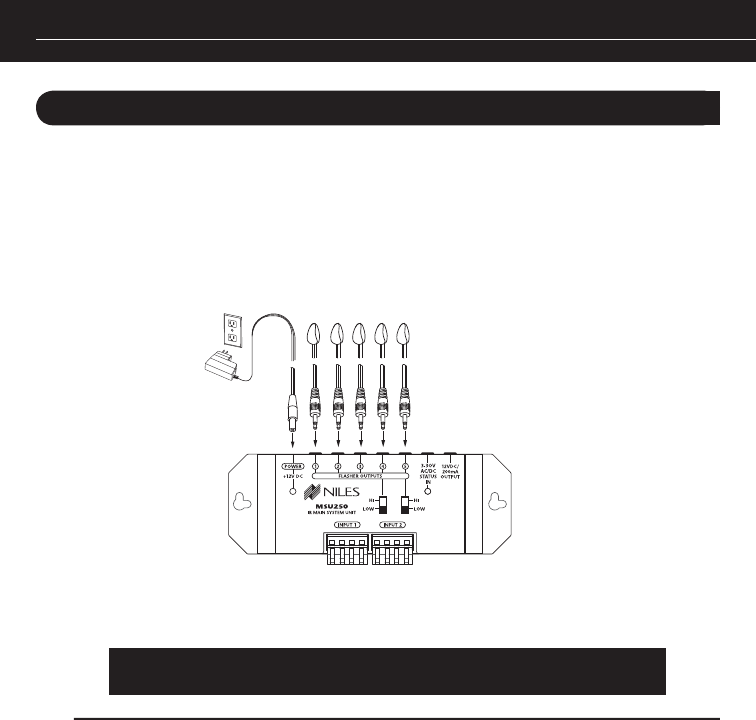
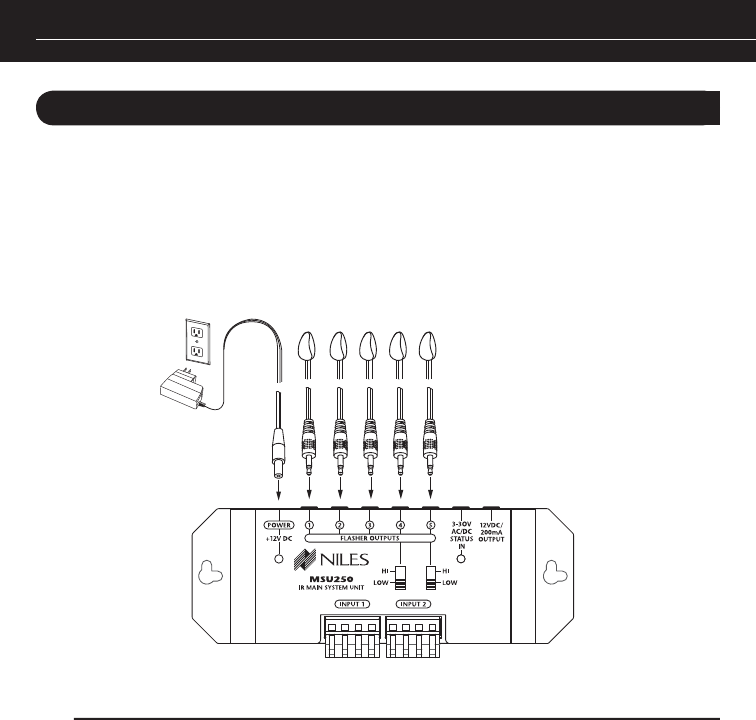
STEP 3 – MICROFLASHER ANd 12VdC IN-LINE POWER SUPPLY
CONNECTION
(Figure 5
TECH TIP:
This will avoid potential damage to components.
Figure 5: Connection Ports
NILES AUDIO CORPORATION – 1-800-BUY-HIFI – 1-305-238-4373 11
INSTALLATION (continued)
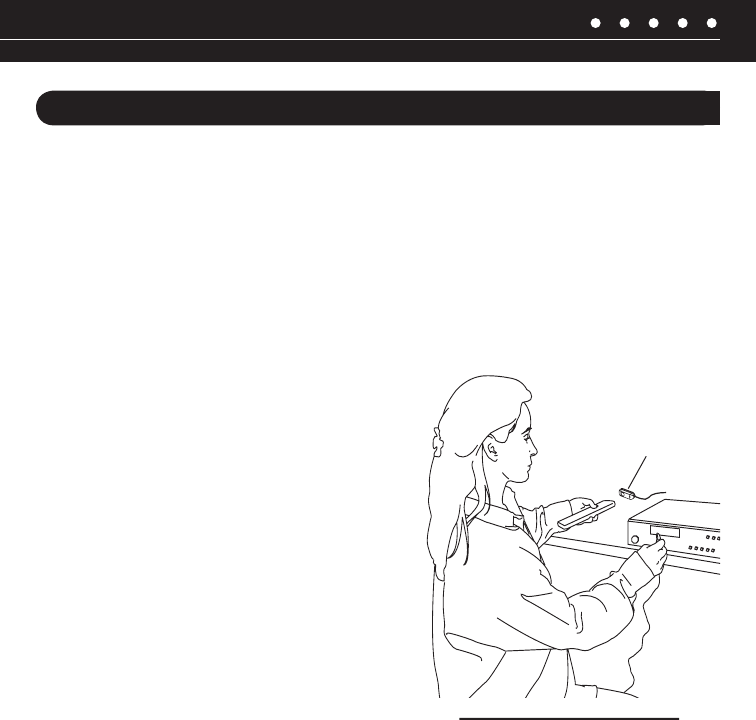
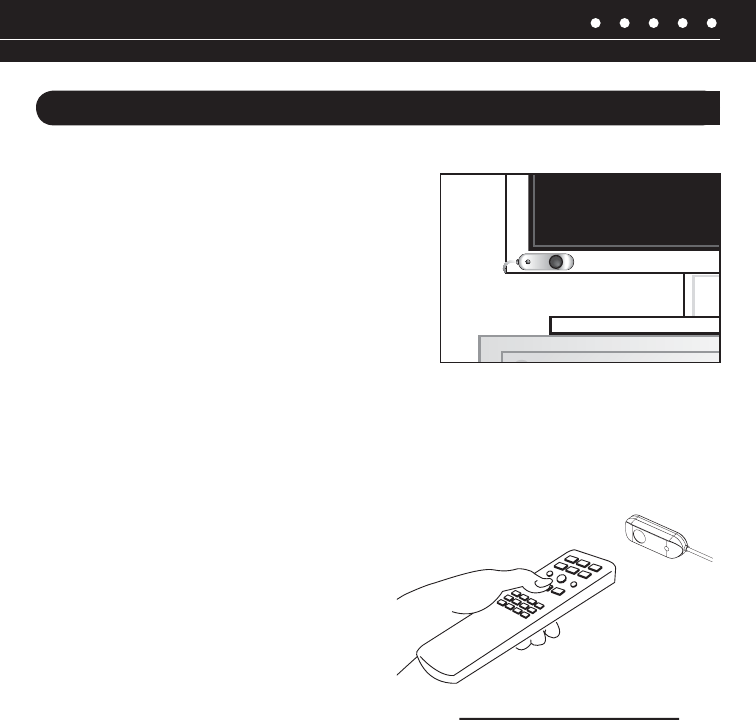
STEP 4 – MOUNTING A MICROFLASHER TO A/V COMPONENTS
components. Locate a place for the remote control that is within arm’s length of the A/V compo-
the remote control (Figure 6).
front panel. Press buttons on the remote control while watching the front panel of the A/V compo-
nent. When the component responds repeatedly to the commands, peel off the protective backing
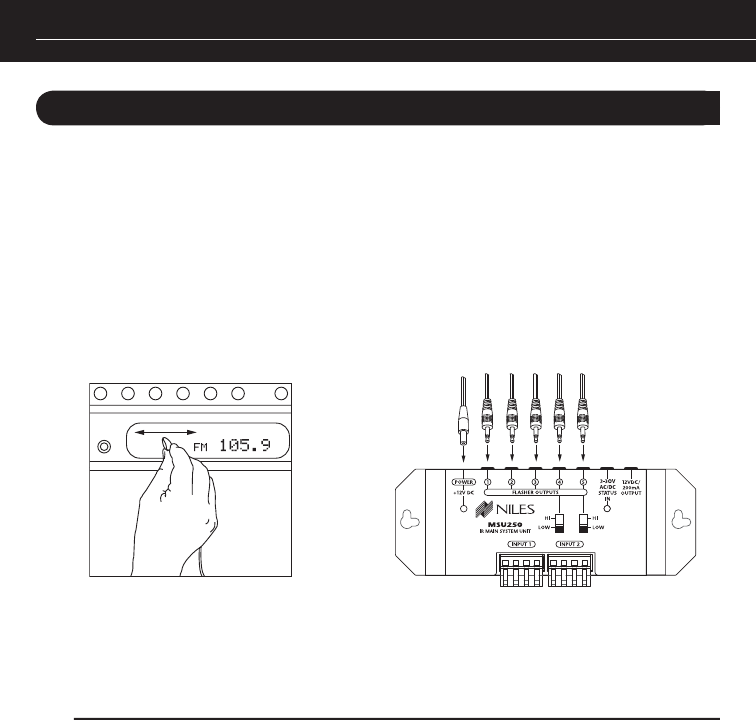
If the A/V component’s remote sensor is not clearly
-
dow of the A/V component while pushing buttons on
the remote control until you get a response (Figure 7).
Repeat this procedure for each A/V component you
wish to control.
When the A/V component responds repeatedly, peel off
Figure 6: Locating IR
12
INSTALLATION (continued)
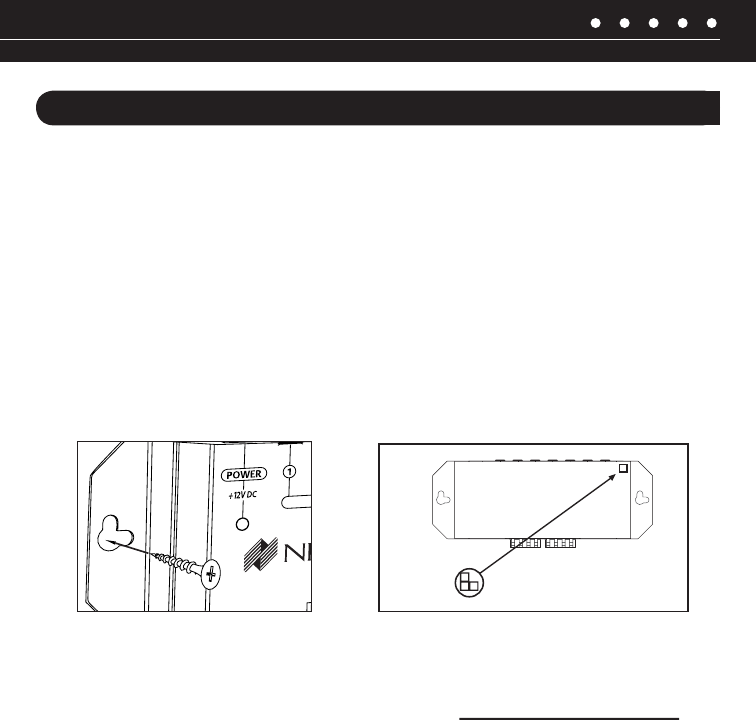
STEP 5 – MOUNTING THE CONNECTION HUB
the connection hub (Figure 8). The connection hub can be either mounted on a wall using screws
or placed on a shelf using the included adhesive feet (Figure 9).
Figure 7: Figure 8: Removing Cables
NILES AUDIO CORPORATION – 1-800-BUY-HIFI – 1-305-238-4373 13
Figure: 9A & B
A: Wall mounting
B: If you desire to shelf mount the connection hub, stick the included adhesive backed feet on the
bottom of the unit and place it on the shelf
Figure 9B: Table-top placement
Affix the enclosed self-adhesive
Figure 9A: Wall-mount placement
Self-Adhesive
Rubber Feet
INSTALLATION (continued)
STEP 6 – RUNNING THE MICROSENSOR CABLE
14
INSTALLATION (continued)
STEP 7 – RUNNING THE MICROSENSOR CABLE
(Figure 10).
That’s it! Now you are ready to control your audio/video equipment from the room you chose.
Figure 10: Connecting Power Supply and Flashers
NILES AUDIO CORPORATION – 1-800-BUY-HIFI – 1-305-238-4373 15
INSTALLATION (continued)
STEP 8 – MS220 MOUNTING LOCATION
anywhere. Convenient mounting locations for the
viewer
-
ance, or a speaker grille
NORMAL OPERATION
on the remote (Figure 12).
If you are using a remote control with macro
capabilities (a single press of a button issues a
string of commands), allow sufficient time for all
of the commands to execute.
Figure 12: System Operation
Figure 11:
16
INSTALLATION (continued)
OPTIONAL ACCESSORIES
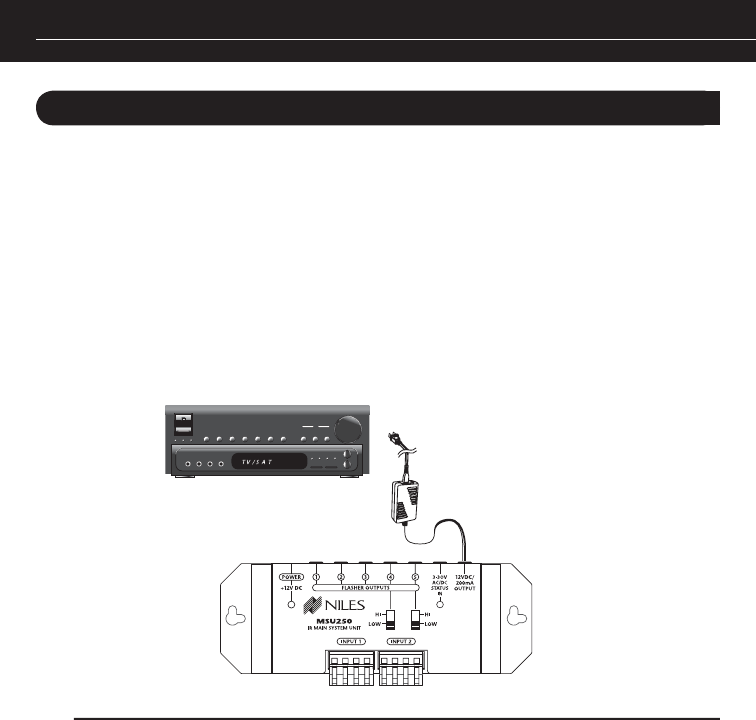
STATUS FEEdBACK WALL AdAPTER
This is a very useful feature when operating your equipment from a remote location. For this feature
to work, your system receiver (or preamp) must have a switched AC outlet and you must purchase
connection hub’s Status Input (Figure 13).
REMOTE CONTROL ANYWHERE! KIT
CONNECTION HUB
Figure 13: Connecting the Status Adaptor

NILES AUDIO CORPORATION – 1-800-BUY-HIFI – 1-305-238-4373 17
INSTALLATION (continued)
AddITIONAL MICROSENSORS
RUNNING MICROSENSOR CABLE IN NEW CONSTRUCTION
SCHEdULING ANd PREPARATION
basic rules are:
Never run the MicroSensor cable through the same hole as an electrical cable.
Never run the MicroSensor cable into the same J-box as electrical cable.
Avoid running the MicroSensor cable beside the electrical cable. Keep it at least 3 or 4 feet
away from any electrical power cable.
cable route away as soon as possible. If construction forces a side by side run for more than ten
cables, so you can safely run all of them at the same time, through the same holes, side-by-side.

18
INSTALLATION (continued)
SAFETY FIRST!
Wear gloves, safety goggles and head protection when drilling. Avoid nails, they ruin bits and they
the torque of the drill when suddenly stopped by a nail can break a strong person’s wrist.
dRILLING
rough-in wiring. It will actually pull itself through the wood, so that the drill motor, not you, does
most of the work.
Always drill the holes in the center of the stud. If you have to notch the stud or drill the hole closer
than one inch from the edge of the stud, protect the cable with a nail plate.
When drilling holes in ceiling joists, drill in the center of the joists and try to locate the hole near
the end of the joist. DO NOT drill through a “glulam” or any load bearing beam without the
direction of your contractor.
Try to line the holes up perfectly, because it makes pulling the cable much easier. A good technique
is to snap a chalk line across the face of the studs or against the bottom of the ceiling joists. Then
work backward so that you can always see the holes you have already drilled. Paying careful
attention to this will save you a lot of time later!

NILES AUDIO CORPORATION – 1-800-BUY-HIFI – 1-305-238-4373 19
INSTALLATION (continued)
PULLING THE CABLE
Whenever you run the cable farther than 4-1/2 feet from a hole in a stud or joist (open attic space,
going up walls, etc.), fasten the cable to the joists or studs using cable clamps or appropriately
sized cable staples. The cable should not have large sags in it, nor should it be too tight. Try to
protect the cable from being stepped on in attics or other unfinished crawl spaces. There are guard
strips, raceways and conduits which can be used to protect the cable. Consult the local building
code for special requirements in your area.
CONCEALING MICROSENSOR CABLE IN EXISTING WALLS
routes to the interior walls or ceilings of your home. Interior walls in almost all North American
see when you look at the painted wall board, plaster, or paneling is only the skin of the wall. Behind
the studs and the joists is the space for the wiring and plumbing of your home.
Exterior walls are different. They must insulate the house from the heat and cold outside, so they
are stuffed with insulation. The national building code requires that the hollow wall space in exterior
it very difficult to retrofit long lengths of cable. In some areas of the country the exterior walls are
constructed of solid masonry, and have no hollow space for cables.

20
INSTALLATION (continued)
(horizontal 2 x 4 at the top of the inside of the wall), into the attic crawl space, then down another
plate to the wall behind the stereo system itself. The other very common route is through the bottom
plate of the wall into an unfinished basement or crawl space.
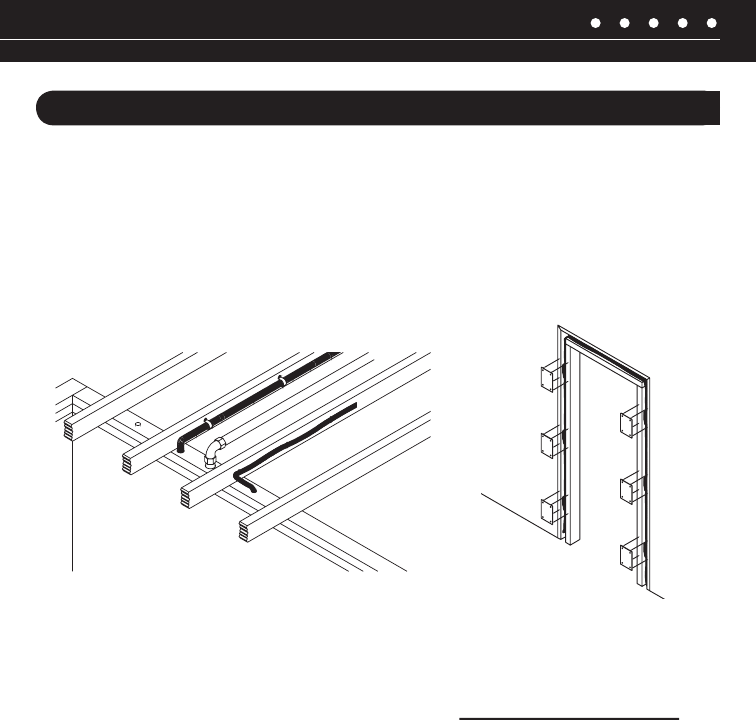
Identify where all of your electrical, phone, and TV wiring is likely to be and plan to route around it
feet away. To find exactly where an electrical cable is routed, try inspecting the inside of the wall by
turning off the breaker for a particular power outlet or switch, removing the cover plate and switch
or receptacle, and shining a penlight into the wall. If you have access to an attic or basement space,
you can see which part of the wall space is free of obstructions (Figure 14).
When you don’t have access above or below the wall, try to estimate the existing cable and pipe
locations from the positions of electrical outlets and plumbing fixtures on both sides of the wall.
Also, take a look at the outside of your house, sometimes a conduit, vent or drain pipe will be visible
and will offer useful information. Choose the route with the fewest potential obstacles. If your house
is built on a slab or you are wiring between two finished floors, look for baseboards which could
Figure 15).
NILES AUDIO CORPORATION – 1-800-BUY-HIFI – 1-305-238-4373 21
INSTALLATION (continued)
Sometimes, an under-the-carpet run is possible. As a last resort, heating and air conditioning vents
can be used as cable raceways for plenum rated cable (check your local building codes, some
municipalities require a conduit).
When you are dealing with the unknown because of the structure of your home, or with difficult
materials to patch the wall, such as plaster, lath and plaster, faux finishes, wallpaper etc., be
patient. A careful study of the potential problems before you start the job will pay off later.
Figure 15: Figure 14:

22
SPECIFICATIONS
MSU250
IR System Compatible with virtually all brands
of remotes using carrier frequencies between
Wiring Requirements Individual home-runs of
Unit Dimensions
Power Requirements
MS220
IR System Compatible with virtually all brands
of remotes using carrier frequencies between
IR Receiving Range
the remote control
IR Receiving Angle
and vertical) at 25’ (7.62 meters)
Mounting
Wiring Requirements
Individual home-runs of CAT-5 cable
Unit Dimensions
MF1VF
IR System
Compatible with virtually all brands of remotes
using carrier frequencies between 25kHz and
IR Transmitting Angle
(the off-axis power drops off very rapidly)
Unit Dimensions
.79 cm wide x .48 cm high x 1.27 cm long
NILES AUDIO CORPORATION – 1-800-BUY-HIFI – 1-305-238-4373 23
NOTES

24
LIMITEd WARRANTY
of manufacturing defects in material and workmanship for a period of two years from date of purchase.
This Warranty is subject to the following additional conditions and limitations. The Warranty is void and inapplicable if NILES deems
that the product has been used or handled other than in accordance with the instructions provided by the manufacturer, including
but not limited to damage caused by accident, mishandling, improper installation, abuse, negligence, or normal wear and tear, or
any defect caused by repair to the product by anyone other than NILES or an authorized NILES dealer.
To obtain warranty service, take the unit to the nearest authorized NILES dealer, who will test the product and if necessary, forward
it to NILES for service. If there are no authorized NILES dealers in your area, you must write to NILES and include your name,
model and serial number of your unit, along with a brief description of the problem. A factory Return Authorization Number will
If the above conditions are met, the purchaser’s sole remedy shall be to return the product to NILES, in which case NILES will
repair or replace, at its sole option, the defective product without charge for parts or labor. NILES will return a unit repaired or
States of America. THERE ARE NO OTHER WARRANTIES, INCLUDING WITHOUT LIMITATION, EITHER EXPRESS OR IMPLIED
WARRANTIES OF MERCHANTABILITY OR FITNESS FOR A PARTICULAR PURPOSE, WITH RESPECT TO THE PRODUCT.
REPAIR OR REPLACEMENT AS PROVIDED UNDER THIS WARRANTY IS THE EXCLUSIVE REMEDY OF THE CONSUMER/
PURCHASER. NILES SHALL NOT BE RESPONSIBLE FOR ANY INCIDENTAL OR CONSEQUENTIAL DAMAGES EXCEPT TO THE
EXTENT PROVIDED (OR PROHIBITED) BY APPLICABLE LAW.
Some states do not allow the exclusion or limitation of incidental or consequential damages, so the above limitation may not apply to you.
This warranty gives you specific legal rights, and you may also have other rights which vary from state to state.
For the name of your nearest authorized NILES dealer, contact:
Please fill in your product information and retain for your records.
RCA-HT2
NILES AUDIO CORPORATION – 1-800-BUY-HIFI – 1-305-238-4373 25
Detach here and return to: Niles Audio Corporation Warranty Registration Dept. P.O. Box 160818 Miami, Florida 33116-0818
WARRANTY REGISTRATION CARd
Serial Number
❍
❍
❍
❍
❍
Name Address
CityState Tel ( )
Age:
❍ Under 25
❍ 25-34
❍ 35-44
❍ 45-54
❍ 55 & over
Income:
❍ Under $24,999
❍ $25,000-$44,999
❍ $45,000-$74,999
❍ $75,000-$99,999
❍ $100,000-$129,999
❍ Over $130,000
Occupation:
❍ Arts/Entertainment
❍ Business Owner
❍ Engineer
❍ Finance/Accounting
❍ General Office
❍ Management
❍ Professional
❍ Sales/Marketing
❍ Student
❍ Tradesperson
Musical tastes: (Please check
all that apply)
❍ Alternative ❍ Classical
❍ Country ❍ Jazz
❍ New Age ❍ Popular
❍ R&B ❍ Rock
❍ Other ________________
How did you hear about Niles?
❍ Architect/Developer
❍ Custom Installer
❍ Direct Mail
❍ Friend/Family
❍ In-Store Display
❍ Interior Designer
❍ Magazine Ad
❍ Mail-Order Catalog
❍ Newspaper Ad
❍ Product Brochure
❍ Product Review
❍ Retail Salesperson
❍ E-Tailer
What magazines do you read?
1. _____________________
2. _____________________
3. _____________________
Who will install the product?
❍ Custom Installer
❍ Electrician
❍ Friend
❍ Myself
Which factor(s) influenced the purchase
of your Niles product? (Please check
all that apply)
❍ Ease of Use
❍ Price/Value
❍ Product Features
❍ Quality/Durability
❍ Reputation
❍ Style/Appearance
❍ Warranty
Do you . . . ?
❍ Own a House. If yes,
how many square feet?
______________________
❍ Own a Town House/
Condominium/Co-op
❍ Rent an Apartment
❍ Rent a House
Are you interested in receiving
literature on other Niles products?
❍ Yes ❍ No
Are there products/capabilities
that you would like to see introduced?
________________________
________________________
________________________
________________________
RCA-HT2

Blending HigH Fidelity An d ArcHitecture®
Niles Audio Corporation
12331 S.W. 130 Street Miami, Florida 33186
1-800-BUY-HIFI – www.nilesaudio.com
©2009 Niles Audio Corporation. All rights reserved. Niles, the Niles logos, MicroSensor, MicroFlasher, Remote Control
Anywhere! and Blending High Fidelity and Architecture are registered trademarks of Niles Audio Corporation.
All other trademarks are the property of their respective owners. DS00687A
