Masterwork Aoitek Tech CABC-LOL01 Lollipop User Manual
Masterwork Aoitek Tech Corp Ltd Lollipop Users Manual
Users Manual

Thank you for purchasing the Lollipop,
let’s get started now!
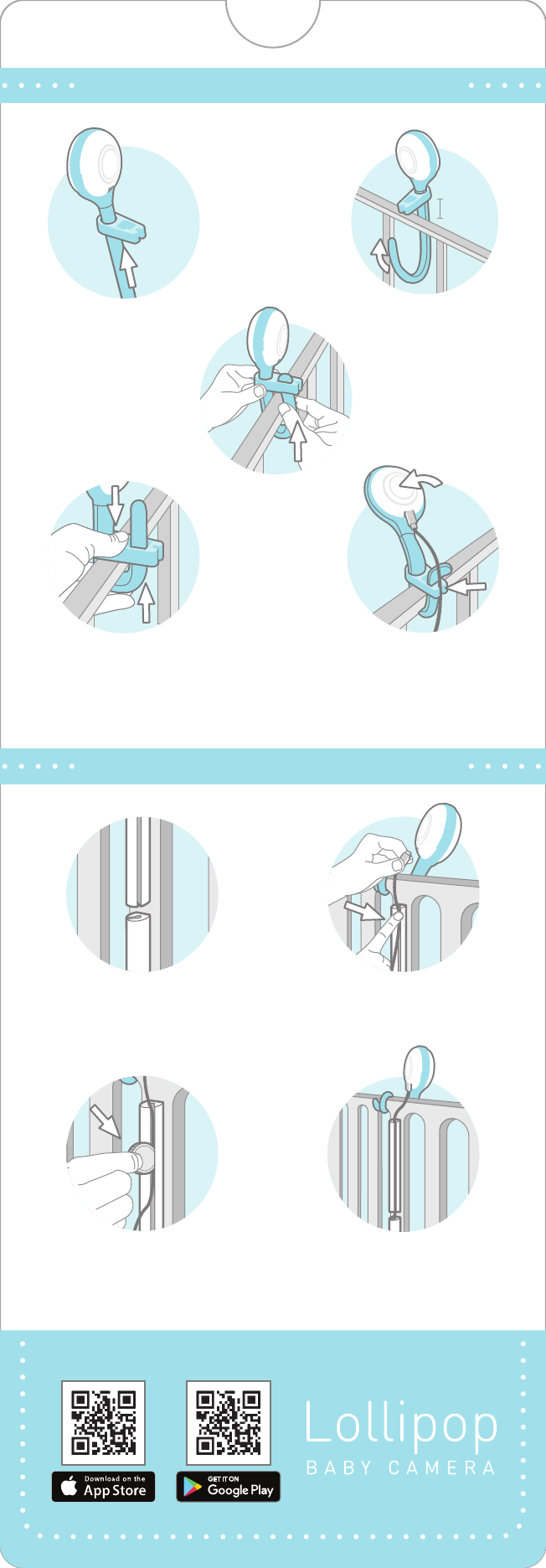
5. Bend the camera and
plug-in the USB cable. The
USB CABLE can be
embedded on the slot.
4
3. Put the bending tip
through the BOND’s
back hole.
4. Push down the BOND
untill it touch the crib
while pull-up the bottom
stick to the crib tightly.
3.
Use COIN to push
USB CABLE deep into the
gap of CABLE GUIDE
4.
Installation finished!
Cable Routing with CABLE GUIDE
LOLLIPOP Binding with BOND
2.
Push the USB CABLE
into the gap along with
CABLE GUIDE
2. Bend the stick
across the crib, the end
of the stick should not
go higher than BOND!
2cm
1. Turn the Lollipop to
the back, then push
BOND to the top
1.
Stick the cable guides
with different orientation

Thank you for purchasing the Lollipop,
let’s get started now!
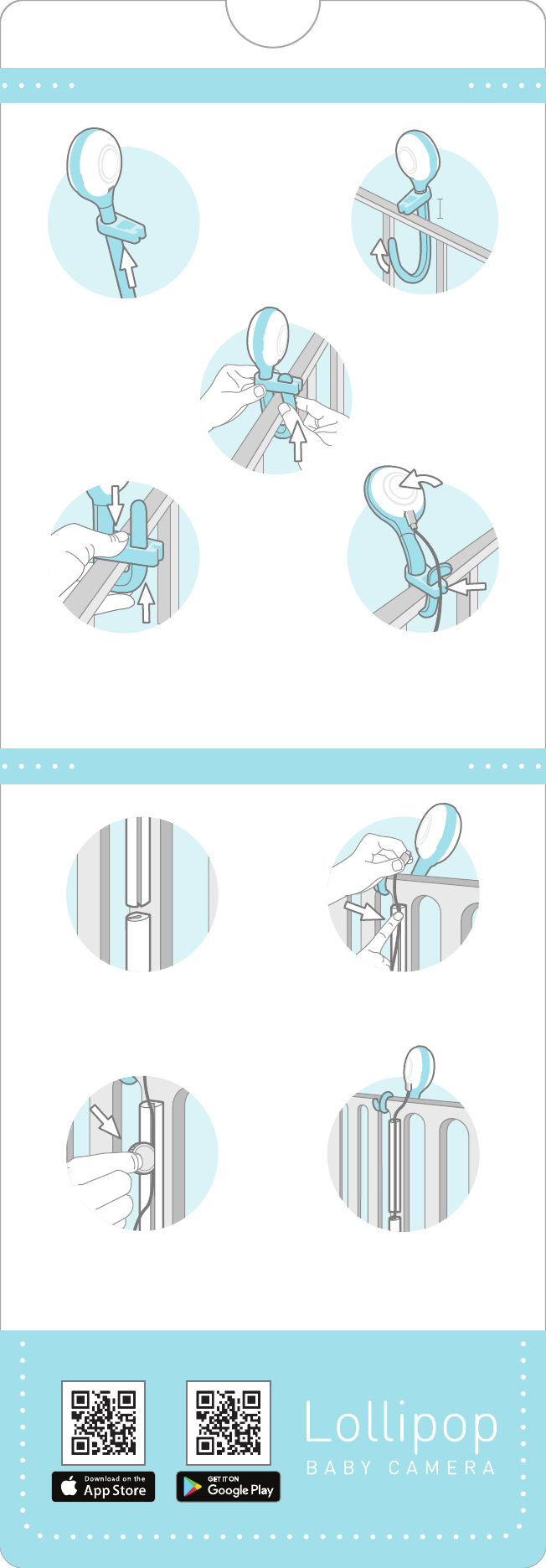
5. Bend the camera and
plug-in the USB cable. The
USB CABLE can be
embedded on the slot.
4
3. Put the bending tip
through the BOND’s
back hole.
4. Push down the BOND
untill it touch the crib
while pull-up the bottom
stick to the crib tightly.
3.
Use COIN to push
USB CABLE deep into the
gap of CABLE GUIDE
4.
Installation finished!
Cable Routing with CABLE GUIDE
LOLLIPOP Binding with BOND
2.
Push the USB CABLE
into the gap along with
CABLE GUIDE
2. Bend the stick
across the crib, the end
of the stick should not
go higher than BOND!
2cm
1. Turn the Lollipop to
the back, then push
BOND to the top
1.
Stick the cable guides
with different orientation
Federal Communication Commission Interference Statement
This equipment has been tested and found to comply with the limits for a Class B digital device, pursuant to Part 15 of the FCC Rules.
These limits are designed to provide reasonable protection against harmful interference in a residential installation. This equipment
generates, uses and can radiate radio frequency energy and, if not installed and used in accordance with the instructions, may cause
harmful interference to radio communications. However, there is no guarantee that interference will not occur in a particular
installation. If this equipment does cause harmful interference to radio or television reception, which can be determined by turning
the equipment off and on, the user is encouraged to try to correct the interference by one of the following measures:
- Reorient or relocate the receiving antenna.
- Increase the separation between the equipment and receiver.
- Connect the equipment into an outlet on a circuit different from that to which the receiver is connected.
- Consult the dealer or an experienced radio/TV technician for help.
FCC Caution: Any changes or modifications not expressly approved by the party responsible for compliance could void the user's
authority to operate this equipment.
This device complies with Part 15 of the FCC Rules. Operation is subject to the following two conditions: (1) This device may not cause
harmful interference, and (2) this device must accept any interference received, including interference that may cause undesired
operation.
IMPORTANT NOTE:
Radiation Exposure Statement:
This equipment complies with FCC radiation exposure limits set forth for an uncontrolled environment. This equipment should be
installed and operated with minimum distance 20cm between the radiator & your body.
This transmitter must not be co-located or operating in conjunction with any other antenna or transmitter.
Country Code selection feature to be disabled for products marketed to the US/CANADA
Operation of this device is restricted to indoor use only
第十二條→經型式認證合格之低功率射頻電機,非經許可,公司,商號或使用者均不得擅自變更頻率、加大功率或變更原設計之特性及
功能。
第十四條→低功率射頻電機之使用不得影響飛航安全及干擾合法通信;經發現有干擾現象時,應立即停用,並改善至無干擾時方得繼續
使用。
前項合法通信,指依電信法規定作業之無線電通信。 低功率射頻電機須忍受合法通信或工業、科學及醫療用電波輻射性電機設備之干擾。