Matias LAPTOPPRO24 Mechanical Keyboard User Manual FK303QPCW

Matias Corporation Mechanical Keyboard FK303QPCW

(FK303QPCW)User manual

     ***    USER’S MANUAL ***  FCC ID : WKMLAPTOPPRO24
  The Federal Communication Commission Statement This equipment has been tested and found to comply with the limits for a Class B Digital Device, pursuant to Part  15  of  the  FCC  rules.    These  limits  are  designed  to  provide  reasonable  protection  against  harmful interference  in a  residential  installation.  This  equipment  generates,  uses  and  can  radiate  radio  frequency energy and, if not installed and used in accordance with the instruction, may cause harmful interference to radio  communication.    However,  there  is  no  guarantee  that  interference  will  not  occur in  a  particular installation. If this equipment does cause harmful interference to radio or television reception, which can be determined by turning the equipment off and on, the user is encouraged to try to correct the interference by one of more of the following measures: -   -  Reorient or relocate the receiving antenna.  -  Increase the separation between the equipment and receiver.  - Connect the equipment into an outlet on a circuit different from that to which the receiver is connected.  -  Consult the dealer or an experienced Radio/TV technician for help.  Use  only  shielded  cables  to  connect  I/O  devices  to  this  equipment.  You  are  cautioned  that  change  or modifications not expressly approved by the party responsible for compliance could void your authority to operate the equipment.   THIS  DEVICE  COMPLIES  WITH  PART  15  OF  FCC  RULES.    OPERATION  IS  SUBJECT  TO  THE FOLLOWING TWO CONDITIONS:   1 This device may not cause harmful interference and  2 This device must accept any interference received, including interference that may cause undesired operation.   The antenna used for this transmitter must not be collocated or operation in conjunction with any other antenna or transmitter.  Notice :      The changes or modifications not expressly approved by the party responsible                   for compliance could void the user’s authority to operate the equipment.  IMPORTANT NOTE: To comply with the FCC RF exposure compliance requirements, no change to the antenna or the device is permitted. Any change to the antenna or the device could result in the device exceeding the RF exposure requirements and void user’s authority to operate the device.
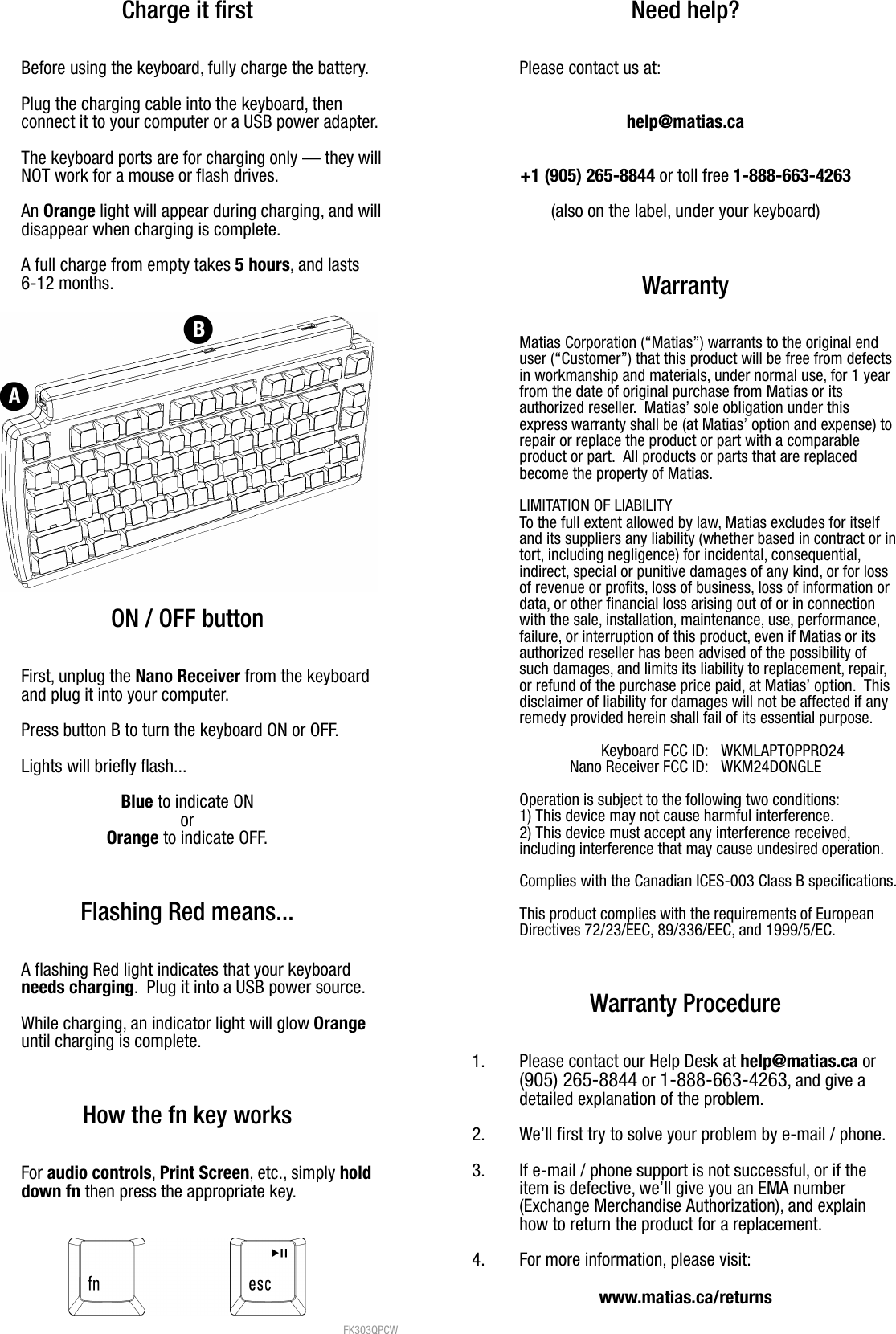
Charge it firstBefore using the keyboard, fully charge the battery.Plug the charging cable into the keyboard, then connect it to your computer or a USB power adapter.  The keyboard ports are for charging only — they willNOT work for a mouse or flash drives.An Orange light will appear during charging, and willdisappear when charging is complete. A full charge from empty takes 5 hours, and lasts 6-12 months.ON / OFF buttonFirst, unplug the Nano Receiver from the keyboardand plug it into your computer.Press button B to turn the keyboard ON or OFF.Lights will briefly flash...Blue to indicate ONorOrange to indicate OFF.Flashing Red means...A flashing Red light indicates that your keyboard needs charging.  Plug it into a USB power source.While charging, an indicator light will glow Orange until charging is complete.How the fn key worksFor audio controls, Print Screen, etc., simply hold down fn then press the appropriate key. FK303QPCW Need help?Please contact us at:help@matias.ca+1 (905) 265-8844 or toll free 1-888-663-4263(also on the label, under your keyboard)WarrantyMatias Corporation (“Matias”) warrants to the original enduser (“Customer”) that this product will be free from defectsin workmanship and materials, under normal use, for 1 yearfrom the date of original purchase from Matias or itsauthorized reseller.  Matias’ sole obligation under thisexpress warranty shall be (at Matias’ option and expense) torepair or replace the product or part with a comparableproduct or part.  All products or parts that are replacedbecome the property of Matias.LIMITATION OF LIABILITYTo the full extent allowed by law, Matias excludes for itselfand its suppliers any liability (whether based in contract or intort, including negligence) for incidental, consequential,indirect, special or punitive damages of any kind, or for lossof revenue or profits, loss of business, loss of information ordata, or other financial loss arising out of or in connectionwith the sale, installation, maintenance, use, performance,failure, or interruption of this product, even if Matias or itsauthorized reseller has been advised of the possibility ofsuch damages, and limits its liability to replacement, repair,or refund of the purchase price paid, at Matias’ option.  Thisdisclaimer of liability for damages will not be affected if anyremedy provided herein shall fail of its essential purpose.Keyboard FCC ID: WKMLAPTOPPRO24Nano Receiver FCC ID: WKM24DONGLEOperation is subject to the following two conditions:1) This device may not cause harmful interference.2) This device must accept any interference received,including interference that may cause undesired operation.  Complies with the Canadian ICES-003 Class B specifications.This product complies with the requirements of EuropeanDirectives 72/23/EEC, 89/336/EEC, and 1999/5/EC.Warranty Procedure1. Please contact our Help Desk at help@matias.ca or(905) 265-8844 or 1-888-663-4263, and give adetailed explanation of the problem.2. We’ll first try to solve your problem by e-mail / phone.3. If e-mail / phone support is not successful, or if the item is defective, we’ll give you an EMA number(Exchange Merchandise Authorization), and explainhow to return the product for a replacement.4. For more information, please visit:www.matias.ca/returns

Navigation menu