Maytel MR-900 Multicom Repeater 900 User Manual

Maytel Co., Ltd Multicom Repeater 900 Users Manual

User Manual

      REPORT No.:TRRFCC17-0002 FCC ID : YJHMR-900    Copyright ⓒ 2017. Lab-T, Inc.     User Manual
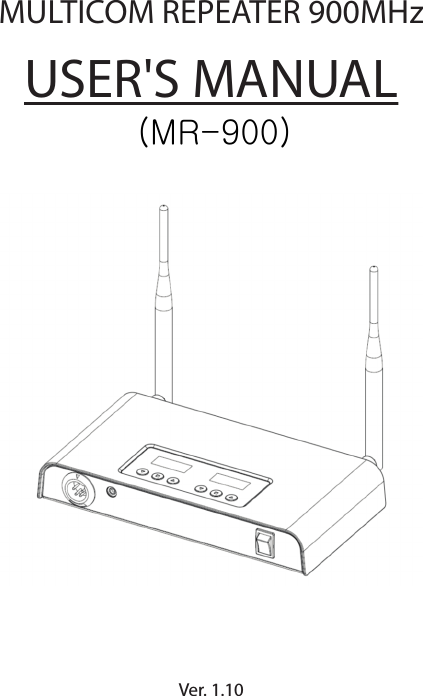
MULTICOM REPEATER 900MHzVer. 1.10   USER'S MANUAL(MR-900)
1. General Information1.1 IntroductionThe "Multicom Repeater 900MHz" is designed by using the most advanced Self-Repeating communication technology. It serves user-friendly features and also extremely convenient to expand the communicating coverage of Multicom.It gives expanding of communicating coverage around 2.1km~3.0kmtypically by consist of 2 Repeaters with up to 8 users multiplexcommunication excluding Reprater itself.Furthermore, it is available to expand the talk range by cable connectionbetween Repeater.In this case, the talk range is dependant on the cable length and maximumavailable handsets are 16 units in full duplex excluding Repeater itself.It is recommendable you read the user’s manual thoroughly to enjoy itsmaximized performance and features this repeater has to oer.1.2 Main Features* Long distance communication coverage over 2.1km ~ 3.0km typically* 39 dierent Group communicating selection per Repeater* Audio output HI/Low selection* Audio volume control with 9 steps* Side tone On/O selection* Direct microphone sensitivity control with 5 steps* Convenient USB power source for the purpose of its portable using by   connection Mobile phone Power bank into it or DC 5.0V adapter via AC   input
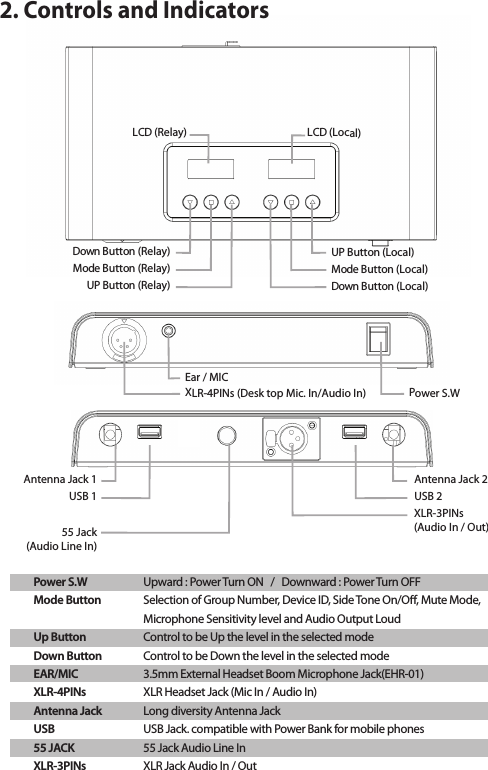
2. Controls and IndicatorsPower S.WMode ButtonUp ButtonDown ButtonEAR/MICXLR-4PINsAntenna JackUSB55 JACKXLR-3PINsUpward : Power Turn ON   /   Downward : Power Turn OFFSelection of Group Number, Device ID, Side Tone On/O, Mute Mode, Microphone Sensitivity level and Audio Output LoudControl to be Up the level in the selected modeControl to be Down the level in the selected mode3.5mm External Headset Boom Microphone Jack(EHR-01) XLR Headset Jack (Mic In / Audio In)Long diversity Antenna Jack USB Jack. compatible with Power Bank for mobile phones55 Jack Audio Line InXLR Jack Audio In / OutUP Button (Local)  Down Button (Local) Mode Button (Local) UP Button (Relay)Down Button (Relay) Mode Button (Relay)55 Jack(Audio Line In)Antenna Jack 1USB 1XLR-3PINs(Audio In / Out)Antenna Jack 2USB 2XLR-4PINs (Desk top Mic. In/Audio In) Power S.WEar / MICLCD (Relay) LCD (Local)
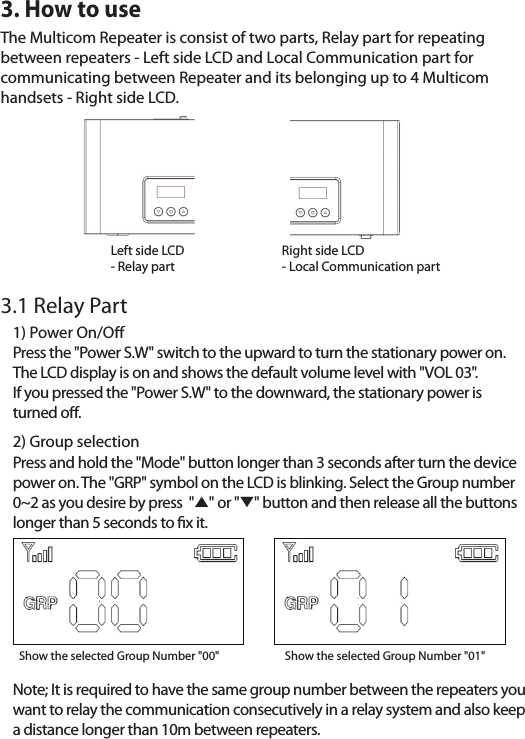
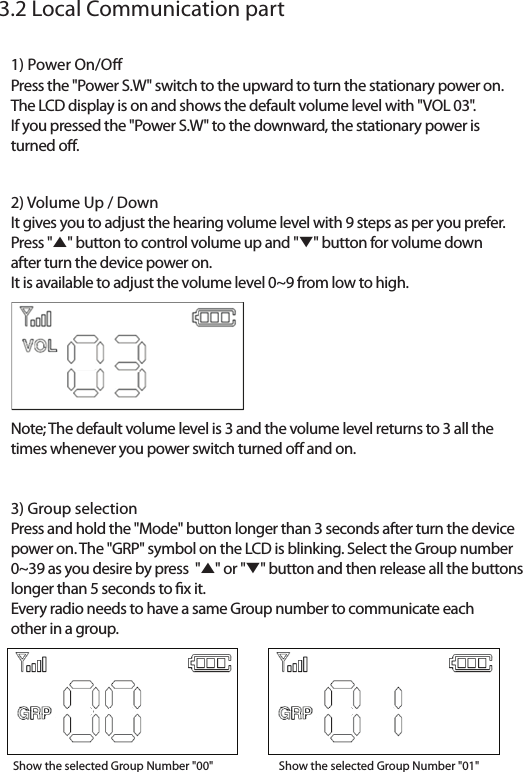
3. How to use3.1 Relay PartThe Multicom Repeater is consist of two parts, Relay part for repeating between repeaters - Left side LCD and Local Communication part for communicating between Repeater and its belonging up to 4 Multicom handsets - Right side LCD.1) Power On/OPress the "Power S.W" switch to the upward to turn the stationary power on. The LCD display is on and shows the default volume level with "VOL 03". If you pressed the "Power S.W" to the downward, the stationary power is turned o.2) Group selectionPress and hold the "Mode" button longer than 3 seconds after turn the device power on. The "GRP" symbol on the LCD is blinking. Select the Group number 0~2 as you desire by press  "̵" or "̷" button and then release all the buttons longer than 5 seconds to x it.Note; It is required to have the same group number between the repeaters you want to relay the communication consecutively in a relay system and also keep a distance longer than 10m between repeaters.Show the selected Group Number "00"       Show the selected Group Number "01"Left side LCD- Relay partRight side LCD - Local Communication partLeft side LCD
Show the selected Group Number "00"       Show the selected Group Number "01"3) Group selectionPress and hold the "Mode" button longer than 3 seconds after turn the device power on. The "GRP" symbol on the LCD is blinking. Select the Group number 0~39 as you desire by press  "̵" or "̷" button and then release all the buttons longer than 5 seconds to x it.Every radio needs to have a same Group number to communicate each other in a group.3.2 Local Communication part1) Power On/OPress the "Power S.W" switch to the upward to turn the stationary power on. The LCD display is on and shows the default volume level with "VOL 03". If you pressed the "Power S.W" to the downward, the stationary power is turned o.2) Volume Up / DownIt gives you to adjust the hearing volume level with 9 steps as per you prefer.Press "̵" button to control volume up and "̷" button for volume down after turn the device power on. It is available to adjust the volume level 0~9 from low to high.Note; The default volume level is 3 and the volume level returns to 3 all the times whenever you power switch turned o and on.
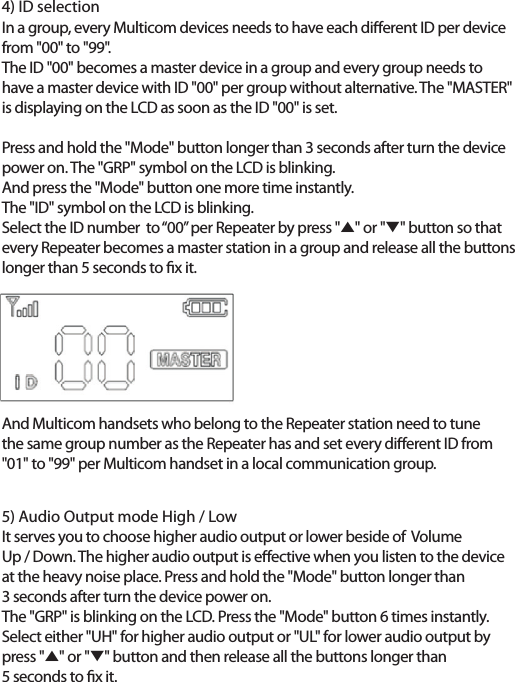
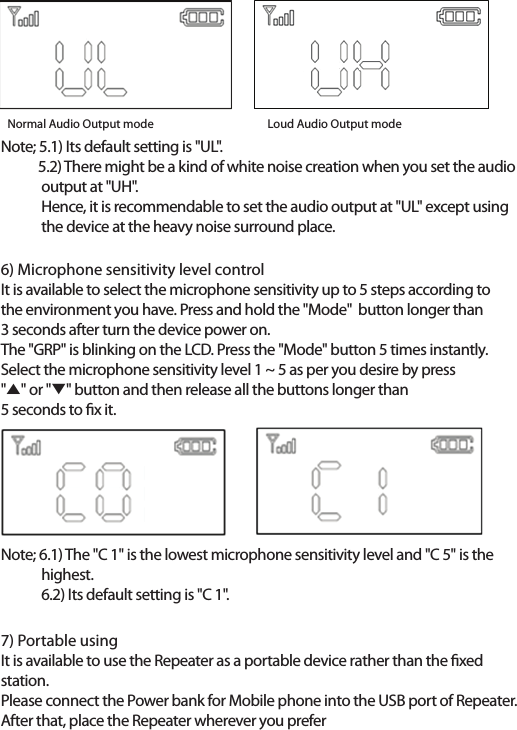
4) ID selectionIn a group, every Multicom devices needs to have each dierent ID per devicefrom "00" to "99".The ID "00" becomes a master device in a group and every group needs to have a master device with ID "00" per group without alternative. The "MASTER" is displaying on the LCD as soon as the ID "00" is set.Press and hold the "Mode" button longer than 3 seconds after turn the device power on. The "GRP" symbol on the LCD is blinking. And press the "Mode" button one more time instantly. The "ID" symbol on the LCD is blinking. Select the ID number  to “00” per Repeater by press "̵" or "̷" button so thatevery Repeater becomes a master station in a group and release all the buttonslonger than 5 seconds to x it.And Multicom handsets who belong to the Repeater station need to tune the same group number as the Repeater has and set every dierent ID from "01" to "99" per Multicom handset in a local communication group.5) Audio Output mode High / LowIt serves you to choose higher audio output or lower beside of  Volume Up / Down. The higher audio output is eective when you listen to the device at the heavy noise place. Press and hold the "Mode" button longer than 3 seconds after turn the device power on.The "GRP" is blinking on the LCD. Press the "Mode" button 6 times instantly.Select either "UH" for higher audio output or "UL" for lower audio output by press "̵" or "̷" button and then release all the buttons longer than 5 seconds to x it.
6) Microphone sensitivity level controlIt is available to select the microphone sensitivity up to 5 steps according to the environment you have. Press and hold the "Mode"  button longer than 3 seconds after turn the device power on.The "GRP" is blinking on the LCD. Press the "Mode" button 5 times instantly.Select the microphone sensitivity level 1 ~ 5 as per you desire by press "̵" or "̷" button and then release all the buttons longer than 5 seconds to x it.Note; 5.1) Its default setting is "UL".            5.2) There might be a kind of white noise creation when you set the audio              output at "UH".             Hence, it is recommendable to set the audio output at "UL" except using              the device at the heavy noise surround place. Note; 6.1) The "C 1" is the lowest microphone sensitivity level and "C 5" is the             highest.             6.2) Its default setting is "C 1".7) Portable usingIt is available to use the Repeater as a portable device rather than the xed station.Please connect the Power bank for Mobile phone into the USB port of Repeater.After that, place the Repeater wherever you preferNormal Audio Output mode             Loud Audio Output mode
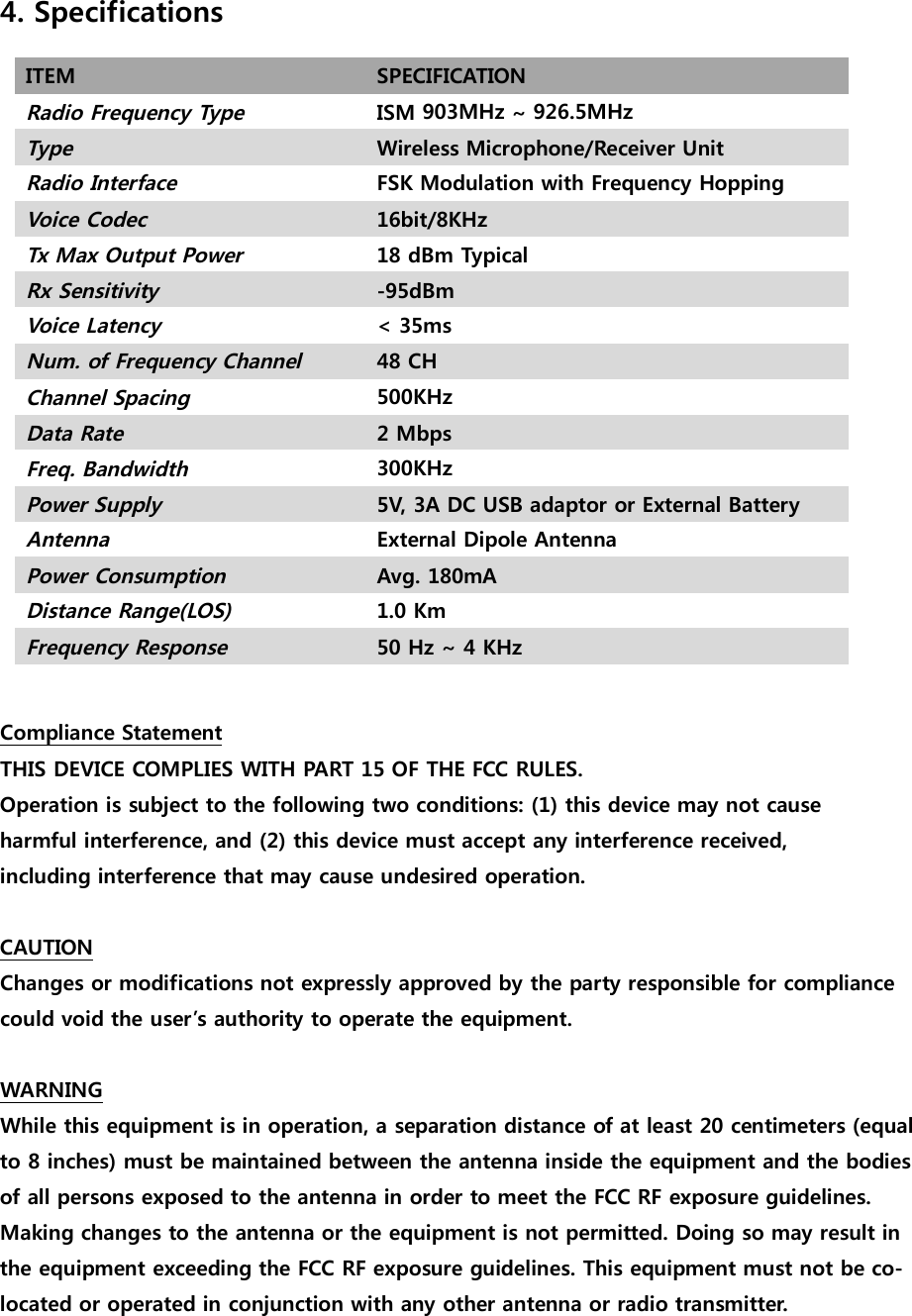
4. SpecificationsITEM SPECIFICATIONRadio Frequency TypeISM   ~ TypeWireless Microphone/Receiver UnitRadio InterfaceFSK Modulation with Frequency HoppingVoice Codec16bit/8KHzTx Max Output Power18 dBm TypicalRx Sensitivity-95dBmVoice Latency< 35msNum. of Frequency ChannelCHChannel Spacing Data Rate2 MbpsFreq. Bandwidth Power Supply5V, 3A DC USB adaptor or External BatteryAntennaExternal Dipole AntennaPower ConsumptionAvg. 180mADistance Range(LOS)1.0 KmFrequency Response50 Hz ~ 4 KHzCompliance StatementTHIS DEVICE COMPLIES WITH PART 15 OF THE FCC RULES.Operation is subject to the following two conditions: (1) this device may not causeharmful interference, and (2) this device must accept any interference received,including interference that may cause undesired operation.CAUTIONChanges or modifications not expressly approved by the party responsible for compliancecould void the user’s authority to operate the equipment.WARNINGWhile this equipment is in operation, a separation distance of at least 20 centimeters (equal to 8 inches) must be maintained between the antenna inside the equipment and the bodiesof all persons exposed to the antenna in order to meet the FCC RF exposure guidelines.Making changes to the antenna or the equipment is not permitted. Doing so may result inthe equipment exceeding the FCC RF exposure guidelines. This equipment must not be co-located or operated in conjunction with any other antenna or radio transmitter.903MHz926.5MHz500KHz300KHz48
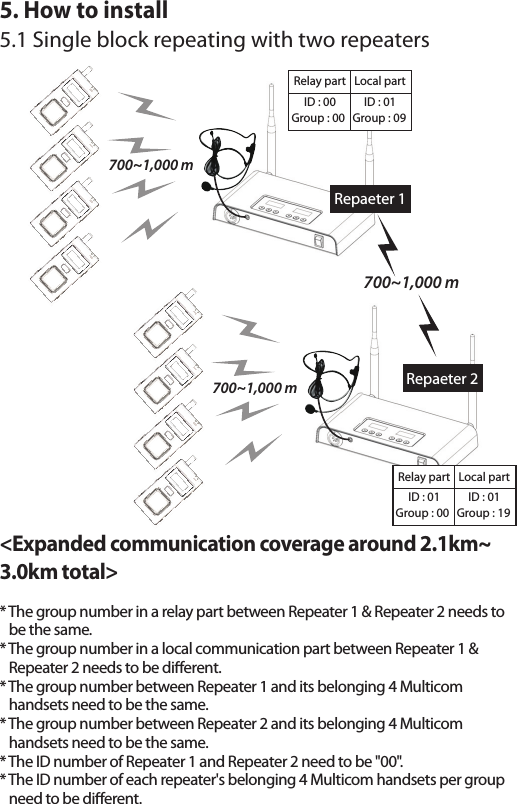
5. How to install5.1 Single block repeating with two repeaters700~1,000 m700~1,000 m* The group number in a relay part between Repeater 1 & Repeater 2 needs to    be the same.* The group number in a local communication part between Repeater 1 &    Repeater 2 needs to be dierent.* The group number between Repeater 1 and its belonging 4 Multicom    handsets need to be the same.* The group number between Repeater 2 and its belonging 4 Multicom    handsets need to be the same.* The ID number of Repeater 1 and Repeater 2 need to be "00".* The ID number of each repeater's belonging 4 Multicom handsets per group    need to be dierent.<Expanded communication coverage around 2.1km~3.0km total>Repaeter 1700~1,000 m Repaeter 2Relay partID : 00Local partID : 01Group : 00 Group : 09Relay partID : 01Local partID : 01Group : 00 Group : 19
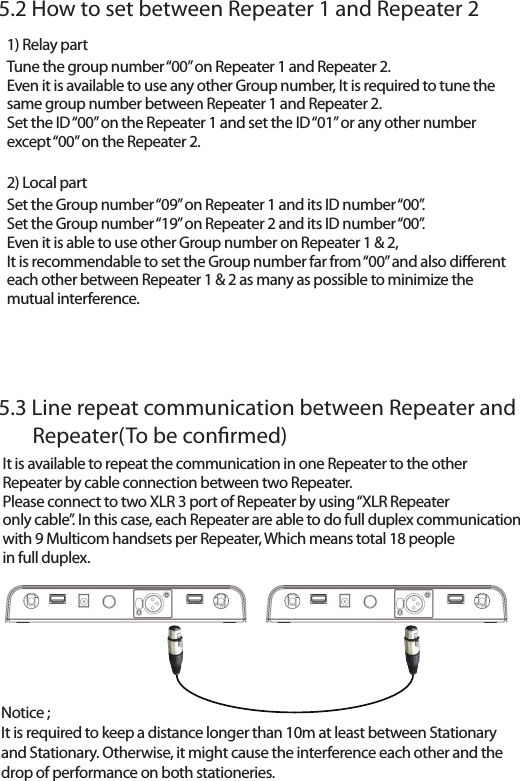
Notice ; It is required to keep a distance longer than 10m at least between Stationary and Stationary. Otherwise, it might cause the interference each other and thedrop of performance on both stationeries. 5.2 How to set between Repeater 1 and Repeater 25.3 Line repeat communication between Repeater and        Repeater(To be conrmed)1) Relay partTune the group number “00” on Repeater 1 and Repeater 2.Even it is available to use any other Group number, It is required to tune thesame group number between Repeater 1 and Repeater 2.Set the ID “00” on the Repeater 1 and set the ID “01” or any other numberexcept “00” on the Repeater 2.2) Local partSet the Group number “09” on Repeater 1 and its ID number “00”.Set the Group number “19” on Repeater 2 and its ID number “00”.Even it is able to use other Group number on Repeater 1 & 2,It is recommendable to set the Group number far from “00” and also dierenteach other between Repeater 1 & 2 as many as possible to minimize themutual interference.It is available to repeat the communication in one Repeater to the other Repeater by cable connection between two Repeater.Please connect to two XLR 3 port of Repeater by using “XLR Repeateronly cable”. In this case, each Repeater are able to do full duplex communicationwith 9 Multicom handsets per Repeater, Which means total 18 peoplein full duplex.

Navigation menu