MetroTel of Minnesota MT9100CTM Tank Monitoring System User Manual

MetroTel Corp of Minnesota Tank Monitoring System

User Manual

72-70-164, Rev. P4                                                                                                          06/16/2011    WESROC® RMS Cellular Tank Monitor Model MT-9100CTM Operation Manual
WESROC® RMS Cellular Tank Monitor - Operation Manual - Independent Technologies, Inc.  72-70-164, Rev. P4                                      Page 2                                                      06/16/2011  Table of Contents Safety Information.......................................................................................................................................................4 Hazardous Environments........................................................................................................................... 4 Battery Replacement.................................................................................................................................. 4 Radio Frequency Exposure........................................................................................................................ 4 Radio Frequency Interference.................................................................................................................... 4 Overview.......................................................................................................................................................................5 Device Characteristics ............................................................................................................................... 5 Installation ................................................................................................................................................. 5 Power......................................................................................................................................................... 5 Installation....................................................................................................................................................................6 Mounting Location .................................................................................................................................... 6 Tank Gauge................................................................................................................................................ 6 Cellular Signal ........................................................................................................................................... 6 Host Information........................................................................................................................................ 7 Installation Steps........................................................................................................................................ 7 Operation......................................................................................................................................................................9 General....................................................................................................................................................... 9 Operating Modes ....................................................................................................................................... 9 OFF Mode:.............................................................................................................................. 9 NORMAL Mode:.................................................................................................................... 9 INITIALIZATION Mode: .................................................................................................... 10 CONFIGURATION Mode: .................................................................................................. 10 Reporting To Host ................................................................................................................................... 10 Tank Level Measurement ........................................................................................................................ 11 Tank Level Events and Conditions.......................................................................................................... 11 Tank Fill Event: .................................................................................................................... 11 Tank Draw Event:................................................................................................................. 11 Tank Level Change Event:.................................................................................................... 11 Tank Critical High Condition: .............................................................................................. 11 Tank Warning High Condition: ............................................................................................ 11 Tank Warning Low Condition: ............................................................................................. 11 Tank Critical Low Condition: ............................................................................................... 12 Missing Sensor Condition:.................................................................................................... 12 Temperature Alarms................................................................................................................................ 12 Low Battery Notification......................................................................................................................... 12 Portable Diagnostic Unit...........................................................................................................................................13 General..................................................................................................................................................... 13 PDU Screen Map..................................................................................................................................... 13 PDU Screens............................................................................................................................................ 14 Logo Screen: ......................................................................................................................... 14 List Screen: ........................................................................................................................... 14 Menu Screen: ........................................................................................................................ 15 Summary Screen:.................................................................................................................. 15 System Configuration Screen:............................................................................................... 16 Application Configuration Screen:........................................................................................ 16 View Details Screen:............................................................................................................. 17 View Raw Data Screen: ........................................................................................................ 17
WESROC® RMS Cellular Tank Monitor - Operation Manual - Independent Technologies, Inc.  72-70-164, Rev. P4                                      Page 3                                                      06/16/2011  System Configuration Parameters ...........................................................................................................................18 General..................................................................................................................................................... 18 Parameter List.......................................................................................................................................... 18 Base ID: ................................................................................................................................ 18 Primary IP Address:.............................................................................................................. 18 Primary IP Port: .................................................................................................................... 18 Secondary IP Address:.......................................................................................................... 18 Secondary IP Port: ................................................................................................................ 18 Host Response Timeout: ....................................................................................................... 18 Maximum Packet Retries:..................................................................................................... 18 Report Interval: ..................................................................................................................... 18 Low Battery Threshold (mV):............................................................................................... 18 High Temperature Threshold:............................................................................................... 19 Low Temperature Threshold:................................................................................................ 19 Local Display Mode:............................................................................................................. 19 ISM Transmitter Number:..................................................................................................... 19 Application Configuration Parameters ...................................................................................................................19 General..................................................................................................................................................... 19 Parameter List.......................................................................................................................................... 19 Sensor Scaling:...................................................................................................................... 19 Tank Fill Threshold:.............................................................................................................. 20 Tank Draw Threshold: .......................................................................................................... 20 Critical High Threshold: ....................................................................................................... 20 Warning High Threshold: ..................................................................................................... 20 Warning Low Threshold: ...................................................................................................... 20 Critical Low Threshold:........................................................................................................ 20 Level Change Threshold: ...................................................................................................... 20 Gain Adjust:.......................................................................................................................... 20 Offset Adjust:........................................................................................................................ 20 Battery Replacement .................................................................................................................................................21 Specifications..............................................................................................................................................................22 Mechanical............................................................................................................................................... 22 Environment ............................................................................................................................................ 22 Power Source........................................................................................................................................... 22 Tank Level Sensor ................................................................................................................................... 22 Cellular Radio.......................................................................................................................................... 22 ISM Radio................................................................................................................................................ 22 Certifications..............................................................................................................................................................23 UL............................................................................................................................................................ 23 FCC.......................................................................................................................................................... 23 PTCRB..................................................................................................................................................... 23 Cellular Carrier........................................................................................................................................ 23 Warranty Information ..............................................................................................................................................23
WESROC® RMS Cellular Tank Monitor - Operation Manual - Independent Technologies, Inc.  72-70-164, Rev. P4                                      Page 4                                                      06/16/2011  Safety Information  Hazardous Environments  The WESROC® RMS Cellular Tank Monitor (CTM) is designed for safe use in environments containing hazardous vapors. However, certain precautions need to be taken to ensure the safety of the person(s) working with the CTM, the tank, and any associated equipment. TO  ENSURE  SAFE  OPERATION:  Install  the  CTM  according  to  the  instructions  contained  in  this WESROC RMS Cellular Tank Monitor Operation Manual.  WARNING!!! Do NOT loosen or remove float gauge from a pressurized tank! Tank decompression can cause serious injury or property damage!  WARNING!!! Do NOT connect the CTM to any apparatus or wiring from another manufacturer! Substitution of components may impair the intrinsic safety of the CTM! Clean only with a damp cloth to prevent the possibility of electrostatic discharge! Enclosure mounting bracket may contain aluminum – take care to avoid ignition hazards due to impact or friction!  Battery Replacement  The CTM uses a replaceable, intrinsically safe battery pack. Only replace with a model MT-9100BPK-02 battery pack from Independent Technologies, Inc. Use of any other power source will compromise the intrinsic safety of the CTM and will void the CTM warranty. Dispose of used battery pack properly.  Radio Frequency Exposure  To  ensure  that  exposure  to  hazardous  radio frequency radiation  is  prevented,  the  CTM must  NOT  be installed in a location where humans will be routinely within 20 centimeters of the CTM. To ensure that FCC requirements are met regarding radio frequency exposure, the CTM is NOT to be placed in operation where it will be co-located with another CTM. Co-location is considered to be where one operating CTM is within 20 centimeters of another operating CTM. Radio Frequency Interference  This equipment (FCC ID number RWB-MT9100CTM and IC number 115A-MT9100CTM) has been tested and found to comply with part 15 of the FCC Rules.   Operation is subject to the following two conditions: (1) This device may not cause harmful interference, and (2) This device must accept any interference received, including interference that may cause undesired operation.  Changes or modifications to this device not expressly approved by Independent Technologies, Inc. could void the user’s authority to operate this device.
WESROC® RMS Cellular Tank Monitor - Operation Manual - Independent Technologies, Inc.  72-70-164, Rev. P4                                      Page 5                                                      06/16/2011   Overview  Device Characteristics  The WESROC® RMS Cellular Tank Monitor (CTM) is used to remotely monitor the level of the contents of a tank. The tank level and additional event and status information are reported to the WESROC® RMS Host System (Host) at scheduled intervals. In addition, the CTM will report to the Host immediately to track tank events in real time. The CTM uses  the  GSM  cellular  network  and  the  internet  to  transport  this  information. Communication with the Host is bi-directional which allows for remote configuration of the CTM should the tank monitoring requirements change or in the event that the CTM is moved to another site.  The CTM also provides a local tank level display capability. The CTM can be configured to send short range radio data packets to a nearby WESROC® RMS Base Unit (Base Unit). Once initialized to the CTM, the Base Unit will provide the customer with a local display of tank level for up to eight tanks (depending on which Base Unit is used).  Installation  A basic CTM installation is easily performed in a few minutes by persons with a basic understanding  of  the  tank  equipment  to  be  monitored  and  of  the  CTM  device  itself. Since the CTM is self-contained, the complete installation can be performed at the tank. No access to the customer’s residence or place of business is required.   By default, the CTM is configured to monitor the most common type of tank, but may be re-configured  to  monitor  a  wide  variety  of  tank  configurations.  The  CTM  may  be remotely configured by the Host or may be configured on site  by using the handheld WESROC® RMS Portable Diagnostic Unit.  Power  The CTM is battery powered, and due to its low power design will provide many years of remote  monitoring  before  battery  pack  replacement  is  required.  Battery  pack replacement  may  be  performed  at  the  tank  as  the  CTM  and  battery  pack  are  both designed and certified to be intrinsically safe for use in hazardous environments.
WESROC® RMS Cellular Tank Monitor - Operation Manual - Independent Technologies, Inc.  72-70-164, Rev. P4                                      Page 6                                                      06/16/2011  Installation  Mounting Location  The WESROC® RMS Cellular Tank Monitor (CTM) is designed to be installed directly on the tank to be monitored. The CTM is connected to the tank gauge by the tank level sensor and sensor cable. The CTM itself may be attached to the tank by the supplied mounting magnets or by a mounting bracket. The CTM may also be located away from the tank if necessary to improve cellular reception. Versions of the CTM are available with a longer sensor cable to facilitate mounting the CTM further away from the tank.  Tank Gauge  The standard CTM is equipped with a hall-effect based tank level sensor. This sensor is designed to be snapped into a remote ready tank gauge dial. The sensor and dial are part of the R3D dial and sensor system manufactured by Rochester Gauges. R3D dials are available for a wide variety of tank and gauge types. The CTM is configurable to work correctly with all available types. In addition, a version of the CTM is available that has an in-line connector on the end of sensor cable. This enables the CTM to work on large bulk tanks with large remote ready dials using the standard sensor manufactured by  Rochester  Gauges,  or  the  Precision  Large  Dial  Sensor  manufactured  by Independent Technologies, Inc.  Cellular Signal  The CTM must be installed in a location served by GSM based cellular service. GSM is a  very  widely  deployed  type  of  digital  cellular  service  –  two  of  the  largest  service providers  are  AT&T  and  T-Mobile.  The  CTM  is  supported  by  both  of  those  major carriers and by a number of other smaller regional cellular service providers.  The CTM has a robust cellular sub-system, but there are limits to the capabilities of the cellular network in general. As with most wireless technologies, cellular signal reception can  be  affected  by  obstructions  such  trees,  mountainous  terrain,  buildings,  large vehicles parked nearby, etc. In addition, cellular signal reception will be directly affected by the distance between the CTM and the nearest cell tower with GSM service.  The best signal reception will be achieved with a line of sight path between the CTM and the cell tower. Obviously, this is rarely the case in the real world, but it should be kept in mind when selecting a mounting location for the CTM. Elevation can also help; typically performance will increase as the CTM is raised higher above the ground. The orientation of the CTM itself will also affect performance. The CTM should be installed upright,  and  if  possible,  with  the  sensor  cable  exit  from  the  CTM  enclosure  pointed AWAY from the nearest cell tower supporting GSM service.
WESROC® RMS Cellular Tank Monitor - Operation Manual - Independent Technologies, Inc.  72-70-164, Rev. P4                                      Page 7                                                      06/16/2011  Host Information  The customer information, installation location, and tank configuration for the proposed installation site must be entered into the WESROC® RMS Host System (Host) BEFORE the CTM is installed on the tank. A WESROC® RMS Installation Information Worksheet outlining the required information fields is available from your host administrator or from Independent  Technologies,  Inc.  Email  or  fax  the  completed  worksheet  to  the  host administrator  before  beginning  the  installation.  Installation  information  can  also  be called in verbally provided your host administrator considers this an acceptable method.   Installation Steps  Performing the installation steps in the order shown will help ensure proper operation of the CTM. A large percentage of “trouble sites” are caused by improper installation.  1] If possible, perform a site visit to the location of the tank to be monitored. Determine the size of the tank and the type of gauge on the tank. This will help you select the right equipment to bring with at installation time. This is also a good time to try to determine if you have GSM cellular service available.  Access to a GSM cell phone  can  help with checking for the presence of a usable GSM cellular signal.  2] Send a completed WESROC® RMS Installation Information Worksheet to your host administrator. Try to do this at least one day BEFORE you intend to perform the actual installation so that the host administrator has time to enter the information into the Host.  3] After receiving a Base ID from the host administrator, put the CTM into Configuration mode  and  enter  the  12  digit  Base  ID  into  the  CTM  using  the  System  Configuration screen on the PDU. The Base ID is a unique number that identifies this particular CTM and installation site in the Host.  4] If not already done, install the correct remote ready dial or large dial assembly on the tank  gauge.  This  step  is  covered  in  more  detail  in  the  WESROC®  RMS  Dial Replacement Guide available from Independent Technologies, Inc.  5] Remove the CTM from the box and make sure it is the right type for your application. Make sure the small round programming magnet is secured in the OFF position on the CTM enclosure. This is important to ensure proper operation of the CTM when you are ready to perform the first report to the Host.  6] Mount the CTM directly on or near the tank to be monitored. The maximum distance from the tank will be determined by the length of the sensor cable on the particular type of CTM that you are using. The CTM may be mounted to the steel surface of the tank using the mounting magnets on the bottom of the CTM. Another option is to mount the CTM  to  a  pole  or  another  nearby  structure  using  a  right-angle  mounting  bracket. Mounting  brackets  can  be  obtained  from  Independent  Technologies,  Inc.  Try  not  to place the CTM right next to a metal object such as a tank dome or hood. Metal objects tend to have a negative effect on cellular signal quality.
WESROC® RMS Cellular Tank Monitor - Operation Manual - Independent Technologies, Inc.  72-70-164, Rev. P4                                      Page 8                                                      06/16/2011  7] Connect the sensor at the end of the sensor cable to the remote ready dial. This is accomplished by sliding the sensor into the sensor slot on the top of the dial. Slide the sensor from the side towards the center of the dial until it is fully seated. You will hear or feel a small “snap” once it is fully seated. To remove the sensor from the dial, gently lift up on the end of the sensor before attempting to slide it out of the dial.  Large  dial  installations  use  an  in-line  connector  to  attach  the  CTM  to  the  dial. When attaching  an  in-line  connector,  make  sure  the  connector  is  fully  seated  and  that  the locking ring has been turned to ensure a weather tight seal.  8] (Optional.) If you are going to be using a WESROC® RMS Base Unit (Base Unit) as a local display device, now is the time to initialize the CMT to the Base Unit. See section “Operation” of this document for details. The Local Display configuration parameter on the CTM must be enabled for this feature to work.  9] This step assumes that the installation site information has already been entered into the Host and that this particular installation does not require any unusual configuration of  the  CTM.  Remove  the  programming  magnet  from  the  OFF  position  on  the  CTM enclosure and step away from the CTM. (Do not degrade the CTM cellular signal quality by leaning over it while it is attempting to report.)  At  this  time,  the  CTM  will  attempt  a  configuration  report  to  the  Host.  The  report  is typically  completed  in  about  30  seconds,  but  can  take  up  to  3  minutes  to  complete under adverse cellular signal conditions.  The  CTM  does  not  provide  any  direct  feedback  regarding  report  success  or  failure; therefore  it  is  highly  recommended  to  make  use  of  a  handheld  WESROC®  RMS Portable  Diagnostic  Unit  (PDU)  when  performing  CTM  installations.  The  PDU  will provide  the  installer  with  a  wealth  of  information  regarding  report  status,  tank  level status,  CTM  system  status,  and  cellular  network  performance.  See  section  “Portable Diagnostic  Unit”  of  this  document,  or  the  WESROC®  RMS  Portable  Diagnostic  Unit Operation Manual for more information on operating the PDU.  Another option for checking report status is to have the Host send a text alert message to  the  installer’s  cell  phone  once  a  successful  report  has  completed.  This  of  course requires  that  the  host administrator  enter  the  installer’s  texting  address  into  the  Host before  installation  time.  Once  installation  is  completed,  the installer  will want  to  have their  texting  address  taken  off  of  the  alert  list  for  this  site  to  prevent  the  Host  from sending the installer future tank activity alerts.  10] Once a successful report has completed, secure the sensor cable using appropriate fasteners (cable ties, etc.). Route the sensor cable to make sure the cable will not be damaged  by  a  moving  object  such  as  a  tank  dome  or  hood.  Before  leaving  the installation  site,  make  sure  any  programming  magnets  are  removed  from  the  CTM enclosure. Normal operating mode is with NO programming magnets installed.
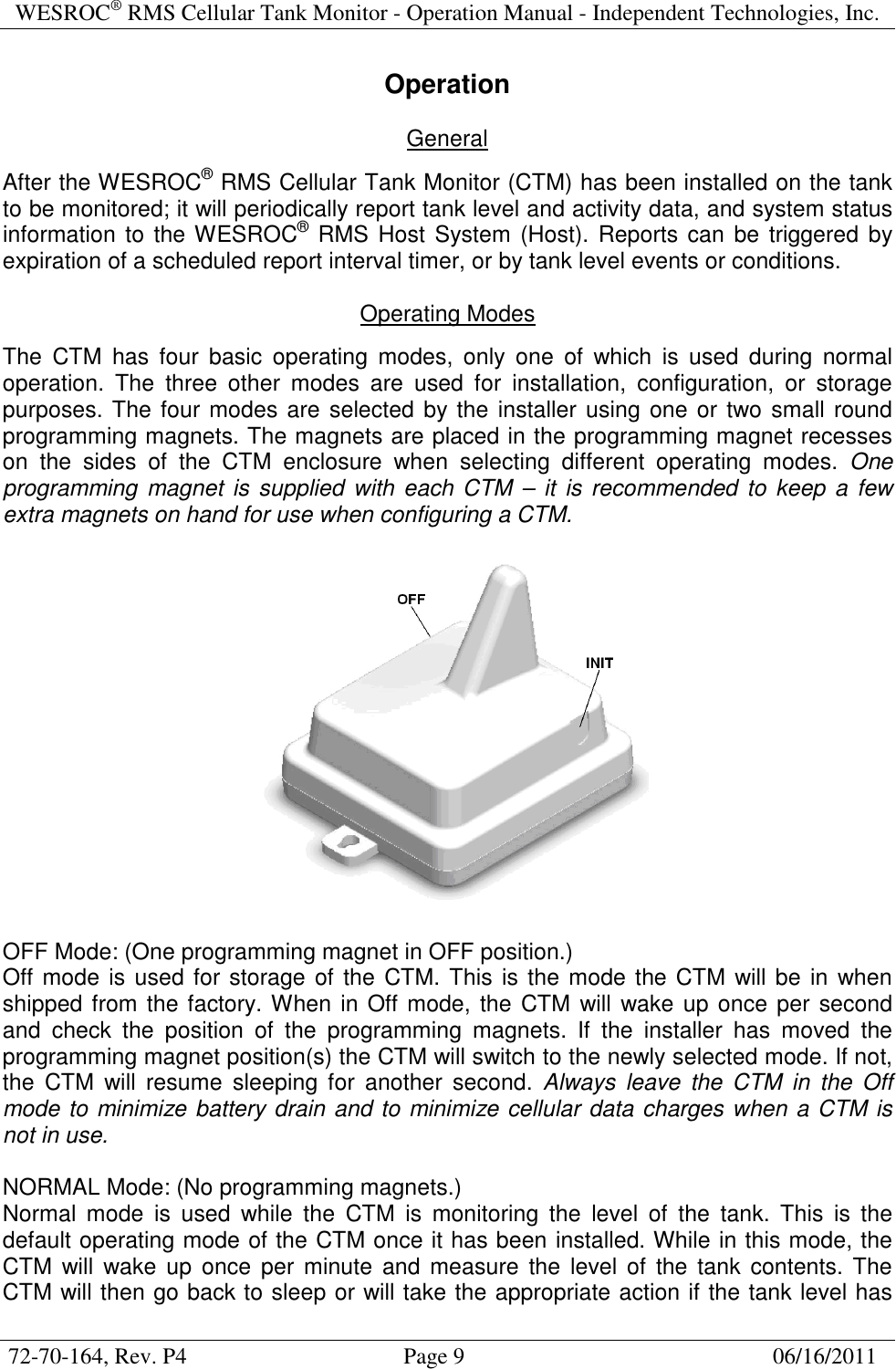
WESROC® RMS Cellular Tank Monitor - Operation Manual - Independent Technologies, Inc.  72-70-164, Rev. P4                                      Page 9                                                      06/16/2011  Operation  General  After the WESROC® RMS Cellular Tank Monitor (CTM) has been installed on the tank to be monitored; it will periodically report tank level and activity data, and system status information  to the WESROC® RMS Host System (Host). Reports can be triggered by expiration of a scheduled report interval timer, or by tank level events or conditions.  Operating Modes  The  CTM  has  four  basic  operating  modes,  only  one  of  which  is  used  during  normal operation.  The  three  other  modes  are  used  for  installation,  configuration,  or  storage purposes. The four modes are selected by the installer using one or two small round programming magnets. The magnets are placed in the programming magnet recesses on  the  sides  of  the  CTM  enclosure  when  selecting  different  operating  modes.  One programming  magnet is supplied  with  each CTM –  it  is  recommended to keep a few extra magnets on hand for use when configuring a CTM.    OFF Mode: (One programming magnet in OFF position.) Off mode is used for storage of the CTM. This is the mode the CTM will be in  when shipped from the factory. When in Off mode, the CTM will wake up once per second and  check  the  position  of  the  programming  magnets.  If  the  installer  has  moved  the programming magnet position(s) the CTM will switch to the newly selected mode. If not, the  CTM  will  resume  sleeping  for  another  second.  Always  leave  the  CTM  in  the  Off mode to minimize battery drain and to minimize cellular data charges when a CTM is not in use.  NORMAL Mode: (No programming magnets.) Normal  mode  is  used  while  the  CTM  is  monitoring  the  level  of  the  tank.  This  is  the default operating mode of the CTM once it has been installed. While in this mode, the CTM  will  wake up  once  per  minute  and  measure  the  level of  the tank  contents. The CTM will then go back to sleep or will take the appropriate action if the tank level has
WESROC® RMS Cellular Tank Monitor - Operation Manual - Independent Technologies, Inc.  72-70-164, Rev. P4                                      Page 10                                                      06/16/2011  changed  since  the  last  measurement.  Actions  may  include  starting  or  ending  the qualification of a tank level event, reporting a tank level event to the Host, or reporting to the Host at a scheduled report time. While in Normal mode, the CTM is also constantly monitoring itself for any conditions that may require reporting to the Host. The CTM will also simulate a WESROC® RMS Tank Transmitter and will send data packets to a Base Unit while in this mode if the Local Display configuration parameter has been enabled.  INITIALIZATION Mode: (One programming magnet in INIT position.) Initialization mode is used for initializing the CTM to a WESROC® RMS Base Unit (Base Unit) before using the Base Unit as a local tank level display device.  Once the CTM has been  put  into Initialization mode,  it  will simulate a WESROC® RMS Tank Transmitter and will send an initialization data packet to the Base Unit once every 15 seconds (or sooner if the tank level changes.) The CTM will time out of Initialization mode and will revert to the Normal operating mode after 60 minutes. This is done to conserve battery life and to ensure that the CTM continues reporting to the Host once the installer has left the  site.  See  the  operating  manual  for  the  type  of  Base  Unit  that  you  are  using  for instructions on putting the Base Unit into Initialization mode.  CONFIGURATION Mode: (One programming magnet in both OFF and INIT positions.) Configuration mode is used to change one or more of the internal CTM configuration parameters.  When  in  this  mode,  system  (CTM)  or  application  (tank  level)  operating characteristics can be changed using a PDU.  Changes  made  with  a  PDU  are  reported  to  the  Host  once  the  CTM  is  returned  to Normal  mode.  If  field  configuration  is  enabled  in  the  Host,  the  Host  will  store  the changes to its configuration database, and will send the changes back to the CTM to confirm acceptance of the changes. If field configuration is not enabled in the Host, the Host will overrule the CTM and will send the previous configuration back to the CTM. The CTM will time out of Configuration mode and return to Normal mode if it has not received  a  configuration  command  from  the  PDU  for  10  minutes.  This  is  done  to conserve battery life and to ensure that the CTM continues reporting to the Host once the installer has left the site.  Reporting To Host  The CTM reports to the Host on a schedule determined by the Host configuration. The reporting schedule can range from once per hour to once per month. The report interval will directly affect battery life as the cellular sub-system is the major consumer of power in the CTM. It is not recommended to leave the CTM configured with an hourly reporting schedule for more than 24 hours as it will shorten battery life and will lead to excessive cellular data charges.  In  addition  to  scheduled  reporting,  the  CTM  will  contact  the  Host  to  report  CTM configuration changes, tank level events, and high or low temperature conditions.
WESROC® RMS Cellular Tank Monitor - Operation Manual - Independent Technologies, Inc.  72-70-164, Rev. P4                                      Page 11                                                      06/16/2011  Tank Level Measurement  The CTM wakes up and measures the level of the tank contents once per minute. This enables the CTM to be very responsive to changing tank level conditions and to more accurately qualify events such as tank fills or tank draws. The tank level is reported in a number  ranging  from  0  to  99,  representing  the  tank  level  in  percent  full.  This  is  the predominant  measurement  unit  in  the  propane  industry,  and  also  serves  well  when monitoring low pressure fuels such as gasoline, diesel fuel, heating oil, etc.  Tank Level Events and Conditions  The CTM tracks and qualifies a number of different tank level events and conditions. Qualification of a tank level event or condition will cause the CTM to report to the Host ahead of its scheduled report time.  A tank level event such as a tank fill is a one time event and will be reported and then cleared from the tank status. A tank level condition such as a low tank level will be reported, but will not be cleared from the tank status until the condition is no longer true. The following is a summary of the tank level events and conditions supported by the CTM. The configuration parameters referred to in this section can be referenced in the “Application Configuration” section of this document.  Tank Fill Event: A  tank  fill  event  will  be  qualified  by  the  CTM  when  the  tank  level  increases  by  the configured amount.  Tank Draw Event: A tank draw event will be qualified by the CTM when the tank level has decreased by the configured amount within one hour.  A tank draw event will NOT be qualified if the tank level has dropped to 0% (bad or missing sensor).  Tank Level Change Event: A tank level change event will be qualified by the CTM when the tank level has moved above or below the configured tank level change threshold since the last report to the Host. This threshold can be positive or negative, depending on if the user is looking to track a rising or falling tank level.  Tank Critical High Condition: A tank critical high condition will be qualified by the CTM when the tank level has risen above the configured tank critical high threshold.  Tank Warning High Condition: A tank warning high condition will be qualified by the CTM when the tank level has risen above the configured tank warning high threshold.  Tank Warning Low Condition: A  tank  warning  low  condition  will  be  qualified  by  the  CTM  when  the  tank  level  has dropped below the configured tank warning low threshold.
WESROC® RMS Cellular Tank Monitor - Operation Manual - Independent Technologies, Inc.  72-70-164, Rev. P4                                      Page 12                                                      06/16/2011  Tank Critical Low Condition: A  tank  critical  low  condition  will  be  qualified  by  the  CTM  when  the  tank  level  has dropped below the configured tank critical low threshold.  Missing Sensor Condition: A bad or missing sensor condition will be qualified by the CTM when the tank level has dropped to 0% for a pre-determined amount of time. The qualification of this condition is not configurable.  Temperature Alarms  The CTM contains an accurate temperature measurement device and can be used to track ambient temperature at the installation site. The CTM also has configurable high and low temperature alarms and can be used to report abnormal temperature conditions to the Host. The CTM will report a new high or low temperature alarm to the Host, and will also report to the Host once the high or low temperature condition no longer exists.  Keep in mind that measured temperatures will be greatly affected by direct sunlight and somewhat affected by night time thermal radiation from the tank if installed on top of the tank.  Low Battery Notification  A low battery condition will not immediately trigger a report to the Host, but it will set a CTM  system  status  flag  that  will  be  picked  up  by  the  Host  at  the  next  scheduled  or event report.
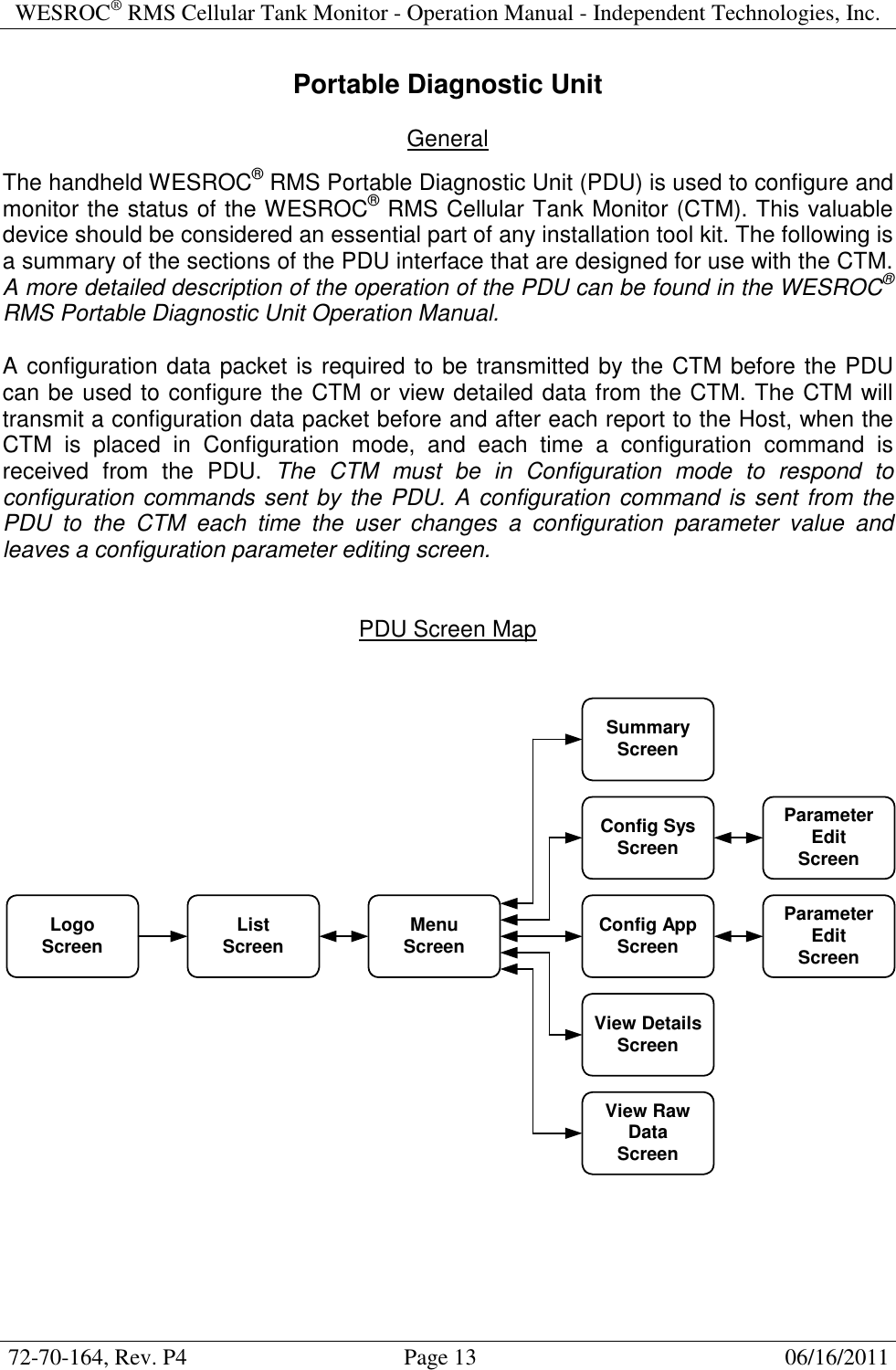
WESROC® RMS Cellular Tank Monitor - Operation Manual - Independent Technologies, Inc.  72-70-164, Rev. P4                                      Page 13                                                      06/16/2011  Portable Diagnostic Unit  General  The handheld WESROC® RMS Portable Diagnostic Unit (PDU) is used to configure and monitor the status of the WESROC® RMS Cellular Tank Monitor (CTM). This valuable device should be considered an essential part of any installation tool kit. The following is a summary of the sections of the PDU interface that are designed for use with the CTM. A more detailed description of the operation of the PDU can be found in the WESROC® RMS Portable Diagnostic Unit Operation Manual.  A configuration data packet is required to be transmitted by the CTM before the PDU can be used to configure the CTM or view detailed data from the CTM. The CTM will transmit a configuration data packet before and after each report to the Host, when the CTM  is  placed  in  Configuration  mode,  and  each  time  a  configuration  command  is received  from  the  PDU.  The  CTM  must  be  in  Configuration  mode  to  respond  to configuration commands sent by the PDU. A configuration command is sent from the PDU  to  the  CTM  each  time  the  user  changes  a  configuration  parameter  value  and leaves a configuration parameter editing screen.   PDU Screen Map   LogoScreen ListScreen MenuScreenSummaryScreenConfig SysScreenConfig AppScreenView DetailsScreenView RawDataScreenParameterEditScreenParameterEditScreen
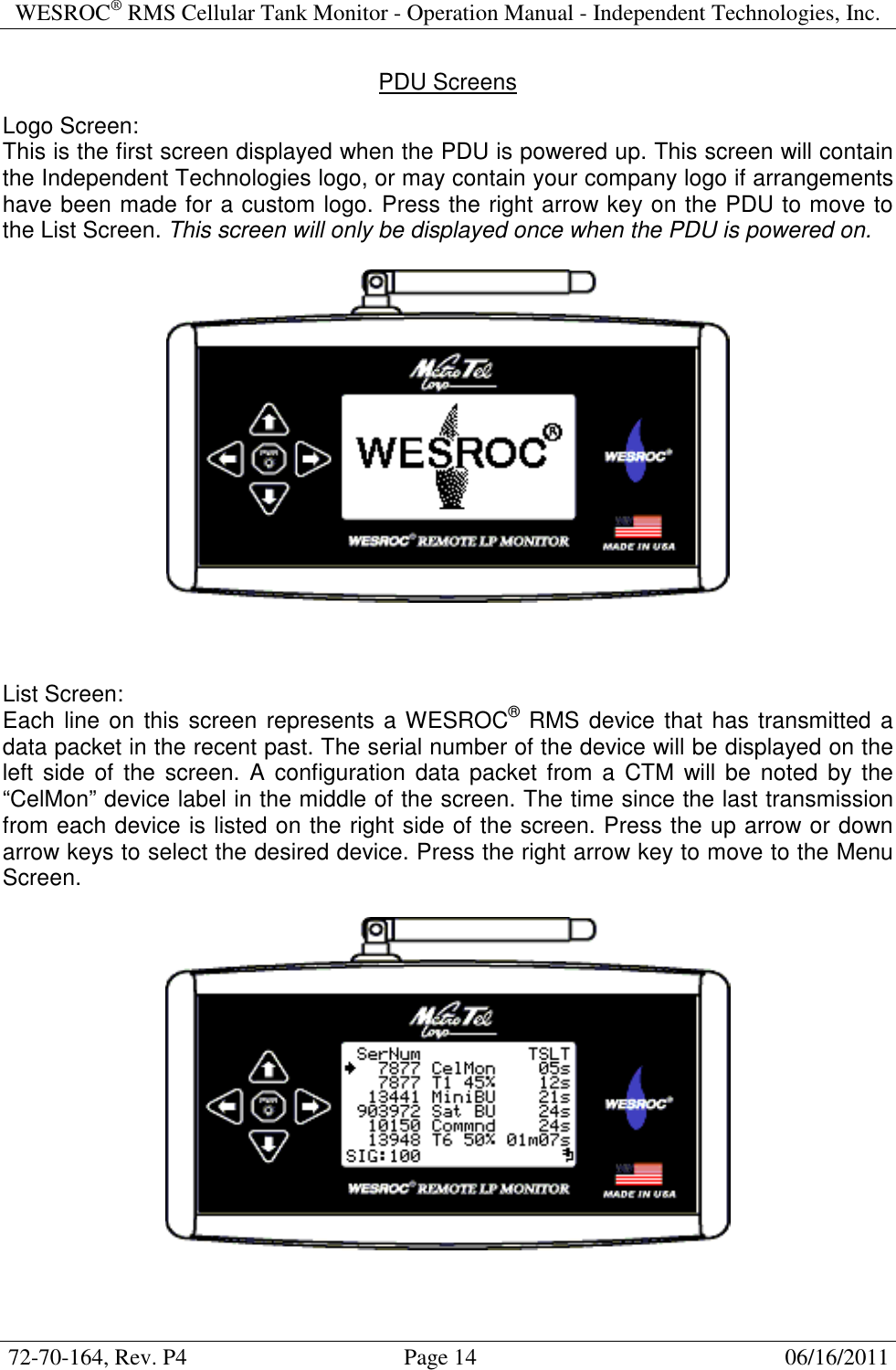
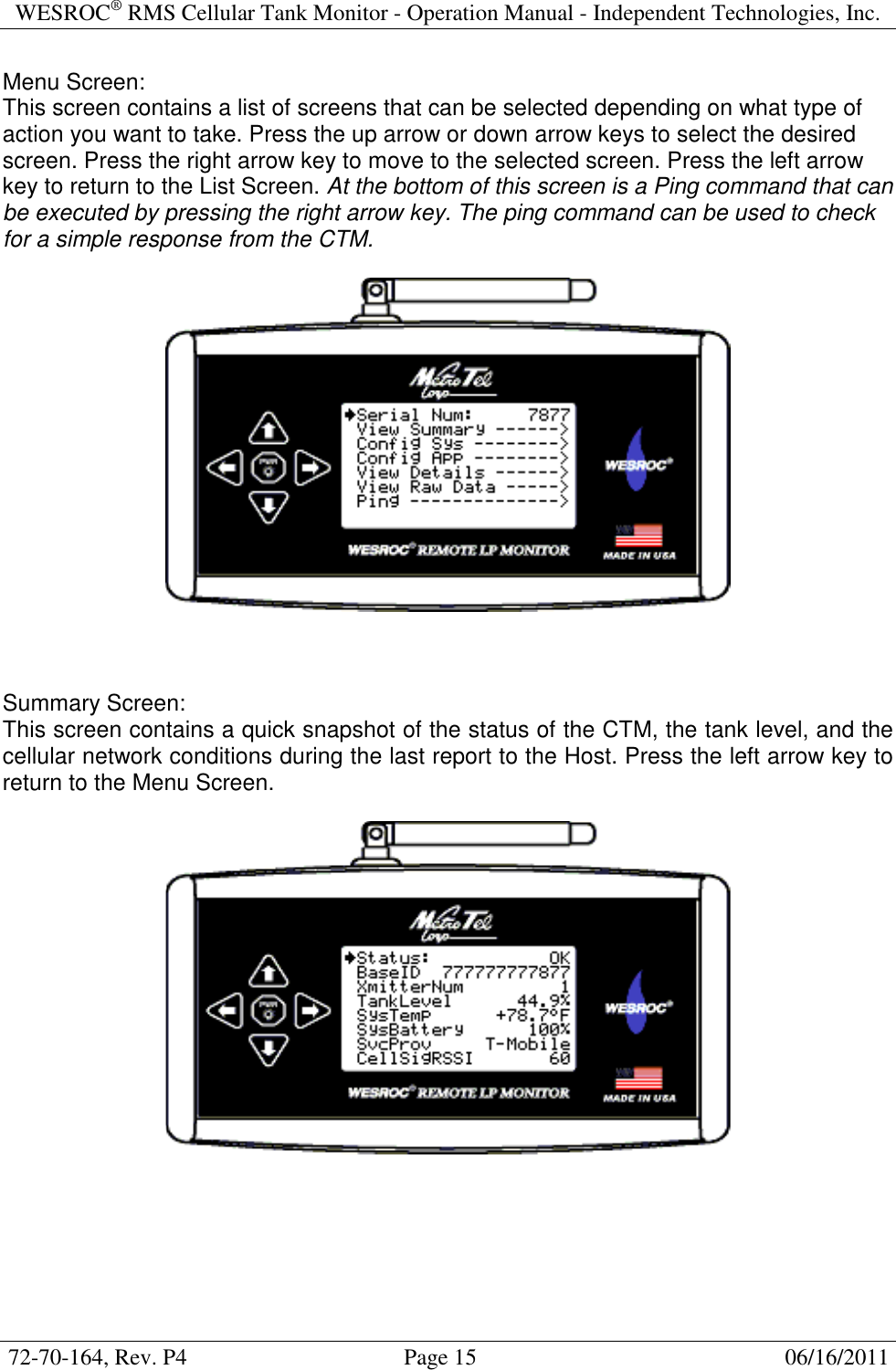
WESROC® RMS Cellular Tank Monitor - Operation Manual - Independent Technologies, Inc.  72-70-164, Rev. P4                                      Page 14                                                      06/16/2011  PDU Screens  Logo Screen: This is the first screen displayed when the PDU is powered up. This screen will contain the Independent Technologies logo, or may contain your company logo if arrangements have been made for a custom logo. Press the right arrow key on the PDU to move to the List Screen. This screen will only be displayed once when the PDU is powered on.      List Screen: Each line on this screen represents a WESROC® RMS device that has transmitted a data packet in the recent past. The serial number of the device will be displayed on the left  side of the  screen.  A  configuration  data packet from a  CTM  will  be noted  by the “CelMon” device label in the middle of the screen. The time since the last transmission from each device is listed on the right side of the screen. Press the up arrow or down arrow keys to select the desired device. Press the right arrow key to move to the Menu Screen.
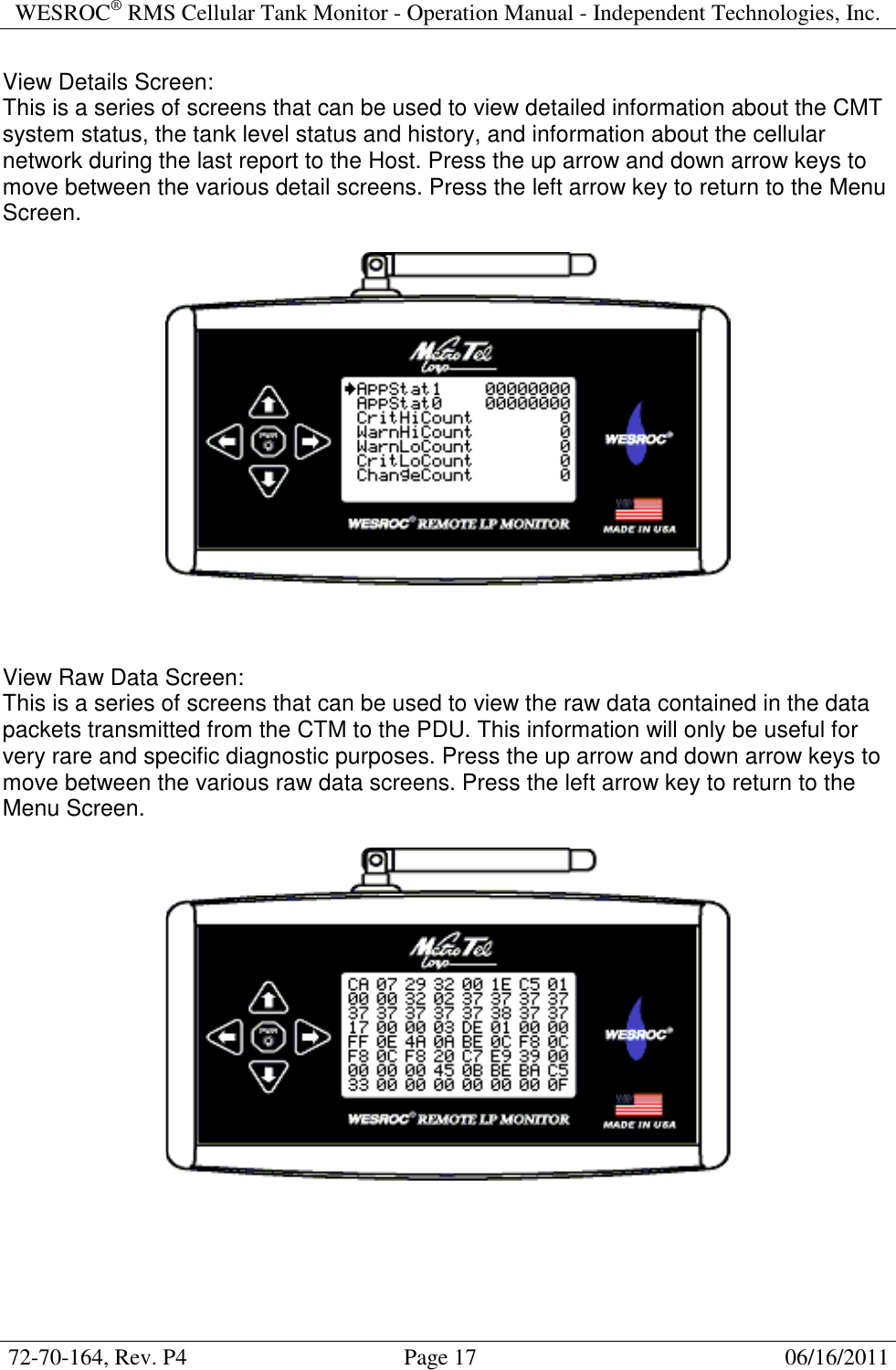
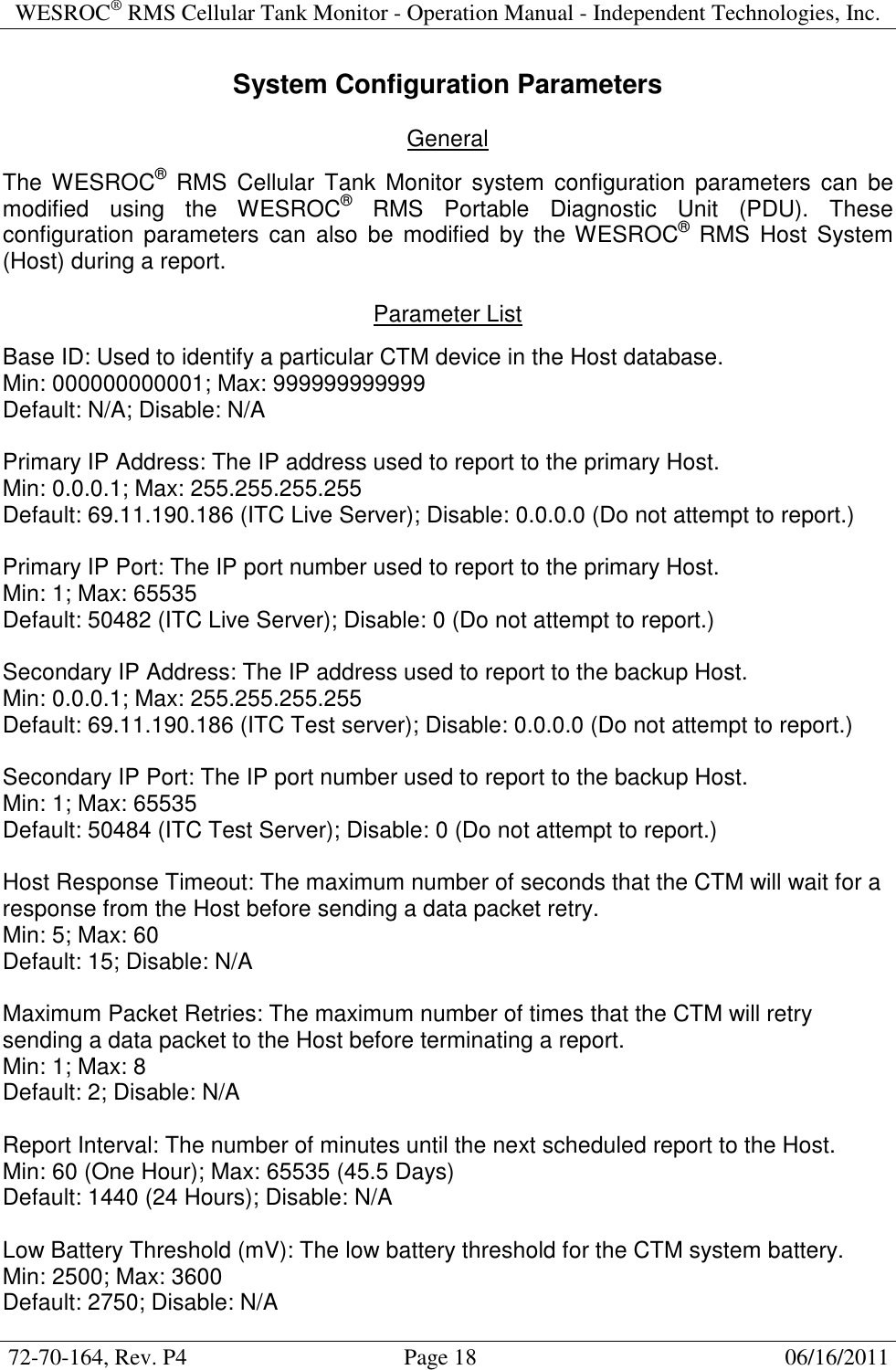
WESROC® RMS Cellular Tank Monitor - Operation Manual - Independent Technologies, Inc.  72-70-164, Rev. P4                                      Page 15                                                      06/16/2011  Menu Screen: This screen contains a list of screens that can be selected depending on what type of action you want to take. Press the up arrow or down arrow keys to select the desired screen. Press the right arrow key to move to the selected screen. Press the left arrow key to return to the List Screen. At the bottom of this screen is a Ping command that can be executed by pressing the right arrow key. The ping command can be used to check for a simple response from the CTM.      Summary Screen: This screen contains a quick snapshot of the status of the CTM, the tank level, and the cellular network conditions during the last report to the Host. Press the left arrow key to return to the Menu Screen.
WESROC® RMS Cellular Tank Monitor - Operation Manual - Independent Technologies, Inc.  72-70-164, Rev. P4                                      Page 16                                                      06/16/2011  System Configuration Screen: This screen contains a list of CTM system configuration parameters. Press the up arrow and down arrow keys to select a configuration parameter to change. Not all of the system configuration parameters are visible on the screen at the same time. Press the right arrow key to move to the selected configuration parameter editing screen. Press the left arrow key to return to the Menu Screen.      Application Configuration Screen: This screen contains a list of application (tank level) configuration parameters. Press the up arrow and down arrow keys to select a configuration parameter to change. Not all of the application configuration parameters are visible on the screen at the same time. Press the right arrow key to move to the selected configuration parameter editing screen. Press the left arrow key to return to the Menu Screen.
WESROC® RMS Cellular Tank Monitor - Operation Manual - Independent Technologies, Inc.  72-70-164, Rev. P4                                      Page 17                                                      06/16/2011  View Details Screen: This is a series of screens that can be used to view detailed information about the CMT system status, the tank level status and history, and information about the cellular network during the last report to the Host. Press the up arrow and down arrow keys to move between the various detail screens. Press the left arrow key to return to the Menu Screen.      View Raw Data Screen: This is a series of screens that can be used to view the raw data contained in the data packets transmitted from the CTM to the PDU. This information will only be useful for very rare and specific diagnostic purposes. Press the up arrow and down arrow keys to move between the various raw data screens. Press the left arrow key to return to the Menu Screen.
WESROC® RMS Cellular Tank Monitor - Operation Manual - Independent Technologies, Inc.  72-70-164, Rev. P4                                      Page 18                                                      06/16/2011  System Configuration Parameters  General  The WESROC®  RMS  Cellular  Tank  Monitor  system  configuration parameters  can  be modified  using  the  WESROC®  RMS  Portable  Diagnostic  Unit  (PDU).  These configuration  parameters  can  also  be  modified  by  the WESROC®  RMS  Host  System (Host) during a report.  Parameter List  Base ID: Used to identify a particular CTM device in the Host database. Min: 000000000001; Max: 999999999999 Default: N/A; Disable: N/A  Primary IP Address: The IP address used to report to the primary Host. Min: 0.0.0.1; Max: 255.255.255.255 Default: 69.11.190.186 (ITC Live Server); Disable: 0.0.0.0 (Do not attempt to report.)  Primary IP Port: The IP port number used to report to the primary Host. Min: 1; Max: 65535 Default: 50482 (ITC Live Server); Disable: 0 (Do not attempt to report.)  Secondary IP Address: The IP address used to report to the backup Host. Min: 0.0.0.1; Max: 255.255.255.255 Default: 69.11.190.186 (ITC Test server); Disable: 0.0.0.0 (Do not attempt to report.)  Secondary IP Port: The IP port number used to report to the backup Host. Min: 1; Max: 65535 Default: 50484 (ITC Test Server); Disable: 0 (Do not attempt to report.)  Host Response Timeout: The maximum number of seconds that the CTM will wait for a response from the Host before sending a data packet retry. Min: 5; Max: 60 Default: 15; Disable: N/A  Maximum Packet Retries: The maximum number of times that the CTM will retry sending a data packet to the Host before terminating a report. Min: 1; Max: 8 Default: 2; Disable: N/A  Report Interval: The number of minutes until the next scheduled report to the Host. Min: 60 (One Hour); Max: 65535 (45.5 Days) Default: 1440 (24 Hours); Disable: N/A  Low Battery Threshold (mV): The low battery threshold for the CTM system battery. Min: 2500; Max: 3600 Default: 2750; Disable: N/A
WESROC® RMS Cellular Tank Monitor - Operation Manual - Independent Technologies, Inc.  72-70-164, Rev. P4                                      Page 19                                                      06/16/2011   High Temperature Threshold: The high temperature alarm threshold in degrees F. Min: -67 F; Max: +302 F Default: +150 F (Effectively Disabled); Disable: 0x8000 (From host only.)  Low Temperature Threshold: The low temperature alarm threshold in degrees F. Min: -67 F; Max: +302 F Default: -50 F (Effectively Disabled); Disable: 0x8000 (From host only.)  Local Display Mode: Enable Local Display mode to configure the CTM to transmit data packets to a local display device. Disable if not used to maximize battery life. Enable or Disable Default: Disabled  ISM Transmitter Number: Sets the transmitter number of the CTM. The local display device will display this number next to the displayed tank level. This feature is very useful in multiple tank applications. Min: 1; Max: 127 (Maximum of 8 on handheld and current local display devices.) Default: 1; Disable: N/A   Application Configuration Parameters  General  The  WESROC®  RMS  Cellular  Tank  Monitor  application  (tank  level)  configuration parameters can be modified using the WESROC® RMS Portable Diagnostic Unit (PDU). These  configuration  parameters  can  also  be  modified  by  the  WESROC®  RMS  Host System (Host) during a report.  Parameter List  Sensor Scaling: The sensor output scaling to be used to calibrate the CTM to the type of tank and gauge being monitored. Min: 1; Max: 255 (Not all used at this time – see current list below.) Default: 1 (Small horizontal tank dial.); Disable: N/A  Std Horiz (small dial horizontal tank) Lg Dial (large dial horizontal tank) (Use on large dials with black Rochester sensor.)  420# Vert (420# vertical cylinder) 200# Vert (200# vertical cylinder with Taylor type “A” dial) Liquid CO2 (liquid CO2 vertical cylinder – special use only) Fuel Horiz (small dial horizontal fuel tank) Flat (no dial scaling correction – special use only) 20k Horiz (20k gallon horizontal fuel tank – special use only) ITC LgDial (large dial horizontal tank) (Use on large dials with ITC Precision Sensor.)
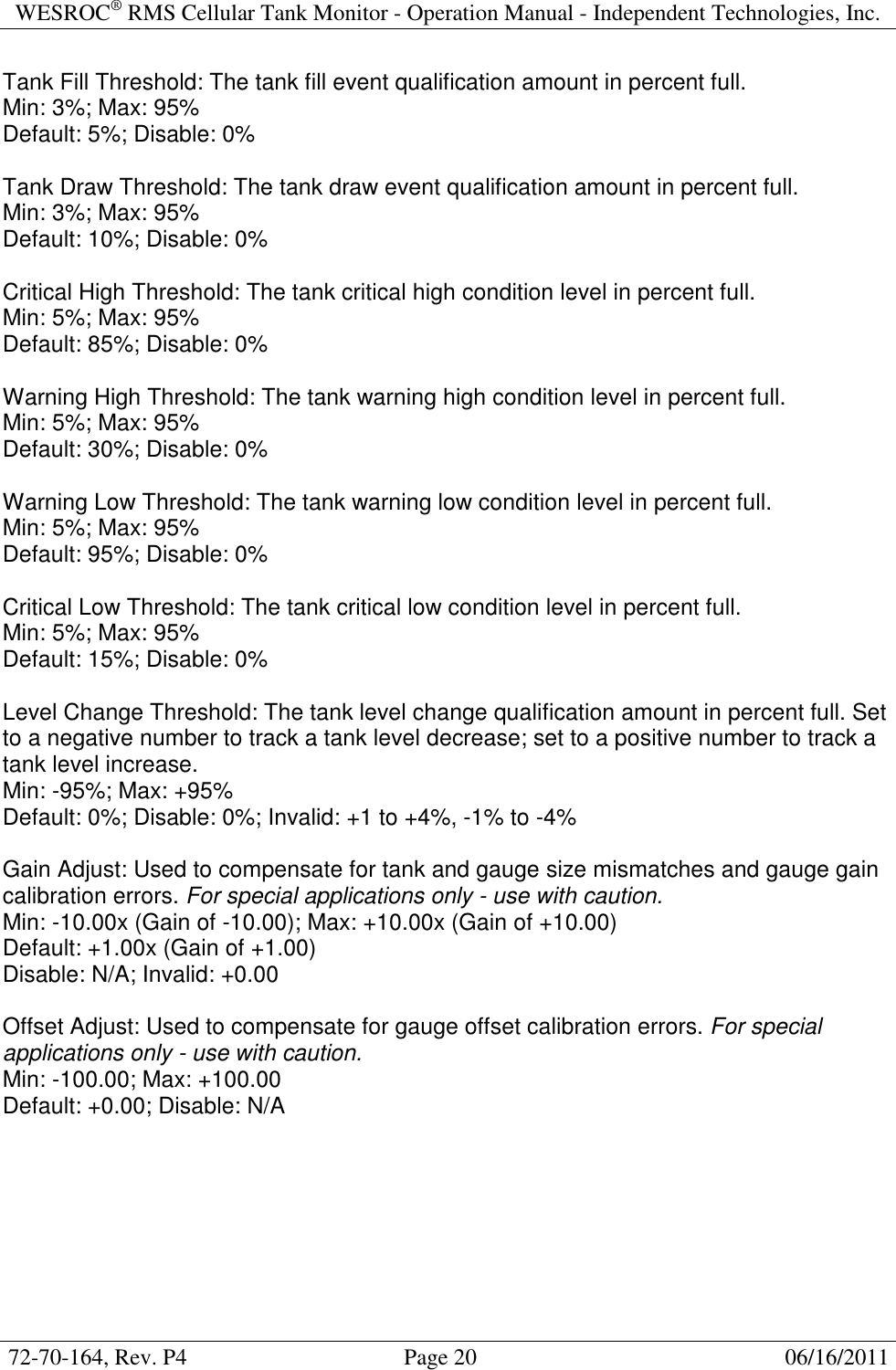
WESROC® RMS Cellular Tank Monitor - Operation Manual - Independent Technologies, Inc.  72-70-164, Rev. P4                                      Page 20                                                      06/16/2011  Tank Fill Threshold: The tank fill event qualification amount in percent full. Min: 3%; Max: 95% Default: 5%; Disable: 0%  Tank Draw Threshold: The tank draw event qualification amount in percent full. Min: 3%; Max: 95% Default: 10%; Disable: 0%  Critical High Threshold: The tank critical high condition level in percent full. Min: 5%; Max: 95% Default: 85%; Disable: 0%  Warning High Threshold: The tank warning high condition level in percent full. Min: 5%; Max: 95% Default: 30%; Disable: 0%  Warning Low Threshold: The tank warning low condition level in percent full. Min: 5%; Max: 95% Default: 95%; Disable: 0%  Critical Low Threshold: The tank critical low condition level in percent full. Min: 5%; Max: 95% Default: 15%; Disable: 0%  Level Change Threshold: The tank level change qualification amount in percent full. Set to a negative number to track a tank level decrease; set to a positive number to track a tank level increase. Min: -95%; Max: +95% Default: 0%; Disable: 0%; Invalid: +1 to +4%, -1% to -4%  Gain Adjust: Used to compensate for tank and gauge size mismatches and gauge gain calibration errors. For special applications only - use with caution. Min: -10.00x (Gain of -10.00); Max: +10.00x (Gain of +10.00) Default: +1.00x (Gain of +1.00) Disable: N/A; Invalid: +0.00  Offset Adjust: Used to compensate for gauge offset calibration errors. For special applications only - use with caution. Min: -100.00; Max: +100.00 Default: +0.00; Disable: N/A
WESROC® RMS Cellular Tank Monitor - Operation Manual - Independent Technologies, Inc.  72-70-164, Rev. P4                                      Page 21                                                      06/16/2011  Battery Replacement  The WESROC® RMS Cellular Tank Monitor (CTM) uses a field replaceable, intrinsically safe battery pack designed and supplied by Independent Technologies, Inc. The CTM has  been  designed  to  operate  on  a  very  small  amount  of  power,  but  eventually  the battery pack will need replacement. Because the battery pack is intrinsically safe, the battery pack can be replaced at the tank without needing to remove the CTM to a safe location. The following steps and photos illustrate how to replace the battery pack.  1] Remove the eight screws from around the perimeter of the battery pack.    2] Remove the battery pack from the bottom of the CTM enclosure and disconnect the battery pack connector.    3] Connect the new battery pack to the CTM and arrange the battery pack cable to clear internal obstructions.  4] Replace the battery pack into the bottom of the CTM enclosure and replace the eight screws. Do NOT over tighten the screws and strip the threads from the bottom of the CTM enclosure.
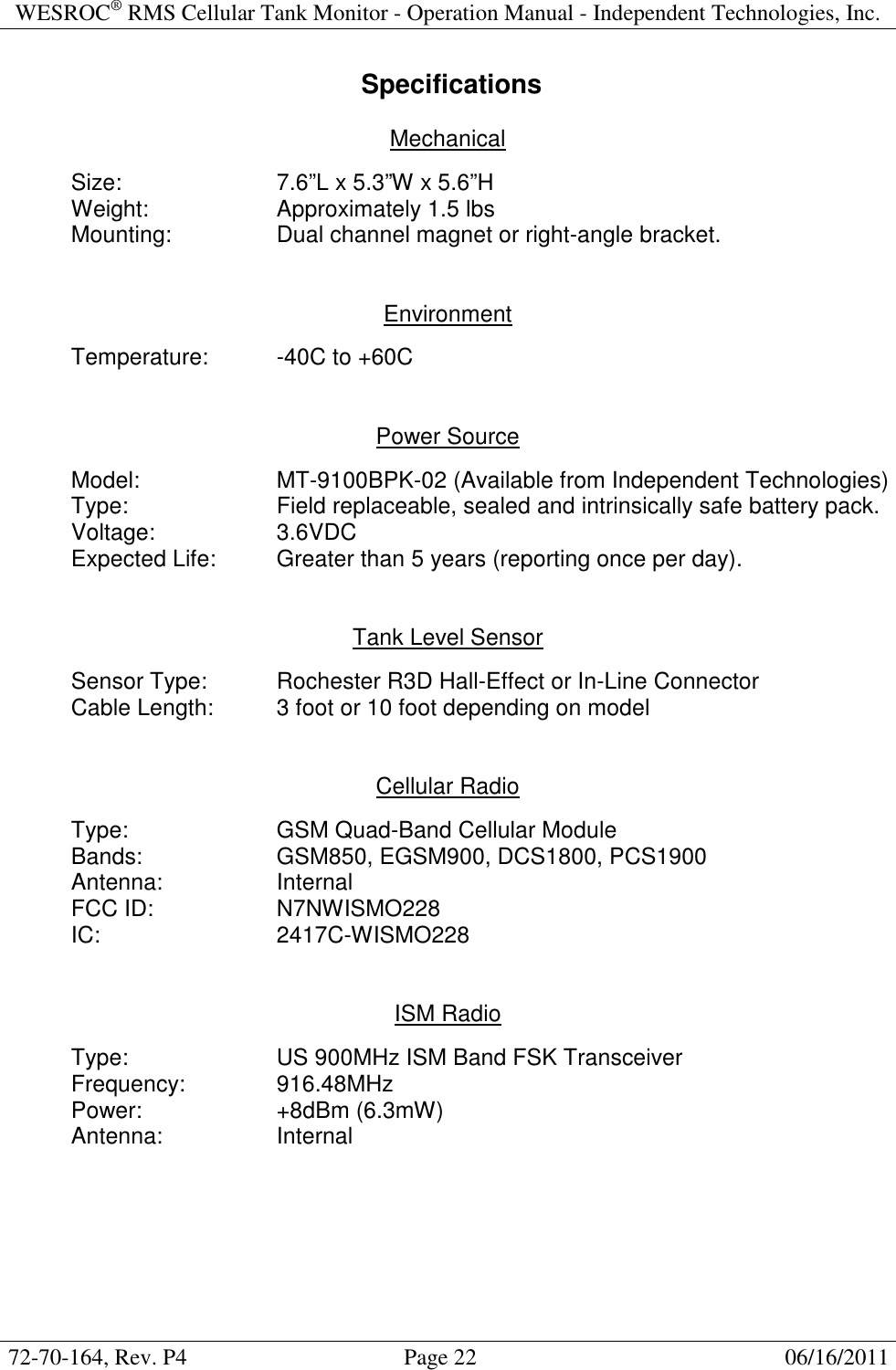
WESROC® RMS Cellular Tank Monitor - Operation Manual - Independent Technologies, Inc.  72-70-164, Rev. P4                                      Page 22                                                      06/16/2011   Specifications  Mechanical    Size:      7.6”L x 5.3”W x 5.6”H   Weight:    Approximately 1.5 lbs   Mounting:    Dual channel magnet or right-angle bracket.   Environment    Temperature:  -40C to +60C   Power Source    Model:    MT-9100BPK-02 (Available from Independent Technologies)   Type:      Field replaceable, sealed and intrinsically safe battery pack.   Voltage:    3.6VDC   Expected Life:  Greater than 5 years (reporting once per day).   Tank Level Sensor    Sensor Type:   Rochester R3D Hall-Effect or In-Line Connector   Cable Length:  3 foot or 10 foot depending on model   Cellular Radio  Type:      GSM Quad-Band Cellular Module Bands:    GSM850, EGSM900, DCS1800, PCS1900   Antenna:    Internal FCC ID:    N7NWISMO228   IC:      2417C-WISMO228   ISM Radio    Type:      US 900MHz ISM Band FSK Transceiver   Frequency:    916.48MHz   Power:    +8dBm (6.3mW)   Antenna:    Internal
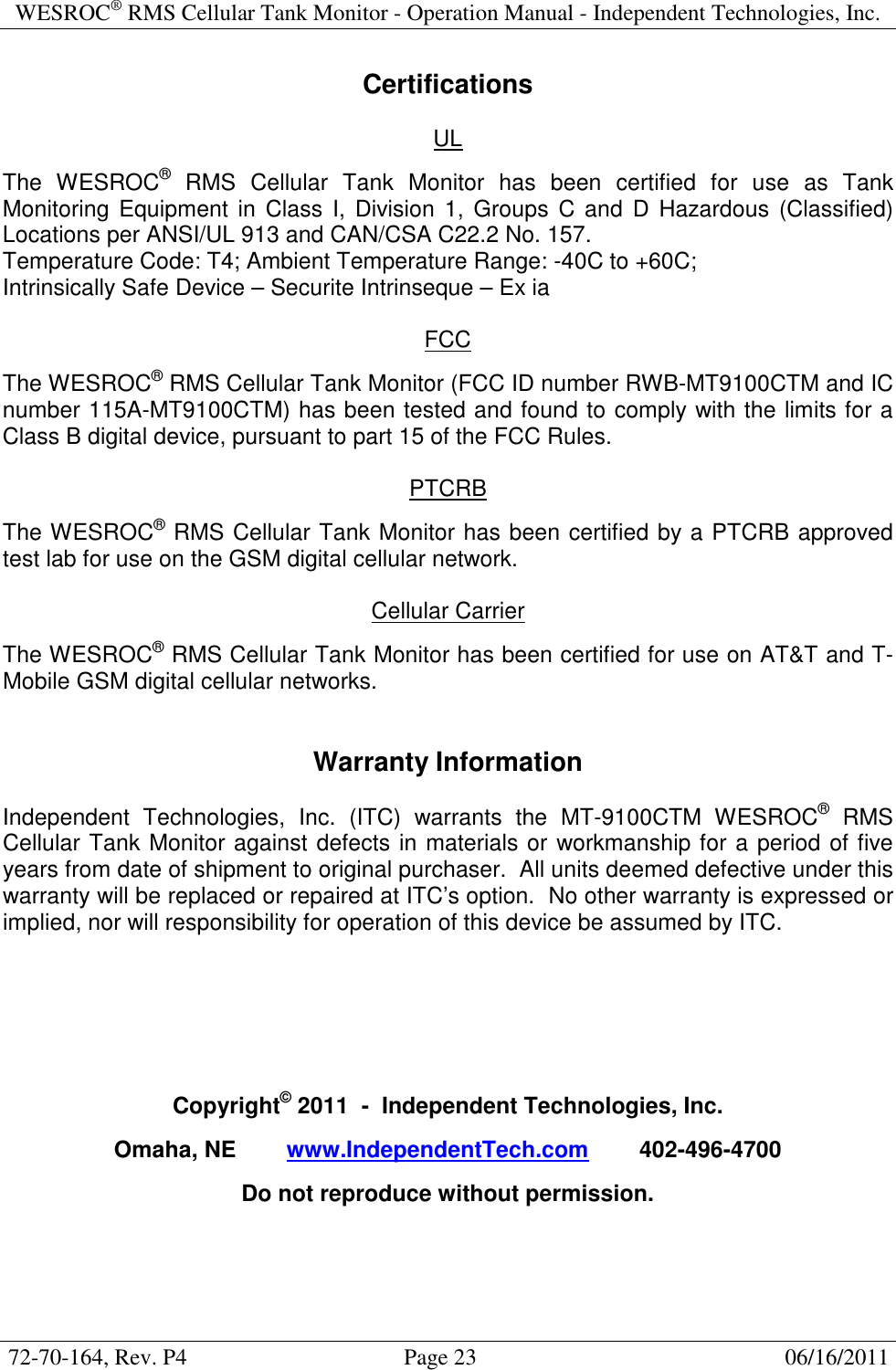
WESROC® RMS Cellular Tank Monitor - Operation Manual - Independent Technologies, Inc.  72-70-164, Rev. P4                                      Page 23                                                      06/16/2011  Certifications  UL  The  WESROC®  RMS  Cellular  Tank  Monitor  has  been  certified  for  use  as  Tank Monitoring  Equipment in  Class  I,  Division  1,  Groups  C and  D  Hazardous (Classified) Locations per ANSI/UL 913 and CAN/CSA C22.2 No. 157. Temperature Code: T4; Ambient Temperature Range: -40C to +60C; Intrinsically Safe Device – Securite Intrinseque – Ex ia  FCC  The WESROC® RMS Cellular Tank Monitor (FCC ID number RWB-MT9100CTM and IC number 115A-MT9100CTM) has been tested and found to comply with the limits for a Class B digital device, pursuant to part 15 of the FCC Rules.  PTCRB  The WESROC® RMS Cellular Tank Monitor has been certified by a PTCRB approved test lab for use on the GSM digital cellular network.  Cellular Carrier  The WESROC® RMS Cellular Tank Monitor has been certified for use on AT&T and T-Mobile GSM digital cellular networks.   Warranty Information  Independent  Technologies,  Inc.  (ITC)  warrants  the  MT-9100CTM  WESROC®  RMS Cellular Tank Monitor against defects in materials or workmanship for a period of five years from date of shipment to original purchaser.  All units deemed defective under this warranty will be replaced or repaired at ITC’s option.  No other warranty is expressed or implied, nor will responsibility for operation of this device be assumed by ITC.       Copyright© 2011  -  Independent Technologies, Inc.  Omaha, NE        www.IndependentTech.com        402-496-4700  Do not reproduce without permission.

Navigation menu