MS Connect 210 Configuration Sheet Msconnect210configsheet
2009-05-25
: Microscan Msconnect210Configsheet msconnect210configsheet fba69beb-4e9a-4393-a237-ba04a98db49b _att
Open the PDF directly: View PDF  .
.
Page Count: 1
Copyright ©2007 Microscan Systems, Inc. Specifications subject to change. P/N 83-211211 Rev A
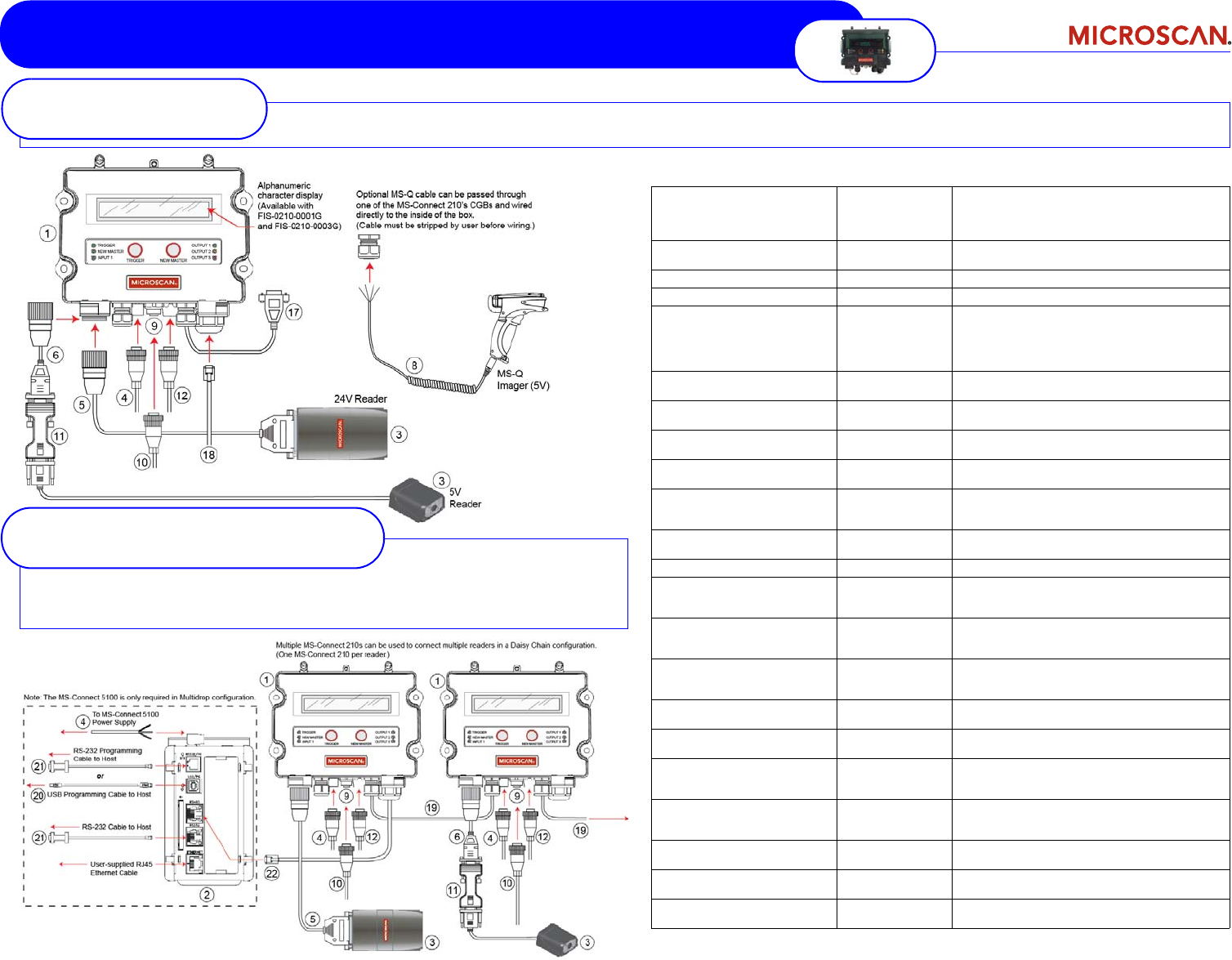
MS-Connect 210 - CONFIGURATION
Product Part Number Description
(1) MS-Connect 210 FIS-0210-0001G Connectivity Box with Display
FIS-0210-0002G Connectivity Box
FIS-0210-0003G Connectivity Box with Display and Ethernet
(2) MS-Connect 5100 FIS-5100-0001G Enhanced Multidrop Concentrator; required
for Multidrop configuration only
(3) Microscan Reader
FIS-XXXX-XXXXG
Any Microscan 10-28V or 5V reader
(4) Power Supply 97-100004-15 24V power supply
(5) Reader Cable
(10-28V readers) 61-000122-01 19-pin to 25-pin cable, Host RS-422/485
61-000123-01 19-pin to 25-pin cable, Host RS-232, Aux RS-232
61-000124-01 19-pin to 25-pin cable, Ethernet (Quadrus EZ only)
(6) Reader Cable
(5V readers and MS-9) 61-000127-01 19-pin to 15-pin cable
(IC-332 not required with MS-9)
(7) Reader Cable
(MS-820 only; not shown) 61-000121-01 19-pin to 15-pin cable
(IC-332 not required)
(8) MS-Q Reader Cable
(optional) 61-000066-02 Coiled RS-232 cable (MS-Q only); must be stripped
by user before wiring
(9) Internal Ethernet Cable
(optional) 61-000128-01 8-pin M12 external Micro-Change to RJ45 Ethernet
module connector
(10) MS-Connect 210
Industrial Ethernet Cable
(optional)
User-supplied
Industrial Ethernet Cable; 8-pin M12 Micro-Change
connector
(11) IC-332
(5V readers) FIS-0001-0035G Power Adapter
(12) Object Detector (optional) 99-000017-02 Photo-electric sensor
(13) MS-Connect 210
Pluggable Relay Module
(optional; not shown)
98-000013-04 120VAC, Series 70, Type SM
(14) MS-Connect 210
Pluggable Relay Module
(optional; not shown)
98-000013-05 240VAC, Series 70, Type SM
(15) MS-Connect 210
Pluggable Relay Module
(optional; not shown)
98-000013-06 24VDC, Series 70, Type SM
(16) DIN Rail Mounting Kit
(optional; not shown) 98-000093-01 Mounting option
(17) MS-Connect 210
Host Cable 61-000105-01 Pre-stripped to 9-pin cable
(18) MS-Connect 210
Ethernet Cable
(optional)
User-supplied Ethernet Cable; RJ45 connector
(19) MS-Connect 210
Multidrop Cable /
Daisy Chain Cable
User-supplied Must be stripped by user and wired to
MS-Connect 210 RS-422 terminal blocks
(20) MS-Connect 5100
Programming Cable 61-000112-01 USB, standard Type A to Type B, 6 ft.
(21) MS-Connect 5100
Host Cable 61-000108-01 9-pin to RJ12, 6 ft.
(22) MS-Connect 5100
Concentrator Cable User-supplied User-stripped to RJ45
These are the setup options for one MS-Connect 210 and one 10-28V or 5V reader. The MS-Connect 210 can communicate serially or over Ethernet.
Stand-Alone Options
These are the setup options for an MS-Connect 5100, multiple MS-Connect 210s, and multiple readers
in a Multidrop network,
or
multiple MS-Connect 210s and readers in a Daisy Chain configuration.
Multidrop / Daisy Chain Options
