PDF417sheet
2010-09-16
: Microscan Pdf417Sheet PDF417sheet 61829b43-a88c-497a-9c54-5bdce816ee61 _att
Open the PDF directly: View PDF  .
.
Page Count: 2
Microscan Systems, Inc.
Tel 425 226 5700 / 800 251 7711
Fax 425 226 8250
Microscan Europe
Tel 31 172 423360 / Fax 31 172 423366
Microscan Asia Pacic R.O.
Tel 65 6846 1214 / Fax 65 6846 4641
Web site: www.microscan.com
E-mail: info@microscan.com
©2006 Microscan Systems, Inc. 12/06
The Importance of Reed-Solomon Error Correction
Symbology Structure
The advent of PDF-417, a 2D stacked linear code, brought
two important changes to the bar code industry. Firstly, it
provided a method of greatly increasing data capacity in a
label. Secondly, through built-in error correction, it provided
a way to ensure that the added information could be ac-
curately decoded.
“PDF” stands for portable data le, aptly named as the
symbology can hold (in a reasonable amount of space) a
maximum of 1850 ASCII characters and 2710 numeric dig-
its, enough to encode an entire database. This far exceeds
the data capacity of any linear code. Because of this limita-
tion, linear codes force the user to rely on external database
Fundamentals of
PDF-417 Symbology
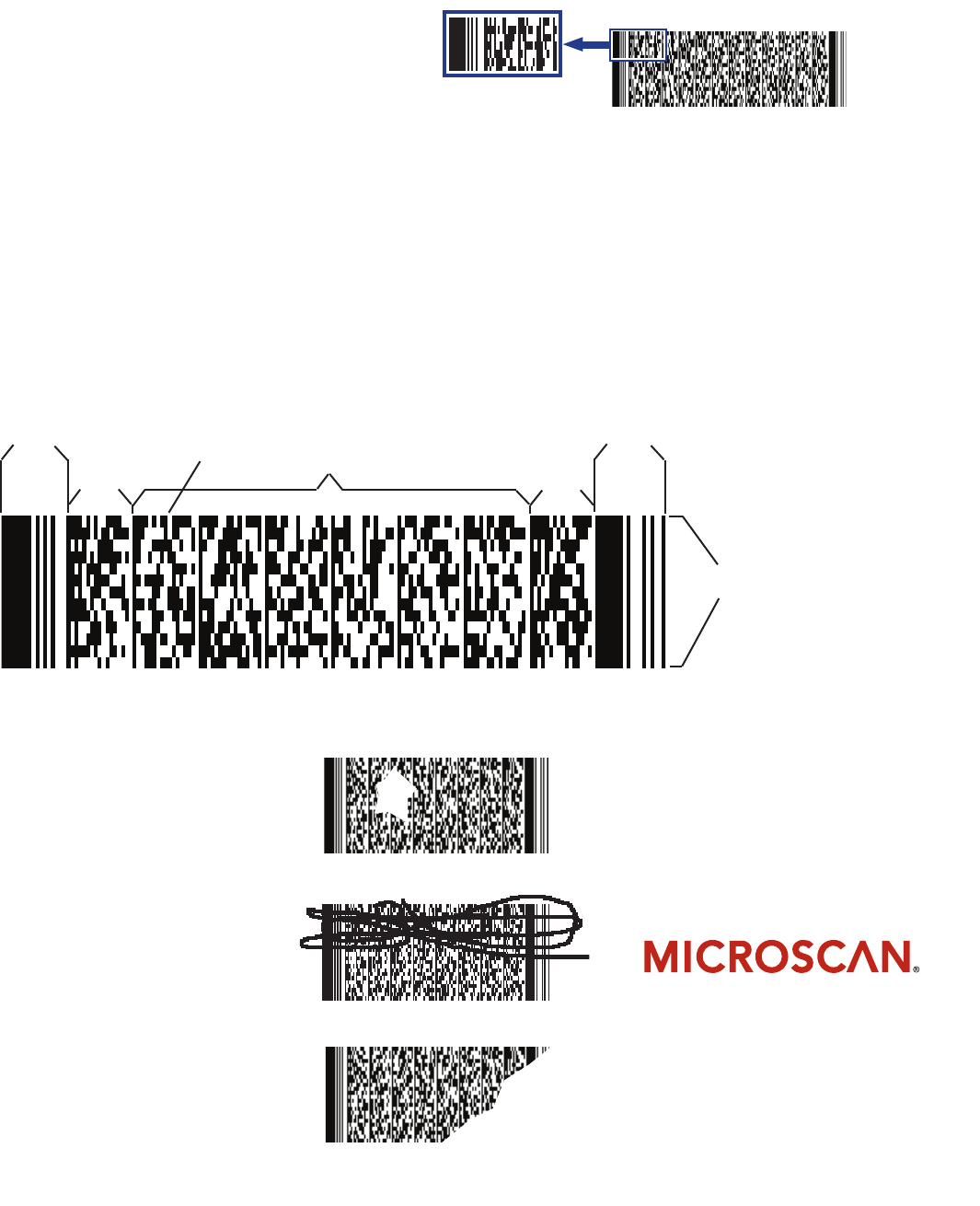
PDF-417 uses a technique that stacks multiple linear rows
together which dramatically increases the amount of data
that can be encoded compared to linear symbologies. Every
PDF-417 label has distinct elements, including start/stop
patterns, left/right row indicators, data columns, and rows.
PDF-417 can be scanned by linear scanners, rastering laser
scanners, or two-dimensional imaging devices.
Using Reed-Solomon error correction, up
to 50 percent of the label can be damaged
or torn while still maintaining readability.
The user selects the degree of error cor-
rection for the label at the time the label is
created. Levels range from level 0 to level
8, with level 8 being the most redundant.
Error correction identies two types of er-
rors, 1.) rejection errors, called “erasures,”
and 2.) substitution errors, called “errors.”
An erasure is a missing, unscanned or
undecodable symbol character where the
position of the symbol character is known
but not its value. An error is a misdecoded
or mislocated symbol character where
both the position and value of the symbol
character is unknown.
Erasure error example
Readable code (level 6 error correction)
Readable code (level 6 error correction)
lookups to provide complete information on the stored
data. Conversely, PDF-417 provides the ability to carry all
of the information with the code, particularly benecial to
open systems.
The table at right shows the minimum recommended error cor-
rection level for open systems using numeric and alphanumeric
characters.
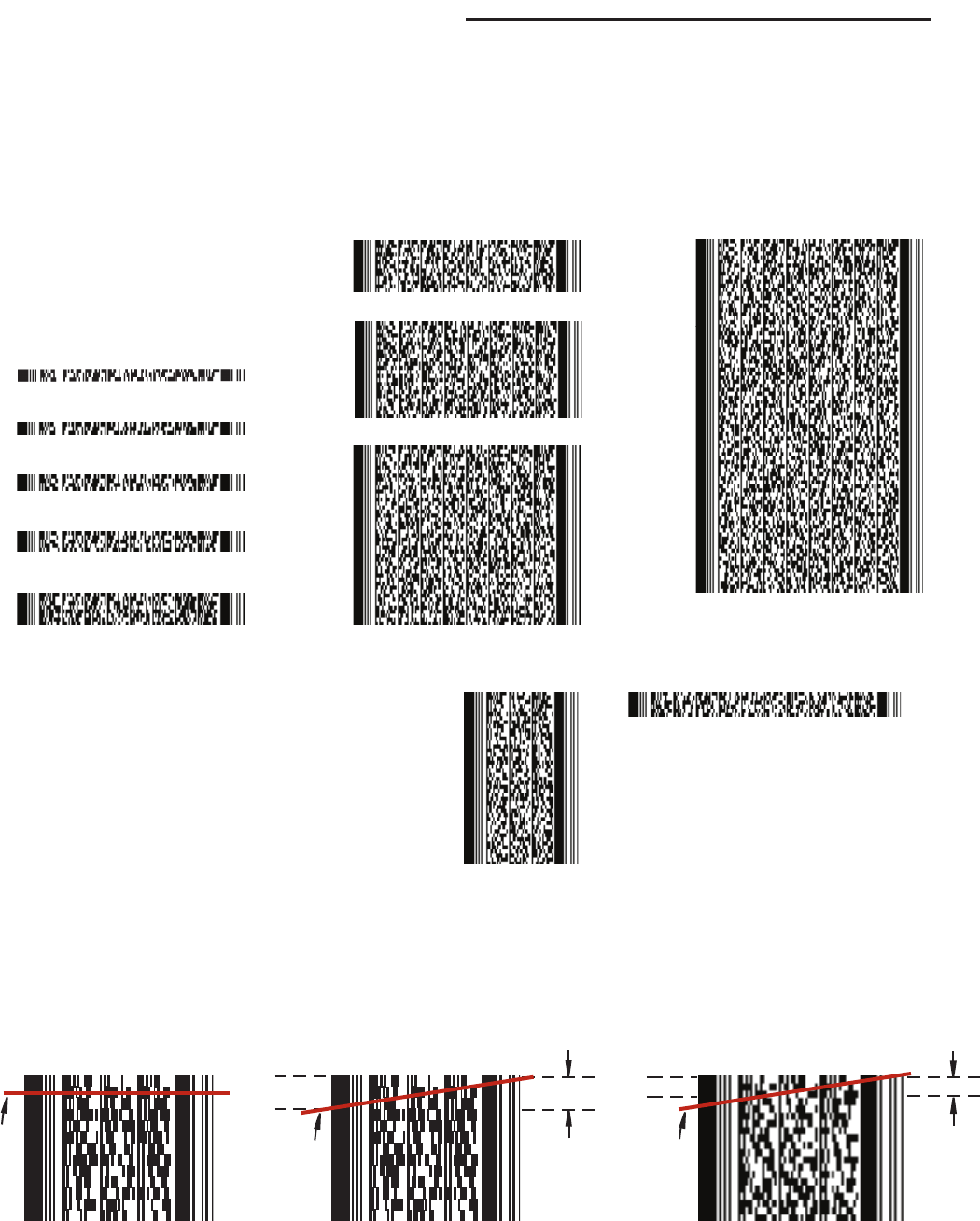
Note that a symbol’s size will increase with the level of protection,
as illustrated with the PDF-417 symbols below. While the informa-
tion in these symbols is identical, their sizes vary dramatically
depending on the error correction level (ECL) that was used.
Code Information:
Encoded data = Microscan MS-850
X-Dimension = 10 mil
Row height = 3X (30 mil)
Minimum Error Numeric Alphanumeric
Correction Level Characters Characters
2 ...................... 1 to 80 .....................120
3 ...................... 81 to 480 .................320
4 ...................... 481 to 960 .............. 640
5 ...................... 961 to 2580 ............1720
6 ...................... 2581 to 2710 ..........1721 to 1850
ECL 8
ECL 7
ECL 6
ECL 5
ECL 4
ECL 3
ECL 2
ECL 1
ECL 0
Tilt Versus Code Density
PDF-417’s Versatile Use of Aspect Ratio
Aspect ratio is the proportion of the width of the label to its
height. As shown in the examples at right, a PDF-417 symbol’s
aspect ratio can be varied to suit real estate requirements without
changing the information in the symbol. This is possible because
PDF-417 specications allow the user to specify the number of
rows or columns when printing.
Because every three rows of a PDF-417 label has its own encod-
ing scheme, to successfully read a PDF-417 label the tilt of the
laser beam cannot cross more than three rows. Notice that in
examples B and C the tilt is unchanged. However, because
the label in example C consists of shorter row heights, its
readable zone is correspondingly smaller.
Data Columns = 1 Data Columns = 8
Code Information:
Encoded data = Microscan’s MS-850 reads
PDF417 with any error correction level
ECL = 0
X-Dimension = 10 mil
Row height = 3X (30 mil)
ANo Tilt
(Acceptable) CUnacceptable Tilt
Readable
zone
Scan
line
BMaximum
Acceptable Tilt
Readable
zone
Scan
line
Scan
line
