Miele H 5040 BM H_5030_5040_BM_Z_au.vp User Manual To The E1cff916 2751 46cf 9ea9 F623ccc92742
User Manual: Miele H 5040 BM to the manual
Open the PDF directly: View PDF  .
.
Page Count: 84
- Contents
- Warning and Safety instructions 5
- Caring for the environment 12
- Guide to the appliance 13
- Description of functions 16
- Functions 18
- Before using for the first time 20
- Suitable containers for microwave ovens 22
- Controls 27
- Operation 30
- Minute minder (egg timer) 38
- System lock 39
- % Settings 40
- Defrosting, reheating and cooking using microwave power 42
- Baking 49
- Baking chart 52
- Roasting 53
- Roasting chart 56
- Grilling 57
- Grilling tips 59
- Defrosting without microwave power 61
- Cleaning and care 62
- Problem solving guide 67
- Optional accessories 70
- After sales service and warranty 72
- Electrical connection 73
- Installation 74
Operating and installation instructions
Microwave combination oven
H 5030 BM, H 5040 BM
To avoid the risk of accidents or
damage to the appliance it is
essential to read these instructions
before it is installed and used for the
first time. M.-Nr. 07 954 010
en - AU, NZ

Warning and Safety instructions .....................................5
Caring for the environment.........................................12
Guide to the appliance ............................................13
Appliance overview ................................................13
Accessories supplied ..............................................14
Description of functions ...........................................16
Functions .......................................................18
_Microwave ....................................................18
Functions which do not use microwave energy ..........................19
UFan Plus ...................................................19
YGrill .......................................................19
PDefrost ....................................................19
\Fan Grill ...................................................19
SRapid Heat-up ..............................................19
Functions which use microwave energy (Combination programmes) .........19
bMicrowave+Grill .............................................19
aMicrowave+Fan Plus .........................................19
MMicrowave+Fan Grill..........................................19
Before using for the first time.......................................20
Setting the time of day ..............................................20
Changing the time of day .........................................20
Cleaning and heating up for the first time ...............................21
Suitable containers for microwave ovens .............................22
Material and shape ................................................22
Testing dishes for their suitability .....................................25
Placing the dish in the oven..........................................25
A cover (optional accessories) .......................................26
Controls ........................................................27
Function selector ..................................................27
Temperature selector ..............................................27
Sensors .........................................................28
Display ..........................................................29
Symbols ......................................................29
Triangle Vin the display .........................................29
Contents
2

Operation .......................................................30
Functions without microwave.........................................30
Cooling fan ....................................................30
Recommended temperature .........................................30
Changing the temperature ........................................30
Temperature indicator light .....................................31
Rapid Heat-up S.................................................31
Pre-heating the oven.............................................31
Programming cooking durations ......................................32
Automatic switch-off .............................................32
Delaying the start with Automatic switch-off...........................33
The end of a cooking programme ..................................34
To check and change an entered time ..............................34
To delete an entered time.........................................34
Microwave function _.............................................35
Combination programmes ...........................................36
Microwave+Fan plus a, Microwave+Fan grill M.....................36
Microwave+Grill b.............................................37
The end of a cooking programme ..................................37
Minute minder (egg timer)..........................................38
System lock .....................................................39
%Settings ......................................................40
To change the status of a setting .....................................41
Defrosting, reheating and cooking using microwave power.................42
Chart for defrosting ................................................46
Chart for reheating food.............................................47
Chart for cooking food ..............................................48
Baking ..........................................................49
Baking chart .....................................................52
Roasting ........................................................53
Roasting chart ...................................................56
Grilling .........................................................57
Grilling tips ......................................................59
Fan Grilling guide (Fan Grill \)......................................59
Contents
3

Grilling guide (Grill Y).............................................60
Defrosting without microwave power ................................61
Defrosting times...................................................61
Cleaning and care ................................................62
Oven interior .....................................................62
Door interior and door seal ..........................................65
Appliance front ...................................................65
Accessories supplied ..............................................66
Problem solving guide ............................................67
Optional accessories..............................................70
After sales service and warranty ....................................72
Electrical connection..............................................73
Installation ......................................................74
Appliance dimensions and unit cut-out .................................74
Installation in a tall unit ...........................................74
Installation in a base unit .........................................74
Front dimensions ..................................................75
Installation .......................................................75
Contents
4

This appliance complies with all
relevant legal safety requirements.
Improper use of the appliance can,
however, present a risk of both
personal injury and material
damage.
To avoid the risk of accidents and
damage to the appliance, please
read these instructions carefully
before installation and before using
it for the first time. They contain
important notes on the installation,
safety, operation and care of the
appliance.
Keep these instructions in a safe
place and ensure that new users are
familiar with the content. Pass them
on to any future owner.
Correct application
~This microwave compact oven is
designed for domestic use and for use
in similar environments by guests in
hotel or motel rooms, bed & breakfasts
and other typical living quarters. This
does not include common/shared
facilities or commercial facilities within
hotels, motels or bed & breakfasts.
~The appliance is not suitable for
outdoor use.
~It is intended only to cook, defrost,
reheat, bake, roast, grill and bottle
food.
Any other use is at the owner's risk and
could be dangerous. Miele cannot be
held liable for damage resulting from
incorrect or improper use or operation.
~Never use the appliance to store or
dry items which could ignite easily as
moisture evaporates and there could
be a fire hazard.
~This appliance is not intended for
use by persons (including children)
with reduced physical, sensory or
mental capabilities, or lack of
experience and knowledge, unless they
have been given supervision or
instruction concerning its use by a
person responsible for their safety.
Warning and Safety instructions
5

Safety with children
~Children should be supervised to
ensure that they do not play with the
appliance. Keep children away from the
appliance at all times to avoid the risk
of injury.
~Older children may only use the
appliance when its operation has been
clearly explained to them and they are
able to use it safely, recognising the
dangers of misuse.
~Great care should be taken to
ensure that children do not touch the
appliance when it is being used.
External parts of the oven such as the
door glass, control panel and the vent
become quite hot. Children's skin is far
more sensitive to high temperatures
than that of adults. Danger of burning!
Technical safety
~Installation, maintenance and
repairs may only be carried out by a
suitably qualified and competent
person authorised by Miele in strict
accordance with current national and
local safety regulations. Repairs and
other work by unqualified persons
could be dangerous. The manufacturer
cannot be held liable for unauthorised
work.
~Before installation, check the
appliance for visible signs of damage.
Do not install and use a damaged
appliance. Danger of injury!
~Do not use the microwave function
of the appliance if
– the door is warped,
– the door hinges are loose,
– holes or cracks are visible in the
housing, the door, the door seal or
the oven interior walls.
Operating the appliance with this type
of damage will result in microwave
leakage and present a hazard to the
user.
~The electrical safety of this
appliance can only be guaranteed
when continuity is complete between it
and an effective earthing system which
complies with local and national safety
regulations. It is most important that this
basic safety requirement is present and
tested regularly and, where there is any
doubt, the household wiring system
should be inspected by a qualified
electrician. The manufacturer cannot be
held liable for the consequences of an
inadequate earthing system (e.g.
electric shock).
Warning and Safety instructions
6

~Before connecting the appliance,
make sure that the connection data on
the data plate (voltage and rated load)
match the mains electricity supply. This
data must correspond in order to avoid
the risk of damage to the appliance.
Consult a qualified electrician if in
doubt.
~Do not connect the appliance to the
mains electricity supply via a multi-
socket unit or an extension lead. These
do not guarantee the required safety of
the appliance (e.g. danger of
overheating).
~For safety reasons, this appliance
may only be used when it has been
fully installed.
~Never open the housing of the
appliance.
Tampering with electrical connections
or components and mechanical parts is
highly dangerous to the user and can
cause operational faults.
~While the appliance is under
warranty, repairs should only be
undertaken by a service technician
authorised by the manufacturer.
Otherwise the warranty will be
invalidated.
~During installation, maintenance and
repair work, the appliance must be
disconnected from the mains electricity
supply. It is only completely isolated
from the electricity supply when:
–the mains fuse is disconnected,
–the screw-out fuse is removed (in
countries where this is applicable),
–or it has been switched off at the
isolator or at the wall socket and the
plug has been withdrawn.
~Faulty components must only be
replaced by genuine Miele original
spare parts. The manufacturer can only
guarantee the safety of the appliance
when Miele replacement parts are
used.
~If the connection cable is damaged,
it must be replaced by a Miele
approved service technician.
~This microwave compact oven must
not be installed and operated in mobile
installations (e.g. on a ship).
Warning and Safety instructions
7

Correct use
Caution! Danger of burning.
The oven interior will become very
hot when operating with functions
which do not use microwave power
and also combination programmes
which do use microwave power.
~Use oven gloves when placing food
in the oven, turning or removing it and
when adjusting oven shelves etc. in a
hot oven.
The top heat/grill elements get very hot
when the oven is being used on the
Grill Y, Fan Plus U, Fan Grill \,
Microwave+Grill b, Microwave+Fan
Grill Mfunctions. Danger of burning!
~Plastic containers must only be used
with Microwave solo. These melt at high
temperatures, and if used with any
other function could damage the
appliance.
~Always ensure that food is
sufficiently cooked or reheated.
Many factors will affect the overall
cooking time, including the size,
amount and type of food, its initial
temperature, changes to recipe and the
shape and size of cooking containers.
Always ensure that food is suitably
cooked or reheated. Some foods may
contain micro-organisms which are only
destroyed by thorough cooking at
temperatures over 70 °C for a minimum
of 10 minutes. Therefore, when cooking
or reheating foods, e.g. poultry, it is
particularly important that food is fully
cooked through. If in doubt, select a
longer cooking or reheating time.
It is important that the heat is allowed to
spread evenly throughout the food
being cooked.
This can be achieved by stirring and/or
turning the food, and by observing a
sufficiently long standing time, which
should be added to the time needed for
cooking, reheating or defrosting.
~Please be aware that using
microwave power will shorten cooking,
reheating and defrosting times
considerably compared to when using
functions without microwave power.
Make sure that you keep to the
recommended grilling times when
using the Grill Yand Fan Grill \
functions.
However, excessively long cooking
times can lead to food drying out and
burning or could even cause the food
to catch fire.
– Do not use the microwave function to
dry breadcrumbs, flowers, herbs,
grain etc.
–Do not use any grilling functions to
heat and crisp up rolls or bread, or to
dry flowers, herbs, grain etc.
Use the Fan Plus Ufunction for this
type of procedure and do not leave the
oven unattended.
~Never leave the appliance
unattended when cooking with oil or
fats as these are a fire hazard if allowed
to overheat.
Warning and Safety instructions
8

~Never heat undiluted alcohol in the
microwave, as this can easily ignite.
If using alcohol in your recipes, please
be aware that high temperatures can
cause the alcohol to vaporise and even
to ignite on the hot heating elements.
Alcohol should be burnt off before the
dish is placed in the oven to avoid this
danger.
~Do not heat up unopened tins or jars
of food in the appliance. Pressure can
build up and they may explode,
resulting in injury or damage.
~To avoid fuelling any flames, do not
open the oven door if smoke occurs in
the oven interior. Cancel the cooking
process by switching the appliance off,
switch off at the socket and remove the
plug. Do not open the oven door until
the smoke has dispersed.
~Moisture in food could lead to
corrosion in the oven interior and
corrosion damage of the control panel,
worktop or housing unit.
–Always cover food when using the
Microwave (Solo) function. After food
has been brought to the boil,
continue cooking it at a lower setting
to avoid excess steam escaping.
–If you wish to complete a cooking
process using the residual heat in
the oven, do not switch the
appliance off. Leave the function
selector at the position set and turn
the temperature selector to the
lowest setting.
–Cover any food which is left in the
oven to be kept hot. This also
prevents the food from drying out.
~Do not use the appliance to heat up
the room. Due to the high temperatures
radiated, objects near the appliance
could catch fire.
~Do not lean or sit on an open oven
door, or place heavy items on it. This
can damage the appliance. The
maximum load bearing capacity of the
door is 8 kg.
~Do not use full power to warm empty
dishes or to dry out herbs. The
appliance could be damaged if used
without food, or if it is incorrectly
loaded.
~Do not use the microwave function
to heat up cushions or pads filled with
cherry kernels, wheat grain, lavender or
gel, such as those used in
aromatherapy. These pads can ignite
when heated even after they have been
removed from the appliance.
Warning and Safety instructions
9
~The microwave combination oven is
not suitable for cleaning or disinfecting
items.
Items can get extremely hot and there
is a danger of burning when the item is
removed.
~Before serving, remember to allow a
sufficient standing time and then
always check the temperature of the
actual food itself after taking it out of the
microwave. The temperature of the
container is not an indication of the
temperature of the food or liquid in it.
When heating food and drinks,
remember that the heat is created in
the food itself, and that the container
will normally be cooler. The dish is only
warmed by the heat of the food.
This is particularly important when
preparing food for babies, children,
and the elderly or infirm.
Shake or stir baby milk and food
thoroughly after heating, and try it for
temperature to ensure that it will not
scald the baby.
~Never cook or reheat food or liquids
in sealed containers, jars or bottles.
With baby bottles, the screw top and
teat must be removed.
Otherwise pressure builds up which
can cause the bottle or container to
explode, posing a severe risk of injury.
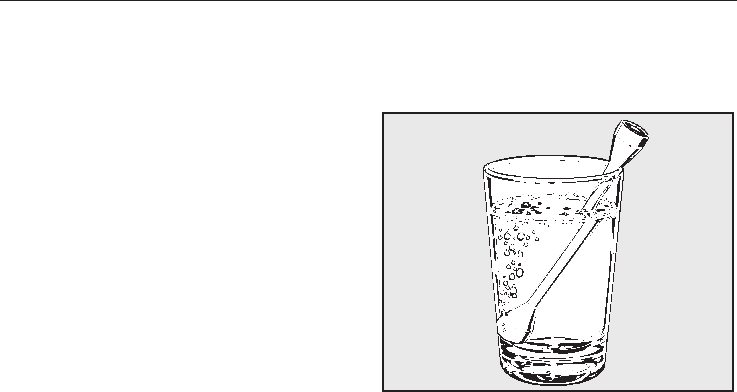
~When heating liquids, the boiling rod
provided should always be placed into
the container.
The boiling rod ensures that the liquid
boils evenly and that bubbles form at
an early stage during the operation.
When heating liquids, milk, sauces etc,
using microwave power without the
boiling rod, the boiling point of the
liquid may be reached without the
production of typical bubbles.
The liquid does not boil evenly
throughout. This so-called 'boiling
delay' can cause a sudden build-up of
bubbles when the container is removed
from the oven or shaken. This can lead
to the liquid boiling over suddenly and
explosively. Danger of burning!
The formation of bubbles can be so
strong that the pressure forces the oven
door open. The user could be injured
and the appliance damaged.
Warning and Safety instructions
10

~Make sure that you only use
microwave safe containers when using
the Microwave (Solo) function or a
combination programme which uses
microwave power. Observe the
instructions given in "Suitable
containers for microwave ovens".
~Ovenproof earthenware can retain a
considerable amount of moisture.
Earthenware and porcelain containers
with hollow handles and lid knobs must
only be used with microwave power if
they have vent holes, which allow the
moisture to escape. Without vent holes
there can be a pressure build-up,
causing the container to crack or
shatter, with the danger of injury.
~Do not reheat food in the oven in
heat-retaining bags which are intended
for use in normal ovens. These heat-
retaining bags usually contain a thin
layer of aluminium foil which reflects
microwaves. This reflected energy can,
in turn, cause the outer paper covering
to become so hot that it ignites.
~Do not leave the oven unattended
when reheating or cooking food in
disposable containers made of plastic,
paper or other inflammable materials.
Before using single-use containers,
make sure they are suitable for use in
microwave ovens. See "Suitable
containers for microwave ovens -
Plastics".
~Eggs can only be cooked in their
shells using microwave heat in a
specially designed egg-boiling device
available from specialist shops.
Similarly, hard-boiled eggs should not
be reheated using microwave power as
this may lead to the eggs exploding,
even after they have been taken out of
the oven.
~Eggs can be cooked without their
shells using microwave heat only if the
yolk membrane has been punctured
several times first. The pressure could
otherwise cause the egg yolk to
explode. Danger of injury!
~Food with a thick skin or peel, such
as tomatoes, sausages, jacket potatoes
and eggplants, should be pierced or
cut in several places to allow steam to
escape and prevent the food from
bursting.
~To check food temperature, first
interrupt the cooking process. Only use
a thermometer specifically approved for
food use to measure the temperature of
the food. Never use a mercury or liquid
thermometer as they are unsuitable for
such high temperatures and break
easily.
Accessories
~Only use genuine Miele spare parts
and accessories with this appliance. If
spare parts or accessories from other
manufacturers are used, the warranty
will be invalidated, and Miele cannot
accept liability.
The manufacturer cannot be held
liable for damage caused by non-
compliance with these Warning and
Safety instructions.
Warning and Safety instructions
11
Disposal of the packing
material
The transport and protective packing
has been selected from materials which
are environmentally friendly for disposal
and can normally be recycled.
Ensure that any plastic wrappings,
bags, etc. are disposed of safely and
kept out of the reach of babies and
young children. Danger of suffocation.
Rather than just throwing these
materials away, please ensure they are
offered for recycling.
Disposal of your old appliance
or machine
Electrical and electronic appliances /
machines often contain materials
which, if handled or disposed of
incorrectly, could be potentially
hazardous to human health and to the
environment. They are, however,
essential for the correct functioning of
your appliance or machine. Therefore,
please do not dispose of your old
machine or appliance with your
household waste.
Please dispose of it at your local
community waste collection / recycling
centre and ensure that it presents no
danger to children while being stored
for disposal.
It should be unplugged or disconnected
from the mains electricity supply by a
competent person.
The plug must be rendered useless
and the cable cut off directly behind the
appliance or the machine to prevent
misuse.
Caring for the environment
12
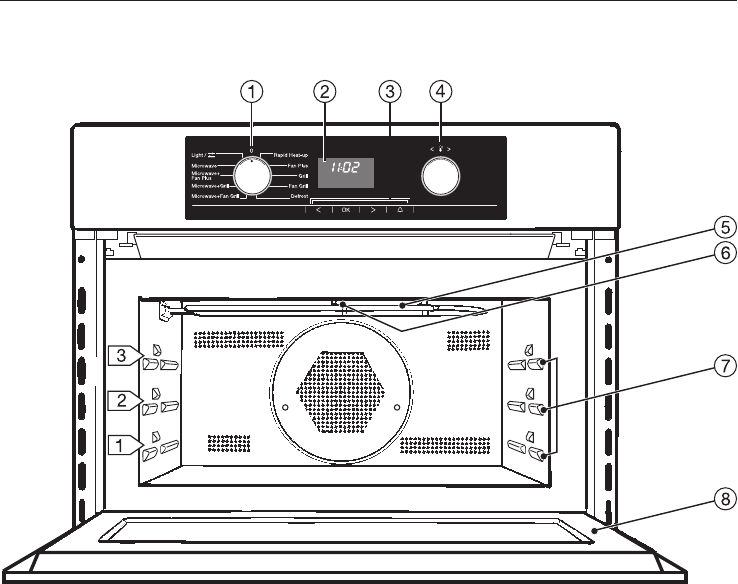
Appliance overview
Control panel
aFunction selector
bDisplay
cSensors V, OK, W,N
dTemperature selector
Oven interior
eGrill element
fLight
gThree shelf levels
hOven door
Guide to the appliance
13
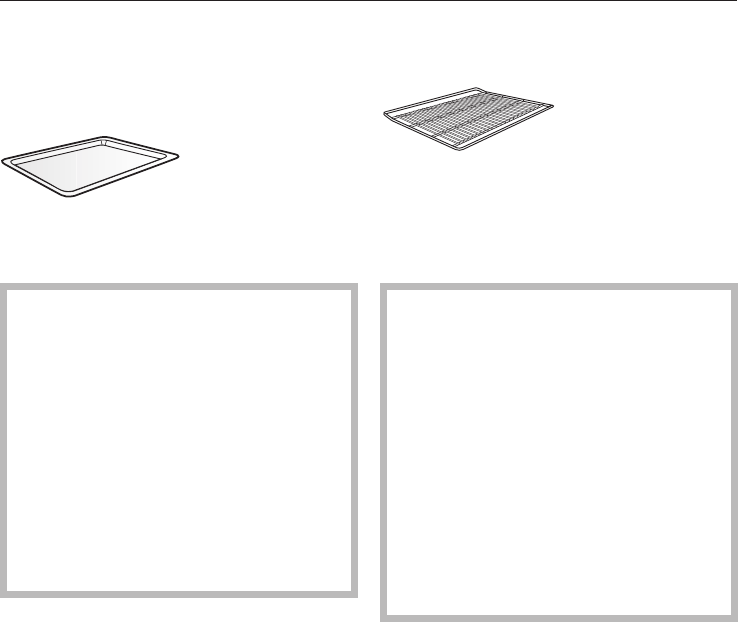
Accessories supplied
Glass tray
The glass tray is suitable for use with all
cooking functions.
Always use the glass tray when
using the Microwave (Solo) function.
Do not place items weighing more
than8kgonit.
Do not place the hot glass tray on a
cold surface, such as a tiled or
granite worktop.
The glass tray could get damaged.
Use a suitable heat-resistant mat or
pot rest.
Rack with non-tip safety notches
The rack is designed to be compatible
with microwaves and so can be used
with programmes which use microwave
power (combination programmes).
Do not place the rack directly on the
floor of the oven and do not use it
with the Microwave (Solo) function.
This could cause arcing which could
damage the oven.
Do not place items weighing more
than 8 kg on the rack.
The rack gets hot when used with
combination programmes which use
the microwave function. Danger of
burning.
The rack has non-tip safety notches
which prevent it being pulled right out
when it only needs to be pulled out
partially.
Guide to the appliance
14
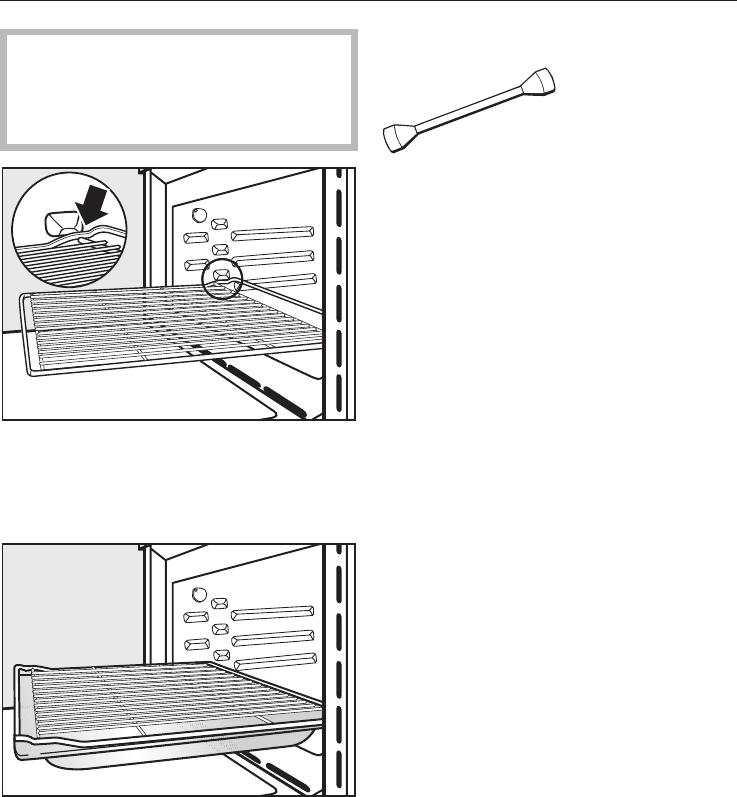
When pushing the rack back in,
always ensure that the safety
notches are at the rear of the oven
(see illustration).
To remove the rack, lift it upwards
slightly at the front when the safety
notches connect with the sides of the
oven.
We recommend using the rack
together with the glass tray when
cooking items on the rack which might
drip.
Boiling rod
When heating liquids, the boiling rod
provided should always be placed in
the container. It helps liquids to heat
evenly.
Guide to the appliance
15
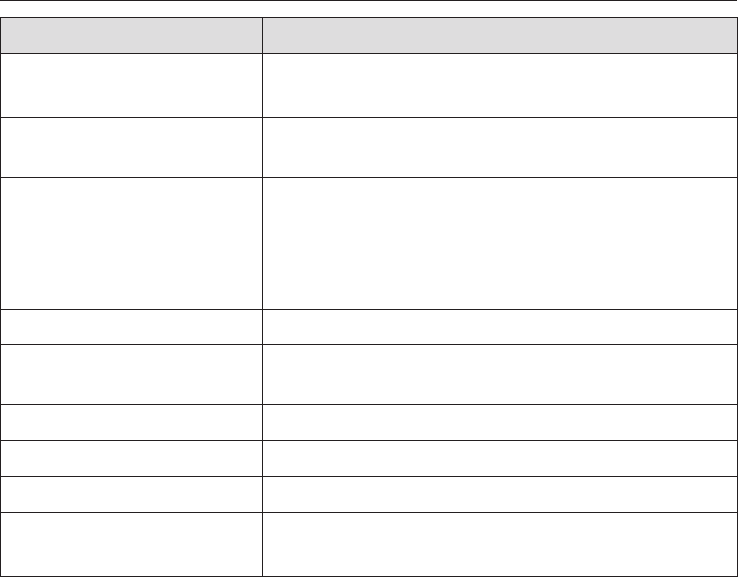
Functions Use
Microwave _
(Solo)
For defrosting, reheating and cooking food quickly.
Functions without
microwave
For cooking food when a crisp finish is required.
Combination programmes
(with microwave)
The combination programmes enable food to be
reheated and cooked quickly with even browning
results. In the combination programmes, microwave
power is used in conjunction with a traditional
function.
Rapid Heat-up SFor reducing the pre-heating time for the appliance.
Light TThe interior lighting can be switched on separately,
e.g. for cleaning the oven.
Settings %Default settings which can be altered individually.
Automatic switch-off For switching off the appliance automatically.
Delay start For starting the cooking programme at a later time.
Minute minder N
(Egg timer)
For monitoring other kitchen activities, e.g. boiling an
egg on the hob.
Description of functions
16

Safety features Use
System lock The system lock prevents the appliance being used
by children, for example.
Safety cut-out Afunction without microwave can be started
without selecting a cooking duration. To prevent
overuse and the consequent danger of fire, the
appliance switches off automatically after a certain
length of time. This can be between 1 hour and 10
hours, depending on the function and temperature
chosen.
Ifacombination programme is followed in quick
succession by another combination programme, the
magnetron (which produces the microwaves) cannot
be switched on again until after approx. 10 seconds
have elapsed. For this reason you will need to wait a
short while before starting the second programme.
Energy saving function Use
Door contact switch If the door is opened during a programme that is not
using microwaves, the heat in the oven automatically
switches off. The fans continue to operate. As soon
as the door is closed again, the programme will
continue.
However, if the door is opened during a
combination programme, the cooling fan will
switch off and the programme must be started again
after you have closed the door.
"Switch off time-of-day
display" function
The standard factory default setting can be changed
so that the time of day continues to run unseen in
the background. The display remains dark. The time
of day display is switched on and is visible in the
display when the appliance is operated (see
"Settings - Time of day display").
Description of functions
17

_Microwave
In a microwave oven there is a high-
frequency tube called a magnetron.
This converts electrical energy into
microwaves. These microwaves are
distributed evenly throughout the oven
interior and rebound off the metal sides
of the oven interior to reach the food
from all sides.
In order for microwaves to reach the
food, they must be able to penetrate
the cooking container being used (see
"Suitable containers for microwave
ovens"). Microwaves pass through a
suitable container and find their way
directly into the food.
All food contains moisture molecules
which when subjected to microwave
energy start to oscillate vigorously. The
friction caused caused by this vibration
creates heat which first starts
developing around the outside of the
food and then slowly penetrates
towards the centre. The moisture, fat
and sugar content of food will affect the
speed at which it is cooked.
As heat is produced directly in the
food,
–food can generally be cooked
without adding much liquid or
cooking oil.
–cooking, reheating and defrosting is
much quicker than when using a
function which does not use
microwave energy.
–nutrients, such as vitamins and
minerals, are generally retained.
–the colour, texture and taste of food
are not impaired.
Power level
The following power levels can be
selected:
80 W, 150 W, 300 W, 450 W, 600 W,
850 W, 1000 W
Microwaves stop being produced as
soon as the cooking process is
interrupted or the appliance door is
opened.
Functions
18

Functions which do not use
microwave energy
UFan Plus
This system works by the circulation of
heated air. As the heated air reaches
the food straight away, temperatures
are lower than those needed for
"Conventional heat" where the heat is
directed at the food from above and
below.
When using Fan Plus you can cook on
two different levels at the same time.
YGrill
This function can be used for grilling
thin cuts and for browning cooked
dishes, e.g. pasta bakes. The grill is
ready for use when it glows red.
PDefrost
The air in the oven is kept at room
temperature and circulated by the fan
to gently defrost frozen food.
\Fan Grill
Temperatures used for Fan Grill are
lower than those used with the Grill
function.
For grilling thick cuts, e.g. rolled meat,
poultry.
SRapid Heat-up
This function heats up the appliance
quickly to the temperature required.
The temperature indicator light will go
out when the pre-selected temperature
has been reached. The function
selector must then be turned to the
function you wish to use for cooking.
Functions which use
microwave energy
(Combination programmes)
bMicrowave+Grill
aMicrowave+Fan Plus
MMicrowave+Fan Grill
The combination programmes enable
food to be reheated and cooked
quickly with even browning results.
The Microwave+Fan Plus combination
programme is the most effective
because the heat reaches the food im-
mediately giving the greatest savings in
both time and energy.
In general when using the combination
programmes, you should not set the
microwave power level higher than
150 W for baking, and not higher than
300 W for cooking, roasting and grilling.
Functions
19
Before the oven can be used, you
will need to
– release the controls by pressing
them if they are retracted when
delivered.
– set the time of day.
Setting the time of day
The time of day can only be entered
when the function selector is at "0".
In the display:
– the clock symbol mwill light up.
– the time of day and the triangle V
underneath the msymbol will start
flashing.
I2:00
m
V
^Use the temperature selector or the
Vor Wsensors to enter the hour first.
^Touch the OK sensor.
This confirms the hour and the minutes
will then start to flash.
^Use the temperature selector or the
Vor Wsensors to enter the minutes.
^Touch the OK sensor.
This confirms the minutes.
The time of day you have selected has
now been entered.
If there is a power cut, the current time
of day will be stored by the appliance
for 24 hours. After 24 hours, "i2:00" will
appear and the clock will need to be
reset.
Once it has been reset, the time of day
needs to be confirmed with the OK
sensor.
Changing the time of day
^Touch the OK sensor twice.
^Use the temperature selector or the
Vor Wsensors to enter the hour first.
^Touch the OK sensor.
^Use the temperature selector or the
Vor Wsensors to enter the minutes.
^Touch the OK sensor.
The time of day has been changed.
Before using for the first time
20
Cleaning and heating up for
the first time
Remove any protective foil from the
front of the appliance.
See "Cleaning and care" for more
information.
Before using the appliance for the first
time,
–take all accessories out of the oven
and wash them.
–heat up the appliance once with
nothing in it.
With new appliances, there is usually
a smell during first use. High
temperatures will help dissipate this
smell more quickly.
Please ensure the room is well
ventilated during this operation.
Close doors to other rooms to
prevent the smell spreading
throughout the house.
^Before heating it up, it is a good idea
to wipe the interior out with a damp
cloth first. This way any dust or bits of
packaging that may have
accumulated in the oven
compartment during storage and
unpacking will be removed.
^Turn the function selector to Fan
Plus U.
The recommended temperature of
160 °C will appear.
^Use the temperature selector to set
the highest temperature (250 °C).
^Heat up the empty appliance for at
least an hour.
The timer can be used to set the finish
time (see "Operation - Programming
cooking durations - Automatic switch-
off").
^Leave the appliance to cool down to
room temperature.
^Then wipe the oven interior out with a
solution of hot water and a mild
detergent and then dry it thoroughly
with a soft clean cloth.
Leave the oven door open until the
oven interior is completely dry.
Before using for the first time
21
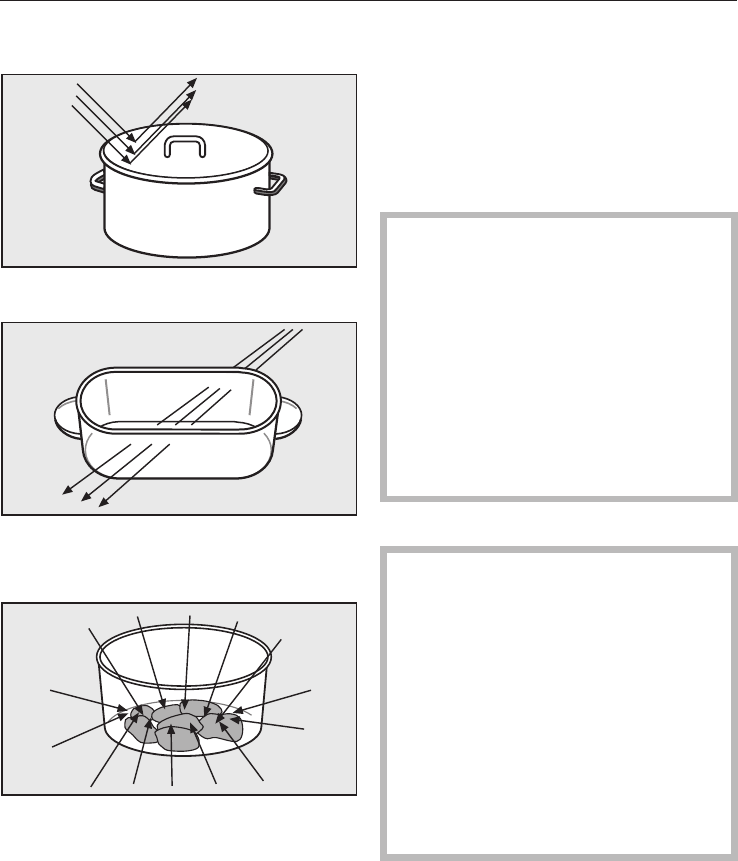
Microwaves
–are reflected by metal,
– pass through glass, porcelain,
plastic and card,
–and are absorbed by food.
Material and shape
The material and shape of containers
used affect cooking results and times.
Heat distribution is more even in round
and oval shaped flat containers than in
rectangular containers, providing better
results.
,Ovenproof earthenware can
retain a considerable amount of
moisture. Earthenware and porcelain
containers with hollow handles and
lid knobs must only be used in this
oven if they have vent holes, which
allow the moisture to escape.Without
vent holes there can be a pressure
build-up, causing the container to
crack or shatter, with the danger of
injury.
Metal
Metal containers, aluminium foil,
metal cutlery and china with metallic
decoration such as gold rims or
cobalt bule must not be used with
microwave power.
Metal reflects microwaves and
obstructs the cooking process.
Do not use plastic pots where the
foil lid has not been completely
removed as small pieces of foil
could cause sparks.
Suitable containers for microwave ovens
22
Exceptions:
The rack supplied with the
appliance is suitable for use with
microwave power (combination
programmes).
However, it must not be placed on
the oven floor.
–Metal baking trays can be used with
combination programmes which use
microwave power.
–If recommended by the producer,
pre-cooked meals in aluminium foil
containers can be defrosted and
reheated in the appliance using
microwave power. Important:
Remove the lid first.
However, as food is only heated from
the top it is better to remove the food
from the aluminium foil container and
transfer it to a dish suitable for a
microwave oven. The heat
distribution will be more even.
Do not place aluminium foil dishes
on the rack in case the dish sparks
or arcs. If sparks occur, transfer
food to a microwave-safe container.
–For even defrosting and to avoid
overcooking unevenly shaped cuts
of meat, poultry or fish, small pieces
of aluminium foil may be used to
mask wing-tips or other thin parts for
the last few minutes of the process.
Make sure that the aluminium foil is
at least 2 cm from the oven walls at
all times.
–Metal meat skewers or clamps
should only be used if they are very
small in comparison to the size of the
cut of meat.
Glassware
Heat-resistant glass or ceramic glass
are ideal for use in the microwave oven.
Crystal glass is unsuitable as it
contains lead which could cause the
glass to crack in the microwave.
Porcelain
Porcelain is a suitable material.
Do not use porcelain with gold or
silver edging or items with hollow
knobs or handles, as insufficient
ventilation may cause pressure.
Earthenware
Decorated earthenware is only suitable
if the decoration is beneath an all-over
glaze.
Earthenware can get very hot, and
may crack.
Glazes and colours
Some glazes and colours contain
metals which make them unsuitable
for use in a microwave oven.
Suitable containers for microwave ovens
23
Wood
Wooden dishes are not suitable.
Moisture contained in the wood
evaporates when exposed to
microwave energy, causing the
wood to dry and crack.
Plastics
Only plastic containers and plastic
disposable containers which are
specified by the manufacturer as
suitable for use in a microwave oven
may be used. Disposable containers
are not always recyclable or
biodegradable.
,Plastic items may only be used
with Microwave _(Solo). They
must be heat-resistant to a minimum
of 110 °C. Otherwise the plastic may
melt and fuse with the food.
Special plastic utensils designed for
use in microwave ovens are available
from good retail outlets.
Melamine is not suitable for use in this
oven. Melamine absorbs microwave
energy and gets hot. When purchasing
plasticware, make sure that it is suitable
for use in a microwave oven.
Do not leave the oven unattended
when reheating or cooking food in
disposable containers made of
plastic, paper or other inflammable
materials.
Disposable containers, such as trays
made from polystyrene, can only be
used for very short, timed warming and
reheating of food.
Plastic boiling bags can be used for
cooking and reheating. They should
be pierced beforehand so that
steam can escape. This prevents a
build-up of pressure and reduces
the risk of the bag bursting.
Roasting bags and tubes can be
used. Please follow the manufacturer's
instructions.
,Do not use metal clips, plastic
clips containing metal parts, or
paper ties containing wire.
There is a danger that they will ignite
when heated.
Suitable containers for microwave ovens
24
Testing dishes for their
suitability
If in doubt as to whether glass,
earthenware or porcelain plates or
dishes are suitable for use in a
microwave oven, a simple test can
be performed:
^Insert the glass tray in the oven at the
lowest shelf level and place the
empty item you wish to test on the
glass tray. Fill a suitable glass with
water and also place this on the
glass tray.
^Close the door.
^Select the microwave function _
and select the hightest power level
(1000 W).
^Confirm with "OK".
^Enter a duration of 30 seconds and
confirm with "OK".
At the end of the test, the water in
the glass should be warm and the
dish cool. If the dish is hot, it would
be unwise to use the dish.
If a cracking noise is heard
accompanied by sparks during the
test, switch the appliance off imme-
diately. Any crockery which causes
this reaction is unsuitable for use
with microwave power.
If any doubt exists about the
suitability of a container, please
contact the supplier.
This test cannot be used to check
whether items with hollow knobs or
handles are suitable for use with
microwave power.
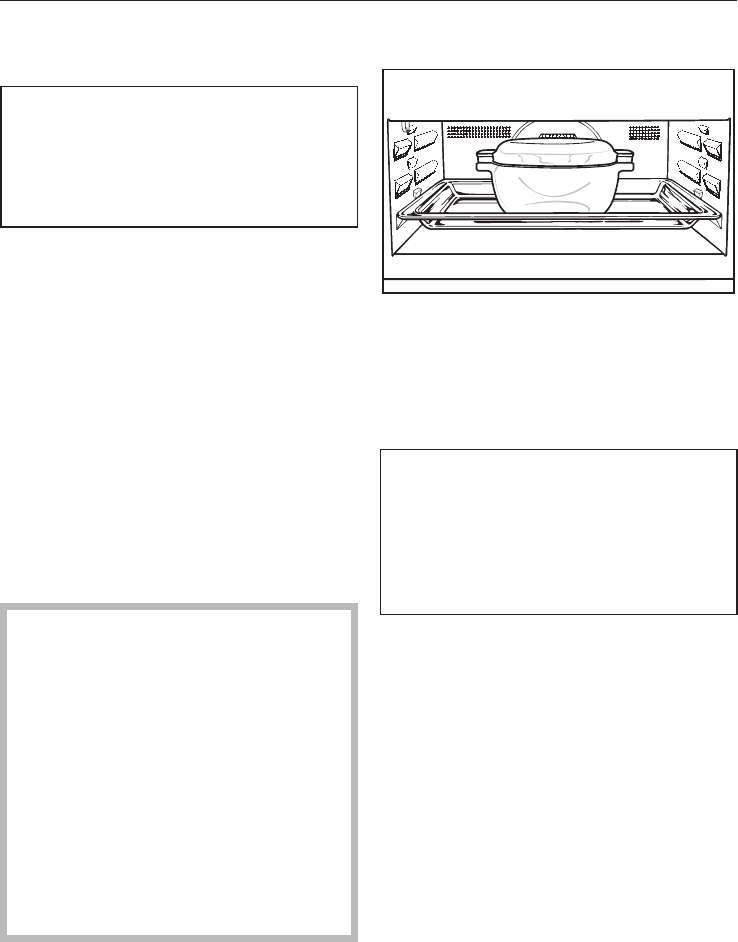
Placing the dish in the oven
^Insert the glass tray at the lowest
shelf level.
^The dish containing the food should
always be placed in the middle of the
glass tray.
Placing the food directly on the floor
of the oven would give unsatisfactory
and uneven defrosting/cooking/
reheating results as the microwaves
would not be able to reach the food
from below.
Suitable containers for microwave ovens
25
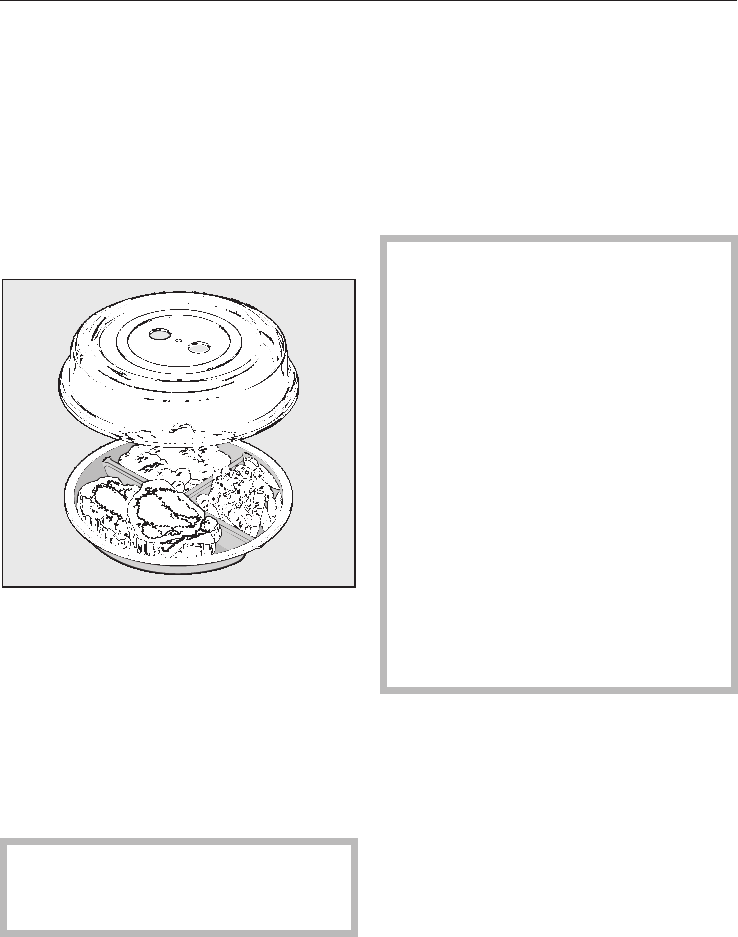
A cover (optional accessories)
–prevents too much steam escaping,
especially when cooking foods which
need longer to cook, such as
potatoes.
–speeds up the cooking process.
–prevents food from drying out.
–helps keep the oven interior clean.
When using programmes which use the
microwave function always cover the
food with lids or covers made of
microwave-safe glass or plastic, or use
a clingfilm recommened for use in a
microwave oven (pierce as instructed
by the manufacturer).
Unsuitable clingfilm can melt into the
food.
,Sealed glass containers, such as
jars of baby food, must be opened
before they are placed in the oven.
Do not use a cover if
–food coated with breadcrumbs is
being cooked.
–cooking meals which are to be given
a crisp finish.
–using a combination programme
which uses microwave power.
,The cover supplied may only be
used in Microwave _(Solo) mode.
The cover can only withstand
temperatures of up to 110 °C.
Higher temperatures generated by
grilling or fan heat could cause the
plastic to distort and fuse with the
food.
The cover should not form a seal
with the container. If the cover is
used with a container which only has
a narrow diameter, there might not
be enough room for condensation to
escape through the holes in the top.
The cover could get too hot and
could start to melt.
Suitable containers for microwave ovens
26
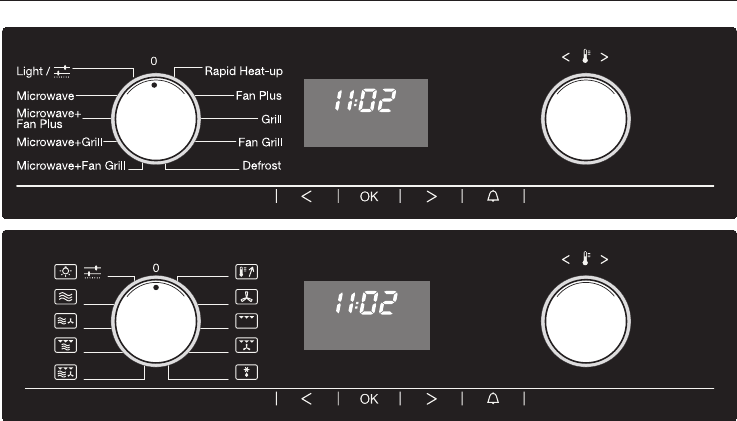
Function selector
The left-hand control is used to select
the function.
It can be turned clockwise or anti-
clockwise.
The function selector can only be
retracted when it is at "0".
_Microwave
aMicrowave+Fan plus
bMicrowave+Grill
MMicrowave+Fan grill
SRapid heat-up
UFan plus
YGrill
\Fan Grill
PDefrost
TLighting
%Settings
Temperature selector
The right-hand control V6W
– is used to set the required
temperature.
– is used to enter times (alternative to
the Vor Wsensors).
It can be turned clockwise or anti-
clockwise.
The temperature selector can be
retracted in any position.
Turning clockwise increases values and
turning anti-clockwise decreases them.
Controls
27
Sensors
The sensors underneath the display
react to touch.
A keypad tone will sound each time a
sensor is touched. You can switch off the
keypad tone (see "Settings %–P4").
Use
OK –For calling up the functions in
the display. The triangle V
will appear in the display.
–For confirming an entry.
V
W
–For moving the triangle Vin
the display to left or the right.
– For increasing or decreasing
the microwave power level/
time entry.
– For selecting the appliance
setting Pand changing the
status S.
NFor entering a minute minder
time, e.g. for boiling eggs.
The time will change each time the
Vor Wis touched
–Duration TMicrowave (Solo) in 10
second increments,
–Duration Tand Finish time Sin
increments of a minute,
–the Minute minder time Nat first in
increments of 5 seconds and then in
increments of a minute.
Touching the sensor for longer speeds
up the change in the display.
Controls
28
Display
NI2:00 h
W
min
%WmTS 0Start
V
Symbols
The following symbols will appear in the
display depending on the position of
the function selector and/or whether a
sensor has been touched:
Symbols Meaning
%Temperature
W Microwave power setting
uTime of day
TDuration
SFinish
0System lock
Start Start the microwave
Temperature indicator
NMinute minder
h Hours
min Minutes
Triangle Vin the display
I60
%mTS
V
When a sensor is touched, the symbols
of the function at which the function
selector is set will light up and you can
enter settings.
Touch the Vor Wsensor repeatedly
until the triangle Vis underneath the
symbol of the required function in the
display.
Then call up the function with the OK
sensor.
The triangle Vwill flash for approx.
15 seconds.
The function can only be entered
whilst the triangle Vis flashing.
If this period has elapsed, you will
need to call up the required function
again with the OK sensor.
Controls
29

Functions without microwave
^Place the food in the oven.
^Select the function you want (e.g. Fan
Plus U).
The following will appear in the display:
I60
%
V
–"160" - the recommended
temperature,
– the temperature indicator light ,
– the triangle Vunder the %symbol.
At the same time the oven compartment
heating, lighting and cooling fan will
switch on.
You can follow the temperature rising in
the display. Once the set temperature
has been reached, the temperature
indicator light will go out and a buzzer
will sound.
^At the end of the programme turn the
function selector to "0" and remove
the food from the oven.
Cooling fan
The cooling fan will continue to run for a
while after the oven has been switched
off to prevent any humidity building up
in the oven, on the control panel or on
the oven housing unit.
When the temperature in the oven has
fallen sufficiently, the cooling fan will
switch off automatically.
Recommended temperature
Functions which do not use microwave
energy are allocated with
recommended temperatures.
Fan Plus U................160°C
Grill Y...........Fixed temperature
Fan Grill \................200°C
Rapid Heat-up S...........160°C
With the Defrost function, the fan
circulates the air at room temperature
and therefore it does not have a
recommended temperature.
Changing the temperature
If your recipe requires a temperature
which is different from the
recommended temperature for that
function, you can use the temperature
selector to change it within a given
range.
The temperature can be changed in
increments of 5 °C.
Fan Plus U.............30–250 °C
Fan Grill \............100–220 °C
Rapid Heat-up S........30–250 °C
The temperature for the Grill function
Yis set automatically and cannot be
changed. The temperature indicator
light will come on while the appliance is
heating up.
Operation
30
Temperature indicator light
The temperature indicator light will
appear next to the temperature in the
display. The indicator light is always on
when the heating is on.
When the set temperature is reached,
–the oven heating switches off,
–the temperature indicator light goes
out,
–a buzzer will sound if this option is
selected (see chapter "Settings %–
P2").
However, if the temperature falls below
the set temperature, the oven heating
and the temperature indicator light will
switch on again.
Rapid Heat-up S
The Rapid Heat-up Sfunction can be
used to pre-heat the oven.
Pre-heating the oven
Most dishes can be placed in a cold
oven. They will then make use of the
heat produced during the heating
phase.
When using the Fan Plus function, it is
only necessary to pre-heat in a few
instances:
–for baking dark breads,
–for roasting beef/fillet.
Do not use Rapid Heat-up Sto
pre-heat the oven when baking
pizzas or biscuits and small cakes.
They will brown too quickly.
To pre-heat the oven:
^Select Rapid Heat-up S.
^Use the temperature selector to set
the required temperature.
The oven will start to heat up.
^When the temperature indicator light
goes out for the first time and the
buzzer sounds, select the function
you require for continued cooking or
baking, and place the food in the
oven.
Rapid Heat-up Sis not suitable for
traditional cooking.
Operation
31
Programming cooking
durations
By entering the duration and/or finish
time, the cooking process can be
programmed to switch off, or on and
off automatically.
Duration T
Enter the duration you require for the
programme.
The oven switches off automatically at
the end of this time.
The maximum duration that can be set
will depend on the function/microwave
power level selected.
You must enter a duration if you are
using a programme which uses
microwave power.
Finish S
Specify the time you want cooking to
end by selecting the Finish time. The
appliance will switch off automatically
at the time you have set.
Automatic switch-off
To switch a programme off
automatically, enter the Duration or the
Finish time.
–Example: Entering a cooking
duration
^Place the food in the oven.
^Select the function you want and set
a temperature.
The oven heating, lighting and cooling
fan will switch on.
0:00 h
%mTS
V
^Touch the Wsensor repeatedly until
the triangle Vis underneath the T
(Duration) symbol.
"0:00" appears in the display.
^Touch the OK sensor.
^Whilst the triangle Vis flashing,
enter the required duration in hours
and minutes with the temperature
selector or the Wsensor.
After a short while or after confirming
the entry by touching the OK sensor,
you will be able to follow the duration
counting down in the display.
Operation
32

Delaying the start with Automatic
switch-off
To switch a programme on and off
automatically, enter both the cooking
duration and the finish time.
We recommend using automatic
switching on and off when roasting.
However, do not delay the start for
too long when baking as the cake
mixture or dough will dry out, and the
raising agents will lose their
effectiveness.
–Example: Entering the duration
and delaying the finish time
The time now is 10:45; you want a dish
with a cooking duration of 90 minutes to
be ready at 13:30.
^Place the food in the oven.
^Select the required function and set
the temperature.
The oven heating, lighting and cooling
fan will switch on.
First enter the cooking duration:
I0:45 h
%mTS
V
^Touch the Wsensor repeatedly until
the triangle Vis underneath the T
(Duration) symbol.
"0:00" appears in the display.
^Touch the OK sensor.
I:30 h
T
V
^Whilst the triangle Vis flashing,
enter the required duration in hours
and minutes (1:30) with the
temperature selector or the Wsensor.
^Touch the OK sensor.
Now delay the Finish time:
I2:I5
%mTS
V
^Touch the Wsensor repeatedly until
the triangle Vis underneath the S
(Finish) symbol.
The time of day plus the cooking
duration entered appear in the display
(10:45 + 1:30 = 12:15).
^Touch the OK sensor.
I3:30 h
S
V
^Use the temperature selector or the W
sensor to delay the finish time to
13:30.
^Touch the OK sensor.
Operation
33

The oven heating, lighting and cooling
fan will switch off.
The finish time will now appear in the
display as long as the triangle is not
moved to under another symbol.
As soon as the start time (13:30 - 1:30
= 12:00) is reached, the oven heating,
lighting and cooling fan will switch on.
The end of a cooking programme
At the end of the duration
–the oven heating switches off
automatically.
– the cooling fan will continue to
operate if the programme has been
using microwave power.
– the Tsymbol will flash.
– a buzzer will sound if this option is
selected (see chapter "Settings %–
P2").
^Turn the function selector to "0".
The buzzer will stop and the symbols in
the display will go out.
^Remove the food from the oven.
To check and change an entered time
It is possible to check or change times
entered for a cooking programme at
any time by calling up the relevant
symbol with the Vor Wsensors.
To change the time, touch the OK
sensor and whilst the triangle Vis
flashing, change the entry with the
temperature selector or the Vor W
sensors.
To delete an entered time
^Set the duration to "0:00" or turn the
function selector to "0".
If there is a power cut, all data entered
will be deleted.
Operation
34
Microwave function _
The following power levels can be
selected:
80 W, 150 W, 300 W, 450 W, 600 W,
850 W, 1000 W.
^Turn the function selector to
Microwave _.
The display will show a suggested
power level of 1000 W.
I000 W
W
V
^Whilst the triangle Vis flashing, use
the Vsensor to select a lower setting.
After a short while or after touching the
OK sensor to confirm the entry, the
following will appear in the display:
0:00 min
T
V
^Whilst the triangle Vis flashing,
enter the required duration in hours
and minutes (1:30) with the
temperature selector or the Wsensor.
After a short while or after touching the
OK sensor to confirm the entry, the
following will appear in the display:
I:30 min
WmTStart
V
^Touch the OK sensor to start the
programme.
If no other symbol is selected, the
duration will be visible counting down in
the display.
At the end of the duration
– the Tsymbol will flash.
– the cooling fan will continue to run for
a while.
– a buzzer will sound if this option is
selected (see chapter "Settings %–
P2"). Touch any sensor to cancel
the buzzer.
The time of day will then appear in the
display. The lighting will switch off.
Operation
35
Combination programmes
Combination programmes combine
microwave power with another
cooking function, e.g. Fan Plus, Grill
or Fan Grill.
Microwave+Fan plus a,
Microwave+Fan grill M
^Select the function you want.
The display will show a suggested power
level of 300 W. You can also selected a
power level of 150 W or 80 W.
300 W
W
V
^Whilst the triangle Vis flashing, use
the Vsensor to select a lower setting.
After a short while or after touching the
OK sensor to confirm the entry, the
following will appear in the display:
0:00 h
T
V
^Whilst the triangle Vis flashing,
enter the required duration in hours
and minutes (1:30) with the
temperature selector or the Wsensor.
Depending on the power level selected,
you can enter a duration of up to a
maximum of 2 hours.
After a short while or after touching the
OK sensor to confirm the entry, the
following will appear in the display:
I:30 h
%WmTStart
V
If you do not want to use the
recommended temperatures:
Microwave+Fan plus a......160°C,
Microwave+Fan grill M......200°C,
You can alter these within a given
range:
Microwave+
Fan plus a.............30–250 °C,
Microwave+Fan grill M. . 100–220 °C.
^Use the temperature selector to set
the required temperature.
After a short while, the following will
appear in the display:
I:30 h
%WmTStart
V
^Touch the OK sensor to start the
programme.
If no other symbol is selected, the
duration will be visible counting down in
the display.
Operation
36

Microwave+Grill b
^Select the Microwave+Grill b
function.
The display will show a suggested
power level of 300 W. This can be
changed to 150 W or 80 W if you wish.
300 W
W
V
^Whilst the triangle Vis flashing, use
the Vsensor to select a lower setting.
After a short while or after touching the
OK sensor to confirm the entry, the
following will appear in the display:
0:00 h
T
V
^Whilst the triangle Vis flashing,
enter the required duration in hours
and minutes (1:30) with the
temperature selector or the Wsensor.
Depending on the power level selected,
you can enter a duration of up to a
maximum of 2 hours.
After a short while or after touching the
OK sensor to confirm the entry, the
following will appear in the display:
I:30 h
%WmTStart
V
The grill temperature cannot be
changed.
^Touch the OK sensor to start the
programme.
If no other symbol is selected, the
duration will be visible counting down in
the display.
The end of a cooking programme
At the end of the duration
– the oven heating switches off
automatically.
– the cooling fan will continue to run for
a while.
–the Tsymbol will flash.
–a buzzer will sound if this option is
selected (see chapter "Settings %–
P2").
^Turn the function selector to "0".
The buzzer will stop and the symbols in
the display will go out.
^Remove the food from the oven.
Operation
37

The minute minder can be used to time
any activity in the kitchen, e.g. boiling
eggs.
A maximum minute minder time of
59 minutes and 55 seconds can be set.
You can set the minute minder at the
same time as another timed
programme, e.g. as a reminder to stir a
dish or add seasoning etc.
To set the minute minder
^Touch the Nsensor.
N0:00 min
"0:00" appears in the display.
^Whilst the triangle Vis flashing,
enter the minute minder time with the
temperature selector or the Wsensor.
^Touch the OK sensor.
The minute minder time will be visible
counting down in the display as long as
the triangle Vis underneath the N
symbol.
At the end of the time set for the minute
minder
–the Nsymbol will flash.
–A buzzer will sound if this option is
selected (see chapter "Settings %–
P3").
–at the end of the minute minder time,
the display will show the time
counting upwards.
^Touch the OK sensor.
To cancel the time set for the
minute minder
^Call up the Nfunction with the OK
sensor.
The triangle Vmust be flashing
underneath the symbol.
^Use the temperature selector or the
Vsensor to set the minute minder
time to "0:00".
Minute minder (egg timer)
38
The system lock 0prevents the
appliance being operated
unintentionally, by children for
example.
^Turn the function selector to "0".
0
0
V
^Touch the Wsensor repeatedly until
triangle Vis underneath the 0
symbol.
^Touch the OK sensor.
I
0
V
^Whilst triangle Vis flashing under
the 0symbol, use the Vor Wsensors
to select the "I"or"0" setting.
"0"The system lock is deactivated.
"I" The system lock has been activated.
The appliance cannot be operated.
^Confirm your choice of setting by
touching the OK sensor.
If the "I" setting is selected, the
appliance cannot be operated.
The 0symbol will remind you that the
system lock has been activated.
The lock remains active even after a
power cut.
System lock
39

Your oven is supplied with standard factory default settings.
You can select alternative settings by changing the status "s" of a setting "P" (see
chart).
Setting Status (* Standard default setting)
PI
Time of day
display
S0 When the time of day display is switched off and
the function selector is turned to the "0" position, the
display remains dark. The time of day continues to
run unseen in the background.
SI* The time of day display is switched on
and is visible in the display.
P2
Buzzer
for cooking
time
S0 The buzzer does not sound at the end of a cooking
programme or at the end of the heating-up phase.
SI*(short)
S2(long)
The buzzer sounds at the end of a cooking
programme and at the end of the heating-up phase.
You can choose between two tone options.
P3
Buzzer
for minute
minder
S0 The buzzer does not sound at the end of the minute
minder time.
SI*(short)
S2(long)
The buzzer sounds at the end of the minute minder
time.
You can choose between two tone options.
P4
Keypad
tones
S0 A keypad tone does not sound when a sensor is
touched.
SI* A keypad tone sounds when a sensor is touched.
P5
Buzzer
volume
S0*
to S30
If you have selected the option S2for the cooking
time P2and the minute minder P3, you can
change the volume of the buzzer.
The volume cannot be changed if P2–SI" and "P3
–SIhave been selected.
P6
Clock format
24 * 24 hour clock
I2 12 hour clock
%Settings
40
To change the status of a
setting
^Select "Settings %".
^Touch the OK sensor.
PI
"PI" will appear in the display.
^Touch the Vor Wsensor repeatedly
until the setting required appears in
the display.
^Touch the OK sensor.
S0
The current status "S" of the setting will
appear in the display.
^Use the Vor Wsensors to change the
status.
^Touch the OK sensor.
The change to the status is then stored
in memory.
"P" will appear in the display again
together with the number for the setting.
You can alter more settings as long as
the function selector is not turned to "0".
The change to the setting remains in
memory even after a power cut.
%Settings
41
Function Power level /
Temperature
Suitable for:
Defrost Microwave _80 W Very delicate foods such as
cream, butter, cream and
butter creamgateaux, cheese
150 W All other types of food
Reheat Microwave _450 W Food for babies and children
600 W All types of food;
frozen ready-meals which do
not need browning.
850 W
1000 W Drinks
Cook Microwave _850 W
To start the cooking
process
Bakes;
making porridge and milk
puddings;
frozen foods which do not
need browning.
450 W
To continue the
cooking process
150 W
To cook grains and
pulses
Select Microwave combined with another function if you want to
shorten cooking times and have a crisp finish to the dish.
Microwave+
Grill b
300W+
Fixed temperature
Cooking dishes that require a
crisp finish and snacks such
as croque monsieur
Microwave+
Fan Plus a
300W+
160 - 180 °C
Ready-meals which need to
be browned, e.g. gratins, etc.
The duration required depends largely on the nature of the food, the amount and
its initial temperature. Foods that have been refrigerated, for example, require
longer to reheat than foods that are at room temperature.
Please refer to the relevant tables.
Defrosting, reheating and cooking using microwave power
42
Before defrosting, reheating and
cooking
^Place food (including frozen) in a
dish that is suitable for the
microwave, and cover it.
^Place the container in the middle of
the glass tray and insert it at the
lowest shelf level.
With combination programmes
Only use heat-resistant containers
which are microwave-safe.
A lid is generally not required.
It is essential not to cover food when
using "Microwave+Grill", as the food
will not brown.
^Place the glass tray on the second
lowest shelf level.
Ready made meals in aluminium
containers must be placed directly onto
the glass tray.
During the defrosting, reheating and
cooking process
Turn or stir the food several times. Stir
the food from the outside towards the
middle, as food heats more quickly
from the outside.
After defrosting, reheating and
cooking
Allow the food to stand at room
temperature long enough to allow the
temperature to spread evenly
throughout the food.
,After reheating food, especially
food for babies and small children,
stir the food or shake the container
and check that the temperature
does not pose any danger. Double
check after it has been left to stand.
,Be careful when removing
dishes from the appliance.
Although heat is not normally
produced in the container itself by
the microwaves (apart from
stoneware), heat transfer from the
food to the container may be
considerable, making the container
itself hot.
Always ensure that food is
sufficiently cooked or reheated.
If in any doubt that the food has been
sufficiently reheated/cooked, place it
back in the appliance and reheat/cook
it for a little longer.
It is very important to make sure that
food which goes off easily, such as fish,
poultry and minced meat is cooked
sufficiently.
Defrosting, reheating and cooking using microwave power
43
Guidance on reheating food
Food for babies and young children
or the elderly must not be allowed to
get too hot. We do not recommend
heating or reheating foods or drinks
for babies or young children in the
microwave oven. Any decision to do
this is the responsibility of the user,
and should only be done with the
utmost care. Pasteurised or
sterilised cooked food should be
gently heated using 450 watts, and
tasted to make sure it is not too hot
for a baby's palate before serving.
When reheating other food or drink,
heat to a high temperature and allow
to cool to a suitable heat for eating.
For formula milk, follow the
manufacturer's instructions.
Always open glass jars.
Remove the lid from jars of baby
food.
Remove the screw cap and the teat
before heating up bottles of baby milk.
When reheating liquids place the
boiling rod supplied into the cup or
glass.
Never reheat hard boiled eggs in a
microwave oven, even without the
shell. The eggs can explode.
Guidance on cooking
Food with a thick skin or peel, such
as tomatoes, sausages, jacket
potatoes and aubergines, should be
pierced or cut in several places to
allow steam to escape and prevent
the food from bursting.
Similarly, hard-boiled eggs should
not be cooked using the Microwave
_function as this may lead to the
eggs exploding, even after they
have been taken out of the oven.
Eggs can, however, be cooked
using microwave power if you have
purchased special containers
designed for this purpose.
Eggs can be cooked without their
shells using microwave power only if
the yolk membrane has been
punctured several times first. The
pressure could otherwise cause the
egg yolk to explode.
Defrosting, reheating and cooking using microwave power
44

Useful tips
Use Tips
Defrosting large
quantities of food at
once, e.g. 2 kg fish
The glass tray placed on the lowest level can be used
for defrosting food.
Reheating food Always cover food when reheating it, except when
reheating meat/fish coated in breadcrumbs.
Cooking vegetables Add a little water to vegetables which have been kept
stored.
Vegetable cooking times depend on the texture of the
vegetable. Fresh vegetables contain more water than
vegetables which have been stored and usually cook
more quickly.
Cooking frozen ready-
meals
These can be defrosted and reheated or cooked at the
same time. Please follow instructions given on the
packet.
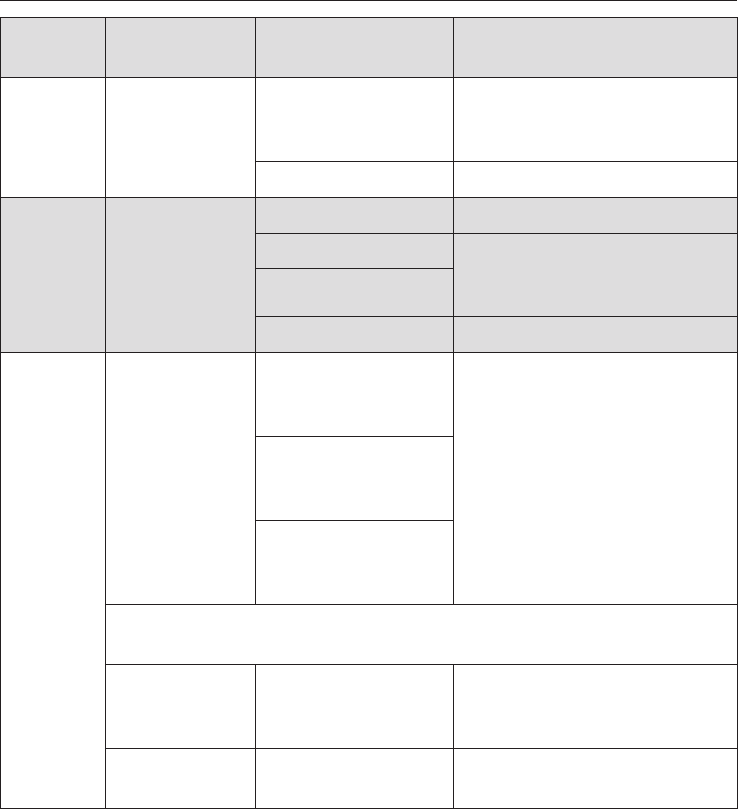
Problem Possible cause and remedy
The food is not
sufficiently heated or is
not cooked at the end
of a set time.
Check that you remembered to restart the programme
after interrupting a cooking process using microwave
power.
Check that the correct duration was selected for the
power level chosen when cooking or reheating in
microwave mode.
The lower the power level the longer the duration.
Food cools down too
quickly after being
reheated or cooked in
microwave mode.
When cooked by microwaves, food begins to cook from
the outside first, the inside of the food relying on the
slower conduction of heat.
If food is cooked at a high power level it is possible that
the heat may not have reached the centre of the food.
Food may be warm in the middle but cool on the edge.
When reheating food with different densities, such as
plated meals, it is sensible to start with a low power
level and select a longer reheating time.
Defrosting, reheating and cooking using microwave power
45

Chart for defrosting
Microwave power setting
Quantity 150 W
Time in min.
80 W
Time in min.
Standing time1)
in min.
Dairy products
Cream
Butter
Cheese slices
Milk
Quark / Cream cheese
250 ml
250 g
250 g
500 ml
250 g
–
–
–
14–16
10–12
13–17
8–10
6–8
–
–
10–15
5–10
10–15
10–15
10–15
Cakes / Pastry / Bread
Sponge cake
Sponge cake
Fruit streusel cake
Butter cake
Cream cake
Yeast buns, puff pastries
1 slice, approx. 100 g
300 g
3 slices, approx. 300 g
3 slices, approx. 300 g
1 slice, approx. 100 g
3 slices, approx. 300 g
4
1–2
4–6
6–8
5–7
–
–
6–8
–
–
–
–
1.5
4 – 4.5
–
5–10
5–10
10–15
5–10
5–10
5–10
5–10
Fruit
Strawberrries, raspberries
Red / Blackcurrants
Plums
250 g
250 g
500 g
7–8
8–9
12–16
–
–
–
5–10
5–10
5–10
Meat
Minced beef
Chicken
500 g
1000 g
16–18
34–36
–
–
5–10
10–15
Vegetables
Peas
Asparagus
Beans
Red cabbage
Spinach
250 g
250 g
500 g
500 g
300 g
8–12
8–12
13–18
15–20
12–14
–
–
–
–
–
5–10
10–15
10–15
10–15
10–15
1) Let the food stand at room temperature.
This allows the heat to be distributed more evenly through the food.
Take note of the recommended microwave power levels, timings and standing times. These take the
consistency, the quantity and the initial temperature of the food into account.
In general it is best to select a time in the middle of the range given.
Defrosting, reheating and cooking using microwave power
46

Chart for reheating food
Drinks 2) Microwave power setting
Quantity 1000 W
Time in min.
450 W
Time in min.
Standing time 1)
in min.
Coffee,
drinking temperature 60 – 65 °C
Milk,
drinking temperature 60 – 65 °C
Water,
bringing to the boil
Baby bottles (milk)
Mulled wine, punch,
drinking temperature 60 – 65 °C
1 cup, 200 ml
1 cup, 200 ml
1 cup, 125 ml
Approx. 200 ml
1 glass, 200 ml
0:50 – 1:10
1– 1:50 3)
1 – 1:50
–
0:50 – 1:10
–
–
–
0:50 – 1 3)
–
–
–
–
1
–
Food 3) Microwave power setting
Quantity 600 W
Time in min.
450 W
Time in min.
Standing time 1)
in min.
Baby food at room temperature
Cutlets, grilled
Fillet of fish, grilled
Roast meat in gravy
Side dishes
Vegetables
Gravy
Soup/casserole
Soup/casserole
1 jar, 200 g
200 g
200 g
200 g
250 g
250 g
250 ml
250 ml
500 ml
–
3–5
3–4
3–5
3–5
4–5
4–5
4–5
7–8
0:30 – 1
–
–
–
–
–
–
–
–
1
2
2
1
1
1
1
1
1
1) Let the food rest at room temperature.
This allows the heat to be distributed more evenly through the food.
2) Place the boiling rod in the container.
3) Times are based on an initial temperature of approx. 5 °C.
For food not normally stored in a refrigerator, assume an initial temperature of 20 °C.
All food, except baby food, should be reheated to 70–75 °C. See "Guidance on reheating food" for
details.
Take note of the recommended microwave power levels, the time durations and the standing times.
These take the consistency, the quantity and the initial temperature of the food into account.
You are generally advised to select the middle time.
Defrosting, reheating and cooking using microwave power
47

Chart for cooking food
Microwave power setting
Quantity 850 W
Time
in min.
+ 450 W
Time
in min.
Standing
time1)
in min.
Meat
Meatballs in gravy (400 g meat)
Stew (750 g meat)
10–12
16 + 15
2–3
2–3
Poultry
Chicken in mustard sauce
Chicken curry
Chicken risotto
Approx. 800 g
Approx. 900 g
Approx. 1.6 kg
4
5
10
+
+
+
12
12
15
2–3
2–3
3–5
Fish
Fillet in sauce
Fish curry
Approx. 900 g
Approx. 1.5 kg
8–10
5+12
2–3
3–5
Fresh vegetables
Carrots
Cauliflower florets
Peas
Peppers, cut into strips
Vegetable batons
Brussels sprouts
Asparagus
Broccoli florets
Leeks
Green beans
300 g
500 g
450 g
500 g
500 g
300 g
500 g
300 g
500 g
500 g
2
6
5
5
3
3
5
4
5
4
+
+
+
+
+
+
+
+
+
+
6
10
10
10
8
9
8
4
8
12
2
2
2
2
2
2
2
2
2
2
Frozen vegetables
Peas, mixed veg.
Spinach
Brussels sprouts
Broccoli
Leeks
450 g
450 g
300 g
300 g
450 g
5
5
4
3
4
+
+
+
+
+
11
7
6
6
8
2
2
2
2
2
Desserts
Fruit compote (500 ml fruit juice
or 500 g fruit)
6–8 – –
1) Let the food stand at room temperature.
This allows the heat to be distributed more evenly through the food.
Take note of the recommended microwave power levels, timings and standing times. These take the
consistency, the quantity and the initial temperature of the food into account.
If a range of times is given, it is generally best to select a time in the middle.
Defrosting, reheating and cooking using microwave power
48

Functions
ßFan Plus U
Ideal for baking biscuits, sponges,
choux pastry, puff pastry and filo
pastry.
ßMicrowave+Fan Plus a
Suitable for doughs which require
longer baking, such as rubbed in and
beaten mixtures and yeast recipes.
The baking duration is shorter.
A microwave power level of no more
than 150 W is used throughout the
baking duration.
Bakeware
For the best baking results make sure
that you chose bakeware in a material
suitable for the particular oven function
you are using.
Fan Plus U
Bakeware made of any heat-resistant
material is suitable. Light-coloured,
thin-walled, non-reflective metal tins
can be used, but results may not be as
good as with dark non-reflective tins.
Microwave+Fan Plus a
Only use heat-resistant bakeware which
is microwave-safe (see "Suitable
containers for microwaves" ), e.g
bakeware made of heat-resistant glass
or ceramics, as microwaves can
penetrate these materials.
Metal bakeware, on the other hand,
reflects microwaves, which are then
only able to access the cake from
above. A longer baking time would be
required. Furthermore, metal baking
tins can also cause sparking.
To check for suitability, place the tin on the
glass tray, and make sure it does not
touch the interior walls. If sparking
continues, do not use this tin again with a
microwave combination programme.
Baking
49
Shelf level
Fan Plus U
Cakes baked in
cake tins
Lowest shelf level
Biscuits, tray
bakes
2nd shelf level from
the bottom
Baking on two
levels at once
(depending on
the depth of the
items to be
baked)
1st and 3rd shelf
levels from the
bottom or
2nd and 3rd shelf
levels from the
bottom.
Microwave+Fan Plus a
^Insert the glass tray at the lowest
shelf level and place the baking
container on it.
Useful tips
You can also programme the duration
(see "Operation - Programming cooking
durations). However, do not delay the
start too long when baking as the cake
mixture or dough will dry out, and the
raising agents will lose their
effectiveness.
Place cakes being baked in retangular
tins with the longer side across the
width of the oven for optimum heat
distribution and even results.
Eating food which has been cooked
correctly is important for good
health.
Only bake cakes, pizza, chips etc.
until they are golden brown. Do not
overcook them.
Even baking and browning is achieved
when baking cakes, pastries, frozen
foods such as chips, croquettes, pizza,
baguettes etc. by
–selecting the lowest temperature
given in the recipe/cooking
instructions on the packaging.
Do not set a temperature higher than
that recommended. Increasing the
temperature may reduce the cooking
time, but will lead to uneven
browning, and unsatisfactory
cooking results.
– Check if the food is cooked at the
end of the shortest time quoted.
To check if a cake is ready, insert a
wooden skewer into the centre.
It is ready if the skewer comes out
clean, without dough or crumbs
sticking to it.
–Place chips, croquettes and similar
types of food on baking parchment.
Baking
50

Problem Possible cause and remedy
Cakes or biscuits are
not properly cooked
after the time
recommended in the
chart.
Check that the correct temperature has been set.
Check whether there has been a change to the recipe.
The addition of more liquid or more eggs makes a
moister mix which would take longer to cook.
Check the material and colour of the baking tins being
used.
Bright shiny tins are not very suitable. Try using a
different tin next time. These reflect heat, making more
difficult for the heat to reach the food. The food will not
cook through properly.
Cakes or biscuits are
unevenly browned.
There is always likely to be small differences in the level
of browning.
If the difference is very noticeable, check whether the
temperature setting is high enough, and also the
material and colour of the baking tins.
Bright shiny tins are not very suitable. Try using a
different tin next time. These reflect heat, which means
that the heat does not penetrate to the food effectively,
resulting in uneven or poor browning.
Baking
51
Fan Plus UMicrowave+Fan Plus a
Temperature
in °C
Time
in min.
Power level
in W
Temperature
in °C
Time
in min.
Creamed mixture
Victoria sponge
Fruit cake
Muffins1)
Marble cake (tin)
Fresh fruit flan
with topping (glass tray)1)
Fresh fruit cake (glass tray)1)
Fresh fruit cake (tin)
Flan base
Biscuits
140 – 160
150 – 170
150 – 170
150 – 170
150 – 170
150 – 170
150 – 170
150 – 170
150 – 170
60–80
65–80
25–35
60–70
35–45
35–45
55–65
30–35
15–30
–
80
–
–
–
–
–
80
–
–
–
160
–
–
–
–
–
160
–
–
–
60–70
–
–
–
–
–
45–60
–
–
Whisked mixture
Tart
Flan base (2 eggs)
Swiss roll 1)
150 – 170
150 – 170
150 – 170
30–35
25–30
20–25
–
–
–
–
–
–
–
–
–
Rubbed in mixture
Flan base
Streusel cake (glass tray) 1)
Biscuits 1)
Cheese cake
Apple pie
Apricot tart with topping
150 – 170
150 – 170
150 – 170
150 – 170
150 – 170
150 – 170
30–38
40–50
20–30
75–85
65–75
60–70
–
–
–
–
–
–
–
–
–
–
–
–
–
–
–
–
–
–
Yeast mixtures and quark dough
Streusel cake (glass tray) 1)
Fresh fruit cake (glass tray) 1)
Stollen
White bread
Dark rye bread
Pizza (glass tray) 1)
Onion tart (glass tray) 1)
Apple turnovers 1)
150 – 170
150 – 170
140 – 160
150 – 170
160 – 180
150 – 170
170 – 190
150 – 170
150 – 170
35–45
40–50
55–65
55–65
40–50
110 – 130
40–50
35–40
25–35
–
150
–
–
–
80
–
–
–
170
–
–
–
180
–
–
–
35–45
–
–
–
30–40
–
–
Choux pastry, Eclairs 1) 160 – 180 30 – 40 –––
Puff pastry 1) 170 – 190 25 – 35 –––
Meringues, Macaroons 1) 120 – 140 35 – 45 –––
The data for the recommended cooking function is printed in bold.
Unless otherwise stated, the times given are for an oven which has not been pre-heated.
With a pre-heated oven shorten times by up to 10 minutes.
1) 2nd shelf level from the bottom.
Take note of the temperature range, the microwave power level, the shelf levels and the timings. These
also take the type of tin, the amount of dough and baking practices into account.
In general, if a range of temperatures is given, it is best to select a temperature in the middle.
Baking chart
52

Functions
ßFan Plus U
Suitable for meat and poultry dishes
with a crispy topping.
ßMicrowave+Fan Plus a
The roasting time is shorter.
The following microwave power levels
should be used throughout the cooking
duration.
–For meat and fish: max. 300 W,
– For poultry: 150 W.
This combination programme is not
suitable for cooking roast beef or fillet
steak. The centre would be too well
cooked before the exterior is browned.
Containers
For best results, make sure that you
select containers suitable for roasting.
Fan Plus U
The following containers are suitable:
Roasting tins, casserole dishes,
ovenproof glass, earthenware.
Make sure that the pot and lid have
heat-resistant handles.
Microwave+Fan Plus a
Only use heat-resistant dishes which
are microwave-safe. Do not use a metal
lid (see "Suitable containers for
microwave ovens").
Roasting
53
Pot roasting
Roasting in a covered pot is highly
recommended:
–The meat stays succulent,
–and the oven stays cleaner, too.
–It also ensures that sufficient stock
remains for making gravy.
Season the meat and place it in the pot.
Add some butter or margarine or baste
with a little oil or cooking fat. Add about
125 ml water when roasting a large,
lean joint of meat (2 – 3 kg) or poultry
with a high fat content.
Put meat or poultry into the oven
without pre-heating. Exception: Pre-
heat the oven at the temperature
suggested when roasting beef and
beef fillet.
Shelf level
Fan Plus U
^Insert the rack with the food on it at
the lowest shelf level.
Microwave+Fan Plus a
^Place the rack or the glass tray on
the lowest shelf level.
Temperature
Please refer to the roasting chart.
The larger the joint of meat (max. 3 kg,
except for poultry), the lower the
temperature required. For poultry
above 3 kg select a temperature
approx. 10 °C lower than that given in
the roasting chart. Roasting will take
longer at the lower temperature, but the
poultry will be more evenly cooked, and
the skin is less likely to burn.
Roasting
54

Roasting time
The roasting time will depend on the
type of meat, the size and thickness of
the cut, The traditional British method is
to allow 20 minutes per lb/450 g,
according to the type of meat, plus
20 minutes, adjusting the duration as
roasting proceeds to obtain the
required result.
Browning only occurs towards the end
of the roasting time.
Remove the lid about 15 – 20 minutes
before the end of the roasting time if a
more extensive browing result is
required.
Useful tips
Take the meat out of the oven, wrap in
aluminium foil and leave to stand for
about 10 minutes. This helps retain the
juices when the meat is carved.
Roasting on the rack
When roasting on the rack set a
temperature of approx. 20 °C lower than
in a covered pot.
Add a little fat or oil to very lean meat or
place a few strips of streaky bacon on
the top.
Do not add too much liquid during
cooking as this will hinder the browning
process.
Roasting bags
When using a roasting bag, follow the
manufacturer's instructions.
Roasting poultry
For a crisp finish, baste the poultry ten
minutes before the end of cooking time
with slightly salted water.
Frozen meat
Deep frozen meat should be thoroughly
defrosted before roasting.
Roasting
55
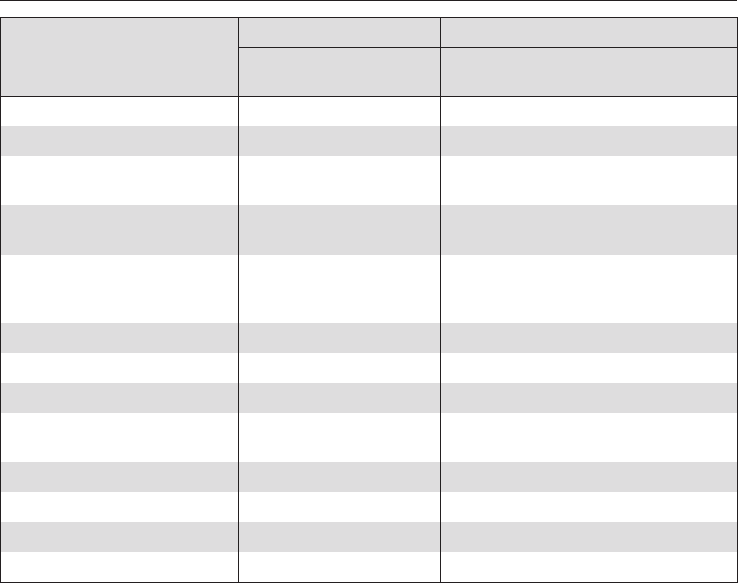
Fan Plus UMicrowave+Fan Plus a
Temperature
in °C 1) 2) Time
in min.
Power level
in W
Temperature
in °C 2) Time
in min.
Roast beef (approx. 1 kg) 170 – 190 100 – 120 – – –
Beef fillet 3), 4) (approx. 1 kg) 190 – 210 40 – 60 – – –
Haunch of venison
(approx. 1 kg)
180 – 200 100 – 120 – – –
Saddle of venison
(approx. 1 kg)
180 – 200 70 – 100 – – –
Roast pork
(Leg, shoulder, neck,
approx. 1 kg)
170 – 190 110 – 130 150 180 90 – 100
Ham (approx. 1 kg) 170 – 190 70 – 80 150 180 60 – 70
Meat loaf4) (approx. 1 kg) 160 – 180 65 – 75 300 180 35 – 45
Veal (approx. 1 kg) 170 – 190 80 – 100 150 180 70 – 80
Shoulder of lamb
(approx. 2 kg)
170 – 190 110 – 130 150 180 90 – 110
Rack of lamb3) (approx. 2 kg) 170 – 190 60 – 80 – – –
Poultry (approx. 1 kg) 170 – 190 55 – 65 150 180 45 – 55
Poultry (approx. 4 kg) 170 – 190 200 – 220 150 160 120 – 150
Whole fish (approx. 1.5 kg) 160 – 180 45 – 55 150 170 35 – 45
Unless otherwise stated, the times given are calculated on the basis of an oven which has not been
pre-heated.
1) Temperature in a covered pot.
If open roasting on the rack, set the temperature 20°C lower.
2) Do not select a higher temperature than that advised.
The meat will become brown, but will not be cooked properly.
3) Do not cover.
4) Pre-heat the oven.
Take note of the temperature range, the microwave power level, the shelf levels and the timings. These
also take the type of cooking container, the size of the meat and cooking practices into account.
In general, if a range of temperatures is given, it is best to select a temperature in the middle.
Roasting chart
56

Functions
ßGrill Y
Suitable for flat items, such as: cutlets,
steak, burgers, toast, cheese toast.
ßFan Grill \
Suitable for grilling thick cuts, such as:
kebabs, rolled meat, poultry.
ßMicrowave+Grill b
ßMicrowave+Fan Grill M
The grilling time is shorter.
A microwave power level of no more
than 300 W is used throughout the
grilling duration.
Preparing food for grilling
Rinse meat under cold running water
and then pat dry. Do not season meat
with salt before grilling as this draws
the juices out.
Add a little oil if necessary. Do not use
other types of fat as they can get too
dark, burn and cause smoke. A little
melted butter can be brushed onto
chicken if desired.
Clean flat fish and slices of fish in the
normal way. To enhance the taste add
a little salt or squeeze a little lemon
juice over the fish.
Grilling on the rack
Pre-heat the grill for
approx. 5 minutes with the oven
door shut. Do not select or switch on
the microwave function during this
time.
^Rub a little oil into the rack and place
the food to be grilled on top.
^Select the grill function you want.
Grill Y
Temperature
The temperature is fixed, i.e. you
cannot alter the temperature as it is set
automatically.
Shelf level
^Depending on the size of the food,
select the 2nd or 3rd shelf level from
the bottom.
^Turn the food halfway through the
cooking time.
Grilling
57
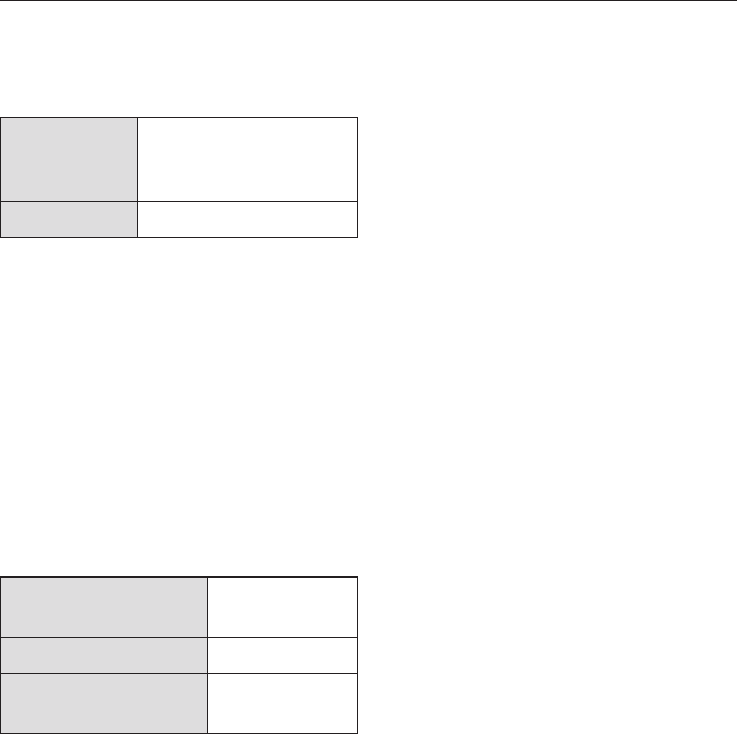
Fan Grill \
Temperature
220 °C For thin, lean cuts of
meat
(e. g. steak)
180 - 200 °C For other foods
To grill thicker pieces of food more
gradually after an initial high
temperature, continue grilling at a lower
temperature setting to allow the food to
cook through to the centre.
Shelf level
^Depending on the size of the food,
select the 1st or 2nd shelf level from
the bottom.
Grilling duration
approx.6-8min
per side
Thin pieces of
meat or fish
approx.7-9min. Thicker pieces
approx. 10 min./cm
thickness
Rolled meat
Testing to see if cooked
One way of finding out how far through
a piece of meat has been cooked is to
press down on it with a spoon.
–If there is very little resistance to the
pressure of the spoon, it will still be
red on the inside ("rare").
–If there is some resistance the inside
will be pink ("medium").
–If there is great resistance, it is
throughly cooked through ("well
done").
Grilling
58
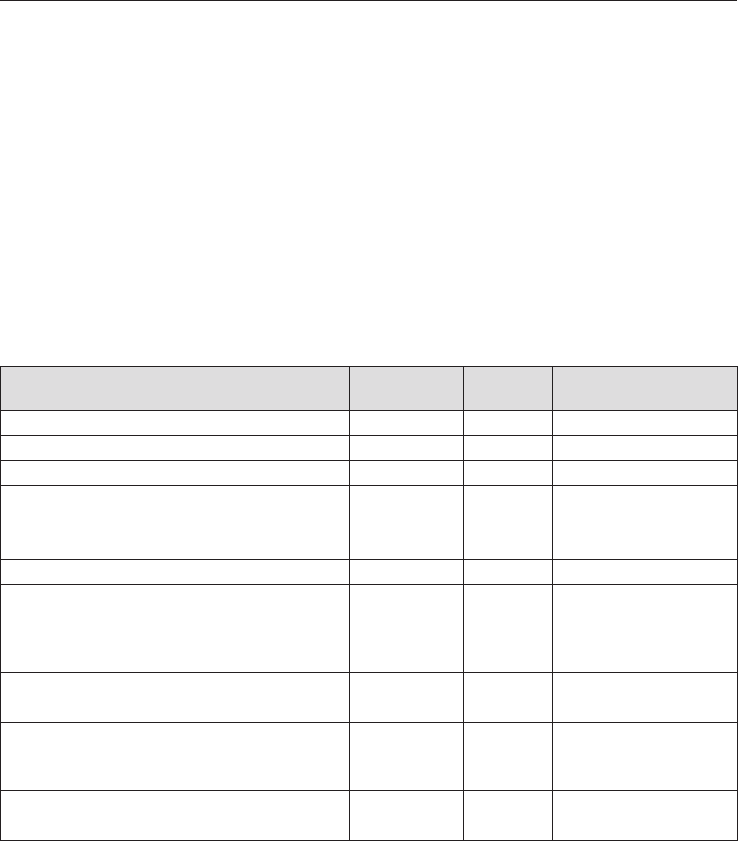
Fan Grilling guide (Fan Grill \)
–Use the Fan Grill function for meat, fish, poultry and vegetables.
–Always pre-heat for at least 5 minutes before Fan Grilling.
–It is not necessary to turn food when Fan Grilling.
–The door must be closed during Fan Grilling.
–When using red meat, pat the meat dry before Fan Grilling as this encourages a
richer colour.
–Note: all temperatures are approximations and must be varied according to the
thickness and preparation of the meat. The chart below is a suggested guide
only. Personal taste and size of serves will vary times and temperatures. We
recommend you monitor cooking results for best outcomes.
Food Temperature
in °C
Shelf level Total grilling time
in min.1)
Lean thin sausages 180-190 2 8-10
Thick sausages 180 2 15-20
Lean beef fillet steak 220 3 6-12
Chicken breast fillet, plain or a dry marinade 200 2-3 14-18
Chicken breast fillet, with a wet marinade 200 2 14-18
Whole butterflied chicken 200 1 35-40
Thin white fish fillets 220 3 6-10
Thick fish fillets, cutlets or steaks (on anti-
splash insert placed in the universal tray)
200 3 10-15
Oily fish (on anti-splash insert placed in the
universal tray)
200 3 8-12
Lamb loin chops 190 2 12-16
Lamb back straps 220 3 8-10
Vegetables, capsicum, zucchini, sweet potato,
eggplant
200 3 12-15
Potato wedges or small roast potatoes 220 2 20-25
Kebabs and satays (red meat) 200 3 12-15
Chicken satays 200 3 12-15
Fan Grilling can be used for small roasts but is only recommended for lean, tender
cuts of meat, eg lamb racks, rump roasts, and beef fillet. Fan Grill the roast at
180 - 200 °C on shelf level 1 or 2, depending on thickness.
Grilling tips
59

Grilling guide (Grill Y)
–Use for thick toasts, muffins, cheese on toast, foccacia, bruschetta.
–Pre-heat grill for at least 5 minutes.
–Select the appropriate shelf level for the thickness of the food.
–Thinner foods can be positioned on shelf 3, while thicker foods should be
grilled on shelf 2.
–Grill until food is golden brown and crispy.
–Door must be closed for grilling.
Grilling tips
60
Function
ßDefrost P
The air in the oven is kept at room
temperature and circulated by the fan
to gently defrost frozen food.
Shelf level
^Place the food to be defrosted on the
glass tray or into a suitable dish.
Small pieces of poultry can be placed
on an upturned saucer in the glass tray.
This way it will not be lying in defrosted
liquid.
^Depending on the size of the food
being defrosted select the 1st or 2nd
shelf level from the bottom.
Defrosting times
The time needed for defrosting
depends on the type and weight of the
food, and at what temperature it was
deep frozen. The following chart is for
guidance only. It is important to
manually check the food to ensure it is
thoroughly defrosted.
Chicken, 800 g.........90–120min.
Meat, 500 g ............60–90min.
Meat, 1000 g ..........90–120min.
Sausage, 500 g .........30–50min.
Fish, 1000 g ............60–90min.
Strawberries, 300 g ......30–40min.
Cake, 500 g ............20–30min.
Bread, 500 g ...........30–40min.
Useful tips
,It is particularly important to
observe food hygiene rules when
defrosting poultry. Do not use the
liquid from the defrosted poultry.
Pour it away, and wash the tray, the
sink and your hands. Danger of
salmonella poisoning.
Fish does not need to be fully defrosted
before cooking.
Defrost so that the surface is sufficiently
soft to take herbs and seasoning.
,Do not refreeze food once it has
thawed.
Defrosting without microwave power
61
,Do not use a steam cleaner to
clean the appliance. The steam
could reach electrical components
and cause a short circuit.
Clean the oven interior, inside of the
door and door seal as soon as it has
cooled down. Waiting too long can
make cleaning unnecessarily
difficult and in some cases
impossible.
In certain circumstances, very heavy
soiling can even damage the
appliance.
Oven interior
,The oven interior can get hot
during use. Danger of burning.
The oven interior is made from
stainless steel which has been treated
with a special finish called
PerfectClean. This finish has an
iridescent appearance. Perfect-Clean
surfaces have very good anti-stick
properties and are easy to clean.
However, it is important to clean the
surfaces each time the oven is used.
The surfaces will become harder to
clean and the anti-stick properties will
deteriorate if soiling is not removed
after each use and allowed to build-up
If the oven is used frequently without
being cleaned, it may become very
difficult or even impossible to get clean
again.
Normal soiling
Do not use too much water on the
cloth or sponge and do not let water
or any other substance find its way
into any openings.
Clean the surfaces with hot water and a
little washing-up liquid applied with a
well wrung-out soft sponge.
Cleaning is easier if a little washing-up
liquid is applied to the soiling and left to
soak in for a few minutes before
cleaning.
If necessary, the reverse of a non-scrat-
ching washing-up sponge can be used.
After cleaning, rinse thoroughly with
clean water. The water must run off the
surface easily. Any residual cleaning
agents will hinder this effect.
Heavy soiling
Allow the surfaces to cool down to room
temperature. Apply a proprietary oven
cleaning spray (such as from Miele's
CareCollection), and leave to take effect
for a maximum of ten minutes only.
When using the Original Miele oven
cleaner, the time stated on the packaging
can be slightly extended if needed.
If necessary, the scouring pad on the
back of a non-scratch washing-up
sponge or a soft nylon brush can be
used to loosen the soiling. Repeat the
process if necessary.
After cleaning, rinse thoroughly with
clean water and then dry thoroughly.
These cleaning tips will help to assure
that the surface is cleaned thoroughly
and remains undamaged.
Cleaning and care
62

The following cause lasting damage
to the surface structure and reduce
the anti-stick effect and must not be
used on PerfectClean surfaces:
–Abrasive cleaning agents, e.g.
powder cleaners and cream cleaners
–Cleaning agents for ceramic
cooktops
–Wire wool or metal scourers
–Abrasive sponges, e.g. pot scourers
or sponges which have been
previously used with abrasive
cleaning agents
– Oven spray must not be used in a
hot oven or left on for too long
– Spot cleaning using mechanical
cleaning agents
Note:
–Soiling such as spilt juices and cake
mixtures are best removed whilst the
oven or tray is still warm. Exercise
caution, make sure the oven is not
too hot - danger of burning.
–Spilt fruit juices may cause lasting
discolouration to the surfaces. This
discolouration is permanent but will
not affect the efficiency of the
enamel. Clean these following the
instructions given above and do not
use force to remove them.
– To neutralise odours in the oven, put
a container of water with some lemon
juice in the oven and simmer for a
few minutes.
Cleaning and care
63
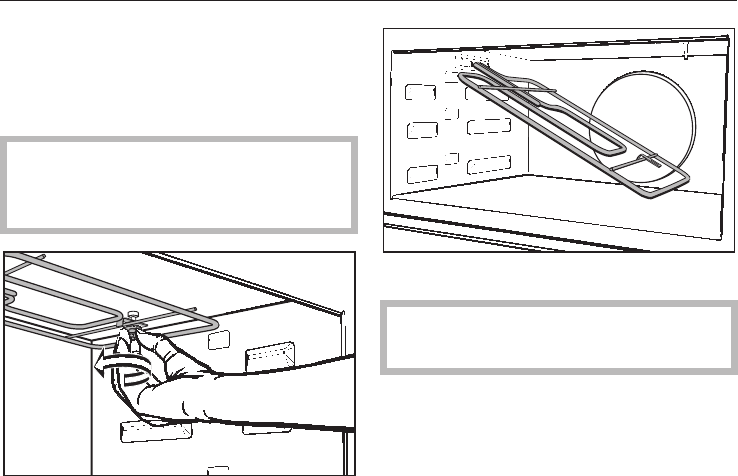
Oven interior roof
If the oven interior roof is badly soiled,
the grill element can be lowered to
make cleaning easier.
,Make sure the oven heating
elements are switched off and cool.
Danger of burning.
^To lower the grill element, the nut
needs to be unscrewed.
^Lower the grill element gently.
Do not use force! This can damage
the element.
^After cleaning the grill element, raise
it gently back up again. Refit the nut
and tighten to secure the grill
element back in position.
Cleaning and care
64
Door interior and door seal
,The oven interior can get hot
during use. Danger of burning.
Clean the front using a damp microfibre
cloth or with a clean sponge and a
solution of hot water and washing-up
liquid. Wipe the surfaces dry using a
soft cloth.
,Check the door and door seal at
regular intervals for any sign of
damage.
If any damage is noticed, the oven
should not be used again in
microwave mode until the fault has
been rectified by a service
technician.
Glass surfaces are susceptible to
scratches. Scratches can cause
glass surfaces to break.
When cleaning glass surfaces do not
use:
–Abrasive cleaning agents, e.g.
powder cleaners and cream cleaners
–Hard, abrasive sponges and
brushes, e.g. pot scourers
–sharp metal scrapers.
Appliance front
Remove any soiling on the front of
the appliance straight away. Soiling
that is left too long is harder to
remove, and the surface could
become discoloured or altered.
Clean the front using a damp microfibre
cloth or with a clean sponge and a
solution of hot water and washing-up
liquid. Wipe the surfaces dry using a
soft cloth.
The external surfaces of this
appliance are all susceptible to
scratching. Scratches on glass
surfaces could even cause a
breakage in certain circumstances.
Contact with unsuitable cleaning
agents can alter or discolour the
external surfaces.
Cleaning and care
65

Avoid damage to the surface. To
prevent damage to your appliance
when cleaning, do not use:
–Cleaning agents containing soda,
ammonia, acids or chlorides
–Cleaning agents containing
descaling agents
–Abrasive cleaning agents, e.g.
powder cleaners and cream cleaners
–Solvent-based cleaning agents
–Stainless steel cleaners
–Dishwasher detergent
– Oven sprays
– Glass cleaning agents
– Hard, abrasive sponges and
brushes, e.g. pot scourers
– sharp metal scrapers.
Accessories supplied
Rack
The surface has been treated with
PerfectClean enamel.
They should be cleaned according to
the cleaning instructions for
PerfectClean described in "Cleaning
and care - oven interior".
Glass tray
The glass tray can be washed in hot
water and washing-up liquid, or in the
dishwasher.
Do not use scouring agents. These
will scratch.
Boiling rod
The boiling rod can be washed in a
dishwasher.
Cleaning and care
66

With the aid of the following guide, minor problems can be easily corrected
without contacting Miele.
If you then can't remedy the problem yourself, please call Miele (see back cover
for details). Please note that a call-out charge will be applied for unnecessary ser-
vice visits where the problem could have been rectified as described in these
operating instructions.
,On no account open the appliance housing!
Installation, maintenance and repairs may only be carried out by a suitably
qualified and competent person in strict accordance with current national and
local safety regulations.
Repairs and other work by unqualified persons could be dangerous. The
manufacturer cannot be held liable for unauthorised work. Ensure current is not
supplied until after maintenance or repair work has been carried out.
Problem Possible cause and remedy
The display is dark. – Check whether the time display is set so that it does
not appear in the display (see "Settings %–Pi").
– Check that the appliance is plugged into the mains
supply and switched on at the socket.
– Check whether the mains fuse has tripped. If it has,
contact a qualified electrician or Miele.
A programme will not
start.
– Check that, if using a programme with microwave,
the door is shut properly.
–Check that a power level and duration have been
entered if operating in microwave mode .
–Check that, if operating with a combination
programme, the following have been entered: a
power level, a duration for the microwave mode and
a temperature for the conventional oven operating
mode.
If the door is opened
whilst the oven is
operating on microwave
solo, the oven will stop
making a noise.
This is because the cooling fan switches off when the
door is opened.
It does not indicate a fault.
Problem solving guide
67
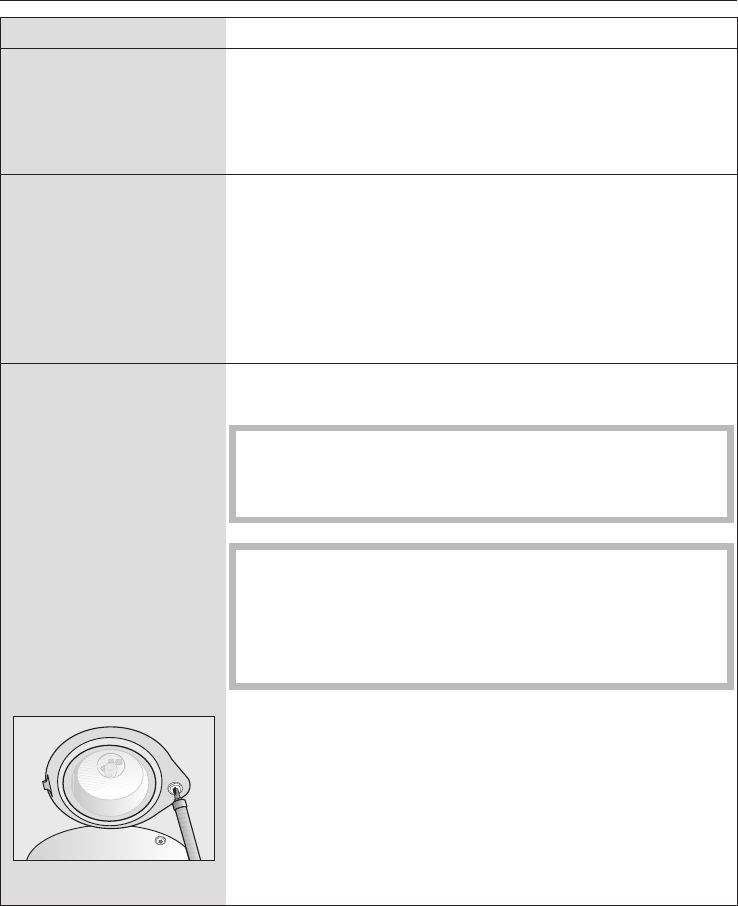
Problem Possible cause and remedy
A noise is heard after a
programme has
finished.
The cooling fan continues to run for a while after the
oven has been switched off to prevent any humidity
building up in the oven, on the control panel or on the
oven housing unit. When the temperature has fallen
sufficiently, the fan switches off automatically.
An abnormal sound can
be heard when the
oven is operating in
microwave mode.
Check if there are sparks caused by using metal dishes
(see "Suitable containers for microwave ovens").
Check if the food is covered with aluminium foil.
Remove the foil.
Check if the rack is inside the oven.
Always use the glass tray when using the oven in
Microwave solo mode.
The microwave works
and the oven heats up,
but the interior lighting
does not come on.
Check if the halogen lamp is defective.
If so, it needs to be replaced as follows.
Disconnect the appliance from the electricity supply
(switch off and unplug at the socket, or remove the
fuse, or switch off at the isolator as appropriate).
The lamp cover consists of two parts: a glass piece
and a mounting.
Hold the lamp cover securely when removing it so
that it doesn't fall. Place a tea towel over the floor of
the oven and the open door to protect them.
^Remove the screw to the lamp cover using a T20 torx
screwdriver, and take off the cover.
^Pull the halogen lamp out.
Problem solving guide
68
^Replace the halogen lamp.
Specification:
12 V, 10 W,
heat resistant to 300 °C,
fitting G4, Osram, type 64418.
Do not touch the halogen lamp with bare fingers.
Please follow the manufacturer's instructions.
^Replace the glass piece in the mounting, and refit the
lamp cover. Make sure that the lug on the mounting is
correctly located in the notch in the roof of the oven,
then screw the mounting back into place.
^Reconnect the appliance to the mains supply.
Fault messages in the
display
Possible cause and remedy
Fault messages are
indicated by
"Fault" plus a number.
Call Miele.
Problem solving guide
69
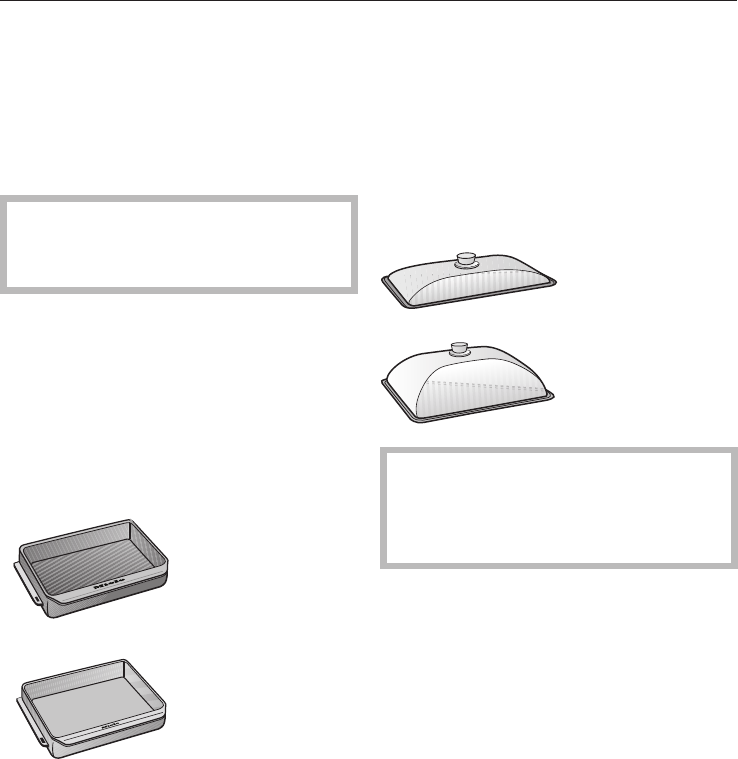
Miele offers a range of useful accessories, as well as cleaning and conditioning
products for your appliance. These products can be purchased via the internet at
www.miele-shop.com or from Miele (see back cover for contact details) or your
Miele Chartered Agent.
Gourmet oven dish
Do not use the gourmet oven dish
with functions which use microwave
power.
The dish has a non-stick coating.
Place it on the glass tray on the lowest
shelf in the oven.
It is available in two sizes.
Please state the relevant model number
when ordering:
– HUB 61-22/HUB 62-22 (Depth: 22 cm)
–HUB 61-35 (Depth: 35 cm)
Gourmet oven dish lid
A lid is available separately.
The gourmet oven dish HUB 61-35
cannot be placed in the oven with
the lid on. This exceeds the height of
the oven cavity.
When ordering a lid, please specify the
gourmet oven dish it is to be used with
(22 cm or 35 cm deep).
Optional accessories
70
Pizza dish
Do not use the pizza dish with
functions which use microwave
power.
This circular pan is suitable for cooking
pizzas, flat cakes made with yeast or
whisked mixtures, sweet and savoury
tarts, baked desserts, and can also be
used for frozen cakes and pizzas.
The surface has been treated with
PerfectClean enamel.
Original Miele all purpose microfibre
cloth
Light soiling and fingerprints can be
easily removed with the microfibre
cloth.
Original Miele oven cleaner
Suitable for removing stubborn soiling.
It is not necessary to pre-heat the oven
beforehand.
Optional accessories
71

After sales service
In the event of any faults which you
cannot remedy yourself, please contact
–your Miele Chartered Agent
or
–Miele.
You will find the contact details for
Miele on the back cover of this
manual.
When contacting Miele, please quote
the model and serial number of your
appliance.
These are given on the data plate
which is located on the front of the oven
cavity.
Warranty
The warranty for this appliance is 2
years.
For further information, please refer to
your warranty booklet.
After sales service and warranty
72

All electrical work should be carried out
by a competent person, in accordance
with national and local safety
regulations.
Depending on the version, the
appliance is supplied with a mains
cable, or a mains cable and plug for
connection to AC 50 Hz, 230 V.
The voltage, rated load and fuse rating
are given on the data plate situated at
the front of the oven interior. Please
ensure that these match the household
mains supply.
For extra safety it is advisable to install
a residual current device (RCD) with a
trip current of 30 mA. Connection for
the appliance should be made via a
suitable isolator which complies with
national and local regulations, and
which is accessible after the appliance
has been built in.
Test marks
Electrical safety, C-Tick Mark
Electrically suppressed according to
AS/NZS 1044
WARNING
THIS APPLIANCE MUST BE
EARTHED
Electrical connection
73
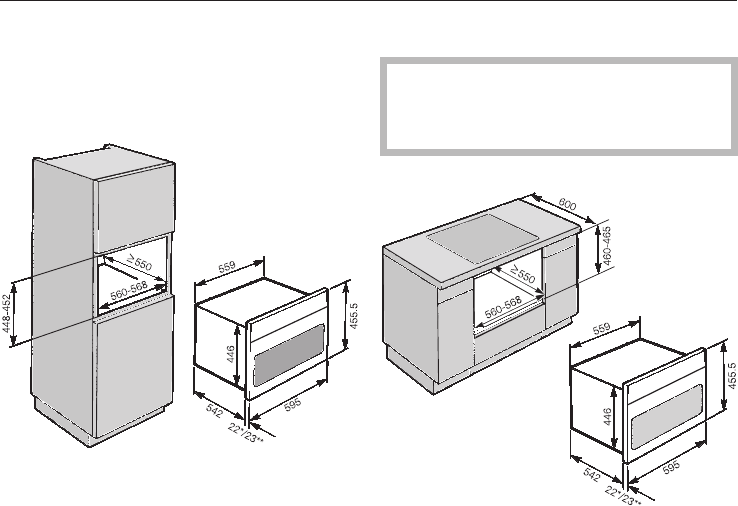
Appliance dimensions and unit
cut-out
Installation in a tall unit
* Appliances with glass front
** Appliances with metal front
Installation in a base unit
If fitted underneath a hob, the
installation instructions for the hob
must also be taken into account.
* Appliances with glass front
** Appliances with metal front
Installation
74
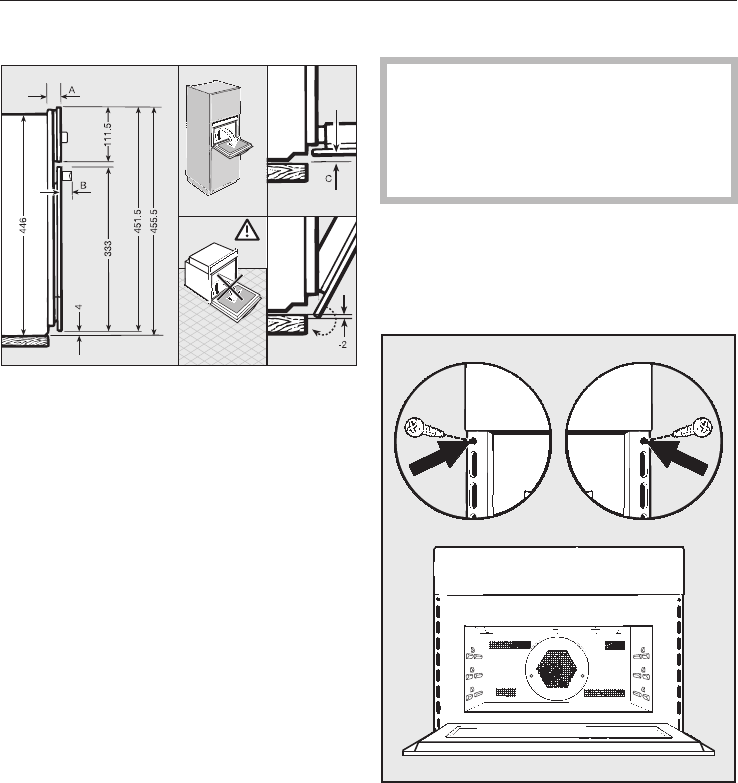
Front dimensions
AAppliances with glass front: 22 mm
Appliances with metal front: 23 mm
BH 5030: 53.2 mm
H 5040: 47.5 mm
CAppliances with glass front: 1.5 mm
Appliances with metal front:
0.5 mm
Installation
,The appliance must not be
operated until it has been correctly
installed in its housing unit.
Otherwise it poses an electric shock
hazard.
^Connect the appliance to the
electricity supply.
^Place the oven into the oven housing
unit as far as the oven trim and align.
^Open the door, and with two screws
secure the appliance to the side
walls of the furniture unit through the
holes in the oven trim.
Installation
75
Alteration rights reserved / 22 / 1311
(H 5030 BM, H 5040 BM)
M.-Nr. 07 954 010 / 01
